Everyday health
Blood Pressure Log
A cuff that talks to your phone, a watch that forgets by lunch.
Mankiet mówi do telefonu, zegarek zapomina do obiadu.
Eine Manschette, die mit dem Smartphone spricht, eine Uhr, die es bis zum Mittagessen wieder vergisst.
Un brassard qui communique avec votre téléphone, une montre qui a tout oublié à midi.
Un tensiómetro que se conecta al teléfono, un reloj que lo olvida al mediodía.
Een manchet die communiceert met je telefoon, een horloge dat het voor de lunch alweer vergeten is.
スマホと連携する血圧計カフがあっても、昼には忘れてしまうスマートウォッチ。
Un bracciale che comunica con il telefono, un orologio che all'ora di pranzo ha già dimenticato.
血压计能同步到手机,手表却到了中午就忘得一干二净。
Манжета передает данные на телефон, а часы забывают все уже к обеду.
Uma braçadeira que conversa com o celular, um relógio que esquece até a hora do almoço.
Manžeta, která posílá data do telefonu, a hodinky, které do oběda všechno zapomenou.
Uma braçadeira que comunica com o telemóvel, um relógio que se esquece até ao almoço.
스마트폰과 연동되는 커프, 점심때면 잊어버리는 시계.
En manschett som pratar med telefonen, en klocka som har glömt allt till lunch.
En manchet, der taler med din telefon, et ur, der har glemt det til frokost.
En mansjett som snakker med telefonen, en klokke som har glemt det til lunsj.
壓脈帶能與手機連線,手錶卻到了午餐時間就全忘了。
Mansetti, joka juttelee puhelimellesi, kello, joka unohtaa lounaaseen mennessä.
Tlakomer, ktorý komunikuje s telefónom, hodinky, ktoré do obeda zabudnú.
Manšeta, ki se povezuje s telefonom, ura, ki do kosila že vse pozabi.
Manset yang terhubung ke ponsel, jam tangan yang sudah lupa menjelang makan siang.
Egy mandzsetta, amely a telefonoddal kommunikál, egy óra, amely ebédre már elfelejti.
ปลอกแขนวัดความดันที่เชื่อมต่อกับโทรศัพท์ แต่นาฬิกากลับลืมข้อมูลไปตั้งแต่ก่อนมื้อเที่ยง
Μια περιχειρίδα που επικοινωνεί με το τηλέφωνό σου, ένα ρολόι που το ξεχνάει μέχρι το μεσημέρι.
Manžeta koja komunicira s telefonom, sat koji sve zaboravi do ručka.
שרוול שמדבר עם הטלפון, שעון ששוכח הכל עד ארוחת הצהריים.
Kaf yang berhubung ke telefon anda, jam tangan yang terlupa menjelang tengah hari.
Coming to Connect IQ Unlock €4.99

Beta: free for 30 days
The app works fully and for free for the first 30 days after you first open it. After that you can buy a one-time unlock code below. No subscription.
Blood Pressure Log is a quick place to write down a reading you took with any cuff. There is no blood pressure diary built into Connect IQ, so the numbers end up in a notebook or nowhere. This app logs a reading in as few as 4 button presses (a few more when the numbers changed; quick repeated UP/DOWN presses speed up to steps of 5 and 10) and keeps the history on your wrist.
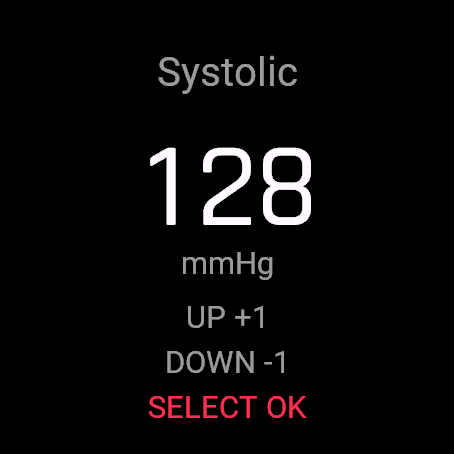
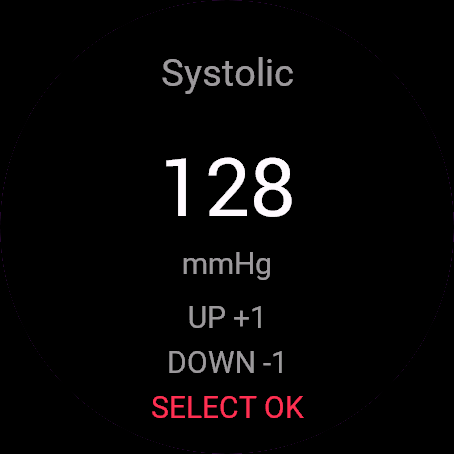
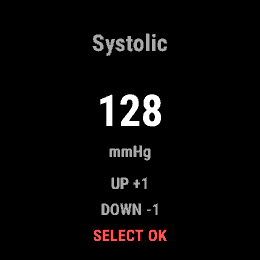
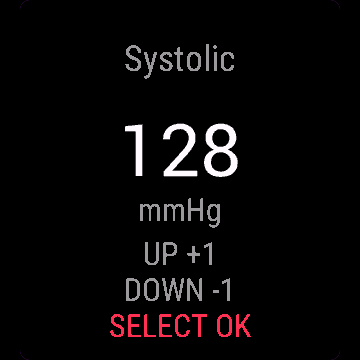
- Add systolic, diastolic and pulse with a big number picker, starting from your last reading
- Pulse defaults to your current heart rate when the sensor has one, otherwise your last entry
- Tag morning, evening or other, set automatically from the time of day
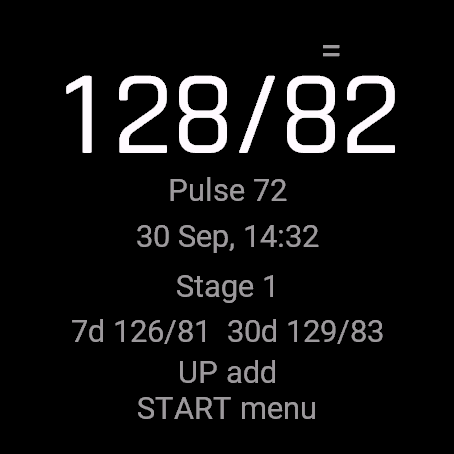
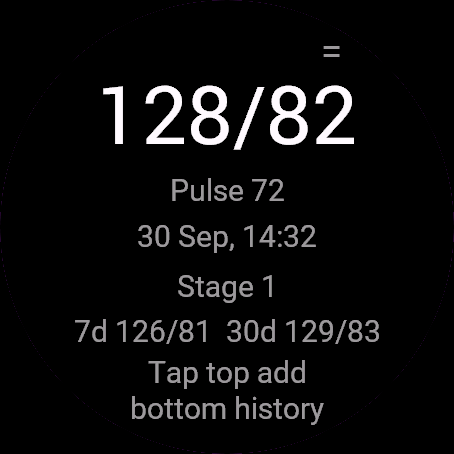
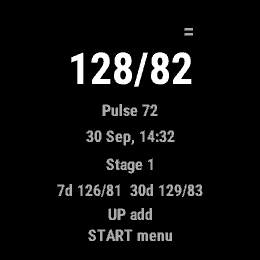
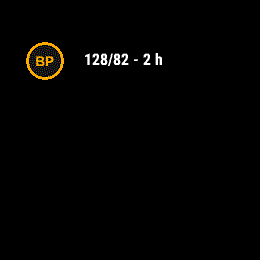
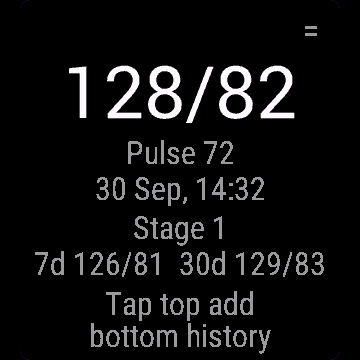
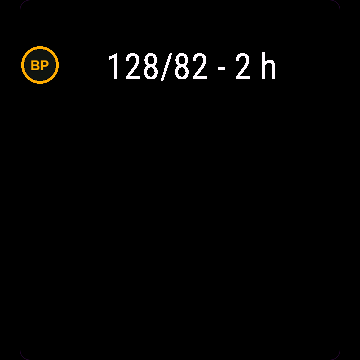
- Big display of the last reading with date, time and a 7 and 30 day average
- History of your last 50 readings, delete any entry from its menu
- Category label (Normal to Very high) from the 2017 ACC/AHA table, informational only, can be hidden
- Not a medical device. Discuss your readings with a doctor.
Dziennik ciśnienia to szybkie miejsce na zapisanie pomiaru zrobionego dowolnym mankietem. W Connect IQ nie ma dziennika ciśnienia, więc liczby trafiają do notesu albo nigdzie. Ta aplikacja zapisuje pomiar już w 4 naciśnięciach (kilku więcej, gdy liczby się zmieniły; szybkie powtórzone GÓRA/DÓŁ przyspieszają do kroków po 5 i 10) i trzyma historię na nadgarstku.
- Skurczowe, rozkurczowe i puls wielkim licznikiem, zaczynając od ostatniego pomiaru
- Puls domyślnie z czujnika tętna, jeśli jest dostępny, inaczej z ostatniego wpisu
- Tag rano/wieczór/inna pora, ustawiany automatycznie z godziny
- Duży ostatni pomiar z datą, godziną i średnią z 7 i 30 dni
- Historia ostatnich 50 pomiarów, usunięcie wpisu z jego menu
- Kategoria (od Prawidłowe do Bardzo wysokie) z tabeli ACC/AHA 2017, tylko informacyjnie, można ukryć
- To nie jest wyrób medyczny. Omów swoje pomiary z lekarzem.
Mit Blood Pressure Log trägst du in Sekunden einen Messwert ein, den du mit einer beliebigen Manschette gemessen hast. In Connect IQ gibt es kein integriertes Blutdrucktagebuch, daher landen die Zahlen meist in einem Notizbuch oder nirgendwo. Diese App erfasst eine Messung mit nur 4 Tastendrücken (ein paar mehr, wenn sich die Werte geändert haben; schnelles wiederholtes Drücken von UP/DOWN beschleunigt auf 5er- und 10er-Schritte) und behält den Verlauf direkt am Handgelenk.
- Systolischen und diastolischen Wert sowie Puls über eine große Zahlenauswahl erfassen, ausgehend von der letzten Messung
- Puls übernimmt standardmäßig die aktuelle Herzfrequenz, falls der Sensor einen Wert liefert, sonst den letzten Eintrag
- Als morgens, abends oder sonstiges markieren, automatisch anhand der Tageszeit festgelegt
- Große Anzeige des letzten Messwerts mit Datum, Uhrzeit und einem 7- und 30-Tage-Durchschnitt
- Verlauf der letzten 50 Messungen, Einträge können über das Menü gelöscht werden
- Kategorie-Einstufung (Normal bis Sehr hoch) nach der Tabelle der ACC/AHA 2017, rein informativ, kann ausgeblendet werden
- Kein Medizinprodukt. Besprich deine Messwerte mit einem Arzt.
Blood Pressure Log est un moyen rapide de noter une mesure prise avec n'importe quel brassard. Il n'y a aucun carnet de tension artérielle intégré dans Connect IQ, les chiffres finissent donc dans un carnet ou nulle part. Cette application enregistre une mesure en seulement 4 pressions de bouton (un peu plus quand les chiffres changent ; des pressions répétées rapides sur UP/DOWN accélèrent par paliers de 5 et 10) et conserve l'historique à votre poignet.
- Ajoutez systolique, diastolique et pouls avec un grand sélecteur de chiffres, en partant de votre dernière mesure
- Le pouls prend par défaut votre fréquence cardiaque actuelle si le capteur en a une, sinon votre dernière saisie
- Marquez matin, soir ou autre, défini automatiquement selon le moment de la journée
- Grand affichage de la dernière mesure avec date, heure et moyenne sur 7 et 30 jours
- Historique de vos 50 dernières mesures, supprimez n'importe quelle entrée depuis son menu
- Indicateur de catégorie (Normal à Très élevé) issu du tableau ACC/AHA 2017, à titre informatif uniquement, peut être masqué
- Ceci n'est pas un dispositif médical. Discutez de vos mesures avec un médecin.
Blood Pressure Log es un lugar rápido para anotar una medición tomada con cualquier tensiómetro. No hay ningún diario de tensión arterial integrado en Connect IQ, así que los valores acaban en una libreta o en ninguna parte. Esta app registra una medición en tan solo 4 pulsaciones de botón (unas pocas más si los valores han cambiado; pulsar rápidamente de forma repetida UP/DOWN acelera el cambio en pasos de 5 y 10) y guarda el historial en tu muñeca.
- Añade sistólica, diastólica y pulso con un selector de números grandes, empezando por tu última medición
- El pulso toma por defecto tu frecuencia cardíaca actual si el sensor la detecta; de lo contrario, tu último registro
- Etiqueta mañana, tarde u otra, asignada automáticamente según la hora del día
- Pantalla grande con la última medición, fecha, hora y promedios de 7 y 30 días
- Historial de tus últimas 50 mediciones, con opción de eliminar cualquier entrada desde su menú
- Etiqueta de categoría (de Normal a Muy alta) según la tabla ACC/AHA de 2017, solo informativa, se puede ocultar
- No es un dispositivo médico. Consulta tus lecturas con un médico.
Blood Pressure Log is een snelle plek om een meting te noteren die je met welke manchet dan ook hebt gedaan. Er is geen bloeddrukdagboek ingebouwd in Connect IQ, dus belanden de cijfers in een schriftje of nergens. Deze app registreert een meting in slechts 4 drukken op de knop (iets meer wanneer de waarden zijn veranderd; snel herhaaldelijk op OMHOOG/OMLAAG drukken versnelt naar stappen van 5 en 10) en bewaart de geschiedenis op je pols.
- Voeg systolisch, diastolisch en pols toe met een grote cijferkiezer, uitgaande van je laatste meting
- Pols gebruikt standaard je huidige hartslag wanneer de sensor die heeft, anders je laatste invoer
- Label ochtend, avond of overig, automatisch ingesteld op basis van het tijdstip
- Grote weergave van de laatste meting met datum, tijd en een gemiddelde over 7 en 30 dagen
- Geschiedenis van je laatste 50 metingen, verwijder elke invoer via het menu
- Categorielabel (Normaal tot Zeer hoog) uit de ACC/AHA-tabel van 2017, uitsluitend ter informatie, kan worden verborgen
- Geen medisch hulpmiddel. Bespreek je metingen met een arts.
Blood Pressure Log は、どんな血圧計カフで測定した値でもすばやく記録できるアプリです。Connect IQ には血圧記録の機能が組み込まれていないため、測定値はノートに書くか、どこにも残らないままになりがちです。このアプリなら、わずか 4 回のボタン操作で測定値を記録でき(数値が変わった場合はもう少し必要ですが、UP/DOWN を素早く連続で押すと 5 や 10 刻みで早送りできます)、履歴を手首のウォッチ上に残せます。
- 大きな数値ピッカーで最高血圧、最低血圧、脈拍を入力。前回の測定値からスタート
- 脈拍はセンサーが測定中なら現在の心拍数を初期値とし、なければ前回の入力値を反映
- 朝、晩、その他のタグ付け。時間帯から自動設定
- 日時と 7 日間および 30 日間の平均値とともに、最新の測定値を大きく表示
- 過去 50 回分の測定履歴。メニューから任意の項目を削除可能
- 2017 ACC/AHA 表に基づくカテゴリー表示(Normal から Very high)。情報提供のみを目的としており、非表示にも設定可能
- 医療機器ではありません。測定値については医師にご相談ください。
Blood Pressure Log è uno spazio rapido dove annotare una misurazione presa con qualsiasi bracciale. Non esiste un diario della pressione integrato in Connect IQ, quindi i numeri finiscono su un blocco note o da nessuna parte. Questa app registra una misurazione con appena 4 pressioni di pulsanti (qualcuna in più se i numeri sono cambiati; pressioni rapide e ripetute di UP/DOWN accelerano a intervalli di 5 e 10) e tiene la cronologia al polso.
- Inserisci sistolica, diastolica e pulsazioni con un selettore numerico grande, partendo dalla tua ultima misurazione
- Le pulsazioni usano come valore predefinito la frequenza cardiaca attuale se il sensore la rileva, altrimenti la tua ultima voce
- Etichetta mattina, sera o altro, impostata automaticamente in base all'ora
- Visualizzazione grande dell'ultima misurazione con data, ora e media a 7 e 30 giorni
- Cronologia delle ultime 50 misurazioni, elimina qualsiasi voce dal suo menu
- Etichetta di categoria (da Normale a Molto alta) dalla tabella ACC/AHA 2017, a solo scopo informativo, disattivabile
- Non è un dispositivo medico. Parla delle tue misurazioni con un medico.
Blood Pressure Log 可以让你快速记录使用任何血压计测得的读数。Connect IQ 没有内置的血压日记功能,所以测出来的数据往往只能记在笔记本上,甚至无处可寻。这款应用最少只需按 4 次按键即可记录一次读数(数值有变化时需多按几次;快速连续按 UP/DOWN 可加速以 5 和 10 为步长调节),并将历史记录完整保存在手腕上。
- 通过大号数字选择器输入收缩压、舒张压和脉搏,默认从上一次的读数开始
- 如果传感器测得当前心率,脉搏将默认采用该心率值,否则采用上一次记录的值
- 标记早间、晚间或其他,根据时间自动设定
- 大字号显示最近一次读数,包含日期、时间和 7 天及 30 天平均值
- 查看最近 50 次读数的历史记录,可从其菜单中删除任意条目
- 分类标签(正常到极高)源自 2017 ACC/AHA 血压标准表格,仅供参考,可隐藏
- 非医疗设备。请向医生咨询您的读数。
Blood Pressure Log позволяет быстро записать показания любого тонометра. В Connect IQ нет встроенного дневника давления, поэтому цифры оседают в блокноте или теряются. Это приложение сохраняет измерение всего за 4 нажатия кнопок (чуть больше, если значения изменились; быстрые повторные нажатия UP/DOWN ускоряют шаг до 5 и 10) и хранит историю прямо на руке.
- Ввод систолического, диастолического давления и пульса с помощью крупного селектора чисел, начиная с последнего измерения
- Пульс по умолчанию берется с датчика пульса (если есть сигнал), иначе подставляется из последней записи
- Отметка утро, вечер или другое, выставляется автоматически по времени суток
- Крупный экран последнего измерения с датой, временем и средними значениями за 7 и 30 дней
- История последних 50 измерений, любую запись можно удалить из ее меню
- Категория давления (от «Нормальное» до «Очень высокое») по таблице 2017 ACC/AHA, носит исключительно справочный характер, можно скрыть
- Не является медицинским прибором. Обсуждайте свои показатели с врачом.
Blood Pressure Log é um lugar rápido para anotar uma medição feita com qualquer braçadeira. Não há um diário de pressão arterial integrado ao Connect IQ, então os números acabam em um caderno ou em lugar nenhum. Este app registra uma medição com apenas 4 toques de botão (alguns a mais quando os números mudam; toques rápidos e repetidos em UP/DOWN aceleram em passos de 5 e 10) e mantém o histórico no seu pulso.
- Adicione sistólica, diastólica e pulso com um seletor numérico grande, começando pela sua última medição
- O pulso assume por padrão a sua frequência cardíaca atual se o sensor tiver leitura, caso contrário, seu último registro
- Marque como manhã, noite ou outro, definido automaticamente de acordo com o horário
- Exibição grande da última medição com data, hora e média de 7 e 30 dias
- Histórico das suas últimas 50 medições, com opção de excluir qualquer registro pelo menu
- Rótulo de categoria (Normal a Muito alta) com base na tabela 2017 ACC/AHA, apenas informativo, pode ser ocultado
- Não é um dispositivo médico. Converse sobre suas medições com um médico.
Blood Pressure Log je rychlé místo pro záznam naměřených hodnot z jakékoli manžety. V Connect IQ není žádný vestavěný deník krevního tlaku, takže čísla končí v sešitě nebo nikde. Tato aplikace zaznamená měření na pouhá 4 stisknutí tlačítek (o pár víc, když se hodnoty změnily; rychlé opakované stisky UP/DOWN zrychlí krok na 5 a 10) a uchovává historii přímo na vašem zápěstí.
- Zadání systolického tlaku, diastolického tlaku a tepu velkým číselníkem, který začíná na vaší poslední hodnotě
- Tep se předvyplní podle aktuálního srdečního tepu ze snímače, pokud je k dispozici, jinak podle posledního záznamu
- Označení ráno, večer nebo jiné, nastavené automaticky podle denní doby
- Velké zobrazení posledního měření s datem, časem a průměrem za 7 a 30 dní
- Historie posledních 50 měření, možnost smazat libovolný záznam z jeho menu
- Označení kategorie (Normální až Velmi vysoký) podle tabulky ACC/AHA z roku 2017, pouze informativní, lze skrýt
- Není zdravotnický prostředek. Naměřené hodnoty konzultujte s lékařem.
Blood Pressure Log é um local rápido para registar uma medição feita com qualquer braçadeira. Não existe nenhum diário de pressão arterial integrado no Connect IQ, pelo que os valores vão parar a um caderno ou a lado nenhum. Esta aplicação regista uma medição com apenas 4 toques de botão (mais alguns se os valores tiverem mudado; toques rápidos e repetidos em UP/DOWN aceleram em passos de 5 e 10) e mantém o histórico no seu pulso.
- Adicione sistólica, diastólica e pulsação com um seletor de números grandes, começando pela sua última medição
- A pulsação assume por predefinição o seu ritmo cardíaco atual se o sensor o detetar, caso contrário a sua última entrada
- Marque manhã, noite ou outro, definido automaticamente a partir da hora do dia
- Apresentação ampla da última medição com data, hora e média de 7 e 30 dias
- Histórico das suas últimas 50 medições, elimine qualquer entrada a partir do respetivo menu
- Etiqueta de categoria (Normal a Muito alta) da tabela ACC/AHA de 2017, apenas informativa, pode ser ocultada
- Não é um dispositivo médico. Discuta as suas medições com um médico.
Blood Pressure Log는 어떤 커프로 측정한 수치든 빠르게 기록할 수 있는 공간입니다. Connect IQ에는 혈압 일기 기능이 내장되어 있지 않아 측정값이 공책에 적히거나 어디에도 남지 않게 됩니다. 이 앱은 단 4번의 버튼 조작으로 측정값을 기록하며(수치가 달라졌을 때는 몇 번 더 누르면 됩니다. UP/DOWN 버튼을 빠르게 연속으로 누르면 5 및 10 단위로 빠르게 조절됩니다), 기록 내역을 손목에 그대로 보관합니다.
- 이전 측정값에서 시작하여 큰 숫자 선택기로 수축기, 이완기 및 맥박 입력
- 센서에 측정값이 있으면 현재 심박수가 맥박의 기본값으로 지정되며, 그렇지 않으면 마지막 입력값 사용
- 시간대에 따라 자동으로 아침, 저녁, 기타 태그 지정
- 날짜, 시간, 7일 및 30일 평균과 함께 마지막 측정값 대형 화면 표시
- 최근 50회 측정 기록 보관, 메뉴에서 원하는 기록 삭제 가능
- 2017 ACC/AHA 기준 표에 따른 범주 라벨(Normal - Very high), 단순 정보용이며 숨김 가능
- 의료 기기가 아닙니다. 측정 수치는 의사와 상담하십시오.
Blood Pressure Log är en snabb plats att skriva ner en mätning du gjort med vilken manschett som helst. Det finns ingen inbyggd blodtrycksdagbok i Connect IQ, så värdena hamnar i ett anteckningsblock eller ingenstans alls. Den här appen loggar en mätning med så få som 4 knapptryck (några fler när siffrorna har ändrats; snabba upprepade tryck på UP/DOWN växlar upp till steg om 5 och 10) och sparar historiken på handleden.
- Lägg till systoliskt, diastoliskt och puls med en stor sifferväljare, med start från din senaste mätning
- Pulsen förväljs till din aktuella puls när sensorn har ett värde, annars din senaste inmatning
- Märk med morgon, kväll eller annat, sätts automatiskt utifrån tid på dygnet
- Stor visning av den senaste mätningen med datum, tid samt 7- och 30-dagarsgenomsnitt
- Historik över dina senaste 50 mätningar, ta bort valfri inmatning via dess meny
- Kategorietikett (Normal till Mycket hög) från 2017 års ACC/AHA-tabell, endast i informationssyfte, kan döljas
- Inte en medicinteknisk produkt. Diskutera dina mätvärden med en läkare.
Blood Pressure Log er et hurtigt sted at notere en måling, du har taget med en vilkårlig manchet. Der er ingen indbygget blodtryksdagbog i Connect IQ, så tallene ender i en notesbog eller ingen steder. Denne app logger en måling med så få som 4 knaptryk (lidt flere, når tallene har ændret sig; hurtige gentagne tryk på UP/DOWN skifter hurtigere i trin på 5 og 10) og beholder historikken på dit håndled.
- Tilføj systolisk, diastolisk og puls med en stor talvælger, der starter fra din seneste måling
- Puls bruger som standard din aktuelle puls, hvis sensoren har en, ellers din seneste indtastning
- Markér morgen, aften eller andet, indstillet automatisk ud fra tidspunktet på dagen
- Stor visning af seneste måling med dato, klokkeslæt samt et 7- og 30-dages gennemsnit
- Historik over dine seneste 50 målinger, slet en vilkårlig registrering fra dens menu
- Kategori-etiket (Normal til Meget høj) fra 2017 ACC/AHA-tabellen, udelukkende til orientering, kan skjules
- Ikke medicinsk udstyr. Drøft dine målinger med en læge.
Blood Pressure Log er et raskt sted å notere en måling du tok med en hvilken som helst mansjett. Det finnes ingen innebygd blodtrykksdagbok i Connect IQ, så tallene ender opp i en notatbok eller ingen steder. Denne appen logger en måling med så få som 4 knappetrykk (litt flere hvis tallene har endret seg; raske gjentatte trykk på UP/DOWN øker farten til trinn på 5 og 10) og beholder historikken på håndleddet.
- Legg til systolisk, diastolisk og puls med en stor tallvelger, med utgangspunkt i din forrige måling
- Puls settes automatisk til din nåværende puls når sensoren har en, ellers din forrige oppføring
- Merk morgen, kveld eller annet, angitt automatisk ut fra tid på døgnet
- Stor visning av siste måling med dato, klokkeslett og et 7- og 30-dagers gjennomsnitt
- Historikk over dine siste 50 målinger, slett enhver oppføring fra menyen
- Kategorietikett (Normal til Veldig høy) fra 2017 ACC/AHA-tabellen, kun til informasjon, kan skjules
- Ikke et medisinsk apparat. Diskuter målingene dine med en lege.
Blood Pressure Log 是能快速記錄任何壓脈帶測量數值的工具。Connect IQ 沒有內建的血壓日記,因此數據往往只能寫在筆記本上或不知所蹤。此應用程式最少只需按 4 下按鍵即可記錄一筆讀數(數值變動較大時多按幾下;快速連續按 UP/DOWN 可加速以 5 和 10 為級距調整),並將歷史記錄保留在您的手腕上。
- 透過大數字選擇器輸入收縮壓、舒張壓與脈搏,預設從上一筆讀數開始
- 感測器有讀數時脈搏預設為目前心率,否則預設為上一筆記錄
- 標記早晨、傍晚或其他,依當前時段自動設定
- 大字體顯示最新讀數,包含日期、時間以及 7 與 30 天平均值
- 記錄最近 50 筆讀數歷史,可從個別選單中刪除任何記錄
- 採用 2017 ACC/AHA 指南標準的分級標籤(正常至非常高),僅供參考,可自由隱藏
- 本產品非醫療器材。請與醫師討論您的測量讀數。
Blood Pressure Log on nopea paikka kirjata millä tahansa mansetilla mitattu lukema. Connect IQ:ssa ei ole sisäänrakennettua verenpainepäiväkirjaa, joten lukemat päätyvät vihkoon tai jäävät kokonaan tallentamatta. Tämä sovellus kirjaa lukeman parhaimmillaan vain 4 napinpainalluksella (muutamalla lisää, jos numerot ovat muuttuneet; nopeat toistuvat UP/DOWN-painallukset nopeuttavat siirtymistä 5 ja 10 pykälän askeliin) ja säilyttää historian ranteessasi.
- Lisää systolinen, diastolinen ja pulssi selkeällä numerovalitsimella edellisestä lukemastasi aloittaen
- Pulssin oletusarvona on nykyinen sykkeesi, jos anturi saa sen, muuten edellinen kirjauksesi
- Merkitse aamu, ilta tai muu, valitaan automaattisesti kellonajan mukaan
- Viimeisimmän lukeman suuri näyttö päivämäärällä, ajalla sekä 7 ja 30 päivän keskiarvolla
- Viimeisimmän 50 lukeman historia, poista mikä tahansa merkintä sen valikosta
- Luokitus (Normaalista Erittäin korkeaan) vuoden 2017 ACC/AHA-taulukosta, vain tiedoksi, voidaan piilottaa
- Ei lääkinnällinen laite. Keskustele mittaustuloksistasi lääkärin kanssa.
Blood Pressure Log je rýchle miesto na zapísanie merania z akéhokoľvek tlakomera. V Connect IQ nie je žiadny vstavaný denník krvného tlaku, takže čísla končia v zošite alebo nikde. Táto aplikácia zaznamená meranie už na 4 stlačenia tlačidiel (o niečo viac, keď sa čísla zmenili; rýchle opakované stláčanie UP/DOWN zrýchľuje na kroky po 5 a 10) a uchováva históriu na vašom zápästí.
- Pridajte systolický, diastolický tlak a pulz pomocou veľkého číselníka, začínajúc od vášho posledného merania
- Pulz sa predvolene nastaví podľa vašej aktuálnej tepovej frekvencie, ak ju snímač meria, inak podľa posledného záznamu
- Označenie ráno, večer alebo iné, nastavené automaticky podľa dennej doby
- Veľké zobrazenie posledného merania s dátumom, časom a priemerom za 7 a 30 dní
- História vašich posledných 50 meraní, možnosť vymazať akýkoľvek záznam z jeho menu
- Označenie kategórie (Normálny až Veľmi vysoký) podľa tabuľky 2017 ACC/AHA, len informatívne, dá sa skryť
- Nie je to zdravotnícka pomôcka. O svojich nameraných hodnotách sa poraďte s lekárom.
Blood Pressure Log je hitro mesto za zapis meritev, opravljenih s poljubno manšeto. V Connect IQ ni vgrajenega dnevnika krvnega tlaka, zato številke pristanejo v beležki ali nikjer. Ta aplikacija zabeleži meritev v samo 4 pritiskih gumbov (nekaj več, če so se številke spremenile; hitri zaporedni pritiski UP/DOWN pospešijo korake na 5 in 10) in hrani zgodovino na vašem zapestju.
- Vnos sistoličnega in diastoličnega tlaka ter utripa z velikim izbirnikom številk, z začetkom pri zadnji meritvi
- Utrip se privzeto nastavi na vaš trenutni srčni utrip, če ga senzor zazna, sicer na vaš zadnji vnos
- Oznaka jutro, večer ali drugo, določena samodejno glede na del dneva
- Velik prikaz zadnje meritve z datumom, časom ter povprečjem za 7 in 30 dni
- Zgodovina zadnjih 50 meritev, izbris katerega koli vnosa prek njegovega menija
- Oznaka kategorije (Normalno do Zelo visoko) iz tabele 2017 ACC/AHA, le informativna, lahko jo skrijete
- Ni medicinski pripomoček. O svojih meritvah se posvetujte z zdravnikom.
Blood Pressure Log adalah tempat cepat untuk mencatat hasil pengukuran dari manset tensi mana pun. Tidak ada buku harian tekanan darah bawaan di Connect IQ, sehingga angka-angka tersebut berakhir di buku catatan atau hilang begitu saja. Aplikasi ini mencatat hasil pengukuran hanya dengan 4 kali penekanan tombol (sedikit lebih banyak jika angkanya berubah; penekanan UP/DOWN berulang dengan cepat akan melompat dalam kelipatan 5 dan 10) dan menyimpan riwayatnya di pergelangan tangan Anda.
- Tambah sistolik, diastolik, dan denyut nadi dengan pemilih angka besar, dimulai dari hasil pengukuran terakhir Anda
- Denyut nadi otomatis menggunakan detak jantung Anda saat ini jika sensor mendeteksinya, atau entri terakhir Anda
- Tandai pagi, malam, atau lainnya, yang ditentukan otomatis berdasarkan waktu
- Tampilan besar hasil pengukuran terakhir lengkap dengan tanggal, waktu, serta rata-rata 7 dan 30 hari
- Riwayat 50 pengukuran terakhir Anda, hapus entri apa pun dari menunya
- Label kategori (Normal hingga Sangat tinggi) dari tabel ACC/AHA 2017, hanya untuk informasi, dapat disembunyikan
- Bukan perangkat medis. Diskusikan hasil pengukuran Anda dengan dokter.
A Blood Pressure Log egy gyors hely a bármilyen mandzsettával mért értékek feljegyzésére. A Connect IQ nem tartalmaz beépített vérnyomásnaplót, így a számok egy füzetben vagy sehol sem kötnek ki. Ez az alkalmazás akár 4 gombnyomással rögzíti a mérést (néhány gombnyomással több, ha a számok változtak; a gyors, ismételt UP/DOWN gombnyomások 5-ös és 10-es lépésekre gyorsulnak), és a csuklódon őrzi az előzményeket.
- Szisztolés és diasztolés érték, valamint pulzus hozzáadása nagy számléptetővel, a legutóbbi mérésből kiindulva
- A pulzus alapértelmezetten az aktuális pulzusszám, ha az érzékelő méri, egyébként a legutóbbi bejegyzés
- Reggeli, esti vagy egyéb címke, amely automatikusan beáll a napszak alapján
- A legutóbbi mérés nagy méretű kijelzése dátummal, időponttal, valamint 7 és 30 napos átlaggal
- Az utolsó 50 mérés előzményei, bármelyik bejegyzés törölhető a menüjéből
- Kategóriacímke (a normálistól a nagyon magasig) a 2017-es ACC/AHA táblázat alapján, kizárólag tájékoztató jellegű, elrejthető
- Nem orvostechnikai eszköz. Beszéld meg a mért értékeket egy orvossal.
Blood Pressure Log เป็นแอปที่ให้คุณบันทึกค่าที่วัดได้จากปลอกแขนวัดความดันทุกรุ่นได้อย่างรวดเร็ว ใน Connect IQ ไม่มีสมุดบันทึกความดันโลหิตในตัว ทำให้ตัวเลขมักไปลงเอยในสมุดจดหรือไม่ก็หายไป แอปนี้ช่วยบันทึกค่าได้ด้วยการกดปุ่มเพียง 4 ครั้ง (หรือเพิ่มอีกเล็กน้อยหากตัวเลขเปลี่ยนไป การกดปุ่ม UP/DOWN ซ้ำ ๆ อย่างรวดเร็วจะปรับค่าทีละ 5 และ 10 เพื่อความรวดเร็ว) พร้อมเก็บประวัติไว้บนข้อมือของคุณ
- เพิ่มค่าความดันตัวบน ตัวล่าง และชีพจร ด้วยแป้นเลือกตัวเลขขนาดใหญ่ โดยเริ่มจากค่าที่บันทึกล่าสุด
- ชีพจรจะตั้งค่าเริ่มต้นเป็นอัตราการเต้นของหัวใจปัจจุบันเมื่อเซนเซอร์ตรวจจับได้ หรือเป็นค่าที่บันทึกล่าสุดหากไม่มีข้อมูล
- กำหนดช่วงเวลาเช้า เย็น หรืออื่น ๆ โดยตั้งค่าให้อัตโนมัติตามช่วงเวลาของวัน
- หน้าจอแสดงค่าที่บันทึกล่าสุดขนาดใหญ่พร้อมวันที่ เวลา และค่าเฉลี่ย 7 และ 30 วัน
- ประวัติการบันทึก 50 ครั้งล่าสุด พร้อมลบรายการใด ๆ ได้จากเมนู
- ป้ายบอกหมวดหมู่ (Normal ถึง Very high) อ้างอิงจากตาราง 2017 ACC/AHA เพื่อเป็นข้อมูลเบื้องต้นเท่านั้น สามารถซ่อนได้
- ไม่ใช่อุปกรณ์ทางการแพทย์ โปรดปรึกษาแพทย์เกี่ยวกับค่าความดันของคุณ
Το Blood Pressure Log είναι ένα γρήγορο μέρος για να σημειώνεις μια μέτρηση που πήρες με οποιοδήποτε πιεσόμετρο. Δεν υπάρχει ενσωματωμένο ημερολόγιο αρτηριακής πίεσης στο Connect IQ, οπότε οι αριθμοί καταλήγουν σε κάποιο σημειωματάριο ή πουθενά. Αυτή η εφαρμογή καταγράφει μια μέτρηση με μόλις 4 πατήματα κουμπιών (λίγα περισσότερα όταν οι αριθμοί έχουν αλλάξει, τα γρήγορα επαναλαμβανόμενα πατήματα UP/DOWN επιταχύνουν σε βήματα των 5 και 10) και κρατά το ιστορικό στον καρπό σου.
- Πρόσθεσε συστολική, διαστολική και σφυγμό με έναν μεγάλο επιλογέα αριθμών, ξεκινώντας από την τελευταία σου μέτρηση
- Ο σφυγμός προεπιλέγει τους τρέχοντες καρδιακούς παλμούς όταν ο αισθητήρας έχει ένδειξη, διαφορετικά την τελευταία σου καταχώριση
- Επισήμανε ως πρωί, βράδυ ή άλλο, ορίζεται αυτόματα ανάλογα με την ώρα της ημέρας
- Μεγάλη προβολή της τελευταίας μέτρησης με ημερομηνία, ώρα και μέσο όρο 7 και 30 ημερών
- Ιστορικό των τελευταίων 50 μετρήσεων, διαγραφή οποιασδήποτε καταχώρισης από το μενού της
- Ετικέτα κατηγορίας (Κανονική έως Πολύ υψηλή) από τον πίνακα ACC/AHA του 2017, μόνο για ενημέρωση, μπορεί να κρυφτεί
- Δεν είναι ιατρική συσκευή. Συζήτησε τις μετρήσεις σου με έναν γιατρό.
Blood Pressure Log je brzo mjesto za zapisivanje očitanja izmjerenog bilo kojom manžetom. U Connect IQ nema ugrađenog dnevnika krvnog tlaka, pa brojevi završe u bilježnici ili nigdje. Ova aplikacija bilježi očitanje u samo 4 pritiska tipke (nekoliko više ako su se brojevi promijenili; brzi uzastopni pritisci na UP/DOWN ubrzavaju unos na korake od 5 i 10) i čuva povijest na vašem zapešću.
- Unesite sistolički, dijastolički tlak i puls pomoću velikog birača brojeva, počevši od vašeg zadnjeg očitanja
- Puls se automatski postavlja na vaš trenutni broj otkucaja srca ako ga senzor očitava, u suprotnom na vaš zadnji unos
- Oznaka jutro, večer ili ostalo, postavlja se automatski prema dobu dana
- Veliki prikaz zadnjeg očitanja s datumom, vremenom te prosjekom za 7 i 30 dana
- Povijest vaših zadnjih 50 očitanja, uz mogućnost brisanja bilo kojeg unosa iz njegovog izbornika
- Oznaka kategorije (Normalno do Vrlo visoko) prema tablici ACC/AHA iz 2017., samo u informativne svrhe, može se sakriti
- Nije medicinski uređaj. O svojim očitanjima posavjetujte se s liječnikom.
Blood Pressure Log הוא מקום מהיר לרשום בו מדידה שלקחתם עם כל שרוול. אין יומן לחץ דם מובנה ב-Connect IQ, כך שהמספרים מגיעים למחברת או לשום מקום. אפליקציה זו מתעדת מדידה ב-4 לחיצות כפתור בלבד (עוד כמה כאשר המספרים השתנו; לחיצות מהירות וחוזרות על UP/DOWN מגבירות מהירות לצעדים של 5 ו-10) ושומרת את ההיסטוריה על פרק כף היד שלכם.
- הוסיפו לחץ סיסטולי, דיאסטולי ודופק עם בורר מספרים גדול, החל מהמדידה האחרונה שלכם
- ברירת המחדל של הדופק היא הדופק הנוכחי שלכם כאשר החיישן מזהה כזה, אחרת הרשומה האחרונה שלכם
- תיוג בוקר, ערב או אחר, מוגדר אוטומטית לפי השעה ביום
- תצוגה גדולה של המדידה האחרונה עם תאריך, שעה וממוצע של 7 ו-30 ימים
- היסטוריה של 50 המדידות האחרונות שלכם, מחקו כל רשומה מהתפריט שלה
- תווית קטגוריה (Normal עד Very high) מטבלת ACC/AHA מ-2017, לידיעה בלבד, ניתנת להסתרה
- אינו מכשיר רפואי. התייעצו עם רופא לגבי המדידות שלכם.
Blood Pressure Log ialah tempat pantas untuk mencatat bacaan yang anda ambil dengan mana-mana kaf. Tiada diari tekanan darah terbina dalam Connect IQ, jadi nombor-nombor itu sering berakhir di buku nota atau hilang begitu sahaja. Aplikasi ini merekodkan bacaan seawal 4 kali tekan butang (beberapa tekanan lagi jika nombor berubah; tekanan pantas UP/DOWN berulang kali melajukan langkah ke gandaan 5 dan 10) serta menyimpan sejarahnya pada pergelangan tangan anda.
- Tambah sistolik, diastolik dan nadi dengan pemilih nombor besar, bermula daripada bacaan terakhir anda
- Nadi ditetapkan secara lalai kepada kadar denyutan jantung semasa anda jika sensor mengesannya, atau bacaan terakhir anda jika tiada
- Tag pagi, petang atau lain-lain, ditetapkan secara automatik mengikut waktu dalam hari
- Paparan besar bacaan terakhir dengan tarikh, masa dan purata 7 serta 30 hari
- Sejarah 50 bacaan terakhir anda, padamkan sebarang catatan daripada menunya
- Label kategori (Normal hingga Sangat tinggi) daripada jadual ACC/AHA 2017, untuk maklumat sahaja, boleh disembunyikan
- Bukan peranti perubatan. Bincangkan bacaan anda dengan doktor.
How to use it
Add Blood Pressure Log to the widget loop (swipe through widgets on the watch).
Controls: UP adds a reading, START opens the menu, UP/DOWN change a value, START goes to the next step. Touch-only watches: tap the upper half of the main screen to add a reading, the lower half for history; in the picker tap the top half for +, the middle for -, the bottom edge for OK.
Dodaj Dziennik ciśnienia do karuzeli widgetów (przewiń widgety na zegarku).
Sterowanie: GÓRA dodaje odczyt, START otwiera menu, GÓRA/DÓŁ zmieniają wartość, START przechodzi do kolejnego kroku. Zegarki dotykowe: górna połowa ekranu głównego dodaje odczyt, dolna otwiera historię; w wyborze wartości górna połowa to plus, środek to minus, dolna krawędź to OK.
Füge Blood Pressure Log zur Widget-Schleife hinzu (auf der Uhr durch die Widgets wischen).
Bedienung: UP fügt eine Messung hinzu, START öffnet das Menü, UP/DOWN ändert einen Wert, START wechselt zum nächsten Schritt. Uhren nur mit Touchscreen: Tippe auf die obere Hälfte des Hauptbildschirms, um eine Messung hinzuzufügen, auf die untere für den Verlauf; in der Zahlenauswahl oben für +, in die Mitte für -, an den unteren Rand für OK tippen.
Ajoutez Blood Pressure Log à la boucle de widgets (faites défiler les widgets sur la montre).
Commandes : UP ajoute une mesure, START ouvre le menu, UP/DOWN modifient une valeur, START passe à l'étape suivante. Montres tactiles uniquement : appuyez sur la moitié supérieure de l'écran principal pour ajouter une mesure, sur la moitié inférieure pour l'historique ; dans le sélecteur, appuyez sur la moitié haute pour +, au milieu pour -, sur le bord inférieur pour OK.
Añade Blood Pressure Log al bucle de widgets (desliza por los widgets en el reloj).
Controles: UP añade una medición, START abre el menú, UP/DOWN cambian un valor, START pasa al siguiente paso. Relojes solo táctiles: toca la mitad superior de la pantalla principal para añadir una medición, la mitad inferior para el historial; en el selector, toca la mitad superior para +, el centro para -, el borde inferior para OK.
Voeg Blood Pressure Log toe aan de widgetlus (veeg op het horloge door de widgets).
Bediening: OMHOOG voegt een meting toe, START opent het menu, OMHOOG/OMLAAG past een waarde aan, START gaat naar de volgende stap. Horloges met alleen touchscreen: tik op de bovenste helft van het hoofdscherm om een meting toe te voegen, op de onderste helft voor de geschiedenis; tik in de kiezer op de bovenste helft voor +, het midden voor -, de onderrand voor OK.
Blood Pressure Log をウィジェットのループに追加してください(時計でウィジェットをスワイプして切り替えます)。
操作方法: UP で測定値を追加、START でメニューを開く、UP/DOWN で値を変更、START で次のステップへ進みます。タッチスクリーン専用ウォッチ: メイン画面の上半分をタップで測定値の追加、下半分で履歴を表示。ピッカー内では上半分をタップで +、中央で -、下端で OK。
Aggiungi Blood Pressure Log al ciclo dei widget (scorri i widget sull'orologio).
Controlli: UP aggiunge una misurazione, START apre il menu, UP/DOWN modificano un valore, START passa al passaggio successivo. Orologi solo touch: tocca la metà superiore della schermata principale per aggiungere una misurazione, la metà inferiore per la cronologia; nel selettore tocca la metà superiore per +, il centro per -, il bordo inferiore per OK.
把 Blood Pressure Log 添加到小组件循环中(在手表上滑动切换小组件)。
操作方法:UP 添加读数,START 打开菜单,UP/DOWN 更改数值,START 进入下一步。纯触屏手表:在主屏幕点击上半部分添加读数,点击下半部分查看历史记录;在选择器中点击上半部分为 +,中间为 -,底部边缘为 OK。
Добавьте Blood Pressure Log в ленту виджетов (листайте виджеты на часах).
Управление: UP добавляет запись, START открывает меню, UP/DOWN меняют значение, START переходит к следующему шагу. Часы только с сенсорным экраном: коснитесь верхней половины главного экрана, чтобы добавить измерение, нижней - чтобы открыть историю; в селекторе чисел нажмите верхнюю половину для +, среднюю для -, нижний край для OK.
Adicione Blood Pressure Log ao ciclo de widgets (deslize pelos widgets no relógio).
Controles: UP adiciona uma medição, START abre o menu, UP/DOWN alteram o valor, START avança para a próxima etapa. Relógios apenas sensíveis ao toque: toque na metade superior da tela principal para adicionar uma medição e na metade inferior para o histórico; no seletor, toque na metade superior para +, no meio para - e na borda inferior para OK.
Přidejte Blood Pressure Log do smyčky widgetů (na hodinkách procházejte widgety přejížděním).
Ovládání: UP přidá měření, START otevře menu, UP/DOWN změní hodnotu, START přejde na další krok. Hodinky pouze s dotykovým displejem: klepnutím na horní polovinu hlavní obrazovky přidáte měření, na dolní polovinu zobrazíte historii; v číselníku klepněte na horní polovinu pro +, na střed pro - a na spodní okraj pro OK.
Adicione Blood Pressure Log ao ciclo de widgets (deslize pelos widgets no relógio).
Controlos: UP adiciona uma medição, START abre o menu, UP/DOWN alteram um valor, START passa ao passo seguinte. Relógios apenas táteis: toque na metade superior do ecrã principal para adicionar uma medição, na metade inferior para o histórico; no seletor toque na metade superior para +, no meio para -, na margem inferior para OK.
Blood Pressure Log을(를) 위젯 순환에 추가하세요(시계에서 위젯을 넘겨 보세요).
조작 방법: UP 버튼은 측정값 추가, START 버튼은 메뉴 열기, UP/DOWN 버튼은 값 변경, START 버튼은 다음 단계 이동. 터치 전용 시계: 메인 화면 상단을 탭하여 측정값 추가, 하단을 탭하여 기록 확인. 선택기에서는 상단 탭 +, 중앙 탭 -, 하단 가장자리 탭 OK.
Lägg till Blood Pressure Log i widgetslingan (svep mellan widgetar på klockan).
Kontroller: UP lägger till en mätning, START öppnar menyn, UP/DOWN ändrar ett värde, START går till nästa steg. Klockor med enbart pekskärm: tryck på övre halvan av huvudskärmen för att lägga till en mätning, nedre halvan för historik; i sifferväljaren trycker du på övre halvan för +, mitten för -, nederkanten för OK.
Tilføj Blood Pressure Log til widget-løkken (stryg gennem widgets på uret).
Betjening: UP tilføjer en måling, START åbner menuen, UP/DOWN ændrer en værdi, START går til næste trin. Ure med ren touch: tryk på den øverste halvdel af hovedskærmen for at tilføje en måling, den nederste halvdel for historik; i talvælgeren trykkes på den øverste halvdel for +, midten for -, den nederste kant for OK.
Legg til Blood Pressure Log i widget-rekken (sveip gjennom widgetene på klokken).
Kontroller: UP legger til en måling, START åpner menyen, UP/DOWN endrer en verdi, START går til neste trinn. Klokker med ren berøringsskjerm: trykk på øvre halvdel av hovedskjermen for å legge til en måling, nedre halvdel for historikk; i velgeren trykker du på øvre halvdel for +, midten for -, nederste kant for OK.
把 Blood Pressure Log 加入小工具循環中(在手錶上滑動切換小工具)。
操作方式:UP 新增讀數,START 開啟選單,UP/DOWN 調整數值,START 進入下一步。僅支援觸控的手錶:點擊主畫面螢幕上半部新增讀數,下半部查看歷史記錄;在選擇器中,點擊上半部為 +,中間為 -,下緣為 OK。
Lisää Blood Pressure Log widgetkiertoon (selaa widgettejä pyyhkäisemällä kellossa).
Ohjaimet: UP lisää lukeman, START avaa valikon, UP/DOWN muuttavat arvoa, START siirtyy seuraavaan vaiheeseen. Vain kosketusnäyttöä käyttävät kellot: napauta päänäytön yläpuoliskoa lisätäksesi lukeman, alapuoliskoa nähdäksesi historian; valitsimessa napauta yläpuoliskoa (+), keskikohtaa (-) ja alareunaa (OK).
Pridajte Blood Pressure Log do cyklu widgetov (widgety na hodinkách prechádzate potiahnutím).
Ovládanie: UP pridá meranie, START otvorí menu, UP/DOWN zmení hodnotu, START prejde na ďalší krok. Čisto dotykové hodinky: ťuknutím na hornú polovicu hlavnej obrazovky pridáte meranie, na dolnú polovicu pre históriu; v číselníku ťuknite na hornú polovicu pre +, stred pre -, dolný okraj pre OK.
Dodajte Blood Pressure Log v zanko pripomočkov (na uri se pomikajte med pripomočki).
Upravljanje: UP doda meritev, START odpre meni, UP/DOWN spremeni vrednost, START gre na naslednji korak. Ure samo na dotik: tapnite zgornjo polovico glavnega zaslona za dodajanje meritve, spodnjo polovico za zgodovino; v izbirniku tapnite zgornjo polovico za +, sredino za -, spodnji rob za OK.
Tambahkan Blood Pressure Log ke putaran widget (geser antar widget di jam).
Kontrol: UP menambah pengukuran, START membuka menu, UP/DOWN mengubah nilai, START lanjut ke langkah berikutnya. Jam tangan khusus layar sentuh: ketuk separuh atas layar utama untuk menambah pengukuran, separuh bawah untuk riwayat; pada pemilih ketuk bagian atas untuk +, bagian tengah untuk -, tepi bawah untuk OK.
Adja hozzá a(z) Blood Pressure Log elemet a widgetkörhöz (az órán görgessen a widgetek között).
Vezérlés: UP hozzáad egy mérést, START megnyitja a menüt, UP/DOWN megváltoztat egy értéket, START a következő lépésre lép. Csak érintőképernyős órák: koppints a főképernyő felső felére a mérés hozzáadásához, az alsó felére az előzményekhez; a választóban koppints a felső felére a +, a közepére a -, az alsó szélére az OK gombhoz.
เพิ่ม Blood Pressure Log ในวิดเจ็ตลูป (ปัดผ่านวิดเจ็ตบนนาฬิกา)
การควบคุม: UP เพื่อเพิ่มค่าที่วัดได้, START เพื่อเปิดเมนู, UP/DOWN เพื่อเปลี่ยนค่า, START เพื่อไปยังขั้นตอนถัดไป สำหรับนาฬิการะบบสัมผัสล้วน: แตะครึ่งบนของหน้าจอหลักเพื่อเพิ่มค่าที่วัดได้ แตะครึ่งล่างเพื่อดูประวัติ ในแป้นเลือกค่า แตะครึ่งบนสำหรับ + แตะตรงกลางสำหรับ - แตะขอบล่างสำหรับ OK
Προσθέστε το Blood Pressure Log στον κύκλο των widget (σύρετε στα widget του ρολογιού).
Χειρισμός: Το UP προσθέτει μια μέτρηση, το START ανοίγει το μενού, τα UP/DOWN αλλάζουν μια τιμή, το START προχωρά στο επόμενο βήμα. Ρολόγια μόνο με οθόνη αφής: πάτα στο πάνω μισό της κύριας οθόνης για προσθήκη μέτρησης, στο κάτω μισό για ιστορικό. Στον επιλογέα πάτα στο πάνω μισό για +, στη μέση για -, στο κάτω άκρο για OK.
Dodajte Blood Pressure Log u petlju widgeta (listajte widgete na satu).
Kontrole: UP dodaje očitanje, START otvara izbornik, UP/DOWN mijenjaju vrijednost, START prelazi na sljedeći korak. Satovi samo sa zaslonom na dodir: dodirnite gornju polovicu glavnog zaslona za dodavanje očitanja, donju polovicu za povijest; u biraču dodirnite gornju polovicu za +, sredinu za -, donji rub za OK.
הוסיפו את Blood Pressure Log ללולאת הווידג'טים (החליקו בין הווידג'טים בשעון).
מקשי שליטה: UP מוסיף מדידה, START פותח את התפריט, UP/DOWN משנים ערך, START עובר לשלב הבא. שעוני מגע בלבד: הקישו על החצי העליון של המסך הראשי כדי להוסיף מדידה, על החצי התחתון להיסטוריה; בבורר הקישו על החצי העליון עבור +, על האמצע עבור -, ועל הקצה התחתון עבור OK.
Tambah Blood Pressure Log ke dalam gelung widget (leret melalui widget pada jam).
Kawalan: UP menambah bacaan, START membuka menu, UP/DOWN mengubah nilai, START pergi ke langkah seterusnya. Jam skrin sentuh sahaja: ketik bahagian atas skrin utama untuk menambah bacaan, bahagian bawah untuk sejarah; dalam pemilih nombor ketik bahagian atas untuk +, bahagian tengah untuk -, bahagian tepi bawah untuk OK.
Manual
The full manual and the detailed permission descriptions are available in English and Polish.
Blood Pressure Log: user manual
What it does
Blood Pressure Log is a notebook for readings from any cuff. You enter systolic, diastolic and pulse in four steps. The main screen shows the last reading, a category label and 7 and 30 day averages. It measures nothing itself.
Requirements and supported watches
Needs Connect IQ 3.3.0+ and the Connect IQ or Garmin Connect phone app. Supported watches:
- Round AMOLED: epix 2 and epix Pro 2, fēnix 8, E, Forerunner 165, 265, 570, 965, 970, Instinct 3 AMOLED, Crossover AMOLED, Venu 2, 3, 4, vivoactive 5, 6.
- Round MIP: enduro 3, fēnix 7 series, 8 Solar, Forerunner 55, 245, 255.
- Square and rectangular AMOLED: Venu Sq 2, Venu X1.
Installation
In the Connect IQ app on your phone (or Garmin Connect, then the Connect IQ Store) find "Blood Pressure Log" by Dialforge, tap Install and sync the watch. Find it in your glances (UP or DOWN on the watch face, or swipe) and press START or tap to open it.
First launch
With no readings it says "No readings yet". The picker starts at 120/80 and pulse from your heart rate if the watch has it, otherwise 70. Later readings start from the previous one. The 30-day free beta starts the first time you open it.
Controls
Watches with buttons (START, UP, DOWN, BACK)
- Main screen: UP adds a reading, DOWN opens History, START (or holding UP) opens the menu: Add reading, History, Hide category, About.
- Adding: UP +1, DOWN -1, START moves on (Systolic, Diastolic, Pulse, Time of day) and saves on the last step. BACK goes a step back, on the first it cancels.
- Fast repeated presses speed up: steps of 5 from the 4th, 10 from the 13th. Time of day cycles Morning, Evening, Other.
- History: UP and DOWN move the highlight, START opens Delete or Cancel.
Touch watches (tap, hold, swipe)
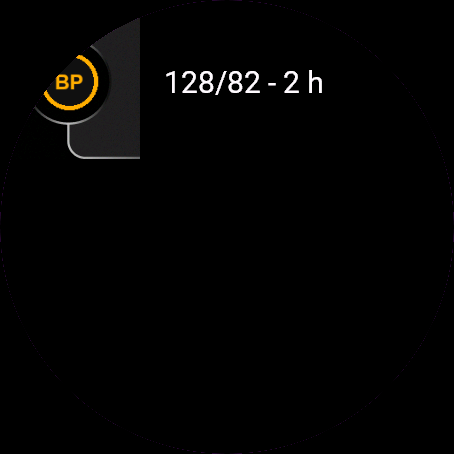
- Main screen on watches without UP and DOWN: upper half adds a reading, lower half opens History, the corner icon opens the menu. With buttons only the icon works.
- Adding: upper half +1, middle -1, bottom strip next step or save. Swipe right goes back.
- History: top third up, middle down, bottom third opens Delete or Cancel.
Settings
Phone: Connect IQ app, Blood Pressure Log, Settings (the unlock code fields are there too).
On the watch, inside the app:
- Hide category (menu): Shown or Hidden. Hidden removes the label from the main screen.
- Ranges: systolic 60-250, diastolic 30-150, pulse 30-220.
License
- Free beta: 30 days from the first launch, everything works.
- Price: 4.99 EUR once at dialforge.dev, no subscription. The 8-character code is tied to your watch's UID.
- Where to enter it: phone, Connect IQ app, Blood Pressure Log, Settings. Read the UID in "Watch UID (needed to buy a code)", buy the code, then type it into "Unlock code from dialforge.dev". The end-of-beta screen on the watch shows the UID too.
- After the beta without a code: an end-of-beta screen with the UID replaces the app. Enter the code, then open it again. New watch? Write to us and the code moves for free.
Privacy and permissions
No special permissions.
No internet use. Data stays on the watch.
Health note: not a medical device, no diagnosis or treatment, no substitute for a doctor. Medical decisions belong to your doctor or pharmacist.
Troubleshooting
The code does not work. Check that the UID you bought for matches "Watch UID (needed to buy a code)" and type all 8 characters (case is ignored, no 0, O, 1 or I). A code for another app does not fit. Sync, then reopen.
Which category is used? The 2017 ACC/AHA table, Normal to Very high (above 180 or 120). Only a label, with no advice. Hide it in the menu if you like.
How many readings are kept? History shows the last 50, the watch stores 200.
Time of day is already set? Yes, from the clock: Morning 5:00 to 11:59, Evening 17:00 to 21:59, otherwise Other. Change it on the last step.
Glance after the beta? Without a code after 30 days it shows "Beta ended".
Contact
kontakt@dialforge.dev or dialforge.dev. Please write before leaving a low rating.
Dziennik ciśnienia: instrukcja obsługi
Do czego służy
Dziennik ciśnienia to notes na pomiary, które zrobisz dowolnym ciśnieniomierzem. Wpisujesz skurczowe, rozkurczowe i puls w czterech krokach, a główny ekran pokazuje ostatni odczyt z datą, kategorię i średnie z 7 i 30 dni. Sam niczego nie mierzy.
Wymagania i obsługiwane zegarki
Wymaga Connect IQ 3.3.0+ i aplikacji Connect IQ albo Garmin Connect w telefonie. Obsługiwane zegarki:
- Okrągłe AMOLED: epix 2 i epix Pro 2, fēnix 8, E, Forerunner 165, 265, 570, 965, 970, Instinct 3 AMOLED, Crossover AMOLED, Venu 2, 3, 4, vivoactive 5, 6.
- Okrągłe MIP: enduro 3, seria fēnix 7, fēnix 8 Solar, Forerunner 55, 245, 255.
- Kwadratowe i prostokątne AMOLED: Venu Sq 2, Venu X1.
Instalacja
Na telefonie otwórz aplikację Connect IQ (albo Garmin Connect, a w niej sklep Connect IQ), wyszukaj "Dziennik ciśnienia" od Dialforge, stuknij Zainstaluj i zsynchronizuj zegarek. Znajdziesz go wśród widżetów (GÓRA lub DÓŁ na tarczy albo przesunięcie palcem), a START lub stuknięcie otwiera go w całości.
Pierwsze uruchomienie
Bez odczytów widzisz "Brak odczytów" i linijkę podpowiedzi. Dodaj pierwszy: wybierak zaczyna od 120/80, a puls bierze z aktualnego tętna, jeśli zegarek je ma, inaczej 70. Kolejne odczyty startują od poprzedniego. 30-dniowa darmowa beta zaczyna się przy pierwszym otwarciu.
Sterowanie
Zegarki z przyciskami (START, GÓRA, DÓŁ, WSTECZ)
- Ekran główny: GÓRA dodaje odczyt, DÓŁ otwiera Historię, START (albo przytrzymanie GÓRY) otwiera menu: Dodaj odczyt, Historia, Ukryj kategorię, O aplikacji.
- Dodawanie: GÓRA +1, DÓŁ -1, START przechodzi dalej (Skurczowe, Rozkurczowe, Puls, Pora dnia), a na ostatnim kroku zapisuje. WSTECZ cofa o krok, na pierwszym anuluje bez zapisu.
- Szybkie, powtarzane naciśnięcia w jedną stronę przyspieszają: krok 5 od czwartego, 10 od trzynastego. Pora dnia przełącza się w kółko: Rano, Wieczór, Inna.
- Historia: GÓRA i DÓŁ przesuwają zaznaczenie, START otwiera Usuń albo Anuluj.
Zegarki dotykowe (stuknięcie, przytrzymanie, przesunięcie)
- Ekran główny na zegarkach bez przycisków GÓRA i DÓŁ: górna połowa dodaje odczyt, dolna otwiera Historię, mała ikona w rogu otwiera menu. Na zegarkach z przyciskami działa tylko ikona.
- Dodawanie: górna połowa to +1, środek -1, dolny pasek to dalej albo zapis. Przesunięcie w prawo cofa.
- Historia: górna jedna trzecia przesuwa w górę, środek w dół, dolna jedna trzecia otwiera Usuń albo Anuluj.
Ustawienia
Telefon: aplikacja Connect IQ, Dziennik ciśnienia, Ustawienia (są tam też pola kodu odblokowania).
Na zegarku, w aplikacji:
- Ukryj kategorię (menu): Widoczna albo Ukryta. Ukryta zdejmuje etykietę kategorii z głównego ekranu.
- Zakresy: skurczowe 60 do 250, rozkurczowe 30 do 150, puls 30 do 220.
Licencja
- Darmowa beta: 30 dni od pierwszego uruchomienia, wszystko działa.
- Cena: jednorazowo 4,99 EUR na dialforge.dev, bez abonamentu. 8-znakowy kod jest przypisany do UID zegarka.
- Gdzie wpisać: telefon, aplikacja Connect IQ, Dziennik ciśnienia, Ustawienia. Odczytaj UID w polu "UID zegarka (potrzebny do zakupu kodu)", kup kod i wpisz go w "Kod odblokowania z dialforge.dev". Ekran końca bety na zegarku też pokazuje UID.
- Po becie bez kodu: zamiast aplikacji pojawia się ekran końca bety z UID. Wpisz kod i otwórz aplikację ponownie. Nowy zegarek? Napisz do nas, przeniesiemy kod za darmo.
Prywatność i uprawnienia
Brak szczególnych uprawnień.
Zero połączeń z internetem. Dane zostają w zegarku.
Uwaga zdrowotna: to nie jest wyrób medyczny. Niczego nie diagnozuje ani nie leczy i nie zastępuje lekarza. Decyzje medyczne zostaw lekarzowi lub farmaceucie.
Rozwiązywanie problemów
Kod nie działa. Sprawdź, czy UID, dla którego kupiono kod, zgadza się z polem "UID zegarka (potrzebny do zakupu kodu)", i wpisz wszystkie 8 znaków (wielkość liter bez znaczenia, bez 0, O, 1, I). Kod do innej aplikacji nie pasuje. Zsynchronizuj i otwórz ponownie.
Według czego jest kategoria? Według tabeli ACC/AHA z 2017: Prawidłowe, Podwyższone, Stopień 1, Stopień 2, Bardzo wysokie (powyżej 180 albo 120). To tylko etykieta. Przy "Bardzo wysokie" aplikacja podaje samą nazwę, bez zaleceń. W menu można ją ukryć.
Ile odczytów się zapamiętuje? Historia pokazuje ostatnie 50, zegarek trzyma 200.
Pora dnia jest już ustawiona? Tak, na podstawie zegara: Rano od 5:00 do 11:59, Wieczór od 17:00 do 21:59, poza tym Inna. Na ostatnim kroku przed zapisem możesz to zmienić.
Podgląd po becie? Bez kodu po 30 dniach pokazuje "Beta zakończona".
Kontakt
kontakt@dialforge.dev albo dialforge.dev. Napisz, zanim wystawisz niską ocenę.
Permissions and privacy
This product does not use the internet and sends no data to our servers.
The full manual and the detailed permission descriptions are available in English and Polish.
Compatible watches
51mm, D2 Air X15, D2 Mach 1 Pro, Enduro 2, Enduro 3, epix (Gen 2), epix Pro (Gen 2) 42mm, epix Pro (Gen 2) 47mm, epix Pro (Gen 2) 51mm, Forerunner 165, Forerunner 165 Music, Forerunner 245, Forerunner 245 Music, Forerunner 255, Forerunner 255 Music, Forerunner 255s, Forerunner 255s Music, Forerunner 265, Forerunner 265s, Forerunner 55, Forerunner 570 42mm, Forerunner 570 47mm, Forerunner 965, Forerunner 970, fēnix 7, fēnix 7 Pro, fēnix 7 Pro - Solar Edition (no Wi-Fi), fēnix 7S, fēnix 7S Pro, fēnix 7X, fēnix 7X Pro, fēnix 7X Pro - Solar Edition (no Wi-Fi), fēnix 8 43mm, fēnix 8 47mm, fēnix 8 Pro 47mm, fēnix 8 Solar 47mm, fēnix 8 Solar 51mm, fēnix E, Instinct 3 AMOLED 45mm, Instinct 3 AMOLED 50mm, Instinct Crossover AMOLED, MicroLED, quatix 7, quatix 7 Pro, quatix 7 Sapphire, quatix 7X Solar, quatix 8 47mm, quatix 8 Pro 47mm, tactix 7, tactix 7 – AMOLED Edition, tactix 8 47mm, tactix 8 Solar 51mm, Venu 2, Venu 2 Plus, Venu 2S, Venu 3, Venu 3S, Venu 4 41mm, Venu 4 45mm, Venu Sq 2, Venu Sq 2 Music, Venu X1, vívoactive 5, vívoactive 6
Screenshots
FAQ
What happens after the 30-day beta?
The app shows a screen asking for a one-time unlock code from dialforge.dev instead of opening normally. Buy the code once below, no subscription.
Does the app send my data to Dialforge?
No. The app works fully offline, and the unlock code is checked on the watch itself, without contacting any server.
The app does not work as described on my watch. Can I get a refund?
Yes. Write through the feedback form below, or to the e-mail in the footer. If we cannot fix it, we refund you, as described in the terms.
Changing your watch?
Write to me and I will move your code for free.
Changelog
- First release (beta).
- Pierwsze wydanie (beta).
- Erste Version (Beta).
- Première version (beta).
- Primera versión (beta).
- Eerste release (beta).
- 初回リリース(ベータ版)。
- Prima versione (beta).
- 首发版本(测试版)。
- Первый релиз (бета).
- Primeira versão (beta).
- První vydání (beta).
- Primeira versão (beta).
- 첫 출시(베타).
- Första versionen (beta).
- Første udgivelse (beta).
- Første versjon (beta).
- 首發版本(Beta)。
- Ensimmäinen julkaisu (beta).
- Prvá verzia (beta).
- Prva različica (beta).
- Rilis pertama (beta).
- Első kiadás (béta).
- เวอร์ชันแรก (เบต้า)
- Πρώτη έκδοση (beta).
- Prvo izdanje (beta).
- גרסה ראשונה (בטא).
- Keluaran pertama (beta).
Unlock
€4.99
One-time payment. No subscription. The code works on the watch whose UID you enter.
- Install the app from the Connect IQ store. It works fully and for free for the first 30 days.
- Find your 10-digit UID: Connect IQ app on the phone > My Device > Apps or Data Fields > this app > Settings > Watch UID.
- Enter UID and e-mail, pay with PayPal (cards work without a PayPal account). The code appears here at once.
- Type the code into the same settings page, field "Unlock code". The watch checks it offline.
Thank you! Your code:
Enter the code in the app settings, field "Unlock code". The watch checks it offline.
Tell us how to make it better
Missing a data field, a colour, a layout? Found a bug on your watch model? Write it here. We read every message and ship improvements in updates.