Everyday health
Box Breathing
Guided breathing on your wrist: box breathing, 4-7-8, coherent breathing, or your own pattern.
Prowadzony oddech na nadgarstku: pudełko 4-4-4-4, 4-7-8, oddech koherentny albo własny wzorzec.
Geführtes Atmen am Handgelenk: Box Breathing, 4-7-8, kohärentes Atmen oder dein eigenes Muster.
Respiration guidée au poignet : respiration carrée, 4-7-8, respiration cohérente, ou votre propre rythme.
Respiración guiada en tu muñeca: respiración cuadrada, 4-7-8, respiración coherente o tu propio patrón.
Begeleide ademhaling om je pols: box breathing, 4-7-8, coherente ademhaling of je eigen patroon.
手首でガイドする呼吸エクササイズ:ボックスブリージング、4-7-8呼吸法、コヒーレント呼吸、または独自のカスタムパターン。
Respirazione guidata al polso: box breathing, 4-7-8, respirazione coerente o schema personalizzato.
手腕上的呼吸引导:箱式呼吸、4-7-8、共振呼吸或自定义模式。
Дыхательные практики на вашем запястье: квадратное дыхание, 4-7-8, когерентное дыхание или собственный ритм.
Respiração guiada no seu pulso: respiração quadrada, 4-7-8, respiração coerente ou seu próprio padrão.
Vedené dýchání na zápěstí: box breathing, 4-7-8, koherentní dýchání nebo vlastní vzor.
Respiração guiada no pulso: box breathing, 4-7-8, respiração coerente ou o seu próprio padrão.
손목에서 진행하는 호흡 가이드: 박스 호흡, 4-7-8, 공명 호흡 또는 나만의 패턴.
Guidad andning på handleden: fyrkantsandning, 4-7-8, koherent andning eller ditt eget mönster.
Guidet vejrtrækning på dit håndled: box breathing, 4-7-8, kohærent vejrtrækning eller dit eget mønster.
Veiledet pusting på håndleddet: bokspusting, 4-7-8, koherent pusting eller ditt eget mønster.
在手腕上進行呼吸引導:箱式呼吸、4-7-8、共振呼吸,或自訂呼吸模式。
Ohjattua hengitystä ranteessasi: neliöhengitys, 4-7-8, koherentti hengitys tai oma kaavasi.
Vedené dýchanie na vašom zápästí: box breathing, 4-7-8, koherentné dýchanie alebo vlastný vzor.
Vodeno dihanje na vašem zapestju: kvadratno dihanje (box breathing), 4-7-8, koherentno dihanje ali vaš lasten vzorec.
Panduan pernapasan di pergelangan tangan Anda: box breathing, 4-7-8, coherent breathing, atau pola Anda sendiri.
Vezetett légzés a csuklódon: box légzés, 4-7-8, koherens légzés, vagy saját ritmus.
ฝึกกำหนดลมหายใจบนข้อมือของคุณ: box breathing, 4-7-8, coherent breathing หรือรูปแบบที่คุณกำหนดเอง
Καθοδηγούμενη αναπνοή στον καρπό σας: box breathing, 4-7-8, coherent breathing ή το δικό σας μοτίβο.
Vođeno disanje na vašem zapešću: box breathing, 4-7-8, koherentno disanje ili vaš vlastiti obrazac.
נשימה מודרכת על פרק כף היד: נשימת קופסה, 4-7-8, נשימה קוהרנטית, או דפוס אישי משלך.
Pernafasan berpandu pada pergelangan tangan anda: box breathing, 4-7-8, coherent breathing, atau corak anda sendiri.
Coming to Connect IQ Unlock €4.99

Beta: free for 30 days
The app works fully and for free for the first 30 days after you first open it. After that you can buy a one-time unlock code below. No subscription.
An animated shape guides every breath, so you never have to watch the clock. A gentle vibration marks each phase change, no sound needed.
- Box 4-4-4-4 (each side 3-8 s, your choice), 4-7-8, coherent breathing at 5.5 breaths/min, or a fully custom pattern
- Session length 1-10 minutes
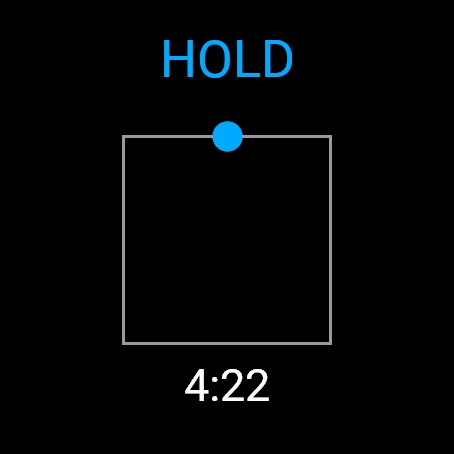
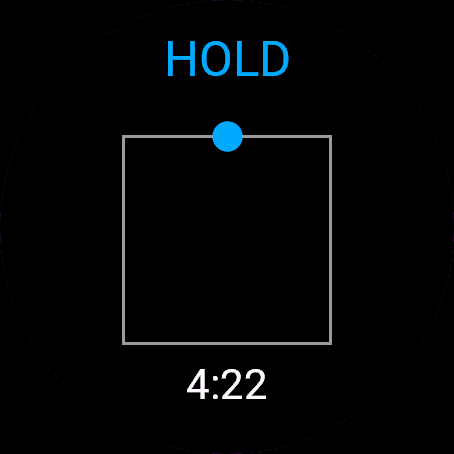
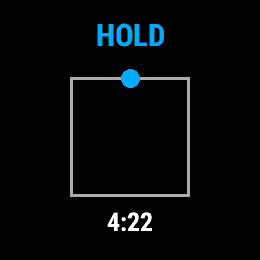
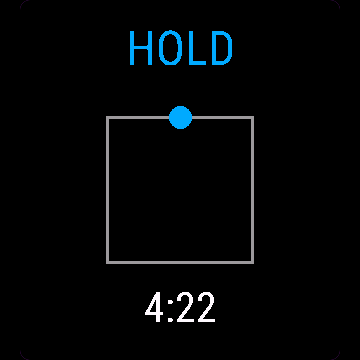
- Animated square traced for box breathing, a growing and shrinking circle for the rest
- Phase text in English or Polish: INHALE, HOLD, EXHALE
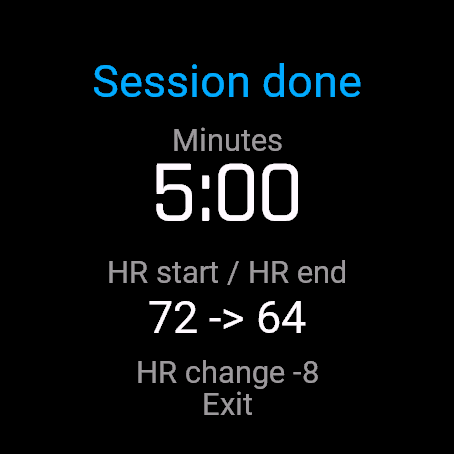
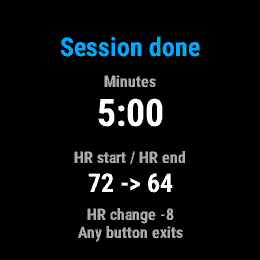
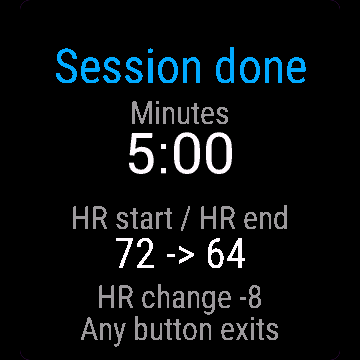
- Heart rate captured at the start and the end, with a summary at the finish
- Records as a session in Garmin Connect when your watch supports it
Animowany kształt prowadzi każdy oddech, więc nie musisz patrzeć na zegar. Delikatna wibracja oznacza zmianę fazy, bez dźwięku.
- Pudełko 4-4-4-4 (każdy bok 3-8 s, do wyboru), 4-7-8, oddech koherentny 5,5 oddechu/min, albo w pełni własny wzorzec
- Długość sesji 1-10 minut
- Animowany kwadrat rysowany dla pudełka, rosnące i kurczące się koło dla reszty
- Tekst fazy po polsku albo angielsku: WDECH, ZATRZYMAJ, WYDECH
- Tętno mierzone na starcie i na końcu, podsumowanie po sesji
- Zapis jako sesja w Garmin Connect, jeśli zegarek to wspiera
Eine animierte Form führt dich durch jeden Atemzug, du musst also nie auf die Uhr schauen. Eine sanfte Vibration markiert jeden Phasenwechsel, ohne Ton.
- Box 4-4-4-4 (jede Seite 3-8 s, deine Wahl), 4-7-8, kohärentes Atmen bei 5,5 Atemzügen/Minute, oder ein komplett eigenes Muster
- Sitzungslänge 1-10 Minuten
- Animiertes Quadrat für Box Breathing, ein wachsender und schrumpfender Kreis für die anderen Muster
- Phasentext auf Englisch oder Polnisch: INHALE, HOLD, EXHALE
- Herzfrequenz wird am Anfang und am Ende erfasst, mit einer Zusammenfassung am Schluss
- Wird als Sitzung in Garmin Connect aufgezeichnet, wenn deine Uhr das unterstützt
Une forme animée guide chaque respiration, pour ne jamais avoir à surveiller l'horloge. Une légère vibration marque chaque changement de phase, sans besoin de son.
- Carré 4-4-4-4 (chaque côté 3 à 8 s, au choix), 4-7-8, respiration cohérente à 5,5 respirations/min, ou un rythme entièrement personnalisé
- Durée de séance de 1 à 10 minutes
- Carré animé tracé pour la respiration carrée, un cercle qui grossit et rétrécit pour les autres rythmes
- Texte de phase en anglais ou en polonais : INHALE, HOLD, EXHALE
- Fréquence cardiaque capturée au début et à la fin, avec un résumé à la fin de la séance
- Enregistré comme session dans Garmin Connect quand votre montre le permet
Una figura animada guía cada respiración, así que nunca tienes que mirar el reloj. Una vibración suave marca cada cambio de fase, sin necesidad de sonido.
- Cuadrada 4-4-4-4 (cada lado de 3 a 8 s, tú eliges), 4-7-8, respiración coherente a 5,5 respiraciones/min, o un patrón totalmente personalizado
- Duración de la sesión de 1 a 10 minutos
- Un cuadrado animado para la respiración cuadrada, y un círculo que crece y se encoge para el resto
- Texto de cada fase en inglés o polaco: INHALE, HOLD, EXHALE
- Frecuencia cardíaca registrada al inicio y al final, con un resumen al terminar
- Se registra como una sesión en Garmin Connect cuando tu reloj lo permite
Een geanimeerde vorm begeleidt elke ademhaling, zodat je nooit op de klok hoeft te kijken. Een lichte trilling markeert elke fasewisseling, geen geluid nodig.
- Box 4-4-4-4 (elke zijde 3-8 s, naar keuze), 4-7-8, coherente ademhaling met 5.5 breaths/min of een volledig eigen patroon
- Sessieduur 1-10 minuten
- Geanimeerd vierkant voor box breathing, een groeiende en krimpende cirkel voor de rest
- Fasetekst in het Engels of Pools: INHALE, HOLD, EXHALE
- Hartslagmeting bij de start en aan het einde, met een overzicht na afloop
- Wordt opgeslagen als een sessie in Garmin Connect als je horloge dit ondersteunt
アニメーションの図形が毎回の呼吸をガイドするため、時計を見る必要はありません。穏やかな振動で各フェーズの切り替わりをお知らせし、音は不要です。
- Box 4-4-4-4(各辺 3-8 s、自由に選択)、4-7-8、5.5 breaths/min のコヒーレント呼吸、または完全なカスタムパターン
- セッション時間 1-10 minutes
- ボックス呼吸では四角形のアニメーションをトレース、その他では拡大・縮小する円でガイド
- フェーズ表示テキストは英語またはポーランド語:INHALE、HOLD、EXHALE
- 開始時と終了時に心拍数を記録し、終了時にサマリーを表示
- お使いのウォッチが対応している場合、Garmin Connect にセッションとして記録
Una figura animata guida ogni respiro, così non devi mai guardare l'orologio. Una leggera vibrazione scandisce ogni cambio di fase, senza bisogno di suoni.
- Box 4-4-4-4 (ciascun lato 3-8 s, a scelta), 4-7-8, respirazione coerente a 5.5 breaths/min o schema del tutto personalizzato
- Durata della sessione 1-10 minuti
- Quadrato animato per il box breathing, cerchio che si espande e si restringe per il resto
- Testo della fase in inglese o polacco: INHALE, HOLD, EXHALE
- Frequenza cardiaca rilevata all'inizio e alla fine, con riepilogo al termine
- Registra come sessione in Garmin Connect quando l'orologio lo supporta
动态图形引导每一次呼吸,无需时刻关注表盘。轻柔震动提示各阶段切换,无需声音。
- 箱式 4-4-4-4(每边 3-8 s,自由选择)、4-7-8、5.5 breaths/min 的共振呼吸,或完全自定义的模式
- 练习时长 1-10 minutes
- 箱式呼吸显示方形动态轨迹,其他模式显示圆形的扩大与缩小
- 呼吸阶段文字支持 English 或 Polish:INHALE、HOLD、EXHALE
- 开始和结束时记录心率,结束时提供摘要
- 在手表支持时,可在 Garmin Connect 中记录为单次活动
Анимированная фигура направляет каждый вдох и выдох, так что следить за временем не нужно. Мягкая вибрация отмечает смену каждой фазы, звук не требуется.
- Квадрат 4-4-4-4 (каждая сторона 3-8 s, на ваш выбор), 4-7-8, когерентное дыхание с частотой 5.5 breaths/min или полностью собственный ритм
- Длительность сессии 1-10 minutes
- Анимированный квадрат для квадратного дыхания, увеличивающийся и уменьшающийся круг для остальных техник
- Текст фаз на английском или польском языке: INHALE, HOLD, EXHALE
- Замер пульса в начале и в конце с итоговой сводкой после завершения
- Запись как тренировка в Garmin Connect, если это поддерживается вашими часами
Uma forma animada guia cada respiração, para você nunca precisar olhar para o relógio. Uma vibração suave marca cada mudança de fase, sem necessidade de som.
- Box 4-4-4-4 (cada lado 3-8 s, à sua escolha), 4-7-8, respiração coerente a 5.5 breaths/min ou um padrão totalmente personalizado
- Duração da sessão de 1-10 minutos
- Quadrado animado traçado para respiração quadrada, um círculo que expande e encolhe para as outras
- Texto das fases em inglês ou polonês: INHALE, HOLD, EXHALE
- Frequência cardíaca registrada no início e no final, com um resumo ao terminar
- Grava como uma sessão no Garmin Connect quando o seu relógio for compatível
Animovaný tvar provází každý nádech a výdech, takže nemusíte sledovat čas. Jemná vibrace označuje každou změnu fáze, zvuk není potřeba.
- Box 4-4-4-4 (každá strana 3-8 s, podle vás), 4-7-8, koherentní dýchání při 5.5 breaths/min nebo zcela vlastní vzor
- Délka relace 1-10 minut
- Vykreslovaný animovaný čtverec pro box breathing, zvětšující a zmenšující se kruh pro ostatní
- Text fází v angličtině nebo polštině: INHALE, HOLD, EXHALE
- Tepová frekvence zaznamenaná na začátku a na konci, se souhrnem po dokončení
- Záznam jako aktivita v Garmin Connect, pokud to vaše hodinky podporují
Uma forma animada guia cada respiração, para nunca ter de olhar para o relógio. Uma vibração suave assinala cada mudança de fase, sem necessidade de som.
- Box 4-4-4-4 (cada lado 3-8 s, à sua escolha), 4-7-8, respiração coerente a 5.5 breaths/min ou um padrão totalmente personalizado
- Duração da sessão de 1-10 minutos
- Quadrado animado traçado para box breathing, círculo que cresce e encolhe para os restantes
- Texto das fases em inglês ou polaco: INHALE, HOLD, EXHALE
- Frequência cardíaca registada no início e no fim, com um resumo no final
- Regista como uma sessão no Garmin Connect se o seu relógio o suportar
움직이는 도형이 호흡을 안내해 주므로 시계를 볼 필요가 없습니다. 부드러운 진동으로 단계 변화를 알려주어 소리가 필요 없습니다.
- 박스 4-4-4-4(각 구간 3-8 s 선택 가능), 4-7-8, 5.5 breaths/min 공명 호흡 또는 완전 맞춤형 패턴
- 세션 시간 1-10 minutes
- 박스 호흡 시 사각형 애니메이션 표시, 그 외에는 커지고 작아지는 원으로 안내
- 영어 또는 폴란드어로 표시되는 단계 텍스트: INHALE, HOLD, EXHALE
- 시작과 종료 시 심박수 측정 및 완료 후 요약 제공
- 시계에서 지원하는 경우 Garmin Connect에 세션으로 기록
En animerad figur guidar varje andetag, så att du slipper titta på klockan. En mjuk vibration markerar varje fasbyte, helt utan ljud.
- Box 4-4-4-4 (varje sida 3-8 s, valfritt), 4-7-8, koherent andning i 5.5 andetag/min, eller ett helt eget mönster
- Passlängd 1-10 minuter
- Animerad kvadrat som ritas upp för fyrkantsandning, en växande och krympande cirkel för resten
- Fastext på engelska eller polska: INHALE, HOLD, EXHALE
- Pulsen mäts vid start och slut, med en sammanfattning efteråt
- Sparas som ett pass i Garmin Connect om din klocka stöder det
En animeret figur guider hvert åndedrag, så du aldrig behøver at holde øje med uret. En blid vibration markerer hvert faseskift, ingen lyd nødvendig.
- Box 4-4-4-4 (hver side 3-8 s, dit valg), 4-7-8, kohærent vejrtrækning ved 5.5 breaths/min eller et helt tilpasset mønster
- Sessionens varighed 1-10 minutter
- Animeret firkant tegnes ved box breathing, en voksende og svindende cirkel for resten
- Fasetekst på engelsk eller polsk: INHALE, HOLD, EXHALE
- Puls måles ved start og slut, med en oversigt til sidst
- Gemmes som en session i Garmin Connect, hvis dit ur understøtter det
En animert figur veileder hvert pust, slik at du slipper å se på klokken. En diskret vibrasjon markerer hvert faseskifte, ingen lyd er nødvendig.
- Boks 4-4-4-4 (hver side 3-8 s, etter eget valg), 4-7-8, koherent pusting på 5.5 breaths/min, eller et helt egentilpasset mønster
- Øktlengde 1-10 minutter
- En animert firkant tegnes opp for bokspusting, en voksende og krympende sirkel for resten
- Fasetekst på engelsk eller polsk: INHALE, HOLD, EXHALE
- Puls måles ved start og slutt, med et sammendrag ved fullføring
- Lagres som en økt i Garmin Connect når klokken din støtter det
動態圖形引導每一次呼吸,完全不必盯著時鐘。溫和的震動提示每個階段的轉換,無需任何聲音。
- Box 4-4-4-4(每邊 3-8 s,由你決定)、4-7-8、5.5 breaths/min 的共振呼吸,或完全自訂模式
- 單次時長 1-10 minutes
- 箱式呼吸以動態方形循跡引導,其餘模式則為放大與縮小的圓形
- 階段文字支援英文或波蘭文:INHALE、HOLD、EXHALE
- 在開始與結束時記錄心率,並在完成時提供摘要
- 手錶支援時可記錄為 Garmin Connect 中的活動紀錄
Animoitu kuvio ohjaa jokaista hengenvetoa, joten kelloa ei tarvitse vilkuilla. Kevyt värinä ilmaisee vaiheen vaihtumisen, ääntä ei tarvita.
- Box 4-4-4-4 (kukin sivu 3-8 s valintasi mukaan), 4-7-8, koherentti hengitys tahdilla 5.5 breaths/min tai täysin oma kaava
- Harjoituksen kesto 1-10 minuuttia
- Neliöhengityksessä piirtyy animoitu neliö, muissa kasvava ja kutistuva ympyrä
- Vaiheen teksti englanniksi tai puolaksi: INHALE, HOLD, EXHALE
- Syke mitataan alussa ja lopussa, ja lopuksi näytetään yhteenveto
- Tallentuu suorituksena Garmin Connectiin, jos kellosi tukee sitä
Animovaný tvar vedie každý dych, takže nemusíte sledovať čas. Jemná vibrácia označuje každú zmenu fázy, bez potreby zvuku.
- Box 4-4-4-4 (každá strana 3-8 s, podľa vašej voľby), 4-7-8, koherentné dýchanie pri 5.5 dychov/min alebo plne vlastný vzor
- Dĺžka cvičenia 1-10 minút
- Animovaný štvorec pre box breathing, zväčšujúci a zmenšujúci sa kruh pre ostatné
- Text fázy v angličtine alebo poľštine: INHALE, HOLD, EXHALE
- Srdcový tep zaznamenaný na začiatku a na konci, so zhrnutím na záver
- Zaznamenáva sa ako aktivita v Garmin Connect, ak to vaše hodinky podporujú
Animirana oblika vodi vsak vdih, zato vam nikoli ni treba gledati na uro. Nežno vibriranje označi vsako menjavo faze, brez potrebe po zvoku.
- Box 4-4-4-4 (vsaka faza 3-8 s, po vaši izbiri), 4-7-8, koherentno dihanje pri 5.5 breaths/min ali popolnoma prilagojen vzorec
- Dolžina seje 1-10 minut
- Animirani kvadrat za kvadratno dihanje, krog, ki se širi in krči, za ostale vzorce
- Besedilo faz v angleščini ali poljščini: INHALE, HOLD, EXHALE
- Merjenje srčnega utripa na začetku in koncu, s povzetkom ob zaključku
- Beleženje seje v Garmin Connect, če vaša ura to podpira
Animasi bentuk memandu setiap tarikan dan hembusan napas, jadi Anda tidak perlu melihat jam. Getaran lembut menandai setiap pergantian fase, tanpa perlu suara.
- Box 4-4-4-4 (setiap sisi 3-8 s, sesuai pilihan Anda), 4-7-8, coherent breathing pada 5.5 breaths/min, atau pola yang sepenuhnya kustom
- Durasi sesi 1-10 menit
- Animasi kotak untuk box breathing, lingkaran membesar dan mengecil untuk lainnya
- Teks fase dalam bahasa Inggris atau Polandia: INHALE, HOLD, EXHALE
- Detak jantung direkam pada awal dan akhir, dengan ringkasan saat selesai
- Tersimpan sebagai sesi di Garmin Connect jika jam tangan Anda mendukungnya
Egy animált alakzat kíséri minden lélegzetvételedet, így sosem kell az órát figyelned. Finom rezgés jelzi a fázisváltásokat, hangra sincs szükség.
- Box 4-4-4-4 (minden oldal 3-8 s, tetszés szerint), 4-7-8, koherens légzés 5.5 breaths/min ütemben, vagy teljesen egyedi minta
- A gyakorlat hossza 1-10 minutes
- Animált négyzet rajzolódik ki a box légzéshez, táguló és szűkülő kör a többihez
- Fázis szövege angolul vagy lengyelül: INHALE, HOLD, EXHALE
- Pulzusmérés az elején és a végén, összefoglalóval a befejezéskor
- Edzésként rögzül a Garmin Connectben, ha az órád támogatja
รูปทรงเคลื่อนไหวคอยนำทางทุกลมหายใจ คุณจึงไม่ต้องคอยดูนาฬิกา การสั่นเตือนเบา ๆ จะบอกการเปลี่ยนแต่ละช่วงจังหวะ ไม่จำเป็นต้องใช้เสียง
- Box 4-4-4-4 (แต่ละด้าน 3-8 s ตามที่คุณเลือก), 4-7-8, coherent breathing ที่ 5.5 breaths/min หรือรูปแบบที่คุณกำหนดเองทั้งหมด
- ความยาวเซสชัน 1-10 minutes
- ภาพเคลื่อนไหวสี่เหลี่ยมตามเส้นสำหรับ box breathing วงกลมขยายและหดตัวสำหรับรูปแบบอื่น ๆ
- ข้อความบอกช่วงจังหวะเป็น English หรือ Polish: INHALE, HOLD, EXHALE
- บันทึกอัตราการเต้นของหัวใจในช่วงเริ่มต้นและสิ้นสุด พร้อมสรุปผลเมื่อเสร็จสิ้น
- บันทึกเป็นเซสชันใน Garmin Connect เมื่อนาฬิกาของคุณรองรับ
Ένα κινούμενο σχήμα καθοδηγεί κάθε αναπνοή, ώστε να μη χρειάζεται να κοιτάτε το ρολόι. Μια διακριτική δόνηση σηματοδοτεί κάθε αλλαγή φάσης, χωρίς να χρειάζεται ήχος.
- Box 4-4-4-4 (κάθε πλευρά 3-8 s, δική σας επιλογή), 4-7-8, coherent breathing στα 5.5 breaths/min ή ένα πλήρως προσαρμοσμένο μοτίβο
- Διάρκεια συνεδρίας 1-10 λεπτά
- Κινούμενο τετράγωνο που διαγράφεται για το box breathing, κύκλος που μεγαλώνει και μικραίνει για τα υπόλοιπα
- Κείμενο φάσης στα αγγλικά ή πολωνικά: INHALE, HOLD, EXHALE
- Καταγραφή καρδιακών παλμών στην αρχή και στο τέλος, με σύνοψη κατά την ολοκλήρωση
- Καταγράφεται ως συνεδρία στο Garmin Connect όταν το ρολόι σας το υποστηρίζει
Animirani oblik vodi svaki udah i izdah, pa nikada ne morate gledati na sat. Blaga vibracija označava svaku promjenu faze, bez potrebe za zvukom.
- Box 4-4-4-4 (svaka strana 3-8 s, po vašem izboru), 4-7-8, koherentno disanje pri 5.5 breaths/min ili potpuno prilagođeni obrazac
- Trajanje sesije 1-10 minuta
- Iscrtani animirani kvadrat za box breathing, krug koji se širi i skuplja za ostale
- Tekst faza na engleskom ili poljskom: INHALE, HOLD, EXHALE
- Puls se bilježi na početku i na kraju, sa sažetkom na završetku
- Bilježi se kao sesija u Garmin Connect ako vaš sat to podržava
צורה מונפשת מנחה כל נשימה, כך שלא צריך להסתכל על השעון. רטט עדין מסמן כל מעבר שלב, ללא צורך בצליל.
- קופסה 4-4-4-4 (כל צלע 3-8 s, לבחירתך), 4-7-8, נשימה קוהרנטית בקצב 5.5 breaths/min, או דפוס מותאם אישית לחלוטין
- משך אימון של 1-10 דקות
- ריבוע מונפש המשורטט עבור נשימת קופסה, ועיגול שמתרחב ומתכווץ עבור השאר
- טקסט השלבים באנגלית או בפולנית: INHALE, HOLD, EXHALE
- דופק נמדד בהתחלה ובסיום, עם סיכום בסוף
- נשמר כאימון ב-Garmin Connect כאשר השעון שלך תומך בכך
Bentuk beranimasi membimbing setiap nafas, jadi anda tidak perlu melihat jam. Getaran lembut menandakan setiap perubahan fasa, tanpa bunyi diperlukan.
- Box 4-4-4-4 (setiap sisi 3-8 s, pilihan anda), 4-7-8, coherent breathing pada 5.5 breaths/min, atau corak tersuai sepenuhnya
- Panjang sesi 1-10 minit
- Petak beranimasi dilakar untuk box breathing, bulatan membesar dan mengecil untuk yang lain
- Teks fasa dalam bahasa Inggeris atau Poland: INHALE, HOLD, EXHALE
- Kadar denyutan jantung direkodkan pada permulaan dan pengakhiran, dengan ringkasan pada penamat
- Direkodkan sebagai sesi dalam Garmin Connect jika jam tangan anda menyokongnya
How to use it
Open Box Breathing from the watch's app menu.
Controls: BACK opens the menu (resume, finish now, discard), START or a tap pauses and resumes. Stop if you feel dizzy or lightheaded and breathe normally. Not a medical device.
Otwórz Oddech z menu aplikacji na zegarku.
Sterowanie: WSTECZ otwiera menu (wznów, zakończ teraz, odrzuć), START albo dotyk robi pauzę i wznawia. Przerwij, jeśli poczujesz zawroty głowy, i oddychaj normalnie. To nie jest wyrób medyczny.
Öffne Box Breathing im App-Menü der Uhr.
Bedienung: ZURÜCK öffnet das Menü (fortsetzen, jetzt beenden, verwerfen), START oder ein Tipp pausiert und setzt fort. Brich ab, wenn dir schwindelig wird, und atme normal weiter. Kein Medizinprodukt.
Ouvrez Box Breathing depuis le menu des applications de la montre.
Commandes : RETOUR ouvre le menu (reprendre, terminer maintenant, abandonner), START ou un appui met en pause et reprend. Arrêtez si vous avez des vertiges ou la tête qui tourne et respirez normalement. Ce n'est pas un dispositif médical.
Abre Box Breathing desde el menú de apps del reloj.
Controles: ATRÁS abre el menú (reanudar, terminar ahora, descartar), START o un toque pausa y reanuda. Para si te mareas o sientes aturdimiento y respira con normalidad. No es un dispositivo médico.
Open Box Breathing via het appmenu van het horloge.
Bediening: BACK opent het menu (hervatten, nu voltooien, verwijderen), START of een tik pauzeert en hervat. Stop als je je duizelig of licht in het hoofd voelt en adem normaal. Geen medisch hulpmiddel.
時計のアプリメニューから Box Breathing を開いてください。
操作方法: BACK でメニューを開く(再開、今すぐ終了、破棄)、START またはタップで一時停止・再開。めまいやふらつきを感じた場合は中断し、通常の呼吸に戻してください。本製品は医療機器ではありません。
Apri Box Breathing dal menu delle app dell'orologio.
Comandi: BACK apre il menu (riprendi, termina ora, scarta), START o un tocco mette in pausa e riprende. Interrompi se avverti vertigini o stordimento e respira normalmente. Non è un dispositivo medico.
在手表的应用菜单中打开 Box Breathing。
操作:BACK 打开菜单(继续、立即结束、放弃),START 或轻触屏幕暂停与继续。如果感到头晕或目眩,请停止并恢复正常呼吸。非医疗设备。
Откройте Box Breathing из меню приложений на часах.
Управление: BACK открывает меню (продолжить, завершить сейчас, сбросить), START или касание экрана ставит на паузу и возобновляет. Остановитесь, если почувствуете головокружение или дурноту, и дышите нормально. Не является медицинским устройством.
Abra Box Breathing pelo menu de apps do relógio.
Controles: BACK abre o menu (retomar, finalizar agora, descartar), START ou um toque pausa e retoma. Pare se sentir tontura ou vertigem e respire normalmente. Não é um dispositivo médico.
Otevřete Box Breathing z nabídky aplikací v hodinkách.
Ovládání: BACK otevře menu (pokračovat, dokončit, zahodit), START nebo klepnutí pozastaví a znovu spustí. Pokud se vám zatočí hlava nebo pocítíte slabost, přestaňte a dýchejte normálně. Nejedná se o zdravotnický prostředek.
Abra Box Breathing no menu de aplicações do relógio.
Controlos: BACK abre o menu (retomar, terminar agora, descartar), START ou um toque pausa e retoma. Pare se sentir tonturas ou atordoamento e respire normalmente. Não é um dispositivo médico.
시계의 앱 메뉴에서 Box Breathing을(를) 여세요.
조작 방법: BACK은 메뉴(재개, 지금 종료, 삭제)를 열고, START 또는 화면 탭으로 일시 정지 및 재개합니다. 어지럽거나 현기증이 나면 즉시 중단하고 평소대로 호흡하세요. 의료 기기가 아닙니다.
Öppna Box Breathing från klockans appmeny.
Kontroller: BACK öppnar menyn (återuppta, avsluta nu, kasta), START eller ett tryck pausar och återupptar. Avbryt om du känner dig yr eller matt och andas normalt. Inte en medicinsk produkt.
Åbn Box Breathing fra urets appmenu.
Betjening: BACK åbner menuen (genoptag, afslut nu, kassér), START eller et tryk pauser og genoptager. Stop hvis du føler dig svimmel eller ør i hovedet, og træk vejret normalt. Ikke medicinsk udstyr.
Åpne Box Breathing fra appmenyen på klokken.
Kontroller: BACK åpner menyen (gjenoppta, fullfør nå, forkast), START eller et trykk pauser og gjenopptar. Stopp hvis du føler deg svimmel eller ør, og pust normalt. Ikke et medisinsk apparat.
從手錶的應用程式選單開啟 Box Breathing。
操作方式:BACK 開啟選單(繼續、立即結束、捨棄),START 或輕觸螢幕可暫停與繼續。若感到暈眩或頭暈,請停止並正常呼吸。本產品非醫療器材。
Avaa Box Breathing kellon sovellusvalikosta.
Ohjaus: BACK avaa valikon (jatka, lopeta nyt, hylkää), START tai napautus keskeyttää ja jatkaa. Lopeta ja hengitä normaalisti, jos tunnet huimausta tai heikotusta. Ei lääkinnällinen laite.
Otvorte Box Breathing z ponuky aplikácií v hodinkách.
Ovládanie: BACK otvorí menu (pokračovať, ukončiť teraz, zahodiť), START alebo ťuknutie pozastaví a obnoví. Ak pocítite závrat alebo točenie hlavy, prestaňte a dýchajte normálne. Nie je to zdravotnícka pomôcka.
Odprite Box Breathing v meniju aplikacij na uri.
Upravljanje: BACK odpre meni (nadaljuj, zaključi zdaj, zavrzi), START ali dotik začasno ustavi in nadaljuje. Prenehajte, če začutite omotico ali vrtoglavico, in dihajte normalno. Ni medicinski pripomoček.
Buka Box Breathing dari menu aplikasi jam.
Kontrol: BACK membuka menu (lanjutkan, selesaikan sekarang, buang), START atau ketukan menjeda dan melanjutkan. Hentikan jika Anda merasa pusing atau melayang dan bernapaslah secara normal. Bukan perangkat medis.
Nyissa meg a(z) Box Breathing alkalmazást az óra alkalmazásmenüjéből.
Vezérlés: BACK megnyitja a menüt (folytatás, befejezés most, elvetés), START vagy egy koppintás szüneteltet és folytat. Állj meg, ha szédülést vagy kábultságot érzel, és lélegezz normálisan. Nem orvosi eszköz.
เปิด Box Breathing จากเมนูแอปของนาฬิกา
Controls: BACK เปิดเมนู (resume, finish now, discard) กด START หรือแตะหน้าจอเพื่อหยุดชั่วคราวและทำต่อ หยุดทันทีหากคุณรู้สึกเวียนศีรษะหรือหน้ามืด และหายใจตามปกติ ไม่ใช่อุปกรณ์ทางการแพทย์
Ανοίξτε το Box Breathing από το μενού εφαρμογών του ρολογιού.
Χειρισμός: Το BACK ανοίγει το μενού (συνέχιση, ολοκλήρωση τώρα, απόρριψη), το START ή ένα πάτημα κάνει παύση και συνέχιση. Σταματήστε εάν αισθανθείτε ζάλη ή τάση λιποθυμίας και αναπνεύστε κανονικά. Δεν αποτελεί ιατρική συσκευή.
Otvorite Box Breathing iz izbornika aplikacija na satu.
Kontrole: BACK otvara izbornik (nastavi, završi sada, odbaci), START ili dodir pauzira i nastavlja. Prekinite ako osjetite vrtoglavicu ili ošamućenost i dišite normalno. Nije medicinski uređaj.
פתחו את Box Breathing מתפריט האפליקציות של השעון.
פקדים: BACK פותח את התפריט (חידוש, סיום עכשיו, ביטול), START או הקשה משהים ומחדשים. יש לעצור אם חשים סחרחורת או ערפול ולחזור לנשום כרגיל. לא מכשיר רפואי.
Buka Box Breathing daripada menu aplikasi jam.
Kawalan: BACK membuka menu (sambung semula, selesai sekarang, buang), START atau ketikan menjeda dan menyambung semula. Berhenti jika anda berasa pening atau melayang dan bernafas seperti biasa. Bukan peranti perubatan.
Manual
The full manual and the detailed permission descriptions are available in English and Polish.
Box Breathing: user manual
What it does
Box Breathing guides a breathing session with an animated shape and a short vibration at every change of phase. Pick box, 4-7-8, coherent or your own timings. It notes your heart rate at the start and end and can save the session to Garmin Connect.
Requirements and supported watches
Needs Connect IQ 3.3.0+ and the Connect IQ or Garmin Connect phone app. Supported watches:
- Round AMOLED: epix 2 and epix Pro 2, fēnix 8, E, Forerunner 165, 265, 570, 965, 970, Instinct 3 AMOLED, Crossover AMOLED, Venu 2, 3, 4, vivoactive 5, 6.
- Round MIP: enduro 3, fēnix 7 series, 8 Solar, Forerunner 55, 245, 255, vivoactive 4.
- Square and rectangular AMOLED: Venu Sq 2, Venu X1.
Installation
In the Connect IQ app on your phone (or Garmin Connect, then the Connect IQ Store) find "Box Breathing" by Dialforge, tap Install and sync the watch. Open it from the apps list: press START on the watch face, then pick Box Breathing.
First launch
The start screen shows the app name, "Press START" (on touch watches "Tap to set up") and the beta days left. START or a tap opens the setup menu. The 30-day free beta starts the first time you open it.
Controls
Watches with buttons (START, UP, DOWN, BACK)
- Setup: UP and DOWN scroll, START on a line changes its value one step and wraps around. Start session begins. BACK returns.
- Session: START pauses and resumes. BACK or MENU (hold UP) opens Keep going, Finish now, Discard (Discard asks twice).
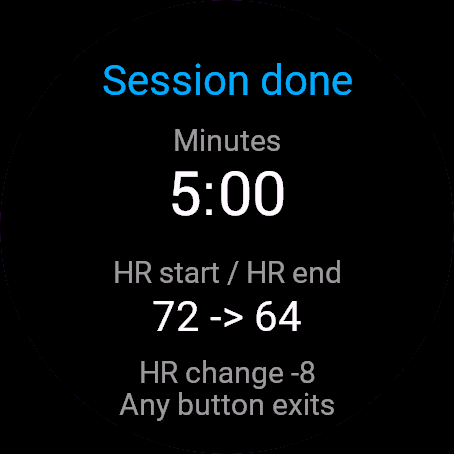
- Summary: any button exits.
Touch watches (tap, hold, swipe)
- Setup: tap a line to change it, tap Start session to begin.
- Session: tap pauses and resumes. Swipes do nothing.
- Summary: a tap exits.
Settings
Phone: Connect IQ app, Box Breathing, Settings (the unlock code fields are there too).
On the watch, inside the app:
- Pattern: Box, 4-7-8, Coherent 5.5/min or Custom.
- Box: four equal sides of 3 to 8 s, default 4.
- 4-7-8: inhale 4 s, hold 7 s, exhale 8 s, fixed.
- Coherent 5.5/min: inhale and exhale about 5.5 s each, no hold.
- Custom: inhale, hold, exhale and hold 2, each 0 to 8 s. 0 skips that phase.
- Session length: 1 to 10 min, default 5.
License
- Free beta: 30 days from the first launch, everything works.
- Price: 4.99 EUR once at dialforge.dev, no subscription. The 8-character code is tied to your watch's UID.
- Where to enter it: phone, Connect IQ app, Box Breathing, Settings. Read the UID in "Watch UID (needed to buy a code)", buy the code, then type it into "Unlock code from dialforge.dev". The end-of-beta screen on the watch shows the UID too.
- After the beta without a code: an end-of-beta screen with the UID replaces the app. Enter the code, then open it again. New watch? Write to us and the code moves for free.
Privacy and permissions
Permissions:
- Sensors: reads heart rate at the start and end of the session.
- Activity recording: saves the session to Garmin Connect.
No internet use. Data stays on the watch and in the activities you save.
Health note: not a medical device, no diagnosis or treatment, no substitute for a doctor. Medical decisions belong to your doctor or pharmacist.
Troubleshooting
The code does not work. Check that the UID you bought for matches "Watch UID (needed to buy a code)" and type all 8 characters (case is ignored, no 0, O, 1 or I). A code for another app does not fit. Sync, then reopen.
What does the shape do? In box, a dot travels around a square: up inhale, right hold, down exhale, left second hold. Otherwise a circle grows on the inhale, holds its size and shrinks on the exhale.
Where does the session go? When it ends or you choose Finish now, it is saved to Garmin Connect (sport Meditation, subtype Breathing if the watch supports it, else generic). Discard deletes it.
What is on the summary? Minutes, heart rate at the start and end, and the change. With no reading it shows "--".
Contact
kontakt@dialforge.dev or dialforge.dev. Please write before leaving a low rating.
Oddech: instrukcja obsługi
Do czego służy
Oddech prowadzi sesję oddechową animowanym kształtem i krótką wibracją przy każdej zmianie fazy. Wybierasz pudełko, 4-7-8, oddech koherentny 5,5 na minutę albo własne czasy. Zapisuje tętno na początku i końcu, a sesję może wysłać do Garmin Connect.
Wymagania i obsługiwane zegarki
Wymaga Connect IQ 3.3.0+ i aplikacji Connect IQ albo Garmin Connect w telefonie. Obsługiwane zegarki:
- Okrągłe AMOLED: epix 2 i epix Pro 2, fēnix 8, E, Forerunner 165, 265, 570, 965, 970, Instinct 3 AMOLED, Crossover AMOLED, Venu 2, 3, 4, vivoactive 5, 6.
- Okrągłe MIP: enduro 3, seria fēnix 7, fēnix 8 Solar, Forerunner 55, 245, 255, vivoactive 4.
- Kwadratowe i prostokątne AMOLED: Venu Sq 2, Venu X1.
Instalacja
Na telefonie otwórz aplikację Connect IQ (albo Garmin Connect, a w niej sklep Connect IQ), wyszukaj "Oddech" od Dialforge, stuknij Zainstaluj i zsynchronizuj zegarek. Uruchom ją z listy aplikacji: na tarczy naciśnij START i wybierz Oddech.
Pierwsze uruchomienie
Ekran startowy pokazuje nazwę, "Naciśnij START" (na dotykowych "Dotknij, aby ustawić") i dni bety do końca. START albo stuknięcie otwiera menu ustawień. 30-dniowa darmowa beta zaczyna się przy pierwszym otwarciu.
Sterowanie
Zegarki z przyciskami (START, GÓRA, DÓŁ, WSTECZ)
- Ustawienia: GÓRA i DÓŁ przewijają, START na pozycji zmienia jej wartość o krok i zawija. Zacznij sesję startuje. WSTECZ wraca.
- Sesja: START wstrzymuje i wznawia. WSTECZ albo MENU (przytrzymaj GÓRA) otwiera Kontynuuj, Zakończ teraz, Odrzuć (Odrzuć pyta dwa razy).
- Podsumowanie: każdy przycisk wychodzi.
Zegarki dotykowe (stuknięcie, przytrzymanie, przesunięcie)
- Ustawienia: stuknięcie pozycji zmienia jej wartość, stuknięcie Zacznij sesję startuje.
- Sesja: stuknięcie wstrzymuje i wznawia. Przesunięcia nic nie robią.
- Podsumowanie: stuknięcie wychodzi.
Ustawienia
Telefon: aplikacja Connect IQ, Oddech, Ustawienia (są tam też pola kodu odblokowania).
Na zegarku, w aplikacji:
- Wzorzec: Pudełko, 4-7-8, Koherentny 5,5/min albo Własny.
- Pudełko: cztery równe boki po 3 do 8 s, domyślnie 4.
- 4-7-8: wdech 4 s, zatrzymanie 7 s, wydech 8 s, bez zmian.
- Koherentny 5,5/min: wdech i wydech po ok. 5,5 s, bez zatrzymania.
- Własny: wdech, zatrzymanie, wydech i zatrzymanie 2, każde od 0 do 8 s. 0 pomija fazę.
- Długość sesji: od 1 do 10 min, domyślnie 5.
Licencja
- Darmowa beta: 30 dni od pierwszego uruchomienia, wszystko działa.
- Cena: jednorazowo 4,99 EUR na dialforge.dev, bez abonamentu. 8-znakowy kod jest przypisany do UID zegarka.
- Gdzie wpisać: telefon, aplikacja Connect IQ, Oddech, Ustawienia. Odczytaj UID w polu "UID zegarka (potrzebny do zakupu kodu)", kup kod i wpisz go w "Kod odblokowania z dialforge.dev". Ekran końca bety na zegarku też pokazuje UID.
- Po becie bez kodu: zamiast aplikacji pojawia się ekran końca bety z UID. Wpisz kod i otwórz aplikację ponownie. Nowy zegarek? Napisz do nas, przeniesiemy kod za darmo.
Prywatność i uprawnienia
Uprawnienia:
- Czujniki: odczyt tętna na początku i końcu sesji.
- Zapis aktywności: sesja trafia do Garmin Connect.
Zero połączeń z internetem. Dane zostają w zegarku i w zapisywanych aktywnościach.
Uwaga zdrowotna: to nie jest wyrób medyczny. Niczego nie diagnozuje ani nie leczy i nie zastępuje lekarza. Decyzje medyczne zostaw lekarzowi lub farmaceucie.
Rozwiązywanie problemów
Kod nie działa. Sprawdź, czy UID, dla którego kupiono kod, zgadza się z polem "UID zegarka (potrzebny do zakupu kodu)", i wpisz wszystkie 8 znaków (wielkość liter bez znaczenia, bez 0, O, 1, I). Kod do innej aplikacji nie pasuje. Zsynchronizuj i otwórz ponownie.
Co robi ten kształt? W pudełku kropka biegnie po kwadracie: w górę to wdech, w prawo zatrzymanie, w dół wydech, w lewo drugie zatrzymanie. W pozostałych wzorcach koło rośnie przy wdechu, trzyma rozmiar przy zatrzymaniu i kurczy się przy wydechu.
Gdzie ląduje sesja? Po końcu albo po wyborze Zakończ teraz zapisuje się w Garmin Connect, jako sport Meditation z podtypem Breathing, jeśli zegarek to obsługuje, a inaczej jako zwykła aktywność. Odrzuć usuwa sesję.
Co jest na podsumowaniu? Minuty, tętno na początku i końcu oraz zmiana. Bez odczytu pokazuje "--".
Kontakt
kontakt@dialforge.dev albo dialforge.dev. Napisz, zanim wystawisz niską ocenę.
Permissions and privacy
This product asks the watch for the permissions below. Connect IQ shows them when you install it.
- Heart rate and sensors: Reads heart rate and other sensors of the watch while the app runs.Odczytuje tętno i inne czujniki zegarka, gdy aplikacja działa.
- Activity recording: Saves your workout in Garmin Connect (the activity from this app). The data stays in your Garmin account.Zapisuje trening w Garmin Connect (aktywność z tej aplikacji). Dane zostają na Twoim koncie Garmin.
This product does not use the internet and sends no data to our servers.
The full manual and the detailed permission descriptions are available in English and Polish.
Compatible watches
51mm, D2 Air X15, D2 Mach 1 Pro, Enduro 2, Enduro 3, epix (Gen 2), epix Pro (Gen 2) 42mm, epix Pro (Gen 2) 47mm, epix Pro (Gen 2) 51mm, Forerunner 165, Forerunner 165 Music, Forerunner 245, Forerunner 245 Music, Forerunner 255, Forerunner 255 Music, Forerunner 255s, Forerunner 255s Music, Forerunner 265, Forerunner 265s, Forerunner 55, Forerunner 570 42mm, Forerunner 570 47mm, Forerunner 965, Forerunner 970, fēnix 7, fēnix 7 Pro, fēnix 7 Pro - Solar Edition (no Wi-Fi), fēnix 7S, fēnix 7S Pro, fēnix 7X, fēnix 7X Pro, fēnix 7X Pro - Solar Edition (no Wi-Fi), fēnix 8 43mm, fēnix 8 47mm, fēnix 8 Pro 47mm, fēnix 8 Solar 47mm, fēnix 8 Solar 51mm, fēnix E, Instinct 3 AMOLED 45mm, Instinct 3 AMOLED 50mm, Instinct Crossover AMOLED, MicroLED, quatix 7, quatix 7 Pro, quatix 7 Sapphire, quatix 7X Solar, quatix 8 47mm, quatix 8 Pro 47mm, tactix 7, tactix 7 – AMOLED Edition, tactix 8 47mm, tactix 8 Solar 51mm, Venu 2, Venu 2 Plus, Venu 2S, Venu 3, Venu 3S, Venu 4 41mm, Venu 4 45mm, Venu Sq 2, Venu Sq 2 Music, Venu X1, vívoactive 4, vívoactive 4S, vívoactive 5, vívoactive 6
Screenshots
FAQ
What happens after the 30-day beta?
The app shows a screen asking for a one-time unlock code from dialforge.dev instead of opening normally. Buy the code once below, no subscription.
Does the app send my data to Dialforge?
No. The app works fully offline, and the unlock code is checked on the watch itself, without contacting any server.
The app does not work as described on my watch. Can I get a refund?
Yes. Write through the feedback form below, or to the e-mail in the footer. If we cannot fix it, we refund you, as described in the terms.
Changing your watch?
Write to me and I will move your code for free.
Changelog
- First release (beta).
- Pierwsze wydanie (beta).
- Erste Veröffentlichung (Beta).
- Première version (bêta).
- Primera versión (beta).
- Eerste release (beta).
- 初回リリース(ベータ版)。
- Prima versione (beta).
- 首次发布(测试版)。
- Первый релиз (бета).
- Primeiro lançamento (beta).
- První verze (beta).
- Primeira versão (beta).
- 첫 출시(베타).
- Första versionen (beta).
- Første udgivelse (beta).
- Første versjon (beta).
- 首發版本(beta)。
- Ensimmäinen julkaisu (beta).
- Prvé vydanie (beta).
- Prva različica (beta).
- Rilis pertama (beta).
- Első kiadás (béta).
- เวอร์ชันแรก (beta)
- Πρώτη έκδοση (beta).
- Prvo izdanje (beta).
- גרסה ראשונה (בטא).
- Keluaran pertama (beta).
Unlock
€4.99
One-time payment. No subscription. The code works on the watch whose UID you enter.
- Install the app from the Connect IQ store. It works fully and for free for the first 30 days.
- Find your 10-digit UID: Connect IQ app on the phone > My Device > Apps or Data Fields > this app > Settings > Watch UID.
- Enter UID and e-mail, pay with PayPal (cards work without a PayPal account). The code appears here at once.
- Type the code into the same settings page, field "Unlock code". The watch checks it offline.
Thank you! Your code:
Enter the code in the app settings, field "Unlock code". The watch checks it offline.
Tell us how to make it better
Missing a data field, a colour, a layout? Found a bug on your watch model? Write it here. We read every message and ship improvements in updates.