Everyday health
Caffeine Log
Not just a total. The actual caffeine still in your system, right now.
Nie tylko suma. Ile kofeiny naprawdę masz teraz w organizmie.
Nicht nur eine Summe. Das Koffein, das gerade jetzt noch in deinem Körper ist.
Pas juste un total. La caféine réellement encore présente dans votre corps, en ce moment.
No es solo un total. La cafeína que realmente sigue en tu cuerpo, ahora mismo.
Niet zomaar een totaal. De daadwerkelijke cafeïne die nu nog in je lichaam zit.
単なる合計値ではありません。今この瞬間に体内に残っている実際のカフェイン量を把握できます。
Non solo un totale. La caffeina effettivamente ancora in circolo, adesso.
不只是总量统计。实时显示您体内现存的实际咖啡因含量。
Не просто общее количество. Реальный уровень кофеина в организме прямо сейчас.
Não apenas um total. A cafeína real ainda no seu organismo, agora mesmo.
Nejen celkový součet. Skutečné množství kofeinu ve vašem těle, právě teď.
Não apenas um total. A cafeína real ainda no seu organismo, neste momento.
단순한 총량이 아닙니다. 지금 이 순간 몸 안에 남아 있는 실제 카페인 양을 보여줍니다.
Inte bara en totalsumma. Den faktiska mängden koffein kvar i kroppen, just nu.
Ikke bare en total. Den faktiske koffein i kroppen lige nu.
Ikke bare en totalsum. Den faktiske mengden koffein du har i kroppen, akkurat nå.
不只是累計總量。而是此時此刻,體內實際殘留的咖啡因。
Ei pelkkä kokonaismäärä. Todellinen kofeiinimäärä elimistössäsi juuri nyt.
Nielen celkový súčet. Skutočný kofeín stále vo vašom tele, práve teraz.
Ne le skupni seštevek. Dejanski kofein, ki je trenutno še v vašem telesu.
Bukan sekadar jumlah total. Kafein sebenarnya yang masih ada di tubuh Anda, saat ini juga.
Nem csak egy összesítés. A szervezetedben lévő tényleges koffein, épp most.
ไม่ใช่แค่ยอดรวม แต่คือปริมาณคาเฟอีนจริงที่ยังคงอยู่ในร่างกายของคุณ ณ ตอนนี้
Όχι απλώς ένα σύνολο. Η πραγματική καφεΐνη που βρίσκεται ακόμα στον οργανισμό σας, αυτή τη στιγμή.
Ne samo ukupan zbroj. Stvarni kofein koji je još uvijek u vašem tijelu, upravo sada.
לא רק סך הכול. כמות הקפאין שבגוף שלך בפועל, ברגע זה.
Bukan sekadar jumlah. Kafein sebenar yang masih ada dalam badan anda, sekarang.
Coming to Connect IQ Unlock €4.99

Beta: free for 30 days
The app works fully and for free for the first 30 days after you first open it. After that you can buy a one-time unlock code below. No subscription.
Caffeine Log tracks your drinks and models how caffeine leaves your body: an exponential decay curve with a half-life you can tune, so the number on screen is your current level, not a running total.
- Espresso, coffee, tea, cola, energy drink or custom amount, one tap
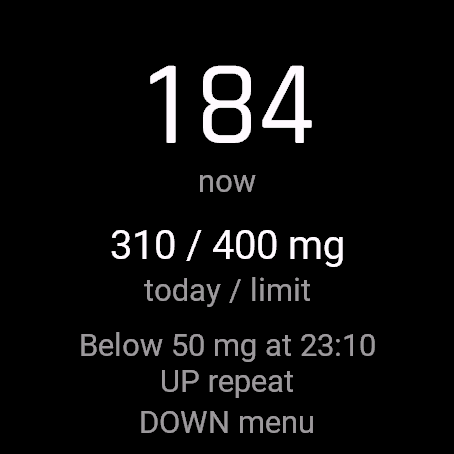
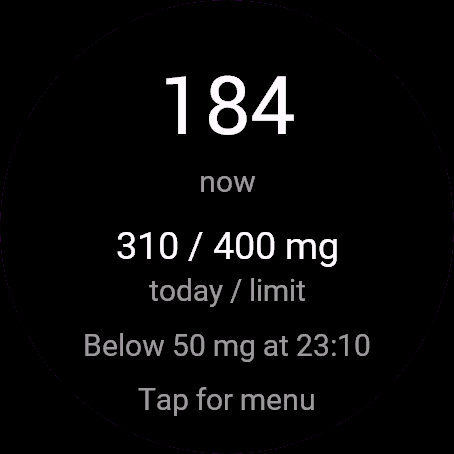
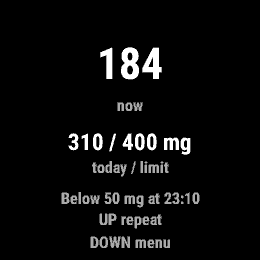
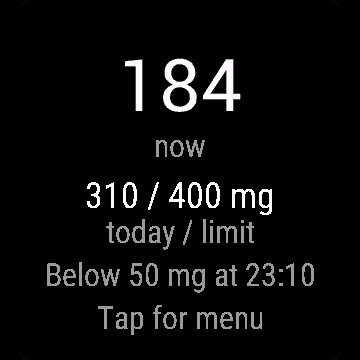
- Current caffeine in your body right now, calculated from decay
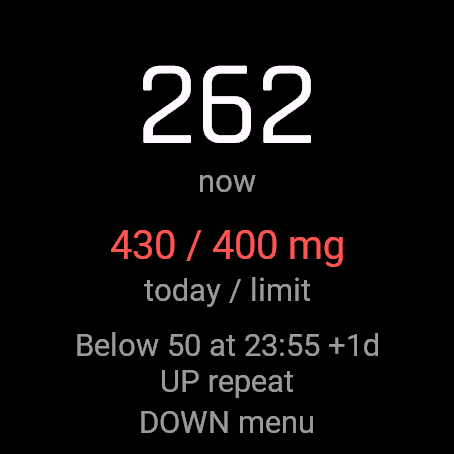
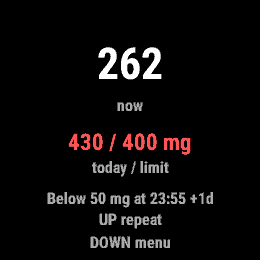
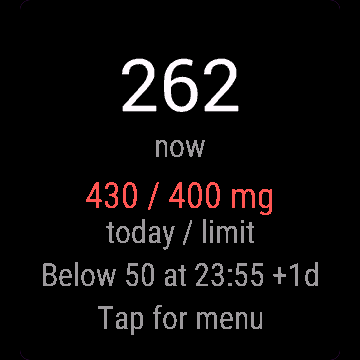
- Today's total against your daily limit (default 400 mg, adjustable)
- "Below X mg at HH:MM" so you know when you could wind down for sleep
- Half-life is a setting (3 to 7 hours), it varies a lot between people
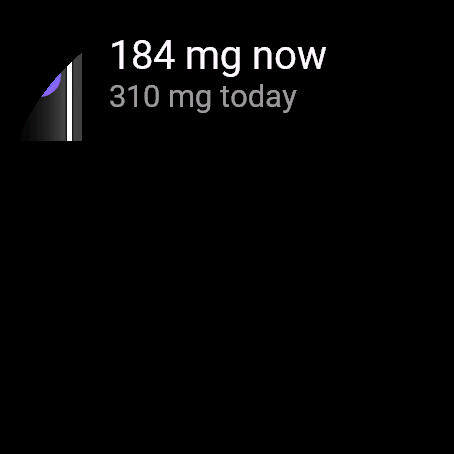
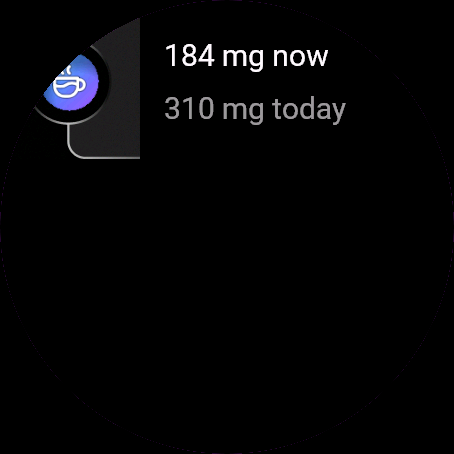
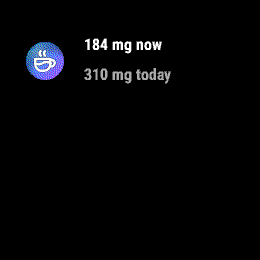
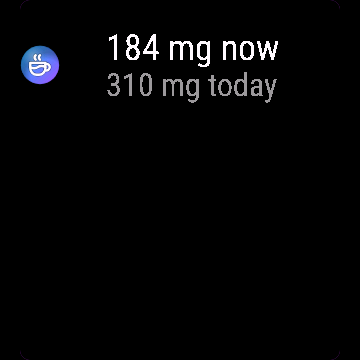
- UP repeats your last drink, glance shows current mg and today's total
Kofeina zapisuje Twoje napoje i liczy, jak kofeina naprawdę znika z organizmu: krzywa rozkładu wykładniczego z czasem połowicznego rozpadu, który możesz dostroić. Liczba na ekranie to bieżący poziom, nie suma z całego dnia.
- Espresso, kawa, herbata, cola, napój energetyczny albo własna dawka, jednym dotknięciem
- Bieżąca kofeina w organizmie liczona z rozkładu, nie tylko zsumowana
- Suma dzisiejsza na tle limitu dziennego (domyślnie 400 mg, do zmiany)
- "Poniżej X mg o HH:MM", wiesz kiedy możesz jeszcze zwolnić przed snem
- Czas połowicznego rozpadu to ustawienie (3 do 7 h), mocno różni się między osobami
- GÓRA powtarza ostatni napój, podgląd na liście widgetów pokazuje bieżące mg i sumę dnia
Caffeine Log erfasst deine Getränke und modelliert, wie Koffein deinen Körper wieder verlässt: eine exponentielle Abbaukurve mit einer Halbwertszeit, die du selbst einstellen kannst, damit die Zahl auf dem Display dein aktueller Stand ist, nicht eine laufende Summe.
- Espresso, Kaffee, Tee, Cola, Energydrink oder eigene Menge, ein Tipp
- Aktuelles Koffein in deinem Körper, gerade jetzt berechnet aus dem Abbau
- Heutige Summe gegen dein Tageslimit (Standard 400 mg, anpassbar)
- "Unter X mg um HH:MM" damit du weißt, wann du vor dem Schlafen runterkommen könntest
- Halbwertszeit ist eine Einstellung (3 bis 7 Stunden), sie schwankt stark zwischen Personen
- AUF wiederholt dein letztes Getränk, die Übersicht zeigt aktuelle mg und die heutige Summe
Caffeine Log enregistre vos boissons et modélise la façon dont la caféine quitte votre corps : une courbe de décroissance exponentielle avec une demi-vie réglable, pour que le chiffre affiché soit votre niveau actuel, pas un total cumulé.
- Espresso, café, thé, cola, boisson énergisante ou quantité personnalisée, en un appui
- Caféine actuellement présente dans votre corps, calculée à partir de la décroissance
- Total du jour comparé à votre limite quotidienne (400 mg par défaut, réglable)
- "Sous X mg à HH:MM" pour savoir quand vous pourriez ralentir avant de dormir
- La demi-vie est un réglage (3 à 7 heures), elle varie beaucoup selon les personnes
- HAUT répète votre dernière boisson, le glance affiche les mg actuels et le total du jour
Caffeine Log registra tus bebidas y modela cómo la cafeína sale de tu cuerpo: una curva de descomposición exponencial con una vida media que puedes ajustar, así que el número en pantalla es tu nivel actual, no un total acumulado.
- Espresso, café, té, cola, bebida energética o cantidad personalizada, con un toque
- Cafeína actual en tu cuerpo ahora mismo, calculada a partir de la descomposición
- Total de hoy frente a tu límite diario (400 mg por defecto, ajustable)
- "Por debajo de X mg a las HH:MM" para saber cuándo podrías empezar a relajarte antes de dormir
- La vida media es un ajuste (de 3 a 7 horas), varía mucho de una persona a otra
- ARRIBA repite tu última bebida, la vista rápida muestra los mg actuales y el total de hoy
Caffeine Log registreert je drankjes en modelleert hoe cafeïne je lichaam verlaat: een exponentiële afnamecurve met een aanpasbare halveringstijd, zodat het getal op het scherm je huidige niveau is, geen lopend totaal.
- Espresso, koffie, thee, cola, energiedrank of aangepaste hoeveelheid met één tik
- Huidige cafeïne nu in je lichaam, berekend op basis van afbraak
- Totaal van vandaag vergeleken met je dagelijkse limiet (standaard 400 mg, aanpasbaar)
- "Below X mg at HH:MM" zodat je weet wanneer je tot rust kunt komen voor het slapengaan
- Halveringstijd is instelbaar (3 to 7 hours), dit verschilt sterk per persoon
- UP herhaalt je laatste drankje, glance toont het huidige aantal mg en het totaal van vandaag
Caffeine Log は飲んだものを記録し、カフェインが体から抜けていく様子をモデル化します。調整可能な半減期を用いた指数関数的減衰曲線により、画面に表示される数値は累積合計ではなく、現在の体内レベルです。
- エスプレッソ、コーヒー、お茶、コーラ、エナジードリンク、またはカスタム量をワンタップで記録
- 減衰計算に基づき、現在体内に残っているカフェイン量を算出
- 1日の上限に対する本日の合計(デフォルト 400 mg、調整可能)
- "Below X mg at HH:MM" の表示で、睡眠に向けていつ体を休められるかが分かります
- 半減期は設定可能(3 to 7 hours)、個人差が大きい数値です
- UP で直前の飲み物を再入力、グランスで現在の mg と本日の合計を表示
Caffeine Log registra le tue bevande e calcola come la caffeina lascia l'organismo: una curva di decadimento esponenziale con un'emivita regolabile, così il numero sullo schermo è il tuo livello attuale, non un totale cumulativo.
- Espresso, caffè, tè, cola, energy drink o quantità personalizzata, con un tocco
- Caffeina presente nel corpo adesso, calcolata in base al decadimento
- Totale di oggi rispetto al tuo limite giornaliero (predefinito 400 mg, regolabile)
- "Below X mg at HH:MM" per sapere quando puoi rilassarti prima di dormire
- L'emivita è un'impostazione (da 3 a 7 ore), varia molto da persona a persona
- UP ripete l'ultima bevanda, il glance mostra i mg attuali e il totale di oggi
Caffeine Log 记录您的饮品,并模拟咖啡因在体内的代谢过程:采用半衰期可调的指数衰减曲线,屏幕显示的数值是当前的实时含量,而非累计总量。
- 一键记录意式浓缩、咖啡、茶、可乐、能量饮料或自定义摄入量
- 基于衰减模型计算当前体内的实时咖啡因
- 今日总量与每日限额对比(默认 400 mg,可调)
- "Below X mg at HH:MM" 提示,让您了解何时可以放松入睡
- 半衰期可设置(3 to 7 hours),人与人之间差异较大
- UP 重复上一杯饮品,小部件(glance)显示当前 mg 及今日总量
Caffeine Log отслеживает выпитые напитки и моделирует выведение кофеина из организма: экспоненциальная кривая распада с настраиваемым периодом полувыведения, так что число на экране показывает текущий уровень, а не просто сумму за день.
- Эспрессо, кофе, чай, кола, энергетик или свое количество в одно касание
- Текущий уровень кофеина в организме прямо сейчас, рассчитанный с учетом распада
- Сумма за сегодня в сравнении с дневным лимитом (по умолчанию 400 mg, настраивается)
- "Below X mg at HH:MM", чтобы знать, когда можно готовиться ко сну
- Период полувыведения настраивается (3 to 7 hours), так как он сильно различается у разных людей
- UP повторяет последний напиток, glance показывает текущие mg и сумму за сегодня
O Caffeine Log monitora suas bebidas e modela como a cafeína sai do seu corpo: uma curva de decaimento exponencial com uma meia-vida ajustável, para que o número na tela seja seu nível atual, e não um total acumulado.
- Expresso, café, chá, refrigerante de cola, energético ou quantidade personalizada, com um toque
- Cafeína atual no seu corpo agora mesmo, calculada a partir do decaimento
- Total de hoje em relação ao seu limite diário (padrão 400 mg, ajustável)
- "Below X mg at HH:MM" para saber quando você pode desacelerar para dormir
- A meia-vida é configurável (3 a 7 horas), variando bastante de pessoa para pessoa
- UP repete sua última bebida, o glance mostra os mg atuais e o total de hoje
Caffeine Log sleduje vaše nápoje a modeluje odbourávání kofeinu z těla: křivku exponenciálního rozpadu s poločasem, který si můžete upravit, takže číslo na obrazovce je vaše aktuální hladina, nikoli jen průběžný součet.
- Espresso, káva, čaj, cola, energetický nápoj nebo vlastní množství jedním klepnutím
- Aktuální kofein v těle právě teď, vypočítaný z odbourávání
- Dnešní celkový součet v porovnání s denním limitem (výchozí 400 mg, nastavitelný)
- "Below X mg at HH:MM", abyste věděli, kdy se můžete začít chystat ke spánku
- Poločas rozpadu je volitelný (3 až 7 hodin), u každého člověka se výrazně liší
- UP zopakuje poslední nápoj, glance ukazuje aktuální mg a dnešní součet
O Caffeine Log regista as suas bebidas e modela como a cafeína é eliminada pelo organismo: uma curva de decaimento exponencial com uma meia-vida ajustável, para que o número no ecrã seja o seu nível atual e não uma soma acumulada.
- Café expresso, café, chá, cola, bebida energética ou quantidade personalizada, com um toque
- Cafeína no seu organismo neste momento, calculada a partir do decaimento
- Total de hoje face ao seu limite diário (predefinição de 400 mg, ajustável)
- "Below X mg at HH:MM" para saber quando pode começar a relaxar para dormir
- A meia-vida é configurável (3 a 7 horas), variando bastante de pessoa para pessoa
- UP repete a última bebida, o glance mostra os mg atuais e o total de hoje
Caffeine Log는 섭취한 음료를 기록하고 카페인이 체내에서 배출되는 과정을 모델링합니다. 조절 가능한 반감기를 적용한 지수 감쇠 곡선을 사용하여, 화면에 표시되는 수치는 누적 총량이 아닌 현재 체내 카페인 수치입니다.
- 에스프레소, 커피, 차, 콜라, 에너지 드링크 또는 직접 설정한 양을 탭 한 번으로 기록
- 감쇠 모델로 계산된 현재 체내 잔여 카페인 양
- 일일 섭취 한도 대비 오늘의 총량(기본값 400 mg, 변경 가능)
- 수면 준비에 적절한 시간을 알 수 있도록 "Below X mg at HH:MM" 형태로 표시
- 반감기는 설정 가능(3 to 7 hours), 개인차가 큽니다
- UP은 마지막 음료 기록을 반복하며, 글랜스에서 현재 mg과 오늘의 총량을 확인 가능
Caffeine Log loggar dina drycker och modellerar hur koffeinet lämnar kroppen: en exponentiell avklingningskurva med anpassningsbar halveringstid, så att siffran på skärmen är din aktuella nivå, inte en löpande totalsumma.
- Espresso, kaffe, te, cola, energidryck eller valfri mängd med ett tryck
- Aktuell koffeinmängd i kroppen just nu, beräknad utifrån nedbrytning
- Dagens totalsumma mot din dagliga gräns (standard 400 mg, justerbar)
- "Under X mg vid HH:MM" så att du vet när du kan varva ner inför sömnen
- Halveringstid är en inställning (3 till 7 timmar), den varierar mycket mellan personer
- UP upprepar din senaste dryck, snabblicken visar aktuella mg och dagens total
Caffeine Log registrerer dine drikkevarer og beregner, hvordan koffein udskilles fra kroppen: en eksponentiel henfaldskurve med en halveringstid, du kan justere, så tallet på skærmen er dit aktuelle niveau, ikke en løbende total.
- Espresso, kaffe, te, cola, energidrik eller tilpasset mængde, ét tryk
- Aktuel koffein i kroppen lige nu, beregnet ud fra henfald
- Dagens total i forhold til din daglige grænse (standard 400 mg, kan justeres)
- "Below X mg at HH:MM" så du ved, hvornår du kan falde til ro før sengetid
- Halveringstid er en indstilling (3 til 7 timer), den varierer meget fra person til person
- UP gentager din seneste drik, glance viser aktuelt antal mg og dagens total
Caffeine Log holder oversikt over hva du drikker og modellerer hvordan koffein forlater kroppen: en eksponentiell nedbrytningskurve med en halveringstid du kan justere, slik at tallet på skjermen er ditt nåværende nivå, ikke en løpende totalsum.
- Espresso, kaffe, te, cola, energidrikk eller egendefinert mengde, ett trykk
- Koffein i kroppen akkurat nå, beregnet fra nedbrytning
- Dagens total mot dagsgrensen din (standard 400 mg, kan justeres)
- "Below X mg at HH:MM" slik at du vet når du kan roe ned før leggetid
- Halveringstid er en innstilling (3 til 7 timer), den varierer mye fra person til person
- UP gjentar forrige drikk, glance viser nåværende mg og dagens total
Caffeine Log 追蹤你的飲品,並模擬咖啡因在體內的代謝過程:透過可自訂半衰期的指數衰減曲線,讓螢幕上的數字呈現當前體內殘留量,而非單純的累計總量。
- 義式濃縮、咖啡、茶、可樂、能量飲料或自訂量,單鍵輕觸即可記錄
- 根據代謝衰減計算,即時顯示當前體內的咖啡因含量
- 今日總量與每日上限對比(預設 400 mg,可調整)
- "Below X mg at HH:MM" 提示,讓你知道何時可以放鬆準備入睡
- 半衰期為可調設定(3 to 7 hours),每個人之間差異很大
- UP 可重複上一筆飲品,glance 即時顯示目前 mg 與今日總量
Caffeine Log seuraa juomiasi ja mallintaa kofeiinin poistumista kehostasi: eksponentiaalinen poistumiskäyrä säädettävällä puoliintumisajalla, jotta näytöllä näkyvä luku on nykyinen tasosi eikä juokseva kokonaismäärä.
- Espresso, kahvi, tee, kolajuoma, energiajuoma tai oma määrä yhdellä napautuksella
- Kofeiinimäärä kehossasi juuri nyt puoliintumisen mukaan laskettuna
- Päivän kokonaismäärä suhteessa päivittäiseen rajaasi (oletus 400 mg, säädettävissä)
- "Below X mg at HH:MM", jotta tiedät, milloin voit rauhoittua nukkumaan
- Puoliintumisaika on asetus (3-7 tuntia), ja se vaihtelee paljon eri ihmisillä
- UP toistaa edellisen juoman, glance näyttää nykyisen mg-määrän ja päivän kokonaismäärän
Caffeine Log sleduje vaše nápoje a modeluje, ako kofeín opúšťa vaše telo: krivka exponenciálneho rozpadu s polčasom, ktorý si môžete nastaviť, takže číslo na obrazovke je vaša aktuálna hladina, nie priebežný súčet.
- Espresso, káva, čaj, cola, energetický nápoj alebo vlastné množstvo, jedným ťuknutím
- Aktuálny kofeín vo vašom tele práve teraz, vypočítaný z odbúravania
- Dnešný celkový súčet oproti vášmu dennému limitu (predvolene 400 mg, nastaviteľný)
- "Below X mg at HH:MM", aby ste vedeli, kedy sa môžete začať ukladať na spánok
- Polčas rozpadu je v nastaveniach (3 až 7 hodín), medzi ľuďmi sa výrazne líši
- UP zopakuje váš posledný nápoj, glance zobrazuje aktuálne mg a dnešný celkový súčet
Caffeine Log beleži vaše pijače in modelira izločanje kofeina iz telesa: krivulja eksponentnega upadanja z nastavljivim razpolovnim časom poskrbi, da je številka na zaslonu vaša trenutna raven in ne le seštevek.
- Espresso, kava, čaj, kola, energijska pijača ali količina po meri, z enim dotikom
- Trenutna količina kofeina v vašem telesu ta trenutek, izračunana glede na razpad
- Današnji seštevek glede na vašo dnevno mejo (privzeto 400 mg, nastavljivo)
- "Pod X mg ob HH:MM", da veste, kdaj se telo lahko umiri za spanje
- Razpolovni čas je nastavljiv (3 do 7 ur), saj se med posamezniki močno razlikuje
- UP ponovi zadnjo pijačo, hitri pogled (glance) prikazuje trenutne mg in današnji seštevek
Caffeine Log melacak minuman Anda dan memodelkan bagaimana kafein keluar dari tubuh: kurva peluruhan eksponensial dengan waktu paruh yang dapat Anda sesuaikan, sehingga angka di layar adalah kadar Anda saat ini, bukan akumulasi total.
- Espresso, kopi, teh, cola, minuman berenergi atau jumlah kustom, satu ketukan
- Kafein di tubuh Anda saat ini, dihitung dari peluruhan
- Total hari ini dibandingkan batas harian Anda (standar 400 mg, dapat disesuaikan)
- "Below X mg at HH:MM" agar Anda tahu kapan bisa bersiap untuk tidur
- Waktu paruh adalah pengaturan (3 hingga 7 jam), sangat bervariasi antarindividu
- UP mengulangi minuman terakhir Anda, glance menampilkan mg saat ini dan total hari ini
A Caffeine Log rögzíti az italaidat, és modellezi, hogyan ürül a koffein a szervezetedből: egy exponenciális bomlási görbével és beállítható felezési idővel, így a képernyőn látható szám az aktuális szinted, nem egy göngyölített összeg.
- Eszpresszó, kávé, tea, kóla, energiaital vagy egyedi mennyiség, egyetlen koppintással
- Aktuális koffein a szervezetedben most, a lebomlás alapján számolva
- Mai összesítés a napi limithez képest (alapértelmezetten 400 mg, állítható)
- "Below X mg at HH:MM", hogy tudd, mikor készülhetsz a pihentető alvásra
- A felezési idő egy beállítás (3 to 7 hours), egyénenként nagyon eltérő
- UP megismétli az utolsó italt, a glance mutatja a jelenlegi mg értéket és a mai összesítést
Caffeine Log บันทึกเครื่องดื่มของคุณและจำลองการขับคาเฟอีนออกจากร่างกาย: กราฟการสลายตัวแบบเอกซ์โพเนนเชียลพร้อมค่าครึ่งชีวิตที่คุณปรับแต่งได้ ตัวเลขบนหน้าจอจึงเป็นระดับปัจจุบันของคุณ ไม่ใช่แค่ยอดสะสม
- เอสเปรสโซ กาแฟ ชา โคล่า เครื่องดื่มชูกำลัง หรือกำหนดปริมาณเอง แตะเพียงครั้งเดียว
- ปริมาณคาเฟอีนในร่างกายของคุณ ณ ตอนนี้ คำนวณจากการสลายตัว
- ยอดรวมวันนี้เทียบกับขีดจำกัดรายวันของคุณ (ค่าเริ่มต้น 400 mg ปรับเปลี่ยนได้)
- "Below X mg at HH:MM" เพื่อให้คุณรู้ว่าเมื่อใดที่พร้อมผ่อนคลายเพื่อเข้านอน
- ค่าครึ่งชีวิตเป็นค่าที่ตั้งได้ (3 to 7 hours) ซึ่งแตกต่างกันมากในแต่ละบุคคล
- UP ทำซ้ำเครื่องดื่มล่าสุดของคุณ glance แสดงค่า mg ปัจจุบันและยอดรวมวันนี้
Το Caffeine Log καταγράφει τα ροφήματά σας και προσομοιώνει πώς αποβάλλεται η καφεΐνη από το σώμα σας: μια καμπύλη εκθετικής μείωσης με χρόνο ημιζωής που μπορείτε να ρυθμίσετε, ώστε ο αριθμός στην οθόνη να δείχνει το τρέχον επίπεδο και όχι ένα τρέχον σύνολο.
- Εσπρέσο, καφές, τσάι, κόλα, ενεργειακό ποτό ή προσαρμοσμένη ποσότητα, με ένα πάτημα
- Τρέχουσα καφεΐνη στο σώμα σας αυτή τη στιγμή, υπολογισμένη βάσει της απομείωσης
- Το σημερινό σύνολο σε σχέση με το ημερήσιο όριό σας (προεπιλογή 400 mg, ρυθμιζόμενο)
- "Below X mg at HH:MM" ώστε να γνωρίζετε πότε μπορείτε να χαλαρώσετε για ύπνο
- Ο χρόνος ημιζωής είναι ρυθμιζόμενος (3 έως 7 ώρες), διαφέρει αρκετά από άτομο σε άτομο
- Το UP επαναλαμβάνει το τελευταίο σας ρόφημα, το glance δείχνει τα τρέχοντα mg και το σημερινό σύνολο
Caffeine Log prati vaša pića i modelira kako kofein napušta vaše tijelo: eksponencijalna krivulja raspada s vremenom poluraspada koje možete prilagoditi, pa je broj na zaslonu vaša trenutna razina, a ne samo zbroj.
- Espresso, kava, čaj, cola, energetski napitak ili prilagođena količina, jednim dodirom
- Trenutni kofein u vašem tijelu upravo sada, izračunat iz raspada
- Današnji ukupni unos u odnosu na vaš dnevni limit (zadano 400 mg, podesivo)
- "Below X mg at HH:MM" kako biste znali kada se možete opustiti za spavanje
- Vrijeme poluraspada je postavka (3 do 7 sati), uvelike se razlikuje među ljudima
- UP ponavlja vaše zadnje piće, glance prikazuje trenutne mg i današnji ukupni unos
Caffeine Log עוקב אחר המשקאות שלך וממדל כיצד הקפאין מתפנה מהגוף: עקומת דעיכה מעריכית עם זמן מחצית חיים שניתן להתאים, כך שהמספר על המסך הוא הרמה הנוכחית שלך, ולא סך הכול מצטבר.
- אספרסו, קפה, תה, קולה, משקה אנרגיה או כמות מותאמת אישית, בהקשה אחת
- כמות הקפאין הנוכחית בגוף ברגע זה, מחושבת על פי דעיכה
- סך הכול להיום מול היעד היומי (ברירת מחדל 400 mg, ניתן להתאמה)
- "Below X mg at HH:MM" כדי לדעת מתי אפשר להירגע לקראת שינה
- זמן מחצית חיים הוא הגדרה לבחירה (3 עד 7 שעות), שכן הוא משתנה מאוד בין אנשים
- UP חוזר על המשקה האחרון, glance מציג את ה-mg הנוכחי ואת סך הכול להיום
Caffeine Log menjejaki minuman anda dan memodelkan bagaimana kafein keluar daripada badan anda: lengkung penyusutan eksponen dengan separuh hayat yang boleh anda laras, jadi nombor pada skrin ialah tahap semasa anda, bukan jumlah terkumpul.
- Espresso, kopi, teh, kola, minuman tenaga atau jumlah tersuai, satu ketikan
- Kafein semasa dalam badan anda sekarang, dikira daripada penyusutan
- Jumlah hari ini berbanding had harian anda (lalai 400 mg, boleh dilaras)
- "Below X mg at HH:MM" supaya anda tahu bila anda boleh berehat untuk tidur
- Separuh hayat ialah tetapan (3 hingga 7 jam), ia sangat berbeza antara individu
- UP mengulang minuman terakhir anda, glance menunjukkan mg semasa dan jumlah hari ini
How to use it
Add Caffeine Log to the widget loop (swipe through widgets on the watch).
Plain exponential model for a rough estimate, not medical advice.
Dodaj Kofeina do karuzeli widgetów (przewiń widgety na zegarku).
Prosty model wykładniczy do przybliżonej orientacji, nie porada medyczna.
Füge Caffeine Log zur Widget-Schleife hinzu (auf der Uhr durch die Widgets wischen).
Rein exponentielles Modell für eine grobe Schätzung, keine medizinische Beratung.
Ajoutez Caffeine Log à la boucle de widgets (faites défiler les widgets sur la montre).
Modèle exponentiel simple pour une estimation approximative, pas un avis médical.
Añade Caffeine Log al bucle de widgets (desliza por los widgets en el reloj).
Modelo exponencial simple para una estimación aproximada, no es consejo médico.
Voeg Caffeine Log toe aan de widgetlus (veeg op het horloge door de widgets).
Eenvoudig exponentieel model voor een ruwe schatting, geen medisch advies.
Caffeine Log をウィジェットのループに追加してください(時計でウィジェットをスワイプして切り替えます)。
単純な指数モデルによる大まかな推定値であり、医学的なアドバイスではありません。
Aggiungi Caffeine Log al ciclo dei widget (scorri i widget sull'orologio).
Semplice modello esponenziale per una stima approssimativa, non costituisce un parere medico.
把 Caffeine Log 添加到小组件循环中(在手表上滑动切换小组件)。
简易指数模型仅用于粗略估算,非医疗建议。
Добавьте Caffeine Log в ленту виджетов (листайте виджеты на часах).
Простая экспоненциальная модель для приблизительной оценки, не является медицинской рекомендацией.
Adicione Caffeine Log ao ciclo de widgets (deslize pelos widgets no relógio).
Modelo exponencial simples para uma estimativa aproximada, não é aconselhamento médico.
Přidejte Caffeine Log do smyčky widgetů (na hodinkách procházejte widgety přejížděním).
Jednoduchý exponenciální model pro hrubý odhad, nejedná se o lékařskou radu.
Adicione Caffeine Log ao ciclo de widgets (deslize pelos widgets no relógio).
Modelo exponencial simples para uma estimativa aproximada, não é aconselhamento médico.
Caffeine Log을(를) 위젯 순환에 추가하세요(시계에서 위젯을 넘겨 보세요).
대략적인 추정을 위한 단순 지수 모델이며, 의학적 조언이 아닙니다.
Lägg till Caffeine Log i widgetslingan (svep mellan widgetar på klockan).
Enkel exponentiell modell för en grov uppskattning, inte medicinsk rådgivning.
Tilføj Caffeine Log til widget-løkken (stryg gennem widgets på uret).
Simpel eksponentiel model til et groft skøn, ikke medicinsk rådgivning.
Legg til Caffeine Log i widget-rekken (sveip gjennom widgetene på klokken).
Enkel eksponentiell modell for et grovt estimat, ikke et medisinsk råd.
把 Caffeine Log 加入小工具循環中(在手錶上滑動切換小工具)。
純指數模型僅供粗略估算,非醫療建議。
Lisää Caffeine Log widgetkiertoon (selaa widgettejä pyyhkäisemällä kellossa).
Yksinkertainen eksponentiaalinen malli karkeaan arvioon, ei lääketieteellinen neuvo.
Pridajte Caffeine Log do cyklu widgetov (widgety na hodinkách prechádzate potiahnutím).
Jednoduchý exponenciálny model pre hrubý odhad, nejde o lekársku radu.
Dodajte Caffeine Log v zanko pripomočkov (na uri se pomikajte med pripomočki).
Preprost eksponentni model za grobo oceno, ni zdravniški nasvet.
Tambahkan Caffeine Log ke putaran widget (geser antar widget di jam).
Model eksponensial sederhana untuk estimasi kasar, bukan saran medis.
Adja hozzá a(z) Caffeine Log elemet a widgetkörhöz (az órán görgessen a widgetek között).
Egyszerű exponenciális modell a hozzávetőleges becsléshez, nem orvosi tanács.
เพิ่ม Caffeine Log ในวิดเจ็ตลูป (ปัดผ่านวิดเจ็ตบนนาฬิกา)
แบบจำลองเอกซ์โพเนนเชียลทั่วไปสำหรับการประมาณการคร่าว ๆ ไม่ใช่คำแนะนำทางการแพทย์
Προσθέστε το Caffeine Log στον κύκλο των widget (σύρετε στα widget του ρολογιού).
Απλό εκθετικό μοντέλο για μια κατά προσέγγιση εκτίμηση, δεν αποτελεί ιατρική συμβουλή.
Dodajte Caffeine Log u petlju widgeta (listajte widgete na satu).
Jednostavan eksponencijalni model za okvirnu procjenu, nije medicinski savjet.
הוסיפו את Caffeine Log ללולאת הווידג'טים (החליקו בין הווידג'טים בשעון).
מודל מעריכי פשוט להערכה כללית, לא ייעוץ רפואי.
Tambah Caffeine Log ke dalam gelung widget (leret melalui widget pada jam).
Model eksponen mudah untuk anggaran kasar, bukan nasihat perubatan.
Manual
The full manual and the detailed permission descriptions are available in English and Polish.
Caffeine Log: user manual
What it does
Caffeine Log counts your logged drinks and shows how much caffeine is in your body right now, using exponential decay with a half-life you set. It also shows today's total against a daily limit and when the level falls below your sleep threshold.
Requirements and supported watches
Needs Connect IQ 3.3.0+ and the Connect IQ or Garmin Connect phone app. Supported watches:
- Round AMOLED: epix 2 and epix Pro 2, fēnix 8, E, Forerunner 165, 265, 570, 965, 970, Instinct 3 AMOLED, Crossover AMOLED, Venu 2, 3, 4, vivoactive 5, 6.
- Round MIP: enduro 3, fēnix 7 series, 8 Solar, Forerunner 55, 245, 255.
- Square and rectangular AMOLED: Venu Sq 2, Venu X1.
Installation
In the Connect IQ app on your phone (or Garmin Connect, then the Connect IQ Store) find "Caffeine Log" by Dialforge, tap Install and sync the watch. Find it in your glances (UP or DOWN on the watch face, or swipe) and press START or tap to open it.
First launch
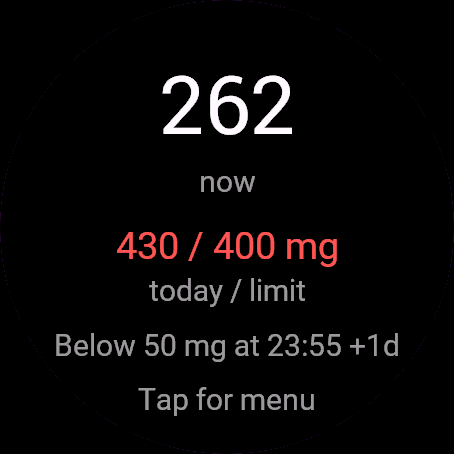
With nothing logged you see 0 mg now, "0 / 400 mg" today and "Already below 50 mg". Log a drink and the numbers jump at once. The current level then drifts down by itself, refreshed every 30 seconds. The 30-day free beta starts the first time you open it.
Controls
Watches with buttons (START, UP, DOWN, BACK)
- Main screen: UP repeats the last drink ("Added" flashes; with nothing logged it opens the menu). DOWN, START or holding UP open the menu.
- Menu: a drink logs instantly and closes the menu. Custom amount, Daily limit and Sleep threshold open a number screen: UP more, DOWN less, START confirms, BACK cancels.
- Half-life (h): START adds an hour, after 7 it returns to 3.
Touch watches (tap, hold, swipe)
- Main screen: tap anywhere opens the menu. Swipes do nothing, except swipe right (back). Repeating the last drink needs UP, so use the menu.
- Number screens: tap the upper half for more, the middle for less, the bottom strip to confirm.
Settings
Phone: Connect IQ app, Caffeine Log, Settings (the unlock code fields are there too).
On the watch, inside the app:
- Drinks (mg): Espresso 63, Coffee 95, Tea 47, Cola 34, Energy drink 80.
- Custom amount: 0 to 1000 mg in steps of 10, starts at 100. Logged at once.
- Daily limit: 100 to 1000 mg in steps of 25, default 400.
- Half-life (h): 3 to 7, default 5.
- Sleep threshold: 10 to 300 mg in steps of 10, default 50.
License
- Free beta: 30 days from the first launch, everything works.
- Price: 4.99 EUR once at dialforge.dev, no subscription. The 8-character code is tied to your watch's UID.
- Where to enter it: phone, Connect IQ app, Caffeine Log, Settings. Read the UID in "Watch UID (needed to buy a code)", buy the code, then type it into "Unlock code from dialforge.dev". The end-of-beta screen on the watch shows the UID too.
- After the beta without a code: an end-of-beta screen with the UID replaces the app. Enter the code, then open it again. New watch? Write to us and the code moves for free.
Privacy and permissions
No special permissions.
No internet use. Data stays on the watch.
Health note: not a medical device, no diagnosis or treatment, no substitute for a doctor. Medical decisions belong to your doctor or pharmacist.
Troubleshooting
The code does not work. Check that the UID you bought for matches "Watch UID (needed to buy a code)" and type all 8 characters (case is ignored, no 0, O, 1 or I). A code for another app does not fit. Sync, then reopen.
Why does today reset at midnight but the current level not? Today is a calendar total. The current level comes from doses of the last hours.
What does "Below 50 mg at ..." mean? When the estimated level falls under your sleep threshold, in the watch's 12 or 24-hour format, with +1d if it is tomorrow.
Is the number exact? No, it is a plain decay model. Tune half-life in the menu.
Contact
kontakt@dialforge.dev or dialforge.dev. Please write before leaving a low rating.
Kofeina: instrukcja obsługi
Do czego służy
Kofeina zlicza zapisane napoje i pokazuje, ile kofeiny masz teraz we krwi, według rozkładu wykładniczego z ustawianym czasem połowicznego rozkładu. Pokazuje też dzisiejszą sumę na tle limitu i godzinę, o której poziom spadnie poniżej progu snu.
Wymagania i obsługiwane zegarki
Wymaga Connect IQ 3.3.0+ i aplikacji Connect IQ albo Garmin Connect w telefonie. Obsługiwane zegarki:
- Okrągłe AMOLED: epix 2 i epix Pro 2, fēnix 8, E, Forerunner 165, 265, 570, 965, 970, Instinct 3 AMOLED, Crossover AMOLED, Venu 2, 3, 4, vivoactive 5, 6.
- Okrągłe MIP: enduro 3, seria fēnix 7, fēnix 8 Solar, Forerunner 55, 245, 255.
- Kwadratowe i prostokątne AMOLED: Venu Sq 2, Venu X1.
Instalacja
Na telefonie otwórz aplikację Connect IQ (albo Garmin Connect, a w niej sklep Connect IQ), wyszukaj "Kofeina" od Dialforge, stuknij Zainstaluj i zsynchronizuj zegarek. Znajdziesz go wśród widżetów (GÓRA lub DÓŁ na tarczy albo przesunięcie palcem), a START lub stuknięcie otwiera go w całości.
Pierwsze uruchomienie
Przy pustym dzienniku widzisz 0 mg teraz, "0 / 400 mg" dzisiaj i "Już poniżej 50 mg". Zapisz napój z menu, a liczby od razu skaczą. Aktualny poziom potem sam opada i odświeża się co 30 sekund. 30-dniowa darmowa beta zaczyna się przy pierwszym otwarciu.
Sterowanie
Zegarki z przyciskami (START, GÓRA, DÓŁ, WSTECZ)
- Ekran główny: GÓRA powtarza ostatni napój (na chwilę pojawia się "Dodano"; gdy nic jeszcze nie zapisano, otwiera menu). DÓŁ, START albo przytrzymanie GÓRY otwierają menu.
- Menu: napój zapisuje się od razu i menu się zamyka. Własna dawka, Limit dzienny i Próg snu otwierają ekran z liczbą: GÓRA więcej, DÓŁ mniej, START zatwierdza, WSTECZ anuluje.
- Rozkład połowiczny (h): START podnosi o godzinę, po 7 wraca do 3.
Zegarki dotykowe (stuknięcie, przytrzymanie, przesunięcie)
- Ekran główny: stuknięcie gdziekolwiek otwiera menu. Przesunięcia nic nie robią, poza przesunięciem w prawo (wstecz). Powtórzenie ostatniego napoju wymaga GÓRY, więc użyj menu.
- Ekrany z liczbą: górna połowa to więcej, środek mniej, dolny pasek zatwierdza.
Ustawienia
Telefon: aplikacja Connect IQ, Kofeina, Ustawienia (są tam też pola kodu odblokowania).
Na zegarku, w aplikacji:
- Napoje (mg): Espresso 63, Kawa 95, Herbata 47, Cola 34, Napój energetyczny 80.
- Własna dawka: od 0 do 1000 mg co 10, start od 100. Zapisuje się od razu.
- Limit dzienny: od 100 do 1000 mg co 25, domyślnie 400.
- Rozkład połowiczny (h): od 3 do 7, domyślnie 5.
- Próg snu: od 10 do 300 mg co 10, domyślnie 50.
Licencja
- Darmowa beta: 30 dni od pierwszego uruchomienia, wszystko działa.
- Cena: jednorazowo 4,99 EUR na dialforge.dev, bez abonamentu. 8-znakowy kod jest przypisany do UID zegarka.
- Gdzie wpisać: telefon, aplikacja Connect IQ, Kofeina, Ustawienia. Odczytaj UID w polu "UID zegarka (potrzebny do zakupu kodu)", kup kod i wpisz go w "Kod odblokowania z dialforge.dev". Ekran końca bety na zegarku też pokazuje UID.
- Po becie bez kodu: zamiast aplikacji pojawia się ekran końca bety z UID. Wpisz kod i otwórz aplikację ponownie. Nowy zegarek? Napisz do nas, przeniesiemy kod za darmo.
Prywatność i uprawnienia
Brak szczególnych uprawnień.
Zero połączeń z internetem. Dane zostają w zegarku.
Uwaga zdrowotna: to nie jest wyrób medyczny. Niczego nie diagnozuje ani nie leczy i nie zastępuje lekarza. Decyzje medyczne zostaw lekarzowi lub farmaceucie.
Rozwiązywanie problemów
Kod nie działa. Sprawdź, czy UID, dla którego kupiono kod, zgadza się z polem "UID zegarka (potrzebny do zakupu kodu)", i wpisz wszystkie 8 znaków (wielkość liter bez znaczenia, bez 0, O, 1, I). Kod do innej aplikacji nie pasuje. Zsynchronizuj i otwórz ponownie.
Czemu druga liczba zeruje się o północy, a pierwsza nie? Dzisiaj to suma z kalendarza. Aktualny poziom liczy się z porcji z ostatnich godzin, więc przechodzi przez północ.
Co znaczy "Poniżej 50 mg o ..."? Godzinę, o której szacowany poziom spadnie poniżej progu snu, w formacie 12 lub 24 godzinnym zegarka. Jeśli to nie dziś, dopisuje się +1d albo +2d.
Czy liczba jest dokładna? Nie. To prosty model rozkładu. Czas połowicznego rozkładu bardzo różni się między ludźmi, więc ustaw swój w menu.
Kontakt
kontakt@dialforge.dev albo dialforge.dev. Napisz, zanim wystawisz niską ocenę.
Permissions and privacy
This product does not use the internet and sends no data to our servers.
The full manual and the detailed permission descriptions are available in English and Polish.
Compatible watches
51mm, D2 Air X15, D2 Mach 1 Pro, Enduro 2, Enduro 3, epix (Gen 2), epix Pro (Gen 2) 42mm, epix Pro (Gen 2) 47mm, epix Pro (Gen 2) 51mm, Forerunner 165, Forerunner 165 Music, Forerunner 245, Forerunner 245 Music, Forerunner 255, Forerunner 255 Music, Forerunner 255s, Forerunner 255s Music, Forerunner 265, Forerunner 265s, Forerunner 55, Forerunner 570 42mm, Forerunner 570 47mm, Forerunner 965, Forerunner 970, fēnix 7, fēnix 7 Pro, fēnix 7 Pro - Solar Edition (no Wi-Fi), fēnix 7S, fēnix 7S Pro, fēnix 7X, fēnix 7X Pro, fēnix 7X Pro - Solar Edition (no Wi-Fi), fēnix 8 43mm, fēnix 8 47mm, fēnix 8 Pro 47mm, fēnix 8 Solar 47mm, fēnix 8 Solar 51mm, fēnix E, Instinct 3 AMOLED 45mm, Instinct 3 AMOLED 50mm, Instinct Crossover AMOLED, MicroLED, quatix 7, quatix 7 Pro, quatix 7 Sapphire, quatix 7X Solar, quatix 8 47mm, quatix 8 Pro 47mm, tactix 7, tactix 7 – AMOLED Edition, tactix 8 47mm, tactix 8 Solar 51mm, Venu 2, Venu 2 Plus, Venu 2S, Venu 3, Venu 3S, Venu 4 41mm, Venu 4 45mm, Venu Sq 2, Venu Sq 2 Music, Venu X1, vívoactive 5, vívoactive 6
Screenshots
FAQ
What happens after the 30-day beta?
The app shows a screen asking for a one-time unlock code from dialforge.dev instead of opening normally. Buy the code once below, no subscription.
Does the app send my data to Dialforge?
No. The app works fully offline, and the unlock code is checked on the watch itself, without contacting any server.
The app does not work as described on my watch. Can I get a refund?
Yes. Write through the feedback form below, or to the e-mail in the footer. If we cannot fix it, we refund you, as described in the terms.
Changing your watch?
Write to me and I will move your code for free.
Changelog
- First release (beta).
- Pierwsze wydanie (beta).
- Erste Veröffentlichung (Beta).
- Première version (bêta).
- Primera versión (beta).
- Eerste release (beta).
- 初回リリース(ベータ版)。
- Prima versione (beta).
- 首次发布(测试版)。
- Первый релиз (бета).
- Primeiro lançamento (beta).
- První verze (beta).
- Primeira versão (beta).
- 첫 출시(베타).
- Första versionen (beta).
- Første udgivelse (beta).
- Første versjon (beta).
- 首發版本(beta)。
- Ensimmäinen julkaisu (beta).
- Prvé vydanie (beta).
- Prva različica (beta).
- Rilis pertama (beta).
- Első kiadás (béta).
- เวอร์ชันแรก (beta)
- Πρώτη έκδοση (beta).
- Prvo izdanje (beta).
- גרסה ראשונה (בטא).
- Keluaran pertama (beta).
Unlock
€4.99
One-time payment. No subscription. The code works on the watch whose UID you enter.
- Install the app from the Connect IQ store. It works fully and for free for the first 30 days.
- Find your 10-digit UID: Connect IQ app on the phone > My Device > Apps or Data Fields > this app > Settings > Watch UID.
- Enter UID and e-mail, pay with PayPal (cards work without a PayPal account). The code appears here at once.
- Type the code into the same settings page, field "Unlock code". The watch checks it offline.
Thank you! Your code:
Enter the code in the app settings, field "Unlock code". The watch checks it offline.
Tell us how to make it better
Missing a data field, a colour, a layout? Found a bug on your watch model? Write it here. We read every message and ship improvements in updates.