Outdoor and photography
Multi-Pitch Climb
Route log for multi-pitch climbing. Garmin's climbing activity profile logs laps poorly on a long trad or alpine route, and there is no dedicated app for it. This one gives you a phase for every stance instead of one noisy auto-lap, in a single Garmin activity for the whole route.
Dziennik drogi wielowyciągowej. Profil wspinaczkowy Garmina źle liczy okrążenia na długiej drodze trad albo alpejskiej, a osobnej aplikacji do tego nie ma. Ta aplikacja daje fazę na każde stanowisko, nie jedno zaszumione, automatyczne okrążenie, i to w jednej aktywności na całą drogę.
Routenbuch für Mehrseillängen-Klettern. Das Kletter-Aktivitätsprofil von Garmin zeichnet Runden auf langen Trad- oder Alpinrouten nur unzureichend auf, und es gibt keine eigene App dafür. Diese App bietet dir eine Phase für jeden Standplatz statt ungenauer Auto-Laps, alles in einer einzigen Garmin-Aktivität für die gesamte Route.
Carnet de voie pour l'escalade en grande voie. Le profil d'activité escalade de Garmin gère mal les laps sur une longue voie trad ou alpine, et il n'existe aucune application dédiée. Celle-ci vous offre une phase pour chaque relais au lieu d'un auto-lap bruyant, au sein d'une seule activité Garmin pour l'ensemble de la voie.
Registro de vías para escalada de varios largos. El perfil de actividad de escalada de Garmin registra mal las vueltas en vías largas clásicas o alpinas, y no hay ninguna app dedicada a ello. Esta app te ofrece una fase para cada reunión en lugar de un molesto autolap, dentro de una única actividad de Garmin para toda la vía.
Routelogboek voor multi-pitch klimmen. Het klimprofiel van Garmin registreert rondes matig op een lange trad- of alpiene route, en er is geen speciale app voor. Deze app geeft je een fase voor elke standplaats in plaats van één rommelige auto-lap, in één enkele Garmin-activiteit voor de hele route.
マルチピッチクライミングのためのルートログ。Garmin のクライミングアクティビティプロファイルは、長いトラッドやアルパインルートでのラップ記録がうまく機能せず、専用のアプリもありません。このアプリなら、煩わしいオートラップの代わりに各ピッチのスタンスごとにフェーズを記録し、ルート全体をひとつの Garmin アクティビティにまとめます。
Registro per l'arrampicata su vie a più tiri. Il profilo di attività arrampicata di Garmin registra male i lap su una lunga via trad o alpina, e non esiste un'app dedicata. Questa app ti offre una fase per ogni sosta invece di un fastidioso auto-lap, in una singola attività Garmin per l'intera via.
专为多段攀登打造的路线记录应用。在漫长的传统攀登或高山路线上,Garmin 的内置攀爬活动在计圈记录方面表现欠佳,且缺少专属应用。本应用在整条路线的单一 Garmin 活动中,为每个保护站提供一个独立阶段,而非杂乱的自动计圈。
Журнал маршрутов для мультипитчей. Стандартный профиль скалолазания Garmin плохо фиксирует отрезки на длинных альпинистских или трэд-маршрутах, а отдельного приложения для этого нет. Это приложение создает фазу для каждой станции вместо хаотичных автоматических кругов, объединяя весь маршрут в одну активность Garmin.
Registro de vias para escalada em enfiadas. O perfil de atividade de escalada da Garmin não registra bem as voltas em vias tradicionais longas ou alpinas, e não há um aplicativo dedicado para isso. Este app oferece uma fase para cada parada em vez de uma volta automática ruidosa, em uma única atividade Garmin para toda a via.
Deník výstupů pro vícedélkové lezení. Profil lezecké aktivity od Garmin zaznamenává na dlouhých tradičních nebo vysokohorských cestách okruhy nespolehlivě a žádná specializovaná aplikace pro to neexistuje. Tato aplikace vám poskytne fázi pro každý štand namísto nepřesného automatického počítání okruhů, v rámci jediné Garmin aktivity pro celou cestu.
Registo de vias para escalada de vários largos. O perfil de atividade de escalada da Garmin regista mal as voltas numa via longa tradicional ou alpina, e não existe uma aplicação dedicada para isso. Esta dá-lhe uma fase para cada reunião em vez de um auto-lap ruidoso, numa única atividade Garmin para toda a via.
멀티피치 클라이밍을 위한 루트 로그입니다. Garmin의 클라이밍 액티비티 프로필은 긴 트래드나 알파인 루트에서 랩을 제대로 기록하지 못하며, 이를 위한 전용 앱도 없습니다. 이 앱은 번거로운 오토랩 대신 모든 확보 지점마다 개별 페이즈를 제공하여 루트 전체를 단 하나의 Garmin 액티비티로 기록합니다.
Ruttlogg för flerreplängdsklättring. Garmins klättringsprofil loggar varv dåligt på en lång trad- eller alpintur, och det finns ingen dedikerad app för det. Den här ger dig en fas för varje standplats istället för ett rörigt autovarv, i en och samma Garmin-aktivitet för hela turen.
Rutelog til klatring på flere reblængder. Garmins klatreaktivitetsprofil logger omgange dårligt på en lang trad- eller alpinrute, og der findes ingen dedikeret app til det. Denne app giver dig en fase for hver standplads i stedet for én støjende auto-omgang, samlet i en enkelt Garmin-aktivitet for hele ruten.
Rutelogg for klatring over flere taulengder. Garmins klatreaktivitetsprofil logger runder dårlig på en lang trad- eller alpinrute, og det finnes ingen egen app for dette. Denne gir deg en fase for hver standplass i stedet for en rotete automatisk runde, i én enkelt Garmin-aktivitet for hele ruten.
多繩距攀登路線記錄。在漫長的傳統攀登或高山路線上,Garmin 內建的攀登活動模式計圈效果不佳,且沒有專門的應用程式。本應用程式為每個確保站記錄一個獨立階段,而非混亂的自動計圈,並將整條路線整合在單一 Garmin 活動中。
Reittiloki monen köydenpituuden kiipeilyyn. Garmin-laitteen kiipeilyprofiili kirjaa kierrokset heikosti pitkillä träd- tai alppireiteillä, eikä siihen ole erillistä sovellusta. Tämä sovellus antaa sinulle oman vaiheen jokaiselle ständille yhden sekavan automaattikierroksen sijaan, yhdessä ainoassa Garmin-suorituksessa koko reitille.
Denník trás pre viacdĺžkové lezenie. Športový profil lezenia na hodinkách Garmin zaznamenáva okruhy na dlhej tradičnej alebo vysokohorskej ceste nepresne a neexistuje pre to žiadna špecializovaná aplikácia. Táto vám namiesto jedného rušivého auto-lapu poskytne fázu pre každé štandovisko, a to v jedinej Garmin aktivite pre celú cestu.
Dnevnik smeri za večraztežajno plezanje. Garminov profil dejavnosti plezanja slabo beleži dolžine na dolgih tradicionalnih ali alpskih smereh, namenske aplikacije za to pa ni. Ta aplikacija vam omogoča fazo za vsako stojišče namesto neustreznega samodejnega beleženja dolžin, v eni sami Garmin dejavnosti za celotno smer.
Log rute untuk panjat multi-pitch. Profil aktivitas memanjat Garmin kurang optimal mencatat lap pada rute trad atau alpine yang panjang, dan belum ada aplikasi khusus untuk itu. Aplikasi ini memberi Anda fase untuk setiap stance alih-alih auto-lap yang mengganggu, dalam satu aktivitas Garmin untuk seluruh rute.
Útvonalnapló több kötélhosszas mászáshoz. A Garmin mászás tevékenységprofilja pontatlanul rögzíti a köröket egy hosszú trad vagy alpesi úton, és nincs erre külön alkalmazás. Ez az alkalmazás egy fázist biztosít minden standhoz a zavaró auto-lap helyett, egyetlen Garmin tevékenységben az egész útra.
บันทึกเส้นทางสำหรับการปีนหน้าผาแบบ multi-pitch โปรไฟล์กิจกรรมปีนเขาของ Garmin บันทึก lap ได้ไม่ดีนักบนเส้นทาง trad หรือ alpine ระยะยาว และยังไม่มีแอปเฉพาะสำหรับสิ่งนี้ แอปนี้ช่วยให้คุณมี phase สำหรับทุกจุดพัก (stance) แทนที่จะเป็น auto-lap ที่คลาดเคลื่อน รวมอยู่ในกิจกรรม Garmin เดียวกันตลอดทั้งเส้นทาง
Καταγραφή διαδρομών για αναρρίχηση πολλαπλών σχοινιών. Το προφίλ δραστηριότητας αναρρίχησης της Garmin δεν καταγράφει καλά τους γύρους σε μια μεγάλη trad ή αλπική διαδρομή, και δεν υπάρχει ειδική εφαρμογή για αυτό. Αυτή εδώ σάς δίνει μία φάση για κάθε ρελέ αντί για έναν θορυβώδη αυτόματο γύρο, σε μία ενιαία δραστηριότητα Garmin για ολόκληρη τη διαδρομή.
Dnevnik smjerova za penjanje u više dužina. Garminov profil aktivnosti penjanja loše bilježi dionice na dugom trad ili alpinističkom smjeru, a za to ne postoji namjenska aplikacija. Ova vam omogućuje fazu za svako sidrište umjesto nepouzdanog automatskog kruga, u jednoj Garmin aktivnosti za cijeli smjer.
יומן מסלול לטיפוס multi-pitch. פרופיל פעילות הטיפוס של Garmin מתעד הקפות בצורה לקויה במסלול טראד או אלפיני ארוך, ואין לכך אפליקציה ייעודית. אפליקציה זו מעניקה לך שלב נפרד לכל עמדת אבטחה במקום הקפה אוטומטית רועשת אחת, בפעילות Garmin יחידה לכל אורך המסלול.
Log laluan untuk pendakian multi-pitch. Profil aktiviti pendakian Garmin kurang memuaskan dalam merekod pusingan (lap) pada laluan trad atau alpin yang panjang, dan tiada aplikasi khusus untuknya. Aplikasi ini memberikan anda satu fasa bagi setiap stesen (stance) berbanding pusingan auto yang bercelaru, dalam satu aktiviti Garmin untuk keseluruhan laluan.
Coming to Connect IQ Unlock €5.99
Beta: free for 30 days
The app works fully and for free for the first 30 days after you first open it. After that you can buy a one-time unlock code below. No subscription.
- Approach, then Climb/Belay per pitch (alternating), Descent, optional Break: one phase per button press. Belay is the time you belay your partner between your own climbs
- Leader marked per pitch (L/F), switching automatically at every new pitch (setting "Alternate leads", on by default); swap it by hand anytime if you mixed it up
- Altitude gain per pitch from the barometer, filtered so weather noise is not counted as climbing
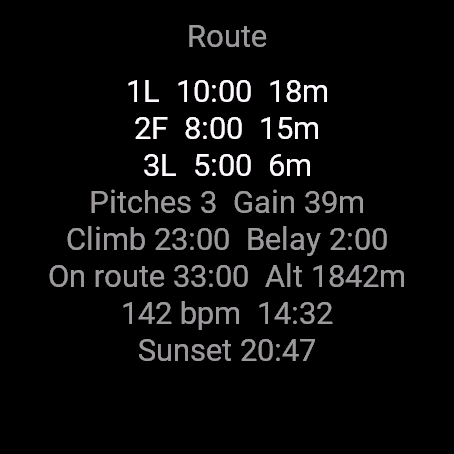
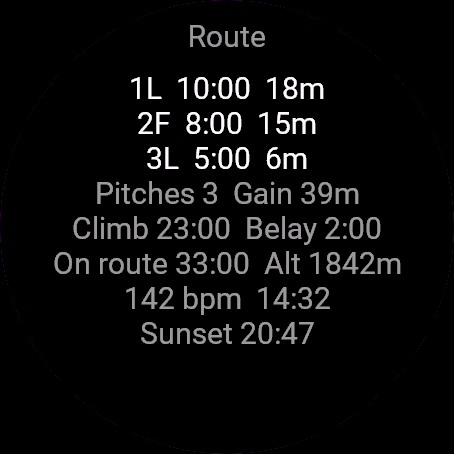
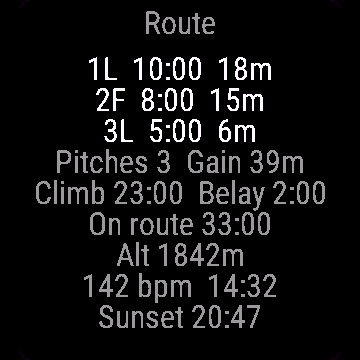
- Route totals: pitches, vertical gain, time climbing vs belaying, time on route, altitude, heart rate, clock, sunset
- One FIT lap per phase with phase, pitch and gain fields for Garmin Connect
- GPS stays on for approach and descent; while you climb and belay the app stops asking for GPS positions
- Optional vibration reminder after N minutes of belay (off by default)
Controls: START = next phase. Hold or MENU opens the menu: switch to descent, add break, undo last change, swap leader, save or discard. UP/DOWN (or swipe) switches to the second screen with the pitch table and route totals. A touch never changes the phase on watches that have a START button (use START). On watches with no START button, tap twice within 2 seconds for the next phase, hold for the menu.
- Podejście, potem Wspinka/Asekuracja na każdym wyciągu (po kolei), Zjazd, opcjonalna Przerwa: jedna faza na jedno naciśnięcie. Asekuracja to czas, w którym asekurujesz partnera między swoimi wspinaczkami
- Prowadzący oznaczony przy każdym wyciągu (L/F), zmienia się sam przy każdym nowym wyciągu (ustawienie "Prowadzenie na zmianę", domyślnie włączone); można też zmienić ręcznie w każdej chwili, jeśli się pomylisz
- Przewyższenie na każdym wyciągu z barometru, z filtrem, który nie liczy szumu pogody jako wspinania
- Statystyki drogi: liczba wyciągów, przewyższenie, czas wspinania wobec asekuracji, czas na drodze, wysokość, tętno, zegar, zachód słońca
- Jedno okrążenie FIT na fazę, z polami fazy, numeru wyciągu i przewyższenia dla Garmin Connect
- GPS działa na podejściu i zjeździe; podczas wspinania i asekuracji aplikacja przestaje pytać o pozycję GPS
- Opcjonalne przypomnienie wibracją po N minutach asekuracji (domyślnie wyłączone)
Sterowanie: START to kolejna faza. Przytrzymanie albo MENU otwiera menu: przejście do zjazdu, dodanie przerwy, cofnięcie ostatniej zmiany, zmiana prowadzącego, zapis albo odrzucenie. GÓRA/DÓŁ (albo przesunięcie palcem) przełącza na drugi ekran z tabelą wyciągów i statystykami drogi. Dotyk nie zmienia fazy na zegarkach z przyciskiem START (użyj START). Na zegarkach bez przycisku START stuknij dwa razy w ciągu 2 sekund, żeby przejść do kolejnej fazy, przytrzymanie otwiera menu.
- Zustieg, dann Klettern/Sichern pro Seillänge (im Wechsel), Abstieg, optionale Pause: eine Phase pro Tastendruck. Sichern ist die Zeit, in der du deinen Partner zwischen deinen eigenen Klettereien sicherst
- Vorstieg pro Seillänge markiert (L/F), wechselt bei jeder neuen Seillänge automatisch (Einstellung "Alternate leads", standardmäßig aktiv); jederzeit manuell tauschbar, falls ihr durcheinandergekommen seid
- Höhenmeter pro Seillänge über das Barometer, gefiltert, damit Wetterumschwünge nicht als Klettern gewertet werden
- Gesamtwerte der Route: Seillängen, Höhenmeter, Zeit beim Klettern vs. Sichern, Zeit auf der Route, Höhe, Herzfrequenz, Uhrzeit, Sonnenuntergang
- Eine FIT-Runde pro Phase mit Feldern für Phase, Seillänge und Höhenmeter für Garmin Connect
- GPS bleibt für Zustieg und Abstieg aktiv; während du kletterst und sicherst, fordert die App keine GPS-Positionen an
- Optionale Vibrationserinnerung nach N Minuten Sichern (standardmäßig aus)
Bedienung: START = nächste Phase. Halten oder MENU öffnet das Menü: zum Abstieg wechseln, Pause hinzufügen, letzte Änderung rückgängig machen, Vorstieg tauschen, speichern oder verwerfen. UP/DOWN (oder Wischen) wechselt zum zweiten Bildschirm mit der Seillängentabelle und den Gesamtwerten der Route. Eine Berührung ändert bei Uhren mit START-Taste niemals die Phase (verwende START). Bei Uhren ohne START-Taste tippe zweimal innerhalb von 2 Sekunden für die nächste Phase, lange drücken fürs Menü.
- Approche, puis Grimpe/Assurage par longueur (en alternance), Descente, Pause optionnelle : une phase par pression de bouton. L'assurage correspond au temps où vous assurez votre partenaire entre vos propres longueurs
- Premier de cordée indiqué par longueur (L/F), alternant automatiquement à chaque nouvelle longueur (paramètre "Alternate leads", activé par défaut) ; changez-le manuellement à tout moment en cas d'inversion
- Gain d'altitude par longueur issu du baromètre, filtré pour éviter que les variations météo ne soient comptées comme de la grimpe
- Totaux de la voie : longueurs, dénivelé positif, temps de grimpe vs assurage, temps dans la voie, altitude, fréquence cardiaque, heure, coucher du soleil
- Un lap FIT par phase avec les champs phase, longueur et gain pour Garmin Connect
- Le GPS reste actif pour l'approche et la descente ; pendant la grimpe et l'assurage, l'application arrête de solliciter les positions GPS
- Rappel par vibration optionnel après N minutes d'assurage (désactivé par défaut)
Commandes : START = phase suivante. Maintenir enfoncé ou MENU ouvre le menu : passer à la descente, ajouter une pause, annuler la dernière modification, changer de premier de cordée, enregistrer ou rejeter. UP/DOWN (ou balayage) bascule vers le deuxième écran avec le tableau des longueurs et les totaux de la voie. Un appui tactile ne change jamais de phase sur les montres équipées d'un bouton START (utilisez START). Sur les montres sans bouton START, appuyez deux fois en moins de 2 secondes pour la phase suivante, maintenez enfoncé pour le menu.
- Aproximación, luego Escalada/Aseguramiento por largo (alternos), Descenso, Descanso opcional: una fase por cada pulsación de botón. Aseguramiento es el tiempo que aseguras a tu compañero entre tus propios largos
- Primero de cordada marcado por largo (L/F), cambiando automáticamente en cada nuevo largo (ajuste "Alternate leads", activado por defecto); cámbialo a mano en cualquier momento si te equivocaste
- Desnivel positivo por largo mediante el barómetro, filtrado para que los cambios de tiempo no se cuenten como escalada
- Totales de la vía: largos, desnivel positivo, tiempo escalando vs asegurando, tiempo en la vía, altitud, frecuencia cardíaca, reloj, puesta de sol
- Una vuelta FIT por fase con campos de fase, largo y desnivel para Garmin Connect
- El GPS permanece activo durante la aproximación y el descenso; mientras escalas y aseguras, la app deja de solicitar posiciones GPS
- Recordatorio opcional por vibración tras N minutos de aseguramiento (desactivado por defecto)
Controles: START = siguiente fase. Mantener pulsado o MENU abre el menú: cambiar a descenso, añadir descanso, deshacer último cambio, cambiar de primero, guardar o descartar. UP/DOWN (o deslizar) cambia a la segunda pantalla con la tabla de largos y los totales de la vía. Un toque nunca cambia de fase en relojes que disponen de botón START (usa START). En relojes sin botón START, toca dos veces en menos de 2 segundos para pasar a la siguiente fase, mantén pulsado para el menú.
- Aanloop, daarna Klimmen/Zekeren per touwlengte (afwisselend), Afdaling, optionele Pauze: één fase per druk op de knop. Zekeren is de tijd dat je je partner zekert tussen je eigen beklimmingen door
- Voorklimmer gemarkeerd per touwlengte (L/F), wisselt automatisch bij elke nieuwe touwlengte (instelling "Alternate leads", standaard ingeschakeld); wissel op elk moment handmatig als het door elkaar is geraakt
- Hoogtemeters per touwlengte via de barometer, gefilterd zodat weersveranderingen niet als klimmen worden meegeteld
- Routetotalen: touwlengtes, hoogtemeters, tijd klimmen versus zekeren, tijd op de route, hoogte, hartslag, klok, zonsondergang
- Eén FIT-ronde per fase met velden voor fase, touwlengte en hoogtemeters voor Garmin Connect
- GPS blijft aan voor aanloop en afdaling; tijdens het klimmen en zekeren stopt de app met het opvragen van GPS-posities
- Optionele trilherinnering na N minuten zekeren (standaard uitgeschakeld)
Bediening: START = volgende fase. Ingedrukt houden of MENU opent het menu: overschakelen naar afdaling, pauze toevoegen, laatste wijziging ongedaan maken, voorklimmer wisselen, opslaan of negeren. UP/DOWN (of vegen) schakelt naar het tweede scherm met de touwlengtetabel en routetotalen. Een aanraking verandert nooit de fase op horloges met een START-knop (gebruik START). Op horloges zonder START-knop tik je tweemaal binnen 2 seconden voor de volgende fase, ingedrukt houden voor het menu.
- アプローチ、各ピッチでの Climb/Belay(交互)、下降、任意の休憩: ボタンを 1 回押すごとに 1 つのフェーズを記録。Belay は自身が登る合間にパートナーをビレイしている時間です
- ピッチごとにリードを記録(L/F)。新しいピッチごとに自動で切り替わります(設定 "Alternate leads"、デフォルトでオン)。順番が前後した場合はいつでも手動で入れ替え可能
- 気圧高度計によるピッチごとの獲得標高。天候変化によるノイズがクライミングとしてカウントされないようフィルタ処理
- ルートの合計データ: ピッチ数、獲得標高、クライミング時間対ビレイ時間、ルート上の行動時間、高度、心拍数、時刻、日の入り
- フェーズごとに 1 つの FIT ラップを記録し、Garmin Connect 用にフェーズ、ピッチ、獲得標高フィールドを出力
- アプローチと下降では GPS を維持。クライミング中およびビレイ中は GPS の測位要求を停止
- ビレイ開始から N 分後にバイブレーションで通知するオプション(デフォルトはオフ)
操作方法: START = 次のフェーズ。長押しまたは MENU でメニューを開く: 下降への切り替え、休憩の追加、直前の変更の取り消し、リードの交代、保存または破棄。UP/DOWN(またはスワイプ)でピッチ一覧とルート合計を表示するセカンド画面へ切り替え。START ボタンのあるウォッチでは、タッチ操作でフェーズが切り替わることはありません(START を使用)。START ボタンのないウォッチでは、2 秒以内にダブルタップで次のフェーズへ、長押しでメニューを開きます。
- Avvicinamento, poi Salita/Assicurazione per tiro (alternati), Discesa, Pausa opzionale: una fase a ogni pressione di un pulsante. L'assicurazione è il tempo in cui assicuri il compagno tra una tua salita e l'altra
- Primo di cordata indicato per ogni tiro (L/F), con cambio automatico a ogni nuovo tiro (impostazione "Alternate leads", attiva per impostazione predefinita); modificalo manualmente in qualsiasi momento se hai invertito i ruoli
- Dislivello per tiro dal barometro, filtrato per non conteggiare le variazioni meteo come arrampicata
- Totali della via: tiri, dislivello, tempo di salita vs assicurazione, tempo in via, altitudine, frequenza cardiaca, orologio, tramonto
- Un lap FIT per ogni fase con campi fase, tiro e dislivello per Garmin Connect
- Il GPS resta attivo per avvicinamento e discesa; mentre arrampichi e assicuri l'app smette di richiedere la posizione GPS
- Promemoria con vibrazione opzionale dopo N minuti di assicurazione (disattivato per impostazione predefinita)
Controlli: START = fase successiva. Tieni premuto o MENU apre il menu: passa alla discesa, aggiungi pausa, annulla l'ultima modifica, inverti il primo di cordata, salva o elimina. UP/DOWN (o scorrimento) passa alla seconda schermata con la tabella dei tiri e i totali della via. Sugli orologi dotati di pulsante START il tocco non cambia mai fase (usa START). Sugli orologi senza pulsante START, tocca due volte entro 2 secondi per la fase successiva, tieni premuto per il menu.
- 徒步接近,随后每个绳段交替 Climb/Belay(攀爬/保护),下撤,可选 Break(休息):每次按键记录一个阶段。Belay 指你在自己攀爬之间为搭档提供保护的时间
- 每个绳段均标记领攀者(L/F),在每个新绳段自动切换(设置 "Alternate leads",默认开启);若弄混了也可随时手动切换
- 每个绳段的海拔爬升来自气压计,经滤波处理,天气变化引起的噪点不会被计入攀爬
- 路线总计:绳段数、垂直爬升、攀爬与保护时间对比、路线耗时、海拔、心率、时钟、日落时间
- 每个阶段对应一个 FIT 计圈,并为 Garmin Connect 提供 phase、pitch 和 gain 数据字段
- 徒步接近和下撤期间 GPS 保持开启;在攀爬和保护时,应用会停止请求 GPS 定位
- 保护 N 分钟后提供可选的震动提醒(默认关闭)
操作方法:START = 下一阶段。长按或 MENU 打开菜单:切换到下撤、添加休息、撤销上次更改、交换领攀者、保存或放弃。UP/DOWN(或滑动)切换到第二个屏幕,查看绳段表和路线总计。在配备 START 按钮的手表上,触屏绝不会更改阶段(请使用 START)。在没有 START 按钮的手表上,2 秒内轻触两次进入下一阶段,长按打开菜单。
- Подход, затем подъем/страховка на каждом питче (попеременно), спуск и пауза по желанию: одна фаза на каждое нажатие кнопки. Страховка учитывает время, когда вы страхуете напарника между своими участками подъема
- Лидер отмечается для каждого питча (L/F) с автоматическим переключением на каждом новом питче (настройка "Alternate leads", включена по умолчанию); поменять лидера вручную можно в любой момент, если ошиблись
- Набор высоты на каждом питче по барометру, с фильтрацией, чтобы погодные колебания давления не засчитывались за подъем
- Итоги маршрута: количество питчей, набор высоты, время лазания и страховки, время на маршруте, высота, пульс, часы, закат
- Один отрезок FIT на каждую фазу с полями фазы, питча и набора высоты для Garmin Connect
- GPS работает на подходе и спуске; во время лазания и страховки приложение не запрашивает координаты GPS
- Напоминание вибрацией через N минут страховки (по умолчанию выключено)
Управление: START = следующая фаза. Удержание или MENU открывает меню: переключение на спуск, пауза, отмена последнего действия, смена лидера, сохранение или сброс. UP/DOWN (или свайп) переключает на второй экран с таблицей питчей и общими итогами маршрута. Касание экрана никогда не переключает фазу на часах с кнопкой START (используйте START). На часах без кнопки START коснитесь экрана дважды в течение 2 секунд для перехода к следующей фазе, удерживайте для входа в меню.
- Aproximação, depois Escalar/Segurança por enfiada (alternando), Descida, Pausa opcional: uma fase por toque de botão. Segurança é o tempo em que você dá segurança ao parceiro entre as suas próprias escaladas
- Guia marcado por enfiada (L/F), alternando automaticamente a cada nova enfiada (configuração "Alternate leads", ativa por padrão); alterne manualmente a qualquer momento se tiver invertido
- Ganho de altitude por enfiada a partir do barômetro, filtrado para que variações climáticas não sejam contabilizadas como escalada
- Totais da via: enfiadas, ganho vertical, tempo escalando vs dando segurança, tempo na via, altitude, frequência cardíaca, relógio, pôr do sol
- Uma volta FIT por fase com campos de fase, enfiada e ganho para o Garmin Connect
- O GPS permanece ativo na aproximação e descida; enquanto você escala e dá segurança, o app para de solicitar posições de GPS
- Lembrete opcional por vibração após N minutos de segurança (desativado por padrão)
Controles: START = próxima fase. Segurar ou MENU abre o menu: mudar para descida, adicionar pausa, desfazer última alteração, trocar guia, salvar ou descartar. UP/DOWN (ou deslizar) alterna para a segunda tela com a tabela de enfiadas e os totais da via. O toque nunca muda a fase em relógios que possuem o botão START (use START). Em relógios sem o botão START, toque duas vezes em 2 segundos para a próxima fase, segure para o menu.
- Nástup, pak Lezení/Jištění pro každou délku (střídavě), Sestup, volitelně Pauza: jedna fáze na jedno stisknutí tlačítka. Jištění je čas, kdy jistíte spolulezce mezi svými délkami
- Prvolezec označený u každé délky (L/F), automatické přepínání při každé nové délce (nastavení "Alternate leads", ve výchozím stavu zapnuto); kdykoli můžete prohodit ručně, pokud došlo ke změně
- Výškový zisk na délku z barometru, filtrovaný tak, aby se změny počasí nezapočítávaly jako lezení
- Celkové údaje o cestě: délky, výškový zisk, čas lezení vs. jištění, čas v cestě, nadmořská výška, srdeční tep, hodiny, západ slunce
- Jeden FIT lap pro každou fázi s poli pro fázi, délku a výškový zisk pro Garmin Connect
- GPS zůstává zapnutá pro nástup a sestup; během lezení a jištění se aplikace přestane dotazovat na pozici GPS
- Volitelné vibrační upozornění po N minutách jištění (ve výchozím stavu vypnuto)
Ovládání: START = další fáze. Podržení nebo MENU otevře menu: přepnutí na sestup, přidání pauzy, vrácení poslední změny, prohození prvolezce, uložení nebo zahození. UP/DOWN (nebo přejetí prstem) přepne na druhou obrazovku s tabulkou délek a celkovými statistikami cesty. Na hodinkách s tlačítkem START dotyk nikdy nezmění fázi (použijte START). Na hodinkách bez tlačítka START klepněte dvakrát během 2 sekund pro další fázi, podržením otevřete menu.
- Aproximação, depois Escalada/Segurança por largo (alternados), Descida, Pausa opcional: uma fase por toque de botão. Segurança é o tempo em que dá segurança ao parceiro entre as suas próprias escaladas
- Líder marcado por largo (L/F), alternando automaticamente a cada novo largo (definição "Alternate leads", ativa por predefinição); alterne manualmente a qualquer momento se tiver trocado
- Ganho de altitude por largo a partir do barómetro, filtrado para que o ruído meteorológico não seja contabilizado como escalada
- Totais da via: largos, ganho vertical, tempo a escalar vs segurança, tempo na via, altitude, ritmo cardíaco, relógio, pôr do sol
- Uma volta FIT por fase com campos de fase, largo e ganho para o Garmin Connect
- O GPS permanece ligado na aproximação e descida; enquanto escala e dá segurança, a aplicação para de pedir posições de GPS
- Lembrete opcional por vibração após N minutos de segurança (desativado por predefinição)
Controlos: START = fase seguinte. Premir sem soltar ou MENU abre o menu: mudar para descida, adicionar pausa, anular última alteração, trocar líder, guardar ou descartar. UP/DOWN (ou deslizar) muda para o segundo ecrã com a tabela de largos e os totais da via. O toque nunca muda a fase em relógios que tenham o botão START (use START). Em relógios sem botão START, toque duas vezes em 2 segundos para a fase seguinte, prima sem soltar para o menu.
- 어프로치, 피치별 등반/빌레이(교대), 하산, 선택적 휴식: 버튼을 한 번 누를 때마다 하나의 페이즈. 빌레이는 자신의 등반 사이에 파트너를 빌레이하는 시간입니다
- 피치마다 선등자 표시(L/F), 새 피치마다 자동 전환(기본 켜짐인 "Alternate leads" 설정). 순서가 바뀌었을 때는 언제든 수동 변경 가능
- 기압계를 통한 피치별 획득 고도, 날씨 변화에 따른 잡음이 등반으로 계산되지 않도록 필터링
- 루트 전체 요약: 피치 수, 수직 획득 고도, 등반 대 빌레이 시간, 루트 소요 시간, 고도, 심박수, 현재 시각, 일몰 시각
- Garmin Connect를 위해 페이즈, 피치, 획득 고도 필드가 포함된 페이즈당 하나의 FIT 랩
- 어프로치와 하산 중에는 GPS 유지. 등반 및 빌레이 중에는 앱이 GPS 위치 요청을 중단
- 빌레이 N분 후 선택적 진동 알림(기본 꺼짐)
조작 방법: START = 다음 페이즈. 길게 누르거나 MENU는 메뉴 열기: 하산으로 전환, 휴식 추가, 마지막 변경 취소, 선등자 변경, 저장 또는 삭제. UP/DOWN(또는 스와이프)은 피치 표와 루트 요약이 있는 두 번째 화면으로 전환. START 버튼이 있는 시계에서는 화면 터치로 페이즈가 변경되지 않습니다(START 사용). START 버튼이 없는 시계에서는 2초 이내에 화면을 두 번 탭하여 다음 페이즈로 이동, 길게 눌러 메뉴 열기.
- Anmarsch, sedan Climb/Belay per replängd (växelvis), nedstigning, valfri paus: en fas per knapptryck. Belay är tiden du säkrar din partner mellan dina egna klättringar
- Försteman markeras per replängd (L/F), växlar automatiskt vid varje ny replängd (inställningen "Alternate leads", påslagen som standard); ändra manuellt när som helst om det blev fel
- Höjdvinst per replängd från barometern, filtrerad så att väderbrus inte räknas som klättring
- Totaler för turen: replängder, höjdmeter, tid för klättring mot säkring, tid på leden, höjd, puls, klockslag, solnedgång
- Ett FIT-varv per fas med fälten phase, pitch och gain för Garmin Connect
- GPS förblir påslagen under anmarsch och nedstigning; medan du klättrar och säkrar slutar appen att begära GPS-positioner
- Valfri vibrationspåminnelse efter N minuters säkring (avstängd som standard)
Kontroller: START = nästa fas. Håll in eller tryck MENU för att öppna menyn: växla till nedstigning, lägg till paus, ångra senaste ändringen, byt försteman, spara eller släng. UP/DOWN (eller svep) växlar till den andra skärmen med replängdstabell och totaler för turen. En touch ändrar aldrig fas på klockor som har en START-knapp (använd START). På klockor utan START-knapp trycker du två gånger inom 2 sekunder för nästa fas, håll in för menyn.
- Anmarch, derefter Klatring/Sikring pr. reblængde (skiftende), Nedstigning, valgfri Pause: én fase pr. knaptryk. Sikring er den tid, du sikrer din makker mellem dine egne klatringer
- Førsteklatrer angivet pr. reblængde (L/F), som skifter automatisk ved hver ny reblængde (indstillingen "Alternate leads", slået til som standard); byt manuelt når som helst, hvis der blev byttet om
- Højdestigning pr. reblængde fra barometeret, filtreret så vejrstøj ikke tælles med som klatring
- Rute-totaler: reblængder, højdestigning, tid klatret vs. sikret, tid på ruten, højde, puls, ur, solnedgang
- Én FIT-omgang pr. fase med felter for fase, reblængde og højdestigning til Garmin Connect
- GPS forbliver tændt under anmarch og nedstigning; mens du klatrer og sikrer, stopper appen med at hente GPS-positioner
- Valgfri vibrationspåmindelse efter N minutters sikring (slået fra som standard)
Betjening: START = næste fase. Hold inde eller MENU åbner menuen: skift til nedstigning, tilføj pause, fortryd seneste ændring, skift førsteklatrer, gem eller kassér. UP/DOWN (eller stryg) skifter til den anden skærm med reblængdetabellen og rute-totaler. En berøring skifter aldrig fase på ure, der har en START-knap (brug START). På ure uden START-knap trykkes to gange inden for 2 sekunder for næste fase, hold inde for menuen.
- Anmarsj, deretter Climb/Belay per taulengde (vekslende), retur, valgfri pause: én fase per knappetrykk. Belay er tiden du sikrer partneren din mellom dine egne klatreetapper
- Førsteklatrer markert per taulengde (L/F), bytter automatisk ved hver nye taulengde (innstillingen "Alternate leads", på som standard); bytt manuelt når som helst hvis dere byttet om
- Høydemeter per taulengde fra barometeret, filtrert slik at værstøy ikke telles som klatring
- Rutesammendrag: taulengder, høydemeter, tid klatret mot sikret, tid i ruten, høyde over havet, puls, klokkeslett, solnedgang
- Én FIT-runde per fase med feltene phase, pitch og gain for Garmin Connect
- GPS forblir på under anmarsj og retur; mens du klatrer og sikrer slutter appen å hente GPS-posisjoner
- Valgfri vibrasjonsvarsel etter N minutter med sikring (av som standard)
Kontroller: START = neste fase. Hold inne eller MENU åpner menyen: bytt til retur, legg til pause, angre siste endring, bytt førsteklatrer, lagre eller forkast. UP/DOWN (eller sveip) bytter til den andre skjermen med taulengdetabell og rutesammendrag. Berøring endrer aldri fase på klokker som har en START-knapp (bruk START). På klokker uten START-knapp trykker du to ganger innen 2 sekunder for neste fase, hold inne for menyen.
- 接近路段,接著依繩距進行 Climb/Belay(交替),下撤,可選休息:按一下按鍵切換一個階段。Belay 是指在您自己攀爬的間歇為夥伴確保的時間
- 每個繩距標記先鋒(L/F),每個新繩距自動切換(設定中的 "Alternate leads",預設開啟);若順序弄亂可隨時手動更換
- 來自氣壓計的每繩距爬升高度,經濾波處理,避免天氣雜訊被誤計為攀登
- 路線總計:繩距數、垂直爬升、攀爬與確保時間對比、在線時間、海拔高度、心率、時間、日落時間
- 每個階段產生一個 FIT 計圈,包含供 Garmin Connect 使用的階段、繩距與爬升高度欄位
- 接近與下撤路段保持 GPS 開啟;在攀登與確保期間,應用程式將停止請求 GPS 定位
- 確保 N 分鐘後可選震動提醒(預設關閉)
操作方式:START = 下一個階段。長按或按 MENU 開啟選單:切換至下撤、新增休息、復原上次變更、切換先鋒、儲存或捨棄。UP/DOWN(或滑動)切換至包含繩距表與路線總計的第二畫面。在具備 START 按鍵的手錶上,觸控絕不會切換階段(請使用 START)。在沒有 START 按鍵的手錶上,2 秒內輕觸兩下進入下一階段,長按開啟選單。
- Lähestyminen, sitten Kiipeily/Varmistus per köydenpituus (vuorotellen), Laskeutuminen, valinnainen Tauko: yksi vaihe per napinpainallus. Varmistus on aika, jonka varmistat pariasi omien kiipeilyjesi välillä
- Liidaaja merkitty per köydenpituus (L/F), vaihtuu automaattisesti jokaisella uudella köydenpituudella (asetus "Alternate leads", oletuksena päällä); vaihda se käsin milloin tahansa, jos järjestys meni sekaisin
- Korkeuden nousu per köydenpituus barometristä, suodatettu niin, ettei sään vaihtelua lasketa kiipeilyksi
- Reitin kokonaistiedot: köydenpituudet, korkeusmetrit, kiipeilyaika vs varmistusaika, aika reitillä, korkeus, syke, kello, auringonlasku
- Yksi FIT-kierros per vaihe, jossa vaihe-, köydenpituus- ja nousukentät Garmin Connect -palvelua varten
- GPS pysyy päällä lähestymisen ja laskeutumisen aikana; kiipeilyn ja varmistuksen aikana sovellus lakkaa pyytämästä GPS-sijainteja
- Valinnainen värinämuistutus N varmistusminuutin jälkeen (oletuksena pois päältä)
Ohjaimet: START = seuraava vaihe. Pitkä painallus tai MENU avaa valikon: vaihda laskeutumiseen, lisää tauko, kumoa viimeisin muutos, vaihda liidaaja, tallenna tai hylkää. UP/DOWN (tai pyyhkäisy) vaihtaa toiseen näyttöön, jossa on köydenpituustaulukko ja reitin kokonaistiedot. Kosketus ei koskaan vaihda vaihetta kelloissa, joissa on START-painike (käytä START-painiketta). Kelloissa ilman START-painiketta napauta kahdesti 2 sekunnin sisällä siirtyäksesi seuraavaan vaiheeseen, pidä painettuna avataksesi valikon.
- Nástup, potom Lezenie/Istenie na dĺžku (striedavo), Zostup, voliteľná Prestávka: jedna fáza na stlačenie tlačidla. Istenie je čas, keď istíte partnera medzi vaším vlastným lezením
- Prvolezec označený pre každú dĺžku (L/F), automatické prepínanie pri každej novej dĺžke (nastavenie "Alternate leads", predvolene zapnuté); kedykoľvek ho môžete ručne vymeniť, ak došlo k zámene
- Nastúpaná výška na dĺžku z barometra, filtrovaná tak, aby sa zmeny počasia nezapočítavali do lezenia
- Celkové údaje o ceste: dĺžky, prevýšenie, čas lezenia vs. istenia, čas na ceste, nadmorská výška, srdcový tep, hodiny, západ slnka
- Jeden FIT lap na fázu s poľami pre fázu, dĺžku a prevýšenie pre Garmin Connect
- GPS zostáva zapnuté na nástup a zostup; počas lezenia a istenia aplikácia prestane zisťovať pozíciu GPS
- Voliteľné vibračné upozornenie po N minútach istenia (predvolene vypnuté)
Ovládanie: START = ďalšia fáza. Podržanie alebo MENU otvorí menu: prepnutie na zostup, pridanie prestávky, vrátenie poslednej zmeny, výmena prvolezca, uloženie alebo zahodenie. UP/DOWN (alebo potiahnutie prstom) prepína na druhú obrazovku s tabuľkou dĺžok a celkovými údajmi cesty. Dotyk nikdy nezmení fázu na hodinkách, ktoré majú tlačidlo START (použite START). Na hodinkách bez tlačidla START ťuknite dvakrát do 2 sekúnd pre ďalšiu fázu, podržaním otvoríte menu.
- Dostop, nato Climb/Belay za vsak raztežaj (izmenično), sestop, izbirni Break: ena faza na pritisk gumba. Belay je čas, ko varujete soplezalca med lastnimi vzponi
- Prvi v navezi označen za vsak raztežaj (L/F), s samodejnim preklopom pri vsakem novem raztežaju (nastavitev "Alternate leads", privzeto vklopljena); kadar koli ročno zamenjajte, če ste se zmotili
- Višinska razlika na raztežaj iz barometra, filtrirana tako, da se vremenska nihanja ne štejejo kot plezanje
- Skupni podatki smeri: raztežaji, višinska razlika, čas plezanja proti varovanju, čas v smeri, višina, srčni utrip, ura, sončni zahod
- En FIT lap na fazo s polji faza, raztežaj in vzpon za Garmin Connect
- GPS ostane vklopljen za dostop in sestop; medtem ko plezate in varujete, aplikacija neha zahtevati položaje GPS
- Izbirni opomnik z vibriranjem po N minutah varovanja (privzeto izklopljen)
Upravljanje: START = naslednja faza. Pridržanje ali MENU odpre meni: preklop na sestop, dodajanje odmora, razveljavitev zadnje spremembe, zamenjava vodilnega, shranitev ali zavrnitev. UP/DOWN (ali podrsanje) preklopi na drugi zaslon s tabelo raztežajev in skupnimi podatki smeri. Dotik na urah z gumbom START nikoli ne spremeni faze (uporabite START). Na urah brez gumba START dvakrat tapnite v 2 sekundah za naslednjo fazo, pridržite za meni.
- Approach, lalu Climb/Belay per pitch (bergantian), Descent, Break opsional: satu fase per penekanan tombol. Belay adalah waktu saat Anda mem-belay rekan di antara giliran memanjat Anda sendiri
- Leader ditandai per pitch (L/F), berganti otomatis di setiap pitch baru (pengaturan "Alternate leads", aktif secara default); ubah secara manual kapan saja jika Anda salah urutan
- Pertambahan ketinggian per pitch dari barometer, difilter agar perubahan cuaca tidak terhitung sebagai memanjat
- Total rute: pitch, pertambahan vertikal, waktu memanjat vs belaying, waktu di rute, ketinggian, detak jantung, jam, matahari terbenam
- Satu lap FIT per fase dengan bidang phase, pitch, dan gain untuk Garmin Connect
- GPS tetap aktif untuk approach dan descent; saat Anda memanjat dan belay aplikasi berhenti meminta posisi GPS
- Pengingat getar opsional setelah N menit belay (nonaktif secara default)
Kontrol: START = fase berikutnya. Tahan atau MENU membuka menu: beralih ke descent, tambah break, batalkan perubahan terakhir, tukar leader, simpan atau buang. UP/DOWN (atau usap) beralih ke layar kedua dengan tabel pitch dan total rute. Sentuhan layar tidak pernah mengubah fase pada jam tangan yang memiliki tombol START (gunakan START). Pada jam tangan tanpa tombol START, ketuk dua kali dalam 2 detik untuk fase berikutnya, tahan untuk membuka menu.
- Approach, majd Climb/Belay kötélhosszonként (váltakozva), Descent, opcionális Break: gombnyomásonként egy fázis. A Belay az az idő, amíg a társadat biztosítod a saját mászásaid között
- Előmászó jelölése kötélhosszonként (L/F), amely automatikusan vált minden új kötélhossznál ("Alternate leads" beállítás, alapértelmezés szerint bekapcsolva); kézzel bármikor megcserélhető, ha elcseréltétek
- Kötélhosszonkénti szintemelkedés a barométer alapján, szűrve, hogy az időjárás miatti ingadozást ne számolja mászásnak
- Útvonal összesítése: kötélhosszak, szintemelkedés, mászással vs. biztosítással töltött idő, úton töltött idő, magasság, pulzus, óra, napnyugta
- Fázisonként egy FIT kör (lap), fázis, kötélhossz és szintemelkedés mezőkkel a Garmin Connect számára
- A GPS bekapcsolva marad a megközelítéshez és az ereszkedéshez; mászás és biztosítás közben az alkalmazás nem kér le GPS-pozíciókat
- Opcionális rezgéses emlékeztető N perc biztosítás után (alapértelmezés szerint kikapcsolva)
Vezérlés: START = következő fázis. Nyomva tartás vagy MENU megnyitja a menüt: váltás ereszkedésre, pihenő hozzáadása, utolsó módosítás visszavonása, előmászó cseréje, mentés vagy elvetés. UP/DOWN (vagy ujjhúzás) átvált a második képernyőre a kötélhossztáblázattal és az útvonal összesítésével. Érintéssel soha nem vált fázist olyan órákon, amelyeken van START gomb (használd a START gombot). START gomb nélküli órákon koppints duplán 2 másodpercen belül a következő fázishoz, tartsd nyomva a menühöz.
- Approach จากนั้น Climb/Belay ในแต่ละ pitch (สลับกัน), Descent และ Break ที่เลือกเพิ่มได้: หนึ่ง phase ต่อการกดปุ่มหนึ่งครั้ง Belay คือช่วงเวลาที่คุณ belay ให้คู่ปีนระหว่างการปีนของคุณเอง
- ระบุ Leader ในแต่ละ pitch (L/F) โดยสลับให้อัตโนมัติในทุก pitch ใหม่ (การตั้งค่า "Alternate leads" เปิดใช้งานเป็นค่าเริ่มต้น) สามารถสลับด้วยตนเองได้ตลอดเวลาหากบันทึกสลับกัน
- ระดับความสูงที่เพิ่มขึ้นต่อ pitch จากบารอมิเตอร์ พร้อมกรองข้อมูลเพื่อไม่ให้นำความแปรปรวนของสภาพอากาศมานับเป็นการปีน
- สรุปข้อมูลเส้นทาง: จำนวน pitch, ความสูงแนวดิ่งที่เพิ่มขึ้น, เวลาที่ปีนเทียบกับเวลา belay, เวลาบนเส้นทาง, ระดับความสูง, อัตราการเต้นของหัวใจ, นาฬิกา, พระอาทิตย์ตก
- บันทึกหนึ่ง FIT lap ต่อ phase พร้อมฟิลด์ phase, pitch และ gain สำหรับ Garmin Connect
- GPS จะเปิดไว้เสมอสำหรับ approach และ descent ระหว่างที่คุณปีนและ belay แอปจะหยุดดึงตำแหน่ง GPS
- ระบบสั่นเตือนเสริมหลังจาก belay เป็นเวลา N นาที (ปิดใช้งานเป็นค่าเริ่มต้น)
การควบคุม: START = phase ถัดไป กดค้างหรือกด MENU เพื่อเปิดเมนู: สลับไปที่ descent, เพิ่ม break, เลิกทำรายการล่าสุด, สลับ leader, บันทึก หรือละทิ้ง UP/DOWN (หรือปัดหน้าจอ) เพื่อสลับไปยังหน้าจอที่สองที่มีตาราง pitch และข้อมูลสรุปเส้นทาง การแตะหน้าจอจะไม่เปลี่ยน phase บนนาฬิกาที่มีปุ่ม START (ให้ใช้ START) สำหรับนาฬิกาที่ไม่มีปุ่ม START ให้แตะสองครั้งภายใน 2 วินาทีสำหรับ phase ถัดไป และกดค้างสำหรับเมนู
- Προσέγγιση, έπειτα Climb/Belay ανά σχοινιά (εναλλάξ), Κατάβαση, προαιρετικό Break: μία φάση με κάθε πάτημα κουμπιού. Belay είναι ο χρόνος που ασφαλίζετε τον σύντροφό σας ανάμεσα στις δικές σας αναρριχήσεις
- Ο επικεφαλής σημειώνεται ανά σχοινιά (L/F), αλλάζοντας αυτόματα σε κάθε νέα σχοινιά (ρύθμιση "Alternate leads", ενεργή από προεπιλογή). Αλλάξτε το χειροκίνητα οποιαδήποτε στιγμή αν μπερδευτήκατε
- Υψομετρικό κέρδος ανά σχοινιά από το βαρόμετρο, φιλτραρισμένο ώστε οι καιρικές μεταβολές να μην υπολογίζονται ως αναρρίχηση
- Σύνολα διαδρομής: σχοινιές, υψομετρική διαφορά, χρόνος αναρρίχησης έναντι ασφάλισης, χρόνος στη διαδρομή, υψόμετρο, καρδιακοί παλμοί, ρολόι, ηλιοβασίλεμα
- Ένας γύρος FIT ανά φάση με πεδία για φάση, σχοινιά και κέρδος για το Garmin Connect
- Το GPS παραμένει ενεργό για την προσέγγιση και την κατάβαση. Ενώ σκαρφαλώνετε και ασφαλίζετε, η εφαρμογή σταματά να ζητά θέσεις GPS
- Προαιρετική υπενθύμιση με δόνηση μετά από N λεπτά ασφάλισης (ανενεργή από προεπιλογή)
Χειρισμός: START = επόμενη φάση. Παρατεταμένο πάτημα ή MENU ανοίγει το μενού: μετάβαση σε κατάβαση, προσθήκη διαλείμματος, αναίρεση τελευταίας αλλαγής, αλλαγή επικεφαλής, αποθήκευση ή απόρριψη. UP/DOWN (ή swipe) αλλάζει στη δεύτερη οθόνη με τον πίνακα σχοινιών και τα σύνολα διαδρομής. Το άγγιγμα δεν αλλάζει ποτέ τη φάση σε ρολόγια που διαθέτουν κουμπί START (χρησιμοποιήστε το START). Σε ρολόγια χωρίς κουμπί START, πατήστε δύο φορές μέσα σε 2 δευτερόλεπτα για την επόμενη φάση, κρατήστε πατημένο για το μενού.
- Pristup, zatim Climb/Belay po dužini (naizmjenično), silazak, opcionalna pauza: jedna faza po pritisku tipke. Belay je vrijeme u kojem osiguravate partnera između vlastitih penjanja
- Vodeći penjač označen po dužini (L/F), automatski se mijenja pri svakoj novoj dužini (postavka "Alternate leads", uključena prema zadanim postavkama); promijenite ručno u bilo kojem trenutku ako ste zamijenili redoslijed
- Visinski uspon po dužini iz barometra, filtriran tako da se vremenske promjene ne računaju kao penjanje
- Ukupno za smjer: dužine, vertikalni uspon, vrijeme penjanja naspram osiguravanja, vrijeme u smjeru, nadmorska visina, broj otkucaja srca, sat, zalazak sunca
- Jedan FIT krug po fazi s poljima za fazu, dužinu i uspon za Garmin Connect
- GPS ostaje uključen za pristup i silazak; dok penjete i osiguravate, aplikacija prestaje tražiti GPS lokacije
- Opcionalni podsjetnik vibracijom nakon N minuta osiguravanja (isključeno prema zadanim postavkama)
Kontrole: START = sljedeća faza. Zadržavanje ili MENU otvara izbornik: prelazak na silazak, dodavanje pauze, poništavanje zadnje promjene, zamjena vodećeg penjača, spremanje ili odbacivanje. UP/DOWN (ili potez prstom) prebacuje na drugi zaslon s tablicom dužina i ukupnim podacima smjera. Dodir nikada ne mijenja fazu na satovima koji imaju tipku START (koristite START). Na satovima bez tipke START, dodirnite dvaput unutar 2 sekunde za sljedeću fazu, zadržite za izbornik.
- גישה, לאחר מכן Climb/Belay לכל פיץ' (לסירוגין), ירידה, הפסקה אופציונלית: שלב אחד לכל לחיצת כפתור. Belay הוא הזמן שבו אתה מאבטח את השותף שלך בין מקטעי הטיפוס שלך
- המוביל מסומן לכל פיץ' (L/F), ומתחלף אוטומטית בכל פיץ' חדש (הגדרה "Alternate leads", מופעלת כברירת מחדל); החלף ידנית בכל עת אם התבלבלתם
- צבירת גובה לכל פיץ' מהברומטר, מסוננת כך שרעשי מזג אוויר לא ייספרו כטיפוס
- נתוני מסלול כוללים: פיצ'ים, טיפוס אנכי, זמן טיפוס לעומת אבטחה, זמן על המסלול, גובה, דופק, שעון, שקיעה
- הקפת FIT אחת לכל שלב עם שדות שלב, פיץ' וצבירת גובה עבור Garmin Connect
- ה-GPS נשאר פעיל בגישה ובירידה; בזמן שאתה מטפס ומאבטח האפליקציה מפסיקה לבקש מיקומי GPS
- תזכורת רטט אופציונלית לאחר N דקות של אבטחה (כבויה כברירת מחדל)
מקשי שליטה: START = השלב הבא. לחיצה ארוכה או MENU פותח את התפריט: מעבר לירידה, הוספת הפסקה, ביטול השינוי האחרון, החלפת מוביל, שמירה או ביטול. UP/DOWN (או החלקה) מעביר למסך השני עם טבלת הפיצ'ים ונתוני המסלול הכוללים. מגע לעולם אינו משנה את השלב בשעונים בעלי כפתור START (השתמש ב-START). בשעונים ללא כפתור START, הקש פעמיים תוך 2 שניות לשלב הבא, לחיצה ארוכה לתפריט.
- Approach, kemudian Panjat/Belay bagi setiap pitch (berselang-seli), Descent, Rehat pilihan: satu fasa bagi setiap tekanan butang. Belay ialah masa anda membelay rakan anda antara giliran memanjat anda
- Pendahulu ditandakan bagi setiap pitch (L/F), bertukar secara automatik pada setiap pitch baharu (tetapan "Alternate leads", diaktifkan secara lalai); tukar secara manual pada bila-bila masa jika berlaku kesilapan
- Kenaikan altitud bagi setiap pitch daripada barometer, ditapis supaya perubahan cuaca tidak dikira sebagai pendakian
- Jumlah keseluruhan laluan: bilangan pitch, kenaikan menegak, masa memanjat berbanding membelay, masa di laluan, altitud, kadar denyutan jantung, jam, waktu matahari terbenam
- Satu pusingan FIT bagi setiap fasa dengan medan fasa, pitch dan kenaikan altitud untuk Garmin Connect
- GPS kekal aktif untuk approach dan descent; semasa anda memanjat dan membelay, aplikasi berhenti meminta kedudukan GPS
- Peringatan getaran pilihan selepas N minit membelay (dinyahaktifkan secara lalai)
Kawalan: START = fasa seterusnya. Tekan lama atau MENU membuka menu: tukar kepada descent, tambah rehat, batalkan perubahan terakhir, tukar pendahulu, simpan atau buang. UP/DOWN (atau leret) bertukar ke skrin kedua dengan jadual pitch dan jumlah keseluruhan laluan. Sentuhan tidak akan mengubah fasa pada jam yang mempunyai butang START (gunakan START). Pada jam tanpa butang START, ketik dua kali dalam masa 2 saat untuk fasa seterusnya, tekan lama untuk menu.
How to use it
Open Multi-Pitch Climb from the watch's app menu.
Altitude comes from the watch barometer, so it can drift a little with changing weather - treat the gain numbers as a good estimate, not a surveyor's measurement.
Otwórz Wspinaczka wielowyciągowa z menu aplikacji na zegarku.
Wysokość pochodzi z barometru zegarka, więc może trochę pływać przy zmianie pogody. Liczby przewyższenia traktuj jako dobre oszacowanie, nie pomiar geodety.
Öffne Multi-Pitch Climb im App-Menü der Uhr.
Die Höhe stammt vom Barometer der Uhr und kann sich bei Wetterwechseln leicht verändern - betrachte die Höhenmeter daher als gute Schätzung, nicht als Vermessungsmessung.
Ouvrez Multi-Pitch Climb depuis le menu des applications de la montre.
L'altitude provient du baromètre de la montre, elle peut donc dériver légèrement avec les changements de météo - considérez les chiffres de dénivelé comme une bonne estimation, pas comme une mesure d'arpenteur.
Abre Multi-Pitch Climb desde el menú de apps del reloj.
La altitud proviene del barómetro del reloj, por lo que puede variar un poco con los cambios de tiempo - considera las cifras de desnivel como una buena estimación, no como una medición topográfica.
Open Multi-Pitch Climb via het appmenu van het horloge.
Hoogte is afkomstig van de barometer van het horloge en kan dus enigszins afwijken door wisselend weer - beschouw de hoogtemeters als een goede schatting, niet als de meting van een landmeter.
時計のアプリメニューから Multi-Pitch Climb を開いてください。
高度はウォッチの気圧高度計から取得されるため、天候の変化によって多少のズレが生じる場合があります。獲得標高の数値は測量のような正確な測定値ではなく、信頼できる目安としてお考えください。
Apri Multi-Pitch Climb dal menu delle app dell'orologio.
L'altitudine proviene dal barometro dell'orologio, quindi può oscillare leggermente con il variare del meteo - considera i dati di dislivello come una buona stima, non come una misurazione topografica.
在手表的应用菜单中打开 Multi-Pitch Climb。
海拔数据来自手表气压计,因此会随天气变化产生些许漂移:请将爬升数值视为可靠的估算值,而非测绘级别的精确读数。
Откройте Multi-Pitch Climb из меню приложений на часах.
Высота определяется барометром часов, поэтому показания могут немного смещаться при перемене погоды - относитесь к данным набора высоты как к хорошей ориентировочной оценке, а не к геодезическим замерам.
Abra Multi-Pitch Climb pelo menu de apps do relógio.
A altitude vem do barômetro do relógio, portanto pode oscilar um pouco com as mudanças de clima - considere os números de ganho como uma boa estimativa, não como uma medição topográfica.
Otevřete Multi-Pitch Climb z nabídky aplikací v hodinkách.
Nadmořská výška vychází z barometru hodinek, takže se vlivem počasí může mírně posunout - berte hodnoty převýšení jako dobrý odhad, nikoli jako geodetické měření.
Abra Multi-Pitch Climb no menu de aplicações do relógio.
A altitude provém do barómetro do relógio, pelo que pode oscilar ligeiramente com a mudança de tempo - considere os valores de ganho como uma boa estimativa, e não uma medição de topógrafo.
시계의 앱 메뉴에서 Multi-Pitch Climb을(를) 여세요.
고도는 시계 기압계에서 측정되므로 날씨 변화에 따라 약간의 편차가 발생할 수 있습니다. 획득 고도 수치는 전문 측량 장비의 측정값이 아닌 신뢰할 수 있는 추정치로 참고하십시오.
Öppna Multi-Pitch Climb från klockans appmeny.
Höjden kommer från klockans barometer, så den kan driva lite vid väderomslag - se höjdsiffrorna som en bra uppskattning, inte en lantmätning.
Åbn Multi-Pitch Climb fra urets appmenu.
Højden kommer fra urets barometer, så den kan drive en smule med skiftende vejr - betragt tallene for højdestigning som et godt estimat, ikke en landmålers måling.
Åpne Multi-Pitch Climb fra appmenyen på klokken.
Høyde kommer fra klokkens barometer, så den kan drive litt med skiftende vær - se på tallene for høydemeter som et godt estimat, ikke en landmålers måling.
從手錶的應用程式選單開啟 Multi-Pitch Climb。
高度數據來自手錶氣壓計,因此可能隨天氣變化略有漂移 - 請將爬升數值視為良好的估算值,而非測繪等級的精密測量。
Avaa Multi-Pitch Climb kellon sovellusvalikosta.
Korkeustieto tulee kellon barometristä, joten se voi hieman vaellella sään muuttuessa - pidä nousulukemia hyvänä arviona, älä maanmittaustason mittauksena.
Otvorte Multi-Pitch Climb z ponuky aplikácií v hodinkách.
Nadmorská výška pochádza z barometra v hodinkách, takže sa vplyvom meniaceho sa počasia môže mierne posunúť - berte hodnoty prevýšenia ako dobrý odhad, nie ako geodetické meranie.
Odprite Multi-Pitch Climb v meniju aplikacij na uri.
Nadmorska višina izhaja iz barometra ure, zato lahko ob spreminjanju vremena nekoliko odstopa - številke vzpona obravnavajte kot dobro oceno in ne kot geodetsko meritev.
Buka Multi-Pitch Climb dari menu aplikasi jam.
Ketinggian berasal dari barometer jam tangan, sehingga bisa sedikit bergeser seiring perubahan cuaca - anggap angka pertambahan ketinggian sebagai estimasi yang baik, bukan pengukuran surveyor.
Nyissa meg a(z) Multi-Pitch Climb alkalmazást az óra alkalmazásmenüjéből.
A magasság az óra barométeréből származik, így az időjárás változásával kissé eltolódhat - tekintsd a szintemelkedési számokat jó becslésnek, nem földmérési mérésnek.
เปิด Multi-Pitch Climb จากเมนูแอปของนาฬิกา
ระดับความสูงคำนวณจากบารอมิเตอร์ของนาฬิกา จึงอาจคลาดเคลื่อนได้เล็กน้อยตามสภาพอากาศที่เปลี่ยนแปลง - ให้ถือว่าตัวเลขความสูงที่เพิ่มขึ้นเป็นการประมาณการที่ดี ไม่ใช่การวัดระดับการสำรวจพื้นที่
Ανοίξτε το Multi-Pitch Climb από το μενού εφαρμογών του ρολογιού.
Το υψόμετρο προέρχεται από το βαρόμετρο του ρολογιού, επομένως μπορεί να αποκλίνει ελαφρώς με τις αλλαγές του καιρού - αντιμετωπίστε τους αριθμούς κέρδους ως μια καλή εκτίμηση και όχι ως μέτρηση τοπογράφου.
Otvorite Multi-Pitch Climb iz izbornika aplikacija na satu.
Nadmorska visina dolazi iz barometra sata, pa može malo odstupati s promjenom vremena - smatrajte podatke o usponu dobrom procjenom, a ne geodetskim mjerenjem.
פתחו את Multi-Pitch Climb מתפריט האפליקציות של השעון.
הגובה מגיע מברומטר השעון, ולכן הוא עשוי לסטות מעט עם שינויי מזג האוויר - התייחס למספרי צבירת הגובה כהערכה טובה, ולא כמדידה של מודד.
Buka Multi-Pitch Climb daripada menu aplikasi jam.
Altitud diperoleh daripada barometer jam, jadi ia mungkin sedikit beralih mengikut perubahan cuaca - anggap angka kenaikan altitud sebagai anggaran yang baik, bukan ukuran juruukur.
Manual
The full manual and the detailed permission descriptions are available in English and Polish.
Multi-Pitch Climb: user manual
What it does
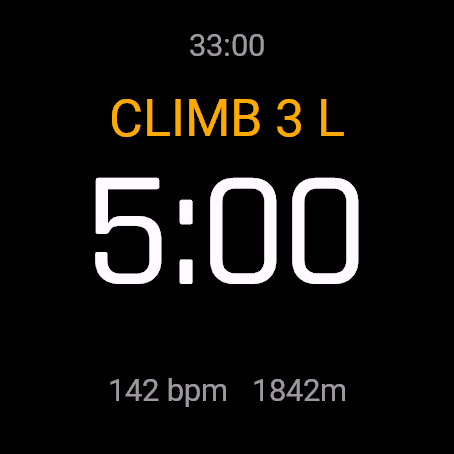
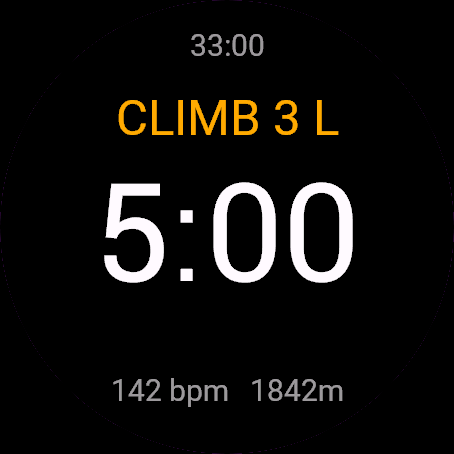
Multi-Pitch Climb is a route log for long climbs. You press a button at every change of phase: Approach, Climb, Belay, Descent, Break. The route is one Garmin Rock Climbing activity with a lap per phase and the gain per pitch.
Requirements and supported watches
Needs Connect IQ 3.3.0+ and the Connect IQ or Garmin Connect phone app. Supported watches:
- Round AMOLED: epix 2 and epix Pro 2, fēnix 8, E, Forerunner 165, 265, 570, 965, 970, Instinct 3 AMOLED, Crossover AMOLED, Venu 2, 3, 4, vivoactive 5, 6.
- Round MIP: enduro 3, fēnix 7 series, 8 Solar, Forerunner 55, 245, 255, vivoactive 4.
- Square and rectangular AMOLED: Venu Sq 2, Venu X1.
Installation
In the Connect IQ app on your phone (or Garmin Connect, then the Connect IQ Store) find "Multi-Pitch Climb" by Dialforge, tap Install and sync the watch. Open it from the apps list: press START on the watch face, then pick Multi-Pitch Climb.
First launch
No start screen: the app opens on the route, in APPROACH, and recording starts. The first START begins CLIMB 1. The 30-day free beta starts the first time you open it.
Controls
Watches with buttons (START, UP, DOWN, BACK)
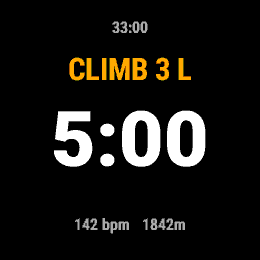
- START moves to the next phase: Approach, Climb 1, Belay 1, Climb 2 and so on, with a vibration.
- Leader: L means you lead the pitch, F that your partner does. It flips after each climb unless Alternate leads is off.
- Holding the menu button or BACK opens the menu and pauses recording: Resume, Switch to descent, Add break, Undo last change, Swap leader, Save and finish, Discard (asks twice).
- After a break START returns to the interrupted phase. In DESCENT each START begins another descent.
- UP or DOWN switches to the Route screen: recent pitches (number, L or F, time, gain) and totals: pitches, gain, climbing and belay time, time on route, altitude, heart rate, clock, sunset.
Touch watches (tap, hold, swipe)
- Watches with a START button ignore taps, so a sleeve cannot add a pitch. Hold opens the menu, swipe up or down switches screens.
- Touch-only watches: tap twice within 2 seconds for the next phase (the first tap says Tap again), hold for the menu.
Settings
Phone: Connect IQ app, Multi-Pitch Climb, Settings (the unlock code fields are there too).
- Alternate leads (swap leader each pitch): on or off. Default: on.
- Belay reminder: Off, 5 min, 10 min, 15 min, 20 min. Default: Off.
License
- Free beta: 30 days from the first launch, everything works.
- Price: 5.99 EUR once at dialforge.dev, no subscription. The 8-character code is tied to your watch's UID.
- Where to enter it: phone, Connect IQ app, Multi-Pitch Climb, Settings. Read the UID in "Watch UID (needed to buy a code)", buy the code, then type it into "Unlock code from dialforge.dev". The end-of-beta screen on the watch shows the UID too.
- After the beta without a code: an end-of-beta screen with the UID replaces the app. Enter the code, then open it again. New watch? Write to us and the code moves for free.
Privacy and permissions
Permissions:
- Activity recording: saves the session to Garmin Connect.
- Extra FIT fields: adds the app's values to the saved activity.
- Positioning: GPS on approach and descent, and the position for sunset.
- Sensors: barometer for altitude gain, and heart rate.
No internet use. Data stays on the watch and in the activities you save.
Troubleshooting
The code does not work. Check that the UID you bought for matches "Watch UID (needed to buy a code)" and type all 8 characters (case is ignored, no 0, O, 1 or I). A code for another app does not fit. Sync, then reopen.
How is the gain measured? From the watch barometer, ignoring changes under 2 m. Weather can drift it, so treat it as a good estimate.
Does it use GPS? Only on Approach and Descent. During Climb, Belay and Break the app turns it off.
Why is sunset "--"? It needs a known position, so it shows after a GPS fix. The calculation is offline.
Contact
kontakt@dialforge.dev or dialforge.dev. Please write before leaving a low rating.
Wspinaczka wielowyciągowa: instrukcja obsługi
Do czego służy
Wspinaczka wielowyciągowa to dziennik drogi. Przy każdej zmianie fazy naciskasz przycisk: Podejście, Wspinka, Asekuracja, Zjazd, Przerwa. Cała droga to jedna aktywność Garmin Wspinaczka, z okrążeniem na fazę i przewyższeniem na wyciąg.
Wymagania i obsługiwane zegarki
Wymaga Connect IQ 3.3.0+ i aplikacji Connect IQ albo Garmin Connect w telefonie. Obsługiwane zegarki:
- Okrągłe AMOLED: epix 2 i epix Pro 2, fēnix 8, E, Forerunner 165, 265, 570, 965, 970, Instinct 3 AMOLED, Crossover AMOLED, Venu 2, 3, 4, vivoactive 5, 6.
- Okrągłe MIP: enduro 3, seria fēnix 7, fēnix 8 Solar, Forerunner 55, 245, 255, vivoactive 4.
- Kwadratowe i prostokątne AMOLED: Venu Sq 2, Venu X1.
Instalacja
Na telefonie otwórz aplikację Connect IQ (albo Garmin Connect, a w niej sklep Connect IQ), wyszukaj "Wspinaczka wielowyciągowa" od Dialforge, stuknij Zainstaluj i zsynchronizuj zegarek. Uruchom ją z listy aplikacji: na tarczy naciśnij START i wybierz Wspinaczka wielowyciągowa.
Pierwsze uruchomienie
Nie ma ekranu startowego: aplikacja otwiera się na drodze, w PODEJŚCIU, i od razu nagrywa. Pierwszy START zaczyna WSPINKĘ 1. 30-dniowa darmowa beta zaczyna się przy pierwszym otwarciu.
Sterowanie
Zegarki z przyciskami (START, GÓRA, DÓŁ, WSTECZ)
- START przechodzi do następnej fazy: Podejście, Wspinka 1, Asekuracja 1, Wspinka 2 i dalej. Zegarek wibruje przy każdej zmianie.
- Prowadzący: L to ty prowadzisz wyciąg, F to partner. Zmienia się po każdej wspinaczce, chyba że Prowadzenie na zmianę jest wyłączone.
- Przytrzymanie przycisku menu albo WSTECZ otwiera menu i wstrzymuje nagrywanie: Wznów, Przejdź do zjazdu, Dodaj przerwę, Cofnij ostatnią zmianę, Zmień prowadzącego, Zapisz i zakończ, Odrzuć (pyta dwa razy).
- Po przerwie START wraca do przerwanej fazy. W trakcie ZJAZDU każdy START zaczyna kolejny zjazd.
- GÓRA albo DÓŁ przełączają na ekran Droga: ostatnie wyciągi (numer, L lub F, czas wspinania, przewyższenie) i sumy: wyciągi, przewyższenie, czas wspinania i asekuracji, czas na drodze, wysokość, tętno, zegar i zachód.
Zegarki dotykowe (stuknięcie, przytrzymanie, przesunięcie)
- Zegarki z przyciskiem START ignorują stuknięcia, żeby rękaw nie dodał wyciągu. Przytrzymanie otwiera menu, przesunięcie w górę lub w dół przełącza ekrany.
- Zegarki tylko dotykowe: stuknij dwa razy w ciągu 2 sekund, żeby przejść dalej (pierwsze mówi Stuknij jeszcze raz), przytrzymaj dla menu.
Ustawienia
Telefon: aplikacja Connect IQ, Wspinaczka wielowyciągowa, Ustawienia (są tam też pola kodu odblokowania).
- Prowadzenie na zmianę (zmiana co wyciąg): włączone lub wyłączone. Domyślnie: włączone.
- Przypomnienie o asekuracji: Wyłączone, 5 min, 10 min, 15 min, 20 min. Domyślnie: Wyłączone.
Licencja
- Darmowa beta: 30 dni od pierwszego uruchomienia, wszystko działa.
- Cena: jednorazowo 5,99 EUR na dialforge.dev, bez abonamentu. 8-znakowy kod jest przypisany do UID zegarka.
- Gdzie wpisać: telefon, aplikacja Connect IQ, Wspinaczka wielowyciągowa, Ustawienia. Odczytaj UID w polu "UID zegarka (potrzebny do zakupu kodu)", kup kod i wpisz go w "Kod odblokowania z dialforge.dev". Ekran końca bety na zegarku też pokazuje UID.
- Po becie bez kodu: zamiast aplikacji pojawia się ekran końca bety z UID. Wpisz kod i otwórz aplikację ponownie. Nowy zegarek? Napisz do nas, przeniesiemy kod za darmo.
Prywatność i uprawnienia
Uprawnienia:
- Zapis aktywności: zapisuje sesję w Garmin Connect.
- Dodatkowe pola FIT: dopisuje wartości aplikacji do aktywności.
- Pozycja: GPS na podejściu i zjeździe oraz pozycja do zachodu słońca.
- Czujniki: barometr do przewyższenia oraz tętno.
Zero połączeń z internetem. Dane zostają w zegarku i w zapisywanych aktywnościach.
Rozwiązywanie problemów
Kod nie działa. Sprawdź, czy UID, dla którego kupiono kod, zgadza się z polem "UID zegarka (potrzebny do zakupu kodu)", i wpisz wszystkie 8 znaków (wielkość liter bez znaczenia, bez 0, O, 1, I). Kod do innej aplikacji nie pasuje. Zsynchronizuj i otwórz ponownie.
Jak mierzone jest przewyższenie? Barometrem zegarka, z pominięciem zmian poniżej 2 m. Pogoda potrafi je lekko przesunąć, więc to dobre oszacowanie.
Czy używa GPS? Tylko na Podejściu i Zjeździe. Podczas Wspinki, Asekuracji i Przerwy aplikacja go wyłącza.
Czemu zachód to "--"? Potrzebuje znanej pozycji, więc pojawia się po złapaniu GPS. Obliczenie jest offline, z dokładnością do kilku minut.
Kontakt
kontakt@dialforge.dev albo dialforge.dev. Napisz, zanim wystawisz niską ocenę.
Permissions and privacy
This product asks the watch for the permissions below. Connect IQ shows them when you install it.
- Activity recording: Saves your workout in Garmin Connect (the activity from this app). The data stays in your Garmin account.Zapisuje trening w Garmin Connect (aktywność z tej aplikacji). Dane zostają na Twoim koncie Garmin.
- Own data fields in the activity: Adds this app's own numbers (for example points or sets) to the saved activity.Dodaje do zapisanej aktywności liczby tej aplikacji (na przykład punkty albo serie).
- Location (GPS): Uses the watch location for distance, speed or sun and moon times. The location is not sent anywhere.Używa lokalizacji zegarka do dystansu, prędkości albo godzin słońca i księżyca. Lokalizacja nigdzie nie jest wysyłana.
- Heart rate and sensors: Reads heart rate and other sensors of the watch while the app runs.Odczytuje tętno i inne czujniki zegarka, gdy aplikacja działa.
This product does not use the internet and sends no data to our servers.
The full manual and the detailed permission descriptions are available in English and Polish.
Compatible watches
51mm, D2 Air X15, D2 Mach 1 Pro, Enduro 2, Enduro 3, epix (Gen 2), epix Pro (Gen 2) 42mm, epix Pro (Gen 2) 47mm, epix Pro (Gen 2) 51mm, Forerunner 165, Forerunner 165 Music, Forerunner 245, Forerunner 245 Music, Forerunner 255, Forerunner 255 Music, Forerunner 255s, Forerunner 255s Music, Forerunner 265, Forerunner 265s, Forerunner 55, Forerunner 570 42mm, Forerunner 570 47mm, Forerunner 965, Forerunner 970, fēnix 7, fēnix 7 Pro, fēnix 7 Pro - Solar Edition (no Wi-Fi), fēnix 7S, fēnix 7S Pro, fēnix 7X, fēnix 7X Pro, fēnix 7X Pro - Solar Edition (no Wi-Fi), fēnix 8 43mm, fēnix 8 47mm, fēnix 8 Pro 47mm, fēnix 8 Solar 47mm, fēnix 8 Solar 51mm, fēnix E, Instinct 3 AMOLED 45mm, Instinct 3 AMOLED 50mm, Instinct Crossover AMOLED, MicroLED, quatix 7, quatix 7 Pro, quatix 7 Sapphire, quatix 7X Solar, quatix 8 47mm, quatix 8 Pro 47mm, tactix 7, tactix 7 – AMOLED Edition, tactix 8 47mm, tactix 8 Solar 51mm, Venu 2, Venu 2 Plus, Venu 2S, Venu 3, Venu 3S, Venu 4 41mm, Venu 4 45mm, Venu Sq 2, Venu Sq 2 Music, Venu X1, vívoactive 4, vívoactive 4S, vívoactive 5, vívoactive 6
Screenshots
FAQ
What happens after the 30-day beta?
The app shows a screen asking for a one-time unlock code from dialforge.dev instead of opening normally. Buy the code once below, no subscription.
Does the app send my data to Dialforge?
No. The app works fully offline, and the unlock code is checked on the watch itself, without contacting any server.
The app does not work as described on my watch. Can I get a refund?
Yes. Write through the feedback form below, or to the e-mail in the footer. If we cannot fix it, we refund you, as described in the terms.
Changing your watch?
Write to me and I will move your code for free.
Changelog
- First release (beta).
- Pierwsze wydanie (beta).
- Erste Version (Beta).
- Première version (beta).
- Primera versión (beta).
- Eerste release (beta).
- 初回リリース(ベータ版)。
- Prima versione (beta).
- 首发版本(测试版)。
- Первый релиз (бета).
- Primeira versão (beta).
- První vydání (beta).
- Primeira versão (beta).
- 첫 출시(베타).
- Första versionen (beta).
- Første udgivelse (beta).
- Første versjon (beta).
- 首發版本(Beta)。
- Ensimmäinen julkaisu (beta).
- Prvá verzia (beta).
- Prva različica (beta).
- Rilis pertama (beta).
- Első kiadás (béta).
- เวอร์ชันแรก (เบต้า)
- Πρώτη έκδοση (beta).
- Prvo izdanje (beta).
- גרסה ראשונה (בטא).
- Keluaran pertama (beta).
Unlock
€5.99
One-time payment. No subscription. The code works on the watch whose UID you enter.
- Install the app from the Connect IQ store. It works fully and for free for the first 30 days.
- Find your 10-digit UID: Connect IQ app on the phone > My Device > Apps or Data Fields > this app > Settings > Watch UID.
- Enter UID and e-mail, pay with PayPal (cards work without a PayPal account). The code appears here at once.
- Type the code into the same settings page, field "Unlock code". The watch checks it offline.
Thank you! Your code:
Enter the code in the app settings, field "Unlock code". The watch checks it offline.
Tell us how to make it better
Missing a data field, a colour, a layout? Found a bug on your watch model? Write it here. We read every message and ship improvements in updates.