Outdoor and photography
Golden Hour
Golden light, timed to the minute, wherever you point the camera.
Złote światło co do minuty, niezależnie gdzie akurat stoisz z aparatem.
Goldenes Licht, minutengenau, egal wohin du die Kamera richtest.
La lumière dorée, calculée à la minute, où que vous pointiez l'appareil photo.
Luz dorada, calculada al minuto, allí donde apuntes la cámara.
Gouden licht, tot op de minuut getimed, waar je de camera ook op richt.
カメラを向けるその場所で、分単位で正確な黄金の光を捉えられます。
Luce dorata, calcolata al minuto, ovunque punti la fotocamera.
精准到分钟的黄金光线,随镜头所向随时捕捉。
Золотой свет с точностью до минуты, куда бы вы ни направили камеру.
Luz dourada, precisa ao minuto, para onde quer que você aponte a câmera.
Zlaté světlo načasované na minutu přesně, ať už fotoaparát namíříte kamkoli.
Luz dourada, calculada ao minuto, para onde quer que aponte a câmara.
카메라를 어디로 향하든 분 단위까지 정확하게 알려주는 황금빛 햇살.
Gyllene ljus, på minuten när, oavsett vart du riktar kameran.
Det gyldne lys, timet på minuttet, uanset hvor du peger kameraet hen.
Gyldent lys, på minuttet, uansett hvor du retter kameraet.
黃金時刻精準至分鐘,無論鏡頭指向何方。
Kultaista valoa minuutin tarkkuudella, minne tahansa suuntaatkin kameran.
Zlaté svetlo, načasované na minútu presne, kamkoľvek namierite fotoaparát.
Zlata svetloba, točno na minuto, kamorkoli usmerite fotoaparat.
Cahaya keemasan, tepat hingga hitungan menit, ke mana pun Anda mengarahkan kamera.
Aranyfény, percre pontosan időzítve, amerre csak a kamerát fordítod.
แสงสีทอง แม่นยำระดับนาที ไม่ว่าคุณจะหันกล้องไปทางไหน
Χρυσό φως, χρονισμένο με ακρίβεια λεπτού, όπου κι αν στρέψετε την κάμερα.
Zlatna svjetlost, točna u minutu, kamo god usmjerite fotoaparat.
אור זהוב, מתוזמן בדיוק לדקה, לכל מקום שאליו מכוונים את המצלמה.
Cahaya keemasan, tepat mengikut minit, ke mana sahaja anda halakan kamera.
Coming to Connect IQ Unlock €4.99
Beta: free for 30 days
The app works fully and for free for the first 30 days after you first open it. After that you can buy a one-time unlock code below. No subscription.
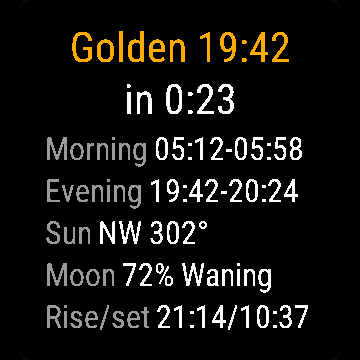
Golden Hour computes real sun position for your GPS location (NOAA solar formulas, not a generic table), so times match your exact latitude and date. Most widgets stop at sunrise and sunset. This one tracks golden hour and blue hour separately, morning and evening, shows which way to point the camera, and adds the moon.
- Morning and evening golden and blue hour windows for your location
- Live countdown to the next window
- Sun direction during evening golden hour
- Moon phase percent, moonrise and moonset
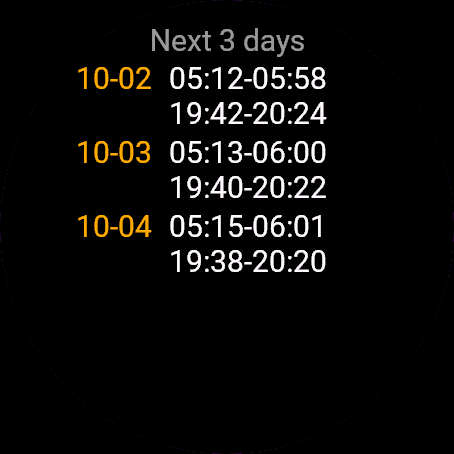
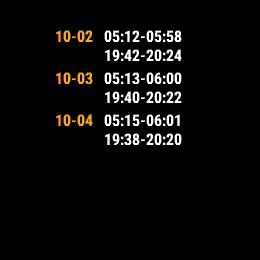
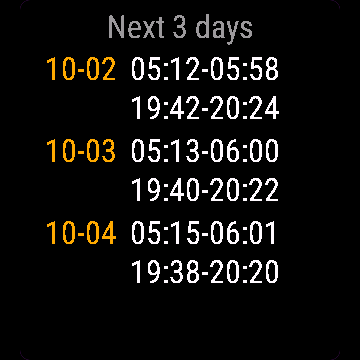
- 3-day outlook to plan ahead
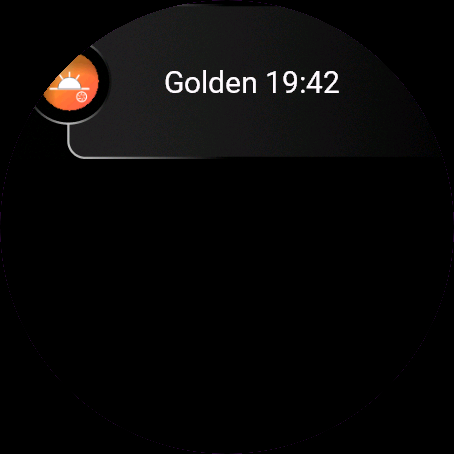
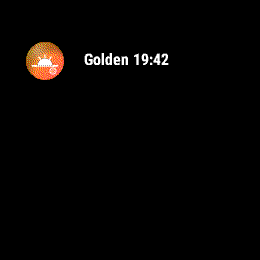
- Glance shows the next window without opening the app
Golden Hour liczy prawdziwą pozycję słońca dla Twojej lokalizacji GPS (wzory solarne NOAA, nie tabela uśredniona dla regionu), więc godziny pasują do Twojej szerokości geograficznej i daty. Większość aplikacji kończy na wschodzie i zachodzie słońca. Ta liczy złotą i niebieską godzinę osobno, rano i wieczorem, pokazuje w którą stronę ustawić aparat i dorzuca fazy księżyca.
- Poranne i wieczorne okna złotej i niebieskiej godziny dla Twojej lokalizacji
- Odliczanie do następnego okna na żywo
- Kierunek słońca podczas wieczornej złotej godziny
- Procent oświetlenia księżyca, wschód i zachód Księżyca
- Podgląd na 3 dni do przodu
- Glance pokazuje następne okno bez otwierania aplikacji
Golden Hour berechnet die tatsächliche Sonnenposition für deinen GPS-Standort (NOAA-Sonnenformeln, keine generische Tabelle), damit die Zeiten zu deinem genauen Breitengrad und Datum passen. Die meisten Widgets hören bei Sonnenaufgang und Sonnenuntergang auf. Diese App verfolgt Golden Hour und Blue Hour getrennt, morgens und abends, zeigt dir, in welche Richtung du die Kamera halten solltest, und berücksichtigt auch den Mond.
- Golden- und Blue-Hour-Fenster morgens und abends für deinen Standort
- Live-Countdown bis zum nächsten Fenster
- Sonnenrichtung während der abendlichen Golden Hour
- Mondphase in Prozent, Mondaufgang und Monduntergang
- 3-Tage-Ausblick zur Planung
- Übersicht zeigt das nächste Fenster ohne die App zu öffnen
Golden Hour calcule la position réelle du soleil pour votre position GPS (formules solaires NOAA, pas une table générique), pour que les horaires correspondent exactement à votre latitude et à la date. La plupart des widgets s'arrêtent au lever et au coucher du soleil. Celui-ci suit l'heure dorée et l'heure bleue séparément, matin et soir, indique dans quelle direction pointer l'appareil photo, et ajoute la lune.
- Fenêtres d'heure dorée et d'heure bleue du matin et du soir pour votre position
- Compte à rebours en direct jusqu'à la prochaine fenêtre
- Direction du soleil pendant l'heure dorée du soir
- Pourcentage de phase lunaire, lever et coucher de lune
- Prévision sur 3 jours pour planifier à l'avance
- Le glance affiche la prochaine fenêtre sans ouvrir l'application
Golden Hour calcula la posición real del sol para tu ubicación GPS (con fórmulas solares de la NOAA, no una tabla genérica), así que las horas coinciden con tu latitud y fecha exactas. La mayoría de los widgets se quedan en el amanecer y el atardecer. Este calcula por separado la hora dorada y la hora azul, de mañana y de tarde, muestra hacia dónde apuntar la cámara, y añade la luna.
- Ventanas de hora dorada y hora azul de mañana y tarde para tu ubicación
- Cuenta atrás en vivo hasta la siguiente ventana
- Dirección del sol durante la hora dorada de la tarde
- Porcentaje de fase lunar, salida y puesta de la luna
- Previsión de 3 días para planificar con antelación
- La vista rápida muestra la siguiente ventana sin abrir la app
Golden Hour berekent de werkelijke zonnestand voor je GPS-locatie (NOAA-zonneformules, geen algemene tabel), zodat de tijden exact overeenkomen met je breedtegraad en datum. De meeste widgets stoppen bij zonsopgang en zonsondergang. Deze app volgt het gouden uur en het blauwe uur afzonderlijk, 's ochtends en 's avonds, laat zien in welke richting je de camera moet richten, en voegt de maan toe.
- Tijdsvensters voor het gouden en blauwe uur in de ochtend en avond voor jouw locatie
- Live aftellen naar het volgende venster
- Zonrichting tijdens het gouden uur in de avond
- Percentage van de maanfase, maansopkomst en maansondergang
- 3-daagse vooruitblik om vooruit te plannen
- Glance toont het volgende venster zonder de app te openen
Golden Hour はGPS位置情報から実際の太陽の位置を計算し(一般的な簡易テーブルではなくNOAAの太陽位置計算式を使用)、正確な緯度と日付に合わせた時刻を算出します。多くのウィジェットは日の出と日の入りしか表示しませんが、本アプリは朝と夕方のゴールデンアワーとブルーアワーを個別に追跡し、カメラを向ける方角を示し、さらに月情報も提供します。
- 現在地における朝と夕方のゴールデンアワーおよびブルーアワーの時間帯
- 次の時間帯までのリアルタイムカウントダウン
- 夕方のゴールデンアワーにおける太陽の方角
- 月相パーセント、月の出と月の入り
- 事前計画に役立つ 3-day の見通し
- アプリを開かなくてもグランスで次の時間帯を確認可能
Golden Hour calcola la posizione reale del sole per la tua posizione GPS (formule solari NOAA, non una tabella generica), così gli orari corrispondono esattamente alla tua latitudine e data. La maggior parte dei widget si ferma all'alba e al tramonto. Questa app calcola separatamente l'ora d'oro e l'ora blu, mattina e sera, indica verso dove puntare la fotocamera e aggiunge la luna.
- Finestre di golden hour e blue hour mattutine e serali per la tua posizione
- Conto alla rovescia in tempo reale per la prossima finestra
- Direzione del sole durante la golden hour serale
- Percentuale di fase lunare, levata e tramonto della luna
- Previsione a 3 giorni per pianificare in anticipo
- Il glance mostra la prossima finestra senza aprire l'app
Golden Hour 根据您的 GPS 位置计算真实的太阳方位(采用 NOAA 太阳公式,而非通用数据表),确保时间精确匹配您所在的具体纬度和日期。多数小部件仅显示日出日落,本应用则分别追踪清晨与傍晚的黄金时刻和蓝调时刻,指引镜头拍摄方位,并加入月相信息。
- 针对您所在位置的早晚黄金时刻与蓝调时刻时段
- 距离下一个时段的实时倒计时
- 傍晚黄金时刻的太阳方位
- 月相百分比、月出与月落
- 3-day 预报,便于提前规划
- 小部件(glance)无需打开应用即可查看下一个时段
Golden Hour рассчитывает реальное положение солнца для вашей геопозиции по GPS (солнечные формулы NOAA, а не общая таблица), поэтому время точно соответствует вашей широте и дате. Большинство виджетов показывают только восход и закат. Это приложение отдельно отслеживает золотой и синий часы утром и вечером, показывает, куда направить камеру, и добавляет данные о луне.
- Интервалы золотого и синего часа утром и вечером для вашей локации
- Обратный отсчет в реальном времени до следующего интервала
- Направление на солнце во время вечернего золотого часа
- Фаза луны в процентах, восход и заход луны
- Прогноз на 3 дня для предварительного планирования
- Glance показывает следующий интервал без запуска приложения
O Golden Hour calcula a posição real do sol para sua localização GPS (fórmulas solares da NOAA, não uma tabela genérica), para que os horários correspondam exatamente à sua latitude e data. A maioria dos widgets para no nascer e no pôr do sol. Este monitora a hora de ouro e a hora azul separadamente, pela manhã e ao entardecer, mostra para onde apontar a câmera e inclui a lua.
- Intervalos da hora de ouro e da hora azul pela manhã e ao entardecer para a sua localização
- Contagem regressiva em tempo real até o próximo intervalo
- Direção do sol durante a hora de ouro do entardecer
- Porcentagem da fase da lua, nascer e pôr da lua
- Previsão de 3 dias para se planejar com antecedência
- O glance mostra o próximo intervalo sem abrir o app
Golden Hour počítá skutečnou polohu slunce pro vaši GPS polohu (solární vzorce NOAA, žádná obecná tabulka), takže časy přesně odpovídají vaší zeměpisné šířce a datu. Většina widgetů končí u východu a západu slunce. Tento sleduje zlatou i modrou hodinku zvlášť, ráno i večer, ukazuje, kam namířit fotoaparát, a přidává i měsíc.
- Ranní a večerní okna zlaté a modré hodinky pro vaši polohu
- Živý odpočet do dalšího okna
- Směr slunce během večerní zlaté hodinky
- Fáze měsíce v procentech, východ a západ měsíce
- 3denní výhled pro plánování předem
- Glance ukazuje další okno bez nutnosti otevírat aplikaci
O Golden Hour calcula a posição real do sol para a sua localização GPS (fórmulas solares da NOAA, não uma tabela genérica), para que as horas correspondam à sua latitude e data exatas. A maioria dos widgets fica-se pelo nascer e pôr do sol. Este regista a golden hour e a blue hour separadamente, de manhã e ao fim da tarde, mostra para onde apontar a câmara e inclui a lua.
- Janelas de golden hour e blue hour de manhã e ao fim da tarde para a sua localização
- Contagem decrescente em tempo real até à próxima janela
- Direção do sol durante a golden hour de fim de tarde
- Percentagem da fase da lua, nascimento e pôr da lua
- Previsão de 3 dias para planear com antecedência
- O glance mostra a próxima janela sem abrir a aplicação
Golden Hour는 일반적인 시간표가 아닌 NOAA 태양 계산식을 기반으로 현재 GPS 위치의 실제 태양 위치를 계산하므로, 정확한 위도와 날짜에 맞는 시간을 제공합니다. 대부분의 위젯은 일출과 일몰 시간만 표시하지만, 이 앱은 아침과 저녁의 골든 아워와 블루 아워를 각각 추적하고 카메라를 향할 방향과 달 정보까지 안내합니다.
- 현재 위치의 아침 및 저녁 골든 아워와 블루 아워 시간대
- 다음 시간대까지의 실시간 카운트다운
- 저녁 골든 아워 동안의 태양 방향
- 달의 위상 백분율, 월출 및 월몰 시간
- 미리 계획할 수 있는 3-day 전망
- 앱을 열지 않고도 글랜스에서 다음 시간대 확인 가능
Golden Hour beräknar solens faktiska position för din GPS-position (NOAA-solformler, inte en generell tabell), så tiderna stämmer exakt med din latitud och ditt datum. De flesta widgetar stannar vid soluppgång och solnedgång. Den här håller koll på gyllene timmen och blå timmen separat, morgon och kväll, visar åt vilket håll du ska rikta kameran och lägger till månen.
- Tidsfönster för gyllene timmen och blå timmen morgon och kväll för din plats
- Nedräkning i realtid till nästa fönster
- Solens riktning under kvällens gyllene timme
- Månfas i procent, månuppgång och månnedgång
- 3-dagarsöversikt för att planera i förväg
- Snabblicken visar nästa fönster utan att öppna appen
Golden Hour beregner solens reelle position for din GPS-placering (NOAA-solformler, ikke en generisk tabel), så tiderne passer til din præcise breddegrad og dato. De fleste widgets stopper ved solopgang og solnedgang. Denne her sporer golden hour og blue hour separat, morgen og aften, viser hvilken vej du skal pege kameraet, og tilføjer månen.
- Tidsrum for golden hour og blue hour morgen og aften for din placering
- Live-nedtælling til det næste tidsrum
- Solens retning under aftenens golden hour
- Månefase i procent, måneopgang og månenedgang
- 3-dages prognose til at planlægge forud
- Glance viser det næste tidsrum uden at åbne appen
Golden Hour beregner reell solposisjon for din GPS-posisjon (NOAA-solformler, ikke en generell tabell), slik at tidene stemmer nøyaktig med din breddegrad og dato. De fleste widgeter stopper ved soloppgang og solnedgang. Denne sporer gylden time og blå time separat, morgen og kveld, viser hvilken vei du bør rette kameraet, og legger til månen.
- Tidsvinduer for gylden og blå time morgen og kveld for din posisjon
- Nedtelling i sanntid til neste tidsvindu
- Solretning under gylden time om kvelden
- Månefase i prosent, måneoppgang og månenedgang
- 3-dagers varsel for å planlegge fremover
- Glance viser neste tidsvindu uten å åpne appen
Golden Hour 根據你的 GPS 位置計算真實太陽位置(採用 NOAA 太陽公式,而非通用對照表),因此時間精確符合你的實際緯度與日期。多數小工具僅顯示日出與日落,本工具則分別追蹤早晚的黃金時刻與藍調時刻,指引鏡頭朝向,並加入月相資訊。
- 所在地點早晨與傍晚的黃金時刻及藍調時刻時段
- 距離下個最佳拍攝時段的即時倒數
- 傍晚黃金時刻的太陽方位
- 月相百分比、月出與月落時間
- 3-day 預報以利提前規劃
- 無需開啟應用程式,Glance 即可顯示下一個時段
Golden Hour laskee auringon todellisen sijainnin GPS-sijaintisi mukaan (NOAA-aurinkokaavat, ei yleinen taulukko), joten ajat vastaavat tarkasti leveyspiiriäsi ja päivämäärääsi. Useimmat widgetit näyttävät vain auringonnousun ja -laskun. Tämä sovellus seuraa kultaista ja sinistä hetkeä erikseen aamuin ja illoin, näyttää suunnan kameralle ja lisää mukaan kuun tiedot.
- Sijaintisi aamun ja illan kultaisen sekä sinisen hetken ajankohdat
- Reaaliaikainen laskuri seuraavaan hetkeen
- Auringon suunta illan kultaisen hetken aikana
- Kuun vaihe prosentteina, kuun nousu ja lasku
- 3 päivän ennuste etukäteissuunnitteluun
- Glance näyttää seuraavan ajankohdan avaamatta sovellusta
Golden Hour počíta skutočnú polohu slnka pre vašu GPS polohu (solárne vzorce NOAA, nie všeobecná tabuľka), takže časy presne zodpovedajú vašej zemepisnej šírke a dátumu. Väčšina widgetov končí pri východe a západe slnka. Táto aplikácia sleduje zlatú a modrú hodinu samostatne, ráno aj večer, ukazuje, kam namieriť fotoaparát, a pridáva aj mesiac.
- Ranné a večerné okná zlatej a modrej hodiny pre vašu polohu
- Živý odpočet do ďalšieho okna
- Smer slnka počas večernej zlatej hodiny
- Fáza mesiaca v percentách, východ a západ mesiaca
- 3-dňový výhľad na plánovanie dopredu
- Glance zobrazuje nasledujúce okno bez nutnosti otvoriť aplikáciu
Golden Hour izračuna dejanski položaj sonca za vašo GPS lokacijo (sončne formule NOAA, ne splošna tabela), zato se časi natančno ujemajo z vašo zemljepisno širino in datumom. Večina pripomočkov se ustavi pri sončnem vzhodu in zahodu. Ta ločeno spremlja zlato in modro uro, zjutraj in zvečer, prikazuje smer usmeritve fotoaparata ter dodaja luno.
- Časovni intervali jutranje in večerne zlate ter modre ure za vašo lokacijo
- Odštevanje v živo do naslednjega intervala
- Smer sonca med večerno zlato uro
- Odstotek lunine mene, lunin vzhod in zahod
- 3-dnevna napoved za vnaprejšnje načrtovanje
- Hitri pogled (glance) prikazuje naslednji interval brez odpiranja aplikacije
Golden Hour menghitung posisi matahari sebenarnya untuk lokasi GPS Anda (formula matahari NOAA, bukan tabel umum), sehingga waktu cocok dengan garis lintang dan tanggal tepat Anda. Sebagian besar widget berhenti di matahari terbit dan terbenam. Aplikasi ini melacak golden hour dan blue hour secara terpisah, pagi dan sore, menunjukkan arah untuk mengarahkan kamera, dan menambahkan bulan.
- Waktu golden hour dan blue hour pagi serta sore untuk lokasi Anda
- Hitung mundur langsung ke waktu berikutnya
- Arah matahari selama golden hour sore
- Persentase fase bulan, waktu bulan terbit dan terbenam
- Perkiraan 3 hari untuk merencanakan lebih awal
- Glance menampilkan waktu berikutnya tanpa membuka aplikasi
A Golden Hour a valós napállást számítja ki a GPS-pozíciód alapján (NOAA napképletek, nem egy általános táblázat), így az időpontok pontosan megegyeznek a szélességi köröddel és a dátummal. A legtöbb widget megáll a napkelténél és a napnyugtánál. Ez külön követi az aranyórát és a kék órát, reggel és este, megmutatja, merre fordítsd a kamerát, és a holdat is hozzáadja.
- Reggeli és esti aranyóra és kék óra időszakok a tartózkodási helyedre
- Élő visszaszámlálás a következő időszakig
- Nap iránya az esti aranyóra alatt
- Holdfázis százalék, holdkelte és holdnyugta
- 3-day előretekintés az előzetes tervezéshez
- Glance mutatja a következő időszakot az alkalmazás megnyitása nélkül
Golden Hour คำนวณตำแหน่งดวงอาทิตย์จริงตามพิกัด GPS ของคุณ (ใช้สูตรคำนวณดวงอาทิตย์ของ NOAA ไม่ใช่ตารางทั่วไป) เวลาจึงตรงกับละติจูดและวันที่ที่แน่นอนของคุณ วิดเจ็ตส่วนใหญ่หยุดอยู่ที่เวลาพระอาทิตย์ขึ้นและพระอาทิตย์ตก แต่วิดเจ็ตนี้ติดตามช่วง golden hour และ blue hour แยกกัน ทั้งช่วงเช้าและเย็น แสดงทิศทางที่ควรหันกล้อง และเพิ่มข้อมูลดวงจันทร์
- ช่วงเวลา golden hour และ blue hour ทั้งช่วงเช้าและเย็นสำหรับตำแหน่งของคุณ
- นับถอยหลังแบบสดไปยังช่วงเวลาถัดไป
- ทิศทางของดวงอาทิตย์ในช่วง golden hour ตอนเย็น
- เปอร์เซ็นต์ข้างขึ้นข้างแรม เวลาดวงจันทร์ขึ้นและตก
- การคาดการณ์ล่วงหน้า 3-day เพื่อวางแผนล่วงหน้า
- Glance แสดงช่วงเวลาถัดไปโดยไม่ต้องเปิดแอป
Το Golden Hour υπολογίζει την πραγματική θέση του ήλιου για την τοποθεσία GPS σας (ηλιακοί τύποι της NOAA, όχι ένας γενικός πίνακας), ώστε οι ώρες να αντιστοιχούν ακριβώς στο γεωγραφικό σας πλάτος και την ημερομηνία. Τα περισσότερα widget σταματούν στην ανατολή και τη δύση του ηλίου. Αυτό παρακολουθεί τη χρυσή και τη μπλε ώρα ξεχωριστά, πρωί και απόγευμα, δείχνει προς τα πού να στρέψετε την κάμερα και προσθέτει τη σελήνη.
- Χρονικά παράθυρα χρυσής και μπλε ώρας για την τοποθεσία σας, πρωί και απόγευμα
- Ζωντανή αντίστροφη μέτρηση για το επόμενο παράθυρο
- Κατεύθυνση του ήλιου κατά την απογευματινή χρυσή ώρα
- Ποσοστό φάσης σελήνης, ανατολή και δύση σελήνης
- Πρόγνωση 3 ημερών για έγκαιρο προγραμματισμό
- Το glance δείχνει το επόμενο παράθυρο χωρίς να ανοίξετε την εφαρμογή
Golden Hour izračunava stvarni položaj sunca za vašu GPS lokaciju (NOAA solarne formule, a ne generička tablica), tako da vremena odgovaraju vašoj točnoj zemljopisnoj širini i datumu. Većina widgeta zaustavlja se na izlasku i zalasku sunca. Ovaj zasebno prati zlatni i plavi sat, ujutro i navečer, pokazuje kamo usmjeriti fotoaparat i dodaje mjesec.
- Jutarnji i večernji intervali zlatnog i plavog sata za vašu lokaciju
- Odbrojavanje uživo do sljedećeg intervala
- Smjer sunca tijekom večernjeg zlatnog sata
- Postotak mjesečeve mijene, izlazak i zalazak mjeseca
- Trodnevni pregled za planiranje unaprijed
- Glance prikazuje sljedeći interval bez otvaranja aplikacije
Golden Hour מחשב את מיקום השמש האמיתי עבור מיקום ה-GPS שלך (נוסחאות סולאריות של NOAA, לא טבלה כללית), כך שהזמנים מתאימים בדיוק לקו הרוחב ולתאריך שלך. רוב הווידג'טים נעצרים בזריחה ובשקיעה. יישום זה עוקב בנפרד אחר שעת הזהב והשעה הכחולה, בבוקר ובערב, מציג לאיזה כיוון לכוון את המצלמה, ומוסיף את הירח.
- חלונות שעת הזהב והשעה הכחולה בבוקר ובערב עבור המיקום שלך
- ספירה לאחור בזמן אמת לחלון הזמן הבא
- כיוון השמש במהלך שעת הזהב בערב
- אחוז מופע הירח, זריחת הירח ושקיעת הירח
- תחזית ל-3 ימים לתכנון מראש
- תצוגת glance מציגה את חלון הזמן הבא מבלי לפתוח את האפליקציה
Golden Hour mengira kedudukan matahari sebenar untuk lokasi GPS anda (formula suria NOAA, bukan jadual generik), jadi waktu bertepatan dengan latitud dan tarikh tepat anda. Kebanyakan widget terhenti pada matahari terbit dan terbenam. Aplikasi ini menjejaki golden hour dan blue hour secara berasingan, pagi dan petang, menunjukkan arah untuk menghalakan kamera, dan menambah fasa bulan.
- Waktu golden hour dan blue hour pagi dan petang untuk lokasi anda
- Kiraan detik langsung ke waktu seterusnya
- Arah matahari semasa golden hour petang
- Peratusan fasa bulan, bulan terbit dan bulan terbenam
- Gambaran 3 hari untuk merancang lebih awal
- Glance menunjukkan waktu seterusnya tanpa membuka aplikasi
How to use it
Add Golden Hour to the widget loop (swipe through widgets on the watch).
Swipe, tap, or press UP/DOWN to switch between today and the 3-day list.
Dodaj Złota godzina do karuzeli widgetów (przewiń widgety na zegarku).
Przesunięcie palcem, dotknięcie albo GÓRA/DÓŁ przełącza między dziś a listą 3 dni.
Füge Golden Hour zur Widget-Schleife hinzu (auf der Uhr durch die Widgets wischen).
Wischen, Tippen oder AUF/AB drücken wechselt zwischen heute und der 3-Tage-Liste.
Ajoutez Golden Hour à la boucle de widgets (faites défiler les widgets sur la montre).
Glissement, appui, ou HAUT/BAS pour basculer entre aujourd'hui et la liste sur 3 jours.
Añade Golden Hour al bucle de widgets (desliza por los widgets en el reloj).
Deslizar, tocar o pulsar ARRIBA/ABAJO para cambiar entre hoy y la lista de 3 días.
Voeg Golden Hour toe aan de widgetlus (veeg op het horloge door de widgets).
Veeg, tik of druk op UP/DOWN om te schakelen tussen vandaag en de 3-dagenlijst.
Golden Hour をウィジェットのループに追加してください(時計でウィジェットをスワイプして切り替えます)。
スワイプ、タップ、または UP/DOWN を押して、当日と 3-day リストを切り替えられます。
Aggiungi Golden Hour al ciclo dei widget (scorri i widget sull'orologio).
Scorri, tocca o premi UP/DOWN per passare tra la giornata di oggi e la lista a 3 giorni.
把 Golden Hour 添加到小组件循环中(在手表上滑动切换小组件)。
滑动、轻触或按 UP/DOWN 键在今日与 3-day 列表之间切换。
Добавьте Golden Hour в ленту виджетов (листайте виджеты на часах).
Смахните, коснитесь экрана или нажмите UP/DOWN, чтобы переключиться между сегодняшним днем и списком на 3 дня.
Adicione Golden Hour ao ciclo de widgets (deslize pelos widgets no relógio).
Deslize, toque ou pressione UP/DOWN para alternar entre hoje e a lista de 3 dias.
Přidejte Golden Hour do smyčky widgetů (na hodinkách procházejte widgety přejížděním).
Přejetím, klepnutím nebo stisknutím UP/DOWN přepínáte mezi dneškem a 3denním přehledem.
Adicione Golden Hour ao ciclo de widgets (deslize pelos widgets no relógio).
Deslize, toque ou prima UP/DOWN para alternar entre hoje e a lista de 3 dias.
Golden Hour을(를) 위젯 순환에 추가하세요(시계에서 위젯을 넘겨 보세요).
화면을 스와이프하거나 탭하거나 UP/DOWN 버튼을 눌러 오늘과 3-day 목록 간에 전환할 수 있습니다.
Lägg till Golden Hour i widgetslingan (svep mellan widgetar på klockan).
Svep, tryck eller använd UP/DOWN för att växla mellan idag och 3-dagarslistan.
Tilføj Golden Hour til widget-løkken (stryg gennem widgets på uret).
Swipe, tryk eller tryk på UP/DOWN for at skifte mellem i dag og 3-dages-listen.
Legg til Golden Hour i widget-rekken (sveip gjennom widgetene på klokken).
Sveip, trykk eller trykk UP/DOWN for å veksle mellom i dag og 3-dagerslisten.
把 Golden Hour 加入小工具循環中(在手錶上滑動切換小工具)。
滑動、輕觸或按下 UP/DOWN 即可在今天與 3-day 清單之間切換。
Lisää Golden Hour widgetkiertoon (selaa widgettejä pyyhkäisemällä kellossa).
Pyyhkäise, napauta tai paina UP/DOWN vaihtaaksesi tämän päivän ja 3 päivän listan välillä.
Pridajte Golden Hour do cyklu widgetov (widgety na hodinkách prechádzate potiahnutím).
Potiahnutím, ťuknutím alebo stlačením UP/DOWN prepínate medzi dneškom a 3-dňovým zoznamom.
Dodajte Golden Hour v zanko pripomočkov (na uri se pomikajte med pripomočki).
Podrsajte, tapnite ali pritisnite UP/DOWN za preklop med današnjim dnem in 3-dnevnim seznamom.
Tambahkan Golden Hour ke putaran widget (geser antar widget di jam).
Geser, ketuk, atau tekan UP/DOWN untuk beralih antara hari ini dan daftar 3 hari.
Adja hozzá a(z) Golden Hour elemet a widgetkörhöz (az órán görgessen a widgetek között).
Csúsztass, koppints vagy nyomd meg a UP/DOWN gombot a mai nap és a 3-day lista közötti váltáshoz.
เพิ่ม Golden Hour ในวิดเจ็ตลูป (ปัดผ่านวิดเจ็ตบนนาฬิกา)
ปัด แตะ หรือกด UP/DOWN เพื่อสลับระหว่างวันนี้กับรายการ 3-day
Προσθέστε το Golden Hour στον κύκλο των widget (σύρετε στα widget του ρολογιού).
Κάντε swipe, πατήστε στην οθόνη ή πατήστε UP/DOWN για εναλλαγή μεταξύ της σημερινής ημέρας και της λίστας 3 ημερών.
Dodajte Golden Hour u petlju widgeta (listajte widgete na satu).
Prijeđite prstom, dodirnite ili pritisnite UP/DOWN za prebacivanje između današnjeg dana i trodnevnog popisa.
הוסיפו את Golden Hour ללולאת הווידג'טים (החליקו בין הווידג'טים בשעון).
החלקה, הקשה או לחיצה על UP/DOWN למעבר בין היום לבין הרשימה ל-3 ימים.
Tambah Golden Hour ke dalam gelung widget (leret melalui widget pada jam).
Leret, ketik, atau tekan UP/DOWN untuk beralih antara hari ini dan senarai 3 hari.
Manual
The full manual and the detailed permission descriptions are available in English and Polish.
Golden Hour: user manual
What it does
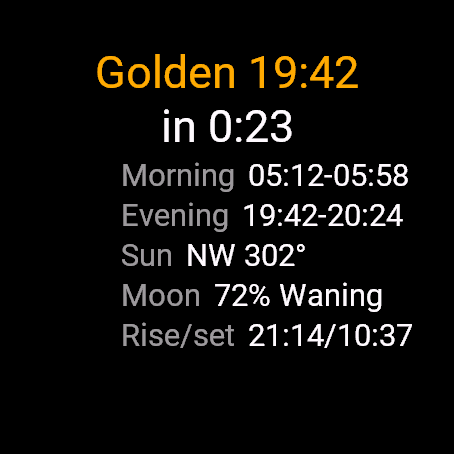
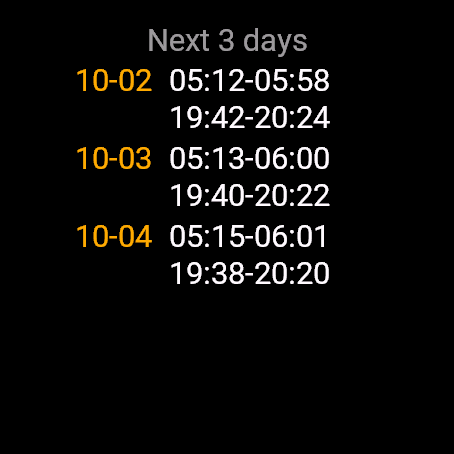
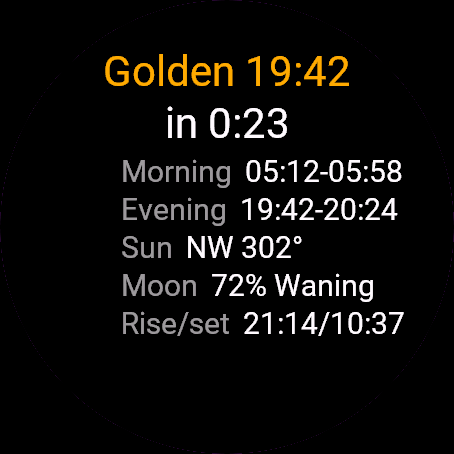
Golden Hour shows when the light is golden and blue where you are, computed on the watch from your GPS position. It covers the morning and evening windows, a countdown to the next one, the sun direction for the evening, moon phase, moonrise and moonset, and a 3-day outlook.
Requirements and supported watches
Needs Connect IQ 3.3.0+ and the Connect IQ or Garmin Connect phone app. Supported watches:
- Round AMOLED: epix 2 and epix Pro 2, fēnix 8, E, Forerunner 165, 265, 570, 965, 970, Instinct 3 AMOLED, Crossover AMOLED, Venu 2, 3, 4, vivoactive 5, 6.
- Round MIP: enduro 3, fēnix 7 series, 8 Solar, Forerunner 55, 245, 255, vivoactive 4.
- Square and rectangular AMOLED: Venu Sq 2, Venu X1.
Installation
In the Connect IQ app on your phone (or Garmin Connect, then the Connect IQ Store) find "Golden Hour" by Dialforge, tap Install and sync the watch. Find it in your glances (UP or DOWN on the watch face, or swipe) and press START or tap to open it.
First launch
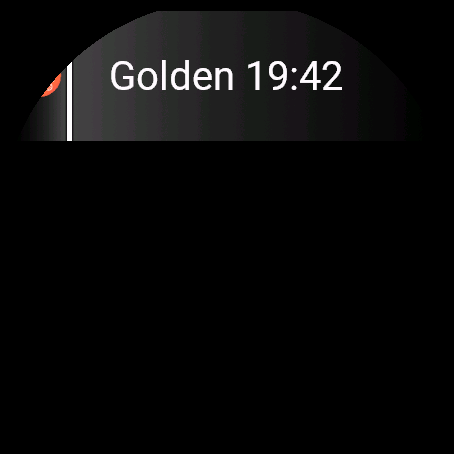
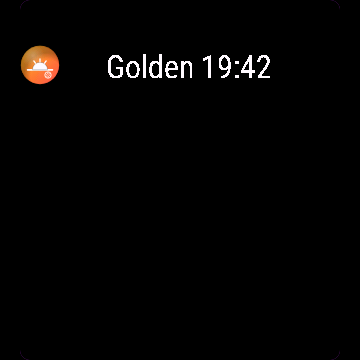
The glance shows the next window, like "Golden 19:12 (in 2:05)". Open the widget for the full page. With no stored position you see "Getting GPS fix", so step outside with a clear sky. Until you first open the app, the glance says "Open app". The 30-day free beta starts the first time you open it.
Controls
Watches with buttons (START, UP, DOWN, BACK)
- UP or DOWN switches between today and "Next 3 days".
- START recalculates. If the stored position is older than 24 hours, it also asks for a fresh GPS fix.
- MENU (hold UP) opens one item: Get GPS fix.
Touch watches (tap, hold, swipe)
- Tap or swipe switches between today and "Next 3 days".
- To get a fresh GPS fix, open the menu with the menu button or a long press.
Settings
Phone: Connect IQ app, Golden Hour, Settings (the unlock code fields are there too).
License
- Free beta: 30 days from the first launch, everything works.
- Price: 4.99 EUR once at dialforge.dev, no subscription. The 8-character code is tied to your watch's UID.
- Where to enter it: phone, Connect IQ app, Golden Hour, Settings. Read the UID in "Watch UID (needed to buy a code)", buy the code, then type it into "Unlock code from dialforge.dev". The end-of-beta screen on the watch shows the UID too.
- After the beta without a code: an end-of-beta screen with the UID replaces the app. Enter the code, then open it again. New watch? Write to us and the code moves for free.
Privacy and permissions
Permissions:
- Location: one GPS fix to compute sun and moon times. The position stays on the watch.
No internet use. Data stays on the watch.
Troubleshooting
The code does not work. Check that the UID you bought for matches "Watch UID (needed to buy a code)" and type all 8 characters (case is ignored, no 0, O, 1 or I). A code for another app does not fit. Sync, then reopen.
What are the windows exactly? Golden is the sun between 4 degrees below and 6 degrees above the horizon, blue is between 6 and 4 degrees below. Morning runs from the end of the night to the end of golden, evening from the start of golden to the end of blue.
What are the rows on the main page? Morning and Evening windows, Sun (the compass direction and degrees during evening golden hour), Moon (percent lit, waxing or waning) and Rise/set for the moon.
It says No location. The app needs a position once. Open it outdoors and wait, or choose Get GPS fix in the menu. The position is stored and refreshed when older than 24 hours.
The glance is out of date. It reads the windows saved the last time you opened the full widget. When they run out it shows "Open app". Open the widget to refresh it.
Contact
kontakt@dialforge.dev or dialforge.dev. Please write before leaving a low rating.
Złota godzina: instrukcja obsługi
Do czego służy
Złota godzina pokazuje, kiedy światło jest złote i niebieskie w Twoim miejscu, liczone w zegarku z pozycji GPS. Są okna poranne i wieczorne, odliczanie do najbliższego, kierunek słońca wieczorem, faza Księżyca, jego wschód i zachód oraz prognoza na 3 dni.
Wymagania i obsługiwane zegarki
Wymaga Connect IQ 3.3.0+ i aplikacji Connect IQ albo Garmin Connect w telefonie. Obsługiwane zegarki:
- Okrągłe AMOLED: epix 2 i epix Pro 2, fēnix 8, E, Forerunner 165, 265, 570, 965, 970, Instinct 3 AMOLED, Crossover AMOLED, Venu 2, 3, 4, vivoactive 5, 6.
- Okrągłe MIP: enduro 3, seria fēnix 7, fēnix 8 Solar, Forerunner 55, 245, 255, vivoactive 4.
- Kwadratowe i prostokątne AMOLED: Venu Sq 2, Venu X1.
Instalacja
Na telefonie otwórz aplikację Connect IQ (albo Garmin Connect, a w niej sklep Connect IQ), wyszukaj "Złota godzina" od Dialforge, stuknij Zainstaluj i zsynchronizuj zegarek. Znajdziesz go wśród widżetów (GÓRA lub DÓŁ na tarczy albo przesunięcie palcem), a START lub stuknięcie otwiera go w całości.
Pierwsze uruchomienie
Glance pokazuje najbliższe okno, np. "Złota 19:12 (za 2:05)". Otwórz widżet, żeby zobaczyć całą stronę. Bez zapamiętanej pozycji zobaczysz "Szukam sygnału GPS", więc wyjdź na otwarte niebo. Dopóki nie otworzysz aplikacji pierwszy raz, glance mówi "Otwórz aplikację". 30-dniowa darmowa beta zaczyna się przy pierwszym otwarciu.
Sterowanie
Zegarki z przyciskami (START, GÓRA, DÓŁ, WSTECZ)
- GÓRA lub DÓŁ przełącza dziś i "Kolejne 3 dni".
- START przelicza od nowa. Gdy zapamiętana pozycja ma ponad 24 godziny, prosi też o świeży sygnał GPS.
- MENU (przytrzymaj GÓRA) otwiera jedną pozycję: Znajdź GPS.
Zegarki dotykowe (stuknięcie, przytrzymanie, przesunięcie)
- Stuknięcie albo przesunięcie przełącza dziś i "Kolejne 3 dni".
- Świeży sygnał GPS: otwórz menu przyciskiem menu lub długim przytrzymaniem.
Ustawienia
Telefon: aplikacja Connect IQ, Złota godzina, Ustawienia (są tam też pola kodu odblokowania).
Licencja
- Darmowa beta: 30 dni od pierwszego uruchomienia, wszystko działa.
- Cena: jednorazowo 4,99 EUR na dialforge.dev, bez abonamentu. 8-znakowy kod jest przypisany do UID zegarka.
- Gdzie wpisać: telefon, aplikacja Connect IQ, Złota godzina, Ustawienia. Odczytaj UID w polu "UID zegarka (potrzebny do zakupu kodu)", kup kod i wpisz go w "Kod odblokowania z dialforge.dev". Ekran końca bety na zegarku też pokazuje UID.
- Po becie bez kodu: zamiast aplikacji pojawia się ekran końca bety z UID. Wpisz kod i otwórz aplikację ponownie. Nowy zegarek? Napisz do nas, przeniesiemy kod za darmo.
Prywatność i uprawnienia
Uprawnienia:
- Lokalizacja: jeden odczyt GPS do obliczenia godzin słońca i Księżyca. Pozycja zostaje w zegarku.
Zero połączeń z internetem. Dane zostają w zegarku.
Rozwiązywanie problemów
Kod nie działa. Sprawdź, czy UID, dla którego kupiono kod, zgadza się z polem "UID zegarka (potrzebny do zakupu kodu)", i wpisz wszystkie 8 znaków (wielkość liter bez znaczenia, bez 0, O, 1, I). Kod do innej aplikacji nie pasuje. Zsynchronizuj i otwórz ponownie.
Jak dokładnie liczą się okna? Złota to słońce od 4 stopni pod horyzontem do 6 stopni nad nim, niebieska od 6 do 4 stopni pod horyzontem. Rano okno biegnie od końca nocy do końca złotej, wieczorem od początku złotej do końca niebieskiej.
Co jest w wierszach na głównej stronie? Rano i Wieczór to okna, Słońce to kierunek kompasu i stopnie podczas wieczornej złotej godziny, Faza to procent oświetlenia z "Przybywa" lub "Ubywa", a Księżyc to jego wschód i zachód.
Pisze Brak lokalizacji. Aplikacja potrzebuje pozycji raz. Otwórz ją na zewnątrz i poczekaj albo wybierz w menu Znajdź GPS. Pozycja jest zapamiętana i odświeża się, gdy ma ponad 24 godziny.
Glance pokazuje stare dane. Czyta okna zapisane przy ostatnim otwarciu całego widżetu. Gdy się skończą, pisze "Otwórz aplikację". Otwórz widżet, żeby je odświeżyć.
Kontakt
kontakt@dialforge.dev albo dialforge.dev. Napisz, zanim wystawisz niską ocenę.
Permissions and privacy
This product asks the watch for the permissions below. Connect IQ shows them when you install it.
- Location (GPS): Uses the watch location for distance, speed or sun and moon times. The location is not sent anywhere.Używa lokalizacji zegarka do dystansu, prędkości albo godzin słońca i księżyca. Lokalizacja nigdzie nie jest wysyłana.
This product does not use the internet and sends no data to our servers.
The full manual and the detailed permission descriptions are available in English and Polish.
Compatible watches
51mm, D2 Air X15, D2 Mach 1 Pro, Enduro 2, Enduro 3, epix (Gen 2), epix Pro (Gen 2) 42mm, epix Pro (Gen 2) 47mm, epix Pro (Gen 2) 51mm, Forerunner 165, Forerunner 165 Music, Forerunner 245, Forerunner 245 Music, Forerunner 255, Forerunner 255 Music, Forerunner 255s, Forerunner 255s Music, Forerunner 265, Forerunner 265s, Forerunner 55, Forerunner 570 42mm, Forerunner 570 47mm, Forerunner 965, Forerunner 970, fēnix 7, fēnix 7 Pro, fēnix 7 Pro - Solar Edition (no Wi-Fi), fēnix 7S, fēnix 7S Pro, fēnix 7X, fēnix 7X Pro, fēnix 7X Pro - Solar Edition (no Wi-Fi), fēnix 8 43mm, fēnix 8 47mm, fēnix 8 Pro 47mm, fēnix 8 Solar 47mm, fēnix 8 Solar 51mm, fēnix E, Instinct 3 AMOLED 45mm, Instinct 3 AMOLED 50mm, Instinct Crossover AMOLED, MicroLED, quatix 7, quatix 7 Pro, quatix 7 Sapphire, quatix 7X Solar, quatix 8 47mm, quatix 8 Pro 47mm, tactix 7, tactix 7 – AMOLED Edition, tactix 8 47mm, tactix 8 Solar 51mm, Venu 2, Venu 2 Plus, Venu 2S, Venu 3, Venu 3S, Venu 4 41mm, Venu 4 45mm, Venu Sq 2, Venu Sq 2 Music, Venu X1, vívoactive 4, vívoactive 4S, vívoactive 5, vívoactive 6
Screenshots
FAQ
What happens after the 30-day beta?
The app shows a screen asking for a one-time unlock code from dialforge.dev instead of opening normally. Buy the code once below, no subscription.
Does the app send my data to Dialforge?
No. The app works fully offline, and the unlock code is checked on the watch itself, without contacting any server.
The app does not work as described on my watch. Can I get a refund?
Yes. Write through the feedback form below, or to the e-mail in the footer. If we cannot fix it, we refund you, as described in the terms.
Changing your watch?
Write to me and I will move your code for free.
Changelog
- First release (beta).
- Pierwsze wydanie (beta).
- Erste Veröffentlichung (Beta).
- Première version (bêta).
- Primera versión (beta).
- Eerste release (beta).
- 初回リリース(ベータ版)。
- Prima versione (beta).
- 首次发布(测试版)。
- Первый релиз (бета).
- Primeiro lançamento (beta).
- První verze (beta).
- Primeira versão (beta).
- 첫 출시(베타).
- Första versionen (beta).
- Første udgivelse (beta).
- Første versjon (beta).
- 首發版本(beta)。
- Ensimmäinen julkaisu (beta).
- Prvé vydanie (beta).
- Prva različica (beta).
- Rilis pertama (beta).
- Első kiadás (béta).
- เวอร์ชันแรก (beta)
- Πρώτη έκδοση (beta).
- Prvo izdanje (beta).
- גרסה ראשונה (בטא).
- Keluaran pertama (beta).
Unlock
€4.99
One-time payment. No subscription. The code works on the watch whose UID you enter.
- Install the app from the Connect IQ store. It works fully and for free for the first 30 days.
- Find your 10-digit UID: Connect IQ app on the phone > My Device > Apps or Data Fields > this app > Settings > Watch UID.
- Enter UID and e-mail, pay with PayPal (cards work without a PayPal account). The code appears here at once.
- Type the code into the same settings page, field "Unlock code". The watch checks it offline.
Thank you! Your code:
Enter the code in the app settings, field "Unlock code". The watch checks it offline.
Tell us how to make it better
Missing a data field, a colour, a layout? Found a bug on your watch model? Write it here. We read every message and ship improvements in updates.