Everyday health
Habit Streaks
A streak app for your wrist, not another app on your phone you forget to open.
Licznik passy na nadgarstku, nie kolejna aplikacja w telefonie, o której zapominasz.
Eine Streak-App für dein Handgelenk, nicht noch eine App auf deinem Smartphone, die du vergisst zu öffnen.
Une application de séries d'habitudes à votre poignet, pas une énième application sur votre téléphone que vous oubliez d'ouvrir.
Una app de rachas para tu muñeca, no otra app en el teléfono que olvidas abrir.
Een streak-app voor je pols, niet weer een app op je telefoon die je vergeet te openen.
手首の上で続く習慣管理。開くのを忘れてしまうスマホアプリはもう不要です。
Un'app per le tue serie direttamente al polso, non l'ennesima app sul telefono che dimentichi di aprire.
腕上习惯连续打卡应用,而不是又一个被你遗忘在手机里的 App。
Трекер привычек на вашем запястье, а не очередное приложение в телефоне, которое забываешь открыть.
Um app de hábitos e sequências no seu pulso, não mais um aplicativo no celular que você esquece de abrir.
Aplikace na sledování návyků přímo na vašem zápěstí, ne další aplikace v telefonu, kterou zapomenete otevřít.
Uma aplicação de sequências no seu pulso, e não mais uma aplicação no telemóvel que se esquece de abrir.
열어보는 것조차 잊어버리는 스마트폰 앱 대신 손목 위에서 바로 확인하는 연속 달성 앱.
En streak-app för handleden, inte ännu en app i telefonen som du glömmer att öppna.
En streak-app til dit håndled, ikke endnu en app på din telefon, du glemmer at åbne.
En streak-app for håndleddet, ikke enda en app på telefonen du glemmer å åpne.
手腕上的習慣打卡應用程式,而不是手機裡另一個忘記打開的 App。
Putkisovellus ranteeseesi, ei taas yksi puhelinsovellus, jonka unohdat avata.
Aplikácia na sledovanie návykov na vaše zápästie, nie ďalšia aplikácia v telefóne, ktorú zabudnete otvoriť.
Aplikacija za nize navad na vašem zapestju, ne še ena aplikacija na telefonu, ki jo pozabite odpreti.
Aplikasi pencatat streak di pergelangan tangan Anda, bukan aplikasi ponsel lain yang lupa Anda buka.
Egy sorozatkövető app a csuklódra, nem egy újabb alkalmazás a telefonodon, amit elfelejtesz megnyitni.
แอปติดตาม streak บนข้อมือของคุณ ไม่ใช่แอปบนโทรศัพท์ที่คุณมักลืมเปิดอีกต่อไป
Μια εφαρμογή σερί για τον καρπό σας, όχι άλλη μια εφαρμογή στο τηλέφωνό σας που ξεχνάτε να ανοίξετε.
Aplikacija za praćenje navika na vašem zapešću, a ne još jedna aplikacija na telefonu koju zaboravite otvoriti.
אפליקציית רצפים לפרק כף היד, לא עוד אפליקציה בטלפון שאתה שוכח לפתוח.
Aplikasi rentetan tabiat untuk pergelangan tangan anda, bukan satu lagi aplikasi di telefon yang anda terlupa hendak buka.
Coming to Connect IQ Unlock €4.99
Beta: free for 30 days
The app works fully and for free for the first 30 days after you first open it. After that you can buy a one-time unlock code below. No subscription.
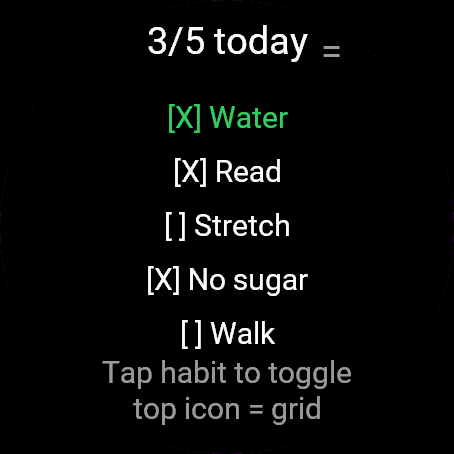
Habit Streaks is a daily check-off for up to 8 habits. Name your habits in Garmin Connect, tick them off on the watch, and keep the streak alive without pulling out your phone.
- Up to 8 habits, named and switched on in Garmin Connect app settings
- Optional weekly target per habit (1 to 7 days), not every habit needs daily perfection
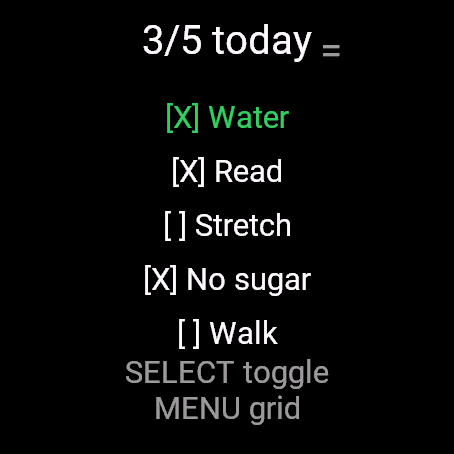
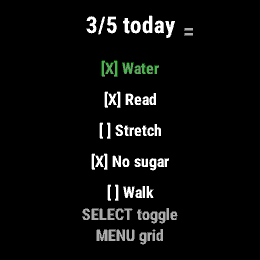
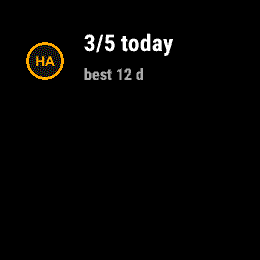
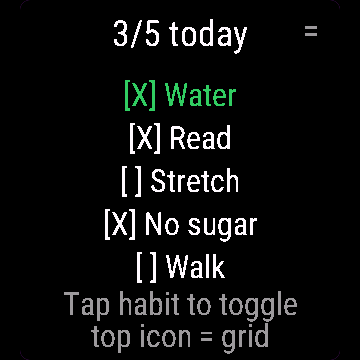
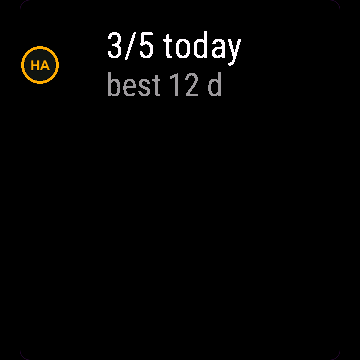
- Today's list with a tick state, header shows "3/5 today"
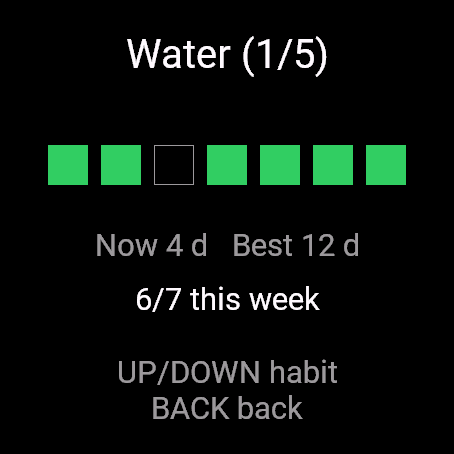
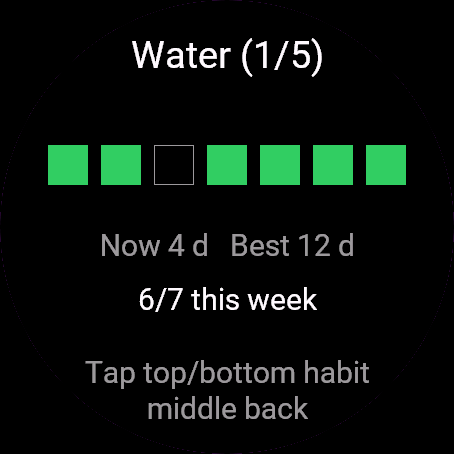
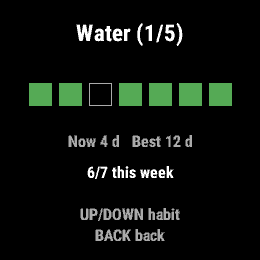
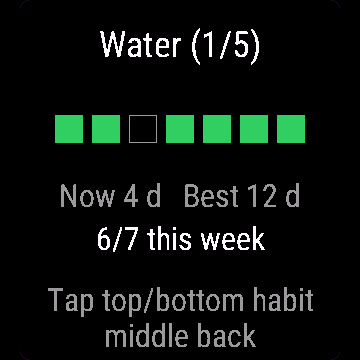
- Current and best streak per habit, this week's score against its target
- 7-day grid view, filled squares for the days you showed up
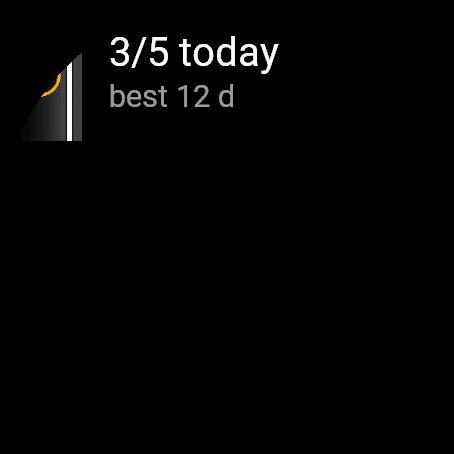
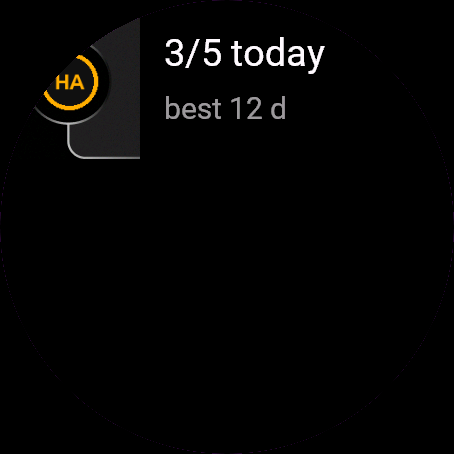
- Glance shows today's progress and your best streak without opening the app
- Day boundary follows your watch clock, so it survives days you never opened the app
Nawyki to codzienne odhaczanie do 8 nawyków. Nazwij swoje nawyki w Garmin Connect, odhaczaj je na zegarku i trzymaj passę bez wyciągania telefonu.
- Do 8 nawyków, nazwanych i włączonych w ustawieniach aplikacji Garmin Connect
- Opcjonalny cel tygodniowy dla każdego nawyku (1 do 7 dni), nie każdy musi być codzienny
- Dzisiejsza lista ze stanem odhaczenia, nagłówek pokazuje "3/5 dzisiaj"
- Obecna i najlepsza passa dla każdego nawyku, wynik tygodnia na tle celu
- Siatka 7 dni, wypełnione kwadraty za dni, w które się udało
- Podgląd na liście widgetów pokazuje dzisiejszy postęp i najlepszą passę bez otwierania aplikacji
- Granica dnia idzie za zegarem zegarka, więc przetrwa dni, w które nie otworzyłeś aplikacji
Habit Streaks ist eine tägliche Checkliste für bis zu 8 Gewohnheiten. Benenne deine Gewohnheiten in Garmin Connect, hake sie auf der Uhr ab und halte deine Serie aufrecht, ohne das Smartphone herauszuholen.
- Bis zu 8 Gewohnheiten, benannt und aktiviert in den App-Einstellungen von Garmin Connect
- Optionales Wochenziel pro Gewohnheit (1 bis 7 Tage), denn nicht jede Gewohnheit erfordert tägliche Perfektion
- Heutige Liste mit Haken-Status, Kopfzeile zeigt "3/5 today"
- Aktuelle und beste Serie pro Gewohnheit, Wochenergebnis im Vergleich zum Ziel
- 7-Tage-Rasteransicht, ausgefüllte Quadrate für Tage, an denen du dabei warst
- Glance zeigt den heutigen Fortschritt und deine beste Serie, ohne die App zu öffnen
- Tageswechsel richtet sich nach der Uhrzeit deiner Uhr, bleibt also auch an Tagen erhalten, an denen du die App nicht geöffnet hast
Habit Streaks permet de valider quotidiennement jusqu'à 8 habitudes. Nommez vos habitudes dans Garmin Connect, cochez-les sur la montre et maintenez votre série sans sortir votre téléphone.
- Jusqu'à 8 habitudes, nommées et activées dans les paramètres de l'application Garmin Connect
- Objectif hebdomadaire optionnel par habitude (1 à 7 jours), toutes les habitudes ne nécessitent pas une perfection quotidienne
- Liste du jour avec état coché, l'en-tête affiche "3/5 today"
- Série actuelle et meilleure série par habitude, score de la semaine par rapport à l'objectif
- Vue en grille sur 7 jours, carrés pleins pour les jours validés
- Glance affiche la progression du jour et votre meilleure série sans ouvrir l'application
- Le changement de jour suit l'horloge de votre montre, survivant ainsi aux jours où vous n'avez pas ouvert l'application
Habit Streaks te permite marcar a diario hasta 8 hábitos. Pon nombre a tus hábitos en Garmin Connect, márcalos en el reloj y mantén viva la racha sin tener que sacar el teléfono.
- Hasta 8 hábitos, con nombre y activados en los ajustes de la app de Garmin Connect
- Objetivo semanal opcional por hábito (de 1 a 7 días); no todos los hábitos requieren perfección diaria
- Lista de hoy con estado marcado, el encabezado muestra "3/5 today"
- Racha actual y mejor racha por hábito, puntuación de esta semana respecto a su objetivo
- Vista en cuadrícula de 7 días, con cuadrados rellenos para los días que cumpliste
- Glance muestra el progreso de hoy y tu mejor racha sin abrir la app
- El cambio de día sigue el reloj de tu muñeca, por lo que se mantiene en días en los que no abriste la app
Habit Streaks is een dagelijkse afvinklijst voor maximaal 8 gewoontes. Geef je gewoontes een naam in Garmin Connect, vink ze af op het horloge en houd de streak vast zonder je telefoon te pakken.
- Maximaal 8 gewoontes, benoemd en ingeschakeld in de app-instellingen van Garmin Connect
- Optioneel weekdoel per gewoonte (1 tot 7 dagen), niet elke gewoonte vereist dagelijkse perfectie
- Lijst van vandaag met afvinkstatus, koptekst toont "3/5 today"
- Huidige en beste streak per gewoonte, de score van deze week ten opzichte van het doel
- 7-daagse rasterweergave, gevulde vakjes voor de dagen waarop je bent komen opdagen
- Glance toont de voortgang van vandaag en je beste streak zonder de app te openen
- De dagovergang volgt de klok van je horloge, waardoor hij ook dagen overleeft waarop je de app nooit hebt geopend
Habit Streaks は、最大 8 つの習慣を毎日チェックできるアプリです。Garmin Connect で習慣の名前を設定し、ウォッチ上でチェックを入れるだけで、スマホを取り出すことなく連続達成記録を維持できます。
- 最大 8 つの習慣。Garmin Connect のアプリ設定で名前の登録とオン/オフが可能
- 習慣ごとに週単位の目標(1 から 7 日)を任意で設定可能。すべての習慣を毎日完璧にこなす必要はありません
- 今日のリストとチェック状態。ヘッダーに "3/5 today" と表示
- 習慣ごとの現在のストリークと自己ベスト記録、目標に対する今週の達成状況
- 7 日間のグリッド表示。達成した日はマス目が塗りつぶされます
- Glance でアプリを開かずに今日の進捗と最高ストリークを確認
- 日付の切り替わりはウォッチの時計に準拠するため、アプリを一度も開かなかった日があっても記録が破綻しません
Habit Streaks ti permette di spuntare ogni giorno fino a 8 abitudini. Assegna un nome alle tue abitudini in Garmin Connect, spuntale sull'orologio e mantieni viva la serie senza dover tirare fuori il telefono.
- Fino a 8 abitudini, con nome e attivazione nelle impostazioni dell'app Garmin Connect
- Obiettivo settimanale opzionale per abitudine (da 1 a 7 giorni), non ogni abitudine richiede la perfezione quotidiana
- Elenco di oggi con stato di completamento, l'intestazione mostra "3/5 today"
- Serie attuale e migliore per ogni abitudine, punteggio della settimana rispetto all'obiettivo
- Vista a griglia di 7 giorni, con quadratini pieni per i giorni completati
- Glance mostra i progressi di oggi e la tua serie migliore senza aprire l'app
- Il cambio di giorno segue l'orologio, quindi non perde il conto nei giorni in cui non apri l'app
Habit Streaks 支持每日打卡多达 8 个习惯。在 Garmin Connect 中为习惯命名,直接在手表上勾选打卡,无需掏出手机即可保持连续记录。
- 最多支持 8 个习惯,在 Garmin Connect 应用设置中命名并启用
- 每个习惯可选设定每周目标(1 到 7 天),并非每个习惯都必须每天坚持
- 今日清单显示打卡状态,顶部标题显示 "3/5 today"
- 显示每个习惯的当前连续天数、最佳连续天数,以及本周完成情况与目标的对比
- 7 天网格视图,用填满的方块表示你坚持打卡的日子
- Glance 快速浏览组件让你无需打开应用即可查看今日进度和最佳连续记录
- 一天的界限跟随手表时钟,因此即便某天从未打开应用也能正常记录
Habit Streaks - это ежедневные отметки для максимум 8 привычек. Задайте названия привычек в Garmin Connect, отмечайте их на часах и сохраняйте непрерывную серию, не доставая телефон.
- До 8 привычек: названия и включение настраиваются в параметрах приложения в Garmin Connect
- Недельная цель на выбор для каждой привычки (от 1 до 7 дней): не каждой привычке нужен ежедневный идеальный результат
- Список на сегодня со статусом выполнения, заголовок показывает "3/5 today"
- Текущая и лучшая серия по каждой привычке, прогресс за текущую неделю по сравнению с целью
- Сетка за 7 дней с закрашенными квадратами за выполненные дни
- Виджет Glance показывает прогресс за сегодня и лучшую серию без запуска приложения
- Смена дня привязана к часам, поэтому учет не сбивается, даже если вы не открывали приложение целый день
Habit Streaks é uma lista de checagem diária para até 8 hábitos. Dê nome aos seus hábitos no Garmin Connect, marque-os no relógio e mantenha a sequência ativa sem precisar pegar o celular.
- Até 8 hábitos, nomeados e ativados nas configurações do app Garmin Connect
- Meta semanal opcional por hábito (1 a 7 dias), nem todo hábito exige perfeição diária
- Lista de hoje com status de marcação, o cabeçalho mostra "3/5 today"
- Sequência atual e melhor sequência por hábito, pontuação desta semana em relação à meta
- Visualização em grade de 7 dias, quadrados preenchidos para os dias cumpridos
- Glance mostra o progresso de hoje e sua melhor sequência sem abrir o app
- A virada do dia acompanha o relógio, funcionando mesmo nos dias em que você não abrir o app
Habit Streaks slouží k dennímu odškrtávání až 8 návyků. Pojmenujte své návyky v Garmin Connect, odškrtávejte je na hodinkách a udržujte svou sérii, aniž byste museli vytahovat telefon.
- Až 8 návyků, pojmenovaných a zapnutých v nastavení aplikace v Garmin Connect
- Volitelný týdenní cíl pro každý návyk (1 až 7 dní), ne každý návyk vyžaduje každodenní plnění
- Dnešní seznam se stavem odškrtnutí, záhlaví zobrazuje "3/5 today"
- Aktuální a nejdelší série pro každý návyk, skóre za tento týden v porovnání s cílem
- 7denní mřížkový přehled s vyplněnými čtverečky pro dny, kdy jste návyk splnili
- Glance zobrazuje dnešní postup a nejlepší sérii bez nutnosti otevírat aplikaci
- Hranice dne se řídí hodinami na hodinkách, takže funguje i přes dny, kdy aplikaci vůbec neotevřete
Habit Streaks permite assinalar diariamente até 8 hábitos. Dê nome aos seus hábitos no Garmin Connect, marque-os no relógio e mantenha a sequência ativa sem tirar o telemóvel do bolso.
- Até 8 hábitos, nomeados e ativados nas definições da aplicação no Garmin Connect
- Meta semanal opcional por hábito (1 a 7 dias), nem todos os hábitos precisam de perfeição diária
- Lista de hoje com estado de conclusão, o cabeçalho mostra "3/5 today"
- Sequência atual e melhor sequência por hábito, pontuação desta semana face à meta
- Vista em grelha de 7 dias, quadrados preenchidos para os dias em que cumpriu
- Glance mostra o progresso de hoje e a sua melhor sequência sem abrir a aplicação
- A mudança de dia segue o relógio, pelo que sobrevive a dias em que não abriu a aplicação
Habit Streaks는 최대 8개의 습관을 매일 체크할 수 있는 앱입니다. Garmin Connect에서 습관 이름을 지정하고 시계에서 직접 체크하며 스마트폰을 꺼낼 필요 없이 연속 달성 기록을 이어가세요.
- 최대 8개 습관 지원, Garmin Connect 앱 설정에서 이름 지정 및 활성화
- 습관별 선택적 주간 목표(1~7일), 모든 습관이 매일 완벽할 필요는 없습니다
- 체크 상태가 표시되는 오늘의 목록, 헤더에는 "3/5 today" 표시
- 습관별 현재 및 최고 연속 달성 기록, 목표 대비 이번 주 점수
- 실천한 날이 채워진 사각형으로 표시되는 7일 그리드 뷰
- 앱을 열지 않고도 Glance에서 오늘의 진행 상황과 최고 연속 기록 확인
- 하루의 기준이 시계 시간을 따르므로 앱을 열지 않은 날에도 기록 유지
Habit Streaks är en daglig avbockning för upp till 8 vanor. Namnge dina vanor i Garmin Connect, bocka av dem på klockan och håll din streak vid liv utan att ta upp telefonen.
- Upp till 8 vanor, namngivna och aktiverade i appinställningarna i Garmin Connect
- Valfritt veckomål per vana (1 till 7 dagar), alla vanor kräver inte daglig perfektion
- Dagens lista med avbockningsstatus, rubriken visar "3/5 today"
- Nuvarande och bästa streak per vana, veckans resultat mot målet
- 7-dagars rutnätsvy, fyllda rutor för dagarna du genomförde
- Snabböversikten visar dagens framsteg och din bästa streak utan att öppna appen
- Dygnsgränsen följer klockans tid, så den klarar dagar då du aldrig öppnade appen
Habit Streaks er en daglig afkrydsning af op til 8 vaner. Navngiv dine vaner i Garmin Connect, kryds dem af på uret, og hold din streak i live uden at finde telefonen frem.
- Op til 8 vaner, navngivet og slået til i Garmin Connect-appindstillingerne
- Valgfrit ugentligt mål pr. vane (1 til 7 dage), ikke enhver vane kræver daglig perfektion
- Dagens liste med afkrydsningsstatus, overskriften viser "3/5 today"
- Nuværende og bedste streak pr. vane, ugens score mod dens mål
- 7-dages gittervisning, udfyldte felter for de dage, hvor du mødte op
- Glance viser dagens fremskridt og din bedste streak uden at åbne appen
- Døgnskiftet følger urets ur, så det overlever dage, hvor du aldrig åbnede appen
Habit Streaks er en daglig avkryssing for opptil 8 vaner. Gi vanene dine navn i Garmin Connect, kryss dem av på klokken, og hold streaken i live uten å ta fram telefonen.
- Opptil 8 vaner, navngitt og aktivert i Garmin Connect-appinnstillingene
- Valgfritt ukentlig mål per vane (1 til 7 dager), ikke alle vaner krever daglig perfeksjon
- Dagens liste med avkryssingsstatus, overskriften viser "3/5 today"
- Nåværende og beste streak per vane, ukens resultat mot målet
- 7-dagers rutenettvisning, fylte ruter for dagene du stilte opp
- Glance viser dagens fremgang og din beste streak uten å åpne appen
- Døgnskillet følger klokken din, så det overlever dager du aldri åpnet appen
Habit Streaks 是最多可追蹤 8 項習慣的每日打卡工具。在 Garmin Connect 中命名您的習慣,在手錶上勾選完成,不必掏出手機就能延續連續紀錄。
- 最多可設定 8 項習慣,於 Garmin Connect 應用程式設定中命名並啟用
- 每項習慣可自訂每週目標(1 至 7 天),並非所有習慣都需要每天完美達標
- 顯示勾選狀態的今日清單,標題列顯示 "3/5 today"
- 每項習慣的目前與最佳連續天數,以及本週相對於目標的達成進度
- 7 天網格檢視,以填滿的方塊標示您達成目標的日子
- Glance 概覽無需開啟應用程式即可顯示今日進度與最佳連續紀錄
- 跨日基準依照手錶時鐘判定,即使數天未開啟應用程式也能正確維持紀錄
Habit Streaks on päivittäinen seurantatyökalu jopa 8 tavalle. Nimeä tapasi Garmin Connect -sovelluksessa, kuittaa ne suoritetuiksi kellosta ja pidä putki elossa ottamatta puhelinta esiin.
- Jopa 8 tapaa, jotka nimetään ja otetaan käyttöön Garmin Connect -sovelluksen asetuksissa
- Valinnainen viikkotavoite kullekin tavalle (1-7 päivää), sillä jokainen tapa ei vaadi päivittäistä täydellisyyttä
- Tämän päivän lista merkintätilalla, otsikossa näkyy "3/5 today"
- Nykyinen ja paras putki kullekin tavalle, tämän viikon tulos suhteessa tavoitteeseen
- 7 päivän ruudukkonäkymä, täytetyt ruudut päiville, jolloin teit suorituksen
- Pikanäkymä (Glance) näyttää tämän päivän edistymisen ja parhaan putkesi avaamatta sovellusta
- Vuorokauden vaihde seuraa kellosi aikaa, joten se toimii myös päivinä, jolloin et avannut sovellusta
Habit Streaks je denné odškrtávanie až 8 návykov. Pomenujte si svoje návyky v Garmin Connect, odškrtávajte ich na hodinkách a udržiavajte sériu bez toho, aby ste museli vyťahovať telefón.
- Až 8 návykov, pomenovaných a zapnutých v nastaveniach aplikácie v Garmin Connect
- Voliteľný týždenný cieľ pre každý návyk (1 až 7 dní), nie každý návyk vyžaduje každodennú dokonalosť
- Dnešný zoznam so stavom odškrtnutia, záhlavie zobrazuje "3/5 today"
- Aktuálna a najlepšia séria pre každý návyk, skóre za tento týždeň voči cieľu
- Mriežkové zobrazenie na 7 dní, vyplnené štvorčeky pre dni, keď ste návyk splnili
- Glance zobrazuje dnešný pokrok a vašu najlepšiu sériu bez otvorenia aplikácie
- Prechod dňa sa riadi hodinami na hodinkách, takže funguje aj v dňoch, keď aplikáciu vôbec neotvoríte
Habit Streaks je dnevni seznam za odkljukanje do 8 navad. Poimenujte svoje navade v Garmin Connect, odkljukajte jih na uri in ohranjajte niz, ne da bi izvlekli telefon.
- Do 8 navad, poimenovanih in vklopljenih v nastavitvah aplikacije Garmin Connect
- Izbirni tedenski cilj za posamezno navado (1 do 7 dni), saj vsaka navada ne zahteva vsakodnevne popolnosti
- Današnji seznam s stanjem kljukic, glava prikazuje "3/5 today"
- Trenutni in najboljši niz za posamezno navado, dosežek tega tedna glede na zastavljeni cilj
- 7-dnevni mrežni prikaz, zapolnjeni kvadratki za dni, ko ste bili aktivni
- Glance prikazuje današnji napredek in vaš najboljši niz brez odpiranja aplikacije
- Prehod med dnevi sledi uri na napravi, zato deluje tudi ob dneh, ko aplikacije sploh niste odprli
Habit Streaks adalah daftar centang harian untuk hingga 8 kebiasaan. Beri nama kebiasaan Anda di Garmin Connect, centang di jam tangan, dan pertahankan streak Anda tanpa perlu mengeluarkan ponsel.
- Hingga 8 kebiasaan, dinamai dan diaktifkan di pengaturan aplikasi Garmin Connect
- Target mingguan opsional per kebiasaan (1 hingga 7 hari), tidak setiap kebiasaan memerlukan kesempurnaan harian
- Daftar hari ini dengan status centang, tajuk menampilkan "3/5 today"
- Streak saat ini dan terbaik per kebiasaan, skor minggu ini dibandingkan targetnya
- Tampilan kisi 7 hari, kotak terisi untuk hari-hari saat Anda menyelesaikannya
- Glance menampilkan progres hari ini dan streak terbaik Anda tanpa perlu membuka aplikasi
- Batas pergantian hari mengikuti jam di tangan Anda, sehingga tetap aman meski Anda tidak membuka aplikasi selama berhari-hari
A Habit Streaks egy napi pipálós lista akár 8 szokáshoz. Nevezd el a szokásaidat a Garmin Connectben, pipáld ki őket az órán, és tartsd életben a sorozatot anélkül, hogy elővennéd a telefonodat.
- Akár 8 szokás, elnevezve és bekapcsolva a Garmin Connect alkalmazásbeállításaiban
- Opcionális heti cél szokásonként (1 és 7 nap között), nem minden szokáshoz szükséges a napi tökéletesség
- Mai lista pipálható állapottal, a fejlécben ez látható: "3/5 today"
- Aktuális és legjobb sorozat szokásonként, az e heti pontszám a kitűzött célhoz képest
- 7 napos rácsnézet, kitöltött négyzetekkel azokra a napokra, amikor teljesítetted
- A Glance mutatja a mai haladást és a legjobb sorozatodat az alkalmazás megnyitása nélkül
- A napváltás az órád idejét követi, így túléli azokat a napokat is, amikor egyszer sem nyitottad meg az appot
Habit Streaks เป็นแอปเช็กรายการประจำวันสำหรับนิสัยสูงสุด 8 อย่าง ตั้งชื่อนิสัยของคุณใน Garmin Connect ทำเครื่องหมายถูกบนนาฬิกา และรักษา streak ไว้อย่างต่อเนื่องโดยไม่ต้องหยิบโทรศัพท์ออกมา
- ติดตามนิสัยได้สูงสุด 8 อย่าง โดยตั้งชื่อและเปิดใช้งานได้ในการตั้งค่าแอป Garmin Connect
- กำหนดเป้าหมายรายสัปดาห์สำหรับแต่ละนิสัยได้ (1 ถึง 7 วัน) เพราะไม่จำเป็นต้องทำทุกนิสัยให้สมบูรณ์แบบทุกวัน
- รายการของวันนี้พร้อมสถานะการทำเครื่องหมาย ส่วนหัวแสดง "3/5 today"
- streak ปัจจุบันและ streak ที่ดีที่สุดของแต่ละนิสัย พร้อมคะแนนสัปดาห์นี้เทียบกับเป้าหมาย
- มุมมองตาราง 7 วัน พร้อมช่องสี่เหลี่ยมทึบสำหรับวันที่คุณทำสำเร็จ
- Glance แสดงความคืบหน้าของวันนี้และ streak ที่ดีที่สุดของคุณโดยไม่ต้องเปิดแอป
- การตัดรอบวันอิงตามนาฬิกาของคุณ ข้อมูลจึงคงอยู่แม้ในวันที่คุณไม่ได้เปิดแอป
Το Habit Streaks είναι ένας καθημερινός έλεγχος για έως και 8 συνήθειες. Ονομάστε τις συνήθειές σας στο Garmin Connect, σημειώστε τις ως ολοκληρωμένες στο ρολόι και κρατήστε το σερί ζωντανό χωρίς να βγάλετε το τηλέφωνό σας.
- Έως και 8 συνήθειες, με ονομασία και ενεργοποίηση στις ρυθμίσεις της εφαρμογής Garmin Connect
- Προαιρετικός εβδομαδιαίος στόχος ανά συνήθεια (1 έως 7 ημέρες), δεν χρειάζεται κάθε συνήθεια καθημερινή τελειότητα
- Η σημερινή λίστα με κατάσταση επιλογής, η επικεφαλίδα δείχνει "3/5 today"
- Τρέχον και καλύτερο σερί ανά συνήθεια, το σκορ αυτής της εβδομάδας σε σχέση με τον στόχο της
- Προβολή πλέγματος 7 ημερών, γεμάτα τετράγωνα για τις ημέρες που ήσασταν συνεπείς
- Το Glance δείχνει τη σημερινή πρόοδο και το καλύτερο σερί σας χωρίς να ανοίξετε την εφαρμογή
- Η αλλαγή ημέρας ακολουθεί το ρολόι σας, οπότε παραμένει σωστή ακόμα και τις ημέρες που δεν ανοίξατε καθόλου την εφαρμογή
Habit Streaks služi za svakodnevno označavanje do 8 navika. Imenujte svoje navike u Garmin Connectu, označite ih na satu i održavajte niz bez vađenja telefona.
- Do 8 navika, imenovanih i uključenih u postavkama aplikacije Garmin Connect
- Opcionalni tjedni cilj po navici (1 do 7 dana), ne zahtijeva svaka navika svakodnevno savršenstvo
- Današnji popis sa statusom označenosti, zaglavlje prikazuje "3/5 today"
- Trenutni i najbolji niz po navici, ovotjedni rezultat u odnosu na postavljeni cilj
- Prikaz u obliku 7-dnevne mreže, ispunjeni kvadratići za dane kada ste se pojavili
- Glance prikazuje današnji napredak i vaš najbolji niz bez otvaranja aplikacije
- Kraj dana prati sat na vašem uređaju, pa niz ostaje točan i u danima kada niste otvorili aplikaciju
Habit Streaks מאפשרת סימון יומי עבור עד 8 הרגלים. תן שם להרגלים שלך ב-Garmin Connect, סמן אותם בשעון, ושמור על הרצף בחיים מבלי להוציא את הטלפון.
- עד 8 הרגלים, בעלי שמות ומופעלים בהגדרות האפליקציה ב-Garmin Connect
- יעד שבועי אופציונלי לכל הרגל (1 עד 7 ימים), לא כל הרגל דורש שלמות יומיומית
- הרשימה של היום עם מצב סימון, הכותרת מציגה "3/5 today"
- רצף נוכחי והטוב ביותר לכל הרגל, הניקוד של השבוע לעומת היעד שלו
- תצוגת רשת של 7 ימים, ריבועים מלאים עבור הימים שבהם התמדת
- Glance מציג את ההתקדמות של היום ואת הרצף הטוב ביותר שלך מבלי לפתוח את האפליקציה
- מעבר היום עוקב אחר שעון היד שלך, כך שהוא נשמר גם בימים שבהם לא פתחת את האפליקציה כלל
Habit Streaks ialah senarai semak harian untuk sehingga 8 tabiat. Namakan tabiat anda dalam Garmin Connect, tandakannya pada jam tangan, dan kekalkan rentetan tabiat tanpa perlu mengeluarkan telefon.
- Sehingga 8 tabiat, dinamakan dan diaktifkan dalam tetapan aplikasi Garmin Connect
- Sasaran mingguan pilihan bagi setiap tabiat (1 hingga 7 hari), bukan semua tabiat memerlukan kesempurnaan setiap hari
- Senarai hari ini dengan status tandaan, pengepala memaparkan "3/5 today"
- Rentetan semasa dan terbaik bagi setiap tabiat, skor minggu ini berbanding sasarannya
- Paparan grid 7 hari, petak berpetak penuh bagi hari anda melengkapkannya
- Paparan Glance menunjukkan kemajuan hari ini dan rentetan terbaik anda tanpa perlu membuka aplikasi
- Pertukaran hari mengikut jam tangan anda, jadi data kekal tepat walaupun pada hari anda tidak membuka aplikasi
How to use it
Add Habit Streaks to the widget loop (swipe through widgets on the watch).
Controls: UP/DOWN pick a habit, START ticks it, MENU (or the icon at the top right) opens the 7-day grid, BACK leaves. Touch-only watches: tap a habit to tick it, tap the header or the bottom of the screen to scroll.
Dodaj Nawyki do karuzeli widgetów (przewiń widgety na zegarku).
Sterowanie: GÓRA/DÓŁ wybiera nawyk, START odhacza, MENU (albo ikona w prawym górnym rogu) otwiera siatkę 7 dni, WSTECZ wychodzi. Zegarki dotykowe: dotknij nawyk, żeby go odhaczyć, nagłówek albo dół ekranu przewija listę.
Füge Habit Streaks zur Widget-Schleife hinzu (auf der Uhr durch die Widgets wischen).
Bedienung: UP/DOWN wählt eine Gewohnheit aus, START hakt sie ab, MENU (oder das Symbol oben rechts) öffnet das 7-Tage-Raster, BACK beendet die Ansicht. Uhren nur mit Touchscreen: Tippe auf eine Gewohnheit zum Abhaken, tippe auf die Kopfzeile oder den unteren Bildschirmrand zum Scrollen.
Ajoutez Habit Streaks à la boucle de widgets (faites défiler les widgets sur la montre).
Commandes : UP/DOWN choisissent une habitude, START la coche, MENU (ou l'icône en haut à droite) ouvre la grille sur 7 jours, BACK quitte. Montres tactiles uniquement : appuyez sur une habitude pour la cocher, appuyez sur l'en-tête ou le bas de l'écran pour faire défiler.
Añade Habit Streaks al bucle de widgets (desliza por los widgets en el reloj).
Controles: UP/DOWN eligen un hábito, START lo marca, MENU (o el icono arriba a la derecha) abre la cuadrícula de 7 días, BACK sale. Relojes solo táctiles: toca un hábito para marcarlo, toca el encabezado o la parte inferior de la pantalla para desplazarte.
Voeg Habit Streaks toe aan de widgetlus (veeg op het horloge door de widgets).
Bediening: UP/DOWN kiest een gewoonte, START vinkt hem af, MENU (of het pictogram rechtsboven) opent het 7-daagse raster, BACK sluit af. Horloges met alleen touchscreen: tik op een gewoonte om deze af te vinken, tik op de koptekst of de onderkant van het scherm om te scrollen.
Habit Streaks をウィジェットのループに追加してください(時計でウィジェットをスワイプして切り替えます)。
操作方法: UP/DOWN で習慣を選択、START でチェック、MENU(または右上のアイコン)で 7 日間のグリッドを表示、BACK で終了。タッチスクリーン専用ウォッチ: 習慣をタップしてチェック、ヘッダーまたは画面下部をタップしてスクロール。
Aggiungi Habit Streaks al ciclo dei widget (scorri i widget sull'orologio).
Controlli: UP/DOWN selezionano un'abitudine, START la spunta, MENU (o l'icona in alto a destra) apre la griglia di 7 giorni, BACK esce. Orologi solo touch: tocca un'abitudine per spuntarla, tocca l'intestazione o la parte inferiore dello schermo per scorrere.
把 Habit Streaks 添加到小组件循环中(在手表上滑动切换小组件)。
操作方法:UP/DOWN 选择习惯,START 进行勾选打卡,MENU(或右上角图标)打开 7 天网格,BACK 退出。纯触屏手表:轻触习惯进行勾选,轻触顶部标题或屏幕底部进行滚动。
Добавьте Habit Streaks в ленту виджетов (листайте виджеты на часах).
Управление: UP/DOWN выбирают привычку, START отмечает выполнение, MENU (или значок в правом верхнем углу) открывает сетку за 7 дней, BACK выходит. Часы только с сенсорным экраном: коснитесь привычки для отметки, коснитесь заголовка или нижней части экрана для прокрутки.
Adicione Habit Streaks ao ciclo de widgets (deslize pelos widgets no relógio).
Controles: UP/DOWN selecionam um hábito, START marca, MENU (ou o ícone no canto superior direito) abre a grade de 7 dias, BACK sai. Relógios apenas sensíveis ao toque: toque em um hábito para marcá-lo, toque no cabeçalho ou na parte inferior da tela para rolar.
Přidejte Habit Streaks do smyčky widgetů (na hodinkách procházejte widgety přejížděním).
Ovládání: UP/DOWN vybere návyk, START jej odškrtne, MENU (nebo ikona vpravo nahoře) otevře 7denní mřížku, BACK slouží k opuštění. Hodinky pouze s dotykovým displejem: klepnutím na návyk jej odškrtnete, klepnutím na záhlaví nebo spodní část obrazovky posouváte zobrazení.
Adicione Habit Streaks ao ciclo de widgets (deslize pelos widgets no relógio).
Controlos: UP/DOWN selecionam um hábito, START marca-o, MENU (ou o ícone no canto superior direito) abre a grelha de 7 dias, BACK sai. Relógios apenas táteis: toque num hábito para o marcar, toque no cabeçalho ou na parte inferior do ecrã para deslocar.
Habit Streaks을(를) 위젯 순환에 추가하세요(시계에서 위젯을 넘겨 보세요).
조작 방법: UP/DOWN으로 습관 선택, START로 체크, MENU(또는 우측 상단 아이콘)로 7일 그리드 열기, BACK으로 나가기. 터치 전용 시계: 습관을 탭하여 체크, 헤더나 화면 하단을 탭하여 스크롤.
Lägg till Habit Streaks i widgetslingan (svep mellan widgetar på klockan).
Kontroller: UP/DOWN väljer en vana, START bockar av den, MENU (eller ikonen längst upp till höger) öppnar 7-dagarsrutnätet, BACK avslutar. Klockor med enbart pekskärm: tryck på en vana för att bocka av den, tryck på rubriken eller längst ner på skärmen för att bläddra.
Tilføj Habit Streaks til widget-løkken (stryg gennem widgets på uret).
Betjening: UP/DOWN vælger en vane, START krydser den af, MENU (eller ikonet øverst til højre) åbner 7-dages gitteret, BACK forlader. Ure med ren touch: tryk på en vane for at krydse den af, tryk på overskriften eller bunden af skærmen for at rulle.
Legg til Habit Streaks i widget-rekken (sveip gjennom widgetene på klokken).
Kontroller: UP/DOWN velger en vane, START krysser den av, MENU (eller ikonet øverst til høyre) åpner 7-dagers rutenettet, BACK avslutter. Klokker med ren berøringsskjerm: trykk på en vane for å krysse den av, trykk på overskriften eller nederst på skjermen for å rulle.
把 Habit Streaks 加入小工具循環中(在手錶上滑動切換小工具)。
操作方式:UP/DOWN 選擇習慣,START 勾選,MENU(或右上角圖示)開啟 7 天網格,BACK 退出。僅支援觸控的手錶:點擊習慣進行勾選,點擊標題列或螢幕底部進行捲動。
Lisää Habit Streaks widgetkiertoon (selaa widgettejä pyyhkäisemällä kellossa).
Ohjaimet: UP/DOWN valitsee tavan, START kuittaa sen, MENU (tai kuvake oikeassa yläkulmassa) avaa 7 päivän ruudukon, BACK poistuu. Vain kosketusnäyttöä käyttävät kellot: napauta tapaa kuitataksesi sen, napauta otsikkoa tai näytön alareunaa selataksesi.
Pridajte Habit Streaks do cyklu widgetov (widgety na hodinkách prechádzate potiahnutím).
Ovládanie: UP/DOWN vyberie návyk, START ho odškrtne, MENU (alebo ikona vpravo hore) otvorí 7-dňovú mriežku, BACK slúži na odchod. Čisto dotykové hodinky: ťuknutím na návyk ho odškrtnete, ťuknutím na záhlavie alebo spodok obrazovky posúvate zoznam.
Dodajte Habit Streaks v zanko pripomočkov (na uri se pomikajte med pripomočki).
Upravljanje: UP/DOWN izbere navado, START jo odkljuka, MENU (ali ikona zgoraj desno) odpre 7-dnevno mrežo, BACK zapusti. Ure samo na dotik: tapnite navado, da jo odkljukate, tapnite glavo ali dno zaslona za pomikanje.
Tambahkan Habit Streaks ke putaran widget (geser antar widget di jam).
Kontrol: UP/DOWN memilih kebiasaan, START mencentangnya, MENU (atau ikon di kanan atas) membuka kisi 7 hari, BACK untuk keluar. Jam tangan khusus layar sentuh: ketuk kebiasaan untuk mencentangnya, ketuk tajuk atau bagian bawah layar untuk menggulir.
Adja hozzá a(z) Habit Streaks elemet a widgetkörhöz (az órán görgessen a widgetek között).
Vezérlés: UP/DOWN kiválasztja a szokást, START kipipálja, MENU (vagy a jobb felső ikon) megnyitja a 7 napos rácsot, BACK kilép. Csak érintőképernyős órák: koppints egy szokásra a kipipálásához, koppints a fejlécre vagy a képernyő aljára a görgetéshez.
เพิ่ม Habit Streaks ในวิดเจ็ตลูป (ปัดผ่านวิดเจ็ตบนนาฬิกา)
การควบคุม: UP/DOWN เพื่อเลือกนิสัย, START เพื่อทำเครื่องหมายถูก, MENU (หรือไอคอนที่มุมขวาบน) เพื่อเปิดตาราง 7 วัน, BACK เพื่อออก สำหรับนาฬิการะบบสัมผัสล้วน: แตะที่นิสัยเพื่อทำเครื่องหมายถูก แตะที่ส่วนหัวหรือด้านล่างของหน้าจอเพื่อเลื่อน
Προσθέστε το Habit Streaks στον κύκλο των widget (σύρετε στα widget του ρολογιού).
Χειρισμός: Τα UP/DOWN επιλέγουν μια συνήθεια, το START την τσεκάρει, το MENU (ή το εικονίδιο επάνω δεξιά) ανοίγει το πλέγμα 7 ημερών, το BACK πραγματοποιεί έξοδο. Ρολόγια μόνο με οθόνη αφής: πατήστε μια συνήθεια για να την τσεκάρετε, πατήστε την επικεφαλίδα ή το κάτω μέρος της οθόνης για κύλιση.
Dodajte Habit Streaks u petlju widgeta (listajte widgete na satu).
Kontrole: UP/DOWN biraju naviku, START je označava, MENU (ili ikona u gornjem desnom kutu) otvara 7-dnevnu mrežu, BACK izlazi. Satovi samo sa zaslonom na dodir: dodirnite naviku da je označite, dodirnite zaglavlje ili dno zaslona za pomicanje.
הוסיפו את Habit Streaks ללולאת הווידג'טים (החליקו בין הווידג'טים בשעון).
מקשי שליטה: UP/DOWN לבחירת הרגל, START מסמן אותו, MENU (או האייקון בפינה הימנית העליונה) פותח את רשת 7 הימים, BACK ליציאה. שעוני מגע בלבד: הקש על הרגל כדי לסמן אותו, הקש על הכותרת או על תחתית המסך כדי לגלול.
Tambah Habit Streaks ke dalam gelung widget (leret melalui widget pada jam).
Kawalan: UP/DOWN memilih tabiat, START menandakannya, MENU (atau ikon di bahagian atas sebelah kanan) membuka grid 7 hari, BACK untuk keluar. Jam skrin sentuh sahaja: ketik tabiat untuk menandakannya, ketik pengepala atau bahagian bawah skrin untuk menatal.
Manual
The full manual and the detailed permission descriptions are available in English and Polish.
Habit Streaks: user manual
What it does
Habit Streaks is a daily check-off list for up to 8 habits, named in the phone settings. It shows streaks, the week's score against a weekly target and a 7 day grid.
Requirements and supported watches
Needs Connect IQ 3.3.0+ and the Connect IQ or Garmin Connect phone app. Supported watches:
- Round AMOLED: epix 2 and epix Pro 2, fēnix 8, E, Forerunner 165, 265, 570, 965, 970, Instinct 3 AMOLED, Crossover AMOLED, Venu 2, 3, 4, vivoactive 5, 6.
- Round MIP: enduro 3, fēnix 7 series, 8 Solar, Forerunner 55, 245, 255.
- Square and rectangular AMOLED: Venu Sq 2, Venu X1.
Installation
In the Connect IQ app on your phone (or Garmin Connect, then the Connect IQ Store) find "Habit Streaks" by Dialforge, tap Install and sync the watch. Find it in your glances (UP or DOWN on the watch face, or swipe) and press START or tap to open it.
First launch
Four habits are ready: Water, Read, Stretch, No sugar. The header says "0/4 today". Names stay English until you rename them in the phone settings. The 30-day free beta starts the first time you open it.
Controls
Watches with buttons (START, UP, DOWN, BACK)
- Main screen: UP and DOWN move the highlight, START ticks or unticks it, holding UP opens the menu (7-day grid).
- 7-day grid: UP and DOWN switch habit, BACK returns.
Touch watches (tap, hold, swipe)
- Main screen: tap a row to tick it, above or below the list to move. The "=" icon opens the menu.
- 7-day grid: top 40% previous habit, bottom 40% next, middle back.
Settings
Phone: Connect IQ app, Habit Streaks, Settings (the unlock code fields are there too).
- Habit 1 name to Habit 8 name: 8 entries, text.
- Habit 1 active to Habit 8 active: 8 entries, on or off.
- Habit 1 weekly target (days) to Habit 8 weekly target (days): 8 entries, number.
On the watch, inside the app:
- Weekly target 7 means a streak in days (d). Target 1 to 6 means a streak in weeks (wk): each week with that many ticks adds one.
License
- Free beta: 30 days from the first launch, everything works.
- Price: 4.99 EUR once at dialforge.dev, no subscription. The 8-character code is tied to your watch's UID.
- Where to enter it: phone, Connect IQ app, Habit Streaks, Settings. Read the UID in "Watch UID (needed to buy a code)", buy the code, then type it into "Unlock code from dialforge.dev". The end-of-beta screen on the watch shows the UID too.
- After the beta without a code: an end-of-beta screen with the UID replaces the app. Enter the code, then open it again. New watch? Write to us and the code moves for free.
Privacy and permissions
No special permissions.
No internet use. Data stays on the watch.
Health note: not a medical device, no diagnosis or treatment, no substitute for a doctor. Medical decisions belong to your doctor or pharmacist.
Troubleshooting
The code does not work. Check that the UID you bought for matches "Watch UID (needed to buy a code)" and type all 8 characters (case is ignored, no 0, O, 1 or I). A code for another app does not fit. Sync, then reopen.
A habit does not show up. It needs the active switch on and a name.
Does switching off erase history? No. Ticks are kept by slot, up to 400 days.
When does a day change? At midnight by the watch clock.
Contact
kontakt@dialforge.dev or dialforge.dev. Please write before leaving a low rating.
Nawyki: instrukcja obsługi
Do czego służy
Nawyki to codzienna lista do odhaczania na maksymalnie 8 nawyków, nazywanych w ustawieniach w telefonie. Pokazuje passy, wynik tygodnia na tle celu tygodniowego i siatkę 7 dni.
Wymagania i obsługiwane zegarki
Wymaga Connect IQ 3.3.0+ i aplikacji Connect IQ albo Garmin Connect w telefonie. Obsługiwane zegarki:
- Okrągłe AMOLED: epix 2 i epix Pro 2, fēnix 8, E, Forerunner 165, 265, 570, 965, 970, Instinct 3 AMOLED, Crossover AMOLED, Venu 2, 3, 4, vivoactive 5, 6.
- Okrągłe MIP: enduro 3, seria fēnix 7, fēnix 8 Solar, Forerunner 55, 245, 255.
- Kwadratowe i prostokątne AMOLED: Venu Sq 2, Venu X1.
Instalacja
Na telefonie otwórz aplikację Connect IQ (albo Garmin Connect, a w niej sklep Connect IQ), wyszukaj "Nawyki" od Dialforge, stuknij Zainstaluj i zsynchronizuj zegarek. Znajdziesz go wśród widżetów (GÓRA lub DÓŁ na tarczy albo przesunięcie palcem), a START lub stuknięcie otwiera go w całości.
Pierwsze uruchomienie
Cztery nawyki są gotowe: Water, Read, Stretch, No sugar. Nagłówek mówi "0/4 dzisiaj". Nazwy są po angielsku, dopóki nie zmienisz ich w ustawieniach w telefonie. 30-dniowa darmowa beta zaczyna się przy pierwszym otwarciu.
Sterowanie
Zegarki z przyciskami (START, GÓRA, DÓŁ, WSTECZ)
- Ekran główny: GÓRA i DÓŁ przesuwają zaznaczenie, START odhacza lub cofa, przytrzymanie GÓRY otwiera menu (Siatka 7 dni).
- Siatka 7 dni: GÓRA i DÓŁ przełączają nawyk, WSTECZ wraca.
Zegarki dotykowe (stuknięcie, przytrzymanie, przesunięcie)
- Ekran główny: stuknij wiersz, żeby odhaczyć, nad listą albo pod nią, żeby przesunąć. Ikona "=" otwiera menu.
- Siatka 7 dni: górne 40% poprzedni nawyk, dolne 40% następny, środek wraca.
Ustawienia
Telefon: aplikacja Connect IQ, Nawyki, Ustawienia (są tam też pola kodu odblokowania).
- Nawyk 1: nazwa do Nawyk 8: nazwa: 8 pozycji, tekst.
- Nawyk 1: aktywny do Nawyk 8: aktywny: 8 pozycji, włączone lub wyłączone.
- Nawyk 1: cel tygodniowy (dni) do Nawyk 8: cel tygodniowy (dni): 8 pozycji, liczba.
Na zegarku, w aplikacji:
- Cel tygodniowy 7 to passa w dniach (d). Cel od 1 do 6 to passa w tygodniach (tyg): każdy tydzień z tyloma odhaczeniami dodaje jeden.
Licencja
- Darmowa beta: 30 dni od pierwszego uruchomienia, wszystko działa.
- Cena: jednorazowo 4,99 EUR na dialforge.dev, bez abonamentu. 8-znakowy kod jest przypisany do UID zegarka.
- Gdzie wpisać: telefon, aplikacja Connect IQ, Nawyki, Ustawienia. Odczytaj UID w polu "UID zegarka (potrzebny do zakupu kodu)", kup kod i wpisz go w "Kod odblokowania z dialforge.dev". Ekran końca bety na zegarku też pokazuje UID.
- Po becie bez kodu: zamiast aplikacji pojawia się ekran końca bety z UID. Wpisz kod i otwórz aplikację ponownie. Nowy zegarek? Napisz do nas, przeniesiemy kod za darmo.
Prywatność i uprawnienia
Brak szczególnych uprawnień.
Zero połączeń z internetem. Dane zostają w zegarku.
Uwaga zdrowotna: to nie jest wyrób medyczny. Niczego nie diagnozuje ani nie leczy i nie zastępuje lekarza. Decyzje medyczne zostaw lekarzowi lub farmaceucie.
Rozwiązywanie problemów
Kod nie działa. Sprawdź, czy UID, dla którego kupiono kod, zgadza się z polem "UID zegarka (potrzebny do zakupu kodu)", i wpisz wszystkie 8 znaków (wielkość liter bez znaczenia, bez 0, O, 1, I). Kod do innej aplikacji nie pasuje. Zsynchronizuj i otwórz ponownie.
Nawyk nie pojawia się. Potrzebny jest włączony przełącznik aktywności i nazwa.
Czy wyłączenie kasuje historię? Nie. Odhaczenia są trzymane per pozycja, do 400 dni.
Kiedy zmienia się dzień? O północy według zegara zegarka.
Kontakt
kontakt@dialforge.dev albo dialforge.dev. Napisz, zanim wystawisz niską ocenę.
Permissions and privacy
This product does not use the internet and sends no data to our servers.
The full manual and the detailed permission descriptions are available in English and Polish.
Compatible watches
51mm, D2 Air X15, D2 Mach 1 Pro, Enduro 2, Enduro 3, epix (Gen 2), epix Pro (Gen 2) 42mm, epix Pro (Gen 2) 47mm, epix Pro (Gen 2) 51mm, Forerunner 165, Forerunner 165 Music, Forerunner 245, Forerunner 245 Music, Forerunner 255, Forerunner 255 Music, Forerunner 255s, Forerunner 255s Music, Forerunner 265, Forerunner 265s, Forerunner 55, Forerunner 570 42mm, Forerunner 570 47mm, Forerunner 965, Forerunner 970, fēnix 7, fēnix 7 Pro, fēnix 7 Pro - Solar Edition (no Wi-Fi), fēnix 7S, fēnix 7S Pro, fēnix 7X, fēnix 7X Pro, fēnix 7X Pro - Solar Edition (no Wi-Fi), fēnix 8 43mm, fēnix 8 47mm, fēnix 8 Pro 47mm, fēnix 8 Solar 47mm, fēnix 8 Solar 51mm, fēnix E, Instinct 3 AMOLED 45mm, Instinct 3 AMOLED 50mm, Instinct Crossover AMOLED, MicroLED, quatix 7, quatix 7 Pro, quatix 7 Sapphire, quatix 7X Solar, quatix 8 47mm, quatix 8 Pro 47mm, tactix 7, tactix 7 – AMOLED Edition, tactix 8 47mm, tactix 8 Solar 51mm, Venu 2, Venu 2 Plus, Venu 2S, Venu 3, Venu 3S, Venu 4 41mm, Venu 4 45mm, Venu Sq 2, Venu Sq 2 Music, Venu X1, vívoactive 5, vívoactive 6
Screenshots
FAQ
What happens after the 30-day beta?
The app shows a screen asking for a one-time unlock code from dialforge.dev instead of opening normally. Buy the code once below, no subscription.
Does the app send my data to Dialforge?
No. The app works fully offline, and the unlock code is checked on the watch itself, without contacting any server.
The app does not work as described on my watch. Can I get a refund?
Yes. Write through the feedback form below, or to the e-mail in the footer. If we cannot fix it, we refund you, as described in the terms.
Changing your watch?
Write to me and I will move your code for free.
Changelog
- First release (beta).
- Pierwsze wydanie (beta).
- Erste Version (Beta).
- Première version (beta).
- Primera versión (beta).
- Eerste release (beta).
- 初回リリース(ベータ版)。
- Prima versione (beta).
- 首发版本(测试版)。
- Первый релиз (бета).
- Primeira versão (beta).
- První vydání (beta).
- Primeira versão (beta).
- 첫 출시(베타).
- Första versionen (beta).
- Første udgivelse (beta).
- Første versjon (beta).
- 首發版本(Beta)。
- Ensimmäinen julkaisu (beta).
- Prvá verzia (beta).
- Prva različica (beta).
- Rilis pertama (beta).
- Első kiadás (béta).
- เวอร์ชันแรก (เบต้า)
- Πρώτη έκδοση (beta).
- Prvo izdanje (beta).
- גרסה ראשונה (בטא).
- Keluaran pertama (beta).
Unlock
€4.99
One-time payment. No subscription. The code works on the watch whose UID you enter.
- Install the app from the Connect IQ store. It works fully and for free for the first 30 days.
- Find your 10-digit UID: Connect IQ app on the phone > My Device > Apps or Data Fields > this app > Settings > Watch UID.
- Enter UID and e-mail, pay with PayPal (cards work without a PayPal account). The code appears here at once.
- Type the code into the same settings page, field "Unlock code". The watch checks it offline.
Thank you! Your code:
Enter the code in the app settings, field "Unlock code". The watch checks it offline.
Tell us how to make it better
Missing a data field, a colour, a layout? Found a bug on your watch model? Write it here. We read every message and ship improvements in updates.