Running and cycling data fields
HR Zones Big
See your heart rate before you feel it, not after.
Zobacz swoje tętno, zanim je poczujesz.
Sieh deine Herzfrequenz, bevor du sie spürst, nicht danach.
Voyez votre fréquence cardiaque avant de la sentir, pas après.
Ve tu frecuencia cardíaca antes de sentirla, no después.
Zie je hartslag voordat je hem voelt, niet erna.
体で感じる前に、心拍数を目で確認。
Vedi la tua frequenza cardiaca prima di sentirla, non dopo.
心率先被你看到,而不是先被你感觉到。
Увидьте свой пульс раньше, чем почувствуете его.
Veja sua frequência cardíaca antes de sentir, não depois.
Uvidíte svou tepovou frekvenci dřív, než ji pocítíte, ne až potom.
Vê a tua frequência cardíaca antes de a sentires, não depois.
느끼기 전에 심박수를 눈으로 먼저 확인하세요.
Se din puls innan du känner den, inte efteråt.
Se din puls, før du når at mærke den, ikke bagefter.
Se pulsen din før du merker den, ikke etterpå.
在你感覺到之前,先看到你的心率。
Näe sykkeesi ennen kuin tunnet sen, ei sen jälkeen.
Vidíte svoju srdcovú frekvenciu skôr, ako ju pocítite, nie potom.
Svoj srčni utrip vidiš, preden ga začutiš, ne šele potem.
Lihat detak jantungmu sebelum kamu merasakannya, bukan sesudahnya.
Lásd a pulzusod, mielőtt megérzed, ne csak utána.
เห็นอัตราการเต้นหัวใจก่อนที่จะรู้สึก ไม่ใช่หลังจากนั้น
Βλέπεις τον καρδιακό σου παλμό πριν τον νιώσεις, όχι μετά.
Vidi svoju srčanu frekvenciju prije nego što je osjetiš, ne poslije.
לראות את הדופק שלך לפני שאתה מרגיש אותו, לא אחרי.
Nampak kadar denyutan jantung anda sebelum anda rasa, bukan selepas.
Coming to Connect IQ Unlock €3.99
Beta: free for 30 days
The app works fully and for free for the first 30 days after you first open it. After that you can buy a one-time unlock code below. No subscription.
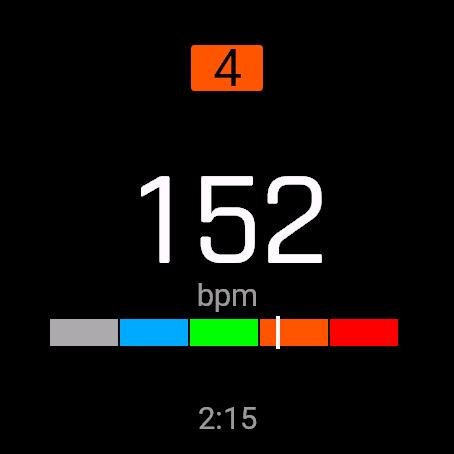
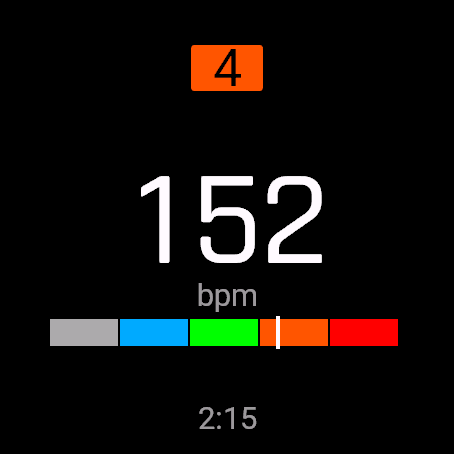
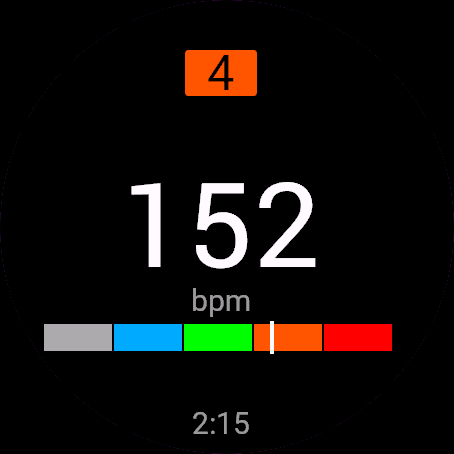
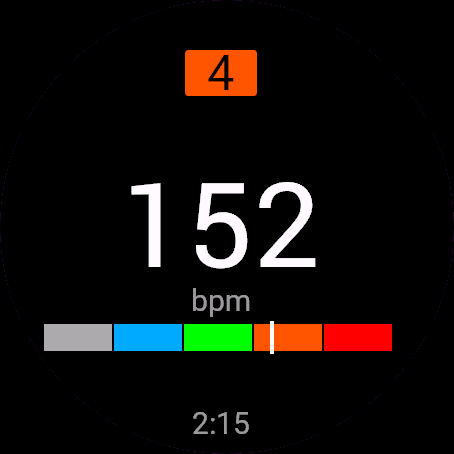
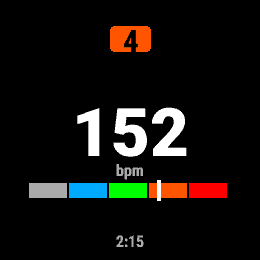
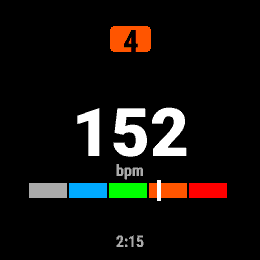
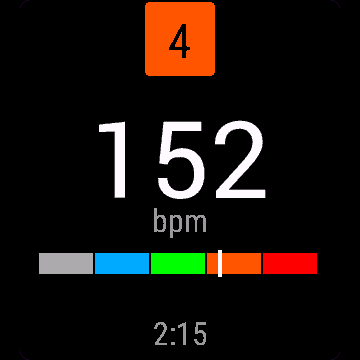
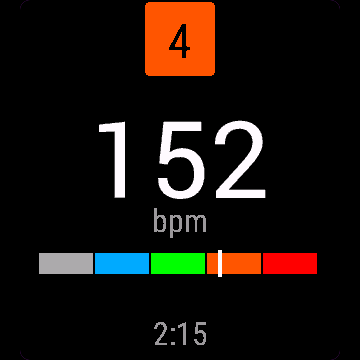
HR Zones Big shows your current heart rate huge and readable mid-run, your zone 1-5, a colour zone bar with a live marker, and how long you have been in this zone. Zones come straight from your Garmin heart rate zone settings for the current sport, so they match what you already trust, not a hidden formula.
- Huge number, readable mid-stride on AMOLED and MIP screens ("--" until a heart rate reading arrives)
- Zone 1-5 with a colour band and marker on the zone bar
- Time spent in the current zone
- Show bpm, percent of max HR, or percent of heart rate reserve
- Adapts to full, half, third or quarter field size
Strefy tętna pokazują ogromną, czytelną w biegu liczbę tętna, strefę 1-5, kolorowy pasek stref z ruchomym znacznikiem i czas spędzony w bieżącej strefie. Strefy biorą się prosto z Twoich ustawień tętna w Garmin Connect dla bieżącego sportu, więc zgadzają się z tym, czemu już ufasz.
- Ogromna liczba, czytelna w biegu, na AMOLED i MIP ("--", dopóki nie ma odczytu tętna)
- Strefa 1-5 z kolorowym paskiem i znacznikiem
- Czas spędzony w bieżącej strefie
- Tętno w bpm, procent tętna maksymalnego albo procent rezerwy tętna
- Dopasowuje się do pełnego, połówkowego, jednej trzeciej i jednej czwartej pola
HR Zones Big zeigt deine aktuelle Herzfrequenz riesig und mitten im Lauf gut lesbar an, dazu deine Zone 1-5, einen farbigen Zonenbalken mit Live-Marker und wie lange du schon in dieser Zone bist. Die Zonen kommen direkt aus deinen Garmin-Herzfrequenzzonen-Einstellungen für die aktuelle Sportart, sie stimmen also mit dem überein, was du schon kennst, keine versteckte Formel.
- Riesige Zahl, mitten im Laufschritt gut lesbar auf AMOLED- und MIP-Displays („--“, bis ein Herzfrequenzwert eintrifft)
- Zone 1-5 mit Farbband und Marker auf dem Zonenbalken
- Verweildauer in der aktuellen Zone
- Anzeige in bpm, Prozent der maximalen Herzfrequenz oder Prozent der Herzfrequenzreserve
- Passt sich an volle, halbe, drittel oder viertel Feldgröße an
HR Zones Big affiche votre fréquence cardiaque actuelle en très grand et lisible en pleine course, votre zone 1 à 5, une barre de zones colorée avec un repère en direct, et depuis combien de temps vous êtes dans cette zone. Les zones viennent directement de vos réglages de zones de fréquence cardiaque Garmin pour le sport en cours, donc elles correspondent à ce que vous utilisez déjà, pas à une formule cachée.
- Chiffre géant, lisible en pleine foulée sur écrans AMOLED et MIP (« -- » tant qu'aucune mesure de fréquence cardiaque n'est arrivée)
- Zone 1 à 5 avec une bande colorée et un repère sur la barre de zones
- Temps passé dans la zone actuelle
- Affiche les bpm, le pourcentage de la FC max, ou le pourcentage de la réserve de fréquence cardiaque
- S'adapte aux tailles de champ pleine, demie, tiers ou quart
HR Zones Big muestra tu frecuencia cardíaca actual en grande y fácil de leer mientras corres, tu zona 1-5, una barra de zonas en color con un marcador en vivo, y cuánto tiempo llevas en esa zona. Las zonas vienen directamente de los ajustes de zonas de frecuencia cardíaca de tu Garmin para el deporte actual, así que coinciden con lo que ya conoces, no con una fórmula oculta.
- Número enorme, legible a media zancada en pantallas AMOLED y MIP ("--" hasta que llega una lectura de frecuencia cardíaca)
- Zona 1-5 con una franja de color y un marcador en la barra de zonas
- Tiempo pasado en la zona actual
- Muestra ppm, porcentaje de la FC máxima o porcentaje de la reserva de frecuencia cardíaca
- Se adapta a campos de tamaño completo, mitad, tercio o cuarto
HR Zones Big toont je huidige hartslag groot en leesbaar tijdens het lopen, je zone 1-5, een kleurenbalk met een live markering, en hoelang je al in deze zone zit. De zones komen rechtstreeks uit je Garmin hartslagzone-instellingen voor de huidige sport, dus ze komen overeen met wat je al vertrouwt, niet met een verborgen formule.
- Groot cijfer, leesbaar tijdens het lopen op AMOLED- en MIP-schermen ("--" tot er een hartslagmeting binnenkomt)
- Zone 1-5 met een kleurenband en markering op de zonebalk
- Tijd doorgebracht in de huidige zone
- Toon bpm, percentage van maximale hartslag, of percentage van hartslagreserve
- Past zich aan aan volledig, half, derde of kwart veldformaat
HR Zones Bigは、ランニング中でも読みやすい大きな文字で現在の心拍数を表示し、ゾーン1-5、リアルタイムのマーカー付き色分けゾーンバー、そして今のゾーンに何分いるかを表示します。ゾーンの数値は、現在のスポーツに設定されたGarminの心拍ゾーン設定からそのまま取得するため、隠れた計算式ではなく、すでに信頼している値と一致します。
- AMOLED、MIP画面どちらでも、走りながらでも読める大きな数字(心拍数が取得できるまでは「--」を表示)
- ゾーン1-5を色分けバーとマーカーで表示
- 現在のゾーンに滞在している時間
- bpm、最大心拍数に対する割合、または心拍予備量に対する割合を表示
- フルサイズ、半分、3分の1、4分の1のフィールドサイズに対応
HR Zones Big mostra la tua frequenza cardiaca attuale enorme e leggibile mentre corri, la tua zona 1-5, una barra colorata delle zone con un indicatore in tempo reale, e per quanto tempo sei rimasto in questa zona. Le zone arrivano direttamente dalle impostazioni delle zone di frequenza cardiaca del tuo Garmin per lo sport attuale, così corrispondono a quello di cui ti fidi già, non a una formula nascosta.
- Numero enorme, leggibile mentre corri su schermi AMOLED e MIP ("--" finché non arriva una lettura della frequenza cardiaca)
- Zona 1-5 con una banda colorata e un indicatore sulla barra delle zone
- Tempo trascorso nella zona attuale
- Mostra bpm, percentuale della frequenza massima, oppure percentuale della riserva di frequenza cardiaca
- Si adatta a campo intero, metà, un terzo o un quarto
“大号心率分区”用超大数字显示当前心率,跑步途中一眼就能看清,还有1到5区、带实时标记的彩色分区条,以及你在当前分区停留的时间。分区数据直接来自Garmin为当前运动项目设置的心率分区,和你平时信任的数值一致,不是另外一套隐藏算法。
- 超大数字,AMOLED和MIP屏幕上跑动中也能看清(在收到心率读数之前显示“--”)
- 1到5分区,配彩色分区条和实时标记
- 显示在当前分区停留的时间
- 可以切换显示心率数值、占最大心率的百分比,或占心率储备的百分比
- 自动适配整屏、半屏、三分之一或四分之一大小的数据字段
HR Zones Big показывает ваш текущий пульс крупно и читаемо на бегу, зону 1-5, цветную полосу зон с живым маркером и то, сколько времени вы уже в этой зоне. Зоны берутся прямо из настроек пульсовых зон Garmin для текущего вида спорта, так что они совпадают с тем, чему вы уже доверяете, а не со скрытой формулой.
- Крупная цифра, читаемая на бегу на экранах AMOLED и MIP ("--", пока не поступит значение пульса)
- Зона 1-5 с цветной полосой и маркером на шкале зон
- Время, проведённое в текущей зоне
- Показ в уд/мин, в процентах от максимального пульса или в процентах от резерва пульса
- Подстраивается под полный, половинный, трети или четверти размер поля
HR Zones Big mostra sua frequência cardíaca atual em tamanho grande e legível no meio da corrida, sua zona de 1 a 5, uma barra de zonas colorida com marcador em tempo real, e quanto tempo você está nessa zona. As zonas vêm direto das suas configurações de zona de frequência cardíaca do Garmin para o esporte atual, então batem com o que você já confia, e não com uma fórmula escondida.
- Número enorme, legível mesmo correndo, em telas AMOLED e MIP ("--" até chegar uma leitura de frequência cardíaca)
- Zona de 1 a 5 com faixa colorida e marcador na barra de zonas
- Tempo passado na zona atual
- Mostra bpm, porcentagem da FC máxima, ou porcentagem da reserva de frequência cardíaca
- Se adapta a campos de tamanho inteiro, metade, um terço ou um quarto da tela
HR Zones Big zobrazí vaši aktuální tepovou frekvenci velkým a čitelným písmem i za běhu, vaši zónu 1-5, barevný pásek zóny s ukazatelem v reálném čase a to, jak dlouho jste v dané zóně. Zóny vycházejí přímo z vašeho nastavení tepových zón v Garminu pro aktuální sport, takže odpovídají tomu, čemu už věříte, ne skryté formuli.
- Obrovské číslo, čitelné i uprostřed kroku na displejích AMOLED i MIP ("--", dokud nepřijde údaj o tepové frekvenci)
- Zóna 1-5 s barevným pásem a ukazatelem na pásku zóny
- Čas strávený v aktuální zóně
- Zobrazení v bpm, procentech maximální tepové frekvence nebo procentech tepové rezervy
- Přizpůsobí se celému, polovičnímu, třetinovému nebo čtvrtinovému poli
HR Zones Big mostra a tua frequência cardíaca atual em tamanho grande e legível a meio da corrida, a tua zona 1-5, uma barra de zonas a cores com um marcador em direto, e há quanto tempo estás nesta zona. As zonas vêm diretamente das tuas definições de zonas de frequência cardíaca do Garmin para o desporto atual, por isso correspondem ao que já conheces e em que já confias, não a uma fórmula escondida.
- Número enorme, legível a meio da passada em ecrãs AMOLED e MIP ("--" até chegar uma leitura da frequência cardíaca)
- Zona 1-5 com uma faixa de cor e marcador na barra de zonas
- Tempo passado na zona atual
- Mostra bpm, percentagem da FC máxima, ou percentagem da reserva de frequência cardíaca
- Adapta-se a campos de tamanho completo, meio, um terço ou um quarto
HR Zones Big은 달리는 중에도 크고 읽기 쉽게 현재 심박수를 보여주고, 현재 존(1-5), 실시간 마커가 있는 컬러 존 바, 이 존에 머문 시간을 함께 표시합니다. 존 기준은 현재 스포츠에 설정된 Garmin 심박 구간 설정에서 그대로 가져오므로, 숨겨진 공식이 아니라 이미 신뢰하고 있는 기준과 일치합니다.
- 달리는 중에도 읽기 쉬운 큰 숫자, AMOLED와 MIP 화면 모두 지원(심박수 측정값이 들어오기 전에는 "--" 표시)
- 컬러 밴드와 마커로 표시되는 1-5 존 바
- 현재 존에 머문 시간
- bpm, 최대 심박수 대비 퍼센트, 또는 심박 예비력 대비 퍼센트 중 선택 표시
- 전체, 절반, 1/3, 1/4 필드 크기에 맞게 조정됩니다
HR Zones Big visar din aktuella puls stor och lättläst mitt i löpningen, din zon 1-5, en färgkodad zonbalk med en levande markör, och hur länge du har varit i zonen. Zonerna hämtas direkt från dina Garmin-inställningar för pulszoner för den aktuella sporten, så de stämmer med det du redan litar på, inte en dold formel.
- Stor siffra, lättläst mitt i steget på både AMOLED- och MIP-skärmar ("--" tills en pulsmätning kommer in)
- Zon 1-5 med ett färgband och en markör på zonbalken
- Tid tillbringad i aktuell zon
- Visa bpm, procent av maxpuls, eller procent av pulsreserv
- Anpassar sig till helt, halvt, tredjedels eller fjärdedels fältstorlek
HR Zones Big viser din aktuelle puls stort og letlæseligt midt i løbet, din zone 1-5, en farvet zonebjælke med en live-markør, og hvor lang tid du har været i denne zone. Zonerne kommer direkte fra dine Garmin-pulszoneindstillinger for den aktuelle sport, så de matcher det, du allerede kender, ikke en skjult formel.
- Stort tal, letlæseligt midt i skridtet på AMOLED- og MIP-skærme ("--", indtil en pulsmåling er klar)
- Zone 1-5 med et farvebånd og markør på zonebjælken
- Tid tilbragt i den aktuelle zone
- Vis bpm, procent af maks puls, eller procent af pulsreserve
- Justerer sig til fuld, halv, tredje- eller fjerdedelsstørrelse felt
HR Zones Big viser din nåværende puls stor og lesbar midt i løpet, din sone 1-5, en fargelagt sonebjelke med en levende markør, og hvor lenge du har vært i denne sonen. Sonene kommer rett fra dine Garmin-pulssoneinnstillinger for den aktuelle idretten, så de stemmer med det du allerede stoler på, ikke en skjult formel.
- Stort tall, lesbart midt i tempoet på AMOLED- og MIP-skjermer ("--" til en pulsmåling kommer inn)
- Sone 1-5 med et fargebånd og markør på sonebjelken
- Tid brukt i nåværende sone
- Vis bpm, prosent av maks puls, eller prosent av pulsreserve
- Tilpasser seg full, halv, tredjedels eller firedels feltstørrelse
HR Zones Big用超大字體顯示當前心率,跑步途中也看得清楚,同時顯示你目前在第幾區(1到5區),還有帶即時標記的彩色心率區間條,以及你在這個心率區待了多久。心率區直接取自你Garmin目前運動項目的心率區設定,跟你平常信任的數值一致,不是另一套隱藏公式算出來的。
- 超大數字,AMOLED和MIP螢幕上跑動中也看得清楚(取得心率讀數之前顯示「--」)
- 1到5區,帶顏色區間和即時標記
- 顯示在目前心率區待了多久
- 可選顯示bpm、最大心率百分比,或心率儲備百分比
- 自動適應整格、半格、三分之一格或四分之一格大小
HR Zones Big näyttää nykyisen sykkeesi suurena ja luettavana kesken juoksun, vyöhykkeesi 1-5, värillisen vyöhykepalkin reaaliaikaisella osoittimella ja kuinka pitkään olet ollut tässä vyöhykkeessä. Vyöhykkeet tulevat suoraan Garminin sykevyöhykeasetuksistasi nykyiselle lajille, niin että ne vastaavat sitä, mihin jo luotat, eivät piilotettua kaavaa.
- Suuri luku, luettavissa juostessa AMOLED- ja MIP-näytöillä ("--", kunnes sykelukema saapuu)
- Vyöhyke 1-5 värikaistalla ja osoittimella vyöhykepalkissa
- Nykyisessä vyöhykkeessä vietetty aika
- Näytä bpm, prosentti maksimisykkeestä tai prosentti sykereservistä
- Mukautuu koko, puolikkaan, kolmasosan tai neljäsosan kokoiseen kenttään
HR Zones Big zobrazuje vašu aktuálnu srdcovú frekvenciu veľkým, čitateľným písmom počas behu, vašu zónu 1-5, farebný pás zón s aktuálnym ukazovateľom a čas, ktorý v tejto zóne strávite. Zóny vychádzajú priamo z vašich nastavení zón srdcovej frekvencie v Garmine pre aktuálny šport, takže zodpovedajú tomu, čomu už dôverujete, nie skrytému vzorcu.
- Veľké číslo, čitateľné aj počas behu na AMOLED aj MIP displejoch ("--", kým nepríde meranie tepovej frekvencie)
- Zóna 1-5 s farebným pásom a ukazovateľom na pásiku zón
- Čas strávený v aktuálnej zóne
- Zobrazenie bpm, percenta z maximálnej SF alebo percenta rezervy srdcovej frekvencie
- Prispôsobí sa veľkosti poľa: celé, polovičné, tretinové alebo štvrtinové
HR Zones Big prikaže tvoj trenutni srčni utrip velik in berljiv med tekom, tvojo cono 1-5, barvno cono s živim kazalcem in čas, ki ga že preživljaš v tej coni. Cone prihajajo neposredno iz tvojih Garmin nastavitev srčnih con za trenutni šport, zato se ujemajo s tistim, čemur že zaupaš, ne s skrito formulo.
- Velika številka, berljiva med korakom, na AMOLED in MIP zaslonih ("--", dokler ne prispe meritev srčnega utripa)
- Cona 1-5 z barvnim pasom in kazalcem na coni
- Čas, preživet v trenutni coni
- Prikaz v bpm, odstotku najvišjega srčnega utripa ali odstotku rezerve srčnega utripa
- Prilagodi se polnemu, polovičnemu, tretjinskemu ali četrtinskemu polju
HR Zones Big menampilkan detak jantungmu saat ini dalam ukuran besar dan mudah dibaca di tengah lari, zona 1-5, bar warna zona dengan penanda langsung, dan berapa lama kamu sudah berada di zona ini. Zona diambil langsung dari pengaturan zona detak jantung Garmin-mu untuk olahraga yang sedang berjalan, jadi sesuai dengan apa yang sudah kamu percaya, bukan rumus tersembunyi.
- Angka besar, mudah dibaca di tengah langkah pada layar AMOLED dan MIP ("--" sampai pembacaan detak jantung masuk)
- Zona 1-5 dengan pita warna dan penanda pada bar zona
- Waktu yang dihabiskan di zona saat ini
- Tampilkan bpm, persen dari HR maksimum, atau persen dari heart rate reserve
- Menyesuaikan dengan ukuran field penuh, setengah, sepertiga, atau seperempat
A HR Zones Big óriásira és futás közben is jól olvashatóra mutatja a pillanatnyi pulzusod, az 1-5. zónádat, egy színes zónasávot élő jelölővel, és azt, mióta vagy ebben a zónában. A zónák egyenesen a Garmin pulzuszóna-beállításaidból jönnek az aktuális sportághoz, így pontosan azt mutatják, amiben már bízol, nem egy rejtett formulát.
- Óriási szám, futás közben is olvasható AMOLED és MIP kijelzőn ("--", amíg meg nem érkezik a pulzusmérés)
- 1-5. zóna színes sávval és jelölővel a zónasávon
- A jelenlegi zónában eltöltött idő
- bpm, maximális pulzus százaléka, vagy pulzusrezerv százaléka is megjeleníthető
- Alkalmazkodik a teljes, fél, harmad vagy negyed mezőmérethez
HR Zones Big แสดงอัตราการเต้นหัวใจปัจจุบันเป็นตัวเลขใหญ่ อ่านง่ายระหว่างวิ่ง พร้อมโซน 1-5 แถบสีโซนที่มีตัวชี้เรียลไทม์ และเวลาที่อยู่ในโซนนี้มานานแค่ไหน โซนดึงมาจากการตั้งค่าโซนหัวใจใน Garmin ของกีฬาที่กำลังเล่นตรง ๆ จึงตรงกับค่าที่คุณเชื่ออยู่แล้ว ไม่ใช่สูตรลับที่ซ่อนอยู่
- ตัวเลขขนาดใหญ่ อ่านได้ระหว่างก้าววิ่งบนจอ AMOLED และ MIP (แสดง "--" จนกว่าจะมีค่าอัตราการเต้นของหัวใจเข้ามา)
- โซน 1-5 พร้อมแถบสีและตัวชี้บนแถบโซน
- เวลาที่อยู่ในโซนปัจจุบัน
- แสดงเป็น bpm, เปอร์เซ็นต์ของ HR สูงสุด หรือเปอร์เซ็นต์ของ heart rate reserve
- ปรับขนาดตามฟิลด์เต็ม ครึ่ง หนึ่งในสาม หรือหนึ่งในสี่
Το HR Zones Big δείχνει τον τρέχοντα καρδιακό σου παλμό τεράστιο και ευανάγνωστο ενώ τρέχεις, τη ζώνη σου 1-5, μια έγχρωμη μπάρα ζωνών με δείκτη σε πραγματικό χρόνο, και πόση ώρα βρίσκεσαι σε αυτή τη ζώνη. Οι ζώνες προέρχονται απευθείας από τις ρυθμίσεις ζωνών καρδιακού παλμού του Garmin για το τρέχον σπορ, οπότε ταιριάζουν με αυτό που ήδη εμπιστεύεσαι, όχι με κάποιον κρυφό τύπο.
- Τεράστιος αριθμός, ευανάγνωστος ενώ τρέχεις, σε οθόνες AMOLED και MIP ("--" μέχρι να φτάσει μέτρηση καρδιακού παλμού)
- Ζώνη 1-5 με έγχρωμη ζώνη και δείκτη στη μπάρα ζωνών
- Χρόνος που πέρασε στην τρέχουσα ζώνη
- Εμφάνιση σε bpm, ποσοστό της μέγιστης καρδιακής συχνότητας, ή ποσοστό του εφεδρικού καρδιακού παλμού
- Προσαρμόζεται σε πλήρες, μισό, τρίτο ή τέταρτο μέγεθος πεδίου
HR Zones Big prikazuje tvoju trenutnu srčanu frekvenciju veliko i čitljivo tijekom trčanja, tvoju zonu 1-5, traku zona u boji s markerom uživo, i koliko dugo se već nalaziš u toj zoni. Zone dolaze izravno iz Garminovih postavki zona srčane frekvencije za trenutni sport, tako da odgovaraju onome čemu već vjeruješ, a ne skrivenoj formuli.
- Ogroman broj, čitljiv tijekom trčanja na AMOLED i MIP ekranima ("--" dok ne stigne očitanje pulsa)
- Zona 1-5 s obojanom trakom i markerom na traci zona
- Vrijeme provedeno u trenutnoj zoni
- Prikaz u bpm, postotku maksimalne srčane frekvencije, ili postotku rezerve srčane frekvencije
- Prilagođava se veličini polja: cijelo, pola, trećina ili četvrtina
אזורי דופק גדול מציג את הדופק הנוכחי שלך בגודל עצום וקריא באמצע הריצה, את האזור שלך 1 עד 5, פס אזורים צבעוני עם סמן חי, וכמה זמן אתה נמצא באזור הזה. האזורים מגיעים ישירות מהגדרות אזורי הדופק שלך ב-Garmin לספורט הנוכחי, כך שהם תואמים למה שאתה כבר סומך עליו, ולא לנוסחה חבויה.
- מספר עצום, קריא באמצע הצעד על מסכי AMOLED ו-MIP ("--" עד שמגיעה קריאת דופק)
- אזור 1 עד 5 עם פס צבע וסמן על פס האזורים
- זמן שהייה באזור הנוכחי
- הצגה בפעימות לדקה, אחוז מהדופק המקסימלי, או אחוז מרזרבת הדופק
- מתאים את עצמו לשדה מלא, חצי, שליש או רביע
HR Zones Big memaparkan kadar denyutan jantung semasa anda dengan besar dan mudah dibaca semasa berlari, zon 1-5 anda, bar zon berwarna dengan penanda live, dan berapa lama anda sudah dalam zon ini. Zon diambil terus daripada tetapan zon kadar denyutan jantung Garmin anda untuk sukan semasa, jadi ia sepadan dengan apa yang anda dah percaya, bukan formula tersembunyi.
- Nombor besar, mudah dibaca semasa berlari di skrin AMOLED dan MIP ("--" sehingga bacaan kadar denyutan jantung diterima)
- Zon 1-5 dengan jalur warna dan penanda pada bar zon
- Masa yang dihabiskan dalam zon semasa
- Papar bpm, peratus HR maksimum, atau peratus heart rate reserve
- Menyesuaikan diri dengan saiz field penuh, separuh, satu pertiga atau satu perempat
How to use it
Add HR Zones Big as a data field in an activity, then set it up in its settings.
Add HR Zones Big as a data field on any screen and pick the display mode in the data field settings.
Dodaj Strefy tętna jako pole danych w aktywności, potem skonfiguruj je w jego ustawieniach.
Dodaj Strefy tętna jako pole danych na dowolnym ekranie i wybierz tryb wyświetlania w ustawieniach pola.
Füge HR Zones Big in einer Aktivität als Datenfeld hinzu und richte es dann in den Einstellungen ein.
Füge HR Zones Big als Datenfeld auf einem beliebigen Bildschirm hinzu und wähle den Anzeigemodus in den Datenfeld-Einstellungen.
Ajoutez HR Zones Big comme champ de données dans une activité, puis configurez-le dans ses réglages.
Ajoutez HR Zones Big comme champ de données sur n'importe quel écran et choisissez le mode d'affichage dans les réglages du champ de données.
Añade HR Zones Big como campo de datos en una actividad y luego configúralo en sus ajustes.
Añade HR Zones Big como campo de datos en cualquier pantalla y elige el modo de visualización en los ajustes del campo de datos.
Voeg HR Zones Big toe als gegevensveld in een activiteit en stel het daarna in bij de instellingen.
Voeg HR Zones Big toe als gegevensveld op elk scherm en kies de weergavemodus in de instellingen van het gegevensveld.
アクティビティに HR Zones Big をデータフィールドとして追加し、その設定で調整してください。
HR Zones Bigをどの画面にもデータフィールドとして追加し、データフィールドの設定で表示モードを選択してください。
Aggiungi HR Zones Big come campo dati in un'attività, poi configuralo nelle sue impostazioni.
Aggiungi HR Zones Big come campo dati su qualsiasi schermata e scegli la modalità di visualizzazione nelle impostazioni del campo dati.
在某项活动中把 HR Zones Big 添加为数据字段,然后在其设置中进行配置。
把“大号心率分区”添加为任意界面的数据字段,在数据字段设置里选择显示模式。
Добавьте HR Zones Big как поле данных в активности, затем настройте его в её параметрах.
Добавьте HR Zones Big как поле данных на любой экран и выберите режим отображения в настройках поля данных.
Adicione HR Zones Big como campo de dados em uma atividade e depois configure nas configurações dela.
Adicione o HR Zones Big como campo de dados em qualquer tela e escolha o modo de exibição nas configurações do campo de dados.
Přidejte HR Zones Big jako datové pole do aktivity a pak ho nastavte v jejím nastavení.
Přidejte HR Zones Big jako datové pole na libovolnou obrazovku a vyberte režim zobrazení v nastavení datového pole.
Adicione HR Zones Big como campo de dados numa atividade e depois configure-o nas definições dessa atividade.
Adiciona o HR Zones Big como campo de dados em qualquer ecrã e escolhe o modo de visualização nas definições do campo de dados.
활동에서 HR Zones Big을(를) 데이터 필드로 추가한 다음, 해당 설정에서 구성하세요.
원하는 화면에 데이터 필드로 HR Zones Big을 추가하고, 데이터 필드 설정에서 표시 모드를 선택하세요.
Lägg till HR Zones Big som datafält i en aktivitet och ställ sedan in det i dess inställningar.
Lägg till HR Zones Big som ett datafält på valfri skärm och välj visningsläge i inställningarna för datafältet.
Tilføj HR Zones Big som datafelt i en aktivitet, og indstil det derefter i dets indstillinger.
Tilføj HR Zones Big som et datafelt på en skærm og vælg visningstilstand i datafeltets indstillinger.
Legg til HR Zones Big som datafelt i en aktivitet, og still det inn i innstillingene.
Legg til HR Zones Big som et datafelt på hvilken som helst skjerm og velg visningsmodus i innstillingene for datafeltet.
在某項活動中把 HR Zones Big 新增為資料欄位,然後在其設定中進行調整。
在任何畫面把HR Zones Big加為資料欄位,並在資料欄位設定裡選擇顯示模式。
Lisää HR Zones Big datakentäksi aktiviteettiin ja määritä se sen asetuksista.
Lisää HR Zones Big -tietokenttä mille tahansa ruudulle ja valitse näyttötapa tietokentän asetuksista.
Pridajte HR Zones Big ako dátové pole do aktivity a potom ho nastavte v jeho nastaveniach.
Pridajte HR Zones Big ako dátové pole na ľubovoľnú obrazovku a vyberte zobrazovací režim v nastaveniach dátového poľa.
Dodajte HR Zones Big kot podatkovno polje v aktivnost, nato ga nastavite v njegovih nastavitvah.
Dodaj HR Zones Big kot podatkovno polje na katerikoli zaslon in izberi način prikaza v nastavitvah podatkovnega polja.
Tambahkan HR Zones Big sebagai data field di sebuah aktivitas, lalu atur di pengaturannya.
Tambahkan HR Zones Big sebagai data field di layar mana pun dan pilih mode tampilan di pengaturan data field.
Adja hozzá a(z) HR Zones Big elemet adatmezőként egy tevékenységhez, majd állítsa be a tevékenység beállításaiban.
Add hozzá a HR Zones Big-et adatmezőként bármelyik képernyőhöz, és válaszd ki a megjelenítési módot az adatmező beállításaiban.
เพิ่ม HR Zones Big เป็นช่องข้อมูลในกิจกรรม แล้วตั้งค่าในหน้าการตั้งค่าของมัน
เพิ่ม HR Zones Big เป็น data field บนหน้าจอใดก็ได้ และเลือกโหมดแสดงผลในการตั้งค่า data field
Προσθέστε το HR Zones Big ως πεδίο δεδομένων σε μια δραστηριότητα και μετά ρυθμίστε το στις ρυθμίσεις του.
Πρόσθεσε το HR Zones Big ως πεδίο δεδομένων σε οποιαδήποτε οθόνη και διάλεξε τη λειτουργία εμφάνισης στις ρυθμίσεις του πεδίου δεδομένων.
Dodajte HR Zones Big kao polje podataka u aktivnost, a zatim ga podesite u njegovim postavkama.
Dodaj HR Zones Big kao podatkovno polje na bilo koji ekran i odaberi način prikaza u postavkama podatkovnog polja.
הוסיפו את HR Zones Big כשדה נתונים בפעילות, ואז הגדירו אותו בהגדרות שלו.
הוסף אזורי דופק גדול כשדה מידע בכל מסך ובחר את מצב התצוגה בהגדרות השדה.
Tambah HR Zones Big sebagai medan data dalam aktiviti, kemudian sediakannya dalam tetapannya.
Tambah HR Zones Big sebagai data field pada mana-mana skrin dan pilih mod paparan dalam tetapan data field.
Manual
The full manual and the detailed permission descriptions are available in English and Polish.
HR Zones Big: user manual
What it does
HR Zones Big is a data field that shows your heart rate as one huge number. Next to it you get the zone 1 to 5, a coloured zone bar with a marker, and the time you have spent in the current zone. Zones come from your Garmin profile.
Requirements and supported watches
Needs Connect IQ 3.3.0+ and the Connect IQ or Garmin Connect phone app. Supported watches:
- Round AMOLED: epix 2 and epix Pro 2, fēnix 8, E, Forerunner 165, 265, 570, 965, 970, Instinct 3 AMOLED, Crossover AMOLED, Venu 2, 3, 4, vivoactive 5, 6.
- Round MIP: enduro 3, fēnix 7 series, 8 Solar, Forerunner 245 (245 Music), 255.
- Square and rectangular AMOLED: Venu Sq 2, Venu X1.
Installation
In the Connect IQ app on your phone (or Garmin Connect, then the Connect IQ Store) find "HR Zones Big" by Dialforge, tap Install and sync the watch. Add it in an activity's settings: Data Screens, a field, Connect IQ, HR Zones Big.
First launch
Add it to a data screen and start the activity. With no reading you see "--". Once the heart rate arrives, the number, the zone badge and the marker on the bar appear. How much shows depends on the field size. The 30-day free beta starts the first time you open it.
Controls
Watches with buttons (START, UP, DOWN, BACK)
- A data field has no buttons of its own. The watch's buttons work as they do on any activity screen.
Touch watches (tap, hold, swipe)
- No touch actions, the field only displays data.
Settings
Phone: Connect IQ app, HR Zones Big, Settings (the unlock code fields are there too).
- Display: Heart rate (bpm), Percent of max HR, Percent of heart rate reserve. Default: Heart rate (bpm).
License
- Free beta: 30 days from the first launch, everything works.
- Price: 3.99 EUR once at dialforge.dev, no subscription. The 8-character code is tied to your watch's UID.
- Where to enter it: phone, Connect IQ app, HR Zones Big, Settings. Read the UID in "Watch UID (needed to buy a code)", buy the code, then type it into "Unlock code from dialforge.dev".
- After the beta without a code: the field shows only the small text dialforge.dev instead of the numbers. It has no end-of-beta screen, the UID is in the phone settings. Zone time keeps counting in the background, and after you enter the code the field returns within about half a minute.
Privacy and permissions
Permissions:
- User profile: heart rate zones for the current sport, resting heart rate and birth year as a fallback.
No internet use. Data stays on the watch.
Troubleshooting
The code does not work. Check that the UID you bought for matches "Watch UID (needed to buy a code)" and type all 8 characters (case is ignored, no 0, O, 1 or I). A code for another app does not fit. Sync, then reopen.
What shows at each field size? Full screen: number, zone badge, bar, time in zone and unit. Half: number, badge and bar. Third: number and badge. Quarter: only the number, tinted with the zone colour.
What do the display options do? Display, set on the phone: heart rate (bpm), percent of max HR, or percent of heart rate reserve. Max is the top of zone 5, resting comes from your profile (30 to 120, else 60).
Where do the zones come from? From the heart rate zones in your Garmin profile for the current sport. If they are missing or make no sense, the field uses 50, 60, 70, 80 and 90% of max heart rate, with 185 as the last resort.
Why is the marker not proportional to bpm? The bar has five equal segments, one per zone, and the marker moves within the current one. Below zone 1 the badge shows 0.
Contact
kontakt@dialforge.dev or dialforge.dev. Please write before leaving a low rating.
Strefy tętna: instrukcja obsługi
Do czego służy
Strefy tętna to pole danych z jedną ogromną liczbą: Twoim tętnem. Obok jest strefa od 1 do 5, kolorowy pasek stref z markerem i czas spędzony w bieżącej strefie. Strefy bierze z Twojego profilu Garmin.
Wymagania i obsługiwane zegarki
Wymaga Connect IQ 3.3.0+ i aplikacji Connect IQ albo Garmin Connect w telefonie. Obsługiwane zegarki:
- Okrągłe AMOLED: epix 2 i epix Pro 2, fēnix 8, E, Forerunner 165, 265, 570, 965, 970, Instinct 3 AMOLED, Crossover AMOLED, Venu 2, 3, 4, vivoactive 5, 6.
- Okrągłe MIP: enduro 3, seria fēnix 7, fēnix 8 Solar, Forerunner 245 (245 Music), 255.
- Kwadratowe i prostokątne AMOLED: Venu Sq 2, Venu X1.
Instalacja
Na telefonie otwórz aplikację Connect IQ (albo Garmin Connect, a w niej sklep Connect IQ), wyszukaj "Strefy tętna" od Dialforge, stuknij Zainstaluj i zsynchronizuj zegarek. Dodaj je w ustawieniach aktywności: Ekrany danych, pole, Connect IQ, Strefy tętna.
Pierwsze uruchomienie
Dodaj je na ekran danych i zacznij aktywność. Bez odczytu widać "--". Gdy tętno się pojawi, wchodzi liczba, plakietka strefy i marker na pasku. Ile z tego widać, zależy od rozmiaru pola. 30-dniowa darmowa beta zaczyna się przy pierwszym otwarciu.
Sterowanie
Zegarki z przyciskami (START, GÓRA, DÓŁ, WSTECZ)
- Pole danych nie ma własnych przycisków. Przyciski zegarka działają tak jak na każdym ekranie aktywności.
Zegarki dotykowe (stuknięcie, przytrzymanie, przesunięcie)
- Brak akcji dotykowych, pole tylko wyświetla dane.
Ustawienia
Telefon: aplikacja Connect IQ, Strefy tętna, Ustawienia (są tam też pola kodu odblokowania).
- Wyświetlanie: Tętno (bpm), Procent tętna maksymalnego, Procent rezerwy tętna. Domyślnie: Tętno (bpm).
Licencja
- Darmowa beta: 30 dni od pierwszego uruchomienia, wszystko działa.
- Cena: jednorazowo 3,99 EUR na dialforge.dev, bez abonamentu. 8-znakowy kod jest przypisany do UID zegarka.
- Gdzie wpisać: telefon, aplikacja Connect IQ, Strefy tętna, Ustawienia. Odczytaj UID w polu "UID zegarka (potrzebny do zakupu kodu)", kup kod i wpisz go w "Kod odblokowania z dialforge.dev".
- Po becie bez kodu: zamiast liczb pole pokazuje tylko mały napis dialforge.dev. Nie ma ekranu końca bety, UID jest w ustawieniach na telefonie. Czas w strefie liczy się dalej w tle, a po wpisaniu kodu pole wraca w ciągu około pół minuty.
Prywatność i uprawnienia
Uprawnienia:
- Profil użytkownika: strefy tętna dla bieżącego sportu, tętno spoczynkowe i rok urodzenia jako zapas.
Zero połączeń z internetem. Dane zostają w zegarku.
Rozwiązywanie problemów
Kod nie działa. Sprawdź, czy UID, dla którego kupiono kod, zgadza się z polem "UID zegarka (potrzebny do zakupu kodu)", i wpisz wszystkie 8 znaków (wielkość liter bez znaczenia, bez 0, O, 1, I). Kod do innej aplikacji nie pasuje. Zsynchronizuj i otwórz ponownie.
Co widać w jakim rozmiarze? Pełny ekran: liczba, plakietka strefy, pasek, czas w strefie i jednostka. Połowa: liczba, plakietka i pasek. Trzecia część: liczba i plakietka. Ćwiartka: sama liczba w kolorze strefy.
Co zmienia opcja Wyświetlanie? Ustawiasz ją na telefonie: tętno (bpm), procent tętna maksymalnego albo procent rezerwy tętna. Maksimum to górna granica strefy 5, spoczynkowe bierze z profilu (30 do 120, inaczej 60).
Skąd są strefy? Z ustawień stref tętna w profilu Garmin dla bieżącego sportu. Gdy ich brak albo nie mają sensu, pole liczy 50, 60, 70, 80 i 90% tętna maksymalnego, a w ostateczności z 185.
Czemu marker nie jest proporcjonalny do bpm? Pasek ma pięć równych segmentów, po jednym na strefę, a marker przesuwa się w bieżącym. Poniżej strefy 1 plakietka pokazuje 0.
Kontakt
kontakt@dialforge.dev albo dialforge.dev. Napisz, zanim wystawisz niską ocenę.
Permissions and privacy
This product asks the watch for the permissions below. Connect IQ shows them when you install it.
- Your profile: Reads your Garmin profile on the watch (for example age, weight, heart rate zones) to calculate values for you.Odczytuje Twój profil Garmin na zegarku (na przykład wiek, wagę, strefy tętna), żeby liczyć wartości dla Ciebie.
This product does not use the internet and sends no data to our servers.
The full manual and the detailed permission descriptions are available in English and Polish.
Compatible watches
51mm, D2 Air X15, D2 Mach 1 Pro, Enduro 2, Enduro 3, epix (Gen 2), epix Pro (Gen 2) 42mm, epix Pro (Gen 2) 47mm, epix Pro (Gen 2) 51mm, Forerunner 165, Forerunner 165 Music, Forerunner 245 Music, Forerunner 255, Forerunner 255 Music, Forerunner 255s, Forerunner 255s Music, Forerunner 265, Forerunner 265s, Forerunner 570 42mm, Forerunner 570 47mm, Forerunner 965, Forerunner 970, fēnix 7, fēnix 7 Pro, fēnix 7 Pro - Solar Edition (no Wi-Fi), fēnix 7S, fēnix 7S Pro, fēnix 7X, fēnix 7X Pro, fēnix 7X Pro - Solar Edition (no Wi-Fi), fēnix 8 43mm, fēnix 8 47mm, fēnix 8 Pro 47mm, fēnix 8 Solar 47mm, fēnix 8 Solar 51mm, fēnix E, Instinct 3 AMOLED 45mm, Instinct 3 AMOLED 50mm, Instinct Crossover AMOLED, MicroLED, quatix 7, quatix 7 Pro, quatix 7 Sapphire, quatix 7X Solar, quatix 8 47mm, quatix 8 Pro 47mm, tactix 7, tactix 7 – AMOLED Edition, tactix 8 47mm, tactix 8 Solar 51mm, Venu 2, Venu 2 Plus, Venu 2S, Venu 3, Venu 3S, Venu 4 41mm, Venu 4 45mm, Venu Sq 2, Venu Sq 2 Music, Venu X1, vívoactive 5, vívoactive 6
Screenshots
FAQ
What happens after the 30-day beta?
The app shows a screen asking for a one-time unlock code from dialforge.dev instead of opening normally. Buy the code once below, no subscription.
Does the app send my data to Dialforge?
No. The app works fully offline, and the unlock code is checked on the watch itself, without contacting any server.
The app does not work as described on my watch. Can I get a refund?
Yes. Write through the feedback form below, or to the e-mail in the footer. If we cannot fix it, we refund you, as described in the terms.
Changing your watch?
Write to me and I will move your code for free.
Changelog
- First release (beta).
- Pierwsze wydanie (beta).
- Erste Veröffentlichung (Beta).
- Première version (bêta).
- Primera versión (beta).
- Eerste release (beta).
- 初回リリース(ベータ版)。
- Prima versione (beta).
- 首次发布(测试版)。
- Первый выпуск (бета).
- Primeira versão (beta).
- První verze (beta).
- Primeira versão (beta).
- 첫 출시 (베타).
- Första utgåvan (beta).
- Første udgivelse (beta).
- Første utgivelse (beta).
- 首次發布(測試版)。
- Ensimmäinen julkaisu (beta).
- Prvé vydanie (beta).
- Prva izdaja (beta).
- Rilis pertama (beta).
- Első kiadás (beta).
- เวอร์ชันแรก (เบต้า)
- Πρώτη έκδοση (μπέτα).
- Prvo izdanje (beta).
- מהדורה ראשונה (בטא).
- Keluaran pertama (beta).
Unlock
€3.99
One-time payment. No subscription. The code works on the watch whose UID you enter.
- Install the app from the Connect IQ store. It works fully and for free for the first 30 days.
- Find your 10-digit UID: Connect IQ app on the phone > My Device > Apps or Data Fields > this app > Settings > Watch UID.
- Enter UID and e-mail, pay with PayPal (cards work without a PayPal account). The code appears here at once.
- Type the code into the same settings page, field "Unlock code". The watch checks it offline.
Thank you! Your code:
Enter the code in the app settings, field "Unlock code". The watch checks it offline.
Tell us how to make it better
Missing a data field, a colour, a layout? Found a bug on your watch model? Write it here. We read every message and ship improvements in updates.