Everyday health
Hydration Log
Tap once, drink logged. No spinner, no lost days.
Jedno dotknięcie i porcja zapisana. Bez ładowania, bez zgubionych dni.
Einmal tippen, Getränk eingetragen. Kein Ladekreis, kein verlorener Tag.
Un appui, une boisson enregistrée. Pas de roue qui tourne, pas de journée perdue.
Un toque y la bebida queda registrada. Sin ruedas de carga, sin días perdidos.
Eén tik, drankje gelogd. Geen laadcirkel, geen verloren dagen.
1回タップするだけで水分を記録。読み込み中の待機時間も、記録し忘れもありません。
Tocca una volta, bevanda registrata. Nessun caricamento, nessun giorno perso.
轻触一下,即刻记录。无加载转圈,不遗漏任何一天。
Одно касание, напиток записан. Без индикаторов загрузки, без потерянных дней.
Toque uma vez, bebida registrada. Sem telas de carregamento, sem dias perdidos.
Jedno klepnutí a nápoj je zapsán. Žádné načítací kolečko, žádné ztracené dny.
Um toque, bebida registada. Sem esperas, sem dias perdidos.
한 번의 탭으로 수분 섭취 기록 완료. 로딩 스피너도 없고, 기록을 놓치는 날도 없습니다.
Ett tryck, drycken loggad. Inga laddningshjul, inga förlorade dagar.
Tryk én gang, drik registreret. Ingen ventecirkel, ingen tabte dage.
Ett trykk, drikk logget. Ingen ventesirkel, ingen tapte dager.
輕觸一下,飲水即刻記錄。沒有載入圖示,不再遺漏任何一天。
Yksi napautus, juoma kirjattu. Ei latausympyröitä, ei menetettyjä päiviä.
Jedno ťuknutie, nápoj zaznamenaný. Žiadne načítavacie koliesko, žiadne stratené dni.
En dotik, pijača zabeležena. Brez nalaganja, brez izgubljenih dni.
Ketuk sekali, minuman tercatat. Tanpa animasi loading, tanpa hari yang terlewat.
Egyetlen koppintás, ital rögzítve. Nincs töltésjelző, nincsenek elveszett napok.
แตะครั้งเดียว บันทึกการดื่มได้ทันที ไม่มีวงล้อโหลดหมุน ไม่มีข้อมูลวันที่สูญหาย
Ένα πάτημα, το ρόφημα καταγράφηκε. Χωρίς εικονίδια φόρτωσης, χωρίς χαμένες ημέρες.
Jedan dodir, piće je zabilježeno. Bez čekanja, bez izgubljenih dana.
הקשה אחת, והשתייה מתועדת. בלי גלגל טעינה, בלי ימים אבודים.
Ketik sekali, minuman direkodkan. Tiada ikon pemuatan, tiada hari yang tercicir.
Coming to Connect IQ Unlock €4.99
Beta: free for 30 days
The app works fully and for free for the first 30 days after you first open it. After that you can buy a one-time unlock code below. No subscription.
Hydration Log is a water tracker built to be fast: one button adds a cup, one adds a bottle, total updates instantly. No loading screens, no five taps to log a drink.
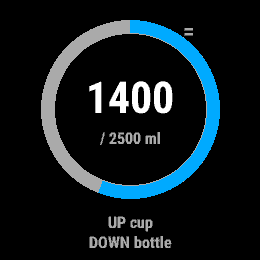
- UP adds a cup (250 ml), DOWN adds a bottle (500 ml), both adjustable
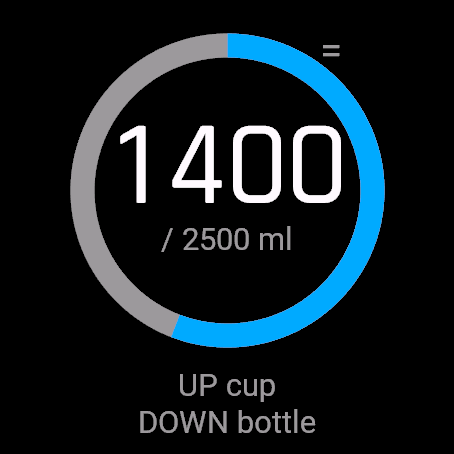
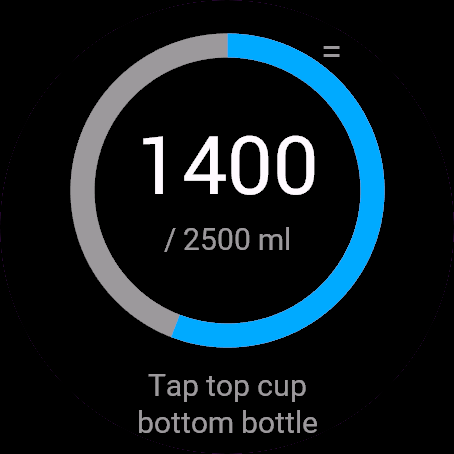
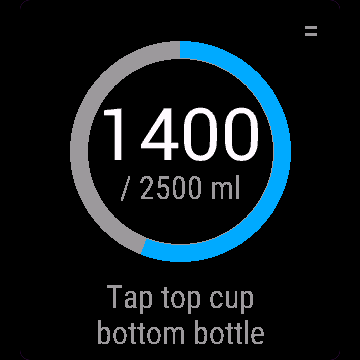
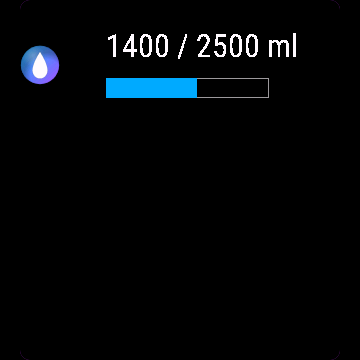
- Big total and a progress ring toward your daily goal
- Goal suggested from your weight (33 ml per kg, a rule of thumb, not medical advice), or set your own
- Custom amount, undo last entry, ml or oz (follows device units)
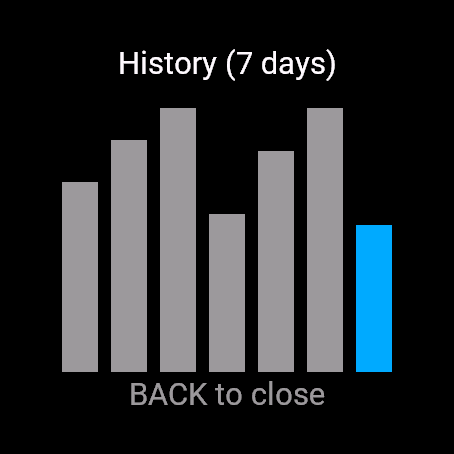
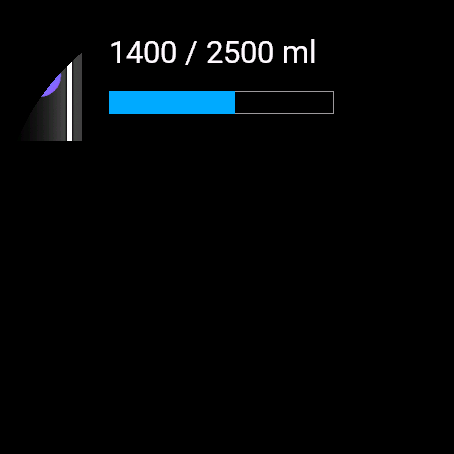
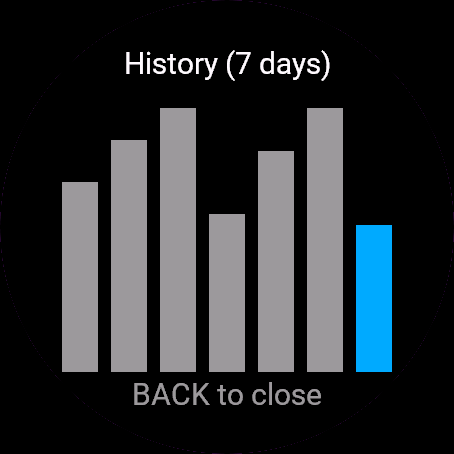
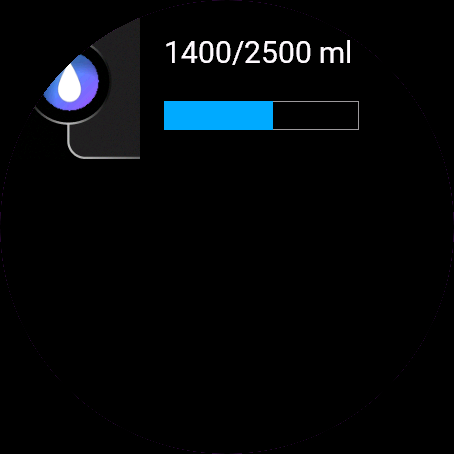
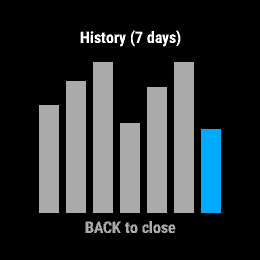
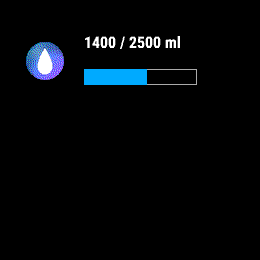
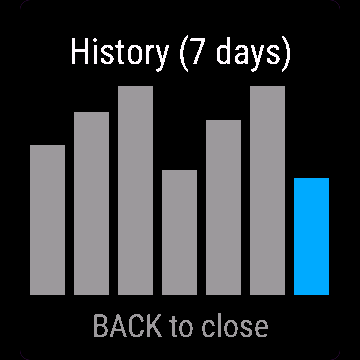
- 7 day bar chart, glance shows today's total without opening the app
- Touch-only watches: tap top/bottom half, corner icon opens the menu
Nawodnienie to licznik wody zrobiony pod szybkość: jeden przycisk dodaje szklankę, drugi butelkę, suma aktualizuje się od razu. Bez ekranów ładowania, bez pięciu dotknięć żeby zalogować łyk wody.
- GÓRA dodaje szklankę (250 ml), DÓŁ dodaje butelkę (500 ml), oba rozmiary do zmiany
- Duża suma dzienna i pierścień postępu do celu
- Cel proponowany z Twojej wagi (33 ml na kg, to praktyczna reguła, nie zalecenie medyczne), albo ustawiony ręcznie
- Własna porcja, cofnięcie ostatniego wpisu, ml albo oz (wg jednostek zegarka)
- Wykres 7 dni, podgląd na liście widgetów bez otwierania aplikacji
- Zegarki bez przycisków: dotknięcie górnej/dolnej połowy, ikonka w rogu to menu
Hydration Log ist ein Wassertracker, der auf Tempo gebaut ist: ein Knopf fügt eine Tasse hinzu, einer eine Flasche, die Summe aktualisiert sich sofort. Keine Ladebildschirme, keine fünf Tipps für ein Getränk.
- AUF fügt eine Tasse hinzu (250 ml), AB eine Flasche (500 ml), beides anpassbar
- Große Gesamtanzeige und ein Fortschrittsring zu deinem Tagesziel
- Ziel aus deinem Gewicht vorgeschlagen (33 ml pro kg, eine Faustregel, keine medizinische Beratung), oder leg deinen eigenen Wert fest
- Eigene Menge, letzten Eintrag rückgängig machen, ml oder oz (folgt den Geräteeinheiten)
- 7-Tage-Balkendiagramm, die Übersicht zeigt das heutige Total ohne die App zu öffnen
- Uhren nur mit Touch: obere/untere Hälfte tippen, Symbol in der Ecke öffnet das Menü
Hydration Log est un suivi d'hydratation pensé pour être rapide : un bouton ajoute un verre, un autre ajoute une bouteille, le total se met à jour instantanément. Pas d'écran de chargement, pas cinq appuis pour enregistrer une boisson.
- HAUT ajoute un verre (250 ml), BAS ajoute une bouteille (500 ml), les deux réglables
- Grand total et anneau de progression vers votre objectif quotidien
- Objectif suggéré à partir de votre poids (33 ml par kg, une règle empirique, pas un avis médical), ou fixez le vôtre
- Quantité personnalisée, annulation de la dernière entrée, ml ou oz (selon les unités de l'appareil)
- Graphique sur 7 jours, le glance affiche le total du jour sans ouvrir l'application
- Montres tactiles uniquement : touchez la moitié haute/basse, l'icône dans le coin ouvre le menu
Hydration Log es un registro de agua pensado para ser rápido: un botón añade un vaso, otro añade una botella, y el total se actualiza al instante. Sin pantallas de carga, sin cinco toques para registrar una bebida.
- ARRIBA añade un vaso (250 ml), ABAJO añade una botella (500 ml), ambos ajustables
- Total grande y un anillo de progreso hacia tu objetivo diario
- Objetivo sugerido según tu peso (33 ml por kg, una regla general, no es consejo médico), o fija el tuyo
- Cantidad personalizada, deshacer el último registro, ml u oz (según las unidades del dispositivo)
- Gráfico de barras de 7 días, la vista rápida muestra el total de hoy sin abrir la app
- Relojes solo táctiles: toca la mitad superior/inferior, el icono de la esquina abre el menú
Hydration Log is een watertracker gebouwd op snelheid: één knop voegt een glas toe, één een fles, en het totaal wordt direct bijgewerkt. Geen laadschermen, geen vijf tikken om een drankje te loggen.
- UP voegt een glas toe (250 ml), DOWN voegt een fles toe (500 ml), beide aanpasbaar
- Groot totaal en een voortgangsring naar je dagelijkse doel
- Doel voorgesteld op basis van je gewicht (33 ml per kg, een vuistregel, geen medisch advies), of stel je eigen doel in
- Aangepaste hoeveelheid, laatste invoer ongedaan maken, ml of oz (volgt toestelinstellingen)
- 7-daags staafdiagram, glance toont het totaal van vandaag zonder de app te openen
- Horloges met alleen touchscreen: tik op de bovenste/onderste helft, icoon in de hoek opent het menu
Hydration Log は素早く記録できるように設計された水分トラッカーです。ボタンひとつでコップ1杯、もうひとつのボタンでボトル1本を追加でき、合計は即座に更新されます。ロード画面もなく、水分を記録するのに5回もタップする必要はありません。
- UP でコップ(250 ml)、DOWN でボトル(500 ml)を追加、どちらも調整可能
- 大きな合計表示と、1日の目標に向けた進捗リング
- 体重から目標を提案(33 ml per kg、一般的な目安であり医学的な助言ではありません)、または独自に設定可能
- カスタム量、直前の入力を取り消し、ml または oz(デバイスの単位設定に連動)
- 7 day の棒グラフ、アプリを開かずにグランスで本日の合計を確認可能
- タッチ操作のみのウォッチ:画面の上半分/下半分をタップ、コーナーのアイコンでメニューを開く
Hydration Log è un tracker dell'acqua pensato per essere veloce: un pulsante aggiunge un bicchiere, uno aggiunge una bottiglia, il totale si aggiorna all'istante. Niente schermate di caricamento, niente cinque tocchi per registrare una bevanda.
- UP aggiunge un bicchiere (250 ml), DOWN aggiunge una bottiglia (500 ml), entrambi regolabili
- Totale ben visibile e anello di avanzamento verso il tuo obiettivo giornaliero
- Obiettivo suggerito in base al tuo peso (33 ml per kg, una stima indicativa, non un parere medico), oppure impostane uno personalizzato
- Quantità personalizzata, annulla l'ultimo inserimento, ml o oz (segue le unità del dispositivo)
- Grafico a barre di 7 giorni, il glance mostra il totale di oggi senza aprire l'app
- Orologi solo touch: tocca la metà superiore/inferiore, l'icona nell'angolo apre il menu
Hydration Log 是一款追求快速记录的饮水追踪工具:一个按键加一杯,一个按键加一瓶,总量实时更新。无加载界面,无需点击五次才完成记录。
- UP 增加一杯(250 ml),DOWN 增加一瓶(500 ml),均可调节
- 醒目的总量与每日目标进度环
- 根据体重推荐目标(33 ml 每 kg,仅为经验法则,非医疗建议),亦可自行设定
- 自定义容量、撤销上一条记录、ml 或 oz(遵循设备单位)
- 7 day 柱状图,小部件(glance)无需打开应用即可查看今日总量
- 纯触控手表:轻触上半屏/下半屏,角标打开菜单
Hydration Log создан для быстрого учета воды: одна кнопка добавляет стакан, другая добавляет бутылку, общий объем обновляется мгновенно. Никаких экранов загрузки, не нужно делать пять нажатий, чтобы записать напиток.
- UP добавляет стакан (250 ml), DOWN добавляет бутылку (500 ml), оба объема настраиваются
- Крупная общая сумма и кольцо прогресса до дневной цели
- Рекомендованная цель на основе вашего веса (33 ml per kg, ориентировочное правило, не является медицинской рекомендацией) или собственное значение
- Произвольный объем, отмена последней записи, ml или oz (по единицам измерения устройства)
- Столбчатая диаграмма за 7 дней, glance показывает сумму за сегодня без запуска приложения
- Для часов только с сенсорным экраном: касание верхней/нижней половины, значок в углу открывает меню
O Hydration Log é um rastreador de água feito para ser rápido: um botão adiciona um copo, outro adiciona uma garrafa, e o total é atualizado instantaneamente. Sem telas de carregamento, sem precisar de cinco toques para registrar uma bebida.
- UP adiciona um copo (250 ml), DOWN adiciona uma garrafa (500 ml), ambos ajustáveis
- Total em destaque e um anel de progresso para a sua meta diária
- Meta sugerida com base no seu peso (33 ml per kg, uma regra prática, não é aconselhamento médico), ou defina a sua própria
- Quantidade personalizada, desfazer última entrada, ml ou oz (segue as unidades do dispositivo)
- Gráfico de barras de 7 dias, o glance mostra o total de hoje sem abrir o app
- Relógios apenas com toque: toque na metade superior/inferior, o ícone no canto abre o menu
Hydration Log je sledovač pitného režimu navržený pro rychlost: jedno tlačítko přidá sklenici, druhé láhev, celkový součet se okamžitě aktualizuje. Žádné načítací obrazovky, žádných pět klepnutí pro zaznamenání nápoje.
- UP přidá sklenici (250 ml), DOWN přidá láhev (500 ml), obojí nastavitelné
- Velký celkový součet a kruhový ukazatel postupu k dennímu cíli
- Cíl navržený podle vaší hmotnosti (33 ml na kg, orientační pravidlo, nikoli lékařská rada), nebo si nastavte vlastní
- Vlastní množství, vrácení posledního záznamu, ml nebo oz (podle jednotek zařízení)
- 7denní sloupcový graf, glance ukazuje dnešní součet bez nutnosti otevírat aplikaci
- Hodinky pouze s dotykovým displejem: klepněte na horní/dolní polovinu, ikona v rohu otevře menu
O Hydration Log é um registador de água concebido para ser rápido: um botão adiciona um copo, outro adiciona uma garrafa, o total atualiza-se instantaneamente. Sem ecrãs de carregamento, sem cinco toques para registar uma bebida.
- UP adiciona um copo (250 ml), DOWN adiciona uma garrafa (500 ml), ambos ajustáveis
- Total em tamanho grande e anel de progresso rumo ao seu objetivo diário
- Objetivo sugerido a partir do seu peso (33 ml por kg, uma regra prática, não é aconselhamento médico), ou defina o seu próprio
- Quantidade personalizada, anular a última entrada, ml ou oz (segue as unidades do dispositivo)
- Gráfico de barras de 7 dias, o glance mostra o total de hoje sem abrir a aplicação
- Relógios apenas táteis: toque na metade superior/inferior, o ícone de canto abre o menu.
Hydration Log는 빠른 사용성을 위해 제작된 수분 섭취 추적 앱입니다. 버튼 하나로 컵을 추가하고 다른 버튼으로 병을 추가하면 총량이 즉시 업데이트됩니다. 로딩 화면도 없고, 음료 하나를 기록하기 위해 다섯 번씩 탭할 필요도 없습니다.
- UP 버튼으로 한 컵(250 ml) 추가, DOWN 버튼으로 한 병(500 ml) 추가(둘 다 용량 변경 가능)
- 한눈에 들어오는 총량과 일일 목표 달성률을 보여주는 진행 링
- 체중에 맞춘 권장 목표 제시(33 ml per kg, 일반적인 기준이며 의학적 조언이 아님) 또는 직접 목표 설정
- 직접 용량 입력, 마지막 기록 취소, ml 또는 oz 단위 지원(기기 설정 단위 반영)
- 7 day 막대 그래프 제공, 앱을 열지 않고도 글랜스에서 오늘의 총량 확인 가능
- 터치 전용 시계: 화면 상단/하단 탭으로 입력, 모서리 아이콘으로 메뉴 열기
Hydration Log är en vattenlogg byggd för att vara snabb: en knapp lägger till en kopp, en lägger till en flaska, totalsumman uppdateras direkt. Inga laddningsskärmar, inte fem tryck för att logga en dryck.
- UP lägger till en kopp (250 ml), DOWN lägger till en flaska (500 ml), båda kan justeras
- Tydlig totalsumma och en framstegsring mot ditt dagliga mål
- Förslag på mål utifrån din vikt (33 ml per kg, en tumregel, inte medicinsk rådgivning), eller sätt ett eget
- Anpassad mängd, ångra senaste registreringen, ml eller oz (följer enhetens enheter)
- 7 dagars stapeldiagram, snabblicken visar dagens total utan att öppna appen
- Klockor med enbart pekskärm: tryck på övre/nedre halvan, hörnikonen öppnar menyn
Hydration Log er en vand-tracker bygget til at være hurtig: én knap tilføjer en kop, én tilføjer en flaske, totalen opdateres med det samme. Ingen indlæsningsskærme, ikke fem tryk for at registrere en drik.
- UP tilføjer en kop (250 ml), DOWN tilføjer en flaske (500 ml), begge kan justeres
- Tydelig total og en statusring mod dit daglige mål
- Mål foreslået ud fra din vægt (33 ml pr. kg, en tommelfingerregel, ikke medicinsk rådgivning), eller angiv dit eget
- Valgfri mængde, fortryd seneste registrering, ml eller oz (følger enhedens indstillinger)
- 7 dages søjlediagram, glance viser dagens total uden at åbne appen
- Ure med ren touchskærm: tryk på øverste/nederste halvdel, hjørneikon åbner menuen
Hydration Log er en vannmåler bygget for å være rask: én knapp legger til en kopp, én legger til en flaske, totalsummen oppdateres umiddelbart. Ingen lasteskjermer, ingen fem trykk for å logge en drikk.
- UP legger til en kopp (250 ml), DOWN legger til en flaske (500 ml), begge kan justeres
- Tydelig totalsum og en fremgangsring mot dagsmålet ditt
- Foreslått mål basert på vekten din (33 ml per kg, en tommelfingerregel, ikke et medisinsk råd), eller sett ditt eget
- Egendefinert mengde, angre forrige registrering, ml eller oz (følger enhetens innstillinger)
- 7-dagers stolpediagram, glance viser dagens total uten å åpne appen
- Klokker med kun berøring: trykk på øvre/nedre halvdel, hjørneikonet åpner menyen
Hydration Log 是一款追求極速的飲水追蹤工具:一個按鈕加一杯,一個按鈕加一瓶,總量即時更新。沒有載入畫面,無需繁瑣點按五次才能記錄飲水。
- UP 增加一杯(250 ml),DOWN 增加一瓶(500 ml),兩者皆可自訂
- 醒目的總量顯示與邁向每日目標的進度環
- 依據體重提供建議目標(33 ml per kg,經驗法則,非醫療建議),亦可自行設定
- 自訂容量、復原上一筆記錄、ml 或 oz(隨裝置單位設定)
- 7 day 長條圖,無需開啟應用程式即可在 glance 查看今日總量
- 純觸控手錶:輕觸螢幕上半部或下半部,角落圖示可開啟選單
Hydration Log on vedenjuonnin seurantaan luotu nopea sovellus: toinen painike lisää kupin, toinen pullon, ja kokonaismäärä päivittyy heti. Ei latausruutuja, ei viittä napautusta juoman kirjaamiseen.
- UP lisää kupin (250 ml), DOWN lisää pullon (500 ml), molemmat säädettävissä
- Selkeä kokonaismäärä ja edistymisrengas kohti päivittäistä tavoitettasi
- Painoosi perustuva tavoite-ehdotus (33 ml per kg, nyrkkisääntö, ei lääketieteellinen neuvo) tai aseta oma tavoite
- Oma määrä, edellisen kirjauksen kumoaminen, ml tai oz (seuraa laitteen yksiköitä)
- 7 päivän pylväskaavio, glance näyttää päivän kokonaismäärän avaamatta sovellusta
- Pelkällä kosketuksella toimivat kellot: napauta ylä- tai alapuoliskoa, kulmakuvake avaa valikon
Hydration Log je sledovač pitného režimu navrhnutý pre rýchlosť: jedno tlačidlo pridá pohár, druhé pridá fľašu, celkový súčet sa aktualizuje okamžite. Žiadne načítavacie obrazovky, žiadnych päť ťuknutí na zaznamenanie nápoja.
- UP pridá pohár (250 ml), DOWN pridá fľašu (500 ml), obe hodnoty sú nastaviteľné
- Veľký celkový súčet a kruh pokroku k vášmu dennému cieľu
- Cieľ navrhnutý podľa vašej hmotnosti (33 ml na kg, orientačné pravidlo, nejde o lekársku radu) alebo si nastavte vlastný
- Vlastné množstvo, vrátenie posledného záznamu, ml alebo oz (podľa jednotiek zariadenia)
- 7-dňový stĺpcový graf, glance zobrazuje dnešný súčet bez otvorenia aplikácie
- Hodinky iba s dotykovým ovládaním: ťuknite na hornú/dolnú polovicu, ikona v rohu otvorí menu
Hydration Log je sledilnik vnosa vode, ustvarjen za hitrost: en gumb doda kozarec, drugi plastenko, skupni seštevek se posodobi v trenutku. Brez zaslonov za nalaganje, brez petih dotikov za vnos pijače.
- UP doda kozarec (250 ml), DOWN doda plastenko (500 ml), oboje je nastavljivo
- Velik skupni seštevek in krog napredka do vašega dnevnega cilja
- Predlagani cilj glede na vašo telesno težo (33 ml na kg, okvirno pravilo, ni zdravniški nasvet) ali vnos lastnega cilja
- Količina po meri, razveljavitev zadnjega vnosa, ml ali oz (glede na enote naprave)
- 7-dnevni stolpčni grafikon, hitri pogled (glance) prikazuje današnji seštevek brez odpiranja aplikacije
- Ure z zaslonom samo na dotik: tapnite zgornjo/spodnjo polovico, ikona v kotu odpre meni
Hydration Log adalah pelacak air yang dirancang agar cepat: satu tombol menambah cangkir, satu menambah botol, total langsung diperbarui. Tanpa layar pemuatan, tanpa perlu lima ketukan untuk mencatat minuman.
- UP menambah cangkir (250 ml), DOWN menambah botol (500 ml), keduanya dapat disesuaikan
- Total besar dan cincin progres menuju target harian Anda
- Target disarankan dari berat badan Anda (33 ml per kg, perkiraan umum, bukan saran medis), atau tentukan sendiri
- Jumlah kustom, batalkan entri terakhir, ml atau oz (mengikuti unit perangkat)
- Grafik batang 7 hari, glance menampilkan total hari ini tanpa membuka aplikasi
- Jam tangan khusus layar sentuh: ketuk bagian atas/bawah, ikon sudut membuka menu
A Hydration Log egy gyorsaságra tervezett vízkövető: egy gomb hozzáad egy poharat, egy másik egy palackot, az összesítés azonnal frissül. Nincsenek betöltőképernyők, nem kell ötöt koppintani egy ital rögzítéséhez.
- UP hozzáad egy poharat (250 ml), DOWN hozzáad egy palackot (500 ml), mindkettő állítható
- Nagy összegzés és folyamatgyűrű a napi cél felé
- A testsúlyodból javasolt cél (33 ml per kg, ökölszabály, nem orvosi tanács), vagy állíts be sajátot
- Egyedi mennyiség, utolsó bejegyzés visszavonása, ml or oz (az óra mértékegységeit követi)
- 7 day oszlopdiagram, a glance mutatja a mai összesítést az alkalmazás megnyitása nélkül
- Csak érintős órák: koppints a felső/alsó félre, a sarokikon megnyitja a menüt
Hydration Log คือตัวติดตามการดื่มน้ำที่สร้างขึ้นเพื่อความรวดเร็ว: ปุ่มหนึ่งเพิ่มแก้ว อีกปุ่มเพิ่มขวด ยอดรวมอัปเดตทันที ไม่มีหน้าจอโหลด ไม่ต้องแตะถึง 5 ครั้งเพื่อบันทึกการดื่ม
- UP เพิ่มหนึ่งแก้ว (250 ml), DOWN เพิ่มหนึ่งขวด (500 ml) ทั้งสองค่าปรับได้
- ตัวเลขยอดรวมขนาดใหญ่และวงแหวนแสดงความคืบหน้าสู่เป้าหมายประจำวันของคุณ
- แนะนำเป้าหมายจากน้ำหนักตัวของคุณ (33 ml per kg เป็นเพียงการประมาณคร่าว ๆ ไม่ใช่คำแนะนำทางการแพทย์) หรือกำหนดเองได้
- ปริมาณกำหนดเอง ยกเลิกรายการล่าสุด ml or oz (ตามหน่วยของอุปกรณ์)
- กราฟแท่ง 7 day และ glance แสดงยอดรวมวันนี้โดยไม่ต้องเปิดแอป
- สำหรับนาฬิกาแบบหน้าจอสัมผัสล้วน: แตะครึ่งบน/ล่าง ไอคอนที่มุมจะเปิดเมนู
Το Hydration Log είναι ένας καταγραφέας νερού φτιαγμένος για ταχύτητα: ένα κουμπί προσθέτει ένα ποτήρι, ένα προσθέτει ένα μπουκάλι, το σύνολο ενημερώνεται αμέσως. Χωρίς οθόνες φόρτωσης, χωρίς πέντε πατήματα για να καταγράψετε ένα ρόφημα.
- Το UP προσθέτει ένα ποτήρι (250 ml), το DOWN προσθέτει ένα μπουκάλι (500 ml), και τα δύο ρυθμιζόμενα
- Μεγάλο σύνολο και κύκλος προόδου προς τον ημερήσιο στόχο σας
- Προτεινόμενος στόχος με βάση το βάρος σας (33 ml ανά kg, ένας εμπειρικός κανόνας, δεν αποτελεί ιατρική συμβουλή) ή ορίστε τον δικό σας
- Προσαρμοσμένη ποσότητα, αναίρεση τελευταίας καταχώρισης, ml ή oz (ακολουθεί τις μονάδες της συσκευής)
- Ραβδόγραμμα 7 ημερών, το glance δείχνει το σημερινό σύνολο χωρίς να ανοίξετε την εφαρμογή
- Ρολόγια μόνο με οθόνη αφής: πατήστε στο πάνω/κάτω μισό, το εικονίδιο στη γωνία ανοίγει το μενού
Hydration Log je program za praćenje vode napravljen da bude brz: jedan gumb dodaje čašu, jedan dodaje bocu, ukupni zbroj ažurira se trenutačno. Bez zaslona za učitavanje, bez pet dodira za bilježenje pića.
- UP dodaje čašu (250 ml), DOWN dodaje bocu (500 ml), oboje podesivo
- Veliki ukupni zbroj i prsten napretka prema vašem dnevnom cilju
- Cilj predložen prema vašoj težini (33 ml po kg, okvirno pravilo, nije medicinski savjet) ili postavite vlastiti
- Prilagođena količina, poništavanje zadnjeg unosa, ml ili oz (prati jedinice uređaja)
- Trakasti grafikon za 7 dana, glance prikazuje današnji ukupni unos bez otvaranja aplikacije
- Satovi samo sa zaslonom na dodir: dodirnite gornju/donju polovicu, ikona u kutu otvara izbornik
Hydration Log הוא מעקב מים שנבנה במטרה להיות מהיר: כפתור אחד מוסיף כוס, כפתור שני מוסיף בקבוק, והסך הכול מתעדכן מיידית. בלי מסכי טעינה, בלי חמש הקשות כדי לתעד שתייה.
- UP מוסיף כוס (250 ml), DOWN מוסיף בקבוק (500 ml), שניהם ניתנים להתאמה
- סך הכול בולט וטבעת התקדמות לעבר היעד היומי שלך
- יעד מומלץ על פי משקל הגוף (33 ml per kg, כלל אצבע, לא ייעוץ רפואי), או הגדרה אישית משלך
- כמות מותאמת אישית, ביטול הרישום האחרון, ml או oz (בהתאם להגדרות היחידות במכשיר)
- תרשים עמודות ל-7 ימים, glance מציג את הסך הכול להיום מבלי לפתוח את האפליקציה
- שעוני מגע בלבד: הקשה על החצי העליון/תחתון, סמל בפינה פותח את התפריט
Hydration Log ialah penjejak air yang dibina untuk pantas: satu butang menambah cawan, satu menambah botol, jumlah dikemas kini serta-merta. Tiada skrin pemuatan, tiada keperluan lima ketikan untuk merekodkan minuman.
- UP menambah cawan (250 ml), DOWN menambah botol (500 ml), kedua-duanya boleh dilaras
- Jumlah besar dan gelang kemajuan ke arah matlamat harian anda
- Matlamat dicadangkan daripada berat badan anda (33 ml per kg, anggaran kasar, bukan nasihat perubatan), atau tetapkan sendiri
- Jumlah tersuai, buat asal entri terakhir, ml atau oz (mengikut unit peranti)
- Carta palang 7 hari, glance menunjukkan jumlah hari ini tanpa membuka aplikasi
- Jam tangan sentuh sahaja: ketik bahagian separuh atas/bawah, ikon sudut membuka menu
How to use it
Add Hydration Log to the widget loop (swipe through widgets on the watch).
Dodaj Nawodnienie do karuzeli widgetów (przewiń widgety na zegarku).
Füge Hydration Log zur Widget-Schleife hinzu (auf der Uhr durch die Widgets wischen).
Ajoutez Hydration Log à la boucle de widgets (faites défiler les widgets sur la montre).
Añade Hydration Log al bucle de widgets (desliza por los widgets en el reloj).
Voeg Hydration Log toe aan de widgetlus (veeg op het horloge door de widgets).
Hydration Log をウィジェットのループに追加してください(時計でウィジェットをスワイプして切り替えます)。
Aggiungi Hydration Log al ciclo dei widget (scorri i widget sull'orologio).
把 Hydration Log 添加到小组件循环中(在手表上滑动切换小组件)。
Добавьте Hydration Log в ленту виджетов (листайте виджеты на часах).
Adicione Hydration Log ao ciclo de widgets (deslize pelos widgets no relógio).
Přidejte Hydration Log do smyčky widgetů (na hodinkách procházejte widgety přejížděním).
Adicione Hydration Log ao ciclo de widgets (deslize pelos widgets no relógio).
Hydration Log을(를) 위젯 순환에 추가하세요(시계에서 위젯을 넘겨 보세요).
Lägg till Hydration Log i widgetslingan (svep mellan widgetar på klockan).
Tilføj Hydration Log til widget-løkken (stryg gennem widgets på uret).
Legg til Hydration Log i widget-rekken (sveip gjennom widgetene på klokken).
把 Hydration Log 加入小工具循環中(在手錶上滑動切換小工具)。
Lisää Hydration Log widgetkiertoon (selaa widgettejä pyyhkäisemällä kellossa).
Pridajte Hydration Log do cyklu widgetov (widgety na hodinkách prechádzate potiahnutím).
Dodajte Hydration Log v zanko pripomočkov (na uri se pomikajte med pripomočki).
Tambahkan Hydration Log ke putaran widget (geser antar widget di jam).
Adja hozzá a(z) Hydration Log elemet a widgetkörhöz (az órán görgessen a widgetek között).
เพิ่ม Hydration Log ในวิดเจ็ตลูป (ปัดผ่านวิดเจ็ตบนนาฬิกา)
Προσθέστε το Hydration Log στον κύκλο των widget (σύρετε στα widget του ρολογιού).
Dodajte Hydration Log u petlju widgeta (listajte widgete na satu).
הוסיפו את Hydration Log ללולאת הווידג'טים (החליקו בין הווידג'טים בשעון).
Tambah Hydration Log ke dalam gelung widget (leret melalui widget pada jam).
Manual
The full manual and the detailed permission descriptions are available in English and Polish.
Hydration Log: user manual
What it does
Hydration Log is a water counter built for speed. One press adds a cup, another a bottle, and the day's total and a progress ring toward your goal update at once. It has a 7 day history and undo.
Requirements and supported watches
Needs Connect IQ 3.3.0+ and the Connect IQ or Garmin Connect phone app. Supported watches:
- Round AMOLED: epix 2 and epix Pro 2, fēnix 8, E, Forerunner 165, 265, 570, 965, 970, Instinct 3 AMOLED, Crossover AMOLED, Venu 2, 3, 4, vivoactive 5, 6.
- Round MIP: enduro 3, fēnix 7 series, 8 Solar, Forerunner 55, 245, 255.
- Square and rectangular AMOLED: Venu Sq 2, Venu X1.
Installation
In the Connect IQ app on your phone (or Garmin Connect, then the Connect IQ Store) find "Hydration Log" by Dialforge, tap Install and sync the watch. Find it in your glances (UP or DOWN on the watch face, or swipe) and press START or tap to open it.
First launch
You see 0 ml, an empty ring and "UP cup / DOWN bottle". The goal is 33 ml per kg of your Garmin profile weight (rounded to 50), or 2000 ml with no weight. A cup is 250 ml, a bottle 500 ml. The 30-day free beta starts the first time you open it.
Controls
Watches with buttons (START, UP, DOWN, BACK)
- Main screen: UP adds a cup, DOWN a bottle ("Added" flashes). START or holding UP opens the menu: History (7 days), Custom amount, Undo last, Daily goal, Cup size, Bottle size, Units.
- Undo last removes today's last entry, or says "Nothing to undo".
- Number screens: UP more, DOWN less, START confirms, BACK cancels.
- History: BACK or START returns.
Touch watches (tap, hold, swipe)
- Watches without UP and DOWN: upper half is a cup, lower half a bottle. The "=" icon in the corner opens the menu on any touch watch.
- Number screens: upper half more, middle less, bottom strip confirms. History: tap to go back. Swipe right also goes back.
Settings
Phone: Connect IQ app, Hydration Log, Settings (the unlock code fields are there too).
On the watch, inside the app:
- Custom amount: 0 to 3000 ml in steps of 50, starts at the cup size, logged at once.
- Daily goal: 250 to 6000 ml in steps of 50.
- Cup size: 25 to 2000 ml, step 25. Bottle size: 50 to 3000 ml, step 50.
- Units: Millilitres (ml) or Ounces (oz), by default the watch's units.
License
- Free beta: 30 days from the first launch, everything works.
- Price: 4.99 EUR once at dialforge.dev, no subscription. The 8-character code is tied to your watch's UID.
- Where to enter it: phone, Connect IQ app, Hydration Log, Settings. Read the UID in "Watch UID (needed to buy a code)", buy the code, then type it into "Unlock code from dialforge.dev". The end-of-beta screen on the watch shows the UID too.
- After the beta without a code: an end-of-beta screen with the UID replaces the app. Enter the code, then open it again. New watch? Write to us and the code moves for free.
Privacy and permissions
Permissions:
- User profile: reads your weight to suggest the daily goal. Nothing leaves the watch.
No internet use. Data stays on the watch.
Health note: not a medical device, no diagnosis or treatment, no substitute for a doctor. Medical decisions belong to your doctor or pharmacist.
Troubleshooting
The code does not work. Check that the UID you bought for matches "Watch UID (needed to buy a code)" and type all 8 characters (case is ignored, no 0, O, 1 or I). A code for another app does not fit. Sync, then reopen.
Where does the goal come from? From your weight in the Garmin profile, 33 ml per kg, a rule of thumb. Once you set a goal, it stays.
The total dropped to 0. Each day has its own total. Yesterday stays in the 7 day history.
How do I fix a wrong entry? Menu, Undo last, one entry at a time.
Contact
kontakt@dialforge.dev or dialforge.dev. Please write before leaving a low rating.
Nawodnienie: instrukcja obsługi
Do czego służy
Nawodnienie to licznik wody zrobiony na szybkość. Jedno naciśnięcie dodaje szklankę, drugie butelkę, a suma dnia i pierścień postępu do celu odświeżają się od razu. Jest historia 7 dni i cofanie ostatniego wpisu.
Wymagania i obsługiwane zegarki
Wymaga Connect IQ 3.3.0+ i aplikacji Connect IQ albo Garmin Connect w telefonie. Obsługiwane zegarki:
- Okrągłe AMOLED: epix 2 i epix Pro 2, fēnix 8, E, Forerunner 165, 265, 570, 965, 970, Instinct 3 AMOLED, Crossover AMOLED, Venu 2, 3, 4, vivoactive 5, 6.
- Okrągłe MIP: enduro 3, seria fēnix 7, fēnix 8 Solar, Forerunner 55, 245, 255.
- Kwadratowe i prostokątne AMOLED: Venu Sq 2, Venu X1.
Instalacja
Na telefonie otwórz aplikację Connect IQ (albo Garmin Connect, a w niej sklep Connect IQ), wyszukaj "Nawodnienie" od Dialforge, stuknij Zainstaluj i zsynchronizuj zegarek. Znajdziesz go wśród widżetów (GÓRA lub DÓŁ na tarczy albo przesunięcie palcem), a START lub stuknięcie otwiera go w całości.
Pierwsze uruchomienie
Widzisz 0 ml, pusty pierścień i podpowiedź "GÓRA szklanka / DÓŁ butelka". Cel to 33 ml na kilogram wagi z profilu Garmin (zaokrąglone do 50) albo 2000 ml, gdy wagi nie ma. Szklanka to 250 ml, butelka 500 ml. 30-dniowa darmowa beta zaczyna się przy pierwszym otwarciu.
Sterowanie
Zegarki z przyciskami (START, GÓRA, DÓŁ, WSTECZ)
- Ekran główny: GÓRA dodaje szklankę, DÓŁ butelkę (mignie "Dodano"). START albo przytrzymanie GÓRY otwiera menu: Historia (7 dni), Własna porcja, Cofnij ostatnie, Cel dzienny, Rozmiar szklanki, Rozmiar butelki, Jednostki.
- Cofnij ostatnie usuwa ostatni dzisiejszy wpis. Gdy nie ma czego cofać, ekran główny pokazuje "Nie ma czego cofnąć".
- Ekrany z liczbą: GÓRA więcej, DÓŁ mniej, START zatwierdza, WSTECZ anuluje. Jednostki przełączają ml i oz.
- Historia: WSTECZ albo START wraca.
Zegarki dotykowe (stuknięcie, przytrzymanie, przesunięcie)
- Zegarki bez GÓRA i DÓŁ: górna połowa ekranu to szklanka, dolna butelka. Ikona "=" w rogu otwiera menu (działa na każdym zegarku dotykowym).
- Ekrany z liczbą: górna połowa więcej, środek mniej, dolny pasek zatwierdza. Historia: stuknięcie wraca. Przesunięcie w prawo też cofa.
Ustawienia
Telefon: aplikacja Connect IQ, Nawodnienie, Ustawienia (są tam też pola kodu odblokowania).
Na zegarku, w aplikacji:
- Własna porcja: od 0 do 3000 ml co 50, start od rozmiaru szklanki, zapisuje się od razu.
- Cel dzienny: od 250 do 6000 ml co 50.
- Rozmiar szklanki: od 25 do 2000 ml co 25. Rozmiar butelki: od 50 do 3000 ml co 50.
- Jednostki: Mililitry (ml) albo Uncje (oz). Domyślnie wg jednostek zegarka. W oz ekrany z liczbą też liczą w oz.
Licencja
- Darmowa beta: 30 dni od pierwszego uruchomienia, wszystko działa.
- Cena: jednorazowo 4,99 EUR na dialforge.dev, bez abonamentu. 8-znakowy kod jest przypisany do UID zegarka.
- Gdzie wpisać: telefon, aplikacja Connect IQ, Nawodnienie, Ustawienia. Odczytaj UID w polu "UID zegarka (potrzebny do zakupu kodu)", kup kod i wpisz go w "Kod odblokowania z dialforge.dev". Ekran końca bety na zegarku też pokazuje UID.
- Po becie bez kodu: zamiast aplikacji pojawia się ekran końca bety z UID. Wpisz kod i otwórz aplikację ponownie. Nowy zegarek? Napisz do nas, przeniesiemy kod za darmo.
Prywatność i uprawnienia
Uprawnienia:
- Profil użytkownika: odczyt wagi, żeby zaproponować cel dzienny. Nic nie opuszcza zegarka.
Zero połączeń z internetem. Dane zostają w zegarku.
Uwaga zdrowotna: to nie jest wyrób medyczny. Niczego nie diagnozuje ani nie leczy i nie zastępuje lekarza. Decyzje medyczne zostaw lekarzowi lub farmaceucie.
Rozwiązywanie problemów
Kod nie działa. Sprawdź, czy UID, dla którego kupiono kod, zgadza się z polem "UID zegarka (potrzebny do zakupu kodu)", i wpisz wszystkie 8 znaków (wielkość liter bez znaczenia, bez 0, O, 1, I). Kod do innej aplikacji nie pasuje. Zsynchronizuj i otwórz ponownie.
Skąd się bierze cel? Z wagi w profilu Garmin, 33 ml na kilogram, to zgrubna reguła. Gdy sam ustawisz cel, zostaje taki, jaki wpiszesz.
Suma spadła do 0. Każdy dzień kalendarzowy ma własną sumę. Wczorajsza zostaje w historii 7 dni.
Jak poprawić błędny wpis? Menu, Cofnij ostatnie. Usuwa najnowszy wpis, po jednym.
Kontakt
kontakt@dialforge.dev albo dialforge.dev. Napisz, zanim wystawisz niską ocenę.
Permissions and privacy
This product asks the watch for the permissions below. Connect IQ shows them when you install it.
- Your profile: Reads your Garmin profile on the watch (for example age, weight, heart rate zones) to calculate values for you.Odczytuje Twój profil Garmin na zegarku (na przykład wiek, wagę, strefy tętna), żeby liczyć wartości dla Ciebie.
This product does not use the internet and sends no data to our servers.
The full manual and the detailed permission descriptions are available in English and Polish.
Compatible watches
51mm, D2 Air X15, D2 Mach 1 Pro, Enduro 2, Enduro 3, epix (Gen 2), epix Pro (Gen 2) 42mm, epix Pro (Gen 2) 47mm, epix Pro (Gen 2) 51mm, Forerunner 165, Forerunner 165 Music, Forerunner 245, Forerunner 245 Music, Forerunner 255, Forerunner 255 Music, Forerunner 255s, Forerunner 255s Music, Forerunner 265, Forerunner 265s, Forerunner 55, Forerunner 570 42mm, Forerunner 570 47mm, Forerunner 965, Forerunner 970, fēnix 7, fēnix 7 Pro, fēnix 7 Pro - Solar Edition (no Wi-Fi), fēnix 7S, fēnix 7S Pro, fēnix 7X, fēnix 7X Pro, fēnix 7X Pro - Solar Edition (no Wi-Fi), fēnix 8 43mm, fēnix 8 47mm, fēnix 8 Pro 47mm, fēnix 8 Solar 47mm, fēnix 8 Solar 51mm, fēnix E, Instinct 3 AMOLED 45mm, Instinct 3 AMOLED 50mm, Instinct Crossover AMOLED, MicroLED, quatix 7, quatix 7 Pro, quatix 7 Sapphire, quatix 7X Solar, quatix 8 47mm, quatix 8 Pro 47mm, tactix 7, tactix 7 – AMOLED Edition, tactix 8 47mm, tactix 8 Solar 51mm, Venu 2, Venu 2 Plus, Venu 2S, Venu 3, Venu 3S, Venu 4 41mm, Venu 4 45mm, Venu Sq 2, Venu Sq 2 Music, Venu X1, vívoactive 5, vívoactive 6
Screenshots
FAQ
What happens after the 30-day beta?
The app shows a screen asking for a one-time unlock code from dialforge.dev instead of opening normally. Buy the code once below, no subscription.
Does the app send my data to Dialforge?
No. The app works fully offline, and the unlock code is checked on the watch itself, without contacting any server.
The app does not work as described on my watch. Can I get a refund?
Yes. Write through the feedback form below, or to the e-mail in the footer. If we cannot fix it, we refund you, as described in the terms.
Changing your watch?
Write to me and I will move your code for free.
Changelog
- First release (beta).
- Pierwsze wydanie (beta).
- Erste Veröffentlichung (Beta).
- Première version (bêta).
- Primera versión (beta).
- Eerste release (beta).
- 初回リリース(ベータ版)。
- Prima versione (beta).
- 首次发布(测试版)。
- Первый релиз (бета).
- Primeiro lançamento (beta).
- První verze (beta).
- Primeira versão (beta).
- 첫 출시(베타).
- Första versionen (beta).
- Første udgivelse (beta).
- Første versjon (beta).
- 首發版本(beta)。
- Ensimmäinen julkaisu (beta).
- Prvé vydanie (beta).
- Prva različica (beta).
- Rilis pertama (beta).
- Első kiadás (béta).
- เวอร์ชันแรก (beta)
- Πρώτη έκδοση (beta).
- Prvo izdanje (beta).
- גרסה ראשונה (בטא).
- Keluaran pertama (beta).
Unlock
€4.99
One-time payment. No subscription. The code works on the watch whose UID you enter.
- Install the app from the Connect IQ store. It works fully and for free for the first 30 days.
- Find your 10-digit UID: Connect IQ app on the phone > My Device > Apps or Data Fields > this app > Settings > Watch UID.
- Enter UID and e-mail, pay with PayPal (cards work without a PayPal account). The code appears here at once.
- Type the code into the same settings page, field "Unlock code". The watch checks it offline.
Thank you! Your code:
Enter the code in the app settings, field "Unlock code". The watch checks it offline.
Tell us how to make it better
Missing a data field, a colour, a layout? Found a bug on your watch model? Write it here. We read every message and ship improvements in updates.