Strength, HIIT and hybrid racing
Hybrid Race Tracker
Race tracker for 8 x 1 km run + 8 station hybrid fitness races. Transitions marked by button only, never by GPS, so transition time and order never get mismeasured, even indoors. GPS stays off unless you switch on Run pace (GPS) in the start menu, and then it is used for the pace on run segments only.
Śledzenie wyścigu na 8 x 1 km biegu i 8 stacji fitness. Zmiana segmentu tylko przyciskiem, nigdy przez GPS, więc czas w strefie zmian i kolejność się nie rozjeżdżają, także w hali. GPS jest wyłączony, dopóki nie włączysz Tempo biegu (GPS) w menu startowym, i wtedy służy tylko do tempa na odcinkach biegu.
Wettkampf-Tracker für Hybrid-Fitness-Rennen mit 8 x 1 km Laufen + 8 Stationen. Wechsel werden nur per Taste markiert, nie per GPS, sodass Wechselzeit und Reihenfolge auch in der Halle nie falsch gemessen werden. GPS bleibt aus, außer du aktivierst Run pace (GPS) im Startmenü, und wird dann nur für das Tempo auf den Laufsegmenten genutzt.
Suivi de course pour les épreuves de fitness hybride 8 x 1 km de course + 8 stations. Transitions enregistrées uniquement par bouton, jamais par GPS, pour que le temps et l'ordre des transitions ne soient jamais faussés, même en intérieur. Le GPS reste désactivé à moins d'activer Run pace (GPS) dans le menu de départ, et n'est alors utilisé que pour l'allure sur les segments de course.
Monitor de carrera para competiciones de fitness híbrido de 8 x 1 km de carrera + 8 estaciones. Las transiciones se marcan solo mediante botón, nunca por GPS, por lo que el tiempo y el orden de las transiciones nunca se miden mal, incluso en interiores. El GPS permanece desactivado a menos que actives el ritmo de carrera (GPS) en el menú de inicio, y solo se utiliza para el ritmo en los segmentos de carrera.
Race-tracker voor hybride fitnessraces van 8 x 1 km hardlopen + 8 stations. Transities worden uitsluitend met de knop gemarkeerd, nooit via GPS, zodat transitietijd en volgorde nooit verkeerd worden gemeten, zelfs niet binnen. GPS blijft uit tenzij je Run pace (GPS) inschakelt in het startmenu, en wordt dan alleen gebruikt voor het tempo tijdens hardloopsegmenten.
8 x 1 km のラン + 8 つのステーションで構成されるハイブリッドフィットネスレース専用のレイストラッカー。トランジションはボタン操作でのみ記録され、GPSによる自動判定は行わないため、屋内でもトランジションの時間や順序が誤測定されることはありません。スタートメニューで Run pace (GPS) をオンにしない限り GPS はオフのままであり、オンにした場合もランセグメントのペース測定にのみ使用されます。
Race tracker per gare di hybrid fitness con 8 x 1 km di corsa + 8 stazioni. Transizioni segnate solo tramite pulsante, mai con il GPS, così tempi e ordine delle transizioni non vengono mai falsati, nemmeno al chiuso. Il GPS rimane spento a meno che non si attivi Run pace (GPS) nel menu iniziale, e in tal caso viene usato solo per il passo nei segmenti di corsa.
专为 8 x 1 km 跑步 + 8 个站点的混合体能赛打造的比赛追踪工具。换项仅通过按键标记,绝不依赖 GPS,因此即使在室内也不会误测换项时间与顺序。GPS 保持关闭,除非在开始菜单中开启 Run pace (GPS),开启后仅用于跑步分段的配速。
Трекер для гибридных фитнес-гонок: 8 x 1 km бега + 8 станций. Переходы отмечаются только кнопкой, без GPS, поэтому время переходов и порядок этапов никогда не собьются даже в помещении. GPS остается выключенным, если вы не включите Run pace (GPS) в стартовом меню, и в этом случае он используется только для темпа на беговых отрезках.
Rastreador de prova para corridas de fitness híbrido com 8 x 1 km de corrida + 8 estações. Transições marcadas apenas por botão, nunca por GPS, para que o tempo e a ordem das transições nunca sejam medidos incorretamente, mesmo em ambientes fechados. O GPS permanece desligado, a menos que você ative Run pace (GPS) no menu inicial, sendo então usado apenas para o ritmo nos trechos de corrida.
Závodní tracker pro hybridní fitness závody 8 x 1 km běhu + 8 stanovišť. Přechody se zaznamenávají pouze tlačítkem, nikdy pomocí GPS, takže čas a pořadí přechodů se nikdy nezměří špatně, a to ani uvnitř. GPS zůstává vypnutá, pokud v menu start nezapnete Run pace (GPS), a pak se používá pouze pro tempo na běžeckých úsecích.
Registo de prova para competições de fitness híbrido de 8 x 1 km de corrida + 8 estações. Transições marcadas apenas por botão, nunca por GPS, para que o tempo e a ordem de transição nunca sejam calculados incorretamente, mesmo em espaços interiores. O GPS permanece desligado a menos que ative Run pace (GPS) no menu inicial, sendo depois utilizado apenas para o ritmo nos segmentos de corrida.
8 x 1 km 달리기와 8개 스테이션으로 구성된 하이브리드 피트니스 대회를 위한 레이스 트래커입니다. 전환(Transition) 구간은 GPS가 아닌 오직 버튼으로만 기록되므로, 실내에서도 전환 시간과 순서가 잘못 측정될 일이 없습니다. 시작 메뉴에서 Run pace (GPS)를 켜지 않는 한 GPS는 꺼진 상태로 유지되며, 켠 경우에도 달리기 구간의 페이스 측정에만 사용됩니다.
Tävlingslogg för hybridtävlingar med 8 x 1 km löpning + 8 stationer. Byten markeras enbart med knapp, aldrig med GPS, så att växlingstid och ordning aldrig blir felmätta, inte ens inomhus. GPS förblir avstängd såvida du inte aktiverar Run pace (GPS) i startmenyn, och då används den enbart för tempot under löpsegmenten.
Race-tracker til hybride fitnessløb med 8 x 1 km løb + 8 stationer. Skift markeres udelukkende med knap, aldrig med GPS, så skiftetid og rækkefølge aldrig bliver målt forkert, selv indendørs. GPS forbliver slukket, medmindre du slår Run pace (GPS) til i startmenuen, og så bruges den udelukkende til tempo på løbesegmenterne.
Konkurransesporer for hybrid fitness-konkurranser med 8 x 1 km løping + 8 stasjoner. Vekslinger markeres kun med knapp, aldri med GPS, slik at vekslingstid og rekkefølge aldri blir feilmålt, selv innendørs. GPS forblir av med mindre du slår på Run pace (GPS) i startmenyen, og da brukes den kun til tempo på løpesegmentene.
專為 8 x 1 km 跑步 + 8 個站點的混合健身賽事打造的比賽追蹤器。換項僅透過按鈕標記,絕不依賴 GPS,因此即使在室內,換項時間與順序也絕不會被誤判。GPS 保持關閉,除非在開始選單中開啟 Run pace (GPS),此時 GPS 僅用於計算跑步區段的配速。
Kilpailuseuranta hybridikuntoilukilpailuihin (8 x 1 km juoksu + 8 toiminnallista pistettä). Vaihdot merkitään vain painikkeella, ei koskaan GPS:llä, joten vaihtoajat ja järjestys eivät koskaan mene sekaisin edes sisätiloissa. GPS pysyy pois päältä, ellet ota Run pace (GPS) -asetusta käyttöön aloitusvalikosta, jolloin sitä käytetään ainoastaan juoksuosuuksien vauhdin mittaamiseen.
Sledovanie pretekov pre hybridné fitness preteky 8 x 1 km beh + 8 stanovíšť. Prechody sa zaznamenávajú iba tlačidlom, nikdy nie pomocou GPS, takže čas prechodu a poradie sa nikdy nezmerajú nesprávne, dokonca ani v interiéri. GPS zostáva vypnuté, pokiaľ v úvodnom menu nezapnete Run pace (GPS), a potom sa používa výlučne na tempo počas bežeckých úsekov.
Sledilnik tekem za hibridne fitnes preizkušnje z 8 x 1 km teka in 8 postajami. Menjave se beležijo izključno s pritiskom na gumb, nikoli prek GPS, zato se čas menjave in vrstni red nikoli ne izmerita napačno, niti v dvorani. GPS ostane izklopljen, razen če v začetnem meniju vklopite Run pace (GPS), pri čemer se uporablja samo za tempo na tekaških odsekih.
Pelacak lomba untuk ajang hybrid fitness 8 x 1 km lari + 8 stasiun. Transisi ditandai hanya dengan tombol, tidak pernah dengan GPS, sehingga waktu dan urutan transisi tidak pernah salah hitung, bahkan di dalam ruangan. GPS tetap nonaktif kecuali Anda mengaktifkan Run pace (GPS) di menu mulai, dan itu hanya digunakan untuk pace pada segmen lari.
Versenymérő 8 x 1 km run + 8 station hibrid fitneszversenyekhez. Az átmenetek kizárólag gombbal jelölhetők, sosem GPS alapján, így az átmeneti idő és a sorrend sosem mérődik el, még beltéren sem. A GPS kikapcsolva marad, hacsak be nem kapcsolod a Run pace (GPS) beállítást a start menüben, és akkor is csak a futószakaszok tempójához használatos.
ตัวติดตามการแข่งขันสำหรับไฮบริดฟิตเนส วิ่ง 8 x 1 km + 8 station การเปลี่ยนช่วงบันทึกด้วยปุ่มกดเท่านั้น ไม่ใช้ GPS เวลาและลำดับการเปลี่ยนช่วงจึงไม่มีวันคลาดเคลื่อน แม้จะอยู่ในร่ม GPS จะปิดอยู่ตลอดเวลา เว้นแต่คุณจะเปิดใช้งาน Run pace (GPS) ในเมนูเริ่มต้น ซึ่งจะใช้สำหรับเพซในช่วงการวิ่งเท่านั้น
Καταγραφέας αγώνα για υβριδικούς αγώνες fitness 8 x 1 km τρεξίματος + 8 σταθμών. Οι μεταβάσεις σημειώνονται μόνο με κουμπί, ποτέ μέσω GPS, ώστε ο χρόνος και η σειρά των μεταβάσεων να μην καταγράφονται ποτέ λάθος, ακόμη και σε εσωτερικούς χώρους. Το GPS παραμένει απενεργοποιημένο εκτός αν ενεργοποιήσετε το Run pace (GPS) στο αρχικό μενού, οπότε και χρησιμοποιείται μόνο για τον ρυθμό στα τμήματα τρεξίματος.
Praćenje utrke za hibridne fitness utrke od 8 x 1 km trčanja + 8 stanica. Tranzicije se označavaju isključivo gumbom, nikada putem GPS-a, tako da se vrijeme i redoslijed tranzicija nikada ne izmjere pogrešno, čak ni u zatvorenom prostoru. GPS ostaje isključen osim ako ne uključite Run pace (GPS) u početnom izborniku, a tada se koristi samo za tempo na segmentima trčanja.
מעקב מרוצים עבור מרוצי כושר היברידיים של 8 x 1 km ריצה + 8 תחנות. מעברים מסומנים באמצעות כפתור בלבד, לעולם לא באמצעות GPS, כך שזמן המעבר וסדר התחנות אינם נמדדים בצורה שגויה, גם במבנה סגור. ה-GPS נשאר כבוי אלא אם מפעילים את Run pace (GPS) בתפריט ההתחלה, ואז הוא משמש לקצב במקטעי הריצה בלבד.
Penjejak perlumbaan untuk perlumbaan kecergasan hibrid larian 8 x 1 km + 8 stesen. Peralihan ditandakan melalui butang sahaja, tidak sesekali oleh GPS, jadi masa dan urutan peralihan tidak akan tersilap ukur, walaupun di dalam dewan. GPS kekal dimatikan melainkan anda menghidupkan Run pace (GPS) dalam menu mula, dan kemudian ia digunakan untuk rentak pada segmen larian sahaja.
Coming to Connect IQ Unlock €5.99
Beta: free for 30 days
The app works fully and for free for the first 30 days after you first open it. After that you can buy a one-time unlock code below. No subscription.
- Fixed official order, one activity: Run, Transition, Station, through Station 8
- Race mode or Training at 25/50/75/100% scale, targets shown on screen
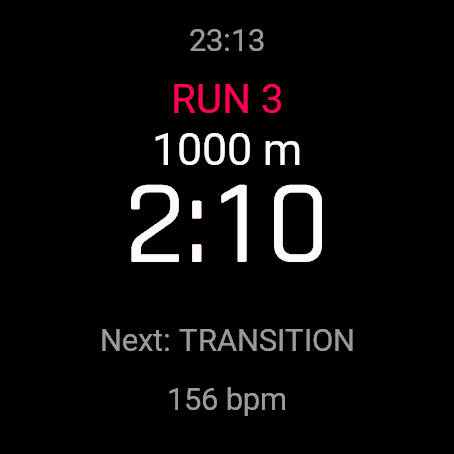
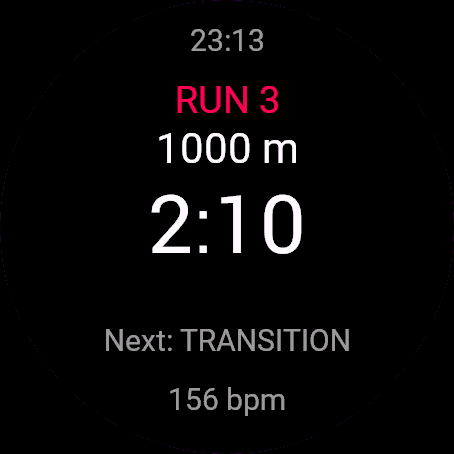
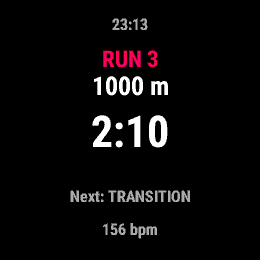
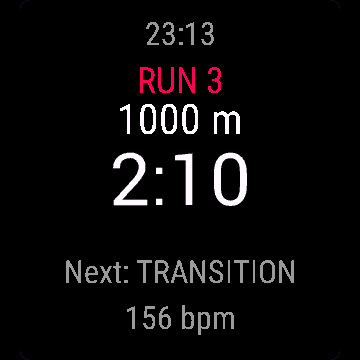
- Segment clock, total time, next segment, heart rate, live delta vs your best split, optional run pace from GPS (off by default)
- Transition total shown separately in the summary
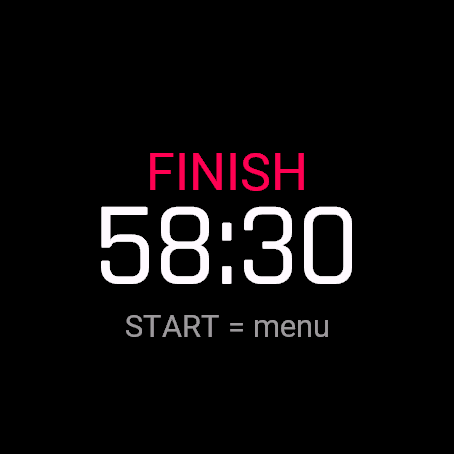
- Summary table: all 8 runs, 8 stations, transition total, total time
- One FIT lap per segment with a segment code for Garmin Connect
- Stała, oficjalna kolejność w jednej aktywności: bieg, strefa zmian, stacja, aż do stacji 8
- Tryb Wyścig albo Trening w skali 25/50/75/100%, cele na ekranie
- Zegar segmentu, czas całkowity, następny segment, tętno, różnica na żywo względem rekordu, opcjonalne tempo biegu z GPS (domyślnie wyłączone)
- Suma czasu w strefie zmian osobno w podsumowaniu
- Podsumowanie: wszystkie 8 biegów, 8 stacji, suma strefy zmian, czas całkowity
- Jedno okrążenie FIT na segment z kodem segmentu dla Garmin Connect
- Feste offizielle Reihenfolge, eine Aktivität: Run, Transition, Station, bis Station 8
- Wettkampfmodus oder Training mit 25/50/75/100% Skalierung, Zielwerte auf dem Display
- Segmentuhr, Gesamtzeit, nächstes Segment, Herzfrequenz, Live-Delta zum besten Split, optionale GPS-Pace beim Laufen (standardmäßig aus)
- Gesamte Wechselzeit separat in der Zusammenfassung ausgewiesen
- Übersichtstabelle: alle 8 Läufe, 8 Stationen, Wechselzeit gesamt, Gesamtzeit
- Eine FIT-Runde pro Segment mit Segmentcode für Garmin Connect
- Ordre officiel fixe, en une seule activité : Course, Transition, Station, jusqu'à la Station 8
- Mode Course ou Entraînement à l'échelle 25/50/75/100%, objectifs affichés à l'écran
- Chrono de segment, temps total, segment suivant, fréquence cardiaque, écart en direct vs votre meilleur temps intermédiaire, allure de course optionnelle via GPS (désactivée par défaut)
- Total des transitions affiché séparément dans le récapitulatif
- Tableau récapitulatif : les 8 courses, 8 stations, total des transitions, temps total
- Un circuit FIT par segment avec un code de segment pour Garmin Connect
- Orden oficial fijo, una sola actividad: Carrera, Transición, Estación, hasta la Estación 8
- Modo carrera o entrenamiento a escala 25/50/75/100%, objetivos mostrados en pantalla
- Reloj de segmento, tiempo total, siguiente segmento, frecuencia cardíaca, diferencia en tiempo real frente a tu mejor parcial, ritmo de carrera opcional por GPS (desactivado por defecto)
- Total de transiciones mostrado por separado en el resumen
- Tabla de resumen: las 8 carreras, 8 estaciones, total de transiciones, tiempo total
- Una vuelta FIT por segmento con un código de segmento para Garmin Connect
- Vaste officiële volgorde, één activiteit: Run, Transition, Station, tot en met Station 8
- Race-modus of Training op schaal van 25/50/75/100%, doelen worden getoond op het scherm
- Segmentklok, totale tijd, volgend segment, hartslag, live delta t.o.v. je beste split, optioneel hardlooptempo via GPS (standaard uit)
- Totale transitietijd apart weergegeven in het overzicht
- Overzichtstabel: alle 8 runs, 8 stations, transitietotaal, totale tijd
- Eén FIT-ronde per segment met een segmentcode voor Garmin Connect
- 公式の固定順序に沿った1つのアクティビティ:Run、Transition、Station、Station 8 まで進行
- Race モード、または 25/50/75/100% のスケールでの Training、画面に目標を表示
- セグメントタイマー、合計時間、次のセグメント、心拍数、ベストスプリットとのリアルタイム差分、GPS によるオプションのランペース(デフォルトはオフ)
- サマリーにトランジションの合計時間を個別に表示
- サマリーテーブル:全 8 回のラン、8 つのステーション、トランジション合計、合計時間
- Garmin Connect 用のセグメントコードが付いた、セグメントごとの 1 つの FIT ラップ
- Ordine ufficiale fisso, un'unica attività: Run, Transition, Station, fino alla Station 8
- Modalità Gara o Allenamento in scala 25/50/75/100%, con target mostrati sullo schermo
- Cronometro di segmento, tempo totale, segmento successivo, frequenza cardiaca, delta in tempo reale rispetto al tuo miglior split, passo di corsa opzionale da GPS (disattivato di default)
- Totale delle transizioni mostrato separatamente nel riepilogo
- Tabella di riepilogo: tutti gli 8 segmenti di corsa, 8 stazioni, totale transizioni, tempo totale
- Un lap FIT per segmento con codice di segmento per Garmin Connect
- 官方固定顺序,单次活动:Run、Transition、Station,依次进行直至 Station 8
- 比赛模式或 25/50/75/100% 比例的训练模式,屏幕显示目标
- 分段计时、总时间、下一分段、心率、与最佳分段的实时差距、可选 GPS 跑步配速(默认关闭)
- 换项总耗时在总结中单独显示
- 汇总表:全部 8 组跑步、8 个站点、换项总时间、总时间
- 每个分段生成一个附带分段代码的 FIT lap,用于 Garmin Connect
- Фиксированный официальный порядок, одна тренировка: Run, Transition, Station, вплоть до Station 8
- Режим Race или Training с масштабом 25/50/75/100%, целевые значения отображаются на экране
- Время отрезка, общее время, следующий отрезок, пульс, текущая дельта к лучшему сплиту, темп бега по GPS по желанию (по умолчанию выключен)
- Общее время транзитов вынесено отдельно в итоговой сводке
- Сводная таблица: все 8 беговых этапов, 8 станций, общее время транзитов, общее время
- Один FIT-круг на каждый отрезок с кодом сегмента для Garmin Connect
- Ordem oficial fixa, uma única atividade: Corrida, Transição, Estação, até a Estação 8
- Modo Prova ou Treino em escala de 25/50/75/100%, metas exibidas na tela
- Cronômetro do segmento, tempo total, próximo segmento, frequência cardíaca, delta em tempo real contra seu melhor split, ritmo de corrida opcional por GPS (desativado por padrão)
- Total de transições exibido separadamente no resumo
- Tabela de resumo: todas as 8 corridas, 8 estações, total de transições, tempo total
- Uma volta FIT por segmento com um código de segmento para o Garmin Connect
- Pevné oficiální pořadí, jedna aktivita: Run, Transition, Station, až po Station 8
- Závodní režim nebo trénink (Training) v měřítku 25/50/75/100 %, cíle zobrazeny na obrazovce
- Čas úseku, celkový čas, další úsek, tepová frekvence, živý rozdíl oproti vašemu nejlepšímu mezičasu, volitelné tempo běhu z GPS (ve výchozím stavu vypnuto)
- Celkový čas přechodů zobrazený samostatně v souhrnu
- Souhrnná tabulka: všech 8 běhů, 8 stanovišť, celkový čas přechodů, celkový čas
- Jeden FIT lap na úsek s kódem úseku pro Garmin Connect
- Ordem oficial fixa, uma atividade: Run, Transition, Station, até à Station 8
- Modo de prova ou Treino à escala de 25/50/75/100%, metas apresentadas no ecrã
- Relógio de segmento, tempo total, próximo segmento, frequência cardíaca, delta em tempo real face ao seu melhor split, ritmo de corrida opcional por GPS (desligado por predefinição)
- Total de transições apresentado separadamente no resumo
- Tabela de resumo: todas as 8 corridas, 8 estações, total de transições, tempo total
- Uma volta FIT por segmento com código de segmento para o Garmin Connect
- 공식 순서 고정, 단일 액티비티: Run, Transition, Station을 거쳐 Station 8까지 진행
- Race 모드 또는 25/50/75/100% 스케일의 Training 지원, 화면에 목표치 표시
- 구간 타이머, 총 시간, 다음 구간, 심박수, 최고 랩 대비 실시간 델타, 선택적 GPS 기반 러닝 페이스(기본값: 꺼짐)
- 요약 화면에 총 전환 시간 별도 표시
- 요약 표: 8개 달리기 구간, 8개 스테이션, 총 전환 시간, 총 소요 시간 전체 표시
- Garmin Connect용 구간 코드가 포함된 구간별 FIT 랩 1회 기록
- Fast officiell ordning, en aktivitet: Run, Transition, Station, fram till Station 8
- Tävlingsläge eller träning i 25/50/75/100% skala, målen visas på skärmen
- Segmentklocka, totaltid, nästa segment, puls, realtidsdelta mot din bästa split, valfritt löptempo från GPS (avstängt som standard)
- Total växlingstid visas separat i sammanfattningen
- Sammanfattningstabell: alla 8 löpningar, 8 stationer, total växlingstid, totaltid
- Ett FIT-varv per segment med en segmentkod för Garmin Connect
- Fast officiel rækkefølge, én aktivitet: Run, Transition, Station, frem til Station 8
- Race mode eller træning ved 25/50/75/100% skala, mål vist på skærmen
- Segmentur, samlet tid, næste segment, puls, live-difference mod dit bedste split, valgfrit løbetempo fra GPS (slået fra som standard)
- Samlet skiftetid vises separat i oversigten
- Oversigtstabel: alle 8 løb, 8 stationer, samlet skiftetid, samlet tid
- Én FIT-omgang pr. segment med en segmentkode til Garmin Connect
- Fast offisiell rekkefølge, én aktivitet: Run, Transition, Station, frem til Station 8
- Konkurransemodus eller trening i 25/50/75/100% skala, målene vises på skjermen
- Segmentklokke, totaltid, neste segment, puls, live differanse mot din beste splittid, valgfritt løpetempo fra GPS (av som standard)
- Total vekslingstid vises separat i sammendraget
- Sammendragstabell: alle 8 løp, 8 stasjoner, total vekslingstid, totaltid
- Én FIT-runde per segment med en segmentkode for Garmin Connect
- 固定官方順序,整合為單一活動:Run、Transition、Station,直至 Station 8
- 比賽模式或 25/50/75/100% 強度的訓練模式,目標直接顯示於螢幕
- 區段計時器、總時間、下一區段、心率、與個人最佳分段的即時差距、選用 GPS 跑步配速(預設關閉)
- 摘要中獨立顯示換項總時間
- 摘要表格:完整 8 次跑步、8 個站點、換項總時間、總時間
- 每個區段記錄為一個 FIT 計圈,並帶有適用於 Garmin Connect 的區段代碼
- Kiinteä virallinen järjestys yhtenä suorituksena: Run, Transition, Station aina 8. pisteeseen asti
- Kilpailutila tai harjoittelu 25/50/75/100 % skaalauksella, tavoitteet näkyvät näytöllä
- Osuuden kello, kokonaisaika, seuraava osuus, syke, reaaliaikainen ero parhaaseen väliaikaasi, valinnainen juoksuvauhti GPS:stä (oletuksena pois päältä)
- Vaihtojen kokonaisaika näkyy erikseen yhteenvedossa
- Yhteenvetotaulukko: kaikki 8 juoksua, 8 pistettä, vaihtojen kokonaisaika ja kokonaisaika
- Yksi FIT-kierros per osuus segmenttikoodilla Garmin Connectia varten
- Pevné oficiálne poradie, jedna aktivita: Run, Transition, Station, až po Station 8
- Režim pretekov alebo tréning v mierke 25/50/75/100 %, ciele zobrazené na obrazovke
- Čas úseku, celkový čas, nasledujúci úsek, srdcový tep, živý rozdiel oproti vášmu najlepšiemu medzičasu, voliteľné tempo behu z GPS (predvolene vypnuté)
- Celkový čas prechodov zobrazený samostatne v zhrnutí
- Tabuľka so zhrnutím: všetkých 8 behov, 8 stanovíšť, celkový čas prechodov, celkový čas
- Jeden FIT lap na úsek s kódom úseku pre Garmin Connect
- Določen uradni vrstni red, ena dejavnost: Run, Transition, Station, vse do Station 8
- Način tekme (Race mode) ali trening (Training) v obsegu 25/50/75/100 %, cilji so prikazani na zaslonu
- Čas odseka, skupni čas, naslednji odsek, srčni utrip, razlika v živo glede na vaš najboljši vmesni čas, izbirni tempo teka prek GPS (privzeto izklopljeno)
- Skupni čas menjav je v povzetku prikazan ločeno
- Tabela povzetka: vseh 8 tekov, 8 postaj, skupni čas menjav, skupni čas
- En krog FIT na odsek s kodo odseka za Garmin Connect
- Urutan resmi tetap, satu aktivitas: Run, Transition, Station, hingga Station 8
- Mode Race atau Training pada skala 25/50/75/100%, target ditampilkan di layar
- Jam segmen, total waktu, segmen berikutnya, detak jantung, selisih langsung vs split terbaik Anda, opsi run pace dari GPS (nonaktif secara standar)
- Total transisi ditampilkan terpisah dalam ringkasan
- Tabel ringkasan: semua 8 lari, 8 stasiun, total transisi, total waktu
- Satu FIT lap per segmen dengan kode segmen untuk Garmin Connect
- Fix hivatalos sorrend, egyetlen tevékenység: Run, Transition, Station, egészen a Station 8 állomásig
- Race mód vagy Training 25/50/75/100% skálán, a célok megjelennek a képernyőn
- Szakaszóra, teljes idő, következő szakasz, pulzus, élő különbség a legjobb részidődhöz képest, opcionális futótempó GPS-ből (alapból kikapcsolva)
- Az átmenetek teljes ideje külön jelenik meg az összefoglalóban
- Összefoglaló táblázat: mind a 8 futás, 8 állomás, összesített átmeneti idő, teljes idő
- Szakaszonként egy FIT lap szakasz-kóddal a Garmin Connect számára
- ลำดับทางการที่แน่นอน รวมเป็นหนึ่งกิจกรรม: Run, Transition, Station จนถึง Station 8
- โหมด Race หรือ Training ที่สเกล 25/50/75/100% พร้อมแสดงเป้าหมายบนหน้าจอ
- Segment clock, เวลารวม, ช่วงถัดไป, อัตราการเต้นของหัวใจ, live delta เทียบกับ split ที่ดีที่สุดของคุณ, เพซการวิ่งจาก GPS เป็นตัวเลือกเพิ่มเติม (ปิดไว้โดยค่าเริ่มต้น)
- เวลารวม Transition แสดงแยกต่างหากในหน้าสรุปผล
- ตารางสรุปผล: ครบทั้ง 8 runs, 8 stations, เวลารวม transition, เวลารวมทั้งหมด
- หนึ่ง FIT lap ต่อช่วง พร้อม segment code สำหรับ Garmin Connect
- Σταθερή επίσημη σειρά, μία δραστηριότητα: Run, Transition, Station, μέχρι το Station 8
- Λειτουργία Race ή Training σε κλίμακα 25/50/75/100%, με τους στόχους να εμφανίζονται στην οθόνη
- Χρονόμετρο τμήματος, συνολικός χρόνος, επόμενο τμήμα, καρδιακοί παλμοί, ζωντανή διαφορά σε σχέση με το καλύτερο split σας, προαιρετικός ρυθμός τρεξίματος από το GPS (απενεργοποιημένος από προεπιλογή)
- Συνολικός χρόνος μεταβάσεων εμφανίζεται ξεχωριστά στη σύνοψη
- Πίνακας σύνοψης: και τα 8 τρεξίματα, 8 σταθμοί, σύνολο μεταβάσεων, συνολικός χρόνος
- Ένας γύρος FIT ανά τμήμα με κωδικό τμήματος για το Garmin Connect
- Fiksni službeni redoslijed, jedna aktivnost: Run, Transition, Station, sve do Station 8
- Način rada Race ili Training na razmjeru od 25/50/75/100%, ciljevi prikazani na zaslonu
- Vrijeme segmenta, ukupno vrijeme, sljedeći segment, puls, razlika uživo u odnosu na vaš najbolji prolaz, opcionalni tempo trčanja putem GPS-a (isključeno prema zadanim postavkama)
- Ukupno vrijeme tranzicija prikazano zasebno u sažetku
- Tablica sažetka: svih 8 trčanja, 8 stanica, ukupno vrijeme tranzicija, ukupno vrijeme
- Jedan FIT lap po segmentu s kodom segmenta za Garmin Connect
- סדר רשמי קבוע, פעילות אחת: Run, Transition, Station, ועד Station 8
- מצב מרוץ או אימון ב-25/50/75/100% מהיקף המקצה, יעדים מוצגים על המסך
- שעון מקטע, זמן כולל, המקטע הבא, דופק, דלתא בזמן אמת מול הפיצול הטוב ביותר שלך, קצב ריצה אופציונלי מ-GPS (כבוי כברירת מחדל)
- סך זמני המעבר מוצג בנפרד בסיכום
- טבלת סיכום: כל 8 הריצות, 8 התחנות, סך זמני המעבר, זמן כולל
- הקפת FIT אחת לכל מקטע עם קוד מקטע עבור Garmin Connect
- Urutan rasmi yang tetap, satu aktiviti: Run, Transition, Station, hingga ke Station 8
- Mod Race atau Training pada skala 25/50/75/100%, sasaran ditunjukkan pada skrin
- Jam segmen, jumlah masa, segmen seterusnya, kadar denyutan jantung, delta langsung vs pecahan masa terbaik anda, pilihan rentak larian daripada GPS (dimatikan secara lalai)
- Jumlah masa peralihan ditunjukkan secara berasingan dalam ringkasan
- Jadual ringkasan: kesemua 8 larian, 8 stesen, jumlah peralihan, jumlah masa
- Satu pusingan FIT setiap segmen dengan kod segmen untuk Garmin Connect
How to use it
Open Hybrid Race Tracker from the watch's app menu.
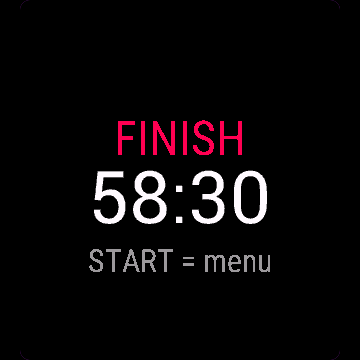
Controls: BACK/LAP = next segment (the button you already click on every lap). START = menu (back to race, undo, finish now, save, discard). UP undoes the last transition directly. On touch-only watches: tap = next segment, hold = menu. Opening the menu does not pause timing or recording.
Otwórz Wyścig hybrydowy z menu aplikacji na zegarku.
Sterowanie: WSTECZ/LAP to następny segment (ten sam przycisk co przy każdym okrążeniu). START otwiera menu (wróć do wyścigu, cofnij, zakończ teraz, zapisz, odrzuć). GÓRA cofa ostatnią zmianę wprost. Na zegarkach tylko dotykowych: stuknięcie to następny segment, przytrzymanie otwiera menu. Otwarcie menu nie wstrzymuje pomiaru czasu ani nagrywania.
Öffne Hybrid Race Tracker im App-Menü der Uhr.
Bedienung: BACK/LAP = nächstes Segment (die Taste, die du ohnehin bei jeder Runde drückst). START = Menü (zurück zum Rennen, Rückgängig, Jetzt beenden, Speichern, Verwerfen). UP macht den letzten Wechsel direkt rückgängig. Auf reinen Touch-Uhren: Tippen = nächstes Segment, Halten = Menü. Das Öffnen des Menüs unterbricht weder Zeitmessung noch Aufzeichnung.
Ouvrez Hybrid Race Tracker depuis le menu des applications de la montre.
Commandes : BACK/LAP = segment suivant (le bouton sur lequel vous appuyez déjà à chaque tour). START = menu (retour à la course, annuler, terminer maintenant, enregistrer, supprimer). UP annule directement la dernière transition. Sur les montres tactiles uniquement : toucher = segment suivant, maintenir = menu. L'ouverture du menu ne met pas en pause le chronométrage ni l'enregistrement.
Abre Hybrid Race Tracker desde el menú de apps del reloj.
Controles: BACK/LAP = siguiente segmento (el botón que ya pulsas en cada vuelta). START = menú (volver a la carrera, deshacer, finalizar ahora, guardar, descartar). UP deshace la última transición directamente. En relojes solo táctiles: toque = siguiente segmento, mantener pulsado = menú. Abrir el menú no pausa el tiempo ni la grabación.
Open Hybrid Race Tracker via het appmenu van het horloge.
Bediening: BACK/LAP = volgend segment (de knop die je al bij elke ronde indrukt). START = menu (terug naar race, ongedaan maken, nu voltooien, opslaan, verwijderen). UP maakt de laatste transitie direct ongedaan. Op horloges met alleen touchscreen: tik = volgend segment, ingedrukt houden = menu. Het openen van het menu pauzeert de tijdmeting of registratie niet.
時計のアプリメニューから Hybrid Race Tracker を開いてください。
操作方法: BACK/LAP = 次のセグメント(毎ラップで普段押しているボタン)。START = メニュー(レースに戻る、取り消し、今すぐ終了、保存、破棄)。UP は直前のトランジションを直接取り消し。タッチ操作のみのウォッチ:タップ = 次のセグメント、長押し = メニュー。メニューを開いても計測や記録は一時停止しません。
Apri Hybrid Race Tracker dal menu delle app dell'orologio.
Comandi: BACK/LAP = segmento successivo (il pulsante che premi già a ogni lap). START = menu (torna alla gara, annulla, termina ora, salva, scarta). UP annulla direttamente l'ultima transizione. Sugli orologi solo touch: tocco = segmento successivo, pressione prolungata = menu. L'apertura del menu non mette in pausa il cronometro né la registrazione.
在手表的应用菜单中打开 Hybrid Race Tracker。
操作:BACK/LAP = 下一分段(即您每圈都会点击的按键)。START = 菜单(返回比赛、撤销、立即结束、保存、放弃)。UP 直接撤销上一次换项。在纯触控手表上:点击 = 下一分段,长按 = 菜单。打开菜单不会暂停计时或记录。
Откройте Hybrid Race Tracker из меню приложений на часах.
Управление: BACK/LAP = следующий отрезок (кнопка, которую вы уже привыкли нажимать на каждом круге). START = меню (вернуться к гонке, отменить, завершить сейчас, сохранить, сбросить). UP напрямую отменяет последний переход. На часах только с сенсорным экраном: касание = следующий отрезок, удержание = меню. Открытие меню не останавливает таймер и запись.
Abra Hybrid Race Tracker pelo menu de apps do relógio.
Controles: BACK/LAP = próximo segmento (o botão que você já aperta em cada volta). START = menu (voltar à prova, desfazer, finalizar agora, salvar, descartar). UP desfaz a última transição diretamente. Em relógios apenas com toque: toque = próximo segmento, segurar = menu. Abrir o menu não pausa a contagem de tempo nem a gravação.
Otevřete Hybrid Race Tracker z nabídky aplikací v hodinkách.
Ovládání: BACK/LAP = další úsek (tlačítko, které mačkáte při každém kole). START = menu (zpět do závodu, krok zpět, dokončit, uložit, zahodit). UP vrátí poslední přechod přímo. Na hodinkách pouze s dotykovým displejem: klepnutí = další úsek, podržení = menu. Otevření menu nepozastaví měření času ani záznam.
Abra Hybrid Race Tracker no menu de aplicações do relógio.
Controlos: BACK/LAP = próximo segmento (o botão em que já carrega em cada volta). START = menu (voltar à prova, anular, terminar agora, guardar, descartar). UP anula diretamente a última transição. Em relógios apenas táteis: toque = próximo segmento, manter premido = menu. Abrir o menu não pausa a contagem de tempo nem a gravação.
시계의 앱 메뉴에서 Hybrid Race Tracker을(를) 여세요.
조작 방법: BACK/LAP = 다음 구간(매 랩마다 누르는 바로 그 버튼). START = 메뉴(레이스로 복귀, 실행 취소, 지금 종료, 저장, 삭제). UP은 마지막 전환을 즉시 실행 취소합니다. 터치 전용 시계: 탭 = 다음 구간, 길게 누르기 = 메뉴. 메뉴를 열어도 시간 측정이나 기록은 일시 정지되지 않습니다.
Öppna Hybrid Race Tracker från klockans appmeny.
Kontroller: BACK/LAP = nästa segment (knappen du redan trycker på vid varje varv). START = meny (tillbaka till tävling, ångra, avsluta nu, spara, kasta). UP ångrar den senaste växlingen direkt. På klockor med enbart pekskärm: tryck = nästa segment, håll intryckt = meny. Att öppna menyn pausar inte tidtagning eller registrering.
Åbn Hybrid Race Tracker fra urets appmenu.
Betjening: BACK/LAP = næste segment (knappen du allerede trykker på ved hver omgang). START = menu (tilbage til race, fortryd, afslut nu, gem, kassér). UP fortryder det seneste skift direkte. På ure med ren touchskærm: tryk = næste segment, hold = menu. Åbning af menuen pauser hverken tidtagning eller registrering.
Åpne Hybrid Race Tracker fra appmenyen på klokken.
Kontroller: BACK/LAP = neste segment (knappen du allerede trykker på for hver runde). START = meny (tilbake til løpet, angre, fullfør nå, lagre, forkast). UP angrer forrige veksling direkte. På klokker med kun berøring: trykk = neste segment, hold inne = meny. Å åpne menyen pauser ikke tidtaking eller registrering.
從手錶的應用程式選單開啟 Hybrid Race Tracker。
操作方式:BACK/LAP = 下一區段(也就是你平時計圈時按下的同一個按鈕)。START = 選單(返回比賽、復原、立即結束、儲存、捨棄)。UP 可直接復原上一次換項。純觸控手錶:輕觸 = 下一區段,長按 = 選單。開啟選單不會暫停計時或記錄。
Avaa Hybrid Race Tracker kellon sovellusvalikosta.
Ohjaus: BACK/LAP = seuraava osuus (painike, jota painat jo valmiiksi jokaisella kierroksella). START = valikko (takaisin kilpailuun, kumoa, lopeta nyt, tallenna, hylkää). UP kumoaa edellisen vaihdon suoraan. Pelkällä kosketuksella toimivissa kelloissa: napautus = seuraava osuus, pitkä painallus = valikko. Valikon avaaminen ei pysäytä ajanottoa tai tallennusta.
Otvorte Hybrid Race Tracker z ponuky aplikácií v hodinkách.
Ovládanie: BACK/LAP = ďalší úsek (tlačidlo, ktoré už stláčate pri každom kole). START = menu (späť na preteky, vrátiť späť, ukončiť teraz, uložiť, zahodiť). UP priamo vráti posledný prechod. Na hodinkách iba s dotykovým ovládaním: ťuknutie = ďalší úsek, podržanie = menu. Otvorenie menu nepozastaví meranie času ani záznam.
Odprite Hybrid Race Tracker v meniju aplikacij na uri.
Upravljanje: BACK/LAP = naslednji odsek (gumb, ki ga že tako pritisnete ob vsakem krogu). START = meni (nazaj na tekmo, razveljavi, zaključi zdaj, shrani, zavrzi). UP neposredno razveljavi zadnjo menjavo. Na urah z zaslonom samo na dotik: tap = naslednji odsek, pridržanje = meni. Odpiranje menija ne ustavi merjenja časa ali beleženja.
Buka Hybrid Race Tracker dari menu aplikasi jam.
Kontrol: BACK/LAP = segmen berikutnya (tombol yang biasa Anda tekan di setiap lap). START = menu (kembali ke lomba, batalkan, selesaikan sekarang, simpan, buang). UP langsung membatalkan transisi terakhir. Pada jam tangan khusus layar sentuh: ketuk = segmen berikutnya, tahan = menu. Membuka menu tidak menjeda waktu atau perekaman.
Nyissa meg a(z) Hybrid Race Tracker alkalmazást az óra alkalmazásmenüjéből.
Vezérlés: BACK/LAP = következő szakasz (a gomb, amit minden körnél amúgy is megnyomsz). START = menü (vissza a versenyhez, visszavonás, befejezés most, mentés, elvetés). UP közvetlenül visszavonja az utolsó átmenetet. Csak érintős órákon: koppintás = következő szakasz, nyomva tartás = menü. A menü megnyitása nem állítja meg az időmérést és a rögzítést.
เปิด Hybrid Race Tracker จากเมนูแอปของนาฬิกา
Controls: BACK/LAP = ช่วงถัดไป (ปุ่มที่คุณกดในทุกรอบอยู่แล้ว) START = เมนู (back to race, undo, finish now, save, discard) UP ยกเลิก transition ล่าสุดได้โดยตรง สำหรับนาฬิกาแบบสัมผัสล้วน: แตะ = ช่วงถัดไป, แตะค้าง = เมนู การเปิดเมนูไม่ได้หยุดเวลาหรือการบันทึกชั่วคราว
Ανοίξτε το Hybrid Race Tracker από το μενού εφαρμογών του ρολογιού.
Χειρισμός: BACK/LAP = επόμενο τμήμα (το κουμπί που πατάτε ήδη σε κάθε γύρο). START = μενού (επιστροφή στον αγώνα, αναίρεση, ολοκλήρωση τώρα, αποθήκευση, απόρριψη). Το UP αναιρεί άμεσα την τελευταία μετάβαση. Σε ρολόγια μόνο με οθόνη αφής: πάτημα = επόμενο τμήμα, παρατεταμένο πάτημα = μενού. Το άνοιγμα του μενού δεν διακόπτει τη χρονομέτρηση ούτε την καταγραφή.
Otvorite Hybrid Race Tracker iz izbornika aplikacija na satu.
Kontrole: BACK/LAP = sljedeći segment (gumb koji već pritišćete pri svakom krugu). START = izbornik (povratak na utrku, poništi, završi sada, spremi, odbaci). UP izravno poništava zadnju tranziciju. Na satovima samo sa zaslonom na dodir: dodir = sljedeći segment, držanje = izbornik. Otvaranje izbornika ne pauzira mjerenje vremena niti snimanje.
פתחו את Hybrid Race Tracker מתפריט האפליקציות של השעון.
פקדים: BACK/LAP = המקטע הבא (הכפתור שלוחצים עליו ממילא בכל הקפה). START = תפריט (חזרה למרוץ, ביטול פעולה אחרונה, סיום עכשיו, שמירה, ביטול). UP מבטל ישירות את המעבר האחרון. בשעוני מגע בלבד: הקשה = המקטע הבא, לחיצה ארוכה = תפריט. פתיחת התפריט אינה משהה את מדידת הזמן או ההקלטה.
Buka Hybrid Race Tracker daripada menu aplikasi jam.
Kawalan: BACK/LAP = segmen seterusnya (butang yang anda sudah biasa tekan pada setiap pusingan). START = menu (kembali ke perlumbaan, buat asal, selesai sekarang, simpan, buang). UP membatalkan peralihan terakhir secara terus. Pada jam tangan sentuh sahaja: ketik = segmen seterusnya, tekan dan tahan = menu. Membuka menu tidak menjeda pemasaan atau rakaman.
Manual
The full manual and the detailed permission descriptions are available in English and Polish.
Hybrid Race Tracker: user manual
What it does
Hybrid Race Tracker times a hybrid fitness race: 8 runs and 8 stations, 31 segments in the order Run, Transition, Station. You move on with a button, never by GPS. One Garmin activity is saved, a lap per segment.
Requirements and supported watches
Needs Connect IQ 3.3.0+ and the Connect IQ or Garmin Connect phone app. Supported watches:
- Round AMOLED: epix 2 and epix Pro 2, fēnix 8, E, Forerunner 165, 265, 570, 965, 970, Instinct 3 AMOLED, Crossover AMOLED, Venu 2, 3, 4, vivoactive 5, 6.
- Round MIP: enduro 3, fēnix 7 series, 8 Solar, Forerunner 55, 245, 255, vivoactive 4.
- Square and rectangular AMOLED: Venu Sq 2, Venu X1.
Installation
In the Connect IQ app on your phone (or Garmin Connect, then the Connect IQ Store) find "Hybrid Race Tracker" by Dialforge, tap Install and sync the watch. Open it from the apps list: press START on the watch face, then pick Hybrid Race Tracker.
First launch
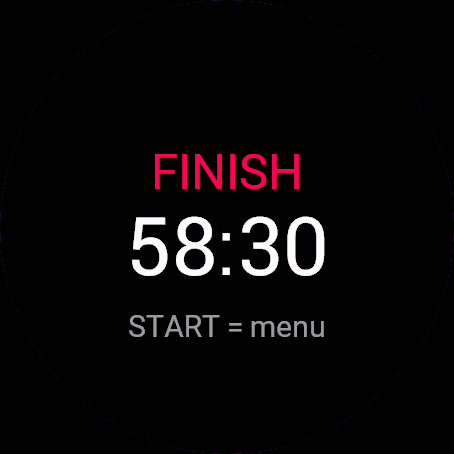
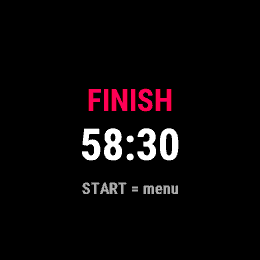
The start screen shows the app name, "Press START" and the free beta days left. START (or a tap) opens the menu: Start race, Mode, Run pace (GPS). The 30-day free beta starts the first time you open it.
Controls
Watches with buttons (START, UP, DOWN, BACK)
- Start menu: START on Mode cycles Race, Training 25%, 50%, 75%, 100%. START on Run pace (GPS) switches it On or Off.
- Race: BACK (the LAP button) goes to the next segment. UP undoes the last transition. DOWN does nothing.
- START opens the race menu: Back to race, Undo last transition, Finish now, Save and finish, Discard (asks twice). The clock keeps running.
Touch watches (tap, hold, swipe)
- Watches with UP and DOWN buttons: taps do nothing, so a wet sleeve cannot close a segment.
- Touch-only watches: tap is the next segment, hold opens the race menu with Undo last transition. Swipes do nothing.
Settings
Phone: Connect IQ app, Hybrid Race Tracker, Settings (the unlock code fields are there too).
On the watch, inside the app:
- Mode: Race, or Training at 25%, 50%, 75% or 100% of the distances.
- Run pace (GPS): Off by default. On shows pace on runs. Best times are kept per mode and scale.
- Targets scale with the mode: runs 1000 m, stations 50 to 1000 m, WALL BALLS 100 reps.
License
- Free beta: 30 days from the first launch, everything works.
- Price: 5.99 EUR once at dialforge.dev, no subscription. The 8-character code is tied to your watch's UID.
- Where to enter it: phone, Connect IQ app, Hybrid Race Tracker, Settings. Read the UID in "Watch UID (needed to buy a code)", buy the code, then type it into "Unlock code from dialforge.dev". The end-of-beta screen on the watch shows the UID too.
- After the beta without a code: an end-of-beta screen with the UID replaces the app. Enter the code, then open it again. New watch? Write to us and the code moves for free.
Privacy and permissions
Permissions:
- Activity recording: saves the session to Garmin Connect.
- Extra FIT fields: adds the app's values to the saved activity.
- Sensors: heart rate shown during the race.
- Positioning: only for run pace when Run pace (GPS) is On.
No internet use. Data stays on the watch and in the activities you save.
Troubleshooting
The code does not work. Check that the UID you bought for matches "Watch UID (needed to buy a code)" and type all 8 characters (case is ignored, no 0, O, 1 or I). A code for another app does not fit. Sync, then reopen.
What is on the race screen? Total time, segment name and target, segment clock, next segment, heart rate, and a plus or minus against your best split once one is saved.
Does it use GPS? Only if you switch on Run pace (GPS), and only for run pace. Transitions are always your button, so indoor races work.
Where is my race afterwards? Choose Save and finish: one Garmin Connect activity, a lap per segment. After an undo the file keeps one extra short lap; app times stay right.
Contact
kontakt@dialforge.dev or dialforge.dev. Please write before leaving a low rating.
Wyścig hybrydowy: instrukcja obsługi
Do czego służy
Wyścig hybrydowy mierzy czas wyścigu hybrydowego: 8 biegów i 8 stacji, razem 31 segmentów w stałej kolejności Bieg, Strefa zmian, Stacja. Dalej idziesz przyciskiem, nigdy przez GPS, a wyścig zapisuje się jako jedna aktywność Garmin z okrążeniem na segment.
Wymagania i obsługiwane zegarki
Wymaga Connect IQ 3.3.0+ i aplikacji Connect IQ albo Garmin Connect w telefonie. Obsługiwane zegarki:
- Okrągłe AMOLED: epix 2 i epix Pro 2, fēnix 8, E, Forerunner 165, 265, 570, 965, 970, Instinct 3 AMOLED, Crossover AMOLED, Venu 2, 3, 4, vivoactive 5, 6.
- Okrągłe MIP: enduro 3, seria fēnix 7, fēnix 8 Solar, Forerunner 55, 245, 255, vivoactive 4.
- Kwadratowe i prostokątne AMOLED: Venu Sq 2, Venu X1.
Instalacja
Na telefonie otwórz aplikację Connect IQ (albo Garmin Connect, a w niej sklep Connect IQ), wyszukaj "Wyścig hybrydowy" od Dialforge, stuknij Zainstaluj i zsynchronizuj zegarek. Uruchom ją z listy aplikacji: na tarczy naciśnij START i wybierz Wyścig hybrydowy.
Pierwsze uruchomienie
Ekran startowy pokazuje nazwę, "Naciśnij START" i liczbę dni bety do końca. START (albo stuknięcie) otwiera menu: Rozpocznij wyścig, Tryb, Tempo biegu (GPS). Ostatni wybór jest pamiętany. 30-dniowa darmowa beta zaczyna się przy pierwszym otwarciu.
Sterowanie
Zegarki z przyciskami (START, GÓRA, DÓŁ, WSTECZ)
- Menu startowe: START na Tryb przełącza Wyścig, Trening 25%, 50%, 75%, 100%. START na Tempo biegu (GPS) włącza i wyłącza.
- Wyścig: WSTECZ (przycisk LAP) przechodzi do następnego segmentu. GÓRA cofa ostatnie przejście. DÓŁ nic nie robi.
- START otwiera menu wyścigu: Wróć do wyścigu, Cofnij ostatnią zmianę, Zakończ teraz, Zapisz i zakończ, Odrzuć (pyta dwa razy). Zegar i nagrywanie idą dalej przy otwartym menu.
Zegarki dotykowe (stuknięcie, przytrzymanie, przesunięcie)
- Zegarki z przyciskami GÓRA i DÓŁ: stuknięcia nic nie robią, żeby mokry rękaw nie zamknął segmentu.
- Zegarki tylko dotykowe: stuknięcie przechodzi do następnego segmentu, przytrzymanie otwiera menu wyścigu, a tam jest Cofnij ostatnią zmianę. Przesunięcia nic nie robią.
Ustawienia
Telefon: aplikacja Connect IQ, Wyścig hybrydowy, Ustawienia (są tam też pola kodu odblokowania).
Na zegarku, w aplikacji:
- Tryb: Wyścig albo Trening na 25%, 50%, 75% lub 100% dystansów.
- Tempo biegu (GPS): domyślnie Wyłączone. Włączone pokazuje tempo na biegach. Najlepsze czasy są pamiętane osobno dla trybu i skali.
- Cele skalują się z trybem: biegi 1000 m, stacje od 50 do 1000 m, WALL BALLS 100 powtórzeń.
Licencja
- Darmowa beta: 30 dni od pierwszego uruchomienia, wszystko działa.
- Cena: jednorazowo 5,99 EUR na dialforge.dev, bez abonamentu. 8-znakowy kod jest przypisany do UID zegarka.
- Gdzie wpisać: telefon, aplikacja Connect IQ, Wyścig hybrydowy, Ustawienia. Odczytaj UID w polu "UID zegarka (potrzebny do zakupu kodu)", kup kod i wpisz go w "Kod odblokowania z dialforge.dev". Ekran końca bety na zegarku też pokazuje UID.
- Po becie bez kodu: zamiast aplikacji pojawia się ekran końca bety z UID. Wpisz kod i otwórz aplikację ponownie. Nowy zegarek? Napisz do nas, przeniesiemy kod za darmo.
Prywatność i uprawnienia
Uprawnienia:
- Zapis aktywności: zapisuje sesję w Garmin Connect.
- Dodatkowe pola FIT: dopisuje wartości aplikacji do aktywności.
- Czujniki: odczyt tętna z zegarka, żeby pokazać je w trakcie wyścigu.
- Pozycja: tylko gdy Tempo biegu (GPS) jest włączone, do tempa na biegach.
Zero połączeń z internetem. Dane zostają w zegarku i w zapisywanych aktywnościach.
Rozwiązywanie problemów
Kod nie działa. Sprawdź, czy UID, dla którego kupiono kod, zgadza się z polem "UID zegarka (potrzebny do zakupu kodu)", i wpisz wszystkie 8 znaków (wielkość liter bez znaczenia, bez 0, O, 1, I). Kod do innej aplikacji nie pasuje. Zsynchronizuj i otwórz ponownie.
Co widać na ekranie wyścigu? Czas łączny, nazwę i cel segmentu, zegar segmentu, następny segment i tętno. Plus albo minus względem rekordu pojawia się, gdy dla tego trybu jest zapisany rekord.
Czy używa GPS? Tylko gdy włączysz Tempo biegu (GPS), i tylko do tempa na biegach. Zmiany zawsze zaznaczasz sam przyciskiem, więc wyścig na hali też działa.
Gdzie jest mój wyścig? Wybierz Zapisz i zakończ: jedna aktywność w Garmin Connect, HIIT tam, gdzie zegarek to obsługuje, z okrążeniem na segment. Po cofnięciu plik ma jedno dodatkowe krótkie okrążenie, ale czasy w aplikacji się zgadzają.
Kontakt
kontakt@dialforge.dev albo dialforge.dev. Napisz, zanim wystawisz niską ocenę.
Permissions and privacy
This product asks the watch for the permissions below. Connect IQ shows them when you install it.
- Activity recording: Saves your workout in Garmin Connect (the activity from this app). The data stays in your Garmin account.Zapisuje trening w Garmin Connect (aktywność z tej aplikacji). Dane zostają na Twoim koncie Garmin.
- Own data fields in the activity: Adds this app's own numbers (for example points or sets) to the saved activity.Dodaje do zapisanej aktywności liczby tej aplikacji (na przykład punkty albo serie).
- Heart rate and sensors: Reads heart rate and other sensors of the watch while the app runs.Odczytuje tętno i inne czujniki zegarka, gdy aplikacja działa.
- Location (GPS): Uses the watch location for distance, speed or sun and moon times. The location is not sent anywhere.Używa lokalizacji zegarka do dystansu, prędkości albo godzin słońca i księżyca. Lokalizacja nigdzie nie jest wysyłana.
This product does not use the internet and sends no data to our servers.
The full manual and the detailed permission descriptions are available in English and Polish.
Compatible watches
51mm, D2 Air X15, D2 Mach 1 Pro, Enduro 2, Enduro 3, epix (Gen 2), epix Pro (Gen 2) 42mm, epix Pro (Gen 2) 47mm, epix Pro (Gen 2) 51mm, Forerunner 165, Forerunner 165 Music, Forerunner 245, Forerunner 245 Music, Forerunner 255, Forerunner 255 Music, Forerunner 255s, Forerunner 255s Music, Forerunner 265, Forerunner 265s, Forerunner 55, Forerunner 570 42mm, Forerunner 570 47mm, Forerunner 965, Forerunner 970, fēnix 7, fēnix 7 Pro, fēnix 7 Pro - Solar Edition (no Wi-Fi), fēnix 7S, fēnix 7S Pro, fēnix 7X, fēnix 7X Pro, fēnix 7X Pro - Solar Edition (no Wi-Fi), fēnix 8 43mm, fēnix 8 47mm, fēnix 8 Pro 47mm, fēnix 8 Solar 47mm, fēnix 8 Solar 51mm, fēnix E, Instinct 3 AMOLED 45mm, Instinct 3 AMOLED 50mm, Instinct Crossover AMOLED, MicroLED, quatix 7, quatix 7 Pro, quatix 7 Sapphire, quatix 7X Solar, quatix 8 47mm, quatix 8 Pro 47mm, tactix 7, tactix 7 – AMOLED Edition, tactix 8 47mm, tactix 8 Solar 51mm, Venu 2, Venu 2 Plus, Venu 2S, Venu 3, Venu 3S, Venu 4 41mm, Venu 4 45mm, Venu Sq 2, Venu Sq 2 Music, Venu X1, vívoactive 4, vívoactive 4S, vívoactive 5, vívoactive 6
Screenshots
FAQ
What happens after the 30-day beta?
The app shows a screen asking for a one-time unlock code from dialforge.dev instead of opening normally. Buy the code once below, no subscription.
Does the app send my data to Dialforge?
No. The app works fully offline, and the unlock code is checked on the watch itself, without contacting any server.
The app does not work as described on my watch. Can I get a refund?
Yes. Write through the feedback form below, or to the e-mail in the footer. If we cannot fix it, we refund you, as described in the terms.
Changing your watch?
Write to me and I will move your code for free.
Changelog
- First release (beta).
- Pierwsze wydanie (beta).
- Erste Veröffentlichung (Beta).
- Première version (bêta).
- Primera versión (beta).
- Eerste release (beta).
- 初回リリース(ベータ版)。
- Prima versione (beta).
- 首次发布(测试版)。
- Первый релиз (бета).
- Primeiro lançamento (beta).
- První verze (beta).
- Primeira versão (beta).
- 첫 출시(베타).
- Första versionen (beta).
- Første udgivelse (beta).
- Første versjon (beta).
- 首發版本(beta)。
- Ensimmäinen julkaisu (beta).
- Prvé vydanie (beta).
- Prva različica (beta).
- Rilis pertama (beta).
- Első kiadás (béta).
- เวอร์ชันแรก (beta)
- Πρώτη έκδοση (beta).
- Prvo izdanje (beta).
- גרסה ראשונה (בטא).
- Keluaran pertama (beta).
Unlock
€5.99
One-time payment. No subscription. The code works on the watch whose UID you enter.
- Install the app from the Connect IQ store. It works fully and for free for the first 30 days.
- Find your 10-digit UID: Connect IQ app on the phone > My Device > Apps or Data Fields > this app > Settings > Watch UID.
- Enter UID and e-mail, pay with PayPal (cards work without a PayPal account). The code appears here at once.
- Type the code into the same settings page, field "Unlock code". The watch checks it offline.
Thank you! Your code:
Enter the code in the app settings, field "Unlock code". The watch checks it offline.
Tell us how to make it better
Missing a data field, a colour, a layout? Found a bug on your watch model? Write it here. We read every message and ship improvements in updates.