Everyday health
Pill Reminder
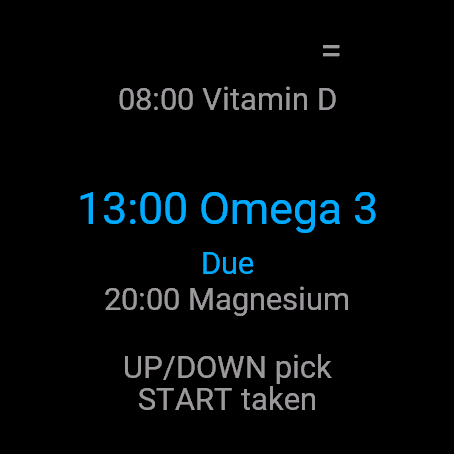
See today's doses at a glance, mark one taken with a single press.
Dzisiejsze dawki jednym rzutem oka, jedno wciśnięcie i dawka odhaczona.
Die heutigen Einnahmen auf einen Blick sehen, mit einem einzigen Tastendruck als eingenommen markieren.
Consultez les prises du jour en un coup d'œil, marquez-en une comme prise d'une simple pression.
Consulta las tomas de hoy de un vistazo, marca una como tomada con una sola pulsación.
Zie in één oogopslag de doseringen van vandaag, markeer er één als ingenomen met één druk op de knop.
今日の服薬予定を一目で確認し、ボタン 1 回で服用済みに。
Visualizza le dosi di oggi a colpo d'occhio, segnane una come assunta con una sola pressione.
今日服药安排一目了然,单次按键即可标记已服用。
Все приемы на сегодня перед глазами, отметка о приеме в одно нажатие.
Veja as doses de hoje rapidamente, marque como tomada com apenas um toque.
Přehled dnešních dávek na první pohled, označení užité dávky jediným stisknutím.
Veja as doses de hoje de relance, marque uma como tomada com um único toque.
오늘 복용할 약을 한눈에 확인하고, 한 번 눌러 복용 완료를 표시하세요.
Se dagens doser med ett snabbt ögonkast, markera en som tagen med ett enda tryck.
Se dagens doser med et hurtigt blik, markér en taget med et enkelt tryk.
Se dagens doser med et raskt blikk, merk én som tatt med et enkelt trykk.
一目了然查看今日服藥排程,按一下即可標記已服用。
Näet päivän annokset yhdellä silmäyksellä ja merkitset otetuksi yhdellä painalluksella.
Majte dnešné dávky okamžite na očiach, označte užitie jedným stlačením.
Preglejte današnje odmerke na hitro in z enim samim pritiskom označite vzete.
Lihat dosis hari ini secara sekilas, tandai sudah diminum hanya dengan satu tekanan tombol.
Lásd a mai adagokat egyetlen pillantással, jelöld be a bevételt egyetlen gombnyomással.
ดูรายการยาที่ต้องทานในวันนี้ได้อย่างรวดเร็ว พร้อมบันทึกว่าทานแล้วได้ด้วยการกดปุ่มเพียงครั้งเดียว
Δείτε τις σημερινές δόσεις με μια ματιά, σημειώστε μία ως ληφθείσα με ένα μόνο πάτημα.
Pregledajte današnje doze na prvi pogled, zabilježite uzetu dozu jednim pritiskom.
ראה את המנות של היום במבט חטוף, סמן מנה שנלקחה בלחיצה אחת.
Lihat dos hari ini sepintas lalu, tandakan dos yang diambil dengan sekali tekan.
Coming to Connect IQ Unlock €4.99

Beta: free for 30 days
The app works fully and for free for the first 30 days after you first open it. After that you can buy a one-time unlock code below. No subscription.
Pill Reminder tracks medication and supplement times on your wrist. Garmin has no built-in tool for this, only generic phone notifications. It can wake the watch when a dose is due, even with the app closed, and repeats the reminder once after 30 minutes if the dose is still not taken.
- Up to 6 medications or supplements, each with up to 4 times a day and optional days of the week
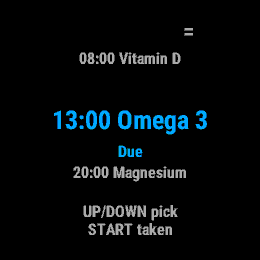
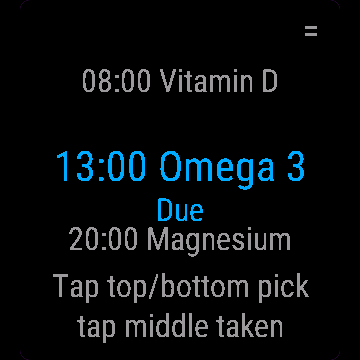
- Today's doses in order: due now, taken, skipped, upcoming, missed after 2 hours
- START marks the selected dose taken and records the time, menu has Skip and Undo
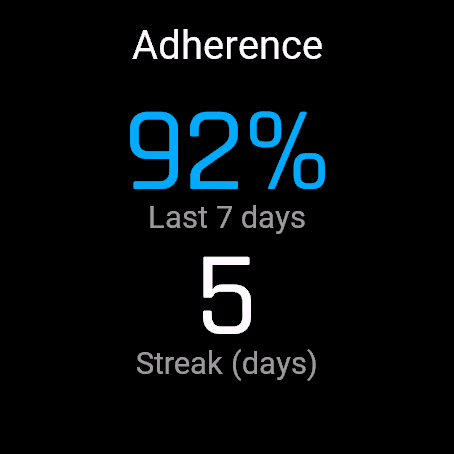
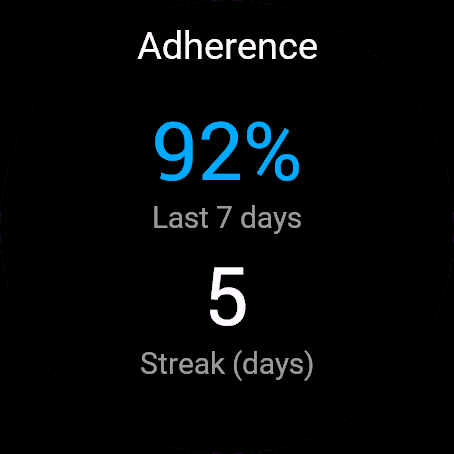
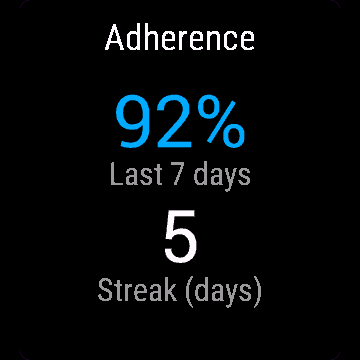
- 7 day adherence percentage and a streak of fully taken days (counted over the last 30 days)
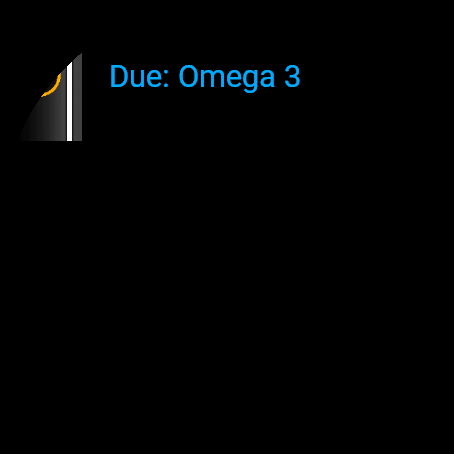
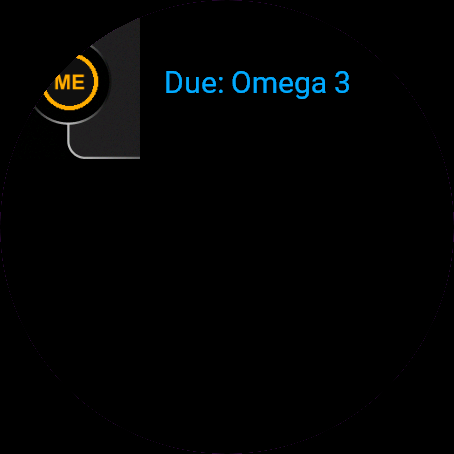
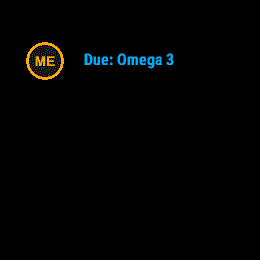
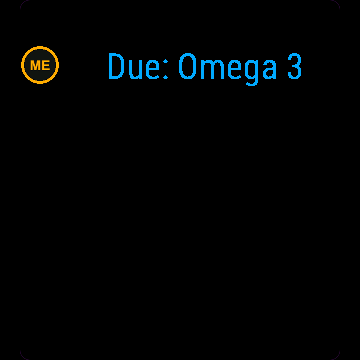
- Glance shows the next or due dose without opening the app
Przypomnienie o lekach pilnuje godzin leków i suplementów na ręku. Garmin nie ma do tego wbudowanego narzędzia, tylko zwykłe powiadomienia z telefonu. Aplikacja może zbudzić zegarek, gdy dawka jest na czasie, nawet gdy jest zamknięta, i powtarza przypomnienie raz po 30 minutach, jeśli dawka nadal nie jest wzięta.
- Do 6 leków albo suplementów, każdy z maksymalnie 4 godzinami dziennie i opcjonalnymi dniami tygodnia
- Dzisiejsze dawki w kolejności: teraz, wzięte, pominięte, czekają, spóźnione po 2 godzinach
- START oznacza wybraną dawkę jako wziętą i zapisuje czas, menu ma Pomiń i Cofnij
- Procent wziętych z ostatnich 7 dni i passa dni w pełni wziętych (liczona z ostatnich 30 dni)
- Podgląd na liście widgetów pokazuje następną albo aktualną dawkę bez otwierania aplikacji
Pill Reminder erinnert dich direkt am Handgelenk an Medikamente und Nahrungsergänzungsmittel. Garmin bietet dafür keine integrierte Funktion, nur allgemeine Smartphone-Benachrichtigungen. Die App kann die Uhr aufwecken, wenn eine Einnahme fällig ist, selbst wenn die App geschlossen ist, und wiederholt die Erinnerung einmal nach 30 Minuten, falls die Einnahme noch nicht bestätigt wurde.
- Bis zu 6 Medikamente oder Nahrungsergänzungsmittel mit jeweils bis zu 4 Einnahmezeiten pro Tag und optionalen Wochentagen
- Heutige Einnahmen sortiert nach: jetzt fällig, eingenommen, übersprungen, anstehend, verpasst nach 2 Stunden
- START markiert die ausgewählte Einnahme als erledigt und speichert die Uhrzeit, das Menü bietet Skip und Undo
- 7-Tage-Einhaltungsquote in Prozent und eine Serie vollständig eingehaltener Tage (berechnet über die letzten 30 Tage)
- Glance zeigt die nächste oder fällige Einnahme, ohne die App zu öffnen
Pill Reminder suit les horaires de vos médicaments et compléments alimentaires à votre poignet. Garmin ne propose aucun outil intégré pour cela, seulement des notifications génériques du téléphone. L'application peut réveiller la montre lorsqu'une prise est prévue, même si l'application est fermée, et répète le rappel une fois après 30 minutes si la prise n'est toujours pas validée.
- Jusqu'à 6 médicaments ou compléments, chacun avec jusqu'à 4 prises par jour et des jours de la semaine optionnels
- Prises du jour dans l'ordre : à prendre maintenant, prises, ignorées, à venir, manquées après 2 heures
- START marque la prise sélectionnée comme prise et enregistre l'heure, le menu contient Skip et Undo
- Pourcentage d'observance sur 7 jours et série de jours complets respectés (calculés sur les 30 derniers jours)
- Glance affiche la dose suivante ou à prendre sans ouvrir l'application
Pill Reminder controla los horarios de tus medicamentos y suplementos desde tu muñeca. Garmin no tiene una herramienta integrada para esto, solo notificaciones genéricas del teléfono. Puede activar el reloj cuando toca una toma, incluso con la app cerrada, y repite el recordatorio una vez pasados 30 minutos si la dosis aún no se ha tomado.
- Hasta 6 medicamentos o suplementos, cada uno con hasta 4 tomas al día y días de la semana opcionales
- Tomas de hoy ordenadas: pendientes ahora, tomadas, omitidas, próximas, no tomadas tras 2 horas
- START marca la dosis seleccionada como tomada y registra la hora; el menú incluye Skip y Undo
- Porcentaje de adherencia de 7 días y racha de días completados (contados sobre los últimos 30 días)
- Glance muestra la dosis siguiente o pendiente sin abrir la app
Pill Reminder houdt innametijden voor medicijnen en supplementen bij op je pols. Garmin heeft hiervoor geen ingebouwde functie, alleen algemene telefoonmeldingen. De app kan het horloge activeren wanneer het tijd is voor een inname, zelfs als de app gesloten is, en herhaalt de herinnering eenmaal na 30 minuten als de dosis nog niet is ingenomen.
- Maximaal 6 medicijnen of supplementen, elk met maximaal 4 tijdstippen per dag en optionele dagen van de week
- Doses van vandaag op volgorde: nu innemen, ingenomen, overgeslagen, gepland, gemist na 2 uur
- START markeert de geselecteerde dosis als ingenomen en legt het tijdstip vast, het menu heeft Skip en Undo
- Therapietrouwpercentage over 7 dagen en een streak van volledig ingenomen dagen (berekend over de afgelopen 30 dagen)
- Glance toont de volgende of openstaande dosis zonder de app te openen
Pill Reminder は、薬やサプリメントの服用時間を手首のウォッチで管理するアプリです。Garmin にはこうした専用機能がなく、スマホからの一般的な通知しかありませんでした。このアプリなら、アプリを閉じていても服用時間になるとウォッチを起動して通知し、まだ服用していない場合は 30 分後に一度だけ再リマインドします。
- 最大 6 種類の薬やサプリメント。それぞれ 1 日最大 4 回まで設定でき、曜日の指定も可能
- 今日の服用予定を順番に表示: 今すぐ服用、服用済み、スキップ、次回予定、2 時間経過で未服用
- START で選択した予定を服用済みにマークして時刻を記録。メニューには Skip と Undo を用意
- 7 日間の服薬達成率と、すべて服用できた日の連続記録(過去 30 日間でカウント)
- Glance でアプリを開かずに次回または服用予定の薬を確認
Pill Reminder tiene traccia degli orari di farmaci e integratori al polso. Garmin non offre alcuno strumento integrato per questo, solo notifiche generiche dal telefono. L'app può attivare l'orologio quando è ora di una dose, anche con l'app chiusa, e ripete il promemoria una volta dopo 30 minuti se la dose non è ancora stata registrata come assunta.
- Fino a 6 farmaci o integratori, ciascuno con un massimo di 4 orari al giorno e giorni della settimana opzionali
- Dosi di oggi in ordine: da assumere ora, assunta, saltata, in programma, mancata dopo 2 ore
- START contrassegna la dose selezionata come assunta e registra l'orario; il menu include Skip e Undo
- Percentuale di aderenza a 7 giorni e una serie di giorni con dosi interamente assunte (conteggiata sugli ultimi 30 giorni)
- Glance mostra la dose successiva o in scadenza senza aprire l'app
Pill Reminder 在手腕上追踪用药和补充剂时间。Garmin 没有内置此类工具,仅有通用的手机通知。即使在应用关闭时,它也能在服药时间唤醒手表,并在未服药的情况下于 30 分钟后再次提醒一次。
- 最多支持 6 种药物或补充剂,每种每日最多支持 4 次,并可自选星期几提醒
- 今日服药按顺序列出:当前应服、已服、已跳过、即将到来、超时 2 小时未服
- START 将选中的服药项标记为已服用并记录时间,菜单中包含 Skip 和 Undo
- 7 天服药依从率百分比以及完全按时服药的连续天数(按过去 30 天统计)
- Glance 快速浏览组件让你无需打开应用即可查看下一次或当前应服的药物
Pill Reminder отслеживает график приема лекарств и витаминов прямо на часах. В Garmin нет встроенного инструмента для этого, только обычные уведомления с телефона. Приложение может активировать часы, когда приходит время приема, даже если оно закрыто, и повторит напоминание один раз через 30 минут, если прием еще не подтвержден.
- До 6 лекарств или добавок, каждое до 4 раз в день с выбором дней недели
- Список приемов на сегодня по порядку: пора принять, принято, пропущено, предстоит, не принято спустя 2 часа
- START отмечает выбранный прием как принятый и фиксирует время, в меню есть пункты Skip и Undo
- Процент соблюдения режима за 7 дней и серия дней без пропусков (считается за последние 30 дней)
- Виджет Glance показывает ближайший или текущий прием без запуска приложения
Pill Reminder monitora os horários de medicamentos e suplementos no seu pulso. A Garmin não possui uma ferramenta integrada para isso, apenas notificações genéricas do celular. O app pode ativar o relógio quando chegar a hora de uma dose, mesmo com o aplicativo fechado, e repete o lembrete uma vez após 30 minutos se a dose ainda não tiver sido tomada.
- Até 6 medicamentos ou suplementos, cada um com até 4 horários por dia e dias da semana opcionais
- Doses de hoje em ordem: no horário agora, tomadas, ignoradas, próximas, perdidas após 2 horas
- START marca a dose selecionada como tomada e registra o horário, o menu tem Skip e Undo
- Percentual de adesão de 7 dias e uma sequência de dias totalmente cumpridos (contabilizados nos últimos 30 dias)
- Glance mostra a próxima dose ou a dose pendente sem abrir o app
Pill Reminder sleduje časy léků a doplňků stravy přímo na vašem zápěstí. Garmin pro to nemá žádný vestavěný nástroj, pouze obecná oznámení z telefonu. Aplikace dokáže hodinky probudit v čase naplánované dávky, i když je zavřená, a pokud dávka stále není označena jako užitá, po 30 minutách připomenutí jednou zopakuje.
- Až 6 léků nebo doplňků stravy, každý až se 4 časy denně a volitelnými dny v týdnu
- Dnešní dávky podle pořadí: k užití nyní, užité, přeskočené, nadcházející, zmeškané po 2 hodinách
- START označí vybranou dávku jako užitou a zaznamená čas, menu obsahuje Skip a Undo
- Procento dodržování za 7 dní a série kompletně užitých dnů (počítáno za posledních 30 dní)
- Glance zobrazuje nadcházející nebo aktuální dávku bez nutnosti otevírat aplikaci
Pill Reminder regista os horários de medicamentos e suplementos no seu pulso. A Garmin não tem nenhuma ferramenta integrada para isto, apenas notificações genéricas do telemóvel. Pode reativar o relógio quando chega a hora de uma dose, mesmo com a aplicação fechada, e repete o lembrete uma vez após 30 minutos se a dose ainda não tiver sido tomada.
- Até 6 medicamentos ou suplementos, cada um com até 4 tomas por dia e dias da semana opcionais
- Doses de hoje por ordem: a tomar agora, tomadas, ignoradas, seguintes, em falta após 2 horas
- START marca a dose selecionada como tomada e regista a hora, o menu inclui Skip e Undo
- Percentagem de adesão a 7 dias e uma sequência de dias totalmente cumpridos (contabilizados nos últimos 30 dias)
- Glance mostra a dose seguinte ou pendente sem abrir a aplicação
Pill Reminder는 손목 위에서 약과 영양제 복용 시간을 관리해 줍니다. Garmin에는 이를 위한 기본 도구가 없으며 일반 스마트폰 알림만 제공됩니다. 이 앱은 앱이 닫혀 있어도 복용 시간에 맞춰 시계 화면을 깨워 알림을 보내며, 아직 복용하지 않은 경우 30분 후 알림을 한 번 더 반복합니다.
- 최대 6개의 약 또는 영양제, 각각 하루 최대 4회 및 선택적 요일 설정
- 시간순으로 정렬된 오늘 복용 목록: 지금 복용, 복용 완료, 건너뜀, 예정됨, 2시간 후 미복용
- START는 선택한 항목의 복용 완료 표시 및 시간 기록, 메뉴에서 Skip 및 Undo 지원
- 7일간의 복약 준수율과 완벽 복용 일수 연속 기록(최근 30일 기준 계산)
- 앱을 열지 않고도 Glance에서 다음 복용 약이나 지금 복용할 약 확인
Pill Reminder håller koll på tider för mediciner och kosttillskott på handleden. Garmin har inget inbyggt verktyg för detta, bara generiska telefonaviseringar. Den kan väcka klockan när det är dags för en dos, även när appen är stängd, och upprepar påminnelsen en gång efter 30 minuter om dosen fortfarande inte tagits.
- Upp till 6 mediciner eller kosttillskott, var och en med upp till 4 tider per dag och valfria veckodagar
- Dagens doser i ordning: dags nu, tagen, överhoppad, kommande, missad efter 2 timmar
- START markerar vald dos som tagen och sparar tiden, menyn har Skip och Undo
- 7 dagars följsamhet i procent och en streak av dagar då alla doser tagits (räknat över de senaste 30 dagarna)
- Snabböversikten visar nästa eller aktuell dos utan att öppna appen
Pill Reminder holder styr på tidspunkter for medicin og kosttilskud på dit håndled. Garmin har intet indbygget værktøj til dette, kun generelle telefonnotifikationer. Den kan vække uret, når det er tid til en dosis, selv når appen er lukket, og gentager påmindelsen én gang efter 30 minutter, hvis dosis stadig ikke er taget.
- Op til 6 slags medicin eller kosttilskud, hver med op til 4 tidspunkter om dagen og valgfrie ugedage
- Dagens doser i rækkefølge: forfalder nu, taget, sprunget over, kommende, overskredet efter 2 timer
- START markerer den valgte dosis som taget og registrerer tidspunktet, menuen har Skip og Undo
- 7-dages overholdelsesprocent og en streak af fuldførte dage (talt over de seneste 30 dage)
- Glance viser den næste eller aktuelle dosis uden at åbne appen
Pill Reminder holder oversikt over medisiner og kosttilskudd på håndleddet. Garmin har ikke noe innebygd verktøy for dette, bare generelle telefonvarsler. Den kan vekke klokken når en dose skal tas, selv når appen er lukket, og gjentar påminnelsen én gang etter 30 minutter hvis dosen fortsatt ikke er tatt.
- Opptil 6 medisiner eller kosttilskudd, hver med opptil 4 ganger om dagen og valgfrie ukedager
- Dagens doser i rekkefølge: forfaller nå, tatt, hoppet over, kommende, overskredet etter 2 timer
- START merker den valgte dosen som tatt og registrerer tidspunktet, menyen har Skip og Undo
- 7 dagers etterlevelsesprosent og en streak med fullførte dager (telt over de siste 30 dagene)
- Glance viser neste dose eller dosen som forfaller, uten å åpne appen
Pill Reminder 在您的手腕上追蹤藥物與保健食品的服用時間。Garmin 沒有內建此功能,僅有普通的手機通知。當服藥時間到達時,即使應用程式處於關閉狀態也能喚醒手錶,若尚未服用,將在 30 分鐘後再次提醒一次。
- 最多可設定 6 種藥物或保健食品,每種每天最多 4 次,並可自訂每週特定天數
- 今日服藥順序:即刻服用、已服用、已跳過、即將到來、逾 2 小時未服
- START 將選定劑次標記為已服用並記錄時間,選單中提供 Skip 與 Undo
- 7 天服藥順從度百分比以及完全按時服藥的連續天數(依過去 30 天計算)
- Glance 概覽無需開啟應用程式即可顯示下一劑或目前應服用的劑次
Pill Reminder seuraa lääkkeiden ja ravintolisien ottamisaikoja ranteessasi. Garminissa ei ole tähän sisäänrakennettua työkalua, ainoastaan yleisiä puhelinilmoituksia. Sovellus voi herättää kellon annoksen koittaessa, vaikka sovellus olisi suljettu, ja toistaa muistutuksen kerran 30 minuutin kuluttua, jos annosta ei ole vielä otettu.
- Jopa 6 lääkettä tai ravintolisää, joista jokaiselle enintään 4 ajankohtaa päivässä ja valinnaiset viikonpäivät
- Tämän päivän annokset järjestyksessä: vuorossa nyt, otettu, ohitettu, tulossa, myöhässä 2 tunnin jälkeen
- START merkitsee valitun annoksen otetuksi ja kirjaa ajan, valikossa ovat Skip ja Undo
- 7 päivän hoitomyöntyvyysprosentti ja täysien päivien putki (laskettuna viimeisen 30 päivän ajalta)
- Pikanäkymä (Glance) näyttää seuraavan tai vuorossa olevan annoksen avaamatta sovellusta
Pill Reminder sleduje časy liekov a výživových doplnkov priamo na vašom zápästí. Garmin na to nemá žiadny vstavaný nástroj, iba všeobecné upozornenia z telefónu. Dokáže prebudiť hodinky, keď nastane čas na dávku, a to aj pri zatvorenej aplikácii, a pripomenutie zopakuje raz po 30 minútach, ak dávka stále nie je užitá.
- Až 6 liekov alebo výživových doplnkov, každý až 4-krát denne a s voliteľnými dňami v týždni
- Dnešné dávky v poradí: na užitie, užité, vynechané, nadchádzajúce, zmeškané po 2 hodinách
- START označí vybranú dávku ako užitú a zaznamená čas, menu obsahuje Skip a Undo
- Percento dodržiavania za 7 dní a séria dní s plným užitím (počítaná za posledných 30 dní)
- Glance zobrazuje nasledujúcu dávku alebo dávku na užitie bez otvorenia aplikácie
Pill Reminder spremlja urnik zdravil in prehranskih dopolnil na vašem zapestju. Garmin nima vgrajenega orodja za to, le splošna obvestila telefona. Uro lahko zbudi ob času za odmerek, tudi ko je aplikacija zaprta, in opomnik enkrat ponovi po 30 minutah, če odmerek še ni bil vzet.
- Do 6 zdravil ali prehranskih dopolnil, vsako z do 4 termini na dan in izbirnimi dnevi v tednu
- Današnji odmerki po vrsti: na vrsti zdaj, vzeti, izpuščeni, prihajajoči, zamujeni po 2 urah
- START označi izbrani odmerek kot vzet in zabeleži čas, meni vključuje Skip in Undo
- Odstotek doslednosti za 7 dni in niz popolnoma vzetih dni (šteto v zadnjih 30 dneh)
- Glance prikazuje naslednji ali trenutni odmerek brez odpiranja aplikacije
Pill Reminder melacak jadwal obat dan suplemen di pergelangan tangan Anda. Garmin tidak memiliki fitur bawaan untuk ini, hanya notifikasi umum dari ponsel. Aplikasi ini dapat membangunkan jam tangan saat tiba waktunya minum obat, bahkan saat aplikasi ditutup, dan mengulang pengingat sekali setelah 30 menit jika dosis masih belum diminum.
- Hingga 6 obat atau suplemen, masing-masing hingga 4 kali sehari dan pilihan hari dalam seminggu
- Dosis hari ini berurutan: waktu minum sekarang, sudah diminum, dilewati, mendatang, terlewat setelah 2 jam
- START menandai dosis yang dipilih sudah diminum dan mencatat waktunya, menu memiliki Skip dan Undo
- Persentase kepatuhan 7 hari dan streak hari-hari minum obat lengkap (dihitung selama 30 hari terakhir)
- Glance menampilkan dosis berikutnya atau dosis yang harus diminum tanpa membuka aplikasi
A Pill Reminder a csuklódon követi a gyógyszerek és étrend-kiegészítők bevételi idejét. A Garmin nem rendelkezik erre beépített funkcióval, csak általános telefonos értesítésekkel. Képes felébreszteni az órát, amikor esedékes egy adag, még bezárt alkalmazás mellett is, és 30 perc elteltével egyszer megismétli az emlékeztetőt, ha az adag még nincs bevéve.
- Akár 6 gyógyszer vagy étrend-kiegészítő, mindegyik napi legfeljebb 4 időponttal és választható napokkal a héten
- A mai adagok sorrendben: most esedékes, bevéve, kihagyva, közelgő, 2 óra után elmulasztott
- START bevéve állapotra állítja a kiválasztott adagot és rögzíti az időpontot, a menüben elérhető a Skip és az Undo
- 7 napos szedési hűség (adherence) százalékban és a hiánytalanul bevett napok sorozata (az elmúlt 30 nap alapján számítva)
- A Glance mutatja a következő vagy esedékes adagot az alkalmazás megnyitása nélkül
Pill Reminder ช่วยติดตามเวลาทานยาและอาหารเสริมบนข้อมือของคุณ Garmin ไม่มีเครื่องมือในตัวสำหรับสิ่งนี้ มีเพียงการแจ้งเตือนทั่วไปจากโทรศัพท์ แอปนี้สามารถปลุกนาฬิกาเมื่อถึงเวลาทานยา แม้ว่าจะปิดแอปอยู่ และจะเตือนซ้ำอีกหนึ่งครั้งหลังจากผ่านไป 30 นาที หากยังไม่ได้บันทึกการทานยา
- บันทึกยาหรืออาหารเสริมได้สูงสุด 6 รายการ แต่ละรายการกำหนดเวลาได้สูงสุด 4 ครั้งต่อวัน และเลือกวันในสัปดาห์ได้
- เรียงลำดับยาของวันนี้ตามสถานะ: due now, taken, skipped, upcoming, missed หลังจาก 2 ชั่วโมง
- START เพื่อบันทึกว่าทานยาที่เลือกแล้วพร้อมบันทึกเวลา ในเมนูมีตัวเลือก Skip และ Undo
- เปอร์เซ็นต์ความสม่ำเสมอในการทานยาในรอบ 7 วัน และ streak ของวันที่ทานครบถ้วน (คำนวณจาก 30 วันที่ผ่านมา)
- Glance แสดงมื้อยาถัดไปหรือมื้อที่ถึงกำหนดทานโดยไม่ต้องเปิดแอป
Το Pill Reminder παρακολουθεί τις ώρες φαρμάκων και συμπληρωμάτων στον καρπό σας. Η Garmin δεν διαθέτει ενσωματωμένο εργαλείο για αυτό, παρά μόνο γενικές ειδοποιήσεις τηλεφώνου. Μπορεί να ενεργοποιήσει το ρολόι όταν πλησιάζει η ώρα μιας δόσης, ακόμη και με την εφαρμογή κλειστή, και επαναλαμβάνει την υπενθύμιση μία φορά μετά από 30 λεπτά εάν η δόση δεν έχει ληφθεί ακόμη.
- Έως και 6 φάρμακα ή συμπληρώματα, το καθένα με έως και 4 φορές την ημέρα και προαιρετικές ημέρες της εβδομάδας
- Οι σημερινές δόσεις σε σειρά: ώρα για λήψη, ελήφθησαν, παραλείφθηκαν, επερχόμενες, χαμένες μετά από 2 ώρες
- Το START σημειώνει την επιλεγμένη δόση ως ληφθείσα και καταγράφει την ώρα, το μενού διαθέτει Skip και Undo
- Ποσοστό συνέπειας 7 ημερών και σερί ημερών με πλήρη λήψη (υπολογίζεται στις τελευταίες 30 ημέρες)
- Το Glance δείχνει την επόμενη ή την τρέχουσα δόση χωρίς να ανοίξετε την εφαρμογή
Pill Reminder prati vrijeme uzimanja lijekova i dodataka prehrani na vašem zapešću. Garmin nema ugrađeni alat za to, već samo generičke obavijesti s telefona. Može probuditi sat kada je vrijeme za dozu, čak i kada je aplikacija zatvorena, te ponavlja podsjetnik jednom nakon 30 minuta ako doza još nije uzeta.
- Do 6 lijekova ili dodataka prehrani, svaki do 4 puta dnevno uz opcionalni odabir dana u tjednu
- Današnje doze po redu: na redu sada, uzeto, preskočeno, nadolazeće, propušteno nakon 2 sata
- START označava odabranu dozu kao uzetu i bilježi vrijeme, izbornik nudi Skip i Undo
- Postotak redovitosti za 7 dana i niz dana u kojima su uzete sve doze (računato kroz zadnjih 30 dana)
- Glance prikazuje sljedeću dozu ili dozu koja je na redu bez otvaranja aplikacije
Pill Reminder עוקבת אחר זמני נטילת תרופות ותוספי תזונה על פרק כף היד שלך. ל-Garmin אין כלי מובנה לכך, אלא רק התראות טלפון כלליות. האפליקציה יכולה להעיר את השעון כאשר מגיע זמן הנטילה, גם כשהיא סגורה, וחוזרת על התזכורת פעם אחת לאחר 30 דקות אם המנה עדיין לא נלקחה.
- עד 6 תרופות או תוספי תזונה, כל אחד עם עד 4 זמנים ביום וימים אופציונליים בשבוע
- המנות של היום לפי הסדר: הגיע הזמן, נלקחו, דולגו, עתידיות, פוספסו לאחר 2 שעות
- START מסמן את המנה שנבחרה ככזו שנלקחה ומתעד את השעה, בתפריט יש Skip ו-Undo
- אחוז היענות של 7 ימים ורצף של ימים שבהם כל המנות נלקחו (נספר על פני 30 הימים האחרונים)
- Glance מציג את המנה הבאה או את המנה שהגיע זמנה מבלי לפתוח את האפליקציה
Pill Reminder menjejak jadual ubat dan suplemen pada pergelangan tangan anda. Garmin tidak mempunyai alat terbina dalam untuk ini, hanya pemberitahuan telefon yang umum. Ia boleh mengaktifkan jam apabila tiba masa dos, walaupun aplikasi ditutup, dan mengulang peringatan sekali selepas 30 minit jika dos masih belum diambil.
- Sehingga 6 ubat atau suplemen, setiap satu sehingga 4 kali sehari dan pilihan hari dalam seminggu
- Dos hari ini mengikut susunan: perlu diambil sekarang, sudah diambil, dilangkau, akan datang, terlepas selepas 2 jam
- START menandakan dos yang dipilih sebagai sudah diambil dan merekodkan masanya, menu mengandungi Skip dan Undo
- Peratusan kepatuhan 7 hari dan rentetan hari pengambilan lengkap (dikira sepanjang 30 hari yang lalu)
- Paparan Glance menunjukkan dos seterusnya atau dos yang perlu diambil tanpa membuka aplikasi
How to use it
Add Pill Reminder to the widget loop (swipe through widgets on the watch).
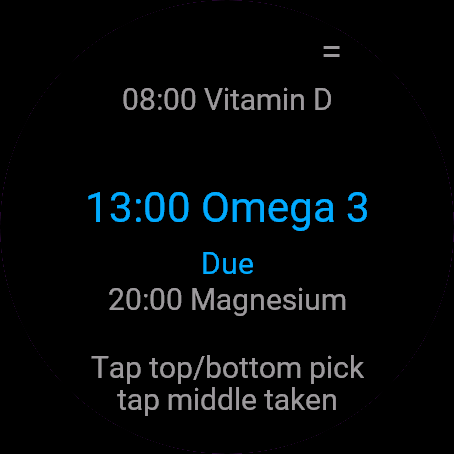
Controls: UP/DOWN pick a dose, START marks it taken, the menu icon at the top right opens Skip/Undo/Adherence/About. Touch-only watches: tap top/bottom to pick, middle row to mark taken. Not a medical device, do not rely on it as your only reminder for critical medication.
Dodaj Przypomnienie o lekach do karuzeli widgetów (przewiń widgety na zegarku).
Obsługa: GÓRA/DÓŁ wybiera dawkę, START oznacza jako wziętą, ikonka menu w prawym górnym rogu otwiera Pomiń/Cofnij/Statystykę/O aplikacji. Zegarki dotykowe: góra/dół ekranu do wyboru, środkowy wiersz do oznaczenia. To nie jest wyrób medyczny, nie traktuj go jako jedynego przypomnienia o ważnych lekach.
Füge Pill Reminder zur Widget-Schleife hinzu (auf der Uhr durch die Widgets wischen).
Bedienung: UP/DOWN wählt eine Dosis aus, START markiert sie als eingenommen, das Menüsymbol oben rechts öffnet Skip/Undo/Adherence/About. Uhren nur mit Touchscreen: Oben/unten tippen zum Auswählen, mittlere Zeile zum Bestätigen. Kein Medizinprodukt, verlasse dich bei lebenswichtigen Medikamenten nicht allein auf diese Erinnerung.
Ajoutez Pill Reminder à la boucle de widgets (faites défiler les widgets sur la montre).
Commandes : UP/DOWN sélectionnent une prise, START la marque comme prise, l'icône de menu en haut à droite ouvre Skip/Undo/Adherence/About. Montres tactiles uniquement : appuyez en haut/bas pour choisir, sur la ligne du milieu pour marquer comme prise. Ceci n'est pas un dispositif médical, ne vous fiez pas uniquement à cette application pour les traitements critiques.
Añade Pill Reminder al bucle de widgets (desliza por los widgets en el reloj).
Controles: UP/DOWN eligen una toma, START la marca como tomada, el icono de menú arriba a la derecha abre Skip/Undo/Adherence/About. Relojes solo táctiles: toca arriba/abajo para elegir, fila central para marcar como tomada. No es un dispositivo médico; no confíes en ella como tu único recordatorio para medicación crítica.
Voeg Pill Reminder toe aan de widgetlus (veeg op het horloge door de widgets).
Bediening: UP/DOWN kiest een dosis, START markeert deze als ingenomen, het menupictogram rechtsboven opent Skip/Undo/Adherence/About. Horloges met alleen touchscreen: tik boven/onder om te kiezen, middelste rij om als ingenomen te markeren. Geen medisch hulpmiddel, vertrouw hier niet op als je enige herinnering voor cruciale medicatie.
Pill Reminder をウィジェットのループに追加してください(時計でウィジェットをスワイプして切り替えます)。
操作方法: UP/DOWN で服用予定を選択、START で服用済みにマーク、右上のメニューアイコンから Skip/Undo/Adherence/About を開きます。タッチスクリーン専用ウォッチ: 画面の上下をタップして選択、中央の行をタップして服用済みにマーク。本アプリは医療機器ではありません。極めて重要な薬の唯一のリマインダーとして本アプリのみに依存しないでください。
Aggiungi Pill Reminder al ciclo dei widget (scorri i widget sull'orologio).
Controlli: UP/DOWN selezionano una dose, START la contrassegna come assunta, l'icona del menu in alto a destra apre Skip/Undo/Adherence/About. Orologi solo touch: tocca in alto/in basso per selezionare, la riga centrale per contrassegnare come assunta. Non è un dispositivo medico, non fare affidamento su di essa come unico promemoria per farmaci critici.
把 Pill Reminder 添加到小组件循环中(在手表上滑动切换小组件)。
操作方法:UP/DOWN 选择服药项,START 标记为已服用,右上角菜单图标可打开 Skip/Undo/Adherence/About。纯触屏手表:点击顶部/底部进行选择,点击中间行标记为已服用。非医疗设备,切勿将其作为关键药物的唯一提醒来源。
Добавьте Pill Reminder в ленту виджетов (листайте виджеты на часах).
Управление: UP/DOWN выбирают прием, START отмечает его как принятый, значок меню в правом верхнем углу открывает Skip/Undo/Adherence/About. Часы только с сенсорным экраном: коснитесь верхней или нижней части для выбора, средней строки - чтобы отметить прием. Не является медицинским прибором, не полагайтесь на него как на единственное напоминание о жизненно важных лекарствах.
Adicione Pill Reminder ao ciclo de widgets (deslize pelos widgets no relógio).
Controles: UP/DOWN selecionam uma dose, START marca como tomada, o ícone de menu no canto superior direito abre Skip/Undo/Adherence/About. Relógios apenas sensíveis ao toque: toque na parte superior/inferior para selecionar, na linha do meio para marcar como tomada. Não é um dispositivo médico, não confie nele como seu único lembrete para medicamentos essenciais.
Přidejte Pill Reminder do smyčky widgetů (na hodinkách procházejte widgety přejížděním).
Ovládání: UP/DOWN vybere dávku, START ji označí jako užitou, ikona menu vpravo nahoře otevře Skip/Undo/Adherence/About. Hodinky pouze s dotykovým displejem: klepnutím na horní/dolní část vybíráte, prostřední řádek označí dávku jako užitou. Není zdravotnický prostředek, nespoléhejte na něj jako na jediné připomenutí životně důležitých léků.
Adicione Pill Reminder ao ciclo de widgets (deslize pelos widgets no relógio).
Controlos: UP/DOWN selecionam uma dose, START marca-a como tomada, o ícone de menu no canto superior direito abre Skip/Undo/Adherence/About. Relógios apenas táteis: toque em cima/baixo para escolher, na linha do meio para marcar como tomada. Não é um dispositivo médico, não dependa dele como o seu único lembrete para medicação essencial.
Pill Reminder을(를) 위젯 순환에 추가하세요(시계에서 위젯을 넘겨 보세요).
조작 방법: UP/DOWN으로 복용 항목 선택, START로 복용 완료 표시, 우측 상단 메뉴 아이콘으로 Skip/Undo/Adherence/About 열기. 터치 전용 시계: 상단/하단을 탭하여 선택, 중간 행을 탭하여 복용 완료 표시. 의료 기기가 아니므로 중요한 의약품 복용 시 이 앱에만 의존하지 마십시오.
Lägg till Pill Reminder i widgetslingan (svep mellan widgetar på klockan).
Kontroller: UP/DOWN väljer en dos, START markerar den som tagen, menyikonen längst upp till höger öppnar Skip/Undo/Adherence/About. Klockor med enbart pekskärm: tryck uppe/nere för att välja, mittenraden för att markera som tagen. Inte en medicinteknisk produkt, förlita dig inte på den som din enda påminnelse för livsviktiga läkemedel.
Tilføj Pill Reminder til widget-løkken (stryg gennem widgets på uret).
Betjening: UP/DOWN vælger en dosis, START markerer den som taget, menuikonet øverst til højre åbner Skip/Undo/Adherence/About. Ure med ren touch: tryk foroven/forneden for at vælge, midterste række for at markere som taget. Ikke medicinsk udstyr, stol ikke på det som din eneste påmindelse ved kritisk medicin.
Legg til Pill Reminder i widget-rekken (sveip gjennom widgetene på klokken).
Kontroller: UP/DOWN velger en dose, START merker den som tatt, menyikonet øverst til høyre åpner Skip/Undo/Adherence/About. Klokker med ren berøringsskjerm: trykk øverst/nederst for å velge, midtre rad for å merke som tatt. Ikke et medisinsk utstyr, ikke stol på det som din eneste påminnelse for kritisk medisin.
把 Pill Reminder 加入小工具循環中(在手錶上滑動切換小工具)。
操作方式:UP/DOWN 選擇劑次,START 標記為已服用,右上角選單圖示可開啟 Skip/Undo/Adherence/About。僅支援觸控的手錶:點擊上方/下方進行選擇,點擊中間列標記為已服用。本產品非醫療器材,請勿將其作為重要藥物的唯一提醒方式。
Lisää Pill Reminder widgetkiertoon (selaa widgettejä pyyhkäisemällä kellossa).
Ohjaimet: UP/DOWN valitsee annoksen, START merkitsee sen otetuksi, valikkokuvake oikeassa yläkulmassa avaa valinnat Skip/Undo/Adherence/About. Vain kosketusnäyttöä käyttävät kellot: napauta ylä-/alaosaa valitaksesi, keskiriviä merkitäksesi otetuksi. Ei lääkinnällinen laite, älä luota tähän ainoana muistutuksenasi kriittisille lääkkeille.
Pridajte Pill Reminder do cyklu widgetov (widgety na hodinkách prechádzate potiahnutím).
Ovládanie: UP/DOWN vyberie dávku, START ju označí ako užitú, ikona menu vpravo hore otvorí Skip/Undo/Adherence/About. Čisto dotykové hodinky: ťuknutím hore/dole vyberáte, stredným riadkom označíte užitie. Nie je to zdravotnícka pomôcka, nespoliehajte sa na ňu ako na jediné pripomenutie dôležitých liekov.
Dodajte Pill Reminder v zanko pripomočkov (na uri se pomikajte med pripomočki).
Upravljanje: UP/DOWN izbere odmerek, START ga označi kot vzetega, ikona menija zgoraj desno odpre Skip/Undo/Adherence/About. Ure samo na dotik: tapnite zgoraj/spodaj za izbiro, srednjo vrstico za označitev kot vzetega. Ni medicinski pripomoček, ne zanašajte se nanj kot na edini opomnik za nujna zdravila.
Tambahkan Pill Reminder ke putaran widget (geser antar widget di jam).
Kontrol: UP/DOWN memilih dosis, START menandai sudah diminum, ikon menu di kanan atas membuka Skip/Undo/Adherence/About. Jam tangan khusus layar sentuh: ketuk bagian atas/bawah untuk memilih, baris tengah untuk menandai sudah diminum. Bukan perangkat medis, jangan mengandalkannya sebagai satu-satunya pengingat untuk obat penting.
Adja hozzá a(z) Pill Reminder elemet a widgetkörhöz (az órán görgessen a widgetek között).
Vezérlés: UP/DOWN kiválasztja az adagot, START bevéve jelölést ad, a jobb felső menüikon megnyitja a Skip/Undo/Adherence/About lehetőségeket. Csak érintőképernyős órák: koppints fent/lent a kiválasztáshoz, a középső sorra a bevétel jelöléséhez. Nem orvostechnikai eszköz, létfontosságú gyógyszerek esetén ne hagyatkozz kizárólag erre emlékeztetőként.
เพิ่ม Pill Reminder ในวิดเจ็ตลูป (ปัดผ่านวิดเจ็ตบนนาฬิกา)
การควบคุม: UP/DOWN เพื่อเลือกมื้อยา, START เพื่อบันทึกว่าทานแล้ว, ไอคอนเมนูที่มุมขวาบนเพื่อเปิด Skip/Undo/Adherence/About สำหรับนาฬิการะบบสัมผัสล้วน: แตะด้านบน/ด้านล่างเพื่อเลือก แตะแถวกลางเพื่อบันทึกว่าทานแล้ว ไม่ใช่อุปกรณ์ทางการแพทย์ อย่าใช้แอปนี้เป็นเครื่องมือเตือนความจำเพียงอย่างเดียวสำหรับยาที่จำเป็นอย่างยิ่ง
Προσθέστε το Pill Reminder στον κύκλο των widget (σύρετε στα widget του ρολογιού).
Χειρισμός: Τα UP/DOWN επιλέγουν μια δόση, το START τη σημειώνει ως ληφθείσα, το εικονίδιο μενού επάνω δεξιά ανοίγει τα Skip/Undo/Adherence/About. Ρολόγια μόνο με οθόνη αφής: πατήστε επάνω/κάτω για επιλογή, μεσαία γραμμή για σήμανση λήψης. Δεν είναι ιατρική συσκευή, μην βασίζεστε σε αυτό ως τη μοναδική σας υπενθύμιση για κρίσιμα φάρμακα.
Dodajte Pill Reminder u petlju widgeta (listajte widgete na satu).
Kontrole: UP/DOWN biraju dozu, START je označava kao uzetu, ikona izbornika u gornjem desnom kutu otvara Skip/Undo/Adherence/About. Satovi samo sa zaslonom na dodir: dodirnite vrh/dno za odabir, srednji red za oznaku uzeto. Nije medicinski uređaj, nemojte se oslanjati na njega kao jedini podsjetnik za ključne lijekove.
הוסיפו את Pill Reminder ללולאת הווידג'טים (החליקו בין הווידג'טים בשעון).
מקשי שליטה: UP/DOWN לבחירת מנה, START מסמן אותה ככזו שנלקחה, אייקון התפריט בפינה הימנית העליונה פותח את Skip/Undo/Adherence/About. שעוני מגע בלבד: הקש למעלה/למטה לבחירה, שורה אמצעית לסימון כנלקחה. אינו מכשיר רפואי, אל תסתמך עליו כתזכורת יחידה עבור תרופות קריטיות.
Tambah Pill Reminder ke dalam gelung widget (leret melalui widget pada jam).
Kawalan: UP/DOWN memilih dos, START menandakannya sebagai sudah diambil, ikon menu di bahagian atas sebelah kanan membuka Skip/Undo/Adherence/About. Jam skrin sentuh sahaja: ketik bahagian atas/bawah untuk memilih, baris tengah untuk tanda sudah diambil. Bukan peranti perubatan, jangan jadikannya sebagai satu-satunya peringatan anda untuk ubat-ubatan kritikal.
Manual
The full manual and the detailed permission descriptions are available in English and Polish.
Pill Reminder: user manual
What it does
Pill Reminder lists today's doses of up to 6 medicines or supplements set up in the phone settings. One press marks a dose taken. It can wake the watch when a dose is due, even with the app closed.
Requirements and supported watches
Needs Connect IQ 3.3.0+ and the Connect IQ or Garmin Connect phone app. Supported watches:
- Round AMOLED: epix 2 and epix Pro 2, fēnix 8, E, Forerunner 165, 265, 570, 965, 970, Instinct 3 AMOLED, Crossover AMOLED, Venu 2, 3, 4, vivoactive 5, 6.
- Round MIP: enduro 3, fēnix 7 series, 8 Solar, Forerunner 55, 245, 255, vivoactive 4.
- Square and rectangular AMOLED: Venu Sq 2, Venu X1.
Installation
In the Connect IQ app on your phone (or Garmin Connect, then the Connect IQ Store) find "Pill Reminder" by Dialforge, tap Install and sync the watch. Find it in your glances (UP or DOWN on the watch face, or swipe) and press START or tap to open it.
First launch
You see "Set up in Garmin Connect" until a medicine has a name and a time in the phone settings. Then the list appears, with the due or next dose selected. The 30-day free beta starts the first time you open it.
Controls
Watches with buttons (START, UP, DOWN, BACK)
- UP and DOWN pick a dose, START marks it Taken. The menu opens with the corner icon or by holding UP: Skip, Undo, Adherence (7 days and streak), About.
- States: Soon, Due (for 2 hours from the set time), Taken, Skipped, Missed.
Touch watches (tap, hold, swipe)
- Upper strip moves up, lower strip down, middle marks Taken. The corner icon opens the menu. Swipes do nothing; leave with BACK.
Settings
Phone: Connect IQ app, Pill Reminder, Settings (the unlock code fields are there too).
- Name: 6 entries, text.
- Times (HH:MM, comma separated, up to 4): 6 entries, text.
- Days (optional): 6 entries, text.
- Enabled: 6 entries, on or off.
License
- Free beta: 30 days from the first launch, everything works.
- Price: 4.99 EUR once at dialforge.dev, no subscription. The 8-character code is tied to your watch's UID.
- Where to enter it: phone, Connect IQ app, Pill Reminder, Settings. Read the UID in "Watch UID (needed to buy a code)", buy the code, then type it into "Unlock code from dialforge.dev". The end-of-beta screen on the watch shows the UID too.
- After the beta without a code: an end-of-beta screen with the UID replaces the app and the reminders stop. Enter the code, then open it again. New watch? Write to us and the code moves for free.
Privacy and permissions
Permissions:
- Background: wakes the watch at the next dose time and asks to open the app.
No internet use. Data stays on the watch.
Health note: not a medical device, no diagnosis or treatment, no substitute for a doctor. Medical decisions belong to your doctor or pharmacist.
Troubleshooting
The code does not work. Check that the UID you bought for matches "Watch UID (needed to buy a code)" and type all 8 characters (case is ignored, no 0, O, 1 or I). A code for another app does not fit. Sync, then reopen.
How do I write times and days? Times: up to 4, as HH:MM with commas, e.g. 08:00, 20:00. Days: 7 digits Monday to Sunday, 1 on, 0 off (1000000 is Monday only); blank is every day. A slot also needs a name and Enabled on.
Will it remind me with the app closed? Yes. The watch wakes at the dose time and asks whether to open the app, then once more after 30 minutes if the dose is still not taken.
How are adherence and the streak counted? Adherence is taken out of planned doses in 7 days, without today's doses not yet due. The streak counts days with every dose taken, over 30 days.
Contact
kontakt@dialforge.dev or dialforge.dev. Please write before leaving a low rating.
Przypomnienie o lekach: instrukcja obsługi
Do czego służy
Przypomnienie o lekach pokazuje dzisiejsze dawki do 6 leków lub suplementów ustawianych w telefonie. Jedno naciśnięcie oznacza dawkę jako wziętą. Potrafi obudzić zegarek, gdy dawka jest na czasie, także przy zamkniętej aplikacji.
Wymagania i obsługiwane zegarki
Wymaga Connect IQ 3.3.0+ i aplikacji Connect IQ albo Garmin Connect w telefonie. Obsługiwane zegarki:
- Okrągłe AMOLED: epix 2 i epix Pro 2, fēnix 8, E, Forerunner 165, 265, 570, 965, 970, Instinct 3 AMOLED, Crossover AMOLED, Venu 2, 3, 4, vivoactive 5, 6.
- Okrągłe MIP: enduro 3, seria fēnix 7, fēnix 8 Solar, Forerunner 55, 245, 255, vivoactive 4.
- Kwadratowe i prostokątne AMOLED: Venu Sq 2, Venu X1.
Instalacja
Na telefonie otwórz aplikację Connect IQ (albo Garmin Connect, a w niej sklep Connect IQ), wyszukaj "Przypomnienie o lekach" od Dialforge, stuknij Zainstaluj i zsynchronizuj zegarek. Znajdziesz go wśród widżetów (GÓRA lub DÓŁ na tarczy albo przesunięcie palcem), a START lub stuknięcie otwiera go w całości.
Pierwsze uruchomienie
Widzisz "Skonfiguruj w Garmin Connect", dopóki lek nie ma w telefonie nazwy i godziny. Potem pojawia się lista, z wybraną dawką na czasie albo najbliższą. 30-dniowa darmowa beta zaczyna się przy pierwszym otwarciu.
Sterowanie
Zegarki z przyciskami (START, GÓRA, DÓŁ, WSTECZ)
- GÓRA i DÓŁ wybierają dawkę, START oznacza ją jako Wzięto. Menu otwiera ikona w rogu albo przytrzymanie GÓRY: Pomiń, Cofnij, Statystyka (7 dni i passa), O aplikacji.
- Stany: Wkrótce, Teraz (przez 2 godziny od ustawionej godziny), Wzięto, Pominięto, Spóźnione.
Zegarki dotykowe (stuknięcie, przytrzymanie, przesunięcie)
- Górny pas przesuwa w górę, dolny w dół, środek oznacza Wzięto. Ikona w rogu otwiera menu. Przesunięcia nic nie robią, wychodzisz przyciskiem WSTECZ.
Ustawienia
Telefon: aplikacja Connect IQ, Przypomnienie o lekach, Ustawienia (są tam też pola kodu odblokowania).
- Nazwa: 6 pozycji, tekst.
- Godziny (GG:MM po przecinku, max 4): 6 pozycji, tekst.
- Dni (opcjonalnie): 6 pozycji, tekst.
- Włączony: 6 pozycji, włączone lub wyłączone.
Licencja
- Darmowa beta: 30 dni od pierwszego uruchomienia, wszystko działa.
- Cena: jednorazowo 4,99 EUR na dialforge.dev, bez abonamentu. 8-znakowy kod jest przypisany do UID zegarka.
- Gdzie wpisać: telefon, aplikacja Connect IQ, Przypomnienie o lekach, Ustawienia. Odczytaj UID w polu "UID zegarka (potrzebny do zakupu kodu)", kup kod i wpisz go w "Kod odblokowania z dialforge.dev". Ekran końca bety na zegarku też pokazuje UID.
- Po becie bez kodu: zamiast aplikacji pojawia się ekran końca bety z UID, a przypomnienia przestają działać. Wpisz kod i otwórz aplikację ponownie. Nowy zegarek? Napisz do nas, przeniesiemy kod za darmo.
Prywatność i uprawnienia
Uprawnienia:
- Praca w tle: budzi zegarek o najbliższej godzinie dawki i pyta o otwarcie aplikacji.
Zero połączeń z internetem. Dane zostają w zegarku.
Uwaga zdrowotna: to nie jest wyrób medyczny. Niczego nie diagnozuje ani nie leczy i nie zastępuje lekarza. Decyzje medyczne zostaw lekarzowi lub farmaceucie.
Rozwiązywanie problemów
Kod nie działa. Sprawdź, czy UID, dla którego kupiono kod, zgadza się z polem "UID zegarka (potrzebny do zakupu kodu)", i wpisz wszystkie 8 znaków (wielkość liter bez znaczenia, bez 0, O, 1, I). Kod do innej aplikacji nie pasuje. Zsynchronizuj i otwórz ponownie.
Jak wpisać godziny i dni? Godziny: do 4, jako GG:MM po przecinku, np. 08:00, 20:00. Dni: 7 cyfr od poniedziałku do niedzieli, 1 włączony, 0 wyłączony, więc 1000000 to tylko poniedziałek; puste to codziennie. Pozycja potrzebuje też nazwy i włączonego przełącznika Włączony.
Czy przypomni mi przy zamkniętej aplikacji? Tak. Zegarek budzi się o godzinie dawki i pyta, czy otworzyć aplikację, a po 30 minutach przypomina jeszcze raz, jeśli dawka nadal nie jest wzięta.
Jak liczy się skuteczność i passa? Skuteczność to wzięte dawki z zaplanowanych w 7 dni, bez dzisiejszych, których pora jeszcze nie przyszła. Passa liczy dni z wziętymi wszystkimi dawkami w ostatnich 30 dniach.
Kontakt
kontakt@dialforge.dev albo dialforge.dev. Napisz, zanim wystawisz niską ocenę.
Permissions and privacy
This product asks the watch for the permissions below. Connect IQ shows them when you install it.
- Background process: Lets the app run short tasks in the background, for example reminders.Pozwala aplikacji wykonywać krótkie zadania w tle, na przykład przypomnienia.
This product does not use the internet and sends no data to our servers.
The full manual and the detailed permission descriptions are available in English and Polish.
Compatible watches
51mm, D2 Air X15, D2 Mach 1 Pro, Enduro 2, Enduro 3, epix (Gen 2), epix Pro (Gen 2) 42mm, epix Pro (Gen 2) 47mm, epix Pro (Gen 2) 51mm, Forerunner 165, Forerunner 165 Music, Forerunner 245, Forerunner 245 Music, Forerunner 255, Forerunner 255 Music, Forerunner 255s, Forerunner 255s Music, Forerunner 265, Forerunner 265s, Forerunner 55, Forerunner 570 42mm, Forerunner 570 47mm, Forerunner 965, Forerunner 970, fēnix 7, fēnix 7 Pro, fēnix 7 Pro - Solar Edition (no Wi-Fi), fēnix 7S, fēnix 7S Pro, fēnix 7X, fēnix 7X Pro, fēnix 7X Pro - Solar Edition (no Wi-Fi), fēnix 8 43mm, fēnix 8 47mm, fēnix 8 Pro 47mm, fēnix 8 Solar 47mm, fēnix 8 Solar 51mm, fēnix E, Instinct 3 AMOLED 45mm, Instinct 3 AMOLED 50mm, Instinct Crossover AMOLED, MicroLED, quatix 7, quatix 7 Pro, quatix 7 Sapphire, quatix 7X Solar, quatix 8 47mm, quatix 8 Pro 47mm, tactix 7, tactix 7 – AMOLED Edition, tactix 8 47mm, tactix 8 Solar 51mm, Venu 2, Venu 2 Plus, Venu 2S, Venu 3, Venu 3S, Venu 4 41mm, Venu 4 45mm, Venu Sq 2, Venu Sq 2 Music, Venu X1, vívoactive 4, vívoactive 4S, vívoactive 5, vívoactive 6
Screenshots
FAQ
What happens after the 30-day beta?
The app shows a screen asking for a one-time unlock code from dialforge.dev instead of opening normally. Buy the code once below, no subscription.
Does the app send my data to Dialforge?
No. The app works fully offline, and the unlock code is checked on the watch itself, without contacting any server.
The app does not work as described on my watch. Can I get a refund?
Yes. Write through the feedback form below, or to the e-mail in the footer. If we cannot fix it, we refund you, as described in the terms.
Changing your watch?
Write to me and I will move your code for free.
Changelog
- First release (beta).
- Pierwsze wydanie (beta).
- Erste Version (Beta).
- Première version (beta).
- Primera versión (beta).
- Eerste release (beta).
- 初回リリース(ベータ版)。
- Prima versione (beta).
- 首发版本(测试版)。
- Первый релиз (бета).
- Primeira versão (beta).
- První vydání (beta).
- Primeira versão (beta).
- 첫 출시(베타).
- Första versionen (beta).
- Første udgivelse (beta).
- Første versjon (beta).
- 首發版本(Beta)。
- Ensimmäinen julkaisu (beta).
- Prvá verzia (beta).
- Prva različica (beta).
- Rilis pertama (beta).
- Első kiadás (béta).
- เวอร์ชันแรก (เบต้า)
- Πρώτη έκδοση (beta).
- Prvo izdanje (beta).
- גרסה ראשונה (בטא).
- Keluaran pertama (beta).
Unlock
€4.99
One-time payment. No subscription. The code works on the watch whose UID you enter.
- Install the app from the Connect IQ store. It works fully and for free for the first 30 days.
- Find your 10-digit UID: Connect IQ app on the phone > My Device > Apps or Data Fields > this app > Settings > Watch UID.
- Enter UID and e-mail, pay with PayPal (cards work without a PayPal account). The code appears here at once.
- Type the code into the same settings page, field "Unlock code". The watch checks it offline.
Thank you! Your code:
Enter the code in the app settings, field "Unlock code". The watch checks it offline.
Tell us how to make it better
Missing a data field, a colour, a layout? Found a bug on your watch model? Write it here. We read every message and ship improvements in updates.