Water sports
Cold Plunge
A dip timer for ice baths, winter swimming and cold lakes, built for wet gloves, fog and bad light: huge numbers, buttons only, phase shown as text and colour.
Licznik morsowania: przerębel, jezioro, morze, balia. Zrobiony pod mokre rękawice, mgłę na szkle i słabe światło: duże cyfry, sterowanie tylko przyciskami, faza pokazana tekstem i kolorem.
Ein Timer für Eisbäder, Winterschwimmen und kalte Seen, entwickelt für nasse Handschuhe, Nebel und schlechtes Licht: riesige Zahlen, reine Tastenbedienung, Phase als Text und Farbe dargestellt.
Un minuteur d'immersion pour les bains de glace, la natation hivernale et les lacs froids, conçu pour les gants mouillés, le brouillard et la faible luminosité : chiffres géants, boutons uniquement, phase affichée en texte et en couleur.
Un temporizador de inmersión para baños de hielo, natación de invierno y lagos fríos, pensado para guantes mojados, niebla y poca luz: números gigantes, solo botones, fase indicada con texto y color.
Een diptimer voor ijsbaden, winterzwemmen en koude meren, gebouwd voor natte handschoenen, mist en slecht licht: enorme cijfers, uitsluitend knoppen, fase weergegeven in tekst en kleur.
アイスバス、寒中水泳、冷たい湖での入水用タイマー。濡れたグローブ、霧、薄暗い環境を想定して設計され、大きな数字、ボタン操作のみ、フェーズを文字と色でわかりやすく表示します。
Un timer per immersioni in vasche di ghiaccio, nuoto invernale e laghi freddi, progettato per guanti bagnati, nebbia e scarsa visibilità: numeri enormi, solo pulsanti, fase mostrata con testo e colore.
专为冰浴、冬泳和冷水湖设计的浸水计时器,为湿手套、水雾和昏暗光线而生:超大数字、全物理按键操作、以文字与颜色提示阶段。
Таймер для ледяных ванн, зимнего плавания и холодных водоемов, созданный для мокрых перчаток, пара и плохой видимости: огромные цифры, управление только кнопками, текущая фаза видна текстом и цветом.
Um cronômetro de imersão para banhos de gelo, natação no inverno e lagos frios, feito para luvas molhadas, neblina e pouca luz: números enormes, apenas botões, fase exibida com texto e cor.
Časovač ponoru pro ledové koupele, zimní plavání a studená jezera, vytvořený pro mokré rukavice, mlhu i špatné světlo: obrovská čísla, ovládání pouze tlačítky, fáze zobrazená textem a barvou.
Um temporizador de imersão para banhos de gelo, natação de inverno e lagos frios, concebido para luvas molhadas, nevoeiro e pouca luz: números enormes, apenas botões, fase indicada por texto e cor.
얼음물 목욕, 겨울철 수영, 차가운 호수 입수를 위한 딥 타이머. 젖은 장갑, 안개, 어두운 조명 환경을 고려해 설계되었습니다: 큼직한 숫자, 순수 버튼 조작, 텍스트와 색상으로 표시되는 단계.
En badtimer för isbad, vinterbad och kalla sjöar, byggd för blöta handskar, dimma och dåligt ljus: enorma siffror, enbart knappar, fasen visas med text och färg.
En dyp-timer til isbade, vinterbadning og kolde søer, bygget til våde handsker, tåge og dårligt lys: store tal, kun knapper, fase vist som tekst og farve.
En badetimer for isbad, vinterbading og kalde innsjøer, bygget for våte hansker, tåke og dårlig lys: kjempestore tall, kun knapper, fase vist som tekst og farge.
專為冰浴、冬泳與冷水湖泊設計的浸泡計時器,專為潮濕手套、起霧與不良光線打造:超大數字、純按鍵操作、以文字與顏色顯示階段。
Pulahdusajastin jääkylpyihin, avantouintiin ja kylmiin vesiin, suunniteltu märille käsineille, huurulle ja huonoon valoon: valtavat numerot, vain fyysiset painikkeet, vaihe ilmaistu tekstinä ja värinä.
Časovač ponoru pre ľadové kúpele, zimné plávanie a studené jazerá, stavaný pre mokré rukavice, hmlu a zlé svetlo: obrovské čísla, iba tlačidlá, fáza zobrazená textom aj farbou.
Časomer za ledene kopeli, zimsko plavanje in mrzla jezera, narejen za mokre rokavice, meglo in slabo svetlobo: ogromne številke, upravljanje le z gumbi, faza prikazana z besedilom in barvo.
Pengukur waktu berendam untuk mandi es, renang musim dingin, dan danau dingin, dirancang untuk sarung tangan basah, kabut, dan pencahayaan buruk: angka sangat besar, hanya tombol fisik, fase ditampilkan dalam teks dan warna.
Merülési időzítő jeges fürdőkhöz, téli úszáshoz és hideg tavakhoz, vizes kesztyűre, ködre és rossz fényviszonyokra tervezve: hatalmas számok, kizárólag gombokkal vezérelhető, a fázis szöveggel és színnel jelenik meg.
นาฬิกาจับเวลาแช่น้ำเย็นสำหรับอ่างน้ำแข็ง การว่ายน้ำในฤดูหนาว และทะเลสาบน้ำเย็น ออกแบบมาสำหรับถุงมือเปียก สภาพหมอก และแสงน้อย: ตัวเลขขนาดใหญ่ ควบคุมด้วยปุ่มเท่านั้น แสดง phase ด้วยข้อความและสี
Ένα χρονόμετρο βύθισης για παγόλουτρα, χειμερινή κολύμβηση και κρύες λίμνες, σχεδιασμένο για βρεγμένα γάντια, ομίχλη και κακό φωτισμό: τεράστιοι αριθμοί, μόνο κουμπιά, η φάση εμφανίζεται με κείμενο και χρώμα.
Mjerač vremena za ledene kupke, zimsko plivanje i hladna jezera, napravljen za mokre rukavice, maglu i slabo osvjetljenje: ogromni brojevi, upravljanje samo tipkama, faza prikazana tekstom i bojom.
טיימר טבילה לאמבטיות קרח, שחיית חורף ואגמים קרים, מותאם לכפפות רטובות, ערפל ותאורה לקויה: מספרים ענקיים, כפתורים בלבד, שלב מוצג בטקסט ובצבע.
Pemasa rendaman untuk mandian ais, renangan musim sejuk dan tasik sejuk, direka untuk sarung tangan basah, kabus dan pencahayaan malap: nombor besar, butang sahaja, fasa dipaparkan sebagai teks dan warna.
Coming to Connect IQ Unlock €5.99
Beta: free for 30 days
The app works fully and for free for the first 30 days after you first open it. After that you can buy a one-time unlock code below. No subscription.
No phone app, no account. Everything stays on the watch and in Garmin Connect. The app never tells you a duration is safe: every number is a target or reminder you set yourself, not a medical claim.
- Pre-dip checklist (not alone, feeling well, dry clothes ready) and a water temperature picker, both optional
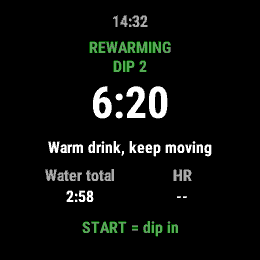
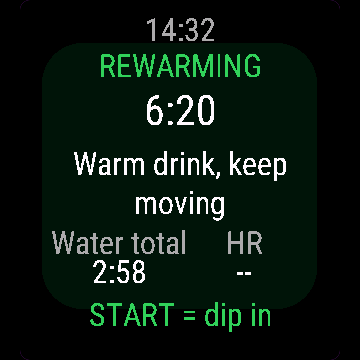
- Warm-up, dip and rewarm phases, each a separate lap, as many dips per session as you want
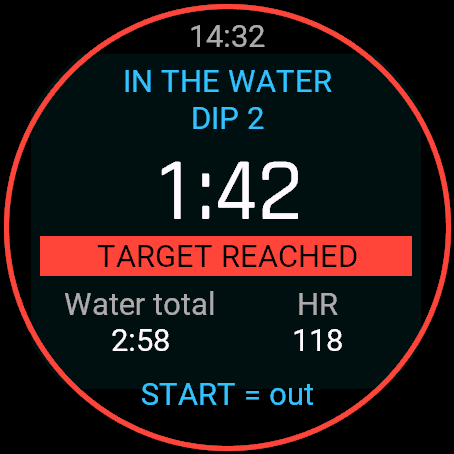
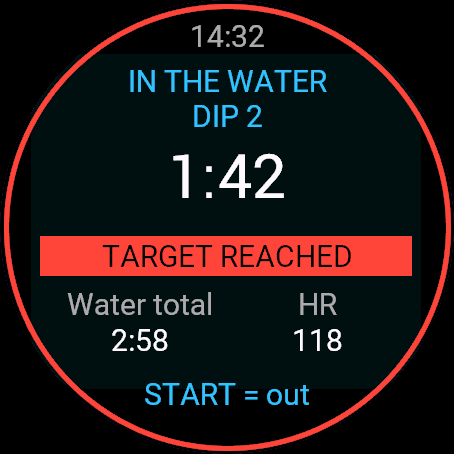
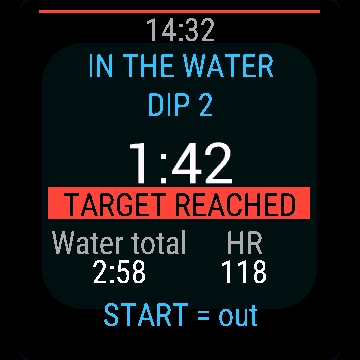
- Dip target as a fixed time, open (no target) or the Polish clubs' rule (minutes = degrees C, capped at 5 minutes and never below 30 seconds), with a pulse and a red ring when you reach it
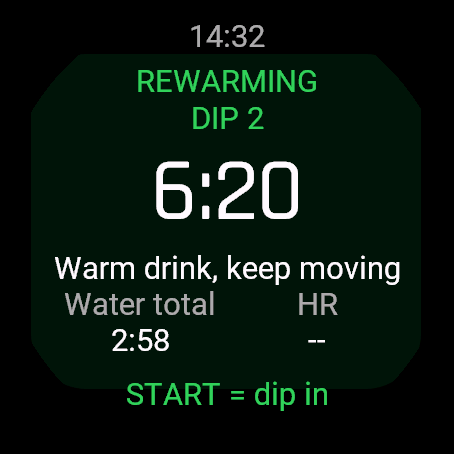
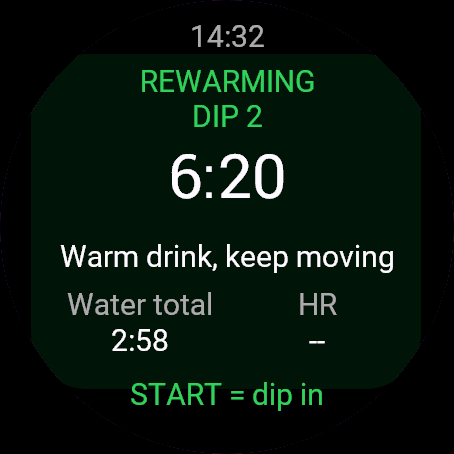
- Rewarm screen rotates dry off / warm drink / no hot shower yet reminders
- Optional breathing pace for the first minute, interval buzz, GPS fix at the start, watch temperature sensor as a FIT field
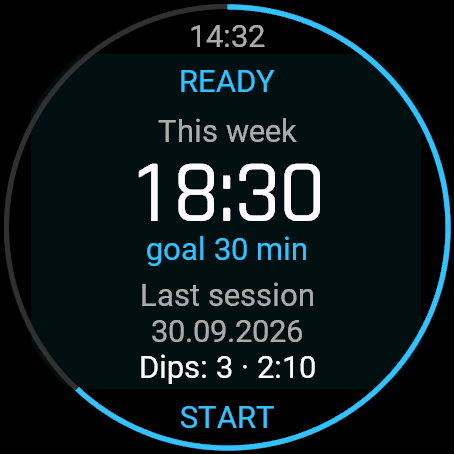
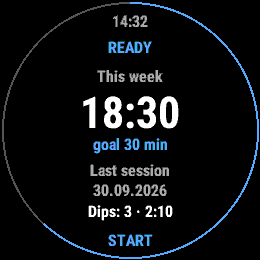
- History of the last 20 sessions, personal records, weekly cold-minutes goal
- Records as a Cardio or Breathwork activity with phase, dip number and lap time as Garmin Connect fields
Bez aplikacji w telefonie i bez konta. Wszystko zostaje na zegarku i w Garmin Connect. Aplikacja nigdy nie mówi, że dany czas jest bezpieczny: każda liczba to Twój własny cel albo przypomnienie, nie zalecenie medyczne.
- Lista kontrolna przed wejściem (nie sam, dobre samopoczucie, suche ubrania gotowe) i wybór temperatury wody, obie opcje można wyłączyć
- Fazy rozgrzewki, wejścia do wody i dogrzewania, każda jako osobne okrążenie, bez limitu liczby wejść w sesji
- Cel wejścia jako stały czas, bez celu, albo reguła polskich klubów (minuty = stopnie C, z limitem 5 minut i nie mniej niż 30 sekund), z wibracją i czerwonym pierścieniem po osiągnięciu
- Ekran dogrzewania pokazuje po kolei trzy podpowiedzi: wytrzyj się, ciepły napój, jeszcze bez gorącego prysznica
- Opcjonalny rytm oddechu w pierwszej minucie, wibracja co interwał, namierzenie GPS na starcie, temperatura z czujnika zegarka jako pole FIT
- Historia ostatnich 20 sesji, rekordy osobiste, tygodniowy cel w minutach zimnej wody
- Zapis jako aktywność Kardio albo Oddychanie, z fazą, numerem wejścia i czasem okrążenia jako pola Garmin Connect
Keine Smartphone-App, kein Konto. Alles bleibt auf der Uhr und in Garmin Connect. Die App gibt zu keinem Zeitpunkt vor, dass eine Dauer sicher ist: Jede Zahl ist ein Ziel oder eine Erinnerung, die du selbst festlegst, keine medizinische Aussage.
- Checkliste vor dem Baden (nicht allein, wohlauf, trockene Kleidung bereit) und Auswahl der Wassertemperatur, beides optional
- Phasen für Aufwärmen, Eisbad und Wiedererwärmen, jeweils als separate Runde, beliebig viele Durchgänge pro Einheit
- Eisbad-Zielzeit als feste Dauer, offen (ohne Ziel) oder nach der polnischen Vereinsregel (Minuten = Grad C, begrenzt auf 5 Minuten und nie unter 30 Sekunden), mit Vibration und rotem Ring beim Erreichen
- Wiedererwärmungs-Bildschirm wechselt zwischen Hinweisen: abtrocknen / warmes Getränk / noch keine heiße Dusche
- Optionaler Atemrhythmus für die erste Minute, Intervall-Vibration, GPS-Fix beim Start, Temperatursensor der Uhr als FIT-Feld
- Verlauf der letzten 20 Einheiten, persönliche Bestleistungen, wöchentliches Ziel für Kälteminuten
- Zeichnet als Cardio- oder Atemübung-Aktivität auf, mit Phase, Durchgangsnummer und Rundenzeit als Feldern in Garmin Connect
Aucune application pour téléphone, aucun compte. Tout reste sur la montre et dans Garmin Connect. L'application ne prétend jamais qu'une durée est sans danger : chaque chiffre est un objectif ou un rappel que vous définissez vous-même, sans prétention médicale.
- Checklist avant immersion (pas seul, en forme, vêtements secs prêts) et sélecteur de température de l'eau, tous deux optionnels
- Phases d'échauffement, d'immersion et de réchauffement, chacune formant un lap distinct, autant d'immersions par session que vous le souhaitez
- Objectif d'immersion sous forme de durée fixe, libre (sans objectif) ou selon la règle des clubs polonais (minutes = degrés C, plafonné à 5 minutes et jamais en dessous de 30 secondes), avec vibration et anneau rouge lorsque vous l'atteignez
- L'écran de réchauffement alterne les rappels : se sécher / boisson chaude / pas de douche chaude tout de suite
- Rythme respiratoire optionnel pour la première minute, vibration d'intervalle, acquisition GPS au départ, capteur de température de la montre enregistré comme champ FIT
- Historique des 20 dernières sessions, records personnels, objectif hebdomadaire de minutes au froid
- Enregistrement sous forme d'activité Cardio ou Breathwork avec la phase, le numéro d'immersion et le temps au lap comme champs Garmin Connect
Sin app móvil, sin cuenta. Todo se queda en el reloj y en Garmin Connect. La app nunca te dice qué duración es segura: cada número es un objetivo o recordatorio que tú mismo configuras, no una afirmación médica.
- Lista de comprobación previa a la inmersión (acompañado, encontrarse bien, ropa seca lista) y selector de temperatura del agua, ambos opcionales
- Fases de calentamiento, inmersión y recalentamiento, cada una como una vuelta independiente, con tantas inmersiones por sesión como desees
- Objetivo de inmersión como tiempo fijo, libre (sin objetivo) o la regla de los clubes polacos (minutos = grados C, con un límite máximo de 5 minutos y nunca menos de 30 segundos), con una vibración y un anillo rojo al alcanzarlo
- La pantalla de recalentamiento va alternando recordatorios: secarse / bebida caliente / nada de duchas calientes todavía
- Guía de respiración opcional durante el primer minuto, aviso por intervalos, posición GPS al inicio, sensor de temperatura del reloj como campo FIT
- Historial de las últimas 20 sesiones, récords personales, objetivo semanal de minutos en frío
- Se registra como actividad Cardio o Breathwork con fase, número de inmersión y tiempo de vuelta como campos de Garmin Connect
Geen telefoon-app, geen account. Alles blijft op het horloge en in Garmin Connect. De app geeft nooit aan dat een tijdsduur veilig is: elk getal is een doel of herinnering die je zelf instelt, geen medische claim.
- Checklist voor de dip (niet alleen, voel je goed, droge kleren klaar) en een watertemperatuurkiezer, beide optioneel
- Fases voor opwarmen, dippen en weer opwarmen, elk als aparte ronde, zoveel dips per sessie als je wilt
- Dipdoel als vaste tijd, open (geen doel) of de regel van de Poolse clubs (minuten = graden C, gemaximeerd op 5 minuten en nooit korter dan 30 seconden), met een trilsignaal en een rode ring wanneer je het bereikt
- Opwarmscherm wisselt herinneringen af voor afdrogen / warme drank / nog geen hete douche
- Optioneel ademhalingstempo voor de eerste minuut, intervaltrilling, GPS-fix bij de start, temperatuursensor van het horloge als FIT-veld
- Geschiedenis van de laatste 20 sessies, persoonlijke records, wekelijks doel voor koude-minuten
- Wordt opgeslagen als Cardio- of Breathwork-activiteit met fase, dipnummer en rondetijd als Garmin Connect-velden
スマホアプリもアカウントも不要。すべてがウォッチ内と Garmin Connect で完結します。このアプリが安全な入水時間を指示することはありません。表示される数値はすべてご自身で設定した目標やリマインダーであり、医学的な推奨ではありません。
- 入水前のチェックリスト(単独ではないこと、体調が良いこと、着替えの準備)と水温ピッカー(どちらも任意)
- ウォームアップ、ディップ、リウォームの各フェーズを個別のラップとして記録。1 セッション中に何度でも入水可能
- 入水目標は固定時間、オープン(目標なし)、またはポーランド式ルール(分 = 水温 ℃、上限 5 分、下限 30 秒)から選択でき、達成時にはバイブレーションと赤いリングでお知らせ
- リウォーム画面では、体を拭く / 温かい飲み物 / 熱いシャワーはまだ浴びない、といったリマインダーを順次表示
- 最初の 1 分間の呼吸ペースガイド(任意)、インターバルバイブレーション、開始時の GPS 測位、ウォッチの温度センサー値を FIT フィールドとして記録
- 過去 20 回のセッション履歴、自己記録、週間冷却時間(分)の目標
- Cardio または Breathwork アクティビティとして記録し、フェーズ、ディップ回数、ラップタイムを Garmin Connect フィールドに出力
Nessuna app per il telefono, nessun account. Tutto resta sull'orologio e in Garmin Connect. L'app non ti dice mai se una durata è sicura: ogni numero è un obiettivo o un promemoria impostato da te, non un'indicazione medica.
- Checklist pre-immersione (non da soli, sentirsi bene, vestiti asciutti pronti) e selettore della temperatura dell'acqua, entrambi opzionali
- Fasi di riscaldamento, immersione e recupero termico, ciascuna come lap separato, con quante immersioni vuoi per sessione
- Obiettivo di immersione a tempo fisso, libero (nessun obiettivo) o secondo la regola dei club polacchi (minuti = gradi C, con un massimo di 5 minuti e mai sotto i 30 secondi), con vibrazione e un anello rosso al raggiungimento
- La schermata di recupero termico alterna i promemoria: asciugarsi / bevanda calda / non fare ancora una doccia calda
- Ritmo di respirazione opzionale per il primo minuto, vibrazione a intervalli, punto GPS alla partenza, sensore di temperatura dell'orologio come campo FIT
- Cronologia delle ultime 20 sessioni, record personali, obiettivo settimanale di minuti al freddo
- Registra come attività Cardio o Breathwork con fase, numero di immersione e tempo del lap come campi per Garmin Connect
无需手机应用,无需账号。所有数据仅保存在手表和 Garmin Connect 中。应用绝不会告知你某个时长是安全的:每个数字都是由你自行设定的目标或提醒,不构成任何医疗主张。
- 下水前检查清单(非单独一人、感觉良好、干衣服已备好)以及水温选择器,两者均为可选
- 热身、浸水和复温阶段,各自独立计圈,单次活动支持任意多次浸水
- 浸水目标可设为固定时间、开放模式(无目标)或波兰俱乐部规则(分钟数 = 摄氏度数,上限 5 分钟且不低于 30 秒),达成时会有震动脉冲和红色圆环提示
- 复温屏幕轮流显示擦干身体 / 饮用温饮 / 暂勿热水淋浴提醒
- 可选第 1 分钟呼吸节奏引导、间隔蜂鸣震动、开始时 GPS 定位,并将手表温度传感器数据记录为 FIT 字段
- 最近 20 次活动的历史记录、个人最佳记录、每周冷水时长(分钟)目标
- 记录为 Cardio 或 Breathwork 活动,包含阶段、浸水次数和计圈时间作为 Garmin Connect 字段
Никаких приложений для телефона, никаких учетных записей. Все остается на часах и в Garmin Connect. Приложение никогда не утверждает, что какая-либо продолжительность безопасна: любое число - это лишь цель или напоминание, которое вы задали сами, а не медицинская рекомендация.
- Чек-лист перед погружением (не в одиночку, самочувствие в норме, сухая одежда готова) и выбор температуры воды (оба пункта не обязательны)
- Фазы разминки, захода в воду и согревания, каждая в виде отдельного круга; сколько угодно заходов за одну сессию
- Цель погружения: фиксированное время, без цели (открытое время) или правило польских клубов моржей (минуты = градусы C, максимум 5 минут и не меньше 30 секунд), с вибрацией и красным кольцом при достижении
- Экран согревания по очереди показывает напоминания: вытереться насухо / теплое питье / пока без горячего душа
- Ритм дыхания на первую минуту (по желанию), периодическая вибрация, фиксация GPS на старте, датчик температуры часов в виде поля FIT
- История последних 20 сессий, личные рекорды, недельная цель по минутам на холоде
- Сохраняется как активность Cardio или Breathwork с полями фазы, номера захода и времени круга для Garmin Connect
Sem aplicativo no celular, sem conta. Tudo fica no relógio e no Garmin Connect. O app nunca diz que uma duração é segura: cada número é uma meta ou lembrete definido por você, não uma afirmação médica.
- Lista de verificação pré-imersão (acompanhado, sentindo-se bem, roupas secas à mão) e seletor de temperatura da água, ambos opcionais
- Fases de aquecimento, imersão e reaquecimento, cada uma como uma volta separada, com quantas imersões por sessão você quiser
- Meta de imersão como tempo fixo, livre (sem meta) ou a regra dos clubes poloneses (minutos = graus C, limitado a 5 minutos e nunca inferior a 30 segundos), com vibração e um anel vermelho ao alcançá-la
- A tela de reaquecimento alterna lembretes: secar-se / bebida quente / nada de banho quente ainda
- Ritmo de respiração opcional no primeiro minuto, alerta vibratório de intervalo, sinal de GPS no início, sensor de temperatura do relógio como campo FIT
- Histórico das últimas 20 sessões, recordes pessoais, meta semanal de minutos no frio
- Registra como atividade de Cardio ou Breathwork com campos de fase, número da imersão e tempo de volta no Garmin Connect
Žádná telefonní aplikace, žádný účet. Vše zůstává v hodinkách a v Garmin Connect. Aplikace vám nikdy netvrdí, jaká délka ponoru je bezpečná: každé číslo je cíl nebo připomenutí, které si sami nastavíte, nikoli lékařské tvrzení.
- Kontrolní seznam před ponorem (nejste sami, cítíte se dobře, suché oblečení připraveno) a volba teploty vody, obojí volitelné
- Fáze rozcvičky, ponoru a zahřátí, každá jako samostatný lap, libovolný počet ponorů během jedné relace
- Cíl ponoru jako pevný čas, bez limitu (open) nebo podle pravidla polských klubů (minuty = stupně C, s maximem 5 minut a minimem 30 sekund), s vibrací a červeným kruhem při jeho dosažení
- Obrazovka zahřátí střídá připomenutí: osušit se / teplý nápoj / zatím žádná horká sprcha
- Volitelné tempo dýchání pro první minutu, intervalové vibrace, fixace GPS na začátku, snímač teploty hodinek jako pole FIT
- Historie posledních 20 relací, osobní rekordy, týdenní cíl v minutách v chladu
- Záznam jako aktivita Cardio nebo Breathwork s fází, číslem ponoru a časem na lap jako pole v Garmin Connect
Sem aplicação de telemóvel, sem conta. Tudo fica no relógio e no Garmin Connect. A aplicação nunca lhe diz se uma duração é segura: cada valor é um objetivo ou lembrete definido por si, não uma afirmação médica.
- Lista de verificação pré-imersão (acompanhado, a sentir-se bem, roupa seca pronta) e um seletor de temperatura da água, ambos opcionais
- Fases de aquecimento, imersão e reaquecimento, cada uma numa volta separada, com tantas imersões por sessão quantas desejar
- Objetivo de imersão definido como tempo fixo, livre (sem objetivo) ou a regra dos clubes polacos (minutos = graus C, com limite de 5 minutos e nunca abaixo de 30 segundos), com vibração e um anel vermelho ao ser atingido
- O ecrã de reaquecimento alterna lembretes para se secar / bebida quente / nada de banho quente ainda
- Ritmo de respiração opcional para o primeiro minuto, vibração por intervalos, fixação de GPS no início, sensor de temperatura do relógio como campo FIT
- Histórico das últimas 20 sessões, recordes pessoais, meta semanal de minutos no frio
- Regista como atividade de Cardio ou Breathwork com fase, número de imersões e tempo da volta como campos do Garmin Connect
스마트폰 앱도, 계정도 필요 없습니다. 모든 데이터는 시계와 Garmin Connect에만 보관됩니다. 이 앱은 특정 입수 시간이 안전하다고 판단해 주지 않습니다. 모든 수치는 사용자가 직접 설정한 목표나 알림일 뿐이며 의학적 주장이 아닙니다.
- 입수 전 체크리스트(동행자 확인, 컨디션 양호, 마른 옷 준비) 및 수온 선택기(모두 선택 사항)
- 웜업, 입수, 체온 회복 단계가 각각 별도 랩으로 기록되며, 세션당 원하는 만큼 여러 번 입수 가능
- 고정 시간, 오픈(목표 없음), 또는 폴란드 클럽 규칙(분 = 섭씨 온도, 최대 5분 제한 및 최소 30초 이상) 중 선택 가능한 입수 목표, 도달 시 진동 및 붉은색 링 표시
- 체온 회복 화면에서 물기 닦기 / 따뜻한 음료 / 아직 뜨거운 샤워 금지 알림 순환 표시
- 첫 1분 동안 선택적 호흡 페이스, 인터벌 진동, 시작 시 GPS 수신, 시계 온도 센서 값을 FIT 필드로 기록
- 최근 20회 세션 기록, 개인 기록, 주간 냉수 입수 시간 목표
- Garmin Connect 필드에 페이즈, 입수 횟수, 랩 타임이 포함된 Cardio 또는 Breathwork 액티비티로 기록
Ingen telefonapp, inget konto. Allt stannar på klockan och i Garmin Connect. Appen påstår aldrig att en viss tid är säker: varje siffra är ett mål eller en påminnelse du ställt in själv, inte ett medicinskt påstående.
- Checklista före doppet (inte ensam, mår bra, torra kläder redo) och en vattentemperaturväljare, båda valfria
- Faser för uppvärmning, dopp och återuppvärmning, var och en som ett separat varv, så många dopp per pass som du vill
- Doppmål som en fast tid, öppet (inget mål) eller de polska klubbarnas regel (minuter = grader C, max 5 minuter och aldrig under 30 sekunder), med en vibration och en röd ring när du når det
- Återuppvärmningsskärmen växlar mellan påminnelser: torka av dig / varm dryck / ingen varm dusch än
- Valfritt andningstempo under första minuten, intervallvibration, GPS-position vid start, klockans temperatursensor som ett FIT-fält
- Historik över de senaste 20 passen, personbästa, veckomål för kalla minuter
- Registreras som en Cardio- eller Breathwork-aktivitet med phase, dip number och lap time som fält i Garmin Connect
Ingen telefon-app, ingen konto. Alt forbliver på uret og i Garmin Connect. Appen fortæller dig aldrig, at en varighed er sikker: ethvert tal er et mål eller en påmindelse, du selv har sat, ikke en medicinsk påstand.
- Tjekliste før dyp (ikke alene, har det godt, tørt tøj klar) og valg af vandtemperatur, begge valgfrie
- Opvarmnings-, dyp- og genopvarmningsfaser, hver som en separat omgang, så mange dyp pr. session som du vil
- Dyp-mål som en fast tid, åben (intet mål) eller de polske klubbers regel (minutter = grader C, maksimalt 5 minutter og aldrig under 30 sekunder), med en pulseren og en rød ring, når du når det
- Genopvarmningsskærmen skifter mellem påmindelser om at tørre sig / varm drik / intet varmt bad endnu
- Valgfri vejrtrækningsrytme i det første minut, intervalvibration, GPS-fix ved start, urets temperatursensor som et FIT-felt
- Historik over de seneste 20 sessioner, personlige rekorder, ugentligt mål for kolde minutter
- Gemmer som en Cardio- eller Breathwork-aktivitet med fase, dypnummer og omgangstid som Garmin Connect-felter
Ingen telefon-app, ingen konto. Alt forblir på klokken og i Garmin Connect. Appen forteller deg aldri at en varighet er trygg: hvert tall er et mål eller en påminnelse du setter selv, ikke en medisinsk påstand.
- Sjekkliste før bading (ikke alene, føler deg bra, tørre klær klare) og valg av vanntemperatur, begge valgfrie
- Oppvarmings-, bade- og gjenoppvarmingsfaser, hver som en separat runde, så mange bad per økt du vil
- Bademål som fast tid, åpen (uten mål) eller de polske klubbenes regel (minutter = grader C, oppad begrenset til 5 minutter og aldri under 30 sekunder), med en pulsering og en rød ring når du når det
- Gjenoppvarmingsskjermen veksler mellom påminnelser: tørk deg / varm drikke / ikke varm dusj ennå
- Valgfri pusteramme det første minuttet, intervallvibrasjon, GPS-posisjon ved start, klokkens temperatursensor som et FIT-felt
- Historikk over de siste 20 øktene, personlige rekorder, ukentlig mål for kuldeminutter
- Registreres som en Cardio- eller Breathwork-aktivitet med fase, badenummer og rundetid som Garmin Connect-felter
無需手機應用程式,無需帳號。所有資料皆保留於手錶與 Garmin Connect 中。本應用程式絕不會向您宣稱任何時間長度是安全的:每個數值均為您自行設定的目標或提醒,非醫療聲明。
- 入水前檢查清單(非獨自一人、感覺良好、乾衣備妥)與水溫選擇器,兩者皆為選填
- 熱身、浸泡與回溫階段,各為獨立計圈,每次活動可進行任意次數的浸泡
- 浸泡目標可設定為固定時間、自由(無目標)或波蘭俱樂部規則(分鐘數 = 攝氏度數,上限 5 分鐘且不低於 30 秒),達成時會震動並顯示紅圈
- 回溫畫面輪播擦乾身體 / 溫熱飲品 / 暫勿熱水澡等提醒
- 提供首分鐘可選呼吸節奏引導、間歇震動、開始時 GPS 定位、將手錶溫度感測器記錄為 FIT 欄位
- 最近 20 次活動歷史、個人紀錄、每週冷水分鐘數目標
- 記錄為 Cardio 或 Breathwork 活動,並將階段、浸泡次數與計圈時間作為 Garmin Connect 欄位
Ei puhelinsovellusta, ei käyttäjätiliä. Kaikki pysyy kellossa ja Garmin Connect -palvelussa. Sovellus ei koskaan väitä minkään keston olevan turvallinen: jokainen luku on itse asettamasi tavoite tai muistutus, ei lääketieteellinen väite.
- Ennen pulahdusta suoritettava tarkistuslista (ei yksin, hyvä olo, kuivat vaatteet valmiina) ja veden lämpötilan valitsin, molemmat valinnaisia
- Lämmittely-, pulahdus- ja jälkilämmittelyvaiheet, jokainen omana kierroksenaan, niin monta pulahdusta kerralla kuin haluat
- Pulahduksen tavoite kiinteänä aikana, avoimena (ei tavoitetta) tai puolalaisten seurojen säännöllä (minuutit = Celsius-asteet, rajattu enintään 5 minuuttiin ja vähintään 30 sekuntiin), värinällä ja punaisella renkaalla saavutettaessa
- Jälkilämmittelyn näyttö vuorottelee muistutuksia: kuivaa itsesi / lämmintä juomaa / ei kuumaa suihkua vielä
- Valinnainen hengitystahti ensimmäiselle minuutille, intervallivärinä, GPS-lukitus alussa, kellon lämpötila-anturi FIT-kenttänä
- Viimeisimmän 20 kerran historia, omat ennätykset, viikoittainen kylmäminuuttien tavoite
- Tallentuu Cardio- tai Breathwork-suorituksena, jossa vaihe, pulahduksen numero ja kierrosaika ovat Garmin Connect -kenttiä
Žiadna aplikácia v telefóne, žiadny účet. Všetko zostáva v hodinkách a v Garmin Connect. Aplikácia vám nikdy netvrdí, aké trvanie je bezpečné: každé číslo je cieľ alebo pripomenutie, ktoré si nastavíte sami, nie lekárske tvrdenie.
- Kontrolný zoznam pred ponorom (nie ste sami, cítite sa dobre, suché oblečenie je pripravené) a voľba teploty vody, oboje voliteľné
- Fázy rozcvičky, ponoru a zahriatia, každá ako samostatné kolo, ľubovoľný počet ponorov na jeden tréning
- Cieľ ponoru ako pevný čas, voľný (bez cieľa) alebo pravidlo poľských klubov (minúty = stupne C, s maximom 5 minút a nikdy menej ako 30 sekúnd), s vibráciou a červeným kruhom po jeho dosiahnutí
- Obrazovka zahriatia strieda pripomenutia: osušiť sa / teplý nápoj / zatiaľ žiadna horúca sprcha
- Voliteľné tempo dýchania počas prvej minúty, intervalové zavibrovanie, fixácia GPS na začiatku, teplotný snímač hodiniek ako FIT pole
- História posledných 20 tréningov, osobné rekordy, týždenný cieľ minút v chlade
- Záznam ako aktivita Cardio alebo Breathwork s fázou, číslom ponoru a časom kola ako polia pre Garmin Connect
Brez aplikacije za telefon, brez računa. Vse ostane na uri in v Garmin Connect. Aplikacija vam nikoli ne trdi, da je določen čas varen: vsaka številka je cilj ali opomnik, ki si ga nastavite sami, ne medicinska trditev.
- Kontrolni seznam pred potopom (niste sami, dobro počutje, suha oblačila pripravljena) in izbirnik temperature vode, oboje izbirno
- Faze ogrevanja, potopa in ponovnega ogrevanja, vsaka kot ločen lap, poljubno število potopov na vadbo
- Cilj potopa kot določen čas, odprto (brez cilja) ali pravilo poljskih klubov (minute = stopinje C, omejeno na največ 5 minut in nikoli manj kot 30 sekund), z vibriranjem in rdečim obročem, ko ga dosežete
- Zaslon za ponovno ogrevanje izmenjuje opomnike: obrišite se / topel napitek / še brez vroče prhe
- Izbirni ritem dihanja za prvo minuto, intervalno vibriranje, določitev položaja GPS na začetku, temperaturni senzor ure kot FIT polje
- Zgodovina zadnjih 20 vadb, osebni rekordi, tedenski cilj minut na mrazu
- Beleži se kot dejavnost Cardio ali Breathwork s polji za fazo, številko potopa in čas kroga (lap time) v Garmin Connect
Tanpa aplikasi ponsel, tanpa akun. Semua data tetap tersimpan di jam tangan dan di Garmin Connect. Aplikasi ini tidak pernah menyatakan bahwa suatu durasi aman: setiap angka adalah target atau pengingat yang Anda tentukan sendiri, bukan klaim medis.
- Daftar periksa sebelum berendam (tidak sendirian, merasa sehat, pakaian kering siap) dan pemilih suhu air, keduanya opsional
- Fase pemanasan, berendam, dan penghangatan kembali, masing-masing sebagai lap terpisah, sebanyak apa pun sesi berendam yang Anda inginkan
- Target berendam berupa waktu tetap, terbuka (tanpa target), atau aturan klub Polandia (menit = derajat C, dibatasi maksimal 5 menit dan tidak kurang dari 30 detik), dengan getaran dan cincin merah saat tercapai
- Layar penghangatan kembali menampilkan pengingat bergilir: keringkan tubuh / minuman hangat / jangan mandi air panas dulu
- Panduan ritme napas opsional untuk menit pertama, getaran interval, penguncian GPS di awal, sensor suhu jam tangan sebagai bidang FIT
- Riwayat 20 sesi terakhir, rekor pribadi, target menit dingin mingguan
- Tersimpan sebagai aktivitas Cardio atau Breathwork dengan fase, nomor berendam, dan waktu lap sebagai bidang Garmin Connect
Nincs telefonos app, nincs felhasználói fiók. Minden az órán és a Garmin Connectben marad. Az alkalmazás soha nem állítja, hogy egy adott időtartam biztonságos: minden szám egy általad beállított cél vagy emlékeztető, nem orvosi állítás.
- Merülés előtti ellenőrzőlista (nem vagy egyedül, jól érzed magad, száraz ruha előkészítve) és vízhőmérséklet-választó, mindkettő opcionális
- Bemelegítési, merülési és újramelegedési fázisok, mindegyik külön körként (lap), tetszőleges számú merüléssel egy edzésen belül
- Merülési cél fix időként, nyitottan (cél nélkül) vagy a lengyel klubok szabálya szerint (percek száma = Celsius-fok, legfeljebb 5 percben korlátozva és soha nem 30 másodperc alatt), rezgéssel és piros gyűrűvel a cél elérésekor
- Az újramelegedési képernyő váltogatja a száradj meg / meleg ital / még ne zuhanyozz forró vízzel emlékeztetőket
- Opcionális légzési ütem az első percre, intervallum rezgés, GPS pozíció az indításkor, óra hőmérséklet-érzékelője FIT mezőként
- Az utolsó 20 alkalom előzményei, egyéni rekordok, heti hidegben töltött percek cél
- Rögzítés Cardio vagy Breathwork tevékenységként, fázis, merülésszám és köridő Garmin Connect mezőkkel
ไม่ต้องใช้แอปในโทรศัพท์ ไม่ต้องมีบัญชี ทุกอย่างอยู่บนนาฬิกาและใน Garmin Connect ตัวแอปจะไม่บอกว่าระยะเวลาใดที่ปลอดภัย: ตัวเลขทุกตัวเป็นเพียงเป้าหมายหรือการเตือนที่คุณกำหนดเอง ไม่ใช่การอ้างอิงทางการแพทย์
- รายการตรวจสอบก่อนลงน้ำ (ไม่ได้อยู่คนเดียว สภาพร่างกายพร้อม เสื้อผ้าแห้งเตรียมพร้อม) และตัวเลือกอุณหภูมิน้ำ โดยทั้งสองอย่างเป็นแบบเลือกได้
- phase สำหรับ Warm-up, dip และ rewarm โดยแต่ละช่วงจะแยกเป็นแต่ละ lap และแช่ได้หลายรอบต่อเซสชันตามต้องการ
- เป้าหมายการแช่เป็นแบบเวลาคงที่ ไม่จำกัดเวลา (ไม่มีเป้าหมาย) หรือใช้กฎของชมรมในโปแลนด์ (นาที = องศาเซลเซียส สูงสุดไม่เกิน 5 นาที และไม่ต่ำกว่า 30 วินาที) พร้อมระบบสั่นเตือนและวงแหวนสีแดงเมื่อถึงเวลาที่กำหนด
- หน้าจอช่วง rewarm จะสลับการแจ้งเตือน: เช็ดตัวให้แห้ง / ดื่มเครื่องดื่มอุ่น / ยังไม่ควรอาบน้ำอุ่นทันที
- ตัวช่วยกำหนดจังหวะการหายใจเสริมในนาทีแรก, สั่นเตือนตามช่วงเวลา, บันทึกพิกัด GPS ตอนเริ่มต้น, เซนเซอร์อุณหภูมิของนาฬิกาเป็นฟิลด์ FIT
- ประวัติการทำกิจกรรม 20 ครั้งล่าสุด สถิติส่วนตัว และเป้าหมายเวลาน้ำเย็นรายสัปดาห์
- บันทึกเป็นกิจกรรม Cardio หรือ Breathwork พร้อมฟิลด์ phase, dip number และ lap time สำหรับ Garmin Connect
Χωρίς εφαρμογή τηλεφώνου, χωρίς λογαριασμό. Όλα παραμένουν στο ρολόι και στο Garmin Connect. Η εφαρμογή δεν σας λέει ποτέ ότι μια διάρκεια είναι ασφαλής: κάθε αριθμός είναι ένας στόχος ή μια υπενθύμιση που ορίζετε εσείς, όχι ιατρικός ισχυρισμός.
- Λίστα ελέγχου πριν τη βύθιση (όχι μόνος, αισθάνομαι καλά, στεγνά ρούχα έτοιμα) και επιλογέας θερμοκρασίας νερού, και τα δύο προαιρετικά
- Φάσεις προθέρμανσης, βύθισης και επαναθέρμανσης, η καθεμία ως ξεχωριστός γύρος, όσες βυθίσεις ανά συνεδρία επιθυμείτε
- Στόχος βύθισης ως σταθερός χρόνος, ελεύθερος (χωρίς στόχο) ή ο κανόνας των πολωνικών συλλόγων (λεπτά = βαθμοί C, με ανώτατο όριο τα 5 λεπτά και ποτέ κάτω από 30 δευτερόλεπτα), με παλμό και έναν κόκκινο δακτύλιο όταν τον φτάσετε
- Η οθόνη επαναθέρμανσης εναλλάσσει υπενθυμίσεις: σκούπισμα / ζεστό ρόφημα / όχι ακόμα ζεστό ντους
- Προαιρετικός ρυθμός αναπνοής για το πρώτο λεπτό, διαλειμματική δόνηση, λήψη θέσης GPS στην αρχή, αισθητήρας θερμοκρασίας ρολογιού ως πεδίο FIT
- Ιστορικό των τελευταίων 20 συνεδριών, προσωπικά ρεκόρ, εβδομαδιαίος στόχος λεπτών στο κρύο
- Καταγράφεται ως δραστηριότητα Cardio ή Breathwork με τη φάση, τον αριθμό βύθισης και τον χρόνο γύρου ως πεδία Garmin Connect
Bez aplikacije za telefon, bez korisničkog računa. Sve ostaje na satu i u Garmin Connectu. Aplikacija vam nikada ne govori koje je trajanje sigurno: svaki broj je cilj ili podsjetnik koji sami postavite, a ne medicinska tvrdnja.
- Kontrolna lista prije ulaska u vodu (niste sami, dobro se osjećate, suha odjeća je spremna) i birač temperature vode, oboje opcionalno
- Faze zagrijavanja, ulaska u vodu i ponovnog zagrijavanja, svaka kao zaseban krug, s koliko god ulazaka u vodu želite po sesiji
- Cilj boravka u vodi kao fiksno vrijeme, otvoreno (bez cilja) ili pravilo poljskih klubova (minute = degrees C, ograničeno na najviše 5 minuta i nikada ispod 30 sekundi), uz pulsiranje i crveni krug kada ga dostignete
- Zaslon za ponovno zagrijavanje naizmjenično prikazuje podsjetnike: posušite se / topli napitak / još bez vrućeg tuša
- Opcionalni ritam disanja za prvu minutu, intervalna vibracija, GPS lokacija na početku, senzor temperature sata kao FIT polje
- Povijest zadnjih 20 sesija, osobni rekordi, tjedni cilj minuta provedenih u hladnoj vodi
- Bilježi se kao Cardio ili Breathwork aktivnost s poljima za fazu, broj ulaska u vodu i vrijeme kruga za Garmin Connect
ללא אפליקציה לטלפון, ללא צורך בחשבון. הכל נשאר בשעון וב-Garmin Connect. האפליקציה לעולם אינה קובעת שמשך זמן מסוים הוא בטוח: כל מספר הוא יעד או תזכורת שהגדרת בעצמך, ולא טענה רפואית.
- רשימת בדיקה לפני טבילה (לא לבד, מרגיש טוב, בגדים יבשים מוכנים) ובורר טמפרטורת מים, שניהם אופציונליים
- שלבי חימום, טבילה וחימום מחדש, כל אחד מהם הקפה נפרדת, כמה טבילות שתרצה בכל אימון
- יעד טבילה כזמן קבוע, פתוח (ללא יעד) או כלל המועדונים הפולניים (דקות = מעלות C, מוגבל לעד 5 דקות ולעולם לא מתחת ל-30 שניות), עם רטט וטבעת אדומה בהגעה ליעד
- מסך החימום מחדש מציג לסירוגין תזכורות: להתייבש / שתייה חמה / עדיין לא מקלחת חמה
- קצב נשימה אופציונלי לדקה הראשונה, רטט במרווחי זמן, נעילת GPS בהתחלה, חיישן טמפרטורת השעון כשדה FIT
- היסטוריה של 20 האימונים האחרונים, שיאים אישיים, יעד שבועי של דקות קור
- מתועד כפעילות Cardio או Breathwork עם שלב, מספר טבילה וזמן הקפה כשדות ב-Garmin Connect
Tiada aplikasi telefon, tiada akaun. Semuanya kekal pada jam tangan dan dalam Garmin Connect. Aplikasi ini tidak pernah menyatakan sesuatu tempoh itu selamat: setiap nombor ialah sasaran atau peringatan yang anda tetapkan sendiri, bukan tuntutan perubatan.
- Senarai semak sebelum rendaman (tidak berseorangan, berasa sihat, pakaian kering sedia) dan pemilih suhu air, kedua-duanya pilihan
- Fasa memanaskan badan, rendaman dan memanaskan semula, setiap satu pusingan berasingan, seberapa banyak rendaman setiap sesi yang anda inginkan
- Sasaran rendaman sebagai masa tetap, terbuka (tiada sasaran) atau peraturan kelab Poland (minit = darjah C, dihadkan kepada 5 minit dan tidak kurang daripada 30 saat), dengan getaran dan cincin merah apabila anda mencapainya
- Skrin memanaskan semula memaparkan peringatan bergilir: keringkan badan / minuman hangat / jangan mandi air panas dahulu
- Rentak pernafasan pilihan untuk minit pertama, getaran selang masa, kunci isyarat GPS pada permulaan, sensor suhu jam tangan sebagai medan FIT
- Sejarah 20 sesi terakhir, rekod peribadi, matlamat mingguan minit sejuk
- Direkodkan sebagai aktiviti Cardio atau Breathwork dengan medan fasa, bilangan rendaman dan masa pusingan untuk Garmin Connect
How to use it
Open Cold Plunge from the watch's app menu.
Controls: START enters or leaves the water, BACK opens the session menu (continue, save, change temperature, discard) outside the water. In the water only START works, nothing else, so a wet sleeve cannot end your dip early. Settings (outside a session): hold UP, press DOWN or MENU; on touch-only watches hold the screen.
Otwórz Morsowanie z menu aplikacji na zegarku.
Sterowanie: START wchodzi do wody albo z niej wychodzi, WSTECZ otwiera menu sesji (kontynuuj, zapisz, zmień temperaturę, odrzuć) poza wodą. W wodzie działa tylko START, nic innego, więc mokry rękaw nie przerwie wejścia przez przypadek. Ustawienia (poza sesją): przytrzymaj GÓRA, naciśnij DÓŁ albo MENU; na zegarkach tylko dotykowych przytrzymaj ekran.
Öffne Cold Plunge im App-Menü der Uhr.
Bedienung: START für Einstieg und Verlassen des Wassers, BACK öffnet außerhalb des Wassers das Sitzungsmenü (fortsetzen, speichern, Temperatur ändern, verwerfen). Im Wasser funktioniert ausschließlich START, damit ein nasser Ärmel das Bad nicht vorzeitig beenden kann. Einstellungen (außerhalb einer Einheit): UP halten, DOWN oder MENU drücken; bei Uhren nur mit Touchscreen den Bildschirm gedrückt halten.
Ouvrez Cold Plunge depuis le menu des applications de la montre.
Commandes : START pour entrer ou sortir de l'eau, BACK ouvre le menu de session (continuer, enregistrer, modifier la température, rejeter) hors de l'eau. Dans l'eau, seul START fonctionne et rien d'autre, évitant ainsi qu'une manche mouillée n'interrompe votre immersion prématurément. Paramètres (hors session) : maintenez UP, appuyez sur DOWN ou MENU ; sur les montres tactiles uniquement, maintenez l'écran enfoncé.
Abre Cold Plunge desde el menú de apps del reloj.
Controles: START entra o sale del agua, BACK abre el menú de sesión (continuar, guardar, cambiar temperatura, descartar) fuera del agua. Dentro del agua solo funciona START, nada más, para que una manga mojada no termine tu inmersión antes de tiempo. Ajustes (fuera de una sesión): mantén pulsado UP, pulsa DOWN o MENU; en relojes solo táctiles, mantén pulsada la pantalla.
Open Cold Plunge via het appmenu van het horloge.
Bediening: START gaat het water in of uit, BACK opent het sessiemenu (hervatten, opslaan, temperatuur wijzigen, negeren) buiten het water. In het water werkt alleen START, niets anders, zodat een natte mouw je dip niet voortijdig kan beëindigen. Instellingen (buiten een sessie): houd UP ingedrukt, druk op DOWN of MENU; houd op horloges met alleen touchscreen het scherm ingedrukt.
時計のアプリメニューから Cold Plunge を開いてください。
操作方法: START で入水または出水。水外では BACK でセッションメニュー(再開、保存、水温変更、破棄)を開きます。水中では START のみが動作し、他のボタンは無効化されるため、濡れた袖などが触れて入水が途中で終了してしまうのを防ぎます。設定(セッション外): UP を長押し、DOWN または MENU を押す。タッチスクリーン専用ウォッチでは画面を長押しします。
Apri Cold Plunge dal menu delle app dell'orologio.
Controlli: START registra l'entrata o l'uscita dall'acqua, BACK apre il menu della sessione (continua, salva, modifica temperatura, elimina) fuori dall'acqua. In acqua funziona solo START e null'altro, così una manica bagnata non può interrompere l'immersione prima del tempo. Impostazioni (fuori dalla sessione): tieni premuto UP, premi DOWN o MENU; sugli orologi solo touch tieni premuto lo schermo.
在手表的应用菜单中打开 Cold Plunge。
操作方法:START 进入或离开水域,在水外时 BACK 打开活动菜单(继续、保存、更改温度、放弃)。在水中时仅 START 生效,其余操作均被禁用,因此湿衣袖绝不会意外提早结束你的浸水。设置(在活动之外):长按 UP,按 DOWN 或 MENU;纯触屏手表长按屏幕。
Откройте Cold Plunge из меню приложений на часах.
Управление: START отмечает вход в воду и выход из нее, BACK вне воды открывает меню сессии (продолжить, сохранить, изменить температуру, сбросить). В воде работает только START и больше ничего, поэтому мокрый рукав не сможет случайно прервать сессию. Настройки (вне сессии): удерживайте UP, нажмите DOWN или MENU; на сенсорных часах удерживайте экран.
Abra Cold Plunge pelo menu de apps do relógio.
Controles: START entra ou sai da água, BACK abre o menu da sessão (continuar, salvar, alterar temperatura, descartar) fora da água. Dentro da água apenas START funciona, nada mais, evitando que uma manga molhada encerre sua imersão antes da hora. Configurações (fora de uma sessão): segure UP, pressione DOWN ou MENU; em relógios apenas sensíveis ao toque, segure a tela.
Otevřete Cold Plunge z nabídky aplikací v hodinkách.
Ovládání: START pro vstup do vody nebo výstup z vody, BACK mimo vodu otevře menu relace (pokračovat, uložit, změnit teplotu, zahodit). Ve vodě funguje pouze START, nic jiného, takže mokrý rukáv nemůže ponor předčasně ukončit. Nastavení (mimo relaci): podržte UP, stiskněte DOWN nebo MENU; na hodinkách pouze s dotykovým displejem podržte obrazovku.
Abra Cold Plunge no menu de aplicações do relógio.
Controlos: START entra ou sai da água, BACK abre o menu da sessão (continuar, guardar, alterar temperatura, descartar) fora de água. Dentro de água apenas o START funciona, mais nada, para que uma manga molhada não termine a sua imersão antes do tempo. Definições (fora de uma sessão): prima UP sem soltar, prima DOWN ou MENU; em relógios apenas táteis, prima o ecrã sem soltar.
시계의 앱 메뉴에서 Cold Plunge을(를) 여세요.
조작 방법: 물 밖에서는 START로 입수 또는 퇴수, BACK으로 세션 메뉴(계속, 저장, 수온 변경, 삭제)를 엽니다. 물속에서는 젖은 소매로 인해 입수가 조기 종료되지 않도록 오직 START 버튼만 작동합니다. 설정(세션 외부): UP 길게 누르기, DOWN 또는 MENU 누르기. 터치 전용 시계에서는 화면을 길게 누릅니다.
Öppna Cold Plunge från klockans appmeny.
Kontroller: START går i eller upp ur vattnet, BACK öppnar passmenyn (fortsätt, spara, ändra temperatur, släng) när du är uppe ur vattnet. I vattnet fungerar bara START, inget annat, så en blöt ärm kan inte avsluta ditt dopp i förtid. Inställningar (utanför ett pass): håll in UP, tryck DOWN eller MENU; på klockor med enbart pekskärm håller du in på skärmen.
Åbn Cold Plunge fra urets appmenu.
Betjening: START går i eller op af vandet, BACK åbner sessionsmenuen (fortsæt, gem, skift temperatur, kassér) uden for vandet. I vandet virker kun START, intet andet, så et vådt ærme ikke afslutter dit dyp før tid. Indstillinger (uden for en session): hold UP inde, tryk DOWN eller MENU; på ure med ren touch holdes fingeren på skærmen.
Åpne Cold Plunge fra appmenyen på klokken.
Kontroller: START går ut i eller opp av vannet, BACK åpner øktmenyen (fortsett, lagre, endre temperatur, forkast) utenfor vannet. I vannet fungerer bare START, ingenting annet, slik at et vått erme ikke kan avslutte badet for tidlig. Innstillinger (utenfor en økt): hold UP, trykk DOWN eller MENU; på klokker med ren berøringsskjerm holder du inne på skjermen.
從手錶的應用程式選單開啟 Cold Plunge。
操作方式:START 為入水或出水,在水外時 BACK 開啟活動選單(繼續、儲存、變更溫度、捨棄)。在水中僅有 START 有效,其餘按鍵皆無作用,因此潮濕的袖子不會提前結束您的浸泡。設定(活動之外):長按 UP,按 DOWN 或 MENU;在僅支援觸控的手錶上長按螢幕。
Avaa Cold Plunge kellon sovellusvalikosta.
Ohjaimet: START vie veteen tai sieltä pois, BACK avaa suoritusvalikon (jatka, tallenna, muuta lämpötilaa, hylkää) veden ulkopuolella. Vedessä vain START toimii eikä mikään muu, joten märkä hiha ei voi vahingossa päättää pulahdustasi kesken. Asetukset (suorituksen ulkopuolella): pidä UP painettuna, paina DOWN tai MENU; vain kosketusnäyttöä käyttävissä kelloissa pidä näyttöä painettuna.
Otvorte Cold Plunge z ponuky aplikácií v hodinkách.
Ovládanie: START zaznamená vstup do vody alebo výstup z vody, BACK otvorí menu tréningu (pokračovať, uložiť, zmeniť teplotu, zahodiť) mimo vody. Vo vode funguje iba START a nič iné, takže mokrý rukáv vám ponor predčasne neukončí. Nastavenia (mimo tréningu): podržte UP, stlačte DOWN alebo MENU; na čisto dotykových hodinkách podržte obrazovku.
Odprite Cold Plunge v meniju aplikacij na uri.
Upravljanje: START označi vstop v vodo ali izstop iz nje, BACK odpre meni seje (nadaljuj, shrani, spremeni temperaturo, zavrzi) izven vode. V vodi deluje samo START in nič drugega, tako da moker rokav ne more predčasno zaključiti vašega potopa. Nastavitve (izven seje): pridržite UP, pritisnite DOWN ali MENU; na urah samo na dotik pridržite zaslon.
Buka Cold Plunge dari menu aplikasi jam.
Kontrol: START untuk masuk atau keluar dari air, BACK untuk membuka menu sesi (lanjutkan, simpan, ubah suhu, buang) saat di luar air. Di dalam air hanya tombol START yang berfungsi, tidak ada yang lain, sehingga lengan pakaian yang basah tidak akan menghentikan sesi berendam lebih awal. Pengaturan (di luar sesi): tahan UP, tekan DOWN atau MENU; pada jam tangan khusus layar sentuh tahan layar.
Nyissa meg a(z) Cold Plunge alkalmazást az óra alkalmazásmenüjéből.
Vezérlés: START belépés a vízbe vagy kilépés a vízből, BACK megnyitja az edzésmenüt (folytatás, mentés, hőmérséklet módosítása, elvetés) a vízen kívül. A vízben kizárólag a START működik, semmi más, így a vizes ruhaujj sem tudja véletlenül leállítani a merülést. Beállítások (edzésen kívül): tartsd nyomva az UP gombot, nyomd meg a DOWN vagy MENU gombot; csak érintőképernyős órákon tartsd nyomva a képernyőt.
เปิด Cold Plunge จากเมนูแอปของนาฬิกา
การควบคุม: START เพื่อลงน้ำหรือขึ้นจากน้ำ, BACK เพื่อเปิดเมนูเซสชัน (ทำต่อ, บันทึก, เปลี่ยนอุณหภูมิ, ละทิ้ง) เมื่ออยู่นอกน้ำ ขณะอยู่ในน้ำจะใช้งานได้เฉพาะปุ่ม START เท่านั้น ปุ่มอื่นจะไม่ทำงาน เพื่อป้องกันไม่ให้แขนเสื้อที่เปียกน้ำทำให้การแช่น้ำสิ้นสุดก่อนเวลา การตั้งค่า (นอกเซสชัน): กด UP ค้างไว้, กด DOWN หรือ MENU สำหรับนาฬิการะบบสัมผัสล้วน ให้แตะหน้าจอค้างไว้
Ανοίξτε το Cold Plunge από το μενού εφαρμογών του ρολογιού.
Χειρισμός: Το START καταγράφει είσοδο ή έξοδο από το νερό, το BACK ανοίγει το μενού συνεδρίας (συνέχεια, αποθήκευση, αλλαγή θερμοκρασίας, απόρριψη) εκτός νερού. Μέσα στο νερό λειτουργεί μόνο το START και τίποτα άλλο, ώστε ένα βρεγμένο μανίκι να μην μπορεί να τερματίσει πρόωρα τη βύθισή σας. Ρυθμίσεις (εκτός συνεδρίας): κρατήστε πατημένο το UP, πατήστε DOWN ή MENU. Σε ρολόγια μόνο με οθόνη αφής κρατήστε πατημένη την οθόνη.
Otvorite Cold Plunge iz izbornika aplikacija na satu.
Kontrole: START označava ulazak ili izlazak iz vode, BACK otvara izbornik sesije (nastavak, spremanje, promjena temperature, odbacivanje) izvan vode. U vodi radi samo START i ništa drugo, tako da mokri rukav ne može prerano prekinuti vaš boravak u vodi. Postavke (izvan sesije): zadržite UP, pritisnite DOWN ili MENU; na satovima samo sa zaslonom na dodir zadržite pritisak na zaslonu.
פתחו את Cold Plunge מתפריט האפליקציות של השעון.
מקשי שליטה: START לכניסה או יציאה מהמים, BACK פותח את תפריט הפעילות (המשך, שמירה, שינוי טמפרטורה, ביטול) מחוץ למים. בתוך המים רק START פועל, שום דבר אחר, כך ששרוול רטוב לא יכול לסיים את הטבילה שלך מוקדם מדי. הגדרות (מחוץ לאימון): לחיצה ארוכה על UP, לחיצה על DOWN או MENU; בשעוני מגע בלבד לחץ לחיצה ארוכה על המסך.
Buka Cold Plunge daripada menu aplikasi jam.
Kawalan: START untuk masuk atau keluar dari air, BACK membuka menu sesi (teruskan, simpan, ubah suhu, buang) di luar air. Semasa di dalam air hanya butang START yang berfungsi, tiada yang lain, supaya lengan baju basah tidak menamatkan rendaman anda lebih awal. Tetapan (di luar sesi): tekan lama UP, tekan DOWN atau MENU; pada jam skrin sentuh sahaja tekan lama pada skrin.
Manual
The full manual and the detailed permission descriptions are available in English and Polish.
Cold Plunge: user manual
What it does
Cold Plunge times ice baths with huge numbers and buttons only: warm-up, any number of dips, rewarming. One activity is saved, a lap per phase.
Requirements and supported watches
Needs Connect IQ 3.3.0+ and the Connect IQ or Garmin Connect phone app. Supported watches:
- Round AMOLED: epix 2 and epix Pro 2, fēnix 8, E, Forerunner 165, 265, 570, 965, 970, Instinct 3 AMOLED, Crossover AMOLED, Venu 2, 3, 4, vivoactive 5, 6.
- Round MIP: enduro 3, fēnix 7 series, 8 Solar, Forerunner 55, 245, 255, vivoactive 4.
- Square and rectangular AMOLED: Venu Sq 2, Venu X1.
Installation
In the Connect IQ app on your phone (or Garmin Connect, then the Connect IQ Store) find "Cold Plunge" by Dialforge, tap Install and sync the watch. Open it from the apps list: press START on the watch face, then pick Cold Plunge.
First launch
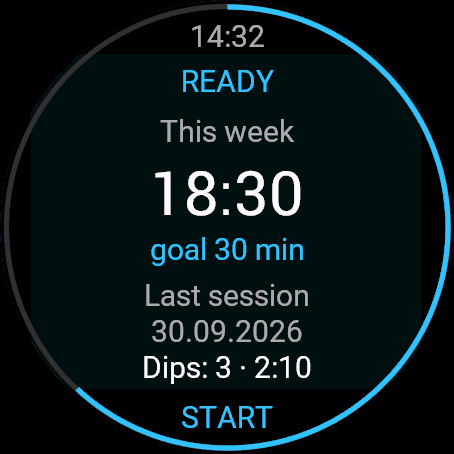
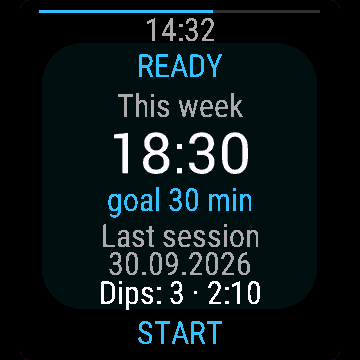
The main screen shows READY, your minutes this week and the last session. START opens the checklist and temperature picker, then WARM-UP begins. The 30-day free beta starts the first time you open it.
Controls
Watches with buttons (START, UP, DOWN, BACK)
- START: warm-up to water, water to REWARMING, rewarming to the next dip. In the water only START works, so a wet sleeve cannot end a dip.
- BACK in warm-up or rewarming opens Continue, Save, Water temperature, Discard.
- Outside a session hold UP, press DOWN or MENU for Settings.
Touch watches (tap, hold, swipe)
- Two-button touch watches: BACK steps through menus, holding it cancels. Touch is off during a session.
Settings
Phone: Connect IQ app, Cold Plunge, Settings (the unlock code fields are there too).
- Dip target: 60 options, 0:15 to 15:00. Default: 1:00.
- Target mode: Preset, Open, Temperature rule. Default: Preset.
- Warm-up: number, seconds. Default: 300.
- Rewarm reminder: number, seconds. Default: 900.
- Checklist: on or off. Default: on.
- Water temp prompt: on or off. Default: on.
- Breathing pacer: on or off. Default: off.
- Interval buzz (30 s): on or off. Default: off.
- Tones: on or off. Default: off.
- Record location: on or off. Default: off.
- Watch sensor temp: on or off. Default: on.
- Save as: Cardio, Breathwork. Default: Cardio.
- Weekly goal: 7 options, Off to 30 min. Default: Off.
License
- Free beta: 30 days from the first launch, everything works.
- Price: 5.99 EUR once at dialforge.dev, no subscription. The 8-character code is tied to your watch's UID.
- Where to enter it: phone, Connect IQ app, Cold Plunge, Settings. Read the UID in "Watch UID (needed to buy a code)", buy the code, then type it into "Unlock code from dialforge.dev". The end-of-beta screen on the watch shows the UID too.
- After the beta without a code: an end-of-beta screen with the UID replaces the app. Enter the code, then open it again. New watch? Write to us and the code moves for free.
Privacy and permissions
Permissions:
- Activity recording: saves the session to Garmin Connect.
- Extra FIT fields: adds the app's values to the saved activity.
- Sensors: heart rate from the watch.
- SensorHistory: watch temperature sensor, if enabled.
- Positioning: one GPS fix at the start, if Record location is On.
No internet use. Data stays on the watch and in the activities you save.
Troubleshooting
The code does not work. Check that the UID you bought for matches "Watch UID (needed to buy a code)" and type all 8 characters (case is ignored, no 0, O, 1 or I). A code for another app does not fit. Sync, then reopen.
What does the temperature rule do? Target seconds = 60 times the water temperature in °C, from 30 s to 5:00.
What happens at the target? The ring turns red and the watch buzzes. It is a reminder, not a safe time.
I closed the app mid-session. It saves the session itself.
Contact
kontakt@dialforge.dev or dialforge.dev. Please write before leaving a low rating.
Morsowanie: instrukcja obsługi
Do czego służy
Morsowanie mierzy czas lodowych kąpieli, z wielkimi cyframi i samymi przyciskami: rozgrzewka, dowolna liczba wejść, dogrzewanie. Zapisuje jedną aktywność, okrążenie na fazę.
Wymagania i obsługiwane zegarki
Wymaga Connect IQ 3.3.0+ i aplikacji Connect IQ albo Garmin Connect w telefonie. Obsługiwane zegarki:
- Okrągłe AMOLED: epix 2 i epix Pro 2, fēnix 8, E, Forerunner 165, 265, 570, 965, 970, Instinct 3 AMOLED, Crossover AMOLED, Venu 2, 3, 4, vivoactive 5, 6.
- Okrągłe MIP: enduro 3, seria fēnix 7, fēnix 8 Solar, Forerunner 55, 245, 255, vivoactive 4.
- Kwadratowe i prostokątne AMOLED: Venu Sq 2, Venu X1.
Instalacja
Na telefonie otwórz aplikację Connect IQ (albo Garmin Connect, a w niej sklep Connect IQ), wyszukaj "Morsowanie" od Dialforge, stuknij Zainstaluj i zsynchronizuj zegarek. Uruchom ją z listy aplikacji: na tarczy naciśnij START i wybierz Morsowanie.
Pierwsze uruchomienie
Ekran główny pokazuje GOTOWOŚĆ, twoje minuty z tygodnia i ostatnią sesję. START otwiera listę kontrolną i wybór temperatury, potem zaczyna się ROZGRZEWKA. 30-dniowa darmowa beta zaczyna się przy pierwszym otwarciu.
Sterowanie
Zegarki z przyciskami (START, GÓRA, DÓŁ, WSTECZ)
- START: z rozgrzewki do wody, z wody do DOGRZEWANIA, z dogrzewania do następnego wejścia. W wodzie działa tylko START, więc mokry rękaw nie przerwie wejścia.
- WSTECZ w rozgrzewce i dogrzewaniu otwiera Kontynuuj, Zapisz, Temperatura wody, Odrzuć.
- Poza sesją przytrzymaj GÓRA, naciśnij DÓŁ albo MENU, żeby wejść w Ustawienia.
Zegarki dotykowe (stuknięcie, przytrzymanie, przesunięcie)
- Zegarki dotykowe z dwoma przyciskami: WSTECZ przechodzi po menu, jego przytrzymanie anuluje. W sesji dotyk jest wyłączony.
Ustawienia
Telefon: aplikacja Connect IQ, Morsowanie, Ustawienia (są tam też pola kodu odblokowania).
- Cel wejścia: 60 opcji, od 0:15 do 15:00. Domyślnie: 1:00.
- Tryb celu: Ustawiony czas, Bez celu, Reguła temperatury. Domyślnie: Ustawiony czas.
- Rozgrzewka: liczba, sekundy. Domyślnie: 300.
- Przypomnienie dogrzewania: liczba, sekundy. Domyślnie: 900.
- Lista kontrolna: włączone lub wyłączone. Domyślnie: włączone.
- Pytaj o temperaturę wody: włączone lub wyłączone. Domyślnie: włączone.
- Rytm oddechu: włączone lub wyłączone. Domyślnie: wyłączone.
- Wibracja co 30 s: włączone lub wyłączone. Domyślnie: wyłączone.
- Dźwięki: włączone lub wyłączone. Domyślnie: wyłączone.
- Zapisuj lokalizację: włączone lub wyłączone. Domyślnie: wyłączone.
- Temperatura czujnika zegarka: włączone lub wyłączone. Domyślnie: włączone.
- Zapisz jako: Kardio, Ćwiczenia oddechowe. Domyślnie: Kardio.
- Cel tygodniowy: 7 opcji, od Wyłączone do 30 min. Domyślnie: Wyłączone.
Licencja
- Darmowa beta: 30 dni od pierwszego uruchomienia, wszystko działa.
- Cena: jednorazowo 5,99 EUR na dialforge.dev, bez abonamentu. 8-znakowy kod jest przypisany do UID zegarka.
- Gdzie wpisać: telefon, aplikacja Connect IQ, Morsowanie, Ustawienia. Odczytaj UID w polu "UID zegarka (potrzebny do zakupu kodu)", kup kod i wpisz go w "Kod odblokowania z dialforge.dev". Ekran końca bety na zegarku też pokazuje UID.
- Po becie bez kodu: zamiast aplikacji pojawia się ekran końca bety z UID. Wpisz kod i otwórz aplikację ponownie. Nowy zegarek? Napisz do nas, przeniesiemy kod za darmo.
Prywatność i uprawnienia
Uprawnienia:
- Zapis aktywności: zapisuje sesję w Garmin Connect.
- Dodatkowe pola FIT: dopisuje wartości aplikacji do aktywności.
- Czujniki: tętno z zegarka.
- SensorHistory: czujnik temperatury zegarka, jeśli włączony.
- Pozycja: jeden odczyt GPS na starcie, gdy Zapisuj lokalizację jest włączone.
Zero połączeń z internetem. Dane zostają w zegarku i w zapisywanych aktywnościach.
Rozwiązywanie problemów
Kod nie działa. Sprawdź, czy UID, dla którego kupiono kod, zgadza się z polem "UID zegarka (potrzebny do zakupu kodu)", i wpisz wszystkie 8 znaków (wielkość liter bez znaczenia, bez 0, O, 1, I). Kod do innej aplikacji nie pasuje. Zsynchronizuj i otwórz ponownie.
Co robi reguła temperatury? Cel w sekundach to 60 razy temperatura wody w °C, od 30 s do 5:00.
Co się dzieje na celu? Pierścień robi się czerwony, a zegarek wibruje. To przypomnienie, a nie bezpieczny czas.
Zamknąłem aplikację w trakcie sesji. Sama zapisze sesję.
Kontakt
kontakt@dialforge.dev albo dialforge.dev. Napisz, zanim wystawisz niską ocenę.
Permissions and privacy
This product asks the watch for the permissions below. Connect IQ shows them when you install it.
- Activity recording: Saves your workout in Garmin Connect (the activity from this app). The data stays in your Garmin account.Zapisuje trening w Garmin Connect (aktywność z tej aplikacji). Dane zostają na Twoim koncie Garmin.
- Own data fields in the activity: Adds this app's own numbers (for example points or sets) to the saved activity.Dodaje do zapisanej aktywności liczby tej aplikacji (na przykład punkty albo serie).
- Heart rate and sensors: Reads heart rate and other sensors of the watch while the app runs.Odczytuje tętno i inne czujniki zegarka, gdy aplikacja działa.
- Sensor history: Reads recent values stored by the watch (for example Body Battery, stress, heart rate, steps trend).Odczytuje ostatnie wartości zapisane przez zegarek (na przykład Body Battery, stres, tętno, trend kroków).
- Location (GPS): Uses the watch location for distance, speed or sun and moon times. The location is not sent anywhere.Używa lokalizacji zegarka do dystansu, prędkości albo godzin słońca i księżyca. Lokalizacja nigdzie nie jest wysyłana.
This product does not use the internet and sends no data to our servers.
The full manual and the detailed permission descriptions are available in English and Polish.
Compatible watches
51mm, D2 Air X15, D2 Mach 1 Pro, Enduro 2, Enduro 3, epix (Gen 2), epix Pro (Gen 2) 42mm, epix Pro (Gen 2) 47mm, epix Pro (Gen 2) 51mm, Forerunner 165, Forerunner 165 Music, Forerunner 245, Forerunner 245 Music, Forerunner 255, Forerunner 255 Music, Forerunner 255s, Forerunner 255s Music, Forerunner 265, Forerunner 265s, Forerunner 55, Forerunner 570 42mm, Forerunner 570 47mm, Forerunner 965, Forerunner 970, fēnix 7, fēnix 7 Pro, fēnix 7 Pro - Solar Edition (no Wi-Fi), fēnix 7S, fēnix 7S Pro, fēnix 7X, fēnix 7X Pro, fēnix 7X Pro - Solar Edition (no Wi-Fi), fēnix 8 43mm, fēnix 8 47mm, fēnix 8 Pro 47mm, fēnix 8 Solar 47mm, fēnix 8 Solar 51mm, fēnix E, Instinct 3 AMOLED 45mm, Instinct 3 AMOLED 50mm, Instinct Crossover AMOLED, MicroLED, quatix 7, quatix 7 Pro, quatix 7 Sapphire, quatix 7X Solar, quatix 8 47mm, quatix 8 Pro 47mm, tactix 7, tactix 7 – AMOLED Edition, tactix 8 47mm, tactix 8 Solar 51mm, Venu 2, Venu 2 Plus, Venu 2S, Venu 3, Venu 3S, Venu 4 41mm, Venu 4 45mm, Venu Sq 2, Venu Sq 2 Music, Venu X1, vívoactive 4, vívoactive 4S, vívoactive 5, vívoactive 6
Screenshots
FAQ
What happens after the 30-day beta?
The app shows a screen asking for a one-time unlock code from dialforge.dev instead of opening normally. Buy the code once below, no subscription.
Does the app send my data to Dialforge?
No. The app works fully offline, and the unlock code is checked on the watch itself, without contacting any server.
The app does not work as described on my watch. Can I get a refund?
Yes. Write through the feedback form below, or to the e-mail in the footer. If we cannot fix it, we refund you, as described in the terms.
Changing your watch?
Write to me and I will move your code for free.
Changelog
- First release (beta).
- Pierwsze wydanie (beta).
- Erste Version (Beta).
- Première version (beta).
- Primera versión (beta).
- Eerste release (beta).
- 初回リリース(ベータ版)。
- Prima versione (beta).
- 首发版本(测试版)。
- Первый релиз (бета).
- Primeira versão (beta).
- První vydání (beta).
- Primeira versão (beta).
- 첫 출시(베타).
- Första versionen (beta).
- Første udgivelse (beta).
- Første versjon (beta).
- 首發版本(Beta)。
- Ensimmäinen julkaisu (beta).
- Prvá verzia (beta).
- Prva različica (beta).
- Rilis pertama (beta).
- Első kiadás (béta).
- เวอร์ชันแรก (เบต้า)
- Πρώτη έκδοση (beta).
- Prvo izdanje (beta).
- גרסה ראשונה (בטא).
- Keluaran pertama (beta).
Unlock
€5.99
One-time payment. No subscription. The code works on the watch whose UID you enter.
- Install the app from the Connect IQ store. It works fully and for free for the first 30 days.
- Find your 10-digit UID: Connect IQ app on the phone > My Device > Apps or Data Fields > this app > Settings > Watch UID.
- Enter UID and e-mail, pay with PayPal (cards work without a PayPal account). The code appears here at once.
- Type the code into the same settings page, field "Unlock code". The watch checks it offline.
Thank you! Your code:
Enter the code in the app settings, field "Unlock code". The watch checks it offline.
Tell us how to make it better
Missing a data field, a colour, a layout? Found a bug on your watch model? Write it here. We read every message and ship improvements in updates.