Racket sports
Padel Score
Padel Score: one button per point, correct server, star point done right.
Padel Score: jeden przycisk na punkt, poprawny serwujący, star point policzony dobrze.
Padel Score: ein Knopf pro Punkt, korrekter Aufschläger, Star Point richtig umgesetzt.
Score de padel : un bouton par point, bon serveur, point étoile bien géré.
Marcador de pádel: un botón por punto, servidor correcto, punto estrella bien resuelto.
Padel Score: een knop per punt, de juiste server, het sterpunt goed geregeld.
パデルスコア: ワンボタンで1点、正しいサーバー、スターポイントもきちんと処理。
Punteggio Padel: un tasto per punto, battitore corretto, star point gestito bene.
板式网球计分(Padel): 每球一键记分,发球员不会出错,星点(star point)规则也做得准。
Padel Score: одна кнопка на очко, правильный подающий, звёздное очко без ошибок.
Placar de Padel: um botão por ponto, sacador correto, star point feito do jeito certo.
Padel Score: jedno tlačítko na bod, správný podávající, star point podle pravidel.
Padel Score: um botão por ponto, servidor correto, ponto estrela bem feito.
Padel Score: 포인트마다 버튼 한 번, 정확한 서버, 제대로 구현한 스타 포인트.
Padel Score: en knapp per poäng, rätt server, stjärnpoängen korrekt hanterad.
Padel Score: en knap per point, korrekt server, star point gjort rigtigt.
Padel Score: en knapp per poeng, riktig server, stjernepoeng gjort riktig.
Padel計分:一鍵記一分,發球員不會錯,星分制算得準。
Padel Score: yksi painike per piste, oikea syöttäjä, tähtipiste oikein toteutettuna.
Padel Score: jedno tlačidlo na bod, správny podávajúci, star point podľa pravidiel.
Padel Score: en gumb za vsako točko, pravilen server, star point narejen pravilno.
Skor Padel: satu tombol per poin, server yang benar, star point yang tepat.
Padel eredményjelző: egy gomb minden pontért, helyes adogató, a csillagpont helyesen kezelve.
พาเดล สกอร์: กดปุ่มเดียวต่อแต้ม ผู้เสิร์ฟถูกต้อง สตาร์พอยท์คำนวณแม่นยำ
Σκορ Padel: ένα κουμπί ανά πόντο, σωστός σερβίς, ο πόντος-αστέρι σωστά υλοποιημένος.
Padel Score: jedna tipka po bodu, točan server, star point napravljen kako treba.
פאדל ניקוד: כפתור אחד לכל נקודה, מגיש נכון, סטאר פוינט מדויק.
Padel Score: satu butang untuk satu mata, server yang betul, star point yang tepat.
Coming to Connect IQ Unlock €5.99

Beta: free for 30 days
The app works fully and for free for the first 30 days after you first open it. After that you can buy a one-time unlock code below. No subscription.
Most scorekeeping apps are built for tennis and get padel's golden point wrong. This one follows the FIP 2026 star point rule: at deuce you get at most two advantages, the third deuce is a single deciding point, and the watch shows it on screen without extra taps. At that point the receiving team chooses the side: the app does not ask, so the players settle it between themselves and the watch reminds you.
- Golden point (sudden death at deuce), star point (FIP 2026: two advantages, then a deciding point), or classic advantage scoring, your choice
- Tiebreak at 6-6 and, if you turn it on, a 10-point super tiebreak instead of the deciding set
- Change server from the stop menu if the wrong side served first; the tiebreak server order adjusts itself
- Undo on BACK, no holding needed
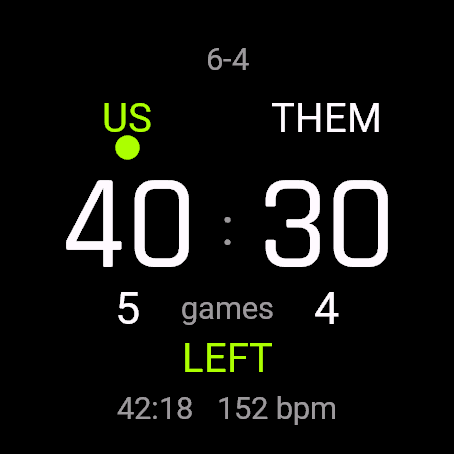
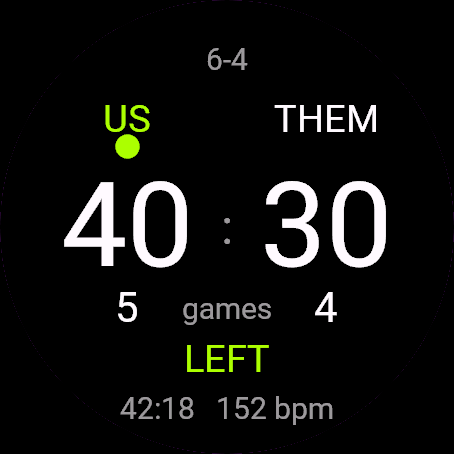
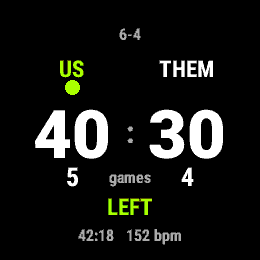
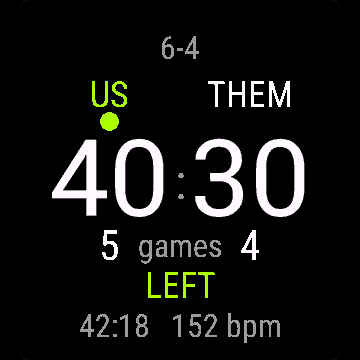
- Serve side shown at every point (at the deciding point the receivers pick the side, and the watch says so)
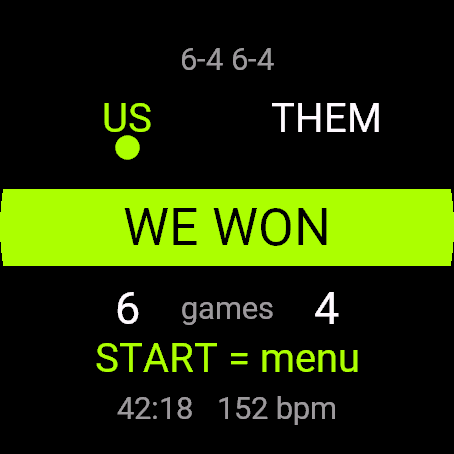
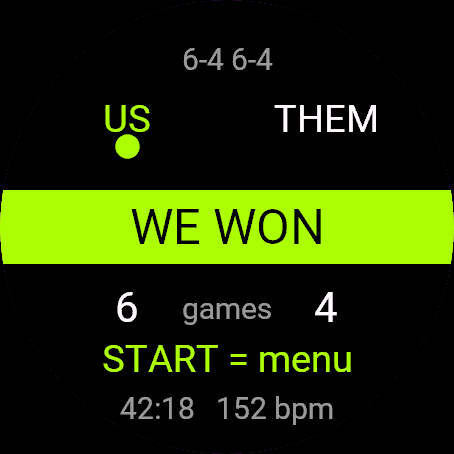
- Saved to Garmin Connect as Padel, with a lap for every set
- Match clock and heart rate on screen
Większość aplikacji do liczenia wyniku jest zrobiona pod tenisa i myli złoty punkt w padlu. Ta trzyma się zasady star point z przepisów FIP na 2026 rok: przy równowadze masz najwyżej dwie przewagi, trzecia równowaga to jeden punkt decydujący, a zegarek pokazuje to na ekranie bez dodatkowych przycisków. Przy tym punkcie stronę wybiera drużyna odbierająca: aplikacja o to nie pyta, gracze ustalają to między sobą, a zegarek o tym przypomina.
- Złoty punkt (nagła śmierć przy równowadze), star point (FIP 2026: dwie przewagi, potem punkt decydujący) albo zwykła przewaga, do wyboru
- Tie-break przy 6:6 i, jeśli włączysz, super tie-break do 10 zamiast decydującego seta
- Zmiana serwującego z menu stopu, gdy pierwszy serwis poszedł do złej strony; kolejność serwisu w tie-breaku dopasowuje się sama
- Cofanie przyciskiem WSTECZ bez przytrzymywania
- Strona serwisu pokazana przy każdym punkcie (przy punkcie decydującym stronę wybierają odbierający i zegarek o tym informuje)
- Zapis do Garmin Connect jako Padel, z okrążeniem na każdy set
- Czas meczu i tętno na ekranie
Die meisten Zählapps sind für Tennis gebaut und setzen den Golden Point im Padel falsch um. Diese hält sich an die FIP-2026-Regel zum Star Point: beim Einstand gibt es höchstens zwei Vorteile, der dritte Einstand ist ein Entscheidungspunkt, und die Uhr zeigt das auf dem Display an, ohne zusätzliches Tippen.
- Golden Point (Entscheidungspunkt beim Einstand), Star Point (FIP 2026: zwei Vorteile, danach ein Entscheidungspunkt) oder klassische Vorteilsregel, deine Wahl
- Tiebreak bei 6:6 und, wenn du es einschaltest, ein Super-Tiebreak bis 10 Punkte statt des entscheidenden Satzes
- Aufschläger im Stopp-Menü ändern, falls die falsche Seite zuerst aufgeschlagen hat; die Aufschlagreihenfolge im Tiebreak passt sich automatisch an
- Rückgängig über ZURÜCK, kein Halten nötig
- Korrekte Aufschlagseite bei jedem Punkt angezeigt
- Wird in Garmin Connect als Padel gespeichert, mit einer Runde pro Satz
- Spielzeit und Herzfrequenz auf dem Display
La plupart des applications de score sont pensées pour le tennis et se trompent sur le point en or du padel. Celle-ci suit la règle du point étoile FIP 2026 : à égalité, vous avez au maximum deux avantages, la troisième égalité devient un point décisif, et la montre l'affiche à l'écran sans appui supplémentaire.
- Point en or (mort subite à égalité), point étoile (FIP 2026 : deux avantages, puis un point décisif), ou comptage classique avec avantage, au choix
- Jeu décisif à 6-6 et, si vous l'activez, un super jeu décisif à 10 points à la place du set décisif
- Changement de serveur depuis le menu d'arrêt si le mauvais côté a servi en premier ; l'ordre de service du jeu décisif s'ajuste tout seul
- Annulation avec RETOUR, sans maintenir la pression
- Bon côté de service affiché à chaque point
- Enregistré dans Garmin Connect comme Padel, avec un tour par set
- Chronomètre du match et fréquence cardiaque à l'écran
La mayoría de las apps de marcador están hechas para tenis y se equivocan con el punto de oro del pádel. Esta sigue la regla del punto estrella de la FIP 2026: en iguales tienes como máximo dos ventajas, el tercer empate es un punto decisivo, y el reloj lo muestra en pantalla sin toques adicionales.
- Punto de oro (muerte súbita en iguales), punto estrella (FIP 2026: dos ventajas y luego un punto decisivo) o puntuación clásica con ventaja, tú eliges
- Tie-break en 6-6 y, si lo activas, un súper tie-break a 10 puntos en lugar del set decisivo
- Cambia el servidor desde el menú de pausa si el lado equivocado sacó primero; el orden de saque del tie-break se ajusta solo
- Deshacer con ATRÁS, sin mantener pulsado
- Muestra el lado de saque correcto en cada punto
- Se guarda en Garmin Connect como Padel, con una vuelta por cada set
- Reloj del partido y frecuencia cardíaca en pantalla
De meeste scoreapps zijn gebouwd voor tennis en berekenen het golden point bij padel verkeerd. Deze app volgt de FIP 2026-regel voor het sterpunt: bij gelijkspel krijg je maximaal twee keer voordeel, bij de derde keer gelijkspel valt de beslissing op een enkel punt, en het horloge toont dit op het scherm zonder extra tikken.
- Golden point (sudden death bij gelijkspel), sterpunt (FIP 2026: twee keer voordeel, daarna een beslissend punt), of klassieke voordeeltelling, jouw keuze
- Tiebreak bij 6-6 en, als je dat inschakelt, een super-tiebreak tot 10 punten in plaats van de beslissende set
- Wissel van server via het stopmenu als de verkeerde kant als eerste opsloeg; de servervolgorde in de tiebreak past zich automatisch aan
- Ongedaan maken met TERUG, niets hoeft ingedrukt te worden gehouden
- Juiste opslagzijde getoond bij elk punt
- Opgeslagen in Garmin Connect als Padel, met een ronde per set
- Wedstrijdklok en hartslag op het scherm
多くのスコア記録アプリはテニス向けに作られていて、パデルのゴールデンポイントを正しく扱えません。このアプリはFIP 2026年のスターポイントルールに対応しています。デュースではアドバンテージは最大2回まで、3回目のデュースは決定ポイントとなり、追加のタップなしで時計の画面に表示されます。
- ゴールデンポイント(デュースでのサドンデス)、スターポイント(FIP 2026: アドバンテージ2回の後に決定ポイント)、クラシックなアドバンテージ制から選択可能
- 6-6でタイブレーク。オンにすれば、決定セットの代わりに10点制のスーパータイブレークも使用可能
- 最初のサーバーを間違えた場合は停止メニューからサーバーを変更可能。タイブレークのサーバー順も自動で調整されます
- 戻るボタンで取り消し、長押し不要
- 毎ポイントで正しいサーブ側を表示
- Garmin Connectにパデルとして保存され、セットごとにラップを記録
- 画面に試合時間と心拍数を表示
La maggior parte delle app per il punteggio è pensata per il tennis e sbaglia il punto d'oro del padel. Questa segue la regola dello star point FIP 2026: in parità hai al massimo due vantaggi, la terza parità è un punto decisivo, e l'orologio lo mostra a schermo senza tocchi in più.
- Punto d'oro (punto secco sul 40-40, punto decisivo), star point (FIP 2026: due vantaggi, poi un punto decisivo), oppure vantaggio classico, a tua scelta
- Tie-break sul 6-6 e, se lo attivi, un super tie-break a 10 punti invece del set decisivo
- Cambia il battitore dal menu di stop se ha servito prima il lato sbagliato; l'ordine di servizio nel tie-break si aggiusta da solo
- Annulla con INDIETRO, senza bisogno di tenerlo premuto
- Lato di servizio corretto mostrato ad ogni punto
- Salvato su Garmin Connect come Padel, con un giro per ogni set
- Cronometro della partita e frequenza cardiaca sullo schermo
大多数计分软件是照网球设计的,板式网球的金球制经常算错。这一款按FIP 2026的星点规则来: 平分时最多拿两个优势分,第三次平分就是一分制胜局点,手表会直接显示,不用多点几下。
- 金球制(平分时骤死决胜)、星点制(FIP 2026: 两个优势分后进入一分制胜局点)或经典优势分计分,任选一种
- 6-6进入抢七,如果开启,决胜盘可以换成10分制超级抢七
- 如果一开始发球方搞错了,可以在暂停菜单里改发球员,抢七的发球顺序会自动跟着调整
- 按返回键撤销,不用长按
- 每一分都显示正确的发球区
- 以“板式网球”项目保存到Garmin Connect,每盘记一圈
- 屏幕显示比赛计时和心率
Большинство приложений для счёта сделаны для тенниса и неправильно считают золотое очко в паделе. Это приложение следует правилу звёздного мяча FIP 2026: при равном счёте у вас максимум два преимущества, при третьем равном счёте следующий розыгрыш решающий, и часы показывают это на экране без лишних нажатий.
- Золотое очко (решающее очко при равном счёте), звёздный мяч (FIP 2026: два преимущества, затем решающий розыгрыш) или классический счёт с преимуществом - на ваш выбор
- Тай-брейк при 6-6 и, если включить эту опцию, супер-тай-брейк до 10 очков вместо решающего сета
- Смена подающего из меню остановки, если первым подавала не та сторона; порядок подачи в тай-брейке подстраивается сам
- Отмена по BACK, без удержания
- Правильная сторона подачи показывается на каждом очке
- Сохраняется в Garmin Connect как Padel, с кругом на каждый сет
- Время матча и пульс на экране
A maioria dos aplicativos de placar foi criada para tênis e erra no ponto de ouro do padel. Este segue a regra star point da FIP 2026: no iguais você tem no máximo duas vantagens, no terceiro iguais o ponto decide a disputa, e o relógio mostra isso na tela sem toques extras.
- Ponto de ouro (morte súbita no iguais), star point (FIP 2026: duas vantagens e depois um ponto decisivo), ou pontuação clássica com vantagem, você escolhe
- Tiebreak em 6-6 e, se você ativar, um super tiebreak de 10 pontos no lugar do set decisivo
- Troque o sacador pelo menu de pausa se o lado errado sacou primeiro; a ordem de saque no tiebreak se ajusta automaticamente
- Desfazer com VOLTAR, sem precisar segurar o botão
- Lado do saque correto mostrado em cada ponto
- Salvo no Garmin Connect como Padel, com uma volta para cada set
- Cronômetro da partida e frequência cardíaca na tela
Většina aplikací na počítání skóre je stavěná na tenis a zlatý bod v padelu počítá špatně. Tahle se řídí pravidlem star point FIP 2026: při shodě máte nejvýš dvě výhody, třetí shoda je rozhodující bod, a hodinky to zobrazí na displeji bez dalších kliknutí.
- Zlatý bod (sudden death při shodě), star point (FIP 2026: dvě výhody, pak rozhodující bod), nebo klasické počítání s výhodou, vyberete si
- Tiebreak při 6:6 a, pokud to zapnete, super tiebreak do 10 bodů místo rozhodujícího setu
- Změna podávajícího z menu při zastavení, pokud jako první podávala špatná strana; pořadí podání v tiebreaku se přizpůsobí automaticky
- Zpět tlačítkem ZPĚT, bez držení
- Správná strana podání zobrazená u každého bodu
- Ukládá se do Garmin Connect jako Padel, s okruhem za každý set
- Čas zápasu a tepová frekvence na displeji
A maioria das aplicações de contagem de pontos foi feita para o ténis e erra no ponto de ouro do padel. Esta segue a regra do ponto estrela da FIP 2026: em iguais tens no máximo duas vantagens, e ao chegar a iguais pela terceira vez joga-se um ponto decisivo, mostrado no ecrã sem toques extra.
- Ponto de ouro (morte súbita em iguais), ponto estrela (FIP 2026: duas vantagens e depois um ponto decisivo), ou contagem clássica com vantagens, a tua escolha
- Tie-break em 6-6 e, se ativares, um super tie-break de 10 pontos em vez do set decisivo
- Muda o servidor a partir do menu de paragem se o lado errado serviu primeiro; a ordem de serviço do tie-break ajusta-se automaticamente
- Anular com VOLTAR, sem precisar de manter premido
- Lado de serviço correto mostrado em cada ponto
- Guardado no Garmin Connect como Padel, com uma volta por cada set
- Cronómetro do jogo e frequência cardíaca no ecrã
대부분의 스코어 기록 앱은 테니스 기준으로 만들어져 패들의 골든포인트를 잘못 처리합니다. 이 앱은 FIP 2026 스타 포인트 규칙을 따릅니다. 듀스에서 어드밴티지는 최대 두 번까지만 인정되고, 세 번째 듀스는 결정 포인트가 되며, 시계가 추가 조작 없이 화면에 이를 표시합니다.
- 골든포인트(듀스에서 서든데스), 스타 포인트(FIP 2026: 어드밴티지 두 번 후 결정 포인트), 클래식 어드밴티지 스코어링 중에서 선택할 수 있습니다
- 6-6에서 타이브레이크, 켜두면 결정 세트 대신 10점 슈퍼 타이브레이크를 진행합니다
- 처음 서브한 팀이 잘못 기록되었다면 정지 메뉴에서 서버를 변경할 수 있으며, 타이브레이크 서브 순서도 자동으로 맞춰집니다
- 뒤로 버튼으로 실행 취소, 길게 누를 필요 없습니다
- 매 포인트마다 정확한 서브 사이드가 표시됩니다
- Garmin Connect에 패들로 저장되며, 세트마다 랩이 생깁니다
- 화면에 경기 시간과 심박수가 표시됩니다
De flesta poängappar är byggda för tennis och räknar fel på golden point i padel. Den här följer FIP 2026-regeln för stjärnpoäng: vid lika får du max två fördelar, tredje gången det blir lika avgörs med en poäng, och klockan visar det på skärmen utan extra tryck.
- Golden point (sudden death vid lika), stjärnpoäng (FIP 2026: två fördelar, sedan en avgörande poäng), eller klassisk fördelsräkning, du väljer
- Tiebreak vid 6-6 och, om du aktiverar det, en supertiebreak till 10 poäng istället för det avgörande setet
- Byt server från stoppmenyn om fel sida servade först; serveringsordningen i tiebreaken justeras automatiskt
- Ångra med TILLBAKA, inget nedtryckt behövs
- Rätt servsida visas vid varje poäng
- Sparas i Garmin Connect som Padel, med ett varv per set
- Matchklocka och puls på skärmen
De fleste resultat-apps er bygget til tennis og misser padels golden point. Denne app følger FIP 2026-reglen for star point: ved lige (deuce) får du højst to fordele, og ved tredje deuce er der et afgørende point, som uret viser på skærmen uden ekstra tryk.
- Golden point (pludselig død ved deuce), star point (FIP 2026: to fordele, derefter et afgørende point), eller klassisk fordel-scoring, du vælger selv
- Tiebreak ved 6-6, og hvis du slår det til, en 10-points super-tiebreak i stedet for det afgørende sæt
- Skift server fra stop-menuen, hvis den forkerte side servede først; serverækkefølgen i tiebreaket justerer sig selv
- Fortryd med TILBAGE, ingen grund til at holde knappen nede
- Korrekt serveside vises ved hvert point
- Gemmes i Garmin Connect som Padel, med en omgang for hvert sæt
- Kampklokke og puls på skærmen
De fleste apper for poengtelling er bygget for tennis og bommer på padelens golden point. Denne følger FIP 2026-regelen for stjernepoeng: ved deuce får du maks to fordeler, den tredje deucen blir et avgjørende poeng, og klokken viser det på skjermen uten ekstra trykk.
- Golden point (avgjørende poeng ved deuce), stjernepoeng (FIP 2026: to fordeler, så ett avgjørende poeng), eller klassisk fordelstelling, du velger
- Tiebreak ved 6-6 og, hvis du slår det på, en super-tiebreak til 10 poeng i stedet for et avgjørende sett
- Bytt server fra stoppmenyen hvis feil side serverte først; serverrekkefølgen i tiebreak justerer seg selv
- Angre med TILBAKE, ingen behov for å holde inne knappen
- Riktig serveside vises ved hvert poeng
- Lagres i Garmin Connect som Padel, med en runde for hvert sett
- Kamptid og puls på skjermen
大部分記分App是照網球邏輯做的,遇到padel的金球制常常算錯。這款照FIP 2026年的星分制規則走:平分時最多讓你拿兩次優勢分,第三次平分就是決勝分,手錶直接顯示在畫面上,不用多按。
- 金球制(平分時驟死決勝)、星分制(FIP 2026:兩次優勢分後進入決勝分)、或傳統優勢分計分,三種任你選
- 6:6進搶七,開啟的話還可以用10分超級搶七取代決勝盤
- 如果一開始發球邊搞錯了,可以從暫停選單改發球員;搶七的發球順序會自動跟著調整
- 按返回鍵復原,不用長按
- 每一分都顯示正確的發球邊
- 以Padel分類存進Garmin Connect,每盤一個分段
- 畫面同時顯示比賽時間和心率
Useimmat pisteidenlaskentasovellukset on rakennettu tennikselle, ja niissä padelin kultapiste menee pieleen. Tämä sovellus noudattaa FIP 2026:n tähtipistesääntöä: tasapelissä saat enintään kaksi etua, kolmas tasapeli on ratkaiseva piste, ja kello näyttää sen ruudulla ilman ylimääräisiä näppäilyjä.
- Kultapiste (äkkikuolema tasapelissä), tähtipiste (FIP 2026: kaksi etua, sitten ratkaiseva piste) tai klassinen etu-pisteytys, valintasi mukaan
- Tiebreak 6-6-tilanteessa ja, jos otat sen käyttöön, 10 pisteen supertiebreak ratkaisevan setin sijaan
- Vaihda syöttäjää pysäytysvalikosta, jos väärä puoli syötti ensin; tiebreakin syöttövuorot mukautuvat automaattisesti
- Kumoa TAKAISIN-painikkeella, ei pohjassa pitämistä
- Oikea syöttöpuoli näkyy joka pisteellä
- Tallentuu Garmin Connectiin lajilla Padel, kierros (lap) joka settiä
- Ottelun kello ja syke näkyvissä
Väčšina aplikácií na počítanie skóre je stavaná na tenis a golden point v padeli má nesprávne. Táto sa riadi pravidlom star point FIP 2026: pri zhode máte najviac dve výhody, tretia zhoda je rozhodujúci bod, a hodinky to zobrazia na displeji bez ďalších ťuknutí.
- Golden point (náhla smrť pri zhode), star point (FIP 2026: dve výhody, potom rozhodujúci bod), alebo klasické skórovanie s výhodou, podľa vášho výberu
- Tiebreak pri 6-6 a, ak si ho zapnete, super tiebreak do 10 bodov namiesto rozhodujúceho setu
- Zmena podávajúceho z menu po zastavení, ak prvý podával nesprávny hráč; poradie podávajúcich v tiebreaku sa upraví samo
- Vrátenie späť tlačidlom SPÄŤ, bez podržania
- Správna strana podania zobrazená pri každom bode
- Uloženie do Garmin Connect ako Padel, s kolom za každý set
- Čas zápasu a srdcová frekvencia na displeji
Večina aplikacij za štetje točk je narejena za tenis in pri padlu napačno šteje zlato točko. Ta sledi pravilu FIP 2026 za star point: pri deuceu dobiš največ dve prednosti, tretji deuce pa je odločilna točka, ura pa to prikaže na zaslonu brez dodatnih pritiskov gumbov.
- Zlata točka (odloči jo naslednja točka pri deuceu), star point (FIP 2026: dve prednosti, nato odločilna točka) ali klasično štetje s prednostmi, izbira je tvoja
- Tiebreak pri 6:6 in, če ga vklopiš, super tiebreak do 10 točk namesto odločilnega niza
- Spremeni serverja v meniju za ustavitev, če je prva servirala napačna stran; vrstni red serviranja v tiebreaku se prilagodi samodejno
- Razveljavitev z NAZAJ, brez pridržanja gumba
- Pravilna stran servisa prikazana pri vsaki točki
- Shranjeno v Garmin Connect kot Padel, z odsekom (lap) za vsak niz
- Čas tekme in srčni utrip na zaslonu
Kebanyakan aplikasi pencatat skor dibuat untuk tenis dan salah menerapkan golden point pada padel. Aplikasi ini mengikuti aturan star point FIP 2026: pada deuce kamu maksimal mendapat dua keuntungan, deuce ketiga menjadi poin penentu, dan jam tangan menampilkannya di layar tanpa tambahan ketukan.
- Golden point (sudden death saat deuce), star point (FIP 2026: dua keuntungan, lalu poin penentu), atau sistem keuntungan klasik, pilihanmu
- Tiebreak pada 6-6 dan, jika diaktifkan, super tiebreak 10 poin sebagai pengganti set penentu
- Ubah server dari menu berhenti jika sisi yang salah servis lebih dulu; urutan server saat tiebreak menyesuaikan sendiri
- Batalkan dengan KEMBALI, tidak perlu ditahan
- Sisi servis yang benar ditampilkan di setiap poin
- Tersimpan di Garmin Connect sebagai Padel, dengan satu lap untuk setiap set
- Jam pertandingan dan detak jantung di layar
A legtöbb eredményjelző alkalmazást teniszhez építették, és elrontja a padel aranypontját. Ez a FIP 2026-os csillagpont szabályt követi: egyenlőségnél legfeljebb két előny jár, a harmadik egyenlőség pedig döntő pont, és az óra ezt extra koppintás nélkül mutatja a képernyőn.
- Aranypont (hirtelen halál egyenlőségnél), csillagpont (FIP 2026: két előny, majd egy döntő pont) vagy a klasszikus előnyös pontozás, választásod szerint
- Tiebreak 6-6-nál, és ha bekapcsolod, egy 10 pontos szuper tiebreak a döntő szett helyett
- Adogató cseréje a megállító menüből, ha rossz oldal adogatott elsőként; a tiebreak adogatási sorrendje automatikusan igazodik
- Visszavonás a VISSZA gombbal, nem kell tartani
- Helyes adogatási oldal minden pontnál látható
- Mentés a Garmin Connectbe Padel néven, körrel minden szetthez
- Meccsóra és pulzus a képernyőn
แอปจดสกอร์ส่วนใหญ่ถูกสร้างมาสำหรับเทนนิส จึงคำนวณโกลเดนพอยท์ของพาเดลผิด แอปนี้ใช้กฎสตาร์พอยท์ตามมาตรฐาน FIP 2026 คือที่ดิวซ์จะได้แอดแวนเทจอย่างมากสองครั้ง ดิวซ์ครั้งที่สามเป็นแต้มตัดสิน และนาฬิกาจะแสดงผลให้ทันทีโดยไม่ต้องกดเพิ่ม
- เลือกได้ระหว่างโกลเดนพอยท์ (ตัดสินทันทีที่ดิวซ์), สตาร์พอยท์ (FIP 2026: แอดแวนเทจสองครั้งแล้วตัดสิน) หรือระบบแอดแวนเทจแบบคลาสสิก
- ไทเบรกที่ 6-6 และถ้าเปิดใช้งาน จะมีซูเปอร์ไทเบรก 10 แต้มแทนเซตตัดสิน
- แก้ไขผู้เสิร์ฟได้จากเมนูหยุดพัก หากฝั่งที่เสิร์ฟก่อนผิด โดยลำดับผู้เสิร์ฟในไทเบรกจะปรับให้เองอัตโนมัติ
- ยกเลิกแต้มด้วยปุ่มย้อนกลับ (BACK) ไม่ต้องกดค้าง
- แสดงฝั่งเสิร์ฟที่ถูกต้องในทุกแต้ม
- บันทึกลง Garmin Connect เป็นกิจกรรมพาเดล มีแลปทุกเซต
- แสดงเวลาการแข่งขันและอัตราการเต้นหัวใจบนหน้าจอ
Οι περισσότερες εφαρμογές σκοραρίσματος είναι φτιαγμένες για τένις και μπερδεύουν τον χρυσό πόντο του padel. Αυτή ακολουθεί τον κανόνα του πόντου-αστέρι (star point) της FIP 2026: στην ισοπαλία (deuce) παίρνεις το πολύ δύο πλεονεκτήματα, η τρίτη ισοπαλία είναι πόντος που κρίνει το γκέιμ, και το ρολόι το δείχνει στην οθόνη χωρίς επιπλέον πατήματα.
- Χρυσός πόντος (ξαφνικός θάνατος στην ισοπαλία), πόντος-αστέρι (FIP 2026: δύο πλεονεκτήματα και μετά πόντος που κρίνει), ή κλασικό σκοράρισμα με πλεονέκτημα, όποιο προτιμάς
- Τάι-μπρέικ στο 6-6 και, αν το ενεργοποιήσεις, σούπερ τάι-μπρέικ στους 10 πόντους αντί για το τελευταίο σετ
- Αλλαγή σερβίς από το μενού παύσης αν σέρβιρε πρώτη η λάθος πλευρά. Η σειρά σερβίς στο τάι-μπρέικ προσαρμόζεται αυτόματα
- Αναίρεση με το πίσω κουμπί, χωρίς κράτημα
- Σωστή πλευρά σερβίς σε κάθε πόντο
- Αποθηκεύεται στο Garmin Connect ως Padel, με γύρο για κάθε σετ
- Χρόνος αγώνα και καρδιακός παλμός στην οθόνη
Većina aplikacija za vođenje rezultata napravljena je za tenis i pogrešno prikazuje padel zlatni bod. Ova slijedi FIP 2026 pravilo star pointa: kod izjednačenog imaš najviše dvije prednosti, treće izjednačeno je odlučujući bod, a sat to prikazuje na ekranu bez dodatnih dodira.
- Zlatni bod (nagla smrt kod izjednačenog), star point (FIP 2026: dvije prednosti, zatim odlučujući bod), ili klasično bodovanje s prednostima, po izboru
- Tiebreak kod 6-6 i, ako uključiš, super tiebreak do 10 bodova umjesto odlučujućeg seta
- Promjena servera iz izbornika za zaustavljanje ako je pogrešna strana servirala prva; redoslijed servisa u tiebreaku sam se prilagođava
- Poništavanje na NAZAD, bez potrebe za drženjem
- Točna strana servisa prikazana kod svakog boda
- Spremljeno na Garmin Connect kao Padel, s krugom za svaki set
- Sat utakmice i srčana frekvencija na ekranu
רוב אפליקציות הניקוד נבנו לטניס ומטעות בנקודת הזהב של פאדל. האפליקציה הזו פועלת לפי כלל הסטאר פוינט של FIP 2026: בדויס מקבלים לכל היותר שני יתרונות, הדויס השלישי הוא נקודה מכרעת, והשעון מציג את זה על המסך בלי הקשות נוספות.
- נקודת הזהב (הכרעה מיידית בדויס), סטאר פוינט (FIP 2026: שני יתרונות ואז נקודה מכרעת), או ניקוד יתרונות קלאסי, לבחירתך
- טיי-ברייק ב-6-6, ואם מפעילים את האפשרות, סופר טיי-ברייק ל-10 נקודות במקום סט מכריע
- החלפת מגיש מתפריט העצירה אם הצד הלא נכון הגיש ראשון; סדר המגישים בטיי-ברייק מתעדכן בעצמו
- ביטול בלחיצה על חזרה, בלי צורך להחזיק
- צד ההגשה הנכון מוצג בכל נקודה
- נשמר ב-Garmin Connect כפאדל, עם הקפה לכל סט
- שעון משחק ודופק על המסך
Kebanyakan aplikasi kira markah direka untuk tenis dan silap bila sampai golden point padel. Aplikasi ini mengikut peraturan star point FIP 2026: pada deuce anda hanya boleh dapat dua advantage, deuce ketiga jadi mata penentu, dan jam tangan memaparkannya di skrin tanpa ketik tambahan.
- Golden point (mati mengejut pada deuce), star point (FIP 2026: dua advantage, kemudian satu mata penentu), atau sistem advantage klasik, pilihan anda
- Tiebreak pada 6-6 dan, jika dihidupkan, super tiebreak 10 mata sebagai ganti set penentu
- Tukar server dari menu henti jika pihak yang salah servis dahulu; susunan server tiebreak turut disesuaikan sendiri
- Buat asal dengan BACK, tak perlu tahan butang
- Sebelah servis yang betul dipaparkan pada setiap mata
- Disimpan ke Garmin Connect sebagai Padel, dengan satu lap untuk setiap set
- Jam perlawanan dan kadar denyutan jantung di skrin
How to use it
Open Padel Score from the watch's app menu.
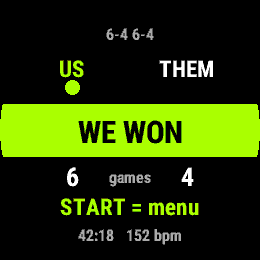
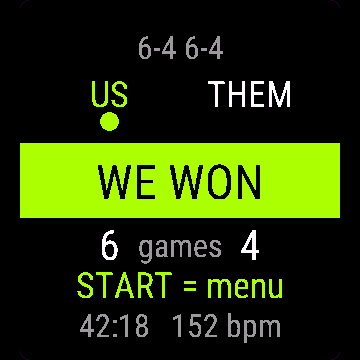
Controls: UP = point for us, DOWN = point for them, BACK = undo, START = menu (resume, change server, save, discard). Touch-only watches: tap the left half for our point, the right half for theirs.
Otwórz Padel Wynik z menu aplikacji na zegarku.
Sterowanie: GÓRA = punkt dla nas, DÓŁ = punkt dla rywali, WSTECZ = cofnij, START = menu (wznów, zmień serwującego, zapisz, odrzuć). Zegarki dotykowe: dotknięcie lewej połowy ekranu to punkt dla nas, prawej dla rywali.
Öffne Padel Score im App-Menü der Uhr.
Bedienung: AUF = Punkt für uns, AB = Punkt für den Gegner, ZURÜCK = rückgängig, START = Menü (fortsetzen, Aufschläger ändern, speichern, verwerfen). Uhren nur mit Touch: linke Hälfte tippen für unseren Punkt, rechte Hälfte für den Gegner.
Ouvrez Padel Score depuis le menu des applications de la montre.
Commandes : HAUT = point pour nous, BAS = point pour eux, RETOUR = annuler, START = menu (reprendre, changer de serveur, enregistrer, abandonner). Montres tactiles uniquement : touchez la moitié gauche pour notre point, la moitié droite pour le leur.
Abre Padel Score desde el menú de apps del reloj.
Controles: ARRIBA = punto para nosotros, ABAJO = punto para ellos, ATRÁS = deshacer, START = menú (reanudar, cambiar servidor, guardar, descartar). Relojes solo táctiles: toca la mitad izquierda para nuestro punto, la mitad derecha para el suyo.
Open Padel Score via het appmenu van het horloge.
Bediening: OMHOOG = punt voor ons, OMLAAG = punt voor hen, TERUG = ongedaan maken, START = menu (verdergaan, server wisselen, opslaan, verwijderen). Horloges met alleen aanraakscherm: tik op de linkerkant voor ons punt, de rechterkant voor hen.
時計のアプリメニューから Padel Score を開いてください。
操作方法: 上ボタン = 自分たちの得点、下ボタン = 相手の得点、戻るボタン = 取り消し、START = メニュー(再開/サーバー変更/保存/破棄)。タッチ専用の時計では、画面左半分をタップで自分たちの得点、右半分で相手の得点。
Apri Padel Score dal menu delle app dell'orologio.
Comandi: SU = punto per noi, GIÙ = punto per loro, INDIETRO = annulla, START = menu (riprendi, cambia battitore, salva, scarta). Orologi solo touch: tocca la metà sinistra per il nostro punto, la metà destra per il loro.
在手表的应用菜单中打开 Padel Score。
操作方式: 上键=我方得分,下键=对方得分,返回键=撤销,START=菜单(继续、改发球员、保存、放弃)。纯触屏手表: 点击左半边记我方得分,点击右半边记对方得分。
Откройте Padel Score из меню приложений на часах.
Управление: ВВЕРХ = очко нам, ВНИЗ = очко им, BACK = отмена, START = меню (продолжить, сменить подающего, сохранить, отменить). Часы только с сенсорным экраном: касание левой половины - очко нам, правой - очко им.
Abra Padel Score pelo menu de apps do relógio.
Controles: CIMA = ponto nosso, BAIXO = ponto do adversário, VOLTAR = desfazer, START = menu (retomar, troca de sacador, salvar, descartar). Relógios só touch: toque na metade esquerda para nosso ponto, na metade direita para o ponto do adversário.
Otevřete Padel Score z nabídky aplikací v hodinkách.
Ovládání: NAHORU = bod pro nás, DOLŮ = bod pro ně, ZPĚT = zpět, START = menu (pokračovat, změnit podávajícího, uložit, zahodit). Hodinky pouze s dotykem: klepnutím na levou půlku přidáte bod nám, na pravou jim.
Abra Padel Score no menu de aplicações do relógio.
Controlos: CIMA = ponto para nós, BAIXO = ponto para eles, VOLTAR = anular, START = menu (retomar, mudar servidor, guardar, descartar). Relógios só de toque: toca na metade esquerda para o nosso ponto, na metade direita para o deles.
시계의 앱 메뉴에서 Padel Score을(를) 여세요.
조작: 위 버튼 = 우리 팀 포인트, 아래 버튼 = 상대 팀 포인트, 뒤로 버튼 = 실행 취소, START = 메뉴(재개, 서버 변경, 저장, 취소). 터치 전용 시계: 화면 왼쪽 절반을 누르면 우리 팀 포인트, 오른쪽 절반을 누르면 상대 팀 포인트입니다.
Öppna Padel Score från klockans appmeny.
Kontroller: UPP = poäng för oss, NER = poäng för dem, TILLBAKA = ångra, START = meny (återuppta, byt server, spara, kasta). Klockor med endast pekskärm: tryck på vänster halva för vår poäng, höger halva för deras.
Åbn Padel Score fra urets appmenu.
Kontrol: OP = point til os, NED = point til dem, TILBAGE = fortryd, START = menu (genoptag, skift server, gem, forkast). Ure med kun touch: tryk på venstre halvdel for vores point, højre halvdel for deres.
Åpne Padel Score fra appmenyen på klokken.
Kontroller: OPP = poeng til oss, NED = poeng til dem, TILBAKE = angre, START = meny (fortsett, bytt server, lagre, forkast). Klokker med bare touch: trykk på venstre halvdel for vårt poeng, høyre halvdel for deres.
從手錶的應用程式選單開啟 Padel Score。
Controls: 上鍵 = 我方得分,下鍵 = 對方得分,返回 = 復原,START = 選單(繼續、換發球員、儲存、放棄)。純觸控手錶:點畫面左半邊算我方得分,右半邊算對方得分。
Avaa Padel Score kellon sovellusvalikosta.
Painikkeet: YLÖS = piste meille, ALAS = piste heille, TAKAISIN = kumoa, START = valikko (jatka, vaihda syöttäjä, tallenna, hylkää). Kosketuskellot: napauta vasenta puoliskoa omasta pisteestä, oikeaa puoliskoa heidän pisteestään.
Otvorte Padel Score z ponuky aplikácií v hodinkách.
Ovládanie: NAHOR = bod pre nás, NADOL = bod pre nich, SPÄŤ = vrátiť späť, START = menu (pokračovať, zmeniť podávajúceho, uložiť, zahodiť). Hodinky len s dotykom: ťuknite na ľavú polovicu pre náš bod, na pravú pre ich bod.
Odprite Padel Score v meniju aplikacij na uri.
Upravljanje: GOR = točka za nas, DOL = točka za njih, NAZAJ = razveljavi, START = meni (nadaljuj, spremeni serverja, shrani, zavrzi). Ure samo na dotik: tapni levo polovico za našo točko, desno polovico za njihovo.
Buka Padel Score dari menu aplikasi jam.
Kontrol: ATAS = poin untuk kita, BAWAH = poin untuk mereka, KEMBALI = batalkan, START = menu (lanjutkan, ubah server, simpan, buang). Jam tangan layar sentuh saja: ketuk separuh kiri untuk poin kita, separuh kanan untuk poin mereka.
Nyissa meg a(z) Padel Score alkalmazást az óra alkalmazásmenüjéből.
Gombok: FEL = pont nekünk, LE = pont nekik, VISSZA = visszavonás, START = menü (folytatás, adogató cseréje, mentés, elvetés). Csak érintős órák: koppints a bal felére a mi pontunkért, a jobb felére az ő pontjukért.
เปิด Padel Score จากเมนูแอปของนาฬิกา
วิธีใช้ปุ่ม: ปุ่มขึ้น (UP) = แต้มของเรา, ปุ่มลง (DOWN) = แต้มของฝ่ายตรงข้าม, ปุ่มย้อนกลับ (BACK) = ยกเลิก, START = เมนู (ดำเนินการต่อ, เปลี่ยนผู้เสิร์ฟ, บันทึก, ยกเลิกเกม) สำหรับนาฬิกาจอสัมผัสอย่างเดียว: แตะครึ่งซ้ายเพื่อแต้มของเรา แตะครึ่งขวาเพื่อแต้มของฝ่ายตรงข้าม
Ανοίξτε το Padel Score από το μενού εφαρμογών του ρολογιού.
Χειριστήρια: πάνω = πόντος για εμάς, κάτω = πόντος για αυτούς, πίσω = αναίρεση, START = μενού (συνέχιση, αλλαγή σερβίς, αποθήκευση, απόρριψη). Ρολόγια μόνο με οθόνη αφής: πάτησε το αριστερό μισό για δικό μας πόντο, το δεξί για δικό τους.
Otvorite Padel Score iz izbornika aplikacija na satu.
Upravljanje: GORE = bod za nas, DOLJE = bod za njih, NAZAD = poništi, START = izbornik (nastavi, promijeni servera, spremi, odbaci). Satovi samo na dodir: dodirni lijevu polovicu za naš bod, desnu za njihov.
פתחו את Padel Score מתפריט האפליקציות של השעון.
שליטה: מעלה = נקודה לנו, מטה = נקודה להם, חזרה = ביטול, START = תפריט (המשך, החלפת מגיש, שמירה, מחיקה). בשעונים עם מגע בלבד: הקשה על החצי השמאלי לנקודה שלנו, החצי הימני לנקודה שלהם.
Buka Padel Score daripada menu aplikasi jam.
Kawalan: UP = mata untuk kita, DOWN = mata untuk pihak lawan, BACK = buat asal, START = menu (sambung, tukar server, simpan, buang). Jam tangan sentuh sahaja: ketik separuh kiri untuk mata kita, separuh kanan untuk mata mereka.
Manual
The full manual and the detailed permission descriptions are available in English and Polish.
Padel Score: user manual
What it does
Padel Score counts a padel match point by point, with golden point or star point at deuce. It shows the server and serving side, and saves the match to Garmin Connect as Padel.
Requirements and supported watches
Needs Connect IQ 3.3.0+ and the Connect IQ or Garmin Connect phone app. Supported watches:
- Round AMOLED: epix 2 and epix Pro 2, fēnix 8, E, Forerunner 165, 265, 570, 965, 970, Instinct 3 AMOLED, Crossover AMOLED, Venu 2, 3, 4, vivoactive 5, 6.
- Round MIP: enduro 3, fēnix 7 series, 8 Solar, Forerunner 55, 245, 255, vivoactive 4.
- Square and rectangular AMOLED: Venu Sq 2, Venu X1.
Installation
In the Connect IQ app on your phone (or Garmin Connect, then the Connect IQ Store) find "Padel Score" by Dialforge, tap Install and sync the watch. Open it from the apps list: press START on the watch face, then pick Padel Score.
First launch
The start screen shows the app name, "Press START" and the free beta days left. START opens setup. Doubles and golden point are the defaults. The 30-day free beta starts the first time you open it.
Controls
Watches with buttons (START, UP, DOWN, BACK)
- Start screen: START opens setup.
- Setup: UP and DOWN scroll, START on a line changes its value (after the last it wraps to the first). Start match begins.
- Match: UP is a point for us, DOWN for them, BACK undoes the last point (up to 40). START or holding UP opens the menu.
- Menu: Resume, Change server, Save and finish, Discard (asks twice). Change server keeps the score.
Touch watches (tap, hold, swipe)
- Start screen and setup: tap opens setup, tap a line to change its value.
- Match: tap the left half for a point for us, the right half for them. Swipes do nothing.
- Undo with BACK. Menu: long press, or START if the watch has it.
Settings
Phone: Connect IQ app, Padel Score, Settings (the unlock code fields are there too).
On the watch, inside the app:
- Mode: Doubles (default) or Singles.
- Serves first: US or THEM.
- Match: Best of 1, Best of 3 (default) or Best of 5 sets.
- At deuce: Advantage, Golden point (default) or Star point.
- Deciding set: Full set (default) or Super tiebreak to 10 (Best of 3 or 5 only). Tiebreak to 7 at 6:6.
License
- Free beta: 30 days from the first launch, everything works.
- Price: 5.99 EUR once at dialforge.dev, no subscription. The 8-character code is tied to your watch's UID.
- Where to enter it: phone, Connect IQ app, Padel Score, Settings. Read the UID in "Watch UID (needed to buy a code)", buy the code, then type it into "Unlock code from dialforge.dev". The end-of-beta screen on the watch shows the UID too.
- After the beta without a code: an end-of-beta screen with the UID replaces the app. Enter the code, then open it again. New watch? Write to us and the code moves for free.
Privacy and permissions
Permissions:
- Activity recording: saves the session to Garmin Connect.
- Extra FIT fields: adds the app's values to the saved activity.
- Sensors: heart rate from the watch.
No internet use. Data stays on the watch and in the activities you save.
Troubleshooting
The code does not work. Check that the UID you bought for matches "Watch UID (needed to buy a code)" and type all 8 characters (case is ignored, no 0, O, 1 or I). A code for another app does not fit. Sync, then reopen.
Where is my match? Choose Save and finish in the menu. It lands in Garmin Connect as Padel.
What happens at deuce? Golden point: the next point at 40:40 wins. Star point: two advantages are allowed, the third deuce is one deciding point. The screen then alternates DECIDING POINT (or STAR POINT) and RECEIVER PICKS SIDE.
I closed the app in the middle of a match. Open it again: the first line of setup is Resume match, with the score (saved after every point). The Garmin activity starts as a new one.
Contact
kontakt@dialforge.dev or dialforge.dev. Please write before leaving a low rating.
Padel Wynik: instrukcja obsługi
Do czego służy
Padel Wynik liczy mecz padla punkt po punkcie, ze złotym punktem albo star point przy równowadze. Pokazuje serwującego i stronę serwisu, a mecz zapisuje w Garmin Connect jako Padel.
Wymagania i obsługiwane zegarki
Wymaga Connect IQ 3.3.0+ i aplikacji Connect IQ albo Garmin Connect w telefonie. Obsługiwane zegarki:
- Okrągłe AMOLED: epix 2 i epix Pro 2, fēnix 8, E, Forerunner 165, 265, 570, 965, 970, Instinct 3 AMOLED, Crossover AMOLED, Venu 2, 3, 4, vivoactive 5, 6.
- Okrągłe MIP: enduro 3, seria fēnix 7, fēnix 8 Solar, Forerunner 55, 245, 255, vivoactive 4.
- Kwadratowe i prostokątne AMOLED: Venu Sq 2, Venu X1.
Instalacja
Na telefonie otwórz aplikację Connect IQ (albo Garmin Connect, a w niej sklep Connect IQ), wyszukaj "Padel Wynik" od Dialforge, stuknij Zainstaluj i zsynchronizuj zegarek. Uruchom ją z listy aplikacji: na tarczy naciśnij START i wybierz Padel Wynik.
Pierwsze uruchomienie
Ekran startowy pokazuje nazwę, "Naciśnij START" i liczbę dni bety do końca. START otwiera ustawienia. Domyślnie jest debel i złoty punkt. 30-dniowa darmowa beta zaczyna się przy pierwszym otwarciu.
Sterowanie
Zegarki z przyciskami (START, GÓRA, DÓŁ, WSTECZ)
- Ekran startowy: START otwiera ustawienia.
- Ustawienia: GÓRA i DÓŁ przewijają, START na pozycji zmienia jej wartość (po ostatniej wraca do pierwszej). Start meczu zaczyna grę.
- Mecz: GÓRA to punkt dla nas, DÓŁ dla rywali, WSTECZ cofa ostatni punkt (do 40). START albo przytrzymanie GÓRY otwiera menu.
- Menu: Wznów, Zmień serwującego, Zapisz i zakończ, Odrzuć (pyta dwa razy). Zmień serwującego nie rusza wyniku.
Zegarki dotykowe (stuknięcie, przytrzymanie, przesunięcie)
- Ekran startowy i ustawienia: stuknięcie otwiera ustawienia, stuknięcie pozycji zmienia jej wartość.
- Mecz: lewa połowa ekranu to punkt dla nas, prawa dla rywali. Przesunięcia nic nie robią.
- Cofanie: WSTECZ. Menu: długie przytrzymanie albo START, jeśli zegarek go ma.
Ustawienia
Telefon: aplikacja Connect IQ, Padel Wynik, Ustawienia (są tam też pola kodu odblokowania).
Na zegarku, w aplikacji:
- Tryb: Debel (domyślnie) albo Singiel.
- Pierwszy serwuje: MY albo ONI.
- Mecz: Do 1 wygranej, Do 2 wygranych (domyślnie) albo Do 3 wygranych, liczone w setach.
- Przy równowadze: Przewaga, Złoty punkt (domyślnie) albo Star point.
- Decydujący set: Zwykły set (domyślnie) albo Super tie-break do 10 (tylko w meczu do 2 albo 3 wygranych). Tie-break do 7 przy 6:6.
Licencja
- Darmowa beta: 30 dni od pierwszego uruchomienia, wszystko działa.
- Cena: jednorazowo 5,99 EUR na dialforge.dev, bez abonamentu. 8-znakowy kod jest przypisany do UID zegarka.
- Gdzie wpisać: telefon, aplikacja Connect IQ, Padel Wynik, Ustawienia. Odczytaj UID w polu "UID zegarka (potrzebny do zakupu kodu)", kup kod i wpisz go w "Kod odblokowania z dialforge.dev". Ekran końca bety na zegarku też pokazuje UID.
- Po becie bez kodu: zamiast aplikacji pojawia się ekran końca bety z UID. Wpisz kod i otwórz aplikację ponownie. Nowy zegarek? Napisz do nas, przeniesiemy kod za darmo.
Prywatność i uprawnienia
Uprawnienia:
- Zapis aktywności: zapisuje sesję w Garmin Connect.
- Dodatkowe pola FIT: dopisuje wartości aplikacji do aktywności.
- Czujniki: tętno z zegarka.
Zero połączeń z internetem. Dane zostają w zegarku i w zapisywanych aktywnościach.
Rozwiązywanie problemów
Kod nie działa. Sprawdź, czy UID, dla którego kupiono kod, zgadza się z polem "UID zegarka (potrzebny do zakupu kodu)", i wpisz wszystkie 8 znaków (wielkość liter bez znaczenia, bez 0, O, 1, I). Kod do innej aplikacji nie pasuje. Zsynchronizuj i otwórz ponownie.
Gdzie jest mój mecz? Wybierz w menu Zapisz i zakończ. Trafi do Garmin Connect jako Padel.
Co się dzieje przy równowadze? Złoty punkt: następny punkt przy 40:40 rozstrzyga gem. Star point: dozwolone są dwie przewagi, trzecia równowaga to jeden punkt decydujący. Ekran pokazuje wtedy na przemian PUNKT DECYDUJĄCY (albo STAR POINT) i ODBIERAJĄCY WYBIERA.
Zamknąłem aplikację w środku meczu. Otwórz ją jeszcze raz: pierwsza pozycja ustawień to Wznów mecz, z wynikiem (zapis po każdym punkcie). Aktywność Garmin zaczyna się jako nowa.
Kontakt
kontakt@dialforge.dev albo dialforge.dev. Napisz, zanim wystawisz niską ocenę.
Permissions and privacy
This product asks the watch for the permissions below. Connect IQ shows them when you install it.
- Activity recording: Saves your workout in Garmin Connect (the activity from this app). The data stays in your Garmin account.Zapisuje trening w Garmin Connect (aktywność z tej aplikacji). Dane zostają na Twoim koncie Garmin.
- Own data fields in the activity: Adds this app's own numbers (for example points or sets) to the saved activity.Dodaje do zapisanej aktywności liczby tej aplikacji (na przykład punkty albo serie).
- Heart rate and sensors: Reads heart rate and other sensors of the watch while the app runs.Odczytuje tętno i inne czujniki zegarka, gdy aplikacja działa.
This product does not use the internet and sends no data to our servers.
The full manual and the detailed permission descriptions are available in English and Polish.
Compatible watches
51mm, D2 Air X15, D2 Mach 1 Pro, Enduro 2, Enduro 3, epix (Gen 2), epix Pro (Gen 2) 42mm, epix Pro (Gen 2) 47mm, epix Pro (Gen 2) 51mm, Forerunner 165, Forerunner 165 Music, Forerunner 245, Forerunner 245 Music, Forerunner 255, Forerunner 255 Music, Forerunner 255s, Forerunner 255s Music, Forerunner 265, Forerunner 265s, Forerunner 55, Forerunner 570 42mm, Forerunner 570 47mm, Forerunner 965, Forerunner 970, fēnix 7, fēnix 7 Pro, fēnix 7 Pro - Solar Edition (no Wi-Fi), fēnix 7S, fēnix 7S Pro, fēnix 7X, fēnix 7X Pro, fēnix 7X Pro - Solar Edition (no Wi-Fi), fēnix 8 43mm, fēnix 8 47mm, fēnix 8 Pro 47mm, fēnix 8 Solar 47mm, fēnix 8 Solar 51mm, fēnix E, Instinct 3 AMOLED 45mm, Instinct 3 AMOLED 50mm, Instinct Crossover AMOLED, MicroLED, quatix 7, quatix 7 Pro, quatix 7 Sapphire, quatix 7X Solar, quatix 8 47mm, quatix 8 Pro 47mm, tactix 7, tactix 7 – AMOLED Edition, tactix 8 47mm, tactix 8 Solar 51mm, Venu 2, Venu 2 Plus, Venu 2S, Venu 3, Venu 3S, Venu 4 41mm, Venu 4 45mm, Venu Sq 2, Venu Sq 2 Music, Venu X1, vívoactive 4, vívoactive 4S, vívoactive 5, vívoactive 6
Screenshots
FAQ
What happens after the 30-day beta?
The app shows a screen asking for a one-time unlock code from dialforge.dev instead of opening normally. Buy the code once below, no subscription.
Does the app send my data to Dialforge?
No. The app works fully offline, and the unlock code is checked on the watch itself, without contacting any server.
The app does not work as described on my watch. Can I get a refund?
Yes. Write through the feedback form below, or to the e-mail in the footer. If we cannot fix it, we refund you, as described in the terms.
Changing your watch?
Write to me and I will move your code for free.
Changelog
- First release (beta).
- Pierwsze wydanie (beta).
- Erste Veröffentlichung (Beta).
- Première version (bêta).
- Primera versión (beta).
- Eerste release (beta).
- 初回リリース(ベータ版)。
- Prima versione (beta).
- 首次发布(测试版)。
- Первый выпуск (бета).
- Primeira versão (beta).
- První verze (beta).
- Primeira versão (beta).
- 첫 출시 (베타).
- Första utgåvan (beta).
- Første udgivelse (beta).
- Første utgivelse (beta).
- 首次發布(測試版)。
- Ensimmäinen julkaisu (beta).
- Prvé vydanie (beta).
- Prva izdaja (beta).
- Rilis pertama (beta).
- Első kiadás (beta).
- เวอร์ชันแรก (เบต้า)
- Πρώτη έκδοση (μπέτα).
- Prvo izdanje (beta).
- מהדורה ראשונה (בטא).
- Keluaran pertama (beta).
Unlock
€5.99
One-time payment. No subscription. The code works on the watch whose UID you enter.
- Install the app from the Connect IQ store. It works fully and for free for the first 30 days.
- Find your 10-digit UID: Connect IQ app on the phone > My Device > Apps or Data Fields > this app > Settings > Watch UID.
- Enter UID and e-mail, pay with PayPal (cards work without a PayPal account). The code appears here at once.
- Type the code into the same settings page, field "Unlock code". The watch checks it offline.
Thank you! Your code:
Enter the code in the app settings, field "Unlock code". The watch checks it offline.
Tell us how to make it better
Missing a data field, a colour, a layout? Found a bug on your watch model? Write it here. We read every message and ship improvements in updates.