Water sports
Regatta Start Timer
A real sailing start timer with a huge countdown, on any watch.
Prawdziwy licznik startu regatowego z ogromnym odliczaniem, na dowolnym zegarku.
Ein echter Segel-Start-Timer mit riesigem Countdown, auf jeder Uhr.
Un vrai chronomètre de départ de voile avec un grand compte à rebours, sur n'importe quelle montre.
Un temporizador de salida de regata de verdad, con una cuenta atrás enorme, en cualquier reloj.
Een echte starttimer voor het zeilen met een grote aftelling, op elk horloge.
本格的なセーリングスタートタイマーを、大きなカウントダウン表示でどんな時計でも。
Un vero timer di partenza per la vela con un countdown enorme, su qualsiasi orologio.
真正的帆船起航倒计时,倒计时数字超大,任何手表都能用。
Настоящий таймер старта для яхтинга с крупным обратным отсчётом, на любых часах.
Um cronômetro de largada de vela de verdade, com contagem regressiva enorme, em qualquer relógio.
Skutečný startovní časovač pro plachtění s velkým odpočtem, na jakýchkoli hodinkách.
Um temporizador de partida de vela a sério, com uma contagem decrescente enorme, em qualquer relógio.
어떤 시계에서도 쓸 수 있는, 크게 표시되는 카운트다운을 갖춘 실전용 세일링 스타트 타이머.
En verklig startklocka för segling med en jättestor nedräkning, på vilken klocka som helst.
En rigtig startsekvenstimer til sejlads med en stor nedtælling, på et hvilket som helst ur.
En ordentlig startsekvenstimer for seiling, med stor nedtelling, på hvilken som helst klokke.
真正的帆船起航計時器,大字倒數,任何手錶都能用。
Aito purjehduksen lähtöajastin suurella laskurilla, millä tahansa kellolla.
Skutočný štartovací časovač pre plachtenie s veľkým odpočítavaním, na akýchkoľvek hodinkách.
Pravi časovnik za start regate z velikim odštevanjem, na katerikoli uri.
Timer start berlayar sungguhan dengan hitung mundur besar, di jam tangan apa pun.
Valódi vitorlás rajtidőzítő óriási visszaszámlálóval, bármelyik órán.
ตัวจับเวลานับถอยหลังสตาร์ตเรือใบตัวจริง ตัวเลขใหญ่ ใช้ได้กับนาฬิกาทุกรุ่น
Ένα αληθινό χρονόμετρο εκκίνησης ιστιοπλοΐας με τεράστια αντίστροφη μέτρηση, σε οποιοδήποτε ρολόι.
Stvaran mjerač starta za jedrenje s ogromnim odbrojavanjem, na bilo kojem satu.
טיימר התחלה אמיתי לתחרויות שייט עם ספירה לאחור עצומה, על כל שעון.
Pemasa permulaan perlumbaan layar sebenar dengan kiraan detik besar, pada mana-mana jam tangan.
Coming to Connect IQ Unlock €5.99
Beta: free for 30 days
The app works fully and for free for the first 30 days after you first open it. After that you can buy a one-time unlock code below. No subscription.
Other Connect IQ start timers exist, some of them free. This one puts the countdown, the gun sync and the race data in one simple app that also records the race as an activity.
- Sequences: 5-4-1-0 (RRS rule 26), 3-2-1-0, or your own minutes
- Vibration each signal minute, every 10 s in the last minute, every second in the last 10 s
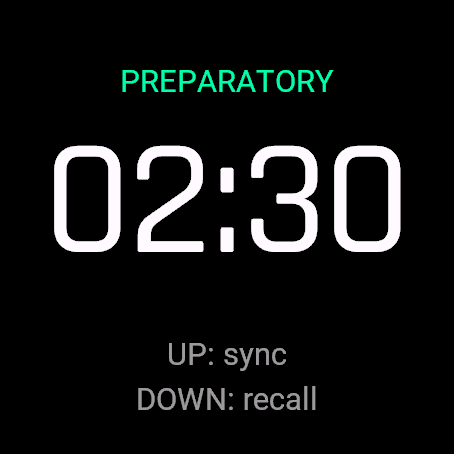
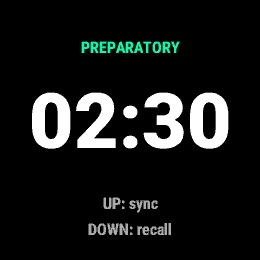
- UP syncs to the gun and rounds the countdown to the nearest full minute, DOWN restarts for a general recall (activity keeps running)
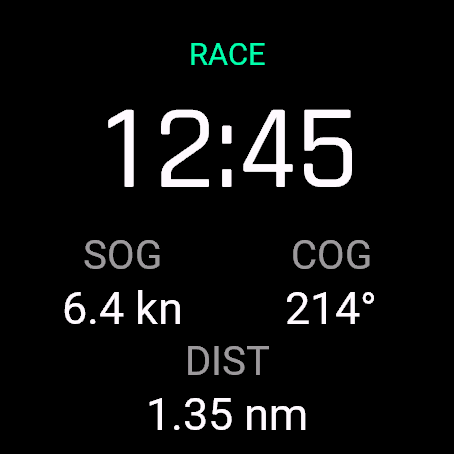
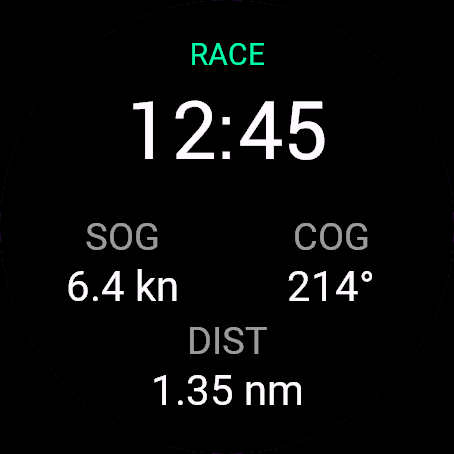
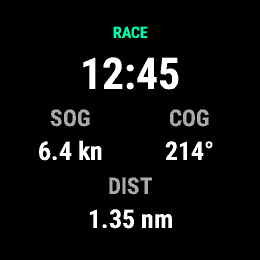
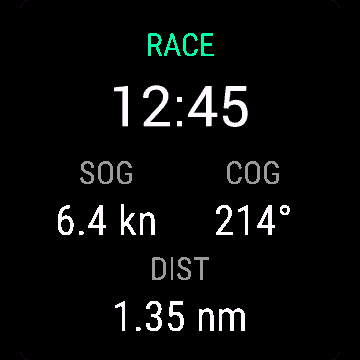
- At zero: elapsed race time, speed and course over ground, distance sailed
- Records as a Sailing activity, lap at every start
Inne liczniki startu na Connect IQ istnieją, część jest darmowa. Ta aplikacja łączy odliczanie, synchronizację do strzału i dane z wyścigu w jednym prostym programie, który zapisuje wyścig jako aktywność.
- Sekwencje: 5-4-1-0 (RRS reguła 26), 3-2-1-0, albo własne minuty
- Wibracja na każdej minucie sygnałowej, co 10 s w ostatniej minucie, co sekundę w ostatnich 10 s
- GÓRA synchronizuje do strzału i zaokrągla odliczanie do najbliższej pełnej minuty, DÓŁ restartuje sekwencję przy odwołaniu generalnym (aktywność trwa dalej)
- Po zerze: upływ czasu wyścigu, prędkość i kurs nad dnem, przebyty dystans
- Zapis jako aktywność żeglarska, okrążenie przy każdym starcie
Andere Connect IQ Start-Timer gibt es auch, manche davon kostenlos. Dieser vereint Countdown, Synchronisation auf den Startschuss und Renndaten in einer einfachen App, die das Rennen auch als Aktivität aufzeichnet.
- Sequenzen: 5-4-1-0 (RRS Regel 26), 3-2-1-0, oder eigene Minuten
- Vibration bei jeder Signalminute, alle 10 s in der letzten Minute, jede Sekunde in den letzten 10 s
- UP synchronisiert auf den Startschuss und rundet den Countdown auf die nächste volle Minute, DOWN startet neu für einen allgemeinen Rückruf (die Aktivität läuft weiter)
- Bei null: verstrichene Rennzeit, Geschwindigkeit und Kurs über Grund, gesegelte Distanz
- Wird als Segel-Aktivität aufgezeichnet, eine Runde bei jedem Start
D'autres chronomètres de départ Connect IQ existent, certains gratuits. Celui-ci réunit le compte à rebours, la synchronisation sur le coup de canon et les données de course dans une seule application simple, qui enregistre aussi la régate comme activité.
- Séquences : 5-4-1-0 (règle RRS 26), 3-2-1-0, ou vos propres minutes
- Vibration à chaque minute de signal, toutes les 10 s dans la dernière minute, chaque seconde dans les 10 dernières secondes
- UP synchronise sur le coup de canon et arrondit le compte à rebours à la minute entière la plus proche, DOWN relance pour un rappel général (l'activité continue de tourner)
- À zéro : temps de course écoulé, vitesse et route sur le fond, distance parcourue
- Enregistré comme activité Voile, un tour à chaque départ
Existen otros temporizadores de salida para Connect IQ, algunos gratuitos. Este reúne la cuenta atrás, la sincronización con el cañonazo y los datos de la regata en una sola app sencilla que además registra la regata como actividad.
- Secuencias: 5-4-1-0 (regla 26 del RRS), 3-2-1-0, o tus propios minutos
- Vibración en cada minuto de señal, cada 10 s en el último minuto, cada segundo en los últimos 10 s
- UP sincroniza con el cañonazo y redondea la cuenta atrás al minuto entero más cercano, DOWN reinicia para una llamada general (la actividad sigue corriendo)
- En cero: tiempo de carrera transcurrido, velocidad y rumbo sobre el fondo, distancia navegada
- Se registra como actividad de vela, con una vuelta en cada salida
Er bestaan andere Connect IQ-starttimers, sommige gratis. Deze bundelt de aftelling, de synchronisatie met het startschot en de wedstrijddata in één eenvoudige app die de wedstrijd ook als activiteit opslaat.
- Sequenties: 5-4-1-0 (RRS-regel 26), 3-2-1-0, of je eigen minuten
- Trilling bij elke signaalminuut, elke 10 sec in de laatste minuut, elke seconde in de laatste 10 sec
- UP synchroniseert met het startschot en rondt de aftelling af op de dichtstbijzijnde hele minuut, DOWN start opnieuw bij een algemene terugroep (de activiteit blijft doorlopen)
- Bij nul: verstreken wedstrijdtijd, snelheid en koers over de grond, gevaren afstand
- Geregistreerd als zeilactiviteit, ronde bij elke start
Connect IQには他のスタートタイマーもあり、無料のものもあります。このアプリはカウントダウン、スタート信号への同期、レースデータをひとつのシンプルなアプリにまとめ、レースをアクティビティとして記録もします。
- シーケンス: 5-4-1-0(RRSルール26)、3-2-1-0、または自分で設定した分数
- 各シグナル分でバイブ、最後の1分は10秒ごと、最後の10秒は1秒ごとにバイブ
- UPでスタート信号に同期し、カウントダウンを最も近い分単位に丸めます。DOWNでゼネラルリコールとしてリスタート(アクティビティは継続)
- ゼロになった後は、経過レース時間、速度と対地コース、航行距離を表示
- セーリングのアクティビティとして記録、スタートごとにラップを記録
Esistono altri timer di partenza per Connect IQ, alcuni gratuiti. Questo riunisce countdown, sincronizzazione con il colpo di partenza e dati di regata in un'unica app semplice, che registra anche la regata come attività.
- Sequenze: 5-4-1-0 (regola RRS 26), 3-2-1-0, oppure i tuoi minuti personalizzati
- Vibrazione ad ogni minuto di segnale, ogni 10 s nell'ultimo minuto, ogni secondo negli ultimi 10 s
- UP si sincronizza con il colpo di partenza e arrotonda il countdown al minuto pieno più vicino, DOWN riparte per un richiamo generale (l'attività continua a registrare)
- A zero: tempo di gara trascorso, velocità e rotta sul fondo, distanza navigata
- Registra come attività di Vela, un giro ad ogni partenza
Connect IQ 上还有其他起航计时器,有些是免费的。这个应用把倒计时、发令信号对齐和比赛数据放进一个简单的应用里,还会把比赛记录为活动。
- 起航序列: 5-4-1-0(RRS第26条规则)、3-2-1-0,或者自己设定分钟数
- 每个信号分钟震动一次,最后一分钟每10秒震动一次,最后10秒每秒震动一次
- UP 对齐发令信号并把倒计时取整到最近的整分钟,DOWN 在全体召回时重新开始倒计时(活动计时继续运行)
- 倒计时到零后显示: 比赛已用时间、对地速度和对地航向、航行距离
- 以“帆船”项目记录,每次起航记一圈
Другие стартовые таймеры для Connect IQ существуют, некоторые бесплатные. Этот объединяет обратный отсчёт, синхронизацию со стартовым сигналом и данные гонки в одном простом приложении, которое к тому же записывает гонку как активность.
- Последовательности: 5-4-1-0 (правило RRS 26), 3-2-1-0 или свои минуты
- Вибрация на каждой сигнальной минуте, каждые 10 с в последнюю минуту, каждую секунду в последние 10 с
- UP синхронизирует со стартовым сигналом и округляет отсчёт до ближайшей полной минуты, DOWN перезапускает при общем отзыве (активность продолжает идти)
- При нуле: время гонки, скорость и курс над грунтом, пройденное расстояние
- Записывается как активность «Парусный спорт», круг на каждый старт
Existem outros cronômetros de largada para Connect IQ, alguns gratuitos. Este reúne a contagem regressiva, a sincronização com o sinal de largada e os dados da regata em um único app simples, que também grava a regata como atividade.
- Sequências: 5-4-1-0 (regra 26 da RRS), 3-2-1-0, ou seus próprios minutos
- Vibração em cada minuto de sinal, a cada 10 s no último minuto, a cada segundo nos últimos 10 s
- UP sincroniza com o sinal de largada e arredonda a contagem regressiva para o minuto cheio mais próximo, DOWN reinicia em caso de chamada geral (a atividade continua correndo)
- No zero: tempo decorrido da prova, velocidade e rumo em relação ao fundo, distância navegada
- Registra como atividade de Vela, com uma volta em cada largada
Jiné startovní časovače pro Connect IQ existují, některé zdarma. Tenhle spojuje odpočet, synchronizaci s výstřelem a data závodu v jedné jednoduché aplikaci, která závod zároveň ukládá jako aktivitu.
- Sekvence: 5-4-1-0 (pravidlo RRS 26), 3-2-1-0, nebo vlastní počet minut
- Vibrace každou signální minutu, každých 10 s v poslední minutě, každou sekundu v posledních 10 s
- UP synchronizuje podle výstřelu a zaokrouhlí odpočet na nejbližší celou minutu, DOWN restartuje pro všeobecné odvolání (aktivita běží dál)
- Při nule: uplynulý čas závodu, rychlost a kurz vůči zemi (COG), urazená vzdálenost
- Ukládá se jako aktivita Plachtění, okruh při každém startu
Existem outros temporizadores de partida para Connect IQ, alguns gratuitos. Este junta a contagem decrescente, a sincronização com o tiro e os dados da prova numa única aplicação simples, que também regista a prova como atividade.
- Sequências: 5-4-1-0 (regra 26 do RRS), 3-2-1-0, ou os seus próprios minutos
- Vibração em cada minuto de sinal, a cada 10 s no último minuto, a cada segundo nos últimos 10 s
- UP sincroniza com o tiro de partida e arredonda a contagem ao minuto inteiro mais próximo, DOWN reinicia para uma chamada geral (a atividade continua a correr)
- No zero: tempo de prova decorrido, velocidade e rumo sobre o fundo, distância navegada
- Regista como atividade de Vela, com uma volta em cada partida
다른 Connect IQ 스타트 타이머도 있고, 그중 일부는 무료입니다. 이 앱은 카운트다운, 출발신호 동기화, 레이스 데이터를 하나의 간단한 앱에 담고, 레이스를 액티비티로도 기록합니다.
- 시퀀스: 5-4-1-0(RRS 규칙 26), 3-2-1-0, 또는 원하는 분 단위 직접 설정
- 매 신호 분마다 진동, 마지막 1분 동안은 10초마다, 마지막 10초 동안은 1초마다 진동
- UP으로 출발신호에 동기화하며 카운트다운을 가장 가까운 정각 분으로 반올림하고, DOWN으로 제너럴 리콜 시 재시작합니다(액티비티는 계속 진행)
- 0에 도달하면 경과 레이스 시간, 지상속도(SOG)와 진행 방향(COG), 항해 거리 표시
- 세일링 액티비티로 기록되며, 매 스타트마다 랩이 생깁니다
Det finns andra starttimers för Connect IQ, några av dem gratis. Den här samlar nedräkningen, synken mot startskottet och racedata i en enkel app som också registrerar racet som en aktivitet.
- Sekvenser: 5-4-1-0 (RRS regel 26), 3-2-1-0, eller dina egna minuter
- Vibration varje signalminut, var 10:e sekund under sista minuten, varje sekund under de sista 10 sekunderna
- UP synkar till startskottet och avrundar nedräkningen till närmaste hela minut, DOWN startar om vid allmän återkallelse (aktiviteten fortsätter köra)
- Vid noll: förfluten racetid, fart och kurs över grund (COG), seglad distans
- Registreras som en seglingsaktivitet, varv vid varje start
Der findes andre starttimere til Connect IQ, nogle af dem gratis. Denne samler nedtællingen, synkroniseringen til startskuddet og kapsejladsdata i én enkel app, som også registrerer sejladsen som en aktivitet.
- Sekvenser: 5-4-1-0 (RRS regel 26), 3-2-1-0, eller dine egne minutter
- Vibration hvert signalminut, hvert 10. sekund i det sidste minut, hvert sekund i de sidste 10 sekunder
- UP synkroniserer til startskuddet og runder nedtællingen af til nærmeste hele minut, DOWN genstarter ved generel tilbagekaldelse (aktiviteten fortsætter med at køre)
- Ved nul: forløbet løbstid, fart og kurs over grund, sejlet distance
- Registreres som en sejladsaktivitet, omgang ved hver start
Det finnes andre starttimere for Connect IQ, noen av dem gratis. Denne samler nedtellingen, synkroniseringen mot startskuddet og regattadataene i én enkel app som også lagrer seilasen som en aktivitet.
- Sekvenser: 5-4-1-0 (RRS-regel 26), 3-2-1-0, eller dine egne minutter
- Vibrasjon hvert signalminutt, hvert 10. sekund det siste minuttet, hvert sekund de siste 10 sekundene
- UP synkroniserer med startskuddet og runder nedtellingen av til nærmeste hele minutt, DOWN starter på nytt for en generell tilbakekalling (aktiviteten fortsetter å kjøre)
- Ved null: forløpt løpstid, fart og kurs over grunn, distanse seilt
- Registreres som en Seiling-aktivitet, runde ved hver start
Connect IQ上也有其他起航計時器,有些還是免費的。這款把倒數、對槍聲同步和比賽數據放在一個簡單的App裡,還會把整場比賽記錄成一筆活動。
- 起航程序:5-4-1-0(RRS第26條規則)、3-2-1-0,或自訂分鐘數
- 每個信號分鐘都震動,最後一分鐘每10秒震一次,最後10秒每秒震一次
- UP 對齊起航槍聲,並把倒數四捨五入到最接近的整分鐘,DOWN 重新開始以處理集體重新起航(活動計時繼續跑)
- 倒數到零之後:顯示比賽經過時間、對地速度和對地航向、航行距離
- 以帆船活動記錄,每次起航都是一個分段
Connect IQ:lle on muitakin lähtöajastimia, osa ilmaisia. Tämä kokoaa laskurin, lähtölaukaukseen synkronoinnin ja kilpailutiedot yhteen yksinkertaiseen sovellukseen, joka myös tallentaa kilpailun aktiviteettina.
- Sekvenssit: 5-4-1-0 (RRS-sääntö 26), 3-2-1-0, tai omat minuuttisi
- Värähdys joka signaaliminuutilla, 10 s välein viimeisellä minuutilla, joka sekunti viimeisillä 10 sekunnilla
- UP synkronoi lähtölaukaukseen ja pyöristää laskurin lähimpään täyteen minuuttiin, DOWN käynnistää uudelleen yleisen palautuksen jälkeen (aktiviteetti jatkuu)
- Nollassa: kulunut kilpailuaika, nopeus ja suunta pohjan suhteen (COG), purjehdittu matka
- Tallentuu lajilla Purjehdus, kierros (lap) joka lähdöllä
Iné štartovacie časovače pre Connect IQ existujú, niektoré zadarmo. Tento spája odpočítavanie, synchronizáciu na výstrel a dáta z pretekov v jednej jednoduchej aplikácii, ktorá preteky zároveň uloží ako aktivitu.
- Sekvencie: 5-4-1-0 (pravidlo RRS 26), 3-2-1-0, alebo vlastné minúty
- Vibrácia každú signálnu minútu, každých 10 s v poslednej minúte, každú sekundu v posledných 10 s
- UP synchronizuje na výstrel a zaokrúhli odpočítavanie na najbližšiu celú minútu, DOWN reštartuje pri všeobecnom odvolaní (aktivita beží ďalej)
- Pri nule: uplynutý čas pretekov, rýchlosť a kurz voči zemi (COG), preplávaná vzdialenosť
- Uloží sa ako aktivita Plachtenie, kolo pri každom štarte
Drugi časovniki za start za Connect IQ obstajajo, nekateri tudi brezplačni. Ta združuje odštevanje, sinhronizacijo s strelom in podatke tekme v eni preprosti aplikaciji, ki tekmo zapiše tudi kot aktivnost.
- Sekvence: 5-4-1-0 (pravilo RRS 26), 3-2-1-0, ali lastne minute
- Vibracija ob vsaki signalni minuti, vsakih 10 s v zadnji minuti, vsako sekundo v zadnjih 10 s
- UP sinhronizira s startnim strelom in zaokroži odštevanje na najbližjo polno minuto, DOWN ponovno zažene ob splošnem priklicu (general recall), aktivnost teče naprej
- Ob ničli: pretečeni čas tekme, hitrost in smer glede na tla (COG), prejadrana razdalja
- Zapiše se kot aktivnost Jadranje (Sailing), odsek (lap) ob vsakem startu
Ada timer start Connect IQ lain, sebagian gratis. Yang ini menyatukan hitung mundur, sinkron ke tembakan start, dan data balapan dalam satu aplikasi sederhana yang juga merekam balapan sebagai aktivitas.
- Urutan: 5-4-1-0 (RRS rule 26), 3-2-1-0, atau menit sesuai keinginanmu
- Getaran di setiap menit sinyal, setiap 10 detik pada menit terakhir, setiap detik pada 10 detik terakhir
- UP menyinkronkan ke tembakan start dan membulatkan hitung mundur ke menit penuh terdekat, DOWN mengulang start untuk general recall (aktivitas tetap berjalan)
- Pada titik nol: waktu balapan yang berlalu, kecepatan dan arah terhadap tanah, jarak yang telah dilayari
- Tercatat sebagai aktivitas Sailing, lap di setiap start
Más Connect IQ rajtidőzítők is léteznek, némelyik ingyenes. Ez a visszaszámlálót, a lövéshez szinkronizálást és a versenyadatokat egyetlen egyszerű alkalmazásba teszi, amely a versenyt tevékenységként is rögzíti.
- Szekvenciák: 5-4-1-0 (RRS 26. szabály), 3-2-1-0, vagy saját percek
- Vibráció minden jelzőpercnél, az utolsó percben minden 10 másodpercnél, az utolsó 10 másodpercben minden másodpercnél
- Az UP a lövéshez szinkronizál, és a visszaszámlálást a legközelebbi egész percre kerekíti, a DOWN újraindít általános visszahíváshoz (a tevékenység tovább fut)
- Nullánál: letelt versenyidő, talajhoz viszonyított sebesség és irány (SOG/COG), megtett vitorlázott távolság
- Rögzítés Vitorlázás tevékenységként, körrel minden rajtnál
มีตัวจับเวลาสตาร์ตสำหรับ Connect IQ อยู่หลายตัว บางตัวฟรี แต่แอปนี้รวมการนับถอยหลัง การซิงก์กับปืนสตาร์ต และข้อมูลการแข่งไว้ในแอปเดียวที่เรียบง่าย และยังบันทึกการแข่งเป็นกิจกรรมด้วย
- ลำดับเวลา: 5-4-1-0 (ตามกฎ RRS ข้อ 26), 3-2-1-0 หรือกำหนดจำนวนนาทีเอง
- สั่นทุกนาทีสัญญาณ ทุก 10 วินาทีในนาทีสุดท้าย และทุกวินาทีใน 10 วินาทีสุดท้าย
- ปุ่มขึ้น (UP) ซิงก์กับปืนสตาร์ตและปัดเศษการนับถอยหลังเป็นนาทีเต็มที่ใกล้ที่สุด ปุ่มลง (DOWN) รีสตาร์ตเมื่อมีการเรียกกลับทั้งหมด (General Recall) (กิจกรรมยังทำงานต่อ)
- ที่ศูนย์: เวลาแข่งที่ผ่านไป ความเร็วและทิศทางเทียบพื้น ระยะทางที่แล่นไป
- บันทึกเป็นกิจกรรมเซลลิ่ง มีแลปทุกครั้งที่สตาร์ต
Υπάρχουν και άλλα χρονόμετρα εκκίνησης για Connect IQ, κάποια δωρεάν. Αυτό βάζει την αντίστροφη μέτρηση, τον συγχρονισμό με την εκπυρσοκρότηση και τα δεδομένα αγώνα σε μία απλή εφαρμογή που καταγράφει τον αγώνα και ως δραστηριότητα.
- Ακολουθίες: 5-4-1-0 (κανόνας RRS 26), 3-2-1-0, ή τα δικά σου λεπτά
- Δόνηση σε κάθε λεπτό σήματος, κάθε 10 δευτ. στο τελευταίο λεπτό, κάθε δευτερόλεπτο στα τελευταία 10 δευτ.
- Το UP συγχρονίζει με την εκπυρσοκρότηση και στρογγυλοποιεί την αντίστροφη μέτρηση στο πλησιέστερο ολόκληρο λεπτό, το DOWN επανεκκινεί για γενική ανάκληση (η δραστηριότητα συνεχίζει να τρέχει)
- Στο μηδέν: χρόνος αγώνα που έχει περάσει, ταχύτητα και πορεία ως προς το βυθό (SOG / COG), απόσταση που έχει πλεύσει
- Καταγράφεται ως δραστηριότητα Sailing, με γύρο σε κάθε εκκίνηση
Postoje i drugi mjerači starta za Connect IQ, neki besplatni. Ovaj spaja odbrojavanje, sinkronizaciju s pucnjem i podatke utrke u jednoj jednostavnoj aplikaciji koja utrku ujedno bilježi kao aktivnost.
- Sekvence: 5-4-1-0 (RRS pravilo 26), 3-2-1-0, ili vlastite minute
- Vibracija svake signalne minute, svakih 10 s u zadnjoj minuti, svake sekunde u zadnjih 10 s
- UP sinkronizira sa startnim pucnjem i zaokružuje odbrojavanje na najbližu punu minutu, DOWN ponovno pokreće za opći opoziv (aktivnost nastavlja teći)
- Kod nule: proteklo vrijeme utrke, brzina i kurs preko dna (COG), prijeđena udaljenost jedrenjem
- Bilježi se kao aktivnost jedrenja (Sailing), krug kod svakog starta
קיימים טיימרי התחלה אחרים ל-Connect IQ, חלקם בחינם. האפליקציה הזו מאחדת את הספירה לאחור, הסנכרון ליריית הפתיחה ונתוני המרוץ באפליקציה פשוטה אחת, שגם מקליטה את המרוץ כפעילות.
- רצפים: 5-4-1-0 (כלל RRS מספר 26), 3-2-1-0, או דקות לבחירתכם
- רטט בכל דקת איתות, כל 10 שניות בדקה האחרונה, וכל שנייה ב-10 השניות האחרונות
- UP מסנכרן לפי יריית הפתיחה ומעגל את הספירה לאחור לדקה השלמה הקרובה, DOWN מפעיל מחדש להזנקה חוזרת כללית (הפעילות ממשיכה לרוץ)
- באפס: זמן המרוץ שעבר, מהירות וכיוון תנועה, מרחק ששט
- נרשם כפעילות שייט, הקפה בכל התחלה
Pemasa start Connect IQ yang lain memang ada, sebahagiannya percuma. Yang ini menggabungkan countdown, sync ke tembakan meriam dan data perlumbaan dalam satu aplikasi ringkas yang turut merekod perlumbaan sebagai aktiviti.
- Urutan: 5-4-1-0 (peraturan RRS 26), 3-2-1-0, atau minit anda sendiri
- Getaran pada setiap minit isyarat, setiap 10 saat pada minit terakhir, setiap saat pada 10 saat terakhir
- UP sync ke tembakan meriam dan membundarkan countdown ke minit penuh terdekat, DOWN mula semula untuk general recall (aktiviti terus berjalan)
- Pada sifar: masa perlumbaan berlalu, kelajuan dan haluan atas tanah (SOG/COG), jarak yang dilayari
- Direkod sebagai aktiviti Sailing, pusingan pada setiap permulaan
How to use it
Open Regatta Start Timer from the watch's app menu.
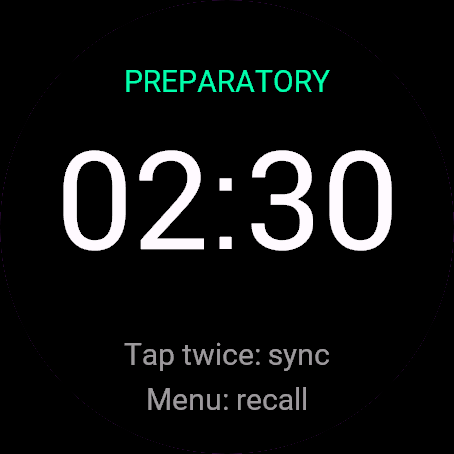
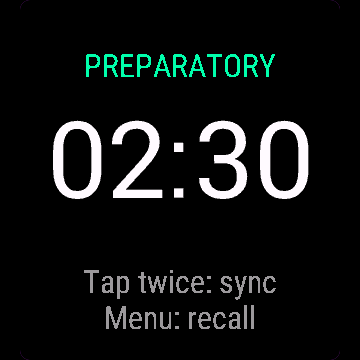
Controls: START (or ENTER) start/pause, UP sync, DOWN recall, BACK menu. Touch-only watches: tap twice within 2 s to sync (rounds to the nearest minute), recall from the menu. GPS and recording start when you open the timer (READY).
Otwórz Start regat z menu aplikacji na zegarku.
Sterowanie: START (albo ENTER) start/pauza, GÓRA synchronizacja, DÓŁ odwołanie, WSTECZ menu. Zegarki tylko dotykowe: dotknij dwa razy w ciągu 2 s, żeby zsynchronizować (zaokrągla do najbliższej minuty), odwołanie z menu. GPS i nagrywanie ruszają po otwarciu licznika (GOTOWY).
Öffne Regatta Start Timer im App-Menü der Uhr.
Bedienung: START (oder ENTER) Start/Pause, UP Synchronisation, DOWN Rückruf, BACK Menü. Uhren nur mit Touch: zweimal innerhalb von 2 s tippen zum Synchronisieren (rundet auf die nächste volle Minute), Rückruf über das Menü. GPS und Aufzeichnung starten, wenn du den Timer öffnest (READY).
Ouvrez Regatta Start Timer depuis le menu des applications de la montre.
Commandes : START (ou ENTER) démarrer/pause, UP synchroniser, DOWN rappel, BACK menu. Montres tactiles uniquement : appuyez deux fois en moins de 2 s pour synchroniser (arrondit à la minute entière la plus proche), rappel depuis le menu. Le GPS et l'enregistrement démarrent à l'ouverture du minuteur (READY).
Abre Regatta Start Timer desde el menú de apps del reloj.
Controles: START (o ENTER) inicia/pausa, UP sincroniza, DOWN llamada general, BACK menú. Relojes solo táctiles: toca dos veces en menos de 2 s para sincronizar (redondea al minuto más cercano), la llamada general está en el menú. El GPS y la grabación empiezan al abrir el temporizador (READY).
Open Regatta Start Timer via het appmenu van het horloge.
Bediening: START (of ENTER) start/pauzeert, UP synchroniseert, DOWN terugroep, BACK menu. Horloges met alleen aanraakscherm: tik twee keer binnen 2 s om te synchroniseren (rondt af op de dichtstbijzijnde minuut), terugroep via het menu. GPS en opname starten wanneer je de timer opent (READY).
時計のアプリメニューから Regatta Start Timer を開いてください。
操作方法: START(または ENTER)で開始/一時停止、UPで同期、DOWNでリコール、BACKでメニュー。タッチ専用の時計では、2秒以内に2回タップで同期(最も近い分単位に丸めます)、リコールはメニューから。タイマーを開く(READY)と、GPS と記録が始まります。
Apri Regatta Start Timer dal menu delle app dell'orologio.
Comandi: START (o ENTER) avvia/pausa, UP sincronizza, DOWN richiamo, BACK menu. Orologi solo touch: tocca due volte entro 2 s per sincronizzare (arrotonda al minuto più vicino), richiamo dal menu. GPS e registrazione partono quando apri il timer (READY).
在手表的应用菜单中打开 Regatta Start Timer。
操作方式: START(或 ENTER)开始/暂停,UP 对齐发令信号,DOWN 全体召回,BACK 打开菜单。纯触屏手表: 2 秒内点击两次对齐发令信号(四舍五入到最近的整分钟),全体召回在菜单里操作。打开计时器(READY)时,GPS 和记录随即启动。
Откройте Regatta Start Timer из меню приложений на часах.
Управление: START (или ENTER) старт/пауза, UP синхронизация, DOWN отзыв, BACK меню. Часы только с сенсорным экраном: дважды коснитесь в течение 2 с для синхронизации (округляет до ближайшей минуты), отзыв из меню. GPS и запись включаются, когда вы открываете таймер (READY).
Abra Regatta Start Timer pelo menu de apps do relógio.
Controles: START (ou ENTER) inicia/pausa, UP sincroniza, DOWN chamada geral, BACK menu. Relógios só touch: toque duas vezes em até 2 s para sincronizar (arredonda para o minuto mais próximo), chamada geral pelo menu. O GPS e a gravação começam quando você abre o cronômetro (READY).
Otevřete Regatta Start Timer z nabídky aplikací v hodinkách.
Ovládání: START (nebo ENTER) start/pauza, UP synchronizace, DOWN odvolání, BACK menu. Hodinky pouze s dotykem: klepněte dvakrát během 2 s pro synchronizaci (zaokrouhlí na nejbližší minutu), odvolání z menu. GPS a záznam se spustí při otevření časovače (READY).
Abra Regatta Start Timer no menu de aplicações do relógio.
Controlos: START (ou ENTER) iniciar/pausar, UP sincronizar, DOWN chamada geral, BACK menu. Relógios só de toque: tocar duas vezes em 2 s para sincronizar (arredonda ao minuto mais próximo), chamada geral a partir do menu. O GPS e a gravação começam assim que abre o temporizador (READY).
시계의 앱 메뉴에서 Regatta Start Timer을(를) 여세요.
조작: START(또는 ENTER)로 시작/일시정지, UP 동기화, DOWN 리콜, BACK 메뉴. 터치 전용 시계: 2초 안에 두 번 탭하면 동기화(가장 가까운 분으로 반올림), 리콜은 메뉴에서. 타이머를 열면(READY) GPS와 기록이 시작됩니다.
Öppna Regatta Start Timer från klockans appmeny.
Kontroller: START (eller ENTER) starta/pausa, UP synk, DOWN återkallelse, BACK meny. Klockor med endast pekskärm: tryck två gånger inom 2 s för att synka (avrundar till närmaste minut), återkallelse från menyn. GPS och inspelning startar när du öppnar timern (READY).
Åbn Regatta Start Timer fra urets appmenu.
Kontrol: START (eller ENTER) start/pause, UP sync, DOWN tilbagekaldelse, BACK menu. Ure med kun touch: tryk to gange inden for 2 s for at synkronisere (runder af til nærmeste minut), tilbagekaldelse fra menuen. GPS og optagelse starter, når du åbner timeren (READY).
Åpne Regatta Start Timer fra appmenyen på klokken.
Kontroller: START (eller ENTER) start/pause, UP synkroniser, DOWN tilbakekalling, BACK meny. Klokker med bare touch: trykk to ganger innen 2 s for å synkronisere (avrunder til nærmeste minutt), tilbakekalling fra menyen. GPS og opptak starter når du åpner timeren (READY).
從手錶的應用程式選單開啟 Regatta Start Timer。
操作:START(或 ENTER)開始/暫停,UP 同步,DOWN 重新起航,BACK 開選單。純觸控手錶:2秒內點兩下即可同步(四捨五入到最接近的整分鐘),重新起航要從選單操作。開啟計時器(READY)時,GPS 與記錄就會啟動。
Avaa Regatta Start Timer kellon sovellusvalikosta.
Painikkeet: START (tai ENTER) käynnistys/keskeytys, UP synkronointi, DOWN palautus, BACK valikko. Kosketuskellot: napauta kahdesti 2 s sisällä synkronoidaksesi (pyöristää lähimpään minuuttiin), palautus valikosta. GPS ja tallennus käynnistyvät, kun avaat ajastimen (READY).
Otvorte Regatta Start Timer z ponuky aplikácií v hodinkách.
Ovládanie: START (alebo ENTER) štart/pauza, UP synchronizácia, DOWN odvolanie, BACK menu. Hodinky len s dotykom: ťuknite dvakrát do 2 s na synchronizáciu (zaokrúhli na najbližšiu minútu), odvolanie z menu. GPS a záznam sa spustia, keď otvoríte časovač (READY).
Odprite Regatta Start Timer v meniju aplikacij na uri.
Upravljanje: START (ali ENTER) začni/premor, UP sinhronizacija, DOWN priklic, BACK meni. Ure samo na dotik: dvakrat tapnite v 2 s za sinhronizacijo (zaokroži na najbližjo minuto), priklic iz menija. GPS in snemanje se začneta, ko odprete časovnik (READY).
Buka Regatta Start Timer dari menu aplikasi jam.
Kontrol: START (atau ENTER) mulai/jeda, UP sinkron, DOWN recall, BACK menu. Jam layar sentuh saja: ketuk dua kali dalam 2 detik untuk sinkron (dibulatkan ke menit terdekat), recall dari menu. GPS dan perekaman mulai saat kamu membuka timer (READY).
Nyissa meg a(z) Regatta Start Timer alkalmazást az óra alkalmazásmenüjéből.
Gombok: START (vagy ENTER) rajt/szünet, UP szinkron, DOWN visszahívás, BACK menü. Csak érintős órák: kétszeri koppintás 2 másodpercen belül a szinkronhoz (a legközelebbi percre kerekít), visszahívás a menüből. A GPS és a rögzítés akkor indul, amikor megnyitod az időzítőt (READY).
เปิด Regatta Start Timer จากเมนูแอปของนาฬิกา
วิธีใช้ปุ่ม: START (หรือ ENTER) สตาร์ต/พัก, UP ซิงก์, DOWN เรียกกลับ, BACK เปิดเมนู นาฬิกาจอสัมผัสอย่างเดียว: แตะสองครั้งภายใน 2 วินาทีเพื่อซิงก์ (ปัดเศษเป็นนาทีเต็มที่ใกล้ที่สุด) เรียกกลับได้จากเมนู GPS และการบันทึกจะเริ่มเมื่อคุณเปิดตัวจับเวลา (READY)
Ανοίξτε το Regatta Start Timer από το μενού εφαρμογών του ρολογιού.
Χειριστήρια: START (ή ENTER) εκκίνηση/παύση, UP συγχρονισμός, DOWN ανάκληση, BACK μενού. Ρολόγια μόνο με οθόνη αφής: πάτημα δύο φορές μέσα σε 2 δευτ. για συγχρονισμό (στρογγυλοποιείται στο πλησιέστερο λεπτό), ανάκληση από το μενού. Το GPS και η καταγραφή ξεκινούν όταν ανοίγεις το χρονόμετρο (READY).
Otvorite Regatta Start Timer iz izbornika aplikacija na satu.
Upravljanje: START (ili ENTER) start/pauza, UP sinkronizacija, DOWN opoziv, BACK izbornik. Satovi samo na dodir: dvaput dodirnite unutar 2 s za sinkronizaciju (zaokružuje na najbližu minutu), opoziv iz izbornika. GPS i snimanje počinju kad otvorite mjerač (READY).
פתחו את Regatta Start Timer מתפריט האפליקציות של השעון.
שליטה: START (או ENTER) התחלה/הפסקה, UP סנכרון, DOWN הזנקה חוזרת כללית, BACK תפריט. בשעונים עם מגע בלבד: הקשה כפולה בתוך 2 שניות לסנכרון (מעגל לדקה השלמה הקרובה), הזנקה חוזרת כללית מהתפריט. GPS והקלטה מתחילים כשפותחים את הטיימר (READY).
Buka Regatta Start Timer daripada menu aplikasi jam.
Kawalan: START (atau ENTER) mula/henti seketika, UP sync, DOWN recall, BACK menu. Jam tangan sentuh sahaja: ketik dua kali dalam 2 s untuk sync (dibundarkan ke minit terdekat), recall dari menu. GPS dan rakaman bermula apabila anda membuka pemasa (READY).
Manual
The full manual and the detailed permission descriptions are available in English and Polish.
Regatta Start Timer: user manual
What it does
Regatta Start Timer is a sailing start countdown with a huge clock, gun sync and recall. At zero it shows elapsed time, speed, course and distance, and records a Sailing activity.
Requirements and supported watches
Needs Connect IQ 3.3.0+ and the Connect IQ or Garmin Connect phone app. Supported watches:
- Round AMOLED: epix 2 and epix Pro 2, fēnix 8, E, Forerunner 165, 265, 570, 965, 970, Instinct 3 AMOLED, Crossover AMOLED, Venu 2, 3, 4, vivoactive 5, 6.
- Round MIP: enduro 3, fēnix 7 series, 8 Solar, Forerunner 55, 245, 255, vivoactive 4.
- Square and rectangular AMOLED: Venu Sq 2, Venu X1.
Installation
In the Connect IQ app on your phone (or Garmin Connect, then the Connect IQ Store) find "Regatta Start Timer" by Dialforge, tap Install and sync the watch. Open it from the apps list: press START on the watch face, then pick Regatta Start Timer.
First launch
The start screen shows the app name, "Press START to set up" and the free beta days left. START (or a tap) opens the menu: Sequence, Speed unit, Open timer. The timer waits on READY until you press START. The 30-day free beta starts the first time you open it.
Controls
Watches with buttons (START, UP, DOWN, BACK)
- Menu: START on Sequence cycles 5-4-1-0 (RRS 26), 3-2-1-0, Custom (adds Custom minutes). START on Speed unit switches kn and km/h.
- START (ENTER on single-button watches like Venu Sq 2) starts the countdown, then pauses and resumes it, also the race clock.
- UP syncs to the gun: it rounds the remaining time to the nearest full minute. DOWN is a general recall: the sequence restarts from full time and the activity keeps running. Both do nothing while on READY.
- BACK or holding the menu button opens Resume, Restart sequence, Save, Discard (asks twice).
Touch watches (tap, hold, swipe)
- Touch-only watches: tap twice within 2 seconds to sync. Recall is only in the menu, as Restart sequence, so a wet screen cannot reset the count.
- Swipes do nothing. With UP and DOWN buttons, taps are ignored.
Settings
Phone: Connect IQ app, Regatta Start Timer, Settings (the unlock code fields are there too).
On the watch, inside the app:
- Sequence: 5-4-1-0 (RRS 26), 3-2-1-0 or Custom.
- Custom minutes: 1 to 10 in steps of 1, then 15, 20, 25, 30. Custom has one signal at the start.
- Speed unit: kn with distance in Mm (nautical miles), or km/h with km. Remembered.
License
- Free beta: 30 days from the first launch, everything works.
- Price: 5.99 EUR once at dialforge.dev, no subscription. The 8-character code is tied to your watch's UID.
- Where to enter it: phone, Connect IQ app, Regatta Start Timer, Settings. Read the UID in "Watch UID (needed to buy a code)", buy the code, then type it into "Unlock code from dialforge.dev". The end-of-beta screen on the watch shows the UID too.
- After the beta without a code: an end-of-beta screen with the UID replaces the app. Enter the code, then open it again. New watch? Write to us and the code moves for free.
Privacy and permissions
Permissions:
- Activity recording: saves the session to Garmin Connect.
- Positioning: GPS gives speed, course over ground and distance during the race.
- Extra FIT fields: adds the app's values to the saved activity.
No internet use. Data stays on the watch and in the activities you save.
Troubleshooting
The code does not work. Check that the UID you bought for matches "Watch UID (needed to buy a code)" and type all 8 characters (case is ignored, no 0, O, 1 or I). A code for another app does not fit. Sync, then reopen.
When does it vibrate? On each signal minute, every 10 seconds in the last minute, every second in the last 10. The start gets a stronger buzz and a lap.
SOG, COG and DIST show "--". They come from GPS. Wait for a fix outdoors. DIST counts from the start gun.
Does a recall end my activity? No. It stays one activity, with the recall count saved. GPS and recording start at READY.
Contact
kontakt@dialforge.dev or dialforge.dev. Please write before leaving a low rating.
Start regat: instrukcja obsługi
Do czego służy
Start regat to odliczanie startu dla żeglarzy: wielki zegar, synchronizacja ze strzałem i wywołanie. Na zerze przechodzi na ekran wyścigu z czasem, prędkością, kursem i dystansem, a wyścig zapisuje jako aktywność żeglarską.
Wymagania i obsługiwane zegarki
Wymaga Connect IQ 3.3.0+ i aplikacji Connect IQ albo Garmin Connect w telefonie. Obsługiwane zegarki:
- Okrągłe AMOLED: epix 2 i epix Pro 2, fēnix 8, E, Forerunner 165, 265, 570, 965, 970, Instinct 3 AMOLED, Crossover AMOLED, Venu 2, 3, 4, vivoactive 5, 6.
- Okrągłe MIP: enduro 3, seria fēnix 7, fēnix 8 Solar, Forerunner 55, 245, 255, vivoactive 4.
- Kwadratowe i prostokątne AMOLED: Venu Sq 2, Venu X1.
Instalacja
Na telefonie otwórz aplikację Connect IQ (albo Garmin Connect, a w niej sklep Connect IQ), wyszukaj "Start regat" od Dialforge, stuknij Zainstaluj i zsynchronizuj zegarek. Uruchom ją z listy aplikacji: na tarczy naciśnij START i wybierz Start regat.
Pierwsze uruchomienie
Ekran startowy pokazuje nazwę, "Naciśnij START" i liczbę dni bety do końca. START (albo stuknięcie) otwiera menu: Sekwencja, Jednostka prędkości, Otwórz licznik. Licznik otwiera się na GOTOWY i nie rusza, dopóki nie naciśniesz START. 30-dniowa darmowa beta zaczyna się przy pierwszym otwarciu.
Sterowanie
Zegarki z przyciskami (START, GÓRA, DÓŁ, WSTECZ)
- Menu: START na Sekwencja przełącza 5-4-1-0 (RRS 26), 3-2-1-0, Własna. Własna dodaje Minuty (własne). START na Jednostka prędkości przełącza kn i km/h.
- START (ENTER na zegarkach z jednym przyciskiem, jak Venu Sq 2) zaczyna odliczanie, potem pauzuje i wznawia, także zegar wyścigu.
- GÓRA synchronizuje ze strzałem: zaokrągla pozostały czas do pełnej minuty. DÓŁ to wywołanie ogólne: sekwencja startuje od pełnego czasu, a aktywność trwa dalej. Na ekranie GOTOWY oba nic nie robią.
- WSTECZ albo przytrzymanie przycisku menu otwiera Wznów, Zrestartuj sekwencję, Zapisz, Odrzuć (pyta dwa razy).
Zegarki dotykowe (stuknięcie, przytrzymanie, przesunięcie)
- Zegarki tylko dotykowe: stuknij dwa razy w ciągu 2 sekund, żeby zsynchronizować. Pierwsze stuknięcie pokazuje "Stuknij jeszcze raz". Wywołanie jest tylko w menu, jako Zrestartuj sekwencję, żeby mokry ekran nie zresetował odliczania.
- Przesunięcia nic nie robią. Na zegarkach z przyciskami GÓRA i DÓŁ stuknięcia na liczniku są ignorowane.
Ustawienia
Telefon: aplikacja Connect IQ, Start regat, Ustawienia (są tam też pola kodu odblokowania).
Na zegarku, w aplikacji:
- Sekwencja: 5-4-1-0 (RRS 26), 3-2-1-0 albo Własna.
- Minuty (własne): od 1 do 10 co 1, potem 15, 20, 25, 30. Własna ma jeden sygnał na starcie.
- Jednostka prędkości: kn z dystansem w Mm (mile morskie) albo km/h z km. Jest pamiętana.
Licencja
- Darmowa beta: 30 dni od pierwszego uruchomienia, wszystko działa.
- Cena: jednorazowo 5,99 EUR na dialforge.dev, bez abonamentu. 8-znakowy kod jest przypisany do UID zegarka.
- Gdzie wpisać: telefon, aplikacja Connect IQ, Start regat, Ustawienia. Odczytaj UID w polu "UID zegarka (potrzebny do zakupu kodu)", kup kod i wpisz go w "Kod odblokowania z dialforge.dev". Ekran końca bety na zegarku też pokazuje UID.
- Po becie bez kodu: zamiast aplikacji pojawia się ekran końca bety z UID. Wpisz kod i otwórz aplikację ponownie. Nowy zegarek? Napisz do nas, przeniesiemy kod za darmo.
Prywatność i uprawnienia
Uprawnienia:
- Zapis aktywności: zapisuje sesję w Garmin Connect.
- Pozycja: GPS daje prędkość, kurs nad dnem i dystans w trakcie wyścigu.
- Dodatkowe pola FIT: dopisuje wartości aplikacji do aktywności.
Zero połączeń z internetem. Dane zostają w zegarku i w zapisywanych aktywnościach.
Rozwiązywanie problemów
Kod nie działa. Sprawdź, czy UID, dla którego kupiono kod, zgadza się z polem "UID zegarka (potrzebny do zakupu kodu)", i wpisz wszystkie 8 znaków (wielkość liter bez znaczenia, bez 0, O, 1, I). Kod do innej aplikacji nie pasuje. Zsynchronizuj i otwórz ponownie.
Kiedy wibruje? Na każdej minucie sygnałowej, co 10 sekund w ostatniej minucie i co sekundę w ostatnich 10 sekundach. Start dostaje mocniejszy sygnał i okrążenie w aktywności.
SOG, COG i DYST pokazują "--". Biorą się z GPS. Poczekaj na fix na dworze. DYST liczy się od strzału startowego.
Czy wywołanie kończy aktywność? Nie. To jedna aktywność, z zapisaną liczbą wywołań. GPS i nagrywanie ruszają na GOTOWY.
Kontakt
kontakt@dialforge.dev albo dialforge.dev. Napisz, zanim wystawisz niską ocenę.
Permissions and privacy
This product asks the watch for the permissions below. Connect IQ shows them when you install it.
- Activity recording: Saves your workout in Garmin Connect (the activity from this app). The data stays in your Garmin account.Zapisuje trening w Garmin Connect (aktywność z tej aplikacji). Dane zostają na Twoim koncie Garmin.
- Location (GPS): Uses the watch location for distance, speed or sun and moon times. The location is not sent anywhere.Używa lokalizacji zegarka do dystansu, prędkości albo godzin słońca i księżyca. Lokalizacja nigdzie nie jest wysyłana.
- Own data fields in the activity: Adds this app's own numbers (for example points or sets) to the saved activity.Dodaje do zapisanej aktywności liczby tej aplikacji (na przykład punkty albo serie).
This product does not use the internet and sends no data to our servers.
The full manual and the detailed permission descriptions are available in English and Polish.
Compatible watches
51mm, D2 Air X15, D2 Mach 1 Pro, Enduro 2, Enduro 3, epix (Gen 2), epix Pro (Gen 2) 42mm, epix Pro (Gen 2) 47mm, epix Pro (Gen 2) 51mm, Forerunner 165, Forerunner 165 Music, Forerunner 245, Forerunner 245 Music, Forerunner 255, Forerunner 255 Music, Forerunner 255s, Forerunner 255s Music, Forerunner 265, Forerunner 265s, Forerunner 55, Forerunner 570 42mm, Forerunner 570 47mm, Forerunner 965, Forerunner 970, fēnix 7, fēnix 7 Pro, fēnix 7 Pro - Solar Edition (no Wi-Fi), fēnix 7S, fēnix 7S Pro, fēnix 7X, fēnix 7X Pro, fēnix 7X Pro - Solar Edition (no Wi-Fi), fēnix 8 43mm, fēnix 8 47mm, fēnix 8 Pro 47mm, fēnix 8 Solar 47mm, fēnix 8 Solar 51mm, fēnix E, Instinct 3 AMOLED 45mm, Instinct 3 AMOLED 50mm, Instinct Crossover AMOLED, MicroLED, quatix 7, quatix 7 Pro, quatix 7 Sapphire, quatix 7X Solar, quatix 8 47mm, quatix 8 Pro 47mm, tactix 7, tactix 7 – AMOLED Edition, tactix 8 47mm, tactix 8 Solar 51mm, Venu 2, Venu 2 Plus, Venu 2S, Venu 3, Venu 3S, Venu 4 41mm, Venu 4 45mm, Venu Sq 2, Venu Sq 2 Music, Venu X1, vívoactive 4, vívoactive 4S, vívoactive 5, vívoactive 6
Screenshots
FAQ
What happens after the 30-day beta?
The app shows a screen asking for a one-time unlock code from dialforge.dev instead of opening normally. Buy the code once below, no subscription.
Does the app send my data to Dialforge?
No. The app works fully offline, and the unlock code is checked on the watch itself, without contacting any server.
The app does not work as described on my watch. Can I get a refund?
Yes. Write through the feedback form below, or to the e-mail in the footer. If we cannot fix it, we refund you, as described in the terms.
Changing your watch?
Write to me and I will move your code for free.
Changelog
- First release (beta).
- Pierwsze wydanie (beta).
- Erste Veröffentlichung (Beta).
- Première version (bêta).
- Primera versión (beta).
- Eerste release (beta).
- 初回リリース(ベータ版)。
- Prima versione (beta).
- 首次发布(测试版)。
- Первый выпуск (бета).
- Primeira versão (beta).
- První verze (beta).
- Primeira versão (beta).
- 첫 출시 (베타).
- Första utgåvan (beta).
- Første udgivelse (beta).
- Første utgivelse (beta).
- 首次發布(測試版)。
- Ensimmäinen julkaisu (beta).
- Prvé vydanie (beta).
- Prva izdaja (beta).
- Rilis pertama (beta).
- Első kiadás (beta).
- เวอร์ชันแรก (เบต้า)
- Πρώτη έκδοση (μπέτα).
- Prvo izdanje (beta).
- מהדורה ראשונה (בטא).
- Keluaran pertama (beta).
Unlock
€5.99
One-time payment. No subscription. The code works on the watch whose UID you enter.
- Install the app from the Connect IQ store. It works fully and for free for the first 30 days.
- Find your 10-digit UID: Connect IQ app on the phone > My Device > Apps or Data Fields > this app > Settings > Watch UID.
- Enter UID and e-mail, pay with PayPal (cards work without a PayPal account). The code appears here at once.
- Type the code into the same settings page, field "Unlock code". The watch checks it offline.
Thank you! Your code:
Enter the code in the app settings, field "Unlock code". The watch checks it offline.
Tell us how to make it better
Missing a data field, a colour, a layout? Found a bug on your watch model? Write it here. We read every message and ship improvements in updates.