Strength, HIIT and hybrid racing
Rep Counter
Rep counter built for reliable manual counting first, with automatic counting as a bonus.
Licznik powtórzeń zrobiony przede wszystkim pod pewne, ręczne liczenie. Automatyczne liczenie jest dodatkiem.
Wiederholungszähler, zuerst für verlässliches manuelles Zählen gebaut, automatisches Zählen als Bonus.
Compteur de répétitions pensé avant tout pour un comptage manuel fiable, avec le comptage automatique en bonus.
Contador de repeticiones pensado primero para un conteo manual fiable, con conteo automático como extra.
Herhalingenteller die eerst betrouwbaar handmatig telt, met automatisch tellen als extra.
信頼できる手動カウントを基本に、自動カウントもプラスで使えるレップカウンター。
Contatore di ripetizioni pensato prima di tutto per il conteggio manuale affidabile, con il conteggio automatico come bonus.
计数器先把手动计数做扎实,自动计数是附加功能。
Счётчик повторений, сделанный прежде всего для надёжного ручного подсчёта, с автоматическим подсчётом как бонусом.
Contador de repetições feito primeiro para contagem manual confiável, com contagem automática como bônus.
Počítač opakování postavený především na spolehlivém manuálním počítání, automatické počítání je bonus navíc.
Contador de repetições feito primeiro para uma contagem manual fiável, com contagem automática como extra.
정확한 수동 카운팅을 기본으로 하고, 자동 카운팅은 보너스로 제공하는 반복 횟수 카운터입니다.
Repräknare byggd för tillförlitlig manuell räkning i första hand, med automatisk räkning som bonus.
Repetitionstæller bygget til pålidelig manuel tælling først, med automatisk tælling som bonus.
Repetisjonsteller bygget for pålitelig manuell telling først, med automatisk telling som en bonus.
次數計算器,優先做到手動計數穩定可靠,自動計數是額外加分。
Toistolaskuri, joka on rakennettu ensisijaisesti luotettavaan manuaaliseen laskentaan, automaattinen laskenta bonuksena.
Počítač opakovaní stavaný predovšetkým na spoľahlivé manuálne počítanie, s automatickým počítaním ako bonusom.
Štetje ponovitev, zanesljivo za ročno štetje, samodejno štetje pa je dodatek.
Penghitung repetisi yang dibuat dengan penghitungan manual sebagai andalan, plus penghitungan otomatis sebagai bonus.
Ismétlésszámláló, elsősorban a megbízható kézi számoláshoz, az automatikus számolás csak ráadás.
ตัวนับจำนวนครั้ง ออกแบบให้นับด้วยมือได้แม่นยำเป็นหลัก พร้อมระบบนับอัตโนมัติเป็นของแถม
Μετρητής επαναλήψεων φτιαγμένος πρώτα για αξιόπιστη χειροκίνητη μέτρηση, με αυτόματη μέτρηση ως μπόνους.
Brojač ponavljanja izrađen prije svega za pouzdano ručno brojanje, s automatskim brojanjem kao bonusom.
מונה חזרות שנבנה בראש ובראשונה לספירה ידנית אמינה, עם ספירה אוטומטית כבונוס.
Kira ulangan (rep) dibina untuk kiraan manual yang boleh dipercayai dahulu, dengan kiraan automatik sebagai bonus.
Coming to Connect IQ Unlock €4.99
Beta: free for 30 days
The app works fully and for free for the first 30 days after you first open it. After that you can buy a one-time unlock code below. No subscription.
UP/DOWN count reps, START logs the set and starts a rest timer. Adjust the last set during rest without losing the clock. Optional accelerometer auto-count adds reps by itself for squats, lunges, burpees, wall balls and jumps. Buttons always work, for every exercise.
- Push-ups, squats, sit-ups, burpees, pull-ups, lunges, wall balls, dips, or Other
- Rest timer 60/90/120/180s, remembered, vibrates when it ends
- Tap screen: upper half +1, lower half -1, hold = finish the set
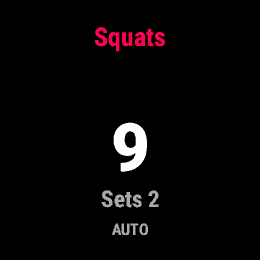
- Auto count (beta) reads how hard your wrist moves, so it works for squats, lunges, burpees, wall balls and jumps. With a planted wrist (push-ups, pull-ups, dips) it counts nothing: count those by button or by tapping the screen. Manual counting always works
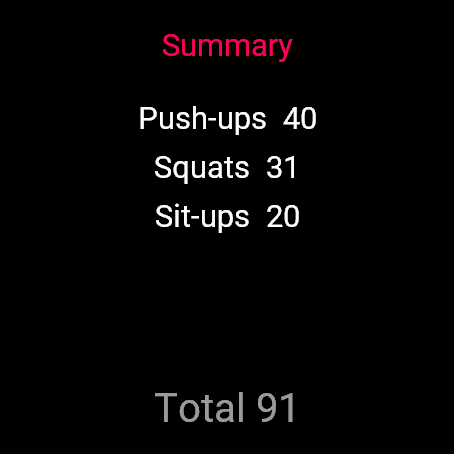
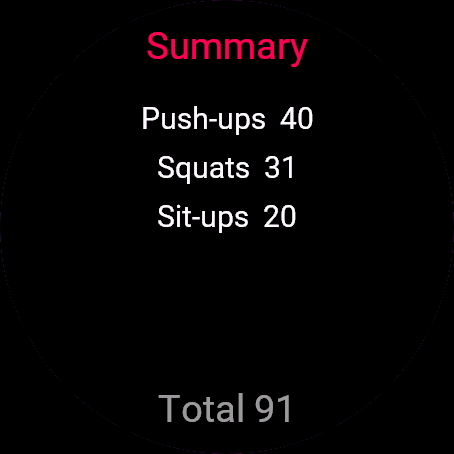
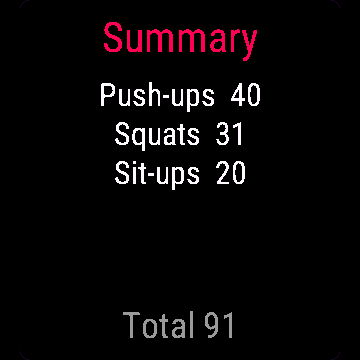
- Summary screen with totals per exercise
- Records as Strength Training in Garmin Connect, one lap per set
GÓRA/DÓŁ liczą powtórzenia, START zapisuje serię i uruchamia odpoczynek. W trakcie odpoczynku możesz poprawić liczbę powtórzeń ostatniej serii bez resetowania zegara. Automatyczne liczenie z akcelerometru dolicza powtórzenia samo przy przysiadach, wykrokach, burpees, wall balls i skokach. Przyciski działają zawsze, przy każdym ćwiczeniu.
- Pompki, przysiady, brzuszki, burpees, podciąganie, wykroki, wall balls, dipy albo Inne
- Odpoczynek 60/90/120/180 s, zapamiętany, wibracja na koniec
- Dotyk: górna połowa ekranu +1, dolna -1, przytrzymanie kończy serię
- Auto liczenie (beta) czyta siłę ruchu nadgarstka, więc działa przy przysiadach, wykrokach, burpees, wall balls i skokach. Gdy nadgarstek stoi w miejscu (pompki, podciąganie, dipy), nie policzy nic: licz je przyciskami albo dotykiem. Ręczne liczenie działa zawsze
- Ekran podsumowania z sumą powtórzeń na każde ćwiczenie
- Zapis jako trening siłowy w Garmin Connect, okrążenie na każdą serię
AUF/AB zählen Wiederholungen, START trägt den Satz ein und startet einen Pausentimer. Den letzten Satz während der Pause anpassen, ohne die Uhr zu verlieren. Optionale automatische Zählung über den Beschleunigungssensor addiert Wiederholungen von selbst, die Tasten funktionieren trotzdem immer.
- Liegestütze, Kniebeugen, Sit-ups, Burpees, Klimmzüge, Ausfallschritte, Wall Balls, Dips oder Andere
- Pausentimer 60/90/120/180 s, wird gemerkt, vibriert am Ende
- Display tippen: obere Hälfte +1, untere Hälfte -1
- Automatische Zählung (Beta) über den Beschleunigungssensor, manuelle Tasten funktionieren immer
- Zusammenfassung mit Summen pro Übung
- Wird in Garmin Connect als Krafttraining aufgezeichnet, eine Runde pro Satz
HAUT/BAS comptent les répétitions, START enregistre la série et lance un chronomètre de repos. Ajustez la dernière série pendant le repos sans perdre le chrono. Le comptage automatique optionnel par accéléromètre ajoute des répétitions seul, les boutons fonctionnent toujours aussi.
- Pompes, squats, abdominaux, burpees, tractions, fentes, wall balls, dips, ou Autre
- Chronomètre de repos 60/90/120/180 s, mémorisé, vibre à la fin
- Appui sur l'écran : moitié haute +1, moitié basse -1
- Comptage automatique (bêta) par accéléromètre, les boutons manuels fonctionnent toujours
- Écran récapitulatif avec les totaux par exercice
- Enregistré comme Musculation dans Garmin Connect, un tour par série
ARRIBA/ABAJO cuentan repeticiones, START registra la serie e inicia el descanso. Ajusta la última serie durante el descanso sin perder el tiempo. El conteo automático opcional por acelerómetro añade repeticiones por sí solo, y los botones siempre funcionan también.
- Flexiones, sentadillas, abdominales, burpees, dominadas, zancadas, wall balls, fondos, u Otro
- Temporizador de descanso de 60/90/120/180 s, se recuerda, vibra al terminar
- Toca la pantalla: mitad superior +1, mitad inferior -1
- Conteo automático (beta) por acelerómetro, los botones manuales siempre funcionan
- Pantalla de resumen con totales por ejercicio
- Se registra como entrenamiento de fuerza en Garmin Connect, una vuelta por serie
OMHOOG/OMLAAG tellen herhalingen, START noteert de set en start een rusttimer. Pas de laatste set tijdens de rust aan zonder de klok te verliezen. De optionele automatische telling via de versnellingsmeter voegt zelf herhalingen toe, de knoppen blijven altijd werken.
- Push-ups, squats, sit-ups, burpees, pull-ups, lunges, wall balls, dips of Anders
- Rusttimer van 60/90/120/180 seconden, onthouden, trilt wanneer de tijd om is
- Tik op het scherm: boven +1, onder -1
- Automatisch tellen (beta) via de versnellingsmeter, handmatige knoppen werken altijd
- Overzichtsscherm met totalen per oefening
- Geregistreerd als Krachttraining in Garmin Connect, een ronde per set
上ボタン/下ボタンでレップをカウントし、STARTでセットを記録してレストタイマーを開始します。レスト中に前のセットの回数を修正しても、時間はそのまま進みます。加速度センサーによる自動カウントも使えますが、ボタンでの操作は常に有効です。
- 腕立て伏せ、スクワット、腹筋、バーピー、懸垂、ランジ、ウォールボール、ディップス、またはその他
- レストタイマーは60/90/120/180秒から選択、前回の設定を記憶、終了時にバイブで通知
- 画面タップ: 上半分で+1、下半分で-1
- 加速度センサーによる自動カウント(ベータ)、手動ボタンは常に使用可能
- エクササイズごとの合計を表示するサマリー画面
- Garmin Connectに筋力トレーニングとして記録、セットごとに1ラップ
SU/GIÙ contano le ripetizioni, START chiude la serie e avvia il timer di recupero. Puoi correggere l'ultima serie durante il recupero senza perdere il cronometro. Il conteggio automatico opzionale dall'accelerometro aggiunge ripetizioni da solo, ma i tasti funzionano sempre.
- Flessioni, squat, addominali, burpee, trazioni, affondi, wall ball, dip, oppure Altro
- Timer di recupero a 60/90/120/180s, memorizzato, vibra alla fine
- Tocco sullo schermo: metà superiore +1, metà inferiore -1
- Conteggio automatico (beta) dall'accelerometro, i tasti manuali funzionano sempre
- Schermata di riepilogo con i totali per esercizio
- Registra come Allenamento di forza su Garmin Connect, un giro per ogni serie
上键/下键记次数,START记录这一组并开始休息倒计时。休息期间可以修改刚记录的那组,倒计时不会因此中断。加速度计自动计数是可选功能,按键始终可以用。
- 俯卧撑、深蹲、卷腹、波比跳、引体向上、箭步蹲、药球墙球、臂屈伸,或自定义其他动作
- 休息倒计时60/90/120/180秒,会记住你的选择,结束时震动提醒
- 点击屏幕: 上半部分+1次,下半部分-1次
- 自动计数(测试功能)基于加速度计,手动按键始终可用
- 总览界面显示每个动作的总次数
- 以“力量训练”项目记录到Garmin Connect,每组记一圈
ВВЕРХ/ВНИЗ считают повторения, START записывает подход и запускает таймер отдыха. Можно скорректировать последний подход во время отдыха без потери времени. Опциональный автоподсчёт по акселерометру сам добавляет повторения, кнопки при этом всегда работают.
- Отжимания, приседания, скручивания, берпи, подтягивания, выпады, броски мяча в стену, отжимания на брусьях или Другое
- Таймер отдыха 60/90/120/180 с, запоминается, вибрирует в конце
- Касание экрана: верхняя половина +1, нижняя -1
- Автоподсчёт (бета) по акселерометру, ручные кнопки всегда работают
- Экран сводки с итогами по каждому упражнению
- Записывается в Garmin Connect как силовая тренировка, один круг на подход
CIMA/BAIXO contam as repetições, START registra a série e inicia o cronômetro de descanso. Ajuste a última série durante o descanso sem perder a contagem de tempo. A contagem automática por acelerômetro (opcional) adiciona repetições sozinha, mas os botões sempre funcionam também.
- Flexões, agachamentos, abdominais, burpees, barra fixa, avanços, wall ball, mergulho (dips), ou Outro
- Cronômetro de descanso de 60/90/120/180s, memorizado, vibra quando termina
- Toque na tela: metade superior +1, metade inferior -1
- Contagem automática (beta) pelo acelerômetro, os botões manuais sempre funcionam
- Tela de resumo com totais por exercício
- Registra como Treino de Força no Garmin Connect, uma volta por série
NAHORU/DOLŮ počítají opakování, START zapíše sérii a spustí časovač odpočinku. Poslední sérii můžete upravit i během odpočinku, aniž byste ztratili čas na časovači. Volitelné automatické počítání z akcelerometru přidává opakování samo, tlačítka fungují vždy.
- Kliky, squaty, sedy-lehy, burpees, shyby, výpady, wall bally, kliky na bradlech (dips), nebo Jiné
- Časovač odpočinku 60/90/120/180 s, pamatuje si nastavení, po skončení zavibruje
- Klepnutí na displej: horní polovina +1, spodní polovina -1
- Automatické počítání (beta) z akcelerometru, manuální tlačítka fungují vždy
- Souhrnná obrazovka s celkovým počtem za každý cvik
- Ukládá se jako Silový trénink v Garmin Connect, jeden okruh za každou sérii
CIMA/BAIXO contam repetições, START regista a série e inicia um temporizador de descanso. Ajusta a última série durante o descanso sem perder o cronómetro. A contagem automática opcional por acelerómetro adiciona repetições por conta própria, e os botões funcionam sempre também.
- Flexões, agachamentos, abdominais, burpees, dominadas, avanços, wall balls, dips, ou Outro
- Temporizador de descanso de 60/90/120/180s, memorizado, vibra quando termina
- Toca no ecrã: metade superior +1, metade inferior -1
- Contagem automática (beta) através do acelerómetro, os botões manuais funcionam sempre
- Ecrã de resumo com totais por exercício
- Regista como Treino de Força no Garmin Connect, uma volta por série
위/아래 버튼으로 반복 횟수를 세고, START를 누르면 세트가 기록되고 휴식 타이머가 시작됩니다. 휴식 중에도 시간은 그대로 흐르면서 마지막 세트를 수정할 수 있습니다. 가속도계 기반 자동 카운트(선택)가 알아서 횟수를 추가하며, 버튼도 항상 사용할 수 있습니다.
- 푸시업, 스쿼트, 싯업, 버피, 풀업, 런지, 월볼, 딥스, 또는 기타
- 60/90/120/180초 휴식 타이머, 설정이 기억되며 종료 시 진동
- 화면 터치: 위쪽 절반 +1, 아래쪽 절반 -1
- 가속도계 기반 자동 카운트(베타), 수동 버튼은 항상 작동합니다
- 운동별 합계를 보여주는 요약 화면
- Garmin Connect에 근력 운동으로 기록되며, 세트마다 랩이 생깁니다
UPP/NER räknar repetitioner, START loggar setet och startar en vilotimer. Justera det senaste setet under vilan utan att tappa tiden. Valfri automatisk räkning via accelerometern lägger till repetitioner själv, knapparna fungerar alltid också.
- Armhävningar, knäböj, situps, burpees, pullups, utfallssteg, wall balls, dips, eller Annat
- Vilotimer på 60/90/120/180 sekunder, sparas ihåg, vibrerar när tiden är ute
- Tryck på skärmen: övre halvan +1, nedre halvan -1
- Automatisk räkning (beta) från accelerometern, manuella knappar fungerar alltid
- Sammanfattningsskärm med totaler per övning
- Registreras som styrketräning i Garmin Connect, ett varv per set
OP/NED tæller reps, START registrerer sættet og starter en pausetimer. Justér det sidste sæt under pausen uden at miste tiden. Valgfri auto-tælling via accelerometeret lægger reps til selv, knapperne virker altid også.
- Armstrækninger, squats, mavebøjninger, burpees, pull-ups, lunges, wall balls, dips eller Andet
- Pausetimer 60/90/120/180 sek, huskes, vibrerer når den er slut
- Tryk på skærmen: øverste halvdel +1, nederste halvdel -1
- Auto-tælling (beta) fra accelerometeret, manuelle knapper virker altid
- Opsummeringsskærm med totaler per øvelse
- Registreres som styrketræning i Garmin Connect, en omgang per sæt
OPP/NED teller repetisjoner, START logger settet og starter en pausetimer. Du kan justere det siste settet under pausen uten at klokken stopper. Valgfri automatisk telling via akselerometeret legger til repetisjoner selv, knappene fungerer alltid også.
- Push-ups, knebøy, sit-ups, burpees, pull-ups, utfall, wall balls, dips, eller Annet
- Pausetimer på 60/90/120/180 sekunder, husket, vibrerer når den er ferdig
- Trykk på skjermen: øvre halvdel +1, nedre halvdel -1
- Automatisk telling (beta) fra akselerometeret, manuelle knapper fungerer alltid
- Sammendragsskjerm med totaler per øvelse
- Registreres som Styrketrening i Garmin Connect, en runde per sett
上/下鍵計算次數,START記錄這組並開始休息計時。休息時可以調整剛才那組的次數,不會影響計時。可選的加速度感測器自動計數會自己加次數,按鍵永遠都能用。
- 伏地挺身、深蹲、仰臥起坐、波比跳、引體向上、弓箭步、藥球上舉、撐體,或其他
- 休息計時60/90/120/180秒,會記住上次設定,結束時震動提醒
- 點畫面:上半邊+1,下半邊-1
- 加速度感測器自動計數(beta),手動按鍵永遠可用
- 總結畫面顯示每個動作的總次數
- 以肌力訓練分類記錄進Garmin Connect,每組一個分段
YLÖS/ALAS laskevat toistot, START kirjaa sarjan ja käynnistää lepoajastimen. Voit muokata viimeistä sarjaa levon aikana kellon pysähtymättä. Valinnainen kiihtyvyysanturin automaattilaskenta lisää toistoja itsestään, ja painikkeet toimivat aina.
- Punnerrukset, kyykyt, vatsalihasliikkeet, burpeet, leuanvedot, askelkyykyt, wall ballit, dipit tai Muu
- Lepoajastin 60/90/120/180 s, muistetaan, värähtää kun aika loppuu
- Napauta ruutua: yläpuolisko +1, alapuolisko -1
- Automaattilaskenta (beta) kiihtyvyysanturista, manuaaliset painikkeet toimivat aina
- Yhteenvetoruutu liikekohtaisilla kokonaismäärillä
- Tallentuu Garmin Connectiin lajilla Voimaharjoittelu, yksi kierros (lap) per sarja
NAHOR/NADOL počítajú opakovania, START zapíše sériu a spustí časovač odpočinku. Poslednú sériu môžete upraviť počas odpočinku bez toho, aby ste stratili čas. Voliteľné automatické počítanie z akcelerometra pridáva opakovania samo, tlačidlá fungujú vždy.
- Kliky, drepy, sit-upy, burpees, zhyby, výpady, wall bally, dipy, alebo Iné
- Časovač odpočinku 60/90/120/180 s, pamätá si nastavenie, vibruje po skončení
- Ťuknutie na displej: horná polovica +1, dolná polovica -1
- Automatické počítanie (beta) z akcelerometra, manuálne tlačidlá fungujú vždy
- Súhrnná obrazovka s celkami za každý cvik
- Ukladá sa ako Silový tréning v Garmin Connect, jedno kolo na sériu
GOR/DOL štejeta ponovitve, START zapiše serijo in zažene odmor. Zadnjo serijo lahko popraviš med odmorom, brez da bi izgubil čas. Neobvezno samodejno štetje s pospeškometrom dodaja ponovitve samo, gumbi pa delujejo vedno.
- Sklece, počepi, trebušnjaki, burpeeji, vlečenja na drogu, izpadni koraki, meti žoge ob steno (wall ball), zgibi na bradlji ali Drugo
- Odmor 60/90/120/180 s, ura si ga zapomni, ob koncu zavibrira
- Dotik zaslona: zgornja polovica +1, spodnja polovica -1
- Samodejno štetje (beta) s pospeškometrom, ročni gumbi delujejo vedno
- Zaslon s povzetkom in skupnim številom po vajah
- Zapiše se kot Strength Training v Garmin Connect, en odsek (lap) na serijo
ATAS/BAWAH menghitung repetisi, START mencatat set dan memulai timer istirahat. Kamu bisa mengubah set terakhir saat istirahat tanpa menghentikan jam. Opsi penghitungan otomatis lewat akselerometer menambah repetisi sendiri, tombol tetap selalu berfungsi.
- Push-up, squat, sit-up, burpee, pull-up, lunge, wall ball, dip, atau Lainnya
- Timer istirahat 60/90/120/180 detik, diingat otomatis, bergetar saat selesai
- Ketuk layar: separuh atas +1, separuh bawah -1
- Penghitungan otomatis (beta) dari akselerometer, tombol manual tetap selalu berfungsi
- Layar ringkasan dengan total per latihan
- Tercatat sebagai Strength Training di Garmin Connect, satu lap per set
A FEL/LE gomb számolja az ismétléseket, a START rögzíti a szettet és elindítja a pihenőidőzítőt. Az utolsó szettet a pihenő közben is módosíthatod, anélkül hogy az óra elállna. Az opcionális gyorsulásmérős automatikus számolás magától hozzáadja az ismétléseket, a gombok mindig működnek emellett is.
- Fekvőtámasz, guggolás, hasizom, burpee, húzódzkodás, kitörés, medicinlabda-dobás, tricepsz-tolódzkodás, vagy Egyéb
- Pihenőidőzítő 60/90/120/180 másodperc, megjegyezve, végén vibrál
- Koppintás a képernyőn: felső fél +1, alsó fél -1
- Automatikus számolás (béta) a gyorsulásmérőből, a kézi gombok mindig működnek
- Összesítő képernyő gyakorlatonkénti végösszegekkel
- Rögzítés Erőedzésként a Garmin Connectben, egy körrel minden szetthez
ปุ่มขึ้น/ลง (UP/DOWN) ใช้นับจำนวนครั้ง กด START เพื่อบันทึกเซตและเริ่มจับเวลาพัก แก้ไขเซตล่าสุดได้ระหว่างพักโดยไม่เสียเวลาที่กำลังนับ มีระบบนับอัตโนมัติจากตัววัดความเร่ง (ทางเลือก) ซึ่งเพิ่มจำนวนครั้งให้เอง แต่ปุ่มกดก็ใช้งานได้เสมอ
- วิดพื้น สควอต ซิทอัพ เบอร์พี ดึงข้อ ลันจ์ วอลบอล ดิป หรือกำหนดเองในหมวด Other
- ตัวจับเวลาพัก 60/90/120/180 วินาที จำค่าที่ตั้งไว้ และสั่นเตือนเมื่อหมดเวลา
- แตะจอ: ครึ่งบน +1 ครึ่งล่าง -1
- นับอัตโนมัติ (เบต้า) จากตัววัดความเร่ง ส่วนปุ่มกดด้วยมือใช้งานได้เสมอ
- หน้าสรุปแสดงจำนวนรวมของแต่ละท่า
- บันทึกเป็นกิจกรรมเวทเทรนนิ่งใน Garmin Connect มีแลปทุกเซต
Πάνω/κάτω μετρούν επαναλήψεις, το START καταγράφει το σετ και ξεκινά χρονόμετρο ξεκούρασης. Προσάρμοσε το τελευταίο σετ κατά τη διάρκεια της ξεκούρασης χωρίς να χάνεις τον χρόνο. Η προαιρετική αυτόματη μέτρηση με το επιταχυνσιόμετρο προσθέτει επαναλήψεις μόνη της, τα κουμπιά δουλεύουν πάντα κι αυτά.
- Κάμψεις, καθίσματα, κοιλιακοί, burpees, έλξεις, προβολές, wall balls, dips, ή Άλλο
- Χρονόμετρο ξεκούρασης 60/90/120/180 δευτερόλεπτα, το θυμάται, δονείται όταν τελειώνει
- Πάτημα στην οθόνη: πάνω μισό +1, κάτω μισό -1
- Αυτόματη μέτρηση (beta) από το επιταχυνσιόμετρο, τα χειροκίνητα κουμπιά δουλεύουν πάντα
- Οθόνη σύνοψης με σύνολα ανά άσκηση
- Καταγράφεται ως Strength Training στο Garmin Connect, με έναν γύρο ανά σετ
GORE/DOLJE broje ponavljanja, START bilježi seriju i pokreće mjerač odmora. Posljednju seriju možeš ispraviti tijekom odmora bez gubitka vremena. Opcionalno automatsko brojanje putem akcelerometra samo dodaje ponavljanja, a tipke uvijek rade.
- Sklekovi, čučnjevi, trbušnjaci, burpeesi, zgibovi, iskoraci, wall ball, dips, ili Ostalo
- Mjerač odmora 60/90/120/180 s, pamti se, vibrira kad završi
- Dodir ekrana: gornja polovica +1, donja polovica -1
- Automatsko brojanje (beta) putem akcelerometra, ručne tipke uvijek rade
- Ekran sažetka s ukupnim brojem po vježbi
- Bilježi se kao Strength Training (trening snage) u Garmin Connectu, jedan krug po seriji
מעלה/מטה סופרים חזרות, START שומר את הסט ומתחיל טיימר מנוחה. אפשר לתקן את הסט האחרון בזמן המנוחה בלי לאבד את השעון. ספירה אוטומטית אופציונלית מהאקסלרומטר מוסיפה חזרות בעצמה, והכפתורים הידניים עובדים תמיד גם הם.
- שכיבות סמיכה, סקוואטים, כפיפות בטן, ברפי, מתח, לאנג'ים, וול בולס, דיפס, או אחר
- טיימר מנוחה של 60/90/120/180 שניות, נשמר, מרטט בסיום
- הקשה על המסך: החצי העליון +1, החצי התחתון -1
- ספירה אוטומטית (בטא) מהאקסלרומטר, הכפתורים הידניים עובדים תמיד
- מסך סיכום עם סך הכול לכל תרגיל
- נרשם כאימון כוח ב-Garmin Connect, הקפה אחת לכל סט
UP/DOWN kira rep, START catat set dan mulakan pemasa rehat. Ubah set terakhir semasa rehat tanpa kehilangan masa. Auto-kira pilihan daripada accelerometer menambah rep secara sendiri, butang tetap berfungsi bila-bila masa.
- Push-up, squat, sit-up, burpee, pull-up, lunge, wall ball, dip, atau Other
- Pemasa rehat 60/90/120/180 saat, diingat, bergetar bila tamat
- Ketik skrin: separuh atas +1, separuh bawah -1
- Auto-kira (beta) daripada accelerometer, butang manual tetap berfungsi
- Skrin ringkasan dengan jumlah bagi setiap senaman
- Direkod sebagai Strength Training dalam Garmin Connect, satu lap setiap set
How to use it
Open Rep Counter from the watch's app menu.
Controls: UP/DOWN adjust reps. START finishes a set or skips rest. BACK opens the menu (change exercise, resume, save, discard).
Otwórz Licznik powtórzeń z menu aplikacji na zegarku.
Sterowanie: GÓRA/DÓŁ zmieniają liczbę powtórzeń. START kończy serię albo pomija odpoczynek. WSTECZ otwiera menu (zmień ćwiczenie, wznów, zapisz, odrzuć).
Öffne Rep Counter im App-Menü der Uhr.
Bedienung: AUF/AB passen die Wiederholungen an. START beendet einen Satz oder überspringt die Pause. ZURÜCK öffnet das Menü (Übung wechseln, fortsetzen, speichern, verwerfen).
Ouvrez Rep Counter depuis le menu des applications de la montre.
Commandes : HAUT/BAS ajustent les répétitions. START termine une série ou passe le repos. RETOUR ouvre le menu (changer d'exercice, reprendre, enregistrer, abandonner).
Abre Rep Counter desde el menú de apps del reloj.
Controles: ARRIBA/ABAJO ajustan las repeticiones. START termina una serie o salta el descanso. ATRÁS abre el menú (cambiar ejercicio, reanudar, guardar, descartar).
Open Rep Counter via het appmenu van het horloge.
Bediening: OMHOOG/OMLAAG passen de herhalingen aan. START sluit een set af of slaat de rust over. TERUG opent het menu (oefening wijzigen, verdergaan, opslaan, verwijderen).
時計のアプリメニューから Rep Counter を開いてください。
操作方法: 上ボタン/下ボタンでレップ数を調整。STARTでセット終了またはレストをスキップ。戻るボタンでメニューを開く(エクササイズ変更/再開/保存/破棄)。
Apri Rep Counter dal menu delle app dell'orologio.
Comandi: SU/GIÙ correggono le ripetizioni. START chiude una serie o salta il recupero. INDIETRO apre il menu (cambia esercizio, riprendi, salva, scarta).
在手表的应用菜单中打开 Rep Counter。
操作方式: 上键/下键调整次数。START结束一组或跳过休息。返回键打开菜单(切换动作、继续、保存、放弃)。
Откройте Rep Counter из меню приложений на часах.
Управление: ВВЕРХ/ВНИЗ меняют число повторений. START завершает подход или пропускает отдых. BACK открывает меню (сменить упражнение, продолжить, сохранить, отменить).
Abra Rep Counter pelo menu de apps do relógio.
Controles: CIMA/BAIXO ajustam as repetições. START finaliza uma série ou pula o descanso. VOLTAR abre o menu (trocar exercício, retomar, salvar, descartar).
Otevřete Rep Counter z nabídky aplikací v hodinkách.
Ovládání: NAHORU/DOLŮ upravují počet opakování. START ukončí sérii nebo přeskočí odpočinek. ZPĚT otevře menu (změnit cvik, pokračovat, uložit, zahodit).
Abra Rep Counter no menu de aplicações do relógio.
Controlos: CIMA/BAIXO ajustam as repetições. START termina uma série ou salta o descanso. VOLTAR abre o menu (mudar exercício, retomar, guardar, descartar).
시계의 앱 메뉴에서 Rep Counter을(를) 여세요.
조작: 위/아래 버튼으로 횟수 조정. START로 세트 종료 또는 휴식 건너뛰기. 뒤로 버튼으로 메뉴 열기(운동 변경, 재개, 저장, 취소).
Öppna Rep Counter från klockans appmeny.
Kontroller: UPP/NER justerar antal repetitioner. START avslutar ett set eller hoppar över vilan. TILLBAKA öppnar menyn (byt övning, återuppta, spara, kasta).
Åbn Rep Counter fra urets appmenu.
Kontrol: OP/NED justerer reps. START afslutter et sæt eller springer pausen over. TILBAGE åbner menuen (skift øvelse, genoptag, gem, forkast).
Åpne Rep Counter fra appmenyen på klokken.
Kontroller: OPP/NED justerer repetisjoner. START avslutter et sett eller hopper over pausen. TILBAKE åpner menyen (bytt øvelse, fortsett, lagre, forkast).
從手錶的應用程式選單開啟 Rep Counter。
Controls: 上/下鍵調整次數。START結束這組或跳過休息。返回開啟選單(換動作、繼續、儲存、放棄)。
Avaa Rep Counter kellon sovellusvalikosta.
Painikkeet: YLÖS/ALAS muokkaavat toistoja. START päättää sarjan tai ohittaa levon. TAKAISIN avaa valikon (vaihda liike, jatka, tallenna, hylkää).
Otvorte Rep Counter z ponuky aplikácií v hodinkách.
Ovládanie: NAHOR/NADOL upravujú opakovania. START ukončí sériu alebo preskočí odpočinok. SPÄŤ otvorí menu (zmeniť cvik, pokračovať, uložiť, zahodiť).
Odprite Rep Counter v meniju aplikacij na uri.
Upravljanje: GOR/DOL spremenita število ponovitev. START zaključi serijo ali preskoči odmor. NAZAJ odpre meni (spremeni vajo, nadaljuj, shrani, zavrzi).
Buka Rep Counter dari menu aplikasi jam.
Kontrol: ATAS/BAWAH mengubah jumlah repetisi. START menyelesaikan set atau melewati istirahat. KEMBALI membuka menu (ubah latihan, lanjutkan, simpan, buang).
Nyissa meg a(z) Rep Counter alkalmazást az óra alkalmazásmenüjéből.
Gombok: a FEL/LE módosítja az ismétléseket. A START lezárja a szettet vagy kihagyja a pihenőt. A VISSZA megnyitja a menüt (gyakorlat váltása, folytatás, mentés, elvetés).
เปิด Rep Counter จากเมนูแอปของนาฬิกา
วิธีใช้ปุ่ม: ปุ่มขึ้น/ลง (UP/DOWN) ปรับจำนวนครั้ง START จบเซตหรือข้ามเวลาพัก ปุ่มย้อนกลับ (BACK) เปิดเมนู (เปลี่ยนท่าออกกำลังกาย, ดำเนินการต่อ, บันทึก, ยกเลิก)
Ανοίξτε το Rep Counter από το μενού εφαρμογών του ρολογιού.
Χειριστήρια: πάνω/κάτω προσαρμόζουν τις επαναλήψεις. Το START τελειώνει ένα σετ ή προσπερνά την ξεκούραση. Το πίσω κουμπί ανοίγει το μενού (αλλαγή άσκησης, συνέχιση, αποθήκευση, απόρριψη).
Otvorite Rep Counter iz izbornika aplikacija na satu.
Upravljanje: GORE/DOLJE podešavaju broj ponavljanja. START završava seriju ili preskače odmor. NAZAD otvara izbornik (promijeni vježbu, nastavi, spremi, odbaci).
פתחו את Rep Counter מתפריט האפליקציות של השעון.
שליטה: מעלה/מטה מתקנים את מספר החזרות. START מסיים סט או מדלג על המנוחה. חזרה פותחת את התפריט (החלפת תרגיל, המשך, שמירה, מחיקה).
Buka Rep Counter daripada menu aplikasi jam.
Kawalan: UP/DOWN ubah rep. START tamatkan set atau langkau rehat. BACK membuka menu (tukar senaman, sambung, simpan, buang).
Manual
The full manual and the detailed permission descriptions are available in English and Polish.
Rep Counter: user manual
What it does
Rep Counter counts reps by button, with optional automatic counting from the wrist accelerometer. START logs a set and starts rest. The session is saved to Garmin Connect as Strength Training, a lap per set.
Requirements and supported watches
Needs Connect IQ 3.3.0+ and the Connect IQ or Garmin Connect phone app. Supported watches:
- Round AMOLED: epix 2 and epix Pro 2, fēnix 8, E, Forerunner 165, 265, 570, 965, 970, Instinct 3 AMOLED, Crossover AMOLED, Venu 2, 3, 4, vivoactive 5, 6.
- Round MIP: enduro 3, fēnix 7 series, 8 Solar, Forerunner 55, 245, 255, vivoactive 4.
- Square and rectangular AMOLED: Venu Sq 2, Venu X1.
Installation
In the Connect IQ app on your phone (or Garmin Connect, then the Connect IQ Store) find "Rep Counter" by Dialforge, tap Install and sync the watch. Open it from the apps list: press START on the watch face, then pick Rep Counter.
First launch
The start screen shows the app name, "Press START" and the free beta days left. START (or a tap) opens the menu: Start, Exercise, Rest, Auto count (beta). The 30-day free beta starts the first time you open it.
Controls
Watches with buttons (START, UP, DOWN, BACK)
- Menu: START on Exercise opens the list (Push-ups, Squats, Sit-ups, Burpees, Pull-ups, Lunges, Wall balls, Dips, Other). START on Rest cycles 60 to 180 s.
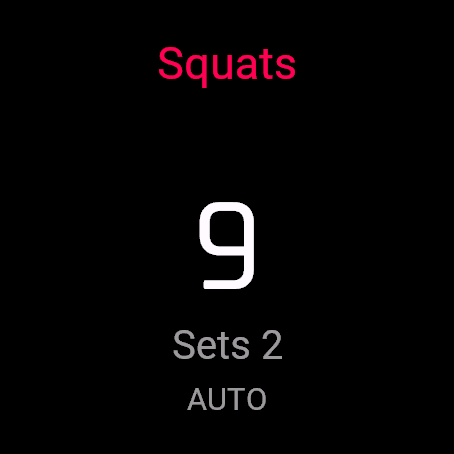
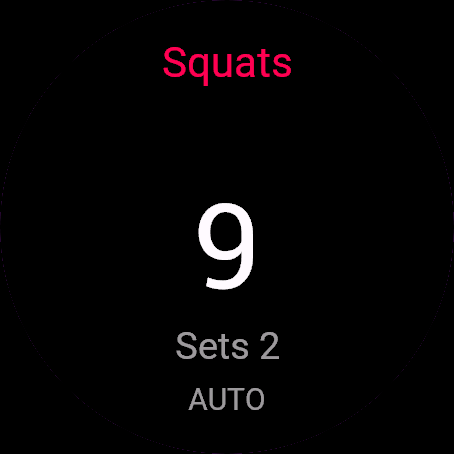
- Counting: UP adds a rep, DOWN removes one, never below zero. START finishes the set and begins rest. START during rest skips it.
- Rest: UP and DOWN correct the last set without touching the clock. The watch vibrates at the end.
- BACK (or holding the menu button) opens Resume, Change exercise, Save and Discard (asks to confirm). Recording pauses while it is open.
Touch watches (tap, hold, swipe)
- Tap the upper half of the screen for +1, the lower half for -1. Hold the screen to finish the set or skip rest, same as START. Swipes do nothing.
- The same taps work on watches with buttons.
Settings
Phone: Connect IQ app, Rep Counter, Settings (the unlock code fields are there too).
On the watch, inside the app:
- Exercise: nine choices, for the next set. Change it mid-workout from the BACK menu.
- Rest: 60, 90, 120 or 180 seconds.
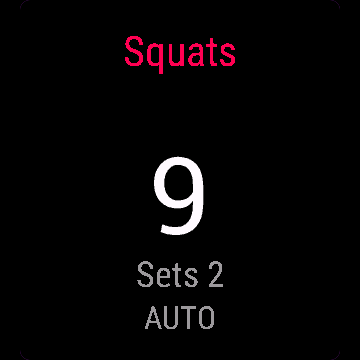
- Auto count (beta): Off by default. Adds reps while you count, never during rest. Buttons keep working. The screen shows AUTO.
License
- Free beta: 30 days from the first launch, everything works.
- Price: 4.99 EUR once at dialforge.dev, no subscription. The 8-character code is tied to your watch's UID.
- Where to enter it: phone, Connect IQ app, Rep Counter, Settings. Read the UID in "Watch UID (needed to buy a code)", buy the code, then type it into "Unlock code from dialforge.dev". The end-of-beta screen on the watch shows the UID too.
- After the beta without a code: an end-of-beta screen with the UID replaces the app. Enter the code, then open it again. New watch? Write to us and the code moves for free.
Privacy and permissions
Permissions:
- Activity recording: saves the session to Garmin Connect.
- Extra FIT fields: adds the app's values to the saved activity.
- Sensors: heart rate for the activity, and the accelerometer for Auto count.
No internet use. Data stays on the watch and in the activities you save.
Troubleshooting
The code does not work. Check that the UID you bought for matches "Watch UID (needed to buy a code)" and type all 8 characters (case is ignored, no 0, O, 1 or I). A code for another app does not fit. Sync, then reopen.
Where is my workout? Choose Save: Garmin Connect gets a Strength Training activity, a lap per set and a total reps field. Reps counted without START become a final set.
Auto count misses my push-ups. It reads wrist movement, so a planted wrist (push-ups, pull-ups, dips) gives it nothing. Count those with buttons or taps.
Can I fix a wrong set? Yes, during rest UP and DOWN change the last set. After rest it is locked.
Contact
kontakt@dialforge.dev or dialforge.dev. Please write before leaving a low rating.
Licznik powtórzeń: instrukcja obsługi
Do czego służy
Licznik powtórzeń liczy powtórzenia przyciskami, a opcjonalnie sam, z akcelerometru w nadgarstku. START zamyka serię i włącza odpoczynek. Sesja trafia do Garmin Connect jako Trening siłowy, z okrążeniem na serię.
Wymagania i obsługiwane zegarki
Wymaga Connect IQ 3.3.0+ i aplikacji Connect IQ albo Garmin Connect w telefonie. Obsługiwane zegarki:
- Okrągłe AMOLED: epix 2 i epix Pro 2, fēnix 8, E, Forerunner 165, 265, 570, 965, 970, Instinct 3 AMOLED, Crossover AMOLED, Venu 2, 3, 4, vivoactive 5, 6.
- Okrągłe MIP: enduro 3, seria fēnix 7, fēnix 8 Solar, Forerunner 55, 245, 255, vivoactive 4.
- Kwadratowe i prostokątne AMOLED: Venu Sq 2, Venu X1.
Instalacja
Na telefonie otwórz aplikację Connect IQ (albo Garmin Connect, a w niej sklep Connect IQ), wyszukaj "Licznik powtórzeń" od Dialforge, stuknij Zainstaluj i zsynchronizuj zegarek. Uruchom ją z listy aplikacji: na tarczy naciśnij START i wybierz Licznik powtórzeń.
Pierwsze uruchomienie
Ekran startowy pokazuje nazwę, "Naciśnij START" i liczbę dni bety do końca. START (albo stuknięcie) otwiera menu: Start, Ćwiczenie, Odpoczynek i przełącznik Auto liczenie (beta). Wybory są pamiętane. 30-dniowa darmowa beta zaczyna się przy pierwszym otwarciu.
Sterowanie
Zegarki z przyciskami (START, GÓRA, DÓŁ, WSTECZ)
- Menu: START na Ćwiczenie otwiera listę (Pompki, Przysiady, Brzuszki, Burpees, Podciąganie, Wykroki, Wall balls, Dipy, Inne). START na Odpoczynek przełącza 60s, 90s, 120s, 180s.
- Liczenie: GÓRA dodaje powtórzenie, DÓŁ odejmuje, nie poniżej zera. START kończy serię i zaczyna odpoczynek. START w trakcie odpoczynku go pomija.
- Odpoczynek: GÓRA i DÓŁ poprawiają ostatnią serię bez ruszania zegara odpoczynku. Zegarek wibruje na koniec.
- WSTECZ (albo przytrzymanie przycisku menu) otwiera Wznów, Zmień ćwiczenie, Zapisz (z sumą powtórzeń) i Odrzuć (pyta o potwierdzenie). Przy otwartym menu nagrywanie jest wstrzymane.
Zegarki dotykowe (stuknięcie, przytrzymanie, przesunięcie)
- Stuknij górną połowę ekranu dla +1, dolną dla -1. Przytrzymaj ekran, żeby skończyć serię albo pominąć odpoczynek, jak START. Przesunięcia nic nie robią.
- Te same stuknięcia działają też na zegarkach z przyciskami.
Ustawienia
Telefon: aplikacja Connect IQ, Licznik powtórzeń, Ustawienia (są tam też pola kodu odblokowania).
Na zegarku, w aplikacji:
- Ćwiczenie: dziewięć pozycji, dotyczy następnej serii. Zmienisz je w trakcie z menu WSTECZ.
- Odpoczynek: 60, 90, 120 albo 180 sekund.
- Auto liczenie (beta): domyślnie wyłączone. Dolicza powtórzenia samo podczas liczenia, nigdy w odpoczynku, a przyciski dalej działają. Na ekranie widać AUTO.
Licencja
- Darmowa beta: 30 dni od pierwszego uruchomienia, wszystko działa.
- Cena: jednorazowo 4,99 EUR na dialforge.dev, bez abonamentu. 8-znakowy kod jest przypisany do UID zegarka.
- Gdzie wpisać: telefon, aplikacja Connect IQ, Licznik powtórzeń, Ustawienia. Odczytaj UID w polu "UID zegarka (potrzebny do zakupu kodu)", kup kod i wpisz go w "Kod odblokowania z dialforge.dev". Ekran końca bety na zegarku też pokazuje UID.
- Po becie bez kodu: zamiast aplikacji pojawia się ekran końca bety z UID. Wpisz kod i otwórz aplikację ponownie. Nowy zegarek? Napisz do nas, przeniesiemy kod za darmo.
Prywatność i uprawnienia
Uprawnienia:
- Zapis aktywności: zapisuje sesję w Garmin Connect.
- Dodatkowe pola FIT: dopisuje wartości aplikacji do aktywności.
- Czujniki: tętno do aktywności i akcelerometr do Auto liczenia.
Zero połączeń z internetem. Dane zostają w zegarku i w zapisywanych aktywnościach.
Rozwiązywanie problemów
Kod nie działa. Sprawdź, czy UID, dla którego kupiono kod, zgadza się z polem "UID zegarka (potrzebny do zakupu kodu)", i wpisz wszystkie 8 znaków (wielkość liter bez znaczenia, bez 0, O, 1, I). Kod do innej aplikacji nie pasuje. Zsynchronizuj i otwórz ponownie.
Gdzie jest mój trening? Wybierz Zapisz: w Garmin Connect pojawi się Trening siłowy z okrążeniem na serię (powtórzenia i ćwiczenie) i polem sumy powtórzeń. Powtórzenia policzone bez START zapisują się jako ostatnia seria.
Auto liczenie pomija moje pompki. Czyta ruch nadgarstka, więc przy nadgarstku w miejscu (pompki, podciąganie, dipy) nic nie złapie. Te ćwiczenia licz przyciskami albo stuknięciami.
Czy poprawię błędną serię? Tak, w odpoczynku GÓRA i DÓŁ zmieniają powtórzenia ostatniej serii. Po odpoczynku jest już zatwierdzona.
Kontakt
kontakt@dialforge.dev albo dialforge.dev. Napisz, zanim wystawisz niską ocenę.
Permissions and privacy
This product asks the watch for the permissions below. Connect IQ shows them when you install it.
- Activity recording: Saves your workout in Garmin Connect (the activity from this app). The data stays in your Garmin account.Zapisuje trening w Garmin Connect (aktywność z tej aplikacji). Dane zostają na Twoim koncie Garmin.
- Own data fields in the activity: Adds this app's own numbers (for example points or sets) to the saved activity.Dodaje do zapisanej aktywności liczby tej aplikacji (na przykład punkty albo serie).
- Heart rate and sensors: Reads heart rate and other sensors of the watch while the app runs.Odczytuje tętno i inne czujniki zegarka, gdy aplikacja działa.
This product does not use the internet and sends no data to our servers.
The full manual and the detailed permission descriptions are available in English and Polish.
Compatible watches
51mm, D2 Air X15, D2 Mach 1 Pro, Enduro 2, Enduro 3, epix (Gen 2), epix Pro (Gen 2) 42mm, epix Pro (Gen 2) 47mm, epix Pro (Gen 2) 51mm, Forerunner 165, Forerunner 165 Music, Forerunner 245, Forerunner 245 Music, Forerunner 255, Forerunner 255 Music, Forerunner 255s, Forerunner 255s Music, Forerunner 265, Forerunner 265s, Forerunner 55, Forerunner 570 42mm, Forerunner 570 47mm, Forerunner 965, Forerunner 970, fēnix 7, fēnix 7 Pro, fēnix 7 Pro - Solar Edition (no Wi-Fi), fēnix 7S, fēnix 7S Pro, fēnix 7X, fēnix 7X Pro, fēnix 7X Pro - Solar Edition (no Wi-Fi), fēnix 8 43mm, fēnix 8 47mm, fēnix 8 Pro 47mm, fēnix 8 Solar 47mm, fēnix 8 Solar 51mm, fēnix E, Instinct 3 AMOLED 45mm, Instinct 3 AMOLED 50mm, Instinct Crossover AMOLED, MicroLED, quatix 7, quatix 7 Pro, quatix 7 Sapphire, quatix 7X Solar, quatix 8 47mm, quatix 8 Pro 47mm, tactix 7, tactix 7 – AMOLED Edition, tactix 8 47mm, tactix 8 Solar 51mm, Venu 2, Venu 2 Plus, Venu 2S, Venu 3, Venu 3S, Venu 4 41mm, Venu 4 45mm, Venu Sq 2, Venu Sq 2 Music, Venu X1, vívoactive 4, vívoactive 4S, vívoactive 5, vívoactive 6
Screenshots
FAQ
What happens after the 30-day beta?
The app shows a screen asking for a one-time unlock code from dialforge.dev instead of opening normally. Buy the code once below, no subscription.
Does the app send my data to Dialforge?
No. The app works fully offline, and the unlock code is checked on the watch itself, without contacting any server.
The app does not work as described on my watch. Can I get a refund?
Yes. Write through the feedback form below, or to the e-mail in the footer. If we cannot fix it, we refund you, as described in the terms.
Changing your watch?
Write to me and I will move your code for free.
Changelog
- First release (beta).
- Pierwsze wydanie (beta).
- Erste Veröffentlichung (Beta).
- Première version (bêta).
- Primera versión (beta).
- Eerste release (beta).
- 初回リリース(ベータ版)。
- Prima versione (beta).
- 首次发布(测试版)。
- Первый выпуск (бета).
- Primeira versão (beta).
- První verze (beta).
- Primeira versão (beta).
- 첫 출시 (베타).
- Första utgåvan (beta).
- Første udgivelse (beta).
- Første utgivelse (beta).
- 首次發布(測試版)。
- Ensimmäinen julkaisu (beta).
- Prvé vydanie (beta).
- Prva izdaja (beta).
- Rilis pertama (beta).
- Első kiadás (beta).
- เวอร์ชันแรก (เบต้า)
- Πρώτη έκδοση (μπέτα).
- Prvo izdanje (beta).
- מהדורה ראשונה (בטא).
- Keluaran pertama (beta).
Unlock
€4.99
One-time payment. No subscription. The code works on the watch whose UID you enter.
- Install the app from the Connect IQ store. It works fully and for free for the first 30 days.
- Find your 10-digit UID: Connect IQ app on the phone > My Device > Apps or Data Fields > this app > Settings > Watch UID.
- Enter UID and e-mail, pay with PayPal (cards work without a PayPal account). The code appears here at once.
- Type the code into the same settings page, field "Unlock code". The watch checks it offline.
Thank you! Your code:
Enter the code in the app settings, field "Unlock code". The watch checks it offline.
Tell us how to make it better
Missing a data field, a colour, a layout? Found a bug on your watch model? Write it here. We read every message and ship improvements in updates.