Everyday health
Shift Calendar
Your rotating shift pattern on your wrist, so you stop counting days on your fingers.
Twój grafik zmianowy na nadgarstku, żebyś przestał liczyć dni na palcach.
Dein rollierendes Schichtmuster am Handgelenk, damit du nicht mehr an den Fingern abzählst.
Votre planning de travail en rotation au poignet, pour arrêter de compter les jours sur vos doigts.
Tu patrón de turnos rotativos en la muñeca, para que dejes de contar días con los dedos.
Je roulerende ploegendienst op je pols, zodat je niet meer op je vingers hoeft te tellen.
交代制シフトのパターンを手首で確認。もう指を折って日数を数える必要はありません。
Il tuo turno a rotazione al polso, così smetti di contare i giorni sulle dita.
轮班表直接戴在手腕上,不用再掰手指数今天该上哪个班。
Ваш сменный график на запястье, чтобы больше не считать дни на пальцах.
Sua escala de turnos rotativos no pulso, para você parar de contar os dias nos dedos.
Váš rotující směnný vzorec na zápěstí, ať už nepočítáte dny na prstech.
O teu padrão de turnos rotativos no pulso, para deixares de contar os dias pelos dedos.
손목에서 확인하는 교대 근무 패턴, 이제 손가락으로 날짜를 셀 필요가 없습니다.
Ditt rullande skiftschema på handleden, så du slutar räkna dagar på fingrarna.
Dit roterende skiftmønster på håndleddet, så du kan holde op med at tælle dage på fingrene.
Ditt roterende skiftmønster på håndleddet, så du slipper å telle dager på fingrene.
輪班表直接顯示在手腕上,不用再用手指數日子。
Vuorotteleva työvuorokuviosi ranteessasi, niin että lopetat päivien laskemisen sormilla.
Váš rotujúci zmenový harmonogram na zápästí, aby ste už nepočítali dni na prstoch.
Tvoj izmenski urnik na zapestju, da ne šteješ dni več na prste.
Pola shift bergilirmu di pergelangan tangan, jadi kamu tidak perlu lagi menghitung hari dengan jari.
A váltásos munkarended a csuklódon, hogy ne kelljen ujjadon számolnod a napokat.
รูปแบบเวรหมุนของคุณอยู่บนข้อมือ เลิกนับวันด้วยนิ้วมือ
Το κυκλικό πρόγραμμα βαρδιών σου στον καρπό σου, για να σταματήσεις να μετράς μέρες στα δάχτυλα.
Tvoj raspored rotirajućih smjena na zapešću, da prestaneš brojati dane na prste.
תבנית המשמרות המתחלפת שלך על פרק היד, כדי שתפסיק לספור ימים על האצבעות.
Corak shift bergilir anda di tangan, supaya anda tak perlu kira hari dengan jari lagi.
Coming to Connect IQ Unlock €4.99

Beta: free for 30 days
The app works fully and for free for the first 30 days after you first open it. After that you can buy a one-time unlock code below. No subscription.
Shift Calendar tracks any rotating roster: day, afternoon, night, off, in a cycle from 1 to 28 days, anchored to a start date you pick. Use a ready-made preset (4 on 4 off, 2-2-3 Panama, 12-hour 4-brigade, 5 days plus 2 off) or build your own pattern letter by letter, on the watch or in Garmin Connect.
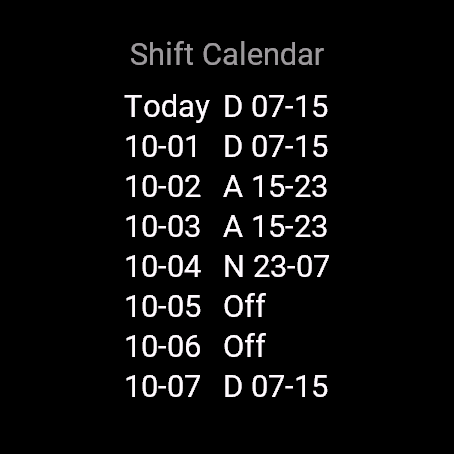
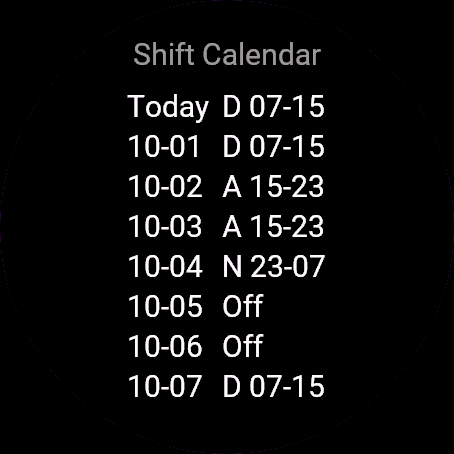
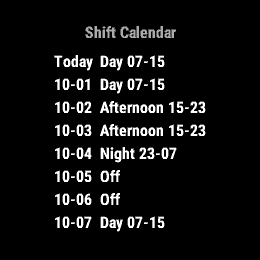
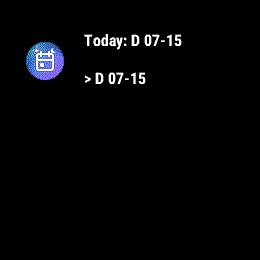
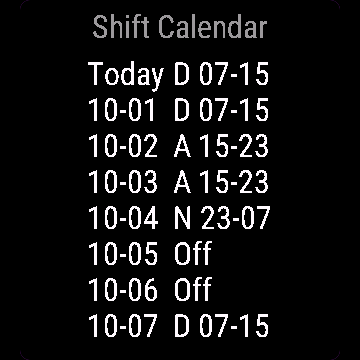
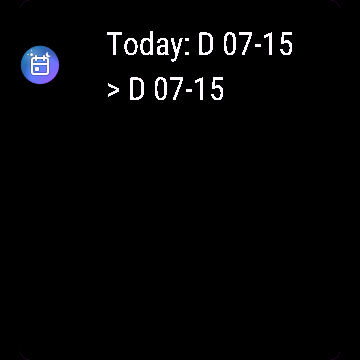
- Today plus the next 7 days, with shift hours
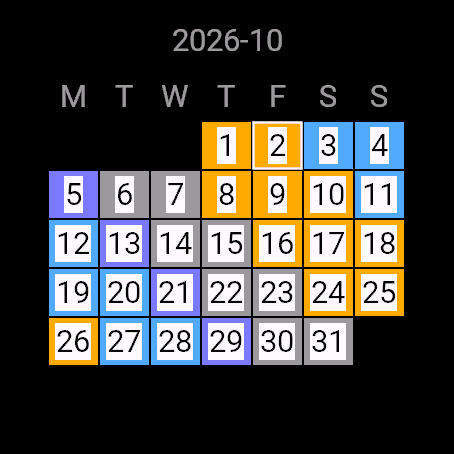
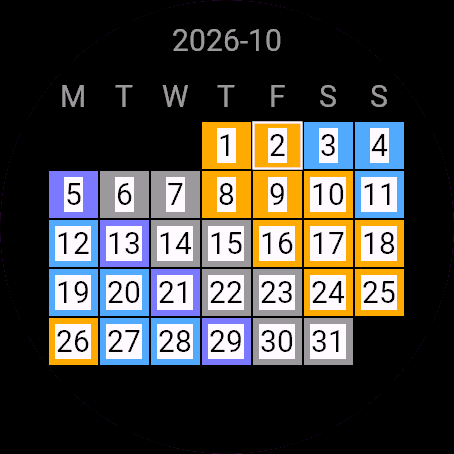
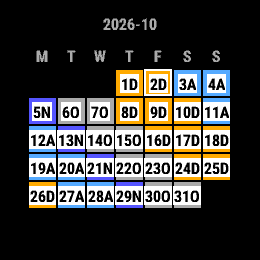
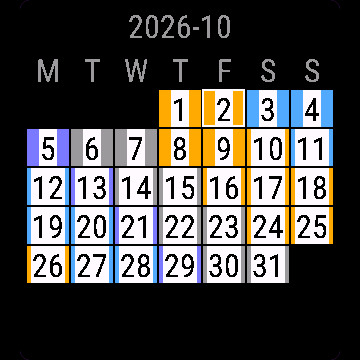
- Month calendar, colour per shift type plus letters, reads on black and white too
- Presets: 4 on 4 off, 2-2-3 Panama, 12h 4-brigade, 5 days + 2 off
- Custom pattern (D/A/N/O, 1 to 28 days), editable on watch or in Garmin Connect
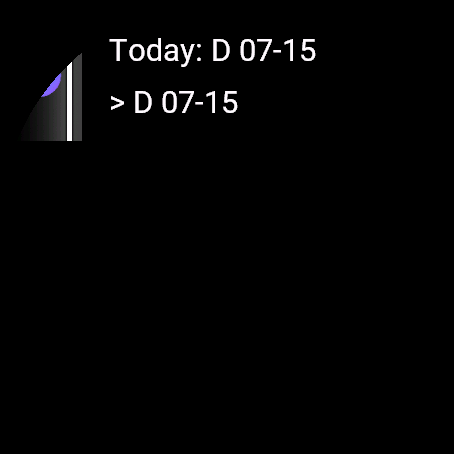
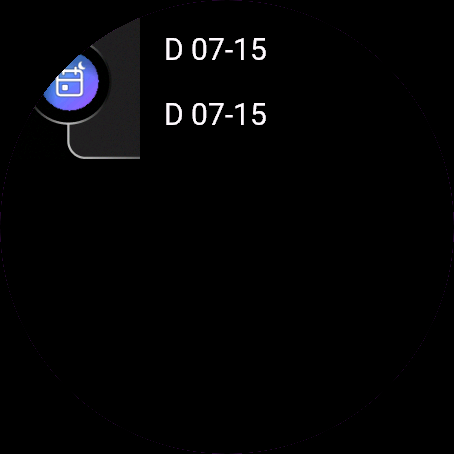
- Glance shows today and tomorrow
- Correct 12h/24h time, date math stays correct across DST changes
Kalendarz zmian obsługuje dowolny grafik rotacyjny: dzień, popołudnie, noc, wolne, w cyklu od 1 do 28 dni, zakotwiczonym w dacie startu, którą sam wybierasz. Weź gotowy wzorzec (4 na 4 wolne, 2-2-3 Panama, 12 godzin przy 4 brygadach, 5 dni plus 2 wolne) albo zbuduj własny, litera po literze, na zegarku albo w Garmin Connect.
- Dziś plus kolejne 7 dni, razem z godzinami zmiany
- Kalendarz miesiąca, kolor dla typu zmiany plus litery, czyta się też czarno biały ekran
- Gotowe wzorce: 4 na 4 wolne, 2-2-3 Panama, 12h przy 4 brygadach, 5 dni + 2 wolne
- Własny wzorzec (D/A/N/O, od 1 do 28 dni), edycja na zegarku albo w Garmin Connect
- Glance pokazuje dziś i jutro, poprawny format 12/24h
- Matematyka dat poprawna nawet przy zmianie czasu letniego i zimowego
Shift Calendar erfasst jeden rollierenden Dienstplan: Früh, Spät, Nacht, frei, in einem Zyklus von 1 bis 28 Tagen, verankert an einem Startdatum, das du wählst. Nimm eine fertige Vorgabe (4 Tage an, 4 frei, 2-2-3 Panama, 12-Stunden-4-Brigaden-System, 5 Tage plus 2 frei) oder baue dein eigenes Muster Buchstabe für Buchstabe, auf der Uhr oder in Garmin Connect.
- Heute plus die nächsten 7 Tage, mit Schichtzeiten
- Monatskalender, Farbe pro Schichttyp plus Buchstaben, auch auf Schwarzweiß-Displays lesbar
- Vorgaben: 4 Tage an, 4 frei, 2-2-3 Panama, 12-Stunden-4-Brigaden-System, 5 Tage + 2 frei
- Eigenes Muster (D/A/N/O, 1 bis 28 Tage), editierbar auf der Uhr oder in Garmin Connect
- Übersicht zeigt heute und morgen
- Korrekte 12h/24h-Zeit, Datumsberechnung bleibt auch bei Zeitumstellung korrekt
Shift Calendar suit n'importe quel roulement d'équipes : jour, après-midi, nuit, repos, sur un cycle de 1 à 28 jours, ancré à une date de départ que vous choisissez. Utilisez un préréglage prêt à l'emploi (4 jours travaillés / 4 jours de repos, 2-2-3 Panama, 4 équipes en 12 heures, 5 jours plus 2 de repos) ou construisez votre propre motif lettre par lettre, sur la montre ou dans Garmin Connect.
- Aujourd'hui plus les 7 prochains jours, avec les horaires de poste
- Calendrier mensuel, couleur par type de poste plus lettres, lisible aussi en noir et blanc
- Préréglages : 4 travaillés / 4 repos, 2-2-3 Panama, 4 équipes en 12 h, 5 jours + 2 repos
- Motif personnalisé (D/A/N/O, 1 à 28 jours), modifiable sur la montre ou dans Garmin Connect
- Le glance affiche aujourd'hui et demain
- Format d'heure 12h/24h correct, le calcul des dates reste juste lors des changements d'heure
Shift Calendar controla cualquier calendario de turnos rotativos: día, tarde, noche, libre, en un ciclo de 1 a 28 días, anclado a una fecha de inicio que tú eliges. Usa un ajuste predefinido (4 días sí 4 no, Panamá 2-2-3, 4 brigadas de 12 horas, 5 días más 2 libres) o crea tu propio patrón letra por letra, en el reloj o en Garmin Connect.
- Hoy más los próximos 7 días, con el horario de cada turno
- Calendario mensual, con color según el tipo de turno más letras, se lee también en blanco y negro
- Ajustes predefinidos: 4 días sí 4 no, Panamá 2-2-3, 4 brigadas de 12 h, 5 días + 2 libres
- Patrón personalizado (D/A/N/O, de 1 a 28 días), editable en el reloj o en Garmin Connect
- La vista rápida muestra hoy y mañana
- Formato de hora 12h/24h correcto, los cálculos de fecha se mantienen correctos con los cambios de horario de verano
Shift Calendar houdt elk roulerend dienstrooster bij: dag, middag, nacht, vrij, in een cyclus van 1 tot 28 dagen, gekoppeld aan een startdatum die je zelf kiest. Gebruik een kant-en-klaar schema (4 op 4 af, 2-2-3 Panama, 12-uurs 4-ploegendienst, 5 dagen plus 2 vrij) of bouw je eigen patroon letter voor letter, op het horloge of in Garmin Connect.
- Vandaag plus de komende 7 dagen, met diensttijden
- Maandkalender, kleur per diensttype plus letters, ook leesbaar in zwart-wit
- Kant-en-klare schema's: 4 op 4 af, 2-2-3 Panama, 12-uurs 4-ploegendienst, 5 dagen + 2 vrij
- Eigen patroon (D/A/N/O, 1 tot 28 dagen), te bewerken op het horloge of in Garmin Connect
- De glance toont vandaag en morgen
- Correcte 12-uurs/24-uurs tijd, datumberekening blijft correct bij de overgang naar zomer- of wintertijd
Shift Calendarは、日勤、午後勤、夜勤、休みからなる、どんな交代制ローテーションにも対応します。サイクルは1-28日で、自分で選んだ開始日を基準に管理します。既成のプリセット(4勤4休、2-2-3パナマ式、12時間4班制、5勤2休)を使うか、時計またはGarmin Connect上で1文字ずつ自分のパターンを作成できます。
- 今日から7日分の予定と勤務時間を表示
- 月間カレンダー表示。シフトの種類ごとに色分けし、文字も併記。白黒画面でも判読可能
- プリセット: 4勤4休、2-2-3パナマ式、12時間4班制、5勤2休
- カスタムパターン(D/A/N/O、1-28日)、時計またはGarmin Connect上で編集可能
- グランスビューで今日と明日の予定を表示
- 12時間/24時間表示に正しく対応し、夏時間の切り替えをまたいでも日付計算は正確
Shift Calendar segue qualsiasi turno a rotazione: giorno, pomeriggio, notte, riposo, in un ciclo da 1 a 28 giorni, ancorato a una data di inizio che scegli tu. Usa un preset già pronto (4 giorni su 4 di riposo, 2-2-3 Panama, 12 ore su 4 squadre, 5 giorni più 2 di riposo) oppure costruisci il tuo schema lettera per lettera, sull'orologio o in Garmin Connect.
- Oggi più i prossimi 7 giorni, con gli orari del turno
- Calendario mensile, colore per tipo di turno più le lettere, leggibile anche in bianco e nero
- Preset: 4 giorni su 4 di riposo, 2-2-3 Panama, 12h su 4 squadre, 5 giorni + 2 di riposo
- Schema personalizzato (D/A/N/O, da 1 a 28 giorni), modificabile sull'orologio o in Garmin Connect
- Il glance mostra oggi e domani
- Orario 12h/24h corretto, il calcolo delle date resta corretto anche con i cambi dell'ora legale
“排班日历”支持任何轮班制度: 白班、中班、夜班、休息,周期1到28天,从你选定的起始日期开始算。可以直接用现成模板(四班两倒、2-2-3巴拿马模式、12小时四班三倒、上五休二),也可以在手表或Garmin Connect上一格一格自己编排班次字母。
- 显示今天加未来7天,标注班次时间
- 月历视图,每种班次有对应颜色加字母标注,黑白屏也能看清
- 现成模板: 四班两倒、2-2-3巴拿马模式、12小时四班三倒、上五休二
- 自定义班次(D/A/N/O,1到28天循环),可以在手表上或Garmin Connect里编辑
- 概览界面显示今天和明天的班次
- 12/24小时制正确显示,跨夏令时切换日期计算也不会出错
Shift Calendar отслеживает любой сменный график: день, вечер, ночь, выходной, в цикле от 1 до 28 дней, привязанный к выбранной вами дате начала. Используйте готовый вариант (4 через 4, панамская схема 2-2-3, 12-часовая 4-бригадная, 5 дней плюс 2 выходных) или составьте свой график буква за буквой на часах или в Garmin Connect.
- Сегодня и следующие 7 дней с часами смены
- Календарь на месяц, цвет для каждого типа смены плюс буквы, читается и на чёрно-белом экране
- Готовые варианты: 4 через 4, панамская схема 2-2-3, 12-часовая 4-бригадная, 5 дней + 2 выходных
- Свой график (D/A/N/O, от 1 до 28 дней), редактируется на часах или в Garmin Connect
- Виджет показывает сегодня и завтра
- Верный формат времени 12ч/24ч, дата считается правильно даже при переходе на летнее/зимнее время
Shift Calendar acompanha qualquer escala rotativa: dia, tarde, noite, folga, em um ciclo de 1 a 28 dias, ancorado em uma data de início que você escolhe. Use um modelo pronto (4x4, 2-2-3 Panamá, 12 horas com 4 turmas, 5 dias mais 2 de folga) ou monte seu próprio padrão letra por letra, no relógio ou no Garmin Connect.
- Hoje mais os próximos 7 dias, com os horários de cada turno
- Calendário mensal, cor por tipo de turno além das letras, legível também em preto e branco
- Modelos prontos: 4x4, 2-2-3 Panamá, 12h com 4 turmas, 5 dias + 2 de folga
- Padrão personalizado (D/A/N/O, de 1 a 28 dias), editável no relógio ou no Garmin Connect
- O glance mostra hoje e amanhã
- Horário correto em 12h/24h, o cálculo de datas permanece correto mesmo com mudanças de horário de verão
Shift Calendar sleduje jakýkoli rotující rozvrh: denní, odpolední, noční, volno, v cyklu od 1 do 28 dní, ukotveném k datu začátku, které si zvolíte. Použijte hotovou předvolbu (4 dny na, 4 dny volno, 2-2-3 Panama, 12hodinová 4brigádní, 5 dní plus 2 volno) nebo si postavte vlastní vzorec písmeno po písmenu, na hodinkách nebo v Garmin Connect.
- Dnešek plus dalších 7 dní, včetně hodin směny
- Měsíční kalendář, barva podle typu směny plus písmena, čitelné i na černobílém displeji
- Předvolby: 4 na 4 volno, 2-2-3 Panama, 12h 4brigádní, 5 dní + 2 volno
- Vlastní vzorec (D/A/N/O, 1 až 28 dní), upravitelný na hodinkách nebo v Garmin Connect
- Přehled ukáže dnešek a zítřek
- Správný 12h/24h formát času, počítání data zůstává správné i při změně letního času
Shift Calendar segue qualquer escala rotativa: dia, tarde, noite, folga, num ciclo de 1 a 28 dias, ancorado a uma data de início que escolhes. Usa uma predefinição já feita (4 dias a trabalhar por 4 de folga, 2-2-3 Panamá, turnos de 12 horas com 4 brigadas, 5 dias mais 2 de folga) ou cria o teu próprio padrão letra a letra, no relógio ou no Garmin Connect.
- Hoje mais os próximos 7 dias, com as horas de cada turno
- Calendário mensal, cor por tipo de turno mais letras, legível também em preto e branco
- Predefinições: 4 a trabalhar por 4 de folga, 2-2-3 Panamá, 12h com 4 brigadas, 5 dias + 2 de folga
- Padrão personalizado (D/A/N/O, 1 a 28 dias), editável no relógio ou no Garmin Connect
- O glance mostra hoje e amanhã
- Hora 12h/24h correta, o cálculo das datas mantém-se correto nas mudanças de hora
Shift Calendar는 어떤 교대 로스터든 추적할 수 있습니다. 주간, 오후, 야간, 휴무를 1일부터 28일까지의 주기로 설정하고, 직접 고른 시작일을 기준으로 맞춥니다. 미리 만들어진 프리셋(4일 근무 4일 휴무, 2-2-3 파나마, 12시간 4교대, 5일 근무 + 2일 휴무)을 사용하거나, 시계나 Garmin Connect에서 글자 하나씩 원하는 패턴을 직접 만들 수 있습니다.
- 오늘과 앞으로 7일간의 일정, 근무 시간 포함
- 월간 캘린더, 근무 유형별 색상과 글자 표시, 흑백 화면에서도 확인 가능
- 프리셋: 4일 근무 4일 휴무, 2-2-3 파나마, 12시간 4교대, 5일 근무 + 2일 휴무
- 사용자 지정 패턴(D/A/N/O, 1-28일), 시계 또는 Garmin Connect에서 편집 가능
- 글랜스에서 오늘과 내일 일정 확인
- 정확한 12시간제/24시간제 시간 표시, DST(일광절약시간) 변경에도 날짜 계산이 정확합니다
Shift Calendar håller koll på alla typer av rullande schema: dag, kväll, natt, ledig, i en cykel på 1 till 28 dagar, förankrad till ett startdatum du väljer. Använd en färdig mall (4 dagar på 4 av, 2-2-3 Panama, 12-timmars 4-brigadsystem, 5 dagar plus 2 av) eller bygg ditt eget mönster bokstav för bokstav, på klockan eller i Garmin Connect.
- Idag plus de kommande 7 dagarna, med skifttider
- Månadskalender, färg per skifttyp plus bokstäver, läsbar i svartvitt också
- Förinställningar: 4 på 4 av, 2-2-3 Panama, 12h 4-brigadsystem, 5 dagar + 2 av
- Eget mönster (D/A/N/O, 1 till 28 dagar), redigerbart på klockan eller i Garmin Connect
- Glance visar idag och imorgon
- Korrekt 12/24-timmarsformat, datumberäkningen förblir korrekt vid byte av sommar- och vintertid
Shift Calendar holder styr på enhver roterende vagtplan: dag, aften, nat, fri, i en cyklus fra 1 til 28 dage, forankret til en startdato du vælger. Brug en færdig forudindstilling (4 på 4 fri, 2-2-3 Panama, 12-timers 4-brigade, 5 dage plus 2 fri) eller byg dit eget mønster bogstav for bogstav, på uret eller i Garmin Connect.
- I dag plus de næste 7 dage, med skifttider
- Månedskalender, farve per skifttype plus bogstaver, kan læses i sort/hvid også
- Forudindstillinger: 4 på 4 fri, 2-2-3 Panama, 12 t 4-brigade, 5 dage + 2 fri
- Brugerdefineret mønster (D/A/N/O, 1 til 28 dage), redigerbart på uret eller i Garmin Connect
- Glance viser i dag og i morgen
- Korrekt 12t/24t-tid, datoberegningen forbliver korrekt hen over sommertidsskift
Shift Calendar holder styr på alle roterende skiftplaner: dag, kveld, natt, fri, i en sykel fra 1 til 28 dager, forankret til en startdato du velger. Bruk en ferdig mal (4 på 4 fri, 2-2-3 Panama, 12-timers 4-brigade, 5 dager pluss 2 fri) eller bygg ditt eget mønster bokstav for bokstav, på klokken eller i Garmin Connect.
- I dag pluss de neste 7 dagene, med skifttider
- Månedskalender, farge per skifttype pluss bokstaver, leselig i svart-hvitt også
- Maler: 4 på 4 fri, 2-2-3 Panama, 12t 4-brigade, 5 dager + 2 fri
- Egendefinert mønster (D/A/N/O, 1 til 28 dager), redigerbart på klokken eller i Garmin Connect
- Glance viser i dag og i morgen
- Riktig 12t/24t-tid, datoberegning forblir korrekt gjennom sommertid/vintertid
輪班日曆能追蹤任何輪班制度:白班、小夜班、大夜班、休假,週期從1到28天都可以,從你自己選的起始日開始算。可以用內建範本(四上四休、2-2-3巴拿馬制、12小時四班制、做五休二),也可以在手錶或Garmin Connect裡一天一天自己編排。
- 顯示今天加未來7天,附上班表時間
- 月曆檢視,每種班別有自己的顏色加字母,黑白畫面也看得清楚
- 內建範本:四上四休、2-2-3巴拿馬制、12小時四班制、做五休二
- 自訂班表(D/A/N/O,1到28天),可以在手錶或Garmin Connect上編輯
- 一瞥畫面顯示今天和明天
- 正確處理12/24小時制,換日和換夏令時的日期計算都不會出錯
Shift Calendar seuraa mitä tahansa vuorottelevaa työvuorolistaa: päivä, ilta, yö, vapaa, jaksossa 1-28 päivää, sidottuna valitsemaasi alkupäivään. Käytä valmista asetusta (4 töissä 4 vapaana, 2-2-3 Panama, 12 tunnin 4-vuoro, 5 päivää + 2 vapaata) tai rakenna oma kuvio kirjain kerrallaan, kellolla tai Garmin Connectissa.
- Tänään ja seuraavat 7 päivää, vuorojen tuntien kanssa
- Kuukausikalenteri, väri per vuorotyyppi sekä kirjaimet, luettavissa myös mustavalkoisena
- Valmiit asetukset: 4 töissä 4 vapaana, 2-2-3 Panama, 12 h 4-vuoro, 5 päivää + 2 vapaata
- Oma kuvio (D/A/N/O, 1-28 päivää), muokattavissa kellolla tai Garmin Connectissa
- Glance-näkymä näyttää tämän päivän ja huomisen
- Oikea 12 h / 24 h -aika, päivämäärälaskenta pysyy oikeana myös kesä- ja talviaikaan siirryttäessä
Shift Calendar sleduje akýkoľvek rotujúci harmonogram: deň, popoludnie, noc, voľno, v cykle od 1 do 28 dní, ukotvenom k dátumu začiatku, ktorý si vyberiete. Použite hotovú predvolenú šablónu (4 dni práca, 4 dni voľno, 2-2-3 Panama, 12-hodinové 4-brigádové, 5 dní plus 2 voľno) alebo si zostavte vlastný vzor písmeno po písmene, na hodinkách alebo v Garmin Connect.
- Dnes plus nasledujúcich 7 dní, s časmi zmien
- Mesačný kalendár, farba podľa typu zmeny plus písmená, čitateľný aj čierno-bielo
- Predvolené šablóny: 4 dni práca, 4 dni voľno, 2-2-3 Panama, 12h 4-brigádové, 5 dní + 2 voľno
- Vlastný vzor (D/A/N/O, 1 až 28 dní), upraviteľný na hodinkách alebo v Garmin Connect
- Glance zobrazí dnes a zajtra
- Správny 12h/24h čas, počítanie dátumov ostáva správne aj pri zmene letného/zimného času
Shift Calendar spremlja poljuben rotirajoč urnik izmen: dan, popoldan, noč, prost dan, v ciklu od 1 do 28 dni, vezan na datum začetka, ki ga izbereš. Uporabi pripravljeno prednastavitev (4 dni dela 4 dni prosto, 2-2-3 Panama, 12-urni sistem s 4 skupinami, 5 dni dela plus 2 prosto) ali sestavi lasten vzorec črko za črko, na uri ali v Garmin Connect.
- Danes plus naslednjih 7 dni, s prikazom ur izmene
- Mesečni koledar, barva glede na tip izmene plus črke, berljivo tudi na črno-belem zaslonu
- Prednastavitve: 4 dni dela 4 dni prosto, 2-2-3 Panama, 12-urni sistem s 4 skupinami, 5 dni dela + 2 prosto
- Lasten vzorec (D/A/N/O, 1 do 28 dni), urejaš na uri ali v Garmin Connect
- Pregled (glance) prikaže danes in jutri
- Pravilen 12h/24h čas, računanje datumov ostane pravilno tudi ob spremembah letnega/zimskega časa
Shift Calendar melacak roster bergilir apa pun: pagi, siang, malam, libur, dalam siklus 1 sampai 28 hari, berpatokan pada tanggal mulai yang kamu pilih. Gunakan preset yang sudah tersedia (4 kerja 4 libur, Panama 2-2-3, 4 brigade 12 jam, 5 hari kerja plus 2 libur) atau buat pola sendiri huruf demi huruf, di jam tangan atau di Garmin Connect.
- Hari ini plus 7 hari berikutnya, dengan jam shift
- Kalender bulanan, warna per jenis shift plus huruf, tetap terbaca di layar hitam putih
- Preset: 4 kerja 4 libur, Panama 2-2-3, 4 brigade 12 jam, 5 hari kerja + 2 libur
- Pola custom (D/A/N/O, 1 sampai 28 hari), bisa diedit di jam tangan atau di Garmin Connect
- Glance menampilkan hari ini dan besok
- Waktu 12 jam/24 jam yang benar, perhitungan tanggal tetap akurat saat perubahan waktu musim (DST)
A Shift Calendar bármilyen váltásos beosztást követ: nappal, délután, éjszaka, szabadnap, 1-28 napos ciklusban, egy általad megadott kezdődátumhoz rögzítve. Használj egy kész sablont (4 nap munka, 4 nap szabad; 2-2-3 Panama; 12 órás, 4 brigádos; 5 nap plusz 2 szabad), vagy építs saját mintát betűről betűre, az órán vagy a Garmin Connectben.
- Mai nap plusz a következő 7 nap, a váltások óráival
- Havi naptár, színkód váltástípus szerint plusz betűk, fekete-fehér kijelzőn is olvasható
- Sablonok: 4 nap munka/4 nap szabad, 2-2-3 Panama, 12 órás 4 brigádos, 5 nap + 2 szabad
- Egyéni minta (D/A/N/O, 1-28 nap), szerkeszthető az órán vagy a Garmin Connectben
- A glance megmutatja a mai és a holnapi napot
- Helyes 12/24 órás időformátum, a dátumszámítás nyári/téli időszámítás váltásakor is helyes marad
Shift Calendar ใช้ติดตามเวรหมุนได้ทุกแบบ: เช้า บ่าย ดึก วันหยุด เป็นรอบตั้งแต่ 1 ถึง 28 วัน กำหนดวันเริ่มต้นเองได้ เลือกใช้แพทเทิร์นสำเร็จรูป (4 วันทำ 4 วันหยุด, 2-2-3 Panama, กะ 12 ชั่วโมง 4 ทีม, ทำ 5 วันหยุด 2 วัน) หรือสร้างแพทเทิร์นเองทีละตัวอักษร ทำได้ทั้งบนนาฬิกาและใน Garmin Connect
- วันนี้และ 7 วันข้างหน้า พร้อมเวลาเข้าเวร
- ปฏิทินรายเดือน สีตามประเภทเวรพร้อมตัวอักษร อ่านได้แม้บนจอขาวดำ
- แพทเทิร์นสำเร็จรูป: 4 วันทำ 4 วันหยุด, 2-2-3 Panama, กะ 12 ชั่วโมง 4 ทีม, ทำ 5 วันหยุด 2 วัน
- แพทเทิร์นกำหนดเอง (D/A/N/O, 1 ถึง 28 วัน) แก้ไขได้บนนาฬิกาหรือใน Garmin Connect
- หน้ากลานซ์แสดงเวรวันนี้และวันพรุ่งนี้
- เวลาแบบ 12/24 ชั่วโมงถูกต้อง การนับวันแม่นยำแม้ช่วงเปลี่ยนเวลา DST
Το Shift Calendar παρακολουθεί οποιοδήποτε κυκλικό πρόγραμμα βαρδιών: πρωί, απόγευμα, νύχτα, ρεπό, σε κύκλο από 1 έως 28 ημέρες, με σημείο αναφοράς μια ημερομηνία έναρξης που επιλέγεις. Χρησιμοποίησε ένα έτοιμο πρότυπο (4 μέρες δουλειά 4 ρεπό, 2-2-3 Panama, 12ωρο σύστημα 4 βαρδιών, 5 μέρες δουλειά και 2 ρεπό) ή φτιάξε το δικό σου μοτίβο γράμμα προς γράμμα, στο ρολόι ή στο Garmin Connect.
- Σήμερα και οι επόμενες 7 μέρες, με τις ώρες βάρδιας
- Μηνιαίο ημερολόγιο, χρώμα ανά τύπο βάρδιας συν γράμματα, διαβάζεται και σε ασπρόμαυρη οθόνη
- Πρότυπα: 4 μέρες δουλειά 4 ρεπό, 2-2-3 Panama, 12ωρο σύστημα 4 βαρδιών, 5 μέρες δουλειά + 2 ρεπό
- Προσαρμοσμένο μοτίβο (D/A/N/O, 1 έως 28 ημέρες), επεξεργάσιμο στο ρολόι ή στο Garmin Connect
- Το glance δείχνει σήμερα και αύριο
- Σωστή μορφή ώρας 12ω/24ω, οι υπολογισμοί ημερομηνιών παραμένουν σωστοί και στις αλλαγές θερινής ώρας
Shift Calendar prati bilo koji rotirajući raspored: dan, popodne, noć, slobodno, u ciklusu od 1 do 28 dana, vezanom uz datum početka koji odabereš. Koristi gotovu postavku (4 na 4 slobodno, 2-2-3 Panama, 12-satna 4 brigade, 5 dana plus 2 slobodna) ili izradi vlastiti obrazac slovo po slovo, na satu ili u Garmin Connectu.
- Danas plus sljedećih 7 dana, s vremenima smjena
- Mjesečni kalendar, boja po tipu smjene plus slova, čitljivo i na crno-bijelim ekranima
- Gotove postavke: 4 na 4 slobodno, 2-2-3 Panama, 12 h 4 brigade, 5 dana + 2 slobodna
- Vlastiti obrazac (D/A/N/O, 1 do 28 dana), uredivo na satu ili u Garmin Connectu
- Pregled (glance) prikazuje danas i sutra
- Točno 12h/24h vrijeme, računanje datuma ostaje točno i kod promjena ljetnog/zimskog vremena
לוח משמרות עוקב אחרי כל סידור עבודה מתחלף: יום, אחר צהריים, לילה, חופש, במחזור של 1 עד 28 ימים, מעוגן לתאריך התחלה שאתה בוחר. אפשר להשתמש בתבנית מוכנה (4 עבודה 4 חופש, פנמה 2-2-3, משמרות 12 שעות ב-4 צוותים, 5 ימים ועוד 2 חופש) או לבנות תבנית משלך אות אחר אות, בשעון או ב-Garmin Connect.
- היום ועוד 7 הימים הקרובים, עם שעות המשמרת
- לוח שנה חודשי, צבע לכל סוג משמרת בתוספת אותיות, נקרא גם בשחור לבן
- תבניות מוכנות: 4 עבודה 4 חופש, פנמה 2-2-3, משמרות 12 שעות ב-4 צוותים, 5 ימים ועוד 2 חופש
- תבנית מותאמת אישית (D/A/N/O, 1 עד 28 ימים), ניתנת לעריכה בשעון או ב-Garmin Connect
- מבט חטוף מציג את היום ומחר
- שעון 12 או 24 שעות נכון, וחישוב התאריכים נשאר נכון גם במעברי שעון קיץ וחורף
Shift Calendar menjejak sebarang roster bergilir: siang, petang, malam, off, dalam kitaran 1 hingga 28 hari, berdasarkan tarikh mula yang anda pilih. Guna preset yang sedia ada (4 kerja 4 off, 2-2-3 Panama, 12-jam 4-brigade, 5 hari tambah 2 off) atau bina corak sendiri huruf demi huruf, di jam tangan atau dalam Garmin Connect.
- Hari ini dan 7 hari seterusnya, dengan jam shift
- Kalendar bulanan, warna mengikut jenis shift ditambah huruf, boleh dibaca pada skrin hitam putih juga
- Preset: 4 kerja 4 off, 2-2-3 Panama, 12j 4-brigade, 5 hari + 2 off
- Corak custom (D/A/N/O, 1 hingga 28 hari), boleh disunting di jam tangan atau dalam Garmin Connect
- Glance tunjuk hari ini dan esok
- Format masa 12j/24j yang betul, kiraan tarikh kekal betul merentasi pertukaran DST
How to use it
Add Shift Calendar to the widget loop (swipe through widgets on the watch).
Swipe, tap, or UP/DOWN switches between the 7-day list and month view. START or holding UP opens the menu, which edits the pattern on the watch: move cursor, select cycles D-A-N-O, menu adds/removes a day and saves.
Dodaj Kalendarz zmian do karuzeli widgetów (przewiń widgety na zegarku).
Przesunięcie palcem, dotknięcie albo GÓRA/DÓŁ przełącza listę 7 dni i widok miesiąca. START albo przytrzymanie GÓRY otwiera menu, które edytuje wzorzec na zegarku: kursor, select zmienia literę D-A-N-O, dodaj/usuń dzień i zapisz.
Füge Shift Calendar zur Widget-Schleife hinzu (auf der Uhr durch die Widgets wischen).
Wischen, Tippen oder AUF/AB wechselt zwischen der 7-Tage-Liste und der Monatsansicht. START oder langes Drücken von AUF öffnet das Menü, in dem du das Muster auf der Uhr bearbeitest: Cursor bewegen, D-A-N-O im Kreis auswählen, Menü fügt einen Tag hinzu oder entfernt ihn und speichert.
Ajoutez Shift Calendar à la boucle de widgets (faites défiler les widgets sur la montre).
Glissement, appui, ou HAUT/BAS pour basculer entre la liste sur 7 jours et la vue mensuelle. START ou un appui long sur HAUT ouvre le menu, qui modifie le motif sur la montre : déplacer le curseur, la touche Select fait défiler D-A-N-O, le menu ajoute/supprime un jour et enregistre.
Añade Shift Calendar al bucle de widgets (desliza por los widgets en el reloj).
Deslizar, tocar o ARRIBA/ABAJO cambia entre la lista de 7 días y la vista mensual. START o mantener ARRIBA abre el menú, que edita el patrón en el reloj: mover el cursor, elegir entre los ciclos D-A-N-O, y el menú añade o quita un día y guarda.
Voeg Shift Calendar toe aan de widgetlus (veeg op het horloge door de widgets).
Swipe, tik, of OMHOOG/OMLAAG wisselt tussen de lijst met 7 dagen en de maandweergave. START of OMHOOG ingedrukt houden opent het menu, dat het patroon op het horloge bewerkt: cursor verplaatsen, cyclus D-A-N-O selecteren, menu voegt een dag toe of verwijdert er een en slaat op.
Shift Calendar をウィジェットのループに追加してください(時計でウィジェットをスワイプして切り替えます)。
スワイプ、タップ、または上ボタン/下ボタンで7日間リストと月間表示を切り替えます。START または上ボタンの長押しでメニューが開き、メニューでは時計上でパターンを編集できます。カーソル移動、D-A-N-Oの選択を切り替え、メニューで日を追加/削除して保存します。
Aggiungi Shift Calendar al ciclo dei widget (scorri i widget sull'orologio).
Scorri, tocca, oppure SU/GIÙ passano dall'elenco a 7 giorni alla vista mensile. START o tenere premuto SU apre il menu, che modifica lo schema sull'orologio: sposta il cursore, seleziona ciclando tra D-A-N-O, il menu aggiunge/rimuove un giorno e salva.
把 Shift Calendar 添加到小组件循环中(在手表上滑动切换小组件)。
滑动、点击,或用上键/下键切换7天列表视图和月历视图。按 START 或长按 UP 打开菜单,可直接在手表上编辑班次: 移动光标、在D-A-N-O之间切换选择,菜单里增加/删除一天并保存。
Добавьте Shift Calendar в ленту виджетов (листайте виджеты на часах).
Свайп, касание или ВВЕРХ/ВНИЗ переключают между списком на 7 дней и видом на месяц. START или удержание ВВЕРХ открывает меню, которое редактирует график на часах: перемещение курсора, выбор из цикла D-A-N-O, меню добавляет/удаляет день и сохраняет.
Adicione Shift Calendar ao ciclo de widgets (deslize pelos widgets no relógio).
Deslizar, tocar, ou CIMA/BAIXO alternam entre a lista de 7 dias e a visão mensal. START ou segurar CIMA abre o menu, que edita o padrão no relógio: mover o cursor, selecionar percorre D-A-N-O, o menu adiciona/remove um dia e salva.
Přidejte Shift Calendar do smyčky widgetů (na hodinkách procházejte widgety přejížděním).
Přejetím, klepnutím nebo NAHORU/DOLŮ přepínáte mezi seznamem na 7 dní a měsíčním zobrazením. START nebo podržení NAHORU otevře menu, které upravuje vzorec na hodinkách: posun kurzoru, výběr cyklu D-A-N-O, menu přidá/odebere den a uloží.
Adicione Shift Calendar ao ciclo de widgets (deslize pelos widgets no relógio).
Deslizar, tocar, ou CIMA/BAIXO alterna entre a lista de 7 dias e a vista mensal. START ou manter premido CIMA abre o menu, que edita o padrão no relógio: move o cursor, a seleção percorre D-A-N-O, o menu adiciona/remove um dia e guarda.
Shift Calendar을(를) 위젯 순환에 추가하세요(시계에서 위젯을 넘겨 보세요).
스와이프, 탭, 또는 위/아래 버튼으로 7일 목록과 월간 보기 사이를 전환합니다. START를 누르거나 UP을 길게 누르면 메뉴가 열리고, 시계에서 패턴을 편집할 수 있습니다: 커서 이동, D-A-N-O 순환 선택, 메뉴로 하루 추가/삭제 후 저장.
Lägg till Shift Calendar i widgetslingan (svep mellan widgetar på klockan).
Svep, tryck, eller UPP/NER växlar mellan 7-dagarslistan och månadsvyn. START eller att hålla in UPP öppnar menyn, som redigerar mönstret på klockan: flytta markören, val växlar mellan D-A-N-O, menyn lägger till/tar bort en dag och sparar.
Tilføj Shift Calendar til widget-løkken (stryg gennem widgets på uret).
Swipe, tryk eller OP/NED skifter mellem 7-dages-listen og månedsvisningen. START eller et langt tryk på OP åbner menuen, som redigerer mønsteret på uret: flyt cursor, Select skifter mellem D-A-N-O, menu tilføjer/fjerner en dag og gemmer.
Legg til Shift Calendar i widget-rekken (sveip gjennom widgetene på klokken).
Sveip, trykk, eller OPP/NED bytter mellom 7-dagerslisten og månedsvisningen. START eller å holde inne OPP åpner menyen, som redigerer mønsteret på klokken: flytt markøren, velg mellom D-A-N-O, menyen legger til/fjerner en dag og lagrer.
把 Shift Calendar 加入小工具循環中(在手錶上滑動切換小工具)。
用滑動、點按,或上/下鍵切換7天列表和月曆檢視。按 START 或長按上鍵開啟選單,可以在手錶上直接編輯班表:移動游標、在D-A-N-O裡選擇班別,選單負責新增/刪除一天並儲存。
Lisää Shift Calendar widgetkiertoon (selaa widgettejä pyyhkäisemällä kellossa).
Pyyhkäisy, napautus tai YLÖS/ALAS vaihtaa 7 päivän listan ja kuukausinäkymän välillä. START tai YLÖS pitkään painettuna avaa valikon, jossa muokkaat kuviota kellolla: siirrä kursoria, valitse kierto D-A-N-O, valikko lisää/poistaa päivän ja tallentaa.
Pridajte Shift Calendar do cyklu widgetov (widgety na hodinkách prechádzate potiahnutím).
Potiahnutím, ťuknutím alebo NAHOR/NADOL prepínate medzi 7-dňovým zoznamom a mesačným zobrazením. START alebo podržanie NAHOR otvorí menu, ktoré upravuje vzor na hodinkách: presuňte kurzor, tlačidlo Select prepína medzi D-A-N-O, menu pridá/odstráni deň a uloží.
Dodajte Shift Calendar v zanko pripomočkov (na uri se pomikajte med pripomočki).
Podrsaj, tapni ali pritisni GOR/DOL za preklop med seznamom 7 dni in mesečnim pogledom. START ali držanje GOR odpre meni, ki omogoča urejanje vzorca na uri: premikanje kazalca, izbiranje med D-A-N-O, meni pa dodaja/odstranjuje dan in shrani.
Tambahkan Shift Calendar ke putaran widget (geser antar widget di jam).
Swipe, ketuk, atau ATAS/BAWAH berpindah antara daftar 7 hari dan tampilan bulan. START atau tahan ATAS membuka menu, yang mengedit pola di jam tangan: pindahkan kursor, pilih siklus D-A-N-O, menu menambah/menghapus hari dan menyimpan.
Adja hozzá a(z) Shift Calendar elemet a widgetkörhöz (az órán görgessen a widgetek között).
Csúsztatás, koppintás, vagy a FEL/LE gomb vált a 7 napos lista és a havi nézet között. A START vagy a FEL hosszú nyomása megnyitja a menüt, amelyben szerkesztheted a mintát az órán: kurzor mozgatása, D-A-N-O ciklus kiválasztása, a menü hozzáad/eltávolít egy napot és elmenti.
เพิ่ม Shift Calendar ในวิดเจ็ตลูป (ปัดผ่านวิดเจ็ตบนนาฬิกา)
ปัดจอ แตะ หรือกดปุ่มขึ้น/ลง (UP/DOWN) เพื่อสลับระหว่างรายการ 7 วันกับมุมมองรายเดือน กด START หรือกดปุ่ม UP ค้างไว้เพื่อเปิดเมนู ซึ่งใช้แก้แพทเทิร์นบนนาฬิกา: เลื่อนตำแหน่ง เลือกรอบ D-A-N-O ปุ่มเมนูเพิ่มหรือลบวันแล้วบันทึก
Προσθέστε το Shift Calendar στον κύκλο των widget (σύρετε στα widget του ρολογιού).
Σύρσιμο, πάτημα, ή πάνω/κάτω εναλλάσσουν την προβολή ανάμεσα στη λίστα 7 ημερών και τη μηνιαία προβολή. Το START ή το παρατεταμένο πάτημα του UP ανοίγει το μενού, που επεξεργάζεται το μοτίβο στο ρολόι: μετακίνηση δρομέα, επιλογή κύκλου D-A-N-O, το μενού προσθέτει/αφαιρεί μια μέρα και αποθηκεύει.
Dodajte Shift Calendar u petlju widgeta (listajte widgete na satu).
Prijelaz prstom, dodir ili GORE/DOLJE prebacuju između popisa od 7 dana i pogleda na mjesec. START ili držanje tipke GORE otvara izbornik, koji uređuje obrazac na satu: pomicanje kursora, odabir kruži kroz D-A-N-O, izbornik dodaje/uklanja dan i sprema.
הוסיפו את Shift Calendar ללולאת הווידג'טים (החליקו בין הווידג'טים בשעון).
החלקה, הקשה, או מעלה/מטה עוברים בין רשימת 7 הימים לתצוגה החודשית. START או לחיצה ארוכה על מעלה פותחים את התפריט, שעורך את התבנית בשעון: הזזת סמן, בחירת מחזורי D-A-N-O, התפריט מוסיף/מסיר יום ושומר.
Tambah Shift Calendar ke dalam gelung widget (leret melalui widget pada jam).
Leret, ketik, atau UP/DOWN menukar antara senarai 7 hari dan paparan bulanan. START atau menahan UP membuka menu, yang menyunting corak di jam tangan: gerakkan kursor, pilih kitaran D-A-N-O, menu tambah/buang satu hari dan simpan.
Manual
The full manual and the detailed permission descriptions are available in English and Polish.
Shift Calendar: user manual
What it does
Shift Calendar shows where you are in a rotating roster: today and the next 7 days with shift hours, plus a month calendar. Days are D (Day), A (Afternoon), N (Night) or O (Off), in a cycle of 1 to 28 days.
Requirements and supported watches
Needs Connect IQ 3.3.0+ and the Connect IQ or Garmin Connect phone app. Supported watches:
- Round AMOLED: epix 2 and epix Pro 2, fēnix 8, E, Forerunner 165, 265, 570, 965, 970, Instinct 3 AMOLED, Crossover AMOLED, Venu 2, 3, 4, vivoactive 5, 6.
- Round MIP: enduro 3, fēnix 7 series, 8 Solar, Forerunner 55, 245, 255, vivoactive 4.
- Square and rectangular AMOLED: Venu Sq 2, Venu X1.
Installation
In the Connect IQ app on your phone (or Garmin Connect, then the Connect IQ Store) find "Shift Calendar" by Dialforge, tap Install and sync the watch. Find it in your glances (UP or DOWN on the watch face, or swipe) and press START or tap to open it.
First launch
It starts with the pattern DDNNOOOO counted from 2026-01-01. In the phone settings choose a preset or your own pattern and the real start date of your cycle. The 30-day free beta starts the first time you open it.
Controls
Watches with buttons (START, UP, DOWN, BACK)
- UP or DOWN switches between the 7-day list and the month. START (ENTER) or holding UP opens the menu: Edit pattern. BACK leaves.
- Edit pattern: UP and DOWN move the cursor, START changes the letter (D, A, N, O). Holding UP opens Add day, Remove day, Save (sets the preset to Custom), Cancel.
- BACK in the editor offers Save and Cancel after a change, so nothing saves silently.
Touch watches (tap, hold, swipe)
- A tap or swipe in any direction switches list and month. Long press opens the menu. In the editor, tap a cell to move the cursor, tap it again to change its letter.
Settings
Phone: Connect IQ app, Shift Calendar, Settings (the unlock code fields are there too).
- Preset pattern: Custom (see below), 4 on 4 off, 2-2-3 Panama, 12h 4-brigade, 5 days + 2 off. Default: Custom (see below).
- Custom pattern (D/A/N/O, 1-28): text. Default: DDNNOOOO.
- Cycle start date (YYYY-MM-DD): text. Default: 2026-01-01.
- Day shift start hour: number. Default: 7.
- Day shift end hour: number. Default: 15.
- Afternoon shift start hour: number. Default: 15.
- Afternoon shift end hour: number. Default: 23.
- Night shift start hour: number. Default: 23.
- Night shift end hour: number. Default: 7.
License
- Free beta: 30 days from the first launch, everything works.
- Price: 4.99 EUR once at dialforge.dev, no subscription. The 8-character code is tied to your watch's UID.
- Where to enter it: phone, Connect IQ app, Shift Calendar, Settings. Read the UID in "Watch UID (needed to buy a code)", buy the code, then type it into "Unlock code from dialforge.dev". The end-of-beta screen on the watch shows the UID too.
- After the beta without a code: an end-of-beta screen with the UID replaces the app. Enter the code, then open it again. New watch? Write to us and the code moves for free.
Privacy and permissions
No special permissions.
No internet use. Data stays on the watch.
Health note: not a medical device, no diagnosis or treatment, no substitute for a doctor. Medical decisions belong to your doctor or pharmacist.
Troubleshooting
The code does not work. Check that the UID you bought for matches "Watch UID (needed to buy a code)" and type all 8 characters (case is ignored, no 0, O, 1 or I). A code for another app does not fit. Sync, then reopen.
It says Check settings. The custom pattern or the start date is invalid. Use 1 to 28 letters D, A, N, O and a date as YYYY-MM-DD.
How does the start date work? It is day one of your pattern; the cycle repeats before and after it.
What does Night until 07 mean? After midnight, during a night shift that began yesterday, the first row shows the shift end instead of today's Off.
Contact
kontakt@dialforge.dev or dialforge.dev. Please write before leaving a low rating.
Kalendarz zmian: instrukcja obsługi
Do czego służy
Kalendarz zmian pokazuje, w którym miejscu grafiku jesteś: dziś i kolejne 7 dni z godzinami zmian oraz kalendarz miesiąca. Dni to D (Dzień), A (Popołudnie), N (Noc) lub O (Wolne), w cyklu od 1 do 28 dni od wybranej daty startu.
Wymagania i obsługiwane zegarki
Wymaga Connect IQ 3.3.0+ i aplikacji Connect IQ albo Garmin Connect w telefonie. Obsługiwane zegarki:
- Okrągłe AMOLED: epix 2 i epix Pro 2, fēnix 8, E, Forerunner 165, 265, 570, 965, 970, Instinct 3 AMOLED, Crossover AMOLED, Venu 2, 3, 4, vivoactive 5, 6.
- Okrągłe MIP: enduro 3, seria fēnix 7, fēnix 8 Solar, Forerunner 55, 245, 255, vivoactive 4.
- Kwadratowe i prostokątne AMOLED: Venu Sq 2, Venu X1.
Instalacja
Na telefonie otwórz aplikację Connect IQ (albo Garmin Connect, a w niej sklep Connect IQ), wyszukaj "Kalendarz zmian" od Dialforge, stuknij Zainstaluj i zsynchronizuj zegarek. Znajdziesz go wśród widżetów (GÓRA lub DÓŁ na tarczy albo przesunięcie palcem), a START lub stuknięcie otwiera go w całości.
Pierwsze uruchomienie
Startuje ze wzorcem DDNNOOOO liczonym od 2026-01-01. W ustawieniach w telefonie wybierz gotowy wzorzec albo własny i prawdziwą datę startu cyklu. Dziś to pierwszy wiersz listy. 30-dniowa darmowa beta zaczyna się przy pierwszym otwarciu.
Sterowanie
Zegarki z przyciskami (START, GÓRA, DÓŁ, WSTECZ)
- GÓRA albo DÓŁ przełącza listę 7 dni i miesiąc. START (ENTER) albo przytrzymanie GÓRY otwiera menu: Edytuj wzorzec. WSTECZ wychodzi.
- Edytuj wzorzec: GÓRA i DÓŁ przesuwają kursor, START zmienia literę (D, A, N, O). Przytrzymanie GÓRY otwiera Dodaj dzień, Usuń dzień, Zapisz (ustawia wzorzec na Własny), Anuluj.
- WSTECZ w edytorze po zmianie otwiera Zapisz i Anuluj, więc nic nie zapisuje się po cichu.
Zegarki dotykowe (stuknięcie, przytrzymanie, przesunięcie)
- Stuknięcie albo przesunięcie w dowolną stronę przełącza listę i miesiąc. Długie przytrzymanie otwiera menu. W edytorze stuknij komórkę, by przesunąć kursor, stuknij ją jeszcze raz, by zmienić literę.
Ustawienia
Telefon: aplikacja Connect IQ, Kalendarz zmian, Ustawienia (są tam też pola kodu odblokowania).
- Gotowy wzorzec: Własny (patrz niżej), 4 na 4 wolne, 2-2-3 Panama, 12h, 4 brygady, 5 dni + 2 wolne. Domyślnie: Własny (patrz niżej).
- Własny wzorzec (D/A/N/O, 1-28): tekst. Domyślnie: DDNNOOOO.
- Data startu cyklu (RRRR-MM-DD): tekst. Domyślnie: 2026-01-01.
- Godzina startu zmiany dziennej: liczba. Domyślnie: 7.
- Godzina końca zmiany dziennej: liczba. Domyślnie: 15.
- Godzina startu zmiany popołudniowej: liczba. Domyślnie: 15.
- Godzina końca zmiany popołudniowej: liczba. Domyślnie: 23.
- Godzina startu zmiany nocnej: liczba. Domyślnie: 23.
- Godzina końca zmiany nocnej: liczba. Domyślnie: 7.
Licencja
- Darmowa beta: 30 dni od pierwszego uruchomienia, wszystko działa.
- Cena: jednorazowo 4,99 EUR na dialforge.dev, bez abonamentu. 8-znakowy kod jest przypisany do UID zegarka.
- Gdzie wpisać: telefon, aplikacja Connect IQ, Kalendarz zmian, Ustawienia. Odczytaj UID w polu "UID zegarka (potrzebny do zakupu kodu)", kup kod i wpisz go w "Kod odblokowania z dialforge.dev". Ekran końca bety na zegarku też pokazuje UID.
- Po becie bez kodu: zamiast aplikacji pojawia się ekran końca bety z UID. Wpisz kod i otwórz aplikację ponownie. Nowy zegarek? Napisz do nas, przeniesiemy kod za darmo.
Prywatność i uprawnienia
Brak szczególnych uprawnień.
Zero połączeń z internetem. Dane zostają w zegarku.
Uwaga zdrowotna: to nie jest wyrób medyczny. Niczego nie diagnozuje ani nie leczy i nie zastępuje lekarza. Decyzje medyczne zostaw lekarzowi lub farmaceucie.
Rozwiązywanie problemów
Kod nie działa. Sprawdź, czy UID, dla którego kupiono kod, zgadza się z polem "UID zegarka (potrzebny do zakupu kodu)", i wpisz wszystkie 8 znaków (wielkość liter bez znaczenia, bez 0, O, 1, I). Kod do innej aplikacji nie pasuje. Zsynchronizuj i otwórz ponownie.
Widzę Sprawdź ustawienia. Własny wzorzec albo data startu są niepoprawne. Użyj od 1 do 28 liter D, A, N, O i daty RRRR-MM-DD.
Jak działa data startu? To pierwszy dzień wzorca; cykl powtarza się przed nią i po niej.
Co znaczy Noc do 07? Po północy, w trakcie nocnej zmiany zaczętej wczoraj, pierwszy wiersz pokazuje koniec zmiany zamiast dzisiejszego Wolne.
Kontakt
kontakt@dialforge.dev albo dialforge.dev. Napisz, zanim wystawisz niską ocenę.
Permissions and privacy
This product does not use the internet and sends no data to our servers.
The full manual and the detailed permission descriptions are available in English and Polish.
Compatible watches
51mm, D2 Air X15, D2 Mach 1 Pro, Enduro 2, Enduro 3, epix (Gen 2), epix Pro (Gen 2) 42mm, epix Pro (Gen 2) 47mm, epix Pro (Gen 2) 51mm, Forerunner 165, Forerunner 165 Music, Forerunner 245, Forerunner 245 Music, Forerunner 255, Forerunner 255 Music, Forerunner 255s, Forerunner 255s Music, Forerunner 265, Forerunner 265s, Forerunner 55, Forerunner 570 42mm, Forerunner 570 47mm, Forerunner 965, Forerunner 970, fēnix 7, fēnix 7 Pro, fēnix 7 Pro - Solar Edition (no Wi-Fi), fēnix 7S, fēnix 7S Pro, fēnix 7X, fēnix 7X Pro, fēnix 7X Pro - Solar Edition (no Wi-Fi), fēnix 8 43mm, fēnix 8 47mm, fēnix 8 Pro 47mm, fēnix 8 Solar 47mm, fēnix 8 Solar 51mm, fēnix E, Instinct 3 AMOLED 45mm, Instinct 3 AMOLED 50mm, Instinct Crossover AMOLED, MicroLED, quatix 7, quatix 7 Pro, quatix 7 Sapphire, quatix 7X Solar, quatix 8 47mm, quatix 8 Pro 47mm, tactix 7, tactix 7 – AMOLED Edition, tactix 8 47mm, tactix 8 Solar 51mm, Venu 2, Venu 2 Plus, Venu 2S, Venu 3, Venu 3S, Venu 4 41mm, Venu 4 45mm, Venu Sq 2, Venu Sq 2 Music, Venu X1, vívoactive 4, vívoactive 4S, vívoactive 5, vívoactive 6
Screenshots
FAQ
What happens after the 30-day beta?
The app shows a screen asking for a one-time unlock code from dialforge.dev instead of opening normally. Buy the code once below, no subscription.
Does the app send my data to Dialforge?
No. The app works fully offline, and the unlock code is checked on the watch itself, without contacting any server.
The app does not work as described on my watch. Can I get a refund?
Yes. Write through the feedback form below, or to the e-mail in the footer. If we cannot fix it, we refund you, as described in the terms.
Changing your watch?
Write to me and I will move your code for free.
Changelog
- First release (beta).
- Pierwsze wydanie (beta).
- Erste Veröffentlichung (Beta).
- Première version (bêta).
- Primera versión (beta).
- Eerste release (beta).
- 初回リリース(ベータ版)。
- Prima versione (beta).
- 首次发布(测试版)。
- Первый выпуск (бета).
- Primeira versão (beta).
- První verze (beta).
- Primeira versão (beta).
- 첫 출시 (베타).
- Första utgåvan (beta).
- Første udgivelse (beta).
- Første utgivelse (beta).
- 首次發布(測試版)。
- Ensimmäinen julkaisu (beta).
- Prvé vydanie (beta).
- Prva izdaja (beta).
- Rilis pertama (beta).
- Első kiadás (beta).
- เวอร์ชันแรก (เบต้า)
- Πρώτη έκδοση (μπέτα).
- Prvo izdanje (beta).
- מהדורה ראשונה (בטא).
- Keluaran pertama (beta).
Unlock
€4.99
One-time payment. No subscription. The code works on the watch whose UID you enter.
- Install the app from the Connect IQ store. It works fully and for free for the first 30 days.
- Find your 10-digit UID: Connect IQ app on the phone > My Device > Apps or Data Fields > this app > Settings > Watch UID.
- Enter UID and e-mail, pay with PayPal (cards work without a PayPal account). The code appears here at once.
- Type the code into the same settings page, field "Unlock code". The watch checks it offline.
Thank you! Your code:
Enter the code in the app settings, field "Unlock code". The watch checks it offline.
Tell us how to make it better
Missing a data field, a colour, a layout? Found a bug on your watch model? Write it here. We read every message and ship improvements in updates.