Outdoor and photography
Solunar Hunt Fish
Major and minor feeding periods for your exact spot, not a generic table.
Okresy główne i poboczne dla Twojego miejsca, nie uśredniona tabela dla regionu.
Haupt- und Nebenfresszeiten für deinen genauen Standort, keine generische Tabelle.
Périodes d'activité majeures et mineures pour votre position exacte, pas une table générique.
Periodos mayores y menores de alimentación para tu ubicación exacta, no una tabla genérica.
Grote en kleine voedingsperiodes voor jouw exacte plek, geen algemene tabel.
汎用の表ではなく、自分がいる場所そのものに基づくメジャー/マイナーな捕食時間帯。
Periodi maggiori e minori di attività per il tuo punto esatto, non una tabella generica.
精确到你所在位置的主摄食期和次摄食期,不是一张通用表格。
Главные и второстепенные периоды активности для вашего точного местоположения, а не по обобщённой таблице.
Períodos maiores e menores de alimentação para o seu ponto exato, não uma tabela genérica.
Hlavní a vedlejší období žíru přímo pro vaše místo, ne obecná tabulka.
Períodos de alimentação maiores e menores para o teu local exato, não uma tabela genérica.
일반적인 표가 아니라, 정확한 내 위치를 기준으로 계산한 메이저/마이너 피딩 타임.
Stora och små ätperioder för din exakta plats, inte en generisk tabell.
Store og små fødeperioder for dit nøjagtige sted, ikke en generisk tabel.
Store og små matperioder for ditt eksakte sted, ikke en generisk tabell.
精算你所在位置的大小覓食時段,不是套一張通用表。
Pää- ja sivuruokailujaksot tarkalle paikallesi, ei yleistä taulukkoa.
Hlavné a vedľajšie periódy žravosti presne pre vaše miesto, nie zo všeobecnej tabuľky.
Glavna in stranska obdobja hranjenja za tvojo natančno lokacijo, ne splošna tabela.
Periode makan major dan minor untuk lokasimu yang tepat, bukan tabel generik.
Fő és mellék táplálkozási időszakok pontosan a helyedre, nem egy általános táblázatból.
ช่วงกินอาหารหลักและรอง คำนวณตรงตามตำแหน่งของคุณ ไม่ใช่ตารางทั่วไป
Κύριες και δευτερεύουσες περίοδοι τροφοληψίας για την ακριβή σου τοποθεσία, όχι ένας γενικός πίνακας.
Glavni i sporedni periodi hranjenja za tvoju točnu lokaciju, ne generička tablica.
זמני אכילה עיקריות ומשניות למיקום המדויק שלכם, לא טבלה גנרית.
Tempoh makan major dan minor untuk lokasi tepat anda, bukan jadual generik.
Coming to Connect IQ Unlock €4.99

Beta: free for 30 days
The app works fully and for free for the first 30 days after you first open it. After that you can buy a one-time unlock code below. No subscription.
Solunar Hunt Fish computes moon transit, moonrise and moonset for your GPS position with real astronomy. It builds major periods (moon overhead or underfoot, plus or minus one hour) and minor periods (moonrise/moonset, plus or minus 30 minutes), rates each day 1 to 4 by moon phase and overlap with sunrise/sunset, and shows shooting light (sunrise and sunset plus an offset you set). Unlike some well known hunting apps, clock format matches your watch setting everywhere, correctly.
- Major periods (moon transit) and minor periods (moonrise/moonset)
- Day rating, 1 to 4 stars
- Shooting light with your own offset (check local regulations for shooting and hunting hours; the app only calculates sun times)
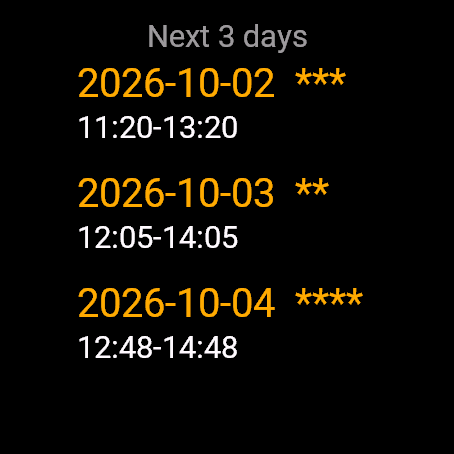
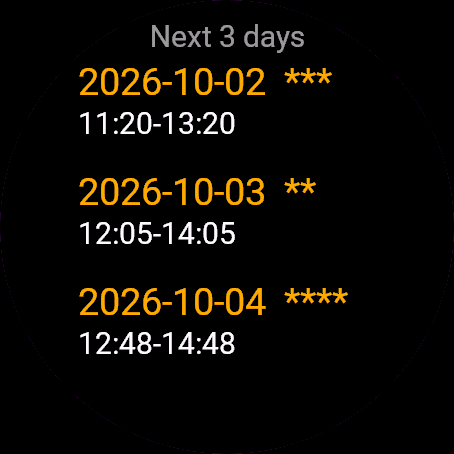
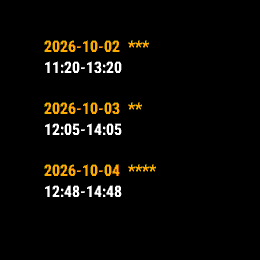
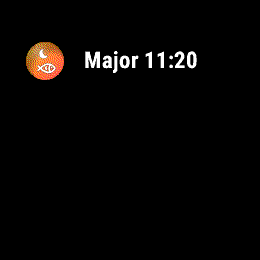
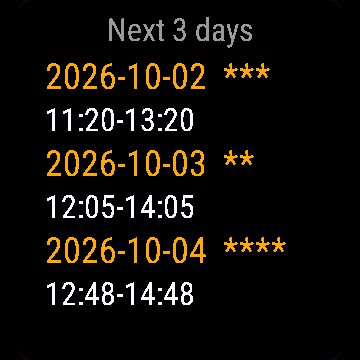
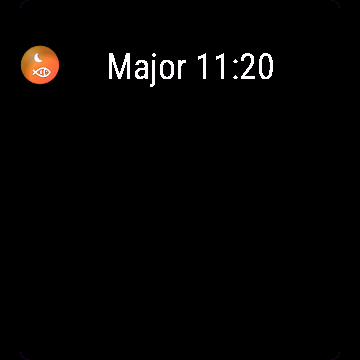
- 3-day outlook, glance shows the next period
- Correct 12h/24h time everywhere
Solunar Hunt Fish liczy tranzyt Księżyca, jego wschód i zachód dla Twojej pozycji GPS prawdziwą astronomią. Buduje okresy główne (Księżyc nad głową albo pod stopami, plus minus godzina) i poboczne (wschód i zachód Księżyca, plus minus 30 minut), ocenia dzień od 1 do 4 na podstawie fazy Księżyca i pokrycia z wschodem lub zachodem słońca, pokazuje światło do strzału (wschód i zachód słońca plus przesunięcie, które sam ustawiasz). W odróżnieniu od niektórych znanych aplikacji łowieckich, format godziny wszędzie zgadza się z zegarkiem.
- Okresy główne (tranzyt Księżyca) i poboczne (wschód/zachód Księżyca)
- Ocena dnia od 1 do 4 gwiazdek
- Światło do strzału z własnym przesunięciem (godziny polowań i strzelania sprawdź w lokalnych przepisach; aplikacja liczy tylko czasy słońca)
- Podgląd na 3 dni, glance pokazuje następny okres
- Poprawny format 12/24h wszędzie
Solunar Hunt Fish berechnet Mondkulmination, Mondaufgang und Monduntergang für deine GPS-Position mit echter Astronomie. Die App bildet Hauptzeiten (Mond im Zenit oder Nadir, plus/minus eine Stunde) und Nebenzeiten (Mondaufgang/Monduntergang, plus/minus 30 Minuten), bewertet jeden Tag von 1 bis 4 nach Mondphase und Überlappung mit Sonnenaufgang/Sonnenuntergang, und zeigt das Büchsenlicht (Sonnenauf- und Sonnenuntergang plus ein Versatz, den du selbst einstellst). Anders als manche bekannte Jagd-Apps stimmt das Uhrzeitformat überall korrekt mit deiner Uhreneinstellung überein.
- Hauptzeiten (Mondkulmination) und Nebenzeiten (Mondaufgang/Monduntergang)
- Tagesbewertung, 1 bis 4 Sterne
- Büchsenlicht mit eigenem Versatz (Jagd- und Schusszeiten in den örtlichen Vorschriften prüfen; die App berechnet nur die Sonnenzeiten)
- 3-Tage-Ausblick, Übersicht zeigt die nächste Zeitperiode
- Korrekte 12h/24h-Zeit überall
Solunar Hunt Fish calcule le transit lunaire, le lever et le coucher de la lune pour votre position GPS avec une astronomie réelle. L'application construit des périodes majeures (lune au zénith ou au nadir, plus ou moins une heure) et des périodes mineures (lever/coucher de lune, plus ou moins 30 minutes), note chaque jour de 1 à 4 selon la phase lunaire et le chevauchement avec le lever/coucher du soleil, et affiche la lumière de tir (lever et coucher du soleil plus un décalage que vous réglez). Contrairement à certaines applications de chasse bien connues, le format d'heure correspond partout et correctement au réglage de votre montre.
- Périodes majeures (transit lunaire) et périodes mineures (lever/coucher de lune)
- Note du jour, de 1 à 4 étoiles
- Lumière de tir avec votre propre décalage (vérifiez les heures de tir et de chasse dans la réglementation locale ; l'application ne calcule que les heures du soleil)
- Prévision sur 3 jours, l'aperçu affiche la prochaine période
- Format d'heure 12h/24h correct partout
Solunar Hunt Fish calcula el tránsito lunar, la salida y la puesta de la luna para tu posición GPS con astronomía real. Genera periodos mayores (luna en el cenit o en el nadir, más o menos una hora) y periodos menores (salida/puesta de la luna, más o menos 30 minutos), califica cada día de 1 a 4 según la fase lunar y su coincidencia con el amanecer/atardecer, y muestra la luz de tiro (amanecer y atardecer más un desfase que tú configuras). A diferencia de algunas apps de caza muy conocidas, el formato de hora coincide en todas partes con el ajuste de tu reloj, de forma correcta.
- Periodos mayores (tránsito lunar) y periodos menores (salida/puesta de la luna)
- Calificación del día, de 1 a 4 estrellas
- Luz de tiro con tu propio desfase (consulta las horas de tiro y de caza en la normativa local; la app solo calcula las horas del sol)
- Previsión de 3 días, la vista rápida muestra el siguiente periodo
- Formato de hora 12h/24h correcto en todas partes
Solunar Hunt Fish berekent de maandoorgang, maanopkomst en maanondergang voor jouw GPS-positie met echte astronomie. De app bouwt grote periodes (maan recht boven je of recht onder je, plus of min een uur) en kleine periodes (maanopkomst/maanondergang, plus of min 30 minuten), beoordeelt elke dag van 1 tot 4 op basis van maanfase en overlap met zonsopgang/zonsondergang, en toont het schietlicht (zonsopgang en zonsondergang plus een door jou ingestelde afwijking). In tegenstelling tot enkele bekende jachtapps klopt de tijdsnotatie overal met de instelling van je horloge.
- Grote periodes (maandoorgang) en kleine periodes (maanopkomst/maanondergang)
- Dagbeoordeling, 1 tot 4 sterren
- Schietlicht met je eigen afwijking (controleer de lokale regels voor schiet- en jachttijden; de app berekent alleen zonnetijden)
- Vooruitblik van 3 dagen, de glance toont de volgende periode
- Overal de juiste 12-uurs/24-uurs tijd
Solunar Hunt Fishは、GPS位置情報を使って実際の天文計算により月の南中、月の出、月の入りを算出します。メジャー期(月が真上または真下に来る時刻の前後1時間)とマイナー期(月の出/月の入りの前後30分)を算出し、月相と日の出/日の入りとの重なりに応じて各日を1-4段階で評価、射撃光の時間帯(日の出・日の入りに自分で設定したオフセットを加えたもの)も表示します。一部の有名な狩猟アプリとは異なり、時刻表示は常に時計の設定どおり正しく表示されます。
- メジャー期(月の南中)とマイナー期(月の出/月の入り)
- 1-4段階の星評価
- 自分で設定したオフセットに基づく射撃光の時間帯(射撃・狩猟の時間帯は地域の規則で確認してください。アプリは太陽の時刻を計算するだけです)
- 3日間の見通し、グランスビューで次の時間帯を確認可能
- どの画面でも正しい12時間/24時間表示
Solunar Hunt Fish calcola il transito lunare, la levata e il tramonto della luna per la tua posizione GPS con astronomia reale. Costruisce periodi maggiori (luna allo zenit o al nadir, più o meno un'ora) e periodi minori (levata/tramonto della luna, più o meno 30 minuti), valuta ogni giorno da 1 a 4 in base alla fase lunare e alla sovrapposizione con alba/tramonto, e mostra la luce di tiro (alba e tramonto più uno scarto che imposti tu). A differenza di alcune app di caccia molto conosciute, il formato dell'ora corrisponde sempre e correttamente all'impostazione del tuo orologio.
- Periodi maggiori (transito lunare) e periodi minori (levata/tramonto della luna)
- Valutazione del giorno, da 1 a 4 stelle
- Luce di tiro con uno scarto personalizzato (controlla gli orari di tiro e di caccia nelle norme locali; l'app calcola solo gli orari del sole)
- Previsione a 3 giorni, il glance mostra il prossimo periodo
- Orario 12h/24h corretto ovunque
Solunar Hunt Fish 用真实天文算法,根据你的GPS位置计算月中天、月出和月落时间。它会算出主摄食期(月亮在天顶或天底,正负一小时)和次摄食期(月出/月落前后正负30分钟),按月相和与日出日落的重合程度给每天打1到4星,还会显示可射击光照时段(日出和日落加上你自己设定的偏移)。和一些知名狩猎应用不同,这里的时间格式在每个地方都会正确跟随你手表的设置。
- 主摄食期(月中天)和次摄食期(月出/月落)
- 每日评级,1到4星
- 可射击光照时段,偏移量自己设定(射击和狩猎时间请查阅当地法规;应用只计算太阳时间)
- 未来3天预报,概览界面显示下一个时段
- 12/24小时制在所有地方都正确显示
Solunar Hunt Fish рассчитывает прохождение луны через меридиан, восход и заход луны для вашей GPS-позиции по настоящей астрономии. Приложение строит главные периоды (луна в верхней или нижней точке, плюс-минус час) и второстепенные периоды (восход/заход луны, плюс-минус 30 минут), оценивает каждый день от 1 до 4 по фазе луны и совпадению с восходом/закатом солнца, и показывает свет для стрельбы (восход и закат солнца плюс смещение, которое вы задаёте). В отличие от некоторых известных охотничьих приложений, формат времени везде верно совпадает с настройками ваших часов.
- Главные периоды (прохождение луны через меридиан) и второстепенные периоды (восход/заход луны)
- Оценка дня от 1 до 4 звёзд
- Свет для стрельбы со своим смещением (часы охоты и стрельбы уточняйте в местных правилах; приложение рассчитывает только время солнца)
- Прогноз на 3 дня, виджет показывает следующий период
- Верный формат времени 12ч/24ч везде
Solunar Hunt Fish calcula o trânsito da lua, o nascer e o pôr da lua para a sua posição GPS com astronomia real. Ele monta períodos maiores (lua no zênite ou no nadir, mais ou menos uma hora) e períodos menores (nascer/pôr da lua, mais ou menos 30 minutos), avalia cada dia de 1 a 4 conforme a fase da lua e a sobreposição com o nascer/pôr do sol, e mostra a luz de tiro (nascer e pôr do sol mais um ajuste que você define). Diferente de alguns aplicativos de caça conhecidos, o formato de hora bate com a configuração do seu relógio em todo lugar, corretamente.
- Períodos maiores (trânsito da lua) e períodos menores (nascer/pôr da lua)
- Avaliação do dia, de 1 a 4 estrelas
- Luz de tiro com o seu próprio ajuste (confira os horários de tiro e de caça na legislação local; o app só calcula os horários do sol)
- Previsão de 3 dias, o glance mostra o próximo período
- Horário correto em 12h/24h em todo lugar
Solunar Hunt Fish počítá průchod měsíce, jeho východ a západ pro vaši GPS pozici pomocí reálné astronomie. Vytváří hlavní období (měsíc nad hlavou nebo pod nohama, plus minus jedna hodina) a vedlejší období (východ/západ měsíce, plus minus 30 minut), hodnotí každý den od 1 do 4 podle fáze měsíce a překrytí s východem/západem slunce, a zobrazuje světlo pro střelbu (východ a západ slunce plus odsazení, které si nastavíte). Na rozdíl od některých známých loveckých aplikací formát času všude správně odpovídá nastavení vašich hodinek.
- Hlavní období (průchod měsíce) a vedlejší období (východ/západ měsíce)
- Hodnocení dne, 1 až 4 hvězdy
- Světlo pro střelbu s vlastním odsazením (ověřte si místní předpisy o době střelby a lovu; aplikace počítá pouze časy slunce)
- Výhled na 3 dny, přehled ukáže další období
- Správný 12h/24h čas všude
Solunar Hunt Fish calcula o trânsito lunar, o nascer e o pôr da lua para a tua posição GPS com astronomia real. Constrói períodos maiores (lua no zénite ou no nadir, mais ou menos uma hora) e períodos menores (nascer/pôr da lua, mais ou menos 30 minutos), classifica cada dia de 1 a 4 conforme a fase lunar e a sobreposição com o nascer/pôr do sol, e mostra a luz de tiro (nascer e pôr do sol mais um desvio que tu defines). Ao contrário de algumas aplicações de caça bem conhecidas, o formato de hora corresponde em todo o lado, corretamente, à definição do teu relógio.
- Períodos maiores (trânsito lunar) e períodos menores (nascer/pôr da lua)
- Classificação do dia, de 1 a 4 estrelas
- Luz de tiro com o teu próprio desvio (verifica a legislação local sobre os horários de tiro e de caça; a aplicação só calcula as horas do sol)
- Previsão de 3 dias, o glance mostra o próximo período
- Hora 12h/24h correta em todo o lado
Solunar Hunt Fish는 실제 천문 계산으로 내 GPS 위치의 월중천(달의 남중), 월출, 월몰 시각을 구합니다. 메이저 피리어드(달이 머리 위 또는 정반대에 있을 때, 전후 1시간)와 마이너 피리어드(월출/월몰, 전후 30분)를 만들고, 달의 위상과 일출/일몰과의 겹침 정도에 따라 하루하루를 1부터 4까지 평가하며, 일출과 일몰에 직접 설정한 오프셋을 더한 사격 가능 광량 시간(shooting light)을 보여줍니다. 잘 알려진 다른 사냥 앱들과 달리, 시계 설정을 그대로 따르는 정확한 시간 형식을 어디서나 사용합니다.
- 메이저 피리어드(월중천)와 마이너 피리어드(월출/월몰)
- 하루 평가, 1-4점
- 직접 설정한 오프셋을 적용한 shooting light(사격 및 사냥 시간은 현지 규정을 확인하세요. 앱은 태양 시각만 계산합니다)
- 3일 전망, 글랜스에서 다음 피리어드 확인
- 어디서나 정확한 12시간제/24시간제 시간 표시
Solunar Hunt Fish beräknar månens kulmination, månuppgång och månnedgång för din GPS-position med verklig astronomi. Den bygger stora perioder (månen rakt ovanför eller rakt under, plus minus en timme) och små perioder (månuppgång/månnedgång, plus minus 30 minuter), betygsätter varje dag 1 till 4 utifrån månfas och överlapp med soluppgång/solnedgång, och visar skjutljus (soluppgång och solnedgång plus en offset du ställer in). Till skillnad från vissa kända jaktappar matchar klockformatet din klockinställning överallt, korrekt.
- Stora perioder (månens kulmination) och små perioder (månuppgång/månnedgång)
- Dagsbetyg, 1 till 4 stjärnor
- Skjutljus med din egen offset (kontrollera lokala regler för skjut- och jakttider; appen räknar bara ut soltider)
- 3-dagarsöversikt, glance visar nästa period
- Korrekt 12/24-timmarsformat överallt
Solunar Hunt Fish beregner månens gennemgang, måneopgang og månenedgang for din GPS-position med reel astronomi. Den bygger store perioder (månen over hovedet eller under fødderne, plus/minus en time) og små perioder (måneopgang/månenedgang, plus/minus 30 minutter), vurderer hver dag fra 1 til 4 efter månefase og overlap med solopgang/solnedgang, og viser skydelys (solopgang og solnedgang plus en forskydning du selv sætter). I modsætning til visse velkendte jagtapps matcher klokkeformatet dit urs indstilling overalt, korrekt.
- Store perioder (månens gennemgang) og små perioder (måneopgang/månenedgang)
- Dagsvurdering, 1 til 4 stjerner
- Skydelys med din egen forskydning (tjek de lokale regler for skyde- og jagttider; appen beregner kun soltider)
- 3-dages udsigt, glance viser næste periode
- Korrekt 12t/24t-tid overalt
Solunar Hunt Fish beregner månetransitt, måneoppgang og månenedgang for din GPS-posisjon med reell astronomi. Den bygger hovedperioder (månen rett over eller rett under, pluss/minus én time) og biperioder (måneoppgang/månenedgang, pluss/minus 30 minutter), gir hver dag en vurdering fra 1 til 4 basert på månefase og overlapp med soloppgang/solnedgang, og viser skytelys (soloppgang og solnedgang pluss en forskyvning du selv setter). I motsetning til noen kjente jaktapper stemmer klokkeformatet overalt med innstillingen på klokken din, korrekt.
- Hovedperioder (månetransitt) og biperioder (måneoppgang/månenedgang)
- Dagsvurdering, 1 til 4 stjerner
- Skytelys med din egen forskyvning (sjekk lokale regler for skyte- og jakttider; appen beregner bare soltider)
- 3-dagers utsikt, glance viser neste periode
- Riktig 12t/24t-tid overalt
Solunar Hunt Fish用真實的天文計算,算出你GPS位置的月中天、月出和月落時間。它會算出大時段(月亮在頭頂或腳底正下方,正負1小時)和小時段(月出/月落,正負30分鐘),依月相和日出日落的重疊程度把每天評1到4分,還會顯示射擊光線時間(日出和日落加上你設定的偏移量)。跟一些知名的狩獵App不一樣,這款到處的時間格式都正確對應你手錶的設定。
- 大時段(月中天)和小時段(月出/月落)
- 每日評分,1到4顆星
- 可自訂偏移量的射擊光線時間(請查詢當地有關射擊和狩獵時段的規定;本App只計算太陽時間)
- 3天預測,一瞥畫面就能看到下一個時段
- 所有畫面都正確顯示 12/24 小時制
Solunar Hunt Fish laskee kuun meridiaaniylityksen, kuunnousun ja kuunlaskun GPS-sijaintiisi todellisen tähtitieteen avulla. Se muodostaa pääjaksot (kuu yläpuolella tai alapuolella, plus miinus tunti) ja sivujaksot (kuunnousu/kuunlasku, plus miinus 30 minuuttia), arvioi joka päivän 1-4 kuun vaiheen ja auringonnousun/-laskun päällekkäisyyden mukaan, ja näyttää ampumavalon (auringonnousu ja -lasku plus itse asettamasi siirtymä). Toisin kuin joissakin tunnetuissa metsästyssovelluksissa, kellon muoto vastaa kellosi asetusta kaikkialla, oikein.
- Pääjaksot (kuun meridiaaniylitys) ja sivujaksot (kuunnousu/kuunlasku)
- Päivän arvio, 1-4 tähteä
- Ampumavalo omalla siirtymälläsi (tarkista paikalliset säännökset ampuma- ja metsästysajoista; sovellus laskee vain auringon ajat)
- 3 päivän ennuste, glance-näkymä näyttää seuraavan jakson
- Oikea 12 h / 24 h -aika kaikkialla
Solunar Hunt Fish počíta prechod mesiaca, jeho východ a západ pre vašu GPS pozíciu podľa skutočnej astronómie. Vytvára hlavné periódy (mesiac v nadhlavníku alebo v podnožníku, plus minus jedna hodina) a vedľajšie periódy (východ/západ mesiaca, plus minus 30 minút), hodnotí každý deň od 1 do 4 podľa fázy mesiaca a prekrytia s východom/západom slnka, a zobrazuje čas strieľania pri svetle (východ a západ slnka plus posun, ktorý si nastavíte). Na rozdiel od niektorých známych poľovníckych aplikácií, formát času všade správne zodpovedá nastaveniu vašich hodiniek.
- Hlavné periódy (prechod mesiaca) a vedľajšie periódy (východ/západ mesiaca)
- Hodnotenie dňa, 1 až 4 hviezdičky
- Čas strieľania pri svetle s vlastným posunom (skontrolujte miestne predpisy o času strieľania a lovu; aplikácia počíta iba časy slnka)
- 3-dňový výhľad, glance zobrazí ďalšiu periódu
- Správny 12h/24h čas všade
Solunar Hunt Fish računa lunin prehod, vzhod in zahod lune za tvojo GPS lokacijo z resnično astronomijo. Izračuna glavna obdobja (luna nad glavo ali pod nogami, plus minus ena ura) in stranska obdobja (vzhod/zahod lune, plus minus 30 minut), vsak dan oceni od 1 do 4 glede na lunino fazo in prekrivanje s sončnim vzhodom/zahodom, ter prikaže svetlobo za streljanje (sončni vzhod in zahod plus zamik, ki ga sam določiš). Za razliko od nekaterih znanih lovskih aplikacij se format ure povsod pravilno ujema z nastavitvijo tvoje ure.
- Glavna obdobja (lunin prehod) in stranska obdobja (vzhod/zahod lune)
- Ocena dneva, od 1 do 4 zvezdice
- Svetloba za streljanje z lastnim zamikom (preverite lokalne predpise o urah streljanja in lova; aplikacija računa samo čase sonca)
- 3-dnevni pregled, pregled (glance) prikaže naslednje obdobje
- Pravilen 12h/24h čas povsod
Solunar Hunt Fish menghitung transit bulan, waktu terbit dan terbenam bulan untuk posisi GPS-mu dengan astronomi yang sebenarnya. Aplikasi ini membangun periode major (bulan tepat di atas atau di bawah, plus minus satu jam) dan periode minor (terbit/terbenam bulan, plus minus 30 menit), memberi rating setiap hari 1 sampai 4 berdasarkan fase bulan dan tumpang tindih dengan matahari terbit/terbenam, dan menampilkan cahaya untuk menembak (matahari terbit dan terbenam ditambah offset yang kamu atur). Berbeda dari beberapa aplikasi berburu yang terkenal, format jam di sini selalu sesuai dengan pengaturan jam tanganmu, dengan benar.
- Periode major (transit bulan) dan periode minor (terbit/terbenam bulan)
- Rating harian, 1 sampai 4 bintang
- Cahaya untuk menembak dengan offset sesuai pilihanmu (periksa peraturan setempat tentang jam menembak dan berburu; aplikasi hanya menghitung waktu matahari)
- Prakiraan 3 hari, glance menampilkan periode berikutnya
- Waktu 12 jam/24 jam yang benar di semua tempat
A Solunar Hunt Fish valódi csillagászati számításokkal határozza meg a hold delelését, holdkeltét és holdnyugtát a GPS-helyzeted alapján. Felépíti a fő időszakokat (a hold a fejed felett vagy pontosan alatta, plusz-mínusz egy óra) és az mellék időszakokat (holdkelte/holdnyugta, plusz-mínusz 30 perc), 1-től 4-ig értékeli minden napot a holdfázis és a napkeltével/napnyugtával való átfedés alapján, és megmutatja a lővilágot (napkelte és napnyugta plusz egy általad beállított eltérés). Néhány jól ismert vadászati alkalmazástól eltérően az óraformátum mindenhol helyesen igazodik az órád beállításához.
- Fő időszakok (hold delelése) és mellék időszakok (holdkelte/holdnyugta)
- Napi értékelés, 1-től 4 csillagig
- Lővilág saját eltéréssel (a lövés és a vadászat időpontjaira vonatkozó helyi előírásokat ellenőrizd; az alkalmazás csak a nap időpontjait számolja)
- 3 napos előretekintés, a glance megmutatja a következő időszakot
- Helyes 12/24 órás idő mindenhol
Solunar Hunt Fish คำนวณเวลาดวงจันทร์ผ่านเมริเดียน ขึ้น และตก จากตำแหน่ง GPS ของคุณด้วยหลักดาราศาสตร์จริง สร้างช่วงหลัก (ดวงจันทร์อยู่เหนือหัวหรือใต้เท้า บวกลบ 1 ชั่วโมง) และช่วงรอง (ดวงจันทร์ขึ้นหรือตก บวกลบ 30 นาที) ให้คะแนนแต่ละวัน 1 ถึง 4 ตามข้างขึ้นข้างแรมและความทับซ้อนกับพระอาทิตย์ขึ้นหรือตก และแสดงแสงสำหรับยิง (พระอาทิตย์ขึ้นและตก บวกค่าออฟเซ็ตที่คุณตั้งเอง) ต่างจากแอปล่าสัตว์ชื่อดังบางแอป รูปแบบเวลาตรงกับการตั้งค่านาฬิกาของคุณทุกที่ ถูกต้องจริง ๆ
- ช่วงหลัก (ดวงจันทร์ผ่านเมริเดียน) และช่วงรอง (ดวงจันทร์ขึ้นหรือตก)
- คะแนนของวัน 1 ถึง 4 ดาว
- แสงสำหรับยิงพร้อมค่าออฟเซ็ตของคุณเอง (โปรดตรวจสอบกฎหมายท้องถิ่นเกี่ยวกับเวลายิงและล่าสัตว์ แอปคำนวณเฉพาะเวลาของดวงอาทิตย์เท่านั้น)
- พยากรณ์ล่วงหน้า 3 วัน หน้ากลานซ์แสดงช่วงถัดไป
- เวลาแบบ 12/24 ชั่วโมงถูกต้องทุกที่
Το Solunar Hunt Fish υπολογίζει τη διάβαση του φεγγαριού, την ανατολή και τη δύση του μέσω της θέσης σου GPS με πραγματική αστρονομία. Χτίζει κύριες περιόδους (φεγγάρι από πάνω ή από κάτω, συν ή πλην μία ώρα) και δευτερεύουσες περιόδους (ανατολή/δύση φεγγαριού, συν ή πλην 30 λεπτά), βαθμολογεί κάθε μέρα από 1 έως 4 με βάση τη φάση του φεγγαριού και την επικάλυψη με την ανατολή/δύση του ήλιου, και δείχνει το φως βολής (ανατολή και δύση ηλίου συν μια μετατόπιση που ορίζεις εσύ). Σε αντίθεση με μερικές γνωστές εφαρμογές κυνηγιού, η μορφή ώρας ταιριάζει παντού με τη ρύθμιση του ρολογιού σου, σωστά.
- Κύριες περίοδοι (διάβαση φεγγαριού) και δευτερεύουσες περίοδοι (ανατολή/δύση φεγγαριού)
- Βαθμολογία ημέρας, 1 έως 4 αστέρια
- Φως βολής με τη δική σου μετατόπιση (έλεγξε τους τοπικούς κανονισμούς για τις ώρες βολής και κυνηγιού· η εφαρμογή υπολογίζει μόνο τις ώρες του ήλιου)
- Πρόβλεψη 3 ημερών, το glance δείχνει την επόμενη περίοδο
- Σωστή μορφή ώρας 12ω/24ω παντού
Solunar Hunt Fish računa prolaz Mjeseca, izlazak i zalazak Mjeseca za tvoju GPS poziciju stvarnom astronomijom. Izračunava glavne periode (Mjesec iznad glave ili ispod nogu, plus ili minus jedan sat) i sporedne periode (izlazak/zalazak Mjeseca, plus ili minus 30 minuta), ocjenjuje svaki dan od 1 do 4 prema mjesečevoj fazi i preklapanju s izlaskom/zalaskom sunca, i prikazuje svjetlo za pucanje (izlazak i zalazak sunca plus pomak koji sam postaviš). Za razliku od nekih poznatih lovačkih aplikacija, format sata svugdje točno odgovara postavci tvog sata.
- Glavni periodi (prolaz Mjeseca) i sporedni periodi (izlazak/zalazak Mjeseca)
- Ocjena dana, 1 do 4 zvjezdice
- Svjetlo za pucanje s vlastitim pomakom (provjeri lokalne propise o satima pucanja i lova; aplikacija računa samo vremena sunca)
- Pregled za 3 dana, pregled (glance) prikazuje sljedeći period
- Točno 12h/24h vrijeme svugdje
Solunar Hunt Fish מחשבת מעבר ירח, זריחת ירח ושקיעת ירח למיקום ה-GPS שלכם באסטרונומיה אמיתית. היא בונה תקופות עיקריות (הירח בשיא מעל או מתחת, פלוס מינוס שעה) ותקופות משניות (זריחת/שקיעת ירח, פלוס מינוס 30 דקות), מדרגת כל יום מ-1 עד 4 לפי פאזת הירח והחפיפה עם הזריחה והשקיעה, ומציגה אור לירי (זריחה ושקיעה בתוספת היסט שאתם קובעים). בשונה מכמה אפליקציות ציד מוכרות, פורמט השעון תואם להגדרת השעון שלכם בכל מקום, ובאופן נכון.
- תקופות עיקריות (מעבר ירח) ותקופות משניות (זריחת/שקיעת ירח)
- דירוג יום, 1 עד 4 כוכבים
- אור לירי עם היסט משלכם (בדקו את התקנות המקומיות לגבי שעות ירי וציד; האפליקציה מחשבת רק את זמני השמש)
- תחזית ל-3 ימים, מבט חטוף מציג את התקופה הבאה
- שעון 12 או 24 שעות נכון בכל מקום
Solunar Hunt Fish mengira moon transit, moonrise dan moonset untuk kedudukan GPS anda dengan astronomi sebenar. Ia membina tempoh major (bulan di atas atau di bawah kaki, tolak tambah satu jam) dan tempoh minor (moonrise/moonset, tolak tambah 30 minit), menilai setiap hari 1 hingga 4 mengikut fasa bulan dan pertindihan dengan matahari terbit/terbenam, serta memaparkan cahaya menembak (matahari terbit dan terbenam ditambah offset yang anda tetapkan). Tidak seperti sesetengah aplikasi memburu yang terkenal, format jam sepadan dengan tetapan jam tangan anda di mana-mana sahaja, dengan betul.
- Tempoh major (moon transit) dan tempoh minor (moonrise/moonset)
- Penilaian hari, 1 hingga 4 bintang
- Cahaya menembak dengan offset anda sendiri (semak peraturan tempatan tentang waktu menembak dan memburu; aplikasi hanya mengira waktu matahari)
- Unjuran 3 hari, glance tunjuk tempoh seterusnya
- Format masa 12j/24j yang betul di mana-mana sahaja
How to use it
Add Solunar Hunt Fish to the widget loop (swipe through widgets on the watch).
Swipe, tap, or UP/DOWN switches between today and the 3-day list. Offsets live in Garmin Connect.
Dodaj Solunar Łowy do karuzeli widgetów (przewiń widgety na zegarku).
Przesunięcie palcem, dotknięcie albo GÓRA/DÓŁ przełącza między dziś a listą 3 dni. Przesunięcia ustawiasz w Garmin Connect.
Füge Solunar Hunt Fish zur Widget-Schleife hinzu (auf der Uhr durch die Widgets wischen).
Wischen, Tippen oder UP/DOWN wechselt zwischen heute und der 3-Tage-Liste. Versatzwerte liegen in Garmin Connect.
Ajoutez Solunar Hunt Fish à la boucle de widgets (faites défiler les widgets sur la montre).
Glissement, appui, ou UP/DOWN pour basculer entre aujourd'hui et la liste sur 3 jours. Les décalages se règlent dans Garmin Connect.
Añade Solunar Hunt Fish al bucle de widgets (desliza por los widgets en el reloj).
Deslizar, tocar o UP/DOWN cambia entre hoy y la lista de 3 días. Los desfases se configuran en Garmin Connect.
Voeg Solunar Hunt Fish toe aan de widgetlus (veeg op het horloge door de widgets).
Swipe, tik, of UP/DOWN wisselt tussen vandaag en de lijst van 3 dagen. Afwijkingen stel je in via Garmin Connect.
Solunar Hunt Fish をウィジェットのループに追加してください(時計でウィジェットをスワイプして切り替えます)。
スワイプ、タップ、またはUP/DOWNで今日の表示と3日間リストを切り替えます。オフセットの設定はGarmin Connectで行います。
Aggiungi Solunar Hunt Fish al ciclo dei widget (scorri i widget sull'orologio).
Scorri, tocca, oppure UP/DOWN passano tra oggi e l'elenco a 3 giorni. Gli scarti si impostano in Garmin Connect.
把 Solunar Hunt Fish 添加到小组件循环中(在手表上滑动切换小组件)。
滑动、点击,或用 UP/DOWN 在今天视图和3天列表之间切换。偏移设置在Garmin Connect里调整。
Добавьте Solunar Hunt Fish в ленту виджетов (листайте виджеты на часах).
Свайп, касание или UP/DOWN переключают между сегодняшним днём и списком на 3 дня. Смещения настраиваются в Garmin Connect.
Adicione Solunar Hunt Fish ao ciclo de widgets (deslize pelos widgets no relógio).
Deslizar, tocar, ou UP/DOWN alternam entre hoje e a lista de 3 dias. Os ajustes (offsets) ficam no Garmin Connect.
Přidejte Solunar Hunt Fish do smyčky widgetů (na hodinkách procházejte widgety přejížděním).
Přejetím, klepnutím nebo UP/DOWN přepnete mezi dneškem a seznamem na 3 dny. Odsazení najdete v Garmin Connect.
Adicione Solunar Hunt Fish ao ciclo de widgets (deslize pelos widgets no relógio).
Deslizar, tocar, ou UP/DOWN alterna entre hoje e a lista de 3 dias. Os desvios ficam guardados no Garmin Connect.
Solunar Hunt Fish을(를) 위젯 순환에 추가하세요(시계에서 위젯을 넘겨 보세요).
스와이프, 탭, 또는 UP/DOWN으로 오늘과 3일 목록 사이를 전환합니다. 오프셋은 Garmin Connect에서 설정합니다.
Lägg till Solunar Hunt Fish i widgetslingan (svep mellan widgetar på klockan).
Svep, tryck, eller UP/DOWN växlar mellan idag och 3-dagarslistan. Offset-inställningarna finns i Garmin Connect.
Tilføj Solunar Hunt Fish til widget-løkken (stryg gennem widgets på uret).
Swipe, tryk eller UP/DOWN skifter mellem i dag og 3-dages-listen. Forskydninger findes i Garmin Connect.
Legg til Solunar Hunt Fish i widget-rekken (sveip gjennom widgetene på klokken).
Sveip, trykk, eller UP/DOWN bytter mellom i dag og 3-dagerslisten. Forskyvninger lever i Garmin Connect.
把 Solunar Hunt Fish 加入小工具循環中(在手錶上滑動切換小工具)。
用滑動、點按,或 UP/DOWN 切換今天和3天列表。偏移量設定在Garmin Connect裡。
Lisää Solunar Hunt Fish widgetkiertoon (selaa widgettejä pyyhkäisemällä kellossa).
Pyyhkäisy, napautus tai UP/DOWN vaihtaa tämän päivän ja 3 päivän listan välillä. Siirtymät löytyvät Garmin Connectista.
Pridajte Solunar Hunt Fish do cyklu widgetov (widgety na hodinkách prechádzate potiahnutím).
Potiahnutím, ťuknutím alebo UP/DOWN prepínate medzi dneškom a 3-dňovým zoznamom. Posuny sa nastavujú v Garmin Connect.
Dodajte Solunar Hunt Fish v zanko pripomočkov (na uri se pomikajte med pripomočki).
Podrsaj, tapni ali pritisni UP/DOWN za preklop med danes in seznamom treh dni. Zamiki se urejajo v Garmin Connect.
Tambahkan Solunar Hunt Fish ke putaran widget (geser antar widget di jam).
Swipe, ketuk, atau UP/DOWN berpindah antara hari ini dan daftar 3 hari. Offset diatur di Garmin Connect.
Adja hozzá a(z) Solunar Hunt Fish elemet a widgetkörhöz (az órán görgessen a widgetek között).
Csúsztatás, koppintás, vagy UP/DOWN vált a mai nap és a 3 napos lista között. Az eltéréseket a Garmin Connectben állítod be.
เพิ่ม Solunar Hunt Fish ในวิดเจ็ตลูป (ปัดผ่านวิดเจ็ตบนนาฬิกา)
ปัดจอ แตะ หรือกดปุ่มขึ้น/ลง (UP/DOWN) เพื่อสลับระหว่างวันนี้กับรายการ 3 วัน ค่าออฟเซ็ตตั้งได้ใน Garmin Connect
Προσθέστε το Solunar Hunt Fish στον κύκλο των widget (σύρετε στα widget του ρολογιού).
Σύρσιμο, πάτημα, ή UP/DOWN εναλλάσσουν την προβολή ανάμεσα στο σήμερα και τη λίστα 3 ημερών. Οι μετατοπίσεις βρίσκονται στο Garmin Connect.
Dodajte Solunar Hunt Fish u petlju widgeta (listajte widgete na satu).
Prijelaz prstom, dodir, ili UP/DOWN prebacuju između danas i popisa za 3 dana. Pomaci se podešavaju u Garmin Connectu.
הוסיפו את Solunar Hunt Fish ללולאת הווידג'טים (החליקו בין הווידג'טים בשעון).
החלקה, הקשה, או UP/DOWN עוברים בין היום לרשימת 3 הימים. ההיסטים נמצאים ב-Garmin Connect.
Tambah Solunar Hunt Fish ke dalam gelung widget (leret melalui widget pada jam).
Leret, ketik, atau UP/DOWN menukar antara hari ini dan senarai 3 hari. Offset disimpan dalam Garmin Connect.
Manual
The full manual and the detailed permission descriptions are available in English and Polish.
Solunar Hunt Fish: user manual
What it does
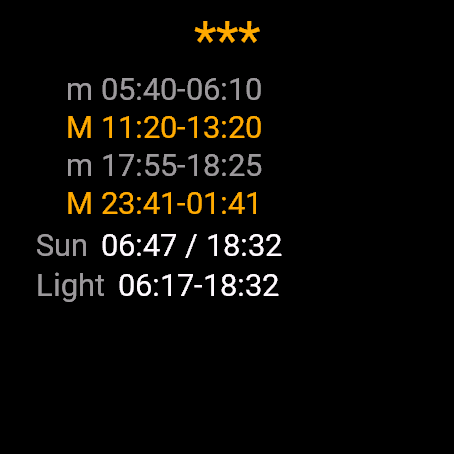
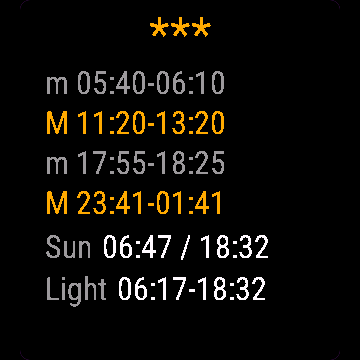
Solunar Hunt Fish shows the major and minor feeding periods for your own location, computed on the watch from moon transit, moonrise and moonset. It also rates the day from 1 to 4 stars and shows shooting light: sunrise and sunset plus an offset you choose.
Requirements and supported watches
Needs Connect IQ 3.3.0+ and the Connect IQ or Garmin Connect phone app. Supported watches:
- Round AMOLED: epix 2 and epix Pro 2, fēnix 8, E, Forerunner 165, 265, 570, 965, 970, Instinct 3 AMOLED, Crossover AMOLED, Venu 2, 3, 4, vivoactive 5, 6.
- Round MIP: enduro 3, fēnix 7 series, 8 Solar, Forerunner 55, 245, 255, vivoactive 4.
- Square and rectangular AMOLED: Venu Sq 2, Venu X1.
Installation
In the Connect IQ app on your phone (or Garmin Connect, then the Connect IQ Store) find "Solunar Hunt Fish" by Dialforge, tap Install and sync the watch. Find it in your glances (UP or DOWN on the watch face, or swipe) and press START or tap to open it.
First launch
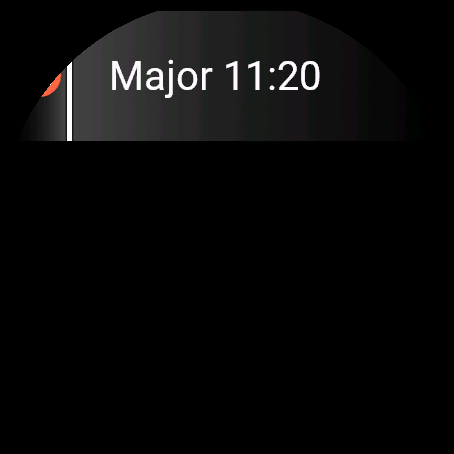
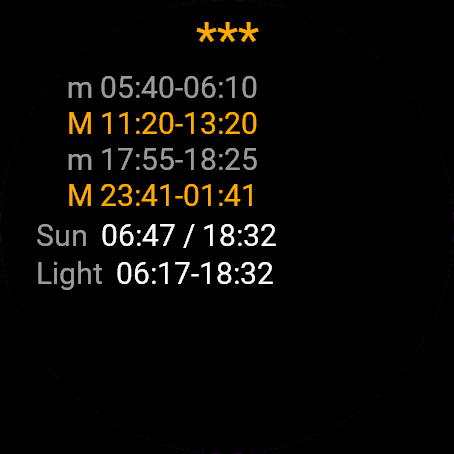
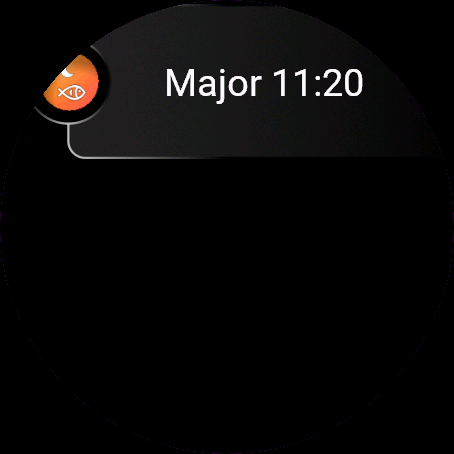
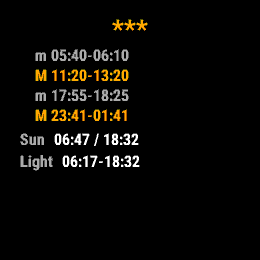
The glance shows the next period. Open the widget: the first view has today's periods (M for major, m for minor), the day rating, sun times and shooting light. With no stored position you see "Getting GPS fix", so step outside with a clear sky. The 30-day free beta starts the first time you open it.
Controls
Watches with buttons (START, UP, DOWN, BACK)
- UP or DOWN switches between Today and the next 3 days.
- START recalculates from the stored position.
- MENU (hold UP) opens one item: Get GPS fix.
Touch watches (tap, hold, swipe)
- Tap or swipe switches between Today and the next 3 days.
- To get a fresh GPS fix, open the menu with the menu button or long press.
Settings
Phone: Connect IQ app, Solunar Hunt Fish, Settings (the unlock code fields are there too).
- Shooting light before sunrise: 0 min, 30 min, 60 min. Default: 0 min.
- Shooting light after sunset: 0 min, 30 min, 60 min. Default: 0 min.
License
- Free beta: 30 days from the first launch, everything works.
- Price: 4.99 EUR once at dialforge.dev, no subscription. The 8-character code is tied to your watch's UID.
- Where to enter it: phone, Connect IQ app, Solunar Hunt Fish, Settings. Read the UID in "Watch UID (needed to buy a code)", buy the code, then type it into "Unlock code from dialforge.dev". The end-of-beta screen on the watch shows the UID too.
- After the beta without a code: an end-of-beta screen with the UID replaces the app. Enter the code, then open it again. New watch? Write to us and the code moves for free.
Privacy and permissions
Permissions:
- Location: one GPS fix to compute moon and sun times. The position stays on the watch.
No internet use. Data stays on the watch.
Troubleshooting
The code does not work. Check that the UID you bought for matches "Watch UID (needed to buy a code)" and type all 8 characters (case is ignored, no 0, O, 1 or I). A code for another app does not fit. Sync, then reopen.
It says No location. The app needs a position once. Open it outdoors, choose Get GPS fix from the menu and wait. The position is stored on the watch and refreshed when older than 24 hours.
A time shows --. That event does not happen on that day for your position, or the position is still unknown.
12-hour or 24-hour? Times follow the watch's own 12/24-hour setting.
Contact
kontakt@dialforge.dev or dialforge.dev. Please write before leaving a low rating.
Solunar Łowy: instrukcja obsługi
Do czego służy
Solunar Łowy pokazuje główne i poboczne okresy żerowania dla Twojego miejsca, liczone w zegarku z przejścia Księżyca, jego wschodu i zachodu. Ocenia też dzień w skali od 1 do 4 gwiazdek i podaje dopuszczalne światło: wschód i zachód słońca plus wybrane przesunięcie.
Wymagania i obsługiwane zegarki
Wymaga Connect IQ 3.3.0+ i aplikacji Connect IQ albo Garmin Connect w telefonie. Obsługiwane zegarki:
- Okrągłe AMOLED: epix 2 i epix Pro 2, fēnix 8, E, Forerunner 165, 265, 570, 965, 970, Instinct 3 AMOLED, Crossover AMOLED, Venu 2, 3, 4, vivoactive 5, 6.
- Okrągłe MIP: enduro 3, seria fēnix 7, fēnix 8 Solar, Forerunner 55, 245, 255, vivoactive 4.
- Kwadratowe i prostokątne AMOLED: Venu Sq 2, Venu X1.
Instalacja
Na telefonie otwórz aplikację Connect IQ (albo Garmin Connect, a w niej sklep Connect IQ), wyszukaj "Solunar Łowy" od Dialforge, stuknij Zainstaluj i zsynchronizuj zegarek. Znajdziesz go wśród widżetów (GÓRA lub DÓŁ na tarczy albo przesunięcie palcem), a START lub stuknięcie otwiera go w całości.
Pierwsze uruchomienie
Widżet pokazuje najbliższy okres. Po otwarciu pierwszy widok to dziś: okresy (M główny, m poboczny), ocena dnia, godziny słońca i światło. Bez zapamiętanej pozycji zobaczysz "Szukam sygnału GPS", więc wyjdź na otwarte niebo. 30-dniowa darmowa beta zaczyna się przy pierwszym otwarciu.
Sterowanie
Zegarki z przyciskami (START, GÓRA, DÓŁ, WSTECZ)
- GÓRA lub DÓŁ przełącza Dziś i kolejne 3 dni.
- START przelicza z zapamiętanej pozycji.
- MENU (przytrzymaj GÓRA) otwiera jedną pozycję: Znajdź GPS.
Zegarki dotykowe (stuknięcie, przytrzymanie, przesunięcie)
- Stuknięcie albo przesunięcie przełącza Dziś i kolejne 3 dni.
- Świeży sygnał GPS: otwórz menu przyciskiem menu lub długim przytrzymaniem.
Ustawienia
Telefon: aplikacja Connect IQ, Solunar Łowy, Ustawienia (są tam też pola kodu odblokowania).
- Światło przed wschodem: 0 min, 30 min, 60 min. Domyślnie: 0 min.
- Światło po zachodzie: 0 min, 30 min, 60 min. Domyślnie: 0 min.
Licencja
- Darmowa beta: 30 dni od pierwszego uruchomienia, wszystko działa.
- Cena: jednorazowo 4,99 EUR na dialforge.dev, bez abonamentu. 8-znakowy kod jest przypisany do UID zegarka.
- Gdzie wpisać: telefon, aplikacja Connect IQ, Solunar Łowy, Ustawienia. Odczytaj UID w polu "UID zegarka (potrzebny do zakupu kodu)", kup kod i wpisz go w "Kod odblokowania z dialforge.dev". Ekran końca bety na zegarku też pokazuje UID.
- Po becie bez kodu: zamiast aplikacji pojawia się ekran końca bety z UID. Wpisz kod i otwórz aplikację ponownie. Nowy zegarek? Napisz do nas, przeniesiemy kod za darmo.
Prywatność i uprawnienia
Uprawnienia:
- Lokalizacja: jeden odczyt GPS do obliczenia godzin Księżyca i słońca. Pozycja zostaje w zegarku.
Zero połączeń z internetem. Dane zostają w zegarku.
Rozwiązywanie problemów
Kod nie działa. Sprawdź, czy UID, dla którego kupiono kod, zgadza się z polem "UID zegarka (potrzebny do zakupu kodu)", i wpisz wszystkie 8 znaków (wielkość liter bez znaczenia, bez 0, O, 1, I). Kod do innej aplikacji nie pasuje. Zsynchronizuj i otwórz ponownie.
Pisze Brak lokalizacji. Aplikacja potrzebuje pozycji raz. Otwórz ją na zewnątrz, wybierz w menu Znajdź GPS i poczekaj. Pozycja zostaje w zegarku i odświeża się, gdy ma ponad 24 godziny.
Godzina pokazuje --. Takie zdarzenie nie występuje tego dnia dla Twojej pozycji albo pozycja jest jeszcze nieznana.
12 czy 24 godziny? Godziny idą za ustawieniem 12/24 w samym zegarku.
Kontakt
kontakt@dialforge.dev albo dialforge.dev. Napisz, zanim wystawisz niską ocenę.
Permissions and privacy
This product asks the watch for the permissions below. Connect IQ shows them when you install it.
- Location (GPS): Uses the watch location for distance, speed or sun and moon times. The location is not sent anywhere.Używa lokalizacji zegarka do dystansu, prędkości albo godzin słońca i księżyca. Lokalizacja nigdzie nie jest wysyłana.
This product does not use the internet and sends no data to our servers.
The full manual and the detailed permission descriptions are available in English and Polish.
Compatible watches
51mm, D2 Air X15, D2 Mach 1 Pro, Enduro 2, Enduro 3, epix (Gen 2), epix Pro (Gen 2) 42mm, epix Pro (Gen 2) 47mm, epix Pro (Gen 2) 51mm, Forerunner 165, Forerunner 165 Music, Forerunner 245, Forerunner 245 Music, Forerunner 255, Forerunner 255 Music, Forerunner 255s, Forerunner 255s Music, Forerunner 265, Forerunner 265s, Forerunner 55, Forerunner 570 42mm, Forerunner 570 47mm, Forerunner 965, Forerunner 970, fēnix 7, fēnix 7 Pro, fēnix 7 Pro - Solar Edition (no Wi-Fi), fēnix 7S, fēnix 7S Pro, fēnix 7X, fēnix 7X Pro, fēnix 7X Pro - Solar Edition (no Wi-Fi), fēnix 8 43mm, fēnix 8 47mm, fēnix 8 Pro 47mm, fēnix 8 Solar 47mm, fēnix 8 Solar 51mm, fēnix E, Instinct 3 AMOLED 45mm, Instinct 3 AMOLED 50mm, Instinct Crossover AMOLED, MicroLED, quatix 7, quatix 7 Pro, quatix 7 Sapphire, quatix 7X Solar, quatix 8 47mm, quatix 8 Pro 47mm, tactix 7, tactix 7 – AMOLED Edition, tactix 8 47mm, tactix 8 Solar 51mm, Venu 2, Venu 2 Plus, Venu 2S, Venu 3, Venu 3S, Venu 4 41mm, Venu 4 45mm, Venu Sq 2, Venu Sq 2 Music, Venu X1, vívoactive 4, vívoactive 4S, vívoactive 5, vívoactive 6
Screenshots
FAQ
What happens after the 30-day beta?
The app shows a screen asking for a one-time unlock code from dialforge.dev instead of opening normally. Buy the code once below, no subscription.
Does the app send my data to Dialforge?
No. The app works fully offline, and the unlock code is checked on the watch itself, without contacting any server.
The app does not work as described on my watch. Can I get a refund?
Yes. Write through the feedback form below, or to the e-mail in the footer. If we cannot fix it, we refund you, as described in the terms.
Changing your watch?
Write to me and I will move your code for free.
Changelog
- First release (beta).
- Pierwsze wydanie (beta).
- Erste Veröffentlichung (Beta).
- Première version (bêta).
- Primera versión (beta).
- Eerste release (beta).
- 初回リリース(ベータ版)。
- Prima versione (beta).
- 首次发布(测试版)。
- Первый выпуск (бета).
- Primeira versão (beta).
- První verze (beta).
- Primeira versão (beta).
- 첫 출시 (베타).
- Första utgåvan (beta).
- Første udgivelse (beta).
- Første utgivelse (beta).
- 首次發布(測試版)。
- Ensimmäinen julkaisu (beta).
- Prvé vydanie (beta).
- Prva izdaja (beta).
- Rilis pertama (beta).
- Első kiadás (beta).
- เวอร์ชันแรก (เบต้า)
- Πρώτη έκδοση (μπέτα).
- Prvo izdanje (beta).
- מהדורה ראשונה (בטא).
- Keluaran pertama (beta).
Unlock
€4.99
One-time payment. No subscription. The code works on the watch whose UID you enter.
- Install the app from the Connect IQ store. It works fully and for free for the first 30 days.
- Find your 10-digit UID: Connect IQ app on the phone > My Device > Apps or Data Fields > this app > Settings > Watch UID.
- Enter UID and e-mail, pay with PayPal (cards work without a PayPal account). The code appears here at once.
- Type the code into the same settings page, field "Unlock code". The watch checks it offline.
Thank you! Your code:
Enter the code in the app settings, field "Unlock code". The watch checks it offline.
Tell us how to make it better
Missing a data field, a colour, a layout? Found a bug on your watch model? Write it here. We read every message and ship improvements in updates.