Racket sports
Squash Score
Squash Score: one button per point, PAR scoring, the serve box suggested for you.
Squash Score: jeden przycisk na punkt, liczenie PAR, podpowiedź pola serwisowego.
Squash Score: ein Knopf pro Punkt, PAR-Zählweise, die richtige Seite ohne Nachdenken.
Score de squash : un bouton par point, comptage PAR, bon côté sans y penser.
Marcador de squash: un botón por punto, puntuación PAR, lado correcto sin tener que pensarlo.
Squash Score: een knop per punt, PAR-telling, de juiste kant zonder erbij na te denken.
スカッシュスコア: ワンボタンで1点、PARスコアリング、サイドの管理はすべて自動。
Punteggio Squash: un tasto per punto, punteggio PAR, lato corretto senza pensarci.
壁球计分: 每球一键记分,PAR计分制,发球区自动算好,不用自己想。
Squash Score: одна кнопка на очко, счёт PAR, правильная сторона без лишних мыслей.
Placar de Squash: um botão por ponto, pontuação PAR, lado correto sem você precisar pensar.
Squash Score: jedno tlačítko na bod, PAR systém do 11, správná strana bez přemýšlení.
Squash Score: um botão por ponto, sistema PAR, lado correto sem teres de pensar nisso.
Squash Score: 포인트마다 버튼 한 번, PAR 방식 11점제, 신경 쓰지 않아도 되는 정확한 서브 사이드.
Squash Score: en knapp per poäng, PAR-poängräkning, rätt sida utan att du behöver tänka på det.
Squash Score: en knap per point, PAR-scoring, korrekt side uden at tænke over det.
Squash Score: en knapp per poeng, PAR-poengscore, riktig side uten at du trenger å tenke på det.
壁球計分:一鍵記一分,採用PAR計分制,不用自己想發球邊。
Squash Score: yksi painike per piste, PAR-pisteytys, oikea puoli ilman että tarvitsee ajatella sitä.
Squash Score: jedno tlačidlo na bod, PAR systém do 11, správna strana bez rozmýšľania.
Squash Score: en gumb za vsako točko, PAR štetje, pravilna stran brez premišljevanja.
Skor Squash: satu tombol per poin, sistem PAR, sisi yang benar tanpa perlu dipikirkan.
Squash eredményjelző: egy gomb minden pontért, PAR pontozás, helyes oldal, anélkül hogy gondolnod kellene rá.
สควอช สกอร์: กดปุ่มเดียวต่อแต้ม นับคะแนนแบบ PAR ฝั่งเสิร์ฟถูกต้องโดยไม่ต้องคิด
Σκορ Squash: ένα κουμπί ανά πόντο, σύστημα PAR, σωστή πλευρά χωρίς να το σκέφτεσαι.
Squash Score: jedna tipka po bodu, PAR sustav bodovanja, točna strana bez razmišljanja.
סקוואש ניקוד: כפתור אחד לכל נקודה, שיטת PAR, צד נכון בלי לחשוב על זה.
Squash Score: satu butang untuk satu mata, sistem PAR, sebelah court yang betul tanpa perlu fikir.
Coming to Connect IQ Unlock €5.99
Beta: free for 30 days
The app works fully and for free for the first 30 days after you first open it. After that you can buy a one-time unlock code below. No subscription.
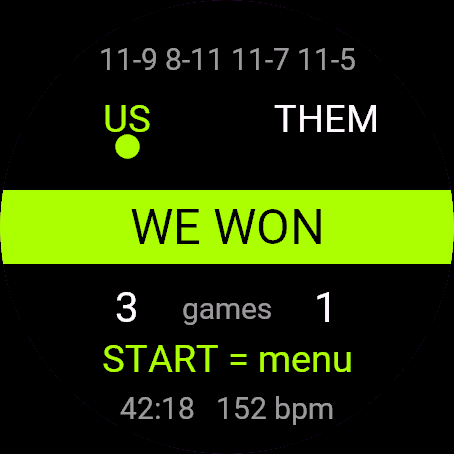
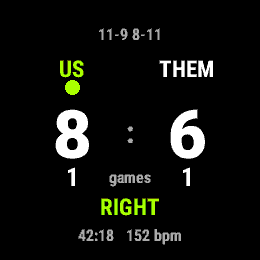
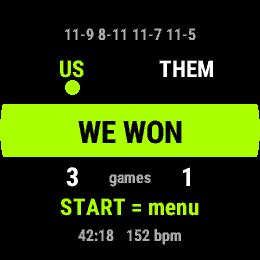
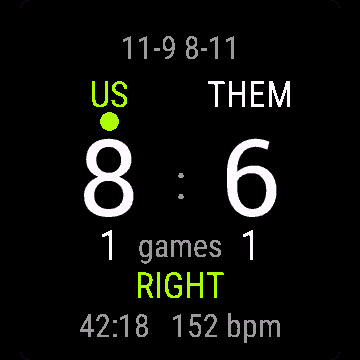
Most scorekeeping apps make you pick a side manually after every rally. This one suggests it: UP is a point for us, DOWN a point for them, and the watch tracks who serves and shows the box the server would use if the rally winner keeps the serve. The WSF rules let the server choose either box, so treat the side as a hint.
- PAR scoring to 11 (win by 2), best of 5 games, the way squash is scored today
- Server and suggested box updated automatically after every rally, no manual switch (the server may still choose the other box)
- Undo on BACK, no holding needed
- Saved to Garmin Connect as Squash, with a lap for every game
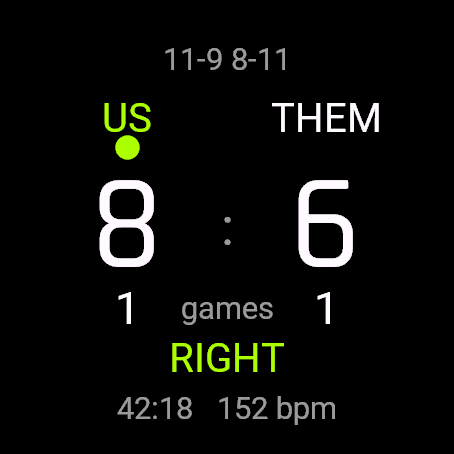
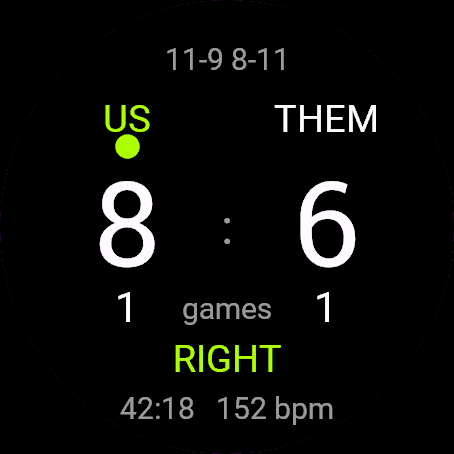
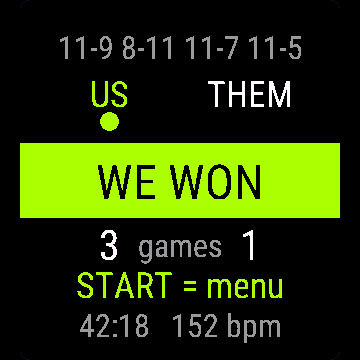
- Match clock and heart rate on screen
Większość aplikacji do liczenia wyniku każe ręcznie wybierać stronę po każdej wymianie. Ta podpowiada sama: GÓRA to punkt dla nas, DÓŁ dla rywali, a zegarek pilnuje, kto serwuje, i pokazuje pole, z którego serwowałby zawodnik, gdy wygrywający wymianę zachowuje serwis. Przepisy WSF pozwalają serwującemu wybrać dowolne pole, więc traktuj stronę jako podpowiedź.
- Liczenie PAR do 11 (przewaga dwóch punktów), do 3 wygranych setów z 5, tak jak faktycznie liczy się dziś squasha
- Serwujący i podpowiadane pole aktualizowane automatycznie po każdej wymianie, bez ręcznego przełączania (serwujący może wybrać drugie pole)
- Cofanie przyciskiem WSTECZ bez przytrzymywania
- Zapis do Garmin Connect jako Squash, z okrążeniem na każdy set
- Czas meczu i tętno na ekranie
Die meisten Zählapps verlangen, dass du nach jedem Ballwechsel die Seite manuell wählst. Diese erledigt das selbst: AUF ist ein Punkt für uns, AB ein Punkt für den Gegner, und die Uhr merkt sich, wer aufschlägt und von welcher Seite.
- PAR-Zählweise bis 11 (Gewinn mit 2 Punkten Vorsprung), Best of 5, so wie Squash heute gezählt wird
- Aufschläger und Seite werden nach jedem Ballwechsel automatisch aktualisiert, kein manuelles Umschalten
- Rückgängig über ZURÜCK, kein Halten nötig
- Wird in Garmin Connect als Squash gespeichert, mit einer Runde pro Satz
- Spielzeit und Herzfrequenz auf dem Display
La plupart des applications de score obligent à choisir un côté manuellement après chaque échange. Celle-ci s'en occupe : HAUT donne un point pour nous, BAS un point pour eux, et la montre suit qui sert et de quel côté.
- Comptage PAR jusqu'à 11 (victoire avec 2 points d'écart), au meilleur des 5 manches, comme le squash se compte aujourd'hui
- Serveur et côté mis à jour automatiquement après chaque échange, aucun changement manuel
- Annulation avec RETOUR, sans maintenir la pression
- Enregistré dans Garmin Connect comme Squash, avec un tour par manche
- Chronomètre du match et fréquence cardiaque à l'écran
La mayoría de las apps de marcador te obligan a elegir el lado manualmente después de cada punto. Esta lo resuelve sola: ARRIBA es un punto para nosotros, ABAJO un punto para ellos, y el reloj controla quién saca y desde qué lado.
- Puntuación PAR a 11 (con 2 de diferencia para ganar), al mejor de 5 juegos, como se puntúa el squash hoy en día
- Servidor y lado se actualizan automáticamente después de cada punto, sin cambiarlos a mano
- Deshacer con ATRÁS, sin mantener pulsado
- Se guarda en Garmin Connect como Squash, con una vuelta por cada juego
- Reloj del partido y frecuencia cardíaca en pantalla
Bij de meeste scoreapps moet je na elke rally zelf een kant kiezen. Deze app regelt dat zelf: OMHOOG is een punt voor ons, OMLAAG een punt voor hen, en het horloge houdt bij wie serveert en van welke kant.
- PAR-telling tot 11 (met 2 punten verschil winnen), best of 5 games, zoals squash vandaag geteld wordt
- Server en kant worden na elke rally automatisch bijgewerkt, geen handmatige wissel
- Ongedaan maken met TERUG, niets hoeft ingedrukt te worden gehouden
- Opgeslagen in Garmin Connect als Squash, met een ronde per game
- Wedstrijdklok en hartslag op het scherm
多くのスコア記録アプリは、ラリーのたびにサイドを手動で選ぶ必要があります。このアプリは自動で判断します。上ボタンで自分たちの得点、下ボタンで相手の得点、サーバーとサーブ側は時計が管理します。
- 現在のスカッシュのルールに沿った、PARスコアリング(11点、2点差で勝利)、5ゲーム制
- ラリーごとにサーバーとサイドを自動更新、手動での切り替えは不要
- 戻るボタンで取り消し、長押し不要
- Garmin Connectにスカッシュとして保存され、ゲームごとにラップを記録
- 画面に試合時間と心拍数を表示
Nella maggior parte delle app per il punteggio devi scegliere manualmente il lato dopo ogni scambio. Qui lo fa l'orologio da solo: SU è un punto per noi, GIÙ un punto per loro, e traccia chi serve e da quale lato.
- Punteggio PAR a 11 (vittoria con 2 punti di margine), al meglio di 5 game, come si gioca oggi a squash
- Battitore e lato aggiornati in automatico dopo ogni scambio, nessun cambio manuale
- Annulla con INDIETRO, senza bisogno di tenerlo premuto
- Salvato su Garmin Connect come Squash, con un giro per ogni game
- Cronometro della partita e frequenza cardiaca sullo schermo
大多数计分软件每个回合结束都要手动选发球区。这个不用: 上键记我方一分,下键记对方一分,发球员和发球区,手表自己算。
- PAR计分制,11分制(净胜2分),五局三胜,和现在壁球的正式计分方式一致
- 每个回合结束后发球员和发球区自动更新,不用手动切换
- 按返回键撤销,不用长按
- 以“壁球”项目保存到Garmin Connect,每局记一圈
- 屏幕显示比赛计时和心率
Большинство приложений для счёта заставляют вручную выбирать сторону после каждого розыгрыша. Здесь всё само: ВВЕРХ - очко нам, ВНИЗ - очко им, а часы сами следят, кто подаёт и с какой стороны.
- Счёт PAR до 11 (победа с разницей в 2 очка), до 3 побед из 5 геймов - так сквош считают сегодня
- Подающий и сторона обновляются автоматически после каждого розыгрыша, без ручного переключения
- Отмена по BACK, без удержания
- Сохраняется в Garmin Connect как Squash, с кругом на каждый гейм
- Время матча и пульс на экране
A maioria dos aplicativos de placar obriga você a escolher o lado manualmente depois de cada rali. Este resolve isso sozinho: CIMA é ponto nosso, BAIXO é ponto do adversário, e o relógio controla quem saca e de qual lado.
- Pontuação PAR até 11 (vencer por 2 pontos de diferença), melhor de 5 jogos, do jeito que o squash é pontuado hoje
- Sacador e lado atualizados automaticamente depois de cada rali, sem troca manual
- Desfazer com VOLTAR, sem precisar segurar o botão
- Salvo no Garmin Connect como Squash, com uma volta para cada jogo
- Cronômetro da partida e frequência cardíaca na tela
Většina aplikací na počítání skóre vás nutí po každé výměně ručně vybrat stranu. Tahle to vyřeší sama: NAHORU je bod pro nás, DOLŮ bod pro ně, a hodinky si hlídají, kdo podává a z které strany.
- PAR systém do 11 (rozdíl dvou bodů), na 3 vítězné hry z 5, tak, jak se squash počítá dnes
- Podávající i strana se aktualizují automaticky po každé výměně, bez ručního přepínání
- Zpět tlačítkem ZPĚT, bez držení
- Ukládá se do Garmin Connect jako Squash, s okruhem za každou hru
- Čas zápasu a tepová frekvence na displeji
A maioria das aplicações de contagem de pontos obriga-te a escolher o lado manualmente depois de cada rally. Esta resolve isso sozinha: CIMA é um ponto para nós, BAIXO um ponto para eles, e o relógio controla quem serve e de que lado.
- Sistema PAR até 11 (vencer por 2), melhor de 5 jogos, tal como o squash é pontuado atualmente
- Servidor e lado atualizados automaticamente depois de cada rally, sem troca manual
- Anular com VOLTAR, sem precisar de manter premido
- Guardado no Garmin Connect como Squash, com uma volta por cada jogo
- Cronómetro do jogo e frequência cardíaca no ecrã
대부분의 스코어 기록 앱은 랠리가 끝날 때마다 서브 사이드를 직접 골라야 합니다. 이 앱은 알아서 처리합니다. 위 버튼을 누르면 우리 팀 포인트, 아래 버튼을 누르면 상대 팀 포인트가 되고, 시계가 누가 서브하는지와 어느 쪽에서 서브하는지를 추적합니다.
- 오늘날 스쿼시 채점 방식 그대로, PAR 방식 11점제(2점 차 승리), 5게임 중 3게임 선승
- 랠리가 끝날 때마다 서버와 사이드가 자동으로 갱신되어 직접 전환할 필요가 없습니다
- 뒤로 버튼으로 실행 취소, 길게 누를 필요 없습니다
- Garmin Connect에 스쿼시로 저장되며, 게임마다 랩이 생깁니다
- 화면에 경기 시간과 심박수가 표시됩니다
De flesta poängappar tvingar dig att välja sida manuellt efter varje rally. Den här räknar ut det själv: UPP är en poäng för oss, NER en poäng för dem, och klockan håller reda på vem som servar och från vilken sida.
- PAR-poängräkning till 11 (vinst med 2 poängs skillnad), bäst av 5 game, så som squash räknas idag
- Server och sida uppdateras automatiskt efter varje rally, ingen manuell växling
- Ångra med TILLBAKA, inget nedtryckt behövs
- Sparas i Garmin Connect som Squash, med ett varv per game
- Matchklocka och puls på skärmen
De fleste resultat-apps kræver, at du vælger side manuelt efter hver rally. Denne app finder selv ud af det: OP er et point til os, NED et point til dem, og uret holder styr på, hvem der server og fra hvilken side.
- PAR-scoring til 11 (vind med 2), bedst af 5 sæt, sådan som squash scores i dag
- Server og side opdateres automatisk efter hver rally, ingen manuelt skift
- Fortryd med TILBAGE, ingen grund til at holde knappen nede
- Gemmes i Garmin Connect som Squash, med en omgang for hvert sæt
- Kampklokke og puls på skærmen
De fleste apper for poengtelling krever at du velger side manuelt etter hver ballveksling. Denne finner det ut selv: OPP er poeng til oss, NED poeng til dem, og klokken holder styr på hvem som server og fra hvilken side.
- PAR-poengscore til 11 (vinn med 2), best av 5 sett, slik squash scores i dag
- Server og side oppdateres automatisk etter hver ballveksling, ingen manuell bytting
- Angre med TILBAKE, ingen behov for å holde inne knappen
- Lagres i Garmin Connect som Squash, med en runde for hvert sett
- Kamptid og puls på skjermen
大部分記分App每次來回後都要你自己選發球邊。這款自己算:上鍵是我方得分,下鍵是對方得分,手錶自動追蹤誰發球、從哪一邊發。
- 採用PAR計分制11分制(淨勝2分),五戰三勝,就是現在壁球通用的計分方式
- 每次來回後自動更新發球員和發球邊,不用手動切換
- 按返回鍵復原,不用長按
- 以壁球分類存進Garmin Connect,每局一個分段
- 畫面同時顯示比賽時間和心率
Useimmissa pisteidenlaskentasovelluksissa puoli täytyy valita käsin joka pallottelun jälkeen. Tämä hoitaa sen itse: YLÖS on piste meille, ALAS piste heille, ja kello seuraa, kuka syöttää ja miltä puolelta.
- PAR-pisteytys 11:een (voitto kahden pisteen erolla), paras viidestä erästä, nykyisen squashin pisteytystavan mukaan
- Syöttäjä ja puoli päivittyvät automaattisesti joka pallottelun jälkeen, ei käsin vaihtamista
- Kumoa TAKAISIN-painikkeella, ei pohjassa pitämistä
- Tallentuu Garmin Connectiin lajilla Squash, kierros (lap) joka erästä
- Ottelun kello ja syke näkyvissä
Väčšina aplikácií na počítanie skóre vás núti po každej výmene ručne vybrať stranu. Táto to vyrieši sama: NAHOR je bod pre nás, NADOL bod pre nich, a hodinky sledujú, kto podáva a z ktorej strany.
- PAR systém do 11 (rozdiel 2 body), na víťazné 3 z 5 hier, tak sa squash počíta dnes
- Podávajúci a strana sa aktualizujú automaticky po každej výmene, bez ručného prepínania
- Vrátenie späť tlačidlom SPÄŤ, bez podržania
- Uloženie do Garmin Connect ako Squash, s kolom za každú hru
- Čas zápasu a srdcová frekvencia na displeji
Večina aplikacij za štetje te sili, da po vsaki menjavi (rally) ročno izbereš stran. Ta to naredi sama: GOR je točka za nas, DOL točka za njih, ura pa sama spremlja, kdo servira in s katere strani.
- PAR štetje do 11 (zmaga z razliko 2), na 3 zmage iz 5 iger, tako kot se squash šteje danes
- Server in stran se posodobita samodejno po vsaki menjavi, brez ročnega preklapljanja
- Razveljavitev z NAZAJ, brez pridržanja gumba
- Shranjeno v Garmin Connect kot Squash, z odsekom (lap) za vsako igro
- Čas tekme in srčni utrip na zaslonu
Kebanyakan aplikasi pencatat skor membuatmu memilih sisi secara manual setelah setiap rally. Aplikasi ini menghitungnya sendiri: ATAS poin untuk kita, BAWAH poin untuk mereka, dan jam tangan melacak siapa yang servis dan dari sisi mana.
- Sistem PAR sampai 11 (menang selisih 2), best of 5 game, cara skor squash saat ini
- Server dan sisi diperbarui otomatis setelah setiap rally, tanpa perlu diubah manual
- Batalkan dengan KEMBALI, tidak perlu ditahan
- Tersimpan di Garmin Connect sebagai Squash, dengan satu lap untuk setiap game
- Jam pertandingan dan detak jantung di layar
A legtöbb eredményjelző alkalmazásban minden menet után kézzel kell kiválasztani az oldalt. Ez magától kitalálja: a FEL gomb pont nekünk, a LE gomb pont nekik, az óra pedig követi, ki adogat és melyik oldalról.
- PAR pontozás 11-ig (2 pont előnnyel a győzelemhez), legfeljebb 5 játék, ahogy a squash-t ma pontozzák
- Az adogató és az oldal minden menet után automatikusan frissül, nincs kézi váltás
- Visszavonás a VISSZA gombbal, nem kell tartani
- Mentés a Garmin Connectbe Squash néven, körrel minden játékhoz
- Meccsóra és pulzus a képernyőn
แอปจดสกอร์ส่วนใหญ่ให้คุณเลือกฝั่งเสิร์ฟเองทุกครั้งหลังจบแรลลี่ แอปนี้คำนวณให้เอง กดปุ่มขึ้น (UP) ได้แต้มให้เรา กดปุ่มลง (DOWN) ได้แต้มให้ฝ่ายตรงข้าม ส่วนใครเสิร์ฟและเสิร์ฟจากฝั่งไหน นาฬิกาจะติดตามให้เอง
- นับคะแนนแบบ PAR ถึง 11 (ต้องนำห่าง 2 แต้ม) ระบบ 3 ใน 5 เกม ตามระบบที่ใช้ในสควอชปัจจุบัน
- อัปเดตผู้เสิร์ฟและฝั่งเสิร์ฟให้อัตโนมัติหลังทุกแรลลี่ ไม่ต้องสลับเอง
- ยกเลิกแต้มด้วยปุ่มย้อนกลับ (BACK) ไม่ต้องกดค้าง
- บันทึกลง Garmin Connect เป็นกิจกรรมสควอช มีแลปทุกเกม
- แสดงเวลาการแข่งขันและอัตราการเต้นหัวใจบนหน้าจอ
Οι περισσότερες εφαρμογές σκοραρίσματος σε βάζουν να διαλέγεις πλευρά με το χέρι μετά από κάθε ραλί. Αυτή το κάνει μόνη της: πάνω είναι πόντος για εμάς, κάτω πόντος για αυτούς, και το ρολόι παρακολουθεί ποιος σερβίρει και από ποια πλευρά.
- Σύστημα PAR μέχρι το 11 (νίκη με διαφορά 2), σε 5 παιχνίδια το πολύ, όπως μετράει το squash σήμερα
- Ο σερβίς και η πλευρά ενημερώνονται αυτόματα μετά από κάθε ραλί, χωρίς χειροκίνητη αλλαγή
- Αναίρεση με το πίσω κουμπί, χωρίς κράτημα
- Αποθηκεύεται στο Garmin Connect ως Squash, με γύρο για κάθε παιχνίδι
- Χρόνος αγώνα και καρδιακός παλμός στην οθόνη
Većina aplikacija za vođenje rezultata tjera te da ručno biraš stranu nakon svake razmjene. Ova to rješava sama: GORE je bod za nas, DOLJE bod za njih, a sat prati tko servira i s koje strane.
- PAR sustav do 11 (pobjeda s razlikom od 2), najbolji od 5 igara, suvremeni način bodovanja u squashu
- Server i strana se automatski ažuriraju nakon svake razmjene, bez ručnog prebacivanja
- Poništavanje na NAZAD, bez potrebe za drženjem
- Spremljeno na Garmin Connect kao Squash, s krugom za svaku igru
- Sat utakmice i srčana frekvencija na ekranu
רוב אפליקציות הניקוד מכריחות אותך לבחור צד ידנית אחרי כל ראלי. האפליקציה הזו עושה את זה בעצמה: מעלה זו נקודה לנו, מטה נקודה להם, והשעון עוקב מי מגיש ומאיזה צד.
- שיטת PAR עד 11 (יתרון של 2), עד 5 משחקים, בדיוק כמו שמנקדים סקוואש היום
- מגיש וצד מתעדכנים אוטומטית אחרי כל ראלי, בלי החלפה ידנית
- ביטול בלחיצה על חזרה, בלי צורך להחזיק
- נשמר ב-Garmin Connect כסקוואש, עם הקפה לכל משחק
- שעון משחק ודופק על המסך
Kebanyakan aplikasi kira markah buat anda pilih sebelah secara manual selepas setiap rali. Aplikasi ini kira sendiri: UP ialah mata untuk kita, DOWN mata untuk pihak lawan, dan jam tangan menjejak siapa servis dan dari sebelah mana.
- Sistem PAR sehingga 11 mata (menang dengan beza 2), best of 5 game, cara squash dimarkah sekarang
- Server dan sebelah court dikemas kini secara automatik selepas setiap rali, tak perlu tukar manual
- Buat asal dengan BACK, tak perlu tahan butang
- Disimpan ke Garmin Connect sebagai Squash, dengan satu lap untuk setiap game
- Jam perlawanan dan kadar denyutan jantung di skrin
How to use it
Open Squash Score from the watch's app menu.
Controls: UP = point for us, DOWN = point for them, BACK = undo, START = menu (resume, save, discard). Touch-only watches: tap the left half for our point, the right half for theirs.
Otwórz Squash Wynik z menu aplikacji na zegarku.
Sterowanie: GÓRA = punkt dla nas, DÓŁ = punkt dla rywali, WSTECZ = cofnij, START = menu (wznów, zapisz, odrzuć). Zegarki dotykowe: dotknięcie lewej połowy ekranu to punkt dla nas, prawej dla rywali.
Öffne Squash Score im App-Menü der Uhr.
Bedienung: AUF = Punkt für uns, AB = Punkt für den Gegner, ZURÜCK = rückgängig, START = Menü (fortsetzen, speichern, verwerfen). Uhren nur mit Touch: linke Hälfte tippen für unseren Punkt, rechte Hälfte für den Gegner.
Ouvrez Squash Score depuis le menu des applications de la montre.
Commandes : HAUT = point pour nous, BAS = point pour eux, RETOUR = annuler, START = menu (reprendre, enregistrer, abandonner). Montres tactiles uniquement : touchez la moitié gauche pour notre point, la moitié droite pour le leur.
Abre Squash Score desde el menú de apps del reloj.
Controles: ARRIBA = punto para nosotros, ABAJO = punto para ellos, ATRÁS = deshacer, START = menú (reanudar, guardar, descartar). Relojes solo táctiles: toca la mitad izquierda para nuestro punto, la mitad derecha para el suyo.
Open Squash Score via het appmenu van het horloge.
Bediening: OMHOOG = punt voor ons, OMLAAG = punt voor hen, TERUG = ongedaan maken, START = menu (verdergaan, opslaan, verwijderen). Horloges met alleen aanraakscherm: tik op de linkerkant voor ons punt, de rechterkant voor hen.
時計のアプリメニューから Squash Score を開いてください。
操作方法: 上ボタン = 自分たちの得点、下ボタン = 相手の得点、戻るボタン = 取り消し、START = メニュー(再開/保存/破棄)。タッチ専用の時計では、画面左半分をタップで自分たちの得点、右半分で相手の得点。
Apri Squash Score dal menu delle app dell'orologio.
Comandi: SU = punto per noi, GIÙ = punto per loro, INDIETRO = annulla, START = menu (riprendi, salva, scarta). Orologi solo touch: tocca la metà sinistra per il nostro punto, la metà destra per il loro.
在手表的应用菜单中打开 Squash Score。
操作方式: 上键=我方得分,下键=对方得分,返回键=撤销,START=菜单(继续、保存、放弃)。纯触屏手表: 点击左半边记我方得分,点击右半边记对方得分。
Откройте Squash Score из меню приложений на часах.
Управление: ВВЕРХ = очко нам, ВНИЗ = очко им, BACK = отмена, START = меню (продолжить, сохранить, отменить). Часы только с сенсорным экраном: касание левой половины - очко нам, правой - очко им.
Abra Squash Score pelo menu de apps do relógio.
Controles: CIMA = ponto nosso, BAIXO = ponto do adversário, VOLTAR = desfazer, START = menu (retomar, salvar, descartar). Relógios só touch: toque na metade esquerda para nosso ponto, na metade direita para o ponto do adversário.
Otevřete Squash Score z nabídky aplikací v hodinkách.
Ovládání: NAHORU = bod pro nás, DOLŮ = bod pro ně, ZPĚT = zpět, START = menu (pokračovat, uložit, zahodit). Hodinky pouze s dotykem: klepnutím na levou půlku přidáte bod nám, na pravou jim.
Abra Squash Score no menu de aplicações do relógio.
Controlos: CIMA = ponto para nós, BAIXO = ponto para eles, VOLTAR = anular, START = menu (retomar, guardar, descartar). Relógios só de toque: toca na metade esquerda para o nosso ponto, na metade direita para o deles.
시계의 앱 메뉴에서 Squash Score을(를) 여세요.
조작: 위 버튼 = 우리 팀 포인트, 아래 버튼 = 상대 팀 포인트, 뒤로 버튼 = 실행 취소, START = 메뉴(재개, 저장, 취소). 터치 전용 시계: 화면 왼쪽 절반을 누르면 우리 팀 포인트, 오른쪽 절반을 누르면 상대 팀 포인트입니다.
Öppna Squash Score från klockans appmeny.
Kontroller: UPP = poäng för oss, NER = poäng för dem, TILLBAKA = ångra, START = meny (återuppta, spara, kasta). Klockor med endast pekskärm: tryck på vänster halva för vår poäng, höger halva för deras.
Åbn Squash Score fra urets appmenu.
Kontrol: OP = point til os, NED = point til dem, TILBAGE = fortryd, START = menu (genoptag, gem, forkast). Ure med kun touch: tryk på venstre halvdel for vores point, højre halvdel for deres.
Åpne Squash Score fra appmenyen på klokken.
Kontroller: OPP = poeng til oss, NED = poeng til dem, TILBAKE = angre, START = meny (fortsett, lagre, forkast). Klokker med bare touch: trykk på venstre halvdel for vårt poeng, høyre halvdel for deres.
從手錶的應用程式選單開啟 Squash Score。
Controls: 上鍵 = 我方得分,下鍵 = 對方得分,返回 = 復原,START = 選單(繼續、儲存、放棄)。純觸控手錶:點畫面左半邊算我方得分,右半邊算對方得分。
Avaa Squash Score kellon sovellusvalikosta.
Painikkeet: YLÖS = piste meille, ALAS = piste heille, TAKAISIN = kumoa, START = valikko (jatka, tallenna, hylkää). Kosketuskellot: napauta vasenta puoliskoa omasta pisteestä, oikeaa puoliskoa heidän pisteestään.
Otvorte Squash Score z ponuky aplikácií v hodinkách.
Ovládanie: NAHOR = bod pre nás, NADOL = bod pre nich, SPÄŤ = vrátiť späť, START = menu (pokračovať, uložiť, zahodiť). Hodinky len s dotykom: ťuknite na ľavú polovicu pre náš bod, na pravú pre ich bod.
Odprite Squash Score v meniju aplikacij na uri.
Upravljanje: GOR = točka za nas, DOL = točka za njih, NAZAJ = razveljavi, START = meni (nadaljuj, shrani, zavrzi). Ure samo na dotik: tapni levo polovico za našo točko, desno polovico za njihovo.
Buka Squash Score dari menu aplikasi jam.
Kontrol: ATAS = poin untuk kita, BAWAH = poin untuk mereka, KEMBALI = batalkan, START = menu (lanjutkan, simpan, buang). Jam tangan layar sentuh saja: ketuk separuh kiri untuk poin kita, separuh kanan untuk poin mereka.
Nyissa meg a(z) Squash Score alkalmazást az óra alkalmazásmenüjéből.
Gombok: FEL = pont nekünk, LE = pont nekik, VISSZA = visszavonás, START = menü (folytatás, mentés, elvetés). Csak érintős órák: koppints a bal felére a mi pontunkért, a jobb felére az ő pontjukért.
เปิด Squash Score จากเมนูแอปของนาฬิกา
วิธีใช้ปุ่ม: ปุ่มขึ้น (UP) = แต้มของเรา, ปุ่มลง (DOWN) = แต้มของฝ่ายตรงข้าม, ปุ่มย้อนกลับ (BACK) = ยกเลิก, START = เมนู (ดำเนินการต่อ, บันทึก, ยกเลิกเกม) สำหรับนาฬิกาจอสัมผัสอย่างเดียว: แตะครึ่งซ้ายเพื่อแต้มของเรา แตะครึ่งขวาเพื่อแต้มของฝ่ายตรงข้าม
Ανοίξτε το Squash Score από το μενού εφαρμογών του ρολογιού.
Χειριστήρια: πάνω = πόντος για εμάς, κάτω = πόντος για αυτούς, πίσω = αναίρεση, START = μενού (συνέχιση, αποθήκευση, απόρριψη). Ρολόγια μόνο με οθόνη αφής: πάτησε το αριστερό μισό για δικό μας πόντο, το δεξί για δικό τους.
Otvorite Squash Score iz izbornika aplikacija na satu.
Upravljanje: GORE = bod za nas, DOLJE = bod za njih, NAZAD = poništi, START = izbornik (nastavi, spremi, odbaci). Satovi samo na dodir: dodirni lijevu polovicu za naš bod, desnu za njihov.
פתחו את Squash Score מתפריט האפליקציות של השעון.
שליטה: מעלה = נקודה לנו, מטה = נקודה להם, חזרה = ביטול, START = תפריט (המשך, שמירה, מחיקה). בשעונים עם מגע בלבד: הקשה על החצי השמאלי לנקודה שלנו, החצי הימני לנקודה שלהם.
Buka Squash Score daripada menu aplikasi jam.
Kawalan: UP = mata untuk kita, DOWN = mata untuk pihak lawan, BACK = buat asal, START = menu (sambung, simpan, buang). Jam tangan sentuh sahaja: ketik separuh kiri untuk mata kita, separuh kanan untuk mata mereka.
Manual
The full manual and the detailed permission descriptions are available in English and Polish.
Squash Score: user manual
What it does
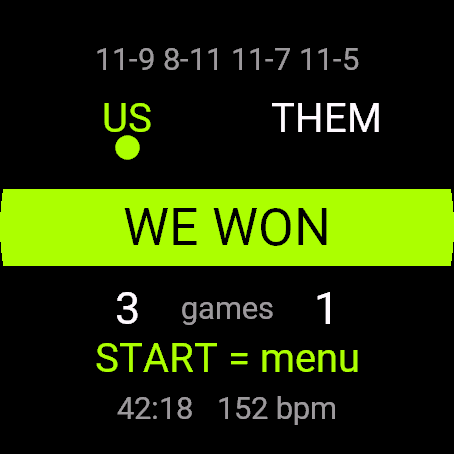
Squash Score counts a singles match with PAR scoring: every rally is a point. It follows who serves and suggests the serving box, RIGHT or LEFT, and saves the match to Garmin Connect as Squash with a lap per game.
Requirements and supported watches
Needs Connect IQ 3.3.0+ and the Connect IQ or Garmin Connect phone app. Supported watches:
- Round AMOLED: epix 2 and epix Pro 2, fēnix 8, E, Forerunner 165, 265, 570, 965, 970, Instinct 3 AMOLED, Crossover AMOLED, Venu 2, 3, 4, vivoactive 5, 6.
- Round MIP: enduro 3, fēnix 7 series, 8 Solar, Forerunner 55, 245, 255, vivoactive 4.
- Square and rectangular AMOLED: Venu Sq 2, Venu X1.
Installation
In the Connect IQ app on your phone (or Garmin Connect, then the Connect IQ Store) find "Squash Score" by Dialforge, tap Install and sync the watch. Open it from the apps list: press START on the watch face, then pick Squash Score.
First launch
The start screen shows the app name, "Press START" and the free beta days left. START opens setup: Start match and a few rules. There is no singles/doubles line, the app counts singles only. The 30-day free beta starts the first time you open it.
Controls
Watches with buttons (START, UP, DOWN, BACK)
- Start screen: START opens setup.
- Setup: UP and DOWN scroll, START on a line changes its value (after the last it wraps to the first). Start match begins.
- Match: UP is a point for us, DOWN for them, BACK undoes the last point (up to 40). START or holding UP opens the menu.
- Menu: Resume, Save and finish, Discard (asks twice).
Touch watches (tap, hold, swipe)
- Start screen and setup: tap opens setup, tap a line to change its value.
- Match: tap the left half for a point for us, the right half for them. Swipes do nothing.
- Undo with BACK. Menu: long press, or START if the watch has it.
Settings
Phone: Connect IQ app, Squash Score, Settings (the unlock code fields are there too).
On the watch, inside the app:
- Serves first: US or THEM.
- Match: Best of 1, Best of 3 or Best of 5 games (default).
- Game to: 11 (default) or 15, win by 2 with no cap.
License
- Free beta: 30 days from the first launch, everything works.
- Price: 5.99 EUR once at dialforge.dev, no subscription. The 8-character code is tied to your watch's UID.
- Where to enter it: phone, Connect IQ app, Squash Score, Settings. Read the UID in "Watch UID (needed to buy a code)", buy the code, then type it into "Unlock code from dialforge.dev". The end-of-beta screen on the watch shows the UID too.
- After the beta without a code: an end-of-beta screen with the UID replaces the app. Enter the code, then open it again. New watch? Write to us and the code moves for free.
Privacy and permissions
Permissions:
- Activity recording: saves the session to Garmin Connect.
- Extra FIT fields: adds the app's values to the saved activity.
- Sensors: heart rate from the watch.
No internet use. Data stays on the watch and in the activities you save.
Troubleshooting
The code does not work. Check that the UID you bought for matches "Watch UID (needed to buy a code)" and type all 8 characters (case is ignored, no 0, O, 1 or I). A code for another app does not fit. Sync, then reopen.
Where is my match? Choose Save and finish in the menu. It lands in Garmin Connect as Squash.
Is the RIGHT or LEFT line a rule? It is a suggestion. The server who keeps winning rallies switches box each time, and a new server starts on the right. Squash rules let the server choose either box, so ignore it if you play differently.
I closed the app in the middle of a match. Open it again: the first line of setup is Resume match, with the score (saved after every point). The Garmin activity starts as a new one.
Contact
kontakt@dialforge.dev or dialforge.dev. Please write before leaving a low rating.
Squash Wynik: instrukcja obsługi
Do czego służy
Squash Wynik liczy mecz singla systemem PAR: każda wymiana to punkt. Śledzi, kto serwuje, i podpowiada pole serwisowe, PRAWA albo LEWA, a mecz zapisuje w Garmin Connect jako Squash z okrążeniem na każdy gem.
Wymagania i obsługiwane zegarki
Wymaga Connect IQ 3.3.0+ i aplikacji Connect IQ albo Garmin Connect w telefonie. Obsługiwane zegarki:
- Okrągłe AMOLED: epix 2 i epix Pro 2, fēnix 8, E, Forerunner 165, 265, 570, 965, 970, Instinct 3 AMOLED, Crossover AMOLED, Venu 2, 3, 4, vivoactive 5, 6.
- Okrągłe MIP: enduro 3, seria fēnix 7, fēnix 8 Solar, Forerunner 55, 245, 255, vivoactive 4.
- Kwadratowe i prostokątne AMOLED: Venu Sq 2, Venu X1.
Instalacja
Na telefonie otwórz aplikację Connect IQ (albo Garmin Connect, a w niej sklep Connect IQ), wyszukaj "Squash Wynik" od Dialforge, stuknij Zainstaluj i zsynchronizuj zegarek. Uruchom ją z listy aplikacji: na tarczy naciśnij START i wybierz Squash Wynik.
Pierwsze uruchomienie
Ekran startowy pokazuje nazwę, "Naciśnij START" i liczbę dni bety do końca. START otwiera ustawienia: Start meczu i kilka zasad. Nie ma wyboru singiel/debel, aplikacja liczy tylko singla. 30-dniowa darmowa beta zaczyna się przy pierwszym otwarciu.
Sterowanie
Zegarki z przyciskami (START, GÓRA, DÓŁ, WSTECZ)
- Ekran startowy: START otwiera ustawienia.
- Ustawienia: GÓRA i DÓŁ przewijają, START na pozycji zmienia jej wartość (po ostatniej wraca do pierwszej). Start meczu zaczyna grę.
- Mecz: GÓRA to punkt dla nas, DÓŁ dla rywali, WSTECZ cofa ostatni punkt (do 40). START albo przytrzymanie GÓRY otwiera menu.
- Menu: Wznów, Zapisz i zakończ, Odrzuć (pyta dwa razy).
Zegarki dotykowe (stuknięcie, przytrzymanie, przesunięcie)
- Ekran startowy i ustawienia: stuknięcie otwiera ustawienia, stuknięcie pozycji zmienia jej wartość.
- Mecz: lewa połowa ekranu to punkt dla nas, prawa dla rywali. Przesunięcia nic nie robią.
- Cofanie: WSTECZ. Menu: długie przytrzymanie albo START, jeśli zegarek go ma.
Ustawienia
Telefon: aplikacja Connect IQ, Squash Wynik, Ustawienia (są tam też pola kodu odblokowania).
Na zegarku, w aplikacji:
- Pierwszy serwuje: MY albo ONI.
- Mecz: Do 1 wygranej, Do 2 wygranych albo Do 3 wygranych gemów (domyślnie).
- Set do: 11 (domyślnie) albo 15, z przewagą 2 punktów i bez limitu.
Licencja
- Darmowa beta: 30 dni od pierwszego uruchomienia, wszystko działa.
- Cena: jednorazowo 5,99 EUR na dialforge.dev, bez abonamentu. 8-znakowy kod jest przypisany do UID zegarka.
- Gdzie wpisać: telefon, aplikacja Connect IQ, Squash Wynik, Ustawienia. Odczytaj UID w polu "UID zegarka (potrzebny do zakupu kodu)", kup kod i wpisz go w "Kod odblokowania z dialforge.dev". Ekran końca bety na zegarku też pokazuje UID.
- Po becie bez kodu: zamiast aplikacji pojawia się ekran końca bety z UID. Wpisz kod i otwórz aplikację ponownie. Nowy zegarek? Napisz do nas, przeniesiemy kod za darmo.
Prywatność i uprawnienia
Uprawnienia:
- Zapis aktywności: zapisuje sesję w Garmin Connect.
- Dodatkowe pola FIT: dopisuje wartości aplikacji do aktywności.
- Czujniki: tętno z zegarka.
Zero połączeń z internetem. Dane zostają w zegarku i w zapisywanych aktywnościach.
Rozwiązywanie problemów
Kod nie działa. Sprawdź, czy UID, dla którego kupiono kod, zgadza się z polem "UID zegarka (potrzebny do zakupu kodu)", i wpisz wszystkie 8 znaków (wielkość liter bez znaczenia, bez 0, O, 1, I). Kod do innej aplikacji nie pasuje. Zsynchronizuj i otwórz ponownie.
Gdzie jest mój mecz? Wybierz w menu Zapisz i zakończ. Trafi do Garmin Connect jako Squash.
Czy linia PRAWA albo LEWA to przepis? To podpowiedź. Serwujący, który wygrywa kolejne wymiany, zmienia pole za każdym razem, a nowy serwujący zaczyna z prawego. Przepisy squasha pozwalają wybrać dowolne pole, więc zignoruj to, jeśli grasz inaczej.
Zamknąłem aplikację w środku meczu. Otwórz ją jeszcze raz: pierwsza pozycja ustawień to Wznów mecz, z wynikiem (zapis po każdym punkcie). Aktywność Garmin zaczyna się jako nowa.
Kontakt
kontakt@dialforge.dev albo dialforge.dev. Napisz, zanim wystawisz niską ocenę.
Permissions and privacy
This product asks the watch for the permissions below. Connect IQ shows them when you install it.
- Activity recording: Saves your workout in Garmin Connect (the activity from this app). The data stays in your Garmin account.Zapisuje trening w Garmin Connect (aktywność z tej aplikacji). Dane zostają na Twoim koncie Garmin.
- Own data fields in the activity: Adds this app's own numbers (for example points or sets) to the saved activity.Dodaje do zapisanej aktywności liczby tej aplikacji (na przykład punkty albo serie).
- Heart rate and sensors: Reads heart rate and other sensors of the watch while the app runs.Odczytuje tętno i inne czujniki zegarka, gdy aplikacja działa.
This product does not use the internet and sends no data to our servers.
The full manual and the detailed permission descriptions are available in English and Polish.
Compatible watches
51mm, D2 Air X15, D2 Mach 1 Pro, Enduro 2, Enduro 3, epix (Gen 2), epix Pro (Gen 2) 42mm, epix Pro (Gen 2) 47mm, epix Pro (Gen 2) 51mm, Forerunner 165, Forerunner 165 Music, Forerunner 245, Forerunner 245 Music, Forerunner 255, Forerunner 255 Music, Forerunner 255s, Forerunner 255s Music, Forerunner 265, Forerunner 265s, Forerunner 55, Forerunner 570 42mm, Forerunner 570 47mm, Forerunner 965, Forerunner 970, fēnix 7, fēnix 7 Pro, fēnix 7 Pro - Solar Edition (no Wi-Fi), fēnix 7S, fēnix 7S Pro, fēnix 7X, fēnix 7X Pro, fēnix 7X Pro - Solar Edition (no Wi-Fi), fēnix 8 43mm, fēnix 8 47mm, fēnix 8 Pro 47mm, fēnix 8 Solar 47mm, fēnix 8 Solar 51mm, fēnix E, Instinct 3 AMOLED 45mm, Instinct 3 AMOLED 50mm, Instinct Crossover AMOLED, MicroLED, quatix 7, quatix 7 Pro, quatix 7 Sapphire, quatix 7X Solar, quatix 8 47mm, quatix 8 Pro 47mm, tactix 7, tactix 7 – AMOLED Edition, tactix 8 47mm, tactix 8 Solar 51mm, Venu 2, Venu 2 Plus, Venu 2S, Venu 3, Venu 3S, Venu 4 41mm, Venu 4 45mm, Venu Sq 2, Venu Sq 2 Music, Venu X1, vívoactive 4, vívoactive 4S, vívoactive 5, vívoactive 6
Screenshots
FAQ
What happens after the 30-day beta?
The app shows a screen asking for a one-time unlock code from dialforge.dev instead of opening normally. Buy the code once below, no subscription.
Does the app send my data to Dialforge?
No. The app works fully offline, and the unlock code is checked on the watch itself, without contacting any server.
The app does not work as described on my watch. Can I get a refund?
Yes. Write through the feedback form below, or to the e-mail in the footer. If we cannot fix it, we refund you, as described in the terms.
Changing your watch?
Write to me and I will move your code for free.
Changelog
- First release (beta).
- Pierwsze wydanie (beta).
- Erste Veröffentlichung (Beta).
- Première version (bêta).
- Primera versión (beta).
- Eerste release (beta).
- 初回リリース(ベータ版)。
- Prima versione (beta).
- 首次发布(测试版)。
- Первый выпуск (бета).
- Primeira versão (beta).
- První verze (beta).
- Primeira versão (beta).
- 첫 출시 (베타).
- Första utgåvan (beta).
- Første udgivelse (beta).
- Første utgivelse (beta).
- 首次發布(測試版)。
- Ensimmäinen julkaisu (beta).
- Prvé vydanie (beta).
- Prva izdaja (beta).
- Rilis pertama (beta).
- Első kiadás (beta).
- เวอร์ชันแรก (เบต้า)
- Πρώτη έκδοση (μπέτα).
- Prvo izdanje (beta).
- מהדורה ראשונה (בטא).
- Keluaran pertama (beta).
Unlock
€5.99
One-time payment. No subscription. The code works on the watch whose UID you enter.
- Install the app from the Connect IQ store. It works fully and for free for the first 30 days.
- Find your 10-digit UID: Connect IQ app on the phone > My Device > Apps or Data Fields > this app > Settings > Watch UID.
- Enter UID and e-mail, pay with PayPal (cards work without a PayPal account). The code appears here at once.
- Type the code into the same settings page, field "Unlock code". The watch checks it offline.
Thank you! Your code:
Enter the code in the app settings, field "Unlock code". The watch checks it offline.
Tell us how to make it better
Missing a data field, a colour, a layout? Found a bug on your watch model? Write it here. We read every message and ship improvements in updates.