Outdoor and photography
Sunscreen Timer
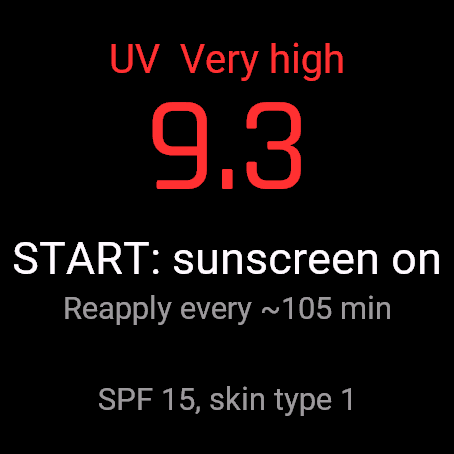
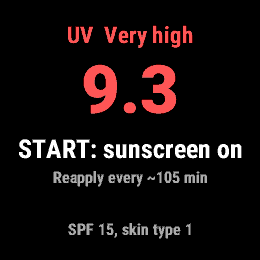
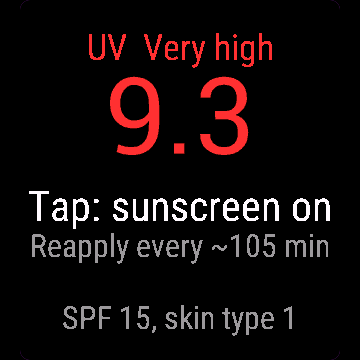
Press START when you put sunscreen on, and your watch tells you when to reapply.
Naciśnij START, gdy posmarujesz się kremem, a zegarek przypomni, kiedy zrobić to jeszcze raz.
Drücke START, wenn du Sonnencreme aufträgst, und deine Uhr sagt dir, wann du nachcremen musst.
Appuyez sur START lorsque vous appliquez votre crème solaire, et votre montre vous indique quand en remettre.
Pulsa START cuando te pongas protector solar y tu reloj te dirá cuándo volver a aplicarlo.
Druk op START wanneer je zonnebrandcrème aanbrengt, en je horloge laat weten wanneer je opnieuw moet smeren.
日焼け止めを塗ったときに START を押すと、塗り直しのタイミングを時計がお知らせします。
Premi START quando metti la crema solare e l'orologio ti dice quando riapplicarla.
涂抹防晒霜时按下 START,手表会在需要重新涂抹时提醒你。
Нажмите START при нанесении солнцезащитного крема, и часы подскажут, когда нанести его снова.
Pressione START ao passar o protetor solar, e seu relógio avisa quando reaplicar.
Stiskni START, když se namažeš krémem, a hodinky ti řeknou, kdy se namazat znovu.
Prima START quando aplicar o protetor solar e o seu relógio diz-lhe quando voltar a aplicar.
선크림을 바를 때 START를 누르면 시계가 덧발라야 할 시간을 알려줍니다.
Tryck på START när du smörjer in dig med solkräm, så säger klockan till när det är dags att smörja in igen.
Tryk på START, når du tager solcreme på, så giver dit ur besked, når det er tid til at smøre igen.
Trykk på START når du tar på solkrem, så sier klokken fra når det er tid for å smøre seg igjen.
塗抹防曬乳時按下 START,手錶就會提醒你何時該補擦。
Paina START, kun levität aurinkovoidetta, ja kellosi kertoo, milloin sitä tulee lisätä uudelleen.
Stlačte START, keď sa natriete opaľovacím krémom, a hodinky vám dajú vedieť, kedy sa natrieť znova.
Pritisnite START, ko nanesete kremo za sončenje, in vaša ura vam bo sporočila, kdaj jo znova nanesti.
Tekan START saat Anda memakai tabir surya, dan jam tangan Anda akan memberi tahu kapan harus mengoleskannya kembali.
Nyomd meg a START gombot a naptej felkenésekor, és az órád jelzi, mikor kell újra bekenned magad.
กด START เมื่อคุณทาครีมกันแดด แล้วนาฬิกาจะบอกคุณเมื่อถึงเวลาต้องทาซ้ำ
Πατήστε START όταν βάζετε αντηλιακό και το ρολόι σας θα σας ενημερώσει πότε να ξαναβάλετε.
Pritisnite START kada nanesete kremu za sunčanje i vaš sat javlja kada je ponovno nanijeti.
לחצו על START כשאתם מורחים קרם הגנה, והשעון שלכם יודיע לכם מתי למרוח שוב.
Tekan START apabila anda memakai pelindung matahari, dan jam tangan anda memberitahu bila perlu menyapu semula.
Coming to Connect IQ Unlock €4.99
30-day free trial
The app works fully and for free for the first 30 days after you first open it. After that you can buy a one-time unlock code below. No subscription.
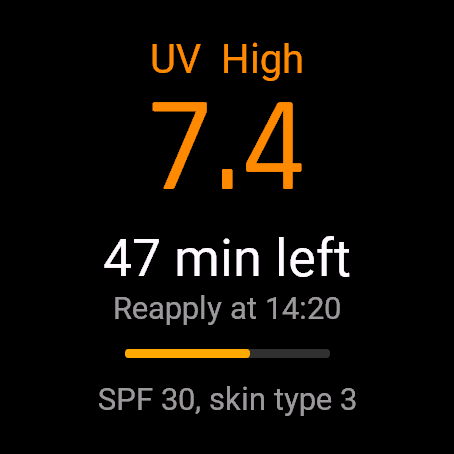
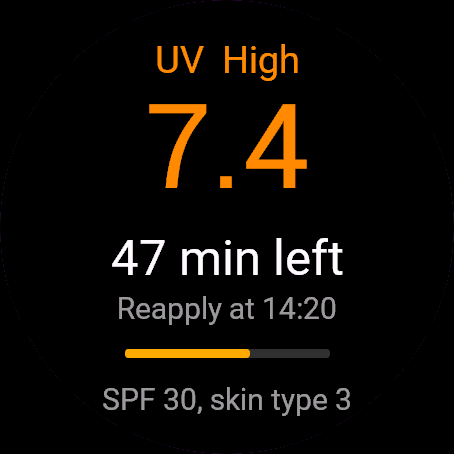
Sunscreen Timer reads the UV index from your watch weather, estimates how long your sunscreen is likely to last for your skin type and SPF, and counts down to the time to reapply. On watches that allow it, the reminder also arrives when the app is closed, though the watch may delay it by a few minutes.
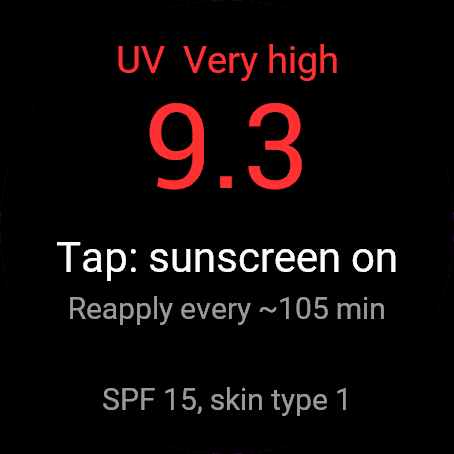
- UV index in the WHO colour bands (low to extreme), taken from the weather data your watch already has
- Skin type 1 to 6 and SPF 15, 30, 50 or 100, set on the watch or in Garmin Connect
- One press starts the timer; at higher UV the time to reapply is shorter, never more than 120 minutes
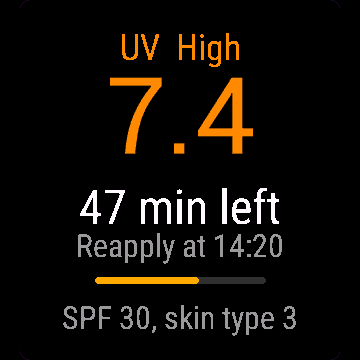
- Countdown, the clock time to reapply and a progress bar, with a strong vibration when time is up
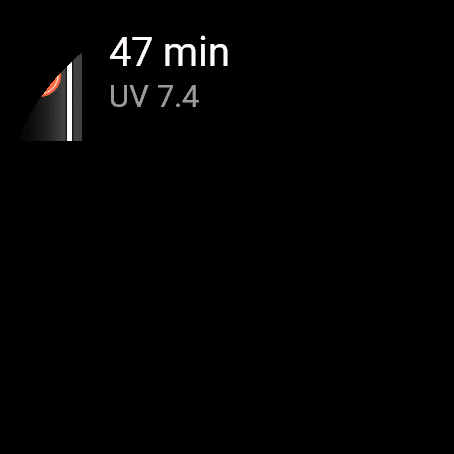
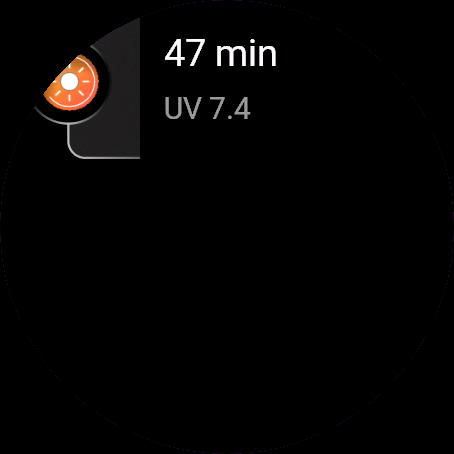
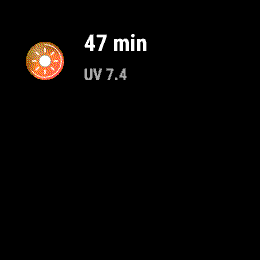
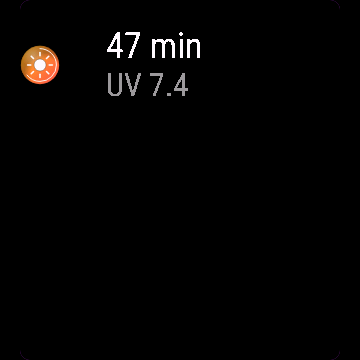
- Glance shows the minutes left or the current UV
- No UV data on your watch? Set the UV index by hand in the menu
- Everything stays on the watch: no account, no cloud
Limits: the reapply time is an estimate from UV, skin type and SPF, not medical advice. Reapply after swimming, sweating or towelling off. Automatic UV needs a watch with Connect IQ 5.1 or newer and a phone connection; older watches use the manual UV setting.
Timer kremu z filtrem czyta indeks UV z pogody w zegarku, szacuje, jak długo krem będzie chronił przy Twoim typie skóry i SPF, i odlicza do chwili ponownego smarowania. Na zegarkach, które na to pozwalają, przypomnienie przychodzi też przy zamkniętej aplikacji, choć zegarek może je opóźnić o kilka minut.
- Indeks UV w kolorach WHO (od niskiego do ekstremalnego), z danych pogodowych, które zegarek już ma
- Typ skóry od 1 do 6 i SPF 15, 30, 50 lub 100, ustawiane na zegarku albo w Garmin Connect
- Jeden przycisk włącza timer; przy wyższym UV czas do ponownego smarowania jest krótszy, ale nigdy dłuższy niż 120 minut
- Odliczanie, godzina smarowania i pasek postępu, a po upływie czasu mocna wibracja
- Glance pokazuje, ile minut zostało, albo aktualne UV
- Zegarek nie podaje UV? Wpisz indeks UV ręcznie w menu
- Wszystko zostaje w zegarku: bez konta i bez chmury
Ograniczenia: czas do ponownego smarowania to szacunek z UV, typu skóry i SPF, a nie porada medyczna. Po pływaniu, spoceniu się albo wytarciu ręcznikiem posmaruj się od razu ponownie. Automatyczne UV działa na zegarkach z Connect IQ 5.1 lub nowszym i z połączeniem z telefonem; na starszych ustaw UV ręcznie.
Sunscreen Timer liest den UV-Index aus den Wetterdaten deiner Uhr, schätzt anhand deines Hauttyps und SPF, wie lange deine Sonnencreme voraussichtlich hält, und zählt die Zeit bis zum Nachcremen herunter. Bei Uhren, die dies unterstützen, kommt die Erinnerung auch bei geschlossener App, obwohl die Uhr sie um ein paar Minuten verzögern kann.
- UV-Index in den WHO-Farbbereichen (niedrig bis extrem), übernommen aus den Wetterdaten, die deine Uhr bereits hat
- Hauttyp 1 bis 6 und SPF 15, 30, 50 oder 100, einstellbar auf der Uhr oder in Garmin Connect
- Ein Tastendruck startet den Timer; bei höherem UV ist die Zeit zum Nachcremen kürzer, nie mehr als 120 Minuten
- Countdown, die Uhrzeit zum Nachcremen und ein Fortschrittsbalken, mit starker Vibration, wenn die Zeit abgelaufen ist
- Glance zeigt die verbleibenden Minuten oder den aktuellen UV-Wert
- Keine UV-Daten auf deiner Uhr? Stelle den UV-Index von Hand im Menü ein
- Alles bleibt auf der Uhr: kein Konto, keine Cloud
Einschränkungen: Die Zeit zum Nachcremen ist ein Schätzwert aus UV, Hauttyp und SPF, keine medizinische Beratung. Nach dem Schwimmen, Schwitzen oder Abtrocknen erneut eincremen. Automatisches UV erfordert eine Uhr mit Connect IQ 5.1 oder neuer und eine Verbindung zum Smartphone; ältere Uhren nutzen die manuelle UV-Einstellung.
Sunscreen Timer lit l'indice UV depuis la météo de votre montre, estime la durée probable de protection de votre crème solaire selon votre type de peau et votre SPF, et décompte le temps jusqu'au moment d'en remettre. Sur les montres qui le permettent, le rappel s'affiche aussi lorsque l'application est fermée, bien que la montre puisse le retarder de quelques minutes.
- Indice UV selon les zones de couleur de l'OMS (faible à extrême), issu des données météo déjà présentes sur votre montre
- Type de peau de 1 à 6 et SPF 15, 30, 50 ou 100, réglables sur la montre ou dans Garmin Connect
- Une pression démarre le minuteur ; plus l'UV est élevé, plus le temps avant d'en remettre est court, jamais plus de 120 minutes
- Compte à rebours, heure pour en remettre et barre de progression, avec une forte vibration quand le temps est écoulé
- L'aperçu affiche les minutes restantes ou l'UV actuel
- Pas de données UV sur votre montre ? Réglez l'indice UV manuellement dans le menu
- Tout reste sur la montre : pas de compte, pas de cloud
Limites : le temps avant d'en remettre est une estimation basée sur l'UV, le type de peau et le SPF, et non un avis médical. Renouvelez l'application après avoir nagé, transpiré ou vous être essuyé. L'UV automatique nécessite une montre avec Connect IQ 5.1 ou plus récent et une connexion au téléphone ; les montres plus anciennes utilisent le réglage manuel de l'UV.
Sunscreen Timer lee el índice UV del tiempo en tu reloj, estima cuánto durará previsiblemente el protector solar según tu tipo de piel y SPF, y realiza una cuenta atrás hasta el momento de volver a aplicarlo. En los relojes que lo permiten, el recordatorio también llega cuando la aplicación está cerrada, aunque el reloj puede retrasarlo unos minutos.
- Índice UV en las bandas de color de la OMS (de bajo a extremo), obtenido de los datos meteorológicos que tu reloj ya tiene
- Tipo de piel del 1 al 6 y SPF 15, 30, 50 o 100, configurables en el reloj o en Garmin Connect
- Una sola pulsación inicia el temporizador; con un índice UV más alto el tiempo de reaplicación es menor, nunca superior a 120 minutos
- Cuenta atrás, hora del reloj para volver a aplicar y barra de progreso, con una fuerte vibración cuando se acaba el tiempo
- Glance muestra los minutos que quedan o el UV actual
- ¿No hay datos de UV en tu reloj? Configura el índice UV manualmente en el menú
- Todo permanece en el reloj: sin cuenta, sin nube
Límites: el tiempo para volver a aplicar es una estimación a partir del UV, el tipo de piel y el SPF, no es asesoramiento médico. Vuelve a aplicar después de nadar, sudar o secarte con la toalla. El UV automático requiere un reloj con Connect IQ 5.1 o posterior y conexión con el teléfono; los relojes más antiguos utilizan el ajuste manual de UV.
Sunscreen Timer leest de UV-index uit het weerbericht op je horloge, schat in hoe lang je zonnebrandcrème waarschijnlijk meegaat voor jouw huidtype en SPF, en telt af naar het moment om opnieuw te smeren. Op horloges die dit toestaan, komt de herinnering ook binnen wanneer de app gesloten is, al kan het horloge deze enkele minuten vertragen.
- UV-index in de WHO-kleurzones (laag tot extreem), overgenomen uit de weergegevens die je horloge al heeft
- Huidtype 1 tot 6 en SPF 15, 30, 50 of 100, in te stellen op het horloge of in Garmin Connect
- Eén druk start de timer; bij een hogere UV is de tijd om opnieuw te smeren korter, nooit meer dan 120 minuten
- Aftelling, de kloktijd om opnieuw te smeren en een voortgangsbalk, met een sterke trilling als de tijd om is
- Glance toont de resterende minuten of de huidige UV
- Geen UV-gegevens op je horloge? Stel de UV-index handmatig in via het menu
- Alles blijft op het horloge: geen account, geen cloud
Beperkingen: de tijd om opnieuw te smeren is een schatting op basis van UV, huidtype en SPF, geen medisch advies. Smeer opnieuw na zwemmen, zweten of afdrogen. Automatische UV vereist een horloge met Connect IQ 5.1 of nieuwer en een telefoonverbinding; oudere horloges gebruiken de handmatige UV-instelling.
Sunscreen Timer は時計の天気情報から UV インデックスを読み取り、肌タイプと SPF に応じて日焼け止めの持続時間を推定し、塗り直しの時間までカウントダウンします。対応する時計では、アプリを閉じていてもリマインダーが届きますが、時計によって数分遅れる場合があります。
- 時計がすでに取得している天気データに基づく、WHO カラーバンド(低から極端)の UV インデックス
- 肌タイプ 1 から 6、SPF 15、30、50、100(時計または Garmin Connect で設定)
- 1回押すだけでタイマーを開始。UV が高くなるほど塗り直しまでの時間は短くなり、120分を超えることはありません
- カウントダウン、塗り直し時刻、プログレスバーを表示。時間になると力強い振動でお知らせ
- Glance に残り時間または現在の UV を表示
- 時計に UV データがない場合は、メニューから手動で UV インデックスを設定可能
- すべて時計内で完結:アカウント不要、クラウド不要
注意事項:塗り直し時間は UV、肌タイプ、SPF から算出した推定値であり、医学的なアドバイスではありません。水泳、発汗、タオルで拭いた後は塗り直してください。UV の自動取得には Connect IQ 5.1 以降を搭載した時計とスマートフォンとの接続が必要です。それ以前の時計では手動の UV 設定を使用します。
Sunscreen Timer legge l'indice UV dal meteo dell'orologio, stima quanto dovrebbe durare la crema solare per il tuo tipo di pelle e l'SPF, e fa il conto alla rovescia fino al momento di riapplicarla. Sugli orologi che lo consentono, il promemoria arriva anche quando l'app è chiusa, sebbene l'orologio possa ritardarlo di qualche minuto.
- Indice UV nelle fasce di colore dell'OMS (da basso a estremo), ricavato dai dati meteo che il tuo orologio ha già
- Tipo di pelle da 1 a 6 e SPF 15, 30, 50 o 100, impostabile sull'orologio o in Garmin Connect
- Una pressione avvia il timer; con un UV più alto il tempo per riapplicare è più breve, mai più di 120 minuti
- Conto alla rovescia, ora a cui riapplicare e barra di avanzamento, con una forte vibrazione quando il tempo è scaduto
- Glance mostra i minuti rimanenti o l'UV attuale
- Nessun dato UV sull'orologio? Imposta l'indice UV a mano nel menu
- Tutto resta sull'orologio: nessun account, nessun cloud
Limiti: il tempo per riapplicare la crema è una stima basata su UV, tipo di pelle e SPF, non un parere medico. Riapplica dopo aver nuotato, sudato o esserti asciugato. L'UV automatico richiede un orologio con Connect IQ 5.1 o più recente e una connessione con il telefono; gli orologi più vecchi utilizzano l'impostazione manuale dell'UV.
Sunscreen Timer 会读取手表天气中的 UV 指数,根据你的皮肤类型和 SPF 估算防晒霜的有效持续时间,并倒计时提示重新涂抹的时间。在支持的手表上,即使关闭应用也能收到提醒,不过手表可能会延迟数分钟。
- 采用 WHO 颜色分级(低到极高)的 UV 指数,直接取自手表已有的天气数据
- 皮肤类型 1 到 6 以及 SPF 15、30、50 或 100,可在手表或 Garmin Connect 中设置
- 按一次即可启动计时器;UV 越高,重新涂抹间隔越短,最多不超过 120 分钟
- 倒计时、重新涂抹的具体时间和进度条,时间到时有强力震动提醒
- Glance 显示剩余分钟数或当前 UV
- 手表上没有 UV 数据?可在菜单中手动设置 UV 指数
- 所有数据均保留在手表上:无需账号,无需云端
限制:重新涂抹时间是根据 UV、皮肤类型和 SPF 得出的估算值,不属于医疗建议。在游泳、出汗或用毛巾擦拭后请重新涂抹。自动获取 UV 需要手表具备 Connect IQ 5.1 或更高版本并连接手机;较旧的手表请使用手动 UV 设置。
Sunscreen Timer считывает индекс UV из данных о погоде на часах, оценивает примерное время действия солнцезащитного крема для вашего типа кожи и SPF и ведет обратный отсчет до следующего нанесения. На часах, где это поддерживается, напоминание придет даже при закрытом приложении, хотя часы могут задержать его на несколько минут.
- Индекс UV в цветовых диапазонах ВОЗ (от низкого до экстремального) из данных о погоде, которые уже есть на часах
- Тип кожи от 1 до 6 и SPF 15, 30, 50 или 100, настраиваемые на часах или в Garmin Connect
- Одно нажатие запускает таймер; при более высоком UV время до повторного нанесения меньше, но не более 120 минут
- Обратный отсчет, время повторного нанесения на часах и индикатор выполнения, с мощной вибрацией по истечении времени
- Glance показывает оставшиеся минуты или текущий UV
- Нет данных UV на часах? Задайте индекс UV вручную в меню
- Все остается на часах: без аккаунта, без облака
Ограничения: время повторного нанесения является расчетной оценкой на основе UV, типа кожи и SPF, а не медицинской рекомендацией. Наносите крем повторно после плавания, потоотделения или вытирания полотенцем. Для автоматического получения UV требуются часы с Connect IQ 5.1 или новее и подключение к телефону; на более старых часах используется ручная настройка UV.
Sunscreen Timer lê o índice UV da previsão do tempo do seu relógio, estima quanto tempo seu protetor solar deve durar de acordo com seu tipo de pele e SPF, e faz a contagem regressiva até a hora de reaplicar. Em relógios compatíveis, o lembrete também chega quando o aplicativo está fechado, embora o relógio possa atrasá-lo em alguns minutos.
- Índice UV nas faixas de cores da OMS (baixo a extremo), obtido a partir dos dados de clima que seu relógio já tem
- Tipo de pele de 1 a 6 e SPF 15, 30, 50 ou 100, configurado no relógio ou no Garmin Connect
- Um toque inicia o timer; com UV mais alto o tempo de reaplicação é menor, nunca superior a 120 minutos
- Contagem regressiva, horário de reaplicar e barra de progresso, com vibração forte quando o tempo acaba
- Glance mostra os minutos restantes ou o UV atual
- Sem dados de UV no seu relógio? Defina o índice UV manualmente no menu
- Tudo fica no relógio: sem conta, sem nuvem
Limites: o tempo de reaplicação é uma estimativa baseada no UV, tipo de pele e SPF, não uma recomendação médica. Reaplique após nadar, suar ou se secar com a toalha. O UV automático requer um relógio com Connect IQ 5.1 ou mais recente e conexão com o telefone; relógios mais antigos usam a configuração manual de UV.
Sunscreen Timer načítá UV index z počasí v hodinkách, odhaduje, jak dlouho opalovací krém pravděpodobně vydrží pro tvůj typ pleti a SPF, a odpočítává čas do další aplikace. Na hodinkách, které to umožňují, přijde připomenutí i při zavřené aplikaci, i když ho hodinky mohou o několik minut zpozdit.
- UV index v barevných pásmech WHO (nízký až extrémní), převzatý z údajů o počasí, které už hodinky mají
- Typ pleti 1 až 6 a SPF 15, 30, 50 nebo 100, nastavené na hodinkách nebo v Garmin Connect
- Jedno stisknutí spustí časovač; při vyšším UV je čas do další aplikace kratší, nikdy ne více než 120 minut
- Odpočítávání, čas dalšího namazání a ukazatel průběhu, se silnou vibrací po vypršení času
- Glance ukazuje zbývající minuty nebo aktuální UV
- Nemáš v hodinkách údaje o UV? Nastav UV index ručně v menu
- Vše zůstává v hodinkách: žádný účet, žádný cloud
Omezení: čas do další aplikace je odhad z UV, typu pleti a SPF, nikoli lékařská rada. Po plavání, pocení nebo osušení ručníkem se namaž znovu. Automatické UV vyžaduje hodinky s Connect IQ 5.1 nebo novějším a připojení k telefonu; starší hodinky používají ruční nastavení UV.
O Sunscreen Timer lê o índice UV da meteorologia do seu relógio, estima a duração provável do seu protetor solar para o seu tipo de pele e SPF, e faz a contagem decrescente até à hora de reaplicar. Nos relógios que o permitem, o lembrete também chega quando a aplicação está fechada, embora o relógio o possa atrasar alguns minutos.
- Índice UV nas faixas de cor da OMS (baixo a extremo), obtido a partir dos dados meteorológicos que o seu relógio já tem
- Tipo de pele 1 a 6 e SPF 15, 30, 50 ou 100, definido no relógio ou no Garmin Connect
- Um premir inicia o temporizador; com UV mais alto o tempo para reaplicar é mais curto, nunca superior a 120 minutos
- Contagem decrescente, a hora de relógio para reaplicar e uma barra de progresso, com uma vibração forte quando o tempo terminar
- Glance mostra os minutos restantes ou o UV atual
- Sem dados de UV no seu relógio? Defina o índice UV manualmente no menu
- Tudo fica no relógio: sem conta, sem nuvem
Limites: o tempo de reaplicação é uma estimativa a partir do UV, tipo de pele e SPF, não constituindo aconselhamento médico. Reaplique depois de nadar, transpirar ou secar-se com a toalha. O UV automático requer um relógio com Connect IQ 5.1 ou mais recente e ligação ao telefone; relógios mais antigos utilizam a definição manual de UV.
Sunscreen Timer는 시계의 날씨 정보에서 UV 지수를 읽어 피부 타입과 SPF에 따라 선크림이 얼마나 지속될지 추정하고, 덧바를 시간까지 카운트다운합니다. 지원되는 시계에서는 앱이 닫혀 있어도 알림이 전송되지만, 시계에 따라 몇 분 정도 지연될 수 있습니다.
- 시계에 이미 있는 날씨 데이터에서 가져온 WHO 색상 등급(낮음부터 위험까지)의 UV 지수
- 시계 또는 Garmin Connect에서 설정하는 피부 타입 1부터 6까지 및 SPF 15, 30, 50 또는 100
- 한 번 누르면 타이머 시작; UV가 높을수록 덧바르는 시간이 짧아지며 최대 120분을 넘지 않음
- 카운트다운, 덧바를 시각 및 진행률 표시줄, 시간이 다 되면 강한 진동 알림
- Glance에서 남은 시간(분) 또는 현재 UV 표시
- 시계에 UV 데이터가 없나요? 메뉴에서 UV 지수를 수동으로 설정하세요
- 모든 정보는 시계에만 보관됩니다: 계정 없음, 클라우드 없음
제한 사항: 덧바르는 시간은 UV, 피부 타입, SPF를 바탕으로 한 추정치이며 의학적 조언이 아닙니다. 수영이나 땀을 흘린 후, 또는 수건으로 닦아낸 후에는 다시 발라주세요. 자동 UV 기능은 Connect IQ 5.1 이상을 지원하는 시계 및 휴대폰 연결이 필요하며, 이전 시계는 수동 UV 설정을 사용합니다.
Sunscreen Timer läser av UV-index från klockans väder, uppskattar hur länge din solkräm sannolikt skyddar utifrån din hudtyp och SPF, och räknar ner till när du ska smörja in igen. På klockor som tillåter det kommer påminnelsen även när appen är stängd, även om klockan kan fördröja den med några minuter.
- UV-index i WHO:s färgskalor (låg till extrem), hämtat från väderdatan din klocka redan har
- Hudtyp 1 till 6 och SPF 15, 30, 50 eller 100, ställs in på klockan eller i Garmin Connect
- Ett tryck startar timern; vid högre UV är tiden för att smörja in igen kortare, aldrig mer än 120 minuter
- Nedräkning, klockslag för när du ska smörja in igen och en förloppsindikator, med en kraftig vibration när tiden är ute
- Glance visar återstående minuter eller aktuellt UV
- Saknas UV-data på din klocka? Ställ in UV-index manuellt i menyn
- Allt stannar på klockan: inget konto, inget moln
Begränsningar: tiden för att smörja in igen är en uppskattning utifrån UV, hudtyp och SPF, inte medicinsk rådgivning. Smörj in igen efter bad, svettning eller handdukstorkning. Automatiskt UV kräver en klocka med Connect IQ 5.1 eller senare och telefonanslutning; äldre klockor använder den manuella UV-inställningen.
Sunscreen Timer aflæser UV-indekset fra vejret på dit ur, anslår hvor længe din solcreme sandsynligvis holder for din hudtype og SPF, og tæller ned til det er tid til at smøre igen. På ure, der tillader det, kommer påmindelsen også, når appen er lukket, selvom uret kan forsinke den med et par minutter.
- UV-indeks i WHO-farveskalaerne (lav til ekstrem), hentet fra de vejrdata dit ur allerede har
- Hudtype 1 til 6 og SPF 15, 30, 50 eller 100, indstillet på uret eller i Garmin Connect
- Et tryk starter timeren; ved højere UV er tiden til at smøre igen kortere, aldrig mere end 120 minutter
- Nedtælling, klokkeslæt for genpåføring og en statuslinje, med en kraftig vibration når tiden er gået
- Glance viser de resterende minutter eller det aktuelle UV
- Ingen UV-data på dit ur? Indstil UV-indekset manuelt i menuen
- Alt bliver på uret: ingen konto, ingen sky
Begrænsninger: tiden til genpåføring er et skøn ud fra UV, hudtype og SPF, ikke lægelig rådgivning. Smør igen efter svømning, sved eller tørring med håndklæde. Automatisk UV kræver et ur med Connect IQ 5.1 eller nyere og en telefonforbindelse; ældre ure bruger den manuelle UV-indstilling.
Sunscreen Timer leser UV-indeksen fra klokkens værdata, beregner hvor lenge solkremen sannsynligvis varer for din hudtype og SPF, og teller ned til når du bør smøre seg igjen. På klokker som støtter det, kommer påminnelsen også når appen er lukket, selv om klokken kan forsinke den med noen minutter.
- UV-indeks i WHO-fargebåndene (lav til ekstrem), hentet fra værdataene klokken din allerede har
- Hudtype 1 til 6 og SPF 15, 30, 50 eller 100, angitt på klokken eller i Garmin Connect
- Ett trykk starter nedtellingen; ved høyere UV er tiden til ny påføring kortere, aldri mer enn 120 minutter
- Nedtelling, klokkeslett for ny påføring og en fremdriftslinje, med kraftig vibrasjon når tiden er ute
- Glance viser minuttene som gjenstår eller gjeldende UV
- Ingen UV-data på klokken? Angi UV-indeksen for hånd i menyen
- Alt forblir på klokken: ingen konto, ingen sky
Begrensninger: tiden for ny påføring er et estimat basert på UV, hudtype og SPF, ikke et medisinsk råd. Smør deg på nytt etter bading, svetting eller tørking med håndkle. Automatisk UV krever en klokke med Connect IQ 5.1 eller nyere og telefontilkobling; eldre klokker bruker manuell UV-innstilling.
Sunscreen Timer 會讀取手錶天氣中的 UV 指數,根據你的膚質與 SPF 估算防曬乳可能維持的時間,並倒數至需要補擦的時間。在支援的手錶上,即使應用程式已關閉也會發出提醒,不過手錶可能會延遲數分鐘。
- UV 指數採用 WHO 色彩分級(低到極高),取自手錶已有的天氣資料
- 膚質類型 1 到 6 以及 SPF 15、30、50 或 100,可在手錶上或在 Garmin Connect 中設定
- 按一下即可啟動計時器;UV 較高時補擦時間較短,絕不超過 120 分鐘
- 倒數計時、預計補擦的時鐘時間與進度條,時間到時會有強烈震動
- Glance 顯示剩餘分鐘數或當前的 UV
- 手錶上沒有 UV 資料?可在選單中手動設定 UV 指數
- 所有資料保留在手錶上:無需帳號、無需雲端
限制:補擦時間是根據 UV、膚質與 SPF 得出的估算值,並非醫療建議。游泳、流汗或用毛巾擦乾後請補擦。自動取得 UV 需要具備 Connect IQ 5.1 或更新版本的手錶並連接手機;較舊的手錶請使用手動 UV 設定。
Sunscreen Timer lukee UV-indeksin kellosi säätiedoista, arvioi kuinka kauan aurinkovoiteesi todennäköisesti kestää ihotyypillesi ja SPF-arvollesi, ja laskee ajan seuraavaan lisäyskertaan. Kelloissa, jotka sen sallivat, muistutus tulee myös sovelluksen ollessa suljettuna, vaikka kello saattaa viivästyttää sitä muutamalla minuutilla.
- UV-indeksi WHO:n väriasteikolla (matalasta äärimmäiseen), haettuna säätiedoista, jotka kellossasi jo on
- Ihotyypit 1-6 ja SPF 15, 30, 50 tai 100, asetettavissa kellossa tai Garmin Connect -sovelluksessa
- Yksi painallus käynnistää ajastimen; korkeammalla UV-tasolla lisäysaika on lyhyempi, ei koskaan yli 120 minuuttia
- Lähtölaskenta, kellonaika uudelleenlisäykselle ja edistymispalkki sekä voimakas värinä ajan päättyessä
- Pikanäkymä näyttää jäljellä olevat minuutit tai nykyisen UV-arvon
- Ei UV-tietoja kellossasi? Aseta UV-indeksi käsin valikosta
- Kaikki pysyy kellossa: ei käyttäjätiliä, ei pilvipalvelua
Rajoitukset: uudelleenlisäysaika on UV-indeksiin, ihotyyppiin ja SPF-arvoon perustuva arvio, ei lääketieteellinen neuvo. Lisää voidetta uudelleen uimisen, hikoilun tai pyyhekuivauksen jälkeen. Automaattinen UV vaatii kellon, jossa on Connect IQ 5.1 tai uudempi sekä puhelinyhteys; vanhemmat kellot käyttävät manuaalista UV-asetusta.
Sunscreen Timer načíta UV index z počasia v hodinkách, odhadne, ako dlho by mal opaľovací krém vydržať pre váš typ pokožky a SPF, a odpočítava čas do ďalšieho natretia. Na hodinkách, ktoré to umožňujú, sa pripomenutie zobrazí aj pri zatvorenej aplikácii, hoci hodinky ho môžu o niekoľko minút oneskoriť.
- UV index vo farebných pásmach WHO (nízky až extrémny) z údajov o počasí, ktoré už v hodinkách máte
- Typ pokožky 1 až 6 a SPF 15, 30, 50 alebo 100, nastavené na hodinkách alebo v Garmin Connect
- Jedno stlačenie spustí časovač; pri vyššom UV je čas do ďalšieho natretia kratší, nikdy nie viac ako 120 minút
- Odpočítavanie, presný čas ďalšieho natretia a ukazovateľ priebehu so silnou vibráciou po vypršaní času
- Glance zobrazuje zostávajúce minúty alebo aktuálne UV
- Žiadne údaje o UV v hodinkách? Nastavte UV index ručne v menu
- Všetko zostáva v hodinkách: žiadny účet, žiadny cloud
Obmedzenia: čas do ďalšieho natretia je odhad z UV, typu pokožky a SPF, nie lekárske odporúčanie. Natrite sa znova po plávaní, potení alebo utretí uterákom. Automatické UV vyžaduje hodinky s Connect IQ 5.1 alebo novším a pripojenie k telefónu; staršie hodinky používajú manuálne nastavenie UV.
Sunscreen Timer prebere UV indeks iz vremenskih podatkov na vaši uri, oceni, kako dolgo bo vaša krema za sončenje verjetno zdržala glede na vaš tip kože in SPF, ter odšteva čas do ponovnega nanosa. Na urah, ki to omogočajo, opomnik prispe tudi, ko je aplikacija zaprta, čeprav ga lahko ura zamakne za nekaj minut.
- UV indeks v barvnih razredih WHO (od nizkega do skrajnega), prevzet iz vremenskih podatkov, ki jih vaša ura že ima
- Tip kože od 1 do 6 in SPF 15, 30, 50 ali 100, nastavljen na uri ali v Garmin Connect
- En pritisk zažene časovnik; pri višjem UV je čas do ponovnega nanosa krajši, nikoli več kot 120 minut
- Odštevanje, ura ponovnega nanosa in vrstica napredka, z močnim vibriranjem, ko čas poteče
- Glance prikazuje preostale minute ali trenutni UV
- Na uri nimate podatkov o UV? V meniju ročno nastavite UV indeks
- Vse ostane na uri: brez računa, brez oblaka
Omejitve: čas ponovnega nanosa je ocena na podlagi UV, tipa kože in SPF, ne zdravstveni nasvet. Ponovno nanesite po plavanju, potenju ali brisanju z brisačo. Samodejni UV zahteva uro s Connect IQ 5.1 ali novejšo različico in povezavo s telefonom; starejše ure uporabljajo ročno nastavitev UV.
Sunscreen Timer membaca indeks UV dari cuaca jam tangan Anda, memperkirakan berapa lama tabir surya kemungkinan bertahan untuk jenis kulit dan SPF Anda, serta menghitung mundur waktu pengolesan kembali. Pada jam tangan yang mendukung, pengingat juga tetap muncul saat aplikasi ditutup, meskipun jam tangan mungkin menundanya beberapa menit.
- Indeks UV dalam pita warna WHO (rendah hingga ekstrem), diambil dari data cuaca yang sudah ada di jam tangan Anda
- Jenis kulit 1 hingga 6 dan SPF 15, 30, 50 atau 100, diatur pada jam tangan atau di Garmin Connect
- Satu kali tekan memulai timer; pada UV yang lebih tinggi waktu pengolesan kembali lebih singkat, tidak pernah lebih dari 120 menit
- Hitung mundur, waktu jam untuk mengoleskan kembali dan bilah kemajuan, dengan getaran kuat saat waktu habis
- Glance menampilkan sisa menit atau UV saat ini
- Tidak ada data UV di jam tangan Anda? Atur indeks UV secara manual di menu
- Semuanya tetap di jam tangan: tanpa akun, tanpa cloud
Batasan: waktu pengolesan kembali adalah perkiraan berdasarkan UV, jenis kulit, dan SPF, bukan saran medis. Oleskan kembali setelah berenang, berkeringat, atau mengeringkan badan dengan handuk. UV otomatis memerlukan jam tangan dengan Connect IQ 5.1 atau yang lebih baru dan koneksi ke ponsel; jam tangan yang lebih lama menggunakan pengaturan UV manual.
A Sunscreen Timer leolvassa az UV indexet az óra időjárásadataiból, megbecsüli, hogy a naptej várhatóan meddig tart a bőrtípusod és az SPF alapján, majd visszaszámol az újrakendés idejéig. Az ezt engedélyező órákon az emlékeztető akkor is megérkezik, ha az alkalmazás be van zárva, bár az óra késleltetheti néhány perccel.
- UV index a WHO színsávjai szerint (alacsonytól az extrémig), az órádon már meglévő időjárási adatokból
- 1-6 közötti bőrtípus és 15, 30, 50 vagy 100 SPF, az órán vagy a Garmin Connectben beállítva
- Egyetlen gombnyomás elindítja az időzítőt; magasabb UV esetén az újrakendési idő rövidebb, de sosem több mint 120 perc
- Visszaszámlálás, az újrakendés óraidőpontja és folyamatjelző sáv, erős rezgéssel az idő lejártakor
- A Glance mutatja a hátralévő perceket vagy az aktuális UV értéket
- Nincs UV adat az órádon? Állítsd be az UV indexet kézzel a menüben
- Minden az órán marad: nincs fiók, nincs felhő
Korlátok: az újrakendési idő csupán becslés az UV, a bőrtípus és az SPF alapján, nem orvosi tanács. Úszás, izzadás vagy törölközés után kend be újra magad. Az automatikus UV működéséhez Connect IQ 5.1 vagy újabb verziójú óra és telefonos kapcsolat szükséges; a régebbi órák a kézi UV beállítást használják.
Sunscreen Timer จะอ่านค่าดัชนี UV จากสภาพอากาศบนนาฬิกาของคุณ ประเมินว่าครีมกันแดดน่าจะปกป้องได้นานแค่ไหนตามประเภทผิวและค่า SPF ของคุณ แล้วนับถอยหลังถึงเวลาที่ต้องทาซ้ำ สำหรับนาฬิการุ่นที่รองรับ การแจ้งเตือนจะยังเตือนได้แม้ปิดแอปไปแล้ว แม้นาฬิกาอาจล่าช้าไปไม่กี่นาทีก็ตาม
- ดัชนี UV ตามแถบสีของ WHO (ต่ำถึงรุนแรงมาก) โดยดึงมาจากข้อมูลสภาพอากาศที่มีอยู่แล้วบนนาฬิกาของคุณ
- ประเภทผิว 1 ถึง 6 และ SPF 15, 30, 50 หรือ 100 ตั้งค่าได้บนนาฬิกาหรือใน Garmin Connect
- กดเพียงครั้งเดียวเพื่อเริ่มจับเวลา เมื่อค่า UV สูงขึ้นเวลาที่ต้องทาซ้ำจะสั้นลง โดยไม่เกิน 120 นาที
- การนับถอยหลัง เวลาบนหน้าปัดที่ต้องทาซ้ำ และแถบความคืบหน้า พร้อมระบบสั่นเตือนอย่างชัดเจนเมื่อหมดเวลา
- Glance แสดงจำนวนนาทีที่เหลือหรือค่า UV ปัจจุบัน
- ไม่มีข้อมูล UV บนนาฬิกาของคุณใช่ไหม? ตั้งค่าดัชนี UV ด้วยตนเองได้ในเมนู
- ทุกอย่างอยู่บนนาฬิกา: ไม่ต้องมีบัญชี ไม่ใช้คลาวด์
ข้อจำกัด: เวลาที่ต้องทาซ้ำเป็นการประเมินจากค่า UV, ประเภทผิว และ SPF ไม่ใช่คำแนะนำทางการแพทย์ ควรทาซ้ำหลังจากว่ายน้ำ มีเหงื่อออก หรือเช็ดตัวด้วยผ้าขนหนู ระบบ UV อัตโนมัติต้องการนาฬิกาที่มี Connect IQ 5.1 ขึ้นไปและการเชื่อมต่อกับโทรศัพท์ นาฬิการุ่นเก่าจะใช้การตั้งค่า UV แบบกำหนดเอง
Το Sunscreen Timer διαβάζει τον δείκτη UV από τον καιρό του ρολογιού σας, εκτιμά πόσο είναι πιθανό να διαρκέσει το αντηλιακό σας για τον τύπο δέρματός σας και το SPF, και μετρά αντίστροφα μέχρι την ώρα για να ξαναβάλετε. Σε ρολόγια που το επιτρέπουν, η υπενθύμιση εμφανίζεται επίσης όταν η εφαρμογή είναι κλειστή, αν και το ρολόι μπορεί να την καθυστερήσει κατά μερικά λεπτά.
- Δείκτης UV στις χρωματικές ζώνες του Π.Ο.Υ. (χαμηλός έως ακραίος), από τα δεδομένα καιρού που έχει ήδη το ρολόι σας
- Τύπος δέρματος 1 έως 6 και SPF 15, 30, 50 ή 100, ρύθμιση στο ρολόι ή στο Garmin Connect
- Ένα πάτημα ξεκινά το χρονόμετρο. Σε υψηλότερο UV ο χρόνος για να ξαναβάλετε είναι μικρότερος, ποτέ πάνω από 120 λεπτά
- Αντίστροφη μέτρηση, η ώρα ρολογιού για να ξαναβάλετε και μια γραμμή προόδου, με έντονη δόνηση όταν τελειώσει ο χρόνος
- Το Glance δείχνει τα λεπτά που απομένουν ή το τρέχον UV
- Δεν υπάρχουν δεδομένα UV στο ρολόι σας; Ρυθμίστε τον δείκτη UV χειροκίνητα στο μενού
- Όλα παραμένουν στο ρολόι: χωρίς λογαριασμό, χωρίς cloud
Περιορισμοί: ο χρόνος για να ξαναβάλετε είναι μια εκτίμηση βάσει του UV, του τύπου δέρματος και του SPF, όχι ιατρική συμβουλή. Ξαναβάλτε μετά από κολύμπι, εφίδρωση ή σκούπισμα με πετσέτα. Το αυτόματο UV απαιτεί ρολόι με Connect IQ 5.1 ή νεότερο και σύνδεση με τηλέφωνο. Τα παλαιότερα ρολόγια χρησιμοποιούν τη χειροκίνητη ρύθμιση UV.
Sunscreen Timer čita UV indeks iz vremenske prognoze na vašem satu, procjenjuje koliko bi krema za sunčanje mogla trajati za vaš tip kože i SPF te odbrojava vrijeme do ponovnog nanošenja. Na satovima koji to dopuštaju, podsjetnik stiže i kada je aplikacija zatvorena, iako ga sat može odgoditi za nekoliko minuta.
- UV indeks u bojama WHO (nizak do ekstreman), preuzet iz vremenskih podataka koje vaš sat već ima
- Tip kože od 1 do 6 i SPF 15, 30, 50 ili 100, postavlja se na satu ili u Garmin Connect
- Jedan pritisak pokreće mjerač vremena; pri višem UV zračenju vrijeme do ponovnog nanošenja je kraće, nikada više od 120 minuta
- Odbrojavanje, točno vrijeme za ponovno nanošenje i traka napretka, uz snažnu vibraciju kada vrijeme istekne
- Glance prikazuje preostale minute ili trenutni UV
- Nema UV podataka na vašem satu? Ručno postavite UV indeks u izborniku
- Sve ostaje na satu: bez računa, bez oblaka
Ograničenja: vrijeme ponovnog nanošenja procjena je na temelju UV zračenja, tipa kože i SPF-a, a ne medicinski savjet. Ponovno nanesite nakon plivanja, znojenja ili brisanja ručnikom. Za automatski UV potreban je sat s Connect IQ 5.1 ili novijim i veza s telefonom; stariji satovi koriste ručno postavljanje UV indeksa.
Sunscreen Timer קורא את מדד ה-UV מנתוני מזג האוויר בשעון, מעריך כמה זמן קרם ההגנה צפוי להחזיק מעמד בהתאם לסוג העור ול-SPF שלכם, וסופר לאחור עד לזמן המריחה החוזרת. בשעונים שמאפשרים זאת, התזכורת מתקבלת גם כשהאפליקציה סגורה, אם כי השעון עשוי לעכב אותה בכמה דקות.
- מדד UV לפי מדרג הצבעים של WHO (מנמוך עד קיצוני), שנלקח מנתוני מזג האוויר שכבר קיימים בשעון
- סוג עור 1 עד 6 ו-SPF 15, 30, 50 או 100, להגדרה בשעון או ב-Garmin Connect
- לחיצה אחת מפעילה את הטיימר; ב-UV גבוה יותר הזמן למריחה חוזרת קצר יותר, לעולם לא יותר מ-120 דקות
- ספירה לאחור, שעת השעון למריחה חוזרת ופס התקדמות, עם רטט חזק כשהזמן נגמר
- Glance מציג את הדקות שנותרו או את ה-UV הנוכחי
- אין נתוני UV בשעון? הגדירו את מדד ה-UV ידנית בתפריט
- הכל נשאר בשעון: ללא חשבון, ללא ענן
מגבלות: הזמן למריחה חוזרת הוא הערכה המבוססת על UV, סוג עור ו-SPF, ואינו מהווה ייעוץ רפואי. יש למרוח שוב לאחר שחייה, הזעה או ניגוב במגבת. UV אוטומטי דורש שעון עם Connect IQ 5.1 ומעלה וחיבור לטלפון; שעונים ישנים יותר משתמשים בהגדרת UV ידנית.
Sunscreen Timer membaca indeks UV daripada cuaca jam tangan anda, menganggarkan berapa lama pelindung matahari anda mungkin bertahan untuk jenis kulit dan SPF anda, serta mengira detik sehingga masa untuk menyapu semula. Pada jam tangan yang membenarkannya, peringatan juga akan tiba apabila aplikasi ditutup, walaupun jam tangan mungkin menundanya beberapa minit.
- Indeks UV dalam jalur warna WHO (rendah hingga ekstrem), diambil daripada data cuaca yang sedia ada pada jam tangan anda
- Jenis kulit 1 hingga 6 dan SPF 15, 30, 50 atau 100, ditetapkan pada jam tangan atau dalam Garmin Connect
- Satu tekanan memulakan pemasa; pada UV yang lebih tinggi masa untuk menyapu semula adalah lebih singkat, tidak pernah melebihi 120 minit
- Kiraan detik, waktu jam untuk menyapu semula dan bar kemajuan, dengan getaran kuat apabila masa tamat
- Glance menunjukkan baki minit atau UV semasa
- Tiada data UV pada jam tangan anda? Tetapkan indeks UV secara manual dalam menu
- Semuanya kekal pada jam tangan: tiada akaun, tiada awan
Had: masa menyapu semula adalah anggaran daripada UV, jenis kulit dan SPF, bukan nasihat perubatan. Sapu semula selepas berenang, berpeluh atau mengeringkan badan dengan tuala. UV automatik memerlukan jam tangan dengan Connect IQ 5.1 atau lebih baharu dan sambungan telefon; jam tangan lebih lama menggunakan tetapan UV manual.
How to use it
Add Sunscreen Timer to the widget loop (swipe through widgets on the watch).
Controls: START starts the timer, or opens the menu while it runs. MENU opens the menu, BACK leaves. Touch-only watches: tap instead of START.
Dodaj Timer kremu z filtrem do karuzeli widgetów (przewiń widgety na zegarku).
Sterowanie: START włącza timer, a gdy timer działa, otwiera menu. MENU otwiera menu, BACK wychodzi. Zegarki tylko dotykowe: dotknięcie zamiast START.
Füge Sunscreen Timer zur Widget-Schleife hinzu (auf der Uhr durch die Widgets wischen).
Bedienung: START startet den Timer oder öffnet das Menü, während er läuft. MENU öffnet das Menü, BACK beendet die App. Reine Touchscreen-Uhren: Tippen statt START.
Ajoutez Sunscreen Timer à la boucle de widgets (faites défiler les widgets sur la montre).
Commandes : START démarre le minuteur, ou ouvre le menu lorsqu'il est en cours. MENU ouvre le menu, BACK quitte. Montres tactiles uniquement : touchez l'écran au lieu de START.
Añade Sunscreen Timer al bucle de widgets (desliza por los widgets en el reloj).
Controles: START inicia el temporizador, o abre el menú mientras está en marcha. MENU abre el menú, BACK sale. Relojes solo táctiles: toca en lugar de START.
Voeg Sunscreen Timer toe aan de widgetlus (veeg op het horloge door de widgets).
Bediening: START start de timer, of opent het menu terwijl deze loopt. MENU opent het menu, BACK sluit af. Horloges met alleen touchscreen: tik in plaats van START.
Sunscreen Timer をウィジェットのループに追加してください(時計でウィジェットをスワイプして切り替えます)。
操作方法:START でタイマーを開始、計測中に押すとメニューを開きます。MENU でメニューを開き、BACK で終了します。タッチ操作のみの時計:START の代わりにタップ。
Aggiungi Sunscreen Timer al ciclo dei widget (scorri i widget sull'orologio).
Comandi: START avvia il timer, oppure apre il menu mentre è in esecuzione. MENU apre il menu, BACK esce. Orologi solo touch: tocca lo schermo al posto di START.
把 Sunscreen Timer 添加到小组件循环中(在手表上滑动切换小组件)。
操作方法:START 启动计时器,在运行时按 START 打开菜单。MENU 打开菜单,BACK 退出。纯触屏手表:点击屏幕代替 START。
Добавьте Sunscreen Timer в ленту виджетов (листайте виджеты на часах).
Управление: START запускает таймер или открывает меню во время его работы. MENU открывает меню, BACK выполняет выход. На часах только с сенсорным экраном: коснитесь экрана вместо START.
Adicione Sunscreen Timer ao ciclo de widgets (deslize pelos widgets no relógio).
Controles: START inicia o timer, ou abre o menu enquanto ele funciona. MENU abre o menu, BACK sai. Relógios apenas touch: toque na tela em vez de START.
Přidejte Sunscreen Timer do smyčky widgetů (na hodinkách procházejte widgety přejížděním).
Ovládání: START spustí časovač, nebo otevře menu, když běží. MENU otevře menu, BACK aplikaci opustí. Pouze dotykové hodinky: klepnutí místo START.
Adicione Sunscreen Timer ao ciclo de widgets (deslize pelos widgets no relógio).
Controlos: START inicia o temporizador ou abre o menu enquanto este decorre. MENU abre o menu, BACK sai. Relógios apenas táteis: toque em vez de START.
Sunscreen Timer을(를) 위젯 순환에 추가하세요(시계에서 위젯을 넘겨 보세요).
조작 방법: START는 타이머를 시작하거나 실행 중일 때 메뉴를 엽니다. MENU는 메뉴를 열고, BACK은 종료합니다. 터치 전용 시계: START 대신 탭하세요.
Lägg till Sunscreen Timer i widgetslingan (svep mellan widgetar på klockan).
Kontroller: START startar timern, eller öppnar menyn medan den körs. MENU öppnar menyn, BACK avslutar. Klockor med enbart pekskärm: tryck på skärmen i stället för START.
Tilføj Sunscreen Timer til widget-løkken (stryg gennem widgets på uret).
Betjening: START starter timeren eller åbner menuen, mens den kører. MENU åbner menuen, BACK afslutter. Ure kun med touch: tryk i stedet for START.
Legg til Sunscreen Timer i widget-rekken (sveip gjennom widgetene på klokken).
Betjening: START starter timeren, eller åpner menyen mens den går. MENU åpner menyen, BACK avslutter. Klokker med bare berøringsskjerm: trykk på skjermen i stedet for START.
把 Sunscreen Timer 加入小工具循環中(在手錶上滑動切換小工具)。
操作方式:START 啟動計時器,或在計時期間開啟選單。MENU 開啟選單,BACK 退出。純觸控手錶:點擊螢幕以代替 START。
Lisää Sunscreen Timer widgetkiertoon (selaa widgettejä pyyhkäisemällä kellossa).
Ohjaimet: START käynnistää ajastimen tai avaa valikon sen ollessa käynnissä. MENU avaa valikon, BACK poistuu. Pelkkää kosketusnäyttöä käyttävät kellot: napauta START-painikkeen sijaan.
Pridajte Sunscreen Timer do cyklu widgetov (widgety na hodinkách prechádzate potiahnutím).
Ovládanie: START spustí časovač, alebo otvorí menu počas jeho behu. MENU otvorí menu, BACK slúži na odchod. Čisto dotykové hodinky: ťuknutie namiesto START.
Dodajte Sunscreen Timer v zanko pripomočkov (na uri se pomikajte med pripomočki).
Upravljanje: START zažene časovnik ali odpre meni med delovanjem. MENU odpre meni, BACK zapusti aplikacijo. Ure samo na dotik: tapnite namesto START.
Tambahkan Sunscreen Timer ke putaran widget (geser antar widget di jam).
Kontrol: START memulai timer, atau membuka menu saat timer berjalan. MENU membuka menu, BACK untuk keluar. Jam tangan khusus layar sentuh: ketuk alih-alih START.
Adja hozzá a(z) Sunscreen Timer elemet a widgetkörhöz (az órán görgessen a widgetek között).
Kezelés: a START elindítja az időzítőt, vagy futás közben megnyitja a menüt. A MENU megnyitja a menüt, a BACK kilép. Csak érintőképernyős órák: érintés a START helyett.
เพิ่ม Sunscreen Timer ในวิดเจ็ตลูป (ปัดผ่านวิดเจ็ตบนนาฬิกา)
การควบคุม: START เพื่อเริ่มจับเวลา หรือเปิดเมนูขณะที่กำลังจับเวลา MENU เพื่อเปิดเมนู, BACK เพื่อออก สำหรับนาฬิการะบบสัมผัสล้วน: แตะหน้าจอแทนปุ่ม START
Προσθέστε το Sunscreen Timer στον κύκλο των widget (σύρετε στα widget του ρολογιού).
Χειρισμός: Το START ξεκινά το χρονόμετρο ή ανοίγει το μενού ενώ εκτελείται. Το MENU ανοίγει το μενού, το BACK εξέρχεται. Ρολόγια μόνο με οθόνη αφής: πατήστε στην οθόνη αντί για START.
Dodajte Sunscreen Timer u petlju widgeta (listajte widgete na satu).
Upravljanje: START pokreće mjerač vremena ili otvara izbornik dok mjerač radi. MENU otvara izbornik, BACK izlazi. Satovi samo sa zaslonom na dodir: dodirnite umjesto START.
הוסיפו את Sunscreen Timer ללולאת הווידג'טים (החליקו בין הווידג'טים בשעון).
מקשים: START מפעיל את הטיימר, או פותח את התפריט בזמן פעולתו. MENU פותח את התפריט, BACK יוצא. שעוני מסך מגע בלבד: הקישו במקום START.
Tambah Sunscreen Timer ke dalam gelung widget (leret melalui widget pada jam).
Kawalan: START memulakan pemasa, atau membuka menu semasa ia berjalan. MENU membuka menu, BACK untuk keluar. Jam tangan skrin sentuh sahaja: ketik sebagai ganti START.
Permissions and privacy
This product asks the watch for the permissions below. Connect IQ shows them when you install it.
- Background process: Lets the app run short tasks in the background, for example reminders.Pozwala aplikacji wykonywać krótkie zadania w tle, na przykład przypomnienia.
This product does not use the internet and sends no data to our servers.
The full manual and the detailed permission descriptions are available in English and Polish.
Compatible watches
51mm, D2 Air X15, D2 Mach 1 Pro, Enduro 2, Enduro 3, epix (Gen 2), epix Pro (Gen 2) 42mm, epix Pro (Gen 2) 47mm, epix Pro (Gen 2) 51mm, Forerunner 165, Forerunner 165 Music, Forerunner 245, Forerunner 245 Music, Forerunner 255, Forerunner 255 Music, Forerunner 255s, Forerunner 255s Music, Forerunner 265, Forerunner 265s, Forerunner 55, Forerunner 570 42mm, Forerunner 570 47mm, Forerunner 965, Forerunner 970, fēnix 7, fēnix 7 Pro, fēnix 7 Pro - Solar Edition (no Wi-Fi), fēnix 7S, fēnix 7S Pro, fēnix 7X, fēnix 7X Pro, fēnix 7X Pro - Solar Edition (no Wi-Fi), fēnix 8 43mm, fēnix 8 47mm, fēnix 8 Pro 47mm, fēnix 8 Solar 47mm, fēnix 8 Solar 51mm, fēnix E, Instinct 3 AMOLED 45mm, Instinct 3 AMOLED 50mm, Instinct Crossover AMOLED, MicroLED, quatix 7, quatix 7 Pro, quatix 7 Sapphire, quatix 7X Solar, quatix 8 47mm, quatix 8 Pro 47mm, tactix 7, tactix 7 – AMOLED Edition, tactix 8 47mm, tactix 8 Solar 51mm, Venu 2, Venu 2 Plus, Venu 2S, Venu 3, Venu 3S, Venu 4 41mm, Venu 4 45mm, Venu Sq 2, Venu Sq 2 Music, Venu X1, vívoactive 4, vívoactive 4S, vívoactive 5, vívoactive 6
Screenshots
FAQ
What happens after the 30-day free trial?
The app shows a screen asking for a one-time unlock code from dialforge.dev instead of opening normally. Buy the code once below, no subscription.
Does the app send my data to Dialforge?
No. The app works fully offline, and the unlock code is checked on the watch itself, without contacting any server.
The app does not work as described on my watch. Can I get a refund?
Yes. Write through the feedback form below, or to the e-mail in the footer. If we cannot fix it, we refund you, as described in the terms.
Changing your watch?
Write to me and I will move your code for free.
Changelog
- First release.
- Pierwsze wydanie.
- Erste Version.
- Première version.
- Primera versión.
- Eerste versie.
- 初回リリース。
- Prima versione.
- 首次发布。
- Первый релиз.
- Primeira versão.
- První vydání.
- Primeira versão.
- 첫 출시.
- Första versionen.
- Første udgivelse.
- Første versjon.
- 首次發行。
- Ensimmäinen julkaisu.
- Prvé vydanie.
- Prva izdaja.
- Rilis perdana.
- Első kiadás.
- เปิดตัวครั้งแรก
- Πρώτη έκδοση.
- Prvo izdanje.
- גרסה ראשונה.
- Keluaran pertama.
Unlock
€4.99
One-time payment. No subscription. The code works on the watch whose UID you enter.
- Install the app from the Connect IQ store. It works fully and for free for the first 30 days.
- Find your 10-digit UID: Connect IQ app on the phone > My Device > Apps or Data Fields > this app > Settings > Watch UID.
- Enter UID and e-mail, pay with PayPal (cards work without a PayPal account). The code appears here at once.
- Type the code into the same settings page, field "Unlock code". The watch checks it offline.
Thank you! Your code:
Enter the code in the app settings, field "Unlock code". The watch checks it offline.
Tell us how to make it better
Missing a data field, a colour, a layout? Found a bug on your watch model? Write it here. We read every message and ship improvements in updates.