Water sports
Swim Sets
A pool send-off clock on your wrist. Set up a set like 10 x 100 m on 1:45 once, and the watch counts down to your next send-off, so you do not need to watch the wall clock between reps.
Sekundnik basenowy na ręku. Ustawiasz raz serię, na przykład 10 x 100 m na 1:45, a zegarek odlicza do kolejnego startu - nie trzeba patrzeć na zegar na ścianie basenu.
Eine Abgangsuhr fürs Schwimmbad direkt am Handgelenk. Richte ein Set wie 10 x 100 m auf 1:45 einmal ein, und die Uhr zählt bis zum nächsten Abgang herunter, sodass du zwischen den Wiederholungen nicht mehr auf die Hallenuhr schauen musst.
Une horloge de départ en bassin à votre poignet. Configurez une série comme 10 x 100 m à 1:45 une seule fois, et la montre décompte le temps jusqu'à votre prochain départ, vous évitant de surveiller le chrono mural entre les répétitions.
Un reloj de salidas (send-off) de piscina en tu muñeca. Configura una serie como 10 x 100 m a 1:45 una sola vez, y el reloj hará la cuenta atrás hasta tu siguiente salida, para que no tengas que mirar el reloj de pared entre repeticiones.
Een startklok voor het zwembad om je pols. Stel eenmalig een set in zoals 10 x 100 m op 1:45, en het horloge telt af naar je volgende vertrektijd, zodat je tussen herhalingen door niet op de klok aan de muur hoeft te kijken.
プール練習用サークルタイマー(センドオフクロック)を手首に。10 x 100 m on 1:45 のようなセットを一度設定すれば、ウォッチが次のスタートまでのカウントダウンを行うため、インターバルの合間に壁の時計を見つめる必要がなくなります。
Un cronometro per partenze a intervallo in piscina direttamente al polso. Imposta una serie come 10 x 100 m a 1:45 una volta sola, e l'orologio farà il conto alla rovescia fino alla partenza successiva, così non dovrai guardare il cronometro a parete tra una ripetuta e l'altra.
腕上泳池出发包干时钟。只需设置一次如 10 x 100 m、包干时间 1:45 的组别,手表就会为下一次出发倒计时,你在每次间隙无需再盯看泳池墙上的大钟。
Таймер старта по режиму в бассейне прямо на вашем запястье. Настройте серию вроде 10 x 100 m с режимом 1:45 один раз, и часы будут отсчитывать время до следующего старта, избавляя от необходимости следить за настенными часами между отрезками.
Um cronômetro de partida para piscina no seu pulso. Configure uma série como 10 x 100 m a cada 1:45 uma vez, e o relógio fará a contagem regressiva para a sua próxima partida, para você não precisar ficar olhando o relógio de parede entre as repetições.
Plavecké intervalové hodiny na vašem zápěstí. Nastavte si jednou sérii jako 10 x 100 m na 1:45 a hodinky odpočítávají čas do dalšího startu, takže mezi opakováními nemusíte sledovat nástěnné hodiny.
Um relógio de partidas para natação em piscina no seu pulso. Configure uma série como 10 x 100 m a 1:45 uma vez, e o relógio faz a contagem decrescente para a sua próxima partida, para que não precise de olhar para o relógio de parede entre repetições.
손목 위의 수영장 센드오프 시계. 1:45 인터벌로 10 x 100 m 세트를 한 번만 설정해 두면, 시계가 다음 출발까지 카운트다운을 해주므로 세트 중간에 수영장 벽면 시계를 볼 필요가 없습니다.
En startklocka för bassängen på handleden. Ställ in en serie som 10 x 100 m på 1:45 en gång, så räknar klockan ner till din nästa starttid, så att du slipper hålla koll på väggklockan mellan repetitionerna.
Et starttidsur til svømmebassinet på dit håndled. Indstil en serie som f.eks. 10 x 100 m på 1:45 én gang, og uret tæller ned til din næste start, så du ikke behøver at holde øje med væguret mellem gentagelserne.
En startklokke for bassenget på håndleddet. Still inn en serie som 10 x 100 m på 1:45 én gang, og klokken teller ned til neste start, slik at du slipper å følge med på vegguret mellom repetisjonene.
手腕上的泳池出發計時鐘。只要設定一次例如 10 x 100 m、1:45 出發的訓練組,手錶就會倒數下一次出發時間,讓您在每趟之間不必一直盯著泳池壁鐘。
Lähtöaikakello allasuintiin suoraan ranteessasi. Määritä sarja, kuten 10 x 100 m ajalla 1:45 kerran, ja kello laskee ajan seuraavaan lähtöösi, joten sinun ei tarvitse katsella seinäkelloa toistojen välissä.
Bazénové intervalové hodiny na vašom zápästí. Nastavte si sériu ako 10 x 100 m na 1:45 raz a hodinky odpočítavajú čas do ďalšieho odchodu, takže medzi opakovaniami nemusíte sledovať nástenné hodiny.
Bazenska ura za intervalne odhode na vašem zapestju. Enkrat nastavite serijo, na primer 10 x 100 m na 1:45, in ura odšteva do naslednjega odhoda, tako da vam med ponovitvami ni treba gledati stenske ure.
Jam send-off kolam renang di pergelangan tangan Anda. Atur set seperti 10 x 100 m pada 1:45 sekali saja, dan jam tangan akan menghitung mundur ke send-off berikutnya, sehingga Anda tidak perlu lagi memperhatikan jam dinding di antara repetisi.
Medencés indulási óra a csuklódon. Állíts be egy sorozatot egyszer, például 10 x 100 m 1:45-re, és az óra visszaszámol a következő indulásig, így nem kell a faliórát figyelned az ismétlések között.
นาฬิกานับรอบ send-off สำหรับสระว่ายน้ำบนข้อมือของคุณ ตั้งค่าเซต เช่น 10 x 100 m รอบ 1:45 เพียงครั้งเดียว แล้วนาฬิกาจะนับถอยหลังสู่ send-off ถัดไป ช่วยให้คุณไม่ต้องคอยมองนาฬิกาติดผนังระหว่างรอบว่าย
Ένα ρολόι εκκίνησης (send-off) πισίνας στον καρπό σας. Ρυθμίστε ένα σετ όπως 10 x 100 m στο 1:45 μία φορά, και το ρολόι μετρά αντίστροφα για την επόμενη εκκίνησή σας, ώστε να μην χρειάζεται να κοιτάτε το ρολόι τοίχου ανάμεσα στις επαναλήψεις.
Sat za intervalni polazak na bazenu na vašem zapešću. Jednom postavite seriju poput 10 x 100 m na 1:45 i sat odbrojava do vašeg sljedećeg polaska, tako da ne morate gledati zidni sat između ponavljanja.
שעון יציאות לבריכה (send-off clock) על פרק כף היד שלך. הגדר סט כמו 10 x 100 m על 1:45 פעם אחת, והשעון סופר לאחור לקראת היציאה הבאה שלך, כך שלא תצטרך להסתכל על שעון הקיר בין חזרות.
Jam pemasa pelepasan renang kolam pada pergelangan tangan anda. Tetapkan satu set seperti 10 x 100 m pada 1:45 sekali sahaja, dan jam akan mengira detik ke pelepasan seterusnya, jadi anda tidak perlu melihat jam dinding antara ulangan.
Coming to Connect IQ Unlock €5.99
Beta: free for 30 days
The app works fully and for free for the first 30 days after you first open it. After that you can buy a one-time unlock code below. No subscription.
- Up to 6 sets per workout (warm-up, main set, cool-down, whatever you swim), each with its own reps, distance, label and either a send-off interval or a fixed rest after each rep
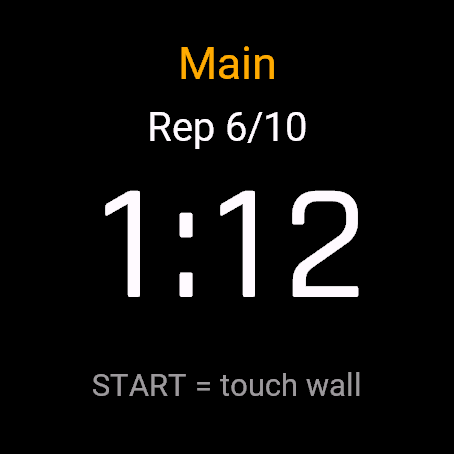
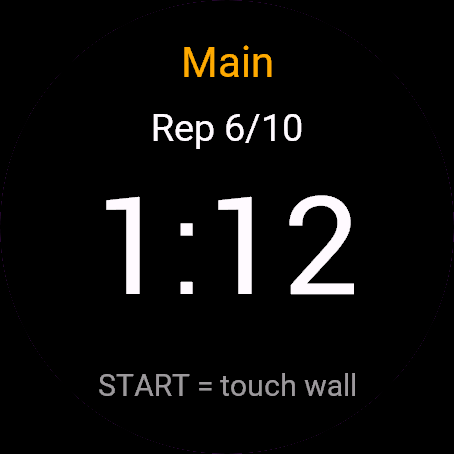
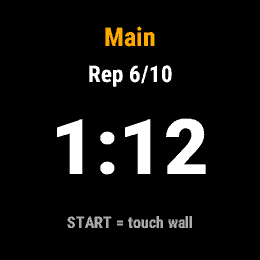
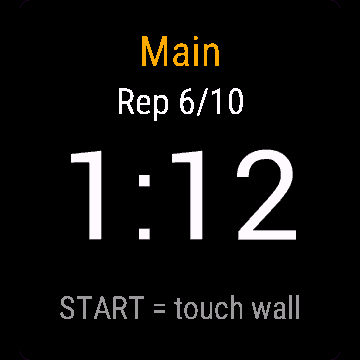
- Big countdown to the next send-off, rep number, set name
- Short vibration 5 seconds before the send-off, a longer one right at the send-off
- Press START when you touch the wall; the rep time is recorded and your rest is shown. Optional: after the first START, UP and DOWN count as a touch too
- Store up to 3 workouts and reuse them
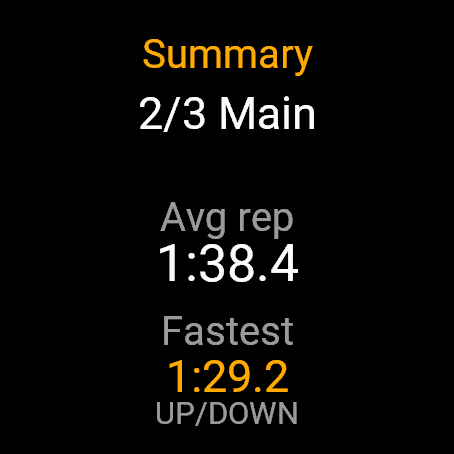
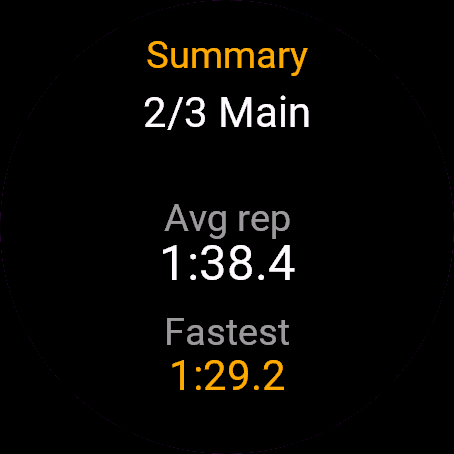
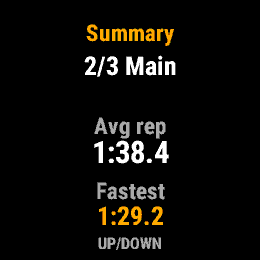
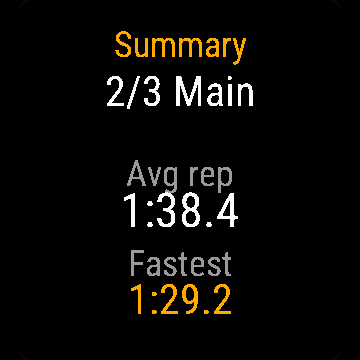
- Summary at the end: average rep time and fastest rep for every set
Built for the water: in a set, every control works with physical buttons only, taps on the screen are ignored on purpose (wet touchscreens do strange things). BACK or the menu button pauses, skips a rep, or ends the set early.
- Do 6 serii w treningu (rozgrzewka, seria główna, wypływanie, co tylko pływasz), każda z własną liczbą odcinków, dystansem, etykietą i interwałem albo stałym odpoczynkiem po odcinku
- Duże odliczanie do kolejnego startu, numer odcinka, nazwa serii
- Krótka wibracja 5 sekund przed startem, dłuższa w momencie startu
- Wciskasz START w momencie dotknięcia ściany - czas odcinka jest zapisany, a odpoczynek widoczny na ekranie. Opcjonalnie po pierwszym START liczą się też GÓRA i DÓŁ
- Zapisujesz do 3 treningów i używasz ich ponownie
- Podsumowanie na koniec: średni czas odcinka i najszybszy odcinek dla każdej serii
Zrobione pod wodę: w trakcie serii każda funkcja działa tylko przyciskami, dotyk ekranu jest celowo ignorowany (mokry ekran dotykowy robi dziwne rzeczy). WSTECZ albo menu pauzuje, pomija odcinek albo kończy serię wcześniej.
- Bis zu 6 Sets pro Training (Einschwimmen, Hauptteil, Ausschwimmen, was auch immer du schwimmst), jeweils mit eigenen Wiederholungen, Distanz, Bezeichnung und entweder festem Abgangsintervall oder fester Pause nach jeder Wiederholung
- Großer Countdown bis zum nächsten Abgang, Nummer der Wiederholung, Name des Sets
- Kurze Vibration 5 Sekunden vor dem Abgang, eine längere genau beim Abgang
- Drücke START, wenn du die Wand berührst; die Zeit der Wiederholung wird erfasst und deine Pause angezeigt. Optional: Nach dem ersten START zählen auch AUF und AB als Wandberührung
- Bis zu 3 Trainings speichern und wiederverwenden
- Zusammenfassung am Ende: durchschnittliche Wiederholungszeit und schnellste Wiederholung für jedes Set
Fürs Wasser gemacht: Während eines Sets funktioniert jede Bedienung ausschließlich über physische Tasten, Berührungen des Displays werden bewusst ignoriert (nasse Touchscreens verhalten sich unberechenbar). BACK oder die Menütaste pausiert, überspringt eine Wiederholung oder beendet das Set vorzeitig.
- Jusqu'à 6 séries par séance (échauffement, corps de séance, récupération, quel que soit votre entraînement), chacune avec ses propres répétitions, sa distance, son libellé et soit un intervalle de départ, soit un repos fixe après chaque répétition
- Grand compte à rebours jusqu'au prochain départ, numéro de répétition, nom de la série
- Courte vibration 5 secondes avant le départ, une plus longue pile au moment du départ
- Appuyez sur START lorsque vous touchez le mur ; le temps de la répétition est enregistré et votre temps de repos s'affiche. Optionnel : après le premier START, HAUT et BAS comptent aussi comme un contact
- Enregistrez jusqu'à 3 séances pour les réutiliser
- Résumé à la fin : temps moyen et répétition la plus rapide pour chaque série
Conçu pour l'eau : pendant une série, toutes les commandes fonctionnent uniquement avec les boutons physiques, les appuis tactiles sont volontairement ignorés (les écrans tactiles mouillés ont des comportements imprévisibles). BACK ou le bouton de menu met en pause, saute une répétition ou termine la série plus tôt.
- Hasta 6 series por entrenamiento (calentamiento, serie principal, vuelta a la calma, lo que nades), cada una con sus propias repeticiones, distancia, etiqueta y un intervalo de salida o un descanso fijo tras cada repetición
- Cuenta atrás grande hasta la siguiente salida, número de repetición, nombre de la serie
- Vibración corta 5 segundos antes de la salida, y una más larga justo en el momento de salir
- Pulsa START al tocar la pared; se registra el tiempo de la repetición y se muestra tu descanso. Opcional: tras el primer START, ARRIBA y ABAJO también cuentan como toque
- Guarda hasta 3 entrenamientos y reutilízalos
- Resumen al final: tiempo medio de repetición y repetición más rápida de cada serie
Pensado para el agua: durante una serie, todos los controles funcionan únicamente con botones físicos; los toques en la pantalla se ignoran a propósito (las pantallas táctiles mojadas hacen cosas extrañas). BACK o el botón de menú pausa, salta una repetición o termina la serie antes de tiempo.
- Maximaal 6 sets per training (warming-up, kern, cooling-down, wat je ook zwemt), elk met eigen herhalingen, afstand, label en een vertrekinterval of een vaste rust na elke herhaling
- Grote aftelling naar de volgende vertrektijd, herhalingsnummer, naam van de set
- Korte trilling 5 seconden voor de vertrektijd, een langere precies op de vertrektijd
- Druk op START wanneer je de wand aantikt; de herhaaltijd wordt geregistreerd en je rust wordt getoond. Optioneel: na de eerste START tellen OMHOOG en OMLAAG ook als aanraking
- Sla tot 3 trainingen op en hergebruik ze
- Samenvatting aan het einde: gemiddelde herhaaltijd en snelste herhaling voor elke set
Gebouwd voor het water: tijdens een set werkt elke bediening uitsluitend via fysieke knoppen, aanrakingen op het scherm worden opzettelijk genegeerd (natte touchscreens doen vreemde dingen). BACK of de menuknop pauzeert, slaat een herhaling over of beëindigt de set voortijdig.
- 1 ワークアウトにつき最大 6 セット(ウォームアップ、メイン、クールダウンなど自由に構成可能)。それぞれに本数、距離、ラベル、およびサークル(センドオフ)間隔または各本数後の固定休息時間を設定可能
- 次のスタートへの大きなカウントダウン表示、本数、セット名
- スタート 5 秒前に短いバイブレーション、スタートの瞬間に長めのバイブレーションで通知
- 壁にタッチしたら START を押すと、タイムが記録されて休息時間が表示されます。オプション: 最初の START のあとは、上ボタンと下ボタンもタッチとして数えられます
- 最大 3 つのワークアウトを保存して繰り返し呼び出し可能
- 終了時のサマリー: セットごとの平均タイムと最速タイム
水中仕様: セット中はすべての操作が物理ボタンのみで行われ、誤動作を防ぐため画面タップは意図的に無視されます(濡れたタッチスクリーンは誤作動を起こしやすいため)。BACK またはメニューボタンで一時停止、レップのスキップ、またはセットの早期終了が行えます。
- Fino a 6 serie per allenamento (riscaldamento, serie principale, defaticamento o qualsiasi cosa tu nuoti), ciascuna con le proprie ripetute, distanza, etichetta e un intervallo di ripartenza o un recupero fisso dopo ogni ripetuta
- Grande conto alla rovescia per la ripartenza successiva, numero della ripetuta, nome della serie
- Breve vibrazione 5 secondi prima della ripartenza, una più lunga esattamente al momento della partenza
- Premi START quando tocchi la parete; il tempo della ripetuta viene registrato e viene mostrato il tuo recupero. Facoltativo: dopo il primo START, anche SU e GIÙ contano come tocco
- Memorizza fino a 3 allenamenti e riutilizzali
- Riepilogo finale: tempo medio per ripetuta e ripetuta più veloce per ogni serie
Progettato per l'acqua: durante una serie, ogni comando funziona solo con i pulsanti fisici, i tocchi sullo schermo vengono volutamente ignorati (i touchscreen bagnati fanno cose strane). BACK o il pulsante menu mette in pausa, salta una ripetuta o termina la serie in anticipo.
- 每次训练最多支持 6 个组(热身组、主项组、放松组,适合各种游泳内容),每组均有独立的重复次数、距离、标签,以及出发包干间隔或每趟后的固定休息时间
- 大字号显示下次出发倒计时、当前趟数、组名称
- 出发前 5 秒短震动,出发瞬间长震动
- 触壁时按下 START;系统将记录该趟耗时并显示你的休息时间。可选:第一次按 START 之后,UP 和 DOWN 也算作触壁
- 最多可保存 3 套训练计划并反复使用
- 结束时提供摘要:每组的平均趟用时和最快单趟用时
专为水中打造:在组别进行中,所有控制仅支持物理按键,特意忽略屏幕轻触(潮湿的触摸屏容易误触)。BACK 或菜单按钮可暂停、跳过当前趟或提前结束组别。
- До 6 серий на тренировку (разминка, основная часть, заминка или любая другая программа), каждая со своим количеством повторений, дистанцией, названием и интервалом старта либо фиксированным отдыхом после отрезка
- Крупный обратный отсчет до следующего старта, номер повторения, название серии
- Короткая вибрация за 5 секунд до старта, более длинная точно в момент старта
- Нажмите START при касании бортика: время отрезка зафиксируется, и начнется отсчет отдыха. По желанию: после первого START кнопки ВВЕРХ и ВНИЗ тоже считаются касанием
- Сохранение до 3 тренировок для повторного использования
- Итоги в конце: среднее время отрезка и самый быстрый отрезок в каждой серии
Сделано для воды: во время серии все управление идет только через физические кнопки, касания экрана намеренно игнорируются (мокрый тачскрин ведет себя непредсказуемо). Кнопка BACK или кнопка меню ставит на паузу, пропускает повторение или досрочно завершает серию.
- Até 6 séries por treino (aquecimento, série principal, desaquecimento ou o que você nadar), cada uma com suas próprias repetições, distância, identificação e um intervalo de saída ou descanso fixo após cada repetição
- Contagem regressiva grande para a próxima saída, número da repetição, nome da série
- Vibração curta 5 segundos antes da saída, uma mais longa exatamente no momento da saída
- Pressione START ao tocar na borda; o tempo da repetição é registrado e seu descanso é exibido. Opcional: depois do primeiro START, CIMA e BAIXO também contam como toque
- Salve até 3 treinos e reutilize-os
- Resumo no final: tempo médio de repetição e repetição mais rápida de cada série
Feito para a água: durante a série, todos os controles funcionam apenas com botões físicos, toques na tela são ignorados de propósito (telas sensíveis ao toque molhadas têm comportamentos estranhos). BACK ou o botão de menu pausa, pula uma repetição ou encerra a série antes da hora.
- Až 6 sérií na trénink (rozplavání, hlavní motiv, vyplavání, cokoli plavete), každá s vlastními opakováními, vzdáleností, označením a buď intervalovým startem, nebo pevnou pauzou po každém opakování
- Velký odpočet do dalšího startu, číslo opakování, název série
- Krátká vibrace 5 sekund před startem intervalu, delší přesně při startu
- Při dotyku stěny stiskněte START; čas opakování se zaznamená a zobrazí se váš odpočinek. Volitelně: po prvním START se jako dotyk počítá i NAHORU a DOLŮ
- Uložení až 3 tréninků pro opakované použití
- Shrnutí na konci: průměrný čas opakování a nejrychlejší opakování pro každou sérii
Vytvořeno pro vodu: během série funguje veškeré ovládání pouze fyzickými tlačítky, dotyky na obrazovce jsou záměrně ignorovány (mokré dotykové displeje dělají zvláštní věci). BACK nebo tlačítko menu pozastaví sérii, přeskočí opakování nebo sérii předčasně ukončí.
- Até 6 séries por treino (aquecimento, série principal, retorno à calma, o que quer que nade), cada uma com as suas próprias repetições, distância, etiqueta e um intervalo de partida ou descanso fixo após cada repetição
- Contagem decrescente grande até à próxima partida, número da repetição, nome da série
- Vibração curta 5 segundos antes da partida, e uma mais longa exatamente na hora da partida
- Prima START ao tocar na parede; o tempo da repetição é registado e o seu descanso é apresentado. Opcional: após o primeiro START, CIMA e BAIXO também contam como toque
- Guarde até 3 treinos e reutilize-os
- Resumo no final: tempo médio de repetição e repetição mais rápida de cada série
Criado para a água: durante uma série, todos os controlos funcionam apenas com botões físicos, os toques no ecrã são ignorados de propósito (ecrãs táteis molhados têm comportamentos estranhos). BACK ou o botão de menu coloca em pausa, salta uma repetição ou termina a série mais cedo.
- 워크아웃당 최대 6개 세트(웜업, 메인 세트, 쿨다운 등 원하는 수영 방식), 각 세트마다 고유 반복 횟수, 거리, 라벨 및 센드오프 인터벌 또는 회당 고정 휴식 시간 설정
- 다음 출발까지의 큼직한 카운트다운, 반복 횟수, 세트 이름
- 출발 5초 전 짧은 진동, 출발 시점에 긴 진동
- 벽에 터치할 때 START를 누르면 회당 소요 시간이 기록되고 휴식 시간이 표시됩니다. 선택 사항: 첫 번째 START 이후에는 UP과 DOWN도 터치로 인식됩니다
- 최대 3개의 워크아웃을 저장하고 재사용
- 종료 시 요약: 모든 세트의 평균 반복 시간 및 최고 기록
물속 환경을 고려한 설계: 세트 진행 중에는 모든 조작이 물리 버튼으로만 작동하며, 화면 터치는 의도적으로 무시됩니다(젖은 터치스크린의 오작동 방지). BACK 또는 메뉴 버튼으로 일시정지, 반복 건너뛰기, 또는 세트 조기 종료 가능.
- Upp till 6 serier per pass (uppvärmning, huvudserie, avsim, vad du än simmar), var och en med egna repetitioner, distans, etikett och antingen ett starttidsintervall eller en fast vila efter varje repetition
- Stor nedräkning till nästa starttid, repetitionsnummer, serienamn
- Kort vibration 5 sekunder före starttiden, en längre precis vid starttiden
- Tryck på START när du nuddar väggen; repetitionstiden registreras och din vila visas. Valfritt: efter första START räknas även UPP och NER som en beröring
- Spara upp till 3 träningspass och återanvänd dem
- Sammanfattning i slutet: genomsnittlig repetitionstid och snabbaste repetition för varje serie
Byggd för vattnet: under en serie fungerar alla kontroller enbart med fysiska knappar, tryck på skärmen ignoreras med flit (blöta pekskärmar gör konstiga saker). BACK eller menyknappen pausar, hoppar över en repetition eller avslutar serien i förtid.
- Op til 6 serier pr. træningspas (opvarmning, hovedserie, udsvømning, hvad end du svømmer), hver med sine egne gentagelser, distance, etiket og enten et startinterval eller en fast pause efter hver gentagelse
- Stor nedtælling til næste start, gentagelsesnummer, serienavn
- Kort vibration 5 sekunder før start, en længere lige ved start
- Tryk på START, når du rører kanten; gentagelsestiden registreres, og din pause vises. Valgfrit: efter det første tryk på START tæller OP og NED også som en berøring
- Gem op til 3 træningspas og genbrug dem
- Opsummering til sidst: gennemsnitlig gentagelsestid og hurtigste gentagelse for hver serie
Bygget til vandet: i en serie fungerer al betjening udelukkende med fysiske knapper, berøringer på skærmen ignoreres med vilje (våde touchskærme opfører sig mærkeligt). BACK eller menuknappen sætter på pause, springer en gentagelse over eller afslutter serien før tid.
- Opptil 6 serier per treningsøkt (oppvarming, hovedsett, nedsvømming, hva enn du svømmer), hver med egne repetisjoner, distanse, etikett og enten et startintervall eller en fast pause etter hver repetisjon
- Stor nedtelling til neste start, repetisjonsnummer, serienavn
- Kort vibrasjon 5 sekunder før start, en lengre akkurat ved start
- Trykk START når du berører kanten; repetisjonstiden registreres og pausen din vises. Valgfritt: etter første START teller også OPP og NED som en berøring
- Lagre opptil 3 treningsøkter og bruk dem på nytt
- Sammendrag til slutt: gjennomsnittlig repetisjonstid og raskeste repetisjon for hver serie
Bygget for vannet: under en serie fungerer all betjening kun med fysiske knapper, berøringer på skjermen ignoreres med vilje (våte berøringsskjermer gjør rare ting). BACK eller menyknappen pauser, hopper over en repetisjon eller avslutter serien for tidlig.
- 每次訓練最多可設定 6 組(熱身、主課表、緩和,依您的游泳內容自訂),每組皆可獨立設定趟數、距離、標籤,以及出發間隔或每趟後的固定休息時間
- 超大倒數計時顯示下次出發時間、當前趟數與組名
- 出發前 5 秒短暫震動,出發當下長震動提醒
- 觸壁時按下 START;記錄該趟時間並顯示休息時間。可選功能:第一次按 START 之後,上鍵和下鍵也算觸壁
- 最多可儲存 3 組訓練課表並重複使用
- 結束後的摘要:每組的平均趟時間與最快一趟
專為水中設計:在訓練組進行時,所有操作僅能透過實體按鍵完成,刻意忽略螢幕觸控(潮濕的觸控螢幕容易誤觸)。按 BACK 或選單鍵可暫停、跳過該趟或提前結束該組。
- Enintään 6 sarjaa per harjoitus (lämmittely, pääsarja, loppuverryttely, mitä ikinä uitkaan), jokaisella omat toistot, matka, nimi ja joko kiinteä lähtöväli tai kiinteä lepo jokaisen toiston jälkeen
- Suuri laskuri seuraavaan lähtöön, toiston numero, sarjan nimi
- Lyhyt värinä 5 sekuntia ennen lähtöä, pidempi värinä tasan lähtöhetkellä
- Paina START, kun kosketat seinää; toistoaika tallentuu ja lepoaika näytetään. Valinnainen: ensimmäisen START-painalluksen jälkeen myös YLÖS ja ALAS lasketaan kosketukseksi
- Tallenna jopa 3 harjoitusta ja käytä niitä uudelleen
- Yhteenveto lopussa: jokaisen sarjan toistojen keskiaika ja nopein toisto
Tehty veteen: sarjan aikana kaikki toiminnot toimivat vain fyysisillä painikkeilla, kosketusnäytön napautukset jätetään tarkoituksella huomiotta (märkä kosketusnäyttö käyttäytyy arvaamattomasti). BACK tai valikkopainike keskeyttää, ohittaa toiston tai päättää sarjan ennenaikaisesti.
- Až 6 sérií na jeden tréning (rozplávanie, hlavná séria, vyplávanie, čokoľvek plávate), každá s vlastnými opakovaniami, vzdialenosťou, popisom a buď intervalom odchodu (send-off), alebo pevným odpočinkom po každom opakovaní
- Veľké odpočítavanie do ďalšieho odchodu, číslo opakovania, názov série
- Krátke zavibrovanie 5 sekúnd pred odchodom, dlhšie priamo pri odchode
- Stlačte START, keď sa dotknete steny; zaznamená sa čas opakovania a zobrazí sa váš odpočinok. Voliteľne: po prvom START počíta ako dotyk aj NAHOR a NADOL
- Uložte si až 3 tréningy a používajte ich opakovane
- Zhrnutie na konci: priemerný čas opakovania a najrýchlejšie opakovanie pre každú sériu
Stvorené pre vodu: počas série funguje každé ovládanie iba pomocou fyzických tlačidiel, ťuknutia na obrazovku sa zámerne ignorujú (mokré dotykové obrazovky robia zvláštne veci). BACK alebo tlačidlo menu pozastaví tréning, preskočí opakovanie alebo predčasne ukončí sériu.
- Do 6 serij na vadbo (ogrevanje, glavna serija, izplavanje, karkoli plavate), vsaka z lastnim številom ponovitev, razdaljo, oznako in intervalom odhoda ali fiksnim počitkom po vsaki ponovitvi
- Veliko odštevanje do naslednjega odhoda, številka ponovitve, ime serije
- Kratko vibriranje 5 sekund pred odhodom, daljše natanko ob odhodu
- Pritisnite START, ko se dotaknete stene; čas ponovitve se zabeleži in prikaže se vaš počitek. Neobvezno: po prvem START se tudi GOR in DOL štejeta kot dotik
- Shranite do 3 vadbe in jih znova uporabite
- Povzetek na koncu: povprečni čas ponovitve in najhitrejša ponovitev za vsako serijo
Ustvarjeno za vodo: med serijo celotno upravljanje deluje le s fizičnimi gumbi, dotiki zaslona pa so namerno prezrti (mokri zasloni na dotik se obnašajo nepredvidljivo). BACK ali gumb menija začasno ustavi, preskoči ponovitev ali predčasno zaključi serijo.
- Hingga 6 set per latihan (warm-up, main set, cool-down, apa pun yang Anda renangkan), masing-masing dengan repetisi, jarak, label, serta interval send-off atau istirahat tetap setelah setiap repetisi
- Hitung mundur besar ke send-off berikutnya, nomor repetisi, nama set
- Getaran pendek 5 detik sebelum send-off, getaran lebih panjang tepat saat send-off
- Tekan START saat menyentuh dinding; waktu repetisi dicatat dan waktu istirahat Anda ditampilkan. Opsional: setelah START pertama, ATAS dan BAWAH juga dihitung sebagai sentuhan
- Simpan hingga 3 latihan dan gunakan kembali kapan saja
- Ringkasan di akhir: rata-rata waktu repetisi dan repetisi tercepat untuk setiap set
Dirancang untuk di air: dalam satu set, setiap kontrol hanya berfungsi dengan tombol fisik, ketukan pada layar sengaja diabaikan (layar sentuh yang basah sering merespons tak terduga). BACK atau tombol menu untuk menjeda, melewati repetisi, atau mengakhiri set lebih awal.
- Akár 6 szett edzésenként (bemelegítés, fő szett, levezetés, bármit is úszol), mindegyik saját ismétlésszámmal, távolsággal, elnevezéssel, valamint indulási intervallummal vagy minden ismétlés utáni fix pihenővel
- Nagy méretű visszaszámláló a következő indulásig, ismétlés száma, szett neve
- Rövid rezgés 5 másodperccel az indulás előtt, hosszabb rezgés pontosan az indulás pillanatában
- Nyomd meg a START gombot, amikor megérinted a falat; az ismétlés ideje rögzítésre kerül, és megjelenik a pihenőd. Opcionális: az első START után a FEL és a LE is érintésnek számít
- Akár 3 edzés tárolása és újrahasználata
- Összegzés a végén: átlagos ismétlési idő és leggyorsabb ismétlés minden szetthez
Vízre tervezve: egy szett közben minden vezérlés kizárólag fizikai gombokkal működik, a képernyő koppintásait szándékosan figyelmen kívül hagyja (a vizes érintőképernyők furcsa dolgokat művelnek). A BACK vagy a menü gomb szünetelteti, átugorja az ismétlést, vagy idő előtt befejezi a szettet.
- สูงสุด 6 เซตต่อการซ้อม (warm-up, เซตหลัก, cool-down หรือตามโปรแกรมที่คุณว่าย) แต่ละเซตกำหนดจำนวนรอบ ระยะทาง ป้ายกำกับ รวมถึงเลือกระหว่างช่วง send-off หรือเวลาพักคงที่หลังจากแต่ละรอบได้
- ตัวเลขนับถอยหลังขนาดใหญ่สู่ send-off ถัดไป, ลำดับรอบ, ชื่อเซต
- สั่นเตือนสั้น ๆ 5 วินาทีก่อนถึงเวลา send-off และสั่นยาวขึ้นเมื่อถึงเวลา send-off พอดี
- กด START เมื่อแตะขอบสระ ระบบจะบันทึกเวลาของรอบนั้นและแสดงเวลาพักของคุณ ตัวเลือกเสริม: หลังกด START ครั้งแรก ปุ่ม UP และ DOWN จะนับเป็นการแตะขอบสระด้วย
- บันทึกการซ้อมได้สูงสุด 3 รูปแบบเพื่อนำกลับมาใช้ซ้ำได้
- สรุปผลเมื่อสิ้นสุด: เวลาเฉลี่ยต่อรอบและรอบที่เร็วที่สุดสำหรับทุกเซต
ออกแบบมาสำหรับใช้งานในน้ำ: ขณะอยู่ในเซต การควบคุมทั้งหมดจะทำงานผ่านปุ่มกดเท่านั้น และตั้งใจไม่ตอบสนองต่อการแตะหน้าจอ (หน้าจอสัมผัสที่เปียกน้ำมักทำงานผิดพลาด) BACK หรือปุ่มเมนูใช้เพื่อหยุดชั่วคราว ข้ามรอบ หรือจบคอร์สก่อนกำหนด
- Έως και 6 σετ ανά προπόνηση (προθέρμανση, κύριο σετ, αποθεραπεία, ό,τι κι αν κολυμπάτε), το καθένα με τις δικές του επαναλήψεις, απόσταση, ετικέτα και είτε διάστημα εκκίνησης (send-off) είτε σταθερή ξεκούραση μετά από κάθε επανάληψη
- Μεγάλη αντίστροφη μέτρηση για το επόμενο send-off, αριθμός επανάληψης, όνομα σετ
- Σύντομη δόνηση 5 δευτερόλεπτα πριν το send-off, μεγαλύτερη ακριβώς τη στιγμή του send-off
- Πατήστε START όταν αγγίζετε τον τοίχο. Ο χρόνος της επανάληψης καταγράφεται και εμφανίζεται η ξεκούρασή σας. Προαιρετικά: μετά το πρώτο START, τα UP και DOWN μετρούν επίσης ως άγγιγμα
- Αποθηκεύστε έως και 3 προπονήσεις και επαναχρησιμοποιήστε τες
- Σύνοψη στο τέλος: μέσος χρόνος επανάληψης και ταχύτερη επανάληψη για κάθε σετ
Φτιαγμένο για το νερό: κατά τη διάρκεια ενός σετ, κάθε χειρισμός λειτουργεί μόνο με φυσικά κουμπιά, τα πατήματα στην οθόνη αγνοούνται επίτηδες (οι βρεγμένες οθόνες αφής συμπεριφέρονται απρόβλεπτα). Το BACK ή το κουμπί μενού κάνει παύση, παραλείπει μια επανάληψη ή τερματίζει το σετ πρόωρα.
- Do 6 serija po treningu (zagrijavanje, glavna serija, rasplivavanje, što god plivate), svaka s vlastitim brojem ponavljanja, udaljenošću, oznakom te intervalom polaska ili fiksnim odmorom nakon svakog ponavljanja
- Veliko odbrojavanje do sljedećeg polaska, broj ponavljanja, naziv serije
- Kratka vibracija 5 sekundi prije polaska, duža točno u trenutku polaska
- Pritisnite START kada dodirnete zid; vrijeme ponavljanja se bilježi i prikazuje se vaš odmor. Neobavezno: nakon prvog STARTA i GORE i DOLJE računaju se kao dodir
- Spremite do 3 treninga i koristite ih ponovno
- Sažetak na kraju: prosječno vrijeme ponavljanja i najbrže ponavljanje za svaku seriju
Stvoreno za vodu: tijekom serije sve kontrole rade isključivo putem fizičkih tipki, dodiri zaslona se namjerno zanemaruju (mokri zasloni na dodir rade čudne stvari). BACK ili tipka izbornika pauzira, preskače ponavljanje ili prerano završava seriju.
- עד 6 סטים לכל אימון (חימום, סט מרכזי, שחרור, או כל מה שאתה שוחה), כל אחד עם חזרות, מרחק ותווית משלו, ומרווח יציאה (send-off) או מנוחה קבועה לאחר כל חזרה
- ספירה לאחור גדולה ליציאה הבאה, מספר חזרה ושם הסט
- רטט קצר 5 שניות לפני היציאה, ורטט ארוך יותר בדיוק בזמן היציאה
- לחץ על START כשאתה נוגע בקיר; זמן החזרה מתועד והמנוחה שלך מוצגת. אפשרות נוספת: אחרי ה-START הראשון, גם מעלה ומטה נחשבים כנגיעה
- אחסן עד 3 אימונים והשתמש בהם שוב ושוב
- סיכום בסיום: זמן חזרה ממוצע והחזרה המהירה ביותר לכל סט
נבנה עבור המים: במהלך סט, כל השליטה מתבצעת בכפתורים פיזיים בלבד, והקשות על המסך מנוטרלות בכוונה (מסכי מגע רטובים מתנהגים מוזר). כפתור BACK או כפתור התפריט משהה, מדלג על חזרה, או מסיים את הסט מוקדם.
- Sehingga 6 set setiap sesi latihan (warm-up, set utama, cool-down, apa sahaja renangan anda), setiap satu dengan ulangan, jarak, label dan sama ada selang masa pelepasan atau rehat tetap selepas setiap ulangan
- Kiraan detik besar ke pelepasan seterusnya, nombor ulangan, nama set
- Getaran pendek 5 saat sebelum pelepasan, getaran lebih panjang tepat pada waktu pelepasan
- Tekan START apabila menyentuh dinding; masa ulangan direkodkan dan rehat anda dipaparkan. Pilihan: selepas START pertama, UP dan DOWN juga dikira sebagai sentuhan
- Simpan sehingga 3 sesi latihan dan gunakannya semula
- Ringkasan pada akhir: purata masa ulangan dan ulangan terpantas untuk setiap set
Direka untuk dalam air: semasa set, setiap kawalan berfungsi dengan butang fizikal sahaja, ketukan pada skrin sengaja diabaikan (skrin sentuh basah bertindak balas tidak menentu). BACK atau butang menu menjeda, melangkau ulangan, atau menamatkan set lebih awal.
How to use it
Open Swim Sets from the watch's app menu.
Saves as a pool swim activity. Honest note: distance is taken from your reps and set distance; native length counting is not used.
Otwórz Serie pływackie z menu aplikacji na zegarku.
Zapis jako aktywność basenowa. Uczciwie: dystans pochodzi z Twoich odcinków i dystansu serii; natywne liczenie długości nie jest używane.
Öffne Swim Sets im App-Menü der Uhr.
Speichert als Schwimmbad-Aktivität. Offener Hinweis: Die Distanz wird aus deinen Wiederholungen und der Set-Distanz berechnet; die native Bahnenzählung wird nicht verwendet.
Ouvrez Swim Sets depuis le menu des applications de la montre.
Enregistré comme une activité de natation en piscine. Remarque en toute franchise : la distance est calculée d'après vos répétitions et la distance de la série ; le comptage natif des longueurs n'est pas utilisé.
Abre Swim Sets desde el menú de apps del reloj.
Se guarda como actividad de natación en piscina. Nota sincera: la distancia se calcula a partir de tus repeticiones y la distancia de la serie; no se utiliza el conteo nativo de largos.
Open Swim Sets via het appmenu van het horloge.
Wordt opgeslagen als een zwembadzwemactiviteit. Eerlijke opmerking: afstand wordt berekend op basis van je herhalingen en setafstand; de standaard baantjestelling wordt niet gebruikt.
時計のアプリメニューから Swim Sets を開いてください。
プールスイムアクティビティとして保存されます。正直な補足: 距離は設定された本数と距離から計算され、Garmin ネイティブのターン(プール長)カウントは使用されません。
Apri Swim Sets dal menu delle app dell'orologio.
Salva come attività nuoto in piscina. Nota di trasparenza: la distanza viene calcolata dalle ripetute e dalla distanza della serie; il conteggio nativo delle vasche non viene utilizzato.
在手表的应用菜单中打开 Swim Sets。
保存为泳池游泳活动。坦诚说明:距离根据你的趟数和设定距离计算,不采用手表原生的泳道圈数计数。
Откройте Swim Sets из меню приложений на часах.
Сохраняется как активность плавания в бассейне. Честное предупреждение: дистанция рассчитывается по вашим повторениям и длине серии; встроенный подсчет дорожек не используется.
Abra Swim Sets pelo menu de apps do relógio.
Salva como uma atividade de natação em piscina. Nota sincera: a distância é calculada a partir das repetições e da distância da série; a contagem nativa de piscinas não é utilizada.
Otevřete Swim Sets z nabídky aplikací v hodinkách.
Ukládá se jako aktivita plavání v bazénu. Upřímná poznámka: vzdálenost se počítá z vašich opakování a vzdálenosti série; nativní počítání bazénů se nepoužívá.
Abra Swim Sets no menu de aplicações do relógio.
Guarda como uma atividade de natação em piscina. Nota honesta: a distância é calculada a partir das suas repetições e da distância da série; a contagem nativa de piscinas não é utilizada.
시계의 앱 메뉴에서 Swim Sets을(를) 여세요.
풀 수영 액티비티로 저장됩니다. 솔직한 안내: 거리는 반복 횟수와 세트 거리를 기준으로 계산되며, 기기 기본 레인 길이 카운팅 기능은 사용되지 않습니다.
Öppna Swim Sets från klockans appmeny.
Sparas som en bassängsimningsaktivitet. Ärlig notis: distansen hämtas från dina repetitioner och seriedistans; klockans inbyggda längdräkning används inte.
Åbn Swim Sets fra urets appmenu.
Gemmer som en banesvømningsaktivitet. En ærlig bemærkning: distancen tages fra dine gentagelser og seriedistance; urets indbyggede banetælling bruges ikke.
Åpne Swim Sets fra appmenyen på klokken.
Lagres som en bassengsvømming-aktivitet. En ærlig merknad: distansen hentes fra repetisjonene dine og seriedistansen; innebygd banetelling brukes ikke.
從手錶的應用程式選單開啟 Swim Sets。
儲存為泳池游泳活動。坦白說明:距離是根據您的趟數與設定距離計算;未採用手錶內建的泳池趟數計數。
Avaa Swim Sets kellon sovellusvalikosta.
Tallentuu allasuintisuorituksena. Rehellinen huomio: matka lasketaan toistoistasi ja sarjan matkasta; kellon omaa altaanmittojen laskentaa ei käytetä.
Otvorte Swim Sets z ponuky aplikácií v hodinkách.
Ukladá sa ako aktivita plávania v bazéne. Úprimná poznámka: vzdialenosť sa berie z vašich opakovaní a nastavenej vzdialenosti série; natívne počítanie dĺžok bazéna sa nepoužíva.
Odprite Swim Sets v meniju aplikacij na uri.
Shrani se kot dejavnost plavanja v bazenu. Iskrena opomba: razdalja se izračuna iz vaših ponovitev in razdalje serije; vgrajeno štetje dolžin se ne uporablja.
Buka Swim Sets dari menu aplikasi jam.
Tersimpan sebagai aktivitas renang kolam. Catatan jujur: jarak diambil dari repetisi dan jarak set Anda; penghitungan panjang kolam bawaan tidak digunakan.
Nyissa meg a(z) Swim Sets alkalmazást az óra alkalmazásmenüjéből.
Medencés úszás tevékenységként menti. Őszinte megjegyzés: a távolságot az ismétlésekből és a szett távolságából számítja; a beépített hossz-számlálást nem használja.
เปิด Swim Sets จากเมนูแอปของนาฬิกา
บันทึกเป็นกิจกรรมว่ายน้ำในสระ หมายเหตุตามตรง: ระยะทางคำนวณจากจำนวนรอบและระยะทางของเซตที่คุณตั้งไว้ ไม่ได้ใช้การนับความยาวสระ (length) ในตัวของนาฬิกา
Ανοίξτε το Swim Sets από το μενού εφαρμογών του ρολογιού.
Αποθηκεύεται ως δραστηριότητα κολύμβησης σε πισίνα. Ειλικρινής σημείωση: η απόσταση υπολογίζεται από τις επαναλήψεις και την απόσταση του σετ. Η εγγενής μέτρηση μηκών πισίνας δεν χρησιμοποιείται.
Otvorite Swim Sets iz izbornika aplikacija na satu.
Sprema se kao aktivnost plivanja u bazenu. Iskrena napomena: udaljenost se računa iz vaših ponavljanja i udaljenosti serije; izvorno brojanje dužina bazena se ne koristi.
פתחו את Swim Sets מתפריט האפליקציות של השעון.
נשמר כפעילות שחייה בבריכה. הערה כנה: המרחק מחושב מתוך החזרות ומרחק הסט שלך; ספירת בריכות מובנית אינה בשימוש.
Buka Swim Sets daripada menu aplikasi jam.
Disimpan sebagai aktiviti renang kolam. Nota jujur: jarak diambil daripada ulangan dan jarak set anda; kiraan panjang kolam asal tidak digunakan.
Manual
The full manual and the detailed permission descriptions are available in English and Polish.
Swim Sets: user manual
What it does
Swim Sets is a pool send-off clock. Set up 10 x 100 on 1:45 once, and the watch counts down to each send-off and vibrates. The swim is saved as a pool swim activity.
Requirements and supported watches
Needs Connect IQ 3.3.0+ and the Connect IQ or Garmin Connect phone app. Supported watches:
- Round AMOLED: epix 2 and epix Pro 2, fēnix 8, E, Forerunner 165, 265, 570, 965, 970, Instinct 3 AMOLED, Crossover AMOLED, Venu 2, 3, 4, vivoactive 5, 6.
- Round MIP: enduro 3, fēnix 7 series, 8 Solar, Forerunner 55, 245, 255, vivoactive 4.
- Square and rectangular AMOLED: Venu Sq 2, Venu X1.
Installation
In the Connect IQ app on your phone (or Garmin Connect, then the Connect IQ Store) find "Swim Sets" by Dialforge, tap Install and sync the watch. Open it from the apps list: press START on the watch face, then pick Swim Sets.
First launch
The start screen shows the app name, "Press start" and the free beta days left. START (or a tap) opens the menu. The default workout is ready to swim. The 30-day free beta starts the first time you open it.
Controls
Watches with buttons (START, UP, DOWN, BACK)
- Menu: START on Workout, Pool, Any button starts or Late touch keeps schedule cycles its value. Edit sets opens the set list.
- In the water: START is a wall touch, and the first START begins rep 1. With Any button starts On, UP and DOWN count too, after that first START.
- BACK or holding the menu button pauses: Resume, Skip rep, End set, Save, Discard (asks twice). It is not a wall touch.
- Summary: UP and DOWN scroll, START or BACK closes the app.
Touch watches (tap, hold, swipe)
- Taps work in the menus and on the start screen. During a workout taps and swipes are ignored on purpose, so water cannot count a rep. On the summary a tap closes the app.
Settings
Phone: Connect IQ app, Swim Sets, Settings (the unlock code fields are there too).
On the watch, inside the app:
- Workout: up to 3 saved. Pool: 25 m, 50 m, 25 yd or 33.3 m.
- Late touch keeps schedule: On by default. A late touch starts the next rep at once, signals stay on the original grid. Off restarts the clock from your touch.
- Edit sets: up to 6 sets, each with Label, Reps 1 to 40, Distance (25 to 400), Mode and time. Send-off: 0:15 to 10:00. Fixed rest: 0:00 to 5:00, both in 5 s steps.
License
- Free beta: 30 days from the first launch, everything works.
- Price: 5.99 EUR once at dialforge.dev, no subscription. The 8-character code is tied to your watch's UID.
- Where to enter it: phone, Connect IQ app, Swim Sets, Settings. Read the UID in "Watch UID (needed to buy a code)", buy the code, then type it into "Unlock code from dialforge.dev". The end-of-beta screen on the watch shows the UID too.
- After the beta without a code: an end-of-beta screen with the UID replaces the app. Enter the code, then open it again. New watch? Write to us and the code moves for free.
Privacy and permissions
Permissions:
- Activity recording: saves the session to Garmin Connect.
- Extra FIT fields: adds the app's values to the saved activity.
- Sensors: heart rate from the watch.
No internet use. Data stays on the watch and in the activities you save.
Troubleshooting
The code does not work. Check that the UID you bought for matches "Watch UID (needed to buy a code)" and type all 8 characters (case is ignored, no 0, O, 1 or I). A code for another app does not fit. Sync, then reopen.
What if I touch the wall early? In Send-off mode nothing changes: the clock runs to the original signal while you rest.
How does it warn me? A short vibration 5 seconds before the send-off, a longer one at the send-off.
Does it count lengths? No. Distance comes from your reps times the set distance.
Contact
kontakt@dialforge.dev or dialforge.dev. Please write before leaving a low rating.
Serie pływackie: instrukcja obsługi
Do czego służy
Serie pływackie to zegar interwałów na basen. Ustawiasz raz 10 x 100 na 1:45, a zegarek odlicza do każdego startu i wibruje. Pływanie zapisuje się jako pływanie basenowe.
Wymagania i obsługiwane zegarki
Wymaga Connect IQ 3.3.0+ i aplikacji Connect IQ albo Garmin Connect w telefonie. Obsługiwane zegarki:
- Okrągłe AMOLED: epix 2 i epix Pro 2, fēnix 8, E, Forerunner 165, 265, 570, 965, 970, Instinct 3 AMOLED, Crossover AMOLED, Venu 2, 3, 4, vivoactive 5, 6.
- Okrągłe MIP: enduro 3, seria fēnix 7, fēnix 8 Solar, Forerunner 55, 245, 255, vivoactive 4.
- Kwadratowe i prostokątne AMOLED: Venu Sq 2, Venu X1.
Instalacja
Na telefonie otwórz aplikację Connect IQ (albo Garmin Connect, a w niej sklep Connect IQ), wyszukaj "Serie pływackie" od Dialforge, stuknij Zainstaluj i zsynchronizuj zegarek. Uruchom ją z listy aplikacji: na tarczy naciśnij START i wybierz Serie pływackie.
Pierwsze uruchomienie
Ekran startowy pokazuje nazwę, "Wciśnij start" i liczbę dni bety do końca. START (albo stuknięcie) otwiera menu. Domyślny trening jest gotowy do pływania. 30-dniowa darmowa beta zaczyna się przy pierwszym otwarciu.
Sterowanie
Zegarki z przyciskami (START, GÓRA, DÓŁ, WSTECZ)
- Menu: START na Trening, Basen, Start każdym przyciskiem albo Spóźniony dotyk: stała siatka przełącza wartość. Edytuj serie otwiera listę serii.
- W wodzie: START to dotknięcie ściany, a pierwszy START zaczyna odcinek 1. Przy włączonym Start każdym przyciskiem liczą się też GÓRA i DÓŁ, po tym pierwszym START.
- WSTECZ albo przytrzymanie przycisku menu robi pauzę: Wznów, Pomiń odcinek, Zakończ serię, Zapisz, Odrzuć (pyta dwa razy). To nie jest dotknięcie ściany.
- Podsumowanie: GÓRA i DÓŁ przewijają, START albo WSTECZ zamyka aplikację.
Zegarki dotykowe (stuknięcie, przytrzymanie, przesunięcie)
- Stuknięcia działają w menu i na ekranie startowym. W trakcie treningu stuknięcia i przesunięcia są celowo ignorowane, żeby woda nie policzyła odcinka. W podsumowaniu stuknięcie zamyka aplikację.
Ustawienia
Telefon: aplikacja Connect IQ, Serie pływackie, Ustawienia (są tam też pola kodu odblokowania).
Na zegarku, w aplikacji:
- Trening: do 3 zapisanych. Basen: 25 m, 50 m, 25 yd albo 33.3 m.
- Spóźniony dotyk: stała siatka: domyślnie Wł. Spóźnione dotknięcie od razu zaczyna następny odcinek, sygnały zostają na pierwotnej siatce. Wył. liczy czas od nowa od dotknięcia.
- Edytuj serie: do 6 serii, każda z Etykietą, Powtórzeniami od 1 do 40, Dystansem (25 do 400), Trybem i czasem. Interwał: od 0:15 do 10:00. Stały odpoczynek: od 0:00 do 5:00, oba co 5 s.
Licencja
- Darmowa beta: 30 dni od pierwszego uruchomienia, wszystko działa.
- Cena: jednorazowo 5,99 EUR na dialforge.dev, bez abonamentu. 8-znakowy kod jest przypisany do UID zegarka.
- Gdzie wpisać: telefon, aplikacja Connect IQ, Serie pływackie, Ustawienia. Odczytaj UID w polu "UID zegarka (potrzebny do zakupu kodu)", kup kod i wpisz go w "Kod odblokowania z dialforge.dev". Ekran końca bety na zegarku też pokazuje UID.
- Po becie bez kodu: zamiast aplikacji pojawia się ekran końca bety z UID. Wpisz kod i otwórz aplikację ponownie. Nowy zegarek? Napisz do nas, przeniesiemy kod za darmo.
Prywatność i uprawnienia
Uprawnienia:
- Zapis aktywności: zapisuje sesję w Garmin Connect.
- Dodatkowe pola FIT: dopisuje wartości aplikacji do aktywności.
- Czujniki: tętno z zegarka.
Zero połączeń z internetem. Dane zostają w zegarku i w zapisywanych aktywnościach.
Rozwiązywanie problemów
Kod nie działa. Sprawdź, czy UID, dla którego kupiono kod, zgadza się z polem "UID zegarka (potrzebny do zakupu kodu)", i wpisz wszystkie 8 znaków (wielkość liter bez znaczenia, bez 0, O, 1, I). Kod do innej aplikacji nie pasuje. Zsynchronizuj i otwórz ponownie.
Co jeśli dotknę ściany za wcześnie? W trybie Interwał nic się nie zmienia: zegar idzie do pierwotnego sygnału, a ty odpoczywasz.
Jak mnie ostrzega? Krótką wibracją 5 sekund przed startem i dłuższą w chwili startu.
Czy liczy długości basenu? Nie. Dystans bierze się z liczby odcinków razy dystans serii.
Kontakt
kontakt@dialforge.dev albo dialforge.dev. Napisz, zanim wystawisz niską ocenę.
Permissions and privacy
This product asks the watch for the permissions below. Connect IQ shows them when you install it.
- Activity recording: Saves your workout in Garmin Connect (the activity from this app). The data stays in your Garmin account.Zapisuje trening w Garmin Connect (aktywność z tej aplikacji). Dane zostają na Twoim koncie Garmin.
- Own data fields in the activity: Adds this app's own numbers (for example points or sets) to the saved activity.Dodaje do zapisanej aktywności liczby tej aplikacji (na przykład punkty albo serie).
- Heart rate and sensors: Reads heart rate and other sensors of the watch while the app runs.Odczytuje tętno i inne czujniki zegarka, gdy aplikacja działa.
This product does not use the internet and sends no data to our servers.
The full manual and the detailed permission descriptions are available in English and Polish.
Compatible watches
51mm, D2 Air X15, D2 Mach 1 Pro, Enduro 2, Enduro 3, epix (Gen 2), epix Pro (Gen 2) 42mm, epix Pro (Gen 2) 47mm, epix Pro (Gen 2) 51mm, Forerunner 165, Forerunner 165 Music, Forerunner 245, Forerunner 245 Music, Forerunner 255, Forerunner 255 Music, Forerunner 255s, Forerunner 255s Music, Forerunner 265, Forerunner 265s, Forerunner 55, Forerunner 570 42mm, Forerunner 570 47mm, Forerunner 965, Forerunner 970, fēnix 7, fēnix 7 Pro, fēnix 7 Pro - Solar Edition (no Wi-Fi), fēnix 7S, fēnix 7S Pro, fēnix 7X, fēnix 7X Pro, fēnix 7X Pro - Solar Edition (no Wi-Fi), fēnix 8 43mm, fēnix 8 47mm, fēnix 8 Pro 47mm, fēnix 8 Solar 47mm, fēnix 8 Solar 51mm, fēnix E, Instinct 3 AMOLED 45mm, Instinct 3 AMOLED 50mm, Instinct Crossover AMOLED, MicroLED, quatix 7, quatix 7 Pro, quatix 7 Sapphire, quatix 7X Solar, quatix 8 47mm, quatix 8 Pro 47mm, tactix 7, tactix 7 – AMOLED Edition, tactix 8 47mm, tactix 8 Solar 51mm, Venu 2, Venu 2 Plus, Venu 2S, Venu 3, Venu 3S, Venu 4 41mm, Venu 4 45mm, Venu Sq 2, Venu Sq 2 Music, Venu X1, vívoactive 4, vívoactive 4S, vívoactive 5, vívoactive 6
Screenshots
FAQ
What happens after the 30-day beta?
The app shows a screen asking for a one-time unlock code from dialforge.dev instead of opening normally. Buy the code once below, no subscription.
Does the app send my data to Dialforge?
No. The app works fully offline, and the unlock code is checked on the watch itself, without contacting any server.
The app does not work as described on my watch. Can I get a refund?
Yes. Write through the feedback form below, or to the e-mail in the footer. If we cannot fix it, we refund you, as described in the terms.
Changing your watch?
Write to me and I will move your code for free.
Changelog
- First release (beta).
- Pierwsze wydanie (beta).
- Erste Version (Beta).
- Première version (beta).
- Primera versión (beta).
- Eerste release (beta).
- 初回リリース(ベータ版)。
- Prima versione (beta).
- 首发版本(测试版)。
- Первый релиз (бета).
- Primeira versão (beta).
- První vydání (beta).
- Primeira versão (beta).
- 첫 출시(베타).
- Första versionen (beta).
- Første udgivelse (beta).
- Første versjon (beta).
- 首發版本(Beta)。
- Ensimmäinen julkaisu (beta).
- Prvá verzia (beta).
- Prva različica (beta).
- Rilis pertama (beta).
- Első kiadás (béta).
- เวอร์ชันแรก (เบต้า)
- Πρώτη έκδοση (beta).
- Prvo izdanje (beta).
- גרסה ראשונה (בטא).
- Keluaran pertama (beta).
Unlock
€5.99
One-time payment. No subscription. The code works on the watch whose UID you enter.
- Install the app from the Connect IQ store. It works fully and for free for the first 30 days.
- Find your 10-digit UID: Connect IQ app on the phone > My Device > Apps or Data Fields > this app > Settings > Watch UID.
- Enter UID and e-mail, pay with PayPal (cards work without a PayPal account). The code appears here at once.
- Type the code into the same settings page, field "Unlock code". The watch checks it offline.
Thank you! Your code:
Enter the code in the app settings, field "Unlock code". The watch checks it offline.
Tell us how to make it better
Missing a data field, a colour, a layout? Found a bug on your watch model? Write it here. We read every message and ship improvements in updates.