Running and cycling data fields
Bike Dashboard
Six numbers, one glance, no swiping mid-climb.
Sześć liczb, jedno spojrzenie, bez przełączania ekranów w trakcie podjazdu.
Sechs Werte, ein Blick, kein Wischen mitten im Anstieg.
Six chiffres, un coup d'œil, aucun glissement en pleine montée.
Seis números, un vistazo, sin deslizar a media subida.
Zes getallen, een blik, niet meer swipen halverwege de klim.
6つの数値を一目で。登坂中にスワイプする必要はありません。
Sei numeri, un'occhiata, niente swipe a metà salita.
六个数字一眼看全,爬坡途中不用再划屏幕。
Шесть цифр на одном экране, никаких свайпов на подъёме.
Seis números, um só olhar, sem precisar deslizar a tela no meio da subida.
Šest čísel, jeden pohled, žádné přejíždění uprostřed stoupání.
Seis números, um olhar, sem precisar de deslizar a meio de uma subida.
숫자 여섯 개를 한눈에, 오르막에서도 화면을 넘길 필요가 없습니다.
Sex siffror, en blick, ingen svepning mitt i klättringen.
Seks tal, et blik, ingen swipe midt i stigningen.
Seks tall, ett blikk, ingen sveiping midt i klatringen.
六個數字一眼看完,爬坡途中不用滑螢幕。
Kuusi lukua, yksi silmäys, ei pyyhkäisyä kesken nousun.
Šesť čísel na jeden pohľad, žiadne prehadzovanie obrazoviek uprostred stúpania.
Šest številk, en pogled, brez podrsavanja sredi klanca.
Enam angka, satu lirikan, tanpa swipe di tengah tanjakan.
Hat szám, egy pillantás, nincs lapozás emelkedő közben.
หกตัวเลข มองครั้งเดียวรู้หมด ไม่ต้องปัดจอกลางทางขึ้นเขา
Έξι αριθμοί, μία ματιά, χωρίς σύρσιμο στη μέση της ανάβασης.
Šest brojki, jedan pogled, bez prelistavanja tijekom penjanja.
שישה מספרים, מבט אחד, בלי להחליק מסכים באמצע טיפוס.
Enam nombor, satu pandangan, tak perlu swipe semasa mendaki.
Coming to Connect IQ Unlock €3.99
Beta: free for 30 days
The app works fully and for free for the first 30 days after you first open it. After that you can buy a one-time unlock code below. No subscription.
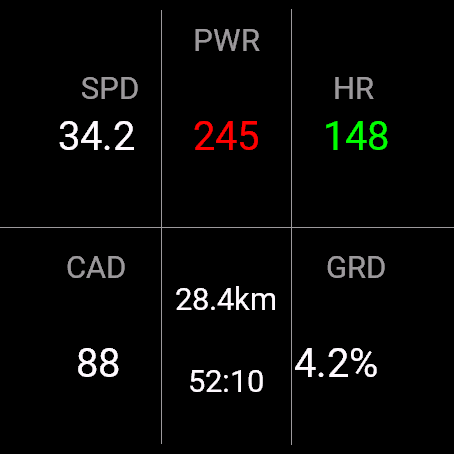
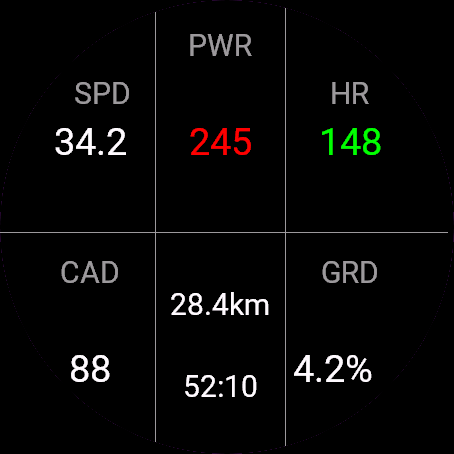
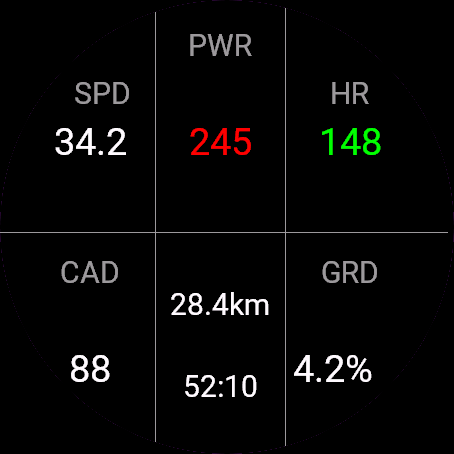
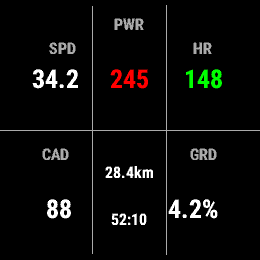
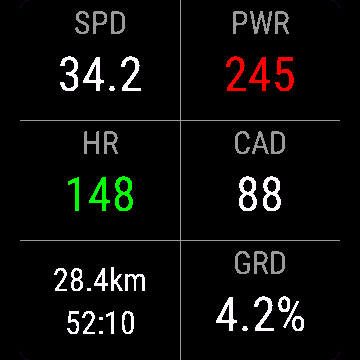
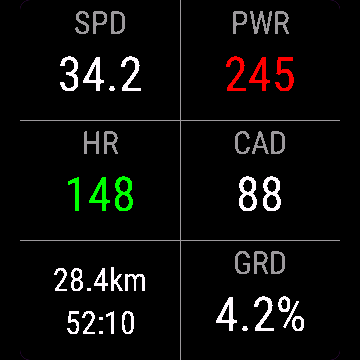
Bike Dashboard is a full-screen panel built for watches: speed, 3-second power coloured by zone, heart rate coloured by zone, cadence, distance and time sharing one cell, and smoothed climb grade. Set your FTP once and the power zone colours do the rest.
- Six cells on a full screen, fewer on smaller fields
- Power and heart rate zone colours at a glance
- Smoothed grade percent, not jumpy GPS noise
- Distance and elapsed time share one cell
- Units follow your device settings, km or mi
Panel rowerowy to pełnoekranowy widok pod zegarki: prędkość, moc 3-sekundowa kolorowana strefą, tętno kolorowane strefą, kadencja, dystans i czas w jednej komórce oraz wygładzone nachylenie. Ustaw FTP raz, a kolory stref mocy zrobią resztę.
- Sześć komórek na pełnym ekranie, mniej na mniejszych polach
- Kolory stref mocy i tętna od razu widoczne
- Wygładzone nachylenie, bez skoków szumu GPS
- Dystans i czas dzielą jedną komórkę
- Jednostki zgodne z ustawieniami zegarka, km albo mi
Bike Dashboard ist ein Vollbild-Panel für AMOLED-Fahrradcomputer: Geschwindigkeit, 3-Sekunden-Leistung farbig nach Zone, Herzfrequenz farbig nach Zone, Trittfrequenz, Distanz und Zeit teilen sich eine Zelle, und geglättete Steigung. Einmal die FTP einstellen, und die Leistungszonenfarben machen den Rest.
- Sechs Zellen auf dem Vollbild, weniger bei kleineren Feldern
- Leistungs- und Herzfrequenzzonenfarben auf einen Blick
- Geglättete Steigung in Prozent, kein sprunghaftes GPS-Rauschen
- Distanz und verstrichene Zeit teilen sich eine Zelle
- Einheiten folgen deinen Geräteeinstellungen, km oder mi
Bike Dashboard est un panneau plein écran conçu pour les compteurs vélo AMOLED : vitesse, puissance sur 3 secondes colorée par zone, fréquence cardiaque colorée par zone, cadence, distance et temps partageant une cellule, et pourcentage de pente lissé. Réglez votre FTP une fois et les couleurs de zone de puissance font le reste.
- Six cellules en plein écran, moins sur les champs plus petits
- Couleurs des zones de puissance et de fréquence cardiaque en un coup d'œil
- Pourcentage de pente lissé, sans le bruit erratique du GPS
- Distance et temps écoulé partagent une cellule
- Les unités suivent les réglages de votre appareil, km ou mi
Bike Dashboard es un panel a pantalla completa pensado para ciclocomputadores AMOLED: velocidad, potencia de 3 segundos con color según la zona, frecuencia cardíaca con color según la zona, cadencia, distancia y tiempo compartiendo una celda, y pendiente de subida suavizada. Configura tu FTP una vez y los colores de zona de potencia hacen el resto.
- Seis celdas en pantalla completa, menos en campos más pequeños
- Colores de zona de potencia y frecuencia cardíaca de un vistazo
- Porcentaje de pendiente suavizado, sin saltos por el ruido del GPS
- Distancia y tiempo transcurrido comparten una celda
- Las unidades siguen los ajustes de tu dispositivo, km o mi
Bike Dashboard is een volledig-scherm paneel gebouwd voor AMOLED-fietscomputers: snelheid, vermogen over 3 seconden gekleurd per zone, hartslag gekleurd per zone, cadans, afstand en tijd die samen een vak delen, en een gladgestreken stijgingspercentage. Stel je FTP eenmalig in en de kleuren van de vermogenszones doen de rest.
- Zes vakken op een vol scherm, minder bij kleinere velden
- Vermogens- en hartslagzones in een oogopslag door kleur
- Gladgestreken stijgingspercentage, geen grillige GPS-ruis
- Afstand en verstreken tijd delen een vak
- Eenheden volgen de instellingen van je horloge, km of mi
Bike Dashboardは、AMOLED搭載のバイクコンピューター向けに作られたフルスクリーンパネルです。速度、ゾーンに応じて色分けされた3秒パワー、ゾーンに応じて色分けされた心拍数、ケイデンス、1つのセルにまとめた距離と時間、そして平滑化された登坂グレードを表示します。FTPを一度設定すれば、パワーゾーンの色分けは自動で反映されます。
- フルスクリーンでは6セル、小さいフィールドではセル数が減少
- パワーと心拍数のゾーンを色で一目で確認
- GPSのノイズによる急な変動を抑えた、平滑化された勾配パーセント表示
- 距離と経過時間は1つのセルに表示
- 単位は時計の設定に従い、kmまたはmi
Bike Dashboard è un pannello a schermo intero pensato per i ciclocomputer AMOLED: velocità, potenza a 3 secondi colorata per zona, frequenza cardiaca colorata per zona, cadenza, distanza e tempo che condividono una cella, e pendenza della salita livellata. Imposta il tuo FTP una volta e i colori delle zone di potenza fanno il resto.
- Sei celle a schermo intero, meno su campi più piccoli
- Colori delle zone di potenza e frequenza cardiaca a colpo d'occhio
- Percentuale di pendenza livellata, non il rumore a scatti del GPS
- Distanza e tempo trascorso condividono una cella
- Le unità seguono le impostazioni del dispositivo, km o mi
“骑行仪表盘”是专为AMOLED骑行码表设计的全屏面板: 速度、按分区上色的3秒功率、按分区上色的心率、踏频、共用一格显示的距离和时间,以及经过平滑处理的坡度。FTP只需设置一次,功率分区颜色就会自动跟着算。
- 全屏六格显示,小尺寸数据字段会自动减少格数
- 功率和心率分区颜色一眼就能看清
- 坡度经过平滑处理,不会被GPS噪声搞得忽上忽下
- 距离和已用时间共用一格显示
- 单位跟随手表设置,公里或英里
Bike Dashboard - это полноэкранная панель для велокомпьютеров с AMOLED: скорость, мощность за 3 секунды с цветом по зоне, пульс с цветом по зоне, каденс, дистанция и время в одной ячейке, и сглаженный уклон подъёма. Задайте FTP один раз, и цвета зон мощности сделают всё остальное.
- Шесть ячеек на весь экран, меньше на маленьких полях
- Цвета зон мощности и пульса с первого взгляда
- Сглаженный процент уклона, без рывков от шума GPS
- Дистанция и прошедшее время делят одну ячейку
- Единицы измерения по настройкам устройства, км или мили
Bike Dashboard é um painel de tela cheia feito para ciclocomputadores AMOLED: velocidade, potência de 3 segundos colorida por zona, frequência cardíaca colorida por zona, cadência, distância e tempo compartilhando uma célula, e a inclinação da subida suavizada. Defina seu FTP uma vez e as cores das zonas de potência fazem o resto.
- Seis células em tela cheia, menos células em campos menores
- Cores das zonas de potência e frequência cardíaca em um só olhar
- Porcentagem de inclinação suavizada, sem os saltos do ruído do GPS
- Distância e tempo decorrido compartilham uma célula
- As unidades seguem a configuração do seu relógio, km ou mi
Bike Dashboard je celoobrazovkový panel postavený pro cyklocomputery s AMOLED displejem: rychlost, 3sekundový výkon zbarvený podle zóny, tepová frekvence zbarvená podle zóny, kadence, vzdálenost a čas ve společné buňce, a vyhlazené stoupání. Jednou nastavíte FTP a barvy výkonových zón se postarají o zbytek.
- Šest buněk na celé obrazovce, méně na menších polích
- Barvy výkonové a tepové zóny na první pohled
- Vyhlazené procento stoupání, ne skákající šum z GPS
- Vzdálenost a uplynulý čas ve společné buňce
- Jednotky podle nastavení zařízení, km nebo mi
Bike Dashboard é um painel de ecrã completo feito para computadores de bicicleta AMOLED: velocidade, potência de 3 segundos com cor por zona, frequência cardíaca com cor por zona, cadência, distância e tempo a partilhar uma célula, e inclinação de subida suavizada. Define o teu FTP uma vez e as cores das zonas de potência fazem o resto.
- Seis células num ecrã completo, menos em campos mais pequenos
- Cores das zonas de potência e frequência cardíaca de um só olhar
- Percentagem de inclinação suavizada, sem os saltos do ruído do GPS
- Distância e tempo decorrido partilham uma célula
- As unidades seguem as definições do dispositivo, km ou mi
Bike Dashboard는 AMOLED 자전거 컴퓨터를 위한 전체 화면 패널입니다. 속도, 구간별 색상이 적용된 3초 파워, 구간별 색상이 적용된 심박수, 케이던스, 한 칸에 함께 표시되는 거리와 시간, 그리고 보정된 등반 경사도를 보여줍니다. FTP를 한 번만 설정해두면 파워 존 색상은 자동으로 적용됩니다.
- 전체 화면에 여섯 칸, 더 작은 필드에서는 칸 수가 줄어듭니다
- 파워와 심박수 존 색상을 한눈에 확인
- 흔들리는 GPS 노이즈가 아닌 보정된 경사도(%)
- 거리와 경과 시간이 한 칸을 함께 사용합니다
- 단위는 기기 설정(km 또는 mi)을 따릅니다
Bike Dashboard är en helskärmspanel byggd för AMOLED-cykeldatorer: hastighet, 3-sekunders effekt färgkodad per zon, puls färgkodad per zon, kadens, distans och tid som delar en cell, och utjämnad stigningsgrad. Ställ in din FTP en gång och effektzonernas färger sköter resten.
- Sex celler på en helskärm, färre på mindre fält
- Färger för effekt- och pulszon på en blick
- Utjämnad stigningsprocent, inte hoppigt GPS-brus
- Distans och förfluten tid delar en cell
- Enheter följer klockans inställningar, km eller mi
Bike Dashboard er et fuldskærmspanel bygget til AMOLED-cykelcomputere: hastighed, 3-sekunders effekt farvet efter zone, puls farvet efter zone, kadence, distance og tid der deler en celle, og udjævnet stigningsgrad. Sæt din FTP en gang, og effektzonefarverne gør resten.
- Seks celler på en fuld skærm, færre på mindre felter
- Effekt- og pulszonefarver med et blik
- Udjævnet stigningsprocent, ikke hoppende GPS-støj
- Distance og forløbet tid deler en celle
- Enheder følger din enheds indstillinger, km eller mi
Bike Dashboard er et fullskjermpanel bygget for AMOLED-sykkelcomputere: fart, 3-sekunders effekt farget etter sone, puls farget etter sone, kadens, distanse og tid som deler én celle, og utjevnet stigningsgrad. Sett FTP én gang og fargene for effektsonen gjør resten.
- Seks celler på en full skjerm, færre på mindre felt
- Fargekoder for effekt- og pulssoner med ett blikk
- Utjevnet stigningsprosent, ikke hoppende GPS-støy
- Distanse og forløpt tid deler én celle
- Enheter følger innstillingene på enheten, km eller mi
Bike Dashboard是專為AMOLED自行車碼表做的全螢幕面板:速度、依區間上色的3秒功率、依區間上色的心率、迴轉速、共用一格的距離和時間,還有平滑處理過的爬坡坡度。FTP只要設定一次,功率區間顏色就會自動顯示。
- 全螢幕六格資訊,較小欄位會自動精簡
- 功率和心率區間顏色一眼就看懂
- 平滑過的坡度百分比,不會被GPS雜訊搞得跳來跳去
- 距離和經過時間共用一格
- 單位跟著裝置設定走,km或mi
Bike Dashboard on koko ruudun paneeli, rakennettu AMOLED-pyöräkomputereille: nopeus, 3 sekunnin teho vyöhykkeen mukaan väritettynä, syke vyöhykkeen mukaan väritettynä, poljinnopeus, matka ja aika samassa solussa, ja tasoitettu nousuprosentti. Aseta FTP kerran, ja tehovyöhykkeiden värit tekevät lopun.
- Kuusi solua koko ruudulla, vähemmän pienemmillä kentillä
- Teho- ja sykevyöhykkeiden värit yhdellä silmäyksellä
- Tasoitettu nousuprosentti, ei hyppivää GPS-kohinaa
- Matka ja kulunut aika jakavat yhden solun
- Yksiköt noudattavat laitteesi asetuksia, km tai mi
Bike Dashboard je celoobrazovkový panel postavený pre AMOLED cyklopočítače: rýchlosť, 3-sekundový výkon farebne podľa zóny, srdcová frekvencia farebne podľa zóny, kadencia, vzdialenosť a čas v jednej bunke, a vyhladené stúpanie. Nastavte si FTP raz a farby výkonových zón urobia zvyšok.
- Šesť buniek na celej obrazovke, menej na menších poliach
- Farby zón výkonu a srdcovej frekvencie na jeden pohľad
- Vyhladené percento stúpania, nie skákajúci šum z GPS
- Vzdialenosť a uplynutý čas v jednej bunke
- Jednotky podľa nastavenia vášho zariadenia, km alebo mi
Bike Dashboard je celozaslonska plošča, narejena za AMOLED kolesarske računalnike: hitrost, 3-sekundna moč, pobarvana glede na cono, srčni utrip, pobarvan glede na cono, kadenca, razdalja in čas si delita eno celico, ter zglajen naklon klanca. FTP nastaviš enkrat, barve conske moči pa naredijo preostalo.
- Šest celic na celem zaslonu, manj na manjših poljih
- Barve con moči in srčnega utripa na prvi pogled
- Zglajen odstotek naklona, ne skakajoč šum GPS
- Razdalja in pretečeni čas si delita eno celico
- Enote sledijo nastavitvam naprave, km ali mi
Bike Dashboard adalah panel layar penuh yang dibuat untuk bike computer AMOLED: kecepatan, power 3 detik berwarna sesuai zona, detak jantung berwarna sesuai zona, kadensi, jarak dan waktu berbagi satu sel, serta kemiringan tanjakan yang sudah dihaluskan. Atur FTP-mu sekali saja dan warna zona power akan mengurus sisanya.
- Enam sel pada layar penuh, lebih sedikit pada field yang lebih kecil
- Warna zona power dan detak jantung sekali lirik
- Persentase kemiringan yang sudah dihaluskan, bukan noise GPS yang melompat-lompat
- Jarak dan waktu berlalu berbagi satu sel
- Satuan mengikuti pengaturan perangkatmu, km atau mi
A Bike Dashboard egy teljes képernyős panel, AMOLED kerékpár-computerekhez építve: sebesség, 3 másodperces teljesítmény zóna szerint színezve, pulzus zóna szerint színezve, pedálfordulat, valamint távolság és idő egy cellában, és simított emelkedőmeredekség. Állítsd be egyszer az FTP-det, és a teljesítményzóna-színek elvégzik a többit.
- Hat cella teljes képernyőn, kisebb mezőknél kevesebb
- Teljesítmény- és pulzuszóna-színek egy pillantással
- Simított meredekség százalékban, nem ugráló GPS-zaj
- A távolság és a letelt idő egy cellán osztozik
- Az egységek az órád beállítását követik, km vagy mi
Bike Dashboard เป็นแผงข้อมูลเต็มจอ ออกแบบมาสำหรับไบค์คอมพิวเตอร์จอ AMOLED: ความเร็ว, กำลัง 3 วินาทีไล่สีตามโซน, อัตราการเต้นหัวใจไล่สีตามโซน, เคเดนซ์, ระยะทางกับเวลารวมอยู่ในช่องเดียว และความชันที่ปรับให้เรียบแล้ว ตั้งค่า FTP ครั้งเดียว สีโซนกำลังจะจัดการส่วนที่เหลือให้
- หกช่องข้อมูลเต็มจอ น้อยลงตามขนาดฟิลด์ที่เล็กลง
- สีโซนกำลังและอัตราการเต้นหัวใจ มองครั้งเดียวเข้าใจ
- เปอร์เซ็นต์ความชันที่ปรับให้เรียบ ไม่กระตุกตามสัญญาณ GPS
- ระยะทางและเวลารวมอยู่ในช่องเดียวกัน
- หน่วยตามการตั้งค่าอุปกรณ์ กม. หรือไมล์
Το Bike Dashboard είναι ένα πλήρους οθόνης πάνελ φτιαγμένο για ποδηλατικούς υπολογιστές AMOLED: ταχύτητα, ισχύς 3 δευτερολέπτων χρωματισμένη ανά ζώνη, καρδιακός παλμός χρωματισμένος ανά ζώνη, καδένς, απόσταση και χρόνος να μοιράζονται ένα κελί, και εξομαλυμένη κλίση ανάβασης. Ρύθμισε το FTP σου μία φορά και τα χρώματα των ζωνών ισχύος κάνουν τα υπόλοιπα.
- Έξι κελιά σε πλήρη οθόνη, λιγότερα σε μικρότερα πεδία
- Χρώματα ζωνών ισχύος και καρδιακού παλμού με μία ματιά
- Εξομαλυμένο ποσοστό κλίσης, όχι ασταθής θόρυβος GPS
- Απόσταση και χρόνος που πέρασε μοιράζονται ένα κελί
- Οι μονάδες ακολουθούν τις ρυθμίσεις της συσκευής σου, χλμ ή μίλια
Bike Dashboard je panel na cijelom ekranu izrađen za AMOLED biciklističke računala: brzina, 3-sekundna snaga obojena po zoni, srčana frekvencija obojena po zoni, kadenca, udaljenost i vrijeme u istoj ćeliji, i izglađen nagib penjanja. Postavi FTP jednom i boje zona snage rade ostalo.
- Šest ćelija na cijelom ekranu, manje na manjim poljima
- Boje zona snage i srčane frekvencije na jedan pogled
- Izglađen postotak nagiba, bez skakanja GPS šuma
- Udaljenost i proteklo vrijeme dijele jednu ćeliju
- Jedinice prate postavke uređaja, km ili mi
לוח בקרה לאופניים הוא פאנל במסך מלא שנבנה למחשבי אופניים עם AMOLED: מהירות, הספק ל-3 שניות בצבע לפי אזור, דופק בצבע לפי אזור, קצב דיווש, מרחק וזמן חולקים תא אחד, ואחוז שיפוע מוחלק. קבע את ה-FTP שלך פעם אחת וצבעי אזור ההספק יעשו את השאר.
- שישה תאים במסך מלא, פחות בשדות קטנים יותר
- צבעי אזור ההספק והדופק במבט אחד
- אחוז שיפוע מוחלק, בלי רעשי GPS קופצניים
- מרחק וזמן שעבר חולקים תא אחד
- יחידות בהתאם להגדרות המכשיר שלך, ק"מ או מייל
Bike Dashboard ialah panel skrin penuh yang dibina untuk bike computer AMOLED: speed, power 3 saat berwarna mengikut zon, kadar denyutan jantung berwarna mengikut zon, cadence, jarak dan masa berkongsi satu sel, serta grade pendakian yang telah di-smooth. Tetapkan FTP anda sekali dan warna zon power buat selebihnya.
- Enam sel pada skrin penuh, lebih sedikit pada field yang lebih kecil
- Warna zon power dan kadar denyutan jantung pada satu pandangan
- Peratus grade yang di-smooth, bukan bunyi GPS yang melonjak-lonjak
- Jarak dan masa berlalu berkongsi satu sel
- Unit mengikut tetapan peranti anda, km atau mi
How to use it
Add Bike Dashboard as a data field in an activity, then set it up in its settings.
Add Bike Dashboard as a full-screen data field and set FTP in the data field settings (default 200 W).
Dodaj Panel rowerowy jako pole danych w aktywności, potem skonfiguruj je w jego ustawieniach.
Dodaj Panel rowerowy jako pełnoekranowe pole danych i ustaw FTP w ustawieniach pola (domyślnie 200 W).
Füge Bike Dashboard in einer Aktivität als Datenfeld hinzu und richte es dann in den Einstellungen ein.
Füge Bike Dashboard als Vollbild-Datenfeld hinzu und stelle die FTP in den Datenfeld-Einstellungen ein (Standard 200 W).
Ajoutez Bike Dashboard comme champ de données dans une activité, puis configurez-le dans ses réglages.
Ajoutez Bike Dashboard comme champ de données plein écran et réglez le FTP dans les paramètres du champ de données (200 W par défaut).
Añade Bike Dashboard como campo de datos en una actividad y luego configúralo en sus ajustes.
Añade Bike Dashboard como campo de datos a pantalla completa y configura el FTP en los ajustes del campo de datos (200 W por defecto).
Voeg Bike Dashboard toe als gegevensveld in een activiteit en stel het daarna in bij de instellingen.
Voeg Bike Dashboard toe als volledig-scherm gegevensveld en stel je FTP in bij de instellingen van het gegevensveld (standaard 200 W).
アクティビティに Bike Dashboard をデータフィールドとして追加し、その設定で調整してください。
Bike Dashboardをフルスクリーンのデータフィールドとして追加し、データフィールドの設定でFTPを設定してください(デフォルト200W)。
Aggiungi Bike Dashboard come campo dati in un'attività, poi configuralo nelle sue impostazioni.
Aggiungi Bike Dashboard come campo dati a schermo intero e imposta l'FTP nelle impostazioni del campo dati (200 W di default).
在某项活动中把 Bike Dashboard 添加为数据字段,然后在其设置中进行配置。
把“骑行仪表盘”添加为全屏数据字段,在数据字段设置里设定FTP(默认200瓦)。
Добавьте Bike Dashboard как поле данных в активности, затем настройте его в её параметрах.
Добавьте Bike Dashboard как полноэкранное поле данных и задайте FTP в настройках поля данных (по умолчанию 200 Вт).
Adicione Bike Dashboard como campo de dados em uma atividade e depois configure nas configurações dela.
Adicione o Bike Dashboard como campo de dados de tela cheia e defina o FTP nas configurações do campo de dados (padrão de 200 W).
Přidejte Bike Dashboard jako datové pole do aktivity a pak ho nastavte v jejím nastavení.
Přidejte Bike Dashboard jako celoobrazovkové datové pole a nastavte FTP v nastavení datového pole (výchozí 200 W).
Adicione Bike Dashboard como campo de dados numa atividade e depois configure-o nas definições dessa atividade.
Adiciona o Bike Dashboard como campo de dados de ecrã completo e define o FTP nas definições do campo de dados (200 W por defeito).
활동에서 Bike Dashboard을(를) 데이터 필드로 추가한 다음, 해당 설정에서 구성하세요.
전체 화면 데이터 필드로 Bike Dashboard를 추가하고, 데이터 필드 설정에서 FTP를 설정하세요(기본값 200W).
Lägg till Bike Dashboard som datafält i en aktivitet och ställ sedan in det i dess inställningar.
Lägg till Bike Dashboard som ett helskärmsdatafält och ställ in FTP i inställningarna för datafältet (standard 200 W).
Tilføj Bike Dashboard som datafelt i en aktivitet, og indstil det derefter i dets indstillinger.
Tilføj Bike Dashboard som et fuldskærmsdatafelt og sæt FTP i datafeltets indstillinger (standard 200 W).
Legg til Bike Dashboard som datafelt i en aktivitet, og still det inn i innstillingene.
Legg til Bike Dashboard som et fullskjerms-datafelt og sett FTP i innstillingene for datafeltet (standard 200 W).
在某項活動中把 Bike Dashboard 新增為資料欄位,然後在其設定中進行調整。
把Bike Dashboard加為全螢幕資料欄位,並在資料欄位設定裡設定FTP(預設200 W)。
Lisää Bike Dashboard datakentäksi aktiviteettiin ja määritä se sen asetuksista.
Lisää Bike Dashboard koko ruudun tietokenttänä ja aseta FTP tietokentän asetuksista (oletus 200 W).
Pridajte Bike Dashboard ako dátové pole do aktivity a potom ho nastavte v jeho nastaveniach.
Pridajte Bike Dashboard ako celoobrazovkové dátové pole a nastavte FTP v nastaveniach dátového poľa (predvolene 200 W).
Dodajte Bike Dashboard kot podatkovno polje v aktivnost, nato ga nastavite v njegovih nastavitvah.
Dodaj Bike Dashboard kot celozaslonsko podatkovno polje in nastavi FTP v nastavitvah podatkovnega polja (privzeto 200 W).
Tambahkan Bike Dashboard sebagai data field di sebuah aktivitas, lalu atur di pengaturannya.
Tambahkan Bike Dashboard sebagai data field layar penuh dan atur FTP di pengaturan data field (default 200 W).
Adja hozzá a(z) Bike Dashboard elemet adatmezőként egy tevékenységhez, majd állítsa be a tevékenység beállításaiban.
Add hozzá a Bike Dashboardot teljes képernyős adatmezőként, és állítsd be az FTP-t az adatmező beállításaiban (alapértelmezés 200 W).
เพิ่ม Bike Dashboard เป็นช่องข้อมูลในกิจกรรม แล้วตั้งค่าในหน้าการตั้งค่าของมัน
เพิ่ม Bike Dashboard เป็น data field เต็มจอ แล้วตั้งค่า FTP ในการตั้งค่า data field (ค่าเริ่มต้น 200 W)
Προσθέστε το Bike Dashboard ως πεδίο δεδομένων σε μια δραστηριότητα και μετά ρυθμίστε το στις ρυθμίσεις του.
Πρόσθεσε το Bike Dashboard ως πεδίο δεδομένων πλήρους οθόνης και ρύθμισε το FTP στις ρυθμίσεις του πεδίου δεδομένων (προεπιλογή 200 W).
Dodajte Bike Dashboard kao polje podataka u aktivnost, a zatim ga podesite u njegovim postavkama.
Dodaj Bike Dashboard kao podatkovno polje na cijelom ekranu i postavi FTP u postavkama podatkovnog polja (zadano 200 W).
הוסיפו את Bike Dashboard כשדה נתונים בפעילות, ואז הגדירו אותו בהגדרות שלו.
הוסף לוח בקרה לאופניים כשדה מידע במסך מלא וקבע FTP בהגדרות השדה (ברירת מחדל 200 וואט).
Tambah Bike Dashboard sebagai medan data dalam aktiviti, kemudian sediakannya dalam tetapannya.
Tambah Bike Dashboard sebagai data field skrin penuh dan tetapkan FTP dalam tetapan data field (default 200 W).
Manual
The full manual and the detailed permission descriptions are available in English and Polish.
Bike Dashboard: user manual
What it does
Bike Dashboard is a full-screen cycling data field. It puts speed, 3-second power, heart rate, cadence, distance with time, and climb grade on one screen. Power and heart rate change colour with your zone, so you read effort without reading numbers.
Requirements and supported watches
Needs Connect IQ 3.3.0+ and the Connect IQ or Garmin Connect phone app. Supported watches:
- Round AMOLED: epix 2 and epix Pro 2, fēnix 8, E, Forerunner 165, 265, 570, 965, 970, Instinct 3 AMOLED, Crossover AMOLED, Venu 2, 3, 4, vivoactive 5, 6.
- Round MIP: enduro 3, fēnix 7 series, 8 Solar, Forerunner 245 (245 Music), 255.
- Square and rectangular AMOLED: Venu Sq 2, Venu X1.
Installation
In the Connect IQ app on your phone (or Garmin Connect, then the Connect IQ Store) find "Bike Dashboard" by Dialforge, tap Install and sync the watch. Add it in an activity's settings: Data Screens, a field, Connect IQ, Bike Dashboard.
First launch
Add it to a data screen and start a ride. Sensor values you do not have show "--". On a full screen you see six cells: SPD, PWR, HR, CAD, distance with time, and GRD. Smaller fields show fewer. The 30-day free beta starts the first time you open it.
Controls
Watches with buttons (START, UP, DOWN, BACK)
- A data field has no buttons of its own. The watch's buttons work as they do on any activity screen.
Touch watches (tap, hold, swipe)
- No touch actions, the field only displays data.
Settings
Phone: Connect IQ app, Bike Dashboard, Settings (the unlock code fields are there too).
- FTP (watts): number. Default: 200.
License
- Free beta: 30 days from the first launch, everything works.
- Price: 3.99 EUR once at dialforge.dev, no subscription. The 8-character code is tied to your watch's UID.
- Where to enter it: phone, Connect IQ app, Bike Dashboard, Settings. Read the UID in "Watch UID (needed to buy a code)", buy the code, then type it into "Unlock code from dialforge.dev".
- After the beta without a code: the field shows only the small text dialforge.dev instead of the numbers. It has no end-of-beta screen, the UID is in the phone settings. Enter the code there and the numbers return within about half a minute.
Privacy and permissions
Permissions:
- User profile: reads your cycling heart rate zones to colour the heart rate cell.
No internet use. Data stays on the watch.
Troubleshooting
The code does not work. Check that the UID you bought for matches "Watch UID (needed to buy a code)" and type all 8 characters (case is ignored, no 0, O, 1 or I). A code for another app does not fit. Sync, then reopen.
How do I set my FTP? On the phone, in the app settings, field "FTP (watts)". It accepts 30 to 2000, and anything outside that falls back to 200. Power colours follow it: below 55% of FTP is zone 1, then 75%, 90% and 105%, above that zone 5. Zero watts gets no colour.
Why does power lag behind my pedalling? It is the average of the last three readings, about 3 seconds, so it does not jump. Without a power meter it shows "--".
Why is grade 0.0% at the start? Grade comes from altitude over a 30 to 50 m stretch of distance, so it waits until you have ridden that far. It is limited to plus or minus 40%. Without distance, such as on a trainer, it stays at 0.
Which zones colour my heart rate? The heart rate zones for cycling from your Garmin profile, whatever activity you are in. If the profile has none that make sense, the field uses 50, 60, 70, 80 and 90% of 185 bpm.
Contact
kontakt@dialforge.dev or dialforge.dev. Please write before leaving a low rating.
Panel rowerowy: instrukcja obsługi
Do czego służy
Panel rowerowy to pełnoekranowe pole danych dla roweru. Na jednym ekranie ma prędkość, moc z 3 sekund, tętno, kadencję, dystans z czasem i nachylenie. Moc i tętno zmieniają kolor ze strefą, więc wysiłek widać bez czytania liczb.
Wymagania i obsługiwane zegarki
Wymaga Connect IQ 3.3.0+ i aplikacji Connect IQ albo Garmin Connect w telefonie. Obsługiwane zegarki:
- Okrągłe AMOLED: epix 2 i epix Pro 2, fēnix 8, E, Forerunner 165, 265, 570, 965, 970, Instinct 3 AMOLED, Crossover AMOLED, Venu 2, 3, 4, vivoactive 5, 6.
- Okrągłe MIP: enduro 3, seria fēnix 7, fēnix 8 Solar, Forerunner 245 (245 Music), 255.
- Kwadratowe i prostokątne AMOLED: Venu Sq 2, Venu X1.
Instalacja
Na telefonie otwórz aplikację Connect IQ (albo Garmin Connect, a w niej sklep Connect IQ), wyszukaj "Panel rowerowy" od Dialforge, stuknij Zainstaluj i zsynchronizuj zegarek. Dodaj je w ustawieniach aktywności: Ekrany danych, pole, Connect IQ, Panel rowerowy.
Pierwsze uruchomienie
Dodaj je na ekran danych i zacznij jazdę. Czego nie masz z czujników, pokazuje "--". Na pełnym ekranie jest sześć komórek: PRĘD, MOC, TĘTNO, KAD, dystans z czasem i NACH. Mniejsze pola pokazują mniej. 30-dniowa darmowa beta zaczyna się przy pierwszym otwarciu.
Sterowanie
Zegarki z przyciskami (START, GÓRA, DÓŁ, WSTECZ)
- Pole danych nie ma własnych przycisków. Przyciski zegarka działają tak jak na każdym ekranie aktywności.
Zegarki dotykowe (stuknięcie, przytrzymanie, przesunięcie)
- Brak akcji dotykowych, pole tylko wyświetla dane.
Ustawienia
Telefon: aplikacja Connect IQ, Panel rowerowy, Ustawienia (są tam też pola kodu odblokowania).
- FTP (waty): liczba. Domyślnie: 200.
Licencja
- Darmowa beta: 30 dni od pierwszego uruchomienia, wszystko działa.
- Cena: jednorazowo 3,99 EUR na dialforge.dev, bez abonamentu. 8-znakowy kod jest przypisany do UID zegarka.
- Gdzie wpisać: telefon, aplikacja Connect IQ, Panel rowerowy, Ustawienia. Odczytaj UID w polu "UID zegarka (potrzebny do zakupu kodu)", kup kod i wpisz go w "Kod odblokowania z dialforge.dev".
- Po becie bez kodu: zamiast liczb pole pokazuje tylko mały napis dialforge.dev. Nie ma ekranu końca bety, UID jest w ustawieniach na telefonie. Wpisz tam kod, a liczby wrócą w ciągu około pół minuty.
Prywatność i uprawnienia
Uprawnienia:
- Profil użytkownika: odczyt Twoich stref tętna dla roweru, żeby pokolorować komórkę tętna.
Zero połączeń z internetem. Dane zostają w zegarku.
Rozwiązywanie problemów
Kod nie działa. Sprawdź, czy UID, dla którego kupiono kod, zgadza się z polem "UID zegarka (potrzebny do zakupu kodu)", i wpisz wszystkie 8 znaków (wielkość liter bez znaczenia, bez 0, O, 1, I). Kod do innej aplikacji nie pasuje. Zsynchronizuj i otwórz ponownie.
Jak ustawić FTP? Na telefonie, w ustawieniach aplikacji, pole "FTP (waty)". Przyjmuje od 30 do 2000, a co spoza tego zakresu, wraca do 200. Od FTP zależą kolory mocy: poniżej 55% to strefa 1, potem progi 75%, 90% i 105%, powyżej strefa 5. Zero watów bez koloru.
Czemu moc spóźnia się za pedałowaniem? To średnia z trzech ostatnich odczytów, czyli ok. 3 sekund, żeby nie skakała. Bez miernika mocy widać "--".
Czemu nachylenie na starcie to 0,0%? Liczy się z wysokości na odcinku 30 do 50 m dystansu, więc czeka, aż tyle przejedziesz. Jest ograniczone do plus minus 40%. Bez dystansu, np. na trenażerze, zostaje 0.
Jakie strefy kolorują tętno? Strefy tętna dla roweru z Twojego profilu Garmin, niezależnie od rodzaju aktywności. Gdy profil nie ma sensownych, pole bierze 50, 60, 70, 80 i 90% z 185 bpm.
Kontakt
kontakt@dialforge.dev albo dialforge.dev. Napisz, zanim wystawisz niską ocenę.
Permissions and privacy
This product asks the watch for the permissions below. Connect IQ shows them when you install it.
- Your profile: Reads your Garmin profile on the watch (for example age, weight, heart rate zones) to calculate values for you.Odczytuje Twój profil Garmin na zegarku (na przykład wiek, wagę, strefy tętna), żeby liczyć wartości dla Ciebie.
This product does not use the internet and sends no data to our servers.
The full manual and the detailed permission descriptions are available in English and Polish.
Compatible watches
51mm, D2 Air X15, D2 Mach 1 Pro, Enduro 2, Enduro 3, epix (Gen 2), epix Pro (Gen 2) 42mm, epix Pro (Gen 2) 47mm, epix Pro (Gen 2) 51mm, Forerunner 165, Forerunner 165 Music, Forerunner 245 Music, Forerunner 255, Forerunner 255 Music, Forerunner 255s, Forerunner 255s Music, Forerunner 265, Forerunner 265s, Forerunner 570 42mm, Forerunner 570 47mm, Forerunner 965, Forerunner 970, fēnix 7, fēnix 7 Pro, fēnix 7 Pro - Solar Edition (no Wi-Fi), fēnix 7S, fēnix 7S Pro, fēnix 7X, fēnix 7X Pro, fēnix 7X Pro - Solar Edition (no Wi-Fi), fēnix 8 43mm, fēnix 8 47mm, fēnix 8 Pro 47mm, fēnix 8 Solar 47mm, fēnix 8 Solar 51mm, fēnix E, Instinct 3 AMOLED 45mm, Instinct 3 AMOLED 50mm, Instinct Crossover AMOLED, MicroLED, quatix 7, quatix 7 Pro, quatix 7 Sapphire, quatix 7X Solar, quatix 8 47mm, quatix 8 Pro 47mm, tactix 7, tactix 7 – AMOLED Edition, tactix 8 47mm, tactix 8 Solar 51mm, Venu 2, Venu 2 Plus, Venu 2S, Venu 3, Venu 3S, Venu 4 41mm, Venu 4 45mm, Venu Sq 2, Venu Sq 2 Music, Venu X1, vívoactive 5, vívoactive 6
Screenshots
FAQ
What happens after the 30-day beta?
The app shows a screen asking for a one-time unlock code from dialforge.dev instead of opening normally. Buy the code once below, no subscription.
Does the app send my data to Dialforge?
No. The app works fully offline, and the unlock code is checked on the watch itself, without contacting any server.
The app does not work as described on my watch. Can I get a refund?
Yes. Write through the feedback form below, or to the e-mail in the footer. If we cannot fix it, we refund you, as described in the terms.
Changing your watch?
Write to me and I will move your code for free.
Changelog
- First release (beta).
- Pierwsze wydanie (beta).
- Erste Veröffentlichung (Beta).
- Première version (bêta).
- Primera versión (beta).
- Eerste release (beta).
- 初回リリース(ベータ版)。
- Prima versione (beta).
- 首次发布(测试版)。
- Первый выпуск (бета).
- Primeira versão (beta).
- První verze (beta).
- Primeira versão (beta).
- 첫 출시 (베타).
- Första utgåvan (beta).
- Første udgivelse (beta).
- Første utgivelse (beta).
- 首次發布(測試版)。
- Ensimmäinen julkaisu (beta).
- Prvé vydanie (beta).
- Prva izdaja (beta).
- Rilis pertama (beta).
- Első kiadás (beta).
- เวอร์ชันแรก (เบต้า)
- Πρώτη έκδοση (μπέτα).
- Prvo izdanje (beta).
- מהדורה ראשונה (בטא).
- Keluaran pertama (beta).
Unlock
€3.99
One-time payment. No subscription. The code works on the watch whose UID you enter.
- Install the app from the Connect IQ store. It works fully and for free for the first 30 days.
- Find your 10-digit UID: Connect IQ app on the phone > My Device > Apps or Data Fields > this app > Settings > Watch UID.
- Enter UID and e-mail, pay with PayPal (cards work without a PayPal account). The code appears here at once.
- Type the code into the same settings page, field "Unlock code". The watch checks it offline.
Thank you! Your code:
Enter the code in the app settings, field "Unlock code". The watch checks it offline.
Tell us how to make it better
Missing a data field, a colour, a layout? Found a bug on your watch model? Write it here. We read every message and ship improvements in updates.