Everyday health
Day Counter Complication
Your day count as a complication on the watch face you already use.
Twój licznik dni jako complication na tarczy, której już używasz.
Deine Tageszählung als Complication auf dem Zifferblatt, das du schon benutzt.
Votre nombre de jours comme complication sur le cadran que vous utilisez déjà.
Tu recuento de días como complicación en la esfera que ya usas.
Je dagenteller als complicatie op de wijzerplaat die je al gebruikt.
いつものウォッチフェイスに、日数カウントをコンプリケーションとして表示します。
Il conteggio dei giorni come complicazione sul quadrante che usi già.
把天数显示为你正在使用的表盘上的复杂功能(complication)。
Счетчик дней как компликация на циферблате, которым вы уже пользуетесь.
Sua contagem de dias como complicação no mostrador que você já usa.
Počet dní jako komplikace na ciferníku, který už používáš.
A sua contagem de dias como complicação no mostrador que já utiliza.
이미 쓰고 있는 워치 페이스에 일수 카운트를 컴플리케이션으로 표시합니다.
Ditt dagantal som en komplikation på urtavlan du redan använder.
Dit antal dage som en komplikation på det urskive, du allerede bruger.
Dagtelleren din som en komplikasjon på urskiven du allerede bruker.
把天數顯示為你正在使用的錶面上的複雜功能(complication)。
Päivälaskurisi komplikaationa kellotaulussa, jota jo käytät.
Počet dní ako komplikácia na ciferníku, ktorý už používate.
Vaše štetje dni kot komplikacija na številčnici, ki jo že uporabljate.
Hitungan hari Anda sebagai komplikasi di tampilan jam yang sudah Anda pakai.
A napszámlálód komplikációként a már használt számlapon.
จำนวนวันของคุณเป็นคอมพลิเคชันบนหน้าปัดที่คุณใช้อยู่แล้ว
Η μέτρηση ημερών σας ως επιπλέον στοιχείο (complication) στο ρολόι προσώπου που ήδη χρησιμοποιείτε.
Vaše brojanje dana kao komplikacija na brojčaniku koji već koristite.
ספירת הימים שלכם כרכיב (complication) על לוח השעון שאתם כבר משתמשים בו.
Kiraan hari anda sebagai komplikasi pada muka jam yang sudah anda guna.
Coming soon to Connect IQ
In preparation
Day Counter Complication is not in the Connect IQ store yet. A test version is available below. It will appear in the store when Garmin approves it.
Download the test version 1.0.0
Not in the Connect IQ store yet. Pick your watch, download the file and copy it to the GARMIN/APPS folder on the watch over USB. If you already have it from the Garmin store, uninstall that copy first, and delete an older file of it from GARMIN/APPS before copying a new one: two copies block updates and can use up all free slots on the watch. It works free for 30 days. The complication needs a watch with Connect IQ 4.2 or newer and a watch face with complication slots. Settings in the Garmin Connect phone app are not available for a file installed this way: use the menu on the watch (START). When the app is in the Connect IQ store, install it from there instead, so you get updates.
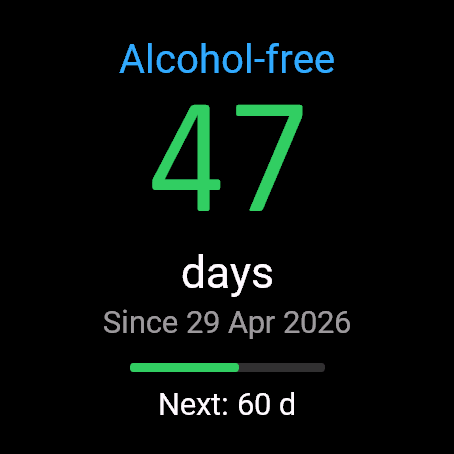
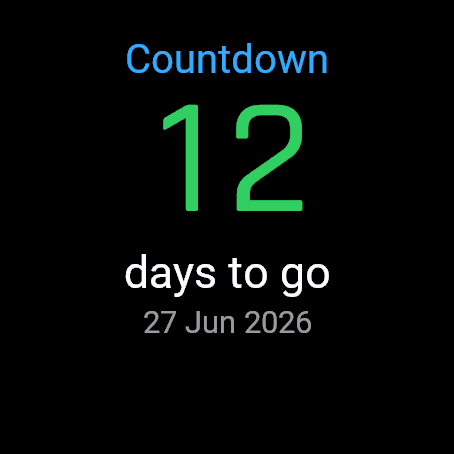
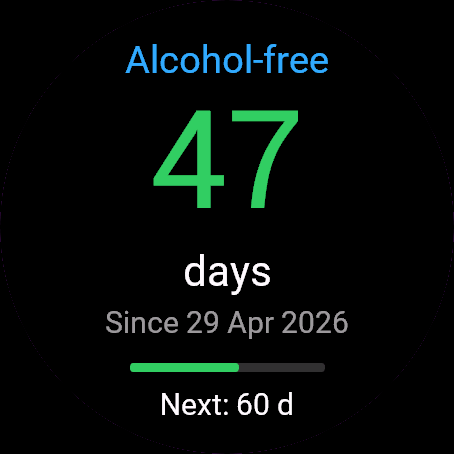
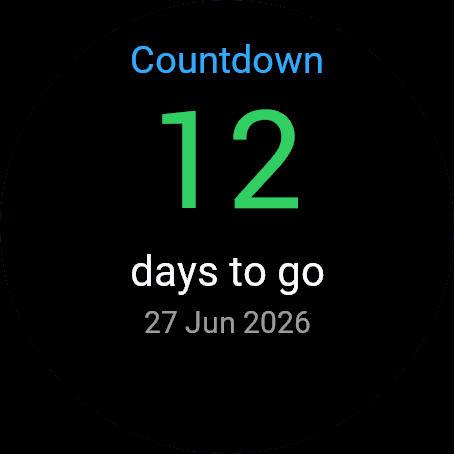
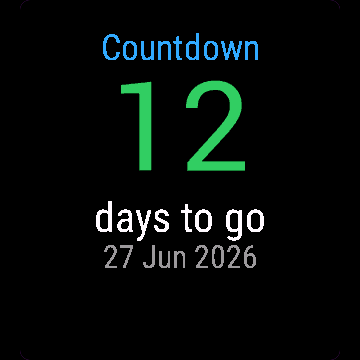
Day Counter Complication keeps a counter, either the days since a date or the days until one, and publishes the number to Connect IQ. In the settings of a watch face with complication slots you pick "Day Counter" from the same list as steps or battery. This is not a watch face: you keep the one you like.
- One number complication, "Day Counter", for watch faces that accept Connect IQ complications
- Refreshes itself after midnight in the background, so you do not have to open the app
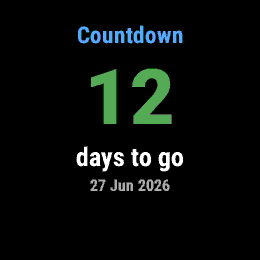
- Count up from a start date, like a streak, or count down to a date you are waiting for
- Set the date, the mode and the label in Garmin Connect or on the watch
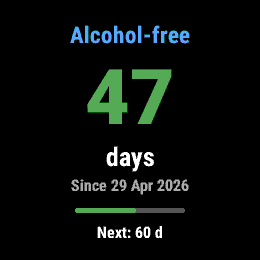
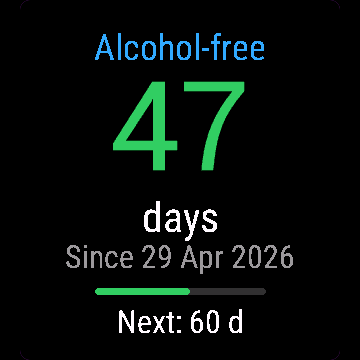
- Ready labels (alcohol-free, smoke-free, sugar-free, screen-free) or your own text
- Milestones at 1, 3, 7, 14, 21, 30, 60, 90, 100, 150, 180, 270 and 365 days, with a progress bar and one vibration on the day you reach one
- Restart from today after a confirmation; your best run is kept
- Never shows a negative number: a start date in the future or a target date that has passed shows 0
Setup: open the app once and set the date, then open your watch face settings and choose "Day Counter" in a complication slot. Whether you can pick it depends on the watch face, so check that the face lists Connect IQ apps in its complication slots. If you only want the counter on its own screen, the Day Counter widget does that.
Works on watches with Connect IQ 4.2 or newer: Fenix 7 and 8, Epix 2, Forerunner 165, 255, 265, 570, 965 and 970, Venu 2, 3 and 4, Vivoactive 5 and 6, Instinct 3, MARQ 2 and others. Older watches have no complications, so the app is not offered for them.
This is a plain counter, not a medical or treatment tool.
Day Counter Complication liczy dni od jakiejś daty albo do niej i wysyła tę liczbę do Connect IQ. W ustawieniach tarczy z miejscami na complications wybierasz "Day Counter" z tej samej listy, z której wybierasz kroki albo baterię. To nie jest tarcza: zostaje ta, którą lubisz.
- Jedna liczbowa complication, "Day Counter", dla tarcz, które przyjmują complications z Connect IQ
- Odświeża się sama po północy w tle, nie musisz otwierać aplikacji
- Liczenie od daty startu, jak seria, albo odliczanie do daty, na którą czekasz
- Datę, tryb i etykietę ustawisz w Garmin Connect albo na zegarku
- Gotowe etykiety (bez alkoholu, bez papierosów, bez cukru, bez ekranu) albo własny tekst
- Kamienie milowe po 1, 3, 7, 14, 21, 30, 60, 90, 100, 150, 180, 270 i 365 dniach, z paskiem postępu i jedną wibracją w dniu, w którym dojdziesz do któregoś
- Restart od dziś po potwierdzeniu; najlepszy wynik zostaje zapamiętany
- Nigdy nie pokazuje liczby ujemnej: data startu w przyszłości albo termin, który minął, to 0
Jak ustawić: otwórz aplikację raz i ustaw datę, potem wejdź w ustawienia tarczy i wybierz "Day Counter" w miejscu na complication. To, czy da się ją wybrać, zależy od tarczy, więc sprawdź, czy na liście jej complications są aplikacje Connect IQ. Jeśli chcesz sam licznik na osobnym ekranie, robi to widget Day Counter.
Działa na zegarkach z Connect IQ 4.2 i nowszym: Fenix 7 i 8, Epix 2, Forerunner 165, 255, 265, 570, 965 i 970, Venu 2, 3 i 4, Vivoactive 5 i 6, Instinct 3, MARQ 2 i inne. Starsze zegarki nie mają complications, więc dla nich aplikacji nie ma w sklepie.
To zwykły licznik, a nie narzędzie medyczne ani terapeutyczne.
Day Counter Complication führt einen Zähler, entweder die Tage seit einem Datum oder die Tage bis zu einem Datum, und gibt die Zahl an Connect IQ weiter. In den Einstellungen eines Zifferblatts mit Complication-Feldern wählst du "Day Counter" aus derselben Liste wie Schritte oder Akku. Das ist kein Zifferblatt: Du behältst das, das dir gefällt.
- Eine Zahlen-Complication, "Day Counter", für Zifferblätter, die Connect IQ Complications unterstützen
- Aktualisiert sich nach Mitternacht selbst im Hintergrund, du musst die App nicht öffnen
- Aufwärts zählen ab einem Startdatum, wie eine Serie, oder herunterzählen bis zu einem Datum, auf das du wartest
- Datum, Modus und Beschriftung in Garmin Connect oder auf der Uhr einstellen
- Fertige Beschriftungen (alkoholfrei, rauchfrei, zuckerfrei, bildschirmfrei) oder eigener Text
- Meilensteine bei 1, 3, 7, 14, 21, 30, 60, 90, 100, 150, 180, 270 und 365 Tagen, mit einem Fortschrittsbalken und einer Vibration an dem Tag, an dem du einen erreichst
- Neustart ab heute nach einer Bestätigung; dein bester Durchgang bleibt erhalten
- Zeigt nie eine negative Zahl: Ein Startdatum in der Zukunft oder ein vergangenes Zieldatum ergibt 0
Einrichtung: Öffne die App einmal und stelle das Datum ein, öffne dann die Einstellungen deines Zifferblatts und wähle "Day Counter" in einem Complication-Feld. Ob du es auswählen kannst, hängt vom Zifferblatt ab. Prüfe also, ob es in den Complication-Feldern Connect IQ Apps auflistet. Wenn du den Zähler nur auf einem eigenen Bildschirm willst, übernimmt das das Day Counter Widget.
Läuft auf Uhren mit Connect IQ 4.2 oder neuer: Fenix 7 und 8, Epix 2, Forerunner 165, 255, 265, 570, 965 und 970, Venu 2, 3 und 4, Vivoactive 5 und 6, Instinct 3, MARQ 2 und weitere. Ältere Uhren haben keine Complications, deshalb wird die App dafür nicht angeboten.
Dies ist ein einfacher Zähler, kein medizinisches Instrument und kein Behandlungswerkzeug.
Day Counter Complication tient un compteur, soit les jours écoulés depuis une date, soit les jours restants avant une date, et publie le nombre vers Connect IQ. Dans les réglages d'un cadran avec des emplacements de complication, vous choisissez "Day Counter" dans la même liste que les pas ou la batterie. Ce n'est pas un cadran : vous gardez celui que vous aimez.
- Une complication à un seul nombre, "Day Counter", pour les cadrans qui acceptent les complications Connect IQ
- Se met à jour tout seul après minuit en arrière-plan, sans que vous ayez à ouvrir l'application
- Comptez à partir d'une date de début, comme une série, ou décomptez jusqu'à une date que vous attendez
- Réglez la date, le mode et le libellé dans Garmin Connect ou sur la montre
- Libellés prêts à l'emploi (sans alcool, sans tabac, sans sucre, sans écran) ou votre propre texte
- Paliers à 1, 3, 7, 14, 21, 30, 60, 90, 100, 150, 180, 270 et 365 jours, avec une barre de progression et une vibration le jour où vous en atteignez un
- Redémarrage à partir d'aujourd'hui après confirmation ; votre meilleure série est conservée
- N'affiche jamais de nombre négatif : une date de début dans le futur ou une date cible dépassée affiche 0
Installation : ouvrez l'application une fois et réglez la date, puis ouvrez les réglages de votre cadran et choisissez "Day Counter" dans un emplacement de complication. La possibilité de le choisir dépend du cadran : vérifiez que le cadran propose des applications Connect IQ dans ses emplacements de complication. Si vous voulez seulement le compteur sur son propre écran, le widget Day Counter s'en charge.
Fonctionne sur les montres avec Connect IQ 4.2 ou plus récent : Fenix 7 et 8, Epix 2, Forerunner 165, 255, 265, 570, 965 et 970, Venu 2, 3 et 4, Vivoactive 5 et 6, Instinct 3, MARQ 2 et d'autres. Les montres plus anciennes n'ont pas de complications, l'application n'est donc pas proposée pour elles.
Ceci est un simple compteur, pas un outil médical ni de traitement.
Day Counter Complication guarda un contador, ya sea de los días desde una fecha o de los días hasta una fecha, y publica el número en Connect IQ. En los ajustes de una esfera con espacios para complicaciones eliges "Day Counter" en la misma lista que los pasos o la batería. No es una esfera: conservas la que te gusta.
- Una complicación de un solo número, "Day Counter", para esferas que aceptan complicaciones de Connect IQ
- Se actualiza solo en segundo plano después de medianoche, sin que tengas que abrir la aplicación
- Cuenta hacia adelante desde una fecha de inicio, como una racha, o cuenta atrás hasta una fecha que esperas
- Configura la fecha, el modo y la etiqueta en Garmin Connect o en el reloj
- Etiquetas listas (sin alcohol, sin tabaco, sin azúcar, sin pantallas) o tu propio texto
- Hitos a los 1, 3, 7, 14, 21, 30, 60, 90, 100, 150, 180, 270 y 365 días, con barra de progreso y una vibración el día que alcanzas uno
- Reinicio desde hoy tras una confirmación; se conserva tu mejor racha
- Nunca muestra un número negativo: una fecha de inicio futura o una fecha objetivo ya pasada muestra 0
Configuración: abre la aplicación una vez y configura la fecha, luego abre los ajustes de tu esfera y elige "Day Counter" en un espacio de complicación. Que puedas elegirlo depende de la esfera, así que comprueba que la esfera muestre aplicaciones de Connect IQ en sus espacios de complicación. Si solo quieres el contador en su propia pantalla, el widget Day Counter lo hace.
Funciona en relojes con Connect IQ 4.2 o posterior: Fenix 7 y 8, Epix 2, Forerunner 165, 255, 265, 570, 965 y 970, Venu 2, 3 y 4, Vivoactive 5 y 6, Instinct 3, MARQ 2 y otros. Los relojes más antiguos no tienen complicaciones, por eso la aplicación no se ofrece para ellos.
Es un contador sencillo, no una herramienta médica ni de tratamiento.
Day Counter Complication houdt een teller bij, of het aantal dagen sinds een datum of het aantal dagen tot een datum, en geeft het getal door aan Connect IQ. In de instellingen van een wijzerplaat met complicatievakken kies je "Day Counter" uit dezelfde lijst als stappen of batterij. Dit is geen wijzerplaat: je houdt degene die je mooi vindt.
- Eén getalcomplicatie, "Day Counter", voor wijzerplaten die Connect IQ-complicaties accepteren
- Ververst zichzelf na middernacht op de achtergrond, dus je hoeft de app niet te openen
- Tel op vanaf een startdatum, zoals een reeks, of tel af naar een datum waarop je wacht
- Stel de datum, de modus en het label in via Garmin Connect of op het horloge
- Kant-en-klare labels (alcoholvrij, rookvrij, suikervrij, schermvrij) of je eigen tekst
- Mijlpalen bij 1, 3, 7, 14, 21, 30, 60, 90, 100, 150, 180, 270 en 365 dagen, met een voortgangsbalk en één trilling op de dag dat je er een bereikt
- Opnieuw beginnen vanaf vandaag na een bevestiging; je beste reeks blijft bewaard
- Toont nooit een negatief getal: een startdatum in de toekomst of een einddatum die voorbij is, toont 0
Instellen: open de app één keer en stel de datum in, open dan de instellingen van je wijzerplaat en kies "Day Counter" in een complicatievak. Of je het kunt kiezen hangt af van de wijzerplaat, controleer dus of de wijzerplaat Connect IQ-apps toont in de complicatievakken. Wil je de teller alleen op een eigen scherm, dan doet de Day Counter-widget dat.
Werkt op horloges met Connect IQ 4.2 of nieuwer: Fenix 7 en 8, Epix 2, Forerunner 165, 255, 265, 570, 965 en 970, Venu 2, 3 en 4, Vivoactive 5 en 6, Instinct 3, MARQ 2 en andere. Oudere horloges hebben geen complicaties, dus de app wordt er niet voor aangeboden.
Dit is een eenvoudige teller, geen medisch hulpmiddel en geen behandelinstrument.
Day Counter Complication は、ある日付からの日数、または目標日までの日数をカウントし、その数字を Connect IQ に公開します。コンプリケーション枠のあるウォッチフェイスの設定で、歩数やバッテリーと同じ一覧から "Day Counter" を選びます。これはウォッチフェイスではありません。お気に入りのフェイスはそのまま使えます。
- Connect IQ のコンプリケーションに対応するウォッチフェイス向けの、数字ひとつのコンプリケーション "Day Counter"
- 深夜0時以降にバックグラウンドで自動更新されるので、アプリを開く必要はありません
- 開始日からのカウントアップ(連続記録のように)、または待っている日までのカウントダウン
- 日付、モード、ラベルは Garmin Connect または時計で設定
- 用意されたラベル(禁酒、禁煙、砂糖断ち、スクリーンフリー)または任意のテキスト
- 1、3、7、14、21、30、60、90、100、150、180、270、365 日のマイルストーン。達成日にはプログレスバーと1回の振動でお知らせ
- 確認後、今日から再スタート。これまでの最長記録は保持されます
- マイナスの数字は表示しません。開始日が未来、または目標日が過ぎている場合は 0 を表示
セットアップ: アプリを一度開いて日付を設定し、ウォッチフェイスの設定を開いてコンプリケーション枠で "Day Counter" を選びます。選べるかどうかはウォッチフェイス次第なので、コンプリケーション枠に Connect IQ アプリが表示されるフェイスか確認してください。カウンターを専用画面だけで使いたい場合は、Day Counter ウィジェットをご利用ください。
Connect IQ 4.2 以降の時計で動作: Fenix 7 と 8、Epix 2、Forerunner 165、255、265、570、965、970、Venu 2、3、4、Vivoactive 5、6、Instinct 3、MARQ 2 ほか。古い時計にはコンプリケーションがないため、対象外です。
これはシンプルなカウンターであり、医療機器や治療ツールではありません。
Day Counter Complication tiene un contatore, che sia dei giorni trascorsi da una data o dei giorni mancanti a una data, e pubblica il numero su Connect IQ. Nelle impostazioni di un quadrante con spazi per le complicazioni scegli "Day Counter" dalla stessa lista dei passi o della batteria. Non è un quadrante: tieni quello che ti piace.
- Una complicazione a numero singolo, "Day Counter", per i quadranti che accettano le complicazioni Connect IQ
- Si aggiorna da sola in background dopo la mezzanotte, senza dover aprire l'app
- Conta in avanti da una data iniziale, come una serie, o fai il conto alla rovescia fino a una data che aspetti
- Imposta la data, la modalità e l'etichetta in Garmin Connect o sull'orologio
- Etichette pronte (senza alcol, senza fumo, senza zuccheri, senza schermi) o testo personalizzato
- Traguardi a 1, 3, 7, 14, 21, 30, 60, 90, 100, 150, 180, 270 e 365 giorni, con una barra di avanzamento e una vibrazione nel giorno in cui ne raggiungi uno
- Riparti da oggi dopo una conferma; la tua serie migliore viene conservata
- Non mostra mai un numero negativo: una data iniziale nel futuro o una data obiettivo già passata mostra 0
Configurazione: apri l'app una volta e imposta la data, poi apri le impostazioni del quadrante e scegli "Day Counter" in uno spazio per complicazioni. Se puoi sceglierla dipende dal quadrante, quindi controlla che il quadrante elenchi le app Connect IQ negli spazi per complicazioni. Se vuoi il contatore solo su una schermata a parte, ci pensa il widget Day Counter.
Funziona su orologi con Connect IQ 4.2 o successivo: Fenix 7 e 8, Epix 2, Forerunner 165, 255, 265, 570, 965 e 970, Venu 2, 3 e 4, Vivoactive 5 e 6, Instinct 3, MARQ 2 e altri. Gli orologi più vecchi non hanno complicazioni, quindi l'app non viene offerta per loro.
Questo è un semplice contatore, non uno strumento medico né di trattamento.
Day Counter Complication 会记录一个计数,可以是距某个日期已过的天数,也可以是距某个日期还剩的天数,并把数字发布给 Connect IQ。在带有复杂功能位置的表盘设置中,你可以从与步数、电量相同的列表里选择 "Day Counter"。这不是表盘:你继续用自己喜欢的那个。
- 一个数字复杂功能 "Day Counter",适用于支持 Connect IQ 复杂功能的表盘
- 午夜过后在后台自动刷新,无需打开应用
- 从起始日期正数(如连续打卡),或向你期待的日期倒计时
- 可在 Garmin Connect 或手表上设置日期、模式和标签
- 预设标签(戒酒、戒烟、戒糖、远离屏幕)或自定义文本
- 在 1、3、7、14、21、30、60、90、100、150、180、270 和 365 天设有里程碑,配有进度条,并在达成当天震动一次
- 确认后从今天重新开始,你的最佳纪录会保留
- 从不显示负数:起始日期在未来或目标日期已过时显示 0
设置:先打开一次应用并设置日期,然后打开表盘设置,在复杂功能位置选择 "Day Counter"。能否选择取决于表盘,请确认表盘的复杂功能位置会列出 Connect IQ 应用。如果只想在单独的屏幕上使用计数器,可以用 Day Counter 小组件。
支持 Connect IQ 4.2 或更高版本的手表:Fenix 7 和 8、Epix 2、Forerunner 165、255、265、570、965 和 970、Venu 2、3 和 4、Vivoactive 5 和 6、Instinct 3、MARQ 2 等。较旧的手表没有复杂功能,因此不提供该应用。
这只是一个简单的计数器,不是医疗或治疗工具。
Day Counter Complication ведет счетчик: либо количество дней с определенной даты, либо количество дней до даты, и передает число в Connect IQ. В настройках циферблата со слотами компликаций вы выбираете "Day Counter" из того же списка, что и шаги или заряд батареи. Это не циферблат: вы оставляете тот, который вам нравится.
- Одна компликация с числом, "Day Counter", для циферблатов, поддерживающих компликации Connect IQ
- Сама обновляется в фоне после полуночи, поэтому открывать приложение не нужно
- Прямой отсчет от начальной даты, как серию дней, или обратный отсчет до даты, которую вы ждете
- Дата, режим и подпись задаются в Garmin Connect или на часах
- Готовые подписи (без алкоголя, без курения, без сахара, без экранов) или собственный текст
- Отметки на 1, 3, 7, 14, 21, 30, 60, 90, 100, 150, 180, 270 и 365 дней, с индикатором выполнения и одной вибрацией в день достижения
- Перезапуск с сегодняшнего дня после подтверждения; ваш лучший результат сохраняется
- Никогда не показывает отрицательное число: если начальная дата в будущем или целевая дата уже прошла, показывается 0
Настройка: один раз откройте приложение и задайте дату, затем откройте настройки циферблата и выберите "Day Counter" в слоте компликации. Возможность выбора зависит от циферблата, поэтому проверьте, что в слотах компликаций циферблата есть приложения Connect IQ. Если счетчик нужен только на отдельном экране, для этого есть виджет Day Counter.
Работает на часах с Connect IQ 4.2 или новее: Fenix 7 и 8, Epix 2, Forerunner 165, 255, 265, 570, 965 и 970, Venu 2, 3 и 4, Vivoactive 5 и 6, Instinct 3, MARQ 2 и другие. У более старых часов нет компликаций, поэтому для них приложение недоступно.
Это обычный счетчик, а не медицинский инструмент и не средство лечения.
O Day Counter Complication mantém um contador, seja dos dias desde uma data ou dos dias até uma data, e publica o número no Connect IQ. Nas configurações de um mostrador com espaços de complicação, você escolhe "Day Counter" na mesma lista de passos ou bateria. Isto não é um mostrador: você continua com o que gosta.
- Uma complicação de número único, "Day Counter", para mostradores que aceitam complicações do Connect IQ
- Atualiza sozinho em segundo plano depois da meia-noite, sem precisar abrir o app
- Conte a partir de uma data de início, como uma sequência, ou faça contagem regressiva até uma data que você espera
- Defina a data, o modo e o rótulo no Garmin Connect ou no relógio
- Rótulos prontos (sem álcool, sem cigarro, sem açúcar, sem telas) ou seu próprio texto
- Marcos em 1, 3, 7, 14, 21, 30, 60, 90, 100, 150, 180, 270 e 365 dias, com uma barra de progresso e uma vibração no dia em que você atingir um
- Recomeço a partir de hoje após uma confirmação; sua melhor sequência é mantida
- Nunca mostra um número negativo: uma data de início no futuro ou uma data-alvo que já passou mostra 0
Configuração: abra o app uma vez e defina a data, depois abra as configurações do seu mostrador e escolha "Day Counter" em um espaço de complicação. Poder escolhê-lo depende do mostrador, então confira se ele lista apps do Connect IQ nos espaços de complicação. Se você quer o contador só em uma tela própria, o widget Day Counter faz isso.
Funciona em relógios com Connect IQ 4.2 ou mais recente: Fenix 7 e 8, Epix 2, Forerunner 165, 255, 265, 570, 965 e 970, Venu 2, 3 e 4, Vivoactive 5 e 6, Instinct 3, MARQ 2 e outros. Relógios mais antigos não têm complicações, por isso o app não é oferecido para eles.
Este é um contador simples, não uma ferramenta médica nem de tratamento.
Day Counter Complication vede počítadlo, buď dnů od data, nebo dnů do data, a předává číslo do Connect IQ. V nastavení ciferníku s místy pro komplikace vybereš "Day Counter" ze stejného seznamu jako kroky nebo baterie. Tohle není ciferník: ten svůj oblíbený si necháš.
- Jedna číselná komplikace, "Day Counter", pro ciferníky, které přijímají komplikace Connect IQ
- Po půlnoci se sama aktualizuje na pozadí, takže nemusíš aplikaci otevírat
- Počítání od počátečního data, třeba jako série, nebo odpočítávání do data, na které čekáš
- Datum, režim a štítek nastavíš v Garmin Connect nebo na hodinkách
- Připravené štítky (bez alkoholu, bez kouření, bez cukru, bez obrazovek) nebo vlastní text
- Milníky po 1, 3, 7, 14, 21, 30, 60, 90, 100, 150, 180, 270 a 365 dnech, s ukazatelem průběhu a jednou vibrací v den dosažení milníku
- Restart od dneška po potvrzení; tvoje nejlepší série se zachová
- Nikdy nezobrazí záporné číslo: počáteční datum v budoucnosti nebo cílové datum, které už uplynulo, zobrazí 0
Nastavení: jednou otevři aplikaci a nastav datum, pak otevři nastavení ciferníku a vyber "Day Counter" v místě pro komplikaci. Zda ho lze vybrat, záleží na ciferníku, takže zkontroluj, že ciferník v místech pro komplikace nabízí aplikace Connect IQ. Pokud chceš počítadlo jen na vlastní obrazovce, zajistí to widget Day Counter.
Funguje na hodinkách s Connect IQ 4.2 nebo novějším: Fenix 7 a 8, Epix 2, Forerunner 165, 255, 265, 570, 965 a 970, Venu 2, 3 a 4, Vivoactive 5 a 6, Instinct 3, MARQ 2 a další. Starší hodinky komplikace nemají, proto se pro ně aplikace nenabízí.
Je to obyčejné počítadlo, ne lékařský ani léčebný nástroj.
O Day Counter Complication mantém um contador, seja dos dias desde uma data ou dos dias até uma data, e publica o número no Connect IQ. Nas definições de um mostrador com espaços de complicação, escolhe "Day Counter" na mesma lista dos passos ou da bateria. Isto não é um mostrador: mantém aquele de que gosta.
- Uma complicação de número único, "Day Counter", para mostradores que aceitam complicações do Connect IQ
- Atualiza-se sozinho em segundo plano depois da meia-noite, sem ter de abrir a aplicação
- Contagem crescente a partir de uma data inicial, como uma sequência, ou decrescente até uma data que aguarda
- Defina a data, o modo e a etiqueta no Garmin Connect ou no relógio
- Etiquetas prontas (sem álcool, sem tabaco, sem açúcar, sem ecrãs) ou o seu próprio texto
- Marcos aos 1, 3, 7, 14, 21, 30, 60, 90, 100, 150, 180, 270 e 365 dias, com uma barra de progresso e uma vibração no dia em que atingir um
- Reinício a partir de hoje após uma confirmação; a sua melhor sequência é mantida
- Nunca mostra um número negativo: uma data inicial no futuro ou uma data-alvo já passada mostra 0
Configuração: abra a aplicação uma vez e defina a data, depois abra as definições do seu mostrador e escolha "Day Counter" num espaço de complicação. Poder escolhê-lo depende do mostrador, por isso verifique se este lista aplicações Connect IQ nos espaços de complicação. Se quer o contador apenas num ecrã próprio, o widget Day Counter faz isso.
Funciona em relógios com Connect IQ 4.2 ou superior: Fenix 7 e 8, Epix 2, Forerunner 165, 255, 265, 570, 965 e 970, Venu 2, 3 e 4, Vivoactive 5 e 6, Instinct 3, MARQ 2 e outros. Os relógios mais antigos não têm complicações, por isso a aplicação não é oferecida para eles.
Este é um contador simples, não uma ferramenta médica nem de tratamento.
Day Counter Complication은 어떤 날짜로부터 지난 일수 또는 어떤 날짜까지 남은 일수를 세고, 그 숫자를 Connect IQ에 게시합니다. 컴플리케이션 칸이 있는 워치 페이스 설정에서 걸음 수나 배터리와 같은 목록에서 "Day Counter"를 고릅니다. 워치 페이스가 아닙니다. 마음에 드는 페이스를 그대로 쓰면 됩니다.
- Connect IQ 컴플리케이션을 지원하는 워치 페이스용 숫자 하나짜리 컴플리케이션 "Day Counter"
- 자정 이후 백그라운드에서 스스로 갱신되므로 앱을 열 필요가 없습니다
- 시작일부터 연속 기록처럼 올려 세거나, 기다리는 날짜까지 카운트다운
- 날짜, 모드, 라벨은 Garmin Connect 또는 시계에서 설정
- 기본 제공 라벨(금주, 금연, 무설탕, 스크린 프리) 또는 직접 입력한 문구
- 1, 3, 7, 14, 21, 30, 60, 90, 100, 150, 180, 270, 365일에 마일스톤 제공, 진행률 표시줄과 달성 당일 1회 진동
- 확인 후 오늘부터 다시 시작, 최고 기록은 유지됩니다
- 음수는 표시하지 않음: 시작일이 미래이거나 목표일이 지났으면 0을 표시
설정: 앱을 한 번 열어 날짜를 설정한 뒤, 워치 페이스 설정을 열어 컴플리케이션 칸에서 "Day Counter"를 고르세요. 선택 가능 여부는 워치 페이스에 따라 다르므로, 컴플리케이션 칸에 Connect IQ 앱이 표시되는 페이스인지 확인하세요. 카운터를 별도 화면에서만 쓰고 싶다면 Day Counter 위젯을 사용하세요.
Connect IQ 4.2 이상 시계에서 작동: Fenix 7 및 8, Epix 2, Forerunner 165, 255, 265, 570, 965 및 970, Venu 2, 3 및 4, Vivoactive 5 및 6, Instinct 3, MARQ 2 등. 오래된 시계는 컴플리케이션이 없어 앱이 제공되지 않습니다.
이 앱은 단순한 카운터이며 의료 도구나 치료 도구가 아닙니다.
Day Counter Complication håller en räknare, antingen dagarna sedan ett datum eller dagarna till ett datum, och skickar siffran till Connect IQ. I inställningarna för en urtavla med komplikationsplatser väljer du "Day Counter" i samma lista som steg eller batteri. Det här är ingen urtavla: du behåller den du gillar.
- En komplikation med ett tal, "Day Counter", för urtavlor som godtar Connect IQ-komplikationer
- Uppdaterar sig själv i bakgrunden efter midnatt, så du behöver inte öppna appen
- Räkna upp från ett startdatum, som en svit, eller räkna ner till ett datum du väntar på
- Ställ in datum, läge och etikett i Garmin Connect eller på klockan
- Färdiga etiketter (alkoholfri, rökfri, sockerfri, skärmfri) eller egen text
- Milstolpar vid 1, 3, 7, 14, 21, 30, 60, 90, 100, 150, 180, 270 och 365 dagar, med en förloppsindikator och en vibration dagen du når en
- Starta om från idag efter en bekräftelse; din bästa svit sparas
- Visar aldrig ett negativt tal: ett startdatum i framtiden eller ett måldatum som har passerat visar 0
Inställning: öppna appen en gång och ställ in datumet, öppna sedan urtavlans inställningar och välj "Day Counter" på en komplikationsplats. Om du kan välja den beror på urtavlan, så kontrollera att urtavlan listar Connect IQ-appar på sina komplikationsplatser. Vill du bara ha räknaren på en egen skärm gör widgeten Day Counter det.
Fungerar på klockor med Connect IQ 4.2 eller nyare: Fenix 7 och 8, Epix 2, Forerunner 165, 255, 265, 570, 965 och 970, Venu 2, 3 och 4, Vivoactive 5 och 6, Instinct 3, MARQ 2 med flera. Äldre klockor saknar komplikationer, så appen erbjuds inte för dem.
Det här är en enkel räknare, inget medicinskt verktyg eller behandlingsverktyg.
Day Counter Complication holder en tæller, enten dagene siden en dato eller dagene til en dato, og sender tallet videre til Connect IQ. I indstillingerne for en urskive med komplikationspladser vælger du "Day Counter" fra samme liste som skridt eller batteri. Det her er ikke en urskive: du beholder den, du kan lide.
- Én tal-komplikation, "Day Counter", til urskiver, der accepterer Connect IQ-komplikationer
- Opdaterer sig selv i baggrunden efter midnat, så du ikke behøver åbne appen
- Tæl op fra en startdato, som en stime, eller tæl ned til en dato, du venter på
- Indstil datoen, tilstanden og mærkatet i Garmin Connect eller på uret
- Færdige mærkater (alkoholfri, røgfri, sukkerfri, skærmfri) eller din egen tekst
- Milepæle ved 1, 3, 7, 14, 21, 30, 60, 90, 100, 150, 180, 270 og 365 dage, med en statuslinje og en vibration den dag, du når en
- Genstart fra i dag efter en bekræftelse; din bedste stime bliver gemt
- Viser aldrig et negativt tal: en startdato i fremtiden eller en måldato, der er passeret, viser 0
Opsætning: åbn appen én gang og indstil datoen, åbn derefter urskivens indstillinger og vælg "Day Counter" på en komplikationsplads. Om du kan vælge den, afhænger af urskiven, så tjek at urskiven viser Connect IQ-apps på sine komplikationspladser. Hvis du kun vil have tælleren på sin egen skærm, klarer widgetten Day Counter det.
Virker på ure med Connect IQ 4.2 eller nyere: Fenix 7 og 8, Epix 2, Forerunner 165, 255, 265, 570, 965 og 970, Venu 2, 3 og 4, Vivoactive 5 og 6, Instinct 3, MARQ 2 og andre. Ældre ure har ikke komplikationer, så appen tilbydes ikke til dem.
Det her er en almindelig tæller, ikke et medicinsk værktøj eller et behandlingsværktøj.
Day Counter Complication holder en teller, enten dagene siden en dato eller dagene til en dato, og sender tallet videre til Connect IQ. I innstillingene for en urskive med komplikasjonsplasser velger du "Day Counter" fra samme liste som skritt eller batteri. Dette er ikke en urskive: du beholder den du liker.
- Én tallkomplikasjon, "Day Counter", for urskiver som godtar Connect IQ-komplikasjoner
- Oppdaterer seg selv i bakgrunnen etter midnatt, så du slipper å åpne appen
- Tell oppover fra en startdato, som en rekke, eller nedover til en dato du venter på
- Angi datoen, modusen og etiketten i Garmin Connect eller på klokken
- Ferdige etiketter (alkoholfri, røykfri, sukkerfri, skjermfri) eller din egen tekst
- Milepæler ved 1, 3, 7, 14, 21, 30, 60, 90, 100, 150, 180, 270 og 365 dager, med en fremdriftslinje og én vibrasjon den dagen du når en
- Start på nytt fra i dag etter en bekreftelse; din beste rekke blir lagret
- Viser aldri et negativt tall: en startdato i fremtiden eller en måldato som har passert viser 0
Oppsett: åpne appen én gang og angi datoen, åpne deretter urskivens innstillinger og velg "Day Counter" på en komplikasjonsplass. Om du kan velge den, avhenger av urskiven, så sjekk at urskiven viser Connect IQ-apper på komplikasjonsplassene. Hvis du bare vil ha telleren på sin egen skjerm, gjør widgeten Day Counter det.
Fungerer på klokker med Connect IQ 4.2 eller nyere: Fenix 7 og 8, Epix 2, Forerunner 165, 255, 265, 570, 965 og 970, Venu 2, 3 og 4, Vivoactive 5 og 6, Instinct 3, MARQ 2 og andre. Eldre klokker har ikke komplikasjoner, så appen tilbys ikke for dem.
Dette er en enkel teller, ikke et medisinsk verktøy eller et behandlingsverktøy.
Day Counter Complication 會記錄一個計數,可以是距某個日期已過的天數,也可以是距某個日期還剩的天數,並把數字發布給 Connect IQ。在具有複雜功能位置的錶面設定中,你可以從與步數、電量相同的清單中選擇 "Day Counter"。這不是錶面:你繼續使用自己喜歡的那個。
- 一個數字複雜功能 "Day Counter",適用於支援 Connect IQ 複雜功能的錶面
- 午夜過後在背景自動更新,不需要開啟應用程式
- 從開始日期正數(例如連續紀錄),或倒數至你正在期待的日期
- 可在 Garmin Connect 或手錶上設定日期、模式和標籤
- 內建現成標籤(戒酒、戒菸、戒糖、無螢幕)或自訂文字
- 在 1、3、7、14、21、30、60、90、100、150、180、270 和 365 天設有里程碑,並附有進度條,達成當天會震動一次
- 確認後從今天重新開始,你的最佳紀錄會保留
- 絕不顯示負數:開始日期在未來或目標日期已過時顯示 0
設定:先開啟一次應用程式並設定日期,接著開啟錶面設定,在複雜功能位置選擇 "Day Counter"。能否選擇取決於錶面,請確認錶面的複雜功能位置會列出 Connect IQ 應用程式。如果只想在單獨的畫面使用計數器,可以用 Day Counter 小工具。
支援 Connect IQ 4.2 或更新版本的手錶:Fenix 7 和 8、Epix 2、Forerunner 165、255、265、570、965 和 970、Venu 2、3 和 4、Vivoactive 5 和 6、Instinct 3、MARQ 2 等。較舊的手錶沒有複雜功能,因此不提供該應用程式。
這只是一個簡單的計數器,不是醫療或治療工具。
Day Counter Complication pitää laskuria, joko päiviä jostakin päivästä tai päiviä johonkin päivään, ja välittää luvun Connect IQ:lle. Komplikaatiopaikkoja tukevan kellotaulun asetuksissa valitset "Day Counter" samasta luettelosta kuin askeleet tai akku. Tämä ei ole kellotaulu: pidät sen, josta pidät.
- Yksi lukukomplikaatio, "Day Counter", kellotauluille, jotka hyväksyvät Connect IQ -komplikaatiot
- Päivittyy itse taustalla keskiyön jälkeen, joten sovellusta ei tarvitse avata
- Laske eteenpäin aloituspäivästä, kuten putkea, tai taaksepäin odottamaasi päivään
- Aseta päivämäärä, tila ja nimike Garmin Connectissa tai kellossa
- Valmiit nimikkeet (alkoholiton, savuton, sokeriton, ruuduton) tai oma tekstisi
- Merkkipaalut 1, 3, 7, 14, 21, 30, 60, 90, 100, 150, 180, 270 ja 365 päivän kohdalla, edistymispalkilla ja yhdellä värinällä saavutuspäivänä
- Uusi alku tästä päivästä vahvistuksen jälkeen; paras putkesi säilyy
- Ei koskaan näytä negatiivista lukua: tulevaisuudessa oleva aloituspäivä tai jo mennyt kohdepäivä näyttää 0
Käyttöönotto: avaa sovellus kerran ja aseta päivämäärä, avaa sitten kellotaulun asetukset ja valitse "Day Counter" komplikaatiopaikkaan. Valittavuus riippuu kellotaulusta, joten tarkista, että kellotaulu listaa Connect IQ -sovelluksia komplikaatiopaikoissaan. Jos haluat laskurin vain omalle näytölleen, Day Counter -widget hoitaa sen.
Toimii kelloissa, joissa on Connect IQ 4.2 tai uudempi: Fenix 7 ja 8, Epix 2, Forerunner 165, 255, 265, 570, 965 ja 970, Venu 2, 3 ja 4, Vivoactive 5 ja 6, Instinct 3, MARQ 2 ja muut. Vanhemmissa kelloissa ei ole komplikaatioita, joten sovellusta ei tarjota niille.
Tämä on tavallinen laskuri, ei lääketieteellinen eikä hoitoväline.
Day Counter Complication vedie počítadlo, buď dní od dátumu, alebo dní do dátumu, a odovzdáva číslo do Connect IQ. V nastaveniach ciferníka s miestami pre komplikácie vyberiete "Day Counter" z rovnakého zoznamu ako kroky alebo batéria. Toto nie je ciferník: ten svoj obľúbený si necháte.
- Jedna číselná komplikácia, "Day Counter", pre ciferníky, ktoré prijímajú komplikácie Connect IQ
- Po polnoci sa sama aktualizuje na pozadí, takže nemusíte otvárať aplikáciu
- Počítanie od počiatočného dátumu, ako sériu, alebo odpočítavanie do dátumu, na ktorý čakáte
- Dátum, režim a štítok nastavíte v Garmin Connect alebo na hodinkách
- Pripravené štítky (bez alkoholu, bez fajčenia, bez cukru, bez obrazoviek) alebo vlastný text
- Míľniky pri 1, 3, 7, 14, 21, 30, 60, 90, 100, 150, 180, 270 a 365 dňoch, s ukazovateľom priebehu a jednou vibráciou v deň dosiahnutia míľnika
- Reštart od dnešného dňa po potvrdení; vaša najlepšia séria sa zachová
- Nikdy nezobrazí záporné číslo: počiatočný dátum v budúcnosti alebo cieľový dátum, ktorý už uplynul, zobrazí 0
Nastavenie: raz otvorte aplikáciu a nastavte dátum, potom otvorte nastavenia ciferníka a vyberte "Day Counter" v mieste pre komplikáciu. Či ho možno vybrať, závisí od ciferníka, preto skontrolujte, či ciferník v miestach pre komplikácie ponúka aplikácie Connect IQ. Ak chcete počítadlo len na vlastnej obrazovke, zabezpečí to widget Day Counter.
Funguje na hodinkách s Connect IQ 4.2 alebo novším: Fenix 7 a 8, Epix 2, Forerunner 165, 255, 265, 570, 965 a 970, Venu 2, 3 a 4, Vivoactive 5 a 6, Instinct 3, MARQ 2 a ďalšie. Staršie hodinky komplikácie nemajú, preto sa pre ne aplikácia neponúka.
Je to obyčajné počítadlo, nie lekársky ani liečebný nástroj.
Day Counter Complication vodi števec, bodisi dni od datuma bodisi dni do datuma, in število posreduje v Connect IQ. V nastavitvah številčnice z mesti za komplikacije izberete "Day Counter" z istega seznama kot koraki ali baterija. To ni številčnica: obdržite tisto, ki vam je všeč.
- Ena številska komplikacija, "Day Counter", za številčnice, ki sprejemajo komplikacije Connect IQ
- Po polnoči se sama osveži v ozadju, zato vam aplikacije ni treba odpirati
- Štetje navzgor od začetnega datuma, kot zaporedje dni, ali odštevanje do datuma, ki ga čakate
- Datum, način in oznako nastavite v Garmin Connect ali na uri
- Pripravljene oznake (brez alkohola, brez kajenja, brez sladkorja, brez zaslona) ali lastno besedilo
- Mejniki pri 1, 3, 7, 14, 21, 30, 60, 90, 100, 150, 180, 270 in 365 dneh, z vrstico napredka in enim vibriranjem na dan, ko ga dosežete
- Ponoven začetek od danes po potrditvi; vaše najboljše zaporedje se ohrani
- Nikoli ne pokaže negativnega števila: začetni datum v prihodnosti ali ciljni datum, ki je že minil, pokaže 0
Nastavitev: enkrat odprite aplikacijo in nastavite datum, nato odprite nastavitve številčnice in izberite "Day Counter" na mestu za komplikacijo. Ali ga lahko izberete, je odvisno od številčnice, zato preverite, da številčnica na mestih za komplikacije navaja aplikacije Connect IQ. Če želite števec samo na lastnem zaslonu, to opravi pripomoček Day Counter.
Deluje na urah s Connect IQ 4.2 ali novejšim: Fenix 7 in 8, Epix 2, Forerunner 165, 255, 265, 570, 965 in 970, Venu 2, 3 in 4, Vivoactive 5 in 6, Instinct 3, MARQ 2 in druge. Starejše ure komplikacij nimajo, zato aplikacija zanje ni na voljo.
To je preprost števec, ne medicinsko ali zdravljenjsko orodje.
Day Counter Complication menyimpan sebuah penghitung, baik hari sejak suatu tanggal maupun hari menuju suatu tanggal, lalu mengirim angkanya ke Connect IQ. Di pengaturan tampilan jam yang punya slot komplikasi, Anda memilih "Day Counter" dari daftar yang sama dengan langkah atau baterai. Ini bukan tampilan jam: Anda tetap memakai yang Anda suka.
- Satu komplikasi angka, "Day Counter", untuk tampilan jam yang menerima komplikasi Connect IQ
- Memperbarui diri di latar belakang setelah tengah malam, jadi Anda tidak perlu membuka aplikasi
- Hitung maju dari tanggal mulai, seperti rekor beruntun, atau hitung mundur ke tanggal yang Anda tunggu
- Atur tanggal, mode, dan label di Garmin Connect atau di jam tangan
- Label siap pakai (bebas alkohol, bebas rokok, bebas gula, bebas layar) atau teks Anda sendiri
- Pencapaian pada 1, 3, 7, 14, 21, 30, 60, 90, 100, 150, 180, 270 dan 365 hari, dengan bilah kemajuan dan satu getaran pada hari Anda mencapainya
- Mulai ulang dari hari ini setelah konfirmasi; rekor terbaik Anda tetap tersimpan
- Tidak pernah menampilkan angka negatif: tanggal mulai di masa depan atau tanggal target yang sudah lewat menampilkan 0
Pengaturan: buka aplikasi sekali dan atur tanggal, lalu buka pengaturan tampilan jam dan pilih "Day Counter" di slot komplikasi. Bisa tidaknya dipilih bergantung pada tampilan jam, jadi pastikan tampilan jam menampilkan aplikasi Connect IQ di slot komplikasinya. Jika Anda hanya ingin penghitung di layar tersendiri, widget Day Counter bisa melakukannya.
Berfungsi di jam tangan dengan Connect IQ 4.2 atau lebih baru: Fenix 7 dan 8, Epix 2, Forerunner 165, 255, 265, 570, 965 dan 970, Venu 2, 3 dan 4, Vivoactive 5 dan 6, Instinct 3, MARQ 2 dan lainnya. Jam tangan yang lebih lama tidak punya komplikasi, jadi aplikasi ini tidak ditawarkan untuknya.
Ini penghitung biasa, bukan alat medis atau alat pengobatan.
A Day Counter Complication egy számlálót vezet, vagy egy dátum óta eltelt napokat, vagy egy dátumig hátralévő napokat, és a számot átadja a Connect IQ-nak. A komplikációhelyekkel rendelkező számlap beállításaiban a "Day Counter" elemet ugyanabból a listából választod, mint a lépéseket vagy az akkumulátort. Ez nem számlap: megtartod azt, amelyiket szereted.
- Egyetlen számos komplikáció, "Day Counter", a Connect IQ komplikációkat fogadó számlapokhoz
- Éjfél után a háttérben magától frissül, így nem kell megnyitnod az alkalmazást
- Számolás előrefelé a kezdő dátumtól, mint egy sorozat, vagy visszaszámolás egy várva várt dátumig
- A dátumot, a módot és a címkét a Garmin Connectben vagy az órán állíthatod be
- Kész címkék (alkoholmentes, füstmentes, cukormentes, képernyőmentes) vagy saját szöveg
- Mérföldkövek 1, 3, 7, 14, 21, 30, 60, 90, 100, 150, 180, 270 és 365 napnál, folyamatjelző sávval és egy rezgéssel az elérés napján
- Újraindítás a mai naptól megerősítés után; a legjobb sorozatod megmarad
- Soha nem mutat negatív számot: a jövőbeli kezdő dátum vagy a már elmúlt célnap 0-t mutat
Beállítás: nyisd meg egyszer az alkalmazást és állítsd be a dátumot, majd nyisd meg a számlap beállításait, és válaszd a "Day Counter" elemet egy komplikációhelyen. Hogy kiválasztható-e, a számlaptól függ, ezért ellenőrizd, hogy a számlap felsorol-e Connect IQ alkalmazásokat a komplikációhelyein. Ha a számlálót csak saját képernyőn szeretnéd, azt a Day Counter widget megoldja.
Működik Connect IQ 4.2 vagy újabb órákon: Fenix 7 és 8, Epix 2, Forerunner 165, 255, 265, 570, 965 és 970, Venu 2, 3 és 4, Vivoactive 5 és 6, Instinct 3, MARQ 2 és mások. A régebbi órákon nincs komplikáció, ezért rájuk az alkalmazás nem érhető el.
Ez egy egyszerű számláló, nem orvosi vagy kezelési eszköz.
Day Counter Complication เก็บตัวนับ ไม่ว่าจะเป็นจำนวนวันนับจากวันที่หนึ่งหรือจำนวนวันจนถึงวันที่หนึ่ง แล้วส่งตัวเลขไปยัง Connect IQ ในการตั้งค่าของหน้าปัดที่มีช่องคอมพลิเคชัน คุณเลือก "Day Counter" จากรายการเดียวกับจำนวนก้าวหรือแบตเตอรี่ นี่ไม่ใช่หน้าปัดนาฬิกา คุณยังใช้หน้าปัดที่ชอบได้ตามเดิม
- คอมพลิเคชันตัวเลขหนึ่งช่อง "Day Counter" สำหรับหน้าปัดที่รองรับคอมพลิเคชันของ Connect IQ
- อัปเดตตัวเองในเบื้องหลังหลังเที่ยงคืน จึงไม่ต้องเปิดแอป
- นับขึ้นจากวันที่เริ่มต้น เช่น การนับ streak หรือนับถอยหลังไปยังวันที่คุณกำลังรอคอย
- ตั้งวันที่ โหมด และป้ายข้อความได้ใน Garmin Connect หรือบนนาฬิกา
- ป้ายข้อความสำเร็จรูป (งดแอลกอฮอล์, งดสูบบุหรี่, งดน้ำตาล, งดหน้าจอ) หรือข้อความของคุณเอง
- หมุดหมายสำคัญที่ 1, 3, 7, 14, 21, 30, 60, 90, 100, 150, 180, 270 และ 365 วัน พร้อมแถบความคืบหน้าและการสั่นเตือนหนึ่งครั้งในวันที่คุณไปถึง
- เริ่มใหม่จากวันนี้หลังยืนยัน สถิติที่ดีที่สุดของคุณยังคงอยู่
- ไม่แสดงตัวเลขติดลบ: วันที่เริ่มต้นในอนาคตหรือวันที่เป้าหมายที่ผ่านไปแล้วจะแสดง 0
การตั้งค่า: เปิดแอปหนึ่งครั้งแล้วตั้งวันที่ จากนั้นเปิดการตั้งค่าหน้าปัดและเลือก "Day Counter" ในช่องคอมพลิเคชัน การเลือกได้หรือไม่ขึ้นอยู่กับหน้าปัด ให้ตรวจสอบว่าหน้าปัดแสดงแอป Connect IQ ในช่องคอมพลิเคชัน หากต้องการตัวนับบนหน้าจอของตัวเองเท่านั้น วิดเจ็ต Day Counter ทำได้
ใช้ได้กับนาฬิกาที่มี Connect IQ 4.2 ขึ้นไป: Fenix 7 และ 8, Epix 2, Forerunner 165, 255, 265, 570, 965 และ 970, Venu 2, 3 และ 4, Vivoactive 5 และ 6, Instinct 3, MARQ 2 และรุ่นอื่นๆ นาฬิการุ่นเก่ากว่าไม่มีคอมพลิเคชัน จึงไม่มีแอปนี้ให้
นี่คือตัวนับธรรมดา ไม่ใช่เครื่องมือทางการแพทย์หรือเครื่องมือรักษา
Το Day Counter Complication κρατά έναν μετρητή, είτε τις ημέρες από μια ημερομηνία είτε τις ημέρες μέχρι μια ημερομηνία, και δημοσιεύει τον αριθμό στο Connect IQ. Στις ρυθμίσεις ενός προσώπου ρολογιού με θέσεις complication επιλέγετε "Day Counter" από την ίδια λίστα με τα βήματα ή την μπαταρία. Αυτό δεν είναι πρόσωπο ρολογιού: κρατάτε αυτό που σας αρέσει.
- Ένα complication με έναν αριθμό, "Day Counter", για πρόσωπα ρολογιού που δέχονται complications του Connect IQ
- Ανανεώνεται μόνο του στο παρασκήνιο μετά τα μεσάνυχτα, οπότε δεν χρειάζεται να ανοίξετε την εφαρμογή
- Μέτρηση προς τα πάνω από μια ημερομηνία έναρξης, όπως ένα σερί, ή αντίστροφη μέτρηση μέχρι μια ημερομηνία που περιμένετε
- Ορίστε την ημερομηνία, τη λειτουργία και την ετικέτα στο Garmin Connect ή στο ρολόι
- Έτοιμες ετικέτες (χωρίς αλκοόλ, χωρίς κάπνισμα, χωρίς ζάχαρη, χωρίς οθόνες) ή το δικό σας κείμενο
- Ορόσημα στις 1, 3, 7, 14, 21, 30, 60, 90, 100, 150, 180, 270 και 365 ημέρες, με γραμμή προόδου και μία δόνηση την ημέρα που φτάνετε σε ένα
- Επανεκκίνηση από σήμερα μετά από επιβεβαίωση· το καλύτερο σερί σας διατηρείται
- Δεν δείχνει ποτέ αρνητικό αριθμό: μια ημερομηνία έναρξης στο μέλλον ή μια ημερομηνία στόχος που έχει περάσει δείχνει 0
Ρύθμιση: ανοίξτε την εφαρμογή μία φορά και ορίστε την ημερομηνία, μετά ανοίξτε τις ρυθμίσεις του προσώπου ρολογιού και επιλέξτε "Day Counter" σε μια θέση complication. Το αν μπορείτε να το επιλέξετε εξαρτάται από το πρόσωπο ρολογιού, γι' αυτό ελέγξτε ότι εμφανίζει εφαρμογές Connect IQ στις θέσεις complication. Αν θέλετε τον μετρητή μόνο στη δική του οθόνη, αυτό το κάνει το widget Day Counter.
Λειτουργεί σε ρολόγια με Connect IQ 4.2 ή νεότερο: Fenix 7 και 8, Epix 2, Forerunner 165, 255, 265, 570, 965 και 970, Venu 2, 3 και 4, Vivoactive 5 και 6, Instinct 3, MARQ 2 και άλλα. Τα παλαιότερα ρολόγια δεν έχουν complications, γι' αυτό η εφαρμογή δεν προσφέρεται για αυτά.
Αυτός είναι ένας απλός μετρητής, όχι ιατρικό εργαλείο ή εργαλείο θεραπείας.
Day Counter Complication vodi brojač, bilo dana od nekog datuma bilo dana do nekog datuma, i šalje broj u Connect IQ. U postavkama brojčanika s mjestima za komplikacije birate "Day Counter" s istog popisa kao koraci ili baterija. Ovo nije brojčanik: zadržavate onaj koji vam se sviđa.
- Jedna brojčana komplikacija, "Day Counter", za brojčanike koji prihvaćaju komplikacije Connect IQ
- Nakon ponoći se sama osvježava u pozadini, pa ne morate otvarati aplikaciju
- Brojanje od početnog datuma, poput niza, ili odbrojavanje do datuma koji čekate
- Datum, način rada i oznaku postavljate u Garmin Connect ili na satu
- Gotove oznake (bez alkohola, bez cigareta, bez šećera, bez ekrana) ili vlastiti tekst
- Prekretnice na 1, 3, 7, 14, 21, 30, 60, 90, 100, 150, 180, 270 i 365 dana, uz traku napretka i jednu vibraciju na dan kada ih dosegnete
- Ponovni početak od danas nakon potvrde; vaš najbolji niz se zadržava
- Nikada ne prikazuje negativan broj: početni datum u budućnosti ili ciljni datum koji je prošao prikazuje 0
Postavljanje: jednom otvorite aplikaciju i postavite datum, zatim otvorite postavke brojčanika i odaberite "Day Counter" na mjestu za komplikaciju. Može li se odabrati, ovisi o brojčaniku, pa provjerite navodi li brojčanik aplikacije Connect IQ na mjestima za komplikacije. Ako brojač želite samo na zasebnom ekranu, to radi widget Day Counter.
Radi na satovima s Connect IQ 4.2 ili novijim: Fenix 7 i 8, Epix 2, Forerunner 165, 255, 265, 570, 965 i 970, Venu 2, 3 i 4, Vivoactive 5 i 6, Instinct 3, MARQ 2 i drugi. Stariji satovi nemaju komplikacije, pa se aplikacija za njih ne nudi.
Ovo je običan brojač, a ne medicinski alat ni alat za liječenje.
Day Counter Complication מנהל מונה, או ימים מאז תאריך או ימים עד תאריך, ומעביר את המספר ל-Connect IQ. בהגדרות של לוח שעון עם משבצות לרכיבים בוחרים "Day Counter" מאותה רשימה של צעדים או סוללה. זה לא לוח שעון: אתם שומרים על הלוח שאתם אוהבים.
- רכיב מספר אחד, "Day Counter", ללוחות שעון שמקבלים רכיבים של Connect IQ
- מתעדכן בעצמו ברקע אחרי חצות, כך שאין צורך לפתוח את האפליקציה
- ספירה קדימה מתאריך התחלה, כמו רצף, או ספירה לאחור לתאריך שאתם מחכים לו
- הגדרת התאריך, המצב והתווית ב-Garmin Connect או בשעון
- תוויות מוכנות (ללא אלכוהול, ללא עישון, ללא סוכר, ללא מסכים) או טקסט משלכם
- ציוני דרך ב-1, 3, 7, 14, 21, 30, 60, 90, 100, 150, 180, 270 ו-365 ימים, עם פס התקדמות ורטט בודד ביום שבו הגעתם לאחד מהם
- התחלה מחדש מהיום לאחר אישור; הרצף הטוב ביותר שלכם נשמר
- אף פעם לא מציג מספר שלילי: תאריך התחלה בעתיד או תאריך יעד שכבר עבר יציגו 0
התקנה: פתחו את האפליקציה פעם אחת והגדירו את התאריך, ואז פתחו את הגדרות לוח השעון ובחרו "Day Counter" במשבצת רכיב. האפשרות לבחור בו תלויה בלוח השעון, לכן בדקו שהלוח מציג אפליקציות Connect IQ במשבצות הרכיבים. אם אתם רוצים את המונה רק במסך משלו, הווידג'ט Day Counter עושה זאת.
עובד בשעונים עם Connect IQ 4.2 ומעלה: Fenix 7 ו-8, Epix 2, Forerunner 165, 255, 265, 570, 965 ו-970, Venu 2, 3 ו-4, Vivoactive 5 ו-6, Instinct 3, MARQ 2 ועוד. לשעונים ישנים יותר אין רכיבים, ולכן האפליקציה לא מוצעת להם.
זהו מונה פשוט, לא כלי רפואי ולא כלי טיפולי.
Day Counter Complication menyimpan satu pengira, sama ada bilangan hari sejak suatu tarikh atau bilangan hari hingga suatu tarikh, dan menghantar nombor itu ke Connect IQ. Dalam tetapan muka jam yang ada slot komplikasi, anda memilih "Day Counter" daripada senarai yang sama dengan langkah atau bateri. Ini bukan muka jam: anda kekal dengan yang anda suka.
- Satu komplikasi nombor, "Day Counter", untuk muka jam yang menerima komplikasi Connect IQ
- Mengemas kini sendiri di latar belakang selepas tengah malam, jadi anda tidak perlu membuka aplikasi
- Kira ke atas dari tarikh mula, seperti rekod berturut-turut, atau kira undur ke tarikh yang anda nantikan
- Tetapkan tarikh, mod dan label dalam Garmin Connect atau pada jam tangan
- Label sedia ada (bebas alkohol, bebas rokok, bebas gula, bebas skrin) atau teks anda sendiri
- Pencapaian pada 1, 3, 7, 14, 21, 30, 60, 90, 100, 150, 180, 270 dan 365 hari, dengan bar kemajuan dan satu getaran pada hari anda mencapainya
- Mula semula dari hari ini selepas pengesahan; rekod terbaik anda dikekalkan
- Tidak pernah menunjukkan nombor negatif: tarikh mula pada masa depan atau tarikh sasaran yang telah berlalu menunjukkan 0
Persediaan: buka aplikasi sekali dan tetapkan tarikh, kemudian buka tetapan muka jam dan pilih "Day Counter" dalam slot komplikasi. Sama ada anda boleh memilihnya bergantung pada muka jam, jadi semak bahawa muka jam menyenaraikan aplikasi Connect IQ dalam slot komplikasinya. Jika anda hanya mahu pengira pada skrinnya sendiri, widget Day Counter melakukannya.
Berfungsi pada jam tangan dengan Connect IQ 4.2 atau lebih baharu: Fenix 7 dan 8, Epix 2, Forerunner 165, 255, 265, 570, 965 dan 970, Venu 2, 3 dan 4, Vivoactive 5 dan 6, Instinct 3, MARQ 2 dan lain-lain. Jam tangan yang lebih lama tiada komplikasi, jadi aplikasi ini tidak ditawarkan untuknya.
Ini pengira biasa, bukan alat perubatan atau alat rawatan.
How to use it
Open Day Counter Complication from the watch's app menu.
Controls: START (or a tap) opens the menu, BACK leaves.
Otwórz Licznik dni Complication z menu aplikacji na zegarku.
Sterowanie: START (albo dotknięcie) otwiera menu, BACK wychodzi.
Öffne Day Counter Complication im App-Menü der Uhr.
Bedienung: START (oder Antippen) öffnet das Menü, BACK beendet.
Ouvrez Day Counter Complication depuis le menu des applications de la montre.
Commandes : START (ou un appui) ouvre le menu, BACK quitte.
Abre Day Counter Complication desde el menú de apps del reloj.
Controles: START (o un toque) abre el menú, BACK sale.
Open Day Counter Complication via het appmenu van het horloge.
Bediening: START (of een tik) opent het menu, BACK sluit af.
時計のアプリメニューから Day Counter Complication を開いてください。
操作: START(またはタップ)でメニューを開き、BACK で戻ります。
Apri Day Counter Complication dal menu delle app dell'orologio.
Comandi: START (o un tocco) apre il menu, BACK esce.
在手表的应用菜单中打开 Day Counter Complication。
操作:START(或点按)打开菜单,BACK 返回。
Откройте Day Counter Complication из меню приложений на часах.
Управление: START (или касание) открывает меню, BACK выходит.
Abra Day Counter Complication pelo menu de apps do relógio.
Controles: START (ou um toque) abre o menu, BACK sai.
Otevřete Day Counter Complication z nabídky aplikací v hodinkách.
Ovládání: START (nebo klepnutí) otevře menu, BACK ukončí.
Abra Day Counter Complication no menu de aplicações do relógio.
Controlos: START (ou um toque) abre o menu, BACK sai.
시계의 앱 메뉴에서 Day Counter Complication을(를) 여세요.
조작: START(또는 탭)로 메뉴를 열고, BACK으로 나갑니다.
Öppna Day Counter Complication från klockans appmeny.
Reglage: START (eller ett tryck) öppnar menyn, BACK avslutar.
Åbn Day Counter Complication fra urets appmenu.
Betjening: START (eller et tryk) åbner menuen, BACK afslutter.
Åpne Day Counter Complication fra appmenyen på klokken.
Betjening: START (eller et trykk) åpner menyen, BACK avslutter.
從手錶的應用程式選單開啟 Day Counter Complication。
操作:START(或點按)開啟選單,BACK 返回。
Avaa Day Counter Complication kellon sovellusvalikosta.
Ohjaus: START (tai napautus) avaa valikon, BACK poistuu.
Otvorte Day Counter Complication z ponuky aplikácií v hodinkách.
Ovládanie: START (alebo ťuknutie) otvorí menu, BACK ukončí.
Odprite Day Counter Complication v meniju aplikacij na uri.
Upravljanje: START (ali dotik) odpre meni, BACK zapusti.
Buka Day Counter Complication dari menu aplikasi jam.
Kontrol: START (atau ketukan) membuka menu, BACK keluar.
Nyissa meg a(z) Day Counter Complication alkalmazást az óra alkalmazásmenüjéből.
Vezérlés: a START (vagy egy koppintás) megnyitja a menüt, a BACK kilép.
เปิด Day Counter Complication จากเมนูแอปของนาฬิกา
การควบคุม: START (หรือแตะ) เปิดเมนู BACK ออก
Ανοίξτε το Day Counter Complication από το μενού εφαρμογών του ρολογιού.
Χειρισμός: το START (ή ένα άγγιγμα) ανοίγει το μενού, το BACK βγαίνει.
Otvorite Day Counter Complication iz izbornika aplikacija na satu.
Upravljanje: START (ili dodir) otvara izbornik, BACK izlazi.
פתחו את Day Counter Complication מתפריט האפליקציות של השעון.
הפעלה: START (או הקשה) פותח את התפריט, BACK יוצא.
Buka Day Counter Complication daripada menu aplikasi jam.
Kawalan: START (atau ketikan) membuka menu, BACK keluar.
Permissions and privacy
This product asks the watch for the permissions below. Connect IQ shows them when you install it.
- Background process: Lets the app run short tasks in the background, for example reminders.Pozwala aplikacji wykonywać krótkie zadania w tle, na przykład przypomnienia.
This product does not use the internet and sends no data to our servers.
The full manual and the detailed permission descriptions are available in English and Polish.
Compatible watches
50mm, 51mm, Adventurer, Captain, Carbon Edition, Commander - Carbon Edition, D2 Air X15, D2 Mach 1 Pro, Enduro 2, Enduro 3, epix (Gen 2), epix Pro (Gen 2) 42mm, epix Pro (Gen 2) 47mm, epix Pro (Gen 2) 51mm, Forerunner 165, Forerunner 165 Music, Forerunner 255, Forerunner 255 Music, Forerunner 255s, Forerunner 255s Music, Forerunner 265, Forerunner 265s, Forerunner 570 42mm, Forerunner 570 47mm, Forerunner 965, Forerunner 970, fēnix 7, fēnix 7 Pro, fēnix 7 Pro - Solar Edition (no Wi-Fi), fēnix 7S, fēnix 7S Pro, fēnix 7X, fēnix 7X Pro, fēnix 7X Pro - Solar Edition (no Wi-Fi), fēnix 8 43mm, fēnix 8 47mm, fēnix 8 Pro 47mm, fēnix 8 Solar 47mm, fēnix 8 Solar 51mm, fēnix E, Golfer, Instinct 3 AMOLED 45mm, Instinct 3 AMOLED 50mm, Instinct 3 Solar 45mm, Instinct Crossover AMOLED, Instinct E 40mm, Instinct E 45mm, MARQ (Gen 2) Athlete, MARQ (Gen 2) Aviator, MicroLED, quatix 7, quatix 7 Pro, quatix 7 Sapphire, quatix 7X Solar, quatix 8 47mm, quatix 8 Pro 47mm, tactix 7, tactix 7 – AMOLED Edition, tactix 8 47mm, tactix 8 Solar 51mm, Venu 2, Venu 2 Plus, Venu 2S, Venu 3, Venu 3S, Venu 4 41mm, Venu 4 45mm, Venu Sq 2, Venu Sq 2 Music, Venu X1, vívoactive 5, vívoactive 6
Screenshots
FAQ
What happens after the 30-day free trial?
The app shows a screen asking for a one-time unlock code from dialforge.dev instead of opening normally. Buy the code once below, no subscription.
Does the app send my data to Dialforge?
No. The app works fully offline, and the unlock code is checked on the watch itself, without contacting any server.
The app does not work as described on my watch. Can I get a refund?
Yes. Write through the feedback form below, or to the e-mail in the footer. If we cannot fix it, we refund you, as described in the terms.
Changing your watch?
Write to me and I will move your code for free.
Changelog
- First release.
- Pierwsze wydanie.
- Erste Version.
- Première version.
- Primera versión.
- Eerste versie.
- 初回リリース。
- Prima versione.
- 首次发布。
- Первый выпуск.
- Primeira versão.
- První vydání.
- Primeira versão.
- 첫 출시.
- Första utgåvan.
- Første udgivelse.
- Første utgave.
- 首次發布。
- Ensimmäinen julkaisu.
- Prvé vydanie.
- Prva izdaja.
- Rilis pertama.
- Első kiadás.
- รุ่นแรก
- Πρώτη έκδοση.
- Prvo izdanje.
- מהדורה ראשונה.
- Keluaran pertama.