Outdoor and photography
Golden Hour
A photography app for your watch that times golden hour and blue hour for your location, with a live countdown, sun direction, moon phase and a 3-day outlook.
Aplikacja dla fotografów na zegarek: podaje czas złotej i niebieskiej godziny dla Twojej lokalizacji, z odliczaniem na żywo, kierunkiem słońca, fazą księżyca i prognozą na 3 dni.
Fotografie-App für deine Uhr: zeigt Goldene und Blaue Stunde für deinen Standort mit Live-Countdown, Sonnenrichtung, Mondphase und 3-Tage-Vorschau.
Appli de photographie pour votre montre : heure dorée et heure bleue pour votre position, avec compte à rebours, direction du soleil, phase de lune et aperçu sur 3 jours.
App de fotografía para tu reloj: calcula la hora dorada y la hora azul de tu ubicación, con cuenta atrás en vivo, dirección del sol, fase lunar y previsión de 3 días.
Fotografie-app voor je horloge: toont gouden uur en blauw uur voor jouw locatie, met live aftelling, zonrichting, maanstand en een vooruitblik van 3 dagen.
腕時計用の写真撮影アプリ。現在地のゴールデンアワーとブルーアワーを表示し、ライブカウントダウン、太陽の方向、月相、3日間の予定も確認できます。
App di fotografia per il tuo orologio: calcola ora d'oro e ora blu per la tua posizione, con conto alla rovescia, direzione del sole, fase lunare e previsione a 3 giorni.
手表摄影应用:按你的位置计算黄金时刻和蓝调时刻,提供实时倒计时、太阳方位、月相和3天预览。
Приложение для фотографов на часы: время золотого и синего часа для вашего места, обратный отсчёт, направление солнца, фаза луны и прогноз на 3 дня.
App de fotografia para o seu relógio: mostra a hora dourada e a hora azul da sua localização, com contagem regressiva ao vivo, direção do sol, fase da lua e previsão de 3 dias.
Fotografická aplikace do hodinek: ukáže zlatou a modrou hodinku pro vaši polohu, s živým odpočtem, směrem slunce, fází měsíce a výhledem na 3 dny.
Aplicação de fotografia para o seu relógio: mostra a hora dourada e a hora azul da sua localização, com contagem decrescente em direto, direção do sol, fase da lua e previsão a 3 dias.
시계용 사진 촬영 앱. 내 위치의 골든아워와 블루아워를 알려 주며, 실시간 카운트다운, 태양 방향, 월상, 3일 예보를 제공합니다.
Fotoapp till din klocka: visar gyllene timmen och blå timmen för din plats, med nedräkning, solens riktning, månfas och 3-dagarsutblick.
Fotoapp til dit ur: viser den gyldne time og den blå time for din placering, med nedtælling, solens retning, månefase og 3-dages udsigt.
Fotoapp til klokken din: viser gylden time og blå time for din posisjon, med nedtelling, solens retning, månefase og 3-dagers utsikt.
手錶攝影應用程式:依你的位置計算黃金時刻和藍調時刻,提供即時倒數、太陽方位、月相和3天預覽。
näyttää kultaisen ja sinisen hetken sijaintisi mukaan, mukana laskuri, auringon suunta, kuun vaihe ja 3 päivän ennuste.
Fotografická aplikácia do hodiniek: ukáže zlatú a modrú hodinku pre vašu polohu, so živým odpočtom, smerom slnka, fázou mesiaca a výhľadom na 3 dni.
Fotografska aplikacija za uro: prikaže zlato in modro uro za vašo lokacijo, z odštevanjem v živo, smerjo sonca, luninim menom in napovedjo za 3 dni.
Aplikasi fotografi untuk jam Anda: menghitung golden hour dan blue hour di lokasi Anda, dengan hitung mundur langsung, arah matahari, fase bulan, dan perkiraan 3 hari.
Fotós alkalmazás az órádra: megmutatja az aranyórát és a kék órát a helyszínedre, élő visszaszámlálással, a nap irányával, holdfázissal és 3 napos kitekintéssel.
แอปถ่ายภาพสำหรับนาฬิกา บอกเวลาโกลเด้นอาวร์และบลูอาวร์ตามตำแหน่งของคุณ พร้อมนับถอยหลังสด ทิศทางดวงอาทิตย์ ข้างขึ้นข้างแรม และพยากรณ์ 3 วัน
Εφαρμογή φωτογραφίας για το ρολόι σας: δείχνει τη χρυσή και τη μπλε ώρα για την τοποθεσία σας, με ζωντανή αντίστροφη μέτρηση, κατεύθυνση ηλίου, φάση σελήνης και πρόβλεψη 3 ημερών.
Aplikacija za fotografiju na satu: pokazuje zlatni i plavi sat za vašu lokaciju, s odbrojavanjem uživo, smjerom sunca, mjesečevom mijenom i izgledima za 3 dana.
מציגה את השעה הזהובה והשעה הכחולה למיקום שלכם, עם ספירה לאחור חיה, כיוון השמש, שלב הירח ותחזית ל-3 ימים.
Aplikasi fotografi untuk jam anda: menunjukkan golden hour dan blue hour bagi lokasi anda, dengan kiraan detik langsung, arah matahari, fasa bulan dan ramalan 3 hari.
€6.4930-day free trial
Download on Garmin Connect IQ Buy unlock code
- Install the app from the Connect IQ store. It works fully and for free for the first 30 days.
- Enter the watch ID and pay. The code appears here at once and in the e-mail you give when paying.
- Enter the code in the app settings, field "Unlock code". The watch checks it offline.
Opens the Garmin store. Tap Install there and the Connect IQ app does the rest.
30-day free trial
The app works fully and for free for the first 30 days after you first open it. After that you can buy a one-time unlock code below. No subscription.
Golden light, timed to the minute, wherever you point the camera.
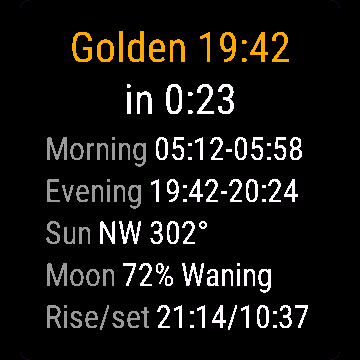
Golden Hour computes real sun position for your GPS location (NOAA solar formulas, not a generic table), so times match your exact latitude and date. Most widgets stop at sunrise and sunset. This one tracks golden hour and blue hour separately, morning and evening, shows which way to point the camera, and adds the moon.
- Morning and evening golden and blue hour windows for your location
- Live countdown to the next window
- Sun direction during evening golden hour
- Moon phase percent, moonrise and moonset
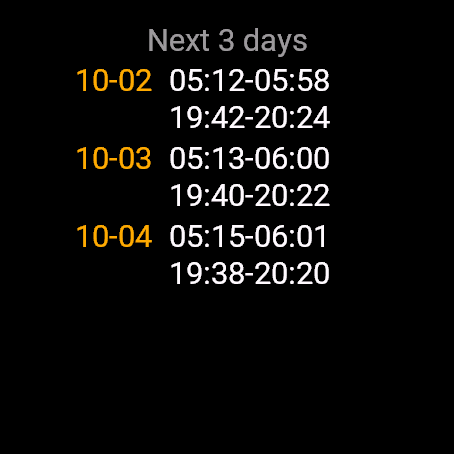
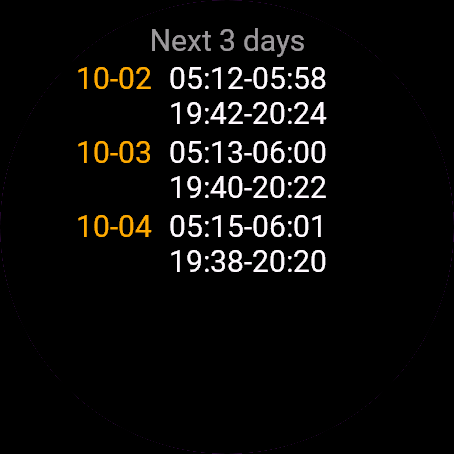
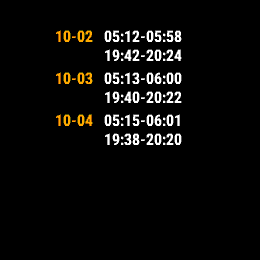
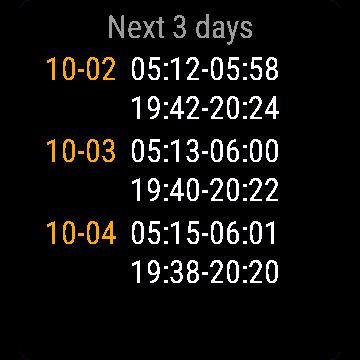
- 3-day outlook to plan ahead
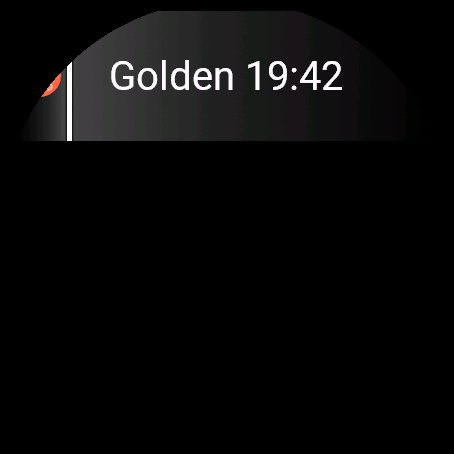
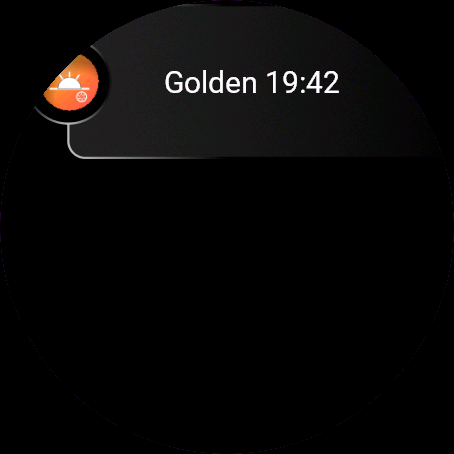
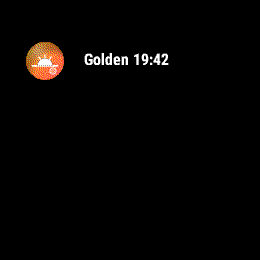
- Glance shows the next window without opening the app
Swipe, tap, or press UP/DOWN to switch between today and the 3-day list.
Free trial: the app works fully and for free for the first 30 days. After that you can buy a one-time code at dialforge.dev. Changing your watch? Write to me and I will move your code for free. No subscription. I am a student and I build these apps myself after hours. I do not own every watch model, so bugs can happen on some. If something does not work or is missing, write through the form at dialforge.dev. I fix every reported bug within 72 hours and send the update to Garmin (Garmin approval usually takes 1-3 days). If you reported a bug, check whether the fix is already there, and if the bug lowered your rating, I would be grateful if you reconsidered it. If the app is useful to you, leave a rating in the store. You can also buy me a coffee or buy the full version, it lets me build more. Purchase: at checkout you confirm immediate delivery of the code, so under EU law the right of withdrawal does not apply. If the app does not work on your watch as described, write to me and I will fix it.
Złote światło co do minuty, niezależnie gdzie akurat stoisz z aparatem.
Golden Hour liczy prawdziwą pozycję słońca dla Twojej lokalizacji GPS (wzory solarne NOAA, nie tabela uśredniona dla regionu), więc godziny pasują do Twojej szerokości geograficznej i daty. Większość aplikacji kończy na wschodzie i zachodzie słońca. Ta liczy złotą i niebieską godzinę osobno, rano i wieczorem, pokazuje w którą stronę ustawić aparat i dorzuca fazy księżyca.
- Poranne i wieczorne okna złotej i niebieskiej godziny dla Twojej lokalizacji
- Odliczanie do następnego okna na żywo
- Kierunek słońca podczas wieczornej złotej godziny
- Procent oświetlenia księżyca, wschód i zachód Księżyca
- Podgląd na 3 dni do przodu
- Glance pokazuje następne okno bez otwierania aplikacji
Przesunięcie palcem, dotknięcie albo GÓRA/DÓŁ przełącza między dziś a listą 3 dni.
Darmowa próba. Przez pierwsze 30 dni aplikacja działa w pełni i za darmo. Potem możesz kupić jednorazowy kod na dialforge.dev. Zmieniasz zegarek? Napisz do mnie, a przeniosę Twój kod bezpłatnie. Bez abonamentu. Jestem studentem i robię te aplikacje sam, po godzinach. Nie mam wszystkich modeli zegarków, więc na niektórych mogą zdarzyć się błędy. Jeśli coś nie działa albo czegoś brakuje, napisz przez formularz na dialforge.dev. Każdą zgłoszoną usterkę poprawiam w ciągu 72 godzin i wysyłam do Garmina (zatwierdzenie przez Garmina trwa zwykle 1-3 dni). Jeśli zgłaszałeś błąd, sprawdź, czy poprawka już jest. A jeśli przez ten błąd wystawiłeś niższą ocenę, będzie mi miło, jeśli ją przemyślisz jeszcze raz. Jeśli aplikacja Ci się przydaje, zostaw ocenę w sklepie. Możesz też postawić mi kawę albo kupić pełną wersję, to pozwala mi robić kolejne. Zakup kodu: przy płatności potwierdzasz natychmiastowe dostarczenie kodu, więc zgodnie z prawem UE nie przysługuje prawo odstąpienia. Jeśli aplikacja nie działa na Twoim zegarku zgodnie z opisem, napisz, a naprawię to.
Goldenes Licht, minutengenau, egal wohin du die Kamera richtest.
Golden Hour berechnet die tatsächliche Sonnenposition für deinen GPS-Standort (NOAA-Sonnenformeln, keine generische Tabelle), damit die Zeiten zu deinem genauen Breitengrad und Datum passen. Die meisten Widgets hören bei Sonnenaufgang und Sonnenuntergang auf. Diese App verfolgt Golden Hour und Blue Hour getrennt, morgens und abends, zeigt dir, in welche Richtung du die Kamera halten solltest, und berücksichtigt auch den Mond.
- Golden- und Blue-Hour-Fenster morgens und abends für deinen Standort
- Live-Countdown bis zum nächsten Fenster
- Sonnenrichtung während der abendlichen Golden Hour
- Mondphase in Prozent, Mondaufgang und Monduntergang
- 3-Tage-Ausblick zur Planung
- Übersicht zeigt das nächste Fenster ohne die App zu öffnen
Wischen, Tippen oder AUF/AB drücken wechselt zwischen heute und der 3-Tage-Liste.
Kostenlose Testversion: Die App funktioniert in den ersten 30 Tagen uneingeschränkt und kostenlos. Danach kannst du einen Einmal-Code auf dialforge.dev kaufen. Du wechselst deine Uhr? Schreib mir und ich übertrage deinen Code kostenlos. Kein Abo. Ich bin Student und entwickle diese Apps selbst nach Feierabend. Ich besitze nicht jedes Uhrenmodell, daher können bei manchen Fehler auftreten. Wenn etwas nicht funktioniert oder fehlt, schreib über das Formular auf dialforge.dev. Ich behebe jeden gemeldeten Fehler innerhalb von 72 Stunden und sende das Update an Garmin (die Freigabe durch Garmin dauert üblicherweise 1-3 Tage). Falls du einen Fehler gemeldet hast, prüfe bitte, ob die Fehlerbehebung schon da ist, und falls der Fehler zu einer schlechteren Bewertung geführt hat, wäre ich dankbar, wenn du sie noch einmal überdenkst. Wenn die App für dich nützlich ist, hinterlasse eine Bewertung im Store. Du kannst mir auch einen Kaffee spendieren oder die Vollversion kaufen, das ermöglicht mir, weitere Apps zu entwickeln. Kauf: Beim Bezahlen bestätigst du die sofortige Bereitstellung des Codes, daher gilt nach EU-Recht kein Widerrufsrecht. Sollte die App auf deiner Uhr nicht wie beschrieben funktionieren, schreib mir und ich behebe das.
La lumière dorée, calculée à la minute, où que vous pointiez l'appareil photo.
Golden Hour calcule la position réelle du soleil pour votre position GPS (formules solaires NOAA, pas une table générique), pour que les horaires correspondent exactement à votre latitude et à la date. La plupart des widgets s'arrêtent au lever et au coucher du soleil. Celui-ci suit l'heure dorée et l'heure bleue séparément, matin et soir, indique dans quelle direction pointer l'appareil photo, et ajoute la lune.
- Fenêtres d'heure dorée et d'heure bleue du matin et du soir pour votre position
- Compte à rebours en direct jusqu'à la prochaine fenêtre
- Direction du soleil pendant l'heure dorée du soir
- Pourcentage de phase lunaire, lever et coucher de lune
- Prévision sur 3 jours pour planifier à l'avance
- Le glance affiche la prochaine fenêtre sans ouvrir l'application
Glissement, appui, ou HAUT/BAS pour basculer entre aujourd'hui et la liste sur 3 jours.
Essai gratuit : l'application fonctionne pleinement et gratuitement pendant les 30 premiers jours. Ensuite, vous pouvez acheter un code à paiement unique sur dialforge.dev. Vous changez de montre ? Écrivez-moi et je transférerai votre code gratuitement. Sans abonnement. Je suis étudiant et je développe ces applications moi-même sur mon temps libre. Je ne possède pas tous les modèles de montre, des bugs peuvent donc survenir sur certains. Si quelque chose ne fonctionne pas ou manque, écrivez-moi via le formulaire sur dialforge.dev. Je corrige chaque bug signalé sous 72 heures et j'envoie la mise à jour à Garmin (la validation par Garmin prend généralement 1 à 3 jours). Si vous avez signalé un bug, vérifiez si le correctif est déjà disponible, et si ce bug a fait baisser votre note, je vous serais reconnaissant de bien vouloir la réévaluer. Si l'application vous est utile, laissez une note dans la boutique. Vous pouvez aussi m'offrir un café ou acheter la version complète, cela me permet d'en développer d'autres. Achat : lors du paiement, vous confirmez la livraison immédiate du code, donc selon le droit de l'UE, le droit de rétractation ne s'applique pas. Si l'application ne fonctionne pas sur votre montre comme décrit, écrivez-moi et je corrigerai le problème.
Luz dorada, calculada al minuto, allí donde apuntes la cámara.
Golden Hour calcula la posición real del sol para tu ubicación GPS (con fórmulas solares de la NOAA, no una tabla genérica), así que las horas coinciden con tu latitud y fecha exactas. La mayoría de los widgets se quedan en el amanecer y el atardecer. Este calcula por separado la hora dorada y la hora azul, de mañana y de tarde, muestra hacia dónde apuntar la cámara, y añade la luna.
- Ventanas de hora dorada y hora azul de mañana y tarde para tu ubicación
- Cuenta atrás en vivo hasta la siguiente ventana
- Dirección del sol durante la hora dorada de la tarde
- Porcentaje de fase lunar, salida y puesta de la luna
- Previsión de 3 días para planificar con antelación
- La vista rápida muestra la siguiente ventana sin abrir la app
Deslizar, tocar o pulsar ARRIBA/ABAJO para cambiar entre hoy y la lista de 3 días.
Prueba gratuita: la aplicación funciona al completo y gratis durante los primeros 30 días. Después de eso, puedes comprar un código de pago único en dialforge.dev. ¿Cambias de reloj? Escríbeme y transferiré tu código gratis. Sin suscripción. Soy estudiante y desarrollo estas aplicaciones por mi cuenta en mi tiempo libre. No tengo todos los modelos de reloj, por lo que pueden ocurrir errores en algunos. Si algo no funciona o falta, escribe a través del formulario en dialforge.dev. Corrijo cada error notificado en un plazo de 72 horas y envío la actualización a Garmin (la aprobación de Garmin suele tardar 1-3 días). Si notificaste un error, comprueba si la solución ya está disponible, y si el error hizo bajar tu valoración, te agradecería que la reconsideraras. Si la aplicación te resulta útil, deja una valoración en la tienda. También puedes invitarme a un café o comprar la versión completa, me permite seguir desarrollando. Compra: en el momento del pago confirmas la entrega inmediata del código, por lo que según la legislación de la UE no se aplica el derecho de desistimiento. Si la aplicación no funciona en tu reloj como se describe, escríbeme y lo solucionaré.
Gouden licht, tot op de minuut getimed, waar je de camera ook op richt.
Golden Hour berekent de werkelijke zonnestand voor je GPS-locatie (NOAA-zonneformules, geen algemene tabel), zodat de tijden exact overeenkomen met je breedtegraad en datum. De meeste widgets stoppen bij zonsopgang en zonsondergang. Deze app volgt het gouden uur en het blauwe uur afzonderlijk, 's ochtends en 's avonds, laat zien in welke richting je de camera moet richten, en voegt de maan toe.
- Tijdsvensters voor het gouden en blauwe uur in de ochtend en avond voor jouw locatie
- Live aftellen naar het volgende venster
- Zonrichting tijdens het gouden uur in de avond
- Percentage van de maanfase, maansopkomst en maansondergang
- 3-daagse vooruitblik om vooruit te plannen
- Glance toont het volgende venster zonder de app te openen
Veeg, tik of druk op UP/DOWN om te schakelen tussen vandaag en de 3-dagenlijst.
Gratis proefperiode: de app werkt de eerste 30 dagen volledig en gratis. Daarna kun je een eenmalige code kopen op dialforge.dev. Wissel je van horloge? Schrijf me en ik zet je code gratis over. Geen abonnement. Ik ben student en ik bouw deze apps zelf in mijn vrije tijd. Ik bezit niet elk horlogemodel, dus op sommige kunnen bugs voorkomen. Als er iets niet werkt of ontbreekt, schrijf dan via het formulier op dialforge.dev. Ik los elke gemelde bug binnen 72 uur op en stuur de update naar Garmin (goedkeuring door Garmin duurt meestal 1-3 dagen). Als je een bug hebt gemeld, controleer dan of de oplossing er al is, en als de bug je beoordeling heeft verlaagd, zou ik het op prijs stellen als je deze wilt heroverwegen. Als de app nuttig voor je is, laat dan een beoordeling achter in de store. Je kunt ook een kop koffie voor me kopen of de volledige versie aanschaffen; daarmee kan ik meer bouwen. Aankoop: bij het afrekenen bevestig je de directe levering van de code, waardoor volgens het EU-recht het herroepingsrecht niet van toepassing is. Als de app op jouw horloge niet werkt zoals beschreven, schrijf me dan en ik los het op.
カメラを向けるその場所で、分単位で正確な黄金の光を捉えられます。
Golden Hour はGPS位置情報から実際の太陽の位置を計算し(一般的な簡易テーブルではなくNOAAの太陽位置計算式を使用)、正確な緯度と日付に合わせた時刻を算出します。多くのウィジェットは日の出と日の入りしか表示しませんが、本アプリは朝と夕方のゴールデンアワーとブルーアワーを個別に追跡し、カメラを向ける方角を示し、さらに月情報も提供します。
- 現在地における朝と夕方のゴールデンアワーおよびブルーアワーの時間帯
- 次の時間帯までのリアルタイムカウントダウン
- 夕方のゴールデンアワーにおける太陽の方角
- 月相パーセント、月の出と月の入り
- 事前計画に役立つ 3-day の見通し
- アプリを開かなくてもグランスで次の時間帯を確認可能
スワイプ、タップ、または UP/DOWN を押して、当日と 3-day リストを切り替えられます。
無料トライアル:最初の30日間はすべての機能を完全かつ無料でご利用いただけます。その後は dialforge.dev で買い切りコードをご購入いただけます。時計を買い替える場合はご連絡いただければ、無料でコードを移行します。サブスクリプションはありません。私は学生で、放課後や空き時間に自分でこれらのアプリを開発しています。すべての時計モデルを所有しているわけではないため、一部のモデルで不具合が発生することがあります。もし動作しない点や不足している機能があれば、dialforge.dev のフォームからご連絡ください。報告された不具合はすべて 72時間 以内に修正し、Garmin へアップデートを提出します(Garmin の承認には通常 1から3日 かかります)。不具合を報告された場合は、修正がすでに反映されているかご確認ください。また、その不具合により評価を下げていた場合は、再評価をご検討いただけますと幸いです。アプリがお役に立ちましたら、ストアで評価を残していただけると嬉しいです。コーヒーをおごっていただくか、製品版をご購入いただくこともできます。今後の開発の励みになります。購入について:チェックアウト時にコードの即時提供に同意いただくため、EU法に基づく撤回権は適用されません。説明どおりに時計でアプリが動作しない場合は、ご連絡いただければ修正いたします。
Luce dorata, calcolata al minuto, ovunque punti la fotocamera.
Golden Hour calcola la posizione reale del sole per la tua posizione GPS (formule solari NOAA, non una tabella generica), così gli orari corrispondono esattamente alla tua latitudine e data. La maggior parte dei widget si ferma all'alba e al tramonto. Questa app calcola separatamente l'ora d'oro e l'ora blu, mattina e sera, indica verso dove puntare la fotocamera e aggiunge la luna.
- Finestre di golden hour e blue hour mattutine e serali per la tua posizione
- Conto alla rovescia in tempo reale per la prossima finestra
- Direzione del sole durante la golden hour serale
- Percentuale di fase lunare, levata e tramonto della luna
- Previsione a 3 giorni per pianificare in anticipo
- Il glance mostra la prossima finestra senza aprire l'app
Scorri, tocca o premi UP/DOWN per passare tra la giornata di oggi e la lista a 3 giorni.
Prova gratuita: l'app funziona in modo completo e gratuito per i primi 30 giorni. Dopodiché puoi acquistare un codice una tantum su dialforge.dev. Cambi orologio? Scrivimi e trasferirò il tuo codice gratuitamente. Nessun abbonamento. Sono uno studente e creo queste app da solo nel tempo libero. Non possiedo tutti i modelli di orologio, quindi su alcuni possono verificarsi bug. Se qualcosa non funziona o manca, scrivimi tramite il modulo su dialforge.dev. Risolvo ogni bug segnalato entro 72 ore e invio l'aggiornamento a Garmin (l'approvazione di Garmin richiede solitamente 1-3 giorni). Se hai segnalato un bug, controlla se la correzione è già disponibile, e se il bug ha abbassato la tua valutazione, ti sarei grato se potessi riconsiderarla. Se trovi utile l'app, lascia una valutazione nello store. Puoi anche offrirmi un caffè o acquistare la versione completa: mi aiuta a sviluppare altre app. Acquisto: al momento del pagamento confermi la consegna immediata del codice, pertanto in base alla legge dell'UE il diritto di recesso non si applica. Se l'app non funziona sul tuo orologio come descritto, scrivimi e risolverò il problema.
精准到分钟的黄金光线,随镜头所向随时捕捉。
Golden Hour 根据您的 GPS 位置计算真实的太阳方位(采用 NOAA 太阳公式,而非通用数据表),确保时间精确匹配您所在的具体纬度和日期。多数小部件仅显示日出日落,本应用则分别追踪清晨与傍晚的黄金时刻和蓝调时刻,指引镜头拍摄方位,并加入月相信息。
- 针对您所在位置的早晚黄金时刻与蓝调时刻时段
- 距离下一个时段的实时倒计时
- 傍晚黄金时刻的太阳方位
- 月相百分比、月出与月落
- 3-day 预报,便于提前规划
- 小部件(glance)无需打开应用即可查看下一个时段
滑动、轻触或按 UP/DOWN 键在今日与 3-day 列表之间切换。
免费试用:应用在前 30 天内功能完整且完全免费。此后,你可以在 dialforge.dev 购买一次性激活码。更换了手表?联系我,我会免费为你迁移激活码。无需订阅。我是一名学生,利用业余时间独自开发这些应用。我无法拥有每一款手表型号,因此在某些机型上可能会出现错误。如果某些功能无法正常工作或有所缺失,请通过 dialforge.dev 上的表单联系我。我会在 72 小时内修复所有反馈的错误并将更新提交给 Garmin(Garmin 审核通常需要 1 到 3 天)。如果你反馈过错误,请查看是否已经修复;如果该错误影响了你的评分,若你能重新考虑评价,我将非常感激。如果这款应用对你有用,请在应用商店留下评价。你也可以请我喝杯咖啡或购买完整版,这能支持我开发更多应用。购买:结账时你确认立即交付激活码,因此根据欧盟法律,撤回权不适用。如果应用在你的手表上未能如描述般正常运行,请联系我,我会修复。
Золотой свет с точностью до минуты, куда бы вы ни направили камеру.
Golden Hour рассчитывает реальное положение солнца для вашей геопозиции по GPS (солнечные формулы NOAA, а не общая таблица), поэтому время точно соответствует вашей широте и дате. Большинство виджетов показывают только восход и закат. Это приложение отдельно отслеживает золотой и синий часы утром и вечером, показывает, куда направить камеру, и добавляет данные о луне.
- Интервалы золотого и синего часа утром и вечером для вашей локации
- Обратный отсчет в реальном времени до следующего интервала
- Направление на солнце во время вечернего золотого часа
- Фаза луны в процентах, восход и заход луны
- Прогноз на 3 дня для предварительного планирования
- Glance показывает следующий интервал без запуска приложения
Смахните, коснитесь экрана или нажмите UP/DOWN, чтобы переключиться между сегодняшним днем и списком на 3 дня.
Бесплатный пробный период: приложение работает полностью и бесплатно первые 30 дней. После этого вы можете купить разовый код на dialforge.dev. Меняете часы? Напишите мне, и я перенесу ваш код бесплатно. Без подписки. Я студент и создаю эти приложения сам в свободное время. У меня нет всех моделей часов, поэтому на некоторых могут случаться ошибки. Если что-то не работает или чего-то не хватает, напишите через форму на dialforge.dev. Я исправляю каждую найденную ошибку в течение 72 часов и отправляю обновление в Garmin (одобрение Garmin обычно занимает 1-3 дня). Если вы сообщили об ошибке, проверьте, не вышло ли уже исправление, и если из-за ошибки вы снизили оценку, я буду благодарен, если вы ее пересмотрите. Если приложение вам полезно, оставьте оценку в магазине. Вы также можете угостить меня кофе или купить полную версию, это позволяет мне создавать больше приложений. Покупка: при оформлении заказа вы подтверждаете немедленное предоставление кода, поэтому по законам ЕС право на отказ от покупки не применяется. Если приложение работает на ваших часах не так, как описано, напишите мне, и я всё исправлю.
Luz dourada, precisa ao minuto, para onde quer que você aponte a câmera.
O Golden Hour calcula a posição real do sol para sua localização GPS (fórmulas solares da NOAA, não uma tabela genérica), para que os horários correspondam exatamente à sua latitude e data. A maioria dos widgets para no nascer e no pôr do sol. Este monitora a hora de ouro e a hora azul separadamente, pela manhã e ao entardecer, mostra para onde apontar a câmera e inclui a lua.
- Intervalos da hora de ouro e da hora azul pela manhã e ao entardecer para a sua localização
- Contagem regressiva em tempo real até o próximo intervalo
- Direção do sol durante a hora de ouro do entardecer
- Porcentagem da fase da lua, nascer e pôr da lua
- Previsão de 3 dias para se planejar com antecedência
- O glance mostra o próximo intervalo sem abrir o app
Deslize, toque ou pressione UP/DOWN para alternar entre hoje e a lista de 3 dias.
Teste gratuito: o aplicativo funciona totalmente e de graça nos primeiros 30 dias. Depois disso, você pode comprar um código único em dialforge.dev. Vai trocar de relógio? Escreva para mim e eu transfiro o seu código de graça. Sem assinatura. Sou estudante e desenvolvo esses aplicativos sozinho nas horas vagas. Não possuo todos os modelos de relógio, por isso bugs podem acontecer em alguns. Se algo não funcionar ou estiver faltando, escreva pelo formulário em dialforge.dev. Corrijo todos os bugs relatados em até 72 horas e envio a atualização para a Garmin (a aprovação da Garmin costuma levar de 1 a 3 dias). Se você relatou um bug, veja se a correção já está disponível, e caso o bug tenha diminuído sua avaliação, eu ficaria grato se você pudesse reconsiderá-la. Se o aplicativo for útil para você, deixe uma avaliação na loja. Você também pode me pagar um café ou comprar a versão completa, isso me permite criar mais. Compra: na finalização da compra você confirma a entrega imediata do código, portanto, sob a legislação da UE, o direito de desistência não se aplica. Se o aplicativo não funcionar no seu relógio conforme descrito, escreva para mim e eu resolverei o problema.
Zlaté světlo načasované na minutu přesně, ať už fotoaparát namíříte kamkoli.
Golden Hour počítá skutečnou polohu slunce pro vaši GPS polohu (solární vzorce NOAA, žádná obecná tabulka), takže časy přesně odpovídají vaší zeměpisné šířce a datu. Většina widgetů končí u východu a západu slunce. Tento sleduje zlatou i modrou hodinku zvlášť, ráno i večer, ukazuje, kam namířit fotoaparát, a přidává i měsíc.
- Ranní a večerní okna zlaté a modré hodinky pro vaši polohu
- Živý odpočet do dalšího okna
- Směr slunce během večerní zlaté hodinky
- Fáze měsíce v procentech, východ a západ měsíce
- 3denní výhled pro plánování předem
- Glance ukazuje další okno bez nutnosti otevírat aplikaci
Přejetím, klepnutím nebo stisknutím UP/DOWN přepínáte mezi dneškem a 3denním přehledem.
Bezplatná zkušební verze: aplikace funguje plně a zdarma po dobu prvních 30 dní. Poté si můžeš koupit jednorázový kód na dialforge.dev. Měníš hodinky? Napiš mi a já ti kód bezplatně převedu. Žádné předplatné. Jsem student a tyto aplikace vytvářím sám po večerech. Nevlastním každý model hodinek, takže se na některých mohou objevit chyby. Pokud něco nefunguje nebo chybí, napiš přes formulář na dialforge.dev. Každou nahlášenou chybu opravuji do 72 hodin a posílám aktualizaci do Garmin (schválení ze strany Garmin obvykle trvá 1-3 dny). Pokud jsi nahlásil chybu, zkontroluj, zda už je oprava k dispozici, a pokud kvůli ní bylo tvé hodnocení nižší, budu vděčný, když ho ještě zvážíš. Pokud je pro tebe aplikace užitečná, zanech hodnocení v obchodě. Můžeš mi také koupit kávu nebo koupit plnou verzi, umožní mi to vytvářet další. Nákup: při dokončení objednávky potvrzuješ okamžité doručení kódu, takže podle práva EU se neuplatňuje právo na odstoupení od smlouvy. Pokud aplikace na tvých hodinkách nefunguje podle popisu, napiš mi a já to opravím.
Luz dourada, calculada ao minuto, para onde quer que aponte a câmara.
O Golden Hour calcula a posição real do sol para a sua localização GPS (fórmulas solares da NOAA, não uma tabela genérica), para que as horas correspondam à sua latitude e data exatas. A maioria dos widgets fica-se pelo nascer e pôr do sol. Este regista a golden hour e a blue hour separadamente, de manhã e ao fim da tarde, mostra para onde apontar a câmara e inclui a lua.
- Janelas de golden hour e blue hour de manhã e ao fim da tarde para a sua localização
- Contagem decrescente em tempo real até à próxima janela
- Direção do sol durante a golden hour de fim de tarde
- Percentagem da fase da lua, nascimento e pôr da lua
- Previsão de 3 dias para planear com antecedência
- O glance mostra a próxima janela sem abrir a aplicação
Deslize, toque ou prima UP/DOWN para alternar entre hoje e a lista de 3 dias.
Avaliação gratuita: a aplicação funciona de forma completa e gratuita durante os primeiros 30 dias. Depois disso, pode comprar um código único em dialforge.dev. Vai mudar de relógio? Escreva-me e transferirei o seu código gratuitamente. Sem subscrição. Sou estudante e crio estas aplicações sozinho nos meus tempos livres. Não possuo todos os modelos de relógio, pelo que podem ocorrer erros em alguns. Se algo não funcionar ou estiver em falta, escreva através do formulário em dialforge.dev. Corrijo todos os erros comunicados dentro de 72 horas e envio a atualização para a Garmin (a aprovação da Garmin costuma demorar 1-3 dias). Se comunicou um erro, verifique se a correção já está disponível e, se o erro baixou a sua classificação, ficaria grato se a reconsiderasse. Se a aplicação lhe for útil, deixe uma avaliação na loja. Também me pode pagar um café ou comprar a versão completa, permitindo-me criar mais. Compra: no checkout confirma a entrega imediata do código, pelo que, ao abrigo da legislação da UE, o direito de livre resolução não se aplica. Se a aplicação não funcionar no seu relógio como descrito, escreva-me e resolverei o problema.
카메라를 어디로 향하든 분 단위까지 정확하게 알려주는 황금빛 햇살.
Golden Hour는 일반적인 시간표가 아닌 NOAA 태양 계산식을 기반으로 현재 GPS 위치의 실제 태양 위치를 계산하므로, 정확한 위도와 날짜에 맞는 시간을 제공합니다. 대부분의 위젯은 일출과 일몰 시간만 표시하지만, 이 앱은 아침과 저녁의 골든 아워와 블루 아워를 각각 추적하고 카메라를 향할 방향과 달 정보까지 안내합니다.
- 현재 위치의 아침 및 저녁 골든 아워와 블루 아워 시간대
- 다음 시간대까지의 실시간 카운트다운
- 저녁 골든 아워 동안의 태양 방향
- 달의 위상 백분율, 월출 및 월몰 시간
- 미리 계획할 수 있는 3-day 전망
- 앱을 열지 않고도 글랜스에서 다음 시간대 확인 가능
화면을 스와이프하거나 탭하거나 UP/DOWN 버튼을 눌러 오늘과 3-day 목록 간에 전환할 수 있습니다.
무료 체험: 처음 30일 동안 앱의 모든 기능을 무료로 이용할 수 있습니다. 그 후 dialforge.dev에서 일회성 코드를 구매할 수 있습니다. 시계를 변경하시나요? 저에게 메시지를 남겨주시면 무료로 코드를 이전해 드립니다. 구독은 없습니다. 저는 학생이며 방과 후 여가 시간에 직접 이 앱들을 개발하고 있습니다. 모든 시계 모델을 보유하고 있지는 않아 일부 기기에서 버그가 발생할 수 있습니다. 제대로 작동하지 않거나 누락된 부분이 있다면 dialforge.dev의 문의 양식을 통해 메시지를 남겨주세요. 보고된 모든 버그는 72시간 이내에 수정하여 Garmin에 업데이트를 전송합니다(Garmin 승인은 보통 1-3일 소요). 버그를 제보하셨다면 수정 사항이 이미 적용되었는지 확인해 주시고, 만약 그 버그로 인해 평점을 낮게 주셨다면 다시 평가해 주시면 감사하겠습니다. 앱이 유용하다면 스토어에 평점을 남겨주세요. 커피를 후원해 주시거나 정식 버전을 구매해 주실 수도 있으며, 이는 제가 더 많은 앱을 만드는 데 도움이 됩니다. 구매 안내: 결제 시 코드 즉시 제공에 동의하시게 되므로 EU 법률상 청약철회권이 적용되지 않습니다. 앱이 설명대로 시계에서 작동하지 않는 경우, 제게 메시지를 보내주시면 해결해 드리겠습니다.
Gyllene ljus, på minuten när, oavsett vart du riktar kameran.
Golden Hour beräknar solens faktiska position för din GPS-position (NOAA-solformler, inte en generell tabell), så tiderna stämmer exakt med din latitud och ditt datum. De flesta widgetar stannar vid soluppgång och solnedgång. Den här håller koll på gyllene timmen och blå timmen separat, morgon och kväll, visar åt vilket håll du ska rikta kameran och lägger till månen.
- Tidsfönster för gyllene timmen och blå timmen morgon och kväll för din plats
- Nedräkning i realtid till nästa fönster
- Solens riktning under kvällens gyllene timme
- Månfas i procent, månuppgång och månnedgång
- 3-dagarsöversikt för att planera i förväg
- Snabblicken visar nästa fönster utan att öppna appen
Svep, tryck eller använd UP/DOWN för att växla mellan idag och 3-dagarslistan.
Gratis provperiod: appen fungerar fullt ut och kostnadsfritt de första 30 dagarna. Därefter kan du köpa en engångskod på dialforge.dev. Byter du klocka? Skriv till mig så flyttar jag din kod gratis. Inget abonnemang. Jag är student och bygger dessa appar själv på fritiden. Jag äger inte alla klockmodeller, så buggar kan uppstå på vissa. Om något inte fungerar eller saknas, skriv via formuläret på dialforge.dev. Jag åtgärdar varje rapporterad bugg inom 72 timmar och skickar uppdateringen till Garmin (Garmins godkännande tar vanligtvis 1-3 dagar). Om du har rapporterat en bugg, se efter om rättelsen redan finns där, och om buggen sänkte ditt betyg vore jag tacksam om du övervägde att ändra det. Om appen är till nytta för dig, lämna gärna ett betyg i butiken. Du kan också bjuda mig på en kaffe eller köpa fullversionen, det gör att jag kan bygga mer. Köp: i kassan bekräftar du omedelbar leverans av koden, så enligt EU-lagstiftning gäller inte ångerrätten. Om appen inte fungerar på din klocka enligt beskrivningen, skriv till mig så återbetalar jag dig.
Det gyldne lys, timet på minuttet, uanset hvor du peger kameraet hen.
Golden Hour beregner solens reelle position for din GPS-placering (NOAA-solformler, ikke en generisk tabel), så tiderne passer til din præcise breddegrad og dato. De fleste widgets stopper ved solopgang og solnedgang. Denne her sporer golden hour og blue hour separat, morgen og aften, viser hvilken vej du skal pege kameraet, og tilføjer månen.
- Tidsrum for golden hour og blue hour morgen og aften for din placering
- Live-nedtælling til det næste tidsrum
- Solens retning under aftenens golden hour
- Månefase i procent, måneopgang og månenedgang
- 3-dages prognose til at planlægge forud
- Glance viser det næste tidsrum uden at åbne appen
Swipe, tryk eller tryk på UP/DOWN for at skifte mellem i dag og 3-dages-listen.
Gratis prøveperiode: appen fungerer fuldt ud og gratis i de første 30 dage. Derefter kan du købe en engangskode på dialforge.dev. Skifter du ur? Skriv til mig, så flytter jeg din kode gratis. Intet abonnement. Jeg er studerende og bygger selv disse apps i min fritid. Jeg ejer ikke alle urmodeller, så der kan opstå fejl på nogle af dem. Hvis noget ikke virker eller mangler, så skriv via formularen på dialforge.dev. Jeg retter enhver rapporteret fejl inden for 72 timer og sender opdateringen til Garmin (Garmin-godkendelse tager normalt 1-3 dage). Hvis du har rapporteret en fejl, så tjek om rettelsen allerede er der, og hvis fejlen fik dig til at give en lavere vurdering, vil jeg være taknemmelig, hvis du vil genoverveje den. Hvis appen er nyttig for dig, så læg en vurdering i butikken. Du kan også give mig en kop kaffe eller købe den fulde version, det giver mig mulighed for at bygge mere. Køb: ved betaling bekræfter du øjeblikkelig levering af koden, så ifølge EU-lovgivningen bortfalder fortrydelsesretten. Hvis appen ikke virker på dit ur som beskrevet, så skriv til mig, og jeg løser det.
Gyldent lys, på minuttet, uansett hvor du retter kameraet.
Golden Hour beregner reell solposisjon for din GPS-posisjon (NOAA-solformler, ikke en generell tabell), slik at tidene stemmer nøyaktig med din breddegrad og dato. De fleste widgeter stopper ved soloppgang og solnedgang. Denne sporer gylden time og blå time separat, morgen og kveld, viser hvilken vei du bør rette kameraet, og legger til månen.
- Tidsvinduer for gylden og blå time morgen og kveld for din posisjon
- Nedtelling i sanntid til neste tidsvindu
- Solretning under gylden time om kvelden
- Månefase i prosent, måneoppgang og månenedgang
- 3-dagers varsel for å planlegge fremover
- Glance viser neste tidsvindu uten å åpne appen
Sveip, trykk eller trykk UP/DOWN for å veksle mellom i dag og 3-dagerslisten.
Gratis prøveperiode: appen fungerer fullt ut og helt gratis de første 30 dagene. Etter det kan du kjøpe en engangskode på dialforge.dev. Bytter du klokke? Skriv til meg, så flytter jeg koden din gratis. Ingen abonnement. Jeg er student og lager disse appene selv på fritiden. Jeg eier ikke alle klokkemodeller, så feil kan forekomme på enkelte. Hvis noe ikke fungerer eller mangler, skriv via skjemaet på dialforge.dev. Jeg retter alle innrapporterte feil innen 72 timer og sender oppdateringen til Garmin (godkjenning fra Garmin tar vanligvis 1-3 dager). Hvis du har meldt fra om en feil, sjekk om rettelsen allerede er på plass, og hvis feilen gjorde at du ga en lavere vurdering, setter jeg stor pris på om du vil vurdere den på nytt. Hvis appen er nyttig for deg, legg gjerne igjen en vurdering i butikken. Du kan også spandere en kaffe på meg eller kjøpe fullversjonen, det gjør at jeg kan utvikle mer. Kjøp: ved betaling bekrefter du umiddelbar levering av koden, så ifølge EU-retten gjelder ikke angreretten. Hvis appen ikke fungerer på klokken din som beskrevet, skriv til meg så fikser jeg det.
黃金時刻精準至分鐘,無論鏡頭指向何方。
Golden Hour 根據你的 GPS 位置計算真實太陽位置(採用 NOAA 太陽公式,而非通用對照表),因此時間精確符合你的實際緯度與日期。多數小工具僅顯示日出與日落,本工具則分別追蹤早晚的黃金時刻與藍調時刻,指引鏡頭朝向,並加入月相資訊。
- 所在地點早晨與傍晚的黃金時刻及藍調時刻時段
- 距離下個最佳拍攝時段的即時倒數
- 傍晚黃金時刻的太陽方位
- 月相百分比、月出與月落時間
- 3-day 預報以利提前規劃
- 無需開啟應用程式,Glance 即可顯示下一個時段
滑動、輕觸或按下 UP/DOWN 即可在今天與 3-day 清單之間切換。
免費試用:前 30 天可免費使用應用程式的完整功能。之後你可以在 dialforge.dev 購買一次性代碼。更換手錶?寫信給我,我會免費為你轉移代碼。無需訂閱。我是一名學生,這些應用程式是我在課餘時間自己開發的。我並沒有每一款手錶型號,所以在某些型號上可能會出現錯誤。如果某些功能無法運作或有所缺漏,請透過 dialforge.dev 上的表單聯絡我。我會在 72 小時內修復所有回報的錯誤,並將更新提交給 Garmin(Garmin 的審查通常需要 1-3 天)。如果你曾回報錯誤,請確認修復是否已推出;若該錯誤曾影響你的評分,如果你願意重新考慮評價,我會非常感謝。如果這個應用程式對你有幫助,請在商店留下評價。你也可以請我喝杯咖啡或購買完整版,這能支持我開發更多內容。購買須知:結帳時你確認立即交付代碼,因此依歐盟法律規定不適用撤回權。如果應用程式無法如描述般在你的手錶上運作,請寫信給我,我會修復。
Kultaista valoa minuutin tarkkuudella, minne tahansa suuntaatkin kameran.
Golden Hour laskee auringon todellisen sijainnin GPS-sijaintisi mukaan (NOAA-aurinkokaavat, ei yleinen taulukko), joten ajat vastaavat tarkasti leveyspiiriäsi ja päivämäärääsi. Useimmat widgetit näyttävät vain auringonnousun ja -laskun. Tämä sovellus seuraa kultaista ja sinistä hetkeä erikseen aamuin ja illoin, näyttää suunnan kameralle ja lisää mukaan kuun tiedot.
- Sijaintisi aamun ja illan kultaisen sekä sinisen hetken ajankohdat
- Reaaliaikainen laskuri seuraavaan hetkeen
- Auringon suunta illan kultaisen hetken aikana
- Kuun vaihe prosentteina, kuun nousu ja lasku
- 3 päivän ennuste etukäteissuunnitteluun
- Glance näyttää seuraavan ajankohdan avaamatta sovellusta
Pyyhkäise, napauta tai paina UP/DOWN vaihtaaksesi tämän päivän ja 3 päivän listan välillä.
Ilmainen kokeilujakso: sovellus toimii täysin ja ilmaiseksi ensimmäiset 30 päivää. Sen jälkeen voit ostaa kertakoodin osoitteesta dialforge.dev. Vaihdatko kelloa? Kirjoita minulle, niin siirrän koodisi ilmaiseksi. Ei tilausta. Olen opiskelija ja rakennan nämä sovellukset itse vapaa-ajallani. En omista jokaista kellomallia, joten joissakin voi esiintyä bugeja. Jos jokin ei toimi tai puuttuu, kirjoita lomakkeen kautta osoitteessa dialforge.dev. Korjaan jokaisen ilmoitetun bugin 72 tunnin kuluessa ja lähetän päivityksen Garminille (Garmin-hyväksyntä kestää yleensä 1-3 päivää). Jos ilmoitit bugista, tarkista onko korjaus jo tullut, ja jos bugi laski arviotasi, olisin kiitollinen jos harkitsisit sitä uudelleen. Jos sovellus on sinulle hyödyllinen, jätä arvio sovelluskauppaan. Voit myös ostaa minulle kahvin tai ostaa täysversion, se auttaa minua kehittämään lisää. Osto: kassalla vahvistat koodin välittömän toimituksen, joten EU-lain mukaan peruutusoikeus ei päde. Jos sovellus ei toimi kellossasi kuvatulla tavalla, kirjoita minulle, niin korjaan asian.
Zlaté svetlo, načasované na minútu presne, kamkoľvek namierite fotoaparát.
Golden Hour počíta skutočnú polohu slnka pre vašu GPS polohu (solárne vzorce NOAA, nie všeobecná tabuľka), takže časy presne zodpovedajú vašej zemepisnej šírke a dátumu. Väčšina widgetov končí pri východe a západe slnka. Táto aplikácia sleduje zlatú a modrú hodinu samostatne, ráno aj večer, ukazuje, kam namieriť fotoaparát, a pridáva aj mesiac.
- Ranné a večerné okná zlatej a modrej hodiny pre vašu polohu
- Živý odpočet do ďalšieho okna
- Smer slnka počas večernej zlatej hodiny
- Fáza mesiaca v percentách, východ a západ mesiaca
- 3-dňový výhľad na plánovanie dopredu
- Glance zobrazuje nasledujúce okno bez nutnosti otvoriť aplikáciu
Potiahnutím, ťuknutím alebo stlačením UP/DOWN prepínate medzi dneškom a 3-dňovým zoznamom.
Bezplatná skúšobná verzia: aplikácia funguje plnohodnotne a zadarmo počas prvých 30 dní. Potom si môžete zakúpiť jednorazový kód na dialforge.dev. Meníte hodinky? Napíšte mi a kód vám bezplatne presuniem. Žiadne predplatné. Som študent a tieto aplikácie vyvíjam sám vo voľnom čase. Nevlastním každý model hodiniek, takže na niektorých sa môžu vyskytnúť chyby. Ak niečo nefunguje alebo chýba, napíšte cez formulár na dialforge.dev. Každú nahlásenú chybu opravím do 72 hodín a aktualizáciu odošlem do Garmin (schválenie od Garmin zvyčajne trvá 1-3 dni). Ak ste nahlásili chybu, skontrolujte, či už je oprava dostupná, a ak vám chyba znížila hodnotenie, bol by som vďačný, keby ste ho prehodnotili. Ak je pre vás aplikácia užitočná, zanechajte hodnotenie v obchode. Môžete mi tiež kúpiť kávu alebo si kúpiť plnú verziu, umožní mi to tvoriť ďalej. Nákup: pri platbe potvrdzujete okamžité doručenie kódu, takže podľa práva EÚ sa na nákup nevzťahuje právo na odstúpenie od zmluvy. Ak aplikácia na vašich hodinkách nefunguje tak, ako je popísané, napíšte mi a opravím to.
Zlata svetloba, točno na minuto, kamorkoli usmerite fotoaparat.
Golden Hour izračuna dejanski položaj sonca za vašo GPS lokacijo (sončne formule NOAA, ne splošna tabela), zato se časi natančno ujemajo z vašo zemljepisno širino in datumom. Večina pripomočkov se ustavi pri sončnem vzhodu in zahodu. Ta ločeno spremlja zlato in modro uro, zjutraj in zvečer, prikazuje smer usmeritve fotoaparata ter dodaja luno.
- Časovni intervali jutranje in večerne zlate ter modre ure za vašo lokacijo
- Odštevanje v živo do naslednjega intervala
- Smer sonca med večerno zlato uro
- Odstotek lunine mene, lunin vzhod in zahod
- 3-dnevna napoved za vnaprejšnje načrtovanje
- Hitri pogled (glance) prikazuje naslednji interval brez odpiranja aplikacije
Podrsajte, tapnite ali pritisnite UP/DOWN za preklop med današnjim dnem in 3-dnevnim seznamom.
Brezplačni preizkus: aplikacija deluje popolnoma in brezplačno prvih 30 dni. Po tem lahko kupite enkratno kodo na dialforge.dev. Menjate uro? Pišite mi in vašo kodo bom brezplačno prenesel. Brez naročnine. Sem študent in te aplikacije ustvarjam sam v svojem prostem času. Nimam vsakega modela ure, zato se lahko na nekaterih pojavijo napake. Če kaj ne deluje ali manjka, pišite prek obrazca na dialforge.dev. Vsako prijavljeno napako odpravim v 72 urah in pošljem posodobitev Garmin (odobritev Garmin običajno traja 1-3 dni). Če ste prijavili napako, preverite, ali je popravek že na voljo, in če je napaka znižala vašo oceno, bi bil hvaležen, če bi jo ponovno premislili. Če vam je aplikacija koristna, pustite oceno v trgovini. Lahko mi kupite tudi kavo ali kupite polno različico, kar mi omogoča, da ustvarim več. Nakup: pri zaključku nakupa potrdite takojšnjo dostavo kode, zato v skladu z zakonodajo EU pravica do odstopa od pogodbe ne velja. Če aplikacija na vaši uri ne deluje, kot je opisano, mi pišite in povrnil vam bom kupnino.
Cahaya keemasan, tepat hingga hitungan menit, ke mana pun Anda mengarahkan kamera.
Golden Hour menghitung posisi matahari sebenarnya untuk lokasi GPS Anda (formula matahari NOAA, bukan tabel umum), sehingga waktu cocok dengan garis lintang dan tanggal tepat Anda. Sebagian besar widget berhenti di matahari terbit dan terbenam. Aplikasi ini melacak golden hour dan blue hour secara terpisah, pagi dan sore, menunjukkan arah untuk mengarahkan kamera, dan menambahkan bulan.
- Waktu golden hour dan blue hour pagi serta sore untuk lokasi Anda
- Hitung mundur langsung ke waktu berikutnya
- Arah matahari selama golden hour sore
- Persentase fase bulan, waktu bulan terbit dan terbenam
- Perkiraan 3 hari untuk merencanakan lebih awal
- Glance menampilkan waktu berikutnya tanpa membuka aplikasi
Geser, ketuk, atau tekan UP/DOWN untuk beralih antara hari ini dan daftar 3 hari.
Uji coba gratis: aplikasi berfungsi penuh dan gratis selama 30 hari pertama. Setelah itu Anda dapat membeli kode satu kali di dialforge.dev. Ganti jam tangan? Hubungi saya dan saya akan memindahkan kode Anda secara gratis. Tanpa langganan. Saya seorang mahasiswa dan saya membuat aplikasi ini sendiri di waktu luang. Saya tidak memiliki semua model jam tangan, jadi bug bisa saja terjadi pada beberapa model. Jika ada yang tidak berfungsi atau kurang, kirim pesan melalui formulir di dialforge.dev. Saya memperbaiki setiap bug yang dilaporkan dalam 72 jam dan mengirimkan pembaruannya ke Garmin (persetujuan Garmin biasanya membutuhkan 1-3 hari). Jika Anda pernah melaporkan bug, periksa apakah perbaikannya sudah tersedia, dan jika bug tersebut menurunkan penilaian Anda, saya akan berterima kasih jika Anda mempertimbangkannya kembali. Jika aplikasi ini bermanfaat bagi Anda, berikan penilaian di toko. Anda juga bisa mentraktir saya kopi atau membeli versi lengkap, ini memungkinkan saya untuk membuat lebih banyak aplikasi. Pembelian: saat pembayaran Anda mengonfirmasi pengiriman langsung kode tersebut, sehingga berdasarkan hukum Uni Eropa hak pembatalan tidak berlaku. Jika aplikasi tidak berfungsi di jam tangan Anda seperti yang dijelaskan, hubungi saya dan saya akan mengembalikan dana Anda.
Aranyfény, percre pontosan időzítve, amerre csak a kamerát fordítod.
A Golden Hour a valós napállást számítja ki a GPS-pozíciód alapján (NOAA napképletek, nem egy általános táblázat), így az időpontok pontosan megegyeznek a szélességi köröddel és a dátummal. A legtöbb widget megáll a napkelténél és a napnyugtánál. Ez külön követi az aranyórát és a kék órát, reggel és este, megmutatja, merre fordítsd a kamerát, és a holdat is hozzáadja.
- Reggeli és esti aranyóra és kék óra időszakok a tartózkodási helyedre
- Élő visszaszámlálás a következő időszakig
- Nap iránya az esti aranyóra alatt
- Holdfázis százalék, holdkelte és holdnyugta
- 3-day előretekintés az előzetes tervezéshez
- Glance mutatja a következő időszakot az alkalmazás megnyitása nélkül
Csúsztass, koppints vagy nyomd meg a UP/DOWN gombot a mai nap és a 3-day lista közötti váltáshoz.
Ingyenes próbaverzió: az alkalmazás teljesen és ingyenesen működik az első 30 napban. Ezt követően vásárolhatsz egy egyszeri kódot a dialforge.dev oldalon. Órát cserélsz? Írj nekem, és ingyen átviszem a kódodat. Nincs előfizetés. Diák vagyok, és ezeket az alkalmazásokat egymagam fejlesztem a szabadidőmben. Nem rendelkezem minden óramodellel, így egyes típusokon előfordulhatnak hibák. Ha valami nem működik vagy hiányzik, írj a dialforge.dev oldalon található űrlapon keresztül. Minden bejelentett hibát 72 órán belül kijavítok, és elküldöm a frissítést a Garminnak (a Garmin jóváhagyása általában 1-3 napot vesz igénybe). Ha hibát jelentettél, ellenőrizd, hogy megérkezett-e már a javítás, és ha a hiba miatt rosszabb értékelést adtál, hálás lennék, ha átgondolnád. Ha hasznosnak találod az alkalmazást, hagyj egy értékelést az áruházban. Meg is hívhatsz egy kávéra, vagy megvásárolhatod a teljes verziót, ez lehetővé teszi, hogy még többet készítsek. Vásárlás: a fizetéskor megerősíted a kód azonnali kézbesítését, így az uniós jog szerint az elállási jog nem érvényes. Ha az alkalmazás nem a leírtak szerint működik az órádon, írj nekem, és megjavítom.
แสงสีทอง แม่นยำระดับนาที ไม่ว่าคุณจะหันกล้องไปทางไหน
Golden Hour คำนวณตำแหน่งดวงอาทิตย์จริงตามพิกัด GPS ของคุณ (ใช้สูตรคำนวณดวงอาทิตย์ของ NOAA ไม่ใช่ตารางทั่วไป) เวลาจึงตรงกับละติจูดและวันที่ที่แน่นอนของคุณ วิดเจ็ตส่วนใหญ่หยุดอยู่ที่เวลาพระอาทิตย์ขึ้นและพระอาทิตย์ตก แต่วิดเจ็ตนี้ติดตามช่วง golden hour และ blue hour แยกกัน ทั้งช่วงเช้าและเย็น แสดงทิศทางที่ควรหันกล้อง และเพิ่มข้อมูลดวงจันทร์
- ช่วงเวลา golden hour และ blue hour ทั้งช่วงเช้าและเย็นสำหรับตำแหน่งของคุณ
- นับถอยหลังแบบสดไปยังช่วงเวลาถัดไป
- ทิศทางของดวงอาทิตย์ในช่วง golden hour ตอนเย็น
- เปอร์เซ็นต์ข้างขึ้นข้างแรม เวลาดวงจันทร์ขึ้นและตก
- การคาดการณ์ล่วงหน้า 3-day เพื่อวางแผนล่วงหน้า
- Glance แสดงช่วงเวลาถัดไปโดยไม่ต้องเปิดแอป
ปัด แตะ หรือกด UP/DOWN เพื่อสลับระหว่างวันนี้กับรายการ 3-day
ทดลองใช้ฟรี: แอปทำงานได้อย่างสมบูรณ์และฟรีในช่วง 30 วันแรก หลังจากนั้นคุณสามารถซื้อรหัสแบบจ่ายครั้งเดียวได้ที่ dialforge.dev เปลี่ยนนาฬิกาใหม่ใช่ไหม? เขียนถึงผมแล้วผมจะย้ายรหัสให้ฟรี ไม่มีการสมัครสมาชิก ผมเป็นนักศึกษาและสร้างแอปเหล่านี้ด้วยตัวเองหลังเลิกเรียน ผมไม่ได้มีนาฬิกาทุกรุ่น ดังนั้นอาจเกิดข้อผิดพลาดขึ้นได้ในบางรุ่น หากมีสิ่งใดใช้งานไม่ได้หรือขาดหายไป โปรดเขียนแจ้งผ่านแบบฟอร์มที่ dialforge.dev ผมจะแก้ไขทุกข้อผิดพลาดที่ได้รับแจ้งภายใน 72 ชั่วโมง และส่งการอัปเดตไปยัง Garmin (โดยปกติการอนุมัติของ Garmin จะใช้เวลา 1-3 วัน) หากคุณเคยแจ้งข้อผิดพลาดไว้ โปรดตรวจสอบว่าได้รับการแก้ไขแล้วหรือยัง และหากข้อผิดพลาดนั้นทำให้คุณให้คะแนนลดลง ผมจะขอบคุณมากหากคุณพิจารณาให้คะแนนใหม่อีกครั้ง หากแอปนี้มีประโยชน์สำหรับคุณ โปรดให้คะแนนในสโตร์ คุณสามารถเลี้ยงกาแฟผมหรือซื้อเวอร์ชันเต็มได้ สิ่งนี้ช่วยให้ผมสร้างสรรค์ผลงานได้มากขึ้น การซื้อ: ในขั้นตอนชำระเงิน คุณยืนยันการรับรหัสทันที ดังนั้นตามกฎหมาย EU สิทธิ์ในการเพิกถอนคำสั่งซื้อจึงไม่มีผลบังคับใช้ หากแอปไม่ทำงานบนนาฬิกาของคุณตามที่ระบุไว้ โปรดเขียนถึงผมและผมจะแก้ไขให้
Χρυσό φως, χρονισμένο με ακρίβεια λεπτού, όπου κι αν στρέψετε την κάμερα.
Το Golden Hour υπολογίζει την πραγματική θέση του ήλιου για την τοποθεσία GPS σας (ηλιακοί τύποι της NOAA, όχι ένας γενικός πίνακας), ώστε οι ώρες να αντιστοιχούν ακριβώς στο γεωγραφικό σας πλάτος και την ημερομηνία. Τα περισσότερα widget σταματούν στην ανατολή και τη δύση του ηλίου. Αυτό παρακολουθεί τη χρυσή και τη μπλε ώρα ξεχωριστά, πρωί και απόγευμα, δείχνει προς τα πού να στρέψετε την κάμερα και προσθέτει τη σελήνη.
- Χρονικά παράθυρα χρυσής και μπλε ώρας για την τοποθεσία σας, πρωί και απόγευμα
- Ζωντανή αντίστροφη μέτρηση για το επόμενο παράθυρο
- Κατεύθυνση του ήλιου κατά την απογευματινή χρυσή ώρα
- Ποσοστό φάσης σελήνης, ανατολή και δύση σελήνης
- Πρόγνωση 3 ημερών για έγκαιρο προγραμματισμό
- Το glance δείχνει το επόμενο παράθυρο χωρίς να ανοίξετε την εφαρμογή
Κάντε swipe, πατήστε στην οθόνη ή πατήστε UP/DOWN για εναλλαγή μεταξύ της σημερινής ημέρας και της λίστας 3 ημερών.
Δωρεάν δοκιμή: η εφαρμογή λειτουργεί πλήρως και δωρεάν για τις πρώτες 30 ημέρες. Μετά από αυτό μπορείτε να αγοράσετε έναν εφάπαξ κωδικό στο dialforge.dev. Αλλάζετε ρολόι; Γράψτε μου και θα μεταφέρω τον κωδικό σας δωρεάν. Χωρίς συνδρομή. Είμαι φοιτητής και φτιάχνω αυτές τις εφαρμογές μόνος μου στον ελεύθερο χρόνο μου. Δεν έχω στην κατοχή μου κάθε μοντέλο ρολογιού, επομένως μπορεί να παρουσιαστούν σφάλματα σε ορισμένα. Αν κάτι δεν λειτουργεί ή λείπει, γράψτε μου μέσω της φόρμας στο dialforge.dev. Διορθώνω κάθε αναφερόμενο σφάλμα εντός 72 ωρών και στέλνω την ενημέρωση στη Garmin (η έγκριση από τη Garmin συνήθως διαρκεί 1-3 ημέρες). Αν αναφέρατε κάποιο σφάλμα, ελέγξτε αν η διόρθωση είναι ήδη διαθέσιμη, και αν το σφάλμα μείωσε την αξιολόγησή σας, θα ήμουν ευγνώμων αν την επανεξετάζατε. Αν η εφαρμογή σας είναι χρήσιμη, αφήστε μια αξιολόγηση στο κατάστημα. Μπορείτε επίσης να με κεράσετε έναν καφέ ή να αγοράσετε την πλήρη έκδοση, κάτι που μου επιτρέπει να δημιουργώ περισσότερες. Αγορά: κατά την ολοκλήρωση της αγοράς επιβεβαιώνετε την άμεση παράδοση του κωδικού, επομένως σύμφωνα με τη νομοθεσία της ΕΕ το δικαίωμα υπαναχώρησης δεν ισχύει. Αν η εφαρμογή δεν λειτουργεί στο ρολόι σας όπως περιγράφεται, γράψτε μου και θα το διορθώσω.
Zlatna svjetlost, točna u minutu, kamo god usmjerite fotoaparat.
Golden Hour izračunava stvarni položaj sunca za vašu GPS lokaciju (NOAA solarne formule, a ne generička tablica), tako da vremena odgovaraju vašoj točnoj zemljopisnoj širini i datumu. Većina widgeta zaustavlja se na izlasku i zalasku sunca. Ovaj zasebno prati zlatni i plavi sat, ujutro i navečer, pokazuje kamo usmjeriti fotoaparat i dodaje mjesec.
- Jutarnji i večernji intervali zlatnog i plavog sata za vašu lokaciju
- Odbrojavanje uživo do sljedećeg intervala
- Smjer sunca tijekom večernjeg zlatnog sata
- Postotak mjesečeve mijene, izlazak i zalazak mjeseca
- Trodnevni pregled za planiranje unaprijed
- Glance prikazuje sljedeći interval bez otvaranja aplikacije
Prijeđite prstom, dodirnite ili pritisnite UP/DOWN za prebacivanje između današnjeg dana i trodnevnog popisa.
Besplatno probno razdoblje: aplikacija radi u potpunosti i besplatno prvih 30 dana. Nakon toga možete kupiti jednokratni kod na dialforge.dev. Mijenjate sat? Javite mi se i besplatno ću vam prenijeti kod. Bez pretplate. Student sam i sam izrađujem ove aplikacije u slobodno vrijeme. Ne posjedujem svaki model sata, pa se na nekima mogu pojaviti greške. Ako nešto ne radi ili nedostaje, javite se putem obrasca na dialforge.dev. Svaku prijavljenu grešku ispravljam unutar 72 sata i šaljem ažuriranje za Garmin (Garmin odobrenje obično traje 1-3 dana). Ako ste prijavili grešku, provjerite je li ispravak već dostupan, a ako je greška utjecala na vašu ocjenu, bio bih zahvalan ako biste je ponovno razmotrili. Ako vam je aplikacija korisna, ostavite ocjenu u trgovini. Možete mi kupiti i kavu ili kupiti punu verziju, to mi omogućuje daljnji rad. Kupnja: prilikom plaćanja potvrđujete trenutačnu isporuku koda, pa se prema pravu EU-a pravo na odustanak ne primjenjuje. Ako aplikacija na vašem satu ne radi kako je opisano, javite mi se i riješit ću problem.
אור זהוב, מתוזמן בדיוק לדקה, לכל מקום שאליו מכוונים את המצלמה.
Golden Hour מחשב את מיקום השמש האמיתי עבור מיקום ה-GPS שלך (נוסחאות סולאריות של NOAA, לא טבלה כללית), כך שהזמנים מתאימים בדיוק לקו הרוחב ולתאריך שלך. רוב הווידג'טים נעצרים בזריחה ובשקיעה. יישום זה עוקב בנפרד אחר שעת הזהב והשעה הכחולה, בבוקר ובערב, מציג לאיזה כיוון לכוון את המצלמה, ומוסיף את הירח.
- חלונות שעת הזהב והשעה הכחולה בבוקר ובערב עבור המיקום שלך
- ספירה לאחור בזמן אמת לחלון הזמן הבא
- כיוון השמש במהלך שעת הזהב בערב
- אחוז מופע הירח, זריחת הירח ושקיעת הירח
- תחזית ל-3 ימים לתכנון מראש
- תצוגת glance מציגה את חלון הזמן הבא מבלי לפתוח את האפליקציה
החלקה, הקשה או לחיצה על UP/DOWN למעבר בין היום לבין הרשימה ל-3 ימים.
ניסיון חינם: האפליקציה פועלת במלואה ובחינם במשך 30 הימים הראשונים. לאחר מכן תוכלו לרכוש קוד חד-פעמי ב-dialforge.dev. מחליפים שעון? כתבו לי ואעביר את הקוד שלכם בחינם. ללא מנוי. אני סטודנט ובונה את האפליקציות האלו בעצמי בשעות הפנאי. אין בבעלותי כל דגם של שעון, ולכן תקלות עלולות לקרות בחלקם. אם משהו אינו פועל או חסר, כתבו לי דרך הטופס ב-dialforge.dev. אני מתקן כל תקלה מדווחת תוך 72 שעות ושולח את העדכון ל-Garmin (אישור של Garmin אורך בדרך כלל 1-3 ימים). אם דיווחתם על תקלה, בדקו אם התיקון כבר זמין, ואם התקלה גרמה לכם להוריד את הדירוג, אודה לכם אם תשקלו אותו מחדש. אם האפליקציה מועילה לכם, השאירו דירוג בחנות. תוכלו גם להזמין אותי לקפה או לקנות את הגרסה המלאה, זה מאפשר לי לפתח עוד. רכישה: בעת התשלום אתם מאשרים קבלה מיידית של הקוד, ולכן על פי חוקי האיחוד האירופי זכות הביטול אינה חלה. אם האפליקציה אינה פועלת בשעון שלכם כמתואר, כתבו לי ואתקן את זה.
Cahaya keemasan, tepat mengikut minit, ke mana sahaja anda halakan kamera.
Golden Hour mengira kedudukan matahari sebenar untuk lokasi GPS anda (formula suria NOAA, bukan jadual generik), jadi waktu bertepatan dengan latitud dan tarikh tepat anda. Kebanyakan widget terhenti pada matahari terbit dan terbenam. Aplikasi ini menjejaki golden hour dan blue hour secara berasingan, pagi dan petang, menunjukkan arah untuk menghalakan kamera, dan menambah fasa bulan.
- Waktu golden hour dan blue hour pagi dan petang untuk lokasi anda
- Kiraan detik langsung ke waktu seterusnya
- Arah matahari semasa golden hour petang
- Peratusan fasa bulan, bulan terbit dan bulan terbenam
- Gambaran 3 hari untuk merancang lebih awal
- Glance menunjukkan waktu seterusnya tanpa membuka aplikasi
Leret, ketik, atau tekan UP/DOWN untuk beralih antara hari ini dan senarai 3 hari.
Percubaan percuma: aplikasi ini berfungsi sepenuhnya dan secara percuma untuk 30 hari pertama. Selepas itu anda boleh membeli kod sekali bayar di dialforge.dev. Menukar jam tangan anda? Tulis kepada saya dan saya akan memindahkan kod anda secara percuma. Tiada langganan. Saya seorang pelajar dan saya membina aplikasi ini sendiri di luar waktu belajar. Saya tidak memiliki setiap model jam tangan, jadi pepijat boleh berlaku pada sesetengah model. Jika ada sesuatu yang tidak berfungsi atau tiada, tulis melalui borang di dialforge.dev. Saya membetulkan setiap pepijat yang dilaporkan dalam masa 72 jam dan menghantar kemas kini kepada Garmin (kelulusan Garmin biasanya mengambil masa 1-3 hari). Jika anda melaporkan pepijat, semak sama ada pembetulan sudah ada, dan jika pepijat tersebut mengurangkan penilaian anda, saya amat berterima kasih jika anda mempertimbangkannya semula. Jika aplikasi ini berguna kepada anda, tinggalkan penilaian di gedung. Anda juga boleh belanja saya secawan kopi atau beli versi penuh, ia membolehkan saya membina lebih banyak lagi. Pembelian: semasa membuat pembayaran anda mengesahkan penghantaran segera kod, jadi di bawah undang-undang EU hak untuk menarik diri tidak terpakai. Jika aplikasi tidak berfungsi pada jam tangan anda seperti yang diterangkan, tulis kepada saya dan saya akan membaikinya.
How to use it
Add Golden Hour to the widget loop (swipe through widgets on the watch).
Works on fenix 8, Forerunner 970, Forerunner 570, Venu 4, Forerunner 965, Forerunner 265, Venu 3, vivoactive 6 and more.
Dodaj Złota godzina do karuzeli widgetów (przewiń widgety na zegarku).
Działa na: fenix 8, Forerunner 970, Forerunner 570, Venu 4, Forerunner 965, Forerunner 265, Venu 3, vivoactive 6 i innych.
Füge Golden Hour zur Widget-Schleife hinzu (auf der Uhr durch die Widgets wischen).
Läuft auf fenix 8, Forerunner 970, Forerunner 570, Venu 4, Forerunner 965, Forerunner 265, Venu 3, vivoactive 6 und weiteren Modellen.
Ajoutez Golden Hour à la boucle de widgets (faites défiler les widgets sur la montre).
Compatible avec fenix 8, Forerunner 970, Forerunner 570, Venu 4, Forerunner 965, Forerunner 265, Venu 3, vivoactive 6 et d'autres modèles.
Añade Golden Hour al bucle de widgets (desliza por los widgets en el reloj).
Compatible con fenix 8, Forerunner 970, Forerunner 570, Venu 4, Forerunner 965, Forerunner 265, Venu 3, vivoactive 6 y más.
Voeg Golden Hour toe aan de widgetlus (veeg op het horloge door de widgets).
Werkt op fenix 8, Forerunner 970, Forerunner 570, Venu 4, Forerunner 965, Forerunner 265, Venu 3, vivoactive 6 en meer.
Golden Hour をウィジェットのループに追加してください(時計でウィジェットをスワイプして切り替えます)。
対応モデル:fenix 8, Forerunner 970, Forerunner 570, Venu 4, Forerunner 965, Forerunner 265, Venu 3, vivoactive 6 ほか
Aggiungi Golden Hour al ciclo dei widget (scorri i widget sull'orologio).
Compatibile con fenix 8, Forerunner 970, Forerunner 570, Venu 4, Forerunner 965, Forerunner 265, Venu 3, vivoactive 6 e altri.
把 Golden Hour 添加到小组件循环中(在手表上滑动切换小组件)。
适用于 fenix 8, Forerunner 970, Forerunner 570, Venu 4, Forerunner 965, Forerunner 265, Venu 3, vivoactive 6 等。
Добавьте Golden Hour в ленту виджетов (листайте виджеты на часах).
Работает на fenix 8, Forerunner 970, Forerunner 570, Venu 4, Forerunner 965, Forerunner 265, Venu 3, vivoactive 6 и других.
Adicione Golden Hour ao ciclo de widgets (deslize pelos widgets no relógio).
Funciona em fenix 8, Forerunner 970, Forerunner 570, Venu 4, Forerunner 965, Forerunner 265, Venu 3, vivoactive 6 e outros.
Přidejte Golden Hour do smyčky widgetů (na hodinkách procházejte widgety přejížděním).
Funguje na fenix 8, Forerunner 970, Forerunner 570, Venu 4, Forerunner 965, Forerunner 265, Venu 3, vivoactive 6 a dalších.
Adicione Golden Hour ao ciclo de widgets (deslize pelos widgets no relógio).
Funciona em fenix 8, Forerunner 970, Forerunner 570, Venu 4, Forerunner 965, Forerunner 265, Venu 3, vivoactive 6 e outros.
Golden Hour을(를) 위젯 순환에 추가하세요(시계에서 위젯을 넘겨 보세요).
지원 모델: fenix 8, Forerunner 970, Forerunner 570, Venu 4, Forerunner 965, Forerunner 265, Venu 3, vivoactive 6 외
Lägg till Golden Hour i widgetslingan (svep mellan widgetar på klockan).
Fungerar på fenix 8, Forerunner 970, Forerunner 570, Venu 4, Forerunner 965, Forerunner 265, Venu 3, vivoactive 6 med flera.
Tilføj Golden Hour til widget-løkken (stryg gennem widgets på uret).
Virker på fenix 8, Forerunner 970, Forerunner 570, Venu 4, Forerunner 965, Forerunner 265, Venu 3, vivoactive 6 og flere.
Legg til Golden Hour i widget-rekken (sveip gjennom widgetene på klokken).
Fungerer på fenix 8, Forerunner 970, Forerunner 570, Venu 4, Forerunner 965, Forerunner 265, Venu 3, vivoactive 6 og flere.
把 Golden Hour 加入小工具循環中(在手錶上滑動切換小工具)。
適用於 fenix 8, Forerunner 970, Forerunner 570, Venu 4, Forerunner 965, Forerunner 265, Venu 3, vivoactive 6 等。
Lisää Golden Hour widgetkiertoon (selaa widgettejä pyyhkäisemällä kellossa).
Toimii malleissa fenix 8, Forerunner 970, Forerunner 570, Venu 4, Forerunner 965, Forerunner 265, Venu 3, vivoactive 6 ja muissa.
Pridajte Golden Hour do cyklu widgetov (widgety na hodinkách prechádzate potiahnutím).
Funguje na fenix 8, Forerunner 970, Forerunner 570, Venu 4, Forerunner 965, Forerunner 265, Venu 3, vivoactive 6 a ďalších.
Dodajte Golden Hour v zanko pripomočkov (na uri se pomikajte med pripomočki).
Deluje na fenix 8, Forerunner 970, Forerunner 570, Venu 4, Forerunner 965, Forerunner 265, Venu 3, vivoactive 6 in drugih.
Tambahkan Golden Hour ke putaran widget (geser antar widget di jam).
Berfungsi di fenix 8, Forerunner 970, Forerunner 570, Venu 4, Forerunner 965, Forerunner 265, Venu 3, vivoactive 6 dan lainnya.
Adja hozzá a(z) Golden Hour elemet a widgetkörhöz (az órán görgessen a widgetek között).
Működik ezeken: fenix 8, Forerunner 970, Forerunner 570, Venu 4, Forerunner 965, Forerunner 265, Venu 3, vivoactive 6 és továbbiak.
เพิ่ม Golden Hour ในวิดเจ็ตลูป (ปัดผ่านวิดเจ็ตบนนาฬิกา)
ใช้ได้กับ fenix 8, Forerunner 970, Forerunner 570, Venu 4, Forerunner 965, Forerunner 265, Venu 3, vivoactive 6 และรุ่นอื่น
Προσθέστε το Golden Hour στον κύκλο των widget (σύρετε στα widget του ρολογιού).
Λειτουργεί σε fenix 8, Forerunner 970, Forerunner 570, Venu 4, Forerunner 965, Forerunner 265, Venu 3, vivoactive 6 και άλλα.
Dodajte Golden Hour u petlju widgeta (listajte widgete na satu).
Radi na fenix 8, Forerunner 970, Forerunner 570, Venu 4, Forerunner 965, Forerunner 265, Venu 3, vivoactive 6 i drugima.
הוסיפו את Golden Hour ללולאת הווידג'טים (החליקו בין הווידג'טים בשעון).
עובד על fenix 8, Forerunner 970, Forerunner 570, Venu 4, Forerunner 965, Forerunner 265, Venu 3, vivoactive 6 ועוד.
Tambah Golden Hour ke dalam gelung widget (leret melalui widget pada jam).
Berfungsi pada fenix 8, Forerunner 970, Forerunner 570, Venu 4, Forerunner 965, Forerunner 265, Venu 3, vivoactive 6 dan lain-lain.
Manual
The full manual and the detailed permission descriptions are available in English and Polish.
Golden Hour: user manual
What it does
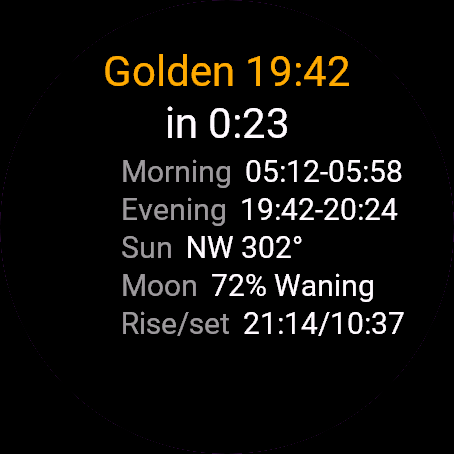
Golden Hour shows when the light is golden and blue where you are, computed on the watch from your GPS position. It covers the morning and evening windows, a countdown to the next one, the sun direction for the evening, moon phase, moonrise and moonset, and a 3-day outlook.
Requirements and supported watches
Needs Connect IQ 3.3.0+ and the Connect IQ or Garmin Connect phone app. Supported watches:
- Round AMOLED: epix 2 and epix Pro 2, fēnix 8, E, Forerunner 165, 265, 570, 965, 970, Instinct 3 AMOLED, Crossover AMOLED, Venu 2, 3, 4, vivoactive 5, 6.
- Round MIP: enduro 3, fēnix 7 series, 8 Solar, Forerunner 55, 245, 255, vivoactive 4.
- Square and rectangular AMOLED: Venu Sq 2, Venu X1.
Installation
In the Connect IQ app on your phone (or Garmin Connect, then the Connect IQ Store) find "Golden Hour" by Dialforge, tap Install and sync the watch. Find it in your glances (UP or DOWN on the watch face, or swipe) and press START or tap to open it.
First launch
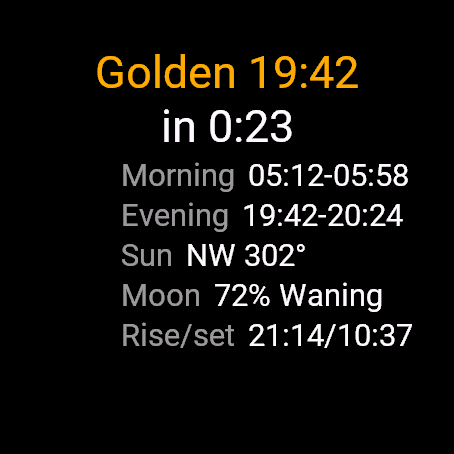
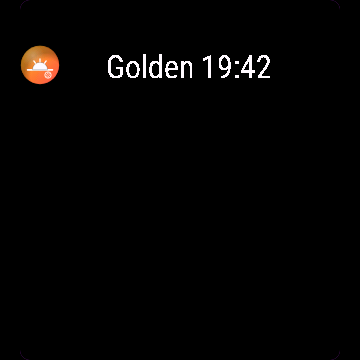
The glance shows the next window, like "Golden 19:12 (in 2:05)". Open the widget for the full page. With no stored position you see "Getting GPS fix", so step outside with a clear sky. Until you first open the app, the glance says "Open app". The 30-day free trial starts the first time you open it.
Controls
Watches with buttons (START, UP, DOWN, BACK)
- UP or DOWN switches between today and "Next 3 days".
- START recalculates. If the stored position is older than 24 hours, it also asks for a fresh GPS fix.
- MENU (hold UP) opens one item: Get GPS fix.
Touch watches (tap, hold, swipe)
- Tap or swipe switches between today and "Next 3 days".
- To get a fresh GPS fix, open the menu with the menu button or a long press.
Settings
Phone: Connect IQ app, Golden Hour, Settings (the unlock code fields are there too).
License
- Free trial: 30 days from the first launch, everything works.
- Price: 6.49 EUR once at dialforge.dev, no subscription. The 8-character code is tied to your watch's UID.
- Where to enter it: phone, Connect IQ app, Golden Hour, Settings. Read the UID in "Watch UID (needed to buy a code)", buy the code, then type it into "Unlock code from dialforge.dev". The trial-ended screen on the watch shows the UID too.
- After the free trial without a code: a trial-ended screen with the UID replaces the app. Enter the code, then open it again. New watch? Write to us and the code moves for free.
Privacy and permissions
Permissions:
- Location: one GPS fix to compute sun and moon times. The position stays on the watch.
No internet use. Data stays on the watch.
Troubleshooting
The code does not work. Check that the UID you bought for matches "Watch UID (needed to buy a code)" and type all 8 characters (case is ignored, no 0, O, 1 or I). A code for another app does not fit. Sync, then reopen.
What are the windows exactly? Golden is the sun between 4 degrees below and 6 degrees above the horizon, blue is between 6 and 4 degrees below. Morning runs from the end of the night to the end of golden, evening from the start of golden to the end of blue.
What are the rows on the main page? Morning and Evening windows, Sun (the compass direction and degrees during evening golden hour), Moon (percent lit, waxing or waning) and Rise/set for the moon.
It says No location. The app needs a position once. Open it outdoors and wait, or choose Get GPS fix in the menu. The position is stored and refreshed when older than 24 hours.
The glance is out of date. It reads the windows saved the last time you opened the full widget. When they run out it shows "Open app". Open the widget to refresh it.
Contact
kontakt@dialforge.dev or dialforge.dev. Please write before leaving a low rating.
Złota godzina: instrukcja obsługi
Do czego służy
Złota godzina pokazuje, kiedy światło jest złote i niebieskie w Twoim miejscu, liczone w zegarku z pozycji GPS. Są okna poranne i wieczorne, odliczanie do najbliższego, kierunek słońca wieczorem, faza Księżyca, jego wschód i zachód oraz prognoza na 3 dni.
Wymagania i obsługiwane zegarki
Wymaga Connect IQ 3.3.0+ i aplikacji Connect IQ albo Garmin Connect w telefonie. Obsługiwane zegarki:
- Okrągłe AMOLED: epix 2 i epix Pro 2, fēnix 8, E, Forerunner 165, 265, 570, 965, 970, Instinct 3 AMOLED, Crossover AMOLED, Venu 2, 3, 4, vivoactive 5, 6.
- Okrągłe MIP: enduro 3, seria fēnix 7, fēnix 8 Solar, Forerunner 55, 245, 255, vivoactive 4.
- Kwadratowe i prostokątne AMOLED: Venu Sq 2, Venu X1.
Instalacja
Na telefonie otwórz aplikację Connect IQ (albo Garmin Connect, a w niej sklep Connect IQ), wyszukaj "Złota godzina" od Dialforge, stuknij Zainstaluj i zsynchronizuj zegarek. Znajdziesz go wśród widżetów (GÓRA lub DÓŁ na tarczy albo przesunięcie palcem), a START lub stuknięcie otwiera go w całości.
Pierwsze uruchomienie
Glance pokazuje najbliższe okno, np. "Złota 19:12 (za 2:05)". Otwórz widżet, żeby zobaczyć całą stronę. Bez zapamiętanej pozycji zobaczysz "Szukam sygnału GPS", więc wyjdź na otwarte niebo. Dopóki nie otworzysz aplikacji pierwszy raz, glance mówi "Otwórz aplikację". 30-dniowa darmowa próba zaczyna się przy pierwszym otwarciu.
Sterowanie
Zegarki z przyciskami (START, GÓRA, DÓŁ, WSTECZ)
- GÓRA lub DÓŁ przełącza dziś i "Kolejne 3 dni".
- START przelicza od nowa. Gdy zapamiętana pozycja ma ponad 24 godziny, prosi też o świeży sygnał GPS.
- MENU (przytrzymaj GÓRA) otwiera jedną pozycję: Znajdź GPS.
Zegarki dotykowe (stuknięcie, przytrzymanie, przesunięcie)
- Stuknięcie albo przesunięcie przełącza dziś i "Kolejne 3 dni".
- Świeży sygnał GPS: otwórz menu przyciskiem menu lub długim przytrzymaniem.
Ustawienia
Telefon: aplikacja Connect IQ, Złota godzina, Ustawienia (są tam też pola kodu odblokowania).
Licencja
- Darmowa próba: 30 dni od pierwszego uruchomienia, wszystko działa.
- Cena: jednorazowo 6,49 EUR na dialforge.dev, bez abonamentu. 8-znakowy kod jest przypisany do UID zegarka.
- Gdzie wpisać: telefon, aplikacja Connect IQ, Złota godzina, Ustawienia. Odczytaj UID w polu "UID zegarka (potrzebny do zakupu kodu)", kup kod i wpisz go w "Kod odblokowania z dialforge.dev". Ekran końca próby na zegarku też pokazuje UID.
- Po becie bez kodu: zamiast aplikacji pojawia się ekran końca próby z UID. Wpisz kod i otwórz aplikację ponownie. Nowy zegarek? Napisz do nas, przeniesiemy kod za darmo.
Prywatność i uprawnienia
Uprawnienia:
- Lokalizacja: jeden odczyt GPS do obliczenia godzin słońca i Księżyca. Pozycja zostaje w zegarku.
Zero połączeń z internetem. Dane zostają w zegarku.
Rozwiązywanie problemów
Kod nie działa. Sprawdź, czy UID, dla którego kupiono kod, zgadza się z polem "UID zegarka (potrzebny do zakupu kodu)", i wpisz wszystkie 8 znaków (wielkość liter bez znaczenia, bez 0, O, 1, I). Kod do innej aplikacji nie pasuje. Zsynchronizuj i otwórz ponownie.
Jak dokładnie liczą się okna? Złota to słońce od 4 stopni pod horyzontem do 6 stopni nad nim, niebieska od 6 do 4 stopni pod horyzontem. Rano okno biegnie od końca nocy do końca złotej, wieczorem od początku złotej do końca niebieskiej.
Co jest w wierszach na głównej stronie? Rano i Wieczór to okna, Słońce to kierunek kompasu i stopnie podczas wieczornej złotej godziny, Faza to procent oświetlenia z "Przybywa" lub "Ubywa", a Księżyc to jego wschód i zachód.
Pisze Brak lokalizacji. Aplikacja potrzebuje pozycji raz. Otwórz ją na zewnątrz i poczekaj albo wybierz w menu Znajdź GPS. Pozycja jest zapamiętana i odświeża się, gdy ma ponad 24 godziny.
Glance pokazuje stare dane. Czyta okna zapisane przy ostatnim otwarciu całego widżetu. Gdy się skończą, pisze "Otwórz aplikację". Otwórz widżet, żeby je odświeżyć.
Kontakt
kontakt@dialforge.dev albo dialforge.dev. Napisz, zanim wystawisz niską ocenę.
Permissions and privacy
This product asks the watch for the permissions below. Connect IQ shows them when you install it.
- Location (GPS): Uses the watch location for distance, speed or sun and moon times. The location is not sent anywhere.Używa lokalizacji zegarka do dystansu, prędkości albo godzin słońca i księżyca. Lokalizacja nigdzie nie jest wysyłana.
This product does not use the internet and sends no data to our servers.
The full manual and the detailed permission descriptions are available in English and Polish.
Compatible watches
51mm, Adventurer, Captain, Carbon Edition, Commander - Carbon Edition, D2 Air X15, D2 Mach 1 Pro, Enduro 2, Enduro 3, epix (Gen 2), epix Pro (Gen 2) 42mm, epix Pro (Gen 2) 47mm, epix Pro (Gen 2) 51mm, Forerunner 165, Forerunner 165 Music, Forerunner 245, Forerunner 245 Music, Forerunner 255, Forerunner 255 Music, Forerunner 255s, Forerunner 255s Music, Forerunner 265, Forerunner 265s, Forerunner 55, Forerunner 570 42mm, Forerunner 570 47mm, Forerunner 965, Forerunner 970, fēnix 7, fēnix 7 Pro, fēnix 7 Pro - Solar Edition (no Wi-Fi), fēnix 7S, fēnix 7S Pro, fēnix 7X, fēnix 7X Pro, fēnix 7X Pro - Solar Edition (no Wi-Fi), fēnix 8 43mm, fēnix 8 47mm, fēnix 8 Pro 47mm, fēnix 8 Solar 47mm, fēnix 8 Solar 51mm, fēnix E, Golfer, Instinct 3 AMOLED 45mm, Instinct 3 AMOLED 50mm, Instinct Crossover AMOLED, MARQ (Gen 2) Athlete, MARQ (Gen 2) Aviator, MARQ Adventurer, MARQ Athlete, MARQ Aviator, MARQ Captain, MARQ Captain: American Magic Edition, MARQ Commander, MARQ Driver, MARQ Expedition, MARQ Golfer, MicroLED, quatix 7, quatix 7 Pro, quatix 7 Sapphire, quatix 7X Solar, quatix 8 47mm, quatix 8 Pro 47mm, tactix 7, tactix 7 – AMOLED Edition, tactix 8 47mm, tactix 8 Solar 51mm, Venu 2, Venu 2 Plus, Venu 2S, Venu 3, Venu 3S, Venu 4 41mm, Venu 4 45mm, Venu Sq 2, Venu Sq 2 Music, Venu X1, vívoactive 4, vívoactive 4S, vívoactive 5, vívoactive 6
Rate it
Screenshots
Video
FAQ
What happens after the 30-day free trial?
The app shows a screen asking for a one-time unlock code from dialforge.dev instead of opening normally. Buy the code once below, no subscription.
Does the app send my data to Dialforge?
No. The app works fully offline, and the unlock code is checked on the watch itself, without contacting any server.
The app does not work as described on my watch. What can I do?
Write through the feedback form below, or to the e-mail in the footer, and we will fix it.
Changing your watch?
Write to me and I will move your code for free.
Changelog
- New app icon.
- Nowa ikona aplikacji.
- Neues App-Symbol.
- Nouvelle icône de l'application.
- Nuevo icono de la aplicación.
- Nieuw app-pictogram.
- アプリの新しいアイコン。
- Nuova icona dell'app.
- 全新应用图标。
- Новая иконка приложения.
- Novo ícone do app.
- Nová ikona aplikace.
- Novo ícone da aplicação.
- 새로운 앱 아이콘.
- Ny appikon.
- Nyt appikon.
- Nytt appikon.
- 全新應用程式圖示。
- Uusi sovelluskuvake.
- Nová ikona aplikácie.
- Nova ikona aplikacije.
- Ikon aplikasi baru.
- Új alkalmazásikon.
- ไอคอนแอปใหม่
- Νέο εικονίδιο εφαρμογής.
- Nova ikona aplikacije.
- סמל אפליקציה חדש.
- Ikon aplikasi baharu.
Unlock
€6.49
One-time payment. No subscription. The code works on the watch whose ID you enter.
- Install the app from the Connect IQ store. It works fully and for free for the first 30 days.
- Enter the watch ID and pay. The code appears here at once and in the e-mail you give when paying.
- Pay.
- Copy the code.
- Enter the code in the app settings, field "Unlock code". The watch checks it offline.
Payment works best in Safari or Chrome: menu (three dots) > Open in browser
Read it in the settings of this app, field UID. It is not the serial number of the watch.
Your ID, compare it with the watch:
Where do I find the ID?
The ID is different in every face and app, so read it in the one you are buying. Find your 10-digit UID: Connect IQ app on the phone > My Device > Apps or Data Fields > this app > Settings > UID.
Code not working on your watch? Write to me and I will fix it.
Payments by Stripe. Seller: Mateusz Kolarz, Lublin, Poland.
Paid. Code:
We show the code here too. If the e-mail does not arrive (check spam), you can recover the code in the Recover code section with just the UID. Recover code
Copying did not work. The code is selected: copy it by hand.
Enter the code in the app settings, field "Unlock code". The watch checks it offline.
Enjoying a face or app? A rating and comment in the Connect IQ Store helps a lot. Rate in Connect IQ