Running and cycling data fields
HR Zones Big
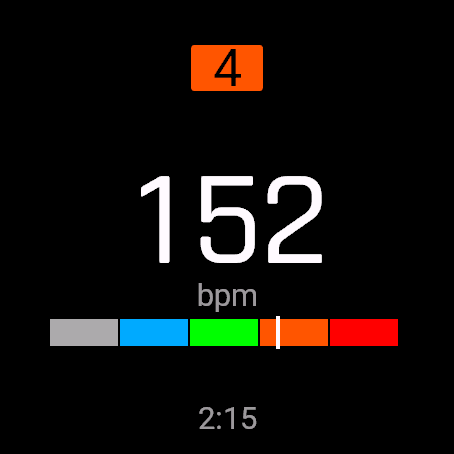
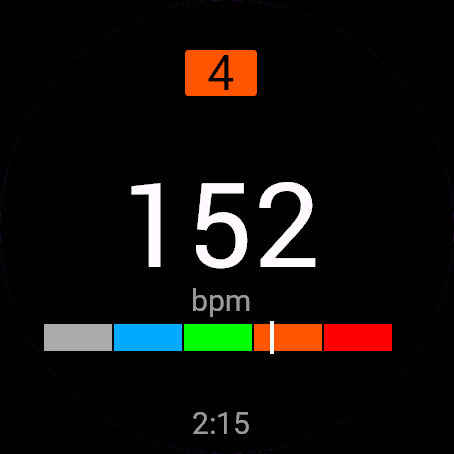
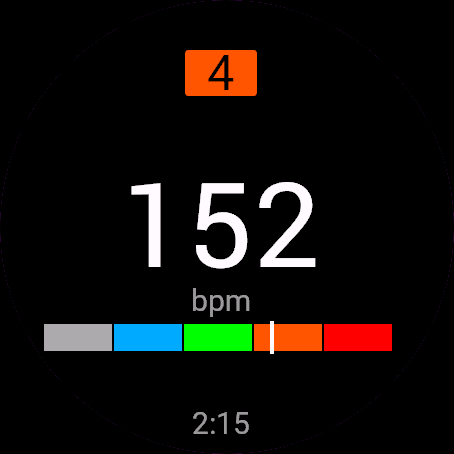
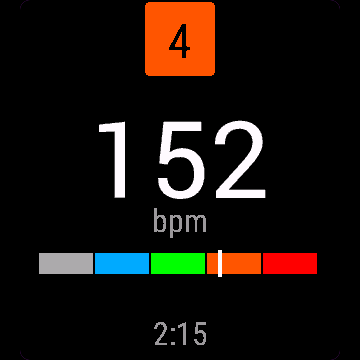
A heart rate zones data field app for running: a huge heart rate number, your zone 1 to 5 on a colour bar and time in the zone, based on your Garmin zone settings.
Aplikacja z polem danych ze strefami tętna do biegania: ogromna liczba tętna, Twoja strefa od 1 do 5 na kolorowym pasku i czas w strefie, na podstawie ustawień stref w Garminie.
App mit Herzfrequenzzonen-Datenfeld fürs Laufen: riesige Pulszahl, Ihre Zone 1 bis 5 auf einem Farbbalken und Zeit in der Zone, basierend auf Ihren Garmin-Zoneneinstellungen.
Application de champ de données des zones de fréquence cardiaque pour la course : un énorme chiffre de fréquence cardiaque, votre zone 1 à 5 sur une barre de couleur et le temps dans la zone, d'après vos réglages de zones Garmin.
App de campo de datos de zonas de frecuencia cardíaca para correr: un número enorme de pulsaciones, tu zona 1 a 5 en una barra de color y el tiempo en la zona, según tus ajustes de zonas de Garmin.
App met datavelden voor hartslagzones om te hardlopen: een enorm hartslagcijfer, je zone 1 tot 5 op een kleurenbalk en de tijd in de zone, gebaseerd op je Garmin-zone-instellingen.
ランニング用の心拍ゾーンのデータフィールドアプリ。特大の心拍数、色付きバー上のゾーン1から5、ゾーン内の時間を、Garminのゾーン設定に基づいて表示します。
App con campo dati per le zone di frequenza cardiaca per la corsa: un numero enorme di battiti, la tua zona da 1 a 5 su una barra colorata e il tempo nella zona, in base alle impostazioni delle zone Garmin.
超大心率数字,彩色条上显示你的1到5区,以及在该区的时间,基于你的Garmin心率区间设置。
Приложение с полем данных зон пульса для бега: огромное значение пульса, ваша зона от 1 до 5 на цветной шкале и время в зоне по вашим настройкам зон Garmin.
App de campo de dados de zonas de frequência cardíaca para corrida: um número enorme de batimentos, sua zona 1 a 5 numa barra colorida e o tempo na zona, com base nas suas configurações de zonas da Garmin.
Aplikace s datovým polem zón tepu pro běh: obří hodnota tepu, vaše zóna 1 až 5 na barevném pruhu a čas v zóně podle vašeho nastavení zón v Garminu.
App de campo de dados de zonas de frequência cardíaca para corrida: um número enorme de batimentos, a sua zona 1 a 5 numa barra colorida e o tempo na zona, com base nas suas definições de zonas Garmin.
러닝용 심박 존 데이터 필드 앱입니다. 초대형 심박수 숫자, 컬러 바 위의 존 1부터 5, 존 체류 시간을 Garmin 존 설정에 맞춰 보여 줍니다.
App med datafält för pulszoner för löpning: ett jättestort pulstal, din zon 1 till 5 på ett färgfält och tid i zonen, utifrån dina Garmin-zoninställningar.
App med datafelt til pulszoner til løb: et kæmpe pulstal, din zone 1 til 5 på en farvebjælke og tid i zonen, baseret på dine Garmin-zoneindstillinger.
App med datafelt for pulssoner til løping: et kjempestort pulstall, sonen din fra 1 til 5 på en fargelinje og tid i sonen, basert på Garmin-soneinnstillingene dine.
超大心率數字,彩色條上顯示你的1到5區,以及在該區的時間,依據你的Garmin心率區間設定。
valtava sykelukema, sykealueesi yhdestä viiteen värikaistalla ja aika alueella Garminin aluetietojesi mukaan.
Aplikácia s dátovým poľom zón tepu na beh: obrovská hodnota tepu, vaša zóna 1 až 5 na farebnom pruhu a čas v zóne podľa vášho nastavenia zón v Garmine.
Aplikacija s podatkovnim poljem con srčnega utripa za tek: ogromna številka utripa, vaša cona od 1 do 5 na barvni vrstici in čas v coni, na podlagi nastavitev con v Garminu.
Aplikasi kolom data zona detak jantung untuk lari: angka detak jantung raksasa, zona 1 sampai 5 Anda pada bilah warna, dan waktu di zona, berdasarkan pengaturan zona Garmin Anda.
Pulzuszóna adatmező alkalmazás futáshoz: hatalmas pulzusszám, az 1-től 5-ig terjedő zónád egy színes sávon és a zónában töltött idő, a Garmin zónabeállításaid alapján.
แอปช่องข้อมูลโซนอัตราการเต้นหัวใจสำหรับการวิ่ง แสดงตัวเลขอัตราการเต้นหัวใจขนาดใหญ่ โซน 1 ถึง 5 บนแถบสี และเวลาที่อยู่ในโซน ตามการตั้งค่าโซนของ Garmin ของคุณ
Εφαρμογή πεδίου δεδομένων ζωνών καρδιακών παλμών για τρέξιμο: τεράστιος αριθμός παλμών, η ζώνη σας από 1 έως 5 σε έγχρωμη μπάρα και ο χρόνος στη ζώνη, βάσει των ρυθμίσεων ζωνών της Garmin.
Aplikacija s poljem podataka zona pulsa za trčanje: golem broj pulsa, vaša zona od 1 do 5 na obojenoj traci i vrijeme u zoni, prema vašim Garmin postavkama zona.
אפליקציית שדה נתונים של אזורי דופק לריצה: מספר דופק ענק, האזור שלך מ-1 עד 5 על פס צבעוני והזמן באזור, לפי הגדרות האזורים של Garmin.
Aplikasi medan data zon kadar denyut jantung untuk berlari: nombor denyut jantung gergasi, zon 1 hingga 5 anda pada bar warna dan masa dalam zon, berdasarkan tetapan zon Garmin anda.
€5.9930-day free trial
Download on Garmin Connect IQ Buy unlock code
- Install the app from the Connect IQ store. It works fully and for free for the first 30 days.
- Enter the watch ID and pay. The code appears here at once and in the e-mail you give when paying.
- Enter the code in the app settings, field "Unlock code". The watch checks it offline.
Opens the Garmin store. Tap Install there and the Connect IQ app does the rest.
30-day free trial
The app works fully and for free for the first 30 days after you first open it. After that you can buy a one-time unlock code below. No subscription.
See your heart rate before you feel it, not after.
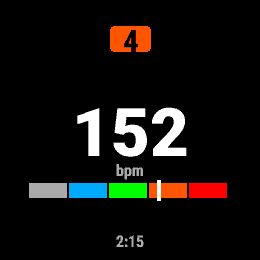
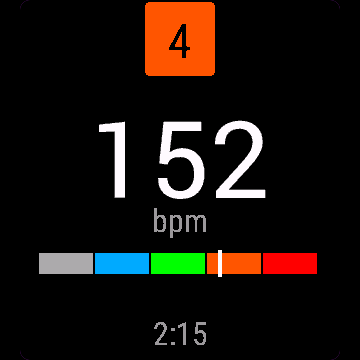
HR Zones Big shows your current heart rate huge and readable mid-run, your zone 1-5, a colour zone bar with a live marker, and how long you have been in this zone. Zones come straight from your Garmin heart rate zone settings for the current sport, so they match what you already trust, not a hidden formula.
- Huge number, readable mid-stride on AMOLED and MIP screens ("--" until a heart rate reading arrives)
- Zone 1-5 with a colour band and marker on the zone bar
- Time spent in the current zone
- Show bpm, percent of max HR, or percent of heart rate reserve
- Adapts to full, half, third or quarter field size
Add HR Zones Big as a data field on any screen and pick the display mode in the data field settings.
Free trial: the app works fully and for free for the first 30 days. After that you can buy a one-time code at dialforge.dev. Changing your watch? Write to me and I will move your code for free. No subscription. I am a student and I build these apps myself after hours. I do not own every watch model, so bugs can happen on some. If something does not work or is missing, write through the form at dialforge.dev. I fix every reported bug within 72 hours and send the update to Garmin (Garmin approval usually takes 1-3 days). If you reported a bug, check whether the fix is already there, and if the bug lowered your rating, I would be grateful if you reconsidered it. If the app is useful to you, leave a rating in the store. You can also buy me a coffee or buy the full version, it lets me build more. Purchase: at checkout you confirm immediate delivery of the code, so under EU law the right of withdrawal does not apply. If the app does not work on your watch as described, write to me and I will fix it.
Zobacz swoje tętno, zanim je poczujesz.
Strefy tętna pokazują ogromną, czytelną w biegu liczbę tętna, strefę 1-5, kolorowy pasek stref z ruchomym znacznikiem i czas spędzony w bieżącej strefie. Strefy biorą się prosto z Twoich ustawień tętna w Garmin Connect dla bieżącego sportu, więc zgadzają się z tym, czemu już ufasz.
- Ogromna liczba, czytelna w biegu, na AMOLED i MIP ("--", dopóki nie ma odczytu tętna)
- Strefa 1-5 z kolorowym paskiem i znacznikiem
- Czas spędzony w bieżącej strefie
- Tętno w bpm, procent tętna maksymalnego albo procent rezerwy tętna
- Dopasowuje się do pełnego, połówkowego, jednej trzeciej i jednej czwartej pola
Dodaj Strefy tętna jako pole danych na dowolnym ekranie i wybierz tryb wyświetlania w ustawieniach pola.
Darmowa próba. Przez pierwsze 30 dni aplikacja działa w pełni i za darmo. Potem możesz kupić jednorazowy kod na dialforge.dev. Zmieniasz zegarek? Napisz do mnie, a przeniosę Twój kod bezpłatnie. Bez abonamentu. Jestem studentem i robię te aplikacje sam, po godzinach. Nie mam wszystkich modeli zegarków, więc na niektórych mogą zdarzyć się błędy. Jeśli coś nie działa albo czegoś brakuje, napisz przez formularz na dialforge.dev. Każdą zgłoszoną usterkę poprawiam w ciągu 72 godzin i wysyłam do Garmina (zatwierdzenie przez Garmina trwa zwykle 1-3 dni). Jeśli zgłaszałeś błąd, sprawdź, czy poprawka już jest. A jeśli przez ten błąd wystawiłeś niższą ocenę, będzie mi miło, jeśli ją przemyślisz jeszcze raz. Jeśli aplikacja Ci się przydaje, zostaw ocenę w sklepie. Możesz też postawić mi kawę albo kupić pełną wersję, to pozwala mi robić kolejne. Zakup kodu: przy płatności potwierdzasz natychmiastowe dostarczenie kodu, więc zgodnie z prawem UE nie przysługuje prawo odstąpienia. Jeśli aplikacja nie działa na Twoim zegarku zgodnie z opisem, napisz, a naprawię to.
Sieh deine Herzfrequenz, bevor du sie spürst, nicht danach.
HR Zones Big zeigt deine aktuelle Herzfrequenz riesig und mitten im Lauf gut lesbar an, dazu deine Zone 1-5, einen farbigen Zonenbalken mit Live-Marker und wie lange du schon in dieser Zone bist. Die Zonen kommen direkt aus deinen Garmin-Herzfrequenzzonen-Einstellungen für die aktuelle Sportart, sie stimmen also mit dem überein, was du schon kennst, keine versteckte Formel.
- Riesige Zahl, mitten im Laufschritt gut lesbar auf AMOLED- und MIP-Displays („--“, bis ein Herzfrequenzwert eintrifft)
- Zone 1-5 mit Farbband und Marker auf dem Zonenbalken
- Verweildauer in der aktuellen Zone
- Anzeige in bpm, Prozent der maximalen Herzfrequenz oder Prozent der Herzfrequenzreserve
- Passt sich an volle, halbe, drittel oder viertel Feldgröße an
Füge HR Zones Big als Datenfeld auf einem beliebigen Bildschirm hinzu und wähle den Anzeigemodus in den Datenfeld-Einstellungen.
Kostenlose Testversion: Die App funktioniert in den ersten 30 Tagen uneingeschränkt und kostenlos. Danach kannst du einen Einmal-Code auf dialforge.dev kaufen. Du wechselst deine Uhr? Schreib mir und ich übertrage deinen Code kostenlos. Kein Abo. Ich bin Student und entwickle diese Apps selbst nach Feierabend. Ich besitze nicht jedes Uhrenmodell, daher können bei manchen Fehler auftreten. Wenn etwas nicht funktioniert oder fehlt, schreib über das Formular auf dialforge.dev. Ich behebe jeden gemeldeten Fehler innerhalb von 72 Stunden und sende das Update an Garmin (die Freigabe durch Garmin dauert üblicherweise 1-3 Tage). Falls du einen Fehler gemeldet hast, prüfe bitte, ob die Fehlerbehebung schon da ist, und falls der Fehler zu einer schlechteren Bewertung geführt hat, wäre ich dankbar, wenn du sie noch einmal überdenkst. Wenn die App für dich nützlich ist, hinterlasse eine Bewertung im Store. Du kannst mir auch einen Kaffee spendieren oder die Vollversion kaufen, das ermöglicht mir, weitere Apps zu entwickeln. Kauf: Beim Bezahlen bestätigst du die sofortige Bereitstellung des Codes, daher gilt nach EU-Recht kein Widerrufsrecht. Sollte die App auf deiner Uhr nicht wie beschrieben funktionieren, schreib mir und ich behebe das.
Voyez votre fréquence cardiaque avant de la sentir, pas après.
HR Zones Big affiche votre fréquence cardiaque actuelle en très grand et lisible en pleine course, votre zone 1 à 5, une barre de zones colorée avec un repère en direct, et depuis combien de temps vous êtes dans cette zone. Les zones viennent directement de vos réglages de zones de fréquence cardiaque Garmin pour le sport en cours, donc elles correspondent à ce que vous utilisez déjà, pas à une formule cachée.
- Chiffre géant, lisible en pleine foulée sur écrans AMOLED et MIP (« -- » tant qu'aucune mesure de fréquence cardiaque n'est arrivée)
- Zone 1 à 5 avec une bande colorée et un repère sur la barre de zones
- Temps passé dans la zone actuelle
- Affiche les bpm, le pourcentage de la FC max, ou le pourcentage de la réserve de fréquence cardiaque
- S'adapte aux tailles de champ pleine, demie, tiers ou quart
Ajoutez HR Zones Big comme champ de données sur n'importe quel écran et choisissez le mode d'affichage dans les réglages du champ de données.
Essai gratuit : l'application fonctionne pleinement et gratuitement pendant les 30 premiers jours. Ensuite, vous pouvez acheter un code à paiement unique sur dialforge.dev. Vous changez de montre ? Écrivez-moi et je transférerai votre code gratuitement. Sans abonnement. Je suis étudiant et je développe ces applications moi-même sur mon temps libre. Je ne possède pas tous les modèles de montre, des bugs peuvent donc survenir sur certains. Si quelque chose ne fonctionne pas ou manque, écrivez-moi via le formulaire sur dialforge.dev. Je corrige chaque bug signalé sous 72 heures et j'envoie la mise à jour à Garmin (la validation par Garmin prend généralement 1 à 3 jours). Si vous avez signalé un bug, vérifiez si le correctif est déjà disponible, et si ce bug a fait baisser votre note, je vous serais reconnaissant de bien vouloir la réévaluer. Si l'application vous est utile, laissez une note dans la boutique. Vous pouvez aussi m'offrir un café ou acheter la version complète, cela me permet d'en développer d'autres. Achat : lors du paiement, vous confirmez la livraison immédiate du code, donc selon le droit de l'UE, le droit de rétractation ne s'applique pas. Si l'application ne fonctionne pas sur votre montre comme décrit, écrivez-moi et je corrigerai le problème.
Ve tu frecuencia cardíaca antes de sentirla, no después.
HR Zones Big muestra tu frecuencia cardíaca actual en grande y fácil de leer mientras corres, tu zona 1-5, una barra de zonas en color con un marcador en vivo, y cuánto tiempo llevas en esa zona. Las zonas vienen directamente de los ajustes de zonas de frecuencia cardíaca de tu Garmin para el deporte actual, así que coinciden con lo que ya conoces, no con una fórmula oculta.
- Número enorme, legible a media zancada en pantallas AMOLED y MIP ("--" hasta que llega una lectura de frecuencia cardíaca)
- Zona 1-5 con una franja de color y un marcador en la barra de zonas
- Tiempo pasado en la zona actual
- Muestra ppm, porcentaje de la FC máxima o porcentaje de la reserva de frecuencia cardíaca
- Se adapta a campos de tamaño completo, mitad, tercio o cuarto
Añade HR Zones Big como campo de datos en cualquier pantalla y elige el modo de visualización en los ajustes del campo de datos.
Prueba gratuita: la aplicación funciona al completo y gratis durante los primeros 30 días. Después de eso, puedes comprar un código de pago único en dialforge.dev. ¿Cambias de reloj? Escríbeme y transferiré tu código gratis. Sin suscripción. Soy estudiante y desarrollo estas aplicaciones por mi cuenta en mi tiempo libre. No tengo todos los modelos de reloj, por lo que pueden ocurrir errores en algunos. Si algo no funciona o falta, escribe a través del formulario en dialforge.dev. Corrijo cada error notificado en un plazo de 72 horas y envío la actualización a Garmin (la aprobación de Garmin suele tardar 1-3 días). Si notificaste un error, comprueba si la solución ya está disponible, y si el error hizo bajar tu valoración, te agradecería que la reconsideraras. Si la aplicación te resulta útil, deja una valoración en la tienda. También puedes invitarme a un café o comprar la versión completa, me permite seguir desarrollando. Compra: en el momento del pago confirmas la entrega inmediata del código, por lo que según la legislación de la UE no se aplica el derecho de desistimiento. Si la aplicación no funciona en tu reloj como se describe, escríbeme y lo solucionaré.
Zie je hartslag voordat je hem voelt, niet erna.
HR Zones Big toont je huidige hartslag groot en leesbaar tijdens het lopen, je zone 1-5, een kleurenbalk met een live markering, en hoelang je al in deze zone zit. De zones komen rechtstreeks uit je Garmin hartslagzone-instellingen voor de huidige sport, dus ze komen overeen met wat je al vertrouwt, niet met een verborgen formule.
- Groot cijfer, leesbaar tijdens het lopen op AMOLED- en MIP-schermen ("--" tot er een hartslagmeting binnenkomt)
- Zone 1-5 met een kleurenband en markering op de zonebalk
- Tijd doorgebracht in de huidige zone
- Toon bpm, percentage van maximale hartslag, of percentage van hartslagreserve
- Past zich aan aan volledig, half, derde of kwart veldformaat
Voeg HR Zones Big toe als gegevensveld op elk scherm en kies de weergavemodus in de instellingen van het gegevensveld.
Gratis proefperiode: de app werkt de eerste 30 dagen volledig en gratis. Daarna kun je een eenmalige code kopen op dialforge.dev. Wissel je van horloge? Schrijf me en ik zet je code gratis over. Geen abonnement. Ik ben student en ik bouw deze apps zelf in mijn vrije tijd. Ik bezit niet elk horlogemodel, dus op sommige kunnen bugs voorkomen. Als er iets niet werkt of ontbreekt, schrijf dan via het formulier op dialforge.dev. Ik los elke gemelde bug binnen 72 uur op en stuur de update naar Garmin (goedkeuring door Garmin duurt meestal 1-3 dagen). Als je een bug hebt gemeld, controleer dan of de oplossing er al is, en als de bug je beoordeling heeft verlaagd, zou ik het op prijs stellen als je deze wilt heroverwegen. Als de app nuttig voor je is, laat dan een beoordeling achter in de store. Je kunt ook een kop koffie voor me kopen of de volledige versie aanschaffen; daarmee kan ik meer bouwen. Aankoop: bij het afrekenen bevestig je de directe levering van de code, waardoor volgens het EU-recht het herroepingsrecht niet van toepassing is. Als de app op jouw horloge niet werkt zoals beschreven, schrijf me dan en ik los het op.
体で感じる前に、心拍数を目で確認。
HR Zones Bigは、ランニング中でも読みやすい大きな文字で現在の心拍数を表示し、ゾーン1-5、リアルタイムのマーカー付き色分けゾーンバー、そして今のゾーンに何分いるかを表示します。ゾーンの数値は、現在のスポーツに設定されたGarminの心拍ゾーン設定からそのまま取得するため、隠れた計算式ではなく、すでに信頼している値と一致します。
- AMOLED、MIP画面どちらでも、走りながらでも読める大きな数字(心拍数が取得できるまでは「--」を表示)
- ゾーン1-5を色分けバーとマーカーで表示
- 現在のゾーンに滞在している時間
- bpm、最大心拍数に対する割合、または心拍予備量に対する割合を表示
- フルサイズ、半分、3分の1、4分の1のフィールドサイズに対応
HR Zones Bigをどの画面にもデータフィールドとして追加し、データフィールドの設定で表示モードを選択してください。
無料トライアル:最初の30日間はすべての機能を完全かつ無料でご利用いただけます。その後は dialforge.dev で買い切りコードをご購入いただけます。時計を買い替える場合はご連絡いただければ、無料でコードを移行します。サブスクリプションはありません。私は学生で、放課後や空き時間に自分でこれらのアプリを開発しています。すべての時計モデルを所有しているわけではないため、一部のモデルで不具合が発生することがあります。もし動作しない点や不足している機能があれば、dialforge.dev のフォームからご連絡ください。報告された不具合はすべて 72時間 以内に修正し、Garmin へアップデートを提出します(Garmin の承認には通常 1から3日 かかります)。不具合を報告された場合は、修正がすでに反映されているかご確認ください。また、その不具合により評価を下げていた場合は、再評価をご検討いただけますと幸いです。アプリがお役に立ちましたら、ストアで評価を残していただけると嬉しいです。コーヒーをおごっていただくか、製品版をご購入いただくこともできます。今後の開発の励みになります。購入について:チェックアウト時にコードの即時提供に同意いただくため、EU法に基づく撤回権は適用されません。説明どおりに時計でアプリが動作しない場合は、ご連絡いただければ修正いたします。
Vedi la tua frequenza cardiaca prima di sentirla, non dopo.
HR Zones Big mostra la tua frequenza cardiaca attuale enorme e leggibile mentre corri, la tua zona 1-5, una barra colorata delle zone con un indicatore in tempo reale, e per quanto tempo sei rimasto in questa zona. Le zone arrivano direttamente dalle impostazioni delle zone di frequenza cardiaca del tuo Garmin per lo sport attuale, così corrispondono a quello di cui ti fidi già, non a una formula nascosta.
- Numero enorme, leggibile mentre corri su schermi AMOLED e MIP ("--" finché non arriva una lettura della frequenza cardiaca)
- Zona 1-5 con una banda colorata e un indicatore sulla barra delle zone
- Tempo trascorso nella zona attuale
- Mostra bpm, percentuale della frequenza massima, oppure percentuale della riserva di frequenza cardiaca
- Si adatta a campo intero, metà, un terzo o un quarto
Aggiungi HR Zones Big come campo dati su qualsiasi schermata e scegli la modalità di visualizzazione nelle impostazioni del campo dati.
Prova gratuita: l'app funziona in modo completo e gratuito per i primi 30 giorni. Dopodiché puoi acquistare un codice una tantum su dialforge.dev. Cambi orologio? Scrivimi e trasferirò il tuo codice gratuitamente. Nessun abbonamento. Sono uno studente e creo queste app da solo nel tempo libero. Non possiedo tutti i modelli di orologio, quindi su alcuni possono verificarsi bug. Se qualcosa non funziona o manca, scrivimi tramite il modulo su dialforge.dev. Risolvo ogni bug segnalato entro 72 ore e invio l'aggiornamento a Garmin (l'approvazione di Garmin richiede solitamente 1-3 giorni). Se hai segnalato un bug, controlla se la correzione è già disponibile, e se il bug ha abbassato la tua valutazione, ti sarei grato se potessi riconsiderarla. Se trovi utile l'app, lascia una valutazione nello store. Puoi anche offrirmi un caffè o acquistare la versione completa: mi aiuta a sviluppare altre app. Acquisto: al momento del pagamento confermi la consegna immediata del codice, pertanto in base alla legge dell'UE il diritto di recesso non si applica. Se l'app non funziona sul tuo orologio come descritto, scrivimi e risolverò il problema.
心率先被你看到,而不是先被你感觉到。
“大号心率分区”用超大数字显示当前心率,跑步途中一眼就能看清,还有1到5区、带实时标记的彩色分区条,以及你在当前分区停留的时间。分区数据直接来自Garmin为当前运动项目设置的心率分区,和你平时信任的数值一致,不是另外一套隐藏算法。
- 超大数字,AMOLED和MIP屏幕上跑动中也能看清(在收到心率读数之前显示“--”)
- 1到5分区,配彩色分区条和实时标记
- 显示在当前分区停留的时间
- 可以切换显示心率数值、占最大心率的百分比,或占心率储备的百分比
- 自动适配整屏、半屏、三分之一或四分之一大小的数据字段
把“大号心率分区”添加为任意界面的数据字段,在数据字段设置里选择显示模式。
免费试用:应用在前 30 天内功能完整且完全免费。此后,你可以在 dialforge.dev 购买一次性激活码。更换了手表?联系我,我会免费为你迁移激活码。无需订阅。我是一名学生,利用业余时间独自开发这些应用。我无法拥有每一款手表型号,因此在某些机型上可能会出现错误。如果某些功能无法正常工作或有所缺失,请通过 dialforge.dev 上的表单联系我。我会在 72 小时内修复所有反馈的错误并将更新提交给 Garmin(Garmin 审核通常需要 1 到 3 天)。如果你反馈过错误,请查看是否已经修复;如果该错误影响了你的评分,若你能重新考虑评价,我将非常感激。如果这款应用对你有用,请在应用商店留下评价。你也可以请我喝杯咖啡或购买完整版,这能支持我开发更多应用。购买:结账时你确认立即交付激活码,因此根据欧盟法律,撤回权不适用。如果应用在你的手表上未能如描述般正常运行,请联系我,我会修复。
Увидьте свой пульс раньше, чем почувствуете его.
HR Zones Big показывает ваш текущий пульс крупно и читаемо на бегу, зону 1-5, цветную полосу зон с живым маркером и то, сколько времени вы уже в этой зоне. Зоны берутся прямо из настроек пульсовых зон Garmin для текущего вида спорта, так что они совпадают с тем, чему вы уже доверяете, а не со скрытой формулой.
- Крупная цифра, читаемая на бегу на экранах AMOLED и MIP ("--", пока не поступит значение пульса)
- Зона 1-5 с цветной полосой и маркером на шкале зон
- Время, проведённое в текущей зоне
- Показ в уд/мин, в процентах от максимального пульса или в процентах от резерва пульса
- Подстраивается под полный, половинный, трети или четверти размер поля
Добавьте HR Zones Big как поле данных на любой экран и выберите режим отображения в настройках поля данных.
Бесплатный пробный период: приложение работает полностью и бесплатно первые 30 дней. После этого вы можете купить разовый код на dialforge.dev. Меняете часы? Напишите мне, и я перенесу ваш код бесплатно. Без подписки. Я студент и создаю эти приложения сам в свободное время. У меня нет всех моделей часов, поэтому на некоторых могут случаться ошибки. Если что-то не работает или чего-то не хватает, напишите через форму на dialforge.dev. Я исправляю каждую найденную ошибку в течение 72 часов и отправляю обновление в Garmin (одобрение Garmin обычно занимает 1-3 дня). Если вы сообщили об ошибке, проверьте, не вышло ли уже исправление, и если из-за ошибки вы снизили оценку, я буду благодарен, если вы ее пересмотрите. Если приложение вам полезно, оставьте оценку в магазине. Вы также можете угостить меня кофе или купить полную версию, это позволяет мне создавать больше приложений. Покупка: при оформлении заказа вы подтверждаете немедленное предоставление кода, поэтому по законам ЕС право на отказ от покупки не применяется. Если приложение работает на ваших часах не так, как описано, напишите мне, и я всё исправлю.
Veja sua frequência cardíaca antes de sentir, não depois.
HR Zones Big mostra sua frequência cardíaca atual em tamanho grande e legível no meio da corrida, sua zona de 1 a 5, uma barra de zonas colorida com marcador em tempo real, e quanto tempo você está nessa zona. As zonas vêm direto das suas configurações de zona de frequência cardíaca do Garmin para o esporte atual, então batem com o que você já confia, e não com uma fórmula escondida.
- Número enorme, legível mesmo correndo, em telas AMOLED e MIP ("--" até chegar uma leitura de frequência cardíaca)
- Zona de 1 a 5 com faixa colorida e marcador na barra de zonas
- Tempo passado na zona atual
- Mostra bpm, porcentagem da FC máxima, ou porcentagem da reserva de frequência cardíaca
- Se adapta a campos de tamanho inteiro, metade, um terço ou um quarto da tela
Adicione o HR Zones Big como campo de dados em qualquer tela e escolha o modo de exibição nas configurações do campo de dados.
Teste gratuito: o aplicativo funciona totalmente e de graça nos primeiros 30 dias. Depois disso, você pode comprar um código único em dialforge.dev. Vai trocar de relógio? Escreva para mim e eu transfiro o seu código de graça. Sem assinatura. Sou estudante e desenvolvo esses aplicativos sozinho nas horas vagas. Não possuo todos os modelos de relógio, por isso bugs podem acontecer em alguns. Se algo não funcionar ou estiver faltando, escreva pelo formulário em dialforge.dev. Corrijo todos os bugs relatados em até 72 horas e envio a atualização para a Garmin (a aprovação da Garmin costuma levar de 1 a 3 dias). Se você relatou um bug, veja se a correção já está disponível, e caso o bug tenha diminuído sua avaliação, eu ficaria grato se você pudesse reconsiderá-la. Se o aplicativo for útil para você, deixe uma avaliação na loja. Você também pode me pagar um café ou comprar a versão completa, isso me permite criar mais. Compra: na finalização da compra você confirma a entrega imediata do código, portanto, sob a legislação da UE, o direito de desistência não se aplica. Se o aplicativo não funcionar no seu relógio conforme descrito, escreva para mim e eu resolverei o problema.
Uvidíte svou tepovou frekvenci dřív, než ji pocítíte, ne až potom.
HR Zones Big zobrazí vaši aktuální tepovou frekvenci velkým a čitelným písmem i za běhu, vaši zónu 1-5, barevný pásek zóny s ukazatelem v reálném čase a to, jak dlouho jste v dané zóně. Zóny vycházejí přímo z vašeho nastavení tepových zón v Garminu pro aktuální sport, takže odpovídají tomu, čemu už věříte, ne skryté formuli.
- Obrovské číslo, čitelné i uprostřed kroku na displejích AMOLED i MIP ("--", dokud nepřijde údaj o tepové frekvenci)
- Zóna 1-5 s barevným pásem a ukazatelem na pásku zóny
- Čas strávený v aktuální zóně
- Zobrazení v bpm, procentech maximální tepové frekvence nebo procentech tepové rezervy
- Přizpůsobí se celému, polovičnímu, třetinovému nebo čtvrtinovému poli
Přidejte HR Zones Big jako datové pole na libovolnou obrazovku a vyberte režim zobrazení v nastavení datového pole.
Bezplatná zkušební verze: aplikace funguje plně a zdarma po dobu prvních 30 dní. Poté si můžeš koupit jednorázový kód na dialforge.dev. Měníš hodinky? Napiš mi a já ti kód bezplatně převedu. Žádné předplatné. Jsem student a tyto aplikace vytvářím sám po večerech. Nevlastním každý model hodinek, takže se na některých mohou objevit chyby. Pokud něco nefunguje nebo chybí, napiš přes formulář na dialforge.dev. Každou nahlášenou chybu opravuji do 72 hodin a posílám aktualizaci do Garmin (schválení ze strany Garmin obvykle trvá 1-3 dny). Pokud jsi nahlásil chybu, zkontroluj, zda už je oprava k dispozici, a pokud kvůli ní bylo tvé hodnocení nižší, budu vděčný, když ho ještě zvážíš. Pokud je pro tebe aplikace užitečná, zanech hodnocení v obchodě. Můžeš mi také koupit kávu nebo koupit plnou verzi, umožní mi to vytvářet další. Nákup: při dokončení objednávky potvrzuješ okamžité doručení kódu, takže podle práva EU se neuplatňuje právo na odstoupení od smlouvy. Pokud aplikace na tvých hodinkách nefunguje podle popisu, napiš mi a já to opravím.
Vê a tua frequência cardíaca antes de a sentires, não depois.
HR Zones Big mostra a tua frequência cardíaca atual em tamanho grande e legível a meio da corrida, a tua zona 1-5, uma barra de zonas a cores com um marcador em direto, e há quanto tempo estás nesta zona. As zonas vêm diretamente das tuas definições de zonas de frequência cardíaca do Garmin para o desporto atual, por isso correspondem ao que já conheces e em que já confias, não a uma fórmula escondida.
- Número enorme, legível a meio da passada em ecrãs AMOLED e MIP ("--" até chegar uma leitura da frequência cardíaca)
- Zona 1-5 com uma faixa de cor e marcador na barra de zonas
- Tempo passado na zona atual
- Mostra bpm, percentagem da FC máxima, ou percentagem da reserva de frequência cardíaca
- Adapta-se a campos de tamanho completo, meio, um terço ou um quarto
Adiciona o HR Zones Big como campo de dados em qualquer ecrã e escolhe o modo de visualização nas definições do campo de dados.
Avaliação gratuita: a aplicação funciona de forma completa e gratuita durante os primeiros 30 dias. Depois disso, pode comprar um código único em dialforge.dev. Vai mudar de relógio? Escreva-me e transferirei o seu código gratuitamente. Sem subscrição. Sou estudante e crio estas aplicações sozinho nos meus tempos livres. Não possuo todos os modelos de relógio, pelo que podem ocorrer erros em alguns. Se algo não funcionar ou estiver em falta, escreva através do formulário em dialforge.dev. Corrijo todos os erros comunicados dentro de 72 horas e envio a atualização para a Garmin (a aprovação da Garmin costuma demorar 1-3 dias). Se comunicou um erro, verifique se a correção já está disponível e, se o erro baixou a sua classificação, ficaria grato se a reconsiderasse. Se a aplicação lhe for útil, deixe uma avaliação na loja. Também me pode pagar um café ou comprar a versão completa, permitindo-me criar mais. Compra: no checkout confirma a entrega imediata do código, pelo que, ao abrigo da legislação da UE, o direito de livre resolução não se aplica. Se a aplicação não funcionar no seu relógio como descrito, escreva-me e resolverei o problema.
느끼기 전에 심박수를 눈으로 먼저 확인하세요.
HR Zones Big은 달리는 중에도 크고 읽기 쉽게 현재 심박수를 보여주고, 현재 존(1-5), 실시간 마커가 있는 컬러 존 바, 이 존에 머문 시간을 함께 표시합니다. 존 기준은 현재 스포츠에 설정된 Garmin 심박 구간 설정에서 그대로 가져오므로, 숨겨진 공식이 아니라 이미 신뢰하고 있는 기준과 일치합니다.
- 달리는 중에도 읽기 쉬운 큰 숫자, AMOLED와 MIP 화면 모두 지원(심박수 측정값이 들어오기 전에는 "--" 표시)
- 컬러 밴드와 마커로 표시되는 1-5 존 바
- 현재 존에 머문 시간
- bpm, 최대 심박수 대비 퍼센트, 또는 심박 예비력 대비 퍼센트 중 선택 표시
- 전체, 절반, 1/3, 1/4 필드 크기에 맞게 조정됩니다
원하는 화면에 데이터 필드로 HR Zones Big을 추가하고, 데이터 필드 설정에서 표시 모드를 선택하세요.
무료 체험: 처음 30일 동안 앱의 모든 기능을 무료로 이용할 수 있습니다. 그 후 dialforge.dev에서 일회성 코드를 구매할 수 있습니다. 시계를 변경하시나요? 저에게 메시지를 남겨주시면 무료로 코드를 이전해 드립니다. 구독은 없습니다. 저는 학생이며 방과 후 여가 시간에 직접 이 앱들을 개발하고 있습니다. 모든 시계 모델을 보유하고 있지는 않아 일부 기기에서 버그가 발생할 수 있습니다. 제대로 작동하지 않거나 누락된 부분이 있다면 dialforge.dev의 문의 양식을 통해 메시지를 남겨주세요. 보고된 모든 버그는 72시간 이내에 수정하여 Garmin에 업데이트를 전송합니다(Garmin 승인은 보통 1-3일 소요). 버그를 제보하셨다면 수정 사항이 이미 적용되었는지 확인해 주시고, 만약 그 버그로 인해 평점을 낮게 주셨다면 다시 평가해 주시면 감사하겠습니다. 앱이 유용하다면 스토어에 평점을 남겨주세요. 커피를 후원해 주시거나 정식 버전을 구매해 주실 수도 있으며, 이는 제가 더 많은 앱을 만드는 데 도움이 됩니다. 구매 안내: 결제 시 코드 즉시 제공에 동의하시게 되므로 EU 법률상 청약철회권이 적용되지 않습니다. 앱이 설명대로 시계에서 작동하지 않는 경우, 제게 메시지를 보내주시면 해결해 드리겠습니다.
Se din puls innan du känner den, inte efteråt.
HR Zones Big visar din aktuella puls stor och lättläst mitt i löpningen, din zon 1-5, en färgkodad zonbalk med en levande markör, och hur länge du har varit i zonen. Zonerna hämtas direkt från dina Garmin-inställningar för pulszoner för den aktuella sporten, så de stämmer med det du redan litar på, inte en dold formel.
- Stor siffra, lättläst mitt i steget på både AMOLED- och MIP-skärmar ("--" tills en pulsmätning kommer in)
- Zon 1-5 med ett färgband och en markör på zonbalken
- Tid tillbringad i aktuell zon
- Visa bpm, procent av maxpuls, eller procent av pulsreserv
- Anpassar sig till helt, halvt, tredjedels eller fjärdedels fältstorlek
Lägg till HR Zones Big som ett datafält på valfri skärm och välj visningsläge i inställningarna för datafältet.
Gratis provperiod: appen fungerar fullt ut och kostnadsfritt de första 30 dagarna. Därefter kan du köpa en engångskod på dialforge.dev. Byter du klocka? Skriv till mig så flyttar jag din kod gratis. Inget abonnemang. Jag är student och bygger dessa appar själv på fritiden. Jag äger inte alla klockmodeller, så buggar kan uppstå på vissa. Om något inte fungerar eller saknas, skriv via formuläret på dialforge.dev. Jag åtgärdar varje rapporterad bugg inom 72 timmar och skickar uppdateringen till Garmin (Garmins godkännande tar vanligtvis 1-3 dagar). Om du har rapporterat en bugg, se efter om rättelsen redan finns där, och om buggen sänkte ditt betyg vore jag tacksam om du övervägde att ändra det. Om appen är till nytta för dig, lämna gärna ett betyg i butiken. Du kan också bjuda mig på en kaffe eller köpa fullversionen, det gör att jag kan bygga mer. Köp: i kassan bekräftar du omedelbar leverans av koden, så enligt EU-lagstiftning gäller inte ångerrätten. Om appen inte fungerar på din klocka enligt beskrivningen, skriv till mig så återbetalar jag dig.
Se din puls, før du når at mærke den, ikke bagefter.
HR Zones Big viser din aktuelle puls stort og letlæseligt midt i løbet, din zone 1-5, en farvet zonebjælke med en live-markør, og hvor lang tid du har været i denne zone. Zonerne kommer direkte fra dine Garmin-pulszoneindstillinger for den aktuelle sport, så de matcher det, du allerede kender, ikke en skjult formel.
- Stort tal, letlæseligt midt i skridtet på AMOLED- og MIP-skærme ("--", indtil en pulsmåling er klar)
- Zone 1-5 med et farvebånd og markør på zonebjælken
- Tid tilbragt i den aktuelle zone
- Vis bpm, procent af maks puls, eller procent af pulsreserve
- Justerer sig til fuld, halv, tredje- eller fjerdedelsstørrelse felt
Tilføj HR Zones Big som et datafelt på en skærm og vælg visningstilstand i datafeltets indstillinger.
Gratis prøveperiode: appen fungerer fuldt ud og gratis i de første 30 dage. Derefter kan du købe en engangskode på dialforge.dev. Skifter du ur? Skriv til mig, så flytter jeg din kode gratis. Intet abonnement. Jeg er studerende og bygger selv disse apps i min fritid. Jeg ejer ikke alle urmodeller, så der kan opstå fejl på nogle af dem. Hvis noget ikke virker eller mangler, så skriv via formularen på dialforge.dev. Jeg retter enhver rapporteret fejl inden for 72 timer og sender opdateringen til Garmin (Garmin-godkendelse tager normalt 1-3 dage). Hvis du har rapporteret en fejl, så tjek om rettelsen allerede er der, og hvis fejlen fik dig til at give en lavere vurdering, vil jeg være taknemmelig, hvis du vil genoverveje den. Hvis appen er nyttig for dig, så læg en vurdering i butikken. Du kan også give mig en kop kaffe eller købe den fulde version, det giver mig mulighed for at bygge mere. Køb: ved betaling bekræfter du øjeblikkelig levering af koden, så ifølge EU-lovgivningen bortfalder fortrydelsesretten. Hvis appen ikke virker på dit ur som beskrevet, så skriv til mig, og jeg løser det.
Se pulsen din før du merker den, ikke etterpå.
HR Zones Big viser din nåværende puls stor og lesbar midt i løpet, din sone 1-5, en fargelagt sonebjelke med en levende markør, og hvor lenge du har vært i denne sonen. Sonene kommer rett fra dine Garmin-pulssoneinnstillinger for den aktuelle idretten, så de stemmer med det du allerede stoler på, ikke en skjult formel.
- Stort tall, lesbart midt i tempoet på AMOLED- og MIP-skjermer ("--" til en pulsmåling kommer inn)
- Sone 1-5 med et fargebånd og markør på sonebjelken
- Tid brukt i nåværende sone
- Vis bpm, prosent av maks puls, eller prosent av pulsreserve
- Tilpasser seg full, halv, tredjedels eller firedels feltstørrelse
Legg til HR Zones Big som et datafelt på hvilken som helst skjerm og velg visningsmodus i innstillingene for datafeltet.
Gratis prøveperiode: appen fungerer fullt ut og helt gratis de første 30 dagene. Etter det kan du kjøpe en engangskode på dialforge.dev. Bytter du klokke? Skriv til meg, så flytter jeg koden din gratis. Ingen abonnement. Jeg er student og lager disse appene selv på fritiden. Jeg eier ikke alle klokkemodeller, så feil kan forekomme på enkelte. Hvis noe ikke fungerer eller mangler, skriv via skjemaet på dialforge.dev. Jeg retter alle innrapporterte feil innen 72 timer og sender oppdateringen til Garmin (godkjenning fra Garmin tar vanligvis 1-3 dager). Hvis du har meldt fra om en feil, sjekk om rettelsen allerede er på plass, og hvis feilen gjorde at du ga en lavere vurdering, setter jeg stor pris på om du vil vurdere den på nytt. Hvis appen er nyttig for deg, legg gjerne igjen en vurdering i butikken. Du kan også spandere en kaffe på meg eller kjøpe fullversjonen, det gjør at jeg kan utvikle mer. Kjøp: ved betaling bekrefter du umiddelbar levering av koden, så ifølge EU-retten gjelder ikke angreretten. Hvis appen ikke fungerer på klokken din som beskrevet, skriv til meg så fikser jeg det.
在你感覺到之前,先看到你的心率。
HR Zones Big用超大字體顯示當前心率,跑步途中也看得清楚,同時顯示你目前在第幾區(1到5區),還有帶即時標記的彩色心率區間條,以及你在這個心率區待了多久。心率區直接取自你Garmin目前運動項目的心率區設定,跟你平常信任的數值一致,不是另一套隱藏公式算出來的。
- 超大數字,AMOLED和MIP螢幕上跑動中也看得清楚(取得心率讀數之前顯示「--」)
- 1到5區,帶顏色區間和即時標記
- 顯示在目前心率區待了多久
- 可選顯示bpm、最大心率百分比,或心率儲備百分比
- 自動適應整格、半格、三分之一格或四分之一格大小
在任何畫面把HR Zones Big加為資料欄位,並在資料欄位設定裡選擇顯示模式。
免費試用:前 30 天可免費使用應用程式的完整功能。之後你可以在 dialforge.dev 購買一次性代碼。更換手錶?寫信給我,我會免費為你轉移代碼。無需訂閱。我是一名學生,這些應用程式是我在課餘時間自己開發的。我並沒有每一款手錶型號,所以在某些型號上可能會出現錯誤。如果某些功能無法運作或有所缺漏,請透過 dialforge.dev 上的表單聯絡我。我會在 72 小時內修復所有回報的錯誤,並將更新提交給 Garmin(Garmin 的審查通常需要 1-3 天)。如果你曾回報錯誤,請確認修復是否已推出;若該錯誤曾影響你的評分,如果你願意重新考慮評價,我會非常感謝。如果這個應用程式對你有幫助,請在商店留下評價。你也可以請我喝杯咖啡或購買完整版,這能支持我開發更多內容。購買須知:結帳時你確認立即交付代碼,因此依歐盟法律規定不適用撤回權。如果應用程式無法如描述般在你的手錶上運作,請寫信給我,我會修復。
Näe sykkeesi ennen kuin tunnet sen, ei sen jälkeen.
HR Zones Big näyttää nykyisen sykkeesi suurena ja luettavana kesken juoksun, vyöhykkeesi 1-5, värillisen vyöhykepalkin reaaliaikaisella osoittimella ja kuinka pitkään olet ollut tässä vyöhykkeessä. Vyöhykkeet tulevat suoraan Garminin sykevyöhykeasetuksistasi nykyiselle lajille, niin että ne vastaavat sitä, mihin jo luotat, eivät piilotettua kaavaa.
- Suuri luku, luettavissa juostessa AMOLED- ja MIP-näytöillä ("--", kunnes sykelukema saapuu)
- Vyöhyke 1-5 värikaistalla ja osoittimella vyöhykepalkissa
- Nykyisessä vyöhykkeessä vietetty aika
- Näytä bpm, prosentti maksimisykkeestä tai prosentti sykereservistä
- Mukautuu koko, puolikkaan, kolmasosan tai neljäsosan kokoiseen kenttään
Lisää HR Zones Big -tietokenttä mille tahansa ruudulle ja valitse näyttötapa tietokentän asetuksista.
Ilmainen kokeilujakso: sovellus toimii täysin ja ilmaiseksi ensimmäiset 30 päivää. Sen jälkeen voit ostaa kertakoodin osoitteesta dialforge.dev. Vaihdatko kelloa? Kirjoita minulle, niin siirrän koodisi ilmaiseksi. Ei tilausta. Olen opiskelija ja rakennan nämä sovellukset itse vapaa-ajallani. En omista jokaista kellomallia, joten joissakin voi esiintyä bugeja. Jos jokin ei toimi tai puuttuu, kirjoita lomakkeen kautta osoitteessa dialforge.dev. Korjaan jokaisen ilmoitetun bugin 72 tunnin kuluessa ja lähetän päivityksen Garminille (Garmin-hyväksyntä kestää yleensä 1-3 päivää). Jos ilmoitit bugista, tarkista onko korjaus jo tullut, ja jos bugi laski arviotasi, olisin kiitollinen jos harkitsisit sitä uudelleen. Jos sovellus on sinulle hyödyllinen, jätä arvio sovelluskauppaan. Voit myös ostaa minulle kahvin tai ostaa täysversion, se auttaa minua kehittämään lisää. Osto: kassalla vahvistat koodin välittömän toimituksen, joten EU-lain mukaan peruutusoikeus ei päde. Jos sovellus ei toimi kellossasi kuvatulla tavalla, kirjoita minulle, niin korjaan asian.
Vidíte svoju srdcovú frekvenciu skôr, ako ju pocítite, nie potom.
HR Zones Big zobrazuje vašu aktuálnu srdcovú frekvenciu veľkým, čitateľným písmom počas behu, vašu zónu 1-5, farebný pás zón s aktuálnym ukazovateľom a čas, ktorý v tejto zóne strávite. Zóny vychádzajú priamo z vašich nastavení zón srdcovej frekvencie v Garmine pre aktuálny šport, takže zodpovedajú tomu, čomu už dôverujete, nie skrytému vzorcu.
- Veľké číslo, čitateľné aj počas behu na AMOLED aj MIP displejoch ("--", kým nepríde meranie tepovej frekvencie)
- Zóna 1-5 s farebným pásom a ukazovateľom na pásiku zón
- Čas strávený v aktuálnej zóne
- Zobrazenie bpm, percenta z maximálnej SF alebo percenta rezervy srdcovej frekvencie
- Prispôsobí sa veľkosti poľa: celé, polovičné, tretinové alebo štvrtinové
Pridajte HR Zones Big ako dátové pole na ľubovoľnú obrazovku a vyberte zobrazovací režim v nastaveniach dátového poľa.
Bezplatná skúšobná verzia: aplikácia funguje plnohodnotne a zadarmo počas prvých 30 dní. Potom si môžete zakúpiť jednorazový kód na dialforge.dev. Meníte hodinky? Napíšte mi a kód vám bezplatne presuniem. Žiadne predplatné. Som študent a tieto aplikácie vyvíjam sám vo voľnom čase. Nevlastním každý model hodiniek, takže na niektorých sa môžu vyskytnúť chyby. Ak niečo nefunguje alebo chýba, napíšte cez formulár na dialforge.dev. Každú nahlásenú chybu opravím do 72 hodín a aktualizáciu odošlem do Garmin (schválenie od Garmin zvyčajne trvá 1-3 dni). Ak ste nahlásili chybu, skontrolujte, či už je oprava dostupná, a ak vám chyba znížila hodnotenie, bol by som vďačný, keby ste ho prehodnotili. Ak je pre vás aplikácia užitočná, zanechajte hodnotenie v obchode. Môžete mi tiež kúpiť kávu alebo si kúpiť plnú verziu, umožní mi to tvoriť ďalej. Nákup: pri platbe potvrdzujete okamžité doručenie kódu, takže podľa práva EÚ sa na nákup nevzťahuje právo na odstúpenie od zmluvy. Ak aplikácia na vašich hodinkách nefunguje tak, ako je popísané, napíšte mi a opravím to.
Svoj srčni utrip vidiš, preden ga začutiš, ne šele potem.
HR Zones Big prikaže tvoj trenutni srčni utrip velik in berljiv med tekom, tvojo cono 1-5, barvno cono s živim kazalcem in čas, ki ga že preživljaš v tej coni. Cone prihajajo neposredno iz tvojih Garmin nastavitev srčnih con za trenutni šport, zato se ujemajo s tistim, čemur že zaupaš, ne s skrito formulo.
- Velika številka, berljiva med korakom, na AMOLED in MIP zaslonih ("--", dokler ne prispe meritev srčnega utripa)
- Cona 1-5 z barvnim pasom in kazalcem na coni
- Čas, preživet v trenutni coni
- Prikaz v bpm, odstotku najvišjega srčnega utripa ali odstotku rezerve srčnega utripa
- Prilagodi se polnemu, polovičnemu, tretjinskemu ali četrtinskemu polju
Dodaj HR Zones Big kot podatkovno polje na katerikoli zaslon in izberi način prikaza v nastavitvah podatkovnega polja.
Brezplačni preizkus: aplikacija deluje popolnoma in brezplačno prvih 30 dni. Po tem lahko kupite enkratno kodo na dialforge.dev. Menjate uro? Pišite mi in vašo kodo bom brezplačno prenesel. Brez naročnine. Sem študent in te aplikacije ustvarjam sam v svojem prostem času. Nimam vsakega modela ure, zato se lahko na nekaterih pojavijo napake. Če kaj ne deluje ali manjka, pišite prek obrazca na dialforge.dev. Vsako prijavljeno napako odpravim v 72 urah in pošljem posodobitev Garmin (odobritev Garmin običajno traja 1-3 dni). Če ste prijavili napako, preverite, ali je popravek že na voljo, in če je napaka znižala vašo oceno, bi bil hvaležen, če bi jo ponovno premislili. Če vam je aplikacija koristna, pustite oceno v trgovini. Lahko mi kupite tudi kavo ali kupite polno različico, kar mi omogoča, da ustvarim več. Nakup: pri zaključku nakupa potrdite takojšnjo dostavo kode, zato v skladu z zakonodajo EU pravica do odstopa od pogodbe ne velja. Če aplikacija na vaši uri ne deluje, kot je opisano, mi pišite in povrnil vam bom kupnino.
Lihat detak jantungmu sebelum kamu merasakannya, bukan sesudahnya.
HR Zones Big menampilkan detak jantungmu saat ini dalam ukuran besar dan mudah dibaca di tengah lari, zona 1-5, bar warna zona dengan penanda langsung, dan berapa lama kamu sudah berada di zona ini. Zona diambil langsung dari pengaturan zona detak jantung Garmin-mu untuk olahraga yang sedang berjalan, jadi sesuai dengan apa yang sudah kamu percaya, bukan rumus tersembunyi.
- Angka besar, mudah dibaca di tengah langkah pada layar AMOLED dan MIP ("--" sampai pembacaan detak jantung masuk)
- Zona 1-5 dengan pita warna dan penanda pada bar zona
- Waktu yang dihabiskan di zona saat ini
- Tampilkan bpm, persen dari HR maksimum, atau persen dari heart rate reserve
- Menyesuaikan dengan ukuran field penuh, setengah, sepertiga, atau seperempat
Tambahkan HR Zones Big sebagai data field di layar mana pun dan pilih mode tampilan di pengaturan data field.
Uji coba gratis: aplikasi berfungsi penuh dan gratis selama 30 hari pertama. Setelah itu Anda dapat membeli kode satu kali di dialforge.dev. Ganti jam tangan? Hubungi saya dan saya akan memindahkan kode Anda secara gratis. Tanpa langganan. Saya seorang mahasiswa dan saya membuat aplikasi ini sendiri di waktu luang. Saya tidak memiliki semua model jam tangan, jadi bug bisa saja terjadi pada beberapa model. Jika ada yang tidak berfungsi atau kurang, kirim pesan melalui formulir di dialforge.dev. Saya memperbaiki setiap bug yang dilaporkan dalam 72 jam dan mengirimkan pembaruannya ke Garmin (persetujuan Garmin biasanya membutuhkan 1-3 hari). Jika Anda pernah melaporkan bug, periksa apakah perbaikannya sudah tersedia, dan jika bug tersebut menurunkan penilaian Anda, saya akan berterima kasih jika Anda mempertimbangkannya kembali. Jika aplikasi ini bermanfaat bagi Anda, berikan penilaian di toko. Anda juga bisa mentraktir saya kopi atau membeli versi lengkap, ini memungkinkan saya untuk membuat lebih banyak aplikasi. Pembelian: saat pembayaran Anda mengonfirmasi pengiriman langsung kode tersebut, sehingga berdasarkan hukum Uni Eropa hak pembatalan tidak berlaku. Jika aplikasi tidak berfungsi di jam tangan Anda seperti yang dijelaskan, hubungi saya dan saya akan mengembalikan dana Anda.
Lásd a pulzusod, mielőtt megérzed, ne csak utána.
A HR Zones Big óriásira és futás közben is jól olvashatóra mutatja a pillanatnyi pulzusod, az 1-5. zónádat, egy színes zónasávot élő jelölővel, és azt, mióta vagy ebben a zónában. A zónák egyenesen a Garmin pulzuszóna-beállításaidból jönnek az aktuális sportághoz, így pontosan azt mutatják, amiben már bízol, nem egy rejtett formulát.
- Óriási szám, futás közben is olvasható AMOLED és MIP kijelzőn ("--", amíg meg nem érkezik a pulzusmérés)
- 1-5. zóna színes sávval és jelölővel a zónasávon
- A jelenlegi zónában eltöltött idő
- bpm, maximális pulzus százaléka, vagy pulzusrezerv százaléka is megjeleníthető
- Alkalmazkodik a teljes, fél, harmad vagy negyed mezőmérethez
Add hozzá a HR Zones Big-et adatmezőként bármelyik képernyőhöz, és válaszd ki a megjelenítési módot az adatmező beállításaiban.
Ingyenes próbaverzió: az alkalmazás teljesen és ingyenesen működik az első 30 napban. Ezt követően vásárolhatsz egy egyszeri kódot a dialforge.dev oldalon. Órát cserélsz? Írj nekem, és ingyen átviszem a kódodat. Nincs előfizetés. Diák vagyok, és ezeket az alkalmazásokat egymagam fejlesztem a szabadidőmben. Nem rendelkezem minden óramodellel, így egyes típusokon előfordulhatnak hibák. Ha valami nem működik vagy hiányzik, írj a dialforge.dev oldalon található űrlapon keresztül. Minden bejelentett hibát 72 órán belül kijavítok, és elküldöm a frissítést a Garminnak (a Garmin jóváhagyása általában 1-3 napot vesz igénybe). Ha hibát jelentettél, ellenőrizd, hogy megérkezett-e már a javítás, és ha a hiba miatt rosszabb értékelést adtál, hálás lennék, ha átgondolnád. Ha hasznosnak találod az alkalmazást, hagyj egy értékelést az áruházban. Meg is hívhatsz egy kávéra, vagy megvásárolhatod a teljes verziót, ez lehetővé teszi, hogy még többet készítsek. Vásárlás: a fizetéskor megerősíted a kód azonnali kézbesítését, így az uniós jog szerint az elállási jog nem érvényes. Ha az alkalmazás nem a leírtak szerint működik az órádon, írj nekem, és megjavítom.
เห็นอัตราการเต้นหัวใจก่อนที่จะรู้สึก ไม่ใช่หลังจากนั้น
HR Zones Big แสดงอัตราการเต้นหัวใจปัจจุบันเป็นตัวเลขใหญ่ อ่านง่ายระหว่างวิ่ง พร้อมโซน 1-5 แถบสีโซนที่มีตัวชี้เรียลไทม์ และเวลาที่อยู่ในโซนนี้มานานแค่ไหน โซนดึงมาจากการตั้งค่าโซนหัวใจใน Garmin ของกีฬาที่กำลังเล่นตรง ๆ จึงตรงกับค่าที่คุณเชื่ออยู่แล้ว ไม่ใช่สูตรลับที่ซ่อนอยู่
- ตัวเลขขนาดใหญ่ อ่านได้ระหว่างก้าววิ่งบนจอ AMOLED และ MIP (แสดง "--" จนกว่าจะมีค่าอัตราการเต้นของหัวใจเข้ามา)
- โซน 1-5 พร้อมแถบสีและตัวชี้บนแถบโซน
- เวลาที่อยู่ในโซนปัจจุบัน
- แสดงเป็น bpm, เปอร์เซ็นต์ของ HR สูงสุด หรือเปอร์เซ็นต์ของ heart rate reserve
- ปรับขนาดตามฟิลด์เต็ม ครึ่ง หนึ่งในสาม หรือหนึ่งในสี่
เพิ่ม HR Zones Big เป็น data field บนหน้าจอใดก็ได้ และเลือกโหมดแสดงผลในการตั้งค่า data field
ทดลองใช้ฟรี: แอปทำงานได้อย่างสมบูรณ์และฟรีในช่วง 30 วันแรก หลังจากนั้นคุณสามารถซื้อรหัสแบบจ่ายครั้งเดียวได้ที่ dialforge.dev เปลี่ยนนาฬิกาใหม่ใช่ไหม? เขียนถึงผมแล้วผมจะย้ายรหัสให้ฟรี ไม่มีการสมัครสมาชิก ผมเป็นนักศึกษาและสร้างแอปเหล่านี้ด้วยตัวเองหลังเลิกเรียน ผมไม่ได้มีนาฬิกาทุกรุ่น ดังนั้นอาจเกิดข้อผิดพลาดขึ้นได้ในบางรุ่น หากมีสิ่งใดใช้งานไม่ได้หรือขาดหายไป โปรดเขียนแจ้งผ่านแบบฟอร์มที่ dialforge.dev ผมจะแก้ไขทุกข้อผิดพลาดที่ได้รับแจ้งภายใน 72 ชั่วโมง และส่งการอัปเดตไปยัง Garmin (โดยปกติการอนุมัติของ Garmin จะใช้เวลา 1-3 วัน) หากคุณเคยแจ้งข้อผิดพลาดไว้ โปรดตรวจสอบว่าได้รับการแก้ไขแล้วหรือยัง และหากข้อผิดพลาดนั้นทำให้คุณให้คะแนนลดลง ผมจะขอบคุณมากหากคุณพิจารณาให้คะแนนใหม่อีกครั้ง หากแอปนี้มีประโยชน์สำหรับคุณ โปรดให้คะแนนในสโตร์ คุณสามารถเลี้ยงกาแฟผมหรือซื้อเวอร์ชันเต็มได้ สิ่งนี้ช่วยให้ผมสร้างสรรค์ผลงานได้มากขึ้น การซื้อ: ในขั้นตอนชำระเงิน คุณยืนยันการรับรหัสทันที ดังนั้นตามกฎหมาย EU สิทธิ์ในการเพิกถอนคำสั่งซื้อจึงไม่มีผลบังคับใช้ หากแอปไม่ทำงานบนนาฬิกาของคุณตามที่ระบุไว้ โปรดเขียนถึงผมและผมจะแก้ไขให้
Βλέπεις τον καρδιακό σου παλμό πριν τον νιώσεις, όχι μετά.
Το HR Zones Big δείχνει τον τρέχοντα καρδιακό σου παλμό τεράστιο και ευανάγνωστο ενώ τρέχεις, τη ζώνη σου 1-5, μια έγχρωμη μπάρα ζωνών με δείκτη σε πραγματικό χρόνο, και πόση ώρα βρίσκεσαι σε αυτή τη ζώνη. Οι ζώνες προέρχονται απευθείας από τις ρυθμίσεις ζωνών καρδιακού παλμού του Garmin για το τρέχον σπορ, οπότε ταιριάζουν με αυτό που ήδη εμπιστεύεσαι, όχι με κάποιον κρυφό τύπο.
- Τεράστιος αριθμός, ευανάγνωστος ενώ τρέχεις, σε οθόνες AMOLED και MIP ("--" μέχρι να φτάσει μέτρηση καρδιακού παλμού)
- Ζώνη 1-5 με έγχρωμη ζώνη και δείκτη στη μπάρα ζωνών
- Χρόνος που πέρασε στην τρέχουσα ζώνη
- Εμφάνιση σε bpm, ποσοστό της μέγιστης καρδιακής συχνότητας, ή ποσοστό του εφεδρικού καρδιακού παλμού
- Προσαρμόζεται σε πλήρες, μισό, τρίτο ή τέταρτο μέγεθος πεδίου
Πρόσθεσε το HR Zones Big ως πεδίο δεδομένων σε οποιαδήποτε οθόνη και διάλεξε τη λειτουργία εμφάνισης στις ρυθμίσεις του πεδίου δεδομένων.
Δωρεάν δοκιμή: η εφαρμογή λειτουργεί πλήρως και δωρεάν για τις πρώτες 30 ημέρες. Μετά από αυτό μπορείτε να αγοράσετε έναν εφάπαξ κωδικό στο dialforge.dev. Αλλάζετε ρολόι; Γράψτε μου και θα μεταφέρω τον κωδικό σας δωρεάν. Χωρίς συνδρομή. Είμαι φοιτητής και φτιάχνω αυτές τις εφαρμογές μόνος μου στον ελεύθερο χρόνο μου. Δεν έχω στην κατοχή μου κάθε μοντέλο ρολογιού, επομένως μπορεί να παρουσιαστούν σφάλματα σε ορισμένα. Αν κάτι δεν λειτουργεί ή λείπει, γράψτε μου μέσω της φόρμας στο dialforge.dev. Διορθώνω κάθε αναφερόμενο σφάλμα εντός 72 ωρών και στέλνω την ενημέρωση στη Garmin (η έγκριση από τη Garmin συνήθως διαρκεί 1-3 ημέρες). Αν αναφέρατε κάποιο σφάλμα, ελέγξτε αν η διόρθωση είναι ήδη διαθέσιμη, και αν το σφάλμα μείωσε την αξιολόγησή σας, θα ήμουν ευγνώμων αν την επανεξετάζατε. Αν η εφαρμογή σας είναι χρήσιμη, αφήστε μια αξιολόγηση στο κατάστημα. Μπορείτε επίσης να με κεράσετε έναν καφέ ή να αγοράσετε την πλήρη έκδοση, κάτι που μου επιτρέπει να δημιουργώ περισσότερες. Αγορά: κατά την ολοκλήρωση της αγοράς επιβεβαιώνετε την άμεση παράδοση του κωδικού, επομένως σύμφωνα με τη νομοθεσία της ΕΕ το δικαίωμα υπαναχώρησης δεν ισχύει. Αν η εφαρμογή δεν λειτουργεί στο ρολόι σας όπως περιγράφεται, γράψτε μου και θα το διορθώσω.
Vidi svoju srčanu frekvenciju prije nego što je osjetiš, ne poslije.
HR Zones Big prikazuje tvoju trenutnu srčanu frekvenciju veliko i čitljivo tijekom trčanja, tvoju zonu 1-5, traku zona u boji s markerom uživo, i koliko dugo se već nalaziš u toj zoni. Zone dolaze izravno iz Garminovih postavki zona srčane frekvencije za trenutni sport, tako da odgovaraju onome čemu već vjeruješ, a ne skrivenoj formuli.
- Ogroman broj, čitljiv tijekom trčanja na AMOLED i MIP ekranima ("--" dok ne stigne očitanje pulsa)
- Zona 1-5 s obojanom trakom i markerom na traci zona
- Vrijeme provedeno u trenutnoj zoni
- Prikaz u bpm, postotku maksimalne srčane frekvencije, ili postotku rezerve srčane frekvencije
- Prilagođava se veličini polja: cijelo, pola, trećina ili četvrtina
Dodaj HR Zones Big kao podatkovno polje na bilo koji ekran i odaberi način prikaza u postavkama podatkovnog polja.
Besplatno probno razdoblje: aplikacija radi u potpunosti i besplatno prvih 30 dana. Nakon toga možete kupiti jednokratni kod na dialforge.dev. Mijenjate sat? Javite mi se i besplatno ću vam prenijeti kod. Bez pretplate. Student sam i sam izrađujem ove aplikacije u slobodno vrijeme. Ne posjedujem svaki model sata, pa se na nekima mogu pojaviti greške. Ako nešto ne radi ili nedostaje, javite se putem obrasca na dialforge.dev. Svaku prijavljenu grešku ispravljam unutar 72 sata i šaljem ažuriranje za Garmin (Garmin odobrenje obično traje 1-3 dana). Ako ste prijavili grešku, provjerite je li ispravak već dostupan, a ako je greška utjecala na vašu ocjenu, bio bih zahvalan ako biste je ponovno razmotrili. Ako vam je aplikacija korisna, ostavite ocjenu u trgovini. Možete mi kupiti i kavu ili kupiti punu verziju, to mi omogućuje daljnji rad. Kupnja: prilikom plaćanja potvrđujete trenutačnu isporuku koda, pa se prema pravu EU-a pravo na odustanak ne primjenjuje. Ako aplikacija na vašem satu ne radi kako je opisano, javite mi se i riješit ću problem.
לראות את הדופק שלך לפני שאתה מרגיש אותו, לא אחרי.
אזורי דופק גדול מציג את הדופק הנוכחי שלך בגודל עצום וקריא באמצע הריצה, את האזור שלך 1 עד 5, פס אזורים צבעוני עם סמן חי, וכמה זמן אתה נמצא באזור הזה. האזורים מגיעים ישירות מהגדרות אזורי הדופק שלך ב-Garmin לספורט הנוכחי, כך שהם תואמים למה שאתה כבר סומך עליו, ולא לנוסחה חבויה.
- מספר עצום, קריא באמצע הצעד על מסכי AMOLED ו-MIP ("--" עד שמגיעה קריאת דופק)
- אזור 1 עד 5 עם פס צבע וסמן על פס האזורים
- זמן שהייה באזור הנוכחי
- הצגה בפעימות לדקה, אחוז מהדופק המקסימלי, או אחוז מרזרבת הדופק
- מתאים את עצמו לשדה מלא, חצי, שליש או רביע
הוסף אזורי דופק גדול כשדה מידע בכל מסך ובחר את מצב התצוגה בהגדרות השדה.
ניסיון חינם: האפליקציה פועלת במלואה ובחינם במשך 30 הימים הראשונים. לאחר מכן תוכלו לרכוש קוד חד-פעמי ב-dialforge.dev. מחליפים שעון? כתבו לי ואעביר את הקוד שלכם בחינם. ללא מנוי. אני סטודנט ובונה את האפליקציות האלו בעצמי בשעות הפנאי. אין בבעלותי כל דגם של שעון, ולכן תקלות עלולות לקרות בחלקם. אם משהו אינו פועל או חסר, כתבו לי דרך הטופס ב-dialforge.dev. אני מתקן כל תקלה מדווחת תוך 72 שעות ושולח את העדכון ל-Garmin (אישור של Garmin אורך בדרך כלל 1-3 ימים). אם דיווחתם על תקלה, בדקו אם התיקון כבר זמין, ואם התקלה גרמה לכם להוריד את הדירוג, אודה לכם אם תשקלו אותו מחדש. אם האפליקציה מועילה לכם, השאירו דירוג בחנות. תוכלו גם להזמין אותי לקפה או לקנות את הגרסה המלאה, זה מאפשר לי לפתח עוד. רכישה: בעת התשלום אתם מאשרים קבלה מיידית של הקוד, ולכן על פי חוקי האיחוד האירופי זכות הביטול אינה חלה. אם האפליקציה אינה פועלת בשעון שלכם כמתואר, כתבו לי ואתקן את זה.
Nampak kadar denyutan jantung anda sebelum anda rasa, bukan selepas.
HR Zones Big memaparkan kadar denyutan jantung semasa anda dengan besar dan mudah dibaca semasa berlari, zon 1-5 anda, bar zon berwarna dengan penanda live, dan berapa lama anda sudah dalam zon ini. Zon diambil terus daripada tetapan zon kadar denyutan jantung Garmin anda untuk sukan semasa, jadi ia sepadan dengan apa yang anda dah percaya, bukan formula tersembunyi.
- Nombor besar, mudah dibaca semasa berlari di skrin AMOLED dan MIP ("--" sehingga bacaan kadar denyutan jantung diterima)
- Zon 1-5 dengan jalur warna dan penanda pada bar zon
- Masa yang dihabiskan dalam zon semasa
- Papar bpm, peratus HR maksimum, atau peratus heart rate reserve
- Menyesuaikan diri dengan saiz field penuh, separuh, satu pertiga atau satu perempat
Tambah HR Zones Big sebagai data field pada mana-mana skrin dan pilih mod paparan dalam tetapan data field.
Percubaan percuma: aplikasi ini berfungsi sepenuhnya dan secara percuma untuk 30 hari pertama. Selepas itu anda boleh membeli kod sekali bayar di dialforge.dev. Menukar jam tangan anda? Tulis kepada saya dan saya akan memindahkan kod anda secara percuma. Tiada langganan. Saya seorang pelajar dan saya membina aplikasi ini sendiri di luar waktu belajar. Saya tidak memiliki setiap model jam tangan, jadi pepijat boleh berlaku pada sesetengah model. Jika ada sesuatu yang tidak berfungsi atau tiada, tulis melalui borang di dialforge.dev. Saya membetulkan setiap pepijat yang dilaporkan dalam masa 72 jam dan menghantar kemas kini kepada Garmin (kelulusan Garmin biasanya mengambil masa 1-3 hari). Jika anda melaporkan pepijat, semak sama ada pembetulan sudah ada, dan jika pepijat tersebut mengurangkan penilaian anda, saya amat berterima kasih jika anda mempertimbangkannya semula. Jika aplikasi ini berguna kepada anda, tinggalkan penilaian di gedung. Anda juga boleh belanja saya secawan kopi atau beli versi penuh, ia membolehkan saya membina lebih banyak lagi. Pembelian: semasa membuat pembayaran anda mengesahkan penghantaran segera kod, jadi di bawah undang-undang EU hak untuk menarik diri tidak terpakai. Jika aplikasi tidak berfungsi pada jam tangan anda seperti yang diterangkan, tulis kepada saya dan saya akan membaikinya.
How to use it
Add HR Zones Big as a data field in an activity, then set it up in its settings.
Works on fenix 8, Forerunner 970, Forerunner 570, Venu 4, Forerunner 965, Forerunner 265, Venu 3, vivoactive 6 and more.
Dodaj Strefy tętna jako pole danych w aktywności, potem skonfiguruj je w jego ustawieniach.
Działa na: fenix 8, Forerunner 970, Forerunner 570, Venu 4, Forerunner 965, Forerunner 265, Venu 3, vivoactive 6 i innych.
Füge HR Zones Big in einer Aktivität als Datenfeld hinzu und richte es dann in den Einstellungen ein.
Läuft auf fenix 8, Forerunner 970, Forerunner 570, Venu 4, Forerunner 965, Forerunner 265, Venu 3, vivoactive 6 und weiteren Modellen.
Ajoutez HR Zones Big comme champ de données dans une activité, puis configurez-le dans ses réglages.
Compatible avec fenix 8, Forerunner 970, Forerunner 570, Venu 4, Forerunner 965, Forerunner 265, Venu 3, vivoactive 6 et d'autres modèles.
Añade HR Zones Big como campo de datos en una actividad y luego configúralo en sus ajustes.
Compatible con fenix 8, Forerunner 970, Forerunner 570, Venu 4, Forerunner 965, Forerunner 265, Venu 3, vivoactive 6 y más.
Voeg HR Zones Big toe als gegevensveld in een activiteit en stel het daarna in bij de instellingen.
Werkt op fenix 8, Forerunner 970, Forerunner 570, Venu 4, Forerunner 965, Forerunner 265, Venu 3, vivoactive 6 en meer.
アクティビティに HR Zones Big をデータフィールドとして追加し、その設定で調整してください。
対応モデル:fenix 8, Forerunner 970, Forerunner 570, Venu 4, Forerunner 965, Forerunner 265, Venu 3, vivoactive 6 ほか
Aggiungi HR Zones Big come campo dati in un'attività, poi configuralo nelle sue impostazioni.
Compatibile con fenix 8, Forerunner 970, Forerunner 570, Venu 4, Forerunner 965, Forerunner 265, Venu 3, vivoactive 6 e altri.
在某项活动中把 HR Zones Big 添加为数据字段,然后在其设置中进行配置。
适用于 fenix 8, Forerunner 970, Forerunner 570, Venu 4, Forerunner 965, Forerunner 265, Venu 3, vivoactive 6 等。
Добавьте HR Zones Big как поле данных в активности, затем настройте его в её параметрах.
Работает на fenix 8, Forerunner 970, Forerunner 570, Venu 4, Forerunner 965, Forerunner 265, Venu 3, vivoactive 6 и других.
Adicione HR Zones Big como campo de dados em uma atividade e depois configure nas configurações dela.
Funciona em fenix 8, Forerunner 970, Forerunner 570, Venu 4, Forerunner 965, Forerunner 265, Venu 3, vivoactive 6 e outros.
Přidejte HR Zones Big jako datové pole do aktivity a pak ho nastavte v jejím nastavení.
Funguje na fenix 8, Forerunner 970, Forerunner 570, Venu 4, Forerunner 965, Forerunner 265, Venu 3, vivoactive 6 a dalších.
Adicione HR Zones Big como campo de dados numa atividade e depois configure-o nas definições dessa atividade.
Funciona em fenix 8, Forerunner 970, Forerunner 570, Venu 4, Forerunner 965, Forerunner 265, Venu 3, vivoactive 6 e outros.
활동에서 HR Zones Big을(를) 데이터 필드로 추가한 다음, 해당 설정에서 구성하세요.
지원 모델: fenix 8, Forerunner 970, Forerunner 570, Venu 4, Forerunner 965, Forerunner 265, Venu 3, vivoactive 6 외
Lägg till HR Zones Big som datafält i en aktivitet och ställ sedan in det i dess inställningar.
Fungerar på fenix 8, Forerunner 970, Forerunner 570, Venu 4, Forerunner 965, Forerunner 265, Venu 3, vivoactive 6 med flera.
Tilføj HR Zones Big som datafelt i en aktivitet, og indstil det derefter i dets indstillinger.
Virker på fenix 8, Forerunner 970, Forerunner 570, Venu 4, Forerunner 965, Forerunner 265, Venu 3, vivoactive 6 og flere.
Legg til HR Zones Big som datafelt i en aktivitet, og still det inn i innstillingene.
Fungerer på fenix 8, Forerunner 970, Forerunner 570, Venu 4, Forerunner 965, Forerunner 265, Venu 3, vivoactive 6 og flere.
在某項活動中把 HR Zones Big 新增為資料欄位,然後在其設定中進行調整。
適用於 fenix 8, Forerunner 970, Forerunner 570, Venu 4, Forerunner 965, Forerunner 265, Venu 3, vivoactive 6 等。
Lisää HR Zones Big datakentäksi aktiviteettiin ja määritä se sen asetuksista.
Toimii malleissa fenix 8, Forerunner 970, Forerunner 570, Venu 4, Forerunner 965, Forerunner 265, Venu 3, vivoactive 6 ja muissa.
Pridajte HR Zones Big ako dátové pole do aktivity a potom ho nastavte v jeho nastaveniach.
Funguje na fenix 8, Forerunner 970, Forerunner 570, Venu 4, Forerunner 965, Forerunner 265, Venu 3, vivoactive 6 a ďalších.
Dodajte HR Zones Big kot podatkovno polje v aktivnost, nato ga nastavite v njegovih nastavitvah.
Deluje na fenix 8, Forerunner 970, Forerunner 570, Venu 4, Forerunner 965, Forerunner 265, Venu 3, vivoactive 6 in drugih.
Tambahkan HR Zones Big sebagai data field di sebuah aktivitas, lalu atur di pengaturannya.
Berfungsi di fenix 8, Forerunner 970, Forerunner 570, Venu 4, Forerunner 965, Forerunner 265, Venu 3, vivoactive 6 dan lainnya.
Adja hozzá a(z) HR Zones Big elemet adatmezőként egy tevékenységhez, majd állítsa be a tevékenység beállításaiban.
Működik ezeken: fenix 8, Forerunner 970, Forerunner 570, Venu 4, Forerunner 965, Forerunner 265, Venu 3, vivoactive 6 és továbbiak.
เพิ่ม HR Zones Big เป็นช่องข้อมูลในกิจกรรม แล้วตั้งค่าในหน้าการตั้งค่าของมัน
ใช้ได้กับ fenix 8, Forerunner 970, Forerunner 570, Venu 4, Forerunner 965, Forerunner 265, Venu 3, vivoactive 6 และรุ่นอื่น
Προσθέστε το HR Zones Big ως πεδίο δεδομένων σε μια δραστηριότητα και μετά ρυθμίστε το στις ρυθμίσεις του.
Λειτουργεί σε fenix 8, Forerunner 970, Forerunner 570, Venu 4, Forerunner 965, Forerunner 265, Venu 3, vivoactive 6 και άλλα.
Dodajte HR Zones Big kao polje podataka u aktivnost, a zatim ga podesite u njegovim postavkama.
Radi na fenix 8, Forerunner 970, Forerunner 570, Venu 4, Forerunner 965, Forerunner 265, Venu 3, vivoactive 6 i drugima.
הוסיפו את HR Zones Big כשדה נתונים בפעילות, ואז הגדירו אותו בהגדרות שלו.
עובד על fenix 8, Forerunner 970, Forerunner 570, Venu 4, Forerunner 965, Forerunner 265, Venu 3, vivoactive 6 ועוד.
Tambah HR Zones Big sebagai medan data dalam aktiviti, kemudian sediakannya dalam tetapannya.
Berfungsi pada fenix 8, Forerunner 970, Forerunner 570, Venu 4, Forerunner 965, Forerunner 265, Venu 3, vivoactive 6 dan lain-lain.
Manual
The full manual and the detailed permission descriptions are available in English and Polish.
HR Zones Big: user manual
What it does
HR Zones Big is a data field that shows your heart rate as one huge number. Next to it you get the zone 1 to 5, a coloured zone bar with a marker, and the time you have spent in the current zone. Zones come from your Garmin profile.
Requirements and supported watches
Needs Connect IQ 3.3.0+ and the Connect IQ or Garmin Connect phone app. Supported watches:
- Round AMOLED: epix 2 and epix Pro 2, fēnix 8, E, Forerunner 165, 265, 570, 965, 970, Instinct 3 AMOLED, Crossover AMOLED, Venu 2, 3, 4, vivoactive 5, 6.
- Round MIP: enduro 3, fēnix 7 series, 8 Solar, Forerunner 245 (245 Music), 255.
- Square and rectangular AMOLED: Venu Sq 2, Venu X1.
Installation
In the Connect IQ app on your phone (or Garmin Connect, then the Connect IQ Store) find "HR Zones Big" by Dialforge, tap Install and sync the watch. Add it in an activity's settings: Data Screens, a field, Connect IQ, HR Zones Big.
First launch
Add it to a data screen and start the activity. With no reading you see "--". Once the heart rate arrives, the number, the zone badge and the marker on the bar appear. How much shows depends on the field size. The 30-day free trial starts the first time you open it.
Controls
Watches with buttons (START, UP, DOWN, BACK)
- A data field has no buttons of its own. The watch's buttons work as they do on any activity screen.
Touch watches (tap, hold, swipe)
- No touch actions, the field only displays data.
Settings
Phone: Connect IQ app, HR Zones Big, Settings (the unlock code fields are there too).
- Display: Heart rate (bpm), Percent of max HR, Percent of heart rate reserve. Default: Heart rate (bpm).
License
- Free trial: 30 days from the first launch, everything works.
- Price: 5.99 EUR once at dialforge.dev, no subscription. The 8-character code is tied to your watch's UID.
- Where to enter it: phone, Connect IQ app, HR Zones Big, Settings. Read the UID in "Watch UID (needed to buy a code)", buy the code, then type it into "Unlock code from dialforge.dev".
- After the free trial without a code: the field shows only the small text dialforge.dev instead of the numbers. It has no trial-ended screen, the UID is in the phone settings. Zone time keeps counting in the background, and after you enter the code the field returns within about half a minute.
Privacy and permissions
Permissions:
- User profile: heart rate zones for the current sport, resting heart rate and birth year as a fallback.
No internet use. Data stays on the watch.
Troubleshooting
The code does not work. Check that the UID you bought for matches "Watch UID (needed to buy a code)" and type all 8 characters (case is ignored, no 0, O, 1 or I). A code for another app does not fit. Sync, then reopen.
What shows at each field size? Full screen: number, zone badge, bar, time in zone and unit. Half: number, badge and bar. Third: number and badge. Quarter: only the number, tinted with the zone colour.
What do the display options do? Display, set on the phone: heart rate (bpm), percent of max HR, or percent of heart rate reserve. Max is the top of zone 5, resting comes from your profile (30 to 120, else 60).
Where do the zones come from? From the heart rate zones in your Garmin profile for the current sport. If they are missing or make no sense, the field uses 50, 60, 70, 80 and 90% of max heart rate, with 185 as the last resort.
Why is the marker not proportional to bpm? The bar has five equal segments, one per zone, and the marker moves within the current one. Below zone 1 the badge shows 0.
Contact
kontakt@dialforge.dev or dialforge.dev. Please write before leaving a low rating.
Strefy tętna: instrukcja obsługi
Do czego służy
Strefy tętna to pole danych z jedną ogromną liczbą: Twoim tętnem. Obok jest strefa od 1 do 5, kolorowy pasek stref z markerem i czas spędzony w bieżącej strefie. Strefy bierze z Twojego profilu Garmin.
Wymagania i obsługiwane zegarki
Wymaga Connect IQ 3.3.0+ i aplikacji Connect IQ albo Garmin Connect w telefonie. Obsługiwane zegarki:
- Okrągłe AMOLED: epix 2 i epix Pro 2, fēnix 8, E, Forerunner 165, 265, 570, 965, 970, Instinct 3 AMOLED, Crossover AMOLED, Venu 2, 3, 4, vivoactive 5, 6.
- Okrągłe MIP: enduro 3, seria fēnix 7, fēnix 8 Solar, Forerunner 245 (245 Music), 255.
- Kwadratowe i prostokątne AMOLED: Venu Sq 2, Venu X1.
Instalacja
Na telefonie otwórz aplikację Connect IQ (albo Garmin Connect, a w niej sklep Connect IQ), wyszukaj "Strefy tętna" od Dialforge, stuknij Zainstaluj i zsynchronizuj zegarek. Dodaj je w ustawieniach aktywności: Ekrany danych, pole, Connect IQ, Strefy tętna.
Pierwsze uruchomienie
Dodaj je na ekran danych i zacznij aktywność. Bez odczytu widać "--". Gdy tętno się pojawi, wchodzi liczba, plakietka strefy i marker na pasku. Ile z tego widać, zależy od rozmiaru pola. 30-dniowa darmowa próba zaczyna się przy pierwszym otwarciu.
Sterowanie
Zegarki z przyciskami (START, GÓRA, DÓŁ, WSTECZ)
- Pole danych nie ma własnych przycisków. Przyciski zegarka działają tak jak na każdym ekranie aktywności.
Zegarki dotykowe (stuknięcie, przytrzymanie, przesunięcie)
- Brak akcji dotykowych, pole tylko wyświetla dane.
Ustawienia
Telefon: aplikacja Connect IQ, Strefy tętna, Ustawienia (są tam też pola kodu odblokowania).
- Wyświetlanie: Tętno (bpm), Procent tętna maksymalnego, Procent rezerwy tętna. Domyślnie: Tętno (bpm).
Licencja
- Darmowa próba: 30 dni od pierwszego uruchomienia, wszystko działa.
- Cena: jednorazowo 5,99 EUR na dialforge.dev, bez abonamentu. 8-znakowy kod jest przypisany do UID zegarka.
- Gdzie wpisać: telefon, aplikacja Connect IQ, Strefy tętna, Ustawienia. Odczytaj UID w polu "UID zegarka (potrzebny do zakupu kodu)", kup kod i wpisz go w "Kod odblokowania z dialforge.dev".
- Po becie bez kodu: zamiast liczb pole pokazuje tylko mały napis dialforge.dev. Nie ma ekranu końca próby, UID jest w ustawieniach na telefonie. Czas w strefie liczy się dalej w tle, a po wpisaniu kodu pole wraca w ciągu około pół minuty.
Prywatność i uprawnienia
Uprawnienia:
- Profil użytkownika: strefy tętna dla bieżącego sportu, tętno spoczynkowe i rok urodzenia jako zapas.
Zero połączeń z internetem. Dane zostają w zegarku.
Rozwiązywanie problemów
Kod nie działa. Sprawdź, czy UID, dla którego kupiono kod, zgadza się z polem "UID zegarka (potrzebny do zakupu kodu)", i wpisz wszystkie 8 znaków (wielkość liter bez znaczenia, bez 0, O, 1, I). Kod do innej aplikacji nie pasuje. Zsynchronizuj i otwórz ponownie.
Co widać w jakim rozmiarze? Pełny ekran: liczba, plakietka strefy, pasek, czas w strefie i jednostka. Połowa: liczba, plakietka i pasek. Trzecia część: liczba i plakietka. Ćwiartka: sama liczba w kolorze strefy.
Co zmienia opcja Wyświetlanie? Ustawiasz ją na telefonie: tętno (bpm), procent tętna maksymalnego albo procent rezerwy tętna. Maksimum to górna granica strefy 5, spoczynkowe bierze z profilu (30 do 120, inaczej 60).
Skąd są strefy? Z ustawień stref tętna w profilu Garmin dla bieżącego sportu. Gdy ich brak albo nie mają sensu, pole liczy 50, 60, 70, 80 i 90% tętna maksymalnego, a w ostateczności z 185.
Czemu marker nie jest proporcjonalny do bpm? Pasek ma pięć równych segmentów, po jednym na strefę, a marker przesuwa się w bieżącym. Poniżej strefy 1 plakietka pokazuje 0.
Kontakt
kontakt@dialforge.dev albo dialforge.dev. Napisz, zanim wystawisz niską ocenę.
Permissions and privacy
This product asks the watch for the permissions below. Connect IQ shows them when you install it.
- Your profile: Reads your Garmin profile on the watch (for example age, weight, heart rate zones) to calculate values for you.Odczytuje Twój profil Garmin na zegarku (na przykład wiek, wagę, strefy tętna), żeby liczyć wartości dla Ciebie.
This product does not use the internet and sends no data to our servers.
The full manual and the detailed permission descriptions are available in English and Polish.
Compatible watches
51mm, Adventurer, Captain, Carbon Edition, Commander - Carbon Edition, D2 Air X15, D2 Mach 1 Pro, Enduro 2, Enduro 3, epix (Gen 2), epix Pro (Gen 2) 42mm, epix Pro (Gen 2) 47mm, epix Pro (Gen 2) 51mm, Forerunner 165, Forerunner 165 Music, Forerunner 245 Music, Forerunner 255, Forerunner 255 Music, Forerunner 255s, Forerunner 255s Music, Forerunner 265, Forerunner 265s, Forerunner 570 42mm, Forerunner 570 47mm, Forerunner 965, Forerunner 970, fēnix 7, fēnix 7 Pro, fēnix 7 Pro - Solar Edition (no Wi-Fi), fēnix 7S, fēnix 7S Pro, fēnix 7X, fēnix 7X Pro, fēnix 7X Pro - Solar Edition (no Wi-Fi), fēnix 8 43mm, fēnix 8 47mm, fēnix 8 Pro 47mm, fēnix 8 Solar 47mm, fēnix 8 Solar 51mm, fēnix E, Golfer, Instinct 3 AMOLED 45mm, Instinct 3 AMOLED 50mm, Instinct Crossover AMOLED, MARQ (Gen 2) Athlete, MARQ (Gen 2) Aviator, MARQ Adventurer, MARQ Athlete, MARQ Aviator, MARQ Captain, MARQ Captain: American Magic Edition, MARQ Commander, MARQ Driver, MARQ Expedition, MARQ Golfer, MicroLED, quatix 7, quatix 7 Pro, quatix 7 Sapphire, quatix 7X Solar, quatix 8 47mm, quatix 8 Pro 47mm, tactix 7, tactix 7 – AMOLED Edition, tactix 8 47mm, tactix 8 Solar 51mm, Venu 2, Venu 2 Plus, Venu 2S, Venu 3, Venu 3S, Venu 4 41mm, Venu 4 45mm, Venu Sq 2, Venu Sq 2 Music, Venu X1, vívoactive 5, vívoactive 6
Rate it
Screenshots
Video
FAQ
What happens after the 30-day free trial?
The app shows a screen asking for a one-time unlock code from dialforge.dev instead of opening normally. Buy the code once below, no subscription.
Does the app send my data to Dialforge?
No. The app works fully offline, and the unlock code is checked on the watch itself, without contacting any server.
The app does not work as described on my watch. What can I do?
Write through the feedback form below, or to the e-mail in the footer, and we will fix it.
Changing your watch?
Write to me and I will move your code for free.
Changelog
- New app icon.
- Nowa ikona aplikacji.
- Neues App-Symbol.
- Nouvelle icône de l'application.
- Nuevo icono de la aplicación.
- Nieuw app-pictogram.
- アプリの新しいアイコン。
- Nuova icona dell'app.
- 全新应用图标。
- Новая иконка приложения.
- Novo ícone do app.
- Nová ikona aplikace.
- Novo ícone da aplicação.
- 새로운 앱 아이콘.
- Ny appikon.
- Nyt appikon.
- Nytt appikon.
- 全新應用程式圖示。
- Uusi sovelluskuvake.
- Nová ikona aplikácie.
- Nova ikona aplikacije.
- Ikon aplikasi baru.
- Új alkalmazásikon.
- ไอคอนแอปใหม่
- Νέο εικονίδιο εφαρμογής.
- Nova ikona aplikacije.
- סמל אפליקציה חדש.
- Ikon aplikasi baharu.
Unlock
€5.99
One-time payment. No subscription. The code works on the watch whose ID you enter.
- Install the app from the Connect IQ store. It works fully and for free for the first 30 days.
- Enter the watch ID and pay. The code appears here at once and in the e-mail you give when paying.
- Pay.
- Copy the code.
- Enter the code in the app settings, field "Unlock code". The watch checks it offline.
Payment works best in Safari or Chrome: menu (three dots) > Open in browser
Read it in the settings of this app, field UID. It is not the serial number of the watch.
Your ID, compare it with the watch:
Where do I find the ID?
The ID is different in every face and app, so read it in the one you are buying. Find your 10-digit UID: Connect IQ app on the phone > My Device > Apps or Data Fields > this app > Settings > UID.
Code not working on your watch? Write to me and I will fix it.
Payments by Stripe. Seller: Mateusz Kolarz, Lublin, Poland.
Paid. Code:
We show the code here too. If the e-mail does not arrive (check spam), you can recover the code in the Recover code section with just the UID. Recover code
Copying did not work. The code is selected: copy it by hand.
Enter the code in the app settings, field "Unlock code". The watch checks it offline.
Enjoying a face or app? A rating and comment in the Connect IQ Store helps a lot. Rate in Connect IQ