Everyday health
Hydration Log
A water tracker app for your watch with one-tap logging: one button adds a cup, another a bottle, with a progress ring toward your daily water goal and a 7 day chart.
Aplikacja do liczenia wypitej wody na zegarku z zapisem jednym przyciskiem: jeden dodaje szklankę, drugi butelkę, z kołem postępu do dziennego celu i wykresem z 7 dni.
Eine Trink-Tracker-App für die Uhr mit Ein-Tipp-Eintrag: eine Taste für ein Glas, eine für eine Flasche, mit Fortschrittsring zum Tagesziel und Wochenchart für 7 Tage.
Une application de suivi d'hydratation pour montre, avec saisie en une touche : un bouton pour un verre, un autre pour une bouteille, un anneau de progression vers l'objectif quotidien et un graphique sur 7 jours.
Una app para registrar el agua en el reloj con un solo toque: un botón añade un vaso, otro una botella, con un anillo de progreso hacia tu meta diaria y un gráfico de 7 días.
Een waterlog-app voor je horloge met registratie met één tik: één knop voegt een glas toe, een andere een fles, met voortgangsring naar je dagdoel en een grafiek van 7 dagen.
腕時計で水分摂取を記録するアプリ。ワンタップで記録でき、ボタンでコップ1杯やボトル1本を追加、1日の目標までの進捗リングと7日間のグラフも表示します。
Un'app per registrare l'acqua sull'orologio con un solo tocco: un pulsante aggiunge un bicchiere, un altro una bottiglia, con anello di avanzamento verso l'obiettivo giornaliero e grafico a 7 giorni.
手表上的饮水记录应用,一键即可记录:一个按键加一杯,另一个加一瓶,带每日目标进度环和 7 天图表。
Приложение для учёта воды на часах с записью одним нажатием: одна кнопка добавляет стакан, другая бутылку, есть кольцо прогресса к дневной цели и график за 7 дней.
Um app para registrar a água no relógio com um toque: um botão adiciona um copo, outro uma garrafa, com anel de progresso para a meta diária e gráfico de 7 dias.
Aplikace pro sledování pití vody v hodinkách se zápisem jedním stiskem: jedno tlačítko přidá sklenici, druhé láhev, s kruhem pokroku k dennímu cíli a grafem za 7 dní.
Uma app para registar a água no relógio com um só toque: um botão adiciona um copo, outro uma garrafa, com anel de progresso para a meta diária e gráfico de 7 dias.
시계용 수분 섭취 기록 앱으로, 한 번 누르면 기록됩니다. 버튼 하나는 컵, 다른 하나는 병을 추가하며 하루 목표 진행 링과 7일 그래프도 있습니다.
En vattenlogg-app för klockan med loggning med ett tryck: en knapp lägger till ett glas, en annan en flaska, med framstegsring mot dagsmålet och ett diagram över 7 dagar.
En vandlog-app til uret med logning med ét tryk: én knap tilføjer et glas, en anden en flaske, med fremskridtsring mod dagens mål og et diagram over 7 dage.
En vannlogg-app for klokken med logging med ett trykk: én knapp legger til et glass, en annen en flaske, med fremdriftsring mot dagsmålet og et diagram over 7 dager.
手錶上的飲水記錄應用程式,一鍵即可記錄:一個按鍵加一杯,另一個加一瓶,附每日目標進度環和 7 天圖表。
Vedenjuontisovellus kellolle yhden painalluksen kirjauksella: yksi painike lisää lasillisen, toinen pullon, mukana edistymisrengas päivätavoitteeseen ja 7 päivän kaavio.
Aplikácia na sledovanie pitia vody v hodinkách so zápisom jedným stlačením: jedno tlačidlo pridá pohár, druhé fľašu, s kruhom pokroku k dennému cieľu a grafom za 7 dní.
Aplikacija za beleženje vode na uri z vnosom z enim dotikom: ena tipka doda kozarec, druga steklenico, s krogom napredka do dnevnega cilja in grafom za 7 dni.
Aplikasi pencatat air minum untuk jam tangan dengan pencatatan satu ketukan: satu tombol menambah satu gelas, tombol lain satu botol, dengan cincin kemajuan menuju target harian dan grafik 7 hari.
Vízivás-naplózó alkalmazás órára egyetlen érintéssel: az egyik gomb egy poharat, a másik egy palackot ad hozzá, napi célt jelző haladási gyűrűvel és 7 napos diagrammal.
แอปบันทึกการดื่มน้ำบนนาฬิกา บันทึกได้ในการกดครั้งเดียว ปุ่มหนึ่งเพิ่มหนึ่งแก้ว อีกปุ่มเพิ่มหนึ่งขวด พร้อมวงแหวนความคืบหน้าสู่เป้าหมายรายวันและกราฟ 7 วัน
Εφαρμογή καταγραφής νερού για το ρολόι με καταγραφή με ένα άγγιγμα: ένα κουμπί προσθέτει ένα ποτήρι, ένα άλλο ένα μπουκάλι, με δακτύλιο προόδου προς τον ημερήσιο στόχο και γράφημα 7 ημερών.
Aplikacija za bilježenje vode na satu s unosom jednim dodirom: jedna tipka dodaje čašu, druga bocu, s prstenom napretka prema dnevnom cilju i grafom za 7 dana.
אפליקציית מעקב שתיית מים לשעון עם תיעוד בלחיצה אחת: כפתור אחד מוסיף כוס, אחר מוסיף בקבוק, עם טבעת התקדמות ליעד היומי וגרף של 7 ימים.
Aplikasi pencatat air minum untuk jam tangan dengan rakaman satu ketukan: satu butang menambah segelas, satu lagi sebotol, dengan cincin kemajuan ke arah sasaran harian dan carta 7 hari.
€6.4930-day free trial
Download on Garmin Connect IQ Buy unlock code
- Install the app from the Connect IQ store. It works fully and for free for the first 30 days.
- Enter the watch ID and pay. The code appears here at once and in the e-mail you give when paying.
- Enter the code in the app settings, field "Unlock code". The watch checks it offline.
Opens the Garmin store. Tap Install there and the Connect IQ app does the rest.
30-day free trial
The app works fully and for free for the first 30 days after you first open it. After that you can buy a one-time unlock code below. No subscription.
Tap once, drink logged. No spinner, no lost days.
Hydration Log is a water tracker built to be fast: one button adds a cup, one adds a bottle, total updates instantly. No loading screens, no five taps to log a drink.
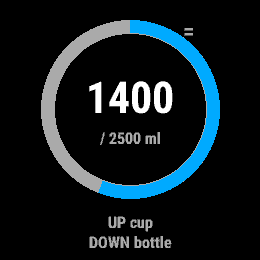
- UP adds a cup (250 ml), DOWN adds a bottle (500 ml), both adjustable
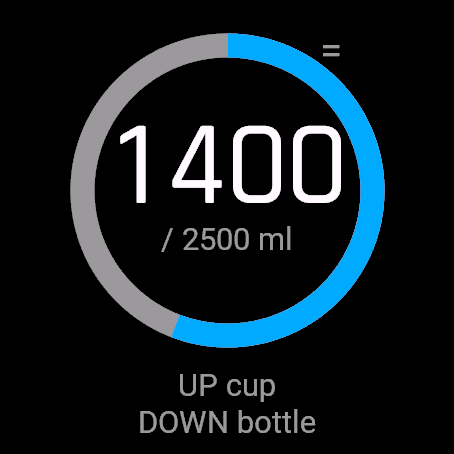
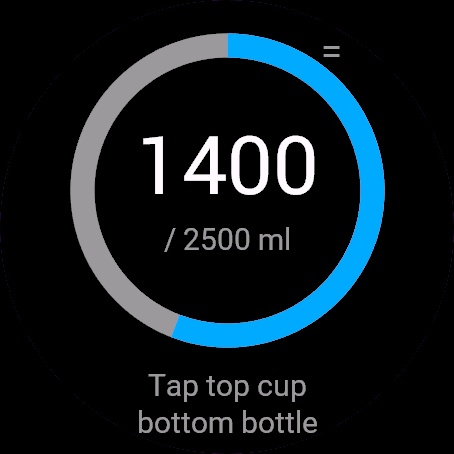
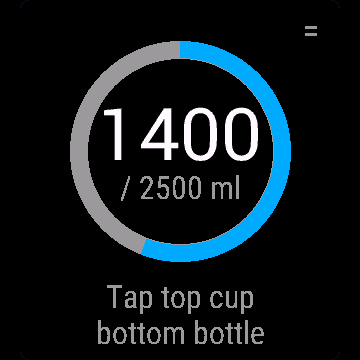
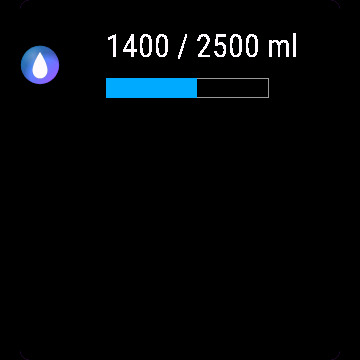
- Big total and a progress ring toward your daily goal
- Goal suggested from your weight (33 ml per kg, a rule of thumb, not medical advice), or set your own
- Custom amount, undo last entry, ml or oz (follows device units)
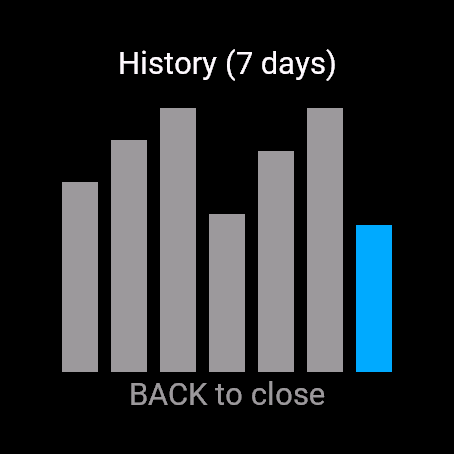
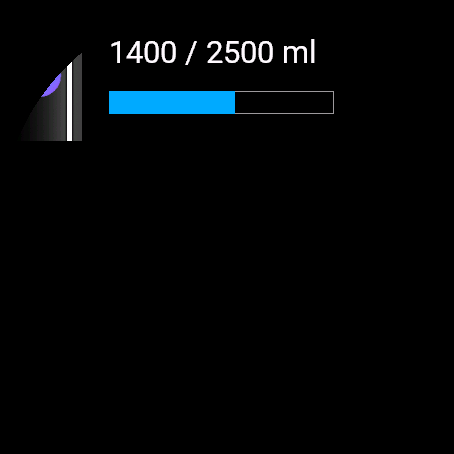
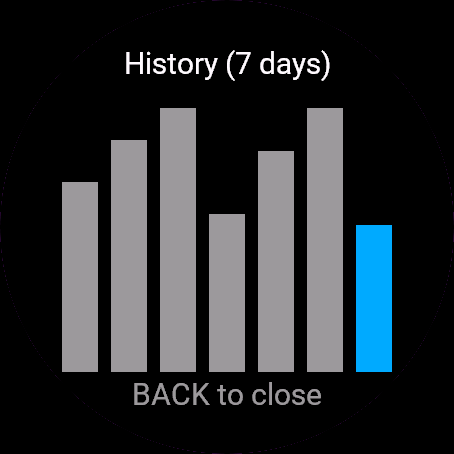
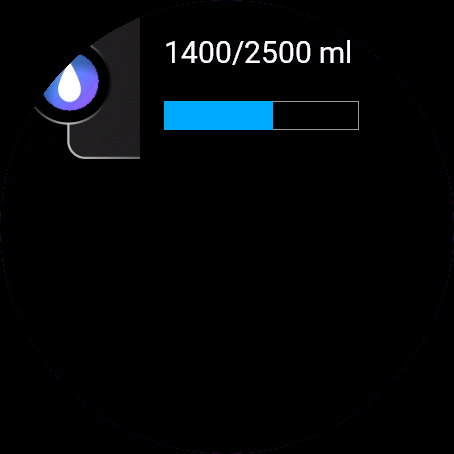
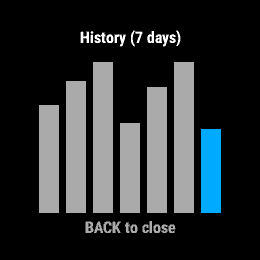
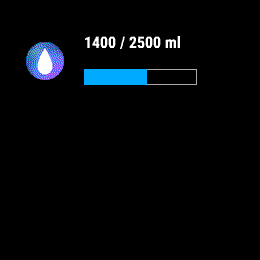
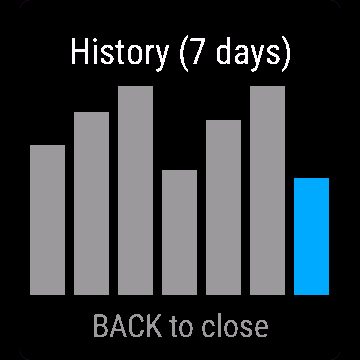
- 7 day bar chart, glance shows today's total without opening the app
- Touch-only watches: tap top/bottom half, corner icon opens the menu
Free trial: the app works fully and for free for the first 30 days. After that you can buy a one-time code at dialforge.dev. Changing your watch? Write to me and I will move your code for free. No subscription. I am a student and I build these apps myself after hours. I do not own every watch model, so bugs can happen on some. If something does not work or is missing, write through the form at dialforge.dev. I fix every reported bug within 72 hours and send the update to Garmin (Garmin approval usually takes 1-3 days). If you reported a bug, check whether the fix is already there, and if the bug lowered your rating, I would be grateful if you reconsidered it. If the app is useful to you, leave a rating in the store. You can also buy me a coffee or buy the full version, it lets me build more. Purchase: at checkout you confirm immediate delivery of the code, so under EU law the right of withdrawal does not apply. If the app does not work on your watch as described, write to me and I will fix it.
Jedno dotknięcie i porcja zapisana. Bez ładowania, bez zgubionych dni.
Nawodnienie to licznik wody zrobiony pod szybkość: jeden przycisk dodaje szklankę, drugi butelkę, suma aktualizuje się od razu. Bez ekranów ładowania, bez pięciu dotknięć żeby zalogować łyk wody.
- GÓRA dodaje szklankę (250 ml), DÓŁ dodaje butelkę (500 ml), oba rozmiary do zmiany
- Duża suma dzienna i pierścień postępu do celu
- Cel proponowany z Twojej wagi (33 ml na kg, to praktyczna reguła, nie zalecenie medyczne), albo ustawiony ręcznie
- Własna porcja, cofnięcie ostatniego wpisu, ml albo oz (wg jednostek zegarka)
- Wykres 7 dni, podgląd na liście widgetów bez otwierania aplikacji
- Zegarki bez przycisków: dotknięcie górnej/dolnej połowy, ikonka w rogu to menu
Darmowa próba. Przez pierwsze 30 dni aplikacja działa w pełni i za darmo. Potem możesz kupić jednorazowy kod na dialforge.dev. Zmieniasz zegarek? Napisz do mnie, a przeniosę Twój kod bezpłatnie. Bez abonamentu. Jestem studentem i robię te aplikacje sam, po godzinach. Nie mam wszystkich modeli zegarków, więc na niektórych mogą zdarzyć się błędy. Jeśli coś nie działa albo czegoś brakuje, napisz przez formularz na dialforge.dev. Każdą zgłoszoną usterkę poprawiam w ciągu 72 godzin i wysyłam do Garmina (zatwierdzenie przez Garmina trwa zwykle 1-3 dni). Jeśli zgłaszałeś błąd, sprawdź, czy poprawka już jest. A jeśli przez ten błąd wystawiłeś niższą ocenę, będzie mi miło, jeśli ją przemyślisz jeszcze raz. Jeśli aplikacja Ci się przydaje, zostaw ocenę w sklepie. Możesz też postawić mi kawę albo kupić pełną wersję, to pozwala mi robić kolejne. Zakup kodu: przy płatności potwierdzasz natychmiastowe dostarczenie kodu, więc zgodnie z prawem UE nie przysługuje prawo odstąpienia. Jeśli aplikacja nie działa na Twoim zegarku zgodnie z opisem, napisz, a naprawię to.
Einmal tippen, Getränk eingetragen. Kein Ladekreis, kein verlorener Tag.
Hydration Log ist ein Wassertracker, der auf Tempo gebaut ist: ein Knopf fügt eine Tasse hinzu, einer eine Flasche, die Summe aktualisiert sich sofort. Keine Ladebildschirme, keine fünf Tipps für ein Getränk.
- AUF fügt eine Tasse hinzu (250 ml), AB eine Flasche (500 ml), beides anpassbar
- Große Gesamtanzeige und ein Fortschrittsring zu deinem Tagesziel
- Ziel aus deinem Gewicht vorgeschlagen (33 ml pro kg, eine Faustregel, keine medizinische Beratung), oder leg deinen eigenen Wert fest
- Eigene Menge, letzten Eintrag rückgängig machen, ml oder oz (folgt den Geräteeinheiten)
- 7-Tage-Balkendiagramm, die Übersicht zeigt das heutige Total ohne die App zu öffnen
- Uhren nur mit Touch: obere/untere Hälfte tippen, Symbol in der Ecke öffnet das Menü
Kostenlose Testversion: Die App funktioniert in den ersten 30 Tagen uneingeschränkt und kostenlos. Danach kannst du einen Einmal-Code auf dialforge.dev kaufen. Du wechselst deine Uhr? Schreib mir und ich übertrage deinen Code kostenlos. Kein Abo. Ich bin Student und entwickle diese Apps selbst nach Feierabend. Ich besitze nicht jedes Uhrenmodell, daher können bei manchen Fehler auftreten. Wenn etwas nicht funktioniert oder fehlt, schreib über das Formular auf dialforge.dev. Ich behebe jeden gemeldeten Fehler innerhalb von 72 Stunden und sende das Update an Garmin (die Freigabe durch Garmin dauert üblicherweise 1-3 Tage). Falls du einen Fehler gemeldet hast, prüfe bitte, ob die Fehlerbehebung schon da ist, und falls der Fehler zu einer schlechteren Bewertung geführt hat, wäre ich dankbar, wenn du sie noch einmal überdenkst. Wenn die App für dich nützlich ist, hinterlasse eine Bewertung im Store. Du kannst mir auch einen Kaffee spendieren oder die Vollversion kaufen, das ermöglicht mir, weitere Apps zu entwickeln. Kauf: Beim Bezahlen bestätigst du die sofortige Bereitstellung des Codes, daher gilt nach EU-Recht kein Widerrufsrecht. Sollte die App auf deiner Uhr nicht wie beschrieben funktionieren, schreib mir und ich behebe das.
Un appui, une boisson enregistrée. Pas de roue qui tourne, pas de journée perdue.
Hydration Log est un suivi d'hydratation pensé pour être rapide : un bouton ajoute un verre, un autre ajoute une bouteille, le total se met à jour instantanément. Pas d'écran de chargement, pas cinq appuis pour enregistrer une boisson.
- HAUT ajoute un verre (250 ml), BAS ajoute une bouteille (500 ml), les deux réglables
- Grand total et anneau de progression vers votre objectif quotidien
- Objectif suggéré à partir de votre poids (33 ml par kg, une règle empirique, pas un avis médical), ou fixez le vôtre
- Quantité personnalisée, annulation de la dernière entrée, ml ou oz (selon les unités de l'appareil)
- Graphique sur 7 jours, le glance affiche le total du jour sans ouvrir l'application
- Montres tactiles uniquement : touchez la moitié haute/basse, l'icône dans le coin ouvre le menu
Essai gratuit : l'application fonctionne pleinement et gratuitement pendant les 30 premiers jours. Ensuite, vous pouvez acheter un code à paiement unique sur dialforge.dev. Vous changez de montre ? Écrivez-moi et je transférerai votre code gratuitement. Sans abonnement. Je suis étudiant et je développe ces applications moi-même sur mon temps libre. Je ne possède pas tous les modèles de montre, des bugs peuvent donc survenir sur certains. Si quelque chose ne fonctionne pas ou manque, écrivez-moi via le formulaire sur dialforge.dev. Je corrige chaque bug signalé sous 72 heures et j'envoie la mise à jour à Garmin (la validation par Garmin prend généralement 1 à 3 jours). Si vous avez signalé un bug, vérifiez si le correctif est déjà disponible, et si ce bug a fait baisser votre note, je vous serais reconnaissant de bien vouloir la réévaluer. Si l'application vous est utile, laissez une note dans la boutique. Vous pouvez aussi m'offrir un café ou acheter la version complète, cela me permet d'en développer d'autres. Achat : lors du paiement, vous confirmez la livraison immédiate du code, donc selon le droit de l'UE, le droit de rétractation ne s'applique pas. Si l'application ne fonctionne pas sur votre montre comme décrit, écrivez-moi et je corrigerai le problème.
Un toque y la bebida queda registrada. Sin ruedas de carga, sin días perdidos.
Hydration Log es un registro de agua pensado para ser rápido: un botón añade un vaso, otro añade una botella, y el total se actualiza al instante. Sin pantallas de carga, sin cinco toques para registrar una bebida.
- ARRIBA añade un vaso (250 ml), ABAJO añade una botella (500 ml), ambos ajustables
- Total grande y un anillo de progreso hacia tu objetivo diario
- Objetivo sugerido según tu peso (33 ml por kg, una regla general, no es consejo médico), o fija el tuyo
- Cantidad personalizada, deshacer el último registro, ml u oz (según las unidades del dispositivo)
- Gráfico de barras de 7 días, la vista rápida muestra el total de hoy sin abrir la app
- Relojes solo táctiles: toca la mitad superior/inferior, el icono de la esquina abre el menú
Prueba gratuita: la aplicación funciona al completo y gratis durante los primeros 30 días. Después de eso, puedes comprar un código de pago único en dialforge.dev. ¿Cambias de reloj? Escríbeme y transferiré tu código gratis. Sin suscripción. Soy estudiante y desarrollo estas aplicaciones por mi cuenta en mi tiempo libre. No tengo todos los modelos de reloj, por lo que pueden ocurrir errores en algunos. Si algo no funciona o falta, escribe a través del formulario en dialforge.dev. Corrijo cada error notificado en un plazo de 72 horas y envío la actualización a Garmin (la aprobación de Garmin suele tardar 1-3 días). Si notificaste un error, comprueba si la solución ya está disponible, y si el error hizo bajar tu valoración, te agradecería que la reconsideraras. Si la aplicación te resulta útil, deja una valoración en la tienda. También puedes invitarme a un café o comprar la versión completa, me permite seguir desarrollando. Compra: en el momento del pago confirmas la entrega inmediata del código, por lo que según la legislación de la UE no se aplica el derecho de desistimiento. Si la aplicación no funciona en tu reloj como se describe, escríbeme y lo solucionaré.
Eén tik, drankje gelogd. Geen laadcirkel, geen verloren dagen.
Hydration Log is een watertracker gebouwd op snelheid: één knop voegt een glas toe, één een fles, en het totaal wordt direct bijgewerkt. Geen laadschermen, geen vijf tikken om een drankje te loggen.
- UP voegt een glas toe (250 ml), DOWN voegt een fles toe (500 ml), beide aanpasbaar
- Groot totaal en een voortgangsring naar je dagelijkse doel
- Doel voorgesteld op basis van je gewicht (33 ml per kg, een vuistregel, geen medisch advies), of stel je eigen doel in
- Aangepaste hoeveelheid, laatste invoer ongedaan maken, ml of oz (volgt toestelinstellingen)
- 7-daags staafdiagram, glance toont het totaal van vandaag zonder de app te openen
- Horloges met alleen touchscreen: tik op de bovenste/onderste helft, icoon in de hoek opent het menu
Gratis proefperiode: de app werkt de eerste 30 dagen volledig en gratis. Daarna kun je een eenmalige code kopen op dialforge.dev. Wissel je van horloge? Schrijf me en ik zet je code gratis over. Geen abonnement. Ik ben student en ik bouw deze apps zelf in mijn vrije tijd. Ik bezit niet elk horlogemodel, dus op sommige kunnen bugs voorkomen. Als er iets niet werkt of ontbreekt, schrijf dan via het formulier op dialforge.dev. Ik los elke gemelde bug binnen 72 uur op en stuur de update naar Garmin (goedkeuring door Garmin duurt meestal 1-3 dagen). Als je een bug hebt gemeld, controleer dan of de oplossing er al is, en als de bug je beoordeling heeft verlaagd, zou ik het op prijs stellen als je deze wilt heroverwegen. Als de app nuttig voor je is, laat dan een beoordeling achter in de store. Je kunt ook een kop koffie voor me kopen of de volledige versie aanschaffen; daarmee kan ik meer bouwen. Aankoop: bij het afrekenen bevestig je de directe levering van de code, waardoor volgens het EU-recht het herroepingsrecht niet van toepassing is. Als de app op jouw horloge niet werkt zoals beschreven, schrijf me dan en ik los het op.
1回タップするだけで水分を記録。読み込み中の待機時間も、記録し忘れもありません。
Hydration Log は素早く記録できるように設計された水分トラッカーです。ボタンひとつでコップ1杯、もうひとつのボタンでボトル1本を追加でき、合計は即座に更新されます。ロード画面もなく、水分を記録するのに5回もタップする必要はありません。
- UP でコップ(250 ml)、DOWN でボトル(500 ml)を追加、どちらも調整可能
- 大きな合計表示と、1日の目標に向けた進捗リング
- 体重から目標を提案(33 ml per kg、一般的な目安であり医学的な助言ではありません)、または独自に設定可能
- カスタム量、直前の入力を取り消し、ml または oz(デバイスの単位設定に連動)
- 7 day の棒グラフ、アプリを開かずにグランスで本日の合計を確認可能
- タッチ操作のみのウォッチ:画面の上半分/下半分をタップ、コーナーのアイコンでメニューを開く
無料トライアル:最初の30日間はすべての機能を完全かつ無料でご利用いただけます。その後は dialforge.dev で買い切りコードをご購入いただけます。時計を買い替える場合はご連絡いただければ、無料でコードを移行します。サブスクリプションはありません。私は学生で、放課後や空き時間に自分でこれらのアプリを開発しています。すべての時計モデルを所有しているわけではないため、一部のモデルで不具合が発生することがあります。もし動作しない点や不足している機能があれば、dialforge.dev のフォームからご連絡ください。報告された不具合はすべて 72時間 以内に修正し、Garmin へアップデートを提出します(Garmin の承認には通常 1から3日 かかります)。不具合を報告された場合は、修正がすでに反映されているかご確認ください。また、その不具合により評価を下げていた場合は、再評価をご検討いただけますと幸いです。アプリがお役に立ちましたら、ストアで評価を残していただけると嬉しいです。コーヒーをおごっていただくか、製品版をご購入いただくこともできます。今後の開発の励みになります。購入について:チェックアウト時にコードの即時提供に同意いただくため、EU法に基づく撤回権は適用されません。説明どおりに時計でアプリが動作しない場合は、ご連絡いただければ修正いたします。
Tocca una volta, bevanda registrata. Nessun caricamento, nessun giorno perso.
Hydration Log è un tracker dell'acqua pensato per essere veloce: un pulsante aggiunge un bicchiere, uno aggiunge una bottiglia, il totale si aggiorna all'istante. Niente schermate di caricamento, niente cinque tocchi per registrare una bevanda.
- UP aggiunge un bicchiere (250 ml), DOWN aggiunge una bottiglia (500 ml), entrambi regolabili
- Totale ben visibile e anello di avanzamento verso il tuo obiettivo giornaliero
- Obiettivo suggerito in base al tuo peso (33 ml per kg, una stima indicativa, non un parere medico), oppure impostane uno personalizzato
- Quantità personalizzata, annulla l'ultimo inserimento, ml o oz (segue le unità del dispositivo)
- Grafico a barre di 7 giorni, il glance mostra il totale di oggi senza aprire l'app
- Orologi solo touch: tocca la metà superiore/inferiore, l'icona nell'angolo apre il menu
Prova gratuita: l'app funziona in modo completo e gratuito per i primi 30 giorni. Dopodiché puoi acquistare un codice una tantum su dialforge.dev. Cambi orologio? Scrivimi e trasferirò il tuo codice gratuitamente. Nessun abbonamento. Sono uno studente e creo queste app da solo nel tempo libero. Non possiedo tutti i modelli di orologio, quindi su alcuni possono verificarsi bug. Se qualcosa non funziona o manca, scrivimi tramite il modulo su dialforge.dev. Risolvo ogni bug segnalato entro 72 ore e invio l'aggiornamento a Garmin (l'approvazione di Garmin richiede solitamente 1-3 giorni). Se hai segnalato un bug, controlla se la correzione è già disponibile, e se il bug ha abbassato la tua valutazione, ti sarei grato se potessi riconsiderarla. Se trovi utile l'app, lascia una valutazione nello store. Puoi anche offrirmi un caffè o acquistare la versione completa: mi aiuta a sviluppare altre app. Acquisto: al momento del pagamento confermi la consegna immediata del codice, pertanto in base alla legge dell'UE il diritto di recesso non si applica. Se l'app non funziona sul tuo orologio come descritto, scrivimi e risolverò il problema.
轻触一下,即刻记录。无加载转圈,不遗漏任何一天。
Hydration Log 是一款追求快速记录的饮水追踪工具:一个按键加一杯,一个按键加一瓶,总量实时更新。无加载界面,无需点击五次才完成记录。
- UP 增加一杯(250 ml),DOWN 增加一瓶(500 ml),均可调节
- 醒目的总量与每日目标进度环
- 根据体重推荐目标(33 ml 每 kg,仅为经验法则,非医疗建议),亦可自行设定
- 自定义容量、撤销上一条记录、ml 或 oz(遵循设备单位)
- 7 day 柱状图,小部件(glance)无需打开应用即可查看今日总量
- 纯触控手表:轻触上半屏/下半屏,角标打开菜单
免费试用:应用在前 30 天内功能完整且完全免费。此后,你可以在 dialforge.dev 购买一次性激活码。更换了手表?联系我,我会免费为你迁移激活码。无需订阅。我是一名学生,利用业余时间独自开发这些应用。我无法拥有每一款手表型号,因此在某些机型上可能会出现错误。如果某些功能无法正常工作或有所缺失,请通过 dialforge.dev 上的表单联系我。我会在 72 小时内修复所有反馈的错误并将更新提交给 Garmin(Garmin 审核通常需要 1 到 3 天)。如果你反馈过错误,请查看是否已经修复;如果该错误影响了你的评分,若你能重新考虑评价,我将非常感激。如果这款应用对你有用,请在应用商店留下评价。你也可以请我喝杯咖啡或购买完整版,这能支持我开发更多应用。购买:结账时你确认立即交付激活码,因此根据欧盟法律,撤回权不适用。如果应用在你的手表上未能如描述般正常运行,请联系我,我会修复。
Одно касание, напиток записан. Без индикаторов загрузки, без потерянных дней.
Hydration Log создан для быстрого учета воды: одна кнопка добавляет стакан, другая добавляет бутылку, общий объем обновляется мгновенно. Никаких экранов загрузки, не нужно делать пять нажатий, чтобы записать напиток.
- UP добавляет стакан (250 ml), DOWN добавляет бутылку (500 ml), оба объема настраиваются
- Крупная общая сумма и кольцо прогресса до дневной цели
- Рекомендованная цель на основе вашего веса (33 ml per kg, ориентировочное правило, не является медицинской рекомендацией) или собственное значение
- Произвольный объем, отмена последней записи, ml или oz (по единицам измерения устройства)
- Столбчатая диаграмма за 7 дней, glance показывает сумму за сегодня без запуска приложения
- Для часов только с сенсорным экраном: касание верхней/нижней половины, значок в углу открывает меню
Бесплатный пробный период: приложение работает полностью и бесплатно первые 30 дней. После этого вы можете купить разовый код на dialforge.dev. Меняете часы? Напишите мне, и я перенесу ваш код бесплатно. Без подписки. Я студент и создаю эти приложения сам в свободное время. У меня нет всех моделей часов, поэтому на некоторых могут случаться ошибки. Если что-то не работает или чего-то не хватает, напишите через форму на dialforge.dev. Я исправляю каждую найденную ошибку в течение 72 часов и отправляю обновление в Garmin (одобрение Garmin обычно занимает 1-3 дня). Если вы сообщили об ошибке, проверьте, не вышло ли уже исправление, и если из-за ошибки вы снизили оценку, я буду благодарен, если вы ее пересмотрите. Если приложение вам полезно, оставьте оценку в магазине. Вы также можете угостить меня кофе или купить полную версию, это позволяет мне создавать больше приложений. Покупка: при оформлении заказа вы подтверждаете немедленное предоставление кода, поэтому по законам ЕС право на отказ от покупки не применяется. Если приложение работает на ваших часах не так, как описано, напишите мне, и я всё исправлю.
Toque uma vez, bebida registrada. Sem telas de carregamento, sem dias perdidos.
O Hydration Log é um rastreador de água feito para ser rápido: um botão adiciona um copo, outro adiciona uma garrafa, e o total é atualizado instantaneamente. Sem telas de carregamento, sem precisar de cinco toques para registrar uma bebida.
- UP adiciona um copo (250 ml), DOWN adiciona uma garrafa (500 ml), ambos ajustáveis
- Total em destaque e um anel de progresso para a sua meta diária
- Meta sugerida com base no seu peso (33 ml per kg, uma regra prática, não é aconselhamento médico), ou defina a sua própria
- Quantidade personalizada, desfazer última entrada, ml ou oz (segue as unidades do dispositivo)
- Gráfico de barras de 7 dias, o glance mostra o total de hoje sem abrir o app
- Relógios apenas com toque: toque na metade superior/inferior, o ícone no canto abre o menu
Teste gratuito: o aplicativo funciona totalmente e de graça nos primeiros 30 dias. Depois disso, você pode comprar um código único em dialforge.dev. Vai trocar de relógio? Escreva para mim e eu transfiro o seu código de graça. Sem assinatura. Sou estudante e desenvolvo esses aplicativos sozinho nas horas vagas. Não possuo todos os modelos de relógio, por isso bugs podem acontecer em alguns. Se algo não funcionar ou estiver faltando, escreva pelo formulário em dialforge.dev. Corrijo todos os bugs relatados em até 72 horas e envio a atualização para a Garmin (a aprovação da Garmin costuma levar de 1 a 3 dias). Se você relatou um bug, veja se a correção já está disponível, e caso o bug tenha diminuído sua avaliação, eu ficaria grato se você pudesse reconsiderá-la. Se o aplicativo for útil para você, deixe uma avaliação na loja. Você também pode me pagar um café ou comprar a versão completa, isso me permite criar mais. Compra: na finalização da compra você confirma a entrega imediata do código, portanto, sob a legislação da UE, o direito de desistência não se aplica. Se o aplicativo não funcionar no seu relógio conforme descrito, escreva para mim e eu resolverei o problema.
Jedno klepnutí a nápoj je zapsán. Žádné načítací kolečko, žádné ztracené dny.
Hydration Log je sledovač pitného režimu navržený pro rychlost: jedno tlačítko přidá sklenici, druhé láhev, celkový součet se okamžitě aktualizuje. Žádné načítací obrazovky, žádných pět klepnutí pro zaznamenání nápoje.
- UP přidá sklenici (250 ml), DOWN přidá láhev (500 ml), obojí nastavitelné
- Velký celkový součet a kruhový ukazatel postupu k dennímu cíli
- Cíl navržený podle vaší hmotnosti (33 ml na kg, orientační pravidlo, nikoli lékařská rada), nebo si nastavte vlastní
- Vlastní množství, vrácení posledního záznamu, ml nebo oz (podle jednotek zařízení)
- 7denní sloupcový graf, glance ukazuje dnešní součet bez nutnosti otevírat aplikaci
- Hodinky pouze s dotykovým displejem: klepněte na horní/dolní polovinu, ikona v rohu otevře menu
Bezplatná zkušební verze: aplikace funguje plně a zdarma po dobu prvních 30 dní. Poté si můžeš koupit jednorázový kód na dialforge.dev. Měníš hodinky? Napiš mi a já ti kód bezplatně převedu. Žádné předplatné. Jsem student a tyto aplikace vytvářím sám po večerech. Nevlastním každý model hodinek, takže se na některých mohou objevit chyby. Pokud něco nefunguje nebo chybí, napiš přes formulář na dialforge.dev. Každou nahlášenou chybu opravuji do 72 hodin a posílám aktualizaci do Garmin (schválení ze strany Garmin obvykle trvá 1-3 dny). Pokud jsi nahlásil chybu, zkontroluj, zda už je oprava k dispozici, a pokud kvůli ní bylo tvé hodnocení nižší, budu vděčný, když ho ještě zvážíš. Pokud je pro tebe aplikace užitečná, zanech hodnocení v obchodě. Můžeš mi také koupit kávu nebo koupit plnou verzi, umožní mi to vytvářet další. Nákup: při dokončení objednávky potvrzuješ okamžité doručení kódu, takže podle práva EU se neuplatňuje právo na odstoupení od smlouvy. Pokud aplikace na tvých hodinkách nefunguje podle popisu, napiš mi a já to opravím.
Um toque, bebida registada. Sem esperas, sem dias perdidos.
O Hydration Log é um registador de água concebido para ser rápido: um botão adiciona um copo, outro adiciona uma garrafa, o total atualiza-se instantaneamente. Sem ecrãs de carregamento, sem cinco toques para registar uma bebida.
- UP adiciona um copo (250 ml), DOWN adiciona uma garrafa (500 ml), ambos ajustáveis
- Total em tamanho grande e anel de progresso rumo ao seu objetivo diário
- Objetivo sugerido a partir do seu peso (33 ml por kg, uma regra prática, não é aconselhamento médico), ou defina o seu próprio
- Quantidade personalizada, anular a última entrada, ml ou oz (segue as unidades do dispositivo)
- Gráfico de barras de 7 dias, o glance mostra o total de hoje sem abrir a aplicação
- Relógios apenas táteis: toque na metade superior/inferior, o ícone de canto abre o menu.
Avaliação gratuita: a aplicação funciona de forma completa e gratuita durante os primeiros 30 dias. Depois disso, pode comprar um código único em dialforge.dev. Vai mudar de relógio? Escreva-me e transferirei o seu código gratuitamente. Sem subscrição. Sou estudante e crio estas aplicações sozinho nos meus tempos livres. Não possuo todos os modelos de relógio, pelo que podem ocorrer erros em alguns. Se algo não funcionar ou estiver em falta, escreva através do formulário em dialforge.dev. Corrijo todos os erros comunicados dentro de 72 horas e envio a atualização para a Garmin (a aprovação da Garmin costuma demorar 1-3 dias). Se comunicou um erro, verifique se a correção já está disponível e, se o erro baixou a sua classificação, ficaria grato se a reconsiderasse. Se a aplicação lhe for útil, deixe uma avaliação na loja. Também me pode pagar um café ou comprar a versão completa, permitindo-me criar mais. Compra: no checkout confirma a entrega imediata do código, pelo que, ao abrigo da legislação da UE, o direito de livre resolução não se aplica. Se a aplicação não funcionar no seu relógio como descrito, escreva-me e resolverei o problema.
한 번의 탭으로 수분 섭취 기록 완료. 로딩 스피너도 없고, 기록을 놓치는 날도 없습니다.
Hydration Log는 빠른 사용성을 위해 제작된 수분 섭취 추적 앱입니다. 버튼 하나로 컵을 추가하고 다른 버튼으로 병을 추가하면 총량이 즉시 업데이트됩니다. 로딩 화면도 없고, 음료 하나를 기록하기 위해 다섯 번씩 탭할 필요도 없습니다.
- UP 버튼으로 한 컵(250 ml) 추가, DOWN 버튼으로 한 병(500 ml) 추가(둘 다 용량 변경 가능)
- 한눈에 들어오는 총량과 일일 목표 달성률을 보여주는 진행 링
- 체중에 맞춘 권장 목표 제시(33 ml per kg, 일반적인 기준이며 의학적 조언이 아님) 또는 직접 목표 설정
- 직접 용량 입력, 마지막 기록 취소, ml 또는 oz 단위 지원(기기 설정 단위 반영)
- 7 day 막대 그래프 제공, 앱을 열지 않고도 글랜스에서 오늘의 총량 확인 가능
- 터치 전용 시계: 화면 상단/하단 탭으로 입력, 모서리 아이콘으로 메뉴 열기
무료 체험: 처음 30일 동안 앱의 모든 기능을 무료로 이용할 수 있습니다. 그 후 dialforge.dev에서 일회성 코드를 구매할 수 있습니다. 시계를 변경하시나요? 저에게 메시지를 남겨주시면 무료로 코드를 이전해 드립니다. 구독은 없습니다. 저는 학생이며 방과 후 여가 시간에 직접 이 앱들을 개발하고 있습니다. 모든 시계 모델을 보유하고 있지는 않아 일부 기기에서 버그가 발생할 수 있습니다. 제대로 작동하지 않거나 누락된 부분이 있다면 dialforge.dev의 문의 양식을 통해 메시지를 남겨주세요. 보고된 모든 버그는 72시간 이내에 수정하여 Garmin에 업데이트를 전송합니다(Garmin 승인은 보통 1-3일 소요). 버그를 제보하셨다면 수정 사항이 이미 적용되었는지 확인해 주시고, 만약 그 버그로 인해 평점을 낮게 주셨다면 다시 평가해 주시면 감사하겠습니다. 앱이 유용하다면 스토어에 평점을 남겨주세요. 커피를 후원해 주시거나 정식 버전을 구매해 주실 수도 있으며, 이는 제가 더 많은 앱을 만드는 데 도움이 됩니다. 구매 안내: 결제 시 코드 즉시 제공에 동의하시게 되므로 EU 법률상 청약철회권이 적용되지 않습니다. 앱이 설명대로 시계에서 작동하지 않는 경우, 제게 메시지를 보내주시면 해결해 드리겠습니다.
Ett tryck, drycken loggad. Inga laddningshjul, inga förlorade dagar.
Hydration Log är en vattenlogg byggd för att vara snabb: en knapp lägger till en kopp, en lägger till en flaska, totalsumman uppdateras direkt. Inga laddningsskärmar, inte fem tryck för att logga en dryck.
- UP lägger till en kopp (250 ml), DOWN lägger till en flaska (500 ml), båda kan justeras
- Tydlig totalsumma och en framstegsring mot ditt dagliga mål
- Förslag på mål utifrån din vikt (33 ml per kg, en tumregel, inte medicinsk rådgivning), eller sätt ett eget
- Anpassad mängd, ångra senaste registreringen, ml eller oz (följer enhetens enheter)
- 7 dagars stapeldiagram, snabblicken visar dagens total utan att öppna appen
- Klockor med enbart pekskärm: tryck på övre/nedre halvan, hörnikonen öppnar menyn
Gratis provperiod: appen fungerar fullt ut och kostnadsfritt de första 30 dagarna. Därefter kan du köpa en engångskod på dialforge.dev. Byter du klocka? Skriv till mig så flyttar jag din kod gratis. Inget abonnemang. Jag är student och bygger dessa appar själv på fritiden. Jag äger inte alla klockmodeller, så buggar kan uppstå på vissa. Om något inte fungerar eller saknas, skriv via formuläret på dialforge.dev. Jag åtgärdar varje rapporterad bugg inom 72 timmar och skickar uppdateringen till Garmin (Garmins godkännande tar vanligtvis 1-3 dagar). Om du har rapporterat en bugg, se efter om rättelsen redan finns där, och om buggen sänkte ditt betyg vore jag tacksam om du övervägde att ändra det. Om appen är till nytta för dig, lämna gärna ett betyg i butiken. Du kan också bjuda mig på en kaffe eller köpa fullversionen, det gör att jag kan bygga mer. Köp: i kassan bekräftar du omedelbar leverans av koden, så enligt EU-lagstiftning gäller inte ångerrätten. Om appen inte fungerar på din klocka enligt beskrivningen, skriv till mig så återbetalar jag dig.
Tryk én gang, drik registreret. Ingen ventecirkel, ingen tabte dage.
Hydration Log er en vand-tracker bygget til at være hurtig: én knap tilføjer en kop, én tilføjer en flaske, totalen opdateres med det samme. Ingen indlæsningsskærme, ikke fem tryk for at registrere en drik.
- UP tilføjer en kop (250 ml), DOWN tilføjer en flaske (500 ml), begge kan justeres
- Tydelig total og en statusring mod dit daglige mål
- Mål foreslået ud fra din vægt (33 ml pr. kg, en tommelfingerregel, ikke medicinsk rådgivning), eller angiv dit eget
- Valgfri mængde, fortryd seneste registrering, ml eller oz (følger enhedens indstillinger)
- 7 dages søjlediagram, glance viser dagens total uden at åbne appen
- Ure med ren touchskærm: tryk på øverste/nederste halvdel, hjørneikon åbner menuen
Gratis prøveperiode: appen fungerer fuldt ud og gratis i de første 30 dage. Derefter kan du købe en engangskode på dialforge.dev. Skifter du ur? Skriv til mig, så flytter jeg din kode gratis. Intet abonnement. Jeg er studerende og bygger selv disse apps i min fritid. Jeg ejer ikke alle urmodeller, så der kan opstå fejl på nogle af dem. Hvis noget ikke virker eller mangler, så skriv via formularen på dialforge.dev. Jeg retter enhver rapporteret fejl inden for 72 timer og sender opdateringen til Garmin (Garmin-godkendelse tager normalt 1-3 dage). Hvis du har rapporteret en fejl, så tjek om rettelsen allerede er der, og hvis fejlen fik dig til at give en lavere vurdering, vil jeg være taknemmelig, hvis du vil genoverveje den. Hvis appen er nyttig for dig, så læg en vurdering i butikken. Du kan også give mig en kop kaffe eller købe den fulde version, det giver mig mulighed for at bygge mere. Køb: ved betaling bekræfter du øjeblikkelig levering af koden, så ifølge EU-lovgivningen bortfalder fortrydelsesretten. Hvis appen ikke virker på dit ur som beskrevet, så skriv til mig, og jeg løser det.
Ett trykk, drikk logget. Ingen ventesirkel, ingen tapte dager.
Hydration Log er en vannmåler bygget for å være rask: én knapp legger til en kopp, én legger til en flaske, totalsummen oppdateres umiddelbart. Ingen lasteskjermer, ingen fem trykk for å logge en drikk.
- UP legger til en kopp (250 ml), DOWN legger til en flaske (500 ml), begge kan justeres
- Tydelig totalsum og en fremgangsring mot dagsmålet ditt
- Foreslått mål basert på vekten din (33 ml per kg, en tommelfingerregel, ikke et medisinsk råd), eller sett ditt eget
- Egendefinert mengde, angre forrige registrering, ml eller oz (følger enhetens innstillinger)
- 7-dagers stolpediagram, glance viser dagens total uten å åpne appen
- Klokker med kun berøring: trykk på øvre/nedre halvdel, hjørneikonet åpner menyen
Gratis prøveperiode: appen fungerer fullt ut og helt gratis de første 30 dagene. Etter det kan du kjøpe en engangskode på dialforge.dev. Bytter du klokke? Skriv til meg, så flytter jeg koden din gratis. Ingen abonnement. Jeg er student og lager disse appene selv på fritiden. Jeg eier ikke alle klokkemodeller, så feil kan forekomme på enkelte. Hvis noe ikke fungerer eller mangler, skriv via skjemaet på dialforge.dev. Jeg retter alle innrapporterte feil innen 72 timer og sender oppdateringen til Garmin (godkjenning fra Garmin tar vanligvis 1-3 dager). Hvis du har meldt fra om en feil, sjekk om rettelsen allerede er på plass, og hvis feilen gjorde at du ga en lavere vurdering, setter jeg stor pris på om du vil vurdere den på nytt. Hvis appen er nyttig for deg, legg gjerne igjen en vurdering i butikken. Du kan også spandere en kaffe på meg eller kjøpe fullversjonen, det gjør at jeg kan utvikle mer. Kjøp: ved betaling bekrefter du umiddelbar levering av koden, så ifølge EU-retten gjelder ikke angreretten. Hvis appen ikke fungerer på klokken din som beskrevet, skriv til meg så fikser jeg det.
輕觸一下,飲水即刻記錄。沒有載入圖示,不再遺漏任何一天。
Hydration Log 是一款追求極速的飲水追蹤工具:一個按鈕加一杯,一個按鈕加一瓶,總量即時更新。沒有載入畫面,無需繁瑣點按五次才能記錄飲水。
- UP 增加一杯(250 ml),DOWN 增加一瓶(500 ml),兩者皆可自訂
- 醒目的總量顯示與邁向每日目標的進度環
- 依據體重提供建議目標(33 ml per kg,經驗法則,非醫療建議),亦可自行設定
- 自訂容量、復原上一筆記錄、ml 或 oz(隨裝置單位設定)
- 7 day 長條圖,無需開啟應用程式即可在 glance 查看今日總量
- 純觸控手錶:輕觸螢幕上半部或下半部,角落圖示可開啟選單
免費試用:前 30 天可免費使用應用程式的完整功能。之後你可以在 dialforge.dev 購買一次性代碼。更換手錶?寫信給我,我會免費為你轉移代碼。無需訂閱。我是一名學生,這些應用程式是我在課餘時間自己開發的。我並沒有每一款手錶型號,所以在某些型號上可能會出現錯誤。如果某些功能無法運作或有所缺漏,請透過 dialforge.dev 上的表單聯絡我。我會在 72 小時內修復所有回報的錯誤,並將更新提交給 Garmin(Garmin 的審查通常需要 1-3 天)。如果你曾回報錯誤,請確認修復是否已推出;若該錯誤曾影響你的評分,如果你願意重新考慮評價,我會非常感謝。如果這個應用程式對你有幫助,請在商店留下評價。你也可以請我喝杯咖啡或購買完整版,這能支持我開發更多內容。購買須知:結帳時你確認立即交付代碼,因此依歐盟法律規定不適用撤回權。如果應用程式無法如描述般在你的手錶上運作,請寫信給我,我會修復。
Yksi napautus, juoma kirjattu. Ei latausympyröitä, ei menetettyjä päiviä.
Hydration Log on vedenjuonnin seurantaan luotu nopea sovellus: toinen painike lisää kupin, toinen pullon, ja kokonaismäärä päivittyy heti. Ei latausruutuja, ei viittä napautusta juoman kirjaamiseen.
- UP lisää kupin (250 ml), DOWN lisää pullon (500 ml), molemmat säädettävissä
- Selkeä kokonaismäärä ja edistymisrengas kohti päivittäistä tavoitettasi
- Painoosi perustuva tavoite-ehdotus (33 ml per kg, nyrkkisääntö, ei lääketieteellinen neuvo) tai aseta oma tavoite
- Oma määrä, edellisen kirjauksen kumoaminen, ml tai oz (seuraa laitteen yksiköitä)
- 7 päivän pylväskaavio, glance näyttää päivän kokonaismäärän avaamatta sovellusta
- Pelkällä kosketuksella toimivat kellot: napauta ylä- tai alapuoliskoa, kulmakuvake avaa valikon
Ilmainen kokeilujakso: sovellus toimii täysin ja ilmaiseksi ensimmäiset 30 päivää. Sen jälkeen voit ostaa kertakoodin osoitteesta dialforge.dev. Vaihdatko kelloa? Kirjoita minulle, niin siirrän koodisi ilmaiseksi. Ei tilausta. Olen opiskelija ja rakennan nämä sovellukset itse vapaa-ajallani. En omista jokaista kellomallia, joten joissakin voi esiintyä bugeja. Jos jokin ei toimi tai puuttuu, kirjoita lomakkeen kautta osoitteessa dialforge.dev. Korjaan jokaisen ilmoitetun bugin 72 tunnin kuluessa ja lähetän päivityksen Garminille (Garmin-hyväksyntä kestää yleensä 1-3 päivää). Jos ilmoitit bugista, tarkista onko korjaus jo tullut, ja jos bugi laski arviotasi, olisin kiitollinen jos harkitsisit sitä uudelleen. Jos sovellus on sinulle hyödyllinen, jätä arvio sovelluskauppaan. Voit myös ostaa minulle kahvin tai ostaa täysversion, se auttaa minua kehittämään lisää. Osto: kassalla vahvistat koodin välittömän toimituksen, joten EU-lain mukaan peruutusoikeus ei päde. Jos sovellus ei toimi kellossasi kuvatulla tavalla, kirjoita minulle, niin korjaan asian.
Jedno ťuknutie, nápoj zaznamenaný. Žiadne načítavacie koliesko, žiadne stratené dni.
Hydration Log je sledovač pitného režimu navrhnutý pre rýchlosť: jedno tlačidlo pridá pohár, druhé pridá fľašu, celkový súčet sa aktualizuje okamžite. Žiadne načítavacie obrazovky, žiadnych päť ťuknutí na zaznamenanie nápoja.
- UP pridá pohár (250 ml), DOWN pridá fľašu (500 ml), obe hodnoty sú nastaviteľné
- Veľký celkový súčet a kruh pokroku k vášmu dennému cieľu
- Cieľ navrhnutý podľa vašej hmotnosti (33 ml na kg, orientačné pravidlo, nejde o lekársku radu) alebo si nastavte vlastný
- Vlastné množstvo, vrátenie posledného záznamu, ml alebo oz (podľa jednotiek zariadenia)
- 7-dňový stĺpcový graf, glance zobrazuje dnešný súčet bez otvorenia aplikácie
- Hodinky iba s dotykovým ovládaním: ťuknite na hornú/dolnú polovicu, ikona v rohu otvorí menu
Bezplatná skúšobná verzia: aplikácia funguje plnohodnotne a zadarmo počas prvých 30 dní. Potom si môžete zakúpiť jednorazový kód na dialforge.dev. Meníte hodinky? Napíšte mi a kód vám bezplatne presuniem. Žiadne predplatné. Som študent a tieto aplikácie vyvíjam sám vo voľnom čase. Nevlastním každý model hodiniek, takže na niektorých sa môžu vyskytnúť chyby. Ak niečo nefunguje alebo chýba, napíšte cez formulár na dialforge.dev. Každú nahlásenú chybu opravím do 72 hodín a aktualizáciu odošlem do Garmin (schválenie od Garmin zvyčajne trvá 1-3 dni). Ak ste nahlásili chybu, skontrolujte, či už je oprava dostupná, a ak vám chyba znížila hodnotenie, bol by som vďačný, keby ste ho prehodnotili. Ak je pre vás aplikácia užitočná, zanechajte hodnotenie v obchode. Môžete mi tiež kúpiť kávu alebo si kúpiť plnú verziu, umožní mi to tvoriť ďalej. Nákup: pri platbe potvrdzujete okamžité doručenie kódu, takže podľa práva EÚ sa na nákup nevzťahuje právo na odstúpenie od zmluvy. Ak aplikácia na vašich hodinkách nefunguje tak, ako je popísané, napíšte mi a opravím to.
En dotik, pijača zabeležena. Brez nalaganja, brez izgubljenih dni.
Hydration Log je sledilnik vnosa vode, ustvarjen za hitrost: en gumb doda kozarec, drugi plastenko, skupni seštevek se posodobi v trenutku. Brez zaslonov za nalaganje, brez petih dotikov za vnos pijače.
- UP doda kozarec (250 ml), DOWN doda plastenko (500 ml), oboje je nastavljivo
- Velik skupni seštevek in krog napredka do vašega dnevnega cilja
- Predlagani cilj glede na vašo telesno težo (33 ml na kg, okvirno pravilo, ni zdravniški nasvet) ali vnos lastnega cilja
- Količina po meri, razveljavitev zadnjega vnosa, ml ali oz (glede na enote naprave)
- 7-dnevni stolpčni grafikon, hitri pogled (glance) prikazuje današnji seštevek brez odpiranja aplikacije
- Ure z zaslonom samo na dotik: tapnite zgornjo/spodnjo polovico, ikona v kotu odpre meni
Brezplačni preizkus: aplikacija deluje popolnoma in brezplačno prvih 30 dni. Po tem lahko kupite enkratno kodo na dialforge.dev. Menjate uro? Pišite mi in vašo kodo bom brezplačno prenesel. Brez naročnine. Sem študent in te aplikacije ustvarjam sam v svojem prostem času. Nimam vsakega modela ure, zato se lahko na nekaterih pojavijo napake. Če kaj ne deluje ali manjka, pišite prek obrazca na dialforge.dev. Vsako prijavljeno napako odpravim v 72 urah in pošljem posodobitev Garmin (odobritev Garmin običajno traja 1-3 dni). Če ste prijavili napako, preverite, ali je popravek že na voljo, in če je napaka znižala vašo oceno, bi bil hvaležen, če bi jo ponovno premislili. Če vam je aplikacija koristna, pustite oceno v trgovini. Lahko mi kupite tudi kavo ali kupite polno različico, kar mi omogoča, da ustvarim več. Nakup: pri zaključku nakupa potrdite takojšnjo dostavo kode, zato v skladu z zakonodajo EU pravica do odstopa od pogodbe ne velja. Če aplikacija na vaši uri ne deluje, kot je opisano, mi pišite in povrnil vam bom kupnino.
Ketuk sekali, minuman tercatat. Tanpa animasi loading, tanpa hari yang terlewat.
Hydration Log adalah pelacak air yang dirancang agar cepat: satu tombol menambah cangkir, satu menambah botol, total langsung diperbarui. Tanpa layar pemuatan, tanpa perlu lima ketukan untuk mencatat minuman.
- UP menambah cangkir (250 ml), DOWN menambah botol (500 ml), keduanya dapat disesuaikan
- Total besar dan cincin progres menuju target harian Anda
- Target disarankan dari berat badan Anda (33 ml per kg, perkiraan umum, bukan saran medis), atau tentukan sendiri
- Jumlah kustom, batalkan entri terakhir, ml atau oz (mengikuti unit perangkat)
- Grafik batang 7 hari, glance menampilkan total hari ini tanpa membuka aplikasi
- Jam tangan khusus layar sentuh: ketuk bagian atas/bawah, ikon sudut membuka menu
Uji coba gratis: aplikasi berfungsi penuh dan gratis selama 30 hari pertama. Setelah itu Anda dapat membeli kode satu kali di dialforge.dev. Ganti jam tangan? Hubungi saya dan saya akan memindahkan kode Anda secara gratis. Tanpa langganan. Saya seorang mahasiswa dan saya membuat aplikasi ini sendiri di waktu luang. Saya tidak memiliki semua model jam tangan, jadi bug bisa saja terjadi pada beberapa model. Jika ada yang tidak berfungsi atau kurang, kirim pesan melalui formulir di dialforge.dev. Saya memperbaiki setiap bug yang dilaporkan dalam 72 jam dan mengirimkan pembaruannya ke Garmin (persetujuan Garmin biasanya membutuhkan 1-3 hari). Jika Anda pernah melaporkan bug, periksa apakah perbaikannya sudah tersedia, dan jika bug tersebut menurunkan penilaian Anda, saya akan berterima kasih jika Anda mempertimbangkannya kembali. Jika aplikasi ini bermanfaat bagi Anda, berikan penilaian di toko. Anda juga bisa mentraktir saya kopi atau membeli versi lengkap, ini memungkinkan saya untuk membuat lebih banyak aplikasi. Pembelian: saat pembayaran Anda mengonfirmasi pengiriman langsung kode tersebut, sehingga berdasarkan hukum Uni Eropa hak pembatalan tidak berlaku. Jika aplikasi tidak berfungsi di jam tangan Anda seperti yang dijelaskan, hubungi saya dan saya akan mengembalikan dana Anda.
Egyetlen koppintás, ital rögzítve. Nincs töltésjelző, nincsenek elveszett napok.
A Hydration Log egy gyorsaságra tervezett vízkövető: egy gomb hozzáad egy poharat, egy másik egy palackot, az összesítés azonnal frissül. Nincsenek betöltőképernyők, nem kell ötöt koppintani egy ital rögzítéséhez.
- UP hozzáad egy poharat (250 ml), DOWN hozzáad egy palackot (500 ml), mindkettő állítható
- Nagy összegzés és folyamatgyűrű a napi cél felé
- A testsúlyodból javasolt cél (33 ml per kg, ökölszabály, nem orvosi tanács), vagy állíts be sajátot
- Egyedi mennyiség, utolsó bejegyzés visszavonása, ml or oz (az óra mértékegységeit követi)
- 7 day oszlopdiagram, a glance mutatja a mai összesítést az alkalmazás megnyitása nélkül
- Csak érintős órák: koppints a felső/alsó félre, a sarokikon megnyitja a menüt
Ingyenes próbaverzió: az alkalmazás teljesen és ingyenesen működik az első 30 napban. Ezt követően vásárolhatsz egy egyszeri kódot a dialforge.dev oldalon. Órát cserélsz? Írj nekem, és ingyen átviszem a kódodat. Nincs előfizetés. Diák vagyok, és ezeket az alkalmazásokat egymagam fejlesztem a szabadidőmben. Nem rendelkezem minden óramodellel, így egyes típusokon előfordulhatnak hibák. Ha valami nem működik vagy hiányzik, írj a dialforge.dev oldalon található űrlapon keresztül. Minden bejelentett hibát 72 órán belül kijavítok, és elküldöm a frissítést a Garminnak (a Garmin jóváhagyása általában 1-3 napot vesz igénybe). Ha hibát jelentettél, ellenőrizd, hogy megérkezett-e már a javítás, és ha a hiba miatt rosszabb értékelést adtál, hálás lennék, ha átgondolnád. Ha hasznosnak találod az alkalmazást, hagyj egy értékelést az áruházban. Meg is hívhatsz egy kávéra, vagy megvásárolhatod a teljes verziót, ez lehetővé teszi, hogy még többet készítsek. Vásárlás: a fizetéskor megerősíted a kód azonnali kézbesítését, így az uniós jog szerint az elállási jog nem érvényes. Ha az alkalmazás nem a leírtak szerint működik az órádon, írj nekem, és megjavítom.
แตะครั้งเดียว บันทึกการดื่มได้ทันที ไม่มีวงล้อโหลดหมุน ไม่มีข้อมูลวันที่สูญหาย
Hydration Log คือตัวติดตามการดื่มน้ำที่สร้างขึ้นเพื่อความรวดเร็ว: ปุ่มหนึ่งเพิ่มแก้ว อีกปุ่มเพิ่มขวด ยอดรวมอัปเดตทันที ไม่มีหน้าจอโหลด ไม่ต้องแตะถึง 5 ครั้งเพื่อบันทึกการดื่ม
- UP เพิ่มหนึ่งแก้ว (250 ml), DOWN เพิ่มหนึ่งขวด (500 ml) ทั้งสองค่าปรับได้
- ตัวเลขยอดรวมขนาดใหญ่และวงแหวนแสดงความคืบหน้าสู่เป้าหมายประจำวันของคุณ
- แนะนำเป้าหมายจากน้ำหนักตัวของคุณ (33 ml per kg เป็นเพียงการประมาณคร่าว ๆ ไม่ใช่คำแนะนำทางการแพทย์) หรือกำหนดเองได้
- ปริมาณกำหนดเอง ยกเลิกรายการล่าสุด ml or oz (ตามหน่วยของอุปกรณ์)
- กราฟแท่ง 7 day และ glance แสดงยอดรวมวันนี้โดยไม่ต้องเปิดแอป
- สำหรับนาฬิกาแบบหน้าจอสัมผัสล้วน: แตะครึ่งบน/ล่าง ไอคอนที่มุมจะเปิดเมนู
ทดลองใช้ฟรี: แอปทำงานได้อย่างสมบูรณ์และฟรีในช่วง 30 วันแรก หลังจากนั้นคุณสามารถซื้อรหัสแบบจ่ายครั้งเดียวได้ที่ dialforge.dev เปลี่ยนนาฬิกาใหม่ใช่ไหม? เขียนถึงผมแล้วผมจะย้ายรหัสให้ฟรี ไม่มีการสมัครสมาชิก ผมเป็นนักศึกษาและสร้างแอปเหล่านี้ด้วยตัวเองหลังเลิกเรียน ผมไม่ได้มีนาฬิกาทุกรุ่น ดังนั้นอาจเกิดข้อผิดพลาดขึ้นได้ในบางรุ่น หากมีสิ่งใดใช้งานไม่ได้หรือขาดหายไป โปรดเขียนแจ้งผ่านแบบฟอร์มที่ dialforge.dev ผมจะแก้ไขทุกข้อผิดพลาดที่ได้รับแจ้งภายใน 72 ชั่วโมง และส่งการอัปเดตไปยัง Garmin (โดยปกติการอนุมัติของ Garmin จะใช้เวลา 1-3 วัน) หากคุณเคยแจ้งข้อผิดพลาดไว้ โปรดตรวจสอบว่าได้รับการแก้ไขแล้วหรือยัง และหากข้อผิดพลาดนั้นทำให้คุณให้คะแนนลดลง ผมจะขอบคุณมากหากคุณพิจารณาให้คะแนนใหม่อีกครั้ง หากแอปนี้มีประโยชน์สำหรับคุณ โปรดให้คะแนนในสโตร์ คุณสามารถเลี้ยงกาแฟผมหรือซื้อเวอร์ชันเต็มได้ สิ่งนี้ช่วยให้ผมสร้างสรรค์ผลงานได้มากขึ้น การซื้อ: ในขั้นตอนชำระเงิน คุณยืนยันการรับรหัสทันที ดังนั้นตามกฎหมาย EU สิทธิ์ในการเพิกถอนคำสั่งซื้อจึงไม่มีผลบังคับใช้ หากแอปไม่ทำงานบนนาฬิกาของคุณตามที่ระบุไว้ โปรดเขียนถึงผมและผมจะแก้ไขให้
Ένα πάτημα, το ρόφημα καταγράφηκε. Χωρίς εικονίδια φόρτωσης, χωρίς χαμένες ημέρες.
Το Hydration Log είναι ένας καταγραφέας νερού φτιαγμένος για ταχύτητα: ένα κουμπί προσθέτει ένα ποτήρι, ένα προσθέτει ένα μπουκάλι, το σύνολο ενημερώνεται αμέσως. Χωρίς οθόνες φόρτωσης, χωρίς πέντε πατήματα για να καταγράψετε ένα ρόφημα.
- Το UP προσθέτει ένα ποτήρι (250 ml), το DOWN προσθέτει ένα μπουκάλι (500 ml), και τα δύο ρυθμιζόμενα
- Μεγάλο σύνολο και κύκλος προόδου προς τον ημερήσιο στόχο σας
- Προτεινόμενος στόχος με βάση το βάρος σας (33 ml ανά kg, ένας εμπειρικός κανόνας, δεν αποτελεί ιατρική συμβουλή) ή ορίστε τον δικό σας
- Προσαρμοσμένη ποσότητα, αναίρεση τελευταίας καταχώρισης, ml ή oz (ακολουθεί τις μονάδες της συσκευής)
- Ραβδόγραμμα 7 ημερών, το glance δείχνει το σημερινό σύνολο χωρίς να ανοίξετε την εφαρμογή
- Ρολόγια μόνο με οθόνη αφής: πατήστε στο πάνω/κάτω μισό, το εικονίδιο στη γωνία ανοίγει το μενού
Δωρεάν δοκιμή: η εφαρμογή λειτουργεί πλήρως και δωρεάν για τις πρώτες 30 ημέρες. Μετά από αυτό μπορείτε να αγοράσετε έναν εφάπαξ κωδικό στο dialforge.dev. Αλλάζετε ρολόι; Γράψτε μου και θα μεταφέρω τον κωδικό σας δωρεάν. Χωρίς συνδρομή. Είμαι φοιτητής και φτιάχνω αυτές τις εφαρμογές μόνος μου στον ελεύθερο χρόνο μου. Δεν έχω στην κατοχή μου κάθε μοντέλο ρολογιού, επομένως μπορεί να παρουσιαστούν σφάλματα σε ορισμένα. Αν κάτι δεν λειτουργεί ή λείπει, γράψτε μου μέσω της φόρμας στο dialforge.dev. Διορθώνω κάθε αναφερόμενο σφάλμα εντός 72 ωρών και στέλνω την ενημέρωση στη Garmin (η έγκριση από τη Garmin συνήθως διαρκεί 1-3 ημέρες). Αν αναφέρατε κάποιο σφάλμα, ελέγξτε αν η διόρθωση είναι ήδη διαθέσιμη, και αν το σφάλμα μείωσε την αξιολόγησή σας, θα ήμουν ευγνώμων αν την επανεξετάζατε. Αν η εφαρμογή σας είναι χρήσιμη, αφήστε μια αξιολόγηση στο κατάστημα. Μπορείτε επίσης να με κεράσετε έναν καφέ ή να αγοράσετε την πλήρη έκδοση, κάτι που μου επιτρέπει να δημιουργώ περισσότερες. Αγορά: κατά την ολοκλήρωση της αγοράς επιβεβαιώνετε την άμεση παράδοση του κωδικού, επομένως σύμφωνα με τη νομοθεσία της ΕΕ το δικαίωμα υπαναχώρησης δεν ισχύει. Αν η εφαρμογή δεν λειτουργεί στο ρολόι σας όπως περιγράφεται, γράψτε μου και θα το διορθώσω.
Jedan dodir, piće je zabilježeno. Bez čekanja, bez izgubljenih dana.
Hydration Log je program za praćenje vode napravljen da bude brz: jedan gumb dodaje čašu, jedan dodaje bocu, ukupni zbroj ažurira se trenutačno. Bez zaslona za učitavanje, bez pet dodira za bilježenje pića.
- UP dodaje čašu (250 ml), DOWN dodaje bocu (500 ml), oboje podesivo
- Veliki ukupni zbroj i prsten napretka prema vašem dnevnom cilju
- Cilj predložen prema vašoj težini (33 ml po kg, okvirno pravilo, nije medicinski savjet) ili postavite vlastiti
- Prilagođena količina, poništavanje zadnjeg unosa, ml ili oz (prati jedinice uređaja)
- Trakasti grafikon za 7 dana, glance prikazuje današnji ukupni unos bez otvaranja aplikacije
- Satovi samo sa zaslonom na dodir: dodirnite gornju/donju polovicu, ikona u kutu otvara izbornik
Besplatno probno razdoblje: aplikacija radi u potpunosti i besplatno prvih 30 dana. Nakon toga možete kupiti jednokratni kod na dialforge.dev. Mijenjate sat? Javite mi se i besplatno ću vam prenijeti kod. Bez pretplate. Student sam i sam izrađujem ove aplikacije u slobodno vrijeme. Ne posjedujem svaki model sata, pa se na nekima mogu pojaviti greške. Ako nešto ne radi ili nedostaje, javite se putem obrasca na dialforge.dev. Svaku prijavljenu grešku ispravljam unutar 72 sata i šaljem ažuriranje za Garmin (Garmin odobrenje obično traje 1-3 dana). Ako ste prijavili grešku, provjerite je li ispravak već dostupan, a ako je greška utjecala na vašu ocjenu, bio bih zahvalan ako biste je ponovno razmotrili. Ako vam je aplikacija korisna, ostavite ocjenu u trgovini. Možete mi kupiti i kavu ili kupiti punu verziju, to mi omogućuje daljnji rad. Kupnja: prilikom plaćanja potvrđujete trenutačnu isporuku koda, pa se prema pravu EU-a pravo na odustanak ne primjenjuje. Ako aplikacija na vašem satu ne radi kako je opisano, javite mi se i riješit ću problem.
הקשה אחת, והשתייה מתועדת. בלי גלגל טעינה, בלי ימים אבודים.
Hydration Log הוא מעקב מים שנבנה במטרה להיות מהיר: כפתור אחד מוסיף כוס, כפתור שני מוסיף בקבוק, והסך הכול מתעדכן מיידית. בלי מסכי טעינה, בלי חמש הקשות כדי לתעד שתייה.
- UP מוסיף כוס (250 ml), DOWN מוסיף בקבוק (500 ml), שניהם ניתנים להתאמה
- סך הכול בולט וטבעת התקדמות לעבר היעד היומי שלך
- יעד מומלץ על פי משקל הגוף (33 ml per kg, כלל אצבע, לא ייעוץ רפואי), או הגדרה אישית משלך
- כמות מותאמת אישית, ביטול הרישום האחרון, ml או oz (בהתאם להגדרות היחידות במכשיר)
- תרשים עמודות ל-7 ימים, glance מציג את הסך הכול להיום מבלי לפתוח את האפליקציה
- שעוני מגע בלבד: הקשה על החצי העליון/תחתון, סמל בפינה פותח את התפריט
ניסיון חינם: האפליקציה פועלת במלואה ובחינם במשך 30 הימים הראשונים. לאחר מכן תוכלו לרכוש קוד חד-פעמי ב-dialforge.dev. מחליפים שעון? כתבו לי ואעביר את הקוד שלכם בחינם. ללא מנוי. אני סטודנט ובונה את האפליקציות האלו בעצמי בשעות הפנאי. אין בבעלותי כל דגם של שעון, ולכן תקלות עלולות לקרות בחלקם. אם משהו אינו פועל או חסר, כתבו לי דרך הטופס ב-dialforge.dev. אני מתקן כל תקלה מדווחת תוך 72 שעות ושולח את העדכון ל-Garmin (אישור של Garmin אורך בדרך כלל 1-3 ימים). אם דיווחתם על תקלה, בדקו אם התיקון כבר זמין, ואם התקלה גרמה לכם להוריד את הדירוג, אודה לכם אם תשקלו אותו מחדש. אם האפליקציה מועילה לכם, השאירו דירוג בחנות. תוכלו גם להזמין אותי לקפה או לקנות את הגרסה המלאה, זה מאפשר לי לפתח עוד. רכישה: בעת התשלום אתם מאשרים קבלה מיידית של הקוד, ולכן על פי חוקי האיחוד האירופי זכות הביטול אינה חלה. אם האפליקציה אינה פועלת בשעון שלכם כמתואר, כתבו לי ואתקן את זה.
Ketik sekali, minuman direkodkan. Tiada ikon pemuatan, tiada hari yang tercicir.
Hydration Log ialah penjejak air yang dibina untuk pantas: satu butang menambah cawan, satu menambah botol, jumlah dikemas kini serta-merta. Tiada skrin pemuatan, tiada keperluan lima ketikan untuk merekodkan minuman.
- UP menambah cawan (250 ml), DOWN menambah botol (500 ml), kedua-duanya boleh dilaras
- Jumlah besar dan gelang kemajuan ke arah matlamat harian anda
- Matlamat dicadangkan daripada berat badan anda (33 ml per kg, anggaran kasar, bukan nasihat perubatan), atau tetapkan sendiri
- Jumlah tersuai, buat asal entri terakhir, ml atau oz (mengikut unit peranti)
- Carta palang 7 hari, glance menunjukkan jumlah hari ini tanpa membuka aplikasi
- Jam tangan sentuh sahaja: ketik bahagian separuh atas/bawah, ikon sudut membuka menu
Percubaan percuma: aplikasi ini berfungsi sepenuhnya dan secara percuma untuk 30 hari pertama. Selepas itu anda boleh membeli kod sekali bayar di dialforge.dev. Menukar jam tangan anda? Tulis kepada saya dan saya akan memindahkan kod anda secara percuma. Tiada langganan. Saya seorang pelajar dan saya membina aplikasi ini sendiri di luar waktu belajar. Saya tidak memiliki setiap model jam tangan, jadi pepijat boleh berlaku pada sesetengah model. Jika ada sesuatu yang tidak berfungsi atau tiada, tulis melalui borang di dialforge.dev. Saya membetulkan setiap pepijat yang dilaporkan dalam masa 72 jam dan menghantar kemas kini kepada Garmin (kelulusan Garmin biasanya mengambil masa 1-3 hari). Jika anda melaporkan pepijat, semak sama ada pembetulan sudah ada, dan jika pepijat tersebut mengurangkan penilaian anda, saya amat berterima kasih jika anda mempertimbangkannya semula. Jika aplikasi ini berguna kepada anda, tinggalkan penilaian di gedung. Anda juga boleh belanja saya secawan kopi atau beli versi penuh, ia membolehkan saya membina lebih banyak lagi. Pembelian: semasa membuat pembayaran anda mengesahkan penghantaran segera kod, jadi di bawah undang-undang EU hak untuk menarik diri tidak terpakai. Jika aplikasi tidak berfungsi pada jam tangan anda seperti yang diterangkan, tulis kepada saya dan saya akan membaikinya.
How to use it
Add Hydration Log to the widget loop (swipe through widgets on the watch).
Works on fenix 8, Forerunner 970, Forerunner 570, Venu 4, Forerunner 965, Forerunner 265, Venu 3, vivoactive 6 and more.
Dodaj Nawodnienie do karuzeli widgetów (przewiń widgety na zegarku).
Działa na: fenix 8, Forerunner 970, Forerunner 570, Venu 4, Forerunner 965, Forerunner 265, Venu 3, vivoactive 6 i innych.
Füge Hydration Log zur Widget-Schleife hinzu (auf der Uhr durch die Widgets wischen).
Läuft auf fenix 8, Forerunner 970, Forerunner 570, Venu 4, Forerunner 965, Forerunner 265, Venu 3, vivoactive 6 und weiteren Modellen.
Ajoutez Hydration Log à la boucle de widgets (faites défiler les widgets sur la montre).
Compatible avec fenix 8, Forerunner 970, Forerunner 570, Venu 4, Forerunner 965, Forerunner 265, Venu 3, vivoactive 6 et d'autres modèles.
Añade Hydration Log al bucle de widgets (desliza por los widgets en el reloj).
Compatible con fenix 8, Forerunner 970, Forerunner 570, Venu 4, Forerunner 965, Forerunner 265, Venu 3, vivoactive 6 y más.
Voeg Hydration Log toe aan de widgetlus (veeg op het horloge door de widgets).
Werkt op fenix 8, Forerunner 970, Forerunner 570, Venu 4, Forerunner 965, Forerunner 265, Venu 3, vivoactive 6 en meer.
Hydration Log をウィジェットのループに追加してください(時計でウィジェットをスワイプして切り替えます)。
対応モデル:fenix 8, Forerunner 970, Forerunner 570, Venu 4, Forerunner 965, Forerunner 265, Venu 3, vivoactive 6 ほか
Aggiungi Hydration Log al ciclo dei widget (scorri i widget sull'orologio).
Compatibile con fenix 8, Forerunner 970, Forerunner 570, Venu 4, Forerunner 965, Forerunner 265, Venu 3, vivoactive 6 e altri.
把 Hydration Log 添加到小组件循环中(在手表上滑动切换小组件)。
适用于 fenix 8, Forerunner 970, Forerunner 570, Venu 4, Forerunner 965, Forerunner 265, Venu 3, vivoactive 6 等。
Добавьте Hydration Log в ленту виджетов (листайте виджеты на часах).
Работает на fenix 8, Forerunner 970, Forerunner 570, Venu 4, Forerunner 965, Forerunner 265, Venu 3, vivoactive 6 и других.
Adicione Hydration Log ao ciclo de widgets (deslize pelos widgets no relógio).
Funciona em fenix 8, Forerunner 970, Forerunner 570, Venu 4, Forerunner 965, Forerunner 265, Venu 3, vivoactive 6 e outros.
Přidejte Hydration Log do smyčky widgetů (na hodinkách procházejte widgety přejížděním).
Funguje na fenix 8, Forerunner 970, Forerunner 570, Venu 4, Forerunner 965, Forerunner 265, Venu 3, vivoactive 6 a dalších.
Adicione Hydration Log ao ciclo de widgets (deslize pelos widgets no relógio).
Funciona em fenix 8, Forerunner 970, Forerunner 570, Venu 4, Forerunner 965, Forerunner 265, Venu 3, vivoactive 6 e outros.
Hydration Log을(를) 위젯 순환에 추가하세요(시계에서 위젯을 넘겨 보세요).
지원 모델: fenix 8, Forerunner 970, Forerunner 570, Venu 4, Forerunner 965, Forerunner 265, Venu 3, vivoactive 6 외
Lägg till Hydration Log i widgetslingan (svep mellan widgetar på klockan).
Fungerar på fenix 8, Forerunner 970, Forerunner 570, Venu 4, Forerunner 965, Forerunner 265, Venu 3, vivoactive 6 med flera.
Tilføj Hydration Log til widget-løkken (stryg gennem widgets på uret).
Virker på fenix 8, Forerunner 970, Forerunner 570, Venu 4, Forerunner 965, Forerunner 265, Venu 3, vivoactive 6 og flere.
Legg til Hydration Log i widget-rekken (sveip gjennom widgetene på klokken).
Fungerer på fenix 8, Forerunner 970, Forerunner 570, Venu 4, Forerunner 965, Forerunner 265, Venu 3, vivoactive 6 og flere.
把 Hydration Log 加入小工具循環中(在手錶上滑動切換小工具)。
適用於 fenix 8, Forerunner 970, Forerunner 570, Venu 4, Forerunner 965, Forerunner 265, Venu 3, vivoactive 6 等。
Lisää Hydration Log widgetkiertoon (selaa widgettejä pyyhkäisemällä kellossa).
Toimii malleissa fenix 8, Forerunner 970, Forerunner 570, Venu 4, Forerunner 965, Forerunner 265, Venu 3, vivoactive 6 ja muissa.
Pridajte Hydration Log do cyklu widgetov (widgety na hodinkách prechádzate potiahnutím).
Funguje na fenix 8, Forerunner 970, Forerunner 570, Venu 4, Forerunner 965, Forerunner 265, Venu 3, vivoactive 6 a ďalších.
Dodajte Hydration Log v zanko pripomočkov (na uri se pomikajte med pripomočki).
Deluje na fenix 8, Forerunner 970, Forerunner 570, Venu 4, Forerunner 965, Forerunner 265, Venu 3, vivoactive 6 in drugih.
Tambahkan Hydration Log ke putaran widget (geser antar widget di jam).
Berfungsi di fenix 8, Forerunner 970, Forerunner 570, Venu 4, Forerunner 965, Forerunner 265, Venu 3, vivoactive 6 dan lainnya.
Adja hozzá a(z) Hydration Log elemet a widgetkörhöz (az órán görgessen a widgetek között).
Működik ezeken: fenix 8, Forerunner 970, Forerunner 570, Venu 4, Forerunner 965, Forerunner 265, Venu 3, vivoactive 6 és továbbiak.
เพิ่ม Hydration Log ในวิดเจ็ตลูป (ปัดผ่านวิดเจ็ตบนนาฬิกา)
ใช้ได้กับ fenix 8, Forerunner 970, Forerunner 570, Venu 4, Forerunner 965, Forerunner 265, Venu 3, vivoactive 6 และรุ่นอื่น
Προσθέστε το Hydration Log στον κύκλο των widget (σύρετε στα widget του ρολογιού).
Λειτουργεί σε fenix 8, Forerunner 970, Forerunner 570, Venu 4, Forerunner 965, Forerunner 265, Venu 3, vivoactive 6 και άλλα.
Dodajte Hydration Log u petlju widgeta (listajte widgete na satu).
Radi na fenix 8, Forerunner 970, Forerunner 570, Venu 4, Forerunner 965, Forerunner 265, Venu 3, vivoactive 6 i drugima.
הוסיפו את Hydration Log ללולאת הווידג'טים (החליקו בין הווידג'טים בשעון).
עובד על fenix 8, Forerunner 970, Forerunner 570, Venu 4, Forerunner 965, Forerunner 265, Venu 3, vivoactive 6 ועוד.
Tambah Hydration Log ke dalam gelung widget (leret melalui widget pada jam).
Berfungsi pada fenix 8, Forerunner 970, Forerunner 570, Venu 4, Forerunner 965, Forerunner 265, Venu 3, vivoactive 6 dan lain-lain.
Manual
The full manual and the detailed permission descriptions are available in English and Polish.
Hydration Log: user manual
What it does
Hydration Log is a water counter built for speed. One press adds a cup, another a bottle, and the day's total and a progress ring toward your goal update at once. It has a 7 day history and undo.
Requirements and supported watches
Needs Connect IQ 3.3.0+ and the Connect IQ or Garmin Connect phone app. Supported watches:
- Round AMOLED: epix 2 and epix Pro 2, fēnix 8, E, Forerunner 165, 265, 570, 965, 970, Instinct 3 AMOLED, Crossover AMOLED, Venu 2, 3, 4, vivoactive 5, 6.
- Round MIP: enduro 3, fēnix 7 series, 8 Solar, Forerunner 55, 245, 255.
- Square and rectangular AMOLED: Venu Sq 2, Venu X1.
Installation
In the Connect IQ app on your phone (or Garmin Connect, then the Connect IQ Store) find "Hydration Log" by Dialforge, tap Install and sync the watch. Find it in your glances (UP or DOWN on the watch face, or swipe) and press START or tap to open it.
First launch
You see 0 ml, an empty ring and "UP cup / DOWN bottle". The goal is 33 ml per kg of your Garmin profile weight (rounded to 50), or 2000 ml with no weight. A cup is 250 ml, a bottle 500 ml. The 30-day free trial starts the first time you open it.
Controls
Watches with buttons (START, UP, DOWN, BACK)
- Main screen: UP adds a cup, DOWN a bottle ("Added" flashes). START or holding UP opens the menu: History (7 days), Custom amount, Undo last, Daily goal, Cup size, Bottle size, Units.
- Undo last removes today's last entry, or says "Nothing to undo".
- Number screens: UP more, DOWN less, START confirms, BACK cancels.
- History: BACK or START returns.
Touch watches (tap, hold, swipe)
- Watches without UP and DOWN: upper half is a cup, lower half a bottle. The "=" icon in the corner opens the menu on any touch watch.
- Number screens: upper half more, middle less, bottom strip confirms. History: tap to go back. Swipe right also goes back.
Settings
Phone: Connect IQ app, Hydration Log, Settings (the unlock code fields are there too).
On the watch, inside the app:
- Custom amount: 0 to 3000 ml in steps of 50, starts at the cup size, logged at once.
- Daily goal: 250 to 6000 ml in steps of 50.
- Cup size: 25 to 2000 ml, step 25. Bottle size: 50 to 3000 ml, step 50.
- Units: Millilitres (ml) or Ounces (oz), by default the watch's units.
License
- Free trial: 30 days from the first launch, everything works.
- Price: 6.49 EUR once at dialforge.dev, no subscription. The 8-character code is tied to your watch's UID.
- Where to enter it: phone, Connect IQ app, Hydration Log, Settings. Read the UID in "Watch UID (needed to buy a code)", buy the code, then type it into "Unlock code from dialforge.dev". The trial-ended screen on the watch shows the UID too.
- After the free trial without a code: a trial-ended screen with the UID replaces the app. Enter the code, then open it again. New watch? Write to us and the code moves for free.
Privacy and permissions
Permissions:
- User profile: reads your weight to suggest the daily goal. Nothing leaves the watch.
No internet use. Data stays on the watch.
Health note: not a medical device, no diagnosis or treatment, no substitute for a doctor. Medical decisions belong to your doctor or pharmacist.
Troubleshooting
The code does not work. Check that the UID you bought for matches "Watch UID (needed to buy a code)" and type all 8 characters (case is ignored, no 0, O, 1 or I). A code for another app does not fit. Sync, then reopen.
Where does the goal come from? From your weight in the Garmin profile, 33 ml per kg, a rule of thumb. Once you set a goal, it stays.
The total dropped to 0. Each day has its own total. Yesterday stays in the 7 day history.
How do I fix a wrong entry? Menu, Undo last, one entry at a time.
Contact
kontakt@dialforge.dev or dialforge.dev. Please write before leaving a low rating.
Nawodnienie: instrukcja obsługi
Do czego służy
Nawodnienie to licznik wody zrobiony na szybkość. Jedno naciśnięcie dodaje szklankę, drugie butelkę, a suma dnia i pierścień postępu do celu odświeżają się od razu. Jest historia 7 dni i cofanie ostatniego wpisu.
Wymagania i obsługiwane zegarki
Wymaga Connect IQ 3.3.0+ i aplikacji Connect IQ albo Garmin Connect w telefonie. Obsługiwane zegarki:
- Okrągłe AMOLED: epix 2 i epix Pro 2, fēnix 8, E, Forerunner 165, 265, 570, 965, 970, Instinct 3 AMOLED, Crossover AMOLED, Venu 2, 3, 4, vivoactive 5, 6.
- Okrągłe MIP: enduro 3, seria fēnix 7, fēnix 8 Solar, Forerunner 55, 245, 255.
- Kwadratowe i prostokątne AMOLED: Venu Sq 2, Venu X1.
Instalacja
Na telefonie otwórz aplikację Connect IQ (albo Garmin Connect, a w niej sklep Connect IQ), wyszukaj "Nawodnienie" od Dialforge, stuknij Zainstaluj i zsynchronizuj zegarek. Znajdziesz go wśród widżetów (GÓRA lub DÓŁ na tarczy albo przesunięcie palcem), a START lub stuknięcie otwiera go w całości.
Pierwsze uruchomienie
Widzisz 0 ml, pusty pierścień i podpowiedź "GÓRA szklanka / DÓŁ butelka". Cel to 33 ml na kilogram wagi z profilu Garmin (zaokrąglone do 50) albo 2000 ml, gdy wagi nie ma. Szklanka to 250 ml, butelka 500 ml. 30-dniowa darmowa próba zaczyna się przy pierwszym otwarciu.
Sterowanie
Zegarki z przyciskami (START, GÓRA, DÓŁ, WSTECZ)
- Ekran główny: GÓRA dodaje szklankę, DÓŁ butelkę (mignie "Dodano"). START albo przytrzymanie GÓRY otwiera menu: Historia (7 dni), Własna porcja, Cofnij ostatnie, Cel dzienny, Rozmiar szklanki, Rozmiar butelki, Jednostki.
- Cofnij ostatnie usuwa ostatni dzisiejszy wpis. Gdy nie ma czego cofać, ekran główny pokazuje "Nie ma czego cofnąć".
- Ekrany z liczbą: GÓRA więcej, DÓŁ mniej, START zatwierdza, WSTECZ anuluje. Jednostki przełączają ml i oz.
- Historia: WSTECZ albo START wraca.
Zegarki dotykowe (stuknięcie, przytrzymanie, przesunięcie)
- Zegarki bez GÓRA i DÓŁ: górna połowa ekranu to szklanka, dolna butelka. Ikona "=" w rogu otwiera menu (działa na każdym zegarku dotykowym).
- Ekrany z liczbą: górna połowa więcej, środek mniej, dolny pasek zatwierdza. Historia: stuknięcie wraca. Przesunięcie w prawo też cofa.
Ustawienia
Telefon: aplikacja Connect IQ, Nawodnienie, Ustawienia (są tam też pola kodu odblokowania).
Na zegarku, w aplikacji:
- Własna porcja: od 0 do 3000 ml co 50, start od rozmiaru szklanki, zapisuje się od razu.
- Cel dzienny: od 250 do 6000 ml co 50.
- Rozmiar szklanki: od 25 do 2000 ml co 25. Rozmiar butelki: od 50 do 3000 ml co 50.
- Jednostki: Mililitry (ml) albo Uncje (oz). Domyślnie wg jednostek zegarka. W oz ekrany z liczbą też liczą w oz.
Licencja
- Darmowa próba: 30 dni od pierwszego uruchomienia, wszystko działa.
- Cena: jednorazowo 6,49 EUR na dialforge.dev, bez abonamentu. 8-znakowy kod jest przypisany do UID zegarka.
- Gdzie wpisać: telefon, aplikacja Connect IQ, Nawodnienie, Ustawienia. Odczytaj UID w polu "UID zegarka (potrzebny do zakupu kodu)", kup kod i wpisz go w "Kod odblokowania z dialforge.dev". Ekran końca próby na zegarku też pokazuje UID.
- Po becie bez kodu: zamiast aplikacji pojawia się ekran końca próby z UID. Wpisz kod i otwórz aplikację ponownie. Nowy zegarek? Napisz do nas, przeniesiemy kod za darmo.
Prywatność i uprawnienia
Uprawnienia:
- Profil użytkownika: odczyt wagi, żeby zaproponować cel dzienny. Nic nie opuszcza zegarka.
Zero połączeń z internetem. Dane zostają w zegarku.
Uwaga zdrowotna: to nie jest wyrób medyczny. Niczego nie diagnozuje ani nie leczy i nie zastępuje lekarza. Decyzje medyczne zostaw lekarzowi lub farmaceucie.
Rozwiązywanie problemów
Kod nie działa. Sprawdź, czy UID, dla którego kupiono kod, zgadza się z polem "UID zegarka (potrzebny do zakupu kodu)", i wpisz wszystkie 8 znaków (wielkość liter bez znaczenia, bez 0, O, 1, I). Kod do innej aplikacji nie pasuje. Zsynchronizuj i otwórz ponownie.
Skąd się bierze cel? Z wagi w profilu Garmin, 33 ml na kilogram, to zgrubna reguła. Gdy sam ustawisz cel, zostaje taki, jaki wpiszesz.
Suma spadła do 0. Każdy dzień kalendarzowy ma własną sumę. Wczorajsza zostaje w historii 7 dni.
Jak poprawić błędny wpis? Menu, Cofnij ostatnie. Usuwa najnowszy wpis, po jednym.
Kontakt
kontakt@dialforge.dev albo dialforge.dev. Napisz, zanim wystawisz niską ocenę.
Permissions and privacy
This product asks the watch for the permissions below. Connect IQ shows them when you install it.
- Your profile: Reads your Garmin profile on the watch (for example age, weight, heart rate zones) to calculate values for you.Odczytuje Twój profil Garmin na zegarku (na przykład wiek, wagę, strefy tętna), żeby liczyć wartości dla Ciebie.
This product does not use the internet and sends no data to our servers.
The full manual and the detailed permission descriptions are available in English and Polish.
Compatible watches
51mm, Adventurer, Captain, Carbon Edition, Commander - Carbon Edition, D2 Air X15, D2 Mach 1 Pro, Enduro 2, Enduro 3, epix (Gen 2), epix Pro (Gen 2) 42mm, epix Pro (Gen 2) 47mm, epix Pro (Gen 2) 51mm, Forerunner 165, Forerunner 165 Music, Forerunner 245, Forerunner 245 Music, Forerunner 255, Forerunner 255 Music, Forerunner 255s, Forerunner 255s Music, Forerunner 265, Forerunner 265s, Forerunner 55, Forerunner 570 42mm, Forerunner 570 47mm, Forerunner 965, Forerunner 970, fēnix 7, fēnix 7 Pro, fēnix 7 Pro - Solar Edition (no Wi-Fi), fēnix 7S, fēnix 7S Pro, fēnix 7X, fēnix 7X Pro, fēnix 7X Pro - Solar Edition (no Wi-Fi), fēnix 8 43mm, fēnix 8 47mm, fēnix 8 Pro 47mm, fēnix 8 Solar 47mm, fēnix 8 Solar 51mm, fēnix E, Golfer, Instinct 3 AMOLED 45mm, Instinct 3 AMOLED 50mm, Instinct Crossover AMOLED, MARQ (Gen 2) Athlete, MARQ (Gen 2) Aviator, MARQ Adventurer, MARQ Athlete, MARQ Aviator, MARQ Captain, MARQ Captain: American Magic Edition, MARQ Commander, MARQ Driver, MARQ Expedition, MARQ Golfer, MicroLED, quatix 7, quatix 7 Pro, quatix 7 Sapphire, quatix 7X Solar, quatix 8 47mm, quatix 8 Pro 47mm, tactix 7, tactix 7 – AMOLED Edition, tactix 8 47mm, tactix 8 Solar 51mm, Venu 2, Venu 2 Plus, Venu 2S, Venu 3, Venu 3S, Venu 4 41mm, Venu 4 45mm, Venu Sq 2, Venu Sq 2 Music, Venu X1, vívoactive 5, vívoactive 6
Rate it
Screenshots
Video
FAQ
What happens after the 30-day free trial?
The app shows a screen asking for a one-time unlock code from dialforge.dev instead of opening normally. Buy the code once below, no subscription.
Does the app send my data to Dialforge?
No. The app works fully offline, and the unlock code is checked on the watch itself, without contacting any server.
The app does not work as described on my watch. What can I do?
Write through the feedback form below, or to the e-mail in the footer, and we will fix it.
Changing your watch?
Write to me and I will move your code for free.
Changelog
- New app icon.
- Nowa ikona aplikacji.
- Neues App-Symbol.
- Nouvelle icône de l'application.
- Nuevo icono de la aplicación.
- Nieuw app-pictogram.
- アプリの新しいアイコン。
- Nuova icona dell'app.
- 全新应用图标。
- Новая иконка приложения.
- Novo ícone do app.
- Nová ikona aplikace.
- Novo ícone da aplicação.
- 새로운 앱 아이콘.
- Ny appikon.
- Nyt appikon.
- Nytt appikon.
- 全新應用程式圖示。
- Uusi sovelluskuvake.
- Nová ikona aplikácie.
- Nova ikona aplikacije.
- Ikon aplikasi baru.
- Új alkalmazásikon.
- ไอคอนแอปใหม่
- Νέο εικονίδιο εφαρμογής.
- Nova ikona aplikacije.
- סמל אפליקציה חדש.
- Ikon aplikasi baharu.
Unlock
€6.49
One-time payment. No subscription. The code works on the watch whose ID you enter.
- Install the app from the Connect IQ store. It works fully and for free for the first 30 days.
- Enter the watch ID and pay. The code appears here at once and in the e-mail you give when paying.
- Pay.
- Copy the code.
- Enter the code in the app settings, field "Unlock code". The watch checks it offline.
Payment works best in Safari or Chrome: menu (three dots) > Open in browser
Read it in the settings of this app, field UID. It is not the serial number of the watch.
Your ID, compare it with the watch:
Where do I find the ID?
The ID is different in every face and app, so read it in the one you are buying. Find your 10-digit UID: Connect IQ app on the phone > My Device > Apps or Data Fields > this app > Settings > UID.
Code not working on your watch? Write to me and I will fix it.
Payments by Stripe. Seller: Mateusz Kolarz, Lublin, Poland.
Paid. Code:
We show the code here too. If the e-mail does not arrive (check spam), you can recover the code in the Recover code section with just the UID. Recover code
Copying did not work. The code is selected: copy it by hand.
Enter the code in the app settings, field "Unlock code". The watch checks it offline.
Enjoying a face or app? A rating and comment in the Connect IQ Store helps a lot. Rate in Connect IQ