Water sports
Paddle Rate
Stroke rate and splits for kayak, canoe, outrigger and dragon boat. Garmin's Kayak sport profile does not show stroke rate (SUP and Row already have it built in) - this app fills that gap, from the wrist, using the watch's own accelerometer.
Kadencja wiosłowania i rozkładówki dla kajaka, kanadyjki, outriggera i smoczej łodzi. Profil Kayak w Garminie nie pokazuje kadencji (SUP i wioślarstwo mają ją już wbudowaną) - ta aplikacja uzupełnia tę dziurę, licząc kadencję z akcelerometru zegarka.
Schlagfrequenz und Zwischenzeiten für Kajak, Kanu, Outrigger und Drachenboot. Das Garmin-Sportprofil Kajak zeigt keine Schlagfrequenz an (SUP und Rudern haben dies bereits integriert) - diese App schließt diese Lücke direkt am Handgelenk über den internen Beschleunigungssensor der Uhr.
Cadence de coups de pagaie et temps intermédiaires pour kayak, canoë, pirogue et bateau-dragon. Le profil sportif Kayak de Garmin n'affiche pas la cadence (déjà intégrée pour SUP et Row) - cette application comble ce manque directement depuis le poignet, en utilisant l'accéléromètre de la montre.
Cadencia de paladas y parciales para kayak, canoa, outrigger y barco dragón. El perfil de actividad Kayak de Garmin no muestra la cadencia de paladas (SUP y Remo ya lo traen integrado) - esta app cubre ese vacío, desde la muñeca, usando el propio acelerómetro del reloj.
Slagfrequentie en tussentijden voor kajak, kano, outrigger en drakenboot. Het sportprofiel Kajakken van Garmin toont geen slagfrequentie (SUP en Roeien hebben dit al ingebouwd) - deze app vult dat gat op, vanaf de pols, met behulp van de eigen versnellingsmeter van het horloge.
カヤック、カヌー、アウトリガー、ドラゴンボートのためのストロークレートとスプリットタイム計測。Garmin の Kayak スポーツプロファイルにはストロークレートが表示されませんが(SUP や Row には既に内蔵されています)、このアプリはウォッチ内蔵の加速度センサーを活用し、手首だけでその隙間を埋めます。
Frequenza di pagaiata e parziali per kayak, canoa, outrigger e dragon boat. Il profilo sportivo Kayak di Garmin non mostra la frequenza di pagaiata (SUP e Row ce l'hanno già integrata) - questa app colma questa lacuna, direttamente dal polso, sfruttando l'accelerometro dell'orologio.
为皮划艇、独木舟、支架独木舟和龙舟提供桨频与分段配速。Garmin 的皮划艇运动模式不显示桨频(SUP 和 Row 已经内置该功能),而本应用填补了这一空白,直接利用手表自带的加速度计在手腕上完成测量。
Темп гребков и отрезки для каяка, каноэ, аутригера и драгонбота. Профиль активности Kayak в Garmin не показывает темп гребли (в SUP и Row он уже встроен) - это приложение устраняет этот пробел прямо с запястья с помощью встроенного акселерометра часов.
Taxa de remadas e parciais para caiaque, canoa, outrigger e dragon boat. O perfil esportivo de Caiaque da Garmin não mostra a taxa de remadas (SUP e Remo já possuem isso integrado) - este app preenche essa lacuna, direto no pulso, usando o próprio acelerômetro do relógio.
Frekvence záběrů a mezičasy pro kajak, kanoi, outrigger a dračí loď. Sportovní profil Kayak od Garmin frekvenci záběrů nezobrazuje (SUP a Row ji mají vestavěnou) - tato aplikace tuto mezeru zaplňuje přímo ze zápěstí pomocí vestavěného akcelerometru v hodinkách.
Cadência de remada e tempos parciais para caiaque, canoa, outrigger e dragon boat. O perfil desportivo de Kayak da Garmin não mostra a cadência de remada (SUP e Row já a têm integrada) - esta aplicação preenche essa lacuna, a partir do pulso, usando o acelerómetro do próprio relógio.
카약, 카누, 아웃리거, 드래곤보트를 위한 스트로크 레이트 및 스플릿 측정. Garmin의 Kayak 스포츠 프로필에는 스트로크 레이트가 표시되지 않지만(SUP와 Row에는 이미 내장되어 있음), 이 앱은 시계 자체 가속도계를 사용해 손목에서 바로 그 공백을 채워줍니다.
Dragfrekvens och mellantider för kajak, kanot, outrigger och drakbåt. Garmins sportprofil Kayak visar inte dragfrekvens (SUP och Row har det redan inbyggt) - den här appen fyller det tomrummet, direkt från handleden, med klockans egen accelerometer.
Tagfrekvens og mellemtider til kajak, kano, outrigger og dragebåd. Garmins sportsprofil for kajak viser ikke tagfrekvens (SUP og Row har det allerede indbygget) - denne app udfylder det hul, fra håndleddet, ved hjælp af urets eget accelerometer.
Takfrekvens og mellomtider for kajakk, kano, utrigger og dragebåt. Garmins sportsprofil for kajakk viser ikke takfrekvens (SUP og Row har det allerede innebygd) - denne appen tetter det hullet, rett fra håndleddet, ved hjelp av klokkens eget akselerometer.
適用於皮艇、獨木舟、支架獨木舟與龍舟的槳頻與分段數據。Garmin 的 Kayak 運動模式不顯示槳頻(SUP 和 Row 已經內建此功能)- 本應用程式透過手錶本身的加速度計,在手腕上填補了這項空缺。
Vetotiheys ja väliajat kajakille, kanootille, outriggerille ja lohikäärmeveneelle. Garmin-laitteen Kayak-lajiprofiili ei näytä vetotiheyttä (SUP ja Row sisältävät sen jo) - tämä sovellus täyttää puutteen suoraan ranteesta kellon omaa kiihtyvyysanturia käyttäen.
Frekvencia záberov a medzičasy pre kajak, kanoe, outrigger a dračiu loď. Športový profil Kajak od Garminu nezobrazuje frekvenciu záberov (SUP and Row ju už majú vstavanú) - táto aplikácia vypĺňa túto medzeru priamo zo zápästia pomocou akcelerometra v hodinkách.
Frekvenca zaveslajev in vmesni časi za kajak, kanu, outrigger in zmajev čoln. Garminov športni profil Kayak ne prikazuje frekvence zaveslajev (SUP in Row jo že imata vgrajeno) - ta aplikacija zapolnjuje to vrzel, neposredno z zapestja, z uporabo lastnega merilnika pospeška v uri.
Laju dayungan dan split untuk kayak, kano, outrigger, dan perahu naga. Profil olahraga Kayak Garmin tidak menampilkan laju dayungan (SUP dan Row sudah memilikinya secara bawaan) - aplikasi ini mengisi kekurangan tersebut langsung dari pergelangan tangan, menggunakan akselerometer bawaan jam tangan.
Csapásszám és részidők kajakhoz, kenuhoz, outriggerhez és sárkányhajóhoz. A Garmin Kajak sportprofilja nem mutat csapásszámot (a SUP és az Evezés profilban már be van építve) - ez az alkalmazás pótolja ezt a hiányt közvetlenül a csuklódról, az óra saját gyorsulásmérőjével.
อัตราการพาย (stroke rate) และเวลา split สำหรับเรือคายัค เรือแคนู เรือเอาท์ริกเกอร์ และเรือพายมังกร โปรไฟล์กีฬา Kayak ของ Garmin ไม่แสดงอัตราการพาย (ในขณะที่ SUP และ Row มีฟังก์ชันนี้ในตัวอยู่แล้ว) - แอปนี้เข้ามาเติมเต็มจุดดังกล่าว โดยวัดจากข้อมือผ่านเซนเซอร์วัดความเร่งในตัวนาฬิกา
Ρυθμός κουπιών και ενδιάμεσοι χρόνοι για καγιάκ, κανό, outrigger και dragon boat. Το αθλητικό προφίλ Kayak της Garmin δεν εμφανίζει ρυθμό κουπιών (το SUP και το Row τον έχουν ήδη ενσωματωμένο) - αυτή η εφαρμογή καλύπτει αυτό το κενό, απευθείας από τον καρπό, χρησιμοποιώντας το επιταχυνσιόμετρο του ίδιου του ρολογιού.
Frekvencija zaveslaja i prolazna vremena za kajak, kanu, outrigger i zmajski čamac. Garminov sportski profil Kayak ne prikazuje frekvenciju zaveslaja (SUP i Row je već imaju ugrađenu) - ova aplikacija popunjava tu prazninu, izravno sa zapešća, koristeći akcelerometar samog sata.
קצב חתירה וזמני ביניים עבור קיאק, קאנו, אאוטריגר וסירת דרקון. פרופיל הספורט Kayak של Garmin אינו מציג קצב חתירה (ב-SUP וב-Row הוא כבר מובנה) - אפליקציה זו ממלאת את החסר, מפרק כף היד, באמצעות מד התאוצה המובנה של השעון.
Kadar dayungan dan pecahan masa untuk kayak, kanu, outrigger dan bot naga. Profil sukan Kayak Garmin tidak memaparkan kadar dayungan (SUP dan Row sudah mempunyainya terbina dalam) - aplikasi ini mengisi kekurangan tersebut, terus dari pergelangan tangan, menggunakan akselerometer jam tangan itu sendiri.
Coming to Connect IQ Unlock €5.99
Beta: free for 30 days
The app works fully and for free for the first 30 days after you first open it. After that you can buy a one-time unlock code below. No subscription.
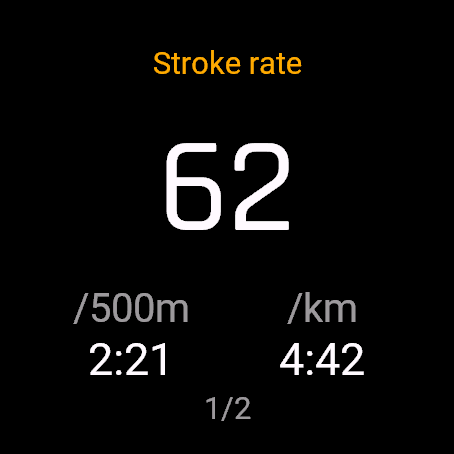
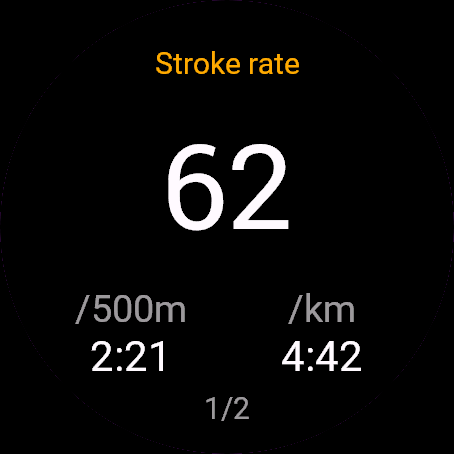
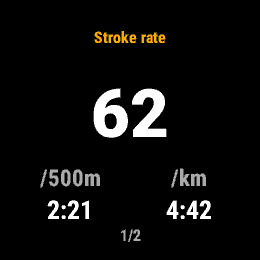
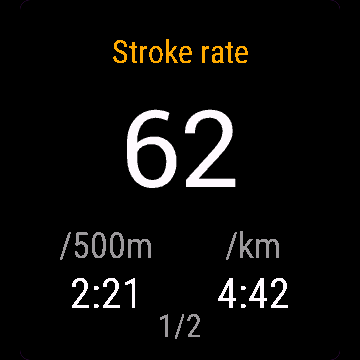
- Stroke rate, big on the screen, from the last 10 seconds. One stroke = one blade entry in a kayak (left and right count separately), one full paddle cycle in a canoe, outrigger or dragon boat
- Pace per 500 m and per km (per mile if your watch is set to statute units)
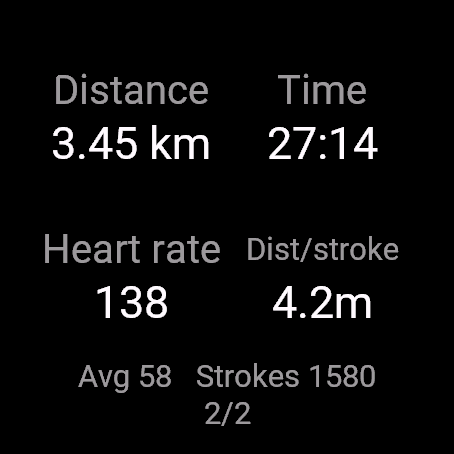
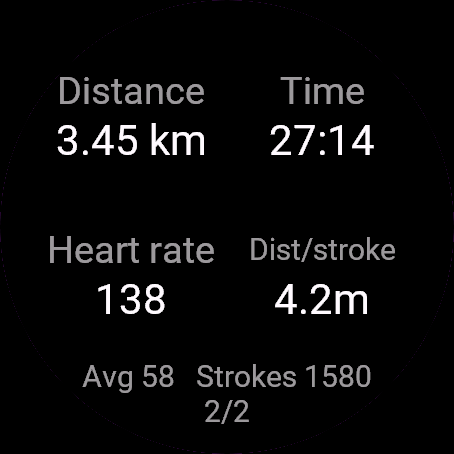
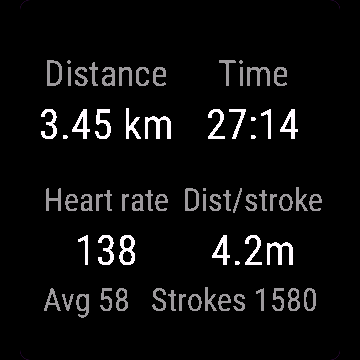
- Distance, elapsed time, heart rate, distance per stroke
- Pick your craft on the start screen, the watch remembers your last choice
- Auto lap every 500 m or 1 km, or turn it off
- Saves as a real Garmin activity (Kayaking for kayak, Paddling for the others, since Garmin has no separate type for canoe/outrigger/dragon boat yet)
Controls: UP/DOWN switch between the rate screen and the data screen (on watches without UP/DOWN buttons, such as Venu and vivoactive, tap the screen). START or BACK opens the menu (lap, resume, save, discard).
- Kadencja, duża na ekranie, z ostatnich 10 sekund. Jedno uderzenie to w kajaku jedno zanurzenie pióra (lewe i prawe liczą się osobno), w kanadyjce, outriggerze i smoczej łodzi jeden pełny cykl wiosła
- Tempo na 500 m i na km (na milę, jeśli zegarek ma jednostki brytyjskie)
- Dystans, czas, puls, dystans na uderzenie
- Wybór łodzi na ekranie startowym, zegarek pamięta ostatni wybór
- Auto okrążenie co 500 m albo co 1 km, albo wyłączone
- Zapis jako prawdziwa aktywność Garmin (Kajak dla kajaka, Paddling dla pozostałych - Garmin nie ma jeszcze osobnego typu dla kanadyjki, outriggera i smoczej łodzi)
Sterowanie: GÓRA/DÓŁ przełączają ekran kadencji i ekran danych (na zegarkach bez przycisków GÓRA/DÓŁ, jak Venu i vivoactive, stuknij ekran). START albo WSTECZ otwiera menu (okrążenie, wznów, zapisz, odrzuć).
- Schlagfrequenz, groß auf dem Bildschirm, ermittelt aus den letzten 10 Sekunden. Ein Schlag = ein Blatteintauchen beim Kajak (links und rechts zählen separat), ein vollständiger Paddelzyklus bei Kanu, Outrigger oder Drachenboot
- Pace pro 500 m und pro km (pro Meile, wenn deine Uhr auf imperiale Einheiten eingestellt ist)
- Distanz, verstrichene Zeit, Herzfrequenz, Distanz pro Schlag
- Wähle dein Boot auf dem Startbildschirm, die Uhr merkt sich deine letzte Auswahl
- Auto Lap alle 500 m oder 1 km, oder komplett ausschalten
- Speichert als echte Garmin-Aktivität (Kajakfahren für Kajak, Paddeln für die anderen, da Garmin noch keinen separaten Typ für Kanu/Outrigger/Drachenboot anbietet)
Bedienung: UP/DOWN wechselt zwischen Schlagfrequenz-Bildschirm und Datenbildschirm (auf Uhren ohne UP/DOWN-Tasten wie Venu und vivoactive einfach auf das Display tippen). START oder BACK öffnet das Menü (Runde, Fortsetzen, Speichern, Verwerfen).
- Cadence en grand sur l'écran, calculée sur les 10 dernières secondes. Un coup = une entrée de pale en kayak (gauche et droite comptent séparément), un cycle complet de pagaie en canoë, pirogue ou bateau-dragon
- Allure aux 500 m et au km (au mile si votre montre est configurée en unités anglo-saxonnes)
- Distance, temps écoulé, fréquence cardiaque, distance par coup
- Choisissez votre embarcation sur l'écran de départ, la montre retient votre dernier choix
- Auto lap tous les 500 m ou 1 km, ou désactivation
- Enregistrement comme véritable activité Garmin (Kayaking pour le kayak, Paddling pour les autres, Garmin ne proposant pas encore de profil séparé pour canoë/pirogue/bateau-dragon)
Commandes : UP/DOWN basculent entre l'écran de cadence et l'écran de données (sur les montres sans boutons UP/DOWN comme les Venu et vivoactive, touchez l'écran). START ou BACK ouvre le menu (lap, reprendre, enregistrer, rejeter).
- Cadencia de paladas, en grande en la pantalla, calculada sobre los últimos 10 segundos. Una palada = una entrada de hoja en kayak (izquierda y derecha cuentan por separado), un ciclo completo de paleo en canoa, outrigger o barco dragón
- Ritmo por 500 m y por km (por milla si tu reloj está configurado en unidades imperiales)
- Distancia, tiempo transcurrido, frecuencia cardíaca, distancia por palada
- Elige tu embarcación en la pantalla de inicio; el reloj recordará tu última elección
- Autolap cada 500 m o 1 km, o desactívalo
- Se guarda como una actividad real de Garmin (Kayaking para kayak, Paddling para las demás, ya que Garmin todavía no tiene un tipo específico para canoa/outrigger/barco dragón)
Controles: UP/DOWN cambian entre la pantalla de cadencia y la de datos (en relojes sin botones UP/DOWN, como Venu y vivoactive, toca la pantalla). START o BACK abre el menú (vuelta, reanudar, guardar, descartar).
- Slagfrequentie, groot op het scherm, over de laatste 10 seconden. Eén slag = één insteek van het blad in een kajak (links en rechts tellen apart), één volledige peddelcyclus in een kano, outrigger of drakenboot
- Tempo per 500 m en per km (per mijl als je horloge is ingesteld op Engelse eenheden)
- Afstand, verstreken tijd, hartslag, afstand per slag
- Kies je vaartuig op het startscherm, het horloge onthoudt je laatste keuze
- Auto lap elke 500 m of 1 km, of schakel het uit
- Wordt opgeslagen als een echte Garmin-activiteit (Kajakken voor kajak, Peddelen voor de overige, aangezien Garmin nog geen apart type heeft voor kano/outrigger/drakenboot)
Bediening: UP/DOWN schakelt tussen het slagscherm en het gegevensscherm (op horloges zonder UP/DOWN-knoppen, zoals Venu en vivoactive, tik je op het scherm). START of BACK opent het menu (ronde, hervatten, opslaan, negeren).
- 直近 10 秒間のストロークレートを画面いっぱいに大きく表示。1 ストローク = カヤックではブレードの 1 回の入水(左右を個別にカウント)、カヌー、アウトリガー、ドラゴンボートではパドル 1 往復(フルサイクル)
- 500 m あたりおよび 1 km あたりのペース(ウォッチの単位設定がマイルの場合は 1 マイルあたり)
- 距離、経過時間、心拍数、ストロークあたりの移動距離
- スタート画面で艇種を選択。前回の選択はウォッチが記憶
- 500 m または 1 km ごとのオートラップ(オフにも設定可能)
- 本物の Garmin アクティビティとして保存(Garmin にはカヌー/アウトリガー/ドラゴンボートの個別種別がまだないため、カヤックは Kayaking、その他は Paddling として保存)
操作方法: UP/DOWN でレート画面とデータ画面を切り替え(Venu や vivoactive など UP/DOWN ボタンのないウォッチでは画面をタップ)。START または BACK でメニューを開く(ラップ、再開、保存、破棄)。
- Frequenza di pagaiata, ben visibile sullo schermo, calcolata sugli ultimi 10 secondi. Una pagaiata = un ingresso della pala in acqua nel kayak (destra e sinistra contate separatamente), un ciclo completo di pagaiata in canoa, outrigger o dragon boat
- Passo per 500 m e per km (per miglio se l'orologio è impostato su unità imperiali)
- Distanza, tempo trascorso, frequenza cardiaca, distanza per pagaiata
- Scegli la tua imbarcazione nella schermata iniziale, l'orologio ricorderà l'ultima scelta
- Auto lap ogni 500 m o 1 km, oppure disattivabile
- Salva come vera attività Garmin (Kayaking per il kayak, Paddling per le altre, dato che Garmin non ha ancora un tipo separato per canoa/outrigger/dragon boat)
Controlli: UP/DOWN passano dalla schermata della cadenza a quella dei dati (sugli orologi senza pulsanti UP/DOWN, come Venu e vivoactive, tocca lo schermo). START o BACK apre il menu (lap, riprendi, salva, elimina).
- 屏幕大字号显示基于过去 10 秒计算的桨频。皮划艇中一次划桨 = 单侧桨叶入水一次(左侧与右侧分别计数),独木舟、支架独木舟或龙舟中为一次完整划桨周期
- 每 500 m 和每 km 配速(若手表设置为英制单位则为每英里配速)
- 距离、经过时间、心率、每次划桨滑行距离
- 在起始屏幕选择船只类型,手表会记住你的上次选择
- 每 500 m 或 1 km 自动计圈,亦可关闭
- 保存为真实的 Garmin 活动(皮划艇保存为 Kayaking,其他船只保存为 Paddling,因为 Garmin 目前尚无独立的独木舟/支架独木舟/龙舟类型)
操作方法:UP/DOWN 在桨频屏幕与数据屏幕之间切换(在没有 UP/DOWN 按钮的手表上,例如 Venu 和 vivoactive,轻触屏幕即可)。START 或 BACK 打开菜单(计圈、继续、保存、放弃)。
- Крупный темп гребли на экране за последние 10 секунд. Один гребок = одно погружение лопатки в каяке (левый и правый считаются отдельно) или один полный цикл весла в каноэ, аутригере или драгонботе
- Темп на 500 m и на 1 km (на милю, если в часах выбраны мили)
- Дистанция, прошедшее время, пульс, расстояние за гребок
- Выбор типа судна на стартовом экране, часы запоминают последний выбор
- Автоматический круг каждые 500 m или 1 km, либо отключение автокруга
- Сохраняется как полноценная активность Garmin (Kayaking для каяка, Paddling для остальных, так как в Garmin пока нет отдельных типов для каноэ, аутригера и драгонбота)
Управление: UP/DOWN переключают экран темпа и экран данных (на часах без кнопок UP/DOWN, таких как Venu и vivoactive, коснитесь экрана). START или BACK открывает меню (круг, продолжить, сохранить, сбросить).
- Taxa de remadas grande na tela, com base nos últimos 10 segundos. Uma remada = uma entrada da pá na água no caiaque (esquerda e direita contam separadamente), um ciclo completo de remada na canoa, outrigger ou dragon boat
- Ritmo por 500 m e por km (por milha se o seu relógio estiver configurado em unidades estatutárias)
- Distância, tempo decorrido, frequência cardíaca, distância por remada
- Escolha sua embarcação na tela inicial, o relógio lembra sua última escolha
- Volta automática a cada 500 m ou 1 km, ou desative essa opção
- Salva como uma atividade Garmin real (Kayaking para caiaque, Paddling para os demais, já que a Garmin ainda não tem uma categoria separada para canoa/outrigger/dragon boat)
Controles: UP/DOWN alternam entre a tela de taxa e a tela de dados (em relógios sem os botões UP/DOWN, como Venu e vivoactive, toque na tela). START ou BACK abre o menu (volta, retomar, salvar, descartar).
- Frekvence záběrů, velkým písmem na obrazovce, z posledních 10 sekund. Jeden záběr = jedno zanoření listu u kajaku (vlevo a vpravo se počítá zvlášť), jeden celý cyklus pádlování u kanoe, outriggeru nebo dračí lodi
- Tempo na 500 m a na km (na míli, pokud máte v hodinkách nastavené imperiální jednotky)
- Vzdálenost, uplynulý čas, srdeční tep, vzdálenost na záběr
- Výběr plavidla na úvodní obrazovce, hodinky si pamatují vaši poslední volbu
- Automatický lap každých 500 m nebo 1 km, případně možnost vypnutí
- Ukládá se jako skutečná aktivita Garmin (Kayaking pro kajak, Paddling pro ostatní, protože Garmin zatím nemá samostatný typ pro kanoi/outrigger/dračí loď)
Ovládání: UP/DOWN přepíná mezi obrazovkou frekvence záběrů a datovou obrazovkou (na hodinkách bez tlačítek UP/DOWN, jako jsou Venu a vivoactive, klepněte na obrazovku). START nebo BACK otevře menu (lap, pokračovat, uložit, zahodit).
- Cadência de remada, bem visível no ecrã, calculada a partir dos últimos 10 segundos. Uma remada = uma entrada da pá na água num caiaque (esquerda e direita contam em separado), um ciclo de remada completo numa canoa, outrigger ou dragon boat
- Ritmo por 500 m e por km (por milha se o relógio estiver configurado para unidades imperiais)
- Distância, tempo decorrido, ritmo cardíaco, distância por remada
- Escolha a embarcação no ecrã inicial, o relógio memoriza a última escolha
- Auto lap a cada 500 m ou 1 km, ou desative-o
- Guarda como uma atividade Garmin real (Kayaking para caiaque, Paddling para as restantes, já que a Garmin ainda não tem um tipo próprio para canoa/outrigger/dragon boat)
Controlos: UP/DOWN alternam entre o ecrã de cadência e o ecrã de dados (em relógios sem botões UP/DOWN, como o Venu e o vivoactive, toque no ecrã). START ou BACK abre o menu (lap, resume, save, discard).
- 화면에 크게 표시되는 최근 10초간의 스트로크 레이트. 1 스트로크 = 카약의 경우 블레이드 입수 1회(좌우 개별 카운트), 카누, 아웃리거, 드래곤보트의 경우 1회의 완전한 패들 사이클
- 500 m당 페이스 및 km당 페이스(시계가 야드파운드법 단위로 설정된 경우 마일당 페이스)
- 거리, 경과 시간, 심박수, 스트로크당 거리
- 시작 화면에서 탑승 보트 종류 선택, 시계가 마지막 선택 기억
- 500 m 또는 1 km마다 자동 랩, 또는 끄기
- 실제 Garmin 액티비티로 저장(카약은 Kayaking으로, 카누/아웃리거/드래곤보트는 Garmin에 아직 별도 유형이 없으므로 Paddling으로 저장)
조작 방법: UP/DOWN으로 레이트 화면과 데이터 화면 간 전환(Venu 및 vivoactive 등 UP/DOWN 버튼이 없는 시계는 화면 탭). START 또는 BACK으로 메뉴 열기(랩, 재개, 저장, 삭제).
- Dragfrekvens, stort på skärmen, från de senaste 10 sekunderna. Ett drag = ett blad i vattnet i en kajak (vänster och höger räknas separat), en hel paddelcykel i en kanot, outrigger eller drakbåt
- Tempo per 500 m och per km (per mile om din klocka är inställd på engelska enheter)
- Distans, förfluten tid, puls, distans per drag
- Välj farkost på startskärmen, klockan kommer ihåg ditt senaste val
- Autovarv varje 500 m eller 1 km, eller stäng av det
- Sparas som en riktig Garmin-aktivitet (Kayaking för kajak, Paddling för de övriga, eftersom Garmin ännu inte har någon separat typ för kanot/outrigger/drakbåt)
Kontroller: UP/DOWN växlar mellan frekvensskärmen och dataskärmen (på klockor utan UP/DOWN-knappar, som Venu och vivoactive, trycker du på skärmen). START eller BACK öppnar menyn (varv, återuppta, spara, släng).
- Tagfrekvens, stort på skærmen, fra de seneste 10 sekunder. Ét tag = ét isæt i en kajak (venstre og højre tæller separat), én fuld padlecyklus i en kano, outrigger eller dragebåd
- Tempo pr. 500 m og pr. km (pr. mile, hvis dit ur er sat til britiske/amerikanske enheder)
- Distance, forløbet tid, puls, distance pr. tag
- Vælg din bådtype på startskærmen, uret husker dit seneste valg
- Auto-omgang for hver 500 m eller 1 km, eller slå det fra
- Gemmer som en rigtig Garmin-aktivitet (Kayaking for kajak, Paddling for de andre, da Garmin endnu ikke har en separat type til kano/outrigger/dragebåd)
Betjening: UP/DOWN skifter mellem frekvensskærmen og dataskærmen (på ure uden UP/DOWN-knapper, som f.eks. Venu og vivoactive, trykkes på skærmen). START eller BACK åbner menuen (omgang, genoptag, gem, kassér).
- Takfrekvens, stort på skjermen, fra de siste 10 sekundene. Ett tak = ett åreiset i en kajakk (venstre og høyre teller separat), én full padlesyklus i kano, utrigger eller dragebåt
- Tempo per 500 m og per km (per mile hvis klokken er stilt inn på britiske enheter)
- Distanse, medgått tid, puls, distanse per tak
- Velg farkost på startskjermen, klokken husker det siste valget ditt
- Auto-runde for hver 500 m eller 1 km, eller slå det av
- Lagres som en ekte Garmin-aktivitet (Kayaking for kajakk, Paddling for de andre, siden Garmin ikke har noen egen type for kano/utrigger/dragebåt ennå)
Kontroller: UP/DOWN bytter mellom taktskjermen og dataskjermen (på klokker uten UP/DOWN-knapper, som Venu og vivoactive, trykk på skjermen). START eller BACK åpner menyen (runde, gjenoppta, lagre, forkast).
- 螢幕上以大字體顯示最近 10 秒的划槳頻率。皮艇上一槳 = 一次入水(左側與右側分別計算),獨木舟、支架獨木舟或龍舟則為一次完整的划槳循環
- 每 500 m 與每 km 配速(若手錶設定為英制單位則為每英里配速)
- 距離、經過時間、心率、每槳距離
- 在開始畫面選擇船型,手錶會記住您上次的選擇
- 每 500 m 或 1 km 自動計圈,亦可關閉
- 儲存為正式的 Garmin 活動(皮艇記錄為 Kayaking,其餘船型記錄為 Paddling,因為 Garmin 尚未為獨木舟/支架獨木舟/龍舟提供獨立類型)
操作方式:UP/DOWN 在槳頻畫面與數據畫面之間切換(在沒有 UP/DOWN 按鍵的手錶上,例如 Venu 和 vivoactive,請輕觸螢幕)。START 或 BACK 開啟選單(計圈、繼續、儲存、捨棄)。
- Vetotiheys suurella näytöllä viimeisen 10 sekunnin ajalta. Yksi veto = yksi lavan veteen tulo kajakissa (vasen ja oikea lasketaan erikseen), yksi kokonainen melontasykli kanootissa, outriggerissä tai lohikäärmeveneessä
- Tahti per 500 m ja per km (per maili, jos kellosi käyttää maileja)
- Matka, kulunut aika, syke, matka per veto
- Valitse aluksesi aloitusnäytössä, kello muistaa edellisen valintasi
- Automaattinen kierros (Auto lap) joka 500 m tai 1 km, tai ota se pois päältä
- Tallentuu oikeana Garmin-suorituksena (Kayaking kajakille, Paddling muille, sillä Garminilla ei ole vielä erillistä tyyppiä kanootille/outriggerille/lohikäärmeveneelle)
Ohjaimet: UP/DOWN vaihtaa vetotiheysnäytön ja datanäytön välillä (kelloissa ilman UP/DOWN-painikkeita, kuten Venu ja vivoactive, napauta näyttöä). START tai BACK avaa valikon (kierros, jatka, tallenna, hylkää).
- Frekvencia záberov, zobrazená veľkým písmom na obrazovke, za posledných 10 sekúnd. Jeden záber = jedno ponorenie listu pádla pri kajaku (ľavá a pravá strana sa počítajú samostatne), jeden celý cyklus pádlovania pri kanoe, outriggeri alebo dračej lodi
- Tempo na 500 m a na km (na míľu, ak máte hodinky nastavené na imperiálne jednotky)
- Vzdialenosť, uplynulý čas, srdcový tep, vzdialenosť na záber
- Výber plavidla na úvodnej obrazovke, hodinky si zapamätajú vašu poslednú voľbu
- Auto lap každých 500 m alebo 1 km, prípadne možnosť vypnutia
- Ukladá sa ako skutočná Garmin aktivita (Kayaking pre kajak, Paddling pre ostatné, keďže Garmin zatiaľ nemá samostatný typ pre canoe/outrigger/dragon boat)
Ovládanie: UP/DOWN prepína medzi obrazovkou frekvencie a obrazovkou údajov (na hodinkách bez tlačidiel UP/DOWN, ako sú Venu a vivoactive, ťuknite na obrazovku). START alebo BACK otvorí menu (lap, pokračovať, uložiť, zahodiť).
- Frekvenca zaveslajev, izpisana veliko na zaslonu, za zadnjih 10 sekund. En zaveslaj = en vbod vesla v vodo pri kajaku (leva in desna stran se štejeta ločeno), en celoten cikel veslanja pri kanuju, outriggerju ali zmajevem čolnu
- Tempo na 500 m in na km (na miljo, če je vaša ura nastavljena na imperialne enote)
- Razdalja, pretečeni čas, srčni utrip, razdalja na zaveslaj
- Izberite svoje plovilo na začetnem zaslonu, ura si zapomni vašo zadnjo izbiro
- Samodejni krog (Auto lap) vsakih 500 m ali 1 km, ali pa ga izklopite
- Shrani se kot prava Garmin dejavnost (Kayaking za kajak, Paddling za ostala plovila, saj Garmin še nima ločene vrste za kanu/outrigger/zmajev čoln)
Upravljanje: UP/DOWN preklaplja med zaslonom frekvence in podatkovnim zaslonom (na urah brez gumbov UP/DOWN, kot sta Venu in vivoactive, tapnite zaslon). START ali BACK odpre meni (lap, nadaljuj, shrani, zavrzi).
- Laju dayungan, ditampilkan besar di layar, dari 10 detik terakhir. Satu kayuhan = satu bilah masuk ke air pada kayak (kiri dan kanan dihitung terpisah), satu siklus mendayung penuh pada kano, outrigger, atau perahu naga
- Kecepatan (pace) per 500 m dan per km (per mil jika jam tangan Anda disetel ke satuan statute)
- Jarak, waktu berlalu, detak jantung, jarak per kayuhan
- Pilih jenis perahu Anda di layar mulai, jam tangan akan mengingat pilihan terakhir Anda
- Auto lap setiap 500 m atau 1 km, atau nonaktifkan
- Tersimpan sebagai aktivitas Garmin yang sebenarnya (Kayaking untuk kayak, Paddling untuk lainnya, karena Garmin belum memiliki tipe terpisah untuk kano/outrigger/perahu naga)
Kontrol: UP/DOWN beralih antara layar laju dan layar data (pada jam tangan tanpa tombol UP/DOWN, seperti Venu dan vivoactive, ketuk layar). START atau BACK membuka menu (lap, lanjutkan, simpan, buang).
- Csapásszám nagy méretben a képernyőn, az utolsó 10 másodperc alapján. Egy csapás = egy lapátvízbevitel kajakban (a bal és jobb oldal külön számít), egy teljes evezési ciklus kenuban, outriggerben vagy sárkányhajóban
- Tempó 500 m és 1 km távra (mérföldenként, ha az órád angolszász mértékegységekre van állítva)
- Távolság, eltelt idő, pulzus, csapásonkénti távolság
- Válaszd ki a hajódat a kezdőképernyőn, az óra megjegyzi a legutóbbi választásodat
- Auto lap minden 500 m vagy 1 km után, vagy kikapcsolható
- Valódi Garmin tevékenységként menti (Kayaking kajak esetén, Paddling a többieknél, mivel a Garminnak még nincs külön típusa a kenu/outrigger/sárkányhajó sportokhoz)
Vezérlés: UP/DOWN vált a csapásszám-képernyő és az adatképernyő között (UP/DOWN gombok nélküli órákon, mint a Venu és a vivoactive, koppints a képernyőre). START vagy BACK megnyitja a menüt (lap, resume, save, discard).
- อัตราการพาย แสดงตัวเลขขนาดใหญ่บนหน้าจอ คำนวณจาก 10 วินาทีล่าสุด หนึ่งสโตรก = ใบพายลงน้ำหนึ่งครั้งสำหรับคายัค (นับซ้ายและขวาแยกกัน) หรือหนึ่งรอบการพายเต็มสำหรับแคนู เอาท์ริกเกอร์ หรือเรือพายมังกร
- Pace ต่อ 500 m และต่อ km (ต่อ mile หากนาฬิกาตั้งค่าหน่วยเป็น statute)
- ระยะทาง, เวลาที่ผ่านไป, อัตราการเต้นของหัวใจ, ระยะทางต่อสโตรก
- เลือกประเภทเรือของคุณบนหน้าจอเริ่มต้น โดยนาฬิกาจะจำตัวเลือกล่าสุดของคุณไว้
- Auto lap ทุก 500 m หรือ 1 km หรือเลือกปิดได้
- บันทึกเป็นกิจกรรมจริงของ Garmin (Kayaking สำหรับเรือคายัค และ Paddling สำหรับเรือประเภทอื่น เนื่องจาก Garmin ยังไม่มีประเภทแยกสำหรับแคนู/เอาท์ริกเกอร์/เรือพายมังกร)
การควบคุม: UP/DOWN เพื่อสลับระหว่างหน้าจออัตราการพายและหน้าจอข้อมูล (สำหรับนาฬิกาที่ไม่มีปุ่ม UP/DOWN เช่น Venu และ vivoactive ให้แตะหน้าจอ) START หรือ BACK เพื่อเปิดเมนู (lap, ทำต่อ, บันทึก, ละทิ้ง)
- Ρυθμός κουπιών, μεγάλος στην οθόνη, από τα τελευταία 10 δευτερόλεπτα. Μία κουπιά = μία είσοδος κουπιού στο νερό στο καγιάκ (αριστερά και δεξιά μετρούν ξεχωριστά), ένας πλήρης κύκλος κουπιάς σε κανό, outrigger ή dragon boat
- Ρυθμός ανά 500 m και ανά km (ανά μίλι αν το ρολόι σας έχει ρυθμιστεί σε statute units)
- Απόσταση, χρόνος που πέρασε, καρδιακοί παλμοί, απόσταση ανά κουπιά
- Επιλέξτε το σκάφος σας στην οθόνη εκκίνησης, το ρολόι θυμάται την τελευταία σας επιλογή
- Αυτόματος γύρος (auto lap) κάθε 500 m ή 1 km, ή απενεργοποιήστε τον
- Αποθηκεύεται ως πραγματική δραστηριότητα Garmin (Kayaking για καγιάκ, Paddling για τα υπόλοιπα, καθώς η Garmin δεν διαθέτει ακόμη ξεχωριστό τύπο για canoe/outrigger/dragon boat)
Χειρισμός: Τα UP/DOWN κάνουν εναλλαγή μεταξύ της οθόνης ρυθμού και της οθόνης δεδομένων (σε ρολόγια χωρίς κουμπιά UP/DOWN, όπως τα Venu και vivoactive, αγγίξτε την οθόνη). Το START ή το BACK ανοίγει το μενού (γύρος, συνέχιση, αποθήκευση, απόρριψη).
- Frekvencija zaveslaja, prikazana velikim brojevima na zaslonu, na temelju zadnjih 10 sekundi. Jedan zaveslaj = jedan ulazak lopatice u vodu kod kajaka (lijeva i desna strana broje se zasebno), jedan puni ciklus veslanja kod kanua, outriggera ili zmajskog čamca
- Tempo na 500 m i po km (po milji ako je vaš sat postavljen na imperijalne jedinice)
- Udaljenost, proteklo vrijeme, broj otkucaja srca, prijeđena udaljenost po zaveslaju
- Odaberite svoje plovilo na početnom zaslonu, sat pamti vaš zadnji odabir
- Automatski krug svakih 500 m ili 1 km, ili ga isključite
- Sprema se kao stvarna Garmin aktivnost (Kayaking za kajak, Paddling za ostale, jer Garmin još nema zasebnu vrstu za canoe/outrigger/dragon boat)
Kontrole: UP/DOWN prebacuju između zaslona s frekvencijom zaveslaja i zaslona s podacima (na satovima bez tipki UP/DOWN, kao što su Venu i vivoactive, dodirnite zaslon). START ili BACK otvara izbornik (krug, nastavak, spremanje, odbacivanje).
- קצב חתירה, מוצג בגדול על המסך, מ-10 השניות האחרונות. חתירה אחת = כניסה אחת של להב המוט למים בקיאק (שמאל וימין נספרים בנפרד), מחזור חתירה מלא אחד בקאנו, אאוטריגר או סירת דרקון
- קצב לכל 500 m ולכל km (לכל mile אם השעון שלך מוגדר ליחידות statute)
- מרחק, זמן שחלף, דופק, מרחק לכל תנועת חתירה
- בחר את כלי השיט במסך ההתחלה, השעון זוכר את בחירתך האחרונה
- הקפה אוטומטית (Auto lap) כל 500 m או 1 km, או כבה אותה
- נשמר כפעילות Garmin אמיתית (Kayaking עבור קיאק, Paddling עבור האחרים, מכיוון של-Garmin עדיין אין סוג נפרד עבור קאנו/אאוטריגר/סירת דרקון)
מקשי שליטה: UP/DOWN מעבירים בין מסך הקצב למסך הנתונים (בשעונים ללא כפתורי UP/DOWN, כגון Venu ו-vivoactive, הקש על המסך). START או BACK פותח את התפריט (הקפה, המשך, שמירה, ביטול).
- Kadar dayungan, dipaparkan besar pada skrin, daripada 10 saat terakhir. Satu dayungan = satu bilah masuk ke dalam air untuk kayak (kiri dan kanan dikira berasingan), satu kitaran dayungan penuh untuk kanu, outrigger atau bot naga
- Kelajuan (pace) setiap 500 m dan setiap km (setiap batu jika jam anda ditetapkan kepada unit statut)
- Jarak, masa berlalu, kadar denyutan jantung, jarak setiap dayungan
- Pilih bot anda pada skrin mula, jam akan mengingati pilihan terakhir anda
- Auto lap setiap 500 m atau 1 km, atau matikannya
- Disimpan sebagai aktiviti Garmin sebenar (Kayaking untuk kayak, Paddling untuk yang lain, kerana Garmin belum mempunyai jenis berasingan untuk kanu/outrigger/bot naga)
Kawalan: UP/DOWN bertukar antara skrin kadar dayungan dan skrin data (pada jam tanpa butang UP/DOWN, seperti Venu dan vivoactive, ketik skrin). START atau BACK membuka menu (lap, teruskan, simpan, buang).
How to use it
Open Paddle Rate from the watch's app menu.
Honest note: the stroke detector is tuned and tested on synthetic accelerometer data (many stroke rates, noise, amplitude changes), not yet on the water in real boats. Rates should be close, but if a session looks off, please report it through the form below so I can tune it for your stroke style.
Otwórz Kadencja wiosłowania z menu aplikacji na zegarku.
Uczciwie: detektor uderzeń jest dopracowany i testowany na syntetycznych danych z akcelerometru (różne kadencje, szum, zmiany amplitudy), jeszcze nie na wodzie w prawdziwych łodziach. Liczby powinny być bliskie prawdy, ale jeśli jakaś sesja wygląda nie tak, napisz przez formularz niżej, żebym dopracował algorytm pod Twój styl wiosłowania.
Öffne Paddle Rate im App-Menü der Uhr.
Offener Hinweis: Die Schlagerkennung wurde mit synthetischen Beschleunigungsdaten (viele Schlagfrequenzen, Rauschen, Amplitudenänderungen) abgestimmt und getestet, noch nicht auf dem Wasser in echten Booten. Die Werte sollten nah dran sein; falls eine Einheit unpassend wirkt, melde dies bitte über das Formular unten, damit ich die Erkennung an deinen Paddelstil anpassen kann.
Ouvrez Paddle Rate depuis le menu des applications de la montre.
Remarque en toute franchise : le détecteur de coups est réglé et testé sur des données d'accéléromètre synthétiques (multiples cadences, bruit, variations d'amplitude), et pas encore sur l'eau dans des bateaux réels. Les cadences devraient être proches de la réalité, mais si une session semble imprécise, merci de le signaler via le formulaire ci-dessous afin que je puisse l'adapter à votre style de pagayage.
Abre Paddle Rate desde el menú de apps del reloj.
Nota sincera: el detector de paladas está calibrado y probado con datos sintéticos de acelerómetro (diversas cadencias, ruido, cambios de amplitud), todavía no en el agua en embarcaciones reales. Las cadencias deberían ser cercanas a la realidad, pero si una sesión no parece precisa, por favor infórmalo a través del formulario siguiente para que pueda ajustarlo a tu estilo de paleo.
Open Paddle Rate via het appmenu van het horloge.
Eerlijke opmerking: de slagdetectie is afgesteld en getest op synthetische gegevens van de versnellingsmeter (vele slagfrequenties, ruis, veranderingen in amplitude), nog niet op het water in echte boten. De frequenties zouden dicht in de buurt moeten liggen, maar als een sessie niet lijkt te kloppen, meld dit dan via het onderstaande formulier zodat ik het kan optimaliseren voor jouw slagstijl.
時計のアプリメニューから Paddle Rate を開いてください。
正直な補足: ストローク検出アルゴリズムは、さまざまなピッチ、ノイズ、振幅変化を再現した加速度センサーの模擬データで調整・検証されており、実際の水上ボートでの実走テストはまだ行われていません。レートはおおむね近いはずですが、もしセッションの数値に違和感がある場合は、あなたのストロークスタイルに合わせて調整できるよう、下のフォームからご報告をお願いします。
Apri Paddle Rate dal menu delle app dell'orologio.
Nota di trasparenza: il rilevatore di pagaiata è calibrato e testato su dati accelerometrici sintetici (varie frequenze di pagaiata, rumore, variazioni di ampiezza), non ancora in acqua su imbarcazioni reali. I valori dovrebbero essere attendibili, ma se una sessione sembra imprecisa, segnalalo tramite il modulo sottostante così posso ottimizzarlo per il tuo stile di pagaiata.
在手表的应用菜单中打开 Paddle Rate。
坦诚说明:桨频检测器是在合成加速度计数据上调校和测试的(包含多种桨频、噪点、幅度变化),尚未在水上真实船只中实测。桨频数值应当相当接近,但如果某次记录看起来有偏差,请通过下方表单反馈,以便我针对你的划桨风格进行微调。
Откройте Paddle Rate из меню приложений на часах.
Честное предупреждение: алгоритм распознавания гребков настроен и протестирован на синтетических данных акселерометра (разная частота гребков, шум, перепады амплитуды), но пока не проверялся на воде в реальных лодках. Показания темпа должны быть близки к реальным, но если тренировка выглядит неточно, пожалуйста, сообщите об этом через форму ниже, чтобы я мог подстроить алгоритм под ваш стиль гребли.
Abra Paddle Rate pelo menu de apps do relógio.
Nota sincera: o detector de remadas foi calibrado e testado com dados sintéticos de acelerômetro (várias taxas de remada, ruído, variações de amplitude), e ainda não na água em barcos reais. As taxas devem ser próximas, mas se uma sessão parecer imprecisa, por favor relate pelo formulário abaixo para que eu possa calibrar para o seu estilo de remada.
Otevřete Paddle Rate z nabídky aplikací v hodinkách.
Upřímná poznámka: detekce záběrů je vyladěna a testována na syntetických datech z akcelerometru (různé frekvence záběrů, šum, změny amplitudy), zatím nikoli přímo na vodě v reálných lodích. Frekvence by měla být přesná, ale pokud se vám záznam nebude zdát, nahlaste to prosím prostřednictvím níže uvedeného formuláře, abych mohl algoritmus vyladit pro váš styl pádlování.
Abra Paddle Rate no menu de aplicações do relógio.
Nota honesta: o detetor de remadas foi afinado e testado com dados sintéticos de acelerómetro (várias cadências, ruído, variações de amplitude), ainda não na água em embarcações reais. As cadências devem ser aproximadas, mas se uma sessão parecer desfasada, envie um relatório através do formulário abaixo para que eu possa ajustá-lo ao seu estilo de remada.
시계의 앱 메뉴에서 Paddle Rate을(를) 여세요.
솔직한 안내: 스트로크 감지 기능은 실제 보트가 아닌 가상 가속도계 데이터(다양한 스트로크 레이트, 노이즈, 진폭 변화)를 기반으로 조정 및 테스트되었습니다. 레이트 수치는 실제와 비슷하겠지만, 세션 기록에 오차가 있다면 아래 양식을 통해 알려주십시오. 사용자의 스트로크 스타일에 맞게 조정할 수 있도록 하겠습니다.
Öppna Paddle Rate från klockans appmeny.
Ärlig notis: dragdetektorn är kalibrerad och testad på syntetiska accelerometerdata (många dragfrekvenser, brus, amplitudförändringar), ännu inte på vattnet i riktiga båtar. Frekvenserna borde ligga nära, men om ett pass ser felaktigt ut får du gärna rapportera det via formuläret nedan så att jag kan anpassa den efter din paddelstil.
Åbn Paddle Rate fra urets appmenu.
En ærlig bemærkning: tagdetektoren er justeret og testet på syntetiske accelerometerdata (mange tagfrekvenser, støj, amplitudeændringer), endnu ikke på vandet i rigtige både. Frekvenserne bør ligge tæt på, men hvis en session virker forkert, så meld det gerne via formularen nedenfor, så jeg kan tilpasse den til din padlestil.
Åpne Paddle Rate fra appmenyen på klokken.
En ærlig merknad: taktdetektoren er justert og testet på syntetiske akselerometerdata (mange ulike taktfrekvenser, støy, amplitudeendringer), ikke på vannet i ekte båter ennå. Frekvensene bør ligge nært, men hvis en økt virker feil, vennligst meld fra via skjemaet nedenfor slik at jeg kan tilpasse den til din padlestil.
從手錶的應用程式選單開啟 Paddle Rate。
坦白說明:划槳偵測演算法是根據合成加速度計數據(涵蓋多種槳頻、雜訊、振幅變化)進行調校與測試,尚未在水上實際船隻中進行實測。數據應相當接近,但若活動記錄看起來有偏差,請透過下方表單回報,以便我為您的划槳風格進行調整。
Avaa Paddle Rate kellon sovellusvalikosta.
Rehellinen huomio: vetotunnistin on hienosäädetty ja testattu kiihtyvyysanturin synteettisellä datalla (useita vetotiheyksiä, häiriöitä, amplitudin muutoksia), ei vielä vesillä oikeissa veneissä. Tiheyksien pitäisi olla lähellä oikeaa, mutta jos jokin suoritus vaikuttaa virheelliseltä, ilmoita siitä alla olevalla lomakkeella, jotta voin säätää sitä melontatyyliisi sopivaksi.
Otvorte Paddle Rate z ponuky aplikácií v hodinkách.
Úprimná poznámka: detektor záberov je vyladený a testovaný na syntetických dátach z akcelerometra (mnoho frekvencií záberov, šum, zmeny amplitúdy), zatiaľ nie na vode v reálnych lodiach. Hodnoty by mali byť blízke realite, ale ak tréning vyzerá nepresne, nahláste to cez formulár nižšie, aby som to mohol doladiť pre váš štýl pádlovania.
Odprite Paddle Rate v meniju aplikacij na uri.
Iskrena opomba: zaznavalnik zaveslajev je prilagojen in preizkušen na sintetičnih podatkih merilnika pospeška (veliko različnih frekvenc zaveslajev, šum, spremembe amplitude), še ne pa na vodi v pravih čolnih. Frekvence bi morale biti blizu realnim, če pa katera vadba izgleda netočna, to prosim sporočite prek spodnjega obrazca, da jo lahko prilagodim vašemu slogu veslanja.
Buka Paddle Rate dari menu aplikasi jam.
Catatan jujur: pendeteksi kayuhan disetel dan diuji pada data akselerometer sintetis (berbagai laju kayuhan, derau, perubahan amplitudo), belum diuji langsung di atas air pada perahu sungguhan. Laju kayuhan seharusnya mendekati akurat, tetapi jika ada sesi yang terlihat kurang pas, silakan laporkan melalui formulir di bawah ini agar saya dapat menyesuaikannya dengan gaya mendayung Anda.
Nyissa meg a(z) Paddle Rate alkalmazást az óra alkalmazásmenüjéből.
Őszinte megjegyzés: a csapásérzékelő szintetikus gyorsulásmérő adatokon lett hangolva és tesztelve (sokféle csapásszám, zaj, amplitúdóváltozás), még nem vízen, valódi hajókban. A mért értékeknek közel kell lenniük a valósághoz, de ha egy edzés pontatlannak tűnik, kérlek jelezd az alábbi űrlapon, hogy finomhangolhassam a te evezési stílusodhoz.
เปิด Paddle Rate จากเมนูแอปของนาฬิกา
หมายเหตุตามตรง: ตัวตรวจจับสโตรกได้รับการปรับแต่งและทดสอบกับข้อมูลเซนเซอร์วัดความเร่งจำลอง (อัตราการพายที่หลากหลาย สัญญาณรบกวน การเปลี่ยนแปลงของแอมพลิจูด) และยังไม่ได้ทดสอบจริงบนผืนน้ำในเรือจริง อัตราที่ได้น่าจะใกล้เคียง แต่หากการบันทึกดูคลาดเคลื่อน โปรดแจ้งผ่านแบบฟอร์มด้านล่างเพื่อให้ผู้พัฒนาปรับแต่งให้เข้ากับลักษณะการพายของคุณ
Ανοίξτε το Paddle Rate από το μενού εφαρμογών του ρολογιού.
Ειλικρινής σημείωση: ο ανιχνευτής κουπιών έχει ρυθμιστεί και δοκιμαστεί σε συνθετικά δεδομένα επιταχυνσιόμετρου (πολλοί ρυθμοί κουπιών, θόρυβος, αλλαγές πλάτους), όχι ακόμη στο νερό σε πραγματικά σκάφη. Οι ρυθμοί θα πρέπει να είναι κοντά, αλλά αν μια συνεδρία φαίνεται ανακριβής, παρακαλούμε αναφέρετέ το μέσω της παρακάτω φόρμας ώστε να μπορέσω να τον ρυθμίσω για το δικό σας στυλ κουπιάς.
Otvorite Paddle Rate iz izbornika aplikacija na satu.
Iskrena napomena: detektor zaveslaja podešen je i testiran na sintetičkim podacima akcelerometra (različite frekvencije zaveslaja, šum, promjene amplitude), ali još ne na vodi u stvarnim čamcima. Frekvencije bi trebale biti približno točne, no ako vam sesija djeluje neprecizno, prijavite to putem obrasca u nastavku kako bih je mogao prilagoditi vašem stilu veslanja.
פתחו את Paddle Rate מתפריט האפליקציות של השעון.
הערה כנה: מזהה החתירות מכויל ונבדק על נתוני מד תאוצה סינתטיים (קצבי חתירה מגוונים, רעשים, שינויי עוצמה), וטרם נבדק על המים בסירות אמיתיות. הקצבים אמורים להיות קרובים, אך אם אימון נראה לא מדויק, אנא דווח על כך באמצעות הטופס שלמטה כדי שאוכל לכייל אותו לסגנון החתירה שלך.
Buka Paddle Rate daripada menu aplikasi jam.
Nota jujur: pengesan dayungan dilaraskan dan diuji menggunakan data akselerometer sintetik (pelbagai kadar dayungan, hingar, perubahan amplitud), belum di atas air dalam bot sebenar. Kadar sepatutnya hampir tepat, namun jika ada sesi yang kelihatan kurang tepat, sila laporkannya melalui borang di bawah supaya saya dapat menyesuaikannya untuk gaya dayungan anda.
Manual
The full manual and the detailed permission descriptions are available in English and Polish.
Paddle Rate: user manual
What it does
Paddle Rate shows stroke rate from the watch accelerometer for kayak, canoe, outrigger and dragon boat, with pace per 500 m, distance and heart rate. It records a Kayaking or Paddling activity with GPS.
Requirements and supported watches
Needs Connect IQ 3.3.0+ and the Connect IQ or Garmin Connect phone app. Supported watches:
- Round AMOLED: epix 2 and epix Pro 2, fēnix 8, E, Forerunner 165, 265, 570, 965, 970, Instinct 3 AMOLED, Crossover AMOLED, Venu 2, 3, 4, vivoactive 5, 6.
- Round MIP: enduro 3, fēnix 7 series, 8 Solar, Forerunner 55, 245, 255, vivoactive 4.
- Square and rectangular AMOLED: Venu Sq 2, Venu X1.
Installation
In the Connect IQ app on your phone (or Garmin Connect, then the Connect IQ Store) find "Paddle Rate" by Dialforge, tap Install and sync the watch. Open it from the apps list: press START on the watch face, then pick Paddle Rate.
First launch
The start screen shows the app name, "Press start" and the free beta days left. START (or a tap) opens the menu: Craft, Auto lap, Open. Open starts GPS and recording. The 30-day free beta starts the first time you open it.
Controls
Watches with buttons (START, UP, DOWN, BACK)
- Menu: START on Craft cycles Kayak, Canoe, Outrigger, Dragon boat. START on Auto lap cycles Off, 500 m, 1 km. Then Open.
- UP and DOWN switch between the Stroke rate screen (rate, pace /500m and /km or /mile) and the data screen (Distance, Time, Heart rate, Dist/stroke, average rate, strokes).
- START or BACK (or holding the menu button) opens the menu: Lap, Resume, Save, Discard (asks twice), and pauses recording. A LAP button makes a lap straight away.
- A lap shows its time for 5 seconds and the watch vibrates.
Touch watches (tap, hold, swipe)
- Watches without UP and DOWN buttons: tap the screen to switch screens. Swipes do nothing. On watches with buttons, taps are ignored.
Settings
Phone: Connect IQ app, Paddle Rate, Settings (the unlock code fields are there too).
On the watch, inside the app:
- Craft: Kayak, Canoe, Outrigger or Dragon boat. In a kayak every blade entry is a stroke, left and right counted separately. In the other boats one full cycle is a stroke.
- Auto lap: Off, 500 m or 1 km, by GPS distance.
- Rate is averaged over the last 10 seconds. Pace is per mile on statute units.
License
- Free beta: 30 days from the first launch, everything works.
- Price: 5.99 EUR once at dialforge.dev, no subscription. The 8-character code is tied to your watch's UID.
- Where to enter it: phone, Connect IQ app, Paddle Rate, Settings. Read the UID in "Watch UID (needed to buy a code)", buy the code, then type it into "Unlock code from dialforge.dev". The end-of-beta screen on the watch shows the UID too.
- After the beta without a code: an end-of-beta screen with the UID replaces the app. Enter the code, then open it again. New watch? Write to us and the code moves for free.
Privacy and permissions
Permissions:
- Activity recording: saves the session to Garmin Connect.
- Extra FIT fields: adds the app's values to the saved activity.
- Positioning: GPS for distance, pace and auto lap.
- Sensors: the accelerometer for stroke rate, and heart rate.
- SensorHistory: not used in this version.
No internet use. Data stays on the watch and in the activities you save.
Troubleshooting
The code does not work. Check that the UID you bought for matches "Watch UID (needed to buy a code)" and type all 8 characters (case is ignored, no 0, O, 1 or I). A code for another app does not fit. Sync, then reopen.
The rate shows "--". The watch cannot deliver accelerometer data to the app. Pace, distance and the rest still work.
How accurate is the rate? It was tuned on synthetic data, not yet in real boats. If a session looks off, tell us how you paddle.
How is it saved? Kayak as Kayaking, other boats as Paddling, with rate and strokes as extra fields.
Contact
kontakt@dialforge.dev or dialforge.dev. Please write before leaving a low rating.
Kadencja wiosłowania: instrukcja obsługi
Do czego służy
Kadencja wiosłowania pokazuje tempo uderzeń z akcelerometru zegarka dla kajaka, kanadyjki, outriggera i smoczej łodzi, razem z tempem na 500 m, dystansem i pulsem. Zapisuje aktywność Kajak albo Wiosłowanie z GPS.
Wymagania i obsługiwane zegarki
Wymaga Connect IQ 3.3.0+ i aplikacji Connect IQ albo Garmin Connect w telefonie. Obsługiwane zegarki:
- Okrągłe AMOLED: epix 2 i epix Pro 2, fēnix 8, E, Forerunner 165, 265, 570, 965, 970, Instinct 3 AMOLED, Crossover AMOLED, Venu 2, 3, 4, vivoactive 5, 6.
- Okrągłe MIP: enduro 3, seria fēnix 7, fēnix 8 Solar, Forerunner 55, 245, 255, vivoactive 4.
- Kwadratowe i prostokątne AMOLED: Venu Sq 2, Venu X1.
Instalacja
Na telefonie otwórz aplikację Connect IQ (albo Garmin Connect, a w niej sklep Connect IQ), wyszukaj "Kadencja wiosłowania" od Dialforge, stuknij Zainstaluj i zsynchronizuj zegarek. Uruchom ją z listy aplikacji: na tarczy naciśnij START i wybierz Kadencja wiosłowania.
Pierwsze uruchomienie
Ekran startowy pokazuje nazwę, "Wciśnij start" i liczbę dni bety do końca. START (albo stuknięcie) otwiera menu: Łódź, Auto okrążenie, Otwórz. Otwórz włącza GPS i nagrywanie. Ostatni wybór jest pamiętany. 30-dniowa darmowa beta zaczyna się przy pierwszym otwarciu.
Sterowanie
Zegarki z przyciskami (START, GÓRA, DÓŁ, WSTECZ)
- Menu: START na Łódź przełącza Kajak, Kanadyjka, Outrigger, Smocza łódź. START na Auto okrążenie przełącza Wyłączone, 500 m, 1 km. Potem Otwórz.
- GÓRA i DÓŁ przełączają ekran Kadencja (kadencja, tempo /500m oraz /km lub /milę) i ekran danych (Dystans, Czas, Puls, Dyst/uderz, średnia kadencja, uderzenia).
- START albo WSTECZ (albo przytrzymanie przycisku menu) otwiera menu: Okrążenie, Wznów, Zapisz, Odrzuć (pyta dwa razy). Nagrywanie jest wtedy wstrzymane. Osobny przycisk LAP robi okrążenie od razu.
- Okrążenie pokazuje swój czas przez 5 sekund, a zegarek wibruje.
Zegarki dotykowe (stuknięcie, przytrzymanie, przesunięcie)
- Zegarki bez przycisków GÓRA i DÓŁ: stuknięcie przełącza ekrany. Przesunięcia nic nie robią. Na zegarkach z przyciskami stuknięcia są ignorowane.
Ustawienia
Telefon: aplikacja Connect IQ, Kadencja wiosłowania, Ustawienia (są tam też pola kodu odblokowania).
Na zegarku, w aplikacji:
- Łódź: Kajak, Kanadyjka, Outrigger lub Smocza łódź. W kajaku każde wejście wiosła to uderzenie, lewe i prawe liczone osobno. W pozostałych łodziach uderzenie to jeden pełny cykl.
- Auto okrążenie: Wyłączone, 500 m albo 1 km, według dystansu z GPS.
- Kadencja jest uśredniana z ostatnich 10 sekund. Tempo jest na milę, gdy zegarek używa jednostek angielskich.
Licencja
- Darmowa beta: 30 dni od pierwszego uruchomienia, wszystko działa.
- Cena: jednorazowo 5,99 EUR na dialforge.dev, bez abonamentu. 8-znakowy kod jest przypisany do UID zegarka.
- Gdzie wpisać: telefon, aplikacja Connect IQ, Kadencja wiosłowania, Ustawienia. Odczytaj UID w polu "UID zegarka (potrzebny do zakupu kodu)", kup kod i wpisz go w "Kod odblokowania z dialforge.dev". Ekran końca bety na zegarku też pokazuje UID.
- Po becie bez kodu: zamiast aplikacji pojawia się ekran końca bety z UID. Wpisz kod i otwórz aplikację ponownie. Nowy zegarek? Napisz do nas, przeniesiemy kod za darmo.
Prywatność i uprawnienia
Uprawnienia:
- Zapis aktywności: zapisuje sesję w Garmin Connect.
- Dodatkowe pola FIT: dopisuje wartości aplikacji do aktywności.
- Pozycja: GPS do dystansu, tempa i auto okrążenia.
- Czujniki: akcelerometr do kadencji oraz tętno.
- SensorHistory: w tej wersji nieużywane.
Zero połączeń z internetem. Dane zostają w zegarku i w zapisywanych aktywnościach.
Rozwiązywanie problemów
Kod nie działa. Sprawdź, czy UID, dla którego kupiono kod, zgadza się z polem "UID zegarka (potrzebny do zakupu kodu)", i wpisz wszystkie 8 znaków (wielkość liter bez znaczenia, bez 0, O, 1, I). Kod do innej aplikacji nie pasuje. Zsynchronizuj i otwórz ponownie.
Kadencja pokazuje "--". Zegarek nie przekazuje aplikacji danych z akcelerometru. Tempo, dystans i reszta działają dalej.
Jak dokładna jest kadencja? Dobrano ją na danych syntetycznych, a w prawdziwych łodziach jeszcze nie sprawdzono. Jeśli sesja wygląda źle, napisz nam, jak wiosłujesz.
Jak to się zapisuje? Kajak jako Kajak, pozostałe łodzie jako Wiosłowanie, z kadencją, uderzeniami i dystansem na uderzenie jako polami dodatkowymi.
Kontakt
kontakt@dialforge.dev albo dialforge.dev. Napisz, zanim wystawisz niską ocenę.
Permissions and privacy
This product asks the watch for the permissions below. Connect IQ shows them when you install it.
- Activity recording: Saves your workout in Garmin Connect (the activity from this app). The data stays in your Garmin account.Zapisuje trening w Garmin Connect (aktywność z tej aplikacji). Dane zostają na Twoim koncie Garmin.
- Own data fields in the activity: Adds this app's own numbers (for example points or sets) to the saved activity.Dodaje do zapisanej aktywności liczby tej aplikacji (na przykład punkty albo serie).
- Location (GPS): Uses the watch location for distance, speed or sun and moon times. The location is not sent anywhere.Używa lokalizacji zegarka do dystansu, prędkości albo godzin słońca i księżyca. Lokalizacja nigdzie nie jest wysyłana.
- Heart rate and sensors: Reads heart rate and other sensors of the watch while the app runs.Odczytuje tętno i inne czujniki zegarka, gdy aplikacja działa.
- Sensor history: Reads recent values stored by the watch (for example Body Battery, stress, heart rate, steps trend).Odczytuje ostatnie wartości zapisane przez zegarek (na przykład Body Battery, stres, tętno, trend kroków).
This product does not use the internet and sends no data to our servers.
The full manual and the detailed permission descriptions are available in English and Polish.
Compatible watches
51mm, D2 Air X15, D2 Mach 1 Pro, Enduro 2, Enduro 3, epix (Gen 2), epix Pro (Gen 2) 42mm, epix Pro (Gen 2) 47mm, epix Pro (Gen 2) 51mm, Forerunner 165, Forerunner 165 Music, Forerunner 245, Forerunner 245 Music, Forerunner 255, Forerunner 255 Music, Forerunner 255s, Forerunner 255s Music, Forerunner 265, Forerunner 265s, Forerunner 55, Forerunner 570 42mm, Forerunner 570 47mm, Forerunner 965, Forerunner 970, fēnix 7, fēnix 7 Pro, fēnix 7 Pro - Solar Edition (no Wi-Fi), fēnix 7S, fēnix 7S Pro, fēnix 7X, fēnix 7X Pro, fēnix 7X Pro - Solar Edition (no Wi-Fi), fēnix 8 43mm, fēnix 8 47mm, fēnix 8 Pro 47mm, fēnix 8 Solar 47mm, fēnix 8 Solar 51mm, fēnix E, Instinct 3 AMOLED 45mm, Instinct 3 AMOLED 50mm, Instinct Crossover AMOLED, MicroLED, quatix 7, quatix 7 Pro, quatix 7 Sapphire, quatix 7X Solar, quatix 8 47mm, quatix 8 Pro 47mm, tactix 7, tactix 7 – AMOLED Edition, tactix 8 47mm, tactix 8 Solar 51mm, Venu 2, Venu 2 Plus, Venu 2S, Venu 3, Venu 3S, Venu 4 41mm, Venu 4 45mm, Venu Sq 2, Venu Sq 2 Music, Venu X1, vívoactive 4, vívoactive 4S, vívoactive 5, vívoactive 6
Screenshots
FAQ
What happens after the 30-day beta?
The app shows a screen asking for a one-time unlock code from dialforge.dev instead of opening normally. Buy the code once below, no subscription.
Does the app send my data to Dialforge?
No. The app works fully offline, and the unlock code is checked on the watch itself, without contacting any server.
The app does not work as described on my watch. Can I get a refund?
Yes. Write through the feedback form below, or to the e-mail in the footer. If we cannot fix it, we refund you, as described in the terms.
Changing your watch?
Write to me and I will move your code for free.
Changelog
- First release (beta).
- Pierwsze wydanie (beta).
- Erste Version (Beta).
- Première version (beta).
- Primera versión (beta).
- Eerste release (beta).
- 初回リリース(ベータ版)。
- Prima versione (beta).
- 首发版本(测试版)。
- Первый релиз (бета).
- Primeira versão (beta).
- První vydání (beta).
- Primeira versão (beta).
- 첫 출시(베타).
- Första versionen (beta).
- Første udgivelse (beta).
- Første versjon (beta).
- 首發版本(Beta)。
- Ensimmäinen julkaisu (beta).
- Prvá verzia (beta).
- Prva različica (beta).
- Rilis pertama (beta).
- Első kiadás (béta).
- เวอร์ชันแรก (เบต้า)
- Πρώτη έκδοση (beta).
- Prvo izdanje (beta).
- גרסה ראשונה (בטא).
- Keluaran pertama (beta).
Unlock
€5.99
One-time payment. No subscription. The code works on the watch whose UID you enter.
- Install the app from the Connect IQ store. It works fully and for free for the first 30 days.
- Find your 10-digit UID: Connect IQ app on the phone > My Device > Apps or Data Fields > this app > Settings > Watch UID.
- Enter UID and e-mail, pay with PayPal (cards work without a PayPal account). The code appears here at once.
- Type the code into the same settings page, field "Unlock code". The watch checks it offline.
Thank you! Your code:
Enter the code in the app settings, field "Unlock code". The watch checks it offline.
Tell us how to make it better
Missing a data field, a colour, a layout? Found a bug on your watch model? Write it here. We read every message and ship improvements in updates.