Water sports
Swim Sets
A swimming app for pool intervals: set up a set like 10 x 100 m on 1:45 once, and the watch counts down to each send-off with a vibration.
Aplikacja pływacka do interwałów na basenie: ustawiasz serię, np. 10 x 100 m co 1:45, a zegarek odlicza do każdego startu i wibruje.
Eine Schwimm-App für Intervalle im Becken: Einmal einen Satz wie 10 x 100 m auf 1:45 einstellen, und die Uhr zählt bis zum nächsten Abgang herunter und vibriert.
Une application de natation pour les intervalles en piscine : réglez une série comme 10 x 100 m sur 1:45, et la montre décompte jusqu'à chaque départ avec une vibration.
Una app de natación para intervalos en piscina: configura una serie como 10 x 100 m a 1:45 una vez, y el reloj cuenta atrás hasta cada salida con una vibración.
Een zwem-app voor intervallen in het zwembad: stel een set zoals 10 x 100 m op 1:45 één keer in, en het horloge telt af naar elk vertrekmoment met een trilling.
プールのインターバル用スイムアプリ。10 x 100 mを1:45発信のようなセットを一度設定すれば、各発信まで時計がカウントダウンし、振動で知らせます。
Un'app di nuoto per gli intervalli in vasca: imposta una serie come 10 x 100 m a 1:45 una volta, e l'orologio conta alla rovescia fino a ogni partenza con una vibrazione.
只需设置一次,如10 x 100米、每组1:45出发,手表就会倒计时到每次出发并振动提醒。
Приложение для плавания по интервалам в бассейне: один раз задайте серию, например 10 x 100 м с отправлением каждые 1:45, и часы отсчитают время до каждого старта с вибрацией.
Um app de natação para intervalos na piscina: configure uma série como 10 x 100 m a 1:45 uma vez, e o relógio faz a contagem regressiva até cada saída com vibração.
Plavecká aplikace pro intervaly v bazénu: jednou nastavíš sérii, třeba 10 x 100 m na 1:45, a hodinky odpočítávají do každého odplavu a zavibrují.
Uma app de natação para intervalos na piscina: configure uma série como 10 x 100 m a 1:45 uma vez, e o relógio faz a contagem decrescente até cada partida com vibração.
수영장 인터벌용 수영 앱입니다. 10 x 100 m를 1:45 출발처럼 한 번만 설정하면 시계가 매 출발까지 카운트다운하고 진동으로 알려 줍니다.
En simapp för intervaller i bassängen: ställ in ett set som 10 x 100 m på 1:45 en gång, så räknar klockan ner till varje avgång med en vibration.
En svømme-app til intervaller i bassinet: indstil et sæt som 10 x 100 m på 1:45 én gang, og uret tæller ned til hver afgang med en vibration.
En svømme-app til intervaller i bassenget: still inn et sett som 10 x 100 m på 1:45 én gang, så teller klokken ned til hver avgang med en vibrasjon.
只需設定一次,如10 x 100公尺、每組1:45出發,手錶就會倒數到每次出發並振動提醒。
aseta sarja kuten 10 x 100 m lähtöajalla 1:45 kerran, ja kello laskee alaspäin jokaiseen lähtöön ja värisee.
Plavecká aplikácia pre intervaly v bazéne: raz nastavíš sériu, napríklad 10 x 100 m na 1:45, a hodinky odpočítavajú do každého štartu a zavibrujú.
Plavalna aplikacija za intervale v bazenu: enkrat nastavite serijo, na primer 10 x 100 m na 1:45, ura pa odšteva do vsakega starta in zavibrira.
Aplikasi renang untuk interval di kolam: atur satu set seperti 10 x 100 m per 1:45 sekali saja, dan jam menghitung mundur ke setiap keberangkatan dengan getaran.
egyszer beállítasz egy sorozatot, például 10 x 100 m 1:45-ös indulással, és az óra visszaszámol minden rajtig rezgéssel.
แอปว่ายน้ำสำหรับช่วงเวลาในสระ ตั้งชุดเช่น 10 x 100 ม. ออกตัวทุก 1:45 เพียงครั้งเดียว นาฬิกาจะนับถอยหลังสู่การออกตัวแต่ละครั้งพร้อมสั่นเตือน
Εφαρμογή κολύμβησης για διαλείμματα στην πισίνα: ορίζετε μια σειρά όπως 10 x 100 μ. στο 1:45 μία φορά και το ρολόι μετρά αντίστροφα μέχρι κάθε εκκίνηση με δόνηση.
Aplikacija za plivanje za intervale u bazenu: jednom postavite seriju, na primjer 10 x 100 m na 1:45, a sat odbrojava do svakog starta uz vibraciju.
אפליקציית שחייה לאינטרוולים בבריכה: מגדירים סט כמו 10 x 100 מ' ביציאה כל 1:45 פעם אחת, והשעון סופר לאחור עד כל יציאה עם רטט.
Aplikasi renang untuk selang di kolam: tetapkan satu set seperti 10 x 100 m pada 1:45 sekali sahaja, dan jam mengira detik ke setiap pelepasan dengan getaran.
€6.9930-day free trial
Download on Garmin Connect IQ Buy unlock code
- Install the app from the Connect IQ store. It works fully and for free for the first 30 days.
- Enter the watch ID and pay. The code appears here at once and in the e-mail you give when paying.
- Enter the code in the app settings, field "Unlock code". The watch checks it offline.
Opens the Garmin store. Tap Install there and the Connect IQ app does the rest.
30-day free trial
The app works fully and for free for the first 30 days after you first open it. After that you can buy a one-time unlock code below. No subscription.
A pool send-off clock on your wrist. Set up a set like 10 x 100 m on 1:45 once, and the watch counts down to your next send-off, so you do not need to watch the wall clock between reps.
- Up to 6 sets per workout (warm-up, main set, cool-down, whatever you swim), each with its own reps, distance, label and either a send-off interval or a fixed rest after each rep
- Big countdown to the next send-off, rep number, set name
- Short vibration 5 seconds before the send-off, a longer one right at the send-off
- Press START when you touch the wall; the rep time is recorded and your rest is shown. Optional: after the first START, UP and DOWN count as a touch too
- Store up to 3 workouts and reuse them
- Summary at the end: average rep time and fastest rep for every set
Built for the water: in a set, every control works with physical buttons only, taps on the screen are ignored on purpose (wet touchscreens do strange things). BACK or the menu button pauses, skips a rep, or ends the set early.
Saves as a pool swim activity. Honest note: distance is taken from your reps and set distance; native length counting is not used.
Free trial: the app works fully and for free for the first 30 days. After that you can buy a one-time code at dialforge.dev. Changing your watch? Write to me and I will move your code for free. No subscription. I am a student and I build these apps myself after hours. I do not own every watch model, so bugs can happen on some. If something does not work or is missing, write through the form at dialforge.dev. I fix every reported bug within 72 hours and send the update to Garmin (Garmin approval usually takes 1-3 days). If you reported a bug, check whether the fix is already there, and if the bug lowered your rating, I would be grateful if you reconsidered it. If the app is useful to you, leave a rating in the store. You can also buy me a coffee or buy the full version, it lets me build more. Purchase: at checkout you confirm immediate delivery of the code, so under EU law the right of withdrawal does not apply. If the app does not work on your watch as described, write to me and I will fix it.
Sekundnik basenowy na ręku. Ustawiasz raz serię, na przykład 10 x 100 m na 1:45, a zegarek odlicza do kolejnego startu - nie trzeba patrzeć na zegar na ścianie basenu.
- Do 6 serii w treningu (rozgrzewka, seria główna, wypływanie, co tylko pływasz), każda z własną liczbą odcinków, dystansem, etykietą i interwałem albo stałym odpoczynkiem po odcinku
- Duże odliczanie do kolejnego startu, numer odcinka, nazwa serii
- Krótka wibracja 5 sekund przed startem, dłuższa w momencie startu
- Wciskasz START w momencie dotknięcia ściany - czas odcinka jest zapisany, a odpoczynek widoczny na ekranie. Opcjonalnie po pierwszym START liczą się też GÓRA i DÓŁ
- Zapisujesz do 3 treningów i używasz ich ponownie
- Podsumowanie na koniec: średni czas odcinka i najszybszy odcinek dla każdej serii
Zrobione pod wodę: w trakcie serii każda funkcja działa tylko przyciskami, dotyk ekranu jest celowo ignorowany (mokry ekran dotykowy robi dziwne rzeczy). WSTECZ albo menu pauzuje, pomija odcinek albo kończy serię wcześniej.
Zapis jako aktywność basenowa. Uczciwie: dystans pochodzi z Twoich odcinków i dystansu serii; natywne liczenie długości nie jest używane.
Darmowa próba. Przez pierwsze 30 dni aplikacja działa w pełni i za darmo. Potem możesz kupić jednorazowy kod na dialforge.dev. Zmieniasz zegarek? Napisz do mnie, a przeniosę Twój kod bezpłatnie. Bez abonamentu. Jestem studentem i robię te aplikacje sam, po godzinach. Nie mam wszystkich modeli zegarków, więc na niektórych mogą zdarzyć się błędy. Jeśli coś nie działa albo czegoś brakuje, napisz przez formularz na dialforge.dev. Każdą zgłoszoną usterkę poprawiam w ciągu 72 godzin i wysyłam do Garmina (zatwierdzenie przez Garmina trwa zwykle 1-3 dni). Jeśli zgłaszałeś błąd, sprawdź, czy poprawka już jest. A jeśli przez ten błąd wystawiłeś niższą ocenę, będzie mi miło, jeśli ją przemyślisz jeszcze raz. Jeśli aplikacja Ci się przydaje, zostaw ocenę w sklepie. Możesz też postawić mi kawę albo kupić pełną wersję, to pozwala mi robić kolejne. Zakup kodu: przy płatności potwierdzasz natychmiastowe dostarczenie kodu, więc zgodnie z prawem UE nie przysługuje prawo odstąpienia. Jeśli aplikacja nie działa na Twoim zegarku zgodnie z opisem, napisz, a naprawię to.
Eine Abgangsuhr fürs Schwimmbad direkt am Handgelenk. Richte ein Set wie 10 x 100 m auf 1:45 einmal ein, und die Uhr zählt bis zum nächsten Abgang herunter, sodass du zwischen den Wiederholungen nicht mehr auf die Hallenuhr schauen musst.
- Bis zu 6 Sets pro Training (Einschwimmen, Hauptteil, Ausschwimmen, was auch immer du schwimmst), jeweils mit eigenen Wiederholungen, Distanz, Bezeichnung und entweder festem Abgangsintervall oder fester Pause nach jeder Wiederholung
- Großer Countdown bis zum nächsten Abgang, Nummer der Wiederholung, Name des Sets
- Kurze Vibration 5 Sekunden vor dem Abgang, eine längere genau beim Abgang
- Drücke START, wenn du die Wand berührst; die Zeit der Wiederholung wird erfasst und deine Pause angezeigt. Optional: Nach dem ersten START zählen auch AUF und AB als Wandberührung
- Bis zu 3 Trainings speichern und wiederverwenden
- Zusammenfassung am Ende: durchschnittliche Wiederholungszeit und schnellste Wiederholung für jedes Set
Fürs Wasser gemacht: Während eines Sets funktioniert jede Bedienung ausschließlich über physische Tasten, Berührungen des Displays werden bewusst ignoriert (nasse Touchscreens verhalten sich unberechenbar). BACK oder die Menütaste pausiert, überspringt eine Wiederholung oder beendet das Set vorzeitig.
Speichert als Schwimmbad-Aktivität. Offener Hinweis: Die Distanz wird aus deinen Wiederholungen und der Set-Distanz berechnet; die native Bahnenzählung wird nicht verwendet.
Kostenlose Testversion: Die App funktioniert in den ersten 30 Tagen uneingeschränkt und kostenlos. Danach kannst du einen Einmal-Code auf dialforge.dev kaufen. Du wechselst deine Uhr? Schreib mir und ich übertrage deinen Code kostenlos. Kein Abo. Ich bin Student und entwickle diese Apps selbst nach Feierabend. Ich besitze nicht jedes Uhrenmodell, daher können bei manchen Fehler auftreten. Wenn etwas nicht funktioniert oder fehlt, schreib über das Formular auf dialforge.dev. Ich behebe jeden gemeldeten Fehler innerhalb von 72 Stunden und sende das Update an Garmin (die Freigabe durch Garmin dauert üblicherweise 1-3 Tage). Falls du einen Fehler gemeldet hast, prüfe bitte, ob die Fehlerbehebung schon da ist, und falls der Fehler zu einer schlechteren Bewertung geführt hat, wäre ich dankbar, wenn du sie noch einmal überdenkst. Wenn die App für dich nützlich ist, hinterlasse eine Bewertung im Store. Du kannst mir auch einen Kaffee spendieren oder die Vollversion kaufen, das ermöglicht mir, weitere Apps zu entwickeln. Kauf: Beim Bezahlen bestätigst du die sofortige Bereitstellung des Codes, daher gilt nach EU-Recht kein Widerrufsrecht. Sollte die App auf deiner Uhr nicht wie beschrieben funktionieren, schreib mir und ich behebe das.
Une horloge de départ en bassin à votre poignet. Configurez une série comme 10 x 100 m à 1:45 une seule fois, et la montre décompte le temps jusqu'à votre prochain départ, vous évitant de surveiller le chrono mural entre les répétitions.
- Jusqu'à 6 séries par séance (échauffement, corps de séance, récupération, quel que soit votre entraînement), chacune avec ses propres répétitions, sa distance, son libellé et soit un intervalle de départ, soit un repos fixe après chaque répétition
- Grand compte à rebours jusqu'au prochain départ, numéro de répétition, nom de la série
- Courte vibration 5 secondes avant le départ, une plus longue pile au moment du départ
- Appuyez sur START lorsque vous touchez le mur ; le temps de la répétition est enregistré et votre temps de repos s'affiche. Optionnel : après le premier START, HAUT et BAS comptent aussi comme un contact
- Enregistrez jusqu'à 3 séances pour les réutiliser
- Résumé à la fin : temps moyen et répétition la plus rapide pour chaque série
Conçu pour l'eau : pendant une série, toutes les commandes fonctionnent uniquement avec les boutons physiques, les appuis tactiles sont volontairement ignorés (les écrans tactiles mouillés ont des comportements imprévisibles). BACK ou le bouton de menu met en pause, saute une répétition ou termine la série plus tôt.
Enregistré comme une activité de natation en piscine. Remarque en toute franchise : la distance est calculée d'après vos répétitions et la distance de la série ; le comptage natif des longueurs n'est pas utilisé.
Essai gratuit : l'application fonctionne pleinement et gratuitement pendant les 30 premiers jours. Ensuite, vous pouvez acheter un code à paiement unique sur dialforge.dev. Vous changez de montre ? Écrivez-moi et je transférerai votre code gratuitement. Sans abonnement. Je suis étudiant et je développe ces applications moi-même sur mon temps libre. Je ne possède pas tous les modèles de montre, des bugs peuvent donc survenir sur certains. Si quelque chose ne fonctionne pas ou manque, écrivez-moi via le formulaire sur dialforge.dev. Je corrige chaque bug signalé sous 72 heures et j'envoie la mise à jour à Garmin (la validation par Garmin prend généralement 1 à 3 jours). Si vous avez signalé un bug, vérifiez si le correctif est déjà disponible, et si ce bug a fait baisser votre note, je vous serais reconnaissant de bien vouloir la réévaluer. Si l'application vous est utile, laissez une note dans la boutique. Vous pouvez aussi m'offrir un café ou acheter la version complète, cela me permet d'en développer d'autres. Achat : lors du paiement, vous confirmez la livraison immédiate du code, donc selon le droit de l'UE, le droit de rétractation ne s'applique pas. Si l'application ne fonctionne pas sur votre montre comme décrit, écrivez-moi et je corrigerai le problème.
Un reloj de salidas (send-off) de piscina en tu muñeca. Configura una serie como 10 x 100 m a 1:45 una sola vez, y el reloj hará la cuenta atrás hasta tu siguiente salida, para que no tengas que mirar el reloj de pared entre repeticiones.
- Hasta 6 series por entrenamiento (calentamiento, serie principal, vuelta a la calma, lo que nades), cada una con sus propias repeticiones, distancia, etiqueta y un intervalo de salida o un descanso fijo tras cada repetición
- Cuenta atrás grande hasta la siguiente salida, número de repetición, nombre de la serie
- Vibración corta 5 segundos antes de la salida, y una más larga justo en el momento de salir
- Pulsa START al tocar la pared; se registra el tiempo de la repetición y se muestra tu descanso. Opcional: tras el primer START, ARRIBA y ABAJO también cuentan como toque
- Guarda hasta 3 entrenamientos y reutilízalos
- Resumen al final: tiempo medio de repetición y repetición más rápida de cada serie
Pensado para el agua: durante una serie, todos los controles funcionan únicamente con botones físicos; los toques en la pantalla se ignoran a propósito (las pantallas táctiles mojadas hacen cosas extrañas). BACK o el botón de menú pausa, salta una repetición o termina la serie antes de tiempo.
Se guarda como actividad de natación en piscina. Nota sincera: la distancia se calcula a partir de tus repeticiones y la distancia de la serie; no se utiliza el conteo nativo de largos.
Prueba gratuita: la aplicación funciona al completo y gratis durante los primeros 30 días. Después de eso, puedes comprar un código de pago único en dialforge.dev. ¿Cambias de reloj? Escríbeme y transferiré tu código gratis. Sin suscripción. Soy estudiante y desarrollo estas aplicaciones por mi cuenta en mi tiempo libre. No tengo todos los modelos de reloj, por lo que pueden ocurrir errores en algunos. Si algo no funciona o falta, escribe a través del formulario en dialforge.dev. Corrijo cada error notificado en un plazo de 72 horas y envío la actualización a Garmin (la aprobación de Garmin suele tardar 1-3 días). Si notificaste un error, comprueba si la solución ya está disponible, y si el error hizo bajar tu valoración, te agradecería que la reconsideraras. Si la aplicación te resulta útil, deja una valoración en la tienda. También puedes invitarme a un café o comprar la versión completa, me permite seguir desarrollando. Compra: en el momento del pago confirmas la entrega inmediata del código, por lo que según la legislación de la UE no se aplica el derecho de desistimiento. Si la aplicación no funciona en tu reloj como se describe, escríbeme y lo solucionaré.
Een startklok voor het zwembad om je pols. Stel eenmalig een set in zoals 10 x 100 m op 1:45, en het horloge telt af naar je volgende vertrektijd, zodat je tussen herhalingen door niet op de klok aan de muur hoeft te kijken.
- Maximaal 6 sets per training (warming-up, kern, cooling-down, wat je ook zwemt), elk met eigen herhalingen, afstand, label en een vertrekinterval of een vaste rust na elke herhaling
- Grote aftelling naar de volgende vertrektijd, herhalingsnummer, naam van de set
- Korte trilling 5 seconden voor de vertrektijd, een langere precies op de vertrektijd
- Druk op START wanneer je de wand aantikt; de herhaaltijd wordt geregistreerd en je rust wordt getoond. Optioneel: na de eerste START tellen OMHOOG en OMLAAG ook als aanraking
- Sla tot 3 trainingen op en hergebruik ze
- Samenvatting aan het einde: gemiddelde herhaaltijd en snelste herhaling voor elke set
Gebouwd voor het water: tijdens een set werkt elke bediening uitsluitend via fysieke knoppen, aanrakingen op het scherm worden opzettelijk genegeerd (natte touchscreens doen vreemde dingen). BACK of de menuknop pauzeert, slaat een herhaling over of beëindigt de set voortijdig.
Wordt opgeslagen als een zwembadzwemactiviteit. Eerlijke opmerking: afstand wordt berekend op basis van je herhalingen en setafstand; de standaard baantjestelling wordt niet gebruikt.
Gratis proefperiode: de app werkt de eerste 30 dagen volledig en gratis. Daarna kun je een eenmalige code kopen op dialforge.dev. Wissel je van horloge? Schrijf me en ik zet je code gratis over. Geen abonnement. Ik ben student en ik bouw deze apps zelf in mijn vrije tijd. Ik bezit niet elk horlogemodel, dus op sommige kunnen bugs voorkomen. Als er iets niet werkt of ontbreekt, schrijf dan via het formulier op dialforge.dev. Ik los elke gemelde bug binnen 72 uur op en stuur de update naar Garmin (goedkeuring door Garmin duurt meestal 1-3 dagen). Als je een bug hebt gemeld, controleer dan of de oplossing er al is, en als de bug je beoordeling heeft verlaagd, zou ik het op prijs stellen als je deze wilt heroverwegen. Als de app nuttig voor je is, laat dan een beoordeling achter in de store. Je kunt ook een kop koffie voor me kopen of de volledige versie aanschaffen; daarmee kan ik meer bouwen. Aankoop: bij het afrekenen bevestig je de directe levering van de code, waardoor volgens het EU-recht het herroepingsrecht niet van toepassing is. Als de app op jouw horloge niet werkt zoals beschreven, schrijf me dan en ik los het op.
プール練習用サークルタイマー(センドオフクロック)を手首に。10 x 100 m on 1:45 のようなセットを一度設定すれば、ウォッチが次のスタートまでのカウントダウンを行うため、インターバルの合間に壁の時計を見つめる必要がなくなります。
- 1 ワークアウトにつき最大 6 セット(ウォームアップ、メイン、クールダウンなど自由に構成可能)。それぞれに本数、距離、ラベル、およびサークル(センドオフ)間隔または各本数後の固定休息時間を設定可能
- 次のスタートへの大きなカウントダウン表示、本数、セット名
- スタート 5 秒前に短いバイブレーション、スタートの瞬間に長めのバイブレーションで通知
- 壁にタッチしたら START を押すと、タイムが記録されて休息時間が表示されます。オプション: 最初の START のあとは、上ボタンと下ボタンもタッチとして数えられます
- 最大 3 つのワークアウトを保存して繰り返し呼び出し可能
- 終了時のサマリー: セットごとの平均タイムと最速タイム
水中仕様: セット中はすべての操作が物理ボタンのみで行われ、誤動作を防ぐため画面タップは意図的に無視されます(濡れたタッチスクリーンは誤作動を起こしやすいため)。BACK またはメニューボタンで一時停止、レップのスキップ、またはセットの早期終了が行えます。
プールスイムアクティビティとして保存されます。正直な補足: 距離は設定された本数と距離から計算され、Garmin ネイティブのターン(プール長)カウントは使用されません。
無料トライアル:最初の30日間はすべての機能を完全かつ無料でご利用いただけます。その後は dialforge.dev で買い切りコードをご購入いただけます。時計を買い替える場合はご連絡いただければ、無料でコードを移行します。サブスクリプションはありません。私は学生で、放課後や空き時間に自分でこれらのアプリを開発しています。すべての時計モデルを所有しているわけではないため、一部のモデルで不具合が発生することがあります。もし動作しない点や不足している機能があれば、dialforge.dev のフォームからご連絡ください。報告された不具合はすべて 72時間 以内に修正し、Garmin へアップデートを提出します(Garmin の承認には通常 1から3日 かかります)。不具合を報告された場合は、修正がすでに反映されているかご確認ください。また、その不具合により評価を下げていた場合は、再評価をご検討いただけますと幸いです。アプリがお役に立ちましたら、ストアで評価を残していただけると嬉しいです。コーヒーをおごっていただくか、製品版をご購入いただくこともできます。今後の開発の励みになります。購入について:チェックアウト時にコードの即時提供に同意いただくため、EU法に基づく撤回権は適用されません。説明どおりに時計でアプリが動作しない場合は、ご連絡いただければ修正いたします。
Un cronometro per partenze a intervallo in piscina direttamente al polso. Imposta una serie come 10 x 100 m a 1:45 una volta sola, e l'orologio farà il conto alla rovescia fino alla partenza successiva, così non dovrai guardare il cronometro a parete tra una ripetuta e l'altra.
- Fino a 6 serie per allenamento (riscaldamento, serie principale, defaticamento o qualsiasi cosa tu nuoti), ciascuna con le proprie ripetute, distanza, etichetta e un intervallo di ripartenza o un recupero fisso dopo ogni ripetuta
- Grande conto alla rovescia per la ripartenza successiva, numero della ripetuta, nome della serie
- Breve vibrazione 5 secondi prima della ripartenza, una più lunga esattamente al momento della partenza
- Premi START quando tocchi la parete; il tempo della ripetuta viene registrato e viene mostrato il tuo recupero. Facoltativo: dopo il primo START, anche SU e GIÙ contano come tocco
- Memorizza fino a 3 allenamenti e riutilizzali
- Riepilogo finale: tempo medio per ripetuta e ripetuta più veloce per ogni serie
Progettato per l'acqua: durante una serie, ogni comando funziona solo con i pulsanti fisici, i tocchi sullo schermo vengono volutamente ignorati (i touchscreen bagnati fanno cose strane). BACK o il pulsante menu mette in pausa, salta una ripetuta o termina la serie in anticipo.
Salva come attività nuoto in piscina. Nota di trasparenza: la distanza viene calcolata dalle ripetute e dalla distanza della serie; il conteggio nativo delle vasche non viene utilizzato.
Prova gratuita: l'app funziona in modo completo e gratuito per i primi 30 giorni. Dopodiché puoi acquistare un codice una tantum su dialforge.dev. Cambi orologio? Scrivimi e trasferirò il tuo codice gratuitamente. Nessun abbonamento. Sono uno studente e creo queste app da solo nel tempo libero. Non possiedo tutti i modelli di orologio, quindi su alcuni possono verificarsi bug. Se qualcosa non funziona o manca, scrivimi tramite il modulo su dialforge.dev. Risolvo ogni bug segnalato entro 72 ore e invio l'aggiornamento a Garmin (l'approvazione di Garmin richiede solitamente 1-3 giorni). Se hai segnalato un bug, controlla se la correzione è già disponibile, e se il bug ha abbassato la tua valutazione, ti sarei grato se potessi riconsiderarla. Se trovi utile l'app, lascia una valutazione nello store. Puoi anche offrirmi un caffè o acquistare la versione completa: mi aiuta a sviluppare altre app. Acquisto: al momento del pagamento confermi la consegna immediata del codice, pertanto in base alla legge dell'UE il diritto di recesso non si applica. Se l'app non funziona sul tuo orologio come descritto, scrivimi e risolverò il problema.
腕上泳池出发包干时钟。只需设置一次如 10 x 100 m、包干时间 1:45 的组别,手表就会为下一次出发倒计时,你在每次间隙无需再盯看泳池墙上的大钟。
- 每次训练最多支持 6 个组(热身组、主项组、放松组,适合各种游泳内容),每组均有独立的重复次数、距离、标签,以及出发包干间隔或每趟后的固定休息时间
- 大字号显示下次出发倒计时、当前趟数、组名称
- 出发前 5 秒短震动,出发瞬间长震动
- 触壁时按下 START;系统将记录该趟耗时并显示你的休息时间。可选:第一次按 START 之后,UP 和 DOWN 也算作触壁
- 最多可保存 3 套训练计划并反复使用
- 结束时提供摘要:每组的平均趟用时和最快单趟用时
专为水中打造:在组别进行中,所有控制仅支持物理按键,特意忽略屏幕轻触(潮湿的触摸屏容易误触)。BACK 或菜单按钮可暂停、跳过当前趟或提前结束组别。
保存为泳池游泳活动。坦诚说明:距离根据你的趟数和设定距离计算,不采用手表原生的泳道圈数计数。
免费试用:应用在前 30 天内功能完整且完全免费。此后,你可以在 dialforge.dev 购买一次性激活码。更换了手表?联系我,我会免费为你迁移激活码。无需订阅。我是一名学生,利用业余时间独自开发这些应用。我无法拥有每一款手表型号,因此在某些机型上可能会出现错误。如果某些功能无法正常工作或有所缺失,请通过 dialforge.dev 上的表单联系我。我会在 72 小时内修复所有反馈的错误并将更新提交给 Garmin(Garmin 审核通常需要 1 到 3 天)。如果你反馈过错误,请查看是否已经修复;如果该错误影响了你的评分,若你能重新考虑评价,我将非常感激。如果这款应用对你有用,请在应用商店留下评价。你也可以请我喝杯咖啡或购买完整版,这能支持我开发更多应用。购买:结账时你确认立即交付激活码,因此根据欧盟法律,撤回权不适用。如果应用在你的手表上未能如描述般正常运行,请联系我,我会修复。
Таймер старта по режиму в бассейне прямо на вашем запястье. Настройте серию вроде 10 x 100 m с режимом 1:45 один раз, и часы будут отсчитывать время до следующего старта, избавляя от необходимости следить за настенными часами между отрезками.
- До 6 серий на тренировку (разминка, основная часть, заминка или любая другая программа), каждая со своим количеством повторений, дистанцией, названием и интервалом старта либо фиксированным отдыхом после отрезка
- Крупный обратный отсчет до следующего старта, номер повторения, название серии
- Короткая вибрация за 5 секунд до старта, более длинная точно в момент старта
- Нажмите START при касании бортика: время отрезка зафиксируется, и начнется отсчет отдыха. По желанию: после первого START кнопки ВВЕРХ и ВНИЗ тоже считаются касанием
- Сохранение до 3 тренировок для повторного использования
- Итоги в конце: среднее время отрезка и самый быстрый отрезок в каждой серии
Сделано для воды: во время серии все управление идет только через физические кнопки, касания экрана намеренно игнорируются (мокрый тачскрин ведет себя непредсказуемо). Кнопка BACK или кнопка меню ставит на паузу, пропускает повторение или досрочно завершает серию.
Сохраняется как активность плавания в бассейне. Честное предупреждение: дистанция рассчитывается по вашим повторениям и длине серии; встроенный подсчет дорожек не используется.
Бесплатный пробный период: приложение работает полностью и бесплатно первые 30 дней. После этого вы можете купить разовый код на dialforge.dev. Меняете часы? Напишите мне, и я перенесу ваш код бесплатно. Без подписки. Я студент и создаю эти приложения сам в свободное время. У меня нет всех моделей часов, поэтому на некоторых могут случаться ошибки. Если что-то не работает или чего-то не хватает, напишите через форму на dialforge.dev. Я исправляю каждую найденную ошибку в течение 72 часов и отправляю обновление в Garmin (одобрение Garmin обычно занимает 1-3 дня). Если вы сообщили об ошибке, проверьте, не вышло ли уже исправление, и если из-за ошибки вы снизили оценку, я буду благодарен, если вы ее пересмотрите. Если приложение вам полезно, оставьте оценку в магазине. Вы также можете угостить меня кофе или купить полную версию, это позволяет мне создавать больше приложений. Покупка: при оформлении заказа вы подтверждаете немедленное предоставление кода, поэтому по законам ЕС право на отказ от покупки не применяется. Если приложение работает на ваших часах не так, как описано, напишите мне, и я всё исправлю.
Um cronômetro de partida para piscina no seu pulso. Configure uma série como 10 x 100 m a cada 1:45 uma vez, e o relógio fará a contagem regressiva para a sua próxima partida, para você não precisar ficar olhando o relógio de parede entre as repetições.
- Até 6 séries por treino (aquecimento, série principal, desaquecimento ou o que você nadar), cada uma com suas próprias repetições, distância, identificação e um intervalo de saída ou descanso fixo após cada repetição
- Contagem regressiva grande para a próxima saída, número da repetição, nome da série
- Vibração curta 5 segundos antes da saída, uma mais longa exatamente no momento da saída
- Pressione START ao tocar na borda; o tempo da repetição é registrado e seu descanso é exibido. Opcional: depois do primeiro START, CIMA e BAIXO também contam como toque
- Salve até 3 treinos e reutilize-os
- Resumo no final: tempo médio de repetição e repetição mais rápida de cada série
Feito para a água: durante a série, todos os controles funcionam apenas com botões físicos, toques na tela são ignorados de propósito (telas sensíveis ao toque molhadas têm comportamentos estranhos). BACK ou o botão de menu pausa, pula uma repetição ou encerra a série antes da hora.
Salva como uma atividade de natação em piscina. Nota sincera: a distância é calculada a partir das repetições e da distância da série; a contagem nativa de piscinas não é utilizada.
Teste gratuito: o aplicativo funciona totalmente e de graça nos primeiros 30 dias. Depois disso, você pode comprar um código único em dialforge.dev. Vai trocar de relógio? Escreva para mim e eu transfiro o seu código de graça. Sem assinatura. Sou estudante e desenvolvo esses aplicativos sozinho nas horas vagas. Não possuo todos os modelos de relógio, por isso bugs podem acontecer em alguns. Se algo não funcionar ou estiver faltando, escreva pelo formulário em dialforge.dev. Corrijo todos os bugs relatados em até 72 horas e envio a atualização para a Garmin (a aprovação da Garmin costuma levar de 1 a 3 dias). Se você relatou um bug, veja se a correção já está disponível, e caso o bug tenha diminuído sua avaliação, eu ficaria grato se você pudesse reconsiderá-la. Se o aplicativo for útil para você, deixe uma avaliação na loja. Você também pode me pagar um café ou comprar a versão completa, isso me permite criar mais. Compra: na finalização da compra você confirma a entrega imediata do código, portanto, sob a legislação da UE, o direito de desistência não se aplica. Se o aplicativo não funcionar no seu relógio conforme descrito, escreva para mim e eu resolverei o problema.
Plavecké intervalové hodiny na vašem zápěstí. Nastavte si jednou sérii jako 10 x 100 m na 1:45 a hodinky odpočítávají čas do dalšího startu, takže mezi opakováními nemusíte sledovat nástěnné hodiny.
- Až 6 sérií na trénink (rozplavání, hlavní motiv, vyplavání, cokoli plavete), každá s vlastními opakováními, vzdáleností, označením a buď intervalovým startem, nebo pevnou pauzou po každém opakování
- Velký odpočet do dalšího startu, číslo opakování, název série
- Krátká vibrace 5 sekund před startem intervalu, delší přesně při startu
- Při dotyku stěny stiskněte START; čas opakování se zaznamená a zobrazí se váš odpočinek. Volitelně: po prvním START se jako dotyk počítá i NAHORU a DOLŮ
- Uložení až 3 tréninků pro opakované použití
- Shrnutí na konci: průměrný čas opakování a nejrychlejší opakování pro každou sérii
Vytvořeno pro vodu: během série funguje veškeré ovládání pouze fyzickými tlačítky, dotyky na obrazovce jsou záměrně ignorovány (mokré dotykové displeje dělají zvláštní věci). BACK nebo tlačítko menu pozastaví sérii, přeskočí opakování nebo sérii předčasně ukončí.
Ukládá se jako aktivita plavání v bazénu. Upřímná poznámka: vzdálenost se počítá z vašich opakování a vzdálenosti série; nativní počítání bazénů se nepoužívá.
Bezplatná zkušební verze: aplikace funguje plně a zdarma po dobu prvních 30 dní. Poté si můžeš koupit jednorázový kód na dialforge.dev. Měníš hodinky? Napiš mi a já ti kód bezplatně převedu. Žádné předplatné. Jsem student a tyto aplikace vytvářím sám po večerech. Nevlastním každý model hodinek, takže se na některých mohou objevit chyby. Pokud něco nefunguje nebo chybí, napiš přes formulář na dialforge.dev. Každou nahlášenou chybu opravuji do 72 hodin a posílám aktualizaci do Garmin (schválení ze strany Garmin obvykle trvá 1-3 dny). Pokud jsi nahlásil chybu, zkontroluj, zda už je oprava k dispozici, a pokud kvůli ní bylo tvé hodnocení nižší, budu vděčný, když ho ještě zvážíš. Pokud je pro tebe aplikace užitečná, zanech hodnocení v obchodě. Můžeš mi také koupit kávu nebo koupit plnou verzi, umožní mi to vytvářet další. Nákup: při dokončení objednávky potvrzuješ okamžité doručení kódu, takže podle práva EU se neuplatňuje právo na odstoupení od smlouvy. Pokud aplikace na tvých hodinkách nefunguje podle popisu, napiš mi a já to opravím.
Um relógio de partidas para natação em piscina no seu pulso. Configure uma série como 10 x 100 m a 1:45 uma vez, e o relógio faz a contagem decrescente para a sua próxima partida, para que não precise de olhar para o relógio de parede entre repetições.
- Até 6 séries por treino (aquecimento, série principal, retorno à calma, o que quer que nade), cada uma com as suas próprias repetições, distância, etiqueta e um intervalo de partida ou descanso fixo após cada repetição
- Contagem decrescente grande até à próxima partida, número da repetição, nome da série
- Vibração curta 5 segundos antes da partida, e uma mais longa exatamente na hora da partida
- Prima START ao tocar na parede; o tempo da repetição é registado e o seu descanso é apresentado. Opcional: após o primeiro START, CIMA e BAIXO também contam como toque
- Guarde até 3 treinos e reutilize-os
- Resumo no final: tempo médio de repetição e repetição mais rápida de cada série
Criado para a água: durante uma série, todos os controlos funcionam apenas com botões físicos, os toques no ecrã são ignorados de propósito (ecrãs táteis molhados têm comportamentos estranhos). BACK ou o botão de menu coloca em pausa, salta uma repetição ou termina a série mais cedo.
Guarda como uma atividade de natação em piscina. Nota honesta: a distância é calculada a partir das suas repetições e da distância da série; a contagem nativa de piscinas não é utilizada.
Avaliação gratuita: a aplicação funciona de forma completa e gratuita durante os primeiros 30 dias. Depois disso, pode comprar um código único em dialforge.dev. Vai mudar de relógio? Escreva-me e transferirei o seu código gratuitamente. Sem subscrição. Sou estudante e crio estas aplicações sozinho nos meus tempos livres. Não possuo todos os modelos de relógio, pelo que podem ocorrer erros em alguns. Se algo não funcionar ou estiver em falta, escreva através do formulário em dialforge.dev. Corrijo todos os erros comunicados dentro de 72 horas e envio a atualização para a Garmin (a aprovação da Garmin costuma demorar 1-3 dias). Se comunicou um erro, verifique se a correção já está disponível e, se o erro baixou a sua classificação, ficaria grato se a reconsiderasse. Se a aplicação lhe for útil, deixe uma avaliação na loja. Também me pode pagar um café ou comprar a versão completa, permitindo-me criar mais. Compra: no checkout confirma a entrega imediata do código, pelo que, ao abrigo da legislação da UE, o direito de livre resolução não se aplica. Se a aplicação não funcionar no seu relógio como descrito, escreva-me e resolverei o problema.
손목 위의 수영장 센드오프 시계. 1:45 인터벌로 10 x 100 m 세트를 한 번만 설정해 두면, 시계가 다음 출발까지 카운트다운을 해주므로 세트 중간에 수영장 벽면 시계를 볼 필요가 없습니다.
- 워크아웃당 최대 6개 세트(웜업, 메인 세트, 쿨다운 등 원하는 수영 방식), 각 세트마다 고유 반복 횟수, 거리, 라벨 및 센드오프 인터벌 또는 회당 고정 휴식 시간 설정
- 다음 출발까지의 큼직한 카운트다운, 반복 횟수, 세트 이름
- 출발 5초 전 짧은 진동, 출발 시점에 긴 진동
- 벽에 터치할 때 START를 누르면 회당 소요 시간이 기록되고 휴식 시간이 표시됩니다. 선택 사항: 첫 번째 START 이후에는 UP과 DOWN도 터치로 인식됩니다
- 최대 3개의 워크아웃을 저장하고 재사용
- 종료 시 요약: 모든 세트의 평균 반복 시간 및 최고 기록
물속 환경을 고려한 설계: 세트 진행 중에는 모든 조작이 물리 버튼으로만 작동하며, 화면 터치는 의도적으로 무시됩니다(젖은 터치스크린의 오작동 방지). BACK 또는 메뉴 버튼으로 일시정지, 반복 건너뛰기, 또는 세트 조기 종료 가능.
풀 수영 액티비티로 저장됩니다. 솔직한 안내: 거리는 반복 횟수와 세트 거리를 기준으로 계산되며, 기기 기본 레인 길이 카운팅 기능은 사용되지 않습니다.
무료 체험: 처음 30일 동안 앱의 모든 기능을 무료로 이용할 수 있습니다. 그 후 dialforge.dev에서 일회성 코드를 구매할 수 있습니다. 시계를 변경하시나요? 저에게 메시지를 남겨주시면 무료로 코드를 이전해 드립니다. 구독은 없습니다. 저는 학생이며 방과 후 여가 시간에 직접 이 앱들을 개발하고 있습니다. 모든 시계 모델을 보유하고 있지는 않아 일부 기기에서 버그가 발생할 수 있습니다. 제대로 작동하지 않거나 누락된 부분이 있다면 dialforge.dev의 문의 양식을 통해 메시지를 남겨주세요. 보고된 모든 버그는 72시간 이내에 수정하여 Garmin에 업데이트를 전송합니다(Garmin 승인은 보통 1-3일 소요). 버그를 제보하셨다면 수정 사항이 이미 적용되었는지 확인해 주시고, 만약 그 버그로 인해 평점을 낮게 주셨다면 다시 평가해 주시면 감사하겠습니다. 앱이 유용하다면 스토어에 평점을 남겨주세요. 커피를 후원해 주시거나 정식 버전을 구매해 주실 수도 있으며, 이는 제가 더 많은 앱을 만드는 데 도움이 됩니다. 구매 안내: 결제 시 코드 즉시 제공에 동의하시게 되므로 EU 법률상 청약철회권이 적용되지 않습니다. 앱이 설명대로 시계에서 작동하지 않는 경우, 제게 메시지를 보내주시면 해결해 드리겠습니다.
En startklocka för bassängen på handleden. Ställ in en serie som 10 x 100 m på 1:45 en gång, så räknar klockan ner till din nästa starttid, så att du slipper hålla koll på väggklockan mellan repetitionerna.
- Upp till 6 serier per pass (uppvärmning, huvudserie, avsim, vad du än simmar), var och en med egna repetitioner, distans, etikett och antingen ett starttidsintervall eller en fast vila efter varje repetition
- Stor nedräkning till nästa starttid, repetitionsnummer, serienamn
- Kort vibration 5 sekunder före starttiden, en längre precis vid starttiden
- Tryck på START när du nuddar väggen; repetitionstiden registreras och din vila visas. Valfritt: efter första START räknas även UPP och NER som en beröring
- Spara upp till 3 träningspass och återanvänd dem
- Sammanfattning i slutet: genomsnittlig repetitionstid och snabbaste repetition för varje serie
Byggd för vattnet: under en serie fungerar alla kontroller enbart med fysiska knappar, tryck på skärmen ignoreras med flit (blöta pekskärmar gör konstiga saker). BACK eller menyknappen pausar, hoppar över en repetition eller avslutar serien i förtid.
Sparas som en bassängsimningsaktivitet. Ärlig notis: distansen hämtas från dina repetitioner och seriedistans; klockans inbyggda längdräkning används inte.
Gratis provperiod: appen fungerar fullt ut och kostnadsfritt de första 30 dagarna. Därefter kan du köpa en engångskod på dialforge.dev. Byter du klocka? Skriv till mig så flyttar jag din kod gratis. Inget abonnemang. Jag är student och bygger dessa appar själv på fritiden. Jag äger inte alla klockmodeller, så buggar kan uppstå på vissa. Om något inte fungerar eller saknas, skriv via formuläret på dialforge.dev. Jag åtgärdar varje rapporterad bugg inom 72 timmar och skickar uppdateringen till Garmin (Garmins godkännande tar vanligtvis 1-3 dagar). Om du har rapporterat en bugg, se efter om rättelsen redan finns där, och om buggen sänkte ditt betyg vore jag tacksam om du övervägde att ändra det. Om appen är till nytta för dig, lämna gärna ett betyg i butiken. Du kan också bjuda mig på en kaffe eller köpa fullversionen, det gör att jag kan bygga mer. Köp: i kassan bekräftar du omedelbar leverans av koden, så enligt EU-lagstiftning gäller inte ångerrätten. Om appen inte fungerar på din klocka enligt beskrivningen, skriv till mig så återbetalar jag dig.
Et starttidsur til svømmebassinet på dit håndled. Indstil en serie som f.eks. 10 x 100 m på 1:45 én gang, og uret tæller ned til din næste start, så du ikke behøver at holde øje med væguret mellem gentagelserne.
- Op til 6 serier pr. træningspas (opvarmning, hovedserie, udsvømning, hvad end du svømmer), hver med sine egne gentagelser, distance, etiket og enten et startinterval eller en fast pause efter hver gentagelse
- Stor nedtælling til næste start, gentagelsesnummer, serienavn
- Kort vibration 5 sekunder før start, en længere lige ved start
- Tryk på START, når du rører kanten; gentagelsestiden registreres, og din pause vises. Valgfrit: efter det første tryk på START tæller OP og NED også som en berøring
- Gem op til 3 træningspas og genbrug dem
- Opsummering til sidst: gennemsnitlig gentagelsestid og hurtigste gentagelse for hver serie
Bygget til vandet: i en serie fungerer al betjening udelukkende med fysiske knapper, berøringer på skærmen ignoreres med vilje (våde touchskærme opfører sig mærkeligt). BACK eller menuknappen sætter på pause, springer en gentagelse over eller afslutter serien før tid.
Gemmer som en banesvømningsaktivitet. En ærlig bemærkning: distancen tages fra dine gentagelser og seriedistance; urets indbyggede banetælling bruges ikke.
Gratis prøveperiode: appen fungerer fuldt ud og gratis i de første 30 dage. Derefter kan du købe en engangskode på dialforge.dev. Skifter du ur? Skriv til mig, så flytter jeg din kode gratis. Intet abonnement. Jeg er studerende og bygger selv disse apps i min fritid. Jeg ejer ikke alle urmodeller, så der kan opstå fejl på nogle af dem. Hvis noget ikke virker eller mangler, så skriv via formularen på dialforge.dev. Jeg retter enhver rapporteret fejl inden for 72 timer og sender opdateringen til Garmin (Garmin-godkendelse tager normalt 1-3 dage). Hvis du har rapporteret en fejl, så tjek om rettelsen allerede er der, og hvis fejlen fik dig til at give en lavere vurdering, vil jeg være taknemmelig, hvis du vil genoverveje den. Hvis appen er nyttig for dig, så læg en vurdering i butikken. Du kan også give mig en kop kaffe eller købe den fulde version, det giver mig mulighed for at bygge mere. Køb: ved betaling bekræfter du øjeblikkelig levering af koden, så ifølge EU-lovgivningen bortfalder fortrydelsesretten. Hvis appen ikke virker på dit ur som beskrevet, så skriv til mig, og jeg løser det.
En startklokke for bassenget på håndleddet. Still inn en serie som 10 x 100 m på 1:45 én gang, og klokken teller ned til neste start, slik at du slipper å følge med på vegguret mellom repetisjonene.
- Opptil 6 serier per treningsøkt (oppvarming, hovedsett, nedsvømming, hva enn du svømmer), hver med egne repetisjoner, distanse, etikett og enten et startintervall eller en fast pause etter hver repetisjon
- Stor nedtelling til neste start, repetisjonsnummer, serienavn
- Kort vibrasjon 5 sekunder før start, en lengre akkurat ved start
- Trykk START når du berører kanten; repetisjonstiden registreres og pausen din vises. Valgfritt: etter første START teller også OPP og NED som en berøring
- Lagre opptil 3 treningsøkter og bruk dem på nytt
- Sammendrag til slutt: gjennomsnittlig repetisjonstid og raskeste repetisjon for hver serie
Bygget for vannet: under en serie fungerer all betjening kun med fysiske knapper, berøringer på skjermen ignoreres med vilje (våte berøringsskjermer gjør rare ting). BACK eller menyknappen pauser, hopper over en repetisjon eller avslutter serien for tidlig.
Lagres som en bassengsvømming-aktivitet. En ærlig merknad: distansen hentes fra repetisjonene dine og seriedistansen; innebygd banetelling brukes ikke.
Gratis prøveperiode: appen fungerer fullt ut og helt gratis de første 30 dagene. Etter det kan du kjøpe en engangskode på dialforge.dev. Bytter du klokke? Skriv til meg, så flytter jeg koden din gratis. Ingen abonnement. Jeg er student og lager disse appene selv på fritiden. Jeg eier ikke alle klokkemodeller, så feil kan forekomme på enkelte. Hvis noe ikke fungerer eller mangler, skriv via skjemaet på dialforge.dev. Jeg retter alle innrapporterte feil innen 72 timer og sender oppdateringen til Garmin (godkjenning fra Garmin tar vanligvis 1-3 dager). Hvis du har meldt fra om en feil, sjekk om rettelsen allerede er på plass, og hvis feilen gjorde at du ga en lavere vurdering, setter jeg stor pris på om du vil vurdere den på nytt. Hvis appen er nyttig for deg, legg gjerne igjen en vurdering i butikken. Du kan også spandere en kaffe på meg eller kjøpe fullversjonen, det gjør at jeg kan utvikle mer. Kjøp: ved betaling bekrefter du umiddelbar levering av koden, så ifølge EU-retten gjelder ikke angreretten. Hvis appen ikke fungerer på klokken din som beskrevet, skriv til meg så fikser jeg det.
手腕上的泳池出發計時鐘。只要設定一次例如 10 x 100 m、1:45 出發的訓練組,手錶就會倒數下一次出發時間,讓您在每趟之間不必一直盯著泳池壁鐘。
- 每次訓練最多可設定 6 組(熱身、主課表、緩和,依您的游泳內容自訂),每組皆可獨立設定趟數、距離、標籤,以及出發間隔或每趟後的固定休息時間
- 超大倒數計時顯示下次出發時間、當前趟數與組名
- 出發前 5 秒短暫震動,出發當下長震動提醒
- 觸壁時按下 START;記錄該趟時間並顯示休息時間。可選功能:第一次按 START 之後,上鍵和下鍵也算觸壁
- 最多可儲存 3 組訓練課表並重複使用
- 結束後的摘要:每組的平均趟時間與最快一趟
專為水中設計:在訓練組進行時,所有操作僅能透過實體按鍵完成,刻意忽略螢幕觸控(潮濕的觸控螢幕容易誤觸)。按 BACK 或選單鍵可暫停、跳過該趟或提前結束該組。
儲存為泳池游泳活動。坦白說明:距離是根據您的趟數與設定距離計算;未採用手錶內建的泳池趟數計數。
免費試用:前 30 天可免費使用應用程式的完整功能。之後你可以在 dialforge.dev 購買一次性代碼。更換手錶?寫信給我,我會免費為你轉移代碼。無需訂閱。我是一名學生,這些應用程式是我在課餘時間自己開發的。我並沒有每一款手錶型號,所以在某些型號上可能會出現錯誤。如果某些功能無法運作或有所缺漏,請透過 dialforge.dev 上的表單聯絡我。我會在 72 小時內修復所有回報的錯誤,並將更新提交給 Garmin(Garmin 的審查通常需要 1-3 天)。如果你曾回報錯誤,請確認修復是否已推出;若該錯誤曾影響你的評分,如果你願意重新考慮評價,我會非常感謝。如果這個應用程式對你有幫助,請在商店留下評價。你也可以請我喝杯咖啡或購買完整版,這能支持我開發更多內容。購買須知:結帳時你確認立即交付代碼,因此依歐盟法律規定不適用撤回權。如果應用程式無法如描述般在你的手錶上運作,請寫信給我,我會修復。
Lähtöaikakello allasuintiin suoraan ranteessasi. Määritä sarja, kuten 10 x 100 m ajalla 1:45 kerran, ja kello laskee ajan seuraavaan lähtöösi, joten sinun ei tarvitse katsella seinäkelloa toistojen välissä.
- Enintään 6 sarjaa per harjoitus (lämmittely, pääsarja, loppuverryttely, mitä ikinä uitkaan), jokaisella omat toistot, matka, nimi ja joko kiinteä lähtöväli tai kiinteä lepo jokaisen toiston jälkeen
- Suuri laskuri seuraavaan lähtöön, toiston numero, sarjan nimi
- Lyhyt värinä 5 sekuntia ennen lähtöä, pidempi värinä tasan lähtöhetkellä
- Paina START, kun kosketat seinää; toistoaika tallentuu ja lepoaika näytetään. Valinnainen: ensimmäisen START-painalluksen jälkeen myös YLÖS ja ALAS lasketaan kosketukseksi
- Tallenna jopa 3 harjoitusta ja käytä niitä uudelleen
- Yhteenveto lopussa: jokaisen sarjan toistojen keskiaika ja nopein toisto
Tehty veteen: sarjan aikana kaikki toiminnot toimivat vain fyysisillä painikkeilla, kosketusnäytön napautukset jätetään tarkoituksella huomiotta (märkä kosketusnäyttö käyttäytyy arvaamattomasti). BACK tai valikkopainike keskeyttää, ohittaa toiston tai päättää sarjan ennenaikaisesti.
Tallentuu allasuintisuorituksena. Rehellinen huomio: matka lasketaan toistoistasi ja sarjan matkasta; kellon omaa altaanmittojen laskentaa ei käytetä.
Ilmainen kokeilujakso: sovellus toimii täysin ja ilmaiseksi ensimmäiset 30 päivää. Sen jälkeen voit ostaa kertakoodin osoitteesta dialforge.dev. Vaihdatko kelloa? Kirjoita minulle, niin siirrän koodisi ilmaiseksi. Ei tilausta. Olen opiskelija ja rakennan nämä sovellukset itse vapaa-ajallani. En omista jokaista kellomallia, joten joissakin voi esiintyä bugeja. Jos jokin ei toimi tai puuttuu, kirjoita lomakkeen kautta osoitteessa dialforge.dev. Korjaan jokaisen ilmoitetun bugin 72 tunnin kuluessa ja lähetän päivityksen Garminille (Garmin-hyväksyntä kestää yleensä 1-3 päivää). Jos ilmoitit bugista, tarkista onko korjaus jo tullut, ja jos bugi laski arviotasi, olisin kiitollinen jos harkitsisit sitä uudelleen. Jos sovellus on sinulle hyödyllinen, jätä arvio sovelluskauppaan. Voit myös ostaa minulle kahvin tai ostaa täysversion, se auttaa minua kehittämään lisää. Osto: kassalla vahvistat koodin välittömän toimituksen, joten EU-lain mukaan peruutusoikeus ei päde. Jos sovellus ei toimi kellossasi kuvatulla tavalla, kirjoita minulle, niin korjaan asian.
Bazénové intervalové hodiny na vašom zápästí. Nastavte si sériu ako 10 x 100 m na 1:45 raz a hodinky odpočítavajú čas do ďalšieho odchodu, takže medzi opakovaniami nemusíte sledovať nástenné hodiny.
- Až 6 sérií na jeden tréning (rozplávanie, hlavná séria, vyplávanie, čokoľvek plávate), každá s vlastnými opakovaniami, vzdialenosťou, popisom a buď intervalom odchodu (send-off), alebo pevným odpočinkom po každom opakovaní
- Veľké odpočítavanie do ďalšieho odchodu, číslo opakovania, názov série
- Krátke zavibrovanie 5 sekúnd pred odchodom, dlhšie priamo pri odchode
- Stlačte START, keď sa dotknete steny; zaznamená sa čas opakovania a zobrazí sa váš odpočinok. Voliteľne: po prvom START počíta ako dotyk aj NAHOR a NADOL
- Uložte si až 3 tréningy a používajte ich opakovane
- Zhrnutie na konci: priemerný čas opakovania a najrýchlejšie opakovanie pre každú sériu
Stvorené pre vodu: počas série funguje každé ovládanie iba pomocou fyzických tlačidiel, ťuknutia na obrazovku sa zámerne ignorujú (mokré dotykové obrazovky robia zvláštne veci). BACK alebo tlačidlo menu pozastaví tréning, preskočí opakovanie alebo predčasne ukončí sériu.
Ukladá sa ako aktivita plávania v bazéne. Úprimná poznámka: vzdialenosť sa berie z vašich opakovaní a nastavenej vzdialenosti série; natívne počítanie dĺžok bazéna sa nepoužíva.
Bezplatná skúšobná verzia: aplikácia funguje plnohodnotne a zadarmo počas prvých 30 dní. Potom si môžete zakúpiť jednorazový kód na dialforge.dev. Meníte hodinky? Napíšte mi a kód vám bezplatne presuniem. Žiadne predplatné. Som študent a tieto aplikácie vyvíjam sám vo voľnom čase. Nevlastním každý model hodiniek, takže na niektorých sa môžu vyskytnúť chyby. Ak niečo nefunguje alebo chýba, napíšte cez formulár na dialforge.dev. Každú nahlásenú chybu opravím do 72 hodín a aktualizáciu odošlem do Garmin (schválenie od Garmin zvyčajne trvá 1-3 dni). Ak ste nahlásili chybu, skontrolujte, či už je oprava dostupná, a ak vám chyba znížila hodnotenie, bol by som vďačný, keby ste ho prehodnotili. Ak je pre vás aplikácia užitočná, zanechajte hodnotenie v obchode. Môžete mi tiež kúpiť kávu alebo si kúpiť plnú verziu, umožní mi to tvoriť ďalej. Nákup: pri platbe potvrdzujete okamžité doručenie kódu, takže podľa práva EÚ sa na nákup nevzťahuje právo na odstúpenie od zmluvy. Ak aplikácia na vašich hodinkách nefunguje tak, ako je popísané, napíšte mi a opravím to.
Bazenska ura za intervalne odhode na vašem zapestju. Enkrat nastavite serijo, na primer 10 x 100 m na 1:45, in ura odšteva do naslednjega odhoda, tako da vam med ponovitvami ni treba gledati stenske ure.
- Do 6 serij na vadbo (ogrevanje, glavna serija, izplavanje, karkoli plavate), vsaka z lastnim številom ponovitev, razdaljo, oznako in intervalom odhoda ali fiksnim počitkom po vsaki ponovitvi
- Veliko odštevanje do naslednjega odhoda, številka ponovitve, ime serije
- Kratko vibriranje 5 sekund pred odhodom, daljše natanko ob odhodu
- Pritisnite START, ko se dotaknete stene; čas ponovitve se zabeleži in prikaže se vaš počitek. Neobvezno: po prvem START se tudi GOR in DOL štejeta kot dotik
- Shranite do 3 vadbe in jih znova uporabite
- Povzetek na koncu: povprečni čas ponovitve in najhitrejša ponovitev za vsako serijo
Ustvarjeno za vodo: med serijo celotno upravljanje deluje le s fizičnimi gumbi, dotiki zaslona pa so namerno prezrti (mokri zasloni na dotik se obnašajo nepredvidljivo). BACK ali gumb menija začasno ustavi, preskoči ponovitev ali predčasno zaključi serijo.
Shrani se kot dejavnost plavanja v bazenu. Iskrena opomba: razdalja se izračuna iz vaših ponovitev in razdalje serije; vgrajeno štetje dolžin se ne uporablja.
Brezplačni preizkus: aplikacija deluje popolnoma in brezplačno prvih 30 dni. Po tem lahko kupite enkratno kodo na dialforge.dev. Menjate uro? Pišite mi in vašo kodo bom brezplačno prenesel. Brez naročnine. Sem študent in te aplikacije ustvarjam sam v svojem prostem času. Nimam vsakega modela ure, zato se lahko na nekaterih pojavijo napake. Če kaj ne deluje ali manjka, pišite prek obrazca na dialforge.dev. Vsako prijavljeno napako odpravim v 72 urah in pošljem posodobitev Garmin (odobritev Garmin običajno traja 1-3 dni). Če ste prijavili napako, preverite, ali je popravek že na voljo, in če je napaka znižala vašo oceno, bi bil hvaležen, če bi jo ponovno premislili. Če vam je aplikacija koristna, pustite oceno v trgovini. Lahko mi kupite tudi kavo ali kupite polno različico, kar mi omogoča, da ustvarim več. Nakup: pri zaključku nakupa potrdite takojšnjo dostavo kode, zato v skladu z zakonodajo EU pravica do odstopa od pogodbe ne velja. Če aplikacija na vaši uri ne deluje, kot je opisano, mi pišite in povrnil vam bom kupnino.
Jam send-off kolam renang di pergelangan tangan Anda. Atur set seperti 10 x 100 m pada 1:45 sekali saja, dan jam tangan akan menghitung mundur ke send-off berikutnya, sehingga Anda tidak perlu lagi memperhatikan jam dinding di antara repetisi.
- Hingga 6 set per latihan (warm-up, main set, cool-down, apa pun yang Anda renangkan), masing-masing dengan repetisi, jarak, label, serta interval send-off atau istirahat tetap setelah setiap repetisi
- Hitung mundur besar ke send-off berikutnya, nomor repetisi, nama set
- Getaran pendek 5 detik sebelum send-off, getaran lebih panjang tepat saat send-off
- Tekan START saat menyentuh dinding; waktu repetisi dicatat dan waktu istirahat Anda ditampilkan. Opsional: setelah START pertama, ATAS dan BAWAH juga dihitung sebagai sentuhan
- Simpan hingga 3 latihan dan gunakan kembali kapan saja
- Ringkasan di akhir: rata-rata waktu repetisi dan repetisi tercepat untuk setiap set
Dirancang untuk di air: dalam satu set, setiap kontrol hanya berfungsi dengan tombol fisik, ketukan pada layar sengaja diabaikan (layar sentuh yang basah sering merespons tak terduga). BACK atau tombol menu untuk menjeda, melewati repetisi, atau mengakhiri set lebih awal.
Tersimpan sebagai aktivitas renang kolam. Catatan jujur: jarak diambil dari repetisi dan jarak set Anda; penghitungan panjang kolam bawaan tidak digunakan.
Uji coba gratis: aplikasi berfungsi penuh dan gratis selama 30 hari pertama. Setelah itu Anda dapat membeli kode satu kali di dialforge.dev. Ganti jam tangan? Hubungi saya dan saya akan memindahkan kode Anda secara gratis. Tanpa langganan. Saya seorang mahasiswa dan saya membuat aplikasi ini sendiri di waktu luang. Saya tidak memiliki semua model jam tangan, jadi bug bisa saja terjadi pada beberapa model. Jika ada yang tidak berfungsi atau kurang, kirim pesan melalui formulir di dialforge.dev. Saya memperbaiki setiap bug yang dilaporkan dalam 72 jam dan mengirimkan pembaruannya ke Garmin (persetujuan Garmin biasanya membutuhkan 1-3 hari). Jika Anda pernah melaporkan bug, periksa apakah perbaikannya sudah tersedia, dan jika bug tersebut menurunkan penilaian Anda, saya akan berterima kasih jika Anda mempertimbangkannya kembali. Jika aplikasi ini bermanfaat bagi Anda, berikan penilaian di toko. Anda juga bisa mentraktir saya kopi atau membeli versi lengkap, ini memungkinkan saya untuk membuat lebih banyak aplikasi. Pembelian: saat pembayaran Anda mengonfirmasi pengiriman langsung kode tersebut, sehingga berdasarkan hukum Uni Eropa hak pembatalan tidak berlaku. Jika aplikasi tidak berfungsi di jam tangan Anda seperti yang dijelaskan, hubungi saya dan saya akan mengembalikan dana Anda.
Medencés indulási óra a csuklódon. Állíts be egy sorozatot egyszer, például 10 x 100 m 1:45-re, és az óra visszaszámol a következő indulásig, így nem kell a faliórát figyelned az ismétlések között.
- Akár 6 szett edzésenként (bemelegítés, fő szett, levezetés, bármit is úszol), mindegyik saját ismétlésszámmal, távolsággal, elnevezéssel, valamint indulási intervallummal vagy minden ismétlés utáni fix pihenővel
- Nagy méretű visszaszámláló a következő indulásig, ismétlés száma, szett neve
- Rövid rezgés 5 másodperccel az indulás előtt, hosszabb rezgés pontosan az indulás pillanatában
- Nyomd meg a START gombot, amikor megérinted a falat; az ismétlés ideje rögzítésre kerül, és megjelenik a pihenőd. Opcionális: az első START után a FEL és a LE is érintésnek számít
- Akár 3 edzés tárolása és újrahasználata
- Összegzés a végén: átlagos ismétlési idő és leggyorsabb ismétlés minden szetthez
Vízre tervezve: egy szett közben minden vezérlés kizárólag fizikai gombokkal működik, a képernyő koppintásait szándékosan figyelmen kívül hagyja (a vizes érintőképernyők furcsa dolgokat művelnek). A BACK vagy a menü gomb szünetelteti, átugorja az ismétlést, vagy idő előtt befejezi a szettet.
Medencés úszás tevékenységként menti. Őszinte megjegyzés: a távolságot az ismétlésekből és a szett távolságából számítja; a beépített hossz-számlálást nem használja.
Ingyenes próbaverzió: az alkalmazás teljesen és ingyenesen működik az első 30 napban. Ezt követően vásárolhatsz egy egyszeri kódot a dialforge.dev oldalon. Órát cserélsz? Írj nekem, és ingyen átviszem a kódodat. Nincs előfizetés. Diák vagyok, és ezeket az alkalmazásokat egymagam fejlesztem a szabadidőmben. Nem rendelkezem minden óramodellel, így egyes típusokon előfordulhatnak hibák. Ha valami nem működik vagy hiányzik, írj a dialforge.dev oldalon található űrlapon keresztül. Minden bejelentett hibát 72 órán belül kijavítok, és elküldöm a frissítést a Garminnak (a Garmin jóváhagyása általában 1-3 napot vesz igénybe). Ha hibát jelentettél, ellenőrizd, hogy megérkezett-e már a javítás, és ha a hiba miatt rosszabb értékelést adtál, hálás lennék, ha átgondolnád. Ha hasznosnak találod az alkalmazást, hagyj egy értékelést az áruházban. Meg is hívhatsz egy kávéra, vagy megvásárolhatod a teljes verziót, ez lehetővé teszi, hogy még többet készítsek. Vásárlás: a fizetéskor megerősíted a kód azonnali kézbesítését, így az uniós jog szerint az elállási jog nem érvényes. Ha az alkalmazás nem a leírtak szerint működik az órádon, írj nekem, és megjavítom.
นาฬิกานับรอบ send-off สำหรับสระว่ายน้ำบนข้อมือของคุณ ตั้งค่าเซต เช่น 10 x 100 m รอบ 1:45 เพียงครั้งเดียว แล้วนาฬิกาจะนับถอยหลังสู่ send-off ถัดไป ช่วยให้คุณไม่ต้องคอยมองนาฬิกาติดผนังระหว่างรอบว่าย
- สูงสุด 6 เซตต่อการซ้อม (warm-up, เซตหลัก, cool-down หรือตามโปรแกรมที่คุณว่าย) แต่ละเซตกำหนดจำนวนรอบ ระยะทาง ป้ายกำกับ รวมถึงเลือกระหว่างช่วง send-off หรือเวลาพักคงที่หลังจากแต่ละรอบได้
- ตัวเลขนับถอยหลังขนาดใหญ่สู่ send-off ถัดไป, ลำดับรอบ, ชื่อเซต
- สั่นเตือนสั้น ๆ 5 วินาทีก่อนถึงเวลา send-off และสั่นยาวขึ้นเมื่อถึงเวลา send-off พอดี
- กด START เมื่อแตะขอบสระ ระบบจะบันทึกเวลาของรอบนั้นและแสดงเวลาพักของคุณ ตัวเลือกเสริม: หลังกด START ครั้งแรก ปุ่ม UP และ DOWN จะนับเป็นการแตะขอบสระด้วย
- บันทึกการซ้อมได้สูงสุด 3 รูปแบบเพื่อนำกลับมาใช้ซ้ำได้
- สรุปผลเมื่อสิ้นสุด: เวลาเฉลี่ยต่อรอบและรอบที่เร็วที่สุดสำหรับทุกเซต
ออกแบบมาสำหรับใช้งานในน้ำ: ขณะอยู่ในเซต การควบคุมทั้งหมดจะทำงานผ่านปุ่มกดเท่านั้น และตั้งใจไม่ตอบสนองต่อการแตะหน้าจอ (หน้าจอสัมผัสที่เปียกน้ำมักทำงานผิดพลาด) BACK หรือปุ่มเมนูใช้เพื่อหยุดชั่วคราว ข้ามรอบ หรือจบคอร์สก่อนกำหนด
บันทึกเป็นกิจกรรมว่ายน้ำในสระ หมายเหตุตามตรง: ระยะทางคำนวณจากจำนวนรอบและระยะทางของเซตที่คุณตั้งไว้ ไม่ได้ใช้การนับความยาวสระ (length) ในตัวของนาฬิกา
ทดลองใช้ฟรี: แอปทำงานได้อย่างสมบูรณ์และฟรีในช่วง 30 วันแรก หลังจากนั้นคุณสามารถซื้อรหัสแบบจ่ายครั้งเดียวได้ที่ dialforge.dev เปลี่ยนนาฬิกาใหม่ใช่ไหม? เขียนถึงผมแล้วผมจะย้ายรหัสให้ฟรี ไม่มีการสมัครสมาชิก ผมเป็นนักศึกษาและสร้างแอปเหล่านี้ด้วยตัวเองหลังเลิกเรียน ผมไม่ได้มีนาฬิกาทุกรุ่น ดังนั้นอาจเกิดข้อผิดพลาดขึ้นได้ในบางรุ่น หากมีสิ่งใดใช้งานไม่ได้หรือขาดหายไป โปรดเขียนแจ้งผ่านแบบฟอร์มที่ dialforge.dev ผมจะแก้ไขทุกข้อผิดพลาดที่ได้รับแจ้งภายใน 72 ชั่วโมง และส่งการอัปเดตไปยัง Garmin (โดยปกติการอนุมัติของ Garmin จะใช้เวลา 1-3 วัน) หากคุณเคยแจ้งข้อผิดพลาดไว้ โปรดตรวจสอบว่าได้รับการแก้ไขแล้วหรือยัง และหากข้อผิดพลาดนั้นทำให้คุณให้คะแนนลดลง ผมจะขอบคุณมากหากคุณพิจารณาให้คะแนนใหม่อีกครั้ง หากแอปนี้มีประโยชน์สำหรับคุณ โปรดให้คะแนนในสโตร์ คุณสามารถเลี้ยงกาแฟผมหรือซื้อเวอร์ชันเต็มได้ สิ่งนี้ช่วยให้ผมสร้างสรรค์ผลงานได้มากขึ้น การซื้อ: ในขั้นตอนชำระเงิน คุณยืนยันการรับรหัสทันที ดังนั้นตามกฎหมาย EU สิทธิ์ในการเพิกถอนคำสั่งซื้อจึงไม่มีผลบังคับใช้ หากแอปไม่ทำงานบนนาฬิกาของคุณตามที่ระบุไว้ โปรดเขียนถึงผมและผมจะแก้ไขให้
Ένα ρολόι εκκίνησης (send-off) πισίνας στον καρπό σας. Ρυθμίστε ένα σετ όπως 10 x 100 m στο 1:45 μία φορά, και το ρολόι μετρά αντίστροφα για την επόμενη εκκίνησή σας, ώστε να μην χρειάζεται να κοιτάτε το ρολόι τοίχου ανάμεσα στις επαναλήψεις.
- Έως και 6 σετ ανά προπόνηση (προθέρμανση, κύριο σετ, αποθεραπεία, ό,τι κι αν κολυμπάτε), το καθένα με τις δικές του επαναλήψεις, απόσταση, ετικέτα και είτε διάστημα εκκίνησης (send-off) είτε σταθερή ξεκούραση μετά από κάθε επανάληψη
- Μεγάλη αντίστροφη μέτρηση για το επόμενο send-off, αριθμός επανάληψης, όνομα σετ
- Σύντομη δόνηση 5 δευτερόλεπτα πριν το send-off, μεγαλύτερη ακριβώς τη στιγμή του send-off
- Πατήστε START όταν αγγίζετε τον τοίχο. Ο χρόνος της επανάληψης καταγράφεται και εμφανίζεται η ξεκούρασή σας. Προαιρετικά: μετά το πρώτο START, τα UP και DOWN μετρούν επίσης ως άγγιγμα
- Αποθηκεύστε έως και 3 προπονήσεις και επαναχρησιμοποιήστε τες
- Σύνοψη στο τέλος: μέσος χρόνος επανάληψης και ταχύτερη επανάληψη για κάθε σετ
Φτιαγμένο για το νερό: κατά τη διάρκεια ενός σετ, κάθε χειρισμός λειτουργεί μόνο με φυσικά κουμπιά, τα πατήματα στην οθόνη αγνοούνται επίτηδες (οι βρεγμένες οθόνες αφής συμπεριφέρονται απρόβλεπτα). Το BACK ή το κουμπί μενού κάνει παύση, παραλείπει μια επανάληψη ή τερματίζει το σετ πρόωρα.
Αποθηκεύεται ως δραστηριότητα κολύμβησης σε πισίνα. Ειλικρινής σημείωση: η απόσταση υπολογίζεται από τις επαναλήψεις και την απόσταση του σετ. Η εγγενής μέτρηση μηκών πισίνας δεν χρησιμοποιείται.
Δωρεάν δοκιμή: η εφαρμογή λειτουργεί πλήρως και δωρεάν για τις πρώτες 30 ημέρες. Μετά από αυτό μπορείτε να αγοράσετε έναν εφάπαξ κωδικό στο dialforge.dev. Αλλάζετε ρολόι; Γράψτε μου και θα μεταφέρω τον κωδικό σας δωρεάν. Χωρίς συνδρομή. Είμαι φοιτητής και φτιάχνω αυτές τις εφαρμογές μόνος μου στον ελεύθερο χρόνο μου. Δεν έχω στην κατοχή μου κάθε μοντέλο ρολογιού, επομένως μπορεί να παρουσιαστούν σφάλματα σε ορισμένα. Αν κάτι δεν λειτουργεί ή λείπει, γράψτε μου μέσω της φόρμας στο dialforge.dev. Διορθώνω κάθε αναφερόμενο σφάλμα εντός 72 ωρών και στέλνω την ενημέρωση στη Garmin (η έγκριση από τη Garmin συνήθως διαρκεί 1-3 ημέρες). Αν αναφέρατε κάποιο σφάλμα, ελέγξτε αν η διόρθωση είναι ήδη διαθέσιμη, και αν το σφάλμα μείωσε την αξιολόγησή σας, θα ήμουν ευγνώμων αν την επανεξετάζατε. Αν η εφαρμογή σας είναι χρήσιμη, αφήστε μια αξιολόγηση στο κατάστημα. Μπορείτε επίσης να με κεράσετε έναν καφέ ή να αγοράσετε την πλήρη έκδοση, κάτι που μου επιτρέπει να δημιουργώ περισσότερες. Αγορά: κατά την ολοκλήρωση της αγοράς επιβεβαιώνετε την άμεση παράδοση του κωδικού, επομένως σύμφωνα με τη νομοθεσία της ΕΕ το δικαίωμα υπαναχώρησης δεν ισχύει. Αν η εφαρμογή δεν λειτουργεί στο ρολόι σας όπως περιγράφεται, γράψτε μου και θα το διορθώσω.
Sat za intervalni polazak na bazenu na vašem zapešću. Jednom postavite seriju poput 10 x 100 m na 1:45 i sat odbrojava do vašeg sljedećeg polaska, tako da ne morate gledati zidni sat između ponavljanja.
- Do 6 serija po treningu (zagrijavanje, glavna serija, rasplivavanje, što god plivate), svaka s vlastitim brojem ponavljanja, udaljenošću, oznakom te intervalom polaska ili fiksnim odmorom nakon svakog ponavljanja
- Veliko odbrojavanje do sljedećeg polaska, broj ponavljanja, naziv serije
- Kratka vibracija 5 sekundi prije polaska, duža točno u trenutku polaska
- Pritisnite START kada dodirnete zid; vrijeme ponavljanja se bilježi i prikazuje se vaš odmor. Neobavezno: nakon prvog STARTA i GORE i DOLJE računaju se kao dodir
- Spremite do 3 treninga i koristite ih ponovno
- Sažetak na kraju: prosječno vrijeme ponavljanja i najbrže ponavljanje za svaku seriju
Stvoreno za vodu: tijekom serije sve kontrole rade isključivo putem fizičkih tipki, dodiri zaslona se namjerno zanemaruju (mokri zasloni na dodir rade čudne stvari). BACK ili tipka izbornika pauzira, preskače ponavljanje ili prerano završava seriju.
Sprema se kao aktivnost plivanja u bazenu. Iskrena napomena: udaljenost se računa iz vaših ponavljanja i udaljenosti serije; izvorno brojanje dužina bazena se ne koristi.
Besplatno probno razdoblje: aplikacija radi u potpunosti i besplatno prvih 30 dana. Nakon toga možete kupiti jednokratni kod na dialforge.dev. Mijenjate sat? Javite mi se i besplatno ću vam prenijeti kod. Bez pretplate. Student sam i sam izrađujem ove aplikacije u slobodno vrijeme. Ne posjedujem svaki model sata, pa se na nekima mogu pojaviti greške. Ako nešto ne radi ili nedostaje, javite se putem obrasca na dialforge.dev. Svaku prijavljenu grešku ispravljam unutar 72 sata i šaljem ažuriranje za Garmin (Garmin odobrenje obično traje 1-3 dana). Ako ste prijavili grešku, provjerite je li ispravak već dostupan, a ako je greška utjecala na vašu ocjenu, bio bih zahvalan ako biste je ponovno razmotrili. Ako vam je aplikacija korisna, ostavite ocjenu u trgovini. Možete mi kupiti i kavu ili kupiti punu verziju, to mi omogućuje daljnji rad. Kupnja: prilikom plaćanja potvrđujete trenutačnu isporuku koda, pa se prema pravu EU-a pravo na odustanak ne primjenjuje. Ako aplikacija na vašem satu ne radi kako je opisano, javite mi se i riješit ću problem.
שעון יציאות לבריכה (send-off clock) על פרק כף היד שלך. הגדר סט כמו 10 x 100 m על 1:45 פעם אחת, והשעון סופר לאחור לקראת היציאה הבאה שלך, כך שלא תצטרך להסתכל על שעון הקיר בין חזרות.
- עד 6 סטים לכל אימון (חימום, סט מרכזי, שחרור, או כל מה שאתה שוחה), כל אחד עם חזרות, מרחק ותווית משלו, ומרווח יציאה (send-off) או מנוחה קבועה לאחר כל חזרה
- ספירה לאחור גדולה ליציאה הבאה, מספר חזרה ושם הסט
- רטט קצר 5 שניות לפני היציאה, ורטט ארוך יותר בדיוק בזמן היציאה
- לחץ על START כשאתה נוגע בקיר; זמן החזרה מתועד והמנוחה שלך מוצגת. אפשרות נוספת: אחרי ה-START הראשון, גם מעלה ומטה נחשבים כנגיעה
- אחסן עד 3 אימונים והשתמש בהם שוב ושוב
- סיכום בסיום: זמן חזרה ממוצע והחזרה המהירה ביותר לכל סט
נבנה עבור המים: במהלך סט, כל השליטה מתבצעת בכפתורים פיזיים בלבד, והקשות על המסך מנוטרלות בכוונה (מסכי מגע רטובים מתנהגים מוזר). כפתור BACK או כפתור התפריט משהה, מדלג על חזרה, או מסיים את הסט מוקדם.
נשמר כפעילות שחייה בבריכה. הערה כנה: המרחק מחושב מתוך החזרות ומרחק הסט שלך; ספירת בריכות מובנית אינה בשימוש.
ניסיון חינם: האפליקציה פועלת במלואה ובחינם במשך 30 הימים הראשונים. לאחר מכן תוכלו לרכוש קוד חד-פעמי ב-dialforge.dev. מחליפים שעון? כתבו לי ואעביר את הקוד שלכם בחינם. ללא מנוי. אני סטודנט ובונה את האפליקציות האלו בעצמי בשעות הפנאי. אין בבעלותי כל דגם של שעון, ולכן תקלות עלולות לקרות בחלקם. אם משהו אינו פועל או חסר, כתבו לי דרך הטופס ב-dialforge.dev. אני מתקן כל תקלה מדווחת תוך 72 שעות ושולח את העדכון ל-Garmin (אישור של Garmin אורך בדרך כלל 1-3 ימים). אם דיווחתם על תקלה, בדקו אם התיקון כבר זמין, ואם התקלה גרמה לכם להוריד את הדירוג, אודה לכם אם תשקלו אותו מחדש. אם האפליקציה מועילה לכם, השאירו דירוג בחנות. תוכלו גם להזמין אותי לקפה או לקנות את הגרסה המלאה, זה מאפשר לי לפתח עוד. רכישה: בעת התשלום אתם מאשרים קבלה מיידית של הקוד, ולכן על פי חוקי האיחוד האירופי זכות הביטול אינה חלה. אם האפליקציה אינה פועלת בשעון שלכם כמתואר, כתבו לי ואתקן את זה.
Jam pemasa pelepasan renang kolam pada pergelangan tangan anda. Tetapkan satu set seperti 10 x 100 m pada 1:45 sekali sahaja, dan jam akan mengira detik ke pelepasan seterusnya, jadi anda tidak perlu melihat jam dinding antara ulangan.
- Sehingga 6 set setiap sesi latihan (warm-up, set utama, cool-down, apa sahaja renangan anda), setiap satu dengan ulangan, jarak, label dan sama ada selang masa pelepasan atau rehat tetap selepas setiap ulangan
- Kiraan detik besar ke pelepasan seterusnya, nombor ulangan, nama set
- Getaran pendek 5 saat sebelum pelepasan, getaran lebih panjang tepat pada waktu pelepasan
- Tekan START apabila menyentuh dinding; masa ulangan direkodkan dan rehat anda dipaparkan. Pilihan: selepas START pertama, UP dan DOWN juga dikira sebagai sentuhan
- Simpan sehingga 3 sesi latihan dan gunakannya semula
- Ringkasan pada akhir: purata masa ulangan dan ulangan terpantas untuk setiap set
Direka untuk dalam air: semasa set, setiap kawalan berfungsi dengan butang fizikal sahaja, ketukan pada skrin sengaja diabaikan (skrin sentuh basah bertindak balas tidak menentu). BACK atau butang menu menjeda, melangkau ulangan, atau menamatkan set lebih awal.
Disimpan sebagai aktiviti renang kolam. Nota jujur: jarak diambil daripada ulangan dan jarak set anda; kiraan panjang kolam asal tidak digunakan.
Percubaan percuma: aplikasi ini berfungsi sepenuhnya dan secara percuma untuk 30 hari pertama. Selepas itu anda boleh membeli kod sekali bayar di dialforge.dev. Menukar jam tangan anda? Tulis kepada saya dan saya akan memindahkan kod anda secara percuma. Tiada langganan. Saya seorang pelajar dan saya membina aplikasi ini sendiri di luar waktu belajar. Saya tidak memiliki setiap model jam tangan, jadi pepijat boleh berlaku pada sesetengah model. Jika ada sesuatu yang tidak berfungsi atau tiada, tulis melalui borang di dialforge.dev. Saya membetulkan setiap pepijat yang dilaporkan dalam masa 72 jam dan menghantar kemas kini kepada Garmin (kelulusan Garmin biasanya mengambil masa 1-3 hari). Jika anda melaporkan pepijat, semak sama ada pembetulan sudah ada, dan jika pepijat tersebut mengurangkan penilaian anda, saya amat berterima kasih jika anda mempertimbangkannya semula. Jika aplikasi ini berguna kepada anda, tinggalkan penilaian di gedung. Anda juga boleh belanja saya secawan kopi atau beli versi penuh, ia membolehkan saya membina lebih banyak lagi. Pembelian: semasa membuat pembayaran anda mengesahkan penghantaran segera kod, jadi di bawah undang-undang EU hak untuk menarik diri tidak terpakai. Jika aplikasi tidak berfungsi pada jam tangan anda seperti yang diterangkan, tulis kepada saya dan saya akan membaikinya.
How to use it
Open Swim Sets from the watch's app menu.
Works on fenix 8, Forerunner 970, Forerunner 570, Venu 4, Forerunner 965, Forerunner 265, Venu 3, vivoactive 6 and more.
Otwórz Serie pływackie z menu aplikacji na zegarku.
Działa na: fenix 8, Forerunner 970, Forerunner 570, Venu 4, Forerunner 965, Forerunner 265, Venu 3, vivoactive 6 i innych.
Öffne Swim Sets im App-Menü der Uhr.
Läuft auf fenix 8, Forerunner 970, Forerunner 570, Venu 4, Forerunner 965, Forerunner 265, Venu 3, vivoactive 6 und weiteren Modellen.
Ouvrez Swim Sets depuis le menu des applications de la montre.
Compatible avec fenix 8, Forerunner 970, Forerunner 570, Venu 4, Forerunner 965, Forerunner 265, Venu 3, vivoactive 6 et d'autres modèles.
Abre Swim Sets desde el menú de apps del reloj.
Compatible con fenix 8, Forerunner 970, Forerunner 570, Venu 4, Forerunner 965, Forerunner 265, Venu 3, vivoactive 6 y más.
Open Swim Sets via het appmenu van het horloge.
Werkt op fenix 8, Forerunner 970, Forerunner 570, Venu 4, Forerunner 965, Forerunner 265, Venu 3, vivoactive 6 en meer.
時計のアプリメニューから Swim Sets を開いてください。
対応モデル:fenix 8, Forerunner 970, Forerunner 570, Venu 4, Forerunner 965, Forerunner 265, Venu 3, vivoactive 6 ほか
Apri Swim Sets dal menu delle app dell'orologio.
Compatibile con fenix 8, Forerunner 970, Forerunner 570, Venu 4, Forerunner 965, Forerunner 265, Venu 3, vivoactive 6 e altri.
在手表的应用菜单中打开 Swim Sets。
适用于 fenix 8, Forerunner 970, Forerunner 570, Venu 4, Forerunner 965, Forerunner 265, Venu 3, vivoactive 6 等。
Откройте Swim Sets из меню приложений на часах.
Работает на fenix 8, Forerunner 970, Forerunner 570, Venu 4, Forerunner 965, Forerunner 265, Venu 3, vivoactive 6 и других.
Abra Swim Sets pelo menu de apps do relógio.
Funciona em fenix 8, Forerunner 970, Forerunner 570, Venu 4, Forerunner 965, Forerunner 265, Venu 3, vivoactive 6 e outros.
Otevřete Swim Sets z nabídky aplikací v hodinkách.
Funguje na fenix 8, Forerunner 970, Forerunner 570, Venu 4, Forerunner 965, Forerunner 265, Venu 3, vivoactive 6 a dalších.
Abra Swim Sets no menu de aplicações do relógio.
Funciona em fenix 8, Forerunner 970, Forerunner 570, Venu 4, Forerunner 965, Forerunner 265, Venu 3, vivoactive 6 e outros.
시계의 앱 메뉴에서 Swim Sets을(를) 여세요.
지원 모델: fenix 8, Forerunner 970, Forerunner 570, Venu 4, Forerunner 965, Forerunner 265, Venu 3, vivoactive 6 외
Öppna Swim Sets från klockans appmeny.
Fungerar på fenix 8, Forerunner 970, Forerunner 570, Venu 4, Forerunner 965, Forerunner 265, Venu 3, vivoactive 6 med flera.
Åbn Swim Sets fra urets appmenu.
Virker på fenix 8, Forerunner 970, Forerunner 570, Venu 4, Forerunner 965, Forerunner 265, Venu 3, vivoactive 6 og flere.
Åpne Swim Sets fra appmenyen på klokken.
Fungerer på fenix 8, Forerunner 970, Forerunner 570, Venu 4, Forerunner 965, Forerunner 265, Venu 3, vivoactive 6 og flere.
從手錶的應用程式選單開啟 Swim Sets。
適用於 fenix 8, Forerunner 970, Forerunner 570, Venu 4, Forerunner 965, Forerunner 265, Venu 3, vivoactive 6 等。
Avaa Swim Sets kellon sovellusvalikosta.
Toimii malleissa fenix 8, Forerunner 970, Forerunner 570, Venu 4, Forerunner 965, Forerunner 265, Venu 3, vivoactive 6 ja muissa.
Otvorte Swim Sets z ponuky aplikácií v hodinkách.
Funguje na fenix 8, Forerunner 970, Forerunner 570, Venu 4, Forerunner 965, Forerunner 265, Venu 3, vivoactive 6 a ďalších.
Odprite Swim Sets v meniju aplikacij na uri.
Deluje na fenix 8, Forerunner 970, Forerunner 570, Venu 4, Forerunner 965, Forerunner 265, Venu 3, vivoactive 6 in drugih.
Buka Swim Sets dari menu aplikasi jam.
Berfungsi di fenix 8, Forerunner 970, Forerunner 570, Venu 4, Forerunner 965, Forerunner 265, Venu 3, vivoactive 6 dan lainnya.
Nyissa meg a(z) Swim Sets alkalmazást az óra alkalmazásmenüjéből.
Működik ezeken: fenix 8, Forerunner 970, Forerunner 570, Venu 4, Forerunner 965, Forerunner 265, Venu 3, vivoactive 6 és továbbiak.
เปิด Swim Sets จากเมนูแอปของนาฬิกา
ใช้ได้กับ fenix 8, Forerunner 970, Forerunner 570, Venu 4, Forerunner 965, Forerunner 265, Venu 3, vivoactive 6 และรุ่นอื่น
Ανοίξτε το Swim Sets από το μενού εφαρμογών του ρολογιού.
Λειτουργεί σε fenix 8, Forerunner 970, Forerunner 570, Venu 4, Forerunner 965, Forerunner 265, Venu 3, vivoactive 6 και άλλα.
Otvorite Swim Sets iz izbornika aplikacija na satu.
Radi na fenix 8, Forerunner 970, Forerunner 570, Venu 4, Forerunner 965, Forerunner 265, Venu 3, vivoactive 6 i drugima.
פתחו את Swim Sets מתפריט האפליקציות של השעון.
עובד על fenix 8, Forerunner 970, Forerunner 570, Venu 4, Forerunner 965, Forerunner 265, Venu 3, vivoactive 6 ועוד.
Buka Swim Sets daripada menu aplikasi jam.
Berfungsi pada fenix 8, Forerunner 970, Forerunner 570, Venu 4, Forerunner 965, Forerunner 265, Venu 3, vivoactive 6 dan lain-lain.
Manual
The full manual and the detailed permission descriptions are available in English and Polish.
Swim Sets: user manual
What it does
Swim Sets is a pool send-off clock. Set up 10 x 100 on 1:45 once, and the watch counts down to each send-off and vibrates. The swim is saved as a pool swim activity.
Requirements and supported watches
Needs Connect IQ 3.3.0+ and the Connect IQ or Garmin Connect phone app. Supported watches:
- Round AMOLED: epix 2 and epix Pro 2, fēnix 8, E, Forerunner 165, 265, 570, 965, 970, Instinct 3 AMOLED, Crossover AMOLED, Venu 2, 3, 4, vivoactive 5, 6.
- Round MIP: enduro 3, fēnix 7 series, 8 Solar, Forerunner 55, 245, 255, vivoactive 4.
- Square and rectangular AMOLED: Venu Sq 2, Venu X1.
Installation
In the Connect IQ app on your phone (or Garmin Connect, then the Connect IQ Store) find "Swim Sets" by Dialforge, tap Install and sync the watch. Open it from the apps list: press START on the watch face, then pick Swim Sets.
First launch
The start screen shows the app name, "Press start" and the free trial days left. START (or a tap) opens the menu. The default workout is ready to swim. The 30-day free trial starts the first time you open it.
Controls
Watches with buttons (START, UP, DOWN, BACK)
- Menu: START on Workout, Pool, Any button starts or Late touch keeps schedule cycles its value. Edit sets opens the set list.
- In the water: START is a wall touch, and the first START begins rep 1. With Any button starts On, UP and DOWN count too, after that first START.
- BACK or holding the menu button pauses: Resume, Skip rep, End set, Save, Discard (asks twice). It is not a wall touch.
- Summary: UP and DOWN scroll, START or BACK closes the app.
Touch watches (tap, hold, swipe)
- Taps work in the menus and on the start screen. During a workout taps and swipes are ignored on purpose, so water cannot count a rep. On the summary a tap closes the app.
Settings
Phone: Connect IQ app, Swim Sets, Settings (the unlock code fields are there too).
On the watch, inside the app:
- Workout: up to 3 saved. Pool: 25 m, 50 m, 25 yd or 33.3 m.
- Late touch keeps schedule: On by default. A late touch starts the next rep at once, signals stay on the original grid. Off restarts the clock from your touch.
- Edit sets: up to 6 sets, each with Label, Reps 1 to 40, Distance (25 to 400), Mode and time. Send-off: 0:15 to 10:00. Fixed rest: 0:00 to 5:00, both in 5 s steps.
License
- Free trial: 30 days from the first launch, everything works.
- Price: 6.99 EUR once at dialforge.dev, no subscription. The 8-character code is tied to your watch's UID.
- Where to enter it: phone, Connect IQ app, Swim Sets, Settings. Read the UID in "Watch UID (needed to buy a code)", buy the code, then type it into "Unlock code from dialforge.dev". The trial-ended screen on the watch shows the UID too.
- After the free trial without a code: a trial-ended screen with the UID replaces the app. Enter the code, then open it again. New watch? Write to us and the code moves for free.
Privacy and permissions
Permissions:
- Activity recording: saves the session to Garmin Connect.
- Extra FIT fields: adds the app's values to the saved activity.
- Sensors: heart rate from the watch.
No internet use. Data stays on the watch and in the activities you save.
Troubleshooting
The code does not work. Check that the UID you bought for matches "Watch UID (needed to buy a code)" and type all 8 characters (case is ignored, no 0, O, 1 or I). A code for another app does not fit. Sync, then reopen.
What if I touch the wall early? In Send-off mode nothing changes: the clock runs to the original signal while you rest.
How does it warn me? A short vibration 5 seconds before the send-off, a longer one at the send-off.
Does it count lengths? No. Distance comes from your reps times the set distance.
Contact
kontakt@dialforge.dev or dialforge.dev. Please write before leaving a low rating.
Serie pływackie: instrukcja obsługi
Do czego służy
Serie pływackie to zegar interwałów na basen. Ustawiasz raz 10 x 100 na 1:45, a zegarek odlicza do każdego startu i wibruje. Pływanie zapisuje się jako pływanie basenowe.
Wymagania i obsługiwane zegarki
Wymaga Connect IQ 3.3.0+ i aplikacji Connect IQ albo Garmin Connect w telefonie. Obsługiwane zegarki:
- Okrągłe AMOLED: epix 2 i epix Pro 2, fēnix 8, E, Forerunner 165, 265, 570, 965, 970, Instinct 3 AMOLED, Crossover AMOLED, Venu 2, 3, 4, vivoactive 5, 6.
- Okrągłe MIP: enduro 3, seria fēnix 7, fēnix 8 Solar, Forerunner 55, 245, 255, vivoactive 4.
- Kwadratowe i prostokątne AMOLED: Venu Sq 2, Venu X1.
Instalacja
Na telefonie otwórz aplikację Connect IQ (albo Garmin Connect, a w niej sklep Connect IQ), wyszukaj "Serie pływackie" od Dialforge, stuknij Zainstaluj i zsynchronizuj zegarek. Uruchom ją z listy aplikacji: na tarczy naciśnij START i wybierz Serie pływackie.
Pierwsze uruchomienie
Ekran startowy pokazuje nazwę, "Wciśnij start" i liczbę dni próby do końca. START (albo stuknięcie) otwiera menu. Domyślny trening jest gotowy do pływania. 30-dniowa darmowa próba zaczyna się przy pierwszym otwarciu.
Sterowanie
Zegarki z przyciskami (START, GÓRA, DÓŁ, WSTECZ)
- Menu: START na Trening, Basen, Start każdym przyciskiem albo Spóźniony dotyk: stała siatka przełącza wartość. Edytuj serie otwiera listę serii.
- W wodzie: START to dotknięcie ściany, a pierwszy START zaczyna odcinek 1. Przy włączonym Start każdym przyciskiem liczą się też GÓRA i DÓŁ, po tym pierwszym START.
- WSTECZ albo przytrzymanie przycisku menu robi pauzę: Wznów, Pomiń odcinek, Zakończ serię, Zapisz, Odrzuć (pyta dwa razy). To nie jest dotknięcie ściany.
- Podsumowanie: GÓRA i DÓŁ przewijają, START albo WSTECZ zamyka aplikację.
Zegarki dotykowe (stuknięcie, przytrzymanie, przesunięcie)
- Stuknięcia działają w menu i na ekranie startowym. W trakcie treningu stuknięcia i przesunięcia są celowo ignorowane, żeby woda nie policzyła odcinka. W podsumowaniu stuknięcie zamyka aplikację.
Ustawienia
Telefon: aplikacja Connect IQ, Serie pływackie, Ustawienia (są tam też pola kodu odblokowania).
Na zegarku, w aplikacji:
- Trening: do 3 zapisanych. Basen: 25 m, 50 m, 25 yd albo 33.3 m.
- Spóźniony dotyk: stała siatka: domyślnie Wł. Spóźnione dotknięcie od razu zaczyna następny odcinek, sygnały zostają na pierwotnej siatce. Wył. liczy czas od nowa od dotknięcia.
- Edytuj serie: do 6 serii, każda z Etykietą, Powtórzeniami od 1 do 40, Dystansem (25 do 400), Trybem i czasem. Interwał: od 0:15 do 10:00. Stały odpoczynek: od 0:00 do 5:00, oba co 5 s.
Licencja
- Darmowa próba: 30 dni od pierwszego uruchomienia, wszystko działa.
- Cena: jednorazowo 6,99 EUR na dialforge.dev, bez abonamentu. 8-znakowy kod jest przypisany do UID zegarka.
- Gdzie wpisać: telefon, aplikacja Connect IQ, Serie pływackie, Ustawienia. Odczytaj UID w polu "UID zegarka (potrzebny do zakupu kodu)", kup kod i wpisz go w "Kod odblokowania z dialforge.dev". Ekran końca próby na zegarku też pokazuje UID.
- Po becie bez kodu: zamiast aplikacji pojawia się ekran końca próby z UID. Wpisz kod i otwórz aplikację ponownie. Nowy zegarek? Napisz do nas, przeniesiemy kod za darmo.
Prywatność i uprawnienia
Uprawnienia:
- Zapis aktywności: zapisuje sesję w Garmin Connect.
- Dodatkowe pola FIT: dopisuje wartości aplikacji do aktywności.
- Czujniki: tętno z zegarka.
Zero połączeń z internetem. Dane zostają w zegarku i w zapisywanych aktywnościach.
Rozwiązywanie problemów
Kod nie działa. Sprawdź, czy UID, dla którego kupiono kod, zgadza się z polem "UID zegarka (potrzebny do zakupu kodu)", i wpisz wszystkie 8 znaków (wielkość liter bez znaczenia, bez 0, O, 1, I). Kod do innej aplikacji nie pasuje. Zsynchronizuj i otwórz ponownie.
Co jeśli dotknę ściany za wcześnie? W trybie Interwał nic się nie zmienia: zegar idzie do pierwotnego sygnału, a ty odpoczywasz.
Jak mnie ostrzega? Krótką wibracją 5 sekund przed startem i dłuższą w chwili startu.
Czy liczy długości basenu? Nie. Dystans bierze się z liczby odcinków razy dystans serii.
Kontakt
kontakt@dialforge.dev albo dialforge.dev. Napisz, zanim wystawisz niską ocenę.
Permissions and privacy
This product asks the watch for the permissions below. Connect IQ shows them when you install it.
- Activity recording: Saves your workout in Garmin Connect (the activity from this app). The data stays in your Garmin account.Zapisuje trening w Garmin Connect (aktywność z tej aplikacji). Dane zostają na Twoim koncie Garmin.
- Own data fields in the activity: Adds this app's own numbers (for example points or sets) to the saved activity.Dodaje do zapisanej aktywności liczby tej aplikacji (na przykład punkty albo serie).
- Heart rate and sensors: Reads heart rate and other sensors of the watch while the app runs.Odczytuje tętno i inne czujniki zegarka, gdy aplikacja działa.
This product does not use the internet and sends no data to our servers.
The full manual and the detailed permission descriptions are available in English and Polish.
Compatible watches
51mm, Adventurer, Captain, Carbon Edition, Commander - Carbon Edition, D2 Air X15, D2 Mach 1 Pro, Enduro 2, Enduro 3, epix (Gen 2), epix Pro (Gen 2) 42mm, epix Pro (Gen 2) 47mm, epix Pro (Gen 2) 51mm, Forerunner 165, Forerunner 165 Music, Forerunner 245, Forerunner 245 Music, Forerunner 255, Forerunner 255 Music, Forerunner 255s, Forerunner 255s Music, Forerunner 265, Forerunner 265s, Forerunner 55, Forerunner 570 42mm, Forerunner 570 47mm, Forerunner 965, Forerunner 970, fēnix 7, fēnix 7 Pro, fēnix 7 Pro - Solar Edition (no Wi-Fi), fēnix 7S, fēnix 7S Pro, fēnix 7X, fēnix 7X Pro, fēnix 7X Pro - Solar Edition (no Wi-Fi), fēnix 8 43mm, fēnix 8 47mm, fēnix 8 Pro 47mm, fēnix 8 Solar 47mm, fēnix 8 Solar 51mm, fēnix E, Golfer, Instinct 3 AMOLED 45mm, Instinct 3 AMOLED 50mm, Instinct Crossover AMOLED, MARQ (Gen 2) Athlete, MARQ (Gen 2) Aviator, MARQ Adventurer, MARQ Athlete, MARQ Aviator, MARQ Captain, MARQ Captain: American Magic Edition, MARQ Commander, MARQ Driver, MARQ Expedition, MARQ Golfer, MicroLED, quatix 7, quatix 7 Pro, quatix 7 Sapphire, quatix 7X Solar, quatix 8 47mm, quatix 8 Pro 47mm, tactix 7, tactix 7 – AMOLED Edition, tactix 8 47mm, tactix 8 Solar 51mm, Venu 2, Venu 2 Plus, Venu 2S, Venu 3, Venu 3S, Venu 4 41mm, Venu 4 45mm, Venu Sq 2, Venu Sq 2 Music, Venu X1, vívoactive 4, vívoactive 4S, vívoactive 5, vívoactive 6
Rate it
Screenshots
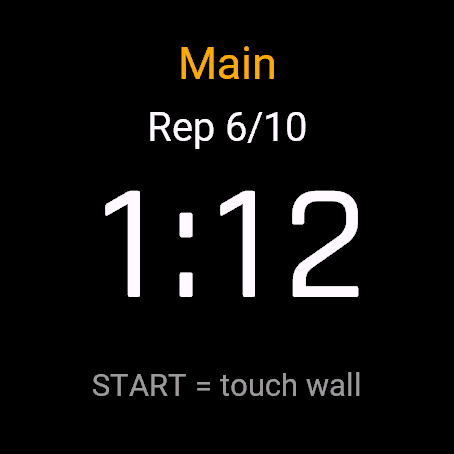
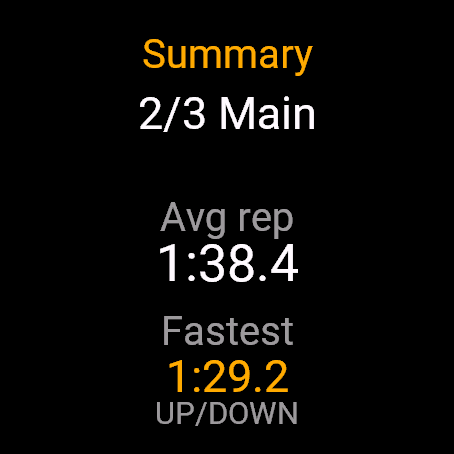
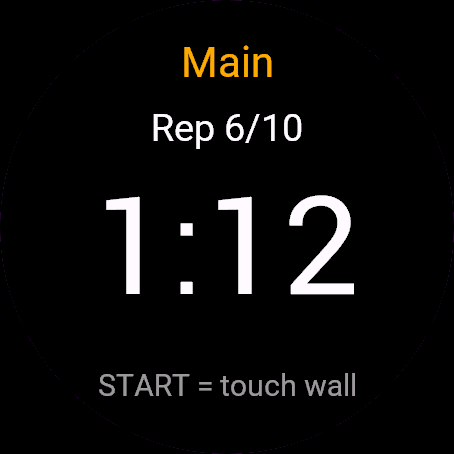
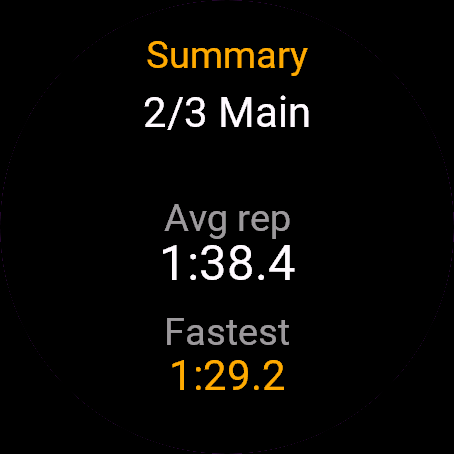
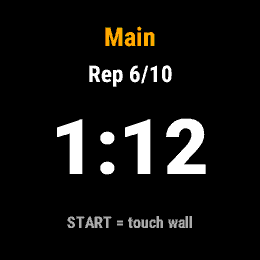
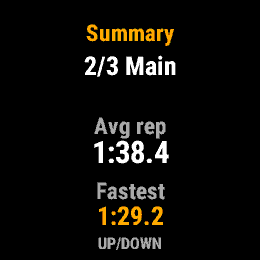
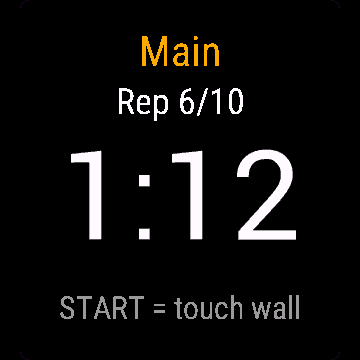
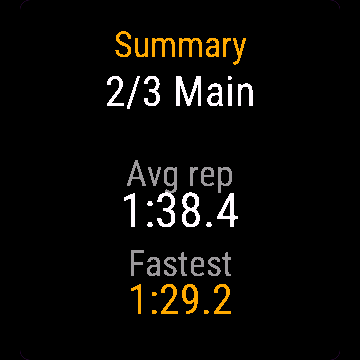
Video
FAQ
What happens after the 30-day free trial?
The app shows a screen asking for a one-time unlock code from dialforge.dev instead of opening normally. Buy the code once below, no subscription.
Does the app send my data to Dialforge?
No. The app works fully offline, and the unlock code is checked on the watch itself, without contacting any server.
The app does not work as described on my watch. What can I do?
Write through the feedback form below, or to the e-mail in the footer, and we will fix it.
Changing your watch?
Write to me and I will move your code for free.
Changelog
- New app icon.
- Nowa ikona aplikacji.
- Neues App-Symbol.
- Nouvelle icône de l'application.
- Nuevo icono de la aplicación.
- Nieuw app-pictogram.
- アプリの新しいアイコン。
- Nuova icona dell'app.
- 全新应用图标。
- Новая иконка приложения.
- Novo ícone do app.
- Nová ikona aplikace.
- Novo ícone da aplicação.
- 새로운 앱 아이콘.
- Ny appikon.
- Nyt appikon.
- Nytt appikon.
- 全新應用程式圖示。
- Uusi sovelluskuvake.
- Nová ikona aplikácie.
- Nova ikona aplikacije.
- Ikon aplikasi baru.
- Új alkalmazásikon.
- ไอคอนแอปใหม่
- Νέο εικονίδιο εφαρμογής.
- Nova ikona aplikacije.
- סמל אפליקציה חדש.
- Ikon aplikasi baharu.
Unlock
€6.99
One-time payment. No subscription. The code works on the watch whose ID you enter.
- Install the app from the Connect IQ store. It works fully and for free for the first 30 days.
- Enter the watch ID and pay. The code appears here at once and in the e-mail you give when paying.
- Pay.
- Copy the code.
- Enter the code in the app settings, field "Unlock code". The watch checks it offline.
Payment works best in Safari or Chrome: menu (three dots) > Open in browser
Read it in the settings of this app, field UID. It is not the serial number of the watch.
Your ID, compare it with the watch:
Where do I find the ID?
The ID is different in every face and app, so read it in the one you are buying. Find your 10-digit UID: Connect IQ app on the phone > My Device > Apps or Data Fields > this app > Settings > UID.
Code not working on your watch? Write to me and I will fix it.
Payments by Stripe. Seller: Mateusz Kolarz, Lublin, Poland.
Paid. Code:
We show the code here too. If the e-mail does not arrive (check spam), you can recover the code in the Recover code section with just the UID. Recover code
Copying did not work. The code is selected: copy it by hand.
Enter the code in the app settings, field "Unlock code". The watch checks it offline.
Enjoying a face or app? A rating and comment in the Connect IQ Store helps a lot. Rate in Connect IQ