Games
Tiles 2048
A 2048 puzzle game for your watch: slide and merge tiles on a 4x4 board, with auto-save and the option to keep playing past 2048.
Gra logiczna 2048 na zegarek: przesuwaj i łącz kafelki na planszy 4x4, z autozapisem i możliwością grania dalej po osiągnięciu 2048.
Ein 2048-Rätselspiel für die Uhr: Kacheln auf einem 4x4-Feld verschieben und verbinden, mit Autospeichern und der Möglichkeit, über 2048 hinaus weiterzuspielen.
Un jeu de réflexion 2048 pour votre montre : faites glisser et fusionnez les tuiles sur une grille 4x4, avec sauvegarde automatique et possibilité de continuer après 2048.
Un juego de lógica 2048 para el reloj: desliza y combina fichas en un tablero de 4x4, con guardado automático y la opción de seguir jugando después de 2048.
Een 2048-puzzelspel voor je horloge: schuif en voeg tegels samen op een 4x4-bord, met automatisch opslaan en de optie om na 2048 door te spelen.
4x4の盤面でタイルをスライドして合体させる、時計用の2048パズルゲーム。自動保存に対応し、2048を超えてもプレイを続けられます。
Un gioco di logica 2048 per l'orologio: fai scorrere e unisci le tessere su una griglia 4x4, con salvataggio automatico e la possibilità di continuare oltre 2048.
手表上的 2048 益智游戏:在 4x4 棋盘上滑动并合并方块,支持自动保存,达到 2048 后还可以继续玩。
Головоломка 2048 для часов: сдвигайте и объединяйте плитки на поле 4x4, с автосохранением и возможностью играть дальше после 2048.
Um jogo de lógica 2048 para o relógio: deslize e combine peças em um tabuleiro 4x4, com salvamento automático e a opção de continuar jogando depois de 2048.
Logická hra 2048 pro hodinky: posouvejte a spojujte dlaždice na poli 4x4, s automatickým ukládáním a možností hrát dál i po dosažení 2048.
Um jogo de lógica 2048 para o relógio: deslize e combine peças num tabuleiro 4x4, com gravação automática e a opção de continuar a jogar depois de 2048.
4x4 판에서 타일을 밀어 합치는 시계용 2048 퍼즐 게임으로, 자동 저장을 지원하며 2048을 넘어서도 계속 플레이할 수 있습니다.
Ett 2048-pussel för klockan: skjut och slå ihop brickor på ett 4x4-bräde, med automatisk sparning och möjlighet att fortsätta spela efter 2048.
Et 2048-puslespil til uret: skub og slå brikker sammen på et 4x4-bræt, med automatisk lagring og mulighed for at spille videre efter 2048.
Et 2048-puslespill for klokken: skyv og slå sammen brikker på et 4x4-brett, med automatisk lagring og mulighet til å spille videre etter 2048.
手錶上的 2048 益智遊戲:在 4x4 棋盤上滑動並合併方塊,支援自動儲存,達到 2048 後還可以繼續玩。
liu'uta ja yhdistä laattoja 4x4-ruudukossa, automaattisella tallennuksella ja mahdollisuudella jatkaa pelaamista 2048:n jälkeen.
Logická hra 2048 pre hodinky: posúvajte a spájajte dlaždice na poli 4x4, s automatickým ukladaním a možnosťou hrať ďalej aj po dosiahnutí 2048.
Igra uganka 2048 za uro: premikajte in združujte ploščice na polju 4x4, s samodejnim shranjevanjem in možnostjo nadaljevanja igre po 2048.
Game puzzle 2048 untuk jam: geser dan gabungkan ubin di papan 4x4, dengan simpan otomatis dan opsi untuk terus bermain setelah mencapai 2048.
2048 logikai játék órára: csúsztasd és olvaszd össze a csempéket a 4x4-es táblán, automatikus mentéssel és a 2048 utáni folytatás lehetőségével.
เกมไขปริศนา 2048 สำหรับนาฬิกา เลื่อนและรวมช่องบนกระดาน 4x4 พร้อมบันทึกอัตโนมัติ และเล่นต่อได้แม้ถึง 2048 แล้ว
Παιχνίδι λογικής 2048 για το ρολόι: σύρετε και συνδυάστε πλακίδια σε ταμπλό 4x4, με αυτόματη αποθήκευση και δυνατότητα να συνεχίσετε μετά το 2048.
Logička igra 2048 za sat: pomičite i spajajte pločice na ploči 4x4, s automatskim spremanjem i mogućnošću nastavka igre nakon 2048.
משחק פאזל 2048 לשעון: החליקו ואחדו אריחים על לוח 4x4, עם שמירה אוטומטית ואפשרות להמשיך לשחק אחרי 2048.
Permainan teka-teki 2048 untuk jam: gelongsor dan gabungkan jubin pada papan 4x4, dengan simpan automatik dan pilihan untuk terus bermain selepas 2048.
€5.9930-day free trial
Download on Garmin Connect IQ Buy unlock code
- Install the app from the Connect IQ store. It works fully and for free for the first 30 days.
- Enter the watch ID and pay. The code appears here at once and in the e-mail you give when paying.
- Enter the code in the app settings, field "Unlock code". The watch checks it offline.
Opens the Garmin store. Tap Install there and the Connect IQ app does the rest.
30-day free trial
The app works fully and for free for the first 30 days after you first open it. After that you can buy a one-time unlock code below. No subscription.
Slide and merge tiles to reach 2048, right on your wrist.
Most Garmin clones are barely playable: tiny numbers, no resume, clumsy controls. This one uses the buttons you already have, saves the board after every move, and lets you keep going past 2048 for a higher score.
- Classic 4x4 slide-and-merge rules
- Auto-save and resume any time
- Score and best score kept on the watch
- Colours readable on AMOLED and on colour MIP screens
- Keep playing after 2048 for a higher score
Controls: UP up, DOWN down, START right, BACK left. Hold UP or press MENU for the pause menu (new game, resume, quit). Touch screens: swipe to move tiles, hold to open the menu.
Free trial: the app works fully and for free for the first 30 days. After that you can buy a one-time code at dialforge.dev. Changing your watch? Write to me and I will move your code for free. No subscription. I am a student and I build these apps myself after hours. I do not own every watch model, so bugs can happen on some. If something does not work or is missing, write through the form at dialforge.dev. I fix every reported bug within 72 hours and send the update to Garmin (Garmin approval usually takes 1-3 days). If you reported a bug, check whether the fix is already there, and if the bug lowered your rating, I would be grateful if you reconsidered it. If the app is useful to you, leave a rating in the store. You can also buy me a coffee or buy the full version, it lets me build more. Purchase: at checkout you confirm immediate delivery of the code, so under EU law the right of withdrawal does not apply. If the app does not work on your watch as described, write to me and I will fix it.
Przesuwaj kafelki i dokładaj do 2048, prosto na nadgarstku.
Większość klonów 2048 na Garminie ledwo się nadaje do gry: małe cyfry, brak zapisu, niewygodne sterowanie. Ta wersja działa na przyciskach, które już masz, zapisuje stan po każdym ruchu i pozwala grać dalej po 2048, jeśli chcesz pobić własny wynik.
- Klasyczne zasady 4x4, przesuwanie i łączenie kafelków
- Autozapis i wznowienie w każdej chwili
- Wynik i rekord zapisywane na zegarku
- Kolory czytelne na AMOLED i na kolorowych ekranach MIP
- Gra dalej po 2048, dla wyższego wyniku
Sterowanie: GÓRA w górę, DÓŁ w dół, START w prawo, WSTECZ w lewo. Przytrzymanie GÓRA albo MENU otwiera menu pauzy (nowa gra, wznów, zamknij). Ekran dotykowy: przesunięcie palcem przesuwa kafelki, przytrzymanie otwiera menu.
Darmowa próba. Przez pierwsze 30 dni aplikacja działa w pełni i za darmo. Potem możesz kupić jednorazowy kod na dialforge.dev. Zmieniasz zegarek? Napisz do mnie, a przeniosę Twój kod bezpłatnie. Bez abonamentu. Jestem studentem i robię te aplikacje sam, po godzinach. Nie mam wszystkich modeli zegarków, więc na niektórych mogą zdarzyć się błędy. Jeśli coś nie działa albo czegoś brakuje, napisz przez formularz na dialforge.dev. Każdą zgłoszoną usterkę poprawiam w ciągu 72 godzin i wysyłam do Garmina (zatwierdzenie przez Garmina trwa zwykle 1-3 dni). Jeśli zgłaszałeś błąd, sprawdź, czy poprawka już jest. A jeśli przez ten błąd wystawiłeś niższą ocenę, będzie mi miło, jeśli ją przemyślisz jeszcze raz. Jeśli aplikacja Ci się przydaje, zostaw ocenę w sklepie. Możesz też postawić mi kawę albo kupić pełną wersję, to pozwala mi robić kolejne. Zakup kodu: przy płatności potwierdzasz natychmiastowe dostarczenie kodu, więc zgodnie z prawem UE nie przysługuje prawo odstąpienia. Jeśli aplikacja nie działa na Twoim zegarku zgodnie z opisem, napisz, a naprawię to.
Verschiebe und kombiniere Kacheln, um 2048 zu erreichen, direkt am Handgelenk.
Die meisten Garmin-Klone sind kaum spielbar: winzige Zahlen, kein Fortsetzen, umständliche Steuerung. Diese App nutzt die Tasten, die du bereits hast, speichert das Spielfeld nach jedem Zug und lässt dich über 2048 hinaus weiterspielen für einen höheren Punktestand.
- Klassische 4x4-Regeln zum Verschieben und Kombinieren
- Automatisches Speichern und Fortsetzen jederzeit
- Punktestand und Highscore werden auf der Uhr gespeichert
- Farben gut ablesbar auf AMOLED- und Farb-MIP-Displays
- Weiterspielen nach 2048 für einen höheren Punktestand
Steuerung: UP nach oben, DOWN nach unten, START nach rechts, BACK nach links. UP gedrückt halten oder MENU drücken für das Pausemenü (Neues Spiel, Fortsetzen, Beenden). Touchscreens: Wischen, um Kacheln zu verschieben, gedrückt halten, um das Menü zu öffnen.
Kostenlose Testversion: Die App funktioniert in den ersten 30 Tagen uneingeschränkt und kostenlos. Danach kannst du einen Einmal-Code auf dialforge.dev kaufen. Du wechselst deine Uhr? Schreib mir und ich übertrage deinen Code kostenlos. Kein Abo. Ich bin Student und entwickle diese Apps selbst nach Feierabend. Ich besitze nicht jedes Uhrenmodell, daher können bei manchen Fehler auftreten. Wenn etwas nicht funktioniert oder fehlt, schreib über das Formular auf dialforge.dev. Ich behebe jeden gemeldeten Fehler innerhalb von 72 Stunden und sende das Update an Garmin (die Freigabe durch Garmin dauert üblicherweise 1-3 Tage). Falls du einen Fehler gemeldet hast, prüfe bitte, ob die Fehlerbehebung schon da ist, und falls der Fehler zu einer schlechteren Bewertung geführt hat, wäre ich dankbar, wenn du sie noch einmal überdenkst. Wenn die App für dich nützlich ist, hinterlasse eine Bewertung im Store. Du kannst mir auch einen Kaffee spendieren oder die Vollversion kaufen, das ermöglicht mir, weitere Apps zu entwickeln. Kauf: Beim Bezahlen bestätigst du die sofortige Bereitstellung des Codes, daher gilt nach EU-Recht kein Widerrufsrecht. Sollte die App auf deiner Uhr nicht wie beschrieben funktionieren, schreib mir und ich behebe das.
Faites glisser et fusionnez les tuiles pour atteindre 2048, directement à votre poignet.
La plupart des clones sur Garmin sont à peine jouables : chiffres minuscules, aucune reprise, commandes peu pratiques. Celui-ci utilise les boutons que vous avez déjà, sauvegarde le plateau après chaque mouvement et vous permet de continuer au-delà de 2048 pour obtenir un meilleur score.
- Règles classiques 4x4 de glissement et fusion
- Sauvegarde automatique et reprise à tout moment
- Score et meilleur score conservés sur la montre
- Couleurs lisibles sur les écrans AMOLED et MIP couleur
- Continuez à jouer après 2048 pour un meilleur score
Commandes : UP haut, DOWN bas, START droite, BACK gauche. Maintenez UP ou appuyez sur MENU pour le menu pause (nouvelle partie, reprendre, quitter). Écrans tactiles : balayez pour déplacer les tuiles, maintenez appuyé pour ouvrir le menu.
Essai gratuit : l'application fonctionne pleinement et gratuitement pendant les 30 premiers jours. Ensuite, vous pouvez acheter un code à paiement unique sur dialforge.dev. Vous changez de montre ? Écrivez-moi et je transférerai votre code gratuitement. Sans abonnement. Je suis étudiant et je développe ces applications moi-même sur mon temps libre. Je ne possède pas tous les modèles de montre, des bugs peuvent donc survenir sur certains. Si quelque chose ne fonctionne pas ou manque, écrivez-moi via le formulaire sur dialforge.dev. Je corrige chaque bug signalé sous 72 heures et j'envoie la mise à jour à Garmin (la validation par Garmin prend généralement 1 à 3 jours). Si vous avez signalé un bug, vérifiez si le correctif est déjà disponible, et si ce bug a fait baisser votre note, je vous serais reconnaissant de bien vouloir la réévaluer. Si l'application vous est utile, laissez une note dans la boutique. Vous pouvez aussi m'offrir un café ou acheter la version complète, cela me permet d'en développer d'autres. Achat : lors du paiement, vous confirmez la livraison immédiate du code, donc selon le droit de l'UE, le droit de rétractation ne s'applique pas. Si l'application ne fonctionne pas sur votre montre comme décrit, écrivez-moi et je corrigerai le problème.
Desliza y combina fichas para llegar a 2048, directamente en tu muñeca.
La mayoría de clones en Garmin apenas se pueden jugar: números diminutos, sin opción de reanudar, controles incómodos. Este usa los botones que ya tienes, guarda el tablero tras cada movimiento y te permite seguir después de 2048 para conseguir una puntuación más alta.
- Reglas clásicas 4x4 de deslizar y combinar
- Guardado automático y reanudación en cualquier momento
- Puntuación y récord guardados en el reloj
- Colores legibles en pantallas AMOLED y MIP en color
- Sigue jugando después de 2048 para conseguir una puntuación más alta
Controles: UP arriba, DOWN abajo, START derecha, BACK izquierda. Mantén pulsado UP o pulsa MENU para el menú de pausa (nueva partida, reanudar, salir). Pantallas táctiles: desliza para mover fichas, mantén pulsado para abrir el menú.
Prueba gratuita: la aplicación funciona al completo y gratis durante los primeros 30 días. Después de eso, puedes comprar un código de pago único en dialforge.dev. ¿Cambias de reloj? Escríbeme y transferiré tu código gratis. Sin suscripción. Soy estudiante y desarrollo estas aplicaciones por mi cuenta en mi tiempo libre. No tengo todos los modelos de reloj, por lo que pueden ocurrir errores en algunos. Si algo no funciona o falta, escribe a través del formulario en dialforge.dev. Corrijo cada error notificado en un plazo de 72 horas y envío la actualización a Garmin (la aprobación de Garmin suele tardar 1-3 días). Si notificaste un error, comprueba si la solución ya está disponible, y si el error hizo bajar tu valoración, te agradecería que la reconsideraras. Si la aplicación te resulta útil, deja una valoración en la tienda. También puedes invitarme a un café o comprar la versión completa, me permite seguir desarrollando. Compra: en el momento del pago confirmas la entrega inmediata del código, por lo que según la legislación de la UE no se aplica el derecho de desistimiento. Si la aplicación no funciona en tu reloj como se describe, escríbeme y lo solucionaré.
Schuif en voeg tegels samen om 2048 te bereiken, direct om je pols.
De meeste Garmin-klonen zijn nauwelijks speelbaar: kleine cijfers, geen optie om te hervatten, onhandige bediening. Deze app gebruikt de knoppen die je al hebt, slaat het bord na elke zet op en laat je voorbij 2048 doorspelen voor een hogere score.
- Klassieke 4x4-regels voor schuiven en samenvoegen
- Automatisch opslaan en op elk moment hervatten
- Score en beste score bewaard op het horloge
- Kleuren leesbaar op AMOLED en op MIP-kleurenschermen
- Blijf doorspelen na 2048 voor een hogere score
Bediening: UP omhoog, DOWN omlaag, START naar rechts, BACK naar links. Houd UP ingedrukt of druk op MENU voor het pauzemenu (nieuw spel, hervatten, afsluiten). Touchscreens: veeg om tegels te verplaatsen, houd ingedrukt om het menu te openen.
Gratis proefperiode: de app werkt de eerste 30 dagen volledig en gratis. Daarna kun je een eenmalige code kopen op dialforge.dev. Wissel je van horloge? Schrijf me en ik zet je code gratis over. Geen abonnement. Ik ben student en ik bouw deze apps zelf in mijn vrije tijd. Ik bezit niet elk horlogemodel, dus op sommige kunnen bugs voorkomen. Als er iets niet werkt of ontbreekt, schrijf dan via het formulier op dialforge.dev. Ik los elke gemelde bug binnen 72 uur op en stuur de update naar Garmin (goedkeuring door Garmin duurt meestal 1-3 dagen). Als je een bug hebt gemeld, controleer dan of de oplossing er al is, en als de bug je beoordeling heeft verlaagd, zou ik het op prijs stellen als je deze wilt heroverwegen. Als de app nuttig voor je is, laat dan een beoordeling achter in de store. Je kunt ook een kop koffie voor me kopen of de volledige versie aanschaffen; daarmee kan ik meer bouwen. Aankoop: bij het afrekenen bevestig je de directe levering van de code, waardoor volgens het EU-recht het herroepingsrecht niet van toepassing is. Als de app op jouw horloge niet werkt zoals beschreven, schrijf me dan en ik los het op.
手首の上でタイルをスライドして合体させ、2048を目指しましょう。
Garmin向けのクローンゲームの多くは、数字が小さすぎる、再開機能がない、操作性が悪いなど、まともに遊べないものがほとんどです。このアプリならウォッチのボタンを活用でき、1手ごとに盤面を自動保存。さらに2048達成後もハイスコアを目指してプレイを続けられます。
- 定番の4x4スライド&合体ルール
- いつでも自動保存&再開可能
- スコアとベストスコアをウォッチ本体に保存
- AMOLEDやカラーMIP画面で見やすい配色
- 2048達成後もハイスコアを目指してプレイ続行可能
操作方法: UPで上、DOWNで下、STARTで右、BACKで左。UP長押しまたはMENUで一時停止メニュー(新規ゲーム、再開、終了)。タッチスクリーン: スワイプでタイルを移動、長押しでメニューを開く。
無料トライアル:最初の30日間はすべての機能を完全かつ無料でご利用いただけます。その後は dialforge.dev で買い切りコードをご購入いただけます。時計を買い替える場合はご連絡いただければ、無料でコードを移行します。サブスクリプションはありません。私は学生で、放課後や空き時間に自分でこれらのアプリを開発しています。すべての時計モデルを所有しているわけではないため、一部のモデルで不具合が発生することがあります。もし動作しない点や不足している機能があれば、dialforge.dev のフォームからご連絡ください。報告された不具合はすべて 72時間 以内に修正し、Garmin へアップデートを提出します(Garmin の承認には通常 1から3日 かかります)。不具合を報告された場合は、修正がすでに反映されているかご確認ください。また、その不具合により評価を下げていた場合は、再評価をご検討いただけますと幸いです。アプリがお役に立ちましたら、ストアで評価を残していただけると嬉しいです。コーヒーをおごっていただくか、製品版をご購入いただくこともできます。今後の開発の励みになります。購入について:チェックアウト時にコードの即時提供に同意いただくため、EU法に基づく撤回権は適用されません。説明どおりに時計でアプリが動作しない場合は、ご連絡いただければ修正いたします。
Fai scorrere e unisci le tessere per raggiungere 2048, direttamente al polso.
La maggior parte dei cloni per Garmin è a malapena giocabile: numeri minuscoli, nessuna ripresa della partita, comandi scomodi. Questo usa i pulsanti che hai già, salva la griglia dopo ogni mossa e ti permette di continuare oltre 2048 per un punteggio più alto.
- Regole classiche 4x4: scorri e unisci
- Salvataggio automatico e ripresa in qualsiasi momento
- Punteggio e miglior punteggio salvati sull'orologio
- Colori leggibili su schermi AMOLED e su schermi MIP a colori
- Continua a giocare dopo 2048 per un punteggio più alto
Comandi: UP su, DOWN giù, START a destra, BACK a sinistra. Tieni premuto UP o premi MENU per il menu di pausa (nuova partita, riprendi, esci). Touch screen: scorri per muovere le tessere, tieni premuto per aprire il menu.
Prova gratuita: l'app funziona in modo completo e gratuito per i primi 30 giorni. Dopodiché puoi acquistare un codice una tantum su dialforge.dev. Cambi orologio? Scrivimi e trasferirò il tuo codice gratuitamente. Nessun abbonamento. Sono uno studente e creo queste app da solo nel tempo libero. Non possiedo tutti i modelli di orologio, quindi su alcuni possono verificarsi bug. Se qualcosa non funziona o manca, scrivimi tramite il modulo su dialforge.dev. Risolvo ogni bug segnalato entro 72 ore e invio l'aggiornamento a Garmin (l'approvazione di Garmin richiede solitamente 1-3 giorni). Se hai segnalato un bug, controlla se la correzione è già disponibile, e se il bug ha abbassato la tua valutazione, ti sarei grato se potessi riconsiderarla. Se trovi utile l'app, lascia una valutazione nello store. Puoi anche offrirmi un caffè o acquistare la versione completa: mi aiuta a sviluppare altre app. Acquisto: al momento del pagamento confermi la consegna immediata del codice, pertanto in base alla legge dell'UE il diritto di recesso non si applica. Se l'app non funziona sul tuo orologio come descritto, scrivimi e risolverò il problema.
在手腕上滑动合并方块,达到 2048。
大多数 Garmin 仿制版几乎没法玩:数字太小、无法恢复、操作别扭。这款应用使用手表自带的按键,每步移动后都会保存棋盘,并且在超过 2048 后仍能继续挑战更高分。
- 经典 4x4 滑动合并规则
- 自动保存,随时恢复游戏
- 手表端记录当前得分与最高分
- 配色在 AMOLED 和彩色 MIP 屏幕上均清晰易读
- 超过 2048 后可继续游戏以获取更高分
操作:UP 向上,DOWN 向下,START 向右,BACK 向左。长按 UP 或按 MENU 打开暂停菜单(新游戏、继续、退出)。触摸屏:滑动移动方块,长按打开菜单。
免费试用:应用在前 30 天内功能完整且完全免费。此后,你可以在 dialforge.dev 购买一次性激活码。更换了手表?联系我,我会免费为你迁移激活码。无需订阅。我是一名学生,利用业余时间独自开发这些应用。我无法拥有每一款手表型号,因此在某些机型上可能会出现错误。如果某些功能无法正常工作或有所缺失,请通过 dialforge.dev 上的表单联系我。我会在 72 小时内修复所有反馈的错误并将更新提交给 Garmin(Garmin 审核通常需要 1 到 3 天)。如果你反馈过错误,请查看是否已经修复;如果该错误影响了你的评分,若你能重新考虑评价,我将非常感激。如果这款应用对你有用,请在应用商店留下评价。你也可以请我喝杯咖啡或购买完整版,这能支持我开发更多应用。购买:结账时你确认立即交付激活码,因此根据欧盟法律,撤回权不适用。如果应用在你的手表上未能如描述般正常运行,请联系我,我会修复。
Сдвигайте и объединяйте плитки, чтобы собрать 2048, прямо на часах.
В большинство клонов для Garmin практически невозможно играть: мелкие цифры, нет продолжения, неудобное управление. Здесь используются кнопки, которые у вас уже есть, поле сохраняется после каждого хода, а играть можно и дальше после 2048, чтобы набрать больше очков.
- Классические правила 4x4 со сдвигом и объединением
- Автосохранение и продолжение в любой момент
- Текущий и лучший счет сохраняются на часах
- Цвета хорошо различимы на экранах AMOLED и цветных MIP
- Продолжайте играть после 2048, чтобы набрать больше очков
Управление: UP вверх, DOWN вниз, START вправо, BACK влево. Удерживайте UP или нажмите MENU для меню паузы (новая игра, продолжить, выход). Сенсорные экраны: свайп для перемещения плиток, удержание для открытия меню.
Бесплатный пробный период: приложение работает полностью и бесплатно первые 30 дней. После этого вы можете купить разовый код на dialforge.dev. Меняете часы? Напишите мне, и я перенесу ваш код бесплатно. Без подписки. Я студент и создаю эти приложения сам в свободное время. У меня нет всех моделей часов, поэтому на некоторых могут случаться ошибки. Если что-то не работает или чего-то не хватает, напишите через форму на dialforge.dev. Я исправляю каждую найденную ошибку в течение 72 часов и отправляю обновление в Garmin (одобрение Garmin обычно занимает 1-3 дня). Если вы сообщили об ошибке, проверьте, не вышло ли уже исправление, и если из-за ошибки вы снизили оценку, я буду благодарен, если вы ее пересмотрите. Если приложение вам полезно, оставьте оценку в магазине. Вы также можете угостить меня кофе или купить полную версию, это позволяет мне создавать больше приложений. Покупка: при оформлении заказа вы подтверждаете немедленное предоставление кода, поэтому по законам ЕС право на отказ от покупки не применяется. Если приложение работает на ваших часах не так, как описано, напишите мне, и я всё исправлю.
Deslize e combine blocos para chegar a 2048, direto no seu pulso.
A maioria dos clones para Garmin mal dá para jogar: números minúsculos, sem opção de continuar, controles desajeitados. Este usa os botões que você já tem, salva o tabuleiro a cada movimento e permite continuar jogando após 2048 para uma pontuação maior.
- Regras clássicas 4x4 de deslizar e combinar
- Salvamento automático e retomada a qualquer momento
- Pontuação e recorde mantidos no relógio
- Cores legíveis em telas AMOLED e MIP coloridas
- Continue jogando após 2048 para uma pontuação maior
Controles: UP para cima, DOWN para baixo, START para a direita, BACK para a esquerda. Segure UP ou pressione MENU para o menu de pausa (novo jogo, continuar, sair). Telas sensíveis ao toque: deslize para mover os blocos, segure para abrir o menu.
Teste gratuito: o aplicativo funciona totalmente e de graça nos primeiros 30 dias. Depois disso, você pode comprar um código único em dialforge.dev. Vai trocar de relógio? Escreva para mim e eu transfiro o seu código de graça. Sem assinatura. Sou estudante e desenvolvo esses aplicativos sozinho nas horas vagas. Não possuo todos os modelos de relógio, por isso bugs podem acontecer em alguns. Se algo não funcionar ou estiver faltando, escreva pelo formulário em dialforge.dev. Corrijo todos os bugs relatados em até 72 horas e envio a atualização para a Garmin (a aprovação da Garmin costuma levar de 1 a 3 dias). Se você relatou um bug, veja se a correção já está disponível, e caso o bug tenha diminuído sua avaliação, eu ficaria grato se você pudesse reconsiderá-la. Se o aplicativo for útil para você, deixe uma avaliação na loja. Você também pode me pagar um café ou comprar a versão completa, isso me permite criar mais. Compra: na finalização da compra você confirma a entrega imediata do código, portanto, sob a legislação da UE, o direito de desistência não se aplica. Se o aplicativo não funcionar no seu relógio conforme descrito, escreva para mim e eu resolverei o problema.
Posouvejte a spojujte dlaždice a dosáhněte 2048 přímo na zápěstí.
Většina klonů pro Garmin je sotva hratelná: drobná čísla, nemožnost pokračovat, neohrabané ovládání. Tato verze využívá tlačítka, která už máte, po každém tahu ukládá herní plochu a umožňuje pokračovat i po 2048 pro vyšší skóre.
- Klasická pravidla 4x4 s posouváním a spojováním
- Automatické ukládání a možnost kdykoli pokračovat
- Skóre a nejlepší skóre se ukládá v hodinkách
- Barvy čitelné na AMOLED i na barevných MIP displejích
- Pokračujte ve hře i po 2048 pro vyšší skóre
Ovládání: UP nahoru, DOWN dolů, START doprava, BACK doleva. Podržením UP nebo stisknutím MENU otevřete menu pauzy (nová hra, pokračovat, ukončit). Dotykové displeje: přejetím prstem posouváte dlaždice, podržením otevřete menu.
Bezplatná zkušební verze: aplikace funguje plně a zdarma po dobu prvních 30 dní. Poté si můžeš koupit jednorázový kód na dialforge.dev. Měníš hodinky? Napiš mi a já ti kód bezplatně převedu. Žádné předplatné. Jsem student a tyto aplikace vytvářím sám po večerech. Nevlastním každý model hodinek, takže se na některých mohou objevit chyby. Pokud něco nefunguje nebo chybí, napiš přes formulář na dialforge.dev. Každou nahlášenou chybu opravuji do 72 hodin a posílám aktualizaci do Garmin (schválení ze strany Garmin obvykle trvá 1-3 dny). Pokud jsi nahlásil chybu, zkontroluj, zda už je oprava k dispozici, a pokud kvůli ní bylo tvé hodnocení nižší, budu vděčný, když ho ještě zvážíš. Pokud je pro tebe aplikace užitečná, zanech hodnocení v obchodě. Můžeš mi také koupit kávu nebo koupit plnou verzi, umožní mi to vytvářet další. Nákup: při dokončení objednávky potvrzuješ okamžité doručení kódu, takže podle práva EU se neuplatňuje právo na odstoupení od smlouvy. Pokud aplikace na tvých hodinkách nefunguje podle popisu, napiš mi a já to opravím.
Deslize e junte peças para alcançar o 2048, diretamente no seu pulso.
A maioria dos clones para Garmin é quase injogável: números minúsculos, sem retoma, controlos desajeitados. Este usa os botões que já tem, guarda o tabuleiro após cada movimento e permite continuar além de 2048 para uma pontuação mais alta.
- Regras clássicas 4x4 de deslizar e juntar
- Gravação automática e retoma a qualquer momento
- Pontuação e melhor pontuação guardadas no relógio
- Cores legíveis em ecrãs AMOLED e MIP a cores
- Continue a jogar após 2048 para uma pontuação mais alta
Controlos: UP cima, DOWN baixo, START direita, BACK esquerda. Mantenha premido UP ou prima MENU para o menu de pausa (novo jogo, retomar, sair). Ecrãs táteis: deslize para mover as peças, mantenha premido para abrir o menu.
Avaliação gratuita: a aplicação funciona de forma completa e gratuita durante os primeiros 30 dias. Depois disso, pode comprar um código único em dialforge.dev. Vai mudar de relógio? Escreva-me e transferirei o seu código gratuitamente. Sem subscrição. Sou estudante e crio estas aplicações sozinho nos meus tempos livres. Não possuo todos os modelos de relógio, pelo que podem ocorrer erros em alguns. Se algo não funcionar ou estiver em falta, escreva através do formulário em dialforge.dev. Corrijo todos os erros comunicados dentro de 72 horas e envio a atualização para a Garmin (a aprovação da Garmin costuma demorar 1-3 dias). Se comunicou um erro, verifique se a correção já está disponível e, se o erro baixou a sua classificação, ficaria grato se a reconsiderasse. Se a aplicação lhe for útil, deixe uma avaliação na loja. Também me pode pagar um café ou comprar a versão completa, permitindo-me criar mais. Compra: no checkout confirma a entrega imediata do código, pelo que, ao abrigo da legislação da UE, o direito de livre resolução não se aplica. Se a aplicação não funcionar no seu relógio como descrito, escreva-me e resolverei o problema.
손목 위에서 타일을 밀고 합쳐 2048에 도달하세요.
대부분의 Garmin 클론 앱은 플레이하기 어렵습니다: 작은 숫자, 이어하기 불가, 불편한 조작. 이 앱은 시계의 기존 버튼을 활용하고, 이동할 때마다 보드를 저장하며, 더 높은 점수를 위해 2048 이후에도 계속 플레이할 수 있습니다.
- 클래식 4x4 슬라이드 및 병합 규칙
- 언제든지 자동 저장 및 이어하기
- 점수 및 최고 점수가 시계에 저장됨
- AMOLED 및 컬러 MIP 화면에서 잘 보이는 색상
- 더 높은 점수를 위해 2048 이후에도 계속 플레이 가능
조작 방법: UP 위, DOWN 아래, START 오른쪽, BACK 왼쪽. 일시정지 메뉴(새 게임, 이어하기, 종료)는 UP을 길게 누르거나 MENU를 누르세요. 터치스크린: 스와이프하여 타일 이동, 길게 눌러 메뉴 열기.
무료 체험: 처음 30일 동안 앱의 모든 기능을 무료로 이용할 수 있습니다. 그 후 dialforge.dev에서 일회성 코드를 구매할 수 있습니다. 시계를 변경하시나요? 저에게 메시지를 남겨주시면 무료로 코드를 이전해 드립니다. 구독은 없습니다. 저는 학생이며 방과 후 여가 시간에 직접 이 앱들을 개발하고 있습니다. 모든 시계 모델을 보유하고 있지는 않아 일부 기기에서 버그가 발생할 수 있습니다. 제대로 작동하지 않거나 누락된 부분이 있다면 dialforge.dev의 문의 양식을 통해 메시지를 남겨주세요. 보고된 모든 버그는 72시간 이내에 수정하여 Garmin에 업데이트를 전송합니다(Garmin 승인은 보통 1-3일 소요). 버그를 제보하셨다면 수정 사항이 이미 적용되었는지 확인해 주시고, 만약 그 버그로 인해 평점을 낮게 주셨다면 다시 평가해 주시면 감사하겠습니다. 앱이 유용하다면 스토어에 평점을 남겨주세요. 커피를 후원해 주시거나 정식 버전을 구매해 주실 수도 있으며, 이는 제가 더 많은 앱을 만드는 데 도움이 됩니다. 구매 안내: 결제 시 코드 즉시 제공에 동의하시게 되므로 EU 법률상 청약철회권이 적용되지 않습니다. 앱이 설명대로 시계에서 작동하지 않는 경우, 제게 메시지를 보내주시면 해결해 드리겠습니다.
Flytta och slå ihop brickor för att nå 2048, direkt på handleden.
De flesta Garmin-kloner är knappt spelbara: pyttesmå siffror, går inte att återuppta, klumpiga kontroller. Den här använder knapparna du redan har, sparar spelplanen efter varje drag och låter dig fortsätta förbi 2048 för en högre poäng.
- Klassiska 4x4-regler för att flytta och slå ihop
- Spara automatiskt och återuppta när som helst
- Poäng och bästa resultat sparas på klockan
- Lättlästa färger på AMOLED och på färg-MIP-skärmar
- Fortsätt spela efter 2048 för en högre poäng
Kontroller: UP upp, DOWN ned, START höger, BACK vänster. Håll in UP eller tryck på MENU för pausmenyn (nytt spel, återuppta, avsluta). Pekskärmar: svep för att flytta brickor, håll in för att öppna menyn.
Gratis provperiod: appen fungerar fullt ut och kostnadsfritt de första 30 dagarna. Därefter kan du köpa en engångskod på dialforge.dev. Byter du klocka? Skriv till mig så flyttar jag din kod gratis. Inget abonnemang. Jag är student och bygger dessa appar själv på fritiden. Jag äger inte alla klockmodeller, så buggar kan uppstå på vissa. Om något inte fungerar eller saknas, skriv via formuläret på dialforge.dev. Jag åtgärdar varje rapporterad bugg inom 72 timmar och skickar uppdateringen till Garmin (Garmins godkännande tar vanligtvis 1-3 dagar). Om du har rapporterat en bugg, se efter om rättelsen redan finns där, och om buggen sänkte ditt betyg vore jag tacksam om du övervägde att ändra det. Om appen är till nytta för dig, lämna gärna ett betyg i butiken. Du kan också bjuda mig på en kaffe eller köpa fullversionen, det gör att jag kan bygga mer. Köp: i kassan bekräftar du omedelbar leverans av koden, så enligt EU-lagstiftning gäller inte ångerrätten. Om appen inte fungerar på din klocka enligt beskrivningen, skriv till mig så återbetalar jag dig.
Skub og flet brikker for at nå 2048, direkte på håndleddet.
De fleste Garmin-kloner er knap nok spilbare: bittesmå tal, ingen genoptagelse, klodset styring. Denne bruger de knapper, du allerede har, gemmer brættet efter hvert træk og lader dig fortsætte forbi 2048 for en højere score.
- Klassiske 4x4 skub-og-flet-regler
- Gemmer automatisk og kan genoptages når som helst
- Score og bedste score gemmes på uret
- Farver der er nemme at aflæse på AMOLED og på farve-MIP-skærme
- Fortsæt med at spille efter 2048 for en højere score
Styring: UP op, DOWN ned, START højre, BACK venstre. Hold UP eller tryk på MENU for pausemenuen (nyt spil, genoptag, afslut). Touchskærme: swipe for at flytte brikker, hold inde for at åbne menuen.
Gratis prøveperiode: appen fungerer fuldt ud og gratis i de første 30 dage. Derefter kan du købe en engangskode på dialforge.dev. Skifter du ur? Skriv til mig, så flytter jeg din kode gratis. Intet abonnement. Jeg er studerende og bygger selv disse apps i min fritid. Jeg ejer ikke alle urmodeller, så der kan opstå fejl på nogle af dem. Hvis noget ikke virker eller mangler, så skriv via formularen på dialforge.dev. Jeg retter enhver rapporteret fejl inden for 72 timer og sender opdateringen til Garmin (Garmin-godkendelse tager normalt 1-3 dage). Hvis du har rapporteret en fejl, så tjek om rettelsen allerede er der, og hvis fejlen fik dig til at give en lavere vurdering, vil jeg være taknemmelig, hvis du vil genoverveje den. Hvis appen er nyttig for dig, så læg en vurdering i butikken. Du kan også give mig en kop kaffe eller købe den fulde version, det giver mig mulighed for at bygge mere. Køb: ved betaling bekræfter du øjeblikkelig levering af koden, så ifølge EU-lovgivningen bortfalder fortrydelsesretten. Hvis appen ikke virker på dit ur som beskrevet, så skriv til mig, og jeg løser det.
Skyv og slå sammen brikker for å nå 2048, rett på håndleddet.
De fleste Garmin-kloner er knapt spillbare: små tall, ingen gjenopptaking, klønete kontroller. Denne bruker knappene du allerede har, lagrer brettet etter hvert trekk, og lar deg fortsette forbi 2048 for en høyere poengsum.
- Klassiske 4x4-regler for å skyve og slå sammen
- Automatisk lagring og gjenopptaking når som helst
- Poengsum og beste poengsum lagres på klokken
- Lettleste farger på AMOLED og på farge-MIP-skjermer
- Fortsett å spille etter 2048 for en høyere poengsum
Kontroller: UP opp, DOWN ned, START høyre, BACK venstre. Hold UP eller trykk MENU for pausemenyen (nytt spill, fortsett, avslutt). Berøringsskjermer: sveip for å flytte brikker, hold inne for å åpne menyen.
Gratis prøveperiode: appen fungerer fullt ut og helt gratis de første 30 dagene. Etter det kan du kjøpe en engangskode på dialforge.dev. Bytter du klokke? Skriv til meg, så flytter jeg koden din gratis. Ingen abonnement. Jeg er student og lager disse appene selv på fritiden. Jeg eier ikke alle klokkemodeller, så feil kan forekomme på enkelte. Hvis noe ikke fungerer eller mangler, skriv via skjemaet på dialforge.dev. Jeg retter alle innrapporterte feil innen 72 timer og sender oppdateringen til Garmin (godkjenning fra Garmin tar vanligvis 1-3 dager). Hvis du har meldt fra om en feil, sjekk om rettelsen allerede er på plass, og hvis feilen gjorde at du ga en lavere vurdering, setter jeg stor pris på om du vil vurdere den på nytt. Hvis appen er nyttig for deg, legg gjerne igjen en vurdering i butikken. Du kan også spandere en kaffe på meg eller kjøpe fullversjonen, det gjør at jeg kan utvikle mer. Kjøp: ved betaling bekrefter du umiddelbar levering av koden, så ifølge EU-retten gjelder ikke angreretten. Hvis appen ikke fungerer på klokken din som beskrevet, skriv til meg så fikser jeg det.
在手腕上滑動並合併方塊達到 2048。
大多數 Garmin 仿製版本幾乎難以遊玩:數字太小、無法繼續遊戲、操作不便。這款遊戲使用手錶現有的按鍵,每次移動後自動儲存盤面,並讓你在超過 2048 後繼續遊玩以取得更高分數。
- 經典 4x4 滑動與合併規則
- 自動儲存並可隨時繼續
- 分數與最高紀錄保存在手錶上
- 顏色在 AMOLED 與彩色 MIP 螢幕上清晰易讀
- 超過 2048 後可繼續遊玩以獲得更高分
操作方式:UP 向上,DOWN 向下,START 向右,BACK 向左。長按 UP 或按 MENU 開啟暫停選單(新遊戲、繼續、退出)。觸控螢幕:滑動以移動方塊,長按以開啟選單。
免費試用:前 30 天可免費使用應用程式的完整功能。之後你可以在 dialforge.dev 購買一次性代碼。更換手錶?寫信給我,我會免費為你轉移代碼。無需訂閱。我是一名學生,這些應用程式是我在課餘時間自己開發的。我並沒有每一款手錶型號,所以在某些型號上可能會出現錯誤。如果某些功能無法運作或有所缺漏,請透過 dialforge.dev 上的表單聯絡我。我會在 72 小時內修復所有回報的錯誤,並將更新提交給 Garmin(Garmin 的審查通常需要 1-3 天)。如果你曾回報錯誤,請確認修復是否已推出;若該錯誤曾影響你的評分,如果你願意重新考慮評價,我會非常感謝。如果這個應用程式對你有幫助,請在商店留下評價。你也可以請我喝杯咖啡或購買完整版,這能支持我開發更多內容。購買須知:結帳時你確認立即交付代碼,因此依歐盟法律規定不適用撤回權。如果應用程式無法如描述般在你的手錶上運作,請寫信給我,我會修復。
Liu'uta ja yhdistä laattoja päästäksesi lukuun 2048, suoraan ranteessasi.
Useimmat Garmin-kloonit ovat tuskin pelattavia: pienet numerot, peliä ei voi jatkaa, kömpelö ohjaus. Tämä käyttää kellon omia painikkeita, tallentaa pelilaudan jokaisen siirron jälkeen ja antaa jatkaa pelaamista luvun 2048 jälkeen suurempien pisteiden saamiseksi.
- Klassiset 4x4-säännöt laattojen liu'uttamiseen ja yhdistämiseen
- Automaattinen tallennus ja pelin jatkaminen milloin vain
- Pisteet ja paras tulos säilyvät kellossa
- Helppolukuiset värit AMOLED- ja värillisillä MIP-näytöillä
- Jatka pelaamista luvun 2048 jälkeen suuremman pistemäärän saamiseksi
Ohjaus: UP ylös, DOWN alas, START oikealle, BACK vasemmalle. Pidä UP painettuna tai paina MENU avataksesi taukovalikon (uusi peli, jatka, lopeta). Kosketusnäytöt: pyyhkäise siirtääksesi laattoja, pidä painettuna avataksesi valikon.
Ilmainen kokeilujakso: sovellus toimii täysin ja ilmaiseksi ensimmäiset 30 päivää. Sen jälkeen voit ostaa kertakoodin osoitteesta dialforge.dev. Vaihdatko kelloa? Kirjoita minulle, niin siirrän koodisi ilmaiseksi. Ei tilausta. Olen opiskelija ja rakennan nämä sovellukset itse vapaa-ajallani. En omista jokaista kellomallia, joten joissakin voi esiintyä bugeja. Jos jokin ei toimi tai puuttuu, kirjoita lomakkeen kautta osoitteessa dialforge.dev. Korjaan jokaisen ilmoitetun bugin 72 tunnin kuluessa ja lähetän päivityksen Garminille (Garmin-hyväksyntä kestää yleensä 1-3 päivää). Jos ilmoitit bugista, tarkista onko korjaus jo tullut, ja jos bugi laski arviotasi, olisin kiitollinen jos harkitsisit sitä uudelleen. Jos sovellus on sinulle hyödyllinen, jätä arvio sovelluskauppaan. Voit myös ostaa minulle kahvin tai ostaa täysversion, se auttaa minua kehittämään lisää. Osto: kassalla vahvistat koodin välittömän toimituksen, joten EU-lain mukaan peruutusoikeus ei päde. Jos sovellus ei toimi kellossasi kuvatulla tavalla, kirjoita minulle, niin korjaan asian.
Posúvajte a spájajte dlaždice, aby ste dosiahli 2048, priamo na zápästí.
Väčšina klonov pre Garmin sa dá sotva hrať: drobné čísla, žiadne pokračovanie v hre, neohrabané ovládanie. Táto verzia využíva tlačidlá, ktoré už máte, ukladá hraciu plochu po každom ťahu a umožňuje vám pokračovať aj po 2048 pre vyššie skóre.
- Klasické pravidlá 4x4 s posúvaním a spájaním
- Automatické ukladanie a pokračovanie kedykoľvek
- Skóre a najlepšie skóre uložené v hodinkách
- Farby čitateľné na AMOLED aj na farebných MIP displejoch
- Pokračujte v hre aj po 2048 pre vyššie skóre
Ovládanie: UP hore, DOWN dole, START doprava, BACK doľava. Podržte UP alebo stlačte MENU pre menu pozastavenia (nová hra, pokračovať, ukončiť). Dotykové displeje: potiahnutím posúvate dlaždice, podržaním otvoríte menu.
Bezplatná skúšobná verzia: aplikácia funguje plnohodnotne a zadarmo počas prvých 30 dní. Potom si môžete zakúpiť jednorazový kód na dialforge.dev. Meníte hodinky? Napíšte mi a kód vám bezplatne presuniem. Žiadne predplatné. Som študent a tieto aplikácie vyvíjam sám vo voľnom čase. Nevlastním každý model hodiniek, takže na niektorých sa môžu vyskytnúť chyby. Ak niečo nefunguje alebo chýba, napíšte cez formulár na dialforge.dev. Každú nahlásenú chybu opravím do 72 hodín a aktualizáciu odošlem do Garmin (schválenie od Garmin zvyčajne trvá 1-3 dni). Ak ste nahlásili chybu, skontrolujte, či už je oprava dostupná, a ak vám chyba znížila hodnotenie, bol by som vďačný, keby ste ho prehodnotili. Ak je pre vás aplikácia užitočná, zanechajte hodnotenie v obchode. Môžete mi tiež kúpiť kávu alebo si kúpiť plnú verziu, umožní mi to tvoriť ďalej. Nákup: pri platbe potvrdzujete okamžité doručenie kódu, takže podľa práva EÚ sa na nákup nevzťahuje právo na odstúpenie od zmluvy. Ak aplikácia na vašich hodinkách nefunguje tak, ako je popísané, napíšte mi a opravím to.
Drsite in združujte ploščice, da dosežete 2048, kar na svojem zapestju.
Večina klonov za Garmin je komaj igrljiva: drobne številke, brez nadaljevanja, nerodno upravljanje. Ta uporablja gumbe, ki jih že imate, shrani ploščo po vsaki potezi in vam omogoča igranje naprej po 2048 za višji rezultat.
- Klasična 4x4 pravila drsenja in združevanja
- Samodejno shranjevanje in nadaljevanje kadarkoli
- Rezultat in najboljši rezultat se hranita na uri
- Barve, berljive na zaslonih AMOLED in barvnih zaslonih MIP
- Nadaljujte z igro po 2048 za višji rezultat
Upravljanje: UP navzgor, DOWN navzdol, START desno, BACK levo. Držite UP ali pritisnite MENU za meni za premor (nova igra, nadaljevanje, izhod). Zasloni na dotik: podrsajte za premik ploščic, pridržite za odpiranje menija.
Brezplačni preizkus: aplikacija deluje popolnoma in brezplačno prvih 30 dni. Po tem lahko kupite enkratno kodo na dialforge.dev. Menjate uro? Pišite mi in vašo kodo bom brezplačno prenesel. Brez naročnine. Sem študent in te aplikacije ustvarjam sam v svojem prostem času. Nimam vsakega modela ure, zato se lahko na nekaterih pojavijo napake. Če kaj ne deluje ali manjka, pišite prek obrazca na dialforge.dev. Vsako prijavljeno napako odpravim v 72 urah in pošljem posodobitev Garmin (odobritev Garmin običajno traja 1-3 dni). Če ste prijavili napako, preverite, ali je popravek že na voljo, in če je napaka znižala vašo oceno, bi bil hvaležen, če bi jo ponovno premislili. Če vam je aplikacija koristna, pustite oceno v trgovini. Lahko mi kupite tudi kavo ali kupite polno različico, kar mi omogoča, da ustvarim več. Nakup: pri zaključku nakupa potrdite takojšnjo dostavo kode, zato v skladu z zakonodajo EU pravica do odstopa od pogodbe ne velja. Če aplikacija na vaši uri ne deluje, kot je opisano, mi pišite in povrnil vam bom kupnino.
Geser dan gabungkan ubin untuk mencapai 2048, langsung di pergelangan tangan Anda.
Sebagian besar klon Garmin hampir tidak bisa dimainkan: angka kecil, tidak bisa dilanjutkan, kontrol kaku. Yang satu ini menggunakan tombol yang sudah ada, menyimpan papan setelah setiap langkah, dan memungkinkan Anda terus bermain melewati 2048 untuk skor yang lebih tinggi.
- Aturan klasik geser dan gabung 4x4
- Simpan otomatis dan lanjutkan kapan saja
- Skor dan skor terbaik tersimpan di jam tangan
- Warna mudah dibaca di layar AMOLED dan layar MIP berwarna
- Tetap bermain setelah 2048 untuk skor yang lebih tinggi
Kontrol: UP atas, DOWN bawah, START kanan, BACK kiri. Tahan UP atau tekan MENU untuk menu jeda (permainan baru, lanjutkan, keluar). Layar sentuh: usap untuk memindahkan ubin, tahan untuk membuka menu.
Uji coba gratis: aplikasi berfungsi penuh dan gratis selama 30 hari pertama. Setelah itu Anda dapat membeli kode satu kali di dialforge.dev. Ganti jam tangan? Hubungi saya dan saya akan memindahkan kode Anda secara gratis. Tanpa langganan. Saya seorang mahasiswa dan saya membuat aplikasi ini sendiri di waktu luang. Saya tidak memiliki semua model jam tangan, jadi bug bisa saja terjadi pada beberapa model. Jika ada yang tidak berfungsi atau kurang, kirim pesan melalui formulir di dialforge.dev. Saya memperbaiki setiap bug yang dilaporkan dalam 72 jam dan mengirimkan pembaruannya ke Garmin (persetujuan Garmin biasanya membutuhkan 1-3 hari). Jika Anda pernah melaporkan bug, periksa apakah perbaikannya sudah tersedia, dan jika bug tersebut menurunkan penilaian Anda, saya akan berterima kasih jika Anda mempertimbangkannya kembali. Jika aplikasi ini bermanfaat bagi Anda, berikan penilaian di toko. Anda juga bisa mentraktir saya kopi atau membeli versi lengkap, ini memungkinkan saya untuk membuat lebih banyak aplikasi. Pembelian: saat pembayaran Anda mengonfirmasi pengiriman langsung kode tersebut, sehingga berdasarkan hukum Uni Eropa hak pembatalan tidak berlaku. Jika aplikasi tidak berfungsi di jam tangan Anda seperti yang dijelaskan, hubungi saya dan saya akan mengembalikan dana Anda.
Csúsztasd és egyesítsd a lapkákat, hogy elérd a 2048-at, közvetlenül a csuklódon.
A legtöbb Garmin klón alig játszható: apró számok, nincs folytatás, nehézkes irányítás. Ez a meglévő gombokat használja, minden lépés után elmenti a táblát, és engedi a játék folytatását 2048 után is a még magasabb pontszámért.
- Klasszikus 4x4 csúsztatási és egyesítési szabályok
- Automatikus mentés és folytatás bármikor
- Pontszám és legjobb pontszám az órán tárolva
- Jól olvasható színek AMOLED és színes MIP kijelzőkön
- Játssz tovább 2048 után is a még magasabb pontszámért
Irányítás: UP fel, DOWN le, START jobbra, BACK balra. Tartsd nyomva az UP gombot vagy nyomd meg a MENU gombot a szünetmenühöz (új játék, folytatás, kilépés). Érintőképernyő: húzd az ujjad a lapkák mozgatásához, tartsd nyomva a menü megnyitásához.
Ingyenes próbaverzió: az alkalmazás teljesen és ingyenesen működik az első 30 napban. Ezt követően vásárolhatsz egy egyszeri kódot a dialforge.dev oldalon. Órát cserélsz? Írj nekem, és ingyen átviszem a kódodat. Nincs előfizetés. Diák vagyok, és ezeket az alkalmazásokat egymagam fejlesztem a szabadidőmben. Nem rendelkezem minden óramodellel, így egyes típusokon előfordulhatnak hibák. Ha valami nem működik vagy hiányzik, írj a dialforge.dev oldalon található űrlapon keresztül. Minden bejelentett hibát 72 órán belül kijavítok, és elküldöm a frissítést a Garminnak (a Garmin jóváhagyása általában 1-3 napot vesz igénybe). Ha hibát jelentettél, ellenőrizd, hogy megérkezett-e már a javítás, és ha a hiba miatt rosszabb értékelést adtál, hálás lennék, ha átgondolnád. Ha hasznosnak találod az alkalmazást, hagyj egy értékelést az áruházban. Meg is hívhatsz egy kávéra, vagy megvásárolhatod a teljes verziót, ez lehetővé teszi, hogy még többet készítsek. Vásárlás: a fizetéskor megerősíted a kód azonnali kézbesítését, így az uniós jog szerint az elállási jog nem érvényes. Ha az alkalmazás nem a leírtak szerint működik az órádon, írj nekem, és megjavítom.
เลื่อนและรวมช่องตัวเลขให้ถึง 2048 บนข้อมือของคุณ
เกมเลียนแบบส่วนใหญ่บน Garmin แทบจะเล่นไม่ได้: ตัวเลขเล็กจิ๋ว เล่นต่อไม่ได้ ควบคุมติดขัด แอปนี้ใช้ปุ่มที่คุณมีอยู่แล้ว บันทึกกระดานหลังการเดินทุกตา และให้คุณเล่นต่อไปได้แม้จะเกิน 2048 เพื่อทำคะแนนให้สูงขึ้น
- กฎการเลื่อนและรวมช่องตัวเลขแบบคลาสสิก 4x4
- บันทึกอัตโนมัติและกลับมาเล่นต่อได้ตลอดเวลา
- บันทึกคะแนนและคะแนนสูงสุดไว้บนนาฬิกา
- สีสันอ่านง่ายทั้งบนหน้าจอ AMOLED และหน้าจอสี MIP
- เล่นต่อไปได้หลังจากถึง 2048 เพื่อทำคะแนนให้สูงขึ้น
การควบคุม: UP ขึ้น, DOWN ลง, START ขวา, BACK ซ้าย กด UP ค้างไว้หรือกด MENU เพื่อเปิดเมนูหยุดชั่วคราว (เริ่มเกมใหม่, เล่นต่อ, ออก) หน้าจอสัมผัส: ปัดเพื่อเลื่อนช่องตัวเลข กดค้างเพื่อเปิดเมนู
ทดลองใช้ฟรี: แอปทำงานได้อย่างสมบูรณ์และฟรีในช่วง 30 วันแรก หลังจากนั้นคุณสามารถซื้อรหัสแบบจ่ายครั้งเดียวได้ที่ dialforge.dev เปลี่ยนนาฬิกาใหม่ใช่ไหม? เขียนถึงผมแล้วผมจะย้ายรหัสให้ฟรี ไม่มีการสมัครสมาชิก ผมเป็นนักศึกษาและสร้างแอปเหล่านี้ด้วยตัวเองหลังเลิกเรียน ผมไม่ได้มีนาฬิกาทุกรุ่น ดังนั้นอาจเกิดข้อผิดพลาดขึ้นได้ในบางรุ่น หากมีสิ่งใดใช้งานไม่ได้หรือขาดหายไป โปรดเขียนแจ้งผ่านแบบฟอร์มที่ dialforge.dev ผมจะแก้ไขทุกข้อผิดพลาดที่ได้รับแจ้งภายใน 72 ชั่วโมง และส่งการอัปเดตไปยัง Garmin (โดยปกติการอนุมัติของ Garmin จะใช้เวลา 1-3 วัน) หากคุณเคยแจ้งข้อผิดพลาดไว้ โปรดตรวจสอบว่าได้รับการแก้ไขแล้วหรือยัง และหากข้อผิดพลาดนั้นทำให้คุณให้คะแนนลดลง ผมจะขอบคุณมากหากคุณพิจารณาให้คะแนนใหม่อีกครั้ง หากแอปนี้มีประโยชน์สำหรับคุณ โปรดให้คะแนนในสโตร์ คุณสามารถเลี้ยงกาแฟผมหรือซื้อเวอร์ชันเต็มได้ สิ่งนี้ช่วยให้ผมสร้างสรรค์ผลงานได้มากขึ้น การซื้อ: ในขั้นตอนชำระเงิน คุณยืนยันการรับรหัสทันที ดังนั้นตามกฎหมาย EU สิทธิ์ในการเพิกถอนคำสั่งซื้อจึงไม่มีผลบังคับใช้ หากแอปไม่ทำงานบนนาฬิกาของคุณตามที่ระบุไว้ โปรดเขียนถึงผมและผมจะแก้ไขให้
Σύρετε και ενώστε πλακίδια για να φτάσετε στο 2048, απευθείας στον καρπό σας.
Οι περισσότεροι κλώνοι για Garmin παίζονται μετά βίας: μικροσκοπικοί αριθμοί, χωρίς δυνατότητα συνέχισης, δύσχρηστος χειρισμός. Αυτό χρησιμοποιεί τα κουμπιά που έχετε ήδη, αποθηκεύει το ταμπλό μετά από κάθε κίνηση και σας επιτρέπει να συνεχίσετε μετά το 2048 για υψηλότερο σκορ.
- Κλασικοί κανόνες 4x4 με σύρσιμο και ένωση
- Αυτόματη αποθήκευση και συνέχιση ανά πάσα στιγμή
- Το σκορ και το καλύτερο σκορ αποθηκεύονται στο ρολόι
- Χρώματα ευανάγνωστα σε οθόνες AMOLED και έγχρωμες οθόνες MIP
- Συνεχίστε το παιχνίδι μετά το 2048 για υψηλότερο σκορ
Χειρισμός: UP πάνω, DOWN κάτω, START δεξιά, BACK αριστερά. Κρατήστε πατημένο το UP ή πατήστε MENU για το μενού παύσης (νέο παιχνίδι, συνέχιση, έξοδος). Οθόνες αφής: σύρετε για να μετακινήσετε τα πλακίδια, κρατήστε πατημένο για να ανοίξετε το μενού.
Δωρεάν δοκιμή: η εφαρμογή λειτουργεί πλήρως και δωρεάν για τις πρώτες 30 ημέρες. Μετά από αυτό μπορείτε να αγοράσετε έναν εφάπαξ κωδικό στο dialforge.dev. Αλλάζετε ρολόι; Γράψτε μου και θα μεταφέρω τον κωδικό σας δωρεάν. Χωρίς συνδρομή. Είμαι φοιτητής και φτιάχνω αυτές τις εφαρμογές μόνος μου στον ελεύθερο χρόνο μου. Δεν έχω στην κατοχή μου κάθε μοντέλο ρολογιού, επομένως μπορεί να παρουσιαστούν σφάλματα σε ορισμένα. Αν κάτι δεν λειτουργεί ή λείπει, γράψτε μου μέσω της φόρμας στο dialforge.dev. Διορθώνω κάθε αναφερόμενο σφάλμα εντός 72 ωρών και στέλνω την ενημέρωση στη Garmin (η έγκριση από τη Garmin συνήθως διαρκεί 1-3 ημέρες). Αν αναφέρατε κάποιο σφάλμα, ελέγξτε αν η διόρθωση είναι ήδη διαθέσιμη, και αν το σφάλμα μείωσε την αξιολόγησή σας, θα ήμουν ευγνώμων αν την επανεξετάζατε. Αν η εφαρμογή σας είναι χρήσιμη, αφήστε μια αξιολόγηση στο κατάστημα. Μπορείτε επίσης να με κεράσετε έναν καφέ ή να αγοράσετε την πλήρη έκδοση, κάτι που μου επιτρέπει να δημιουργώ περισσότερες. Αγορά: κατά την ολοκλήρωση της αγοράς επιβεβαιώνετε την άμεση παράδοση του κωδικού, επομένως σύμφωνα με τη νομοθεσία της ΕΕ το δικαίωμα υπαναχώρησης δεν ισχύει. Αν η εφαρμογή δεν λειτουργεί στο ρολόι σας όπως περιγράφεται, γράψτε μου και θα το διορθώσω.
Pomičite i spajajte pločice kako biste došli do 2048, izravno na zapešću.
Većina Garmin klonova jedva je igriva: sitni brojevi, nema nastavka igre, nespretne kontrole. Ova verzija koristi tipke koje već imate, sprema ploču nakon svakog poteza i omogućuje vam nastavak i nakon 2048 za još bolji rezultat.
- Klasična 4x4 pravila pomicanja i spajanja
- Automatsko spremanje i nastavak u bilo kojem trenutku
- Rezultat i najbolji rezultat čuvaju se na satu
- Boje čitljive na AMOLED i MIP zaslonima u boji
- Nastavite igrati i nakon 2048 za još bolji rezultat
Kontrole: UP gore, DOWN dolje, START desno, BACK lijevo. Držite UP ili pritisnite MENU za izbornik pauze (nova igra, nastavak, izlaz). Zasloni na dodir: povucite prstom za pomicanje pločica, držite za otvaranje izbornika.
Besplatno probno razdoblje: aplikacija radi u potpunosti i besplatno prvih 30 dana. Nakon toga možete kupiti jednokratni kod na dialforge.dev. Mijenjate sat? Javite mi se i besplatno ću vam prenijeti kod. Bez pretplate. Student sam i sam izrađujem ove aplikacije u slobodno vrijeme. Ne posjedujem svaki model sata, pa se na nekima mogu pojaviti greške. Ako nešto ne radi ili nedostaje, javite se putem obrasca na dialforge.dev. Svaku prijavljenu grešku ispravljam unutar 72 sata i šaljem ažuriranje za Garmin (Garmin odobrenje obično traje 1-3 dana). Ako ste prijavili grešku, provjerite je li ispravak već dostupan, a ako je greška utjecala na vašu ocjenu, bio bih zahvalan ako biste je ponovno razmotrili. Ako vam je aplikacija korisna, ostavite ocjenu u trgovini. Možete mi kupiti i kavu ili kupiti punu verziju, to mi omogućuje daljnji rad. Kupnja: prilikom plaćanja potvrđujete trenutačnu isporuku koda, pa se prema pravu EU-a pravo na odustanak ne primjenjuje. Ako aplikacija na vašem satu ne radi kako je opisano, javite mi se i riješit ću problem.
החליקו ומזגו אריחים כדי להגיע ל-2048, ישירות על פרק כף היד.
רוב החיקויים ל-Garmin כמעט אינם ניתנים למשחק: מספרים זעירים, אין אפשרות המשך, ושליטה מסורבלת. המשחק הזה משתמש בכפתורים שכבר יש לכם, שומר את הלוח אחרי כל מהלך, ומאפשר לכם להמשיך מעבר ל-2048 כדי להשיג ניקוד גבוה יותר.
- חוקי 4x4 קלאסיים של החלקה ומיזוג
- שמירה אוטומטית ואפשרות המשך בכל עת
- הניקוד והשיא נשמרים בשעון
- צבעים קריאים במסכי AMOLED ובמסכי MIP צבעוניים
- המשיכו לשחק אחרי 2048 לניקוד גבוה יותר
שליטה: UP למעלה, DOWN למטה, START ימינה, BACK שמאלה. החזיקו את UP או לחצו על MENU לתפריט ההשהיה (משחק חדש, המשך, יציאה). מסכי מגע: החליקו כדי להזיז אריחים, החזיקו כדי לפתוח את התפריט.
ניסיון חינם: האפליקציה פועלת במלואה ובחינם במשך 30 הימים הראשונים. לאחר מכן תוכלו לרכוש קוד חד-פעמי ב-dialforge.dev. מחליפים שעון? כתבו לי ואעביר את הקוד שלכם בחינם. ללא מנוי. אני סטודנט ובונה את האפליקציות האלו בעצמי בשעות הפנאי. אין בבעלותי כל דגם של שעון, ולכן תקלות עלולות לקרות בחלקם. אם משהו אינו פועל או חסר, כתבו לי דרך הטופס ב-dialforge.dev. אני מתקן כל תקלה מדווחת תוך 72 שעות ושולח את העדכון ל-Garmin (אישור של Garmin אורך בדרך כלל 1-3 ימים). אם דיווחתם על תקלה, בדקו אם התיקון כבר זמין, ואם התקלה גרמה לכם להוריד את הדירוג, אודה לכם אם תשקלו אותו מחדש. אם האפליקציה מועילה לכם, השאירו דירוג בחנות. תוכלו גם להזמין אותי לקפה או לקנות את הגרסה המלאה, זה מאפשר לי לפתח עוד. רכישה: בעת התשלום אתם מאשרים קבלה מיידית של הקוד, ולכן על פי חוקי האיחוד האירופי זכות הביטול אינה חלה. אם האפליקציה אינה פועלת בשעון שלכם כמתואר, כתבו לי ואתקן את זה.
Luncur dan gabungkan jubin untuk mencapai 2048, terus di pergelangan tangan anda.
Kebanyakan klon Garmin hampir tidak boleh dimainkan: nombor kecil, tiada fungsi sambung semula, kawalan kekok. Yang ini menggunakan butang sedia ada, menyimpan papan selepas setiap langkah, dan membolehkan anda terus bermain melepasi 2048 untuk skor yang lebih tinggi.
- Peraturan luncur dan gabung 4x4 klasik
- Simpan automatik dan sambung semula pada bila-bila masa
- Skor dan skor terbaik disimpan pada jam
- Warna mudah dibaca pada skrin AMOLED dan skrin MIP berwarna
- Terus bermain selepas 2048 untuk skor yang lebih tinggi
Kawalan: UP atas, DOWN bawah, START kanan, BACK kiri. Tahan UP atau tekan MENU untuk menu jeda (permainan baharu, sambung, keluar). Skrin sentuh: leret untuk menggerakkan jubin, tahan untuk membuka menu.
Percubaan percuma: aplikasi ini berfungsi sepenuhnya dan secara percuma untuk 30 hari pertama. Selepas itu anda boleh membeli kod sekali bayar di dialforge.dev. Menukar jam tangan anda? Tulis kepada saya dan saya akan memindahkan kod anda secara percuma. Tiada langganan. Saya seorang pelajar dan saya membina aplikasi ini sendiri di luar waktu belajar. Saya tidak memiliki setiap model jam tangan, jadi pepijat boleh berlaku pada sesetengah model. Jika ada sesuatu yang tidak berfungsi atau tiada, tulis melalui borang di dialforge.dev. Saya membetulkan setiap pepijat yang dilaporkan dalam masa 72 jam dan menghantar kemas kini kepada Garmin (kelulusan Garmin biasanya mengambil masa 1-3 hari). Jika anda melaporkan pepijat, semak sama ada pembetulan sudah ada, dan jika pepijat tersebut mengurangkan penilaian anda, saya amat berterima kasih jika anda mempertimbangkannya semula. Jika aplikasi ini berguna kepada anda, tinggalkan penilaian di gedung. Anda juga boleh belanja saya secawan kopi atau beli versi penuh, ia membolehkan saya membina lebih banyak lagi. Pembelian: semasa membuat pembayaran anda mengesahkan penghantaran segera kod, jadi di bawah undang-undang EU hak untuk menarik diri tidak terpakai. Jika aplikasi tidak berfungsi pada jam tangan anda seperti yang diterangkan, tulis kepada saya dan saya akan membaikinya.
How to use it
Open Tiles 2048 from the watch's app menu.
Works on fenix 8, Forerunner 970, Forerunner 570, Venu 4, Forerunner 965, Forerunner 265, Venu 3, vivoactive 6 and more.
Otwórz Kafelki 2048 z menu aplikacji na zegarku.
Działa na: fenix 8, Forerunner 970, Forerunner 570, Venu 4, Forerunner 965, Forerunner 265, Venu 3, vivoactive 6 i innych.
Öffne Tiles 2048 im App-Menü der Uhr.
Läuft auf fenix 8, Forerunner 970, Forerunner 570, Venu 4, Forerunner 965, Forerunner 265, Venu 3, vivoactive 6 und weiteren Modellen.
Ouvrez Tiles 2048 depuis le menu des applications de la montre.
Compatible avec fenix 8, Forerunner 970, Forerunner 570, Venu 4, Forerunner 965, Forerunner 265, Venu 3, vivoactive 6 et d'autres modèles.
Abre Tiles 2048 desde el menú de apps del reloj.
Compatible con fenix 8, Forerunner 970, Forerunner 570, Venu 4, Forerunner 965, Forerunner 265, Venu 3, vivoactive 6 y más.
Open Tiles 2048 via het appmenu van het horloge.
Werkt op fenix 8, Forerunner 970, Forerunner 570, Venu 4, Forerunner 965, Forerunner 265, Venu 3, vivoactive 6 en meer.
時計のアプリメニューから Tiles 2048 を開いてください。
対応モデル:fenix 8, Forerunner 970, Forerunner 570, Venu 4, Forerunner 965, Forerunner 265, Venu 3, vivoactive 6 ほか
Apri Tiles 2048 dal menu delle app dell'orologio.
Compatibile con fenix 8, Forerunner 970, Forerunner 570, Venu 4, Forerunner 965, Forerunner 265, Venu 3, vivoactive 6 e altri.
在手表的应用菜单中打开 Tiles 2048。
适用于 fenix 8, Forerunner 970, Forerunner 570, Venu 4, Forerunner 965, Forerunner 265, Venu 3, vivoactive 6 等。
Откройте Tiles 2048 из меню приложений на часах.
Работает на fenix 8, Forerunner 970, Forerunner 570, Venu 4, Forerunner 965, Forerunner 265, Venu 3, vivoactive 6 и других.
Abra Tiles 2048 pelo menu de apps do relógio.
Funciona em fenix 8, Forerunner 970, Forerunner 570, Venu 4, Forerunner 965, Forerunner 265, Venu 3, vivoactive 6 e outros.
Otevřete Tiles 2048 z nabídky aplikací v hodinkách.
Funguje na fenix 8, Forerunner 970, Forerunner 570, Venu 4, Forerunner 965, Forerunner 265, Venu 3, vivoactive 6 a dalších.
Abra Tiles 2048 no menu de aplicações do relógio.
Funciona em fenix 8, Forerunner 970, Forerunner 570, Venu 4, Forerunner 965, Forerunner 265, Venu 3, vivoactive 6 e outros.
시계의 앱 메뉴에서 Tiles 2048을(를) 여세요.
지원 모델: fenix 8, Forerunner 970, Forerunner 570, Venu 4, Forerunner 965, Forerunner 265, Venu 3, vivoactive 6 외
Öppna Tiles 2048 från klockans appmeny.
Fungerar på fenix 8, Forerunner 970, Forerunner 570, Venu 4, Forerunner 965, Forerunner 265, Venu 3, vivoactive 6 med flera.
Åbn Tiles 2048 fra urets appmenu.
Virker på fenix 8, Forerunner 970, Forerunner 570, Venu 4, Forerunner 965, Forerunner 265, Venu 3, vivoactive 6 og flere.
Åpne Tiles 2048 fra appmenyen på klokken.
Fungerer på fenix 8, Forerunner 970, Forerunner 570, Venu 4, Forerunner 965, Forerunner 265, Venu 3, vivoactive 6 og flere.
從手錶的應用程式選單開啟 Tiles 2048。
適用於 fenix 8, Forerunner 970, Forerunner 570, Venu 4, Forerunner 965, Forerunner 265, Venu 3, vivoactive 6 等。
Avaa Tiles 2048 kellon sovellusvalikosta.
Toimii malleissa fenix 8, Forerunner 970, Forerunner 570, Venu 4, Forerunner 965, Forerunner 265, Venu 3, vivoactive 6 ja muissa.
Otvorte Tiles 2048 z ponuky aplikácií v hodinkách.
Funguje na fenix 8, Forerunner 970, Forerunner 570, Venu 4, Forerunner 965, Forerunner 265, Venu 3, vivoactive 6 a ďalších.
Odprite Tiles 2048 v meniju aplikacij na uri.
Deluje na fenix 8, Forerunner 970, Forerunner 570, Venu 4, Forerunner 965, Forerunner 265, Venu 3, vivoactive 6 in drugih.
Buka Tiles 2048 dari menu aplikasi jam.
Berfungsi di fenix 8, Forerunner 970, Forerunner 570, Venu 4, Forerunner 965, Forerunner 265, Venu 3, vivoactive 6 dan lainnya.
Nyissa meg a(z) Tiles 2048 alkalmazást az óra alkalmazásmenüjéből.
Működik ezeken: fenix 8, Forerunner 970, Forerunner 570, Venu 4, Forerunner 965, Forerunner 265, Venu 3, vivoactive 6 és továbbiak.
เปิด Tiles 2048 จากเมนูแอปของนาฬิกา
ใช้ได้กับ fenix 8, Forerunner 970, Forerunner 570, Venu 4, Forerunner 965, Forerunner 265, Venu 3, vivoactive 6 และรุ่นอื่น
Ανοίξτε το Tiles 2048 από το μενού εφαρμογών του ρολογιού.
Λειτουργεί σε fenix 8, Forerunner 970, Forerunner 570, Venu 4, Forerunner 965, Forerunner 265, Venu 3, vivoactive 6 και άλλα.
Otvorite Tiles 2048 iz izbornika aplikacija na satu.
Radi na fenix 8, Forerunner 970, Forerunner 570, Venu 4, Forerunner 965, Forerunner 265, Venu 3, vivoactive 6 i drugima.
פתחו את Tiles 2048 מתפריט האפליקציות של השעון.
עובד על fenix 8, Forerunner 970, Forerunner 570, Venu 4, Forerunner 965, Forerunner 265, Venu 3, vivoactive 6 ועוד.
Buka Tiles 2048 daripada menu aplikasi jam.
Berfungsi pada fenix 8, Forerunner 970, Forerunner 570, Venu 4, Forerunner 965, Forerunner 265, Venu 3, vivoactive 6 dan lain-lain.
Manual
The full manual and the detailed permission descriptions are available in English and Polish.
Tiles 2048: user manual
What it does
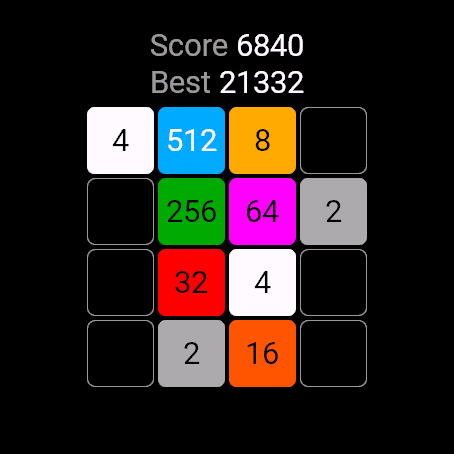
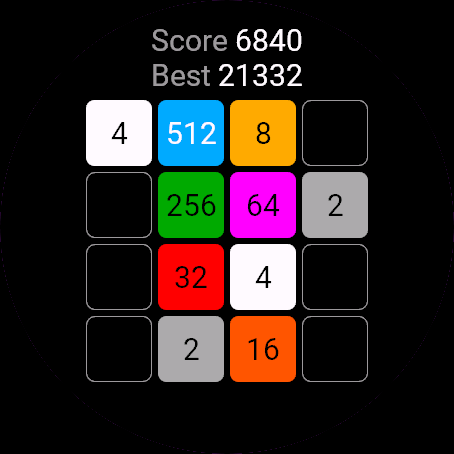
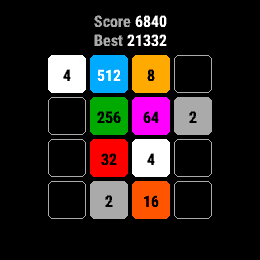
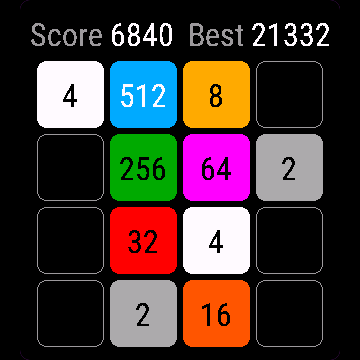
Tiles 2048 is the classic slide-and-merge puzzle on a 4x4 board. Slide all tiles one way, equal numbers merge into their sum, and a new 2 or 4 appears. Reach 2048, then keep going for a higher score. Score and best score stay on the watch.
Requirements and supported watches
Needs Connect IQ 3.3.0+ and the Connect IQ or Garmin Connect phone app. Supported watches:
- Round AMOLED: epix 2 and epix Pro 2, fēnix 8, E, Forerunner 165, 265, 570, 965, 970, Instinct 3 AMOLED, Crossover AMOLED, Venu 2, 3, 4, vivoactive 5, 6.
- Round MIP: enduro 3, fēnix 7 series, 8 Solar, Forerunner 55, 245, 255, vivoactive 4.
- Square and rectangular AMOLED: Venu Sq 2, Venu X1.
Installation
In the Connect IQ app on your phone (or Garmin Connect, then the Connect IQ Store) find "Tiles 2048" by Dialforge, tap Install and sync the watch. Open it from the apps list: press START on the watch face, then pick Tiles 2048.
First launch
A new board with two tiles opens, with Score and Best in the header. A short hint at the bottom (Hold UP = menu, or Hold screen = menu on touch watches) disappears after your first move. The 30-day free trial starts the first time you open it.
Controls
Watches with buttons (START, UP, DOWN, BACK)
- UP slides tiles up, DOWN slides them down.
- START slides right, BACK slides left.
- MENU (hold UP) opens the pause menu.
- Any press while a banner is showing just clears the banner.
Touch watches (tap, hold, swipe)
- Swipe in any of the four directions to slide the tiles.
- Hold the screen to open the menu.
- A tap only clears a banner.
Settings
Phone: Connect IQ app, Tiles 2048, Settings (the unlock code fields are there too).
On the watch, inside the app:
- Resume: back to the board.
- New game: wipes the current board and starts again (the best score stays).
- Quit: saves the board and closes the app.
License
- Free trial: 30 days from the first launch, everything works.
- Price: 5.99 EUR once at dialforge.dev, no subscription. The 8-character code is tied to your watch's UID.
- Where to enter it: phone, Connect IQ app, Tiles 2048, Settings. Read the UID in "Watch UID (needed to buy a code)", buy the code, then type it into "Unlock code from dialforge.dev". The trial-ended screen on the watch shows the UID too.
- After the free trial without a code: a trial-ended screen with the UID replaces the app. Enter the code, then open it again. New watch? Write to us and the code moves for free.
Privacy and permissions
No special permissions.
No internet use. Data stays on the watch.
Troubleshooting
The code does not work. Check that the UID you bought for matches "Watch UID (needed to buy a code)" and type all 8 characters (case is ignored, no 0, O, 1 or I). A code for another app does not fit. Sync, then reopen.
Why did nothing happen after my move? A move that changes nothing is ignored: no new tile, no points. Slide another way.
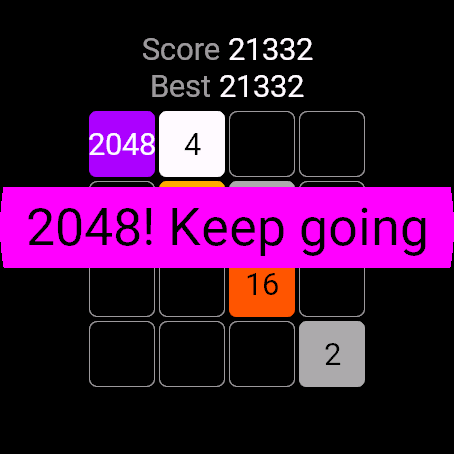
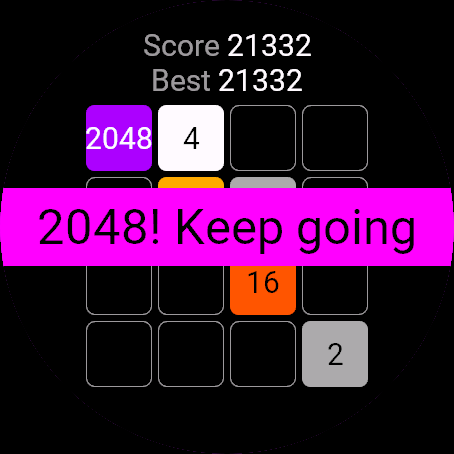
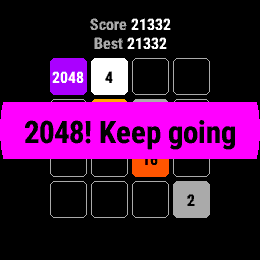
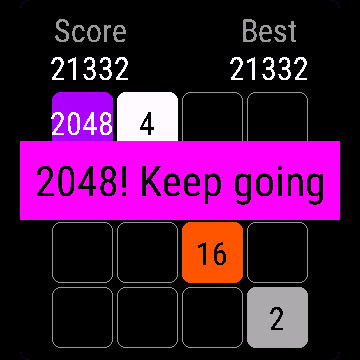
What happens at 2048? A banner says 2048! Keep going. Press anything and you play on, with no limit, for a higher score.
I see 1K or 2K on a tile. On very small screens the full number does not fit, so tiles from 1024 up are shortened to 1K, 2K and so on.
Is my game saved? Yes, after every move. The board and score come back when you reopen the app.
Contact
kontakt@dialforge.dev or dialforge.dev. Please write before leaving a low rating.
Kafelki 2048: instrukcja obsługi
Do czego służy
Kafelki 2048 to klasyczna łamigłówka z przesuwaniem na planszy 4x4. Przesuwasz wszystkie kafle w jedną stronę, równe liczby łączą się w sumę i pojawia się nowa dwójka albo czwórka. Dojdź do 2048, a potem graj dalej o wyższy wynik. Wynik i rekord zostają w zegarku.
Wymagania i obsługiwane zegarki
Wymaga Connect IQ 3.3.0+ i aplikacji Connect IQ albo Garmin Connect w telefonie. Obsługiwane zegarki:
- Okrągłe AMOLED: epix 2 i epix Pro 2, fēnix 8, E, Forerunner 165, 265, 570, 965, 970, Instinct 3 AMOLED, Crossover AMOLED, Venu 2, 3, 4, vivoactive 5, 6.
- Okrągłe MIP: enduro 3, seria fēnix 7, fēnix 8 Solar, Forerunner 55, 245, 255, vivoactive 4.
- Kwadratowe i prostokątne AMOLED: Venu Sq 2, Venu X1.
Instalacja
Na telefonie otwórz aplikację Connect IQ (albo Garmin Connect, a w niej sklep Connect IQ), wyszukaj "Kafelki 2048" od Dialforge, stuknij Zainstaluj i zsynchronizuj zegarek. Uruchom ją z listy aplikacji: na tarczy naciśnij START i wybierz Kafelki 2048.
Pierwsze uruchomienie
Otwiera się nowa plansza z dwoma kaflami, w nagłówku Wynik i Rekord. Krótka podpowiedź na dole (Przytrzymaj GÓRA = menu albo Przytrzymaj ekran = menu na zegarkach dotykowych) znika po pierwszym ruchu. 30-dniowa darmowa próba zaczyna się przy pierwszym otwarciu.
Sterowanie
Zegarki z przyciskami (START, GÓRA, DÓŁ, WSTECZ)
- GÓRA przesuwa kafle w górę, DÓŁ w dół.
- START przesuwa w prawo, WSTECZ w lewo.
- MENU (przytrzymaj GÓRA) otwiera menu pauzy.
- Każde naciśnięcie przy widocznym banerze tylko go zdejmuje.
Zegarki dotykowe (stuknięcie, przytrzymanie, przesunięcie)
- Przesuń palcem w jedną z czterech stron, żeby przesunąć kafle.
- Przytrzymaj ekran, żeby otworzyć menu.
- Stuknięcie tylko zdejmuje baner.
Ustawienia
Telefon: aplikacja Connect IQ, Kafelki 2048, Ustawienia (są tam też pola kodu odblokowania).
Na zegarku, w aplikacji:
- Wznów: powrót do planszy.
- Nowa gra: czyści planszę i zaczyna od nowa (rekord zostaje).
- Zamknij: zapisuje planszę i zamyka aplikację.
Licencja
- Darmowa próba: 30 dni od pierwszego uruchomienia, wszystko działa.
- Cena: jednorazowo 5,99 EUR na dialforge.dev, bez abonamentu. 8-znakowy kod jest przypisany do UID zegarka.
- Gdzie wpisać: telefon, aplikacja Connect IQ, Kafelki 2048, Ustawienia. Odczytaj UID w polu "UID zegarka (potrzebny do zakupu kodu)", kup kod i wpisz go w "Kod odblokowania z dialforge.dev". Ekran końca próby na zegarku też pokazuje UID.
- Po becie bez kodu: zamiast aplikacji pojawia się ekran końca próby z UID. Wpisz kod i otwórz aplikację ponownie. Nowy zegarek? Napisz do nas, przeniesiemy kod za darmo.
Prywatność i uprawnienia
Brak szczególnych uprawnień.
Zero połączeń z internetem. Dane zostają w zegarku.
Rozwiązywanie problemów
Kod nie działa. Sprawdź, czy UID, dla którego kupiono kod, zgadza się z polem "UID zegarka (potrzebny do zakupu kodu)", i wpisz wszystkie 8 znaków (wielkość liter bez znaczenia, bez 0, O, 1, I). Kod do innej aplikacji nie pasuje. Zsynchronizuj i otwórz ponownie.
Czemu po ruchu nic się nie stało? Ruch, który niczego nie zmienia, jest ignorowany: bez nowego kafla i bez punktów. Przesuń w inną stronę.
Co się dzieje przy 2048? Baner 2048! Graj dalej. Naciśnij cokolwiek i gra toczy się dalej, bez limitu, o wyższy wynik.
Na kaflu widzę 1K albo 2K. Na bardzo małych ekranach pełna liczba się nie mieści, więc kafle od 1024 w górę skraca się do 1K, 2K i tak dalej.
Czy gra się zapisuje? Tak, po każdym ruchu. Plansza i wynik wracają po ponownym otwarciu aplikacji.
Kontakt
kontakt@dialforge.dev albo dialforge.dev. Napisz, zanim wystawisz niską ocenę.
Permissions and privacy
This product does not use the internet and sends no data to our servers.
The full manual and the detailed permission descriptions are available in English and Polish.
Compatible watches
51mm, Adventurer, Captain, Carbon Edition, Commander - Carbon Edition, D2 Air X15, D2 Mach 1 Pro, Enduro 2, Enduro 3, epix (Gen 2), epix Pro (Gen 2) 42mm, epix Pro (Gen 2) 47mm, epix Pro (Gen 2) 51mm, Forerunner 165, Forerunner 165 Music, Forerunner 245, Forerunner 245 Music, Forerunner 255, Forerunner 255 Music, Forerunner 255s, Forerunner 255s Music, Forerunner 265, Forerunner 265s, Forerunner 55, Forerunner 570 42mm, Forerunner 570 47mm, Forerunner 965, Forerunner 970, fēnix 7, fēnix 7 Pro, fēnix 7 Pro - Solar Edition (no Wi-Fi), fēnix 7S, fēnix 7S Pro, fēnix 7X, fēnix 7X Pro, fēnix 7X Pro - Solar Edition (no Wi-Fi), fēnix 8 43mm, fēnix 8 47mm, fēnix 8 Pro 47mm, fēnix 8 Solar 47mm, fēnix 8 Solar 51mm, fēnix E, Golfer, Instinct 3 AMOLED 45mm, Instinct 3 AMOLED 50mm, Instinct Crossover AMOLED, MARQ (Gen 2) Athlete, MARQ (Gen 2) Aviator, MARQ Adventurer, MARQ Athlete, MARQ Aviator, MARQ Captain, MARQ Captain: American Magic Edition, MARQ Commander, MARQ Driver, MARQ Expedition, MARQ Golfer, MicroLED, quatix 7, quatix 7 Pro, quatix 7 Sapphire, quatix 7X Solar, quatix 8 47mm, quatix 8 Pro 47mm, tactix 7, tactix 7 – AMOLED Edition, tactix 8 47mm, tactix 8 Solar 51mm, Venu 2, Venu 2 Plus, Venu 2S, Venu 3, Venu 3S, Venu 4 41mm, Venu 4 45mm, Venu Sq 2, Venu Sq 2 Music, Venu X1, vívoactive 4, vívoactive 4S, vívoactive 5, vívoactive 6
Rate it
Screenshots
Video
FAQ
What happens after the 30-day free trial?
The app shows a screen asking for a one-time unlock code from dialforge.dev instead of opening normally. Buy the code once below, no subscription.
Does the app send my data to Dialforge?
No. The app works fully offline, and the unlock code is checked on the watch itself, without contacting any server.
The app does not work as described on my watch. What can I do?
Write through the feedback form below, or to the e-mail in the footer, and we will fix it.
Changing your watch?
Write to me and I will move your code for free.
Changelog
- New app icon.
- Nowa ikona aplikacji.
- Neues App-Symbol.
- Nouvelle icône de l'application.
- Nuevo icono de la aplicación.
- Nieuw app-pictogram.
- アプリの新しいアイコン。
- Nuova icona dell'app.
- 全新应用图标。
- Новая иконка приложения.
- Novo ícone do app.
- Nová ikona aplikace.
- Novo ícone da aplicação.
- 새로운 앱 아이콘.
- Ny appikon.
- Nyt appikon.
- Nytt appikon.
- 全新應用程式圖示。
- Uusi sovelluskuvake.
- Nová ikona aplikácie.
- Nova ikona aplikacije.
- Ikon aplikasi baru.
- Új alkalmazásikon.
- ไอคอนแอปใหม่
- Νέο εικονίδιο εφαρμογής.
- Nova ikona aplikacije.
- סמל אפליקציה חדש.
- Ikon aplikasi baharu.
Unlock
€5.99
One-time payment. No subscription. The code works on the watch whose ID you enter.
- Install the app from the Connect IQ store. It works fully and for free for the first 30 days.
- Enter the watch ID and pay. The code appears here at once and in the e-mail you give when paying.
- Pay.
- Copy the code.
- Enter the code in the app settings, field "Unlock code". The watch checks it offline.
Payment works best in Safari or Chrome: menu (three dots) > Open in browser
Read it in the settings of this app, field UID. It is not the serial number of the watch.
Your ID, compare it with the watch:
Where do I find the ID?
The ID is different in every face and app, so read it in the one you are buying. Find your 10-digit UID: Connect IQ app on the phone > My Device > Apps or Data Fields > this app > Settings > UID.
Code not working on your watch? Write to me and I will fix it.
Payments by Stripe. Seller: Mateusz Kolarz, Lublin, Poland.
Paid. Code:
We show the code here too. If the e-mail does not arrive (check spam), you can recover the code in the Recover code section with just the UID. Recover code
Copying did not work. The code is selected: copy it by hand.
Enter the code in the app settings, field "Unlock code". The watch checks it offline.
Enjoying a face or app? A rating and comment in the Connect IQ Store helps a lot. Rate in Connect IQ