7-day free trial, then a one-time 4.99 EUR unlock code at dialforge.dev. No subscription.
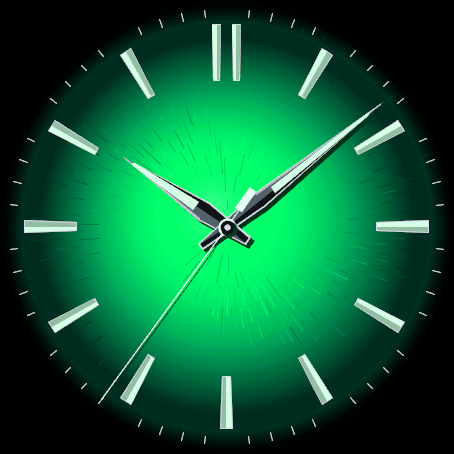
A clean analog dial in any of 360 colours, glowing from the centre and fading to black at the rim.
- Colour: 14 ready colours picked by swatch on the watch, a list of what other users pick, and a custom hue from 0 to 359 with a colour ring and live preview. Only an anonymous colour number is sent for that list.
- Three intensities: Vivid, Deep and Pastel.
- Shimmer: the dial glints like sun on metal flakes and glows a little brighter when the screen wakes, e.g. when you raise your wrist (Off, Subtle or Strong). Only while the screen is on.
- Smoky gradient with a brushed metal texture (can be switched off). Nothing else on the dial: no numerals, no text, no data fields.
- Polished baton indices with a luminous fill and a double bar at 12.
- Minute track: off, fine, or alternating long and short ticks.
- Dauphine hands with a luminous strip and a steel outline, plus an optional thin seconds hand with a counterweight.
- Always-on mode for AMOLED: black screen, only the outlines of the indices and of the hour and minute hands, shifted every minute.
- For AMOLED watches only.
Garmin does not give watch faces access to HRV status or Training Readiness, so no Connect IQ watch face can show them.
Settings: on the watch (hold MENU, then Watch face, then Customize) or in the Connect IQ app.
A little request from the maker
Dialforge is my student project. I build these watch faces after classes, so they are still at an early stage, and I could not test every watch model myself. If something looks wrong on your watch, please do not leave a negative rating: write to me first at https://dialforge.dev/faces/fumedial/ and I will fix it, usually within 24 hours. A kind review means more to me than you can imagine. And if you like my work, you can buy me a coffee (the link is at the bottom of dialforge.dev): I am saving up to pay for my studies. Thank you for your patience and for giving a young developer a chance.
7 dni za darmo, potem jednorazowy kod za 4,99 EUR na dialforge.dev. Bez abonamentu.
Czysta tarcza analogowa w dowolnym z 360 kolorów: świeci od środka i gaśnie do czerni przy brzegu.
- Kolor: 14 gotowych kolorów wybieranych na zegarku z kolorową kropką, lista tego, co wybierają inni, i własny odcień od 0 do 359 z kolorowym kołem i podglądem na żywo. Do tej listy wysyłany jest tylko anonimowy numer koloru.
- Trzy intensywności: Żywy, Głęboki i Pastelowy.
- Połysk: tarcza błyska jak słońce na metalowych płatkach i trochę jaśnieje, gdy ekran się budzi, np. po uniesieniu nadgarstka (Wył., Delikatny lub Mocny). Tylko przy włączonym ekranie.
- Dymny gradient i szczotkowana faktura metalu (można wyłączyć). Poza tym nic na tarczy: ani cyfr, ani napisów, ani pól z danymi.
- Polerowane indeksy w kształcie pałeczek ze świecącym wypełnieniem, podwójny indeks na 12.
- Podziałka minut: wyłączona, cienka albo na przemian długa i krótka.
- Wskazówki dauphine ze świecącym paskiem i stalowym obrysem, do tego opcjonalny cienki sekundnik z przeciwwagą.
- Tryb zawsze włączony na AMOLED: czarny ekran, tylko kontury indeksów oraz wskazówek godzin i minut, przesuwane co minutę.
- Tylko dla zegarków z ekranem AMOLED.
Garmin nie udostępnia tarczom statusu HRV ani gotowości treningowej, więc żadna tarcza Connect IQ ich nie pokaże.
Ustawienia: na zegarku (przytrzymaj MENU, potem Tarcza zegarka, potem Dostosuj) albo w aplikacji Connect IQ.
Mała prośba od autora
Dialforge to mój studencki projekt. Robię te tarcze po zajęciach, więc są jeszcze na wczesnym etapie i nie mogłem przetestować każdego modelu zegarka. Jeśli coś wygląda źle na Twoim zegarku, proszę, nie wystawiaj negatywnej oceny: napisz najpierw do mnie na https://dialforge.dev/faces/fumedial/, a naprawię to, zwykle w ciągu 24 godzin. Życzliwa opinia znaczy dla mnie więcej, niż myślisz. A jeśli podoba Ci się moja praca, możesz postawić mi kawę (link na dole strony dialforge.dev): zbieram na opłacenie studiów. Dziękuję za cierpliwość i za dane szansy młodemu twórcy.
7 Tage kostenlos testen, danach ein einmaliger Freischaltcode für 4,99 EUR auf dialforge.dev. Kein Abo.
Ein schlichtes analoges Zifferblatt in einer von 360 Farben: leuchtet aus der Mitte und läuft zum Rand hin in Schwarz aus.
- Farbe: 14 fertige Farben, per Farbfeld direkt auf der Uhr gewählt, eine Liste der beliebtesten Auswahl anderer Nutzer und ein eigener Farbton von 0 bis 359 mit Farbring und Live-Vorschau. Für diese Liste wird nur eine anonyme Farbnummer gesendet.
- Drei Intensitäten: Lebhaft, Tief und Pastell.
- Glanz: das Zifferblatt glitzert wie Sonne auf Metallplättchen und leuchtet etwas heller, wenn das Display aufwacht, z. B. beim Heben des Handgelenks (Aus, Dezent oder Stark). Nur bei eingeschaltetem Display.
- Rauchiger Farbverlauf mit gebürsteter Metallstruktur (abschaltbar). Sonst nichts auf dem Zifferblatt: keine Ziffern, kein Text, keine Datenfelder.
- Polierte Strichindizes mit Leuchtfüllung und Doppelstrich bei 12.
- Minutenskala: aus, fein oder abwechselnd lange und kurze Striche.
- Dauphine-Zeiger mit Leuchtstreifen und Stahlkontur, dazu ein optionaler dünner Sekundenzeiger mit Gegengewicht.
- Always-on-Modus für AMOLED: schwarzer Bildschirm, nur die Konturen der Indizes sowie des Stunden- und Minutenzeigers, jede Minute verschoben.
- Nur für AMOLED-Uhren.
Garmin gibt Zifferblättern keinen Zugriff auf den HRV-Status oder die Trainingsbereitschaft, daher kann kein Connect IQ Zifferblatt sie anzeigen.
Einstellungen: auf der Uhr (MENU gedrückt halten, dann Displaydesign, dann Anpassen) oder in der Connect IQ App.
Eine kleine bitte des entwicklers
Dialforge ist mein Studentenprojekt. Ich baue diese Zifferblätter nach den Vorlesungen, deshalb sind sie noch in einer frühen Phase, und ich konnte nicht jedes Uhrenmodell selbst testen. Wenn auf deiner Uhr etwas nicht stimmt, hinterlasse bitte keine schlechte Bewertung: Schreib mir zuerst auf https://dialforge.dev/faces/fumedial/, dann behebe ich es, meist innerhalb von 24 Stunden. Eine freundliche Bewertung bedeutet mir mehr, als du denkst. Und wenn dir meine Arbeit gefällt, kannst du mir einen Kaffee spendieren (den Link findest du unten auf dialforge.dev): Ich spare für mein Studium. Danke für deine Geduld und dafür, dass du einem jungen Entwickler eine Chance gibst.
Essai gratuit de 7 jours, puis un code de déverrouillage unique à 4,99 EUR sur dialforge.dev. Sans abonnement.
Un cadran analogique épuré dans l'une des 360 couleurs : il brille depuis le centre et s'efface vers le noir au bord.
- Couleur : 14 couleurs prêtes, choisies avec une pastille sur la montre, une liste des choix des autres utilisateurs et une teinte perso de 0 à 359 avec anneau de couleur et aperçu en direct. Pour cette liste, seul un numéro de couleur anonyme est envoyé.
- Trois intensités : Vif, Profond et Pastel.
- Reflets : le cadran scintille comme le soleil sur des paillettes de métal et s'illumine un peu quand l'écran se réveille, par exemple en levant le poignet (Désactivé, Discret ou Fort). Uniquement écran allumé.
- Dégradé fumé avec texture de métal brossé (désactivable). Rien d'autre sur le cadran : pas de chiffres, pas de texte, pas de champs de données.
- Index bâton polis avec remplissage lumineux et double barre à 12 heures.
- Graduation des minutes : désactivée, fine, ou traits longs et courts en alternance.
- Aiguilles dauphine avec bande lumineuse et contour acier, plus une fine trotteuse optionnelle avec contrepoids.
- Mode toujours actif pour AMOLED : écran noir, seulement les contours des index et des aiguilles des heures et des minutes, déplacés chaque minute.
- Uniquement pour les montres AMOLED.
Garmin ne donne pas aux cadrans l'accès au statut VFC ni à la Préparation à l'entraînement, aucun cadran Connect IQ ne peut donc les afficher.
Réglages : sur la montre (maintenez MENU, puis Cadran, puis Personnaliser) ou dans l'application Connect IQ.
Une petite demande du créateur
Dialforge est mon projet étudiant. Je crée ces cadrans après les cours, ils en sont donc encore à un stade précoce, et je n'ai pas pu tester tous les modèles de montre. Si quelque chose ne va pas sur votre montre, s'il vous plaît, ne laissez pas de note négative : écrivez-moi d'abord sur https://dialforge.dev/faces/fumedial/ et je corrigerai cela, en général sous 24 heures. Un avis bienveillant compte plus que vous ne l'imaginez. Et si vous aimez mon travail, vous pouvez m'offrir un café (le lien se trouve en bas de dialforge.dev) : j'économise pour payer mes études. Merci pour votre patience et pour la chance donnée à un jeune développeur.
Prueba gratuita de 7 días y luego un código de desbloqueo único de 4,99 EUR en dialforge.dev. Sin suscripción.
Una esfera analógica limpia en cualquiera de 360 colores: brilla desde el centro y se apaga en negro hacia el borde.
- Color: 14 colores listos con muestra de color en el reloj, una lista de lo que eligen otros usuarios y un matiz propio de 0 a 359 con anillo de color y vista previa en vivo. Para esa lista solo se envía un número de color anónimo.
- Tres intensidades: Vivo, Profundo y Pastel.
- Destello: la esfera brilla como el sol sobre escamas de metal y se ilumina un poco al activarse la pantalla, p. ej. al levantar la muñeca (Apagado, Sutil o Intenso). Solo con la pantalla encendida.
- Degradado ahumado con textura de metal cepillado (se puede desactivar). Nada más en la esfera: sin números, sin texto, sin campos de datos.
- Índices de barra pulidos con relleno luminoso y barra doble en las 12.
- Escala de minutos: apagada, fina o con marcas largas y cortas alternas.
- Agujas dauphine con tira luminosa y contorno de acero, y un segundero fino opcional con contrapeso.
- Modo siempre activo para AMOLED: pantalla negra, solo los contornos de los índices y de las agujas de hora y minutos, desplazados cada minuto.
- Solo para relojes AMOLED.
Garmin no da a las esferas acceso al estado de VFC ni a la Preparación para el entrenamiento, así que ninguna esfera Connect IQ puede mostrarlos.
Ajustes: en el reloj (mantén pulsado MENU, luego Esfera y después Personalizar) o en la app Connect IQ.
Una pequeña petición del creador
Dialforge es mi proyecto de estudiante. Creo estas esferas después de clase, así que todavía están en una fase temprana y no pude probar todos los modelos de reloj. Si algo no se ve bien en tu reloj, por favor no dejes una valoración negativa: escríbeme primero en https://dialforge.dev/faces/fumedial/ y lo arreglaré, normalmente en 24 horas. Una reseña amable significa para mí más de lo que imaginas. Y si te gusta mi trabajo, puedes invitarme a un café (el enlace está al final de dialforge.dev): estoy ahorrando para pagar mis estudios. Gracias por tu paciencia y por darle una oportunidad a un desarrollador joven.
7 dagen gratis proberen, daarna een eenmalige ontgrendelcode van 4,99 EUR op dialforge.dev. Geen abonnement.
Een strakke analoge wijzerplaat in elk van de 360 kleuren: hij gloeit vanuit het midden en loopt naar de rand uit in zwart.
- Kleur: 14 kant-en-klare kleuren met kleurstaal op het horloge, een lijst met de keuzes van andere gebruikers en een eigen tint van 0 tot 359 met kleurring en live voorbeeld. Voor die lijst wordt alleen een anoniem kleurnummer verstuurd.
- Drie intensiteiten: Levendig, Diep en Pastel.
- Glans: de wijzerplaat glinstert als zon op metaalschilfers en licht wat op wanneer het scherm ontwaakt, bijvoorbeeld als je je pols opheft (Uit, Subtiel of Sterk). Alleen bij ingeschakeld scherm.
- Rookachtig kleurverloop met geborstelde metaalstructuur (uit te zetten). Verder niets op de wijzerplaat: geen cijfers, geen tekst, geen gegevensvelden.
- Gepolijste staafindexen met lichtgevende vulling en een dubbele staaf bij 12.
- Minutenschaal: uit, fijn, of afwisselend lange en korte streepjes.
- Dauphine-wijzers met lichtgevende strip en stalen rand, plus een optionele dunne secondewijzer met tegengewicht.
- Always-on-modus voor AMOLED: zwart scherm, alleen de contouren van de indexen en van de uur- en minutenwijzer, elke minuut verschoven.
- Alleen voor AMOLED-horloges.
Garmin geeft wijzerplaten geen toegang tot de HRV-status of trainingsgereedheid, dus geen enkele Connect IQ-wijzerplaat kan die tonen.
Instellingen: op het horloge (houd MENU ingedrukt, dan Wijzerplaat, dan Aanpassen) of in de Connect IQ-app.
Een klein verzoek van de maker
Dialforge is mijn studentenproject. Ik maak deze wijzerplaten na de colleges, dus ze zijn nog in een vroeg stadium en ik kon niet elk horlogemodel zelf testen. Ziet er iets verkeerd uit op je horloge, geef dan alsjeblieft geen negatieve beoordeling: schrijf me eerst via https://dialforge.dev/faces/fumedial/, dan los ik het op, meestal binnen 24 uur. Een vriendelijke review betekent meer voor me dan je denkt. En als je mijn werk waardeert, kun je een koffie voor me kopen (de link staat onderaan dialforge.dev): ik spaar om mijn studie te betalen. Bedankt voor je geduld en voor de kans die je een jonge ontwikkelaar geeft.
7日間無料でお試しいただけます。その後はdialforge.devで4.99ユーロの解除コードを一度だけ購入(サブスクリプションなし)。
360色から選べる、すっきりしたアナログ文字盤。中心から光り、縁に向かって黒へ溶けていきます。
- カラー:時計上でカラーサンプルを見ながら選べる14色、他のユーザーが選んだ色の一覧、色相0〜359を自由に選べるカスタム(カラーリングとライブプレビュー付き)。この一覧のために送信されるのは匿名の色番号だけです。
- 3つの濃さ:ビビッド、ディープ、パステル。
- シマー:画面が点灯したとき(手首を上げたときなど)、金属片に当たる陽光のように文字盤がきらめき、少し明るくなります(オフ、控えめ、強め)。画面点灯中のみ。
- スモーク調のグラデーションとブラッシュドメタルの質感(オフにもできます)。文字盤にはほかに何もありません。数字も文字もデータ欄もありません。
- 夜光塗料入りの磨かれたバーインデックス。12時は2本のバー。
- 分目盛:オフ、細い線、または長短交互の線。
- 夜光ストライプとスチールの縁取りを持つドーフィン針。オプションでカウンターウェイト付きの細い秒針。
- AMOLED用の常時表示モード:黒い画面にインデックスと時針・分針の輪郭だけを表示し、1分ごとに位置をずらします。
- AMOLEDディスプレイの時計専用です。
GarminはウォッチフェイスにHRVステータスやトレーニングレディネスを公開していないため、Connect IQのウォッチフェイスでは表示できません。
設定:時計本体(MENUを長押し→文字盤→カスタマイズ)またはConnect IQアプリから。
作者からの小さなお願い
Dialforgeは私の学生プロジェクトです。授業のあとにこれらの文字盤を作っているため、まだ初期段階で、すべての時計モデルで試すことはできませんでした。お使いの時計で表示がおかしいときは、低い評価をつけずに、まずhttps://dialforge.dev/faces/fumedial/ で私に連絡してください。通常24時間以内に修正します。温かいレビューは、想像以上にうれしいものです。私の仕事を気に入っていただけたら、コーヒーをおごっていただくこともできます(リンクはdialforge.devの一番下にあります)。学費を貯めているところです。ご辛抱いただき、若い開発者にチャンスをくださってありがとうございます。
Prova gratuita di 7 giorni, poi un codice di sblocco una tantum da 4,99 EUR su dialforge.dev. Nessun abbonamento.
Un quadrante analogico pulito in uno qualsiasi dei 360 colori: brilla dal centro e sfuma nel nero verso il bordo.
- Colore: 14 colori pronti con campione di colore sull'orologio, un elenco delle scelte degli altri utenti e una tonalità propria da 0 a 359 con anello colori e anteprima dal vivo. Per quell'elenco viene inviato solo un numero di colore anonimo.
- Tre intensità: Vivido, Profondo e Pastello.
- Riflessi: il quadrante luccica come il sole su scaglie di metallo e si illumina un po' quando lo schermo si attiva, ad es. sollevando il polso (Spento, Leggero o Intenso). Solo a schermo acceso.
- Sfumatura fumé con texture di metallo satinato (disattivabile). Nient'altro sul quadrante: niente numeri, niente testo, niente campi dati.
- Indici a bastoncino lucidati con riempimento luminoso e doppio indice sulle 12.
- Scala dei minuti: spenta, fine, oppure tacche lunghe e corte alternate.
- Lancette dauphine con striscia luminosa e bordo in acciaio, più una sottile lancetta dei secondi opzionale con contrappeso.
- Modo sempre attivo per AMOLED: schermo nero, solo i contorni degli indici e delle lancette di ore e minuti, spostati ogni minuto.
- Solo per orologi AMOLED.
Garmin non dà ai quadranti accesso allo stato HRV né alla Training Readiness, quindi nessun quadrante Connect IQ può mostrarli.
Impostazioni: sull'orologio (tieni premuto MENU, poi Quadrante, poi Personalizza) oppure nell'app Connect IQ.
Una piccola richiesta dall'autore
Dialforge è il mio progetto da studente. Creo questi quadranti dopo le lezioni, quindi sono ancora in una fase iniziale e non ho potuto provare ogni modello di orologio. Se qualcosa sembra sbagliato sul tuo orologio, per favore non lasciare una valutazione negativa: scrivimi prima su https://dialforge.dev/faces/fumedial/ e lo correggo, di solito entro 24 ore. Una recensione gentile per me conta più di quanto immagini. E se ti piace il mio lavoro, puoi offrirmi un caffè (il link è in fondo a dialforge.dev): sto mettendo da parte i soldi per pagarmi gli studi. Grazie per la pazienza e per aver dato una possibilità a un giovane sviluppatore.
7 天免费试用,之后在 dialforge.dev 以 4.99 欧元购买一次性解锁码(无需订阅)。
一款简洁的指针表盘,可选360种颜色,从中心发光,向边缘渐变为黑色。
- 颜色:在手表上通过色块选择14种现成颜色,查看其他用户的常用选择,也可用色环和实时预览自选0到359的色相。该列表只会发送匿名的颜色编号。
- 三种浓度:鲜艳、深邃、柔和。
- 闪光:屏幕亮起时(如抬起手腕),表盘像阳光照在金属片上一样闪烁,并略微变亮(关闭、柔和或强烈)。仅在屏幕亮起时有效。
- 烟熏渐变和拉丝金属质感(可关闭)。表盘上没有其他内容:没有数字、没有文字、没有数据栏。
- 带夜光填充的抛光条形时标,12点为双条。
- 分钟刻度:关闭、细刻度,或长短交替刻度。
- 带夜光条和钢色轮廓的太子妃针,另有可选的带配重的细秒针。
- AMOLED息屏常亮模式:黑色屏幕,只显示时标以及时针和分针的轮廓,每分钟移动一次。
- 仅适用于AMOLED手表。
Garmin 不向表盘开放 HRV 状态和训练准备度,因此任何 Connect IQ 表盘都无法显示。
设置:在手表上,长按 MENU,然后依次点击表盘、自定义;或在 Connect IQ 应用中设置。
来自作者的一个小请求
Dialforge 是我的学生项目。我利用课余时间做这些表盘,所以它们还处于早期阶段,我也没法在每一款手表上测试。如果您的手表上有什么看起来不对劲,请不要给差评,请先写信到 https://dialforge.dev/faces/fumedial/ 告诉我,我会修复,通常在 24 小时内。一条善意的评价对我来说比您想象的更有意义。如果您喜欢我的作品,也可以请我喝杯咖啡(链接在 dialforge.dev 页面底部):我在攒钱付学费。谢谢您的耐心,也谢谢您愿意给一个年轻开发者一个机会。
7-дневный бесплатный пробный период, затем разовый код разблокировки за 4,99 EUR на dialforge.dev. Без подписки.
Лаконичный аналоговый циферблат в любом из 360 цветов, светящийся от центра и угасающий до черного у края.
- Цвет: 14 готовых цветов, выбираемых по образцу на часах, список того, что выбирают другие пользователи, и собственный оттенок от 0 до 359 с цветовым кругом и предварительным просмотром в реальном времени. Для этого списка отправляется только анонимный номер цвета.
- Три варианта интенсивности: яркая, глубокая и пастельная.
- Мерцание: циферблат переливается, как солнце на металлических частицах, и светится чуть ярче при активации экрана, например при поднятии запястья (выключено, легкое или сильное). Только при включенном экране.
- Дымчатый градиент с текстурой шлифованного металла (можно отключить). Ничего лишнего на циферблате: никаких цифр, текста или полей данных.
- Полированные часовые метки в форме палочек со светящимся заполнением и двойная метка на 12.
- Минутная шкала: выключена, тонкая или с чередованием длинных и коротких делений.
- Стрелки dauphine со светящейся полоской и стальным контуром, а также дополнительная тонкая секундная стрелка с противовесом.
- Режим Always-on для AMOLED: черный экран, только контуры меток, а также часовой и минутной стрелок, со сдвигом каждую минуту.
- Только для часов с экраном AMOLED.
Garmin не предоставляет циферблатам доступ к HRV status или Training Readiness, поэтому ни один циферблат Connect IQ не может их отображать.
Настройки: на часах (удерживайте MENU, затем Циферблат, затем Настройка) или в приложении Connect IQ.
Небольшая просьба от автора
Dialforge - это мой студенческий проект. Я делаю эти циферблаты после занятий, поэтому они ещё на раннем этапе, и я не мог проверить каждую модель часов. Если что-то выглядит неправильно на ваших часах, пожалуйста, не ставьте низкую оценку: сначала напишите мне на https://dialforge.dev/faces/fumedial/, и я всё исправлю, обычно в течение 24 часов. Доброе слово в отзыве значит для меня больше, чем вы думаете. А если вам нравится моя работа, можете угостить меня кофе (ссылка внизу страницы dialforge.dev): я коплю на оплату учёбы. Спасибо за терпение и за то, что даёте шанс молодому разработчику.
Teste grátis de 7 dias, depois um código de desbloqueio único de 4,99 EUR em dialforge.dev. Sem assinatura.
Um mostrador analógico limpo em qualquer uma de 360 cores: brilha a partir do centro e escurece até o preto na borda.
- Cor: 14 cores prontas escolhidas com uma amostra no relógio, uma lista do que outros usuários escolhem e um matiz próprio de 0 a 359 com anel de cores e visualização ao vivo. Para essa lista só é enviado um número de cor anônimo.
- Três intensidades: Vivo, Profundo e Pastel.
- Brilho: o mostrador cintila como o sol em lascas de metal e fica um pouco mais luminoso quando a tela acende, por exemplo ao levantar o pulso (Desligado, Sutil ou Forte). Somente com a tela ligada.
- Degradê esfumaçado com textura de metal escovado (pode ser desligada). Nada mais no mostrador: sem números, sem texto, sem campos de dados.
- Índices em barra polidos com preenchimento luminoso e barra dupla no 12.
- Escala de minutos: desligada, fina ou com marcas longas e curtas alternadas.
- Ponteiros dauphine com faixa luminosa e contorno de aço, mais um ponteiro de segundos fino opcional com contrapeso.
- Modo sempre ativo para AMOLED: tela preta, só os contornos dos índices e dos ponteiros de hora e minuto, deslocados a cada minuto.
- Somente para relógios AMOLED.
A Garmin não dá aos mostradores acesso ao status de VFC nem à prontidão para treino, então nenhum mostrador Connect IQ consegue exibi-los.
Configurações: no relógio (segure MENU, depois Mostrador, depois Personalizar) ou no aplicativo Connect IQ.
Um pequeno pedido do criador
O Dialforge é o meu projeto de estudante. Eu crio estes mostradores depois das aulas, então eles ainda estão numa fase inicial, e não consegui testar todos os modelos de relógio. Se algo parecer errado no seu relógio, por favor, não deixe uma avaliação negativa: escreva primeiro para mim em https://dialforge.dev/faces/fumedial/ e eu corrijo, normalmente em até 24 horas. Uma avaliação gentil significa para mim mais do que você imagina. E se você gosta do meu trabalho, pode me pagar um café (o link está no final de dialforge.dev): estou juntando dinheiro para pagar meus estudos. Obrigado pela paciência e por dar uma chance a um desenvolvedor iniciante.
7denní bezplatná zkušební verze, poté jednorázový odemykací kód za 4,99 EUR na dialforge.dev. Žádné předplatné.
Čistý analogový ciferník v kterékoli z 360 barev, zářící od středu a přecházející do černé u okraje.
- Barva: 14 připravených barev vybraných podle vzorníku na hodinkách, seznam toho, co vybírají ostatní uživatelé, a vlastní odstín od 0 do 359 s barevným kruhem a živým náhledem. Pro tento seznam se odesílá pouze anonymní číslo barvy.
- Tři intenzity: Sytá, Hluboká a Pastelová.
- Třpyt: ciferník se leskne jako slunce na kovových šupinkách a rozzáří se o něco jasněji při probuzení obrazovky, např. když zvednete zápěstí (Vypnuto, Jemný nebo Silný). Pouze při zapnuté obrazovce.
- Kouřový přechod s texturou broušeného kovu (lze vypnout). Na ciferníku není nic dalšího: žádné číslice, žádný text, žádná datová pole.
- Leštěné čárkové indexy s luminiscenční výplní a dvojitou čárkou na 12.
- Minutová stupnice: vypnutá, jemná nebo střídavě dlouhé a krátké rysky.
- Ručičky dauphine s luminiscenčním proužkem a ocelovým obrysem, plus volitelná tenká sekundová ručička s protizávažím.
- Režim always-on pro AMOLED: černá obrazovka, pouze obrysy indexů a hodinové i minutové ručičky, posouvané každou minutu.
- Pouze pro hodinky AMOLED.
Garmin neposkytuje ciferníkům přístup ke stavu HRV ani k Training Readiness, takže je nemůže zobrazit žádný ciferník z Connect IQ.
Nastavení: v hodinkách (podržte MENU, pak Vzhled hodinek, pak Upravit) nebo v aplikaci Connect IQ.
Malá prosba od tvůrce
Dialforge je můj studentský projekt. Tyto ciferníky dělám po škole, takže jsou zatím v rané fázi a nemohl jsem otestovat každý model hodinek. Pokud na vašich hodinkách něco nevypadá v pořádku, prosím, nedávejte negativní hodnocení: napište mi nejdřív na https://dialforge.dev/faces/fumedial/ a já to opravím, obvykle do 24 hodin. Milá recenze pro mě znamená víc, než si dokážete představit. A pokud se vám moje práce líbí, můžete mi koupit kávu (odkaz je dole na dialforge.dev): šetřím si na zaplacení studia. Děkuji vám za trpělivost a za to, že dáváte mladému vývojáři šanci.
7 dias de teste gratuito, depois um código de desbloqueio único de 4,99 EUR em dialforge.dev. Sem subscrição.
Um mostrador analógico limpo em qualquer uma das 360 cores, a brilhar a partir do centro e a esbater para preto na borda.
- Cor: 14 cores prontas escolhidas por amostra no relógio, uma lista das cores que outros utilizadores escolhem e um tom personalizado de 0 a 359 com anel de cores e pré-visualização em direto. Para essa lista é enviado apenas um número de cor anónimo.
- Três intensidades: Vivo, Profundo e Pastel.
- Brilho: o mostrador cintila como o sol em flocos de metal e brilha um pouco mais quando o ecrã acorda, por exemplo ao levantar o pulso (Desligado, Sutil ou Forte). Apenas com o ecrã ligado.
- Gradiente esfumado com textura de metal escovado (pode ser desativado). Mais nada no mostrador: sem números, sem texto, sem campos de dados.
- Índices em barra polidos com preenchimento luminoso e uma barra dupla às 12.
- Escala dos minutos: desligada, fina ou com traços longos e curtos alternados.
- Ponteiros Dauphine com uma faixa luminosa e contorno em aço, mais um ponteiro dos segundos fino opcional com contrapeso.
- Modo sempre ligado para AMOLED: ecrã preto, apenas os contornos dos índices e dos ponteiros das horas e dos minutos, deslocados a cada minuto.
- Apenas para relógios AMOLED.
A Garmin não dá aos mostradores acesso ao estado de HRV nem ao Training Readiness, por isso nenhum mostrador Connect IQ os pode apresentar.
Definições: no relógio (mantenha premido MENU, depois Mostrador, depois Personalizar) ou na aplicação Connect IQ.
Um pequeno pedido do criador
O Dialforge é o meu projeto de estudante. Crio estes mostradores depois das aulas, por isso ainda estão numa fase inicial, e não consegui testar todos os modelos de relógio. Se algo parecer errado no seu relógio, por favor não deixe uma avaliação negativa: escreva-me primeiro em https://dialforge.dev/faces/fumedial/ e eu corrijo, normalmente em 24 horas. Uma avaliação simpática significa para mim mais do que imagina. E se gostar do meu trabalho, pode oferecer-me um café (a ligação está no fundo de dialforge.dev): estou a poupar para pagar os meus estudos. Obrigado pela sua paciência e por dar uma oportunidade a um jovem programador.
7일 무료 체험 후, dialforge.dev에서 4.99 EUR 일회성 잠금 해제 코드를 구매하세요. 구독은 없습니다.
360가지 색상으로 설정할 수 있는 깔끔한 아날로그 다이얼. 중심에서 빛나며 가장자리로 갈수록 검정으로 사라집니다.
- 색상: 시계에서 견본으로 고르는 14가지 기본 색상, 다른 사용자가 고르는 색상 목록, 색상 링과 실시간 미리보기가 있는 0부터 359까지의 사용자 지정 색조. 이 목록에는 익명의 색상 번호만 전송됩니다.
- 세 가지 강도: Vivid, Deep, Pastel.
- Shimmer: 다이얼이 금속 입자에 비친 햇빛처럼 반짝이고, 손목을 들어 올리는 등 화면이 켜질 때 조금 더 밝게 빛납니다(Off, Subtle 또는 Strong). 화면이 켜져 있을 때만 작동합니다.
- 브러시드 메탈 질감의 스모키 그라데이션(끌 수 있음). 다이얼에는 그 외에 아무것도 없습니다. 숫자도, 글자도, 데이터 필드도 없습니다.
- 야광 도료를 채운 광택 바 인덱스와 12시 방향의 이중 막대.
- 분 트랙: 끔, 가늘게, 또는 긴 눈금과 짧은 눈금이 번갈아 나옴.
- 야광 줄과 스틸 윤곽이 있는 도핀 바늘, 그리고 균형추가 달린 선택 사항인 가는 초침.
- AMOLED용 상시 표시 모드: 검은 화면에 인덱스와 시침 및 분침의 윤곽만 표시, 매분 위치 이동.
- AMOLED 시계 전용.
Garmin은 워치페이스에 HRV 상태나 Training Readiness에 대한 접근을 허용하지 않으므로, 어떤 Connect IQ 워치페이스도 이를 표시할 수 없습니다.
설정: 시계에서(MENU를 길게 누른 다음 워치페이스, 사용자 설정) 또는 Connect IQ 앱에서 변경할 수 있습니다.
제작자의 작은 부탁
Dialforge는 제 학생 프로젝트입니다. 수업이 끝난 뒤에 이 워치페이스들을 만들고 있어서 아직 초기 단계이고, 모든 시계 모델을 직접 테스트하지는 못했습니다. 시계에서 이상한 점이 보이면 낮은 평점을 남기지 마시고 먼저 https://dialforge.dev/faces/fumedial/에서 알려 주세요. 보통 24시간 안에 고치겠습니다. 따뜻한 리뷰 하나가 제게는 상상 이상으로 큰 힘이 됩니다. 제 작업이 마음에 드신다면 커피를 사주실 수도 있습니다(링크는 dialforge.dev 맨 아래에 있습니다). 학비를 모으고 있습니다. 기다려 주시고 젊은 개발자에게 기회를 주셔서 감사합니다.
7 dagars gratis provperiod, sedan en upplåsningskod som engångsköp för 4,99 EUR på dialforge.dev. Ingen prenumeration.
En ren analog urtavla i valfri av 360 färger, som glöder från mitten och tonar ut till svart vid kanten.
- Färg: 14 färdiga färger som väljs med färgprov på klockan, en lista över vad andra användare väljer och en anpassad nyans från 0 till 359 med en färgring och förhandsvisning i realtid. Endast ett anonymt färgnummer skickas för den listan.
- Tre intensiteter: Livlig, Djup och Pastell.
- Skimmer: urtavlan glimmar som sol på metallflingor och lyser lite starkare när skärmen vaknar, t.ex. när du lyfter handleden (Av, Diskret eller Kraftig). Endast medan skärmen är på.
- Rökig gradient med en borstad metalltextur (kan stängas av). Inget annat på urtavlan: inga siffror, ingen text, inga datafält.
- Polerade stavindex med självlysande fyllning och dubbelstav vid 12.
- Minutskala: av, tunn eller omväxlande långa och korta streck.
- Dauphine-visare med självlysande rand och stålkontur, plus en valfri tunn sekundvisare med motvikt.
- Always-on-läge för AMOLED: svart skärm, endast konturerna av indexen och tim- och minutvisarna, förskjutna varje minut.
- Endast för AMOLED-klockor.
Garmin ger inte urtavlor åtkomst till HRV-status eller Training Readiness, så ingen Connect IQ-urtavla kan visa dem.
Inställningar: på klockan (håll in MENU, sedan Urtavla, sedan Anpassa) eller i Connect IQ-appen.
En liten önskan från skaparen
Dialforge är mitt studentprojekt. Jag bygger de här urtavlorna efter lektionerna, så de är fortfarande på ett tidigt stadium och jag kunde inte testa varje klockmodell själv. Om något ser fel ut på din klocka, lämna gärna inget negativt betyg: skriv först till mig på https://dialforge.dev/faces/fumedial/ så fixar jag det, vanligtvis inom 24 timmar. En vänlig recension betyder mer för mig än du kan ana. Och om du gillar mitt arbete kan du bjuda mig på en kaffe (länken finns längst ned på dialforge.dev): jag sparar ihop till mina studier. Tack för ditt tålamod och för att du ger en ung utvecklare en chans.
7 dages gratis prøveperiode, derefter en engangskode til 4,99 EUR på dialforge.dev. Intet abonnement.
En ren analog urskive i en hvilken som helst af 360 farver, der gløder fra midten og toner ud til sort ved kanten.
- Farve: 14 færdige farver valgt med farveprøver på uret, en liste over, hvad andre brugere vælger, og en brugerdefineret nuance fra 0 til 359 med en farvering og live-forhåndsvisning. Til den liste sendes kun et anonymt farvenummer.
- Tre intensiteter: Levende, Dyb og Pastel.
- Shimmer: skiven glimter som sol på metalflager og gløder lidt kraftigere, når skærmen vågner, f.eks. når du løfter håndleddet (Fra, Diskret eller Kraftig). Kun mens skærmen er tændt.
- Røget gradient med en børstet metaltekstur (kan slås fra). Intet andet på skiven: ingen tal, ingen tekst, ingen datafelter.
- Polerede stregindeks med selvlysende fyld og en dobbeltstreg ved 12.
- Minutspor: fra, fint eller skiftevis lange og korte streger.
- Dauphine-visere med en selvlysende stribe og en stålkontur, plus en valgfri tynd sekundviser med kontravægt.
- Always-on-tilstand til AMOLED: sort skærm, kun konturerne af indeksene og af time- og minutviseren, flyttet hvert minut.
- Kun til AMOLED-ure.
Garmin giver ikke urskiver adgang til HRV-status eller Training Readiness, så ingen Connect IQ-urskive kan vise dem.
Indstillinger: på uret (hold MENU, derefter Urskive, derefter Tilpas) eller i Connect IQ-appen.
En lille besked fra udvikleren
Dialforge er mit studieprojekt. Jeg bygger disse urskiver efter undervisningen, så de er stadig på et tidligt stadie, og jeg kunne ikke selv teste alle urmodeller. Hvis noget ser forkert ud på dit ur, så lad være med at give en dårlig bedømmelse: skriv først til mig på https://dialforge.dev/faces/fumedial/, så retter jeg det, normalt inden for 24 timer. En venlig anmeldelse betyder mere for mig, end du forestiller dig. Og hvis du kan lide mit arbejde, kan du give mig en kop kaffe (linket står nederst på dialforge.dev): jeg sparer op til at betale for mine studier. Tak for din tålmodighed og for at give en ung udvikler en chance.
7 dagers gratis prøveperiode, deretter en engangs opplåsingskode til 4,99 EUR på dialforge.dev. Intet abonnement.
En ren analog skive i hvilken som helst av 360 farger, glødende fra midten og toner ut til svart ved kanten.
- Farge: 14 ferdige farger valgt med fargeprøve på klokken, en liste over hva andre brukere velger, og en egen fargetone fra 0 til 359 med fargering og live forhåndsvisning. Bare et anonymt fargenummer sendes for den listen.
- Tre intensiteter: Livlig, Dyp og Pastell.
- Shimmer: skiven glimter som sol på metallflak og gløder litt sterkere når skjermen våkner, f.eks. når du løfter håndleddet (Av, Diskret eller Kraftig). Bare mens skjermen er på.
- Røykfull gradient med børstet metalltekstur (kan slås av). Ingenting annet på skiven: ingen tall, ingen tekst, ingen datafelt.
- Polerte strekindekser med lysende fyll og en dobbel strek ved 12.
- Minuttspor: av, fint, eller vekslende lange og korte streker.
- Dauphine-visere med lysende stripe og stålkontur, pluss en valgfri tynn sekundviser med motvekt.
- Alltid-på-modus for AMOLED: svart skjerm, bare konturene av indeksene og av time- og minuttviserne, flyttet hvert minutt.
- Bare for AMOLED-klokker.
Garmin gir ikke urskiver tilgang til HRV-status eller Training Readiness, så ingen Connect IQ-urskive kan vise dem.
Innstillinger: på klokken (hold MENU, deretter Urskive, deretter Tilpass) eller i Connect IQ-appen.
En liten forespørsel fra utvikleren
Dialforge er studentprosjektet mitt. Jeg lager disse urskivene etter forelesning, så de er fortsatt på et tidlig stadium, og jeg har ikke kunnet teste alle klokkemodeller selv. Hvis noe ser feil ut på klokken din, vær snill og ikke gi en negativ vurdering: skriv til meg først på https://dialforge.dev/faces/fumedial/, så fikser jeg det, vanligvis innen 24 timer. En vennlig omtale betyr mer for meg enn du kan forestille deg. Og hvis du liker arbeidet mitt, kan du kjøpe meg en kaffe (lenken ligger nederst på dialforge.dev): jeg sparer til studiene mine. Takk for tålmodigheten og for at du gir en ung utvikler en sjanse.
7 天免費試用,之後在 dialforge.dev 以 4.99 歐元購買一次性解鎖碼(不需訂閱)。
一款簡潔的指針錶盤,可選 360 種顏色,從中心發光,向邊緣漸層為黑色。
- 顏色:在手錶上透過色塊選擇 14 種現成顏色,查看其他使用者的常用選擇,也可用色環和即時預覽自選 0 到 359 的色相。該清單只會傳送匿名的顏色編號。
- 三種濃度:Vivid、Deep、Pastel。
- Shimmer:螢幕亮起時(如抬起手腕),錶盤像陽光照在金屬片上一樣閃爍,並略微變亮(Off、Subtle 或 Strong)。僅在螢幕亮起時有效。
- 煙燻漸層和拉絲金屬質感(可關閉)。錶盤上沒有其他內容:沒有數字、沒有文字、沒有資料欄。
- 帶夜光填充的拋光條形時標,12 點為雙條。
- 分鐘刻度:關閉、細刻度,或長短交替刻度。
- 多芬式(dauphine)指針,附夜光條與鋼色輪廓,另有可選的帶配重細秒針。
- AMOLED 螢幕常亮模式:黑色螢幕,只顯示時標以及時針和分針的輪廓,每分鐘移動一次。
- 僅適用於AMOLED手錶。
Garmin 不向錶面開放 HRV 狀態與訓練準備度,因此任何 Connect IQ 錶面都無法顯示。
設定:在手錶上(長按 MENU,依序選擇錶面、自訂)或在 Connect IQ 應用程式中設定。
來自作者的一個小請求
Dialforge 是我的學生專案。我利用課餘時間做這些錶面,所以目前還在早期階段,而且我沒辦法測試每一款手錶。如果您的手錶上有什麼看起來不對勁,請不要給負評:請先寫信到 https://dialforge.dev/faces/fumedial/ 告訴我,我會修復,通常在 24 小時內。一則善意的評價對我的意義,超出您的想像。如果您喜歡我的作品,也可以請我喝杯咖啡(連結在 dialforge.dev 頁面最下方):我正在存錢支付學費。謝謝您的耐心,也謝謝您給一位年輕開發者一個機會。
7 päivän ilmainen kokeilu, sen jälkeen kertamaksuinen 4,99 EUR avauskoodi osoitteessa dialforge.dev. Ei tilausta.
Selkeä analoginen kellotaulu missä tahansa 360 värissä, hehkuu keskustasta ja häipyy mustaksi reunaa kohti.
- Väri: 14 valmista väriä valittavissa kellossa värimallin mukaan, lista muiden käyttäjien valinnoista ja oma sävy 0-359 värirenkaalla ja reaaliaikaisella esikatselulla. Tätä listaa varten lähetetään vain nimetön värinumero.
- Kolme voimakkuutta: Eloisa, Syvä ja Pastelli.
- Shimmer: kellotaulu kimaltaa kuin aurinko metallihiutaleissa ja hehkuu hieman kirkkaammin kun näyttö herää, esim. kun nostat ranteen (Pois, Hienovarainen tai Voimakas). Vain kun näyttö on päällä.
- Savuinen liukuväri harjatun metallin tekstuurilla (voi kytkeä pois). Ei mitään muuta kellotaulussa: ei numeroita, ei tekstiä, ei tietokenttiä.
- Kiillotetut tikkutuntimerkit valotäytöllä ja kaksoispalkki klo 12 kohdalla.
- Minuuttirata: pois, hieno tai vuorotellen pitkiä ja lyhyitä viivoja.
- Dauphine-osoittimet valoraidalla ja teräsääriviivalla sekä valinnainen ohut sekuntiosoitin vastapainolla.
- Always-on-tila AMOLED-näytöille: musta näyttö, vain tuntimerkkien sekä tunti- ja minuuttiosoittimien ääriviivat, siirretään joka minuutti.
- Vain AMOLED-kelloille.
Garmin ei anna kellotauluille pääsyä HRV-tilaan eikä Training Readiness -tietoon, joten mikään Connect IQ -kellotaulu ei voi näyttää niitä.
Asetukset: kellossa (pidä MENU painettuna, sitten Kellotaulu, sitten Mukauta) tai Connect IQ -sovelluksessa.
Pieni pyyntö tekijältä
Dialforge on opiskelijaprojektini. Teen näitä kellotauluja tuntien jälkeen, joten ne ovat vielä varhaisessa vaiheessa, enkä voinut testata jokaista kellomallia itse. Jos jokin näyttää kellossasi väärältä, älä jätä negatiivista arvostelua: kirjoita ensin minulle osoitteessa https://dialforge.dev/faces/fumedial/, niin korjaan sen yleensä 24 tunnin kuluessa. Ystävällinen arvostelu merkitsee minulle enemmän kuin arvaatkaan. Ja jos pidät työstäni, voit tarjota minulle kahvit (linkki on dialforge.dev-sivun alalaidassa): säästän opintojeni maksamiseen. Kiitos kärsivällisyydestäsi ja siitä, että annat nuorelle kehittäjälle mahdollisuuden.
7-dňová bezplatná skúška, potom jednorazový odblokovací kód za 4,99 EUR na dialforge.dev. Bez predplatného.
Čistý analógový ciferník v ľubovoľnej z 360 farieb, žiariaci od stredu a vytrácajúci sa do čierna k okraju.
- Farba: 14 hotových farieb na výber vzorkou priamo v hodinkách, zoznam toho, čo si vyberajú ostatní používatelia, a vlastný odtieň od 0 do 359 s farebným kruhom a živým náhľadom. Pre tento zoznam sa odosiela iba anonymné číslo farby.
- Tri intenzity: Vivid, Deep a Pastel.
- Lesk: ciferník sa leskne ako slnko na kovových vločkách a trochu jasnejšie žiari, keď sa displej prebudí, napr. pri zdvihnutí zápästia (Off, Subtle alebo Strong). Iba pri zapnutom displeji.
- Dymový prechod s textúrou brúseného kovu (dá sa vypnúť). Na ciferníku nič iné: žiadne číslice, text ani dátové polia.
- Leštené ryskové značky so svietiacou výplňou a dvojitou ryskou na 12.
- Minútová dráha: vypnutá, jemná, alebo striedavo dlhé a krátke rysky.
- Ručičky dauphine so svietiacim prúžkom a oceľovým obrysom, plus voliteľná tenká sekundová ručička s protizávažím.
- Režim stále zapnutého displeja pre AMOLED: čierna obrazovka, iba obrysy značiek a hodinovej a minútovej ručičky, posúvané každú minútu.
- Iba pre hodinky AMOLED.
Garmin nedáva ciferníkom prístup k stavu HRV ani k Training Readiness, takže ich nemôže zobraziť žiadny ciferník Connect IQ.
Nastavenia: na hodinkách (podržte MENU, potom Ciferník, potom Prispôsobiť) alebo v aplikácii Connect IQ.
Malá prosba od tvorcu
Dialforge je môj študentský projekt. Tieto ciferníky robím po škole, takže sú ešte v ranej fáze a nemohol som otestovať každý model hodiniek. Ak vám niečo na hodinkách nesedí, prosím, nedávajte negatívne hodnotenie: napíšte mi najprv na https://dialforge.dev/faces/fumedial/ a ja to opravím, zvyčajne do 24 hodín. Milá recenzia pre mňa znamená viac, než si viete predstaviť. A ak sa vám páči moja práca, môžete mi kúpiť kávu (odkaz je dolu na dialforge.dev): zbieram na zaplatenie štúdia. Ďakujem za trpezlivosť a za šancu pre mladého vývojára.
7-dnevni brezplačni preizkus, nato enkratna odklepna koda za 4,99 EUR na dialforge.dev. Brez naročnine.
Čist analogni ciferblat v poljubni od 360 barv, ki žari od sredine in se proti robu izgublja v črno.
- Barva: 14 pripravljenih barv, izbranih z vzorcem na uri, seznam barv, ki jih izbirajo drugi uporabniki, in poljubna barva od 0 do 359 z barvnim obročem in predogledom v živo. Za ta seznam se pošlje samo anonimna številka barve.
- Tri intenzivnosti: Vivid, Deep in Pastel.
- Shimmer: ciferblat zablešči kot sonce na kovinskih luskicah in rahlo svetleje zasije, ko se zaslon prebudi, na primer ko dvignete zapestje (Off, Subtle ali Strong). Samo ko je zaslon vklopljen.
- Zadimljen preliv s teksturo brušene kovine (lahko ga izklopite). Nič drugega na ciferblatu: brez številk, brez besedila, brez podatkovnih polj.
- Polirane označbe v obliki palčk s svetlečim polnilom in dvojno črto pri 12.
- Minutna steza: izklopljena, fina ali izmenjujoče se dolge in kratke črtice.
- Kazalke dauphine s svetlečim trakom in jeklenim obrisom ter neobvezen tanek sekundni kazalec s protiutežjo.
- Način vedno vklopljen za AMOLED: črn zaslon, samo obrisi označb ter urne in minutne kazalke, vsako minuto premaknjeni.
- Samo za ure AMOLED.
Garmin ne omogoča ciferblatom dostopa do stanja HRV ali Training Readiness, zato ju noben ciferblat Connect IQ ne more prikazati.
Nastavitve: na uri (držite MENU, nato Watch face, nato Customize) ali v aplikaciji Connect IQ.
Majhna prošnja avtorja
Dialforge je moj študentski projekt. Te ciferblate delam po predavanjih, zato so še v zgodnji fazi in nisem mogel preizkusiti vseh modelov ur. Če kaj na vaši uri ni videti prav, prosim, ne dajte negativne ocene: najprej mi pišite na https://dialforge.dev/faces/fumedial/ in popravim, običajno v 24 urah. Prijazna ocena mi pomeni več, kot si lahko predstavljate. Če vam je moje delo všeč, mi lahko kupite kavo (povezava je na dnu strani dialforge.dev): varčujem za plačilo študija. Hvala za potrpežljivost in za priložnost, ki jo dajete mlademu razvijalcu.
Uji coba gratis 7 hari, lalu kode aktivasi sekali bayar 4,99 EUR di dialforge.dev. Tanpa langganan.
Dial analog yang bersih dalam salah satu dari 360 warna, berpendar dari tengah dan memudar menjadi hitam di tepi.
- Warna: 14 warna siap pakai yang dipilih lewat swatch di jam, daftar pilihan pengguna lain, dan rona kustom dari 0 sampai 359 dengan cincin warna dan pratinjau langsung. Untuk daftar itu hanya nomor warna anonim yang dikirim.
- Tiga intensitas: Vivid, Deep dan Pastel.
- Shimmer: dial berkilau seperti matahari pada serpihan logam dan menyala sedikit lebih terang saat layar bangun, misalnya saat kamu mengangkat pergelangan tangan (Off, Subtle atau Strong). Hanya saat layar menyala.
- Gradasi berasap dengan tekstur logam sikat (bisa dimatikan). Tidak ada yang lain di dial: tanpa angka, tanpa teks, tanpa kolom data.
- Indeks batang yang dipoles dengan isian bercahaya dan batang ganda di posisi 12.
- Jalur menit: mati, halus, atau garis panjang dan pendek bergantian.
- Jarum dauphine dengan strip bercahaya dan kontur baja, plus jarum detik tipis opsional dengan pemberat.
- Mode always-on untuk AMOLED: layar hitam, hanya kontur indeks serta jarum jam dan menit, bergeser setiap menit.
- Hanya untuk jam AMOLED.
Garmin tidak memberi watch face akses ke status HRV maupun Training Readiness, jadi tidak ada watch face Connect IQ yang bisa menampilkannya.
Pengaturan: di jam (tahan MENU, lalu Watch face, lalu Customize) atau di aplikasi Connect IQ.
Permintaan kecil dari pembuatnya
Dialforge adalah proyek mahasiswa saya. Saya membuat watch face ini sepulang kuliah, jadi masih di tahap awal, dan saya tidak bisa menguji setiap model jam tangan. Kalau ada yang terlihat salah di jam kamu, tolong jangan beri rating negatif: tulis dulu kepada saya di https://dialforge.dev/faces/fumedial/, dan saya akan memperbaikinya, biasanya dalam 24 jam. Ulasan yang baik artinya lebih besar bagi saya daripada yang kamu bayangkan. Dan kalau kamu suka karya saya, kamu bisa membelikan saya kopi (tautannya ada di bagian bawah dialforge.dev): saya menabung untuk membayar kuliah. Terima kasih atas kesabaran dan kesempatan yang kamu berikan kepada pengembang muda.
7 napos ingyenes próba, utána egyszeri 4,99 EUR a feloldó kódért a dialforge.dev oldalon. Nincs előfizetés.
Letisztult analóg számlap 360 szín bármelyikében, középről izzik és a peremen feketébe halványul.
- Szín: 14 kész szín, az órán színmintával választható, egy lista arról, mit választanak mások, és egyedi árnyalat 0-tól 359-ig színgyűrűvel és élő előnézettel. Ehhez a listához csak egy névtelen színszám kerül elküldésre.
- Három intenzitás: Vivid, Deep és Pastel.
- Shimmer: a számlap megcsillan, mint a nap a fémpelyheken, és kicsit fényesebben izzik, amikor a kijelző felébred, például a csukló felemelésekor (Off, Subtle vagy Strong). Csak bekapcsolt kijelzőnél.
- Füstös színátmenet csiszolt fém textúrával (kikapcsolható). A számlapon más nincs: se számok, se szöveg, se adatmezők.
- Csiszolt vonaljelzők világító kitöltéssel és dupla vonallal 12 óránál.
- Percskála: ki, finom, vagy váltakozó hosszú és rövid osztások.
- Dauphine mutatók világító csíkkal és acél körvonallal, plusz egy opcionális vékony másodpercmutató ellensúllyal.
- Mindig bekapcsolt mód AMOLED kijelzőhöz: fekete képernyő, csak a jelzők és az óra- és percmutatók körvonala, percenként eltolva.
- Csak AMOLED órákhoz.
A Garmin nem ad hozzáférést az óralapoknak a HRV státuszhoz és a Training Readiness értékhez, ezért egyetlen Connect IQ óralap sem tudja megjeleníteni őket.
Beállítások: az órán (tartsd lenyomva a MENU gombot, majd Watch face, aztán Customize) vagy a Connect IQ alkalmazásban.
Egy kis kérés a készítőtől
A Dialforge a diákprojektem. Ezeket az óralapokat az órák után készítem, ezért még korai szakaszban vannak, és nem tudtam minden óramodellt kipróbálni. Ha valami rosszul néz ki az órádon, kérlek, ne adj negatív értékelést: írj nekem előbb itt: https://dialforge.dev/faces/fumedial/, és kijavítom, általában 24 órán belül. Egy kedves vélemény többet jelent nekem, mint gondolnád. És ha tetszik a munkám, meghívhatsz egy kávéra (a link a dialforge.dev oldal alján található): a tanulmányaim kifizetésére gyűjtök. Köszönöm a türelmedet, és hogy esélyt adsz egy fiatal fejlesztőnek.
ทดลองใช้ฟรี 7 วัน จากนั้นซื้อรหัสปลดล็อกครั้งเดียว 4.99 EUR ที่ dialforge.dev ไม่มีค่าสมัครสมาชิก
หน้าปัดแอนะล็อกเรียบง่ายในสีใดก็ได้จาก 360 สี เรืองจากตรงกลางและจางเป็นสีดำที่ขอบ
- สี: 14 สีสำเร็จรูปที่เลือกจากแถบสีบนนาฬิกา รายการสีที่ผู้ใช้คนอื่นเลือก และเฉดสีกำหนดเองจาก 0 ถึง 359 พร้อมวงแหวนสีและตัวอย่างสด ระบบจะส่งเฉพาะหมายเลขสีแบบไม่ระบุตัวตนสำหรับรายการนั้น
- ความเข้มสามระดับ: Vivid, Deep และ Pastel
- Shimmer: หน้าปัดแวววาวเหมือนแสงแดดบนเกล็ดโลหะและเรืองขึ้นเล็กน้อยเมื่อหน้าจอตื่น เช่น ตอนที่คุณยกข้อมือ (Off, Subtle หรือ Strong) เฉพาะตอนหน้าจอเปิดอยู่
- เกรเดียนต์ควันพร้อมพื้นผิวโลหะขัดเงา (ปิดได้) ไม่มีอย่างอื่นบนหน้าปัด: ไม่มีตัวเลข ไม่มีข้อความ ไม่มีช่องข้อมูล
- ขีดบอกเวลาแบบแท่งขัดเงาพร้อมไส้เรืองแสงและแท่งคู่ที่ตำแหน่ง 12
- รางนาที: ปิด ละเอียด หรือขีดยาวและสั้นสลับกัน
- เข็มโดฟีนพร้อมแถบเรืองแสงและขอบเหล็ก และเข็มวินาทีบางพร้อมตุ้มถ่วงแบบเลือกได้
- โหมดแสดงตลอดเวลาสำหรับ AMOLED: หน้าจอดำ เหลือเฉพาะเส้นขอบของขีดบอกเวลาและเข็มชั่วโมงกับนาที ขยับทุกนาที
- สำหรับนาฬิกา AMOLED เท่านั้น
Garmin ไม่เปิดให้หน้าปัดนาฬิกาเข้าถึงสถานะ HRV หรือ Training Readiness ดังนั้นหน้าปัด Connect IQ ทุกแบบจึงแสดงสองค่านี้ไม่ได้
การตั้งค่า: บนนาฬิกา (กด MENU ค้างไว้ แล้วเลือกหน้าปัดนาฬิกา จากนั้นเลือกปรับแต่ง) หรือในแอป Connect IQ
คำขอเล็ก ๆ จากผู้สร้าง
Dialforge เป็นโปรเจกต์นักศึกษาของผม ผมสร้างหน้าปัดเหล่านี้หลังเลิกเรียน จึงยังอยู่ในช่วงเริ่มต้น และผมไม่สามารถทดสอบนาฬิกาได้ทุกรุ่น ถ้ามีอะไรดูผิดปกติบนนาฬิกาของคุณ รบกวนอย่าให้คะแนนต่ำ แต่เขียนหาผมก่อนที่ https://dialforge.dev/faces/fumedial/ แล้วผมจะแก้ให้ ปกติภายใน 24 ชั่วโมง รีวิวดี ๆ มีความหมายกับผมมากกว่าที่คุณคิด และถ้าชอบงานของผม คุณสามารถเลี้ยงกาแฟผมได้ (ลิงก์อยู่ท้ายหน้า dialforge.dev) ผมกำลังเก็บเงินเพื่อจ่ายค่าเล่าเรียน ขอบคุณที่อดทนและให้โอกาสนักพัฒนารุ่นเยาว์
Δωρεάν δοκιμή 7 ημερών και στη συνέχεια κωδικός ενεργοποίησης με εφάπαξ πληρωμή 4,99 EUR στο dialforge.dev. Χωρίς συνδρομή.
Ένα καθαρό αναλογικό καντράν σε οποιοδήποτε από 360 χρώματα, που λάμπει από το κέντρο και σβήνει σε μαύρο προς το άκρο.
- Χρώμα: 14 έτοιμα χρώματα που επιλέγονται με δείγμα στο ρολόι, μια λίστα με ό,τι επιλέγουν άλλοι χρήστες και προσαρμοσμένη απόχρωση από 0 έως 359 με δακτύλιο χρωμάτων και ζωντανή προεπισκόπηση. Για αυτή τη λίστα στέλνεται μόνο ένας ανώνυμος αριθμός χρώματος.
- Τρεις εντάσεις: Vivid, Deep και Pastel.
- Shimmer: το καντράν αστράφτει σαν ήλιος σε μεταλλικά ρινίσματα και λάμπει λίγο περισσότερο όταν ξυπνά η οθόνη, π.χ. όταν σηκώνεις τον καρπό σου (Off, Subtle ή Strong). Μόνο όσο η οθόνη είναι αναμμένη.
- Καπνώδης διαβάθμιση με υφή βουρτσισμένου μετάλλου (μπορεί να απενεργοποιηθεί). Τίποτε άλλο στο καντράν: χωρίς αριθμούς, χωρίς κείμενο, χωρίς πεδία δεδομένων.
- Γυαλισμένοι δείκτες-ράβδοι με φωτεινό γέμισμα και διπλή ράβδο στο 12.
- Κύκλος λεπτών: Off, λεπτός ή εναλλασσόμενες μακριές και κοντές διαβαθμίσεις.
- Δείκτες dauphine με φωτεινή λωρίδα και ατσάλινο περίγραμμα, συν προαιρετικός λεπτός δείκτης δευτερολέπτων με αντίβαρο.
- Λειτουργία always-on για AMOLED: μαύρη οθόνη, μόνο τα περιγράμματα των ενδείξεων και των δεικτών ωρών και λεπτών, με μετατόπιση κάθε λεπτό.
- Μόνο για ρολόγια AMOLED.
Η Garmin δεν δίνει στις όψεις ρολογιού πρόσβαση στην κατάσταση HRV ή στο Training Readiness, επομένως καμία όψη Connect IQ δεν μπορεί να τα εμφανίσει.
Ρυθμίσεις: στο ρολόι (κράτα πατημένο το MENU, μετά Όψη ρολογιού, μετά Προσαρμογή) ή στην εφαρμογή Connect IQ.
Ενα μικρο αιτημα απο τον δημιουργο
Το Dialforge είναι το φοιτητικό μου project. Φτιάχνω αυτές τις όψεις μετά τα μαθήματα, οπότε βρίσκονται ακόμη σε πρώιμο στάδιο και δεν μπόρεσα να δοκιμάσω κάθε μοντέλο ρολογιού. Αν κάτι δεν φαίνεται σωστό στο ρολόι σου, σε παρακαλώ μην αφήσεις αρνητική βαθμολογία: γράψε πρώτα σε μένα στο https://dialforge.dev/faces/fumedial/ και θα το διορθώσω, συνήθως εντός 24 ωρών. Μια καλή κριτική σημαίνει για μένα περισσότερα απ' όσα φαντάζεσαι. Κι αν σου αρέσει η δουλειά μου, μπορείς να μου κεράσεις έναν καφέ (ο σύνδεσμος είναι στο κάτω μέρος του dialforge.dev): μαζεύω χρήματα για να πληρώσω τις σπουδές μου. Ευχαριστώ για την υπομονή σου και που δίνεις μια ευκαιρία σε έναν νέο προγραμματιστή.
7 dana besplatnog probnog razdoblja, zatim jednokratni otključni kod za 4,99 EUR na dialforge.dev. Bez pretplate.
Čist analogni brojčanik u bilo kojoj od 360 boja, koji svijetli od središta i blijedi u crno prema rubu.
- Boja: 14 gotovih boja koje birate uzorcima na satu, popis onoga što biraju drugi korisnici i vlastiti ton od 0 do 359 s prstenom boja i pregledom uživo. Za taj popis šalje se samo anoniman broj boje.
- Tri intenziteta: Vivid, Deep i Pastel.
- Shimmer: brojčanik se presijava kao sunce na metalnim ljuskicama i malo jače zasjaji kad se zaslon probudi, npr. kad podignete ruku (Off, Subtle ili Strong). Samo dok je zaslon uključen.
- Dimljeni gradijent s teksturom brušenog metala (može se isključiti). Ništa drugo na brojčaniku: bez brojeva, teksta i podatkovnih polja.
- Polirane oznake u obliku crtica sa svijetlećom ispunom i dvostrukom crtom na 12.
- Staza minuta: isključena, fina ili s naizmjeničnim dugim i kratkim crticama.
- Dauphine kazaljke sa svijetlećom prugom i čeličnim obrisom, plus neobavezna tanka kazaljka sekundi s protuutegom.
- Uvijek uključen prikaz za AMOLED: crni zaslon, samo obrisi oznaka te kazaljki sati i minuta, pomiče se svake minute.
- Samo za AMOLED satove.
Garmin ne daje brojčanicima pristup HRV statusu ni Training Readiness, pa ih nijedan Connect IQ brojčanik ne može prikazati.
Postavke: na satu (držite MENU, zatim Brojčanik, zatim Prilagodi) ili u aplikaciji Connect IQ.
Mala molba od autora
Dialforge je moj studentski projekt. Ove brojčanike izrađujem nakon nastave, pa su još u ranoj fazi i nisam mogao testirati svaki model sata. Ako nešto na vašem satu ne izgleda dobro, molim vas, nemojte ostaviti negativnu ocjenu: javite mi se prvo na https://dialforge.dev/faces/fumedial/, a ja ću to ispraviti, obično u roku od 24 sata. Ljubazna recenzija mi znači više nego što možete zamisliti. A ako vam se sviđa moj rad, možete mi kupiti kavu (poveznica je na dnu stranice dialforge.dev): skupljam za plaćanje studija. Hvala na strpljenju i što ste dali priliku mladom programeru.
7 ימי ניסיון חינם, ואז קוד פתיחה חד-פעמי בעלות 4.99 EUR באתר dialforge.dev. ללא מנוי.
חוגה אנלוגית נקייה בכל אחד מ-360 צבעים, זוהרת מהמרכז ודועכת לשחור בשוליים.
- צבע: 14 צבעים מוכנים לבחירה בדוגמיות בשעון, רשימה של מה שמשתמשים אחרים בוחרים, וגוון מותאם אישית מ-0 עד 359 עם טבעת צבע ותצוגה מקדימה חיה. לרשימה הזו נשלח רק מספר צבע אנונימי.
- שלוש עוצמות: Vivid, Deep ו-Pastel.
- Shimmer: החוגה נוצצת כמו שמש על פתיתי מתכת וזוהרת קצת יותר כשהמסך מתעורר, למשל כשמרימים את פרק היד (Off, Subtle או Strong). רק כשהמסך דולק.
- גרדיאנט עשן עם מרקם מתכת מוברש (אפשר לכבות). שום דבר אחר על החוגה: בלי ספרות, בלי טקסט, בלי שדות נתונים.
- סימוני מקלות מלוטשים עם מילוי זוהר ופס כפול ב-12.
- מסלול דקות: כבוי, עדין, או סימונים ארוכים וקצרים לסירוגין.
- מחוגי דופין עם פס זוהר ומתאר פלדה, ובנוסף מחוג שניות דק עם משקל נגדי לבחירה.
- מצב תצוגה תמידית ל-AMOLED: מסך שחור, רק מתארי הסימונים ומחוגי השעות והדקות, מוזזים בכל דקה.
- לשעוני AMOLED בלבד.
Garmin לא נותנת לפני שעון גישה לסטטוס HRV או ל-Training Readiness, ולכן שום פני שעון של Connect IQ לא יכולים להציג אותם.
הגדרות: בשעון (לחיצה ארוכה על MENU, אחר כך Watch face, ואז Customize) או באפליקציית Connect IQ.
בקשה קטנה מהיוצר
Dialforge הוא פרויקט הסטודנטים שלי. אני בונה את פני השעון האלה אחרי הלימודים, ולכן הם עדיין בשלב מוקדם, ולא יכולתי לבדוק כל דגם שעון בעצמי. אם משהו נראה לא נכון בשעון שלכם, בבקשה אל תשאירו דירוג שלילי: כתבו לי קודם ב-https://dialforge.dev/faces/fumedial/ ואתקן את זה, בדרך כלל תוך 24 שעות. ביקורת טובה אחת שווה לי יותר ממה שאפשר לדמיין. ואם אהבתם את העבודה שלי, אפשר להזמין לי קפה (הקישור בתחתית האתר dialforge.dev): אני חוסך כדי לשלם על הלימודים. תודה על הסבלנות ועל שנתתם הזדמנות למפתח צעיר.
Percubaan percuma 7 hari, kemudian kod buka kunci sekali bayar 4.99 EUR di dialforge.dev. Tiada langganan.
Dail analog yang bersih dalam mana-mana daripada 360 warna, bercahaya dari tengah dan pudar menjadi hitam di tepi.
- Warna: 14 warna siap yang dipilih melalui swatch pada jam, senarai pilihan pengguna lain, dan rona tersuai dari 0 hingga 359 dengan cincin warna dan pratonton langsung. Hanya nombor warna tanpa nama yang dihantar untuk senarai itu.
- Tiga keamatan: Vivid, Deep dan Pastel.
- Shimmer: dail berkilau seperti matahari pada serpihan logam dan bercahaya sedikit lebih terang apabila skrin bangun, cth. apabila anda mengangkat pergelangan tangan (Off, Subtle atau Strong). Hanya semasa skrin hidup.
- Kecerunan berasap dengan tekstur logam berus (boleh dimatikan). Tiada yang lain pada dail: tiada angka, tiada teks, tiada medan data.
- Indeks baton digilap dengan isian bercahaya dan bar berganda pada 12.
- Skala minit: mati, halus, atau tanda panjang dan pendek berselang-seli.
- Jarum dauphine dengan jalur bercahaya dan garis keluli, serta jarum saat nipis pilihan dengan pengimbang.
- Mod sentiasa hidup untuk AMOLED: skrin hitam, hanya garis indeks serta jarum jam dan minit, dialihkan setiap minit.
- Untuk jam AMOLED sahaja.
Garmin tidak memberi akses kepada status HRV atau Training Readiness untuk muka jam, jadi tiada muka jam Connect IQ yang dapat menunjukkannya.
Tetapan: pada jam (tahan MENU, kemudian Muka jam, kemudian Sesuaikan) atau dalam aplikasi Connect IQ.
Permintaan kecil daripada pembuat
Dialforge ialah projek pelajar saya. Saya membuat muka jam ini selepas kelas, jadi ia masih di peringkat awal dan saya tidak dapat menguji setiap model jam tangan sendiri. Jika ada yang kelihatan tidak kena pada jam anda, tolong jangan beri penilaian negatif: tulis kepada saya dahulu di https://dialforge.dev/faces/fumedial/ dan saya akan membetulkannya, biasanya dalam masa 24 jam. Ulasan yang baik bermakna lebih daripada yang anda bayangkan. Dan jika anda suka hasil kerja saya, anda boleh belanja saya kopi (pautan ada di bahagian bawah dialforge.dev): saya sedang menabung untuk membayar pengajian saya. Terima kasih atas kesabaran anda dan kerana memberi peluang kepada pembangun muda.
Manual
The full manual and the detailed permission descriptions are available in English and Polish.
Fume Dial: user manual
What it does
Fume Dial is a clean analog face with no numerals, text or data fields. Any of 360 colours glows from the centre and fades to black at the rim, with baton indices, dauphine hands and an optional seconds hand.
Requirements and supported watches
Needs Connect IQ 3.4.0+ and the Connect IQ or Garmin Connect phone app. Supported watches:
- Round AMOLED: epix 2 and epix Pro 2, fēnix 8, E, Forerunner 165, 265, 570, 965, 970, Instinct 3 AMOLED, Crossover AMOLED (Instinct 3 AMOLED 45 mm, Instinct 3 AMOLED 50 mm), Venu 2, 3, 4, vivoactive 5, 6.
- Square and rectangular AMOLED: Venu Sq 2, Venu X1.
Installation
In the Connect IQ app on your phone (or Garmin Connect, then the Connect IQ Store) find "Fume Dial" by Dialforge, tap Install and sync the watch. Then hold the watch face (or the menu button), choose Watch Face and select Fume Dial.
First launch
An Emerald dial, Vivid, with a fine minute track, subtle shimmer, brushed texture and a seconds hand. The 7-day trial starts the first time the face runs.
Controls
Watches with buttons (START, UP, DOWN, BACK)
- No actions of its own. Settings: menu button (UP), Watch Face, Customize.
Touch watches (tap, hold, swipe)
- No touch actions.
Settings
Watch: menu button, Watch Face, Customize. Phone: Connect IQ app, Fume Dial, Settings (code fields only there).
- Accent color: 14 colors from Ruby to Pink, plus Custom hue. Default: Emerald. The watch menu adds "Popular", the colors others pick most.
- Custom hue (0-359): any hue, used when Custom hue is chosen as the accent color. Default: 145.
- Intensity: Vivid, Deep, Pastel. Default: Vivid.
- Shimmer (wrist raise): Off, Subtle, Strong. Default: Subtle.
- Minute track: Off, Fine, Long-short. Default: Fine.
- Brushed texture: on or off. Default: on.
- Seconds hand: on or off. Default: on.
- Shimmer plays a glint across the dial after you raise your wrist, only while the screen is fully on.
License
- Trial: 7 days from the first launch, everything works.
- Price: 4.99 EUR once at dialforge.dev, no subscription. The 8-character code is tied to your watch's UID.
- Where to enter it: phone, Connect IQ app, Fume Dial, Settings. Read the UID in "UID (dialforge.dev)", buy the code, then type it into "Unlock code".
- After the trial without a code: settings return to defaults (the language setting stays) and UNLOCK DIALFORGE.DEV appears at the bottom. Time and data keep working.
Privacy and permissions
Permissions:
- Sensor history: declared by the shared Dialforge code, unused here.
- User profile: same, unused here.
- Complications: same, this face has no data fields.
- Background service: a periodic task.
- Internet: only for the color service below.
Color service (only faces with a color choice): every 6 hours the watch asks dialforge.dev for the popular color sets (the request carries only the face name). If you changed the set meanwhile, it also sends the set number and face version. No UID, e-mail or location.
Troubleshooting
The code does not work. Check that the UID you bought for matches "UID (dialforge.dev)" and type all 8 characters (case is ignored, no 0, O, 1 or I). A code for another face does not fit. Sync, then reopen.
Battery drain? Seconds are drawn only while the watch is awake, in low-power mode the face redraws once a minute.
What does always-on look like? On AMOLED, always-on is a black screen with only the outlines of the indices and of the hour and minute hands, shifted every minute, no shimmer, no seconds.
12-hour or 24-hour? This is an analog dial with no digits, so there is no 12/24 setting.
Contact
kontakt@dialforge.dev or dialforge.dev. Please write before leaving a low rating.
Fume Dial: instrukcja obsługi
Do czego służy
Fume Dial to czysta tarcza analogowa bez cyfr, napisów i pól danych. Jeden z 360 kolorów rozświetla ją od środka i gaśnie do czerni przy brzegu, są wskaźniki-pałeczki, wskazówki dauphine i opcjonalny sekundnik.
Wymagania i obsługiwane zegarki
Wymaga Connect IQ 3.4.0+ i aplikacji Connect IQ albo Garmin Connect w telefonie. Obsługiwane zegarki:
- Okrągłe AMOLED: epix 2 i epix Pro 2, fēnix 8, E, Forerunner 165, 265, 570, 965, 970, Instinct 3 AMOLED, Crossover AMOLED (Instinct 3 AMOLED 45 mm, Instinct 3 AMOLED 50 mm), Venu 2, 3, 4, vivoactive 5, 6.
- Kwadratowe i prostokątne AMOLED: Venu Sq 2, Venu X1.
Instalacja
Na telefonie otwórz aplikację Connect IQ (albo Garmin Connect, a w niej sklep Connect IQ), wyszukaj "Fume Dial" od Dialforge, stuknij Zainstaluj i zsynchronizuj zegarek. Potem przytrzymaj obecną tarczę (albo przycisk menu), wybierz Tarcza zegarka i wskaż Fume Dial.
Pierwsze uruchomienie
Tarcza w kolorze Szmaragd, Żywa, z cienką podziałką minut, delikatnym połyskiem, szczotkowaną fakturą i sekundnikiem. 7-dniowy okres próbny zaczyna się przy pierwszym uruchomieniu tarczy.
Sterowanie
Zegarki z przyciskami (START, GÓRA, DÓŁ, WSTECZ)
- Brak własnych akcji. Ustawienia: przycisk menu (GÓRA), Tarcza zegarka, Dostosuj.
Zegarki dotykowe (stuknięcie, przytrzymanie, przesunięcie)
- Brak akcji dotykowych.
Ustawienia
Zegarek: przycisk menu, Tarcza zegarka, Dostosuj. Telefon: aplikacja Connect IQ, Fume Dial, Ustawienia (pola kodu tylko tam).
- Kolor akcentu: 14 kolorów od Rubinu do Różu, plus Własny odcień. Domyślnie: Szmaragd. Menu zegarka dodaje "Popularne", czyli kolory najczęściej wybierane przez innych.
- Własny odcień (0-359): dowolny odcień, używany po wybraniu Własnego odcienia jako koloru akcentu. Domyślnie: 145.
- Intensywność: Żywy, Głęboki, Pastelowy. Domyślnie: Żywy.
- Połysk (uniesienie nadgarstka): Wył., Delikatny, Mocny. Domyślnie: Delikatny.
- Podziałka minut: Wył., Cienka, Długa-krótka. Domyślnie: Cienka.
- Szczotkowana faktura: włączone lub wyłączone. Domyślnie: włączone.
- Sekundnik: włączone lub wyłączone. Domyślnie: włączone.
- Połysk przebiega po tarczy po uniesieniu nadgarstka, tylko przy w pełni włączonym ekranie.
Licencja
- Okres próbny: 7 dni od pierwszego uruchomienia, wszystko działa.
- Cena: jednorazowo 4,99 EUR na dialforge.dev, bez abonamentu. 8-znakowy kod jest przypisany do UID zegarka.
- Gdzie wpisać: telefon, aplikacja Connect IQ, Fume Dial, Ustawienia. Odczytaj UID w polu "UID (dialforge.dev)", kup kod i wpisz go w "Kod odblokowania".
- Po okresie próbnym bez kodu: ustawienia wracają do domyślnych (zostaje ustawienie języka), a na dole pojawia się UNLOCK DIALFORGE.DEV. Czas i dane działają dalej.
Prywatność i uprawnienia
Uprawnienia:
- Historia czujników: deklarowana przez wspólny kod Dialforge, tu nieużywana.
- Profil użytkownika: tak samo, tu nieużywany.
- Komplikacje: tak samo, ta tarcza nie ma pól danych.
- Usługa w tle: okresowe zadanie.
- Internet: tylko dla usługi kolorów niżej.
Usługa kolorów (tylko tarcze z wyborem koloru): co 6 godzin zegarek pyta dialforge.dev o popularne zestawy (zapytanie zawiera tylko nazwę tarczy). Jeśli w międzyczasie zmieniono zestaw, wysyła też jego numer i wersję tarczy. Bez UID, e-maila i lokalizacji.
Rozwiązywanie problemów
Kod nie działa. Sprawdź, czy UID, dla którego kupiono kod, zgadza się z polem "UID (dialforge.dev)", i wpisz wszystkie 8 znaków (wielkość liter bez znaczenia, bez 0, O, 1, I). Kod do innej tarczy nie pasuje. Zsynchronizuj i otwórz ponownie.
Zużycie baterii? Sekundy są rysowane tylko przy aktywnym zegarku, w trybie oszczędzania tarcza odświeża się raz na minutę.
Jak wygląda tryb zawsze włączony? Na AMOLED tryb zawsze włączony to czarny ekran z samymi konturami wskaźników oraz wskazówek godzinowej i minutowej, przesuwanymi co minutę, bez połysku i sekund.
12 czy 24 godziny? To tarcza analogowa bez cyfr, więc ustawienia 12/24 nie ma.
Kontakt
kontakt@dialforge.dev albo dialforge.dev. Napisz, zanim wystawisz niską ocenę.
Permissions and privacy
This product asks the watch for the permissions below. Connect IQ shows them when you install it.
- Sensor history: Reads recent values stored by the watch (for example Body Battery, stress, heart rate, steps trend).Odczytuje ostatnie wartości zapisane przez zegarek (na przykład Body Battery, stres, tętno, trend kroków).
- Your profile: Reads your Garmin profile on the watch (for example age, weight, heart rate zones) to calculate values for you.Odczytuje Twój profil Garmin na zegarku (na przykład wiek, wagę, strefy tętna), żeby liczyć wartości dla Ciebie.
- Watch data (complications): Shows data from other watch features, such as battery or steps, on the face.Pokazuje na tarczy dane z innych funkcji zegarka, takie jak bateria czy kroki.
- Background process: Lets the app run short tasks in the background, for example reminders.Pozwala aplikacji wykonywać krótkie zadania w tle, na przykład przypomnienia.
- Internet through the phone: Lets the watch make a web request through your phone. Used only for the colour service described below.Pozwala zegarkowi wysłać zapytanie internetowe przez telefon. Używane wyłącznie do usługi kolorów opisanej niżej.
Popular colour sets service
Every 6 hours the face downloads the list of popular colour sets from dialforge.dev. If you changed the colour set, it also sends that set's number. The request contains only the number, the face name and the face version. It contains no watch ID, no unlock code and no e-mail. We count choices, not people. Details: privacy policy.Co 6 godzin tarcza pobiera z dialforge.dev listę popularnych zestawów kolorów. Jeśli zmienisz zestaw kolorów, wysyła też jego numer. Zapytanie zawiera tylko ten numer, nazwę tarczy i jej wersję. Nie ma w nim ID zegarka, kodu odblokowującego ani e-maila. Liczymy wybory, nie osoby. Szczegóły: polityka prywatności.
The full manual and the detailed permission descriptions are available in English and Polish.
Unlock
€4.99
One-time payment. No subscription. The code works on the watch whose UID you enter.
- Install the face from the Connect IQ store. It is free for 7 days.
- Find your 10-digit UID: Connect IQ app on the phone > My Device > Watch faces > Fume Dial > Settings (first field).
- Enter UID and e-mail, pay with PayPal (cards work without a PayPal account). The code appears here at once.
- Type the code into the same settings page, field "Unlock code". The watch checks it offline.
Thank you! Your code:
Enter it in the face settings, field "Unlock code". Keep it: you can recover it at dialforge.dev/code.
More faces
 Running
Race Ready
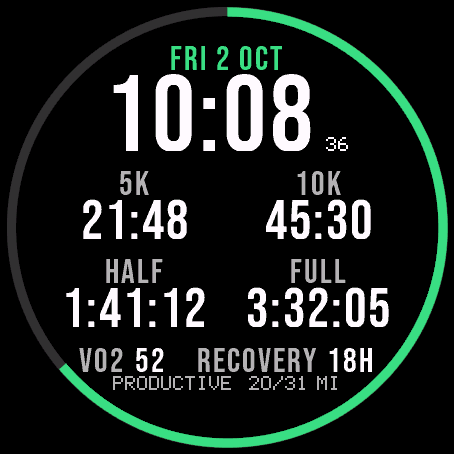
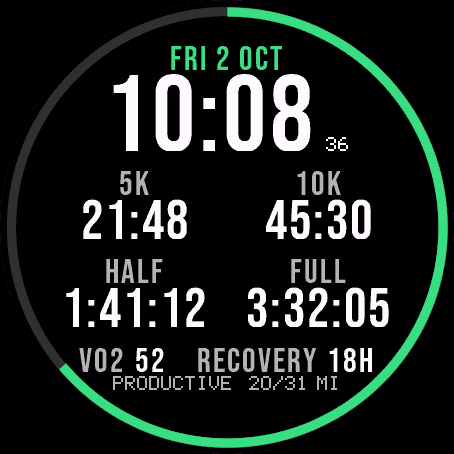
Garmin race predictions and weekly mileage right on the face.
 Photography
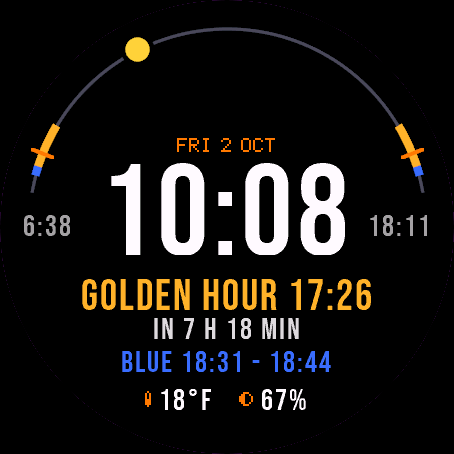
Amber Hour
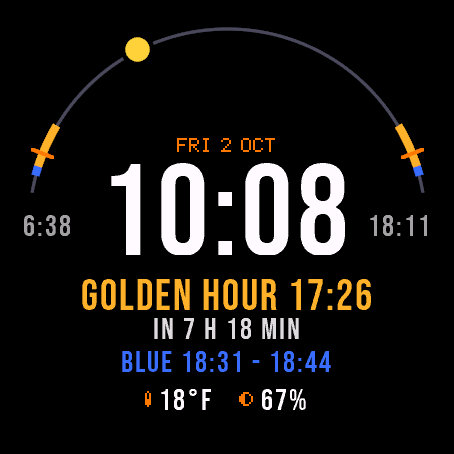
Golden and blue hour countdown with the sun's path across your day.
 Readiness
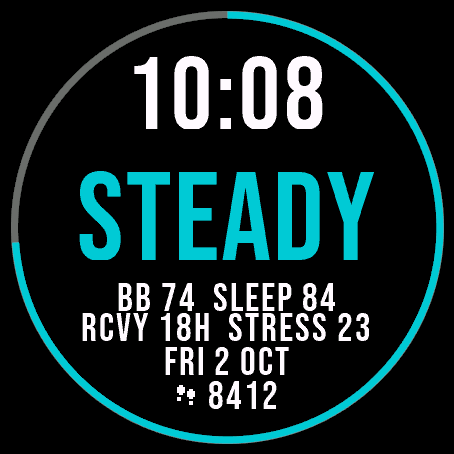
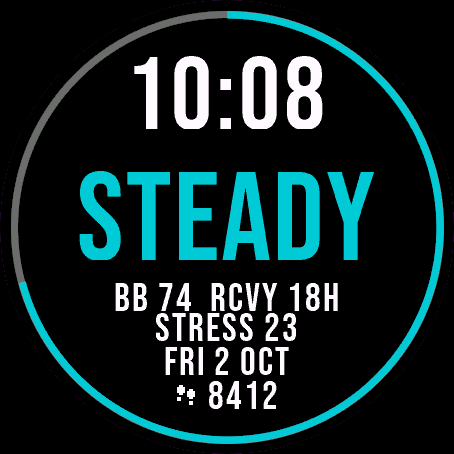
Day Verdict
One word for your day: PUSH, STEADY, EASY or REST, from your sleep, Body Battery and recovery.
 Activity
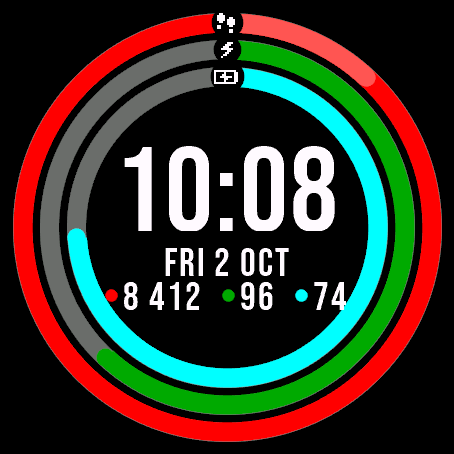
Ring Day
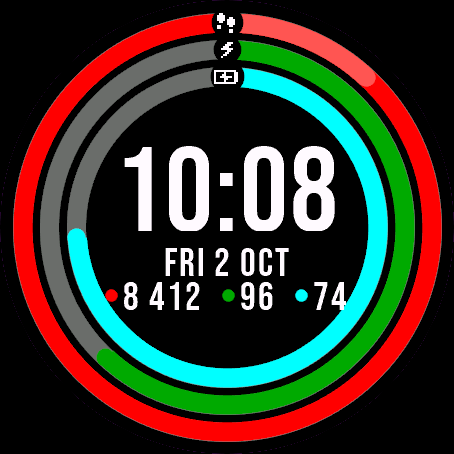
Three activity rings around the time, for people who close their rings.
Tell us how to make it better
Missing a data field, a colour, a layout? Found a bug on your watch model? Write it here. We read every message and ship improvements in updates.