7-day free trial, then a one-time 3.99 EUR unlock code at dialforge.dev. No subscription.
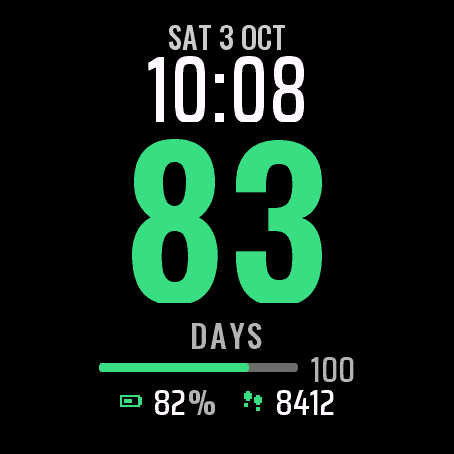
A big number on your wrist: how many days it has been since the day you chose. Days of a habit, a goal, or just a date you want to keep track of.
- A big flat day counter in the middle, the time and the date above it.
- Pick the start date in the Garmin Connect or Connect IQ phone app, or use "Restart from today" in the watch settings. The counter keeps counting after the trial ends.
- Eight labels under the number: Days, Day streak, Sober days, No sugar, No smoking, Workout days, Reading days, Learning days. They follow the language of your watch.
- A milestone bar towards 7, 30, 100 and 365 days, then every year. On the day itself the bar is full and a star appears. You can turn it off.
- Option: count the first day as day 1.
- Two data fields at the bottom. Defaults: battery and steps.
- Six colours: Green, Orange, Blue, Violet, Gold and Mono. Date in 13 languages, 12 or 24 hour time, leading zero setting.
- Always-on mode for AMOLED: dimmed time and counter only, no filled areas, shifted every minute.
The face only counts days. It gives no health advice and makes no promises about any habit.
Data fields: heart rate, steps, battery, distance, calories, floors, active minutes, Body Battery, stress, altitude, notifications, solar, battery days, temperature, sunrise, sunset, next sun event, respiration, SpO2, recovery time, pressure, resting heart rate, VO2 max, sleep score, 5K race prediction, weekly running distance, moon phase, week number, day of year, active calories, weather with icon, wind, humidity, UV, chance of rain, alarms, phone connection, do not disturb, move bar, 10K, half and full marathon predictions, cycling VO2 max, weekly ride distance and a second time zone (a fixed UTC offset, no daylight saving). Defaults: battery and steps.
Garmin does not give watch faces access to HRV status or Training Readiness, so no Connect IQ watch face can show them.
Settings: on the watch (hold MENU, then Watch face, then Customize) or in the Connect IQ app. The start date is picked in the phone app only.
A little request from the maker
Dialforge is my student project. I build these watch faces after classes, so they are still at an early stage, and I could not test every watch model myself. If something looks wrong on your watch, please do not leave a negative rating: write to me first at https://dialforge.dev/faces/streakface/ and I will fix it, usually within 24 hours. A kind review means more to me than you can imagine. And if you like my work, you can buy me a coffee (the link is at the bottom of dialforge.dev): I am saving up to pay for my studies. Thank you for your patience and for giving a young developer a chance.
7 dni za darmo, potem jednorazowy kod za 3,99 EUR na dialforge.dev. Bez abonamentu.
Duża liczba na nadgarstku: ile dni minęło od dnia, który wybierzesz. Dni nawyku, celu albo po prostu daty, którą chcesz mieć na oku.
- Duży, płaski licznik dni na środku, nad nim godzina i data.
- Datę startu wybierasz w aplikacji Garmin Connect lub Connect IQ w telefonie albo przełącznikiem "Zacznij od dzisiaj" w ustawieniach na zegarku. Licznik liczy dalej także po zakończeniu próby.
- Osiem etykiet pod liczbą: Dni, Dni z rzędu, Dni trzeźwości, Bez cukru, Bez papierosów, Dni treningu, Dni czytania, Dni nauki. Zmieniają się razem z językiem zegarka.
- Pasek do kamieni milowych 7, 30, 100 i 365 dni, potem co rok. W dniu kamienia pasek jest pełny i pojawia się gwiazdka. Można go wyłączyć.
- Opcja: pierwszy dzień liczy się jako 1.
- Dwa pola danych na dole. Domyślnie: bateria i kroki.
- Sześć kolorów: Zielony, Pomarańczowy, Niebieski, Fioletowy, Złoty i Mono. Data w 13 językach, godzina 12 lub 24 h, ustawienie zera na początku.
- Tryb zawsze włączony na AMOLED: tylko przygaszona godzina i licznik, bez wypełnień, przesuwane co minutę.
Tarcza tylko liczy dni. Nie daje porad zdrowotnych i niczego nie obiecuje w sprawie żadnego nawyku.
Pola danych: tętno, kroki, bateria, dystans, kalorie, piętra, minuty aktywności, Body Battery, stres, wysokość, powiadomienia, energia słoneczna, dni baterii, temperatura, wschód, zachód, najbliższe wydarzenie słońca, oddech, SpO2, czas regeneracji, ciśnienie, tętno spoczynkowe, VO2 max, ocena snu, prognoza na 5 km, tygodniowy dystans biegowy, faza księżyca, numer tygodnia, dzień roku, kalorie aktywne, pogoda z ikoną, wiatr, wilgotność, UV, szansa opadów, budziki, połączenie z telefonem, nie przeszkadzać, pasek ruchu, prognozy na 10 km, półmaraton i maraton, VO2 max na rowerze, dystans rowerowy w tygodniu i druga strefa czasu (stałe przesunięcie od UTC, bez zmiany czasu). Domyślnie: bateria i kroki.
Garmin nie udostępnia tarczom statusu HRV ani gotowości treningowej, więc żadna tarcza Connect IQ ich nie pokaże.
Ustawienia: na zegarku (przytrzymaj MENU, potem Tarcza zegarka, potem Dostosuj) albo w aplikacji Connect IQ. Datę startu wybierasz tylko w aplikacji w telefonie.
Mała prośba od autora
Dialforge to mój studencki projekt. Robię te tarcze po zajęciach, więc są jeszcze na wczesnym etapie i nie mogłem przetestować każdego modelu zegarka. Jeśli coś wygląda źle na Twoim zegarku, proszę, nie wystawiaj negatywnej oceny: napisz najpierw do mnie na https://dialforge.dev/faces/streakface/, a naprawię to, zwykle w ciągu 24 godzin. Życzliwa opinia znaczy dla mnie więcej, niż myślisz. A jeśli podoba Ci się moja praca, możesz postawić mi kawę (link na dole strony dialforge.dev): zbieram na opłacenie studiów. Dziękuję za cierpliwość i za dane szansy młodemu twórcy.
7 Tage kostenlos testen, danach ein einmaliger Freischaltcode für 3,99 EUR auf dialforge.dev. Kein Abo.
Eine große Zahl am Handgelenk: wie viele Tage seit dem Tag vergangen sind, den du gewählt hast. Tage einer Gewohnheit, eines Ziels oder einfach eines Datums, das du im Blick behalten willst.
- Ein großer flacher Tageszähler in der Mitte, darüber die Uhrzeit und das Datum.
- Das Startdatum wählst du in der Garmin Connect oder Connect IQ App auf dem Handy, oder nutze "Ab heute neu starten" in den Einstellungen der Uhr. Der Zähler zählt auch nach Ende der Testphase weiter.
- Acht Beschriftungen unter der Zahl: Tage, Serie in Tagen, Tage nüchtern, Kein Zucker, Nichtrauchen, Trainingstage, Lesetage, Lerntage. Sie folgen der Sprache deiner Uhr.
- Ein Meilensteinbalken auf dem Weg zu 7, 30, 100 und 365 Tagen, danach jedes Jahr. Am Tag selbst ist der Balken voll und ein Stern erscheint. Du kannst ihn ausschalten.
- Option: den ersten Tag als Tag 1 zählen.
- Zwei Datenfelder unten. Standard: Akku und Schritte.
- Sechs Farben: Grün, Orange, Blau, Violett, Gold und Mono. Datum in 13 Sprachen, 12- oder 24-Stunden-Zeit, Einstellung für die führende Null.
- Always-on-Modus für AMOLED: nur gedimmte Zeit und Zähler, keine ausgefüllten Flächen, jede Minute verschoben.
Das Zifferblatt zählt nur Tage. Es gibt keine Gesundheitsratschläge und macht keine Versprechen zu irgendeiner Gewohnheit.
Datenfelder: Herzfrequenz, Schritte, Akku, Distanz, Kalorien, Stockwerke, Intensitätsminuten, Body Battery, Stress, Höhe, Benachrichtigungen, Solar, Akkutage, Temperatur, Sonnenaufgang, Sonnenuntergang, nächstes Sonnenereignis, Atemfrequenz, SpO2, Erholungszeit, Druck, Ruheherzfrequenz, VO2 max, Schlafwert, 5-km-Prognose, wöchentliche Laufdistanz, Mondphase, Kalenderwoche, Tag des Jahres, aktive Kalorien, Wetter mit Symbol, Wind, Luftfeuchte, UV, Regenrisiko, Wecker, Telefonverbindung, Nicht stören, Inaktivitätsleiste, Prognosen für 10K, Halbmarathon und Marathon, VO2 max Rad, Rad-Wochendistanz und eine zweite Zeitzone (fester UTC-Versatz, ohne Zeitumstellung). Standard: Akku und Schritte.
Garmin gibt Zifferblättern keinen Zugriff auf den HRV-Status oder die Training Readiness, daher kann kein Connect IQ Zifferblatt sie anzeigen.
Einstellungen: auf der Uhr (MENU gedrückt halten, dann Uhrdesign, dann Anpassen) oder in der Connect IQ App. Das Startdatum wird nur in der Handy-App gewählt.
Eine kleine bitte des entwicklers
Dialforge ist mein Studentenprojekt. Ich baue diese Zifferblätter nach den Vorlesungen, deshalb sind sie noch in einer frühen Phase, und ich konnte nicht jedes Uhrenmodell selbst testen. Wenn auf deiner Uhr etwas nicht stimmt, hinterlasse bitte keine schlechte Bewertung: Schreib mir zuerst auf https://dialforge.dev/faces/streakface/, dann behebe ich es, meist innerhalb von 24 Stunden. Eine freundliche Bewertung bedeutet mir mehr, als du denkst. Und wenn dir meine Arbeit gefällt, kannst du mir einen Kaffee spendieren (den Link findest du unten auf dialforge.dev): Ich spare für mein Studium. Danke für deine Geduld und dafür, dass du einem jungen Entwickler eine Chance gibst.
Essai gratuit de 7 jours, puis un code de déverrouillage unique à 3,99 EUR sur dialforge.dev. Sans abonnement.
Un grand nombre à votre poignet : combien de jours se sont écoulés depuis le jour que vous avez choisi. Les jours d'une habitude, d'un objectif, ou simplement d'une date dont vous voulez garder le compte.
- Un grand compteur de jours plat au centre, l'heure et la date au-dessus.
- Choisissez la date de départ dans l'application Garmin Connect ou Connect IQ sur le téléphone, ou utilisez "Recommencer à partir d'aujourd'hui" dans les réglages de la montre. Le compteur continue de compter après la fin de l'essai.
- Huit libellés sous le nombre : Jours, Jours d'affilée, Jours sans alcool, Sans sucre, Sans tabac, Jours d'entraînement, Jours de lecture, Jours d'étude. Ils suivent la langue de votre montre.
- Une barre de jalons vers 7, 30, 100 et 365 jours, puis chaque année. Le jour même, la barre est pleine et une étoile apparaît. Vous pouvez la désactiver.
- Option : compter le premier jour comme le jour 1.
- Deux champs de données en bas. Par défaut : batterie et pas.
- Six couleurs : Vert, Orange, Bleu, Violet, Or et Mono. Date en 13 langues, heure 12 ou 24 heures, réglage du zéro initial.
- Mode toujours actif pour AMOLED : heure et compteur atténués uniquement, aucune zone remplie, décalé chaque minute.
Le cadran ne fait que compter les jours. Il ne donne aucun conseil de santé et ne promet rien sur aucune habitude.
Champs de données : fréquence cardiaque, pas, batterie, distance, calories, étages, minutes actives, Body Battery, stress, altitude, notifications, solaire, jours d'autonomie, température, lever du soleil, coucher du soleil, prochain événement solaire, respiration, SpO2, temps de récupération, pression, fréquence cardiaque au repos, VO2 max, score de sommeil, prédiction 5K, distance de course hebdomadaire, phase lunaire, numéro de semaine, jour de l'année, calories actives, météo avec icône, vent, humidité, UV, risque de pluie, alarmes, connexion du téléphone, ne pas déranger, barre d'activité, prévisions 10K, semi et marathon, VO2 max vélo, distance vélo de la semaine et un second fuseau horaire (décalage UTC fixe, sans changement d'heure). Par défaut : batterie et pas.
Garmin ne donne pas aux cadrans l'accès au statut HRV ni à la Training Readiness, aucun cadran Connect IQ ne peut donc les afficher.
Réglages : sur la montre (maintenez MENU, puis Cadran, puis Personnaliser) ou dans l'application Connect IQ. La date de départ se choisit uniquement dans l'application du téléphone.
Une petite demande du créateur
Dialforge est mon projet étudiant. Je crée ces cadrans après les cours, ils en sont donc encore à un stade précoce, et je n'ai pas pu tester tous les modèles de montre. Si quelque chose ne va pas sur votre montre, s'il vous plaît, ne laissez pas de note négative : écrivez-moi d'abord sur https://dialforge.dev/faces/streakface/ et je corrigerai cela, en général sous 24 heures. Un avis bienveillant compte plus que vous ne l'imaginez. Et si vous aimez mon travail, vous pouvez m'offrir un café (le lien se trouve en bas de dialforge.dev) : j'économise pour payer mes études. Merci pour votre patience et pour la chance donnée à un jeune développeur.
Prueba gratuita de 7 días y luego un código de desbloqueo único de 3,99 EUR en dialforge.dev. Sin suscripción.
Un número grande en tu muñeca: cuántos días han pasado desde el día que elegiste. Días de un hábito, de una meta o simplemente de una fecha que quieres tener presente.
- Un contador de días grande y plano en el centro, con la hora y la fecha encima.
- Elige la fecha de inicio en la app Garmin Connect o Connect IQ del teléfono, o usa "Reiniciar desde hoy" en los ajustes del reloj. El contador sigue contando cuando termina la prueba.
- Ocho etiquetas bajo el número: Días, Racha de días, Días sobrio, Sin azúcar, Sin fumar, Días de entreno, Días de lectura, Días de estudio. Siguen el idioma de tu reloj.
- Una barra de hitos hacia los 7, 30, 100 y 365 días, y después cada año. El mismo día la barra está llena y aparece una estrella. Puedes desactivarla.
- Opción: contar el primer día como día 1.
- Dos campos de datos abajo. Valores por defecto: batería y pasos.
- Seis colores: Verde, Naranja, Azul, Violeta, Oro y Mono. Fecha en 13 idiomas, hora de 12 o 24 horas, ajuste del cero inicial.
- Modo siempre activo para AMOLED: solo la hora y el contador atenuados, sin áreas rellenas, desplazado cada minuto.
La esfera solo cuenta días. No da consejos de salud ni hace promesas sobre ningún hábito.
Campos de datos: frecuencia cardiaca, pasos, batería, distancia, calorías, pisos, minutos de intensidad, Body Battery, estrés, altitud, notificaciones, solar, días de batería, temperatura, amanecer, atardecer, próximo evento solar, respiración, SpO2, tiempo de recuperación, presión, frecuencia cardiaca en reposo, VO2 max, puntuación de sueño, predicción de carrera de 5K, distancia semanal corriendo, fase lunar, número de semana, día del año, calorías activas, tiempo con icono, viento, humedad, UV, probabilidad de lluvia, alarmas, conexión del teléfono, no molestar, barra de movimiento, predicciones de 10K, media maratón y maratón, VO2 max en bici, distancia semanal en bici y una segunda zona horaria (desfase UTC fijo, sin cambio de hora). Valores por defecto: batería y pasos.
Garmin no da a las esferas acceso al estado de HRV ni a la Training Readiness, así que ninguna esfera Connect IQ puede mostrarlos.
Ajustes: en el reloj (mantén pulsado MENU, luego Esfera y después Personalizar) o en la app Connect IQ. La fecha de inicio solo se elige en la app del teléfono.
Una pequeña petición del creador
Dialforge es mi proyecto de estudiante. Creo estas esferas después de clase, así que todavía están en una fase temprana y no pude probar todos los modelos de reloj. Si algo no se ve bien en tu reloj, por favor no dejes una valoración negativa: escríbeme primero en https://dialforge.dev/faces/streakface/ y lo arreglaré, normalmente en 24 horas. Una reseña amable significa para mí más de lo que imaginas. Y si te gusta mi trabajo, puedes invitarme a un café (el enlace está al final de dialforge.dev): estoy ahorrando para pagar mis estudios. Gracias por tu paciencia y por darle una oportunidad a un desarrollador joven.
7 dagen gratis proberen, daarna een eenmalige ontgrendelcode van 3,99 EUR op dialforge.dev. Geen abonnement.
Een groot getal om je pols: hoeveel dagen het geleden is sinds de dag die je hebt gekozen. Dagen van een gewoonte, een doel, of gewoon een datum die je wilt bijhouden.
- Een grote platte dagenteller in het midden, met de tijd en de datum erboven.
- Kies de startdatum in de Garmin Connect- of Connect IQ-app op je telefoon, of gebruik "Opnieuw beginnen vanaf vandaag" in de horloge-instellingen. De teller blijft doortellen nadat de proefperiode is afgelopen.
- Acht labels onder het getal: Dagen, Reeks dagen, Nuchtere dagen, Geen suiker, Niet roken, Trainingsdagen, Leesdagen, Leerdagen. Ze volgen de taal van je horloge.
- Een mijlpaalbalk richting 7, 30, 100 en 365 dagen, daarna elk jaar. Op de dag zelf is de balk vol en verschijnt er een ster. Je kunt dit uitzetten.
- Optie: de eerste dag als dag 1 tellen.
- Twee datavelden onderaan. Standaard: batterij en stappen.
- Zes kleuren: Groen, Oranje, Blauw, Violet, Goud en Mono. Datum in 13 talen, 12- of 24-uurs tijd, instelling voor voorloopnul.
- Always-on modus voor AMOLED: alleen gedimde tijd en teller, geen gevulde vlakken, elke minuut verschoven.
De wijzerplaat telt alleen dagen. Ze geeft geen gezondheidsadvies en belooft niets over welke gewoonte dan ook.
Datavelden: hartslag, stappen, batterij, afstand, calorieën, verdiepingen, actieve minuten, Body Battery, stress, hoogte, meldingen, zonne-energie, batterijdagen, temperatuur, zonsopkomst, zonsondergang, volgende zonsopkomst of zonsondergang, ademhaling, SpO2, hersteltijd, luchtdruk, rusthartslag, VO2 max, slaapscore, 5K-voorspelling, wekelijkse hardloopafstand, maanfase, weeknummer, dag van het jaar, actieve calorieën, weer met pictogram, wind, luchtvochtigheid, UV, kans op regen, alarmen, telefoonverbinding, niet storen, beweegbalk, voorspellingen voor 10K, halve en hele marathon, VO2 max fietsen, fietsafstand deze week en een tweede tijdzone (vaste UTC-afwijking, zonder zomertijd). Standaard: batterij en stappen.
Garmin geeft wijzerplaten geen toegang tot de HRV-status of Training Readiness, dus geen enkele Connect IQ-wijzerplaat kan die tonen.
Instellingen: op het horloge (houd MENU ingedrukt, dan Wijzerplaat, dan Aanpassen) of in de Connect IQ-app. De startdatum kies je alleen in de app op je telefoon.
Een klein verzoek van de maker
Dialforge is mijn studentenproject. Ik maak deze wijzerplaten na de colleges, dus ze zijn nog in een vroeg stadium en ik kon niet elk horlogemodel zelf testen. Ziet er iets verkeerd uit op je horloge, geef dan alsjeblieft geen negatieve beoordeling: schrijf me eerst via https://dialforge.dev/faces/streakface/, dan los ik het op, meestal binnen 24 uur. Een vriendelijke review betekent meer voor me dan je denkt. En als je mijn werk waardeert, kun je een koffie voor me kopen (de link staat onderaan dialforge.dev): ik spaar om mijn studie te betalen. Bedankt voor je geduld en voor de kans die je een jonge ontwikkelaar geeft.
7日間無料でお試しいただけます。その後はdialforge.devで3.99 EURの解除コードを一度だけ購入(サブスクリプションなし)。
手首に大きな数字を表示:選んだ日からの経過日数です。習慣の日数、目標、残しておきたい日付などに使えます。
- 中央に大きくフラットな日数カウンター、その上に時刻と日付。
- 開始日はGarmin ConnectまたはConnect IQのスマホアプリで選ぶか、ウォッチの設定の「今日からやり直す」で設定します。お試し期間が終わってもカウントは続きます。
- 数字の下に八種類のラベル:日数、連続日数、禁酒日数、無糖日数、禁煙日数、運動した日数、読書した日数、学習した日数。ウォッチの言語に合わせて表示されます。
- 7日、30日、100日、365日、その後は毎年に向かうマイルストーンバー。その日になるとバーが満タンになり、星が表示されます。オフにもできます。
- オプション:初日を1日目として数えます。
- 下部にデータフィールドが二つ。初期設定:バッテリーと歩数。
- 六色:グリーン、オレンジ、ブルー、バイオレット、ゴールド、モノ。日付は13言語、12時間または24時間表示、先頭ゼロの設定。
- AMOLED向けの常時表示モード:時刻とカウンターのみを減光表示、塗りつぶしなし、毎分表示位置がずれます。
この文字盤は日数を数えるだけです。健康に関するアドバイスはせず、どんな習慣についても成果を約束するものではありません。
データフィールド:心拍数、歩数、バッテリー、距離、カロリー、階数、強度活動時間、Body Battery、ストレス、高度、通知、ソーラー、バッテリー日数、気温、日の出、日の入り、次の日の出/日の入り、呼吸数、SpO2、回復時間、気圧、安静時心拍数、VO2 max、睡眠スコア、5Kレース予測、週間ランニング距離、月相、週番号、年間通算日、アクティブカロリー、アイコン付き天気、風、湿度、UV、降水確率、アラーム、スマホ接続、おやすみモード、ムーブバー、10K、ハーフ・フルマラソン予測、サイクリングVO2 max、週間ライド距離、第二タイムゾーン(UTCからの固定オフセット、夏時間なし)。初期設定:バッテリー、歩数。
GarminはウォッチフェイスにHRVステータスやTraining Readinessを公開していないため、Connect IQのウォッチフェイスでは表示できません。
設定:時計本体(MENUを長押し→文字盤→カスタマイズ)またはConnect IQアプリから。開始日はスマホアプリでのみ選べます。
作者からの小さなお願い
Dialforgeは私の学生プロジェクトです。授業のあとにこれらの文字盤を作っているため、まだ初期段階で、すべての時計モデルで試すことはできませんでした。お使いの時計で表示がおかしいときは、低い評価をつけずに、まずhttps://dialforge.dev/faces/streakface/ で私に連絡してください。通常24時間以内に修正します。温かいレビューは、想像以上にうれしいものです。私の仕事を気に入っていただけたら、コーヒーをおごっていただくこともできます(リンクはdialforge.devの一番下にあります)。学費を貯めているところです。ご辛抱いただき、若い開発者にチャンスをくださってありがとうございます。
Prova gratuita di 7 giorni, poi un codice di sblocco una tantum da 3,99 EUR su dialforge.dev. Nessun abbonamento.
Un grande numero al polso: quanti giorni sono passati dal giorno che hai scelto. Giorni di un'abitudine, di un obiettivo o semplicemente di una data che vuoi tenere d'occhio.
- Un grande contatore di giorni piatto al centro, con l'ora e la data sopra.
- Scegli la data di inizio nell'app Garmin Connect o Connect IQ sul telefono, oppure usa "Riparti da oggi" nelle impostazioni dell'orologio. Il contatore continua a contare dopo la fine della prova.
- Otto etichette sotto il numero: Giorni, Serie di giorni, Giorni sobrio, Niente zucchero, Niente fumo, Giorni di allenamento, Giorni di lettura, Giorni di studio. Seguono la lingua del tuo orologio.
- Una barra dei traguardi verso 7, 30, 100 e 365 giorni, poi ogni anno. Il giorno stesso la barra è piena e compare una stella. Puoi disattivarla.
- Opzione: contare il primo giorno come giorno 1.
- Due campi dati in basso. Valori predefiniti: batteria e passi.
- Sei colori: Verde, Arancione, Blu, Viola, Oro e Mono. Data in 13 lingue, ora a 12 o 24 ore, impostazione dello zero iniziale.
- Modalità always-on per AMOLED: solo ora e contatore attenuati, nessuna area riempita, spostati ogni minuto.
Il quadrante conta solo i giorni. Non dà consigli di salute e non fa promesse su nessuna abitudine.
Campi dati: frequenza cardiaca, passi, batteria, distanza, calorie, piani, minuti attivi, Body Battery, stress, altitudine, notifiche, solare, giorni di autonomia, temperatura, alba, tramonto, prossimo evento solare, respirazione, SpO2, tempo di recupero, pressione, frequenza cardiaca a riposo, VO2 max, punteggio del sonno, previsione gara 5K, distanza settimanale di corsa, fase lunare, numero della settimana, giorno dell'anno, calorie attive, meteo con icona, vento, umidità, UV, probabilità di pioggia, sveglie, connessione del telefono, non disturbare, barra movimento, previsioni 10K, mezza e maratona, VO2 max bici, distanza settimanale in bici e un secondo fuso orario (scarto UTC fisso, senza ora legale). Valori predefiniti: batteria e passi.
Garmin non dà ai quadranti accesso allo stato HRV né alla Training Readiness, quindi nessun quadrante Connect IQ può mostrarli.
Impostazioni: sull'orologio (tieni premuto MENU, poi Quadrante, poi Personalizza) oppure nell'app Connect IQ. La data di inizio si sceglie solo nell'app del telefono.
Una piccola richiesta dall'autore
Dialforge è il mio progetto da studente. Creo questi quadranti dopo le lezioni, quindi sono ancora in una fase iniziale e non ho potuto provare ogni modello di orologio. Se qualcosa sembra sbagliato sul tuo orologio, per favore non lasciare una valutazione negativa: scrivimi prima su https://dialforge.dev/faces/streakface/ e lo correggo, di solito entro 24 ore. Una recensione gentile per me conta più di quanto immagini. E se ti piace il mio lavoro, puoi offrirmi un caffè (il link è in fondo a dialforge.dev): sto mettendo da parte i soldi per pagarmi gli studi. Grazie per la pazienza e per aver dato una possibilità a un giovane sviluppatore.
7 天免费试用,之后在 dialforge.dev 以 3.99 EUR 购买一次性解锁码(无需订阅)。
手腕上的一个大数字:从你选定的那一天起已经过去了多少天。可以是某个习惯的天数、一个目标,或者只是你想记住的一个日期。
- 中间是一个大号扁平的天数计数器,上方是时间和日期。
- 在 Garmin Connect 或 Connect IQ 手机应用中选择起始日期,也可以在手表设置中点击“从今天重新开始”。试用结束后计数器会继续计数。
- 数字下方有八种标签:天数、连续天数、戒酒天数、无糖天数、戒烟天数、锻炼天数、阅读天数、学习天数。标签会跟随手表的语言。
- 朝着 7、30、100 和 365 天的里程碑进度条,之后每满一年一次。到达当天进度条会充满并出现一颗星星。可以关闭。
- 选项:把第一天算作第 1 天。
- 底部有两个数据字段。默认:电量和步数。
- 六种配色:绿色、橙色、蓝色、紫罗兰色、金色和单色。日期支持 13 种语言,12 或 24 小时制,可设置前导零。
- AMOLED 息屏常亮模式:只保留变暗的时间和计数器,没有任何填充区域,每分钟偏移一次位置。
这款表盘只负责计算天数。它不提供任何健康建议,也不对任何习惯作出承诺。
数据字段:心率、步数、电量、距离、卡路里、楼层、强度分钟、Body Battery、压力、海拔、通知、太阳能强度、电池续航天数、温度、日出、日落、下一次日出或日落、呼吸频率、SpO2、恢复时间、气压、静息心率、VO2 max、睡眠分数、5K 比赛预测、每周跑步距离、月相、周数、一年中的第几天、活动卡路里、带图标的天气、风、湿度、紫外线、降水概率、闹钟、手机连接、勿扰、活动提醒条、10K、半马和全马预测、骑行 VO2 max、每周骑行距离和第二时区(与 UTC 的固定偏移,无夏令时)。默认:电量、步数。
Garmin 不向表盘开放 HRV 状态和 Training Readiness,因此任何 Connect IQ 表盘都无法显示。
设置:在手表上,长按 MENU,然后依次点击表盘、自定义;或在 Connect IQ 应用中设置。起始日期只能在手机应用中选择。
来自作者的一个小请求
Dialforge 是我的学生项目。我利用课余时间做这些表盘,所以它们还处于早期阶段,我也没法在每一款手表上测试。如果您的手表上有什么看起来不对劲,请不要给差评,请先写信到 https://dialforge.dev/faces/streakface/ 告诉我,我会修复,通常在 24 小时内。一条善意的评价对我来说比您想象的更有意义。如果您喜欢我的作品,也可以请我喝杯咖啡(链接在 dialforge.dev 页面底部):我在攒钱付学费。谢谢您的耐心,也谢谢您愿意给一个年轻开发者一个机会。
7 дней бесплатно, затем разовый код разблокировки за 3,99 EUR на dialforge.dev. Без подписки.
Большое число на запястье: сколько дней прошло с выбранного вами дня. Дни привычки, цели или просто даты, за которой вы хотите следить.
- Крупный плоский счётчик дней по центру, время и дата над ним.
- Дату начала выберите в приложении Garmin Connect или Connect IQ на телефоне либо используйте "Начать с сегодняшнего дня" в настройках часов. Счётчик продолжает считать и после окончания пробного периода.
- Восемь подписей под числом: Дни, Серия дней, Дни трезвости, Без сахара, Без курения, Дни тренировок, Дни чтения, Дни учёбы. Они следуют языку ваших часов.
- Шкала вех до 7, 30, 100 и 365 дней, затем каждый год. В сам день шкала заполнена и появляется звезда. Это можно отключить.
- Опция: считать первый день как день 1.
- Два поля данных внизу. По умолчанию: батарея и шаги.
- Шесть цветов: Green, Orange, Blue, Violet, Gold и Mono. Дата на 13 языках, 12- или 24-часовое время, настройка ведущего нуля.
- Режим Always-On для AMOLED: только приглушённое время и счётчик, без залитых областей, со сдвигом каждую минуту.
Циферблат только считает дни. Он не даёт советов по здоровью и ничего не обещает ни про какую привычку.
Поля данных: пульс, шаги, батарея, дистанция, калории, этажи, активные минуты, Body Battery, стресс, высота, уведомления, солнечная энергия, дни работы батареи, температура, восход, закат, следующее солнечное событие, дыхание, SpO2, время восстановления, давление, пульс покоя, VO2 max, оценка сна, прогноз на 5K, недельная беговая дистанция, фаза луны, номер недели, день года, активные калории, погода со значком, ветер, влажность, UV, вероятность дождя, будильники, связь с телефоном, режим Не беспокоить, индикатор активности, прогнозы на 10K, полумарафон и марафон, VO2 max для велосипеда, недельная дистанция на велосипеде и второй часовой пояс (фиксированное смещение UTC, без перехода на летнее время). По умолчанию: батарея и шаги.
Garmin не даёт циферблатам доступа к статусу HRV и Training Readiness, поэтому ни один циферблат Connect IQ не может их показывать.
Настройки: на часах (удерживайте MENU, затем Циферблат, затем Настроить) или в приложении Connect IQ. Дата начала выбирается только в приложении на телефоне.
Небольшая просьба от автора
Dialforge - это мой студенческий проект. Я делаю эти циферблаты после занятий, поэтому они ещё на раннем этапе, и я не мог проверить каждую модель часов. Если что-то выглядит неправильно на ваших часах, пожалуйста, не ставьте низкую оценку: сначала напишите мне на https://dialforge.dev/faces/streakface/, и я всё исправлю, обычно в течение 24 часов. Доброе слово в отзыве значит для меня больше, чем вы думаете. А если вам нравится моя работа, можете угостить меня кофе (ссылка внизу страницы dialforge.dev): я коплю на оплату учёбы. Спасибо за терпение и за то, что даёте шанс молодому разработчику.
Teste grátis de 7 dias, depois um código de desbloqueio único de 3,99 EUR em dialforge.dev. Sem assinatura.
Um número grande no pulso: há quantos dias passou o dia que você escolheu. Dias de um hábito, de uma meta, ou apenas de uma data que você quer acompanhar.
- Um grande contador de dias plano no centro, com a hora e a data acima.
- Escolha a data de início no aplicativo Garmin Connect ou Connect IQ do celular, ou use "Reiniciar a partir de hoje" nas configurações do relógio. O contador continua contando depois que o teste termina.
- Oito rótulos sob o número: Dias, Sequência de dias, Dias sem álcool, Sem açúcar, Sem fumar, Dias de treino, Dias de leitura, Dias de estudo. Eles seguem o idioma do seu relógio.
- Uma barra de marcos rumo a 7, 30, 100 e 365 dias, depois a cada ano. No próprio dia a barra fica cheia e aparece uma estrela. Você pode desativar.
- Opção: contar o primeiro dia como dia 1.
- Dois campos de dados na parte inferior. Padrões: bateria e passos.
- Seis cores: Verde, Laranja, Azul, Violeta, Dourado e Mono. Data em 13 idiomas, horário de 12 ou 24 horas, ajuste de zero à esquerda.
- Modo always-on para AMOLED: apenas horário e contador escurecidos, sem áreas preenchidas, deslocados a cada minuto.
O mostrador só conta dias. Não dá conselhos de saúde e não faz promessas sobre nenhum hábito.
Campos de dados: frequência cardíaca, passos, bateria, distância, calorias, andares, minutos ativos, Body Battery, estresse, altitude, notificações, solar, dias de bateria, temperatura, nascer do sol, pôr do sol, próximo evento solar, respiração, SpO2, tempo de recuperação, pressão, frequência cardíaca de repouso, VO2 máx, pontuação de sono, previsão de corrida de 5K, distância semanal de corrida, fase da lua, número da semana, dia do ano, calorias ativas, tempo com ícone, vento, umidade, UV, chance de chuva, alarmes, conexão do telefone, não perturbe, barra de movimento, previsões de 10K, meia maratona e maratona, VO2 máx. no ciclismo, distância semanal de bike e um segundo fuso horário (deslocamento UTC fixo, sem horário de verão). Padrões: bateria e passos.
A Garmin não dá aos mostradores acesso ao status de VFC nem à Training Readiness, então nenhum mostrador Connect IQ consegue exibi-los.
Configurações: no relógio (segure MENU, depois Mostrador, depois Personalizar) ou no aplicativo Connect IQ. A data de início só é escolhida no aplicativo do celular.
Um pequeno pedido do criador
O Dialforge é o meu projeto de estudante. Eu crio estes mostradores depois das aulas, então eles ainda estão numa fase inicial, e não consegui testar todos os modelos de relógio. Se algo parecer errado no seu relógio, por favor, não deixe uma avaliação negativa: escreva primeiro para mim em https://dialforge.dev/faces/streakface/ e eu corrijo, normalmente em até 24 horas. Uma avaliação gentil significa para mim mais do que você imagina. E se você gosta do meu trabalho, pode me pagar um café (o link está no final de dialforge.dev): estou juntando dinheiro para pagar meus estudos. Obrigado pela paciência e por dar uma chance a um desenvolvedor iniciante.
7denní bezplatná zkušební verze, poté jednorázový odemykací kód za 3,99 EUR na dialforge.dev. Žádné předplatné.
Velké číslo na zápěstí: kolik dní uplynulo od dne, který jste si zvolili. Dny návyku, cíle nebo prostě data, které chcete sledovat.
- Velké ploché počítadlo dní uprostřed, nad ním čas a datum.
- Počáteční datum vyberte v telefonní aplikaci Garmin Connect nebo Connect IQ, nebo použijte "Začít znovu od dneška" v nastavení hodinek. Počítadlo počítá dál i po skončení zkušební verze.
- Osm popisků pod číslem: Dny, Dny v řadě, Dny bez alkoholu, Bez cukru, Bez kouření, Dny cvičení, Dny čtení, Dny učení. Řídí se jazykem vašich hodinek.
- Ukazatel milníků k 7, 30, 100 a 365 dnům, poté každý rok. V samotný den je ukazatel plný a objeví se hvězda. Můžete ji vypnout.
- Volba: počítat první den jako den 1.
- Dvě datová pole dole. Výchozí: baterie a kroky.
- Šest barev: Zelená, Oranžová, Modrá, Fialová, Zlatá a Mono. Datum ve 13 jazycích, 12 nebo 24hodinový čas, nastavení úvodní nuly.
- Trvale zapnutý režim pro AMOLED: pouze ztlumený čas a počítadlo, žádné vyplněné plochy, posouváno každou minutu.
Ciferník jen počítá dny. Nedává žádné zdravotní rady a nic neslibuje o žádném návyku.
Datová pole: srdeční tep, kroky, baterie, vzdálenost, kalorie, patra, minuty aktivity, Body Battery, stres, nadmořská výška, oznámení, solární nabíjení, dny baterie, teplota, východ slunce, západ slunce, příští sluneční událost, dýchání, SpO2, doba regenerace, tlak, klidový srdeční tep, VO2 max, skóre spánku, předpověď závodu na 5K, týdenní běžecká vzdálenost, fáze měsíce, číslo týdne, den v roce, aktivní kalorie, počasí s ikonou, vítr, vlhkost, UV, pravděpodobnost deště, budíky, připojení k telefonu, nerušit, výzva k pohybu, předpovědi pro 10K, půlmaraton a maraton, cyklistické VO2 max, týdenní vzdálenost na kole a druhé časové pásmo (pevný posun vůči UTC, bez letního času). Výchozí: baterie a kroky.
Garmin neposkytuje ciferníkům přístup ke stavu HRV ani k Training Readiness, takže je nemůže zobrazit žádný ciferník z Connect IQ.
Nastavení: v hodinkách (podržte MENU, pak Vzhled hodinek, pak Upravit) nebo v aplikaci Connect IQ. Počáteční datum se vybírá pouze v telefonní aplikaci.
Malá prosba od tvůrce
Dialforge je můj studentský projekt. Tyto ciferníky dělám po škole, takže jsou zatím v rané fázi a nemohl jsem otestovat každý model hodinek. Pokud na vašich hodinkách něco nevypadá v pořádku, prosím, nedávejte negativní hodnocení: napište mi nejdřív na https://dialforge.dev/faces/streakface/ a já to opravím, obvykle do 24 hodin. Milá recenze pro mě znamená víc, než si dokážete představit. A pokud se vám moje práce líbí, můžete mi koupit kávu (odkaz je dole na dialforge.dev): šetřím si na zaplacení studia. Děkuji vám za trpělivost a za to, že dáváte mladému vývojáři šanci.
7 dias de teste gratuito, depois um código de desbloqueio único de 3,99 EUR em dialforge.dev. Sem subscrição.
Um número grande no pulso: há quantos dias passou o dia que escolheu. Dias de um hábito, de um objetivo, ou apenas de uma data que quer acompanhar.
- Um grande contador de dias plano ao centro, com a hora e a data por cima.
- Escolha a data de início na aplicação Garmin Connect ou Connect IQ do telemóvel, ou use "Recomeçar a partir de hoje" nas definições do relógio. O contador continua a contar depois de terminar o teste.
- Oito etiquetas por baixo do número: Dias, Sequência de dias, Dias sem álcool, Sem açúcar, Sem fumar, Dias de treino, Dias de leitura, Dias de estudo. Seguem o idioma do seu relógio.
- Uma barra de marcos rumo a 7, 30, 100 e 365 dias, depois a cada ano. No próprio dia a barra fica cheia e aparece uma estrela. Pode desativar.
- Opção: contar o primeiro dia como dia 1.
- Dois campos de dados na parte inferior. Predefinições: bateria e passos.
- Seis cores: Verde, Laranja, Azul, Violeta, Dourado e Mono. Data em 13 idiomas, hora de 12 ou 24 horas, definição de zero inicial.
- Modo sempre ligado para AMOLED: apenas hora e contador atenuados, sem áreas preenchidas, deslocados a cada minuto.
O mostrador só conta dias. Não dá conselhos de saúde e não faz promessas sobre nenhum hábito.
Campos de dados: frequência cardíaca, passos, bateria, distância, calorias, andares, minutos de atividade, Body Battery, stress, altitude, notificações, solar, dias de bateria, temperatura, nascer do sol, pôr do sol, próximo evento solar, respiração, SpO2, tempo de recuperação, pressão, frequência cardíaca em repouso, VO2 max, pontuação de sono, previsão de corrida de 5K, distância de corrida semanal, fase da lua, número da semana, dia do ano, calorias ativas, meteorologia com ícone, vento, humidade, UV, probabilidade de chuva, alarmes, ligação ao telemóvel, não incomodar, barra de movimento, previsões para 10K, meia maratona e maratona completa, VO2 max de ciclismo, distância de ciclismo semanal e um segundo fuso horário (um desvio UTC fixo, sem horário de verão). Predefinições: bateria e passos.
A Garmin não dá aos mostradores acesso ao estado de HRV nem à Training Readiness, pelo que nenhum mostrador Connect IQ os pode apresentar.
Definições: no relógio (mantenha premido MENU, depois Mostrador e depois Personalizar) ou na aplicação Connect IQ. A data de início só se escolhe na aplicação do telemóvel.
Um pequeno pedido do criador
O Dialforge é o meu projeto de estudante. Crio estes mostradores depois das aulas, por isso ainda estão numa fase inicial, e não consegui testar todos os modelos de relógio. Se algo parecer errado no seu relógio, por favor não deixe uma avaliação negativa: escreva-me primeiro em https://dialforge.dev/faces/streakface/ e eu corrijo, normalmente em 24 horas. Uma avaliação simpática significa para mim mais do que imagina. E se gostar do meu trabalho, pode oferecer-me um café (a ligação está no fundo de dialforge.dev): estou a poupar para pagar os meus estudos. Obrigado pela sua paciência e por dar uma oportunidade a um jovem programador.
7일 무료 체험 후, dialforge.dev에서 3.99 EUR 일회성 잠금 해제 코드를 구매하세요. 구독은 없습니다.
손목 위의 큰 숫자 하나: 내가 정한 날부터 며칠이 지났는지 보여 줍니다. 습관의 일수, 목표, 또는 기억해 두고 싶은 날짜에 쓸 수 있습니다.
- 가운데에 크고 평평한 일수 카운터, 그 위에 시간과 날짜.
- 시작 날짜는 Garmin Connect 또는 Connect IQ 휴대전화 앱에서 고르거나, 시계 설정의 "오늘부터 다시 시작"을 사용하세요. 체험이 끝난 뒤에도 카운터는 계속 셉니다.
- 숫자 아래에 여덟 가지 라벨: 일수, 연속 일수, 금주 일수, 무설탕 일수, 금연 일수, 운동한 일수, 독서한 일수, 학습한 일수. 시계 언어에 따라 표시됩니다.
- 7일, 30일, 100일, 365일을 향한 이정표 막대이며, 이후에는 매년 표시됩니다. 당일에는 막대가 가득 차고 별이 나타납니다. 끌 수도 있습니다.
- 옵션: 첫날을 1일째로 셉니다.
- 아래쪽에 데이터 필드 두 개. 기본값: 배터리, 걸음 수.
- 여섯 가지 색상: Green, Orange, Blue, Violet, Gold, Mono. 13개 언어의 날짜, 12시간 또는 24시간 형식, 앞자리 영 표시 설정.
- AMOLED용 상시 표시 모드: 어두운 시간과 카운터만 표시, 채워진 영역 없음, 매분 위치 이동.
이 워치페이스는 일수만 셉니다. 건강 조언을 하지 않으며, 어떤 습관에 대해서도 결과를 약속하지 않습니다.
데이터 필드: 심박수, 걸음 수, 배터리, 거리, 칼로리, 층수, 활동 시간, Body Battery, 스트레스, 고도, 알림, 태양광, 배터리 잔여 일수, 온도, 일출, 일몰, 다음 태양 이벤트, 호흡, SpO2, 회복 시간, 기압, 안정 시 심박수, VO2 max, 수면 점수, 5K 레이스 예측, 주간 달리기 거리, 월상, 주차, 연중 일수, 활동 칼로리, 아이콘이 있는 날씨, 바람, 습도, UV, 강수 확률, 알람, 휴대전화 연결, 방해 금지, 활동 알림 바, 10K, 하프 및 풀 마라톤 예측, 사이클링 VO2 max, 주간 라이딩 거리, 두 번째 시간대(고정 UTC 오프셋, 서머타임 없음). 기본값: 배터리, 걸음 수.
Garmin은 워치페이스에 HRV 상태나 Training Readiness에 대한 접근을 허용하지 않으므로, 어떤 Connect IQ 워치페이스도 이를 표시할 수 없습니다.
설정: 시계에서(MENU를 길게 누른 다음 워치페이스, 사용자 설정) 또는 Connect IQ 앱에서 변경할 수 있습니다. 시작 날짜는 휴대전화 앱에서만 고를 수 있습니다.
제작자의 작은 부탁
Dialforge는 제 학생 프로젝트입니다. 수업이 끝난 뒤에 이 워치페이스들을 만들고 있어서 아직 초기 단계이고, 모든 시계 모델을 직접 테스트하지는 못했습니다. 시계에서 이상한 점이 보이면 낮은 평점을 남기지 마시고 먼저 https://dialforge.dev/faces/streakface/에서 알려 주세요. 보통 24시간 안에 고치겠습니다. 따뜻한 리뷰 하나가 제게는 상상 이상으로 큰 힘이 됩니다. 제 작업이 마음에 드신다면 커피를 사주실 수도 있습니다(링크는 dialforge.dev 맨 아래에 있습니다). 학비를 모으고 있습니다. 기다려 주시고 젊은 개발자에게 기회를 주셔서 감사합니다.
7 dagars gratis provperiod, sedan en upplåsningskod som engångsköp för 3,99 EUR på dialforge.dev. Ingen prenumeration.
Ett stort tal på handleden: hur många dagar det har gått sedan dagen du valde. Dagar av en vana, ett mål, eller bara ett datum du vill hålla koll på.
- En stor platt dagräknare i mitten, med tiden och datumet ovanför.
- Välj startdatum i Garmin Connect- eller Connect IQ-appen i mobilen, eller använd "Börja om från idag" i klockans inställningar. Räknaren fortsätter räkna efter att provperioden är slut.
- Åtta etiketter under talet: Dagar, Dagar i rad, Nyktra dagar, Inget socker, Inget rökande, Träningsdagar, Läsdagar, Studiedagar. De följer klockans språk.
- En milstolpsstapel mot 7, 30, 100 och 365 dagar, sedan varje år. På själva dagen är stapeln full och en stjärna visas. Du kan stänga av den.
- Alternativ: räkna den första dagen som dag 1.
- Två datafält längst ner. Standard: batteri och steg.
- Sex färger: Grön, Orange, Blå, Violett, Guld och Mono. Datum på 13 språk, 12- eller 24-timmarstid, inställning för inledande nolla.
- Always-on-läge för AMOLED: endast nedtonad tid och räknare, inga fyllda ytor, flyttas varje minut.
Urtavlan räknar bara dagar. Den ger inga hälsoråd och lovar ingenting om någon vana.
Datafält: puls, steg, batteri, distans, kalorier, våningar, aktiva minuter, Body Battery, stress, höjd, aviseringar, solenergi, batteridagar, temperatur, soluppgång, solnedgång, nästa solhändelse, andning, SpO2, återhämtningstid, lufttryck, vilopuls, VO2 max, sömnresultat, 5K-tävlingsprognos, löpdistans per vecka, månfas, veckonummer, dag på året, aktiva kalorier, väder med ikon, vind, luftfuktighet, UV, regnrisk, alarm, telefonanslutning, stör ej, rörelsestapel, prognoser för 10K, halvmaraton och maraton, cykling-VO2 max, cykeldistans per vecka och en andra tidszon (en fast UTC-förskjutning, ingen sommartid). Standard: batteri och steg.
Garmin ger inte urtavlor åtkomst till HRV-status eller Training Readiness, så ingen Connect IQ-urtavla kan visa dem.
Inställningar: på klockan (håll in MENU, sedan Urtavla, sedan Anpassa) eller i Connect IQ-appen. Startdatumet väljs bara i mobilappen.
En liten önskan från skaparen
Dialforge är mitt studentprojekt. Jag bygger de här urtavlorna efter lektionerna, så de är fortfarande på ett tidigt stadium och jag kunde inte testa varje klockmodell själv. Om något ser fel ut på din klocka, lämna gärna inget negativt betyg: skriv först till mig på https://dialforge.dev/faces/streakface/ så fixar jag det, vanligtvis inom 24 timmar. En vänlig recension betyder mer för mig än du kan ana. Och om du gillar mitt arbete kan du bjuda mig på en kaffe (länken finns längst ned på dialforge.dev): jag sparar ihop till mina studier. Tack för ditt tålamod och för att du ger en ung utvecklare en chans.
7 dages gratis prøveperiode, derefter en engangskode til 3,99 EUR på dialforge.dev. Intet abonnement.
Et stort tal på håndleddet: hvor mange dage der er gået siden den dag, du valgte. Dage med en vane, et mål eller bare en dato, du vil holde styr på.
- En stor flad dagstæller i midten, med klokkeslæt og dato over den.
- Vælg startdato i telefonappen Garmin Connect eller Connect IQ, eller brug "Start forfra fra i dag" i urets indstillinger. Tælleren fortsætter med at tælle, når prøveperioden er slut.
- Otte etiketter under tallet: Dage, Dage i træk, Ædru dage, Ingen sukker, Ingen rygning, Træningsdage, Læsedage, Læringsdage. De følger urets sprog.
- En milepælsbjælke mod 7, 30, 100 og 365 dage, derefter hvert år. På selve dagen er bjælken fuld, og en stjerne vises. Du kan slå den fra.
- Mulighed: tæl den første dag som dag 1.
- To datafelter nederst. Standard: batteri og skridt.
- Seks farver: Grøn, Orange, Blå, Violet, Guld og Mono. Dato på 13 sprog, 12 eller 24 timers tid, indstilling for forudgående nul.
- Always-on-tilstand til AMOLED: kun dæmpet klokkeslæt og tæller, ingen udfyldte flader, flyttet hvert minut.
Urskiven tæller kun dage. Den giver ingen sundhedsråd og lover ingenting om nogen vane.
Datafelter: puls, skridt, batteri, distance, kalorier, etager, aktive minutter, Body Battery, stress, højde, notifikationer, sol, batteridage, temperatur, solopgang, solnedgang, næste solhændelse, respiration, SpO2, restitutionstid, tryk, hvilepuls, VO2 max, søvnscore, 5K-løbsprognose, ugentlig løbedistance, månefase, ugenummer, dag på året, aktive kalorier, vejr med ikon, vind, luftfugtighed, UV, regnrisiko, alarmer, telefonforbindelse, forstyr ikke, bevægelsesbjælke, 10K, halv- og helmaratonprognoser, VO2 max til cykling, ugentlig cykeldistance og en ekstra tidszone (en fast UTC-forskydning, ingen sommertid). Standard: batteri og skridt.
Garmin giver ikke urskiver adgang til HRV-status eller Training Readiness, så ingen Connect IQ-urskive kan vise dem.
Indstillinger: på uret (hold MENU, derefter Urskive, derefter Tilpas) eller i Connect IQ-appen. Startdatoen vælges kun i telefonappen.
En lille besked fra udvikleren
Dialforge er mit studieprojekt. Jeg bygger disse urskiver efter undervisningen, så de er stadig på et tidligt stadie, og jeg kunne ikke selv teste alle urmodeller. Hvis noget ser forkert ud på dit ur, så lad være med at give en dårlig bedømmelse: skriv først til mig på https://dialforge.dev/faces/streakface/, så retter jeg det, normalt inden for 24 timer. En venlig anmeldelse betyder mere for mig, end du forestiller dig. Og hvis du kan lide mit arbejde, kan du give mig en kop kaffe (linket står nederst på dialforge.dev): jeg sparer op til at betale for mine studier. Tak for din tålmodighed og for at give en ung udvikler en chance.
7 dagers gratis prøveperiode, deretter en engangs opplåsingskode til 3,99 EUR på dialforge.dev. Ingen abonnement.
Et stort tall på håndleddet: hvor mange dager det er siden dagen du valgte. Dager med en vane, et mål eller bare en dato du vil holde oversikt over.
- En stor flat dagteller i midten, med tid og dato over.
- Velg startdato i telefonappen Garmin Connect eller Connect IQ, eller bruk "Start på nytt fra i dag" i klokkens innstillinger. Telleren fortsetter å telle etter at prøveperioden er slutt.
- Åtte etiketter under tallet: Dager, Dager på rad, Edru dager, Ingen sukker, Ingen røyking, Treningsdager, Lesedager, Læringsdager. De følger språket på klokken din.
- En milepælslinje mot 7, 30, 100 og 365 dager, deretter hvert år. På selve dagen er linjen full og en stjerne vises. Du kan slå den av.
- Valg: tell første dag som dag 1.
- To datafelt nederst. Standard: batteri og skritt.
- Seks farger: Grønn, Oransje, Blå, Fiolett, Gull og Mono. Dato på 13 språk, 12 eller 24 timers tid, innstilling for innledende null.
- Alltid-på-modus for AMOLED: bare dempet tid og teller, ingen fylte flater, flyttet hvert minutt.
Urskiven teller bare dager. Den gir ingen helseråd og lover ingenting om noen vane.
Datafelt: puls, skritt, batteri, distanse, kalorier, etasjer, aktive minutter, Body Battery, stress, høyde, varsler, sol, batteridager, temperatur, soloppgang, solnedgang, neste solhendelse, respirasjon, SpO2, restitusjonstid, trykk, hvilepuls, VO2 max, søvnskåre, 5K-løpsprediksjon, ukentlig løpedistanse, månefase, ukenummer, dag i året, aktive kalorier, vær med ikon, vind, luftfuktighet, UV, regnsjanse, alarmer, telefonforbindelse, ikke forstyrr, bevegelseslinje, 10K-, halvmaraton- og maratonprediksjoner, VO2 max for sykling, ukentlig sykkeldistanse og en ekstra tidssone (en fast UTC-forskyvning, uten sommertid). Standard: batteri og skritt.
Garmin gir ikke urskiver tilgang til HRV-status eller Training Readiness, så ingen Connect IQ-urskive kan vise dem.
Innstillinger: på klokken (hold MENU, deretter Urskive, deretter Tilpass) eller i Connect IQ-appen. Startdatoen velges bare i telefonappen.
En liten forespørsel fra utvikleren
Dialforge er studentprosjektet mitt. Jeg lager disse urskivene etter forelesning, så de er fortsatt på et tidlig stadium, og jeg har ikke kunnet teste alle klokkemodeller selv. Hvis noe ser feil ut på klokken din, vær snill og ikke gi en negativ vurdering: skriv til meg først på https://dialforge.dev/faces/streakface/, så fikser jeg det, vanligvis innen 24 timer. En vennlig omtale betyr mer for meg enn du kan forestille deg. Og hvis du liker arbeidet mitt, kan du kjøpe meg en kaffe (lenken ligger nederst på dialforge.dev): jeg sparer til studiene mine. Takk for tålmodigheten og for at du gir en ung utvikler en sjanse.
7 天免費試用,之後在 dialforge.dev 以 3.99 EUR 購買一次性解鎖碼(不需訂閱)。
手腕上的一個大數字:從您選定的那一天起已經過了多少天。可以是某個習慣的天數、一個目標,或只是您想記住的一個日期。
- 中間是一個碩大扁平的天數計數器,上方是時間與日期。
- 在 Garmin Connect 或 Connect IQ 手機應用程式中選擇起始日期,也可以在手錶設定中選擇「從今天重新開始」。試用結束後計數器會繼續計數。
- 數字下方有八種標籤:天數、連續天數、戒酒天數、無糖天數、戒菸天數、運動天數、閱讀天數、學習天數。標籤會依手錶的語言顯示。
- 朝向 7、30、100 與 365 天里程碑的進度列,之後每滿一年一次。到達當天進度列會填滿並出現一顆星星。可以關閉。
- 選項:將第一天算作第 1 天。
- 底部有兩個資料欄位。預設:電量與步數。
- 六種配色:綠色、橘色、藍色、紫色、金色與單色。日期支援 13 種語言,12 或 24 小時制,可設定前導零。
- AMOLED 常亮模式:僅顯示變暗的時間與計數器,不填滿任何區塊,每分鐘偏移一次。
這款錶面只負責計算天數。它不提供任何健康建議,也不對任何習慣作出承諾。
資料欄位:心率、步數、電量、距離、卡路里、樓層、強度分鐘、Body Battery、壓力、海拔、通知、太陽能強度、電池續航天數、溫度、日出、日落、下一次日出或日落、呼吸頻率、SpO2、恢復時間、氣壓、靜止心率、VO2 max、睡眠評分、5K 比賽預測、每週跑步距離、月相、週數、當年第幾天、活動卡路里、附圖示的天氣、風、濕度、紫外線、降雨機率、鬧鐘、手機連線、勿擾、活動提醒列、10K、半馬與全馬預測、自行車 VO2 max、每週騎乘距離與第二時區(與 UTC 的固定偏移,無夏令時)。預設:電量、步數。
Garmin 不向錶面開放 HRV 狀態與 Training Readiness,因此任何 Connect IQ 錶面都無法顯示。
設定:在手錶上(長按 MENU,依序選擇錶面、自訂)或在 Connect IQ 應用程式中設定。起始日期只能在手機應用程式中選擇。
來自作者的一個小請求
Dialforge 是我的學生專案。我利用課餘時間做這些錶面,所以目前還在早期階段,而且我沒辦法測試每一款手錶。如果您的手錶上有什麼看起來不對勁,請不要給負評:請先寫信到 https://dialforge.dev/faces/streakface/ 告訴我,我會修復,通常在 24 小時內。一則善意的評價對我的意義,超出您的想像。如果您喜歡我的作品,也可以請我喝杯咖啡(連結在 dialforge.dev 頁面最下方):我正在存錢支付學費。謝謝您的耐心,也謝謝您給一位年輕開發者一個機會。
7 päivän ilmainen kokeilu, sen jälkeen kertamaksuinen 3,99 EUR avauskoodi osoitteessa dialforge.dev. Ei tilausta.
Iso numero ranteessa: kuinka monta päivää on kulunut valitsemastasi päivästä. Tavan, tavoitteen tai vain jonkin päivämäärän päiviä, joita haluat seurata.
- Iso litteä päivälaskuri keskellä, sen yläpuolella kellonaika ja päivämäärä.
- Valitse aloituspäivä Garmin Connect- tai Connect IQ -puhelinsovelluksessa tai käytä kellon asetuksissa kohtaa "Aloita alusta tänään". Laskuri jatkaa laskemista kokeilun päätyttyä.
- Kahdeksan nimikettä numeron alla: Päivää, Päivää putkeen, Raittiita päiviä, Ei sokeria, Ei tupakointia, Treenipäiviä, Lukupäiviä, Oppimispäiviä. Ne noudattavat kellosi kieltä.
- Välitavoitepalkki kohti 7, 30, 100 ja 365 päivää, sen jälkeen joka vuosi. Itse päivänä palkki on täynnä ja näkyviin tulee tähti. Voit kytkeä sen pois.
- Valinta: laske ensimmäinen päivä päiväksi 1.
- Kaksi tietokenttää alareunassa. Oletukset: akku ja askeleet.
- Kuusi väriä: Vihreä, Oranssi, Sininen, Violetti, Kulta ja Mono. Päivämäärä 13 kielellä, 12 tai 24 tunnin aika, etunollan asetus.
- Always-on-tila AMOLED-näytöille: vain himmeä aika ja laskuri, ei täytettyjä alueita, siirretään joka minuutti.
Kellotaulu laskee vain päiviä. Se ei anna terveysneuvoja eikä lupaa mitään mistään tavasta.
Tietokentät: syke, askeleet, akku, matka, kalorit, kerrokset, aktiiviset minuutit, Body Battery, stressi, korkeus, ilmoitukset, aurinko, akun päivät, lämpötila, auringonnousu, auringonlasku, seuraava aurinkotapahtuma, hengitys, SpO2, palautumisaika, ilmanpaine, leposyke, VO2 max, unipisteet, 5K-kilpailuennuste, viikon juoksumatka, kuun vaihe, viikkonumero, vuoden päivä, aktiiviset kalorit, sää kuvakkeella, tuuli, ilmankosteus, UV, sateen todennäköisyys, herätykset, puhelinyhteys, älä häiritse, liikepalkki, 10K, puoli- ja täysmaratonennusteet, pyöräilyn VO2 max, viikon pyöräilymatka ja toinen aikavyöhyke (kiinteä UTC-ero, ei kesäaikaa). Oletukset: akku ja askeleet.
Garmin ei anna kellotauluille pääsyä HRV-tilaan eikä Training Readiness -tietoon, joten mikään Connect IQ -kellotaulu ei voi näyttää niitä.
Asetukset: kellossa (pidä MENU painettuna, sitten Kellotaulu, sitten Mukauta) tai Connect IQ -sovelluksessa. Aloituspäivä valitaan vain puhelinsovelluksessa.
Pieni pyyntö tekijältä
Dialforge on opiskelijaprojektini. Teen näitä kellotauluja tuntien jälkeen, joten ne ovat vielä varhaisessa vaiheessa, enkä voinut testata jokaista kellomallia itse. Jos jokin näyttää kellossasi väärältä, älä jätä negatiivista arvostelua: kirjoita ensin minulle osoitteessa https://dialforge.dev/faces/streakface/, niin korjaan sen yleensä 24 tunnin kuluessa. Ystävällinen arvostelu merkitsee minulle enemmän kuin arvaatkaan. Ja jos pidät työstäni, voit tarjota minulle kahvit (linkki on dialforge.dev-sivun alalaidassa): säästän opintojeni maksamiseen. Kiitos kärsivällisyydestäsi ja siitä, että annat nuorelle kehittäjälle mahdollisuuden.
7-dňová bezplatná skúška, potom jednorazový odblokovací kód za 3,99 EUR na dialforge.dev. Bez predplatného.
Veľké číslo na zápästí: koľko dní uplynulo od dňa, ktorý ste si vybrali. Dni návyku, cieľa alebo len dátumu, ktorý chcete sledovať.
- Veľké ploché počítadlo dní uprostred, nad ním čas a dátum.
- Dátum začiatku vyberiete v mobilnej aplikácii Garmin Connect alebo Connect IQ, alebo použite "Začať odznova od dnes" v nastaveniach hodiniek. Počítadlo počíta ďalej aj po skončení skúšobnej doby.
- Osem popisov pod číslom: Dni, Séria dní, Dni triezvosti, Bez cukru, Bez fajčenia, Dni cvičenia, Dni čítania, Dni učenia. Riadia sa jazykom vašich hodiniek.
- Pruh míľnikov k 7, 30, 100 a 365 dňom, potom každý rok. V samotný deň je pruh plný a objaví sa hviezda. Môžete to vypnúť.
- Možnosť: počítať prvý deň ako deň 1.
- Dve dátové polia dole. Predvolené: batéria a kroky.
- Šesť farieb: Green, Orange, Blue, Violet, Gold a Mono. Dátum v 13 jazykoch, 12- alebo 24-hodinový čas, nastavenie úvodnej nuly.
- Režim stále zapnutého displeja pre AMOLED: iba stlmený čas a počítadlo, bez vyplnených plôch, posúvané každú minútu.
Ciferník iba počíta dni. Nedáva žiadne zdravotné rady a nič sľubuje o žiadnom návyku.
Dátové polia: tepová frekvencia, kroky, batéria, vzdialenosť, kalórie, podlažia, aktívne minúty, Body Battery, stres, nadmorská výška, oznámenia, solárna intenzita, dni batérie, teplota, východ slnka, západ slnka, nasledujúca slnečná udalosť, dýchanie, SpO2, čas regenerácie, tlak, pokojová tepová frekvencia, VO2 max, skóre spánku, predikcia pretekov 5K, týždenná bežecká vzdialenosť, fáza mesiaca, číslo týždňa, deň v roku, aktívne kalórie, počasie s ikonou, vietor, vlhkosť, UV, pravdepodobnosť dažďa, budíky, spojenie s telefónom, nerušiť, pruh pohybu, predikcie 10K, polmaratónu a maratónu, VO2 max pri bicyklovaní, týždenná vzdialenosť na bicykli a druhé časové pásmo (pevný posun od UTC, bez letného času). Predvolené: batéria a kroky.
Garmin nedáva ciferníkom prístup k stavu HRV ani k Training Readiness, takže ich nemôže zobraziť žiadny ciferník Connect IQ.
Nastavenia: na hodinkách (podržte MENU, potom Ciferník, potom Prispôsobiť) alebo v aplikácii Connect IQ. Dátum začiatku sa vyberá iba v mobilnej aplikácii.
Malá prosba od tvorcu
Dialforge je môj študentský projekt. Tieto ciferníky robím po škole, takže sú ešte v ranej fáze a nemohol som otestovať každý model hodiniek. Ak vám niečo na hodinkách nesedí, prosím, nedávajte negatívne hodnotenie: napíšte mi najprv na https://dialforge.dev/faces/streakface/ a ja to opravím, zvyčajne do 24 hodín. Milá recenzia pre mňa znamená viac, než si viete predstaviť. A ak sa vám páči moja práca, môžete mi kúpiť kávu (odkaz je dolu na dialforge.dev): zbieram na zaplatenie štúdia. Ďakujem za trpezlivosť a za šancu pre mladého vývojára.
7-dnevni brezplačni preizkus, nato enkratna odklepna koda za 3,99 EUR na dialforge.dev. Brez naročnine.
Veliko število na zapestju: koliko dni je minilo od dneva, ki ste ga izbrali. Dnevi navade, cilja ali preprosto datuma, ki ga želite spremljati.
- Veliko ploskovno število dni na sredini, nad njim čas in datum.
- Začetni datum izberete v telefonski aplikaciji Garmin Connect ali Connect IQ ali pa uporabite "Začni znova od danes" v nastavitvah ure. Števec šteje naprej tudi po koncu preizkusa.
- Osem oznak pod številom: Dnevi, Zaporedje dni, Dnevi brez alkohola, Brez sladkorja, Brez kajenja, Dnevi vadbe, Dnevi branja, Dnevi učenja. Upoštevajo jezik vaše ure.
- Vrstica mejnikov proti 7, 30, 100 in 365 dnem, nato vsako leto. Na sam dan je vrstica polna in prikaže se zvezdica. Lahko jo izklopite.
- Možnost: prvi dan štej kot dan 1.
- Dve podatkovni polji spodaj. Privzeto: baterija in koraki.
- Šest barv: Green, Orange, Blue, Violet, Gold in Mono. Datum v 13 jezikih, 12- ali 24-urni čas, nastavitev vodilne ničle.
- Način vedno vklopljen za AMOLED: samo zatemnjen čas in števec, brez napolnjenih površin, vsako minuto premaknjeno.
Ciferblat samo šteje dni. Ne daje zdravstvenih nasvetov in ne obljublja ničesar glede nobene navade.
Podatkovna polja: srčni utrip, koraki, baterija, razdalja, kalorije, nadstropja, aktivne minute, Body Battery, stres, nadmorska višina, obvestila, sonce, dnevi baterije, temperatura, sončni vzhod, sončni zahod, naslednji sončni dogodek, dihanje, SpO2, čas okrevanja, tlak, srčni utrip v mirovanju, VO2 max, ocena spanja, napoved tekmovanja na 5K, tedenska pretečena razdalja, luna, številka tedna, dan v letu, aktivne kalorije, vreme z ikono, veter, vlažnost, UV, verjetnost padavin, alarmi, povezava s telefonom, ne moti, vrstica gibanja, 10K, napovedi za polmaraton in maraton, VO2 pri kolesarjenju, tedenska razdalja kolesarjenja in drugi časovni pas (fiksni odmik od UTC, brez poletnega časa). Privzeto: baterija in koraki.
Garmin ne omogoča ciferblatom dostopa do stanja HRV ali Training Readiness, zato ju noben ciferblat Connect IQ ne more prikazati.
Nastavitve: na uri (držite MENU, nato Watch face, nato Customize) ali v aplikaciji Connect IQ. Začetni datum izberete samo v telefonski aplikaciji.
Majhna prošnja avtorja
Dialforge je moj študentski projekt. Te ciferblate delam po predavanjih, zato so še v zgodnji fazi in nisem mogel preizkusiti vseh modelov ur. Če kaj na vaši uri ni videti prav, prosim, ne dajte negativne ocene: najprej mi pišite na https://dialforge.dev/faces/streakface/ in popravim, običajno v 24 urah. Prijazna ocena mi pomeni več, kot si lahko predstavljate. Če vam je moje delo všeč, mi lahko kupite kavo (povezava je na dnu strani dialforge.dev): varčujem za plačilo študija. Hvala za potrpežljivost in za priložnost, ki jo dajete mlademu razvijalcu.
Uji coba gratis 7 hari, lalu kode aktivasi sekali bayar 3,99 EUR di dialforge.dev. Tanpa langganan.
Angka besar di pergelangan tanganmu: sudah berapa hari berlalu sejak hari yang kamu pilih. Hari kebiasaan, target, atau sekadar tanggal yang ingin kamu pantau.
- Penghitung hari besar dan datar di tengah, jam dan tanggal di atasnya.
- Pilih tanggal mulai di aplikasi ponsel Garmin Connect atau Connect IQ, atau gunakan "Mulai ulang dari hari ini" di pengaturan jam. Penghitung terus berjalan setelah masa uji coba berakhir.
- Delapan label di bawah angka: Hari, Hari beruntun, Hari bebas alkohol, Tanpa gula, Tanpa rokok, Hari olahraga, Hari membaca, Hari belajar. Label mengikuti bahasa jammu.
- Bilah tonggak menuju 7, 30, 100 dan 365 hari, lalu setiap tahun. Pada hari itu bilah penuh dan muncul bintang. Bisa dimatikan.
- Opsi: hitung hari pertama sebagai hari ke-1.
- Dua kolom data di bagian bawah. Default: baterai dan langkah.
- Enam warna: Green, Orange, Blue, Violet, Gold dan Mono. Tanggal dalam 13 bahasa, format jam 12 atau 24, pengaturan angka nol di depan.
- Mode always-on untuk AMOLED: hanya jam dan penghitung yang redup, tanpa area terisi, bergeser setiap menit.
Watch face ini hanya menghitung hari. Tidak memberi saran kesehatan dan tidak menjanjikan apa pun soal kebiasaan apa pun.
Kolom data: detak jantung, langkah, baterai, jarak, kalori, lantai, menit aktif, Body Battery, stres, ketinggian, notifikasi, sinar matahari, hari baterai, suhu, matahari terbit, matahari terbenam, peristiwa matahari berikutnya, pernapasan, SpO2, waktu pemulihan, tekanan udara, detak jantung istirahat, VO2 max, skor tidur, prediksi lomba 5K, jarak lari mingguan, fase bulan, nomor minggu, hari dalam setahun, kalori aktif, cuaca dengan ikon, angin, kelembapan, UV, peluang hujan, alarm, koneksi ponsel, jangan ganggu, bilah gerak, prediksi 10K, half marathon dan marathon, VO2 max bersepeda, jarak bersepeda mingguan dan zona waktu kedua (selisih UTC tetap, tanpa waktu musim panas). Default: baterai dan langkah.
Garmin tidak memberi watch face akses ke status HRV maupun Training Readiness, jadi tidak ada watch face Connect IQ yang bisa menampilkannya.
Pengaturan: di jam (tahan MENU, lalu Watch face, lalu Customize) atau di aplikasi Connect IQ. Tanggal mulai hanya bisa dipilih di aplikasi ponsel.
Permintaan kecil dari pembuatnya
Dialforge adalah proyek mahasiswa saya. Saya membuat watch face ini sepulang kuliah, jadi masih di tahap awal, dan saya tidak bisa menguji setiap model jam tangan. Kalau ada yang terlihat salah di jammu, tolong jangan beri rating negatif: tulis dulu kepada saya di https://dialforge.dev/faces/streakface/ dan saya akan memperbaikinya, biasanya dalam 24 jam. Ulasan yang baik artinya lebih besar bagi saya daripada yang kamu bayangkan. Dan kalau kamu suka karya saya, kamu bisa membelikan saya kopi (tautannya ada di bagian bawah dialforge.dev): saya menabung untuk membayar kuliah. Terima kasih atas kesabaran dan kesempatan yang kamu berikan kepada pengembang muda.
7 napos ingyenes próba, utána egyszeri 3,99 EUR a feloldó kódért a dialforge.dev oldalon. Nincs előfizetés.
Egy nagy szám a csuklódon: hány nap telt el az általad választott nap óta. Egy szokás, egy cél vagy egyszerűen egy dátum napjai, amit követni szeretnél.
- Egy nagy lapos napszámláló középen, fölötte az idő és a dátum.
- A kezdő dátumot a Garmin Connect vagy a Connect IQ telefonos alkalmazásban választhatod ki, vagy használd az "Újraindítás mától" lehetőséget az óra beállításaiban. A számláló a próbaidő lejárta után is tovább számol.
- Nyolc felirat a szám alatt: Napok, Napi sorozat, Józan napok, Cukormentes, Dohányzásmentes, Edzésnapok, Olvasónapok, Tanulónapok. Az órád nyelvét követik.
- Mérföldkő-sáv a 7, 30, 100 és 365 nap felé, utána minden évre. Magán a napon a sáv tele van, és megjelenik egy csillag. Kikapcsolhatod.
- Beállítás: az első nap számítson 1. napnak.
- Két adatmező alul. Alapértékek: akkumulátor és lépések.
- Hat szín: Green, Orange, Blue, Violet, Gold és Mono. Dátum 13 nyelven, 12 vagy 24 órás idő, vezető nulla beállítása.
- Mindig bekapcsolt mód AMOLED kijelzőhöz: csak tompított idő és számláló, kitöltött felületek nélkül, percenként eltolva.
Az óralap csak napokat számol. Nem ad egészségügyi tanácsot, és semmilyen szokásra nem ígér semmit.
Adatmezők: pulzus, lépések, akkumulátor, távolság, kalória, megtett emeletek, aktív percek, Body Battery, stressz, magasság, értesítések, napsugárzás, akkumulátor-napok, hőmérséklet, napkelte, napnyugta, következő nap-esemény, légzés, SpO2, regenerációs idő, légnyomás, nyugalmi pulzus, VO2 max, alvási pontszám, 5K versenyidő-előrejelzés, heti futótávolság, holdfázis, hétszám, az év napja, aktív kalória, időjárás ikonnal, szél, páratartalom, UV, esés valószínűsége, ébresztők, telefonkapcsolat, ne zavarjanak mód, mozgásjelző sáv, 10K, fél- és teljes maratoni előrejelzés, kerékpáros VO2 max, heti kerékpáros távolság és egy második időzóna (fix UTC-eltolás, nyári időszámítás nélkül). Alapértékek: akkumulátor és lépések.
A Garmin nem ad hozzáférést az óralapoknak a HRV státuszhoz és a Training Readiness értékhez, ezért egyetlen Connect IQ óralap sem tudja megjeleníteni őket.
Beállítások: az órán (tartsd lenyomva a MENU gombot, majd Watch face, aztán Customize) vagy a Connect IQ alkalmazásban. A kezdő dátumot csak a telefonos alkalmazásban lehet kiválasztani.
Egy kis kérés a készítőtől
A Dialforge a diákprojektem. Ezeket az óralapokat az órák után készítem, ezért még korai szakaszban vannak, és nem tudtam minden óramodellt kipróbálni. Ha valami rosszul néz ki az órádon, kérlek, ne adj negatív értékelést: írj nekem előbb itt: https://dialforge.dev/faces/streakface/, és kijavítom, általában 24 órán belül. Egy kedves vélemény többet jelent nekem, mint gondolnád. És ha tetszik a munkám, meghívhatsz egy kávéra (a link a dialforge.dev oldal alján található): a tanulmányaim kifizetésére gyűjtök. Köszönöm a türelmedet, és hogy esélyt adsz egy fiatal fejlesztőnek.
ทดลองใช้ฟรี 7 วัน จากนั้นซื้อรหัสปลดล็อกครั้งเดียว 3.99 EUR ที่ dialforge.dev ไม่มีค่าสมัครสมาชิก
ตัวเลขใหญ่บนข้อมือ: บอกว่าผ่านมากี่วันแล้วนับจากวันที่คุณเลือก จะเป็นจำนวนวันของนิสัย เป้าหมาย หรือแค่วันที่ที่อยากติดตามก็ได้
- ตัวนับวันแบบแบนขนาดใหญ่ตรงกลาง มีเวลาและวันที่อยู่ด้านบน
- เลือกวันเริ่มต้นในแอป Garmin Connect หรือ Connect IQ บนโทรศัพท์ หรือใช้ "เริ่มใหม่จากวันนี้" ในการตั้งค่านาฬิกา ตัวนับจะนับต่อไปแม้หมดช่วงทดลองใช้
- ป้ายกำกับแปดแบบใต้ตัวเลข: วัน, วันต่อเนื่อง, วันที่ไม่ดื่ม, ไม่กินน้ำตาล, ไม่สูบบุหรี่, วันออกกำลังกาย, วันอ่านหนังสือ, วันเรียนรู้ ป้ายจะตามภาษาของนาฬิกาคุณ
- แถบหมุดหมายไปสู่ 7, 30, 100 และ 365 วัน จากนั้นทุกปี ในวันนั้นแถบจะเต็มและมีดาวปรากฏ ปิดได้
- ตัวเลือก: นับวันแรกเป็นวันที่ 1
- ช่องข้อมูลสองช่องด้านล่าง ค่าเริ่มต้น: แบตเตอรี่และก้าว
- หกสี: Green, Orange, Blue, Violet, Gold และ Mono วันที่ใน 13 ภาษา เวลาแบบ 12 หรือ 24 ชั่วโมง ตั้งค่าเลขศูนย์นำหน้าได้
- โหมดแสดงตลอดเวลาสำหรับ AMOLED: เวลาแบบหรี่แสงและตัวนับเท่านั้น ไม่มีพื้นที่เติมสี ขยับทุกนาที
หน้าปัดนี้นับวันเท่านั้น ไม่ให้คำแนะนำด้านสุขภาพ และไม่รับปากอะไรเกี่ยวกับนิสัยใด ๆ
ช่องข้อมูล: อัตราการเต้นของหัวใจ ก้าว แบตเตอรี่ ระยะทาง แคลอรี่ ชั้น นาทีที่ออกแรง Body Battery ความเครียด ระดับความสูง การแจ้งเตือน แสงอาทิตย์ จำนวนวันของแบตเตอรี่ อุณหภูมิ เวลาพระอาทิตย์ขึ้น เวลาพระอาทิตย์ตก เหตุการณ์ดวงอาทิตย์ถัดไป การหายใจ SpO2 เวลาฟื้นตัว ความกดอากาศ อัตราการเต้นของหัวใจขณะพัก VO2 max คะแนนการนอนหลับ คาดการณ์เวลาแข่ง 5K ระยะวิ่งรายสัปดาห์ ข้างขึ้นข้างแรม เลขสัปดาห์ วันที่ของปี แคลอรี่จากกิจกรรม สภาพอากาศพร้อมไอคอน ลม ความชื้น UV โอกาสฝนตก นาฬิกาปลุก การเชื่อมต่อโทรศัพท์ ห้ามรบกวน แถบเตือนให้ขยับ คาดการณ์ 10K ฮาล์ฟและฟูลมาราธอน VO2 max ของการปั่นจักรยาน ระยะปั่นรายสัปดาห์ และเขตเวลาที่สอง (ค่าชดเชย UTC คงที่ ไม่มีเวลาออมแสง) ค่าเริ่มต้น: แบตเตอรี่และก้าว
Garmin ไม่เปิดให้หน้าปัดนาฬิกาเข้าถึงสถานะ HRV หรือ Training Readiness ดังนั้นหน้าปัด Connect IQ ทุกแบบจึงแสดงสองค่านี้ไม่ได้
การตั้งค่า: บนนาฬิกา (กด MENU ค้างไว้ แล้วเลือกหน้าปัดนาฬิกา จากนั้นเลือกปรับแต่ง) หรือในแอป Connect IQ วันเริ่มต้นเลือกได้ในแอปบนโทรศัพท์เท่านั้น
คำขอเล็ก ๆ จากผู้สร้าง
Dialforge เป็นโปรเจกต์นักศึกษาของผม ผมสร้างหน้าปัดเหล่านี้หลังเลิกเรียน จึงยังอยู่ในช่วงเริ่มต้น และผมไม่สามารถทดสอบนาฬิกาได้ทุกรุ่น ถ้ามีอะไรดูผิดปกติบนนาฬิกาของคุณ รบกวนอย่าให้คะแนนต่ำ แต่เขียนหาผมก่อนที่ https://dialforge.dev/faces/streakface/ แล้วผมจะแก้ให้ ปกติภายใน 24 ชั่วโมง รีวิวดี ๆ มีความหมายกับผมมากกว่าที่คุณคิด และถ้าชอบงานของผม คุณสามารถเลี้ยงกาแฟผมได้ (ลิงก์อยู่ท้ายหน้า dialforge.dev) ผมกำลังเก็บเงินเพื่อจ่ายค่าเล่าเรียน ขอบคุณที่อดทนและให้โอกาสนักพัฒนารุ่นเยาว์
Δωρεάν δοκιμή 7 ημερών και στη συνέχεια κωδικός ενεργοποίησης με εφάπαξ πληρωμή 3,99 EUR στο dialforge.dev. Χωρίς συνδρομή.
Ένας μεγάλος αριθμός στον καρπό σου: πόσες ημέρες έχουν περάσει από την ημέρα που διάλεξες. Ημέρες μιας συνήθειας, ενός στόχου ή απλώς μιας ημερομηνίας που θέλεις να παρακολουθείς.
- Ένας μεγάλος επίπεδος μετρητής ημερών στη μέση, με την ώρα και την ημερομηνία από πάνω.
- Διάλεξε την ημερομηνία έναρξης στην εφαρμογή Garmin Connect ή Connect IQ στο κινητό ή χρησιμοποίησε το "Επανεκκίνηση από σήμερα" στις ρυθμίσεις του ρολογιού. Ο μετρητής συνεχίζει να μετρά και μετά τη λήξη της δοκιμής.
- Οκτώ ετικέτες κάτω από τον αριθμό: Ημέρες, Σερί ημερών, Ημέρες χωρίς αλκοόλ, Χωρίς ζάχαρη, Χωρίς τσιγάρο, Ημέρες προπόνησης, Ημέρες διαβάσματος, Ημέρες μάθησης. Ακολουθούν τη γλώσσα του ρολογιού σου.
- Μια μπάρα ορόσημων προς τις 7, 30, 100 και 365 ημέρες και μετά κάθε χρόνο. Την ίδια την ημέρα η μπάρα γεμίζει και εμφανίζεται ένα αστέρι. Μπορείς να το απενεργοποιήσεις.
- Επιλογή: μέτρηση της πρώτης ημέρας ως ημέρα 1.
- Δύο πεδία δεδομένων στο κάτω μέρος. Προεπιλογές: μπαταρία και βήματα.
- Έξι χρώματα: Green, Orange, Blue, Violet, Gold και Mono. Ημερομηνία σε 13 γλώσσες, ώρα 12 ή 24 ωρών, ρύθμιση αρχικού μηδενικού.
- Λειτουργία always-on για AMOLED: μόνο αμυδρή ώρα και μετρητής, χωρίς γεμισμένες περιοχές, με μετατόπιση κάθε λεπτό.
Η όψη μόνο μετρά ημέρες. Δεν δίνει συμβουλές υγείας και δεν υπόσχεται τίποτα για καμία συνήθεια.
Πεδία δεδομένων: καρδιακός ρυθμός, βήματα, μπαταρία, απόσταση, θερμίδες, όροφοι, ενεργά λεπτά, Body Battery, στρες, υψόμετρο, ειδοποιήσεις, ηλιακή ένταση, ημέρες μπαταρίας, θερμοκρασία, ανατολή, δύση, επόμενο ηλιακό γεγονός, αναπνοή, SpO2, χρόνος αποκατάστασης, πίεση, καρδιακός ρυθμός ηρεμίας, VO2 max, βαθμολογία ύπνου, πρόβλεψη αγώνα 5K, εβδομαδιαία απόσταση τρεξίματος, φάση σελήνης, αριθμός εβδομάδας, ημέρα του έτους, ενεργές θερμίδες, καιρός με εικονίδιο, άνεμος, υγρασία, UV, πιθανότητα βροχής, ξυπνητήρια, σύνδεση με το κινητό, μην ενοχλείτε, γραμμή κίνησης, προβλέψεις 10K, ημιμαραθωνίου και μαραθωνίου, VO2 max για ποδηλασία, εβδομαδιαία απόσταση ποδηλασίας και δεύτερη ζώνη ώρας (σταθερή απόκλιση UTC, χωρίς θερινή ώρα). Προεπιλογές: μπαταρία και βήματα.
Η Garmin δεν δίνει στις ψηφιακές όψεις πρόσβαση στην κατάσταση HRV ή στο Training Readiness, επομένως καμία όψη Connect IQ δεν μπορεί να τα εμφανίσει.
Ρυθμίσεις: στο ρολόι (κράτα πατημένο το MENU, μετά Όψη ρολογιού, μετά Προσαρμογή) ή στην εφαρμογή Connect IQ. Η ημερομηνία έναρξης επιλέγεται μόνο στην εφαρμογή του κινητού.
Ενα μικρο αιτημα απο τον δημιουργο
Το Dialforge είναι το φοιτητικό μου project. Φτιάχνω αυτές τις όψεις μετά τα μαθήματα, οπότε βρίσκονται ακόμη σε πρώιμο στάδιο και δεν μπόρεσα να δοκιμάσω κάθε μοντέλο ρολογιού. Αν κάτι δεν φαίνεται σωστό στο ρολόι σου, σε παρακαλώ μην αφήσεις αρνητική βαθμολογία: γράψε πρώτα σε μένα στο https://dialforge.dev/faces/streakface/ και θα το διορθώσω, συνήθως εντός 24 ωρών. Μια καλή κριτική σημαίνει για μένα περισσότερα απ' όσα φαντάζεσαι. Κι αν σου αρέσει η δουλειά μου, μπορείς να μου κεράσεις έναν καφέ (ο σύνδεσμος είναι στο κάτω μέρος του dialforge.dev): μαζεύω χρήματα για να πληρώσω τις σπουδές μου. Ευχαριστώ για την υπομονή σου και που δίνεις μια ευκαιρία σε έναν νέο προγραμματιστή.
7 dana besplatnog probnog razdoblja, zatim jednokratni otključni kod za 3,99 EUR na dialforge.dev. Bez pretplate.
Veliki broj na zapešću: koliko je dana prošlo od dana koji ste odabrali. Dani navike, cilja ili samo datuma koji želite pratiti.
- Veliki ravni brojač dana u sredini, iznad njega vrijeme i datum.
- Početni datum odaberite u mobilnoj aplikaciji Garmin Connect ili Connect IQ, ili upotrijebite "Kreni ispočetka od danas" u postavkama sata. Brojač nastavlja brojati i nakon završetka probnog razdoblja.
- Osam oznaka ispod broja: Dani, Niz dana, Dani bez alkohola, Bez šećera, Bez pušenja, Dani treninga, Dani čitanja, Dani učenja. Prate jezik vašeg sata.
- Traka prekretnica prema 7, 30, 100 i 365 dana, zatim svake godine. Na sam dan traka je puna i pojavi se zvjezdica. Možete je isključiti.
- Opcija: prvi dan računa se kao dan 1.
- Dva podatkovna polja pri dnu. Zadano: baterija i koraci.
- Šest boja: Green, Orange, Blue, Violet, Gold i Mono. Datum na 13 jezika, 12- ili 24-satno vrijeme, postavka vodeće nule.
- Uvijek uključen prikaz za AMOLED: samo prigušeno vrijeme i brojač, bez popunjenih površina, pomiče se svake minute.
Brojčanik samo broji dane. Ne daje zdravstvene savjete i ne obećava ništa u vezi s bilo kojom navikom.
Podatkovna polja: puls, koraci, baterija, udaljenost, kalorije, katovi, aktivne minute, Body Battery, stres, nadmorska visina, obavijesti, sunce, dani baterije, temperatura, izlazak sunca, zalazak sunca, sljedeći događaj sunca, disanje, SpO2, vrijeme oporavka, tlak zraka, puls u mirovanju, VO2 max, ocjena sna, predviđanje utrke na 5K, tjedna udaljenost trčanja, mjesečeva mijena, broj tjedna, dan u godini, aktivne kalorije, vrijeme s ikonom, vjetar, vlaga, UV, vjerojatnost kiše, alarmi, veza s telefonom, ne uznemiravaj, traka kretanja, 10K, predviđanja za polumaraton i maraton, VO2 max u biciklizmu, tjedna udaljenost vožnje i druga vremenska zona (fiksni UTC pomak, bez ljetnog računanja vremena). Zadano: baterija i koraci.
Garmin ne daje brojčanicima pristup HRV statusu ni Training Readiness, pa ih nijedan Connect IQ brojčanik ne može prikazati.
Postavke: na satu (držite MENU, zatim Brojčanik, zatim Prilagodi) ili u aplikaciji Connect IQ. Početni datum bira se samo u mobilnoj aplikaciji.
Mala molba od autora
Dialforge je moj studentski projekt. Ove brojčanike izrađujem nakon nastave, pa su još u ranoj fazi i nisam mogao testirati svaki model sata. Ako nešto na vašem satu ne izgleda dobro, molim vas, nemojte ostaviti negativnu ocjenu: javite mi se prvo na https://dialforge.dev/faces/streakface/, a ja ću to ispraviti, obično u roku od 24 sata. Ljubazna recenzija mi znači više nego što možete zamisliti. A ako vam se sviđa moj rad, možete mi kupiti kavu (poveznica je na dnu stranice dialforge.dev): skupljam za plaćanje studija. Hvala na strpljenju i što ste dali priliku mladom programeru.
7 ימי ניסיון חינם, ואז קוד פתיחה חד-פעמי בעלות 3.99 EUR באתר dialforge.dev. ללא מנוי.
מספר גדול על פרק כף היד: כמה ימים עברו מהיום שבחרתם. ימים של הרגל, של יעד, או סתם של תאריך שאתם רוצים לעקוב אחריו.
- מונה ימים גדול ושטוח באמצע, עם השעה והתאריך מעליו.
- בחרו את תאריך ההתחלה באפליקציית Garmin Connect או Connect IQ בטלפון, או השתמשו ב"התחלה מחדש מהיום" בהגדרות השעון. המונה ממשיך לספור גם אחרי תום תקופת הניסיון.
- שמונה תוויות מתחת למספר: ימים, רצף ימים, ימים בלי אלכוהול, בלי סוכר, בלי עישון, ימי אימון, ימי קריאה, ימי למידה. הן עוקבות אחר שפת השעון שלכם.
- פס אבני דרך לעבר 7, 30, 100 ו-365 ימים, ואז כל שנה. ביום עצמו הפס מלא ומופיע כוכב. אפשר לכבות את זה.
- אפשרות: לספור את היום הראשון כיום 1.
- שני שדות נתונים בתחתית. ברירות מחדל: סוללה וצעדים.
- שישה צבעים: Green, Orange, Blue, Violet, Gold ו-Mono. תאריך ב-13 שפות, שעה של 12 או 24 שעות, הגדרת אפס מוביל.
- מצב תצוגה תמידית ל-AMOLED: רק שעה מעומעמת והמונה, בלי אזורים מלאים, מוזזים בכל דקה.
הפנים רק סופרות ימים. הן לא נותנות עצות בריאות ולא מבטיחות דבר לגבי שום הרגל.
שדות נתונים: דופק, צעדים, סוללה, מרחק, קלוריות, קומות, דקות פעילות, Body Battery, מתח, גובה, התראות, שמש, ימי סוללה, טמפרטורה, זריחה, שקיעה, אירוע שמש הבא, נשימה, SpO2, זמן התאוששות, לחץ אוויר, דופק במנוחה, VO2 max, ציון שינה, תחזית מרוץ ל-5K, מרחק ריצה שבועי, שלב הירח, מספר שבוע, יום בשנה, קלוריות פעילות, מזג אוויר עם אייקון, רוח, לחות, UV, סיכוי לגשם, התראות שעון מעורר, חיבור לטלפון, נא לא להפריע, פס תנועה, תחזיות ל-10K, חצי מרתון ומרתון מלא, VO2 max באופניים, מרחק רכיבה שבועי ואזור זמן שני (הפרש קבוע מ-UTC, בלי שעון קיץ). ברירות מחדל: סוללה וצעדים.
Garmin לא נותנת לפני שעון גישה לסטטוס HRV או ל-Training Readiness, ולכן שום פני שעון של Connect IQ לא יכולים להציג אותם.
הגדרות: בשעון (לחיצה ארוכה על MENU, אחר כך Watch face, ואז Customize) או באפליקציית Connect IQ. תאריך ההתחלה נבחר רק באפליקציה בטלפון.
בקשה קטנה מהיוצר
Dialforge הוא פרויקט הסטודנטים שלי. אני בונה את פני השעון האלה אחרי הלימודים, ולכן הם עדיין בשלב מוקדם, ולא יכולתי לבדוק כל דגם שעון בעצמי. אם משהו נראה לא נכון בשעון שלכם, בבקשה אל תשאירו דירוג שלילי: כתבו לי קודם ב-https://dialforge.dev/faces/streakface/ ואתקן את זה, בדרך כלל תוך 24 שעות. ביקורת טובה אחת שווה לי יותר ממה שאפשר לדמיין. ואם אהבתם את העבודה שלי, אפשר להזמין לי קפה (הקישור בתחתית האתר dialforge.dev): אני חוסך כדי לשלם על הלימודים. תודה על הסבלנות ועל שנתתם הזדמנות למפתח צעיר.
Percubaan percuma 7 hari, kemudian kod buka kunci sekali bayar 3.99 EUR di dialforge.dev. Tiada langganan.
Nombor besar di pergelangan tangan anda: berapa hari telah berlalu sejak hari yang anda pilih. Hari sesuatu tabiat, sasaran, atau sekadar tarikh yang ingin anda jejaki.
- Pembilang hari besar dan rata di tengah, masa dan tarikh di atasnya.
- Pilih tarikh mula dalam aplikasi telefon Garmin Connect atau Connect IQ, atau gunakan "Mula semula dari hari ini" dalam tetapan jam. Pembilang terus mengira selepas percubaan tamat.
- Lapan label di bawah nombor: Hari, Rentetan hari, Hari tanpa alkohol, Tanpa gula, Tanpa rokok, Hari bersenam, Hari membaca, Hari belajar. Label mengikut bahasa jam anda.
- Bar pencapaian ke arah 7, 30, 100 dan 365 hari, kemudian setiap tahun. Pada hari itu bar penuh dan bintang muncul. Anda boleh mematikannya.
- Pilihan: kira hari pertama sebagai hari ke-1.
- Dua medan data di bahagian bawah. Lalai: bateri dan langkah.
- Enam warna: Green, Orange, Blue, Violet, Gold dan Mono. Tarikh dalam 13 bahasa, masa 12 atau 24 jam, tetapan sifar di hadapan.
- Mod sentiasa hidup untuk AMOLED: hanya masa dan pembilang yang malap, tiada kawasan terisi, dialihkan setiap minit.
Muka jam ini hanya mengira hari. Ia tidak memberi nasihat kesihatan dan tidak menjanjikan apa-apa tentang sebarang tabiat.
Medan data: kadar denyutan jantung, langkah, bateri, jarak, kalori, tingkat, minit aktif, Body Battery, tekanan (stres), altitud, pemberitahuan, suria, hari bateri, suhu, matahari terbit, matahari terbenam, peristiwa matahari seterusnya, pernafasan, SpO2, masa pemulihan, tekanan udara, kadar denyutan jantung rehat, VO2 max, skor tidur, ramalan perlumbaan 5K, jarak larian mingguan, fasa bulan, nombor minggu, hari dalam tahun, kalori aktif, cuaca dengan ikon, angin, kelembapan, UV, kebarangkalian hujan, penggera, sambungan telefon, jangan ganggu, bar bergerak, ramalan 10K, separuh maraton dan maraton penuh, VO2 max berbasikal, jarak berbasikal mingguan dan zon waktu kedua (ofset UTC tetap, tanpa waktu jimat siang). Lalai: bateri dan langkah.
Garmin tidak memberi akses kepada status HRV atau Training Readiness untuk muka jam, jadi tiada muka jam Connect IQ yang dapat menunjukkannya.
Tetapan: pada jam (tahan MENU, kemudian Muka jam, kemudian Sesuaikan) atau dalam aplikasi Connect IQ. Tarikh mula hanya dipilih dalam aplikasi telefon.
Permintaan kecil daripada pembuat
Dialforge ialah projek pelajar saya. Saya membuat muka jam ini selepas kelas, jadi ia masih di peringkat awal dan saya tidak dapat menguji setiap model jam tangan sendiri. Jika ada yang kelihatan tidak kena pada jam anda, tolong jangan beri penilaian negatif: tulis kepada saya dahulu di https://dialforge.dev/faces/streakface/ dan saya akan membetulkannya, biasanya dalam masa 24 jam. Ulasan yang baik bermakna lebih daripada yang anda bayangkan. Dan jika anda suka hasil kerja saya, anda boleh belanja saya kopi (pautan ada di bahagian bawah dialforge.dev): saya sedang menabung untuk membayar pengajian saya. Terima kasih atas kesabaran anda dan kerana memberi peluang kepada pembangun muda.
Manual
The full manual and the detailed permission descriptions are available in English and Polish.
Streak Face: user manual
What it does
Streak Face shows a big number: how many days have passed since the day you chose. Days of a habit, a goal, or just a date you want to keep track of. The time and the date are above the counter, two data fields at the bottom. It only counts days and gives no health advice.
Requirements and supported watches
Needs Connect IQ 3.3.0+ and the Connect IQ or Garmin Connect phone app. Supported watches:
- Round AMOLED: epix (Gen 2), epix Pro (Gen 2) 42, 47 and 51 mm, fēnix 8 (43, 47 and 51 mm), fēnix 8 Pro, fēnix E, Forerunner 165, 165 Music, 265, 265S, 570 (42 and 47 mm), 965, 970, Instinct 3 AMOLED (45 mm, 50 mm), Venu 2, 2 Plus, 2S, 3, 3S, 4 (41 and 45 mm), vívoactive 5, 6.
- Square and rectangular AMOLED: Venu Sq 2, Venu Sq 2 Music, Venu X1.
- Round MIP, 64 colours: Enduro 3, fēnix 7, 7S, 7X (also Pro and Pro Solar no Wi-Fi), fēnix 8 Solar (47 and 51 mm), Forerunner 245, 245 Music, 255, 255 Music, 255S, 255S Music, vívoactive 4, 4S.
- Round MIP, 8 colours: Forerunner 55.
Installation
In the Connect IQ app on your phone (or Garmin Connect, then the Connect IQ Store) find "Streak Face" by Dialforge, tap Install and sync the watch. Then hold the watch face (or the menu button), choose Watch Face and select Streak Face.
First launch
A green face with the label Days and milestones on. The counter starts from 0 on the first day, or from the date you set in the phone app. Data fields: battery and steps. The 7-day trial starts the first time the face runs.
Controls
Watches with buttons (START, UP, DOWN, BACK)
- No actions of its own. Settings: menu button (UP), Watch Face, Customize.
Touch watches (tap, hold, swipe)
- Tapping a data field opens the matching Garmin screen on the watch, where Garmin provides one.
- The day counter itself has no touch actions.
Settings
Watch: menu button, Watch Face, Customize. Phone: Connect IQ app, Streak Face, Settings (code fields only there).
- Counter label: Days, Day streak, Sober days, No sugar, No smoking, Workout days, Reading days, Learning days. Default: Days. The labels follow the language of your watch.
- Counting since: the start date, picked in the phone app only (Garmin Connect or Connect IQ). When it is set, it wins over the start kept on the watch.
- Restart from today: a switch in the watch menu only. Sets the counter to 0 from today and clears the phone date.
- First day counts as 1: on or off. Default: off.
- Milestones (7, 30, 100, 365): on or off. Default: on. A bar shows the way from the previous milestone to the next (7, 30, 100, 365 days, then every year). On the milestone day the bar is full and a star appears.
- Colours: Green, Orange, Blue, Violet, Gold, Mono. Default: Green.
- Left field: default battery. Right field: default steps.
- Time format: Auto, 12 h, 24 h. Default: Auto.
- Leading zero: Auto, Always, Never. Default: Auto.
- Date language: Auto (the watch language), English, Polish. Default: Auto.
Data fields can show heart rate, steps, battery, distance, calories, floors, active minutes, Body Battery, stress, altitude, notifications, solar, battery days, temperature, sunrise, sunset, next sun event, respiration, SpO2, recovery time, pressure, resting heart rate, VO2 max, sleep score, 5K, 10K, half and full marathon predictions, weekly running distance, moon phase, week number, day of year, active calories, weather with icon, wind, humidity, UV, chance of rain, alarms, phone connection, do not disturb, move bar, cycling VO2 max, weekly ride distance and a second time zone (a fixed UTC offset, no daylight saving). Garmin does not give watch faces access to HRV status or Training Readiness, so no Connect IQ watch face can show them.
License
- Trial: 7 days from the first launch, everything works.
- Price: 3.99 EUR once at dialforge.dev, no subscription. The 8-character code is tied to your watch's UID.
- Where to enter it: phone, Connect IQ app, Streak Face, Settings. Read the UID in "UID (dialforge.dev)", buy the code, then type it into "Unlock code".
- After the trial without a code: look settings return to defaults (the date language setting stays) and UNLOCK DIALFORGE.DEV appears at the bottom. Time and data keep working.
Privacy and permissions
Permissions:
- Sensor history: used by data fields that read sensor data, for example Body Battery or stress.
- User profile: used by data fields that need your profile, for example resting heart rate or VO2 max.
- Complications: used by data fields that read Garmin's own values, for example race predictions or weekly distance.
- No Internet, background service or phone communication is declared: the face has no color service and sends nothing anywhere.
Troubleshooting
The code does not work. Check that the UID you bought for matches "UID (dialforge.dev)" and type all 8 characters (case is ignored, no 0, O, 1 or I). A code for another face does not fit. Sync, then reopen.
Battery drain? The face has no animation. In low-power mode it redraws once a minute.
What does always-on look like? On AMOLED, always-on shows only the dimmed time and the counter, with no filled areas, shifted every minute. Watches with a MIP screen (Forerunner 245, 255, 55, fēnix 7 and the like) have no always-on mode.
12-hour or 24-hour? Time format: Auto (follows the watch), 12 h or 24 h. The leading zero setting works the same way: Auto, Always or Never.
The counter shows the wrong number. Check the start: a date picked in the phone app wins over "Restart from today". If the start day should count as day 1, turn on "First day counts as 1". The count follows the watch's local date and keeps going after the trial ends.
Contact
kontakt@dialforge.dev or dialforge.dev. Please write before leaving a low rating.
Streak Face: instrukcja obsługi
Do czego służy
Streak Face pokazuje dużą liczbę: ile dni minęło od dnia, który wybierzesz. Dni nawyku, celu albo po prostu daty, którą chcesz mieć na oku. Nad licznikiem są godzina i data, na dole dwa pola danych. Tarcza tylko liczy dni i nie daje porad zdrowotnych.
Wymagania i obsługiwane zegarki
Wymaga Connect IQ 3.3.0+ i aplikacji Connect IQ albo Garmin Connect w telefonie. Obsługiwane zegarki:
- Okrągłe AMOLED: epix (Gen 2), epix Pro (Gen 2) 42, 47 i 51 mm, fēnix 8 (43, 47 i 51 mm), fēnix 8 Pro, fēnix E, Forerunner 165, 165 Music, 265, 265S, 570 (42 i 47 mm), 965, 970, Instinct 3 AMOLED (45 mm, 50 mm), Venu 2, 2 Plus, 2S, 3, 3S, 4 (41 i 45 mm), vívoactive 5, 6.
- Kwadratowe i prostokątne AMOLED: Venu Sq 2, Venu Sq 2 Music, Venu X1.
- Okrągłe MIP, 64 kolory: Enduro 3, fēnix 7, 7S, 7X (także Pro i Pro Solar bez Wi-Fi), fēnix 8 Solar (47 i 51 mm), Forerunner 245, 245 Music, 255, 255 Music, 255S, 255S Music, vívoactive 4, 4S.
- Okrągłe MIP, 8 kolorów: Forerunner 55.
Instalacja
Na telefonie otwórz aplikację Connect IQ (albo Garmin Connect, a w niej sklep Connect IQ), wyszukaj "Streak Face" od Dialforge, stuknij Zainstaluj i zsynchronizuj zegarek. Potem przytrzymaj obecną tarczę (albo przycisk menu), wybierz Tarcza zegarka i wskaż Streak Face.
Pierwsze uruchomienie
Zielona tarcza z etykietą Dni i włączonymi kamieniami milowymi. Licznik startuje od 0 w pierwszym dniu albo od daty ustawionej w telefonie. Pola danych: bateria i kroki. 7-dniowy okres próbny zaczyna się przy pierwszym uruchomieniu tarczy.
Sterowanie
Zegarki z przyciskami (START, GÓRA, DÓŁ, WSTECZ)
- Brak własnych akcji. Ustawienia: przycisk menu (GÓRA), Tarcza zegarka, Dostosuj.
Zegarki dotykowe (stuknięcie, przytrzymanie, przesunięcie)
- Stuknięcie pola danych otwiera odpowiedni ekran Garmina na zegarku, jeśli Garmin go udostępnia.
- Sam licznik dni nie ma akcji dotykowych.
Ustawienia
Zegarek: przycisk menu, Tarcza zegarka, Dostosuj. Telefon: aplikacja Connect IQ, Streak Face, Ustawienia (pola kodu tylko tam).
- Etykieta licznika: Dni, Dni z rzędu, Dni trzeźwości, Bez cukru, Bez papierosów, Dni treningu, Dni czytania, Dni nauki. Domyślnie: Dni. Etykiety zmieniają się razem z językiem zegarka.
- Liczę od: data startu, wybierana tylko w aplikacji w telefonie (Garmin Connect lub Connect IQ). Gdy jest ustawiona, ma pierwszeństwo przed startem zapisanym na zegarku.
- Zacznij od dzisiaj: przełącznik tylko w menu na zegarku. Ustawia licznik na 0 od dziś i czyści datę z telefonu.
- Pierwszy dzień liczy się jako 1: włączone lub wyłączone. Domyślnie: wyłączone.
- Kamienie milowe (7, 30, 100, 365): włączone lub wyłączone. Domyślnie: włączone. Pasek pokazuje drogę od poprzedniego kamienia do następnego (7, 30, 100, 365 dni, potem co rok). W dniu kamienia pasek jest pełny i pojawia się gwiazdka.
- Kolory: Zielony, Pomarańczowy, Niebieski, Fioletowy, Złoty, Mono. Domyślnie: Zielony.
- Pole po lewej: domyślnie bateria. Pole po prawej: domyślnie kroki.
- Format godziny: Auto, 12 h, 24 h. Domyślnie: Auto.
- Zero na początku: Auto, Zawsze, Nigdy. Domyślnie: Auto.
- Język daty: Auto (język zegarka), angielski, polski. Domyślnie: Auto.
Pola danych mogą pokazywać tętno, kroki, baterię, dystans, kalorie, piętra, minuty aktywności, Body Battery, stres, wysokość, powiadomienia, energię słoneczną, dni baterii, temperaturę, wschód, zachód, najbliższe wydarzenie słońca, oddech, SpO2, czas regeneracji, ciśnienie, tętno spoczynkowe, VO2 max, ocenę snu, prognozy na 5 km, 10 km, półmaraton i maraton, tygodniowy dystans biegowy, fazę księżyca, numer tygodnia, dzień roku, kalorie aktywne, pogodę z ikoną, wiatr, wilgotność, UV, szansę opadów, budziki, połączenie z telefonem, nie przeszkadzać, pasek ruchu, VO2 max na rowerze, tygodniowy dystans rowerowy i drugą strefę czasu (stałe przesunięcie od UTC, bez zmiany czasu). Garmin nie udostępnia tarczom statusu HRV ani gotowości treningowej, więc żadna tarcza Connect IQ ich nie pokaże.
Licencja
- Okres próbny: 7 dni od pierwszego uruchomienia, wszystko działa.
- Cena: jednorazowo 3,99 EUR na dialforge.dev, bez abonamentu. 8-znakowy kod jest przypisany do UID zegarka.
- Gdzie wpisać: telefon, aplikacja Connect IQ, Streak Face, Ustawienia. Odczytaj UID w polu "UID (dialforge.dev)", kup kod i wpisz go w "Kod odblokowania".
- Po okresie próbnym bez kodu: ustawienia wyglądu wracają do domyślnych (zostaje język daty), a na dole pojawia się UNLOCK DIALFORGE.DEV. Czas i dane działają dalej.
Prywatność i uprawnienia
Uprawnienia:
- Historia czujników: używana przez pola danych czytające czujniki, na przykład Body Battery albo stres.
- Profil użytkownika: używany przez pola danych, które potrzebują profilu, na przykład tętno spoczynkowe albo VO2 max.
- Komplikacje: używane przez pola danych pokazujące wartości Garmina, na przykład prognozy wyników albo tygodniowy dystans.
- Internet, usługa w tle i łączność z telefonem nie są deklarowane: tarcza nie ma usługi kolorów i niczego nigdzie nie wysyła.
Rozwiązywanie problemów
Kod nie działa. Sprawdź, czy UID, dla którego kupiono kod, zgadza się z polem "UID (dialforge.dev)", i wpisz wszystkie 8 znaków (wielkość liter bez znaczenia, bez 0, O, 1, I). Kod do innej tarczy nie pasuje. Zsynchronizuj i otwórz ponownie.
Zużycie baterii? Tarcza nie ma animacji. W trybie oszczędzania odświeża się raz na minutę.
Jak wygląda tryb zawsze włączony? Na AMOLED tryb zawsze włączony pokazuje tylko przygaszoną godzinę i licznik, bez wypełnień, przesuwane co minutę. Zegarki z ekranem MIP (Forerunner 245, 255, 55, fēnix 7 i podobne) nie mają trybu zawsze włączonego.
12 czy 24 godziny? Format godziny: Auto (według zegarka), 12 h albo 24 h. Zero na początku działa tak samo: Auto, Zawsze albo Nigdy.
Licznik pokazuje złą liczbę. Sprawdź start: data wybrana w telefonie ma pierwszeństwo przed "Zacznij od dzisiaj". Jeśli dzień startu ma się liczyć jako 1, włącz "Pierwszy dzień liczy się jako 1". Licznik idzie według lokalnej daty zegarka i liczy dalej także po okresie próbnym.
Kontakt
kontakt@dialforge.dev albo dialforge.dev. Napisz, zanim wystawisz niską ocenę.
Permissions and privacy
This product asks the watch for the permissions below. Connect IQ shows them when you install it.
- Sensor history: Reads recent values stored by the watch (for example Body Battery, stress, heart rate, steps trend).Odczytuje ostatnie wartości zapisane przez zegarek (na przykład Body Battery, stres, tętno, trend kroków).
- Your profile: Reads your Garmin profile on the watch (for example age, weight, heart rate zones) to calculate values for you.Odczytuje Twój profil Garmin na zegarku (na przykład wiek, wagę, strefy tętna), żeby liczyć wartości dla Ciebie.
- Watch data (complications): Shows data from other watch features, such as battery or steps, on the face.Pokazuje na tarczy dane z innych funkcji zegarka, takie jak bateria czy kroki.
This product does not use the internet and sends no data to our servers.
The full manual and the detailed permission descriptions are available in English and Polish.
Unlock
€3.99
One-time payment. No subscription. The code works on the watch whose UID you enter.
- Install the face from the Connect IQ store. It is free for 7 days.
- Find your 10-digit UID: Connect IQ app on the phone > My Device > Watch faces > Streak Face > Settings (first field).
- Enter UID and e-mail, pay with PayPal (cards work without a PayPal account). The code appears here at once.
- Type the code into the same settings page, field "Unlock code". The watch checks it offline.
Thank you! Your code:
Enter it in the face settings, field "Unlock code". Keep it: you can recover it at dialforge.dev/code.
More faces
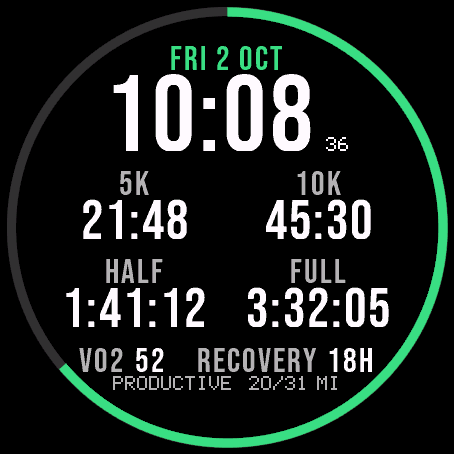
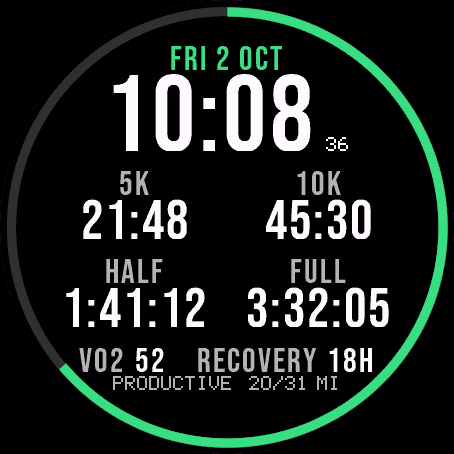 Running
Race Ready
Garmin race predictions and weekly mileage right on the face.
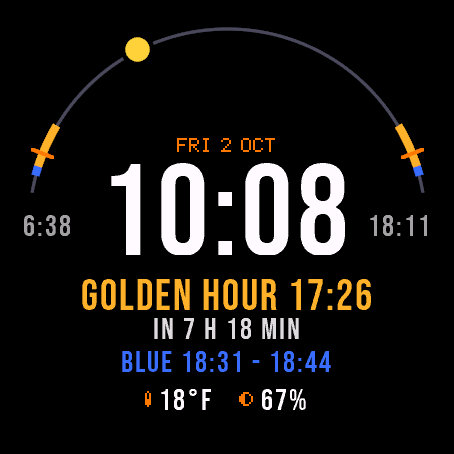
 Photography
Amber Hour
Golden and blue hour countdown with the sun's path across your day.
 Readiness
Day Verdict
One word for your day: PUSH, STEADY, EASY or REST, from your sleep, Body Battery and recovery.
 Activity
Ring Day
Three activity rings around the time, for people who close their rings.
Tell us how to make it better
Missing a data field, a colour, a layout? Found a bug on your watch model? Write it here. We read every message and ship improvements in updates.