7-day free trial, then a one-time 4.99 EUR unlock code at dialforge.dev. No subscription.
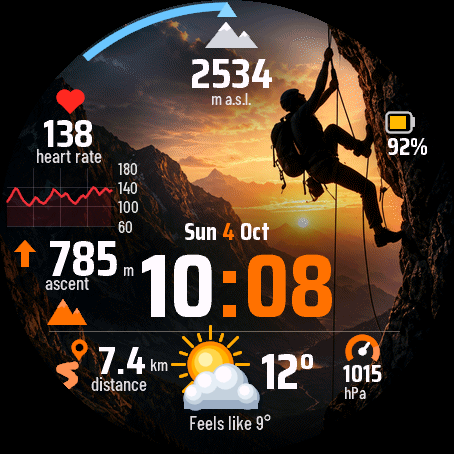
A climbing watch face: altitude, today's ascent, heart rate with a graph of the last hour, distance, weather and pressure over a picture of a climber on a rock face at sunset. Big time in the middle, a goal arc at the top.
- Altitude from the watch barometer and today's ascent, in metres or feet following your watch units.
- Heart rate with a line graph of the last hour, 60 to 180 bpm.
- Weather from Garmin through your phone: icon, temperature and feels-like. Pressure in hPa, distance today, battery.
- Goal arc at the top: floors climbed or steps against your Garmin goal, or off.
- Four accent colours (orange, blue, green, gold) and three backgrounds: the sunset picture, a blue version or plain black. Labels and date in 13 languages, 12 or 24 hour time, leading zero setting.
- Always-on mode for AMOLED: only the dimmed time, shifted every minute.
- Tap a field to open the matching Garmin screen: altitude, heart rate, weather or pressure. The tap can be switched off.
- No animation, to save battery.
The background is a fixed picture, not a live camera view: a climber on a rock face at sunset, darkened where the numbers sit. The blue and black backgrounds are there if you prefer a calmer look.
When there is no data the face shows "--" instead of a made-up value. Slope and compass are not on the face: Garmin does not give watch faces access to them.
Companion app: Summit Screens by Dialforge, a separate app in the store, adds five screens with a compass, an altitude profile, weather, heart rate and a climb summary. With it installed, tapping the altitude at the top of this face opens the app.
Settings: on the watch (hold MENU, then Watch face, then Customize) or in the Connect IQ app.
A little request from the maker
Dialforge is my student project. I build these watch faces after classes, so they are still at an early stage, and I could not test every watch model myself. If something looks wrong on your watch, please do not leave a negative rating: write to me first at https://dialforge.dev/faces/summitclimb/ and I will fix it, usually within 24 hours. A kind review means more to me than you can imagine. And if you like my work, you can buy me a coffee (the link is at the bottom of dialforge.dev): I am saving up to pay for my studies. Thank you for your patience and for giving a young developer a chance.
7 dni za darmo, potem jednorazowy kod za 4,99 EUR na dialforge.dev. Bez abonamentu.
Tarcza wspinaczkowa: wysokość, dzisiejsze przewyższenie, tętno z wykresem ostatniej godziny, dystans, pogoda i ciśnienie na tle obrazu wspinacza na skalnej ścianie o zachodzie słońca. Duża godzina pośrodku, łuk celu u góry.
- Wysokość z barometru zegarka i dzisiejsze przewyższenie, w metrach lub stopach zgodnie z jednostkami zegarka.
- Tętno z wykresem liniowym ostatniej godziny, od 60 do 180 uderzeń na minutę.
- Pogoda od Garmina przez telefon: ikona, temperatura i odczuwalna. Ciśnienie w hPa, dzisiejszy dystans, bateria.
- Łuk celu u góry: piętra albo kroki wobec Twojego celu Garmina, albo wyłączony.
- Cztery kolory akcentu (pomarańczowy, niebieski, zielony, złoty) i trzy tła: obraz zachodu słońca, wersja niebieska albo czysta czerń. Etykiety i data w 13 językach, godzina 12 lub 24 h, ustawienie zera na początku.
- Tryb zawsze włączony na AMOLED: tylko przygaszona godzina, przesuwana co minutę.
- Dotknięcie pola otwiera odpowiedni ekran Garmina: wysokość, tętno, pogodę albo ciśnienie. Dotyk można wyłączyć.
- Bez animacji, dla baterii.
Tło to stały obraz, nie podgląd z kamery: wspinacz na skalnej ścianie o zachodzie słońca, przyciemniony tam, gdzie leżą cyfry. Niebieskie i czarne tło są dla tych, którzy wolą spokojniejszy wygląd.
Gdy nie ma danych, tarcza pokazuje "--" zamiast zmyślonej wartości. Nachylenia i kompasu na tarczy nie ma: Garmin nie udostępnia ich tarczom.
Aplikacja towarzysząca: Summit Screens od Dialforge, osobna aplikacja w sklepie, dodaje pięć ekranów z kompasem, profilem wysokości, pogodą, tętnem i podsumowaniem wspinaczki. Gdy jest zainstalowana, dotknięcie wysokości u góry tej tarczy otwiera aplikację.
Ustawienia: na zegarku (przytrzymaj MENU, potem Tarcza zegarka, potem Dostosuj) albo w aplikacji Connect IQ.
Mała prośba od autora
Dialforge to mój studencki projekt. Robię te tarcze po zajęciach, więc są jeszcze na wczesnym etapie i nie mogłem przetestować każdego modelu zegarka. Jeśli coś wygląda źle na Twoim zegarku, proszę, nie wystawiaj negatywnej oceny: napisz najpierw do mnie na https://dialforge.dev/faces/summitclimb/, a naprawię to, zwykle w ciągu 24 godzin. Życzliwa opinia znaczy dla mnie więcej, niż myślisz. A jeśli podoba Ci się moja praca, możesz postawić mi kawę (link na dole strony dialforge.dev): zbieram na opłacenie studiów. Dziękuję za cierpliwość i za dane szansy młodemu twórcy.
7 Tage kostenlos testen, danach ein einmaliger Freischaltcode für 4,99 EUR auf dialforge.dev. Kein Abo.
Ein Zifferblatt fürs Klettern: Höhe, heutiger Anstieg, Herzfrequenz mit Verlauf der letzten Stunde, Distanz, Wetter und Luftdruck über dem Bild eines Kletterers an einer Felswand bei Sonnenuntergang. Große Zeit in der Mitte, ein Zielbogen oben.
- Höhe vom Barometer der Uhr und heutiger Anstieg, in Metern oder Fuß nach den Einheiten deiner Uhr.
- Herzfrequenz mit Liniendiagramm der letzten Stunde, 60 bis 180 Schläge pro Minute.
- Wetter von Garmin über dein Handy: Symbol, Temperatur und gefühlte Temperatur. Luftdruck in hPa, heutige Distanz, Akku.
- Zielbogen oben: Stockwerke oder Schritte gegenüber deinem Garmin-Ziel, oder aus.
- Vier Akzentfarben (Orange, Blau, Grün, Gold) und drei Hintergründe: das Sonnenuntergangsbild, eine blaue Version oder schlichtes Schwarz. Beschriftungen und Datum in 13 Sprachen, 12- oder 24-Stunden-Zeit, Einstellung für die führende Null.
- Always-on-Modus für AMOLED: nur die gedimmte Zeit, jede Minute verschoben.
- Tippe auf ein Feld, um den passenden Garmin-Bildschirm zu öffnen: Höhe, Herzfrequenz, Wetter oder Luftdruck. Das Tippen lässt sich abschalten.
- Keine Animation, um Akku zu sparen.
Der Hintergrund ist ein festes Bild, kein Kamerabild: ein Kletterer an einer Felswand bei Sonnenuntergang, dort abgedunkelt, wo die Zahlen sitzen. Der blaue und der schwarze Hintergrund sind für alle da, die es ruhiger mögen.
Gibt es keine Daten, zeigt das Zifferblatt "--" statt eines erfundenen Werts. Steigung und Kompass sind nicht auf dem Zifferblatt: Garmin gibt Zifferblättern keinen Zugriff darauf.
Begleit-App: Summit Screens von Dialforge, eine separate App im Store, ergänzt fünf Bildschirme mit Kompass, Höhenprofil, Wetter, Herzfrequenz und einer Kletterübersicht. Ist sie installiert, öffnet ein Tippen auf die Höhe oben auf diesem Zifferblatt die App.
Einstellungen: auf der Uhr (MENU gedrückt halten, dann Uhrdesign, dann Anpassen) oder in der Connect IQ App.
Eine kleine bitte des entwicklers
Dialforge ist mein Studentenprojekt. Ich baue diese Zifferblätter nach den Vorlesungen, deshalb sind sie noch in einer frühen Phase, und ich konnte nicht jedes Uhrenmodell selbst testen. Wenn auf deiner Uhr etwas nicht stimmt, hinterlasse bitte keine schlechte Bewertung: Schreib mir zuerst auf https://dialforge.dev/faces/summitclimb/, dann behebe ich es, meist innerhalb von 24 Stunden. Eine freundliche Bewertung bedeutet mir mehr, als du denkst. Und wenn dir meine Arbeit gefällt, kannst du mir einen Kaffee spendieren (den Link findest du unten auf dialforge.dev): Ich spare für mein Studium. Danke für deine Geduld und dafür, dass du einem jungen Entwickler eine Chance gibst.
Essai gratuit de 7 jours, puis un code de déverrouillage unique à 4,99 EUR sur dialforge.dev. Sans abonnement.
Un cadran pour l'escalade : altitude, dénivelé du jour, fréquence cardiaque avec le graphique de la dernière heure, distance, météo et pression sur l'image d'un grimpeur sur une paroi au coucher du soleil. Grande heure au centre, un arc d'objectif en haut.
- Altitude du baromètre de la montre et dénivelé du jour, en mètres ou en pieds selon les unités de votre montre.
- Fréquence cardiaque avec une courbe de la dernière heure, de 60 à 180 bpm.
- Météo de Garmin via votre téléphone : icône, température et ressenti. Pression en hPa, distance du jour, batterie.
- Arc d'objectif en haut : étages ou pas par rapport à votre objectif Garmin, ou désactivé.
- Quatre couleurs d'accent (orange, bleu, vert, or) et trois fonds : l'image du coucher de soleil, une version bleue ou un noir uni. Libellés et date en 13 langues, heure sur 12 ou 24 heures, réglage du zéro initial.
- Mode always-on pour AMOLED : seulement l'heure atténuée, décalée chaque minute.
- Touchez un champ pour ouvrir l'écran Garmin correspondant : altitude, fréquence cardiaque, météo ou pression. Le toucher peut être désactivé.
- Aucune animation, pour économiser la batterie.
Le fond est une image fixe, pas une vue de caméra : un grimpeur sur une paroi au coucher du soleil, assombri là où se trouvent les chiffres. Les fonds bleu et noir sont là si vous préférez un look plus calme.
Sans données, le cadran affiche "--" au lieu d'une valeur inventée. La pente et la boussole ne sont pas sur le cadran : Garmin n'y donne pas accès aux cadrans.
Application compagnon : Summit Screens de Dialforge, une application séparée dans la boutique, ajoute cinq écrans avec une boussole, un profil d'altitude, la météo, la fréquence cardiaque et un résumé de l'ascension. Une fois installée, toucher l'altitude en haut de ce cadran ouvre l'application.
Réglages : sur la montre (maintenez MENU, puis Cadran, puis Personnaliser) ou dans l'application Connect IQ.
Une petite demande du créateur
Dialforge est mon projet étudiant. Je crée ces cadrans après les cours, ils en sont donc encore à un stade précoce, et je n'ai pas pu tester tous les modèles de montre. Si quelque chose ne va pas sur votre montre, s'il vous plaît, ne laissez pas de note négative : écrivez-moi d'abord sur https://dialforge.dev/faces/summitclimb/ et je corrigerai cela, en général sous 24 heures. Un avis bienveillant compte plus que vous ne l'imaginez. Et si vous aimez mon travail, vous pouvez m'offrir un café (le lien se trouve en bas de dialforge.dev) : j'économise pour payer mes études. Merci pour votre patience et pour la chance donnée à un jeune développeur.
Prueba gratuita de 7 días y luego un código de desbloqueo único de 4,99 EUR en dialforge.dev. Sin suscripción.
Una esfera para escalada: altitud, desnivel de hoy, frecuencia cardiaca con gráfica de la última hora, distancia, tiempo y presión sobre la imagen de un escalador en una pared de roca al atardecer. Hora grande en el centro, un arco de objetivo arriba.
- Altitud del barómetro del reloj y desnivel de hoy, en metros o pies según las unidades de tu reloj.
- Frecuencia cardiaca con gráfica de líneas de la última hora, de 60 a 180 ppm.
- Tiempo de Garmin a través de tu teléfono: icono, temperatura y sensación térmica. Presión en hPa, distancia de hoy, batería.
- Arco de objetivo arriba: pisos o pasos frente a tu objetivo de Garmin, o apagado.
- Cuatro colores de acento (naranja, azul, verde, oro) y tres fondos: la imagen del atardecer, una versión azul o negro liso. Etiquetas y fecha en 13 idiomas, hora de 12 o 24 horas, ajuste del cero inicial.
- Modo siempre activo para AMOLED: solo la hora atenuada, desplazada cada minuto.
- Toca un campo para abrir la pantalla de Garmin correspondiente: altitud, frecuencia cardiaca, tiempo o presión. El toque se puede desactivar.
- Sin animación, para ahorrar batería.
El fondo es una imagen fija, no una vista de cámara: un escalador en una pared de roca al atardecer, oscurecida donde van los números. Los fondos azul y negro están ahí si prefieres un aspecto más tranquilo.
Cuando no hay datos, la esfera muestra "--" en lugar de un valor inventado. La pendiente y la brújula no están en la esfera: Garmin no da a las esferas acceso a ellas.
App complementaria: Summit Screens de Dialforge, una app separada en la tienda, añade cinco pantallas con brújula, perfil de altitud, tiempo, frecuencia cardiaca y un resumen de la escalada. Con ella instalada, tocar la altitud en la parte superior de esta esfera abre la app.
Ajustes: en el reloj (mantén pulsado MENU, luego Esfera y después Personalizar) o en la app Connect IQ.
Una pequeña petición del creador
Dialforge es mi proyecto de estudiante. Creo estas esferas después de clase, así que todavía están en una fase temprana y no pude probar todos los modelos de reloj. Si algo no se ve bien en tu reloj, por favor no dejes una valoración negativa: escríbeme primero en https://dialforge.dev/faces/summitclimb/ y lo arreglaré, normalmente en 24 horas. Una reseña amable significa para mí más de lo que imaginas. Y si te gusta mi trabajo, puedes invitarme a un café (el enlace está al final de dialforge.dev): estoy ahorrando para pagar mis estudios. Gracias por tu paciencia y por darle una oportunidad a un desarrollador joven.
7 dagen gratis proberen, daarna een eenmalige ontgrendelcode van 4,99 EUR op dialforge.dev. Geen abonnement.
Een wijzerplaat voor klimmen: hoogte, stijging van vandaag, hartslag met een grafiek van het laatste uur, afstand, weer en luchtdruk over een beeld van een klimmer op een rotswand bij zonsondergang. Grote tijd in het midden, een doelboog bovenaan.
- Hoogte van de barometer van het horloge en stijging van vandaag, in meters of voet volgens de eenheden van je horloge.
- Hartslag met een lijngrafiek van het laatste uur, 60 tot 180 bpm.
- Weer van Garmin via je telefoon: pictogram, temperatuur en gevoelstemperatuur. Luchtdruk in hPa, afstand vandaag, batterij.
- Doelboog bovenaan: verdiepingen of stappen tegenover je Garmin-doel, of uit.
- Vier accentkleuren (oranje, blauw, groen, goud) en drie achtergronden: het zonsondergangbeeld, een blauwe versie of effen zwart. Labels en datum in 13 talen, 12- of 24-uurstijd, instelling voor de voorloopnul.
- Always-on-modus voor AMOLED: alleen de gedimde tijd, elke minuut verschoven.
- Tik op een veld om het bijbehorende Garmin-scherm te openen: hoogte, hartslag, weer of luchtdruk. Het tikken kan worden uitgeschakeld.
- Geen animatie, om batterij te besparen.
De achtergrond is een vast beeld, geen camerabeeld: een klimmer op een rotswand bij zonsondergang, donkerder gemaakt waar de cijfers staan. De blauwe en zwarte achtergrond zijn er als je een rustiger beeld wilt.
Als er geen gegevens zijn, toont de wijzerplaat "--" in plaats van een verzonnen waarde. Helling en kompas staan niet op de wijzerplaat: Garmin geeft wijzerplaten daar geen toegang toe.
Bijbehorende app: Summit Screens van Dialforge, een aparte app in de store, voegt vijf schermen toe met een kompas, een hoogteprofiel, weer, hartslag en een klimoverzicht. Als die is geïnstalleerd, opent een tik op de hoogte bovenaan deze wijzerplaat de app.
Instellingen: op het horloge (houd MENU ingedrukt, dan Wijzerplaat, dan Aanpassen) of in de Connect IQ-app.
Een klein verzoek van de maker
Dialforge is mijn studentenproject. Ik maak deze wijzerplaten na de colleges, dus ze zijn nog in een vroeg stadium en ik kon niet elk horlogemodel zelf testen. Ziet er iets verkeerd uit op je horloge, geef dan alsjeblieft geen negatieve beoordeling: schrijf me eerst via https://dialforge.dev/faces/summitclimb/, dan los ik het op, meestal binnen 24 uur. Een vriendelijke review betekent meer voor me dan je denkt. En als je mijn werk waardeert, kun je een koffie voor me kopen (de link staat onderaan dialforge.dev): ik spaar om mijn studie te betalen. Bedankt voor je geduld en voor de kans die je een jonge ontwikkelaar geeft.
7日間無料でお試しいただけます。その後はdialforge.devで4.99 EURの解除コードを一度だけ購入(サブスクリプションなし)。
クライミング向けのウォッチフェイス: 高度、今日の上昇高度、直近1時間のグラフ付き心拍数、距離、天気、気圧を、夕日の岩壁を登るクライマーの画像の上に表示します。中央に大きな時刻、上部に目標アーク。
- ウォッチの気圧計による高度と今日の上昇高度を、ウォッチの単位設定に従ってメートルまたはフィートで表示。
- 直近1時間の折れ線グラフ付き心拍数、60から180 bpm。
- スマートフォン経由のGarminの天気: アイコン、気温、体感温度。hPa単位の気圧、今日の距離、バッテリー。
- 上部の目標アーク: Garminの目標に対する上った階数または歩数、またはオフ。
- 4つのアクセントカラー(オレンジ、青、緑、金)と3つの背景: 夕日の画像、青いバージョン、または無地の黒。13言語のラベルと日付、12時間または24時間表示、先頭のゼロの設定。
- AMOLED向けの常時表示モード: 暗くした時刻のみを表示し、毎分位置をずらします。
- フィールドをタップすると対応するGarminの画面が開きます: 高度、心拍数、天気、気圧。タップはオフにできます。
- バッテリー節約のため、アニメーションはありません。
背景はカメラ映像ではなく固定の画像です: 夕日の岩壁のクライマーで、数字のある場所は暗くしてあります。落ち着いた見た目が好みなら青と黒の背景があります。
データがないとき、ウォッチフェイスは作り物の値ではなく"--"を表示します。勾配とコンパスはウォッチフェイスにありません: Garminがウォッチフェイスにそのアクセスを許可していないためです。
コンパニオンアプリ: DialforgeのSummit Screensはストアの別アプリで、コンパス、高度プロファイル、天気、心拍数、クライミングの概要を備えた5つの画面を追加します。インストールしていると、このウォッチフェイス上部の高度をタップするとアプリが開きます。
設定:時計本体(MENUを長押し→文字盤→カスタマイズ)またはConnect IQアプリから。
作者からの小さなお願い
Dialforgeは私の学生プロジェクトです。授業のあとにこれらの文字盤を作っているため、まだ初期段階で、すべての時計モデルで試すことはできませんでした。お使いの時計で表示がおかしいときは、低い評価をつけずに、まずhttps://dialforge.dev/faces/summitclimb/ で私に連絡してください。通常24時間以内に修正します。温かいレビューは、想像以上にうれしいものです。私の仕事を気に入っていただけたら、コーヒーをおごっていただくこともできます(リンクはdialforge.devの一番下にあります)。学費を貯めているところです。ご辛抱いただき、若い開発者にチャンスをくださってありがとうございます。
Prova gratuita di 7 giorni, poi un codice di sblocco una tantum da 4,99 EUR su dialforge.dev. Nessun abbonamento.
Un quadrante per l'arrampicata: altitudine, dislivello di oggi, battito con il grafico dell'ultima ora, distanza, meteo e pressione sull'immagine di uno scalatore su una parete di roccia al tramonto. Ora grande al centro, un arco obiettivo in alto.
- Altitudine dal barometro dell'orologio e dislivello di oggi, in metri o piedi secondo le unità del tuo orologio.
- Battito con un grafico a linea dell'ultima ora, da 60 a 180 bpm.
- Meteo da Garmin tramite il telefono: icona, temperatura e percepita. Pressione in hPa, distanza di oggi, batteria.
- Arco obiettivo in alto: piani o passi rispetto al tuo obiettivo Garmin, oppure spento.
- Quattro colori accento (arancione, blu, verde, oro) e tre sfondi: l'immagine del tramonto, una versione blu o nero semplice. Etichette e data in 13 lingue, ora a 12 o 24 ore, impostazione dello zero iniziale.
- Modalità always-on per AMOLED: solo l'ora attenuata, spostata ogni minuto.
- Tocca un campo per aprire la schermata Garmin corrispondente: altitudine, battito, meteo o pressione. Il tocco si può disattivare.
- Nessuna animazione, per risparmiare batteria.
Lo sfondo è un'immagine fissa, non una vista della fotocamera: uno scalatore su una parete di roccia al tramonto, scurita dove stanno i numeri. Gli sfondi blu e nero ci sono se preferisci un aspetto più sobrio.
Quando non ci sono dati il quadrante mostra "--" invece di un valore inventato. Pendenza e bussola non sono sul quadrante: Garmin non ne dà accesso ai quadranti.
App di accompagnamento: Summit Screens di Dialforge, un'app separata nello store, aggiunge cinque schermate con bussola, profilo altimetrico, meteo, battito e un riepilogo della salita. Se è installata, toccando l'altitudine in alto su questo quadrante si apre l'app.
Impostazioni: sull'orologio (tieni premuto MENU, poi Quadrante, poi Personalizza) oppure nell'app Connect IQ.
Una piccola richiesta dall'autore
Dialforge è il mio progetto da studente. Creo questi quadranti dopo le lezioni, quindi sono ancora in una fase iniziale e non ho potuto provare ogni modello di orologio. Se qualcosa sembra sbagliato sul tuo orologio, per favore non lasciare una valutazione negativa: scrivimi prima su https://dialforge.dev/faces/summitclimb/ e lo correggo, di solito entro 24 ore. Una recensione gentile per me conta più di quanto immagini. E se ti piace il mio lavoro, puoi offrirmi un caffè (il link è in fondo a dialforge.dev): sto mettendo da parte i soldi per pagarmi gli studi. Grazie per la pazienza e per aver dato una possibilità a un giovane sviluppatore.
7 天免费试用,之后在 dialforge.dev 以 4.99 EUR 购买一次性解锁码(无需订阅)。
一款攀岩表盘:海拔、今日爬升、带最近一小时图表的心率、距离、天气和气压,显示在日落时攀爬岩壁的攀岩者画面之上。中央是大号时间,顶部是目标弧线。
- 来自手表气压计的海拔和今日爬升,按手表单位以米或英尺显示。
- 心率带有最近一小时的折线图,60 到 180 bpm。
- 通过手机获取的 Garmin 天气:图标、温度和体感温度。气压以 hPa 显示,今日距离,电量。
- 顶部的目标弧线:相对于您的 Garmin 目标的爬楼层数或步数,或关闭。
- 四种强调色(橙、蓝、绿、金)和三种背景:日落画面、蓝色版本或纯黑。标签和日期支持 13 种语言,12 或 24 小时制,前导零设置。
- AMOLED 的常亮模式:仅显示调暗的时间,每分钟移动位置。
- 点击字段可打开对应的 Garmin 页面:海拔、心率、天气或气压。点击功能可以关闭。
- 没有动画,以节省电量。
背景是固定画面,不是相机实时画面:日落时岩壁上的攀岩者,数字所在处已调暗。如果您喜欢更安静的外观,可以使用蓝色和黑色背景。
没有数据时,表盘显示"--"而不是编造的数值。表盘上没有坡度和指南针:Garmin 不向表盘开放这些数据。
配套应用:Dialforge 的 Summit Screens,是商店中的独立应用,增加五个页面,包括指南针、海拔剖面、天气、心率和攀登摘要。安装后,点击此表盘顶部的海拔即可打开该应用。
设置:在手表上,长按 MENU,然后依次点击表盘、自定义;或在 Connect IQ 应用中设置。
来自作者的一个小请求
Dialforge 是我的学生项目。我利用课余时间做这些表盘,所以它们还处于早期阶段,我也没法在每一款手表上测试。如果您的手表上有什么看起来不对劲,请不要给差评,请先写信到 https://dialforge.dev/faces/summitclimb/ 告诉我,我会修复,通常在 24 小时内。一条善意的评价对我来说比您想象的更有意义。如果您喜欢我的作品,也可以请我喝杯咖啡(链接在 dialforge.dev 页面底部):我在攒钱付学费。谢谢您的耐心,也谢谢您愿意给一个年轻开发者一个机会。
7 дней бесплатно, затем разовый код разблокировки за 4,99 EUR на dialforge.dev. Без подписки.
Циферблат для скалолазания: высота, набор высоты за сегодня, пульс с графиком за последний час, дистанция, погода и давление на фоне изображения скалолаза на отвесной стене на закате. Большое время в центре, дуга цели сверху.
- Высота с барометра часов и набор высоты за сегодня, в метрах или футах согласно единицам часов.
- Пульс с линейным графиком за последний час, от 60 до 180 ударов в минуту.
- Погода от Garmin через телефон: значок, температура и ощущаемая температура. Давление в гПа, дистанция за сегодня, батарея.
- Дуга цели сверху: этажи или шаги относительно вашей цели Garmin, либо выключена.
- Четыре цвета акцента (оранжевый, синий, зелёный, золотой) и три фона: изображение заката, синяя версия или просто чёрный. Подписи и дата на 13 языках, 12- или 24-часовое время, настройка ведущего нуля.
- Режим always-on для AMOLED: только приглушённое время, сдвигаемое каждую минуту.
- Коснитесь поля, чтобы открыть соответствующий экран Garmin: высота, пульс, погода или давление. Касание можно отключить.
- Без анимации, чтобы экономить батарею.
Фон является фиксированным изображением, а не видом с камеры: скалолаз на отвесной стене на закате, затемнённый там, где расположены цифры. Синий и чёрный фон предусмотрены для тех, кто предпочитает более спокойный вид.
Когда данных нет, циферблат показывает "--" вместо выдуманного значения. Уклона и компаса на циферблате нет: Garmin не даёт циферблатам доступа к ним.
Сопутствующее приложение: Summit Screens от Dialforge, отдельное приложение в магазине, добавляет пять экранов с компасом, профилем высоты, погодой, пульсом и сводкой подъёма. Если оно установлено, касание высоты вверху этого циферблата открывает приложение.
Настройки: на часах (удерживайте MENU, затем Циферблат, затем Настроить) или в приложении Connect IQ.
Небольшая просьба от автора
Dialforge - это мой студенческий проект. Я делаю эти циферблаты после занятий, поэтому они ещё на раннем этапе, и я не мог проверить каждую модель часов. Если что-то выглядит неправильно на ваших часах, пожалуйста, не ставьте низкую оценку: сначала напишите мне на https://dialforge.dev/faces/summitclimb/, и я всё исправлю, обычно в течение 24 часов. Доброе слово в отзыве значит для меня больше, чем вы думаете. А если вам нравится моя работа, можете угостить меня кофе (ссылка внизу страницы dialforge.dev): я коплю на оплату учёбы. Спасибо за терпение и за то, что даёте шанс молодому разработчику.
Teste grátis de 7 dias, depois um código de desbloqueio único de 4,99 EUR em dialforge.dev. Sem assinatura.
Um mostrador para escalada: altitude, ganho de elevação de hoje, frequência cardíaca com gráfico da última hora, distância, clima e pressão sobre a imagem de um escalador em uma parede de rocha ao pôr do sol. Hora grande no centro, um arco de meta no topo.
- Altitude do barômetro do relógio e ganho de elevação de hoje, em metros ou pés conforme as unidades do seu relógio.
- Frequência cardíaca com gráfico de linha da última hora, de 60 a 180 bpm.
- Clima da Garmin pelo seu celular: ícone, temperatura e sensação térmica. Pressão em hPa, distância de hoje, bateria.
- Arco de meta no topo: andares ou passos em relação à sua meta Garmin, ou desligado.
- Quatro cores de destaque (laranja, azul, verde, dourado) e três fundos: a imagem do pôr do sol, uma versão azul ou preto puro. Rótulos e data em 13 idiomas, hora em 12 ou 24 horas, configuração do zero inicial.
- Modo sempre ligado para AMOLED: só a hora atenuada, deslocada a cada minuto.
- Toque em um campo para abrir a tela Garmin correspondente: altitude, frequência cardíaca, clima ou pressão. O toque pode ser desativado.
- Sem animação, para economizar bateria.
O fundo é uma imagem fixa, não uma visão de câmera: um escalador em uma parede de rocha ao pôr do sol, escurecida onde ficam os números. Os fundos azul e preto estão lá se você prefere um visual mais calmo.
Quando não há dados, o mostrador mostra "--" em vez de um valor inventado. Inclinação e bússola não estão no mostrador: a Garmin não dá acesso a elas aos mostradores.
App complementar: Summit Screens da Dialforge, um app separado na loja, adiciona cinco telas com bússola, perfil de altitude, clima, frequência cardíaca e um resumo da escalada. Com ele instalado, tocar na altitude no topo deste mostrador abre o app.
Configurações: no relógio (segure MENU, depois Mostrador, depois Personalizar) ou no aplicativo Connect IQ.
Um pequeno pedido do criador
O Dialforge é o meu projeto de estudante. Eu crio estes mostradores depois das aulas, então eles ainda estão numa fase inicial, e não consegui testar todos os modelos de relógio. Se algo parecer errado no seu relógio, por favor, não deixe uma avaliação negativa: escreva primeiro para mim em https://dialforge.dev/faces/summitclimb/ e eu corrijo, normalmente em até 24 horas. Uma avaliação gentil significa para mim mais do que você imagina. E se você gosta do meu trabalho, pode me pagar um café (o link está no final de dialforge.dev): estou juntando dinheiro para pagar meus estudos. Obrigado pela paciência e por dar uma chance a um desenvolvedor iniciante.
7denní bezplatná zkušební verze, poté jednorázový odemykací kód za 4,99 EUR na dialforge.dev. Žádné předplatné.
Ciferník pro lezení: nadmořská výška, dnešní převýšení, tep s grafem poslední hodiny, vzdálenost, počasí a tlak na obrázku lezce na skalní stěně při západu slunce. Velký čas uprostřed, oblouk cíle nahoře.
- Nadmořská výška z barometru hodinek a dnešní převýšení, v metrech nebo stopách podle jednotek hodinek.
- Tep s čárovým grafem poslední hodiny, 60 až 180 tepů za minutu.
- Počasí od Garminu přes telefon: ikona, teplota a pocitová teplota. Tlak v hPa, dnešní vzdálenost, baterie.
- Oblouk cíle nahoře: patra nebo kroky vůči vašemu cíli Garmin, nebo vypnuto.
- Čtyři barvy akcentu (oranžová, modrá, zelená, zlatá) a tři pozadí: obrázek západu slunce, modrá verze nebo čistá černá. Popisky a datum ve 13 jazycích, 12 nebo 24hodinový čas, nastavení úvodní nuly.
- Trvale zapnutý režim pro AMOLED: jen ztlumený čas, posouvaný každou minutu.
- Klepnutím na pole otevřete odpovídající obrazovku Garmin: výšku, tep, počasí nebo tlak. Klepnutí lze vypnout.
- Bez animace, aby se šetřila baterie.
Pozadí je pevný obrázek, ne pohled z kamery: lezec na skalní stěně při západu slunce, ztmavený tam, kde jsou čísla. Modré a černé pozadí jsou tu pro ty, kdo chtějí klidnější vzhled.
Když nejsou data, ciferník zobrazí "--" místo vymyšlené hodnoty. Sklon a kompas na ciferníku nejsou: Garmin k nim ciferníkům nedává přístup.
Doprovodná aplikace: Summit Screens od Dialforge, samostatná aplikace v obchodě, přidává pět obrazovek s kompasem, výškovým profilem, počasím, tepem a souhrnem výstupu. Když je nainstalovaná, klepnutí na výšku nahoře na tomto ciferníku aplikaci otevře.
Nastavení: v hodinkách (podržte MENU, pak Vzhled hodinek, pak Upravit) nebo v aplikaci Connect IQ.
Malá prosba od tvůrce
Dialforge je můj studentský projekt. Tyto ciferníky dělám po škole, takže jsou zatím v rané fázi a nemohl jsem otestovat každý model hodinek. Pokud na vašich hodinkách něco nevypadá v pořádku, prosím, nedávejte negativní hodnocení: napište mi nejdřív na https://dialforge.dev/faces/summitclimb/ a já to opravím, obvykle do 24 hodin. Milá recenze pro mě znamená víc, než si dokážete představit. A pokud se vám moje práce líbí, můžete mi koupit kávu (odkaz je dole na dialforge.dev): šetřím si na zaplacení studia. Děkuji vám za trpělivost a za to, že dáváte mladému vývojáři šanci.
7 dias de teste gratuito, depois um código de desbloqueio único de 4,99 EUR em dialforge.dev. Sem subscrição.
Um mostrador para escalada: altitude, desnível de hoje, frequência cardíaca com gráfico da última hora, distância, meteorologia e pressão sobre a imagem de um alpinista numa parede de rocha ao pôr do sol. Hora grande ao centro, um arco de objetivo em cima.
- Altitude do barómetro do relógio e desnível de hoje, em metros ou pés conforme as unidades do seu relógio.
- Frequência cardíaca com gráfico de linha da última hora, de 60 a 180 bpm.
- Meteorologia da Garmin através do telemóvel: ícone, temperatura e sensação térmica. Pressão em hPa, distância de hoje, bateria.
- Arco de objetivo em cima: andares ou passos face ao seu objetivo Garmin, ou desligado.
- Quatro cores de destaque (laranja, azul, verde, dourado) e três fundos: a imagem do pôr do sol, uma versão azul ou preto simples. Etiquetas e data em 13 idiomas, hora de 12 ou 24 horas, definição do zero inicial.
- Modo sempre ligado para AMOLED: apenas a hora atenuada, deslocada a cada minuto.
- Toque num campo para abrir o ecrã Garmin correspondente: altitude, frequência cardíaca, meteorologia ou pressão. O toque pode ser desativado.
- Sem animação, para poupar bateria.
O fundo é uma imagem fixa, não uma vista de câmara: um alpinista numa parede de rocha ao pôr do sol, escurecida onde ficam os números. Os fundos azul e preto existem para quem prefere um visual mais calmo.
Quando não há dados, o mostrador mostra "--" em vez de um valor inventado. Inclinação e bússola não estão no mostrador: a Garmin não dá acesso a elas aos mostradores.
Aplicação complementar: Summit Screens da Dialforge, uma aplicação separada na loja, acrescenta cinco ecrãs com bússola, perfil de altitude, meteorologia, frequência cardíaca e um resumo da escalada. Com ela instalada, tocar na altitude no topo deste mostrador abre a aplicação.
Definições: no relógio (mantenha premido MENU, depois Mostrador e depois Personalizar) ou na aplicação Connect IQ.
Um pequeno pedido do criador
O Dialforge é o meu projeto de estudante. Crio estes mostradores depois das aulas, por isso ainda estão numa fase inicial, e não consegui testar todos os modelos de relógio. Se algo parecer errado no seu relógio, por favor não deixe uma avaliação negativa: escreva-me primeiro em https://dialforge.dev/faces/summitclimb/ e eu corrijo, normalmente em 24 horas. Uma avaliação simpática significa para mim mais do que imagina. E se gostar do meu trabalho, pode oferecer-me um café (a ligação está no fundo de dialforge.dev): estou a poupar para pagar os meus estudos. Obrigado pela sua paciência e por dar uma oportunidade a um jovem programador.
7일 무료 체험 후, dialforge.dev에서 4.99 EUR 일회성 잠금 해제 코드를 구매하세요. 구독은 없습니다.
클라이밍을 위한 워치페이스: 고도, 오늘의 상승 고도, 최근 1시간 그래프가 있는 심박수, 거리, 날씨와 기압이 석양의 암벽을 오르는 클라이머 이미지 위에 표시됩니다. 가운데에 큰 시간, 위쪽에 목표 아크.
- 시계 기압계의 고도와 오늘의 상승 고도, 시계 단위에 따라 미터 또는 피트로 표시.
- 최근 1시간의 선 그래프가 있는 심박수, 60에서 180 bpm.
- 휴대폰을 통한 Garmin 날씨: 아이콘, 기온, 체감 온도. hPa 단위 기압, 오늘의 거리, 배터리.
- 위쪽 목표 아크: Garmin 목표 대비 오른 층수 또는 걸음 수, 또는 끔.
- 네 가지 강조 색상(주황, 파랑, 초록, 금색)과 세 가지 배경: 석양 이미지, 파란색 버전 또는 단순한 검정. 13개 언어의 라벨과 날짜, 12시간 또는 24시간 표시, 앞자리 0 설정.
- AMOLED용 상시 표시 모드: 어둡게 한 시간만 표시하며 매분 위치를 이동.
- 필드를 탭하면 해당 Garmin 화면이 열립니다: 고도, 심박수, 날씨 또는 기압. 탭 기능은 끌 수 있습니다.
- 배터리 절약을 위해 애니메이션이 없습니다.
배경은 카메라 화면이 아니라 고정된 이미지입니다: 석양의 암벽 위 클라이머이며, 숫자가 있는 곳은 어둡게 처리했습니다. 더 차분한 모습을 원하면 파란색과 검정 배경을 쓸 수 있습니다.
데이터가 없으면 워치페이스는 지어낸 값 대신 "--"를 표시합니다. 경사와 나침반은 워치페이스에 없습니다: Garmin이 워치페이스에 해당 접근 권한을 주지 않기 때문입니다.
동반 앱: Dialforge의 Summit Screens는 스토어의 별도 앱으로, 나침반, 고도 프로필, 날씨, 심박수, 등반 요약이 있는 다섯 개 화면을 추가합니다. 설치되어 있으면 이 워치페이스 위쪽의 고도를 탭할 때 앱이 열립니다.
설정: 시계에서(MENU를 길게 누른 다음 워치페이스, 사용자 설정) 또는 Connect IQ 앱에서 변경할 수 있습니다.
제작자의 작은 부탁
Dialforge는 제 학생 프로젝트입니다. 수업이 끝난 뒤에 이 워치페이스들을 만들고 있어서 아직 초기 단계이고, 모든 시계 모델을 직접 테스트하지는 못했습니다. 시계에서 이상한 점이 보이면 낮은 평점을 남기지 마시고 먼저 https://dialforge.dev/faces/summitclimb/에서 알려 주세요. 보통 24시간 안에 고치겠습니다. 따뜻한 리뷰 하나가 제게는 상상 이상으로 큰 힘이 됩니다. 제 작업이 마음에 드신다면 커피를 사주실 수도 있습니다(링크는 dialforge.dev 맨 아래에 있습니다). 학비를 모으고 있습니다. 기다려 주시고 젊은 개발자에게 기회를 주셔서 감사합니다.
7 dagars gratis provperiod, sedan en upplåsningskod som engångsköp för 4,99 EUR på dialforge.dev. Ingen prenumeration.
En urtavla för klättring: höjd, dagens stigning, puls med en graf över den senaste timmen, distans, väder och lufttryck över en bild av en klättrare på en bergvägg i solnedgången. Stor tid i mitten, en målbåge högst upp.
- Höjd från klockans barometer och dagens stigning, i meter eller fot enligt klockans enheter.
- Puls med en linjegraf över den senaste timmen, 60 till 180 slag per minut.
- Väder från Garmin via din telefon: ikon, temperatur och känns som. Lufttryck i hPa, dagens distans, batteri.
- Målbåge högst upp: våningar eller steg mot ditt Garmin-mål, eller av.
- Fyra accentfärger (orange, blå, grön, guld) och tre bakgrunder: solnedgångsbilden, en blå version eller rent svart. Etiketter och datum på 13 språk, 12- eller 24-timmarstid, inställning för inledande nolla.
- Always-on-läge för AMOLED: bara den dämpade tiden, flyttad varje minut.
- Tryck på ett fält för att öppna motsvarande Garmin-skärm: höjd, puls, väder eller lufttryck. Tryckningen kan stängas av.
- Ingen animation, för att spara batteri.
Bakgrunden är en fast bild, inte en kameravy: en klättrare på en bergvägg i solnedgången, mörkare där siffrorna sitter. Den blå och den svarta bakgrunden finns för dig som vill ha ett lugnare utseende.
När det inte finns några data visar urtavlan "--" i stället för ett påhittat värde. Lutning och kompass finns inte på urtavlan: Garmin ger inte urtavlor tillgång till dem.
Kompanjonapp: Summit Screens från Dialforge, en separat app i butiken, lägger till fem skärmar med kompass, höjdprofil, väder, puls och en klättringssammanfattning. Med den installerad öppnar ett tryck på höjden högst upp på den här urtavlan appen.
Inställningar: på klockan (håll in MENU, sedan Urtavla, sedan Anpassa) eller i Connect IQ-appen.
En liten önskan från skaparen
Dialforge är mitt studentprojekt. Jag bygger de här urtavlorna efter lektionerna, så de är fortfarande på ett tidigt stadium och jag kunde inte testa varje klockmodell själv. Om något ser fel ut på din klocka, lämna gärna inget negativt betyg: skriv först till mig på https://dialforge.dev/faces/summitclimb/ så fixar jag det, vanligtvis inom 24 timmar. En vänlig recension betyder mer för mig än du kan ana. Och om du gillar mitt arbete kan du bjuda mig på en kaffe (länken finns längst ned på dialforge.dev): jag sparar ihop till mina studier. Tack för ditt tålamod och för att du ger en ung utvecklare en chans.
7 dages gratis prøveperiode, derefter en engangskode til 4,99 EUR på dialforge.dev. Intet abonnement.
En urskive til klatring: højde, dagens stigning, puls med en graf over den seneste time, distance, vejr og lufttryk over et billede af en klatrer på en klippevæg ved solnedgang. Stort klokkeslæt i midten, en målbue øverst.
- Højde fra urets barometer og dagens stigning, i meter eller fod efter urets enheder.
- Puls med en linjegraf over den seneste time, 60 til 180 slag i minuttet.
- Vejr fra Garmin via din telefon: ikon, temperatur og føles som. Lufttryk i hPa, dagens distance, batteri.
- Målbue øverst: etager eller skridt i forhold til dit Garmin-mål, eller fra.
- Fire accentfarver (orange, blå, grøn, guld) og tre baggrunde: solnedgangsbilledet, en blå version eller rent sort. Etiketter og dato på 13 sprog, 12- eller 24-timers tid, indstilling for foranstillet nul.
- Always-on-tilstand til AMOLED: kun det dæmpede klokkeslæt, flyttet hvert minut.
- Tryk på et felt for at åbne den tilhørende Garmin-skærm: højde, puls, vejr eller lufttryk. Trykket kan slås fra.
- Ingen animation, for at spare batteri.
Baggrunden er et fast billede, ikke et kamerabillede: en klatrer på en klippevæg ved solnedgang, mørklagt der, hvor tallene står. Den blå og den sorte baggrund er til dig, der foretrækker et roligere udtryk.
Når der ingen data er, viser urskiven "--" i stedet for en opdigtet værdi. Hældning og kompas er ikke på urskiven: Garmin giver ikke urskiver adgang til dem.
Ledsager-app: Summit Screens fra Dialforge, en separat app i butikken, tilføjer fem skærme med kompas, højdeprofil, vejr, puls og et klatreresumé. Når den er installeret, åbner et tryk på højden øverst på denne urskive appen.
Indstillinger: på uret (hold MENU, derefter Urskive, derefter Tilpas) eller i Connect IQ-appen.
En lille besked fra udvikleren
Dialforge er mit studieprojekt. Jeg bygger disse urskiver efter undervisningen, så de er stadig på et tidligt stadie, og jeg kunne ikke selv teste alle urmodeller. Hvis noget ser forkert ud på dit ur, så lad være med at give en dårlig bedømmelse: skriv først til mig på https://dialforge.dev/faces/summitclimb/, så retter jeg det, normalt inden for 24 timer. En venlig anmeldelse betyder mere for mig, end du forestiller dig. Og hvis du kan lide mit arbejde, kan du give mig en kop kaffe (linket står nederst på dialforge.dev): jeg sparer op til at betale for mine studier. Tak for din tålmodighed og for at give en ung udvikler en chance.
7 dagers gratis prøveperiode, deretter en engangs opplåsingskode til 4,99 EUR på dialforge.dev. Ingen abonnement.
En urskive for klatring: høyde, dagens stigning, puls med en graf over den siste timen, distanse, vær og lufttrykk over et bilde av en klatrer på en fjellvegg i solnedgang. Stort klokkeslett i midten, en målbue øverst.
- Høyde fra klokkens barometer og dagens stigning, i meter eller fot etter klokkens enheter.
- Puls med en linjegraf over den siste timen, 60 til 180 slag i minuttet.
- Vær fra Garmin via telefonen din: ikon, temperatur og føles som. Lufttrykk i hPa, dagens distanse, batteri.
- Målbue øverst: etasjer eller skritt mot Garmin-målet ditt, eller av.
- Fire aksentfarger (oransje, blå, grønn, gull) og tre bakgrunner: solnedgangsbildet, en blå versjon eller rent svart. Etiketter og dato på 13 språk, 12- eller 24-timers tid, innstilling for innledende null.
- Always-on-modus for AMOLED: bare det dempede klokkeslettet, flyttet hvert minutt.
- Trykk på et felt for å åpne den tilhørende Garmin-skjermen: høyde, puls, vær eller lufttrykk. Trykket kan slås av.
- Ingen animasjon, for å spare batteri.
Bakgrunnen er et fast bilde, ikke et kamerabilde: en klatrer på en fjellvegg i solnedgang, mørklagt der tallene står. Den blå og den svarte bakgrunnen er der om du foretrekker et roligere uttrykk.
Når det ikke finnes data, viser urskiven "--" i stedet for en oppdiktet verdi. Helning og kompass er ikke på urskiven: Garmin gir ikke urskiver tilgang til dem.
Følgeapp: Summit Screens fra Dialforge, en egen app i butikken, legger til fem skjermer med kompass, høydeprofil, vær, puls og en klatreoppsummering. Med den installert åpner et trykk på høyden øverst på denne urskiven appen.
Innstillinger: på klokken (hold MENU, deretter Urskive, deretter Tilpass) eller i Connect IQ-appen.
En liten forespørsel fra utvikleren
Dialforge er studentprosjektet mitt. Jeg lager disse urskivene etter forelesning, så de er fortsatt på et tidlig stadium, og jeg har ikke kunnet teste alle klokkemodeller selv. Hvis noe ser feil ut på klokken din, vær snill og ikke gi en negativ vurdering: skriv til meg først på https://dialforge.dev/faces/summitclimb/, så fikser jeg det, vanligvis innen 24 timer. En vennlig omtale betyr mer for meg enn du kan forestille deg. Og hvis du liker arbeidet mitt, kan du kjøpe meg en kaffe (lenken ligger nederst på dialforge.dev): jeg sparer til studiene mine. Takk for tålmodigheten og for at du gir en ung utvikler en sjanse.
7 天免費試用,之後在 dialforge.dev 以 4.99 EUR 購買一次性解鎖碼(不需訂閱)。
一款攀岩錶面:海拔、今日爬升、附最近一小時圖表的心率、距離、天氣與氣壓,顯示在日落時攀登岩壁的攀岩者畫面之上。中央是大號時間,頂部是目標弧線。
- 來自手錶氣壓計的海拔與今日爬升,依手錶單位以公尺或英尺顯示。
- 心率附最近一小時的折線圖,60 到 180 bpm。
- 透過手機取得的 Garmin 天氣:圖示、溫度與體感溫度。氣壓以 hPa 顯示,今日距離,電量。
- 頂部的目標弧線:相對於您的 Garmin 目標的爬樓層數或步數,或關閉。
- 四種強調色(橙、藍、綠、金)與三種背景:日落畫面、藍色版本或純黑。標籤與日期支援 13 種語言,12 或 24 小時制,前導零設定。
- AMOLED 的常亮模式:僅顯示調暗的時間,每分鐘移動位置。
- 點選欄位可開啟對應的 Garmin 頁面:海拔、心率、天氣或氣壓。點選功能可以關閉。
- 沒有動畫,以節省電量。
背景是固定畫面,不是相機即時畫面:日落時岩壁上的攀岩者,數字所在處已調暗。如果您偏好更安靜的外觀,可以使用藍色與黑色背景。
沒有資料時,錶面顯示"--"而不是編造的數值。錶面上沒有坡度與指南針:Garmin 不向錶面開放這些資料。
搭配應用程式:Dialforge 的 Summit Screens,是商店中的獨立應用程式,新增五個頁面,包括指南針、海拔剖面、天氣、心率與攀登摘要。安裝後,點選此錶面頂部的海拔即可開啟該應用程式。
設定:在手錶上(長按 MENU,依序選擇錶面、自訂)或在 Connect IQ 應用程式中設定。
來自作者的一個小請求
Dialforge 是我的學生專案。我利用課餘時間做這些錶面,所以目前還在早期階段,而且我沒辦法測試每一款手錶。如果您的手錶上有什麼看起來不對勁,請不要給負評:請先寫信到 https://dialforge.dev/faces/summitclimb/ 告訴我,我會修復,通常在 24 小時內。一則善意的評價對我的意義,超出您的想像。如果您喜歡我的作品,也可以請我喝杯咖啡(連結在 dialforge.dev 頁面最下方):我正在存錢支付學費。謝謝您的耐心,也謝謝您給一位年輕開發者一個機會。
7 päivän ilmainen kokeilu, sen jälkeen kertamaksuinen 4,99 EUR avauskoodi osoitteessa dialforge.dev. Ei tilausta.
Kellotaulu kiipeilyyn: korkeus, päivän nousu, syke viimeisen tunnin käyrällä, matka, sää ja ilmanpaine kuvan päällä, jossa kiipeilijä on kallioseinämällä auringonlaskussa. Iso kellonaika keskellä, tavoitekaari ylhäällä.
- Korkeus kellon barometrista ja päivän nousu, metreinä tai jalkoina kellon yksiköiden mukaan.
- Syke viimeisen tunnin viivakäyrällä, 60 - 180 lyöntiä minuutissa.
- Sää Garminilta puhelimen kautta: kuvake, lämpötila ja tuntuu kuin. Ilmanpaine hPa, päivän matka, akku.
- Tavoitekaari ylhäällä: kerrokset tai askeleet suhteessa Garmin-tavoitteeseesi, tai pois.
- Neljä korostusväriä (oranssi, sininen, vihreä, kulta) ja kolme taustaa: auringonlaskukuva, sininen versio tai pelkkä musta. Tekstit ja päivämäärä 13 kielellä, 12 tai 24 tunnin aika, etunollan asetus.
- Always-on-tila AMOLED-näytöille: vain himmennetty kellonaika, siirretty joka minuutti.
- Napauta kenttää avataksesi vastaavan Garmin-näytön: korkeus, syke, sää tai ilmanpaine. Napautuksen voi kytkeä pois.
- Ei animaatiota, akun säästämiseksi.
Tausta on kiinteä kuva, ei kameran näkymä: kiipeilijä kallioseinämällä auringonlaskussa, tummennettu siellä, missä numerot ovat. Sininen ja musta tausta ovat niille, jotka haluavat rauhallisemman ilmeen.
Kun tietoja ei ole, kellotaulu näyttää "--" keksityn arvon sijaan. Kaltevuutta ja kompassia ei ole kellotaululla: Garmin ei anna kellotauluille pääsyä niihin.
Kumppanisovellus: Dialforgen Summit Screens, erillinen sovellus kaupassa, lisää viisi näyttöä, joissa on kompassi, korkeusprofiili, sää, syke ja kiipeilyn yhteenveto. Kun se on asennettu, korkeuden napautus tämän kellotaulun yläreunassa avaa sovelluksen.
Asetukset: kellossa (pidä MENU painettuna, sitten Kellotaulu, sitten Mukauta) tai Connect IQ -sovelluksessa.
Pieni pyyntö tekijältä
Dialforge on opiskelijaprojektini. Teen näitä kellotauluja tuntien jälkeen, joten ne ovat vielä varhaisessa vaiheessa, enkä voinut testata jokaista kellomallia itse. Jos jokin näyttää kellossasi väärältä, älä jätä negatiivista arvostelua: kirjoita ensin minulle osoitteessa https://dialforge.dev/faces/summitclimb/, niin korjaan sen yleensä 24 tunnin kuluessa. Ystävällinen arvostelu merkitsee minulle enemmän kuin arvaatkaan. Ja jos pidät työstäni, voit tarjota minulle kahvit (linkki on dialforge.dev-sivun alalaidassa): säästän opintojeni maksamiseen. Kiitos kärsivällisyydestäsi ja siitä, että annat nuorelle kehittäjälle mahdollisuuden.
7-dňová bezplatná skúška, potom jednorazový odblokovací kód za 4,99 EUR na dialforge.dev. Bez predplatného.
Ciferník na lezenie: nadmorská výška, dnešné prevýšenie, tep s grafom poslednej hodiny, vzdialenosť, počasie a tlak na obrázku lezca na skalnej stene pri západe slnka. Veľký čas v strede, oblúk cieľa hore.
- Nadmorská výška z barometra hodiniek a dnešné prevýšenie, v metroch alebo stopách podľa jednotiek hodiniek.
- Tep s čiarovým grafom poslednej hodiny, 60 až 180 úderov za minútu.
- Počasie od Garminu cez telefón: ikona, teplota a pocitová teplota. Tlak v hPa, dnešná vzdialenosť, batéria.
- Oblúk cieľa hore: poschodia alebo kroky voči vášmu cieľu Garmin, alebo vypnuté.
- Štyri farby akcentu (oranžová, modrá, zelená, zlatá) a tri pozadia: obrázok západu slnka, modrá verzia alebo čistá čierna. Popisy a dátum v 13 jazykoch, 12 alebo 24-hodinový čas, nastavenie úvodnej nuly.
- Režim always-on pre AMOLED: len stlmený čas, posúvaný každú minútu.
- Ťuknutím na pole otvoríte zodpovedajúcu obrazovku Garmin: výšku, tep, počasie alebo tlak. Ťuknutie sa dá vypnúť.
- Bez animácií, aby sa šetrila batéria.
Pozadie je pevný obrázok, nie pohľad z kamery: lezec na skalnej stene pri západe slnka, stmavený tam, kde sú čísla. Modré a čierne pozadie sú pre tých, čo chcú pokojnejší vzhľad.
Keď nie sú dáta, ciferník zobrazí "--" namiesto vymyslenej hodnoty. Sklon a kompas na ciferníku nie sú: Garmin k nim ciferníkom nedáva prístup.
Sprievodná aplikácia: Summit Screens od Dialforge, samostatná aplikácia v obchode, pridáva päť obrazoviek s kompasom, výškovým profilom, počasím, tepom a súhrnom výstupu. Keď je nainštalovaná, ťuknutie na výšku hore na tomto ciferníku aplikáciu otvorí.
Nastavenia: na hodinkách (podržte MENU, potom Ciferník, potom Prispôsobiť) alebo v aplikácii Connect IQ.
Malá prosba od tvorcu
Dialforge je môj študentský projekt. Tieto ciferníky robím po škole, takže sú ešte v ranej fáze a nemohol som otestovať každý model hodiniek. Ak vám niečo na hodinkách nesedí, prosím, nedávajte negatívne hodnotenie: napíšte mi najprv na https://dialforge.dev/faces/summitclimb/ a ja to opravím, zvyčajne do 24 hodín. Milá recenzia pre mňa znamená viac, než si viete predstaviť. A ak sa vám páči moja práca, môžete mi kúpiť kávu (odkaz je dolu na dialforge.dev): zbieram na zaplatenie štúdia. Ďakujem za trpezlivosť a za šancu pre mladého vývojára.
7-dnevni brezplačni preizkus, nato enkratna odklepna koda za 4,99 EUR na dialforge.dev. Brez naročnine.
Številčnica za plezanje: nadmorska višina, današnji vzpon, srčni utrip z grafom zadnje ure, razdalja, vreme in tlak na sliki plezalca na skalni steni ob sončnem zahodu. Velik čas na sredini, lok cilja zgoraj.
- Nadmorska višina iz barometra ure in današnji vzpon, v metrih ali čevljih glede na enote vaše ure.
- Srčni utrip s črtnim grafom zadnje ure, od 60 do 180 utripov na minuto.
- Vreme od Garmina prek telefona: ikona, temperatura in občutena temperatura. Tlak v hPa, današnja razdalja, baterija.
- Lok cilja zgoraj: nadstropja ali koraki glede na vaš cilj Garmin, ali izklopljen.
- Štiri poudarne barve (oranžna, modra, zelena, zlata) in tri ozadja: slika sončnega zahoda, modra različica ali čista črna. Oznake in datum v 13 jezikih, 12- ali 24-urni čas, nastavitev vodilne ničle.
- Način always-on za AMOLED: samo zatemnjen čas, premaknjen vsako minuto.
- Dotaknite se polja, da odprete ustrezen zaslon Garmin: višino, srčni utrip, vreme ali tlak. Dotik je mogoče izklopiti.
- Brez animacij, da se varčuje baterija.
Ozadje je fiksna slika, ne pogled kamere: plezalec na skalni steni ob sončnem zahodu, zatemnjen tam, kjer so številke. Modro in črno ozadje sta za tiste, ki imajo raje mirnejši videz.
Ko ni podatkov, številčnica pokaže "--" namesto izmišljene vrednosti. Naklona in kompasa na številčnici ni: Garmin številčnicam ne daje dostopa do njiju.
Spremljevalna aplikacija: Summit Screens podjetja Dialforge, ločena aplikacija v trgovini, doda pet zaslonov s kompasom, višinskim profilom, vremenom, srčnim utripom in povzetkom vzpona. Ko je nameščena, dotik višine na vrhu te številčnice odpre aplikacijo.
Nastavitve: na uri (držite MENU, nato Watch face, nato Customize) ali v aplikaciji Connect IQ.
Majhna prošnja avtorja
Dialforge je moj študentski projekt. Te ciferblate delam po predavanjih, zato so še v zgodnji fazi in nisem mogel preizkusiti vseh modelov ur. Če kaj na vaši uri ni videti prav, prosim, ne dajte negativne ocene: najprej mi pišite na https://dialforge.dev/faces/summitclimb/ in popravim, običajno v 24 urah. Prijazna ocena mi pomeni več, kot si lahko predstavljate. Če vam je moje delo všeč, mi lahko kupite kavo (povezava je na dnu strani dialforge.dev): varčujem za plačilo študija. Hvala za potrpežljivost in za priložnost, ki jo dajete mlademu razvijalcu.
Uji coba gratis 7 hari, lalu kode aktivasi sekali bayar 4,99 EUR di dialforge.dev. Tanpa langganan.
Watch face untuk panjat tebing: ketinggian, kenaikan hari ini, detak jantung dengan grafik satu jam terakhir, jarak, cuaca, dan tekanan udara di atas gambar pemanjat di dinding batu saat matahari terbenam. Jam besar di tengah, busur target di atas.
- Ketinggian dari barometer jam dan kenaikan hari ini, dalam meter atau kaki sesuai satuan jammu.
- Detak jantung dengan grafik garis satu jam terakhir, 60 sampai 180 bpm.
- Cuaca dari Garmin lewat ponselmu: ikon, suhu, dan suhu yang terasa. Tekanan udara dalam hPa, jarak hari ini, baterai.
- Busur target di atas: lantai atau langkah dibandingkan target Garmin-mu, atau nonaktif.
- Empat warna aksen (oranye, biru, hijau, emas) dan tiga latar: gambar matahari terbenam, versi biru, atau hitam polos. Label dan tanggal dalam 13 bahasa, format jam 12 atau 24, pengaturan angka nol di depan.
- Mode always-on untuk AMOLED: hanya jam yang diredupkan, bergeser setiap menit.
- Ketuk sebuah kolom untuk membuka layar Garmin yang sesuai: ketinggian, detak jantung, cuaca, atau tekanan udara. Ketukan bisa dimatikan.
- Tanpa animasi, untuk menghemat baterai.
Latar adalah gambar tetap, bukan tampilan kamera: pemanjat di dinding batu saat matahari terbenam, digelapkan di tempat angka berada. Latar biru dan hitam tersedia kalau kamu lebih suka tampilan yang lebih tenang.
Kalau tidak ada data, watch face menampilkan "--" dan bukan nilai karangan. Kemiringan dan kompas tidak ada di watch face: Garmin tidak memberi watch face akses ke keduanya.
Aplikasi pendamping: Summit Screens dari Dialforge, aplikasi terpisah di toko, menambahkan lima layar dengan kompas, profil ketinggian, cuaca, detak jantung, dan ringkasan pendakian. Kalau sudah terpasang, mengetuk ketinggian di bagian atas watch face ini akan membuka aplikasi.
Pengaturan: di jam (tahan MENU, lalu Watch face, lalu Customize) atau di aplikasi Connect IQ.
Permintaan kecil dari pembuatnya
Dialforge adalah proyek mahasiswa saya. Saya membuat watch face ini sepulang kuliah, jadi masih di tahap awal, dan saya tidak bisa menguji setiap model jam tangan. Kalau ada yang terlihat salah di jammu, tolong jangan beri rating negatif: tulis dulu kepada saya di https://dialforge.dev/faces/summitclimb/ dan saya akan memperbaikinya, biasanya dalam 24 jam. Ulasan yang baik artinya lebih besar bagi saya daripada yang kamu bayangkan. Dan kalau kamu suka karya saya, kamu bisa membelikan saya kopi (tautannya ada di bagian bawah dialforge.dev): saya menabung untuk membayar kuliah. Terima kasih atas kesabaran dan kesempatan yang kamu berikan kepada pengembang muda.
7 napos ingyenes próba, utána egyszeri 4,99 EUR a feloldó kódért a dialforge.dev oldalon. Nincs előfizetés.
Számlap mászáshoz: magasság, a mai emelkedés, pulzus az utolsó óra grafikonjával, távolság, időjárás és légnyomás egy sziklafalon naplementében mászó ember képe felett. Nagy idő középen, célív felül.
- Magasság az óra barométeréből és a mai emelkedés, méterben vagy lábban az óra mértékegységei szerint.
- Pulzus az utolsó óra vonaldiagramjával, 60-tól 180-ig percenként.
- Időjárás a Garmintól a telefonon keresztül: ikon, hőmérséklet és hőérzet. Légnyomás hPa-ban, mai távolság, akkumulátor.
- Célív felül: emeletek vagy lépések a Garmin-célodhoz képest, vagy kikapcsolva.
- Négy kiemelőszín (narancs, kék, zöld, arany) és három háttér: a naplementés kép, egy kék változat vagy sima fekete. Feliratok és dátum 13 nyelven, 12 vagy 24 órás idő, a kezdő nulla beállítása.
- Always-on mód AMOLED kijelzőhöz: csak a tompított idő, percenként eltolva.
- Koppints egy mezőre a megfelelő Garmin-képernyő megnyitásához: magasság, pulzus, időjárás vagy légnyomás. A koppintás kikapcsolható.
- Animáció nélkül, az akkumulátor kímélésére.
A háttér rögzített kép, nem kameranézet: egy mászó a sziklafalon naplementében, ott sötétítve, ahol a számok vannak. A kék és a fekete háttér azoknak van, akik nyugodtabb megjelenést szeretnének.
Ha nincs adat, a számlap "--" jelet mutat kitalált érték helyett. Lejtés és iránytű nincs a számlapon: a Garmin nem ad hozzáférést ezekhez a számlapoknak.
Kísérőalkalmazás: a Dialforge Summit Screens, külön alkalmazás az áruházban, öt képernyőt ad hozzá iránytűvel, magasságprofillal, időjárással, pulzussal és mászás-összegzéssel. Ha telepítve van, a magasságra koppintás e számlap tetején megnyitja az alkalmazást.
Beállítások: az órán (tartsd lenyomva a MENU gombot, majd Watch face, aztán Customize) vagy a Connect IQ alkalmazásban.
Egy kis kérés a készítőtől
A Dialforge a diákprojektem. Ezeket az óralapokat az órák után készítem, ezért még korai szakaszban vannak, és nem tudtam minden óramodellt kipróbálni. Ha valami rosszul néz ki az órádon, kérlek, ne adj negatív értékelést: írj nekem előbb itt: https://dialforge.dev/faces/summitclimb/, és kijavítom, általában 24 órán belül. Egy kedves vélemény többet jelent nekem, mint gondolnád. És ha tetszik a munkám, meghívhatsz egy kávéra (a link a dialforge.dev oldal alján található): a tanulmányaim kifizetésére gyűjtök. Köszönöm a türelmedet, és hogy esélyt adsz egy fiatal fejlesztőnek.
ทดลองใช้ฟรี 7 วัน จากนั้นซื้อรหัสปลดล็อกครั้งเดียว 4.99 EUR ที่ dialforge.dev ไม่มีค่าสมัครสมาชิก
หน้าปัดนาฬิกาสำหรับการปีนเขา: ระดับความสูง การไต่ระดับของวันนี้ อัตราการเต้นของหัวใจพร้อมกราฟชั่วโมงล่าสุด ระยะทาง สภาพอากาศ และความกดอากาศ บนภาพนักปีนเขาบนหน้าผาตอนพระอาทิตย์ตก เวลาขนาดใหญ่ตรงกลาง ส่วนโค้งเป้าหมายอยู่ด้านบน
- ระดับความสูงจากบารอมิเตอร์ของนาฬิกาและการไต่ระดับของวันนี้ เป็นเมตรหรือฟุตตามหน่วยของนาฬิกาคุณ
- อัตราการเต้นของหัวใจพร้อมกราฟเส้นของชั่วโมงล่าสุด 60 ถึง 180 ครั้งต่อนาที
- สภาพอากาศจาก Garmin ผ่านโทรศัพท์ของคุณ: ไอคอน อุณหภูมิ และอุณหภูมิที่รู้สึก ความกดอากาศเป็น hPa ระยะทางวันนี้ แบตเตอรี่
- ส่วนโค้งเป้าหมายด้านบน: จำนวนชั้นหรือจำนวนก้าวเทียบกับเป้าหมาย Garmin ของคุณ หรือปิด
- สีเน้นสี่สี (ส้ม น้ำเงิน เขียว ทอง) และพื้นหลังสามแบบ: ภาพพระอาทิตย์ตก เวอร์ชันสีน้ำเงิน หรือสีดำล้วน ป้ายกำกับและวันที่ใน 13 ภาษา เวลาแบบ 12 หรือ 24 ชั่วโมง การตั้งค่าเลขศูนย์นำหน้า
- โหมด always-on สำหรับ AMOLED: แสดงเฉพาะเวลาแบบหรี่แสง เลื่อนตำแหน่งทุกนาที
- แตะช่องข้อมูลเพื่อเปิดหน้าจอ Garmin ที่ตรงกัน: ระดับความสูง อัตราการเต้นของหัวใจ สภาพอากาศ หรือความกดอากาศ สามารถปิดการแตะได้
- ไม่มีแอนิเมชัน เพื่อประหยัดแบตเตอรี่
พื้นหลังเป็นภาพนิ่ง ไม่ใช่ภาพจากกล้อง: นักปีนเขาบนหน้าผาตอนพระอาทิตย์ตก ทำให้มืดลงตรงที่ตัวเลขอยู่ พื้นหลังสีน้ำเงินและสีดำมีไว้สำหรับผู้ที่ชอบรูปลักษณ์ที่เรียบกว่า
เมื่อไม่มีข้อมูล หน้าปัดจะแสดง "--" แทนค่าที่แต่งขึ้น ไม่มีความชันและเข็มทิศบนหน้าปัด: Garmin ไม่ให้หน้าปัดเข้าถึงข้อมูลเหล่านี้
แอปคู่กัน: Summit Screens โดย Dialforge เป็นแอปแยกต่างหากในสโตร์ เพิ่มห้าหน้าจอพร้อมเข็มทิศ โปรไฟล์ความสูง สภาพอากาศ อัตราการเต้นของหัวใจ และสรุปการปีน เมื่อติดตั้งแล้ว การแตะที่ระดับความสูงด้านบนของหน้าปัดนี้จะเปิดแอป
การตั้งค่า: บนนาฬิกา (กด MENU ค้างไว้ แล้วเลือกหน้าปัดนาฬิกา จากนั้นเลือกปรับแต่ง) หรือในแอป Connect IQ
คำขอเล็ก ๆ จากผู้สร้าง
Dialforge เป็นโปรเจกต์นักศึกษาของผม ผมสร้างหน้าปัดเหล่านี้หลังเลิกเรียน จึงยังอยู่ในช่วงเริ่มต้น และผมไม่สามารถทดสอบนาฬิกาได้ทุกรุ่น ถ้ามีอะไรดูผิดปกติบนนาฬิกาของคุณ รบกวนอย่าให้คะแนนต่ำ แต่เขียนหาผมก่อนที่ https://dialforge.dev/faces/summitclimb/ แล้วผมจะแก้ให้ ปกติภายใน 24 ชั่วโมง รีวิวดี ๆ มีความหมายกับผมมากกว่าที่คุณคิด และถ้าชอบงานของผม คุณสามารถเลี้ยงกาแฟผมได้ (ลิงก์อยู่ท้ายหน้า dialforge.dev) ผมกำลังเก็บเงินเพื่อจ่ายค่าเล่าเรียน ขอบคุณที่อดทนและให้โอกาสนักพัฒนารุ่นเยาว์
Δωρεάν δοκιμή 7 ημερών και στη συνέχεια κωδικός ενεργοποίησης με εφάπαξ πληρωμή 4,99 EUR στο dialforge.dev. Χωρίς συνδρομή.
Μια πρόσοψη ρολογιού για αναρρίχηση: υψόμετρο, σημερινή ανάβαση, καρδιακοί παλμοί με γράφημα της τελευταίας ώρας, απόσταση, καιρός και πίεση πάνω σε εικόνα αναρριχητή σε βράχο στο ηλιοβασίλεμα. Μεγάλη ώρα στο κέντρο, τόξο στόχου στο πάνω μέρος.
- Υψόμετρο από το βαρόμετρο του ρολογιού και σημερινή ανάβαση, σε μέτρα ή πόδια σύμφωνα με τις μονάδες του ρολογιού σας.
- Καρδιακοί παλμοί με γραμμικό γράφημα της τελευταίας ώρας, 60 έως 180 παλμοί ανά λεπτό.
- Καιρός από την Garmin μέσω του τηλεφώνου σας: εικονίδιο, θερμοκρασία και αίσθηση. Πίεση σε hPa, σημερινή απόσταση, μπαταρία.
- Τόξο στόχου στο πάνω μέρος: όροφοι ή βήματα σε σχέση με τον στόχο Garmin σας, ή απενεργοποιημένο.
- Τέσσερα χρώματα έμφασης (πορτοκαλί, μπλε, πράσινο, χρυσό) και τρία φόντα: η εικόνα του ηλιοβασιλέματος, μια μπλε εκδοχή ή απλό μαύρο. Ετικέτες και ημερομηνία σε 13 γλώσσες, 12ωρη ή 24ωρη ώρα, ρύθμιση αρχικού μηδενικού.
- Λειτουργία always-on για AMOLED: μόνο η χαμηλωμένη ώρα, μετατοπισμένη κάθε λεπτό.
- Πατήστε ένα πεδίο για να ανοίξετε την αντίστοιχη οθόνη Garmin: υψόμετρο, καρδιακοί παλμοί, καιρός ή πίεση. Το πάτημα μπορεί να απενεργοποιηθεί.
- Χωρίς animation, για εξοικονόμηση μπαταρίας.
Το φόντο είναι μια σταθερή εικόνα, όχι εικόνα κάμερας: αναρριχητής σε βράχο στο ηλιοβασίλεμα, σκουρότερο εκεί όπου βρίσκονται οι αριθμοί. Το μπλε και το μαύρο φόντο υπάρχουν για όσους προτιμούν πιο ήρεμη εμφάνιση.
Όταν δεν υπάρχουν δεδομένα, η πρόσοψη δείχνει "--" αντί για επινοημένη τιμή. Η κλίση και η πυξίδα δεν υπάρχουν στην πρόσοψη: η Garmin δεν δίνει στις προσόψεις πρόσβαση σε αυτά.
Συνοδευτική εφαρμογή: Summit Screens από την Dialforge, ξεχωριστή εφαρμογή στο κατάστημα, προσθέτει πέντε οθόνες με πυξίδα, προφίλ υψομέτρου, καιρό, καρδιακούς παλμούς και σύνοψη ανάβασης. Με αυτήν εγκατεστημένη, το πάτημα στο υψόμετρο στο πάνω μέρος αυτής της πρόσοψης ανοίγει την εφαρμογή.
Ρυθμίσεις: στο ρολόι (κράτα πατημένο το MENU, μετά Όψη ρολογιού, μετά Προσαρμογή) ή στην εφαρμογή Connect IQ.
Ενα μικρο αιτημα απο τον δημιουργο
Το Dialforge είναι το φοιτητικό μου project. Φτιάχνω αυτές τις όψεις μετά τα μαθήματα, οπότε βρίσκονται ακόμη σε πρώιμο στάδιο και δεν μπόρεσα να δοκιμάσω κάθε μοντέλο ρολογιού. Αν κάτι δεν φαίνεται σωστό στο ρολόι σου, σε παρακαλώ μην αφήσεις αρνητική βαθμολογία: γράψε πρώτα σε μένα στο https://dialforge.dev/faces/summitclimb/ και θα το διορθώσω, συνήθως εντός 24 ωρών. Μια καλή κριτική σημαίνει για μένα περισσότερα απ' όσα φαντάζεσαι. Κι αν σου αρέσει η δουλειά μου, μπορείς να μου κεράσεις έναν καφέ (ο σύνδεσμος είναι στο κάτω μέρος του dialforge.dev): μαζεύω χρήματα για να πληρώσω τις σπουδές μου. Ευχαριστώ για την υπομονή σου και που δίνεις μια ευκαιρία σε έναν νέο προγραμματιστή.
7 dana besplatnog probnog razdoblja, zatim jednokratni otključni kod za 4,99 EUR na dialforge.dev. Bez pretplate.
Brojčanik za penjanje: nadmorska visina, današnji uspon, puls s grafom zadnjeg sata, udaljenost, vrijeme i tlak na slici penjača na stijeni pri zalasku sunca. Veliko vrijeme u sredini, luk cilja na vrhu.
- Nadmorska visina s barometra sata i današnji uspon, u metrima ili stopama prema jedinicama vašeg sata.
- Puls s linijskim grafom zadnjeg sata, od 60 do 180 otkucaja u minuti.
- Vrijeme od Garmina putem telefona: ikona, temperatura i osjećaj. Tlak u hPa, današnja udaljenost, baterija.
- Luk cilja na vrhu: katovi ili koraci u odnosu na vaš Garmin cilj, ili isključen.
- Četiri naglasne boje (narančasta, plava, zelena, zlatna) i tri pozadine: slika zalaska sunca, plava verzija ili čista crna. Oznake i datum na 13 jezika, 12- ili 24-satno vrijeme, postavka vodeće nule.
- Način always-on za AMOLED: samo prigušeno vrijeme, pomaknuto svake minute.
- Dodirnite polje da otvorite odgovarajući Garmin zaslon: visinu, puls, vrijeme ili tlak. Dodir se može isključiti.
- Bez animacije, radi uštede baterije.
Pozadina je fiksna slika, ne pogled kamere: penjač na stijeni pri zalasku sunca, zatamnjen ondje gdje su brojke. Plava i crna pozadina tu su za one koji žele mirniji izgled.
Kad nema podataka, brojčanik pokazuje "--" umjesto izmišljene vrijednosti. Nagiba i kompasa na brojčaniku nema: Garmin brojčanicima ne daje pristup njima.
Prateća aplikacija: Summit Screens tvrtke Dialforge, zasebna aplikacija u trgovini, dodaje pet zaslona s kompasom, visinskim profilom, vremenom, pulsom i sažetkom uspona. Kad je instalirana, dodir visine na vrhu ovog brojčanika otvara aplikaciju.
Postavke: na satu (držite MENU, zatim Brojčanik, zatim Prilagodi) ili u aplikaciji Connect IQ.
Mala molba od autora
Dialforge je moj studentski projekt. Ove brojčanike izrađujem nakon nastave, pa su još u ranoj fazi i nisam mogao testirati svaki model sata. Ako nešto na vašem satu ne izgleda dobro, molim vas, nemojte ostaviti negativnu ocjenu: javite mi se prvo na https://dialforge.dev/faces/summitclimb/, a ja ću to ispraviti, obično u roku od 24 sata. Ljubazna recenzija mi znači više nego što možete zamisliti. A ako vam se sviđa moj rad, možete mi kupiti kavu (poveznica je na dnu stranice dialforge.dev): skupljam za plaćanje studija. Hvala na strpljenju i što ste dali priliku mladom programeru.
7 ימי ניסיון חינם, ואז קוד פתיחה חד-פעמי בעלות 4.99 EUR באתר dialforge.dev. ללא מנוי.
פני שעון לטיפוס: גובה, העלייה של היום, דופק עם גרף של השעה האחרונה, מרחק, מזג אוויר ולחץ אוויר על תמונה של מטפס על קיר סלע בשקיעה. שעה גדולה במרכז, קשת יעד למעלה.
- גובה מהברומטר של השעון והעלייה של היום, במטרים או ברגל לפי יחידות השעון שלך.
- דופק עם גרף קווי של השעה האחרונה, 60 עד 180 פעימות לדקה.
- מזג אוויר מ-Garmin דרך הטלפון שלך: סמל, טמפרטורה ותחושה. לחץ אוויר ב-hPa, מרחק היום, סוללה.
- קשת יעד למעלה: קומות או צעדים מול יעד ה-Garmin שלך, או כבויה.
- ארבעה צבעי הדגשה (כתום, כחול, ירוק, זהב) ושלושה רקעים: תמונת השקיעה, גרסה כחולה או שחור פשוט. תוויות ותאריך ב-13 שפות, שעה של 12 או 24 שעות, הגדרת אפס מוביל.
- מצב always-on ל-AMOLED: רק השעה המעומעמת, מוזזת בכל דקה.
- הקש על שדה כדי לפתוח את מסך ה-Garmin המתאים: גובה, דופק, מזג אוויר או לחץ אוויר. אפשר לכבות את ההקשה.
- בלי אנימציה, כדי לחסוך בסוללה.
הרקע הוא תמונה קבועה, לא תצוגת מצלמה: מטפס על קיר סלע בשקיעה, מוחשך במקום שבו המספרים נמצאים. הרקע הכחול והשחור קיימים למי שמעדיף מראה רגוע יותר.
כשאין נתונים, פני השעון מציגים "--" במקום ערך מומצא. שיפוע ומצפן אינם על פני השעון: Garmin אינה נותנת לפני שעון גישה אליהם.
אפליקציה נלווית: Summit Screens מבית Dialforge, אפליקציה נפרדת בחנות, מוסיפה חמישה מסכים עם מצפן, פרופיל גובה, מזג אוויר, דופק וסיכום טיפוס. כשהיא מותקנת, הקשה על הגובה בחלק העליון של פני השעון האלה פותחת את האפליקציה.
הגדרות: בשעון (לחיצה ארוכה על MENU, אחר כך Watch face, ואז Customize) או באפליקציית Connect IQ.
בקשה קטנה מהיוצר
Dialforge הוא פרויקט הסטודנטים שלי. אני בונה את פני השעון האלה אחרי הלימודים, ולכן הם עדיין בשלב מוקדם, ולא יכולתי לבדוק כל דגם שעון בעצמי. אם משהו נראה לא נכון בשעון שלכם, בבקשה אל תשאירו דירוג שלילי: כתבו לי קודם ב-https://dialforge.dev/faces/summitclimb/ ואתקן את זה, בדרך כלל תוך 24 שעות. ביקורת טובה אחת שווה לי יותר ממה שאפשר לדמיין. ואם אהבתם את העבודה שלי, אפשר להזמין לי קפה (הקישור בתחתית האתר dialforge.dev): אני חוסך כדי לשלם על הלימודים. תודה על הסבלנות ועל שנתתם הזדמנות למפתח צעיר.
Percubaan percuma 7 hari, kemudian kod buka kunci sekali bayar 4.99 EUR di dialforge.dev. Tiada langganan.
Muka jam untuk mendaki tebing: altitud, pendakian hari ini, kadar denyutan jantung dengan graf sejam terakhir, jarak, cuaca dan tekanan udara di atas imej pendaki pada dinding batu ketika matahari terbenam. Masa besar di tengah, lengkung sasaran di atas.
- Altitud daripada barometer jam dan pendakian hari ini, dalam meter atau kaki mengikut unit jam anda.
- Kadar denyutan jantung dengan graf garis sejam terakhir, 60 hingga 180 bpm.
- Cuaca daripada Garmin melalui telefon anda: ikon, suhu dan suhu yang dirasai. Tekanan udara dalam hPa, jarak hari ini, bateri.
- Lengkung sasaran di atas: tingkat atau langkah berbanding sasaran Garmin anda, atau dimatikan.
- Empat warna penekanan (jingga, biru, hijau, emas) dan tiga latar belakang: imej matahari terbenam, versi biru atau hitam kosong. Label dan tarikh dalam 13 bahasa, masa 12 atau 24 jam, tetapan sifar di hadapan.
- Mod sentiasa hidup untuk AMOLED: hanya masa yang dimalapkan, dialihkan setiap minit.
- Ketik medan untuk membuka skrin Garmin yang sepadan: altitud, kadar denyutan jantung, cuaca atau tekanan udara. Ketikan boleh dimatikan.
- Tiada animasi, untuk menjimatkan bateri.
Latar belakang ialah imej tetap, bukan paparan kamera: pendaki pada dinding batu ketika matahari terbenam, digelapkan di tempat nombor berada. Latar belakang biru dan hitam ada untuk anda yang lebih suka rupa yang lebih tenang.
Apabila tiada data, muka jam menunjukkan "--" dan bukan nilai rekaan. Kecerunan dan kompas tiada pada muka jam: Garmin tidak memberi muka jam akses kepadanya.
Aplikasi pendamping: Summit Screens daripada Dialforge, aplikasi berasingan di kedai, menambah lima skrin dengan kompas, profil altitud, cuaca, kadar denyutan jantung dan ringkasan pendakian. Apabila dipasang, mengetik altitud di bahagian atas muka jam ini membuka aplikasi.
Tetapan: pada jam (tahan MENU, kemudian Muka jam, kemudian Sesuaikan) atau dalam aplikasi Connect IQ.
Permintaan kecil daripada pembuat
Dialforge ialah projek pelajar saya. Saya membuat muka jam ini selepas kelas, jadi ia masih di peringkat awal dan saya tidak dapat menguji setiap model jam tangan sendiri. Jika ada yang kelihatan tidak kena pada jam anda, tolong jangan beri penilaian negatif: tulis kepada saya dahulu di https://dialforge.dev/faces/summitclimb/ dan saya akan membetulkannya, biasanya dalam masa 24 jam. Ulasan yang baik bermakna lebih daripada yang anda bayangkan. Dan jika anda suka hasil kerja saya, anda boleh belanja saya kopi (pautan ada di bahagian bawah dialforge.dev): saya sedang menabung untuk membayar pengajian saya. Terima kasih atas kesabaran anda dan kerana memberi peluang kepada pembangun muda.
Manual
The full manual and the detailed permission descriptions are available in English and Polish.
Summit Climb: user manual
What it does
Summit Climb is a climbing watch face. At the top: altitude from the watch barometer with the unit (m or ft above sea level) and a goal arc. On the left: heart rate with a graph of the last hour (60 to 180 bpm) and today's ascent. On the right: battery. In the middle: date and a big time. At the bottom: distance today, the weather (icon, temperature and feels-like, from Garmin through your phone) and pressure in hPa. The background is a fixed picture of a climber on a rock face at sunset, darkened where the numbers sit; a blue version and plain black are also available. There is no animation.
Requirements and supported watches
Needs Connect IQ 5.0.0+ and the Connect IQ or Garmin Connect phone app. Round AMOLED watches only (the photo background needs a colour screen): Approach S50, S70 (42 and 47 mm), D2 Air X10, D2 Mach 1, Mach 2, Mach 2 Pro, Descent G2, Mk3 (43 mm), Mk3i (51 mm), epix (Gen 2), epix Pro (Gen 2) 42, 47 and 51 mm, fenix 8 (43, 47 and 51 mm), fenix 8 Pro, fenix 9 (43, 47 and 51 mm), fenix 9 Pro (43, 47 and 51 mm), fenix E, Forerunner 165, 165 Music, 170, 170 Music, 265, 265S, 570 (42 and 47 mm), 70, 965, 970, Instinct 3 AMOLED (45 and 50 mm), MARQ (Gen 2), MARQ (Gen 2) Aviator, Venu 2, 2 Plus, 2S, 3, 3S, 4 (41 and 45 mm), vivoactive 5, 6.
Installation
In the Connect IQ app on your phone (or Garmin Connect, then the Connect IQ Store) find "Summit Climb" by Dialforge, tap Install and sync the watch. Then hold the watch face (or the menu button), choose Watch Face and select Summit Climb.
First launch
The sunset picture with orange accents. The 7-day trial starts the first time the face runs. When there is no data the face shows "--".
Controls
Watches with buttons (START, UP, DOWN, BACK)
- No actions of its own. Settings: menu button (UP), Watch Face, Customize.
Touch watches (tap, hold, swipe)
- With "Tap fields" on (the default): tapping heart rate, weather or pressure opens the matching Garmin screen, where Garmin provides one.
- Tapping the altitude at the top opens Garmin's altitude screen, or the Summit Screens app by Dialforge when it is installed (a separate app with a compass, an altitude profile, weather, heart rate and a climb summary).
Settings
Watch: menu button, Watch Face, Customize. Phone: Connect IQ app, Summit Climb, Settings.
- Accent colour: Orange, Blue, Green, Gold. Default: Orange.
- Background: Sunset, Blue, Black. Default: Sunset.
- Arc goal: Floors climbed, Steps, Off. Default: Floors climbed (floors against your Garmin floors goal; Garmin counts one floor as 3 m).
- Tap fields: on or off. Default: on.
- Time format: automatic, 12-hour, 24-hour. Leading zero: automatic, always, never.
- Date language: automatic (watch language), English, Polish.
- Code status, Device UID and Unlock code: phone only, for the unlock code bought at dialforge.dev after the 7-day trial.
Data and limits
Altitude: Activity altitude (barometer), with the elevation history as a fallback. Ascent and distance: today's totals from the watch. Heart rate graph: the last hour from the sensor history. Weather: Garmin weather through the phone; without a phone connection the weather stays empty. Pressure: the sensor history, in hPa. Slope and compass are not on the face: Garmin does not give watch faces access to them. Units follow the watch settings (metres or feet, km or miles, C or F).
Always-on
AMOLED: only the dimmed time, shifted every minute, no filled areas.
Summit Climb: instrukcja obsługi
Do czego służy
Summit Climb to tarcza wspinaczkowa. U góry: wysokość z barometru zegarka z jednostką (m lub ft n.p.m.) i łuk celu. Po lewej: tętno z wykresem ostatniej godziny (60 do 180 uderzeń na minutę) i dzisiejsze przewyższenie. Po prawej: bateria. Pośrodku: data i duża godzina. Na dole: dzisiejszy dystans, pogoda (ikona, temperatura i odczuwalna, od Garmina przez telefon) oraz ciśnienie w hPa. Tło to stały obraz wspinacza na skalnej ścianie o zachodzie słońca, przyciemniony tam, gdzie leżą cyfry; jest też wersja niebieska i czysta czerń. Animacji nie ma.
Wymagania i obsługiwane zegarki
Wymaga Connect IQ 5.0.0+ i aplikacji Connect IQ albo Garmin Connect na telefonie. Tylko okrągłe zegarki AMOLED (tło ze zdjęciem potrzebuje kolorowego ekranu): Approach S50, S70 (42 i 47 mm), D2 Air X10, D2 Mach 1, Mach 2, Mach 2 Pro, Descent G2, Mk3 (43 mm), Mk3i (51 mm), epix (Gen 2), epix Pro (Gen 2) 42, 47 i 51 mm, fenix 8 (43, 47 i 51 mm), fenix 8 Pro, fenix 9 (43, 47 i 51 mm), fenix 9 Pro (43, 47 i 51 mm), fenix E, Forerunner 165, 165 Music, 170, 170 Music, 265, 265S, 570 (42 i 47 mm), 70, 965, 970, Instinct 3 AMOLED (45 i 50 mm), MARQ (Gen 2), MARQ (Gen 2) Aviator, Venu 2, 2 Plus, 2S, 3, 3S, 4 (41 i 45 mm), vivoactive 5, 6.
Instalacja
W aplikacji Connect IQ na telefonie (albo Garmin Connect, potem sklep Connect IQ) znajdź "Summit Climb" od Dialforge, dotknij Zainstaluj i zsynchronizuj zegarek. Potem przytrzymaj tarczę (albo przycisk menu), wybierz Tarcza zegarka i wskaż Summit Climb.
Pierwsze uruchomienie
Obraz zachodu słońca z pomarańczowymi akcentami. 7 dni próby zaczyna się przy pierwszym uruchomieniu tarczy. Gdy nie ma danych, tarcza pokazuje "--".
Obsługa
Zegarki z przyciskami (START, UP, DOWN, BACK)
- Brak własnych akcji. Ustawienia: przycisk menu (UP), Tarcza zegarka, Dostosuj.
Zegarki dotykowe (dotknięcie, przytrzymanie, przesunięcie)
- Przy włączonym "Dotyk pól" (domyślnie): dotknięcie tętna, pogody albo ciśnienia otwiera odpowiedni ekran Garmina, tam gdzie Garmin go udostępnia.
- Dotknięcie wysokości u góry otwiera ekran wysokości Garmina albo aplikację Summit Screens od Dialforge, gdy jest zainstalowana (osobna aplikacja z kompasem, profilem wysokości, pogodą, tętnem i podsumowaniem wspinaczki).
Ustawienia
Zegarek: przycisk menu, Tarcza zegarka, Dostosuj. Telefon: aplikacja Connect IQ, Summit Climb, Ustawienia.
- Kolor akcentu: Pomarańczowy, Niebieski, Zielony, Złoty. Domyślnie: Pomarańczowy.
- Tło: Zachód, Niebieskie, Czarne. Domyślnie: Zachód.
- Cel łuku: Piętra, Kroki, Wyłączony. Domyślnie: Piętra (piętra wobec celu pięter Garmina; Garmin liczy jedno piętro jako 3 m).
- Dotyk pól: włączony albo wyłączony. Domyślnie: włączony.
- Format godziny: automatyczny, 12-godzinny, 24-godzinny. Zero na początku: automatycznie, zawsze, nigdy.
- Język daty: automatyczny (język zegarka), angielski, polski.
- Stan kodu, UID zegarka i Kod odblokowania: tylko w telefonie, do kodu kupionego na dialforge.dev po 7 dniach próby.
Dane i ograniczenia
Wysokość: wysokość z aktywności (barometr), zapasowo historia wysokości. Przewyższenie i dystans: dzisiejsze sumy z zegarka. Wykres tętna: ostatnia godzina z historii czujnika. Pogoda: pogoda Garmina przez telefon; bez połączenia z telefonem pogoda zostaje pusta. Ciśnienie: historia czujnika, w hPa. Nachylenia i kompasu na tarczy nie ma: Garmin nie udostępnia ich tarczom. Jednostki wg ustawień zegarka (metry lub stopy, km lub mile, C lub F).
Tryb zawsze włączony
AMOLED: tylko przygaszona godzina, przesuwana co minutę, bez wypełnień.
Permissions and privacy
This product asks the watch for the permissions below. Connect IQ shows them when you install it.
- Sensor history: Reads recent values stored by the watch (for example Body Battery, stress, heart rate, steps trend).Odczytuje ostatnie wartości zapisane przez zegarek (na przykład Body Battery, stres, tętno, trend kroków).
- Your profile: Reads your Garmin profile on the watch (for example age, weight, heart rate zones) to calculate values for you.Odczytuje Twój profil Garmin na zegarku (na przykład wiek, wagę, strefy tętna), żeby liczyć wartości dla Ciebie.
- Watch data (complications): Shows data from other watch features, such as battery or steps, on the face.Pokazuje na tarczy dane z innych funkcji zegarka, takie jak bateria czy kroki.
This product does not use the internet and sends no data to our servers.
The full manual and the detailed permission descriptions are available in English and Polish.
Unlock
€4.99
One-time payment. No subscription. The code works on the watch whose UID you enter.
- Install the face from the Connect IQ store. It is free for 7 days.
- Find your 10-digit UID: Connect IQ app on the phone > My Device > Watch faces > Summit Climb > Settings (first field).
- Enter UID and e-mail, pay with PayPal (cards work without a PayPal account). The code appears here at once.
- Type the code into the same settings page, field "Unlock code". The watch checks it offline.
Thank you! Your code:
Enter it in the face settings, field "Unlock code". Keep it: you can recover it at dialforge.dev/code.
More faces
 Running
Race Ready
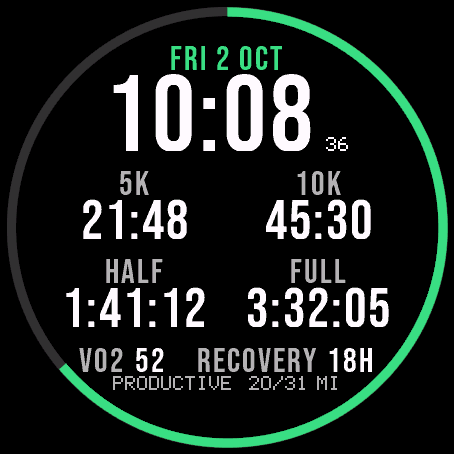
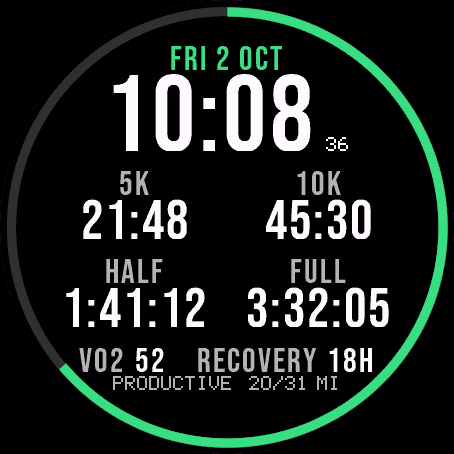
Garmin race predictions and weekly mileage right on the face.
 Photography
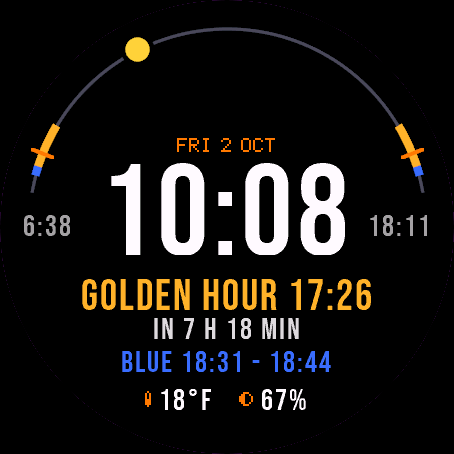
Amber Hour
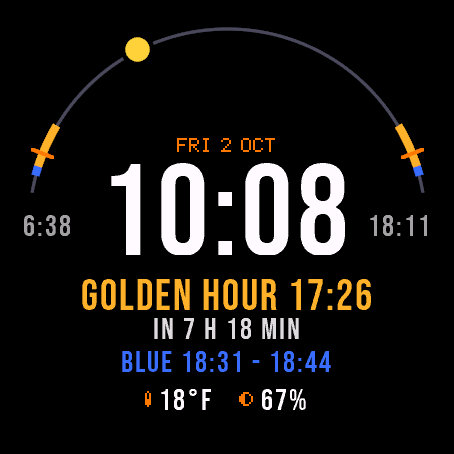
Golden and blue hour countdown with the sun's path across your day.
 Readiness
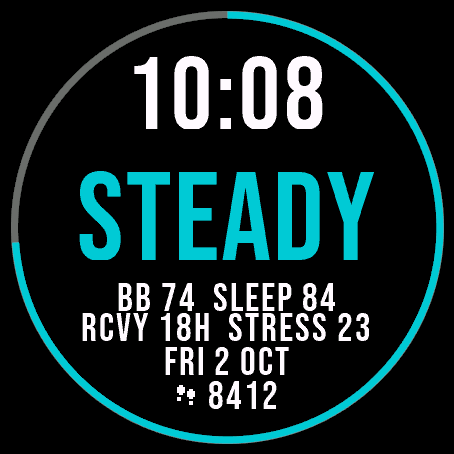
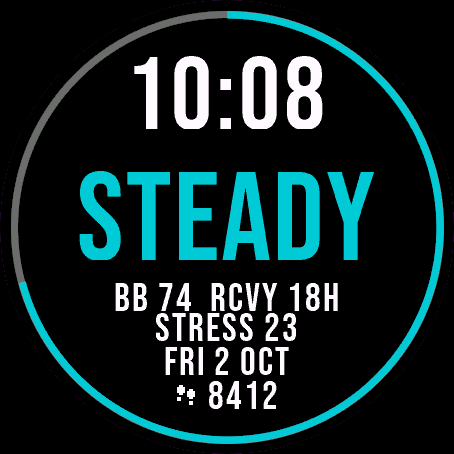
Day Verdict
One word for your day: PUSH, STEADY, EASY or REST, from your sleep, Body Battery and recovery.
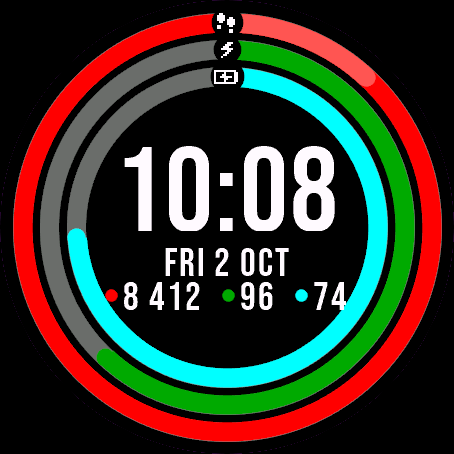 Activity
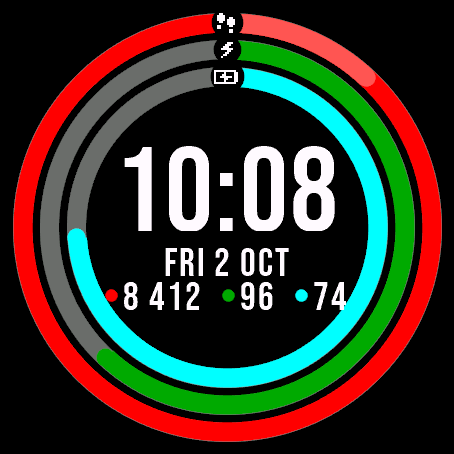
Ring Day
Three activity rings around the time, for people who close their rings.
Tell us how to make it better
Missing a data field, a colour, a layout? Found a bug on your watch model? Write it here. We read every message and ship improvements in updates.