Unlock
€6.49
One-time payment. No subscription. The code works on the watch whose ID you enter.
- Install the face from Connect IQ (7 days free).
- On the watch: face settings > Buy / Unlock, scan the QR code.
- Pay and paste the code in the face settings.
- Pay.
- Copy the code.
- Paste it in Connect IQ: this face > Settings > Unlock code.
Payment works best in Safari or Chrome: menu (three dots) > Open in browser
Read it in this face, it is not the serial number of the watch.
Your ID, compare it with the watch:
Where do I find the ID?
On the watch: settings of this face > Buy / Unlock (first item). Scan the QR code with your phone or type the 10 digits. The ID is also at the top of the face settings in the Connect IQ app.
Code not working on your watch? Write to me and I refund within 14 days.
Payments by Stripe. Seller: Mateusz Kolarz, Lublin, Poland.
Paid. Code:
Copying did not work. The code is selected: copy it by hand.
The face unlocks by itself when the watch connects to the phone (usually within an hour; if the trial is still running, the purchase starts working when it ends).
Do not want to wait, or have an older watch? Paste the code in the Connect IQ app:
Connect IQ (or Garmin Connect) > My Device > Watch faces > Brick Dial > Settings > Unlock code > paste > Save
We show the code here too. If the e-mail does not arrive (check spam), you can recover the code in the Recover code section with the Face ID and e-mail from your order. Recover code
Like it? Rate this face in the Garmin store
Want to try new faces and apps before the release, for free? Join the testers program
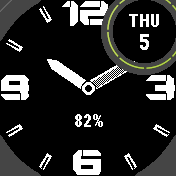
A bold analog watch face with big block numerals, a checkerboard minute hand, a date window and a bottom field, made for black and white screens.
7-day free trial, one-time unlock, no subscription.
On the face
- Big block numerals at 12, 3, 6 and 9 with notched corners and gaps, drawn pixel by pixel for black and white screens.
- Hour marks with a slot down the middle, like a field watch. You can switch them to solid, or add minute dots.
- Thick hour hand, solid white. The minute hand is a checkerboard by default; you can make it solid or just an outline.
- Date in the small window: weekday and day number, day and month, or the number alone. Names follow your watch language, 24 Latin-alphabet languages plus Cyrillic, Greek, Hebrew, Thai, Chinese, Japanese and Korean (drawn with the watch's own font).
- Bottom field under the hands: battery percent by default, or steps, heart rate, battery days left, distance or calories.
- Watches without the small window show the date in a circle at the top right.
- Settings in 35 languages.
Settings
Everything is set in the phone app: Connect IQ, Watch faces, Brick Dial, Settings. The watch has no menu, which keeps the face light and quick.
Trial: after 7 days the face shows your Face ID. Buy a code for that number at dialforge.dev and enter it in the Connect IQ app, in the face settings (Unlock code). Problems: kontakt@dialforge.dev.
Works on Instinct 3, Instinct 2 and more.
Wyrazista tarcza analogowa z dużymi blokowymi cyframi, minutową wskazówką w szachownicę, okienkiem z datą i polem dolnym, zrobiona na czarno-białe ekrany.
7 dni za darmo, jednorazowe odblokowanie, bez subskrypcji.
Na tarczy
- Duże blokowe cyfry przy 12, 3, 6 i 9, ze ściętymi rogami i przerwami, rysowane piksel po pikselu pod czarno-białe ekrany.
- Kreski godzin z nacięciem pośrodku, jak w zegarku polowym. Możesz zmienić je na pełne albo dodać kropki minut.
- Gruba wskazówka godzinowa, cała biała. Minutowa domyślnie w szachownicę, a jak wolisz, pełna albo sam kontur.
- Data w małym okienku: dzień tygodnia i numer, numer i miesiąc albo sam numer. Nazwy idą za językiem zegarka: 24 języki z alfabetem łacińskim, do tego cyrylica, greka, hebrajski, tajski, chiński, japoński i koreański (rysowane czcionką zegarka).
- Pole dolne pod wskazówkami: domyślnie procent baterii, albo kroki, tętno, dni baterii, dystans, kalorie.
- Na zegarkach bez małego okienka data jest w kółku w prawym górnym rogu.
- Ustawienia w 35 językach.
Ustawienia
Wszystko ustawiasz w aplikacji w telefonie: Connect IQ, Tarcze zegarka, Brick Dial, Ustawienia. Zegarek nie ma menu, dzięki temu tarcza jest lekka i szybka.
Próba: po 7 dniach tarcza pokazuje Twój numer zegarka (ID tarczy). Kup kod do tego numeru na dialforge.dev i wpisz go w aplikacji Connect IQ, w ustawieniach tarczy (Unlock code). Problemy: kontakt@dialforge.dev.
Działa na: Instinct 3, Instinct 2 i innych.
Ein markantes analoges Zifferblatt mit großen Blockziffern, Minutenzeiger im Schachbrettmuster, Datumsfenster und Feld unten, gemacht für Schwarz-Weiß-Displays.
7 Tage kostenlos testen, einmalige Freischaltung, kein Abo.
Auf dem zifferblatt
- Große Blockziffern bei 12, 3, 6 und 9 mit abgeschrägten Ecken und Lücken, Pixel für Pixel gezeichnet für Schwarz-Weiß-Displays.
- Stundenmarkierungen mit einem Schlitz in der Mitte, wie bei einer Felduhr. Du kannst auf Vollstriche umschalten oder Minutenpunkte hinzufügen.
- Dicker Stundenzeiger, ganz in Weiß. Der Minutenzeiger ist standardmäßig ein Schachbrettmuster; du kannst ihn vollflächig oder nur als Umriss wählen.
- Datum im kleinen Fenster: Wochentag und Tageszahl, Tag und Monat oder nur die Zahl. Die Namen folgen der Sprache deiner Uhr, 24 Sprachen mit lateinischer Schrift sowie Kyrillisch, Griechisch, Hebräisch, Thai, Chinesisch, Japanisch und Koreanisch (mit der eigenen Schrift der Uhr gezeichnet).
- Unteres Feld unter den Zeigern: standardmäßig der Akkustand in Prozent, oder Schritte, Herzfrequenz, verbleibende Akkutage, Distanz oder Kalorien.
- Uhren ohne das kleine Fenster zeigen das Datum in einem Kreis oben rechts.
- Einstellungen in 35 Sprachen.
Einstellungen
Alles wird in der Handy-App eingestellt: Connect IQ, Zifferblätter, Brick Dial, Einstellungen. Die Uhr hat kein Menü, so bleibt das Zifferblatt leicht und schnell.
Testphase: Nach 7 Tagen zeigt das Zifferblatt deine Watch ID. Kaufe unter dialforge.dev einen Code für diese Nummer und gib ihn in der Connect IQ App in den Zifferblatt-Einstellungen ein (Freischaltcode). Probleme: kontakt@dialforge.dev.
Läuft auf Instinct 3, Instinct 2 und weiteren Modellen.
Un cadran de montre analogique affirmé, avec de grands chiffres en blocs, une aiguille des minutes en damier, une fenêtre de date et un champ du bas, conçu pour les écrans noir et blanc.
7 jours d'essai gratuit, déverrouillage en une seule fois, sans abonnement.
Sur le cadran
- De grands chiffres en blocs à 12, 3, 6 et 9, avec des coins entaillés et des espaces, dessinés pixel par pixel pour les écrans noir et blanc.
- Des repères d'heures avec une fente au milieu, comme sur une montre de terrain. Vous pouvez les passer en traits pleins, ou ajouter des points de minutes.
- Aiguille des heures épaisse, entièrement blanche. L'aiguille des minutes est en damier par défaut ; vous pouvez la choisir pleine ou en simple contour.
- La date dans la petite fenêtre : jour de la semaine et numéro du jour, jour et mois, ou le numéro seul. Les noms suivent la langue de votre montre, 24 langues à alphabet latin plus le cyrillique, le grec, l'hébreu, le thaï, le chinois, le japonais et le coréen (dessinés avec la police de la montre elle-même).
- Champ du bas sous les aiguilles : le pourcentage de batterie par défaut, ou les pas, la fréquence cardiaque, les jours de batterie restants, la distance ou les calories.
- Les montres sans la petite fenêtre affichent la date dans un cercle en haut à droite.
- Réglages en 35 langues.
Réglages
Tout se règle dans l'app du téléphone : Connect IQ, Cadrans de montre, Brick Dial, Réglages. La montre n'a pas de menu, ce qui garde le cadran léger et rapide.
Essai : après 7 jours, le cadran affiche votre Watch ID. Achetez un code pour ce numéro sur dialforge.dev et saisissez-le dans l'app Connect IQ, dans les réglages du cadran (Code de déverrouillage). Un problème : kontakt@dialforge.dev.
Compatible avec Instinct 3, Instinct 2 et d'autres modèles.
Una esfera de reloj analógica con carácter, con grandes números de bloque, aguja de minutos en tablero de ajedrez, ventana de fecha y campo inferior, hecha para pantallas en blanco y negro.
7 días de prueba gratis, desbloqueo de pago único, sin suscripción.
En la esfera
- Grandes números de bloque en las 12, 3, 6 y 9, con esquinas muescadas y huecos, dibujados píxel a píxel para pantallas en blanco y negro.
- Marcas de hora con una ranura en el centro, como un reloj de campo. Puedes cambiarlas a macizas o añadir puntos de minutos.
- Aguja de la hora gruesa, toda en blanco. La aguja de los minutos es un tablero de ajedrez por defecto; puedes dejarla maciza o solo con contorno.
- Fecha en la ventana pequeña: día de la semana y número del día, día y mes, o solo el número. Los nombres siguen el idioma de tu reloj, 24 idiomas de alfabeto latino más cirílico, griego, hebreo, tailandés, chino, japonés y coreano (dibujados con la fuente propia del reloj).
- Campo inferior bajo las agujas: por defecto el porcentaje de batería, o pasos, frecuencia cardiaca, días de batería restantes, distancia o calorías.
- Los relojes sin la ventana pequeña muestran la fecha en un círculo arriba a la derecha.
- Ajustes en 35 idiomas.
Ajustes
Todo se ajusta en la app del teléfono: Connect IQ, Esferas de reloj, Brick Dial, Ajustes. El reloj no tiene menú, lo que mantiene la esfera ligera y rápida.
Prueba: tras 7 días la esfera muestra tu Watch ID. Compra un código para ese número en dialforge.dev e introdúcelo en la app Connect IQ, en los ajustes de la esfera (Código de desbloqueo). Problemas: kontakt@dialforge.dev.
Compatible con Instinct 3, Instinct 2 y más.
Een opvallende analoge wijzerplaat met grote blokcijfers, een minuutwijzer in dambordpatroon, een datumvenster en een onderste veld, gemaakt voor zwart-witschermen.
7 dagen gratis proberen, eenmalig ontgrendelen, geen abonnement.
Op de wijzerplaat
- Grote blokcijfers op 12, 3, 6 en 9 met afgeschuinde hoeken en openingen, pixel voor pixel getekend voor zwart-witschermen.
- Uurmarkeringen met een gleuf in het midden, zoals bij een veldhorloge. Je kunt ze omzetten naar massief, of minuutstippen toevoegen.
- Dikke uurwijzer, helemaal wit. De minuutwijzer is standaard een dambordpatroon; je kunt hem massief of alleen als omtrek kiezen.
- Datum in het kleine venster: weekdag en dagnummer, dag en maand, of alleen het nummer. De namen volgen de taal van je horloge, 24 talen met Latijns alfabet plus Cyrillisch, Grieks, Hebreeuws, Thais, Chinees, Japans en Koreaans (getekend met het eigen lettertype van het horloge).
- Onderste veld onder de wijzers: standaard het batterijpercentage, of stappen, hartslag, resterende batterijdagen, afstand of calorieën.
- Horloges zonder het kleine venster tonen de datum in een cirkel rechtsboven.
- Instellingen in 35 talen.
Instellingen
Alles stel je in via de telefoonapp: Connect IQ, Wijzerplaten, Brick Dial, Instellingen. Het horloge heeft geen menu, zodat de wijzerplaat licht en snel blijft.
Proefperiode: na 7 dagen toont de wijzerplaat je Watch ID. Koop op dialforge.dev een code voor dat nummer en voer die in de Connect IQ app in, bij de instellingen van de wijzerplaat (Ontgrendelcode). Problemen: kontakt@dialforge.dev.
Werkt op Instinct 3, Instinct 2 en meer.
大きなブロック数字、チェッカー模様の分針、日付の小窓、下部フィールドを備えた、白黒画面向けの存在感あるアナログのウォッチフェイス。
7日間の無料お試し、買い切りのアンロック、サブスクリプションなし。
文字盤の機能
- 12時、3時、6時、9時に大きなブロック数字。角に切り欠きと隙間があり、白黒画面向けに1ピクセルずつ描いています。
- 中央にスリットの入った時刻マーカー、フィールドウォッチ風。ソリッドに切り替えたり、分のドットを追加したりできます。
- 太い時針は真っ白。分針は初期設定ではチェッカー模様で、ソリッドや輪郭だけにも変えられます。
- 小窓に日付:曜日と日付の数字、日と月、または数字のみ。名称はウォッチの言語に合わせて表示され、ラテン文字の24言語に加え、キリル文字、ギリシャ文字、ヘブライ文字、タイ文字、中国語、日本語、韓国語に対応(ウォッチ本体のフォントで描画)。
- 針の下の下部フィールド:初期設定はバッテリー残量のパーセント。歩数、心拍数、バッテリー残り日数、距離、カロリーにも切り替えられます。
- 小窓のないウォッチでは、日付を右上の円の中に表示します。
- 設定は35言語に対応。
設定
すべてスマートフォンのアプリで設定します:Connect IQ、ウォッチフェイス、Brick Dial、設定。ウォッチ側にメニューはないので、文字盤は軽くてすばやく動きます。
お試し期間:7日後、ウォッチフェイスにWatch IDが表示されます。dialforge.dev でその番号用のコードを購入し、Connect IQアプリのウォッチフェイス設定(アンロックコード)に入力してください。不具合のご連絡:kontakt@dialforge.dev
対応モデル:Instinct 3, Instinct 2 ほか
Un quadrante analogico deciso, con grandi numeri a blocchi, lancetta dei minuti a scacchi, finestra della data e campo in basso, pensato per gli schermi in bianco e nero.
7 giorni di prova gratuita, sblocco una tantum, nessun abbonamento.
Sul quadrante
- Grandi numeri a blocchi alle 12, 3, 6 e 9, con angoli smussati e spazi, disegnati pixel per pixel per gli schermi in bianco e nero.
- Indici delle ore con una fessura al centro, come su un orologio da campo. Puoi passare a indici pieni, oppure aggiungere i puntini dei minuti.
- Lancetta delle ore spessa, tutta bianca. La lancetta dei minuti è a scacchi per impostazione predefinita; puoi sceglierla piena o solo con il contorno.
- Data nella piccola finestra: giorno della settimana e numero del giorno, giorno e mese, oppure solo il numero. I nomi seguono la lingua del tuo orologio, 24 lingue con alfabeto latino più cirillico, greco, ebraico, thai, cinese, giapponese e coreano (disegnati con il font dell'orologio stesso).
- Campo in basso sotto le lancette: per impostazione predefinita la percentuale della batteria, oppure passi, frequenza cardiaca, giorni di batteria rimasti, distanza o calorie.
- Gli orologi senza la piccola finestra mostrano la data in un cerchio in alto a destra.
- Impostazioni in 35 lingue.
Impostazioni
Tutto si imposta nell'app del telefono: Connect IQ, Quadranti, Brick Dial, Impostazioni. L'orologio non ha un menu, così il quadrante resta leggero e veloce.
Prova: dopo 7 giorni il quadrante mostra il tuo Watch ID. Acquista un codice per quel numero su dialforge.dev e inseriscilo nell'app Connect IQ, nelle impostazioni del quadrante (Codice di sblocco). Problemi: kontakt@dialforge.dev.
Compatibile con Instinct 3, Instinct 2 e altri.
一款醒目的模拟指针表盘,大号块状数字、棋盘格分针、日期小窗和底部数据区域,专为黑白屏幕设计。
7天免费试用,一次性解锁,无需订阅。
表盘功能
- 12、3、6、9点位置是大号块状数字,带缺口的边角和间隙,为黑白屏幕逐像素绘制。
- 时标中间有一道缝,像野战手表。可以切换为实心,也可以加上分钟小点。
- 粗时针,纯白实心。分针默认是棋盘格图案,也可以选择实心或只显示轮廓。
- 小窗里显示日期:星期和日期数字、日和月,或只显示数字。名称跟随手表的语言,支持24种拉丁字母语言,以及西里尔文、希腊文、希伯来文、泰文、中文、日文和韩文(使用手表自带字体绘制)。
- 指针下方的底部数据区域:默认显示电池百分比,也可以换成步数、心率、电池剩余天数、距离或卡路里。
- 没有小窗的手表会在右上角的圆圈里显示日期。
- 设置支持35种语言。
设置
所有设置都在手机应用中完成:Connect IQ,表盘,Brick Dial,设置。手表上没有菜单,这样表盘更轻快。
试用:7天后,表盘会显示你的Watch ID。请在 dialforge.dev 为该编号购买解锁码,并在Connect IQ应用的表盘设置中输入(解锁码)。遇到问题:kontakt@dialforge.dev。
适用于 Instinct 3, Instinct 2 等。
Выразительный аналоговый циферблат для часов с большими блочными цифрами, минутной стрелкой в шахматную клетку, окошком даты и нижним полем, сделанный для чёрно-белых экранов.
7 дней бесплатно, разовая разблокировка, без подписки.
На циферблате
- Большие блочные цифры на 12, 3, 6 и 9 со срезанными углами и просветами, нарисованные пиксель за пикселем для чёрно-белых экранов.
- Часовые метки с прорезью посередине, как на полевых часах. Их можно сделать сплошными или добавить минутные точки.
- Толстая часовая стрелка, сплошная белая. Минутная стрелка по умолчанию в шахматную клетку; можно сделать её сплошной или только контуром.
- Дата в маленьком окошке: день недели и число, число и месяц или только число. Названия следуют языку ваших часов, 24 языка на латинице, а также кириллица, греческий, иврит, тайский, китайский, японский и корейский (нарисованные собственным шрифтом часов).
- Нижнее поле под стрелками: по умолчанию заряд батареи в процентах, либо шаги, пульс, оставшиеся дни работы батареи, расстояние или калории.
- Часы без маленького окошка показывают дату в круге вверху справа.
- Настройки на 35 языках.
Настройки
Всё настраивается в приложении на телефоне: Connect IQ, Циферблаты, Brick Dial, Настройки. В часах нет меню, поэтому циферблат остаётся лёгким и быстрым.
Пробный период: через 7 дней на циферблате появятся ваш Watch ID. Купите код для этого номера на dialforge.dev и введите его в приложении Connect IQ, в настройках циферблата (Код разблокировки). Проблемы: kontakt@dialforge.dev.
Работает на Instinct 3, Instinct 2 и других.
Um mostrador de relógio analógico marcante, com grandes números em bloco, ponteiro dos minutos em xadrez, janela de data e campo inferior, feito para telas em preto e branco.
7 dias grátis para testar, desbloqueio único, sem assinatura.
No mostrador
- Grandes números em bloco nas posições 12, 3, 6 e 9, com cantos entalhados e vãos, desenhados pixel a pixel para telas em preto e branco.
- Marcas de hora com uma fenda no meio, como num relógio de campo. Você pode trocar para marcas maciças ou adicionar pontos de minutos.
- Ponteiro das horas grosso, todo branco. O ponteiro dos minutos é em xadrez por padrão; você pode deixá-lo maciço ou só com contorno.
- Data na janela pequena: dia da semana e número do dia, dia e mês, ou só o número. Os nomes seguem o idioma do seu relógio, 24 idiomas de alfabeto latino mais cirílico, grego, hebraico, tailandês, chinês, japonês e coreano (desenhados com a fonte do próprio relógio).
- Campo inferior sob os ponteiros: porcentagem da bateria por padrão, ou passos, frequência cardíaca, dias restantes de bateria, distância ou calorias.
- Relógios sem a janela pequena mostram a data em um círculo no canto superior direito.
- Configurações em 35 idiomas.
Configurações
Tudo é ajustado no app do celular: Connect IQ, Mostradores, Brick Dial, Configurações. O relógio não tem menu, o que deixa o mostrador leve e rápido.
Teste: após 7 dias o mostrador exibe o seu Watch ID. Compre um código para esse número em dialforge.dev e digite no app Connect IQ, nas configurações do mostrador (Código de desbloqueio). Problemas: kontakt@dialforge.dev.
Funciona em Instinct 3, Instinct 2 e outros.
Výrazný analogový ciferník s velkými blokovými číslicemi, minutovou ručičkou jako šachovnice, okénkem s datem a spodním polem, vytvořený pro černobílé displeje.
7 dní zdarma na zkoušku, jednorázové odemknutí, žádné předplatné.
Na ciferníku
- Velké blokové číslice na 12, 3, 6 a 9 se seříznutými rohy a mezerami, nakreslené pixel po pixelu pro černobílé displeje.
- Značky hodin se zářezem uprostřed, jako na polních hodinkách. Můžete je přepnout na plné nebo přidat minutové tečky.
- Silná hodinová ručička, plná bílá. Minutová ručička je ve výchozím stavu šachovnice; můžete ji nastavit jako plnou nebo jen obrys.
- Datum v malém okénku: den v týdnu a číslo dne, den a měsíc, nebo samotné číslo. Názvy se řídí jazykem hodinek, 24 jazyků s latinkou plus cyrilice, řečtina, hebrejština, thajština, čínština, japonština a korejština (kreslené vlastním písmem hodinek).
- Spodní pole pod ručičkami: ve výchozím stavu procenta baterie, nebo kroky, tep, zbývající dny baterie, vzdálenost či kalorie.
- Hodinky bez malého okénka ukazují datum v kroužku vpravo nahoře.
- Nastavení v 35 jazycích.
Nastavení
Vše se nastavuje v aplikaci v telefonu: Connect IQ, Ciferníky, Brick Dial, Nastavení. Hodinky nemají nabídku, takže ciferník zůstává lehký a rychlý.
Zkušební doba: po 7 dnech ciferník ukáže vaše Watch ID. Koupte si na dialforge.dev kód pro toto číslo a zadejte ho v aplikaci Connect IQ v nastavení ciferníku (Odemykací kód). Problémy: kontakt@dialforge.dev.
Funguje na Instinct 3, Instinct 2 a dalších.
Um mostrador analógico marcante com grandes algarismos em bloco, ponteiro dos minutos em xadrez, janela da data e campo inferior, feito para ecrãs a preto e branco.
7 dias grátis para experimentar, desbloqueio único, sem subscrição.
No mostrador
- Grandes algarismos em bloco às 12, 3, 6 e 9, com cantos chanfrados e espaços, desenhados pixel a pixel para ecrãs a preto e branco.
- Marcas das horas com uma ranhura ao meio, como num relógio de campo. Pode mudá-las para maciças ou acrescentar pontos de minutos.
- Ponteiro das horas grosso, branco maciço. O ponteiro dos minutos é xadrez por predefinição; pode torná-lo maciço ou só contorno.
- Data na pequena janela: dia da semana e número do dia, dia e mês, ou só o número. Os nomes seguem o idioma do relógio, 24 idiomas de alfabeto latino mais cirílico, grego, hebraico, tailandês, chinês, japonês e coreano (desenhados com o tipo de letra do próprio relógio).
- Campo inferior sob os ponteiros: percentagem da bateria por predefinição, ou passos, frequência cardíaca, dias de bateria restantes, distância ou calorias.
- Os relógios sem a pequena janela mostram a data num círculo no canto superior direito.
- Definições em 35 idiomas.
Definições
Tudo se define na app do telemóvel: Connect IQ, Mostradores, Brick Dial, Definições. O relógio não tem menu, o que mantém o mostrador leve e rápido.
Teste: passados 7 dias, o mostrador apresenta o seu Watch ID. Compre um código para esse número em dialforge.dev e introduza-o na app Connect IQ, nas definições do mostrador (Código de desbloqueio). Problemas: kontakt@dialforge.dev.
Funciona em Instinct 3, Instinct 2 e outros.
큰 블록 숫자, 체크 무늬 분침, 날짜 창, 하단 필드를 갖춘 강렬한 아날로그 워치페이스로, 흑백 화면에 맞춰 만들었습니다.
7일 무료 체험, 한 번만 결제하는 잠금 해제, 구독 없음.
워치페이스 기능
- 12, 3, 6, 9시 위치의 큰 블록 숫자는 모서리가 깎이고 틈이 있으며, 흑백 화면용으로 픽셀 단위로 그렸습니다.
- 가운데에 홈이 있는 시간 눈금, 야전 시계 스타일입니다. 꽉 찬 눈금으로 바꾸거나 분 점을 추가할 수 있습니다.
- 두꺼운 시침, 꽉 찬 흰색. 분침은 기본값이 체크 무늬이며, 꽉 찬 모양이나 윤곽선만으로 바꿀 수 있습니다.
- 작은 창의 날짜: 요일과 일, 일과 월, 또는 숫자만. 이름은 워치 언어를 따르며, 라틴 문자 24개 언어와 키릴 문자, 그리스어, 히브리어, 태국어, 중국어, 일본어, 한국어를 지원합니다(워치 자체 글꼴로 그립니다).
- 바늘 아래 하단 필드: 기본값은 배터리 퍼센트이며, 걸음 수, 심박수, 남은 배터리 일수, 거리, 칼로리로 바꿀 수 있습니다.
- 작은 창이 없는 워치는 오른쪽 위 원 안에 날짜를 표시합니다.
- 설정은 35개 언어를 지원합니다.
설정
모든 설정은 휴대폰 앱에서 합니다: Connect IQ, 워치페이스, Brick Dial, 설정. 워치에는 메뉴가 없어 워치페이스가 가볍고 빠릅니다.
체험: 7일이 지나면 워치페이스에 Watch ID가 표시됩니다. dialforge.dev에서 해당 번호용 코드를 구매해 Connect IQ 앱의 워치페이스 설정(잠금 해제 코드)에 입력하세요. 문제가 있으면: kontakt@dialforge.dev
지원 모델: Instinct 3, Instinct 2 외
En kraftfull analog urtavla med stora blocksiffror, rutmönstrad minutvisare, datumfönster och nedre fält, gjord för svartvita skärmar.
7 dagars gratis prov, engångsupplåsning, ingen prenumeration.
På urtavlan
- Stora blocksiffror vid 12, 3, 6 och 9 med snedskurna hörn och glapp, ritade pixel för pixel för svartvita skärmar.
- Timmarkeringar med en skåra i mitten, som på en fältklocka. Du kan byta till heldragna eller lägga till minutprickar.
- Tjock timvisare, helvit. Minutvisaren är rutmönstrad som standard; du kan göra den helvit eller bara kontur.
- Datum i det lilla fönstret: veckodag och dagsnummer, dag och månad, eller bara numret. Namnen följer klockans språk, 24 språk med latinska alfabetet plus kyrilliska, grekiska, hebreiska, thai, kinesiska, japanska och koreanska (ritade med klockans eget typsnitt).
- Nedre fält under visarna: batteriprocent som standard, eller steg, puls, återstående batteridagar, distans eller kalorier.
- Klockor utan det lilla fönstret visar datumet i en cirkel uppe till höger.
- Inställningar på 35 språk.
Inställningar
Allt ställs in i telefonappen: Connect IQ, Urtavlor, Brick Dial, Inställningar. Klockan har ingen meny, vilket håller urtavlan lätt och snabb.
Provperiod: efter 7 dagar visar urtavlan ditt Watch ID. Köp en kod för det numret på dialforge.dev och skriv in den i appen Connect IQ, i urtavlans inställningar (Upplåsningskod). Problem: kontakt@dialforge.dev.
Fungerar på Instinct 3, Instinct 2 med flera.
En kraftfuld analog urskive med store blokcifre, ternet minutviser, datovindue og nederste felt, lavet til sort-hvide skærme.
7 dages gratis prøve, engangsoplåsning, intet abonnement.
På urskiven
- Store blokcifre ved 12, 3, 6 og 9 med affasede hjørner og mellemrum, tegnet pixel for pixel til sort-hvide skærme.
- Timemærker med en rille i midten, som på et feltur. Du kan skifte til massive eller tilføje minutprikker.
- Tyk timeviser, massiv hvid. Minutviseren er ternet som standard; du kan gøre den massiv eller kun omrids.
- Dato i det lille vindue: ugedag og dagnummer, dag og måned, eller kun nummeret. Navnene følger urets sprog, 24 sprog med latinsk alfabet plus kyrillisk, græsk, hebraisk, thai, kinesisk, japansk og koreansk (tegnet med urets egen skrifttype).
- Nederste felt under viserne: batteriprocent som standard, eller skridt, puls, resterende batteridage, distance eller kalorier.
- Ure uden det lille vindue viser datoen i en cirkel øverst til højre.
- Indstillinger på 35 sprog.
Indstillinger
Alt indstilles i telefonappen: Connect IQ, Urskiver, Brick Dial, Indstillinger. Uret har ingen menu, hvilket holder urskiven let og hurtig.
Prøveperiode: efter 7 dage viser urskiven dit Watch ID. Køb en kode til det nummer på dialforge.dev og indtast den i Connect IQ-appen, i urskivens indstillinger (Oplåsningskode). Problemer: kontakt@dialforge.dev.
Virker på Instinct 3, Instinct 2 og flere.
En kraftfull analog urskive med store blokktall, rutemønstret minuttviser, datovindu og nedre felt, laget for svart-hvite skjermer.
7 dagers gratis prøve, engangsopplåsing, ikke noe abonnement.
På urskiven
- Store blokktall ved 12, 3, 6 og 9 med avfasede hjørner og mellomrom, tegnet piksel for piksel for svart-hvite skjermer.
- Timemerker med et spor i midten, som på en feltklokke. Du kan bytte til heldekkende eller legge til minuttprikker.
- Tykk timeviser, helhvit. Minuttviseren er rutemønstret som standard; du kan gjøre den heldekkende eller bare omriss.
- Dato i det lille vinduet: ukedag og dagnummer, dag og måned, eller bare tallet. Navnene følger klokkens språk, 24 språk med latinsk alfabet pluss kyrillisk, gresk, hebraisk, thai, kinesisk, japansk og koreansk (tegnet med klokkens egen skrift).
- Nedre felt under viserne: batteriprosent som standard, eller skritt, puls, gjenværende batteridager, distanse eller kalorier.
- Klokker uten det lille vinduet viser datoen i en sirkel øverst til høyre.
- Innstillinger på 35 språk.
Innstillinger
Alt stilles inn i telefonappen: Connect IQ, Urskiver, Brick Dial, Innstillinger. Klokken har ingen meny, noe som holder urskiven lett og rask.
Prøveperiode: etter 7 dager viser urskiven din Watch ID. Kjøp en kode for det nummeret på dialforge.dev og skriv den inn i Connect IQ-appen, i urskivens innstillinger (Opplåsingskode). Problemer: kontakt@dialforge.dev.
Fungerer på Instinct 3, Instinct 2 og flere.
一款醒目的指針式錶面,有大型方塊數字、棋盤格分針、日期視窗和底部欄位,專為黑白螢幕設計。
7天免費試用,一次性解鎖,無需訂閱。
錶面功能
- 12、3、6、9位置的大型方塊數字,帶有切角和缺口,為黑白螢幕逐像素繪製。
- 中間帶凹槽的時刻標記,像野戰錶。可以改為實心,或加上分鐘點。
- 粗時針,純白實心。分針預設為棋盤格;可以改為實心或只有輪廓。
- 小視窗中的日期:星期和日期數字、日和月,或只顯示數字。名稱依手錶語言而定,支援24種拉丁字母語言,另有西里爾文、希臘文、希伯來文、泰文、中文、日文和韓文(使用手錶內建字型繪製)。
- 指針下方的底部欄位:預設顯示電量百分比,也可以是步數、心率、剩餘電池天數、距離或卡路里。
- 沒有小視窗的手錶會在右上角的圓圈中顯示日期。
- 設定支援35種語言。
設定
一切都在手機應用程式中設定:Connect IQ,錶面,Brick Dial,設定。手錶沒有選單,讓錶面保持輕巧、快速。
試用:7天後,錶面會顯示你的Watch ID。請在 dialforge.dev 為該編號購買解鎖碼,並在Connect IQ應用程式的錶面設定中輸入(解鎖碼)。遇到問題:kontakt@dialforge.dev。
適用於 Instinct 3, Instinct 2 等。
Näyttävä analoginen kellotaulu, jossa on suuret lohkonumerot, ruutukuvioinen minuuttiviisari, päivämääräikkuna ja alakenttä, tehty mustavalkoisille näytöille.
7 päivää ilmaiseksi, kertaluonteinen avaus, ei tilausta.
Kellotaululla
- Suuret lohkonumerot kohdissa 12, 3, 6 ja 9, viistetyin kulmin ja raoin, piirretty pikseli pikseliltä mustavalkoisille näytöille.
- Tuntimerkit, joiden keskellä on ura, kuin kenttäkellossa. Voit vaihtaa ne umpinaisiin tai lisätä minuuttipisteet.
- Paksu tuntiviisari, umpivalkoinen. Minuuttiviisari on oletuksena ruutukuvio; voit tehdä siitä umpinaisen tai pelkän ääriviivan.
- Päivämäärä pienessä ikkunassa: viikonpäivä ja päivän numero, päivä ja kuukausi, tai pelkkä numero. Nimet seuraavat kellon kieltä, 24 latinalaisen aakkoston kieltä sekä kyrillinen, kreikka, heprea, thai, kiina, japani ja korea (piirretty kellon omalla fontilla).
- Alakenttä viisarien alla: oletuksena akun prosentti, tai askeleet, syke, akun jäljellä olevat päivät, matka tai kalorit.
- Kellot ilman pientä ikkunaa näyttävät päivämäärän ympyrässä oikealla ylhäällä.
- Asetukset 35 kielellä.
Asetukset
Kaikki asetetaan puhelimen sovelluksessa: Connect IQ, Kellotaulut, Brick Dial, Asetukset. Kellossa ei ole valikkoa, mikä pitää kellotaulun kevyenä ja nopeana.
Kokeilujakso: 7 päivän jälkeen kellotaulu näyttää Watch ID:si. Osta tälle numerolle koodi osoitteessa dialforge.dev ja syötä se Connect IQ -sovelluksessa kellotaulun asetuksiin (Avauskoodi). Ongelmat: kontakt@dialforge.dev.
Toimii malleissa Instinct 3, Instinct 2 ja muissa.
Výrazný analógový ciferník s veľkými blokovými číslicami, minútovou ručičkou ako šachovnica, okienkom s dátumom a spodným poľom, vytvorený pre čiernobiele displeje.
7 dní zadarmo na skúšku, jednorazové odomknutie, žiadne predplatné.
Na ciferníku
- Veľké blokové číslice na 12, 3, 6 a 9 so zrezanými rohmi a medzerami, nakreslené pixel po pixeli pre čiernobiele displeje.
- Značky hodín so zárezom uprostred, ako na poľných hodinkách. Môžete ich prepnúť na plné alebo pridať minútové bodky.
- Hrubá hodinová ručička, plná biela. Minútová ručička je predvolene šachovnica; môžete ju nastaviť ako plnú alebo len obrys.
- Dátum v malom okienku: deň v týždni a číslo dňa, deň a mesiac, alebo samotné číslo. Názvy sa riadia jazykom hodiniek, 24 jazykov s latinkou plus cyrilika, gréčtina, hebrejčina, thajčina, čínština, japončina a kórejčina (kreslené vlastným písmom hodiniek).
- Spodné pole pod ručičkami: predvolene percentá batérie, alebo kroky, tep, zostávajúce dni batérie, vzdialenosť či kalórie.
- Hodinky bez malého okienka ukazujú dátum v kruhu vpravo hore.
- Nastavenia v 35 jazykoch.
Nastavenia
Všetko sa nastavuje v aplikácii v telefóne: Connect IQ, Ciferníky, Brick Dial, Nastavenia. Hodinky nemajú ponuku, vďaka čomu je ciferník ľahký a rýchly.
Skúšobná doba: po 7 dňoch ciferník ukáže vaše Watch ID. Kúpte si na dialforge.dev kód pre toto číslo a zadajte ho v aplikácii Connect IQ v nastaveniach ciferníka (Odomykací kód). Problémy: kontakt@dialforge.dev.
Funguje na Instinct 3, Instinct 2 a ďalších.
Drzna analogna ura s številčnico z velikimi blokovnimi številkami, minutnim kazalcem v obliki šahovnice, okencem z datumom in spodnjim poljem, narejena za črno-bele zaslone.
7 dni brezplačnega preizkusa, enkratna odklenitev, brez naročnine.
Na številčnici
- Velike blokovne številke pri 12, 3, 6 in 9 z zarezanimi vogali in režami, narisane piksel za pikslom za črno-bele zaslone.
- Oznake ur z utorom po sredini, kot pri terenski uri. Preklopite jih lahko na polne ali dodate minutne pike.
- Debel urni kazalec, poln bel. Minutni kazalec je privzeto šahovnica, lahko pa ga naredite poln ali samo okvir.
- Datum v majhnem okencu: dan v tednu in številka dneva, dan in mesec ali samo številka. Imena sledijo jeziku vaše ure, 24 jezikov z latinico ter cirilica, grščina, hebrejščina, tajščina, kitajščina, japonščina in korejščina (narisane z lastno pisavo ure).
- Spodnje polje pod kazalci: privzeto odstotek baterije, ali koraki, srčni utrip, preostali dnevi baterije, razdalja ali kalorije.
- Ure brez majhnega okenca prikažejo datum v krogu zgoraj desno.
- Nastavitve v 35 jezikih.
Nastavitve
Vse se nastavi v aplikaciji v telefonu: Connect IQ, Številčnice, Brick Dial, Nastavitve. Ura nima menija, zato je številčnica lahka in hitra.
Preizkus: po 7 dneh številčnica prikaže vaš Watch ID. Na dialforge.dev kupite kodo za to številko in jo vnesite v aplikaciji Connect IQ, v nastavitvah številčnice (Koda za odklepanje). Težave: kontakt@dialforge.dev.
Deluje na Instinct 3, Instinct 2 in drugih.
Tampilan jam analog yang tegas dengan angka blok besar, jarum menit kotak-kotak, jendela tanggal, dan bidang bawah, dibuat untuk layar hitam putih.
Gratis 7 hari, buka kunci sekali bayar, tanpa langganan.
Di tampilan jam
- Angka blok besar di posisi 12, 3, 6, dan 9 dengan sudut bertakik dan celah, digambar piksel demi piksel untuk layar hitam putih.
- Tanda jam dengan alur di tengah, seperti jam lapangan. Anda bisa menggantinya menjadi penuh, atau menambahkan titik menit.
- Jarum jam tebal, putih penuh. Jarum menit secara bawaan berpola kotak-kotak, bisa dibuat penuh atau hanya garis tepi.
- Tanggal di jendela kecil: hari dalam seminggu dan angka tanggal, tanggal dan bulan, atau angkanya saja. Nama mengikuti bahasa jam Anda, 24 bahasa beraksara Latin plus Sirilik, Yunani, Ibrani, Thai, Mandarin, Jepang, dan Korea (digambar dengan font bawaan jam).
- Bidang bawah di bawah jarum: persen baterai secara bawaan, atau langkah, detak jantung, sisa hari baterai, jarak, atau kalori.
- Jam tanpa jendela kecil menampilkan tanggal dalam lingkaran di kanan atas.
- Pengaturan dalam 35 bahasa.
Pengaturan
Semuanya diatur di aplikasi ponsel: Connect IQ, Tampilan jam, Brick Dial, Pengaturan. Jam tidak punya menu, sehingga tampilan jam tetap ringan dan cepat.
Masa percobaan: setelah 7 hari, tampilan jam menampilkan Watch ID Anda. Beli kode untuk nomor itu di dialforge.dev dan masukkan di aplikasi Connect IQ, di pengaturan tampilan jam (Kode buka kunci). Masalah: kontakt@dialforge.dev.
Berfungsi di Instinct 3, Instinct 2 dan lainnya.
Merész analóg óra számlap nagy blokkszámokkal, sakktábla mintás percmutatóval, dátumablakkal és alsó mezővel, fekete-fehér kijelzőkhöz.
7 nap ingyenes próba, egyszeri feloldás, előfizetés nélkül.
A számlapon
- Nagy blokkszámok 12, 3, 6 és 9 helyén, bevágott sarkokkal és résekkel, pixelről pixelre megrajzolva fekete-fehér kijelzőkhöz.
- Órajelölések középen hasítékkal, mint egy terepi órán. Átválthatod tömörre, vagy hozzáadhatsz percpontokat.
- Vastag óramutató, tömör fehér. A percmutató alapból sakktábla mintás, de lehet tömör vagy csak körvonal.
- Dátum a kis ablakban: a hét napja és a nap száma, nap és hónap, vagy csak a szám. A nevek az órád nyelvét követik, 24 latin betűs nyelv, valamint cirill, görög, héber, thai, kínai, japán és koreai (az óra saját betűtípusával rajzolva).
- Alsó mező a mutatók alatt: alapból az akkumulátor százaléka, vagy lépések, pulzus, akkumulátor hátralévő napjai, távolság vagy kalória.
- A kis ablak nélküli órák a dátumot egy körben mutatják jobb felül.
- Beállítások 35 nyelven.
Beállítások
Minden a telefonos alkalmazásban állítható: Connect IQ, Számlapok, Brick Dial, Beállítások. Az órának nincs menüje, így a számlap könnyű és gyors marad.
Próbaidő: 7 nap után a számlap megmutatja a Watch ID-dat. Vásárolj ehhez a számhoz kódot a dialforge.dev oldalon, és írd be a Connect IQ alkalmazásban, a számlap beállításaiban (Feloldókód). Probléma esetén: kontakt@dialforge.dev.
Működik ezeken: Instinct 3, Instinct 2 és továbbiak.
หน้าปัดนาฬิกาแอนะล็อกสุดโดดเด่น ตัวเลขบล็อกใหญ่ เข็มนาทีลายตารางหมากรุก ช่องวันที่ และช่องล่าง สำหรับหน้าจอขาวดำ
ทดลองใช้ฟรี 7 วัน ปลดล็อกครั้งเดียว ไม่มีค่าสมาชิกรายเดือน
บนหน้าปัด
- ตัวเลขบล็อกขนาดใหญ่ที่ตำแหน่ง 12, 3, 6 และ 9 มีมุมบากและช่องว่าง วาดทีละพิกเซลสำหรับหน้าจอขาวดำ
- ขีดบอกชั่วโมงมีร่องตรงกลาง เหมือนนาฬิกาสนาม เปลี่ยนเป็นแบบทึบได้ หรือเพิ่มจุดบอกนาที
- เข็มชั่วโมงหนา สีขาวทึบ เข็มนาทีเป็นลายตารางหมากรุกตามค่าเริ่มต้น เปลี่ยนเป็นแบบทึบหรือแค่เส้นขอบได้
- วันที่ในช่องเล็ก: วันในสัปดาห์และเลขวัน วันและเดือน หรือเลขอย่างเดียว ชื่อเป็นไปตามภาษาของนาฬิกา 24 ภาษาที่ใช้อักษรละติน รวมถึงซีริลลิก กรีก ฮีบรู ไทย จีน ญี่ปุ่น และเกาหลี (วาดด้วยฟอนต์ของนาฬิกาเอง)
- ช่องล่างใต้เข็ม: ค่าเริ่มต้นคือเปอร์เซ็นต์แบตเตอรี่ หรือจำนวนก้าว อัตราการเต้นของหัวใจ จำนวนวันที่แบตเตอรี่เหลือ ระยะทาง หรือแคลอรี
- นาฬิกาที่ไม่มีช่องเล็กจะแสดงวันที่ในวงกลมที่มุมขวาบน
- การตั้งค่า 35 ภาษา
การตั้งค่า
ตั้งค่าทุกอย่างในแอปบนโทรศัพท์: Connect IQ, หน้าปัดนาฬิกา, Brick Dial, การตั้งค่า นาฬิกาไม่มีเมนู ทำให้หน้าปัดเบาและเร็ว
ช่วงทดลอง: หลัง 7 วัน หน้าปัดจะแสดง Watch ID ของคุณ ซื้อรหัสสำหรับหมายเลขนั้นที่ dialforge.dev แล้วกรอกในแอป Connect IQ ที่การตั้งค่าหน้าปัด (รหัสปลดล็อก) หากมีปัญหา: kontakt@dialforge.dev
ใช้ได้กับ Instinct 3, Instinct 2 และรุ่นอื่น
Ένα τολμηρό αναλογικό καντράν ρολογιού με μεγάλους αριθμούς μπλοκ, δείκτη λεπτών σκακιέρα, παράθυρο ημερομηνίας και κάτω πεδίο, φτιαγμένο για ασπρόμαυρες οθόνες.
7 ημέρες δωρεάν δοκιμή, εφάπαξ ξεκλείδωμα, χωρίς συνδρομή.
Στο καντραν
- Μεγάλοι αριθμοί σε μορφή μπλοκ στις 12, 3, 6 και 9 με εγκοπές στις γωνίες και κενά, σχεδιασμένοι pixel προς pixel για ασπρόμαυρες οθόνες.
- Δείκτες ωρών με εγκοπή στη μέση, σαν ρολόι πεδίου. Μπορείτε να τους αλλάξετε σε συμπαγείς ή να προσθέσετε τελείες λεπτών.
- Χοντρός δείκτης ωρών, συμπαγές λευκό. Ο δείκτης λεπτών είναι από προεπιλογή σκακιέρα, αλλά μπορείτε να τον κάνετε συμπαγή ή μόνο περίγραμμα.
- Ημερομηνία στο μικρό παράθυρο: ημέρα της εβδομάδας και αριθμός ημέρας, ημέρα και μήνας, ή μόνο ο αριθμός. Τα ονόματα ακολουθούν τη γλώσσα του ρολογιού σας, 24 γλώσσες με λατινικό αλφάβητο συν κυριλλικά, ελληνικά, εβραϊκά, ταϊλανδικά, κινεζικά, ιαπωνικά και κορεατικά (σχεδιασμένα με τη γραμματοσειρά του ίδιου του ρολογιού).
- Κάτω πεδίο κάτω από τους δείκτες: από προεπιλογή ποσοστό μπαταρίας, ή βήματα, καρδιακοί παλμοί, ημέρες μπαταρίας που απομένουν, απόσταση ή θερμίδες.
- Τα ρολόγια χωρίς το μικρό παράθυρο δείχνουν την ημερομηνία σε κύκλο πάνω δεξιά.
- Ρυθμίσεις σε 35 γλώσσες.
Ρυθμισεις
Όλα ρυθμίζονται στην εφαρμογή του τηλεφώνου: Connect IQ, Καντράν ρολογιού, Brick Dial, Ρυθμίσεις. Το ρολόι δεν έχει μενού, κάτι που κρατά το καντράν ελαφρύ και γρήγορο.
Δοκιμή: μετά από 7 ημέρες το καντράν δείχνει το Watch ID σας. Αγοράστε κωδικό για αυτόν τον αριθμό στο dialforge.dev και βάλτε τον στην εφαρμογή Connect IQ, στις ρυθμίσεις του καντράν (Κωδικός ξεκλειδώματος). Προβλήματα: kontakt@dialforge.dev.
Λειτουργεί σε Instinct 3, Instinct 2 και άλλα.
Odvažan analogni brojčanik za sat s velikim blok brojevima, kazaljkom minuta u obliku šahovnice, prozorčićem s datumom i donjim poljem, napravljen za crno-bijele zaslone.
7 dana besplatnog probnog razdoblja, jednokratno otključavanje, bez pretplate.
Na brojčaniku
- Veliki blok brojevi na 12, 3, 6 i 9 s urezanim kutovima i razmacima, nacrtani piksel po piksel za crno-bijele zaslone.
- Oznake sati s utorom po sredini, kao na terenskom satu. Možete ih prebaciti na pune ili dodati točkice minuta.
- Debela kazaljka sati, puna bijela. Kazaljka minuta zadano je šahovnica, a možete je napraviti punu ili samo obris.
- Datum u malom prozorčiću: dan u tjednu i broj dana, dan i mjesec ili samo broj. Nazivi prate jezik vašeg sata, 24 jezika s latinicom te ćirilica, grčki, hebrejski, tajlandski, kineski, japanski i korejski (nacrtani vlastitim fontom sata).
- Donje polje ispod kazaljki: zadano postotak baterije, ili koraci, puls, preostali dani baterije, udaljenost ili kalorije.
- Satovi bez malog prozorčića prikazuju datum u krugu gore desno.
- Postavke na 35 jezika.
Postavke
Sve se postavlja u aplikaciji na telefonu: Connect IQ, Brojčanici, Brick Dial, Postavke. Sat nema izbornik, zbog čega je brojčanik lagan i brz.
Probno razdoblje: nakon 7 dana brojčanik prikazuje vaš Watch ID. Kupite kod za taj broj na dialforge.dev i unesite ga u aplikaciji Connect IQ, u postavkama brojčanika (Kod za otključavanje). Problemi: kontakt@dialforge.dev.
Radi na Instinct 3, Instinct 2 i drugima.
לוח שעון אנלוגי נועז עם ספרות בלוק גדולות, מחוג דקות בדוגמת לוח שחמט, חלון תאריך ושדה תחתון, שנועד למסכים בשחור לבן.
7 ימי ניסיון בחינם, פתיחה חד פעמית, בלי מנוי.
על לוח השעון
- ספרות בלוק גדולות ב-12, 3, 6 ו-9 עם פינות מחורצות ופערים, מצוירות פיקסל אחר פיקסל למסכים בשחור לבן.
- סימוני שעות עם חריץ באמצע, כמו שעון שטח. אפשר להחליף אותם לסימונים מלאים, או להוסיף נקודות דקות.
- מחוג שעות עבה, לבן מלא. מחוג הדקות הוא כברירת מחדל בדוגמת לוח שחמט, ואפשר להפוך אותו למלא או רק לקו מתאר.
- התאריך בחלון הקטן: יום בשבוע ומספר היום, יום וחודש, או המספר לבדו. השמות עוקבים אחרי שפת השעון שלכם, 24 שפות באותיות לטיניות וגם קירילית, יוונית, עברית, תאילנדית, סינית, יפנית וקוריאנית (מצוירות בגופן של השעון עצמו).
- שדה תחתון מתחת למחוגים: כברירת מחדל אחוזי סוללה, או צעדים, דופק, ימי סוללה שנותרו, מרחק או קלוריות.
- שעונים בלי החלון הקטן מציגים את התאריך בעיגול למעלה מימין.
- הגדרות ב-35 שפות.
הגדרות
הכול מוגדר באפליקציה בטלפון: Connect IQ, לוחות שעון, Brick Dial, הגדרות. לשעון אין תפריט, וכך לוח השעון נשאר קל ומהיר.
תקופת ניסיון: אחרי 7 ימים לוח השעון מציג את ה-Watch ID שלכם. קנו קוד למספר הזה ב-dialforge.dev והזינו אותו באפליקציית Connect IQ, בהגדרות לוח השעון (קוד פתיחה). בעיות: kontakt@dialforge.dev.
עובד על Instinct 3, Instinct 2 ועוד.
Muka jam analog yang berani dengan angka blok besar, jarum minit papan dam, tetingkap tarikh dan medan bawah, dibuat untuk skrin hitam putih.
Percubaan percuma 7 hari, buka kunci sekali bayar, tanpa langganan.
Pada muka jam
- Angka blok besar pada 12, 3, 6 dan 9 dengan sudut bertakuk dan celah, dilukis piksel demi piksel untuk skrin hitam putih.
- Tanda jam dengan alur di tengah, seperti jam lapangan. Anda boleh menukarnya kepada padu, atau menambah titik minit.
- Jarum jam tebal, putih padu. Jarum minit secara lalai berpola papan dam, tetapi anda boleh menjadikannya padu atau garis luar sahaja.
- Tarikh dalam tetingkap kecil: hari dalam minggu dan nombor hari, hari dan bulan, atau nombor sahaja. Nama mengikut bahasa jam anda, 24 bahasa abjad Latin serta Cyrillic, Greek, Ibrani, Thai, Cina, Jepun dan Korea (dilukis dengan fon jam itu sendiri).
- Medan bawah di bawah jarum: peratus bateri secara lalai, atau langkah, kadar denyutan jantung, baki hari bateri, jarak atau kalori.
- Jam tanpa tetingkap kecil menunjukkan tarikh dalam bulatan di kanan atas.
- Tetapan dalam 35 bahasa.
Tetapan
Semuanya ditetapkan dalam aplikasi telefon: Connect IQ, Muka jam, Brick Dial, Tetapan. Jam tidak mempunyai menu, supaya muka jam kekal ringan dan pantas.
Percubaan: selepas 7 hari, muka jam memaparkan Watch ID anda. Beli kod untuk nombor itu di dialforge.dev dan masukkan dalam aplikasi Connect IQ, dalam tetapan muka jam (Kod buka kunci). Masalah: kontakt@dialforge.dev.
Berfungsi pada Instinct 3, Instinct 2 dan lain-lain.
Rate this face (only I see the rating)
Permissions and privacy
This product asks the watch for the permissions below. Connect IQ shows them when you install it.
- Sensor history: Reads recent values stored by the watch (for example Body Battery, stress, heart rate, steps trend).Odczytuje ostatnie wartości zapisane przez zegarek (na przykład Body Battery, stres, tętno, trend kroków).
- Your profile: Reads your Garmin profile on the watch (for example age, weight, heart rate zones) to calculate values for you.Odczytuje Twój profil Garmin na zegarku (na przykład wiek, wagę, strefy tętna), żeby liczyć wartości dla Ciebie.
- Watch data (complications): Shows data from other watch features, such as battery or steps, on the face.Pokazuje na tarczy dane z innych funkcji zegarka, takie jak bateria czy kroki.
This product does not use the internet and sends no data to our servers.
The full manual and the detailed permission descriptions are available in English and Polish.
More faces
 Photo
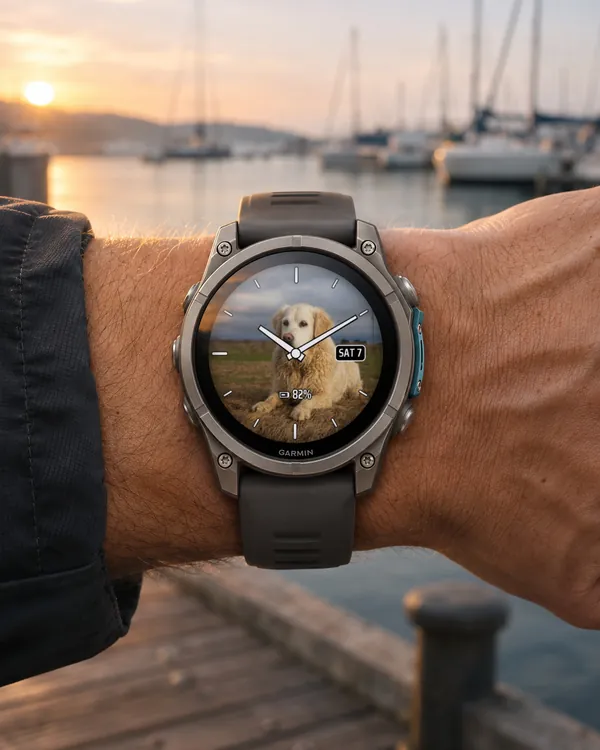
Photo Analog
Analog hands on your own photo: classic hands with an outline
 Photo
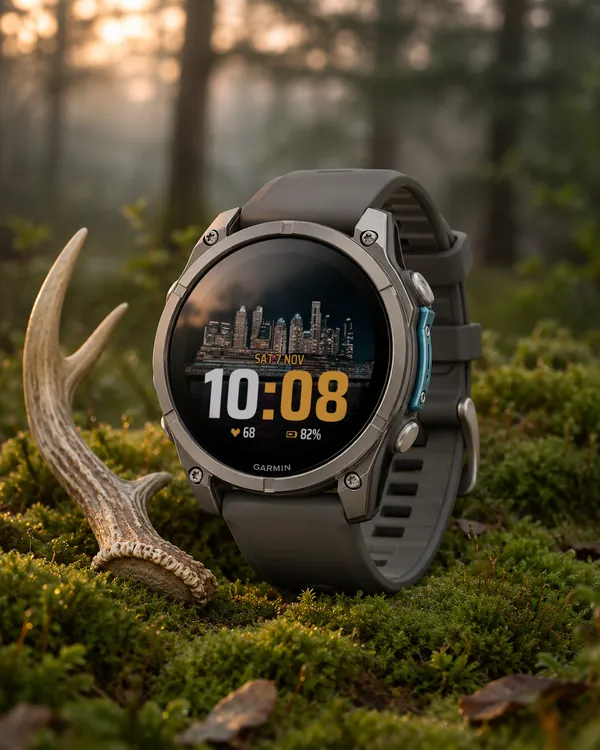
Photo Big Time
A big digital time on your own photo: at the bottom or at the top
 Photo
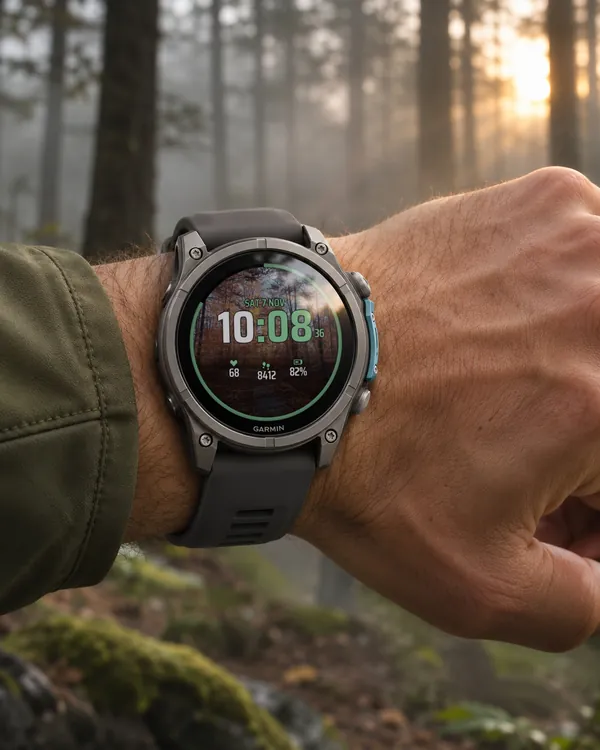
Photo Sport
A sport face on your own photo: the time
 Running
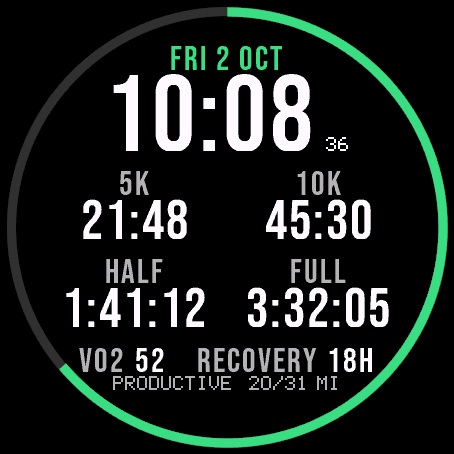
Race Ready
5.0 (17)
Garmin race predictions and weekly mileage right on the face