Unlock
€6.49
One-time payment. No subscription. The code works on the watch whose ID you enter.
- Install the face from Connect IQ (7 days free).
- On the watch: face settings > Buy / Unlock, scan the QR code.
- Pay and paste the code in the face settings.
- Pay.
- Copy the code.
- Paste it in Connect IQ: this face > Settings > Unlock code.
Payment works best in Safari or Chrome: menu (three dots) > Open in browser
Read it in this face, it is not the serial number of the watch.
The code works only in the watch face it was bought for: a Summit Rings code will not work in Summit Tactic.
Your ID, compare it with the watch:
Where do I find the ID?
On the watch: settings of this face > Buy / Unlock (first item). Scan the QR code with your phone or type the 10 digits. The ID is also at the top of the face settings in the Connect IQ app.
Code not working on your watch? Write to me and I will fix it.
Payments by Stripe. Seller: Mateusz Kolarz, Lublin, Poland.
Paid. Code:
We show the code here too. If the e-mail does not arrive (check spam), you can recover the code in the Recover code section with just the Face ID. Recover code
Copying did not work. The code is selected: copy it by hand.
The face unlocks by itself when the watch connects to the phone (usually within an hour; if the trial is still running, the purchase starts working when it ends).
Do not want to wait, or have an older watch? Paste the code in the Connect IQ app:
Connect IQ (or Garmin Connect) > My Device > Watch faces > Clear Day > Settings > Unlock code > paste > Save
Like it? Rate this face in the Garmin store
Want to try new faces and apps before the release, for free? Join the testers program
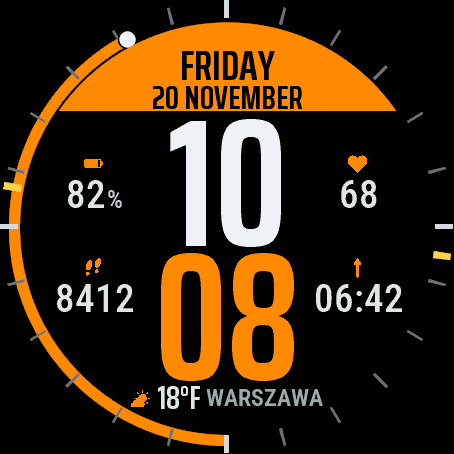
The easiest watch face to read: huge time, full weekday and big date.
What you get
- Huge time, sizes up to Maximum
- Full weekday name and big date in the watch language
- Day ring at the edge with sunrise and sunset
- Weather with town name fetched online (dialforge.dev); long press a field to open its data screen (touch watches)
- 3 bottom fields: battery in percent or days, steps, heart rate or any item from the full list
- Accent color, menu in 35 languages, always-on mode in 3 styles on AMOLED
How to buy
- Free for 7 days, all features
- Then a one-time unlock at dialforge.dev, no subscription
- On the watch: face settings, Buy / Unlock, scan the QR code
Full manual and settings: dialforge.dev/faces/clear-day
Works on fenix 9, fenix 8, Forerunner 970, Forerunner 570, Venu 4, Forerunner 965, Forerunner 265, Venu 3 and more.
When Garmin weather gives no place name, the face asks the dialforge.dev server for the town name through your phone and sends only an approximate position (rounded to about 1 km).
Tarcza, którą najłatwiej odczytać: ogromna godzina, pełna nazwa dnia i duża data.
Co ma tarcza
- Ogromna godzina, rozmiar aż do maksymalnego
- Pełna nazwa dnia i duża data w języku zegarka
- Pierścień dnia przy brzegu ze wschodem i zachodem słońca
- Pogoda z nazwą miejscowości pobieraną z internetu (dialforge.dev); przytrzymanie pola otwiera jego ekran danych (zegarki dotykowe)
- 3 pola dolne: bateria w procentach albo dniach, kroki, tętno lub dowolna pozycja z pełnej listy
- Kolor akcentu, menu w 35 językach, ekran wygaszony w 3 trybach na AMOLED
Jak kupić
- 7 dni za darmo, ze wszystkimi funkcjami
- Potem jednorazowo na dialforge.dev, bez abonamentu
- Na zegarku: ustawienia tarczy, Kup / odblokuj, zeskanuj kod QR
Pełny opis i ustawienia: dialforge.dev/faces/clear-day
Działa na: fenix 9, fenix 8, Forerunner 970, Forerunner 570, Venu 4, Forerunner 965, Forerunner 265, Venu 3 i innych.
Gdy pogoda Garmin nie podaje nazwy miejsca, tarcza pyta o nią serwer dialforge.dev przez telefon i wysyła tylko przybliżoną pozycję (zaokrągloną do ok. 1 km).
Das Zifferblatt, das sich am leichtesten ablesen lässt: riesige Uhrzeit, voller Wochentag und großes Datum.
Das bekommst du
- Riesige Uhrzeit, Größen bis Maximal
- Voller Wochentag und großes Datum in der Uhrensprache
- Tagesring am Rand mit Sonnenaufgang und Sonnenuntergang
- Wetter mit Ortsnamen aus dem Internet (dialforge.dev); langes Drücken auf ein Feld öffnet dessen Daten (Touch-Uhren)
- 3 untere Felder: Akku in Prozent oder Tagen, Schritte, Puls oder beliebige Daten der Liste
- Akzentfarbe, Menü in 35 Sprachen, Always-On in 3 Stilen bei AMOLED
So kaufst du
- 7 Tage kostenlos, alle Funktionen
- Danach einmalig freischalten auf dialforge.dev, kein Abo
- Auf der Uhr: Zifferblatt-Einstellungen, Kaufen / Freischalten, QR-Code scannen
Komplette Anleitung und Einstellungen: dialforge.dev/faces/clear-day
Läuft auf fenix 9, fenix 8, Forerunner 970, Forerunner 570, Venu 4, Forerunner 965, Forerunner 265, Venu 3 und weiteren Modellen.
Nennt das Garmin-Wetter keinen Ortsnamen, fragt das Zifferblatt über dein Handy den Server dialforge.dev und sendet nur eine ungefähre Position (auf etwa 1 km gerundet).
Le cadran le plus facile à lire : heure géante, jour complet et grande date.
Ce que vous obtenez
- Heure géante, tailles jusqu'au maximum
- Nom complet du jour et grande date dans la langue de la montre
- Anneau du jour au bord avec lever et coucher du soleil
- Météo avec la ville depuis internet (dialforge.dev) ; appui long sur un champ pour ses données (montres tactiles)
- 3 champs en bas : batterie en pourcentage ou en jours, pas, fréquence cardiaque ou toute donnée de la liste
- Couleur d'accent, menu en 35 langues, always-on en 3 styles sur AMOLED
Comment acheter
- Gratuit pendant 7 jours, toutes les fonctions
- Ensuite, un déblocage unique sur dialforge.dev, sans abonnement
- Sur la montre : réglages du cadran, Acheter / Débloquer, scannez le code QR
Mode d'emploi complet et réglages : dialforge.dev/faces/clear-day
Compatible avec fenix 9, fenix 8, Forerunner 970, Forerunner 570, Venu 4, Forerunner 965, Forerunner 265, Venu 3 et d'autres modèles.
Quand la météo Garmin ne donne pas de nom de lieu, le cadran interroge le serveur dialforge.dev via votre téléphone et n'envoie qu'une position approximative (arrondie à environ 1 km).
La esfera más fácil de leer: hora enorme, día completo de la semana y fecha grande.
Lo que obtienes
- Hora enorme, tamaños hasta el máximo
- Nombre completo del día y fecha grande en el idioma del reloj
- Anillo del día en el borde con amanecer y puesta de sol
- Tiempo con la localidad desde internet (dialforge.dev); pulsación larga en un campo abre sus datos (relojes táctiles)
- 3 campos inferiores: batería en porcentaje o días, pasos, pulso o cualquier dato de la lista
- Color de acento, menú en 35 idiomas, siempre activo en 3 estilos en AMOLED
Cómo comprar
- Gratis durante 7 días, con todas las funciones
- Después, desbloqueo único en dialforge.dev, sin suscripción
- En el reloj: ajustes de la esfera, Comprar / Desbloquear, escanea el código QR
Manual completo y ajustes: dialforge.dev/faces/clear-day
Compatible con fenix 9, fenix 8, Forerunner 970, Forerunner 570, Venu 4, Forerunner 965, Forerunner 265, Venu 3 y más.
Cuando el tiempo de Garmin no indica el nombre del lugar, la esfera consulta el servidor dialforge.dev a través del móvil y envía solo una posición aproximada (redondeada a unos 1 km).
De wijzerplaat die het makkelijkst te lezen is: reusachtige tijd, volledige weekdag en grote datum.
Wat je krijgt
- Reusachtige tijd, groottes tot het maximum
- Volledige weekdag en grote datum in de taal van het horloge
- Dagring aan de rand met zonsopgang en zonsondergang
- Weer met plaatsnaam van internet (dialforge.dev); lang indrukken van een veld opent het gegevensscherm (touchscreenhorloges)
- 3 onderste velden: batterij in procenten of dagen, stappen, hartslag of een gegeven uit de volledige lijst
- Accentkleur, menu in 35 talen, always-on in 3 stijlen op AMOLED
Zo koop je het
- 7 dagen gratis, alle functies
- Daarna eenmalig ontgrendelen op dialforge.dev, geen abonnement
- Op het horloge: wijzerplaatinstellingen, Kopen / Ontgrendelen, QR-code scannen
Volledige handleiding en instellingen: dialforge.dev/faces/clear-day
Werkt op fenix 9, fenix 8, Forerunner 970, Forerunner 570, Venu 4, Forerunner 965, Forerunner 265, Venu 3 en meer.
Geeft het Garmin-weer geen plaatsnaam, dan vraagt de wijzerplaat die via je telefoon aan de server dialforge.dev en stuurt alleen een geschatte positie (afgerond op ongeveer 1 km).
いちばん読みやすいウォッチフェイス。特大の時刻、曜日のフルネーム、大きな日付。
主な特長
- 特大の時刻、サイズは最大まで
- 曜日のフルネームと大きな日付、表示は時計の言語
- 画面の縁に1日のリング、日の出と日の入りを表示
- インターネットから取得した地名付きの天気(dialforge.dev)、欄を長押しでデータ画面を開く(タッチ対応の時計)
- 下部の3つの欄:バッテリー(%または日数)、歩数、心拍数、または全リストから好きなデータ
- アクセントカラー、35言語メニュー、AMOLEDは3種類の常時表示モード
購入方法
- 7日間無料、全機能を利用可能
- その後は dialforge.dev で一度きりのロック解除、サブスクなし
- ウォッチ側: 文字盤の設定、購入 / ロック解除、QRコードを読み取り
詳しい説明と設定: dialforge.dev/faces/clear-day
対応モデル:fenix 9, fenix 8, Forerunner 970, Forerunner 570, Venu 4, Forerunner 965, Forerunner 265, Venu 3 ほか
Garmin の天気に地名がない場合は、スマートフォン経由で dialforge.dev のサーバーに問い合わせ、おおよその位置(約1 km に丸めたもの)だけを送信します。
Il quadrante più facile da leggere: ora enorme, giorno completo e data grande.
Cosa ottieni
- Ora enorme, dimensioni fino al massimo
- Nome completo del giorno e data grande nella lingua dell'orologio
- Anello del giorno sul bordo con alba e tramonto
- Meteo con la località da internet (dialforge.dev); tocco prolungato su un campo apre i suoi dati (orologi touch)
- 3 campi in basso: batteria in percentuale o giorni, passi, battito o un dato a scelta dall'elenco
- Colore di accento, menu in 35 lingue, always-on in 3 stili su AMOLED
Come acquistare
- Gratis per 7 giorni, tutte le funzioni
- Poi uno sblocco una tantum su dialforge.dev, senza abbonamento
- Sull'orologio: impostazioni del quadrante, Acquista / Sblocca, scansiona il codice QR
Manuale completo e impostazioni: dialforge.dev/faces/clear-day
Compatibile con fenix 9, fenix 8, Forerunner 970, Forerunner 570, Venu 4, Forerunner 965, Forerunner 265, Venu 3 e altri.
Quando il meteo Garmin non indica il nome del luogo, il quadrante lo chiede al server dialforge.dev tramite il telefono e invia solo una posizione approssimativa (arrotondata a circa 1 km).
最易读的表盘:超大时间、完整星期名称和大号日期。
你将获得
- 超大时间,大小最大可达最大号
- 完整的星期名称和大号日期,使用手表语言
- 表盘边缘的日环,标出日出和日落
- 天气显示来自互联网的城市名称(dialforge.dev);长按数据栏可打开其数据界面(触屏手表)
- 3 个底部数据栏:电量(百分比或天数)、步数、心率,或完整列表中的任意数据
- 强调色,35 种语言菜单,AMOLED 支持 3 种息屏常亮模式
如何购买
- 免费试用7天,全部功能可用
- 之后在 dialforge.dev 一次性解锁,无需订阅
- 在手表上:表盘设置,购买 / 解锁,扫描二维码
完整说明与设置:dialforge.dev/faces/clear-day
适用于 fenix 9, fenix 8, Forerunner 970, Forerunner 570, Venu 4, Forerunner 965, Forerunner 265, Venu 3 等。
当 Garmin 天气没有地名时,表盘会通过手机向 dialforge.dev 服务器查询,只发送大致位置(约精确到 1 公里)。
Самый читаемый циферблат: огромное время, полный день недели и крупная дата.
Что вы получаете
- Огромное время, размер до максимального
- Полное название дня недели и крупная дата на языке часов
- Кольцо дня у края с восходом и закатом солнца
- Погода с названием города из интернета (dialforge.dev); долгое нажатие на поле открывает экран его данных (сенсорные часы)
- 3 нижних поля: батарея в процентах или днях, шаги, пульс или любой показатель из полного списка
- Цвет акцента, меню на 35 языках, режим Always-On в 3 стилях на AMOLED
Как купить
- Бесплатно 7 дней, все функции
- Затем разовая разблокировка на dialforge.dev, без подписки
- На часах: настройки циферблата, Купить / Открыть, отсканируйте QR-код
Полное руководство и настройки: dialforge.dev/faces/clear-day
Работает на fenix 9, fenix 8, Forerunner 970, Forerunner 570, Venu 4, Forerunner 965, Forerunner 265, Venu 3 и других.
Если в погоде Garmin нет названия места, циферблат через телефон запрашивает его у сервера dialforge.dev и отправляет только приблизительную позицию (округлённую примерно до 1 км).
O mostrador mais fácil de ler: hora gigante, dia da semana completo e data grande.
O que você recebe
- Hora gigante, tamanhos até o máximo
- Nome completo do dia e data grande no idioma do relógio
- Anel do dia na borda com nascer e pôr do sol
- Clima com o nome da cidade vindo da internet (dialforge.dev); toque longo num campo abre sua tela de dados (relógios touch)
- 3 campos inferiores: bateria em porcentagem ou dias, passos, batimentos ou qualquer dado da lista completa
- Cor de destaque, menu em 35 idiomas, modo sempre ativo em 3 estilos no AMOLED
Como comprar
- Grátis por 7 dias, com todos os recursos
- Depois, desbloqueio único em dialforge.dev, sem assinatura
- No relógio: configurações do mostrador, Comprar / Desbloquear, escaneie o QR code
Manual completo e configurações: dialforge.dev/faces/clear-day
Funciona em fenix 9, fenix 8, Forerunner 970, Forerunner 570, Venu 4, Forerunner 965, Forerunner 265, Venu 3 e outros.
Quando o clima da Garmin não informa o nome do local, o mostrador consulta o servidor dialforge.dev pelo celular e envia apenas uma posição aproximada (arredondada para cerca de 1 km).
Nejsnáze čitelný ciferník: obří čas, celý název dne a velké datum.
Co získáte
- Obří čas, velikost až po maximální
- Celý název dne a velké datum v jazyce hodinek
- Prstenec dne u okraje s východem a západem slunce
- Počasí s názvem místa z internetu (dialforge.dev); dlouhé stisknutí pole otevře jeho data (dotykové hodinky)
- 3 spodní pole: baterie v procentech nebo dnech, kroky, tep nebo libovolný údaj z úplného seznamu
- Barva akcentu, menu v 35 jazycích, režim always-on ve 3 stylech na AMOLED
Jak koupit
- 7 dní zdarma, všechny funkce
- Poté jednorázové odemknutí na dialforge.dev, bez předplatného
- V hodinkách: nastavení ciferníku, Koupit / Odemknout, naskenujte QR kód
Úplný návod a nastavení: dialforge.dev/faces/clear-day
Funguje na fenix 9, fenix 8, Forerunner 970, Forerunner 570, Venu 4, Forerunner 965, Forerunner 265, Venu 3 a dalších.
Když počasí Garmin název místa neuvádí, ciferník se přes telefon zeptá serveru dialforge.dev a pošle jen přibližnou polohu (zaokrouhlenou na zhruba 1 km).
O mostrador mais fácil de ler: hora gigante, dia da semana completo e data grande.
O que recebes
- Hora gigante, tamanhos até ao máximo
- Nome completo do dia e data grande no idioma do relógio
- Anel do dia na borda com nascer e pôr do sol
- Meteorologia com o nome da localidade vindo da internet (dialforge.dev); toque longo num campo abre o seu ecrã de dados (relógios táteis)
- 3 campos inferiores: bateria em percentagem ou dias, passos, pulsação ou qualquer dado da lista completa
- Cor de destaque, menu em 35 idiomas, modo sempre ligado em 3 estilos no AMOLED
Como comprar
- Grátis durante 7 dias, com todas as funcionalidades
- Depois, desbloqueio único em dialforge.dev, sem subscrição
- No relógio: definições do mostrador, Comprar / Desbloquear, lê o código QR
Manual completo e definições: dialforge.dev/faces/clear-day
Funciona em fenix 9, fenix 8, Forerunner 970, Forerunner 570, Venu 4, Forerunner 965, Forerunner 265, Venu 3 e outros.
Quando a meteorologia da Garmin não indica o nome do local, o mostrador consulta o servidor dialforge.dev através do telemóvel e envia apenas uma posição aproximada (arredondada a cerca de 1 km).
가장 읽기 쉬운 워치페이스: 초대형 시간, 요일 전체 이름, 큰 날짜.
주요 기능
- 초대형 시간, 최대 크기까지
- 요일 전체 이름과 큰 날짜를 시계 언어로
- 화면 가장자리의 하루 링, 일출과 일몰 표시
- 인터넷에서 가져온 지역 이름과 날씨 (dialforge.dev), 칸을 길게 누르면 데이터 화면 열기 (터치 시계)
- 하단 칸 3개: 배터리(퍼센트 또는 일수), 걸음 수, 심박수 또는 전체 목록의 원하는 데이터
- 강조 색상, 35개 언어 메뉴, AMOLED에서 AOD 모드 3가지 스타일
구매 방법
- 7일 무료, 모든 기능 사용 가능
- 이후 dialforge.dev에서 한 번만 결제해 잠금 해제, 구독 없음
- 워치에서: 워치 페이스 설정, 구매 / 잠금 해제, QR 코드 스캔
전체 설명서와 설정: dialforge.dev/faces/clear-day
지원 모델: fenix 9, fenix 8, Forerunner 970, Forerunner 570, Venu 4, Forerunner 965, Forerunner 265, Venu 3 외
Garmin 날씨에 지명이 없으면 휴대폰을 통해 dialforge.dev 서버에 문의하며, 대략적인 위치(약 1 km 단위로 반올림)만 전송합니다.
Den enklaste urtavlan att läsa: jättestor tid, hel veckodag och stort datum.
Det här får du
- Jättestor tid, storlekar upp till maximal
- Hela veckodagens namn och stort datum på klockans språk
- Dagsring vid kanten med soluppgång och solnedgång
- Väder med ortsnamn från internet (dialforge.dev); långt tryck på ett fält öppnar dess dataskärm (pekskärmsklockor)
- 3 nedre fält: batteri i procent eller dagar, steg, puls eller valfri uppgift ur hela listan
- Accentfärg, meny på 35 språk, alltid på-läge i 3 stilar på AMOLED
Så köper du
- Gratis i 7 dagar, alla funktioner
- Sedan ett engångsköp på dialforge.dev, ingen prenumeration
- På klockan: urtavlans inställningar, Köp / Lås upp, skanna QR-koden
Fullständig manual och inställningar: dialforge.dev/faces/clear-day
Fungerar på fenix 9, fenix 8, Forerunner 970, Forerunner 570, Venu 4, Forerunner 965, Forerunner 265, Venu 3 med flera.
När Garmin-vädret saknar ortsnamn frågar urtavlan servern dialforge.dev via din telefon och skickar bara en ungefärlig position (avrundad till cirka 1 km).
Den letteste urskive at aflæse: kæmpestor tid, hele ugedagen og stor dato.
Det får du
- Kæmpestor tid, størrelser op til maksimum
- Hele ugedagens navn og stor dato på urets sprog
- Dagsring ved kanten med solopgang og solnedgang
- Vejr med bynavn hentet fra internettet (dialforge.dev); langt tryk på et felt åbner dets dataskærm (touchure)
- 3 nederste felter: batteri i procent eller dage, skridt, puls eller valgfrit emne fra den fulde liste
- Accentfarve, menu på 35 sprog, always-on-tilstand i 3 stilarter på AMOLED
Sådan køber du
- Gratis i 7 dage, alle funktioner
- Derefter en engangsoplåsning på dialforge.dev, intet abonnement
- På uret: urskivens indstillinger, Køb / Lås op, scan QR-koden
Fuld manual og indstillinger: dialforge.dev/faces/clear-day
Virker på fenix 9, fenix 8, Forerunner 970, Forerunner 570, Venu 4, Forerunner 965, Forerunner 265, Venu 3 og flere.
Når Garmin-vejret ikke har et stednavn, spørger urskiven dialforge.dev-serveren via din telefon og sender kun en omtrentlig position (afrundet til ca. 1 km).
Den letteste urskiven å lese: diger tid, hele ukedagen og stor dato.
Det får du
- Diger tid, størrelser opp til maksimum
- Hele ukedagen og stor dato på urets språk
- Dagsring ved kanten med soloppgang og solnedgang
- Vær med stedsnavn fra internett (dialforge.dev); langt trykk på et felt åpner dataskjermen (pekeskjermur)
- 3 nederste felt: batteri i prosent eller dager, skritt, puls eller valgfri post fra hele listen
- Aksentfarge, meny på 35 språk, alltid-på-modus i 3 stiler på AMOLED
Slik kjøper du
- Gratis i 7 dager, alle funksjoner
- Deretter en engangsopplåsing på dialforge.dev, uten abonnement
- På klokken: innstillinger for urskiven, Kjøp / Lås opp, skann QR-koden
Full manual og innstillinger: dialforge.dev/faces/clear-day
Fungerer på fenix 9, fenix 8, Forerunner 970, Forerunner 570, Venu 4, Forerunner 965, Forerunner 265, Venu 3 og flere.
Når Garmin-været ikke har et stedsnavn, spør urskiven dialforge.dev-serveren via telefonen din og sender bare en omtrentlig posisjon (rundet av til ca. 1 km).
最易讀的錶面:超大時間、完整星期名稱與大號日期。
你將獲得
- 超大時間,大小最大可達最大號
- 完整的星期名稱與大號日期,使用手錶語言
- 錶面邊緣的日環,標示日出與日落
- 天氣顯示來自網際網路的城市名稱(dialforge.dev);長按資料欄可開啟其資料畫面(觸控手錶)
- 3 個底部資料欄:電量(百分比或天數)、步數、心率,或完整清單中的任何資料
- 強調色,35 種語言選單,AMOLED 支援 3 種常亮模式
如何購買
- 免費試用7天,全部功能可用
- 之後在 dialforge.dev 一次性解鎖,無需訂閱
- 在手錶上:錶面設定,購買 / 解鎖,掃描QR 碼
完整說明與設定:dialforge.dev/faces/clear-day
適用於 fenix 9, fenix 8, Forerunner 970, Forerunner 570, Venu 4, Forerunner 965, Forerunner 265, Venu 3 等。
當 Garmin 天氣沒有地名時,錶面會透過手機向 dialforge.dev 伺服器查詢,只傳送大致位置(約捨入至 1 公里)。
Helpoimmin luettava kellotaulu: valtava aika, koko viikonpäivä ja suuri päivämäärä.
Mitä saat
- Valtava aika, koko aina suurimpaan asti
- Koko viikonpäivän nimi ja suuri päivämäärä kellon kielellä
- Päivärengas reunassa auringonnousun ja -laskun merkeillä
- Sää ja paikkakunnan nimi netistä (dialforge.dev); kentän pitkä painallus avaa sen tietonäytön (kosketusnäytölliset kellot)
- 3 alakenttää: akku prosentteina tai päivinä, askeleet, syke tai mikä tahansa tieto koko luettelosta
- Korostusväri, valikko 35 kielellä, aina päällä -tila 3 tyylillä AMOLED-näytöillä
Näin ostat
- Ilmainen 7 päivää, kaikki ominaisuudet
- Sen jälkeen kertamaksulla avaus osoitteessa dialforge.dev, ei tilausta
- Kellossa: kellotaulun asetukset, Osta / Avaa, skannaa QR-koodi
Täysi ohje ja asetukset: dialforge.dev/faces/clear-day
Toimii malleissa fenix 9, fenix 8, Forerunner 970, Forerunner 570, Venu 4, Forerunner 965, Forerunner 265, Venu 3 ja muissa.
Kun Garminin sää ei anna paikan nimeä, kellotaulu kysyy sitä dialforge.dev-palvelimelta puhelimesi kautta ja lähettää vain likimääräisen sijainnin (pyöristetty noin 1 km:iin).
Najľahšie čitateľný ciferník: obrovský čas, celý názov dňa a veľký dátum.
Čo získate
- Obrovský čas, veľkosť až po maximálnu
- Celý názov dňa a veľký dátum v jazyku hodiniek
- Prstenec dňa pri okraji s východom a západom slnka
- Počasie s názvom miesta z internetu (dialforge.dev); dlhé stlačenie poľa otvorí jeho údaje (dotykové hodinky)
- 3 spodné polia: batéria v percentách alebo dňoch, kroky, tep alebo ľubovoľný údaj z úplného zoznamu
- Farba akcentu, menu v 35 jazykoch, režim always-on v 3 štýloch na AMOLED
Ako kúpiť
- 7 dní zadarmo, všetky funkcie
- Potom jednorazové odomknutie na dialforge.dev, bez predplatného
- V hodinkách: nastavenia ciferníka, Kúpiť / Odomknúť, naskenujte QR kód
Úplný návod a nastavenia: dialforge.dev/faces/clear-day
Funguje na fenix 9, fenix 8, Forerunner 970, Forerunner 570, Venu 4, Forerunner 965, Forerunner 265, Venu 3 a ďalších.
Keď počasie Garmin názov miesta neuvádza, ciferník sa cez telefón opýta servera dialforge.dev a pošle len približnú polohu (zaokrúhlenú na zhruba 1 km).
Najlažje berljiva številčnica: ogromen čas, polno ime dneva in velik datum.
Kaj dobite
- Ogromen čas, velikost do največje
- Polno ime dneva in velik datum v jeziku ure
- Obroč dneva ob robu z vzhodom in zahodom sonca
- Vreme z imenom kraja z interneta (dialforge.dev); dolg dotik polja odpre njegov zaslon s podatki (zasloni na dotik)
- 3 spodnja polja: baterija v odstotkih ali dneh, koraki, srčni utrip ali poljuben podatek s celotnega seznama
- Poudarjena barva, meni v 35 jezikih, način vedno vklopljenega zaslona v 3 slogih na AMOLED
Kako kupiti
- Brezplačno 7 dni, vse funkcije
- Nato enkratno odklepanje na dialforge.dev, brez naročnine
- Na uri: nastavitve številčnice, Kupi / Odkleni, skenirajte kodo QR
Celoten priročnik in nastavitve: dialforge.dev/faces/clear-day
Deluje na fenix 9, fenix 8, Forerunner 970, Forerunner 570, Venu 4, Forerunner 965, Forerunner 265, Venu 3 in drugih.
Kadar Garminovo vreme ne navaja imena kraja, številčnica prek telefona vpraša strežnik dialforge.dev in pošlje le približen položaj (zaokrožen na približno 1 km).
Watch face paling mudah dibaca: waktu raksasa, nama hari lengkap, dan tanggal besar.
Yang anda dapatkan
- Waktu raksasa, ukuran hingga maksimum
- Nama hari lengkap dan tanggal besar dalam bahasa jam
- Cincin hari di tepi layar dengan waktu matahari terbit dan terbenam
- Cuaca dengan nama kota dari internet (dialforge.dev); tekan lama kolom untuk membuka layar datanya (jam layar sentuh)
- 3 kolom bawah: baterai dalam persen atau hari, langkah, detak jantung atau data apa pun dari daftar lengkap
- Warna aksen, menu dalam 35 bahasa, mode always-on 3 gaya di AMOLED
Cara membeli
- Gratis 7 hari, semua fitur
- Lalu buka kunci sekali bayar di dialforge.dev, tanpa langganan
- Di jam: pengaturan tampilan, Beli / Buka, pindai kode QR
Panduan lengkap dan pengaturan: dialforge.dev/faces/clear-day
Berfungsi di fenix 9, fenix 8, Forerunner 970, Forerunner 570, Venu 4, Forerunner 965, Forerunner 265, Venu 3 dan lainnya.
Bila cuaca Garmin tidak memberikan nama tempat, tampilan jam bertanya ke server dialforge.dev melalui ponsel Anda dan hanya mengirim posisi perkiraan (dibulatkan sekitar 1 km).
A legkönnyebben olvasható számlap: óriási idő, teljes napnév és nagy dátum.
Mit kapsz
- Óriási idő, méret a maximumig
- Teljes napnév és nagy dátum az óra nyelvén
- Napgyűrű a szélén napkelte és napnyugta jelzéssel
- Időjárás a település nevével az internetről (dialforge.dev); a mező hosszú megnyomása megnyitja az adatképernyőjét (érintőképernyős órák)
- 3 alsó mező: akkumulátor százalékban vagy napokban, lépések, pulzus vagy bármely adat a teljes listából
- Kiemelő szín, menü 35 nyelven, always-on mód 3 stílusban AMOLED-en
Hogyan veheted meg
- 7 napig ingyenes, minden funkcióval
- Utána egyszeri feloldás a dialforge.dev oldalon, előfizetés nélkül
- Az órán: számlap beállításai, Vásárlás / Feloldás, olvasd be a QR-kódot
Teljes leírás és beállítások: dialforge.dev/faces/clear-day
Működik ezeken: fenix 9, fenix 8, Forerunner 970, Forerunner 570, Venu 4, Forerunner 965, Forerunner 265, Venu 3 és továbbiak.
Ha a Garmin időjárás nem ad helynevet, a számlap a telefonon keresztül megkérdezi a dialforge.dev szervert, és csak hozzávetőleges pozíciót küld (kb. 1 km-re kerekítve).
หน้าปัดที่อ่านง่ายที่สุด เวลาตัวใหญ่มาก ชื่อวันแบบเต็ม และวันที่ตัวใหญ่
สิ่งที่คุณจะได้รับ
- เวลาตัวใหญ่มาก ปรับขนาดได้ถึงสูงสุด
- ชื่อวันแบบเต็มและวันที่ตัวใหญ่ตามภาษาของนาฬิกา
- วงแหวนวันที่ขอบจอ แสดงเวลาพระอาทิตย์ขึ้นและตก
- สภาพอากาศพร้อมชื่อเมืองจากอินเทอร์เน็ต (dialforge.dev) กดค้างที่ช่องเพื่อเปิดหน้าจอข้อมูล (นาฬิการะบบสัมผัส)
- ช่องข้อมูลด้านล่าง 3 ช่อง: แบตเตอรี่เป็นเปอร์เซ็นต์หรือจำนวนวัน ก้าวเดิน อัตราการเต้นหัวใจ หรือข้อมูลใดก็ได้จากรายการทั้งหมด
- สีเน้น เมนู 35 ภาษา โหมด Always-on 3 สไตล์บน AMOLED
วิธีซื้อ
- ใช้ฟรี 7 วัน ได้ทุกฟีเจอร์
- จากนั้นปลดล็อกครั้งเดียวที่ dialforge.dev ไม่มีค่าสมาชิกรายเดือน
- บนนาฬิกา: การตั้งค่าหน้าปัด, ซื้อ / ปลดล็อก, สแกนคิวอาร์โค้ด
คู่มือและการตั้งค่าฉบับเต็ม: dialforge.dev/faces/clear-day
ใช้ได้กับ fenix 9, fenix 8, Forerunner 970, Forerunner 570, Venu 4, Forerunner 965, Forerunner 265, Venu 3 และรุ่นอื่น
เมื่อสภาพอากาศของ Garmin ไม่มีชื่อสถานที่ หน้าปัดจะสอบถามเซิร์ฟเวอร์ dialforge.dev ผ่านโทรศัพท์ของคุณ และส่งเพียงตำแหน่งโดยประมาณ (ปัดเป็นราว 1 กม.)
Το πιο εύκολο στην ανάγνωση καντράν: τεράστια ώρα, πλήρης ημέρα και μεγάλη ημερομηνία.
Τι παιρνετε
- Τεράστια ώρα, μεγέθη έως το μέγιστο
- Πλήρες όνομα ημέρας και μεγάλη ημερομηνία στη γλώσσα του ρολογιού
- Δακτύλιος ημέρας στην άκρη με ανατολή και δύση ηλίου
- Καιρός με την τοποθεσία από το διαδίκτυο (dialforge.dev)· παρατεταμένο πάτημα σε πεδίο ανοίγει τα δεδομένα του (ρολόγια αφής)
- 3 κάτω πεδία: μπαταρία σε ποσοστό ή ημέρες, βήματα, παλμοί ή οποιοδήποτε δεδομένο της λίστας
- Χρώμα έμφασης, μενού σε 35 γλώσσες, λειτουργία always-on σε 3 στυλ σε AMOLED
Πως να αγορασετε
- Δωρεάν για 7 ημέρες, όλες οι λειτουργίες
- Μετά, εφάπαξ ξεκλείδωμα στο dialforge.dev, χωρίς συνδρομή
- Στο ρολόι: ρυθμίσεις καντράν, Αγορά / Ξεκλείδωμα, σαρώστε τον κωδικό QR
Πλήρες εγχειρίδιο και ρυθμίσεις: dialforge.dev/faces/clear-day
Λειτουργεί σε fenix 9, fenix 8, Forerunner 970, Forerunner 570, Venu 4, Forerunner 965, Forerunner 265, Venu 3 και άλλα.
Όταν ο καιρός της Garmin δεν δίνει όνομα τοποθεσίας, το καντράν ρωτά τον διακομιστή dialforge.dev μέσω του κινητού και στέλνει μόνο μια κατά προσέγγιση θέση (στρογγυλοποιημένη στο 1 km περίπου).
Najlakše čitljiv brojčanik: golemo vrijeme, puni naziv dana i veliki datum.
Što dobivate
- Golemo vrijeme, veličine do maksimalne
- Puni naziv dana i veliki datum na jeziku sata
- Prsten dana uz rub sa izlaskom i zalaskom sunca
- Vrijeme s imenom mjesta s interneta (dialforge.dev); dugi dodir polja otvara njegov zaslon podataka (zasloni osjetljivi na dodir)
- 3 donja polja: baterija u postocima ili danima, koraci, puls ili bilo koji podatak s cijelog popisa
- Boja naglaska, izbornik na 35 jezika, uvijek uključen zaslon u 3 stila na AMOLED-u
Kako kupiti
- Besplatno 7 dana, sve funkcije
- Zatim jednokratno otključavanje na dialforge.dev, bez pretplate
- Na satu: postavke brojčanika, Kupi / Otključaj, skenirajte QR kod
Cijeli priručnik i postavke: dialforge.dev/faces/clear-day
Radi na fenix 9, fenix 8, Forerunner 970, Forerunner 570, Venu 4, Forerunner 965, Forerunner 265, Venu 3 i drugima.
Kad Garmin vrijeme ne daje naziv mjesta, izgled sata preko telefona pita poslužitelj dialforge.dev i šalje samo približan položaj (zaokružen na oko 1 km).
השעון הקל ביותר לקריאה: שעה ענקית, שם היום המלא ותאריך גדול.
מה מקבלים
- שעה ענקית, גדלים עד המקסימלי
- שם היום המלא ותאריך גדול בשפת השעון
- טבעת יום בקצה המסך עם זריחה ושקיעה
- מזג אוויר עם שם היישוב מהאינטרנט (dialforge.dev); לחיצה ארוכה על שדה פותחת את מסך הנתונים שלו (שעונים עם מסך מגע)
- 3 שדות תחתונים: סוללה באחוזים או בימים, צעדים, דופק או כל נתון מהרשימה המלאה
- צבע הדגשה, תפריט ב-35 שפות, מצב מסך דולק תמיד ב-3 סגנונות ב-AMOLED
איך קונים
- חינם ל-7 ימים, כל הפיצ'רים
- אחר כך פתיחה חד פעמית ב-dialforge.dev, בלי מנוי
- בשעון: הגדרות פני השעון, רכישה / פתיחה, סריקת קוד QR
מדריך מלא והגדרות: dialforge.dev/faces/clear-day
עובד על fenix 9, fenix 8, Forerunner 970, Forerunner 570, Venu 4, Forerunner 965, Forerunner 265, Venu 3 ועוד.
כשמזג האוויר של Garmin אינו מספק שם מקום, לוח השעון שואל את השרת dialforge.dev דרך הטלפון ושולח רק מיקום משוער (מעוגל לכ-1 ק"מ).
Muka jam paling mudah dibaca: masa gergasi, nama hari penuh dan tarikh besar.
Apa yang anda dapat
- Masa gergasi, saiz hingga maksimum
- Nama hari penuh dan tarikh besar dalam bahasa jam
- Cincin hari di tepi skrin dengan waktu matahari terbit dan terbenam
- Cuaca dengan nama bandar dari internet (dialforge.dev); tekan lama medan untuk membuka skrin datanya (jam skrin sentuh)
- 3 medan bawah: bateri dalam peratus atau hari, langkah, kadar denyutan jantung atau mana-mana data daripada senarai penuh
- Warna aksen, menu dalam 35 bahasa, mod sentiasa hidup 3 gaya pada AMOLED
Cara membeli
- Percuma 7 hari, semua ciri
- Kemudian buka kunci sekali bayar di dialforge.dev, tanpa langganan
- Pada jam: tetapan muka jam, Beli / Buka, imbas kod QR
Manual penuh dan tetapan: dialforge.dev/faces/clear-day
Berfungsi pada fenix 9, fenix 8, Forerunner 970, Forerunner 570, Venu 4, Forerunner 965, Forerunner 265, Venu 3 dan lain-lain.
Apabila cuaca Garmin tidak memberikan nama tempat, muka jam bertanya kepada pelayan dialforge.dev melalui telefon anda dan hanya menghantar kedudukan anggaran (dibundarkan kepada kira-kira 1 km).
Change history
v1.0.2
The days-left countdown now shows the number on all screen sizes and languages. Older weather data now shows a ~ mark correctly.
Rate this face (only I see the rating)
Permissions and privacy
This product asks the watch for the permissions below. Connect IQ shows them when you install it.
- Sensor history: Reads recent values stored by the watch (for example Body Battery, stress, heart rate, steps trend).Odczytuje ostatnie wartości zapisane przez zegarek (na przykład Body Battery, stres, tętno, trend kroków).
- Your profile: Reads your Garmin profile on the watch (for example age, weight, heart rate zones) to calculate values for you.Odczytuje Twój profil Garmin na zegarku (na przykład wiek, wagę, strefy tętna), żeby liczyć wartości dla Ciebie.
- Watch data (complications): Shows data from other watch features, such as battery or steps, on the face.Pokazuje na tarczy dane z innych funkcji zegarka, takie jak bateria czy kroki.
- Location (GPS): Uses the watch location for sunrise and sunset times. When the weather has no place name, an approximate position (rounded to about 1 km) is sent to dialforge.dev, as described below.Używa lokalizacji zegarka do godzin wschodu i zachodu słońca. Gdy pogoda nie ma nazwy miejscowości, przybliżona pozycja (zaokrąglona do ok. 1 km) trafia na dialforge.dev, jak opisano niżej.
- Background process: Lets the face look up the place name in the background, only when a name is missing.Pozwala tarczy sprawdzić nazwę miejscowości w tle, tylko wtedy, gdy jej brakuje.
- Internet through the phone: Lets the watch make a web request through your phone. Used only to look up the place name described below.Pozwala zegarkowi wysłać zapytanie internetowe przez telefon. Używane wyłącznie do sprawdzenia nazwy miejscowości opisanego niżej.
Place name next to the weatherNazwa miejscowości przy pogodzie
When the weather from your phone has no place name, the watch asks dialforge.dev for the nearest town, through your phone. The request contains only an approximate position (rounded to 0.01 degree, about 1 km). It contains no watch ID, no unlock code and no e-mail. You can turn the place name off in the face settings. Details: privacy policy.Gdy pogoda z telefonu nie ma nazwy miejscowości, zegarek pyta przez telefon dialforge.dev o najbliższą miejscowość. Zapytanie zawiera tylko przybliżoną pozycję (zaokrągloną do 0,01 stopnia, czyli ok. 1 km). Nie ma w nim ID zegarka, kodu odblokowującego ani e-maila. Nazwę miejscowości możesz wyłączyć w ustawieniach tarczy. Szczegóły: polityka prywatności.
The full manual and the detailed permission descriptions are available in English and Polish.
More faces
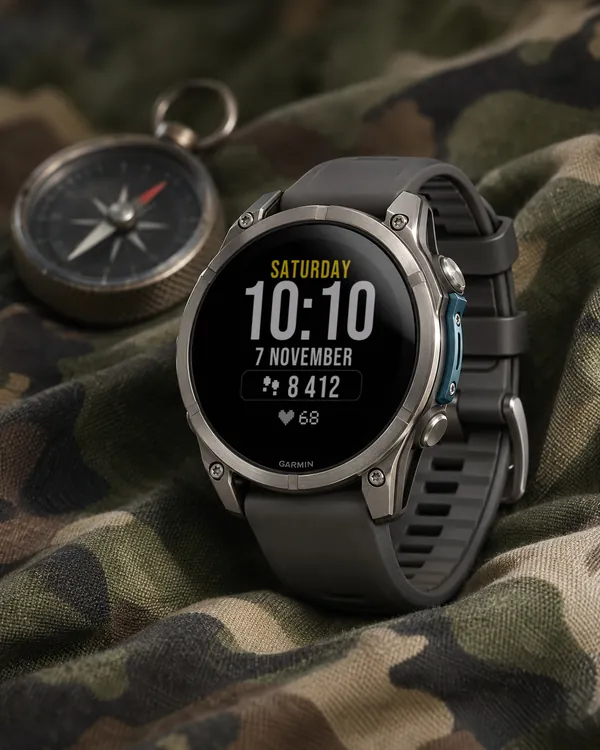 Easy To Read
Clear Hour
5.0 (20)
The easiest face to read
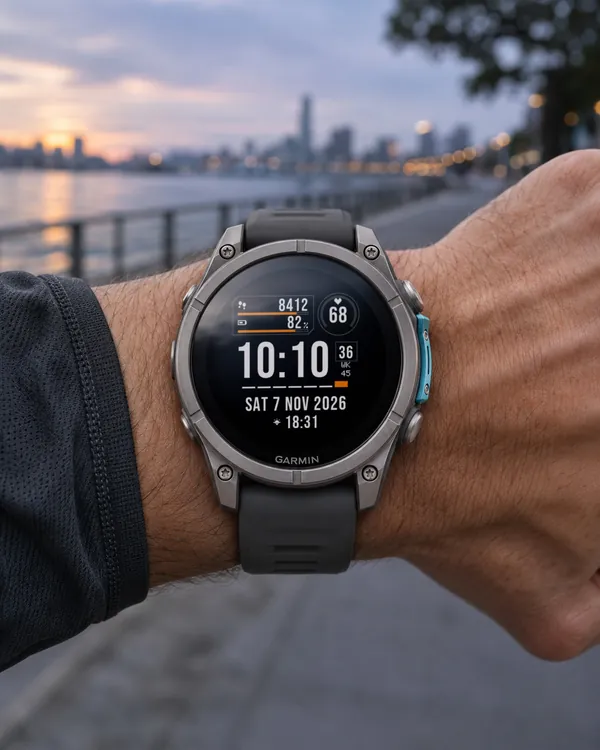 Tactical
Field Log
5.0 (22)
Tactical data card with progress bars, a round gauge and a week strip
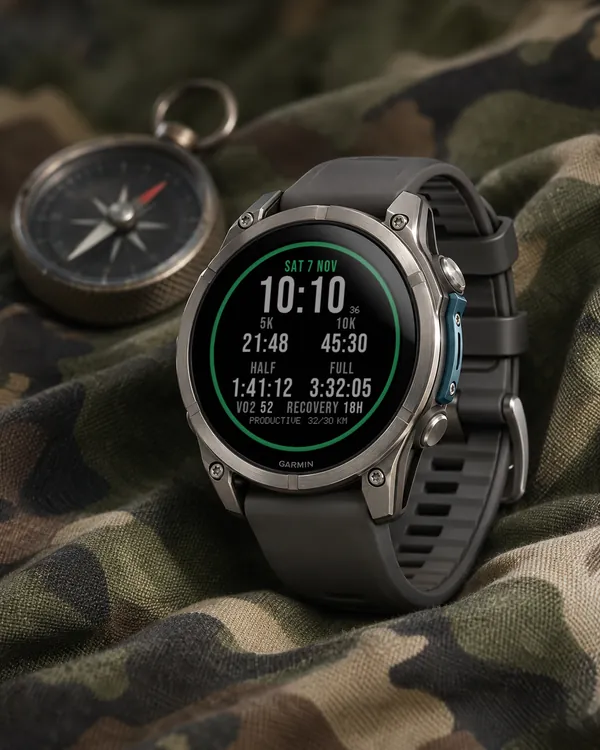 Running
Race Ready
5.0 (17)
Garmin race predictions and weekly mileage right on the face
 Photography
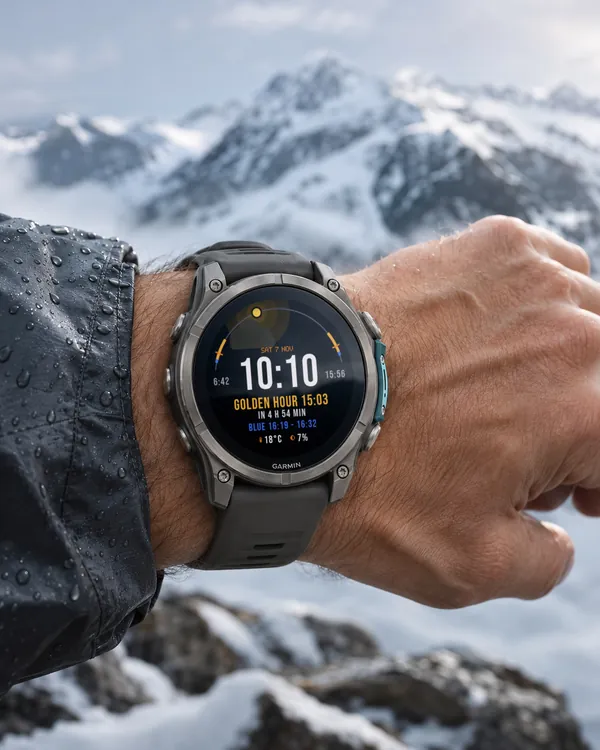
Amber Hour
5.0 (15)
Golden and blue hour countdown with the sun's path across your day