Unlock
€6.49
One-time payment. No subscription. The code works on the watch whose ID you enter.
- Install the face from Connect IQ (7 days free).
- On the watch: face settings > Buy / Unlock, scan the QR code.
- Pay and paste the code in the face settings.
- Pay.
- Copy the code.
- Paste it in Connect IQ: this face > Settings > Unlock code.
Payment works best in Safari or Chrome: menu (three dots) > Open in browser
Read it in this face, it is not the serial number of the watch.
The code works only in the watch face it was bought for: a Summit Rings code will not work in Summit Tactic.
Your ID, compare it with the watch:
Where do I find the ID?
On the watch: settings of this face > Buy / Unlock (first item). Scan the QR code with your phone or type the 10 digits. The ID is also at the top of the face settings in the Connect IQ app.
Code not working on your watch? Write to me and I will fix it.
Payments by Stripe. Seller: Mateusz Kolarz, Lublin, Poland.
Paid. Code:
We show the code here too. If the e-mail does not arrive (check spam), you can recover the code in the Recover code section with just the Face ID. Recover code
Copying did not work. The code is selected: copy it by hand.
The face unlocks by itself when the watch connects to the phone (usually within an hour; if the trial is still running, the purchase starts working when it ends).
Do not want to wait, or have an older watch? Paste the code in the Connect IQ app:
Connect IQ (or Garmin Connect) > My Device > Watch faces > Cluster > Settings > Unlock code > paste > Save
Like it? Rate this face in the Garmin store
Want to try new faces and apps before the release, for free? Join the testers program
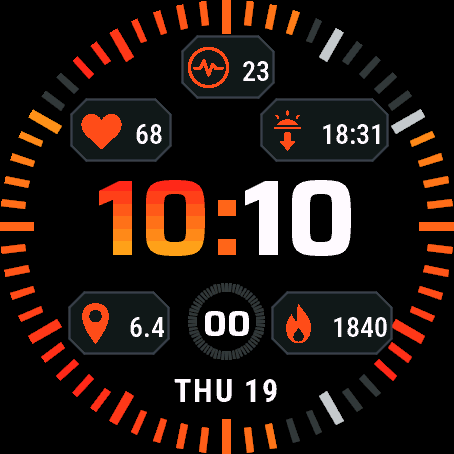
Cluster is a data face built like a car instrument cluster. The hours glow in an accent gradient, the minutes are white, and 60 ticks around the edge of the screen form four gauges that fill up with your steps, battery, Body Battery or active minutes. Six data fields sit in angular frames, and a small ring under the time counts the seconds or shows the day. It also runs on MIP screens (fenix 6, fenix 7, Forerunner 255 and 955, Enduro) and on Venu X1, and each screen type gets its own colours. An independent face by dialforge.dev, not made by the watch maker.
- Three layouts: digital, hybrid (hands over dimmed digits) and analog.
- Time in three sizes, from standard up to maximum. Maximum is on newer watches with more memory.
- Four gauges at the screen edge, 15 ticks each: steps, battery, Body Battery, stress, active minutes, heart rate or off.
- Six data fields with icons: heart rate, stress, sunrise and sunset, distance, calories, notifications, weather, altitude, floors and more. On touch screens, hold a field to open the matching watch app.
- Six accent gradients: red to orange, blue to cyan, green to lime, yellow to amber, purple to pink, white to grey. Hour digits as a gradient, a solid colour or an outline.
- Centre ring with the seconds, the day of the month or a sixth field.
- Battery turns amber and red at levels you choose; shown in percent or in days left.
- Town name next to the weather.
- Glucose (CGM) as a data field on watches with enough memory: FreeStyle Libre through LibreLinkUp, Dexcom app on the watch in testing. Not a medical device and no alarms. Glucose data goes from your account to the watch and never to Dialforge.
- Always-on screen on AMOLED: time and date, dimmed fields or time only, shifted every minute to protect the display.
- Menu in 35 languages, date in the language of the watch.
Settings are in Garmin Connect (Connect IQ, watch face settings) and on the watch under Customise: layout, fields, centre ring and always-on style. Colours, sizes, gauges, battery levels and glucose are set in Garmin Connect.
When the watch has no reading, a field shows --. For glucose, a short number under the dashes tells me what went wrong; send it to me. This is a watch face, not a medical device.
Cluster to tarcza z danymi zbudowana jak zestaw wskaźników w samochodzie. Godziny świecą gradientem w kolorze akcentu, minuty są białe, a 60 kresek na krawędzi ekranu tworzy cztery wskaźniki, które wypełniają się krokami, baterią, Body Battery albo minutami aktywności. Sześć pól danych siedzi w kanciastych ramkach, a mały pierścień pod godziną liczy sekundy albo pokazuje dzień. Działa też na ekranach MIP (fenix 6, fenix 7, Forerunner 255 i 955, Enduro) i na Venu X1, a każdy rodzaj ekranu ma własne kolory. Niezależna tarcza dialforge.dev, nie od producenta zegarka.
- Trzy układy: cyfrowy, hybryda (wskazówki nad przygaszonymi cyframi) i analogowy.
- Godzina w trzech rozmiarach, od standardowego do maksymalnego. Maksymalny jest na nowszych zegarkach z większą pamięcią.
- Cztery wskaźniki na krawędzi ekranu, po 15 kresek: kroki, bateria, Body Battery, stres, minuty aktywności, tętno albo wyłączony.
- Sześć pól danych z ikonami: tętno, stres, wschód i zachód słońca, dystans, kalorie, powiadomienia, pogoda, wysokość, piętra i inne. Na ekranach dotykowych przytrzymaj pole, żeby otworzyć pasującą aplikację zegarka.
- Sześć gradientów akcentu: czerwień i pomarańcz, niebieski i cyjan, zieleń i limonka, żółty i bursztyn, fiolet i róż, biel i szarość. Cyfry godzin gradientem, jednolitym kolorem albo konturem.
- Środkowy pierścień z sekundami, dniem miesiąca albo szóstym polem.
- Bateria robi się bursztynowa i czerwona przy progach, które sam ustawiasz; w procentach albo w dniach pracy.
- Nazwa miejscowości przy pogodzie.
- Glukoza (CGM) jako pole danych na zegarkach z wystarczającą pamięcią: FreeStyle Libre przez LibreLinkUp, aplikacja Dexcom na zegarku w testach. To nie wyrób medyczny i nie ma alarmów. Dane glukozy idą z Twojego konta na zegarek i nigdy do Dialforge.
- Ekran wygaszony na AMOLED: godzina i data, przygaszone pola albo sama godzina, przesuwane co minutę, żeby chronić wyświetlacz.
- Menu w 35 językach, data w języku zegarka.
Ustawienia są w Garmin Connect (Connect IQ, ustawienia tarczy) i na zegarku w Dostosuj: układ, pola, środkowy pierścień i styl ekranu wygaszonego. Kolory, rozmiary, wskaźniki, progi baterii i glukozę ustawisz w Garmin Connect.
Gdy zegarek nie ma odczytu, pole pokazuje --. Przy glukozie krótki numer pod kreskami mówi mi, co poszło nie tak; wyślij mi go. To tarcza, nie wyrób medyczny.
Cluster ist ein Datenzifferblatt, gebaut wie das Kombiinstrument eines Autos. Die Stunden leuchten in einem Akzentverlauf, die Minuten sind weiß, und 60 Striche am Bildschirmrand bilden vier Anzeigen, die sich mit deinen Schritten, dem Akku, Body Battery oder den aktiven Minuten füllen. Sechs Datenfelder sitzen in eckigen Rahmen, und ein kleiner Ring unter der Uhrzeit zählt die Sekunden oder zeigt den Tag. Es läuft auch auf MIP-Displays (fenix 6, fenix 7, Forerunner 255 und 955, Enduro) und auf dem Venu X1, und jeder Displaytyp hat eigene Farben. Ein unabhängiges Zifferblatt von dialforge.dev, nicht vom Uhrenhersteller.
- Drei Layouts: digital, hybrid (Zeiger über abgedunkelten Ziffern) und analog.
- Uhrzeit in drei Größen, von Standard bis Maximum. Maximum gibt es bei neueren Uhren mit mehr Speicher.
- Vier Anzeigen am Bildschirmrand mit je 15 Strichen: Schritte, Akku, Body Battery, Stress, aktive Minuten, Herzfrequenz oder aus.
- Sechs Datenfelder mit Symbolen: Herzfrequenz, Stress, Sonnenauf- und -untergang, Distanz, Kalorien, Benachrichtigungen, Wetter, Höhe, Etagen und mehr. Auf Touchscreens öffnest du mit langem Druck auf ein Feld die passende Uhren-App.
- Sechs Akzentverläufe: Rot zu Orange, Blau zu Cyan, Grün zu Limette, Gelb zu Bernstein, Lila zu Pink, Weiß zu Grau. Stundenziffern als Verlauf, einfarbig oder als Umriss.
- Mittlerer Ring mit den Sekunden, dem Tag des Monats oder einem sechsten Feld.
- Der Akku wird bei Werten, die du selbst festlegst, bernsteinfarben und rot; Anzeige in Prozent oder in verbleibenden Tagen.
- Ortsname neben dem Wetter.
- Glukose (CGM) als Datenfeld auf Uhren mit genug Speicher: FreeStyle Libre über LibreLinkUp, Dexcom-App auf der Uhr in Tests. Kein Medizinprodukt und keine Alarme. Glukosedaten gehen von deinem Konto auf die Uhr und nie an Dialforge.
- Always-On-Display bei AMOLED: Uhrzeit und Datum, abgedunkelte Felder oder nur die Uhrzeit, jede Minute verschoben, um das Display zu schonen.
- Menü in 35 Sprachen, Datum in der Sprache der Uhr.
Die Einstellungen findest du in Garmin Connect (Connect IQ, Zifferblatt-Einstellungen) und auf der Uhr unter Anpassen: Layout, Felder, mittlerer Ring und Stil des Always-On-Displays. Farben, Größen, Anzeigen, Akkuschwellen und Glukose stellst du in Garmin Connect ein.
Wenn die Uhr keinen Messwert hat, zeigt ein Feld -- an. Bei Glukose verrät mir eine kurze Zahl unter den Strichen, was schiefgelaufen ist; schick sie mir. Dies ist ein Zifferblatt, kein Medizinprodukt.
Cluster est un cadran de données conçu comme le tableau de bord d'une voiture. Les heures brillent en dégradé d'accent, les minutes sont blanches, et 60 repères au bord de l'écran forment quatre jauges qui se remplissent avec tes pas, la batterie, Body Battery ou les minutes actives. Six champs de données sont placés dans des cadres anguleux, et un petit anneau sous l'heure compte les secondes ou affiche le jour. Il fonctionne aussi sur les écrans MIP (fenix 6, fenix 7, Forerunner 255 et 955, Enduro) et sur Venu X1, et chaque type d'écran a ses propres couleurs. Un cadran indépendant de dialforge.dev, pas du fabricant de la montre.
- Trois dispositions : numérique, hybride (aiguilles au-dessus de chiffres atténués) et analogique.
- Heure en trois tailles, de standard à maximale. La taille maximale est sur les montres récentes avec plus de mémoire.
- Quatre jauges au bord de l'écran, de 15 repères chacune : pas, batterie, Body Battery, stress, minutes actives, fréquence cardiaque ou désactivée.
- Six champs de données avec icônes : fréquence cardiaque, stress, lever et coucher du soleil, distance, calories, notifications, météo, altitude, étages et plus. Sur les écrans tactiles, maintiens un champ pour ouvrir l'appli correspondante de la montre.
- Six dégradés d'accent : rouge vers orange, bleu vers cyan, vert vers citron vert, jaune vers ambre, violet vers rose, blanc vers gris. Chiffres des heures en dégradé, en couleur unie ou en contour.
- Anneau central avec les secondes, le jour du mois ou un sixième champ.
- La batterie passe à l'ambre puis au rouge aux niveaux que tu choisis ; affichée en pourcentage ou en jours restants.
- Nom de la ville à côté de la météo.
- Glycémie (CGM) comme champ de données sur les montres avec assez de mémoire : FreeStyle Libre via LibreLinkUp, appli Dexcom sur la montre en test. Pas un dispositif médical et aucune alarme. Les données de glycémie vont de ton compte à la montre et jamais à Dialforge.
- Écran toujours allumé sur AMOLED : heure et date, champs atténués ou heure seule, déplacés chaque minute pour protéger l'écran.
- Menu en 35 langues, date dans la langue de la montre.
Les réglages se trouvent dans Garmin Connect (Connect IQ, réglages du cadran) et sur la montre sous Personnaliser : disposition, champs, anneau central et style de l'écran toujours allumé. Les couleurs, tailles, jauges, niveaux de batterie et la glycémie se règlent dans Garmin Connect.
Quand la montre n'a pas de mesure, un champ affiche --. Pour la glycémie, un court numéro sous les tirets m'indique ce qui n'a pas marché ; envoie-le-moi. Ceci est un cadran, pas un dispositif médical.
Cluster es una esfera de datos construida como el cuadro de instrumentos de un coche. Las horas brillan con un degradado de acento, los minutos son blancos y 60 marcas en el borde de la pantalla forman cuatro indicadores que se llenan con tus pasos, la batería, Body Battery o los minutos activos. Seis campos de datos van en marcos angulares, y un pequeño anillo bajo la hora cuenta los segundos o muestra el día. También funciona en pantallas MIP (fenix 6, fenix 7, Forerunner 255 y 955, Enduro) y en Venu X1, y cada tipo de pantalla tiene sus propios colores. Una esfera independiente de dialforge.dev, no del fabricante del reloj.
- Tres diseños: digital, híbrido (agujas sobre dígitos atenuados) y analógico.
- Hora en tres tamaños, de estándar a máximo. El máximo está en relojes más nuevos con más memoria.
- Cuatro indicadores en el borde de la pantalla, de 15 marcas cada uno: pasos, batería, Body Battery, estrés, minutos activos, frecuencia cardiaca o desactivado.
- Seis campos de datos con iconos: frecuencia cardiaca, estrés, salida y puesta de sol, distancia, calorías, notificaciones, tiempo, altitud, pisos y más. En pantallas táctiles, mantén pulsado un campo para abrir la app del reloj correspondiente.
- Seis degradados de acento: rojo a naranja, azul a cian, verde a lima, amarillo a ámbar, morado a rosa, blanco a gris. Dígitos de las horas en degradado, en color liso o en contorno.
- Anillo central con los segundos, el día del mes o un sexto campo.
- La batería pasa a ámbar y rojo en los niveles que elijas; se muestra en porcentaje o en días restantes.
- Nombre de la ciudad junto al tiempo.
- Glucosa (CGM) como campo de datos en relojes con memoria suficiente: FreeStyle Libre mediante LibreLinkUp, app Dexcom en el reloj en pruebas. No es un producto sanitario ni tiene alarmas. Los datos de glucosa van de tu cuenta al reloj y nunca a Dialforge.
- Pantalla siempre activa en AMOLED: hora y fecha, campos atenuados o solo la hora, desplazada cada minuto para proteger la pantalla.
- Menú en 35 idiomas, fecha en el idioma del reloj.
Los ajustes están en Garmin Connect (Connect IQ, ajustes de la esfera) y en el reloj, en Personalizar: diseño, campos, anillo central y estilo de la pantalla siempre activa. Los colores, tamaños, indicadores, niveles de batería y glucosa se ajustan en Garmin Connect.
Cuando el reloj no tiene una lectura, un campo muestra --. En la glucosa, un número corto bajo los guiones me dice qué salió mal; envíamelo. Esto es una esfera, no un producto sanitario.
Cluster is een datawijzerplaat gebouwd als het instrumentenpaneel van een auto. De uren gloeien in een accentgradiënt, de minuten zijn wit, en 60 streepjes langs de rand van het scherm vormen vier meters die zich vullen met je stappen, batterij, Body Battery of actieve minuten. Zes gegevensvelden zitten in hoekige kaders, en een kleine ring onder de tijd telt de seconden of toont de dag. Hij werkt ook op MIP-schermen (fenix 6, fenix 7, Forerunner 255 en 955, Enduro) en op Venu X1, en elk schermtype krijgt zijn eigen kleuren. Een onafhankelijke wijzerplaat van dialforge.dev, niet gemaakt door de horlogefabrikant.
- Drie indelingen: digitaal, hybride (wijzers boven gedimde cijfers) en analoog.
- Tijd in drie formaten, van standaard tot maximaal. Maximaal zit op nieuwere horloges met meer geheugen.
- Vier meters aan de schermrand, elk 15 streepjes: stappen, batterij, Body Battery, stress, actieve minuten, hartslag of uit.
- Zes gegevensvelden met pictogrammen: hartslag, stress, zonsopkomst en zonsondergang, afstand, calorieën, meldingen, weer, hoogte, verdiepingen en meer. Houd op touchscreens een veld ingedrukt om de bijbehorende horlogeapp te openen.
- Zes accentgradiënten: rood naar oranje, blauw naar cyaan, groen naar limoen, geel naar amber, paars naar roze, wit naar grijs. Uurcijfers als gradiënt, effen kleur of omtrek.
- Middenring met de seconden, de dag van de maand of een zesde veld.
- De batterij wordt amber en rood bij niveaus die je zelf kiest; getoond in procenten of in resterende dagen.
- Plaatsnaam naast het weer.
- Glucose (CGM) als gegevensveld op horloges met genoeg geheugen: FreeStyle Libre via LibreLinkUp, Dexcom-app op het horloge in test. Geen medisch hulpmiddel en geen alarmen. Glucosegegevens gaan van je account naar het horloge en nooit naar Dialforge.
- Always-on scherm op AMOLED: tijd en datum, gedimde velden of alleen de tijd, elke minuut verschoven om het scherm te beschermen.
- Menu in 35 talen, datum in de taal van het horloge.
De instellingen vind je in Garmin Connect (Connect IQ, instellingen van de wijzerplaat) en op het horloge onder Aanpassen: indeling, velden, middenring en stijl van het always-on scherm. Kleuren, formaten, meters, batterijniveaus en glucose stel je in via Garmin Connect.
Als het horloge geen meting heeft, toont een veld --. Bij glucose vertelt een kort nummer onder de streepjes me wat er misging; stuur het naar me. Dit is een wijzerplaat, geen medisch hulpmiddel.
Clusterは、車のインパネのように作ったデータウォッチフェイスです。時はアクセントのグラデーションで光り、分は白で、画面の縁の60本の目盛りが4つのゲージになり、歩数、バッテリー、Body Battery、アクティブ時間に合わせて満ちていきます。6つのデータフィールドは角ばった枠に収まり、時刻の下の小さなリングは秒を数えるか、日付を表示します。MIP画面(fenix 6、fenix 7、Forerunner 255と955、Enduro)とVenu X1でも動作し、画面タイプごとに専用の色を用意しています。dialforge.devの独立したウォッチフェイスで、時計メーカー製ではありません。
- 3つのレイアウト:デジタル、ハイブリッド(薄くした数字の上に針)、アナログ。
- 時刻は標準から最大まで3つのサイズ。最大サイズはメモリの多い新しめの時計で使えます。
- 画面の縁に4つのゲージ、各15目盛り:歩数、バッテリー、Body Battery、ストレス、アクティブ時間、心拍、またはオフ。
- アイコン付きの6つのデータフィールド:心拍、ストレス、日の出と日の入り、距離、カロリー、通知、天気、高度、階数など。タッチ画面では、フィールドを長押しすると対応する時計のアプリが開きます。
- 6種類のアクセントグラデーション:赤からオレンジ、青からシアン、緑からライム、黄からアンバー、紫からピンク、白からグレー。時の数字はグラデーション、単色、輪郭から選べます。
- 中央のリングには、秒、日付、または6つ目のフィールドを表示。
- バッテリーは、自分で決めたレベルでアンバー、赤に変わります。パーセントまたは残り日数で表示します。
- 天気の横に町の名前を表示。
- メモリに余裕のある時計では、血糖値(CGM)をデータフィールドに表示できます。FreeStyle LibreはLibreLinkUp経由、Dexcomアプリは時計上でテスト中です。医療機器ではなく、アラームもありません。血糖値のデータはあなたのアカウントから時計に届き、Dialforgeには送られません。
- AMOLEDの常時表示画面:時刻と日付、薄くしたフィールド、または時刻のみ。画面保護のため1分ごとに位置をずらします。
- 35言語のメニュー。日付は時計の言語で表示。
設定はGarmin Connect(Connect IQ、ウォッチフェイス設定)と、時計のカスタマイズで行います:レイアウト、フィールド、中央のリング、常時表示のスタイル。色、サイズ、ゲージ、バッテリーのレベル、血糖値はGarmin Connectで設定します。
時計に測定値がないときは、フィールドに--と表示されます。血糖値の場合、ダッシュの下に出る短い番号で何が起きたか分かります。その番号を送ってください。これはウォッチフェイスであり、医療機器ではありません。
Cluster è un quadrante dati costruito come il cruscotto di un'auto. Le ore brillano con una sfumatura d'accento, i minuti sono bianchi e 60 tacche sul bordo dello schermo formano quattro indicatori che si riempiono con i tuoi passi, la batteria, Body Battery o i minuti attivi. Sei campi dati stanno in cornici angolari, e un piccolo anello sotto l'ora conta i secondi o mostra il giorno. Funziona anche sugli schermi MIP (fenix 6, fenix 7, Forerunner 255 e 955, Enduro) e su Venu X1, e ogni tipo di schermo ha i suoi colori. Un quadrante indipendente di dialforge.dev, non del produttore dell'orologio.
- Tre disposizioni: digitale, ibrida (lancette sopra cifre attenuate) e analogica.
- Ora in tre dimensioni, da standard a massima. La massima è sugli orologi più recenti con più memoria.
- Quattro indicatori sul bordo dello schermo, da 15 tacche ciascuno: passi, batteria, Body Battery, stress, minuti attivi, frequenza cardiaca o disattivato.
- Sei campi dati con icone: frequenza cardiaca, stress, alba e tramonto, distanza, calorie, notifiche, meteo, altitudine, piani e altro. Sugli schermi touch, tieni premuto un campo per aprire l'app dell'orologio corrispondente.
- Sei sfumature d'accento: rosso verso arancione, blu verso ciano, verde verso lime, giallo verso ambra, viola verso rosa, bianco verso grigio. Cifre delle ore sfumate, a tinta unita o a contorno.
- Anello centrale con i secondi, il giorno del mese o un sesto campo.
- La batteria diventa ambra e rossa ai livelli che scegli; mostrata in percentuale o in giorni rimasti.
- Nome della località accanto al meteo.
- Glicemia (CGM) come campo dati sugli orologi con memoria sufficiente: FreeStyle Libre tramite LibreLinkUp, app Dexcom sull'orologio in fase di test. Non è un dispositivo medico e non ci sono allarmi. I dati della glicemia vanno dal tuo account all'orologio e mai a Dialforge.
- Schermo sempre attivo su AMOLED: ora e data, campi attenuati o solo l'ora, spostata ogni minuto per proteggere lo schermo.
- Menu in 35 lingue, data nella lingua dell'orologio.
Le impostazioni si trovano in Garmin Connect (Connect IQ, impostazioni del quadrante) e sull'orologio in Personalizza: disposizione, campi, anello centrale e stile dello schermo sempre attivo. Colori, dimensioni, indicatori, livelli della batteria e glicemia si impostano in Garmin Connect.
Quando l'orologio non ha una lettura, un campo mostra --. Per la glicemia, un breve numero sotto i trattini mi dice cosa è andato storto; mandamelo. Questo è un quadrante, non un dispositivo medico.
Cluster 是仿汽车仪表盘打造的数据表盘。小时数字以强调色渐变发光,分钟为白色,屏幕边缘的 60 个刻度组成四个仪表,会随你的步数、电量、Body Battery 或活动分钟数填充。六个数据栏位于棱角分明的边框中,时间下方的小圈用来计秒或显示日期。它也适用于 MIP 屏幕(fenix 6、fenix 7、Forerunner 255 和 955、Enduro)以及 Venu X1,每种屏幕类型都有各自的配色。来自 dialforge.dev 的独立表盘,并非手表厂商出品。
- 三种布局:数字、混合(指针叠在调暗的数字上)和指针。
- 时间有三种大小,从标准到最大。最大号用于内存更大的较新手表。
- 屏幕边缘的四个仪表,每个 15 个刻度:步数、电量、Body Battery、压力、活动分钟数、心率或关闭。
- 六个带图标的数据栏:心率、压力、日出和日落、距离、卡路里、通知、天气、海拔、楼层等。在触摸屏上,长按数据栏可打开对应的手表应用。
- 六种强调渐变:红到橙、蓝到青、绿到青柠、黄到琥珀、紫到粉、白到灰。小时数字可选渐变、纯色或轮廓。
- 中央圆圈可显示秒、几号或第六个数据栏。
- 电量在你设定的电平变为琥珀色和红色;可显示百分比或剩余天数。
- 天气旁显示城市名称。
- 在内存足够的手表上,血糖(CGM)可作为数据栏:FreeStyle Libre 通过 LibreLinkUp,手表上的 Dexcom 应用在测试中。不是医疗设备,也没有警报。血糖数据从你的账户传到手表,绝不会传到 Dialforge。
- AMOLED 息屏常亮显示:时间和日期、调暗的数据栏或仅时间,每分钟移动一次位置以保护屏幕。
- 35 种语言的菜单,日期使用手表的语言。
设置位于 Garmin Connect(Connect IQ,表盘设置)以及手表上的自定义菜单:布局、数据栏、中央圆圈和息屏常亮样式。颜色、大小、仪表、电量档位和血糖在 Garmin Connect 中设置。
当手表没有读数时,数据栏显示 --。对于血糖,短横线下方的一个短数字会告诉我出了什么问题,请发给我。这是表盘,不是医疗设备。
Cluster: циферблат с данными, сделанный как приборная панель автомобиля. Часы светятся градиентом цвета акцента, минуты белые, а 60 делений по краю экрана образуют четыре шкалы, которые заполняются вашими шагами, зарядом батареи, Body Battery или активными минутами. Шесть полей данных стоят в угловатых рамках, а маленькое кольцо под временем считает секунды или показывает день. Работает и на экранах MIP (fenix 6, fenix 7, Forerunner 255 и 955, Enduro), и на Venu X1, а у каждого типа экрана свои цвета. Независимый циферблат от dialforge.dev, не от производителя часов.
- Три раскладки: цифровая, гибридная (стрелки над приглушёнными цифрами) и аналоговая.
- Время трёх размеров, от стандартного до максимального. Максимальный есть на новых часах с большим объёмом памяти.
- Четыре шкалы по краю экрана, по 15 делений: шаги, батарея, Body Battery, стресс, активные минуты, пульс или выключено.
- Шесть полей данных со значками: пульс, стресс, восход и закат, дистанция, калории, уведомления, погода, высота, этажи и другое. На сенсорных экранах удерживайте поле, чтобы открыть подходящее приложение часов.
- Шесть градиентов акцента: от красного к оранжевому, от синего к голубому, от зелёного к лаймовому, от жёлтого к янтарному, от фиолетового к розовому, от белого к серому. Цифры часов градиентом, сплошным цветом или контуром.
- Центральное кольцо с секундами, числом месяца или шестым полем.
- Батарея становится янтарной и красной на уровнях, которые вы задаёте сами; показывается в процентах или в днях до разрядки.
- Название города рядом с погодой.
- Глюкоза (CGM) в поле данных на часах с достаточным объёмом памяти: FreeStyle Libre через LibreLinkUp, приложение Dexcom на часах в тестировании. Это не медицинское изделие, сигналов тревоги нет. Данные о глюкозе идут с вашего аккаунта на часы и никогда не попадают в Dialforge.
- Режим Always-On на AMOLED: время и дата, приглушённые поля или только время, со сдвигом каждую минуту, чтобы беречь дисплей.
- Меню на 35 языках, дата на языке часов.
Настройки находятся в Garmin Connect (Connect IQ, настройки циферблата) и на часах в разделе «Настроить»: раскладка, поля, центральное кольцо и стиль Always-On. Цвета, размеры, шкалы, уровни батареи и глюкоза настраиваются в Garmin Connect.
Когда у часов нет показания, поле показывает --. При глюкозе короткий номер под прочерками подсказывает мне, что пошло не так; пришлите его мне. Это циферблат, а не медицинское устройство.
O Cluster é um mostrador de dados feito como o painel de instrumentos de um carro. As horas brilham em um degradê da cor de destaque, os minutos são brancos e 60 marcas na borda da tela formam quatro indicadores que se enchem com seus passos, bateria, Body Battery ou minutos ativos. Seis campos de dados ficam em molduras angulares, e um pequeno anel sob a hora conta os segundos ou mostra o dia. Ele também funciona em telas MIP (fenix 6, fenix 7, Forerunner 255 e 955, Enduro) e no Venu X1, e cada tipo de tela tem suas próprias cores. Um mostrador independente da dialforge.dev, não feito pelo fabricante do relógio.
- Três layouts: digital, híbrido (ponteiros sobre números esmaecidos) e analógico.
- Hora em três tamanhos, do padrão ao máximo. O máximo está nos relógios mais novos, com mais memória.
- Quatro indicadores na borda da tela, 15 marcas cada: passos, bateria, Body Battery, estresse, minutos ativos, frequência cardíaca ou desligado.
- Seis campos de dados com ícones: frequência cardíaca, estresse, nascer e pôr do sol, distância, calorias, notificações, clima, altitude, andares e mais. Em telas sensíveis ao toque, mantenha um campo pressionado para abrir o app do relógio correspondente.
- Seis degradês de destaque: vermelho para laranja, azul para ciano, verde para lima, amarelo para âmbar, roxo para rosa, branco para cinza. Números das horas em degradê, cor sólida ou contorno.
- Anel central com os segundos, o dia do mês ou um sexto campo.
- A bateria fica âmbar e vermelha nos níveis que você escolhe; exibida em porcentagem ou em dias restantes.
- Nome da cidade ao lado do clima.
- Glicose (CGM) como campo de dados em relógios com memória suficiente: FreeStyle Libre pelo LibreLinkUp, app Dexcom no relógio em testes. Não é um dispositivo médico e não há alarmes. Os dados de glicose vão da sua conta para o relógio e nunca para a Dialforge.
- Tela sempre ativa em AMOLED: hora e data, campos esmaecidos ou só a hora, deslocada a cada minuto para proteger a tela.
- Menu em 35 idiomas, data no idioma do relógio.
As configurações ficam no Garmin Connect (Connect IQ, configurações do mostrador) e no relógio em Personalizar: layout, campos, anel central e estilo da tela sempre ativa. Cores, tamanhos, indicadores, níveis da bateria e glicose são definidos no Garmin Connect.
Quando o relógio não tem leitura, o campo mostra --. Na glicose, um número curto sob os traços me diz o que deu errado; envie para mim. Este é um mostrador, não um dispositivo médico.
Cluster je datový ciferník postavený jako přístrojová deska v autě. Hodiny svítí v barevném přechodu akcentu, minuty jsou bílé a 60 čárek po okraji displeje tvoří čtyři ukazatele, které se plní podle kroků, baterie, Body Battery nebo aktivních minut. Šest datových polí sedí v hranatých rámečcích a malý kroužek pod časem počítá sekundy nebo ukazuje den. Funguje i na displejích MIP (fenix 6, fenix 7, Forerunner 255 a 955, Enduro) a na Venu X1 a každý typ displeje má vlastní barvy. Nezávislý ciferník od dialforge.dev, ne od výrobce hodinek.
- Tři rozložení: digitální, hybridní (ručičky nad ztlumenými číslicemi) a analogové.
- Čas ve třech velikostech, od standardní po maximální. Maximální je na novějších hodinkách s větší pamětí.
- Čtyři ukazatele na okraji displeje, každý po 15 čárkách: kroky, baterie, Body Battery, stres, aktivní minuty, tep nebo vypnuto.
- Šest datových polí s ikonami: tep, stres, východ a západ slunce, vzdálenost, kalorie, oznámení, počasí, nadmořská výška, patra a další. Na dotykových displejích podržením pole otevřeš odpovídající aplikaci v hodinkách.
- Šest akcentních přechodů: červená do oranžové, modrá do azurové, zelená do limetkové, žlutá do jantarové, fialová do růžové, bílá do šedé. Číslice hodin jako přechod, jednolitá barva nebo obrys.
- Prostřední kroužek se sekundami, dnem v měsíci nebo šestým polem.
- Baterie zežloutne a zčervená na úrovních, které si nastavíš; zobrazení v procentech nebo ve zbývajících dnech.
- Název města vedle počasí.
- Glukóza (CGM) jako datové pole na hodinkách s dostatkem paměti: FreeStyle Libre přes LibreLinkUp, aplikace Dexcom v hodinkách v testech. Není to zdravotnický prostředek a nejsou tu žádné alarmy. Data o glukóze jdou z tvého účtu do hodinek a nikdy do Dialforge.
- Vždy zapnutý displej na AMOLED: čas a datum, ztlumená pole nebo jen čas, posouvané každou minutu, aby se displej chránil.
- Menu v 35 jazycích, datum v jazyce hodinek.
Nastavení najdeš v Garmin Connect (Connect IQ, nastavení ciferníku) a v hodinkách v části Upravit: rozložení, pole, prostřední kroužek a styl vždy zapnutého displeje. Barvy, velikosti, ukazatele, úrovně baterie a glukózu nastavíš v Garmin Connect.
Když hodinky nemají žádnou hodnotu, pole ukazuje --. U glukózy mi krátké číslo pod pomlčkami řekne, co se pokazilo; pošli mi ho. Toto je ciferník, ne zdravotnický prostředek.
O Cluster é um mostrador de dados feito como o painel de instrumentos de um carro. As horas brilham num gradiente da cor de destaque, os minutos são brancos e 60 marcas na borda do ecrã formam quatro indicadores que se enchem com os seus passos, bateria, Body Battery ou minutos ativos. Seis campos de dados ficam em molduras angulares, e um pequeno anel sob a hora conta os segundos ou mostra o dia. Funciona também em ecrãs MIP (fenix 6, fenix 7, Forerunner 255 e 955, Enduro) e no Venu X1, e cada tipo de ecrã tem as suas próprias cores. Um mostrador independente da dialforge.dev, não feito pelo fabricante do relógio.
- Três disposições: digital, híbrida (ponteiros sobre algarismos esbatidos) e analógica.
- Hora em três tamanhos, do padrão ao máximo. O máximo está nos relógios mais recentes, com mais memória.
- Quatro indicadores na borda do ecrã, 15 marcas cada: passos, bateria, Body Battery, stress, minutos ativos, frequência cardíaca ou desligado.
- Seis campos de dados com ícones: frequência cardíaca, stress, nascer e pôr do sol, distância, calorias, notificações, meteorologia, altitude, andares e mais. Em ecrãs táteis, mantenha um campo premido para abrir a app do relógio correspondente.
- Seis gradientes de destaque: vermelho para laranja, azul para ciano, verde para lima, amarelo para âmbar, roxo para rosa, branco para cinzento. Algarismos das horas em gradiente, cor sólida ou contorno.
- Anel central com os segundos, o dia do mês ou um sexto campo.
- A bateria fica âmbar e vermelha nos níveis que escolher; mostrada em percentagem ou em dias restantes.
- Nome da localidade junto à meteorologia.
- Glicose (CGM) como campo de dados em relógios com memória suficiente: FreeStyle Libre através do LibreLinkUp, app Dexcom no relógio em testes. Não é um dispositivo médico e não há alarmes. Os dados de glicose vão da sua conta para o relógio e nunca para a Dialforge.
- Ecrã sempre ligado em AMOLED: hora e data, campos esbatidos ou só a hora, deslocada a cada minuto para proteger o ecrã.
- Menu em 35 idiomas, data no idioma do relógio.
As definições estão no Garmin Connect (Connect IQ, definições do mostrador) e no relógio em Personalizar: disposição, campos, anel central e estilo do ecrã sempre ligado. Cores, tamanhos, indicadores, níveis da bateria e glicose definem-se no Garmin Connect.
Quando o relógio não tem leitura, o campo mostra --. Na glicose, um número curto sob os traços diz-me o que correu mal; envie-mo. Isto é um mostrador, não um dispositivo médico.
Cluster는 자동차 계기판처럼 만든 데이터 워치페이스입니다. 시간은 강조 색 그라데이션으로 빛나고, 분은 흰색이며, 화면 가장자리의 눈금 60개가 네 개의 게이지를 이루어 걸음 수, 배터리, Body Battery, 활동 시간에 따라 채워집니다. 데이터 필드 여섯 개는 각진 프레임 안에 있고, 시간 아래의 작은 링은 초를 세거나 날짜를 보여 줍니다. MIP 화면(fenix 6, fenix 7, Forerunner 255와 955, Enduro)과 Venu X1에서도 작동하며, 화면 종류마다 고유한 색이 있습니다. dialforge.dev의 독립 워치페이스이며 시계 제조사의 제품이 아닙니다.
- 세 가지 레이아웃: 디지털, 하이브리드(흐린 숫자 위의 바늘), 아날로그.
- 시간 크기는 세 가지로, 표준부터 최대까지입니다. 최대 크기는 메모리가 더 큰 최신 시계에서 지원됩니다.
- 화면 가장자리의 게이지 네 개, 각 15칸: 걸음 수, 배터리, Body Battery, 스트레스, 활동 시간, 심박수 또는 끔.
- 아이콘이 있는 데이터 필드 여섯 개: 심박수, 스트레스, 일출과 일몰, 거리, 칼로리, 알림, 날씨, 고도, 층수 등. 터치 화면에서는 필드를 길게 눌러 해당 시계 앱을 엽니다.
- 여섯 가지 강조 그라데이션: 빨강에서 주황, 파랑에서 청록, 초록에서 라임, 노랑에서 호박색, 보라에서 분홍, 흰색에서 회색. 시간 숫자는 그라데이션, 단색, 윤곽선 중에서 고를 수 있습니다.
- 초, 날짜 또는 여섯 번째 필드를 보여 주는 중앙 링.
- 배터리는 직접 정한 수준에서 호박색과 빨간색으로 바뀌며, 퍼센트 또는 남은 일수로 표시됩니다.
- 날씨 옆에 지역 이름 표시.
- 메모리가 충분한 시계에서는 혈당(CGM)을 데이터 필드로 표시합니다: LibreLinkUp을 통한 FreeStyle Libre, 시계의 Dexcom 앱은 테스트 중입니다. 의료기기가 아니며 알람도 없습니다. 혈당 데이터는 사용자 계정에서 시계로 전달되며 Dialforge에는 전송되지 않습니다.
- AMOLED 상시 표시 화면: 시간과 날짜, 어둡게 한 필드 또는 시간만 표시하며, 디스플레이 보호를 위해 매분 위치를 옮깁니다.
- 35개 언어 메뉴, 날짜는 시계 언어로 표시.
설정은 Garmin Connect(Connect IQ, 워치페이스 설정)와 시계의 맞춤 설정에서 할 수 있습니다: 레이아웃, 필드, 중앙 링, 상시 표시 스타일. 색상, 크기, 게이지, 배터리 수준, 혈당은 Garmin Connect에서 설정합니다.
시계에 측정값이 없으면 필드에 --가 표시됩니다. 혈당의 경우 대시 아래의 짧은 번호가 무엇이 잘못되었는지 알려 주니, 저에게 보내 주세요. 이것은 워치페이스이며 의료기기가 아닙니다.
Cluster är en dataurtavla byggd som en instrumentpanel i en bil. Timmarna lyser i en accentgradient, minuterna är vita, och 60 streck runt skärmkanten bildar fyra mätare som fylls av dina steg, batteri, Body Battery eller aktiva minuter. Sex datafält sitter i kantiga ramar, och en liten ring under tiden räknar sekunder eller visar dagen. Den fungerar också på MIP-skärmar (fenix 6, fenix 7, Forerunner 255 och 955, Enduro) och på Venu X1, och varje skärmtyp får egna färger. En oberoende urtavla från dialforge.dev, inte gjord av klocktillverkaren.
- Tre layouter: digital, hybrid (visare över dämpade siffror) och analog.
- Tid i tre storlekar, från standard till maximal. Maximal finns på nyare klockor med mer minne.
- Fyra mätare vid skärmkanten, 15 streck vardera: steg, batteri, Body Battery, stress, aktiva minuter, puls eller av.
- Sex datafält med ikoner: puls, stress, soluppgång och solnedgång, distans, kalorier, aviseringar, väder, höjd, våningar och mer. På pekskärmar håller du in ett fält för att öppna motsvarande klockapp.
- Sex accentgradienter: röd till orange, blå till cyan, grön till lime, gul till bärnsten, lila till rosa, vit till grå. Timsiffror som gradient, enfärgade eller som kontur.
- Mittring med sekunder, dag i månaden eller ett sjätte fält.
- Batteriet blir bärnstensfärgat och rött vid nivåer som du väljer själv; visas i procent eller i dagar kvar.
- Ortsnamn bredvid vädret.
- Glukos (CGM) som datafält på klockor med tillräckligt minne: FreeStyle Libre via LibreLinkUp, Dexcom-appen på klockan i test. Inte en medicinteknisk produkt och inga larm. Glukosdata går från ditt konto till klockan och aldrig till Dialforge.
- Alltid-på-skärm på AMOLED: tid och datum, dämpade fält eller bara tiden, flyttad varje minut för att skona skärmen.
- Meny på 35 språk, datum på klockans språk.
Inställningarna finns i Garmin Connect (Connect IQ, urtavlans inställningar) och på klockan under Anpassa: layout, fält, mittring och stil för alltid-på-skärmen. Färger, storlekar, mätare, batterinivåer och glukos ställer du in i Garmin Connect.
När klockan inte har något mätvärde visar ett fält --. För glukos berättar ett kort nummer under strecken för mig vad som gick fel; skicka det till mig. Det här är en urtavla, inte en medicinteknisk produkt.
Cluster er en dataurskive bygget som et instrumentpanel i en bil. Timerne lyser i en accentovergang, minutterne er hvide, og 60 streger langs skærmkanten danner fire målere, der fyldes op med dine skridt, batteri, Body Battery eller aktive minutter. Seks datafelter sidder i kantede rammer, og en lille ring under klokkeslættet tæller sekunderne eller viser dagen. Den kører også på MIP-skærme (fenix 6, fenix 7, Forerunner 255 og 955, Enduro) og på Venu X1, og hver skærmtype har sine egne farver. En uafhængig urskive fra dialforge.dev, ikke lavet af urproducenten.
- Tre layouts: digitalt, hybrid (visere over dæmpede cifre) og analogt.
- Klokkeslæt i tre størrelser, fra standard til maksimum. Maksimum findes på nyere ure med mere hukommelse.
- Fire målere ved skærmkanten med 15 streger hver: skridt, batteri, Body Battery, stress, aktive minutter, puls eller slået fra.
- Seks datafelter med ikoner: puls, stress, solopgang og solnedgang, distance, kalorier, notifikationer, vejr, højde, etager og mere. På touchskærme åbner du den tilhørende ur-app ved at holde et felt nede.
- Seks accentovergange: rød til orange, blå til cyan, grøn til lime, gul til rav, lilla til pink, hvid til grå. Timecifre som overgang, ensfarvet eller kontur.
- Midterring med sekunderne, dagen i måneden eller et sjette felt.
- Batteriet bliver rav og rødt ved niveauer, du selv vælger; vist i procent eller i dage tilbage.
- Bynavn ved siden af vejret.
- Glukose (CGM) som datafelt på ure med nok hukommelse: FreeStyle Libre via LibreLinkUp, Dexcom-appen på uret i test. Ikke medicinsk udstyr og ingen alarmer. Glukosedata går fra din konto til uret og aldrig til Dialforge.
- Always-on-skærm på AMOLED: klokkeslæt og dato, dæmpede felter eller kun klokkeslæt, flyttet hvert minut for at skåne skærmen.
- Menu på 35 sprog, dato på urets sprog.
Indstillingerne findes i Garmin Connect (Connect IQ, urskiveindstillinger) og på uret under Tilpas: layout, felter, midterring og stil for always-on-skærmen. Farver, størrelser, målere, batteriniveauer og glukose indstilles i Garmin Connect.
Når uret ikke har en måling, viser et felt --. Ved glukose fortæller et kort tal under stregerne mig, hvad der gik galt; send det til mig. Dette er en urskive, ikke medicinsk udstyr.
Cluster er en dataurskive bygd som et instrumentpanel i en bil. Timene lyser i en aksentgradient, minuttene er hvite, og 60 streker rundt skjermkanten former fire målere som fylles opp av skritt, batteri, Body Battery eller aktive minutter. Seks datafelt sitter i kantete rammer, og en liten ring under klokkeslettet teller sekunder eller viser dagen. Den fungerer også på MIP-skjermer (fenix 6, fenix 7, Forerunner 255 og 955, Enduro) og på Venu X1, og hver skjermtype får sine egne farger. En uavhengig urskive fra dialforge.dev, ikke laget av klokkeprodusenten.
- Tre layouter: digital, hybrid (visere over dempede sifre) og analog.
- Klokkeslett i tre størrelser, fra standard til maksimal. Maksimal finnes på nyere klokker med mer minne.
- Fire målere ved skjermkanten, 15 streker hver: skritt, batteri, Body Battery, stress, aktive minutter, puls eller av.
- Seks datafelt med ikoner: puls, stress, soloppgang og solnedgang, distanse, kalorier, varsler, vær, høyde, etasjer og mer. På berøringsskjermer holder du inne et felt for å åpne den tilhørende klokkeappen.
- Seks aksentgradienter: rød til oransje, blå til cyan, grønn til lime, gul til rav, lilla til rosa, hvit til grå. Timesifre som gradient, en ensfarget flate eller et omriss.
- Midtring med sekunder, dag i måneden eller et sjette felt.
- Batteriet blir rav og rødt på nivåer du velger selv; vist i prosent eller i dager igjen.
- Stedsnavn ved siden av været.
- Glukose (CGM) som datafelt på klokker med nok minne: FreeStyle Libre via LibreLinkUp, Dexcom-appen på klokken i testing. Ikke medisinsk utstyr og ingen alarmer. Glukosedata går fra kontoen din til klokken og aldri til Dialforge.
- Alltid-på-skjerm på AMOLED: klokkeslett og dato, dempede felt eller bare klokkeslett, flyttet hvert minutt for å skåne skjermen.
- Meny på 35 språk, dato på klokkens språk.
Innstillingene finner du i Garmin Connect (Connect IQ, innstillinger for urskiven) og på klokken under Tilpass: layout, felt, midtring og stil for alltid-på-skjermen. Farger, størrelser, målere, batterinivåer og glukose stiller du inn i Garmin Connect.
Når klokken ikke har en måling, viser et felt --. For glukose forteller et kort tall under strekene meg hva som gikk galt; send det til meg. Dette er en urskive, ikke medisinsk utstyr.
Cluster 是仿汽車儀表板打造的資料錶面。小時數字以強調色漸層發光,分鐘為白色,螢幕邊緣的 60 個刻度組成四個儀表,會隨你的步數、電量、Body Battery 或活動分鐘數填滿。六個資料欄位於稜角分明的邊框中,時間下方的小圈用來計秒或顯示日期。它也適用於 MIP 螢幕(fenix 6、fenix 7、Forerunner 255 和 955、Enduro)以及 Venu X1,每種螢幕類型都有各自的配色。來自 dialforge.dev 的獨立錶面,並非手錶廠商出品。
- 三種版面:數位、混合(指針疊在調暗的數字上)和指針。
- 時間有三種大小,從標準到最大。最大號用於記憶體更大的較新手錶。
- 螢幕邊緣的四個儀表,每個 15 個刻度:步數、電量、Body Battery、壓力、活動分鐘數、心率或關閉。
- 六個附圖示的資料欄:心率、壓力、日出和日落、距離、卡路里、通知、天氣、海拔、樓層等。在觸控螢幕上,長按資料欄可開啟對應的手錶應用程式。
- 六種強調漸層:紅到橙、藍到青、綠到萊姆、黃到琥珀、紫到粉、白到灰。小時數字可選漸層、純色或輪廓。
- 中央圓圈可顯示秒、幾號或第六個資料欄。
- 電量在你設定的電平變為琥珀色和紅色;可顯示百分比或剩餘天數。
- 天氣旁顯示城市名稱。
- 在記憶體足夠的手錶上,血糖(CGM)可作為資料欄:FreeStyle Libre 透過 LibreLinkUp,手錶上的 Dexcom 應用程式在測試中。不是醫療器材,也沒有警報。血糖資料從你的帳號傳到手錶,絕不會傳到 Dialforge。
- AMOLED 螢幕常亮顯示:時間和日期、調暗的資料欄或僅時間,每分鐘移動一次位置以保護螢幕。
- 支援 35 種語言的選單,日期使用手錶的語言。
設定位於 Garmin Connect(Connect IQ,錶面設定)以及手錶上的自訂選單:版面、資料欄、中央圓圈和螢幕常亮樣式。顏色、大小、儀表、電量檔位和血糖在 Garmin Connect 中設定。
當手錶沒有讀數時,資料欄顯示 --。對於血糖,短橫線下方的一個短數字會告訴我出了什麼問題,請傳給我。這是錶面,不是醫療器材。
Cluster on tietokellotaulu, joka on rakennettu kuin auton mittaristo. Tunnit hohtavat korostusvärin liukuvärillä, minuutit ovat valkoisia, ja 60 viivaa näytön reunalla muodostaa neljä mittaria, jotka täyttyvät askeleilla, akulla, Body Batteryllä tai aktiivisilla minuuteilla. Kuusi tietokenttää on kulmikkaissa kehyksissä, ja pieni rengas kellonajan alla laskee sekunteja tai näyttää päivän. Se toimii myös MIP-näytöillä (fenix 6, fenix 7, Forerunner 255 ja 955, Enduro) ja Venu X1:llä, ja jokaisella näyttötyypillä on omat värinsä. Itsenäinen kellotaulu osoitteesta dialforge.dev, ei kellon valmistajalta.
- Kolme asettelua: digitaalinen, hybridi (viisarit himmennettyjen numeroiden päällä) ja analoginen.
- Kellonaika kolmessa koossa, tavallisesta maksimiin. Maksimi on uudemmissa kelloissa, joissa on enemmän muistia.
- Neljä mittaria näytön reunalla, kussakin 15 viivaa: askeleet, akku, Body Battery, stressi, aktiiviset minuutit, syke tai pois.
- Kuusi tietokenttää kuvakkeilla: syke, stressi, auringonnousu ja -lasku, matka, kalorit, ilmoitukset, sää, korkeus, kerrokset ja muuta. Kosketusnäytöillä pidä kenttää painettuna, niin vastaava kellon sovellus aukeaa.
- Kuusi korostusliukuväriä: punainen oranssiin, sininen syaaniin, vihreä limetiksi, keltainen meripihkaan, violetti pinkkiin, valkoinen harmaaseen. Tuntinumerot liukuvärinä, yhtenä värinä tai ääriviivana.
- Keskirengas, jossa on sekunnit, kuukauden päivä tai kuudes kenttä.
- Akku muuttuu meripihkanväriseksi ja punaiseksi itse valitsemillasi tasoilla; näkyy prosentteina tai jäljellä olevina päivinä.
- Paikkakunnan nimi sään vieressä.
- Glukoosi (CGM) tietokenttänä kelloissa, joissa on riittävästi muistia: FreeStyle Libre LibreLinkUpin kautta, Dexcom-sovellus kellossa testauksessa. Ei lääkinnällinen laite eikä hälytyksiä. Glukoositiedot kulkevat tililtäsi kelloon eivätkä koskaan Dialforgelle.
- Aina päällä oleva näyttö AMOLEDilla: kellonaika ja päivämäärä, himmennetyt kentät tai pelkkä kellonaika, siirretään minuutin välein näytön säästämiseksi.
- Valikko 35 kielellä, päivämäärä kellon kielellä.
Asetukset löytyvät Garmin Connectista (Connect IQ, kellotaulun asetukset) ja kellosta kohdasta Mukauta: asettelu, kentät, keskirengas ja aina päällä olevan näytön tyyli. Värit, koot, mittarit, akun rajat ja glukoosin asetat Garmin Connectissa.
Kun kellolla ei ole lukemaa, kenttä näyttää --. Glukoosin kohdalla viivojen alla oleva lyhyt numero kertoo minulle, mikä meni vikaan; lähetä se minulle. Tämä on kellotaulu, ei lääkinnällinen laite.
Cluster je dátový ciferník postavený ako prístrojový panel v aute. Hodiny žiaria v akcentovom prechode farieb, minúty sú biele a 60 čiarok po okraji displeja tvorí štyri ukazovatele, ktoré sa plnia vašimi krokmi, batériou, Body Battery alebo aktívnymi minútami. Šesť dátových polí sedí v hranatých rámikoch a malý prstenec pod časom počíta sekundy alebo ukazuje deň. Funguje aj na displejoch MIP (fenix 6, fenix 7, Forerunner 255 a 955, Enduro) a na Venu X1 a každý typ displeja má vlastné farby. Nezávislý ciferník od dialforge.dev, nie od výrobcu hodiniek.
- Tri rozloženia: digitálne, hybridné (ručičky nad stlmenými číslicami) a analógové.
- Čas v troch veľkostiach, od štandardnej po maximálnu. Maximálna je na novších hodinkách s väčšou pamäťou.
- Štyri ukazovatele na okraji displeja, každý z 15 čiarok: kroky, batéria, Body Battery, stres, aktívne minúty, tep alebo vypnuté.
- Šesť dátových polí s ikonami: tep, stres, východ a západ slnka, vzdialenosť, kalórie, upozornenia, počasie, výška, poschodia a ďalšie. Na dotykových displejoch podržte pole, aby sa otvorila zodpovedajúca aplikácia hodiniek.
- Šesť akcentových prechodov: červená do oranžovej, modrá do tyrkysovej, zelená do limetkovej, žltá do jantárovej, fialová do ružovej, biela do sivej. Číslice hodín s prechodom, jednofarebne alebo ako obrys.
- Stredový prstenec so sekundami, dňom v mesiaci alebo šiestym poľom.
- Batéria sa zmení na jantárovú a červenú pri úrovniach, ktoré si zvolíte; zobrazená v percentách alebo v zostávajúcich dňoch.
- Názov mesta vedľa počasia.
- Glukóza (CGM) ako dátové pole na hodinkách s dostatkom pamäte: FreeStyle Libre cez LibreLinkUp, aplikácia Dexcom na hodinkách v testovaní. Nie je to zdravotnícka pomôcka a nie sú tu žiadne alarmy. Údaje o glukóze idú z vášho účtu do hodiniek a nikdy do Dialforge.
- Stále zapnutý displej na AMOLED: čas a dátum, stlmené polia alebo len čas, posúvané každú minútu, aby sa šetril displej.
- Menu v 35 jazykoch, dátum v jazyku hodiniek.
Nastavenia nájdete v Garmin Connect (Connect IQ, nastavenia ciferníka) a na hodinkách v časti Prispôsobiť: rozloženie, polia, stredový prstenec a štýl stále zapnutého displeja. Farby, veľkosti, ukazovatele, úrovne batérie a glukózu nastavíte v Garmin Connect.
Keď hodinky nemajú meranie, pole ukáže --. Pri glukóze mi krátke číslo pod pomlčkami povie, čo sa pokazilo; pošlite mi ho. Toto je ciferník, nie zdravotnícka pomôcka.
Cluster je podatkovni kazalčnik, zgrajen kot armaturna plošča v avtomobilu. Ure žarijo v poudarnem barvnem prehodu, minute so bele, 60 črtic ob robu zaslona pa tvori štiri kazalnike, ki se polnijo z vašimi koraki, baterijo, Body Battery ali aktivnimi minutami. Šest podatkovnih polj stoji v kotnih okvirjih, majhen obroč pod časom pa šteje sekunde ali kaže dan. Deluje tudi na zaslonih MIP (fenix 6, fenix 7, Forerunner 255 in 955, Enduro) in na Venu X1, vsaka vrsta zaslona pa ima svoje barve. Neodvisen kazalčnik dialforge.dev, ne od proizvajalca ure.
- Tri postavitve: digitalna, hibridna (kazalci nad zatemnjenimi številkami) in analogna.
- Čas v treh velikostih, od običajne do največje. Največja je na novejših urah z več pomnilnika.
- Štirje kazalniki ob robu zaslona, vsak s 15 črticami: koraki, baterija, Body Battery, stres, aktivne minute, srčni utrip ali izklopljeno.
- Šest podatkovnih polj z ikonami: srčni utrip, stres, sončni vzhod in zahod, razdalja, kalorije, obvestila, vreme, višina, nadstropja in drugo. Na zaslonih na dotik držite polje, da se odpre ustrezna aplikacija ure.
- Šest poudarnih prehodov: rdeča v oranžno, modra v cian, zelena v limetno, rumena v jantarno, vijolična v rožnato, bela v sivo. Številke ur s prehodom, v polni barvi ali kot obris.
- Srednji obroč s sekundami, dnevom v mesecu ali šestim poljem.
- Baterija postane jantarna in rdeča pri ravneh, ki jih izberete sami; prikazana v odstotkih ali v preostalih dneh.
- Ime kraja ob vremenu.
- Glukoza (CGM) kot podatkovno polje na urah z dovolj pomnilnika: FreeStyle Libre prek LibreLinkUp, aplikacija Dexcom na uri v testiranju. Ni medicinski pripomoček in alarmov ni. Podatki o glukozi gredo z vašega računa na uro in nikoli k Dialforge.
- Vedno vklopljen zaslon na AMOLED: čas in datum, zatemnjena polja ali samo čas, premaknjen vsako minuto, da se zaslon varuje.
- Meni v 35 jezikih, datum v jeziku ure.
Nastavitve so v aplikaciji Garmin Connect (Connect IQ, nastavitve ciferblata) in na uri pod Prilagodi: postavitev, polja, srednji obroč in slog vedno vklopljenega zaslona. Barve, velikosti, kazalnike, ravni baterije in glukozo nastavite v aplikaciji Garmin Connect.
Ko ura nima meritve, polje prikaže --. Pri glukozi mi kratko število pod črticami pove, kaj je šlo narobe; pošljite mi ga. To je ciferblat, ne medicinski pripomoček.
Cluster adalah tampilan jam data yang dibuat seperti panel instrumen mobil. Angka jam menyala dengan gradien warna aksen, menit berwarna putih, dan 60 garis di tepi layar membentuk empat pengukur yang terisi sesuai langkah, baterai, Body Battery, atau menit aktif. Enam kolom data berada di bingkai bersudut, dan cincin kecil di bawah waktu menghitung detik atau menampilkan hari. Tampilan ini juga berjalan di layar MIP (fenix 6, fenix 7, Forerunner 255 dan 955, Enduro) dan di Venu X1, dan setiap jenis layar punya warna sendiri. Tampilan jam independen dari dialforge.dev, bukan dari pembuat jam.
- Tiga tata letak: digital, hibrida (jarum di atas angka yang diredupkan), dan analog.
- Waktu dalam tiga ukuran, dari standar hingga maksimum. Ukuran maksimum ada di jam yang lebih baru dengan memori lebih besar.
- Empat pengukur di tepi layar, masing-masing 15 garis: langkah, baterai, Body Battery, stres, menit aktif, detak jantung, atau nonaktif.
- Enam kolom data dengan ikon: detak jantung, stres, matahari terbit dan terbenam, jarak, kalori, notifikasi, cuaca, ketinggian, lantai, dan lainnya. Di layar sentuh, tahan sebuah kolom untuk membuka aplikasi jam yang sesuai.
- Enam gradien aksen: merah ke oranye, biru ke cyan, hijau ke limau, kuning ke amber, ungu ke merah muda, putih ke abu-abu. Angka jam berupa gradien, warna solid, atau garis tepi.
- Cincin tengah dengan detik, tanggal, atau kolom keenam.
- Baterai berubah menjadi amber dan merah pada level yang kamu tentukan; ditampilkan dalam persen atau sisa hari.
- Nama kota di samping cuaca.
- Glukosa (CGM) sebagai kolom data di jam dengan memori cukup: FreeStyle Libre lewat LibreLinkUp, aplikasi Dexcom di jam dalam pengujian. Bukan alat medis dan tanpa alarm. Data glukosa berpindah dari akunmu ke jam dan tidak pernah ke Dialforge.
- Layar always-on di AMOLED: waktu dan tanggal, kolom yang diredupkan atau hanya waktu, digeser setiap menit untuk melindungi layar.
- Menu dalam 35 bahasa, tanggal dalam bahasa jam.
Pengaturan ada di Garmin Connect (Connect IQ, pengaturan watch face) dan di jam pada menu Sesuaikan: tata letak, kolom, cincin tengah, dan gaya layar always-on. Warna, ukuran, pengukur, level baterai, dan glukosa diatur di Garmin Connect.
Saat jam tidak punya data bacaan, kolom menampilkan --. Untuk glukosa, angka pendek di bawah tanda strip memberi tahu saya apa yang salah; kirimkan ke saya. Ini watch face, bukan alat medis.
A Cluster egy adatszámlap, amely úgy készült, mint egy autó műszerfala. Az órák kiemelő színátmenettel világítanak, a percek fehérek, a képernyő szélén lévő 60 vonal pedig négy mérőt alkot, amelyek a lépéseiddel, az akkumulátorral, a Body Battery-vel vagy az aktív percekkel telnek meg. Hat adatmező kantos keretekben ül, az idő alatti kis gyűrű pedig a másodperceket számolja vagy a napot mutatja. MIP kijelzőkön (fenix 6, fenix 7, Forerunner 255 és 955, Enduro) és a Venu X1-en is működik, és minden kijelzőtípusnak saját színei vannak. Független számlap a dialforge.dev-től, nem az óra gyártójától.
- Három elrendezés: digitális, hibrid (mutatók a tompított számjegyek fölött) és analóg.
- Az idő három méretben, a szabványostól a maximumig. A maximum újabb, több memóriás órákon érhető el.
- Négy mérő a képernyő szélén, egyenként 15 vonallal: lépések, akkumulátor, Body Battery, stressz, aktív percek, pulzus vagy kikapcsolva.
- Hat adatmező ikonokkal: pulzus, stressz, napkelte és napnyugta, távolság, kalória, értesítések, időjárás, magasság, emeletek és más. Érintőkijelzőn egy mező hosszú megnyomásával megnyílik a hozzá tartozó óra-alkalmazás.
- Hat kiemelő színátmenet: piros narancsba, kék cián felé, zöld lime-ba, sárga borostyánba, lila rózsaszínbe, fehér szürkébe. Az óra számjegyei színátmenettel, egyszínűen vagy körvonallal.
- Középső gyűrű a másodpercekkel, a hónap napjával vagy egy hatodik mezővel.
- Az akkumulátor az általad választott szinteken borostyánsárga, majd piros lesz; százalékban vagy hátralévő napokban jelenik meg.
- A település neve az időjárás mellett.
- Vércukor (CGM) adatmezőként elegendő memóriájú órákon: FreeStyle Libre a LibreLinkUp-on keresztül, Dexcom alkalmazás az órán tesztelés alatt. Nem orvosi eszköz, és nincsenek riasztások. A vércukoradatok a fiókodból az órára mennek, és soha nem a Dialforge-hoz.
- Always-on képernyő AMOLED kijelzőn: idő és dátum, tompított mezők vagy csak az idő, percenként eltolva, hogy védje a kijelzőt.
- Menü 35 nyelven, a dátum az óra nyelvén.
A beállítások a Garmin Connectben (Connect IQ, számlap beállításai) és az órán a Testreszabás menüben vannak: elrendezés, mezők, középső gyűrű és az always-on képernyő stílusa. A színeket, méreteket, mérőket, akkumulátorszinteket és a vércukrot a Garmin Connectben állíthatod be.
Ha az órának nincs mérése, a mező -- jelet mutat. Vércukornál a kötőjelek alatti rövid szám megmondja nekem, mi ment félre; küldd el nekem. Ez egy számlap, nem orvosi eszköz.
Cluster เป็นหน้าปัดข้อมูลที่ออกแบบเหมือนชุดมาตรวัดในรถยนต์ ตัวเลขชั่วโมงเรืองแสงเป็นสีไล่เฉดตามสีเน้น ตัวเลขนาทีเป็นสีขาว และขีด 60 ขีดรอบขอบหน้าจอเป็นมาตรวัดสี่ชุดที่เต็มขึ้นตามก้าวเดิน แบตเตอรี่ Body Battery หรือนาทีที่ออกแรง ช่องข้อมูลหกช่องอยู่ในกรอบเหลี่ยม และวงแหวนเล็กใต้เวลานับวินาทีหรือแสดงวัน ใช้ได้บนหน้าจอ MIP (fenix 6, fenix 7, Forerunner 255 และ 955, Enduro) และบน Venu X1 โดยหน้าจอแต่ละแบบมีสีของตัวเอง หน้าปัดอิสระจาก dialforge.dev ไม่ได้ทำโดยผู้ผลิตนาฬิกา
- สามรูปแบบ: ดิจิทัล ไฮบริด (เข็มเหนือตัวเลขสีจาง) และอนาล็อก
- เวลาสามขนาด ตั้งแต่มาตรฐานถึงสูงสุด ขนาดสูงสุดมีบนนาฬิการุ่นใหม่ที่มีหน่วยความจำมากกว่า
- มาตรวัดสี่ชุดที่ขอบหน้าจอ ชุดละ 15 ขีด: ก้าวเดิน แบตเตอรี่ Body Battery ความเครียด นาทีที่ออกแรง อัตราการเต้นของหัวใจ หรือปิด
- ช่องข้อมูลหกช่องพร้อมไอคอน: อัตราการเต้นของหัวใจ ความเครียด พระอาทิตย์ขึ้นและตก ระยะทาง แคลอรี การแจ้งเตือน สภาพอากาศ ความสูง จำนวนชั้น และอื่น ๆ บนหน้าจอสัมผัส กดค้างที่ช่องเพื่อเปิดแอปนาฬิกาที่ตรงกัน
- การไล่เฉดสีเน้นหกแบบ: แดงไปส้ม น้ำเงินไปฟ้าอมเขียว เขียวไปเขียวมะนาว เหลืองไปเหลืองอำพัน ม่วงไปชมพู ขาวไปเทา ตัวเลขชั่วโมงเป็นสีไล่เฉด สีทึบ หรือเส้นขอบ
- วงแหวนกลางแสดงวินาที วันที่ หรือช่องที่หก
- แบตเตอรี่เปลี่ยนเป็นสีเหลืองอำพันและสีแดงตามระดับที่คุณเลือก แสดงเป็นเปอร์เซ็นต์หรือจำนวนวันที่เหลือ
- ชื่อเมืองข้างสภาพอากาศ
- น้ำตาลในเลือด (CGM) เป็นช่องข้อมูลบนนาฬิกาที่มีหน่วยความจำพอ: FreeStyle Libre ผ่าน LibreLinkUp ส่วนแอป Dexcom บนนาฬิกายังอยู่ในการทดสอบ ไม่ใช่อุปกรณ์ทางการแพทย์และไม่มีการแจ้งเตือน ข้อมูลน้ำตาลส่งจากบัญชีของคุณไปยังนาฬิกา และไม่ส่งไปที่ Dialforge เลย
- หน้าจอ Always-On บน AMOLED: เวลาและวันที่ ช่องแบบหรี่ หรือเวลาอย่างเดียว ขยับทุกนาทีเพื่อถนอมจอ
- เมนู 35 ภาษา วันที่ตามภาษาของนาฬิกา
การตั้งค่าอยู่ใน Garmin Connect (Connect IQ, การตั้งค่าหน้าปัด) และบนนาฬิกาในเมนูปรับแต่ง: รูปแบบ ช่องข้อมูล วงแหวนกลาง และสไตล์ Always-On ส่วนสี ขนาด มาตรวัด ระดับแบตเตอรี่ และน้ำตาลในเลือด ตั้งค่าได้ใน Garmin Connect
เมื่อนาฬิกายังไม่มีค่าที่อ่านได้ ช่องจะแสดง -- สำหรับน้ำตาลในเลือด ตัวเลขสั้น ๆ ใต้ขีดจะบอกผมว่าเกิดอะไรขึ้น ส่งมาให้ผมได้เลย นี่คือหน้าปัดนาฬิกา ไม่ใช่อุปกรณ์ทางการแพทย์
Το Cluster είναι ένα καντράν δεδομένων φτιαγμένο σαν το ταμπλό οργάνων ενός αυτοκινήτου. Οι ώρες λάμπουν σε διαβάθμιση χρώματος έμφασης, τα λεπτά είναι λευκά και 60 γραμμές στην άκρη της οθόνης σχηματίζουν τέσσερις δείκτες που γεμίζουν με τα βήματά σας, την μπαταρία, το Body Battery ή τα ενεργά λεπτά. Έξι πεδία δεδομένων κάθονται σε γωνιώδη πλαίσια και ένας μικρός δακτύλιος κάτω από την ώρα μετράει τα δευτερόλεπτα ή δείχνει την ημέρα. Λειτουργεί και σε οθόνες MIP (fenix 6, fenix 7, Forerunner 255 και 955, Enduro) και στο Venu X1, και κάθε τύπος οθόνης έχει τα δικά του χρώματα. Ένα ανεξάρτητο καντράν από το dialforge.dev, όχι από τον κατασκευαστή του ρολογιού.
- Τρεις διατάξεις: ψηφιακή, υβριδική (δείκτες πάνω από σκουρυμένα ψηφία) και αναλογική.
- Ώρα σε τρία μεγέθη, από το κανονικό ως το μέγιστο. Το μέγιστο υπάρχει σε νεότερα ρολόγια με περισσότερη μνήμη.
- Τέσσερις δείκτες στην άκρη της οθόνης, με 15 γραμμές ο καθένας: βήματα, μπαταρία, Body Battery, άγχος, ενεργά λεπτά, καρδιακός ρυθμός ή απενεργοποιημένος.
- Έξι πεδία δεδομένων με εικονίδια: καρδιακός ρυθμός, άγχος, ανατολή και δύση ηλίου, απόσταση, θερμίδες, ειδοποιήσεις, καιρός, υψόμετρο, όροφοι και άλλα. Σε οθόνες αφής, κρατήστε πατημένο ένα πεδίο για να ανοίξει η αντίστοιχη εφαρμογή του ρολογιού.
- Έξι διαβαθμίσεις έμφασης: κόκκινο σε πορτοκαλί, μπλε σε κυανό, πράσινο σε λαχανί, κίτρινο σε κεχριμπάρι, μοβ σε ροζ, λευκό σε γκρι. Ψηφία ωρών με διαβάθμιση, σε ενιαίο χρώμα ή ως περίγραμμα.
- Κεντρικός δακτύλιος με τα δευτερόλεπτα, την ημέρα του μήνα ή ένα έκτο πεδίο.
- Η μπαταρία γίνεται κεχριμπαρί και κόκκινη στα επίπεδα που διαλέγετε εσείς· εμφάνιση σε ποσοστό ή σε ημέρες που απομένουν.
- Όνομα πόλης δίπλα στον καιρό.
- Γλυκόζη (CGM) ως πεδίο δεδομένων σε ρολόγια με αρκετή μνήμη: FreeStyle Libre μέσω LibreLinkUp, εφαρμογή Dexcom στο ρολόι σε δοκιμές. Δεν είναι ιατρική συσκευή και δεν έχει συναγερμούς. Τα δεδομένα γλυκόζης πηγαίνουν από τον λογαριασμό σας στο ρολόι και ποτέ στο Dialforge.
- Always-on οθόνη σε AMOLED: ώρα και ημερομηνία, σκουρυμένα πεδία ή μόνο η ώρα, με μετατόπιση κάθε λεπτό για την προστασία της οθόνης.
- Μενού σε 35 γλώσσες, ημερομηνία στη γλώσσα του ρολογιού.
Οι ρυθμίσεις βρίσκονται στο Garmin Connect (Connect IQ, ρυθμίσεις ρολογιού) και στο ρολόι, στο Προσαρμογή: διάταξη, πεδία, κεντρικός δακτύλιος και στυλ always-on οθόνης. Χρώματα, μεγέθη, δείκτες, επίπεδα μπαταρίας και γλυκόζη ρυθμίζονται στο Garmin Connect.
Όταν το ρολόι δεν έχει μέτρηση, το πεδίο δείχνει --. Στη γλυκόζη, ένας σύντομος αριθμός κάτω από τις παύλες μου λέει τι πήγε στραβά· στείλτε μου τον. Αυτό είναι ένα ρολόι προβολής ώρας, όχι ιατρική συσκευή.
Cluster je podatkovni brojčanik izgrađen kao instrument ploča u automobilu. Sati svijetle u prijelazu boje naglaska, minute su bijele, a 60 crtica na rubu zaslona čini četiri pokazivača koji se pune tvojim koracima, baterijom, Body Battery ili aktivnim minutama. Šest podatkovnih polja nalazi se u kutnim okvirima, a mali prsten ispod vremena broji sekunde ili prikazuje dan. Radi i na MIP zaslonima (fenix 6, fenix 7, Forerunner 255 i 955, Enduro) i na Venu X1, a svaka vrsta zaslona ima vlastite boje. Neovisni brojčanik s dialforge.dev, ne od proizvođača sata.
- Tri rasporeda: digitalni, hibridni (kazaljke iznad zatamnjenih znamenki) i analogni.
- Vrijeme u tri veličine, od standardne do maksimalne. Maksimalna je na novijim satovima s više memorije.
- Četiri pokazivača na rubu zaslona, svaki s 15 crtica: koraci, baterija, Body Battery, stres, aktivne minute, puls ili isključen.
- Šest podatkovnih polja s ikonama: puls, stres, izlazak i zalazak sunca, udaljenost, kalorije, obavijesti, vrijeme, visina, katovi i drugo. Na zaslonima osjetljivim na dodir drži polje da otvoriš odgovarajuću aplikaciju sata.
- Šest prijelaza boja naglaska: crvena u narančastu, plava u cijan, zelena u limetu, žuta u jantarnu, ljubičasta u ružičastu, bijela u sivu. Znamenke sati kao prijelaz, jednolična boja ili obris.
- Središnji prsten sa sekundama, danom u mjesecu ili šestim poljem.
- Baterija postaje jantarna i crvena na razinama koje sam odabereš; prikaz u postocima ili u preostalim danima.
- Naziv mjesta pokraj vremenske prognoze.
- Glukoza (CGM) kao polje podataka na satovima s dovoljno memorije: FreeStyle Libre preko LibreLinkUp, aplikacija Dexcom na satu u testiranju. Nije medicinski proizvod i nema alarma. Podaci o glukozi idu s tvog računa na sat i nikada na Dialforge.
- Uvijek uključen zaslon na AMOLED-u: vrijeme i datum, zatamnjena polja ili samo vrijeme, pomiče se svake minute radi zaštite zaslona.
- Izbornik na 35 jezika, datum na jeziku sata.
Postavke su u aplikaciji Garmin Connect (Connect IQ, postavke brojčanika) i na satu pod Prilagodi: raspored, polja, središnji prsten i stil uvijek uključenog zaslona. Boje, veličine, pokazivače, razine baterije i glukozu postavljaš u aplikaciji Garmin Connect.
Kad sat nema očitanje, polje prikazuje --. Kod glukoze mi kratak broj ispod crtica govori što je pošlo po zlu; pošalji mi ga. Ovo je brojčanik, a ne medicinski proizvod.
Cluster הוא שעון נתונים שנבנה כמו לוח המחוונים של מכונית. השעות זוהרות בגרדיאנט צבע הדגשה, הדקות לבנות, ו-60 קווים בקצה המסך יוצרים ארבעה מחוונים שמתמלאים לפי הצעדים, הסוללה, Body Battery או הדקות הפעילות שלך. שישה שדות נתונים יושבים במסגרות זוויתיות, וטבעת קטנה מתחת לשעה סופרת את השניות או מציגה את היום. הוא פועל גם במסכי MIP (fenix 6, fenix 7, Forerunner 255 ו-955, Enduro) וב-Venu X1, ולכל סוג מסך יש צבעים משלו. שעון עצמאי מ-dialforge.dev, לא של יצרן השעון.
- שלוש פריסות: דיגיטלית, היברידית (מחוגים מעל ספרות מעומעמות) ואנלוגית.
- שעה בשלושה גדלים, מרגיל עד מקסימלי. הגודל המקסימלי קיים בשעונים חדשים יותר עם יותר זיכרון.
- ארבעה מחוונים בקצה המסך, 15 קווים בכל אחד: צעדים, סוללה, Body Battery, לחץ, דקות פעילות, דופק או כבוי.
- שישה שדות נתונים עם סמלים: דופק, לחץ, זריחה ושקיעה, מרחק, קלוריות, התראות, מזג אוויר, גובה, קומות ועוד. במסכי מגע, לחיצה ארוכה על שדה פותחת את אפליקציית השעון המתאימה.
- שישה גרדיאנטים של הדגשה: אדום לכתום, כחול לתכלת, ירוק לליים, צהוב לענבר, סגול לוורוד, לבן לאפור. ספרות השעה כגרדיאנט, בצבע אחיד או כקו מתאר.
- טבעת מרכזית עם השניות, היום בחודש או שדה שישי.
- הסוללה הופכת לענבר ולאדום ברמות שאתם בוחרים; מוצגת באחוזים או בימים שנותרו.
- שם העיר ליד מזג האוויר.
- גלוקוז (CGM) כשדה נתונים בשעונים עם מספיק זיכרון: FreeStyle Libre דרך LibreLinkUp, אפליקציית Dexcom בשעון בבדיקות. לא מכשיר רפואי וללא התראות. נתוני הגלוקוז עוברים מהחשבון שלכם לשעון ואף פעם לא ל-Dialforge.
- מסך Always-On ב-AMOLED: שעה ותאריך, שדות מעומעמים או שעה בלבד, מוזזים בכל דקה כדי להגן על התצוגה.
- תפריט ב-35 שפות, תאריך בשפת השעון.
ההגדרות נמצאות ב-Garmin Connect (Connect IQ, הגדרות השעון) ובשעון תחת התאמה אישית: פריסה, שדות, טבעת מרכזית וסגנון Always-On. צבעים, גדלים, מחוונים, רמות סוללה וגלוקוז מוגדרים ב-Garmin Connect.
כשאין לשעון קריאה, השדה מציג --. בגלוקוז, מספר קצר מתחת למקפים אומר לי מה השתבש; שלחו לי אותו. זהו שעון תצוגה, לא מכשיר רפואי.
Cluster ialah muka jam data yang dibina seperti panel instrumen kereta. Jam bercahaya dalam gradien warna aksen, minit berwarna putih, dan 60 penanda di tepi skrin membentuk empat tolok yang terisi mengikut langkah, bateri, Body Battery atau minit aktif anda. Enam medan data berada dalam bingkai bersudut, dan cincin kecil di bawah masa mengira saat atau menunjukkan hari. Ia juga berfungsi pada skrin MIP (fenix 6, fenix 7, Forerunner 255 dan 955, Enduro) dan pada Venu X1, dan setiap jenis skrin mendapat warnanya sendiri. Muka jam bebas daripada dialforge.dev, bukan buatan pembuat jam.
- Tiga susun atur: digital, hibrid (jarum di atas digit yang dimalapkan) dan analog.
- Masa dalam tiga saiz, dari standard hingga maksimum. Saiz maksimum ada pada jam yang lebih baharu dengan lebih banyak memori.
- Empat tolok di tepi skrin, 15 penanda setiap satu: langkah, bateri, Body Battery, tekanan, minit aktif, kadar denyutan jantung atau mati.
- Enam medan data dengan ikon: kadar denyutan jantung, tekanan, matahari terbit dan terbenam, jarak, kalori, pemberitahuan, cuaca, altitud, tingkat dan lain-lain. Pada skrin sentuh, tekan lama satu medan untuk membuka aplikasi jam yang sepadan.
- Enam gradien aksen: merah ke oren, biru ke sian, hijau ke limau, kuning ke ambar, ungu ke merah jambu, putih ke kelabu. Digit jam sebagai gradien, warna pepejal atau garis luar.
- Cincin tengah dengan saat, hari dalam bulan atau medan keenam.
- Bateri bertukar kuning ambar dan merah pada paras yang anda pilih; dipaparkan dalam peratus atau hari yang tinggal.
- Nama bandar di sebelah cuaca.
- Glukosa (CGM) sebagai medan data pada jam yang mempunyai memori mencukupi: FreeStyle Libre melalui LibreLinkUp, aplikasi Dexcom pada jam dalam ujian. Bukan peranti perubatan dan tiada penggera. Data glukosa dihantar dari akaun anda ke jam dan tidak pernah ke Dialforge.
- Skrin always-on pada AMOLED: masa dan tarikh, medan dimalapkan atau masa sahaja, dianjak setiap minit untuk melindungi paparan.
- Menu dalam 35 bahasa, tarikh dalam bahasa jam.
Tetapan ada dalam Garmin Connect (Connect IQ, tetapan muka jam) dan pada jam di bawah Suaikan: susun atur, medan, cincin tengah dan gaya always-on. Warna, saiz, tolok, paras bateri dan glukosa ditetapkan dalam Garmin Connect.
Apabila jam tiada bacaan, medan menunjukkan --. Untuk glukosa, nombor pendek di bawah garis itu memberitahu saya apa yang tidak kena; hantarkannya kepada saya. Ini muka jam, bukan peranti perubatan.
Rate this face (only I see the rating)
Permissions and privacy
This product asks the watch for the permissions below. Connect IQ shows them when you install it.
- Sensor history: Reads recent values stored by the watch (for example Body Battery, stress, heart rate, steps trend).Odczytuje ostatnie wartości zapisane przez zegarek (na przykład Body Battery, stres, tętno, trend kroków).
- Your profile: Reads your Garmin profile on the watch (for example age, weight, heart rate zones) to calculate values for you.Odczytuje Twój profil Garmin na zegarku (na przykład wiek, wagę, strefy tętna), żeby liczyć wartości dla Ciebie.
- Watch data (complications): Shows data from other watch features, such as battery or steps, on the face.Pokazuje na tarczy dane z innych funkcji zegarka, takie jak bateria czy kroki.
- Location (GPS): Uses the watch location for distance, speed or sun and moon times. The location is not sent anywhere.Używa lokalizacji zegarka do dystansu, prędkości albo godzin słońca i księżyca. Lokalizacja nigdzie nie jest wysyłana.
- Background process: Lets the face fetch glucose readings in the background, only if you set up glucose.Pozwala tarczy pobierać w tle odczyty glukozy, tylko jeśli ją ustawisz.
- Internet through the phone: Lets the watch make a web request through your phone. Used only if you set up glucose, to read it from your CGM service.Pozwala zegarkowi wysłać zapytanie internetowe przez telefon. Używane tylko wtedy, gdy ustawisz glukozę, do jej odczytu z Twojej usługi CGM.
Glucose (CGM), only if you set it upGlukoza (CGM), tylko jeśli ją ustawisz
This applies to watches that have the glucose field. If you turn glucose on and enter your details in the face settings, the watch reads the latest value in the background, through your phone, from LibreLinkUp (Abbott). These requests go straight to that service, not to dialforge.dev.Dotyczy zegarków z polem glukozy. Jeśli włączysz glukozę i wpiszesz swoje dane w ustawieniach tarczy, zegarek w tle odczytuje przez telefon najnowszą wartość z LibreLinkUp (Abbott). Te zapytania idą prosto do tej usługi, nie na dialforge.dev.
The full manual and the detailed permission descriptions are available in English and Polish.
More faces
 Running
Race Ready
5.0 (17)
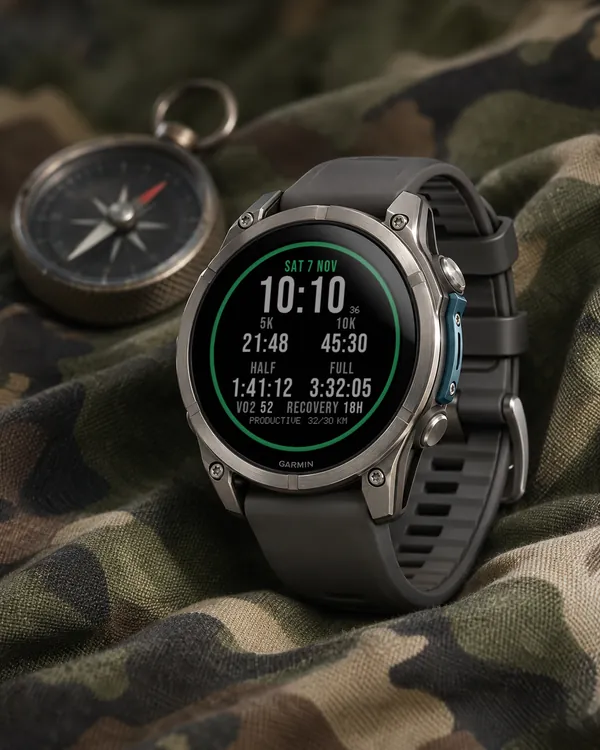
Garmin race predictions and weekly mileage right on the face
 Photography
Amber Hour
5.0 (15)
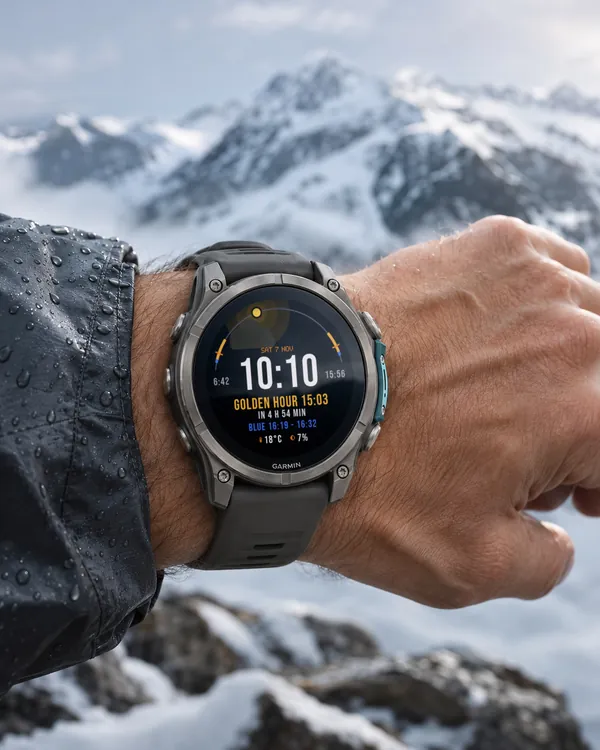
Golden and blue hour countdown with the sun's path across your day
 Readiness
Day Verdict
4.8 (12)
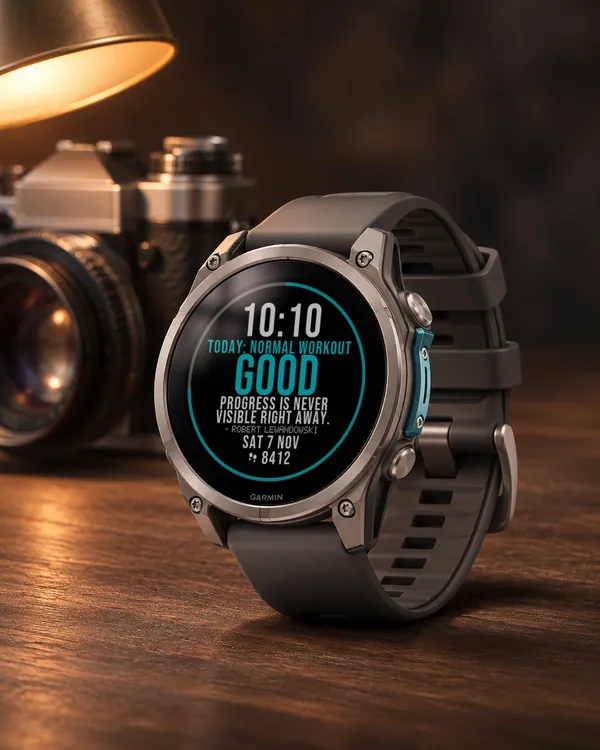
One word for your day: PUSH, STEADY, EASY or REST, from your sleep, Body Battery and recovery
 Activity
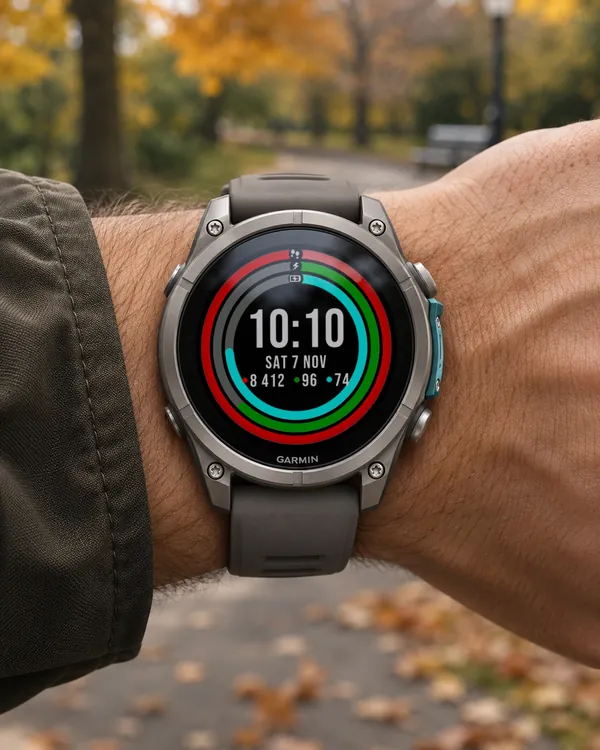
Ring Day
5.0 (16)
Three activity rings around the time, for people who close their rings