Unlock
€6.49
One-time payment. No subscription. The code works on the watch whose ID you enter.
- Install the face from Connect IQ (7 days free).
- On the watch: face settings > Buy / Unlock, scan the QR code.
- Pay and paste the code in the face settings.
- Pay.
- Copy the code.
- Paste it in Connect IQ: this face > Settings > Unlock code.
Payment works best in Safari or Chrome: menu (three dots) > Open in browser
Read it in this face, it is not the serial number of the watch.
The code works only in the watch face it was bought for: a Summit Rings code will not work in Summit Tactic.
Your ID, compare it with the watch:
Where do I find the ID?
On the watch: settings of this face > Buy / Unlock (first item). Scan the QR code with your phone or type the 10 digits. The ID is also at the top of the face settings in the Connect IQ app.
Code not working on your watch? Write to me and I will fix it.
Payments by Stripe. Seller: Mateusz Kolarz, Lublin, Poland.
Paid. Code:
We show the code here too. If the e-mail does not arrive (check spam), you can recover the code in the Recover code section with just the Face ID. Recover code
Copying did not work. The code is selected: copy it by hand.
The face unlocks by itself when the watch connects to the phone (usually within an hour; if the trial is still running, the purchase starts working when it ends).
Do not want to wait, or have an older watch? Paste the code in the Connect IQ app:
Connect IQ (or Garmin Connect) > My Device > Watch faces > Cockpit Navigator > Settings > Unlock code > paste > Save
Like it? Rate this face in the Garmin store
Want to try new faces and apps before the release, for free? Join the testers program
Set up the face before you download
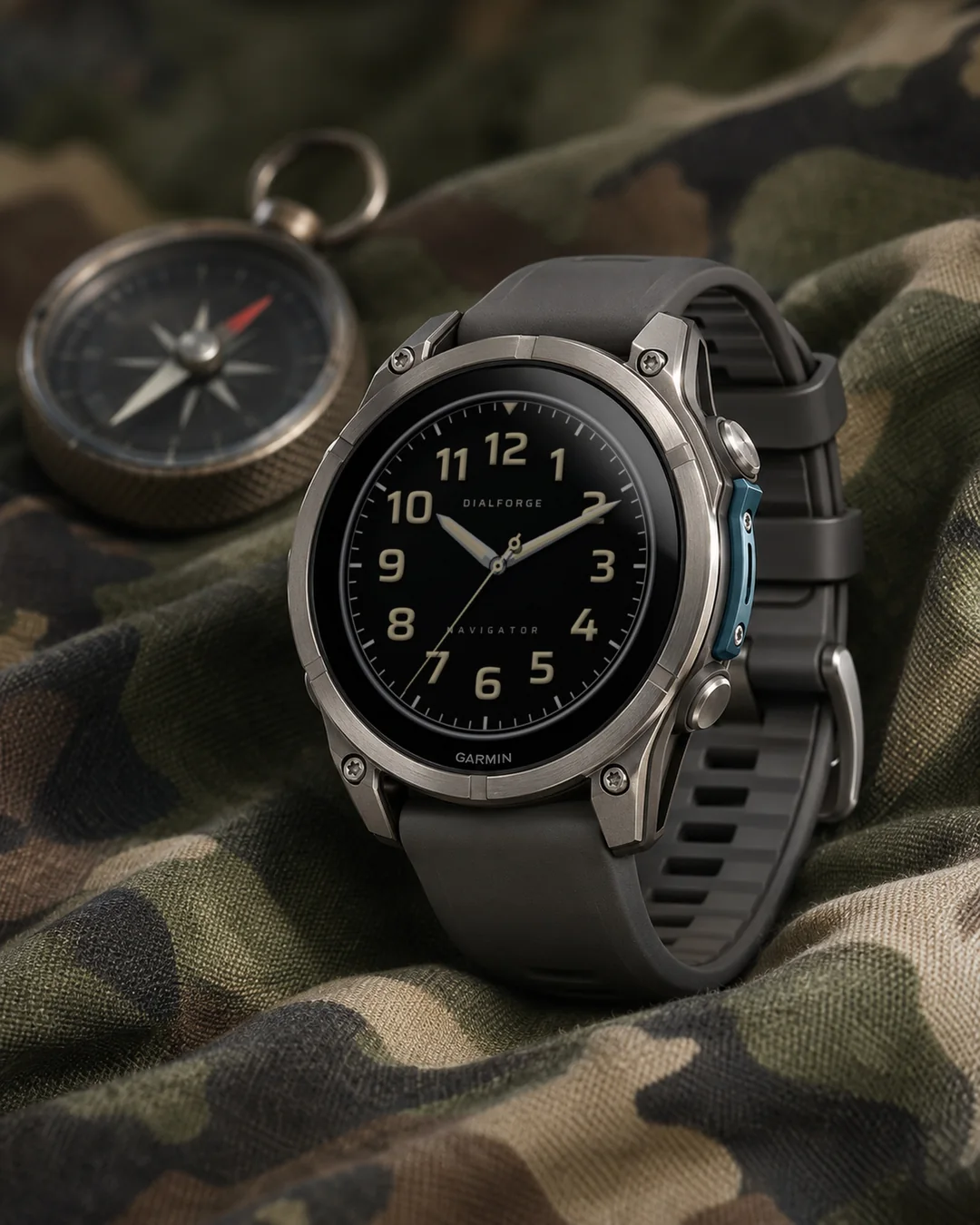
A retro pilot watch face with a matte dial, big lume numerals and sword hands, easy to read in full sun or in a dark cockpit.
A retro pilot's watch for your wrist: matte dial, big Arabic numerals in thick lume and sword hands you can read in one look, in full sun or in a dark cockpit.
What you get
* Rendered 3D dial lit from one light source at 11 o'clock: every numeral is a raised block of lume with a lit edge, a shaded edge and a soft shadow on the dial.
* Big, wide numerals 1 to 12 and a printed minute track with a triangle at 12. Nothing covers the numerals.
* Beveled steel sword hands with lume inlays in two shades. The lit and shaded sides swap as the hands turn, and each hand casts a shadow.
* Two dials: matte black with vintage cream lume, or gunmetal grey with white lume.
* Two hand sets: Sword and Baton.
* Seconds hand in lume color or one of five accents, or turned off.
* Optional date window at 3 o'clock and optional data at 9 o'clock: heart rate, steps, battery, Body Battery or notifications. Both off by default for a clean dial.
* Always on display on AMOLED watches: a dimmed dial with the minute scale, the numerals 1 to 12 and a triangle at 12, plus thin outlines of the hands, shifted every minute to protect the screen. No seconds. The default Dark level lights about 7.5 percent of pixels.
* Always-on brightness (in the phone settings): Dark, Medium, Bright or Full, with filled numerals and a clearer minute scale. Medium stays under the 10 percent AMOLED limit. Bright and Full light a little more than 10 percent of pixels, use more battery and carry a burn-in risk, so use them knowingly.
* Your own text: replace DIALFORGE and NAVIGATOR on the dial with up to 12 characters of your own, or hide them (in the phone settings).
* On touch screen watches, hold the date window or the data field to open its Garmin screen.
* Watches with a MIP (transflective) screen get a full contrast version: white numerals and hands with three clean shades, made for direct sunlight.
Data fields: heart rate, steps, battery, Body Battery, notifications.
7-day free trial, then a one-time unlock code at dialforge.dev (no subscription).
Settings: on the watch (hold MENU, then Watch face, then Customize) or in the Connect IQ app.
Older 96 KB watches (first generation MARQ, fenix 6S, fenix 6S Pro, Forerunner 945 LTE) do not have the custom text and the QR code in the menu.
Works on fenix 9, fenix 8, Forerunner 970, Forerunner 570, Venu 4, Forerunner 965, Forerunner 265, Venu 3 and more.
Retro tarcza pilotażowa z matową tarczą, dużymi cyframi z lumą i wskazówkami typu miecz, czytelna w pełnym słońcu i w ciemnej kabinie.
Retro zegarek pilota na nadgarstek: matowa tarcza, duże cyfry arabskie z grubej warstwy lume i wskazówki sword, które odczytasz jednym spojrzeniem, w pełnym słońcu albo w ciemnym kokpicie.
Co dostajesz
* Renderowana tarcza 3D oświetlona z jednego źródła na godzinie 11: każda cyfra to wypukły blok lume z jasną krawędzią, zacienioną krawędzią i miękkim cieniem na tarczy.
* Duże, szerokie cyfry od 1 do 12 i nadrukowana skala minut z trójkątem na 12. Nic nie zasłania cyfr.
* Fazowane stalowe wskazówki sword z wkładkami lume w dwóch odcieniach. Jasna i zacieniona strona zamieniają się, gdy wskazówki się obracają, a każda wskazówka rzuca cień.
* Dwie tarcze: matowa czarna z kremowym lume w stylu vintage albo grafitowa (gunmetal) z białym lume.
* Dwa komplety wskazówek: Sword i Baton.
* Wskazówka sekundowa w kolorze lume, w jednym z pięciu akcentów albo wyłączona.
* Opcjonalne okienko daty na godzinie 3 i opcjonalne dane na godzinie 9: tętno, kroki, bateria, Body Battery albo powiadomienia. Oba domyślnie wyłączone, żeby tarcza była czysta.
* Tryb zawsze włączony na zegarkach AMOLED: przygaszona tarcza z podziałką minut, cyframi od 1 do 12 i trójkątem na 12, do tego cienkie kontury wskazówek, przesuwane co minutę, żeby chronić ekran. Bez sekund. Domyślny poziom Ciemny zapala około 7,5 procent pikseli.
* Jasność trybu zawsze włączonego (w ustawieniach w telefonie): Ciemny, Średni, Jasny albo Pełny, z wypełnionymi cyframi i wyraźniejszą podziałką minut. Poziom Średni mieści się w limicie AMOLED 10 procent. Jasny i Pełny zapalają trochę ponad 10 procent pikseli, zużywają więcej baterii i niosą ryzyko wypalenia ekranu, więc używaj ich świadomie.
* Własny napis: DIALFORGE i NAVIGATOR na tarczy zastąpisz własnym tekstem do 12 znaków albo je ukryjesz (w ustawieniach w telefonie).
* Na zegarkach z ekranem dotykowym przytrzymanie okienka daty albo pola danych otwiera jego ekran Garmina.
* Zegarki z ekranem MIP (transrefleksyjnym) dostają wersję z pełnym kontrastem: białe cyfry i wskazówki w trzech czystych odcieniach, zrobione pod bezpośrednie słońce.
Pola danych: tętno, kroki, bateria, Body Battery, powiadomienia.
7 dni za darmo, potem jednorazowy kod odblokowania na dialforge.dev (bez abonamentu).
Ustawienia: na zegarku (przytrzymaj MENU, potem Tarcza zegarka, potem Dostosuj) albo w aplikacji Connect IQ.
Starsze zegarki 96 KB (MARQ pierwszej generacji, fenix 6S, fenix 6S Pro, Forerunner 945 LTE) nie mają własnego napisu ani kodu QR w menu.
Działa na: fenix 9, fenix 8, Forerunner 970, Forerunner 570, Venu 4, Forerunner 965, Forerunner 265, Venu 3 i innych.
Ein Retro-Fliegeruhr-Zifferblatt mit mattem Blatt, großen Leuchtziffern und Schwertzeigern, gut ablesbar in der prallen Sonne und im dunklen Cockpit.
Eine Retro-Fliegeruhr für dein Handgelenk: mattes Zifferblatt, große arabische Ziffern mit dicker Lume und Sword-Zeiger, die du auf einen Blick ablesen kannst, in voller Sonne oder im dunklen Cockpit.
Was du bekommst
* Gerendertes 3D-Zifferblatt, von einer Lichtquelle bei 11 Uhr beleuchtet: Jede Ziffer ist ein erhabener Lume-Block mit einer beleuchteten Kante, einer schattierten Kante und einem weichen Schatten auf dem Zifferblatt.
* Große, breite Ziffern von 1 bis 12 und eine gedruckte Minutenskala mit einem Dreieck bei 12. Nichts verdeckt die Ziffern.
* Facettierte Sword-Zeiger aus Stahl mit Lume-Einlagen in zwei Farbtönen. Die beleuchtete und die schattierte Seite tauschen beim Drehen der Zeiger die Plätze, und jeder Zeiger wirft einen Schatten.
* Zwei Zifferblätter: Mattschwarz mit cremefarbenem Vintage-Lume oder Gunmetal-Grau mit weißem Lume.
* Zwei Zeigersätze: Sword und Baton.
* Sekundenzeiger in Lume-Farbe oder einem von fünf Akzenten, oder ausgeschaltet.
* Optionales Datumsfenster bei 3 Uhr und optionale Daten bei 9 Uhr: Herzfrequenz, Schritte, Akku, Body Battery oder Benachrichtigungen. Beide standardmäßig aus für ein aufgeräumtes Zifferblatt.
* Always-on-Display auf AMOLED-Uhren: ein abgedunkeltes Zifferblatt mit Minutenskala, den Ziffern 1 bis 12 und einem Dreieck bei 12, dazu dünne Konturen der Zeiger, jede Minute verschoben zum Schutz des Bildschirms. Keine Sekunden. Die Standardstufe Dunkel lässt etwa 7,5 Prozent der Pixel leuchten.
* Helligkeit des Always-on-Displays (in den Handy-Einstellungen): Dunkel, Mittel, Hell oder Voll, mit gefüllten Ziffern und deutlicherer Minutenskala. Mittel bleibt unter der AMOLED-Grenze von 10 Prozent. Hell und Voll lassen etwas mehr als 10 Prozent der Pixel leuchten, verbrauchen mehr Akku und bergen Einbrenngefahr, nutze sie deshalb bewusst.
* Eigener Text: ersetze DIALFORGE und NAVIGATOR auf dem Zifferblatt durch bis zu 12 eigene Zeichen oder blende beides aus (in den Handy-Einstellungen).
* Auf Uhren mit Touchscreen öffnest du durch langes Drücken auf das Datumsfenster oder das Datenfeld den zugehörigen Garmin-Bildschirm.
* Uhren mit einem MIP-Bildschirm (transflektiv) erhalten eine Version mit vollem Kontrast: weiße Ziffern und Zeiger mit drei sauberen Farbtönen, gemacht für direktes Sonnenlicht.
Datenfelder: Herzfrequenz, Schritte, Akku, Body Battery, Benachrichtigungen.
7 Tage kostenlos testen, danach ein einmaliger Freischaltcode auf dialforge.dev (kein Abo).
Einstellungen: auf der Uhr (MENU gedrückt halten, dann Displaydesign, dann Anpassen) oder in der Connect IQ App.
Ältere Uhren mit 96 KB (MARQ der ersten Generation, fenix 6S, fenix 6S Pro, Forerunner 945 LTE) haben den eigenen Text und den QR-Code im Menü nicht.
Läuft auf fenix 9, fenix 8, Forerunner 970, Forerunner 570, Venu 4, Forerunner 965, Forerunner 265, Venu 3 und weiteren Modellen.
Un cadran de montre d'aviateur rétro avec un fond mat, de grands chiffres lumineux et des aiguilles glaive, lisible en plein soleil comme dans un cockpit sombre.
Une montre d'aviateur rétro pour votre poignet : cadran mat, grands chiffres arabes en lume épaisse et aiguilles glaive lisibles d'un seul coup d'œil, en plein soleil ou dans un cockpit sombre.
Ce que vous obtenez
* Cadran 3D avec rendu éclairé par une source lumineuse unique à 11 heures : chaque chiffre est un bloc de lume en relief avec un bord éclairé, un bord ombré et une ombre douce sur le cadran.
* Grands et larges chiffres de 1 à 12 et minuterie imprimée avec un triangle à 12 heures. Rien ne recouvre les chiffres.
* Aiguilles glaive biseautées en acier avec inserts de lume en deux teintes. Les côtés éclairé et ombré s'inversent lorsque les aiguilles tournent, et chaque aiguille projette une ombre.
* Deux cadrans : noir mat avec lume crème vintage, ou gris canon de fusil avec lume blanche.
* Deux jeux d'aiguilles : Sword et Baton.
* Aiguille des secondes couleur lume ou dans l'un des cinq accents, ou désactivée.
* Guichet de date en option à 3 heures et données en option à 9 heures : fréquence cardiaque, pas, batterie, Body Battery ou notifications. Tous deux désactivés par défaut pour un cadran épuré.
* Affichage permanent sur les montres AMOLED : un cadran atténué avec la graduation des minutes, les chiffres de 1 à 12 et un triangle à 12 heures, ainsi que de fins contours des aiguilles, décalés chaque minute pour protéger l'écran. Pas de secondes. Le niveau par défaut Sombre allume environ 7,5 pour cent des pixels.
* Luminosité de l'affichage permanent (dans les réglages du téléphone) : Sombre, Moyenne, Élevée ou Maximale, avec des chiffres pleins et une graduation des minutes plus nette. Moyenne reste sous la limite AMOLED de 10 pour cent. Élevée et Maximale allument un peu plus de 10 pour cent des pixels, consomment plus de batterie et présentent un risque de brûlure d'écran : à utiliser en connaissance de cause.
* Texte personnalisé : remplacez DIALFORGE et NAVIGATOR sur le cadran par votre propre texte de 12 caractères maximum, ou masquez-les (dans les réglages du téléphone).
* Sur les montres à écran tactile, un appui long sur la fenêtre de date ou sur le champ de données ouvre son écran Garmin.
* Les montres avec écran MIP (transréflectif) disposent d'une version à contraste maximal : chiffres et aiguilles blancs avec trois nuances nettes, conçue pour la lumière directe du soleil.
Champs de données : fréquence cardiaque, pas, batterie, Body Battery, notifications.
Essai gratuit de 7 jours, puis un code de déverrouillage unique sur dialforge.dev (sans abonnement).
Paramètres : sur la montre (maintenez MENU, puis Cadran de montre, puis Personnaliser) ou dans l'application Connect IQ.
Les montres plus anciennes de 96 Ko (MARQ de première génération, fenix 6S, fenix 6S Pro, Forerunner 945 LTE) n'ont ni le texte personnalisé ni le code QR dans le menu.
Compatible avec fenix 9, fenix 8, Forerunner 970, Forerunner 570, Venu 4, Forerunner 965, Forerunner 265, Venu 3 et d'autres modèles.
Una esfera retro de reloj de piloto con fondo mate, grandes números luminiscentes y agujas tipo espada, fácil de leer a pleno sol o en una cabina oscura.
Un reloj de piloto retro para tu muñeca: esfera mate, grandes números arábigos con una gruesa capa de lume y agujas tipo espada que puedes leer de un vistazo, a pleno sol o en una cabina a oscuras.
Lo que obtienes
* Esfera 3D renderizada iluminada desde una única fuente de luz a las 11: cada número es un bloque en relieve de lume con un borde iluminado, un borde sombreado y una suave sombra sobre la esfera.
* Números grandes y anchos del 1 al 12 y una escala de minutos impresa con un triángulo a las 12. Nada cubre los números.
* Agujas de acero biseladas tipo espada con inserciones de lume en dos tonos. Los lados iluminado y sombreado se intercambian al girar las agujas, y cada aguja proyecta una sombra.
* Dos esferas: negro mate con lume crema vintage, o gris plomo con lume blanco.
* Dos juegos de agujas: Sword y Baton.
* Segundero en color lume o en uno de los cinco acentos, o desactivado.
* Ventana de fecha opcional a las 3 y datos opcionales a las 9: frecuencia cardiaca, pasos, batería, Body Battery o notificaciones. Ambos desactivados por defecto para una esfera limpia.
* Pantalla siempre activa en relojes AMOLED: una esfera atenuada con la escala de minutos, los números del 1 al 12 y un triángulo en las 12, además de finos contornos de las agujas, que se desplazan cada minuto para proteger la pantalla. Sin segundero. El nivel predeterminado Oscuro enciende cerca del 7,5 por ciento de los píxeles.
* Brillo de la pantalla siempre activa (en los ajustes del teléfono): Oscuro, Medio, Brillante o Completo, con números rellenos y una escala de minutos más clara. Medio se mantiene por debajo del límite del 10 por ciento de AMOLED. Brillante y Completo encienden algo más del 10 por ciento de los píxeles, gastan más batería y tienen riesgo de quemado de pantalla, así que úsalos con conocimiento.
* Texto propio: sustituye DIALFORGE y NAVIGATOR en la esfera por un texto tuyo de hasta 12 caracteres, o quítalos (en los ajustes del teléfono).
* En relojes con pantalla táctil, mantén pulsada la ventana de fecha o el campo de datos para abrir su pantalla de Garmin.
* Los relojes con pantalla MIP (transreflectante) cuentan con una versión de contraste total: números y agujas blancos con tres tonos limpios, diseñada para la luz solar directa.
Campos de datos: frecuencia cardíaca, pasos, batería, Body Battery, notificaciones.
Prueba gratuita de 7 días, luego un código de desbloqueo de pago único en dialforge.dev (sin suscripción).
Ajustes: en el reloj (mantén pulsado MENU, luego Pantalla del reloj, después Personalizar) o en la aplicación Connect IQ.
Los relojes antiguos de 96 KB (MARQ de primera generación, fenix 6S, fenix 6S Pro, Forerunner 945 LTE) no tienen el texto propio ni el código QR en el menú.
Compatible con fenix 9, fenix 8, Forerunner 970, Forerunner 570, Venu 4, Forerunner 965, Forerunner 265, Venu 3 y más.
Een retro pilotenhorloge-wijzerplaat met matte wijzerplaat, grote lume-cijfers en zwaardwijzers, goed leesbaar in volle zon en in een donkere cockpit.
Een retro pilotenhorloge voor om je pols: matte wijzerplaat, grote Arabische cijfers met dikke lume en sword-wijzers die je in één oogopslag afleest, in de volle zon of in een donkere cockpit.
Wat je krijgt
* Gerenderde 3D-wijzerplaat verlicht vanuit één lichtbron op 11 uur: elk cijfer is een verhoogd blok lume met een verlichte rand, een schaduwrand en een zachte schaduw op de wijzerplaat.
* Grote, brede cijfers 1 tot 12 en een gedrukte minutenschaal met een driehoek op 12. Niets bedekt de cijfers.
* Afgeschuinde stalen sword-wijzers met lume-inleg in twee tinten. De verlichte en schaduwzijde wisselen naarmate de wijzers draaien, en elke wijzer werpt een schaduw.
* Twee wijzerplaten: matzwart met vintage crèmekleurige lume, of gunmetal grijs met witte lume.
* Twee sets wijzers: Sword en Baton.
* Secondewijzer in lume-kleur of een van de vijf accenten, of uitgeschakeld.
* Optioneel datumvenster op 3 uur en optionele gegevens op 9 uur: hartslag, stappen, batterij, Body Battery of meldingen. Beide standaard uitgeschakeld voor een rustige wijzerplaat.
* Always-on display op AMOLED-horloges: een gedimde wijzerplaat met minutenschaal, de cijfers 1 tot en met 12 en een driehoek bij 12, plus dunne contouren van de wijzers, elke minuut verschoven om het scherm te beschermen. Geen seconden. Het standaardniveau Donker verlicht ongeveer 7,5 procent van de pixels.
* Helderheid van het always-on display (in de telefooninstellingen): Donker, Gemiddeld, Helder of Volledig, met gevulde cijfers en een duidelijkere minutenschaal. Gemiddeld blijft onder de AMOLED-grens van 10 procent. Helder en Volledig verlichten iets meer dan 10 procent van de pixels, verbruiken meer batterij en geven kans op inbranden, gebruik ze dus bewust.
* Eigen tekst: vervang DIALFORGE en NAVIGATOR op de wijzerplaat door een eigen tekst van maximaal 12 tekens, of verberg ze (in de telefooninstellingen).
* Op horloges met touchscreen open je het bijbehorende Garmin-scherm door het datumvenster of het gegevensveld ingedrukt te houden.
* Horloges met een MIP-scherm (transflectief) krijgen een versie met maximaal contrast: witte cijfers en wijzers met drie strakke tinten, gemaakt voor direct zonlicht.
Gegevensvelden: hartslag, stappen, batterij, Body Battery, meldingen.
7 dagen gratis op proef, daarna een eenmalige ontgrendelcode op dialforge.dev (geen abonnement).
Instellingen: op het horloge (houd MENU ingedrukt, dan Wijzerplaat, dan Aanpassen) of in de Connect IQ app.
Oudere horloges met 96 KB (MARQ van de eerste generatie, fenix 6S, fenix 6S Pro, Forerunner 945 LTE) hebben de eigen tekst en de QR-code in het menu niet.
Werkt op fenix 9, fenix 8, Forerunner 970, Forerunner 570, Venu 4, Forerunner 965, Forerunner 265, Venu 3 en meer.
マットな文字盤、大きな夜光数字、ソード針を備えたレトロなパイロットウォッチの文字盤。強い日差しの下でも暗いコックピットでも読みやすい作りです。
手首にレトロなパイロットウォッチを:マットな文字盤、厚塗りの夜光による大きなアラビア数字、そして直射日光下でも暗いコックピットでも一目で読み取れるソード針。
主な機能
* 11時位置の一つの光源から照らされたレンダリング3D文字盤:すべての数字は立体的な夜光ブロックで、光の当たるエッジ、影になるエッジ、文字盤への柔らかな影が描かれています。
* 1から12までの大きく幅広な数字と、12時位置に三角形を配したプリントのミニッツトラック。数字を遮るものは何もありません。
* 二つの色合いの夜光インレイを施した面取りスチール製ソード針。針の回転に合わせて光と影の面が入れ替わり、それぞれの針が影を落とします。
* 二種類の文字盤:ヴィンテージクリームの夜光を備えたマットブラック、またはホワイトの夜光を備えたガンメタルグレー。
* 二組の針セット:SwordとBaton。
* 秒針は夜光カラー、五種類のアクセントカラーのいずれか、または非表示。
* 3時位置のオプションの日付ウィンドウと、9時位置のオプションデータ:心拍数、ステップ数、バッテリー、Body Battery、または通知。クリーンな文字盤を保つため、どちらもデフォルトではオフになっています。
* AMOLEDウォッチの常時表示モード:分目盛りを備えた減光した文字盤、1から12までの数字と12時位置の三角形、さらに針の細い輪郭線を表示し、画面を保護するため毎分位置をシフトします。秒表示なし。標準の「暗め」レベルで点灯するピクセルは約7.5パーセント。
* 常時表示の明るさ(スマートフォンの設定):暗め、標準、明るめ、最大の4段階。数字を塗りつぶし、分目盛りをよりはっきり表示します。「標準」はAMOLEDの10パーセント上限内に収まります。「明るめ」と「最大」は点灯ピクセルが10パーセントをやや超え、バッテリー消費が増えて焼き付きのリスクもあるため、理解した上でご使用ください。
* オリジナルテキスト:文字盤の DIALFORGE と NAVIGATOR を、最大12文字の好きなテキストに置き換えるか、非表示にできます(スマートフォンの設定)。
* タッチスクリーン搭載モデルでは、日付ウィンドウまたはデータ欄を長押しすると、対応する Garmin の画面が開きます。
* MIP(半透過型)画面の時計にはフルコントラスト版を用意:直射日光下向けに作られた、三つのすっきりとしたシェードの白い数字と針。
データ項目:心拍数、ステップ数、バッテリー、Body Battery、通知。
7日間の無料トライアル、その後は dialforge.dev での一度限りのロック解除コード(サブスクリプションなし)。
設定方法:時計本体(MENU長押し、次に「ウォッチフェイス」、次に「カスタマイズ」)またはConnect IQアプリで設定します。
96 KB の旧モデル(第1世代 MARQ、fenix 6S、fenix 6S Pro、Forerunner 945 LTE)では、オリジナルテキストとメニューの QR コードは利用できません。
対応モデル:fenix 9, fenix 8, Forerunner 970, Forerunner 570, Venu 4, Forerunner 965, Forerunner 265, Venu 3 ほか
Un quadrante retro da orologio da pilota con fondo opaco, grandi numeri luminescenti e lancette a spada, ben leggibile in pieno sole e in una cabina buia.
Un orologio da pilota rétro per il tuo polso: quadrante opaco, grandi numeri arabi con uno spesso strato di lume e lancette a spada leggibili con un solo sguardo, in pieno sole o in una cabina di pilotaggio buia.
Cosa ottieni
* Quadrante 3D renderizzato illuminato da un'unica sorgente di luce a ore 11: ogni numero è un blocco di lume in rilievo con un bordo illuminato, un bordo in ombra e un'ombra morbida sul quadrante.
* Numeri grandi e ampi da 1 a 12 e una scala dei minuti stampata con un triangolo a ore 12. Niente copre i numeri.
* Lancette a spada in acciaio smussate con inserti in lume in due tonalità. Il lato illuminato e quello in ombra si invertono mentre le lancette ruotano, e ogni lancetta proietta un'ombra.
* Due quadranti: nero opaco con lume crema vintage, o grigio canna di fucile con lume bianco.
* Due set di lancette: Sword e Baton.
* Lancetta dei secondi nel colore del lume, in uno dei cinque accenti o disattivata.
* Finestrella della data opzionale a ore 3 e dati opzionali a ore 9: frequenza cardiaca, passi, batteria, Body Battery o notifiche. Entrambi disattivati per impostazione predefinita per un quadrante pulito.
* Schermo sempre attivo sugli orologi AMOLED: un quadrante attenuato con la scala dei minuti, i numeri da 1 a 12 e un triangolo sul 12, più sottili contorni delle lancette, spostati ogni minuto per proteggere lo schermo. Senza secondi. Il livello predefinito Scuro illumina circa il 7,5 percento dei pixel.
* Luminosità dello schermo sempre attivo (nelle impostazioni del telefono): Scuro, Media, Alta o Piena, con numeri pieni e una scala dei minuti più chiara. Media resta sotto il limite AMOLED del 10 percento. Alta e Piena illuminano poco più del 10 percento dei pixel, consumano più batteria e comportano un rischio di burn-in, quindi usale con consapevolezza.
* Testo personale: sostituisci DIALFORGE e NAVIGATOR sul quadrante con un tuo testo di massimo 12 caratteri, oppure nascondili (nelle impostazioni del telefono).
* Sugli orologi con touchscreen, tieni premuta la finestra della data o il campo dati per aprire la relativa schermata Garmin.
* Gli orologi con schermo MIP (transflettivo) hanno una versione a contrasto pieno: numeri e lancette bianchi con tre tonalità pulite, pensati per la luce solare diretta.
Campi dati: frequenza cardiaca, passi, batteria, Body Battery, notifiche.
7 giorni di prova gratuita, poi un codice di sblocco una tantum su dialforge.dev (nessun abbonamento).
Impostazioni: sull'orologio (tieni premuto MENU, poi Quadrante, poi Personalizza) oppure nell'app Connect IQ.
Gli orologi più vecchi da 96 KB (MARQ di prima generazione, fenix 6S, fenix 6S Pro, Forerunner 945 LTE) non hanno il testo personale né il codice QR nel menu.
Compatibile con fenix 9, fenix 8, Forerunner 970, Forerunner 570, Venu 4, Forerunner 965, Forerunner 265, Venu 3 e altri.
复古飞行员腕表风格表盘,哑光表面、大号夜光数字和剑形指针,在烈日下或昏暗的驾驶舱里都清晰易读。
腕间的复古飞行员腕表:哑光表盘、厚涂夜光的大号阿拉伯数字以及一目了然的剑形指针,无论在烈日下还是昏暗的驾驶舱中都能清晰读取。
你将获得
* 3D 渲染表盘,采用 11 点钟方向单光源照射:每个数字均为立体夜光块,拥有亮边、暗边以及表盘上的柔和阴影。
* 宽大的 1 到 12 数字与印制分钟刻度圈,12 点钟位置带有三角形。没有任何元素遮挡数字。
* 带有倒角的精钢剑形指针,内嵌双色调夜光。亮面与暗面随指针旋转而交替互换,每枚指针均投下阴影。
* 两种表盘:哑光黑配复古奶油色夜光,或枪灰色配白色夜光。
* 两套指针样式:Sword 与 Baton。
* 秒针可选夜光色、五种强调色之一,或完全关闭。
* 3 点钟位置可选日期视窗,9 点钟位置可选数据显示:心率、步数、电量、Body Battery 或通知。两者默认均关闭以保持表盘简洁。
* AMOLED 手表上的常亮显示:调暗的表盘,带分钟刻度、数字 1 到 12 和 12 点位置的三角形,另有指针的纤细轮廓,每分钟微移以保护屏幕。不显示秒数。默认的“暗”档点亮约 7.5% 的像素。
* 常亮显示亮度(在手机设置中):暗、中、亮、全亮,数字实心填充,分钟刻度更清晰。“中”档保持在 AMOLED 10% 的上限以内。“亮”和“全亮”点亮的像素略高于 10%,耗电更高且有烧屏风险,请谨慎使用。
* 自定义文字:可将表盘上的 DIALFORGE 和 NAVIGATOR 替换为最多 12 个字符的自定义文字,或将其隐藏(在手机设置中)。
* 在触摸屏手表上,长按日期窗口或数据栏即可打开对应的 Garmin 界面。
* 配备 MIP(反射式)屏幕的手表拥有专属全对比度版本:清晰明亮的白色数字与指针,搭配三种纯净色调,专为阳光直射环境打造。
数据字段:心率、步数、电量、Body Battery、通知。
7 天免费试用,之后在 dialforge.dev 获取一次性解锁码(无订阅)。
设置方法:在手表上(长按 MENU,然后选择“表盘”,再选择“自定义”)或在 Connect IQ 应用程序中设置。
较旧的 96 KB 手表(第一代 MARQ、fenix 6S、fenix 6S Pro、Forerunner 945 LTE)不支持自定义文字,菜单中也没有二维码。
适用于 fenix 9, fenix 8, Forerunner 970, Forerunner 570, Venu 4, Forerunner 965, Forerunner 265, Venu 3 等。
Ретро-циферблат в стиле пилотских часов с матовым фоном, крупными светящимися цифрами и стрелками-мечами, хорошо читается и на ярком солнце, и в тёмной кабине.
Ретро-часы пилота на вашем запястье: матовый циферблат, крупные арабские цифры с толстым слоем люминофора и стрелки sword, показания которых считываются с одного взгляда как на ярком солнце, так и в темной кабине.
Что вы получаете
* Отрендеренный 3D-циферблат, освещенный одним источником света на 11 часах: каждая цифра представляет собой рельефный элемент из люминофора со светлой гранью, затененной гранью и мягкой тенью на циферблате.
* Крупные, широкие цифры от 1 до 12 и печатная минутная шкала с треугольником на 12. Цифры ничем не перекрываются.
* Стальные стрелки sword со скошенными гранями и вставками из люминофора двух оттенков. Светлая и затененная стороны меняются местами при повороте стрелок, и каждая стрелка отбрасывает тень.
* Два циферблата: матовый черный с винтажным кремовым люминофором или темно-серый gunmetal с белым люминофором.
* Два набора стрелок: Sword и Baton.
* Секундная стрелка в цвете люминофора, в одном из пяти акцентных цветов или выключена.
* Опциональное окошко даты на 3 часах и дополнительные данные на 9 часах: пульс, шаги, батарея, Body Battery или уведомления. Оба по умолчанию выключены, чтобы циферблат оставался чистым.
* Всегда включенный экран на часах AMOLED: приглушенный циферблат с минутной шкалой, цифрами от 1 до 12 и треугольником на 12, а также тонкие контуры стрелок, сдвигаемые каждую минуту для защиты экрана. Без секунд. Уровень по умолчанию Темный зажигает около 7,5 процента пикселей.
* Яркость постоянно включенного экрана (в настройках на телефоне): Темный, Средний, Яркий или Полный, с закрашенными цифрами и более четкой минутной шкалой. Средний остается ниже лимита AMOLED в 10 процентов. Яркий и Полный зажигают немного больше 10 процентов пикселей, расходуют больше батареи и несут риск выгорания экрана, поэтому используйте их осознанно.
* Свой текст: надписи DIALFORGE и NAVIGATOR на циферблате можно заменить своим текстом до 12 символов или скрыть (в настройках на телефоне).
* На часах с сенсорным экраном долгое нажатие на окошко даты или поле данных открывает соответствующий экран Garmin.
* Часы с экраном MIP (трансфлективным) получают версию с максимальным контрастом: белые цифры и стрелки с тремя четкими оттенками, созданные для прямого солнечного света.
Поля данных: пульс, шаги, батарея, Body Battery, уведомления.
7-дневный бесплатный пробный период, затем однократный код разблокировки на dialforge.dev (без подписки).
Настройки: на часах (удерживайте MENU, затем Циферблат, затем Настроить) или в приложении Connect IQ.
На более старых часах с памятью 96 КБ (MARQ первого поколения, fenix 6S, fenix 6S Pro, Forerunner 945 LTE) нет собственного текста и QR-кода в меню.
Работает на fenix 9, fenix 8, Forerunner 970, Forerunner 570, Venu 4, Forerunner 965, Forerunner 265, Venu 3 и других.
Um mostrador retrô de relógio de piloto com fundo fosco, números grandes com lume e ponteiros tipo espada, fácil de ler no sol forte ou numa cabine escura.
Um relógio de piloto retrô para o seu pulso: mostrador fosco, números arábicos grandes em lume espesso e ponteiros tipo espada que você lê com uma só olhada, sob sol pleno ou em um cockpit escuro.
O que você recebe
* Mostrador 3D renderizado iluminado por uma fonte de luz às 11 horas: cada número é um bloco em relevo de lume com uma borda iluminada, uma borda sombreada e uma sombra suave no mostrador.
* Números grandes e largos de 1 a 12 e uma escala de minutos impressa com um triângulo às 12. Nada cobre os números.
* Ponteiros tipo espada em aço chanfrado com preenchimento de lume em dois tons. Os lados iluminado e sombreado se invertem conforme os ponteiros giram, e cada ponteiro projeta uma sombra.
* Dois mostradores: preto fosco com lume creme vintage ou cinza chumbo com lume branco.
* Dois conjuntos de ponteiros: Sword e Baton.
* Ponteiro de segundos na cor do lume ou em uma de cinco cores de destaque, ou desativado.
* Janela de data opcional às 3 horas e dados opcionais às 9 horas: frequência cardíaca, passos, bateria, Body Battery ou notificações. Ambos desativados por padrão para um mostrador limpo.
* Tela sempre ativa em relógios AMOLED: mostrador atenuado com escala de minutos, os números de 1 a 12 e um triângulo no 12, além de contornos finos dos ponteiros, deslocados a cada minuto para proteger a tela. Sem segundos. O nível padrão Escuro acende cerca de 7,5 por cento dos pixels.
* Brilho da tela sempre ativa (nas configurações do celular): Escuro, Médio, Brilhante ou Total, com números preenchidos e escala de minutos mais nítida. O nível Médio fica abaixo do limite de 10 por cento do AMOLED. Brilhante e Total acendem um pouco mais de 10 por cento dos pixels, gastam mais bateria e têm risco de burn-in, então use-os com consciência.
* Texto próprio: troque DIALFORGE e NAVIGATOR no mostrador por um texto seu de até 12 caracteres, ou oculte-os (nas configurações do celular).
* Em relógios com tela sensível ao toque, mantenha pressionada a janela de data ou o campo de dados para abrir a tela da Garmin correspondente.
* Relógios com tela MIP (transreflexiva) recebem uma versão com contraste total: números e ponteiros brancos com três tons limpos, feitos para a luz solar direta.
Campos de dados: frequência cardíaca, passos, bateria, Body Battery, notificações.
Teste gratuito de 7 dias, depois um código de desbloqueio único em dialforge.dev (sem assinatura).
Configurações: no relógio (segure MENU, depois Mostrador do relógio, depois Personalizar) ou no aplicativo Connect IQ.
Relógios mais antigos de 96 KB (MARQ de primeira geração, fenix 6S, fenix 6S Pro, Forerunner 945 LTE) não têm o texto próprio nem o código QR no menu.
Funciona em fenix 9, fenix 8, Forerunner 970, Forerunner 570, Venu 4, Forerunner 965, Forerunner 265, Venu 3 e outros.
Retro ciferník v stylu pilotních hodinek s matným pozadím, velkými svítícími číslicemi a ručičkami typu meč, dobře čitelný na ostrém slunci i v tmavé kabině.
Retro pilotní hodinky na vaše zápěstí: matný ciferník, velké arabské číslice ze silné vrstvy lume a ručičky sword, které přečtete jediným pohledem, na plném slunci i v temném kokpitu.
Co získáte
* Renderovaný 3D ciferník osvětlený z jednoho světelného zdroje na 11 hodinách: každá číslice je vystouplý blok lume s osvětlenou hranou, zastíněnou hranou a jemným stínem na ciferníku.
* Velké, široké číslice 1 až 12 a tištěná minutová stupnice s trojúhelníkem na 12. Číslice nic nezakrývá.
* Zkosené ocelové ručičky sword s výplněmi z lume ve dvou odstínech. Osvětlená a zastíněná strana se při otáčení ručiček střídají a každá ručička vrhá stín.
* Dva ciferníky: matný černý s krémovým vintage lume, nebo šedý gunmetal s bílým lume.
* Dvě sady ručiček: Sword a Baton.
* Sekundová ručička v barvě lume, v jednom z pěti akcentů, nebo vypnutá.
* Volitelné okénko data na 3 hodinách a volitelná data na 9 hodinách: srdeční tep, kroky, baterie, Body Battery nebo oznámení. Obojí je ve výchozím nastavení vypnuté pro čistý ciferník.
* Trvale zapnutý displej na hodinkách AMOLED: ztlumený ciferník s minutovou stupnicí, číslicemi 1 až 12 a trojúhelníkem na 12, k tomu tenké obrysy ručiček, posouvané každou minutu pro ochranu obrazovky. Bez sekund. Výchozí úroveň Tmavá rozsvítí zhruba 7,5 procenta pixelů.
* Jas trvale zapnutého displeje (v nastavení v telefonu): Tmavá, Střední, Jasná nebo Plná, s vyplněnými číslicemi a výraznější minutovou stupnicí. Střední úroveň zůstává pod limitem 10 procent pro AMOLED. Jasná a Plná rozsvítí o něco více než 10 procent pixelů, spotřebují více baterie a hrozí vypálení displeje, proto je používejte vědomě.
* Vlastní text: nápisy DIALFORGE a NAVIGATOR na ciferníku nahradíš vlastním textem do 12 znaků, nebo je skryješ (v nastavení v telefonu).
* Na dotykových hodinkách podržením okénka s datem nebo datového pole otevřeš jeho obrazovku Garmin.
* Hodinky s MIP (transflektivním) displejem dostanou verzi s plným kontrastem: bílé číslice a ručičky se třemi čistými odstíny, navržené pro přímé slunce.
Datová pole: srdeční tep, kroky, baterie, Body Battery, oznámení.
7denní zkušební verze zdarma, poté jednorázový odemykací kód na dialforge.dev (bez předplatného).
Nastavení: na hodinkách (podržte MENU, poté Vzhled hodinek, potom Přizpůsobit) nebo v aplikaci Connect IQ.
Starší hodinky s pamětí 96 KB (MARQ 1. generace, fenix 6S, fenix 6S Pro, Forerunner 945 LTE) nemají vlastní text ani QR kód v menu.
Funguje na fenix 9, fenix 8, Forerunner 970, Forerunner 570, Venu 4, Forerunner 965, Forerunner 265, Venu 3 a dalších.
Um mostrador retro de relógio de piloto com fundo mate, números grandes luminescentes e ponteiros tipo espada, fácil de ler em pleno sol ou numa cabina escura.
Um relógio de piloto retro para o seu pulso: mostrador mate, algarismos árabes grandes em lume espesso e ponteiros sword que se leem num só olhar, em pleno sol ou num cockpit escuro.
O que obtém
* Mostrador 3D renderizado iluminado a partir de uma fonte de luz às 11 horas: cada algarismo é um bloco de lume em relevo com um bordo iluminado, um bordo sombreado e uma sombra suave no mostrador.
* Algarismos grandes e largos de 1 a 12 e escala de minutos impressa com um triângulo às 12. Nada cobre os algarismos.
* Ponteiros sword em aço biselado com inserções de lume em dois tons. Os lados iluminado e sombreado invertem-se à medida que os ponteiros rodam, e cada ponteiro projeta uma sombra.
* Dois mostradores: preto mate com lume creme vintage, ou cinzento gunmetal com lume branco.
* Dois conjuntos de ponteiros: Sword e Baton.
* Ponteiro dos segundos na cor do lume ou num de cinco tons de destaque, ou desligado.
* Janela da data opcional às 3 horas e dados opcionais às 9 horas: frequência cardíaca, passos, bateria, Body Battery ou notificações. Ambos desligados por predefinição para um mostrador limpo.
* Ecrã sempre ligado em relógios AMOLED: mostrador atenuado com escala de minutos, os números de 1 a 12 e um triângulo no 12, além de contornos finos dos ponteiros, deslocados a cada minuto para proteger o ecrã. Sem segundos. O nível predefinido Escuro acende cerca de 7,5 por cento dos píxeis.
* Brilho do ecrã sempre ligado (nas definições do telemóvel): Escuro, Médio, Brilhante ou Total, com números preenchidos e escala de minutos mais nítida. O nível Médio fica abaixo do limite de 10 por cento do AMOLED. Brilhante e Total acendem um pouco mais de 10 por cento dos píxeis, gastam mais bateria e têm risco de burn-in, por isso use-os com consciência.
* Texto próprio: substitua DIALFORGE e NAVIGATOR no mostrador por um texto seu até 12 caracteres, ou oculte-os (nas definições do telemóvel).
* Em relógios com ecrã tátil, mantenha premida a janela da data ou o campo de dados para abrir o ecrã Garmin correspondente.
* Os relógios com ecrã MIP (transrefletivo) recebem uma versão com contraste total: algarismos e ponteiros brancos com três tons nítidos, concebidos para a luz solar direta.
Campos de dados: frequência cardíaca, passos, bateria, Body Battery, notificações.
7 dias de teste gratuito, depois um código de desbloqueio único em dialforge.dev (sem subscrição).
Definições: no relógio (mantenha premido MENU, depois Mostrador e depois Personalizar) ou na aplicação Connect IQ.
Os relógios mais antigos de 96 KB (MARQ de primeira geração, fenix 6S, fenix 6S Pro, Forerunner 945 LTE) não têm o texto próprio nem o código QR no menu.
Funciona em fenix 9, fenix 8, Forerunner 970, Forerunner 570, Venu 4, Forerunner 965, Forerunner 265, Venu 3 e outros.
무광 다이얼, 큰 야광 숫자, 소드 바늘을 갖춘 레트로 파일럿 워치 페이스로, 강한 햇빛 아래나 어두운 조종석에서도 읽기 쉽습니다.
손목 위의 레트로 파일럿 워치: 매트 다이얼, 두꺼운 야광의 큼직한 아라비아 숫자, 강한 햇빛 아래나 어두운 조종석에서도 한눈에 확인할 수 있는 소드 핸즈.
제공 기능
* 11시 방향의 단일 광원에서 빛을 받는 3D 렌더링 다이얼: 모든 숫자는 밝은 가장자리와 그늘진 가장자리, 다이얼에 드리운 부드러운 그림자를 지닌 입체적인 야광 블록입니다.
* 1부터 12까지의 크고 넓은 숫자, 그리고 12시 위치에 삼각형이 있는 인쇄된 미닛 트랙. 숫자를 가리는 것은 아무것도 없습니다.
* 두 가지 톤의 야광 인레이가 적용된 베벨 가공 스틸 소드 핸즈. 바늘이 회전함에 따라 밝은 면과 그늘진 면이 바뀌며, 각 바늘이 그림자를 드리웁니다.
* 두 가지 다이얼: 빈티지 크림 야광의 매트 블랙, 또는 화이트 야광의 건메탈 그레이.
* 두 가지 바늘 세트: Sword 및 Baton.
* 야광 색상 또는 다섯 가지 포인트 색상의 초침, 혹은 끄기 가능.
* 3시 위치의 날짜 창 옵션 및 9시 위치의 데이터 옵션: 심박수, 걸음 수, 배터리, Body Battery 또는 알림. 깔끔한 다이얼을 위해 둘 다 기본적으로 꺼져 있습니다.
* AMOLED 시계의 Always on display: 분 눈금이 있는 어둡게 처리된 다이얼, 1부터 12까지의 숫자와 12시 위치의 삼각형, 그리고 화면을 보호하기 위해 매분 위치가 이동하는 바늘의 얇은 윤곽선. 초침은 표시되지 않습니다. 기본 단계인 어둡게는 약 7.5%의 픽셀을 켭니다.
* Always on display 밝기(휴대폰 설정): 어둡게, 보통, 밝게, 최대. 숫자가 채워지고 분 눈금이 더 선명해집니다. 보통은 AMOLED의 10% 한도 이내입니다. 밝게와 최대는 10%를 약간 넘는 픽셀을 켜고 배터리 소모가 늘며 번인 위험이 있으므로 신중하게 사용하세요.
* 나만의 텍스트: 다이얼의 DIALFORGE와 NAVIGATOR를 최대 12자의 원하는 텍스트로 바꾸거나 숨길 수 있습니다(휴대폰 설정).
* 터치스크린 시계에서는 날짜 창이나 데이터 필드를 길게 누르면 해당 Garmin 화면이 열립니다.
* MIP(반투과형) 화면을 탑재한 시계에는 풀 콘트라스트 버전이 제공됩니다: 직사광선에 맞춰 제작된 세 가지 깔끔한 음영의 흰색 숫자와 바늘.
데이터 필드: 심박수, 걸음 수, 배터리, Body Battery, 알림.
7일 무료 체험 후, dialforge.dev에서 일회성 잠금 해제 코드로 이용할 수 있습니다 (구독 없음).
설정: 시계(MENU를 길게 누른 후 시계 화면, 사용자 지정 선택) 또는 Connect IQ 앱에서 가능합니다.
96 KB의 구형 시계(1세대 MARQ, fenix 6S, fenix 6S Pro, Forerunner 945 LTE)에는 나만의 텍스트와 메뉴의 QR 코드가 없습니다.
지원 모델: fenix 9, fenix 8, Forerunner 970, Forerunner 570, Venu 4, Forerunner 965, Forerunner 265, Venu 3 외
En retro pilotklocka-urtavla med matt tavla, stora lumesiffror och svärdsvisare, lättläst i full sol och i ett mörkt cockpit.
En retropilotklocka för handleden: matt urtavla, stora arabiska siffror i tjock lume och svärdvisare du kan läsa av med ett ögonkast, i stark sol eller i en mörk cockpit.
Vad du får
* Renderad 3D-urtavla belyst från en ljuskälla klockan 11: varje siffra är ett upphöjt block av lume med en belyst kant, en skuggad kant och en mjuk skugga på urtavlan.
* Stora, breda siffror från 1 till 12 och en tryckt minutskala med en triangel vid 12. Inget täcker siffrorna.
* Fasade svärdvisare i stål med lume-inlägg i två nyanser. Den belysta och den skuggade sidan byter plats när visarna rör sig, och varje visare kastar en skugga.
* Två urtavlor: mattsvart med vintage krämfärgad lume, eller gunmetal-grå med vit lume.
* Två uppsättningar visare: Sword och Baton.
* Sekundvisare i lumefärg eller en av fem accenter, eller avstängd.
* Valfritt datumfönster klockan 3 och valfri data klockan 9: puls, steg, batteri, Body Battery eller aviseringar. Båda avstängda som standard för en ren urtavla.
* Always on display på AMOLED-klockor: en dämpad urtavla med minutskala, siffrorna 1 till 12 och en triangel vid 12, plus tunna konturer av visarna, som flyttas varje minut för att skydda skärmen. Inga sekunder. Standardnivån Mörk tänder cirka 7,5 procent av pixlarna.
* Ljusstyrka för always-on (i telefonens inställningar): Mörk, Medel, Ljus eller Full, med ifyllda siffror och en tydligare minutskala. Medel håller sig under AMOLED-gränsen på 10 procent. Ljus och Full tänder något över 10 procent av pixlarna, drar mer batteri och ger risk för inbrända bilder, så använd dem medvetet.
* Egen text: ersätt DIALFORGE och NAVIGATOR på urtavlan med din egen text på upp till 12 tecken, eller dölj dem (i telefonens inställningar).
* På klockor med pekskärm öppnar du Garmin-skärmen för datumfönstret eller datafältet genom att trycka och hålla.
* Klockor med MIP-skärm (transreflektiv) får en version med full kontrast: vita siffror och visare med tre rena nyanser, gjorda för direkt solljus.
Datafält: puls, steg, batteri, Body Battery, aviseringar.
7 dagars gratis provperiod, sedan en engångskod för upplåsning på dialforge.dev (ingen prenumeration).
Inställningar: på klockan (håll in MENU, sedan Urtavla, sedan Anpassa) eller i Connect IQ-appen.
Äldre klockor med 96 KB (MARQ första generationen, fenix 6S, fenix 6S Pro, Forerunner 945 LTE) har inte egen text och QR-kod i menyn.
Fungerar på fenix 9, fenix 8, Forerunner 970, Forerunner 570, Venu 4, Forerunner 965, Forerunner 265, Venu 3 med flera.
En retro pilotur-urskive med mat skive, store lume-tal og sværdvisere, let at læse i fuld sol og i et mørkt cockpit.
Et retro pilotur til dit håndled: mat urskive, store arabertal i tyk lume og sword-visere, du kan aflæse med et enkelt blik, i fuld sol eller i et mørkt cockpit.
Det får du
* Renderet 3D-urskive belyst fra én lyskilde klokken 11: hvert tal er en hævet blok af lume med en oplyst kant, en skyggefuld kant og en blød skygge på urskiven.
* Store, brede tal fra 1 til 12 og en trykt minutskala med en trekant ved 12. Intet dækker tallene.
* Affasede sword-visere i stål med lume-indlæg i to nuancer. Den oplyste og skyggefulde side bytter plads, når viserne drejer, og hver viser kaster en skygge.
* To urskiver: matsort med vintage cremefarvet lume eller gunmetal-grå med hvid lume.
* To visersæt: Sword og Baton.
* Sekundviser i lume-farve eller en af fem accentfarver, eller slået fra.
* Valgfrit datovindue klokken 3 og valgfrie data klokken 9: puls, skridt, batteri, Body Battery eller notifikationer. Begge dele er slået fra som standard for en ren urskive.
* Altid tændt skærm på AMOLED-ure: en dæmpet urskive med minutskala, tallene 1 til 12 og en trekant ved 12, plus tynde konturer af viserne, der flyttes hvert minut for at beskytte skærmen. Ingen sekunder. Standardniveauet Mørk tænder cirka 7,5 procent af pixels.
* Lysstyrke for altid tændt skærm (i telefonens indstillinger): Mørk, Medium, Lys eller Fuld, med udfyldte tal og en tydeligere minutskala. Medium holder sig under AMOLED-grænsen på 10 procent. Lys og Fuld tænder lidt mere end 10 procent af pixels, bruger mere batteri og giver risiko for indbrænding, så brug dem bevidst.
* Din egen tekst: erstat DIALFORGE og NAVIGATOR på urskiven med op til 12 tegn efter eget valg, eller skjul dem (i telefonens indstillinger).
* På ure med touchskærm åbner du Garmin-skærmen for datovinduet eller datafeltet ved at holde fingeren på det.
* Ure med en MIP-skærm (transflektiv) får en version med fuld kontrast: hvide tal og visere med tre rene nuancer, lavet til direkte sollys.
Datafelter: puls, skridt, batteri, Body Battery, notifikationer.
7 dages gratis prøveperiode, derefter en engangskode til oplåsning på dialforge.dev (intet abonnement).
Indstillinger: på uret (hold MENU nede, derefter Urskive, derefter Tilpas) eller i Connect IQ-appen.
Ældre ure med 96 KB (MARQ 1. generation, fenix 6S, fenix 6S Pro, Forerunner 945 LTE) har ikke egen tekst og QR-koden i menuen.
Virker på fenix 9, fenix 8, Forerunner 970, Forerunner 570, Venu 4, Forerunner 965, Forerunner 265, Venu 3 og flere.
En retro pilotur-urskive med matt skive, store lume-tall og sverdvisere, lett å lese i full sol og i et mørkt cockpit.
En retro pilotklokke for håndleddet ditt: matt urskive, store arabiske tall i tykk lume og sword-visere du kan lese med ett blikk, i full sol eller i en mørk cockpit.
Dette får du
* Rendret 3D-urskive belyst fra én lyskilde klokken 11: hvert tall er en opphøyd blokk med lume med en opplyst kant, en skyggelagt kant og en myk skygge på urskiven.
* Store, brede tall fra 1 til 12 og en trykket minuttskala med en trekant ved 12. Ingenting dekker tallene.
* Fasede sword-visere i stål med lume-innlegg i to nyanser. Den opplyste og den skyggelagte siden bytter plass når viserne dreier, og hver viser kaster en skygge.
* To urskiver: mattsvart med vintage kremfarget lume, eller gunmetal-grå med hvit lume.
* To visersett: Sword og Baton.
* Sekundviser i lume-farge eller en av fem aksenter, eller slått av.
* Valgfritt datovindu klokken 3 og valgfrie data klokken 9: puls, skritt, batteri, Body Battery eller varsler. Begge slått av som standard for en ren urskive.
* Alltid på-skjerm på AMOLED-klokker: en dempet urskive med minuttskala, tallene 1 til 12 og en trekant ved 12, pluss tynne konturer av viserne, forskjøvet hvert minutt for å beskytte skjermen. Ingen sekunder. Standardnivået Mørk lyser opp omtrent 7,5 prosent av pikslene.
* Lysstyrke for alltid på-skjerm (i telefoninnstillingene): Mørk, Middels, Lys eller Full, med utfylte tall og en tydeligere minuttskala. Middels holder seg under AMOLED-grensen på 10 prosent. Lys og Full lyser opp litt over 10 prosent av pikslene, bruker mer batteri og gir fare for innbrenning, så bruk dem bevisst.
* Egen tekst: bytt ut DIALFORGE og NAVIGATOR på urskiven med din egen tekst på opptil 12 tegn, eller skjul dem (i telefoninnstillingene).
* På klokker med berøringsskjerm åpner du Garmin-skjermen til datovinduet eller datafeltet ved å trykke og holde.
* Klokker med MIP-skjerm (transreflektiv) får en versjon med full kontrast: hvite tall og visere med tre rene nyanser, laget for direkte sollys.
Datafelter: puls, skritt, batteri, Body Battery, varsler.
7-dagers gratis prøveperiode, deretter en engangskode for opplåsing på dialforge.dev (ingen abonnement).
Innstillinger: på klokken (hold inne MENU, deretter Urskive, så Tilpass) eller i Connect IQ-appen.
Eldre klokker med 96 KB (MARQ første generasjon, fenix 6S, fenix 6S Pro, Forerunner 945 LTE) har ikke egen tekst og QR-kode i menyen.
Fungerer på fenix 9, fenix 8, Forerunner 970, Forerunner 570, Venu 4, Forerunner 965, Forerunner 265, Venu 3 og flere.
復古飛行員腕錶風格錶面,霧面錶盤、大型夜光數字和劍形指針,在烈日下或昏暗的駕駛艙裡都清晰易讀。
腕間的復古飛行員手錶:霧面錶盤、厚塗夜光的大型阿拉伯數字,以及一目了然的劍形指針,無論在烈日下還是昏暗的駕駛艙中都能清晰讀取。
您將獲得
* 3D 渲染錶盤由 11 點鐘方向的單一光源照亮:每個數字都是立體夜光塊,帶有亮邊、暗邊以及落在錶盤上的柔和陰影。
* 寬大的 1 到 12 數字,以及在 12 點鐘位置帶有三角形的印製分鐘刻度圈。沒有任何元素會遮擋數字。
* 帶有倒角的精鋼劍形指針,內嵌雙色調夜光。亮面與暗面隨指針轉動而交替互換,每根指針均投下陰影。
* 兩款錶盤:霧面黑配復古奶油色夜光,或槍灰色配白色夜光。
* 兩套指針樣式:Sword 與 Baton。
* 秒針可選夜光色、五種強調色之一,或完全關閉。
* 3 點鐘位置可選日期視窗,9 點鐘位置可選資料顯示:心率、步數、電量、Body Battery 或通知。兩者預設皆為關閉以保持錶盤簡潔。
* AMOLED 手錶上的常亮顯示:調暗的錶盤,帶分鐘刻度、數字 1 到 12 和 12 點位置的三角形,另有指針的纖細輪廓,每分鐘微調位置以保護螢幕。不顯示秒數。預設的「暗」檔點亮約 7.5% 的像素。
* 常亮顯示亮度(在手機設定中):暗、中、亮、全亮,數字實心填滿,分鐘刻度更清晰。「中」檔維持在 AMOLED 10% 的上限以內。「亮」和「全亮」點亮的像素略高於 10%,耗電較高且有燒屏風險,請謹慎使用。
* 自訂文字:可將錶盤上的 DIALFORGE 和 NAVIGATOR 替換為最多 12 個字元的自訂文字,或將其隱藏(在手機設定中)。
* 在觸控螢幕手錶上,長按日期視窗或資料欄即可開啟對應的 Garmin 畫面。
* 配備 MIP(反射式)螢幕的手錶擁有專屬的全對比度版本:清晰明亮的白色數字與指針,搭配三種純淨色調,專為陽光直射環境打造。
資料欄位:心率、步數、電量、Body Battery、通知。
7 天免費試用,之後可在 dialforge.dev 取得一次性解鎖碼(無需訂閱)。
設定方式:在手錶上(長按 MENU,接著選擇「錶面」,再選擇「自訂」)或在 Connect IQ app 中設定。
較舊的 96 KB 手錶(第一代 MARQ、fenix 6S、fenix 6S Pro、Forerunner 945 LTE)不支援自訂文字,選單中也沒有 QR 碼。
適用於 fenix 9, fenix 8, Forerunner 970, Forerunner 570, Venu 4, Forerunner 965, Forerunner 265, Venu 3 等。
Retrotyylinen lentäjäkellon kellotaulu himmeällä pohjalla, isoilla valonumeroilla ja miekkaviisareilla, hyvin luettava kirkkaassa auringossa ja pimeässä ohjaamossa.
Retrohenkinen lentäjänkello ranteeseesi: mattataulu, suuret arabialaiset numerot paksulla lumella ja sword-osoittimet, jotka luet yhdellä silmäyksellä, kirkkaassa auringossa tai pimeässä ohjaamossa.
Mitä saat
* Renderöity 3D-taulu, joka on valaistu yhdestä valonlähteestä kello 11:n kohdalta: jokainen numero on koholla oleva lumeblokki, jossa on valaistu reuna, varjostettu reuna ja pehmeä varjo taululla.
* Suuret, leveät numerot 1-12 ja painettu minuuttiasteikko, jossa on kolmio kello 12:ssa. Mikään ei peitä numeroita.
* Viistetyt teräksiset sword-osoittimet kahden sävyn lume-upotuksilla. Valaistu ja varjoinen puoli vaihtuvat osoittimien kääntyessä, ja kukin osoitin heittää varjon.
* Kaksi taulua: mattamusta vintage-kermanvärisellä lumella tai aseenharmaa valkoisella lumella.
* Kaksi osoitinsarjaa: Sword ja Baton.
* Sekuntiosoitin lumen värisenä, yhtenä viidestä korostusväristä tai pois päältä.
* Valinnainen päivämääräikkuna kello 3:ssa ja valinnaiset tiedot kello 9:ssä: syke, askeleet, akku, Body Battery tai ilmoitukset. Molemmat oletuksena pois päältä, jotta taulu pysyy selkeänä.
* Aina päällä -tila AMOLED-kelloissa: himmennetty kellotaulu minuuttiasteikolla, numeroilla yhdestä kahteentoista ja kolmiolla kohdassa 12 sekä ohuilla osoittimien ääriviivoilla, jotka siirtyvät minuutin välein näytön suojaamiseksi. Ei sekunteja. Oletustaso Tumma sytyttää noin 7,5 prosenttia pikseleistä.
* Aina päällä -tilan kirkkaus (puhelimen asetuksissa): Tumma, Keskitaso, Kirkas tai Täysi, täytetyillä numeroilla ja selkeämmällä minuuttiasteikolla. Keskitaso pysyy AMOLEDin 10 prosentin rajan alla. Kirkas ja Täysi sytyttävät hieman yli 10 prosenttia pikseleistä, kuluttavat enemmän akkua ja aiheuttavat palamisriskin, joten käytä niitä harkiten.
* Oma teksti: korvaa kellotaulun DIALFORGE ja NAVIGATOR omalla enintään 12 merkin tekstillä tai piilota ne (puhelimen asetuksissa).
* Kosketusnäytöllisissä kelloissa päivämääräikkunan tai tietokentän pitkä painallus avaa sen Garmin-näytön.
* Kellot, joissa on MIP-näyttö (transreflektiivinen), saavat täyden kontrastin version: valkoiset numerot ja osoittimet kolmella selkeällä sävyllä, tehty suoraan auringonpaisteeseen.
Tietokentät: syke, askeleet, akku, Body Battery, ilmoitukset.
7 päivän ilmainen kokeilujakso, sen jälkeen kertaluonteinen avauskoodi osoitteessa dialforge.dev (ei tilausta).
Asetukset: kellossa (pidä MENU painettuna, sitten Kellotaulu, sitten Mukauta) tai Connect IQ -sovelluksessa.
Vanhemmissa 96 kB:n kelloissa (ensimmäisen sukupolven MARQ, fenix 6S, fenix 6S Pro, Forerunner 945 LTE) ei ole omaa tekstiä eikä QR-koodia valikossa.
Toimii malleissa fenix 9, fenix 8, Forerunner 970, Forerunner 570, Venu 4, Forerunner 965, Forerunner 265, Venu 3 ja muissa.
Retro ciferník v štýle pilotných hodiniek s matným pozadím, veľkými svietiacimi číslicami a ručičkami typu meč, dobre čitateľný na ostrom slnku aj v tmavej kabíne.
Retro pilotné hodinky na vaše zápästie: matný ciferník, veľké arabské číslice z hrubej vrstvy lume a mečovité ručičky (sword), ktoré odčítate jedným pohľadom, na plnom slnku aj v tmavom kokpite.
Čo získate
* Renderovaný 3D ciferník osvetlený z jedného svetelného zdroja na 11. hodine: každá číslica je vystúpený blok lume so svetlou hranou, zatienenou hranou a jemným tieňom na ciferníku.
* Veľké, široké číslice 1 až 12 a vytlačená minútová stupnica s trojuholníkom na 12. Číslice nič nezakrýva.
* Skosené oceľové mečovité ručičky s výplňou lume v dvoch odtieňoch. Svetlá a zatienená strana sa pri otáčaní ručičiek striedajú a každá ručička vrhá tieň.
* Dva ciferníky: matný čierny s krémovou vintage lume alebo grafitovo sivý (gunmetal) s bielou lume.
* Dve sady ručičiek: Sword a Baton.
* Sekundová ručička vo farbe lume, v jednom z piatich akcentov alebo vypnutá.
* Voliteľné okienko s dátumom na 3. hodine a voliteľné údaje na 9. hodine: srdcový tep, kroky, batéria, Body Battery alebo upozornenia. Obe v predvolenom nastavení vypnuté pre čistý ciferník.
* Vždy zapnutý displej na hodinkách AMOLED: stlmený ciferník s minútovou stupnicou, číslicami od 1 do 12 a trojuholníkom na 12, k tomu tenké obrysy ručičiek, ktoré sa každú minútu posúvajú, aby chránili obrazovku. Bez sekúnd. Predvolená úroveň Tmavý rozsvieti približne 7,5 percenta pixelov.
* Jas vždy zapnutého displeja (v nastaveniach v telefóne): Tmavý, Stredný, Jasný alebo Plný, s vyplnenými číslicami a výraznejšou minútovou stupnicou. Stredný zostáva pod limitom 10 percent pre AMOLED. Jasný a Plný rozsvietia o niečo viac ako 10 percent pixelov, spotrebujú viac batérie a hrozí vypálenie displeja, preto ich používajte vedome.
* Vlastný text: nápisy DIALFORGE a NAVIGATOR na ciferníku nahradíš vlastným textom do 12 znakov, alebo ich skryješ (v nastaveniach v telefóne).
* Na hodinkách s dotykovým displejom podržaním okienka s dátumom alebo dátového poľa otvoríš jeho obrazovku Garmin.
* Hodinky s MIP (transflektívnym) displejom majú verziu s plným kontrastom: biele číslice a ručičky s tromi čistými odtieňmi, navrhnuté pre priame slnečné svetlo.
Dátové polia: srdcový tep, kroky, batéria, Body Battery, upozornenia.
7-dňová bezplatná skúšobná verzia, potom jednorazový odomykací kód na dialforge.dev (žiadne predplatné).
Nastavenia: na hodinkách (podrž MENU, potom Vzhľad hodiniek, potom Prispôsobiť) alebo v aplikácii Connect IQ.
Staršie hodinky s pamäťou 96 KB (MARQ prvej generácie, fenix 6S, fenix 6S Pro, Forerunner 945 LTE) nemajú vlastný text ani QR kód v ponuke.
Funguje na fenix 9, fenix 8, Forerunner 970, Forerunner 570, Venu 4, Forerunner 965, Forerunner 265, Venu 3 a ďalších.
Retro številčnica v slogu pilotske ure z motno podlago, velikimi svetlečimi številkami in kazalci v obliki meča, dobro berljiva na močnem soncu in v temni kabini.
Retro pilotska ura za vaše zapestje: mat številčnica, velike arabske številke z debelim nanosom lume in kazalci sword, ki jih lahko odčitate z enim pogledom, na močnem soncu ali v temnem kokpitu.
Kaj dobite
* Upodobljena 3D-številčnica, osvetljena iz enega vira svetlobe ob 11. uri: vsaka številka je dvignjen blok lume z osvetljenim robom, osenčenim robom in mehko senco na številčnici.
* Velike, široke številke od 1 do 12 in natisnjena minutna skala s trikotnikom ob 12. uri. Nič ne prekriva številk.
* Poševno brušeni jekleni kazalci sword z vložki lume v dveh odtenkih. Osvetljena in osenčena stran se zamenjata, ko se kazalci vrtijo, vsak kazalec pa meče senco.
* Dve številčnici: mat črna z vintage kremno lume ali gunmetal siva z belo lume.
* Dva kompleta kazalcev: Sword in Baton.
* Sekundni kazalec v barvi lume, v enem od petih poudarkov ali izklopljen.
* Izbirno okence z datumom ob 3. uri in izbirni podatki ob 9. uri: srčni utrip, koraki, baterija, Body Battery ali obvestila. Oboje privzeto izklopljeno za čisto številčnico.
* Vedno vklopljen zaslon na urah AMOLED: zatemnjena številčnica z minutno skalo, številkami od 1 do 12 in trikotnikom pri 12, poleg tega tanki obrisi kazalcev, premaknjeni vsako minuto za zaščito zaslona. Brez sekund. Privzeta raven Temno osvetli približno 7,5 odstotka slikovnih pik.
* Svetlost vedno vklopljenega zaslona (v nastavitvah telefona): Temno, Srednje, Svetlo ali Polno, z zapolnjenimi številkami in jasnejšo minutno skalo. Srednje ostane pod mejo 10 odstotkov za AMOLED. Svetlo in Polno osvetlita nekoliko več kot 10 odstotkov slikovnih pik, porabita več baterije in prinašata tveganje vžiga slike, zato ju uporabljajte zavestno.
* Lastno besedilo: napisa DIALFORGE in NAVIGATOR na številčnici lahko zamenjate z lastnim besedilom do 12 znakov ali ju skrijete (v nastavitvah telefona).
* Na urah z zaslonom na dotik z dolgim pritiskom na okence z datumom ali podatkovno polje odprete njegov zaslon Garmin.
* Ure z zaslonom MIP (transreflektivnim) prejmejo različico s polnim kontrastom: bele številke in kazalci s tremi čistimi odtenki, narejeni za neposredno sončno svetlobo.
Podatkovna polja: srčni utrip, koraki, baterija, Body Battery, obvestila.
7-dnevni brezplačni preizkus, nato enkratna koda za odklepanje na dialforge.dev (brez naročnine).
Nastavitve: na uri (pridržite MENU, nato Videz ure, nato Prilagodi) ali v aplikaciji Connect IQ.
Starejše ure s 96 KB (MARQ prve generacije, fenix 6S, fenix 6S Pro, Forerunner 945 LTE) nimajo lastnega besedila in kode QR v meniju.
Deluje na fenix 9, fenix 8, Forerunner 970, Forerunner 570, Venu 4, Forerunner 965, Forerunner 265, Venu 3 in drugih.
Tampilan jam pilot retro dengan dial doff, angka lume besar, dan jarum model pedang, mudah dibaca di bawah matahari terik maupun di kokpit gelap.
Jam tangan pilot retro untuk pergelangan tangan Anda: dial matte, angka Arab besar dengan lume tebal, dan jarum sword yang dapat dibaca dalam sekali lihat, di bawah terik matahari atau di kokpit yang gelap.
Yang Anda dapatkan
* Dial 3D hasil render dengan pencahayaan dari satu sumber di arah jam 11: setiap angka adalah balok lume timbul dengan tepi terang, tepi gelap, dan bayangan lembut di atas dial.
* Angka 1 hingga 12 yang besar dan lebar serta trek menit tercetak dengan segitiga di posisi 12. Tidak ada yang menutupi angka.
* Jarum sword baja beveled dengan sisipan lume dalam dua gradasi. Sisi terang dan gelap saling bertukar saat jarum berputar, dan setiap jarum menghasilkan bayangan.
* Dua dial: hitam matte dengan lume krem vintage, atau gunmetal grey dengan lume putih.
* Dua set jarum: Sword dan Baton.
* Jarum detik dalam warna lume atau salah satu dari lima warna aksen, atau dinonaktifkan.
* Jendela tanggal opsional di posisi jam 3 dan data opsional di posisi jam 9: denyut jantung, langkah, baterai, Body Battery, atau notifikasi. Keduanya nonaktif secara default demi dial yang bersih.
* Always on display pada jam tangan AMOLED: tampilan jam yang diredupkan dengan skala menit, angka 1 sampai 12 dan segitiga di angka 12, ditambah garis luar tipis jarum, digeser setiap menit untuk melindungi layar. Tanpa detik. Tingkat bawaan Gelap menyalakan sekitar 7,5 persen piksel.
* Kecerahan layar selalu aktif (di pengaturan ponsel): Gelap, Sedang, Terang, atau Penuh, dengan angka terisi dan skala menit yang lebih jelas. Sedang tetap di bawah batas AMOLED 10 persen. Terang dan Penuh menyalakan sedikit lebih dari 10 persen piksel, memakai lebih banyak baterai, dan berisiko burn-in, jadi gunakan dengan sadar.
* Teks sendiri: ganti DIALFORGE dan NAVIGATOR di tampilan jam dengan teks Anda sendiri hingga 12 karakter, atau sembunyikan (di pengaturan ponsel).
* Pada jam tangan layar sentuh, tahan jendela tanggal atau kolom data untuk membuka layar Garmin yang sesuai.
* Jam tangan dengan layar MIP (transflektif) mendapatkan versi kontras penuh: angka dan jarum putih dengan tiga gradasi bersih, dibuat untuk sinar matahari langsung.
Kolom data: denyut jantung, langkah, baterai, Body Battery, notifikasi.
Uji coba gratis 7 hari, lalu kode buka kunci satu kali di dialforge.dev (tanpa langganan).
Pengaturan: di jam tangan (tahan MENU, lalu Tampilan Jam, lalu Sesuaikan) atau di aplikasi Connect IQ.
Jam tangan lama berukuran 96 KB (MARQ generasi pertama, fenix 6S, fenix 6S Pro, Forerunner 945 LTE) tidak memiliki teks sendiri dan kode QR di menu.
Berfungsi di fenix 9, fenix 8, Forerunner 970, Forerunner 570, Venu 4, Forerunner 965, Forerunner 265, Venu 3 dan lainnya.
Retro pilótaóra-számlap matt számlappal, nagy lumineszkáló számokkal és kardalakú mutatókkal, erős napfényben és sötét pilótafülkében is jól olvasható.
Retro pilótaóra a csuklódra: matt számlap, nagy arab számok vastag lume réteggel és sword mutatók, amelyeket egyetlen pillantással leolvashatsz, tűző napon vagy sötét pilótafülkében.
Amit kapsz
* Renderelt 3D számlap egyetlen fényforrással megvilágítva 11 óránál: minden szám egy kiemelkedő lume blokk, világos éllel, árnyékolt éllel és lágy árnyékkal a számlapon.
* Nagy, széles számok 1-től 12-ig és nyomtatott percosztás háromszöggel 12 óránál. Semmi sem takarja a számokat.
* Fazettált acél sword mutatók két árnyalatú lume betéttel. A világos és árnyékolt oldal felcserélődik a mutatók forgásával, és mindegyik mutató árnyékot vet.
* Két számlap: matt fekete vintage krém lume-mal, vagy gunmetal szürke fehér lume-mal.
* Két mutatókészlet: Sword és Baton.
* Másodpercmutató lume színben, az öt kiemelőszín egyikében, vagy kikapcsolva.
* Opcionális dátumablak 3 óránál és opcionális adat 9 óránál: pulzus, lépések, akkumulátor, Body Battery vagy értesítések. Alapértelmezés szerint mindkettő kikapcsolva a letisztult számlap érdekében.
* Mindig bekapcsolt kijelző az AMOLED órákon: elhalványított számlap percskálával, az 1-től 12-ig terjedő számokkal és háromszöggel a 12-nél, valamint a mutatók vékony körvonalaival, percenként eltolva a képernyő védelme érdekében. Másodpercek nélkül. Az alapértelmezett Sötét szint a képpontok körülbelül 7,5 százalékát világítja meg.
* A mindig bekapcsolt kijelző fényereje (a telefon beállításaiban): Sötét, Közepes, Világos vagy Teljes, kitöltött számokkal és jobban látható percskálával. A Közepes az AMOLED 10 százalékos határa alatt marad. A Világos és a Teljes a képpontok valamivel több mint 10 százalékát világítja meg, több akkumulátort fogyaszt és beégés kockázatával jár, ezért tudatosan használd.
* Saját szöveg: a számlapon a DIALFORGE és a NAVIGATOR feliratot lecserélheted legfeljebb 12 karakteres saját szövegre, vagy elrejtheted őket (a telefon beállításaiban).
* Érintőképernyős órákon a dátumablak vagy az adatmező hosszú megérintésével megnyílik a hozzá tartozó Garmin-képernyő.
* A MIP (transzreflektív) képernyős órák teljes kontrasztú változatot kapnak: fehér számok és mutatók három tiszta árnyalattal, közvetlen napfényhez tervezve.
Adatmezők: pulzus, lépésszám, akkumulátor, Body Battery, értesítések.
7 napos ingyenes próbaverzió, majd egy egyszeri feloldókód a dialforge.dev oldalon (nincs előfizetés).
Beállítások: az órán (tartsd lenyomva a MENU gombot, majd Óraszámlap, majd Testreszabás) vagy a Connect IQ alkalmazásban.
A régebbi, 96 KB-os órák (első generációs MARQ, fenix 6S, fenix 6S Pro, Forerunner 945 LTE) nem rendelkeznek saját szöveggel és QR-kóddal a menüben.
Működik ezeken: fenix 9, fenix 8, Forerunner 970, Forerunner 570, Venu 4, Forerunner 965, Forerunner 265, Venu 3 és továbbiak.
หน้าปัดนาฬิกานักบินสไตล์เรโทร พื้นด้าน ตัวเลขเรืองแสงขนาดใหญ่ และเข็มทรงดาบ อ่านง่ายทั้งกลางแดดจ้าและในห้องนักบินที่มืด
นาฬิกานักบินสไตล์เรโทรสำหรับข้อมือของคุณ: หน้าปัดผิวด้าน, ตัวเลขอารบิกขนาดใหญ่ในเนื้อ lume หนา และเข็มทรง Sword ที่อ่านได้ในการมองเพียงแวบเดียว ไม่ว่าจะอยู่กลางแดดจัดหรือในห้องนักบินที่มืดมิด
สิ่งที่คุณจะได้รับ
* หน้าปัด 3D ที่เรนเดอร์ขึ้นโดยส่องสว่างจากแหล่งกำเนิดแสงจุดเดียวที่ตำแหน่ง 11 นาฬิกา: ทุกตัวเลขคือบล็อก lume แบบนูนที่มีขอบรับแสง ขอบเงา และเงานุ่มนวลบนหน้าปัด
* ตัวเลขขนาดใหญ่และกว้าง 1 ถึง 12 และสเกลนาทีแบบพิมพ์พร้อมสามเหลี่ยมที่ตำแหน่ง 12 ไม่มีอะไรบดบังตัวเลข
* เข็มเหล็กทรง Sword แบบลบมุมพร้อมแถบแทรก lume ในสองเฉดสี ด้านรับแสงและด้านเงาจะสลับกันตามการหมุนของเข็ม และแต่ละเข็มจะทอดเงาลงมา
* หน้าปัดสองแบบ: สีดำด้านพร้อม lume สีครีมวินเทจ หรือสีเทากันเมทัลพร้อม lume สีขาว
* ชุดเข็มสองแบบ: Sword และ Baton
* เข็มวินาทีในสี lume หรือหนึ่งในห้าสีเน้น หรือปิดการทำงาน
* หน้าต่างวันที่เสริมที่ตำแหน่ง 3 นาฬิกา และข้อมูลเสริมที่ตำแหน่ง 9 นาฬิกา: อัตราการเต้นของหัวใจ, ก้าว, แบตเตอรี่, Body Battery หรือการแจ้งเตือน ทั้งสองอย่างปิดอยู่เป็นค่าเริ่มต้นเพื่อหน้าปัดที่สะอาดตา
* Always on display บนนาฬิกา AMOLED: หน้าปัดที่หรี่แสงพร้อมสเกลนาที ตัวเลข 1 ถึง 12 และสามเหลี่ยมที่เลข 12 รวมถึงเส้นขอบบางๆ ของเข็ม เลื่อนตำแหน่งทุกนาทีเพื่อปกป้องหน้าจอ ไม่มีวินาที ระดับเริ่มต้น มืด ทำให้พิกเซลสว่างประมาณ 7.5 เปอร์เซ็นต์
* ความสว่างของ Always on display (ในการตั้งค่าบนโทรศัพท์): มืด ปานกลาง สว่าง หรือเต็ม พร้อมตัวเลขแบบทึบและสเกลนาทีที่ชัดขึ้น ระดับปานกลางอยู่ภายใต้ขีดจำกัด AMOLED 10 เปอร์เซ็นต์ ส่วนระดับสว่างและเต็มทำให้พิกเซลสว่างเกิน 10 เปอร์เซ็นต์เล็กน้อย ใช้แบตเตอรี่มากขึ้นและเสี่ยงภาพไหม้ จึงควรใช้อย่างระมัดระวัง
* ข้อความของคุณเอง: เปลี่ยน DIALFORGE และ NAVIGATOR บนหน้าปัดเป็นข้อความของคุณได้ไม่เกิน 12 ตัวอักษร หรือซ่อนทั้งสองข้อความ (ในการตั้งค่าบนโทรศัพท์)
* บนนาฬิกาหน้าจอสัมผัส กดค้างที่ช่องวันที่หรือช่องข้อมูลเพื่อเปิดหน้าจอ Garmin ที่เกี่ยวข้อง
* นาฬิกาที่มีหน้าจอ MIP (transflective) จะได้รับเวอร์ชันคอนทราสต์เต็มรูปแบบ: ตัวเลขและเข็มสีขาวที่มีสามเฉดสีคมชัด สร้างขึ้นเพื่อการใช้งานกลางแดดจัดโดยตรง
ช่องข้อมูล: อัตราการเต้นของหัวใจ, ก้าวเดิน, แบตเตอรี่, Body Battery, การแจ้งเตือน
ทดลองใช้ฟรี 7 วัน จากนั้นใช้รหัสปลดล็อกแบบชำระครั้งเดียวที่ dialforge.dev (ไม่มีการสมัครสมาชิก)
การตั้งค่า: บนนาฬิกา (กดปุ่ม MENU ค้างไว้, จากนั้น หน้าปัดนาฬิกา, แล้วเลือก ปรับแต่ง) หรือในแอป Connect IQ
นาฬิการุ่นเก่า 96 KB (MARQ รุ่นแรก, fenix 6S, fenix 6S Pro, Forerunner 945 LTE) ไม่มีข้อความของคุณเองและ QR code ในเมนู
ใช้ได้กับ fenix 9, fenix 8, Forerunner 970, Forerunner 570, Venu 4, Forerunner 965, Forerunner 265, Venu 3 และรุ่นอื่น
Ρετρό καντράν ρολογιού πιλότου με ματ όψη, μεγάλους φωσφορίζοντες αριθμούς και δείκτες τύπου σπαθιού, ευανάγνωστο σε έντονο ήλιο και σε σκοτεινό πιλοτήριο.
Ένα ρετρό ρολόι πιλότου για τον καρπό σας: ματ καντράν, μεγάλοι αραβικοί αριθμοί με παχύ στρώμα lume και δείκτες sword που διαβάζονται με μια ματιά, σε πλήρη ηλιοφάνεια ή σε ένα σκοτεινό κόκπιτ.
Τι λαμβάνετε
* Rendered 3D καντράν φωτισμένο από μία πηγή φωτός στη θέση 11 η ώρα: κάθε αριθμός είναι ένα ανάγλυφο μπλοκ lume με φωτεινή ακμή, σκιασμένη ακμή και απαλή σκιά πάνω στο καντράν.
* Μεγάλοι, πλατείς αριθμοί 1 έως 12 και τυπωμένη κλίμακα λεπτών με ένα τρίγωνο στο 12. Τίποτα δεν καλύπτει τους αριθμούς.
* Ατσάλινοι λοξοτμημένοι δείκτες sword με ένθετα lume σε δύο αποχρώσεις. Η φωτεινή και η σκιασμένη πλευρά αλλάζουν καθώς οι δείκτες περιστρέφονται, και κάθε δείκτης ρίχνει μια σκιά.
* Δύο καντράν: ματ μαύρο με vintage cream lume, ή gunmetal grey με λευκό lume.
* Δύο σετ δεικτών: Sword και Baton.
* Δείκτης δευτερολέπτων στο χρώμα του lume ή σε μία από πέντε αποχρώσεις έμφασης, ή απενεργοποιημένος.
* Προαιρετικό παράθυρο ημερομηνίας στη θέση 3 και προαιρετικά δεδομένα στη θέση 9: καρδιακοί παλμοί, βήματα, μπαταρία, Body Battery ή ειδοποιήσεις. Και τα δύο απενεργοποιημένα από προεπιλογή για ένα καθαρό καντράν.
* Always on display σε ρολόγια AMOLED: αμυδρό καντράν με κλίμακα λεπτών, τους αριθμούς 1 έως 12 και τρίγωνο στο 12, καθώς και λεπτά περιγράμματα των δεικτών, που μετατοπίζονται κάθε λεπτό για την προστασία της οθόνης. Χωρίς δευτερόλεπτα. Το προεπιλεγμένο επίπεδο Σκούρο φωτίζει περίπου το 7,5 τοις εκατό των pixel.
* Φωτεινότητα της οθόνης πάντα ενεργής (στις ρυθμίσεις του τηλεφώνου): Σκούρο, Μέτριο, Φωτεινό ή Πλήρες, με γεμισμένους αριθμούς και πιο καθαρή κλίμακα λεπτών. Το Μέτριο μένει κάτω από το όριο 10 τοις εκατό των AMOLED. Τα Φωτεινό και Πλήρες φωτίζουν λίγο περισσότερο από το 10 τοις εκατό των pixel, καταναλώνουν περισσότερη μπαταρία και ενέχουν κίνδυνο καψίματος της οθόνης, γι' αυτό χρησιμοποιήστε τα συνειδητά.
* Δικό σας κείμενο: αντικαταστήστε τα DIALFORGE και NAVIGATOR στο καντράν με δικό σας κείμενο έως 12 χαρακτήρες ή κρύψτε τα (στις ρυθμίσεις του τηλεφώνου).
* Σε ρολόγια με οθόνη αφής, κρατήστε πατημένο το παράθυρο ημερομηνίας ή το πεδίο δεδομένων για να ανοίξει η αντίστοιχη οθόνη Garmin.
* Τα ρολόγια με οθόνη MIP (transflective) αποκτούν μια έκδοση πλήρους αντίθεσης: λευκοί αριθμοί και δείκτες με τρεις καθαρές αποχρώσεις, φτιαγμένα για άμεσο ηλιακό φως.
Πεδία δεδομένων: καρδιακοί παλμοί, βήματα, μπαταρία, Body Battery, ειδοποιήσεις.
Δωρεάν δοκιμή 7 ημερών, μετά ένας εφάπαξ κωδικός ξεκλειδώματος στο dialforge.dev (χωρίς συνδρομή).
Ρυθμίσεις: στο ρολόι (κρατήστε πατημένο το MENU, μετά Καντράν, μετά Προσαρμογή) ή στην εφαρμογή Connect IQ.
Τα παλαιότερα ρολόγια με 96 KB (MARQ πρώτης γενιάς, fenix 6S, fenix 6S Pro, Forerunner 945 LTE) δεν διαθέτουν δικό κείμενο ούτε κωδικό QR στο μενού.
Λειτουργεί σε fenix 9, fenix 8, Forerunner 970, Forerunner 570, Venu 4, Forerunner 965, Forerunner 265, Venu 3 και άλλα.
Retro brojčanik u stilu pilotskog sata s mat pozadinom, velikim svjetlećim brojevima i kazaljkama u obliku mača, čitljiv na jakom suncu i u tamnoj kabini.
Retro pilotski sat za vaše zapešće: mat brojčanik, veliki arapski brojevi s debelim slojem lume premaza i sword kazaljke koje možete očitati jednim pogledom, na jakom suncu ili u mračnom kokpitu.
Što dobivate
* Renderirani 3D brojčanik osvijetljen iz jednog izvora svjetla na 11 sati: svaki broj je izdignuti blok lume premaza s osvijetljenim rubom, zasjenjenim rubom i blagom sjenom na brojčaniku.
* Veliki, široki brojevi od 1 do 12 i otisnuta minutna skala s trokutom na 12. Ništa ne prekriva brojeve.
* Zakošene čelične sword kazaljke s lume umetcima u dvije nijanse. Osvijetljena i zasjenjena strana mijenjaju se kako se kazaljke okreću, a svaka kazaljka baca sjenu.
* Dva brojčanika: mat crni s vintage krem lume premazom ili gunmetal sivi s bijelim lume premazom.
* Dva seta kazaljki: Sword i Baton.
* Sekundna kazaljka u boji lume premaza ili u jednoj od pet akcentnih boja, ili isključena.
* Opcionalni prozorčić za datum na 3 sata i opcionalni podaci na 9 sati: puls, koraci, baterija, Body Battery ili obavijesti. Oboje je zadano isključeno radi čistog brojčanika.
* Uvijek uključen zaslon na AMOLED satovima: zatamnjen brojčanik s minutnom skalom, brojevima od 1 do 12 i trokutom na 12, uz tanke konture kazaljki, pomaknute svake minute radi zaštite zaslona. Bez sekundi. Zadana razina Tamno osvjetljava oko 7,5 posto piksela.
* Svjetlina uvijek uključenog zaslona (u postavkama telefona): Tamno, Srednje, Svijetlo ili Puno, s ispunjenim brojevima i jasnijom minutnom skalom. Srednje ostaje ispod AMOLED granice od 10 posto. Svijetlo i Puno osvjetljavaju nešto više od 10 posto piksela, troše više baterije i nose rizik od urezivanja slike, pa ih koristite svjesno.
* Vlastiti tekst: DIALFORGE i NAVIGATOR na brojčaniku zamijenite vlastitim tekstom do 12 znakova ili ih sakrijte (u postavkama telefona).
* Na satovima sa zaslonom osjetljivim na dodir dugim pritiskom na prozorčić datuma ili polje podataka otvarate njegov Garmin zaslon.
* Satovi s MIP (transflektivnim) zaslonom dobivaju verziju punog kontrasta: bijeli brojevi i kazaljke s tri čiste nijanse, stvoreni za izravno sunčevo svjetlo.
Podatkovna polja: puls, koraci, baterija, Body Battery, obavijesti.
7 dana besplatnog probnog razdoblja, zatim jednokratni kod za otključavanje na dialforge.dev (bez pretplate).
Postavke: na satu (držite MENU, zatim Izgled sata, zatim Prilagodi) ili u aplikaciji Connect IQ.
Stariji satovi od 96 KB (MARQ prve generacije, fenix 6S, fenix 6S Pro, Forerunner 945 LTE) nemaju vlastiti tekst ni QR kod u izborniku.
Radi na fenix 9, fenix 8, Forerunner 970, Forerunner 570, Venu 4, Forerunner 965, Forerunner 265, Venu 3 i drugima.
פני שעון טייסים רטרו עם לוח מט, ספרות גדולות זוהרות ומחוגי חרב, קריאים היטב בשמש חזקה ובתא טייס חשוך.
שעון טייסים רטרו לפרק כף היד: לוח מט, ספרות ערביות גדולות בשכבה עבה של חומר זוהר ומחוגי חרב שתוכל לקרוא במבט אחד, בשמש מלאה או בתא טייס חשוך.
מה תקבל
* לוח 3D מרונדר המואר ממקור אור יחיד בשעה 11: כל ספרה היא בלוק מוגבה של חומר זוהר עם קצה מואר, קצה מוצל וצל רך על גבי הלוח.
* ספרות גדולות ורחבות מ-1 עד 12 ושנתות דקות מודפסות עם משולש ב-12. שום דבר אינו מכסה את הספרות.
* מחוגי חרב מפלדה משופעת עם שיבוצי חומר זוהר בשני גוונים. הצד המואר והמוצל מתחלפים כשהמחוגים מסתובבים, וכל מחוג מטיל צל.
* שני לוחות: שחור מט עם חומר זוהר בגוון קרם וינטג', או אפור gunmetal עם חומר זוהר לבן.
* שתי ערכות מחוגים: Sword ו-Baton.
* מחוג שניות בצבע החומר הזוהר או באחד מחמישה גווני הדגשה, או כבוי.
* חלונית תאריך אופציונלית בשעה 3 ונתונים אופציונליים בשעה 9: דופק, צעדים, סוללה, Body Battery או התראות. שניהם כבויים כברירת מחדל לקבלת לוח נקי.
* תצוגה פועלת תמיד בשעוני AMOLED: לוח שעון מעומעם עם סקאלת דקות, המספרים 1 עד 12 ומשולש בשעה 12, וגם קווי מתאר דקים של המחוגים, המוזזים מדי דקה כדי להגן על המסך. ללא שניות. רמת ברירת המחדל כהה מאירה כ-7.5 אחוז מהפיקסלים.
* בהירות התצוגה הפועלת תמיד (בהגדרות בטלפון): כהה, בינוני, בהיר או מלא, עם מספרים מלאים וסקאלת דקות ברורה יותר. רמת בינוני נשארת מתחת למגבלת ה-AMOLED של 10 אחוז. רמות בהיר ומלא מאירות מעט יותר מ-10 אחוז מהפיקסלים, צורכות יותר סוללה ומסכנות בצריבת מסך, ולכן השתמשו בהן במודע.
* טקסט משלכם: החליפו את DIALFORGE ו-NAVIGATOR על לוח השעון בטקסט משלכם של עד 12 תווים, או הסתירו אותם (בהגדרות בטלפון).
* בשעונים עם מסך מגע, לחיצה ארוכה על חלון התאריך או על שדה הנתונים פותחת את מסך Garmin שלהם.
* שעונים עם מסך MIP (טרנספלקטיבי) מקבלים גרסה בניגודיות מלאה: ספרות ומחוגים לבנים בשלושה גוונים נקיים, המיועדים לאור שמש ישיר.
שדות נתונים: דופק, צעדים, סוללה, Body Battery, התראות.
7 ימי ניסיון חינם, ולאחר מכן קוד פתיחה חד-פעמי ב-dialforge.dev (ללא מנוי).
הגדרות: בשעון (החזיקו את MENU, לאחר מכן לוח שעון, לאחר מכן התאמה אישית) או באפליקציית Connect IQ.
בשעונים ישנים יותר עם 96 KB (MARQ דור ראשון, fenix 6S, fenix 6S Pro, Forerunner 945 LTE) אין טקסט משלכם וקוד QR בתפריט.
עובד על fenix 9, fenix 8, Forerunner 970, Forerunner 570, Venu 4, Forerunner 965, Forerunner 265, Venu 3 ועוד.
Muka jam juruterbang retro dengan dail matte, nombor lume besar dan jarum bentuk pedang, mudah dibaca di bawah matahari terik atau dalam kokpit yang gelap.
Jam tangan juruterbang retro untuk pergelangan tangan anda: dail matte, nombor Arab besar dengan lume tebal dan jarum pedang yang boleh anda baca dengan sekali pandang, di bawah matahari terik atau di dalam kokpit yang gelap.
Apa yang anda dapat
* Dail 3D yang dirender diterangi dari satu sumber cahaya pada pukul 11: setiap nombor ialah blok lume timbul dengan tepi cerah, tepi berlorek dan bayang lembut pada dail.
* Nombor besar dan lebar 1 hingga 12 dan trek minit bercetak dengan segi tiga pada 12. Tiada apa-apa yang menutupi nombor.
* Jarum pedang keluli serong dengan sisipan lume dalam dua tona. Sisi cerah dan terlorek bertukar ganti apabila jarum berputar, dan setiap jarum menghasilkan bayang.
* Dua dail: hitam matte dengan lume krim vintaj, atau kelabu gunmetal dengan lume putih.
* Dua set jarum: Sword dan Baton.
* Jarum saat dalam warna lume atau salah satu daripada lima warna aksen, atau dimatikan.
* Tetingkap tarikh pilihan pada pukul 3 dan data pilihan pada pukul 9: kadar denyutan jantung, langkah, bateri, Body Battery atau pemberitahuan. Kedua-duanya dimatikan secara lalai untuk dail yang kemas.
* Paparan sentiasa hidup pada jam tangan AMOLED: muka jam yang dimalapkan dengan skala minit, nombor 1 hingga 12 dan segi tiga pada 12, serta garis luar nipis jarum, beralih setiap minit untuk melindungi skrin. Tiada saat. Tahap lalai Gelap menyalakan kira-kira 7.5 peratus piksel.
* Kecerahan paparan sentiasa hidup (dalam tetapan telefon): Gelap, Sederhana, Terang atau Penuh, dengan nombor berisi dan skala minit yang lebih jelas. Sederhana kekal di bawah had AMOLED 10 peratus. Terang dan Penuh menyalakan sedikit lebih daripada 10 peratus piksel, menggunakan lebih banyak bateri dan berisiko pembakaran skrin, jadi gunakan dengan sedar.
* Teks sendiri: gantikan DIALFORGE dan NAVIGATOR pada muka jam dengan teks anda sendiri sehingga 12 aksara, atau sembunyikannya (dalam tetapan telefon).
* Pada jam tangan skrin sentuh, tekan lama tetingkap tarikh atau medan data untuk membuka skrin Garmin yang berkaitan.
* Jam tangan dengan skrin MIP (transflektif) mendapat versi kontras penuh: nombor dan jarum putih dengan tiga tona kemas, direka untuk cahaya matahari terus.
Medan data: kadar denyutan jantung, langkah, bateri, Body Battery, pemberitahuan.
Percubaan percuma 7 hari, kemudian kod buka kunci sekali sahaja di dialforge.dev (tiada langganan).
Tetapan: pada jam tangan (tahan MENU, kemudian Muka Jam, kemudian Sesuaikan) atau dalam aplikasi Connect IQ.
Jam tangan lama 96 KB (MARQ generasi pertama, fenix 6S, fenix 6S Pro, Forerunner 945 LTE) tidak mempunyai teks sendiri dan kod QR dalam menu.
Berfungsi pada fenix 9, fenix 8, Forerunner 970, Forerunner 570, Venu 4, Forerunner 965, Forerunner 265, Venu 3 dan lain-lain.
Rate this face (only I see the rating)
Permissions and privacy
This product asks the watch for the permissions below. Connect IQ shows them when you install it.
- Sensor history: Reads recent values stored by the watch (for example Body Battery, stress, heart rate, steps trend).Odczytuje ostatnie wartości zapisane przez zegarek (na przykład Body Battery, stres, tętno, trend kroków).
- Your profile: Reads your Garmin profile on the watch (for example age, weight, heart rate zones) to calculate values for you.Odczytuje Twój profil Garmin na zegarku (na przykład wiek, wagę, strefy tętna), żeby liczyć wartości dla Ciebie.
- Watch data (complications): Shows data from other watch features, such as battery or steps, on the face.Pokazuje na tarczy dane z innych funkcji zegarka, takie jak bateria czy kroki.
This product does not use the internet and sends no data to our servers.
The full manual and the detailed permission descriptions are available in English and Polish.
Video
More faces
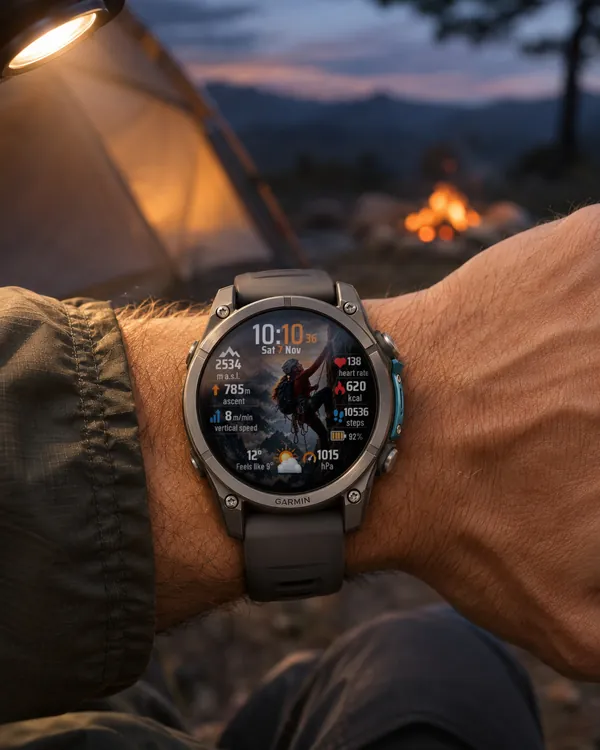 Climb
Woman Climber
A watch face for people who climb
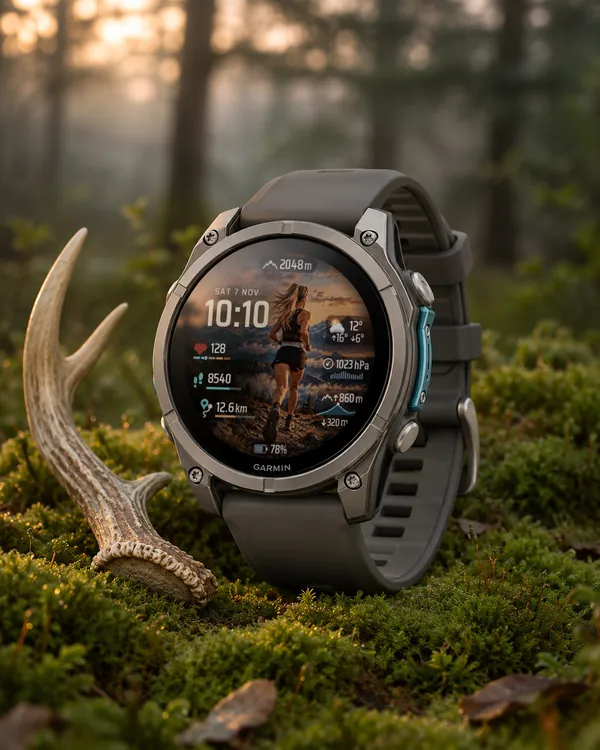 Run
Woman Runner
A running watch face built around a photo of a runner at sunrise
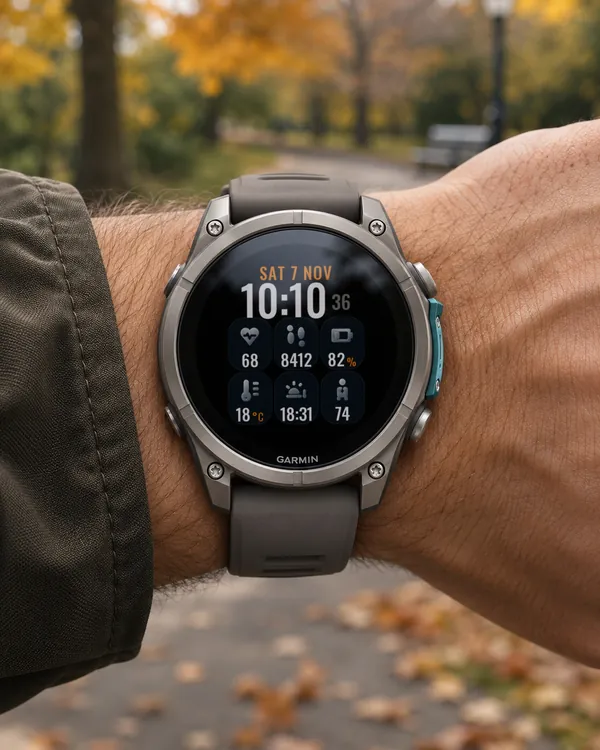 Glass Tiles
Six frosted-glass tiles on black, each with a glass icon and one number you choose
 Colour Mip
Tech Tiles
A clear data panel for colour MIP watches: six tiles with sharp icons in your accent colour