Unlock
€6.49
One-time payment. No subscription. The code works on the watch whose ID you enter.
- Install the face from Connect IQ (7 days free).
- On the watch: face settings > Buy / Unlock, scan the QR code.
- Pay and paste the code in the face settings.
- Pay.
- Copy the code.
- Paste it in Connect IQ: this face > Settings > Unlock code.
Payment works best in Safari or Chrome: menu (three dots) > Open in browser
Read it in this face, it is not the serial number of the watch.
The code works only in the watch face it was bought for: a Summit Rings code will not work in Summit Tactic.
Your ID, compare it with the watch:
Where do I find the ID?
On the watch: settings of this face > Buy / Unlock (first item). Scan the QR code with your phone or type the 10 digits. The ID is also at the top of the face settings in the Connect IQ app.
Code not working on your watch? Write to me and I will fix it.
Payments by Stripe. Seller: Mateusz Kolarz, Lublin, Poland.
Paid. Code:
We show the code here too. If the e-mail does not arrive (check spam), you can recover the code in the Recover code section with just the Face ID. Recover code
Copying did not work. The code is selected: copy it by hand.
The face unlocks by itself when the watch connects to the phone (usually within an hour; if the trial is still running, the purchase starts working when it ends).
Do not want to wait, or have an older watch? Paste the code in the Connect IQ app:
Connect IQ (or Garmin Connect) > My Device > Watch faces > Glass Tiles > Settings > Unlock code > paste > Save
Like it? Rate this face in the Garmin store
Want to try new faces and apps before the release, for free? Join the testers program
Set up the face before you download
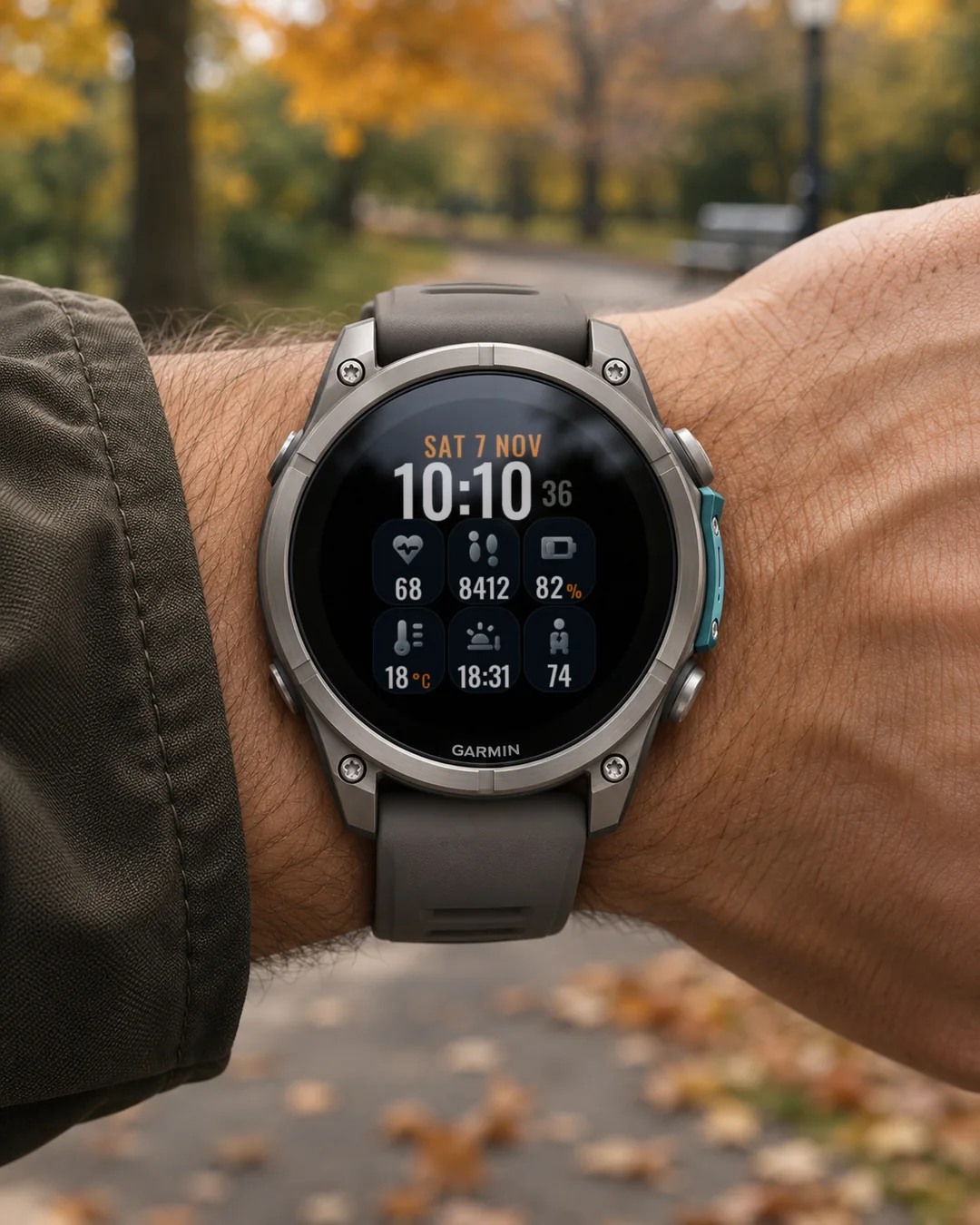
A watch face with six frosted-glass data tiles, each with a glass icon and one value you choose from 30 types, made for round AMOLED watches.
7-day free trial, then a one-time unlock at dialforge.dev. No subscription.
Six frosted-glass tiles on black, each with a glass icon and one number you choose.
Big time and date on top, two rows of three tiles below. The icons are rendered in glass with a light top edge and a soft shadow, in three tints: Ice, Ocean and Ember. Made for round AMOLED watches. No logo or model name on the dial.
Features
- Six tiles, 30 data types to choose from for each
- Glass icons in three tints (Ice, Ocean, Ember)
- 10 accent colours for the date, units and message line
- Seconds next to the time (can be turned off)
- AMOLED always-on: time and date as thin outlines, dimmed and shifted every minute; or time only, or off
- Data refresh: normal, battery saver or fresh
- Lean: no animations, a background service only for the Popular color sets list (every 6 hours it contacts dialforge.dev and sends just an anonymous color number)
Data fields: heart rate, steps, battery, distance, calories, floors, active minutes, Body Battery, stress, altitude, notifications, solar intensity, battery days, temperature, sunrise, sunset, next sun event, respiration, SpO2, recovery time, pressure, resting heart rate, VO2 max, sleep score*, 5K prediction*, weekly run distance*, moon phase, week number, day of year, or empty.
* needs a watch with Connect IQ 4.2 or newer
Round AMOLED watches, one layout.
Garmin does not give watch faces access to HRV status or Training Readiness, so no Connect IQ watch face can show them.
Code not working? Write to kontakt@dialforge.dev and we fix it.
Settings: on the watch (hold MENU, then Watch face, then Customize) or in the Connect IQ app.
More styles at https://dialforge.dev/
From the maker
I am a student and I build Dialforge watch faces myself, after classes. I do not own every watch model, so if something looks wrong on yours, write to me at https://dialforge.dev/faces/glasstiles/ and I will usually fix it within 24 hours. If you like the face, you can buy me a coffee: https://buycoffee.to/iwannaflysohigh
Works on fenix 9, fenix 8, Forerunner 970, Forerunner 570, Venu 4, Forerunner 965, Forerunner 265, Venu 3 and more.
Tarcza z sześcioma kafelkami danych z matowego szkła, każdy z ikoną i jedną wartością do wyboru spośród 30 rodzajów, na okrągłe zegarki AMOLED.
7 dni za darmo, potem jednorazowe odblokowanie na dialforge.dev. Bez abonamentu.
Coś nie działa? Napisz najpierw do twórcy przez "Skontaktuj się z producentem" na tej stronie. Zgłoszone usterki naprawiam w ciągu 12 godzin. Niska ocena nie jest kontaktem: niczego nie naprawia, a krzywdzi pojedynczego, niezależnego twórcę. Jeśli tarcza u Ciebie działa, uczciwa ocena pomaga innym ją znaleźć.
Sześć matowych szklanych kafli na czerni, każdy ze szklaną ikoną i jedną wybraną liczbą.
Duża godzina i data na górze, pod nimi dwa rzędy po trzy kafle. Ikony są wykonane w szkle z jasną górną krawędzią i miękkim cieniem, w trzech barwach: Lód, Ocean i Żar. Tarcza na okrągłe zegarki AMOLED. Na tarczy nie ma logo ani nazwy modelu.
Co jest na tarczy
- Sześć kafli, do każdego 30 rodzajów danych
- Szklane ikony w trzech barwach (Lód, Ocean, Żar)
- 10 kolorów akcentu dla daty, jednostek i linii komunikatów
- Sekundy obok godziny (można wyłączyć)
- Tryb zawsze włączony na AMOLED: godzina i data jako cienkie kontury, przygaszone i przesuwane co minutę; albo sama godzina, albo wyłączony
- Odświeżanie danych: normalnie, oszczędnie albo świeżo
- Oszczędna: bez animacji, usługa w tle tylko dla listy Popularne zestawy kolorów (co 6 godzin łączy się z dialforge.dev i wysyła wyłącznie anonimowy numer koloru)
Dane do wyboru: tętno, kroki, bateria, dystans, kalorie, piętra, minuty intensywne, Body Battery, stres, wysokość, powiadomienia, nasłonecznienie, dni na baterii, temperatura, wschód i zachód słońca, najbliższy wschód albo zachód, oddech, pulsoksymetr, czas regeneracji, ciśnienie, tętno spoczynkowe, VO2 max, ocena snu*, prognoza na 5 km*, kilometry biegu w tygodniu*, faza księżyca, numer tygodnia, dzień roku, albo puste pole.
* wymaga zegarka z Connect IQ 4.2 lub nowszym
Okrągłe zegarki AMOLED, jeden układ.
Garmin nie udostępnia tarczom statusu HRV ani gotowości treningowej, więc żadna tarcza Connect IQ ich nie pokaże.
Kod nie działa? Napisz na kontakt@dialforge.dev, a naprawimy problem.
Ustawienia: na zegarku (przytrzymaj MENU, potem Tarcza zegarka, potem Dostosuj) albo w aplikacji Connect IQ.
Więcej stylów na https://dialforge.dev/
Od autora
Jestem studentem i robię tarcze Dialforge sam, po zajęciach. Nie mam każdego modelu zegarka, więc jeśli coś wygląda źle na Twoim, napisz na https://dialforge.dev/faces/glasstiles/, zwykle poprawiam to w ciągu 24 godzin. Jeśli tarcza Ci się podoba, możesz postawić mi kawę: https://buycoffee.to/iwannaflysohigh
Działa na: fenix 9, fenix 8, Forerunner 970, Forerunner 570, Venu 4, Forerunner 965, Forerunner 265, Venu 3 i innych.
Ein Zifferblatt mit sechs Daten-Kacheln aus mattem Glas, jede mit Glas-Icon und einem Wert, den Sie aus 30 Arten wählen, für runde AMOLED-Uhren.
7 Tage kostenlos testen, danach einmalige Freischaltung auf dialforge.dev. Kein Abo.
Funktioniert etwas nicht? Bitte schreibe zuerst dem Entwickler: Nutze "Entwickler kontaktieren" auf dieser Seite. Gemeldete Probleme werden innerhalb von 12 Stunden behoben. Eine schlechte Bewertung ist kein Weg, mich zu kontaktieren: Sie behebt nichts und schadet einem kleinen, unabhängigen Entwickler. Wenn das Displaysdesign bei dir funktioniert, hilft eine faire Bewertung anderen, es zu finden.
Sechs Kacheln aus Mattglas auf Schwarz, jede mit einem Glassymbol und einer Zahl deiner Wahl.
Große Uhrzeit und Datum oben, darunter zwei Reihen mit je drei Kacheln. Die Symbole sind in Glas mit einer hellen Oberkante und einem weichen Schatten gerendert, in drei Farbtönen: Ice, Ocean und Ember. Gemacht für runde AMOLED-Uhren. Kein Logo oder Modellname auf dem Zifferblatt.
Funktionen
- Sechs Kacheln, jeweils 30 Datentypen zur Auswahl
- Glassymbole in drei Farbtönen (Ice, Ocean, Ember)
- 10 Akzentfarben für das Datum, Einheiten und die Nachrichtenzeile
- Sekunden neben der Uhrzeit (können ausgeschaltet werden)
- AMOLED Always-On: Uhrzeit und Datum als feine Umrisse, gedimmt und jede Minute verschoben; oder nur Uhrzeit, oder aus
- Datenaktualisierung: normal, stromsparend oder frisch
- Schlank: keine Animationen, ein Hintergrunddienst nur für die Liste der beliebten Farbsets (kontaktiert alle 6 Stunden dialforge.dev und sendet nur eine anonyme Farbnummer)
Datenfelder: Herzfrequenz, Schritte, Akku, Distanz, Kalorien, Stockwerke, Intensitätsminuten, Body Battery, Stress, Höhe, Benachrichtigungen, Solarintensität, Akkulaufzeit in Tagen, Temperatur, Sonnenaufgang, Sonnenuntergang, nächstes Sonnenereignis, Atmung, SpO2, Erholungszeit, Luftdruck, Ruheherzfrequenz, VO2 max, Schlaf-Score*, 5K-Prognose*, wöchentliche Laufdistanz*, Mondphase, Kalenderwoche, Tag des Jahres oder leer.
* erfordert eine Uhr mit Connect IQ 4.2 oder neuer
Runde AMOLED-Uhren, ein Layout.
Garmin gibt Displaysdesigns keinen Zugriff auf den HRV-Status oder Training Readiness, daher kann kein Connect IQ Displaysdesign diese anzeigen.
Code funktioniert nicht? Schreibe an kontakt@dialforge.dev und wir beheben das Problem.
Einstellungen: auf der Uhr (MENU gedrückt halten, dann Displaysdesign, dann Anpassen) oder in der Connect IQ App.
Weitere Stile unter https://dialforge.dev/
Vom entwickler
Ich bin Student und baue die Dialforge-Zifferblätter selbst, nach den Vorlesungen. Ich habe nicht jedes Uhrenmodell. Wenn auf deiner Uhr etwas falsch aussieht, schreib mir auf https://dialforge.dev/faces/glasstiles/, meist behebe ich es innerhalb von 24 Stunden. Wenn dir das Zifferblatt gefällt, kannst du mir einen Kaffee spendieren: https://buycoffee.to/iwannaflysohigh
Läuft auf fenix 9, fenix 8, Forerunner 970, Forerunner 570, Venu 4, Forerunner 965, Forerunner 265, Venu 3 und weiteren Modellen.
Un cadran avec six tuiles de données en verre dépoli, chacune avec une icône en verre et une valeur à choisir parmi 30 types, pour montres rondes AMOLED.
Essai gratuit de 7 jours, puis un déverrouillage unique sur dialforge.dev. Sans abonnement.
Quelque chose ne fonctionne pas ? Écrivez d'abord au développeur : utilisez "Contacter le développeur" sur cette page. Les problèmes signalés sont corrigés dans les 12 heures. Une mauvaise note n'est pas un moyen de me contacter : cela ne résout rien et pénalise un petit développeur indépendant. Si le cadran fonctionne bien pour vous, une note équitable aide les autres à le trouver.
Six tuiles en verre dépoli sur fond noir, chacune avec une icône en verre et un chiffre de votre choix.
Heure et date en grand en haut, deux rangées de trois tuiles en dessous. Les icônes ont un rendu en verre avec un bord supérieur lumineux et une ombre douce, en trois teintes : Ice, Ocean et Ember. Conçu pour les montres AMOLED rondes. Aucun logo ni nom de modèle sur le cadran.
Fonctionnalités
- Six tuiles, 30 types de données au choix pour chacune
- Icônes en verre en trois teintes (Ice, Ocean, Ember)
- 10 couleurs d'accent pour la date, les unités et la ligne de messages
- Secondes à côté de l'heure (peuvent être désactivées)
- Affichage permanent AMOLED : heure et date sous forme de contours fins, atténuées et décalées chaque minute ; ou heure seule, ou désactivé
- Rafraîchissement des données : normal, économiseur de batterie ou fréquent
- Économe : sans animations, un service en arrière-plan uniquement pour la liste des ensembles de couleurs populaires (toutes les 6 heures, il contacte dialforge.dev et envoie simplement un numéro de couleur anonyme)
Champs de données : fréquence cardiaque, pas, batterie, distance, calories, étages, minutes actives, Body Battery, stress, altitude, notifications, intensité solaire, jours de batterie, température, lever du soleil, coucher du soleil, prochain événement solaire, respiration, SpO2, temps de récupération, pression, fréquence cardiaque au repos, VO2 max, score de sommeil*, prédiction 5K*, distance de course hebdomadaire*, phase lunaire, numéro de semaine, jour de l'année, ou vide.
* nécessite une montre avec Connect IQ 4.2 ou plus récent
Montres AMOLED rondes, une seule disposition.
Garmin ne permet pas aux cadrans d'accéder au statut HRV ni à Training Readiness, donc aucun cadran Connect IQ ne peut les afficher.
Le code ne fonctionne pas ? Écrivez à kontakt@dialforge.dev et nous corrigerons le problème.
Paramètres : sur la montre (maintenez MENU, puis Cadran de montre, puis Personnaliser) ou dans l'application Connect IQ.
Plus de styles sur https://dialforge.dev/
Du créateur
Je suis étudiant et je crée seul les cadrans Dialforge, après les cours. Je n'ai pas tous les modèles de montre : si quelque chose ne va pas sur la vôtre, écrivez-moi sur https://dialforge.dev/faces/glasstiles/, je corrige en général sous 24 heures. Si le cadran vous plaît, vous pouvez m'offrir un café : https://buycoffee.to/iwannaflysohigh
Compatible avec fenix 9, fenix 8, Forerunner 970, Forerunner 570, Venu 4, Forerunner 965, Forerunner 265, Venu 3 et d'autres modèles.
Una esfera con seis mosaicos de datos de cristal esmerilado, cada uno con un icono de cristal y un valor a elegir entre 30 tipos, para relojes redondos AMOLED.
Prueba gratuita de 7 días y luego un desbloqueo único en dialforge.dev. Sin suscripción.
¿Algo no funciona? Por favor, escribe primero al desarrollador: usa "Contactar con el desarrollador" en esta página. Los problemas reportados se solucionan en un plazo de 12 horas. Una valoración baja no es una forma de contactarme: no soluciona nada y perjudica a un pequeño desarrollador independiente. Si la pantalla de reloj te funciona bien, una valoración justa ayuda a que otros la encuentren.
Seis paneles de cristal esmerilado sobre negro, cada uno con un icono de cristal y un número a tu elección.
Hora y fecha grandes en la parte superior, dos filas de tres paneles debajo. Los iconos están representados en cristal con un borde superior claro y una sombra suave, en tres tonalidades: Hielo, Océano y Brasa. Diseñada para relojes AMOLED redondos. Sin logotipo ni nombre del modelo en la esfera.
Funciones
- Seis paneles, 30 tipos de datos para elegir en cada uno
- Iconos de cristal en tres tonalidades (Hielo, Océano, Brasa)
- 10 colores de acento para la fecha, las unidades y la línea de mensajes
- Segundos junto a la hora (se pueden desactivar)
- Modo siempre activo en AMOLED: hora y fecha como contornos finos, atenuadas y desplazadas cada minuto; o solo la hora, o desactivado
- Actualización de datos: normal, ahorro de batería o frecuente
- Eficiente: sin animaciones, servicio en segundo plano solo para la lista de combinaciones de colores populares (cada 6 horas se conecta a dialforge.dev y envía únicamente un número de color anónimo)
Campos de datos: frecuencia cardiaca, pasos, batería, distancia, calorías, pisos, minutos de intensidad, Body Battery, estrés, altitud, notificaciones, intensidad solar, días de batería, temperatura, amanecer, atardecer, próximo evento solar, respiración, SpO2, tiempo de recuperación, presión, frecuencia cardiaca en reposo, VO2 max, puntuación de sueño*, predicción de 5K*, distancia semanal de carrera*, fase lunar, número de semana, día del año o vacío.
* requiere un reloj con Connect IQ 4.2 o posterior
Relojes AMOLED redondos, un diseño.
Garmin no da acceso a las pantallas de reloj al estado de HRV ni a Training Readiness, por lo que ninguna pantalla de reloj de Connect IQ puede mostrarlos.
¿El código no funciona? Escribe a kontakt@dialforge.dev y lo solucionaremos.
Ajustes: en el reloj (mantén pulsado MENU, luego Pantalla de reloj, luego Personalizar) o en la aplicación Connect IQ.
Más estilos en https://dialforge.dev/
Del autor
Soy estudiante y hago las esferas Dialforge yo solo, después de clase. No tengo todos los modelos de reloj, así que si algo se ve mal en el tuyo, escríbeme en https://dialforge.dev/faces/glasstiles/ y normalmente lo arreglo en 24 horas. Si te gusta la esfera, puedes invitarme a un café: https://buycoffee.to/iwannaflysohigh
Compatible con fenix 9, fenix 8, Forerunner 970, Forerunner 570, Venu 4, Forerunner 965, Forerunner 265, Venu 3 y más.
Een wijzerplaat met zes datategels van matglas, elk met een glazen icoon en één waarde naar keuze uit 30 soorten, voor ronde AMOLED-horloges.
7 dagen gratis proberen, daarna een eenmalige ontgrendeling op dialforge.dev. Geen abonnement.
Werkt er iets niet? Schrijf dan eerst naar de ontwikkelaar: gebruik "Contact opnemen met ontwikkelaar" op deze pagina. Gemelde problemen worden binnen 12 uur opgelost. Een lage beoordeling is geen manier om contact met mij op te nemen: het lost niets op en het schaadt een kleine onafhankelijke ontwikkelaar. Als de wijzerplaat goed voor je werkt, helpt een eerlijke beoordeling anderen om deze te vinden.
Zes matglazen tegels op zwart, elk met een glazen icoon en één getal dat je zelf kiest.
Grote tijd en datum bovenaan, daaronder twee rijen van drie tegels. De iconen zijn uitgevoerd in glas met een lichte bovenrand en een zachte schaduw, in drie tinten: Ice, Ocean en Ember. Gemaakt voor ronde AMOLED-horloges. Geen logo of modelnaam op de wijzerplaat.
Functies
- Zes tegels, 30 gegevenstypen om uit te kiezen voor elk
- Glazen iconen in drie tinten (Ice, Ocean, Ember)
- 10 accentkleuren voor de datum, eenheden en berichtregel
- Seconden naast de tijd (kan worden uitgeschakeld)
- AMOLED always-on: tijd en datum als dunne contouren, gedimd en elke minuut verschoven; of alleen tijd, of uit
- Gegevensvernieuwing: normaal, batterijbesparing of actueel
- Zuinig: geen animaties, alleen een achtergrondservice voor de lijst Populaire kleursets (elke 6 uur maakt deze verbinding met dialforge.dev en verzendt alleen een anoniem kleurnummer)
Gegevensvelden: hartslag, stappen, batterij, afstand, calorieën, verdiepingen, actieve minuten, Body Battery, stress, hoogte, meldingen, zonne-intensiteit, batterijdagen, temperatuur, zonsopgang, zonsondergang, volgende zonnegebeurtenis, ademhaling, SpO2, hersteltijd, luchtdruk, rusthartslag, VO2 max, slaapscore*, 5K-voorspelling*, wekelijkse hardloopafstand*, maanfase, weeknummer, dag van het jaar, of leeg.
* vereist een horloge met Connect IQ 4.2 of nieuwer
Ronde AMOLED-horloges, één indeling.
Garmin geeft wijzerplaten geen toegang tot HRV-status of Training Readiness, dus geen enkele Connect IQ-wijzerplaat kan deze weergeven.
Werkt de code niet? Schrijf naar kontakt@dialforge.dev en we lossen het op.
Instellingen: op het horloge (houd MENU ingedrukt, dan Wijzerplaat, dan Aanpassen) of in de Connect IQ-app.
Meer stijlen op https://dialforge.dev/
Van de maker
Ik ben student en maak de Dialforge-wijzerplaten zelf, na de colleges. Ik heb niet elk horlogemodel, dus ziet er iets verkeerd uit op het jouwe, schrijf me dan via https://dialforge.dev/faces/glasstiles/. Meestal los ik het binnen 24 uur op. Vind je de wijzerplaat mooi, dan kun je me een koffie trakteren: https://buycoffee.to/iwannaflysohigh
Werkt op fenix 9, fenix 8, Forerunner 970, Forerunner 570, Venu 4, Forerunner 965, Forerunner 265, Venu 3 en meer.
すりガラス風のデータタイルを6枚並べた文字盤。各タイルにガラスのアイコンと30種類から選べる値を表示し、丸型AMOLEDウォッチ用に作られています。
7日間無料でお試しいただけます。その後はdialforge.devで解除を一度だけ購入(サブスクリプションなし)。
黒の背景に六枚のすりガラス風タイル。それぞれにガラスのアイコンとお好みの数字を一つ表示。
上部に大きく時刻と日付、下部には三枚のタイルが二列並びます。アイコンは上端の明るいエッジと柔らかな影を持つガラスの質感で描かれ、三種類の色合い(Ice、Ocean、Ember)を用意。丸型のAMOLEDウォッチ専用設計です。文字盤にロゴやモデル名はありません。
機能
- 六枚のタイル、それぞれ30種類のデータ項目から選択可能
- 三種類の色合いのガラスアイコン(Ice、Ocean、Ember)
- 日付、単位、メッセージ行に使える10色のアクセントカラー
- 時刻の横に秒を表示(非表示に設定可能)
- AMOLED常時表示:細い輪郭線の時刻と日付(減光され毎分シフト)、時刻のみ、またはオフ
- データ更新:通常、バッテリー節約、または高頻度
- 軽量設計:アニメーションなし、バックグラウンド処理は人気のカラーセット一覧用のみ(6時間ごとにdialforge.devに接続し、匿名のカラー番号のみを送信)
データ項目:心拍数、ステップ数、バッテリー、距離、カロリー、上昇階数、週間運動量、Body Battery、ストレス、高度、通知、ソーラー強度、バッテリー残日数、気温、日の出、日の入り、次の日の出/日の入り、呼吸数、SpO2、回復時間、気圧、安静時心拍数、VO2 max、睡眠スコア*、5K予想タイム*、週間ランニング距離*、月相、週番号、通日、または空白。
* Connect IQ 4.2以降を搭載したウォッチが必要です
丸型amoledウォッチ、一種類のレイアウト。
GarminはウォッチフェイスにHRVステータスやTraining Readinessへのアクセスを許可していないため、どのConnect IQウォッチフェイスでもこれらを表示することはできません。
コードが機能しませんか?kontakt@dialforge.devまでご連絡いただければ、修正いたします。
設定:ウォッチ本体(MENU長押し、次にウォッチフェイス、次にカスタマイズ)またはConnect IQアプリ内。
その他のスタイル:https://dialforge.dev/
作者より
私は学生で、Dialforgeの文字盤を授業のあとに一人で作っています。すべての時計モデルを持っているわけではないので、お使いの時計で表示がおかしい場合は https://dialforge.dev/faces/glasstiles/ からご連絡ください。通常24時間以内に修正します。文字盤を気に入っていただけたら、コーヒーをおごっていただけるとうれしいです: https://buycoffee.to/iwannaflysohigh
対応モデル:fenix 9, fenix 8, Forerunner 970, Forerunner 570, Venu 4, Forerunner 965, Forerunner 265, Venu 3 ほか
Un quadrante con sei riquadri dati in vetro satinato, ciascuno con un'icona di vetro e un valore a scelta tra 30 tipi, per orologi rotondi AMOLED.
Prova gratuita di 7 giorni, poi uno sblocco una tantum su dialforge.dev. Nessun abbonamento.
Qualcosa non funziona? Scrivi prima allo sviluppatore: usa "Contatta lo sviluppatore" su questa pagina. I problemi segnalati vengono risolti entro 12 ore. Una valutazione bassa non è un modo per contattarmi: non risolve nulla e danneggia un piccolo sviluppatore indipendente. Se il quadrante funziona bene per te, una valutazione onesta aiuta gli altri a trovarlo.
Sei riquadri in vetro satinato su sfondo nero, ciascuno con un'icona in vetro e un numero a tua scelta.
Ora e data grandi in alto, due file di tre riquadri sotto. Le icone sono realizzate in vetro con un bordo superiore chiaro e un'ombra morbida, in tre tonalità: Ice, Ocean ed Ember. Creato per orologi AMOLED rotondi. Nessun logo o nome del modello sul quadrante.
Caratteristiche
- Sei riquadri, 30 tipi di dati tra cui scegliere per ciascuno
- Icone in vetro in tre tonalità (Ice, Ocean, Ember)
- 10 colori d'accento per la data, le unità e la riga dei messaggi
- Secondi accanto all'ora (disattivabili)
- Always-on per AMOLED: ora e data come contorni sottili, attenuate e spostate ogni minuto; oppure solo ora, oppure disattivato
- Aggiornamento dati: normale, risparmio batteria o frequente
- Leggero: nessuna animazione, un servizio in background solo per l'elenco dei set di colori popolari (ogni 6 ore contatta dialforge.dev e invia solo un numero di colore anonimo)
Campi dati: frequenza cardiaca, passi, batteria, distanza, calorie, piani saliti, minuti di intensità, Body Battery, stress, quota, notifiche, intensità solare, giorni di batteria, temperatura, alba, tramonto, prossimo evento solare, respirazione, SpO2, tempo di recupero, pressione, frequenza cardiaca a riposo, VO2 max, punteggio del sonno*, previsione 5K*, distanza di corsa settimanale*, fase lunare, numero della settimana, giorno dell'anno, o vuoto.
* richiede un orologio con Connect IQ 4.2 o più recente
Orologi AMOLED rotondi, un unico layout.
Garmin non consente ai quadranti di accedere a HRV status o Training Readiness, quindi nessun quadrante Connect IQ può mostrarli.
Il codice non funziona? Scrivi a kontakt@dialforge.dev e risolveremo il problema.
Impostazioni: sull'orologio (tieni premuto MENU, poi Quadrante, poi Personalizza) o nell'app Connect IQ.
Altri stili su https://dialforge.dev/
Dall'autore
Sono uno studente e creo da solo i quadranti Dialforge, dopo le lezioni. Non ho tutti i modelli di orologio, quindi se qualcosa sembra sbagliato sul tuo, scrivimi su https://dialforge.dev/faces/glasstiles/, di solito lo correggo entro 24 ore. Se il quadrante ti piace, puoi offrirmi un caffè: https://buycoffee.to/iwannaflysohigh
Compatibile con fenix 9, fenix 8, Forerunner 970, Forerunner 570, Venu 4, Forerunner 965, Forerunner 265, Venu 3 e altri.
磨砂玻璃质感的表盘,有六个数据磁贴,每个都配玻璃图标,并可从30种数据中任选一项,适用于圆形 AMOLED 手表。
7 天免费试用,之后在 dialforge.dev 一次性解锁。无需订阅。
遇到问题了?请先联系开发者:使用本页面的“联系开发者”。反馈的问题将在 12 小时内修复。低分评价并不是联系我的方式:它解决不了任何问题,还会伤害到小独立开发者。如果这款表盘对你很适用,一个客观的评价能帮助其他人找到它。
黑色背景上的六个磨砂玻璃磁贴,每个磁贴都带有玻璃质感图标和一个自选数字。
顶部显示大号时间和日期,下方为两排共六个磁贴。图标采用玻璃质感呈现,带有明亮的顶部边缘与柔和阴影,提供三种色调:冰霜、海洋和余烬。专为圆形 AMOLED 手表打造。表盘上没有徽标或型号名称。
功能特点
- 六个磁贴,每个磁贴有 30 种数据类型可选
- 玻璃质感图标,提供三种色调(冰霜、海洋、余烬)
- 10 种强调色,用于日期、单位和消息行
- 时间旁显示秒数(可关闭)
- AMOLED 常亮:时间和日期显示为细轮廓,变暗且每分钟移动一次;或仅显示时间,或关闭
- 数据刷新:正常、省电或即时
- 轻量精简:无动画,仅为“热门配色集”列表提供后台服务(每 6 小时联系一次 dialforge.dev,仅发送匿名的颜色编号)
数据字段:心率、步数、电量、距离、卡路里、楼层、活动分钟数、Body Battery、压力、海拔、通知、太阳能强度、电池可用天数、温度、日出、日落、下一次太阳事件、呼吸、SpO2、恢复时间、气压、静息心率、VO2 max、睡眠分数*、5K 预测*、每周跑步距离*、月相、周数、年中天数,或留空。
* 需要配备 Connect IQ 4.2 或更高版本的手表
圆形 amoled 手表,单一布局。
Garmin 未向表盘开放 HRV 状态或 Training Readiness 的访问权限,因此任何 Connect IQ 表盘都无法显示这些数据。
兑换码无效?请写信至 kontakt@dialforge.dev,我们会解决问题。
设置:在手表上(长按 MENU,选择表盘,然后选择自定义)或在 Connect IQ app 中。
更多款式请访问 https://dialforge.dev/
作者的话
我是一名学生,利用课余时间独自制作 Dialforge 表盘。我没有每一款手表,所以如果表盘在您的手表上显示不对,请到 https://dialforge.dev/faces/glasstiles/ 告诉我,我通常会在 24 小时内修复。如果您喜欢这款表盘,可以请我喝杯咖啡:https://buycoffee.to/iwannaflysohigh
适用于 fenix 9, fenix 8, Forerunner 970, Forerunner 570, Venu 4, Forerunner 965, Forerunner 265, Venu 3 等。
Циферблат с шестью плитками данных из матового стекла, у каждой стеклянный значок и одно значение на выбор из 30 видов, для круглых часов с AMOLED.
7-дневный бесплатный пробный период, затем разовая разблокировка на dialforge.dev. Без подписки.
Что-то не работает? Пожалуйста, сначала напишите разработчику: используйте "Связаться с разработчиком" на этой странице. Сообщенные проблемы исправляются в течение 12 часов. Низкая оценка - не способ связаться со мной: она ничего не исправляет и вредит маленькому независимому разработчику. Если циферблат у вас работает, честная оценка поможет другим найти его.
Шесть плиток из матового стекла на черном фоне, каждая со стеклянной иконкой и одним числом на ваш выбор.
Крупные время и дата вверху, два ряда по три плитки внизу. Иконки выполнены из стекла со светлой верхней кромкой и мягкой тенью, в трех оттенках: Лед, Океан и Жар. Создан для круглых часов AMOLED. Без логотипа и названия модели на циферблате.
Возможности
- Шесть плиток, по 30 типов данных на выбор для каждой
- Стеклянные иконки в трех оттенках (Лед, Океан, Жар)
- 10 акцентных цветов для даты, единиц измерения и строки сообщений
- Секунды рядом со временем (можно отключить)
- Постоянно включенный дисплей AMOLED: время и дата в виде тонких контуров, приглушенные и смещаемые каждую минуту; либо только время, либо выключен
- Обновление данных: обычное, экономичное или свежее
- Экономичный: без анимаций, фоновая служба только для списка популярных наборов цветов (каждые 6 часов обращается к dialforge.dev и отправляет только анонимный номер цвета)
Поля данных: пульс, шаги, батарея, дистанция, калории, этажи, минуты активности, Body Battery, стресс, высота, уведомления, интенсивность солнечного света, дни работы от батареи, температура, восход солнца, закат солнца, следующее солнечное событие, дыхание, SpO2, время восстановления, давление, пульс в покое, VO2 max, баллы сна*, прогноз на 5K*, дистанция бега за неделю*, фаза луны, номер недели, день года или пусто.
* требуются часы с Connect IQ 4.2 или новее
Круглые часы AMOLED, одна компоновка.
Garmin не предоставляет циферблатам доступ к статусу HRV или Training Readiness, поэтому ни один циферблат Connect IQ не может их отображать.
Код не работает? Напишите на kontakt@dialforge.dev, и мы все исправим.
Настройки: на часах (удерживайте MENU, затем Циферблат, затем Настроить) или в приложении Connect IQ.
Больше стилей на https://dialforge.dev/
От автора
Я студент и делаю циферблаты Dialforge сам, после занятий. У меня есть не все модели часов, поэтому если на ваших что-то выглядит неправильно, напишите мне на https://dialforge.dev/faces/glasstiles/, обычно я исправляю это в течение 24 часов. Если циферблат вам нравится, можете угостить меня кофе: https://buycoffee.to/iwannaflysohigh
Работает на fenix 9, fenix 8, Forerunner 970, Forerunner 570, Venu 4, Forerunner 965, Forerunner 265, Venu 3 и других.
Um mostrador com seis blocos de dados em vidro fosco, cada um com um ícone de vidro e um valor à sua escolha entre 30 tipos, para relógios redondos AMOLED.
Teste grátis de 7 dias, depois um desbloqueio único em dialforge.dev. Sem assinatura.
Algo não está funcionando? Por favor, escreva primeiro para o desenvolvedor: use "Contatar desenvolvedor" nesta página. Problemas relatados são corrigidos em até 12 horas. Uma avaliação baixa não é uma forma de entrar em contato comigo: não resolve nada e prejudica um pequeno desenvolvedor independente. Se o visor do relógio funciona para você, uma avaliação justa ajuda outros a encontrá-lo.
Seis blocos de vidro fosco no fundo preto, cada um com um ícone de vidro e um número que você escolhe.
Hora e data grandes no topo, duas fileiras de três blocos abaixo. Os ícones são renderizados em vidro com uma borda superior clara e sombra suave, em três tonalidades: Gelo, Oceano e Brasa. Feito para relógios AMOLED redondos. Sem logotipo ou nome de modelo no mostrador.
Recursos
- Seis blocos, 30 tipos de dados para escolher em cada um
- Ícones de vidro em três tonalidades (Gelo, Oceano, Brasa)
- 10 cores de destaque para a data, unidades e linha de mensagens
- Segundos ao lado da hora (podem ser desativados)
- Tela sempre ativa em AMOLED: hora e data em contornos finos, esmaecidos e deslocados a cada minuto; ou apenas hora, ou desativado
- Atualização de dados: normal, economia de bateria ou frequente
- Leve: sem animações, serviço em segundo plano apenas para a lista de conjuntos de cores populares (a cada 6 horas conecta-se a dialforge.dev e envia apenas um número anônimo de cor)
Campos de dados: frequência cardíaca, passos, bateria, distância, calorias, andares, minutos ativos, Body Battery, estresse, altitude, notificações, intensidade solar, dias de bateria, temperatura, nascer do sol, pôr do sol, próximo evento solar, respiração, SpO2, tempo de recuperação, pressão, frequência cardíaca em repouso, VO2 max, pontuação de sono*, previsão de 5K*, distância semanal de corrida*, fase da lua, número da semana, dia do ano, ou vazio.
* requer um relógio com Connect IQ 4.2 ou mais recente
Relógios AMOLED redondos, um layout.
A Garmin não dá aos mostradores de relógio acesso ao status de HRV ou Training Readiness, então nenhum mostrador do Connect IQ pode exibi-los.
O código não está funcionando? Escreva para kontakt@dialforge.dev e resolveremos o problema.
Configurações: no relógio (mantenha MENU pressionado, depois Visor do relógio, depois Personalizar) ou no aplicativo Connect IQ.
Mais estilos em https://dialforge.dev/
Do criador
Sou estudante e faço os mostradores Dialforge sozinho, depois das aulas. Não tenho todos os modelos de relógio, então se algo parecer errado no seu, escreva para mim em https://dialforge.dev/faces/glasstiles/, normalmente eu corrijo em até 24 horas. Se você gostou do mostrador, pode me pagar um café: https://buycoffee.to/iwannaflysohigh
Funciona em fenix 9, fenix 8, Forerunner 970, Forerunner 570, Venu 4, Forerunner 965, Forerunner 265, Venu 3 e outros.
Ciferník se šesti datovými dlaždicemi z matného skla, každá s ikonou ze skla a jednou hodnotou podle výběru z 30 druhů, pro kulaté hodinky AMOLED.
7denní bezplatná zkušební verze, poté jednorázové odemknutí na dialforge.dev. Žádné předplatné.
Něco nefunguje? Napište prosím nejdříve vývojáři: použijte "Kontaktovat vývojáře" na této stránce. Nahlášené problémy opravuji do 12 hodin. Nízké hodnocení není způsob, jak mě kontaktovat: nic nevyřeší a škodí malému nezávislému vývojáři. Pokud vám vzhled hodinek funguje, férové hodnocení pomůže ostatním ho najít.
Šest dlaždic z matného skla na černém pozadí, každá se skleněnou ikonou a jedním vámi zvoleným číslem.
Velký čas a datum nahoře, pod nimi dvě řady po třech dlaždicích. Ikony jsou vyvedené ve skle se světlou horní hranou a jemným stínem, ve třech odstínech: Led, Oceán a Žár. Vytvořeno pro kulaté hodinky AMOLED. Žádné logo ani název modelu na ciferníku.
Funkce
- Šest dlaždic, pro každou na výběr z 30 typů dat
- Skleněné ikony ve třech odstínech (Led, Oceán, Žár)
- 10 akcentních barev pro datum, jednotky a řádek zpráv
- Sekundy vedle času (lze vypnout)
- AMOLED always-on: čas a datum jako tenké obrysy, ztlumené a posouvané každou minutu; nebo pouze čas, nebo vypnuto
- Obnovení dat: normální, úsporné nebo časté
- Úsporný: žádné animace, služba na pozadí pouze pro seznam Oblíbené barevné sady (každých 6 hodin se spojí s dialforge.dev a odešle pouze anonymní číslo barvy)
Datová pole: srdeční tep, kroky, baterie, vzdálenost, kalorie, patra, minuty intenzivní aktivity, Body Battery, stres, nadmořská výška, oznámení, intenzita slunečního záření, dny výdrže baterie, teplota, východ slunce, západ slunce, další sluneční událost, dýchání, SpO2, doba regenerace, tlak, klidový srdeční tep, VO2 max, skóre spánku*, předpověď na 5K*, týdenní běžecká vzdálenost*, fáze měsíce, číslo týdne, den v roce nebo prázdné.
* vyžaduje hodinky s Connect IQ 4.2 nebo novějším
Kulaté hodinky AMOLED, jedno rozvržení.
Garmin neposkytuje vzhledům hodinek přístup ke stavu HRV ani k Training Readiness, takže je žádný vzhled hodinek Connect IQ nemůže zobrazit.
Kód nefunguje? Napište na kontakt@dialforge.dev a my to opravíme,.
Nastavení: na hodinkách (podržte MENU, poté Vzhled hodinek, poté Upravit) nebo v aplikaci Connect IQ.
Více stylů na https://dialforge.dev/
Od autora
Jsem student a ciferníky Dialforge dělám sám, po škole. Nemám každý model hodinek, takže pokud na vašich něco nevypadá dobře, napište mi na https://dialforge.dev/faces/glasstiles/, obvykle to opravím do 24 hodin. Pokud se vám ciferník líbí, můžete mi koupit kávu: https://buycoffee.to/iwannaflysohigh
Funguje na fenix 9, fenix 8, Forerunner 970, Forerunner 570, Venu 4, Forerunner 965, Forerunner 265, Venu 3 a dalších.
Um mostrador com seis mosaicos de dados em vidro fosco, cada um com um ícone de vidro e um valor à sua escolha entre 30 tipos, para relógios redondos AMOLED.
7 dias de teste gratuito, depois um desbloqueio único em dialforge.dev. Sem subscrição.
Algo não está a funcionar? Por favor, escreva primeiro ao programador: utilize "Contactar programador" nesta página. Os problemas comunicados são corrigidos num prazo de 12 horas. Uma classificação baixa não é forma de me contactar: não resolve nada e prejudica um pequeno programador independente. Se o mostrador funciona bem para si, uma classificação justa ajuda outros a encontrá-lo.
Seis blocos de vidro fosco sobre preto, cada um com um ícone de vidro e um número à sua escolha.
Hora e data grandes no topo, duas filas de três blocos por baixo. Os ícones são desenhados em vidro com um rebordo superior claro e uma sombra suave, em três tonalidades: Ice, Ocean e Ember. Feito para relógios AMOLED redondos. Sem logótipo nem nome de modelo no mostrador.
Funcionalidades
- Seis blocos, 30 tipos de dados à escolha para cada um
- Ícones de vidro em três tonalidades (Ice, Ocean, Ember)
- 10 cores de destaque para a data, unidades e linha de mensagens
- Segundos ao lado da hora (podem ser desativados)
- AMOLED sempre ligado: hora e data em contornos finos, atenuadas e deslocadas a cada minuto; ou apenas a hora, ou desligado
- Atualização de dados: normal, poupança de bateria ou recente
- Leve: sem animações, um serviço em segundo plano apenas para a lista de conjuntos de cores populares (a cada 6 horas contacta dialforge.dev e envia apenas um número de cor anónimo)
Campos de dados: frequência cardíaca, passos, bateria, distância, calorias, andares, minutos de intensidade, Body Battery, stress, altitude, notificações, intensidade solar, dias de bateria, temperatura, nascer do sol, pôr do sol, próximo evento solar, respiração, SpO2, tempo de recuperação, pressão, frequência cardíaca em repouso, VO2 max, pontuação do sono*, previsão de 5K*, distância de corrida semanal*, fase da lua, número da semana, dia do ano ou vazio.
* requer um relógio com Connect IQ 4.2 ou mais recente
Relógios AMOLED redondos, um esquema.
A Garmin não dá aos mostradores acesso ao estado de HRV nem à Training Readiness, pelo que nenhum mostrador Connect IQ os pode mostrar.
O código não funciona? Escreva para kontakt@dialforge.dev e nós resolvemos.
Definições: no relógio (mantenha premido MENU, depois Mostrador do relógio, depois Personalizar) ou na aplicação Connect IQ.
Mais estilos em https://dialforge.dev/
Do criador
Sou estudante e faço os mostradores Dialforge sozinho, depois das aulas. Não tenho todos os modelos de relógio, por isso, se algo parecer errado no seu, escreva-me em https://dialforge.dev/faces/glasstiles/, normalmente corrijo em 24 horas. Se gostar do mostrador, pode oferecer-me um café: https://buycoffee.to/iwannaflysohigh
Funciona em fenix 9, fenix 8, Forerunner 970, Forerunner 570, Venu 4, Forerunner 965, Forerunner 265, Venu 3 e outros.
젖빛 유리 느낌의 데이터 타일 6개로 이뤄진 워치 페이스로, 타일마다 유리 아이콘과 30가지 중 고르는 값이 표시되며 원형 AMOLED 시계용입니다.
7일 무료 체험 후, dialforge.dev에서 일회성 잠금 해제를 구매하세요. 구독은 없습니다.
제대로 작동하지 않는 부분이 있나요? 먼저 이 페이지의 "개발자에게 문의"를 통해 개발자에게 알려주세요. 보고된 문제는 12시간 이내에 해결됩니다. 낮은 평점은 저에게 연락하는 방법이 아닙니다: 아무것도 해결되지 않으며 소규모 독립 개발자에게 상처가 됩니다. 시계 화면이 잘 작동한다면, 공정한 평점은 다른 사용자가 이 화면을 찾는 데 도움이 됩니다.
검은색 배경 위의 여섯 개 반투명 유리 타일, 각각 유리 아이콘과 직접 선택한 하나의 숫자가 표시됩니다.
상단에 큼직한 시간과 날짜, 하단에 세 개씩 두 줄로 배열된 타일. 아이콘은 밝은 상단 가장자리와 부드러운 그림자가 있는 유리 질감으로 렌더링되며, Ice, Ocean, Ember의 세 가지 색조로 제공됩니다. 원형 AMOLED 시계용으로 제작되었습니다. 시계 화면에는 로고나 모델명이 없습니다.
주요 기능
- 여섯 개의 타일, 각 타일마다 30가지 데이터 유형 선택 가능
- 세 가지 색조의 유리 아이콘 (Ice, Ocean, Ember)
- 날짜, 단위, 메시지 라인을 위한 10가지 강조 색상
- 시간 옆 초 표시 (끄기 가능)
- AMOLED 상시 표시: 얇은 외곽선의 시간과 날짜, 매분 어두워지며 위치 이동, 또는 시간만 표시하거나 끄기
- Data refresh: 일반, 배터리 절약 또는 최신
- 가벼운 최적화: 애니메이션 없음, Popular color sets 목록만을 위한 백그라운드 서비스 (6시간마다 dialforge.dev에 연결하여 익명의 색상 번호만 전송)
데이터 필드: 심박수, 걸음 수, 배터리, 거리, 칼로리, 오른 층수, 운동 시간, Body Battery, 스트레스, 고도, 알림, 태양광 강도, 배터리 잔여 일수, 기온, 일출, 일몰, 다음 태양 이벤트, 호흡수, SpO2, 회복 시간, 기압, 안정 시 심박수, VO2 max, 수면 점수*, 5K 예상 기록*, 주간 러닝 거리*, 달의 위상, 주차 번호, 연중 일수, 또는 빈칸.
* Connect IQ 4.2 이상을 지원하는 시계 필요
원형 amoled 시계, 단일 레이아웃.
Garmin은 시계 화면에 HRV 상태나 Training Readiness에 대한 접근 권한을 제공하지 않으므로, 어떤 Connect IQ 시계 화면도 이를 표시할 수 없습니다.
코드가 작동하지 않나요? kontakt@dialforge.dev로 문의해 주시면 문제를 해결해 드립니다.
설정: 시계에서 변경 (MENU 길게 누르기, 시계 화면, 사용자 지정) 또는 Connect IQ 앱에서 변경.
더 많은 스타일: https://dialforge.dev/
제작자의 한마디
저는 학생이고 수업이 끝난 뒤 Dialforge 워치페이스를 혼자 만들고 있습니다. 모든 시계 모델을 갖고 있지는 않아서, 시계에서 이상하게 보이는 부분이 있으면 https://dialforge.dev/faces/glasstiles/에서 알려 주세요. 보통 24시간 안에 고칩니다. 워치페이스가 마음에 드신다면 커피 한 잔 사주실 수 있습니다: https://buycoffee.to/iwannaflysohigh
지원 모델: fenix 9, fenix 8, Forerunner 970, Forerunner 570, Venu 4, Forerunner 965, Forerunner 265, Venu 3 외
En urtavla med sex datarutor av frostat glas, var och en med en glasikon och ett värde som du väljer bland 30 typer, för runda AMOLED-klockor.
7 dagars gratis provperiod, sedan en engångsupplåsning på dialforge.dev. Ingen prenumeration.
Något som inte fungerar? Skriv gärna till utvecklaren först: använd "Kontakta utvecklaren" på den här sidan. Rapporterade problem åtgärdas inom 12 timmar. Ett lågt betyg är inte ett sätt att kontakta mig: det löser ingenting och det skadar en liten självständig utvecklare. Om urtavlan fungerar för dig hjälper ett rättvist betyg andra att hitta den.
Sex rutor i frostat glas mot svart, var och en med en glasikon och en siffra du väljer.
Stor tid och datum längst upp, två rader med tre rutor undertill. Ikonerna är renderade i glas med en ljus överkant och en mjuk skugga, i tre färgtoner: Ice, Ocean och Ember. Gjord för runda AMOLED-klockor. Ingen logotyp eller modellnamn på urtavlan.
Funktioner
- Sex rutor, 30 datatyper att välja mellan för varje
- Glasikoner i tre färgtoner (Ice, Ocean, Ember)
- 10 accentfärger för datum, enheter och meddelanderad
- Sekunder bredvid tiden (kan stängas av)
- AMOLED always-on: tid och datum som tunna konturer, nedtonade och flyttade varje minut; eller enbart tid, eller av
- Datauppdatering: normal, batterisparande eller frekvent
- Resurssnål: inga animationer, en bakgrundstjänst endast för listan med populära färgkombinationer (var 6:e timme kontaktar den dialforge.dev och skickar bara ett anonymt färgnummer)
Datafält: puls, steg, batteri, distans, kalorier, våningar, aktiva minuter, Body Battery, stress, höjd, aviseringar, solintensitet, batteridagar, temperatur, soluppgång, solnedgång, nästa solhändelse, andning, SpO2, återhämtningstid, lufttryck, vilopuls, VO2 max, sömnpoäng*, 5K-prognos*, veckodistans löpning*, månfas, veckonummer, dag på året, eller tomt.
* kräver en klocka med Connect IQ 4.2 eller senare
Runda AMOLED-klockor, en layout.
Garmin ger inte urtavlor tillgång till HRV-status eller Training Readiness, så ingen Connect IQ-urtavla kan visa dem.
Fungerar inte koden? Skriv till kontakt@dialforge.dev så löser vi det.
Inställningar: på klockan (håll in MENU, sedan Urtavla, sedan Anpassa) eller i Connect IQ-appen.
Fler stilar på https://dialforge.dev/
Från skaparen
Jag är student och gör Dialforge-urtavlorna själv, efter föreläsningarna. Jag har inte alla klockmodeller, så om något ser fel ut på din, skriv till mig på https://dialforge.dev/faces/glasstiles/, oftast fixar jag det inom 24 timmar. Gillar du urtavlan kan du bjuda mig på en kaffe: https://buycoffee.to/iwannaflysohigh
Fungerar på fenix 9, fenix 8, Forerunner 970, Forerunner 570, Venu 4, Forerunner 965, Forerunner 265, Venu 3 med flera.
En urskive med seks datafliser af matteret glas, hver med et glasikon og én værdi, du vælger blandt 30 typer, til runde AMOLED-ure.
7 dages gratis prøveperiode, derefter en engangsoplåsning på dialforge.dev. Intet abonnement.
Er der noget, der ikke virker? Skriv venligst til udvikleren først: brug "Kontakt udvikler" på denne side. Indberettede problemer rettes inden for 12 timer. En lav bedømmelse er ikke en måde at kontakte mig på: den løser ingenting og skader en lille, uafhængig udvikler. Hvis urskiven fungerer for dig, hjælper en retfærdig bedømmelse andre med at finde den.
Seks felter i matteret glas på sort, hver med et glasikon og ét tal, du vælger.
Stort klokkeslæt og dato øverst, to rækker med tre felter nedenunder. Ikonerne er udført i glas med en lys overkant og en blød skygge, i tre farvetoner: Is, Ocean og Glød. Lavet til runde AMOLED-ure. Intet logo eller modelnavn på urskiven.
Funktioner
- Seks felter, 30 datatyper at vælge imellem for hvert
- Glasikoner i tre farvetoner (Is, Ocean, Glød)
- 10 accentfarver til dato, enheder og beskedlinje
- Sekunder ved siden af klokkeslættet (kan slås fra)
- AMOLED always-on: klokkeslæt og dato som tynde omrids, dæmpet og forskudt hvert minut; eller kun klokkeslæt, eller slået fra
- Dataopdatering: normal, batterisparende eller frisk
- Ressourcevenlig: ingen animationer, en baggrundstjeneste kun til listen over populære farvesæt (hver 6. time kontakter den dialforge.dev og sender blot et anonymt farvenummer)
Datafelter: puls, skridt, batteri, distance, kalorier, etager, aktive minutter, Body Battery, stress, højde, notifikationer, solintensitet, batteridage, temperatur, solopgang, solnedgang, næste solhændelse, vejrtrækning, SpO2, restitutionstid, lufttryk, hvilepuls, VO2 max, søvnscore*, 5K-forudsigelse*, ugentlig løbedistance*, månefase, ugenummer, dag på året, eller tomt.
* kræver et ur med Connect IQ 4.2 eller nyere
Runde AMOLED-ure, ét layout.
Garmin giver ikke urskiver adgang til HRV status eller Training Readiness, så ingen Connect IQ-urskive kan vise dem.
Virker koden ikke? Skriv til kontakt@dialforge.dev, så løser vi det.
Indstillinger: på uret (hold MENU nede, derefter Urskive, derefter Tilpas) eller i Connect IQ-appen.
Flere stilarter på https://dialforge.dev/
Fra skaberen
Jeg er studerende og laver Dialforge-urskiverne selv, efter undervisningen. Jeg har ikke alle urmodeller, så hvis noget ser forkert ud på dit ur, så skriv til mig på https://dialforge.dev/faces/glasstiles/. Som regel retter jeg det inden for 24 timer. Kan du lide urskiven, kan du give mig en kop kaffe: https://buycoffee.to/iwannaflysohigh
Virker på fenix 9, fenix 8, Forerunner 970, Forerunner 570, Venu 4, Forerunner 965, Forerunner 265, Venu 3 og flere.
En urskive med seks datafliser av matt glass, hver med et glassikon og én verdi du velger blant 30 typer, for runde AMOLED-klokker.
7 dagers gratis prøveperiode, deretter en engangsopplåsing på dialforge.dev. Ingen abonnement.
Er det noe som ikke fungerer? Vennligst skriv til utvikleren først: bruk "Kontakt utvikler" på denne siden. Rapporterte problemer fikses innen 12 timer. En lav vurdering er ikke en måte å kontakte meg på: det løser ingenting og rammer en liten, uavhengig utvikler. Hvis urskiven fungerer for deg, hjelper en rettferdig vurdering andre med å finne den.
Seks fliser i frostet glass på svart, hver med et glassikon og ett tall du velger.
Stort klokkeslett og dato øverst, to rader med tre fliser under. Ikonene er gjengitt i glass med en lys overkant og en myk skygge, i tre nyanser: Ice, Ocean og Ember. Laget for runde AMOLED-klokker. Ingen logo eller modellnavn på urskiven.
Funksjoner
- Seks fliser, 30 datatyper å velge mellom for hver
- Glassikoner i tre nyanser (Ice, Ocean, Ember)
- 10 aksentfarger for dato, enheter og meldingslinje
- Sekunder ved siden av klokkeslettet (kan slås av)
- AMOLED alltid-på: klokkeslett og dato som tynne omriss, dimmet og flyttet hvert minutt; eller bare klokkeslett, eller av
- Dataoppdatering: normal, batterisparing eller fersk
- Ressursvennlig: ingen animasjoner, en bakgrunnstjeneste bare for listen over populære fargesett (hver 6. time kontakter den dialforge.dev og sender bare et anonymt fargenummer)
Datafelter: puls, skritt, batteri, distanse, kalorier, etasjer, aktive minutter, Body Battery, stress, høyde, varsler, solintensitet, batteridager, temperatur, soloppgang, solnedgang, neste solhendelse, respirasjon, SpO2, restitusjonstid, trykk, hvilepuls, VO2 max, søvnscore*, 5K-prognose*, ukentlig løpedistanse*, månefase, ukenummer, dag i året, eller tomt.
* krever en klokke med Connect IQ 4.2 eller nyere
Runde AMOLED-klokker, ett oppsett.
Garmin gir ikke urskiver tilgang til HRV-status eller Training Readiness, så ingen Connect IQ-urskive kan vise dem.
Fungerer ikke koden? Skriv til kontakt@dialforge.dev, så ordner vi det.
Innstillinger: på klokken (hold inne MENU, deretter Urskive, deretter Tilpass) eller i Connect IQ-appen.
Flere stiler på https://dialforge.dev/
Fra utvikleren
Jeg er student og lager Dialforge-urskivene selv, etter forelesningene. Jeg har ikke alle klokkemodeller, så hvis noe ser feil ut på din, skriv til meg på https://dialforge.dev/faces/glasstiles/, vanligvis fikser jeg det innen 24 timer. Liker du urskiven, kan du spandere en kaffe på meg: https://buycoffee.to/iwannaflysohigh
Fungerer på fenix 9, fenix 8, Forerunner 970, Forerunner 570, Venu 4, Forerunner 965, Forerunner 265, Venu 3 og flere.
磨砂玻璃質感的錶面,有六個資料磚,每個都配玻璃圖示,並可從30種資料中任選一項,適用於圓形 AMOLED 手錶。
7 天免費試用,之後在 dialforge.dev 一次性解鎖。不需訂閱。
遇到問題無法正常運作?請先寫信給開發者:請使用此頁面上的「聯絡開發人員」。回報的問題會在 12 小時內修復。留下低評分並不是聯絡我的管道:這解決不了任何問題,而且會傷害個人獨立開發者。如果這款錶面使用順利,公正的評價能幫助其他人找到它。
黑色背景上的六個磨砂玻璃圖塊,每個圖塊皆配有玻璃圖示與一個由你自選的數字。
上方為醒目的時間與日期,下方為兩排各三個圖塊。圖示採玻璃質感呈現,帶有淺色頂邊與柔和陰影,提供三種色調:Ice、Ocean 與 Ember。專為圓形 AMOLED 手錶打造。錶面上無任何標誌或型號名稱。
功能特點
- 六個圖塊,每個圖塊皆有 30 種資料類型可供選擇
- 三種色調的玻璃圖示(Ice、Ocean、Ember)
- 10 種強調色,可用於日期、單位與訊息列
- 時間旁顯示秒數(可關閉)
- AMOLED 永遠開啟:時間與日期以細輪廓呈現,每分鐘變暗並位移;或僅顯示時間,或關閉
- 資料重新整理:一般、省電或即時
- 輕量精簡:無動畫,背景服務僅用於熱門配色清單(每 6 小時與 dialforge.dev 連線一次,且僅傳送匿名的色彩編號)
資料欄位:心率、步數、電量、距離、卡路里、樓層、活動分鐘數、Body Battery、壓力、海拔、通知、太陽能強度、電池天數、溫度、日出、日落、下一個日出日落事件、呼吸速率、SpO2、恢復時間、氣壓、安靜心率、VO2 max、睡眠分數*、5K 預測*、每週跑步距離*、月相、週數、年內天數,或留空。
* 需要搭載 Connect IQ 4.2 或更新版本的手錶
圓形 amoled 手錶,單一版面配置。
Garmin 未向錶面開放 HRV 狀態或 Training Readiness 的存取權限,因此沒有任何 Connect IQ 錶面能夠顯示它們。
代碼無法使用?請寫信至 kontakt@dialforge.dev,我們會為你修復。
設定方式:在手錶上(長按 MENU,然後依序選擇「錶面」、「自訂」)或在 Connect IQ 應用程式中。
更多樣式請造訪 https://dialforge.dev/
作者的話
我是一名學生,利用課餘時間獨自製作 Dialforge 錶面。我沒有每一款手錶,所以如果錶面在您的手錶上顯示不對,請到 https://dialforge.dev/faces/glasstiles/ 告訴我,我通常會在 24 小時內修復。如果您喜歡這款錶面,可以請我喝杯咖啡:https://buycoffee.to/iwannaflysohigh
適用於 fenix 9, fenix 8, Forerunner 970, Forerunner 570, Venu 4, Forerunner 965, Forerunner 265, Venu 3 等。
Kellotaulu, jossa kuusi himmeän lasin tietolaattaa, joissa jokaisessa lasikuvake ja yksi arvo, jonka valitset 30 tyypistä, pyöreisiin AMOLED-kelloihin.
7 päivän ilmainen kokeilu, sen jälkeen kertaluonteinen avaus osoitteessa dialforge.dev. Ei tilausta.
Jokin ei toimi? Kirjoita ensin kehittäjälle: käytä tämän sivun kohtaa "Ota yhteyttä kehittäjään". Ilmoitetut ongelmat korjataan 12 tunnin kuluessa. Huono arvosana ei ole tapa ottaa yhteyttä: se ei korjaa mitään ja se vahingoittaa pientä itsenäistä kehittäjää. Jos kellotaulu toimii sinulla, reilu arvosana auttaa muita löytämään sen.
Kuusi huurrelasiruutua mustalla pohjalla, jokaisessa lasikuvake ja yksi valitsemasi numero.
Iso kellonaika ja päivämäärä ylhäällä, alla kaksi kolmen ruudun riviä. Kuvakkeet on toteutettu lasityylillä vaalealla yläreunalla ja pehmeällä varjolla, kolmessa sävyssä: Ice, Ocean ja Ember. Tehty pyöreille AMOLED-kelloille. Kellotaulussa ei ole logoa tai mallinimeä.
Ominaisuudet
- Kuusi ruutua, jokaiselle valittavissa 30 tietotyyppiä
- Lasikuvakkeet kolmessa sävyssä (Ice, Ocean, Ember)
- 10 korostusväriä päivämäärälle, yksiköille ja viestiriville
- Sekunnit kellonajan vieressä (voidaan kytkeä pois päältä)
- AMOLED always-on: kellonaika ja päivämäärä ohuina ääriviivoina, himmennettyinä ja minuutin välein siirrettyinä; tai vain kellonaika, tai pois päältä
- Tietojen päivitys: normaali, virransäästö tai tuore
- Kevyt: ei animaatioita, taustapalvelu vain Suositut väriyhdistelmät -listaa varten (6 tunnin välein se ottaa yhteyttä sivustoon dialforge.dev ja lähettää vain anonyymin värinumeron)
Tietokentät: syke, askeleet, akku, matka, kalorit, kerrokset, tehominuutit, Body Battery, stressi, korkeus, ilmoitukset, aurinkoteho, akunkesto päivinä, lämpötila, auringonnousu, auringonlasku, seuraava aurinkotapahtuma, hengitystiheys, SpO2, palautumisaika, ilmanpaine, leposyke, VO2 max, unipisteet*, 5K-ennuste*, viikoittainen juoksumatka*, kuun vaihe, viikkonumero, vuoden päivä, tai tyhjä.
* vaatii kellon, jossa on Connect IQ 4.2 tai uudempi
Pyöreät AMOLED-kellot, yksi asettelu.
Garmin ei anna kellotauluille pääsyä HRV-tilaan tai Training Readiness -tietoihin, joten mikään Connect IQ -kellotaulu ei voi näyttää niitä.
Koodi ei toimi? Kirjoita osoitteeseen kontakt@dialforge.dev, niin korjaamme ongelman.
Asetukset: kellossa (pidä MENU painettuna, sitten Kellotaulu, sitten Mukauta) tai Connect IQ -sovelluksessa.
Lisää tyylejä osoitteessa https://dialforge.dev/
Tekijältä
Olen opiskelija ja teen Dialforge-kellotaulut itse, luentojen jälkeen. Minulla ei ole jokaista kellomallia, joten jos jokin näyttää kellossasi väärältä, kirjoita minulle osoitteessa https://dialforge.dev/faces/glasstiles/. Korjaan sen yleensä 24 tunnin kuluessa. Jos pidät kellotaulusta, voit tarjota minulle kahvin: https://buycoffee.to/iwannaflysohigh
Toimii malleissa fenix 9, fenix 8, Forerunner 970, Forerunner 570, Venu 4, Forerunner 965, Forerunner 265, Venu 3 ja muissa.
Ciferník so šiestimi dátovými dlaždicami z matného skla, každá s ikonou zo skla a jednou hodnotou podľa výberu z 30 druhov, pre okrúhle hodinky AMOLED.
7-dňová bezplatná skúška, potom jednorazové odomknutie na dialforge.dev. Bez predplatného.
Niečo nefunguje? Najprv napíš vývojárovi: použi "Kontaktovať vývojára" na tejto stránke. Nahlásené problémy riešim do 12 hodín. Nízke hodnotenie nie je spôsob, ako ma kontaktovať: nič nevyrieši a ubližuje malému nezávislému vývojárovi. Ak ti ciferník funguje, férové hodnotenie pomôže ostatným nájsť ho.
Šesť dlaždíc z matného skla na čiernom pozadí, každá so sklenenou ikonou a jedným číslom podľa tvojho výberu.
Veľký čas a dátum hore, pod nimi dva rady po tri dlaždice. Ikony sú stvárnené v skle so svetlou hornou hranou a jemným tieňom, v troch odtieňoch: Ľad, Oceán a Žiar. Vytvorené pre okrúhle hodinky AMOLED. Na ciferníku nie je žiadne logo ani názov modelu.
Funkcie
- Šesť dlaždíc, pre každú 30 typov údajov na výber
- Sklenené ikony v troch odtieňoch (Ľad, Oceán, Žiar)
- 10 farieb akcentu pre dátum, jednotky a riadok správ
- Sekundy vedľa času (možno vypnúť)
- Vždy zapnutý displej na AMOLED: čas a dátum ako tenké obrysy, stlmené a posunuté každú minútu; alebo iba čas, alebo vypnuté
- Obnovovanie údajov: normálne, úsporné alebo čerstvé
- Úsporný: bez animácií, služba na pozadí len pre zoznam Populárne farebné sady (každých 6 hodín kontaktuje dialforge.dev a odošle len anonymné číslo farby)
Dátové polia: srdcový tep, kroky, batéria, vzdialenosť, kalórie, poschodia, minúty aktivity, Body Battery, stres, nadmorská výška, upozornenia, intenzita slnečného žiarenia, dni výdrže batérie, teplota, východ slnka, západ slnka, najbližšia slnečná udalosť, dýchanie, SpO2, čas regenerácie, tlak, pokojový srdcový tep, VO2 max, skóre spánku*, predpoveď na 5K*, týždenná bežecká vzdialenosť*, fáza mesiaca, číslo týždňa, deň v roku alebo prázdne pole.
* vyžaduje hodinky s Connect IQ 4.2 alebo novším
Okrúhle hodinky AMOLED, jedno rozloženie.
Garmin neposkytuje ciferníkom prístup k stavu HRV ani Training Readiness, takže ich nemôže zobraziť žiadny ciferník Connect IQ.
Kód nefunguje? Napíš na kontakt@dialforge.dev a problém vyriešime.
Nastavenia: na hodinkách (podrž MENU, potom Vzhľad hodiniek, potom Prispôsobiť) alebo v aplikácii Connect IQ.
Viac štýlov na https://dialforge.dev/
Od autora
Som študent a ciferníky Dialforge robím sám, po škole. Nemám každý model hodiniek, takže ak vám niečo na hodinkách nesedí, napíšte mi na https://dialforge.dev/faces/glasstiles/, zvyčajne to opravím do 24 hodín. Ak sa vám ciferník páči, môžete mi kúpiť kávu: https://buycoffee.to/iwannaflysohigh
Funguje na fenix 9, fenix 8, Forerunner 970, Forerunner 570, Venu 4, Forerunner 965, Forerunner 265, Venu 3 a ďalších.
Številčnica s šestimi podatkovnimi ploščicami iz motnega stekla, vsaka s stekleno ikono in eno vrednostjo po izbiri med 30 vrstami, za okrogle ure AMOLED.
7-dnevni brezplačni preizkus, nato enkratno odklepanje na dialforge.dev. Brez naročnine.
Nekaj ne deluje? Najprej pišite razvijalcu: uporabite "Stik z razvijalcem" na tej strani. Prijavljene težave so odpravljene v 12 urah. Nizka ocena ni način za stik z mano: ničesar ne reši in škodi malemu neodvisnemu razvijalcu. Če vam videz ure deluje, poštena ocena pomaga drugim, da ga najdejo.
Šest ploščic iz motnega stekla na črni podlagi, vsaka s stekleno ikono in eno številko po vaši izbiri.
Velik čas in datum na vrhu, spodaj dve vrstici s po tremi ploščicami. Ikone so izdelane v steklu s svetlim zgornjim robom in mehko senco, v treh odtenkih: Led, Ocean in Žar. Narejeno za okrogle ure AMOLED. Na številčnici ni logotipa ali imena modela.
Funkcije
- Šest ploščic, za vsako 30 vrst podatkov na izbiro
- Steklene ikone v treh odtenkih (Led, Ocean, Žar)
- 10 barv poudarka za datum, enote in vrstico s sporočili
- Sekunde poleg časa (lahko jih izklopite)
- AMOLED vedno vklopljen način: čas in datum kot tanka obrisa, zatemnjena in premaknjena vsako minuto; ali samo čas ali izklopljeno
- Osveževanje podatkov: običajno, varčno ali sveže
- Varčna: brez animacij, storitev v ozadju le za seznam Priljubljeni barvni nabori (vsakih 6 ur se poveže z dialforge.dev in pošlje le anonimno številko barve)
Podatkovna polja: srčni utrip, koraki, baterija, razdalja, kalorije, nadstropja, minute intenzivnosti, Body Battery, stres, nadmorska višina, obvestila, intenzivnost sončnega obsevanja, dnevi baterije, temperatura, sončni vzhod, sončni zahod, naslednji sončni dogodek, dihanje, SpO2, čas regeneracije, tlak, srčni utrip v mirovanju, VO2 max, ocena spanja*, napoved za 5K*, tedenska razdalja teka*, lunina mena, številka tedna, dan v letu ali prazno.
* zahteva uro s Connect IQ 4.2 ali novejšim
Okrogle ure AMOLED, ena postavitev.
Garmin videzom ure ne omogoča dostopa do stanja HRV ali Training Readiness, zato ju noben videz ure Connect IQ ne more prikazati.
Koda ne deluje? Pišite na kontakt@dialforge.dev in težavo bomo odpravili.
Nastavitve: na uri (pridržite MENU, nato Videz ure, nato Prilagodi) ali v aplikaciji Connect IQ.
Več slogov na https://dialforge.dev/
Od avtorja
Sem študent in ciferblate Dialforge izdelujem sam, po predavanjih. Nimam vseh modelov ur, zato mi, če kaj na vaši uri ni videti prav, pišite na https://dialforge.dev/faces/glasstiles/, običajno to popravim v 24 urah. Če vam je ciferblat všeč, me lahko povabite na kavo: https://buycoffee.to/iwannaflysohigh
Deluje na fenix 9, fenix 8, Forerunner 970, Forerunner 570, Venu 4, Forerunner 965, Forerunner 265, Venu 3 in drugih.
Tampilan jam dengan enam ubin data dari kaca buram, masing-masing dengan ikon kaca dan satu nilai yang bisa dipilih dari 30 jenis, untuk jam AMOLED bulat.
Uji coba gratis 7 hari, lalu buka kunci sekali bayar di dialforge.dev. Tanpa langganan.
Ada yang tidak berfungsi? Silakan hubungi pengembang terlebih dahulu: gunakan "Hubungi Pengembang" di halaman ini. Masalah yang dilaporkan akan diperbaiki dalam 12 jam. Rating rendah bukanlah cara untuk menghubungi saya: cara itu tidak memperbaiki apa pun dan merugikan pengembang independen kecil. Jika tampilan jam ini berfungsi dengan baik untuk Anda, rating yang adil membantu orang lain menemukannya.
Enam ubin kaca buram berlatar hitam, masing-masing dengan ikon kaca dan satu angka pilihan Anda.
Waktu dan tanggal besar di bagian atas, dua baris berisi tiga ubin di bawahnya. Ikon ditampilkan dalam efek kaca dengan tepi atas terang dan bayangan lembut, dalam tiga corak warna: Ice, Ocean, dan Ember. Dibuat untuk jam tangan bulat AMOLED. Tanpa logo atau nama model pada tampilan jam.
Fitur
- Enam ubin, 30 jenis data yang dapat dipilih untuk masing-masing
- Ikon kaca dalam tiga corak warna (Ice, Ocean, Ember)
- 10 warna aksen untuk tanggal, satuan, dan baris pesan
- Detik di samping waktu (dapat dinonaktifkan)
- AMOLED always-on: waktu dan tanggal berupa garis luar tipis, diredupkan dan digeser setiap menit; atau hanya waktu, atau nonaktif
- Penyegaran data: normal, hemat baterai, atau segar
- Ringan: tanpa animasi, layanan latar belakang hanya untuk daftar set warna Populer (setiap 6 jam menghubungi dialforge.dev dan hanya mengirimkan nomor warna anonim)
Bidang data: denyut jantung, langkah, baterai, jarak, kalori, lantai, menit aktif, Body Battery, stres, ketinggian, notifikasi, intensitas matahari, hari baterai, suhu, matahari terbit, matahari terbenam, peristiwa matahari berikutnya, pernapasan, SpO2, waktu pemulihan, tekanan, denyut jantung istirahat, VO2 max, skor tidur*, prediksi 5K*, jarak lari mingguan*, fase bulan, nomor minggu, hari dalam setahun, atau kosong.
* memerlukan jam tangan dengan Connect IQ 4.2 atau yang lebih baru
Jam tangan bulat AMOLED, satu tata letak.
Garmin tidak memberikan akses status HRV atau Training Readiness kepada tampilan jam, sehingga tidak ada tampilan jam Connect IQ yang dapat menampilkannya.
Kode tidak berfungsi? Kirim email ke kontakt@dialforge.dev dan kami akan memperbaikinya.
Pengaturan: di jam tangan (tahan MENU, lalu Tampilan Jam, lalu Sesuaikan) atau di aplikasi Connect IQ.
Lebih banyak gaya di https://dialforge.dev/
Dari pembuatnya
Saya mahasiswa dan membuat watch face Dialforge sendiri, sepulang kuliah. Saya tidak punya semua model jam tangan, jadi kalau ada yang terlihat salah di jam Anda, tulis ke saya di https://dialforge.dev/faces/glasstiles/, biasanya saya perbaiki dalam 24 jam. Kalau Anda suka watch face ini, Anda bisa mentraktir saya kopi: https://buycoffee.to/iwannaflysohigh
Berfungsi di fenix 9, fenix 8, Forerunner 970, Forerunner 570, Venu 4, Forerunner 965, Forerunner 265, Venu 3 dan lainnya.
Számlap hat matt üveg adatcsempével, mindegyiken üvegikonnal és egy 30 féle közül választható értékkel, kerek AMOLED órákra.
7 napos ingyenes próba, utána egyszeri feloldás a dialforge.dev oldalon. Nincs előfizetés.
Valami nem működik? Kérlek, először írj a fejlesztőnek: használd a "Kapcsolatfelvétel a fejlesztővel" lehetőséget ezen az oldalon. A bejelentett hibákat 12 órán belül javítom. Az alacsony értékelés nem a kapcsolatfelvétel módja: semmit sem old meg, és árt egy kis független fejlesztőnek. Ha az óraszámlap jól működik nálad, egy korrekt értékelés segít másoknak megtalálni.
Hat mattüveg csempe fekete alapon, mindegyik egy üveg ikonnal és egy általad választott számmal.
Nagy méretű idő és dátum felül, alatta két sorban három-három csempe. Az ikonok üveghatásúak világos felső peremmel és lágy árnyékkal, három árnyalatban: Jég, Óceán és Parázs. Kerek AMOLED órákhoz készült. Nincs logó vagy modellnév a számlapon.
Funkciók
- Hat csempe, mindegyikhez 30 választható adattípus
- Üveg ikonok három árnyalatban (Jég, Óceán, Parázs)
- 10 kiemelő szín a dátumhoz, a mértékegységekhez és az üzenetsorhoz
- Másodpercek az idő mellett (kikapcsolható)
- AMOLED always-on: idő és dátum vékony körvonalként, elhalványítva és percenként eltolva; vagy csak idő, vagy kikapcsolva
- Adatfrissítés: normál, energiatakarékos vagy friss
- Takarékos: nincsenek animációk, háttérszolgáltatás csak a Népszerű színkészletek listájához fut (6 óránként csatlakozik a dialforge.dev oldalhoz, és csak egy névtelen színszámot küld)
Adatmezők: pulzus, lépések, akkumulátor, távolság, kalória, emeletek, aktív percek, Body Battery, stressz, magasság, értesítések, napenergia-intenzitás, akkumulátor napokban, hőmérséklet, napkelte, napnyugta, következő napesemény, légzés, SpO2, regenerálódási idő, légnyomás, nyugalmi pulzus, VO2 max, alvási pontszám*, 5K előrejelzés*, heti futástávolság*, holdfázis, hét száma, év napja, vagy üres.
* Connect IQ 4.2 vagy újabb verziójú órát igényel
Kerek AMOLED órák, egy elrendezés.
A Garmin nem biztosít hozzáférést az óraszámlapoknak a HRV státuszhoz vagy a Training Readiness adatokhoz, így egyetlen Connect IQ óraszámlap sem tudja megjeleníteni őket.
Nem működik a kód? Írj a kontakt@dialforge.dev címre, és kijavítjuk.
Beállítások: az órán (tartsd lenyomva a MENU gombot, majd Óraszámlap, majd Testreszabás) vagy a Connect IQ alkalmazásban.
További stílusok a https://dialforge.dev/ oldalon
A készítőtől
Egyetemista vagyok, és a Dialforge óralapokat egyedül készítem, órák után. Nincs meg minden óramodellem, ezért ha valami rosszul néz ki a tiéden, írj nekem itt: https://dialforge.dev/faces/glasstiles/, általában 24 órán belül kijavítom. Ha tetszik az óralap, meghívhatsz egy kávéra: https://buycoffee.to/iwannaflysohigh
Működik ezeken: fenix 9, fenix 8, Forerunner 970, Forerunner 570, Venu 4, Forerunner 965, Forerunner 265, Venu 3 és továbbiak.
หน้าปัดที่มีช่องข้อมูลกระจกฝ้าหกช่อง แต่ละช่องมีไอคอนกระจกและค่าหนึ่งอย่างที่เลือกได้จาก 30 ประเภท สำหรับนาฬิกา AMOLED ทรงกลม
ทดลองใช้ฟรี 7 วัน จากนั้นปลดล็อกครั้งเดียวที่ dialforge.dev ไม่มีค่าสมัครสมาชิก
ช่องกระจกฝ้าหกช่องบนพื้นสีดำ แต่ละช่องมาพร้อมไอคอนกระจกและตัวเลขหนึ่งค่าที่คุณเลือกได้
เวลาและวันที่ขนาดใหญ่ด้านบน ด้านล่างมีช่องข้อมูลสองแถว แถวละสามช่อง ไอคอนแสดงผลในรูปแบบกระจกพร้อมขอบด้านบนที่สว่างและเงาเนียนนุ่ม มีสามเฉดสี: Ice, Ocean และ Ember ออกแบบมาสำหรับนาฬิกา AMOLED ทรงกลม ไม่มีโลโก้หรือชื่อรุ่นบนหน้าปัด
คุณสมบัติ
- หกช่องข้อมูล มีประเภทข้อมูลให้เลือก 30 แบบในแต่ละช่อง
- ไอคอนกระจกในสามเฉดสี (Ice, Ocean, Ember)
- สีเน้น 10 สีสำหรับวันที่ หน่วย และแถบข้อความ
- แสดงวินาทีข้างเวลา (สามารถปิดได้)
- โหมด always-on ของ AMOLED: เวลาและวันที่เป็นเส้นขอบบาง หรี่แสงและขยับตำแหน่งทุกนาที หรือแสดงเฉพาะเวลา หรือปิด
- การรีเฟรชข้อมูล: ปกติ, ประหยัดแบตเตอรี่ หรือแบบสดใหม่
- กินทรัพยากรน้อย: ไม่มีแอนิเมชัน มีเซอร์วิสเบื้องหลังเฉพาะสำหรับรายการชุดสียอดนิยม (ทุก 6 ชั่วโมงจะเชื่อมต่อไปยัง dialforge.dev และส่งเพียงหมายเลขสีที่ไม่ระบุตัวตน)
ช่องข้อมูล: อัตราการเต้นของหัวใจ, จำนวนก้าว, แบตเตอรี่, ระยะทาง, แคลอรี่, จำนวนชั้น, นาทีกิจกรรม, Body Battery, ความเครียด, ระดับความสูง, การแจ้งเตือน, ความเข้มแสงอาทิตย์, จำนวนวันของแบตเตอรี่, อุณหภูมิ, พระอาทิตย์ขึ้น, พระอาทิตย์ตก, เวลาดวงอาทิตย์ขึ้นหรือตกถัดไป, การหายใจ, SpO2, เวลาพักฟื้น, ความกดอากาศ, อัตราการเต้นของหัวใจขณะพัก, VO2 max, คะแนนการนอนหลับ*, การคาดการณ์วิ่ง 5K*, ระยะทางวิ่งรายสัปดาห์*, ข้างขึ้นข้างแรม, หมายเลขสัปดาห์, วันที่ของปี หรือเว้นว่าง
* ต้องใช้นาฬิกาที่มี Connect IQ 4.2 ขึ้นไป
นาฬิกา amoled ทรงกลม รูปแบบเดียว
Garmin ไม่อนุญาตให้หน้าปัดนาฬิกาเข้าถึงสถานะ HRV หรือ Training Readiness ดังนั้นจึงไม่มีหน้าปัด Connect IQ ใดสามารถแสดงได้
รหัสใช้งานไม่ได้ใช่ไหม? ส่งอีเมลถึง kontakt@dialforge.dev แล้วเราจะแก้ไขให้
การตั้งค่า: บนนาฬิกา (กด MENU ค้างไว้ จากนั้นเลือก หน้าปัดนาฬิกา แล้วเลือก ปรับแต่ง) หรือในแอป Connect IQ
ดูรูปแบบเพิ่มเติมได้ที่ https://dialforge.dev/
จากผู้สร้าง
ผมเป็นนักศึกษาและสร้างหน้าปัด Dialforge เองหลังเลิกเรียน ผมไม่มีนาฬิกาทุกรุ่น ถ้ามีอะไรดูผิดปกติบนนาฬิกาของคุณ เขียนหาผมได้ที่ https://dialforge.dev/faces/glasstiles/ ปกติผมแก้ให้ภายใน 24 ชั่วโมง ถ้าชอบหน้าปัดนี้ เลี้ยงกาแฟผมสักแก้วได้ที่ https://buycoffee.to/iwannaflysohigh
ใช้ได้กับ fenix 9, fenix 8, Forerunner 970, Forerunner 570, Venu 4, Forerunner 965, Forerunner 265, Venu 3 และรุ่นอื่น
Καντράν με έξι πλακίδια δεδομένων από αμμοβολής γυαλί, καθένα με γυάλινο εικονίδιο και μία τιμή της επιλογής σας από 30 τύπους, για στρογγυλά ρολόγια AMOLED.
Δωρεάν δοκιμή 7 ημερών και στη συνέχεια εφάπαξ ξεκλείδωμα στο dialforge.dev. Χωρίς συνδρομή.
Κάτι δεν λειτουργεί; Παρακαλώ γράψτε πρώτα στον προγραμματιστή: χρησιμοποιήστε την επιλογή "Επικοινωνία με τον προγραμματιστή" σε αυτήν τη σελίδα. Τα προβλήματα που αναφέρονται διορθώνονται εντός 12 ωρών. Μια χαμηλή βαθμολογία δεν είναι τρόπος επικοινωνίας μαζί μου: δεν διορθώνει τίποτα και βλάπτει έναν μικρό ανεξάρτητο προγραμματιστή. Αν η όψη ρολογιού λειτουργεί σωστά για εσάς, μια δίκαιη βαθμολογία βοηθά άλλους να τη βρουν.
Έξι πλακίδια από θαμπό γυαλί σε μαύρο φόντο, το καθένα με ένα γυάλινο εικονίδιο και έναν αριθμό της επιλογής σας.
Μεγάλη ώρα και ημερομηνία στο επάνω μέρος, δύο σειρές από τρία πλακίδια από κάτω. Τα εικονίδια αποδίδονται σε γυαλί με φωτεινή επάνω ακμή και απαλή σκιά, σε τρεις αποχρώσεις: Ice, Ocean και Ember. Σχεδιασμένη για στρογγυλά ρολόγια AMOLED. Χωρίς λογότυπο ή όνομα μοντέλου στο καντράν.
Χαρακτηριστικά
- Έξι πλακίδια, 30 τύποι δεδομένων προς επιλογή για το καθένα
- Γυάλινα εικονίδια σε τρεις αποχρώσεις (Ice, Ocean, Ember)
- 10 χρώματα έμφασης για την ημερομηνία, τις μονάδες και τη γραμμή μηνυμάτων
- Δευτερόλεπτα δίπλα στην ώρα (μπορούν να απενεργοποιηθούν)
- AMOLED always-on: ώρα και ημερομηνία ως λεπτά περιγράμματα, με μειωμένη φωτεινότητα και μετατόπιση κάθε λεπτό, ή μόνο ώρα, ή απενεργοποιημένο
- Ανανέωση δεδομένων: κανονική, εξοικονόμηση μπαταρίας ή συχνή
- Ελαφριά: χωρίς κινούμενα γραφικά, υπηρεσία παρασκηνίου μόνο για τη λίστα δημοφιλών συνδυασμών χρωμάτων (κάθε 6 ώρες επικοινωνεί με το dialforge.dev και στέλνει μόνο έναν ανώνυμο αριθμό χρώματος)
Πεδία δεδομένων: καρδιακοί παλμοί, βήματα, μπαταρία, απόσταση, θερμίδες, όροφοι, λεπτά έντασης, Body Battery, στρες, υψόμετρο, ειδοποιήσεις, ηλιακή ένταση, ημέρες μπαταρίας, θερμοκρασία, ανατολή ηλίου, δύση ηλίου, επόμενο ηλιακό συμβάν, αναπνοή, SpO2, χρόνος αποκατάστασης, πίεση, καρδιακοί παλμοί ανάπαυσης, VO2 max, βαθμολογία ύπνου*, πρόβλεψη 5K*, εβδομαδιαία απόσταση τρεξίματος*, φάση σελήνης, αριθμός εβδομάδας, ημέρα του έτους ή κενό.
* απαιτεί ρολόι με Connect IQ 4.2 ή νεότερο
Στρογγυλά ρολόγια AMOLED, μία διάταξη.
Η Garmin δεν επιτρέπει στις όψεις ρολογιού πρόσβαση στην κατάσταση HRV ή στο Training Readiness, επομένως καμία όψη ρολογιού Connect IQ δεν μπορεί να τα εμφανίσει.
Δεν λειτουργεί ο κωδικός; Γράψτε στο kontakt@dialforge.dev και θα το διορθώσουμε.
Ρυθμίσεις: στο ρολόι (κρατήστε πατημένο το MENU, μετά Όψη ρολογιού, μετά Προσαρμογή) ή στην εφαρμογή Connect IQ.
Περισσότερα στυλ στο https://dialforge.dev/
Απο τον δημιουργο
Είμαι φοιτητής και φτιάχνω μόνος μου τις όψεις Dialforge, μετά τα μαθήματα. Δεν έχω κάθε μοντέλο ρολογιού, οπότε αν κάτι δεν φαίνεται σωστά στο δικό σου, γράψε μου στο https://dialforge.dev/faces/glasstiles/ και συνήθως το διορθώνω μέσα σε 24 ώρες. Αν σου αρέσει η όψη, μπορείς να με κεράσεις έναν καφέ: https://buycoffee.to/iwannaflysohigh
Λειτουργεί σε fenix 9, fenix 8, Forerunner 970, Forerunner 570, Venu 4, Forerunner 965, Forerunner 265, Venu 3 και άλλα.
Brojčanik sa šest pločica podataka od mutnog stakla, svaka sa staklenom ikonom i jednom vrijednošću po izboru među 30 vrsta, za okrugle AMOLED satove.
7 dana besplatnog probnog razdoblja, zatim jednokratno otključavanje na dialforge.dev. Bez pretplate.
Nešto ne radi? Molim vas da prvo pišete programeru: upotrijebite "Kontaktirajte razvojnog programera" na ovoj stranici. Prijavljeni problemi rješavaju se u roku od 12 sati. Niska ocjena nije način da me kontaktirate: ona ništa ne rješava i šteti malom neovisnom programeru. Ako vam izgled sata dobro radi, poštena ocjena pomaže drugima da ga pronađu.
Šest pločica od matiranog stakla na crnoj pozadini, svaka sa staklenom ikonom i jednim brojem koji sami birate.
Veliko vrijeme i datum na vrhu, dva reda po tri pločice ispod. Ikone su izrađene u staklu sa svijetlim gornjim rubom i mekom sjenom, u tri nijanse: Ice, Ocean i Ember. Napravljeno za okrugle AMOLED satove. Bez logotipa ili naziva modela na brojčaniku.
Značajke
- Šest pločica, 30 vrsta podataka na izbor za svaku
- Staklene ikone u tri nijanse (Ice, Ocean, Ember)
- 10 akcentnih boja za datum, jedinice i redak s porukama
- Sekunde pored vremena (mogu se isključiti)
- AMOLED always-on: vrijeme i datum kao tanke konture, prigušeni i pomaknuti svake minute; ili samo vrijeme, ili isključeno
- Osvježavanje podataka: normalno, štednja baterije ili svježe
- Štedljivo: bez animacija, pozadinska usluga samo za popis Popularni skupovi boja (svakih 6 sati kontaktira dialforge.dev i šalje samo anonimni broj boje)
Podatkovna polja: puls, koraci, baterija, udaljenost, kalorije, katovi, aktivne minute, Body Battery, stres, nadmorska visina, obavijesti, solarni intenzitet, dani baterije, temperatura, izlazak sunca, zalazak sunca, sljedeći solarni događaj, disanje, SpO2, vrijeme oporavka, tlak, puls u mirovanju, VO2 max, rezultat spavanja*, predviđanje za 5K*, tjedna udaljenost trčanja*, mjesečeva mijena, broj tjedna, dan u godini, ili prazno.
* zahtijeva sat s Connect IQ 4.2 ili novijim
Okrugli AMOLED satovi, jedan raspored.
Garmin izgledima sata ne daje pristup za HRV status ili Training Readiness, pa ih nijedan Connect IQ izgled sata ne može prikazati.
Kod ne radi? Pišite na kontakt@dialforge.dev i riješit ćemo problem.
Postavke: na satu (držite MENU, zatim Izgled sata, zatim Prilagodi) ili u aplikaciji Connect IQ.
Više stilova na https://dialforge.dev/
Od autora
Student sam i brojčanike Dialforge izrađujem sam, nakon nastave. Nemam svaki model sata, pa ako nešto na vašem ne izgleda dobro, pišite mi na https://dialforge.dev/faces/glasstiles/, obično to popravim unutar 24 sata. Ako vam se brojčanik sviđa, možete me častiti kavom: https://buycoffee.to/iwannaflysohigh
Radi na fenix 9, fenix 8, Forerunner 970, Forerunner 570, Venu 4, Forerunner 965, Forerunner 265, Venu 3 i drugima.
פני שעון עם שש אריחי נתונים מזכוכית מט, בכל אחד סמל זכוכית וערך אחד לבחירתכם מתוך 30 סוגים, לשעונים עגולים עם AMOLED.
7 ימי ניסיון חינם, ואז פתיחה חד-פעמית באתר dialforge.dev. ללא מנוי.
משהו לא עובד? אנא כתבו קודם למפתח: השתמשו ב-"צור קשר עם המפתח" בעמוד זה. בעיות מדווחות מתוקנות תוך 12 שעות. דירוג נמוך אינו דרך ליצור איתי קשר: הוא לא מתקן דבר ופוגע במפתח עצמאי קטן. אם תצוגת השעון עובדת היטב עבורכם, דירוג הוגן יעזור לאחרים למצוא אותה.
שישה אריחי זכוכית חלבית על רקע שחור, כל אחד עם אייקון זכוכית ומספר אחד לבחירתכם.
שעה ותאריך גדולים למעלה, שתי שורות של שלושה אריחים מתחת. האייקונים מעוצבים בזכוכית עם קצה עליון בהיר וצל רך, בשלושה גוונים: Ice, Ocean ו-Ember. מיועד לשעוני AMOLED עגולים. ללא לוגו או שם דגם על לוח השעון.
מאפיינים
- שישה אריחים, 30 סוגי נתונים לבחירה עבור כל אחד
- אייקוני זכוכית בשלושה גוונים (Ice, Ocean, Ember)
- 10 צבעי הדגשה עבור התאריך, היחידות ושורת ההודעות
- שניות לצד השעה (ניתן לכיבוי)
- מצב תמיד פועל ב-AMOLED: שעה ותאריך כקווי מתאר דקים, מעומעמים ומוזזים מדי דקה; או שעה בלבד, או כבוי
- רענון נתונים: רגיל, חיסכון בסוללה או רענן
- חסכוני: ללא אנימציות, שירות רקע רק עבור רשימת ערכות הצבעים הפופולריות (מדי 6 שעות הוא פונה אל dialforge.dev ושולח רק מספר צבע אנונימי)
שדות נתונים: דופק, צעדים, סוללה, מרחק, קלוריות, קומות, דקות פעילות, Body Battery, מתח, גובה, התראות, עוצמת שמש, ימי סוללה, טמפרטורה, זריחה, שקיעה, אירוע השמש הבא, נשימה, SpO2, זמן התאוששות, לחץ, דופק במנוחה, VO2 max, ציון שינה*, תחזית 5K*, מרחק ריצה שבועי*, מופע הירח, מספר שבוע, יום בשנה, או ריק.
* דורש שעון עם Connect IQ 4.2 ומעלה
שעוני amoled עגולים, פריסה אחת.
Garmin אינה מאפשרת לתצוגות שעון גישה אל סטטוס HRV או Training Readiness, לכן אף תצוגת שעון של Connect IQ אינה יכולה להציג אותם.
הקוד לא עובד? כתבו אל kontakt@dialforge.dev ונתקן זאת.
הגדרות: בשעון (החזק את MENU, לאחר מכן תצוגת שעון, לאחר מכן התאמה אישית) או באפליקציית Connect IQ.
סגנונות נוספים באתר https://dialforge.dev/
מהיוצר
אני סטודנט ובונה את פני השעון של Dialforge לבד, אחרי הלימודים. אין לי כל דגם שעון, אז אם משהו נראה לא טוב בשעון שלכם, כתבו לי ב-https://dialforge.dev/faces/glasstiles/ ובדרך כלל אתקן תוך 24 שעות. אם פני השעון מוצאים חן בעיניכם, אפשר לקנות לי קפה: https://buycoffee.to/iwannaflysohigh
עובד על fenix 9, fenix 8, Forerunner 970, Forerunner 570, Venu 4, Forerunner 965, Forerunner 265, Venu 3 ועוד.
Muka jam dengan enam jubin data daripada kaca legap, setiap satu dengan ikon kaca dan satu nilai pilihan anda daripada 30 jenis, untuk jam AMOLED bulat.
Percubaan percuma 7 hari, kemudian buka kunci sekali bayar di dialforge.dev. Tiada langganan.
Ada yang tidak berfungsi? Sila hubungi pembangun terlebih dahulu: gunakan "Hubungi Pembangun" di halaman ini. Masalah yang dilaporkan dibaiki dalam masa 12 jam. Penilaian rendah bukan cara untuk menghubungi saya: ia tidak menyelesaikan apa-apa dan menjejaskan pembangun bebas yang kecil. Jika muka jam ini berfungsi dengan baik untuk anda, penilaian yang adil membantu orang lain mencarinya.
Enam jubin kaca fros pada latar hitam, setiap satu dengan ikon kaca dan satu nombor pilihan anda.
Masa dan tarikh besar di bahagian atas, dua baris dengan tiga jubin di bawah. Ikon dipaparkan dalam gaya kaca dengan tepi atas yang cerah dan bayang lembut, dalam tiga rona: Ice, Ocean dan Ember. Dicipta untuk jam tangan bulat AMOLED. Tiada logo atau nama model pada muka jam.
Ciri-ciri
- Enam jubin, 30 jenis data untuk dipilih bagi setiap satu
- Ikon kaca dalam tiga rona (Ice, Ocean, Ember)
- 10 warna aksen untuk tarikh, unit dan baris mesej
- Saat di sebelah masa (boleh dimatikan)
- Paparan sentiasa hidup AMOLED: masa dan tarikh sebagai garis luar nipis, dimalapkan dan dialihkan setiap minit; atau masa sahaja, atau dimatikan
- Penyegaran data: normal, penjimat bateri atau segar
- Ringan: tiada animasi, perkhidmatan latar belakang hanya untuk senarai set warna Popular (setiap 6 jam ia menghubungi dialforge.dev dan hanya menghantar nombor warna tanpa nama)
Medan data: kadar denyutan jantung, langkah, bateri, jarak, kalori, tingkat, minit aktif, Body Battery, stres, ketinggian, pemberitahuan, keamatan suria, hari bateri, suhu, matahari terbit, matahari terbenam, peristiwa matahari seterusnya, pernafasan, SpO2, masa pemulihan, tekanan, kadar denyutan jantung semasa rehat, VO2 max, skor tidur*, ramalan 5K*, jarak larian mingguan*, fasa bulan, nombor minggu, hari dalam tahun, atau kosong.
* memerlukan jam tangan dengan Connect IQ 4.2 atau lebih baharu
Jam tangan bulat AMOLED, satu susun atur.
Garmin tidak memberikan akses kepada status HRV atau Training Readiness untuk muka jam, jadi tiada muka jam Connect IQ yang dapat memaparkannya.
Kod tidak berfungsi? Tulis kepada kontakt@dialforge.dev dan kami akan membaikinya.
Tetapan: pada jam tangan (tahan MENU, kemudian Muka Jam, kemudian Sesuaikan) atau dalam aplikasi Connect IQ.
Lebih banyak gaya di https://dialforge.dev/
Daripada pembuat
Saya seorang pelajar dan membuat muka jam Dialforge sendiri, selepas kelas. Saya tidak mempunyai setiap model jam tangan, jadi jika ada yang kelihatan salah pada jam anda, tulis kepada saya di https://dialforge.dev/faces/glasstiles/, biasanya saya membetulkannya dalam masa 24 jam. Jika anda suka muka jam ini, anda boleh belanja saya kopi: https://buycoffee.to/iwannaflysohigh
Berfungsi pada fenix 9, fenix 8, Forerunner 970, Forerunner 570, Venu 4, Forerunner 965, Forerunner 265, Venu 3 dan lain-lain.
Rate this face (only I see the rating)
Permissions and privacy
This product asks the watch for the permissions below. Connect IQ shows them when you install it.
- Sensor history: Reads recent values stored by the watch (for example Body Battery, stress, heart rate, steps trend).Odczytuje ostatnie wartości zapisane przez zegarek (na przykład Body Battery, stres, tętno, trend kroków).
- Your profile: Reads your Garmin profile on the watch (for example age, weight, heart rate zones) to calculate values for you.Odczytuje Twój profil Garmin na zegarku (na przykład wiek, wagę, strefy tętna), żeby liczyć wartości dla Ciebie.
- Watch data (complications): Shows data from other watch features, such as battery or steps, on the face.Pokazuje na tarczy dane z innych funkcji zegarka, takie jak bateria czy kroki.
- Location (GPS): Uses the watch location for distance, speed or sun and moon times. The location is not sent anywhere.Używa lokalizacji zegarka do dystansu, prędkości albo godzin słońca i księżyca. Lokalizacja nigdzie nie jest wysyłana.
- Background process: Lets the app run short tasks in the background, for example reminders.Pozwala aplikacji wykonywać krótkie zadania w tle, na przykład przypomnienia.
- Internet through the phone: Lets the watch make a web request through your phone. Used for the colour service and the unlock check, both described below.Pozwala zegarkowi wysłać zapytanie internetowe przez telefon. Używane do usługi kolorów i do sprawdzenia kodu odblokowującego, opisanych niżej.
Popular colour sets service
Every 6 hours the face downloads the list of popular colour sets from dialforge.dev. If you changed the colour set, it also sends that set's number. The request contains only the number, the face name and the face version. It contains no watch ID, no unlock code and no e-mail. We count choices, not people. Details: privacy policy.Co 6 godzin tarcza pobiera z dialforge.dev listę popularnych zestawów kolorów. Jeśli zmienisz zestaw kolorów, wysyła też jego numer. Zapytanie zawiera tylko ten numer, nazwę tarczy i jej wersję. Nie ma w nim ID zegarka, kodu odblokowującego ani e-maila. Liczymy wybory, nie osoby. Szczegóły: polityka prywatności.
Unlock checkSprawdzanie kodu odblokowującego
After the trial ends and while no code is entered, the face asks dialforge.dev, through your phone, whether there is an unlock code for your watch. It may also ask when you open the Buy / Unlock screen or choose Check payment on the watch, also during the trial. The request contains the watch ID (a number derived from your watch identifier, shown on the lock screen) and the product name, with no e-mail, no name and no location. Details: privacy policy.Po zakończeniu próby, dopóki nie wpiszesz kodu, tarcza pyta przez telefon dialforge.dev, czy jest kod odblokowujący dla Twojego zegarka. Może też zapytać, gdy otworzysz na zegarku ekran Kup / Odblokuj albo wybierzesz sprawdzenie płatności, także w czasie próby. Zapytanie zawiera ID zegarka (liczbę wyliczoną z identyfikatora zegarka, widoczną na ekranie blokady) i nazwę produktu, bez e-maila, imienia i lokalizacji. Szczegóły: polityka prywatności.
The full manual and the detailed permission descriptions are available in English and Polish.
More faces
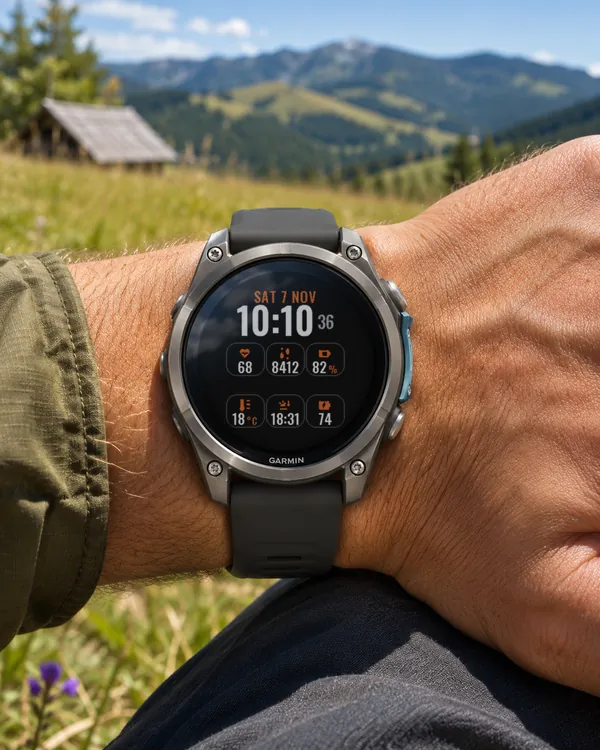 Colour Mip
Tech Tiles
A clear data panel for colour MIP watches: six tiles with sharp icons in your accent colour
 Forerunner 55
Lite Tiles
A data panel drawn for the Forerunner 55: six tiles in the eight colours the screen really has
 Instinct
Mono Tiles
A black and white data panel drawn pixel by pixel for the Instinct screen and its round
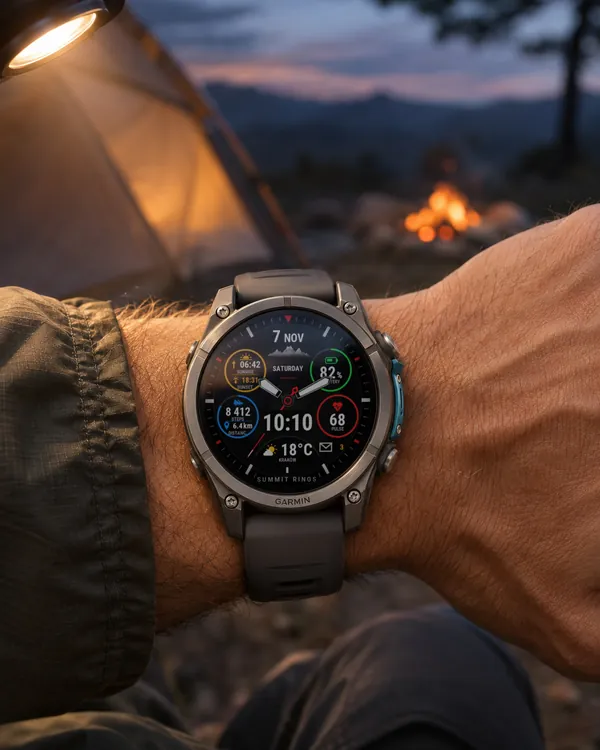 Outdoor
Summit Rings
5.0 (18)
Four coloured rings, hands and a big digital time