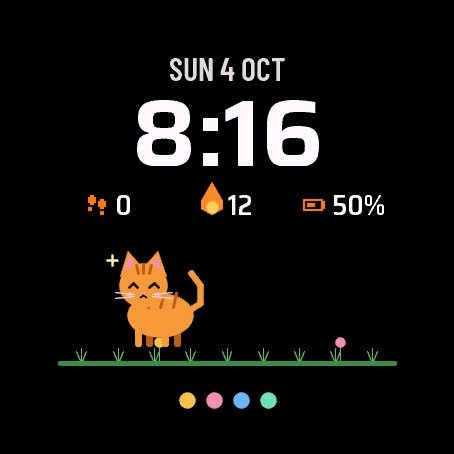
A small pet lives on your watch face. It walks along the ground under the clock, sleeps at night, and your steps are its food. A good walk and it eats well. A day on the couch and it gets hungry and sulks.
- The pet grows from a baby to a senior. You start with a cat, dog or bird and unlock 9 more species with the code.
- Hold your finger on the pet to open the game in Critter Park: feeding, play, cleaning, daily tasks, a shop and 6 mini games, among them a jumping run.
- Four dots show hunger, mood, cleanliness and health, a "!" shows when the pet wants something, and a flame counts the days in a row you took care of it.
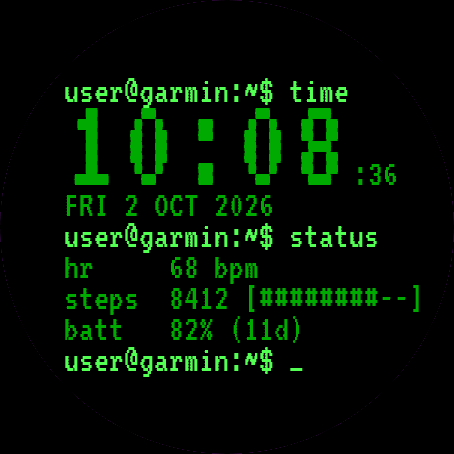
- 2 data fields from 47 options (steps and battery by default), two layouts (big clock or big pet), three pet sizes, 12 or 24 hour time, date in 13 languages.
- Always-on mode: only the dimmed time and the outline of a sleeping pet, shifted every minute. No seconds.
The face needs the Critter Park app on the same watch. Install it, open it once and pick an egg. Without it the face shows an egg and a short hint. The pet lives in the app, the face only shows it and never connects to the internet.
After 7 days without a code the face still shows the time and your pet, with default settings and a small UNLOCK DIALFORGE.DEV note. Your pet never disappears because of a missing code.
One code for the face and the app: buy it for the watch UID shown in Critter Park (Menu, Unlock code) and type it in there. The face unlocks by itself the next time it reads your pet. You can also type the same code in the face settings on the watch (Unlock code, where you also see the UID and the trial days left) or in Garmin Connect.
When Garmin has no data for a field, the face shows "--" instead of a made-up value.
Holding the pet needs a watch that can open an app from a watch face. If yours cannot, open Critter Park from the app list.
Settings: on the watch (hold MENU, then Watch face, then Customize) or in the Garmin Connect app on your phone.
A little request from the maker
Dialforge is my student project. I build these watch faces after classes, so they are still at an early stage, and I could not test every watch model myself. If something looks wrong on your watch, please do not leave a negative rating: write to me first at https://dialforge.dev/faces/critterdial/ and I will fix it, usually within 24 hours. A kind review means more to me than you can imagine. And if you like my work, you can buy me a coffee (the link is at the bottom of dialforge.dev): I am saving up to pay for my studies. Thank you for your patience and for giving a young developer a chance.
Na tarczy mieszka mały stworek. Chodzi po gruncie pod zegarem, w nocy śpi, a jego jedzeniem są Twoje kroki. Dobry spacer i stworek się naje. Dzień na kanapie i robi się głodny i marudny.
- Stworek rośnie od malucha do seniora. Zaczynasz z kotem, psem albo ptakiem, a po wpisaniu kodu odblokowujesz 9 kolejnych gatunków.
- Przytrzymaj palec na stworku, żeby otworzyć grę w Critter Park: karmienie, zabawa, sprzątanie, zadania dnia, sklep i 6 minigier, w tym bieg ze skakaniem.
- Cztery kropki pokazują głód, humor, czystość i zdrowie, wykrzyknik pojawia się, gdy stworek czegoś chce, a płomień liczy kolejne dni z opieką.
- 2 pola danych do wyboru spośród 47 (domyślnie kroki i bateria), dwa układy (duży zegar albo duży stworek), trzy rozmiary stworka, godzina 12 lub 24 h, data w 13 językach.
- Tryb zawsze włączony: tylko przygaszona godzina i kontur śpiącego stworka, przesuwane co minutę. Bez sekund.
Tarcza potrzebuje aplikacji Critter Park na tym samym zegarku. Zainstaluj ją, otwórz raz i wybierz jajko. Bez niej tarcza pokazuje jajko i krótką podpowiedź. Stworek mieszka w aplikacji, tarcza tylko go pokazuje i nie łączy się z internetem.
Po 7 dniach bez kodu tarcza dalej pokazuje godzinę i stworka, z domyślnymi ustawieniami i małym napisem UNLOCK DIALFORGE.DEV. Stworek nigdy nie znika przez brak kodu.
Jeden kod na tarczę i aplikację: kup go dla UID zegarka pokazanego w Critter Park (Menu, Kod odblokowania) i wpisz go tam. Tarcza odblokuje się sama, gdy następnym razem odczyta stworka. Ten sam kod możesz też wpisać w ustawieniach tarczy na zegarku (Kod odblokowania, tam widać też UID i dni próby) albo w Garmin Connect.
Gdy Garmin nie ma danych dla pola, tarcza pokazuje "--" zamiast zmyślonej wartości.
Przytrzymanie stworka wymaga zegarka, który potrafi otworzyć aplikację z tarczy. Jeśli Twój tego nie umie, otwórz Critter Park z listy aplikacji.
Ustawienia: na zegarku (przytrzymaj MENU, potem Tarcza zegarka, potem Dostosuj) albo w aplikacji Garmin Connect w telefonie.
Mała prośba od autora
Dialforge to mój studencki projekt. Robię te tarcze po zajęciach, więc są jeszcze na wczesnym etapie i nie mogłem przetestować każdego modelu zegarka. Jeśli coś wygląda źle na Twoim zegarku, proszę, nie wystawiaj negatywnej oceny: napisz najpierw do mnie na https://dialforge.dev/faces/critterdial/, a naprawię to, zwykle w ciągu 24 godzin. Życzliwa opinia znaczy dla mnie więcej, niż myślisz. A jeśli podoba Ci się moja praca, możesz postawić mi kawę (link na dole strony dialforge.dev): zbieram na opłacenie studiów. Dziękuję za cierpliwość i za danie szansy młodemu twórcy.
Ein kleines Tier lebt auf deinem Zifferblatt. Es läuft unter der Uhrzeit über den Boden, schläft nachts, und deine Schritte sind sein Futter. Ein guter Spaziergang, und es frisst sich satt. Ein Tag auf dem Sofa, und es bekommt Hunger und schmollt.
- Das Tier wächst vom Baby bis zum Senior. Du startest mit Katze, Hund oder Vogel und schaltest mit dem Code 9 weitere Arten frei.
- Halte den Finger auf das Tier, um das Spiel in Critter Park zu öffnen: Füttern, Spielen, Putzen, Tagesaufgaben, ein Shop und 6 Minispiele, darunter ein Hüpflauf.
- Vier Punkte zeigen Hunger, Laune, Sauberkeit und Gesundheit, ein "!" zeigt, wenn das Tier etwas will, und eine Flamme zählt die Tage in Folge, an denen du dich gekümmert hast.
- 2 Datenfelder aus 47 Optionen (standardmäßig Schritte und Akku), zwei Layouts (große Uhrzeit oder großes Tier), drei Tiergrößen, 12- oder 24-Stunden-Anzeige, Datum in 13 Sprachen.
- Always-on-Modus: nur die gedimmte Uhrzeit und der Umriss eines schlafenden Tiers, jede Minute verschoben. Keine Sekunden.
Das Zifferblatt braucht die App Critter Park auf derselben Uhr. Installiere sie, öffne sie einmal und wähle ein Ei. Ohne sie zeigt das Zifferblatt ein Ei und einen kurzen Hinweis. Das Tier lebt in der App, das Zifferblatt zeigt es nur an und verbindet sich nie mit dem Internet.
Nach 7 Tagen ohne Code zeigt das Zifferblatt weiterhin die Uhrzeit und dein Tier, mit Standardeinstellungen und einem kleinen Hinweis UNLOCK DIALFORGE.DEV. Dein Tier verschwindet nie wegen eines fehlenden Codes.
Ein Code für Zifferblatt und App: Kaufe ihn für die UID der Uhr, die in Critter Park angezeigt wird (Menü, Freischaltcode), und gib ihn dort ein. Das Zifferblatt schaltet sich beim nächsten Auslesen deines Tiers selbst frei. Du kannst denselben Code auch in den Zifferblatt-Einstellungen auf der Uhr eingeben (Freischaltcode, dort siehst du auch die UID und die übrigen Testtage) oder in Garmin Connect.
Wenn Garmin für ein Feld keine Daten hat, zeigt das Zifferblatt "--" statt eines erfundenen Werts.
Das Halten auf dem Tier funktioniert nur mit einer Uhr, die von einem Zifferblatt aus eine App öffnen kann. Wenn deine das nicht kann, öffne Critter Park über die App-Liste.
Einstellungen: auf der Uhr (MENU gedrückt halten, dann Zifferblatt, dann Anpassen) oder in der App Garmin Connect auf deinem Smartphone.
Eine kleine bitte vom entwickler
Dialforge ist mein Studentenprojekt. Ich baue diese Zifferblätter nach den Vorlesungen, deshalb sind sie noch am Anfang, und ich konnte nicht jedes Uhrenmodell selbst testen. Wenn auf deiner Uhr etwas falsch aussieht, gib bitte keine schlechte Bewertung ab: Schreib mir zuerst an https://dialforge.dev/faces/critterdial/, dann behebe ich es, meist innerhalb von 24 Stunden. Eine freundliche Bewertung bedeutet mir mehr, als du dir vorstellen kannst. Und wenn dir meine Arbeit gefällt, kannst du mir einen Kaffee spendieren (der Link steht unten auf dialforge.dev): Ich spare für mein Studium. Danke für deine Geduld und dafür, dass du einem jungen Entwickler eine Chance gibst.
Un petit animal vit sur votre cadran. Il marche sur le sol sous l'heure, dort la nuit, et vos pas sont sa nourriture. Une bonne marche et il mange bien. Une journée sur le canapé et il a faim et boude.
- L'animal grandit de bébé à senior. Vous commencez avec un chat, un chien ou un oiseau et débloquez 9 autres espèces avec le code.
- Maintenez le doigt sur l'animal pour ouvrir le jeu dans Critter Park : repas, jeu, nettoyage, tâches du jour, une boutique et 6 mini-jeux, dont une course avec sauts.
- Quatre points montrent la faim, l'humeur, la propreté et la santé, un "!" signale que l'animal veut quelque chose, et une flamme compte les jours de suite où vous vous en êtes occupé.
- 2 champs de données parmi 47 options (pas et batterie par défaut), deux dispositions (grande heure ou grand animal), trois tailles d'animal, heure sur 12 ou 24 heures, date en 13 langues.
- Mode toujours activé : seulement l'heure atténuée et le contour d'un animal endormi, déplacé chaque minute. Sans secondes.
Le cadran a besoin de l'application Critter Park sur la même montre. Installez-la, ouvrez-la une fois et choisissez un œuf. Sans elle, le cadran affiche un œuf et un court message. L'animal vit dans l'application, le cadran ne fait que l'afficher et ne se connecte jamais à Internet.
Après 7 jours sans code, le cadran affiche toujours l'heure et votre animal, avec les réglages par défaut et une petite mention UNLOCK DIALFORGE.DEV. Votre animal ne disparaît jamais à cause d'un code manquant.
Un seul code pour le cadran et l'application : achetez-le pour l'UID de la montre affiché dans Critter Park (Menu, Code de déverrouillage) et saisissez-le là. Le cadran se déverrouille tout seul à la prochaine lecture de votre animal. Vous pouvez aussi saisir le même code dans les réglages du cadran sur la montre (Code de déverrouillage, où vous voyez aussi l'UID et les jours d'essai restants) ou dans Garmin Connect.
Quand Garmin n'a pas de données pour un champ, le cadran affiche "--" au lieu d'une valeur inventée.
Le maintien sur l'animal demande une montre capable d'ouvrir une application depuis un cadran. Si la vôtre ne peut pas, ouvrez Critter Park depuis la liste des applications.
Réglages : sur la montre (maintenez MENU, puis Cadran, puis Personnaliser) ou dans l'application Garmin Connect sur votre téléphone.
Une petite demande du créateur
Dialforge est mon projet d'étudiant. Je crée ces cadrans après les cours, ils sont donc encore à un stade précoce, et je n'ai pas pu tester moi-même chaque modèle de montre. Si quelque chose semble anormal sur votre montre, ne laissez pas de mauvaise note : écrivez-moi d'abord à https://dialforge.dev/faces/critterdial/ et je corrigerai, en général sous 24 heures. Un avis aimable compte plus pour moi que vous ne l'imaginez. Et si mon travail vous plaît, vous pouvez m'offrir un café (le lien est en bas de dialforge.dev) : j'économise pour payer mes études. Merci de votre patience et de donner sa chance à un jeune développeur.
Una mascota pequeña vive en la esfera de tu reloj. Camina por el suelo bajo la hora, duerme por la noche y tus pasos son su comida. Un buen paseo y come bien. Un día en el sofá y tiene hambre y se enfurruña.
- La mascota crece de bebé a anciana. Empiezas con un gato, un perro o un pájaro y desbloqueas 9 especies más con el código.
- Mantén el dedo sobre la mascota para abrir el juego en Critter Park: comida, juego, limpieza, tareas diarias, una tienda y 6 minijuegos, entre ellos una carrera de saltos.
- Cuatro puntos muestran hambre, ánimo, limpieza y salud, un "!" avisa cuando la mascota quiere algo, y una llama cuenta los días seguidos que la has cuidado.
- 2 campos de datos entre 47 opciones (pasos y batería por defecto), dos diseños (hora grande o mascota grande), tres tamaños de mascota, hora de 12 o 24 horas, fecha en 13 idiomas.
- Modo siempre activo: solo la hora atenuada y el contorno de una mascota dormida, desplazado cada minuto. Sin segundos.
La esfera necesita la app Critter Park en el mismo reloj. Instálala, ábrela una vez y elige un huevo. Sin ella, la esfera muestra un huevo y una breve indicación. La mascota vive en la app, la esfera solo la muestra y nunca se conecta a internet.
Tras 7 días sin código, la esfera sigue mostrando la hora y tu mascota, con los ajustes por defecto y una pequeña nota UNLOCK DIALFORGE.DEV. Tu mascota nunca desaparece por falta de código.
Un código para la esfera y la app: cómpralo para el UID del reloj que aparece en Critter Park (Menú, Código de desbloqueo) y escríbelo allí. La esfera se desbloquea sola la próxima vez que lea a tu mascota. También puedes escribir el mismo código en los ajustes de la esfera en el reloj (Código de desbloqueo, donde también ves el UID y los días de prueba restantes) o en Garmin Connect.
Cuando Garmin no tiene datos para un campo, la esfera muestra "--" en lugar de un valor inventado.
Mantener pulsada la mascota requiere un reloj que pueda abrir una app desde una esfera. Si el tuyo no puede, abre Critter Park desde la lista de apps.
Ajustes: en el reloj (mantén MENU, luego Esfera del reloj, luego Personalizar) o en la app Garmin Connect de tu teléfono.
Una petición del creador
Dialforge es mi proyecto de estudiante. Hago estas esferas después de clase, así que aún están en una fase temprana y no he podido probar todos los modelos de reloj. Si algo se ve mal en tu reloj, por favor no dejes una valoración negativa: escríbeme primero a https://dialforge.dev/faces/critterdial/ y lo arreglaré, normalmente en 24 horas. Una reseña amable significa para mí más de lo que imaginas. Y si te gusta mi trabajo, puedes invitarme a un café (el enlace está al final de dialforge.dev): estoy ahorrando para pagar mis estudios. Gracias por tu paciencia y por dar una oportunidad a un desarrollador joven.
Een klein huisdier woont op je wijzerplaat. Het loopt over de grond onder de klok, slaapt 's nachts en jouw stappen zijn zijn eten. Een goede wandeling en het eet goed. Een dag op de bank en het krijgt honger en gaat mokken.
- Het huisdier groeit van baby tot senior. Je begint met een kat, hond of vogel en ontgrendelt met de code nog 9 soorten.
- Houd je vinger op het huisdier om het spel te openen in Critter Park: eten geven, spelen, schoonmaken, dagtaken, een winkel en 6 minigames, waaronder een springspel.
- Vier stippen tonen honger, humeur, netheid en gezondheid, een "!" toont wanneer het huisdier iets wil, en een vlam telt de dagen achter elkaar dat je voor het huisdier zorgde.
- 2 gegevensvelden uit 47 opties (standaard stappen en batterij), twee indelingen (grote klok of groot huisdier), drie huisdiergroottes, 12- of 24-uursweergave, datum in 13 talen.
- Altijd-aan-modus: alleen de gedimde tijd en de omtrek van een slapend huisdier, elke minuut verschoven. Geen seconden.
De wijzerplaat heeft de app Critter Park op hetzelfde horloge nodig. Installeer die, open hem één keer en kies een ei. Zonder de app toont de wijzerplaat een ei en een korte hint. Het huisdier woont in de app, de wijzerplaat toont het alleen en maakt nooit verbinding met internet.
Na 7 dagen zonder code toont de wijzerplaat nog steeds de tijd en je huisdier, met standaardinstellingen en een kleine melding UNLOCK DIALFORGE.DEV. Je huisdier verdwijnt nooit door een ontbrekende code.
Eén code voor de wijzerplaat en de app: koop hem voor de UID van het horloge die in Critter Park staat (Menu, Ontgrendelcode) en voer hem daar in. De wijzerplaat ontgrendelt vanzelf de volgende keer dat hij je huisdier uitleest. Je kunt dezelfde code ook invoeren in de instellingen van de wijzerplaat op het horloge (Ontgrendelcode, waar je ook de UID en de resterende proefdagen ziet) of in Garmin Connect.
Als Garmin geen gegevens heeft voor een veld, toont de wijzerplaat "--" in plaats van een verzonnen waarde.
Het huisdier vasthouden werkt alleen op een horloge dat vanaf een wijzerplaat een app kan openen. Kan dat bij jouw horloge niet, open dan Critter Park vanuit de lijst met apps.
Instellingen: op het horloge (houd MENU ingedrukt, dan Wijzerplaat, dan Aanpassen) of in de Garmin Connect-app op je telefoon.
Een klein verzoek van de maker
Dialforge is mijn studentenproject. Ik maak deze wijzerplaten na de lessen, dus ze zitten nog in een vroeg stadium en ik kon niet elk horlogemodel zelf testen. Ziet er iets verkeerd uit op jouw horloge, geef dan alsjeblieft geen negatieve beoordeling: schrijf me eerst via https://dialforge.dev/faces/critterdial/ en ik los het op, meestal binnen 24 uur. Een vriendelijke review betekent meer voor me dan je denkt. En als je mijn werk waardeert, kun je een kopje koffie voor me kopen (de link staat onderaan dialforge.dev): ik spaar om mijn studie te betalen. Bedankt voor je geduld en voor de kans die je geeft aan iemand die net begint.
小さなペットがウォッチフェイスに住んでいます。時計の下の地面を歩き、夜は眠り、あなたの歩数がごはんになります。たくさん歩けばしっかり食べ、一日中ソファで過ごすとおなかをすかせてすねてしまいます。
- ペットは赤ちゃんからシニアまで成長します。最初はネコ、イヌ、トリから選べ、コードでさらに9種類が解除されます。
- ペットを指で長押しすると Critter Park でゲームが開きます。ごはん、遊び、そうじ、毎日のタスク、ショップ、ジャンプラン入りの6つのミニゲームがあります。
- 四つの点で空腹、機嫌、清潔さ、健康を表示します。ペットが何か求めると「!」が出て、炎は世話を続けた連続日数を数えます。
- 47種類から選べる2つのデータ項目(初期設定は歩数とバッテリー)、二つのレイアウト(大きな時計か大きなペット)、三つのペットサイズ、12時間または24時間表示、13言語の日付表示。
- 常時表示モード:暗くした時刻と、眠っているペットの輪郭だけを表示し、毎分位置をずらします。秒は表示しません。
このフェイスには、同じ時計に Critter Park アプリが必要です。インストールして一度開き、たまごを選んでください。アプリがないと、フェイスにはたまごと短いヒントが表示されます。ペットはアプリの中に住んでいて、フェイスは表示するだけで、インターネットには接続しません。
コードなしで7日たつと、フェイスは初期設定のまま時刻とペットを表示し、小さな UNLOCK DIALFORGE.DEV の表示が出ます。コードがなくてもペットが消えることはありません。
フェイスとアプリで使えるコードはひとつです。Critter Park に表示される時計の UID(メニュー、解除コード)を指定して購入し、そこで入力してください。次にフェイスがペットを読み取ったときに、自動で解除されます。時計のフェイス設定(解除コード。UID と残りの体験日数も確認できます)や Garmin Connect からも同じコードを入力できます。
Garmin にデータがない項目には、作り物の値ではなく「--」を表示します。
ペットの長押しには、ウォッチフェイスからアプリを開ける時計が必要です。対応していない場合は、アプリ一覧から Critter Park を開いてください。
設定:時計で(MENU を長押し、ウォッチフェイス、カスタマイズの順)、またはスマートフォンの Garmin Connect アプリで行います。
制作者からのささやかなお願い
Dialforge は私の学生プロジェクトです。授業のあとにこれらのウォッチフェイスを作っているので、まだ初期段階で、すべての時計モデルを自分で試すことはできませんでした。お使いの時計で表示がおかしいときは、低い評価をつける前に、まず https://dialforge.dev/faces/critterdial/ から私に知らせてください。たいてい24時間以内に直します。やさしいレビューは、想像以上に励みになります。この作品を気に入っていただけたら、コーヒーをごちそうしていただくこともできます(リンクは dialforge.dev の一番下にあります)。学費のために貯金しています。ご辛抱と、若い開発者にチャンスをくださることに感謝します。
Un piccolo animale vive sul quadrante del tuo orologio. Cammina sul terreno sotto l'ora, dorme di notte e i tuoi passi sono il suo cibo. Una bella camminata e mangia bene. Una giornata sul divano e ha fame e mette il broncio.
- L'animale cresce da cucciolo ad anziano. Inizi con un gatto, un cane o un uccellino e con il codice sblocchi altre 9 specie.
- Tieni il dito sull'animale per aprire il gioco in Critter Park: cibo, gioco, pulizia, compiti giornalieri, un negozio e 6 minigiochi, tra cui una corsa a salti.
- Quattro puntini mostrano fame, umore, pulizia e salute, un "!" indica quando l'animale vuole qualcosa e una fiamma conta i giorni di fila in cui te ne sei preso cura.
- 2 campi dati tra 47 opzioni (passi e batteria di default), due layout (ora grande o animale grande), tre dimensioni dell'animale, ora a 12 o 24 ore, data in 13 lingue.
- Modalità sempre attiva: solo l'ora attenuata e il contorno di un animale che dorme, spostati ogni minuto. Niente secondi.
Il quadrante richiede l'app Critter Park sullo stesso orologio. Installala, aprila una volta e scegli un uovo. Senza l'app il quadrante mostra un uovo e un breve suggerimento. L'animale vive nell'app, il quadrante lo mostra soltanto e non si collega mai a internet.
Dopo 7 giorni senza codice il quadrante mostra ancora l'ora e il tuo animale, con le impostazioni predefinite e una piccola nota UNLOCK DIALFORGE.DEV. Il tuo animale non scompare mai per un codice mancante.
Un solo codice per quadrante e app: acquistalo per l'UID dell'orologio mostrato in Critter Park (Menu, Codice di sblocco) e inseriscilo lì. Il quadrante si sblocca da solo alla prossima lettura del tuo animale. Puoi inserire lo stesso codice anche nelle impostazioni del quadrante sull'orologio (Codice di sblocco, dove vedi anche l'UID e i giorni di prova rimasti) o in Garmin Connect.
Quando Garmin non ha dati per un campo, il quadrante mostra "--" invece di un valore inventato.
Tenere premuto l'animale richiede un orologio che possa aprire un'app da un quadrante. Se il tuo non può, apri Critter Park dall'elenco delle app.
Impostazioni: sull'orologio (tieni premuto MENU, poi Quadrante, poi Personalizza) o nell'app Garmin Connect sul telefono.
Una piccola richiesta da chi lo crea
Dialforge è il mio progetto da studente. Realizzo questi quadranti dopo le lezioni, quindi sono ancora in una fase iniziale e non ho potuto provare ogni modello di orologio. Se qualcosa non va sul tuo orologio, per favore non lasciare una valutazione negativa: scrivimi prima a https://dialforge.dev/faces/critterdial/ e lo correggo, di solito entro 24 ore. Una recensione gentile per me vale più di quanto immagini. E se ti piace il mio lavoro, puoi offrirmi un caffè (il link è in fondo a dialforge.dev): sto mettendo da parte i soldi per pagarmi gli studi. Grazie per la pazienza e per aver dato una possibilità a chi sta iniziando.
一只小宠物住在你的表盘上。它在时钟下方的地面上走动,夜里睡觉,你的步数就是它的食物。多走路,它就吃得好;整天窝在沙发上,它会饿肚子、闹情绪。
- 宠物会从幼崽成长为老年。一开始可选猫、狗或小鸟,输入解锁码后可再解锁9种。
- 长按宠物,即可在 Critter Park 中打开游戏:喂食、玩耍、清洁、每日任务、商店和6个小游戏,其中包括一个跳跃跑酷。
- 四个圆点分别显示饥饿、心情、清洁和健康,宠物有需求时会出现“!”,火焰则记录你连续照顾它的天数。
- 47种数据可选2个数据栏(默认为步数和电量),两种布局(大时钟或大宠物),三种宠物大小,12或24小时制,日期支持13种语言。
- 常亮模式:只显示调暗的时间和熟睡宠物的轮廓,每分钟移动一次位置。不显示秒数。
表盘需要同一块手表上安装 Critter Park 应用。请先安装并打开一次,选一颗蛋。没有它时,表盘会显示一颗蛋和一条简短提示。宠物住在应用里,表盘只负责显示,从不联网。
7天内没有输入解锁码,表盘仍会显示时间和你的宠物,使用默认设置,并带有一条小小的 UNLOCK DIALFORGE.DEV 提示。你的宠物不会因为缺少解锁码而消失。
表盘和应用共用一个解锁码:请按 Critter Park 中显示的手表 UID(菜单,解锁码)购买,并在那里输入。表盘会在下次读取你的宠物时自动解锁。你也可以在手表上的表盘设置里输入同一个解锁码(解锁码一栏,同时可查看 UID 和剩余试用天数),或在 Garmin Connect 中输入。
当 Garmin 没有某个数据栏的数据时,表盘会显示“--”,而不是编造的数值。
长按宠物需要手表支持从表盘打开应用。如果你的手表不支持,请在应用列表中打开 Critter Park。
设置方法:在手表上(长按 MENU,然后选择表盘,再选择自定义),或在手机上的 Garmin Connect 应用中。
开发者的一个小请求
Dialforge 是我的学生项目。这些表盘是我在课后制作的,所以还处在早期阶段,我也无法在每一款手表上亲自测试。如果表盘在你的手表上显示不对,请先不要给差评,先写信到 https://dialforge.dev/faces/critterdial/ 告诉我,我会修复,通常在24小时内。一条好评对我的意义超出你的想象。如果你喜欢我的作品,可以请我喝杯咖啡(链接在 dialforge.dev 页面底部),我正在攒钱付学费。感谢你的耐心,也感谢你给一位年轻开发者机会。
На циферблате живёт маленький питомец. Он ходит по земле под часами, ночью спит, а ваши шаги для него еда. Хорошая прогулка, и он сыт. День на диване, и он голоден и дуется.
- Питомец растёт от малыша до старичка. Начать можно с кошки, собаки или птицы, а с кодом откроются ещё 9 видов.
- Задержите палец на питомце, и в Critter Park откроется игра: кормление, игры, уборка, задания дня, магазин и 6 мини-игр, среди них бег с прыжками.
- Четыре точки показывают голод, настроение, чистоту и здоровье, знак "!" появляется, когда питомец чего-то хочет, а огонёк считает дни подряд, когда вы о нём заботились.
- 2 поля данных на выбор из 47 (по умолчанию шаги и заряд), два макета (крупные часы или крупный питомец), три размера питомца, формат 12 или 24 часа, дата на 13 языках.
- Режим Always-on: только приглушённое время и контур спящего питомца, сдвигающиеся каждую минуту. Без секунд.
Циферблату нужно приложение Critter Park на тех же часах. Установите его, откройте один раз и выберите яйцо. Без приложения циферблат показывает яйцо и короткую подсказку. Питомец живёт в приложении, циферблат лишь показывает его и никогда не выходит в интернет.
Через 7 дней без кода циферблат всё равно показывает время и питомца, с настройками по умолчанию и небольшой пометкой UNLOCK DIALFORGE.DEV. Питомец не исчезнет из-за отсутствия кода.
Один код на циферблат и приложение: купите его для UID часов, показанного в Critter Park (Меню, Код разблокировки), и введите его там. Циферблат разблокируется сам, когда в следующий раз прочитает данные питомца. Тот же код можно ввести и в настройках циферблата на часах (Код разблокировки, там же видны UID и оставшиеся дни пробного периода) или в Garmin Connect.
Если у Garmin нет данных для поля, циферблат показывает "--", а не выдуманное значение.
Чтобы задержать палец на питомце, часы должны уметь открывать приложение с циферблата. Если не умеют, откройте Critter Park из списка приложений.
Настройки: на часах (удерживайте MENU, затем Циферблат, затем Настроить) или в приложении Garmin Connect на телефоне.
Небольшая просьба от автора
Dialforge - мой студенческий проект. Я делаю эти циферблаты после занятий, поэтому они пока на раннем этапе, и проверить все модели часов самому не удалось. Если на ваших часах что-то выглядит не так, пожалуйста, не ставьте низкую оценку: сначала напишите мне на https://dialforge.dev/faces/critterdial/, и я исправлю, обычно в течение 24 часов. Добрый отзыв значит для меня больше, чем можно представить. А если вам нравится моя работа, можно угостить меня кофе (ссылка внизу dialforge.dev): я коплю на учёбу. Спасибо за терпение и за шанс, который вы даёте молодому разработчику.
Um bichinho vive no mostrador do seu relógio. Ele anda pelo chão embaixo da hora, dorme à noite e seus passos são a comida dele. Uma boa caminhada e ele come bem. Um dia no sofá e ele fica com fome e emburrado.
- O bichinho cresce de bebê a idoso. Você começa com um gato, cachorro ou pássaro e desbloqueia mais 9 espécies com o código.
- Mantenha o dedo sobre o bichinho para abrir o jogo no Critter Park: alimentar, brincar, limpar, tarefas diárias, uma loja e 6 minijogos, entre eles uma corrida com pulos.
- Quatro pontos mostram fome, humor, limpeza e saúde, um "!" aparece quando o bichinho quer algo, e uma chama conta os dias seguidos em que você cuidou dele.
- 2 campos de dados entre 47 opções (passos e bateria por padrão), dois layouts (relógio grande ou bichinho grande), três tamanhos de bichinho, hora de 12 ou 24 horas, data em 13 idiomas.
- Modo sempre ligado: só a hora com brilho reduzido e o contorno de um bichinho dormindo, deslocados a cada minuto. Sem segundos.
O mostrador precisa do app Critter Park no mesmo relógio. Instale, abra uma vez e escolha um ovo. Sem o app, o mostrador exibe um ovo e uma dica curta. O bichinho vive no app, o mostrador só o exibe e nunca se conecta à internet.
Após 7 dias sem código, o mostrador ainda exibe a hora e seu bichinho, com as configurações padrão e um pequeno aviso UNLOCK DIALFORGE.DEV. Seu bichinho nunca desaparece por falta de código.
Um código para o mostrador e o app: compre para o UID do relógio exibido no Critter Park (Menu, Código de desbloqueio) e digite lá mesmo. O mostrador se desbloqueia sozinho na próxima vez que ler seu bichinho. Você também pode digitar o mesmo código nas configurações do mostrador no relógio (Código de desbloqueio, onde também aparecem o UID e os dias de teste restantes) ou no Garmin Connect.
Quando a Garmin não tem dados para um campo, o mostrador exibe "--" em vez de um valor inventado.
Manter o dedo no bichinho exige um relógio que consiga abrir um app a partir de um mostrador. Se o seu não consegue, abra o Critter Park pela lista de apps.
Configurações: no relógio (mantenha MENU pressionado, depois Mostrador, depois Personalizar) ou no app Garmin Connect no celular.
Um pequeno pedido de quem criou
Dialforge é meu projeto de estudante. Faço estes mostradores depois das aulas, então ainda estão em fase inicial, e não consegui testar todos os modelos de relógio. Se algo parecer errado no seu relógio, por favor não deixe uma avaliação negativa: escreva antes para https://dialforge.dev/faces/critterdial/ e eu corrijo, geralmente em até 24 horas. Uma avaliação gentil significa mais para mim do que você imagina. E se gostar do meu trabalho, pode me pagar um café (o link está no fim de dialforge.dev): estou juntando dinheiro para pagar meus estudos. Agradeço a paciência e a chance que você dá a quem está começando.
Na vašem ciferníku žije malý mazlíček. Chodí po zemi pod hodinami, v noci spí a vaše kroky jsou jeho jídlo. Dobrá procházka a dobře se nají. Den na gauči a bude hladový a bude se vztekat.
- Mazlíček vyroste z mláděte do stáří. Začínáte s kočkou, psem nebo ptákem a kódem odemknete dalších 9 druhů.
- Podržte prst na mazlíčkovi a otevře se hra v aplikaci Critter Park: krmení, hraní, úklid, denní úkoly, obchod a 6 minihier, mezi nimi běh se skákáním.
- Čtyři tečky ukazují hlad, náladu, čistotu a zdraví, "!" se objeví, když mazlíček něco chce, a plamen počítá, kolik dní v řadě jste se o něj starali.
- 2 datová pole ze 47 možností (ve výchozím stavu kroky a baterie), dvě rozvržení (velké hodiny nebo velký mazlíček), tři velikosti mazlíčka, 12 nebo 24hodinový čas, datum ve 13 jazycích.
- Režim stále zapnuto: jen ztlumený čas a obrys spícího mazlíčka, posunutý každou minutu. Bez sekund.
Ciferník potřebuje na stejných hodinkách aplikaci Critter Park. Nainstalujte ji, jednou ji otevřete a vyberte vejce. Bez ní ciferník ukazuje vejce a krátkou nápovědu. Mazlíček žije v aplikaci, ciferník ho jen zobrazuje a nikdy se nepřipojuje k internetu.
Po 7 dnech bez kódu ciferník dál ukazuje čas a vašeho mazlíčka, s výchozím nastavením a malou poznámkou UNLOCK DIALFORGE.DEV. Váš mazlíček nikdy nezmizí kvůli chybějícímu kódu.
Jeden kód pro ciferník i aplikaci: kupte ho pro UID hodinek zobrazené v Critter Park (Menu, Odemykací kód) a zadejte ho tam. Ciferník se odemkne sám, až příště načte vašeho mazlíčka. Stejný kód můžete zadat také v nastavení ciferníku na hodinkách (Odemykací kód, kde vidíte i UID a zbývající dny zkušební doby) nebo v Garmin Connect.
Když Garmin nemá pro pole data, ciferník zobrazí "--" místo vymyšlené hodnoty.
Podržení mazlíčka vyžaduje hodinky, které umí otevřít aplikaci z ciferníku. Pokud ty vaše ne, otevřete Critter Park ze seznamu aplikací.
Nastavení: na hodinkách (podržte MENU, pak Ciferník, pak Přizpůsobit) nebo v aplikaci Garmin Connect v telefonu.
Malá prosba od autora
Dialforge je můj studentský projekt. Tyto ciferníky dělám po škole, takže jsou stále v rané fázi a nemohl jsem sám otestovat každý model hodinek. Pokud něco na vašich hodinkách vypadá špatně, nedávejte prosím špatné hodnocení: napište mi nejdřív na https://dialforge.dev/faces/critterdial/ a opravím to, obvykle do 24 hodin. Milá recenze pro mě znamená víc, než si dokážete představit. A pokud se vám moje práce líbí, můžete mi koupit kávu (odkaz je dole na dialforge.dev): šetřím si na studium. Děkuji za trpělivost a za to, že dáváte šanci mladému vývojáři.
Um pequeno animal vive no seu mostrador. Anda pelo chão debaixo do relógio, dorme à noite e os seus passos são a comida dele. Uma boa caminhada e ele come bem. Um dia no sofá e fica com fome e amuado.
- O animal cresce de bebé a idoso. Começa com um gato, um cão ou uma ave e desbloqueia mais 9 espécies com o código.
- Mantenha o dedo sobre o animal para abrir o jogo no Critter Park: comida, brincadeira, limpeza, tarefas diárias, uma loja e 6 minijogos, entre eles uma corrida com saltos.
- Quatro pontos mostram a fome, o humor, a limpeza e a saúde, um "!" aparece quando o animal quer algo e uma chama conta os dias seguidos em que cuidou dele.
- 2 campos de dados entre 47 opções (passos e bateria por predefinição), dois formatos (relógio grande ou animal grande), três tamanhos de animal, hora de 12 ou 24 horas, data em 13 idiomas.
- Modo sempre ligado: só a hora esbatida e o contorno de um animal a dormir, deslocado a cada minuto. Sem segundos.
O mostrador precisa da aplicação Critter Park no mesmo relógio. Instale-a, abra-a uma vez e escolha um ovo. Sem ela, o mostrador apresenta um ovo e uma curta indicação. O animal vive na aplicação, o mostrador só o apresenta e nunca se liga à internet.
Passados 7 dias sem código, o mostrador continua a apresentar a hora e o animal, com as definições predefinidas e uma pequena nota UNLOCK DIALFORGE.DEV. O animal nunca desaparece por falta de código.
Um só código para o mostrador e a aplicação: compre-o para o UID do relógio apresentado no Critter Park (Menu, Código de desbloqueio) e introduza-o lá. O mostrador desbloqueia-se sozinho na próxima vez que ler o animal. Pode também introduzir o mesmo código nas definições do mostrador no relógio (Código de desbloqueio, onde vê também o UID e os dias de teste restantes) ou no Garmin Connect.
Quando a Garmin não tem dados para um campo, o mostrador apresenta "--" em vez de um valor inventado.
Manter o dedo sobre o animal exige um relógio que consiga abrir uma aplicação a partir de um mostrador. Se o seu não consegue, abra o Critter Park na lista de aplicações.
Definições: no relógio (mantenha MENU, depois Mostrador, depois Personalizar) ou na aplicação Garmin Connect no telemóvel.
Um pequeno pedido do autor
O Dialforge é o meu projeto de estudante. Crio estes mostradores depois das aulas, por isso ainda estão numa fase inicial e não consegui testar todos os modelos de relógio. Se algo parecer errado no seu relógio, por favor não deixe uma avaliação negativa: escreva-me primeiro para https://dialforge.dev/faces/critterdial/ e eu corrijo, normalmente em 24 horas. Uma avaliação simpática vale mais para mim do que imagina. E se gosta do meu trabalho, pode pagar-me um café (a ligação está no fim de dialforge.dev): estou a poupar para pagar os estudos. Obrigado pela paciência e por dar uma oportunidade a um jovem programador.
작은 펫이 워치 페이스에서 살아요. 시계 아래 바닥을 걸어 다니고 밤에는 잠을 자며, 여러분의 걸음 수가 먹이가 됩니다. 많이 걸으면 잘 먹고, 하루 종일 소파에 있으면 배고파서 토라집니다.
- 펫은 아기에서 노년까지 자랍니다. 고양이, 강아지, 새로 시작하고 코드를 입력하면 9종이 더 열립니다.
- 펫을 손가락으로 길게 누르면 Critter Park에서 게임이 열립니다. 먹이 주기, 놀이, 청소, 일일 과제, 상점, 점프 달리기를 포함한 미니게임 6개가 있습니다.
- 점 네 개가 배고픔, 기분, 청결, 건강을 보여 주고, 펫이 무언가 원하면 "!"가 표시되며, 불꽃은 연속으로 돌본 날수를 셉니다.
- 47가지 중에서 고르는 데이터 칸 2개(기본값은 걸음 수와 배터리), 레이아웃 두 가지(큰 시계 또는 큰 펫), 펫 크기 세 단계, 12시간 또는 24시간 표시, 13개 언어의 날짜.
- 상시 표시 모드: 어둡게 줄인 시간과 잠든 펫의 윤곽만 표시하며 매분 위치가 바뀝니다. 초는 표시하지 않습니다.
이 페이스를 쓰려면 같은 워치에 Critter Park 앱이 필요합니다. 앱을 설치하고 한 번 열어 알을 고르세요. 앱이 없으면 페이스에 알과 짧은 안내가 표시됩니다. 펫은 앱 안에 살고, 페이스는 보여 주기만 하며 인터넷에 연결되지 않습니다.
코드 없이 7일이 지나도 페이스는 기본 설정으로 시간과 펫을 계속 보여 주고, 작은 UNLOCK DIALFORGE.DEV 안내가 표시됩니다. 코드가 없어도 펫은 사라지지 않습니다.
페이스와 앱에 코드 하나로 충분합니다. Critter Park에 표시된 워치 UID(메뉴, 잠금 해제 코드)로 코드를 구매하고 그곳에 입력하세요. 다음에 페이스가 펫을 읽을 때 자동으로 잠금 해제됩니다. 워치의 페이스 설정(잠금 해제 코드, UID와 남은 체험 일수도 여기서 확인) 또는 Garmin Connect에서도 같은 코드를 입력할 수 있습니다.
Garmin에 어떤 항목의 데이터가 없으면 페이스는 지어낸 값 대신 "--"를 표시합니다.
펫을 길게 눌러 여는 기능은 워치 페이스에서 앱을 열 수 있는 워치에서만 가능합니다. 지원하지 않으면 앱 목록에서 Critter Park를 여세요.
설정: 워치에서(MENU를 길게 누르고, 워치 페이스, 맞춤 설정 순서) 또는 휴대폰의 Garmin Connect 앱에서 합니다.
제작자의 작은 부탁
Dialforge는 제 학생 프로젝트입니다. 수업이 끝난 뒤에 이 워치 페이스들을 만들고 있어서 아직 초기 단계이고, 모든 워치 모델을 직접 테스트하지는 못했습니다. 워치에서 이상하게 보이면 낮은 평점을 남기기 전에 먼저 https://dialforge.dev/faces/critterdial/로 알려 주세요. 보통 24시간 안에 고치겠습니다. 따뜻한 리뷰는 상상 이상으로 큰 힘이 됩니다. 제 작업이 마음에 드신다면 커피 한 잔을 사 주실 수도 있습니다(링크는 dialforge.dev 맨 아래에 있습니다). 학비를 모으고 있습니다. 기다려 주시고 젊은 개발자에게 기회를 주셔서 감사합니다.
Ett litet husdjur bor på din urtavla. Det går längs marken under klockan, sover på natten och dina steg är dess mat. En bra promenad och det äter gott. En dag i soffan och det blir hungrigt och surt.
- Djuret växer från unge till senior. Du börjar med en katt, hund eller fågel och låser upp 9 arter till med koden.
- Håll fingret på djuret för att öppna spelet i Critter Park: matning, lek, rengöring, dagliga uppgifter, en butik och 6 minispel, bland annat ett hoppande lopp.
- Fyra prickar visar hunger, humör, renlighet och hälsa, ett "!" visas när djuret vill något och en låga räknar dagarna i rad du har tagit hand om det.
- 2 datafält bland 47 alternativ (steg och batteri som standard), två layouter (stor klocka eller stort djur), tre djurstorlekar, 12- eller 24-timmarsklocka, datum på 13 språk.
- Always-on-läge: bara den dämpade tiden och konturen av ett sovande djur, flyttad varje minut. Inga sekunder.
Urtavlan kräver appen Critter Park på samma klocka. Installera den, öppna den en gång och välj ett ägg. Utan den visar urtavlan ett ägg och en kort ledtråd. Djuret bor i appen, urtavlan visar det bara och ansluter aldrig till internet.
Efter 7 dagar utan kod visar urtavlan fortfarande tiden och ditt djur, med standardinställningar och en liten UNLOCK DIALFORGE.DEV-notis. Ditt djur försvinner aldrig på grund av en saknad kod.
En kod för urtavlan och appen: köp den för klockans UID som visas i Critter Park (Meny, Upplåsningskod) och skriv in den där. Urtavlan låses upp av sig själv nästa gång den läser ditt djur. Du kan också skriva in samma kod i urtavlans inställningar på klockan (Upplåsningskod, där du också ser UID och återstående provdagar) eller i Garmin Connect.
När Garmin saknar data för ett fält visar urtavlan "--" i stället för ett påhittat värde.
Att hålla på djuret kräver en klocka som kan öppna en app från en urtavla. Om din inte kan det, öppna Critter Park från applistan.
Inställningar: på klockan (håll MENU, sedan Urtavla, sedan Anpassa) eller i appen Garmin Connect på telefonen.
En liten förfrågan från utvecklaren
Dialforge är mitt studentprojekt. Jag bygger de här urtavlorna efter lektionerna, så de är fortfarande i ett tidigt skede, och jag kunde inte testa alla klockmodeller själv. Om något ser fel ut på din klocka, lämna gärna inget negativt betyg: skriv till mig först på https://dialforge.dev/faces/critterdial/ så åtgärdar jag det, vanligtvis inom 24 timmar. Ett vänligt omdöme betyder mer för mig än du kan ana. Och om du gillar mitt arbete kan du bjuda mig på en kaffe (länken finns längst ned på dialforge.dev): jag sparar till mina studier. Tack för ditt tålamod och för att du ger en ung utvecklare en chans.
Et lille kæledyr bor på din urskive. Det går hen ad jorden under uret, sover om natten, og dine skridt er dets mad. En god gåtur og det spiser godt. En dag i sofaen og det bliver sultent og surt.
- Dyret vokser fra baby til senior. Du starter med en kat, hund eller fugl og låser 9 arter mere op med koden.
- Hold fingeren på dyret for at åbne spillet i Critter Park: fodring, leg, rengøring, daglige opgaver, en butik og 6 minispil, blandt andet et hoppeløb.
- Fire prikker viser sult, humør, renlighed og sundhed, et "!" vises, når dyret vil have noget, og en flamme tæller dage i træk, hvor du har passet det.
- 2 datafelter blandt 47 muligheder (skridt og batteri som standard), to layouts (stort ur eller stort dyr), tre dyrestørrelser, 12- eller 24-timers ur, dato på 13 sprog.
- Always-on-tilstand: kun den dæmpede tid og omridset af et sovende dyr, flyttet hvert minut. Ingen sekunder.
Urskiven kræver appen Critter Park på det samme ur. Installer den, åbn den én gang og vælg et æg. Uden den viser urskiven et æg og et kort tip. Dyret bor i appen, urskiven viser det kun og går aldrig på internettet.
Efter 7 dage uden kode viser urskiven stadig tiden og dit dyr, med standardindstillinger og en lille UNLOCK DIALFORGE.DEV-note. Dit dyr forsvinder aldrig på grund af en manglende kode.
Én kode til urskiven og appen: køb den til urets UID, som vises i Critter Park (Menu, Oplåsningskode), og skriv den ind der. Urskiven låses op af sig selv, næste gang den læser dit dyr. Du kan også skrive den samme kode i urskivens indstillinger på uret (Oplåsningskode, hvor du også ser UID og resterende prøvedage) eller i Garmin Connect.
Når Garmin ikke har data til et felt, viser urskiven "--" i stedet for en opdigtet værdi.
At holde på dyret kræver et ur, der kan åbne en app fra en urskive. Kan dit ikke det, så åbn Critter Park fra applisten.
Indstillinger: på uret (hold MENU, derefter Urskive, derefter Tilpas) eller i appen Garmin Connect på telefonen.
Et lille ønske fra udvikleren
Dialforge er mit studieprojekt. Jeg laver disse urskiver efter undervisningen, så de er stadig på et tidligt stadie, og jeg kunne ikke selv teste alle urmodeller. Hvis noget ser forkert ud på dit ur, så lad være med at give en dårlig vurdering: skriv først til mig på https://dialforge.dev/faces/critterdial/, så retter jeg det, som regel inden for 24 timer. En venlig anmeldelse betyder mere for mig, end du aner. Og hvis du kan lide mit arbejde, kan du give mig en kop kaffe (linket står nederst på dialforge.dev): jeg sparer op til at betale for mine studier. Tak for din tålmodighed og for at give en ung udvikler en chance.
Et lite kjæledyr bor på urskiven din. Det går langs bakken under klokka, sover om natten, og skrittene dine er maten. En god tur, og det spiser godt. En dag i sofaen, og det blir sultent og sur.
- Kjæledyret vokser fra baby til gammel. Du starter med en katt, hund eller fugl og låser opp 9 arter til med koden.
- Hold fingeren på kjæledyret for å åpne spillet i Critter Park: mating, lek, rengjøring, daglige oppgaver, en butikk og 6 minispill, blant annet et hoppeløp.
- Fire prikker viser sult, humør, renhet og helse, et "!" vises når kjæledyret vil ha noe, og en flamme teller hvor mange dager på rad du har tatt vare på det.
- 2 datafelt fra 47 alternativer (skritt og batteri som standard), to oppsett (stor klokke eller stort kjæledyr), tre størrelser på kjæledyret, 12- eller 24-timers tid, dato på 13 språk.
- Alltid-på-modus: bare dempet klokkeslett og omrisset av et sovende kjæledyr, flyttet hvert minutt. Ingen sekunder.
Urskiven trenger appen Critter Park på samme klokke. Installer den, åpne den én gang og velg et egg. Uten den viser urskiven et egg og et kort hint. Kjæledyret bor i appen, urskiven viser det bare og kobler seg aldri til internett.
Etter 7 dager uten kode viser urskiven fortsatt klokkeslettet og kjæledyret ditt, med standardinnstillinger og et lite UNLOCK DIALFORGE.DEV-notat. Kjæledyret ditt forsvinner aldri på grunn av manglende kode.
Én kode for urskiven og appen: kjøp den for klokkens UID som vises i Critter Park (Menu, Låse opp-kode), og skriv den inn der. Urskiven låses opp av seg selv neste gang den leser kjæledyret ditt. Du kan også skrive inn samme kode i urskiveinnstillingene på klokka (Låse opp-kode, der du også ser UID og gjenstående prøvedager) eller i Garmin Connect.
Når Garmin ikke har data for et felt, viser urskiven "--" i stedet for en oppdiktet verdi.
Å holde på kjæledyret krever en klokke som kan åpne en app fra en urskive. Hvis din ikke kan det, åpne Critter Park fra applisten.
Innstillinger: på klokka (hold MENU, deretter Urskive, deretter Tilpass) eller i Garmin Connect-appen på telefonen.
En liten forespørsel fra utvikleren
Dialforge er studentprosjektet mitt. Jeg lager disse urskivene etter skoletid, så de er fortsatt på et tidlig stadium, og jeg har ikke kunnet teste hver eneste klokkemodell selv. Hvis noe ser feil ut på klokka di, ikke gi en dårlig vurdering: skriv til meg først på https://dialforge.dev/faces/critterdial/, så fikser jeg det, vanligvis innen 24 timer. En vennlig anmeldelse betyr mer for meg enn du kan forestille deg. Og hvis du liker arbeidet mitt, kan du kjøpe en kaffe til meg (lenken ligger nederst på dialforge.dev): jeg sparer til studiene. Takk for tålmodigheten og for at du gir en ung utvikler en sjanse.
一隻小寵物住在你的錶面上。牠在時鐘下方的地面上走動,夜裡睡覺,你的步數就是牠的食物。多走路,牠就吃得好;整天窩在沙發上,牠會餓肚子、鬧情緒。
- 寵物會從幼崽成長為老年。一開始可選貓、狗或小鳥,輸入解鎖碼後可再解鎖9種。
- 長按寵物,即可在 Critter Park 中開啟遊戲:餵食、玩耍、清潔、每日任務、商店和6個小遊戲,其中包括一個跳躍跑酷。
- 四個圓點分別顯示飢餓、心情、清潔和健康,寵物有需求時會出現「!」,火焰則記錄你連續照顧牠的天數。
- 47種資料可選2個資料欄(預設為步數和電量),兩種版面(大時鐘或大寵物),三種寵物大小,12或24小時制,日期支援13種語言。
- 恆亮模式:只顯示調暗的時間和熟睡寵物的輪廓,每分鐘移動一次位置。不顯示秒數。
錶面需要同一支手錶上安裝 Critter Park 應用程式。請先安裝並開啟一次,選一顆蛋。沒有它時,錶面會顯示一顆蛋和一則簡短提示。寵物住在應用程式裡,錶面只負責顯示,從不連網。
7天內沒有輸入解鎖碼,錶面仍會顯示時間和你的寵物,使用預設設定,並帶有一則小小的 UNLOCK DIALFORGE.DEV 提示。你的寵物不會因為缺少解鎖碼而消失。
錶面和應用程式共用一組解鎖碼:請依 Critter Park 中顯示的手錶 UID(選單,解鎖碼)購買,並在那裡輸入。錶面會在下次讀取你的寵物時自動解鎖。你也可以在手錶上的錶面設定裡輸入同一組解鎖碼(解鎖碼一欄,同時可查看 UID 和剩餘試用天數),或在 Garmin Connect 中輸入。
當 Garmin 沒有某個資料欄的資料時,錶面會顯示「--」,而不是編造的數值。
長按寵物需要手錶支援從錶面開啟應用程式。如果你的手錶不支援,請在應用程式清單中開啟 Critter Park。
設定方式:在手錶上(長按 MENU,然後選擇錶面,再選擇自訂),或在手機上的 Garmin Connect 應用程式中。
開發者的一個小請求
Dialforge 是我的學生專案。這些錶面是我在下課後製作的,所以還處在早期階段,我也無法在每一款手錶上親自測試。如果錶面在你的手錶上顯示不對,請先不要給負評,先寫信到 https://dialforge.dev/faces/critterdial/ 告訴我,我會修復,通常在24小時內。一則好評對我的意義超出你的想像。如果你喜歡我的作品,可以請我喝杯咖啡(連結在 dialforge.dev 頁面底部),我正在存錢付學費。感謝你的耐心,也感謝你給一位年輕開發者機會。
Pieni lemmikki asuu kellotaulussasi. Se kävelee maassa kellon alla, nukkuu yöllä, ja askeleesi ovat sen ruokaa. Hyvä kävely, ja se syö hyvin. Päivä sohvalla, ja se nääntyy nälkään ja jää murjottamaan.
- Lemmikki kasvaa vauvasta vanhukseksi. Aloitat kissalla, koiralla tai linnulla ja avaat koodilla 9 lajia lisää.
- Pidä sormea lemmikin päällä avataksesi pelin Critter Parkissa: ruokinta, leikki, siivous, päivittäiset tehtävät, kauppa ja 6 minipeliä, muun muassa hyppyjuoksu.
- Neljä pistettä näyttää nälän, mielialan, puhtauden ja terveyden, "!" näkyy kun lemmikki haluaa jotain, ja liekki laskee, montako päivää peräkkäin olet hoitanut sitä.
- 2 tietokenttää 47 vaihtoehdosta (oletuksena askeleet ja akku), kaksi asettelua (iso kello tai iso lemmikki), kolme lemmikin kokoa, 12 tai 24 tunnin kello, päivämäärä 13 kielellä.
- Aina päällä -tila: vain himmennetty aika ja nukkuvan lemmikin ääriviivat, siirretään joka minuutti. Ei sekunteja.
Kellotaulu tarvitsee Critter Park -sovelluksen samaan kelloon. Asenna se, avaa se kerran ja valitse muna. Ilman sovellusta kellotaulu näyttää munan ja lyhyen vihjeen. Lemmikki asuu sovelluksessa, kellotaulu vain näyttää sen eikä koskaan yhdistä internetiin.
7 päivän jälkeen ilman koodia kellotaulu näyttää edelleen ajan ja lemmikkisi oletusasetuksilla sekä pienen UNLOCK DIALFORGE.DEV -merkinnän. Lemmikkisi ei katoa koskaan puuttuvan koodin takia.
Yksi koodi kellotaululle ja sovellukselle: osta se Critter Parkissa näkyvälle kellon UID:lle (Menu, Avauskoodi) ja kirjoita se sinne. Kellotaulu avautuu itsestään seuraavalla kerralla, kun se lukee lemmikkisi. Voit myös kirjoittaa saman koodin kellon kellotaulun asetuksiin (Avauskoodi, jossa näet myös UID:n ja jäljellä olevat kokeilupäivät) tai Garmin Connectissa.
Kun Garminilla ei ole tietoa kentälle, kellotaulu näyttää "--" keksityn arvon sijaan.
Lemmikin pitäminen painettuna vaatii kellon, joka voi avata sovelluksen kellotaulusta. Jos omasi ei voi, avaa Critter Park sovellusluettelosta.
Asetukset: kellossa (pidä MENU painettuna, sitten Kellotaulu, sitten Mukauta) tai puhelimen Garmin Connect -sovelluksessa.
Pieni pyyntö tekijältä
Dialforge on opiskelijaprojektini. Teen näitä kellotauluja tuntien jälkeen, joten ne ovat vielä varhaisessa vaiheessa, enkä ole voinut testata jokaista kellomallia itse. Jos jokin näyttää väärältä kellossasi, älä jätä huonoa arvostelua: kirjoita ensin minulle osoitteessa https://dialforge.dev/faces/critterdial/, niin korjaan sen, yleensä 24 tunnin sisällä. Ystävällinen arvostelu merkitsee minulle enemmän kuin arvaatkaan. Ja jos pidät työstäni, voit ostaa minulle kahvin (linkki on dialforge.dev-sivun alareunassa): säästän opintoihini. Kiitos kärsivällisyydestä ja siitä, että annat nuorelle kehittäjälle mahdollisuuden.
Na ciferníku žije malý miláčik. Chodí po zemi pod hodinami, v noci spí a vaše kroky sú jeho jedlo. Pekná prechádzka a dobre sa naje. Deň na gauči a bude hladný a nahnevaný.
- Miláčik rastie z mláďaťa až na seniora. Začnete s mačkou, psom alebo vtáčikom a ďalších 9 druhov odomknete kódom.
- Podržaním prsta na miláčikovi otvoríte hru v aplikácii Critter Park: kŕmenie, hranie, čistenie, denné úlohy, obchod a 6 minihier, medzi nimi aj skákací beh.
- Štyri bodky ukazujú hlad, náladu, čistotu a zdravie, "!" sa zobrazí, keď miláčik niečo chce, a plamienok počíta dni v rade, čo sa oň staráte.
- 2 dátové polia zo 47 možností (predvolene kroky a batéria), dve rozloženia (veľké hodiny alebo veľký miláčik), tri veľkosti miláčika, 12- alebo 24-hodinový čas, dátum v 13 jazykoch.
- Režim Always-on: len stlmený čas a obrys spiaceho miláčika, každú minútu posunutý. Bez sekúnd.
Ciferník potrebuje aplikáciu Critter Park v tých istých hodinkách. Nainštalujte ju, raz ju otvorte a vyberte vajíčko. Bez nej ciferník ukáže vajíčko a krátku nápovedu. Miláčik žije v aplikácii, ciferník ho len zobrazuje a nikdy sa nepripája na internet.
Po 7 dňoch bez kódu ciferník stále ukazuje čas a vášho miláčika, s predvolenými nastaveniami a malou poznámkou UNLOCK DIALFORGE.DEV. Váš miláčik nikdy nezmizne kvôli chýbajúcemu kódu.
Jeden kód pre ciferník aj aplikáciu: kúpte ho pre UID hodiniek zobrazené v Critter Park (Menu, Odomykací kód) a zadajte ho tam. Ciferník sa odomkne sám pri ďalšom načítaní miláčika. Rovnaký kód môžete zadať aj v nastaveniach ciferníka v hodinkách (Odomykací kód, kde vidíte aj UID a zostávajúce dni skúšobnej doby) alebo v Garmin Connect.
Keď Garmin nemá pre pole žiadne údaje, ciferník zobrazí "--" namiesto vymyslenej hodnoty.
Podržanie miláčika vyžaduje hodinky, ktoré vedia otvoriť aplikáciu z ciferníka. Ak ich vaše nevedia, otvorte Critter Park zo zoznamu aplikácií.
Nastavenia: v hodinkách (podržte MENU, potom Ciferník, potom Prispôsobiť) alebo v aplikácii Garmin Connect v telefóne.
Malá prosba od autora
Dialforge je môj študentský projekt. Tieto ciferníky tvorím po vyučovaní, takže sú ešte v ranej fáze a nemám možnosť vyskúšať každý model hodiniek. Ak vám na hodinkách niečo vyzerá zle, prosím, nedávajte zlé hodnotenie: najprv mi napíšte na https://dialforge.dev/faces/critterdial/ a opravím to, zvyčajne do 24 hodín. Milé hodnotenie pre mňa znamená viac, než si viete predstaviť. A ak sa vám moja práca páči, môžete mi kúpiť kávu (odkaz je dole na dialforge.dev): šetrím si na štúdium. Ďakujem za trpezlivosť a za šancu pre mladého vývojára.
Na ciferblatu živi majhen ljubljenček. Hodi po tleh pod uro, ponoči spi, vaši koraki pa so njegova hrana. Dober sprehod in se bo lepo najedel. Dan na kavču in bo lačen ter užaljen.
- Ljubljenček raste od mladička do starčka. Začnete z mačko, psom ali ptičkom, še 9 vrst odklenete s kodo.
- Če pridržite prst na ljubljenčku, se odpre igra v aplikaciji Critter Park: hranjenje, igra, čiščenje, dnevne naloge, trgovina in 6 mini iger, med njimi tudi tek s skoki.
- Štiri pike kažejo lakoto, razpoloženje, čistočo in zdravje, "!" se pokaže, ko ljubljenček kaj želi, plamen pa šteje zaporedne dneve, ko ste skrbeli zanj.
- 2 podatkovni polji od 47 možnih (privzeto koraki in baterija), dve razporeditvi (velika ura ali velik ljubljenček), tri velikosti ljubljenčka, 12- ali 24-urni čas, datum v 13 jezikih.
- Način Always-on: samo zatemnjen čas in obris spečega ljubljenčka, vsako minuto premaknjen. Brez sekund.
Ciferblat potrebuje aplikacijo Critter Park na isti uri. Namestite jo, enkrat jo odprite in izberite jajce. Brez nje ciferblat pokaže jajce in kratek namig. Ljubljenček živi v aplikaciji, ciferblat ga le prikaže in se nikoli ne poveže z internetom.
Po 7 dneh brez kode ciferblat še vedno kaže uro in vašega ljubljenčka, s privzetimi nastavitvami in majhnim obvestilom UNLOCK DIALFORGE.DEV. Ljubljenček zaradi manjkajoče kode nikoli ne izgine.
Ena koda za ciferblat in aplikacijo: kupite jo za UID ure, ki je prikazan v Critter Park (Menu, Koda za odklep), in jo vpišite tam. Ciferblat se odklene sam, ko naslednjič prebere ljubljenčka. Isto kodo lahko vpišete tudi v nastavitvah ciferblata na uri (Koda za odklep, kjer vidite tudi UID in preostale dni preizkusa) ali v Garmin Connect.
Kadar Garmin za polje nima podatkov, ciferblat prikaže "--" namesto izmišljene vrednosti.
Pridržanje ljubljenčka zahteva uro, ki z ciferblata zna odpreti aplikacijo. Če je vaša ne zna, odprite Critter Park s seznama aplikacij.
Nastavitve: na uri (pridržite MENU, nato Ciferblat, nato Prilagodi) ali v aplikaciji Garmin Connect na telefonu.
Majhna prošnja avtorja
Dialforge je moj študentski projekt. Te ciferblate delam po pouku, zato so še v zgodnji fazi, vseh modelov ur pa nimam možnosti preizkusiti. Če vam je kaj na uri videti narobe, prosim, ne dajte slabe ocene: najprej mi pišite na https://dialforge.dev/faces/critterdial/ in popravil bom, običajno v 24 urah. Prijazna ocena mi pomeni več, kot si lahko predstavljate. Če vam je moje delo všeč, mi lahko kupite kavo (povezava je na dnu strani dialforge.dev): varčujem za študij. Hvala za potrpežljivost in za priložnost mlademu razvijalcu.
Seekor hewan peliharaan kecil tinggal di tampilan jam kamu. Ia berjalan di tanah di bawah jam, tidur saat malam, dan langkah kakimu adalah makanannya. Jalan kaki yang bagus, ia makan kenyang. Sehari rebahan di sofa, ia lapar dan merajuk.
- Hewan peliharaan tumbuh dari bayi sampai tua. Kamu mulai dengan kucing, anjing atau burung, lalu membuka 9 jenis lain dengan kode.
- Tahan jarimu pada hewan peliharaan untuk membuka permainan di Critter Park: memberi makan, bermain, membersihkan, tugas harian, toko dan 6 permainan mini, salah satunya lari melompat.
- Empat titik menunjukkan rasa lapar, suasana hati, kebersihan dan kesehatan, tanda "!" muncul saat hewan ingin sesuatu, dan api menghitung hari berturut-turut kamu merawatnya.
- 2 kolom data dari 47 pilihan (langkah dan baterai sebagai bawaan), dua tata letak (jam besar atau hewan besar), tiga ukuran hewan, waktu 12 atau 24 jam, tanggal dalam 13 bahasa.
- Mode selalu menyala: hanya waktu yang diredupkan dan garis tepi hewan yang tidur, bergeser setiap menit. Tanpa detik.
Tampilan jam ini butuh aplikasi Critter Park di jam yang sama. Pasang, buka sekali, lalu pilih sebuah telur. Tanpa aplikasi, tampilan jam menampilkan telur dan petunjuk singkat. Hewan peliharaan tinggal di aplikasi, tampilan jam hanya menampilkannya dan tidak pernah terhubung ke internet.
Setelah 7 hari tanpa kode, tampilan jam tetap menampilkan waktu dan hewan peliharaanmu, dengan pengaturan bawaan dan catatan kecil UNLOCK DIALFORGE.DEV. Hewan peliharaanmu tidak pernah hilang karena tidak ada kode.
Satu kode untuk tampilan jam dan aplikasi: beli untuk UID jam yang ditampilkan di Critter Park (Menu, Kode pembuka) dan ketik di sana. Tampilan jam terbuka sendiri saat berikutnya membaca hewan peliharaanmu. Kamu juga bisa mengetik kode yang sama di pengaturan tampilan jam pada jam (Kode pembuka, tempat kamu juga melihat UID dan sisa hari uji coba) atau di Garmin Connect.
Jika Garmin tidak punya data untuk sebuah kolom, tampilan jam menampilkan "--", bukan nilai karangan.
Menahan hewan peliharaan butuh jam yang bisa membuka aplikasi dari tampilan jam. Jika jammu tidak bisa, buka Critter Park dari daftar aplikasi.
Pengaturan: di jam (tahan MENU, lalu Tampilan jam, lalu Sesuaikan) atau di aplikasi Garmin Connect pada ponselmu.
Permintaan kecil dari pembuatnya
Dialforge adalah proyek mahasiswa saya. Saya membuat tampilan jam ini sepulang kuliah, jadi masih di tahap awal, dan saya tidak bisa menguji setiap model jam sendiri. Jika ada yang terlihat salah di jammu, tolong jangan beri penilaian negatif: tulis dulu ke saya di https://dialforge.dev/faces/critterdial/ dan saya akan memperbaikinya, biasanya dalam 24 jam. Ulasan yang baik sangat berarti bagi saya, lebih dari yang kamu bayangkan. Dan jika kamu suka karya saya, kamu bisa membelikan saya kopi (tautannya ada di bagian bawah dialforge.dev): saya sedang menabung untuk biaya kuliah. Terima kasih atas kesabaranmu dan karena memberi kesempatan kepada pengembang muda.
Egy kis kedvenc él az óralapodon. Az óra alatt sétál a talajon, éjszaka alszik, a lépéseid pedig az eledele. Egy jó séta után jóllakik. Egy kanapén töltött nap után éhes lesz és duzzog.
- A kedvenc kicsiből idősre nő. Macskával, kutyával vagy madárral indulsz, a kóddal pedig még 9 fajt oldasz fel.
- Tartsd az ujjadat a kedvencen, és megnyílik a játék a Critter Parkban: etetés, játék, tisztítás, napi feladatok, bolt és 6 minijáték, köztük egy ugrálós futás.
- Négy pont mutatja az éhséget, a kedvet, a tisztaságot és az egészséget, a "!" jelzi, ha a kedvenc kér valamit, a láng pedig a gondoskodással töltött egymást követő napokat számolja.
- 2 adatmező 47 lehetőségből (alapból lépések és akkumulátor), két elrendezés (nagy óra vagy nagy kedvenc), három kedvencméret, 12 vagy 24 órás idő, dátum 13 nyelven.
- Mindig bekapcsolt mód: csak a tompított idő és az alvó kedvenc körvonala, percenként eltolva. Másodpercek nélkül.
Az óralaphoz ugyanazon az órán a Critter Park alkalmazás is kell. Telepítsd, nyisd meg egyszer, és válassz egy tojást. Nélküle az óralap egy tojást és egy rövid tippet mutat. A kedvenc az alkalmazásban él, az óralap csak megjeleníti, és soha nem csatlakozik az internetre.
Kód nélkül 7 nap után az óralap továbbra is mutatja az időt és a kedvencet, alapbeállításokkal és egy kis UNLOCK DIALFORGE.DEV felirattal. A kedvenced soha nem tűnik el a hiányzó kód miatt.
Egy kód az óralaphoz és az alkalmazáshoz: vedd meg a Critter Parkban látható óra-UID-hez (Menü, Feloldó kód), és írd be ott. Az óralap magától feloldódik, amikor legközelebb beolvassa a kedvencet. Ugyanezt a kódot beírhatod az óralap beállításaiban is az órán (Feloldó kód, ahol az UID-t és a hátralévő próbanapokat is látod), vagy a Garmin Connectben.
Ha a Garmin nem ad adatot egy mezőhöz, az óralap kitalált érték helyett "--" jelet mutat.
A kedvenc megtartásához olyan óra kell, amely óralapról tud alkalmazást megnyitni. Ha a tiéd nem tud, nyisd meg a Critter Parkot az alkalmazáslistából.
Beállítások: az órán (tartsd lenyomva a MENU gombot, majd Óralap, Testreszabás) vagy a telefonod Garmin Connect alkalmazásában.
Egy kis kérés a készítőtől
A Dialforge a diákprojektem. Ezeket az óralapokat az óráim után készítem, ezért még korai szakaszban vannak, és nem tudtam minden óramodellen kipróbálni őket. Ha valami rosszul néz ki az órádon, kérlek, ne adj negatív értékelést: írj nekem előbb a https://dialforge.dev/faces/critterdial/ címen, és javítom, általában 24 órán belül. Egy kedves értékelés többet jelent, mint gondolnád. És ha tetszik a munkám, meghívhatsz egy kávéra (a link a dialforge.dev alján van): a tanulmányaimra gyűjtök. Köszönöm a türelmedet, és hogy esélyt adtál egy fiatal fejlesztőnek.
สัตว์เลี้ยงตัวเล็กอาศัยอยู่บนหน้าปัดนาฬิกาของคุณ มันเดินบนพื้นใต้เวลา นอนตอนกลางคืน และก้าวเดินของคุณคืออาหารของมัน เดินเยอะ มันก็อิ่ม นั่งเฉยทั้งวัน มันจะหิวและงอน
- สัตว์เลี้ยงเติบโตจากวัยทารกจนถึงวัยชรา เริ่มต้นด้วยแมว สุนัข หรือนก และปลดล็อกอีก 9 สายพันธุ์ด้วยรหัส
- กดค้างที่สัตว์เลี้ยงเพื่อเปิดเกมใน Critter Park: ให้อาหาร เล่น ทำความสะอาด ภารกิจประจำวัน ร้านค้า และมินิเกม 6 เกม รวมถึงเกมวิ่งกระโดด
- จุดสี่จุดแสดงความหิว อารมณ์ ความสะอาด และสุขภาพ เครื่องหมาย "!" แสดงเมื่อสัตว์เลี้ยงต้องการบางอย่าง และเปลวไฟนับจำนวนวันติดต่อกันที่คุณดูแลมัน
- ช่องข้อมูล 2 ช่องจาก 47 ตัวเลือก (ค่าเริ่มต้นคือก้าวเดินและแบตเตอรี่) เลย์เอาต์สองแบบ (นาฬิกาใหญ่หรือสัตว์เลี้ยงใหญ่) ขนาดสัตว์เลี้ยงสามขนาด เวลา 12 หรือ 24 ชั่วโมง วันที่ใน 13 ภาษา
- โหมดแสดงตลอดเวลา: แสดงเฉพาะเวลาแบบหรี่แสงและเส้นขอบของสัตว์เลี้ยงที่กำลังนอน ขยับตำแหน่งทุกนาที ไม่มีวินาที
หน้าปัดนี้ต้องใช้แอป Critter Park บนนาฬิกาเรือนเดียวกัน ติดตั้ง เปิดหนึ่งครั้ง แล้วเลือกไข่ หากไม่มีแอป หน้าปัดจะแสดงไข่และคำแนะนำสั้นๆ สัตว์เลี้ยงอยู่ในแอป หน้าปัดแค่แสดงผลและไม่เชื่อมต่ออินเทอร์เน็ตเลย
หลังจาก 7 วันที่ไม่มีรหัส หน้าปัดยังแสดงเวลาและสัตว์เลี้ยงของคุณ ด้วยการตั้งค่าเริ่มต้นและข้อความเล็กๆ UNLOCK DIALFORGE.DEV สัตว์เลี้ยงของคุณจะไม่หายไปเพราะไม่มีรหัส
รหัสเดียวใช้ได้ทั้งหน้าปัดและแอป: ซื้อสำหรับ UID ของนาฬิกาที่แสดงใน Critter Park (เมนู, รหัสปลดล็อก) แล้วพิมพ์รหัสที่นั่น หน้าปัดจะปลดล็อกเองในครั้งถัดไปที่อ่านข้อมูลสัตว์เลี้ยงของคุณ คุณยังพิมพ์รหัสเดียวกันได้ในการตั้งค่าหน้าปัดบนนาฬิกา (รหัสปลดล็อก ซึ่งดู UID และจำนวนวันทดลองที่เหลือได้ด้วย) หรือใน Garmin Connect
เมื่อ Garmin ไม่มีข้อมูลสำหรับช่องใด หน้าปัดจะแสดง "--" แทนค่าที่แต่งขึ้น
การกดค้างที่สัตว์เลี้ยงต้องใช้นาฬิกาที่เปิดแอปจากหน้าปัดได้ หากนาฬิกาของคุณทำไม่ได้ ให้เปิด Critter Park จากรายการแอป
การตั้งค่า: บนนาฬิกา (กด MENU ค้าง แล้วเลือก หน้าปัดนาฬิกา แล้วเลือก ปรับแต่ง) หรือในแอป Garmin Connect บนโทรศัพท์
คำขอเล็กๆ จากผู้สร้าง
Dialforge เป็นโปรเจกต์นักศึกษา หน้าปัดเหล่านี้สร้างหลังเลิกเรียน จึงยังอยู่ในขั้นเริ่มต้น และไม่สามารถทดสอบนาฬิกาทุกรุ่นได้เอง หากมีอะไรดูผิดปกติบนนาฬิกาของคุณ ขอความกรุณาอย่าให้คะแนนต่ำ โปรดเขียนมาหาก่อนที่ https://dialforge.dev/faces/critterdial/ แล้วจะแก้ไขให้ ปกติภายใน 24 ชั่วโมง รีวิวดีๆ มีความหมายมากกว่าที่คุณคิด และถ้าชอบผลงาน คุณเลี้ยงกาแฟได้ (ลิงก์อยู่ท้ายหน้า dialforge.dev) กำลังเก็บเงินเป็นค่าเรียน ขอบคุณที่อดทนและให้โอกาสนักพัฒนารุ่นเยาว์
Ένα μικρό κατοικίδιο ζει στο καντράν σου. Περπατά στο έδαφος κάτω από το ρολόι, κοιμάται τη νύχτα και τα βήματά σου είναι το φαγητό του. Μια καλή βόλτα και τρώει καλά. Μια μέρα στον καναπέ και πεινάει και μουτρώνει.
- Το κατοικίδιο μεγαλώνει από μωρό σε ηλικιωμένο. Ξεκινάς με γάτα, σκύλο ή πουλί και ξεκλειδώνεις άλλα 9 είδη με τον κωδικό.
- Κράτα το δάχτυλό σου πάνω στο κατοικίδιο για να ανοίξει το παιχνίδι στο Critter Park: ταΐσμα, παιχνίδι, καθαριότητα, καθημερινές εργασίες, κατάστημα και 6 μίνι παιχνίδια, ανάμεσά τους ένας αγώνας με άλματα.
- Τέσσερις τελείες δείχνουν πείνα, διάθεση, καθαριότητα και υγεία, ένα "!" εμφανίζεται όταν το κατοικίδιο θέλει κάτι και μια φλόγα μετράει τις συνεχόμενες μέρες που το φρόντισες.
- 2 πεδία δεδομένων από 47 επιλογές (βήματα και μπαταρία από προεπιλογή), δύο διατάξεις (μεγάλο ρολόι ή μεγάλο κατοικίδιο), τρία μεγέθη κατοικιδίου, ώρα 12 ή 24 ωρών, ημερομηνία σε 13 γλώσσες.
- Λειτουργία πάντα ενεργής οθόνης: μόνο η αμυδρή ώρα και το περίγραμμα ενός κατοικιδίου που κοιμάται, μετακινημένα κάθε λεπτό. Χωρίς δευτερόλεπτα.
Το καντράν χρειάζεται την εφαρμογή Critter Park στο ίδιο ρολόι. Εγκατάστησέ την, άνοιξέ την μία φορά και διάλεξε ένα αυγό. Χωρίς αυτήν το καντράν δείχνει ένα αυγό και μια σύντομη υπόδειξη. Το κατοικίδιο ζει στην εφαρμογή, το καντράν απλώς το δείχνει και δεν συνδέεται ποτέ στο διαδίκτυο.
Μετά από 7 ημέρες χωρίς κωδικό το καντράν εξακολουθεί να δείχνει την ώρα και το κατοικίδιό σου, με προεπιλεγμένες ρυθμίσεις και μια μικρή σημείωση UNLOCK DIALFORGE.DEV. Το κατοικίδιό σου δεν εξαφανίζεται ποτέ λόγω έλλειψης κωδικού.
Ένας κωδικός για το καντράν και την εφαρμογή: αγόρασέ τον για το UID του ρολογιού που εμφανίζεται στο Critter Park (Μενού, Κωδικός ξεκλειδώματος) και πληκτρολόγησέ τον εκεί. Το καντράν ξεκλειδώνει μόνο του την επόμενη φορά που θα διαβάσει το κατοικίδιό σου. Μπορείς να πληκτρολογήσεις τον ίδιο κωδικό και στις ρυθμίσεις του καντράν στο ρολόι (Κωδικός ξεκλειδώματος, όπου βλέπεις και το UID και τις ημέρες δοκιμής που απομένουν) ή στο Garmin Connect.
Όταν η Garmin δεν έχει δεδομένα για ένα πεδίο, το καντράν δείχνει "--" αντί για επινοημένη τιμή.
Για να κρατήσεις το κατοικίδιο πατημένο χρειάζεσαι ρολόι που μπορεί να ανοίξει εφαρμογή από το καντράν. Αν το δικό σου δεν μπορεί, άνοιξε το Critter Park από τη λίστα εφαρμογών.
Ρυθμίσεις: στο ρολόι (κράτα πατημένο το MENU, μετά Καντράν, μετά Προσαρμογή) ή στην εφαρμογή Garmin Connect στο κινητό σου.
Ενα μικρο αιτημα απο τον δημιουργο
Το Dialforge είναι η φοιτητική μου δουλειά. Φτιάχνω αυτά τα καντράν μετά τα μαθήματα, γι' αυτό είναι ακόμη σε αρχικό στάδιο και δεν μπόρεσα να δοκιμάσω κάθε μοντέλο ρολογιού. Αν κάτι δείχνει λάθος στο ρολόι σου, σε παρακαλώ μην αφήσεις αρνητική βαθμολογία: γράψε μου πρώτα στο https://dialforge.dev/faces/critterdial/ και θα το διορθώσω, συνήθως μέσα σε 24 ώρες. Μια ευγενική κριτική σημαίνει για μένα περισσότερα απ' όσα φαντάζεσαι. Κι αν σου αρέσει η δουλειά μου, μπορείς να μου κεράσεις έναν καφέ (ο σύνδεσμος είναι στο κάτω μέρος του dialforge.dev): μαζεύω χρήματα για τις σπουδές μου. Ευχαριστώ για την υπομονή σου και που έδωσες μια ευκαιρία σε έναν νέο προγραμματιστή.
Na brojčaniku živi mali ljubimac. Hoda po tlu ispod sata, noću spava, a vaši koraci su njegova hrana. Dobra šetnja i dobro će se najesti. Dan na kauču i bit će gladan i durljiv.
- Ljubimac raste od bebe do starca. Počinjete s mačkom, psom ili pticom, a još 9 vrsta otključavate kôdom.
- Držite prst na ljubimcu da otvorite igru u aplikaciji Critter Park: hranjenje, igra, čišćenje, dnevni zadaci, trgovina i 6 mini igara, među njima i trka sa skokovima.
- Četiri točkice pokazuju glad, raspoloženje, čistoću i zdravlje, "!" se pojavi kad ljubimac nešto želi, a plamen broji dane zaredom u kojima ste se brinuli za njega.
- 2 podatkovna polja od 47 mogućnosti (zadano koraci i baterija), dva rasporeda (veliki sat ili veliki ljubimac), tri veličine ljubimca, 12- ili 24-satno vrijeme, datum na 13 jezika.
- Always-on način: samo zatamnjeno vrijeme i obris ljubimca koji spava, pomaknut svake minute. Bez sekundi.
Brojčanik treba aplikaciju Critter Park na istom satu. Instalirajte je, jednom je otvorite i odaberite jaje. Bez nje brojčanik prikazuje jaje i kratku napomenu. Ljubimac živi u aplikaciji, brojčanik ga samo prikazuje i nikad se ne spaja na internet.
Nakon 7 dana bez kôda brojčanik i dalje prikazuje vrijeme i vašeg ljubimca, sa zadanim postavkama i malom napomenom UNLOCK DIALFORGE.DEV. Vaš ljubimac nikad ne nestaje zbog nedostajućeg kôda.
Jedan kôd za brojčanik i aplikaciju: kupite ga za UID sata prikazan u Critter Park (Menu, Kôd za otključavanje) i unesite ga tamo. Brojčanik se otključa sam kad sljedeći put pročita vašeg ljubimca. Isti kôd možete unijeti i u postavkama brojčanika na satu (Kôd za otključavanje, gdje vidite i UID te preostale dane probnog roka) ili u aplikaciji Garmin Connect.
Kad Garmin nema podataka za neko polje, brojčanik prikazuje "--" umjesto izmišljene vrijednosti.
Držanje ljubimca traži sat koji može otvoriti aplikaciju s brojčanika. Ako vaš ne može, otvorite Critter Park s popisa aplikacija.
Postavke: na satu (držite MENU, zatim Brojčanik, zatim Prilagodi) ili u aplikaciji Garmin Connect na telefonu.
Mala molba autora
Dialforge je moj studentski projekt. Ove brojčanike izrađujem nakon nastave, pa su još u ranoj fazi i nemam mogućnosti isprobati svaki model sata. Ako vam nešto na satu izgleda krivo, molim vas, ne ostavljajte lošu ocjenu: prvo mi pišite na https://dialforge.dev/faces/critterdial/ i ispravit ću to, obično unutar 24 sata. Ljubazna recenzija znači mi više nego što možete zamisliti. A ako vam se sviđa moj rad, možete mi kupiti kavu (poveznica je na dnu stranice dialforge.dev): štedim za studij. Hvala na strpljenju i na prilici za mladog programera.
חיית מחמד קטנה חיה על לוח השעון שלך. היא הולכת על הקרקע מתחת לשעה, ישנה בלילה, והצעדים שלך הם האוכל שלה. הליכה טובה והיא אוכלת היטב. יום על הספה והיא רעבה ונעלבת.
- חיית המחמד גדלה מתינוק עד זקן. מתחילים עם חתול, כלב או ציפור, ופותחים 9 מינים נוספים בעזרת הקוד.
- לחיצה ארוכה על החיה פותחת את המשחק באפליקציית Critter Park: האכלה, משחק, ניקיון, משימות יומיות, חנות ו-6 מיני-משחקים, ביניהם ריצת קפיצות.
- ארבע נקודות מראות רעב, מצב רוח, ניקיון ובריאות, סימן "!" מופיע כשהחיה רוצה משהו, ולהבה סופרת את הימים ברצף שבהם טופלה החיה.
- 2 שדות נתונים מתוך 47 אפשרויות (צעדים וסוללה כברירת מחדל), שתי פריסות (שעון גדול או חיה גדולה), שלושה גדלי חיה, שעה של 12 או 24 שעות, תאריך ב-13 שפות.
- מצב תמיד דלוק: רק השעה בעמעום ומתאר של חיה ישנה, בהזזה כל דקה. בלי שניות.
הלוח דורש את אפליקציית Critter Park באותו שעון. יש להתקין, לפתוח פעם אחת ולבחור ביצה. בלעדיה הלוח מציג ביצה ורמז קצר. החיה חיה באפליקציה, הלוח רק מציג אותה ואף פעם לא מתחבר לאינטרנט.
אחרי 7 ימים בלי קוד הלוח עדיין מציג את השעה ואת החיה, עם הגדרות ברירת מחדל והערה קטנה UNLOCK DIALFORGE.DEV. החיה לעולם לא נעלמת בגלל חוסר קוד.
קוד אחד ללוח ולאפליקציה: יש לקנות אותו עבור ה-UID של השעון שמוצג ב-Critter Park (תפריט, קוד פתיחה) ולהקליד אותו שם. הלוח נפתח מעצמו בפעם הבאה שהוא קורא את החיה. אפשר גם להקליד את אותו קוד בהגדרות הלוח בשעון (קוד פתיחה, שם רואים גם את ה-UID ואת ימי הניסיון שנותרו) או ב-Garmin Connect.
כאשר אין ל-Garmin נתון לשדה, הלוח מציג "--" במקום ערך מומצא.
לחיצה ארוכה על החיה דורשת שעון שיכול לפתוח אפליקציה מלוח שעון. אם השעון שלך לא יכול, יש לפתוח את Critter Park מרשימת האפליקציות.
הגדרות: בשעון (לחיצה ארוכה על MENU, ואז לוח שעון, ואז התאמה אישית) או באפליקציית Garmin Connect בטלפון.
בקשה קטנה מהיוצר
Dialforge הוא פרויקט הסטודנטים שלי. את לוחות השעון האלה בניתי אחרי השיעורים, ולכן הם עדיין בשלב מוקדם, ולא יכולתי לבדוק בעצמי כל דגם שעון. אם משהו נראה לא תקין בשעון שלך, בבקשה לא להשאיר דירוג שלילי: אפשר לכתוב לי קודם ל-https://dialforge.dev/faces/critterdial/ ואתקן, בדרך כלל תוך 24 שעות. חוות דעת טובה שווה לי יותר ממה שאפשר לדמיין. ואם אהבתם את העבודה שלי, אפשר לקנות לי קפה (הקישור בתחתית dialforge.dev): זה החיסכון שלי לשכר הלימוד. תודה על הסבלנות ועל ההזדמנות למפתח צעיר.
Seekor haiwan kecil tinggal di muka jam anda. Ia berjalan di atas tanah di bawah jam, tidur pada waktu malam, dan langkah anda ialah makanannya. Berjalan jauh, ia makan kenyang. Sehari duduk saja, ia lapar dan merajuk.
- Haiwan membesar dari bayi hingga tua. Anda bermula dengan kucing, anjing atau burung dan membuka 9 spesies lagi dengan kod.
- Tekan lama pada haiwan untuk membuka permainan dalam Critter Park: makan, bermain, membersih, tugasan harian, kedai dan 6 permainan mini, antaranya larian melompat.
- Empat titik menunjukkan lapar, mood, kebersihan dan kesihatan, tanda "!" muncul bila haiwan mahukan sesuatu, dan api mengira hari berturut-turut anda menjaganya.
- 2 medan data daripada 47 pilihan (langkah dan bateri secara lalai), dua reka letak (jam besar atau haiwan besar), tiga saiz haiwan, masa 12 atau 24 jam, tarikh dalam 13 bahasa.
- Mod sentiasa hidup: hanya masa yang malap dan garis luar haiwan yang tidur, dialihkan setiap minit. Tiada saat.
Muka jam memerlukan aplikasi Critter Park pada jam yang sama. Pasang, buka sekali dan pilih telur. Tanpanya muka jam menunjukkan telur dan petunjuk ringkas. Haiwan tinggal dalam aplikasi, muka jam hanya memaparkannya dan tidak pernah bersambung ke internet.
Selepas 7 hari tanpa kod, muka jam masih menunjukkan masa dan haiwan anda, dengan tetapan lalai dan nota kecil UNLOCK DIALFORGE.DEV. Haiwan anda tidak pernah hilang kerana tiada kod.
Satu kod untuk muka jam dan aplikasi: beli untuk UID jam yang dipaparkan dalam Critter Park (Menu, Kod buka kunci) dan taip di situ. Muka jam terbuka sendiri pada kali berikutnya ia membaca haiwan anda. Anda juga boleh menaip kod yang sama dalam tetapan muka jam pada jam (Kod buka kunci, tempat anda juga melihat UID dan baki hari percubaan) atau dalam Garmin Connect.
Apabila Garmin tiada data untuk sesuatu medan, muka jam menunjukkan "--" dan bukan nilai rekaan.
Menekan lama haiwan memerlukan jam yang boleh membuka aplikasi dari muka jam. Jika jam anda tidak boleh, buka Critter Park daripada senarai aplikasi.
Tetapan: pada jam (tekan lama MENU, kemudian Muka Jam, kemudian Sesuaikan) atau dalam aplikasi Garmin Connect pada telefon.
Permintaan kecil daripada pembina
Dialforge ialah projek pelajar saya. Saya membina muka jam ini selepas kelas, jadi ia masih di peringkat awal, dan saya tidak dapat menguji setiap model jam sendiri. Jika ada yang kelihatan salah pada jam anda, tolong jangan beri penilaian negatif: tulis kepada saya dahulu di https://dialforge.dev/faces/critterdial/ dan saya akan membetulkannya, biasanya dalam masa 24 jam. Ulasan yang baik sangat bermakna bagi saya. Dan jika anda suka hasil kerja saya, anda boleh belikan saya kopi (pautan di bahagian bawah dialforge.dev): saya sedang menabung untuk membayar pengajian. Terima kasih atas kesabaran anda dan kerana memberi peluang kepada pembangun muda.
Permissions and privacy
This product asks the watch for the permissions below. Connect IQ shows them when you install it.
- Sensor history: Reads recent values stored by the watch (for example Body Battery, stress, heart rate, steps trend).Odczytuje ostatnie wartości zapisane przez zegarek (na przykład Body Battery, stres, tętno, trend kroków).
- Your profile: Reads your Garmin profile on the watch (for example age, weight, heart rate zones) to calculate values for you.Odczytuje Twój profil Garmin na zegarku (na przykład wiek, wagę, strefy tętna), żeby liczyć wartości dla Ciebie.
- Watch data (complications): Shows data from other watch features, such as battery or steps, on the face.Pokazuje na tarczy dane z innych funkcji zegarka, takie jak bateria czy kroki.
- Location (GPS): Uses the watch location for distance, speed or sun and moon times. The location is not sent anywhere.Używa lokalizacji zegarka do dystansu, prędkości albo godzin słońca i księżyca. Lokalizacja nigdzie nie jest wysyłana.
This product does not use the internet and sends no data to our servers.
The full manual and the detailed permission descriptions are available in English and Polish.
In preparation
Critter Dial is not in the Connect IQ store yet. It will appear there when Garmin approves it. This page will then get the install button.
More faces
Tell us how to make it better
Missing a data field, a colour, a layout? Found a bug on your watch model? Write it here. We read every message and ship improvements in updates.