Unlock
€6.49
One-time payment. No subscription. The code works on the watch whose ID you enter.
- Install the face from Connect IQ (7 days free).
- On the watch: face settings > Buy / Unlock, scan the QR code.
- Pay and paste the code in the face settings.
- Pay.
- Copy the code.
- Paste it in Connect IQ: this face > Settings > Unlock code.
Payment works best in Safari or Chrome: menu (three dots) > Open in browser
Read it in this face, it is not the serial number of the watch.
The code works only in the watch face it was bought for: a Summit Rings code will not work in Summit Tactic.
Your ID, compare it with the watch:
Where do I find the ID?
On the watch: settings of this face > Buy / Unlock (first item). Scan the QR code with your phone or type the 10 digits. The ID is also at the top of the face settings in the Connect IQ app.
Code not working on your watch? Write to me and I will fix it.
Payments by Stripe. Seller: Mateusz Kolarz, Lublin, Poland.
Paid. Code:
We show the code here too. If the e-mail does not arrive (check spam), you can recover the code in the Recover code section with just the Face ID. Recover code
Copying did not work. The code is selected: copy it by hand.
The face unlocks by itself when the watch connects to the phone (usually within an hour; if the trial is still running, the purchase starts working when it ends).
Do not want to wait, or have an older watch? Paste the code in the Connect IQ app:
Connect IQ (or Garmin Connect) > My Device > Watch faces > Data Wall > Settings > Unlock code > paste > Save
Like it? Rate this face in the Garmin store
Want to try new faces and apps before the release, for free? Join the testers program
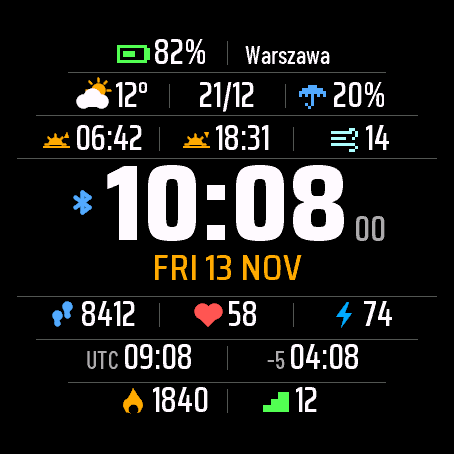
Data Wall is for people who want everything on one screen and still want to read it at a glance. Fifteen fields sit in six rows, three above the time and three below it. Every cell has its own place and its own width, so a long value never runs into the next one, and the time stays big in the middle. Need bigger digits? Switch the text size and the face hides two or four rows. An independent face by dialforge.dev.
- 15 data fields in six rows around the time. A long value first drops its icon, then switches to a narrower font, so it never covers a neighbour.
- Each field shows any of 33 kinds of data or stays empty: weather, temperature max / min, chance of precipitation, feels like, wind, humidity, sunrise, sunset, heart rate, Body Battery, stress, Pulse Ox, recovery time, steps, distance, calories, floors, three time zones, battery and more.
- Out of the box: battery and the town on top, then weather, max / min and chance of rain, sunrise, sunset and wind. Under the time: steps, heart rate and Body Battery, two time zones, calories and floors.
- Three text sizes on the watch: Normal with 15 fields, Large with 10 fields and bigger digits, Maximum with 4 fields and a very big time.
- A big time, 12 or 24 hour like the watch, leading zero as you choose. Seconds while the screen is active and a Bluetooth sign when the phone is connected.
- Fields are picked in Garmin Connect. The title of every field says its row, its position and what it shows by default, so you always know which cell you are changing.
- Old weather stays on the face with a ~ mark instead of disappearing, and the town is shown in its own cell.
- Colours for the time, seconds, values, date, lines and icons. By default every icon has the colour of its data.
- Data refresh: a profile (More often, Economy, Less often) or your own interval for each source, with an Off option.
- On touch watches press and hold a field to open its screen: weather, heart rate, steps, calendar and more.
- MIP screens use the 64 colour palette. AMOLED watches get an always-on mode: time and date, 10 dimmed fields, or the time only, moved a little every minute.
- Menu in 35 languages, weekday and month names in your language.
Fields, colours and data refresh are in Garmin Connect (Connect IQ, watch face settings), with your own intervals and Off for every data source. On the watch: text size, seconds, the always-on screen, time format, leading zero and language.
When the watch has no reading, the value shows --. Weather and the town come from Garmin weather through the phone. A heart rate older than 15 minutes is hidden, so a watch lying on the table does not show an old pulse. This is a watch face, not a medical device.
Data Wall jest dla tych, którzy chcą mieć wszystko na jednym ekranie i nadal odczytać to w sekundę. Piętnaście pól stoi w sześciu rzędach, trzy nad godziną i trzy pod nią. Każda komórka ma swoje miejsce i swoją szerokość, więc długa wartość nie wchodzi na sąsiednią, a godzina zostaje duża na środku. Potrzebujesz większych cyfr? Zmień rozmiar tekstu, a tarcza schowa dwa albo cztery rzędy. Niezależna tarcza dialforge.dev.
- 15 pól danych w sześciu rzędach wokół godziny. Długa wartość najpierw traci ikonę, potem przechodzi na węższą czcionkę, więc nigdy nie zasłania sąsiada.
- Każde pole pokaże dowolną z 33 danych albo zostanie puste: pogoda, temperatura maks. / min., szansa opadów, odczuwalna, wiatr, wilgotność, wschód i zachód słońca, tętno, Body Battery, stres, pulsoksymetr, czas regeneracji, kroki, dystans, kalorie, piętra, trzy strefy czasowe, bateria i więcej.
- Na start: u góry bateria i miejscowość, dalej pogoda, maks. / min. i szansa opadów, wschód, zachód i wiatr. Pod godziną kroki, tętno i Body Battery, dwie strefy czasowe, kalorie i piętra.
- Trzy rozmiary tekstu na zegarku: Normalny z 15 polami, Duży z 10 polami i większymi cyframi, Maksymalny z 4 polami i bardzo dużą godziną.
- Duża godzina, 12- lub 24-godzinna jak w zegarku, zero wiodące do wyboru. Sekundy, gdy ekran jest aktywny, i znak Bluetooth, gdy telefon jest połączony.
- Pola wybierasz w Garmin Connect. Tytuł każdego pola mówi, w którym jest rzędzie, z której strony i co pokazuje domyślnie, więc zawsze wiesz, którą komórkę zmieniasz.
- Stara pogoda zostaje na tarczy ze znakiem ~ zamiast znikać, a miejscowość ma własną komórkę.
- Kolory godziny, sekund, wartości, daty, linii i ikon. Domyślnie każda ikona ma kolor swojej danej.
- Odświeżanie danych: profil (Częściej, Oszczędny, Rzadziej) albo własny interwał dla każdego źródła, z opcją Wyłączone.
- Na zegarkach dotykowych przytrzymaj pole, żeby otworzyć jego ekran: pogodę, tętno, kroki, kalendarz i inne.
- Ekrany MIP używają palety 64 kolorów. Zegarki AMOLED mają tryb ekranu wygaszonego: godzina i data, 10 przygaszonych pól albo sama godzina, przesuwana co minutę.
- Menu w 35 językach, nazwy dni i miesięcy w Twoim języku.
Pola, kolory i odświeżanie danych są w Garmin Connect (Connect IQ, ustawienia tarczy), z własnymi interwałami i opcją Wyłączone dla każdego źródła danych. Na zegarku: rozmiar tekstu, sekundy, ekran wygaszony, format godziny, zero wiodące i język.
Gdy zegarek nie ma odczytu, wartość pokazuje --. Pogoda i miejscowość pochodzą z pogody Garmina przez telefon. Tętno starsze niż 15 minut jest ukrywane, więc zegarek leżący na stole nie pokazuje starego pulsu. To tarcza zegarka, nie wyrób medyczny.
Data Wall ist für alle, die alles auf einem Bildschirm haben und trotzdem auf einen Blick ablesen wollen. 15 Felder sitzen in 6 Reihen, 3 über der Uhrzeit und 3 darunter. Jede Zelle hat ihren eigenen Platz und ihre eigene Breite, deshalb stößt ein langer Wert nie an den nächsten, und die Uhrzeit bleibt groß in der Mitte. Du brauchst größere Ziffern? Stell die Textgröße um, und das Zifferblatt blendet zwei oder vier Reihen aus. Ein unabhängiges Zifferblatt von dialforge.dev.
- 15 Datenfelder in 6 Reihen um die Uhrzeit. Ein langer Wert verliert zuerst sein Symbol und wechselt dann auf eine schmalere Schrift, sodass er nie ein Nachbarfeld verdeckt.
- Jedes Feld zeigt eine von 33 Datenarten oder bleibt leer: Wetter, Temperatur max. / min., Niederschlagswahrscheinlichkeit, gefühlte Temperatur, Wind, Luftfeuchtigkeit, Sonnenaufgang, Sonnenuntergang, Herzfrequenz, Body Battery, Stress, Pulse Ox, Erholungszeit, Schritte, Strecke, Kalorien, Etagen, drei Zeitzonen, Akku und mehr.
- Ab Werk: oben Akku und Ort, darunter Wetter, max. / min. und Regenwahrscheinlichkeit, Sonnenaufgang, Sonnenuntergang und Wind. Unter der Uhrzeit: Schritte, Herzfrequenz und Body Battery, zwei Zeitzonen, Kalorien und Etagen.
- Drei Schriftgrößen auf der Uhr: Normal mit 15 Feldern, Groß mit 10 Feldern und größeren Ziffern, Maximal mit 4 Feldern und einer sehr großen Uhrzeit.
- Große Uhrzeit im 12- oder 24-Stunden-Format wie auf der Uhr, die führende Null nach Wunsch. Sekunden, solange das Display aktiv ist, und ein Bluetooth-Zeichen, wenn das Handy verbunden ist.
- Die Felder wählst du in Garmin Connect. Der Titel jedes Feldes nennt seine Reihe, seine Position und was es standardmäßig zeigt, sodass du immer weißt, welche Zelle du änderst.
- Altes Wetter bleibt mit einem ~ auf dem Zifferblatt, statt zu verschwinden, und der Ort hat eine eigene Zelle.
- Farben für Uhrzeit, Sekunden, Werte, Datum, Linien und Symbole. Standardmäßig hat jedes Symbol die Farbe seiner Daten.
Felder, Farben und Datenaktualisierung findest du in Garmin Connect (Connect IQ, Zifferblatt-Einstellungen), inklusive eigener Intervalle und Aus für jede Datenquelle. Direkt auf der Uhr: Schriftgröße, Sekunden, Always-On-Display, Zeitformat, führende Null und Sprache.
Wenn die Uhr keinen Messwert hat, zeigt der Wert -- an. Wetter und Ort stammen vom Garmin-Wetter über das Handy. Eine Herzfrequenz, die älter als 15 Minuten ist, wird ausgeblendet, damit eine Uhr auf dem Tisch keinen alten Puls zeigt. Dies ist ein Zifferblatt, kein Medizinprodukt.
Data Wall s'adresse à ceux qui veulent tout sur un seul écran et le lire quand même en un coup d'oeil. 15 champs sont répartis sur 6 rangées, 3 au-dessus de l'heure et 3 en dessous. Chaque cellule a sa place et sa largeur, donc une longue valeur ne déborde jamais sur la voisine, et l'heure reste grande au centre. Besoin de chiffres plus gros ? Changez la taille du texte et le cadran masque deux ou quatre rangées. Un cadran indépendant signé dialforge.dev.
- 15 champs de données sur 6 rangées autour de l'heure. Une longue valeur perd d'abord son icône, puis passe à une police plus étroite, si bien qu'elle ne masque jamais sa voisine.
- Chaque champ affiche l'une des 33 données ou reste vide : météo, température max. / min., probabilité de précipitations, température ressentie, vent, humidité, lever du soleil, coucher du soleil, fréquence cardiaque, Body Battery, stress, Pulse Ox, temps de récupération, pas, distance, calories, étages, trois fuseaux horaires, batterie et plus encore.
- Par défaut : batterie et ville en haut, puis météo, max. / min. et risque de pluie, lever, coucher du soleil et vent. Sous l'heure : pas, fréquence cardiaque et Body Battery, deux fuseaux horaires, calories et étages.
- Trois tailles de texte sur la montre : « Normal » avec 15 champs, « Grand » avec 10 champs et des chiffres plus gros, « Maximum » avec 4 champs et une très grande heure.
- Grande heure, au format 12 ou 24 heures comme la montre, zéro initial au choix. Secondes tant que l'écran est actif et symbole Bluetooth quand le téléphone est connecté.
- Les champs se choisissent dans Garmin Connect. Le titre de chaque champ indique sa rangée, sa position et ce qu'il affiche par défaut, vous savez donc toujours quelle cellule vous modifiez.
- L'ancienne météo reste sur le cadran avec un signe ~ au lieu de disparaître, et la ville a sa propre cellule.
- Couleurs pour l'heure, les secondes, les valeurs, la date, les lignes et les icônes. Par défaut, chaque icône prend la couleur de sa donnée.
Les champs, les couleurs et l'actualisation des données se règlent dans Garmin Connect (Connect IQ, paramètres du cadran), avec vos propres intervalles et Désactivé pour chaque source. Sur la montre : taille du texte, secondes, écran toujours allumé, format de l'heure, zéro initial et langue.
Quand la montre n'a pas de mesure, la valeur affiche --. La météo et la ville viennent de la météo Garmin via le téléphone. Une fréquence cardiaque de plus de 15 minutes est masquée, pour qu'une montre posée sur la table n'affiche pas un ancien pouls. C'est un cadran de montre, pas un dispositif médical.
Data Wall es para quienes quieren todo en una sola pantalla y seguir leyéndolo de un vistazo. 15 campos se reparten en 6 filas, 3 encima de la hora y 3 debajo. Cada celda tiene su propio sitio y su propio ancho, así que un valor largo nunca invade al siguiente y la hora se queda grande en el centro. ¿Necesitas dígitos más grandes? Cambia el tamaño del texto y la esfera oculta dos o cuatro filas. Una esfera independiente de dialforge.dev.
- 15 campos de datos en 6 filas alrededor de la hora. Un valor largo pierde primero su icono y después pasa a una fuente más estrecha, así que nunca tapa al vecino.
- Cada campo muestra cualquiera de 33 tipos de datos o se queda vacío: tiempo, temperatura máx. / mín., probabilidad de precipitación, sensación térmica, viento, humedad, amanecer, atardecer, frecuencia cardíaca, Body Battery, estrés, Pulse Ox, tiempo de recuperación, pasos, distancia, calorías, pisos, tres zonas horarias, batería y más.
- De serie: batería y localidad arriba, después tiempo, máx. / mín. y probabilidad de lluvia, amanecer, atardecer y viento. Bajo la hora: pasos, frecuencia cardíaca y Body Battery, dos zonas horarias, calorías y pisos.
- Tres tamaños de texto en el reloj: Normal con 15 campos, Grande con 10 campos y dígitos más grandes, Máximo con 4 campos y una hora muy grande.
- Hora grande, en formato de 12 o 24 horas como el reloj, con cero inicial a tu elección. Segundos mientras la pantalla está activa y un símbolo de Bluetooth cuando el móvil está conectado.
- Los campos se eligen en Garmin Connect. El título de cada campo indica su fila, su posición y lo que muestra por defecto, así que siempre sabes qué celda estás cambiando.
- El tiempo antiguo se queda en la esfera con una marca ~ en lugar de desaparecer, y la localidad tiene su propia celda.
- Colores para la hora, los segundos, los valores, la fecha, las líneas y los iconos. Por defecto cada icono tiene el color de su dato.
- Actualización de datos: un perfil (Más frecuente, Económico, Menos frecuente) o tu propio intervalo para cada fuente, con opción de Desactivado.
Los campos, los colores y la actualización de datos se configuran en Garmin Connect (Connect IQ, ajustes de la esfera), con tus propios intervalos y Desactivado para cada fuente de datos. En el reloj: tamaño del texto, segundos, pantalla siempre activa, formato de hora, cero inicial e idioma.
Cuando el reloj no tiene lectura, el valor muestra --. El tiempo y la localidad vienen del tiempo de Garmin a través del móvil. Una frecuencia cardíaca de hace más de 15 minutos se oculta, así que un reloj olvidado sobre la mesa no enseña un pulso antiguo. Es una esfera de reloj, no un producto sanitario.
Data Wall is voor wie alles op één scherm wil en het toch in één oogopslag wil kunnen lezen. 15 velden staan in 6 rijen, 3 boven de tijd en 3 eronder. Elke cel heeft zijn eigen plek en breedte, dus een lange waarde loopt nooit door in de volgende, en de tijd blijft groot in het midden. Grotere cijfers nodig? Schakel de tekstgrootte om en de wijzerplaat verbergt twee of vier rijen. Een onafhankelijke wijzerplaat van dialforge.dev.
- 15 gegevensvelden in 6 rijen rond de tijd. Een lange waarde verliest eerst zijn pictogram en schakelt dan over op een smaller lettertype, zodat hij nooit een buurveld bedekt.
- Elk veld toont een van de 33 soorten gegevens of blijft leeg: weer, temperatuur max. / min., kans op neerslag, gevoelstemperatuur, wind, luchtvochtigheid, zonsopgang, zonsondergang, hartslag, Body Battery, stress, Pulse Ox, hersteltijd, stappen, afstand, calorieën, verdiepingen, drie tijdzones, batterij en meer.
- Standaard: bovenaan batterij en plaats, daarna weer, max. / min. en kans op regen, zonsopgang, zonsondergang en wind. Onder de tijd: stappen, hartslag en Body Battery, twee tijdzones, calorieën en verdiepingen.
- Drie tekstgroottes op het horloge: Normaal met 15 velden, Groot met 10 velden en grotere cijfers, Maximaal met 4 velden en een heel grote tijd.
- Grote tijd, 12 of 24 uur zoals het horloge, voorloopnul naar keuze. Seconden zolang het scherm actief is en een Bluetooth-teken als de telefoon verbonden is.
- Velden kies je in Garmin Connect. De titel van elk veld noemt de rij, de positie en wat het standaard toont, zodat je altijd weet welke cel je wijzigt.
- Oud weer blijft met een ~ op de wijzerplaat staan in plaats van te verdwijnen, en de plaats krijgt een eigen cel.
- Kleuren voor de tijd, seconden, waarden, datum, lijnen en pictogrammen. Standaard heeft elk pictogram de kleur van zijn gegeven.
- Gegevens verversen: een profiel (Vaker, Zuinig, Minder vaak) of een eigen interval per bron, met een optie voor Uit.
- Houd op horloges met touchscreen een veld ingedrukt om het scherm ervan te openen: weer, hartslag, stappen, agenda en meer.
Velden, kleuren en het verversen van gegevens vind je in Garmin Connect (Connect IQ, instellingen van de wijzerplaat), met eigen intervallen en Uit voor elke gegevensbron. Op het horloge: tekstgrootte, seconden, always-on scherm, tijdnotatie, voorloopnul en taal.
Als het horloge geen meting heeft, toont de waarde --. Weer en plaats komen van het Garmin-weer via de telefoon. Een hartslag die ouder is dan 15 minuten wordt verborgen, zodat een horloge dat op tafel ligt geen oude hartslag toont. Dit is een wijzerplaat, geen medisch hulpmiddel.
Data Wallは、すべてを1画面にまとめつつ、ひと目で読みたい人のためのウォッチフェイスです。15個のデータ欄を6行に配置し、時刻の上に3行、下に3行が並びます。各セルには専用の位置と幅があるため、長い値が隣のセルにはみ出すことはなく、時刻は中央に大きく表示されたままです。もっと大きな数字が必要ですか?文字サイズを切り替えると、ウォッチフェイスが2行または4行を隠します。dialforge.devによる個人開発のウォッチフェイスです。
- 時刻の周りに15個のデータ欄を6行で配置。長い値はまずアイコンを外し、次に幅の狭いフォントへ切り替わるので、隣の欄を隠すことはありません。
- 各欄には33種類のデータから好きなものを表示するか、空欄にできます:天気、最高 / 最低気温、降水確率、体感温度、風、湿度、日の出、日の入り、心拍数、Body Battery、ストレス、Pulse Ox、回復時間、歩数、距離、カロリー、階数、3つのタイムゾーン、バッテリーなど。
- 初期設定:上段にバッテリーと地名、続いて天気、最高 / 最低気温と降水確率、日の出、日の入り、風。時刻の下には歩数、心拍数とBody Battery、2つのタイムゾーン、カロリーと階数。
- 時計側で文字サイズを3段階から選べます:標準は15欄、大は10欄で数字が大きく、最大は4欄で時刻がとても大きくなります。
- 大きな時刻表示。時計と同じ12時間または24時間形式で、先頭のゼロも選べます。画面がアクティブな間は秒を表示し、スマートフォン接続中はBluetoothマークが出ます。
- データ欄はGarmin Connectで選びます。各欄のタイトルには、行、位置、初期設定の表示内容が書かれているので、どのセルを変更しているか常に分かります。
- 古い天気は消えずに~マーク付きでウォッチフェイスに残り、地名は専用のセルに表示されます。
- 時刻、秒、値、日付、線、アイコンの色を変更できます。初期設定では、各アイコンがデータごとの色になります。
- データ更新頻度:プロファイル(高頻度、エコノミー、低頻度)から選ぶか、データ項目ごとに更新間隔を自分で設定できます(オフも選択可)。
- タッチ操作の時計では、欄を長押しするとその画面が開きます:天気、心拍数、歩数、カレンダーなど。
- MIP画面は64色パレットに対応。AMOLEDモデルでは常時表示モードに対応し、時刻と日付、10項目の減光表示、1分ごとに少しだけ位置が動く時刻のみ表示から選べます。
- メニューは35言語に対応、曜日名と月名もお使いの言語で表示されます。
データ欄、色、データ更新はGarmin Connect(Connect IQ、ウォッチフェイス設定)で設定でき、データ項目ごとの更新間隔やオフにも対応しています。時計側では、文字サイズ、秒、常時表示画面、時刻形式、先頭のゼロ、言語を設定できます。
時計に測定値がない場合、値は--と表示されます。天気と地名は、スマートフォン経由でGarminの天気から取得します。15分より古い心拍数は非表示になるため、机の上に置いた時計が古い脈拍を表示することはありません。これはウォッチフェイスであり、医療機器ではありません。
Data Wall è per chi vuole tutto su un solo schermo e riuscire comunque a leggerlo a colpo d'occhio. 15 campi sono disposti in 6 righe, 3 sopra l'ora e 3 sotto. Ogni cella ha il suo posto e la sua larghezza, quindi un valore lungo non invade mai quello accanto, e l'ora resta grande al centro. Ti servono cifre più grandi? Cambia la dimensione del testo e il quadrante nasconde due o quattro righe. Un quadrante indipendente creato da dialforge.dev.
- 15 campi dati in 6 righe attorno all'ora. Un valore lungo perde prima la sua icona, poi passa a un carattere più stretto, così non copre mai il vicino.
- Ogni campo mostra uno qualsiasi dei 33 tipi di dati o resta vuoto: meteo, temperatura max / min, probabilità di precipitazioni, temperatura percepita, vento, umidità, alba, tramonto, battito, Body Battery, stress, Pulse Ox, tempo di recupero, passi, distanza, calorie, piani, tre fusi orari, batteria e altro.
- Di serie: in alto batteria e città, poi meteo, max / min e probabilità di pioggia, alba, tramonto e vento. Sotto l'ora: passi, battito e Body Battery, due fusi orari, calorie e piani.
- Tre dimensioni del testo sull'orologio: "Normale" con 15 campi, "Grande" con 10 campi e cifre più grandi, "Massimo" con 4 campi e un'ora molto grande.
- Ora grande, in formato 12 o 24 ore come l'orologio, zero iniziale a scelta. Secondi finché lo schermo è attivo e simbolo Bluetooth quando il telefono è collegato.
- I campi si scelgono in Garmin Connect. Il titolo di ogni campo indica la sua riga, la sua posizione e cosa mostra di default, così sai sempre quale cella stai cambiando.
- Il meteo vecchio resta sul quadrante con un segno ~ invece di sparire, e la città ha una cella tutta sua.
- Colori per ora, secondi, valori, data, linee e icone. Di default ogni icona ha il colore del suo dato.
- Aggiornamento dati: un profilo (Più spesso, Risparmio, Meno spesso) o un intervallo personalizzato per ogni sorgente, con l'opzione Spento.
- Sugli orologi touch tieni premuto un campo per aprirne la schermata: meteo, battito, passi, calendario e altro.
Campi, colori e aggiornamento dati sono in Garmin Connect (Connect IQ, impostazioni del quadrante), con intervalli personalizzati e Spento per ogni sorgente di dati. Sull'orologio: dimensione del testo, secondi, schermo always-on, formato dell'ora, zero iniziale e lingua.
Quando l'orologio non ha una lettura, il valore mostra --. Meteo e città arrivano dal meteo Garmin tramite il telefono. Un battito più vecchio di 15 minuti viene nascosto, così un orologio lasciato sul tavolo non mostra un vecchio valore. È un quadrante per orologio, non un dispositivo medico.
Data Wall 适合想把所有信息放在一个屏幕上,又希望一眼就能读懂的人。15 个数据栏分成 6 行,时间上方 3 行,下方 3 行。每个单元格都有自己的位置和宽度,较长的数值不会挤进相邻的格子,时间则始终大大地显示在中央。需要更大的数字?切换文字大小,表盘就会隐藏两行或四行。来自 dialforge.dev 的独立表盘作品。
- 围绕时间排列 15 个数据栏,共 6 行。数值过长时会先隐藏图标,再换成更窄的字体,因此不会遮住相邻的数据栏。
- 每个数据栏可显示 33 种数据中的任意一种,也可以留空:天气、最高 / 最低气温、降水概率、体感温度、风、湿度、日出、日落、心率、Body Battery、压力、Pulse Ox、恢复时间、步数、距离、卡路里、楼层、三个时区、电量等。
- 默认设置:顶部是电量和城市,接着是天气、最高 / 最低气温和降雨概率、日出、日落和风。时间下方是步数、心率和 Body Battery、两个时区、卡路里和楼层。
- 手表上可选三种文字大小:“标准”显示 15 栏,“大”显示 10 栏且数字更大,“最大”显示 4 栏且时间非常大。
- 时间显示很大,12 或 24 小时制与手表一致,前导零可选。屏幕亮起时显示秒,手机连接时显示 Bluetooth 标志。
- 数据栏在 Garmin Connect 中选择。每个数据栏的标题会说明它所在的行、位置以及默认显示的内容,因此你始终知道正在修改哪一个单元格。
- 过期的天气数据不会消失,而是带着 ~ 标记保留在表盘上,城市则显示在单独的单元格中。
- 可为时间、秒、数值、日期、线条和图标设置颜色。默认情况下,每个图标使用其对应数据的颜色。
- 数据刷新:可选预设模式(更频繁、省电、低频),也能为每项数据单独设定刷新间隔,甚至直接关闭。
- 触屏手表上,长按某个数据栏即可打开对应的界面:天气、心率、步数、日历等。
- MIP 屏幕采用 64 色调色板。AMOLED 手表提供息屏常亮模式:可显示时间和日期、10 个数据栏调暗,或仅显示时间并每分钟微移一点位置。
- 设置菜单支持 35 种语言,星期和月份名称也会匹配你的语言。
数据栏、颜色和数据刷新均可在 Garmin Connect 中设置(Connect IQ,表盘设置),包括自定义刷新间隔以及为每个数据源单独关闭。手表上可设置:文字大小、秒、息屏常亮、时间格式、前导零和语言。
当手表没有读数时,数值会显示 --。天气和城市通过手机获取自 Garmin 天气。超过 15 分钟的心率会被隐藏,因此放在桌上的手表不会显示旧的心率。这是一款表盘,不是医疗设备。
Data Wall для тех, кто хочет видеть всё на одном экране и при этом считывать это с одного взгляда. 15 полей расположены в 6 рядах, 3 над временем и 3 под ним. У каждой ячейки своё место и своя ширина, поэтому длинное значение никогда не заходит на соседнюю, а время остаётся крупным по центру. Нужны цифры покрупнее? Смените размер текста, и циферблат скроет два или четыре ряда. Независимый циферблат от dialforge.dev.
- 15 полей данных в 6 рядах вокруг времени. Длинное значение сначала теряет значок, затем переходит на более узкий шрифт, поэтому никогда не закрывает соседнее поле.
- Каждое поле показывает любой из 33 видов данных или остаётся пустым: погода, температура макс. / мин., вероятность осадков, ощущается как, ветер, влажность, восход, закат, пульс, Body Battery, стресс, Pulse Ox, время восстановления, шаги, расстояние, калории, этажи, три часовых пояса, батарея и другое.
- По умолчанию: сверху батарея и город, затем погода, макс. / мин. и вероятность дождя, восход, закат и ветер. Под временем: шаги, пульс и Body Battery, два часовых пояса, калории и этажи.
- Три размера текста в часах: «Обычный» с 15 полями, «Крупный» с 10 полями и более крупными цифрами, «Максимум» с 4 полями и очень крупным временем.
- Крупное время в 12- или 24-часовом формате, как в часах, ведущий ноль на выбор. Секунды, пока экран активен, и значок Bluetooth, когда телефон подключён.
- Поля выбираются в Garmin Connect. Название каждого поля указывает его ряд, положение и то, что оно показывает по умолчанию, поэтому вы всегда знаете, какую ячейку меняете.
- Старая погода остаётся на циферблате со знаком ~ вместо того, чтобы пропасть, а город показывается в отдельной ячейке.
- Цвета для времени, секунд, значений, даты, линий и значков. По умолчанию каждый значок имеет цвет своих данных.
- Обновление данных: профиль (Чаще, Экономичный, Реже) или свой интервал для каждого источника, плюс вариант Отключить.
- На часах с сенсорным экраном удерживайте поле, чтобы открыть его экран: погода, пульс, шаги, календарь и другое.
Поля, цвета и обновление данных настраиваются в Garmin Connect (Connect IQ, настройки циферблата), со своими интервалами и вариантом Отключить для каждого источника данных. В часах: размер текста, секунды, постоянно включённый экран, формат времени, ведущий ноль и язык.
Если у часов нет измерения, значение показывает --. Погода и город берутся из погоды Garmin через телефон. Пульс старше 15 минут скрывается, поэтому часы, лежащие на столе, не показывают старый пульс. Это циферблат для часов, а не медицинское устройство.
O Data Wall é para quem quer tudo em uma tela só e ainda ler tudo num relance. 15 campos ficam em 6 linhas, 3 acima da hora e 3 abaixo. Cada célula tem seu lugar e sua largura, então um valor longo nunca invade o vizinho, e a hora continua grande no centro. Precisa de dígitos maiores? Mude o tamanho do texto e o mostrador esconde duas ou quatro linhas. Um mostrador independente da dialforge.dev.
- 15 campos de dados em 6 linhas ao redor da hora. Um valor longo perde primeiro o ícone e depois passa para uma fonte mais estreita, então nunca cobre o vizinho.
- Cada campo mostra qualquer um de 33 tipos de dados ou fica vazio: clima, temperatura máx. / mín., chance de precipitação, sensação térmica, vento, umidade, nascer do sol, pôr do sol, frequência cardíaca, Body Battery, estresse, Pulse Ox, tempo de recuperação, passos, distância, calorias, andares, três fusos horários, bateria e mais.
- De fábrica: bateria e cidade no topo, depois clima, máx. / mín. e chance de chuva, nascer do sol, pôr do sol e vento. Abaixo da hora: passos, frequência cardíaca e Body Battery, dois fusos horários, calorias e andares.
- Três tamanhos de texto no relógio: Normal com 15 campos, Grande com 10 campos e dígitos maiores, Máximo com 4 campos e uma hora bem grande.
- Hora grande, em 12 ou 24 horas como o relógio, zero à esquerda como você escolher. Segundos enquanto a tela está ativa e um símbolo de Bluetooth quando o celular está conectado.
- Os campos são escolhidos no Garmin Connect. O título de cada campo diz sua linha, sua posição e o que ele mostra por padrão, então você sempre sabe qual célula está alterando.
- O clima antigo continua no mostrador com uma marca ~ em vez de sumir, e a cidade aparece em uma célula própria.
- Cores para a hora, os segundos, os valores, a data, as linhas e os ícones. Por padrão, cada ícone tem a cor do seu dado.
- Atualização de dados: um perfil (Mais frequente, Econômico, Menos frequente) ou seu próprio intervalo para cada fonte, com opção de Desativar.
- Em relógios com tela touch, toque e segure um campo para abrir a tela dele: clima, frequência cardíaca, passos, calendário e mais.
Campos, cores e atualização de dados ficam no Garmin Connect (Connect IQ, configurações do mostrador), com seus próprios intervalos e Desativar para cada fonte de dados. No relógio: tamanho do texto, segundos, tela sempre ativa, formato da hora, zero à esquerda e idioma.
Quando o relógio não tem leitura, o valor mostra --. O clima e a cidade vêm do clima da Garmin pelo celular. Uma frequência cardíaca com mais de 15 minutos é ocultada, então um relógio esquecido na mesa não mostra um pulso antigo. Este é um mostrador de relógio, não um dispositivo médico.
Data Wall je pro ty, kdo chtějí mít všechno na jedné obrazovce a přesto to přečíst jedním pohledem. 15 polí je rozmístěno do 6 řádků, 3 nad časem a 3 pod ním. Každá buňka má své místo i svou šířku, takže dlouhá hodnota nezasáhne do sousední a čas zůstává velký uprostřed. Potřebujete větší číslice? Přepněte velikost textu a ciferník skryje dva nebo čtyři řádky. Nezávislý ciferník od dialforge.dev.
- 15 datových polí v 6 řádcích kolem času. Dlouhá hodnota nejdřív ztratí ikonu, pak přejde na užší písmo, takže nikdy nezakryje souseda.
- Každé pole zobrazí libovolný z 33 druhů dat, nebo zůstane prázdné: počasí, teplota max / min, pravděpodobnost srážek, pocitová teplota, vítr, vlhkost, východ slunce, západ slunce, tep, Body Battery, stres, Pulse Ox, doba regenerace, kroky, vzdálenost, kalorie, patra, tři časová pásma, baterie a další.
- Výchozí nastavení: nahoře baterie a město, pak počasí, max / min a pravděpodobnost deště, východ, západ a vítr. Pod časem kroky, tep a Body Battery, dvě časová pásma, kalorie a patra.
- Tři velikosti textu přímo v hodinkách: Normální s 15 poli, Velký s 10 poli a většími číslicemi, Maximální se 4 poli a velmi velkým časem.
- Velký čas, 12 nebo 24 hodin podle hodinek, počáteční nula podle výběru. Sekundy při aktivním displeji a znak Bluetooth, když je telefon připojen.
- Pole se vybírají v Garmin Connect. Název každého pole říká, v jakém je řádku, na které straně a co ukazuje ve výchozím stavu, takže vždy víte, kterou buňku měníte.
- Staré počasí zůstává na ciferníku se znakem ~ místo toho, aby zmizelo, a město má vlastní buňku.
- Barvy pro čas, sekundy, hodnoty, datum, čáry a ikony. Ve výchozím stavu má každá ikona barvu svých dat.
- Obnova dat: přednastavený profil (Častěji, Úsporný, Méně často) nebo vlastní interval pro každý zdroj, včetně možnosti Vypnuto.
- Na dotykových hodinkách podržte pole a otevřete jeho obrazovku: počasí, tep, kroky, kalendář a další.
- MIP displeje využívají paletu 64 barev. Hodinky s AMOLED mají režim trvale zapnutého displeje: čas a datum, 10 ztlumených polí, případně pouze čas, který se každou minutu nepatrně posune.
- Menu v 35 jazycích, názvy dnů a měsíců ve vašem jazyce.
Pole, barvy a obnova dat se nastavují v Garmin Connect (Connect IQ, nastavení ciferníku), včetně vlastních intervalů a možnosti Vypnuto pro každý zdroj dat. V hodinkách: velikost textu, sekundy, trvale zapnutý displej, formát času, počáteční nula a jazyk.
Když hodinky nemají naměřenou hodnotu, zobrazí se --. Počasí a město pocházejí z počasí Garmin přes telefon. Tep starší než 15 minut se skryje, takže hodinky ležící na stole neukazují starý puls. Jde o ciferník, nikoli o zdravotnický prostředek.
O Data Wall é para quem quer tudo num só ecrã e continuar a ler tudo num relance. 15 campos ficam em 6 linhas, 3 acima da hora e 3 abaixo. Cada célula tem o seu lugar e a sua largura, por isso um valor longo nunca invade o vizinho, e a hora fica grande ao centro. Precisas de dígitos maiores? Muda o tamanho do texto e o mostrador esconde duas ou quatro linhas. Um mostrador independente da dialforge.dev.
- 15 campos de dados em 6 linhas à volta da hora. Um valor longo perde primeiro o ícone e depois passa para um tipo de letra mais estreito, por isso nunca tapa o vizinho.
- Cada campo mostra qualquer um de 33 tipos de dados ou fica vazio: meteorologia, temperatura máx. / mín., probabilidade de precipitação, sensação térmica, vento, humidade, nascer do sol, pôr do sol, frequência cardíaca, Body Battery, stress, Pulse Ox, tempo de recuperação, passos, distância, calorias, andares, três fusos horários, bateria e mais.
- De origem: bateria e localidade no topo, depois meteorologia, máx. / mín. e probabilidade de chuva, nascer do sol, pôr do sol e vento. Abaixo da hora: passos, frequência cardíaca e Body Battery, dois fusos horários, calorias e andares.
- Três tamanhos de texto no relógio: Normal com 15 campos, Grande com 10 campos e dígitos maiores, Máximo com 4 campos e uma hora muito grande.
- Hora grande, em 12 ou 24 horas como o relógio, zero à esquerda à tua escolha. Segundos enquanto o ecrã está ativo e um símbolo de Bluetooth quando o telemóvel está ligado.
- Os campos escolhem-se no Garmin Connect. O título de cada campo indica a sua linha, a sua posição e o que mostra por predefinição, por isso sabes sempre que célula estás a alterar.
- A meteorologia antiga fica no mostrador com uma marca ~ em vez de desaparecer, e a localidade aparece numa célula própria.
- Cores para a hora, os segundos, os valores, a data, as linhas e os ícones. Por predefinição, cada ícone tem a cor do seu dado.
- Atualização de dados: um perfil (Mais frequente, Económico, Menos frequente) ou o teu próprio intervalo para cada fonte, com a opção Desligado.
Campos, cores e atualização de dados ficam no Garmin Connect (Connect IQ, definições do mostrador), com os teus próprios intervalos e Desligado para cada fonte de dados. No relógio: tamanho do texto, segundos, ecrã sempre ligado, formato da hora, zero à esquerda e idioma.
Quando o relógio não tem leitura, o valor mostra --. A meteorologia e a localidade vêm da meteorologia da Garmin através do telemóvel. Uma frequência cardíaca com mais de 15 minutos fica oculta, por isso um relógio esquecido em cima da mesa não mostra um pulso antigo. Isto é um mostrador de relógio, não um dispositivo médico.
Data Wall은 모든 정보를 한 화면에 담으면서도 한눈에 읽고 싶은 분을 위한 워치페이스입니다. 15개 칸이 6줄로 배치되어 있어 시간 위에 3줄, 아래에 3줄이 놓입니다. 각 칸마다 자리와 너비가 따로 정해져 있어 긴 값이 옆 칸을 침범하지 않고, 시간은 가운데에서 크게 유지됩니다. 더 큰 숫자가 필요하신가요? 글자 크기를 바꾸면 워치페이스가 2줄 또는 4줄을 숨깁니다. dialforge.dev에서 제작한 인디 워치페이스입니다.
- 시간 주위에 15개 데이터 칸을 6줄로 배치했습니다. 값이 길면 먼저 아이콘을 없애고 더 좁은 글꼴로 바꿔서 옆 칸을 절대 가리지 않습니다.
- 각 칸에는 33가지 데이터 중 원하는 것을 표시하거나 비워 둘 수 있습니다: 날씨, 최고 / 최저 기온, 강수 확률, 체감 온도, 바람, 습도, 일출, 일몰, 심박수, Body Battery, 스트레스, Pulse Ox, 회복 시간, 걸음 수, 거리, 칼로리, 층수, 시간대 3개, 배터리 등.
- 기본 설정: 위쪽에 배터리와 도시, 이어서 날씨, 최고 / 최저 기온과 강수 확률, 일출, 일몰, 바람. 시간 아래에는 걸음 수, 심박수와 Body Battery, 시간대 2개, 칼로리와 층수.
- 워치에서 글자 크기를 3단계로 바꿀 수 있습니다: 보통은 15칸, 크게는 10칸과 더 큰 숫자, 최대는 4칸과 아주 큰 시간.
- 큰 시간 표시, 워치와 같은 12시간 또는 24시간 형식, 앞자리 0은 선택 가능. 화면이 켜져 있는 동안 초가 표시되고 휴대폰이 연결되면 Bluetooth 표시가 나타납니다.
- 칸은 Garmin Connect에서 고릅니다. 각 칸의 제목에 몇 번째 줄인지, 어느 위치인지, 기본으로 무엇을 보여주는지 적혀 있어서 지금 어떤 칸을 바꾸는지 항상 알 수 있습니다.
- 오래된 날씨는 사라지지 않고 ~ 표시와 함께 워치페이스에 남으며, 도시는 별도의 칸에 표시됩니다.
- 시간, 초, 값, 날짜, 선, 아이콘의 색상을 바꿀 수 있습니다. 기본적으로 각 아이콘은 해당 데이터의 색을 사용합니다.
- 데이터 새로고침: 프로필(자주, 절약, 덜 자주)을 고르거나 데이터 항목별로 갱신 주기를 직접 지정할 수 있으며 꺼둠(Off) 옵션도 있습니다.
- 터치 워치에서는 칸을 길게 눌러 해당 화면을 열 수 있습니다: 날씨, 심박수, 걸음 수, 캘린더 등.
- MIP 화면은 64색 팔레트를 지원합니다. AMOLED 워치에서는 AOD 모드를 지원하여 시간과 날짜 표시, 10개 필드를 어둡게 표시하기, 1분마다 살짝 위치를 바꾸는 시간 전용 표시 중 선택할 수 있습니다.
- 35개 언어 메뉴 지원, 요일과 월 이름도 사용자 언어로 표시됩니다.
칸, 색상, 데이터 새로고침은 Garmin Connect(Connect IQ, 워치페이스 설정)에서 설정하며, 데이터 항목별 갱신 주기와 끄기(Off)도 지원합니다. 워치에서는 글자 크기, 초, AOD 화면, 시간 형식, 앞자리 0, 언어를 설정할 수 있습니다.
워치에 측정값이 없을 때는 --로 표시됩니다. 날씨와 도시는 휴대폰을 통해 Garmin 날씨에서 가져옵니다. 15분보다 오래된 심박수는 숨겨지므로 탁자 위에 놓아둔 워치가 예전 맥박을 보여주지 않습니다. 이 제품은 워치페이스이며 의료기기가 아닙니다.
Data Wall är för dig som vill ha allt på en och samma skärm och ändå läsa det med en blick. 15 fält sitter i 6 rader, 3 ovanför tiden och 3 under. Varje cell har sin egen plats och bredd, så ett långt värde aldrig går in i nästa, och tiden förblir stor i mitten. Behöver du större siffror? Byt textstorlek så döljer urtavlan två eller fyra rader. En fristående urtavla från dialforge.dev.
- 15 datafält i 6 rader runt tiden. Ett långt värde tappar först sin ikon och byter sedan till ett smalare typsnitt, så det aldrig täcker grannen.
- Varje fält visar någon av 33 sorters data eller förblir tomt: väder, temperatur max / min, risk för nederbörd, känns som, vind, luftfuktighet, soluppgång, solnedgång, puls, Body Battery, stress, Pulse Ox, återhämtningstid, steg, distans, kalorier, våningar, tre tidszoner, batteri och mer.
- Som standard: batteri och ort överst, sedan väder, max / min och risk för regn, soluppgång, solnedgång och vind. Under tiden: steg, puls och Body Battery, två tidszoner, kalorier och våningar.
- Tre textstorlekar i klockan: Normal med 15 fält, Stor med 10 fält och större siffror, Maximal med 4 fält och en mycket stor tid.
- Stor tid, 12 eller 24 timmar som klockan, inledande nolla efter eget val. Sekunder medan skärmen är aktiv och en Bluetooth-symbol när telefonen är ansluten.
- Fälten väljs i Garmin Connect. Rubriken på varje fält anger dess rad, dess plats och vad det visar som standard, så du alltid vet vilken cell du ändrar.
- Gammalt väder blir kvar på urtavlan med ett ~ i stället för att försvinna, och orten visas i en egen cell.
- Färger för tid, sekunder, värden, datum, linjer och ikoner. Som standard har varje ikon färgen på sin data.
- Datauppdatering: en profil (Oftare, Ekonomi, Mer sällan) eller ett eget intervall för varje datakälla, med alternativet Av.
- På klockor med pekskärm håller du in ett fält för att öppna dess skärm: väder, puls, steg, kalender och mer.
- MIP-skärmar använder paletten med 64 färger. Klockor med AMOLED får ett alltid på-läge: tid och datum, 10 nedtonade fält, eller bara tiden som flyttas lite varje minut.
- Meny på 35 språk, veckodagarnas och månadernas namn på ditt språk.
Fält, färger och datauppdatering finns i Garmin Connect (Connect IQ, urtavlans inställningar), med egna intervall och Av för varje datakälla. På klockan: textstorlek, sekunder, alltid på-skärm, tidsformat, inledande nolla och språk.
När klockan saknar mätvärde visas --. Väder och ort kommer från Garmins väder via telefonen. En puls som är äldre än 15 minuter döljs, så en klocka som ligger på bordet inte visar en gammal puls. Det här är en urtavla, inte en medicinteknisk produkt.
Data Wall er til dig, der vil have alt på én skærm og stadig kunne aflæse det med et blik. 15 felter sidder i 6 rækker, 3 over klokkeslættet og 3 under. Hver celle har sin egen plads og bredde, så en lang værdi aldrig støder ind i den næste, og klokkeslættet står stort i midten. Brug for større cifre? Skift tekststørrelse, så skjuler urskiven to eller fire rækker. En uafhængig urskive fra dialforge.dev.
- 15 datafelter i 6 rækker omkring klokkeslættet. En lang værdi mister først sit ikon og skifter derefter til en smallere skrifttype, så den aldrig dækker naboen.
- Hvert felt kan vise en af 33 slags data eller være tomt: vejr, temperatur maks. / min., chance for nedbør, føles som, vind, luftfugtighed, solopgang, solnedgang, puls, Body Battery, stress, Pulse Ox, restitutionstid, skridt, distance, kalorier, etager, tre tidszoner, batteri og mere.
- Som standard: batteri og byen øverst, derefter vejr, maks. / min. og chance for regn, solopgang, solnedgang og vind. Under klokkeslættet: skridt, puls og Body Battery, to tidszoner, kalorier og etager.
- Tre tekststørrelser på uret: Normal med 15 felter, Stor med 10 felter og større cifre, Maksimal med 4 felter og et meget stort klokkeslæt.
- Stort klokkeslæt i 12- eller 24-timers format som på uret, indledende nul efter eget valg. Sekunder, mens skærmen er aktiv, og et Bluetooth-tegn, når telefonen er forbundet.
- Felterne vælges i Garmin Connect. Hvert felts titel fortæller, hvilken række og placering det har, og hvad det viser som standard, så du altid ved, hvilken celle du ændrer.
- Gammelt vejr bliver på urskiven med et ~ i stedet for at forsvinde, og byen har sin egen celle.
- Farver til klokkeslæt, sekunder, værdier, dato, linjer og ikoner. Som standard har hvert ikon farven fra sin data.
- Dataopdatering: en profil (Oftere, Økonomisk, Sjældnere) eller dit eget interval for hver kilde, samt mulighed for Fra.
- På ure med touchskærm kan du holde et felt nede for at åbne dets skærm: vejr, puls, skridt, kalender og mere.
- MIP-skærme bruger paletten med 64 farver. AMOLED-ure får en always-on-tilstand: tid og dato, 10 dæmpede felter eller kun klokkeslættet, som flyttes en smule hvert minut.
Felter, farver og dataopdatering findes i Garmin Connect (Connect IQ, urskiveindstillinger), med egne intervaller og Fra for hver datakilde. På uret: tekststørrelse, sekunder, always-on-skærm, tidsformat, indledende nul og sprog.
Når uret ikke har en måling, viser værdien --. Vejr og by kommer fra Garmin-vejret via telefonen. En puls, der er ældre end 15 minutter, skjules, så et ur, der ligger på bordet, ikke viser en gammel puls. Det er en urskive, ikke medicinsk udstyr.
Data Wall er for deg som vil ha alt på én skjerm og likevel lese det med et blikk. 15 felt sitter i 6 rader, 3 over klokkeslettet og 3 under. Hver celle har sin egen plass og bredde, så en lang verdi aldri støter inn i den neste, og klokkeslettet står stort i midten. Trenger du større tall? Bytt tekststørrelse, så skjuler urskiven to eller fire rader. En uavhengig urskive fra dialforge.dev.
- 15 datafelt i 6 rader rundt klokkeslettet. En lang verdi mister først ikonet og bytter så til en smalere skrift, så den aldri dekker naboen.
- Hvert felt kan vise en av 33 typer data eller stå tomt: vær, temperatur maks. / min., sjanse for nedbør, føles som, vind, luftfuktighet, soloppgang, solnedgang, puls, Body Battery, stress, Pulse Ox, restitusjonstid, skritt, distanse, kalorier, etasjer, tre tidssoner, batteri og mer.
- Som standard: batteri og stedsnavn øverst, deretter vær, maks. / min. og sjanse for regn, soloppgang, solnedgang og vind. Under klokkeslettet: skritt, puls og Body Battery, to tidssoner, kalorier og etasjer.
- Tre tekststørrelser på klokken: Normal med 15 felt, Stor med 10 felt og større tall, Maksimal med 4 felt og et veldig stort klokkeslett.
- Stort klokkeslett, 12- eller 24-timers som på klokken, ledende null etter ønske. Sekunder mens skjermen er aktiv, og et Bluetooth-tegn når telefonen er tilkoblet.
- Feltene velger du i Garmin Connect. Tittelen på hvert felt forteller hvilken rad og plassering det har og hva det viser som standard, så du alltid vet hvilken celle du endrer.
- Gammelt vær blir stående på urskiven med et ~ i stedet for å forsvinne, og stedet har sin egen celle.
- Farger for klokkeslett, sekunder, verdier, dato, linjer og ikoner. Som standard har hvert ikon fargen til sin data.
- Dataoppdatering: en profil (Oftere, Økonomisk, Sjeldnere) eller ditt eget intervall for hver kilde, med et Av-valg.
- På klokker med berøringsskjerm holder du inne et felt for å åpne skjermen til det: vær, puls, skritt, kalender og mer.
- MIP-skjermer bruker paletten med 64 farger. AMOLED-klokker får alltid-på-modus: klokkeslett og dato, 10 nedtonede felt, eller bare klokkeslettet, flyttet litt hvert minutt.
- Meny på 35 språk, og navn på ukedager og måneder på ditt språk.
Felt, farger og dataoppdatering finner du i Garmin Connect (Connect IQ, urskiveinnstillinger), med egne intervaller og Av for hver datakilde. På klokken: tekststørrelse, sekunder, alltid-på-skjerm, tidsformat, ledende null og språk.
Når klokken ikke har noen måling, viser verdien --. Vær og sted kommer fra Garmin-været via telefonen. En puls som er eldre enn 15 minutter, skjules, så en klokke som ligger på bordet ikke viser gammel puls. Dette er en urskive, ikke medisinsk utstyr.
Data Wall 適合想把所有資訊放在同一個螢幕上,又希望一眼就能讀懂的人。15 個資料欄分成 6 列,時間上方 3 列,下方 3 列。每個儲存格都有自己的位置與寬度,較長的數值不會擠進相鄰的格子,時間則始終大大地顯示在中央。需要更大的數字嗎?切換文字大小,錶面就會隱藏兩列或四列。由 dialforge.dev 獨立開發的錶面。
- 圍繞時間排列 15 個資料欄,共 6 列。數值過長時會先隱藏圖示,再換成較窄的字體,因此不會遮住相鄰的資料欄。
- 每個資料欄可顯示 33 種資料中的任一種,也可以留空:天氣、最高 / 最低氣溫、降水機率、體感溫度、風、濕度、日出、日落、心率、Body Battery、壓力、Pulse Ox、恢復時間、步數、距離、卡路里、樓層、三個時區、電量等。
- 預設設定:頂部是電量與城市,接著是天氣、最高 / 最低氣溫與降雨機率、日出、日落和風。時間下方是步數、心率與 Body Battery、兩個時區、卡路里與樓層。
- 手錶上可選三種文字大小:「標準」顯示 15 欄,「大」顯示 10 欄且數字更大,「最大」顯示 4 欄且時間非常大。
- 時間顯示很大,12 或 24 小時制與手錶一致,前導零可選。螢幕亮起時顯示秒數,手機連線時顯示 Bluetooth 標誌。
- 資料欄在 Garmin Connect 中選擇。每個資料欄的標題會說明它所在的列、位置以及預設顯示的內容,因此你隨時知道正在修改哪一個儲存格。
- 過期的天氣資料不會消失,而是帶著 ~ 標記保留在錶面上,城市則顯示在獨立的儲存格中。
- 可為時間、秒數、數值、日期、線條和圖示設定顏色。預設情況下,每個圖示使用其對應資料的顏色。
- 數據更新頻率:提供預設設定檔(頻繁、省電、低頻率),也可自行設定各數據來源的更新間隔,亦可選擇關閉。
- 觸控手錶上,長按某個資料欄即可開啟對應的畫面:天氣、心率、步數、行事曆等。
- MIP 螢幕採用 64 色調色盤。AMOLED 手錶支援常亮模式:可選時間與日期、10 個資料欄變暗顯示,或僅顯示時間並每分鐘微幅位移。
- 選單支援 35 種語言,星期與月份名稱亦會對應你的語言。
資料欄、顏色和數據更新皆可在 Garmin Connect 中設定(Connect IQ,錶面設定),包含自訂更新間隔以及為每個數據來源單獨關閉。手錶上可設定:文字大小、秒數、常亮顯示、時間格式、前導零和語言。
當手錶沒有偵測到數值時,會顯示 --。天氣與城市透過手機取自 Garmin 天氣。超過 15 分鐘的心率會被隱藏,因此放在桌上的手錶不會顯示舊的心率。這是一款錶面,不是醫療器材。
Data Wall on tehty niille, jotka haluavat kaiken yhdelle näytölle ja silti lukea sen yhdellä silmäyksellä. 15 kenttää on 6 rivillä, 3 kellonajan yläpuolella ja 3 sen alapuolella. Jokaisella solulla on oma paikkansa ja leveytensä, joten pitkä arvo ei koskaan ulotu viereiseen soluun, ja kellonaika pysyy isona keskellä. Tarvitsetko isommat numerot? Vaihda tekstikokoa, niin kellotaulu piilottaa kaksi tai neljä riviä. Riippumaton kellotaulu tekijältä dialforge.dev.
- 15 tietokenttää 6 rivillä kellonajan ympärillä. Pitkä arvo menettää ensin kuvakkeensa ja vaihtaa sitten kapeampaan fonttiin, joten se ei koskaan peitä naapuriaan.
- Jokainen kenttä voi näyttää minkä tahansa 33 tietotyypistä tai jäädä tyhjäksi: sää, lämpötila enint. / vähint., sateen todennäköisyys, tuntuu kuin, tuuli, kosteus, auringonnousu, auringonlasku, syke, Body Battery, stressi, Pulse Ox, palautumisaika, askeleet, matka, kalorit, kerrokset, kolme aikavyöhykettä, akku ja paljon muuta.
- Oletuksena: ylhäällä akku ja paikkakunta, sitten sää, enint. / vähint. ja sateen todennäköisyys, auringonnousu, auringonlasku ja tuuli. Kellonajan alla: askeleet, syke ja Body Battery, kaksi aikavyöhykettä, kalorit ja kerrokset.
- Kolme tekstikokoa kellossa: "Normaali" 15 kentällä, "Suuri" 10 kentällä ja isommilla numeroilla, "Suurin" 4 kentällä ja erittäin isolla kellonajalla.
- Iso kellonaika, 12 tai 24 tuntia kellosi mukaan, etunolla valinnan mukaan. Sekunnit, kun näyttö on aktiivinen, ja Bluetooth-merkki, kun puhelin on yhdistetty.
- Kentät valitaan Garmin Connectissa. Jokaisen kentän otsikko kertoo sen rivin, paikan ja oletusarvon, joten tiedät aina, mitä solua muokkaat.
- Vanha säätieto jää kellotauluun ~-merkillä sen sijaan, että katoaisi, ja paikkakunnalla on oma solunsa.
- Värit kellonajalle, sekunneille, arvoille, päivämäärälle, viivoille ja kuvakkeille. Oletuksena jokaisella kuvakkeella on tietonsa väri.
- Tietojen päivitys: valmis profiili (Useammin, Säästö, Harvemmin) tai oma päivitysväli jokaiselle lähteelle, mukana myös Pois-vaihtoehto.
- Kosketusnäytöllisissä kelloissa pidä kenttää painettuna avataksesi sen näkymän: sää, syke, askeleet, kalenteri ja muuta.
Kentät, värit ja tietojen päivitys löytyvät Garmin Connectista (Connect IQ, kellotaulun asetukset), omilla väleillä ja Pois-vaihtoehdolla jokaiselle tietolähteelle. Kellossa: tekstikoko, sekunnit, aina päällä oleva näyttö, aikamuoto, etunolla ja kieli.
Kun kellolla ei ole mittausta, arvon paikalla näkyy --. Sää ja paikkakunta tulevat Garminin säästä puhelimen kautta. Yli 15 minuuttia vanha syke piilotetaan, joten pöydällä lepäävä kello ei näytä vanhaa sykettä. Tämä on kellotaulu, ei lääkinnällinen laite.
Data Wall je pre tých, ktorí chcú mať všetko na jednej obrazovke a napriek tomu to prečítať jedným pohľadom. 15 polí je rozmiestnených do 6 riadkov, 3 nad časom a 3 pod ním. Každá bunka má svoje miesto aj svoju šírku, takže dlhá hodnota nikdy nezasiahne do susednej a čas zostáva veľký v strede. Potrebujete väčšie číslice? Prepnite veľkosť textu a ciferník skryje dva alebo štyri riadky. Nezávislý ciferník od dialforge.dev.
- 15 dátových polí v 6 riadkoch okolo času. Dlhá hodnota najprv stratí ikonu, potom prejde na užšie písmo, takže nikdy nezakryje suseda.
- Každé pole zobrazí ľubovoľný z 33 druhov údajov alebo zostane prázdne: počasie, teplota max / min, pravdepodobnosť zrážok, pocitová teplota, vietor, vlhkosť, východ slnka, západ slnka, tep, Body Battery, stres, Pulse Ox, čas regenerácie, kroky, vzdialenosť, kalórie, podlažia, tri časové pásma, batéria a ďalšie.
- Predvolené nastavenie: hore batéria a mesto, potom počasie, max / min a pravdepodobnosť dažďa, východ, západ a vietor. Pod časom kroky, tep a Body Battery, dve časové pásma, kalórie a podlažia.
- Tri veľkosti textu priamo v hodinkách: "Normálny" s 15 poľami, "Veľká" s 10 poľami a väčšími číslicami, "Maximum" so 4 poľami a veľmi veľkým časom.
- Veľký čas, 12 alebo 24 hodín podľa hodiniek, úvodná nula podľa výberu. Sekundy pri aktívnom displeji a znak Bluetooth, keď je telefón pripojený.
- Polia sa vyberajú v Garmin Connect. Názov každého poľa hovorí, v ktorom je riadku, na ktorej strane a čo zobrazuje predvolene, takže vždy viete, ktorú bunku meníte.
- Staré počasie zostáva na ciferníku so znakom ~ namiesto toho, aby zmizlo, a mesto má vlastnú bunku.
- Farby pre čas, sekundy, hodnoty, dátum, čiary a ikony. Predvolene má každá ikona farbu svojich údajov.
- Obnova dát: prednastavený profil (Častejšie, Úsporný, Menej často) alebo vlastný interval pre každý zdroj zvlášť, s možnosťou Vypnuté.
- Na dotykových hodinkách podržte pole a otvorte jeho obrazovku: počasie, tep, kroky, kalendár a ďalšie.
- MIP displeje využívajú paletu 64 farieb. Hodinky s AMOLED majú režim stále zapnutej obrazovky: čas a dátum, 10 stmavených polí, alebo len čas, ktorý sa každú minútu mierne posunie.
- Menu v 35 jazykoch, názvy dní a mesiacov vo vašom jazyku.
Polia, farby a obnova dát sa nastavujú v Garmin Connect (Connect IQ, nastavenia ciferníka), s vlastnými intervalmi a možnosťou Vypnuté pre každý zdroj údajov. V hodinkách: veľkosť textu, sekundy, stále zapnutá obrazovka, formát času, úvodná nula a jazyk.
Keď hodinky nemajú nameranú hodnotu, zobrazí sa --. Počasie a mesto pochádzajú z počasia Garmin cez telefón. Tep starší ako 15 minút sa skryje, takže hodinky ležiace na stole neukazujú starý pulz. Ide o ciferník, nie zdravotnícku pomôcku.
Data Wall je za vse, ki želite imeti vse na enem zaslonu in ga vseeno prebrati na prvi pogled. 15 polj je razporejenih v 6 vrstah, 3 nad uro in 3 pod njo. Vsaka celica ima svoje mesto in svojo širino, zato dolga vrednost nikoli ne zaide v sosednjo, ura pa ostane velika na sredini. Potrebujete večje številke? Preklopite velikost besedila in številčnica skrije dve ali štiri vrste. Samostojna številčnica od dialforge.dev.
- 15 podatkovnih polj v 6 vrstah okoli ure. Dolga vrednost najprej izgubi ikono, nato preklopi na ožjo pisavo, zato nikoli ne prekrije soseda.
- Vsako polje prikaže katero koli od 33 vrst podatkov ali ostane prazno: vreme, temperatura maks. / min., verjetnost padavin, občutek temperature, veter, vlažnost, sončni vzhod, sončni zahod, srčni utrip, Body Battery, stres, Pulse Ox, čas okrevanja, koraki, razdalja, kalorije, nadstropja, trije časovni pasovi, baterija in še več.
- Privzeto: zgoraj baterija in kraj, nato vreme, maks. / min. in verjetnost dežja, sončni vzhod, sončni zahod in veter. Pod uro: koraki, srčni utrip in Body Battery, dva časovna pasova, kalorije in nadstropja.
- Tri velikosti besedila na uri: "Običajno" s 15 polji, "Velika" z 10 polji in večjimi številkami, "Maksimum" s 4 polji in zelo veliko uro.
- Velika ura, 12- ali 24-urna kot na uri, začetna ničla po izbiri. Sekunde, dokler je zaslon aktiven, in znak Bluetooth, ko je telefon povezan.
- Polja izberete v Garmin Connect. Naslov vsakega polja pove, v kateri vrsti je, na katerem mestu in kaj privzeto prikazuje, zato vedno veste, katero celico spreminjate.
- Staro vreme ostane na številčnici z znakom ~, namesto da bi izginilo, kraj pa ima svojo celico.
- Barve za uro, sekunde, vrednosti, datum, črte in ikone. Privzeto ima vsaka ikona barvo svojega podatka.
- Osveževanje podatkov: profil (Bolj pogosto, Varčno, Manj pogosto) ali lasten interval za vsak vir, z možnostjo Izklop.
- Na urah z zaslonom na dotik pridržite polje, da odprete njegov zaslon: vreme, srčni utrip, korake, koledar in drugo.
- Zasloni MIP uporabljajo barvno paleto 64 barv. Ure AMOLED imajo način vedno vklopljenega zaslona: čas in datum, 10 zatemnjenih polj ali samo čas, ki se vsako minuto rahlo premakne.
- Meni v 35 jezikih, imena dni in mesecev v vašem jeziku.
Polja, barve in osveževanje podatkov so v Garmin Connect (Connect IQ, nastavitve številčnice), z lastnimi intervali in možnostjo Izklop za vsak vir podatkov. Na uri: velikost besedila, sekunde, vedno vklopljen zaslon, oblika časa, začetna ničla in jezik.
Kadar ura nima meritve, vrednost prikazuje --. Vreme in kraj prideta iz vremena Garmin prek telefona. Srčni utrip, starejši od 15 minut, je skrit, zato ura, ki leži na mizi, ne kaže starega utripa. To je številčnica, ne medicinski pripomoček.
Data Wall untuk Anda yang ingin semuanya ada di satu layar tetapi tetap bisa dibaca sekilas. 15 kolom tersusun dalam 6 baris, 3 di atas jam dan 3 di bawahnya. Setiap sel punya tempat dan lebar sendiri, jadi nilai yang panjang tidak menabrak sel di sebelahnya, dan jam tetap besar di tengah. Butuh angka yang lebih besar? Ganti ukuran teks dan watch face akan menyembunyikan dua atau empat baris. Watch face independen dari dialforge.dev.
- 15 kolom data dalam 6 baris di sekitar jam. Nilai yang panjang akan melepas ikonnya dulu, lalu beralih ke font yang lebih sempit, sehingga tidak pernah menutupi kolom tetangganya.
- Setiap kolom bisa menampilkan salah satu dari 33 jenis data atau dibiarkan kosong: cuaca, suhu maks / min, peluang hujan, terasa seperti, angin, kelembapan, matahari terbit, matahari terbenam, detak jantung, Body Battery, stres, Pulse Ox, waktu pemulihan, langkah, jarak, kalori, lantai, tiga zona waktu, baterai, dan lainnya.
- Pengaturan awal: baterai dan nama kota di bagian atas, lalu cuaca, maks / min dan peluang hujan, matahari terbit, matahari terbenam, dan angin. Di bawah jam: langkah, detak jantung dan Body Battery, dua zona waktu, kalori, dan lantai.
- Tiga ukuran teks di jam: Normal dengan 15 kolom, Besar dengan 10 kolom dan angka lebih besar, Maksimum dengan 4 kolom dan jam yang sangat besar.
- Jam besar, format 12 atau 24 jam mengikuti jam Anda, angka nol di depan sesuai pilihan. Detik tampil saat layar aktif, dan ikon Bluetooth muncul saat ponsel terhubung.
- Kolom dipilih di Garmin Connect. Judul setiap kolom menyebutkan barisnya, posisinya, dan data bawaannya, jadi Anda selalu tahu sel mana yang sedang diubah.
- Data cuaca lama tetap tampil dengan tanda ~ dan tidak hilang, dan nama kota punya selnya sendiri.
- Warna untuk jam, detik, nilai, tanggal, garis, dan ikon. Secara bawaan setiap ikon memakai warna datanya.
- Pembaruan data: gunakan profil (More often, Economy, Less often) atau atur interval Anda sendiri untuk setiap sumber data, lengkap dengan opsi Off.
- Di jam layar sentuh, tekan dan tahan sebuah kolom untuk membuka layarnya: cuaca, detak jantung, langkah, kalender, dan lainnya.
Kolom, warna, dan pembaruan data ada di Garmin Connect (Connect IQ, pengaturan watch face), lengkap dengan interval sendiri dan Off untuk setiap sumber data. Di jam: ukuran teks, detik, layar always-on, format waktu, angka nol di depan, dan bahasa.
Jika jam tidak punya pembacaan, nilai menampilkan --. Cuaca dan nama kota berasal dari cuaca Garmin lewat ponsel. Detak jantung yang lebih lama dari 15 menit disembunyikan, jadi jam yang tergeletak di meja tidak menampilkan denyut lama. Ini adalah watch face, bukan perangkat medis.
A Data Wall azoknak készült, akik mindent egy képernyőn szeretnének látni, és mégis első pillantásra le akarják olvasni. 15 mező ül 6 sorban, 3 az idő felett és 3 alatta. Minden cellának saját helye és saját szélessége van, így egy hosszú érték soha nem csúszik a szomszédba, az idő pedig nagy marad középen. Nagyobb számjegyek kellenek? Válts szövegméretet, és a számlap elrejt két vagy négy sort. Egy független számlap a dialforge.dev-től.
- 15 adatmező 6 sorban az idő körül. A hosszú érték előbb elveszíti az ikonját, majd keskenyebb betűtípusra vált, így soha nem takarja el a szomszédját.
- Minden mező a 33 adattípus bármelyikét mutathatja, vagy üresen maradhat: időjárás, hőmérséklet max. / min., csapadék esélye, hőérzet, szél, páratartalom, napkelte, napnyugta, pulzus, Body Battery, stressz, Pulse Ox, regenerálódási idő, lépések, távolság, kalória, emeletek, három időzóna, akkumulátor és még sok más.
- Alapbeállításban: felül az akkumulátor és a település, utána időjárás, max. / min. és csapadék esélye, napkelte, napnyugta és szél. Az idő alatt: lépések, pulzus és Body Battery, két időzóna, kalória és emeletek.
- Három szövegméret az órán: "Normál" 15 mezővel, "Nagy" 10 mezővel és nagyobb számjegyekkel, "Maximum" 4 mezővel és nagyon nagy idővel.
- Nagy idő, 12 vagy 24 órás formátumban, mint az órán, a kezdő nulla választható. Másodpercek, amíg a kijelző aktív, és Bluetooth-jel, ha a telefon csatlakoztatva van.
- A mezőket a Garmin Connectben választod ki. Minden mező címe megmondja a sorát, a helyét és azt, hogy alapból mit mutat, így mindig tudod, melyik cellát módosítod.
- A régi időjárás ~ jellel a számlapon marad ahelyett, hogy eltűnne, a település pedig saját cellát kap.
- Színek az időhöz, a másodpercekhez, az értékekhez, a dátumhoz, a vonalakhoz és az ikonokhoz. Alapból minden ikon az adata színét viseli.
- Adatfrissítés: profilok (Gyakrabban, Takarékos, Ritkábban) vagy saját időköz minden forráshoz, kikapcsolási lehetőséggel.
- Érintőképernyős órákon tartsd nyomva a mezőt, hogy megnyisd a hozzá tartozó képernyőt: időjárás, pulzus, lépések, naptár és más.
A mezők, a színek és az adatfrissítés a Garmin Connectben érhető el (Connect IQ, számlapbeállítások), saját időközökkel és kikapcsolási lehetőséggel minden adatforráshoz. Az órán: szövegméret, másodpercek, mindig bekapcsolt kijelző, időformátum, kezdő nulla és nyelv.
Ha az óra nem rendelkezik mérési adattal, az érték helyén -- látható. Az időjárás és a település a Garmin időjárásból érkezik a telefonon keresztül. A 15 percnél régebbi pulzus rejtve marad, így az asztalon heverő óra nem mutat régi pulzust. Ez egy számlap, nem orvosi eszköz.
Data Wall เหมาะสำหรับคนที่อยากได้ทุกอย่างในหน้าจอเดียว แต่ยังอ่านได้ในพริบตา 15 ช่องจัดเรียงเป็น 6 แถว อยู่เหนือเวลา 3 แถวและใต้เวลา 3 แถว แต่ละช่องมีตำแหน่งและความกว้างของตัวเอง ค่าที่ยาวจึงไม่ล้นไปชนช่องข้างเคียง และเวลายังคงใหญ่อยู่ตรงกลาง ต้องการตัวเลขใหญ่ขึ้น? เปลี่ยนขนาดข้อความ แล้วหน้าปัดจะซ่อนสองหรือสี่แถว หน้าปัดอิสระจาก dialforge.dev
- ข้อมูล 15 ช่องใน 6 แถวรอบเวลา ค่าที่ยาวจะตัดไอคอนออกก่อน แล้วเปลี่ยนไปใช้ฟอนต์ที่แคบลง จึงไม่บังช่องข้างเคียง
- แต่ละช่องแสดงข้อมูลได้ 33 ชนิดหรือปล่อยว่าง: สภาพอากาศ อุณหภูมิสูงสุด / ต่ำสุด โอกาสฝนตก อุณหภูมิที่รู้สึก ลม ความชื้น พระอาทิตย์ขึ้น พระอาทิตย์ตก อัตราการเต้นของหัวใจ Body Battery ความเครียด Pulse Ox เวลาพักฟื้น จำนวนก้าว ระยะทาง แคลอรี่ ชั้น เขตเวลา 3 แห่ง แบตเตอรี่ และอื่นๆ
- ค่าเริ่มต้น: แบตเตอรี่และชื่อเมืองด้านบน ตามด้วยสภาพอากาศ สูงสุด / ต่ำสุด และโอกาสฝนตก พระอาทิตย์ขึ้น พระอาทิตย์ตก และลม ใต้เวลา: จำนวนก้าว อัตราการเต้นของหัวใจ และ Body Battery เขตเวลา 2 แห่ง แคลอรี่ และชั้น
- ขนาดข้อความ 3 แบบบนนาฬิกา: ปกติ แสดง 15 ช่อง ใหญ่ แสดง 10 ช่องพร้อมตัวเลขใหญ่ขึ้น สูงสุด แสดง 4 ช่องพร้อมเวลาใหญ่มาก
- เวลาตัวใหญ่ รูปแบบ 12 หรือ 24 ชั่วโมงตามนาฬิกา เลือกแสดงเลขศูนย์นำหน้าได้ แสดงวินาทีขณะหน้าจอทำงาน และมีสัญลักษณ์ Bluetooth เมื่อเชื่อมต่อโทรศัพท์
- เลือกช่องข้อมูลได้ใน Garmin Connect ชื่อของแต่ละช่องบอกว่าอยู่แถวไหน ตำแหน่งใด และแสดงอะไรเป็นค่าเริ่มต้น คุณจึงรู้เสมอว่ากำลังเปลี่ยนช่องไหน
- ข้อมูลอากาศเก่ายังคงอยู่บนหน้าปัดพร้อมเครื่องหมาย ~ แทนที่จะหายไป และชื่อเมืองแสดงในช่องของตัวเอง
- ปรับสีของเวลา วินาที ค่าข้อมูล วันที่ เส้น และไอคอนได้ ค่าเริ่มต้นไอคอนแต่ละอันจะใช้สีของข้อมูลนั้น
- การอัปเดตข้อมูล: เลือกโปรไฟล์ (More often, Economy, Less often) หรือกำหนดช่วงเวลาเองสำหรับแต่ละข้อมูล รวมถึงตัวเลือก Off
- บนนาฬิกาหน้าจอสัมผัส กดค้างที่ช่องเพื่อเปิดหน้าจอของช่องนั้น: สภาพอากาศ อัตราการเต้นของหัวใจ จำนวนก้าว ปฏิทิน และอื่นๆ
- หน้าจอ MIP ใช้ชุดสี 64 สี ส่วนนาฬิกา AMOLED รองรับโหมด Always-on: เวลาและวันที่ หรี่แสง 10 ช่องข้อมูล หรือแสดงเฉพาะเวลาโดยขยับตำแหน่งเล็กน้อยทุกนาที
- เมนูรองรับ 35 ภาษา พร้อมชื่อวันและเดือนในภาษาของคุณ
ช่อง สี และการอัปเดตข้อมูลตั้งค่าได้ใน Garmin Connect (Connect IQ, การตั้งค่าหน้าปัด) รวมถึงกำหนดช่วงเวลาเองและปิด (Off) ได้ทุกแหล่งข้อมูล บนนาฬิกา: ขนาดข้อความ วินาที หน้าจอ Always-on รูปแบบเวลา เลขศูนย์นำหน้า และภาษา
เมื่อนาฬิกาไม่มีค่าที่วัดได้ ค่าจะแสดงเป็น -- สภาพอากาศและชื่อเมืองมาจากข้อมูลอากาศของ Garmin ผ่านโทรศัพท์ อัตราการเต้นของหัวใจที่เก่ากว่า 15 นาทีจะถูกซ่อน นาฬิกาที่วางทิ้งไว้บนโต๊ะจึงไม่แสดงค่าชีพจรเก่า นี่คือหน้าปัดนาฬิกา ไม่ใช่อุปกรณ์ทางการแพทย์
Το Data Wall είναι για όσους θέλουν τα πάντα σε μία οθόνη και παρ' όλα αυτά να τα διαβάζουν με μια ματιά. 15 πεδία τοποθετούνται σε 6 σειρές, 3 πάνω από την ώρα και 3 κάτω από αυτήν. Κάθε κελί έχει τη δική του θέση και το δικό του πλάτος, οπότε μια μεγάλη τιμή δεν μπαίνει ποτέ στο διπλανό κελί και η ώρα μένει μεγάλη στο κέντρο. Χρειάζεσαι μεγαλύτερα ψηφία; Άλλαξε το μέγεθος κειμένου και το καντράν κρύβει δύο ή τέσσερις σειρές. Ένα ανεξάρτητο καντράν από το dialforge.dev.
- 15 πεδία δεδομένων σε 6 σειρές γύρω από την ώρα. Μια μεγάλη τιμή χάνει πρώτα το εικονίδιό της και μετά περνά σε στενότερη γραμματοσειρά, ώστε να μην καλύπτει ποτέ το διπλανό πεδίο.
- Κάθε πεδίο δείχνει οποιονδήποτε από 33 τύπους δεδομένων ή μένει κενό: καιρός, θερμοκρασία μέγ. / ελάχ., πιθανότητα υετού, αίσθηση θερμοκρασίας, άνεμος, υγρασία, ανατολή, δύση, καρδιακοί παλμοί, Body Battery, στρες, Pulse Ox, χρόνος αποκατάστασης, βήματα, απόσταση, θερμίδες, όροφοι, τρεις ζώνες ώρας, μπαταρία και άλλα.
- Από το εργοστάσιο: πάνω η μπαταρία και η πόλη, μετά ο καιρός, μέγ. / ελάχ. και πιθανότητα βροχής, ανατολή, δύση και άνεμος. Κάτω από την ώρα: βήματα, καρδιακοί παλμοί και Body Battery, δύο ζώνες ώρας, θερμίδες και όροφοι.
- Τρία μεγέθη κειμένου στο ρολόι: Κανονικό με 15 πεδία, Μεγάλο με 10 πεδία και μεγαλύτερα ψηφία, Μέγιστο με 4 πεδία και πολύ μεγάλη ώρα.
- Μεγάλη ώρα, σε 12ωρη ή 24ωρη μορφή όπως το ρολόι, με αρχικό μηδενικό κατ' επιλογή. Δευτερόλεπτα όσο η οθόνη είναι ενεργή και σύμβολο Bluetooth όταν το κινητό είναι συνδεδεμένο.
- Τα πεδία επιλέγονται στο Garmin Connect. Ο τίτλος κάθε πεδίου λέει τη σειρά του, τη θέση του και τι δείχνει από προεπιλογή, οπότε ξέρεις πάντα ποιο κελί αλλάζεις.
- Ο παλιός καιρός μένει στο καντράν με ένδειξη ~ αντί να εξαφανίζεται, και η πόλη εμφανίζεται στο δικό της κελί.
- Χρώματα για την ώρα, τα δευτερόλεπτα, τις τιμές, την ημερομηνία, τις γραμμές και τα εικονίδια. Από προεπιλογή κάθε εικονίδιο έχει το χρώμα του δεδομένου του.
Τα πεδία, τα χρώματα και η ανανέωση δεδομένων βρίσκονται στο Garmin Connect (Connect IQ, ρυθμίσεις καντράν), με δικά σου χρονικά διαστήματα και Απενεργοποίηση για κάθε πηγή δεδομένων. Στο ρολόι: μέγεθος κειμένου, δευτερόλεπτα, πάντα ενεργή οθόνη, μορφή ώρας, αρχικό μηδενικό και γλώσσα.
Όταν το ρολόι δεν έχει μέτρηση, η τιμή δείχνει --. Ο καιρός και η πόλη προέρχονται από τον καιρό της Garmin μέσω του κινητού. Οι καρδιακοί παλμοί που είναι παλαιότεροι από 15 λεπτά κρύβονται, ώστε ένα ρολόι πάνω στο τραπέζι να μην δείχνει παλιό παλμό. Αυτό είναι ένα καντράν ρολογιού, όχι ιατρική συσκευή.
Data Wall je za one koji žele sve na jednom zaslonu, a ipak da im bude čitljivo na prvi pogled. 15 polja smješteno je u 6 redova, 3 iznad vremena i 3 ispod njega. Svaka ćelija ima svoje mjesto i svoju širinu, pa dugačka vrijednost nikad ne zalazi u sljedeću, a vrijeme ostaje veliko u sredini. Trebaju ti veće znamenke? Promijeni veličinu teksta i izgled sata sakrit će dva ili četiri reda. Nezavisan izgled sata koji donosi dialforge.dev.
- 15 polja s podacima u 6 redova oko vremena. Dugačka vrijednost prvo izgubi ikonu, a zatim prijeđe na užu vrstu slova, pa nikad ne prekriva susjeda.
- Svako polje prikazuje bilo koju od 33 vrste podataka ili ostaje prazno: vrijeme, temperatura maks. / min., vjerojatnost padalina, osjet temperature, vjetar, vlažnost, izlazak sunca, zalazak sunca, puls, Body Battery, stres, Pulse Ox, vrijeme oporavka, koraci, udaljenost, kalorije, katovi, tri vremenske zone, baterija i još mnogo toga.
- Tvornički: gore baterija i mjesto, zatim vrijeme, maks. / min. i vjerojatnost kiše, izlazak, zalazak sunca i vjetar. Ispod vremena: koraci, puls i Body Battery, dvije vremenske zone, kalorije i katovi.
- Tri veličine teksta na satu: "Normalno" s 15 polja, "Velika" s 10 polja i većim znamenkama, "Maksimum" s 4 polja i vrlo velikim vremenom.
- Veliko vrijeme, 12- ili 24-satni format kao na satu, vodeća nula po izboru. Sekunde dok je zaslon aktivan i znak Bluetootha kad je telefon povezan.
- Polja se biraju u Garmin Connectu. Naslov svakog polja kaže u kojem je redu, na kojem mjestu i što prikazuje zadano, pa uvijek znaš koju ćeliju mijenjaš.
- Staro vrijeme ostaje na izgledu sata sa znakom ~ umjesto da nestane, a mjesto ima vlastitu ćeliju.
- Boje za vrijeme, sekunde, vrijednosti, datum, linije i ikone. Zadano svaka ikona ima boju svojeg podatka.
- Osvježavanje podataka: profil (Češće, Ekonomično, Rjeđe) ili vlastiti interval za svaki izvor, uz opciju Isključeno.
- Na satovima s dodirnim zaslonom drži pritisnuto polje da otvoriš njegov zaslon: vrijeme, puls, korake, kalendar i još mnogo toga.
- MIP zasloni koriste paletu od 64 boje. Satovi s AMOLED zaslonom imaju način rada uvijek uključenog zaslona: vrijeme i datum, 10 zatamnjenih polja ili samo vrijeme, koje se malo pomakne svake minute.
Polja, boje i osvježavanje podataka nalaze se u Garmin Connectu (Connect IQ, postavke izgleda sata), s vlastitim intervalima i opcijom Isključeno za svaki izvor podataka. Na satu: veličina teksta, sekunde, uvijek uključen zaslon, format vremena, vodeća nula i jezik.
Kad sat nema očitanje, vrijednost prikazuje --. Vrijeme i mjesto dolaze iz Garminova vremena preko telefona. Puls stariji od 15 minuta skriva se, pa sat koji leži na stolu ne prikazuje stari puls. Ovo je izgled sata, a ne medicinski proizvod.
Data Wall מיועד למי שרוצה הכול על מסך אחד ובכל זאת לקרוא הכול במבט. 15 שדות מסודרים ב-6 שורות, 3 מעל השעה ו-3 מתחתיה. לכל תא יש מקום ורוחב משלו, ולכן ערך ארוך אף פעם לא גולש לתא הסמוך, והשעה נשארת גדולה במרכז. צריכים ספרות גדולות יותר? החליפו את גודל הטקסט ולוח השעון יסתיר שתי שורות או ארבע. לוח שעון עצמאי של dialforge.dev.
- 15 שדות נתונים ב-6 שורות סביב השעה. ערך ארוך מאבד קודם את הסמל שלו ואז עובר לגופן צר יותר, כך שהוא לעולם לא מסתיר שדה סמוך.
- כל שדה מציג כל אחד מ-33 סוגי הנתונים או נשאר ריק: מזג אוויר, טמפרטורה מקס' / מינ', סיכוי למשקעים, טמפרטורה מורגשת, רוח, לחות, זריחה, שקיעה, דופק, Body Battery, מתח, Pulse Ox, זמן התאוששות, צעדים, מרחק, קלוריות, קומות, שלושה אזורי זמן, סוללה ועוד.
- ברירת המחדל: למעלה סוללה ושם העיר, אחר כך מזג אוויר, מקס' / מינ' וסיכוי לגשם, זריחה, שקיעה ורוח. מתחת לשעה: צעדים, דופק ו-Body Battery, שני אזורי זמן, קלוריות וקומות.
- שלושה גדלי טקסט בשעון: "רגיל" עם 15 שדות, "גדול" עם 10 שדות וספרות גדולות יותר, "מקסימום" עם 4 שדות ושעה גדולה מאוד.
- שעה גדולה, בפורמט 12 או 24 שעות כמו בשעון, עם אפס מוביל לפי בחירתכם. שניות כשהמסך פעיל וסמל Bluetooth כשהטלפון מחובר.
- השדות נבחרים ב-Garmin Connect. הכותרת של כל שדה מציינת את השורה שלו, את מיקומו ואת מה שהוא מציג כברירת מחדל, כך שתמיד תדעו איזה תא אתם משנים.
- מזג אוויר ישן נשאר על לוח השעון עם סימן ~ במקום להיעלם, ולעיר יש תא משלה.
- צבעים לשעה, לשניות, לערכים, לתאריך, לקווים ולסמלים. כברירת מחדל לכל סמל יש הצבע של הנתון שלו.
- רענון נתונים: פרופיל (לעתים קרובות יותר, חסכוני, לעתים רחוקות יותר) או מרווח זמן משלכם לכל מקור מידע, כולל מצב Off.
- בשעוני מסך מגע לחצו והחזיקו שדה כדי לפתוח את המסך שלו: מזג אוויר, דופק, צעדים, יומן ועוד.
- מסכי MIP משתמשים בפלטה של 64 צבעים. בשעוני AMOLED יש מצב מסך דולק תמיד: שעה ותאריך, 10 שדות מעומעמים, או השעה בלבד, שזזה מעט בכל דקה.
- תפריט ב-35 שפות, שמות ימות השבוע והחודשים בשפה שלכם.
שדות, צבעים ורענון נתונים נמצאים ב-Garmin Connect (תחת Connect IQ, הגדרות לוח השעון), כולל מרווחי זמן משלכם ו-Off לכל מקור מידע. בשעון עצמו: גודל טקסט, שניות, מסך דולק תמיד, פורמט שעה, אפס מוביל ושפה.
כשאין לשעון קריאה, הערך מציג --. מזג האוויר והעיר מגיעים ממזג האוויר של Garmin דרך הטלפון. דופק ישן מ-15 דקות מוסתר, כך ששעון שמונח על השולחן לא מציג דופק ישן. זהו לוח שעון, לא מכשיר רפואי.
Data Wall untuk anda yang mahu semuanya di satu skrin tetapi masih boleh dibaca sekali pandang. 15 medan tersusun dalam 6 baris, 3 di atas waktu dan 3 di bawahnya. Setiap sel ada tempat dan lebarnya sendiri, jadi nilai yang panjang tidak melanggar sel sebelahnya, dan waktu kekal besar di tengah. Perlukan digit yang lebih besar? Tukar saiz teks dan muka jam akan menyembunyikan dua atau empat baris. Muka jam bebas daripada dialforge.dev.
- 15 medan data dalam 6 baris di sekeliling waktu. Nilai yang panjang akan menanggalkan ikonnya dahulu, kemudian bertukar kepada fon yang lebih sempit, jadi ia tidak pernah menutup medan jirannya.
- Setiap medan boleh memaparkan mana-mana daripada 33 jenis data atau dibiarkan kosong: cuaca, suhu maks / min, peluang hujan, terasa seperti, angin, kelembapan, matahari terbit, matahari terbenam, degupan jantung, Body Battery, tekanan, Pulse Ox, masa pemulihan, langkah, jarak, kalori, tingkat, tiga zon waktu, bateri dan banyak lagi.
- Tetapan asal: bateri dan nama bandar di atas, kemudian cuaca, maks / min dan peluang hujan, matahari terbit, matahari terbenam dan angin. Di bawah waktu: langkah, degupan jantung dan Body Battery, dua zon waktu, kalori dan tingkat.
- Tiga saiz teks pada jam: Biasa dengan 15 medan, Besar dengan 10 medan dan digit lebih besar, Maksimum dengan 4 medan dan waktu yang sangat besar.
- Waktu besar, format 12 atau 24 jam mengikut jam anda, sifar di hadapan mengikut pilihan anda. Saat dipaparkan semasa skrin aktif dan tanda Bluetooth muncul apabila telefon bersambung.
- Medan dipilih dalam Garmin Connect. Tajuk setiap medan menyatakan barisnya, kedudukannya dan apa yang dipaparkan secara lalai, jadi anda sentiasa tahu sel mana yang sedang anda ubah.
- Cuaca lama kekal pada muka jam dengan tanda ~ dan tidak hilang, dan nama bandar dipaparkan dalam selnya sendiri.
- Warna untuk waktu, saat, nilai, tarikh, garisan dan ikon. Secara lalai setiap ikon berwarna sama seperti datanya.
- Kemas kini data: pilihan profil (Lebih kerap, Jimat, Kurang kerap) atau tetapkan selang masa anda sendiri bagi setiap punca data, lengkap dengan pilihan Off.
Medan, warna dan kemas kini data terdapat dalam Garmin Connect (Connect IQ, tetapan muka jam), lengkap dengan selang masa sendiri dan Off bagi setiap punca data. Pada jam: saiz teks, saat, skrin sentiasa hidup, format waktu, sifar di hadapan dan bahasa.
Apabila jam tiada bacaan, nilai memaparkan --. Cuaca dan nama bandar datang daripada cuaca Garmin melalui telefon. Degupan jantung yang lebih lama daripada 15 minit disembunyikan, jadi jam yang terletak di atas meja tidak memaparkan denyutan lama. Ini ialah muka jam, bukan peranti perubatan.
Rate this face (only I see the rating)
Permissions and privacy
This product asks the watch for the permissions below. Connect IQ shows them when you install it.
- Sensor history: Reads recent values stored by the watch (for example Body Battery, stress, heart rate, steps trend).Odczytuje ostatnie wartości zapisane przez zegarek (na przykład Body Battery, stres, tętno, trend kroków).
- Your profile: Reads your Garmin profile on the watch (for example age, weight, heart rate zones) to calculate values for you.Odczytuje Twój profil Garmin na zegarku (na przykład wiek, wagę, strefy tętna), żeby liczyć wartości dla Ciebie.
- Watch data (complications): Shows data from other watch features, such as battery or steps, on the face.Pokazuje na tarczy dane z innych funkcji zegarka, takie jak bateria czy kroki.
- Location (GPS): Uses the watch location for distance, speed or sun and moon times. The location is not sent anywhere.Używa lokalizacji zegarka do dystansu, prędkości albo godzin słońca i księżyca. Lokalizacja nigdzie nie jest wysyłana.
This product does not use the internet and sends no data to our servers.
The full manual and the detailed permission descriptions are available in English and Polish.
More faces
 Running
Race Ready
5.0 (17)
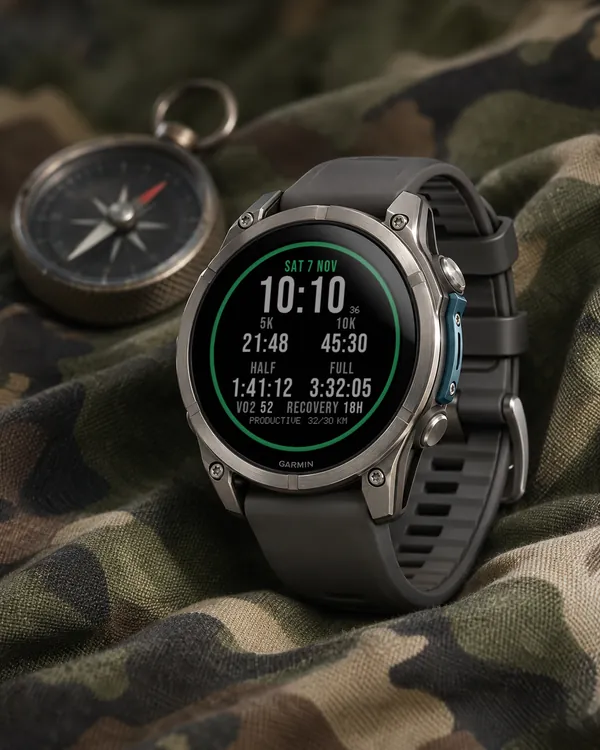
Garmin race predictions and weekly mileage right on the face
 Photography
Amber Hour
5.0 (15)
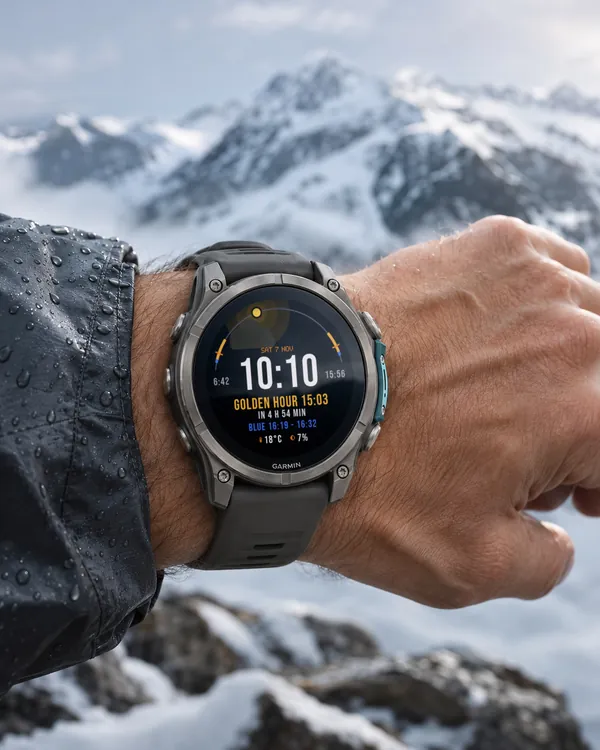
Golden and blue hour countdown with the sun's path across your day
 Readiness
Day Verdict
4.8 (12)
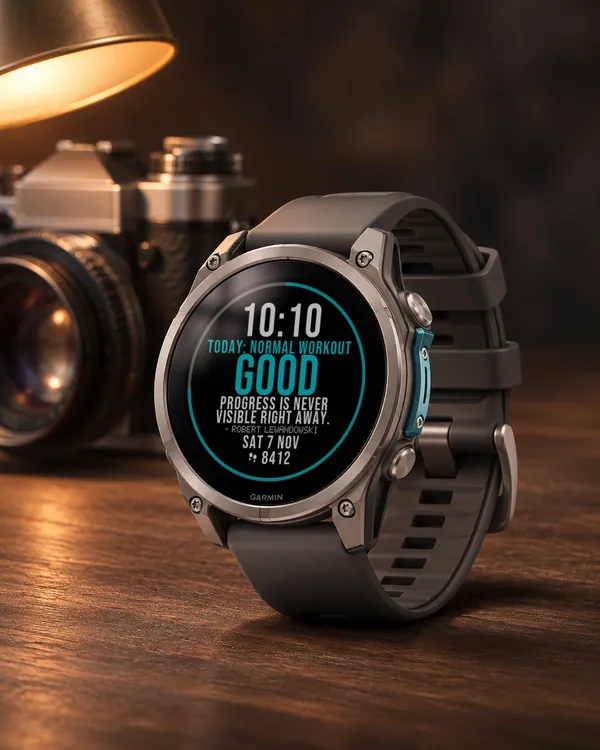
One word for your day: PUSH, STEADY, EASY or REST, from your sleep, Body Battery and recovery
 Activity
Ring Day
5.0 (16)
Three activity rings around the time, for people who close their rings