Unlock
€6.49
One-time payment. No subscription. The code works on the watch whose ID you enter.
- Install the face from Connect IQ (7 days free).
- On the watch: face settings > Buy / Unlock, scan the QR code.
- Pay and paste the code in the face settings.
- Pay.
- Copy the code.
- Paste it in Connect IQ: this face > Settings > Unlock code.
Payment works best in Safari or Chrome: menu (three dots) > Open in browser
Read it in this face, it is not the serial number of the watch.
The code works only in the watch face it was bought for: a Summit Rings code will not work in Summit Tactic.
Your ID, compare it with the watch:
Where do I find the ID?
On the watch: settings of this face > Buy / Unlock (first item). Scan the QR code with your phone or type the 10 digits. The ID is also at the top of the face settings in the Connect IQ app.
Code not working on your watch? Write to me and I will fix it.
Payments by Stripe. Seller: Mateusz Kolarz, Lublin, Poland.
Paid. Code:
We show the code here too. If the e-mail does not arrive (check spam), you can recover the code in the Recover code section with just the Face ID. Recover code
Copying did not work. The code is selected: copy it by hand.
The face unlocks by itself when the watch connects to the phone (usually within an hour; if the trial is still running, the purchase starts working when it ends).
Do not want to wait, or have an older watch? Paste the code in the Connect IQ app:
Connect IQ (or Garmin Connect) > My Device > Watch faces > Deep Bezel > Settings > Unlock code > paste > Save
Like it? Rate this face in the Garmin store
Want to try new faces and apps before the release, for free? Join the testers program
Set up the face before you download
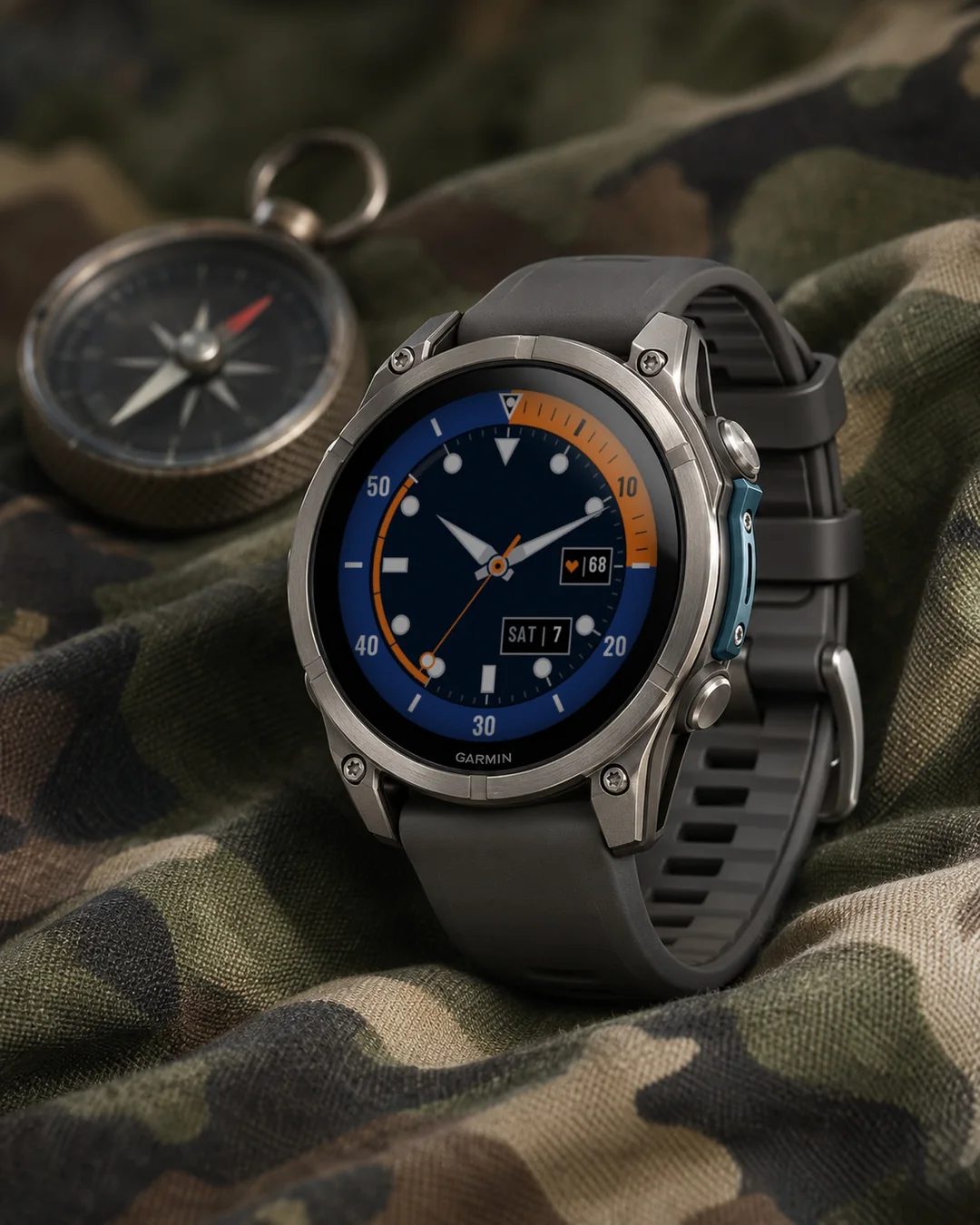
An analog diver watch face with a coloured 60-minute dive bezel, big lume markers and sword hands, plus a depth arc that tracks your steps.
7-day free trial, then a one-time unlock at dialforge.dev. No subscription.
After the trial, the face checks online through your phone whether you have bought the unlock code, so it can unlock by itself. It sends only the watch ID and the face name, nothing else.
A bold tool diver for your Garmin: coloured 60-minute bezel, big lume markers, sword hands and a depth arc that fills as you walk.
Features
- 60-minute diver bezel with the first 15 minutes filled in colour, a framed triangle and lume pearl at 12
- Big lume markers: dots, bars at 6 and 9, a triangle at 12
- Sword hands with lume inserts, seconds hand with a lollipop tip while the screen is awake (can be turned off)
- Depth arc from 7 to 11: steps to goal, battery, Body Battery or stress, scale every 20 %
- Field at 3 (heart rate by default), optional fields at 9 and under 12
- Date window at 4:30, weekday in 13 languages (by watch language, or fixed to English or Polish)
- Colours: Navy-Orange, Teal-Yellow, Black-Lime, Black-Red, Grey
- Lume colour: white, green, blue or cream
- AMOLED always-on: marker dots, hand outlines, the bezel triangle and the date, dimmed and shifted every minute
Data fields: heart rate, steps, battery, distance, calories, floors, active minutes, Body Battery, stress, altitude, notifications, solar, battery days, temperature, sunrise, sunset, next sun event, respiration, SpO2, recovery, pressure, resting heart rate, VO2 max, sleep score*, training status*, 5K prediction*, calendar*, weekly run distance*, moon phase, week number, day of year, or empty.
* needs Connect IQ 4.2 or newer
Since 1.2.0: new data to choose from: weather with icon, wind, humidity, UV, chance of rain, active calories, alarms, phone connection, do not disturb, move bar, 10K, half and full marathon predictions, cycling VO2 max, weekly ride distance and a second time zone (a fixed UTC offset, no daylight saving); on touchscreen watches, touch and hold a field to open its screen.
Since 1.2.1: on most color watches, the settings on the watch show a live preview of the face while you change them. Sunrise and sunset work on their own from your location.
Garmin does not give watch faces access to HRV status or Training Readiness, so no Connect IQ watch face can show them.
Settings: on the watch (hold MENU, then Watch face, then Customize) or in the Connect IQ app.
From the maker
I am a student and I build Dialforge watch faces myself, after classes. I do not own every watch model, so if something looks wrong on yours, write to me at https://dialforge.dev/faces/deepbezel/ and I will usually fix it within 24 hours. If you like the face, you can buy me a coffee: https://buycoffee.to/iwannaflysohigh
Works on fenix 9, fenix 8, Forerunner 970, Forerunner 570, Venu 4, Forerunner 965, Forerunner 265, Venu 3 and more.
Analogowa tarcza w stylu zegarka nurkowego: kolorowy bezel 60 minut, duże znaczniki lume i miecze, a do tego łuk głębokości pokazujący kroki.
7 dni za darmo, potem jednorazowe odblokowanie na dialforge.dev. Bez abonamentu.
Po okresie próbnym tarcza sprawdza przez telefon w internecie, czy kupiłeś kod odblokowania, żeby odblokować się sama. Wysyła tylko ID tarczy i nazwę tarczy, nic więcej.
Wyrazista tarcza nurkowa dla Twojego Garmina: kolorowy 60-minutowy bezel, duże markery z luminą, wskazówki-miecze i łuk głębokości, który wypełnia się, gdy chodzisz.
Co jest na tarczy
- 60-minutowy bezel nurkowy z pierwszymi 15 minutami w kolorze, trójkąt w ramce i perełka lumy na 12
- Duże markery z luminą: kropki, kreski na 6 i 9, trójkąt na 12
- Wskazówki-miecze z wstawkami lumy, wskazówka sekund z kółkiem na końcu przy aktywnym ekranie (można wyłączyć)
- Łuk głębokości od 7 do 11: kroki do celu, bateria, Body Battery albo stres, podziałka co 20 %
- Pole na 3 (domyślnie tętno), opcjonalne pola na 9 i pod 12
- Okienko daty na 4:30, dzień tygodnia w 13 językach (wg języka zegarka albo na stałe po angielsku lub po polsku)
- Kolory: Navy-Orange, Teal-Yellow, Black-Lime, Black-Red, Grey
- Kolor lumy: biały, zielony, niebieski albo kremowy
- Tryb zawsze włączony na AMOLED: kropki markerów, kontury wskazówek, trójkąt bezela i data, przygaszone i przesuwane co minutę
Pola danych: tętno, kroki, bateria, dystans, kalorie, piętra, aktywne minuty, Body Battery, stres, wysokość, powiadomienia, nasłonecznienie, dni na baterii, temperatura, wschód słońca, zachód słońca, następne zdarzenie słońca, oddech, SpO2, regeneracja, ciśnienie, tętno spoczynkowe, VO2 max, ocena snu*, stan treningu*, prognoza na 5 km*, kalendarz*, kilometry biegu w tygodniu*, faza księżyca, numer tygodnia, dzień roku albo puste.
* wymaga Connect IQ 4.2 lub nowszego
Od wersji 1.2.0: nowe dane do wyboru: pogoda z ikoną, wiatr, wilgotność, UV, szansa opadów, kalorie aktywne, budziki, połączenie z telefonem, nie przeszkadzać, pasek ruchu, prognozy na 10 km, półmaraton i maraton, VO2 max na rowerze, dystans rowerowy w tygodniu i druga strefa czasu (stałe przesunięcie od UTC, bez zmiany czasu); na zegarkach z ekranem dotykowym przytrzymanie pola otwiera jego ekran.
Od wersji 1.2.1: na większości zegarków z kolorowym ekranem ustawienia na zegarku pokazują podgląd tarczy na żywo podczas zmiany. Wschód i zachód słońca działają samodzielnie na podstawie Twojej lokalizacji.
Garmin nie udostępnia tarczom statusu HRV ani gotowości treningowej, więc żadna tarcza Connect IQ ich nie pokaże.
Ustawienia: na zegarku (przytrzymaj MENU, Tarcza zegarka, Dostosuj) albo w aplikacji Connect IQ.
Od autora
Jestem studentem i robię tarcze Dialforge sam, po zajęciach. Nie mam każdego modelu zegarka, więc jeśli coś wygląda źle na Twoim, napisz na https://dialforge.dev/faces/deepbezel/, zwykle poprawiam to w ciągu 24 godzin. Jeśli tarcza Ci się podoba, możesz postawić mi kawę: https://buycoffee.to/iwannaflysohigh
Działa na: fenix 9, fenix 8, Forerunner 970, Forerunner 570, Venu 4, Forerunner 965, Forerunner 265, Venu 3 i innych.
Analoges Taucheruhr-Zifferblatt mit farbiger 60-Minuten-Tauchlünette, großen Leuchtmarkierungen und Schwertzeigern, dazu ein Tiefenbogen für deine Schritte.
7 Tage kostenlos testen, danach einmalige Freischaltung auf dialforge.dev. Kein Abo.
Nach der Testphase prüft das Zifferblatt über dein Handy online, ob du den Freischaltcode gekauft hast, damit es sich selbst freischalten kann. Es sendet nur die Uhren-ID und den Namen des Zifferblatts.
Ein markanter Taucher-Look für deine Garmin: farbige 60-Minuten-Lünette, große Leuchtmarkierungen, Schwertzeiger und ein Tiefenbogen, der sich mit deinen Schritten füllt.
Funktionen
- 60-Minuten-Taucherlünette, die ersten 15 Minuten farbig gefüllt, ein gerahmtes Dreieck und eine Leuchtperle bei 12 Uhr
- Große Leuchtmarkierungen: Punkte, Balken bei 6 und 9 Uhr, ein Dreieck bei 12 Uhr
- Schwertzeiger mit Leuchteinsätzen, Sekundenzeiger mit Lollipop-Spitze, während der Bildschirm aktiv ist (lässt sich ausschalten)
- Tiefenbogen von 7 bis 11 Uhr: Schritte zum Ziel, Akku, Body Battery oder Stress, Skala alle 20 %
- Feld bei 3 Uhr (standardmäßig Herzfrequenz), optionale Felder bei 9 Uhr und unter der 12
- Datumsfenster bei 4:30 Uhr, Wochentag in 13 Sprachen (nach Uhrsprache oder fest auf Englisch oder Polnisch)
- Farben: Marine-Orange, Petrol-Gelb, Schwarz-Limette, Schwarz-Rot, Grau
- Leuchtfarbe: Weiß, Grün, Blau oder Creme
- AMOLED Always-on: Markierungspunkte, Zeigerumrisse, das Lünettendreieck und das Datum, gedimmt und jede Minute verschoben
Datenfelder: Herzfrequenz, Schritte, Akku, Distanz, Kalorien, Stockwerke, Intensitätsminuten, Body Battery, Stress, Höhe, Benachrichtigungen, Solar, Akkutage, Temperatur, Sonnenaufgang, Sonnenuntergang, nächstes Sonnenereignis, Atemfrequenz, SpO2, Erholungszeit, Druck, Ruheherzfrequenz, VO2max, Schlafwert*, Trainingszustand*, 5-km-Prognose*, Kalender*, wöchentliche Laufdistanz*, Mondphase, Kalenderwoche, Tag des Jahres oder leer.
* erfordert Connect IQ 4.2 oder neuer
Seit 1.2.0: neue Daten zur Auswahl: Wetter mit Symbol, Wind, Luftfeuchte, UV, Regenrisiko, aktive Kalorien, Wecker, Telefonverbindung, Nicht stören, Inaktivitätsleiste, Prognosen für 10 km, Halbmarathon und Marathon, VO2max Rad, Rad-Wochendistanz und eine zweite Zeitzone (fester UTC-Versatz, ohne Zeitumstellung); auf Uhren mit Touchscreen öffnet langes Drücken auf ein Feld die passende Ansicht.
Seit 1.2.1: Auf Uhren mit Farbdisplay zeigen die Einstellungen auf der Uhr eine Live-Vorschau des Zifferblatts, während du sie änderst. Sonnenaufgang und Sonnenuntergang funktionieren selbstständig anhand deines Standorts.
Garmin gibt Zifferblättern keinen Zugriff auf den HRV-Status oder die Trainingsbereitschaft, daher kann kein Connect IQ Zifferblatt sie anzeigen.
Einstellungen: auf der Uhr (MENU gedrückt halten, dann Uhrdesign, dann Anpassen) oder in der Connect IQ App.
Vom entwickler
Ich bin Student und baue die Dialforge-Zifferblätter selbst, nach den Vorlesungen. Ich habe nicht jedes Uhrenmodell. Wenn auf deiner Uhr etwas falsch aussieht, schreib mir auf https://dialforge.dev/faces/deepbezel/, meist behebe ich es innerhalb von 24 Stunden. Wenn dir das Zifferblatt gefällt, kannst du mir einen Kaffee spendieren: https://buycoffee.to/iwannaflysohigh
Cadran analogique de montre de plongée : lunette 60 minutes colorée, grands index lumineux et aiguilles glaive, avec un arc de profondeur qui suit vos pas.
Essai gratuit de 7 jours, puis un déverrouillage unique sur dialforge.dev. Sans abonnement.
Après la période d'essai, le cadran vérifie en ligne via votre téléphone si vous avez acheté le code de déblocage, pour se débloquer tout seul. Il envoie seulement l'ID de la montre et le nom du cadran.
Une montre de plongée robuste pour votre Garmin : lunette 60 minutes colorée, grands index lume, aiguilles glaive et un arc de profondeur qui se remplit à mesure que vous marchez.
Fonctionnalités
- Lunette de plongée 60 minutes avec les 15 premières minutes remplies en couleur, un triangle encadré et une perle lume à 12 heures
- Grands index lume : points, barres à 6 et 9 heures, un triangle à 12 heures
- Aiguilles glaive avec inserts lume, aiguille des secondes avec une pointe en forme de sucette quand l'écran est actif (peut être désactivée)
- Arc de profondeur de 7 à 11 heures : pas vers l'objectif, batterie, Body Battery ou stress, échelle tous les 20 %
- Champ à 3 heures (fréquence cardiaque par défaut), champs optionnels à 9 heures et sous le 12
- Fenêtre de date à 4h30, jour de la semaine en 13 langues (selon la langue de la montre, ou fixée en anglais ou en polonais)
- Couleurs : Marine-orange, Sarcelle-jaune, Noir-citron vert, Noir-rouge, Gris
- Couleur lume : Blanc, Vert, Bleu ou Crème
- AMOLED toujours actif : points des index, contours des aiguilles, triangle de la lunette et date, atténué et décalé chaque minute
Champs de données : fréquence cardiaque, pas, batterie, distance, calories, étages, minutes actives, Body Battery, stress, altitude, notifications, solaire, jours d'autonomie, température, lever du soleil, coucher du soleil, prochain événement solaire, respiration, SpO2, récupération, pression, fréquence cardiaque au repos, VO2max, score de sommeil*, statut d'entraînement*, prédiction 5 km*, calendrier*, distance de course hebdomadaire*, phase lunaire, numéro de semaine, jour de l'année, ou vide.
* nécessite Connect IQ 4.2 ou plus récent
Depuis la 1.2.0 : nouvelles données au choix : météo avec icône, vent, humidité, UV, risque de pluie, calories actives, alarmes, connexion du téléphone, ne pas déranger, barre d'activité, prévisions 10 km, semi et marathon, VO2 max vélo, distance vélo de la semaine et un second fuseau horaire (décalage UTC fixe, sans changement d'heure); sur les montres tactiles, un appui long sur un champ ouvre son écran.
Depuis la 1.2.1 : sur les montres à écran couleur, les réglages de la montre affichent un aperçu en direct du cadran pendant que vous les modifiez. Le lever et le coucher du soleil fonctionnent seuls à partir de votre position.
Garmin ne donne pas aux cadrans l'accès au statut VFC ni à la disponibilité d'entraînement, aucun cadran Connect IQ ne peut donc les afficher.
Réglages : sur la montre (maintenez MENU, puis Cadran, puis Personnaliser) ou dans l'application Connect IQ.
Du créateur
Je suis étudiant et je crée seul les cadrans Dialforge, après les cours. Je n'ai pas tous les modèles de montre : si quelque chose ne va pas sur la vôtre, écrivez-moi sur https://dialforge.dev/faces/deepbezel/, je corrige en général sous 24 heures. Si le cadran vous plaît, vous pouvez m'offrir un café : https://buycoffee.to/iwannaflysohigh
Compatible avec fenix 9, fenix 8, Forerunner 970, Forerunner 570, Venu 4, Forerunner 965, Forerunner 265, Venu 3 et d'autres modèles.
Esfera analógica de reloj de buceo: bisel de 60 minutos de color, grandes marcas luminosas y agujas tipo espada, con un arco de profundidad que sigue tus pasos.
Prueba gratuita de 7 días y luego un desbloqueo único en dialforge.dev. Sin suscripción.
Después de la prueba, la esfera comprueba por internet, a través del móvil, si has comprado el código de desbloqueo, para desbloquearse sola. Solo envía el ID del reloj y el nombre de la esfera.
Un reloj de buceo robusto para tu Garmin: bisel de 60 minutos en color, grandes marcadores luminiscentes, agujas tipo espada y un arco de profundidad que se llena mientras caminas.
Características
- Bisel de buceo de 60 minutos con los primeros 15 minutos rellenos en color, un triángulo enmarcado y una perla luminiscente a las 12
- Grandes marcadores luminiscentes: puntos, barras a las 6 y 9, un triángulo a las 12
- Agujas tipo espada con detalles luminiscentes, segundero con punta de piruleta mientras la pantalla está encendida (se puede desactivar)
- Arco de profundidad de 7 a 11: pasos hacia el objetivo, batería, Body Battery o estrés, escala cada 20 %
- Campo a las 3 (frecuencia cardiaca por defecto), campos opcionales a las 9 y bajo las 12
- Ventana de fecha a las 4:30, día de la semana en 13 idiomas (según el idioma del reloj, o fijo en inglés o polaco)
- Colores: Marino-naranja, Turquesa-amarillo, Negro-lima, Negro-rojo, Gris
- Color luminiscente: Blanco, Verde, Azul o Crema
- Siempre activo en AMOLED: puntos de los marcadores, contornos de las agujas, el triángulo del bisel y la fecha, atenuado y desplazado cada minuto
Campos de datos: frecuencia cardiaca, pasos, batería, distancia, calorías, pisos, minutos de intensidad, Body Battery, estrés, altitud, notificaciones, solar, días de batería, temperatura, amanecer, atardecer, próximo evento solar, respiración, SpO2, recuperación, presión, frecuencia cardiaca en reposo, VO2 max, puntuación de sueño*, estado de entrenamiento*, predicción de 5 km*, calendario*, distancia semanal corriendo*, fase lunar, número de semana, día del año, o vacío.
* necesita Connect IQ 4.2 o posterior
Desde la 1.2.0: nuevos datos para elegir: tiempo con icono, viento, humedad, UV, probabilidad de lluvia, calorías activas, alarmas, conexión del teléfono, no molestar, barra de movimiento, predicciones de 10 km, media maratón y maratón, VO2 máx. en bici, distancia semanal en bici y una segunda zona horaria (desfase UTC fijo, sin cambio de hora); en relojes táctiles, mantén pulsado un campo para abrir su pantalla.
Desde la 1.2.1: en relojes con pantalla en color, los ajustes del reloj muestran una vista previa en vivo de la esfera mientras los cambias. La salida y la puesta del sol funcionan por sí solas a partir de tu ubicación.
Garmin no da a las esferas acceso al estado de VFC ni a la disponibilidad para entrenar, así que ninguna esfera Connect IQ puede mostrarlos.
Ajustes: en el reloj (mantén pulsado MENU, luego Esfera y después Personalizar) o en la app Connect IQ.
Del autor
Soy estudiante y hago las esferas Dialforge yo solo, después de clase. No tengo todos los modelos de reloj, así que si algo se ve mal en el tuyo, escríbeme en https://dialforge.dev/faces/deepbezel/ y normalmente lo arreglo en 24 horas. Si te gusta la esfera, puedes invitarme a un café: https://buycoffee.to/iwannaflysohigh
Analoge duikhorloge-wijzerplaat met gekleurde 60-minuten duikbezel, grote lume-markeringen en zwaardwijzers, plus een dieptebocht die je stappen volgt.
7 dagen gratis proberen, daarna een eenmalige ontgrendeling op dialforge.dev. Geen abonnement.
Na de proefperiode controleert de wijzerplaat via je telefoon online of je de ontgrendelcode hebt gekocht, zodat hij zichzelf kan ontgrendelen. Hij stuurt alleen de horloge-ID en de naam van de wijzerplaat.
Een stoere duikershorloge-look voor je Garmin: gekleurde 60-minutenbezel, grote lume-markeringen, zwaardwijzers en een diepteboog die vult terwijl je loopt.
Functies
- 60-minuten duikersbezel waarvan de eerste 15 minuten in kleur zijn gevuld, met een omkaderde driehoek en lume-parel op 12 uur
- Grote lume-markeringen: stippen, balkjes op 6 en 9 uur, een driehoek op 12 uur
- Zwaardwijzers met lume-inzetstukken, secondewijzer met een lolly-punt terwijl het scherm actief is (kan worden uitgeschakeld)
- Diepteboog van 7 tot 11 uur: stappen naar doel, batterij, Body Battery of stress, schaalverdeling om de 20%
- Veld op 3 uur (standaard hartslag), optionele velden op 9 uur en onder 12 uur
- Datumvenster op 4:30 uur, weekdag in 13 talen (volgens de taal van het horloge, of vast op Engels of Pools)
- Kleuren: Marine-oranje, Petrol-geel, Zwart-limoen, Zwart-rood, Grijs
- Lumekleur: Wit, Groen, Blauw of Crème
- AMOLED always-on: markeringsstippen, wijzeromtrekken, de bezeldriehoek en de datum, gedimd en elke minuut verschoven
Datavelden: hartslag, stappen, batterij, afstand, calorieën, verdiepingen, actieve minuten, Body Battery, stress, hoogte, meldingen, zonne-energie, batterijdagen, temperatuur, zonsopkomst, zonsondergang, volgende zonsopkomst of zonsondergang, ademhaling, SpO2, herstel, luchtdruk, rusthartslag, VO2max, slaapscore*, trainingsstatus*, 5K-voorspelling*, agenda*, wekelijkse hardloopafstand*, maanfase, weeknummer, dag van het jaar, of leeg.
* vereist Connect IQ 4.2 of nieuwer
Sinds 1.2.0: nieuwe gegevens om te kiezen: weer met pictogram, wind, luchtvochtigheid, UV, kans op regen, actieve calorieën, alarmen, telefoonverbinding, niet storen, beweegbalk, voorspellingen voor 10 km, halve en hele marathon, VO2 max fietsen, fietsafstand deze week en een tweede tijdzone (vaste UTC-afwijking, zonder zomertijd); op horloges met touchscreen opent lang drukken op een veld het bijbehorende scherm.
Sinds 1.2.1: op horloges met kleurenscherm tonen de instellingen op het horloge een live voorbeeld van de wijzerplaat terwijl je ze aanpast. Zonsopkomst en zonsondergang werken vanzelf op basis van je locatie.
Garmin geeft wijzerplaten geen toegang tot de HRV-status of trainingsgereedheid, dus geen enkele Connect IQ-wijzerplaat kan die tonen.
Instellingen: op het horloge (houd MENU ingedrukt, dan Wijzerplaat, dan Aanpassen) of in de Connect IQ-app.
Van de maker
Ik ben student en maak de Dialforge-wijzerplaten zelf, na de colleges. Ik heb niet elk horlogemodel, dus ziet er iets verkeerd uit op het jouwe, schrijf me dan via https://dialforge.dev/faces/deepbezel/. Meestal los ik het binnen 24 uur op. Vind je de wijzerplaat mooi, dan kun je me een koffie trakteren: https://buycoffee.to/iwannaflysohigh
Werkt op fenix 9, fenix 8, Forerunner 970, Forerunner 570, Venu 4, Forerunner 965, Forerunner 265, Venu 3 en meer.
アナログのダイバーズウォッチ風文字盤。カラーの60分ベゼル、大きな夜光マーカー、ソード針、歩数を示す深度アーク付き。
7日間無料でお試しいただけます。その後はdialforge.devで解除を一度だけ購入(サブスクリプションなし)。
試用期間の後、文字盤はスマホ経由でオンラインで解除コードの購入を確認し、自動で解除されます。送信するのは時計IDと文字盤名だけです。
Garmin向けの力強いツールダイバー。カラー60分ベゼル、大きな蓄光マーカー、ソードハンド、歩くほど満ちていく深度アークを備えています。
特徴
- 60分ダイバーベゼルは最初の15分をカラーで塗りつぶし、12時位置に枠付きトライアングルと蓄光パールを配置
- 大きな蓄光マーカー:ドット、6時と9時のバー、12時のトライアングル
- 蓄光インサート付きのソードハンド、画面点灯中は先端が丸い秒針を表示(オフ可能)
- 7時から11時にかけての深度アーク:目標歩数、バッテリー、Body Battery、ストレスのいずれかを表示、20%刻みの目盛り
- 3時位置にフィールド(初期設定は心拍数)、9時位置と12時下にオプションのフィールド
- 4時30分位置に日付ウィンドウ、曜日は13言語に対応(ウォッチの言語に合わせるか、英語またはポーランド語に固定)
- カラー:ネイビー×オレンジ、ティール×イエロー、ブラック×ライム、ブラック×レッド、グレー
- 蓄光カラー:ホワイト、グリーン、ブルー、クリーム
- AMOLED常時表示:マーカーのドット、針のアウトライン、ベゼルのトライアングルと日付を表示、減光して毎分表示位置がずれます
データフィールド:心拍数、歩数、バッテリー、距離、カロリー、階数、強度活動時間、Body Battery、ストレス、高度、通知、ソーラー、バッテリー日数、気温、日の出、日の入り、次の日の出/日の入り、呼吸数、血中酸素、回復時間、気圧、安静時心拍数、VO2 max、睡眠スコア*、トレーニングステータス*、5kmレース予測*、カレンダー*、週間ランニング距離*、月相、週番号、年間通算日、または空欄。
* Connect IQ 4.2以降が必要です
1.2.0から:選べるデータを追加:アイコン付き天気、風、湿度、UV、降水確率、アクティブカロリー、アラーム、スマホ接続、おやすみモード、ムーブバー、10km・ハーフ・フルマラソン予測、サイクリングVO2max、週間ライド距離、第2タイムゾーン(UTCからの固定オフセット、夏時間なし)。タッチ対応モデルではフィールドを長押しすると対応画面が開きます。
1.2.1から:カラー画面の時計では、時計の設定画面で値を変更している間、文字盤のライブプレビューが表示されます。日の出と日の入りは、現在地から自動で表示されます。
GarminはウォッチフェイスにHRVステータスやトレーニングレディネスを公開していないため、Connect IQのウォッチフェイスでは表示できません。
設定:時計本体(MENUを長押し→文字盤→カスタマイズ)またはConnect IQアプリから。
作者より
私は学生で、Dialforgeの文字盤を授業のあとに一人で作っています。すべての時計モデルを持っているわけではないので、お使いの時計で表示がおかしい場合は https://dialforge.dev/faces/deepbezel/ からご連絡ください。通常24時間以内に修正します。文字盤を気に入っていただけたら、コーヒーをおごっていただけるとうれしいです: https://buycoffee.to/iwannaflysohigh
対応モデル:fenix 9, fenix 8, Forerunner 970, Forerunner 570, Venu 4, Forerunner 965, Forerunner 265, Venu 3 ほか
Quadrante analogico da orologio subacqueo: ghiera da 60 minuti colorata, grandi indici luminescenti e lancette a spada, con un arco di profondità che segue i passi.
Prova gratuita di 7 giorni, poi uno sblocco una tantum su dialforge.dev. Nessun abbonamento.
Dopo la prova, il quadrante controlla online tramite il telefono se hai acquistato il codice di sblocco, per sbloccarsi da solo. Invia solo l'ID dell'orologio e il nome del quadrante.
Un tool diver deciso per il tuo Garmin: ghiera colorata a 60 minuti, grandi indici luminosi, lancette a spada e un arco di profondità che si riempie mentre cammini.
Funzioni
- Ghiera diver a 60 minuti con i primi 15 minuti riempiti a colore, un triangolo incorniciato e una perla luminosa alle 12
- Grandi indici luminosi: punti, barrette alle 6 e alle 9, un triangolo alle 12
- Lancette a spada con inserti luminosi, lancetta dei secondi con punta a lecca-lecca mentre lo schermo è acceso (disattivabile)
- Arco di profondità dalle 7 alle 11: passi verso l'obiettivo, batteria, Body Battery o stress, scala ogni 20%
- Campo alle 3 (frequenza cardiaca di default), campi opzionali alle 9 e sotto le 12
- Finestrella della data alle 4:30, giorno della settimana in 13 lingue (in base alla lingua dell'orologio, oppure fissa su inglese o polacco)
- Colori: Blu-arancio, Petrolio-giallo, Nero-lime, Nero-rosso, Grigio
- Colore luminoso: bianco, verde, blu o crema
- Always-on per AMOLED: punti degli indici, contorni delle lancette, il triangolo della ghiera e la data, attenuati e spostati ogni minuto
Campi dati: frequenza cardiaca, passi, batteria, distanza, calorie, piani, minuti attivi, Body Battery, stress, altitudine, notifiche, solare, giorni di autonomia, temperatura, alba, tramonto, prossimo evento solare, respirazione, SpO2, recupero, pressione, frequenza cardiaca a riposo, VO2max, punteggio del sonno*, stato di allenamento*, previsione 5K*, calendario*, distanza settimanale di corsa*, fase lunare, numero della settimana, giorno dell'anno, oppure vuoto.
* richiede Connect IQ 4.2 o successivo
Dalla 1.2.0: nuovi dati da scegliere: meteo con icona, vento, umidità, UV, probabilità di pioggia, calorie attive, sveglie, connessione del telefono, non disturbare, barra movimento, previsioni 10 km, mezza e maratona, VO2 max bici, distanza settimanale in bici e un secondo fuso orario (scarto UTC fisso, senza ora legale); sugli orologi touch, tieni premuto un campo per aprire la sua schermata.
Dalla 1.2.1: sugli orologi con schermo a colori, le impostazioni sull'orologio mostrano un'anteprima dal vivo del quadrante mentre le modifichi. L'alba e il tramonto funzionano da soli in base alla tua posizione.
Garmin non dà ai quadranti accesso allo stato HRV né alla Training Readiness, quindi nessun quadrante Connect IQ può mostrarli.
Impostazioni: sull'orologio (tieni premuto MENU, poi Quadrante, poi Personalizza) oppure nell'app Connect IQ.
Dall'autore
Sono uno studente e creo da solo i quadranti Dialforge, dopo le lezioni. Non ho tutti i modelli di orologio, quindi se qualcosa sembra sbagliato sul tuo, scrivimi su https://dialforge.dev/faces/deepbezel/, di solito lo correggo entro 24 ore. Se il quadrante ti piace, puoi offrirmi un caffè: https://buycoffee.to/iwannaflysohigh
模拟潜水表风格表盘:彩色60分钟潜水表圈、大号夜光刻度和剑形指针,还有随步数变化的深度弧。
7 天免费试用,之后在 dialforge.dev 一次性解锁。无需订阅。
试用期结束后,表盘会通过手机在线检查你是否已购买解锁码,以便自动解锁。只发送手表 ID 和表盘名称,不发送其他内容。
为你的 Garmin 打造的硬核潜水表:彩色 60 分钟表圈、大号夜光时标、剑形指针,还有随步数填充的深度弧。
功能特色
- 60 分钟潜水表圈,前 15 分钟以彩色填充,12 点位置是带框三角标和夜光珠
- 大号夜光时标:圆点时标,6 点和 9 点位置为条形时标,12 点位置为三角时标
- 带夜光嵌件的剑形指针,屏幕唤醒时秒针带棒棒糖形针尖(可关闭)
- 7 点到 11 点之间的深度弧:可选步数进度、电量、Body Battery 或压力,每 20% 一个刻度
- 3 点位置一个字段(默认心率),9 点和 12 点下方还有可选字段
- 4:30 位置是日期窗口,星期支持 13 种语言(跟随手表语言,或固定为英语或波兰语)
- 颜色:藏青橙、青黄、黑柠、黑红、灰色
- 夜光颜色:白色、绿色、蓝色或奶油色
- AMOLED 息屏常亮:时标圆点、指针轮廓、表圈三角标和日期保留显示,整体变暗并每分钟偏移一次位置
数据字段:心率、步数、电量、距离、卡路里、楼层、强度分钟、Body Battery、压力、海拔、通知、太阳能强度、电池续航天数、温度、日出、日落、下一次日出或日落、呼吸频率、血氧、恢复时间、气压、静息心率、VO2 max、睡眠分数*、训练状态*、5公里比赛预测*、日历*、每周跑步距离*、月相、周数、一年中的第几天,或留空。
* 需要 Connect IQ 4.2 或更高版本
自 1.2.0 起:新增可选数据:带图标的天气、风、湿度、紫外线、降水概率、活动卡路里、闹钟、手机连接、勿扰、活动提醒条、10 公里、半马和全马预测、骑行最大摄氧量、本周骑行距离和第二时区(与 UTC 的固定偏移,无夏令时);在触屏手表上,长按数据栏即可打开对应界面。
自 1.2.1 起:在彩色屏幕手表上,更改手表上的设置时会实时预览表盘效果。日出和日落会根据你的位置自动显示。
Garmin 不向表盘开放 HRV 状态和训练准备度,因此任何 Connect IQ 表盘都无法显示。
设置:在手表上,长按 MENU,然后依次点击表盘、自定义;或在 Connect IQ 应用中设置。
作者的话
我是一名学生,利用课余时间独自制作 Dialforge 表盘。我没有每一款手表,所以如果表盘在您的手表上显示不对,请到 https://dialforge.dev/faces/deepbezel/ 告诉我,我通常会在 24 小时内修复。如果您喜欢这款表盘,可以请我喝杯咖啡:https://buycoffee.to/iwannaflysohigh
适用于 fenix 9, fenix 8, Forerunner 970, Forerunner 570, Venu 4, Forerunner 965, Forerunner 265, Venu 3 等。
Аналоговый циферблат в стиле водолазных часов: цветной 60-минутный безель, крупные люминесцентные метки, стрелки-мечи и дуга глубины, отслеживающая шаги.
7-дневный бесплатный пробный период, затем разовая разблокировка на dialforge.dev. Без подписки.
После пробного периода циферблат через телефон проверяет онлайн, купили ли вы код разблокировки, чтобы разблокироваться самостоятельно. Он отправляет только ID часов и название циферблата.
Выразительные дайверские часы-инструмент для вашего Garmin: цветной 60-минутный безель, крупные светящиеся метки, стрелки-мечи и шкала глубиномера, которая заполняется по мере ходьбы.
Особенности
- 60-минутный дайверский безель с цветными первыми 15 минутами, треугольником в рамке и светящейся жемчужиной на 12
- Крупные светящиеся метки: точки, полоски на 6 и 9, треугольник на 12
- Стрелки-мечи со светящимися вставками, секундная стрелка с наконечником lollipop при активном экране (можно отключить)
- Дуга глубиномера от 7 до 11: шаги к цели, батарея, Body Battery или стресс, деления каждые 20 %
- Поле на 3 (по умолчанию пульс), дополнительные поля на 9 и под 12
- Окошко даты на 4:30, день недели на 13 языках (по языку часов или закрепить английский или польский)
- Цвета: Navy-Orange, Teal-Yellow, Black-Lime, Black-Red, Grey
- Цвет светящихся элементов: белый, зеленый, синий или кремовый
- Режим Always-on для AMOLED: точки меток, контуры стрелок, треугольник на безеле и дата, приглушенные и со сдвигом каждую минуту
Поля данных: пульс, шаги, батарея, расстояние, калории, этажи, активные минуты, Body Battery, стресс, высота, уведомления, солнце, дни работы от батареи, температура, восход, закат, следующий восход/закат, частота дыхания, SpO2, время восстановления, давление, пульс в покое, VO2 max, оценка сна*, состояние тренировки*, прогноз на 5K*, календарь*, дистанция бега за неделю*, фаза луны, номер недели, день года или пустое поле.
* требуется Connect IQ 4.2 или новее
Начиная с версии 1.2.0: новые данные на выбор: погода со значком, ветер, влажность, UV, вероятность дождя, активные калории, будильники, подключение к телефону, режим «Не беспокоить», индикатор движения, прогнозы на 10K, полумарафон и марафон, велосипедный VO2 max, дистанция велопоездок за неделю и второй часовой пояс (фиксированное смещение относительно UTC, без перехода на летнее время); на часах с сенсорным экраном коснитесь поля и удерживайте его, чтобы открыть соответствующий экран.
Начиная с версии 1.2.1: на часах с цветным экраном настройки на часах показывают предварительный просмотр циферблата в реальном времени при изменении. Восход и закат солнца работают сами по вашему местоположению.
Garmin не дает циферблатам доступа к статусу HRV или Training Readiness, поэтому ни один циферблат Connect IQ не может их показывать.
Настройки: на часах (удерживайте MENU, затем «Циферблат», затем «Настройка») или в приложении Connect IQ.
От автора
Я студент и делаю циферблаты Dialforge сам, после занятий. У меня есть не все модели часов, поэтому если на ваших что-то выглядит неправильно, напишите мне на https://dialforge.dev/faces/deepbezel/, обычно я исправляю это в течение 24 часов. Если циферблат вам нравится, можете угостить меня кофе: https://buycoffee.to/iwannaflysohigh
Работает на fenix 9, fenix 8, Forerunner 970, Forerunner 570, Venu 4, Forerunner 965, Forerunner 265, Venu 3 и других.
Mostrador analógico de relógio de mergulho: bisel de 60 minutos colorido, grandes marcadores luminosos e ponteiros espada, com um arco de profundidade que acompanha seus passos.
Teste grátis de 7 dias, depois um desbloqueio único em dialforge.dev. Sem assinatura.
Depois do período de teste, o mostrador verifica on-line, pelo celular, se você comprou o código de desbloqueio, para se desbloquear sozinho. Ele envia só o ID do relógio e o nome do mostrador.
Um relógio de mergulho robusto para o seu Garmin: bezel colorido de 60 minutos, marcadores luminescentes grandes, ponteiros em espada e um arco de profundidade que se preenche conforme você caminha.
Recursos
- Bezel de mergulho de 60 minutos com os primeiros 15 minutos preenchidos em cor, um triângulo emoldurado e uma pérola luminescente na posição 12
- Marcadores luminescentes grandes: pontos, barras nas posições 6 e 9, um triângulo na posição 12
- Ponteiros em espada com inserções luminescentes, ponteiro de segundos com ponta em forma de pirulito enquanto a tela está ativa (pode ser desativado)
- Arco de profundidade de 7 a 11: passos até a meta, bateria, Body Battery ou estresse, escala a cada 20%
- Campo na posição 3 (frequência cardíaca por padrão), campos opcionais nas posições 9 e abaixo do 12
- Janela de data na posição 4:30, dia da semana em 13 idiomas (conforme o idioma do relógio, ou fixo em inglês ou polonês)
- Cores: Azul-laranja, Petróleo-amarelo, Preto-lima, Preto-vermelho, Cinza
- Cor luminescente: Branco, Verde, Azul ou Creme
- Always-on em AMOLED: pontos dos marcadores, contornos dos ponteiros, o triângulo do bezel e a data, escurecidos e deslocados a cada minuto
Campos de dados: frequência cardíaca, passos, bateria, distância, calorias, andares, minutos ativos, Body Battery, estresse, altitude, notificações, solar, dias de bateria, temperatura, nascer do sol, pôr do sol, próximo evento solar, respiração, SpO2, recuperação, pressão, frequência cardíaca de repouso, VO2 máx, pontuação de sono*, status de treino*, previsão de 5 km*, calendário*, distância semanal de corrida*, fase da lua, número da semana, dia do ano, ou vazio.
* precisa de Connect IQ 4.2 ou mais recente
Desde a 1.2.0: novos dados para escolher: tempo com ícone, vento, umidade, UV, chance de chuva, calorias ativas, alarmes, conexão do telefone, não perturbe, barra de movimento, previsões de 10 km, meia e maratona, VO2 máx. no ciclismo, distância semanal de bike e um segundo fuso horário (deslocamento UTC fixo, sem horário de verão); em relógios com tela sensível ao toque, toque e segure um campo para abrir a tela dele.
Desde a 1.2.1: em relógios com tela colorida, as configurações no relógio mostram uma prévia ao vivo do mostrador enquanto você as altera. O nascer e o pôr do sol funcionam sozinhos a partir da sua localização.
A Garmin não dá aos mostradores acesso ao status de VFC nem à prontidão para treino, então nenhum mostrador Connect IQ consegue exibi-los.
Configurações: no relógio (segure MENU, depois Mostrador, depois Personalizar) ou no aplicativo Connect IQ.
Do criador
Sou estudante e faço os mostradores Dialforge sozinho, depois das aulas. Não tenho todos os modelos de relógio, então se algo parecer errado no seu, escreva para mim em https://dialforge.dev/faces/deepbezel/, normalmente eu corrijo em até 24 horas. Se você gostou do mostrador, pode me pagar um café: https://buycoffee.to/iwannaflysohigh
Funciona em fenix 9, fenix 8, Forerunner 970, Forerunner 570, Venu 4, Forerunner 965, Forerunner 265, Venu 3 e outros.
Analogový ciferník potápěčských hodinek: barevná 60minutová lünetka, velké svítící značky a ručičky ve tvaru meče, k tomu oblouk hloubky sledující kroky.
7denní bezplatná zkušební verze, poté jednorázové odemknutí na dialforge.dev. Žádné předplatné.
Po zkušební době ciferník přes telefon online ověří, zda jste koupili odemykací kód, aby se mohl sám odemknout. Posílá jen ID hodinek a název ciferníku.
Výrazné potápěčské tool hodinky pro váš Garmin: barevná 60-minutová luneta, velké luminiscenční indexy, mečové ručičky a hloubkový oblouk, který se plní při chůzi.
Funkce
- 60-minutová potápěčská luneta s prvními 15 minutami vyplněnými barvou, orámovaným trojúhelníkem a luminiscenční perlou na 12
- Velké luminiscenční indexy: tečky, čárky na 6 a 9, trojúhelník na 12
- Mečové ručičky s luminiscenční výplní, sekundová ručička s terčíkem při aktivním displeji (lze vypnout)
- Hloubkový oblouk od 7 do 11: kroky k cíli, baterie, Body Battery nebo stres, stupnice po 20 %
- Pole na pozici 3 (výchozí srdeční tep), volitelná pole na 9 a pod 12
- Okénko data na pozici 4:30, den v týdnu ve 13 jazycích (podle jazyka hodinek, nebo napevno angličtina či polština)
- Barvy: námořnická modrá-oranžová, modrozelená-žlutá, černá-limetková, černá-červená, šedá
- Barva luminiscence: bílá, zelená, modrá nebo krémová
- AMOLED always-on: tečky indexů, obrysy ručiček, trojúhelník lunety a datum, ztlumené a posouvané každou minutu
Datová pole: srdeční tep, kroky, baterie, vzdálenost, kalorie, patra, aktivní minuty, Body Battery, stres, nadmořská výška, oznámení, sluneční svit, dny výdrže baterie, teplota, východ slunce, západ slunce, další sluneční událost, dýchání, SpO2, doba regenerace, tlak, klidový srdeční tep, VO2 max, skóre spánku*, stav tréninku*, předpověď na 5K*, kalendář*, týdenní běžecká vzdálenost*, fáze měsíce, číslo týdne, den v roce nebo prázdné pole.
* vyžaduje Connect IQ 4.2 nebo novější
Od verze 1.2.0: nová data na výběr: počasí s ikonou, vítr, vlhkost, UV, pravděpodobnost deště, aktivní kalorie, budíky, připojení k telefonu, nerušit, výzva k pohybu, předpovědi pro 10K, půlmaraton a maraton, cyklistické VO2 max, týdenní vzdálenost na kole a druhé časové pásmo (pevný posun vůči UTC, bez letního času); na hodinkách s dotykovým displejem otevřete obrazovku daného údaje dotykem a podržením pole.
Od verze 1.2.1: na hodinkách s barevným displejem zobrazuje nastavení v hodinkách náhled ciferníku naživo během úprav. Východ a západ slunce fungují samy podle vaší polohy.
Garmin neposkytuje ciferníkům přístup ke stavu HRV ani k Training Readiness, takže je nemůže zobrazit žádný ciferník z Connect IQ.
Nastavení: v hodinkách (podržte MENU, pak Vzhled hodinek, pak Upravit) nebo v aplikaci Connect IQ.
Od autora
Jsem student a ciferníky Dialforge dělám sám, po škole. Nemám každý model hodinek, takže pokud na vašich něco nevypadá dobře, napište mi na https://dialforge.dev/faces/deepbezel/, obvykle to opravím do 24 hodin. Pokud se vám ciferník líbí, můžete mi koupit kávu: https://buycoffee.to/iwannaflysohigh
Funguje na fenix 9, fenix 8, Forerunner 970, Forerunner 570, Venu 4, Forerunner 965, Forerunner 265, Venu 3 a dalších.
Mostrador analógico de relógio de mergulho: bisel de 60 minutos colorido, grandes marcadores luminosos e ponteiros espada, com um arco de profundidade que acompanha os seus passos.
7 dias de teste gratuito, depois um desbloqueio único em dialforge.dev. Sem subscrição.
Depois do período de teste, o mostrador verifica online, através do telemóvel, se comprou o código de desbloqueio, para se desbloquear sozinho. Envia apenas o ID do relógio e o nome do mostrador.
Um relógio de mergulho marcante para o seu Garmin: bisel colorido de 60 minutos, marcadores luminescentes grandes, ponteiros em espada e um arco de profundidade que se preenche à medida que caminha.
Funcionalidades
- Bisel de mergulho de 60 minutos com os primeiros 15 minutos preenchidos a cores, um triângulo com moldura e pérola luminescente às 12
- Marcadores luminescentes grandes: pontos, barras às 6 e 9, um triângulo às 12
- Ponteiros em espada com inserções luminescentes, ponteiro dos segundos com ponta lollipop enquanto o ecrã está ativo (pode ser desativado)
- Arco de profundidade das 7 às 11: passos até ao objetivo, bateria, Body Battery ou stress, escala a cada 20 %
- Campo às 3 (frequência cardíaca por predefinição), campos opcionais às 9 e por baixo das 12
- Janela de data às 4:30, dia da semana em 13 idiomas (consoante o idioma do relógio, ou fixo em inglês ou polaco)
- Cores: Azul-marinho-Laranja, Verde-azulado-Amarelo, Preto-Lima, Preto-Vermelho, Cinzento
- Cor do lume: branco, verde, azul ou creme
- Always-on em AMOLED: pontos marcadores, contornos dos ponteiros, o triângulo do bisel e a data, atenuados e deslocados a cada minuto
Campos de dados: frequência cardíaca, passos, bateria, distância, calorias, andares, minutos ativos, Body Battery, stress, altitude, notificações, solar, dias de bateria, temperatura, nascer do sol, pôr do sol, próximo evento solar, respiração, SpO2, recuperação, pressão, frequência cardíaca em repouso, VO2 max, pontuação de sono*, estado de treino*, previsão de 5K*, calendário*, distância de corrida semanal*, fase da lua, número da semana, dia do ano ou vazio.
* necessita do Connect IQ 4.2 ou mais recente
Desde a versão 1.2.0: novos dados à escolha: meteorologia com ícone, vento, humidade, UV, probabilidade de chuva, calorias ativas, alarmes, ligação ao telemóvel, não incomodar, barra de movimento, previsões para 10K, meia maratona e maratona completa, VO2 max de ciclismo, distância de ciclismo semanal e um segundo fuso horário (um desvio fixo UTC, sem horário de verão); em relógios com ecrã tátil, toque e mantenha premido um campo para abrir o respetivo ecrã.
Desde a 1.2.1: nos relógios com ecrã a cores, as definições no relógio mostram uma pré-visualização em direto do mostrador enquanto as altera. O nascer e o pôr do sol funcionam sozinhos a partir da sua localização.
A Garmin não dá aos mostradores acesso ao estado de HRV nem à Training Readiness, pelo que nenhum mostrador Connect IQ os pode apresentar.
Definições: no relógio (mantenha premido MENU, depois Mostrador e depois Personalizar) ou na aplicação Connect IQ.
Do criador
Sou estudante e faço os mostradores Dialforge sozinho, depois das aulas. Não tenho todos os modelos de relógio, por isso, se algo parecer errado no seu, escreva-me em https://dialforge.dev/faces/deepbezel/, normalmente corrijo em 24 horas. Se gostar do mostrador, pode oferecer-me um café: https://buycoffee.to/iwannaflysohigh
Funciona em fenix 9, fenix 8, Forerunner 970, Forerunner 570, Venu 4, Forerunner 965, Forerunner 265, Venu 3 e outros.
아날로그 다이버 워치 스타일 워치 페이스. 컬러 60분 베젤, 큰 야광 마커, 소드 핸즈, 걸음 수를 보여 주는 수심 호를 갖췄습니다.
7일 무료 체험 후, dialforge.dev에서 일회성 잠금 해제를 구매하세요. 구독은 없습니다.
체험 기간이 끝나면 워치 페이스가 휴대폰을 통해 잠금 해제 코드를 구매했는지 온라인으로 확인하여 자동으로 잠금 해제됩니다. 시계 ID와 페이스 이름만 보냅니다.
Garmin을 위한 대담한 툴 다이버: 컬러 60분 베젤, 큰 야광 표식, 소드 핸즈, 걸을수록 채워지는 수심 호.
기능
- 처음 15분이 색으로 채워진 60분 다이버 베젤, 12시 방향에 프레임이 있는 삼각형과 야광 펄
- 큰 야광 표식: 점, 6시와 9시의 막대, 12시의 삼각형
- 야광 인서트가 있는 소드 핸즈, 화면이 켜져 있는 동안 롤리팝 끝 모양의 초침(끌 수 있음)
- 7시에서 11시까지의 수심 호: 목표 대비 걸음 수, 배터리, Body Battery 또는 스트레스, 20 %마다 눈금
- 3시 방향의 필드(기본값은 심박수), 9시와 12 아래에 선택 사항인 필드
- 4시 30분 방향의 날짜 창, 13개 언어의 요일(시계 언어에 따르거나, 영어 또는 폴란드어로 고정)
- 색상: Navy-Orange, Teal-Yellow, Black-Lime, Black-Red, Grey
- 야광 색상: 흰색, 녹색, 파란색 또는 크림색
- AMOLED 상시 표시: 표식 점, 바늘 윤곽, 베젤 삼각형, 날짜를 어둡게 하고 매분 위치 이동
데이터 필드: 심박수, 걸음 수, 배터리, 거리, 칼로리, 층수, 활동 시간, Body Battery, 스트레스, 고도, 알림, 태양광, 배터리 잔여 일수, 온도, 일출, 일몰, 다음 태양 이벤트, 호흡, SpO2, 회복, 기압, 안정 시 심박수, VO2 max, 수면 점수*, 트레이닝 상태*, 5K 예측*, 캘린더*, 주간 달리기 거리*, 월상, 주차, 연중 일수, 또는 비움.
* Connect IQ 4.2 이상이 필요합니다
1.2.0부터 선택 가능한 새 데이터: 아이콘이 있는 날씨, 바람, 습도, UV, 강수 확률, 활동 칼로리, 알람, 휴대전화 연결, 방해 금지, 활동 알림 바, 10K, 하프 및 풀 마라톤 예측, 사이클링 VO2 max, 주간 라이딩 거리, 두 번째 시간대(고정 UTC 오프셋, 서머타임 없음); 터치스크린 시계에서는 필드를 길게 누르면 해당 화면이 열립니다.
1.2.1부터: 컬러 화면 워치에서는 시계의 설정 화면에서 값을 바꾸는 동안 워치페이스를 실시간 미리보기로 볼 수 있습니다. 일출과 일몰이 현재 위치를 기준으로 자동으로 작동합니다.
Garmin은 워치페이스에 HRV 상태나 Training Readiness에 대한 접근을 허용하지 않으므로, 어떤 Connect IQ 워치페이스도 이를 표시할 수 없습니다.
설정: 시계에서(MENU를 길게 누른 다음 워치페이스, 사용자 설정) 또는 Connect IQ 앱에서 변경할 수 있습니다.
제작자의 한마디
저는 학생이고 수업이 끝난 뒤 Dialforge 워치페이스를 혼자 만들고 있습니다. 모든 시계 모델을 갖고 있지는 않아서, 시계에서 이상하게 보이는 부분이 있으면 https://dialforge.dev/faces/deepbezel/에서 알려 주세요. 보통 24시간 안에 고칩니다. 워치페이스가 마음에 드신다면 커피 한 잔 사주실 수 있습니다: https://buycoffee.to/iwannaflysohigh
지원 모델: fenix 9, fenix 8, Forerunner 970, Forerunner 570, Venu 4, Forerunner 965, Forerunner 265, Venu 3 외
Analog urtavla i dykarklockestil med färgad 60-minuters dykbezel, stora lysande markeringar och svärdsvisare, plus en djupbåge som följer dina steg.
7 dagars gratis provperiod, sedan en engångsupplåsning på dialforge.dev. Ingen prenumeration.
Efter provperioden kontrollerar urtavlan online via telefonen om du har köpt upplåsningskoden, så att den kan låsa upp sig själv. Den skickar bara klock-ID och urtavlans namn.
En kraftfull dykarklocka för din Garmin: färgad 60-minutersring, stora lume-markeringar, svärdvisare och en djupbåge som fylls när du går.
Funktioner
- 60-minuters dykarring med de första 15 minuterna fyllda i färg, en inramad triangel och lume-pärla vid 12
- Stora lume-markeringar: punkter, staplar vid 6 och 9, en triangel vid 12
- Svärdvisare med lume-inlägg, sekundvisare med klubbspets medan skärmen är aktiv (kan stängas av)
- Djupbåge från 7 till 11: steg mot mål, batteri, Body Battery eller stress, skala var 20 %
- Fält vid 3 (puls som standard), valfria fält vid 9 och under 12
- Datumfönster vid 4:30, veckodag på 13 språk (efter klockans språk, eller fast på engelska eller polska)
- Färger: Navy-Orange, Teal-Yellow, Black-Lime, Black-Red, Grey
- Lume-färg: vit, grön, blå eller cream
- AMOLED always-on: markeringspunkter, visarkonturer, vridringstriangeln och datumet, nedtonat och flyttas varje minut
Datafält: puls, steg, batteri, distans, kalorier, våningar, aktiva minuter, Body Battery, stress, höjd, aviseringar, solenergi, batteridagar, temperatur, soluppgång, solnedgång, nästa solhändelse, andning, SpO2, återhämtning, lufttryck, vilopuls, VO2 max, sömnresultat*, träningsstatus*, 5K-prognos*, kalender*, löpdistans per vecka*, månfas, veckonummer, dag på året eller tomt.
* kräver Connect IQ 4.2 eller senare
Sedan 1.2.0: ny data att välja mellan: väder med ikon, vind, luftfuktighet, UV, regnrisk, aktiva kalorier, alarm, telefonanslutning, stör ej, rörelsestapel, prognoser för 10K, halvmaraton och maraton, cykling-VO2 max, cykeldistans per vecka och en andra tidszon (en fast UTC-förskjutning, ingen sommartid); på klockor med pekskärm kan du trycka och hålla på ett fält för att öppna dess skärm.
Sedan 1.2.1: På klockor med färgskärm visar inställningarna på klockan en liveförhandsvisning av urtavlan medan du ändrar dem. Soluppgång och solnedgång fungerar av sig själva utifrån din position.
Garmin ger inte urtavlor åtkomst till HRV-status eller Training Readiness, så ingen Connect IQ-urtavla kan visa dem.
Inställningar: på klockan (håll in MENU, sedan Urtavla, sedan Anpassa) eller i Connect IQ-appen.
Från skaparen
Jag är student och gör Dialforge-urtavlorna själv, efter föreläsningarna. Jag har inte alla klockmodeller, så om något ser fel ut på din, skriv till mig på https://dialforge.dev/faces/deepbezel/, oftast fixar jag det inom 24 timmar. Gillar du urtavlan kan du bjuda mig på en kaffe: https://buycoffee.to/iwannaflysohigh
Fungerar på fenix 9, fenix 8, Forerunner 970, Forerunner 570, Venu 4, Forerunner 965, Forerunner 265, Venu 3 med flera.
Analog urskive i dykkerur-stil med farvet 60-minutters dykkerbezel, store lysende markører og sværdviserne, plus en dybdebue der følger dine skridt.
7 dages gratis prøveperiode, derefter en engangsoplåsning på dialforge.dev. Intet abonnement.
Efter prøveperioden tjekker urskiven online via telefonen, om du har købt oplåsningskoden, så den kan låse sig selv op. Den sender kun ur-ID og urskivens navn.
Et kraftigt dykkerværktøj til din Garmin: farvet 60-minutters bezel, store lume-markører, sværdvisere og en dybdebue, der fyldes, mens du går.
Funktioner
- 60-minutters dykkerbezel, hvor de første 15 minutter er fyldt med farve, en indrammet trekant og en lume-perle ved 12
- Store lume-markører: prikker, streger ved 6 og 9, en trekant ved 12
- Sværdvisere med lume-indlæg, sekundviser med lollipop-spids, mens skærmen er vågen (kan slås fra)
- Dybdebue fra 7 til 11: skridt mod mål, batteri, Body Battery eller stress, skala for hver 20 %
- Felt ved 3 (som standard puls), valgfrie felter ved 9 og under 12
- Datovindue ved 4:30, ugedag på 13 sprog (efter urets sprog, eller fast engelsk eller polsk)
- Farver: Marineblå-orange, Blågrøn-gul, Sort-lime, Sort-rød, Grå
- Lume-farve: hvid, grøn, blå eller creme
- AMOLED always-on: markørprikker, kontur af viserne, bezeltrekanten og datoen, dæmpet og flyttet hvert minut
Datafelter: puls, skridt, batteri, distance, kalorier, etager, aktive minutter, Body Battery, stress, højde, notifikationer, sol, batteridage, temperatur, solopgang, solnedgang, næste solhændelse, respiration, SpO2, restitution, tryk, hvilepuls, VO2 max, søvnscore*, træningsstatus*, 5K-prognose*, kalender*, ugentlig løbedistance*, månefase, ugenummer, dag på året eller tomt.
* kræver Connect IQ 4.2 eller nyere
Siden 1.2.0: nye data at vælge imellem: vejr med ikon, vind, luftfugtighed, UV, regnrisiko, aktive kalorier, alarmer, telefonforbindelse, forstyr ikke, bevægelsesbjælke, 10K, halv- og helmaratonprognoser, VO2 max til cykling, ugentlig cykeldistance og en ekstra tidszone (en fast UTC-forskydning, ingen sommertid). På ure med touchskærm kan du trykke og holde på et felt for at åbne dets skærmbillede.
Siden 1.2.1: På ure med farveskærm viser indstillingerne på uret et live-eksempel af urskiven, mens du ændrer dem. Solopgang og solnedgang fungerer af sig selv ud fra din placering.
Garmin giver ikke urskiver adgang til HRV-status eller Training Readiness, så ingen Connect IQ-urskive kan vise dem.
Indstillinger: på uret (hold MENU, derefter Urskive, derefter Tilpas) eller i Connect IQ-appen.
Fra skaberen
Jeg er studerende og laver Dialforge-urskiverne selv, efter undervisningen. Jeg har ikke alle urmodeller, så hvis noget ser forkert ud på dit ur, så skriv til mig på https://dialforge.dev/faces/deepbezel/. Som regel retter jeg det inden for 24 timer. Kan du lide urskiven, kan du give mig en kop kaffe: https://buycoffee.to/iwannaflysohigh
Virker på fenix 9, fenix 8, Forerunner 970, Forerunner 570, Venu 4, Forerunner 965, Forerunner 265, Venu 3 og flere.
Analog urskive i dykkerklokke-stil med farget 60-minutters dykkerbezel, store lysende markører og sverdvisere, pluss en dybdebue som følger skrittene dine.
7 dagers gratis prøveperiode, deretter en engangsopplåsing på dialforge.dev. Ingen abonnement.
Etter prøveperioden sjekker urskiven på nett via telefonen om du har kjøpt opplåsingskoden, slik at den kan låse seg opp selv. Den sender bare klokke-ID og navnet på urskiven.
En tøff dykkerklokke til Garmin-en din: farget 60-minutters ramme, store lumemarkører, sverdvisere og en dybdebue som fylles mens du går.
Funksjoner
- 60-minutters dykkerramme med de første 15 minuttene fylt med farge, en innrammet trekant og lueperle ved 12
- Store lumemarkører: prikker, streker ved 6 og 9, en trekant ved 12
- Sverdvisere med lumeinnlegg, sekundviser med slikkepinnspiss mens skjermen er våken (kan slås av)
- Dybdebue fra 7 til 11: skritt mot mål, batteri, Body Battery eller stress, skala hver 20. %
- Felt ved 3 (puls som standard), valgfrie felt ved 9 og under 12
- Datovindu ved 4:30, ukedag på 13 språk (etter klokkens språk, eller låst til engelsk eller polsk)
- Farger: Navy-Orange, Teal-Yellow, Black-Lime, Black-Red, Grey
- Lumefarge: hvit, grønn, blå eller krem
- AMOLED alltid-på: markørprikker, viserkonturer, rammetrekanten og datoen, dempet og flyttet hvert minutt
Datafelt: puls, skritt, batteri, distanse, kalorier, etasjer, aktive minutter, Body Battery, stress, høyde, varsler, sol, batteridager, temperatur, soloppgang, solnedgang, neste solhendelse, respirasjon, SpO2, restitusjon, trykk, hvilepuls, VO2 max, søvnskåre*, treningsstatus*, 5K-prediksjon*, kalender*, ukentlig løpedistanse*, månefase, ukenummer, dag i året, eller tomt.
* krever Connect IQ 4.2 eller nyere
Fra 1.2.0: nye data å velge mellom: vær med ikon, vind, luftfuktighet, UV, regnsjanse, aktive kalorier, alarmer, telefonforbindelse, ikke forstyrr, bevegelseslinje, 10K-, halvmaraton- og maratonprediksjoner, VO2 max for sykling, ukentlig sykkeldistanse og en ekstra tidssone (en fast UTC-forskyvning, uten sommertid); på berøringsskjermklokker kan du trykke og holde på et felt for å åpne skjermbildet.
Siden 1.2.1: På klokker med fargeskjerm viser innstillingene på klokken en live-forhåndsvisning av urskiven mens du endrer dem. Soloppgang og solnedgang fungerer av seg selv ut fra posisjonen din.
Garmin gir ikke urskiver tilgang til HRV-status eller Training Readiness, så ingen Connect IQ-urskive kan vise dem.
Innstillinger: på klokken (hold MENU, deretter Urskive, deretter Tilpass) eller i Connect IQ-appen.
Fra utvikleren
Jeg er student og lager Dialforge-urskivene selv, etter forelesningene. Jeg har ikke alle klokkemodeller, så hvis noe ser feil ut på din, skriv til meg på https://dialforge.dev/faces/deepbezel/, vanligvis fikser jeg det innen 24 timer. Liker du urskiven, kan du spandere en kaffe på meg: https://buycoffee.to/iwannaflysohigh
Fungerer på fenix 9, fenix 8, Forerunner 970, Forerunner 570, Venu 4, Forerunner 965, Forerunner 265, Venu 3 og flere.
類比潛水錶風格錶面:彩色60分鐘潛水錶圈、大型夜光刻度和劍形指針,還有隨步數變化的深度弧。
7 天免費試用,之後在 dialforge.dev 一次性解鎖。不需訂閱。
試用期結束後,錶面會透過手機在線上檢查你是否已購買解鎖碼,以便自動解鎖。只傳送手錶 ID 和錶面名稱,不傳送其他內容。
為您的 Garmin 打造的硬派工具型潛水錶:彩色 60 分鐘錶圈、大型夜光時標、劍形指針,以及隨步數填滿的深度弧線。
功能特色
- 60 分鐘潛水錶圈,前 15 分鐘以顏色填滿,12 點鐘位置設有帶框三角形與夜光珠
- 大型夜光時標:圓點、6 點鐘與 9 點鐘位置的長條、12 點鐘位置的三角形
- 劍形指針帶夜光嵌條,螢幕喚醒時秒針尾端呈棒棒糖狀(可關閉)
- 從 7 點到 11 點之間的深度弧線:可顯示距目標步數、電量、Body Battery 或壓力,每 20% 為一刻度
- 3 點鐘位置有一個欄位(預設為心率),9 點鐘位置與 12 點鐘下方可另外選配欄位
- 4:30 位置為日期視窗,星期支援 13 種語言(依手錶語言,或固定為英文或波蘭文)
- 顏色:海軍藍橘、藍綠黃、黑萊姆綠、黑紅、灰色
- 夜光顏色:白色、綠色、藍色或米白色
- AMOLED 常亮模式:僅顯示時標圓點、指針輪廓、錶圈三角形與日期,畫面變暗並每分鐘偏移
資料欄位:心率、步數、電量、距離、卡路里、樓層、強度分鐘、Body Battery、壓力、海拔、通知、太陽能強度、電池續航天數、溫度、日出、日落、下一次日出或日落、呼吸頻率、血氧、恢復時間、氣壓、靜止心率、VO2 max、睡眠評分*、訓練狀態*、5 公里比賽預測*、行事曆*、每週跑步距離*、月相、週數、當年第幾天,或留空。
* 需要 Connect IQ 4.2 或以上版本
自 1.2.0 起:新增可選資料:附圖示的天氣、風、濕度、紫外線、降雨機率、活動卡路里、鬧鐘、手機連線、勿擾、活動提醒列、10 公里、半馬與全馬預測、自行車最大攝氧量、本週騎乘距離與第二時區(與 UTC 的固定偏移,無夏令時);在觸控手錶上,長按資料欄即可開啟對應畫面。
自 1.2.1 起:在彩色螢幕手錶上,變更手錶上的設定時會即時預覽錶面效果。日出和日落會依據你的位置自動顯示。
Garmin 不向錶面開放 HRV 狀態與訓練準備度,因此任何 Connect IQ 錶面都無法顯示。
設定:在手錶上(長按 MENU,依序選擇錶面、自訂)或在 Connect IQ 應用程式中設定。
作者的話
我是一名學生,利用課餘時間獨自製作 Dialforge 錶面。我沒有每一款手錶,所以如果錶面在您的手錶上顯示不對,請到 https://dialforge.dev/faces/deepbezel/ 告訴我,我通常會在 24 小時內修復。如果您喜歡這款錶面,可以請我喝杯咖啡:https://buycoffee.to/iwannaflysohigh
適用於 fenix 9, fenix 8, Forerunner 970, Forerunner 570, Venu 4, Forerunner 965, Forerunner 265, Venu 3 等。
Analoginen sukellusrannekellon tyylinen kellotaulu: värillinen 60 minuutin kehä, isot valomerkit ja miekkaosoittimet sekä askelia seuraava syvyyskaari.
7 päivän ilmainen kokeilu, sen jälkeen kertaluonteinen avaus osoitteessa dialforge.dev. Ei tilausta.
Kokeilujakson jälkeen kellotaulu tarkistaa puhelimen kautta verkosta, oletko ostanut avauskoodin, jotta se voi avautua itsestään. Se lähettää vain kellon tunnuksen ja kellotaulun nimen.
Rohkea työkalusukeltajakello Garminiisi: värillinen 60 minuutin kehä, isot valomerkit, miekkaosoittimet ja syvyyskaari, joka täyttyy kun kävelet.
Ominaisuudet
- 60 minuutin sukelluskehä, jonka ensimmäiset 15 minuuttia on täytetty värillä, kehystetty kolmio ja valohelmi klo 12 kohdalla
- Isot valomerkit: pisteet, palkit klo 6 ja 9 kohdalla, kolmio klo 12 kohdalla
- Miekkaosoittimet valoinserteillä, sekuntiosoitin tikkarikärjellä kun näyttö on hereillä (voi kytkeä pois)
- Syvyyskaari klo 7:stä 11:een: askeleet tavoitteeseen, akku, Body Battery tai stressi, asteikko joka 20 %
- Kenttä klo 3 kohdalla (oletuksena syke), valinnaiset kentät klo 9 kohdalla ja 12:n alla
- Päivämääräikkuna klo 4:30 kohdalla, viikonpäivä 13 kielellä (kellon kielen mukaan tai kiinteästi englanniksi tai puolaksi)
- Värit: Navy-Orange, Teal-Yellow, Black-Lime, Black-Red, Grey
- Valon väri: valkoinen, vihreä, sininen tai kerma
- AMOLED always-on: merkkipisteet, osoittimien ääriviivat, kehän kolmio ja päivämäärä, himmennettyinä ja siirrettyinä joka minuutti
Tietokentät: syke, askeleet, akku, matka, kalorit, kerrokset, aktiiviset minuutit, Body Battery, stressi, korkeus, ilmoitukset, aurinko, akun päivät, lämpötila, auringonnousu, auringonlasku, seuraava aurinkotapahtuma, hengitys, SpO2, palautuminen, ilmanpaine, leposyke, VO2 max, unipisteet*, harjoitustila*, 5K-ennuste*, kalenteri*, viikon juoksumatka*, kuun vaihe, viikkonumero, vuoden päivä tai tyhjä.
* vaatii Connect IQ 4.2:n tai uudemman
Versiosta 1.2.0 alkaen: uusia valittavia tietoja: sää kuvakkeella, tuuli, ilmankosteus, UV, sateen todennäköisyys, aktiiviset kalorit, herätykset, puhelinyhteys, älä häiritse, liikepalkki, 10K, puoli- ja täysmaratonennusteet, pyöräilyn VO2 max, viikon pyöräilymatka ja toinen aikavyöhyke (kiinteä UTC-ero, ei kesäaikaa); kosketusnäyttökelloissa kentän avaa pitämällä sitä painettuna.
Versiosta 1.2.1: Värinäytöllisissä kelloissa kellon asetukset näyttävät kellotaulun esikatselun reaaliaikaisesti muutosten aikana. Auringonnousu ja -lasku toimivat itsestään sijaintisi perusteella.
Garmin ei anna kellotauluille pääsyä HRV-tilaan eikä Training Readiness -tietoon, joten mikään Connect IQ -kellotaulu ei voi näyttää niitä.
Asetukset: kellossa (pidä MENU painettuna, sitten Kellotaulu, sitten Mukauta) tai Connect IQ -sovelluksessa.
Tekijältä
Olen opiskelija ja teen Dialforge-kellotaulut itse, luentojen jälkeen. Minulla ei ole jokaista kellomallia, joten jos jokin näyttää kellossasi väärältä, kirjoita minulle osoitteessa https://dialforge.dev/faces/deepbezel/. Korjaan sen yleensä 24 tunnin kuluessa. Jos pidät kellotaulusta, voit tarjota minulle kahvin: https://buycoffee.to/iwannaflysohigh
Toimii malleissa fenix 9, fenix 8, Forerunner 970, Forerunner 570, Venu 4, Forerunner 965, Forerunner 265, Venu 3 ja muissa.
Analógový ciferník potápačských hodiniek: farebný 60-minútový bezel, veľké svietiace značky a ručičky v tvare meča, k tomu oblúk hĺbky sledujúci kroky.
7-dňová bezplatná skúška, potom jednorazové odomknutie na dialforge.dev. Bez predplatného.
Po skúšobnej dobe ciferník cez telefón online overí, či ste kúpili odomykací kód, aby sa mohol sám odomknúť. Posiela len ID hodiniek a názov ciferníka.
Výrazné potápačské hodinky pre váš Garmin: farebný 60-minútový rámik, veľké svietiace značky, mečové ručičky a oblúk hĺbky, ktorý sa plní, keď chodíte.
Funkcie
- 60-minútový potápačský rámik s prvými 15 minútami vyplnenými farbou, orámovaný trojuholník a svietiaca perla na 12
- Veľké svietiace značky: bodky, ryskové na 6 a 9, trojuholník na 12
- Mečové ručičky s výplňou lume, sekundová ručička s guľôčkou na konci, kým je displej zapnutý (dá sa vypnúť)
- Oblúk hĺbky od 7 do 11: kroky k cieľu, batéria, Body Battery alebo stres, stupnica po 20 %
- Pole na 3 (predvolene tepová frekvencia), voliteľné polia na 9 a pod 12
- Okienko s dátumom na 4:30, názov dňa v 13 jazykoch (podľa jazyka hodiniek alebo pevne v angličtine či poľštine)
- Farby: Navy-Orange, Teal-Yellow, Black-Lime, Black-Red, sivá
- Farba lume: biela, zelená, modrá alebo krémová
- AMOLED stále zapnutý displej: bodky značiek, obrysy ručičiek, trojuholník rámika a dátum, stlmené a posúvané každú minútu
Dátové polia: tepová frekvencia, kroky, batéria, vzdialenosť, kalórie, podlažia, aktívne minúty, Body Battery, stres, nadmorská výška, oznámenia, solárna intenzita, dni batérie, teplota, východ slnka, západ slnka, nasledujúca slnečná udalosť, dýchanie, SpO2, čas regenerácie, tlak, pokojová tepová frekvencia, VO2 max, skóre spánku*, stav tréningu*, predikcia 5K*, kalendár*, týždenná bežecká vzdialenosť*, fáza mesiaca, číslo týždňa, deň v roku, alebo prázdne.
* vyžaduje Connect IQ 4.2 alebo novší
Od 1.2.0: nové údaje na výber: počasie s ikonou, vietor, vlhkosť, UV, pravdepodobnosť dažďa, aktívne kalórie, budíky, spojenie s telefónom, nerušiť, pruh pohybu, predikcie 10K, polmaratónu a maratónu, VO2 max pri bicyklovaní, týždenná vzdialenosť na bicykli a druhé časové pásmo (pevný posun od UTC, bez letného času); na hodinkách s dotykovým displejom podržaním poľa otvoríte jeho obrazovku.
Od verzie 1.2.1: na hodinkách s farebným displejom zobrazujú nastavenia v hodinkách živý náhľad ciferníka počas zmeny. Východ a západ slnka fungujú samy podľa vašej polohy.
Garmin nedáva ciferníkom prístup k stavu HRV ani k Training Readiness, takže ich nemôže zobraziť žiadny ciferník Connect IQ.
Nastavenia: na hodinkách (podržte MENU, potom Ciferník, potom Prispôsobiť) alebo v aplikácii Connect IQ.
Od autora
Som študent a ciferníky Dialforge robím sám, po škole. Nemám každý model hodiniek, takže ak vám niečo na hodinkách nesedí, napíšte mi na https://dialforge.dev/faces/deepbezel/, zvyčajne to opravím do 24 hodín. Ak sa vám ciferník páči, môžete mi kúpiť kávu: https://buycoffee.to/iwannaflysohigh
Funguje na fenix 9, fenix 8, Forerunner 970, Forerunner 570, Venu 4, Forerunner 965, Forerunner 265, Venu 3 a ďalších.
Analogna številčnica potapljaške ure: barvni 60-minutni obroč, veliki svetleči označevalci in kazalci v obliki meča ter lok globine, ki sledi korakom.
7-dnevni brezplačni preizkus, nato enkratno odklepanje na dialforge.dev. Brez naročnine.
Po preizkusnem obdobju številčnica prek telefona na spletu preveri, ali ste kupili kodo za odklep, da se lahko odklene sama. Pošlje samo ID ure in ime številčnice.
Krepka orodna potapljaška ura za vaš Garmin: barvni 60-minutni okvir, veliki lume označevalci, mečaste kazalke in lok globine, ki se polni, ko hodite.
Funkcije
- 60-minutni potapljaški okvir s prvimi 15 minutami v barvi, uokvirjen trikotnik in lume bisér pri 12
- Veliki lume označevalci: pike, črti pri 6 in 9, trikotnik pri 12
- Mečaste kazalke z lume vložki, sekundni kazalec z lizikasto konico, ko je zaslon aktiven (lahko ga izklopite)
- Lok globine od 7 do 11: koraki do cilja, baterija, Body Battery ali stres, lestvica na vsakih 20 %
- Polje pri 3 (privzeto srčni utrip), neobvezni polji pri 9 in pod 12
- Okence z datumom pri 4:30, dan v tednu v 13 jezikih (glede na jezik ure ali nastavljen na angleščino ali poljščino)
- Barve: Navy-Orange, Teal-Yellow, Black-Lime, Black-Red, Grey
- Barva lume: bela, zelena, modra ali krem
- AMOLED vedno vklopljen: pike oznak, obrisi kazalk, trikotnik na okvirju in datum, zatemnjeni in vsako minuto premaknjeni
Podatkovna polja: srčni utrip, koraki, baterija, razdalja, kalorije, nadstropja, aktivne minute, Body Battery, stres, nadmorska višina, obvestila, sonce, dnevi baterije, temperatura, sončni vzhod, sončni zahod, naslednji sončni dogodek, dihanje, SpO2, okrevanje, tlak, srčni utrip v mirovanju, VO2 max, ocena spanja*, stanje treninga*, napoved za 5K*, koledar*, tedenska pretečena razdalja*, luna, številka tedna, dan v letu ali prazno.
* potrebuje Connect IQ 4.2 ali novejši
Od 1.2.0: novi podatki za izbiro: vreme z ikono, veter, vlažnost, UV, verjetnost padavin, aktivne kalorije, alarmi, povezava s telefonom, ne moti, vrstica gibanja, 10K, napovedi za polmaraton in maraton, VO2 pri kolesarjenju, tedenska razdalja kolesarjenja in drugi časovni pas (fiksni odmik od UTC, brez poletnega časa); na urah z zaslonom na dotik z dotikom in držanjem polja odprete njegov zaslon.
Od 1.2.1: na urah z barvnim zaslonom nastavitve na uri med spreminjanjem prikazujejo predogled številčnice v živo. Sončni vzhod in zahod delujeta samodejno glede na vašo lokacijo.
Garmin ne omogoča ciferblatom dostopa do stanja HRV ali Training Readiness, zato ju noben ciferblat Connect IQ ne more prikazati.
Nastavitve: na uri (držite MENU, nato Watch face, nato Customize) ali v aplikaciji Connect IQ.
Od avtorja
Sem študent in ciferblate Dialforge izdelujem sam, po predavanjih. Nimam vseh modelov ur, zato mi, če kaj na vaši uri ni videti prav, pišite na https://dialforge.dev/faces/deepbezel/, običajno to popravim v 24 urah. Če vam je ciferblat všeč, me lahko povabite na kavo: https://buycoffee.to/iwannaflysohigh
Deluje na fenix 9, fenix 8, Forerunner 970, Forerunner 570, Venu 4, Forerunner 965, Forerunner 265, Venu 3 in drugih.
Tampilan jam analog gaya jam selam: bezel selam 60 menit berwarna, penanda lume besar, dan jarum pedang, plus busur kedalaman yang melacak langkah Anda.
Uji coba gratis 7 hari, lalu buka kunci sekali bayar di dialforge.dev. Tanpa langganan.
Setelah masa uji coba, tampilan jam memeriksa secara online melalui ponsel apakah Anda sudah membeli kode buka kunci, agar dapat terbuka sendiri. Yang dikirim hanya ID jam dan nama tampilan jam.
Jam diver yang tangguh untuk Garminmu: bezel 60 menit berwarna, penanda lume besar, jarum pedang, dan busur kedalaman yang terisi saat kamu berjalan.
Fitur
- Bezel diver 60 menit dengan 15 menit pertama terisi warna, segitiga berbingkai dan mutiara lume di posisi 12
- Penanda lume besar: titik, batang di posisi 6 dan 9, segitiga di posisi 12
- Jarum pedang dengan sisipan lume, jarum detik dengan ujung lolipop saat layar menyala (bisa dimatikan)
- Busur kedalaman dari posisi 7 sampai 11: langkah menuju target, baterai, Body Battery, atau stres, skala setiap 20 %
- Kolom di posisi 3 (detak jantung secara default), kolom opsional di posisi 9 dan di bawah 12
- Jendela tanggal di posisi 4:30, nama hari dalam 13 bahasa (sesuai bahasa jam, atau dikunci ke bahasa Inggris atau Polandia)
- Warna: Navy-Orange, Teal-Yellow, Black-Lime, Black-Red, Grey
- Warna lume: putih, hijau, biru, atau krem
- Always-on AMOLED: titik penanda, kontur jarum, segitiga bezel, dan tanggal, diredupkan dan bergeser setiap menit
Kolom data: detak jantung, langkah, baterai, jarak, kalori, lantai, menit aktif, Body Battery, stres, ketinggian, notifikasi, sinar matahari, hari baterai, suhu, matahari terbit, matahari terbenam, peristiwa matahari berikutnya, pernapasan, SpO2, pemulihan, tekanan udara, detak jantung istirahat, VO2 max, skor tidur*, status latihan*, prediksi 5K*, kalender*, jarak lari mingguan*, fase bulan, nomor minggu, hari dalam setahun, atau kosong.
* butuh Connect IQ 4.2 atau lebih baru
Sejak 1.2.0: data baru yang bisa dipilih: cuaca dengan ikon, angin, kelembapan, UV, peluang hujan, kalori aktif, alarm, koneksi ponsel, jangan ganggu, bilah gerak, prediksi 10K, half marathon dan marathon, VO2 max bersepeda, jarak bersepeda mingguan, dan zona waktu kedua (selisih UTC tetap, tanpa waktu musim panas); di jam layar sentuh, tekan dan tahan sebuah kolom untuk membuka layarnya.
Sejak 1.2.1: pada jam dengan layar berwarna, pengaturan di jam menampilkan pratinjau langsung tampilan jam saat Anda mengubahnya. Matahari terbit dan terbenam berfungsi sendiri berdasarkan lokasi Anda.
Garmin tidak memberi watch face akses ke status HRV maupun Training Readiness, jadi tidak ada watch face Connect IQ yang bisa menampilkannya.
Pengaturan: di jam (tahan MENU, lalu Watch face, lalu Customize) atau di aplikasi Connect IQ.
Dari pembuatnya
Saya mahasiswa dan membuat watch face Dialforge sendiri, sepulang kuliah. Saya tidak punya semua model jam tangan, jadi kalau ada yang terlihat salah di jam Anda, tulis ke saya di https://dialforge.dev/faces/deepbezel/, biasanya saya perbaiki dalam 24 jam. Kalau Anda suka watch face ini, Anda bisa mentraktir saya kopi: https://buycoffee.to/iwannaflysohigh
Berfungsi di fenix 9, fenix 8, Forerunner 970, Forerunner 570, Venu 4, Forerunner 965, Forerunner 265, Venu 3 dan lainnya.
Analóg búvárórás számlap: színes 60 perces merülőgyűrű, nagy világító jelölések és kardszerű mutatók, plusz egy mélységív, amely a lépéseidet követi.
7 napos ingyenes próba, utána egyszeri feloldás a dialforge.dev oldalon. Nincs előfizetés.
A próbaidő után a számlap a telefonon keresztül online ellenőrzi, megvetted-e a feloldókódot, hogy magától feloldódhasson. Csak az óra azonosítóját és a számlap nevét küldi el.
Karakteres szerszámbúvár a Garminodra: színes 60 perces lünetta, nagy lume jelzők, kard alakú mutatók és egy mélységív, amely sétálás közben töltődik.
Funkciók
- 60 perces búvárlünetta, az első 15 perce színnel kitöltve, keretezett háromszöggel és lume gyöngyel 12 óránál
- Nagy lume jelzők: pontok, vonalak 6 és 9 óránál, háromszög 12 óránál
- Kard alakú mutatók lume betéttel, nyalóka végű másodpercmutató, amíg a kijelző ébren van (kikapcsolható)
- Mélységív 7-től 11-ig: lépések a célig, akkumulátor, Body Battery vagy stressz, skála 20 %-onként
- Mező 3 óránál (alapból pulzus), opcionális mezők 9 óránál és a 12 alatt
- Dátumablak 4:30-nál, a hét napja 13 nyelven (az óra nyelve szerint, vagy fixen angolul vagy lengyelül)
- Színek: Tengerészkék-Narancs, Pávakék-Sárga, Fekete-Lime, Fekete-Piros, Szürke
- Lume szín: fehér, zöld, kék vagy krém
- AMOLED mindig bekapcsolt mód: jelzőpontok, a mutatók körvonala, a lünetta háromszöge és a dátum, tompítva és percenként eltolva
Adatmezők: pulzus, lépések, akkumulátor, távolság, kalória, megtett emeletek, aktív percek, Body Battery, stressz, magasság, értesítések, napsugárzás, akkumulátor-napok, hőmérséklet, napkelte, napnyugta, következő nap-esemény, légzés, SpO2, regeneráció, légnyomás, nyugalmi pulzus, VO2 max, alvási pontszám*, edzésállapot*, 5K előrejelzés*, naptár*, heti futótávolság*, holdfázis, hétszám, az év napja, vagy üres.
* Connect IQ 4.2 vagy újabb szükséges
Az 1.2.0 verziótól: új választható adatok: időjárás ikonnal, szél, páratartalom, UV, esés valószínűsége, aktív kalória, ébresztők, telefonkapcsolat, ne zavarjanak mód, mozgásjelző sáv, 10K, fél- és teljes maratoni előrejelzés, kerékpáros VO2 max, heti kerékpáros távolság és egy második időzóna (fix UTC-eltolás, nyári időszámítás nélkül); érintőképernyős órákon egy mezőt hosszan megérintve megnyílik a hozzá tartozó képernyő.
Az 1.2.1 verziótól: a színes kijelzős órákon az órán lévő beállítások élő előnézetet mutatnak a számlapról módosítás közben. A napkelte és a napnyugta a helyzeted alapján magától működik.
A Garmin nem ad hozzáférést az óralapoknak a HRV státuszhoz és a Training Readiness értékhez, ezért egyetlen Connect IQ óralap sem tudja megjeleníteni őket.
Beállítások: az órán (tartsd lenyomva a MENU gombot, majd Watch face, aztán Customize) vagy a Connect IQ alkalmazásban.
A készítőtől
Egyetemista vagyok, és a Dialforge óralapokat egyedül készítem, órák után. Nincs meg minden óramodellem, ezért ha valami rosszul néz ki a tiéden, írj nekem itt: https://dialforge.dev/faces/deepbezel/, általában 24 órán belül kijavítom. Ha tetszik az óralap, meghívhatsz egy kávéra: https://buycoffee.to/iwannaflysohigh
Működik ezeken: fenix 9, fenix 8, Forerunner 970, Forerunner 570, Venu 4, Forerunner 965, Forerunner 265, Venu 3 és továbbiak.
หน้าปัดอะนาล็อกสไตล์นาฬิกาดำน้ำ ขอบหมุน 60 นาทีหลากสี ขีดเรืองแสงขนาดใหญ่ เข็มทรงดาบ และส่วนโค้งความลึกที่แสดงจำนวนก้าว
ทดลองใช้ฟรี 7 วัน จากนั้นปลดล็อกครั้งเดียวที่ dialforge.dev ไม่มีค่าสมัครสมาชิก
หลังช่วงทดลองใช้ หน้าปัดจะตรวจสอบออนไลน์ผ่านโทรศัพท์ว่าคุณซื้อรหัสปลดล็อกแล้วหรือไม่ เพื่อให้ปลดล็อกได้เอง โดยส่งเพียง ID นาฬิกาและชื่อหน้าปัดเท่านั้น
นาฬิกาดำน้ำสายเครื่องมือสุดแกร่งสำหรับ Garmin ของคุณ: ขอบหมุนสี 60 นาที ขีดเรืองแสงขนาดใหญ่ เข็มทรงดาบ และส่วนโค้งความลึกที่เติมขึ้นเมื่อคุณเดิน
คุณสมบัติ
- ขอบหมุนนักดำน้ำ 60 นาที โดย 15 นาทีแรกเติมสี มีสามเหลี่ยมในกรอบและไข่มุกเรืองแสงที่ตำแหน่ง 12
- ขีดเรืองแสงขนาดใหญ่: จุด แท่งที่ตำแหน่ง 6 และ 9 สามเหลี่ยมที่ตำแหน่ง 12
- เข็มทรงดาบพร้อมแถบเรืองแสง เข็มวินาทีปลายกลมแบบลูกอมขณะหน้าจอตื่น (ปิดได้)
- ส่วนโค้งความลึกจาก 7 ถึง 11: ก้าวสู่เป้าหมาย แบตเตอรี่ Body Battery หรือความเครียด สเกลทุก 20 %
- ช่องที่ตำแหน่ง 3 (ค่าเริ่มต้นคืออัตราการเต้นของหัวใจ) ช่องเสริมที่ตำแหน่ง 9 และใต้เลข 12
- หน้าต่างวันที่ที่ตำแหน่ง 4:30 ชื่อวันใน 13 ภาษา (ตามภาษาของนาฬิกา หรือกำหนดเป็นอังกฤษหรือโปแลนด์)
- สี: Navy-Orange, Teal-Yellow, Black-Lime, Black-Red, Grey
- สีเรืองแสง: ขาว เขียว ฟ้า หรือครีม
- AMOLED แสดงตลอดเวลา: จุดบอกเวลา เส้นขอบเข็ม สามเหลี่ยมบนขอบหมุน และวันที่ แบบหรี่แสงและขยับทุกนาที
ช่องข้อมูล: อัตราการเต้นของหัวใจ ก้าว แบตเตอรี่ ระยะทาง แคลอรี่ ชั้น นาทีที่ออกแรง Body Battery ความเครียด ระดับความสูง การแจ้งเตือน แสงอาทิตย์ จำนวนวันของแบตเตอรี่ อุณหภูมิ เวลาพระอาทิตย์ขึ้น เวลาพระอาทิตย์ตก เหตุการณ์ดวงอาทิตย์ถัดไป การหายใจ SpO2 การฟื้นตัว ความกดอากาศ อัตราการเต้นของหัวใจขณะพัก VO2 max คะแนนการนอนหลับ* สถานะการฝึก* คาดการณ์ 5K* ปฏิทิน* ระยะวิ่งรายสัปดาห์* ข้างขึ้นข้างแรม เลขสัปดาห์ วันที่ของปี หรือปล่อยว่าง
* ต้องใช้ Connect IQ 4.2 ขึ้นไป
ตั้งแต่ 1.2.0: ข้อมูลใหม่ให้เลือก ได้แก่ สภาพอากาศพร้อมไอคอน ลม ความชื้น UV โอกาสฝนตก แคลอรี่จากกิจกรรม นาฬิกาปลุก การเชื่อมต่อโทรศัพท์ ห้ามรบกวน แถบเตือนให้ขยับ คาดการณ์ 10K ฮาล์ฟและฟูลมาราธอน VO2 max ของการปั่นจักรยาน ระยะปั่นรายสัปดาห์ และเขตเวลาที่สอง (ค่าชดเชย UTC คงที่ ไม่มีเวลาออมแสง) บนนาฬิกาหน้าจอสัมผัส แตะค้างที่ช่องข้อมูลเพื่อเปิดหน้าจอของช่องนั้น
ตั้งแต่ 1.2.1: บนนาฬิกาจอสี การตั้งค่าบนนาฬิกาจะแสดงตัวอย่างหน้าปัดแบบสดขณะที่คุณเปลี่ยนค่า เวลาพระอาทิตย์ขึ้นและตกทำงานได้เองตามตำแหน่งของคุณ
Garmin ไม่เปิดให้หน้าปัดนาฬิกาเข้าถึงสถานะ HRV หรือ Training Readiness ดังนั้นหน้าปัด Connect IQ ทุกแบบจึงแสดงสองค่านี้ไม่ได้
การตั้งค่า: บนนาฬิกา (กด MENU ค้างไว้ แล้วเลือกหน้าปัดนาฬิกา จากนั้นเลือกปรับแต่ง) หรือในแอป Connect IQ
จากผู้สร้าง
ผมเป็นนักศึกษาและสร้างหน้าปัด Dialforge เองหลังเลิกเรียน ผมไม่มีนาฬิกาทุกรุ่น ถ้ามีอะไรดูผิดปกติบนนาฬิกาของคุณ เขียนหาผมได้ที่ https://dialforge.dev/faces/deepbezel/ ปกติผมแก้ให้ภายใน 24 ชั่วโมง ถ้าชอบหน้าปัดนี้ เลี้ยงกาแฟผมสักแก้วได้ที่ https://buycoffee.to/iwannaflysohigh
ใช้ได้กับ fenix 9, fenix 8, Forerunner 970, Forerunner 570, Venu 4, Forerunner 965, Forerunner 265, Venu 3 และรุ่นอื่น
Αναλογικό καντράν ρολογιού κατάδυσης: έγχρωμο στεφάνι 60 λεπτών, μεγάλοι φωσφορίζοντες δείκτες και δείκτες σπαθί, με τόξο βάθους που ακολουθεί τα βήματά σας.
Δωρεάν δοκιμή 7 ημερών και στη συνέχεια εφάπαξ ξεκλείδωμα στο dialforge.dev. Χωρίς συνδρομή.
Μετά τη δοκιμαστική περίοδο, το καντράν ελέγχει online μέσω του κινητού αν αγοράσατε τον κωδικό ξεκλειδώματος, ώστε να ξεκλειδώσει μόνο του. Στέλνει μόνο το ID του ρολογιού και το όνομα του καντράν.
Ένα τολμηρό ρολόι δύτη για τη Garmin σου: έγχρωμο στεφάνι 60 λεπτών, μεγάλοι δείκτες lume, ξιφοειδείς δείκτες και τόξο βάθους που γεμίζει καθώς περπατάς.
Χαρακτηριστικά
- Στεφάνι δύτη 60 λεπτών με τα πρώτα 15 λεπτά γεμισμένα με χρώμα, πλαισιωμένο τρίγωνο και μαργαριτάρι lume στο 12
- Μεγάλοι δείκτες lume: τελείες, ράβδοι στο 6 και στο 9, τρίγωνο στο 12
- Ξιφοειδείς δείκτες με ένθετα lume, δείκτης δευτερολέπτων με άκρο γλειφιτζούρι όσο η οθόνη είναι ενεργή (μπορεί να απενεργοποιηθεί)
- Τόξο βάθους από το 7 έως το 11: βήματα προς τον στόχο, μπαταρία, Body Battery ή στρες, κλίμακα ανά 20 %
- Πεδίο στο 3 (καρδιακός ρυθμός από προεπιλογή), προαιρετικά πεδία στο 9 και κάτω από το 12
- Παράθυρο ημερομηνίας στο 4:30, ημέρα της εβδομάδας σε 13 γλώσσες (ανάλογα με τη γλώσσα του ρολογιού ή σταθερά στα αγγλικά ή στα πολωνικά)
- Χρώματα: Navy-Orange, Teal-Yellow, Black-Lime, Black-Red, Grey
- Χρώμα lume: λευκό, πράσινο, μπλε ή κρεμ
- AMOLED always-on: τελείες δεικτών, περιγράμματα δεικτών, το τρίγωνο του στεφανιού και η ημερομηνία, αμυδρά και με μετατόπιση κάθε λεπτό
Πεδία δεδομένων: καρδιακός ρυθμός, βήματα, μπαταρία, απόσταση, θερμίδες, όροφοι, ενεργά λεπτά, Body Battery, στρες, υψόμετρο, ειδοποιήσεις, ηλιακή ένταση, ημέρες μπαταρίας, θερμοκρασία, ανατολή, δύση, επόμενο ηλιακό γεγονός, αναπνοή, SpO2, αποκατάσταση, πίεση, καρδιακός ρυθμός ηρεμίας, VO2 max, βαθμολογία ύπνου*, κατάσταση προπόνησης*, πρόβλεψη 5K*, ημερολόγιο*, εβδομαδιαία απόσταση τρεξίματος*, φάση σελήνης, αριθμός εβδομάδας, ημέρα του έτους ή κενό.
* απαιτεί Connect IQ 4.2 ή νεότερο
Από την 1.2.0: νέα δεδομένα για επιλογή: καιρός με εικονίδιο, άνεμος, υγρασία, UV, πιθανότητα βροχής, ενεργές θερμίδες, ξυπνητήρια, σύνδεση με το κινητό, μην ενοχλείτε, γραμμή κίνησης, προβλέψεις 10K, ημιμαραθωνίου και μαραθωνίου, VO2 max για ποδηλασία, εβδομαδιαία απόσταση ποδηλασίας και δεύτερη ζώνη ώρας (σταθερή απόκλιση UTC, χωρίς θερινή ώρα). Στα ρολόγια αφής, πάτα παρατεταμένα ένα πεδίο για να ανοίξει η οθόνη του.
Από την 1.2.1: στα ρολόγια με έγχρωμη οθόνη, οι ρυθμίσεις στο ρολόι εμφανίζουν ζωντανή προεπισκόπηση του καντράν ενώ τις αλλάζετε. Η ανατολή και η δύση του ήλιου λειτουργούν μόνες τους με βάση την τοποθεσία σας.
Η Garmin δεν δίνει στις ψηφιακές όψεις πρόσβαση στην κατάσταση HRV ή στο Training Readiness, επομένως καμία όψη Connect IQ δεν μπορεί να τα εμφανίσει.
Ρυθμίσεις: στο ρολόι (κράτα πατημένο το MENU, μετά Όψη ρολογιού, μετά Προσαρμογή) ή στην εφαρμογή Connect IQ.
Απο τον δημιουργο
Είμαι φοιτητής και φτιάχνω μόνος μου τις όψεις Dialforge, μετά τα μαθήματα. Δεν έχω κάθε μοντέλο ρολογιού, οπότε αν κάτι δεν φαίνεται σωστά στο δικό σου, γράψε μου στο https://dialforge.dev/faces/deepbezel/ και συνήθως το διορθώνω μέσα σε 24 ώρες. Αν σου αρέσει η όψη, μπορείς να με κεράσεις έναν καφέ: https://buycoffee.to/iwannaflysohigh
Analogni brojčanik ronilačkog sata: obojeni 60-minutni okvir, veliki svjetleći markeri i kazaljke u obliku mača, uz luk dubine koji prati korake.
7 dana besplatnog probnog razdoblja, zatim jednokratno otključavanje na dialforge.dev. Bez pretplate.
Nakon probnog razdoblja brojčanik preko mobitela na internetu provjerava jeste li kupili kod za otključavanje, kako bi se sam otključao. Šalje samo ID sata i naziv brojčanika.
Odvažan alatni ronilački sat za vaš Garmin: obojeni 60-minutni okvir, veliki lume markeri, kazaljke u obliku mača i luk dubine koji se puni dok hodate.
Značajke
- 60-minutni ronilački okvir s prvih 15 minuta obojenih, uokvireni trokut i lume biser na 12
- Veliki lume markeri: točke, crtice na 6 i 9, trokut na 12
- Kazaljke u obliku mača s lume umetcima, kazaljka sekundi s vrhom poput lizalice dok je zaslon budan (može se isključiti)
- Luk dubine od 7 do 11: koraci do cilja, baterija, Body Battery ili stres, skala svakih 20 %
- Polje na 3 (po zadanom puls), neobavezna polja na 9 i ispod 12
- Prozorčić s datumom na 4:30, dan u tjednu na 13 jezika (prema jeziku sata ili fiksno na engleski ili poljski)
- Boje: Navy-Orange, Teal-Yellow, Black-Lime, Black-Red, Grey
- Boja lume: bijela, zelena, plava ili krem
- AMOLED uvijek uključen: točke markera, obrisi kazaljki, trokut okvira i datum, prigušeno i pomiče se svake minute
Podatkovna polja: puls, koraci, baterija, udaljenost, kalorije, katovi, aktivne minute, Body Battery, stres, nadmorska visina, obavijesti, sunce, dani baterije, temperatura, izlazak sunca, zalazak sunca, sljedeći događaj sunca, disanje, SpO2, vrijeme oporavka, tlak zraka, puls u mirovanju, VO2 max, ocjena sna*, status treninga*, predviđanje za 5K*, kalendar*, tjedna udaljenost trčanja*, mjesečeva mijena, broj tjedna, dan u godini, ili prazno.
* zahtijeva Connect IQ 4.2 ili noviji
Od verzije 1.2.0: novi podaci za odabir: vrijeme s ikonom, vjetar, vlaga, UV, vjerojatnost kiše, aktivne kalorije, alarmi, veza s telefonom, ne uznemiravaj, traka kretanja, predviđanja za 10K, polumaraton i maraton, VO2 max u biciklizmu, tjedna udaljenost vožnje i druga vremenska zona (fiksni UTC pomak, bez ljetnog računanja vremena); na satovima sa zaslonom osjetljivim na dodir dodirnite i držite polje da otvorite njegov zaslon.
Od verzije 1.2.1: na satovima s zaslonom u boji postavke na satu tijekom promjene prikazuju pregled brojčanika uživo. Izlazak i zalazak sunca rade samostalno prema vašoj lokaciji.
Garmin ne daje brojčanicima pristup HRV statusu ni Training Readiness, pa ih nijedan Connect IQ brojčanik ne može prikazati.
Postavke: na satu (držite MENU, zatim Brojčanik, zatim Prilagodi) ili u aplikaciji Connect IQ.
Od autora
Student sam i brojčanike Dialforge izrađujem sam, nakon nastave. Nemam svaki model sata, pa ako nešto na vašem ne izgleda dobro, pišite mi na https://dialforge.dev/faces/deepbezel/, obično to popravim unutar 24 sata. Ako vam se brojčanik sviđa, možete me častiti kavom: https://buycoffee.to/iwannaflysohigh
Radi na fenix 9, fenix 8, Forerunner 970, Forerunner 570, Venu 4, Forerunner 965, Forerunner 265, Venu 3 i drugima.
פני שעון אנלוגיים בסגנון שעון צלילה: רינג 60 דקות צבעוני, סימוני לום גדולים ומחוגי חרב, וקשת עומק שעוקבת אחר הצעדים.
7 ימי ניסיון חינם, ואז פתיחה חד-פעמית באתר dialforge.dev. ללא מנוי.
אחרי תקופת הניסיון השעון בודק באינטרנט דרך הטלפון אם קנית את קוד השחרור, כדי להשתחרר מעצמו. הוא שולח רק את מזהה השעון ואת שם הפנים.
שעון צלילה נועז ל-Garmin שלכם: טבעת 60 דקות צבעונית, סימוני זוהר גדולים, מחוגי חרב וקשת עומק שמתמלאת תוך כדי הליכה.
תכונות
- טבעת צולל של 60 דקות עם 15 הדקות הראשונות צבועות, משולש במסגרת ופנינת זוהר ב-12
- סימוני זוהר גדולים: נקודות, פסים ב-6 וב-9, משולש ב-12
- מחוגי חרב עם ריפוד זוהר, מחוג שניות עם קצה סוכרייה כשהמסך פעיל (אפשר לכבות)
- קשת עומק מ-7 עד 11: צעדים עד היעד, סוללה, Body Battery או מתח, סקאלה כל 20 %
- שדה ב-3 (דופק כברירת מחדל), שדות לבחירה ב-9 ומתחת ל-12
- חלון תאריך ב-4:30, יום בשבוע ב-13 שפות (לפי שפת השעון, או קבוע באנגלית או בפולנית)
- צבעים: Navy-Orange, Teal-Yellow, Black-Lime, Black-Red, אפור
- צבע זוהר: לבן, ירוק, כחול או קרם
- תצוגה תמידית ב-AMOLED: נקודות סימון, מתארי מחוגים, משולש הטבעת והתאריך, מעומעמים ומוזזים בכל דקה
שדות נתונים: דופק, צעדים, סוללה, מרחק, קלוריות, קומות, דקות פעילות, Body Battery, מתח, גובה, התראות, שמש, ימי סוללה, טמפרטורה, זריחה, שקיעה, אירוע שמש הבא, נשימה, SpO2, התאוששות, לחץ אוויר, דופק במנוחה, VO2 max, ציון שינה*, סטטוס אימון*, תחזית ל-5K*, לוח שנה*, מרחק ריצה שבועי*, שלב הירח, מספר שבוע, יום בשנה, או ריק.
* דורש Connect IQ 4.2 ומעלה
מגרסה 1.2.0: נתונים חדשים לבחירה: מזג אוויר עם אייקון, רוח, לחות, UV, סיכוי לגשם, קלוריות פעילות, התראות שעון מעורר, חיבור לטלפון, נא לא להפריע, פס תנועה, תחזיות ל-10K, חצי מרתון ומרתון מלא, VO2 max באופניים, מרחק רכיבה שבועי ואזור זמן שני (הפרש קבוע מ-UTC, בלי שעון קיץ); בשעונים עם מסך מגע, לחיצה ארוכה על שדה פותחת את המסך שלו.
מגרסה 1.2.1: בשעונים עם מסך צבעוני, ההגדרות בשעון מציגות תצוגה מקדימה חיה של לוח השעון בזמן שאתם משנים אותן. זריחה ושקיעה פועלות מעצמן לפי המיקום שלכם.
Garmin לא נותנת לפני שעון גישה לסטטוס HRV או ל-Training Readiness, ולכן שום פני שעון של Connect IQ לא יכולים להציג אותם.
הגדרות: בשעון (לחיצה ארוכה על MENU, אחר כך Watch face, ואז Customize) או באפליקציית Connect IQ.
מהיוצר
אני סטודנט ובונה את פני השעון של Dialforge לבד, אחרי הלימודים. אין לי כל דגם שעון, אז אם משהו נראה לא טוב בשעון שלכם, כתבו לי ב-https://dialforge.dev/faces/deepbezel/ ובדרך כלל אתקן תוך 24 שעות. אם פני השעון מוצאים חן בעיניכם, אפשר לקנות לי קפה: https://buycoffee.to/iwannaflysohigh
עובד על fenix 9, fenix 8, Forerunner 970, Forerunner 570, Venu 4, Forerunner 965, Forerunner 265, Venu 3 ועוד.
Muka jam analog gaya jam selam: bezel selam 60 minit berwarna, penanda lume besar dan jarum pedang, serta lengkok kedalaman yang menjejak langkah anda.
Percubaan percuma 7 hari, kemudian buka kunci sekali bayar di dialforge.dev. Tiada langganan.
Selepas tempoh percubaan, muka jam menyemak dalam talian melalui telefon sama ada anda telah membeli kod buka kunci, supaya ia boleh terbuka sendiri. Ia hanya menghantar ID jam dan nama muka jam.
Jam penyelam alat yang tegas untuk Garmin anda: bezel 60 minit berwarna, penanda lume besar, jarum pedang dan lengkok kedalaman yang terisi apabila anda berjalan.
Ciri-ciri
- Bezel penyelam 60 minit dengan 15 minit pertama diisi warna, segi tiga berbingkai dan mutiara lume pada 12
- Penanda lume besar: titik, bar pada 6 dan 9, segi tiga pada 12
- Jarum pedang dengan sisipan lume, jarum saat dengan hujung lollipop semasa skrin aktif (boleh dimatikan)
- Lengkok kedalaman dari 7 hingga 11: langkah ke sasaran, bateri, Body Battery atau tekanan (stres), skala setiap 20 %
- Medan pada 3 (kadar denyutan jantung secara lalai), medan pilihan pada 9 dan di bawah 12
- Tetingkap tarikh pada 4:30, nama hari dalam 13 bahasa (mengikut bahasa jam, atau ditetapkan kepada bahasa Inggeris atau Poland)
- Warna: Navy-Orange, Teal-Yellow, Black-Lime, Black-Red, Grey
- Warna lume: putih, hijau, biru atau krim
- AMOLED sentiasa hidup: titik penanda, garis jarum, segi tiga bezel dan tarikh, malap dan dialihkan setiap minit
Medan data: kadar denyutan jantung, langkah, bateri, jarak, kalori, tingkat, minit aktif, Body Battery, tekanan (stres), altitud, pemberitahuan, suria, hari bateri, suhu, matahari terbit, matahari terbenam, peristiwa matahari seterusnya, pernafasan, SpO2, pemulihan, tekanan udara, kadar denyutan jantung rehat, VO2 max, skor tidur*, status latihan*, ramalan 5K*, kalendar*, jarak larian mingguan*, fasa bulan, nombor minggu, hari dalam tahun, atau kosong.
* memerlukan Connect IQ 4.2 atau lebih baharu
Sejak 1.2.0: data baharu untuk dipilih: cuaca dengan ikon, angin, kelembapan, UV, kebarangkalian hujan, kalori aktif, penggera, sambungan telefon, jangan ganggu, bar bergerak, ramalan 10K, separuh maraton dan maraton penuh, VO2 max berbasikal, jarak berbasikal mingguan dan zon waktu kedua (ofset UTC tetap, tanpa waktu jimat siang); pada jam skrin sentuh, sentuh dan tahan medan untuk membuka skrinnya.
Sejak 1.2.1: pada jam dengan skrin berwarna, tetapan pada jam memaparkan pratonton langsung muka jam semasa anda mengubahnya. Matahari terbit dan terbenam berfungsi sendiri berdasarkan lokasi anda.
Garmin tidak memberi akses kepada status HRV atau Training Readiness untuk muka jam, jadi tiada muka jam Connect IQ yang dapat menunjukkannya.
Tetapan: pada jam (tahan MENU, kemudian Muka jam, kemudian Sesuaikan) atau dalam aplikasi Connect IQ.
Daripada pembuat
Saya seorang pelajar dan membuat muka jam Dialforge sendiri, selepas kelas. Saya tidak mempunyai setiap model jam tangan, jadi jika ada yang kelihatan salah pada jam anda, tulis kepada saya di https://dialforge.dev/faces/deepbezel/, biasanya saya membetulkannya dalam masa 24 jam. Jika anda suka muka jam ini, anda boleh belanja saya kopi: https://buycoffee.to/iwannaflysohigh
Berfungsi pada fenix 9, fenix 8, Forerunner 970, Forerunner 570, Venu 4, Forerunner 965, Forerunner 265, Venu 3 dan lain-lain.
Rate this face (only I see the rating)
Manual
The full manual and the detailed permission descriptions are available in English and Polish.
Deep Bezel: user manual
What it does
Deep Bezel is a tool diver: a coloured 60-minute bezel, big lume markers, sword hands and a depth arc from 7 to 11 o'clock that fills as you walk.
Requirements and supported watches
Needs Connect IQ 3.3.0+ and the Connect IQ or Garmin Connect phone app. Supported watches:
- Round AMOLED: epix 2 and epix Pro 2, fēnix 8, E, Forerunner 165, 265, 570, 965, 970, Instinct 3 AMOLED, Crossover AMOLED (Instinct 3 AMOLED 45 mm, Instinct 3 AMOLED 50 mm), Venu 2, 3, 4, vivoactive 5, 6.
- Round MIP: enduro 3, fēnix 7 series, 8 Solar, Forerunner 55, 245, 255, vivoactive 4.
- Square and rectangular AMOLED: Venu Sq 2, Venu X1.
Installation
In the Connect IQ app on your phone (or Garmin Connect, then the Connect IQ Store) find "Deep Bezel" by Dialforge, tap Install and sync the watch. Then hold the watch face (or the menu button), choose Watch Face and select Deep Bezel.
First launch
The depth arc shows steps toward your goal, the field at 3 shows heart rate, the date sits at 4:30. The fields at 9 and under 12 are empty. The 7-day trial starts the first time the face runs.
Controls
Watches with buttons (START, UP, DOWN, BACK)
- No actions of its own. Settings: menu button (UP), Watch Face, Customize.
Touch watches (tap, hold, swipe)
- Touch and hold a data field to open Garmin's screen for it. No matching screen, nothing happens.
- The depth arc, the field at 3, the field at 9 and the field under 12 are touch spots.
Settings
Watch: menu button, Watch Face, Customize. Phone: Connect IQ app, Deep Bezel, Settings (code fields only there).
- Field at 3, Depth arc (7 to 11), Field at 9, Field under 12: each shows one of 47 data types, from heart rate to weather, or stays empty. Defaults in that order: Heart rate, Steps, Empty, Empty.
- Colours: Navy-Orange, Teal-Yellow, Black-Lime, Black-Red, Grey. Default: Navy-Orange.
- Lume colour: White, Green, Blue, Cream. Default: White.
- Date at 4:30: on or off. Default: on.
- Seconds hand: on or off. Default: on.
- Second time zone: fixed UTC offset, UTC-12 to UTC+14 with half-hour zones, no automatic daylight saving.
- Date language: Automatic, English, Polski. Default: Automatic. It keeps working after the trial.
- Depth arc (7 to 11): steps to goal, battery, Body Battery or stress, with a lume bar at the current level.
- Colours sets the bezel and dial, Lume colour sets the markers and the hand inserts.
License
- Trial: 7 days from the first launch, everything works.
- Price: 6.49 EUR once at dialforge.dev, no subscription. The 8-character code is tied to your watch's UID.
- Where to enter it: phone, Connect IQ app, Deep Bezel, Settings. Read the UID in "UID (dialforge.dev)", buy the code, then type it into "Unlock code".
- After the trial without a code: settings return to defaults (the language setting stays) and UNLOCK DIALFORGE.DEV appears at the bottom. Time and data keep working.
Privacy and permissions
Permissions:
- Sensor history: recent body battery, stress and similar values.
- User profile: data like max heart rate and units.
- Complications: Garmin's own data for the fields.
No internet use at all.
Troubleshooting
The code does not work. Check that the UID you bought for matches "UID (dialforge.dev)" and type all 8 characters (case is ignored, no 0, O, 1 or I). A code for another face does not fit. Sync, then reopen.
A field shows --. The watch has no value for it right now: it may need a sensor reading, a connected phone (weather), a Garmin feature turned on, or a newer watch. The face never invents numbers.
Battery drain? Seconds are drawn only while the watch is awake, in low-power mode the face redraws once a minute.
What does always-on look like? On AMOLED, always-on shows marker dots, outlined hands, the bezel triangle as an outline and the date, dimmed and shifted every minute. MIP watches have no separate always-on mode.
12-hour or 24-hour? This is an analog face: the hands follow the watch time, so there is no 12/24 setting.
Contact
kontakt@dialforge.dev or dialforge.dev. Please write before leaving a low rating.
Deep Bezel: instrukcja obsługi
Do czego służy
Deep Bezel to nurkowa tarcza narzędziowa: kolorowy 60-minutowy bezel, duże znaczniki lume, wskazówki typu miecz i łuk głębokości od 7 do 11, który wypełnia się, gdy chodzisz.
Wymagania i obsługiwane zegarki
Wymaga Connect IQ 3.3.0+ i aplikacji Connect IQ albo Garmin Connect w telefonie. Obsługiwane zegarki:
- Okrągłe AMOLED: epix 2 i epix Pro 2, fēnix 8, E, Forerunner 165, 265, 570, 965, 970, Instinct 3 AMOLED, Crossover AMOLED (Instinct 3 AMOLED 45 mm, Instinct 3 AMOLED 50 mm), Venu 2, 3, 4, vivoactive 5, 6.
- Okrągłe MIP: enduro 3, seria fēnix 7, fēnix 8 Solar, Forerunner 55, 245, 255, vivoactive 4.
- Kwadratowe i prostokątne AMOLED: Venu Sq 2, Venu X1.
Instalacja
Na telefonie otwórz aplikację Connect IQ (albo Garmin Connect, a w niej sklep Connect IQ), wyszukaj "Deep Bezel" od Dialforge, stuknij Zainstaluj i zsynchronizuj zegarek. Potem przytrzymaj obecną tarczę (albo przycisk menu), wybierz Tarcza zegarka i wskaż Deep Bezel.
Pierwsze uruchomienie
Łuk głębokości pokazuje kroki do celu, pole na 3 tętno, data jest na 4:30. Pola na 9 i pod 12 są puste. 7-dniowy okres próbny zaczyna się przy pierwszym uruchomieniu tarczy.
Sterowanie
Zegarki z przyciskami (START, GÓRA, DÓŁ, WSTECZ)
- Brak własnych akcji. Ustawienia: przycisk menu (GÓRA), Tarcza zegarka, Dostosuj.
Zegarki dotykowe (stuknięcie, przytrzymanie, przesunięcie)
- Przytrzymaj pole danych, żeby otworzyć jego ekran Garmina. Bez pasującego ekranu nic się nie dzieje.
- Łuk głębokości, pole na 3, pole na 9 i pole pod 12 reagują na dotyk.
Ustawienia
Zegarek: przycisk menu, Tarcza zegarka, Dostosuj. Telefon: aplikacja Connect IQ, Deep Bezel, Ustawienia (pola kodu tylko tam).
- Pole na 3, Łuk głębokości (7 do 11), Pole na 9, Pole pod 12: każde pokazuje jeden z 47 rodzajów danych, od tętna po pogodę albo zostaje puste. Domyślnie w tej kolejności: Tętno, Kroki, Puste, Puste.
- Kolory: Granatowo-pomarańczowy, Turkusowo-żółty, Czarno-limonkowy, Czarno-czerwony, Szary. Domyślnie: Granatowo-pomarańczowy.
- Kolor lume: Biały, Zielony, Niebieski, Kremowy. Domyślnie: Biały.
- Data na 4:30: włączone lub wyłączone. Domyślnie: włączone.
- Sekundnik: włączone lub wyłączone. Domyślnie: włączone.
- Druga strefa czasu: stałe przesunięcie od UTC-12 do UTC+14 z połówkami godzin, bez automatycznego czasu letniego.
- Język daty: Automatycznie, English, Polski. Domyślnie: Automatycznie. Działa też po okresie próbnym.
- Łuk głębokości (7 do 11): kroki do celu, bateria, Body Battery albo stres, a bieżący poziom zaznacza pasek lume.
- Kolory ustawiają bezel i tarczę, Kolor lume znaczniki i wkładki wskazówek.
Licencja
- Okres próbny: 7 dni od pierwszego uruchomienia, wszystko działa.
- Cena: jednorazowo 6,49 EUR na dialforge.dev, bez abonamentu. 8-znakowy kod jest przypisany do UID zegarka.
- Gdzie wpisać: telefon, aplikacja Connect IQ, Deep Bezel, Ustawienia. Odczytaj UID w polu "UID (dialforge.dev)", kup kod i wpisz go w "Kod odblokowania".
- Po okresie próbnym bez kodu: ustawienia wracają do domyślnych (zostaje ustawienie języka), a na dole pojawia się UNLOCK DIALFORGE.DEV. Czas i dane działają dalej.
Prywatność i uprawnienia
Uprawnienia:
- Historia czujników: ostatnie Body Battery, stres i podobne.
- Profil użytkownika: dane jak tętno maksymalne i jednostki.
- Komplikacje: dane Garmina dla pól.
Zero połączeń z internetem.
Rozwiązywanie problemów
Kod nie działa. Sprawdź, czy UID, dla którego kupiono kod, zgadza się z polem "UID (dialforge.dev)", i wpisz wszystkie 8 znaków (wielkość liter bez znaczenia, bez 0, O, 1, I). Kod do innej tarczy nie pasuje. Zsynchronizuj i otwórz ponownie.
Pole pokazuje --. Zegarek nie ma teraz tej wartości: może brakować pomiaru czujnika, połączonego telefonu (pogoda), włączonej funkcji Garmina albo nowszego zegarka. Tarcza nie zmyśla liczb.
Zużycie baterii? Sekundy są rysowane tylko przy aktywnym zegarku, w trybie oszczędzania tarcza odświeża się raz na minutę.
Jak wygląda tryb zawsze włączony? Na AMOLED tryb zawsze włączony pokazuje kropki znaczników, obrysy wskazówek, trójkąt bezela jako obrys i datę, przygaszone i przesuwane co minutę. Zegarki MIP nie mają osobnego trybu zawsze włączonego.
12 czy 24 godziny? To tarcza analogowa: wskazówki idą za czasem zegarka, więc ustawienia 12/24 nie ma.
Kontakt
kontakt@dialforge.dev albo dialforge.dev. Napisz, zanim wystawisz niską ocenę.
Permissions and privacy
This product asks the watch for the permissions below. Connect IQ shows them when you install it.
- Sensor history: Reads recent values stored by the watch (for example Body Battery, stress, heart rate, steps trend).Odczytuje ostatnie wartości zapisane przez zegarek (na przykład Body Battery, stres, tętno, trend kroków).
- Your profile: Reads your Garmin profile on the watch (for example age, weight, heart rate zones) to calculate values for you.Odczytuje Twój profil Garmin na zegarku (na przykład wiek, wagę, strefy tętna), żeby liczyć wartości dla Ciebie.
- Watch data (complications): Shows data from other watch features, such as battery or steps, on the face.Pokazuje na tarczy dane z innych funkcji zegarka, takie jak bateria czy kroki.
- Location (GPS): Uses the watch location for distance, speed or sun and moon times. The location is not sent anywhere.Używa lokalizacji zegarka do dystansu, prędkości albo godzin słońca i księżyca. Lokalizacja nigdzie nie jest wysyłana.
- Background process: Lets the app run short tasks in the background, for example reminders.Pozwala aplikacji wykonywać krótkie zadania w tle, na przykład przypomnienia.
- Internet through the phone: Lets the watch make a web request through your phone. Used only for the colour service described below.Pozwala zegarkowi wysłać zapytanie internetowe przez telefon. Używane wyłącznie do usługi kolorów opisanej niżej.
Popular colour sets service
Every 6 hours the face downloads the list of popular colour sets from dialforge.dev. If you changed the colour set, it also sends that set's number. The request contains only the number, the face name and the face version. It contains no watch ID, no unlock code and no e-mail. We count choices, not people. Details: privacy policy.Co 6 godzin tarcza pobiera z dialforge.dev listę popularnych zestawów kolorów. Jeśli zmienisz zestaw kolorów, wysyła też jego numer. Zapytanie zawiera tylko ten numer, nazwę tarczy i jej wersję. Nie ma w nim ID zegarka, kodu odblokowującego ani e-maila. Liczymy wybory, nie osoby. Szczegóły: polityka prywatności.
The full manual and the detailed permission descriptions are available in English and Polish.
Video
More faces
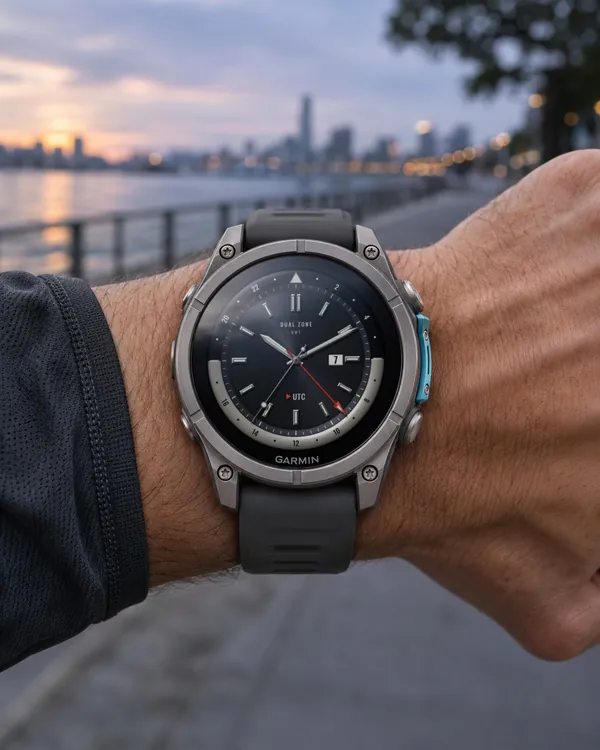 Gmt
Dual Zone
A GMT analog face with a 24 hour bezel and a second time zone
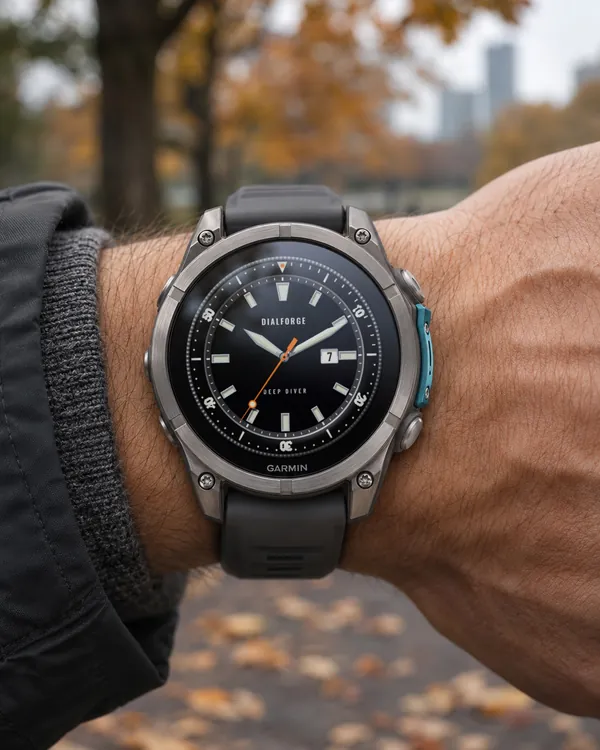 Diver
Deep Diver
A diver's watch face with a turnable 60 minute bezel
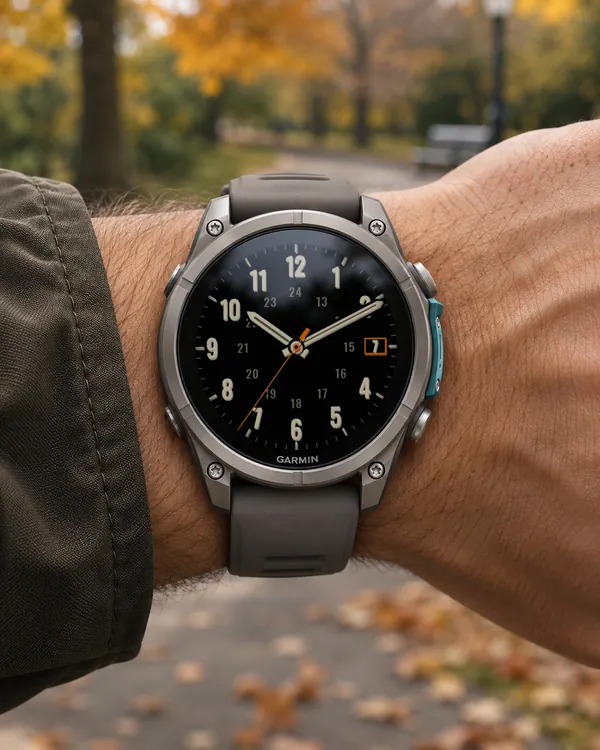 Field Watch
Plain Field 4D
5.0 (5)
The same layout with depth: numbers and hands in three layers, cream digits with a shadow
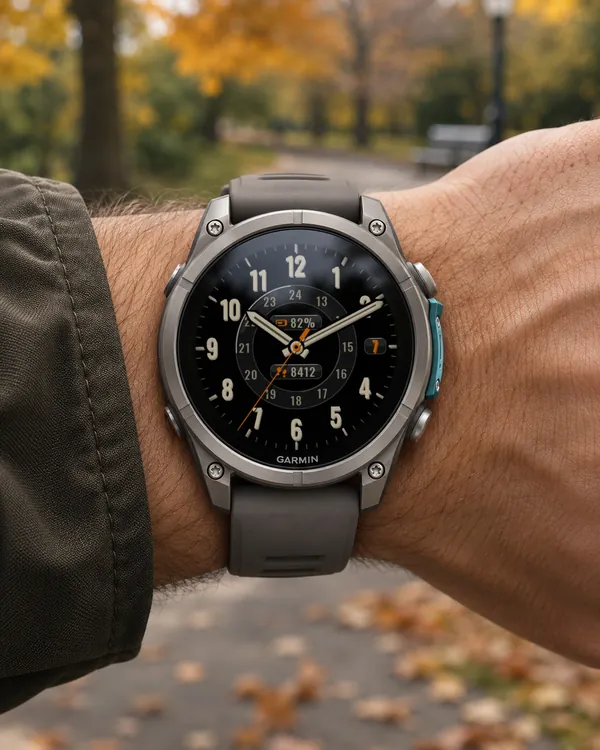 Field Watch
Plain Field Glass
Date window and two indicators (steps, battery) as glass pills