Unlock
€6.49
One-time payment. No subscription. The code works on the watch whose ID you enter.
- Install the face from Connect IQ (7 days free).
- On the watch: face settings > Buy / Unlock, scan the QR code.
- Pay and paste the code in the face settings.
- Pay.
- Copy the code.
- Paste it in Connect IQ: this face > Settings > Unlock code.
Payment works best in Safari or Chrome: menu (three dots) > Open in browser
Read it in this face, it is not the serial number of the watch.
The code works only in the watch face it was bought for: a Summit Rings code will not work in Summit Tactic.
Your ID, compare it with the watch:
Where do I find the ID?
On the watch: settings of this face > Buy / Unlock (first item). Scan the QR code with your phone or type the 10 digits. The ID is also at the top of the face settings in the Connect IQ app.
Code not working on your watch? Write to me and I will fix it.
Payments by Stripe. Seller: Mateusz Kolarz, Lublin, Poland.
Paid. Code:
We show the code here too. If the e-mail does not arrive (check spam), you can recover the code in the Recover code section with just the Face ID. Recover code
Copying did not work. The code is selected: copy it by hand.
The face unlocks by itself when the watch connects to the phone (usually within an hour; if the trial is still running, the purchase starts working when it ends).
Do not want to wait, or have an older watch? Paste the code in the Connect IQ app:
Connect IQ (or Garmin Connect) > My Device > Watch faces > Glass Ring > Settings > Unlock code > paste > Save
Like it? Rate this face in the Garmin store
Want to try new faces and apps before the release, for free? Join the testers program
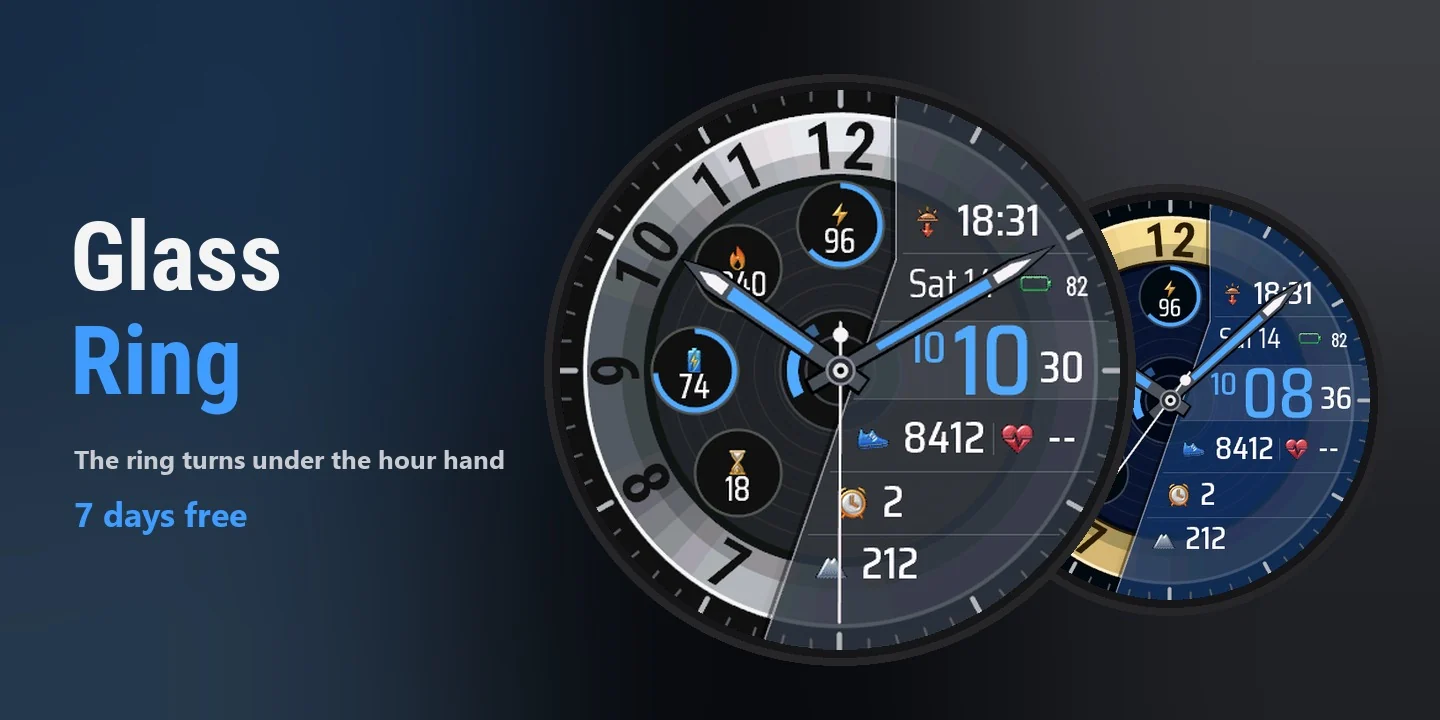
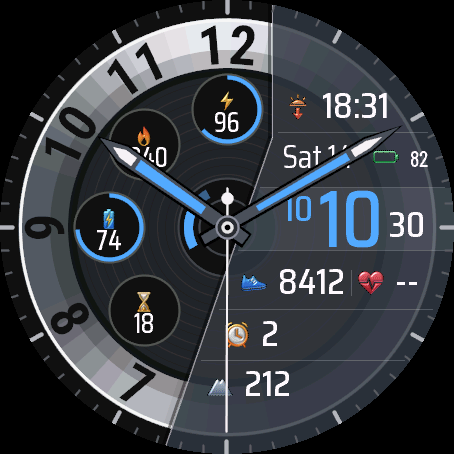
Glass Ring shows only the left half of a classic dial. The hour hand never leaves the space between 8 and 11. Instead, the silver ring of numbers turns under it: every three hours it moves by a quarter, so the number under the hand is always the real hour. At 20:20 the hand points at 8, at 23:00 it is back at the 8 position and points at 11. The right half is a dark frosted glass panel with the digital time, the date and your data.
- When you look at the watch at the moment the ring moves, it turns with a short animation (0.7 s, can be switched off).
- Glass panel: digital time with seconds, the date and six fields. By default sunrise or sunset, battery, steps, heart rate, alarms and altitude. Each field can show over 30 kinds of data or stay empty.
- Four small dials with a progress ring: active minutes, calories, Body Battery and recovery time by default.
- Ring in silver, gold, rose gold, titanium, blue steel or black. Glass in smoke, blue, green, amber or clear. Black, navy or graphite dial, plus colours for the accent, time, values, date and icons.
- Numbers on the ring 1 to 12 or 0 to 23. Three text sizes, optional field captions, the digital time can be hidden.
- On touch watches press and hold a field to open the matching Garmin screen.
- AMOLED: always-on mode with time and date, the whole face dimmed, or the time only. MIP: a solid panel in the 64 colour palette that reads well in the sun.
- Menu in 35 languages, weekday in your language, 12 or 24 hour time like the watch.
All settings are in Garmin Connect (Connect IQ, watch face settings). On the watch in Customise: three of the small dials, two panel fields, seconds, the always-on screen, language and time format.
When the watch has no reading, the field shows --. Weather needs the phone connected from time to time.
Glass Ring pokazuje tylko lewą połowę klasycznej tarczy. Wskazówka godzin nigdy nie wychodzi poza obszar między 8 a 11. Zamiast niej obraca się srebrny pierścień cyfr: co trzy godziny przesuwa się o ćwierć obrotu, więc cyfra pod wskazówką to zawsze prawdziwa godzina. O 20:20 wskazówka pokazuje 8, a o 23:00 wraca na pozycję 8 i pokazuje już 11. Prawa połowa to ciemny, matowy panel ze szkła z godziną cyfrową, datą i Twoimi danymi.
- Gdy spojrzysz na zegarek w chwili przeskoku, pierścień obraca się z krótką animacją (0,7 s, można ją wyłączyć).
- Szklany panel: godzina cyfrowa z sekundami, data i sześć pól. Domyślnie wschód lub zachód słońca, bateria, kroki, tętno, budziki i wysokość. Każde pole pokaże jedną z ponad 30 danych albo zostanie puste.
- Cztery małe tarcze z pierścieniem postępu: domyślnie minuty aktywności, kalorie, Body Battery i czas regeneracji.
- Pierścień srebrny, złoty, w kolorze różowego złota, tytanowy, ze stali niebieskiej albo czarny. Szkło dymione, niebieskie, zielone, bursztynowe albo przejrzyste. Tło czarne, granatowe albo grafitowe, do tego kolory akcentu, godziny, wartości, daty i ikon.
- Cyfry na pierścieniu od 1 do 12 albo od 0 do 23. Trzy wielkości tekstu, podpisy pól do włączenia, godzinę cyfrową można schować.
- Na zegarkach dotykowych przytrzymaj pole, żeby otworzyć odpowiedni ekran Garmina.
- AMOLED: ekran wygaszony z godziną i datą, z całą przygaszoną tarczą albo z samą godziną. MIP: pełny panel w palecie 64 kolorów, czytelny w słońcu.
- Menu w 35 językach, dzień tygodnia w Twoim języku, godzina 12- lub 24-godzinna jak w zegarku.
Wszystkie ustawienia są w Garmin Connect (Connect IQ, ustawienia tarczy). Na zegarku w Dostosuj: trzy małe tarcze, dwa pola panelu, sekundy, ekran wygaszony, język i format godziny.
Gdy zegarek nie ma odczytu, pole pokazuje --. Pogoda wymaga, żeby telefon był co jakiś czas połączony.
Glass Ring zeigt nur die linke Hälfte eines klassischen Zifferblatts. Der Stundenzeiger verlässt nie den Bereich zwischen 8 und 11. Stattdessen dreht sich der silberne Zahlenring darunter: Alle drei Stunden rückt er um ein Viertel weiter, sodass die Zahl unter dem Zeiger immer die echte Stunde ist. Um 20:20 zeigt der Zeiger auf 8, um 23:00 steht er wieder an der Position 8 und zeigt auf 11. Die rechte Hälfte ist ein dunkles, mattes Glaspanel mit digitaler Uhrzeit, Datum und deinen Daten.
- Wenn du in dem Moment auf die Uhr schaust, in dem der Ring weiterrückt, dreht er sich mit einer kurzen Animation (0,7 s, lässt sich ausschalten).
- Glaspanel: digitale Uhrzeit mit Sekunden, das Datum und sechs Felder. Standardmäßig Sonnenaufgang oder Sonnenuntergang, Akku, Schritte, Herzfrequenz, Wecker und Höhe. Jedes Feld zeigt eine von über 30 Datenarten oder bleibt leer.
- Vier kleine Zifferblätter mit Fortschrittsring: standardmäßig aktive Minuten, Kalorien, Body Battery und Erholungszeit.
- Ring in Silber, Gold, Roségold, Titan, Blaustahl oder Schwarz. Glas in Rauch, Blau, Grün, Bernstein oder klar. Schwarzes, marineblaues oder graphitfarbenes Zifferblatt, dazu Farben für Akzent, Uhrzeit, Werte, Datum und Symbole.
- Zahlen auf dem Ring von 1 bis 12 oder von 0 bis 23. Drei Textgrößen, optionale Feldbeschriftungen, die digitale Uhrzeit lässt sich ausblenden.
- Auf Touch-Uhren ein Feld gedrückt halten, um den passenden Garmin-Bildschirm zu öffnen.
- AMOLED: Always-on-Modus mit Uhrzeit und Datum, das ganze Zifferblatt gedimmt, oder nur die Uhrzeit. MIP: ein vollflächiges Panel in der 64-Farben-Palette, das in der Sonne gut lesbar ist.
- Menü in 35 Sprachen, Wochentag in deiner Sprache, 12- oder 24-Stunden-Zeit wie auf der Uhr.
Alle Einstellungen findest du in Garmin Connect (Connect IQ, Einstellungen des Zifferblatts). Auf der Uhr unter Anpassen: drei der kleinen Zifferblätter, zwei Panelfelder, Sekunden, der Always-on-Bildschirm, Sprache und Zeitformat.
Wenn die Uhr keinen Messwert hat, zeigt das Feld --. Für das Wetter muss das Smartphone von Zeit zu Zeit verbunden sein.
Glass Ring n'affiche que la moitié gauche d'un cadran classique. L'aiguille des heures ne quitte jamais la zone entre le 8 et le 11. À la place, l'anneau de chiffres argenté tourne sous elle : toutes les trois heures, il avance d'un quart de tour, si bien que le chiffre sous l'aiguille est toujours la vraie heure. À 20:20, l'aiguille indique 8 ; à 23:00, elle est revenue en position 8 et indique 11. La moitié droite est un panneau de verre sombre et dépoli avec l'heure numérique, la date et vos données.
- Si vous regardez la montre au moment où l'anneau avance, il tourne avec une courte animation (0,7 s, désactivable).
- Panneau de verre : heure numérique avec secondes, date et six champs. Par défaut lever ou coucher du soleil, batterie, pas, fréquence cardiaque, alarmes et altitude. Chaque champ peut afficher plus de 30 types de données ou rester vide.
- Quatre petits cadrans avec un anneau de progression : par défaut les minutes actives, les calories, la Body Battery et le temps de récupération.
- Anneau argent, or, or rose, titane, acier bleu ou noir. Verre fumé, bleu, vert, ambre ou transparent. Fond noir, bleu marine ou graphite, avec des couleurs pour l'accent, l'heure, les valeurs, la date et les icônes.
- Chiffres de l'anneau de 1 à 12 ou de 0 à 23. Trois tailles de texte, légendes des champs en option, heure numérique masquable.
- Sur les montres tactiles, appuyez longuement sur un champ pour ouvrir l'écran Garmin correspondant.
- AMOLED : mode toujours affiché avec l'heure et la date, tout le cadran atténué, ou l'heure seule. MIP : un panneau plein dans la palette de 64 couleurs, lisible en plein soleil.
- Menu en 35 langues, jour de la semaine dans votre langue, heure sur 12 ou 24 heures comme sur la montre.
Tous les réglages se trouvent dans Garmin Connect (Connect IQ, réglages du cadran). Sur la montre, dans Personnaliser : trois des petits cadrans, deux champs du panneau, les secondes, l'écran toujours affiché, la langue et le format de l'heure.
Quand la montre n'a pas de mesure, le champ affiche --. La météo demande que le téléphone soit connecté de temps en temps.
Glass Ring muestra solo la mitad izquierda de una esfera clásica. La aguja de las horas nunca sale del espacio entre el 8 y el 11. En su lugar, gira el anillo plateado de números: cada tres horas avanza un cuarto de vuelta, así que el número bajo la aguja es siempre la hora real. A las 20:20 la aguja señala el 8; a las 23:00 vuelve a la posición del 8 y señala el 11. La mitad derecha es un panel de cristal oscuro esmerilado con la hora digital, la fecha y tus datos.
- Si miras el reloj justo cuando el anillo avanza, gira con una animación corta (0,7 s, se puede desactivar).
- Panel de cristal: hora digital con segundos, la fecha y seis campos. Por defecto salida o puesta del sol, batería, pasos, frecuencia cardíaca, alarmas y altitud. Cada campo puede mostrar más de 30 tipos de datos o quedar vacío.
- Cuatro diales pequeños con un anillo de progreso: por defecto minutos activos, calorías, Body Battery y tiempo de recuperación.
- Anillo en plata, oro, oro rosa, titanio, acero azulado o negro. Cristal ahumado, azul, verde, ámbar o transparente. Fondo negro, azul marino o grafito, más colores para el acento, la hora, los valores, la fecha y los iconos.
- Números del anillo de 1 a 12 o de 0 a 23. Tres tamaños de texto, etiquetas de campo opcionales y la hora digital se puede ocultar.
- En relojes táctiles, mantén pulsado un campo para abrir la pantalla de Garmin correspondiente.
- AMOLED: modo siempre activo con hora y fecha, toda la esfera atenuada, o solo la hora. MIP: un panel sólido en la paleta de 64 colores, que se lee bien al sol.
- Menú en 35 idiomas, día de la semana en tu idioma, hora de 12 o 24 horas como en el reloj.
Todos los ajustes están en Garmin Connect (Connect IQ, ajustes de la esfera). En el reloj, en Personalizar: tres de los diales pequeños, dos campos del panel, los segundos, la pantalla siempre activa, el idioma y el formato de hora.
Cuando el reloj no tiene lectura, el campo muestra --. El tiempo necesita que el teléfono esté conectado de vez en cuando.
Glass Ring toont alleen de linkerhelft van een klassieke wijzerplaat. De uurwijzer verlaat nooit het gebied tussen de 8 en de 11. In plaats daarvan draait de zilveren cijferring eronder: elke drie uur schuift hij een kwart op, zodat het cijfer onder de wijzer altijd het echte uur is. Om 20:20 wijst de wijzer naar 8, om 23:00 staat hij weer op de plek van de 8 en wijst hij naar 11. De rechterhelft is een donker, mat glazen paneel met de digitale tijd, de datum en je gegevens.
- Kijk je op je horloge op het moment dat de ring verspringt, dan draait hij met een korte animatie (0,7 s, uit te zetten).
- Glazen paneel: digitale tijd met seconden, de datum en zes velden. Standaard zonsopkomst of zonsondergang, batterij, stappen, hartslag, wekkers en hoogte. Elk veld toont meer dan 30 soorten gegevens of blijft leeg.
- Vier kleine wijzerplaatjes met een voortgangsring: standaard actieve minuten, calorieën, Body Battery en hersteltijd.
- Ring in zilver, goud, roségoud, titanium, blauw staal of zwart. Glas in rook, blauw, groen, amber of helder. Zwarte, marineblauwe of grafietkleurige wijzerplaat, plus kleuren voor accent, tijd, waarden, datum en pictogrammen.
- Cijfers op de ring van 1 tot 12 of van 0 tot 23. Drie tekstgroottes, optionele veldlabels, de digitale tijd kun je verbergen.
- Houd op touch-horloges een veld ingedrukt om het bijbehorende Garmin-scherm te openen.
- AMOLED: always-on-modus met tijd en datum, de hele wijzerplaat gedimd, of alleen de tijd. MIP: een vol paneel in het kleurenpalet van 64 kleuren, goed leesbaar in de zon.
- Menu in 35 talen, weekdag in jouw taal, 12- of 24-uurstijd zoals op het horloge.
Alle instellingen staan in Garmin Connect (Connect IQ, instellingen van de wijzerplaat). Op het horloge bij Aanpassen: drie van de kleine wijzerplaatjes, twee paneelvelden, seconden, het always-on-scherm, taal en tijdnotatie.
Als het horloge geen meting heeft, toont het veld --. Voor het weer moet de telefoon af en toe verbonden zijn.
Glass Ring は、クラシックな文字盤の左半分だけを表示します。時針は8と11のあいだから出ません。代わりに、銀色の数字リングが針の下で回ります。3時間ごとに4分の1回転するので、針の下にある数字は常に本当の時刻です。20:20では針が8を指し、23:00では再び8の位置に戻って11を指します。右半分は、暗いすりガラス調のパネルで、デジタル時刻、日付、あなたのデータを表示します。
- リングが動く瞬間に時計を見ると、短いアニメーション(0.7 s、オフにできます)で回ります。
- ガラスパネル:秒付きのデジタル時刻、日付、6つの欄。初期設定は日の出または日の入り、バッテリー、歩数、心拍数、アラーム、高度です。各欄には30種類以上のデータから1つを表示でき、空欄にもできます。
- 進捗リング付きの小さなダイヤルが4つ。初期設定はアクティブ時間、カロリー、Body Battery、回復時間です。
- リングは、シルバー、ゴールド、ローズゴールド、チタン、ブルースチール、ブラックから選べます。ガラスは、スモーク、ブルー、グリーン、アンバー、クリアです。背景はブラック、ネイビー、グラファイトで、アクセント、時刻、値、日付、アイコンの色も選べます。
- リングの数字は1から12、または0から23。テキストサイズは3種類、欄名の表示は任意で、デジタル時刻は非表示にできます。
- タッチ対応の時計では、欄を長押しすると対応する Garmin の画面が開きます。
- AMOLED:時刻と日付を表示する常時表示モード、文字盤全体を暗くするモード、時刻だけのモードがあります。MIP:64色パレットのベタ塗りパネルで、日差しの下でも見やすく表示されます。
- メニューは35言語対応。曜日はお使いの言語で、時刻は時計と同じ12時間または24時間表記です。
設定はすべて Garmin Connect(Connect IQ、文字盤の設定)にあります。時計ではカスタマイズから、小さなダイヤルのうち3つ、パネルの欄2つ、秒、常時表示画面、言語、時刻形式を変更できます。
時計に測定値がないとき、欄には -- と表示されます。天気は、スマートフォンがときどき接続されている必要があります。
Glass Ring mostra solo la metà sinistra di un quadrante classico. La lancetta delle ore non esce mai dallo spazio tra l'8 e l'11. Al suo posto ruota l'anello di numeri argentato: ogni tre ore avanza di un quarto di giro, così il numero sotto la lancetta è sempre l'ora reale. Alle 20:20 la lancetta indica l'8; alle 23:00 è tornata sulla posizione dell'8 e indica l'11. La metà destra è un pannello di vetro scuro satinato con ora digitale, data e i tuoi dati.
- Se guardi l'orologio proprio quando l'anello si sposta, ruota con una breve animazione (0,7 s, si può disattivare).
- Pannello di vetro: ora digitale con i secondi, la data e sei campi. Di serie alba o tramonto, batteria, passi, frequenza cardiaca, sveglie e altitudine. Ogni campo può mostrare oltre 30 tipi di dati o restare vuoto.
- Quattro piccoli quadranti con un anello di avanzamento: di serie minuti attivi, calorie, Body Battery e tempo di recupero.
- Anello argento, oro, oro rosa, titanio, acciaio blu o nero. Vetro fumé, blu, verde, ambra o trasparente. Fondo nero, blu notte o grafite, più i colori per accento, ora, valori, data e icone.
- Numeri sull'anello da 1 a 12 oppure da 0 a 23. Tre dimensioni del testo, didascalie dei campi opzionali, l'ora digitale si può nascondere.
- Sugli orologi touch tieni premuto un campo per aprire la schermata Garmin corrispondente.
- AMOLED: modalità sempre attiva con ora e data, tutto il quadrante attenuato, oppure solo l'ora. MIP: un pannello pieno nella palette a 64 colori, ben leggibile al sole.
- Menu in 35 lingue, giorno della settimana nella tua lingua, ora a 12 o 24 ore come sull'orologio.
Tutte le impostazioni sono in Garmin Connect (Connect IQ, impostazioni del quadrante). Sull'orologio in Personalizza: tre dei piccoli quadranti, due campi del pannello, i secondi, lo schermo sempre attivo, la lingua e il formato dell'ora.
Quando l'orologio non ha una lettura, il campo mostra --. Il meteo richiede che il telefono sia connesso ogni tanto.
Glass Ring 只显示经典表盘的左半边。时针始终不会离开 8 到 11 之间的区域。取而代之的是,银色数字环在时针下方转动:每三小时转动四分之一圈,所以时针下方的数字永远是真实的小时。20:20 时指针指向 8,23:00 时回到 8 的位置并指向 11。右半边是一块深色磨砂玻璃面板,显示数字时间、日期和你的数据。
- 如果在圆环转动的瞬间看手表,它会以一段短动画转动(0.7 s,可关闭)。
- 玻璃面板:带秒的数字时间、日期和六个数据栏。默认显示日出或日落、电量、步数、心率、闹钟和海拔。每个栏位可显示 30 多种数据中的一种,也可以留空。
- 四个带进度环的小表盘:默认是活动分钟数、卡路里、Body Battery 和恢复时间。
- 圆环可选银色、金色、玫瑰金、钛色、蓝钢色或黑色。玻璃可选烟灰、蓝色、绿色、琥珀色或透明。背景为黑色、海军蓝或石墨色,还可以设置强调色、时间、数值、日期和图标的颜色。
- 圆环上的数字可选 1 到 12 或 0 到 23。有三种文字大小,栏位标签可选,数字时间可以隐藏。
- 在触屏手表上,长按某个栏位可打开对应的 Garmin 界面。
- AMOLED:常亮模式,可显示时间和日期、整个表盘调暗,或只显示时间。MIP:使用 64 色调色板的实心面板,在阳光下也清晰易读。
- 菜单支持 35 种语言,星期显示为你的语言,12 或 24 小时制与手表一致。
所有设置都在 Garmin Connect(Connect IQ,表盘设置)中。在手表上的自定义里:其中三个小表盘、面板的两个栏位、秒、常亮屏幕、语言和时间格式。
手表没有读数时,栏位显示 --。天气需要手机时不时连接。
Glass Ring показывает только левую половину классического циферблата. Часовая стрелка никогда не выходит за пределы участка между 8 и 11. Вместо неё под стрелкой поворачивается серебристое кольцо цифр: каждые три часа оно сдвигается на четверть оборота, поэтому цифра под стрелкой всегда показывает настоящий час. В 20:20 стрелка указывает на 8, а в 23:00 снова стоит на позиции 8 и указывает на 11. Правая половина представляет собой тёмную матовую стеклянную панель с цифровым временем, датой и вашими данными.
- Если посмотреть на часы в момент, когда кольцо сдвигается, оно поворачивается с короткой анимацией (0,7 с, её можно отключить).
- Стеклянная панель: цифровое время с секундами, дата и шесть полей. По умолчанию восход или закат, заряд батареи, шаги, пульс, будильники и высота. В каждом поле можно показать одну из более чем 30 величин или оставить его пустым.
- Четыре маленьких циферблата с кольцом прогресса: по умолчанию минуты активности, калории, Body Battery и время восстановления.
- Кольцо серебристое, золотое, цвета розового золота, титановое, из синей стали или чёрное. Стекло дымчатое, синее, зелёное, янтарное или прозрачное. Фон чёрный, тёмно-синий или графитовый, а также цвета для акцента, времени, значений, даты и значков.
- Цифры на кольце от 1 до 12 или от 0 до 23. Три размера текста, подписи полей по желанию, цифровое время можно скрыть.
- На часах с сенсорным экраном нажмите и удерживайте поле, чтобы открыть соответствующий экран Garmin.
- AMOLED: режим always-on со временем и датой, весь циферблат приглушён или только время. MIP: сплошная панель в палитре из 64 цветов, хорошо читаемая на солнце.
- Меню на 35 языках, день недели на вашем языке, 12- или 24-часовой формат времени как на часах.
Все настройки находятся в Garmin Connect (Connect IQ, настройки циферблата). На часах в разделе Настроить: три маленьких циферблата, два поля панели, секунды, экран always-on, язык и формат времени.
Если у часов нет показаний, поле показывает --. Для погоды нужно, чтобы телефон время от времени был подключён.
Glass Ring mostra só a metade esquerda de um mostrador clássico. O ponteiro das horas nunca sai do espaço entre o 8 e o 11. Em vez disso, o anel prateado de números gira sob ele: a cada três horas avança um quarto de volta, então o número sob o ponteiro é sempre a hora real. Às 20:20 o ponteiro aponta o 8; às 23:00 ele volta à posição do 8 e aponta o 11. A metade direita é um painel de vidro escuro e fosco com a hora digital, a data e os seus dados.
- Se você olhar o relógio no momento em que o anel avança, ele gira com uma animação curta (0,7 s, pode ser desativada).
- Painel de vidro: hora digital com segundos, a data e seis campos. Por padrão nascer ou pôr do sol, bateria, passos, frequência cardíaca, alarmes e altitude. Cada campo mostra mais de 30 tipos de dados ou fica vazio.
- Quatro mostradores pequenos com anel de progresso: por padrão minutos ativos, calorias, Body Battery e tempo de recuperação.
- Anel em prata, ouro, ouro rosa, titânio, aço azul ou preto. Vidro fumê, azul, verde, âmbar ou transparente. Fundo preto, azul-marinho ou grafite, além de cores para o destaque, a hora, os valores, a data e os ícones.
- Números do anel de 1 a 12 ou de 0 a 23. Três tamanhos de texto, legendas dos campos opcionais, a hora digital pode ser ocultada.
- Em relógios com toque, segure um campo para abrir a tela da Garmin correspondente.
- AMOLED: modo sempre ativo com hora e data, o mostrador todo escurecido, ou só a hora. MIP: um painel sólido na paleta de 64 cores, que se lê bem no sol.
- Menu em 35 idiomas, dia da semana no seu idioma, hora de 12 ou 24 horas como no relógio.
Todos os ajustes ficam no Garmin Connect (Connect IQ, ajustes do mostrador). No relógio, em Personalizar: três dos mostradores pequenos, dois campos do painel, os segundos, a tela sempre ativa, o idioma e o formato da hora.
Quando o relógio não tem leitura, o campo mostra --. O clima precisa que o celular esteja conectado de vez em quando.
Glass Ring ukazuje jen levou polovinu klasického ciferníku. Hodinová ručička nikdy neopustí prostor mezi 8 a 11. Místo ní se pod ručičkou otáčí stříbrný prstenec čísel: každé tři hodiny se posune o čtvrt otáčky, takže číslo pod ručičkou je vždy skutečná hodina. Ve 20:20 ukazuje ručička na 8, ve 23:00 je zpět na pozici 8 a ukazuje na 11. Pravá polovina je tmavý matný skleněný panel s digitálním časem, datem a vašimi daty.
- Když se na hodinky podíváte ve chvíli, kdy se prstenec posouvá, otočí se s krátkou animací (0,7 s, lze vypnout).
- Skleněný panel: digitální čas s vteřinami, datum a šest polí. Ve výchozím nastavení východ nebo západ slunce, baterie, kroky, tepová frekvence, budíky a nadmořská výška. Každé pole umí zobrazit přes 30 druhů dat nebo zůstat prázdné.
- Čtyři malé ciferníky s ukazatelem postupu: výchozí jsou aktivní minuty, kalorie, Body Battery a doba regenerace.
- Prstenec stříbrný, zlatý, růžově zlatý, titanový, z modré oceli nebo černý. Sklo kouřové, modré, zelené, jantarové nebo čiré. Černé, námořnicky modré nebo grafitové pozadí a barvy pro akcent, čas, hodnoty, datum a ikony.
- Čísla na prstenci od 1 do 12 nebo od 0 do 23. Tři velikosti textu, volitelné popisky polí, digitální čas lze skrýt.
- Na dotykových hodinkách podržte pole a otevře se odpovídající obrazovka Garminu.
- AMOLED: režim stále zapnutého displeje s časem a datem, celý ciferník ztlumený, nebo jen čas. MIP: plný panel v paletě 64 barev, dobře čitelný na slunci.
- Nabídka v 35 jazycích, den v týdnu ve vašem jazyce, 12 nebo 24hodinový čas jako v hodinkách.
Všechna nastavení jsou v Garmin Connect (Connect IQ, nastavení ciferníku). V hodinkách v části Přizpůsobit: tři z malých ciferníků, dvě pole panelu, vteřiny, stále zapnutá obrazovka, jazyk a formát času.
Když hodinky nemají naměřenou hodnotu, pole ukazuje --. Počasí potřebuje, aby byl telefon čas od času připojený.
Glass Ring mostra apenas a metade esquerda de um mostrador clássico. O ponteiro das horas nunca sai do espaço entre o 8 e o 11. Em vez disso, o anel prateado de números roda por baixo: de três em três horas avança um quarto de volta, por isso o número sob o ponteiro é sempre a hora real. Às 20:20 o ponteiro aponta para o 8; às 23:00 volta à posição do 8 e aponta para o 11. A metade direita é um painel de vidro escuro e fosco com a hora digital, a data e os seus dados.
- Se olhar para o relógio no momento em que o anel avança, ele roda com uma animação curta (0,7 s, pode ser desativada).
- Painel de vidro: hora digital com segundos, a data e seis campos. Por predefinição nascer ou pôr do sol, bateria, passos, frequência cardíaca, alarmes e altitude. Cada campo mostra mais de 30 tipos de dados ou fica vazio.
- Quatro mostradores pequenos com anel de progresso: por predefinição minutos ativos, calorias, Body Battery e tempo de recuperação.
- Anel em prata, ouro, ouro rosa, titânio, aço azul ou preto. Vidro fumado, azul, verde, âmbar ou transparente. Fundo preto, azul-marinho ou grafite, mais cores para o destaque, a hora, os valores, a data e os ícones.
- Números do anel de 1 a 12 ou de 0 a 23. Três tamanhos de texto, legendas dos campos opcionais, a hora digital pode ser ocultada.
- Em relógios com ecrã tátil, prima sem soltar um campo para abrir o ecrã Garmin correspondente.
- AMOLED: modo sempre ligado com hora e data, o mostrador todo escurecido, ou só a hora. MIP: um painel sólido na paleta de 64 cores, que se lê bem ao sol.
- Menu em 35 idiomas, dia da semana no seu idioma, hora de 12 ou 24 horas como no relógio.
Todas as definições estão no Garmin Connect (Connect IQ, definições do mostrador). No relógio, em Personalizar: três dos mostradores pequenos, dois campos do painel, os segundos, o ecrã sempre ligado, o idioma e o formato da hora.
Quando o relógio não tem leitura, o campo mostra --. O tempo precisa de que o telemóvel esteja ligado de vez em quando.
Glass Ring은 클래식 다이얼의 왼쪽 절반만 보여 줍니다. 시침은 8과 11 사이 영역을 벗어나지 않습니다. 대신 은색 숫자 링이 시침 아래에서 돌아갑니다. 세 시간마다 4분의 1바퀴씩 움직여서 시침 아래의 숫자가 항상 실제 시각이 됩니다. 20:20에는 시침이 8을 가리키고, 23:00에는 다시 8 위치로 돌아와 11을 가리킵니다. 오른쪽 절반은 어두운 젖빛 유리 패널이며, 디지털 시간, 날짜, 그리고 내 데이터가 표시됩니다.
- 링이 움직이는 순간에 시계를 보면 짧은 애니메이션(0.7 s, 끌 수 있음)으로 돌아갑니다.
- 유리 패널: 초가 포함된 디지털 시간, 날짜, 필드 여섯 개. 기본값은 일출 또는 일몰, 배터리, 걸음 수, 심박수, 알람, 고도입니다. 각 필드에는 30가지가 넘는 데이터 중 하나를 표시하거나 비워 둘 수 있습니다.
- 진행 링이 있는 작은 다이얼 네 개: 기본값은 활동 시간, 칼로리, Body Battery, 회복 시간입니다.
- 링 색상은 은색, 금색, 로즈골드, 티타늄, 블루 스틸, 검정 중에서 고릅니다. 유리는 스모크, 파랑, 초록, 호박색, 투명 중에서 고릅니다. 배경은 검정, 네이비, 그래파이트이고, 강조색, 시간, 값, 날짜, 아이콘 색도 바꿀 수 있습니다.
- 링의 숫자는 1부터 12 또는 0부터 23까지입니다. 텍스트 크기 세 가지, 선택형 필드 이름, 디지털 시간 숨기기를 지원합니다.
- 터치 워치에서는 필드를 길게 눌러 해당하는 Garmin 화면을 열 수 있습니다.
- AMOLED: 시간과 날짜를 보여 주는 상시 표시 모드, 전체 워치페이스를 어둡게 하는 모드, 시간만 보여 주는 모드. MIP: 64색 팔레트의 꽉 찬 패널로 햇빛 아래에서도 잘 보입니다.
- 메뉴는 35개 언어, 요일은 내 언어로, 시간은 시계처럼 12시간제 또는 24시간제입니다.
모든 설정은 Garmin Connect(Connect IQ, 워치페이스 설정)에 있습니다. 시계에서는 사용자 설정에서 작은 다이얼 세 개, 패널 필드 두 개, 초, 상시 표시 화면, 언어, 시간 형식을 바꿀 수 있습니다.
시계에 측정값이 없으면 필드에 --가 표시됩니다. 날씨는 휴대폰이 가끔 연결되어 있어야 합니다.
Glass Ring visar bara den vänstra halvan av en klassisk urtavla. Timvisaren lämnar aldrig området mellan 8 och 11. I stället vrider sig den silverfärgade sifferringen under den: var tredje timme flyttas den en kvarts varv, så siffran under visaren alltid är den riktiga timmen. Klockan 20:20 pekar visaren på 8, och klockan 23:00 är den tillbaka på 8-positionen och pekar på 11. Den högra halvan är en mörk, matt glaspanel med digital tid, datum och dina data.
- Tittar du på klockan just när ringen flyttar sig, vrider den sig med en kort animation (0,7 s, kan stängas av).
- Glaspanel: digital tid med sekunder, datumet och sex fält. Som standard soluppgång eller solnedgång, batteri, steg, puls, alarm och höjd. Varje fält kan visa över 30 sorters data eller vara tomt.
- Fyra små urtavlor med en förloppsring: som standard aktiva minuter, kalorier, Body Battery och återhämtningstid.
- Ring i silver, guld, roséguld, titan, blåstål eller svart. Glas i rök, blått, grönt, bärnsten eller klart. Svart, marinblå eller grafitfärgad urtavla, plus färger för accent, tid, värden, datum och ikoner.
- Siffror på ringen från 1 till 12 eller från 0 till 23. Tre textstorlekar, valfria fältetiketter, och den digitala tiden kan döljas.
- På pekskärmsklockor håller du in ett fält för att öppna motsvarande Garmin-skärm.
- AMOLED: always-on-läge med tid och datum, hela urtavlan dämpad, eller bara tiden. MIP: en solid panel i färgpaletten med 64 färger som syns bra i solen.
- Meny på 35 språk, veckodag på ditt språk, 12- eller 24-timmarsformat som på klockan.
Alla inställningar finns i Garmin Connect (Connect IQ, urtavlans inställningar). På klockan under Anpassa: tre av de små urtavlorna, två av panelens fält, sekunder, always-on-skärmen, språk och tidsformat.
När klockan inte har något värde visar fältet --. Vädret kräver att telefonen är ansluten då och då.
Glass Ring viser kun venstre halvdel af en klassisk urskive. Timeviseren forlader aldrig området mellem 8 og 11. I stedet drejer den sølvfarvede cifferring under den: hver tredje time rykker den en kvart omgang, så tallet under viseren altid er den rigtige time. Kl. 20:20 peger viseren på 8, og kl. 23:00 er den tilbage på 8-positionen og peger på 11. Højre halvdel er et mørkt, matteret glaspanel med digitalt klokkeslæt, dato og dine data.
- Kigger du på uret i det øjeblik, ringen rykker, drejer den med en kort animation (0,7 s, kan slås fra).
- Glaspanel: digitalt klokkeslæt med sekunder, datoen og seks felter. Som standard solopgang eller solnedgang, batteri, skridt, puls, alarmer og højde. Hvert felt kan vise over 30 slags data eller være tomt.
- Fire små skiver med en fremdriftsring: som standard aktive minutter, kalorier, Body Battery og restitutionstid.
- Ring i sølv, guld, roseguld, titanium, blåt stål eller sort. Glas i røg, blå, grøn, rav eller klar. Sort, marineblå eller grafitfarvet urskive, plus farver til accent, klokkeslæt, værdier, dato og ikoner.
- Tal på ringen fra 1 til 12 eller fra 0 til 23. Tre tekststørrelser, valgfrie feltnavne, og det digitale klokkeslæt kan skjules.
- På touch-ure kan du trykke og holde på et felt for at åbne den tilsvarende Garmin-skærm.
- AMOLED: always-on-tilstand med klokkeslæt og dato, hele urskiven dæmpet, eller kun klokkeslættet. MIP: et fuldt panel i 64-farvepaletten, der er let at læse i solen.
- Menu på 35 sprog, ugedag på dit sprog, 12- eller 24-timers tid som på uret.
Alle indstillinger findes i Garmin Connect (Connect IQ, urskivens indstillinger). På uret under Tilpas: tre af de små skiver, to felter i panelet, sekunder, always-on-skærmen, sprog og tidsformat.
Når uret ikke har en måling, viser feltet --. Vejret kræver, at telefonen er forbundet en gang imellem.
Glass Ring viser bare venstre halvdel av en klassisk urskive. Timeviseren forlater aldri området mellom 8 og 11. I stedet dreier den sølvfargede sifferringen under den: hver tredje time flytter den seg en kvart omdreining, så tallet under viseren alltid er den virkelige timen. Klokka 20:20 peker viseren på 8, og klokka 23:00 er den tilbake på 8-posisjonen og peker på 11. Høyre halvdel er et mørkt, matt glasspanel med digital tid, dato og dataene dine.
- Ser du på klokka i det øyeblikket ringen flytter seg, dreier den med en kort animasjon (0,7 s, kan slås av).
- Glasspanel: digital tid med sekunder, datoen og seks felt. Som standard soloppgang eller solnedgang, batteri, skritt, puls, alarmer og høyde. Hvert felt kan vise over 30 typer data eller stå tomt.
- Fire små skiver med en fremdriftsring: som standard aktive minutter, kalorier, Body Battery og restitusjonstid.
- Ring i sølv, gull, rosegull, titan, blått stål eller svart. Glass i røyk, blått, grønt, rav eller klart. Svart, marineblå eller grafittfarget urskive, pluss farger til aksent, tid, verdier, dato og ikoner.
- Tall på ringen fra 1 til 12 eller fra 0 til 23. Tre tekststørrelser, valgfrie feltnavn, og den digitale tiden kan skjules.
- På touch-klokker kan du trykke og holde på et felt for å åpne den tilsvarende Garmin-skjermen.
- AMOLED: always-on-modus med tid og dato, hele urskiven dempet, eller bare tiden. MIP: et fullt panel i 64-fargepaletten som er lett å lese i sola.
- Meny på 35 språk, ukedag på ditt språk, 12- eller 24-timers tid som på klokka.
Alle innstillinger finner du i Garmin Connect (Connect IQ, innstillinger for urskiven). På klokka under Tilpass: tre av de små skivene, to panelfelt, sekunder, always-on-skjermen, språk og tidsformat.
Når klokka ikke har en måling, viser feltet --. Været krever at telefonen er koblet til av og til.
Glass Ring 只顯示經典錶盤的左半邊。時針始終不會離開 8 到 11 之間的區域。取而代之的是,銀色數字環在時針下方轉動:每三小時轉動四分之一圈,所以時針下方的數字永遠是真實的小時。20:20 時指針指向 8,23:00 時回到 8 的位置並指向 11。右半邊是一塊深色霧面玻璃面板,顯示數位時間、日期和你的資料。
- 如果在圓環轉動的瞬間看手錶,它會以一段短動畫轉動(0.7 s,可關閉)。
- 玻璃面板:含秒的數位時間、日期和六個資料欄。預設顯示日出或日落、電量、步數、心率、鬧鐘和海拔。每個欄位可顯示 30 多種資料中的一種,也可以留空。
- 四個帶進度環的小錶盤:預設是活動分鐘數、卡路里、Body Battery 和恢復時間。
- 圓環可選銀色、金色、玫瑰金、鈦色、藍鋼色或黑色。玻璃可選煙灰、藍色、綠色、琥珀色或透明。背景為黑色、海軍藍或石墨色,還可以設定強調色、時間、數值、日期和圖示的顏色。
- 圓環上的數字可選 1 到 12 或 0 到 23。有三種文字大小,欄位標籤可選,數位時間可以隱藏。
- 在觸控手錶上,長按某個欄位可開啟對應的 Garmin 畫面。
- AMOLED:常亮模式,可顯示時間和日期、整個錶盤調暗,或只顯示時間。MIP:使用 64 色調色盤的實心面板,在陽光下也清晰易讀。
- 選單支援 35 種語言,星期顯示為你的語言,12 或 24 小時制與手錶一致。
所有設定都在 Garmin Connect(Connect IQ,錶盤設定)中。在手錶上的自訂裡:其中三個小錶盤、面板的兩個欄位、秒、常亮螢幕、語言和時間格式。
手錶沒有讀數時,欄位顯示 --。天氣需要手機不時連線。
Glass Ring näyttää vain klassisen kellotaulun vasemman puoliskon. Tuntiviisari ei koskaan poistu 8:n ja 11:n väliseltä alueelta. Sen sijaan hopeinen numerorengas pyörii viisarin alla: kolmen tunnin välein se siirtyy neljänneskierroksen, joten viisarin alla oleva numero on aina oikea tunti. Kello 20:20 viisari osoittaa 8:aa, ja kello 23:00 se on palannut 8:n paikalle ja osoittaa 11:tä. Oikea puolisko on tumma himmeä lasipaneeli, jossa on digitaalinen aika, päivämäärä ja omat tietosi.
- Jos katsot kelloa juuri silloin, kun rengas siirtyy, se pyörii lyhyellä animaatiolla (0,7 s, voi kytkeä pois).
- Lasipaneeli: digitaalinen aika sekunteineen, päivämäärä ja kuusi kenttää. Oletuksena auringonnousu tai -lasku, akku, askeleet, syke, herätykset ja korkeus. Jokaisessa kentässä voi näkyä yli 30 tietotyyppiä tai se voi olla tyhjä.
- Neljä pientä taulua edistymisrenkaalla: oletuksena aktiiviset minuutit, kalorit, Body Battery ja palautumisaika.
- Rengas hopeaa, kultaa, ruusukultaa, titaania, sinistä terästä tai mustaa. Lasi savunharmaa, sininen, vihreä, meripihkanvärinen tai kirkas. Musta, laivastonsininen tai grafiitinharmaa tausta sekä värit korostukselle, ajalle, arvoille, päivämäärälle ja kuvakkeille.
- Renkaan numerot 1:stä 12:een tai 0:sta 23:een. Kolme tekstikokoa, valinnaiset kenttien nimet, ja digitaalisen ajan voi piilottaa.
- Kosketusnäytöllisissä kelloissa pidä kenttää painettuna, niin avautuu vastaava Garmin-näyttö.
- AMOLED: aina päällä -tila ajalla ja päivämäärällä, koko taulu himmennettynä tai pelkkä aika. MIP: täysi paneeli 64 värin paletilla, joka näkyy hyvin auringossa.
- Valikko 35 kielellä, viikonpäivä omalla kielelläsi, 12 tai 24 tunnin aika kuten kellossa.
Kaikki asetukset ovat Garmin Connect -sovelluksessa (Connect IQ, kellotaulun asetukset). Kellossa kohdassa Mukauta: kolme pientä taulua, kaksi paneelin kenttää, sekunnit, aina päällä oleva näyttö, kieli ja ajan muoto.
Kun kellolla ei ole mittausta, kentässä näkyy --. Sää vaatii, että puhelin on välillä yhdistettynä.
Glass Ring ukazuje iba ľavú polovicu klasického ciferníka. Hodinová ručička nikdy neopustí priestor medzi 8 a 11. Namiesto nej sa pod ručičkou otáča strieborný prstenec čísel: každé tri hodiny sa posunie o štvrť otáčky, takže číslo pod ručičkou je vždy skutočná hodina. O 20:20 ukazuje ručička na 8, o 23:00 je späť na pozícii 8 a ukazuje na 11. Pravá polovica je tmavý matný sklenený panel s digitálnym časom, dátumom a vašimi údajmi.
- Keď sa na hodinky pozriete v okamihu, keď sa prstenec posúva, otočí sa s krátkou animáciou (0,7 s, dá sa vypnúť).
- Sklenený panel: digitálny čas so sekundami, dátum a šesť polí. Predvolene východ alebo západ slnka, batéria, kroky, tepová frekvencia, budíky a nadmorská výška. Každé pole vie zobraziť vyše 30 druhov údajov alebo zostať prázdne.
- Štyri malé ciferníky s ukazovateľom postupu: predvolene aktívne minúty, kalórie, Body Battery a čas regenerácie.
- Prstenec strieborný, zlatý, ružovozlatý, titánový, z modrej ocele alebo čierny. Sklo dymové, modré, zelené, jantárové alebo číre. Čierne, námornícky modré alebo grafitové pozadie a farby pre akcent, čas, hodnoty, dátum a ikony.
- Čísla na prstenci od 1 do 12 alebo od 0 do 23. Tri veľkosti textu, voliteľné popisy polí, digitálny čas sa dá skryť.
- Na dotykových hodinkách podržte pole a otvorí sa zodpovedajúca obrazovka Garminu.
- AMOLED: režim stále zapnutého displeja s časom a dátumom, celý ciferník stlmený, alebo len čas. MIP: plný panel v palete 64 farieb, dobre čitateľný na slnku.
- Ponuka v 35 jazykoch, deň v týždni vo vašom jazyku, 12- alebo 24-hodinový čas ako v hodinkách.
Všetky nastavenia sú v Garmin Connect (Connect IQ, nastavenia ciferníka). V hodinkách v časti Prispôsobiť: tri z malých ciferníkov, dve polia panela, sekundy, stále zapnutá obrazovka, jazyk a formát času.
Keď hodinky nemajú nameranú hodnotu, pole ukazuje --. Počasie potrebuje, aby bol telefón raz za čas pripojený.
Glass Ring prikazuje samo levo polovico klasične številčnice. Urni kazalec nikoli ne zapusti območja med 8 in 11. Namesto njega se pod kazalcem vrti srebrni obroč številk: vsake tri ure se premakne za četrt kroga, zato je številka pod kazalcem vedno prava ura. Ob 20:20 kazalec kaže na 8, ob 23:00 je spet na položaju 8 in kaže na 11. Desna polovica je temna motna steklena plošča z digitalnim časom, datumom in vašimi podatki.
- Če pogledate na uro v trenutku, ko se obroč premakne, se zavrti s kratko animacijo (0,7 s, lahko jo izklopite).
- Steklena plošča: digitalni čas s sekundami, datum in šest polj. Privzeto sončni vzhod ali zahod, baterija, koraki, srčni utrip, budilke in nadmorska višina. Vsako polje lahko prikaže več kot 30 vrst podatkov ali ostane prazno.
- Štiri majhne številčnice z obročem napredka: privzeto aktivne minute, kalorije, Body Battery in čas okrevanja.
- Obroč v srebrni, zlati, rožnato zlati, titanovi, modri jekleni ali črni barvi. Steklo dimljeno, modro, zeleno, jantarno ali bistro. Črno, mornarsko modro ali grafitno ozadje ter barve za poudarek, čas, vrednosti, datum in ikone.
- Številke na obroču od 1 do 12 ali od 0 do 23. Tri velikosti besedila, izbirni nazivi polj, digitalni čas lahko skrijete.
- Na urah z zaslonom na dotik pridržite polje, da se odpre ustrezen zaslon Garmin.
- AMOLED: način vedno vklopljenega zaslona s časom in datumom, vsa številčnica zatemnjena ali samo čas. MIP: polna plošča v paleti 64 barv, ki je dobro vidna na soncu.
- Meni v 35 jezikih, dan v tednu v vašem jeziku, 12- ali 24-urni čas kot na uri.
Vse nastavitve so v Garmin Connect (Connect IQ, nastavitve številčnice). Na uri v razdelku Prilagodi: tri od majhnih številčnic, dve polji plošče, sekunde, vedno vklopljeni zaslon, jezik in oblika časa.
Ko ura nima meritve, polje prikaže --. Vreme potrebuje, da je telefon občasno povezan.
Glass Ring hanya menampilkan separuh kiri dari tampilan jam klasik. Jarum jam tidak pernah keluar dari area antara angka 8 dan 11. Sebagai gantinya, cincin angka perak berputar di bawahnya: setiap tiga jam cincin bergeser seperempat putaran, sehingga angka di bawah jarum selalu jam yang sebenarnya. Pukul 20:20 jarum menunjuk ke 8, pukul 23:00 jarum kembali ke posisi 8 dan menunjuk ke 11. Separuh kanan adalah panel kaca buram berwarna gelap, dengan waktu digital, tanggal, dan data Anda.
- Kalau Anda melihat jam tepat saat cincin bergeser, cincin berputar dengan animasi singkat (0,7 s, bisa dimatikan).
- Panel kaca: waktu digital dengan detik, tanggal, dan enam kolom. Secara default matahari terbit atau terbenam, baterai, langkah, detak jantung, alarm, dan ketinggian. Setiap kolom bisa menampilkan lebih dari 30 jenis data atau dibiarkan kosong.
- Empat dial kecil dengan cincin progres: secara default menit aktif, kalori, Body Battery, dan waktu pemulihan.
- Cincin warna perak, emas, emas rose, titanium, baja biru, atau hitam. Kaca warna asap, biru, hijau, amber, atau bening. Latar hitam, biru tua, atau grafit, ditambah warna untuk aksen, waktu, nilai, tanggal, dan ikon.
- Angka di cincin 1 sampai 12 atau 0 sampai 23. Tiga ukuran teks, label kolom opsional, waktu digital bisa disembunyikan.
- Di jam layar sentuh, tekan dan tahan satu kolom untuk membuka layar Garmin yang sesuai.
- AMOLED: mode always-on dengan waktu dan tanggal, seluruh tampilan diredupkan, atau hanya waktu. MIP: panel penuh dengan palet 64 warna yang terbaca jelas di bawah matahari.
- Menu dalam 35 bahasa, nama hari dalam bahasa Anda, waktu 12 atau 24 jam seperti di jam.
Semua pengaturan ada di Garmin Connect (Connect IQ, pengaturan tampilan jam). Di jam, pada Sesuaikan: tiga dari dial kecil, dua kolom panel, detik, layar always-on, bahasa, dan format waktu.
Saat jam belum punya data, kolom menampilkan --. Cuaca membutuhkan ponsel yang terhubung sesekali.
A Glass Ring a klasszikus számlapnak csak a bal felét mutatja. Az óramutató sosem hagyja el a 8 és a 11 közötti területet. Helyette az ezüst számgyűrű forog alatta: három óránként negyed fordulatot lép, így a mutató alatti szám mindig a valódi óra. 20:20-kor a mutató a 8-ra mutat, 23:00-kor újra a 8-as helyen áll, és a 11-re mutat. A jobb fél egy sötét, matt üvegpanel digitális idővel, dátummal és az adataiddal.
- Ha épp akkor nézel az órára, amikor a gyűrű lép, rövid animációval fordul (0,7 s, kikapcsolható).
- Üvegpanel: digitális idő másodpercekkel, a dátum és hat mező. Alapból napkelte vagy napnyugta, akkumulátor, lépések, pulzus, ébresztők és magasság. Minden mező több mint 30 adattípust mutathat, vagy üresen maradhat.
- Négy kis számlap előrehaladás-gyűrűvel: alapból aktív percek, kalóriák, Body Battery és regenerációs idő.
- A gyűrű lehet ezüst, arany, rózsaarany, titán, kék acél vagy fekete. Az üveg füstszínű, kék, zöld, borostyán vagy átlátszó. A háttér fekete, tengerészkék vagy grafit, hozzá színek a kiemeléshez, az időhöz, az értékekhez, a dátumhoz és az ikonokhoz.
- A gyűrű számai 1-től 12-ig vagy 0-tól 23-ig. Három szövegméret, választható mezőfeliratok, a digitális idő elrejthető.
- Érintőképernyős órákon tartsd nyomva a mezőt, és megnyílik a hozzá tartozó Garmin képernyő.
- AMOLED: mindig bekapcsolt mód idővel és dátummal, az egész számlap tompítva, vagy csak az idő. MIP: teli panel a 64 színű palettával, jól olvasható a napon.
- Menü 35 nyelven, a hét napja a te nyelveden, 12 vagy 24 órás idő, mint az órán.
Minden beállítás a Garmin Connect alkalmazásban található (Connect IQ, a számlap beállításai). Az órán a Testreszabás menüben: a kis számlapok közül három, a panel két mezője, másodpercek, a mindig bekapcsolt képernyő, nyelv és időformátum.
Ha az órának nincs mérése, a mező -- jelet mutat. Az időjáráshoz kell, hogy a telefon időnként csatlakozva legyen.
Glass Ring แสดงเพียงครึ่งซ้ายของหน้าปัดแบบคลาสสิก เข็มชั่วโมงไม่เคยออกนอกช่วงระหว่าง 8 กับ 11 แต่วงแหวนตัวเลขสีเงินจะหมุนอยู่ใต้เข็มแทน ทุกสามชั่วโมงวงแหวนจะเลื่อนไปหนึ่งในสี่รอบ ตัวเลขใต้เข็มจึงเป็นชั่วโมงจริงเสมอ เวลา 20:20 เข็มชี้ที่ 8 และเวลา 23:00 เข็มกลับมาที่ตำแหน่ง 8 และชี้ที่ 11 ครึ่งขวาเป็นแผงกระจกฝ้าสีเข้ม แสดงเวลาดิจิทัล วันที่ และข้อมูลของคุณ
- ถ้าคุณมองนาฬิกาในจังหวะที่วงแหวนเลื่อน วงแหวนจะหมุนด้วยแอนิเมชันสั้น ๆ (0.7 s ปิดได้)
- แผงกระจก: เวลาดิจิทัลพร้อมวินาที วันที่ และช่องข้อมูลหกช่อง ค่าเริ่มต้นคือพระอาทิตย์ขึ้นหรือตก แบตเตอรี่ จำนวนก้าว อัตราการเต้นหัวใจ นาฬิกาปลุก และระดับความสูง แต่ละช่องแสดงข้อมูลได้มากกว่า 30 แบบ หรือปล่อยว่างก็ได้
- หน้าปัดเล็กสี่อันพร้อมวงแหวนความคืบหน้า ค่าเริ่มต้นคือนาทีที่ใช้งาน แคลอรี่ Body Battery และเวลาฟื้นตัว
- วงแหวนสีเงิน ทอง โรสโกลด์ ไทเทเนียม สีเหล็กน้ำเงิน หรือสีดำ กระจกสีควัน น้ำเงิน เขียว อำพัน หรือใส พื้นหลังสีดำ น้ำเงินกรมท่า หรือเทากราไฟต์ พร้อมสีสำหรับสีเน้น เวลา ค่าต่าง ๆ วันที่ และไอคอน
- ตัวเลขบนวงแหวนเป็น 1 ถึง 12 หรือ 0 ถึง 23 ขนาดข้อความสามขนาด มีคำบรรยายช่องให้เลือกเปิด และซ่อนเวลาดิจิทัลได้
- บนนาฬิกาแบบสัมผัส กดช่องค้างไว้เพื่อเปิดหน้าจอ Garmin ที่ตรงกัน
- AMOLED: โหมดแสดงตลอดเวลาที่มีเวลาและวันที่ หน้าปัดทั้งหมดหรี่ลง หรือแสดงเฉพาะเวลา MIP: แผงเต็มพร้อมจานสี 64 สีที่อ่านง่ายกลางแดด
- เมนู 35 ภาษา ชื่อวันในภาษาของคุณ เวลา 12 หรือ 24 ชั่วโมงตามนาฬิกา
การตั้งค่าทั้งหมดอยู่ใน Garmin Connect (Connect IQ การตั้งค่าหน้าปัด) บนนาฬิกาที่ปรับแต่ง: หน้าปัดเล็กสามอัน ช่องของแผงสองช่อง วินาที หน้าจอแสดงตลอดเวลา ภาษา และรูปแบบเวลา
เมื่อนาฬิกายังไม่มีค่าที่อ่านได้ ช่องจะแสดง -- สภาพอากาศต้องให้โทรศัพท์เชื่อมต่ออยู่เป็นครั้งคราว
Το Glass Ring δείχνει μόνο το αριστερό μισό ενός κλασικού καντράν. Ο δείκτης των ωρών δεν βγαίνει ποτέ από τον χώρο ανάμεσα στο 8 και το 11. Αντί γι' αυτό, ο ασημί δακτύλιος αριθμών γυρίζει από κάτω του: κάθε τρεις ώρες προχωρά κατά ένα τέταρτο της στροφής, έτσι ο αριθμός κάτω από τον δείκτη είναι πάντα η πραγματική ώρα. Στις 20:20 ο δείκτης δείχνει το 8, στις 23:00 είναι ξανά στη θέση του 8 και δείχνει το 11. Το δεξί μισό είναι ένα σκούρο ματ γυάλινο πάνελ με ψηφιακή ώρα, ημερομηνία και τα δεδομένα σου.
- Αν κοιτάξεις το ρολόι τη στιγμή που μετακινείται ο δακτύλιος, γυρίζει με μια σύντομη κίνηση (0,7 s, μπορεί να απενεργοποιηθεί).
- Γυάλινο πάνελ: ψηφιακή ώρα με δευτερόλεπτα, η ημερομηνία και έξι πεδία. Από προεπιλογή ανατολή ή δύση ηλίου, μπαταρία, βήματα, καρδιακός ρυθμός, αφυπνίσεις και υψόμετρο. Κάθε πεδίο μπορεί να δείξει πάνω από 30 είδη δεδομένων ή να μείνει κενό.
- Τέσσερα μικρά καντράν με δακτύλιο προόδου: από προεπιλογή ενεργά λεπτά, θερμίδες, Body Battery και χρόνος αποκατάστασης.
- Δακτύλιος σε ασημί, χρυσό, ροζ χρυσό, τιτάνιο, μπλε ατσάλι ή μαύρο. Γυαλί καπνιστό, μπλε, πράσινο, κεχριμπαρί ή διάφανο. Μαύρο, ναυτικό μπλε ή γραφιτί φόντο, και χρώματα για την έμφαση, την ώρα, τις τιμές, την ημερομηνία και τα εικονίδια.
- Αριθμοί στον δακτύλιο από το 1 έως το 12 ή από το 0 έως το 23. Τρία μεγέθη κειμένου, προαιρετικές ετικέτες πεδίων, η ψηφιακή ώρα μπορεί να κρυφτεί.
- Στα ρολόγια αφής πάτησε παρατεταμένα ένα πεδίο για να ανοίξει η αντίστοιχη οθόνη της Garmin.
- AMOLED: λειτουργία πάντα ενεργής οθόνης με ώρα και ημερομηνία, ολόκληρο το καντράν σε χαμηλή φωτεινότητα, ή μόνο η ώρα. MIP: γεμάτο πάνελ στην παλέτα των 64 χρωμάτων, ευανάγνωστο στον ήλιο.
- Μενού σε 35 γλώσσες, ημέρα της εβδομάδας στη γλώσσα σου, ώρα 12 ή 24 ωρών όπως στο ρολόι.
Όλες οι ρυθμίσεις βρίσκονται στο Garmin Connect (Connect IQ, ρυθμίσεις του καντράν). Στο ρολόι, στην Προσαρμογή: τρία από τα μικρά καντράν, δύο πεδία του πάνελ, τα δευτερόλεπτα, η πάντα ενεργή οθόνη, η γλώσσα και η μορφή ώρας.
Όταν το ρολόι δεν έχει μέτρηση, το πεδίο δείχνει --. Ο καιρός χρειάζεται το τηλέφωνο να είναι συνδεδεμένο κάθε τόσο.
Glass Ring prikazuje samo lijevu polovicu klasičnog brojčanika. Satna kazaljka nikad ne izlazi iz prostora između 8 i 11. Umjesto nje, ispod kazaljke se okreće srebrni prsten brojeva: svaka tri sata pomakne se za četvrtinu kruga, pa je broj ispod kazaljke uvijek stvarni sat. U 20:20 kazaljka pokazuje 8, u 23:00 opet je na položaju 8 i pokazuje 11. Desna polovica je tamna matirana staklena ploča s digitalnim vremenom, datumom i vašim podacima.
- Ako pogledate sat u trenutku kad se prsten pomiče, okrene se uz kratku animaciju (0,7 s, može se isključiti).
- Staklena ploča: digitalno vrijeme sa sekundama, datum i šest polja. Zadano izlazak ili zalazak sunca, baterija, koraci, puls, alarmi i nadmorska visina. Svako polje može prikazati više od 30 vrsta podataka ili ostati prazno.
- Četiri mala brojčanika s prstenom napretka: zadano aktivne minute, kalorije, Body Battery i vrijeme oporavka.
- Prsten u srebrnoj, zlatnoj, ružičasto zlatnoj, titanijskoj, plavoj čeličnoj ili crnoj boji. Staklo dimljeno, plavo, zeleno, jantarno ili prozirno. Crna, mornarsko plava ili grafitna pozadina te boje za naglasak, vrijeme, vrijednosti, datum i ikone.
- Brojevi na prstenu od 1 do 12 ili od 0 do 23. Tri veličine teksta, neobavezni nazivi polja, digitalno vrijeme može se sakriti.
- Na satovima s dodirnim zaslonom pritisnite i držite polje da se otvori odgovarajući Garminov zaslon.
- AMOLED: način uvijek uključenog zaslona s vremenom i datumom, cijeli brojčanik zatamnjen ili samo vrijeme. MIP: puna ploča u paleti od 64 boje, dobro čitljiva na suncu.
- Izbornik na 35 jezika, dan u tjednu na vašem jeziku, 12- ili 24-satno vrijeme kao na satu.
Sve postavke nalaze se u Garmin Connect (Connect IQ, postavke brojčanika). Na satu u Prilagodi: tri od malih brojčanika, dva polja ploče, sekunde, uvijek uključeni zaslon, jezik i format vremena.
Kad sat nema očitanje, polje prikazuje --. Vrijeme zahtijeva da telefon povremeno bude povezan.
Glass Ring מציג רק את החצי השמאלי של שעון קלאסי. מחוג השעות אף פעם לא יוצא מהאזור שבין 8 ל-11. במקומו מסתובבת מתחתיו טבעת המספרים הכסופה: כל שלוש שעות היא מתקדמת ברבע סיבוב, ולכן המספר שמתחת למחוג הוא תמיד השעה האמיתית. ב-20:20 המחוג מצביע על 8, וב-23:00 הוא חוזר למיקום של 8 ומצביע על 11. החצי הימני הוא פאנל זכוכית מט כהה עם שעה דיגיטלית, תאריך והנתונים שלך.
- אם מביטים בשעון ברגע שהטבעת זזה, היא מסתובבת באנימציה קצרה (0.7 s, אפשר לכבות).
- פאנל זכוכית: שעה דיגיטלית עם שניות, התאריך ושישה שדות. כברירת מחדל זריחה או שקיעה, סוללה, צעדים, דופק, מעוררים וגובה. כל שדה יכול להציג יותר מ-30 סוגי נתונים או להישאר ריק.
- ארבעה חוגים קטנים עם טבעת התקדמות: כברירת מחדל דקות פעילות, קלוריות, Body Battery וזמן התאוששות.
- טבעת בכסף, זהב, זהב ורוד, טיטניום, פלדה כחולה או שחור. זכוכית מעושנת, כחולה, ירוקה, ענבר או שקופה. רקע שחור, כחול כהה או גרפיט, וגם צבעים להדגשה, לשעה, לערכים, לתאריך ולסמלים.
- מספרים על הטבעת מ-1 עד 12 או מ-0 עד 23. שלושה גדלי טקסט, כיתובי שדות לבחירה, אפשר להסתיר את השעה הדיגיטלית.
- בשעונים עם מסך מגע לוחצים לחיצה ארוכה על שדה כדי לפתוח את מסך Garmin המתאים.
- AMOLED: מצב תמיד דלוק עם שעה ותאריך, כל החוג מעומעם, או שעה בלבד. MIP: פאנל מלא בפלטה של 64 צבעים שקריא היטב בשמש.
- תפריט ב-35 שפות, יום בשבוע בשפה שלך, שעה של 12 או 24 שעות כמו בשעון.
כל ההגדרות נמצאות ב-Garmin Connect (Connect IQ, הגדרות החוג). בשעון, תחת התאמה אישית: שלושה מהחוגים הקטנים, שני שדות בפאנל, שניות, מסך תמיד דלוק, שפה ופורמט שעה.
כשאין לשעון קריאה, השדה מציג --. מזג האוויר דורש שהטלפון יהיה מחובר מדי פעם.
Glass Ring hanya menunjukkan separuh kiri muka jam klasik. Jarum jam tidak pernah keluar dari ruang antara 8 dan 11. Sebaliknya, cincin nombor perak berputar di bawahnya: setiap tiga jam ia bergerak suku pusingan, jadi nombor di bawah jarum sentiasa jam sebenar. Pada 20:20 jarum menunjuk ke 8, pada 23:00 ia kembali ke kedudukan 8 dan menunjuk ke 11. Separuh kanan ialah panel kaca legap gelap dengan masa digital, tarikh dan data anda.
- Jika anda melihat jam tepat pada saat cincin bergerak, ia berputar dengan animasi pendek (0.7 s, boleh dimatikan).
- Panel kaca: masa digital dengan saat, tarikh dan enam medan. Secara lalai matahari terbit atau terbenam, bateri, langkah, kadar denyutan jantung, penggera dan altitud. Setiap medan boleh menunjukkan lebih 30 jenis data atau dibiarkan kosong.
- Empat dail kecil dengan cincin kemajuan: secara lalai minit aktif, kalori, Body Battery dan masa pemulihan.
- Cincin dalam perak, emas, emas ros, titanium, keluli biru atau hitam. Kaca berwarna asap, biru, hijau, ambar atau jernih. Latar hitam, biru tua atau grafit, serta warna untuk aksen, masa, nilai, tarikh dan ikon.
- Nombor pada cincin 1 hingga 12 atau 0 hingga 23. Tiga saiz teks, label medan pilihan, masa digital boleh disembunyikan.
- Pada jam skrin sentuh, tekan dan tahan satu medan untuk membuka skrin Garmin yang sepadan.
- AMOLED: mod sentiasa hidup dengan masa dan tarikh, seluruh wajah jam dimalapkan, atau masa sahaja. MIP: panel penuh dengan palet 64 warna yang mudah dibaca di bawah matahari.
- Menu dalam 35 bahasa, nama hari dalam bahasa anda, masa 12 atau 24 jam seperti pada jam.
Semua tetapan ada dalam Garmin Connect (Connect IQ, tetapan wajah jam). Pada jam, dalam Sesuaikan: tiga daripada dail kecil, dua medan panel, saat, skrin sentiasa hidup, bahasa dan format masa.
Apabila jam tiada bacaan, medan menunjukkan --. Cuaca memerlukan telefon disambungkan dari semasa ke semasa.
Rate this face (only I see the rating)
Permissions and privacy
This product asks the watch for the permissions below. Connect IQ shows them when you install it.
- Sensor history: Reads recent values stored by the watch (for example Body Battery, stress, heart rate, steps trend).Odczytuje ostatnie wartości zapisane przez zegarek (na przykład Body Battery, stres, tętno, trend kroków).
- Your profile: Reads your Garmin profile on the watch (for example age, weight, heart rate zones) to calculate values for you.Odczytuje Twój profil Garmin na zegarku (na przykład wiek, wagę, strefy tętna), żeby liczyć wartości dla Ciebie.
- Watch data (complications): Shows data from other watch features, such as battery or steps, on the face.Pokazuje na tarczy dane z innych funkcji zegarka, takie jak bateria czy kroki.
- Location (GPS): Uses the watch location for distance, speed or sun and moon times. The location is not sent anywhere.Używa lokalizacji zegarka do dystansu, prędkości albo godzin słońca i księżyca. Lokalizacja nigdzie nie jest wysyłana.
This product does not use the internet and sends no data to our servers.
The full manual and the detailed permission descriptions are available in English and Polish.
More faces
 Running
Race Ready
5.0 (17)
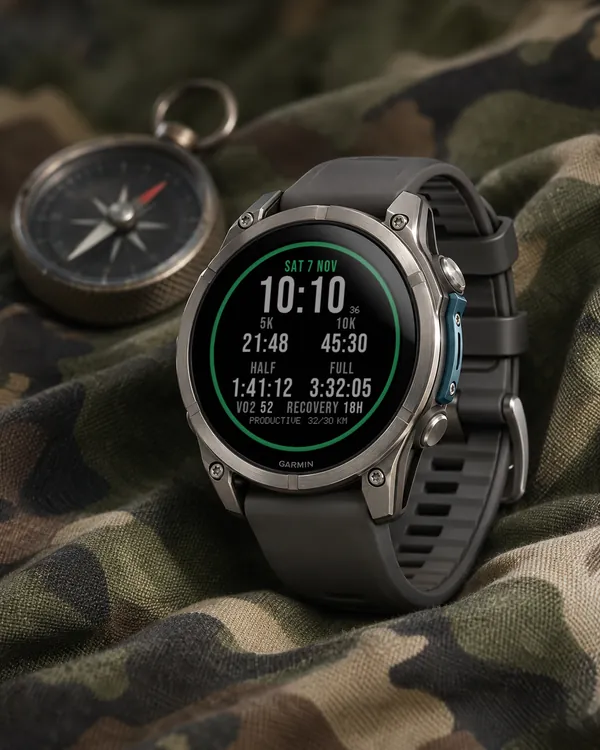
Garmin race predictions and weekly mileage right on the face
 Photography
Amber Hour
5.0 (15)
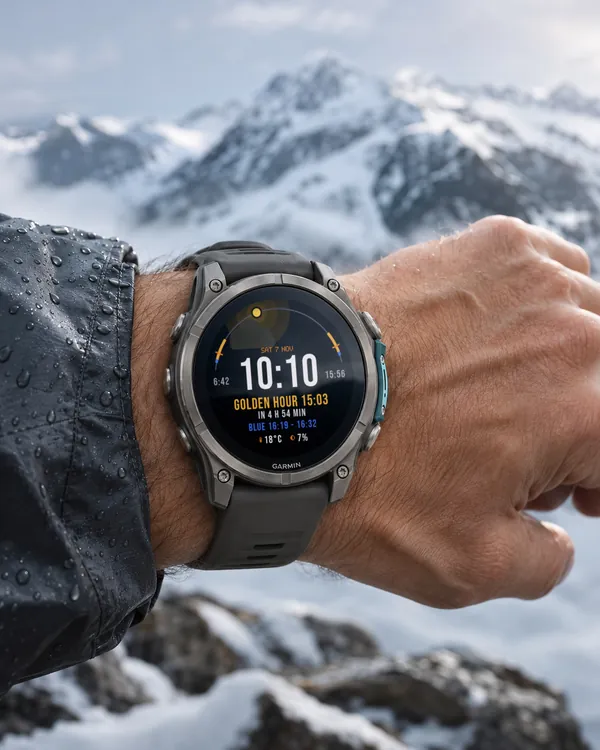
Golden and blue hour countdown with the sun's path across your day
 Readiness
Day Verdict
4.8 (12)
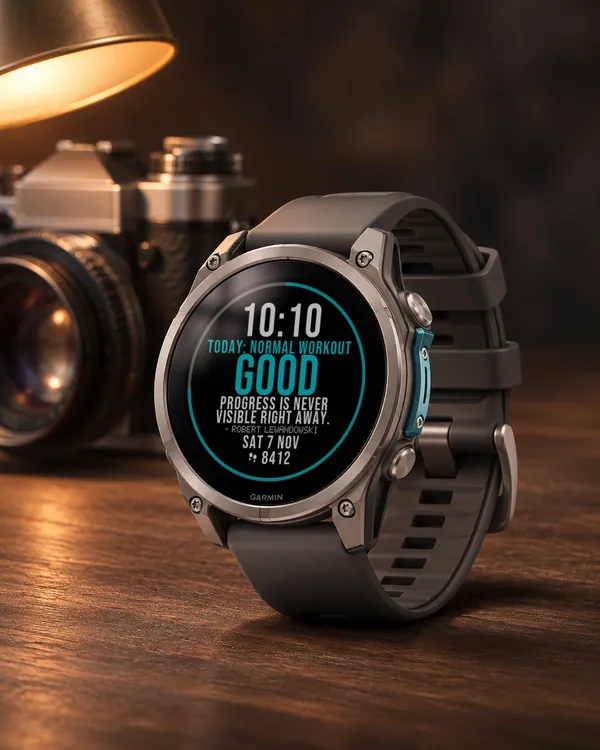
One word for your day: PUSH, STEADY, EASY or REST, from your sleep, Body Battery and recovery
 Activity
Ring Day
5.0 (16)
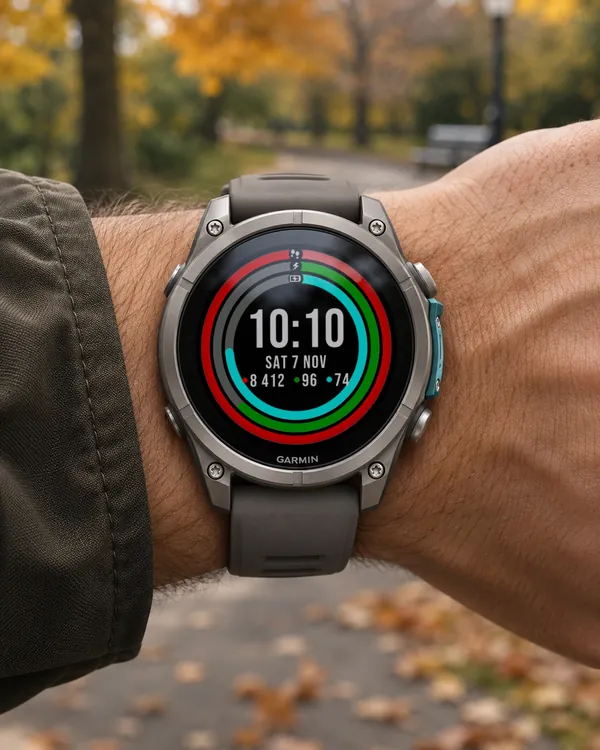
Three activity rings around the time, for people who close their rings