Unlock
€6.49
One-time payment. No subscription. The code works on the watch whose ID you enter.
- Install the face from Connect IQ (7 days free).
- On the watch: face settings > Buy / Unlock, scan the QR code.
- Pay and paste the code in the face settings.
- Pay.
- Copy the code.
- Paste it in Connect IQ: this face > Settings > Unlock code.
Payment works best in Safari or Chrome: menu (three dots) > Open in browser
Read it in this face, it is not the serial number of the watch.
The code works only in the watch face it was bought for: a Summit Rings code will not work in Summit Tactic.
Your ID, compare it with the watch:
Where do I find the ID?
On the watch: settings of this face > Buy / Unlock (first item). Scan the QR code with your phone or type the 10 digits. The ID is also at the top of the face settings in the Connect IQ app.
Code not working on your watch? Write to me and I will fix it.
Payments by Stripe. Seller: Mateusz Kolarz, Lublin, Poland.
Paid. Code:
We show the code here too. If the e-mail does not arrive (check spam), you can recover the code in the Recover code section with just the Face ID. Recover code
Copying did not work. The code is selected: copy it by hand.
The face unlocks by itself when the watch connects to the phone (usually within an hour; if the trial is still running, the purchase starts working when it ends).
Do not want to wait, or have an older watch? Paste the code in the Connect IQ app:
Connect IQ (or Garmin Connect) > My Device > Watch faces > Hex Tactical Ops Photo > Settings > Unlock code > paste > Save
Like it? Rate this face in the Garmin store
Want to try new faces and apps before the release, for free? Join the testers program
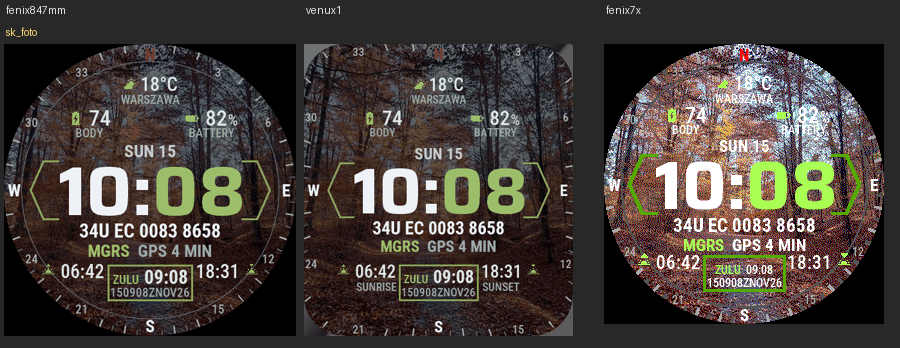
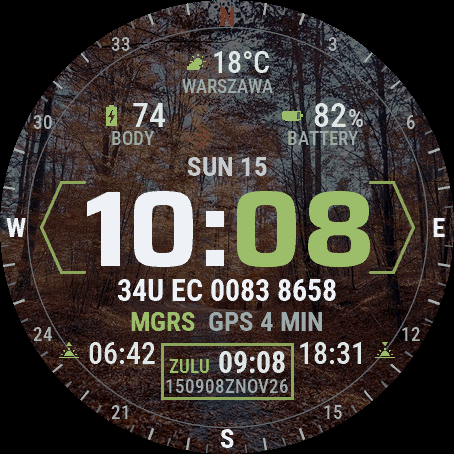
Hex Tactical Ops Photo is Hex Tactical Ops with your own picture behind it. The layout was designed from a serving soldier's requirements: the time in a hexagon frame, your MGRS grid with the age of the GPS fix, ZULU time with a DTG line for reports and a compass ring with azimuth and back azimuth. You add the photo with a QR code from the watch. Want a face with no internet permission at all? Get Hex Tactical Ops, the same face without the photo. An independent face by dialforge.dev.
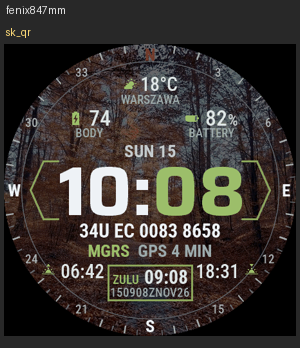
- Your photo as the background: hold the face away from the fields (or turn on "Show photo QR code" in the watch settings), scan the QR code, pick a photo on foto.dialforge.dev. It appears a few minutes later. Change or delete it there whenever you like.
- MGRS grid from the watch's last GPS fix, with its age: GPS 4 MIN, GPS 5 H or NO GPS. Precision 10 m, 100 m or 1 m. After 7 days the grid turns grey.
- Compass ring around the face: marks every 5 degrees, numbers every 30, red N. You can switch it to minute marks.
- Azimuth you set (0 to 359): AZ and BAZ marks on the ring, shown in degrees, mils (6400) or both.
- ZULU box: UTC time and a DTG line (DDHHMMZ MON YY). Instead you can show a second time zone or a data field.
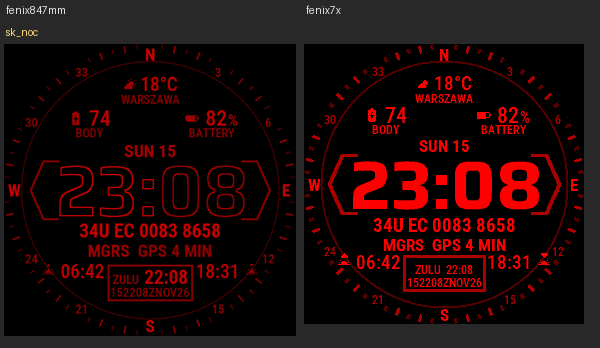
- Night mode: the whole face in dim red without the photo, always or after sunset.
- Weather with temperature and place name, Body Battery, battery, sunrise and sunset. Four fields to choose from.
- Always-on screen on AMOLED: time, date, MGRS and ZULU, never the photo, shifted every minute.
Settings are in Garmin Connect (Connect IQ, watch face settings) and on the watch under Customise: photo code, photo dimming (AMOLED) and how often the watch checks for a new photo, azimuth and its unit, MGRS precision, compass ring, night mode, DTG line, ZULU box or second time zone, fields, accent colour and text size. The watch needs a phone with Garmin Connect nearby to download the photo.
Privacy: this edition uses the internet only for the photo. A background service asks foto.dialforge.dev for the picture linked to your 8-character photo code. The server (Cloudflare) keeps only the cropped picture without EXIF or location, not your name; anyone who knows the code can see it, so keep the code to yourself and do not upload anything you would not show. Your position and health data never leave the watch. The face never switches GPS on and is not a navigation device, so check the grid against your map. More at dialforge.dev/privacy.
Hex Tactical Ops Photo to Hex Tactical Ops z Twoim zdjęciem w tle. Układ powstał według wytycznych żołnierza w służbie: godzina w sześciokątnej ramce, siatka MGRS z wiekiem pozycji GPS, czas ZULU z linią DTG do meldunków i pierścień kompasu z azymutem i azymutem wstecznym. Zdjęcie dodajesz kodem QR z zegarka. Wolisz tarczę zupełnie bez uprawnień do internetu? Pobierz Hex Tactical Ops, tę samą tarczę bez zdjęcia. Niezależna tarcza dialforge.dev.
- Twoje zdjęcie w tle: przytrzymaj tarczę poza polami (albo włącz "Pokaż kod QR zdjęcia" w ustawieniach na zegarku), zeskanuj kod QR, wybierz zdjęcie na foto.dialforge.dev. Po kilku minutach jest na zegarku. Tam też je zmienisz albo usuniesz.
- Siatka MGRS z ostatniej pozycji GPS zegarka, z jej wiekiem: GPS 4 MIN, GPS 5 H albo NO GPS. Dokładność 10 m, 100 m albo 1 m. Po 7 dniach siatka robi się szara.
- Pierścień kompasu dookoła tarczy: kreski co 5 stopni, liczby co 30, czerwone N. Możesz go zamienić na znaczniki minut.
- Azymut, który sam ustawiasz (od 0 do 359): znaczniki AZ i BAZ na pierścieniu, w stopniach, tysięcznych (6400) albo w obu.
- Okienko ZULU: czas UTC i linia DTG (DDHHMMZ MON YY). Zamiast tego może pokazywać drugą strefę czasu albo pole danych.
- Tryb nocny: cała tarcza przygaszona na czerwono, bez zdjęcia, stale albo po zachodzie słońca.
- Pogoda z temperaturą i nazwą miejscowości, Body Battery, bateria, wschód i zachód słońca. Cztery pola do wyboru.
- Ekran wygaszony na AMOLED: godzina, data, MGRS i ZULU, nigdy zdjęcie, przesuwane co minutę.
Ustawienia są w Garmin Connect (Connect IQ, ustawienia tarczy) i na zegarku w Dostosuj: kod zdjęcia, przyciemnienie zdjęcia (AMOLED) i jak często zegarek sprawdza nowe zdjęcie, azymut i jego jednostka, dokładność MGRS, pierścień kompasu, tryb nocny, linia DTG, okienko ZULU albo druga strefa, pola, kolor akcentu i rozmiar tekstu. Do pobrania zdjęcia zegarek potrzebuje telefonu z Garmin Connect w pobliżu.
Prywatność: ta wersja łączy się z internetem tylko po zdjęcie. Usługa w tle pyta foto.dialforge.dev o obraz przypisany do 8-znakowego kodu zdjęcia. Serwer (Cloudflare) trzyma tylko przycięty obraz bez EXIF i lokalizacji, bez Twojego nazwiska; kto zna kod, może go zobaczyć, więc zachowaj kod dla siebie i nie wgrywaj niczego, czego nie pokazałbyś obcym. Pozycja i dane zdrowotne nigdy nie wychodzą z zegarka. Tarcza nie włącza GPS i nie jest urządzeniem nawigacyjnym, więc siatkę sprawdzaj z mapą. Więcej na dialforge.dev/privacy.
Hex Tactical Ops Photo ist Hex Tactical Ops mit deinem eigenen Bild dahinter. Das Layout wurde nach den Anforderungen eines aktiven Soldaten entwickelt: die Uhrzeit in einem Sechseckrahmen, dein MGRS-Gitter mit dem Alter der GPS-Position, die ZULU-Zeit mit einer DTG-Zeile für Meldungen und ein Kompassring mit Azimut und Rückazimut. Das Foto fügst du mit einem QR-Code von der Uhr hinzu. Willst du ein Zifferblatt ganz ohne Internetberechtigung? Nimm Hex Tactical Ops, dasselbe Zifferblatt ohne Foto. Ein unabhängiges Zifferblatt von dialforge.dev.
- Dein Foto als Hintergrund: Halte den Finger auf dem Zifferblatt abseits der Felder (oder schalte in den Einstellungen auf der Uhr "Foto-QR-Code anzeigen" ein), scanne den QR-Code und wähle auf foto.dialforge.dev ein Foto. Es erscheint wenige Minuten später. Dort kannst du es jederzeit ändern oder löschen.
- MGRS-Gitter von der letzten GPS-Position der Uhr, mit ihrem Alter: GPS 4 MIN, GPS 5 H oder NO GPS. Genauigkeit 10 m, 100 m oder 1 m. Nach 7 Tagen wird das Gitter grau.
- Kompassring um das Zifferblatt: Striche alle 5 Grad, Zahlen alle 30, rote Nordmarke. Du kannst auf Minutenmarken umschalten.
- Azimut, den du selbst einstellst (0 bis 359): AZ- und BAZ-Marken auf dem Ring, in Grad, Strich (6400) oder beidem.
- ZULU-Feld: UTC-Zeit und eine DTG-Zeile (DDHHMMZ MON YY). Stattdessen kannst du eine zweite Zeitzone oder ein Datenfeld anzeigen.
- Nachtmodus: das ganze Zifferblatt in gedimmtem Rot, ohne das Foto, immer oder nach Sonnenuntergang.
- Wetter mit Temperatur und Ortsname, Body Battery, Akku, Sonnenauf- und -untergang. Vier Felder zur Auswahl.
Die Einstellungen findest du in Garmin Connect (Connect IQ, Zifferblatt-Einstellungen) und auf der Uhr unter Anpassen: Fotocode, Fotoabdunklung (AMOLED) und wie oft die Uhr nach einem neuen Foto sucht, Azimut und seine Einheit, MGRS-Genauigkeit, Kompassring, Nachtmodus, DTG-Zeile, ZULU-Feld oder zweite Zeitzone, Felder, Akzentfarbe und Textgröße. Zum Laden des Fotos braucht die Uhr ein Handy mit Garmin Connect in der Nähe.
Datenschutz: Diese Ausgabe nutzt das Internet nur für das Foto. Ein Hintergrunddienst fragt foto.dialforge.dev nach dem Bild, das zu deinem 8-stelligen Fotocode gehört. Der Server (Cloudflare) speichert nur das zugeschnittene Bild ohne EXIF und Standort, nicht deinen Namen; jeder, der den Code kennt, kann es sehen, behalte den Code also für dich und lade nichts hoch, was du Fremden nicht zeigen würdest. Deine Position und deine Gesundheitsdaten verlassen die Uhr nie. Das Zifferblatt schaltet GPS nie ein und ist kein Navigationsgerät, prüfe das Gitter also an deiner Karte. Mehr unter dialforge.dev/privacy.
Hex Tactical Ops Photo, c'est Hex Tactical Ops avec ta propre image derrière. La disposition a été conçue d'après les exigences d'un militaire d'active : l'heure dans un cadre hexagonal, ta grille MGRS avec l'âge de la position GPS, l'heure ZULU avec une ligne DTG pour les comptes rendus et un anneau de boussole avec azimut et azimut inverse. Tu ajoutes la photo avec un QR code depuis la montre. Tu veux un cadran sans aucune autorisation internet ? Prends Hex Tactical Ops, le même cadran sans la photo. Un cadran indépendant de dialforge.dev.
- Ta photo en fond : maintiens le doigt sur le cadran, loin des champs (ou active "Afficher le QR code de la photo" dans les réglages de la montre), scanne le QR code et choisis une photo sur foto.dialforge.dev. Elle apparaît quelques minutes plus tard. Tu peux la changer ou la supprimer là-bas quand tu veux.
- Grille MGRS de la dernière position GPS de la montre, avec son âge : GPS 4 MIN, GPS 5 H ou NO GPS. Précision de 10 m, 100 m ou 1 m. Après 7 jours, la grille devient grise.
- Anneau de boussole autour du cadran : traits tous les 5 degrés, chiffres tous les 30, repère rouge du nord. Tu peux le remplacer par des repères de minutes.
- Azimut que tu règles toi-même (de 0 à 359) : repères AZ et BAZ sur l'anneau, en degrés, en millièmes (6400) ou les deux.
- Case ZULU : heure UTC et ligne DTG (DDHHMMZ MON YY). À la place, tu peux afficher un second fuseau horaire ou un champ de données.
- Mode nuit : tout le cadran en rouge atténué, sans la photo, en permanence ou après le coucher du soleil.
- Météo avec température et nom du lieu, Body Battery, batterie, lever et coucher du soleil. Quatre champs au choix.
Les réglages se trouvent dans Garmin Connect (Connect IQ, réglages du cadran) et sur la montre sous Personnaliser : code photo, assombrissement de la photo (AMOLED) et fréquence de vérification d'une nouvelle photo, azimut et son unité, précision MGRS, anneau de boussole, mode nuit, ligne DTG, case ZULU ou second fuseau horaire, champs, couleur d'accent et taille du texte. Pour télécharger la photo, la montre a besoin d'un téléphone avec Garmin Connect à proximité.
Confidentialité : cette édition utilise internet uniquement pour la photo. Un service en arrière-plan demande à foto.dialforge.dev l'image liée à ton code photo à 8 caractères. Le serveur (Cloudflare) ne garde que l'image recadrée, sans EXIF ni position, pas ton nom ; quiconque connaît le code peut la voir, garde donc le code pour toi et n'envoie rien que tu ne montrerais pas à des inconnus. Ta position et tes données de santé ne quittent jamais la montre. Le cadran n'active jamais le GPS et n'est pas un appareil de navigation : vérifie la grille sur ta carte. Plus sur dialforge.dev/privacy.
Hex Tactical Ops Photo es Hex Tactical Ops con tu propia imagen detrás. El diseño se hizo a partir de los requisitos de un soldado en activo: la hora en un marco hexagonal, tu cuadrícula MGRS con la antigüedad de la posición GPS, la hora ZULU con una línea DTG para los partes y un anillo de brújula con acimut y acimut inverso. La foto la añades con un código QR desde el reloj. ¿Quieres una esfera sin ningún permiso de internet? Elige Hex Tactical Ops, la misma esfera sin la foto. Una esfera independiente de dialforge.dev.
- Tu foto como fondo: mantén el dedo sobre la esfera, lejos de los campos (o activa "Mostrar código QR de la foto" en los ajustes del reloj), escanea el código QR y elige una foto en foto.dialforge.dev. Aparece unos minutos después. Allí puedes cambiarla o borrarla cuando quieras.
- Cuadrícula MGRS de la última posición GPS del reloj, con su antigüedad: GPS 4 MIN, GPS 5 H o NO GPS. Precisión de 10 m, 100 m o 1 m. Tras 7 días la cuadrícula se pone gris.
- Anillo de brújula alrededor de la esfera: marcas cada 5 grados, números cada 30, marca roja del norte. Puedes cambiarlo por marcas de minutos.
- Acimut que fijas tú (de 0 a 359): marcas AZ y BAZ en el anillo, en grados, milésimas (6400) o ambos.
- Cuadro ZULU: hora UTC y una línea DTG (DDHHMMZ MON YY). En su lugar puedes mostrar una segunda zona horaria o un campo de datos.
- Modo nocturno: toda la esfera en rojo tenue, sin la foto, siempre o después de la puesta de sol.
- Tiempo con temperatura y nombre del lugar, Body Battery, batería, salida y puesta del sol. Cuatro campos a elegir.
- Pantalla siempre activa en AMOLED: hora, fecha, MGRS y ZULU, nunca la foto, desplazados cada minuto.
Los ajustes están en Garmin Connect (Connect IQ, ajustes de la esfera) y en el reloj, en Personalizar: código de foto, atenuación de la foto (AMOLED) y cada cuánto comprueba el reloj si hay una foto nueva, acimut y su unidad, precisión MGRS, anillo de brújula, modo nocturno, línea DTG, cuadro ZULU o segunda zona horaria, campos, color de acento y tamaño del texto. Para descargar la foto, el reloj necesita un móvil con Garmin Connect cerca.
Privacidad: esta edición usa internet solo para la foto. Un servicio en segundo plano pide a foto.dialforge.dev la imagen vinculada a tu código de foto de 8 caracteres. El servidor (Cloudflare) guarda solo la imagen recortada, sin EXIF ni ubicación, no tu nombre; cualquiera que conozca el código puede verla, así que guarda el código para ti y no subas nada que no enseñarías a desconocidos. Tu posición y tus datos de salud nunca salen del reloj. La esfera nunca activa el GPS y no es un dispositivo de navegación, así que comprueba la cuadrícula con tu mapa. Más en dialforge.dev/privacy.
Hex Tactical Ops Photo is Hex Tactical Ops met je eigen beeld erachter. De indeling is ontworpen op basis van de eisen van een dienende militair: de tijd in een zeshoekig kader, je MGRS-raster met de leeftijd van de GPS-positie, ZULU-tijd met een DTG-regel voor meldingen en een kompasring met azimut en terugazimut. De foto voeg je toe met een QR-code vanaf het horloge. Wil je een wijzerplaat helemaal zonder internettoestemming? Neem Hex Tactical Ops, dezelfde wijzerplaat zonder foto. Een onafhankelijke wijzerplaat van dialforge.dev.
- Je foto als achtergrond: houd je vinger op de wijzerplaat, weg van de velden (of zet in de instellingen op het horloge "Foto-QR-code tonen" aan), scan de QR-code en kies een foto op foto.dialforge.dev. Hij verschijnt een paar minuten later. Daar kun je hem altijd wijzigen of verwijderen.
- MGRS-raster van de laatste GPS-positie van het horloge, met de leeftijd ervan: GPS 4 MIN, GPS 5 H of NO GPS. Nauwkeurigheid 10 m, 100 m of 1 m. Na 7 dagen wordt het raster grijs.
- Kompasring rond de wijzerplaat: streepjes elke 5 graden, cijfers elke 30, rode noordmarkering. Je kunt overschakelen op minuutmarkeringen.
- Azimut dat je zelf instelt (0 tot 359): AZ- en BAZ-markeringen op de ring, in graden, strepen (6400) of beide.
- ZULU-vak: UTC-tijd en een DTG-regel (DDHHMMZ MON YY). In plaats daarvan kun je een tweede tijdzone of een gegevensveld tonen.
- Nachtmodus: de hele wijzerplaat in gedimd rood, zonder de foto, altijd of na zonsondergang.
- Weer met temperatuur en plaatsnaam, Body Battery, batterij, zonsopkomst en zonsondergang. Vier velden om uit te kiezen.
De instellingen vind je in Garmin Connect (Connect IQ, instellingen van de wijzerplaat) en op het horloge onder Aanpassen: fotocode, fotodimming (AMOLED) en hoe vaak het horloge naar een nieuwe foto kijkt, azimut en de eenheid ervan, MGRS-nauwkeurigheid, kompasring, nachtmodus, DTG-regel, ZULU-vak of tweede tijdzone, velden, accentkleur en tekstgrootte. Om de foto te downloaden heeft het horloge een telefoon met Garmin Connect in de buurt nodig.
Privacy: deze uitvoering gebruikt internet alleen voor de foto. Een achtergrondservice vraagt foto.dialforge.dev om het beeld dat bij je fotocode van 8 tekens hoort. De server (Cloudflare) bewaart alleen de bijgesneden afbeelding zonder EXIF en locatie, niet je naam; wie de code kent, kan hem zien, houd de code dus voor jezelf en upload niets wat je niet aan vreemden zou laten zien. Je positie en gezondheidsgegevens verlaten het horloge nooit. De wijzerplaat zet GPS nooit aan en is geen navigatieapparaat, controleer het raster dus op je kaart. Meer op dialforge.dev/privacy.
Hex Tactical Ops Photoは、Hex Tactical Opsの背景にあなた自身の写真を表示できるウォッチフェイスです。レイアウトは現役兵士の要望に基づいて設計されました。六角形の枠で時刻、GPS位置の経過時間つきのMGRSグリッド、報告用のDTG行つきZULU時刻、方位角と逆方位角を示すコンパスリングを表示します。写真は時計に表示されるQRコードから追加します。インターネット権限がまったくないウォッチフェイスがよければ、写真なしの同じウォッチフェイス、Hex Tactical Opsをお選びください。dialforge.devの独立したウォッチフェイスです。
- あなたの写真を背景に:データフィールドから離れた場所を指で押し続けるか(またはウォッチ上の設定で「写真のQRコードを表示」をオンにして)、QRコードをスキャンし、foto.dialforge.dev で写真を選びます。数分後に表示されます。同じ場所でいつでも変更や削除ができます。
- 時計が最後に取得したGPS位置からのMGRSグリッドと、その経過時間:GPS 4 MIN、GPS 5 H、NO GPS。精度は10 m、100 m、1 mから選択。7日後にグリッドはグレーになります。
- 文字盤を囲むコンパスリング:5度ごとに目盛り、30度ごとに数字、北は赤の印。分の目盛りに切り替えることもできます。
- 自分で設定する方位角(0から359):リング上にAZとBAZの印を表示し、度、ミル(6400)、または両方で表示。
- ZULU枠:UTC時刻とDTG行(DDHHMMZ MON YY)。代わりに第2タイムゾーンやデータフィールドも表示できます。
- 夜間モード:写真なしで、画面全体を暗い赤にします。常時、または日没後。
- 気温と地名つきの天気、Body Battery、バッテリー、日の出と日の入り。4つのフィールドから選べます。
- AMOLEDの常時表示:時刻、日付、MGRS、ZULUを表示し、写真は表示せず、1分ごとにずらします。
設定はGarmin Connect(Connect IQ、ウォッチフェイス設定)と、時計のカスタマイズで行います:写真コード、写真の暗さ(AMOLED)と新しい写真を確認する頻度、方位角とその単位、MGRSの精度、コンパスリング、夜間モード、DTG行、ZULU枠または第2タイムゾーン、フィールド、アクセントカラー、文字サイズ。写真をダウンロードするには、近くにGarmin Connectが入ったスマートフォンが必要です。
プライバシー:このエディションがインターネットを使うのは写真のためだけです。バックグラウンドサービスが、8文字の写真コードに紐づいた画像を foto.dialforge.dev に問い合わせます。サーバー(Cloudflare)が保存するのは、EXIFと位置情報を除いたトリミング済みの画像だけで、お名前は保存しません。コードを知っている人は誰でも画像を見られるので、コードは他の人に教えず、知らない人に見せられない画像はアップロードしないでください。位置情報と健康データが時計の外に出ることはありません。このウォッチフェイスはGPSを起動せず、ナビゲーション機器でもないため、グリッドは地図で確認してください。詳しくは dialforge.dev/privacy をご覧ください。
Hex Tactical Ops Photo è Hex Tactical Ops con la tua immagine dietro. Il layout è stato progettato sulla base dei requisiti di un soldato in servizio: l'ora in una cornice esagonale, la tua griglia MGRS con l'età della posizione GPS, l'ora ZULU con una riga DTG per i rapporti e un anello bussola con azimut e azimut inverso. La foto la aggiungi con un codice QR dall'orologio. Vuoi un quadrante senza alcun permesso internet? Prendi Hex Tactical Ops, lo stesso quadrante senza la foto. Un quadrante indipendente di dialforge.dev.
- La tua foto come sfondo: tieni il dito sul quadrante, lontano dai campi (oppure attiva "Mostra codice QR della foto" nelle impostazioni sull'orologio), inquadra il codice QR e scegli una foto su foto.dialforge.dev. Compare pochi minuti dopo. Lì puoi cambiarla o eliminarla quando vuoi.
- Griglia MGRS dall'ultima posizione GPS dell'orologio, con la sua età: GPS 4 MIN, GPS 5 H o NO GPS. Precisione di 10 m, 100 m o 1 m. Dopo 7 giorni la griglia diventa grigia.
- Anello bussola intorno al quadrante: tacche ogni 5 gradi, numeri ogni 30, segno rosso del nord. Puoi passare ai segni dei minuti.
- Azimut che imposti tu (da 0 a 359): segni AZ e BAZ sull'anello, in gradi, millesimi (6400) o entrambi.
- Riquadro ZULU: ora UTC e una riga DTG (DDHHMMZ MON YY). In alternativa puoi mostrare un secondo fuso orario o un campo dati.
- Modalità notte: l'intero quadrante in rosso attenuato, senza la foto, sempre o dopo il tramonto.
- Meteo con temperatura e nome del luogo, Body Battery, batteria, alba e tramonto. Quattro campi a scelta.
Le impostazioni si trovano in Garmin Connect (Connect IQ, impostazioni del quadrante) e sull'orologio in Personalizza: codice foto, attenuazione della foto (AMOLED) e ogni quanto l'orologio controlla se c'è una nuova foto, azimut e la sua unità, precisione MGRS, anello bussola, modalità notte, riga DTG, riquadro ZULU o secondo fuso orario, campi, colore d'accento e dimensione del testo. Per scaricare la foto l'orologio ha bisogno di un telefono con Garmin Connect nelle vicinanze.
Privacy: questa edizione usa internet solo per la foto. Un servizio in background chiede a foto.dialforge.dev l'immagine collegata al tuo codice foto di 8 caratteri. Il server (Cloudflare) conserva solo l'immagine ritagliata, senza EXIF né posizione, non il tuo nome; chiunque conosca il codice può vederla, quindi tieni il codice per te e non caricare nulla che non mostreresti a degli sconosciuti. La tua posizione e i tuoi dati sulla salute non lasciano mai l'orologio. Il quadrante non accende mai il GPS e non è un dispositivo di navigazione, quindi controlla la griglia sulla tua mappa. Altre informazioni su dialforge.dev/privacy.
Hex Tactical Ops Photo 就是背景里带有你自己图片的 Hex Tactical Ops。布局按现役军人的需求设计:六边形边框里的时间、带 GPS 定位时长的 MGRS 网格、带 DTG 行的 ZULU 时间(方便报告),以及显示方位角和反方位角的指南针环。照片通过手表上的二维码添加。想要完全没有联网权限的表盘?选择 Hex Tactical Ops,同样的表盘,不带照片。dialforge.dev 的独立表盘。
- 你的照片作背景:手指按住表盘,避开数据栏(或在手表设置中打开"显示照片二维码"),扫描二维码,在 foto.dialforge.dev 选择照片。几分钟后照片就会出现。你可以随时在那里更换或删除。
- MGRS 网格来自手表最近一次 GPS 定位,并显示其时长:GPS 4 MIN、GPS 5 H 或 NO GPS。精度可选 10 米、100 米或 1 米。7 天后网格变灰。
- 表盘四周的指南针环:每 5 度一条刻线,每 30 度一个数字,北向为红色标记。可切换为分钟刻度。
- 你自己设定的方位角(0 到 359):环上显示 AZ 和 BAZ 标记,单位可选度、密位(6400)或两者。
- ZULU 栏:UTC 时间和 DTG 行(DDHHMMZ MON YY)。也可以改为显示第二时区或数据栏。
- 夜间模式:整个表盘显示暗红色,不显示照片,可常开或日落后启用。
- 天气含温度和地名,另有 Body Battery、电量、日出和日落。四个数据栏可选。
- AMOLED 息屏常亮:时间、日期、MGRS 和 ZULU,从不显示照片,每分钟移位一次。
设置位于 Garmin Connect(Connect IQ,表盘设置)以及手表上的自定义菜单:照片码、照片变暗(AMOLED)和手表检查新照片的频率、方位角及其单位、MGRS 精度、指南针环、夜间模式、DTG 行、ZULU 栏或第二时区、数据栏、强调色和文字大小。下载照片时,手表附近需要有装有 Garmin Connect 的手机。
隐私:此版本只为照片使用网络。后台服务会向 foto.dialforge.dev 请求与你的 8 位照片码关联的图片。服务器(Cloudflare)只保存裁剪后的图片,不含 EXIF 和位置信息,不保存你的姓名;任何知道照片码的人都能看到这张图片,请妥善保管照片码,不要上传你不愿给陌生人看的内容。你的位置和健康数据绝不会离开手表。表盘不会打开 GPS,也不是导航设备,请对照地图核对网格。更多信息见 dialforge.dev/privacy。
Hex Tactical Ops Photo это Hex Tactical Ops с твоим собственным снимком на фоне. Компоновка разработана по требованиям действующего военнослужащего: время в шестиугольной рамке, твоя сетка MGRS с возрастом позиции GPS, время ZULU со строкой DTG для донесений и кольцо компаса с азимутом и обратным азимутом. Фото добавляется QR-кодом с часов. Нужен циферблат совсем без доступа в интернет? Выбери Hex Tactical Ops, тот же циферблат без фото. Независимый циферблат от dialforge.dev.
- Твоё фото на фоне: удерживай палец на циферблате вдали от полей (или включи "Показать QR-код фото" в настройках на часах), отсканируй QR-код и выбери фото на foto.dialforge.dev. Через несколько минут оно появится. Там же его можно в любой момент заменить или удалить.
- Сетка MGRS по последней позиции GPS часов с её возрастом: GPS 4 MIN, GPS 5 H или NO GPS. Точность 10 м, 100 м или 1 м. Через 7 дней сетка становится серой.
- Кольцо компаса вокруг циферблата: риски каждые 5 градусов, цифры каждые 30, красная отметка севера. Его можно заменить отметками минут.
- Азимут, который ты задаёшь сам (от 0 до 359): отметки AZ и BAZ на кольце, в градусах, тысячных (6400) или в обоих видах.
- Блок ZULU: время UTC и строка DTG (DDHHMMZ MON YY). Вместо него можно показать второй часовой пояс или поле данных.
- Ночной режим: весь циферблат тускло-красный, без фото, всегда или после заката.
- Погода с температурой и названием места, Body Battery, батарея, восход и закат. Четыре поля на выбор.
- Экран Always-On на AMOLED: время, дата, MGRS и ZULU, никогда не фото, сдвигаются каждую минуту.
Настройки находятся в Garmin Connect (Connect IQ, настройки циферблата) и на часах в разделе «Настроить»: код фото, затемнение фото (AMOLED) и как часто часы проверяют новое фото, азимут и его единица, точность MGRS, кольцо компаса, ночной режим, строка DTG, блок ZULU или второй часовой пояс, поля, акцентный цвет и размер текста. Чтобы скачать фото, часам нужен телефон с Garmin Connect поблизости.
Конфиденциальность: эта версия использует интернет только для фото. Фоновая служба запрашивает у foto.dialforge.dev изображение, привязанное к твоему 8-значному коду фото. Сервер (Cloudflare) хранит только обрезанное изображение без EXIF и геолокации, а не твоё имя; любой, кто знает код, может его увидеть, поэтому не сообщай код другим и не загружай ничего, что не показал бы чужим людям. Твоя позиция и данные о здоровье никогда не покидают часы. Циферблат никогда не включает GPS и не является навигатором, поэтому сверяй сетку с картой. Подробнее на dialforge.dev/privacy.
O Hex Tactical Ops Photo é o Hex Tactical Ops com a sua própria imagem por trás. O layout foi projetado a partir dos requisitos de um soldado da ativa: a hora em uma moldura hexagonal, sua grade MGRS com a idade da posição GPS, a hora ZULU com uma linha DTG para relatórios e um anel de bússola com azimute e azimute inverso. Você adiciona a foto com um código QR no relógio. Quer um mostrador sem nenhuma permissão de internet? Escolha o Hex Tactical Ops, o mesmo mostrador sem a foto. Um mostrador independente da dialforge.dev.
- Sua foto como fundo: segure o dedo no mostrador, longe dos campos (ou ative "Mostrar código QR da foto" nas configurações do relógio), escaneie o código QR e escolha uma foto em foto.dialforge.dev. Ela aparece alguns minutos depois. Lá você pode trocar ou excluir quando quiser.
- Grade MGRS da última posição GPS do relógio, com a idade dela: GPS 4 MIN, GPS 5 H ou NO GPS. Precisão de 10 m, 100 m ou 1 m. Depois de 7 dias a grade fica cinza.
- Anel de bússola em volta do mostrador: marcas a cada 5 graus, números a cada 30, marca vermelha do norte. Dá para trocar por marcas de minutos.
- Azimute que você define (de 0 a 359): marcas AZ e BAZ no anel, em graus, milésimos (6400) ou ambos.
- Caixa ZULU: hora UTC e uma linha DTG (DDHHMMZ MON YY). No lugar dela, você pode mostrar um segundo fuso horário ou um campo de dados.
- Modo noturno: todo o mostrador em vermelho escuro, sem a foto, sempre ou depois do pôr do sol.
- Clima com temperatura e nome do local, Body Battery, bateria, nascer e pôr do sol. Quatro campos à escolha.
- Tela sempre ativa no AMOLED: hora, data, MGRS e ZULU, nunca a foto, deslocados a cada minuto.
As configurações ficam no Garmin Connect (Connect IQ, configurações do mostrador) e no relógio em Personalizar: código da foto, escurecimento da foto (AMOLED) e a frequência com que o relógio procura uma foto nova, azimute e sua unidade, precisão MGRS, anel de bússola, modo noturno, linha DTG, caixa ZULU ou segundo fuso horário, campos, cor de destaque e tamanho do texto. Para baixar a foto, o relógio precisa de um celular com Garmin Connect por perto.
Privacidade: esta edição usa a internet só para a foto. Um serviço em segundo plano pede ao foto.dialforge.dev a imagem ligada ao seu código de foto de 8 caracteres. O servidor (Cloudflare) guarda apenas a imagem recortada, sem EXIF nem localização, não o seu nome; quem souber o código pode vê-la, então guarde o código só para você e não envie nada que você não mostraria a desconhecidos. Sua posição e seus dados de saúde nunca saem do relógio. O mostrador nunca liga o GPS e não é um aparelho de navegação, então confira a grade no seu mapa. Mais em dialforge.dev/privacy.
Hex Tactical Ops Photo je Hex Tactical Ops s tvou vlastní fotkou na pozadí. Uspořádání vzniklo podle požadavků vojáka v činné službě: čas v šestiúhelníkovém rámečku, mřížka MGRS se stářím polohy GPS, čas ZULU s řádkem DTG pro hlášení a kompasový prstenec s azimutem a zpětným azimutem. Fotku přidáš QR kódem z hodinek. Chceš ciferník úplně bez oprávnění k internetu? Pořiď si Hex Tactical Ops, stejný ciferník bez fotky. Nezávislý ciferník od dialforge.dev.
- Tvoje fotka jako pozadí: podrž prst na ciferníku mimo pole (nebo v nastavení v hodinkách zapni "Zobrazit QR kód fotky"), naskenuj QR kód a na foto.dialforge.dev vyber fotku. Za pár minut je na hodinkách. Tam ji také kdykoli změníš nebo smažeš.
- Mřížka MGRS z poslední polohy GPS hodinek s jejím stářím: GPS 4 MIN, GPS 5 H nebo NO GPS. Přesnost 10 m, 100 m nebo 1 m. Po 7 dnech mřížka zešedne.
- Kompasový prstenec kolem ciferníku: čárky po 5 stupních, čísla po 30, červená značka severu. Lze ho přepnout na značky minut.
- Azimut, který si nastavíš (0 až 359): značky AZ a BAZ na prstenci, ve stupních, tisícinách (6400) nebo v obou.
- Pole ZULU: čas UTC a řádek DTG (DDHHMMZ MON YY). Místo toho lze zobrazit druhé časové pásmo nebo datové pole.
- Noční režim: celý ciferník tlumeně červený, bez fotky, trvale nebo po západu slunce.
- Počasí s teplotou a názvem místa, Body Battery, baterie, východ a západ slunce. Čtyři pole na výběr.
- Stále zapnutý displej u AMOLED: čas, datum, MGRS a ZULU, nikdy fotka, posunuté každou minutu.
Nastavení najdeš v Garmin Connect (Connect IQ, nastavení ciferníku) a v hodinkách v části Upravit: kód fotky, ztmavení fotky (AMOLED) a jak často hodinky kontrolují novou fotku, azimut a jeho jednotka, přesnost MGRS, kompasový prstenec, noční režim, řádek DTG, pole ZULU nebo druhé časové pásmo, pole, akcentní barva a velikost textu. Ke stažení fotky potřebují hodinky poblíž telefon s Garmin Connect.
Soukromí: tato verze používá internet jen pro fotku. Služba na pozadí se ptá foto.dialforge.dev na obrázek navázaný na tvůj 8znakový kód fotky. Server (Cloudflare) uchovává jen ořezaný obrázek bez EXIF a polohy, ne tvé jméno; kdo kód zná, může obrázek vidět, proto si kód nech pro sebe a nenahrávej nic, co bys neukázal cizím. Tvoje poloha a zdravotní data hodinky nikdy neopustí. Ciferník nikdy nezapíná GPS a není to navigační přístroj, mřížku si proto ověř podle mapy. Více na dialforge.dev/privacy.
O Hex Tactical Ops Photo é o Hex Tactical Ops com a tua própria imagem por trás. A disposição foi concebida a partir dos requisitos de um militar no ativo: a hora numa moldura hexagonal, a tua grelha MGRS com a idade da posição GPS, a hora ZULU com uma linha DTG para os relatórios e um anel de bússola com azimute e azimute inverso. Acrescentas a fotografia com um código QR no relógio. Queres um mostrador sem qualquer permissão de internet? Escolhe o Hex Tactical Ops, o mesmo mostrador sem a fotografia. Um mostrador independente da dialforge.dev.
- A tua fotografia como fundo: mantém o dedo no mostrador, longe dos campos (ou ativa "Mostrar código QR da fotografia" nas definições do relógio), lê o código QR e escolhe uma fotografia em foto.dialforge.dev. Aparece alguns minutos depois. Aí podes mudá-la ou eliminá-la quando quiseres.
- Grelha MGRS da última posição GPS do relógio, com a respetiva idade: GPS 4 MIN, GPS 5 H ou NO GPS. Precisão de 10 m, 100 m ou 1 m. Passados 7 dias, a grelha fica cinzenta.
- Anel de bússola à volta do mostrador: marcas a cada 5 graus, números a cada 30, marca vermelha do norte. Podes trocar por marcas dos minutos.
- Azimute que defines tu (de 0 a 359): marcas AZ e BAZ no anel, em graus, milésimos (6400) ou ambos.
- Caixa ZULU: hora UTC e uma linha DTG (DDHHMMZ MON YY). Em vez disso, podes mostrar um segundo fuso horário ou um campo de dados.
- Modo noturno: todo o mostrador em vermelho escuro, sem a fotografia, sempre ou depois do pôr do sol.
- Meteorologia com temperatura e nome do local, Body Battery, bateria, nascer e pôr do sol. Quatro campos à escolha.
As definições estão no Garmin Connect (Connect IQ, definições do mostrador) e no relógio em Personalizar: código da fotografia, escurecimento da fotografia (AMOLED) e a frequência com que o relógio procura uma fotografia nova, azimute e a sua unidade, precisão MGRS, anel de bússola, modo noturno, linha DTG, caixa ZULU ou segundo fuso horário, campos, cor de destaque e tamanho do texto. Para descarregar a fotografia, o relógio precisa de um telemóvel com Garmin Connect por perto.
Privacidade: esta edição usa a internet apenas para a fotografia. Um serviço em segundo plano pede ao foto.dialforge.dev a imagem associada ao teu código de fotografia de 8 caracteres. O servidor (Cloudflare) guarda apenas a imagem recortada, sem EXIF nem localização, não o teu nome; quem souber o código pode vê-la, por isso guarda o código só para ti e não envies nada que não mostrasses a desconhecidos. A tua posição e os teus dados de saúde nunca saem do relógio. O mostrador nunca liga o GPS e não é um aparelho de navegação, por isso confirma a grelha no teu mapa. Mais em dialforge.dev/privacy.
Hex Tactical Ops Photo는 Hex Tactical Ops 뒤에 나만의 사진을 넣은 워치페이스입니다. 레이아웃은 현역 군인의 요구 사항에 맞춰 설계되었습니다. 육각형 프레임 안의 시간, GPS 위치의 경과 시간이 붙은 MGRS 격자, 보고용 DTG 줄이 있는 ZULU 시간, 방위각과 역방위각을 보여 주는 나침반 링이 표시됩니다. 사진은 시계에 표시되는 QR 코드로 추가합니다. 인터넷 권한이 전혀 없는 워치페이스를 원하시나요? 사진이 없는 같은 워치페이스인 Hex Tactical Ops를 선택하세요. dialforge.dev의 독립 워치페이스입니다.
- 내 사진을 배경으로: 데이터 필드에서 떨어진 곳에 손가락을 대고 누르거나(또는 시계 설정에서 "사진 QR 코드 표시"를 켜고), QR 코드를 스캔한 뒤 foto.dialforge.dev에서 사진을 고르세요. 몇 분 뒤 나타납니다. 같은 곳에서 언제든 바꾸거나 삭제할 수 있습니다.
- 시계의 마지막 GPS 위치로 만든 MGRS 격자와 경과 시간: GPS 4 MIN, GPS 5 H 또는 NO GPS. 정밀도 10 m, 100 m 또는 1 m. 7일이 지나면 격자가 회색으로 바뀝니다.
- 화면 둘레의 나침반 링: 5도마다 눈금, 30도마다 숫자, 북쪽은 빨간 표시. 분 눈금으로 바꿀 수 있습니다.
- 직접 설정하는 방위각(0에서 359): 링에 AZ와 BAZ 표시, 도, 밀(6400) 또는 둘 다로 표시.
- ZULU 칸: UTC 시간과 DTG 줄(DDHHMMZ MON YY). 대신 두 번째 시간대나 데이터 필드를 표시할 수도 있습니다.
- 야간 모드: 사진 없이 화면 전체를 어두운 빨간색으로, 항상 또는 일몰 후.
- 기온과 지역 이름이 있는 날씨, Body Battery, 배터리, 일출과 일몰. 필드 4개 중에서 선택.
- AMOLED 상시 표시 화면: 시간, 날짜, MGRS, ZULU를 표시하고 사진은 표시하지 않으며 1분마다 이동.
설정은 Garmin Connect(Connect IQ, 워치페이스 설정)와 시계의 맞춤 설정에서 할 수 있습니다. 사진 코드, 사진 어둡기(AMOLED)와 새 사진을 확인하는 주기, 방위각과 단위, MGRS 정밀도, 나침반 링, 야간 모드, DTG 줄, ZULU 칸 또는 두 번째 시간대, 필드, 강조 색상, 글자 크기를 설정합니다. 사진을 내려받으려면 근처에 Garmin Connect가 설치된 휴대폰이 필요합니다.
개인정보: 이 버전은 사진을 위해서만 인터넷을 사용합니다. 백그라운드 서비스가 8자리 사진 코드에 연결된 이미지를 foto.dialforge.dev에 요청합니다. 서버(Cloudflare)에는 EXIF와 위치 정보를 제거한 잘라낸 이미지만 저장되며 이름은 저장되지 않습니다. 코드를 아는 사람은 누구나 이미지를 볼 수 있으니 코드는 혼자만 알고 계시고, 낯선 사람에게 보여 주지 못할 것은 올리지 마세요. 위치와 건강 데이터는 시계 밖으로 나가지 않습니다. 워치페이스는 GPS를 켜지 않으며 내비게이션 기기가 아니므로 격자는 지도로 확인하세요. 자세한 내용은 dialforge.dev/privacy에서 확인하세요.
Hex Tactical Ops Photo är Hex Tactical Ops med din egen bild bakom. Layouten har utformats efter kraven från en tjänstgörande soldat: klockslaget i en sexkantig ram, ditt MGRS-rutnät med åldern på GPS-positionen, ZULU-tid med en DTG-rad för rapporter och en kompassring med azimut och bakazimut. Du lägger till fotot med en QR-kod från klockan. Vill du ha en urtavla helt utan internetbehörighet? Ta Hex Tactical Ops, samma urtavla utan foto. En oberoende urtavla från dialforge.dev.
- Ditt foto som bakgrund: håll fingret på urtavlan, bort från fälten (eller slå på "Visa QR-kod för foto" i inställningarna på klockan), skanna QR-koden och välj ett foto på foto.dialforge.dev. Det visas några minuter senare. Där kan du byta eller ta bort det när du vill.
- MGRS-rutnät från klockans senaste GPS-position, med dess ålder: GPS 4 MIN, GPS 5 H eller NO GPS. Precision 10 m, 100 m eller 1 m. Efter 7 dagar blir rutnätet grått.
- Kompassring runt urtavlan: streck var 5:e grad, siffror var 30:e, röd nordmarkering. Du kan byta till minutmarkeringar.
- Azimut som du ställer in själv (0 till 359): AZ- och BAZ-markeringar på ringen, i grader, streck (6400) eller båda.
- ZULU-ruta: UTC-tid och en DTG-rad (DDHHMMZ MON YY). I stället kan du visa en andra tidszon eller ett datafält.
- Nattläge: hela urtavlan i dämpad röd utan fotot, alltid eller efter solnedgången.
- Väder med temperatur och ortnamn, Body Battery, batteri, soluppgång och solnedgång. Fyra fält att välja bland.
- Alltid-på-skärm på AMOLED: klockslag, datum, MGRS och ZULU, aldrig fotot, flyttade varje minut.
Inställningarna finns i Garmin Connect (Connect IQ, urtavlans inställningar) och på klockan under Anpassa: fotokod, fotodämpning (AMOLED) och hur ofta klockan letar efter ett nytt foto, azimut och dess enhet, MGRS-precision, kompassring, nattläge, DTG-rad, ZULU-ruta eller andra tidszon, fält, accentfärg och textstorlek. För att ladda ned fotot behöver klockan en mobil med Garmin Connect i närheten.
Integritet: den här utgåvan använder internet bara för fotot. En bakgrundstjänst frågar foto.dialforge.dev efter bilden som hör till din 8-teckens fotokod. Servern (Cloudflare) sparar bara den beskurna bilden utan EXIF och plats, inte ditt namn; alla som känner till koden kan se den, så behåll koden för dig själv och ladda inte upp något som du inte skulle visa för främlingar. Din position och dina hälsodata lämnar aldrig klockan. Urtavlan slår aldrig på GPS och är inte en navigationsutrustning, så kontrollera rutnätet mot din karta. Mer på dialforge.dev/privacy.
Hex Tactical Ops Photo er Hex Tactical Ops med dit eget billede bagved. Layoutet er designet ud fra en tjenestegørende soldats krav: klokkeslættet i en sekskantet ramme, dit MGRS-gitter med alderen på GPS-positionen, ZULU-tid med en DTG-linje til meldinger og en kompasring med azimut og modsat azimut. Du tilføjer fotoet med en QR-kode fra uret. Vil du have en urskive helt uden internettilladelse? Tag Hex Tactical Ops, den samme urskive uden foto. En uafhængig urskive fra dialforge.dev.
- Dit foto som baggrund: hold fingeren på urskiven væk fra felterne (eller tænd "Vis QR-kode til foto" i urskivens indstillinger på uret), scan QR-koden og vælg et foto på foto.dialforge.dev. Det vises nogle minutter senere. Du kan skifte eller slette det dér, når du vil.
- MGRS-gitter fra urets sidste GPS-position med dens alder: GPS 4 MIN, GPS 5 H eller NO GPS. Præcision 10 m, 100 m eller 1 m. Efter 7 dage bliver gitteret gråt.
- Kompasring rundt om skiven: streger hver 5. grad, tal hver 30., rød nordmarkering. Du kan skifte til minutmærker.
- Azimut, du selv indstiller (0 til 359): AZ- og BAZ-mærker på ringen, vist i grader, streger (6400) eller begge.
- ZULU-felt: UTC-tid og en DTG-linje (DDHHMMZ MON YY). I stedet kan du vise en anden tidszone eller et datafelt.
- Nattetilstand: hele skiven i dæmpet rød uden fotoet, altid eller efter solnedgang.
- Vejr med temperatur og stedsnavn, Body Battery, batteri, solopgang og solnedgang. Fire felter at vælge imellem.
- Altid-tændt skærm på AMOLED: klokkeslæt, dato, MGRS og ZULU, aldrig fotoet, flyttet hvert minut.
Indstillingerne findes i Garmin Connect (Connect IQ, urskiveindstillinger) og på uret under Tilpas: fotokode, fotodæmpning (AMOLED) og hvor ofte uret tjekker for et nyt foto, azimut og dets enhed, MGRS-præcision, kompasring, nattetilstand, DTG-linje, ZULU-felt eller anden tidszone, felter, accentfarve og tekststørrelse. Uret skal have en telefon med Garmin Connect i nærheden for at hente fotoet.
Privatliv: denne udgave bruger kun internettet til fotoet. En baggrundstjeneste spørger foto.dialforge.dev om billedet knyttet til din 8-tegns fotokode. Serveren (Cloudflare) gemmer kun det beskårne billede uden EXIF og placering, ikke dit navn; alle, der kender koden, kan se det, så hold koden for dig selv og upload ikke noget, du ikke ville vise andre. Din position og dine sundhedsdata forlader aldrig uret. Urskiven tænder aldrig for GPS og er ikke et navigationsinstrument, så tjek gitteret mod dit kort. Mere på dialforge.dev/privacy.
Hex Tactical Ops Photo er Hex Tactical Ops med ditt eget bilde bak. Oppsettet er utformet etter kravene til en soldat i tjeneste: klokkeslettet i en sekskantet ramme, MGRS-rutenettet ditt med alderen på GPS-posisjonen, ZULU-tid med en DTG-linje til meldinger og en kompassring med asimut og bakasimut. Du legger til bildet med en QR-kode fra klokken. Vil du ha en urskive helt uten internettillatelse? Ta Hex Tactical Ops, den samme urskiven uten bilde. En uavhengig urskive fra dialforge.dev.
- Bildet ditt som bakgrunn: hold fingeren på urskiven, borte fra feltene (eller slå på "Vis QR-kode for bilde" i innstillingene på klokken), skann QR-koden og velg et bilde på foto.dialforge.dev. Det vises noen minutter senere. Der kan du bytte eller slette det når du vil.
- MGRS-rutenett fra klokkens siste GPS-posisjon, med alderen: GPS 4 MIN, GPS 5 H eller NO GPS. Presisjon 10 m, 100 m eller 1 m. Etter 7 dager blir rutenettet grått.
- Kompassring rundt skiven: streker hver 5. grad, tall hver 30., rød nordmarkering. Du kan bytte til minuttmarkeringer.
- Asimut du stiller inn selv (0 til 359): AZ- og BAZ-merker på ringen, vist i grader, streker (6400) eller begge.
- ZULU-felt: UTC-tid og en DTG-linje (DDHHMMZ MON YY). I stedet kan du vise en ekstra tidssone eller et datafelt.
- Nattmodus: hele skiven i dempet rød uten bildet, alltid eller etter solnedgang.
- Vær med temperatur og stedsnavn, Body Battery, batteri, soloppgang og solnedgang. Fire felt å velge mellom.
- Alltid-på-skjerm på AMOLED: klokkeslett, dato, MGRS og ZULU, aldri bildet, flyttet hvert minutt.
Innstillingene finner du i Garmin Connect (Connect IQ, innstillinger for urskiven) og på klokken under Tilpass: bildekode, bildedemping (AMOLED) og hvor ofte klokken ser etter et nytt bilde, asimut og enheten, MGRS-presisjon, kompassring, nattmodus, DTG-linje, ZULU-felt eller ekstra tidssone, felt, aksentfarge og tekststørrelse. For å laste ned bildet trenger klokken en mobil med Garmin Connect i nærheten.
Personvern: denne utgaven bruker internett bare til bildet. En bakgrunnstjeneste ber foto.dialforge.dev om bildet som hører til din 8-tegns bildekode. Serveren (Cloudflare) lagrer bare det beskårne bildet uten EXIF og posisjon, ikke navnet ditt; alle som kjenner koden, kan se det, så hold koden for deg selv og ikke last opp noe du ikke ville vist fremmede. Posisjonen din og helsedataene dine forlater aldri klokken. Urskiven slår aldri på GPS og er ikke et navigasjonsinstrument, så kontroller rutenettet mot kartet. Mer på dialforge.dev/privacy.
Hex Tactical Ops Photo 就是背景裡帶有你自己圖片的 Hex Tactical Ops。版面依現役軍人的需求設計:六角形邊框裡的時間、附 GPS 定位時長的 MGRS 網格、帶 DTG 行的 ZULU 時間(方便回報),以及顯示方位角和反方位角的指南針環。照片透過手錶上的QR碼新增。想要完全沒有網路權限的錶面?選擇 Hex Tactical Ops,同樣的錶面,不帶照片。dialforge.dev 的獨立錶面。
- 你的照片作背景:手指按住錶面,避開資料欄(或在手錶設定中開啟「顯示照片QR碼」),掃描QR碼,在 foto.dialforge.dev 選擇照片。幾分鐘後照片就會出現。你可以隨時在那裡更換或刪除。
- MGRS 網格來自手錶最近一次 GPS 定位,並顯示其時長:GPS 4 MIN、GPS 5 H 或 NO GPS。精度可選 10 公尺、100 公尺或 1 公尺。7 天後網格變灰。
- 錶面四周的指南針環:每 5 度一條刻線,每 30 度一個數字,北向為紅色標記。可切換為分鐘刻度。
- 你自己設定的方位角(0 到 359):環上顯示 AZ 和 BAZ 標記,單位可選度、密位(6400)或兩者。
- ZULU 欄:UTC 時間和 DTG 行(DDHHMMZ MON YY)。也可以改為顯示第二時區或資料欄。
- 夜間模式:整個錶面顯示暗紅色,不顯示照片,可常開或日落後啟用。
- 天氣含溫度和地名,另有 Body Battery、電量、日出和日落。四個資料欄可選。
- AMOLED 螢幕常亮:時間、日期、MGRS 和 ZULU,從不顯示照片,每分鐘移位一次。
設定位於 Garmin Connect(Connect IQ,錶面設定)以及手錶上的自訂選單:照片碼、照片變暗(AMOLED)和手錶檢查新照片的頻率、方位角及其單位、MGRS 精度、指南針環、夜間模式、DTG 行、ZULU 欄或第二時區、資料欄、強調色和文字大小。下載照片時,手錶附近需要有安裝 Garmin Connect 的手機。
隱私:此版本只為照片使用網路。背景服務會向 foto.dialforge.dev 請求與你的 8 位照片碼關聯的圖片。伺服器(Cloudflare)只儲存裁切後的圖片,不含 EXIF 和位置資訊,不儲存你的姓名;任何知道照片碼的人都能看到這張圖片,請妥善保管照片碼,不要上傳你不願給陌生人看的內容。你的位置和健康資料絕不會離開手錶。錶面不會開啟 GPS,也不是導航裝置,請對照地圖核對網格。更多資訊請見 dialforge.dev/privacy。
Hex Tactical Ops Photo on Hex Tactical Ops oma kuvasi taustalla. Asettelu on suunniteltu palveluksessa olevan sotilaan vaatimusten mukaan: kellonaika kuusikulmaisessa kehyksessä, MGRS-ruudukkosi GPS-sijainnin iän kanssa, ZULU-aika DTG-rivillä ilmoituksia varten sekä kompassirengas, jossa näkyvät atsimuutti ja vastaatsimuutti. Kuvan lisäät QR-koodilla kellosta. Haluatko kellotaulun, jolla ei ole lainkaan internet-oikeutta? Valitse Hex Tactical Ops, sama kellotaulu ilman kuvaa. Riippumaton kellotaulu, tekijä dialforge.dev.
- Oma kuvasi taustana: pidä sormea kellotaulun päällä kenttien ulkopuolella (tai ota kellon asetuksissa käyttöön "Näytä kuvan QR-koodi"), skannaa QR-koodi ja valitse kuva osoitteessa foto.dialforge.dev. Se ilmestyy muutaman minuutin kuluttua. Siellä voit vaihtaa tai poistaa sen milloin tahansa.
- MGRS-ruudukko kellon viimeisestä GPS-sijainnista ja sen ikä: GPS 4 MIN, GPS 5 H tai NO GPS. Tarkkuus 10 m, 100 m tai 1 m. 7 päivän jälkeen ruudukko muuttuu harmaaksi.
- Kompassirengas kellotaulun ympärillä: viivat 5 asteen välein, numerot 30 välein, punainen pohjoismerkki. Voit vaihtaa sen minuuttimerkkeihin.
- Itse asettamasi atsimuutti (0-359): AZ- ja BAZ-merkit renkaassa, asteina, piiruina (6400) tai molempina.
- ZULU-ruutu: UTC-aika ja DTG-rivi (DDHHMMZ MON YY). Sen sijaan voit näyttää toisen aikavyöhykkeen tai tietokentän.
- Yötila: koko kellotaulu himmeän punaisena ilman kuvaa, aina tai auringonlaskun jälkeen.
- Sää lämpötilan ja paikkakunnan nimen kanssa, Body Battery, akku, auringonnousu ja -lasku. Neljä kenttää valittavissa.
- Aina päällä oleva näyttö AMOLEDilla: kellonaika, päivämäärä, MGRS ja ZULU, ei koskaan kuvaa, siirtyen minuutin välein.
Asetukset löytyvät Garmin Connectista (Connect IQ, kellotaulun asetukset) ja kellosta kohdasta Mukauta: kuvakoodi, kuvan himmennys (AMOLED) ja kuinka usein kello tarkistaa uuden kuvan, atsimuutti ja sen yksikkö, MGRS-tarkkuus, kompassirengas, yötila, DTG-rivi, ZULU-ruutu tai toinen aikavyöhyke, kentät, korostusväri ja tekstin koko. Kuvan lataamiseen kello tarvitsee lähelleen puhelimen, jossa on Garmin Connect.
Yksityisyys: tämä versio käyttää internetiä vain kuvaa varten. Taustapalvelu kysyy osoitteesta foto.dialforge.dev 8-merkkiseen kuvakoodiisi liitettyä kuvaa. Palvelin (Cloudflare) säilyttää vain rajatun kuvan ilman EXIF-tietoja ja sijaintia, ei nimeäsi; jokainen, joka tietää koodin, voi nähdä kuvan, joten pidä koodi omana tietonasi äläkä lataa mitään, mitä et näyttäisi vieraille. Sijaintisi ja terveystietosi eivät koskaan poistu kellosta. Kellotaulu ei koskaan kytke GPS:ää päälle eikä se ole navigointilaite, joten tarkista ruudukko kartasta. Lisää osoitteessa dialforge.dev/privacy.
Hex Tactical Ops Photo je Hex Tactical Ops s tvojou vlastnou fotkou na pozadí. Rozloženie vzniklo podľa požiadaviek vojaka v činnej službe: čas v šesťhrannom rámiku, mriežka MGRS s vekom polohy GPS, čas ZULU s riadkom DTG pre hlásenia a kompasový prstenec s azimutom a spätným azimutom. Fotku pridáš QR kódom z hodiniek. Chceš ciferník úplne bez oprávnenia na internet? Zober si Hex Tactical Ops, ten istý ciferník bez fotky. Nezávislý ciferník od dialforge.dev.
- Tvoja fotka ako pozadie: podrž prst na ciferníku mimo polí (alebo v nastaveniach na hodinkách zapni "Zobraziť QR kód fotky"), naskenuj QR kód a na foto.dialforge.dev vyber fotku. Za pár minút je na hodinkách. Tam ju tiež kedykoľvek zmeníš alebo vymažeš.
- Mriežka MGRS z poslednej polohy GPS hodiniek s jej vekom: GPS 4 MIN, GPS 5 H alebo NO GPS. Presnosť 10 m, 100 m alebo 1 m. Po 7 dňoch mriežka zošedne.
- Kompasový prstenec okolo ciferníka: čiarky po 5 stupňoch, čísla po 30, červená značka severu. Môžeš ho prepnúť na značky minút.
- Azimut, ktorý si nastavíš (0 až 359): značky AZ a BAZ na prstenci, v stupňoch, tisícinách (6400) alebo v oboch.
- Pole ZULU: čas UTC a riadok DTG (DDHHMMZ MON YY). Namiesto toho môže zobrazovať druhé časové pásmo alebo dátové pole.
- Nočný režim: celý ciferník tlmene červený, bez fotky, stále alebo po západe slnka.
- Počasie s teplotou a názvom miesta, Body Battery, batéria, východ a západ slnka. Štyri polia na výber.
- Stále zapnutý displej pri AMOLED: čas, dátum, MGRS a ZULU, nikdy fotka, posúvané každú minútu.
Nastavenia nájdeš v Garmin Connect (Connect IQ, nastavenia ciferníka) a na hodinkách v časti Prispôsobiť: kód fotky, stmavenie fotky (AMOLED) a ako často hodinky kontrolujú novú fotku, azimut a jeho jednotka, presnosť MGRS, kompasový prstenec, nočný režim, riadok DTG, pole ZULU alebo druhé časové pásmo, polia, akcentová farba a veľkosť textu. Na stiahnutie fotky potrebujú hodinky v blízkosti telefón s Garmin Connect.
Súkromie: táto verzia používa internet len pre fotku. Služba na pozadí sa pýta foto.dialforge.dev na obrázok viazaný na tvoj 8-znakový kód fotky. Server (Cloudflare) uchováva iba orezaný obrázok bez EXIF a polohy, nie tvoje meno; kto kód pozná, môže obrázok vidieť, preto si kód nechaj pre seba a nenahrávaj nič, čo by si cudzím neukázal. Tvoja poloha a zdravotné údaje hodinky nikdy neopustia. Ciferník nikdy nezapína GPS a nie je to navigačný prístroj, preto mriežku skontroluj podľa mapy. Viac na dialforge.dev/privacy.
Hex Tactical Ops Photo je Hex Tactical Ops z vašo lastno sliko v ozadju. Postavitev je nastala po zahtevah vojaka v aktivni službi: čas v šesterokotnem okvirju, vaša mreža MGRS s starostjo položaja GPS, čas ZULU z vrstico DTG za poročila ter obroč kompasa z azimutom in obratnim azimutom. Fotografijo dodate s kodo QR z ure. Želite ciferblat brez kakršnega koli dovoljenja za internet? Izberite Hex Tactical Ops, isti ciferblat brez fotografije. Neodvisen ciferblat podjetja dialforge.dev.
- Vaša fotografija v ozadju: držite prst na ciferblatu stran od polj (ali na uri v nastavitvah vklopite "Prikaži kodo QR fotografije"), skenirajte kodo QR in na foto.dialforge.dev izberite fotografijo. Na uri se pojavi nekaj minut pozneje. Tam jo lahko kadar koli zamenjate ali izbrišete.
- Mreža MGRS iz zadnjega položaja GPS ure s starostjo: GPS 4 MIN, GPS 5 H ali NO GPS. Natančnost 10 m, 100 m ali 1 m. Po 7 dneh mreža posivi.
- Obroč kompasa okoli ciferblata: črtice na vsakih 5 stopinj, številke na vsakih 30, rdeča oznaka severa. Lahko ga zamenjate z oznakami minut.
- Azimut, ki ga nastavite sami (od 0 do 359): oznaki AZ in BAZ na obroču, v stopinjah, tisočinkah (6400) ali obojem.
- Polje ZULU: čas UTC in vrstica DTG (DDHHMMZ MON YY). Namesto tega lahko prikaže drugi časovni pas ali podatkovno polje.
- Nočni način: ves ciferblat v zatemnjeni rdeči, brez fotografije, vedno ali po sončnem zahodu.
- Vreme s temperaturo in imenom kraja, Body Battery, baterija, sončni vzhod in zahod. Štiri polja po izbiri.
- Vedno vklopljen zaslon na AMOLED: čas, datum, MGRS in ZULU, nikoli fotografija, premaknjeni vsako minuto.
Nastavitve so v aplikaciji Garmin Connect (Connect IQ, nastavitve ciferblata) in na uri pod Prilagodi: koda fotografije, zatemnitev fotografije (AMOLED) in kako pogosto ura preverja, ali je nova fotografija, azimut in njegova enota, natančnost MGRS, obroč kompasa, nočni način, vrstica DTG, polje ZULU ali drugi časovni pas, polja, poudarna barva in velikost besedila. Za prenos fotografije ura potrebuje v bližini telefon z Garmin Connect.
Zasebnost: ta izdaja uporablja internet samo za fotografijo. Storitev v ozadju od foto.dialforge.dev zahteva sliko, povezano z vašo 8-mestno kodo fotografije. Strežnik (Cloudflare) hrani samo obrezano sliko brez EXIF in lokacije, ne vašega imena; vsak, ki pozna kodo, jo lahko vidi, zato kodo obdržite zase in ne nalagajte ničesar, česar ne bi pokazali tujcem. Vaš položaj in zdravstveni podatki ure nikoli ne zapustijo. Ciferblat nikoli ne vklopi GPS in ni navigacijska naprava, zato mrežo preverite na karti. Več na dialforge.dev/privacy.
Hex Tactical Ops Photo adalah Hex Tactical Ops dengan gambar Anda sendiri di belakangnya. Tata letaknya dirancang berdasarkan kebutuhan seorang prajurit yang masih bertugas: waktu dalam bingkai segi enam, grid MGRS Anda dengan usia posisi GPS, waktu ZULU dengan baris DTG untuk laporan, dan cincin kompas dengan azimut dan azimut balik. Foto ditambahkan dengan kode QR dari jam. Ingin watch face tanpa izin internet sama sekali? Pilih Hex Tactical Ops, watch face yang sama tanpa foto. Watch face independen dari dialforge.dev.
- Foto Anda sebagai latar: tahan jari di watch face, jauh dari kolom (atau aktifkan "Tampilkan kode QR foto" di pengaturan pada jam), pindai kode QR, lalu pilih foto di foto.dialforge.dev. Foto muncul beberapa menit kemudian. Di sana Anda bisa mengganti atau menghapusnya kapan saja.
- Grid MGRS dari posisi GPS terakhir jam, beserta usianya: GPS 4 MIN, GPS 5 H atau NO GPS. Presisi 10 m, 100 m atau 1 m. Setelah 7 hari grid menjadi abu-abu.
- Cincin kompas di sekeliling tampilan: garis tiap 5 derajat, angka tiap 30, penanda utara merah. Bisa diganti dengan penanda menit.
- Azimut yang Anda atur sendiri (0 sampai 359): penanda AZ dan BAZ di cincin, dalam derajat, mil (6400) atau keduanya.
- Kotak ZULU: waktu UTC dan baris DTG (DDHHMMZ MON YY). Sebagai gantinya bisa menampilkan zona waktu kedua atau kolom data.
- Mode malam: seluruh tampilan merah redup tanpa foto, selalu atau setelah matahari terbenam.
- Cuaca dengan suhu dan nama tempat, Body Battery, baterai, matahari terbit dan terbenam. Empat kolom untuk dipilih.
- Layar always-on di AMOLED: waktu, tanggal, MGRS dan ZULU, tidak pernah fotonya, bergeser tiap menit.
Pengaturan ada di Garmin Connect (Connect IQ, pengaturan watch face) dan di jam pada menu Sesuaikan: kode foto, peredupan foto (AMOLED) dan seberapa sering jam memeriksa foto baru, azimut dan satuannya, presisi MGRS, cincin kompas, mode malam, baris DTG, kotak ZULU atau zona waktu kedua, kolom, warna aksen, dan ukuran teks. Untuk mengunduh foto, jam memerlukan ponsel dengan Garmin Connect di dekatnya.
Privasi: edisi ini memakai internet hanya untuk foto. Layanan latar belakang meminta gambar yang terkait dengan kode foto 8 karakter Anda dari foto.dialforge.dev. Server (Cloudflare) hanya menyimpan gambar yang sudah dipotong tanpa EXIF dan lokasi, bukan nama Anda; siapa pun yang tahu kodenya bisa melihatnya, jadi simpan kode untuk diri sendiri dan jangan unggah apa pun yang tidak akan Anda tunjukkan kepada orang asing. Posisi dan data kesehatan Anda tidak pernah meninggalkan jam. Watch face tidak pernah menyalakan GPS dan bukan alat navigasi, jadi cocokkan grid dengan peta Anda. Selengkapnya di dialforge.dev/privacy.
A Hex Tactical Ops Photo a Hex Tactical Ops a saját képeddel a háttérben. Az elrendezés egy tényleges állományú katona követelményei alapján készült: az idő hatszögletű keretben, az MGRS-rács a GPS-pozíció korával, a ZULU idő DTG-sorral a jelentésekhez, valamint iránytűgyűrű azimuttal és ellenazimuttal. A fotót QR-kóddal adod hozzá az órán. Olyan számlapot szeretnél, amelynek egyáltalán nincs internetengedélye? Válaszd a Hex Tactical Ops-ot, ugyanezt a számlapot fotó nélkül. Független számlap a dialforge.dev-től.
- A fotód a háttérben: tartsd az ujjadat a számlapon a mezőktől távol (vagy kapcsold be az órán a beállításokban a "Fotó QR-kódjának mutatása" opciót), olvasd be a QR-kódot, és válassz fotót a foto.dialforge.dev oldalon. Néhány perc múlva megjelenik. Ott bármikor megváltoztathatod vagy törölheted.
- MGRS-rács az óra utolsó GPS-pozíciójából, annak korával: GPS 4 MIN, GPS 5 H vagy NO GPS. Pontosság 10 m, 100 m vagy 1 m. 7 nap után a rács szürke lesz.
- Iránytűgyűrű a számlap körül: jelek 5 fokonként, számok 30 fokonként, piros északjel. Átállíthatod percjelölőkre.
- Általad beállított azimut (0-tól 359-ig): AZ és BAZ jelek a gyűrűn, fokban, ezredben (6400) vagy mindkettőben.
- ZULU mező: UTC idő és DTG-sor (DDHHMMZ MON YY). Helyette második időzónát vagy adatmezőt is mutathat.
- Éjszakai mód: az egész számlap tompa vörösben, a fotó nélkül, mindig vagy napnyugta után.
- Időjárás hőmérséklettel és helynévvel, Body Battery, akkumulátor, napkelte és napnyugta. Négy mező közül választhatsz.
- Always-on képernyő AMOLED-on: idő, dátum, MGRS és ZULU, soha nem a fotó, percenként eltolva.
A beállítások a Garmin Connectben (Connect IQ, számlap beállításai) és az órán a Testreszabás menüben vannak: fotókód, fotó sötétítése (AMOLED) és az, hogy az óra milyen gyakran keres új fotót, azimut és mértékegysége, MGRS-pontosság, iránytűgyűrű, éjszakai mód, DTG-sor, ZULU mező vagy második időzóna, mezők, kiemelő szín és szövegméret. A fotó letöltéséhez az órának a közelében egy Garmin Connecttel rendelkező telefonra van szüksége.
Adatvédelem: ez a kiadás csak a fotóhoz használja az internetet. Egy háttérszolgáltatás a foto.dialforge.dev oldalról kéri el a 8 karakteres fotókódodhoz kötött képet. A szerver (Cloudflare) csak a körbevágott képet tárolja EXIF és helyadat nélkül, a nevedet nem; aki ismeri a kódot, láthatja a képet, ezért tartsd meg magadnak a kódot, és ne tölts fel semmit, amit idegeneknek nem mutatnál meg. A pozíciód és az egészségügyi adataid soha nem hagyják el az órát. A számlap soha nem kapcsolja be a GPS-t, és nem navigációs eszköz, ezért a rácsot ellenőrizd a térképeden. Bővebben: dialforge.dev/privacy.
Hex Tactical Ops Photo คือ Hex Tactical Ops ที่มีรูปของคุณเองอยู่ด้านหลัง เลย์เอาต์ออกแบบตามความต้องการของทหารที่ประจำการอยู่ ได้แก่ เวลาในกรอบหกเหลี่ยม ตาราง MGRS พร้อมอายุของตำแหน่ง GPS เวลา ZULU พร้อมบรรทัด DTG สำหรับการรายงาน และวงแหวนเข็มทิศที่แสดงแอซิมุทและแอซิมุทย้อนกลับ คุณเพิ่มรูปด้วยคิวอาร์โค้ดจากนาฬิกา ต้องการหน้าปัดที่ไม่มีสิทธิ์เข้าถึงอินเทอร์เน็ตเลยใช่ไหม เลือก Hex Tactical Ops หน้าปัดเดียวกันที่ไม่มีรูป หน้าปัดอิสระจาก dialforge.dev
- รูปของคุณเป็นพื้นหลัง: ใช้นิ้วแตะค้างบนหน้าปัดในจุดที่ห่างจากช่องข้อมูล (หรือเปิด "แสดงคิวอาร์โค้ดรูปภาพ" ในการตั้งค่าบนนาฬิกา) สแกนคิวอาร์โค้ด แล้วเลือกรูปที่ foto.dialforge.dev รูปจะขึ้นบนนาฬิกาหลังจากนั้นไม่กี่นาที และคุณเปลี่ยนหรือลบรูปที่นั่นได้ทุกเมื่อ
- ตาราง MGRS จากตำแหน่ง GPS ล่าสุดของนาฬิกา พร้อมอายุ: GPS 4 MIN, GPS 5 H หรือ NO GPS ความละเอียด 10 ม. 100 ม. หรือ 1 ม. หลัง 7 วันตารางจะเป็นสีเทา
- วงแหวนเข็มทิศรอบหน้าปัด: ขีดทุก 5 องศา ตัวเลขทุก 30 เครื่องหมายทิศเหนือสีแดง สลับเป็นเส้นนาทีได้
- แอซิมุทที่คุณตั้งเอง (0 ถึง 359): เครื่องหมาย AZ และ BAZ บนวงแหวน แสดงเป็นองศา มิล (6400) หรือทั้งสองอย่าง
- ช่อง ZULU: เวลา UTC และบรรทัด DTG (DDHHMMZ MON YY) หรือจะแสดงเขตเวลาที่สองหรือช่องข้อมูลแทนก็ได้
- โหมดกลางคืน: ทั้งหน้าปัดเป็นสีแดงสลัวโดยไม่มีรูป เปิดตลอดหรือหลังดวงอาทิตย์ตก
- สภาพอากาศพร้อมอุณหภูมิและชื่อสถานที่ Body Battery แบตเตอรี่ เวลาพระอาทิตย์ขึ้นและตก เลือกได้สี่ช่อง
- หน้าจอ Always-On บน AMOLED: เวลา วันที่ MGRS และ ZULU ไม่แสดงรูปเลย ขยับทุกนาที
การตั้งค่าอยู่ใน Garmin Connect (Connect IQ, การตั้งค่าหน้าปัด) และบนนาฬิกาในเมนูปรับแต่ง: รหัสรูปภาพ การหรี่แสงรูปภาพ (AMOLED) และความถี่ที่นาฬิกาตรวจหารูปใหม่ แอซิมุทและหน่วย ความละเอียด MGRS วงแหวนเข็มทิศ โหมดกลางคืน บรรทัด DTG ช่อง ZULU หรือเขตเวลาที่สอง ช่องข้อมูล สีเน้น และขนาดข้อความ การดาวน์โหลดรูปต้องมีโทรศัพท์ที่ติดตั้ง Garmin Connect อยู่ใกล้นาฬิกา
ความเป็นส่วนตัว: รุ่นนี้ใช้อินเทอร์เน็ตเฉพาะสำหรับรูปภาพ บริการเบื้องหลังจะขอภาพที่ผูกกับรหัสรูปภาพ 8 ตัวอักษรของคุณจาก foto.dialforge.dev เซิร์ฟเวอร์ (Cloudflare) เก็บเฉพาะภาพที่ครอปแล้วโดยไม่มี EXIF และตำแหน่ง ไม่เก็บชื่อของคุณ ใครที่รู้รหัสก็ดูภาพได้ ดังนั้นโปรดเก็บรหัสไว้เป็นความลับ และอย่าอัปโหลดสิ่งที่คุณไม่กล้าให้คนแปลกหน้าเห็น ตำแหน่งและข้อมูลสุขภาพของคุณไม่ออกจากนาฬิกาเลย หน้าปัดไม่เปิด GPS เลยและไม่ใช่อุปกรณ์นำทาง ควรตรวจตารางกับแผนที่ของคุณ ดูเพิ่มเติมที่ dialforge.dev/privacy
Το Hex Tactical Ops Photo είναι το Hex Tactical Ops με τη δική σου φωτογραφία από πίσω. Η διάταξη σχεδιάστηκε με βάση τις απαιτήσεις ενός εν ενεργεία στρατιώτη: η ώρα σε εξαγωνικό πλαίσιο, το πλέγμα MGRS με την ηλικία της θέσης GPS, η ώρα ZULU με γραμμή DTG για αναφορές και δακτύλιος πυξίδας με αζιμούθιο και αντίστροφο αζιμούθιο. Τη φωτογραφία την προσθέτεις με κωδικό QR από το ρολόι. Θέλεις πρόσοψη χωρίς καμία άδεια διαδικτύου; Πάρε το Hex Tactical Ops, την ίδια πρόσοψη χωρίς φωτογραφία. Μια ανεξάρτητη πρόσοψη από το dialforge.dev.
- Η φωτογραφία σου στο φόντο: κράτησε το δάχτυλο στην πρόσοψη μακριά από τα πεδία (ή ενεργοποίησε το "Εμφάνιση κωδικού QR φωτογραφίας" στις ρυθμίσεις του ρολογιού), σάρωσε τον κωδικό QR και διάλεξε φωτογραφία στο foto.dialforge.dev. Εμφανίζεται λίγα λεπτά αργότερα. Εκεί μπορείς να την αλλάξεις ή να τη διαγράψεις όποτε θέλεις.
- Πλέγμα MGRS από την τελευταία θέση GPS του ρολογιού, με την ηλικία της: GPS 4 MIN, GPS 5 H ή NO GPS. Ακρίβεια 10 m, 100 m ή 1 m. Μετά από 7 ημέρες το πλέγμα γίνεται γκρι.
- Δακτύλιος πυξίδας γύρω από την πρόσοψη: γραμμές ανά 5 μοίρες, αριθμοί ανά 30, κόκκινη ένδειξη βορρά. Μπορείς να τον αλλάξεις σε ενδείξεις λεπτών.
- Αζιμούθιο που ορίζεις εσύ (0 έως 359): ενδείξεις AZ και BAZ στον δακτύλιο, σε μοίρες, μιλ (6400) ή και τα δύο.
- Πεδίο ZULU: ώρα UTC και γραμμή DTG (DDHHMMZ MON YY). Εναλλακτικά μπορεί να δείχνει δεύτερη ζώνη ώρας ή πεδίο δεδομένων.
- Νυχτερινή λειτουργία: όλη η πρόσοψη σε αχνό κόκκινο, χωρίς τη φωτογραφία, πάντα ή μετά τη δύση του ηλίου.
Οι ρυθμίσεις βρίσκονται στο Garmin Connect (Connect IQ, ρυθμίσεις ρολογιού) και στο ρολόι, στο Προσαρμογή: κωδικός φωτογραφίας, σκούρυνση φωτογραφίας (AMOLED) και πόσο συχνά το ρολόι ελέγχει για νέα φωτογραφία, αζιμούθιο και η μονάδα του, ακρίβεια MGRS, δακτύλιος πυξίδας, νυχτερινή λειτουργία, γραμμή DTG, πεδίο ZULU ή δεύτερη ζώνη ώρας, πεδία, χρώμα έμφασης και μέγεθος κειμένου. Για να κατεβάσει τη φωτογραφία, το ρολόι χρειάζεται κοντά ένα κινητό με Garmin Connect.
Απόρρητο: αυτή η έκδοση χρησιμοποιεί το διαδίκτυο μόνο για τη φωτογραφία. Μια υπηρεσία στο παρασκήνιο ζητά από το foto.dialforge.dev την εικόνα που συνδέεται με τον κωδικό φωτογραφίας σου των 8 χαρακτήρων. Ο διακομιστής (Cloudflare) κρατά μόνο την περικομμένη εικόνα χωρίς EXIF και τοποθεσία, όχι το όνομά σου· όποιος ξέρει τον κωδικό μπορεί να τη δει, γι' αυτό κράτησε τον κωδικό για σένα και μην ανεβάζεις κάτι που δεν θα έδειχνες σε αγνώστους. Η θέση και τα δεδομένα υγείας σου δεν φεύγουν ποτέ από το ρολόι. Η πρόσοψη δεν ενεργοποιεί ποτέ το GPS και δεν είναι συσκευή πλοήγησης, γι' αυτό έλεγξε το πλέγμα με τον χάρτη σου. Περισσότερα στο dialforge.dev/privacy.
Hex Tactical Ops Photo je Hex Tactical Ops s tvojom vlastitom slikom iza. Raspored je osmišljen prema zahtjevima vojnika u službi: vrijeme u šesterokutnom okviru, tvoja MGRS mreža sa starošću GPS pozicije, ZULU vrijeme s DTG retkom za izvješća i prsten kompasa s azimutom i obrnutim azimutom. Fotografiju dodaješ QR kodom sa sata. Želiš brojčanik bez ikakve dozvole za internet? Uzmi Hex Tactical Ops, isti brojčanik bez fotografije. Neovisni brojčanik tvrtke dialforge.dev.
- Tvoja fotografija u pozadini: drži prst na brojčaniku podalje od polja (ili uključi "Prikaži QR kod fotografije" u postavkama na satu), skeniraj QR kod i odaberi fotografiju na foto.dialforge.dev. Pojavi se nekoliko minuta kasnije. Tamo je možeš promijeniti ili izbrisati kad god želiš.
- MGRS mreža iz zadnje GPS pozicije sata, s njezinom starošću: GPS 4 MIN, GPS 5 H ili NO GPS. Preciznost 10 m, 100 m ili 1 m. Nakon 7 dana mreža posivi.
- Prsten kompasa oko brojčanika: crtice svakih 5 stupnjeva, brojevi svakih 30, crvena oznaka sjevera. Možeš ga zamijeniti oznakama minuta.
- Azimut koji sam postaviš (od 0 do 359): oznake AZ i BAZ na prstenu, u stupnjevima, tisućinkama (6400) ili oboje.
- ZULU okvir: UTC vrijeme i DTG redak (DDHHMMZ MON YY). Umjesto toga možeš prikazati drugu vremensku zonu ili podatkovno polje.
- Noćni način: cijeli brojčanik prigušeno crven, bez fotografije, stalno ili nakon zalaska sunca.
- Vrijeme s temperaturom i nazivom mjesta, Body Battery, baterija, izlazak i zalazak sunca. Četiri polja za odabir.
- Uvijek uključen zaslon na AMOLED-u: vrijeme, datum, MGRS i ZULU, nikad fotografija, pomaknuti svake minute.
Postavke su u aplikaciji Garmin Connect (Connect IQ, postavke brojčanika) i na satu pod Prilagodi: kod fotografije, zatamnjenje fotografije (AMOLED) i koliko često sat provjerava ima li nove fotografije, azimut i njegova jedinica, preciznost MGRS-a, prsten kompasa, noćni način, DTG redak, ZULU okvir ili druga vremenska zona, polja, akcentna boja i veličina teksta. Za preuzimanje fotografije satu je u blizini potreban telefon s Garmin Connectom.
Privatnost: ova inačica koristi internet samo za fotografiju. Usluga u pozadini traži od foto.dialforge.dev sliku povezanu s tvojim 8-znakovnim kodom fotografije. Poslužitelj (Cloudflare) čuva samo izrezanu sliku bez EXIF-a i lokacije, ne tvoje ime; tko god zna kod, može je vidjeti, zato kod zadrži za sebe i ne učitavaj ništa što ne bi pokazao strancima. Tvoja pozicija i zdravstveni podaci nikad ne napuštaju sat. Brojčanik nikad ne uključuje GPS i nije navigacijski uređaj, stoga mrežu provjeri na karti. Više na dialforge.dev/privacy.
Hex Tactical Ops Photo הוא Hex Tactical Ops עם התמונה שלך מאחור. הפריסה תוכננה לפי דרישות של חייל בשירות פעיל: השעה במסגרת משושה, רשת MGRS עם גיל מיקום ה-GPS, שעת ZULU עם שורת DTG לדיווחים וטבעת מצפן עם אזימוט ואזימוט הפוך. את התמונה מוסיפים עם קוד QR מהשעון. רוצה שעון בלי הרשאת אינטרנט בכלל? קח את Hex Tactical Ops, אותו שעון בלי תמונה. שעון תצוגה עצמאי מבית dialforge.dev.
- התמונה שלך ברקע: החזק את האצבע על השעון הרחק מהשדות (או הפעל "הצג קוד QR של התמונה" בהגדרות בשעון), סרוק את קוד ה-QR ובחר תמונה ב-foto.dialforge.dev. היא תופיע כמה דקות אחר כך. שם אפשר להחליף או למחוק אותה בכל זמן.
- רשת MGRS ממיקום ה-GPS האחרון של השעון, עם גילו: GPS 4 MIN, GPS 5 H או NO GPS. דיוק של 10 מ', 100 מ' או 1 מ'. אחרי 7 ימים הרשת הופכת לאפורה.
- טבעת מצפן סביב השעון: קווים כל 5 מעלות, מספרים כל 30, סימון צפון באדום. אפשר להחליף לסימני דקות.
- אזימוט שאתה קובע (0 עד 359): סימני AZ ו-BAZ על הטבעת, במעלות, במיל (6400) או בשניהם.
- תיבת ZULU: שעת UTC ושורת DTG (DDHHMMZ MON YY). במקומה אפשר להציג אזור זמן שני או שדה נתונים.
- מצב לילה: כל השעון באדום עמום, בלי התמונה, תמיד או אחרי השקיעה.
- מזג אוויר עם טמפרטורה ושם מקום, Body Battery, סוללה, זריחה ושקיעה. ארבעה שדות לבחירה.
- מסך Always-On ב-AMOLED: שעה, תאריך, MGRS ו-ZULU, אף פעם לא התמונה, זזים בכל דקה.
ההגדרות נמצאות ב-Garmin Connect (Connect IQ, הגדרות השעון) ובשעון תחת התאמה אישית: קוד תמונה, עמעום תמונה (AMOLED) ותדירות הבדיקה של השעון אם יש תמונה חדשה, אזימוט והיחידה שלו, דיוק MGRS, טבעת מצפן, מצב לילה, שורת DTG, תיבת ZULU או אזור זמן שני, שדות, צבע הדגשה וגודל טקסט. כדי להוריד את התמונה, השעון צריך טלפון עם Garmin Connect בקרבתו.
פרטיות: הגרסה הזו משתמשת באינטרנט רק בשביל התמונה. שירות רקע מבקש מ-foto.dialforge.dev את התמונה המקושרת לקוד התמונה שלך בן 8 התווים. השרת (Cloudflare) שומר רק את התמונה החתוכה בלי EXIF ובלי מיקום, לא את השם שלך; כל מי שמכיר את הקוד יכול לראות אותה, לכן שמור את הקוד לעצמך ואל תעלה שום דבר שלא היית מראה לזרים. המיקום ונתוני הבריאות שלך לא עוזבים את השעון לעולם. השעון אינו מפעיל GPS לעולם והוא אינו מכשיר ניווט, לכן בדוק את הרשת מול המפה שלך. עוד ב-dialforge.dev/privacy.
Hex Tactical Ops Photo ialah Hex Tactical Ops dengan gambar anda sendiri di belakangnya. Susun atur ini direka berdasarkan keperluan seorang askar yang sedang berkhidmat: masa dalam bingkai heksagon, grid MGRS anda dengan usia kedudukan GPS, masa ZULU dengan baris DTG untuk laporan, dan cincin kompas dengan azimut dan azimut balik. Anda menambah foto dengan kod QR daripada jam. Mahu muka jam tanpa sebarang kebenaran internet? Pilih Hex Tactical Ops, muka jam yang sama tanpa foto. Muka jam bebas daripada dialforge.dev.
- Foto anda sebagai latar: tahan jari pada muka jam, jauh dari medan (atau hidupkan "Papar kod QR foto" dalam tetapan pada jam), imbas kod QR, kemudian pilih foto di foto.dialforge.dev. Foto muncul beberapa minit kemudian. Di situ anda boleh menukar atau memadamnya bila-bila masa.
- Grid MGRS daripada kedudukan GPS terakhir jam, dengan usianya: GPS 4 MIN, GPS 5 H atau NO GPS. Ketepatan 10 m, 100 m atau 1 m. Selepas 7 hari grid menjadi kelabu.
- Cincin kompas di sekeliling muka jam: garis setiap 5 darjah, nombor setiap 30, penanda utara merah. Boleh ditukar kepada penanda minit.
- Azimut yang anda tetapkan sendiri (0 hingga 359): penanda AZ dan BAZ pada cincin, dalam darjah, mil (6400) atau kedua-duanya.
- Kotak ZULU: masa UTC dan baris DTG (DDHHMMZ MON YY). Sebagai ganti, boleh tunjuk zon waktu kedua atau medan data.
- Mod malam: seluruh muka jam dalam merah malap tanpa foto, sentiasa atau selepas matahari terbenam.
- Cuaca dengan suhu dan nama tempat, Body Battery, bateri, matahari terbit dan terbenam. Empat medan untuk dipilih.
- Skrin always-on pada AMOLED: masa, tarikh, MGRS dan ZULU, tidak pernah foto, dialihkan setiap minit.
Tetapan ada dalam Garmin Connect (Connect IQ, tetapan muka jam) dan pada jam di bawah Suaikan: kod foto, pemalapan foto (AMOLED) dan kekerapan jam menyemak foto baharu, azimut dan unitnya, ketepatan MGRS, cincin kompas, mod malam, baris DTG, kotak ZULU atau zon waktu kedua, medan, warna aksen dan saiz teks. Untuk memuat turun foto, jam memerlukan telefon dengan Garmin Connect berdekatan.
Privasi: edisi ini menggunakan internet hanya untuk foto. Perkhidmatan latar belakang meminta imej yang dikaitkan dengan kod foto 8 aksara anda daripada foto.dialforge.dev. Pelayan (Cloudflare) hanya menyimpan imej yang telah dipangkas tanpa EXIF dan lokasi, bukan nama anda; sesiapa yang tahu kod itu boleh melihatnya, jadi simpan kod untuk diri sendiri dan jangan muat naik apa-apa yang anda tidak akan tunjukkan kepada orang asing. Kedudukan dan data kesihatan anda tidak pernah meninggalkan jam. Muka jam tidak pernah menghidupkan GPS dan ia bukan alat navigasi, jadi semak grid pada peta anda. Lagi di dialforge.dev/privacy.
Rate this face (only I see the rating)
Permissions and privacy
This product asks the watch for the permissions below. Connect IQ shows them when you install it.
- Sensor history: Reads recent values stored by the watch (for example Body Battery, stress, heart rate, steps trend).Odczytuje ostatnie wartości zapisane przez zegarek (na przykład Body Battery, stres, tętno, trend kroków).
- Your profile: Reads your Garmin profile on the watch (for example age, weight, heart rate zones) to calculate values for you.Odczytuje Twój profil Garmin na zegarku (na przykład wiek, wagę, strefy tętna), żeby liczyć wartości dla Ciebie.
- Watch data (complications): Shows data from other watch features, such as battery or steps, on the face.Pokazuje na tarczy dane z innych funkcji zegarka, takie jak bateria czy kroki.
- Location (GPS): Uses the watch location for distance, speed or sun and moon times. The location is not sent anywhere.Używa lokalizacji zegarka do dystansu, prędkości albo godzin słońca i księżyca. Lokalizacja nigdzie nie jest wysyłana.
- Background process: Lets the face check in the background whether you have a new photo.Pozwala tarczy sprawdzać w tle, czy jest nowe zdjęcie.
- Internet through the phone: Lets the watch make a web request through your phone. Used only to download your photo.Pozwala zegarkowi wysłać zapytanie internetowe przez telefon. Używane wyłącznie do pobrania Twojego zdjęcia.
Photo serviceUsługa zdjęcia
This edition uses the internet only for the photo. A background service asks foto.dialforge.dev for the picture linked to your 8-character photo code. The server keeps only the cropped picture without EXIF or location, not your name. Your position and health data never leave the watch. Details: privacy policy.Ta wersja łączy się z internetem tylko po zdjęcie. Usługa w tle pyta foto.dialforge.dev o obraz przypisany do 8-znakowego kodu zdjęcia. Serwer trzyma tylko przycięty obraz bez EXIF i lokalizacji, bez Twojego nazwiska. Pozycja i dane zdrowotne nigdy nie wychodzą z zegarka. Szczegóły: polityka prywatności.
The full manual and the detailed permission descriptions are available in English and Polish.
More faces
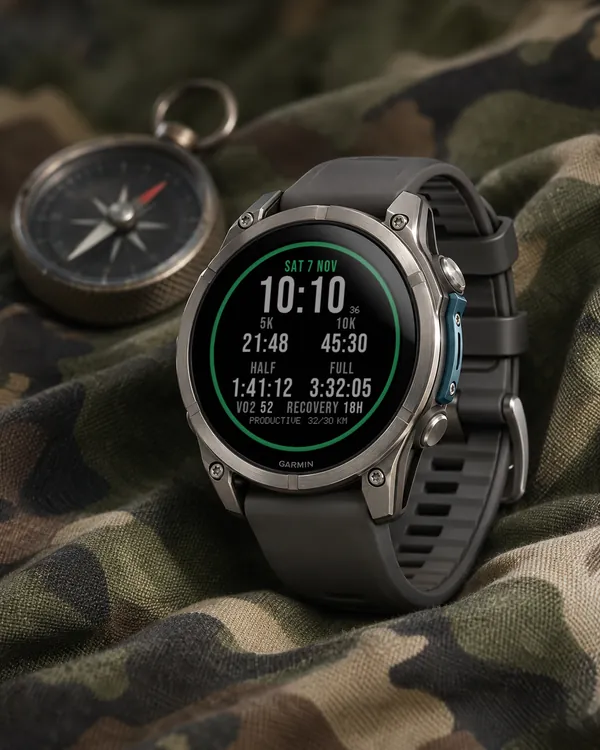 Running
Race Ready
5.0 (17)
Garmin race predictions and weekly mileage right on the face
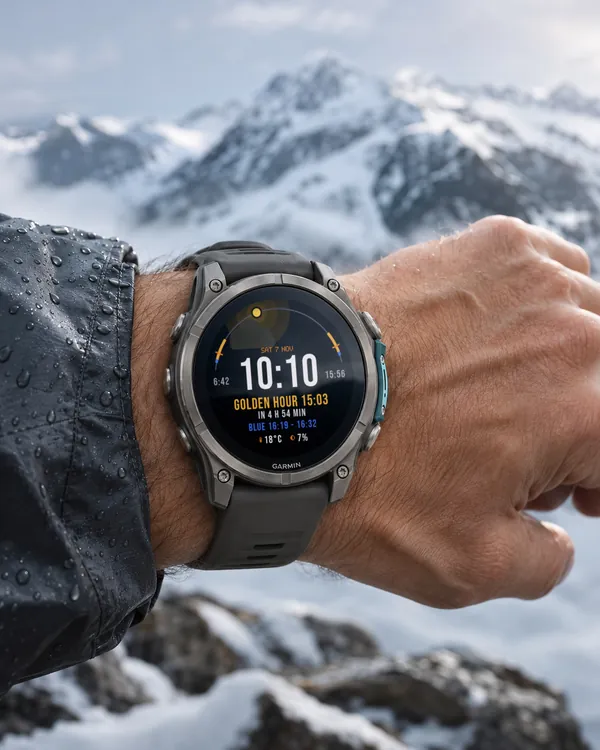 Photography
Amber Hour
5.0 (15)
Golden and blue hour countdown with the sun's path across your day
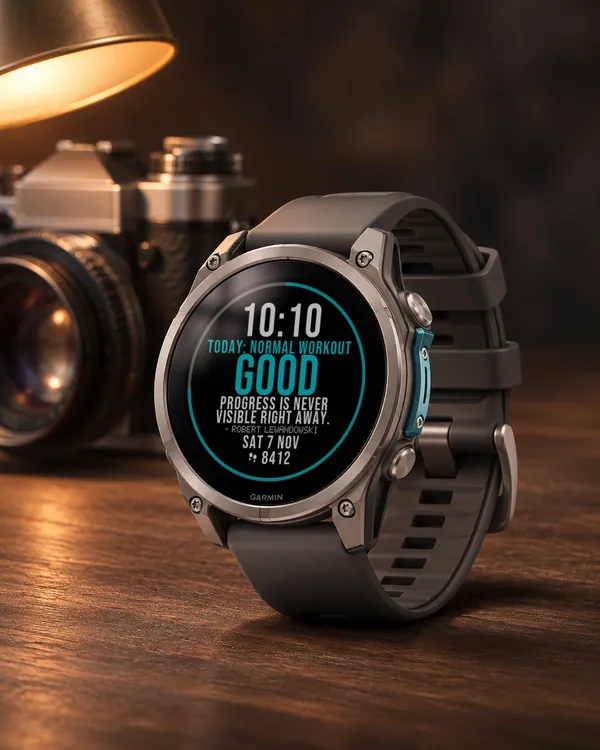 Readiness
Day Verdict
4.8 (12)
One word for your day: PUSH, STEADY, EASY or REST, from your sleep, Body Battery and recovery
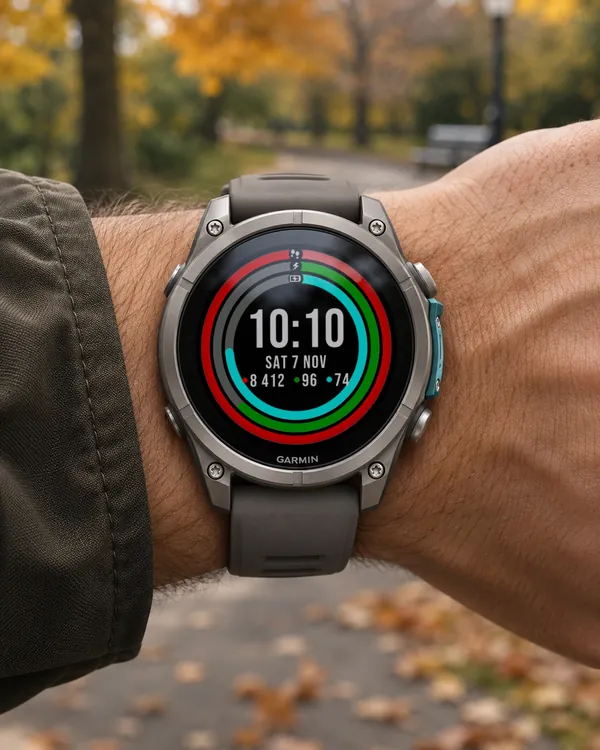 Activity
Ring Day
5.0 (16)
Three activity rings around the time, for people who close their rings