Unlock
€6.49
One-time payment. No subscription. The code works on the watch whose ID you enter.
- Install the face from Connect IQ (7 days free).
- On the watch: face settings > Buy / Unlock, scan the QR code.
- Pay and paste the code in the face settings.
- Pay.
- Copy the code.
- Paste it in Connect IQ: this face > Settings > Unlock code.
Payment works best in Safari or Chrome: menu (three dots) > Open in browser
Read it in this face, it is not the serial number of the watch.
The code works only in the watch face it was bought for: a Summit Rings code will not work in Summit Tactic.
Your ID, compare it with the watch:
Where do I find the ID?
On the watch: settings of this face > Buy / Unlock (first item). Scan the QR code with your phone or type the 10 digits. The ID is also at the top of the face settings in the Connect IQ app.
Code not working on your watch? Write to me and I will fix it.
Payments by Stripe. Seller: Mateusz Kolarz, Lublin, Poland.
Paid. Code:
We show the code here too. If the e-mail does not arrive (check spam), you can recover the code in the Recover code section with just the Face ID. Recover code
Copying did not work. The code is selected: copy it by hand.
The face unlocks by itself when the watch connects to the phone (usually within an hour; if the trial is still running, the purchase starts working when it ends).
Do not want to wait, or have an older watch? Paste the code in the Connect IQ app:
Connect IQ (or Garmin Connect) > My Device > Watch faces > Lunar Aperture > Settings > Unlock code > paste > Save
Like it? Rate this face in the Garmin store
Want to try new faces and apps before the release, for free? Join the testers program
Set up the face before you download
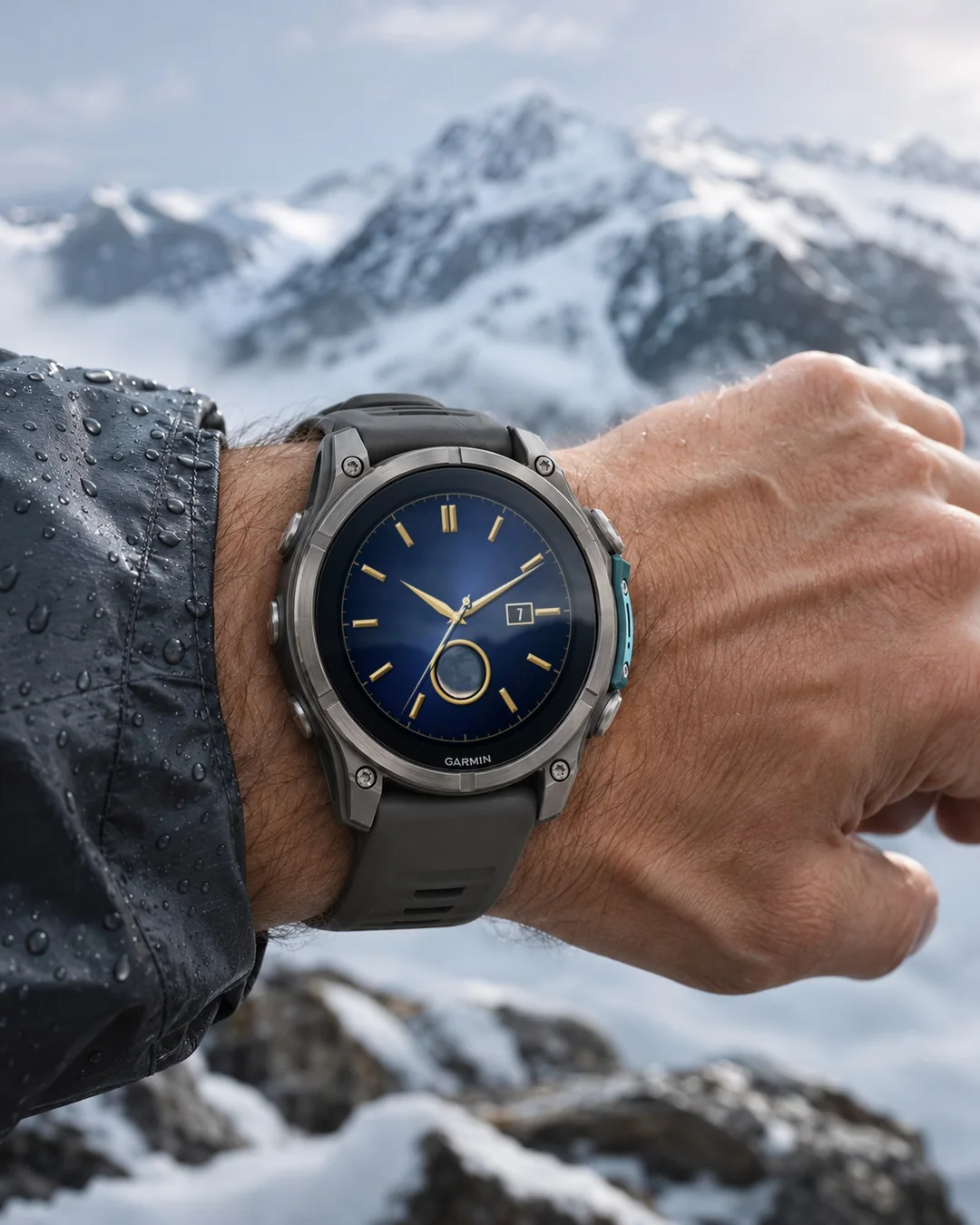
A classic analog moon phase watch face with a moon in a recessed window at six o'clock, faceted hands and a date window, with the phase worked out on the watch.
7-day free trial, then a one-time unlock at dialforge.dev. No subscription.
After the trial, the face checks online through your phone whether you have bought the unlock code, so it can unlock by itself. It sends only the watch ID and the face name, nothing else.
A dress watch face with a real moon in a sunken window.
Lunar Aperture is a calm analog dial: deep midnight blue sunburst, applied faceted hour markers and a domed bezel around a recessed moon window at six o'clock. The moon shows tonight's phase in 8 steps, worked out on the watch from the date. No phone, no network.
- Faceted hands lit from one side, with a shadow that turns with each hand.
- Dauphine or baton hands, gold or silver, and a crimson seconds hand if you like.
- Second dial: Onyx black with silver markers.
- Date window at 3 o'clock. Optional window at 9 o'clock: weekday, steps, heart rate or battery.
- Southern hemisphere view mirrors the moon the way you see it in the sky.
- The phase of the moon is shown with realistic moon icons: new moon, crescents, quarters, gibbous and full moon.
- AMOLED: pre-rendered dial with soft light and shadow. Colour MIP (fenix, Forerunner, MARQ): its own dithered dial made for 64 colours.
- Always-on mode on AMOLED: thin outlines only, shifted every minute, no seconds.
Data shown: date, weekday, steps, heart rate, battery (all optional). Missing data appears as "--".
Trial: 7 days with everything working, then a reminder (days 8 to 14), a simple screen with the time and your Face ID (days 15 to 29), and from day 30 a lock screen with a QR code. Buy the code at dialforge.dev for the Face ID shown there and in the face settings.
Code not working? Write to kontakt@dialforge.dev and we fix it.
Settings: on the watch (hold MENU, then Watch face, then Customize) or in the Connect IQ app. Changes show live on the watch.
Works on fenix 9, fenix 8, Forerunner 970, Forerunner 570, Venu 4, Forerunner 965, Forerunner 265, Venu 3 and more.
Klasyczna analogowa tarcza z fazą księżyca w zagłębionym okienku na szóstej, fasetowanymi wskazówkami i okienkiem daty; faza jest liczona na zegarku.
7 dni za darmo, potem jednorazowe odblokowanie na dialforge.dev. Bez abonamentu.
Po okresie próbnym tarcza sprawdza przez telefon w internecie, czy kupiłeś kod odblokowania, żeby odblokować się sama. Wysyła tylko ID tarczy i nazwę tarczy, nic więcej.
Elegancka tarcza z prawdziwym księżycem w zagłębionym okienku.
Lunar Aperture to spokojna analogowa tarcza: głęboki nocny granat z promienistym szlifem, nakładane fasetowane znaczniki godzin i wypukły bezel wokół wpuszczonego okienka księżyca na godzinie 6. Księżyc pokazuje dzisiejszą fazę w 8 krokach, wyliczaną na zegarku z daty. Bez telefonu i bez sieci.
- Fasetowane wskazówki oświetlone z jednej strony, z cieniem, który obraca się razem z każdą wskazówką.
- Wskazówki dauphine albo baton, złote lub srebrne, a jeśli chcesz, karmazynowa wskazówka sekundowa.
- Druga tarcza: czarna Onyx ze srebrnymi znacznikami.
- Okienko daty na godzinie 3. Opcjonalne okienko na godzinie 9: dzień tygodnia, kroki, tętno albo bateria.
- Widok dla półkuli południowej odwraca księżyc tak, jak widzisz go na niebie.
- Faza księżyca jest pokazana realistycznymi ikonami księżyca: nów, sierpy, kwadry, garby i pełnia.
- AMOLED: wcześniej wyrenderowana tarcza z miękkim światłem i cieniem. Kolorowe MIP (fenix, Forerunner, MARQ): osobna tarcza z ditheringiem, zrobiona pod 64 kolory.
- Tryb zawsze włączony na AMOLED: tylko cienkie kontury, przesuwane co minutę, bez sekund.
Wyświetlane dane: data, dzień tygodnia, kroki, tętno, bateria (wszystko opcjonalne). Brak danych oznaczamy "--".
Próba: 7 dni pełnego działania, potem przypomnienie (dni 8 do 14), prosty ekran z godziną i numerem ID tarczy (dni 15 do 29), a od 30. dnia ekran blokady z kodem QR. Kod kupisz na dialforge.dev dla numeru ID tarczy widocznego tam i w ustawieniach tarczy.
Kod nie działa? Napisz na kontakt@dialforge.dev, a naprawimy problem.
Ustawienia: na zegarku (przytrzymaj MENU, potem Tarcza zegarka, potem Dostosuj) albo w aplikacji Connect IQ. Zmiany widać na zegarku na żywo.
Działa na: fenix 9, fenix 8, Forerunner 970, Forerunner 570, Venu 4, Forerunner 965, Forerunner 265, Venu 3 i innych.
Ein klassisches analoges Mondphasen-Zifferblatt mit Mond im vertieften Fenster bei sechs Uhr, facettierten Zeigern und Datumsfenster; die Phase wird auf der Uhr berechnet.
7 Tage kostenlos testen, danach einmalige Freischaltung auf dialforge.dev. Kein Abo.
Nach der Testphase prüft das Zifferblatt über dein Handy online, ob du den Freischaltcode gekauft hast, damit es sich selbst freischalten kann. Es sendet nur die Uhren-ID und den Namen des Zifferblatts.
Ein elegantes Dresswatch-Displaydesign mit einem echten Mond in einem vertieften Fenster.
Lunar Aperture ist ein ruhiges analoges Zifferblatt: tiefes Mitternachtsblau mit Sonnenschliff, aufgesetzte facettierte Stundenmarkierungen und eine gewölbte Lünette um ein vertieftes Mondfenster bei sechs Uhr. Der Mond zeigt die heutige Phase in 8 Schritten, auf der Uhr aus dem Datum berechnet. Kein Telefon, kein Netzwerk.
- Facettierte Zeiger, von einer Seite beleuchtet, mit einem Schatten, der sich mit jedem Zeiger dreht.
- Dauphine- oder Baton-Zeiger, gold oder silber, und wenn du möchtest, ein karminroter Sekundenzeiger.
- Zweites Zifferblatt: Onyx-Schwarz mit silbernen Markierungen.
- Datumsfenster bei 3 Uhr. Optionales Fenster bei 9 Uhr: Wochentag, Schritte, Herzfrequenz oder Akku.
- Die Ansicht für die Südhalbkugel spiegelt den Mond so, wie man ihn am Himmel sieht.
- Die Mondphase wird mit realistischen Mond-Symbolen angezeigt: Neumond, Mondsicheln, Halbmonde, Dreiviertelmonde und Vollmond.
- AMOLED: vorgerendertes Zifferblatt mit sanftem Licht und Schatten. Farb-MIP (fenix, Forerunner, MARQ): eigenes gedithertes Zifferblatt für 64 Farben.
- Always-on-Modus auf AMOLED: nur dünne Konturen, jede Minute verschoben, keine Sekunden.
Angezeigte Daten: Datum, Wochentag, Schritte, Herzfrequenz, Akku (alles optional). Fehlende Daten erscheinen als "--".
Testphase: 7 Tage lang funktioniert alles, danach folgen eine Erinnerung (Tage 8 bis 14), ein einfacher Bildschirm mit Uhrzeit und deiner Watch ID (Tage 15 bis 29) und ab Tag 30 ein Sperrbildschirm mit QR-Code. Den Code kaufst du auf dialforge.dev für die Watch ID, die dort und in den Zifferblatt-Einstellungen angezeigt wird.
Code funktioniert nicht? Schreib an kontakt@dialforge.dev, wir beheben es.
Einstellungen: auf der Uhr (MENU gedrückt halten, dann Zifferblatt, dann Anpassen) oder in der Connect IQ App. Änderungen werden live auf der Uhr angezeigt.
Läuft auf fenix 9, fenix 8, Forerunner 970, Forerunner 570, Venu 4, Forerunner 965, Forerunner 265, Venu 3 und weiteren Modellen.
Un cadran analogique classique à phase de lune, avec la lune dans une fenêtre en retrait à six heures, des aiguilles à facettes et une fenêtre de date; la phase est calculée sur la montre.
Essai gratuit de 7 jours, puis un déverrouillage unique sur dialforge.dev. Sans abonnement.
Après la période d'essai, le cadran vérifie en ligne via votre téléphone si vous avez acheté le code de déblocage, pour se débloquer tout seul. Il envoie seulement l'ID de la montre et le nom du cadran.
Un cadran habillé avec une véritable lune dans un guichet en creux.
Lunar Aperture est un cadran analogique sobre : bleu nuit profond soleillé, index des heures facettés appliqués et lunette bombée autour d'un guichet de lune en retrait à six heures. La lune affiche la phase de cette nuit en 8 étapes, calculée sur la montre à partir de la date. Sans téléphone, sans réseau.
- Aiguilles facettées éclairées d'un côté, avec une ombre qui tourne avec chaque aiguille.
- Aiguilles dauphine ou bâton, dorées ou argentées, et une aiguille des secondes cramoisie si vous le souhaitez.
- Deuxième cadran : noir Onyx avec index argentés.
- Guichet de date à 3 heures. Guichet optionnel à 9 heures : jour de la semaine, pas, fréquence cardiaque ou batterie.
- La vue de l'hémisphère sud affiche la lune en miroir, telle que vous la voyez dans le ciel.
- La phase de la lune est affichée avec des icônes de lune réalistes : nouvelle lune, croissants, quartiers, lunes gibbeuses et pleine lune.
- AMOLED : cadran pré-rendu avec lumière et ombre douces. MIP couleur (fenix, Forerunner, MARQ) : cadran tramé dédié, conçu pour 64 couleurs.
- Mode toujours activé sur AMOLED : fins contours uniquement, décalés chaque minute, pas de secondes.
Données affichées : date, jour de la semaine, pas, fréquence cardiaque, batterie (toutes optionnelles). Les données manquantes apparaissent sous la forme "--".
Essai : 7 jours avec tout qui fonctionne, puis un rappel (jours 8 à 14), un écran simple avec l'heure et ton Watch ID (jours 15 à 29), et dès le jour 30 un écran de verrouillage avec un QR code. Tu achètes le code sur dialforge.dev pour le Watch ID affiché là et dans les réglages du cadran.
Le code ne fonctionne pas ? Écrivez à kontakt@dialforge.dev, nous le réparons.
Paramètres : sur la montre (maintenez MENU, puis Cadran, puis Personnaliser) ou dans l'application Connect IQ. Les modifications s'affichent en direct sur la montre.
Compatible avec fenix 9, fenix 8, Forerunner 970, Forerunner 570, Venu 4, Forerunner 965, Forerunner 265, Venu 3 et d'autres modèles.
Una esfera analógica clásica con fase lunar, con la luna en una ventana hundida a las seis, agujas facetadas y ventana de fecha; la fase se calcula en el reloj.
Prueba gratuita de 7 días y luego un desbloqueo único en dialforge.dev. Sin suscripción.
Después de la prueba, la esfera comprueba por internet, a través del móvil, si has comprado el código de desbloqueo, para desbloquearse sola. Solo envía el ID del reloj y el nombre de la esfera.
Una pantalla de reloj elegante con una luna real en una ventana rebajada.
Lunar Aperture es una esfera analógica serena: azul noche profundo con efecto rayos de sol, índices horarios facetados aplicados y un bisel abombado alrededor de una ventana lunar rebajada a las seis en punto. La luna muestra la fase de esta noche en 8 pasos, calculada en el reloj a partir de la fecha. Sin teléfono, sin red.
- Agujas facetadas iluminadas desde un lado, con una sombra que gira con cada aguja.
- Agujas Dauphine o baton, doradas o plateadas, y un segundero carmesí si lo deseas.
- Segunda esfera: negro Onyx con marcadores plateados.
- Ventana de fecha a las 3 en punto. Ventana opcional a las 9 en punto: día de la semana, pasos, frecuencia cardíaca o batería.
- La vista del hemisferio sur muestra la luna invertida, tal como la ves en el cielo.
- La fase de la luna se muestra con iconos realistas de la luna: luna nueva, crecientes, cuartos, gibosas y luna llena.
- AMOLED: esfera prerenderizada con luz y sombras suaves. Color MIP (fenix, Forerunner, MARQ): su propia esfera tramada hecha para 64 colores.
- Modo siempre activo en AMOLED: solo contornos finos, desplazados cada minuto, sin segundos.
Datos mostrados: fecha, día de la semana, pasos, frecuencia cardíaca, batería (todo opcional). Los datos que faltan aparecen como "--".
Prueba: 7 días con todo funcionando, luego un recordatorio (días 8 a 14), una pantalla sencilla con la hora y tu Watch ID (días 15 a 29) y, desde el día 30, una pantalla de bloqueo con un código QR. Compras el código en dialforge.dev para el Watch ID que se muestra allí y en los ajustes de la esfera.
¿El código no funciona? Escribe a kontakt@dialforge.dev y lo arreglamos.
Ajustes: en el reloj (mantén pulsado MENU, luego Pantalla del reloj, después Personalizar) o en la aplicación Connect IQ. Los cambios se muestran en vivo en el reloj.
Compatible con fenix 9, fenix 8, Forerunner 970, Forerunner 570, Venu 4, Forerunner 965, Forerunner 265, Venu 3 y más.
Een klassieke analoge maanfase wijzerplaat met de maan in een verzonken venster op zes uur, gefacetteerde wijzers en een datumvenster; de fase wordt op het horloge berekend.
7 dagen gratis proberen, daarna een eenmalige ontgrendeling op dialforge.dev. Geen abonnement.
Na de proefperiode controleert de wijzerplaat via je telefoon online of je de ontgrendelcode hebt gekocht, zodat hij zichzelf kan ontgrendelen. Hij stuurt alleen de horloge-ID en de naam van de wijzerplaat.
Een elegante wijzerplaat met een echte maan in een verzonken venster.
Lunar Aperture is een rustige analoge wijzerplaat: diep nachtblauw met sunburst, opgelegde gefacetteerde uurmarkeringen en een gewelfde bezel rond een verzonken maanvenster op zes uur. De maan toont de fase van vanavond in 8 stappen, op het horloge berekend aan de hand van de datum. Geen telefoon, geen netwerk.
- Gefacetteerde wijzers belicht vanaf één kant, met een schaduw die met elke wijzer meedraait.
- Dauphine- of batonwijzers, goud of zilver, en een karmozijnrode secondewijzer als je wilt.
- Tweede wijzerplaat: Onyx-zwart met zilveren markeringen.
- Datumvenster op 3 uur. Optioneel venster op 9 uur: weekdag, stappen, hartslag of batterij.
- Weergave voor het zuidelijk halfrond spiegelt de maan zoals je hem aan de hemel ziet.
- De maanfase wordt weergegeven met realistische maaniconen: nieuwe maan, maansikkels, kwartieren, bolle maan en volle maan.
- AMOLED: vooraf gerenderde wijzerplaat met zacht licht en schaduw. Kleuren-MIP (fenix, Forerunner, MARQ): een eigen geditherde wijzerplaat gemaakt voor 64 kleuren.
- Always-on modus op AMOLED: alleen dunne contouren, elke minuut verschoven, geen seconden.
Weergegeven gegevens: datum, weekdag, stappen, hartslag, batterij (allemaal optioneel). Ontbrekende gegevens worden weergegeven als "--".
Proefperiode: 7 dagen waarin alles werkt, daarna een herinnering (dag 8 tot 14), een eenvoudig scherm met de tijd en je Watch ID (dag 15 tot 29) en vanaf dag 30 een vergrendelscherm met een QR-code. De code koop je op dialforge.dev voor de Watch ID die daar en in de instellingen van de wijzerplaat staat.
Werkt de code niet? Mail naar kontakt@dialforge.dev en we lossen het op.
Instellingen: op het horloge (houd MENU ingedrukt, dan Wijzerplaat, dan Aanpassen) of in de Connect IQ app. Wijzigingen zijn live te zien op het horloge.
Werkt op fenix 9, fenix 8, Forerunner 970, Forerunner 570, Venu 4, Forerunner 965, Forerunner 265, Venu 3 en meer.
6時位置の窪んだ窓に月を表示するクラシックなアナログの月相文字盤。面取りされた針と日付窓を備え、月の満ち欠けは時計上で計算されます。
7日間無料でお試しいただけます。その後はdialforge.devで解除を一度だけ購入(サブスクリプションなし)。
試用期間の後、文字盤はスマホ経由でオンラインで解除コードの購入を確認し、自動で解除されます。送信するのは時計IDと文字盤名だけです。
一段くぼんだ小窓にリアルな月が浮かぶ、エレガントなドレスウォッチフェイス。
Lunar Apertureは落ち着きのあるアナログ文字盤です:深みのあるミッドナイトブルーのサンバースト、ファセット加工を施した立体的なアワーマーカー、そして六時位置のくぼんだムーンウィンドウを囲むドーム型ベゼル。月は今夜の月相を8段階で表示し、日付をもとに時計本体で計算されます。スマートフォンもネットワークも不要です。
- 片側から照らされるファセット針、それぞれの針に合わせて回転する影。
- ドーフィン針またはバトン針、ゴールドまたはシルバー、お好みでクリムゾンの秒針も選択可能。
- もう一つの文字盤:シルバーマーカーを配したOnyxブラック。
- 3時位置に日付ウィンドウ。9時位置のオプションウィンドウ:曜日、ステップ数、心拍数、またはバッテリー。
- 南半球表示では、空に見える月の向きに合わせて反転表示。
- 月の満ち欠けはリアルな月アイコンで表示されます:新月、三日月、半月、凸月、満月。
- AMOLED:柔らかな光と影を持つ事前レンダリングされた文字盤。カラーMIP(fenix、Forerunner、MARQ):64色向けにディザリング処理された専用文字盤。
- AMOLEDの常時表示モード:細い輪郭線のみ、毎分位置をシフト、秒表示なし。
表示データ:日付、曜日、ステップ数、心拍数、バッテリー(すべてオプション)。データがない場合は"--"と表示されます。
お試し:最初の7日間はすべての機能が使えます。その後、8日目から14日目はリマインダー、15日目から29日目は時刻とWatch IDだけのシンプルな画面、30日目からはQRコード付きのロック画面になります。コードはdialforge.devで、そこやウォッチフェイスの設定に表示されるWatch ID用に購入します。
コードが使えない場合はkontakt@dialforge.devまでご連絡ください。問題を解決いたします。
設定:時計本体(MENU長押し、次に「ウォッチフェイス」、次に「カスタマイズ」)またはConnect IQアプリ。変更は時計上でリアルタイムに反映されます。
対応モデル:fenix 9, fenix 8, Forerunner 970, Forerunner 570, Venu 4, Forerunner 965, Forerunner 265, Venu 3 ほか
Un quadrante analogico classico con fasi lunari, con la luna in una finestra incassata alle sei, lancette sfaccettate e finestra della data; la fase è calcolata sull'orologio.
Prova gratuita di 7 giorni, poi uno sblocco una tantum su dialforge.dev. Nessun abbonamento.
Dopo la prova, il quadrante controlla online tramite il telefono se hai acquistato il codice di sblocco, per sbloccarsi da solo. Invia solo l'ID dell'orologio e il nome del quadrante.
Un elegante quadrante da sera con una vera luna in una finestrella incassata.
Lunar Aperture è un quadrante analogico sobrio: blu notte profondo con finitura a raggio di sole, indici orari sfaccettati applicati e una ghiera bombata attorno a una finestrella della luna incassata a ore sei. La luna mostra la fase di stanotte in 8 passaggi, calcolata sull'orologio a partire dalla data. Senza telefono, senza rete.
- Lancette sfaccettate illuminate da un lato, con un'ombra che ruota insieme a ogni lancetta.
- Lancette dauphine o a bastone, dorate o argentate, e una lancetta dei secondi cremisi se lo desideri.
- Secondo quadrante: nero Onyx con indici argentati.
- Finestrella della data a ore 3. Finestrella opzionale a ore 9: giorno della settimana, passi, frequenza cardiaca o batteria.
- La vista per l'emisfero sud riflette la luna proprio come la vedi nel cielo.
- La fase lunare è mostrata con icone realistiche della luna: luna nuova, crescenti, quarti, gibbosa e luna piena.
- AMOLED: quadrante pre-renderizzato con luce e ombra morbide. MIP a colori (fenix, Forerunner, MARQ): un quadrante con dithering dedicato, creato per 64 colori.
- Modalità Always-on su AMOLED: solo contorni sottili, spostati ogni minuto, senza secondi.
Dati mostrati: data, giorno della settimana, passi, frequenza cardiaca, batteria (tutti opzionali). I dati mancanti appaiono come "--".
Prova: 7 giorni con tutto funzionante, poi un promemoria (giorni da 8 a 14), una schermata semplice con l'ora e il tuo Watch ID (giorni da 15 a 29) e dal giorno 30 una schermata di blocco con un codice QR. Il codice si acquista su dialforge.dev per il Watch ID mostrato lì e nelle impostazioni del quadrante.
Il codice non funziona? Scrivi a kontakt@dialforge.dev e lo sistemiamo.
Impostazioni: sull'orologio (tieni premuto MENU, poi Quadrante, poi Personalizza) o nell'app Connect IQ. Le modifiche si vedono in tempo reale sull'orologio.
Compatibile con fenix 9, fenix 8, Forerunner 970, Forerunner 570, Venu 4, Forerunner 965, Forerunner 265, Venu 3 e altri.
经典指针式月相表盘,月亮位于六点钟位置的凹陷窗口中,配切面指针和日期窗,月相由手表自行计算。
7 天免费试用,之后在 dialforge.dev 一次性解锁。无需订阅。
试用期结束后,表盘会通过手机在线检查你是否已购买解锁码,以便自动解锁。只发送手表 ID 和表盘名称,不发送其他内容。
一款正装腕表表盘,在下凹窗口中呈现逼真月相。
Lunar Aperture 是一款沉静的指针表盘:深邃的午夜蓝太阳放射纹、立体切面时标,以及环绕在六点位置凹陷月相视窗周围的拱形表圈。月相分 8 个阶段展示今晚的月相,由手表根据日期直接计算。无需手机,无需网络。
- 单侧采光的多面切割指针,阴影随每根指针一同旋转。
- Dauphine 或 baton 指针,金色或银色,如果你喜欢还可以搭配深红色秒针。
- 第二款表盘:配有银色时标的 Onyx 黑色。
- 3 点位置为日期视窗。9 点位置为可选视窗:星期、步数、心率或电量。
- 南半球视角会镜像显示月相,正如你在天空中所看到的那样。
- 月相通过逼真的月相图标显示:新月、娥眉月、弦月、凸月和满月。
- AMOLED:带有柔和光影的预渲染表盘。彩色 MIP(fenix、Forerunner、MARQ):专为 64 色打造的专属抖动算法表盘。
- AMOLED 上的常亮模式:仅显示纤细轮廓,每分钟微调位置,不显示秒数。
显示数据:日期、星期、步数、心率、电量(均可选)。缺失数据将显示为 "--"。
试用:7 天内一切功能正常,之后依次是提醒(第 8 至 14 天)、只显示时间和你的 Watch ID 的简易屏幕(第 15 至 29 天),从第 30 天起是带 QR 码的锁屏。请在 dialforge.dev 为那里和表盘设置中显示的 Watch ID 购买解锁码。
兑换码无法使用?请写信至 kontakt@dialforge.dev,我们会修复问题。
设置:在手表上(长按 MENU,然后选择 表盘,再选择 自定义)或在 Connect IQ 应用中。更改会在手表上实时显示。
适用于 fenix 9, fenix 8, Forerunner 970, Forerunner 570, Venu 4, Forerunner 965, Forerunner 265, Venu 3 等。
Классический аналоговый циферблат с фазой луны: луна в утопленном окошке на шесть часов, гранёные стрелки и окошко даты; фаза рассчитывается прямо на часах.
7-дневный бесплатный пробный период, затем разовая разблокировка на dialforge.dev. Без подписки.
После пробного периода циферблат через телефон проверяет онлайн, купили ли вы код разблокировки, чтобы разблокироваться самостоятельно. Он отправляет только ID часов и название циферблата.
Элегантный циферблат с настоящей луной в углубленном окошке.
Lunar Aperture - это спокойный аналоговый циферблат: глубокий темно-синий цвет midnight blue с лучевой шлифовкой sunburst, накладные граненые часовые метки и выпуклый безель вокруг утопленного окошка фаз Луны на шести часах. Луна показывает сегодняшнюю фазу в 8 шагов, которая рассчитывается прямо на часах по дате. Без телефона и без интернета.
- Граненые стрелки, освещенные с одной стороны, с тенью, поворачивающейся вместе с каждой стрелкой.
- Стрелки в стиле dauphine или baton, золотые или серебряные, а также малиновая секундная стрелка по вашему желанию.
- Второй циферблат: черный Onyx с серебряными метками.
- Окошко даты на 3 часах. Дополнительное окошко на 9 часах: день недели, шаги, пульс или батарея.
- Отображение для Южного полушария зеркально отражает Луну точно так, как она видна на небе.
- Фаза луны отображается реалистичными значками: новолуние, полумесяцы, четверти, растущая/убывающая луна и полнолуние.
- AMOLED: заранее отрендеренный циферблат с мягким светом и тенью. Цветной MIP (fenix, Forerunner, MARQ): собственный циферблат с дизерингом, созданный под 64 цвета.
- Режим Always-on на AMOLED: только тонкие контуры, смещаемые каждую минуту, без секунд.
Отображаемые данные: дата, день недели, шаги, пульс, батарея (все на выбор). При отсутствии данных отображается "--".
Пробный период: 7 дней всё работает, затем напоминание (дни с 8 по 14), простой экран со временем и вашим Watch ID (дни с 15 по 29), а с 30-го дня экран блокировки с QR-кодом. Код покупается на dialforge.dev для Watch ID, который показан там и в настройках циферблата.
Не работает код? Напишите на kontakt@dialforge.dev, и мы все исправим.
Настройки: на часах (удерживайте MENU, затем Циферблат, затем Настроить) или в приложении Connect IQ. Изменения видны на часах в реальном времени.
Работает на fenix 9, fenix 8, Forerunner 970, Forerunner 570, Venu 4, Forerunner 965, Forerunner 265, Venu 3 и других.
Um mostrador analógico clássico com fase da lua, com a lua em uma janela rebaixada às seis horas, ponteiros facetados e janela de data; a fase é calculada no relógio.
Teste grátis de 7 dias, depois um desbloqueio único em dialforge.dev. Sem assinatura.
Depois do período de teste, o mostrador verifica on-line, pelo celular, se você comprou o código de desbloqueio, para se desbloquear sozinho. Ele envia só o ID do relógio e o nome do mostrador.
Um mostrador social com uma lua real em uma janela rebaixada.
Lunar Aperture é um mostrador analógico calmo: azul meia-noite profundo com acabamento sunburst, marcadores de hora facetados e aplicados e um bisel abaulado ao redor de uma janela de lua rebaixada às seis horas. A lua mostra a fase desta noite em 8 etapas, calculada no relógio a partir da data. Sem celular, sem rede.
- Ponteiros facetados iluminados de um lado, com uma sombra que gira com cada ponteiro.
- Ponteiros Dauphine ou bastão, dourados ou prateados, e um ponteiro de segundos carmesim se você quiser.
- Segundo mostrador: preto Onyx com marcadores prateados.
- Janela de data às 3 horas. Janela opcional às 9 horas: dia da semana, passos, frequência cardíaca ou bateria.
- A visualização do hemisfério sul espelha a lua como você a vê no céu.
- A fase da lua é exibida com ícones realistas da lua: lua nova, crescentes, quartos, gibosas e lua cheia.
- AMOLED: mostrador pré-renderizado com luz e sombra suaves. MIP colorido (fenix, Forerunner, MARQ): mostrador próprio com dithering feito para 64 cores.
- Modo sempre ativo no AMOLED: apenas contornos finos, deslocados a cada minuto, sem segundos.
Dados exibidos: data, dia da semana, passos, frequência cardíaca, bateria (todos opcionais). Dados ausentes aparecem como "--".
Teste: 7 dias com tudo funcionando, depois um lembrete (dias 8 a 14), uma tela simples com a hora e o seu Watch ID (dias 15 a 29) e, a partir do dia 30, uma tela de bloqueio com QR code. O código é comprado em dialforge.dev para o Watch ID mostrado lá e nas configurações do mostrador.
O código não funciona? Escreva para kontakt@dialforge.dev e a gente resolve.
Configurações: no relógio (segure MENU, depois Mostrador do relógio, depois Personalizar) ou no aplicativo Connect IQ. As alterações aparecem em tempo real no relógio.
Funciona em fenix 9, fenix 8, Forerunner 970, Forerunner 570, Venu 4, Forerunner 965, Forerunner 265, Venu 3 e outros.
Klasický analogový ciferník s fázemi měsíce, s měsícem ve vsazeném okénku na šesté hodině, fasetovými ručičkami a okénkem s datem; fáze se počítá přímo v hodinkách.
7denní bezplatná zkušební verze, poté jednorázové odemknutí na dialforge.dev. Žádné předplatné.
Po zkušební době ciferník přes telefon online ověří, zda jste koupili odemykací kód, aby se mohl sám odemknout. Posílá jen ID hodinek a název ciferníku.
Společenský ciferník se skutečným měsícem v zapuštěném okénku.
Lunar Aperture je klidný analogový ciferník: hluboká půlnoční modř se slunečním brusem, aplikované fasetované hodinové indexy a klenutá luneta kolem zapuštěného okénka měsíce na šesti hodinách. Měsíc ukazuje dnešní fázi v 8 krocích, které hodinky počítají z data. Bez telefonu, bez sítě.
- Fasetované ručičky osvětlené z jedné strany, se stínem, který se otáčí s každou ručičkou.
- Ručičky Dauphine nebo baton, zlaté nebo stříbrné, a pokud chcete, karmínová sekundová ručička.
- Druhý ciferník: černý Onyx se stříbrnými indexy.
- Okénko data na 3 hodinách. Volitelné okénko na 9 hodinách: den v týdnu, kroky, srdeční tep nebo baterie.
- Zobrazení pro jižní polokouli zrcadlí měsíc tak, jak ho vidíte na obloze.
- Fáze měsíce je zobrazena realistickými ikonami měsíce: nov, srpky, čtvrti, vypouklý měsíc a úplněk.
- AMOLED: předrenderovaný ciferník s jemným světlem a stínem. Barevný MIP (fenix, Forerunner, MARQ): vlastní ditheringový ciferník vytvořený pro 64 barev.
- Režim always-on na AMOLED: pouze tenké obrysy, posouvané každou minutu, bez sekund.
Zobrazená data: datum, den v týdnu, kroky, srdeční tep, baterie (vše volitelné). Chybějící data se zobrazují jako "--".
Zkušební doba: 7 dní vše funguje, poté následuje připomenutí (dny 8 až 14), jednoduchá obrazovka s časem a vaším Watch ID (dny 15 až 29) a od 30. dne zamykací obrazovka s QR kódem. Kód zakoupíte na dialforge.dev pro Watch ID zobrazené tam i v nastavení ciferníku.
Kód nefunguje? Napište na kontakt@dialforge.dev a my vše vyřešíme.
Nastavení: na hodinkách (podržte MENU, pak Vzhled hodinek, pak Upravit) nebo v aplikaci Connect IQ. Změny se na hodinkách zobrazují živě.
Funguje na fenix 9, fenix 8, Forerunner 970, Forerunner 570, Venu 4, Forerunner 965, Forerunner 265, Venu 3 a dalších.
Um mostrador analógico clássico com fase da lua, com a lua numa janela rebaixada às seis horas, ponteiros facetados e janela de data; a fase é calculada no relógio.
7 dias de teste gratuito, depois um desbloqueio único em dialforge.dev. Sem subscrição.
Depois do período de teste, o mostrador verifica online, através do telemóvel, se comprou o código de desbloqueio, para se desbloquear sozinho. Envia apenas o ID do relógio e o nome do mostrador.
Um mostrador elegante com uma lua real numa janela rebaixada.
Lunar Aperture é um mostrador analógico sereno: azul meia-noite profundo com efeito raio de sol, marcadores de horas facetados aplicados e um bisel abaulado em torno de uma janela da lua embutida às seis horas. A lua mostra a fase desta noite em 8 etapas, calculada no relógio a partir da data. Sem telemóvel, sem rede.
- Ponteiros facetados iluminados de um lado, com uma sombra que roda com cada ponteiro.
- Ponteiros Dauphine ou baton, em dourado ou prateado, e um ponteiro dos segundos carmesim, se desejar.
- Segundo mostrador: Onyx black com marcadores prateados.
- Janela de data às 3 horas. Janela opcional às 9 horas: dia da semana, passos, frequência cardíaca ou bateria.
- A vista do hemisfério sul espelha a lua tal como a vê no céu.
- A fase da lua é mostrada com ícones realistas da lua: lua nova, crescentes, quartos, gibosas e lua cheia.
- AMOLED: mostrador pré-renderizado com luz e sombra suaves. MIP a cores (fenix, Forerunner, MARQ): o seu próprio mostrador com dithering concebido para 64 cores.
- Modo sempre ligado no AMOLED: apenas contornos finos, deslocados a cada minuto, sem segundos.
Dados apresentados: data, dia da semana, passos, frequência cardíaca, bateria (tudo opcional). Os dados em falta surgem como "--".
Teste: 7 dias com tudo a funcionar, depois um lembrete (dias 8 a 14), um ecrã simples com a hora e o seu Watch ID (dias 15 a 29) e, a partir do dia 30, um ecrã de bloqueio com código QR. O código compra-se em dialforge.dev para o Watch ID mostrado aí e nas definições do mostrador.
O código não funciona? Escreva para kontakt@dialforge.dev e resolvemos o problema.
Definições: no relógio (mantenha premido MENU, depois Mostrador do relógio, depois Personalizar) ou na aplicação Connect IQ. As alterações são apresentadas em tempo real no relógio.
Funciona em fenix 9, fenix 8, Forerunner 970, Forerunner 570, Venu 4, Forerunner 965, Forerunner 265, Venu 3 e outros.
6시 방향의 움푹 들어간 창에 달을 보여 주는 클래식 아날로그 월상 워치 페이스로, 면취 바늘과 날짜 창이 있으며 달의 위상은 시계에서 직접 계산합니다.
7일 무료 체험 후, dialforge.dev에서 일회성 잠금 해제를 구매하세요. 구독은 없습니다.
체험 기간이 끝나면 워치 페이스가 휴대폰을 통해 잠금 해제 코드를 구매했는지 온라인으로 확인하여 자동으로 잠금 해제됩니다. 시계 ID와 페이스 이름만 보냅니다.
음각 창 안에 실제 달이 담긴 드레스 워치 화면.
Lunar Aperture는 차분한 아날로그 다이얼입니다: 깊은 미드나이트 블루 선버스트, 각진 입체 아워 마커, 여섯 시 방향의 오목한 문 윈도우를 감싸는 돔형 베젤. 시계에서 날짜를 기반으로 계산하여 오늘 밤의 달의 위상을 8단계로 보여줍니다. 휴대전화나 네트워크가 필요하지 않습니다.
- 한쪽에서 빛을 받는 각진 바늘과 각 바늘을 따라 회전하는 그림자.
- Dauphine 또는 baton 바늘, 골드 또는 실버, 원하시는 경우 크림슨 초침.
- 두 번째 다이얼: 실버 마커가 적용된 Onyx black.
- 3시 방향의 날짜 창. 9시 방향의 선택적 창: 요일, 걸음 수, 심박수 또는 배터리.
- 남반구 뷰는 밤하늘에서 보이는 모습 그대로 달을 반전시켜 보여줍니다.
- 달의 위상은 사실적인 달 아이콘으로 표시됩니다: 삭, 초승달과 그믐달, 상현달과 하현달, 볼록달, 보름달.
- AMOLED: 부드러운 빛과 그림자가 있는 사전 렌더링된 다이얼. 컬러 MIP (fenix, Forerunner, MARQ): 64색에 맞춘 고유한 디더링 다이얼.
- AMOLED의 Always-on 모드: 얇은 윤곽선만 표시, 매분 위치 이동, 초 표시 없음.
표시되는 데이터: 날짜, 요일, 걸음 수, 심박수, 배터리 (모두 선택 사항). 누락된 데이터는 "--"로 표시됩니다.
체험: 7일 동안 모든 기능이 작동하고, 이후 알림(8일째부터 14일째), 시간과 Watch ID만 보이는 간단한 화면(15일째부터 29일째), 30일째부터는 QR 코드가 있는 잠금 화면이 표시됩니다. 코드는 dialforge.dev에서 그 화면과 시계 화면 설정에 표시된 Watch ID로 구매하세요.
코드가 작동하지 않나요? kontakt@dialforge.dev로 연락 주시면 해결해 드립니다.
설정: 시계(MENU 길게 누르기, 시계 화면, 사용자 지정) 또는 Connect IQ 앱. 변경 사항은 시계에 실시간으로 표시됩니다.
지원 모델: fenix 9, fenix 8, Forerunner 970, Forerunner 570, Venu 4, Forerunner 965, Forerunner 265, Venu 3 외
En klassisk analog månfas-urtavla med månen i ett nedsänkt fönster vid sex, fasetterade visare och datumfönster; fasen räknas ut på klockan.
7 dagars gratis provperiod, sedan en engångsupplåsning på dialforge.dev. Ingen prenumeration.
Efter provperioden kontrollerar urtavlan online via telefonen om du har köpt upplåsningskoden, så att den kan låsa upp sig själv. Den skickar bara klock-ID och urtavlans namn.
En elegant urtavla med en riktig måne i ett nedsänkt fönster.
Lunar Aperture är en lugn analog urtavla: djup midnattsblå solslipning, applicerade fasetterade timmarkeringar och en kupad bezel runt ett infällt månfönster klockan sex. Månen visar nattens fas i 8 steg, beräknad på klockan från datumet. Ingen telefon, inget nätverk.
- Fasetterade visare belysta från ena sidan, med en skugga som roterar med varje visare.
- Dauphine- eller batonvisare, guld eller silver, och en karmosinröd sekundvisare om du vill.
- Andra urtavlan: Onyxsvart med silvermarkeringar.
- Datumfönster klockan 3. Valfritt fönster klockan 9: veckodag, steg, puls eller batteri.
- Vy för södra halvklotet speglar månen så som du ser den på himlen.
- Månfasen visas med realistiska månikoner: nymåne, skäror, kvarter, tilltagande/avtagande måne och fullmåne.
- AMOLED: förrenderad urtavla med mjukt ljus och skugga. Färg-MIP (fenix, Forerunner, MARQ): en egen dithrad urtavla gjord för 64 färger.
- Always-on-läge på AMOLED: endast tunna konturer, flyttas varje minut, inga sekunder.
Data som visas: datum, veckodag, steg, puls, batteri (alla valfria). Saknade data visas som "--".
Provperiod: 7 dagar där allt fungerar, sedan en påminnelse (dag 8 till 14), en enkel skärm med tid och ditt Watch ID (dag 15 till 29) och från dag 30 en låsskärm med QR-kod. Du köper koden på dialforge.dev för det Watch ID som visas där och i urtavlans inställningar.
Fungerar inte koden? Skriv till kontakt@dialforge.dev så löser vi det.
Inställningar: på klockan (håll in MENU, sedan Urtavla, sedan Anpassa) eller i Connect IQ-appen. Ändringar visas direkt på klockan.
Fungerar på fenix 9, fenix 8, Forerunner 970, Forerunner 570, Venu 4, Forerunner 965, Forerunner 265, Venu 3 med flera.
En klassisk analog månefase-urskive med månen i et nedsænket vindue ved seks, facetterede visere og datovindue; fasen beregnes på uret.
7 dages gratis prøveperiode, derefter en engangsoplåsning på dialforge.dev. Intet abonnement.
Efter prøveperioden tjekker urskiven online via telefonen, om du har købt oplåsningskoden, så den kan låse sig selv op. Den sender kun ur-ID og urskivens navn.
En elegant dressur-urskive med en ægte måne i et forsænket vindue.
Lunar Aperture er en rolig analog urskive: dyb midnatsblå solstråleslibning, påsatte facetterede timemarkører og en buet urkrans omkring et forsænket månevindue klokken seks. Månen viser nattens fase i 8 trin, beregnet på uret ud fra datoen. Ingen telefon, intet netværk.
- Facetterede visere oplyst fra den ene side, med en skygge der drejer med hver viser.
- Dauphine- eller stavvisere, guld eller sølv, og en karmoisinrød sekundviser, hvis du vil.
- Anden urskive: Onyx-sort med sølvmarkører.
- Datovindue klokken 3. Valgfrit vindue klokken 9: ugedag, skridt, puls eller batteri.
- Visning for den sydlige halvkugle spejler månen, som du ser den på himlen.
- Månefasen vises med realistiske måneikoner: nymåne, tiltagende og aftagende månesegl, kvarte måner, trekvart måne og fuldmåne.
- AMOLED: forudrenderet urskive med blødt lys og skygge. Farve-MIP (fenix, Forerunner, MARQ): sin egen ditherede urskive skabt til 64 farver.
- Always-on-tilstand på AMOLED: kun tynde omrids, forskudt hvert minut, ingen sekunder.
Viste data: dato, ugedag, skridt, puls, batteri (alt valgfrit). Manglende data vises som "--".
Prøveperiode: 7 dage hvor alt virker, derefter en påmindelse (dag 8 til 14), en enkel skærm med tid og dit Watch ID (dag 15 til 29) og fra dag 30 en låseskærm med QR-kode. Du køber koden på dialforge.dev til det Watch ID, der vises dér og i urskivens indstillinger.
Virker koden ikke? Skriv til kontakt@dialforge.dev, så løser vi det.
Indstillinger: på uret (hold MENU nede, derefter Urskive, derefter Tilpas) eller i Connect IQ-appen. Ændringer vises direkte på uret.
Virker på fenix 9, fenix 8, Forerunner 970, Forerunner 570, Venu 4, Forerunner 965, Forerunner 265, Venu 3 og flere.
En klassisk analog månefase-urskive med månen i et nedsenket vindu ved seks, fasetterte visere og datovindu; fasen regnes ut på klokken.
7 dagers gratis prøveperiode, deretter en engangsopplåsing på dialforge.dev. Ingen abonnement.
Etter prøveperioden sjekker urskiven på nett via telefonen om du har kjøpt opplåsingskoden, slik at den kan låse seg opp selv. Den sender bare klokke-ID og navnet på urskiven.
En dressklokke-urskive med en ekte måne i et nedsenket vindu.
Lunar Aperture er en rolig analog urskive: dyp midnattsblå solsliping, påsatte fasetterte timemarkører og en hvelvet bezel rundt et nedsenket månevindu ved klokken seks. Månen viser kveldens fase i 8 trinn, beregnet på klokken ut fra datoen. Uten telefon, uten nettverk.
- Fasetterte visere belyst fra én side, med en skygge som roterer med hver viser.
- Dauphine- eller baton-visere, gull eller sølv, og en karmosinrød sekundviser hvis du vil.
- Andre urskive: Onyx-sort med sølvmarkører.
- Datovindu ved klokken 3. Valgfritt vindu ved klokken 9: ukedag, skritt, puls eller batteri.
- Visning for den sørlige halvkule speilvender månen slik du ser den på himmelen.
- Månefasen vises med realistiske måneikoner: nymåne, månesigder, halvmåner, trekvartmåner og fullmåne.
- AMOLED: forhåndsrendret urskive med mykt lys og skygge. Farge-MIP (fenix, Forerunner, MARQ): en egen dithret urskive laget for 64 farger.
- Alltid på-modus på AMOLED: kun tynne omriss, flyttes hvert minutt, ingen sekunder.
Data som vises: dato, ukedag, skritt, puls, batteri (alt valgfritt). Manglende data vises som "--".
Prøveperiode: 7 dager der alt fungerer, deretter en påminnelse (dag 8 til 14), en enkel skjerm med klokkeslett og din Watch ID (dag 15 til 29) og fra dag 30 en låseskjerm med QR-kode. Du kjøper koden på dialforge.dev for den Watch ID-en som vises der og i innstillingene for urskiven.
Fungerer ikke koden? Skriv til kontakt@dialforge.dev, så fikser vi det.
Innstillinger: på klokken (hold MENU, deretter Urskive, deretter Tilpass) eller i Connect IQ-appen. Endringer vises direkte på klokken.
Fungerer på fenix 9, fenix 8, Forerunner 970, Forerunner 570, Venu 4, Forerunner 965, Forerunner 265, Venu 3 og flere.
經典指針式月相錶面,月亮位於六點鐘位置的凹陷視窗中,搭配切面指針與日期窗,月相由手錶自行計算。
7 天免費試用,之後在 dialforge.dev 一次性解鎖。不需訂閱。
試用期結束後,錶面會透過手機在線上檢查你是否已購買解鎖碼,以便自動解鎖。只傳送手錶 ID 和錶面名稱,不傳送其他內容。
一款在下凹式視窗中呈現真實月相的正裝錶面。
Lunar Aperture 是一款沉靜的指針錶盤:深邃的午夜藍太陽放射紋、立體切面時標,以及環繞在六點鐘位置凹陷月相視窗周圍的拱形錶圈。月相分 8 個階段顯示今晚的月相,由手錶依據日期直接計算。不需手機,不需網路。
- 單側採光的多面切面指針,陰影隨每根指針一同旋轉。
- Dauphine 或 baton 指針,金色或銀色,若您喜歡還可搭配深紅色秒針。
- 第二款錶盤:配有銀色時標的 Onyx 黑色。
- 3 點鐘位置為日期視窗。9 點鐘位置為可選視窗:星期、步數、心率或電量。
- 南半球視角會鏡像顯示月相,正如您在天空中所看到的一樣。
- 透過逼真的月相圖示呈現月相:新月、眉月、弦月、凸月與滿月。
- AMOLED:帶有柔和光影的預渲染錶盤。彩色 MIP(fenix、Forerunner、MARQ):專為 64 色打造的專屬仿色抖動錶盤。
- AMOLED 上的恆亮模式:僅顯示纖細輪廓,每分鐘微調位置,不顯示秒數。
顯示資料:日期、星期、步數、心率、電量(均為選填)。無資料時顯示為 "--"。
試用:7 天內一切功能正常,之後依序是提醒(第 8 至 14 天)、只顯示時間和你的 Watch ID 的簡易畫面(第 15 至 29 天),從第 30 天起是附 QR 碼的鎖定畫面。請在 dialforge.dev 為該畫面和錶面設定中顯示的 Watch ID 購買解鎖碼。
解鎖碼無法使用?請寫信至 kontakt@dialforge.dev,我們會修復問題。
設定:在手錶上進行(長按 MENU,然後選擇 錶面,再選擇 自訂)或在 Connect IQ 應用程式中進行。變更會在手錶上即時顯示。
適用於 fenix 9, fenix 8, Forerunner 970, Forerunner 570, Venu 4, Forerunner 965, Forerunner 265, Venu 3 等。
Klassinen analoginen kuun vaiheet -kellotaulu, jossa kuu uppoutetussa ikkunassa kuuden kohdalla, viistetyt osoittimet ja päivämääräikkuna; vaihe lasketaan kellossa.
7 päivän ilmainen kokeilu, sen jälkeen kertaluonteinen avaus osoitteessa dialforge.dev. Ei tilausta.
Kokeilujakson jälkeen kellotaulu tarkistaa puhelimen kautta verkosta, oletko ostanut avauskoodin, jotta se voi avautua itsestään. Se lähettää vain kellon tunnuksen ja kellotaulun nimen.
Pukukellotaulu, jossa on oikea kuu upotetussa ikkunassa.
Lunar Aperture on rauhallinen analoginen kellotaulu: syvä yönsininen aurinkohionta, kiinnitetyt viistetyt tuntimerkit ja kaareva kehys upotetun kuuikkunan ympärillä kello kuudessa. Kuu näyttää tämän illan vaiheen 8 askeleessa, jotka kello laskee päivämäärästä. Ei puhelinta, ei verkkoa.
- Viistetyt osoittimet valaistuina toiselta puolelta, ja kunkin osoittimen mukana kääntyvä varjo.
- Dauphine- tai baton-osoittimet, kultaiset tai hopeiset, sekä halutessasi karmiininpunainen sekuntiosoitin.
- Toinen kellotaulu: Onyx-musta hopeisilla merkeillä.
- Päivämääräikkuna kello 3:ssa. Valinnainen ikkuna kello 9:ssä: viikonpäivä, askeleet, syke tai akku.
- Eteläisen pallonpuoliskon näkymä peilaa kuun sellaisena kuin näet sen taivaalla.
- Kuunvaihe näytetään realistisilla kuukuvakkeilla: uusikuu, kuunsirpit, neljännekset, kupera kuu ja täysikuu.
- AMOLED: valmiiksi renderöity kellotaulu pehmeällä valolla ja varjolla. Värillinen MIP (fenix, Forerunner, MARQ): oma rasteroitu kellotaulu, joka on tehty 64 värille.
- Always-on-tila AMOLED-näytöllä: vain ohuet ääriviivat, siirretään joka minuutti, ei sekunteja.
Näytettävät tiedot: päivämäärä, viikonpäivä, askeleet, syke, akku (kaikki valinnaisia). Puuttuvat tiedot näkyvät muodossa "--".
Kokeilujakso: 7 päivää, jolloin kaikki toimii, sen jälkeen muistutus (päivästä 8 päivään 14), yksinkertainen näyttö, jossa on aika ja Watch ID (päivästä 15 päivään 29), ja päivästä 30 alkaen lukitusnäyttö QR-koodilla. Koodin ostat osoitteessa dialforge.dev sille Watch ID:lle, joka näkyy siellä ja kellotaulun asetuksissa.
Koodi ei toimi? Kirjoita osoitteeseen kontakt@dialforge.dev, niin korjaamme asian.
Asetukset: kellossa (pidä MENU painettuna, sitten Kellotaulu, sitten Mukauta) tai Connect IQ -sovelluksessa. Muutokset näkyvät suorana kellossa.
Toimii malleissa fenix 9, fenix 8, Forerunner 970, Forerunner 570, Venu 4, Forerunner 965, Forerunner 265, Venu 3 ja muissa.
Klasický analógový ciferník s fázami mesiaca, s mesiacom vo vsadenom okienku na šiestej, fasetovanými ručičkami a okienkom s dátumom; fáza sa počíta priamo v hodinkách.
7-dňová bezplatná skúška, potom jednorazové odomknutie na dialforge.dev. Bez predplatného.
Po skúšobnej dobe ciferník cez telefón online overí, či ste kúpili odomykací kód, aby sa mohol sám odomknúť. Posiela len ID hodiniek a názov ciferníka.
Elegantný ciferník so skutočným mesiacom v zapustenom okienku.
Lunar Aperture je pokojný analógový ciferník: hlboká polnočná modrá so slnečným výbrusom, aplikované fazetované hodinové indexy a klenutá luneta okolo zapusteného okienka mesiaca na šiestich hodinách. Mesiac zobrazuje dnešnú fázu v 8 krokoch, vypočítanú v hodinkách z dátumu. Bez telefónu, bez siete.
- Fazetované ručičky osvetlené z jednej strany, s tieňom, ktorý sa otáča s každou ručičkou.
- Ručičky Dauphine alebo baton, zlaté alebo strieborné, a ak chcete, karmínová sekundová ručička.
- Druhý ciferník: čierny Onyx so striebornými indexmi.
- Okienko dátumu na 3. hodine. Voliteľné okienko na 9. hodine: deň v týždni, kroky, srdcový tep alebo batéria.
- Zobrazenie pre južnú polguľu zrkadlí mesiac tak, ako ho vidíte na oblohe.
- Fáza mesiaca je zobrazená pomocou realistických ikon mesiaca: nov, kosáky, štvrte, vypuklý mesiac a spln.
- AMOLED: vopred vyrenderovaný ciferník s jemným svetlom a tieňom. Farebný MIP (fenix, Forerunner, MARQ): vlastný ciferník s ditheringom vytvorený pre 64 farieb.
- Vždy zapnutý režim na AMOLED: iba tenké obrysy, posúvané každú minútu, bez sekúnd.
Zobrazené údaje: dátum, deň v týždni, kroky, srdcový tep, batéria (všetko voliteľné). Chýbajúce údaje sa zobrazujú ako "--".
Skúšobná doba: 7 dní všetko funguje, potom pripomienka (dni 8 až 14), jednoduchá obrazovka s časom a vaším Watch ID (dni 15 až 29) a od 30. dňa zamykacia obrazovka s QR kódom. Kód si kúpite na dialforge.dev pre Watch ID zobrazené tam aj v nastaveniach ciferníka.
Kód nefunguje? Napíšte na kontakt@dialforge.dev a opravíme to.
Nastavenia: na hodinkách (podržte MENU, potom Vzhľad hodiniek, potom Prispôsobiť) alebo v aplikácii Connect IQ. Zmeny sa na hodinkách zobrazujú naživo.
Funguje na fenix 9, fenix 8, Forerunner 970, Forerunner 570, Venu 4, Forerunner 965, Forerunner 265, Venu 3 a ďalších.
Klasična analogna številčnica z lunino mreno, z luno v vdolbenem okencu pri šestih, fasetiranimi kazalci in oknom z datumom; mena se izračuna na uri.
7-dnevni brezplačni preizkus, nato enkratno odklepanje na dialforge.dev. Brez naročnine.
Po preizkusnem obdobju številčnica prek telefona na spletu preveri, ali ste kupili kodo za odklep, da se lahko odklene sama. Pošlje samo ID ure in ime številčnice.
Elegantna številčnica s pravo luno v poglobljenem okencu.
Lunar Aperture je umirjena analogna številčnica: globoka polnočna modrina s sončnim brušenjem, nameščene fasetirane urne oznake in izbočena luneta okoli poglobljenega okenca za luno ob šesti uri. Luna prikazuje nocojšnjo fazo v 8 korakih, izračunano na uri iz datuma. Brez telefona, brez omrežja.
- Fasetirani kazalci, osvetljeni z ene strani, s senco, ki se vrti z vsakim kazalcem.
- Kazalci dauphine ali baton, zlati ali srebrni, in škrlatni sekundni kazalec, če želite.
- Druga številčnica: črna Onyx s srebrnimi oznakami.
- Okence z datumom ob 3. uri. Izbirno okence ob 9. uri: dan v tednu, koraki, srčni utrip ali baterija.
- Pogled za južno poloblo zrcali luno tako, kot jo vidite na nebu.
- Lunina mena je prikazana z realističnimi ikonami lune: mlaj, srpi, četrtine, izbočena luna in polna luna.
- AMOLED: vnaprej izrisana številčnica z mehko svetlobo in senco. Barvni MIP (fenix, Forerunner, MARQ): lastna številčnica z ditheringom, narejena za 64 barv.
- Vedno vklopljen način na AMOLED: samo tanki obrisi, premaknjeni vsako minuto, brez sekund.
Prikazani podatki: datum, dan v tednu, koraki, srčni utrip, baterija (vse izbirno). Manjkajoči podatki so prikazani kot "--".
Preizkus: 7 dni vse deluje, nato opomnik (dnevi od 8 do 14), preprost zaslon z uro in vašim Watch ID (dnevi od 15 do 29) in od 30. dne zaklenjen zaslon s kodo QR. Kodo kupite na dialforge.dev za Watch ID, ki je prikazan tam in v nastavitvah številčnice.
Koda ne deluje? Pišite na kontakt@dialforge.dev in jo bomo popravili.
Nastavitve: na uri (pridržite MENU, nato Videz ure, nato Prilagodi) ali v aplikaciji Connect IQ. Spremembe se na uri prikazujejo v živo.
Deluje na fenix 9, fenix 8, Forerunner 970, Forerunner 570, Venu 4, Forerunner 965, Forerunner 265, Venu 3 in drugih.
Tampilan jam analog klasik dengan fase bulan, bulan berada di jendela cekung pada posisi jam enam, dengan jarum bersegi dan jendela tanggal; fasenya dihitung di jam.
Uji coba gratis 7 hari, lalu buka kunci sekali bayar di dialforge.dev. Tanpa langganan.
Setelah masa uji coba, tampilan jam memeriksa secara online melalui ponsel apakah Anda sudah membeli kode buka kunci, agar dapat terbuka sendiri. Yang dikirim hanya ID jam dan nama tampilan jam.
Tampilan jam dress watch dengan bulan nyata di jendela cekung.
Lunar Aperture adalah dial analog yang tenang: sunburst midnight blue pekat, penanda jam berfaset timbul, dan bezel cembung di sekitar jendela bulan cekung di arah jam enam. Bulan menampilkan fase malam ini dalam 8 tahap, yang dihitung di jam tangan dari tanggal. Tanpa ponsel, tanpa jaringan.
- Jarum berfaset yang disinari dari satu sisi, dengan bayangan yang berputar mengikuti setiap jarum.
- Jarum Dauphine atau baton, emas atau perak, dan jarum detik merah tua jika Anda menginginkannya.
- Dial kedua: Onyx black dengan penanda perak.
- Jendela tanggal di arah jam 3. Jendela opsional di arah jam 9: hari, langkah, denyut jantung, atau baterai.
- Tampilan belahan bumi selatan mencerminkan bulan seperti yang Anda lihat di langit.
- Fase bulan ditampilkan dengan ikon bulan yang realistis: bulan baru, sabit, perbani, cembung, dan bulan purnama.
- AMOLED: dial pra-render dengan cahaya dan bayangan lembut. Colour MIP (fenix, Forerunner, MARQ): dial dithered tersendiri yang dibuat untuk 64 warna.
- Mode always-on pada AMOLED: hanya garis luar tipis, digeser setiap menit, tanpa detik.
Data yang ditampilkan: tanggal, hari, langkah, denyut jantung, baterai (semua opsional). Data yang hilang muncul sebagai "--".
Uji coba: 7 hari semua berfungsi, lalu pengingat (hari ke-8 sampai 14), layar sederhana dengan jam dan Watch ID Anda (hari ke-15 sampai 29), dan mulai hari ke-30 layar kunci dengan kode QR. Kode dibeli di dialforge.dev untuk Watch ID yang tampil di sana dan di pengaturan tampilan jam.
Kode tidak berfungsi? Tulis ke kontakt@dialforge.dev dan kami perbaiki.
Pengaturan: di jam tangan (tahan MENU, lalu Tampilan jam, lalu Kustomisasi) atau di aplikasi Connect IQ. Perubahan langsung terlihat di jam tangan.
Berfungsi di fenix 9, fenix 8, Forerunner 970, Forerunner 570, Venu 4, Forerunner 965, Forerunner 265, Venu 3 dan lainnya.
Klasszikus analóg holdfázis számlap, a hold egy süllyesztett ablakban hat óránál, csiszolt mutatókkal és dátumablakkal; a fázist az óra számolja ki.
7 napos ingyenes próba, utána egyszeri feloldás a dialforge.dev oldalon. Nincs előfizetés.
A próbaidő után a számlap a telefonon keresztül online ellenőrzi, megvetted-e a feloldókódot, hogy magától feloldódhasson. Csak az óra azonosítóját és a számlap nevét küldi el.
Elegáns óraszámlap valódi Holddal egy süllyesztett ablakban.
A Lunar Aperture egy letisztult analóg számlap: mély éjkék napsugárcsiszolás, rakott fazettált órajelölők és domború lünetta a hat óránál lévő süllyesztett holdablak körül. A Hold 8 lépésben mutatja a ma éjszakai fázist, amelyet az óra a dátumból számít ki. Telefon nélkül, hálózat nélkül.
- Egyik oldalról megvilágított fazettált mutatók, a mutatókkal együtt forduló árnyékkal.
- Dauphine vagy baton mutatók, arany vagy ezüst, és ha szeretnéd, karmazsinvörös másodpercmutató.
- Második számlap: Onyx fekete ezüst jelölőkkel.
- Dátumablak 3 óránál. Opcionális ablak 9 óránál: a hét napja, lépésszám, pulzus vagy akkumulátor.
- A déli félteke nézet tükrözi a Holdat, ahogyan az égen látod.
- A holdfázis valósághű holdikonokkal jelenik meg: újhold, holdsarlók, negyedek, domború hold és telihold.
- AMOLED: előre renderelt számlap lágy fénnyel és árnyékkal. Színes MIP (fenix, Forerunner, MARQ): saját ditherelt számlap 64 színre készítve.
- Mindig bekapcsolt mód AMOLED kijelzőn: csak vékony körvonalak, percenként eltolva, másodpercek nélkül.
Megjelenített adatok: dátum, a hét napja, lépésszám, pulzus, akkumulátor (mind opcionális). A hiányzó adatok "--" formában jelennek meg.
Próbaidőszak: 7 napig minden működik, utána emlékeztető (8. naptól 14. napig), egyszerű képernyő az idővel és a Watch ID-ddel (15. naptól 29. napig), a 30. naptól pedig zárolási képernyő QR-kóddal. A kódot a dialforge.dev oldalon vásárolhatod meg az ott és a számlap beállításaiban látható Watch ID-hez.
Nem működik a kód? Írj a kontakt@dialforge.dev címre, és kijavítjuk.
Beállítások: az órán (tartsd lenyomva a MENU gombot, majd Óraszámlap, majd Testreszabás) vagy a Connect IQ alkalmazásban. A változtatások élőben láthatók az órán.
Működik ezeken: fenix 9, fenix 8, Forerunner 970, Forerunner 570, Venu 4, Forerunner 965, Forerunner 265, Venu 3 és továbbiak.
หน้าปัดอนาล็อกคลาสสิกแสดงข้างขึ้นข้างแรม มีดวงจันทร์อยู่ในช่องเว้าที่ตำแหน่งหกนาฬิกา เข็มเหลี่ยมเจียระไนและช่องวันที่ โดยนาฬิกาคำนวณขั้นของดวงจันทร์เอง
ทดลองใช้ฟรี 7 วัน จากนั้นปลดล็อกครั้งเดียวที่ dialforge.dev ไม่มีค่าสมัครสมาชิก
หลังช่วงทดลองใช้ หน้าปัดจะตรวจสอบออนไลน์ผ่านโทรศัพท์ว่าคุณซื้อรหัสปลดล็อกแล้วหรือไม่ เพื่อให้ปลดล็อกได้เอง โดยส่งเพียง ID นาฬิกาและชื่อหน้าปัดเท่านั้น
หน้าปัดนาฬิกาสไตล์เดรสพร้อมดวงจันทร์จริงในช่องหน้าต่างเว้าลึก
Lunar Aperture คือหน้าปัดแอนะล็อกที่เรียบสงบ: ลายซันเบิร์สต์สีกรมท่าเข้ม midnight blue, มาร์กเกอร์บอกชั่วโมงแบบนูนเหลี่ยมเจียระไน และขอบเบเซิลทรงโดมนูนล้อมรอบช่องหน้าต่างดวงจันทร์แบบเว้าลึกที่ตำแหน่งหกนาฬิกา ดวงจันทร์แสดงข้างขึ้นข้างแรมของค่ำคืนนี้ใน 8 ขั้นตอน ซึ่งคำนวณบนนาฬิกาจากวันที่ ไม่ต้องใช้โทรศัพท์ ไม่ต้องมีเครือข่าย
- เข็มเจียระไนที่ได้รับแสงส่องจากด้านหนึ่ง พร้อมเงาที่หมุนไปพร้อมกับเข็มแต่ละเล่ม
- เข็มทรงดอฟีนหรือทรงบาตอง สีทองหรือสีเงิน และเข็มวินาทีสีแดงคริมสันหากคุณต้องการ
- หน้าปัดแบบที่สอง: สีดำ Onyx พร้อมมาร์กเกอร์สีเงิน
- ช่องวันที่ที่ตำแหน่ง 3 นาฬิกา ช่องหน้าต่างเสริมที่ตำแหน่ง 9 นาฬิกา: วันในสัปดาห์, ก้าวเดิน, อัตราการเต้นของหัวใจ หรือแบตเตอรี่
- มุมมองสำหรับซีกโลกใต้จะสะท้อนกลับด้านดวงจันทร์ตามแบบที่คุณมองเห็นบนท้องฟ้า
- แสดงข้างขึ้นข้างแรมด้วยไอคอนดวงจันทร์ที่สมจริง: จันทร์ดับ, จันทร์เสี้ยว, จันทร์ครึ่งดวง, จันทร์ค่อนดวง และจันทร์เต็มดวง
- AMOLED: หน้าปัดที่เรนเดอร์ไว้ล่วงหน้าพร้อมแสงและเงาที่นุ่มนวล MIP สี (fenix, Forerunner, MARQ): หน้าปัดแบบ dithering เฉพาะตัวที่สร้างขึ้นสำหรับ 64 สี
- โหมด Always-on บน AMOLED: มีเฉพาะเส้นโครงร่างบางๆ เลื่อนตำแหน่งทุกนาที ไม่มีเข็มวินาที
ข้อมูลที่แสดง: วันที่, วันในสัปดาห์, ก้าวเดิน, อัตราการเต้นของหัวใจ, แบตเตอรี่ (ทั้งหมดเป็นตัวเลือกเสริม) ข้อมูลที่ไม่มีจะแสดง "--"
ช่วงทดลอง: 7 วันแรกใช้งานได้ครบทุกอย่าง จากนั้นจะมีการแจ้งเตือน (วันที่ 8 ถึง 14) หน้าจอแบบเรียบง่ายที่แสดงเวลาและ Watch ID ของคุณ (วันที่ 15 ถึง 29) และตั้งแต่วันที่ 30 เป็นหน้าจอล็อกพร้อม QR code ซื้อรหัสได้ที่ dialforge.dev สำหรับ Watch ID ที่แสดงบนหน้าจอนั้นและในการตั้งค่าหน้าปัด
รหัสใช้ไม่ได้ใช่ไหม เขียนมาที่ kontakt@dialforge.dev แล้วเราจะแก้ให้
การตั้งค่า: บนนาฬิกา (กดปุ่ม MENU ค้างไว้, จากนั้น หน้าปัดนาฬิกา, แล้วเลือก ปรับแต่ง) หรือในแอป Connect IQ การเปลี่ยนแปลงจะแสดงผลสดบนนาฬิกา
ใช้ได้กับ fenix 9, fenix 8, Forerunner 970, Forerunner 570, Venu 4, Forerunner 965, Forerunner 265, Venu 3 และรุ่นอื่น
Κλασικό αναλογικό καντράν με φάσεις σελήνης, με το φεγγάρι σε βυθισμένο παράθυρο στις έξι, πολύπλευρους δείκτες και παράθυρο ημερομηνίας· η φάση υπολογίζεται στο ρολόι.
Δωρεάν δοκιμή 7 ημερών και στη συνέχεια εφάπαξ ξεκλείδωμα στο dialforge.dev. Χωρίς συνδρομή.
Μετά τη δοκιμαστική περίοδο, το καντράν ελέγχει online μέσω του κινητού αν αγοράσατε τον κωδικό ξεκλειδώματος, ώστε να ξεκλειδώσει μόνο του. Στέλνει μόνο το ID του ρολογιού και το όνομα του καντράν.
Ένα κομψό κλασικό καντράν με πραγματική σελήνη σε βυθισμένο παράθυρο.
Το Lunar Aperture είναι ένα ήρεμο αναλογικό καντράν: βαθύ midnight blue με εφέ sunburst, εφαρμοσμένες πολυεδρικές ενδείξεις ώρας και θολωτή στεφάνη γύρω από ένα χωνευτό παράθυρο σελήνης στη θέση έξι. Η σελήνη δείχνει την αποψινή φάση σε 8 στάδια, η οποία υπολογίζεται στο ρολόι από την ημερομηνία. Χωρίς τηλέφωνο, χωρίς δίκτυο.
- Πολυεδρικοί δείκτες φωτισμένοι από τη μία πλευρά, με σκιά που περιστρέφεται μαζί με κάθε δείκτη.
- Δείκτες Dauphine ή baton, χρυσοί ή ασημένιοι, και αν θέλετε, ένας κατακόκκινος δείκτης δευτερολέπτων.
- Δεύτερο καντράν: Onyx black με ασημένιες ενδείξεις.
- Παράθυρο ημερομηνίας στη θέση 3. Προαιρετικό παράθυρο στη θέση 9: ημέρα εβδομάδας, βήματα, καρδιακοί παλμοί ή μπαταρία.
- Η προβολή νότιου ημισφαιρίου εμφανίζει τη σελήνη αντικατοπτρισμένη, όπως ακριβώς τη βλέπετε στον ουρανό.
- Η φάση της σελήνης εμφανίζεται με ρεαλιστικά εικονίδια σελήνης: νέα σελήνη, μηνίσκοι, τεταρτημόρια, αμφίκυρτη σελήνη και πανσέληνος.
- AMOLED: προ-αποδοσμένο καντράν με απαλό φως και σκιά. Έγχρωμο MIP (fenix, Forerunner, MARQ): ξεχωριστό καντράν με dithering, φτιαγμένο για 64 χρώματα.
- Λειτουργία Always-on σε AMOLED: μόνο λεπτά περιγράμματα, με μετατόπιση κάθε λεπτό, χωρίς δευτερόλεπτα.
Εμφανιζόμενα δεδομένα: ημερομηνία, ημέρα εβδομάδας, βήματα, καρδιακοί παλμοί, μπαταρία (όλα προαιρετικά). Τα δεδομένα που λείπουν εμφανίζονται ως "--".
Δοκιμή: 7 ημέρες με όλα να λειτουργούν, μετά υπενθύμιση (ημέρες 8 έως 14), μια απλή οθόνη με την ώρα και το Watch ID σου (ημέρες 15 έως 29) και από την ημέρα 30 οθόνη κλειδώματος με κωδικό QR. Τον κωδικό τον αγοράζεις στο dialforge.dev για το Watch ID που εμφανίζεται εκεί και στις ρυθμίσεις της όψης.
Ο κωδικός δεν λειτουργεί; Γράψε στο kontakt@dialforge.dev και θα το διορθώσουμε.
Ρυθμίσεις: στο ρολόι (κρατήστε πατημένο το MENU, μετά Καντράν ρολογιού, μετά Προσαρμογή) ή στην εφαρμογή Connect IQ. Οι αλλαγές εμφανίζονται ζωντανά στο ρολόι.
Λειτουργεί σε fenix 9, fenix 8, Forerunner 970, Forerunner 570, Venu 4, Forerunner 965, Forerunner 265, Venu 3 και άλλα.
Klasični analogni brojčanik s mjesečevim mijenama, s mjesecom u udubljenom prozorčiću na šest sati, fasetiranim kazaljkama i prozorčićem datuma; faza se računa na satu.
7 dana besplatnog probnog razdoblja, zatim jednokratno otključavanje na dialforge.dev. Bez pretplate.
Nakon probnog razdoblja brojčanik preko mobitela na internetu provjerava jeste li kupili kod za otključavanje, kako bi se sam otključao. Šalje samo ID sata i naziv brojčanika.
Elegantan izgled sata sa stvarnim mjesecom u uvučenom prozorčiću.
Lunar Aperture je miran analogni brojčanik: duboka ponoćno plava sa sunburst uzorkom, aplicirane fasetirane oznake sati i zaobljeni bezel oko uvučenog prozorčića za mjesec na šest sati. Mjesec prikazuje večerašnju fazu u 8 koraka, izračunatu na satu iz datuma. Bez telefona, bez mreže.
- Fasetirane kazaljke osvijetljene s jedne strane, sa sjenom koja se okreće sa svakom kazaljkom.
- Dauphine ili baton kazaljke, zlatne ili srebrne, te grimizna sekundna kazaljka ako želite.
- Drugi brojčanik: Onyx crna sa srebrnim oznakama.
- Prozorčić za datum na 3 sata. Opcionalni prozorčić na 9 sati: dan u tjednu, koraci, puls ili baterija.
- Prikaz za južnu polutku zrcali mjesec onako kako ga vidite na nebu.
- Faza Mjeseca prikazuje se realističnim ikonama Mjeseca: mlađak, srpovi, četvrti, ispupčeni Mjesec i pun Mjesec.
- AMOLED: prethodno renderirani brojčanik s mekim svjetlom i sjenom. Colour MIP (fenix, Forerunner, MARQ): vlastiti ditherirani brojčanik napravljen za 64 boje.
- Uvijek uključen način rada na AMOLED zaslonu: samo tanke konture, pomaknute svake minute, bez sekundi.
Prikazani podaci: datum, dan u tjednu, koraci, puls, baterija (sve opcionalno). Podaci koji nedostaju prikazuju se kao "--".
Probno razdoblje: 7 dana sve radi, zatim podsjetnik (dani 8 do 14), jednostavan zaslon s vremenom i vašim Watch ID-jem (dani 15 do 29), a od 30. dana zaslon zaključavanja s QR kodom. Kod kupujete na dialforge.dev za Watch ID koji se prikazuje ondje i u postavkama brojčanika.
Kod ne radi? Pišite na kontakt@dialforge.dev i popravit ćemo ga.
Postavke: na satu (držite MENU, zatim Izgled sata, zatim Prilagodi) ili u aplikaciji Connect IQ. Promjene se prikazuju uživo na satu.
Radi na fenix 9, fenix 8, Forerunner 970, Forerunner 570, Venu 4, Forerunner 965, Forerunner 265, Venu 3 i drugima.
פני שעון אנלוגיים קלאסיים עם מופע ירח, כשהירח בחלון שקוע בשעה שש, מחוגים מפוייסים וחלונית תאריך; המופע מחושב בשעון עצמו.
7 ימי ניסיון חינם, ואז פתיחה חד-פעמית באתר dialforge.dev. ללא מנוי.
אחרי תקופת הניסיון השעון בודק באינטרנט דרך הטלפון אם קנית את קוד השחרור, כדי להשתחרר מעצמו. הוא שולח רק את מזהה השעון ואת שם הפנים.
לוח שעון אלגנטי עם ירח אמיתי בחלונית שקועה.
Lunar Aperture הוא לוח אנלוגי רגוע: כחול חצות עמוק בגימור קרני שמש, אינדקסים מוגבהים בעלי פאות ובזל קמור סביב חלונית ירח שקועה בשעה שש. הירח מציג את מופע הלילה ב-8 שלבים, המחושבים בשעון מתוך התאריך. ללא טלפון, ללא רשת.
- מחוגים בעלי פאות המוארים מצד אחד, עם צל שמסתובב יחד עם כל מחוג.
- מחוגי Dauphine או baton, זהב או כסף, ומחוג שניות בצבע ארגמן אם תרצה.
- לוח שני: שחור Onyx עם סמנים כסופים.
- חלונית תאריך בשעה 3. חלונית אופציונלית בשעה 9: יום בשבוע, צעדים, דופק או סוללה.
- תצוגת חצי הכדור הדרומי משקפת את הירח כפי שאתה רואה אותו בשמיים.
- מופע הירח מוצג באמצעות אייקונים מציאותיים של הירח: מולד הירח, סהרים, רבעים, ירח מקומר וירח מלא.
- AMOLED: לוח שעבר רינדור מראש עם אור וצל רכים. MIP צבעוני (fenix, Forerunner, MARQ): לוח ייעודי עם דיתרינג שנוצר עבור 64 צבעים.
- מצב תמיד פועל ב-AMOLED: קווי מתאר דקים בלבד, מוזזים מדי דקה, ללא שניות.
נתונים מוצגים: תאריך, יום בשבוע, צעדים, דופק, סוללה (הכל אופציונלי). נתונים חסרים מופיעים כ-"--".
תקופת ניסיון: 7 ימים שבהם הכול עובד, אחר כך תזכורת (ימים 8 עד 14), מסך פשוט עם השעה וה-Watch ID שלך (ימים 15 עד 29), ומיום 30 מסך נעילה עם קוד QR. את הקוד קונים ב-dialforge.dev עבור ה-Watch ID שמוצג שם ובהגדרות תצוגת השעון.
הקוד לא עובד? כתבו ל-kontakt@dialforge.dev ונתקן את זה.
הגדרות: בשעון (החזק את MENU, לאחר מכן לוח שעון, לאחר מכן התאמה אישית) או באפליקציית Connect IQ. השינויים מוצגים בזמן אמת בשעון.
עובד על fenix 9, fenix 8, Forerunner 970, Forerunner 570, Venu 4, Forerunner 965, Forerunner 265, Venu 3 ועוד.
Muka jam analog klasik dengan fasa bulan, bulan berada dalam tetingkap cekung pada kedudukan jam enam, dengan jarum berfaset dan tetingkap tarikh; fasa dikira pada jam.
Percubaan percuma 7 hari, kemudian buka kunci sekali bayar di dialforge.dev. Tiada langganan.
Selepas tempoh percubaan, muka jam menyemak dalam talian melalui telefon sama ada anda telah membeli kod buka kunci, supaya ia boleh terbuka sendiri. Ia hanya menghantar ID jam dan nama muka jam.
Muka jam elegan dengan bulan sebenar dalam tetingkap yang terbenam.
Lunar Aperture ialah dail analog yang tenang: sunburst biru tengah malam pekat, penanda jam berfaset yang dipasang dan bezel berkubah di sekeliling tetingkap bulan yang terbenam pada pukul enam. Bulan menunjukkan fasa malam ini dalam 8 langkah, dikira pada jam tangan daripada tarikh. Tanpa telefon, tanpa rangkaian.
- Jarum berfaset yang diterangi dari satu sisi, dengan bayang yang berputar bersama setiap jarum.
- Jarum Dauphine atau baton, emas atau perak, dan jarum saat merah kirmizi jika anda suka.
- Dail kedua: Onyx black dengan penanda perak.
- Tetingkap tarikh pada pukul 3. Tetingkap pilihan pada pukul 9: hari dalam minggu, langkah, kadar denyutan jantung atau bateri.
- Paparan hemisfera selatan mencerminkan bulan seperti yang anda lihat di langit.
- Fasa bulan ditunjukkan dengan ikon bulan yang realistik: anak bulan, bulan sabit, suku bulan, bulan kembung dan bulan purnama.
- AMOLED: dail pra-render dengan cahaya dan bayang yang lembut. Colour MIP (fenix, Forerunner, MARQ): dail dither tersendiri yang dibuat untuk 64 warna.
- Mod sentiasa hidup pada AMOLED: garis luar nipis sahaja, dianjak setiap minit, tanpa saat.
Data yang dipaparkan: tarikh, hari dalam minggu, langkah, kadar denyutan jantung, bateri (semuanya pilihan). Data yang tiada dipaparkan sebagai "--".
Percubaan: 7 hari semuanya berfungsi, kemudian peringatan (hari ke-8 hingga 14), skrin ringkas dengan masa dan Watch ID anda (hari ke-15 hingga 29), dan mulai hari ke-30 skrin kunci dengan kod QR. Kod dibeli di dialforge.dev untuk Watch ID yang dipaparkan di sana dan dalam tetapan muka jam.
Kod tidak berfungsi? Tulis kepada kontakt@dialforge.dev dan kami akan membetulkannya.
Tetapan: pada jam tangan (tahan MENU, kemudian Muka jam, kemudian Sesuaikan) atau dalam aplikasi Connect IQ. Perubahan dipaparkan secara langsung pada jam tangan.
Berfungsi pada fenix 9, fenix 8, Forerunner 970, Forerunner 570, Venu 4, Forerunner 965, Forerunner 265, Venu 3 dan lain-lain.
Rate this face (only I see the rating)
Permissions and privacy
This product asks the watch for the permissions below. Connect IQ shows them when you install it.
- Sensor history: Reads recent values stored by the watch (for example Body Battery, stress, heart rate, steps trend).Odczytuje ostatnie wartości zapisane przez zegarek (na przykład Body Battery, stres, tętno, trend kroków).
- Your profile: Reads your Garmin profile on the watch (for example age, weight, heart rate zones) to calculate values for you.Odczytuje Twój profil Garmin na zegarku (na przykład wiek, wagę, strefy tętna), żeby liczyć wartości dla Ciebie.
- Watch data (complications): Shows data from other watch features, such as battery or steps, on the face.Pokazuje na tarczy dane z innych funkcji zegarka, takie jak bateria czy kroki.
- Location (GPS): Uses the watch location for distance, speed or sun and moon times. The location is not sent anywhere.Używa lokalizacji zegarka do dystansu, prędkości albo godzin słońca i księżyca. Lokalizacja nigdzie nie jest wysyłana.
- Background process: Lets the app run short tasks in the background, for example reminders.Pozwala aplikacji wykonywać krótkie zadania w tle, na przykład przypomnienia.
- Internet through the phone: Lets the watch make a web request through your phone. Used for the colour service and the unlock check, both described below.Pozwala zegarkowi wysłać zapytanie internetowe przez telefon. Używane do usługi kolorów i do sprawdzenia kodu odblokowującego, opisanych niżej.
Popular colour sets service
Every 6 hours the face downloads the list of popular colour sets from dialforge.dev. If you changed the colour set, it also sends that set's number. The request contains only the number, the face name and the face version. It contains no watch ID, no unlock code and no e-mail. We count choices, not people. Details: privacy policy.Co 6 godzin tarcza pobiera z dialforge.dev listę popularnych zestawów kolorów. Jeśli zmienisz zestaw kolorów, wysyła też jego numer. Zapytanie zawiera tylko ten numer, nazwę tarczy i jej wersję. Nie ma w nim ID zegarka, kodu odblokowującego ani e-maila. Liczymy wybory, nie osoby. Szczegóły: polityka prywatności.
Unlock checkSprawdzanie kodu odblokowującego
After the trial ends and while no code is entered, the face asks dialforge.dev, through your phone, whether there is an unlock code for your watch. It may also ask when you open the Buy / Unlock screen or choose Check payment on the watch, also during the trial. The request contains the watch ID (a number derived from your watch identifier, shown on the lock screen) and the product name, with no e-mail, no name and no location. Details: privacy policy.Po zakończeniu próby, dopóki nie wpiszesz kodu, tarcza pyta przez telefon dialforge.dev, czy jest kod odblokowujący dla Twojego zegarka. Może też zapytać, gdy otworzysz na zegarku ekran Kup / Odblokuj albo wybierzesz sprawdzenie płatności, także w czasie próby. Zapytanie zawiera ID zegarka (liczbę wyliczoną z identyfikatora zegarka, widoczną na ekranie blokady) i nazwę produktu, bez e-maila, imienia i lokalizacji. Szczegóły: polityka prywatności.
The full manual and the detailed permission descriptions are available in English and Polish.
Video
More faces
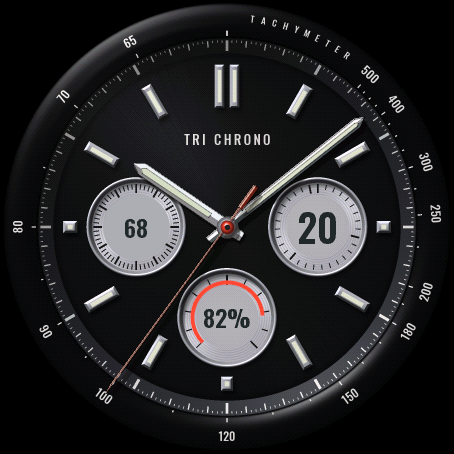 Chrono
Tri Chrono
A chronograph-style analog face with three sunk subdials and a tachymeter bezel
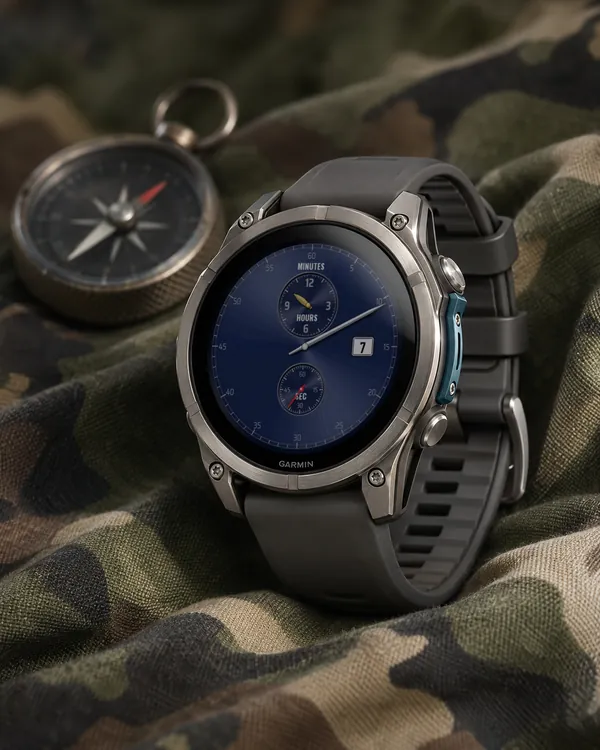 Regulator
 Clean
The classic regulator layout, where every hand has its own axis
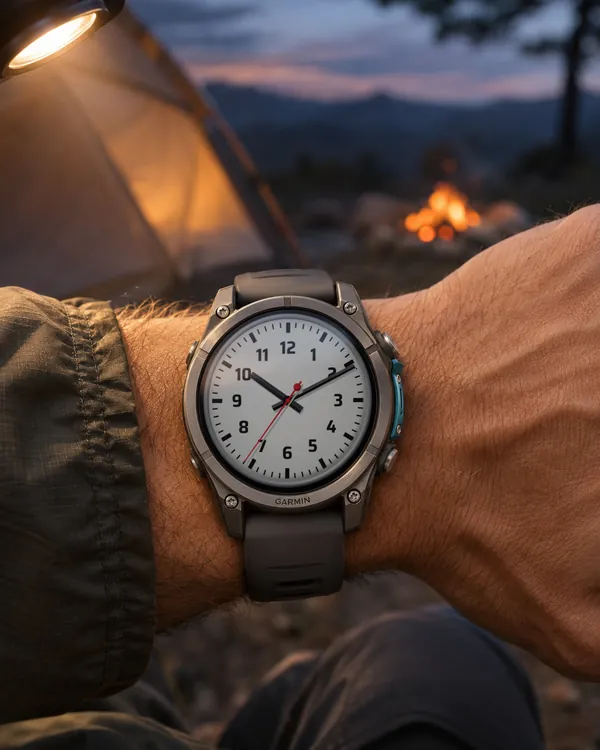 Railway
Station Clock
A platform clock on your wrist: bold bar hands on a white dial
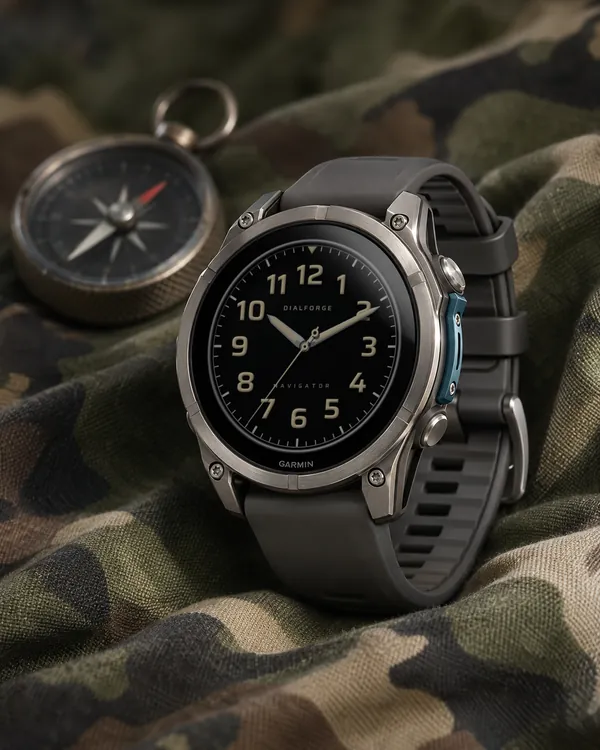 Pilot
Cockpit Navigator
A retro pilot's watch face with big lume numerals and sword hands