Unlock
€6.49
One-time payment. No subscription. The code works on the watch whose ID you enter.
- Install the face from Connect IQ (7 days free).
- On the watch: face settings > Buy / Unlock, scan the QR code.
- Pay and paste the code in the face settings.
- Pay.
- Copy the code.
- Paste it in Connect IQ: this face > Settings > Unlock code.
Payment works best in Safari or Chrome: menu (three dots) > Open in browser
Read it in this face, it is not the serial number of the watch.
Your ID, compare it with the watch:
Where do I find the ID?
On the watch: settings of this face > Buy / Unlock (first item). Scan the QR code with your phone or type the 10 digits. The ID is also at the top of the face settings in the Connect IQ app.
Code not working on your watch? Write to me and I refund within 14 days.
Payments by Stripe. Seller: Mateusz Kolarz, Lublin, Poland.
Paid. Code:
Copying did not work. The code is selected: copy it by hand.
The face unlocks by itself when the watch connects to the phone (usually within an hour; if the trial is still running, the purchase starts working when it ends).
Do not want to wait, or have an older watch? Paste the code in the Connect IQ app:
Connect IQ (or Garmin Connect) > My Device > Watch faces > Man Runner > Settings > Unlock code > paste > Save
We show the code here too. If the e-mail does not arrive (check spam), you can recover the code in the Recover code section with the Face ID and e-mail from your order. Recover code
Like it? Rate this face in the Garmin store
Want to try new faces and apps before the release, for free? Join the testers program
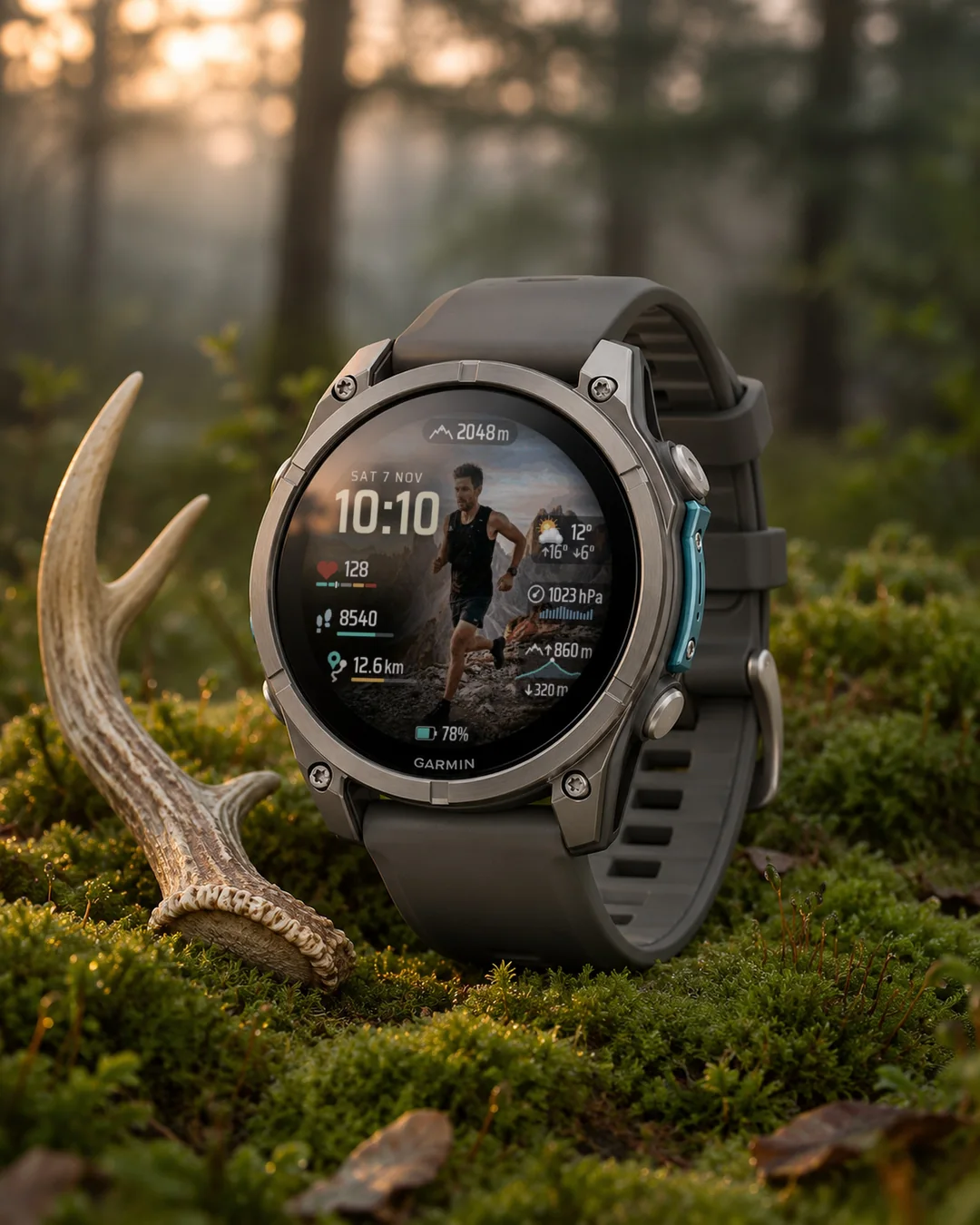
A running watch face for AMOLED watches, built around an illustration of a male runner at sunrise, with heart rate zones, steps, distance and weather, pressure and elevation panels.
A running watch face built around an illustration of a runner at sunrise. Time and date on the left, heart rate with its zones, steps and distance under them, and three glass panels on the right: weather, pressure and elevation. The runner is an AI generated illustration, not a photo of a real person.
7-day free trial, then a one-time unlock code at dialforge.dev (no subscription).
- Heart rate with a five colour zone bar and a marker at the current rate. The zones come from your Garmin profile.
- Steps and distance, each with a progress bar. Garmin has no daily distance goal, so the face has its own setting, Distance goal, from 1 to 100 (km or miles, as your watch is set). The default is 25.
- Weather panel with the temperature and arrows for max and min. Pressure panel with hPa and 16 bars from the last 24 hours. Elevation panel with the gain, a 24 hour altitude profile and the descent.
- A top capsule with altitude and a bottom capsule with the watch battery.
- 8 fields, each one picked from 21 options (altitude, elevation gain, vertical speed, heart rate, calories, steps, battery, temperature, pressure, feels like, max and min, distance, floors, descent, Body Battery, stress, active minutes, sunrise, sunset, weekly cycling distance). A new field brings its own icon, colour, unit and small chart.
- One scene with the runner, 3 mountain scenes without him (switch Figure off) or plain black. The background never changes by itself.
- 10 accent colours (cream by default), separate colours for icons and numbers, three text sizes (normal, large, extra large) that enlarge the values and the panels, battery as percent or days, 12 or 24 hour time, date in 13 languages. Seconds are off by default.
- Always-on mode: black with only the dimmed time, shifted every minute. About 3 percent of the pixels are lit.
- Made for AMOLED watches (48 models).
Honest limits: the pressure chart and the altitude profile use the last 24 hours of sensor history. On a new watch or after a short time on the wrist the panel shows no chart. Without heart rate zones in your profile the bar has no marker. Weather needs a phone connection. Where Garmin has no data for a field, the face shows "--", never a made-up value. The face does not connect to the internet.
After 7 days without a code the face still shows the time and your data, the settings go back to defaults and a short note about the code appears at the bottom. You get the code for your watch UID: in the settings, the last item (Unlock code) shows the UID and the days left and lets you type the code. The same code works in the Garmin Connect app.
Settings: hold MENU on the watch, then Watch face, then Customize, or use the Garmin Connect app. The watch menu has no live preview: press SELECT on a list item for the next value, and the change shows on the face when you leave the menu.
Something looks wrong on your watch? Write to me at https://dialforge.dev/faces/manrun/ and I will fix it. Dialforge is a small project and I could not test every watch model myself.
Works on fenix 9, fenix 8, Forerunner 970, Forerunner 570, Venu 4, Forerunner 965, Forerunner 265, Venu 3 and more.
Tarcza do biegania na zegarki AMOLED z ilustracją biegacza o wschodzie słońca, ze strefami tętna, krokami, dystansem oraz panelami pogody, ciśnienia i wysokości.
Tarcza dla biegaczy, zbudowana wokół ilustracji biegacza o wschodzie słońca. Z lewej godzina i data, pod nimi tętno ze strefami, kroki i dystans, a z prawej trzy szklane panele: pogoda, ciśnienie i przewyższenie. Biegacz to ilustracja wygenerowana przez AI, nie zdjęcie prawdziwej osoby.
7 dni za darmo, potem jednorazowy kod odblokowania na dialforge.dev (bez abonamentu).
- Tętno z pięciokolorowym paskiem stref i znacznikiem przy bieżącym tętnie. Strefy pochodzą z Twojego profilu Garmin.
- Kroki i dystans, każde z paskiem postępu. Garmin nie ma dziennego celu dystansu, więc tarcza ma własne ustawienie, Cel dystansu, od 1 do 100 (km albo mile, zależnie od zegarka). Domyślnie 25.
- Panel pogody z temperaturą i strzałkami max i min. Panel ciśnienia z hPa i 16 słupkami z ostatniej doby. Panel przewyższenia z wartością, profilem wysokości z doby i spadkiem.
- Górna kapsułka z wysokością i dolna z baterią zegarka.
- 8 pól, każde do wyboru z 21 pozycji (wysokość, przewyższenie, prędkość pionowa, tętno, kalorie, kroki, bateria, temperatura, ciśnienie, odczuwalna, max i min, dystans, piętra, spadek, Body Battery, stres, minuty aktywności, wschód, zachód, tygodniowy dystans rowerowy). Nowe pole ma własną ikonę, kolor, jednostkę i mały wykres.
- Jedna scena z biegaczem, 3 sceny gór bez postaci (wyłącz przełącznik Postać) albo czarne tło. Tło nigdy nie zmienia się samo.
- 10 kolorów akcentu (domyślnie kremowy), osobne kolory ikon i liczb, trzy rozmiary tekstu (normalny, duży, bardzo duży), które powiększają wartości i panele, bateria w procentach lub dniach, godzina 12 lub 24 h, data w 13 językach. Sekundy są domyślnie wyłączone.
- Tryb zawsze włączony: czerń i tylko przygaszona godzina, przesuwana co minutę. Świeci około 3 procent pikseli.
- Dla zegarków z ekranem AMOLED (48 modeli).
Ograniczenia: wykres ciśnienia i profil wysokości korzystają z historii czujników z ostatnich 24 godzin. Na nowym zegarku albo po krótkim noszeniu panel jest bez wykresu. Bez stref tętna w profilu pasek nie ma znacznika. Pogoda wymaga połączenia z telefonem. Gdy Garmin nie ma danych dla pola, tarcza pokazuje "--", nigdy zmyśloną wartość. Tarcza nie łączy się z internetem.
Po 7 dniach bez kodu tarcza dalej pokazuje godzinę i dane, ustawienia wracają do domyślnych, a na dole pojawia się krótki napis o kodzie. Kod dostajesz dla UID swojego zegarka: w ustawieniach ostatnia pozycja (Kod odblokowania) pokazuje UID i dni próby i pozwala wpisać kod. Ten sam kod działa w aplikacji Garmin Connect.
Ustawienia: przytrzymaj MENU na zegarku, potem Tarcza zegarka, potem Dostosuj, albo aplikacja Garmin Connect. Menu na zegarku nie ma podglądu na żywo: SELECT na pozycji listy przełącza na następną wartość, a zmianę widać na tarczy po wyjściu z menu.
Coś wygląda źle na Twoim zegarku? Napisz do mnie na https://dialforge.dev/faces/manrun/, a to naprawię. Dialforge to mały projekt i nie mogłem sprawdzić każdego modelu zegarka.
Działa na: fenix 9, fenix 8, Forerunner 970, Forerunner 570, Venu 4, Forerunner 965, Forerunner 265, Venu 3 i innych.
Ein Lauf-Zifferblatt für AMOLED-Uhren mit der Illustration eines Läufers bei Sonnenaufgang, mit Herzfrequenzzonen, Schritten, Distanz sowie Wetter-, Luftdruck- und Höhenfeldern.
Ein Displaydesign für Läufer, aufgebaut um eine Illustration eines Läufers bei Sonnenaufgang. Uhrzeit und Datum links, darunter Herzfrequenz mit ihren Zonen, Schritte und Distanz, und drei Glas-Panels auf der rechten Seite: Wetter, Luftdruck und Höhe. Der Läufer ist eine KI-generierte Illustration, kein Foto einer echten Person.
7 Tage kostenlos testen, danach ein einmaliger Freischaltcode auf dialforge.dev (kein Abo).
- Herzfrequenz mit einer fünffarbigen Zonenleiste und einer Markierung beim aktuellen Wert. Die Zonen stammen aus deinem Garmin-Profil.
- Schritte und Distanz, jeweils mit einem Fortschrittsbalken. Garmin bietet kein tägliches Distanzziel, daher hat das Displaydesign eine eigene Einstellung, Distanzziel, von 1 bis 100 (km oder Meilen, je nach Einstellung deiner Uhr). Der Standardwert ist 25.
- Wetter-Panel mit der Temperatur und Pfeilen für Max und Min. Luftdruck-Panel mit hPa und 16 Balken aus den letzten 24 Stunden. Höhen-Panel mit dem Anstieg, einem 24-Stunden-Höhenprofil und dem Abstieg.
- Eine obere Kapsel mit der Höhe und eine untere Kapsel mit dem Uhrenakku.
- 8 Felder, jedes wählbar aus 21 Optionen (Höhe, Anstieg, Vertikalgeschwindigkeit, Herzfrequenz, Kalorien, Schritte, Akku, Temperatur, Luftdruck, gefühlte Temperatur, Max und Min, Distanz, Stockwerke, Abstieg, Body Battery, Stress, Aktivitätsminuten, Sonnenaufgang, Sonnenuntergang, wöchentliche Raddistanz). Ein neues Feld bringt sein eigenes Symbol, seine eigene Farbe, seine eigene Einheit und ein kleines Diagramm mit.
- Eine Szene mit dem Läufer, 3 Bergszenen ohne ihn (Figur ausschalten) oder schlichtes Schwarz. Der Hintergrund ändert sich nie von selbst.
- 10 Akzentfarben (standardmäßig Creme), separate Farben für Symbole und Zahlen, drei Textgrößen (normal, groß, extra groß), die die Werte und die Panels vergrößern, Akku in Prozent oder Tagen, 12- oder 24-Stunden-Format, Datum in 13 Sprachen. Sekunden sind standardmäßig ausgeschaltet.
- Always-on-Modus: Schwarz mit nur der gedimmten Uhrzeit, jede Minute verschoben. Etwa 3 Prozent der Pixel leuchten.
- Für AMOLED-Uhren gemacht (48 Modelle).
Ehrliche Grenzen: Das Luftdruckdiagramm und das Höhenprofil nutzen die Sensorhistorie der letzten 24 Stunden. Bei einer neuen Uhr oder nach kurzer Tragezeit zeigt das Panel kein Diagramm an. Ohne Herzfrequenzzonen in deinem Profil hat die Leiste keine Markierung. Das Wetter erfordert eine Verbindung zum Telefon. Wenn Garmin keine Daten für ein Feld hat, zeigt das Displaydesign "--" an, niemals einen erfundenen Wert. Das Displaydesign verbindet sich nicht mit dem Internet.
Nach 7 Tagen ohne Code zeigt das Displaydesign weiterhin die Uhrzeit und deine Daten an, die Einstellungen werden auf die Standardwerte zurückgesetzt und unten erscheint ein kurzer Hinweis zum Code. Den Code erhältst du für die UID deiner Uhr: In den Einstellungen zeigt der letzte Punkt (Freischaltcode) die UID sowie die verbleibenden Tage an und lässt dich den Code eingeben. Derselbe Code funktioniert auch in der Garmin Connect App.
Einstellungen: Halte MENU auf der Uhr gedrückt, dann Displaydesign, dann Anpassen, oder verwende die Garmin Connect App. Das Uhrenmenü hat keine Live-Vorschau: Drücke SELECT auf einem Listeneintrag für den nächsten Wert, und die Änderung wird auf dem Displaydesign sichtbar, sobald du das Menü verlässt.
Un cadran de course pour montres AMOLED, avec l'illustration d'un coureur au lever du soleil, des zones de fréquence cardiaque, les pas, la distance, et des panneaux météo, pression et altitude.
Un cadran de course à pied conçu autour d'une illustration de coureur au lever du soleil. L'heure et la date à gauche, la fréquence cardiaque avec ses zones, les pas et la distance en dessous, et trois panneaux en verre à droite : météo, pression et altitude. Le coureur est une illustration générée par IA, pas la photo d'une personne réelle.
Essai gratuit de 7 jours, puis un code de déverrouillage unique sur dialforge.dev (sans abonnement).
- Fréquence cardiaque avec une barre de zones à cinq couleurs et un repère indiquant la fréquence actuelle. Les zones proviennent de votre profil Garmin.
- Pas et distance, chacun avec une barre de progression. Garmin n'ayant pas d'objectif de distance quotidienne, le cadran possède son propre paramètre, Objectif de distance, de 1 à 100 (km ou miles, selon le réglage de votre montre). La valeur par défaut est 25.
- Panneau météo avec la température et des flèches pour max et min. Panneau de pression avec les hPa et 16 barres des dernières 24 heures. Panneau d'altitude avec le dénivelé positif, un profil d'altitude sur 24 heures et le dénivelé négatif.
- Une capsule en haut avec l'altitude et une capsule en bas avec la batterie de la montre.
- 8 champs, chacun choisi parmi 21 options (altitude, dénivelé positif, vitesse verticale, fréquence cardiaque, calories, pas, batterie, température, pression, température ressentie, max et min, distance, étages, dénivelé négatif, Body Battery, stress, minutes actives, lever, coucher, distance hebdomadaire à vélo). Un nouveau champ apporte sa propre icône, couleur, unité et un petit graphique.
- Une scène avec le coureur, 3 scènes de montagne sans lui (désactivez Figure) ou noir uni. L'arrière-plan ne change jamais tout seul.
- 10 couleurs d'accentuation (crème par défaut), couleurs distinctes pour les icônes et les chiffres, trois tailles de texte (normale, grande, très grande) qui agrandissent les valeurs et les panneaux, batterie en pourcentage ou en jours, heure au format 12 ou 24 h, date en 13 langues. Les secondes sont désactivées par défaut.
- Mode Always-on : noir avec uniquement l'heure estompée, décalée chaque minute. Environ 3 pour cent des pixels sont allumés.
- Conçu pour les montres AMOLED (48 modèles).
Limites en toute franchise : le graphique de pression et le profil d'altitude utilisent les dernières 24 heures d'historique des capteurs. Sur une montre neuve ou après un court temps au poignet, le panneau n'affiche aucun graphique. Sans zones de fréquence cardiaque dans votre profil, la barre n'a pas de repère. La météo nécessite une connexion au téléphone. Lorsque Garmin n'a pas de données pour un champ, le cadran affiche "--", jamais une valeur inventée. Le cadran ne se connecte pas à Internet.
Après 7 jours sans code, le cadran continue d'afficher l'heure et vos données, les paramètres reviennent aux valeurs par défaut et une courte mention sur le code apparaît en bas. Vous obtenez le code pour l'UID de votre montre : dans les paramètres, le dernier élément (Unlock code) affiche l'UID et les jours restants et vous permet de saisir le code. Le même code fonctionne dans l'application Garmin Connect.
Compatible avec fenix 9, fenix 8, Forerunner 970, Forerunner 570, Venu 4, Forerunner 965, Forerunner 265, Venu 3 et d'autres modèles.
Una esfera de running para relojes AMOLED, con la ilustración de un corredor al amanecer, zonas de frecuencia cardíaca, pasos, distancia y paneles de clima, presión y elevación.
Una pantalla de reloj para correr creada a partir de una ilustración de un corredor al amanecer. Hora y fecha a la izquierda, frecuencia cardíaca con sus zonas, pasos y distancia debajo de ellas, y tres paneles de cristal a la derecha: el tiempo, la presión y la altitud. El corredor es una ilustración generada por IA, no la foto de una persona real.
Prueba gratuita de 7 días, luego un código de desbloqueo de pago único en dialforge.dev (sin suscripción).
- Frecuencia cardíaca con una barra de zonas de cinco colores y un marcador en la frecuencia actual. Las zonas provienen de tu perfil de Garmin.
- Pasos y distancia, cada uno con una barra de progreso. Garmin no tiene un objetivo diario de distancia, por lo que la pantalla incluye su propio ajuste, Objetivo de distancia, de 1 a 100 (km o millas, según la configuración de tu reloj). El valor predeterminado es 25.
- Panel del tiempo con la temperatura y flechas para máxima y mínima. Panel de presión con hPa y 16 barras de las últimas 24 horas. Panel de altitud con el desnivel positivo, un perfil de altitud de 24 horas y el descenso.
- Una cápsula superior con la altitud y una cápsula inferior con la batería del reloj.
- 8 campos, cada uno elegido entre 21 opciones (altitud, desnivel positivo, velocidad vertical, frecuencia cardíaca, calorías, pasos, batería, temperatura, presión, sensación térmica, máxima y mínima, distancia, pisos, descenso, Body Battery, estrés, minutos de actividad, amanecer, atardecer, distancia semanal en bicicleta).
- Una escena con el corredor, 3 escenas de montaña sin él (desactiva Figura) o negro liso.
- 10 colores de acento (crema por defecto), colores independientes para iconos y números, tres tamaños de texto (normal, grande, extra grande) que agrandan los valores y los paneles, batería en porcentaje o en días, formato de 12 o 24 horas, fecha en 13 idiomas. Los segundos están desactivados por defecto.
- Modo siempre activo: fondo negro solo con la hora atenuada, desplazada cada minuto.
- Diseñado para relojes AMOLED (48 modelos).
Límites honestos: el gráfico de presión y el perfil de altitud utilizan las últimas 24 horas del historial de los sensores. En un reloj nuevo o tras poco tiempo en la muñeca, el panel no muestra ningún gráfico. Sin zonas de frecuencia cardíaca en tu perfil, la barra no tiene marcador. El tiempo necesita conexión con el teléfono. Cuando Garmin no tiene datos para un campo, la pantalla muestra "--", nunca un valor inventado. La pantalla no se conecta a internet.
Tras 7 días sin código, la pantalla sigue mostrando la hora y tus datos, los ajustes vuelven a los valores predeterminados y aparece una breve nota sobre el código en la parte inferior. Obtienes el código para el UID de tu reloj: en los ajustes, el último elemento (Código de desbloqueo) muestra el UID y los días restantes y te permite introducir el código. El mismo código funciona en la aplicación Garmin Connect.
Ajustes: mantén pulsado MENU en el reloj, luego Pantalla del reloj, después Personalizar, o usa la aplicación Garmin Connect. El menú del reloj no tiene vista previa en directo: pulsa SELECT en un elemento de la lista para pasar al siguiente valor, y el cambio se muestra en la pantalla al salir del menú.
Een hardloop-wijzerplaat voor AMOLED-horloges met een illustratie van een hardloper bij zonsopgang, met hartslagzones, stappen, afstand en panelen voor weer, luchtdruk en hoogte.
Een hardloopwijzerplaat opgebouwd rond een illustratie van een hardloper bij zonsopgang. Tijd en datum aan de linkerkant, hartslag met zones, stappen en afstand eronder, en drie glazen panelen aan de rechterkant: weer, luchtdruk en hoogte. De hardloper is een door AI gegenereerde illustratie, geen foto van een echt persoon.
7 dagen gratis op proef, daarna een eenmalige ontgrendelcode op dialforge.dev (geen abonnement).
- Hartslag met een zonebalk in vijf kleuren en een markering bij de huidige hartslag. De zones komen uit je Garmin profiel.
- Stappen en afstand, elk met een voortgangsbalk. Garmin heeft geen dagelijks afstandsdoel, dus de wijzerplaat heeft een eigen instelling, Afstandsdoel, van 1 tot 100 (km of mijl, zoals je horloge is ingesteld). De standaard is 25.
- Weerpaneel met de temperatuur en pijltjes voor max en min. Luchtdrukpaneel met hPa en 16 balken van de afgelopen 24 uur. Hoogtepaneel met de stijging, een 24-uurs hoogteprofiel en de daling.
- Een bovenste capsule met hoogte en een onderste capsule met de batterij van het horloge.
- 8 velden, elk gekozen uit 21 opties (hoogte, stijging, verticale snelheid, hartslag, calorieën, stappen, batterij, temperatuur, luchtdruk, gevoelstemperatuur, max en min, afstand, verdiepingen, daling, Body Battery, stress, actieve minuten, zonsopgang, zonsondergang, wekelijkse fietsafstand). Een nieuw veld brengt een eigen pictogram, kleur, eenheid en een kleine grafiek mee.
- Eén scène met de hardloper, 3 bergscènes zonder hem (schakel Figuur uit) of gewoon zwart. De achtergrond verandert nooit vanzelf.
- 10 accentkleuren (standaard crème), aparte kleuren voor pictogrammen en cijfers, drie tekstgroottes (normaal, groot, extra groot) die de waarden en de panelen vergroten, batterij in procenten of dagen, 12 of 24 uur tijd, datum in 13 talen. Seconden staan standaard uit.
- Always-on modus: zwart met alleen de gedimde tijd, elke minuut verschoven. Ongeveer 3 procent van de pixels licht op.
- Gemaakt voor AMOLED-horloges (48 modellen).
Eerlijke beperkingen: de luchtdrukgrafiek en het hoogteprofiel gebruiken de sensorgeschiedenis van de afgelopen 24 uur. Op een nieuw horloge of na een korte tijd om de pols toont het paneel geen grafiek. Zonder hartslagzones in je profiel heeft de balk geen markering. Weer heeft een telefoonverbinding nodig. Waar Garmin geen gegevens heeft voor een veld, toont de wijzerplaat "--", nooit een verzonnen waarde. De wijzerplaat maakt geen verbinding met internet.
Na 7 dagen zonder code toont de wijzerplaat nog steeds de tijd en je gegevens, gaan de instellingen terug naar de standaardwaarden en verschijnt er onderaan een kort bericht over de code. Je krijgt de code voor de UID van je horloge: in de instellingen toont het laatste item (Ontgrendelcode) de UID en de resterende dagen, en kun je de code invoeren. Dezelfde code werkt in de Garmin Connect app.
Instellingen: houd MENU op het horloge ingedrukt, kies Wijzerplaat, dan Aanpassen, of gebruik de Garmin Connect app. Het horlogemenu heeft geen live preview: druk op SELECT op een lijstitem voor de volgende waarde, en de wijziging is zichtbaar op de wijzerplaat wanneer je het menu verlaat.
Ziet er iets niet goed uit op je horloge? Schrijf me op https://dialforge.dev/faces/manrun/ en ik los het op. Dialforge is een klein project en ik heb niet elk horlogemodel zelf kunnen testen.
AMOLED時計向けのランニング用文字盤。日の出の男性ランナーのイラストを背景に、心拍ゾーン、歩数、距離、天気・気圧・標高パネルを表示します。
日の出を走るランナーのイラストをもとにデザインされたランニング用ウォッチフェイス。左側に時刻と日付、その下に心拍ゾーン付きの心拍数、歩数、距離を配置し、右側には三つのガラス調パネル(天気、気圧、高度)を備えています。ランナーはAIで生成したイラストで、実在の人物の写真ではありません。
7日間の無料トライアル、その後は dialforge.dev での一度限りのロック解除コード(サブスクリプションなし)。
- 五色のゾーンバーと現在の心拍数を示すマーカーが付いた心拍数表示。ゾーンはお使いのGarminプロフィールに基づきます。
- 歩数と距離、それぞれに進捗バー付き。Garminには毎日の距離目標がないため、このウォッチフェイスには独自の設定「Distance goal」があり、1から100まで(時計の設定に応じたkmまたはマイル)設定可能です。デフォルトは25です。
- 気温と最高・最低を示す矢印付きの天気パネル。hPa単位と過去24時間の16本のバーを表示する気圧パネル。上昇量、24時間の高度プロファイル、下降量を表示する高度パネル。
- 上部のカプセルに高度、下部のカプセルに時計のバッテリーを表示。
- 8個の項目、それぞれ21種類の選択肢から選択可能(高度、上昇量、垂直速度、心拍数、カロリー、歩数、バッテリー、温度、気圧、体感温度、最高・最低、距離、階数、下降量、Body Battery、ストレス、アクティブ分、日の出、日の入り、週間サイクリング距離)。項目を変更すると、専用のアイコン、カラー、単位、小さなグラフが表示されます。
- ランナーがいる一つのシーン、ランナーがいない3つの山のシーン(Figureをオフに設定)、またはシンプルな黒。背景が勝手に変わることはありません。
- 10色のアクセントカラー(デフォルトはクリーム)、アイコンと数字で分けられる個別カラー設定、3段階のテキストサイズ(標準、大、特大)で値とパネルを拡大、バッテリーはパーセントまたは日数で表示、12時間または24時間表示、13言語の日付。秒表示はデフォルトでオフです。
- 常時表示モード:黒を基調に減光された時刻のみを表示し、毎分位置をシフト。点灯するピクセルは約3%です。
- AMOLEDウォッチ向け(48モデル)。
正直な制限事項:気圧グラフと高度プロファイルは過去24時間のセンサー履歴を使用します。新しい時計や手首に装着して間もない場合は、パネルにグラフが表示されません。プロフィールに心拍ゾーンが設定されていない場合、バーにマーカーは表示されません。天気にはスマートフォンとの接続が必要です。Garminに項目のデータがない場合、ウォッチフェイスには架空の数値ではなく"--"が表示されます。このウォッチフェイスはインターネットに接続しません。
コードを入力せずに7日が経過しても、ウォッチフェイスは引き続き時刻とデータを表示しますが、設定はデフォルトに戻り、下部にコードに関する短い案内が表示されます。コードはお使いの時計のUIDに対して取得します:設定の最後の項目(Unlock code)にUIDと残り日数が表示され、コードを入力できます。同じコードはGarmin Connectアプリでも使用できます。
設定方法:時計のMENUを長押しし、「ウォッチフェイス」、「カスタマイズ」の順に選択するか、Garmin Connectアプリを使用します。時計のメニューにはライブプレビューがありません:リスト項目でSELECTを押すと次の値に切り替わり、メニューを終了するとウォッチフェイスに変更が反映されます。
お使いの時計で表示に問題がありますか?https://dialforge.dev/faces/manrun/ までご連絡いただければ修正いたします。Dialforgeは個人による小規模なプロジェクトであり、私自身ですべての時計モデルをテストできたわけではありません。
対応モデル:fenix 9, fenix 8, Forerunner 970, Forerunner 570, Venu 4, Forerunner 965, Forerunner 265, Venu 3 ほか
Un quadrante da corsa per orologi AMOLED, con l'illustrazione di un runner all'alba, zone di frequenza cardiaca, passi, distanza e pannelli per meteo, pressione e altitudine.
Un quadrante per la corsa costruito attorno all'illustrazione di un runner all'alba. Ora e data a sinistra, frequenza cardiaca con le relative zone, passi e distanza sotto di esse, e tre riquadri in vetro a destra: meteo, pressione e quota. Il runner è un'illustrazione generata dall'IA, non la foto di una persona reale.
7 giorni di prova gratuita, poi un codice di sblocco una tantum su dialforge.dev (nessun abbonamento).
- Frequenza cardiaca con una barra delle zone a cinque colori e un indicatore sulla frequenza attuale. Le zone provengono dal tuo profilo Garmin.
- Passi e distanza, ciascuno con una barra di avanzamento. Garmin non ha un obiettivo giornaliero di distanza, quindi il quadrante ha una propria impostazione, Obiettivo distanza, da 1 a 100 (km o miglia, in base all'impostazione dell'orologio). Il valore predefinito è 25.
- Riquadro meteo con la temperatura e le frecce per max e min. Riquadro pressione con hPa e 16 barre delle ultime 24 ore. Riquadro quota con il dislivello positivo, un profilo di quota delle 24 ore e la discesa.
- Una capsula superiore con la quota e una capsula inferiore con la batteria dell'orologio.
- 8 campi, ciascuno selezionabile tra 21 opzioni (quota, dislivello positivo, velocità verticale, frequenza cardiaca, calorie, passi, batteria, temperatura, pressione, temperatura percepita, max e min, distanza, piani saliti, discesa, Body Battery, stress, minuti attivi, alba, tramonto, distanza settimanale in bicicletta).
- Una scena con il runner, 3 scene di montagna senza di lui (disattiva Figura) oppure nero pieno.
- 10 colori d'accento (crema come impostazione predefinita), colori separati per icone e numeri, tre dimensioni del testo (normale, grande, extra grande) che ingrandiscono i valori e i pannelli, batteria in percentuale o in giorni, orario 12 o 24 ore, data in 13 lingue. I secondi sono disattivati come impostazione predefinita.
- Modalità Always-on: sfondo nero solo con l'orario attenuato, spostato ogni minuto.
- Creato per orologi AMOLED (48 modelli).
Limiti reali: il grafico della pressione e il profilo della quota utilizzano la cronologia dei sensori delle ultime 24 ore. Su un orologio nuovo o dopo averlo indossato per poco tempo il riquadro non mostra alcun grafico. Senza le zone di frequenza cardiaca nel tuo profilo la barra non ha alcun indicatore. Il meteo richiede la connessione al telefono. Dove Garmin non ha dati per un campo, il quadrante mostra "--", mai un valore inventato. Il quadrante non si connette a Internet.
Dopo 7 giorni senza codice il quadrante continua a mostrare l'ora e i tuoi dati, le impostazioni tornano ai valori predefiniti e in basso compare una breve nota sul codice. Il codice è associato all'UID del tuo orologio: nelle impostazioni, l'ultima voce (Codice di sblocco) mostra l'UID e i giorni rimanenti e ti consente di inserire il codice. Lo stesso codice funziona nell'app Garmin Connect.
Impostazioni: tieni premuto MENU sull'orologio, poi Quadrante, poi Personalizza, oppure usa l'app Garmin Connect. Il menu dell'orologio non ha un'anteprima in tempo reale: premi SELECT su una voce dell'elenco per passare al valore successivo, e la modifica sarà visibile sul quadrante quando esci dal menu.
适用于 AMOLED 手表的跑步表盘,以日出时分男跑者的插画为背景,显示心率区间、步数、距离,以及天气、气压和海拔面板。
一款以日出时分跑者插画为背景的跑步表盘。左侧显示时间和日期,下方显示心率及其区间、步数和距离,右侧设有三个玻璃质感面板:天气、气压和海拔。跑者形象为 AI 生成的插画,并非真人照片。
7 天免费试用,之后在 dialforge.dev 获取一次性解锁码(无订阅)。
- 心率显示带有五色区间条,并在当前心率处标有指示标记。心率区间来自你的 Garmin 个人资料。
- 步数与距离,均配有进度条。Garmin 没有每日距离目标,因此表盘自带设置项 Distance goal,范围从 1 到 100(根据手表设置以 km 或英里为单位)。默认值为 25。
- 天气面板显示温度及最高与最低箭头指示。气压面板显示 hPa 以及过去 24 小时的 16 根柱状图。海拔面板显示累计爬升、24 小时海拔曲线图及累计下降。
- 顶部胶囊区域显示海拔,底部胶囊区域显示手表电量。
- 8 个字段,每个均可从 21 个选项中选择(海拔、累计爬升、垂直速度、心率、卡路里、步数、电量、温度、气压、体感温度、最高与最低、距离、楼层、累计下降、Body Battery、压力、活动分钟数、日出、日落、每周骑行距离)。更换新字段会显示其专属图标、颜色、单位及小型图表。
- 单处跑者场景,3 处不含人物的山景(关闭 Figure)或纯黑背景。背景绝不会自行改变。
- 10 种强调色(默认为米色),图标与数字支持独立配色,三种文字大小(标准、大、特大)可放大数值和面板,电量可按百分比或天数显示,12 或 24 小时制时间,13 种语言的日期。秒数默认关闭。
- 常亮模式:黑色背景,仅显示变暗的时间,每分钟移动一次位置。约 3% 的像素点亮。
- 适用于 AMOLED 手表(48 款型号)。
客观限制:气压图表和海拔曲线图使用过去 24 小时的传感器历史数据。在新手表上或佩戴时间较短时,面板不会显示图表。若个人资料中未设置心率区间,指示条将没有标记。天气需要连接手机。如果 Garmin 在某个字段上没有数据,表盘会显示"--",绝不会捏造数值。表盘不会连接互联网。
7 天试用期结束后若未输入解锁码,表盘仍会显示时间和你的数据,但设置会恢复为默认值,且底部会显示关于解锁码的简短提示。你可以获取与手表 UID 绑定的解锁码:在设置中,最后一项(Unlock code)会显示 UID 和剩余试用天数,并允许你输入解锁码。同一个解锁码也可在 Garmin Connect 应用程序中使用。
设置方法:在手表上长按 MENU,然后选择“表盘”,再选择“自定义”,或使用 Garmin Connect 应用程序。手表菜单没有实时预览:在列表项上按 SELECT 键切换至下一个数值,退出菜单后更改即可在表盘上生效。
手表上的显示看起来有问题?请在 https://dialforge.dev/faces/manrun/ 给我写信,我会进行修复。Dialforge 是一个个人小项目,我无法亲自测试每一款手表型号。
适用于 fenix 9, fenix 8, Forerunner 970, Forerunner 570, Venu 4, Forerunner 965, Forerunner 265, Venu 3 等。
Беговой циферблат для часов AMOLED с иллюстрацией бегуна на рассвете: зоны пульса, шаги, дистанция и панели погоды, давления и высоты.
Беговой циферблат, созданный на основе иллюстрации бегуна на рассвете. Время и дата слева, пульс с зонами интенсивности, шаги и расстояние под ними, а справа три стеклянные панели: погода, давление и высота. Бегун на картинке сгенерирован ИИ, это не фотография реального человека.
7-дневный бесплатный пробный период, затем однократный код разблокировки на dialforge.dev (без подписки).
- Пульс с пятицветной шкалой зон и отметкой текущего значения. Зоны берутся из вашего профиля Garmin.
- Шаги и расстояние, каждое со шкалой прогресса. У Garmin нет ежедневной цели по расстоянию, поэтому у циферблата есть собственная настройка, Distance goal, от 1 до 100 (km или мили, в зависимости от настроек часов). По умолчанию установлено 25.
- Панель погоды с температурой и стрелками максимума и минимума. Панель давления с hPa и 16 столбцами за последние 24 часа. Панель высоты с набором высоты, 24-часовым профилем высоты и спуском.
- Верхняя капсула с высотой и нижняя капсула с батареей часов.
- 8 полей, каждое на выбор из 21 варианта (высота, набор высоты, вертикальная скорость, пульс, калории, шаги, батарея, температура, давление, ощущается как, максимум и минимум, расстояние, этажи, спуск, Body Battery, стресс, минуты активности, восход, закат, недельная дистанция велопрогулок). Новое поле приносит свой значок, цвет, единицу измерения и небольшой график.
- Одна сцена с бегуном, 3 горных пейзажа без него (отключите Figure) или просто черный фон. Фон никогда не меняется сам по себе.
- 10 акцентных цветов (по умолчанию кремовый), отдельные цвета для значков и цифр, три размера текста (обычный, крупный, очень крупный), которые увеличивают значения и панели, батарея в процентах или днях, 12- или 24-часовой формат времени, дата на 13 языках. Секунды по умолчанию выключены.
- Режим всегда включенного экрана: черный фон и только приглушенное время, сдвигаемое каждую минуту. Горит около 3 процентов пикселей.
- Создано для часов с экраном AMOLED (48 моделей).
Честные ограничения: график давления и профиль высоты используют историю датчиков за последние 24 часа. На новых часах или после недолгого ношения на запястье панель не показывает график. Без зон пульса в вашем профиле на шкале не будет отметки. Для погоды требуется подключение к телефону. Если у Garmin нет данных для поля, циферблат показывает "--", а не выдуманное значение. Циферблат не подключается к интернету.
Через 7 дней без кода циферблат по-прежнему показывает время и ваши данные, настройки возвращаются к значениям по умолчанию, а внизу появляется краткое уведомление о коде. Вы получаете код для UID ваших часов: в настройках последний пункт (Unlock code) показывает UID и оставшиеся дни, а также позволяет ввести код. Этот же код работает в приложении Garmin Connect.
Настройки: удерживайте кнопку MENU на часах, затем Циферблат, затем Настроить, либо используйте приложение Garmin Connect. В меню часов нет предварительного просмотра: нажмите SELECT на пункте списка, чтобы переключить на следующее значение, а изменение отобразится на циферблате после выхода из меню.
Что-то выглядит неправильно на ваших часах? Напишите мне на https://dialforge.dev/faces/manrun/, и я все исправлю. Dialforge - небольшой проект, и я не мог протестировать каждую модель часов лично.
Работает на fenix 9, fenix 8, Forerunner 970, Forerunner 570, Venu 4, Forerunner 965, Forerunner 265, Venu 3 и других.
Um mostrador de corrida para relógios AMOLED, com a ilustração de um corredor ao nascer do sol, zonas de frequência cardíaca, passos, distância e painéis de clima, pressão e elevação.
Um mostrador de corrida criado em torno da ilustração de um corredor ao nascer do sol. Hora e data à esquerda, frequência cardíaca com suas zonas, passos e distância abaixo delas, e três painéis de vidro à direita: clima, pressão e elevação. O corredor é uma ilustração gerada por IA, não a foto de uma pessoa real.
Teste gratuito de 7 dias, depois um código de desbloqueio único em dialforge.dev (sem assinatura).
- Frequência cardíaca com uma barra de zonas em cinco cores e um marcador na frequência atual. As zonas vêm do seu perfil Garmin.
- Passos e distância, cada um com uma barra de progresso. A Garmin não tem uma meta diária de distância, então o mostrador tem sua própria configuração, Meta de distância, de 1 a 100 (km ou milhas, conforme configurado no seu relógio). O padrão é 25.
- Painel de clima com a temperatura e setas para máxima e mínima. Painel de pressão com hPa e 16 barras das últimas 24 horas. Painel de elevação com o ganho, perfil de altitude de 24 horas e a descida.
- Uma cápsula superior com altitude e uma cápsula inferior com a bateria do relógio.
- 8 campos, cada um escolhido entre 21 opções (altitude, ganho de elevação, velocidade vertical, frequência cardíaca, calorias, passos, bateria, temperatura, pressão, sensação térmica, máxima e mínima, distância, andares, descida, Body Battery, estresse, minutos ativos, nascer do sol, pôr do sol, distância semanal de ciclismo). Um novo campo traz seu próprio ícone, cor, unidade e um pequeno gráfico.
- Uma cena com o corredor, 3 cenas de montanha sem ele (desative Figura) ou apenas preto. O fundo nunca muda sozinho.
- 10 cores de destaque (creme por padrão), cores separadas para ícones e números, três tamanhos de texto (normal, grande, extragrande) que aumentam os valores e os painéis, bateria em porcentagem ou dias, formato de 12 ou 24 horas, data em 13 idiomas. Os segundos vêm desativados por padrão.
- Modo sempre ativo: preto apenas com a hora esmaecida, deslocada a cada minuto. Cerca de 3 por cento dos pixels ficam acesos.
- Feito para relógios AMOLED (48 modelos).
Limitações honestas: o gráfico de pressão e o perfil de altitude usam as últimas 24 horas do histórico dos sensores. Em um relógio novo ou após pouco tempo no pulso, o painel não mostra nenhum gráfico. Sem zonas de frequência cardíaca no seu perfil, a barra não tem marcador. O clima precisa de conexão com o telefone. Onde a Garmin não tem dados para um campo, o mostrador exibe "--", nunca um valor inventado. O mostrador não se conecta à internet.
Após 7 dias sem um código, o mostrador ainda mostra a hora e seus dados, as configurações voltam aos padrões e um breve aviso sobre o código aparece na parte inferior. Você obtém o código para o UID do seu relógio: nas configurações, o último item (Código de desbloqueio) mostra o UID e os dias restantes, permitindo que você digite o código. O mesmo código funciona no aplicativo Garmin Connect.
Configurações: segure MENU no relógio, depois Mostrador do relógio, depois Personalizar, ou use o aplicativo Garmin Connect. O menu do relógio não tem pré-visualização em tempo real: pressione SELECT em um item da lista para o próximo valor, e a alteração aparece no mostrador quando você sai do menu.
Běžecký ciferník pro hodinky AMOLED s ilustrací běžce při východu slunce, se zónami tepu, kroky, vzdáleností a panely počasí, tlaku a nadmořské výšky.
Běžecký ciferník postavený kolem ilustrace běžce při východu slunce. Vlevo čas a datum, pod nimi srdeční tep se zónami, kroky a vzdálenost a vpravo tři skleněné panely: počasí, tlak a nadmořská výška. Běžec je ilustrace vytvořená umělou inteligencí, ne fotografie skutečné osoby.
7denní zkušební verze zdarma, poté jednorázový odemykací kód na dialforge.dev (bez předplatného).
- Srdeční tep s pětibarevným pruhem zón a značkou aktuálního tepu. Zóny vycházejí z vašeho profilu Garmin.
- Kroky a vzdálenost, obojí s ukazatelem průběhu. Garmin nemá denní cíl vzdálenosti, takže ciferník má vlastní nastavení Cíl vzdálenosti, od 1 do 100 (km nebo míle, podle nastavení hodinek). Výchozí hodnota je 25.
- Panel počasí s teplotou a šipkami pro max a min. Panel tlaku s hPa a 16 sloupci z posledních 24 hodin. Panel nadmořské výšky s převýšením, 24hodinovým výškovým profilem a klesáním.
- Horní kapsle s nadmořskou výškou a dolní kapsle s baterií hodinek.
- 8 polí, každé na výběr z 21 možností (nadmořská výška, převýšení, vertikální rychlost, srdeční tep, kalorie, kroky, baterie, teplota, tlak, pocitová teplota, max a min, vzdálenost, patra, klesání, Body Battery, stres, minuty aktivity, východ, západ, týdenní cyklistická vzdálenost). Nové pole přináší vlastní ikonu, barvu, jednotku a malý graf.
- Jedna scéna s běžcem, 3 horské scény bez něj (vypněte volbu Postava) nebo čistě černá. Pozadí se nikdy nemění samo.
- 10 barev akcentu (ve výchozím nastavení krémová), samostatné barvy pro ikony a čísla, tři velikosti textu (normální, velká, extra velká), které zvětšují hodnoty a panely, baterie v procentech nebo dnech, 12 nebo 24hodinový čas, datum ve 13 jazycích. Sekundy jsou ve výchozím nastavení vypnuté.
- Režim trvale zapnutého displeje: černá a pouze ztlumený čas, posouvaný každou minutu. Svítí přibližně 3 procenta pixelů.
- Vytvořeno pro hodinky AMOLED (48 modelů).
Upřímná omezení: graf tlaku a výškový profil využívají historii snímačů za posledních 24 hodin. Na nových hodinkách nebo po krátké době na zápěstí panel nezobrazuje žádný graf. Bez zón srdečního tepu ve vašem profilu nemá pruh žádnou značku. Počasí vyžaduje připojení k telefonu. Kde Garmin nemá pro pole data, ciferník ukazuje "--", nikdy vymyšlenou hodnotu. Ciferník se nepřipojuje k internetu.
Po 7 dnech bez kódu ciferník stále ukazuje čas a vaše data, nastavení se vrátí na výchozí hodnoty a dole se objeví krátká poznámka o kódu. Kód získáte pro UID svých hodinek: v nastavení poslední položka (Odemykací kód) zobrazuje UID a zbývající dny a umožňuje zadat kód. Stejný kód funguje v aplikaci Garmin Connect.
Nastavení: podržte MENU na hodinkách, poté Vzhled hodinek, potom Přizpůsobit, nebo použijte aplikaci Garmin Connect. Menu hodinek nemá živý náhled: stiskněte SELECT na položce seznamu pro další hodnotu a změna se na ciferníku projeví po opuštění menu.
Něco na vašich hodinkách vypadá špatně? Napište mi na https://dialforge.dev/faces/manrun/ a já to opravím. Dialforge je malý projekt a nemohl jsem sám otestovat každý model hodinek.
Funguje na fenix 9, fenix 8, Forerunner 970, Forerunner 570, Venu 4, Forerunner 965, Forerunner 265, Venu 3 a dalších.
Um mostrador de corrida para relógios AMOLED, com a ilustração de um corredor ao nascer do sol, zonas de frequência cardíaca, passos, distância e painéis de meteorologia, pressão e altitude.
Um mostrador de corrida construído em redor da ilustração de um corredor ao nascer do sol. Hora e data à esquerda, frequência cardíaca com as suas zonas, passos e distância por baixo, e três painéis de vidro à direita: meteorologia, pressão e elevação. O corredor é uma ilustração gerada por IA, não a fotografia de uma pessoa real.
7 dias de teste gratuito, depois um código de desbloqueio único em dialforge.dev (sem subscrição).
- Frequência cardíaca com uma barra de zonas em cinco cores e um marcador no valor atual. As zonas provêm do seu perfil Garmin.
- Passos e distância, cada um com uma barra de progresso. A Garmin não tem um objetivo diário de distância, por isso o mostrador tem a sua própria definição, Objetivo de distância, de 1 a 100 (km ou milhas, conforme o seu relógio estiver configurado). A predefinição é 25.
- Painel de meteorologia com a temperatura e setas para máximo e mínimo. Painel de pressão com hPa e 16 barras das últimas 24 horas. Painel de elevação com o desnível, um perfil de altitude de 24 horas e a descida.
- Uma cápsula superior com a altitude e uma cápsula inferior com a bateria do relógio.
- 8 campos, cada um escolhido entre 21 opções (altitude, desnível, velocidade vertical, frequência cardíaca, calorias, passos, bateria, temperatura, pressão, sensação térmica, máximo e mínimo, distância, andares, descida, Body Battery, stress, minutos ativos, nascer do sol, pôr do sol, distância semanal de ciclismo). Um novo campo traz o seu próprio ícone, cor, unidade e pequeno gráfico.
- Uma cena com o corredor, 3 cenas de montanha sem ele (desative Figura) ou preto simples. O fundo nunca muda sozinho.
- 10 cores de destaque (creme por predefinição), cores separadas para ícones e números, três tamanhos de texto (normal, grande, extragrande) que aumentam os valores e os painéis, bateria em percentagem ou dias, hora de 12 ou 24 horas, data em 13 idiomas. Os segundos estão desativados por predefinição.
- Modo sempre ligado: preto apenas com a hora atenuada, deslocada a cada minuto. Cerca de 3 por cento dos píxeis estão acesos.
- Concebido para relógios AMOLED (48 modelos).
Limites honestos: o gráfico de pressão e o perfil de altitude utilizam as últimas 24 horas do histórico dos sensores. Num relógio novo ou após pouco tempo no pulso, o painel não apresenta qualquer gráfico. Sem zonas de frequência cardíaca no seu perfil, a barra não tem marcador. A meteorologia necessita de ligação ao telemóvel. Onde a Garmin não tem dados para um campo, o mostrador apresenta "--", nunca um valor inventado. O mostrador não se liga à internet.
Após 7 dias sem um código, o mostrador continua a mostrar a hora e os seus dados, as definições voltam aos valores predefinidos e aparece uma breve nota sobre o código na parte inferior. Obtém o código para o UID do seu relógio: nas definições, o último item (Código de desbloqueio) mostra o UID e os dias restantes e permite-lhe introduzir o código. O mesmo código funciona na aplicação Garmin Connect.
Funciona em fenix 9, fenix 8, Forerunner 970, Forerunner 570, Venu 4, Forerunner 965, Forerunner 265, Venu 3 e outros.
AMOLED 시계용 러닝 워치 페이스로, 일출 속 남성 러너 일러스트를 배경으로 심박 존, 걸음 수, 거리, 날씨·기압·고도 패널을 보여 줍니다.
일출 속 러너의 일러스트를 중심으로 제작된 러닝용 시계 화면입니다. 왼쪽에는 시간과 날짜가, 그 아래에는 심박수 영역이 포함된 심박수, 걸음 수, 거리가 표시되며, 오른쪽에는 날씨, 기압, 고도의 세 가지 글래스 패널이 있습니다. 러너는 AI로 생성한 일러스트이며 실제 인물의 사진이 아닙니다.
7일 무료 체험 후, dialforge.dev에서 일회성 잠금 해제 코드로 이용할 수 있습니다 (구독 없음).
- 다섯 가지 색상의 영역 바와 현재 심박수 위치를 나타내는 마커가 포함된 심박수. 심박수 영역은 Garmin 프로필을 기반으로 합니다.
- 각각 진행률 표시줄이 있는 걸음 수와 거리. Garmin에는 일일 거리 목표가 없기 때문에 시계 화면 자체 설정인 Distance goal에서 1부터 100까지 설정할 수 있습니다(시계 설정에 따라 km 또는 miles). 기본값은 25입니다.
- 기온과 최고 및 최저 화살표가 있는 날씨 패널. hPa 및 지난 24시간 동안의 16개 바로 구성된 기압 패널. 상승 고도, 24시간 고도 프로필, 하강 고도가 표시되는 고도 패널.
- 고도가 표시되는 상단 캡슐과 시계 배터리가 표시되는 하단 캡슐.
- 21가지 옵션 중에서 선택할 수 있는 8개의 필드 (고도, 상승 고도, 수직 속도, 심박수, 칼로리, 걸음 수, 배터리, 기온, 기압, 체감 온도, 최고 및 최저, 거리, 오른 층수, 하강 고도, Body Battery, 스트레스, 운동 시간, 일출, 일몰, 주간 사이클링 거리). 새로운 필드를 선택하면 고유한 아이콘, 색상, 단위 및 작은 차트가 함께 표시됩니다.
- 러너가 있는 한 가지 장면, 인물이 없는 3가지 산 배경 장면(Figure 끄기) 또는 심플한 블랙. 배경은 저절로 바뀌지 않습니다.
- 10가지 악센트 색상(기본값은 크림색), 아이콘과 숫자의 개별 색상, 값과 패널을 키우는 세 가지 텍스트 크기(보통, 크게, 매우 크게), 퍼센트 또는 일수로 표시하는 배터리, 12시간 또는 24시간 형식, 13개 언어로 표시되는 날짜. 초 표시는 기본적으로 꺼져 있습니다.
- Always-on 모드: 어둡게 표시된 시간만 나타나는 블랙 화면으로, 매분 위치가 이동합니다. 약 3퍼센트의 픽셀만 켜집니다.
- AMOLED 시계용으로 제작되었습니다 (48개 모델).
정직하게 알려드리는 제한 사항: 기압 차트와 고도 프로필은 센서의 최근 24시간 기록을 사용합니다. 새 시계이거나 손목에 착용한 지 얼마 되지 않은 경우 패널에 차트가 표시되지 않습니다. 프로필에 심박수 영역이 없으면 바에 마커가 표시되지 않습니다. 날씨는 휴대폰 연결이 필요합니다. Garmin에 필드 데이터가 없는 경우 시계 화면은 임의의 값이 아닌 "--"를 표시합니다. 시계 화면은 인터넷에 연결되지 않습니다.
코드 없이 7일이 지난 후에도 시계 화면에는 시간과 데이터가 계속 표시되지만, 설정은 기본값으로 돌아가고 하단에 코드 관련 간단한 안내가 나타납니다. 시계 UID에 맞는 코드를 받으실 수 있습니다: 설정의 마지막 항목(Unlock code)에 UID와 남은 기간이 표시되며 코드를 입력할 수 있습니다. 동일한 코드가 Garmin Connect 앱에서도 작동합니다.
설정: 시계에서 MENU를 길게 누른 후 시계 화면, 사용자 지정을 선택하거나 Garmin Connect 앱을 사용하세요. 시계 메뉴에는 실시간 미리보기가 지원되지 않습니다: 목록 항목에서 SELECT를 눌러 다음 값으로 변경하면 메뉴를 나갈 때 시계 화면에 변경 사항이 표시됩니다.
시계에서 이상한 부분이 보이나요? https://dialforge.dev/faces/manrun/로 문의해 주시면 해결해 드리겠습니다. Dialforge는 소규모 프로젝트이므로 모든 시계 모델을 직접 테스트할 수는 없었습니다.
지원 모델: fenix 9, fenix 8, Forerunner 970, Forerunner 570, Venu 4, Forerunner 965, Forerunner 265, Venu 3 외
En löparurtavla för AMOLED-klockor med en illustration av en löpare i soluppgången, med pulszoner, steg, distans samt paneler för väder, lufttryck och höjd.
En löparurtavla byggd kring en illustration av en löpare i soluppgången. Tid och datum till vänster, puls med dess zoner, steg och distans under dem, och tre glaspaneler till höger: väder, tryck och höjd. Löparen är en AI-genererad illustration, inte ett foto av en riktig person.
7 dagars gratis provperiod, sedan en engångskod för upplåsning på dialforge.dev (ingen prenumeration).
- Puls med en femfärgad zonstapel och en markör vid aktuell puls. Zonerna kommer från din Garmin-profil.
- Steg och distans, var och en med en förloppsstapel. Garmin har inget dagligt distansmål, så urtavlan har en egen inställning, Distansmål, från 1 till 100 (km eller miles, beroende på hur din klocka är inställd). Standardvärdet är 25.
- Väderpanel med temperatur och pilar för max och min. Tryckpanel med hPa och 16 staplar från de senaste 24 timmarna. Höjdpanel med stigning, en 24-timmars höjdprofil och sänkning.
- En övre kapsel med höjd och en nedre kapsel med klockans batteri.
- 8 fält, vart och ett valt bland 21 alternativ (höjd, stigning, vertikal hastighet, puls, kalorier, steg, batteri, temperatur, tryck, upplevd temperatur, max och min, distans, våningar, sänkning, Body Battery, stress, aktiva minuter, soluppgång, solnedgång, veckans cykeldistans). Ett nytt fält har sin egen ikon, färg, enhet och ett litet diagram.
- En scen med löparen, 3 bergsscener utan honom (stäng av Figur) eller helt svart. Bakgrunden ändras aldrig av sig själv.
- 10 accentfärger (krämvit som standard), separata färger för ikoner och siffror, tre textstorlekar (normal, stor, extra stor) som förstorar värdena och panelerna, batteri i procent eller dagar, 12- eller 24-timmarsvisning, datum på 13 språk. Sekunder är avstängda som standard.
- Alltid på-läge: svart med endast den dämpade tiden, som flyttas varje minut. Cirka 3 procent av pixlarna lyser.
- Gjord för AMOLED-klockor (48 modeller).
Ärliga begränsningar: tryckdiagrammet och höjdprofilen använder de senaste 24 timmarnas sensorhistorik. På en ny klocka eller efter kort tid på handleden visar panelen inget diagram. Utan pulszoner i din profil har stapeln ingen markör. Väder kräver telefonanslutning. Där Garmin saknar data för ett fält visar urtavlan "--", aldrig ett påhittat värde. Urtavlan ansluter inte till internet.
Efter 7 dagar utan kod visar urtavlan fortfarande tiden och dina data, inställningarna återgår till standardvärden och ett kort meddelande om koden visas längst ner. Du får koden för klockans UID: i inställningarna visar det sista alternativet (Upplåsningskod) UID och återstående dagar och låter dig skriva in koden. Samma kod fungerar i Garmin Connect-appen.
Inställningar: håll in MENU på klockan, sedan Urtavla, sedan Anpassa, eller använd Garmin Connect-appen. Klockmenyn har ingen förhandsgranskning i realtid: tryck på SELECT på ett listalternativ för nästa värde, och ändringen visas på urtavlan när du lämnar menyn.
Ser något fel ut på din klocka? Skriv till mig på https://dialforge.dev/faces/manrun/ så fixar jag det. Dialforge är ett litet projekt och jag har inte kunnat testa varje klockmodell själv.
Fungerar på fenix 9, fenix 8, Forerunner 970, Forerunner 570, Venu 4, Forerunner 965, Forerunner 265, Venu 3 med flera.
En løbe-urskive til AMOLED-ure med en illustration af en løber ved solopgang, med pulszoner, skridt, distance samt paneler for vejr, lufttryk og højde.
En løbeurskive bygget op omkring en illustration af en løber ved solopgang. Klokkeslæt og dato til venstre, puls med tilhørende zoner, skridt og distance under dem, og tre glaspaneler til højre: vejr, tryk og højde. Løberen er en AI-genereret illustration, ikke et foto af en rigtig person.
7 dages gratis prøveperiode, derefter en engangskode til oplåsning på dialforge.dev (intet abonnement).
- Puls med en femfarvet zonebjælke og en markør ved den aktuelle puls. Zonerne kommer fra din Garmin-profil.
- Skridt og distance, hver med en statusbjælke. Garmin har ikke noget dagligt distancemål, så urskiven har sin egen indstilling, Distancemål, fra 1 til 100 (km eller miles, afhængigt af hvad dit ur er indstillet til). Standarden er 25.
- Vejrpanel med temperaturen og pile for maks. og min. Trykpanel med hPa og 16 søjler fra de seneste 24 timer. Højdepanel med stigningen, en 24-timers højdeprofil og nedstigningen.
- En øverste kapsel med højde og en nederste kapsel med urets batteri.
- 8 felter, hvert felt valgt blandt 21 muligheder (højde, højdestigning, vertikal hastighed, puls, kalorier, skridt, batteri, temperatur, tryk, føles som, maks. og min., distance, etager, nedstigning, Body Battery, stress, aktive minutter, solopgang, solnedgang, ugentlig cyklingdistance). Et nyt felt har sit eget ikon, sin egen farve, enhed og en lille graf.
- Én scene med løberen, 3 bjergscener uden ham (slå Figur fra) eller helt sort. Baggrunden skifter aldrig af sig selv.
- 10 accentfarver (creme som standard), separate farver til ikoner og tal, tre tekststørrelser (normal, stor, ekstra stor), der forstørrer værdierne og panelerne, batteri i procent eller dage, 12- eller 24-timers visning, dato på 13 sprog. Sekunder er slået fra som standard.
- Always-on-tilstand: sort med kun det dæmpede klokkeslæt, som flyttes hvert minut. Cirka 3 procent af pixlerne er tændt.
- Lavet til AMOLED-ure (48 modeller).
Ærlige begrænsninger: trykgrafen og højdeprofilen bruger de seneste 24 timers sensorhistorik. På et nyt ur eller efter kort tid på håndleddet viser panelet ingen graf. Uden pulszoner i din profil har bjælken ingen markør. Vejr kræver forbindelse til en telefon. Hvor Garmin ikke har data for et felt, viser urskiven "--", aldrig en opdigtet værdi. Urskiven opretter ikke forbindelse til internettet.
Efter 7 dage uden en kode viser urskiven stadig klokkeslættet og dine data, indstillingerne vender tilbage til standard, og en kort besked om koden vises i bunden. Du modtager koden til dit urs UID: i indstillingerne viser det sidste punkt (Oplåsningskode) UID'et og de resterende dage og lader dig indtaste koden. Den samme kode fungerer i Garmin Connect-appen.
Indstillinger: hold MENU nede på uret, derefter Urskive, derefter Tilpas, eller brug Garmin Connect-appen. Urets menu har ingen live-forhåndsvisning: tryk på SELECT på et listepunkt for at få den næste værdi, og ændringen vises på urskiven, når du forlader menuen.
Ser noget forkert ud på dit ur? Skriv til mig på https://dialforge.dev/faces/manrun/, så retter jeg det. Dialforge er et lille projekt, og jeg har ikke selv kunnet teste alle urmodeller.
Virker på fenix 9, fenix 8, Forerunner 970, Forerunner 570, Venu 4, Forerunner 965, Forerunner 265, Venu 3 og flere.
En løpe-urskive for AMOLED-klokker med en illustrasjon av en løper ved soloppgang, med pulssoner, skritt, distanse og paneler for vær, lufttrykk og høyde.
En løpeurskive bygget rundt en illustrasjon av en løper i soloppgang. Tid og dato til venstre, puls med pulssoner, skritt og distanse under dem, og tre glasspaneler til høyre: vær, trykk og stigning. Løperen er en KI-generert illustrasjon, ikke et bilde av en ekte person.
7-dagers gratis prøveperiode, deretter en engangskode for opplåsing på dialforge.dev (ingen abonnement).
- Puls med en femfarget sonelinje og en markør ved gjeldende puls. Sonene hentes fra Garmin-profilen din.
- Skritt og distanse, hver med en fremdriftslinje. Garmin har ikke noe daglig distansemål, så urskiven har sin egen innstilling, Distansemål, fra 1 til 100 (km eller miles, avhengig av hvordan klokken din er stilt inn). Standard er 25.
- Værpanel med temperatur og piler for maks og min. Trykkpanel med hPa og 16 stolper fra de siste 24 timene. Høydepanel med stigning, en 24-timers høydeprofil og nedstigning.
- En øvre kapsel med høyde og en nedre kapsel med klokkebatteriet.
- 8 felter, hvert enkelt valgt fra 21 alternativer (høyde, stigning, vertikal hastighet, puls, kalorier, skritt, batteri, temperatur, trykk, føles som, maks og min, distanse, etasjer, nedstigning, Body Battery, stress, aktive minutter, soloppgang, solnedgang, ukentlig sykkeldistanse). Et nytt felt har med seg sitt eget ikon, farge, enhet og et lite diagram.
- Én scene med løperen, 3 fjellscener uten ham (slå av Figur) eller helt svart. Bakgrunnen endres aldri av seg selv.
- 10 aksentfarger (kremfarget som standard), separate farger for ikoner og tall, tre tekststørrelser (normal, stor, ekstra stor) som forstørrer verdiene og panelene, batteri i prosent eller dager, 12- eller 24-timers tid, dato på 13 språk. Sekunder er slått av som standard.
- Alltid på-modus: svart med bare den dempede tiden, flyttet hvert minutt. Omtrent 3 prosent av pikslene lyser.
- Laget for AMOLED-klokker (48 modeller).
Ærlige begrensninger: trykkdiagrammet og høydeprofilen bruker sensorhistorikken fra de siste 24 timene. På en ny klokke eller etter kort tid på håndleddet viser panelet ikke noe diagram. Uten pulssoner i profilen din har linjen ingen markør. Vær trenger tilkobling til telefonen. Der Garmin ikke har data for et felt, viser urskiven "--", aldri en oppdiktet verdi. Urskiven kobler seg ikke til internett.
Etter 7 dager uten kode viser urskiven fortsatt tiden og dataene dine, innstillingene tilbakestilles til standard, og en kort melding om koden vises nederst. Du får koden for klokkens UID: i innstillingene viser det siste elementet (Opplåsingskode) UID og gjenværende dager, og lar deg skrive inn koden. Den samme koden fungerer i Garmin Connect-appen.
Innstillinger: hold inne MENU på klokken, deretter Urskive, så Tilpass, eller bruk Garmin Connect-appen. Klokkemenyen har ingen forhåndsvisning i sanntid: trykk på SELECT på et listeelement for neste verdi, og endringen vises på urskiven når du går ut av menyen.
Ser noe feil ut på klokken din? Skriv til meg på https://dialforge.dev/faces/manrun/, så skal jeg fikse det. Dialforge er et lite prosjekt, og jeg har ikke kunnet teste alle klokkemodeller selv.
Fungerer på fenix 9, fenix 8, Forerunner 970, Forerunner 570, Venu 4, Forerunner 965, Forerunner 265, Venu 3 og flere.
適用於 AMOLED 手錶的跑步錶面,以日出時分男跑者的插圖為背景,顯示心率區間、步數、距離,以及天氣、氣壓和海拔面板。
專為跑步設計的錶面,圍繞跑者在日出時的插圖打造。時間與日期位於左側,下方為心率及其區間、步數與距離,右側則有三個玻璃質感面板:天氣、氣壓與高度。跑者為 AI 生成的插圖,並非真人照片。
7 天免費試用,之後可在 dialforge.dev 取得一次性解鎖碼(無需訂閱)。
- 心率顯示配有五色區間條,並在當前心率處設有標記。區間資料取自你的 Garmin 個人設定檔。
- 步數與距離,兩者皆附有進度條。Garmin 沒有每日距離目標,因此本錶面提供專屬設定「Distance goal」,可設定為 1 到 100(公里或英里,取決於手錶設定)。預設值為 25。
- 天氣面板顯示溫度以及最高溫與最低溫箭頭。氣壓面板顯示 hPa 及過去 24 小時的 16 格長條圖。高度面板顯示爬升量、24 小時高度變化趨勢圖與下降量。
- 頂部膠囊顯示高度,底部膠囊顯示手錶電量。
- 8 個欄位,各可從 21 種選項中自訂(高度、總爬升、垂直速度、心率、卡路里、步數、電量、溫度、氣壓、體感溫度、最高與最低溫、距離、樓層、總下降、Body Battery、壓力、活動分鐘數、日出、日落、每週騎行距離)。每個新欄位皆帶有專屬圖示、顏色、單位及小型圖表。
- 一種包含跑者的場景、3 種不含人物的山景(將 Figure 關閉)或純黑背景。背景絕不會自動切換。
- 10 種強調色(預設為奶油色)、圖示與數字可分開設定顏色、三種文字大小(標準、大、特大)可放大數值和面板、電量可顯示百分比或天數、12 或 24 小時制、13 種語言日期。秒數預設為關閉。
- 恆亮模式:純黑背景僅顯示微暗的時間,每分鐘微調位置。約 3% 的像素點會亮起。
- 專為 AMOLED 手錶打造(支援 48 種型號)。
誠實限制說明:氣壓圖表與高度剖面圖使用過去 24 小時的感測器記錄。在全新手錶上或剛配戴不久時,面板不會顯示圖表。若個人設定檔中沒有設定心率區間,指標條將不會顯示標記。天氣資訊需要連接手機。當 Garmin 在該欄位沒有資料時,錶面會顯示 "--",絕不會顯示虛構數值。此錶面不會連接網際網路。
在未輸入代碼的情況下使用 7 天後,錶面仍會繼續顯示時間與你的資料,但設定會恢復為預設值,且底部會出現關於解鎖碼的簡短說明。解鎖碼是針對手錶的 UID 提供的:在設定中,最後一個項目(Unlock code)會顯示 UID 與剩餘天數,並可讓你輸入代碼。同一個代碼亦可在 Garmin Connect app 中使用。
設定方式:長按手錶上的 MENU,接著選擇「錶面」,再選擇「自訂」,或是使用 Garmin Connect app。手錶選單沒有即時預覽:在清單項目上按 SELECT 可切換至下一個數值,退出選單後變更即會顯示在錶面上。
手錶上的顯示似乎有問題?請透過 https://dialforge.dev/faces/manrun/ 寫信給我,我會進行修復。Dialforge 是一個小型專案,我無法親自測試每一款手錶型號。
適用於 fenix 9, fenix 8, Forerunner 970, Forerunner 570, Venu 4, Forerunner 965, Forerunner 265, Venu 3 等。
Juoksukellotaulu AMOLED-kelloille, jossa kuvitus miesjuoksijasta auringonnousussa, sykealueet, askeleet, matka sekä sää-, ilmanpaine- ja korkeuspaneelit.
Juoksukellotaulu, joka on rakennettu auringonnousussa juoksevan juoksijan kuvituksen ympärille. Aika ja päivämäärä vasemmalla, syke sykealueineen, askeleet ja matka niiden alla sekä kolme lasipaneelia oikealla: sää, ilmanpaine ja nousu. Juoksija on tekoälyllä luotu kuvitus, ei kuva oikeasta henkilöstä.
7 päivän ilmainen kokeilu, sitten kertaluontoinen avauskoodi osoitteesta dialforge.dev (ei tilausta).
- Syke viisivärisellä sykealuepalkilla ja nykyisen sykkeen osoittimella. Sykealueet tulevat Garmin-profiilistasi.
- Askeleet ja matka, kumpikin edistymispalkilla. Garminilla ei ole päivittäistä matkatavoitetta, joten kellotaulussa on oma asetus, Matkatavoite, 1-100 (km tai mailia kellosi asetusten mukaan). Oletus on 25.
- Sääpaneeli, jossa on lämpötila sekä nuolet maksimille ja minimille. Ilmanpainepaneeli, jossa on hPa ja 16 pylvästä viimeiseltä 24 tunnilta. Korkeuspaneeli, jossa on nousu, 24 tunnin korkeusprofiili ja lasku.
- Yläkapseli, jossa on korkeus, ja alakapseli, jossa on kellon akku.
- 8 kenttää, joista jokainen on valittavissa 21 vaihtoehdosta (korkeus, nousu, pystynopeus, syke, kalorit, askeleet, akku, lämpötila, ilmanpaine, tuntuu kuin, maksimi ja minimi, matka, kerrokset, lasku, Body Battery, stressi, aktiiviset minuutit, auringonnousu, auringonlasku, viikon pyöräilymatka). Uusi kenttä tuo mukanaan oman kuvakkeen, värin, yksikön ja pienen kaavion.
- Yksi näkymä juoksijan kanssa, 3 vuoristonäkymää ilman häntä (kytke Hahmo pois päältä) tai pelkkä musta. Tausta ei koskaan vaihdu itsestään.
- 10 korostusväriä (oletuksena kermanvalkoinen), erilliset värit kuvakkeille ja numeroille, kolme tekstikokoa (normaali, suuri, erittäin suuri), jotka suurentavat arvot ja paneelit, akku prosentteina tai päivinä, 12 tai 24 tunnin kellonaika, päivämäärä 13 kielellä. Sekunnit ovat oletuksena pois päältä.
- Always-on-tila: musta tausta ja vain himmennetty kellonaika, jota siirretään minuutin välein. Noin 3 prosenttia pikseleistä palaa.
- Suunniteltu AMOLED-kelloille (48 mallia).
Rehelliset rajoitukset: ilmanpainekaavio ja korkeusprofiili käyttävät anturihistoriaa viimeisen 24 tunnin ajalta. Uudessa kellossa tai kun kello on ollut ranteessa vasta vähän aikaa, paneelissa ei näy kaaviota. Ilman profiilisi sykealueita palkissa ei ole osoitinta. Sää vaatii puhelinyhteyden. Jos Garminilla ei ole tietoja kentälle, kellotaulu näyttää "--", ei koskaan keksittyä arvoa. Kellotaulu ei muodosta yhteyttä internetiin.
7 päivän jälkeen ilman koodia kellotaulu näyttää edelleen ajan ja tietosi, asetukset palautuvat oletuksiin ja alareunaan ilmestyy lyhyt huomautus koodista. Saat koodin kellosi UID-tunnukselle: asetuksissa viimeinen kohta (Avauskoodi) näyttää UID-tunnuksen ja jäljellä olevat päivät sekä antaa sinun kirjoittaa koodin. Sama koodi toimii Garmin Connect -sovelluksessa.
Asetukset: pidä kellon MENU-painiketta painettuna, valitse Kellotaulu, sitten Mukauta, tai käytä Garmin Connect -sovellusta. Kellon valikossa ei ole reaaliaikaista esikatselua: paina luettelokohteen kohdalla SELECT saadaksesi seuraavan arvon, ja muutos näkyy kellotaulussa, kun poistut valikosta.
Toimii malleissa fenix 9, fenix 8, Forerunner 970, Forerunner 570, Venu 4, Forerunner 965, Forerunner 265, Venu 3 ja muissa.
Bežecký ciferník pre hodinky AMOLED s ilustráciou bežca pri východe slnka, so zónami tepu, krokmi, vzdialenosťou a panelmi počasia, tlaku a nadmorskej výšky.
Bežecký ciferník postavený okolo ilustrácie bežca pri východe slnka. Čas a dátum naľavo, pod nimi srdcový tep s jeho zónami, kroky a vzdialenosť a tri sklenené panely napravo: počasie, tlak a prevýšenie. Bežec je ilustrácia vytvorená umelou inteligenciou, nie fotografia skutočnej osoby.
7-dňová bezplatná skúšobná verzia, potom jednorazový odomykací kód na dialforge.dev (žiadne predplatné).
- Srdcový tep s päťfarebným pásikom zón a ukazovateľom pri aktuálnom tepe. Zóny pochádzajú z tvojho profilu Garmin.
- Kroky a vzdialenosť, každé s indikátorom priebehu. Garmin nemá denný cieľ vzdialenosti, takže ciferník má vlastné nastavenie, Cieľ vzdialenosti, od 1 do 100 (km alebo míle, podľa nastavenia tvojich hodiniek). Predvolená hodnota je 25.
- Panel počasia s teplotou a šípkami pre max a min. Panel tlaku s hPa a 16 stĺpcami za posledných 24 hodín. Panel nadmorskej výšky s prevýšením, 24-hodinovým výškovým profilom a klesaním.
- Horná kapsula s nadmorskou výškou a dolná kapsula s batériou hodiniek.
- 8 polí, každé na výber z 21 možností (nadmorská výška, prevýšenie, vertikálna rýchlosť, srdcový tep, kalórie, kroky, batéria, teplota, tlak, pocitová teplota, max a min, vzdialenosť, poschodia, klesanie, Body Battery, stres, minúty aktivity, východ slnka, západ slnka, týždenná cyklistická vzdialenosť). Nové pole prináša vlastnú ikonu, farbu, jednotku a malý graf.
- Jedna scéna s bežcom, 3 horské scény bez neho (vypni možnosť Postava) alebo čisto čierne pozadie. Pozadie sa nikdy nemení samo.
- 10 farieb akcentu (predvolená je krémová), samostatné farby pre ikony a čísla, tri veľkosti textu (normálna, veľká, extra veľká), ktoré zväčšujú hodnoty a panely, batéria v percentách alebo dňoch, 12 alebo 24-hodinový čas, dátum v 13 jazykoch. Sekundy sú predvolene vypnuté.
- Režim vždy zapnuté: čierna a iba stlmený čas, posúvaný každú minútu. Svietia približne 3 percentá pixelov.
- Určené pre hodinky AMOLED (48 modelov).
Úprimné obmedzenia: graf tlaku a výškový profil využívajú históriu senzorov za posledných 24 hodín. Na nových hodinkách alebo po krátkom čase na zápästí panel nezobrazuje žiadny graf. Bez zón srdcového tepu v profile nemá pásik žiadny ukazovateľ. Počasie vyžaduje pripojenie k telefónu. Kde Garmin nemá pre pole žiadne údaje, ciferník zobrazuje "--", nikdy nie vymyslenú hodnotu. Ciferník sa nepripája k internetu.
Po 7 dňoch bez kódu ciferník stále zobrazuje čas a tvoje údaje, nastavenia sa vrátia na predvolené hodnoty a v spodnej časti sa zobrazí krátka správa o kóde. Kód získaš pre UID svojich hodiniek: v nastaveniach posledná položka (Odomykací kód) zobrazuje UID a zostávajúce dni a umožňuje ti zadať kód. Rovnaký kód funguje v aplikácii Garmin Connect.
Nastavenia: podrž MENU na hodinkách, potom Vzhľad hodiniek, potom Prispôsobiť, alebo použi aplikáciu Garmin Connect. Menu v hodinkách nemá živý náhľad: stlač SELECT na položke v zozname pre ďalšiu hodnotu a zmena sa na ciferníku zobrazí po opustení menu.
Vyzerá na tvojich hodinkách niečo nesprávne? Napíš mi na https://dialforge.dev/faces/manrun/ a opravím to. Dialforge je malý projekt a nemohol som sám otestovať každý model hodiniek.
Funguje na fenix 9, fenix 8, Forerunner 970, Forerunner 570, Venu 4, Forerunner 965, Forerunner 265, Venu 3 a ďalších.
Tekaška številčnica za ure AMOLED z ilustracijo tekača ob sončnem vzhodu, s srčnimi conami, koraki, razdaljo ter ploščami za vreme, zračni tlak in višino.
Tekaška številčnica, ustvarjena okoli ilustracije tekača ob sončnem vzhodu. Čas in datum na levi, pod njima srčni utrip z območji, koraki in razdalja, na desni pa tri steklene plošče: vreme, tlak in višina. Tekač je ilustracija, ustvarjena z umetno inteligenco, ne fotografija resnične osebe.
7-dnevni brezplačni preizkus, nato enkratna koda za odklepanje na dialforge.dev (brez naročnine).
- Srčni utrip s petbarvno vrstico območij in oznako pri trenutnem utripu. Območja izvirajo iz vašega profila Garmin.
- Koraki in razdalja, vsako z vrstico napredka. Garmin nima dnevnega cilja razdalje, zato ima številčnica lastno nastavitev, Cilj razdalje, od 1 do 100 (km ali milje, glede na nastavitve vaše ure). Privzeta vrednost je 25.
- Plošča za vreme s temperaturo in puščicama za najvišjo in najnižjo vrednost. Plošča za tlak s hPa in 16 stolpci iz zadnjih 24 ur. Plošča za višino z vzponom, 24-urnim profilom nadmorske višine in spustom.
- Zgornja kapsula z nadmorsko višino in spodnja kapsula z baterijo ure.
- 8 polj, vsako izbrano med 21 možnostmi (nadmorska višina, vzpon, navpična hitrost, srčni utrip, kalorije, koraki, baterija, temperatura, tlak, občutena temperatura, najvišja in najnižja, razdalja, nadstropja, spust, Body Battery, stres, minute aktivnosti, sončni vzhod, sončni zahod, tedenska kolesarska razdalja). Novo polje prinaša lastno ikono, barvo, enoto in majhen grafikon.
- En prizor s tekačem, 3 gorski prizori brez njega (izklopite možnost Postava) ali preprosto črna barva. Ozadje se nikoli ne spremeni samo od sebe.
- 10 barv poudarka (privzeto kremna), ločeni barvi za ikone in številke, tri velikosti besedila (običajna, velika, zelo velika), ki povečajo vrednosti in plošče, baterija v odstotkih ali dneh, 12- ali 24-urni čas, datum v 13 jezikih. Sekunde so privzeto izklopljene.
- Vedno vklopljen način: črnina s samo zatemnjenim časom, ki se premakne vsako minuto. Osvetljeni so približno 3 odstotki slikovnih pik.
- Ustvarjeno za ure AMOLED (48 modelov).
Iskrene omejitve: grafikon tlaka in profil nadmorske višine uporabljata zadnjih 24 ur zgodovine senzorjev. Na novi uri ali po kratkem času na zapestju plošča ne prikazuje grafikona. Brez območij srčnega utripa v vašem profilu vrstica nima oznake. Vreme potrebuje povezavo s telefonom. Kjer Garmin nima podatkov za polje, številčnica prikazuje "--", nikoli izmišljene vrednosti. Številčnica se ne povezuje z internetom.
Po 7 dneh brez kode številčnica še naprej prikazuje čas in vaše podatke, nastavitve se ponastavijo na privzete, na dnu pa se prikaže kratko obvestilo o kodi. Kodo prejmete za UID svoje ure: v nastavitvah zadnja postavka (Koda za odklepanje) prikazuje UID in preostale dni ter vam omogoča vnos kode. Ista koda deluje v aplikaciji Garmin Connect.
Nastavitve: na uri pridržite MENU, nato Videz ure, nato Prilagodi, ali pa uporabite aplikacijo Garmin Connect. Meni ure nima predogleda v živo: na elementu seznama pritisnite SELECT za naslednjo vrednost, sprememba pa se prikaže na številčnici, ko zapustite meni.
Je na vaši uri kaj videti narobe? Pišite mi na https://dialforge.dev/faces/manrun/ in to bom popravil. Dialforge je majhen projekt in nisem mogel sam preizkusiti vsakega modela ure.
Deluje na fenix 9, fenix 8, Forerunner 970, Forerunner 570, Venu 4, Forerunner 965, Forerunner 265, Venu 3 in drugih.
Tampilan jam lari untuk jam AMOLED dengan ilustrasi pelari pria saat matahari terbit, lengkap dengan zona detak jantung, langkah, jarak, serta panel cuaca, tekanan udara dan ketinggian.
Tampilan jam lari yang dibangun dengan ilustrasi seorang pelari saat matahari terbit. Waktu dan tanggal di sebelah kiri, denyut jantung beserta zonanya, langkah dan jarak di bawahnya, serta tiga panel kaca di sebelah kanan: cuaca, tekanan, dan elevasi. Pelari ini adalah ilustrasi buatan AI, bukan foto orang sungguhan.
Uji coba gratis 7 hari, lalu kode buka kunci satu kali di dialforge.dev (tanpa langganan).
- Denyut jantung dengan bilah zona lima warna dan penanda pada denyut saat ini. Zona tersebut berasal dari profil Garmin Anda.
- Langkah dan jarak, masing-masing dengan bilah progres. Garmin tidak memiliki target jarak harian, sehingga tampilan jam memiliki pengaturannya sendiri, Target jarak, dari 1 hingga 100 (km atau mil, sesuai pengaturan jam tangan Anda). Default-nya adalah 25.
- Panel cuaca dengan suhu dan tanda panah untuk maks dan min. Panel tekanan dengan hPa dan 16 batang dari 24 jam terakhir. Panel elevasi dengan kenaikan, profil ketinggian 24 jam, dan penurunan.
- Kapsul atas dengan ketinggian dan kapsul bawah dengan baterai jam tangan.
- 8 kolom, masing-masing dipilih dari 21 opsi (ketinggian, kenaikan elevasi, kecepatan vertikal, denyut jantung, kalori, langkah, baterai, suhu, tekanan, suhu terasa, maks dan min, jarak, lantai, penurunan, Body Battery, stres, menit aktif, matahari terbit, matahari terbenam, jarak bersepeda mingguan). Kolom baru membawa ikon, warna, satuan, dan grafik kecilnya sendiri.
- Satu adegan bersama pelari, 3 pemandangan gunung tanpa dirinya (matikan Figur) atau hitam polos. Latar belakang tidak pernah berubah dengan sendirinya.
- 10 warna aksen (krem secara default), warna terpisah untuk ikon dan angka, tiga ukuran teks (normal, besar, ekstra besar) yang memperbesar nilai dan panel, baterai dalam persen atau hari, waktu 12 atau 24 jam, tanggal dalam 13 bahasa. Detik dinonaktifkan secara default.
- Mode selalu aktif: hitam hanya dengan waktu yang redup, bergeser setiap menit. Sekitar 3 persen piksel menyala.
- Dibuat untuk jam tangan AMOLED (48 model).
Batasan jujur: grafik tekanan dan profil ketinggian menggunakan riwayat sensor 24 jam terakhir. Pada jam tangan baru atau setelah pemakaian singkat di pergelangan tangan, panel tidak menampilkan grafik. Tanpa zona denyut jantung di profil Anda, bilah tidak memiliki penanda. Cuaca membutuhkan koneksi ponsel. Jika Garmin tidak memiliki data untuk suatu kolom, tampilan jam menampilkan "--", tidak pernah nilai rekaan. Tampilan jam tidak terhubung ke internet.
Setelah 7 hari tanpa kode, tampilan jam tetap menampilkan waktu dan data Anda, pengaturan kembali ke default dan catatan singkat tentang kode muncul di bagian bawah. Anda mendapatkan kode untuk UID jam tangan Anda: di pengaturan, item terakhir (Kode buka kunci) menampilkan UID serta sisa hari dan memungkinkan Anda memasukkan kode. Kode yang sama berfungsi di aplikasi Garmin Connect.
Pengaturan: tahan MENU di jam tangan, lalu Tampilan Jam, lalu Sesuaikan, atau gunakan aplikasi Garmin Connect. Menu jam tangan tidak memiliki pratinjau langsung: tekan SELECT pada item daftar untuk nilai berikutnya, dan perubahan akan muncul di tampilan jam saat Anda keluar dari menu.
Futó számlap AMOLED órákra, napfelkeltekor futó férfi illusztrációjával, pulzuszónákkal, lépésekkel, távolsággal, valamint időjárás, légnyomás és magasság panelekkel.
Óraszámlap futóknak, amely egy napkeltében futó férfiról készült illusztráció köré épül. Balra az idő és a dátum, alattuk a pulzus a zónáival, a lépések és a távolság, jobbra pedig három üvegpanel: időjárás, légnyomás és magasság. A futó mesterséges intelligenciával készült illusztráció, nem valódi személy fotója.
7 napos ingyenes próbaidőszak, utána egyszeri feloldókód a dialforge.dev oldalon (nincs előfizetés).
- Pulzus ötszínű zónasávval és egy jelölővel az aktuális értéknél. A zónák a Garmin profilodból származnak.
- Lépések és távolság, mindkettő folyamatjelző sávval. A Garmin nem rendelkezik napi távolsági céllal, így a számlap saját beállítással bír (Távolsági cél), 1-től 100-ig (km vagy mérföld, az órád beállítása szerint). Az alapértelmezett érték 25.
- Időjárás panel hőmérséklettel és nyilakkal a max és min értékhez. Légnyomás panel hPa mértékegységgel és az elmúlt 24 óra 16 oszlopával. Magassági panel szintemelkedéssel, 24 órás magassági profillal és szintcsökkenéssel.
- Felső kapszula a magassággal és alsó kapszula az óra akkumulátorával.
- 8 mező, mindegyik 21 opcióból választható (magasság, szintemelkedés, függőleges sebesség, pulzus, kalória, lépések, akkumulátor, hőmérséklet, légnyomás, hőérzet, max és min, távolság, emeletek, szintcsökkenés, Body Battery, stressz, aktív percek, napkelte, napnyugta, heti kerékpáros távolság). Az új mező saját ikont, színt, mértékegységet és kis grafikont kap.
- Egy jelenet a futóval, 3 hegyi jelenet nélküle (kapcsold ki az Alak opciót), vagy sima fekete. A háttér soha nem változik magától.
- 10 kiemelőszín (alapértelmezetten krém), külön színek az ikonokhoz és a számokhoz, három szövegméret (normál, nagy, extra nagy), amelyek megnövelik az értékeket és a paneleket, akkumulátor százalékban vagy napokban, 12 vagy 24 órás időformátum, dátum 13 nyelven. A másodpercek alapértelmezés szerint ki vannak kapcsolva.
- Mindig bekapcsolt mód: fekete háttér csak a halványított idővel, percenként eltolva. A képpontok körülbelül 3 százaléka világít.
- AMOLED órákhoz készült (48 modell).
Őszinte korlátok: a légnyomás-grafikon és a magassági profil az elmúlt 24 óra érzékelő-előzményeit használja. Új órán vagy rövid viselés után a panel nem mutat grafikont. A profilodban lévő pulzuszónák nélkül a sávon nincs jelölő. Az időjáráshoz telefonos kapcsolat szükséges. Ahol a Garmin nem rendelkezik adattal egy mezőhöz, a számlap a "--" értéket mutatja, soha nem kitalált értéket. A számlap nem csatlakozik az internethez.
7 nap után kód nélkül a számlap továbbra is mutatja az időt és az adataidat, a beállítások visszaállnak az alapértékekre, alul pedig megjelenik egy rövid megjegyzés a kódról. A kódot az órád UID azonosítójához kapod: a beállításokban az utolsó elem (Unlock code) mutatja az UID azonosítót és a hátralévő napokat, és lehetővé teszi a kód beírását. Ugyanez a kód működik a Garmin Connect alkalmazásban is.
Beállítások: tartsd nyomva a MENU gombot az órán, majd Óraszámlap, majd Testreszabás, vagy használd a Garmin Connect alkalmazást. Az óra menüjében nincs élő előnézet: nyomd meg a SELECT gombot egy listaelemre a következő értékhez, és a változás a menüből kilépve jelenik meg a számlapon.
Valami hibásan jelenik meg az órádon? Írj nekem a https://dialforge.dev/faces/manrun/ oldalon, és kijavítom. A Dialforge egy kis projekt, és nem tudtam minden óramodellt magam tesztelni.
หน้าปัดวิ่งสำหรับนาฬิกา AMOLED ใช้ภาพประกอบนักวิ่งชายตอนพระอาทิตย์ขึ้น พร้อมโซนอัตราการเต้นหัวใจ ก้าว ระยะทาง และแผงสภาพอากาศ ความกดอากาศ และความสูง
หน้าปัดนาฬิกาสำหรับนักวิ่งที่สร้างขึ้นจากภาพประกอบนักวิ่งยามพระอาทิตย์ขึ้น เวลาและวันที่อยู่ทางด้านซ้าย, อัตราการเต้นของหัวใจพร้อมโซน, ก้าวเดินและระยะทางอยู่ด้านล่าง, และแผงกระจกสามแผงทางด้านขวา: สภาพอากาศ, ความกดอากาศ และความสูงนักวิ่งเป็นภาพประกอบที่สร้างด้วย AI ไม่ใช่ภาพถ่ายของบุคคลจริง
ทดลองใช้ฟรี 7 วัน จากนั้นใช้รหัสปลดล็อกแบบชำระครั้งเดียวที่ dialforge.dev (ไม่มีการสมัครสมาชิก)
- อัตราการเต้นของหัวใจพร้อมแถบโซนห้าสีและตัวระบุตำแหน่งที่อัตราปัจจุบัน โซนต่างๆ มาจากโปรไฟล์ Garmin ของคุณ
- ก้าวเดินและระยะทาง โดยแต่ละรายการมีแถบแสดงความคืบหน้า Garmin ไม่มีเป้าหมายระยะทางรายวัน หน้าปัดจึงมีการตั้งค่าของตัวเอง คือ Distance goal ตั้งแต่ 1 ถึง 100 (km หรือ miles ตามที่ตั้งค่าในนาฬิกาของคุณ) ค่าเริ่มต้นคือ 25
- แผงสภาพอากาศพร้อมอุณหภูมิและลูกศรแสดงค่าสูงสุดและต่ำสุด แผงความกดอากาศพร้อม hPa และกราฟแท่ง 16 แท่งจาก 24 ชั่วโมงที่ผ่านมา แผงความสูงพร้อมความสูงที่เพิ่มขึ้น, โปรไฟล์ระดับความสูง 24 ชั่วโมง และความสูงที่ลดลง
- แคปซูลด้านบนแสดงระดับความสูง และแคปซูลด้านล่างแสดงแบตเตอรี่นาฬิกา
- ช่องข้อมูล 8 ช่อง แต่ละช่องเลือกได้จาก 21 ตัวเลือก (ระดับความสูง, ความสูงที่เพิ่มขึ้น, ความเร็วในแนวตั้ง, อัตราการเต้นของหัวใจ, แคลอรี่, ก้าวเดิน, แบตเตอรี่, อุณหภูมิ, ความกดอากาศ, อุณหภูมิที่รู้สึกได้, สูงสุดและต่ำสุด, ระยะทาง, จำนวนชั้น, ความสูงที่ลดลง, Body Battery, ความเครียด, นาทีแอคทีฟ, พระอาทิตย์ขึ้น, พระอาทิตย์ตก, ระยะทางปั่นจักรยานรายสัปดาห์) ช่องข้อมูลใหม่จะมาพร้อมไอคอน, สี, หน่วย และกราฟขนาดเล็กของตัวเอง
- ภาพฉากหนึ่งแบบพร้อมนักวิ่ง, ภาพทิวเขา 3 แบบโดยไม่มีนักวิ่ง (ปิด Figure) หรือสีดำเรียบ พื้นหลังจะไม่เปลี่ยนเองโดยอัตโนมัติ
- สีไฮไลต์ 10 สี (ค่าเริ่มต้นเป็นสีครีม), แยกสีสำหรับไอคอนและตัวเลข, ขนาดตัวอักษร 3 ระดับ (ปกติ, ใหญ่, ใหญ่พิเศษ) ที่ขยายค่าและแผงข้อมูลให้ใหญ่ขึ้น, แบตเตอรี่แสดงเป็นเปอร์เซ็นต์หรือจำนวนวัน, เวลาแบบ 12 หรือ 24 ชั่วโมง, วันที่ใน 13 ภาษา วินาทีจะปิดไว้เป็นค่าเริ่มต้น
- โหมด Always-on: สีดำโดยแสดงเฉพาะเวลาแบบหรี่แสง และเลื่อนตำแหน่งทุกนาที พิกเซลสว่างเพียงประมาณ 3 เปอร์เซ็นต์
- ออกแบบมาสำหรับนาฬิกา AMOLED (48 รุ่น)
ข้อจำกัดตามจริง: กราฟความกดอากาศและโปรไฟล์ระดับความสูงใช้ประวัติเซนเซอร์จาก 24 ชั่วโมงที่ผ่านมา บนนาฬิกาใหม่หรือหลังจากใส่บนข้อมือเพียงไม่นาน แผงจะไม่แสดงกราฟ หากไม่มีโซนอัตราการเต้นของหัวใจในโปรไฟล์ของคุณ แถบจะไม่มีตัวระบุตำแหน่ง สภาพอากาศจำเป็นต้องเชื่อมต่อกับโทรศัพท์ หาก Garmin ไม่มีข้อมูลสำหรับช่องใด หน้าปัดจะแสดง "--" และไม่แสดงค่าที่สร้างขึ้นเอง หน้าปัดนี้ไม่ได้เชื่อมต่อกับอินเทอร์เน็ต
หลังจาก 7 วันโดยไม่มีรหัส หน้าปัดจะยังคงแสดงเวลาและข้อมูลของคุณ การตั้งค่าจะกลับเป็นค่าเริ่มต้น และมีข้อความสั้นๆ เกี่ยวกับรหัสปรากฏที่ด้านล่าง คุณจะได้รับรหัสสำหรับ UID ของนาฬิกาคุณ: ในการตั้งค่า รายการสุดท้าย (Unlock code) จะแสดง UID พร้อมจำนวนวันที่เหลืออยู่ และให้คุณกรอกรหัสได้ รหัสเดียวกันนี้ใช้ได้ในแอป Garmin Connect
การตั้งค่า: กดปุ่ม MENU บนนาฬิกาค้างไว้, จากนั้น หน้าปัดนาฬิกา, แล้วเลือก ปรับแต่ง, หรือใช้แอป Garmin Connect เมนูบนนาฬิกาไม่มีการแสดงตัวอย่างแบบสด: กด SELECT บนรายการเพื่อเปลี่ยนเป็นค่าถัดไป และการเปลี่ยนแปลงจะแสดงบนหน้าปัดเมื่อคุณออกจากเมนู
มีอะไรดูไม่ถูกต้องบนนาฬิกาของคุณหรือไม่? เขียนถึงฉันได้ที่ https://dialforge.dev/faces/manrun/ แล้วฉันจะแก้ไขให้ Dialforge เป็นโปรเจกต์เล็กๆ และฉันไม่สามารถทดสอบกับนาฬิกาทุกรุ่นได้ด้วยตัวเอง
ใช้ได้กับ fenix 9, fenix 8, Forerunner 970, Forerunner 570, Venu 4, Forerunner 965, Forerunner 265, Venu 3 และรุ่นอื่น
Καντράν τρεξίματος για ρολόγια AMOLED με εικονογράφηση ενός άνδρα δρομέα την αυγή, με ζώνες καρδιακών παλμών, βήματα, απόσταση και πάνελ καιρού, πίεσης και υψομέτρου.
Ένα δρομικό καντράν βασισμένο σε μια εικονογράφηση δρομέα κατά την ανατολή του ηλίου. Ώρα και ημερομηνία στα αριστερά, καρδιακοί παλμοί με τις ζώνες τους, βήματα και απόσταση από κάτω, και τρία γυάλινα πλαίσια στα δεξιά: καιρός, πίεση και υψόμετρο. Ο δρομέας είναι εικονογράφηση που δημιουργήθηκε με τεχνητή νοημοσύνη, όχι φωτογραφία πραγματικού προσώπου.
Δωρεάν δοκιμή 7 ημερών, μετά ένας εφάπαξ κωδικός ξεκλειδώματος στο dialforge.dev (χωρίς συνδρομή).
- Καρδιακοί παλμοί με γραμμή ζωνών πέντε χρωμάτων και δείκτη στον τρέχοντα ρυθμό. Οι ζώνες προέρχονται από το προφίλ σας στο Garmin.
- Βήματα και απόσταση, το καθένα με γραμμή προόδου. Η Garmin δεν έχει ημερήσιο στόχο απόστασης, επομένως το καντράν διαθέτει τη δική του ρύθμιση, Στόχος απόστασης, από 1 έως 100 (km ή μίλια, ανάλογα με τη ρύθμιση του ρολογιού σας). Η προεπιλογή είναι 25.
- Πλαίσιο καιρού με τη θερμοκρασία και βέλη για μέγιστη και ελάχιστη. Πλαίσιο πίεσης με hPa και 16 μπάρες από τις τελευταίες 24 ώρες. Πλαίσιο υψομέτρου με την αύξηση, ένα προφίλ υψομέτρου 24 ωρών και την κάθοδο.
- Μια επάνω κάψουλα με το υψόμετρο και μια κάτω κάψουλα με την μπαταρία του ρολογιού.
- 8 πεδία, το καθένα επιλεγμένο από 21 επιλογές (υψόμετρο, αύξηση υψομέτρου, κατακόρυφη ταχύτητα, καρδιακοί παλμοί, θερμίδες, βήματα, μπαταρία, θερμοκρασία, πίεση, αισθητή θερμοκρασία, μέγιστη και ελάχιστη, απόσταση, όροφοι, κάθοδος, Body Battery, στρες, λεπτά δραστηριότητας, ανατολή, δύση, εβδομαδιαία απόσταση ποδηλασίας). Ένα νέο πεδίο φέρνει το δικό του εικονίδιο, χρώμα, μονάδα και μικρό γράφημα.
- Μία σκηνή με τον δρομέα, 3 ορεινές σκηνές χωρίς αυτόν (απενεργοποιήστε τη Φιγούρα) ή απλό μαύρο. Το φόντο δεν αλλάζει ποτέ από μόνο του.
- 10 χρώματα έμφασης (κρεμ από προεπιλογή), ξεχωριστά χρώματα για εικονίδια και αριθμούς, τρία μεγέθη κειμένου (κανονικό, μεγάλο, πολύ μεγάλο) που μεγεθύνουν τις τιμές και τα πλαίσια, μπαταρία σε ποσοστό ή σε ημέρες, ώρα 12 ή 24 ωρών, ημερομηνία σε 13 γλώσσες. Τα δευτερόλεπτα είναι ανενεργά από προεπιλογή.
- Λειτουργία Always-on: μαύρο μόνο με τη χαμηλωμένη ώρα, που μετατοπίζεται κάθε λεπτό. Περίπου το 3 τοις εκατό των pixel είναι αναμμένα.
- Σχεδιασμένο για ρολόγια AMOLED (48 μοντέλα).
Ειλικρινείς περιορισμοί: το γράφημα πίεσης και το προφίλ υψομέτρου χρησιμοποιούν το ιστορικό αισθητήρων των τελευταίων 24 ωρών. Σε ένα νέο ρολόι ή μετά από σύντομο διάστημα στον καρπό, το πλαίσιο δεν εμφανίζει γράφημα. Χωρίς ζώνες καρδιακών παλμών στο προφίλ σας, η γραμμή δεν έχει δείκτη. Ο καιρός χρειάζεται σύνδεση με το τηλέφωνο. Όπου η Garmin δεν διαθέτει δεδομένα για ένα πεδίο, το καντράν εμφανίζει "--", ποτέ μια φανταστική τιμή. Το καντράν δεν συνδέεται στο διαδίκτυο.
Μετά από 7 ημέρες χωρίς κωδικό, το καντράν εξακολουθεί να δείχνει την ώρα και τα δεδομένα σας, οι ρυθμίσεις επιστρέφουν στις προεπιλογές και μια σύντομη σημείωση σχετικά με τον κωδικό εμφανίζεται στο κάτω μέρος. Λαμβάνετε τον κωδικό για το UID του ρολογιού σας: στις ρυθμίσεις, το τελευταίο στοιχείο (Κωδικός ξεκλειδώματος) εμφανίζει το UID και τις υπόλοιπες ημέρες και σας επιτρέπει να πληκτρολογήσετε τον κωδικό. Ο ίδιος κωδικός λειτουργεί και στην εφαρμογή Garmin Connect.
Λειτουργεί σε fenix 9, fenix 8, Forerunner 970, Forerunner 570, Venu 4, Forerunner 965, Forerunner 265, Venu 3 και άλλα.
Trkački brojčanik za AMOLED satove s ilustracijom trkača u izlasku sunca, sa zonama pulsa, koracima, udaljenošću te pločama za vrijeme, tlak zraka i visinu.
Trkački izgled sata izgrađen oko ilustracije trkača pri izlasku sunca. Vrijeme i datum s lijeve strane, ispod njih puls sa svojim zonama, koraci i udaljenost, a s desne strane tri staklene ploče: vremenske prilike, tlak i visina. Trkač je ilustracija generirana umjetnom inteligencijom, a ne fotografija stvarne osobe.
7 dana besplatnog probnog razdoblja, zatim jednokratni kod za otključavanje na dialforge.dev (bez pretplate).
- Puls s trakom zona u pet boja i oznakom pri trenutnom pulsu. Zone dolaze iz vašeg Garmin profila.
- Koraci i udaljenost, svako s trakom napretka. Garmin nema dnevni cilj udaljenosti, pa izgled sata ima vlastitu postavku, Cilj udaljenosti, od 1 do 100 (km ili milja, kako je vaš sat postavljen). Zadana vrijednost je 25.
- Ploča za vremenske prilike s temperaturom i strelicama za maksimum i minimum. Ploča za tlak s hPa i 16 stupaca iz posljednja 24 sata. Ploča za visinu s usponom, 24-satnim profilom nadmorske visine i spustom.
- Gornja kapsula s nadmorskom visinom i donja kapsula s baterijom sata.
- 8 polja, svako odabrano između 21 opcije (nadmorska visina, uspon, vertikalna brzina, puls, kalorije, koraci, baterija, temperatura, tlak, osjetna temperatura, maksimum i minimum, udaljenost, katovi, spust, Body Battery, stres, minute aktivnosti, izlazak sunca, zalazak sunca, tjedna biciklistička udaljenost). Novo polje donosi vlastitu ikonu, boju, jedinicu i mali grafikon.
- Jedna scena s trkačem, 3 planinske scene bez njega (isključite opciju Lik) ili čista crna. Pozadina se nikada ne mijenja sama od sebe.
- 10 naglasnih boja (po zadanom krem), zasebne boje za ikone i brojeve, tri veličine teksta (normalna, velika, vrlo velika) koje povećavaju vrijednosti i ploče, baterija u postocima ili danima, 12- ili 24-satno vrijeme, datum na 13 jezika. Sekunde su po zadanom isključene.
- Uvijek uključen način rada: crna pozadina sa samo prigušenim vremenom, pomaknutim svake minute. Osvijetljeno je oko 3 posto piksela.
- Napravljeno za AMOLED satove (48 modela).
Iskrena ograničenja: grafikon tlaka i profil nadmorske visine koriste povijest senzora iz posljednja 24 sata. Na novom satu ili nakon kratkog vremena na zapešću, ploča ne prikazuje grafikon. Bez zona pulsa u vašem profilu traka nema oznaku. Vrijeme zahtijeva vezu s telefonom. Ondje gdje Garmin nema podatke za polje, brojčanik prikazuje "--", nikada izmišljenu vrijednost. Brojčanik se ne spaja na internet.
Nakon 7 dana bez koda brojčanik i dalje prikazuje vrijeme i vaše podatke, postavke se vraćaju na zadane vrijednosti, a na dnu se pojavljuje kratka napomena o kodu. Kod dobivate za UID svog sata: u postavkama zadnja stavka (Kod za otključavanje) prikazuje UID i preostale dane te vam omogućuje unos koda. Isti kod radi i u aplikaciji Garmin Connect.
Postavke: držite MENU na satu, zatim Izgled sata, zatim Prilagodi, ili upotrijebite aplikaciju Garmin Connect. Izbornik sata nema pregled uživo: pritisnite SELECT na stavci popisa za sljedeću vrijednost, a promjena se prikazuje na brojčaniku kada izađete iz izbornika.
Nešto ne izgleda kako treba na vašem satu? Pišite mi na https://dialforge.dev/faces/manrun/ i popravit ću to. Dialforge je mali projekt i nisam mogao sam testirati svaki model sata.
Radi na fenix 9, fenix 8, Forerunner 970, Forerunner 570, Venu 4, Forerunner 965, Forerunner 265, Venu 3 i drugima.
פני שעון לריצה לשעונים עם AMOLED, עם איור של רץ בזריחה, אזורי דופק, צעדים, מרחק ולוחות מזג אוויר, לחץ אוויר וגובה.
לוח שעון לריצה הבנוי סביב איור של רץ בזריחה. שעה ותאריך בצד שמאל, דופק עם אזורי הדופק שלו, צעדים ומרחק מתחתיהם, ושלושה לוחות זכוכית בצד ימין: מזג אוויר, לחץ וגובה. הרץ הוא איור שנוצר בבינה מלאכותית, לא תצלום של אדם אמיתי.
7 ימי ניסיון חינם, ולאחר מכן קוד פתיחה חד-פעמי ב-dialforge.dev (ללא מנוי).
- דופק עם פס אזורים בחמישה צבעים וסמן בדופק הנוכחי. האזורים נלקחים מפרופיל ה-Garmin שלכם.
- צעדים ומרחק, כל אחד עם פס התקדמות. ל-Garmin אין יעד מרחק יומי, ולכן ללוח יש הגדרה משלו, יעד מרחק, מ-1 עד 100 (km או מיילים, לפי הגדרת השעון שלכם). ברירת המחדל היא 25.
- לוח מזג אוויר עם הטמפרטורה וחצים למקסימום ומינימום. לוח לחץ עם hPa ו-16 עמודות מ-24 השעות האחרונות. לוח גובה עם העלייה המצטברת, פרופיל גובה של 24 שעות והירידה.
- קפסולה עליונה עם גובה וקפסולה תחתונה עם סוללת השעון.
- 8 שדות, כל אחד נבחר מתוך 21 אפשרויות (גובה, עלייה מצטברת, מהירות אנכית, דופק, קלוריות, צעדים, סוללה, טמפרטורה, לחץ, מרגיש כמו, מקסימום ומינימום, מרחק, קומות, ירידה, Body Battery, מתח, דקות פעילות, זריחה, שקיעה, מרחק רכיבה שבועי). שדה חדש מביא אייקון, צבע, יחידת מידה ותרשים קטן משלו.
- סצנה אחת עם הרץ, 3 סצנות הרים בלעדיו (כבו את דמות) או שחור חלק. הרקע לעולם אינו משתנה מעצמו.
- 10 צבעי הדגשה (קרם כברירת מחדל), צבעים נפרדים לאייקונים ולמספרים, שלושה גדלי טקסט (רגיל, גדול, גדול במיוחד) שמגדילים את הערכים ואת הלוחות, סוללה באחוזים או בימים, תצוגת זמן של 12 או 24 שעות, תאריך ב-13 שפות. השניות כבויות כברירת מחדל.
- מצב תצוגה פועלת תמיד: שחור עם השעה המעומעמת בלבד, שמוזזת מדי דקה. כ-3 אחוז מהפיקסלים מוארים.
- מיועד לשעוני AMOLED (48 דגמים).
מגבלות כנות: תרשים הלחץ ופרופיל הגובה משתמשים בהיסטוריית החיישנים של 24 השעות האחרונות. בשעון חדש או לאחר זמן קצר על פרק כף היד, הלוח אינו מציג תרשים. ללא אזורי דופק בפרופיל שלכם, לסרגל לא יהיה סמן. מזג אוויר דורש חיבור לטלפון. כאשר ל-Garmin אין נתונים עבור שדה מסוים, הלוח מציג "--", לעולם לא ערך מומצא. הלוח אינו מתחבר לאינטרנט.
לאחר 7 ימים ללא קוד הלוח עדיין מציג את השעה ואת הנתונים שלכם, ההגדרות חוזרות לברירות המחדל והודעה קצרה על הקוד מופיעה בתחתית. אתם מקבלים את הקוד עבור ה-UID של השעון שלכם: בהגדרות, הפריט האחרון (קוד פתיחה) מציג את ה-UID ואת הימים שנותרו ומאפשר לכם להקליד את הקוד. אותו הקוד עובד גם באפליקציית Garmin Connect.
הגדרות: החזיקו את MENU בשעון, לאחר מכן לוח שעון, לאחר מכן התאמה אישית, או השתמשו באפליקציית Garmin Connect. לתפריט השעון אין תצוגה מקדימה חיה: לחיצה על SELECT בפריט ברשימה מעבירה לערך הבא, והשינוי מופיע בלוח בעת היציאה מהתפריט.
משהו נראה לא טוב בשעון שלכם? כתבו לי ב-https://dialforge.dev/faces/manrun/ ואתקן זאת. Dialforge הוא פרויקט קטן ולא יכולתי לבדוק בעצמי כל דגם של שעון.
עובד על fenix 9, fenix 8, Forerunner 970, Forerunner 570, Venu 4, Forerunner 965, Forerunner 265, Venu 3 ועוד.
Muka jam larian untuk jam AMOLED dengan ilustrasi pelari lelaki ketika matahari terbit, lengkap dengan zon degupan jantung, langkah, jarak serta panel cuaca, tekanan udara dan ketinggian.
Muka jam larian yang direka berteraskan ilustrasi seorang pelari pada waktu matahari terbit. Masa dan tarikh di sebelah kiri, kadar denyutan jantung bersama zonnya, langkah dan jarak di bawahnya, serta tiga panel kaca di sebelah kanan: cuaca, tekanan dan ketinggian. Pelari ini ialah ilustrasi janaan AI, bukan foto orang sebenar.
Percubaan percuma 7 hari, kemudian kod buka kunci sekali sahaja di dialforge.dev (tiada langganan).
- Kadar denyutan jantung dengan bar zon lima warna dan penanda pada kadar semasa. Zon tersebut diambil daripada profil Garmin anda.
- Langkah dan jarak, masing-masing dengan bar kemajuan. Garmin tidak mempunyai sasaran jarak harian, jadi muka jam mempunyai tetapannya sendiri, Distance goal, daripada 1 hingga 100 (km atau batu, mengikut tetapan jam anda). Nilai lalai ialah 25.
- Panel cuaca dengan suhu dan anak panah untuk maks dan min. Panel tekanan dengan hPa dan 16 bar daripada 24 jam yang lalu. Panel ketinggian dengan peningkatan, profil altitud 24 jam dan penurunan.
- Kapsul atas dengan altitud dan kapsul bawah dengan bateri jam tangan.
- 8 medan, setiap satu dipilih daripada 21 pilihan (altitud, peningkatan ketinggian, kelajuan menegak, kadar denyutan jantung, kalori, langkah, bateri, suhu, tekanan, suhu dirasai, maks dan min, jarak, tingkat, penurunan, Body Battery, tekanan, minit aktif, matahari terbit, matahari terbenam, jarak berbasikal mingguan). Medan baharu membawakan ikon, warna, unit dan carta kecilnya yang tersendiri.
- Satu pemandangan bersama pelari, 3 pemandangan gunung tanpanya (matikan Figure) atau warna hitam kosong. Latar belakang tidak pernah berubah dengan sendirinya.
- 10 warna aksen (krim secara lalai), warna berasingan untuk ikon dan nombor, tiga saiz teks (biasa, besar, lebih besar) yang membesarkan nilai dan panel, bateri dalam peratus atau hari, masa 12 atau 24 jam, tarikh dalam 13 bahasa. Saat dimatikan secara lalai.
- Mod sentiasa hidup: hitam dengan hanya masa yang dimalapkan, berganjak setiap minit. Sekitar 3 peratus piksel menyala.
- Dibuat untuk jam tangan AMOLED (48 model).
Had sebenar: carta tekanan dan profil altitud menggunakan sejarah penderia 24 jam yang lalu. Pada jam tangan baharu atau selepas masa yang singkat di pergelangan tangan, panel tidak menunjukkan sebarang carta. Tanpa zon kadar denyutan jantung dalam profil anda, bar tidak mempunyai penanda. Cuaca memerlukan sambungan telefon. Jika Garmin tidak mempunyai data untuk sesuatu medan, muka jam menunjukkan "--", tidak sesekali nilai rekaan. Muka jam tidak bersambung ke internet.
Selepas 7 hari tanpa kod, muka jam masih memaparkan masa dan data anda, tetapan kembali kepada lalai dan nota ringkas tentang kod muncul di bahagian bawah. Anda mendapatkan kod untuk UID jam tangan anda: dalam tetapan, item terakhir (Unlock code) memaparkan UID serta baki hari dan membolehkan anda memasukkan kod tersebut. Kod yang sama berfungsi dalam aplikasi Garmin Connect.
Tetapan: tahan MENU pada jam tangan, kemudian Muka Jam, kemudian Sesuaikan, atau gunakan aplikasi Garmin Connect. Menu jam tidak mempunyai pratonton langsung: tekan SELECT pada item senarai untuk nilai seterusnya, dan perubahan akan dipaparkan pada muka jam apabila anda keluar dari menu.
Berfungsi pada fenix 9, fenix 8, Forerunner 970, Forerunner 570, Venu 4, Forerunner 965, Forerunner 265, Venu 3 dan lain-lain.
Rate this face (only I see the rating)
Permissions and privacy
This product asks the watch for the permissions below. Connect IQ shows them when you install it.
- Sensor history: Reads recent values stored by the watch (for example Body Battery, stress, heart rate, steps trend).Odczytuje ostatnie wartości zapisane przez zegarek (na przykład Body Battery, stres, tętno, trend kroków).
- Your profile: Reads your Garmin profile on the watch (for example age, weight, heart rate zones) to calculate values for you.Odczytuje Twój profil Garmin na zegarku (na przykład wiek, wagę, strefy tętna), żeby liczyć wartości dla Ciebie.
- Watch data (complications): Shows data from other watch features, such as battery or steps, on the face.Pokazuje na tarczy dane z innych funkcji zegarka, takie jak bateria czy kroki.
- Location (GPS): Uses the watch location for distance, speed or sun and moon times. The location is not sent anywhere.Używa lokalizacji zegarka do dystansu, prędkości albo godzin słońca i księżyca. Lokalizacja nigdzie nie jest wysyłana.
This product does not use the internet and sends no data to our servers.
The full manual and the detailed permission descriptions are available in English and Polish.
More faces
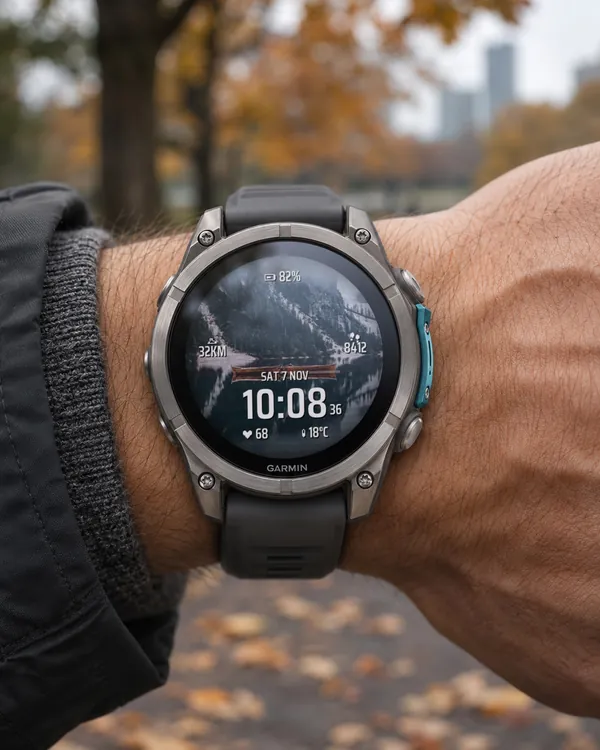 Photo
Photo Face
Your own photo on the whole screen
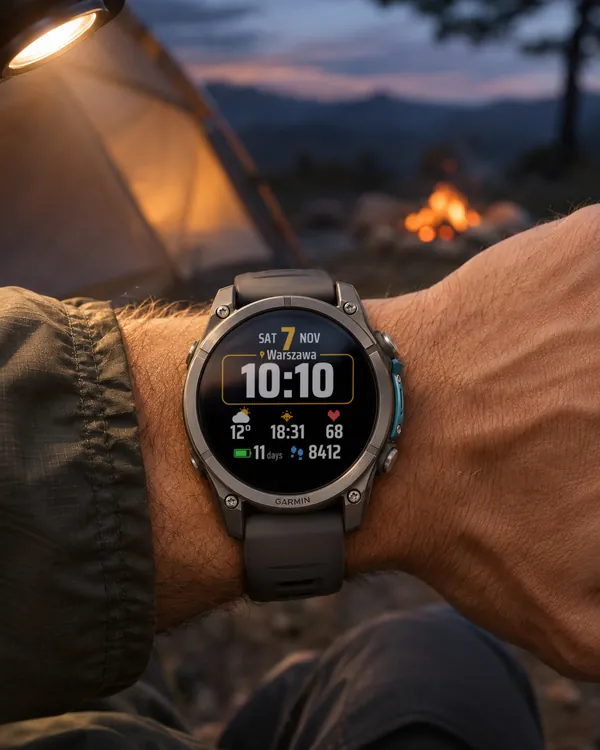 Outdoor
Bold Outdoor
A big, easy-to-read outdoor face: large day number, the time in a frame with your town
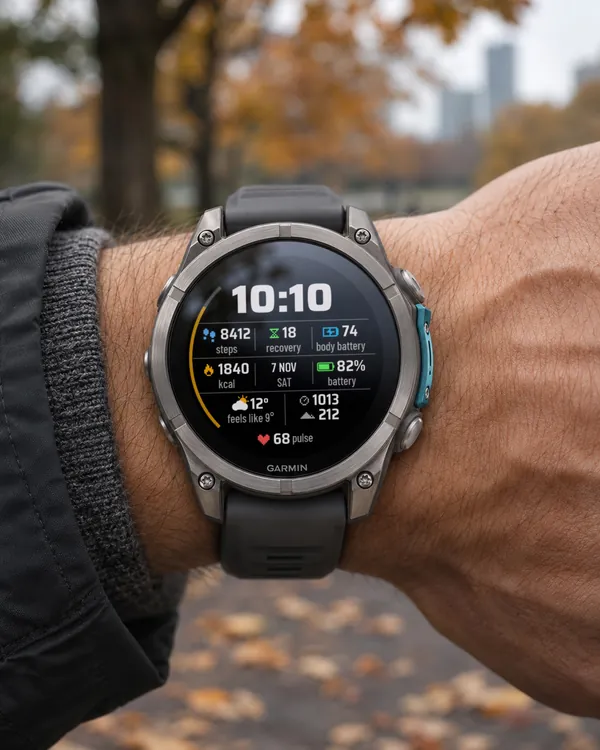 Digital
Clear Time V3
A clean face with a huge time: two rows of three fields with icons, values and progress bars
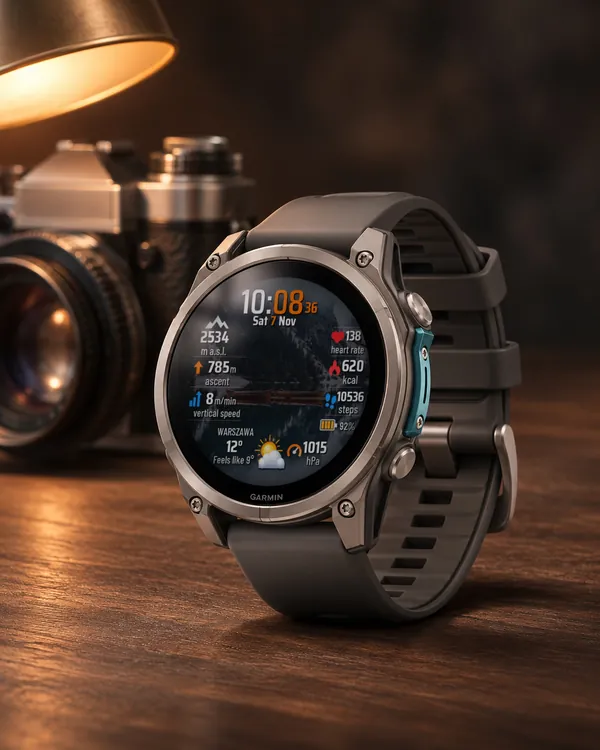 Photo
Woman Climber Photo
Woman Climber with your own photo as the background: altitude, elevation gain