Unlock
€6.49
One-time payment. No subscription. The code works on the watch whose ID you enter.
- Install the face from Connect IQ (7 days free).
- On the watch: face settings > Buy / Unlock, scan the QR code.
- Pay and paste the code in the face settings.
- Pay.
- Copy the code.
- Paste it in Connect IQ: this face > Settings > Unlock code.
Payment works best in Safari or Chrome: menu (three dots) > Open in browser
Read it in this face, it is not the serial number of the watch.
Your ID, compare it with the watch:
Where do I find the ID?
On the watch: settings of this face > Buy / Unlock (first item). Scan the QR code with your phone or type the 10 digits. The ID is also at the top of the face settings in the Connect IQ app.
Code not working on your watch? Write to me and I refund within 14 days.
Payments by Stripe. Seller: Mateusz Kolarz, Lublin, Poland.
Paid. Code:
Copying did not work. The code is selected: copy it by hand.
The face unlocks by itself when the watch connects to the phone (usually within an hour; if the trial is still running, the purchase starts working when it ends).
Do not want to wait, or have an older watch? Paste the code in the Connect IQ app:
Connect IQ (or Garmin Connect) > My Device > Watch faces > Rest > Settings > Unlock code > paste > Save
We show the code here too. If the e-mail does not arrive (check spam), you can recover the code in the Recover code section with the Face ID and e-mail from your order. Recover code
Like it? Rate this face in the Garmin store
Want to try new faces and apps before the release, for free? Join the testers program
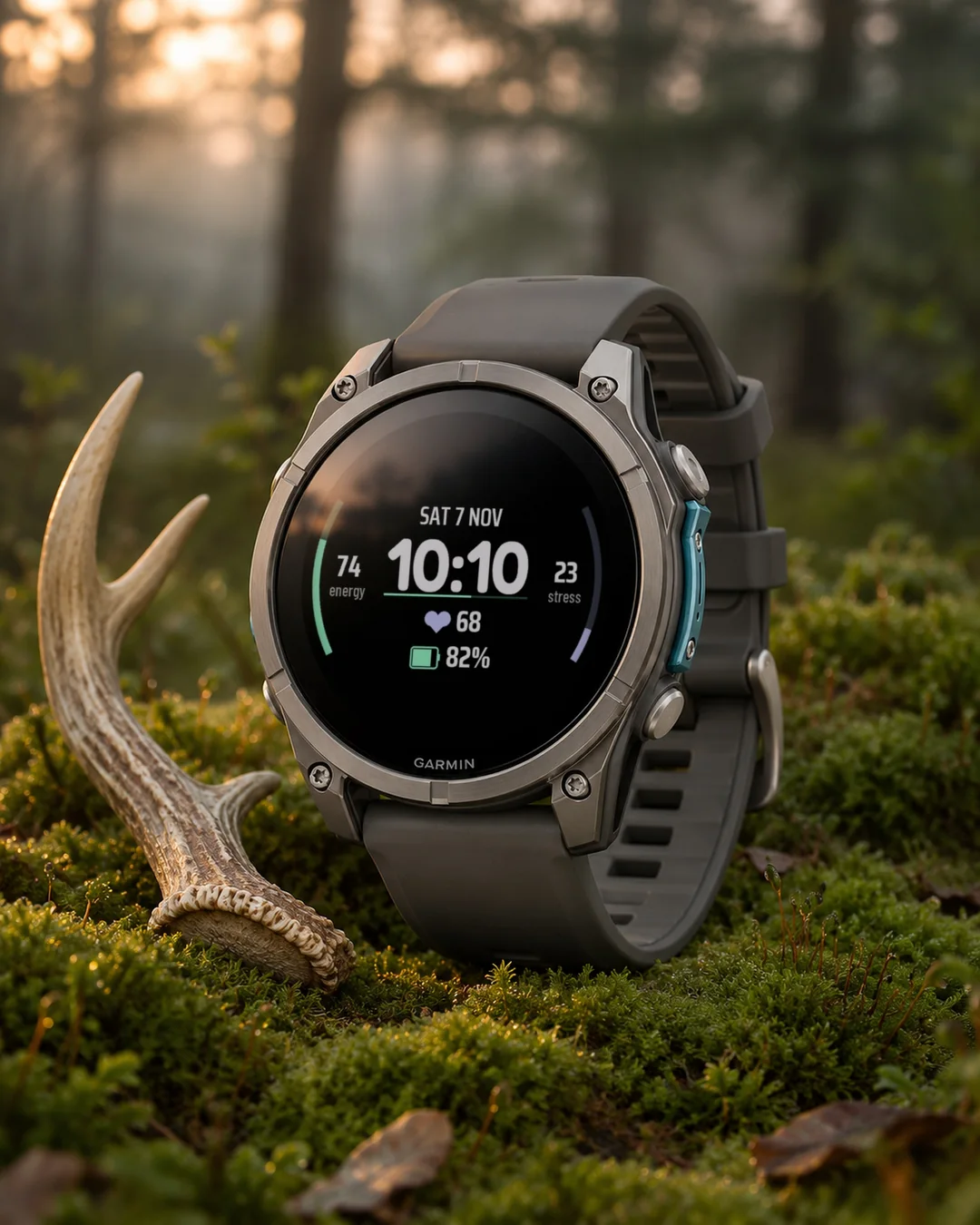
A watch face that shows Body Battery on the left and stress on the right as two curved scales around a big white clock, with heart rate, battery and date, for round Garmin watches.
7-day free trial, then a one-time unlock at dialforge.dev. No subscription.
Check Body Battery and stress right next to the time after work. Rest puts two curved scales on the sides of a big white clock: energy on the left in mint, stress on the right in lavender, each with its own number. Heart rate and battery sit below the time, the date above it.
- Data fields: 5. Each shows one of 31 kinds of data (heart rate, steps, battery, weather, stress and more) or stays empty.
- Separate colours for time, accent, date, values, labels, lines, icons and battery.
- Three text size settings: time, field values, date and labels.
- Three time zones can be shown in the fields.
- Seconds on or off. They hide themselves in sleep mode.
- Always-on screen on AMOLED: the time only, or the whole face dimmed. The picture shifts every minute.
- Date in 13 languages, 12 or 24 hour time.
- Round screens only. Garmin models: 50, AMOLED and MIP.
When Garmin has no data for a field, the face shows "--" instead of a made-up value. Weather needs a phone connection.
Garmin does not give watch faces access to HRV status or Training Readiness, so no Connect IQ watch face can show them.
Settings: on the watch (hold MENU, then Watch face, then Customize) or in the Garmin Connect app on your phone.
Trial: the face works fully for 7 days. In the last 3 days a small note shows the days left. After that the face shows a lock screen with the clock, your Face ID and a QR code. Buy a code for that ID at dialforge.dev and enter it in the Connect IQ app, in the face settings (Unlock code).
Code not working? Write to kontakt@dialforge.dev and I will fix it or refund you.
From the maker
I am a student and I build Dialforge watch faces myself, after classes. I do not own every watch model, so if something looks wrong on yours, write to me at https://dialforge.dev/faces/nsrest/ and I will usually fix it within 24 hours. If you like the face, you can buy me a coffee: https://buycoffee.to/iwannaflysohigh
Works on fenix 9, fenix 8, Forerunner 970, Forerunner 570, Venu 4, Forerunner 965, Forerunner 265, Venu 3 and more.
Tarcza pokazująca Body Battery po lewej i stres po prawej na dwóch zakrzywionych skalach wokół dużego białego zegara, z tętnem, baterią i datą, na okrągłe zegarki Garmin.
7 dni za darmo, potem jednorazowe odblokowanie na dialforge.dev. Bez abonamentu.
Po pracy zobacz Body Battery i stres tuż obok godziny. Rest ustawia po bokach dużego białego zegara dwie łukowe skale: energię po lewej w kolorze mięty, stres po prawej w lawendzie, każdą z własną liczbą. Tętno i bateria są pod godziną, data nad nią.
- Pola danych: 5. Każde pokazuje jeden z 31 rodzajów danych (tętno, kroki, bateria, pogoda, stres i inne) albo zostaje puste.
- Osobne kolory godziny, akcentu, daty, wartości, podpisów, linii, ikon i baterii.
- Trzy ustawienia rozmiaru tekstu: godzina, wartości pól, data i podpisy.
- Trzy strefy czasowe do pokazania w polach.
- Sekundy włączone albo wyłączone. W trybie uśpienia chowają się same.
- Ekran wygaszony na AMOLED: sama godzina albo cała tarcza przygaszona. Obraz przesuwa się co minutę.
- Data w 13 językach, godzina 12 lub 24 h.
- Tylko okrągłe ekrany. Modele Garmin: 50, AMOLED i MIP.
Gdy Garmin nie ma danych dla pola, tarcza pokazuje "--" zamiast zmyślonej wartości. Pogoda wymaga połączenia z telefonem.
Garmin nie udostępnia tarczom statusu HRV ani gotowości treningowej, więc żadna tarcza Connect IQ ich nie pokaże.
Ustawienia: na zegarku (przytrzymaj MENU, potem Tarcza zegarka, potem Dostosuj) albo w aplikacji Garmin Connect w telefonie.
Próba: przez 7 dni tarcza działa w całości. W ostatnich 3 dniach mały napis pokazuje, ile dni zostało. Potem tarcza pokazuje ekran blokady z zegarem, numerem ID tarczy i kodem QR. Kod dla tego ID kupisz na dialforge.dev i wpiszesz w aplikacji Connect IQ, w ustawieniach tarczy (pole Kod odblokowania).
Kod nie działa? Napisz na kontakt@dialforge.dev, poprawię albo oddam pieniądze.
Od autora
Jestem studentem i robię tarcze Dialforge sam, po zajęciach. Nie mam każdego modelu zegarka, więc jeśli coś wygląda źle na Twoim, napisz na https://dialforge.dev/faces/nsrest/, zwykle poprawiam to w ciągu 24 godzin. Jeśli tarcza Ci się podoba, możesz postawić mi kawę: https://buycoffee.to/iwannaflysohigh
Działa na: fenix 9, fenix 8, Forerunner 970, Forerunner 570, Venu 4, Forerunner 965, Forerunner 265, Venu 3 i innych.
Ein Zifferblatt mit Body Battery links und Stress rechts auf zwei gebogenen Skalen um eine große weiße Uhr, dazu Herzfrequenz, Akku und Datum, für runde Garmin-Uhren.
7 Tage kostenlos testen, danach einmalige Freischaltung auf dialforge.dev. Kein Abo.
Rest ist ein Watchface von Dialforge für runde Garmin-Displays.
- Datenfelder: 5. Jedes zeigt eine von 31 Datenarten (Herzfrequenz, Schritte, Akku, Wetter, Stress und mehr) oder bleibt leer.
- Getrennte Farben für Uhrzeit, Akzent, Datum, Werte, Beschriftungen, Linien, Symbole und Akku.
- Drei Einstellungen für die Textgröße: Uhrzeit, Feldwerte, Datum und Beschriftungen.
- Drei Zeitzonen lassen sich in den Feldern anzeigen.
- Sekunden ein oder aus. Im Ruhemodus blenden sie sich selbst aus.
- Always-On-Display bei AMOLED: nur die Uhrzeit oder das ganze Watchface gedimmt. Das Bild verschiebt sich jede Minute.
- Datum in 13 Sprachen, 12- oder 24-Stunden-Anzeige.
- Nur runde Displays. Garmin-Modelle: 50, AMOLED und MIP.
Wenn Garmin für ein Feld keine Daten hat, zeigt das Watchface "--" statt eines erfundenen Werts. Für das Wetter ist eine Verbindung zum Handy nötig.
Garmin gibt Watchfaces keinen Zugriff auf HRV-Status oder Training Readiness, deshalb kann sie kein Connect IQ Watchface anzeigen.
Einstellungen: auf der Uhr (MENU gedrückt halten, dann Watchface, dann Anpassen) oder in der Garmin Connect App auf dem Handy.
Testversion: Das Watchface funktioniert 7 Tage lang uneingeschränkt. In den letzten 3 Tagen zeigt ein kleiner Hinweis die verbleibenden Tage. Danach erscheint ein Sperrbildschirm mit Uhrzeit, deiner Watch ID und einem QR-Code. Kaufe auf dialforge.dev einen Code für diese ID und gib ihn in der Connect IQ App in den Watchface-Einstellungen ein (Unlock code).
Code funktioniert nicht? Schreibe an kontakt@dialforge.dev und ich bringe es in Ordnung oder erstatte dir das Geld.
Vom entwickler
Ich bin Student und baue die Dialforge-Watchfaces selbst, nach den Vorlesungen. Ich besitze nicht jedes Uhrenmodell. Wenn bei dir etwas falsch aussieht, schreib mir unter https://dialforge.dev/faces/nsrest/, ich behebe es meistens innerhalb von 24 Stunden. Wenn dir das Watchface gefällt, kannst du mir einen Kaffee spendieren: https://buycoffee.to/iwannaflysohigh
Läuft auf fenix 9, fenix 8, Forerunner 970, Forerunner 570, Venu 4, Forerunner 965, Forerunner 265, Venu 3 und weiteren Modellen.
Un cadran qui affiche Body Battery à gauche et le stress à droite sur deux échelles courbes autour d'une grande horloge blanche, avec fréquence cardiaque, batterie et date, pour montres Garmin rondes.
Essai gratuit de 7 jours, puis un déverrouillage unique sur dialforge.dev. Sans abonnement.
Rest est un cadran Dialforge pour les écrans ronds Garmin.
- Champs de données : 5. Chacun affiche l'un des 31 types de données (fréquence cardiaque, pas, batterie, météo, stress et plus) ou reste vide.
- Couleurs séparées pour l'heure, l'accent, la date, les valeurs, les libellés, les lignes, les icônes et la batterie.
- Trois réglages de taille de texte : l'heure, les valeurs des champs, la date et les libellés.
- Trois fuseaux horaires peuvent s'afficher dans les champs.
- Secondes activées ou désactivées. Elles se masquent d'elles-mêmes en veille.
- Écran toujours allumé sur AMOLED : l'heure seule, ou tout le cadran atténué. L'image se décale chaque minute.
- Date en 13 langues, heure au format 12 ou 24 heures.
- Écrans ronds uniquement. Modèles Garmin : 50, AMOLED et MIP.
Quand Garmin n'a aucune donnée pour un champ, le cadran affiche "--" au lieu d'une valeur inventée. La météo nécessite une connexion au téléphone.
Garmin ne donne pas aux cadrans l'accès au statut HRV ni à Training Readiness, donc aucun cadran Connect IQ ne peut les afficher.
Réglages : sur la montre (maintenez MENU, puis Cadran, puis Personnaliser) ou dans l'application Garmin Connect sur votre téléphone.
Essai : le cadran fonctionne entièrement pendant 7 jours. Pendant les 3 derniers jours, une petite note indique les jours restants. Ensuite, le cadran affiche un écran verrouillé avec l'heure, votre Watch ID et un code QR. Achetez un code pour cet ID sur dialforge.dev et saisissez-le dans l'application Connect IQ, dans les réglages du cadran (Unlock code).
Le code ne fonctionne pas ? Écrivez à kontakt@dialforge.dev, je corrige ou je vous rembourse.
De la part du créateur
Je suis étudiant et je fabrique moi-même les cadrans Dialforge, après les cours. Je ne possède pas tous les modèles de montres, alors si quelque chose cloche sur la vôtre, écrivez-moi à https://dialforge.dev/faces/nsrest/ et je corrige en général sous 24 heures. Si le cadran vous plaît, vous pouvez m'offrir un café : https://buycoffee.to/iwannaflysohigh
Compatible avec fenix 9, fenix 8, Forerunner 970, Forerunner 570, Venu 4, Forerunner 965, Forerunner 265, Venu 3 et d'autres modèles.
Una esfera que muestra Body Battery a la izquierda y el estrés a la derecha en dos escalas curvas alrededor de un gran reloj blanco, con frecuencia cardíaca, batería y fecha, para relojes Garmin redondos.
Prueba gratuita de 7 días y luego un desbloqueo único en dialforge.dev. Sin suscripción.
Rest es una esfera de Dialforge para pantallas redondas de Garmin.
- Campos de datos: 5. Cada uno muestra uno de 31 tipos de datos (frecuencia cardíaca, pasos, batería, tiempo, estrés y más) o queda vacío.
- Colores independientes para la hora, el acento, la fecha, los valores, las etiquetas, las líneas, los iconos y la batería.
- Tres ajustes de tamaño de texto: la hora, los valores de los campos, la fecha y las etiquetas.
- Se pueden mostrar tres zonas horarias en los campos.
- Segundos activados o desactivados. Se ocultan solos en modo reposo.
- Pantalla siempre activa en AMOLED: solo la hora, o toda la esfera atenuada. La imagen se desplaza cada minuto.
- Fecha en 13 idiomas, hora de 12 o 24 horas.
- Solo pantallas redondas. Modelos Garmin: 50, AMOLED y MIP.
Cuando Garmin no tiene datos para un campo, la esfera muestra "--" en lugar de un valor inventado. El tiempo necesita conexión con el teléfono.
Garmin no da a las esferas acceso al estado de HRV ni a Training Readiness, así que ninguna esfera de Connect IQ puede mostrarlos.
Ajustes: en el reloj (mantén MENU, luego Esfera de reloj, luego Personalizar) o en la app Garmin Connect del teléfono.
Prueba: la esfera funciona por completo durante 7 días. En los últimos 3 días, una nota pequeña indica los días que quedan. Después, la esfera muestra una pantalla de bloqueo con la hora, tu Watch ID y un código QR. Compra un código para ese ID en dialforge.dev e introdúcelo en la app Connect IQ, en los ajustes de la esfera (Unlock code).
¿El código no funciona? Escribe a kontakt@dialforge.dev y lo arreglo o te devuelvo el dinero.
De parte del creador
Soy estudiante y hago yo mismo las esferas de Dialforge, después de clase. No tengo todos los modelos de reloj, así que si algo se ve mal en el tuyo, escríbeme en https://dialforge.dev/faces/nsrest/ y normalmente lo arreglo en 24 horas. Si te gusta la esfera, puedes invitarme a un café: https://buycoffee.to/iwannaflysohigh
Compatible con fenix 9, fenix 8, Forerunner 970, Forerunner 570, Venu 4, Forerunner 965, Forerunner 265, Venu 3 y más.
Een wijzerplaat met Body Battery links en stress rechts op twee gebogen schalen rond een grote witte klok, met hartslag, batterij en datum, voor ronde Garmin-horloges.
7 dagen gratis proberen, daarna een eenmalige ontgrendeling op dialforge.dev. Geen abonnement.
Rest is een wijzerplaat van Dialforge voor ronde Garmin-schermen.
- Gegevensvelden: 5. Elk toont een van 31 soorten gegevens (hartslag, stappen, batterij, weer, stress en meer) of blijft leeg.
- Aparte kleuren voor tijd, accent, datum, waarden, labels, lijnen, pictogrammen en batterij.
- Drie instellingen voor tekstgrootte: tijd, veldwaarden, datum en labels.
- Drie tijdzones kunnen in de velden worden getoond.
- Seconden aan of uit. In de slaapstand verbergen ze zichzelf.
- Altijd-aan-scherm op AMOLED: alleen de tijd, of de hele wijzerplaat gedimd. Het beeld verschuift elke minuut.
- Datum in 13 talen, 12- of 24-uursweergave.
- Alleen ronde schermen. Garmin-modellen: 50, AMOLED en MIP.
Als Garmin geen gegevens heeft voor een veld, toont de wijzerplaat "--" in plaats van een verzonnen waarde. Voor het weer is een verbinding met je telefoon nodig.
Garmin geeft wijzerplaten geen toegang tot HRV-status of Training Readiness, dus geen enkele Connect IQ-wijzerplaat kan ze tonen.
Instellingen: op het horloge (houd MENU ingedrukt, dan Wijzerplaat, dan Aanpassen) of in de Garmin Connect-app op je telefoon.
Proefperiode: de wijzerplaat werkt 7 dagen volledig. In de laatste 3 dagen toont een klein bericht de resterende dagen. Daarna toont de wijzerplaat een vergrendelscherm met de klok, je Watch ID en een QR-code. Koop op dialforge.dev een code voor dat ID en voer die in de Connect IQ-app in, bij de instellingen van de wijzerplaat (Unlock code).
Werkt de code niet? Schrijf naar kontakt@dialforge.dev, ik los het op of betaal je terug.
Van de maker
Ik ben student en bouw de Dialforge-wijzerplaten zelf, na de colleges. Ik heb niet elk horlogemodel, dus als er op het jouwe iets raars uitziet, schrijf me dan via https://dialforge.dev/faces/nsrest/. Meestal los ik het binnen 24 uur op. Als je de wijzerplaat mooi vindt, kun je een koffie voor me kopen: https://buycoffee.to/iwannaflysohigh
Werkt op fenix 9, fenix 8, Forerunner 970, Forerunner 570, Venu 4, Forerunner 965, Forerunner 265, Venu 3 en meer.
大きな白い時計の両側に、左にBody Battery、右にストレスを湾曲スケールで表示する文字盤。心拍数、バッテリー、日付も表示し、円形のGarmin時計に対応します。
7日間無料でお試しいただけます。その後はdialforge.devで解除を一度だけ購入(サブスクリプションなし)。
Restは、丸いGarmin画面向けのDialforgeのウォッチフェイスです。
- データフィールド:5個。それぞれ31種類のデータ(心拍数、歩数、バッテリー、天気、ストレスなど)のどれかを表示するか、空のままにできます。
- 時刻、アクセント、日付、数値、ラベル、線、アイコン、バッテリーの色を個別に選べます。
- 文字サイズの設定は3つ:時刻、フィールドの値、日付とラベル。
- フィールドに3つのタイムゾーンを表示できます。
- 秒表示はオンとオフを選べます。スリープ中は自動的に隠れます。
- AMOLEDの常時表示:時刻だけ、または文字盤全体を暗くして表示します。画面は1分ごとに少しずれます。
- 日付は13言語、12時間または24時間表示。
- 丸い画面専用です。対応するGarminのモデル:50、AMOLEDとMIP。
Garminからデータが取れないフィールドには、作り物の値ではなく「--」を表示します。天気にはスマートフォンとの接続が必要です。
GarminはウォッチフェイスにHRVステータスやTraining Readinessへのアクセスを許可していないため、Connect IQのウォッチフェイスでは表示できません。
設定:時計本体(MENUを長押し、ウォッチフェイス、カスタマイズの順)、またはスマートフォンのGarmin Connectアプリから。
お試し:ウォッチフェイスは7日間すべての機能が使えます。最後の3日間は、残り日数を小さく表示します。その後は、時計、Watch ID、QRコードのあるロック画面になります。そのIDのコードをdialforge.devで購入し、Connect IQアプリのウォッチフェイス設定(Unlock code)に入力してください。
コードが使えない場合は、kontakt@dialforge.devまでご連絡ください。修正するか、返金します。
作者より
私は学生で、授業のあとにDialforgeのウォッチフェイスを自分で作っています。すべての時計を持っているわけではないので、お使いの機種で表示がおかしければ https://dialforge.dev/faces/nsrest/ まで連絡してください。たいてい24時間以内に直します。気に入ったらコーヒーをごちそうしてください:https://buycoffee.to/iwannaflysohigh
対応モデル:fenix 9, fenix 8, Forerunner 970, Forerunner 570, Venu 4, Forerunner 965, Forerunner 265, Venu 3 ほか
Un quadrante che mostra Body Battery a sinistra e lo stress a destra su due scale curve attorno a un grande orologio bianco, con frequenza cardiaca, batteria e data, per orologi Garmin rotondi.
Prova gratuita di 7 giorni, poi uno sblocco una tantum su dialforge.dev. Nessun abbonamento.
Rest è un quadrante Dialforge per gli schermi rotondi Garmin.
- Campi dati: 5. Ognuno mostra uno dei 31 tipi di dati (frequenza cardiaca, passi, batteria, meteo, stress e altro) oppure resta vuoto.
- Colori separati per ora, accento, data, valori, etichette, linee, icone e batteria.
- Tre impostazioni per la dimensione del testo: ora, valori dei campi, data ed etichette.
- Tre fusi orari possono essere mostrati nei campi.
- Secondi attivi o disattivi. In modalità di riposo si nascondono da soli.
- Schermo sempre attivo su AMOLED: solo l'ora, oppure tutto il quadrante attenuato. L'immagine si sposta ogni minuto.
- Data in 13 lingue, ora a 12 o 24 ore.
- Solo schermi rotondi. Modelli Garmin: 50, AMOLED e MIP.
Quando Garmin non ha dati per un campo, il quadrante mostra "--" invece di un valore inventato. Il meteo richiede la connessione al telefono.
Garmin non dà ai quadranti accesso allo stato HRV né a Training Readiness, quindi nessun quadrante Connect IQ può mostrarli.
Impostazioni: sull'orologio (tieni premuto MENU, poi Quadrante, poi Personalizza) oppure nell'app Garmin Connect sul telefono.
Prova: il quadrante funziona per intero per 7 giorni. Negli ultimi 3 giorni una piccola nota mostra i giorni rimasti. Poi compare una schermata di blocco con l'ora, il tuo Watch ID e un codice QR. Acquista un codice per quell'ID su dialforge.dev e inseriscilo nell'app Connect IQ, nelle impostazioni del quadrante (Unlock code).
Il codice non funziona? Scrivi a kontakt@dialforge.dev: lo sistemo o ti rimborso.
Da chi lo fa
Sono uno studente e costruisco da solo i quadranti Dialforge, dopo le lezioni. Non ho tutti i modelli di orologio, quindi se sul tuo qualcosa non torna, scrivimi su https://dialforge.dev/faces/nsrest/ e di solito sistemo entro 24 ore. Se il quadrante ti piace, puoi offrirmi un caffè: https://buycoffee.to/iwannaflysohigh
Compatibile con fenix 9, fenix 8, Forerunner 970, Forerunner 570, Venu 4, Forerunner 965, Forerunner 265, Venu 3 e altri.
在白色大号时钟两侧以两条弧形刻度显示左侧 Body Battery 和右侧压力的表盘,另有心率、电量和日期,适用于圆形 Garmin 手表。
7 天免费试用,之后在 dialforge.dev 一次性解锁。无需订阅。
Rest 是 Dialforge 为 Garmin 圆形屏幕制作的表盘。
- 数据字段:5个。每个字段可显示31种数据之一(心率、步数、电量、天气、压力等),也可以留空。
- 时间、强调色、日期、数值、标签、线条、图标和电量可分别设置颜色。
- 三项文字大小设置:时间、字段数值、日期和标签。
- 字段中可显示三个时区。
- 秒针可开可关。休眠模式下会自动隐藏。
- AMOLED 常亮屏幕:只显示时间,或整个表盘调暗显示。画面每分钟移动一次。
- 日期支持13种语言,12或24小时制。
- 仅限圆形屏幕。Garmin 型号:50个,含 AMOLED 和 MIP。
当 Garmin 没有某个栏位的数据时,表盘会显示"--",而不是编造一个数值。天气需要连接手机。
Garmin 不允许表盘读取 HRV 状态或 Training Readiness,所以任何 Connect IQ 表盘都无法显示它们。
设置方式:在手表上(按住 MENU,然后选择表盘,再选择自定义),或在手机上的 Garmin Connect 应用中。
试用:表盘在 7 天内功能完整。最后 3 天会用小字提示剩余天数。之后表盘会显示锁定屏幕,包含时钟、你的 Watch ID 和二维码。请在 dialforge.dev 为该 ID 购买解锁码,并在 Connect IQ 应用的表盘设置(Unlock code)中输入。
解锁码无效?请写信到 kontakt@dialforge.dev,我会修复或退款。
来自开发者
我是学生,Dialforge 的表盘都是我下课后自己做的。我没有所有型号的手表,所以如果在你的手表上看起来不对,请通过 https://dialforge.dev/faces/nsrest/ 联系我,我通常会在24小时内修好。如果你喜欢这款表盘,可以请我喝杯咖啡:https://buycoffee.to/iwannaflysohigh
适用于 fenix 9, fenix 8, Forerunner 970, Forerunner 570, Venu 4, Forerunner 965, Forerunner 265, Venu 3 等。
Циферблат с Body Battery слева и стрессом справа на двух изогнутых шкалах вокруг крупных белых часов, плюс пульс, заряд и дата, для круглых часов Garmin.
7-дневный бесплатный пробный период, затем разовая разблокировка на dialforge.dev. Без подписки.
Rest это циферблат Dialforge для круглых экранов Garmin.
- Поля данных: 5. Каждое показывает один из 31 видов данных (пульс, шаги, заряд, погода, стресс и другие) или остаётся пустым.
- Отдельные цвета для времени, акцента, даты, значений, подписей, линий, значков и заряда.
- Три настройки размера текста: время, значения полей, дата и подписи.
- В полях можно показать три часовых пояса.
- Секунды включаются и выключаются. В спящем режиме они скрываются сами.
- Всегда включённый экран на AMOLED: только время или весь циферблат приглушённо. Изображение смещается каждую минуту.
- Дата на 13 языках, 12- или 24-часовой формат времени.
- Только круглые экраны. Моделей Garmin: 50, AMOLED и MIP.
Если у Garmin нет данных для поля, циферблат показывает "--", а не выдуманное значение. Для погоды нужно подключение к телефону.
Garmin не даёт циферблатам доступ к статусу HRV и Training Readiness, поэтому ни один циферблат Connect IQ не может их показывать.
Настройки: на часах (удерживайте MENU, затем Циферблат, затем Настроить) или в приложении Garmin Connect на телефоне.
Пробный период: циферблат полностью работает 7 дней. В последние 3 дня небольшая надпись показывает, сколько дней осталось. После этого появляется экран блокировки с часами, вашим Watch ID и QR-кодом. Купите код для этого ID на dialforge.dev и введите его в приложении Connect IQ, в настройках циферблата (Unlock code).
Код не работает? Напишите на kontakt@dialforge.dev, я исправлю или верну деньги.
От автора
Я студент и сам делаю циферблаты Dialforge после занятий. У меня нет всех моделей часов, поэтому если на вашей что-то выглядит не так, напишите мне на https://dialforge.dev/faces/nsrest/, и я обычно исправляю за 24 часа. Если циферблат нравится, можете угостить меня кофе: https://buycoffee.to/iwannaflysohigh
Работает на fenix 9, fenix 8, Forerunner 970, Forerunner 570, Venu 4, Forerunner 965, Forerunner 265, Venu 3 и других.
Um mostrador com Body Battery à esquerda e estresse à direita em duas escalas curvas ao redor de um grande relógio branco, com frequência cardíaca, bateria e data, para relógios Garmin redondos.
Teste grátis de 7 dias, depois um desbloqueio único em dialforge.dev. Sem assinatura.
Rest é um mostrador da Dialforge para telas redondas da Garmin.
- Campos de dados: 5. Cada um mostra um de 31 tipos de dados (frequência cardíaca, passos, bateria, clima, estresse e mais) ou fica vazio.
- Cores separadas para a hora, o destaque, a data, os valores, os rótulos, as linhas, os ícones e a bateria.
- Três ajustes de tamanho de texto: a hora, os valores dos campos, a data e os rótulos.
- Três fusos horários podem aparecer nos campos.
- Segundos ligados ou desligados. Eles se escondem sozinhos no modo de repouso.
- Tela sempre ligada no AMOLED: só a hora, ou o mostrador inteiro escurecido. A imagem se desloca a cada minuto.
- Data em 13 idiomas, hora de 12 ou 24 horas.
- Somente telas redondas. Modelos Garmin: 50, AMOLED e MIP.
Quando a Garmin não tem dados para um campo, o mostrador exibe "--" em vez de um valor inventado. O clima precisa de conexão com o celular.
A Garmin não dá aos mostradores acesso ao status de HRV nem ao Training Readiness, então nenhum mostrador do Connect IQ consegue exibi-los.
Configurações: no relógio (segure MENU, depois Mostrador, depois Personalizar) ou no app Garmin Connect no celular.
Teste: o mostrador funciona por completo durante 7 dias. Nos últimos 3 dias, uma pequena nota mostra os dias restantes. Depois, o mostrador exibe uma tela de bloqueio com o relógio, o seu Watch ID e um código QR. Compre um código para esse ID em dialforge.dev e digite no app Connect IQ, nas configurações do mostrador (Unlock code).
O código não funciona? Escreva para kontakt@dialforge.dev, eu corrijo ou devolvo o seu dinheiro.
De quem fez
Sou estudante e faço os mostradores Dialforge sozinho, depois das aulas. Não tenho todos os modelos de relógio, então se algo estiver estranho no seu, escreva pra mim em https://dialforge.dev/faces/nsrest/ e normalmente eu resolvo em até 24 horas. Se você gostar do mostrador, pode me pagar um café: https://buycoffee.to/iwannaflysohigh
Funciona em fenix 9, fenix 8, Forerunner 970, Forerunner 570, Venu 4, Forerunner 965, Forerunner 265, Venu 3 e outros.
Ciferník s Body Battery vlevo a stresem vpravo na dvou zakřivených stupnicích kolem velkých bílých hodin, s tepem, baterií a datem, pro kulaté hodinky Garmin.
7denní bezplatná zkušební verze, poté jednorázové odemknutí na dialforge.dev. Žádné předplatné.
Rest je ciferník od Dialforge pro kulaté displeje Garmin.
- Datová pole: 5. Každé ukazuje jeden z 31 druhů dat (tep, kroky, baterie, počasí, stres a další) nebo zůstane prázdné.
- Samostatné barvy pro čas, akcent, datum, hodnoty, popisky, čáry, ikony a baterii.
- Tři nastavení velikosti textu: čas, hodnoty polí, datum a popisky.
- V polích lze zobrazit tři časová pásma.
- Sekundy zapnuté nebo vypnuté. V režimu spánku se skryjí samy.
- Stále zapnutý displej na AMOLED: jen čas, nebo celý ciferník ztlumený. Obraz se každou minutu posune.
- Datum v 13 jazycích, 12hodinový nebo 24hodinový formát.
- Pouze kulaté displeje. Modely Garmin: 50, AMOLED a MIP.
Když Garmin pro některé pole nemá data, ciferník zobrazí "--" místo vymyšlené hodnoty. Počasí potřebuje připojení k telefonu.
Garmin nedává ciferníkům přístup ke stavu HRV ani k Training Readiness, takže je žádný ciferník Connect IQ zobrazit nemůže.
Nastavení: na hodinkách (podrž MENU, pak Ciferník, pak Přizpůsobit) nebo v aplikaci Garmin Connect v telefonu.
Zkouška: ciferník plně funguje 7 dní. V posledních 3 dnech malá poznámka ukazuje, kolik dní zbývá. Poté ciferník zobrazí zamykací obrazovku s hodinami, vaším Watch ID a QR kódem. Kód pro toto ID koupíte na dialforge.dev a zadáte ho v aplikaci Connect IQ v nastavení ciferníku (Unlock code).
Kód nefunguje? Napište na kontakt@dialforge.dev, opravím to nebo vrátím peníze.
Od tvůrce
Jsem student a ciferníky Dialforge dělám sám, po škole. Nemám každý model hodinek, takže pokud něco na tvých vypadá špatně, napiš mi přes https://dialforge.dev/faces/nsrest/ a obvykle to opravím do 24 hodin. Pokud se ti ciferník líbí, můžeš mi koupit kávu: https://buycoffee.to/iwannaflysohigh
Funguje na fenix 9, fenix 8, Forerunner 970, Forerunner 570, Venu 4, Forerunner 965, Forerunner 265, Venu 3 a dalších.
Um mostrador com Body Battery à esquerda e stress à direita em duas escalas curvas à volta de um grande relógio branco, com frequência cardíaca, bateria e data, para relógios Garmin redondos.
7 dias de teste gratuito, depois um desbloqueio único em dialforge.dev. Sem subscrição.
Rest é um mostrador da Dialforge para ecrãs redondos da Garmin.
- Campos de dados: 5. Cada um mostra um de 31 tipos de dados (frequência cardíaca, passos, bateria, meteorologia, stress e mais) ou fica vazio.
- Cores separadas para a hora, o destaque, a data, os valores, as etiquetas, as linhas, os ícones e a bateria.
- Três definições de tamanho do texto: a hora, os valores dos campos, a data e as etiquetas.
- Três fusos horários podem aparecer nos campos.
- Segundos ligados ou desligados. Escondem-se sozinhos no modo de repouso.
- Ecrã sempre ligado em AMOLED: só a hora, ou o mostrador inteiro esbatido. A imagem desloca-se a cada minuto.
- Data em 13 idiomas, hora de 12 ou 24 horas.
- Apenas ecrãs redondos. Modelos Garmin: 50, AMOLED e MIP.
Quando a Garmin não tem dados para um campo, o mostrador mostra "--" em vez de um valor inventado. A meteorologia precisa de ligação ao telemóvel.
A Garmin não dá aos mostradores acesso ao estado de HRV nem ao Training Readiness, por isso nenhum mostrador Connect IQ os pode apresentar.
Definições: no relógio (mantenha MENU premido, depois Mostrador, depois Personalizar) ou na aplicação Garmin Connect no telemóvel.
Teste: o mostrador funciona por completo durante 7 dias. Nos últimos 3 dias, uma pequena nota mostra os dias que faltam. Depois, o mostrador apresenta um ecrã de bloqueio com o relógio, o seu Watch ID e um código QR. Compre um código para esse ID em dialforge.dev e introduza-o na app Connect IQ, nas definições do mostrador (Unlock code).
O código não funciona? Escreva para kontakt@dialforge.dev, corrijo ou devolvo-lhe o dinheiro.
Do criador
Sou estudante e faço eu próprio os mostradores Dialforge, depois das aulas. Não tenho todos os modelos de relógio, por isso se algo parecer errado no seu, escreva-me para https://dialforge.dev/faces/nsrest/ e normalmente corrijo em 24 horas. Se gostar do mostrador, pode pagar-me um café: https://buycoffee.to/iwannaflysohigh
Funciona em fenix 9, fenix 8, Forerunner 970, Forerunner 570, Venu 4, Forerunner 965, Forerunner 265, Venu 3 e outros.
큰 흰색 시계 양옆에 왼쪽은 Body Battery, 오른쪽은 스트레스를 곡선 눈금으로 보여 주는 워치 페이스로, 심박수, 배터리, 날짜도 표시하며 원형 Garmin 시계용입니다.
7일 무료 체험 후, dialforge.dev에서 일회성 잠금 해제를 구매하세요. 구독은 없습니다.
Rest은 둥근 Garmin 화면용 Dialforge 워치 페이스입니다.
- 데이터 필드: 5개. 각 필드는 31가지 데이터(심박수, 걸음 수, 배터리, 날씨, 스트레스 등) 중 하나를 보여 주거나 비워 둘 수 있습니다.
- 시간, 강조색, 날짜, 값, 라벨, 선, 아이콘, 배터리 색을 따로 정할 수 있습니다.
- 텍스트 크기 설정 세 가지: 시간, 필드 값, 날짜와 라벨.
- 필드에 세 개의 시간대를 표시할 수 있습니다.
- 초 표시를 켜거나 끌 수 있습니다. 절전 모드에서는 저절로 숨겨집니다.
- AMOLED 상시 표시 화면: 시간만 보이거나 전체 화면이 어둡게 표시됩니다. 화면은 1분마다 위치가 조금씩 이동합니다.
- 13개 언어의 날짜, 12시간 또는 24시간 표시.
- 원형 화면 전용입니다. Garmin 모델: 50개, AMOLED와 MIP.
Garmin에 해당 필드의 데이터가 없으면 지어낸 값 대신 "--"를 표시합니다. 날씨는 휴대폰 연결이 필요합니다.
Garmin은 워치 페이스에 HRV 상태나 Training Readiness 접근을 허용하지 않으므로, 어떤 Connect IQ 워치 페이스도 이를 표시할 수 없습니다.
설정: 시계에서 (MENU를 길게 누르고, 워치 페이스, 사용자 설정 순서) 또는 휴대폰의 Garmin Connect 앱에서 하세요.
체험: 워치 페이스는 7일 동안 모든 기능이 작동합니다. 마지막 3일 동안은 남은 일수를 작은 글씨로 알려 줍니다. 그 뒤에는 시계, 워치 ID, QR 코드가 있는 잠금 화면이 나타납니다. dialforge.dev에서 해당 ID용 코드를 구매해 Connect IQ 앱의 워치 페이스 설정(Unlock code)에 입력하세요.
코드가 작동하지 않나요? kontakt@dialforge.dev로 연락 주시면 고치거나 환불해 드립니다.
만든 사람의 한마디
저는 학생이고, 수업이 끝난 뒤에 Dialforge 워치 페이스를 직접 만들고 있습니다. 모든 시계 모델을 갖고 있지는 않아서, 사용 중인 모델에서 이상하게 보이면 https://dialforge.dev/faces/nsrest/로 알려 주세요. 보통 24시간 안에 고칩니다. 워치 페이스가 마음에 드신다면 커피 한 잔 사 주셔도 좋아요: https://buycoffee.to/iwannaflysohigh
지원 모델: fenix 9, fenix 8, Forerunner 970, Forerunner 570, Venu 4, Forerunner 965, Forerunner 265, Venu 3 외
En urtavla med Body Battery till vänster och stress till höger på två böjda skalor runt en stor vit klocka, med puls, batteri och datum, för runda Garmin-klockor.
7 dagars gratis provperiod, sedan en engångsupplåsning på dialforge.dev. Ingen prenumeration.
Rest är en urtavla från Dialforge för runda Garmin-skärmar.
- Datafält: 5. Varje fält visar en av 31 sorters data (puls, steg, batteri, väder, stress och mer) eller är tomt.
- Separata färger för tid, accent, datum, värden, etiketter, linjer, ikoner och batteri.
- Tre inställningar för textstorlek: tid, fältvärden, datum och etiketter.
- Tre tidszoner kan visas i fälten.
- Sekunder på eller av. I viloläge döljs de av sig själva.
- Alltid-på-skärm på AMOLED: bara tiden, eller hela urtavlan dämpad. Bilden flyttas varje minut.
- Datum på 13 språk, 12- eller 24-timmarsvisning.
- Endast runda skärmar. Garmin-modeller: 50, AMOLED och MIP.
När Garmin saknar data för ett fält visar urtavlan "--" i stället för ett påhittat värde. Vädret kräver anslutning till telefonen.
Garmin ger inte urtavlor åtkomst till HRV-status eller Training Readiness, så ingen Connect IQ-urtavla kan visa dem.
Inställningar: på klockan (håll in MENU, sedan Urtavla, sedan Anpassa) eller i appen Garmin Connect på telefonen.
Prov: urtavlan fungerar fullt ut i 7 dagar. De sista 3 dagarna visar en liten notis hur många dagar som är kvar. Därefter visar urtavlan en låsskärm med klockan, ditt Watch ID och en QR-kod. Köp en kod för det ID:t på dialforge.dev och skriv in den i Connect IQ-appen, i urtavlans inställningar (Unlock code).
Fungerar inte koden? Skriv till kontakt@dialforge.dev, så rättar jag det eller ger dig pengarna tillbaka.
Från skaparen
Jag är student och bygger Dialforge-urtavlorna själv, efter lektionerna. Jag äger inte alla klockmodeller, så om något ser fel ut på din, skriv till mig via https://dialforge.dev/faces/nsrest/ så fixar jag det oftast inom 24 timmar. Om du gillar urtavlan kan du bjuda mig på en kaffe: https://buycoffee.to/iwannaflysohigh
Fungerar på fenix 9, fenix 8, Forerunner 970, Forerunner 570, Venu 4, Forerunner 965, Forerunner 265, Venu 3 med flera.
En urskive med Body Battery til venstre og stress til højre på to buede skalaer omkring et stort hvidt ur, med puls, batteri og dato, til runde Garmin-ure.
7 dages gratis prøveperiode, derefter en engangsoplåsning på dialforge.dev. Intet abonnement.
Rest er en urskive fra Dialforge til runde Garmin-skærme.
- Datafelter: 5. Hvert viser en af 31 slags data (puls, skridt, batteri, vejr, stress og mere) eller står tomt.
- Separate farver til tid, accent, dato, værdier, etiketter, linjer, ikoner og batteri.
- Tre indstillinger for tekststørrelse: tid, feltværdier, dato og etiketter.
- Tre tidszoner kan vises i felterne.
- Sekunder til eller fra. I dvaletilstand skjuler de sig selv.
- Altid-tændt skærm på AMOLED: kun tiden, eller hele urskiven dæmpet. Billedet flytter sig hvert minut.
- Dato på 13 sprog, 12- eller 24-timers tid.
- Kun runde skærme. Garmin-modeller: 50, AMOLED og MIP.
Når Garmin ikke har data til et felt, viser skiven "--" i stedet for en opdigtet værdi. Vejret kræver forbindelse til telefonen.
Garmin giver ikke urskiver adgang til HRV-status eller Training Readiness, så ingen Connect IQ-urskive kan vise dem.
Indstillinger: på uret (hold MENU nede, derefter Urskive, derefter Tilpas) eller i Garmin Connect-appen på din telefon.
Prøve: urskiven virker fuldt ud i 7 dage. De sidste 3 dage viser en lille note, hvor mange dage der er tilbage. Derefter viser urskiven en låseskærm med uret, dit Watch ID og en QR-kode. Køb en kode til det ID på dialforge.dev og indtast den i Connect IQ-appen under urskivens indstillinger (Unlock code).
Virker koden ikke? Skriv til kontakt@dialforge.dev, så retter jeg det eller refunderer dig.
Fra udvikleren
Jeg er studerende og laver Dialforge-urskiverne selv, efter undervisningen. Jeg ejer ikke alle urmodeller, så hvis noget ser forkert ud på dit, så skriv til mig på https://dialforge.dev/faces/nsrest/, så retter jeg det som regel inden for 24 timer. Kan du lide skiven, kan du give mig en kop kaffe: https://buycoffee.to/iwannaflysohigh
Virker på fenix 9, fenix 8, Forerunner 970, Forerunner 570, Venu 4, Forerunner 965, Forerunner 265, Venu 3 og flere.
En urskive med Body Battery til venstre og stress til høyre på to buede skalaer rundt en stor hvit klokke, med puls, batteri og dato, for runde Garmin-klokker.
7 dagers gratis prøveperiode, deretter en engangsopplåsing på dialforge.dev. Ingen abonnement.
Rest er en urskive fra Dialforge for runde Garmin-skjermer.
- Datafelt: 5. Hvert viser én av 31 typer data (puls, skritt, batteri, vær, stress og mer) eller står tomt.
- Egne farger for tid, aksent, dato, verdier, etiketter, linjer, ikoner og batteri.
- Tre innstillinger for tekststørrelse: tid, feltverdier, dato og etiketter.
- Tre tidssoner kan vises i feltene.
- Sekunder på eller av. I hvilemodus skjuler de seg selv.
- Alltid-på-skjerm på AMOLED: bare tiden, eller hele urskiven dempet. Bildet flytter seg hvert minutt.
- Dato på 13 språk, 12- eller 24-timers visning.
- Bare runde skjermer. Garmin-modeller: 50, AMOLED og MIP.
Når Garmin ikke har data for et felt, viser urskiven "--" i stedet for en oppdiktet verdi. Vær krever tilkobling til telefonen.
Garmin gir ikke urskiver tilgang til HRV-status eller Training Readiness, så ingen Connect IQ-urskive kan vise dem.
Innstillinger: på klokken (hold inne MENU, deretter Urskive, deretter Tilpass) eller i Garmin Connect-appen på telefonen.
Prøve: urskiven fungerer fullt ut i 7 dager. De siste 3 dagene viser et lite notat hvor mange dager som er igjen. Etter det viser urskiven en låseskjerm med klokken, Watch ID-en din og en QR-kode. Kjøp en kode for den ID-en på dialforge.dev og skriv den inn i Connect IQ-appen, i urskiveinnstillingene (Unlock code).
Virker ikke koden? Skriv til kontakt@dialforge.dev, så fikser jeg det eller refunderer deg.
Fra utvikleren
Jeg er student og lager Dialforge-urskivene selv, etter forelesning. Jeg eier ikke alle klokkemodellene, så hvis noe ser feil ut på din, skriv til meg på https://dialforge.dev/faces/nsrest/, så fikser jeg det vanligvis innen 24 timer. Liker du urskiven, kan du gi meg en kaffe: https://buycoffee.to/iwannaflysohigh
Fungerer på fenix 9, fenix 8, Forerunner 970, Forerunner 570, Venu 4, Forerunner 965, Forerunner 265, Venu 3 og flere.
在白色大型時鐘兩側以兩條弧形刻度顯示左側 Body Battery 和右側壓力的錶面,另有心率、電量和日期,適用於圓形 Garmin 手錶。
7 天免費試用,之後在 dialforge.dev 一次性解鎖。不需訂閱。
Rest 是 Dialforge 為 Garmin 圓形螢幕製作的錶面。
- 資料欄位:5個。每個欄位可顯示31種資料之一(心率、步數、電量、天氣、壓力等),也可以留空。
- 時間、強調色、日期、數值、標籤、線條、圖示和電量可分別設定顏色。
- 三項文字大小設定:時間、欄位數值、日期和標籤。
- 欄位中可顯示三個時區。
- 秒針可開可關。休眠模式下會自動隱藏。
- AMOLED 常亮螢幕:只顯示時間,或整個錶面調暗顯示。畫面每分鐘移動一次。
- 日期支援13種語言,12或24小時制。
- 僅限圓形螢幕。Garmin 型號:50個,含 AMOLED 和 MIP。
當 Garmin 沒有某個欄位的資料時,錶面會顯示「--」,而不是編造一個數值。天氣需要連接手機。
Garmin 不允許錶面讀取 HRV 狀態或 Training Readiness,所以任何 Connect IQ 錶面都無法顯示它們。
設定方式:在手錶上(按住 MENU,然後選擇錶面,再選擇自訂),或在手機上的 Garmin Connect 應用程式中。
試用:錶面在 7 天內功能完整。最後 3 天會用小字提示剩餘天數。之後錶面會顯示鎖定畫面,包含時鐘、你的 Watch ID 和 QR 碼。請在 dialforge.dev 為該 ID 購買解鎖碼,並在 Connect IQ 應用程式的錶面設定(Unlock code)中輸入。
解鎖碼無效?請寫信到 kontakt@dialforge.dev,我會修復或退款。
來自開發者
我是學生,Dialforge 的錶面都是我下課後自己做的。我沒有所有型號的手錶,所以如果在你的手錶上看起來不對,請透過 https://dialforge.dev/faces/nsrest/ 聯絡我,我通常會在24小時內修好。如果你喜歡這款錶面,可以請我喝杯咖啡:https://buycoffee.to/iwannaflysohigh
適用於 fenix 9, fenix 8, Forerunner 970, Forerunner 570, Venu 4, Forerunner 965, Forerunner 265, Venu 3 等。
Kellotaulu, joka näyttää Body Batteryn vasemmalla ja stressin oikealla kahdella kaarevalla asteikolla ison valkoisen kellon ympärillä, sekä sykkeen, akun ja päivämäärän, pyöreille Garmin-keloille.
7 päivän ilmainen kokeilu, sen jälkeen kertaluonteinen avaus osoitteessa dialforge.dev. Ei tilausta.
Rest on Dialforgen kellotaulu pyöreille Garmin-näytöille.
- Tietokentät: 5. Jokainen näyttää yhden 31 tietotyypistä (syke, askeleet, akku, sää, stressi ja muuta) tai jää tyhjäksi.
- Erilliset värit ajalle, korostukselle, päivämäärälle, arvoille, selitteille, viivoille, kuvakkeille ja akulle.
- Kolme tekstikoon asetusta: aika, kenttien arvot, päivämäärä ja selitteet.
- Kolme aikavyöhykettä voi näyttää kentissä.
- Sekunnit päälle tai pois. Lepotilassa ne piiloutuvat itse.
- Aina päällä oleva näyttö AMOLEDilla: vain aika tai koko kellotaulu himmennettynä. Kuva siirtyy joka minuutti.
- Päivämäärä 13 kielellä, 12 tai 24 tunnin kello.
- Vain pyöreät näytöt. Garmin-malleja: 50, AMOLED ja MIP.
Kun Garminilla ei ole tietoa kenttään, kellotaulu näyttää "--" keksityn arvon sijaan. Sää vaatii yhteyden puhelimeen.
Garmin ei anna kellotauluille pääsyä HRV-tilaan tai Training Readiness -tietoon, joten mikään Connect IQ -kellotaulu ei voi näyttää niitä.
Asetukset: kellossa (pidä MENU painettuna, sitten Kellotaulu, sitten Mukauta) tai puhelimen Garmin Connect -sovelluksessa.
Kokeilu: kellotaulu toimii täysin 7 päivää. Viimeisten 3 päivän aikana pieni merkintä näyttää jäljellä olevat päivät. Sen jälkeen kellotaulu näyttää lukitusnäytön, jossa on kello, Watch ID ja QR-koodi. Osta koodi kyseiselle ID:lle osoitteessa dialforge.dev ja syötä se Connect IQ -sovelluksessa kellotaulun asetuksissa (Unlock code).
Eikö koodi toimi? Kirjoita osoitteeseen kontakt@dialforge.dev, korjaan asian tai palautan rahat.
Tekijältä
Olen opiskelija ja teen Dialforge-kellotaulut itse tuntien jälkeen. Minulla ei ole kaikkia kellomalleja, joten jos jokin näyttää väärältä sinun kellossasi, kirjoita minulle osoitteessa https://dialforge.dev/faces/nsrest/, ja korjaan sen yleensä 24 tunnin sisällä. Jos pidät kellotaulusta, voit tarjota minulle kahvin: https://buycoffee.to/iwannaflysohigh
Toimii malleissa fenix 9, fenix 8, Forerunner 970, Forerunner 570, Venu 4, Forerunner 965, Forerunner 265, Venu 3 ja muissa.
Ciferník s Body Battery vľavo a stresom vpravo na dvoch zakrivených stupniciach okolo veľkých bielych hodín, s tepom, batériou a dátumom, pre okrúhle hodinky Garmin.
7-dňová bezplatná skúška, potom jednorazové odomknutie na dialforge.dev. Bez predplatného.
Rest je ciferník od Dialforge pre okrúhle displeje Garmin.
- Dátové polia: 5. Každé ukazuje jeden z 31 druhov údajov (tep, kroky, batéria, počasie, stres a ďalšie) alebo zostane prázdne.
- Samostatné farby pre čas, akcent, dátum, hodnoty, popisky, čiary, ikony a batériu.
- Tri nastavenia veľkosti textu: čas, hodnoty polí, dátum a popisky.
- V poliach možno zobraziť tri časové pásma.
- Sekundy zapnuté alebo vypnuté. V režime spánku sa skryjú samy.
- Stále zapnutý displej na AMOLED: iba čas, alebo celý ciferník stlmený. Obraz sa každú minútu posunie.
- Dátum v 13 jazykoch, 12- alebo 24-hodinový čas.
- Iba okrúhle displeje. Modely Garmin: 50, AMOLED a MIP.
Keď Garmin nemá pre pole dáta, ciferník zobrazí "--" namiesto vymyslenej hodnoty. Počasie vyžaduje pripojenie k telefónu.
Garmin nedáva ciferníkom prístup k stavu HRV ani k Training Readiness, takže ich nemôže zobraziť žiadny ciferník Connect IQ.
Nastavenia: na hodinkách (podrž MENU, potom Ciferník, potom Prispôsobiť) alebo v aplikácii Garmin Connect v telefóne.
Skúška: ciferník plne funguje 7 dní. V posledných 3 dňoch malá poznámka ukazuje, koľko dní zostáva. Potom ciferník zobrazí zamykaciu obrazovku s hodinami, vaším Watch ID a QR kódom. Kód pre toto ID kúpite na dialforge.dev a zadáte ho v aplikácii Connect IQ v nastaveniach ciferníka (Unlock code).
Kód nefunguje? Napíšte na kontakt@dialforge.dev, opravím to alebo vrátim peniaze.
Od tvorcu
Som študent a ciferníky Dialforge si robím sám, po vyučovaní. Nemám všetky modely hodiniek, takže ak niečo na tvojich vyzerá zle, napíš mi na https://dialforge.dev/faces/nsrest/ a zvyčajne to opravím do 24 hodín. Ak sa ti ciferník páči, môžeš ma pozvať na kávu: https://buycoffee.to/iwannaflysohigh
Funguje na fenix 9, fenix 8, Forerunner 970, Forerunner 570, Venu 4, Forerunner 965, Forerunner 265, Venu 3 a ďalších.
Številčnica z Body Battery na levi in stresom na desni na dveh ukrivljenih lestvicah okoli velike bele ure, s srčnim utripom, baterijo in datumom, za okrogle ure Garmin.
7-dnevni brezplačni preizkus, nato enkratno odklepanje na dialforge.dev. Brez naročnine.
Rest je številčnica Dialforge za okrogle zaslone Garmin.
- Podatkovna polja: 5. Vsako prikaže eno od 31 vrst podatkov (srčni utrip, koraki, baterija, vreme, stres in drugo) ali ostane prazno.
- Ločene barve za uro, poudarek, datum, vrednosti, oznake, črte, ikone in baterijo.
- Tri nastavitve velikosti besedila: ura, vrednosti polj, datum in oznake.
- V poljih lahko prikažete tri časovne pasove.
- Sekunde vklopljene ali izklopljene. V načinu mirovanja se skrijejo same.
- Vedno vklopljen zaslon na AMOLED: samo ura ali celotna številčnica zatemnjena. Slika se vsako minuto premakne.
- Datum v 13 jezikih, 12- ali 24-urni prikaz.
- Samo okrogli zasloni. Modeli Garmin: 50, AMOLED in MIP.
Kadar Garmin za polje nima podatkov, številčnica pokaže "--" namesto izmišljene vrednosti. Vreme potrebuje povezavo s telefonom.
Garmin številčnicam ne omogoča dostopa do stanja HRV ali Training Readiness, zato ju nobena številčnica Connect IQ ne more prikazati.
Nastavitve: na uri (drži MENU, nato Številčnica, nato Prilagodi) ali v aplikaciji Garmin Connect na telefonu.
Preizkus: številčnica 7 dni deluje v celoti. V zadnjih 3 dneh majhno obvestilo kaže, koliko dni je še ostalo. Nato številčnica prikaže zaklenjen zaslon z uro, vašim Watch ID in kodo QR. Kodo za ta ID kupite na dialforge.dev in jo vnesete v aplikaciji Connect IQ, v nastavitvah številčnice (Unlock code).
Koda ne deluje? Pišite na kontakt@dialforge.dev, popravim ali vrnem denar.
Od ustvarjalca
Sem študent in številčnice Dialforge delam sam, po predavanjih. Nimam vseh modelov ur, zato mi, če je kaj na tvoji videti narobe, piši prek https://dialforge.dev/faces/nsrest/, običajno popravim v 24 urah. Če ti je številčnica všeč, mi lahko kupiš kavo: https://buycoffee.to/iwannaflysohigh
Deluje na fenix 9, fenix 8, Forerunner 970, Forerunner 570, Venu 4, Forerunner 965, Forerunner 265, Venu 3 in drugih.
Tampilan jam yang menampilkan Body Battery di kiri dan stres di kanan pada dua skala melengkung di sekitar jam putih besar, dengan detak jantung, baterai dan tanggal, untuk jam Garmin bulat.
Uji coba gratis 7 hari, lalu buka kunci sekali bayar di dialforge.dev. Tanpa langganan.
Rest adalah tampilan jam dari Dialforge untuk layar bulat Garmin.
- Kolom data: 5. Setiap kolom menampilkan salah satu dari 31 jenis data (detak jantung, langkah, baterai, cuaca, stres, dan lainnya) atau dibiarkan kosong.
- Warna terpisah untuk jam, aksen, tanggal, nilai, label, garis, ikon, dan baterai.
- Tiga pengaturan ukuran teks: jam, nilai kolom, serta tanggal dan label.
- Tiga zona waktu bisa ditampilkan di kolom.
- Detik bisa dinyalakan atau dimatikan. Saat mode tidur, detik tersembunyi dengan sendirinya.
- Layar selalu aktif di AMOLED: hanya jam, atau seluruh tampilan diredupkan. Gambar bergeser setiap menit.
- Tanggal dalam 13 bahasa, waktu 12 atau 24 jam.
- Hanya layar bulat. Model Garmin: 50, AMOLED dan MIP.
Saat Garmin tidak punya data untuk sebuah kolom, tampilan jam menampilkan "--" dan bukan nilai karangan. Cuaca memerlukan koneksi ke ponsel.
Garmin tidak memberi akses status HRV atau Training Readiness kepada tampilan jam, jadi tidak ada tampilan jam Connect IQ yang bisa menampilkannya.
Pengaturan: di jam (tahan MENU, lalu Tampilan jam, lalu Sesuaikan) atau di aplikasi Garmin Connect di ponselmu.
Uji coba: tampilan jam berfungsi penuh selama 7 hari. Pada 3 hari terakhir, catatan kecil menunjukkan sisa hari. Setelah itu muncul layar kunci dengan jam, Watch ID Anda, dan kode QR. Beli kode untuk ID tersebut di dialforge.dev dan masukkan di aplikasi Connect IQ, di pengaturan tampilan jam (Unlock code).
Kode tidak berfungsi? Tulis ke kontakt@dialforge.dev dan saya akan memperbaikinya atau mengembalikan uang Anda.
Dari pembuatnya
Saya mahasiswa dan membuat tampilan jam Dialforge sendiri, setelah kuliah. Saya tidak punya semua model jam, jadi kalau ada yang terlihat salah di jammu, tulis ke saya di https://dialforge.dev/faces/nsrest/ dan biasanya saya perbaiki dalam 24 jam. Kalau suka tampilannya, kamu bisa mentraktir saya kopi: https://buycoffee.to/iwannaflysohigh
Berfungsi di fenix 9, fenix 8, Forerunner 970, Forerunner 570, Venu 4, Forerunner 965, Forerunner 265, Venu 3 dan lainnya.
Számlap, amely balra a Body Batteryt, jobbra a stresszt mutatja két ívelt skálán egy nagy fehér óra körül, pulzussal, akkuval és dátummal, kerek Garmin órákra.
7 napos ingyenes próba, utána egyszeri feloldás a dialforge.dev oldalon. Nincs előfizetés.
A Rest egy Dialforge számlap kerek Garmin kijelzőkhöz.
- Adatmezők: 5. Mindegyik a(z) 31 adattípus egyikét mutatja (pulzus, lépések, akkumulátor, időjárás, stressz és más), vagy üres marad.
- Külön színek az időhöz, a hangsúlyhoz, a dátumhoz, az értékekhez, a feliratokhoz, a vonalakhoz, az ikonokhoz és az akkumulátorhoz.
- Három szövegméret-beállítás: idő, mezőértékek, dátum és feliratok.
- Három időzóna jeleníthető meg a mezőkben.
- A másodpercek be- vagy kikapcsolhatók. Alvó módban maguktól eltűnnek.
- Mindig bekapcsolt kijelző AMOLED-en: csak az idő, vagy az egész számlap tompítva. A kép percenként eltolódik.
- Dátum 13 nyelven, 12 vagy 24 órás idő.
- Csak kerek kijelzők. Garmin modellek: 50, AMOLED és MIP.
Ha a Garmin nem ad adatot egy mezőhöz, a számlap "--" jelet mutat kitalált érték helyett. Az időjárás telefonkapcsolatot igényel.
A Garmin nem ad hozzáférést a számlapoknak a HRV-állapothoz és a Training Readiness-hez, így egyetlen Connect IQ számlap sem tudja megjeleníteni őket.
Beállítások: az órán (tartsd nyomva a MENU gombot, majd Számlap, majd Testreszabás) vagy a telefonod Garmin Connect alkalmazásában.
Próba: a számlap 7 napig teljes értékűen működik. Az utolsó 3 napban egy kis megjegyzés mutatja a hátralévő napokat. Utána a számlap zárolt képernyőt mutat az órával, a Watch ID-ddel és egy QR-kóddal. Vásárolj kódot ehhez az ID-hoz a dialforge.dev oldalon, és add meg a Connect IQ alkalmazásban, a számlap beállításaiban (Unlock code).
Nem működik a kód? Írj a kontakt@dialforge.dev címre, kijavítom, vagy visszafizetem az árát.
A készítőtől
Diák vagyok, és a Dialforge számlapokat magam készítem, óra után. Nincs meg nekem minden óramodell, ezért ha valami rosszul néz ki a tiéden, írj nekem a https://dialforge.dev/faces/nsrest/ oldalon, és általában 24 órán belül javítom. Ha tetszik a számlap, meghívhatsz egy kávéra: https://buycoffee.to/iwannaflysohigh
Működik ezeken: fenix 9, fenix 8, Forerunner 970, Forerunner 570, Venu 4, Forerunner 965, Forerunner 265, Venu 3 és továbbiak.
หน้าปัดที่แสดง Body Battery ด้านซ้ายและความเครียดด้านขวาบนสเกลโค้งสองอันรอบนาฬิกาสีขาวขนาดใหญ่ พร้อมอัตราการเต้นหัวใจ แบตเตอรี่ และวันที่ สำหรับนาฬิกา Garmin ทรงกลม
ทดลองใช้ฟรี 7 วัน จากนั้นปลดล็อกครั้งเดียวที่ dialforge.dev ไม่มีค่าสมัครสมาชิก
Rest เป็นหน้าปัดจาก Dialforge สำหรับหน้าจอกลมของ Garmin
- ช่องข้อมูล: 5 แต่ละช่องแสดงข้อมูลหนึ่งใน 31 ชนิด (อัตราการเต้นของหัวใจ ก้าว แบตเตอรี่ สภาพอากาศ ความเครียด และอื่น ๆ) หรือปล่อยว่างได้
- แยกสีสำหรับเวลา สีเน้น วันที่ ค่าตัวเลข ป้ายกำกับ เส้น ไอคอน และแบตเตอรี่
- ตั้งขนาดข้อความได้สามส่วน: เวลา ค่าในช่อง และวันที่กับป้ายกำกับ
- แสดงเขตเวลาได้สามเขตในช่องข้อมูล
- เปิดหรือปิดวินาทีได้ ในโหมดพักหน้าจอวินาทีจะซ่อนเอง
- หน้าจอแสดงตลอดบน AMOLED: แสดงเฉพาะเวลา หรือทั้งหน้าปัดแบบหรี่แสง ภาพจะขยับทุกนาที
- วันที่ 13 ภาษา แสดงเวลาแบบ 12 หรือ 24 ชั่วโมง
- รองรับเฉพาะหน้าจอกลม รุ่น Garmin: 50 ทั้ง AMOLED และ MIP
เมื่อ Garmin ไม่มีข้อมูลสำหรับช่องใด หน้าปัดจะแสดง "--" แทนที่จะแต่งค่าขึ้นมาเอง สภาพอากาศต้องเชื่อมต่อกับโทรศัพท์
Garmin ไม่ให้หน้าปัดเข้าถึงสถานะ HRV หรือ Training Readiness ดังนั้นไม่มีหน้าปัด Connect IQ ใดแสดงค่าเหล่านี้ได้
การตั้งค่า: บนนาฬิกา (กด MENU ค้างไว้ แล้วเลือกหน้าปัด จากนั้นปรับแต่ง) หรือในแอป Garmin Connect บนโทรศัพท์
ทดลองใช้: หน้าปัดใช้งานได้เต็มที่ 7 วัน ใน 3 วันสุดท้ายจะมีข้อความเล็ก ๆ บอกจำนวนวันที่เหลือ หลังจากนั้นจะแสดงหน้าจอล็อกพร้อมนาฬิกา Watch ID ของคุณ และ QR code ซื้อรหัสสำหรับ ID นั้นที่ dialforge.dev แล้วกรอกในแอป Connect IQ ที่การตั้งค่าหน้าปัด (Unlock code)
รหัสใช้ไม่ได้? เขียนมาที่ kontakt@dialforge.dev แล้วฉันจะแก้ไขหรือคืนเงินให้
จากผู้สร้าง
ฉันเป็นนักศึกษาและสร้างหน้าปัด Dialforge เองหลังเลิกเรียน ฉันไม่ได้มีนาฬิกาครบทุกรุ่น ถ้าบนเรือนของคุณดูผิดปกติ เขียนมาหาฉันที่ https://dialforge.dev/faces/nsrest/ ปกติฉันจะแก้ให้ภายใน 24 ชั่วโมง ถ้าชอบหน้าปัดนี้ เลี้ยงกาแฟฉันได้ที่ https://buycoffee.to/iwannaflysohigh
ใช้ได้กับ fenix 9, fenix 8, Forerunner 970, Forerunner 570, Venu 4, Forerunner 965, Forerunner 265, Venu 3 และรุ่นอื่น
Καντράν που δείχνει το Body Battery αριστερά και το στρες δεξιά σε δύο καμπύλες κλίμακες γύρω από ένα μεγάλο λευκό ρολόι, με καρδιακούς παλμούς, μπαταρία και ημερομηνία, για στρογγυλά ρολόγια Garmin.
Δωρεάν δοκιμή 7 ημερών και στη συνέχεια εφάπαξ ξεκλείδωμα στο dialforge.dev. Χωρίς συνδρομή.
Το Rest είναι ένα ρολόι της Dialforge για στρογγυλές οθόνες Garmin.
- Πεδία δεδομένων: 5. Κάθε πεδίο δείχνει έναν από 31 τύπους δεδομένων (καρδιακοί παλμοί, βήματα, μπαταρία, καιρός, άγχος και άλλα) ή μένει κενό.
- Ξεχωριστά χρώματα για την ώρα, την έμφαση, την ημερομηνία, τις τιμές, τις ετικέτες, τις γραμμές, τα εικονίδια και την μπαταρία.
- Τρεις ρυθμίσεις μεγέθους κειμένου: ώρα, τιμές πεδίων, ημερομηνία και ετικέτες.
- Τρεις ζώνες ώρας μπορούν να εμφανιστούν στα πεδία.
- Δευτερόλεπτα ενεργά ή ανενεργά. Στην κατάσταση αναμονής κρύβονται μόνα τους.
- Πάντα ενεργή οθόνη σε AMOLED: μόνο η ώρα ή ολόκληρο το ρολόι μειωμένης φωτεινότητας. Η εικόνα μετακινείται κάθε λεπτό.
- Ημερομηνία σε 13 γλώσσες, ώρα 12 ή 24 ωρών.
- Μόνο στρογγυλές οθόνες. Μοντέλα Garmin: 50, AMOLED και MIP.
Όταν η Garmin δεν έχει δεδομένα για ένα πεδίο, το ρολόι δείχνει "--" αντί για επινοημένη τιμή. Ο καιρός χρειάζεται σύνδεση με το κινητό.
Η Garmin δεν δίνει στα ρολόγια πρόσβαση στην κατάσταση HRV ή στο Training Readiness, οπότε κανένα ρολόι Connect IQ δεν μπορεί να τα εμφανίσει.
Ρυθμίσεις: στο ρολόι (κράτα πατημένο το MENU, μετά Πρόσωπο ρολογιού, μετά Προσαρμογή) ή στην εφαρμογή Garmin Connect στο κινητό σου.
Δοκιμή: το ρολόι λειτουργεί πλήρως για 7 ημέρες. Τις τελευταίες 3 ημέρες μια μικρή σημείωση δείχνει πόσες ημέρες απομένουν. Μετά εμφανίζεται οθόνη κλειδώματος με την ώρα, το Watch ID σας και έναν κωδικό QR. Αγοράστε στο dialforge.dev έναν κωδικό για αυτό το ID και εισαγάγετέ τον στην εφαρμογή Connect IQ, στις ρυθμίσεις του ρολογιού (Unlock code).
Δεν δουλεύει ο κωδικός; Γράψτε στο kontakt@dialforge.dev και θα το διορθώσω ή θα σας επιστρέψω τα χρήματα.
Απο τον δημιουργο
Είμαι φοιτητής και φτιάχνω μόνος μου τα ρολόγια Dialforge, μετά τα μαθήματα. Δεν έχω όλα τα μοντέλα ρολογιών, οπότε αν κάτι δείχνει λάθος στο δικό σου, γράψε μου στο https://dialforge.dev/faces/nsrest/ και συνήθως το διορθώνω μέσα σε 24 ώρες. Αν σου αρέσει το ρολόι, μπορείς να μου κεράσεις έναν καφέ: https://buycoffee.to/iwannaflysohigh
Λειτουργεί σε fenix 9, fenix 8, Forerunner 970, Forerunner 570, Venu 4, Forerunner 965, Forerunner 265, Venu 3 και άλλα.
Brojčanik koji prikazuje Body Battery lijevo i stres desno na dvije zakrivljene ljestvice oko velikog bijelog sata, uz puls, bateriju i datum, za okrugle Garmin satove.
7 dana besplatnog probnog razdoblja, zatim jednokratno otključavanje na dialforge.dev. Bez pretplate.
Rest je Dialforge brojčanik za okrugle Garmin zaslone.
- Podatkovna polja: 5. Svako prikazuje jednu od 31 vrsta podataka (puls, koraci, baterija, vrijeme, stres i drugo) ili ostaje prazno.
- Odvojene boje za sat, naglasak, datum, vrijednosti, oznake, crte, ikone i bateriju.
- Tri postavke veličine teksta: sat, vrijednosti polja, datum i oznake.
- U poljima se mogu prikazati tri vremenske zone.
- Sekunde uključene ili isključene. U načinu mirovanja sakriju se same.
- Uvijek uključen zaslon na AMOLED-u: samo sat ili cijeli brojčanik zatamnjen. Slika se svake minute pomiče.
- Datum na 13 jezika, 12- ili 24-satno vrijeme.
- Samo okrugli zasloni. Garmin modeli: 50, AMOLED i MIP.
Kad Garmin nema podatke za neko polje, brojčanik prikazuje "--" umjesto izmišljene vrijednosti. Vrijeme zahtijeva vezu s telefonom.
Garmin ne daje brojčanicima pristup HRV statusu ni Training Readiness, pa ih nijedan Connect IQ brojčanik ne može prikazati.
Postavke: na satu (drži MENU, zatim Brojčanik, zatim Prilagodi) ili u aplikaciji Garmin Connect na telefonu.
Probno razdoblje: brojčanik 7 dana radi u potpunosti. U zadnja 3 dana mala napomena pokazuje koliko je dana ostalo. Nakon toga brojčanik prikazuje zaključani zaslon sa satom, vašim Watch ID-om i QR kodom. Kôd za taj ID kupite na dialforge.dev i unesite ga u aplikaciji Connect IQ, u postavkama brojčanika (Unlock code).
Kôd ne radi? Pišite na kontakt@dialforge.dev, popravit ću ili vratiti novac.
Od autora
Student sam i Dialforge brojčanike radim sam, nakon predavanja. Nemam sve modele satova, pa ako nešto na tvom izgleda krivo, javi mi se na https://dialforge.dev/faces/nsrest/ i obično to popravim u roku od 24 sata. Ako ti se brojčanik sviđa, možeš mi kupiti kavu: https://buycoffee.to/iwannaflysohigh
Radi na fenix 9, fenix 8, Forerunner 970, Forerunner 570, Venu 4, Forerunner 965, Forerunner 265, Venu 3 i drugima.
פני שעון שמציגים את Body Battery משמאל ואת המתח מימין על שתי סקאלות מעוגלות סביב שעון לבן גדול, עם דופק, סוללה ותאריך, לשעוני Garmin עגולים.
7 ימי ניסיון חינם, ואז פתיחה חד-פעמית באתר dialforge.dev. ללא מנוי.
Rest הוא עיצוב פני שעון של Dialforge למסכי Garmin עגולים.
- שדות נתונים: 5. כל שדה מציג אחד מ-31 סוגי נתונים (דופק, צעדים, סוללה, מזג אוויר, מתח ועוד) או נשאר ריק.
- צבעים נפרדים לשעה, להדגשה, לתאריך, לערכים, לתוויות, לקווים, לסמלים ולסוללה.
- שלוש הגדרות של גודל טקסט: שעה, ערכי השדות, תאריך ותוויות.
- אפשר להציג בשדות שלושה אזורי זמן.
- שניות מופעלות או כבויות. במצב שינה הן נעלמות מעצמן.
- מסך תמיד דולק ב-AMOLED: השעה בלבד, או כל הפנים מעומעמים. התמונה זזה בכל דקה.
- תאריך ב-13 שפות, תצוגת 12 או 24 שעות.
- מסכים עגולים בלבד. דגמי Garmin: 50, AMOLED ו-MIP.
כשאין ל-Garmin נתונים לשדה, ה-face מציג "--" במקום ערך מומצא. מזג אוויר דורש חיבור לטלפון.
Garmin לא נותנת ל-faces גישה למצב HRV או ל-Training Readiness, ולכן אף face של Connect IQ לא יכול להציג אותם.
הגדרות: בשעון (לחיצה ארוכה על MENU, ואז Watch face, ואז התאמה אישית) או באפליקציית Garmin Connect בטלפון.
תקופת ניסיון: פני השעון פועלים במלואם 7 ימים. ב-3 הימים האחרונים הערה קטנה מראה כמה ימים נשארו. אחר כך מוצג מסך נעילה עם השעה, ה-Watch ID שלך וקוד QR. קנה קוד עבור אותו ID באתר dialforge.dev והזן אותו באפליקציית Connect IQ, בהגדרות פני השעון (Unlock code).
הקוד לא עובד? כתוב ל-kontakt@dialforge.dev ואתקן או אחזיר לך את הכסף.
מהיוצר
אני סטודנט ובונה את ה-faces של Dialforge בעצמי, אחרי הלימודים. אין לי כל דגם שעון, אז אם משהו נראה לא נכון אצלכם, כתבו לי ב-https://dialforge.dev/faces/nsrest/ ובדרך כלל אתקן תוך 24 שעות. אם אהבתם את ה-face, אפשר להזמין אותי לקפה: https://buycoffee.to/iwannaflysohigh
עובד על fenix 9, fenix 8, Forerunner 970, Forerunner 570, Venu 4, Forerunner 965, Forerunner 265, Venu 3 ועוד.
Muka jam yang memaparkan Body Battery di kiri dan stres di kanan pada dua skala melengkung di sekeliling jam putih besar, dengan degupan jantung, bateri dan tarikh, untuk jam Garmin bulat.
Percubaan percuma 7 hari, kemudian buka kunci sekali bayar di dialforge.dev. Tiada langganan.
Rest ialah muka jam Dialforge untuk skrin bulat Garmin.
- Medan data: 5. Setiap medan menunjukkan salah satu daripada 31 jenis data (kadar denyutan jantung, langkah, bateri, cuaca, tekanan dan lain-lain) atau dibiarkan kosong.
- Warna berasingan untuk masa, penekanan, tarikh, nilai, label, garisan, ikon dan bateri.
- Tiga tetapan saiz teks: masa, nilai medan, tarikh dan label.
- Tiga zon waktu boleh dipaparkan dalam medan.
- Saat boleh dihidupkan atau dimatikan. Dalam mod tidur ia tersembunyi dengan sendirinya.
- Skrin sentiasa hidup pada AMOLED: masa sahaja, atau seluruh muka jam dimalapkan. Imej beralih setiap minit.
- Tarikh dalam 13 bahasa, masa 12 atau 24 jam.
- Skrin bulat sahaja. Model Garmin: 50, AMOLED dan MIP.
Apabila Garmin tidak mempunyai data untuk sesuatu medan, muka jam memaparkan "--" dan bukannya nilai rekaan. Cuaca memerlukan sambungan telefon.
Garmin tidak memberi akses kepada status HRV atau Training Readiness untuk muka jam, jadi tiada muka jam Connect IQ yang boleh memaparkannya.
Tetapan: pada jam (tekan dan tahan MENU, kemudian Muka jam, kemudian Sesuaikan) atau dalam aplikasi Garmin Connect pada telefon anda.
Percubaan: muka jam berfungsi sepenuhnya selama 7 hari. Dalam 3 hari terakhir, nota kecil menunjukkan baki hari. Selepas itu muka jam memaparkan skrin kunci dengan jam, Watch ID anda dan kod QR. Beli kod untuk ID itu di dialforge.dev dan masukkan dalam aplikasi Connect IQ, di tetapan muka jam (Unlock code).
Kod tidak berfungsi? Tulis kepada kontakt@dialforge.dev dan saya akan membetulkannya atau memulangkan wang anda.
Daripada pembuatnya
Saya seorang pelajar dan saya membina muka jam Dialforge sendiri, selepas kelas. Saya tidak memiliki setiap model jam, jadi jika ada yang kelihatan salah pada jam anda, tulis kepada saya di https://dialforge.dev/faces/nsrest/ dan saya biasanya membetulkannya dalam masa 24 jam. Jika anda suka muka jam ini, anda boleh belanja saya kopi: https://buycoffee.to/iwannaflysohigh
Berfungsi pada fenix 9, fenix 8, Forerunner 970, Forerunner 570, Venu 4, Forerunner 965, Forerunner 265, Venu 3 dan lain-lain.
Rate this face (only I see the rating)
Permissions and privacy
This product asks the watch for the permissions below. Connect IQ shows them when you install it.
- Sensor history: Reads recent values stored by the watch (for example Body Battery, stress, heart rate, steps trend).Odczytuje ostatnie wartości zapisane przez zegarek (na przykład Body Battery, stres, tętno, trend kroków).
- Your profile: Reads your Garmin profile on the watch (for example age, weight, heart rate zones) to calculate values for you.Odczytuje Twój profil Garmin na zegarku (na przykład wiek, wagę, strefy tętna), żeby liczyć wartości dla Ciebie.
- Watch data (complications): Shows data from other watch features, such as battery or steps, on the face.Pokazuje na tarczy dane z innych funkcji zegarka, takie jak bateria czy kroki.
- Location (GPS): Uses the watch location for distance, speed or sun and moon times. The location is not sent anywhere.Używa lokalizacji zegarka do dystansu, prędkości albo godzin słońca i księżyca. Lokalizacja nigdzie nie jest wysyłana.
This product does not use the internet and sends no data to our servers.
The full manual and the detailed permission descriptions are available in English and Polish.
Video
More faces
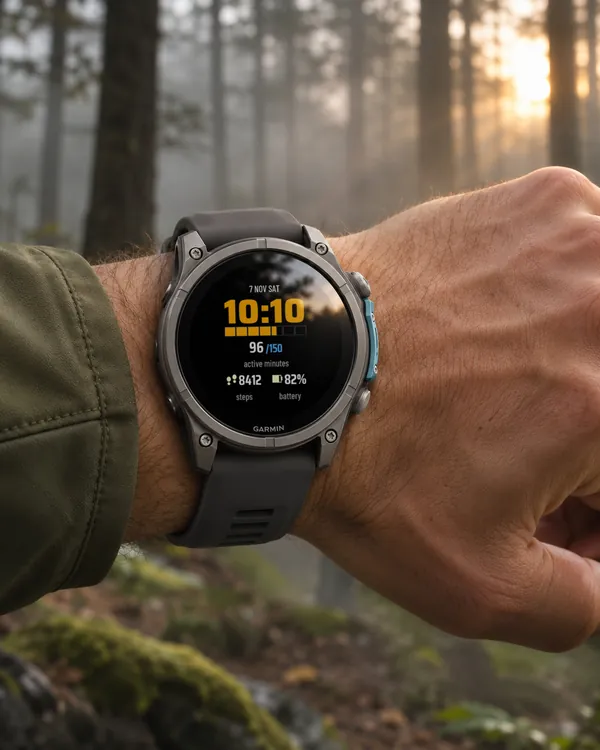 Digital
Burn
Check after dinner how far you are from the weekly goal of 150 active minutes
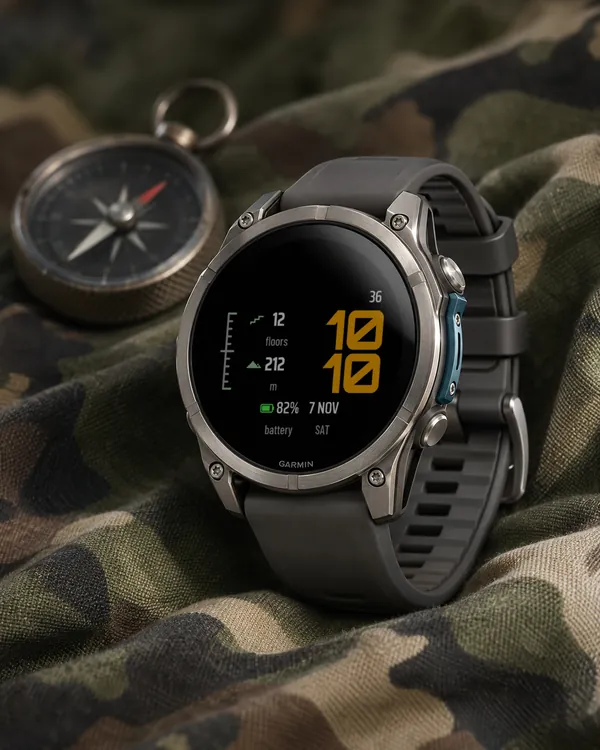 Digital
Rise
Check how many floors you climbed on the way up to the office
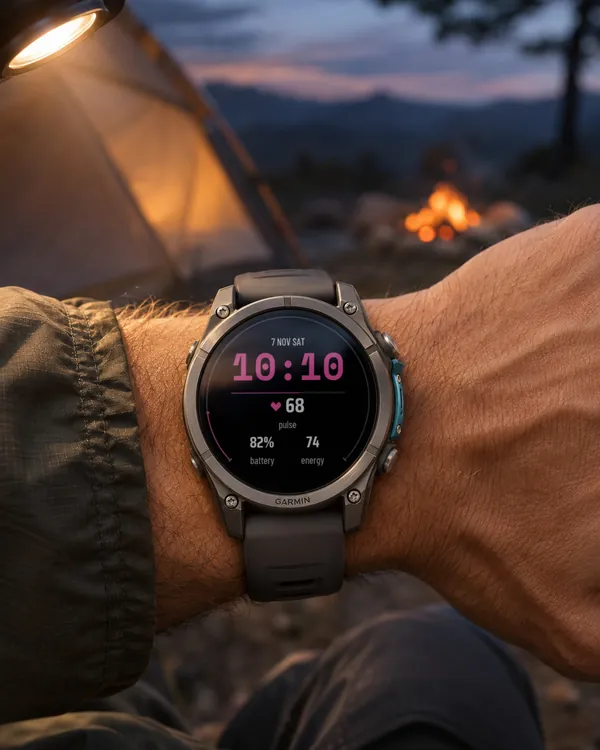 Digital
Pulse
Check your heart rate over morning coffee, as a number on a clear scale
 Utility
Ridge
Check your altitude at a stop without leaving the watch face