Unlock
€7.99
One-time payment. No subscription. The code works on the watch whose ID you enter.
- Install the face from Connect IQ (7 days free).
- On the watch: face settings > Buy / Unlock, scan the QR code.
- Pay and paste the code in the face settings.
- Pay.
- Copy the code.
- Paste it in Connect IQ: this face > Settings > Unlock code.
Payment works best in Safari or Chrome: menu (three dots) > Open in browser
Read it in this face, it is not the serial number of the watch.
Your ID, compare it with the watch:
Where do I find the ID?
On the watch: settings of this face > Buy / Unlock (first item). Scan the QR code with your phone or type the 10 digits. The ID is also at the top of the face settings in the Connect IQ app.
Code not working on your watch? Write to me and I refund within 14 days.
Payments by Stripe. Seller: Mateusz Kolarz, Lublin, Poland.
Paid. Code:
Copying did not work. The code is selected: copy it by hand.
The face unlocks by itself when the watch connects to the phone (usually within an hour; if the trial is still running, the purchase starts working when it ends).
Do not want to wait, or have an older watch? Paste the code in the Connect IQ app:
Connect IQ (or Garmin Connect) > My Device > Watch faces > Runner’s Path > Settings > Unlock code > paste > Save
We show the code here too. If the e-mail does not arrive (check spam), you can recover the code in the Recover code section with the Face ID and e-mail from your order. Recover code
Like it? Rate this face in the Garmin store
Want to try new faces and apps before the release, for free? Join the testers program
7-day free trial, then a one-time unlock at dialforge.dev. No subscription.
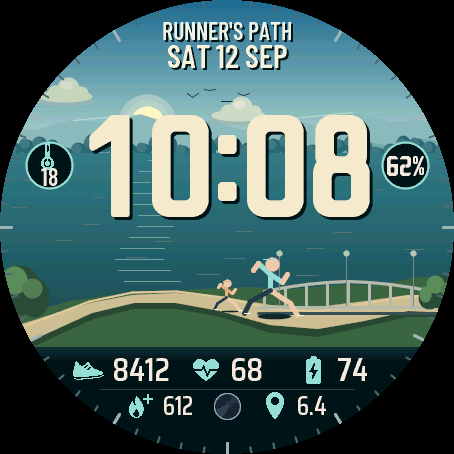
Runner's Path puts a running path on your wrist. Runners go along the river and over a footbridge, birds fly by, the water moves and the trees sway in the wind. The main runner moves with your daily steps and at 100 % stops on the bridge, waves and a flag goes up. In the morning there are few people on the path, in the day more, at night one runner with a head torch, and the lamps come on. The sky follows the real Sun, with true sunrise and sunset for your location and the Moon in its real phase. Rain, snow, fog, storms and wind from your weather show up in the picture. An independent face by dialforge.dev.
- Animated running scene: runners on a path by the river, a footbridge with lamps, birds, waves, clouds, stars and a meteor at night. Three scenes: riverside park, seaside promenade with ships and a lighthouse, or a city with lit windows.
- Your daily goal in the scene: steps or weekly intensity minutes move the main runner along the path, at 100 % he waves on the bridge under a flag.
- The sky follows the real height of the Sun, with true sunrise and sunset for your location. The Moon with its real phase, also as a picture in a field.
- Weather in the scene: rain with puddles, downpour, storm with lightning, snow on the path, fog and wind.
- Own thick digit font in 3 sizes, plus full width digits across the whole screen. Colour of the time and of the accent from 11 colours.
- A top text you can edit (up to 14 characters): your name, a motto, your club.
- Six editable fields with icons, each showing one of dozens of kinds of data or staying empty. Side circles by the time: a field and the seconds or the goal percent, which you can turn off.
- On touch watches press and hold a field to open its screen.
- Always-on screen on AMOLED in 4 styles with low battery use: striped digits, outline with the path, time and date, or off.
- Menu on the watch in 35 languages.
Settings are in Garmin Connect (Connect IQ, watch face settings) and on the watch under Customise: colours, top text, six fields, circles by the time, time size, scene, animations and the always-on style. What the runner shows, what the right circle shows and the path surface are set in Garmin Connect.
When the watch has no reading, a field shows --. Weather in the scene needs a forecast on the watch. The runners in the scene are an animation, not a record of your run. This is a watch face, not a medical device.
7 dni za darmo, potem jednorazowe odblokowanie na dialforge.dev. Bez abonamentu.
Szlak biegacza to ścieżka do biegania na nadgarstku. Biegacze biegną wzdłuż rzeki i przez kładkę, przelatują ptaki, woda faluje, a drzewa kołyszą się na wietrze. Główny biegacz idzie razem z Twoimi dziennymi krokami, a przy 100 % staje na kładce, macha ręką i podnosi się flaga. Rano na ścieżce jest mało ludzi, w dzień więcej, nocą biegnie jeden biegacz z czołówką i zapalają się latarnie. Niebo idzie za prawdziwym Słońcem, wschód i zachód są prawdziwe dla Twojej lokalizacji, a Księżyc ma swoją prawdziwą fazę. Deszcz, śnieg, mgłę, burzę i wiatr z Twojej pogody widać w obrazie. Niezależna tarcza dialforge.dev.
- Animowana scena biegowa: biegacze na ścieżce nad rzeką, kładka z latarniami, ptaki, fale, chmury, a nocą gwiazdy i meteor. Trzy sceny: park nad rzeką, promenada nad morzem ze statkami i latarnią morską albo miasto z oświetlonymi oknami.
- Dzienny cel w scenie: kroki albo minuty intensywności w tygodniu przesuwają głównego biegacza po ścieżce, przy 100 % macha ręką na kładce pod flagą.
- Niebo idzie za prawdziwą wysokością Słońca, wschód i zachód są prawdziwe dla Twojej lokalizacji. Księżyc z prawdziwą fazą, także jako obrazek w polu.
- Pogoda w scenie: deszcz z kałużami, ulewa, burza z błyskawicą, śnieg na ścieżce, mgła i wiatr.
- Własna, gruba czcionka cyfr w 3 rozmiarach i cyfry na całą szerokość ekranu. Kolor godziny i akcentu do wyboru z 11 kolorów.
- Napis u góry do edycji (do 14 znaków): imię, hasło, nazwa Twojego klubu.
- Sześć edytowalnych pól z ikonami, każde pokaże jedną z kilkudziesięciu danych albo zostanie puste. Boczne kółka przy godzinie: pole oraz sekundy albo procent celu, można je wyłączyć.
- Na zegarkach dotykowych przytrzymaj pole, żeby otworzyć jego ekran.
- Ekran wygaszony na AMOLED w 4 stylach, z małym zużyciem baterii: cyfry w prążki, kontur ze ścieżką, godzina z datą albo wyłączony.
- Menu na zegarku w 35 językach.
Ustawienia są w Garmin Connect (Connect IQ, ustawienia tarczy) i na zegarku w Dostosuj: kolory, napis u góry, sześć pól, kółka przy godzinie, wielkość godziny, scena, animacje i styl ekranu wygaszonego. To, co pokazuje biegacz i prawe kółko, oraz nawierzchnię ścieżki ustawisz w Garmin Connect.
Gdy zegarek nie ma odczytu, pole pokazuje --. Pogoda w scenie potrzebuje prognozy w zegarku. Biegacze w scenie to animacja, nie zapis Twojego biegu. To tarcza, nie wyrób medyczny.
7 Tage kostenlos testen, danach einmalige Freischaltung auf dialforge.dev. Kein Abo.
Runner's Path bringt einen Laufweg an dein Handgelenk. Läufer laufen am Fluss entlang und über eine Fußgängerbrücke, Vögel fliegen vorbei, das Wasser bewegt sich und die Bäume wiegen sich im Wind. Der Hauptläufer bewegt sich mit deinen Tagesschritten und bleibt bei 100 % auf der Brücke stehen, winkt und eine Flagge geht hoch. Morgens sind nur wenige Leute auf dem Weg, tagsüber mehr, nachts läuft ein Läufer mit Stirnlampe und die Laternen gehen an. Der Himmel folgt der echten Sonne, mit echtem Sonnenaufgang und Sonnenuntergang für deinen Standort, und der Mond hat seine echte Phase. Regen, Schnee, Nebel, Gewitter und Wind aus deinem Wetter erscheinen im Bild. Ein unabhängiges Zifferblatt von dialforge.dev.
- Animierte Laufszene: Läufer auf einem Weg am Fluss, eine Fußgängerbrücke mit Laternen, Vögel, Wellen, Wolken, Sterne und nachts eine Sternschnuppe. Drei Szenen: Park am Fluss, Strandpromenade mit Schiffen und Leuchtturm oder eine Stadt mit beleuchteten Fenstern.
- Dein Tagesziel in der Szene: Schritte oder Intensitätsminuten der Woche bewegen den Hauptläufer auf dem Weg, bei 100 % winkt er auf der Brücke unter einer Flagge.
- Der Himmel folgt dem echten Sonnenstand, Sonnenaufgang und Sonnenuntergang stimmen für deinen Standort. Der Mond mit echter Phase, auch als Bild in einem Feld.
- Wetter in der Szene: Regen mit Pfützen, Platzregen, Gewitter mit Blitzen, Schnee auf dem Weg, Nebel und Wind.
- Eigene dicke Ziffernschrift in 3 Größen und Ziffern über die volle Breite des Bildschirms. Farbe der Uhrzeit und des Akzents aus 11 Farben.
- Ein Text oben, den du selbst bearbeiten kannst (bis zu 14 Zeichen): dein Name, ein Motto, dein Verein.
- Sechs bearbeitbare Felder mit Symbolen, jedes zeigt einen von Dutzenden Werten oder bleibt leer. Seitliche Kreise neben der Uhrzeit: ein Feld und Sekunden oder Zielprozent, abschaltbar.
- Bei Touchscreen-Uhren ein Feld gedrückt halten, um seine Ansicht zu öffnen.
- Always-On-Display bei AMOLED in 4 Stilen mit geringem Akkuverbrauch: gestreifte Ziffern, Kontur mit Weg, Uhrzeit und Datum oder aus.
Alle Einstellungen findest du in Garmin Connect (Connect IQ, Zifferblatt-Einstellungen) und auf der Uhr unter Anpassen: Farben, Text oben, sechs Felder, Kreise neben der Uhrzeit, Größe der Uhrzeit, Szene, Animationen und Stil des Always-On-Displays. Was der Läufer und der rechte Kreis anzeigen und den Belag des Weges stellst du in Garmin Connect ein.
Wenn die Uhr keinen Messwert hat, zeigt ein Feld -- an. Das Wetter in der Szene braucht eine Vorhersage auf der Uhr. Die Läufer in der Szene sind eine Animation, keine Aufzeichnung deines Laufs. Dies ist ein Zifferblatt, kein Medizinprodukt.
Essai gratuit de 7 jours, puis un déverrouillage unique sur dialforge.dev. Sans abonnement.
Runner's Path met un chemin de course à votre poignet. Les coureurs longent la rivière et traversent une passerelle, des oiseaux passent, l'eau bouge et les arbres se balancent dans le vent. Le coureur principal avance avec vos pas du jour et, à 100 %, s'arrête sur la passerelle, salue et un drapeau se lève. Le matin, il y a peu de monde sur le chemin, plus dans la journée, la nuit un coureur avec une lampe frontale, et les lampadaires s'allument. Le ciel suit le vrai Soleil, avec le vrai lever et coucher pour votre position, et la Lune a sa vraie phase. La pluie, la neige, le brouillard, l'orage et le vent de votre météo apparaissent dans l'image. Un cadran indépendant de dialforge.dev.
- Scène de course animée : des coureurs sur un chemin au bord de la rivière, une passerelle avec des lampadaires, des oiseaux, des vagues, des nuages, des étoiles et une étoile filante la nuit. Trois scènes : parc au bord de la rivière, promenade en bord de mer avec des bateaux et un phare, ou une ville aux fenêtres éclairées.
- Votre objectif du jour dans la scène : les pas ou les minutes d'intensité de la semaine font avancer le coureur principal sur le chemin, à 100 % il salue sur la passerelle sous un drapeau.
- Le ciel suit la vraie hauteur du Soleil, le lever et le coucher sont justes pour votre position. La Lune avec sa vraie phase, aussi en image dans un champ.
- Météo dans la scène : pluie avec des flaques, averse, orage avec éclairs, neige sur le chemin, brouillard et vent.
- Police de chiffres épaisse et exclusive en 3 tailles, plus des chiffres sur toute la largeur de l'écran. Couleur de l'heure et de l'accent au choix parmi 11 couleurs.
- Un texte en haut que vous modifiez (jusqu'à 14 caractères) : votre prénom, une devise, votre club.
- Six champs modifiables avec icônes, chacun affiche l'une des dizaines de données ou reste vide. Cercles latéraux près de l'heure : un champ et les secondes ou le pourcentage de l'objectif, désactivables.
- Sur les montres tactiles, maintenez un champ appuyé pour ouvrir son écran.
Les réglages se trouvent dans Garmin Connect (Connect IQ, réglages du cadran) et sur la montre sous Personnaliser : couleurs, texte du haut, six champs, cercles près de l'heure, taille de l'heure, scène, animations et style de l'écran toujours actif. Ce qu'affichent le coureur et le cercle de droite, ainsi que le revêtement du chemin, se règlent dans Garmin Connect.
Quand la montre n'a pas de mesure, un champ affiche --. La météo dans la scène nécessite une prévision sur la montre. Les coureurs de la scène sont une animation, pas un enregistrement de votre course. C'est un cadran, pas un dispositif médical.
Prueba gratuita de 7 días y luego un desbloqueo único en dialforge.dev. Sin suscripción.
Runner's Path pone un camino de running en tu muñeca. Los corredores van por el río y cruzan una pasarela, pasan pájaros, el agua se mueve y los árboles se mecen con el viento. El corredor principal avanza con tus pasos del día y al 100 % se detiene en la pasarela, saluda y sube una bandera. Por la mañana hay poca gente en el camino, de día más, de noche un corredor con frontal, y se encienden las farolas. El cielo sigue al Sol real, con el amanecer y el atardecer reales de tu ubicación, y la Luna tiene su fase real. La lluvia, la nieve, la niebla, la tormenta y el viento de tu tiempo aparecen en la imagen. Una esfera independiente de dialforge.dev.
- Escena de running animada: corredores en un camino junto al río, una pasarela con farolas, pájaros, olas, nubes, estrellas y un meteoro de noche. Tres escenas: parque junto al río, paseo marítimo con barcos y un faro, o una ciudad con ventanas iluminadas.
- Tu objetivo diario en la escena: los pasos o los minutos de intensidad de la semana mueven al corredor principal por el camino, al 100 % saluda en la pasarela bajo una bandera.
- El cielo sigue la altura real del Sol, el amanecer y el atardecer son reales para tu ubicación. La Luna con su fase real, también como imagen en un campo.
- El tiempo en la escena: lluvia con charcos, chaparrón, tormenta con rayos, nieve en el camino, niebla y viento.
- Fuente propia de dígitos gruesos en 3 tamaños y dígitos a todo el ancho de la pantalla. Color de la hora y del acento a elegir entre 11 colores.
- Un texto arriba que puedes editar (hasta 14 caracteres): tu nombre, un lema, tu club.
- Seis campos editables con iconos, cada uno muestra uno de decenas de datos o queda vacío. Círculos laterales junto a la hora: un campo y los segundos o el porcentaje del objetivo, se pueden desactivar.
- En relojes táctiles, mantén pulsado un campo para abrir su pantalla.
- Pantalla siempre activa en AMOLED en 4 estilos, con bajo consumo de batería: dígitos rayados, contorno con el camino, hora y fecha, o apagada.
- Menú en el reloj en 35 idiomas.
Los ajustes están en Garmin Connect (Connect IQ, ajustes de la esfera) y en el reloj en Personalizar: colores, texto de arriba, seis campos, círculos junto a la hora, tamaño de la hora, escena, animaciones y estilo de la pantalla siempre activa. Lo que muestran el corredor y el círculo derecho, y la superficie del camino, se ajustan en Garmin Connect.
Cuando el reloj no tiene lectura, un campo muestra --. El tiempo en la escena necesita una previsión en el reloj. Los corredores de la escena son una animación, no un registro de tu carrera. Es una esfera, no un producto sanitario.
7 dagen gratis proberen, daarna een eenmalige ontgrendeling op dialforge.dev. Geen abonnement.
Runner's Path brengt een hardlooppad naar je pols. Lopers rennen langs de rivier en over een voetbrug, vogels vliegen voorbij, het water beweegt en de bomen wiegen in de wind. De hoofdloper beweegt mee met je dagelijkse stappen en blijft bij 100 % op de brug staan, zwaait en er gaat een vlag omhoog. 's Ochtends zijn er weinig mensen op het pad, overdag meer, 's nachts rent er één loper met een hoofdlamp en gaan de lantaarns aan. De lucht volgt de echte zon, met echte zonsopkomst en zonsondergang voor jouw locatie, en de maan heeft zijn echte fase. Regen, sneeuw, mist, onweer en wind uit je weer verschijnen in het beeld. Een onafhankelijke wijzerplaat van dialforge.dev.
- Geanimeerde hardloopscène: lopers op een pad langs de rivier, een voetbrug met lantaarns, vogels, golven, wolken, sterren en 's nachts een meteoor. Drie scènes: park aan de rivier, boulevard aan zee met schepen en een vuurtoren, of een stad met verlichte ramen.
- Je dagdoel in de scène: stappen of intensiteitsminuten van de week verplaatsen de hoofdloper over het pad, bij 100 % zwaait hij op de brug onder een vlag.
- De lucht volgt de echte hoogte van de zon, zonsopkomst en zonsondergang kloppen voor jouw locatie. De maan met echte fase, ook als plaatje in een veld.
- Weer in de scène: regen met plassen, stortbui, onweer met bliksem, sneeuw op het pad, mist en wind.
- Eigen dik cijferlettertype in 3 groottes, plus cijfers over de volle breedte van het scherm. Kleur van de tijd en van het accent te kiezen uit 11 kleuren.
- Een tekst bovenaan die je zelf kunt aanpassen (tot 14 tekens): je naam, een motto, je club.
- Zes aanpasbare velden met pictogrammen, elk toont een van tientallen gegevens of blijft leeg. Zijcirkels bij de tijd: een veld en de seconden of het doelpercentage, uit te zetten.
- Op touchscreen-horloges houd je een veld ingedrukt om het scherm ervan te openen.
- Altijd-aan-scherm op AMOLED in 4 stijlen met laag batterijverbruik: gestreepte cijfers, contour met het pad, tijd en datum, of uit.
- Menu op het horloge in 35 talen.
De instellingen vind je in Garmin Connect (Connect IQ, instellingen van de wijzerplaat) en op het horloge onder Aanpassen: kleuren, tekst bovenaan, zes velden, cirkels bij de tijd, grootte van de tijd, scène, animaties en de stijl van het altijd-aan-scherm. Wat de loper en de rechtercirkel tonen en het wegdek van het pad stel je in Garmin Connect in.
Als het horloge geen meting heeft, toont een veld --. Het weer in de scène heeft een voorspelling op het horloge nodig. De lopers in de scène zijn een animatie, geen opname van je loop. Dit is een wijzerplaat, geen medisch hulpmiddel.
7日間無料でお試しいただけます。その後はdialforge.devで解除を一度だけ購入(サブスクリプションなし)。
Runner's Path は、ランニングの道を手首に届けます。ランナーが川沿いを走って歩道橋を渡り、鳥が飛び、水面が揺れ、木々は風にそよぎます。メインのランナーは毎日の歩数に合わせて進み、100 % になると橋の上で止まって手を振り、旗が上がります。朝は道に人が少なく、昼は増え、夜はヘッドライトをつけた1人のランナーが走り、街灯がともります。空は本物の太陽に合わせて動き、お住まいの場所の実際の日の出と日の入り、そして本物の月の満ち欠けを表示します。天気予報の雨、雪、霧、嵐、風も絵に表れます。dialforge.dev による独立した文字盤です。
- アニメーションのランニングシーン。川沿いの道を走るランナー、街灯のある歩道橋、鳥、波、雲、夜は星と流れ星。シーンは3種類、川沿いの公園、船と灯台のある海辺の遊歩道、明かりのついた窓が並ぶ街から選べます。
- 1日の目標をシーンに表示。歩数または週の運動強度の分数でメインのランナーが道を進み、100 % で旗の下の橋で手を振ります。
- 空は本物の太陽の高さに合わせて変わり、お住まいの場所の実際の日の出と日の入りを反映します。月は本物の満ち欠けで、フィールドの画像としても表示できます。
- シーンに天気を表示。水たまりのできる雨、土砂降り、稲妻のある嵐、道に積もる雪、霧、風。
- オリジナルの太い数字フォントを3サイズで用意し、画面いっぱいの幅の数字にも対応。時刻とアクセントの色は11色から選べます。
- 上部の文字は自由に編集できます(14文字まで)。名前、モットー、所属クラブなどに。
- アイコン付きの編集できるフィールドが6つ。それぞれ数十種類のデータから1つを表示するか、空にできます。時刻の横の丸いフィールドは、フィールドと秒または目標の達成率で、オフにもできます。
- タッチ対応の時計では、フィールドを長押しするとその画面が開きます。
- AMOLEDの常時表示は4スタイルで、電池の消費も少なめ。しま模様の数字、道つきの輪郭、時刻と日付、またはオフから選べます。
- 時計のメニューは35言語に対応。
設定は Garmin Connect (Connect IQ、文字盤の設定)と、時計の「カスタマイズ」で行えます。色、上部の文字、6つのフィールド、時刻の横の丸、時刻のサイズ、シーン、アニメーション、常時表示のスタイルが設定できます。ランナーが示す内容、右の丸の内容、道の路面は Garmin Connect で設定します。
時計に測定値がないとき、フィールドには -- と表示されます。シーンの天気には、時計に天気予報が必要です。シーンのランナーはアニメーションで、あなたの走りの記録ではありません。これは文字盤であり、医療機器ではありません。
Prova gratuita di 7 giorni, poi uno sblocco una tantum su dialforge.dev. Nessun abbonamento.
Runner's Path porta un sentiero da corsa al tuo polso. I corridori corrono lungo il fiume e sopra una passerella, passano gli uccelli, l'acqua si muove e gli alberi ondeggiano nel vento. Il corridore principale avanza con i tuoi passi del giorno e al 100 % si ferma sulla passerella, saluta e sale una bandiera. Al mattino c'è poca gente sul sentiero, di giorno di più, di notte un corridore con la frontale, e si accendono i lampioni. Il cielo segue il vero Sole, con alba e tramonto reali per la tua posizione, e la Luna ha la sua fase reale. Pioggia, neve, nebbia, temporale e vento del tuo meteo compaiono nell'immagine. Un quadrante indipendente di dialforge.dev.
- Scena di corsa animata: corridori su un sentiero lungo il fiume, una passerella con i lampioni, uccelli, onde, nuvole, stelle e di notte una meteora. Tre scene: parco lungo il fiume, lungomare con navi e un faro, oppure una città con le finestre illuminate.
- Il tuo obiettivo giornaliero nella scena: i passi o i minuti di intensità della settimana spostano il corridore principale sul sentiero, al 100 % saluta sulla passerella sotto una bandiera.
- Il cielo segue la vera altezza del Sole, alba e tramonto sono reali per la tua posizione. La Luna con la sua fase reale, anche come immagine in un campo.
- Meteo nella scena: pioggia con pozzanghere, acquazzone, temporale con fulmini, neve sul sentiero, nebbia e vento.
- Font di cifre spesso e originale in 3 dimensioni, più cifre a tutta larghezza dello schermo. Colore dell'ora e dell'accento da scegliere tra 11 colori.
- Un testo in alto che puoi modificare (fino a 14 caratteri): il tuo nome, un motto, il tuo club.
- Sei campi modificabili con icone, ognuno mostra uno tra decine di dati oppure resta vuoto. Cerchi laterali vicino all'ora: un campo e i secondi o la percentuale dell'obiettivo, si possono disattivare.
- Sugli orologi touch tieni premuto un campo per aprire la sua schermata.
- Schermo sempre attivo su AMOLED in 4 stili, con basso consumo della batteria: cifre a strisce, contorno con il sentiero, ora e data, oppure spento.
- Menu sull'orologio in 35 lingue.
Le impostazioni sono in Garmin Connect (Connect IQ, impostazioni del quadrante) e sull'orologio in Personalizza: colori, testo in alto, sei campi, cerchi vicino all'ora, dimensione dell'ora, scena, animazioni e stile dello schermo sempre attivo. Cosa mostrano il corridore e il cerchio destro, e il fondo del sentiero, si imposta in Garmin Connect.
Quando l'orologio non ha una lettura, un campo mostra --. Il meteo nella scena richiede una previsione sull'orologio. I corridori nella scena sono un'animazione, non la registrazione della tua corsa. È un quadrante, non un dispositivo medico.
7 天免费试用,之后在 dialforge.dev 一次性解锁。无需订阅。
Runner's Path 把一条跑步小路带到你的手腕上。跑者沿着河边跑过步行桥,鸟儿飞过,水面流动,树木随风摇摆。主角跑者随你每天的步数前进,达到 100 % 时停在桥上挥手,旗帜升起。早晨小路上人很少,白天更多,夜里只有一位戴头灯的跑者,路灯也会亮起。天空跟随真实的太阳,显示你所在位置的真实日出和日落,月亮呈现真实的月相。天气预报中的雨、雪、雾、雷暴和风都会出现在画面里。来自 dialforge.dev 的独立表盘。
- 动画跑步场景:跑者在河边小路上奔跑,挂着路灯的步行桥,飞鸟、水波、云朵,夜里还有星星和流星。三种场景:河边公园、有船和灯塔的海滨步道,或是窗户亮灯的城市。
- 每日目标显示在场景中:步数或每周强度分钟数推动主角跑者沿小路前进,达到 100 % 时他在旗帜下的桥上挥手。
- 天空跟随太阳的真实高度,显示你所在位置的真实日出和日落。月亮呈现真实月相,也可以作为图片显示在数据栏中。
- 场景中的天气:带水坑的雨、倾盆大雨、带闪电的雷暴、小路上的积雪、雾和风。
- 自有的粗体数字字体,有 3 种大小,还有占满整个屏幕宽度的数字。时间和强调色可从 11 种颜色中选择。
- 顶部文字可自行编辑(最多 14 个字符):你的名字、座右铭或你的俱乐部。
- 六个可编辑的数据栏,带图标,每个可显示几十种数据中的一种,也可以留空。时间旁的侧边圆圈:一个数据栏,以及秒数或目标百分比,可以关闭。
- 在触屏手表上,长按数据栏即可打开它的页面。
- AMOLED 常亮屏幕有 4 种样式,耗电量低:条纹数字、带小路的轮廓、时间和日期,或关闭。
- 手表菜单支持 35 种语言。
设置在 Garmin Connect(Connect IQ,表盘设置)中,以及手表上的自定义菜单里:颜色、顶部文字、六个数据栏、时间旁的圆圈、时间大小、场景、动画和常亮屏幕样式。跑者显示的内容、右侧圆圈显示的内容以及小路路面,在 Garmin Connect 中设置。
当手表没有读数时,数据栏显示 --。场景中的天气需要手表上有天气预报。场景中的跑者只是动画,不是你跑步的记录。这是表盘,不是医疗设备。
7-дневный бесплатный пробный период, затем разовая разблокировка на dialforge.dev. Без подписки.
Runner's Path это беговая дорожка на вашем запястье. Бегуны бегут вдоль реки и по пешеходному мосту, пролетают птицы, вода движется, а деревья качаются на ветру. Главный бегун идёт вместе с вашими дневными шагами, а при 100 % останавливается на мосту, машет рукой, и поднимается флаг. Утром на дорожке мало людей, днём больше, ночью бежит один бегун с налобным фонарём, и загораются фонари. Небо следует за настоящим Солнцем, с реальными восходом и закатом для вашего места, а Луна показывает свою настоящую фазу. Дождь, снег, туман, гроза и ветер из вашего прогноза погоды появляются на картинке. Независимый циферблат от dialforge.dev.
- Анимированная беговая сцена: бегуны на дорожке у реки, пешеходный мост с фонарями, птицы, волны, облака, а ночью звёзды и метеор. Три сцены: парк у реки, набережная у моря с кораблями и маяком или город с освещёнными окнами.
- Ваша дневная цель в сцене: шаги или минуты интенсивной активности за неделю двигают главного бегуна по дорожке, при 100 % он машет рукой на мосту под флагом.
- Небо следует за настоящей высотой Солнца, восход и закат соответствуют вашему местоположению. Луна с настоящей фазой, также в виде картинки в поле.
- Погода в сцене: дождь с лужами, ливень, гроза с молнией, снег на дорожке, туман и ветер.
- Собственный толстый шрифт цифр в 3 размерах, а также цифры на всю ширину экрана. Цвет времени и акцента можно выбрать из 11 цветов.
- Надпись сверху, которую можно изменить (до 14 символов): ваше имя, девиз, название вашего клуба.
- Шесть редактируемых полей со значками, в каждом можно показать один из нескольких десятков видов данных или оставить его пустым. Боковые кружки у времени: поле и секунды или процент цели, их можно отключить.
- На часах с сенсорным экраном удерживайте поле, чтобы открыть его экран.
- Постоянно включённый экран на AMOLED в 4 стилях с малым расходом батареи: цифры в полоску, контур с дорожкой, время и дата или выключен.
- Меню на часах на 35 языках.
Настройки находятся в Garmin Connect (Connect IQ, настройки циферблата) и на часах в разделе Настроить: цвета, надпись сверху, шесть полей, кружки у времени, размер времени, сцена, анимация и стиль постоянно включённого экрана. То, что показывает бегун и правый кружок, а также покрытие дорожки выбираются в Garmin Connect.
Если у часов нет показания, в поле отображается --. Погоде в сцене нужен прогноз на часах. Бегуны в сцене это анимация, а не запись вашей пробежки. Это циферблат, а не медицинское устройство.
Teste grátis de 7 dias, depois um desbloqueio único em dialforge.dev. Sem assinatura.
O Runner's Path coloca um caminho de corrida no seu pulso. Os corredores seguem pelo rio e atravessam uma passarela, pássaros passam voando, a água se move e as árvores balançam com o vento. O corredor principal anda com os seus passos do dia e, aos 100 %, para na passarela, acena e uma bandeira sobe. De manhã há pouca gente no caminho, de dia mais, à noite um corredor com lanterna de cabeça, e os postes de luz acendem. O céu segue o Sol real, com nascer e pôr do sol reais para a sua localização, e a Lua tem a sua fase real. Chuva, neve, neblina, tempestade e vento do seu clima aparecem na imagem. Um mostrador independente da dialforge.dev.
- Cena de corrida animada: corredores em um caminho à beira do rio, uma passarela com postes de luz, pássaros, ondas, nuvens, estrelas e, à noite, um meteoro. Três cenas: parque à beira do rio, orla com navios e um farol, ou uma cidade com janelas iluminadas.
- Sua meta diária na cena: passos ou minutos de intensidade da semana movem o corredor principal pelo caminho, aos 100 % ele acena na passarela sob uma bandeira.
- O céu segue a altura real do Sol, nascer e pôr do sol corretos para a sua localização. A Lua com fase real, também como imagem em um campo.
- Clima na cena: chuva com poças, temporal, tempestade com raios, neve no caminho, neblina e vento.
- Fonte própria de dígitos grossos em 3 tamanhos, mais dígitos na largura inteira da tela. Cor da hora e do destaque à escolha entre 11 cores.
- Um texto no alto que você pode editar (até 14 caracteres): seu nome, um lema, seu clube.
- Seis campos editáveis com ícones, cada um mostra um entre dezenas de dados ou fica vazio. Círculos laterais perto da hora: um campo e os segundos ou a porcentagem da meta, que podem ser desligados.
- Em relógios com tela sensível ao toque, mantenha um campo pressionado para abrir a tela dele.
- Tela sempre ativa em AMOLED em 4 estilos, com baixo consumo de bateria: dígitos listrados, contorno com o caminho, hora e data, ou desligada.
- Menu no relógio em 35 idiomas.
As configurações ficam no Garmin Connect (Connect IQ, configurações do mostrador) e no relógio em Personalizar: cores, texto no alto, seis campos, círculos perto da hora, tamanho da hora, cena, animações e estilo da tela sempre ativa. O que o corredor e o círculo direito mostram, e o piso do caminho, você define no Garmin Connect.
Quando o relógio não tem leitura, um campo mostra --. O clima na cena precisa de uma previsão no relógio. Os corredores na cena são uma animação, não um registro da sua corrida. Este é um mostrador, não um dispositivo médico.
7denní bezplatná zkušební verze, poté jednorázové odemknutí na dialforge.dev. Žádné předplatné.
Runner's Path přináší běžeckou stezku na tvé zápěstí. Běžci běží podél řeky a přes lávku, přelétají ptáci, voda se vlní a stromy se kymácejí ve větru. Hlavní běžec jde spolu s tvými denními kroky a při 100 % se zastaví na lávce, zamává a vyvěsí se vlajka. Ráno je na stezce málo lidí, přes den víc, v noci běží jeden běžec s čelovkou a rozsvítí se lampy. Obloha sleduje skutečné Slunce, s pravým východem a západem pro tvou polohu, a Měsíc má svou skutečnou fázi. Déšť, sníh, mlhu, bouřku i vítr z tvého počasí uvidíš v obrazu. Nezávislý ciferník od dialforge.dev.
- Animovaná běžecká scéna: běžci na stezce u řeky, lávka s lampami, ptáci, vlny, mraky, hvězdy a v noci meteor. Tři scény: park u řeky, přímořská promenáda s loděmi a majákem nebo město s osvětlenými okny.
- Tvůj denní cíl ve scéně: kroky nebo týdenní minuty intenzity posouvají hlavního běžce po stezce, při 100 % mává na lávce pod vlajkou.
- Obloha sleduje skutečnou výšku Slunce, východ i západ sedí pro tvou polohu. Měsíc se skutečnou fází, také jako obrázek v poli.
- Počasí ve scéně: déšť s loužemi, liják, bouřka s blesky, sníh na stezce, mlha a vítr.
- Vlastní tlusté písmo číslic ve 3 velikostech a číslice přes celou šířku displeje. Barvu času a akcentu vybereš z 11 barev.
- Nápis nahoře, který si upravíš (až 14 znaků): jméno, heslo, název tvého klubu.
- Šest upravitelných polí s ikonami, každé ukáže jeden z desítek údajů, nebo zůstane prázdné. Boční kolečka u času: pole a vteřiny nebo procento cíle, lze je vypnout.
- Na dotykových hodinkách podrž pole a otevře se jeho obrazovka.
- Vždy zapnutý displej na AMOLED ve 4 stylech s nízkou spotřebou baterie: pruhované číslice, obrys se stezkou, čas s datem, nebo vypnuto.
- Nabídka v hodinkách v 35 jazycích.
Nastavení najdeš v Garmin Connect (Connect IQ, nastavení ciferníku) a v hodinkách v nabídce Přizpůsobit: barvy, nápis nahoře, šest polí, kolečka u času, velikost času, scéna, animace a styl vždy zapnutého displeje. Co ukazuje běžec a pravé kolečko a povrch stezky nastavíš v Garmin Connect.
Když hodinky nemají naměřenou hodnotu, pole ukáže --. Počasí ve scéně potřebuje v hodinkách předpověď. Běžci ve scéně jsou animace, ne záznam tvého běhu. Je to ciferník, ne zdravotnický prostředek.
7 dias de teste gratuito, depois um desbloqueio único em dialforge.dev. Sem subscrição.
O Runner's Path põe um caminho de corrida no teu pulso. Os corredores seguem ao longo do rio e atravessam um passadiço, passam aves, a água mexe-se e as árvores baloiçam ao vento. O corredor principal avança com os teus passos do dia e, aos 100 %, pára no passadiço, acena e sobe uma bandeira. De manhã há pouca gente no caminho, de dia mais, à noite um corredor com lanterna de cabeça, e os candeeiros acendem-se. O céu segue o Sol real, com nascer e pôr do sol reais para a tua localização, e a Lua tem a sua fase real. Chuva, neve, nevoeiro, trovoada e vento da tua meteorologia aparecem na imagem. Um mostrador independente da dialforge.dev.
- Cena de corrida animada: corredores num caminho junto ao rio, um passadiço com candeeiros, aves, ondas, nuvens, estrelas e, à noite, um meteoro. Três cenas: parque junto ao rio, passeio marítimo com navios e um farol, ou uma cidade com janelas iluminadas.
- O teu objetivo diário na cena: os passos ou os minutos de intensidade da semana movem o corredor principal pelo caminho, aos 100 % ele acena no passadiço sob uma bandeira.
- O céu segue a altura real do Sol, o nascer e o pôr do sol estão certos para a tua localização. A Lua com fase real, também como imagem num campo.
- Meteorologia na cena: chuva com poças, aguaceiro forte, trovoada com relâmpagos, neve no caminho, nevoeiro e vento.
- Tipo de letra próprio de dígitos grossos em 3 tamanhos, mais dígitos na largura inteira do ecrã. Cor da hora e do destaque à escolha entre 11 cores.
- Um texto no topo que podes editar (até 14 carateres): o teu nome, um lema, o teu clube.
- Seis campos editáveis com ícones, cada um mostra um entre dezenas de dados ou fica vazio. Círculos laterais junto à hora: um campo e os segundos ou a percentagem do objetivo, que podes desligar.
- Em relógios com ecrã tátil, mantém um campo premido para abrir o ecrã dele.
- Ecrã sempre ligado em AMOLED em 4 estilos, com baixo consumo de bateria: dígitos às riscas, contorno com o caminho, hora e data, ou desligado.
- Menu no relógio em 35 idiomas.
As definições estão no Garmin Connect (Connect IQ, definições do mostrador) e no relógio em Personalizar: cores, texto no topo, seis campos, círculos junto à hora, tamanho da hora, cena, animações e estilo do ecrã sempre ligado. O que o corredor e o círculo direito mostram, e o piso do caminho, defines no Garmin Connect.
Quando o relógio não tem leitura, um campo mostra --. A meteorologia na cena precisa de uma previsão no relógio. Os corredores na cena são uma animação, não um registo da tua corrida. Isto é um mostrador, não um dispositivo médico.
7일 무료 체험 후, dialforge.dev에서 일회성 잠금 해제를 구매하세요. 구독은 없습니다.
Runner's Path는 러닝 길을 손목 위에 담았습니다. 러너들이 강변을 따라 달려 보도교를 건너고, 새가 날고, 물이 일렁이고, 나무는 바람에 흔들립니다. 메인 러너는 하루 걸음 수에 맞춰 나아가고, 100 %가 되면 다리 위에 멈춰 손을 흔들며 깃발이 올라갑니다. 아침에는 길에 사람이 적고, 낮에는 더 많고, 밤에는 헤드랜턴을 쓴 러너 한 명이 달리며 가로등이 켜집니다. 하늘은 실제 태양을 따라가며 내 위치의 진짜 일출과 일몰을 보여 주고, 달은 실제 위상으로 나옵니다. 날씨 예보의 비, 눈, 안개, 폭풍, 바람이 그림에 나타납니다. dialforge.dev의 독립 워치 페이스입니다.
- 애니메이션 러닝 장면: 강변 길을 달리는 러너들, 가로등이 있는 보도교, 새, 물결, 구름, 밤에는 별과 유성. 장면은 세 가지, 강변 공원, 배와 등대가 있는 바닷가 산책로, 불 켜진 창문이 있는 도시 중에서 고를 수 있습니다.
- 하루 목표를 장면에 표시: 걸음 수 또는 주간 운동 강도 시간으로 메인 러너가 길을 나아가고, 100 %가 되면 깃발 아래 다리에서 손을 흔듭니다.
- 하늘은 실제 태양의 고도를 따라가며, 내 위치의 진짜 일출과 일몰을 반영합니다. 달은 실제 위상으로 보이고, 필드 안의 그림으로도 볼 수 있습니다.
- 장면 속 날씨: 웅덩이가 생기는 비, 소나기, 번개가 치는 폭풍, 길에 쌓이는 눈, 안개, 바람.
- 직접 만든 굵은 숫자 글꼴을 3가지 크기로, 화면 전체 너비 숫자도 지원합니다. 시간과 강조 색상은 11가지 색 중에서 고를 수 있습니다.
- 위쪽 문구는 직접 편집할 수 있습니다(최대 14자): 이름, 좌우명, 내 클럽 이름 등.
- 아이콘이 있는 편집 가능한 필드 6개. 각 필드에는 수십 가지 데이터 중 하나를 표시하거나 비워 둘 수 있습니다. 시간 옆의 원형 필드는 필드와 초 또는 목표 달성률이며, 끌 수 있습니다.
- 터치 워치에서는 필드를 길게 누르면 해당 화면이 열립니다.
- AMOLED 상시 표시 화면은 4가지 스타일에 배터리 사용이 적습니다: 줄무늬 숫자, 길이 있는 윤곽선, 시간과 날짜, 또는 끄기.
- 워치 메뉴는 35개 언어를 지원합니다.
설정은 Garmin Connect(Connect IQ, 워치 페이스 설정)와 워치의 맞춤 설정에서 할 수 있습니다: 색상, 위쪽 문구, 6개 필드, 시간 옆 원, 시간 크기, 장면, 애니메이션, 상시 표시 화면 스타일. 러너가 보여 주는 내용, 오른쪽 원에 표시할 내용, 길의 노면은 Garmin Connect에서 설정합니다.
워치에 측정값이 없으면 필드에 --가 표시됩니다. 장면의 날씨는 워치에 예보가 있어야 합니다. 장면 속 러너들은 애니메이션이며 내 달리기 기록이 아닙니다. 이것은 워치 페이스이며 의료기기가 아닙니다.
7 dagars gratis provperiod, sedan en engångsupplåsning på dialforge.dev. Ingen prenumeration.
Runner's Path lägger en löparstig på ditt handled. Löpare springer längs floden och över en gångbro, fåglar flyger förbi, vattnet rör sig och träden vajar i vinden. Huvudlöparen följer dina dagliga steg och stannar vid 100 % på bron, vinkar, och en flagga hissas. På morgonen är det få människor på stigen, på dagen fler, och på natten springer en löpare med pannlampa, och lyktorna tänds. Himlen följer den riktiga solen med äkta soluppgång och solnedgång för din plats, och månen har sin riktiga fas. Regn, snö, dimma, åska och vind från ditt väder syns i bilden. En oberoende urtavla från dialforge.dev.
- Animerad löparscen: löpare på en stig vid floden, en gångbro med lyktor, fåglar, vågor, moln, stjärnor och en meteor på natten. Tre scener: park vid floden, strandpromenad med fartyg och en fyr, eller en stad med upplysta fönster.
- Ditt dagliga mål i scenen: steg eller veckans intensitetsminuter flyttar huvudlöparen längs stigen, vid 100 % vinkar han på bron under en flagga.
- Himlen följer solens riktiga höjd med äkta soluppgång och solnedgång för din plats. Månen med sin riktiga fas, även som bild i ett fält.
- Väder i scenen: regn med vattenpölar, skyfall, åska med blixtar, snö på stigen, dimma och vind.
- Egen tjock siffertyp i 3 storlekar och siffror i full bredd över hela skärmen. Färgen på tiden och accenten väljer du bland 11 färger.
- En text högst upp som du kan redigera (upp till 14 tecken): ditt namn, ett motto, din klubb.
- Sex redigerbara fält med ikoner, vart och ett visar en av många sorters data eller kan vara tomt. Sidocirklar vid tiden: ett fält och sekunderna eller målprocenten, som kan stängas av.
- På klockor med pekskärm trycker du och håller på ett fält för att öppna dess skärm.
- Always-on-skärm på AMOLED i 4 stilar med låg batteriförbrukning: randiga siffror, kontur med stigen, tid och datum, eller av.
- Meny på klockan på 35 språk.
Inställningarna finns i Garmin Connect (Connect IQ, inställningar för urtavlan) och på klockan under Anpassa: färger, text högst upp, sex fält, cirklar vid tiden, storlek på tiden, scen, animationer och stilen för always-on-skärmen. Vad löparen och den högra cirkeln visar, och stigens underlag, ställer du in i Garmin Connect.
När klockan saknar mätvärde visar ett fält --. Vädret i scenen kräver en prognos i klockan. Löparna i scenen är en animation, inte en logg över ditt lopp. Det här är en urtavla, inte en medicinteknisk produkt.
7 dages gratis prøveperiode, derefter en engangsoplåsning på dialforge.dev. Intet abonnement.
Runner's Path sætter en løbesti på dit håndled. Løbere går langs floden og over en gangbro, fugle flyver forbi, vandet bevæger sig, og træerne svajer i vinden. Hovedløberen følger dine daglige skridt og stopper ved 100 % på broen, vinker, og et flag går op. Om morgenen er der få mennesker på stien, i løbet af dagen flere, og om natten løber én løber med pandelampe, og lamperne tændes. Himlen følger den rigtige sol med ægte solopgang og solnedgang for din position, og månen har sin rigtige fase. Regn, sne, tåge, tordenvejr og vind fra dit vejr vises i billedet. En uafhængig urskive fra dialforge.dev.
- Animeret løbescene: løbere på en sti ved floden, en gangbro med lamper, fugle, bølger, skyer, stjerner og om natten et meteor. Tre scener: park ved floden, strandpromenade med skibe og et fyrtårn, eller en by med oplyste vinduer.
- Dit daglige mål i scenen: skridt eller ugentlige intensitetsminutter flytter hovedløberen langs stien, ved 100 % vinker han på broen under et flag.
- Himlen følger solens rigtige højde med ægte solopgang og solnedgang for din position. Månen med sin rigtige fase, også som billede i et felt.
- Vejr i scenen: regn med vandpytter, skybrud, tordenvejr med lyn, sne på stien, tåge og vind.
- Egen tyk cifferskrift i 3 størrelser og cifre i fuld bredde over hele skærmen. Farven på klokkeslættet og accenten kan vælges blandt 11 farver.
- En tekst øverst, som du selv kan redigere (op til 14 tegn): dit navn, et motto, din klub.
- Seks redigerbare felter med ikoner, hvert viser en af mange slags data eller kan stå tomt. Sidecirkler ved klokkeslættet: et felt og sekunderne eller målprocenten, som kan slås fra.
- På touch-ure kan du trykke og holde på et felt for at åbne dets skærm.
- Always-on-skærm på AMOLED i 4 stilarter med lavt batteriforbrug: stribede cifre, kontur med stien, klokkeslæt og dato, eller slukket.
- Menu på uret på 35 sprog.
Indstillingerne finder du i Garmin Connect (Connect IQ, urskiveindstillinger) og på uret under Tilpas: farver, tekst øverst, seks felter, cirkler ved klokkeslættet, størrelse på klokkeslættet, scene, animationer og stilen for always-on-skærmen. Hvad løberen og den højre cirkel viser, og stiens underlag, indstiller du i Garmin Connect.
Når uret ikke har en måling, viser et felt --. Vejret i scenen kræver en prognose på uret. Løberne i scenen er en animation, ikke en registrering af din løbetur. Det er en urskive, ikke medicinsk udstyr.
7 dagers gratis prøveperiode, deretter en engangsopplåsing på dialforge.dev. Ingen abonnement.
Runner's Path legger en løpesti på håndleddet ditt. Løpere går langs elva og over en gangbro, fugler flyr forbi, vannet beveger seg og trærne svaier i vinden. Hovedløperen følger de daglige skrittene dine og stopper ved 100 % på broen, vinker, og et flagg går opp. Om morgenen er det få folk på stien, om dagen flere, og om natten løper én løper med hodelykt, og lyktene tennes. Himmelen følger den ekte sola med riktig soloppgang og solnedgang for din posisjon, og månen har sin riktige fase. Regn, snø, tåke, tordenvær og vind fra været ditt vises i bildet. En uavhengig urskive fra dialforge.dev.
- Animert løpescene: løpere på en sti langs elva, en gangbro med lykter, fugler, bølger, skyer, stjerner og en meteor om natten. Tre scener: park ved elva, strandpromenade med skip og et fyrtårn, eller en by med opplyste vinduer.
- Dagsmålet ditt i scenen: skritt eller ukentlige intensitetsminutter flytter hovedløperen langs stien, ved 100 % vinker han på broen under et flagg.
- Himmelen følger solas riktige høyde med ekte soloppgang og solnedgang for din posisjon. Månen med sin riktige fase, også som bilde i et felt.
- Vær i scenen: regn med sølepytter, styrtregn, tordenvær med lyn, snø på stien, tåke og vind.
- Egen tykk sifferskrift i 3 størrelser og sifre i full bredde over hele skjermen. Fargen på klokkeslettet og aksenten kan velges blant 11 farger.
- En tekst øverst som du kan redigere selv (opptil 14 tegn): navnet ditt, et motto, klubben din.
- Seks redigerbare felt med ikoner, hvert viser en av mange typer data eller kan stå tomt. Sidesirkler ved klokkeslettet: et felt og sekundene eller målprosenten, som kan slås av.
- På touch-klokker kan du trykke og holde på et felt for å åpne skjermen til feltet.
- Always-on-skjerm på AMOLED i 4 stiler med lavt batteriforbruk: stripete sifre, omriss med stien, klokkeslett og dato, eller av.
- Meny på klokka på 35 språk.
Innstillingene finner du i Garmin Connect (Connect IQ, innstillinger for urskiven) og på klokka under Tilpass: farger, tekst øverst, seks felt, sirkler ved klokkeslettet, størrelse på klokkeslettet, scene, animasjoner og stilen til always-on-skjermen. Hva løperen og den høyre sirkelen viser, og underlaget på stien, stiller du inn i Garmin Connect.
Når klokka ikke har noen måling, viser et felt --. Været i scenen krever en værmelding på klokka. Løperne i scenen er en animasjon, ikke en logg over løpeturen din. Dette er en urskive, ikke medisinsk utstyr.
7 天免費試用,之後在 dialforge.dev 一次性解鎖。不需訂閱。
Runner's Path 把一條跑步小路帶到你的手腕上。跑者沿著河邊跑過行人橋,鳥兒飛過,水面流動,樹木隨風搖擺。主角跑者隨你每天的步數前進,達到 100 % 時停在橋上揮手,旗幟升起。早晨小路上人很少,白天更多,夜裡只有一位戴頭燈的跑者,路燈也會亮起。天空跟隨真實的太陽,顯示你所在位置的真實日出和日落,月亮呈現真實的月相。天氣預報中的雨、雪、霧、雷暴和風都會出現在畫面裡。來自 dialforge.dev 的獨立錶面。
- 動畫跑步場景:跑者在河邊小路上奔跑,掛著路燈的行人橋,飛鳥、水波、雲朵,夜裡還有星星和流星。三種場景:河邊公園、有船和燈塔的海濱步道,或是窗戶亮燈的城市。
- 每日目標顯示在場景中:步數或每週強度分鐘數推動主角跑者沿小路前進,達到 100 % 時他在旗幟下的橋上揮手。
- 天空跟隨太陽的真實高度,顯示你所在位置的真實日出和日落。月亮呈現真實月相,也可以作為圖片顯示在資料欄中。
- 場景中的天氣:帶水窪的雨、傾盆大雨、帶閃電的雷暴、小路上的積雪、霧和風。
- 自有的粗體數字字型,有 3 種大小,還有占滿整個螢幕寬度的數字。時間和強調色可從 11 種顏色中選擇。
- 頂部文字可自行編輯(最多 14 個字元):你的名字、座右銘或你的俱樂部。
- 六個可編輯的資料欄,附圖示,每個可顯示幾十種資料中的一種,也可以留空。時間旁的側邊圓圈:一個資料欄,以及秒數或目標百分比,可以關閉。
- 在觸控錶款上,長按資料欄即可開啟它的頁面。
- AMOLED 螢幕常亮顯示有 4 種樣式,耗電量低:條紋數字、帶小路的輪廓、時間和日期,或關閉。
- 手錶選單支援 35 種語言。
設定在 Garmin Connect(Connect IQ,錶面設定)中,以及手錶上的自訂選單裡:顏色、頂部文字、六個資料欄、時間旁的圓圈、時間大小、場景、動畫和螢幕常亮顯示樣式。跑者顯示的內容、右側圓圈顯示的內容以及小路路面,在 Garmin Connect 中設定。
當手錶沒有讀數時,資料欄顯示 --。場景中的天氣需要手錶上有天氣預報。場景中的跑者只是動畫,不是你跑步的紀錄。這是錶面,不是醫療裝置。
7 päivän ilmainen kokeilu, sen jälkeen kertaluonteinen avaus osoitteessa dialforge.dev. Ei tilausta.
Runner's Path tuo juoksupolun ranteeseesi. Juoksijat kulkevat joen vartta ja kävelysillan yli, linnut lentävät ohi, vesi liikkuu ja puut huojuvat tuulessa. Pääjuoksija etenee päivittäisten askeltesi mukana ja pysähtyy 100 %:n kohdalla sillalle, heiluttaa kättä ja lippu nousee salkoon. Aamulla polulla on vähän väkeä, päivällä enemmän, yöllä juoksee yksi juoksija otsalampun kanssa ja lyhdyt syttyvät. Taivas seuraa oikeaa aurinkoa, ja auringonnousu ja -lasku ovat todelliset sijaintisi mukaan. Kuulla on sen oikea vaihe. Sade, lumi, sumu, ukkonen ja tuuli näkyvät kuvassa säätietojesi mukaan. Riippumaton kellotaulu, tekijä dialforge.dev.
- Animoitu juoksumaisema: juoksijoita polulla joen varrella, lyhtyjen reunustama kävelysilta, linnut, aallot, pilvet, tähdet ja yöllä meteori. Kolme maisemaa: puisto joen varrella, merenrantabulevardi laivoineen ja majakkoineen tai kaupunki valaistuine ikkunoineen.
- Päivätavoitteesi maisemassa: askeleet tai viikon tehominuutit siirtävät pääjuoksijaa polulla, 100 %:n kohdalla hän heiluttaa sillalla lipun alla.
- Taivas seuraa auringon todellista korkeutta, ja auringonnousu ja -lasku ovat todelliset sijaintisi mukaan. Kuu oikeassa vaiheessaan, myös kuvana kentässä.
- Sää maisemassa: sade ja lätäköt, kaatosade, ukkonen salamoineen, lumi polulla, sumu ja tuuli.
- Oma paksu numerofontti kolmessa koossa sekä numerot koko näytön leveydeltä. Kellonajan ja korostuksen väri valittavissa 11 värin joukosta.
- Muokattava teksti ylhäällä (enintään 14 merkkiä): nimesi, motto tai seurasi.
- Kuusi muokattavaa kenttää kuvakkeineen, joista jokainen näyttää yhden monista tiedoista tai voi olla tyhjä. Sivuympyrät kellonajan vieressä: kenttä sekä sekunnit tai tavoiteprosentti, jotka voi piilottaa.
- Kosketusnäytöllisissä kelloissa kentän pitkä painallus avaa sen näytön.
- Aina päällä oleva näyttö AMOLED-kelloissa 4 tyylillä ja pienellä akunkulutuksella: raidalliset numerot, ääriviiva ja polku, kellonaika ja päivämäärä tai pois päältä.
- Valikko kellossa 35 kielellä.
Asetukset löytyvät Garmin Connectista (Connect IQ, kellotaulun asetukset) ja kellosta kohdasta Mukauta: värit, teksti ylhäällä, kuusi kenttää, ympyrät kellonajan vieressä, kellonajan koko, maisema, animaatiot ja aina päällä olevan näytön tyyli. Sen, mitä juoksija ja oikea ympyrä näyttävät, sekä polun pinnan asetat Garmin Connectissa.
Kun kellolla ei ole lukemaa, kenttä näyttää --. Sää maisemassa vaatii sääennusteen kellossa. Maiseman juoksijat ovat animaatiota, eivät tallenne juoksustasi. Tämä on kellotaulu, ei lääkinnällinen laite.
7-dňová bezplatná skúška, potom jednorazové odomknutie na dialforge.dev. Bez predplatného.
Runner's Path prináša bežecký chodník na tvoje zápästie. Bežci bežia popri rieke a cez lávku, preletujú vtáky, voda sa vlní a stromy sa hojdajú vo vetre. Hlavný bežec ide spolu s tvojimi dennými krokmi a pri 100 % sa zastaví na lávke, zamáva a vyvesí sa vlajka. Ráno je na chodníku málo ľudí, cez deň viac, v noci beží jeden bežec s čelovkou a rozsvietia sa lampy. Obloha sleduje skutočné Slnko, so správnym východom a západom pre tvoju polohu, a Mesiac má svoju skutočnú fázu. Dážď, sneh, hmlu, búrku aj vietor z tvojho počasia uvidíš v obraze. Nezávislý ciferník od dialforge.dev.
- Animovaná bežecká scéna: bežci na chodníku pri rieke, lávka s lampami, vtáky, vlny, mraky, hviezdy a v noci meteor. Tri scény: park pri rieke, prímorská promenáda s loďami a majákom alebo mesto s osvetlenými oknami.
- Tvoj denný cieľ v scéne: kroky alebo týždenné minúty intenzity posúvajú hlavného bežca po chodníku, pri 100 % máva na lávke pod vlajkou.
- Obloha sleduje skutočnú výšku Slnka, východ aj západ sedia pre tvoju polohu. Mesiac so skutočnou fázou, aj ako obrázok v poli.
- Počasie v scéne: dážď s mlákami, lejak, búrka s bleskami, sneh na chodníku, hmla a vietor.
- Vlastné hrubé písmo číslic v 3 veľkostiach a číslice cez celú šírku displeja. Farbu času a akcentu vyberieš z 11 farieb.
- Nápis hore, ktorý si upravíš (až 14 znakov): meno, heslo, názov tvojho klubu.
- Šesť upraviteľných polí s ikonami, každé ukáže jeden z desiatok údajov, alebo ostane prázdne. Bočné kolieska pri čase: pole a sekundy alebo percento cieľa, dajú sa vypnúť.
- Na dotykových hodinkách podrž pole a otvorí sa jeho obrazovka.
- Stále zapnutý displej na AMOLED v 4 štýloch s nízkou spotrebou batérie: pruhované číslice, obrys s chodníkom, čas s dátumom, alebo vypnuté.
- Ponuka v hodinkách v 35 jazykoch.
Nastavenia nájdeš v Garmin Connect (Connect IQ, nastavenia ciferníka) a v hodinkách v ponuke Prispôsobiť: farby, nápis hore, šesť polí, kolieska pri čase, veľkosť času, scéna, animácie a štýl stále zapnutého displeja. Čo ukazuje bežec a pravé koliesko a povrch chodníka nastavíš v Garmin Connect.
Keď hodinky nemajú nameranú hodnotu, pole ukáže --. Počasie v scéne potrebuje v hodinkách predpoveď. Bežci v scéne sú animácia, nie záznam tvojho behu. Je to ciferník, nie zdravotnícka pomôcka.
7-dnevni brezplačni preizkus, nato enkratno odklepanje na dialforge.dev. Brez naročnine.
Runner's Path prinese tekaško pot na tvoje zapestje. Tekači tečejo ob reki in čez brv, ptice letijo mimo, voda se giblje, drevesa pa se zibljejo v vetru. Glavni tekač hodi skupaj z dnevnimi koraki in se pri 100 % ustavi na brvi, maha in dvigne se zastava. Zjutraj je na poti malo ljudi, čez dan več, ponoči teče en tekač s čelno svetilko, luči pa se prižgejo. Nebo sledi pravemu Soncu, z resničnim vzhodom in zahodom za tvojo lokacijo, Luna pa ima svojo pravo fazo. Dež, sneg, megla, nevihta in veter iz tvoje vremenske napovedi se vidijo na sliki. Neodvisen ciferblat izdelovalca dialforge.dev.
- Animirana tekaška scena: tekači na poti ob reki, brv z lučmi, ptice, valovi, oblaki, zvezde in ponoči utrinek. Tri scene: park ob reki, obmorski sprehajalni pas z ladjami in svetilnikom ali mesto z osvetljenimi okni.
- Tvoj dnevni cilj v sceni: koraki ali tedenske minute intenzivnosti premikajo glavnega tekača po poti, pri 100 % maha na brvi pod zastavo.
- Nebo sledi pravi višini Sonca, z resničnim vzhodom in zahodom za tvojo lokacijo. Luna s pravo fazo, tudi kot slika v polju.
- Vreme v sceni: dež z lužami, naliv, nevihta s streli, sneg na poti, megla in veter.
- Lastna debela pisava številk v 3 velikostih in številke čez celotno širino zaslona. Barvo časa in poudarka izbereš med 11 barvami.
- Napis na vrhu, ki ga lahko urejaš (do 14 znakov): tvoje ime, geslo, tvoj klub.
- Šest polj, ki jih lahko urejaš, z ikonami, vsako prikazuje enega od številnih podatkov ali pa ostane prazno. Stranska kroga ob času: polje ter sekunde ali odstotek cilja, ki ju lahko izklopiš.
- Na urah z zaslonom na dotik polje pridrži, da odpreš njegov zaslon.
- Vedno vklopljen zaslon na AMOLED v 4 slogih z nizko porabo baterije: črtaste številke, obris s potjo, čas in datum ali izklopljeno.
- Meni na uri v 35 jezikih.
Nastavitve so v Garmin Connect (Connect IQ, nastavitve ciferblata) in na uri pod Prilagodi: barve, napis na vrhu, šest polj, krogi ob času, velikost časa, scena, animacije in slog vedno vklopljenega zaslona. Kaj prikazujeta tekač in desni krog ter podlago poti nastaviš v Garmin Connect.
Kadar ura nima meritve, polje prikaže --. Vreme v sceni potrebuje napoved na uri. Tekači v sceni so animacija, ne zapis tvojega teka. To je ciferblat, ne medicinski pripomoček.
Uji coba gratis 7 hari, lalu buka kunci sekali bayar di dialforge.dev. Tanpa langganan.
Runner's Path menghadirkan jalur lari di pergelangan tanganmu. Para pelari berlari di sepanjang sungai dan melewati jembatan, burung terbang melintas, air bergerak dan pepohonan bergoyang tertiup angin. Pelari utama bergerak mengikuti langkah harianmu dan pada 100 % berhenti di jembatan, melambai, lalu bendera naik. Pagi hari jalur sepi, siang lebih ramai, malam ada satu pelari dengan senter kepala, dan lampu-lampu menyala. Langit mengikuti Matahari yang asli, dengan matahari terbit dan terbenam yang sesuai lokasimu, dan Bulan tampil dengan fase aslinya. Hujan, salju, kabut, badai, dan angin dari cuacamu terlihat di gambar. Tampilan jam independen dari dialforge.dev.
- Pemandangan lari beranimasi: pelari di jalur tepi sungai, jembatan berlampu, burung, ombak, awan, bintang, dan meteor di malam hari. Tiga pemandangan: taman tepi sungai, promenade tepi laut dengan kapal dan mercusuar, atau kota dengan jendela yang menyala.
- Target harianmu di pemandangan: langkah atau menit intensitas mingguan menggerakkan pelari utama di sepanjang jalur, pada 100 % ia melambai di jembatan di bawah bendera.
- Langit mengikuti ketinggian Matahari yang asli, dengan matahari terbit dan terbenam yang sesuai lokasimu. Bulan dengan fase aslinya, juga sebagai gambar di kolom.
- Cuaca di pemandangan: hujan dengan genangan, hujan deras, badai dengan petir, salju di jalur, kabut, dan angin.
- Font angka tebal buatan sendiri dalam 3 ukuran, plus angka selebar seluruh layar. Warna waktu dan aksen bisa dipilih dari 11 warna.
- Teks di bagian atas yang bisa kamu ubah (hingga 14 karakter): namamu, motto, atau klubmu.
- Enam kolom yang bisa diubah dengan ikon, masing-masing menampilkan salah satu dari puluhan jenis data atau dibiarkan kosong. Lingkaran samping di dekat waktu: satu kolom dan detik atau persen target, yang bisa dimatikan.
- Di jam layar sentuh, tekan dan tahan sebuah kolom untuk membuka layarnya.
- Layar always-on di AMOLED dalam 4 gaya dengan pemakaian baterai rendah: angka bergaris, garis tepi dengan jalur, waktu dan tanggal, atau mati.
- Menu di jam dalam 35 bahasa.
Pengaturan ada di Garmin Connect (Connect IQ, pengaturan tampilan jam) dan di jam pada menu Sesuaikan: warna, teks di atas, enam kolom, lingkaran di dekat waktu, ukuran waktu, pemandangan, animasi, dan gaya layar always-on. Apa yang ditampilkan pelari dan lingkaran kanan, serta permukaan jalur, diatur di Garmin Connect.
Saat jam tidak memiliki pembacaan, kolom menampilkan --. Cuaca di pemandangan memerlukan prakiraan di jam. Para pelari di pemandangan hanyalah animasi, bukan rekaman larimu. Ini tampilan jam, bukan alat medis.
7 napos ingyenes próba, utána egyszeri feloldás a dialforge.dev oldalon. Nincs előfizetés.
A Runner's Path egy futóösvényt hoz a csuklódra. A futók a folyó mentén és egy gyalogos hídon futnak, madarak repülnek el, a víz mozog, a fák ringanak a szélben. A fő futó a napi lépéseiddel halad, 100 %-nál megáll a hídon, integet, és zászló emelkedik. Reggel kevesen vannak az ösvényen, napközben többen, éjjel egy futó fut fejlámpával, és kigyulladnak a lámpák. Az ég a valódi Napot követi, a napkelte és a napnyugta a te helyedre igaz, a Holdnak pedig a valódi fázisa látszik. Az esőt, havat, ködöt, viharot és szelet az időjárásod alapján látod a képen. Független számlap a dialforge.dev-től.
- Animált futójelenet: futók a folyó melletti ösvényen, lámpás gyalogos híd, madarak, hullámok, felhők, csillagok és éjjel egy hullócsillag. Három jelenet: folyóparti park, tengerparti sétány hajókkal és világítótoronnyal, vagy kivilágított ablakú város.
- A napi célod a jelenetben: a lépések vagy a heti intenzitásperceid mozgatják a fő futót az ösvényen, 100 %-nál a hídon integet a zászló alatt.
- Az ég a Nap valódi magasságát követi, a napkelte és a napnyugta a te helyedre igaz. A Hold valódi fázisával, mezőben képként is.
- Időjárás a jelenetben: eső tócsákkal, felhőszakadás, vihar villámokkal, hó az ösvényen, köd és szél.
- Saját vastag számjegyek 3 méretben, valamint számjegyek a teljes képernyő szélességében. Az idő és a kiemelés színe 11 színből választható.
- Fent egy szerkeszthető felirat (legfeljebb 14 karakter): a neved, egy jelmondat, a klubod.
- Hat szerkeszthető mező ikonokkal, mindegyik több tucat adat egyikét mutatja, vagy üres marad. Oldalsó körök az idő mellett: egy mező, valamint a másodpercek vagy a cél százaléka, amelyek kikapcsolhatók.
- Érintőképernyős órákon tartsd nyomva a mezőt, hogy megnyisd a képernyőjét.
- Mindig bekapcsolt kijelző AMOLED-en 4 stílusban, kis akkumulátorfogyasztással: csíkos számjegyek, körvonal az ösvénnyel, idő és dátum, vagy kikapcsolva.
- Menü az órán 35 nyelven.
A beállítások a Garmin Connectben (Connect IQ, számlap beállításai) és az órán a Testreszabás menüben vannak: színek, felirat fent, hat mező, körök az idő mellett, az idő mérete, jelenet, animációk és a mindig bekapcsolt kijelző stílusa. Azt, hogy mit mutat a futó és a jobb oldali kör, valamint az ösvény burkolatát a Garmin Connectben állíthatod be.
Ha az órának nincs mérése, a mező -- jelet mutat. Az időjárás a jelenetben előrejelzést igényel az órán. A jelenet futói animációk, nem a futásod felvétele. Ez egy számlap, nem orvosi eszköz.
ทดลองใช้ฟรี 7 วัน จากนั้นปลดล็อกครั้งเดียวที่ dialforge.dev ไม่มีค่าสมัครสมาชิก
Runner's Path นำเส้นทางวิ่งมาไว้บนข้อมือของคุณ นักวิ่งวิ่งตามริมแม่น้ำและข้ามสะพานคนเดิน นกบินผ่าน น้ำไหลเอื่อย และต้นไม้โอนเอนตามลม นักวิ่งหลักเคลื่อนไปตามจำนวนก้าวรายวันของคุณ และเมื่อถึง 100 % จะหยุดบนสะพาน โบกมือ แล้วธงก็ชูขึ้น ตอนเช้ามีคนบนเส้นทางน้อย ตอนกลางวันมากขึ้น ตอนกลางคืนมีนักวิ่งคนเดียวสวมไฟคาดหัว และโคมไฟก็สว่างขึ้น ท้องฟ้าเปลี่ยนตามดวงอาทิตย์จริง โดยมีเวลาพระอาทิตย์ขึ้นและตกจริงตามตำแหน่งของคุณ และดวงจันทร์แสดงข้างจริง ฝน หิมะ หมอก พายุ และลมจากพยากรณ์อากาศของคุณจะปรากฏในภาพ หน้าปัดอิสระจาก dialforge.dev
- ฉากวิ่งแบบแอนิเมชัน: นักวิ่งบนเส้นทางริมแม่น้ำ สะพานคนเดินที่มีโคมไฟ นก คลื่น เมฆ และตอนกลางคืนมีดาวกับอุกกาบาต มีสามฉาก ได้แก่ สวนริมแม่น้ำ ทางเดินริมทะเลที่มีเรือและประภาคาร หรือเมืองที่มีหน้าต่างสว่างไสว
- เป้าหมายรายวันของคุณในฉาก: จำนวนก้าวหรือนาทีออกกำลังหนักรายสัปดาห์ขยับนักวิ่งหลักไปตามเส้นทาง เมื่อถึง 100 % เขาจะโบกมือบนสะพานใต้ธง
- ท้องฟ้าเปลี่ยนตามความสูงจริงของดวงอาทิตย์ พร้อมเวลาพระอาทิตย์ขึ้นและตกจริงตามตำแหน่งของคุณ ดวงจันทร์แสดงข้างจริง และแสดงเป็นรูปภาพในช่องได้ด้วย
- สภาพอากาศในฉาก: ฝนที่ทำให้เกิดแอ่งน้ำ ฝนตกหนัก พายุฟ้าแลบ หิมะบนเส้นทาง หมอก และลม
- ฟอนต์ตัวเลขหนาของเราเองใน 3 ขนาด และตัวเลขเต็มความกว้างทั้งหน้าจอ เลือกสีของเวลาและสีเน้นได้จาก 11 สี
- ข้อความด้านบนที่แก้ไขได้ (ไม่เกิน 14 ตัวอักษร): ชื่อของคุณ คำขวัญ หรือชื่อสโมสรของคุณ
- หกช่องที่แก้ไขได้พร้อมไอคอน แต่ละช่องแสดงข้อมูลหนึ่งอย่างจากหลายสิบชนิด หรือเว้นว่างไว้ก็ได้ วงกลมด้านข้างเวลา: หนึ่งช่องกับวินาทีหรือเปอร์เซ็นต์เป้าหมาย ปิดได้
- บนนาฬิกาแบบสัมผัส กดค้างที่ช่องเพื่อเปิดหน้าจอของช่องนั้น
- หน้าจอแสดงตลอดเวลาบน AMOLED 4 สไตล์ กินแบตเตอรี่น้อย: ตัวเลขแบบลายทาง เส้นขอบพร้อมเส้นทาง เวลาและวันที่ หรือปิด
- เมนูบนนาฬิกา 35 ภาษา
การตั้งค่าอยู่ใน Garmin Connect (Connect IQ, การตั้งค่าหน้าปัด) และบนนาฬิกาในเมนู ปรับแต่ง: สี ข้อความด้านบน หกช่อง วงกลมข้างเวลา ขนาดเวลา ฉาก แอนิเมชัน และสไตล์หน้าจอแสดงตลอดเวลา สิ่งที่นักวิ่งแสดง สิ่งที่วงกลมด้านขวาแสดง และพื้นผิวเส้นทางตั้งค่าใน Garmin Connect
เมื่อนาฬิกาไม่มีค่าที่อ่านได้ ช่องจะแสดง -- สภาพอากาศในฉากต้องมีพยากรณ์อากาศในนาฬิกา นักวิ่งในฉากเป็นแอนิเมชัน ไม่ใช่บันทึกการวิ่งของคุณ นี่คือหน้าปัดนาฬิกา ไม่ใช่อุปกรณ์ทางการแพทย์
Δωρεάν δοκιμή 7 ημερών και στη συνέχεια εφάπαξ ξεκλείδωμα στο dialforge.dev. Χωρίς συνδρομή.
Το Runner's Path φέρνει ένα μονοπάτι τρεξίματος στον καρπό σας. Δρομείς τρέχουν δίπλα στο ποτάμι και πάνω από μια πεζογέφυρα, πουλιά περνούν, το νερό κινείται και τα δέντρα λικνίζονται στον άνεμο. Ο κύριος δρομέας προχωρά με τα καθημερινά σας βήματα και στο 100 % σταματά στη γέφυρα, χαιρετά και υψώνεται μια σημαία. Το πρωί υπάρχουν λίγοι άνθρωποι στο μονοπάτι, την ημέρα περισσότεροι, τη νύχτα ένας δρομέας με φακό κεφαλής και ανάβουν οι λάμπες. Ο ουρανός ακολουθεί τον πραγματικό Ήλιο, με αληθινή ανατολή και δύση για την τοποθεσία σας, και η Σελήνη έχει την πραγματική της φάση. Η βροχή, το χιόνι, η ομίχλη, οι καταιγίδες και ο άνεμος από τον καιρό σας φαίνονται στην εικόνα. Ένα ανεξάρτητο ρολόι από το dialforge.dev.
- Κινούμενη σκηνή τρεξίματος: δρομείς σε μονοπάτι δίπλα στο ποτάμι, πεζογέφυρα με λάμπες, πουλιά, κύματα, σύννεφα, αστέρια και μετεωρίτης τη νύχτα. Τρεις σκηνές: πάρκο δίπλα στο ποτάμι, παραθαλάσσιος περίπατος με πλοία και φάρο, ή πόλη με φωτισμένα παράθυρα.
- Ο ημερήσιος στόχος σας στη σκηνή: τα βήματα ή τα εβδομαδιαία λεπτά έντασης κινούν τον κύριο δρομέα στο μονοπάτι, στο 100 % χαιρετά στη γέφυρα κάτω από μια σημαία.
- Ο ουρανός ακολουθεί το πραγματικό ύψος του Ήλιου, με αληθινή ανατολή και δύση για την τοποθεσία σας. Η Σελήνη με την πραγματική της φάση, και ως εικόνα σε πεδίο.
- Καιρός στη σκηνή: βροχή με λακκούβες, νεροποντή, καταιγίδα με αστραπές, χιόνι στο μονοπάτι, ομίχλη και άνεμος.
- Δική μας χοντρή γραμματοσειρά ψηφίων σε 3 μεγέθη, και ψηφία σε όλο το πλάτος της οθόνης. Χρώμα ώρας και έμφασης από 11 χρώματα.
- Επάνω κείμενο που μπορείτε να αλλάξετε (έως 14 χαρακτήρες): το όνομά σας, ένα σύνθημα, η ομάδα σας.
- Έξι επεξεργάσιμα πεδία με εικονίδια, καθένα δείχνει ένα από δεκάδες είδη δεδομένων ή μένει κενό. Πλαϊνοί κύκλοι δίπλα στην ώρα: ένα πεδίο και τα δευτερόλεπτα ή το ποσοστό του στόχου, που μπορείτε να απενεργοποιήσετε.
- Στα ρολόγια αφής κρατήστε πατημένο ένα πεδίο για να ανοίξει η οθόνη του.
- Μόνιμα ενεργή οθόνη σε AMOLED με 4 στυλ και χαμηλή κατανάλωση μπαταρίας: ριγέ ψηφία, περίγραμμα με το μονοπάτι, ώρα και ημερομηνία, ή απενεργοποιημένη.
Οι ρυθμίσεις βρίσκονται στο Garmin Connect (Connect IQ, ρυθμίσεις ρολογιού) και στο ρολόι στην επιλογή Προσαρμογή: χρώματα, επάνω κείμενο, έξι πεδία, κύκλοι δίπλα στην ώρα, μέγεθος ώρας, σκηνή, κινούμενα στοιχεία και στυλ της μόνιμα ενεργής οθόνης. Τι δείχνει ο δρομέας, τι δείχνει ο δεξιός κύκλος και η επιφάνεια του μονοπατιού ορίζονται στο Garmin Connect.
Όταν το ρολόι δεν έχει μέτρηση, το πεδίο δείχνει --. Ο καιρός στη σκηνή χρειάζεται πρόγνωση στο ρολόι. Οι δρομείς στη σκηνή είναι animation, όχι καταγραφή της δικής σας διαδρομής. Αυτό είναι ρολόι, όχι ιατρική συσκευή.
7 dana besplatnog probnog razdoblja, zatim jednokratno otključavanje na dialforge.dev. Bez pretplate.
Runner's Path stavlja stazu za trčanje na tvoj zglob. Trkači trče uz rijeku i preko pješačkog mosta, ptice prelijeću, voda se giba, a drveće se njiše na vjetru. Glavni trkač ide uz tvoje dnevne korake i kod 100 % staje na mostu, maše, a zastava se diže. Ujutro je na stazi malo ljudi, danju više, a noću trči jedan trkač s čeonom svjetiljkom i pale se svjetiljke. Nebo prati pravo Sunce, s pravim izlaskom i zalaskom za tvoju lokaciju, a Mjesec ima svoju pravu mijenu. Kiša, snijeg, magla, oluja i vjetar iz tvoje vremenske prognoze vide se na slici. Neovisan brojčanik od dialforge.dev.
- Animirana scena trčanja: trkači na stazi uz rijeku, pješački most sa svjetiljkama, ptice, valovi, oblaci, zvijezde i noću meteor. Tri scene: park uz rijeku, morska šetnica s brodovima i svjetionikom ili grad s osvijetljenim prozorima.
- Tvoj dnevni cilj u sceni: koraci ili tjedne minute intenzivnosti pomiču glavnog trkača stazom, kod 100 % maše na mostu ispod zastave.
- Nebo prati pravu visinu Sunca, s pravim izlaskom i zalaskom za tvoju lokaciju. Mjesec s pravom mijenom, i kao slika u polju.
- Vrijeme u sceni: kiša s lokvama, pljusak, oluja sa munjama, snijeg na stazi, magla i vjetar.
- Vlastiti debeli font znamenki u 3 veličine i znamenke preko cijele širine zaslona. Boja vremena i naglaska bira se među 11 boja.
- Natpis na vrhu koji možeš sam urediti (do 14 znakova): tvoje ime, moto, tvoj klub.
- Šest polja koja se mogu uređivati, s ikonama, svako prikazuje jedan od desetaka podataka ili ostaje prazno. Bočni krugovi uz vrijeme: polje i sekunde ili postotak cilja, koje možeš isključiti.
- Na satovima s dodirnim zaslonom drži polje pritisnuto da otvoriš njegov zaslon.
- Always-on zaslon na AMOLED-u u 4 stila s malom potrošnjom baterije: prugaste znamenke, obris sa stazom, vrijeme i datum ili isključeno.
- Izbornik na satu na 35 jezika.
Postavke su u Garmin Connectu (Connect IQ, postavke brojčanika) i na satu pod Prilagodi: boje, natpis na vrhu, šest polja, krugovi uz vrijeme, veličina vremena, scena, animacije i stil always-on zaslona. Što prikazuju trkač i desni krug te podlogu staze postavljaš u Garmin Connectu.
Kad sat nema očitanje, polje prikazuje --. Vrijeme u sceni traži prognozu na satu. Trkači u sceni su animacija, a ne zapis tvog trčanja. Ovo je brojčanik, a ne medicinski proizvod.
7 ימי ניסיון חינם, ואז פתיחה חד-פעמית באתר dialforge.dev. ללא מנוי.
Runner's Path מביא שביל ריצה אל פרק כף היד שלכם. רצים רצים לאורך הנהר ועל גשר הולכי רגל, ציפורים עפות, המים נעים והעצים מתנדנדים ברוח. הרץ הראשי מתקדם עם הצעדים היומיים שלכם, ובאחוז 100 % הוא עוצר על הגשר, מנופף ודגל עולה. בבוקר יש מעט אנשים על השביל, ביום יותר, בלילה רץ אחד עם פנס ראש והפנסים נדלקים. השמיים עוקבים אחרי השמש האמיתית, עם זריחה ושקיעה אמיתיות למיקום שלכם, והירח מוצג בשלב האמיתי שלו. גשם, שלג, ערפל, סופות ורוח מתחזית מזג האוויר שלכם מופיעים בתמונה. שעון עצמאי מאת dialforge.dev.
- סצנת ריצה מונפשת: רצים על שביל ליד הנהר, גשר הולכי רגל עם פנסים, ציפורים, גלים, עננים, כוכבים ומטאור בלילה. שלוש סצנות: פארק על שפת הנהר, טיילת ליד הים עם ספינות ומגדלור, או עיר עם חלונות מוארים.
- היעד היומי שלכם בסצנה: צעדים או דקות עצימות שבועיות מקדמים את הרץ הראשי לאורך השביל, ובאחוז 100 % הוא מנופף על הגשר מתחת לדגל.
- השמיים עוקבים אחרי גובה השמש האמיתי, עם זריחה ושקיעה אמיתיות למיקום שלכם. הירח בשלב האמיתי שלו, גם כתמונה בשדה.
- מזג אוויר בסצנה: גשם עם שלוליות, ממטר, סערה עם ברקים, שלג על השביל, ערפל ורוח.
- גופן ספרות עבה משלנו ב־3 גדלים, וגם ספרות לרוחב כל המסך. צבע השעה והמבטא מתוך 11 צבעים.
- טקסט עליון שאפשר לערוך (עד 14 תווים): השם שלכם, סיסמה, המועדון שלכם.
- שישה שדות הניתנים לעריכה עם סמלים, כל אחד מציג אחד מעשרות סוגי נתונים או נשאר ריק. עיגולים בצדדי השעה: שדה והשניות או אחוז היעד, שאפשר לכבות.
- בשעונים עם מסך מגע לחצו לחיצה ארוכה על שדה כדי לפתוח את המסך שלו.
- מסך תמיד דלוק ב־AMOLED ב־4 סגנונות עם צריכת סוללה נמוכה: ספרות מפוספסות, קו מתאר עם השביל, שעה ותאריך, או כבוי.
- תפריט בשעון ב־35 שפות.
ההגדרות נמצאות ב־Garmin Connect (Connect IQ, הגדרות השעון) ובשעון תחת התאמה אישית: צבעים, טקסט עליון, שישה שדות, עיגולים ליד השעה, גודל השעה, סצנה, אנימציות וסגנון המסך התמיד דלוק. מה שהרץ מציג, מה שהעיגול הימני מציג ומשטח השביל מוגדרים ב־Garmin Connect.
כשאין לשעון קריאה, השדה מציג --. מזג האוויר בסצנה דורש תחזית בשעון. הרצים בסצנה הם אנימציה, לא תיעוד של הריצה שלכם. זה שעון, לא מכשיר רפואי.
Percubaan percuma 7 hari, kemudian buka kunci sekali bayar di dialforge.dev. Tiada langganan.
Runner's Path membawa laluan larian ke pergelangan tangan anda. Pelari berlari di sepanjang sungai dan merentasi jejantas, burung terbang melintas, air bergerak dan pokok bergoyang ditiup angin. Pelari utama bergerak mengikut langkah harian anda dan pada 100 % berhenti di jejantas, melambai, lalu bendera naik. Pada waktu pagi laluan sunyi, pada siang hari lebih ramai, pada waktu malam ada seorang pelari dengan lampu kepala, dan lampu-lampu menyala. Langit mengikut Matahari sebenar, dengan matahari terbit dan terbenam yang tepat untuk lokasi anda, dan Bulan muncul dengan fasa sebenarnya. Hujan, salji, kabus, ribut dan angin daripada cuaca anda kelihatan dalam gambar. Wajah jam bebas daripada dialforge.dev.
- Babak larian beranimasi: pelari di laluan tepi sungai, jejantas berlampu, burung, ombak, awan, bintang dan meteor pada waktu malam. Tiga babak: taman tepi sungai, promenad tepi laut dengan kapal dan rumah api, atau bandar dengan tingkap bercahaya.
- Sasaran harian anda dalam babak: langkah atau minit intensiti mingguan menggerakkan pelari utama di sepanjang laluan, pada 100 % dia melambai di jejantas di bawah bendera.
- Langit mengikut ketinggian sebenar Matahari, dengan matahari terbit dan terbenam yang tepat untuk lokasi anda. Bulan dengan fasa sebenarnya, juga sebagai gambar dalam medan.
- Cuaca dalam babak: hujan dengan lopak air, hujan lebat, ribut petir dengan kilat, salji di laluan, kabus dan angin.
- Fon angka tebal sendiri dalam 3 saiz, serta angka selebar seluruh skrin. Warna masa dan aksen boleh dipilih daripada 11 warna.
- Teks di bahagian atas yang boleh anda ubah (sehingga 14 aksara): nama anda, moto, atau kelab anda.
- Enam medan yang boleh diubah dengan ikon, setiap satu memaparkan salah satu daripada berpuluh jenis data atau dibiarkan kosong. Bulatan sisi di sebelah masa: satu medan dan saat atau peratus sasaran, yang boleh dimatikan.
- Pada jam skrin sentuh, tekan dan tahan sesuatu medan untuk membuka skrinnya.
- Skrin always-on pada AMOLED dalam 4 gaya dengan penggunaan bateri yang rendah: angka berjalur, garis luar dengan laluan, masa dan tarikh, atau dimatikan.
- Menu pada jam dalam 35 bahasa.
Tetapan terdapat dalam Garmin Connect (Connect IQ, tetapan wajah jam) dan pada jam di bawah Sesuaikan: warna, teks di atas, enam medan, bulatan di sebelah masa, saiz masa, babak, animasi dan gaya skrin always-on. Apa yang dipaparkan oleh pelari dan bulatan kanan, serta permukaan laluan, ditetapkan dalam Garmin Connect.
Apabila jam tidak mempunyai bacaan, medan memaparkan --. Cuaca dalam babak memerlukan ramalan pada jam. Pelari dalam babak ialah animasi, bukan rekod larian anda. Ini wajah jam, bukan peranti perubatan.
Rate this face (only I see the rating)
Permissions and privacy
This product asks the watch for the permissions below. Connect IQ shows them when you install it.
- Sensor history: Reads recent values stored by the watch (for example Body Battery, stress, heart rate, steps trend).Odczytuje ostatnie wartości zapisane przez zegarek (na przykład Body Battery, stres, tętno, trend kroków).
- Your profile: Reads your Garmin profile on the watch (for example age, weight, heart rate zones) to calculate values for you.Odczytuje Twój profil Garmin na zegarku (na przykład wiek, wagę, strefy tętna), żeby liczyć wartości dla Ciebie.
- Watch data (complications): Shows data from other watch features, such as battery or steps, on the face.Pokazuje na tarczy dane z innych funkcji zegarka, takie jak bateria czy kroki.
- Location (GPS): Uses the watch location for distance, speed or sun and moon times. The location is not sent anywhere.Używa lokalizacji zegarka do dystansu, prędkości albo godzin słońca i księżyca. Lokalizacja nigdzie nie jest wysyłana.
This product does not use the internet and sends no data to our servers.
The full manual and the detailed permission descriptions are available in English and Polish.
More faces
 Running
Race Ready
5.0 (17)
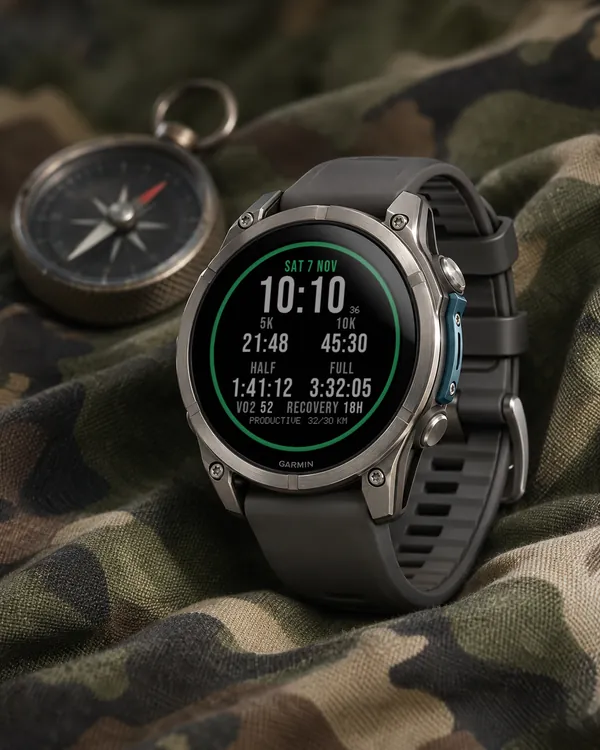
Garmin race predictions and weekly mileage right on the face
 Photography
Amber Hour
5.0 (15)
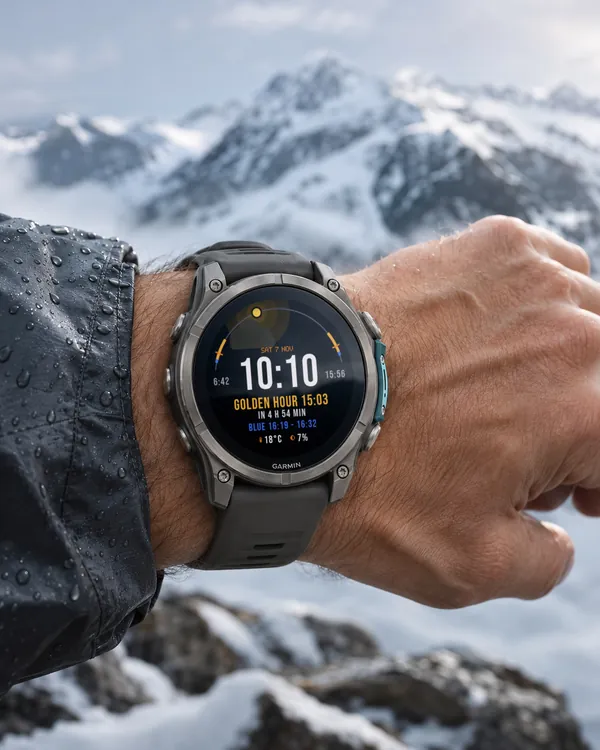
Golden and blue hour countdown with the sun's path across your day
 Readiness
Day Verdict
4.8 (12)
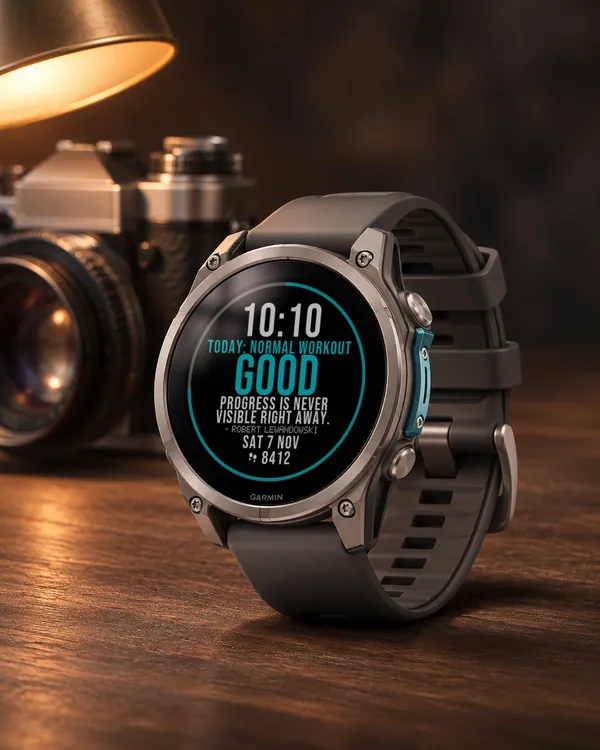
One word for your day: PUSH, STEADY, EASY or REST, from your sleep, Body Battery and recovery
 Activity
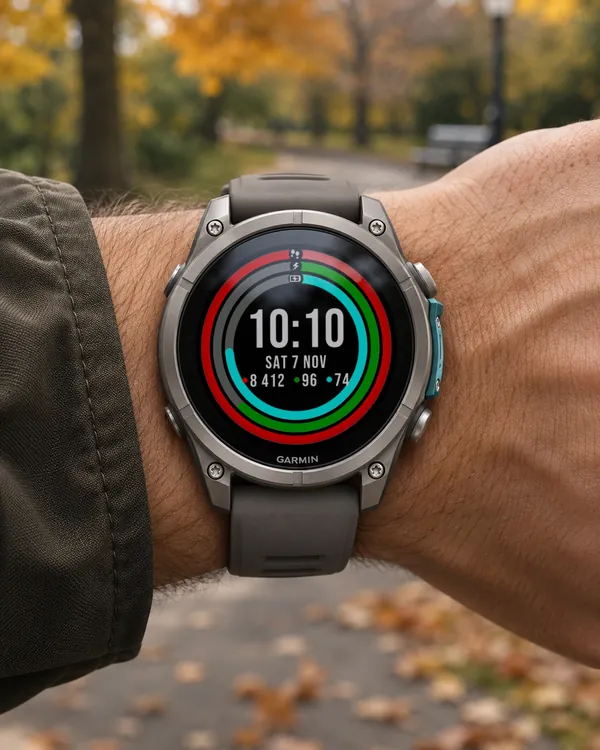
Ring Day
5.0 (16)
Three activity rings around the time, for people who close their rings