Unlock
€6.49
One-time payment. No subscription. The code works on the watch whose ID you enter.
- Install the face from Connect IQ (7 days free).
- On the watch: face settings > Buy / Unlock, scan the QR code.
- Pay and paste the code in the face settings.
- Pay.
- Copy the code.
- Paste it in Connect IQ: this face > Settings > Unlock code.
Payment works best in Safari or Chrome: menu (three dots) > Open in browser
Read it in this face, it is not the serial number of the watch.
The code works only in the watch face it was bought for: a Summit Rings code will not work in Summit Tactic.
Your ID, compare it with the watch:
Where do I find the ID?
On the watch: settings of this face > Buy / Unlock (first item). Scan the QR code with your phone or type the 10 digits. The ID is also at the top of the face settings in the Connect IQ app.
Code not working on your watch? Write to me and I will fix it.
Payments by Stripe. Seller: Mateusz Kolarz, Lublin, Poland.
Paid. Code:
We show the code here too. If the e-mail does not arrive (check spam), you can recover the code in the Recover code section with just the Face ID. Recover code
Copying did not work. The code is selected: copy it by hand.
The face unlocks by itself when the watch connects to the phone (usually within an hour; if the trial is still running, the purchase starts working when it ends).
Do not want to wait, or have an older watch? Paste the code in the Connect IQ app:
Connect IQ (or Garmin Connect) > My Device > Watch faces > Signal Ops > Settings > Unlock code > paste > Save
Like it? Rate this face in the Garmin store
Want to try new faces and apps before the release, for free? Join the testers program
Set up the face before you download
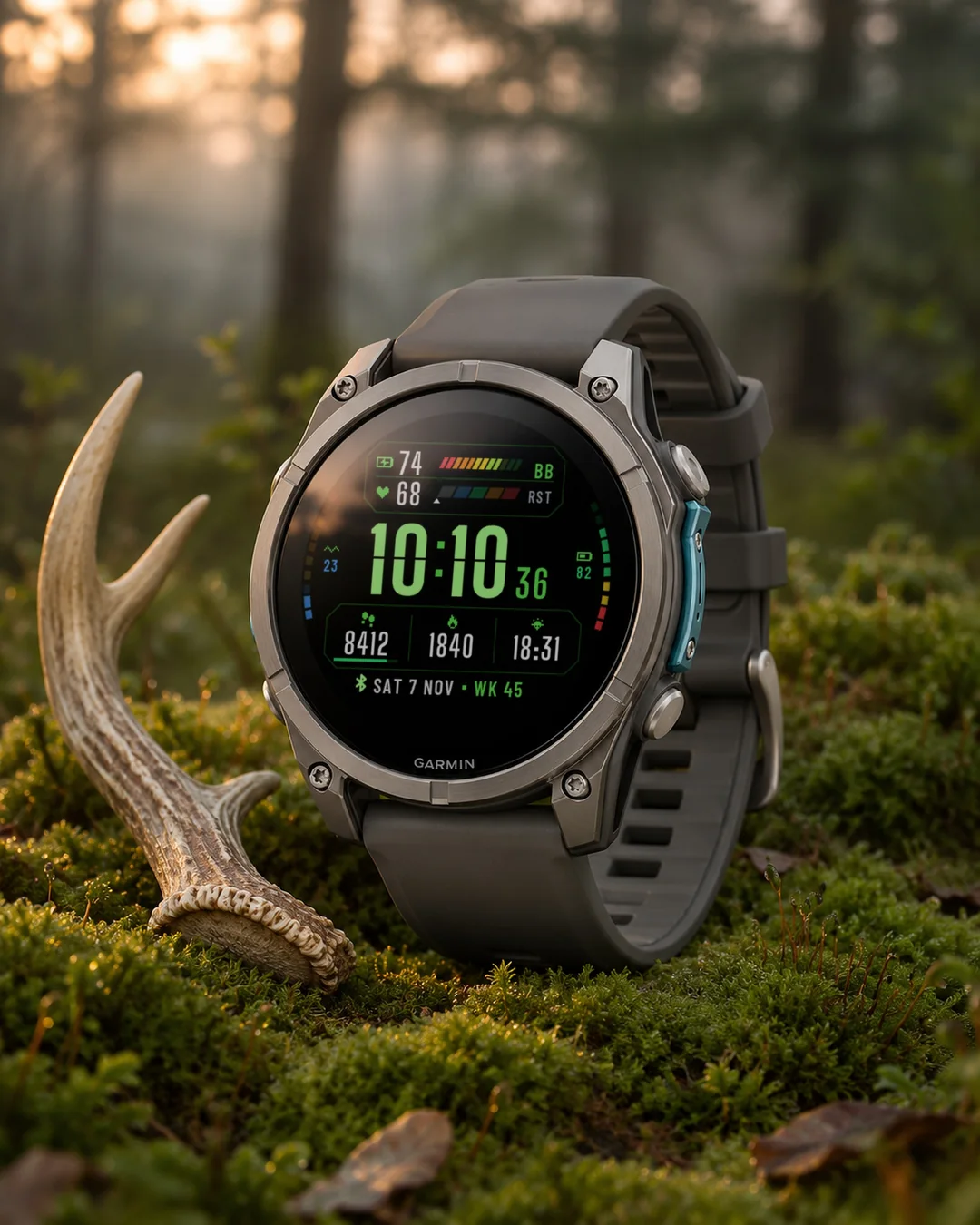
A tactical data dashboard watch face with big stencil-cut time and every other reading in its own framed module, including Body Battery, heart rate zones, stress and battery bars.
7-day free trial, then a one-time unlock at dialforge.dev. No subscription.
Signal Ops is a tactical dashboard for your wrist: big stencil-cut time up front, every other reading in its own framed module with colour-coded bars.
What you get
- Body Battery as a 12-segment bar, red to green
- Heart rate with a 5-zone bar. Zones come from your user profile (or 220 minus age), a marker shows exactly where you are
- Big time with a stencil cut and square colon, small seconds while the screen is awake
- Side rails: stress on the left, watch battery on the right, 10 segments each plus the number
- Three data columns at the bottom with icons and progress bars
- Date and ISO week number, day and month names in 13 languages (by watch language, or fixed to English or Polish)
- Four themes: Night Ops, Desert, Arctic, Hazard
- Frames and grid can be turned off
- Always-on mode for AMOLED: dimmed time and a thin Body Battery outline, shifted every minute against burn-in
Data for the three columns: heart rate, steps, battery, battery days, distance, calories, floors, intensity minutes, Body Battery, stress, altitude, pressure, notifications, solar intensity, temperature, sunrise, sunset, next sunrise or sunset, respiration, Pulse Ox, recovery time, resting HR, VO2 max, sleep score*, 5K prediction*, weekly run distance*, moon phase, week number, day of year, or empty.
* needs a watch with Connect IQ 4.2 or newer
No reading, no fake number: you see "--".
Since 1.2.0: new data to choose from: weather with icon, wind, humidity, UV, chance of rain, active calories, alarms, phone connection, do not disturb, move bar, 10K, half and full marathon predictions, cycling VO2 max, weekly ride distance and a second time zone (a fixed UTC offset, no daylight saving); time format (12/24 h) and leading zero settings; on touchscreen watches, touch and hold a field to open its screen.
Since 1.2.1: on most color watches, the settings on the watch show a live preview of the face while you change them. Sunrise and sunset work on their own from your location.
Garmin does not give watch faces access to HRV status or Training Readiness, so no Connect IQ watch face can show them.
Code not working? Write to kontakt@dialforge.dev and we fix it.
Settings: on the watch (hold MENU, then Watch face, then Customize) or in the Connect IQ app.
From the maker
I am a student and I build Dialforge watch faces myself, after classes. I do not own every watch model, so if something looks wrong on yours, write to me at https://dialforge.dev/faces/signalops/ and I will usually fix it within 24 hours. If you like the face, you can buy me a coffee: https://buycoffee.to/iwannaflysohigh
Works on fenix 9, fenix 8, Forerunner 970, Forerunner 570, Venu 4, Forerunner 965, Forerunner 265, Venu 3 and more.
Taktyczna tarcza z panelem danych: duży czas w kroju stencil i każdy odczyt w osobnej ramce, w tym Body Battery, strefy tętna, stres i bateria na paskach.
7 dni za darmo, potem jednorazowe odblokowanie na dialforge.dev. Bez abonamentu.
Signal Ops to taktyczny panel na nadgarstek. Na pierwszym planie duża godzina przecięta jak szablon, a reszta danych w osobnych modułach z kolorowymi paskami.
Co jest na tarczy
- Body Battery jako pasek z 12 segmentów, od czerwieni do zieleni
- Tętno z paskiem 5 stref. Strefy z Twojego profilu (albo 220 minus wiek), znacznik pokazuje, gdzie jesteś
- Duża godzina z nacięciem i kwadratowym dwukropkiem, małe sekundy przy aktywnym ekranie
- Boczne szyny: stres po lewej, bateria zegarka po prawej, po 10 segmentów plus liczba
- Trzy kolumny danych na dole z ikonami i paskami postępu
- Data i numer tygodnia ISO, nazwy dni i miesięcy w 13 językach (wg języka zegarka albo na stałe po angielsku lub po polsku)
- Cztery motywy: Noktowizor, Pustynia, Arktyka, Ostrzegawczy
- Ramki i siatkę można wyłączyć
- Tryb zawsze włączony na AMOLED: przygaszona godzina i cienki obrys Body Battery, przesuwane co minutę
Dane do trzech kolumn: tętno, kroki, bateria, dni na baterii, dystans, kalorie, piętra, minuty intensywne, Body Battery, stres, wysokość, ciśnienie, powiadomienia, nasłonecznienie, temperatura, wschód i zachód słońca, najbliższy wschód lub zachód, oddech, pulsoksymetr, czas regeneracji, tętno spoczynkowe, VO2 max, ocena snu*, prognoza na 5 km*, kilometry biegu w tygodniu*, faza księżyca, numer tygodnia, dzień roku, albo puste pole.
* wymaga zegarka z Connect IQ 4.2 lub nowszym
Brak odczytu to "--", nigdy zmyślona liczba.
Od wersji 1.2.0: nowe dane do wyboru: pogoda z ikoną, wiatr, wilgotność, UV, szansa opadów, kalorie aktywne, budziki, połączenie z telefonem, nie przeszkadzać, pasek ruchu, prognozy na 10 km, półmaraton i maraton, VO2 max na rowerze, dystans rowerowy w tygodniu i druga strefa czasu (stałe przesunięcie od UTC, bez zmiany czasu); ustawienia formatu godziny (12/24 h) i zera na początku; na zegarkach z ekranem dotykowym przytrzymanie pola otwiera jego ekran.
Od wersji 1.2.1: na większości zegarków z kolorowym ekranem ustawienia na zegarku pokazują podgląd tarczy na żywo podczas zmiany. Wschód i zachód słońca działają samodzielnie na podstawie Twojej lokalizacji.
Garmin nie udostępnia tarczom statusu HRV ani gotowości treningowej, więc żadna tarcza Connect IQ ich nie pokaże.
Kod nie działa? Napisz na kontakt@dialforge.dev, a naprawimy problem.
Ustawienia: na zegarku (przytrzymaj MENU, Tarcza zegarka, Dostosuj) albo w aplikacji Connect IQ.
Od autora
Jestem studentem i robię tarcze Dialforge sam, po zajęciach. Nie mam każdego modelu zegarka, więc jeśli coś wygląda źle na Twoim, napisz na https://dialforge.dev/faces/signalops/, zwykle poprawiam to w ciągu 24 godzin. Jeśli tarcza Ci się podoba, możesz postawić mi kawę: https://buycoffee.to/iwannaflysohigh
Działa na: fenix 9, fenix 8, Forerunner 970, Forerunner 570, Venu 4, Forerunner 965, Forerunner 265, Venu 3 i innych.
Ein taktisches Zifferblatt mit Daten-Dashboard: große Uhrzeit im Stencil-Schnitt und jeder Wert in einem eigenen Rahmen, darunter Body Battery, Herzfrequenzzonen, Stress und Akku als Balken.
7 Tage kostenlos testen, danach einmalige Freischaltung auf dialforge.dev. Kein Abo.
Signal Ops ist ein taktisches Dashboard fürs Handgelenk: große Schablonenschrift-Zeit im Vordergrund, jeder weitere Messwert in einem eigenen gerahmten Modul mit farbcodierten Balken.
Was du bekommst
- Body Battery als 12-Segment-Balken, von Rot nach Grün
- Herzfrequenz mit einem 5-Zonen-Balken. Die Zonen stammen aus deinem Benutzerprofil (oder 220 minus Alter), eine Markierung zeigt genau, wo du stehst
- Große Zeit in Schablonenschrift mit eckigem Doppelpunkt, kleine Sekunden, während der Bildschirm aktiv ist
- Seitenleisten: Stress links, Uhrenakku rechts, je 10 Segmente plus die Zahl
- Drei Datenspalten unten mit Symbolen und Fortschrittsbalken
- Datum und ISO-Kalenderwoche, Wochentags- und Monatsnamen in 13 Sprachen (nach Uhrsprache oder fest auf Englisch oder Polnisch)
- Vier Themen: Nachtsicht, Wüste, Arktis, Warnung
- Rahmen und Raster lassen sich ausschalten
- Always-on-Modus für AMOLED: gedimmte Zeit und ein dünner Body-Battery-Umriss, jede Minute verschoben gegen Einbrennen
Daten für die drei Spalten: Herzfrequenz, Schritte, Akku, Akkutage, Distanz, Kalorien, Stockwerke, Intensitätsminuten, Body Battery, Stress, Höhe, Druck, Benachrichtigungen, Solarintensität, Temperatur, Sonnenaufgang, Sonnenuntergang, nächster Sonnenaufgang oder -untergang, Atemfrequenz, Pulse Ox, Erholungszeit, Ruheherzfrequenz, VO2max, Schlafwert*, 5-km-Prognose*, wöchentliche Laufdistanz*, Mondphase, Kalenderwoche, Tag des Jahres oder leer.
* erfordert eine Uhr mit Connect IQ 4.2 oder neuer
Kein Messwert, keine erfundene Zahl: du siehst "--".
Seit 1.2.0: neue Daten zur Auswahl: Wetter mit Symbol, Wind, Luftfeuchte, UV, Regenrisiko, aktive Kalorien, Wecker, Telefonverbindung, Nicht stören, Inaktivitätsleiste, Prognosen für 10 km, Halbmarathon und Marathon, VO2max Rad, Rad-Wochendistanz und eine zweite Zeitzone (fester UTC-Versatz, ohne Zeitumstellung); Einstellungen für Zeitformat (12/24 h) und führende Null; auf Uhren mit Touchscreen öffnet langes Drücken auf ein Feld die passende Ansicht.
Seit 1.2.1: Auf Uhren mit Farbdisplay zeigen die Einstellungen auf der Uhr eine Live-Vorschau des Zifferblatts, während du sie änderst. Sonnenaufgang und Sonnenuntergang funktionieren selbstständig anhand deines Standorts.
Garmin gibt Zifferblättern keinen Zugriff auf den HRV-Status oder die Trainingsbereitschaft, daher kann kein Connect IQ Zifferblatt sie anzeigen.
Code funktioniert nicht? Schreib an kontakt@dialforge.dev, wir beheben es.
Einstellungen: auf der Uhr (MENU gedrückt halten, dann Uhrdesign, dann Anpassen) oder in der Connect IQ App.
Vom entwickler
Ich bin Student und baue die Dialforge-Zifferblätter selbst, nach den Vorlesungen. Ich habe nicht jedes Uhrenmodell. Wenn auf deiner Uhr etwas falsch aussieht, schreib mir auf https://dialforge.dev/faces/signalops/, meist behebe ich es innerhalb von 24 Stunden. Wenn dir das Zifferblatt gefällt, kannst du mir einen Kaffee spendieren: https://buycoffee.to/iwannaflysohigh
Un cadran tactique en tableau de bord : grande heure en pochoir et chaque donnée dans son module encadré, dont Body Battery, zones de fréquence cardiaque, stress et batterie en barres.
Essai gratuit de 7 jours, puis un déverrouillage unique sur dialforge.dev. Sans abonnement.
Signal Ops est un tableau de bord tactique pour votre poignet : grande heure en découpe pochoir au premier plan, chaque autre mesure dans son propre module encadré avec des barres à code couleur.
Ce que vous obtenez
- Body Battery sous forme de barre à 12 segments, du rouge au vert
- Fréquence cardiaque avec une barre à 5 zones. Les zones viennent de votre profil utilisateur (ou de 220 moins l'âge), un repère indique exactement où vous en êtes
- Grande heure en découpe pochoir avec deux points carrés, petites secondes quand l'écran est actif
- Rails latéraux : stress à gauche, batterie de la montre à droite, 10 segments chacun plus le chiffre
- Trois colonnes de données en bas avec icônes et barres de progression
- Date et numéro de semaine ISO, noms des jours et des mois en 13 langues (selon la langue de la montre, ou fixée en anglais ou en polonais)
- Quatre thèmes : Vision nocturne, Désert, Arctique, Danger
- Les cadres et la grille peuvent être désactivés
- Mode toujours actif pour AMOLED : heure atténuée et fin contour de Body Battery, décalé chaque minute contre la rémanence
Données pour les trois colonnes : fréquence cardiaque, pas, batterie, jours d'autonomie, distance, calories, étages, minutes intensives, Body Battery, stress, altitude, pression, notifications, intensité solaire, température, lever du soleil, coucher du soleil, prochain lever ou coucher de soleil, respiration, Pulse Ox, temps de récupération, FC au repos, VO2max, score de sommeil*, prédiction 5 km*, distance de course hebdomadaire*, phase lunaire, numéro de semaine, jour de l'année, ou vide.
* nécessite une montre avec Connect IQ 4.2 ou plus récent
Pas de mesure, pas de faux chiffre : vous voyez « -- ».
Depuis la 1.2.0 : nouvelles données au choix : météo avec icône, vent, humidité, UV, risque de pluie, calories actives, alarmes, connexion du téléphone, ne pas déranger, barre d'activité, prévisions 10 km, semi et marathon, VO2 max vélo, distance vélo de la semaine et un second fuseau horaire (décalage UTC fixe, sans changement d'heure); réglages du format de l'heure (12/24 h) et du zéro initial; sur les montres tactiles, un appui long sur un champ ouvre son écran.
Depuis la 1.2.1 : sur les montres à écran couleur, les réglages de la montre affichent un aperçu en direct du cadran pendant que vous les modifiez. Le lever et le coucher du soleil fonctionnent seuls à partir de votre position.
Garmin ne donne pas aux cadrans l'accès au statut VFC ni à la disponibilité d'entraînement, aucun cadran Connect IQ ne peut donc les afficher.
Le code ne fonctionne pas ? Écris à kontakt@dialforge.dev, on le corrige.
Réglages : sur la montre (maintenez MENU, puis Cadran, puis Personnaliser) ou dans l'application Connect IQ.
Du créateur
Je suis étudiant et je crée seul les cadrans Dialforge, après les cours. Je n'ai pas tous les modèles de montre : si quelque chose ne va pas sur la vôtre, écrivez-moi sur https://dialforge.dev/faces/signalops/, je corrige en général sous 24 heures. Si le cadran vous plaît, vous pouvez m'offrir un café : https://buycoffee.to/iwannaflysohigh
Compatible avec fenix 9, fenix 8, Forerunner 970, Forerunner 570, Venu 4, Forerunner 965, Forerunner 265, Venu 3 et d'autres modèles.
Una esfera táctica con panel de datos: hora grande en estilo stencil y cada lectura en su propio módulo, con Body Battery, zonas de frecuencia cardiaca, estrés y batería en barras.
Prueba gratuita de 7 días y luego un desbloqueo único en dialforge.dev. Sin suscripción.
Signal Ops es un panel táctico para tu muñeca: hora grande estilo plantilla troquelada por delante, y cada otra lectura en su propio módulo enmarcado con barras de colores.
Lo que incluye
- Body Battery como barra de 12 segmentos, de rojo a verde
- Frecuencia cardiaca con una barra de 5 zonas. Las zonas vienen de tu perfil de usuario (o de 220 menos tu edad), y un marcador muestra exactamente dónde estás
- Hora grande con corte de plantilla y dos puntos cuadrados, segundos pequeños mientras la pantalla está encendida
- Barras laterales: estrés a la izquierda, batería del reloj a la derecha, 10 segmentos cada una más el número
- Tres columnas de datos abajo con iconos y barras de progreso
- Fecha y número de semana ISO, nombres de día y mes en 13 idiomas (según el idioma del reloj, o fijo en inglés o polaco)
- Cuatro temas: Visión nocturna, Desierto, Ártico, Peligro
- Los marcos y la cuadrícula se pueden desactivar
- Modo siempre activo para AMOLED: hora atenuada y un contorno fino de Body Battery, desplazado cada minuto para evitar el quemado de pantalla
Datos para las tres columnas: frecuencia cardiaca, pasos, batería, días de batería, distancia, calorías, pisos, minutos de intensidad, Body Battery, estrés, altitud, presión, notificaciones, intensidad solar, temperatura, amanecer, atardecer, próximo amanecer o atardecer, respiración, SpO2, tiempo de recuperación, frecuencia cardiaca en reposo, VO2 max, puntuación de sueño*, predicción de 5 km*, distancia semanal corriendo*, fase lunar, número de semana, día del año, o vacío.
* necesita un reloj con Connect IQ 4.2 o posterior
Sin lectura, sin número inventado: verás "--".
Desde la 1.2.0: nuevos datos para elegir: tiempo con icono, viento, humedad, UV, probabilidad de lluvia, calorías activas, alarmas, conexión del teléfono, no molestar, barra de movimiento, predicciones de 10 km, media maratón y maratón, VO2 máx. en bici, distancia semanal en bici y una segunda zona horaria (desfase UTC fijo, sin cambio de hora); ajustes de formato de hora (12/24 h) y cero inicial; en relojes táctiles, mantén pulsado un campo para abrir su pantalla.
Desde la 1.2.1: en relojes con pantalla en color, los ajustes del reloj muestran una vista previa en vivo de la esfera mientras los cambias. La salida y la puesta del sol funcionan por sí solas a partir de tu ubicación.
Garmin no da a las esferas acceso al estado de VFC ni a la disponibilidad para entrenar, así que ninguna esfera Connect IQ puede mostrarlos.
¿El código no funciona? Escribe a kontakt@dialforge.dev y lo arreglamos.
Ajustes: en el reloj (mantén pulsado MENU, luego Esfera y después Personalizar) o en la app Connect IQ.
Del autor
Soy estudiante y hago las esferas Dialforge yo solo, después de clase. No tengo todos los modelos de reloj, así que si algo se ve mal en el tuyo, escríbeme en https://dialforge.dev/faces/signalops/ y normalmente lo arreglo en 24 horas. Si te gusta la esfera, puedes invitarme a un café: https://buycoffee.to/iwannaflysohigh
Een tactische wijzerplaat met datadashboard: grote tijd in stencil-letters en elke waarde in een eigen kader, met Body Battery, hartslagzones, stress en batterij als balken.
7 dagen gratis proberen, daarna een eenmalige ontgrendeling op dialforge.dev. Geen abonnement.
Signal Ops is een tactisch dashboard voor je pols: grote tijd in stencil-look vooraan, elke andere waarde in zijn eigen omkaderde module met kleurgecodeerde balken.
Wat je krijgt
- Body Battery als balk met 12 segmenten, van rood naar groen
- Hartslag met een balk van 5 zones. De zones komen uit je gebruikersprofiel (of 220 min leeftijd), een markering toont precies waar je zit
- Grote tijd in stencil-look met vierkante dubbele punt, kleine seconden terwijl het scherm actief is
- Zijbalken: stress links, horlogebatterij rechts, elk met 10 segmenten plus het getal
- Drie datakolommen onderaan met iconen en voortgangsbalken
- Datum en ISO-weeknummer, dag- en maandnamen in 13 talen (volgens de taal van het horloge, of vast op Engels of Pools)
- Vier thema's: Nachtzicht, Woestijn, Arctisch, Gevaar
- Kaders en raster kunnen worden uitgeschakeld
- Always-on modus voor AMOLED: gedimde tijd en een dunne Body Battery-omtrek, elke minuut verschoven tegen inbranden
Data voor de drie kolommen: hartslag, stappen, batterij, batterijdagen, afstand, calorieën, verdiepingen, intensieve minuten, Body Battery, stress, hoogte, luchtdruk, meldingen, zonne-intensiteit, temperatuur, zonsopkomst, zonsondergang, volgende zonsopkomst of zonsondergang, ademhaling, Pulse Ox, hersteltijd, rust-HR, VO2max, slaapscore*, 5K-voorspelling*, wekelijkse hardloopafstand*, maanfase, weeknummer, dag van het jaar, of leeg.
* vereist een horloge met Connect IQ 4.2 of nieuwer
Geen meting, geen nepgetal: je ziet "--".
Sinds 1.2.0: nieuwe gegevens om te kiezen: weer met pictogram, wind, luchtvochtigheid, UV, kans op regen, actieve calorieën, alarmen, telefoonverbinding, niet storen, beweegbalk, voorspellingen voor 10 km, halve en hele marathon, VO2 max fietsen, fietsafstand deze week en een tweede tijdzone (vaste UTC-afwijking, zonder zomertijd); instellingen voor tijdnotatie (12/24 u) en voorloopnul; op horloges met touchscreen opent lang drukken op een veld het bijbehorende scherm.
Sinds 1.2.1: op horloges met kleurenscherm tonen de instellingen op het horloge een live voorbeeld van de wijzerplaat terwijl je ze aanpast. Zonsopkomst en zonsondergang werken vanzelf op basis van je locatie.
Garmin geeft wijzerplaten geen toegang tot de HRV-status of trainingsgereedheid, dus geen enkele Connect IQ-wijzerplaat kan die tonen.
Werkt de code niet? Schrijf naar kontakt@dialforge.dev, dan lossen we het op.
Instellingen: op het horloge (houd MENU ingedrukt, dan Wijzerplaat, dan Aanpassen) of in de Connect IQ-app.
Van de maker
Ik ben student en maak de Dialforge-wijzerplaten zelf, na de colleges. Ik heb niet elk horlogemodel, dus ziet er iets verkeerd uit op het jouwe, schrijf me dan via https://dialforge.dev/faces/signalops/. Meestal los ik het binnen 24 uur op. Vind je de wijzerplaat mooi, dan kun je me een koffie trakteren: https://buycoffee.to/iwannaflysohigh
Werkt op fenix 9, fenix 8, Forerunner 970, Forerunner 570, Venu 4, Forerunner 965, Forerunner 265, Venu 3 en meer.
ステンシル調の大きな時刻と、Body Battery、心拍ゾーン、ストレス、バッテリーなどの各データを枠付きモジュールで表示する、タクティカルなデータダッシュボード文字盤です。
7日間無料でお試しいただけます。その後はdialforge.devで解除を一度だけ購入(サブスクリプションなし)。
Signal Opsは手首の上の戦術ダッシュボード。ステンシル風の大きな時刻表示を前面に配置し、それ以外の数値はすべて枠付きモジュールとカラーバーで表示します。
主な機能
- Body Batteryは12段階のバーで表示、レッドからグリーンへ変化
- 心拍数は5ゾーンのバーで表示。ゾーンはユーザープロフィール(または220から年齢を引いた値)から算出され、現在地をマーカーで正確に示します
- ステンシル風の大きな時刻表示と四角いコロン、画面が点灯している間は小さく秒を表示
- サイドレール:左にストレス、右にバッテリー残量。それぞれ10段階のバーと数値で表示
- 画面下部に3つのデータ列。アイコンとプログレスバー付き
- 日付とISO週番号、曜日・月名は13言語に対応(ウォッチの言語に合わせるか、英語またはポーランド語に固定)
- 4種類のテーマ:ナイトオプス、デザート、アークティック、ハザード
- フレームとグリッドはオフにできます
- AMOLED向けの常時表示モード:時刻を減光し、Body Batteryは細いアウトラインのみ。焼き付き防止のため毎分表示位置がずれます
3つのデータ列に表示できる項目:心拍数、歩数、バッテリー、バッテリー日数、距離、カロリー、階数、強度活動時間、Body Battery、ストレス、高度、気圧、通知、ソーラー強度、気温、日の出、日の入り、次の日の出/日の入り、呼吸数、血中酸素、回復時間、安静時心拍数、VO2 max、睡眠スコア*、5kmレース予測*、週間ランニング距離*、月相、週番号、年間通算日、または空欄。
* Connect IQ 4.2以降を搭載した時計が必要です
数値が取得できないときは、架空の数字を表示せず「--」と表示します。
1.2.0から:選べるデータを追加:アイコン付き天気、風、湿度、UV、降水確率、アクティブカロリー、アラーム、スマホ接続、おやすみモード、ムーブバー、10km・ハーフ・フルマラソン予測、サイクリングVO2max、週間ライド距離、第2タイムゾーン(UTCからの固定オフセット、夏時間なし)。時刻形式(12/24時間)と先頭ゼロの設定。タッチ対応モデルではフィールドを長押しすると対応画面が開きます。
1.2.1から:カラー画面の時計では、時計の設定画面で値を変更している間、文字盤のライブプレビューが表示されます。日の出と日の入りは、現在地から自動で表示されます。
GarminはウォッチフェイスにHRVステータスやトレーニングレディネスを公開していないため、Connect IQのウォッチフェイスでは表示できません。
コードが使えない場合はkontakt@dialforge.devまでご連絡ください。修理いたします。
設定:時計本体(MENUを長押し→文字盤→カスタマイズ)またはConnect IQアプリから。
作者より
私は学生で、Dialforgeの文字盤を授業のあとに一人で作っています。すべての時計モデルを持っているわけではないので、お使いの時計で表示がおかしい場合は https://dialforge.dev/faces/signalops/ からご連絡ください。通常24時間以内に修正します。文字盤を気に入っていただけたら、コーヒーをおごっていただけるとうれしいです: https://buycoffee.to/iwannaflysohigh
対応モデル:fenix 9, fenix 8, Forerunner 970, Forerunner 570, Venu 4, Forerunner 965, Forerunner 265, Venu 3 ほか
Un quadrante tattico con dashboard di dati: ora grande in stile stencil e ogni lettura nel suo modulo, con Body Battery, zone di frequenza cardiaca, stress e batteria a barre.
Prova gratuita di 7 giorni, poi uno sblocco una tantum su dialforge.dev. Nessun abbonamento.
Signal Ops è una plancia tattica al polso: ora enorme tagliata a stencil in primo piano, ogni altra lettura nel proprio modulo incorniciato con barre colorate.
Cosa ottieni
- Body Battery come barra a 12 segmenti, dal rosso al verde
- Frequenza cardiaca con barra a 5 zone. Le zone derivano dal tuo profilo utente (oppure 220 meno l'età), un indicatore mostra esattamente dove ti trovi
- Ora grande con taglio a stencil e due punti quadrati, secondi piccoli mentre lo schermo è acceso
- Barre laterali: stress a sinistra, batteria dell'orologio a destra, 10 segmenti ciascuna più il numero
- Tre colonne di dati in basso con icone e barre di avanzamento
- Data e numero di settimana ISO, nomi di giorno e mese in 13 lingue (in base alla lingua dell'orologio, oppure fissa su inglese o polacco)
- Quattro temi: Visione notturna, Deserto, Artico, Pericolo
- Cornici e griglia disattivabili
- Modalità always-on per AMOLED: ora attenuata e sottile contorno della Body Battery, spostata ogni minuto per evitare il burn-in
Dati per le tre colonne: frequenza cardiaca, passi, batteria, giorni di autonomia, distanza, calorie, piani, minuti di intensità, Body Battery, stress, altitudine, pressione, notifiche, intensità solare, temperatura, alba, tramonto, prossima alba o tramonto, respirazione, Pulse Ox, tempo di recupero, frequenza cardiaca a riposo, VO2max, punteggio del sonno*, previsione 5K*, distanza settimanale di corsa*, fase lunare, numero della settimana, giorno dell'anno, oppure vuoto.
* richiede un orologio con Connect IQ 4.2 o successivo
Nessuna lettura, nessun numero falso: vedi "--".
Dalla 1.2.0: nuovi dati da scegliere: meteo con icona, vento, umidità, UV, probabilità di pioggia, calorie attive, sveglie, connessione del telefono, non disturbare, barra movimento, previsioni 10 km, mezza e maratona, VO2 max bici, distanza settimanale in bici e un secondo fuso orario (scarto UTC fisso, senza ora legale); impostazioni del formato ora (12/24 h) e dello zero iniziale; sugli orologi touch, tieni premuto un campo per aprire la sua schermata.
Dalla 1.2.1: sugli orologi con schermo a colori, le impostazioni sull'orologio mostrano un'anteprima dal vivo del quadrante mentre le modifichi. L'alba e il tramonto funzionano da soli in base alla tua posizione.
Garmin non dà ai quadranti accesso allo stato HRV né alla Training Readiness, quindi nessun quadrante Connect IQ può mostrarli.
Il codice non funziona? Scrivi a kontakt@dialforge.dev e lo sistemiamo.
Impostazioni: sull'orologio (tieni premuto MENU, poi Quadrante, poi Personalizza) oppure nell'app Connect IQ.
Dall'autore
Sono uno studente e creo da solo i quadranti Dialforge, dopo le lezioni. Non ho tutti i modelli di orologio, quindi se qualcosa sembra sbagliato sul tuo, scrivimi su https://dialforge.dev/faces/signalops/, di solito lo correggo entro 24 ore. Se il quadrante ti piace, puoi offrirmi un caffè: https://buycoffee.to/iwannaflysohigh
Compatibile con fenix 9, fenix 8, Forerunner 970, Forerunner 570, Venu 4, Forerunner 965, Forerunner 265, Venu 3 e altri.
战术风格的数据仪表盘表盘:模板镂空风格的大号时间,其他数据各自显示在独立边框模块中,包括 Body Battery、心率区间、压力和电量条。
7 天免费试用,之后在 dialforge.dev 一次性解锁。无需订阅。
Signal Ops 是你手腕上的战术仪表盘:正面是大号镂空数字时间,其余每项读数都各自装在带色条的独立方框里。
你将获得
- Body Battery 显示为 12 段进度条,颜色从红到绿
- 心率配有 5 档心率区间条。区间根据你的用户资料计算(或按 220 减去年龄估算),标记会精确显示你当前所处的位置
- 大号时间采用镂空数字和方形冒号,屏幕唤醒时显示小号秒针数字
- 两侧边栏:左侧压力,右侧手表电量,各 10 段并附带具体数值
- 底部三个数据列,配有图标和进度条
- 日期和 ISO 周数,星期与月份名称支持 13 种语言(跟随手表语言,或固定为英语或波兰语)
- 四种主题:夜战、沙漠、极地、警示
- 边框和网格可以关闭
- AMOLED 息屏常亮模式:时间变暗,Body Battery 只保留细线轮廓,每分钟偏移一次位置,防止烧屏
三个数据列可选:心率、步数、电量、电池续航天数、距离、卡路里、楼层、强度分钟、Body Battery、压力、海拔、气压、通知、太阳能强度、温度、日出、日落、下一次日出或日落、呼吸频率、血氧、恢复时间、静息心率、VO2 max、睡眠分数*、5公里比赛预测*、每周跑步距离*、月相、周数、一年中的第几天,或留空。
* 需要支持 Connect IQ 4.2 或更高版本的手表
没有读数时会显示"--",而不是编造出来的数字。
自 1.2.0 起:新增可选数据:带图标的天气、风、湿度、紫外线、降水概率、活动卡路里、闹钟、手机连接、勿扰、活动提醒条、10 公里、半马和全马预测、骑行最大摄氧量、本周骑行距离和第二时区(与 UTC 的固定偏移,无夏令时);时间格式(12/24 小时)和前导零设置;在触屏手表上,长按数据栏即可打开对应界面。
自 1.2.1 起:在彩色屏幕手表上,更改手表上的设置时会实时预览表盘效果。日出和日落会根据你的位置自动显示。
Garmin 不向表盘开放 HRV 状态和训练准备度,因此任何 Connect IQ 表盘都无法显示。
兑换码无法使用?请写信至 kontakt@dialforge.dev,我们会修复问题。
设置:在手表上,长按 MENU,然后依次点击表盘、自定义;或在 Connect IQ 应用中设置。
作者的话
我是一名学生,利用课余时间独自制作 Dialforge 表盘。我没有每一款手表,所以如果表盘在您的手表上显示不对,请到 https://dialforge.dev/faces/signalops/ 告诉我,我通常会在 24 小时内修复。如果您喜欢这款表盘,可以请我喝杯咖啡:https://buycoffee.to/iwannaflysohigh
适用于 fenix 9, fenix 8, Forerunner 970, Forerunner 570, Venu 4, Forerunner 965, Forerunner 265, Venu 3 等。
Тактический циферблат с панелью данных: крупное время в трафаретном начертании и каждый показатель в отдельной рамке, включая Body Battery, пульсовые зоны, стресс и заряд батареи.
7-дневный бесплатный пробный период, затем разовая разблокировка на dialforge.dev. Без подписки.
Signal Ops - это тактическая панель на вашем запястье: крупное трафаретное время на переднем плане, а все остальные показатели в собственных модулях в рамке с цветными полосками.
Что вы получаете
- Body Battery в виде 12-сегментной шкалы, от красного к зеленому
- Пульс со шкалой из 5 зон. Зоны берутся из вашего профиля пользователя (или 220 минус возраст), маркер точно показывает, где именно вы находитесь
- Крупное время с трафаретным вырезом и квадратным двоеточием, маленькие секунды при активном экране
- Боковые шкалы: стресс слева, батарея часов справа, по 10 сегментов в каждой плюс число
- Три колонки данных внизу с иконками и полосами прогресса
- Дата и номер недели по стандарту ISO, названия дней и месяцев на 13 языках (по языку часов или закрепить английский или польский)
- Четыре темы: Night Ops, Desert, Arctic, Hazard
- Рамки и сетку можно отключить
- Режим Always-on для AMOLED: приглушенное время и тонкий контур Body Battery со сдвигом каждую минуту для защиты от выгорания
Данные для трех колонок: пульс, шаги, батарея, дни работы от батареи, расстояние, калории, этажи, минуты интенсивности, Body Battery, стресс, высота, давление, уведомления, интенсивность солнечной энергии, температура, восход, закат, следующий восход/закат, частота дыхания, Pulse Ox, время восстановления, пульс в покое, VO2 max, оценка сна*, прогноз на 5K*, дистанция бега за неделю*, фаза луны, номер недели, день года или пустое поле.
* требуются часы с Connect IQ 4.2 или новее
Нет показаний, никаких выдуманных чисел: вы видите "--".
Начиная с версии 1.2.0: новые данные на выбор: погода со значком, ветер, влажность, UV, вероятность дождя, активные калории, будильники, подключение к телефону, режим «Не беспокоить», индикатор движения, прогнозы на 10K, полумарафон и марафон, велосипедный VO2 max, дистанция велопоездок за неделю и второй часовой пояс (фиксированное смещение относительно UTC, без перехода на летнее время); настройки формата времени (12/24 h) и начального нуля; на часах с сенсорным экраном коснитесь поля и удерживайте его, чтобы открыть соответствующий экран.
Начиная с версии 1.2.1: на часах с цветным экраном настройки на часах показывают предварительный просмотр циферблата в реальном времени при изменении. Восход и закат солнца работают сами по вашему местоположению.
Garmin не дает циферблатам доступа к статусу HRV или Training Readiness, поэтому ни один циферблат Connect IQ не может их показывать.
Код не работает? Напишите на kontakt@dialforge.dev, и мы все исправим.
Настройки: на часах (удерживайте MENU, затем «Циферблат», затем «Настройка») или в приложении Connect IQ.
От автора
Я студент и делаю циферблаты Dialforge сам, после занятий. У меня есть не все модели часов, поэтому если на ваших что-то выглядит неправильно, напишите мне на https://dialforge.dev/faces/signalops/, обычно я исправляю это в течение 24 часов. Если циферблат вам нравится, можете угостить меня кофе: https://buycoffee.to/iwannaflysohigh
Работает на fenix 9, fenix 8, Forerunner 970, Forerunner 570, Venu 4, Forerunner 965, Forerunner 265, Venu 3 и других.
Um mostrador tático com painel de dados: hora grande em estilo stencil e cada leitura em seu próprio módulo, com Body Battery, zonas de frequência cardíaca, estresse e bateria em barras.
Teste grátis de 7 dias, depois um desbloqueio único em dialforge.dev. Sem assinatura.
Signal Ops é um painel tático para o seu pulso: horário grande com corte em estêncil na frente, e todas as outras leituras em módulos emoldurados próprios, com barras codificadas por cor.
O que você recebe
- Body Battery em uma barra de 12 segmentos, do vermelho ao verde
- Frequência cardíaca com uma barra de 5 zonas. As zonas vêm do seu perfil de usuário (ou 220 menos a idade), e um marcador mostra exatamente onde você está
- Horário grande com corte em estêncil e dois pontos quadrados, segundos pequenos enquanto a tela está ativa
- Barras laterais: estresse à esquerda, bateria do relógio à direita, 10 segmentos cada uma mais o número
- Três colunas de dados na parte inferior com ícones e barras de progresso
- Data e número da semana ISO, nomes do dia e do mês em 13 idiomas (conforme o idioma do relógio, ou fixo em inglês ou polonês)
- Quatro temas: Visão noturna, Deserto, Ártico, Perigo
- Molduras e grade podem ser desativadas
- Modo always-on para AMOLED: horário escurecido e um contorno fino do Body Battery, deslocado a cada minuto para evitar burn-in
Dados para as três colunas: frequência cardíaca, passos, bateria, dias de bateria, distância, calorias, andares, minutos de intensidade, Body Battery, estresse, altitude, pressão, notificações, intensidade solar, temperatura, nascer do sol, pôr do sol, próximo nascer ou pôr do sol, respiração, Pulse Ox, tempo de recuperação, FC de repouso, VO2 máx, pontuação de sono*, previsão de 5 km*, distância semanal de corrida*, fase da lua, número da semana, dia do ano, ou vazio.
* precisa de um relógio com Connect IQ 4.2 ou mais recente
Sem leitura, sem número inventado: você vê "--".
Desde a 1.2.0: novos dados para escolher: tempo com ícone, vento, umidade, UV, chance de chuva, calorias ativas, alarmes, conexão do telefone, não perturbe, barra de movimento, previsões de 10 km, meia e maratona, VO2 máx. no ciclismo, distância semanal de bike e um segundo fuso horário (deslocamento UTC fixo, sem horário de verão); ajustes de formato da hora (12/24 h) e zero à esquerda; em relógios com tela sensível ao toque, toque e segure um campo para abrir a tela dele.
Desde a 1.2.1: em relógios com tela colorida, as configurações no relógio mostram uma prévia ao vivo do mostrador enquanto você as altera. O nascer e o pôr do sol funcionam sozinhos a partir da sua localização.
A Garmin não dá aos mostradores acesso ao status de VFC nem à prontidão para treino, então nenhum mostrador Connect IQ consegue exibi-los.
O código não funciona? Escreva para kontakt@dialforge.dev e a gente resolve.
Configurações: no relógio (segure MENU, depois Mostrador, depois Personalizar) ou no aplicativo Connect IQ.
Do criador
Sou estudante e faço os mostradores Dialforge sozinho, depois das aulas. Não tenho todos os modelos de relógio, então se algo parecer errado no seu, escreva para mim em https://dialforge.dev/faces/signalops/, normalmente eu corrijo em até 24 horas. Se você gostou do mostrador, pode me pagar um café: https://buycoffee.to/iwannaflysohigh
Taktický ciferník s datovým panelem: velký čas ve stylu šablony a každý údaj ve vlastním rámečku, včetně Body Battery, tepových zón, stresu a baterie v pruzích.
7denní bezplatná zkušební verze, poté jednorázové odemknutí na dialforge.dev. Žádné předplatné.
Signal Ops je taktický panel pro vaše zápěstí: v popředí velký čas s výřezy ve stylu šablony a každý další údaj ve vlastním orámovaném modulu s barevně odlišenými pruhy.
Co získáte
- Body Battery jako ukazatel s 12 segmenty, od červené po zelenou
- Srdeční tep s ukazatelem 5 zón. Zóny vycházejí z vašeho uživatelského profilu (nebo 220 minus věk), značka přesně ukazuje, kde se nacházíte
- Velký čas s výřezy ve stylu šablony a čtvercovou dvojtečkou, malé sekundy při aktivním displeji
- Postranní lišty: stres vlevo, baterie hodinek vpravo, každá po 10 segmentech plus číslo
- Tři datové sloupce dole s ikonami a ukazateli průběhu
- Datum a číslo týdne ISO, názvy dnů a měsíců ve 13 jazycích (podle jazyka hodinek, nebo napevno angličtina či polština)
- Čtyři motivy: Noční operace, Poušť, Arktida, Výstraha
- Rámečky a mřížku lze vypnout
- Režim always-on pro AMOLED: ztlumený čas a tenký obrys Body Battery, posouvaný každou minutu jako ochrana proti vypálení
Data pro tři sloupce: srdeční tep, kroky, baterie, dny výdrže baterie, vzdálenost, kalorie, patra, minuty intenzivní aktivity, Body Battery, stres, nadmořská výška, tlak, oznámení, intenzita slunečního záření, teplota, východ slunce, západ slunce, nejbližší východ nebo západ slunce, dýchání, Pulse Ox, doba regenerace, klidový srdeční tep, VO2 max, skóre spánku*, předpověď na 5K*, týdenní běžecká vzdálenost*, fáze měsíce, číslo týdne, den v roce nebo prázdné pole.
* vyžaduje hodinky s Connect IQ 4.2 nebo novějším
Žádné měření, žádné vymyšlené číslo: uvidíte "--".
Od verze 1.2.0: nová data na výběr: počasí s ikonou, vítr, vlhkost, UV, pravděpodobnost deště, aktivní kalorie, budíky, připojení k telefonu, nerušit, výzva k pohybu, předpovědi pro 10K, půlmaraton a maraton, cyklistické VO2 max, týdenní vzdálenost na kole a druhé časové pásmo (pevný posun vůči UTC, bez letního času); nastavení formátu času (12/24 h) a úvodní nuly; na hodinkách s dotykovým displejem otevřete obrazovku daného údaje dotykem a podržením pole.
Od verze 1.2.1: na hodinkách s barevným displejem zobrazuje nastavení v hodinkách náhled ciferníku naživo během úprav. Východ a západ slunce fungují samy podle vaší polohy.
Garmin neposkytuje ciferníkům přístup ke stavu HRV ani k Training Readiness, takže je nemůže zobrazit žádný ciferník z Connect IQ.
Kód nefunguje? Napište na kontakt@dialforge.dev a my vše vyřešíme.
Nastavení: v hodinkách (podržte MENU, pak Vzhled hodinek, pak Upravit) nebo v aplikaci Connect IQ.
Od autora
Jsem student a ciferníky Dialforge dělám sám, po škole. Nemám každý model hodinek, takže pokud na vašich něco nevypadá dobře, napište mi na https://dialforge.dev/faces/signalops/, obvykle to opravím do 24 hodin. Pokud se vám ciferník líbí, můžete mi koupit kávu: https://buycoffee.to/iwannaflysohigh
Funguje na fenix 9, fenix 8, Forerunner 970, Forerunner 570, Venu 4, Forerunner 965, Forerunner 265, Venu 3 a dalších.
Um mostrador tático com painel de dados: hora grande em estilo stencil e cada leitura no seu próprio módulo, com Body Battery, zonas de frequência cardíaca, stress e bateria em barras.
7 dias de teste gratuito, depois um desbloqueio único em dialforge.dev. Sem subscrição.
O Signal Ops é um painel tático para o seu pulso: horas grandes com recorte em stencil em destaque, e todas as restantes leituras no seu próprio módulo emoldurado com barras de código de cores.
O que recebe
- Body Battery numa barra de 12 segmentos, do vermelho ao verde
- Frequência cardíaca com uma barra de 5 zonas. As zonas provêm do seu perfil de utilizador (ou 220 menos a idade), e um marcador indica exatamente onde se encontra
- Horas em tamanho grande com corte em stencil e dois pontos quadrados, segundos pequenos enquanto o ecrã está ativo
- Barras laterais: stress à esquerda, bateria do relógio à direita, 10 segmentos cada mais o número
- Três colunas de dados na parte inferior com ícones e barras de progresso
- Data e número da semana ISO, nomes dos dias e dos meses em 13 idiomas (consoante o idioma do relógio, ou fixo em inglês ou polaco)
- Quatro temas: Night Ops, Desert, Arctic, Hazard
- As molduras e a grelha podem ser desativadas
- Modo always-on para AMOLED: hora atenuada e um contorno fino de Body Battery, deslocados a cada minuto contra o burn-in
Dados para as três colunas: frequência cardíaca, passos, bateria, dias de bateria, distância, calorias, andares, minutos de intensidade, Body Battery, stress, altitude, pressão, notificações, intensidade solar, temperatura, nascer do sol, pôr do sol, próximo nascer ou pôr do sol, respiração, Pulse Ox, tempo de recuperação, FC em repouso, VO2 max, pontuação de sono*, previsão de 5K*, distância de corrida semanal*, fase da lua, número da semana, dia do ano ou vazio.
* requer um relógio com Connect IQ 4.2 ou mais recente
Sem leitura, sem números inventados: vê "--".
Desde a versão 1.2.0: novos dados à escolha: meteorologia com ícone, vento, humidade, UV, probabilidade de chuva, calorias ativas, alarmes, ligação ao telemóvel, não incomodar, barra de movimento, previsões para 10K, meia maratona e maratona completa, VO2 max de ciclismo, distância de ciclismo semanal e um segundo fuso horário (um desvio UTC fixo, sem horário de verão); definições de formato de hora (12/24 h) e de zero inicial; em relógios com ecrã tátil, toque e mantenha premido um campo para abrir o respetivo ecrã.
Desde a 1.2.1: nos relógios com ecrã a cores, as definições no relógio mostram uma pré-visualização em direto do mostrador enquanto as altera. O nascer e o pôr do sol funcionam sozinhos a partir da sua localização.
A Garmin não dá aos mostradores acesso ao estado de HRV nem à Training Readiness, pelo que nenhum mostrador Connect IQ os pode apresentar.
O código não funciona? Escreva para kontakt@dialforge.dev e resolvemos o problema.
Definições: no relógio (mantenha premido MENU, depois Mostrador e depois Personalizar) ou na aplicação Connect IQ.
Do criador
Sou estudante e faço os mostradores Dialforge sozinho, depois das aulas. Não tenho todos os modelos de relógio, por isso, se algo parecer errado no seu, escreva-me em https://dialforge.dev/faces/signalops/, normalmente corrijo em 24 horas. Se gostar do mostrador, pode oferecer-me um café: https://buycoffee.to/iwannaflysohigh
스텐실 느낌의 큰 시간과 Body Battery, 심박 구간, 스트레스, 배터리 막대를 각각 테두리 모듈로 보여 주는 택티컬 데이터 대시보드 워치 페이스입니다.
7일 무료 체험 후, dialforge.dev에서 일회성 잠금 해제를 구매하세요. 구독은 없습니다.
Signal Ops는 손목 위의 전술 대시보드입니다. 앞쪽에는 스텐실로 오린 큰 시간, 나머지 모든 측정값은 색으로 구분되는 막대가 있는 각자의 프레임 모듈에 담았습니다.
주요 기능
- 12칸 막대로 표시되는 Body Battery, 빨강에서 초록으로
- 5구간 막대가 있는 심박수. 구간은 사용자 프로필(또는 220에서 나이를 뺀 값)에서 가져오며, 마커가 현재 위치를 정확히 보여 줍니다
- 스텐실 컷과 사각형 콜론이 있는 큰 시간, 화면이 켜져 있는 동안 작은 초
- 양옆 레일: 왼쪽에 스트레스, 오른쪽에 시계 배터리, 각각 10칸과 숫자
- 아래쪽에 아이콘과 진행 막대가 있는 세 개의 데이터 열
- 날짜와 ISO 주차, 13개 언어의 요일 및 월 이름(시계 언어에 따르거나, 영어 또는 폴란드어로 고정)
- 네 가지 테마: Night Ops, Desert, Arctic, Hazard
- 프레임과 그리드는 끌 수 있음
- AMOLED용 상시 표시 모드: 어두운 시간과 가는 Body Battery 윤곽, 번인 방지를 위해 매분 위치 이동
세 개의 열에 쓰이는 데이터: 심박수, 걸음 수, 배터리, 배터리 잔여 일수, 거리, 칼로리, 층수, 운동 강도 시간, Body Battery, 스트레스, 고도, 기압, 알림, 태양광 강도, 온도, 일출, 일몰, 다음 일출 또는 일몰, 호흡, Pulse Ox, 회복 시간, 안정 시 심박수, VO2 max, 수면 점수*, 5K 예측*, 주간 달리기 거리*, 월상, 주차, 연중 일수, 또는 비움.
* Connect IQ 4.2 이상을 지원하는 시계가 필요합니다
측정값이 없으면 가짜 숫자도 없습니다. "--"가 표시됩니다.
1.2.0부터 선택 가능한 새 데이터: 아이콘이 있는 날씨, 바람, 습도, UV, 강수 확률, 활동 칼로리, 알람, 휴대전화 연결, 방해 금지, 활동 알림 바, 10K, 하프 및 풀 마라톤 예측, 사이클링 VO2 max, 주간 라이딩 거리, 두 번째 시간대(고정 UTC 오프셋, 서머타임 없음); 시간 형식(12/24시간) 및 앞자리 영 표시 설정; 터치스크린 시계에서는 필드를 길게 누르면 해당 화면이 열립니다.
1.2.1부터: 컬러 화면 워치에서는 시계의 설정 화면에서 값을 바꾸는 동안 워치페이스를 실시간 미리보기로 볼 수 있습니다. 일출과 일몰이 현재 위치를 기준으로 자동으로 작동합니다.
Garmin은 워치페이스에 HRV 상태나 Training Readiness에 대한 접근을 허용하지 않으므로, 어떤 Connect IQ 워치페이스도 이를 표시할 수 없습니다.
코드가 작동하지 않나요? kontakt@dialforge.dev로 연락 주시면 해결해 드립니다.
설정: 시계에서(MENU를 길게 누른 다음 워치페이스, 사용자 설정) 또는 Connect IQ 앱에서 변경할 수 있습니다.
제작자의 한마디
저는 학생이고 수업이 끝난 뒤 Dialforge 워치페이스를 혼자 만들고 있습니다. 모든 시계 모델을 갖고 있지는 않아서, 시계에서 이상하게 보이는 부분이 있으면 https://dialforge.dev/faces/signalops/에서 알려 주세요. 보통 24시간 안에 고칩니다. 워치페이스가 마음에 드신다면 커피 한 잔 사주실 수 있습니다: https://buycoffee.to/iwannaflysohigh
지원 모델: fenix 9, fenix 8, Forerunner 970, Forerunner 570, Venu 4, Forerunner 965, Forerunner 265, Venu 3 외
En taktisk urtavla med datapanel: stor tid i stencilstil och varje värde i en egen ram, bland annat Body Battery, pulszoner, stress och batteri som staplar.
7 dagars gratis provperiod, sedan en engångsupplåsning på dialforge.dev. Ingen prenumeration.
Signal Ops är en taktisk instrumentpanel för handleden: stor schablonskuren tid i förgrunden, övriga värden i egna inramade moduler med färgkodade staplar.
Vad du får
- Body Battery som en 12-segmentsstapel, från rött till grönt
- Puls med en 5-zonsstapel. Zonerna hämtas från din användarprofil (eller 220 minus ålder), en markör visar exakt var du ligger
- Stor tid med schablonsnitt och fyrkantigt kolontecken, små sekunder när skärmen är aktiv
- Sidoskenor: stress till vänster, klockbatteri till höger, 10 segment vardera plus siffran
- Tre datakolumner längst ner med ikoner och förloppsindikatorer
- Datum och ISO-veckonummer, dags- och månadsnamn på 13 språk (efter klockans språk, eller fast på engelska eller polska)
- Fyra teman: Night Ops, Desert, Arctic, Hazard
- Ramar och rutnät kan stängas av
- Always-on-läge för AMOLED: nedtonad tid och en tunn kontur för Body Battery, flyttas varje minut mot inbränning
Data för de tre kolumnerna: puls, steg, batteri, batteridagar, distans, kalorier, våningar, intensiva minuter, Body Battery, stress, höjd, lufttryck, aviseringar, solintensitet, temperatur, soluppgång, solnedgång, nästa soluppgång eller solnedgång, andning, Pulse Ox, återhämtningstid, vilopuls, VO2 max, sömnresultat*, 5K-prognos*, löpdistans per vecka*, månfas, veckonummer, dag på året eller tomt.
* kräver en klocka med Connect IQ 4.2 eller senare
Inget mätvärde, inga påhittade siffror: du ser "--".
Sedan 1.2.0: ny data att välja mellan: väder med ikon, vind, luftfuktighet, UV, regnrisk, aktiva kalorier, alarm, telefonanslutning, stör ej, rörelsestapel, prognoser för 10K, halvmaraton och maraton, cykling-VO2 max, cykeldistans per vecka och en andra tidszon (en fast UTC-förskjutning, ingen sommartid); inställningar för tidsformat (12/24 h) och inledande nolla; på klockor med pekskärm kan du trycka och hålla på ett fält för att öppna dess skärm.
Sedan 1.2.1: På klockor med färgskärm visar inställningarna på klockan en liveförhandsvisning av urtavlan medan du ändrar dem. Soluppgång och solnedgång fungerar av sig själva utifrån din position.
Garmin ger inte urtavlor åtkomst till HRV-status eller Training Readiness, så ingen Connect IQ-urtavla kan visa dem.
Fungerar inte koden? Skriv till kontakt@dialforge.dev så löser vi det.
Inställningar: på klockan (håll in MENU, sedan Urtavla, sedan Anpassa) eller i Connect IQ-appen.
Från skaparen
Jag är student och gör Dialforge-urtavlorna själv, efter föreläsningarna. Jag har inte alla klockmodeller, så om något ser fel ut på din, skriv till mig på https://dialforge.dev/faces/signalops/, oftast fixar jag det inom 24 timmar. Gillar du urtavlan kan du bjuda mig på en kaffe: https://buycoffee.to/iwannaflysohigh
Fungerar på fenix 9, fenix 8, Forerunner 970, Forerunner 570, Venu 4, Forerunner 965, Forerunner 265, Venu 3 med flera.
En taktisk urskive med datapanel: stort ur i stencilskrift og hver måling i sit eget felt, blandt andet Body Battery, pulszoner, stress og batteri som bjælker.
7 dages gratis prøveperiode, derefter en engangsoplåsning på dialforge.dev. Intet abonnement.
Signal Ops er et taktisk dashboard til dit håndled: stort stencilskåret klokkeslæt forrest, hver anden måling i sit eget indrammede modul med farvekodede bjælker.
Det får du
- Body Battery som en bjælke med 12 segmenter, rød til grøn
- Puls med en bjælke i 5 zoner. Zonerne kommer fra din brugerprofil (eller 220 minus alder), en markør viser præcis, hvor du er
- Stort klokkeslæt med stencilskæring og firkantet kolon, små sekunder, mens skærmen er vågen
- Sideskinner: stress til venstre, urets batteri til højre, 10 segmenter hver plus tallet
- Tre datakolonner nederst med ikoner og statusbjælker
- Dato og ISO-ugenummer, dags- og månedsnavne på 13 sprog (efter urets sprog, eller fast engelsk eller polsk)
- Fire temaer: Night Ops, Desert, Arctic, Hazard
- Rammer og gitter kan slås fra
- Always-on-tilstand til AMOLED: dæmpet klokkeslæt og en tynd kontur af Body Battery, flyttet hvert minut mod indbrænding
Data til de tre kolonner: puls, skridt, batteri, batteridage, distance, kalorier, etager, intensitetsminutter, Body Battery, stress, højde, tryk, notifikationer, solintensitet, temperatur, solopgang, solnedgang, næste solopgang eller solnedgang, respiration, Pulse Ox, restitutionstid, hvilepuls, VO2 max, søvnscore*, 5K-prognose*, ugentlig løbedistance*, månefase, ugenummer, dag på året eller tomt.
* kræver et ur med Connect IQ 4.2 eller nyere
Ingen måling, intet falsk tal: du ser "--".
Siden 1.2.0: nye data at vælge imellem: vejr med ikon, vind, luftfugtighed, UV, regnrisiko, aktive kalorier, alarmer, telefonforbindelse, forstyr ikke, bevægelsesbjælke, 10K, halv- og helmaratonprognoser, VO2 max til cykling, ugentlig cykeldistance og en ekstra tidszone (en fast UTC-forskydning, ingen sommertid). Indstillinger for tidsformat (12/24 timer) og forudgående nul. På ure med touchskærm kan du trykke og holde på et felt for at åbne dets skærmbillede.
Siden 1.2.1: På ure med farveskærm viser indstillingerne på uret et live-eksempel af urskiven, mens du ændrer dem. Solopgang og solnedgang fungerer af sig selv ud fra din placering.
Garmin giver ikke urskiver adgang til HRV-status eller Training Readiness, så ingen Connect IQ-urskive kan vise dem.
Virker koden ikke? Skriv til kontakt@dialforge.dev, så retter vi det.
Indstillinger: på uret (hold MENU, derefter Urskive, derefter Tilpas) eller i Connect IQ-appen.
Fra skaberen
Jeg er studerende og laver Dialforge-urskiverne selv, efter undervisningen. Jeg har ikke alle urmodeller, så hvis noget ser forkert ud på dit ur, så skriv til mig på https://dialforge.dev/faces/signalops/. Som regel retter jeg det inden for 24 timer. Kan du lide urskiven, kan du give mig en kop kaffe: https://buycoffee.to/iwannaflysohigh
Virker på fenix 9, fenix 8, Forerunner 970, Forerunner 570, Venu 4, Forerunner 965, Forerunner 265, Venu 3 og flere.
En taktisk urskive med datapanel: stor tid i stencilskrift og hver måling i sin egen ramme, blant annet Body Battery, pulssoner, stress og batteri som stolper.
7 dagers gratis prøveperiode, deretter en engangsopplåsing på dialforge.dev. Ingen abonnement.
Signal Ops er et taktisk dashbord for håndleddet: stor sjablongskåret tid foran, hver annen måling i sin egen innrammede modul med fargekodede linjer.
Dette får du
- Body Battery som en linje med 12 segmenter, rød til grønn
- Puls med en linje med 5 soner. Sonene kommer fra brukerprofilen din (eller 220 minus alder), en markør viser nøyaktig hvor du er
- Stor tid med sjablongsnitt og firkantet kolon, små sekunder mens skjermen er våken
- Sideskinner: stress til venstre, klokkebatteri til høyre, 10 segmenter hver pluss tallet
- Tre datakolonner nederst med ikoner og fremdriftslinjer
- Dato og ISO-ukenummer, dags- og månedsnavn på 13 språk (etter klokkens språk, eller låst til engelsk eller polsk)
- Fire temaer: Night Ops, Desert, Arctic, Hazard
- Rammer og rutenett kan slås av
- Alltid-på-modus for AMOLED: dempet tid og en tynn Body Battery-kontur, flyttet hvert minutt mot innbrenning
Data til de tre kolonnene: puls, skritt, batteri, batteridager, distanse, kalorier, etasjer, intensitetsminutter, Body Battery, stress, høyde, trykk, varsler, solintensitet, temperatur, soloppgang, solnedgang, neste soloppgang eller solnedgang, respirasjon, Pulse Ox, restitusjonstid, hvilepuls, VO2 max, søvnskåre*, 5K-prediksjon*, ukentlig løpedistanse*, månefase, ukenummer, dag i året, eller tomt.
* krever en klokke med Connect IQ 4.2 eller nyere
Ingen måling, ingen falskt tall: du ser "--".
Fra 1.2.0: nye data å velge mellom: vær med ikon, vind, luftfuktighet, UV, regnsjanse, aktive kalorier, alarmer, telefonforbindelse, ikke forstyrr, bevegelseslinje, 10K-, halvmaraton- og maratonprediksjoner, VO2 max for sykling, ukentlig sykkeldistanse og en ekstra tidssone (en fast UTC-forskyvning, uten sommertid); innstillinger for tidsformat (12/24 t) og innledende null; på berøringsskjermklokker kan du trykke og holde på et felt for å åpne skjermbildet.
Siden 1.2.1: På klokker med fargeskjerm viser innstillingene på klokken en live-forhåndsvisning av urskiven mens du endrer dem. Soloppgang og solnedgang fungerer av seg selv ut fra posisjonen din.
Garmin gir ikke urskiver tilgang til HRV-status eller Training Readiness, så ingen Connect IQ-urskive kan vise dem.
Fungerer ikke koden? Skriv til kontakt@dialforge.dev, så fikser vi det.
Innstillinger: på klokken (hold MENU, deretter Urskive, deretter Tilpass) eller i Connect IQ-appen.
Fra utvikleren
Jeg er student og lager Dialforge-urskivene selv, etter forelesningene. Jeg har ikke alle klokkemodeller, så hvis noe ser feil ut på din, skriv til meg på https://dialforge.dev/faces/signalops/, vanligvis fikser jeg det innen 24 timer. Liker du urskiven, kan du spandere en kaffe på meg: https://buycoffee.to/iwannaflysohigh
Fungerer på fenix 9, fenix 8, Forerunner 970, Forerunner 570, Venu 4, Forerunner 965, Forerunner 265, Venu 3 og flere.
戰術風格的資料儀表板錶面:模板鏤空風格的大字時間,其他數據各自顯示在獨立邊框模組中,包括 Body Battery、心率區間、壓力與電量條。
7 天免費試用,之後在 dialforge.dev 一次性解鎖。不需訂閱。
Signal Ops 是戴在手腕上的戰術儀表板:模板鏤空風格的大字時間置於正中央,其餘數值各自置於獨立的框格模組中,搭配色彩分級的長條。
您將獲得
- Body Battery 以 12 段長條顯示,由紅至綠
- 心率以 5 個心率區間的長條顯示。區間依您的使用者資料計算(或以 220 減去年齡),標記會精確顯示您目前所在的位置
- 大字時間採模板鏤空風格與方形冒號,螢幕喚醒時顯示小字秒數
- 左右側欄:左側為壓力,右側為手錶電量,各為 10 段長條並附數字
- 底部有三個資料欄位,附圖示與進度條
- 日期與 ISO 週數,星期與月份名稱支援 13 種語言(依手錶語言,或固定為英文或波蘭文)
- 四種主題:夜間行動、沙漠、極地、警戒
- 框線與網格可關閉
- AMOLED 常亮模式:時間變暗,Body Battery 僅顯示細框輪廓,每分鐘偏移以避免螢幕烙印
三個資料欄位可選:心率、步數、電量、電池續航天數、距離、卡路里、樓層、強度分鐘、Body Battery、壓力、海拔、氣壓、通知、太陽能強度、溫度、日出、日落、下一次日出或日落、呼吸頻率、血氧、恢復時間、靜止心率、VO2 max、睡眠評分*、5 公里比賽預測*、每週跑步距離*、月相、週數、當年第幾天,或留空。
* 需要搭載 Connect IQ 4.2 或以上版本的手錶
沒有讀數時不會顯示假數字,您會看到「--」。
自 1.2.0 起:新增可選資料:附圖示的天氣、風、濕度、紫外線、降雨機率、活動卡路里、鬧鐘、手機連線、勿擾、活動提醒列、10 公里、半馬與全馬預測、自行車最大攝氧量、本週騎乘距離與第二時區(與 UTC 的固定偏移,無夏令時);時間格式(12/24 小時)與前導零設定;在觸控手錶上,長按資料欄即可開啟對應畫面。
自 1.2.1 起:在彩色螢幕手錶上,變更手錶上的設定時會即時預覽錶面效果。日出和日落會依據你的位置自動顯示。
Garmin 不向錶面開放 HRV 狀態與訓練準備度,因此任何 Connect IQ 錶面都無法顯示。
解鎖碼無法使用?請寫信至 kontakt@dialforge.dev,我們會修復問題。
設定:在手錶上(長按 MENU,依序選擇錶面、自訂)或在 Connect IQ 應用程式中設定。
作者的話
我是一名學生,利用課餘時間獨自製作 Dialforge 錶面。我沒有每一款手錶,所以如果錶面在您的手錶上顯示不對,請到 https://dialforge.dev/faces/signalops/ 告訴我,我通常會在 24 小時內修復。如果您喜歡這款錶面,可以請我喝杯咖啡:https://buycoffee.to/iwannaflysohigh
適用於 fenix 9, fenix 8, Forerunner 970, Forerunner 570, Venu 4, Forerunner 965, Forerunner 265, Venu 3 等。
Taktinen kellotaulu tietopaneelilla: iso stencil-kirjasimen kellonaika ja jokainen lukema omassa kehyksessään, mukana Body Battery, sykealueet, stressi ja akku palkkeina.
7 päivän ilmainen kokeilu, sen jälkeen kertaluonteinen avaus osoitteessa dialforge.dev. Ei tilausta.
Signal Ops on taktinen kojelauta ranteeseesi: iso stensiilileikattu aika edessä, jokainen muu lukema omassa kehystetyssä moduulissaan värikoodatuin palkein.
Mitä saat
- Body Battery 12 segmentin palkkina, punaisesta vihreään
- Syke 5 sykealueen palkilla. Alueet tulevat käyttäjäprofiilistasi (tai 220 miinus ikä), merkki näyttää tarkasti missä olet
- Iso stensiilileikattu aika ja neliön muotoinen kaksoispiste, pienet sekunnit kun näyttö on hereillä
- Sivukiskot: stressi vasemmalla, kellon akku oikealla, 10 segmenttiä kummassakin sekä luku
- Kolme tietosaraketta alareunassa kuvakkeilla ja edistymispalkeilla
- Päivämäärä ja ISO-viikkonumero, päivien ja kuukausien nimet 13 kielellä (kellon kielen mukaan tai kiinteästi englanniksi tai puolaksi)
- Neljä teemaa: Night Ops, Desert, Arctic, Hazard
- Kehykset ja ruudukko voi kytkeä pois
- Always-on-tila AMOLED-näytöille: himmeä aika ja ohut Body Battery -ääriviiva, siirretään joka minuutti sisäänpolttoa vastaan
Kolmen sarakkeen tiedot: syke, askeleet, akku, akun päivät, matka, kalorit, kerrokset, intensiteettiminuutit, Body Battery, stressi, korkeus, ilmanpaine, ilmoitukset, auringon voimakkuus, lämpötila, auringonnousu, auringonlasku, seuraava auringonnousu tai -lasku, hengitys, Pulse Ox, palautumisaika, leposyke, VO2 max, unipisteet*, 5K-ennuste*, viikon juoksumatka*, kuun vaihe, viikkonumero, vuoden päivä tai tyhjä.
* vaatii kellon, jossa on Connect IQ 4.2 tai uudempi
Ei lukemaa, ei väärää lukua: näet "--".
Versiosta 1.2.0 alkaen: uusia valittavia tietoja: sää kuvakkeella, tuuli, ilmankosteus, UV, sateen todennäköisyys, aktiiviset kalorit, herätykset, puhelinyhteys, älä häiritse, liikepalkki, 10K, puoli- ja täysmaratonennusteet, pyöräilyn VO2 max, viikon pyöräilymatka ja toinen aikavyöhyke (kiinteä UTC-ero, ei kesäaikaa); aikamuoto (12/24 h) ja etunollan asetukset; kosketusnäyttökelloissa kentän avaa pitämällä sitä painettuna.
Versiosta 1.2.1: Värinäytöllisissä kelloissa kellon asetukset näyttävät kellotaulun esikatselun reaaliaikaisesti muutosten aikana. Auringonnousu ja -lasku toimivat itsestään sijaintisi perusteella.
Garmin ei anna kellotauluille pääsyä HRV-tilaan eikä Training Readiness -tietoon, joten mikään Connect IQ -kellotaulu ei voi näyttää niitä.
Koodi ei toimi? Kirjoita osoitteeseen kontakt@dialforge.dev, niin korjaamme asian.
Asetukset: kellossa (pidä MENU painettuna, sitten Kellotaulu, sitten Mukauta) tai Connect IQ -sovelluksessa.
Tekijältä
Olen opiskelija ja teen Dialforge-kellotaulut itse, luentojen jälkeen. Minulla ei ole jokaista kellomallia, joten jos jokin näyttää kellossasi väärältä, kirjoita minulle osoitteessa https://dialforge.dev/faces/signalops/. Korjaan sen yleensä 24 tunnin kuluessa. Jos pidät kellotaulusta, voit tarjota minulle kahvin: https://buycoffee.to/iwannaflysohigh
Toimii malleissa fenix 9, fenix 8, Forerunner 970, Forerunner 570, Venu 4, Forerunner 965, Forerunner 265, Venu 3 ja muissa.
Taktický ciferník s dátovým panelom: veľký čas v štýle šablóny a každý údaj vo vlastnom rámčeku, vrátane Body Battery, tepových zón, stresu a batérie v pruhoch.
7-dňová bezplatná skúška, potom jednorazové odomknutie na dialforge.dev. Bez predplatného.
Signal Ops je taktický dashboard na vaše zápästie: veľký šablónový čas vpredu a každý ďalší údaj vo vlastnom orámovanom module s farebne odlíšenými ukazovateľmi.
Čo získate
- Body Battery ako 12-segmentový ukazovateľ, od červenej po zelenú
- Tepová frekvencia s 5-zónovým ukazovateľom. Zóny sa berú z vášho používateľského profilu (alebo 220 mínus vek), značka presne ukazuje, kde ste
- Veľký čas so šablónovým rezom a štvorcovou dvojbodkou, malé sekundy, kým je displej zapnutý
- Bočné lišty: stres vľavo, batéria hodiniek vpravo, po 10 segmentov plus číslo
- Tri dátové stĺpce dole s ikonami a ukazovateľmi priebehu
- Dátum a číslo týždňa podľa ISO, názvy dní a mesiacov v 13 jazykoch (podľa jazyka hodiniek alebo pevne v angličtine či poľštine)
- Štyri témy: Night Ops, Desert, Arctic, Hazard
- Rámčeky a mriežku možno vypnúť
- Režim stále zapnutého displeja pre AMOLED: stlmený čas a tenký obrys Body Battery, posúvané každú minútu proti vypáleniu
Údaje pre tri stĺpce: tepová frekvencia, kroky, batéria, dni batérie, vzdialenosť, kalórie, podlažia, minúty intenzity, Body Battery, stres, nadmorská výška, tlak, oznámenia, solárna intenzita, teplota, východ slnka, západ slnka, nasledujúci východ alebo západ slnka, dýchanie, Pulse Ox, čas regenerácie, pokojová tepová frekvencia, VO2 max, skóre spánku*, predikcia 5K*, týždenná bežecká vzdialenosť*, fáza mesiaca, číslo týždňa, deň v roku, alebo prázdne.
* vyžaduje hodinky s Connect IQ 4.2 alebo novším
Bez nameranej hodnoty žiadne falošné číslo: uvidíte "--".
Od 1.2.0: nové údaje na výber: počasie s ikonou, vietor, vlhkosť, UV, pravdepodobnosť dažďa, aktívne kalórie, budíky, spojenie s telefónom, nerušiť, pruh pohybu, predikcie 10K, polmaratónu a maratónu, VO2 max pri bicyklovaní, týždenná vzdialenosť na bicykli a druhé časové pásmo (pevný posun od UTC, bez letného času); nastavenia formátu času (12/24 h) a úvodnej nuly; na hodinkách s dotykovým displejom podržaním poľa otvoríte jeho obrazovku.
Od verzie 1.2.1: na hodinkách s farebným displejom zobrazujú nastavenia v hodinkách živý náhľad ciferníka počas zmeny. Východ a západ slnka fungujú samy podľa vašej polohy.
Garmin nedáva ciferníkom prístup k stavu HRV ani k Training Readiness, takže ich nemôže zobraziť žiadny ciferník Connect IQ.
Kód nefunguje? Napíšte na kontakt@dialforge.dev a opravíme to.
Nastavenia: na hodinkách (podržte MENU, potom Ciferník, potom Prispôsobiť) alebo v aplikácii Connect IQ.
Od autora
Som študent a ciferníky Dialforge robím sám, po škole. Nemám každý model hodiniek, takže ak vám niečo na hodinkách nesedí, napíšte mi na https://dialforge.dev/faces/signalops/, zvyčajne to opravím do 24 hodín. Ak sa vám ciferník páči, môžete mi kúpiť kávu: https://buycoffee.to/iwannaflysohigh
Funguje na fenix 9, fenix 8, Forerunner 970, Forerunner 570, Venu 4, Forerunner 965, Forerunner 265, Venu 3 a ďalších.
Taktična številčnica s podatkovno ploščo: velik čas v stencil pisavi in vsak podatek v svojem okvirju, vključno z Body Battery, srčnimi conami, stresom in baterijo v stolpcih.
7-dnevni brezplačni preizkus, nato enkratno odklepanje na dialforge.dev. Brez naročnine.
Signal Ops je taktična nadzorna plošča za vaše zapestje: velik čas v šablonski pisavi spredaj, vsaka druga meritev v svojem uokvirjenem modulu z barvno kodiranimi vrsticami.
Kaj dobite
- Body Battery kot 12-segmentna vrstica, od rdeče do zelene
- Srčni utrip s 5-consko vrstico. Cone izhajajo iz vašega uporabniškega profila (ali 220 minus starost), oznaka pokaže, kje točno ste
- Velik čas s šablonskim rezom in kvadratnim dvopičjem, majhne sekunde, ko je zaslon aktiven
- Stranski tirnici: stres na levi, baterija ure na desni, po 10 segmentov in število
- Trije podatkovni stolpci spodaj z ikonami in vrsticami napredka
- Datum in ISO številka tedna, imena dnevov in mesecev v 13 jezikih (glede na jezik ure ali nastavljena na angleščino ali poljščino)
- Štiri teme: Night Ops, Desert, Arctic, Hazard
- Okvirje in mrežo lahko izklopite
- Način vedno vklopljen za AMOLED: zatemnjen čas in tanek obris Body Battery, vsako minuto premaknjena proti vžigu zaslona
Podatki za tri stolpce: srčni utrip, koraki, baterija, dnevi baterije, razdalja, kalorije, nadstropja, intenzivne minute, Body Battery, stres, nadmorska višina, tlak, obvestila, sončno obsevanje, temperatura, sončni vzhod, sončni zahod, naslednji sončni vzhod ali zahod, dihanje, Pulse Ox, čas okrevanja, srčni utrip v mirovanju, VO2 max, ocena spanja*, napoved za 5K*, tedenska pretečena razdalja*, luna, številka tedna, dan v letu ali prazno.
* potrebuje uro s Connect IQ 4.2 ali novejšim
Brez meritve ni lažne številke: vidite "--".
Od 1.2.0: novi podatki za izbiro: vreme z ikono, veter, vlažnost, UV, verjetnost padavin, aktivne kalorije, alarmi, povezava s telefonom, ne moti, vrstica gibanja, 10K, napovedi za polmaraton in maraton, VO2 pri kolesarjenju, tedenska razdalja kolesarjenja in drugi časovni pas (fiksni odmik od UTC, brez poletnega časa); nastavitvi oblike časa (12/24 h) in vodilne ničle; na urah z zaslonom na dotik z dotikom in držanjem polja odprete njegov zaslon.
Od 1.2.1: na urah z barvnim zaslonom nastavitve na uri med spreminjanjem prikazujejo predogled številčnice v živo. Sončni vzhod in zahod delujeta samodejno glede na vašo lokacijo.
Garmin ne omogoča ciferblatom dostopa do stanja HRV ali Training Readiness, zato ju noben ciferblat Connect IQ ne more prikazati.
Koda ne deluje? Pišite na kontakt@dialforge.dev in jo bomo popravili.
Nastavitve: na uri (držite MENU, nato Watch face, nato Customize) ali v aplikaciji Connect IQ.
Od avtorja
Sem študent in ciferblate Dialforge izdelujem sam, po predavanjih. Nimam vseh modelov ur, zato mi, če kaj na vaši uri ni videti prav, pišite na https://dialforge.dev/faces/signalops/, običajno to popravim v 24 urah. Če vam je ciferblat všeč, me lahko povabite na kavo: https://buycoffee.to/iwannaflysohigh
Deluje na fenix 9, fenix 8, Forerunner 970, Forerunner 570, Venu 4, Forerunner 965, Forerunner 265, Venu 3 in drugih.
Tampilan jam taktis dengan dasbor data: jam besar bergaya stensil dan setiap pembacaan di modul berbingkai sendiri, termasuk Body Battery, zona detak jantung, stres, dan bilah baterai.
Uji coba gratis 7 hari, lalu buka kunci sekali bayar di dialforge.dev. Tanpa langganan.
Signal Ops adalah dasbor taktis untuk pergelangan tanganmu: jam besar berpotongan stensil di depan, setiap pembacaan lain di modul berbingkai sendiri dengan bilah berkode warna.
Yang kamu dapatkan
- Body Battery sebagai bilah 12 segmen, dari merah ke hijau
- Detak jantung dengan bilah 5 zona. Zona berasal dari profil penggunamu (atau 220 dikurangi usia), penanda menunjukkan persis di mana posisimu
- Jam besar dengan potongan stensil dan titik dua persegi, detik kecil saat layar menyala
- Rel samping: stres di kiri, baterai jam di kanan, masing-masing 10 segmen plus angkanya
- Tiga kolom data di bagian bawah dengan ikon dan bilah progres
- Tanggal dan nomor minggu ISO, nama hari dan bulan dalam 13 bahasa (sesuai bahasa jam, atau dikunci ke bahasa Inggris atau Polandia)
- Empat tema: Night Ops, Desert, Arctic, Hazard
- Bingkai dan kisi bisa dimatikan
- Mode always-on untuk AMOLED: jam redup dan kontur Body Battery tipis, bergeser setiap menit agar layar tidak burn-in
Data untuk tiga kolom: detak jantung, langkah, baterai, hari baterai, jarak, kalori, lantai, menit intensitas, Body Battery, stres, ketinggian, tekanan udara, notifikasi, intensitas sinar matahari, suhu, matahari terbit, matahari terbenam, matahari terbit atau terbenam berikutnya, pernapasan, Pulse Ox, waktu pemulihan, detak jantung istirahat, VO2 max, skor tidur*, prediksi 5K*, jarak lari mingguan*, fase bulan, nomor minggu, hari dalam setahun, atau kosong.
* butuh jam dengan Connect IQ 4.2 atau lebih baru
Tidak ada pembacaan, tidak ada angka palsu: yang tampil "--".
Sejak 1.2.0: data baru yang bisa dipilih: cuaca dengan ikon, angin, kelembapan, UV, peluang hujan, kalori aktif, alarm, koneksi ponsel, jangan ganggu, bilah gerak, prediksi 10K, half marathon dan marathon, VO2 max bersepeda, jarak bersepeda mingguan, dan zona waktu kedua (selisih UTC tetap, tanpa waktu musim panas); pengaturan format waktu (12/24 jam) dan angka nol di depan; di jam layar sentuh, tekan dan tahan sebuah kolom untuk membuka layarnya.
Sejak 1.2.1: pada jam dengan layar berwarna, pengaturan di jam menampilkan pratinjau langsung tampilan jam saat Anda mengubahnya. Matahari terbit dan terbenam berfungsi sendiri berdasarkan lokasi Anda.
Garmin tidak memberi watch face akses ke status HRV maupun Training Readiness, jadi tidak ada watch face Connect IQ yang bisa menampilkannya.
Kode tidak berfungsi? Tulis ke kontakt@dialforge.dev dan kami perbaiki.
Pengaturan: di jam (tahan MENU, lalu Watch face, lalu Customize) atau di aplikasi Connect IQ.
Dari pembuatnya
Saya mahasiswa dan membuat watch face Dialforge sendiri, sepulang kuliah. Saya tidak punya semua model jam tangan, jadi kalau ada yang terlihat salah di jam Anda, tulis ke saya di https://dialforge.dev/faces/signalops/, biasanya saya perbaiki dalam 24 jam. Kalau Anda suka watch face ini, Anda bisa mentraktir saya kopi: https://buycoffee.to/iwannaflysohigh
Berfungsi di fenix 9, fenix 8, Forerunner 970, Forerunner 570, Venu 4, Forerunner 965, Forerunner 265, Venu 3 dan lainnya.
Taktikai számlap adatpanellel: nagy stencil stílusú idő és minden adat saját keretes modulban, köztük Body Battery, pulzustartományok, stressz és akkumulátor sávokkal.
7 napos ingyenes próba, utána egyszeri feloldás a dialforge.dev oldalon. Nincs előfizetés.
A Signal Ops taktikai műszerfal a csuklódra: nagy, sablonvágású idő elöl, minden más adat a saját keretes moduljában, színkódolt sávokkal.
Mit kapsz
- Body Battery 12 szegmenses sávként, pirostól zöldig
- Pulzus 5 zónás sávval. A zónák a felhasználói profilodból jönnek (vagy 220 mínusz életkor), egy jelölő pontosan mutatja, hol tartasz
- Nagy idő sablonvágással és négyzetes kettősponttal, kis másodpercek, amíg a kijelző ébren van
- Oldalsó sávok: stressz balra, az óra akkumulátora jobbra, mindegyik 10 szegmens plusz a szám
- Három adatoszlop alul ikonokkal és folyamatjelző sávokkal
- Dátum és ISO hétszám, a napok és hónapok nevei 13 nyelven (az óra nyelve szerint, vagy fixen angolul vagy lengyelül)
- Négy téma: Night Ops, Desert, Arctic, Hazard
- A keretek és a rács kikapcsolhatók
- Mindig bekapcsolt mód AMOLED kijelzőhöz: tompított idő és a Body Battery vékony körvonala, percenként eltolva a beégés ellen
A három oszlop adatai: pulzus, lépések, akkumulátor, akkumulátor-napok, távolság, kalória, megtett emeletek, intenzitásperc, Body Battery, stressz, magasság, légnyomás, értesítések, napsugárzás erőssége, hőmérséklet, napkelte, napnyugta, következő napkelte vagy napnyugta, légzés, Pulse Ox, regenerációs idő, nyugalmi pulzus, VO2 max, alvási pontszám*, 5K előrejelzés*, heti futótávolság*, holdfázis, hétszám, az év napja, vagy üres.
* Connect IQ 4.2 vagy újabb rendszerű óra kell hozzá
Ha nincs mérés, nincs kamu szám: "--" jelet látsz.
Az 1.2.0 verziótól: új választható adatok: időjárás ikonnal, szél, páratartalom, UV, esés valószínűsége, aktív kalória, ébresztők, telefonkapcsolat, ne zavarjanak mód, mozgásjelző sáv, 10K, fél- és teljes maratoni előrejelzés, kerékpáros VO2 max, heti kerékpáros távolság és egy második időzóna (fix UTC-eltolás, nyári időszámítás nélkül); időformátum (12/24 órás) és a vezető nulla beállítása; érintőképernyős órákon egy mezőt hosszan megérintve megnyílik a hozzá tartozó képernyő.
Az 1.2.1 verziótól: a színes kijelzős órákon az órán lévő beállítások élő előnézetet mutatnak a számlapról módosítás közben. A napkelte és a napnyugta a helyzeted alapján magától működik.
A Garmin nem ad hozzáférést az óralapoknak a HRV státuszhoz és a Training Readiness értékhez, ezért egyetlen Connect IQ óralap sem tudja megjeleníteni őket.
Nem működik a kód? Írj a kontakt@dialforge.dev címre, és kijavítjuk.
Beállítások: az órán (tartsd lenyomva a MENU gombot, majd Watch face, aztán Customize) vagy a Connect IQ alkalmazásban.
A készítőtől
Egyetemista vagyok, és a Dialforge óralapokat egyedül készítem, órák után. Nincs meg minden óramodellem, ezért ha valami rosszul néz ki a tiéden, írj nekem itt: https://dialforge.dev/faces/signalops/, általában 24 órán belül kijavítom. Ha tetszik az óralap, meghívhatsz egy kávéra: https://buycoffee.to/iwannaflysohigh
Működik ezeken: fenix 9, fenix 8, Forerunner 970, Forerunner 570, Venu 4, Forerunner 965, Forerunner 265, Venu 3 és továbbiak.
หน้าปัดสไตล์แทคติคอลแบบแดชบอร์ดข้อมูล เวลาตัวใหญ่แบบสเตนซิล และข้อมูลแต่ละอย่างอยู่ในกรอบของตัวเอง เช่น Body Battery โซนอัตราการเต้นของหัวใจ ความเครียด และแบตเตอรี่แบบแถบ
ทดลองใช้ฟรี 7 วัน จากนั้นปลดล็อกครั้งเดียวที่ dialforge.dev ไม่มีค่าสมัครสมาชิก
Signal Ops คือแดชบอร์ดยุทธวิธีบนข้อมือของคุณ: เวลาตัวใหญ่แบบตัดสเตนซิลอยู่ด้านหน้า ค่าอื่นทุกค่าอยู่ในโมดูลที่มีกรอบของตัวเองพร้อมแถบแยกสี
สิ่งที่คุณจะได้รับ
- Body Battery เป็นแถบ 12 เซกเมนต์ จากแดงไปเขียว
- อัตราการเต้นของหัวใจพร้อมแถบ 5 โซน โซนมาจากโปรไฟล์ผู้ใช้ของคุณ (หรือ 220 ลบอายุ) และมีเครื่องหมายบอกตำแหน่งของคุณพอดี
- เวลาตัวใหญ่แบบตัดสเตนซิลพร้อมจุดคั่นสี่เหลี่ยม วินาทีตัวเล็กขณะหน้าจอตื่น
- รางด้านข้าง: ความเครียดทางซ้าย แบตเตอรี่นาฬิกาทางขวา อย่างละ 10 เซกเมนต์พร้อมตัวเลข
- คอลัมน์ข้อมูลสามคอลัมน์ด้านล่างพร้อมไอคอนและแถบความคืบหน้า
- วันที่และเลขสัปดาห์ ISO ชื่อวันและเดือนใน 13 ภาษา (ตามภาษาของนาฬิกา หรือกำหนดเป็นอังกฤษหรือโปแลนด์)
- ธีมสี่แบบ: Night Ops, Desert, Arctic, Hazard
- ปิดกรอบและตารางได้
- โหมดแสดงตลอดเวลาสำหรับ AMOLED: เวลาแบบหรี่แสงและเส้นขอบ Body Battery บาง ๆ ขยับทุกนาทีเพื่อป้องกันภาพไหม้
ข้อมูลสำหรับสามคอลัมน์: อัตราการเต้นของหัวใจ ก้าว แบตเตอรี่ จำนวนวันของแบตเตอรี่ ระยะทาง แคลอรี่ ชั้น นาทีความหนัก Body Battery ความเครียด ระดับความสูง ความกดอากาศ การแจ้งเตือน ความเข้มแสงอาทิตย์ อุณหภูมิ เวลาพระอาทิตย์ขึ้น เวลาพระอาทิตย์ตก เวลาพระอาทิตย์ขึ้นหรือตกครั้งถัดไป การหายใจ Pulse Ox เวลาฟื้นตัว อัตราการเต้นของหัวใจขณะพัก VO2 max คะแนนการนอนหลับ* คาดการณ์ 5K* ระยะวิ่งรายสัปดาห์* ข้างขึ้นข้างแรม เลขสัปดาห์ วันที่ของปี หรือปล่อยว่าง
* ต้องใช้นาฬิกาที่มี Connect IQ 4.2 ขึ้นไป
ไม่มีค่าที่อ่านได้ก็ไม่มีตัวเลขปลอม: คุณจะเห็น "--"
ตั้งแต่ 1.2.0: ข้อมูลใหม่ให้เลือก ได้แก่ สภาพอากาศพร้อมไอคอน ลม ความชื้น UV โอกาสฝนตก แคลอรี่จากกิจกรรม นาฬิกาปลุก การเชื่อมต่อโทรศัพท์ ห้ามรบกวน แถบเตือนให้ขยับ คาดการณ์ 10K ฮาล์ฟและฟูลมาราธอน VO2 max ของการปั่นจักรยาน ระยะปั่นรายสัปดาห์ และเขตเวลาที่สอง (ค่าชดเชย UTC คงที่ ไม่มีเวลาออมแสง) การตั้งค่ารูปแบบเวลา (12/24 ชม.) และเลขศูนย์นำหน้า บนนาฬิกาหน้าจอสัมผัส แตะค้างที่ช่องข้อมูลเพื่อเปิดหน้าจอของช่องนั้น
ตั้งแต่ 1.2.1: บนนาฬิกาจอสี การตั้งค่าบนนาฬิกาจะแสดงตัวอย่างหน้าปัดแบบสดขณะที่คุณเปลี่ยนค่า เวลาพระอาทิตย์ขึ้นและตกทำงานได้เองตามตำแหน่งของคุณ
Garmin ไม่เปิดให้หน้าปัดนาฬิกาเข้าถึงสถานะ HRV หรือ Training Readiness ดังนั้นหน้าปัด Connect IQ ทุกแบบจึงแสดงสองค่านี้ไม่ได้
รหัสใช้ไม่ได้ใช่ไหม เขียนมาที่ kontakt@dialforge.dev แล้วเราจะแก้ให้
การตั้งค่า: บนนาฬิกา (กด MENU ค้างไว้ แล้วเลือกหน้าปัดนาฬิกา จากนั้นเลือกปรับแต่ง) หรือในแอป Connect IQ
จากผู้สร้าง
ผมเป็นนักศึกษาและสร้างหน้าปัด Dialforge เองหลังเลิกเรียน ผมไม่มีนาฬิกาทุกรุ่น ถ้ามีอะไรดูผิดปกติบนนาฬิกาของคุณ เขียนหาผมได้ที่ https://dialforge.dev/faces/signalops/ ปกติผมแก้ให้ภายใน 24 ชั่วโมง ถ้าชอบหน้าปัดนี้ เลี้ยงกาแฟผมสักแก้วได้ที่ https://buycoffee.to/iwannaflysohigh
ใช้ได้กับ fenix 9, fenix 8, Forerunner 970, Forerunner 570, Venu 4, Forerunner 965, Forerunner 265, Venu 3 และรุ่นอื่น
Τακτικό καντράν με πίνακα δεδομένων: μεγάλη ώρα σε στυλ stencil και κάθε ένδειξη στη δική της πλαισιωμένη ενότητα, με Body Battery, ζώνες καρδιακών παλμών, άγχος και μπαταρία σε μπάρες.
Δωρεάν δοκιμή 7 ημερών και στη συνέχεια εφάπαξ ξεκλείδωμα στο dialforge.dev. Χωρίς συνδρομή.
Το Signal Ops είναι ένα τακτικό ταμπλό για τον καρπό σου: μεγάλη ώρα με κοπή stencil μπροστά, κάθε άλλη ένδειξη στη δική της πλαισιωμένη ενότητα με έγχρωμες γραμμές.
Τι παιρνεις
- Body Battery ως γραμμή 12 τμημάτων, από κόκκινο σε πράσινο
- Καρδιακός ρυθμός με γραμμή 5 ζωνών. Οι ζώνες προέρχονται από το προφίλ χρήστη σου (ή 220 μείον την ηλικία), ένας δείκτης δείχνει ακριβώς πού βρίσκεσαι
- Μεγάλη ώρα με κοπή stencil και τετράγωνη άνω και κάτω τελεία, μικρά δευτερόλεπτα όσο η οθόνη είναι ενεργή
- Πλαϊνές ράγες: στρες αριστερά, μπαταρία ρολογιού δεξιά, 10 τμήματα η καθεμία συν τον αριθμό
- Τρεις στήλες δεδομένων στο κάτω μέρος με εικονίδια και γραμμές προόδου
- Ημερομηνία και αριθμός εβδομάδας ISO, ονόματα ημερών και μηνών σε 13 γλώσσες (ανάλογα με τη γλώσσα του ρολογιού ή σταθερά στα αγγλικά ή στα πολωνικά)
- Τέσσερα θέματα: Night Ops, Desert, Arctic, Hazard
- Τα πλαίσια και το πλέγμα μπορούν να απενεργοποιηθούν
- Λειτουργία always-on για AMOLED: αμυδρή ώρα και λεπτό περίγραμμα Body Battery, με μετατόπιση κάθε λεπτό ενάντια στο burn-in
Δεδομένα για τις τρεις στήλες: καρδιακός ρυθμός, βήματα, μπαταρία, ημέρες μπαταρίας, απόσταση, θερμίδες, όροφοι, λεπτά έντασης, Body Battery, στρες, υψόμετρο, πίεση, ειδοποιήσεις, ηλιακή ένταση, θερμοκρασία, ανατολή, δύση, επόμενη ανατολή ή δύση, αναπνοή, Pulse Ox, χρόνος αποκατάστασης, καρδιακός ρυθμός ηρεμίας, VO2 max, βαθμολογία ύπνου*, πρόβλεψη 5K*, εβδομαδιαία απόσταση τρεξίματος*, φάση σελήνης, αριθμός εβδομάδας, ημέρα του έτους ή κενό.
* απαιτεί ρολόι με Connect IQ 4.2 ή νεότερο
Χωρίς μέτρηση, χωρίς ψεύτικο αριθμό: βλέπεις "--".
Από την 1.2.0: νέα δεδομένα για επιλογή: καιρός με εικονίδιο, άνεμος, υγρασία, UV, πιθανότητα βροχής, ενεργές θερμίδες, ξυπνητήρια, σύνδεση με το κινητό, μην ενοχλείτε, γραμμή κίνησης, προβλέψεις 10K, ημιμαραθωνίου και μαραθωνίου, VO2 max για ποδηλασία, εβδομαδιαία απόσταση ποδηλασίας και δεύτερη ζώνη ώρας (σταθερή απόκλιση UTC, χωρίς θερινή ώρα), ρυθμίσεις μορφής ώρας (12/24 ω) και αρχικού μηδενικού. Στα ρολόγια αφής, πάτα παρατεταμένα ένα πεδίο για να ανοίξει η οθόνη του.
Από την 1.2.1: στα ρολόγια με έγχρωμη οθόνη, οι ρυθμίσεις στο ρολόι εμφανίζουν ζωντανή προεπισκόπηση του καντράν ενώ τις αλλάζετε. Η ανατολή και η δύση του ήλιου λειτουργούν μόνες τους με βάση την τοποθεσία σας.
Η Garmin δεν δίνει στις ψηφιακές όψεις πρόσβαση στην κατάσταση HRV ή στο Training Readiness, επομένως καμία όψη Connect IQ δεν μπορεί να τα εμφανίσει.
Ο κωδικός δεν λειτουργεί; Γράψε στο kontakt@dialforge.dev και θα το διορθώσουμε.
Ρυθμίσεις: στο ρολόι (κράτα πατημένο το MENU, μετά Όψη ρολογιού, μετά Προσαρμογή) ή στην εφαρμογή Connect IQ.
Απο τον δημιουργο
Είμαι φοιτητής και φτιάχνω μόνος μου τις όψεις Dialforge, μετά τα μαθήματα. Δεν έχω κάθε μοντέλο ρολογιού, οπότε αν κάτι δεν φαίνεται σωστά στο δικό σου, γράψε μου στο https://dialforge.dev/faces/signalops/ και συνήθως το διορθώνω μέσα σε 24 ώρες. Αν σου αρέσει η όψη, μπορείς να με κεράσεις έναν καφέ: https://buycoffee.to/iwannaflysohigh
Taktički brojčanik s pločom podataka: veliko vrijeme u stencil izvedbi i svaka vrijednost u vlastitom okviru, uključujući Body Battery, zone pulsa, stres i bateriju u trakama.
7 dana besplatnog probnog razdoblja, zatim jednokratno otključavanje na dialforge.dev. Bez pretplate.
Signal Ops je taktička nadzorna ploča za vaše zapešće: veliko vrijeme izrezano kao šablona sprijeda, a svako drugo očitanje u vlastitom uokvirenom modulu s trakama u bojama.
Što dobivate
- Body Battery kao traka od 12 segmenata, od crvene do zelene
- Puls s trakom od 5 zona. Zone dolaze iz vašeg korisničkog profila (ili 220 minus dob), oznaka točno pokazuje gdje ste
- Veliko vrijeme s izrezom kao šablona i četvrtastom dvotočkom, male sekunde dok je zaslon budan
- Bočne tračnice: stres s lijeve strane, baterija sata s desne, po 10 segmenata plus broj
- Tri podatkovna stupca pri dnu s ikonama i trakama napretka
- Datum i ISO broj tjedna, nazivi dana i mjeseca na 13 jezika (prema jeziku sata ili fiksno na engleski ili poljski)
- Četiri teme: Night Ops, Desert, Arctic, Hazard
- Okviri i mreža mogu se isključiti
- Uvijek uključen prikaz za AMOLED: prigušeno vrijeme i tanak obris Body Batteryja, pomiče se svake minute protiv urezivanja slike
Podaci za tri stupca: puls, koraci, baterija, dani baterije, udaljenost, kalorije, katovi, minute intenziteta, Body Battery, stres, nadmorska visina, tlak zraka, obavijesti, intenzitet sunčeve svjetlosti, temperatura, izlazak sunca, zalazak sunca, sljedeći izlazak ili zalazak sunca, disanje, Pulse Ox, vrijeme oporavka, puls u mirovanju, VO2 max, ocjena sna*, predviđanje za 5K*, tjedna udaljenost trčanja*, mjesečeva mijena, broj tjedna, dan u godini, ili prazno.
* zahtijeva sat s Connect IQ 4.2 ili novijim
Nema očitanja, nema lažnog broja: vidite "--".
Od verzije 1.2.0: novi podaci za odabir: vrijeme s ikonom, vjetar, vlaga, UV, vjerojatnost kiše, aktivne kalorije, alarmi, veza s telefonom, ne uznemiravaj, traka kretanja, predviđanja za 10K, polumaraton i maraton, VO2 max u biciklizmu, tjedna udaljenost vožnje i druga vremenska zona (fiksni UTC pomak, bez ljetnog računanja vremena); postavke formata vremena (12/24 h) i vodeće nule; na satovima sa zaslonom osjetljivim na dodir dodirnite i držite polje da otvorite njegov zaslon.
Od verzije 1.2.1: na satovima s zaslonom u boji postavke na satu tijekom promjene prikazuju pregled brojčanika uživo. Izlazak i zalazak sunca rade samostalno prema vašoj lokaciji.
Garmin ne daje brojčanicima pristup HRV statusu ni Training Readiness, pa ih nijedan Connect IQ brojčanik ne može prikazati.
Kod ne radi? Pišite na kontakt@dialforge.dev i popravit ćemo ga.
Postavke: na satu (držite MENU, zatim Brojčanik, zatim Prilagodi) ili u aplikaciji Connect IQ.
Od autora
Student sam i brojčanike Dialforge izrađujem sam, nakon nastave. Nemam svaki model sata, pa ako nešto na vašem ne izgleda dobro, pišite mi na https://dialforge.dev/faces/signalops/, obično to popravim unutar 24 sata. Ako vam se brojčanik sviđa, možete me častiti kavom: https://buycoffee.to/iwannaflysohigh
Radi na fenix 9, fenix 8, Forerunner 970, Forerunner 570, Venu 4, Forerunner 965, Forerunner 265, Venu 3 i drugima.
פני שעון טקטיים עם לוח נתונים: שעה גדולה בסגנון סטנסיל וכל נתון במסגרת משלו, כולל Body Battery, אזורי דופק, מתח וסוללה בפסים.
7 ימי ניסיון חינם, ואז פתיחה חד-פעמית באתר dialforge.dev. ללא מנוי.
Signal Ops הוא לוח מחוונים טקטי לפרק כף היד: שעה גדולה בסגנון סטנסיל מלפנים, וכל קריאה אחרת במודול משלה בתוך מסגרת עם פסים מקודדי צבע.
מה מקבלים
- Body Battery כפס של 12 מקטעים, מאדום לירוק
- דופק עם פס של 5 אזורים. האזורים מגיעים מפרופיל המשתמש שלכם (או 220 פחות גיל), וסמן מראה בדיוק איפה אתם נמצאים
- שעה גדולה בחיתוך סטנסיל ועם נקודתיים מרובעות, שניות קטנות כשהמסך פעיל
- מסילות צד: מתח בשמאל, סוללת השעון בימין, 10 מקטעים כל אחת בתוספת המספר
- שלושה טורי נתונים בתחתית עם אייקונים ופסי התקדמות
- תאריך ומספר שבוע ISO, שמות ימים וחודשים ב-13 שפות (לפי שפת השעון, או קבוע באנגלית או בפולנית)
- ארבע ערכות נושא: Night Ops, Desert, Arctic, Hazard
- אפשר לכבות את המסגרות ואת הרשת
- מצב תצוגה תמידית ל-AMOLED: שעה מעומעמת ומתאר דק של Body Battery, מוזזים בכל דקה נגד צריבת מסך
נתונים לשלושת הטורים: דופק, צעדים, סוללה, ימי סוללה, מרחק, קלוריות, קומות, דקות עצימות, Body Battery, מתח, גובה, לחץ אוויר, התראות, עוצמת שמש, טמפרטורה, זריחה, שקיעה, הזריחה או השקיעה הבאה, נשימה, Pulse Ox, זמן התאוששות, דופק במנוחה, VO2 max, ציון שינה*, תחזית ל-5K*, מרחק ריצה שבועי*, שלב הירח, מספר שבוע, יום בשנה, או ריק.
* דורש שעון עם Connect IQ 4.2 ומעלה
אין קריאה, אין מספר מזויף: רואים "--".
מגרסה 1.2.0: נתונים חדשים לבחירה: מזג אוויר עם אייקון, רוח, לחות, UV, סיכוי לגשם, קלוריות פעילות, התראות שעון מעורר, חיבור לטלפון, נא לא להפריע, פס תנועה, תחזיות ל-10K, חצי מרתון ומרתון מלא, VO2 max באופניים, מרחק רכיבה שבועי ואזור זמן שני (הפרש קבוע מ-UTC, בלי שעון קיץ); הגדרות פורמט שעה (12/24 שעות) ואפס מוביל; בשעונים עם מסך מגע, לחיצה ארוכה על שדה פותחת את המסך שלו.
מגרסה 1.2.1: בשעונים עם מסך צבעוני, ההגדרות בשעון מציגות תצוגה מקדימה חיה של לוח השעון בזמן שאתם משנים אותן. זריחה ושקיעה פועלות מעצמן לפי המיקום שלכם.
Garmin לא נותנת לפני שעון גישה לסטטוס HRV או ל-Training Readiness, ולכן שום פני שעון של Connect IQ לא יכולים להציג אותם.
הקוד לא עובד? כתבו ל-kontakt@dialforge.dev ונתקן את זה.
הגדרות: בשעון (לחיצה ארוכה על MENU, אחר כך Watch face, ואז Customize) או באפליקציית Connect IQ.
מהיוצר
אני סטודנט ובונה את פני השעון של Dialforge לבד, אחרי הלימודים. אין לי כל דגם שעון, אז אם משהו נראה לא טוב בשעון שלכם, כתבו לי ב-https://dialforge.dev/faces/signalops/ ובדרך כלל אתקן תוך 24 שעות. אם פני השעון מוצאים חן בעיניכם, אפשר לקנות לי קפה: https://buycoffee.to/iwannaflysohigh
עובד על fenix 9, fenix 8, Forerunner 970, Forerunner 570, Venu 4, Forerunner 965, Forerunner 265, Venu 3 ועוד.
Muka jam taktikal dengan papan pemuka data: masa besar bergaya stensil dan setiap bacaan dalam modul berbingkai sendiri, termasuk Body Battery, zon degup jantung, tekanan dan bar bateri.
Percubaan percuma 7 hari, kemudian buka kunci sekali bayar di dialforge.dev. Tiada langganan.
Signal Ops ialah papan pemuka taktikal untuk pergelangan tangan anda: masa besar potongan stensil di hadapan, setiap bacaan lain dalam modul berbingkai sendiri dengan bar berkod warna.
Apa yang anda dapat
- Body Battery sebagai bar 12 segmen, merah ke hijau
- Kadar denyutan jantung dengan bar 5 zon. Zon datang daripada profil pengguna anda (atau 220 tolak umur), penanda menunjukkan dengan tepat di mana anda berada
- Masa besar dengan potongan stensil dan titik bertindih segi empat sama, saat kecil semasa skrin aktif
- Rel sisi: tekanan (stres) di kiri, bateri jam di kanan, 10 segmen setiap satu serta nombor
- Tiga lajur data di bahagian bawah dengan ikon dan bar kemajuan
- Tarikh dan nombor minggu ISO, nama hari dan bulan dalam 13 bahasa (mengikut bahasa jam, atau ditetapkan kepada bahasa Inggeris atau Poland)
- Empat tema: Night Ops, Desert, Arctic, Hazard
- Bingkai dan grid boleh dimatikan
- Mod sentiasa hidup untuk AMOLED: masa malap dan garis nipis Body Battery, dialihkan setiap minit untuk mengelakkan burn-in
Data untuk tiga lajur: kadar denyutan jantung, langkah, bateri, hari bateri, jarak, kalori, tingkat, minit intensiti, Body Battery, tekanan (stres), altitud, tekanan udara, pemberitahuan, keamatan suria, suhu, matahari terbit, matahari terbenam, matahari terbit atau terbenam seterusnya, pernafasan, Pulse Ox, masa pemulihan, kadar denyutan jantung rehat, VO2 max, skor tidur*, ramalan 5K*, jarak larian mingguan*, fasa bulan, nombor minggu, hari dalam tahun, atau kosong.
* memerlukan jam dengan Connect IQ 4.2 atau lebih baharu
Tiada bacaan, tiada nombor palsu: anda melihat "--".
Sejak 1.2.0: data baharu untuk dipilih: cuaca dengan ikon, angin, kelembapan, UV, kebarangkalian hujan, kalori aktif, penggera, sambungan telefon, jangan ganggu, bar bergerak, ramalan 10K, separuh maraton dan maraton penuh, VO2 max berbasikal, jarak berbasikal mingguan dan zon waktu kedua (ofset UTC tetap, tanpa waktu jimat siang); tetapan format masa (12/24 j) dan sifar di hadapan; pada jam skrin sentuh, sentuh dan tahan medan untuk membuka skrinnya.
Sejak 1.2.1: pada jam dengan skrin berwarna, tetapan pada jam memaparkan pratonton langsung muka jam semasa anda mengubahnya. Matahari terbit dan terbenam berfungsi sendiri berdasarkan lokasi anda.
Garmin tidak memberi akses kepada status HRV atau Training Readiness untuk muka jam, jadi tiada muka jam Connect IQ yang dapat menunjukkannya.
Kod tidak berfungsi? Tulis kepada kontakt@dialforge.dev dan kami akan membetulkannya.
Tetapan: pada jam (tahan MENU, kemudian Muka jam, kemudian Sesuaikan) atau dalam aplikasi Connect IQ.
Daripada pembuat
Saya seorang pelajar dan membuat muka jam Dialforge sendiri, selepas kelas. Saya tidak mempunyai setiap model jam tangan, jadi jika ada yang kelihatan salah pada jam anda, tulis kepada saya di https://dialforge.dev/faces/signalops/, biasanya saya membetulkannya dalam masa 24 jam. Jika anda suka muka jam ini, anda boleh belanja saya kopi: https://buycoffee.to/iwannaflysohigh
Rate this face (only I see the rating)
Manual
The full manual and the detailed permission descriptions are available in English and Polish.
Signal Ops: user manual
What it does
Signal Ops is a tactical dashboard: big stencil-cut time, Body Battery as a 12-segment bar, heart rate with a 5-zone bar, stress and watch battery on the side rails, and three data columns at the bottom.
Requirements and supported watches
Needs Connect IQ 3.3.0+ and the Connect IQ or Garmin Connect phone app. Supported watches:
- Round AMOLED: epix 2 and epix Pro 2, fēnix 8, E, Forerunner 165, 265, 570, 965, 970, Instinct 3 AMOLED, Crossover AMOLED (Instinct 3 AMOLED 45 mm, Instinct 3 AMOLED 50 mm), Venu 2, 3, 4, vivoactive 5, 6.
- Round MIP: enduro 3, fēnix 7 series, 8 Solar, Forerunner 55, 245, 255, vivoactive 4.
- Square and rectangular AMOLED: Venu Sq 2, Venu X1.
Installation
In the Connect IQ app on your phone (or Garmin Connect, then the Connect IQ Store) find "Signal Ops" by Dialforge, tap Install and sync the watch. Then hold the watch face (or the menu button), choose Watch Face and select Signal Ops.
First launch
Night Ops theme with frames on. The three bottom columns show steps, calories and the next sun event. Under the time sit the date and the ISO week. The 7-day trial starts the first time the face runs.
Controls
Watches with buttons (START, UP, DOWN, BACK)
- No actions of its own. Settings: menu button (UP), Watch Face, Customize.
Touch watches (tap, hold, swipe)
- Touch and hold a data field to open Garmin's screen for it. No matching screen, nothing happens.
- The three bottom columns are touch spots, each as a whole cell.
Settings
Watch: menu button, Watch Face, Customize. Phone: Connect IQ app, Signal Ops, Settings (code fields only there).
- Bottom left field, Bottom middle field, Bottom right field: each shows one of 45 data types, from heart rate to weather, or stays empty. Defaults in that order: Steps, Calories, Next sunrise/sunset.
- Theme: Night Ops, Desert, Arctic, Hazard. Default: Night Ops.
- Seconds: on or off. Default: on.
- Module frames and grid: on or off. Default: on.
- Time format: Automatic (watch setting), 12-hour, 24-hour. Default: Automatic.
- Second time zone: fixed UTC offset, UTC-12 to UTC+14 with half-hour zones, no automatic daylight saving.
- Date language: Automatic, English, Polski. Default: Automatic. It keeps working after the trial.
- Heart rate zones come from your Garmin profile, or from 220 minus your age when the profile has none.
- Module frames and grid switches off the frames and grid lines, not the data.
License
- Trial: 7 days from the first launch, everything works.
- Price: 6.49 EUR once at dialforge.dev, no subscription. The 8-character code is tied to your watch's UID.
- Where to enter it: phone, Connect IQ app, Signal Ops, Settings. Read the UID in "UID (dialforge.dev)", buy the code, then type it into "Unlock code".
- After the trial without a code: settings return to defaults (the language setting stays) and UNLOCK DIALFORGE.DEV appears at the bottom. Time and data keep working.
Privacy and permissions
Permissions:
- Sensor history: recent body battery, stress and similar values.
- User profile: data like max heart rate and units.
- Complications: Garmin's own data for the fields.
No internet use at all.
Troubleshooting
The code does not work. Check that the UID you bought for matches "UID (dialforge.dev)" and type all 8 characters (case is ignored, no 0, O, 1 or I). A code for another face does not fit. Sync, then reopen.
A field shows --. The watch has no value for it right now: it may need a sensor reading, a connected phone (weather), a Garmin feature turned on, or a newer watch. The face never invents numbers.
Battery drain? Seconds are drawn only while the watch is awake, in low-power mode the face redraws once a minute.
What does always-on look like? On AMOLED, always-on shows only the dimmed time and the Body Battery bar as thin outlines, shifted every minute. MIP watches have no separate always-on mode.
12-hour or 24-hour? Automatic follows the watch's 12/24-hour setting. You can force 12 or 24 hours in the settings.
Contact
kontakt@dialforge.dev or dialforge.dev. Please write before leaving a low rating.
Signal Ops: instrukcja obsługi
Do czego służy
Signal Ops to taktyczny pulpit na nadgarstek: duży czas ze szablonowym cięciem cyfr, Body Battery jako 12-segmentowy pasek, tętno z paskiem 5 stref, stres i bateria zegarka na bocznych szynach oraz trzy kolumny danych na dole.
Wymagania i obsługiwane zegarki
Wymaga Connect IQ 3.3.0+ i aplikacji Connect IQ albo Garmin Connect w telefonie. Obsługiwane zegarki:
- Okrągłe AMOLED: epix 2 i epix Pro 2, fēnix 8, E, Forerunner 165, 265, 570, 965, 970, Instinct 3 AMOLED, Crossover AMOLED (Instinct 3 AMOLED 45 mm, Instinct 3 AMOLED 50 mm), Venu 2, 3, 4, vivoactive 5, 6.
- Okrągłe MIP: enduro 3, seria fēnix 7, fēnix 8 Solar, Forerunner 55, 245, 255, vivoactive 4.
- Kwadratowe i prostokątne AMOLED: Venu Sq 2, Venu X1.
Instalacja
Na telefonie otwórz aplikację Connect IQ (albo Garmin Connect, a w niej sklep Connect IQ), wyszukaj "Signal Ops" od Dialforge, stuknij Zainstaluj i zsynchronizuj zegarek. Potem przytrzymaj obecną tarczę (albo przycisk menu), wybierz Tarcza zegarka i wskaż Signal Ops.
Pierwsze uruchomienie
Motyw Noktowizor, ramki włączone. Trzy dolne kolumny pokazują kroki, kalorie i następne wydarzenie słoneczne. Pod czasem są data i numer tygodnia ISO. 7-dniowy okres próbny zaczyna się przy pierwszym uruchomieniu tarczy.
Sterowanie
Zegarki z przyciskami (START, GÓRA, DÓŁ, WSTECZ)
- Brak własnych akcji. Ustawienia: przycisk menu (GÓRA), Tarcza zegarka, Dostosuj.
Zegarki dotykowe (stuknięcie, przytrzymanie, przesunięcie)
- Przytrzymaj pole danych, żeby otworzyć jego ekran Garmina. Bez pasującego ekranu nic się nie dzieje.
- Trzy dolne kolumny reagują na dotyk, każda jako całe pole.
Ustawienia
Zegarek: przycisk menu, Tarcza zegarka, Dostosuj. Telefon: aplikacja Connect IQ, Signal Ops, Ustawienia (pola kodu tylko tam).
- Pole na dole, lewe, Pole na dole, środkowe, Pole na dole, prawe: każde pokazuje jeden z 45 rodzajów danych, od tętna po pogodę albo zostaje puste. Domyślnie w tej kolejności: Kroki, Kalorie, Najbliższy wschód/zachód.
- Motyw: Noktowizor, Pustynia, Arktyka, Ostrzegawczy. Domyślnie: Noktowizor.
- Sekundy: włączone lub wyłączone. Domyślnie: włączone.
- Ramki modułów i siatka: włączone lub wyłączone. Domyślnie: włączone.
- Format godziny: Automatycznie (ustawienie zegarka), 12-godzinny, 24-godzinny. Domyślnie: Automatycznie.
- Druga strefa czasu: stałe przesunięcie od UTC-12 do UTC+14 z połówkami godzin, bez automatycznego czasu letniego.
- Język daty: Automatycznie, English, Polski. Domyślnie: Automatycznie. Działa też po okresie próbnym.
- Strefy tętna pochodzą z profilu Garmina, a gdy go brak, z wzoru 220 minus wiek.
- Ramki modułów i siatka wyłączają ramki i linie siatki, a nie dane.
Licencja
- Okres próbny: 7 dni od pierwszego uruchomienia, wszystko działa.
- Cena: jednorazowo 6,49 EUR na dialforge.dev, bez abonamentu. 8-znakowy kod jest przypisany do UID zegarka.
- Gdzie wpisać: telefon, aplikacja Connect IQ, Signal Ops, Ustawienia. Odczytaj UID w polu "UID (dialforge.dev)", kup kod i wpisz go w "Kod odblokowania".
- Po okresie próbnym bez kodu: ustawienia wracają do domyślnych (zostaje ustawienie języka), a na dole pojawia się UNLOCK DIALFORGE.DEV. Czas i dane działają dalej.
Prywatność i uprawnienia
Uprawnienia:
- Historia czujników: ostatnie Body Battery, stres i podobne.
- Profil użytkownika: dane jak tętno maksymalne i jednostki.
- Komplikacje: dane Garmina dla pól.
Zero połączeń z internetem.
Rozwiązywanie problemów
Kod nie działa. Sprawdź, czy UID, dla którego kupiono kod, zgadza się z polem "UID (dialforge.dev)", i wpisz wszystkie 8 znaków (wielkość liter bez znaczenia, bez 0, O, 1, I). Kod do innej tarczy nie pasuje. Zsynchronizuj i otwórz ponownie.
Pole pokazuje --. Zegarek nie ma teraz tej wartości: może brakować pomiaru czujnika, połączonego telefonu (pogoda), włączonej funkcji Garmina albo nowszego zegarka. Tarcza nie zmyśla liczb.
Zużycie baterii? Sekundy są rysowane tylko przy aktywnym zegarku, w trybie oszczędzania tarcza odświeża się raz na minutę.
Jak wygląda tryb zawsze włączony? Na AMOLED tryb zawsze włączony pokazuje tylko przygaszony czas i pasek Body Battery jako cienkie obrysy, przesuwane co minutę. Zegarki MIP nie mają osobnego trybu zawsze włączonego.
12 czy 24 godziny? Automatycznie idzie za ustawieniem zegarka. W ustawieniach możesz wymusić 12 lub 24 godziny.
Kontakt
kontakt@dialforge.dev albo dialforge.dev. Napisz, zanim wystawisz niską ocenę.
Permissions and privacy
This product asks the watch for the permissions below. Connect IQ shows them when you install it.
- Sensor history: Reads recent values stored by the watch (for example Body Battery, stress, heart rate, steps trend).Odczytuje ostatnie wartości zapisane przez zegarek (na przykład Body Battery, stres, tętno, trend kroków).
- Your profile: Reads your Garmin profile on the watch (for example age, weight, heart rate zones) to calculate values for you.Odczytuje Twój profil Garmin na zegarku (na przykład wiek, wagę, strefy tętna), żeby liczyć wartości dla Ciebie.
- Watch data (complications): Shows data from other watch features, such as battery or steps, on the face.Pokazuje na tarczy dane z innych funkcji zegarka, takie jak bateria czy kroki.
- Location (GPS): Uses the watch location for distance, speed or sun and moon times. The location is not sent anywhere.Używa lokalizacji zegarka do dystansu, prędkości albo godzin słońca i księżyca. Lokalizacja nigdzie nie jest wysyłana.
This product does not use the internet and sends no data to our servers.
The full manual and the detailed permission descriptions are available in English and Polish.
Video
More faces
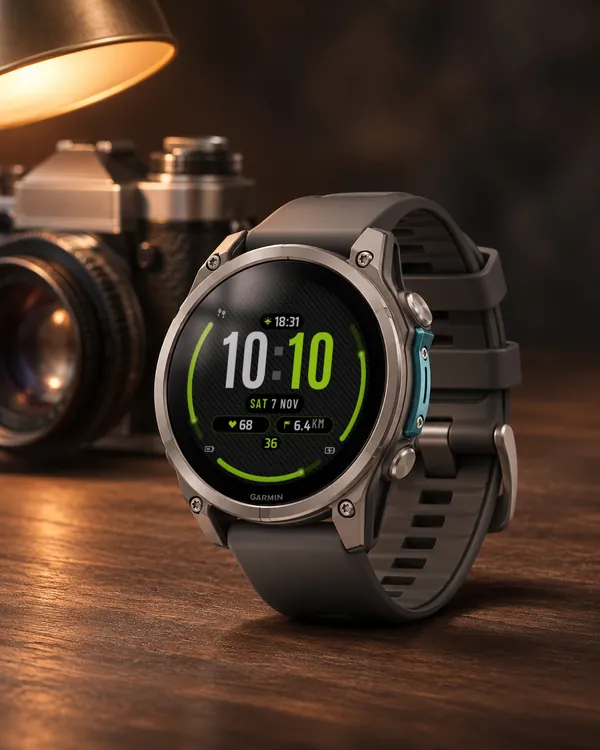 Carbon
 Arc
Carbon weave, huge digits and three glowing gauges
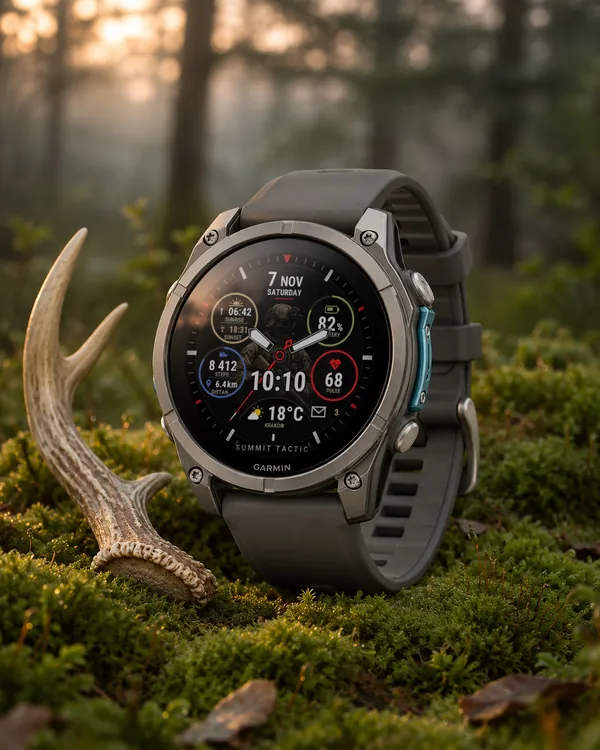 Tactical
Summit Tactic
Summit Rings in camo: a soldier in the middle, sand, olive and navy rings
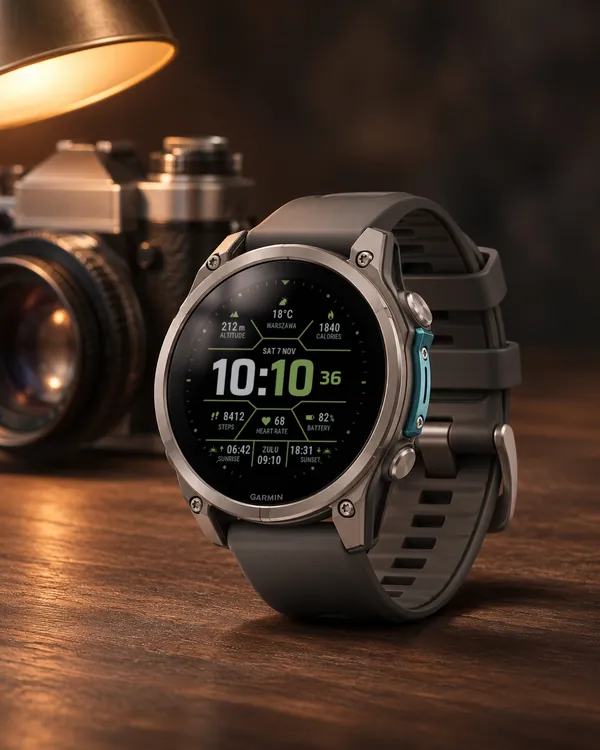 Tactical
Hex Tactical
Hexagon frames, a big time with accent minutes, weather, sunrise, sunset and ZULU time
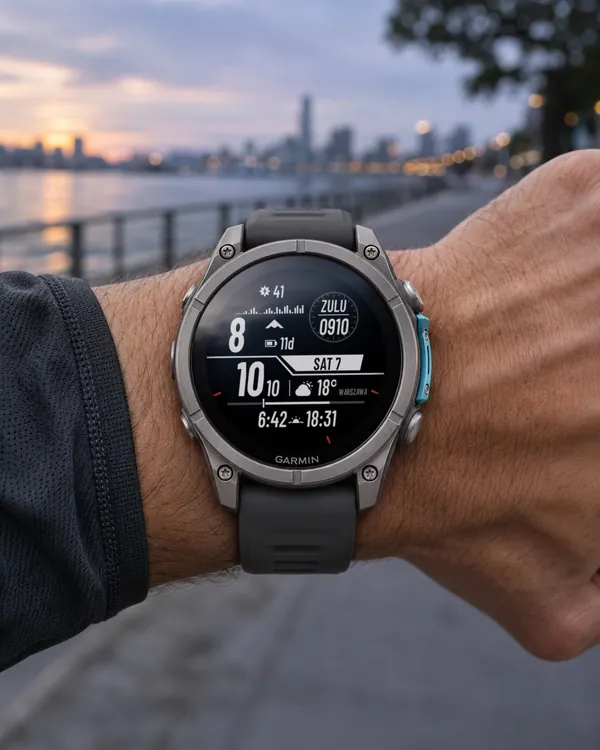 Tactical
 Solar Zulu
A tactical face with a solar intensity graph on top, a big step count