Unlock
€6.49
One-time payment. No subscription. The code works on the watch whose ID you enter.
- Install the face from Connect IQ (7 days free).
- On the watch: face settings > Buy / Unlock, scan the QR code.
- Pay and paste the code in the face settings.
- Pay.
- Copy the code.
- Paste it in Connect IQ: this face > Settings > Unlock code.
Payment works best in Safari or Chrome: menu (three dots) > Open in browser
Read it in this face, it is not the serial number of the watch.
The code works only in the watch face it was bought for: a Summit Rings code will not work in Summit Tactic.
Your ID, compare it with the watch:
Where do I find the ID?
On the watch: settings of this face > Buy / Unlock (first item). Scan the QR code with your phone or type the 10 digits. The ID is also at the top of the face settings in the Connect IQ app.
Code not working on your watch? Write to me and I will fix it.
Payments by Stripe. Seller: Mateusz Kolarz, Lublin, Poland.
Paid. Code:
We show the code here too. If the e-mail does not arrive (check spam), you can recover the code in the Recover code section with just the Face ID. Recover code
Copying did not work. The code is selected: copy it by hand.
The face unlocks by itself when the watch connects to the phone (usually within an hour; if the trial is still running, the purchase starts working when it ends).
Do not want to wait, or have an older watch? Paste the code in the Connect IQ app:
Connect IQ (or Garmin Connect) > My Device > Watch faces > Summit Climb > Settings > Unlock code > paste > Save
Like it? Rate this face in the Garmin store
Want to try new faces and apps before the release, for free? Join the testers program
Set up the face before you download
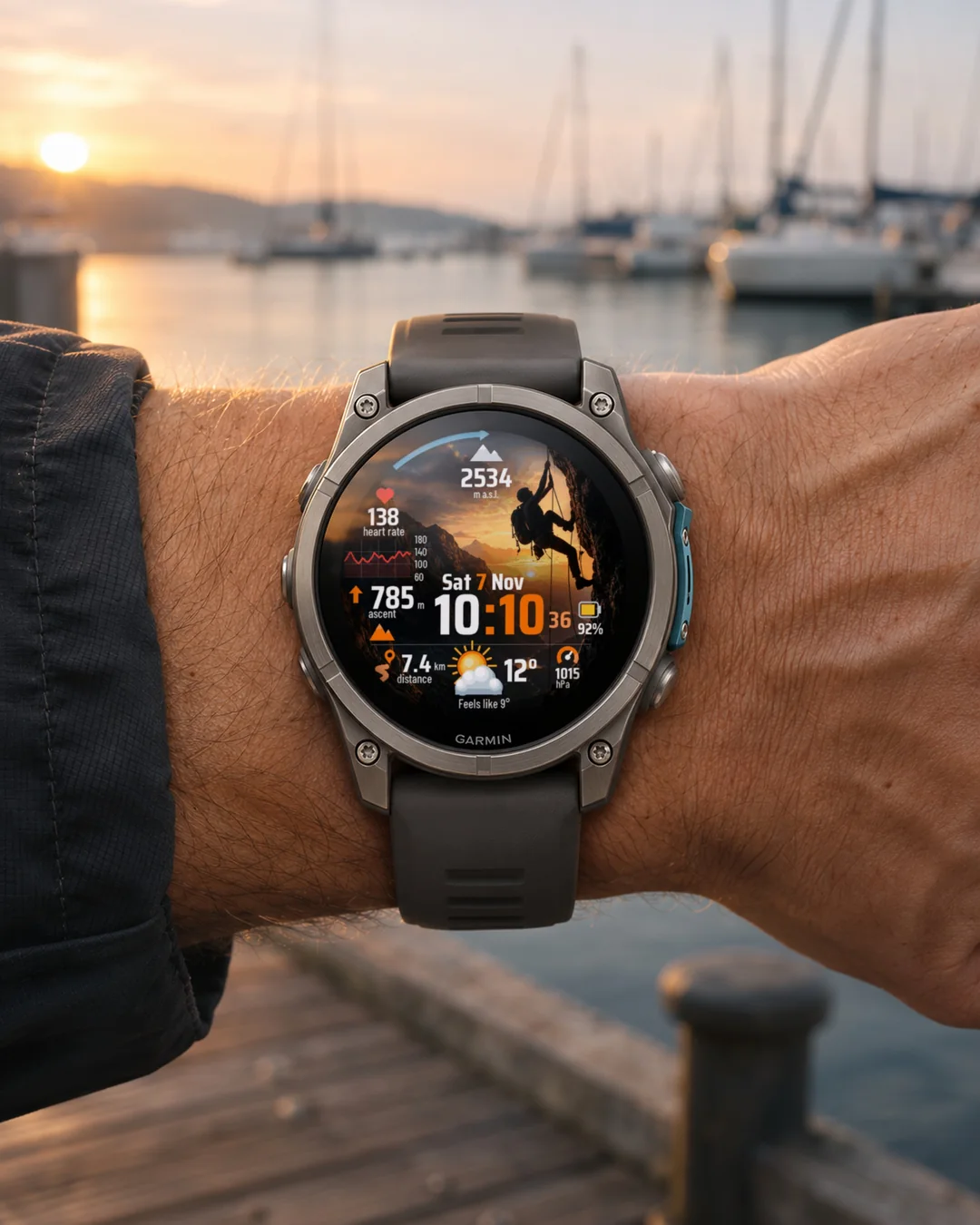
A climbing and hiking watch face showing altitude from the watch barometer, today's ascent, pressure and a heart rate graph, over a picture of a climber at sunset.
7-day free trial, then a one-time unlock at dialforge.dev. No subscription.
A climbing watch face: altitude, today's ascent, heart rate with a graph of the last hour, distance, weather and pressure over a picture of a climber on a rock face at sunset. Big time in the middle, a goal arc at the top.
- Altitude from the watch barometer and today's ascent, in metres or feet following your watch units.
- Heart rate with a line graph of the last hour, 60 to 180 bpm.
- Weather from Garmin through your phone: icon, temperature and feels-like. Pressure in hPa, distance today, battery.
- Goal arc at the top: floors climbed or steps against your Garmin goal, or off.
- Four accent colours (orange, blue, green, gold) and three backgrounds: the sunset picture, a blue version or plain black. Labels and date in 13 languages, 12 or 24 hour time, leading zero setting.
- Always-on mode for AMOLED: only the dimmed time, shifted every minute.
- Tap a field to open the matching Garmin screen: altitude, heart rate, ascent, distance, date, battery, weather or pressure. The tap can be switched off.
- Seconds next to the time (switch them off if you like) and a text size setting: normal or large date and labels.
- No animation, to save battery.
The background is a fixed picture, not a live camera view: a climber on a rock face at sunset, darkened where the numbers sit. The blue and black backgrounds are there if you prefer a calmer look.
When there is no data the face shows "--" instead of a made-up value. Slope and compass are not on the face: Garmin does not give watch faces access to them.
Companion app: Summit Screens by Dialforge, a separate app in the store, adds five screens with a compass, an altitude profile, weather, heart rate and a climb summary. With it installed, tapping the orange mountain icon on the left of this face opens the app.
Settings: on the watch (hold MENU, then Watch face, then Customize) or in the Connect IQ app.
From the maker
I am a student and I build Dialforge watch faces myself, after classes. I do not own every watch model, so if something looks wrong on yours, write to me at https://dialforge.dev/faces/summitclimb/ and I will usually fix it within 24 hours. If you like the face, you can buy me a coffee: https://buycoffee.to/iwannaflysohigh
Works on fenix 9, fenix 8, Forerunner 970, Forerunner 570, Venu 4, Forerunner 965, Forerunner 265, Venu 3 and more.
Tarcza dla wspinaczy i piechurów z wysokością z barometru zegarka, dzisiejszym przewyższeniem, ciśnieniem i wykresem tętna na tle wspinacza o zachodzie słońca.
7 dni za darmo, potem jednorazowe odblokowanie na dialforge.dev. Bez abonamentu.
Tarcza wspinaczkowa: wysokość, dzisiejsze przewyższenie, tętno z wykresem ostatniej godziny, dystans, pogoda i ciśnienie na tle obrazu wspinacza na skalnej ścianie o zachodzie słońca. Duża godzina pośrodku, łuk celu u góry.
- Wysokość z barometru zegarka i dzisiejsze przewyższenie, w metrach lub stopach zgodnie z jednostkami zegarka.
- Tętno z wykresem liniowym ostatniej godziny, od 60 do 180 uderzeń na minutę.
- Pogoda od Garmina przez telefon: ikona, temperatura i odczuwalna. Ciśnienie w hPa, dzisiejszy dystans, bateria.
- Łuk celu u góry: piętra albo kroki wobec Twojego celu Garmina, albo wyłączony.
- Cztery kolory akcentu (pomarańczowy, niebieski, zielony, złoty) i trzy tła: obraz zachodu słońca, wersja niebieska albo czysta czerń. Etykiety i data w 13 językach, godzina 12 lub 24 h, ustawienie zera na początku.
- Tryb zawsze włączony na AMOLED: tylko przygaszona godzina, przesuwana co minutę.
- Dotknięcie pola otwiera odpowiedni ekran Garmina: wysokość, tętno, przewyższenie, dystans, datę, baterię, pogodę albo ciśnienie. Dotyk można wyłączyć.
- Sekundy obok godziny (można je wyłączyć) i ustawienie rozmiaru tekstu: normalna albo duża data i podpisy.
- Bez animacji, dla baterii.
Tło to stały obraz, nie podgląd z kamery: wspinacz na skalnej ścianie o zachodzie słońca, przyciemniony tam, gdzie leżą cyfry. Niebieskie i czarne tło są dla tych, którzy wolą spokojniejszy wygląd.
Gdy nie ma danych, tarcza pokazuje "--" zamiast zmyślonej wartości. Nachylenia i kompasu na tarczy nie ma: Garmin nie udostępnia ich tarczom.
Aplikacja towarzysząca: Summit Screens od Dialforge, osobna aplikacja w sklepie, dodaje pięć ekranów z kompasem, profilem wysokości, pogodą, tętnem i podsumowaniem wspinaczki. Gdy jest zainstalowana, dotknięcie pomarańczowej ikony gór po lewej stronie tarczy otwiera aplikację.
Ustawienia: na zegarku (przytrzymaj MENU, potem Tarcza zegarka, potem Dostosuj) albo w aplikacji Connect IQ.
Od autora
Jestem studentem i robię tarcze Dialforge sam, po zajęciach. Nie mam każdego modelu zegarka, więc jeśli coś wygląda źle na Twoim, napisz na https://dialforge.dev/faces/summitclimb/, zwykle poprawiam to w ciągu 24 godzin. Jeśli tarcza Ci się podoba, możesz postawić mi kawę: https://buycoffee.to/iwannaflysohigh
Działa na: fenix 9, fenix 8, Forerunner 970, Forerunner 570, Venu 4, Forerunner 965, Forerunner 265, Venu 3 i innych.
Ein Zifferblatt zum Klettern und Wandern mit Höhe vom Barometer der Uhr, heutigem Aufstieg, Luftdruck und Herzfrequenzdiagramm vor dem Bild eines Kletterers im Sonnenuntergang.
7 Tage kostenlos testen, danach einmalige Freischaltung auf dialforge.dev. Kein Abo.
Ein Zifferblatt fürs Klettern: Höhe, heutiger Anstieg, Herzfrequenz mit Verlauf der letzten Stunde, Distanz, Wetter und Luftdruck über dem Bild eines Kletterers an einer Felswand bei Sonnenuntergang. Große Zeit in der Mitte, ein Zielbogen oben.
- Höhe vom Barometer der Uhr und heutiger Anstieg, in Metern oder Fuß nach den Einheiten deiner Uhr.
- Herzfrequenz mit Liniendiagramm der letzten Stunde, 60 bis 180 Schläge pro Minute.
- Wetter von Garmin über dein Handy: Symbol, Temperatur und gefühlte Temperatur. Luftdruck in hPa, heutige Distanz, Akku.
- Zielbogen oben: Stockwerke oder Schritte gegenüber deinem Garmin-Ziel, oder aus.
- Vier Akzentfarben (Orange, Blau, Grün, Gold) und drei Hintergründe: das Sonnenuntergangsbild, eine blaue Version oder schlichtes Schwarz. Beschriftungen und Datum in 13 Sprachen, 12- oder 24-Stunden-Zeit, Einstellung für die führende Null.
- Always-on-Modus für AMOLED: nur die gedimmte Zeit, jede Minute verschoben.
- Tippe auf ein Feld, um den passenden Garmin-Bildschirm zu öffnen: Höhe, Herzfrequenz, Anstieg, Distanz, Datum, Akku, Wetter oder Luftdruck. Das Tippen lässt sich abschalten.
- Sekunden neben der Uhrzeit (abschaltbar) und eine Einstellung für die Textgröße: Datum und Beschriftungen normal oder groß.
- Keine Animation, um Akku zu sparen.
Der Hintergrund ist ein festes Bild, kein Kamerabild: ein Kletterer an einer Felswand bei Sonnenuntergang, dort abgedunkelt, wo die Zahlen sitzen. Der blaue und der schwarze Hintergrund sind für alle da, die es ruhiger mögen.
Gibt es keine Daten, zeigt das Zifferblatt "--" statt eines erfundenen Werts. Steigung und Kompass sind nicht auf dem Zifferblatt: Garmin gibt Zifferblättern keinen Zugriff darauf.
Begleit-App: Summit Screens von Dialforge, eine separate App im Store, ergänzt fünf Bildschirme mit Kompass, Höhenprofil, Wetter, Herzfrequenz und einer Kletterübersicht. Ist sie installiert, öffnet ein Tippen auf das orange Berg-Symbol links auf diesem Zifferblatt die App.
Einstellungen: auf der Uhr (MENU gedrückt halten, dann Uhrdesign, dann Anpassen) oder in der Connect IQ App.
Vom entwickler
Ich bin Student und baue die Dialforge-Zifferblätter selbst, nach den Vorlesungen. Ich habe nicht jedes Uhrenmodell. Wenn auf deiner Uhr etwas falsch aussieht, schreib mir auf https://dialforge.dev/faces/summitclimb/, meist behebe ich es innerhalb von 24 Stunden. Wenn dir das Zifferblatt gefällt, kannst du mir einen Kaffee spendieren: https://buycoffee.to/iwannaflysohigh
Läuft auf fenix 9, fenix 8, Forerunner 970, Forerunner 570, Venu 4, Forerunner 965, Forerunner 265, Venu 3 und weiteren Modellen.
Un cadran pour l'escalade et la randonnée avec altitude du baromètre de la montre, dénivelé du jour, pression et courbe de fréquence cardiaque sur une image de grimpeur au coucher du soleil.
Essai gratuit de 7 jours, puis un déverrouillage unique sur dialforge.dev. Sans abonnement.
Un cadran pour l'escalade : altitude, dénivelé du jour, fréquence cardiaque avec le graphique de la dernière heure, distance, météo et pression sur l'image d'un grimpeur sur une paroi au coucher du soleil. Grande heure au centre, un arc d'objectif en haut.
- Altitude du baromètre de la montre et dénivelé du jour, en mètres ou en pieds selon les unités de votre montre.
- Fréquence cardiaque avec une courbe de la dernière heure, de 60 à 180 bpm.
- Météo de Garmin via votre téléphone : icône, température et ressenti. Pression en hPa, distance du jour, batterie.
- Arc d'objectif en haut : étages ou pas par rapport à votre objectif Garmin, ou désactivé.
- Quatre couleurs d'accent (orange, bleu, vert, or) et trois fonds : l'image du coucher de soleil, une version bleue ou un noir uni. Libellés et date en 13 langues, heure sur 12 ou 24 heures, réglage du zéro initial.
- Mode always-on pour AMOLED : seulement l'heure atténuée, décalée chaque minute.
- Touchez un champ pour ouvrir l'écran Garmin correspondant : altitude, fréquence cardiaque, dénivelé, distance, date, batterie, météo ou pression. Le toucher peut être désactivé.
- Secondes à côté de l'heure (désactivables) et un réglage de la taille du texte : date et libellés en taille normale ou grande.
- Aucune animation, pour économiser la batterie.
Le fond est une image fixe, pas une vue de caméra : un grimpeur sur une paroi au coucher du soleil, assombri là où se trouvent les chiffres. Les fonds bleu et noir sont là si vous préférez un look plus calme.
Sans données, le cadran affiche "--" au lieu d'une valeur inventée. La pente et la boussole ne sont pas sur le cadran : Garmin n'y donne pas accès aux cadrans.
Application compagnon : Summit Screens de Dialforge, une application séparée dans la boutique, ajoute cinq écrans avec une boussole, un profil d'altitude, la météo, la fréquence cardiaque et un résumé de l'ascension. Une fois installée, toucher l'icône de montagne orange à gauche de ce cadran ouvre l'application.
Réglages : sur la montre (maintenez MENU, puis Cadran, puis Personnaliser) ou dans l'application Connect IQ.
Du créateur
Je suis étudiant et je crée seul les cadrans Dialforge, après les cours. Je n'ai pas tous les modèles de montre : si quelque chose ne va pas sur la vôtre, écrivez-moi sur https://dialforge.dev/faces/summitclimb/, je corrige en général sous 24 heures. Si le cadran vous plaît, vous pouvez m'offrir un café : https://buycoffee.to/iwannaflysohigh
Compatible avec fenix 9, fenix 8, Forerunner 970, Forerunner 570, Venu 4, Forerunner 965, Forerunner 265, Venu 3 et d'autres modèles.
Una esfera para escalada y senderismo con altitud del barómetro del reloj, ascenso de hoy, presión y gráfico de frecuencia cardíaca sobre la imagen de un escalador al atardecer.
Prueba gratuita de 7 días y luego un desbloqueo único en dialforge.dev. Sin suscripción.
Una esfera para escalada: altitud, desnivel de hoy, frecuencia cardiaca con gráfica de la última hora, distancia, tiempo y presión sobre la imagen de un escalador en una pared de roca al atardecer. Hora grande en el centro, un arco de objetivo arriba.
- Altitud del barómetro del reloj y desnivel de hoy, en metros o pies según las unidades de tu reloj.
- Frecuencia cardiaca con gráfica de líneas de la última hora, de 60 a 180 ppm.
- Tiempo de Garmin a través de tu teléfono: icono, temperatura y sensación térmica. Presión en hPa, distancia de hoy, batería.
- Arco de objetivo arriba: pisos o pasos frente a tu objetivo de Garmin, o apagado.
- Cuatro colores de acento (naranja, azul, verde, oro) y tres fondos: la imagen del atardecer, una versión azul o negro liso. Etiquetas y fecha en 13 idiomas, hora de 12 o 24 horas, ajuste del cero inicial.
- Modo siempre activo para AMOLED: solo la hora atenuada, desplazada cada minuto.
- Toca un campo para abrir la pantalla de Garmin correspondiente: altitud, frecuencia cardiaca, desnivel, distancia, fecha, batería, tiempo o presión. El toque se puede desactivar.
- Segundos junto a la hora (se pueden desactivar) y un ajuste de tamaño de texto: fecha y etiquetas en tamaño normal o grande.
- Sin animación, para ahorrar batería.
El fondo es una imagen fija, no una vista de cámara: un escalador en una pared de roca al atardecer, oscurecida donde van los números. Los fondos azul y negro están ahí si prefieres un aspecto más tranquilo.
Cuando no hay datos, la esfera muestra "--" en lugar de un valor inventado. La pendiente y la brújula no están en la esfera: Garmin no da a las esferas acceso a ellas.
App complementaria: Summit Screens de Dialforge, una app separada en la tienda, añade cinco pantallas con brújula, perfil de altitud, tiempo, frecuencia cardiaca y un resumen de la escalada. Con ella instalada, tocar el icono naranja de montaña a la izquierda de esta esfera abre la app.
Ajustes: en el reloj (mantén pulsado MENU, luego Esfera y después Personalizar) o en la app Connect IQ.
Del autor
Soy estudiante y hago las esferas Dialforge yo solo, después de clase. No tengo todos los modelos de reloj, así que si algo se ve mal en el tuyo, escríbeme en https://dialforge.dev/faces/summitclimb/ y normalmente lo arreglo en 24 horas. Si te gusta la esfera, puedes invitarme a un café: https://buycoffee.to/iwannaflysohigh
Compatible con fenix 9, fenix 8, Forerunner 970, Forerunner 570, Venu 4, Forerunner 965, Forerunner 265, Venu 3 y más.
Een wijzerplaat voor klimmen en wandelen met hoogte van de barometer van het horloge, stijging van vandaag, luchtdruk en hartslaggrafiek over een afbeelding van een klimmer bij zonsondergang.
7 dagen gratis proberen, daarna een eenmalige ontgrendeling op dialforge.dev. Geen abonnement.
Een wijzerplaat voor klimmen: hoogte, stijging van vandaag, hartslag met een grafiek van het laatste uur, afstand, weer en luchtdruk over een beeld van een klimmer op een rotswand bij zonsondergang. Grote tijd in het midden, een doelboog bovenaan.
- Hoogte van de barometer van het horloge en stijging van vandaag, in meters of voet volgens de eenheden van je horloge.
- Hartslag met een lijngrafiek van het laatste uur, 60 tot 180 bpm.
- Weer van Garmin via je telefoon: pictogram, temperatuur en gevoelstemperatuur. Luchtdruk in hPa, afstand vandaag, batterij.
- Doelboog bovenaan: verdiepingen of stappen tegenover je Garmin-doel, of uit.
- Vier accentkleuren (oranje, blauw, groen, goud) en drie achtergronden: het zonsondergangbeeld, een blauwe versie of effen zwart. Labels en datum in 13 talen, 12- of 24-uurstijd, instelling voor de voorloopnul.
- Always-on-modus voor AMOLED: alleen de gedimde tijd, elke minuut verschoven.
- Tik op een veld om het bijbehorende Garmin-scherm te openen: hoogte, hartslag, stijging, afstand, datum, batterij, weer of luchtdruk. Het tikken kan worden uitgeschakeld.
- Seconden naast de tijd (uit te schakelen) en een instelling voor tekstgrootte: datum en labels normaal of groot.
- Geen animatie, om batterij te besparen.
De achtergrond is een vast beeld, geen camerabeeld: een klimmer op een rotswand bij zonsondergang, donkerder gemaakt waar de cijfers staan. De blauwe en zwarte achtergrond zijn er als je een rustiger beeld wilt.
Als er geen gegevens zijn, toont de wijzerplaat "--" in plaats van een verzonnen waarde. Helling en kompas staan niet op de wijzerplaat: Garmin geeft wijzerplaten daar geen toegang toe.
Bijbehorende app: Summit Screens van Dialforge, een aparte app in de store, voegt vijf schermen toe met een kompas, een hoogteprofiel, weer, hartslag en een klimoverzicht. Als die is geïnstalleerd, opent een tik op het oranje bergicoon links op deze wijzerplaat de app.
Instellingen: op het horloge (houd MENU ingedrukt, dan Wijzerplaat, dan Aanpassen) of in de Connect IQ-app.
Van de maker
Ik ben student en maak de Dialforge-wijzerplaten zelf, na de colleges. Ik heb niet elk horlogemodel, dus ziet er iets verkeerd uit op het jouwe, schrijf me dan via https://dialforge.dev/faces/summitclimb/. Meestal los ik het binnen 24 uur op. Vind je de wijzerplaat mooi, dan kun je me een koffie trakteren: https://buycoffee.to/iwannaflysohigh
Werkt op fenix 9, fenix 8, Forerunner 970, Forerunner 570, Venu 4, Forerunner 965, Forerunner 265, Venu 3 en meer.
クライミングやハイキング向けの文字盤。時計の気圧計による高度、今日の上昇量、気圧、心拍数グラフを、夕日の中のクライマーの絵の上に表示します。
7日間無料でお試しいただけます。その後はdialforge.devで解除を一度だけ購入(サブスクリプションなし)。
クライミング向けのウォッチフェイス: 高度、今日の上昇高度、直近1時間のグラフ付き心拍数、距離、天気、気圧を、夕日の岩壁を登るクライマーの画像の上に表示します。中央に大きな時刻、上部に目標アーク。
- ウォッチの気圧計による高度と今日の上昇高度を、ウォッチの単位設定に従ってメートルまたはフィートで表示。
- 直近1時間の折れ線グラフ付き心拍数、60から180 bpm。
- スマートフォン経由のGarminの天気: アイコン、気温、体感温度。hPa単位の気圧、今日の距離、バッテリー。
- 上部の目標アーク: Garminの目標に対する上った階数または歩数、またはオフ。
- 4つのアクセントカラー(オレンジ、青、緑、金)と3つの背景: 夕日の画像、青いバージョン、または無地の黒。13言語のラベルと日付、12時間または24時間表示、先頭のゼロの設定。
- AMOLED向けの常時表示モード: 暗くした時刻のみを表示し、毎分位置をずらします。
- フィールドをタップすると対応するGarminの画面が開きます: 高度、心拍数、上昇量、距離、日付、バッテリー、天気、気圧。タップはオフにできます。
- 時刻の横に秒を表示(オフにできます)。文字サイズの設定もあり、日付とラベルを通常または大きく表示できます。
- バッテリー節約のため、アニメーションはありません。
背景はカメラ映像ではなく固定の画像です: 夕日の岩壁のクライマーで、数字のある場所は暗くしてあります。落ち着いた見た目が好みなら青と黒の背景があります。
データがないとき、ウォッチフェイスは作り物の値ではなく"--"を表示します。勾配とコンパスはウォッチフェイスにありません: Garminがウォッチフェイスにそのアクセスを許可していないためです。
コンパニオンアプリ: DialforgeのSummit Screensはストアの別アプリで、コンパス、高度プロファイル、天気、心拍数、クライミングの概要を備えた5つの画面を追加します。インストールしていると、このウォッチフェイス左側のオレンジ色の山のアイコンをタップするとアプリが開きます。
設定:時計本体(MENUを長押し→文字盤→カスタマイズ)またはConnect IQアプリから。
作者より
私は学生で、Dialforgeの文字盤を授業のあとに一人で作っています。すべての時計モデルを持っているわけではないので、お使いの時計で表示がおかしい場合は https://dialforge.dev/faces/summitclimb/ からご連絡ください。通常24時間以内に修正します。文字盤を気に入っていただけたら、コーヒーをおごっていただけるとうれしいです: https://buycoffee.to/iwannaflysohigh
対応モデル:fenix 9, fenix 8, Forerunner 970, Forerunner 570, Venu 4, Forerunner 965, Forerunner 265, Venu 3 ほか
Un quadrante per arrampicata ed escursionismo con altitudine dal barometro dell'orologio, dislivello di oggi, pressione e grafico della frequenza cardiaca su un'immagine di scalatore al tramonto.
Prova gratuita di 7 giorni, poi uno sblocco una tantum su dialforge.dev. Nessun abbonamento.
Un quadrante per l'arrampicata: altitudine, dislivello di oggi, battito con il grafico dell'ultima ora, distanza, meteo e pressione sull'immagine di uno scalatore su una parete di roccia al tramonto. Ora grande al centro, un arco obiettivo in alto.
- Altitudine dal barometro dell'orologio e dislivello di oggi, in metri o piedi secondo le unità del tuo orologio.
- Battito con un grafico a linea dell'ultima ora, da 60 a 180 bpm.
- Meteo da Garmin tramite il telefono: icona, temperatura e percepita. Pressione in hPa, distanza di oggi, batteria.
- Arco obiettivo in alto: piani o passi rispetto al tuo obiettivo Garmin, oppure spento.
- Quattro colori accento (arancione, blu, verde, oro) e tre sfondi: l'immagine del tramonto, una versione blu o nero semplice. Etichette e data in 13 lingue, ora a 12 o 24 ore, impostazione dello zero iniziale.
- Modalità always-on per AMOLED: solo l'ora attenuata, spostata ogni minuto.
- Tocca un campo per aprire la schermata Garmin corrispondente: altitudine, battito, dislivello, distanza, data, batteria, meteo o pressione. Il tocco si può disattivare.
- Secondi accanto all'ora (si possono disattivare) e un'impostazione per la dimensione del testo: data ed etichette normali o grandi.
- Nessuna animazione, per risparmiare batteria.
Lo sfondo è un'immagine fissa, non una vista della fotocamera: uno scalatore su una parete di roccia al tramonto, scurita dove stanno i numeri. Gli sfondi blu e nero ci sono se preferisci un aspetto più sobrio.
Quando non ci sono dati il quadrante mostra "--" invece di un valore inventato. Pendenza e bussola non sono sul quadrante: Garmin non ne dà accesso ai quadranti.
App di accompagnamento: Summit Screens di Dialforge, un'app separata nello store, aggiunge cinque schermate con bussola, profilo altimetrico, meteo, battito e un riepilogo della salita. Se è installata, toccando l'icona arancione della montagna a sinistra su questo quadrante si apre l'app.
Impostazioni: sull'orologio (tieni premuto MENU, poi Quadrante, poi Personalizza) oppure nell'app Connect IQ.
Dall'autore
Sono uno studente e creo da solo i quadranti Dialforge, dopo le lezioni. Non ho tutti i modelli di orologio, quindi se qualcosa sembra sbagliato sul tuo, scrivimi su https://dialforge.dev/faces/summitclimb/, di solito lo correggo entro 24 ore. Se il quadrante ti piace, puoi offrirmi un caffè: https://buycoffee.to/iwannaflysohigh
Compatibile con fenix 9, fenix 8, Forerunner 970, Forerunner 570, Venu 4, Forerunner 965, Forerunner 265, Venu 3 e altri.
适合攀岩和徒步的表盘,显示手表气压计测得的海拔、今日爬升、气压和心率曲线,背景是日落时分的攀岩者图片。
7 天免费试用,之后在 dialforge.dev 一次性解锁。无需订阅。
一款攀岩表盘:海拔、今日爬升、带最近一小时图表的心率、距离、天气和气压,显示在日落时攀爬岩壁的攀岩者画面之上。中央是大号时间,顶部是目标弧线。
- 来自手表气压计的海拔和今日爬升,按手表单位以米或英尺显示。
- 心率带有最近一小时的折线图,60 到 180 bpm。
- 通过手机获取的 Garmin 天气:图标、温度和体感温度。气压以 hPa 显示,今日距离,电量。
- 顶部的目标弧线:相对于您的 Garmin 目标的爬楼层数或步数,或关闭。
- 四种强调色(橙、蓝、绿、金)和三种背景:日落画面、蓝色版本或纯黑。标签和日期支持 13 种语言,12 或 24 小时制,前导零设置。
- AMOLED 的常亮模式:仅显示调暗的时间,每分钟移动位置。
- 点击字段可打开对应的 Garmin 页面:海拔、心率、攀升、距离、日期、电量、天气或气压。点击功能可以关闭。
- 时间旁显示秒数(可关闭),并提供文字大小设置:日期和标签可选正常或大号。
- 没有动画,以节省电量。
背景是固定画面,不是相机实时画面:日落时岩壁上的攀岩者,数字所在处已调暗。如果您喜欢更安静的外观,可以使用蓝色和黑色背景。
没有数据时,表盘显示"--"而不是编造的数值。表盘上没有坡度和指南针:Garmin 不向表盘开放这些数据。
配套应用:Dialforge 的 Summit Screens,是商店中的独立应用,增加五个页面,包括指南针、海拔剖面、天气、心率和攀登摘要。安装后,点击此表盘左侧的橙色山形图标即可打开该应用。
设置:在手表上,长按 MENU,然后依次点击表盘、自定义;或在 Connect IQ 应用中设置。
作者的话
我是一名学生,利用课余时间独自制作 Dialforge 表盘。我没有每一款手表,所以如果表盘在您的手表上显示不对,请到 https://dialforge.dev/faces/summitclimb/ 告诉我,我通常会在 24 小时内修复。如果您喜欢这款表盘,可以请我喝杯咖啡:https://buycoffee.to/iwannaflysohigh
适用于 fenix 9, fenix 8, Forerunner 970, Forerunner 570, Venu 4, Forerunner 965, Forerunner 265, Venu 3 等。
Циферблат для скалолазания и походов: высота по барометру часов, набор высоты за день, давление и график пульса на фоне картинки со скалолазом на закате.
7-дневный бесплатный пробный период, затем разовая разблокировка на dialforge.dev. Без подписки.
Циферблат для скалолазания: высота, набор высоты за сегодня, пульс с графиком за последний час, дистанция, погода и давление на фоне изображения скалолаза на отвесной стене на закате. Большое время в центре, дуга цели сверху.
- Высота с барометра часов и набор высоты за сегодня, в метрах или футах согласно единицам часов.
- Пульс с линейным графиком за последний час, от 60 до 180 ударов в минуту.
- Погода от Garmin через телефон: значок, температура и ощущаемая температура. Давление в гПа, дистанция за сегодня, батарея.
- Дуга цели сверху: этажи или шаги относительно вашей цели Garmin, либо выключена.
- Четыре цвета акцента (оранжевый, синий, зелёный, золотой) и три фона: изображение заката, синяя версия или просто чёрный. Подписи и дата на 13 языках, 12- или 24-часовое время, настройка ведущего нуля.
- Режим always-on для AMOLED: только приглушённое время, сдвигаемое каждую минуту.
- Коснитесь поля, чтобы открыть соответствующий экран Garmin: высота, пульс, набор высоты, расстояние, дата, батарея, погода или давление. Касание можно отключить.
- Секунды рядом со временем (можно отключить) и настройка размера текста: дата и подписи обычного или крупного размера.
- Без анимации, чтобы экономить батарею.
Фон является фиксированным изображением, а не видом с камеры: скалолаз на отвесной стене на закате, затемнённый там, где расположены цифры. Синий и чёрный фон предусмотрены для тех, кто предпочитает более спокойный вид.
Когда данных нет, циферблат показывает "--" вместо выдуманного значения. Уклона и компаса на циферблате нет: Garmin не даёт циферблатам доступа к ним.
Сопутствующее приложение: Summit Screens от Dialforge, отдельное приложение в магазине, добавляет пять экранов с компасом, профилем высоты, погодой, пульсом и сводкой подъёма. Если оно установлено, касание оранжевого значка горы слева на этом циферблате открывает приложение.
Настройки: на часах (удерживайте MENU, затем Циферблат, затем Настроить) или в приложении Connect IQ.
От автора
Я студент и делаю циферблаты Dialforge сам, после занятий. У меня есть не все модели часов, поэтому если на ваших что-то выглядит неправильно, напишите мне на https://dialforge.dev/faces/summitclimb/, обычно я исправляю это в течение 24 часов. Если циферблат вам нравится, можете угостить меня кофе: https://buycoffee.to/iwannaflysohigh
Работает на fenix 9, fenix 8, Forerunner 970, Forerunner 570, Venu 4, Forerunner 965, Forerunner 265, Venu 3 и других.
Um mostrador para escalada e trilhas com altitude do barômetro do relógio, subida de hoje, pressão e gráfico de frequência cardíaca sobre a imagem de um escalador ao pôr do sol.
Teste grátis de 7 dias, depois um desbloqueio único em dialforge.dev. Sem assinatura.
Um mostrador para escalada: altitude, ganho de elevação de hoje, frequência cardíaca com gráfico da última hora, distância, clima e pressão sobre a imagem de um escalador em uma parede de rocha ao pôr do sol. Hora grande no centro, um arco de meta no topo.
- Altitude do barômetro do relógio e ganho de elevação de hoje, em metros ou pés conforme as unidades do seu relógio.
- Frequência cardíaca com gráfico de linha da última hora, de 60 a 180 bpm.
- Clima da Garmin pelo seu celular: ícone, temperatura e sensação térmica. Pressão em hPa, distância de hoje, bateria.
- Arco de meta no topo: andares ou passos em relação à sua meta Garmin, ou desligado.
- Quatro cores de destaque (laranja, azul, verde, dourado) e três fundos: a imagem do pôr do sol, uma versão azul ou preto puro. Rótulos e data em 13 idiomas, hora em 12 ou 24 horas, configuração do zero inicial.
- Modo sempre ligado para AMOLED: só a hora atenuada, deslocada a cada minuto.
- Toque em um campo para abrir a tela Garmin correspondente: altitude, frequência cardíaca, subida, distância, data, bateria, clima ou pressão. O toque pode ser desativado.
- Segundos ao lado da hora (podem ser desativados) e uma configuração de tamanho do texto: data e rótulos normais ou grandes.
- Sem animação, para economizar bateria.
O fundo é uma imagem fixa, não uma visão de câmera: um escalador em uma parede de rocha ao pôr do sol, escurecida onde ficam os números. Os fundos azul e preto estão lá se você prefere um visual mais calmo.
Quando não há dados, o mostrador mostra "--" em vez de um valor inventado. Inclinação e bússola não estão no mostrador: a Garmin não dá acesso a elas aos mostradores.
App complementar: Summit Screens da Dialforge, um app separado na loja, adiciona cinco telas com bússola, perfil de altitude, clima, frequência cardíaca e um resumo da escalada. Com ele instalado, tocar no ícone laranja da montanha à esquerda deste mostrador abre o app.
Configurações: no relógio (segure MENU, depois Mostrador, depois Personalizar) ou no aplicativo Connect IQ.
Do criador
Sou estudante e faço os mostradores Dialforge sozinho, depois das aulas. Não tenho todos os modelos de relógio, então se algo parecer errado no seu, escreva para mim em https://dialforge.dev/faces/summitclimb/, normalmente eu corrijo em até 24 horas. Se você gostou do mostrador, pode me pagar um café: https://buycoffee.to/iwannaflysohigh
Funciona em fenix 9, fenix 8, Forerunner 970, Forerunner 570, Venu 4, Forerunner 965, Forerunner 265, Venu 3 e outros.
Ciferník pro lezení a turistiku s nadmořskou výškou z barometru hodinek, dnešním nastoupáním, tlakem a grafem tepu na obrázku horolezce při západu slunce.
7denní bezplatná zkušební verze, poté jednorázové odemknutí na dialforge.dev. Žádné předplatné.
Ciferník pro lezení: nadmořská výška, dnešní převýšení, tep s grafem poslední hodiny, vzdálenost, počasí a tlak na obrázku lezce na skalní stěně při západu slunce. Velký čas uprostřed, oblouk cíle nahoře.
- Nadmořská výška z barometru hodinek a dnešní převýšení, v metrech nebo stopách podle jednotek hodinek.
- Tep s čárovým grafem poslední hodiny, 60 až 180 tepů za minutu.
- Počasí od Garminu přes telefon: ikona, teplota a pocitová teplota. Tlak v hPa, dnešní vzdálenost, baterie.
- Oblouk cíle nahoře: patra nebo kroky vůči vašemu cíli Garmin, nebo vypnuto.
- Čtyři barvy akcentu (oranžová, modrá, zelená, zlatá) a tři pozadí: obrázek západu slunce, modrá verze nebo čistá černá. Popisky a datum ve 13 jazycích, 12 nebo 24hodinový čas, nastavení úvodní nuly.
- Trvale zapnutý režim pro AMOLED: jen ztlumený čas, posouvaný každou minutu.
- Klepnutím na pole otevřete odpovídající obrazovku Garmin: výšku, tep, převýšení, vzdálenost, datum, baterii, počasí nebo tlak. Klepnutí lze vypnout.
- Sekundy vedle času (lze vypnout) a nastavení velikosti textu: datum a popisky normální nebo velké.
- Bez animace, aby se šetřila baterie.
Pozadí je pevný obrázek, ne pohled z kamery: lezec na skalní stěně při západu slunce, ztmavený tam, kde jsou čísla. Modré a černé pozadí jsou tu pro ty, kdo chtějí klidnější vzhled.
Když nejsou data, ciferník zobrazí "--" místo vymyšlené hodnoty. Sklon a kompas na ciferníku nejsou: Garmin k nim ciferníkům nedává přístup.
Doprovodná aplikace: Summit Screens od Dialforge, samostatná aplikace v obchodě, přidává pět obrazovek s kompasem, výškovým profilem, počasím, tepem a souhrnem výstupu. Když je nainstalovaná, klepnutí na oranžovou ikonu hory vlevo na tomto ciferníku aplikaci otevře.
Nastavení: v hodinkách (podržte MENU, pak Vzhled hodinek, pak Upravit) nebo v aplikaci Connect IQ.
Od autora
Jsem student a ciferníky Dialforge dělám sám, po škole. Nemám každý model hodinek, takže pokud na vašich něco nevypadá dobře, napište mi na https://dialforge.dev/faces/summitclimb/, obvykle to opravím do 24 hodin. Pokud se vám ciferník líbí, můžete mi koupit kávu: https://buycoffee.to/iwannaflysohigh
Funguje na fenix 9, fenix 8, Forerunner 970, Forerunner 570, Venu 4, Forerunner 965, Forerunner 265, Venu 3 a dalších.
Um mostrador para escalada e caminhadas com altitude do barómetro do relógio, subida de hoje, pressão e gráfico de frequência cardíaca sobre a imagem de um escalador ao pôr do sol.
7 dias de teste gratuito, depois um desbloqueio único em dialforge.dev. Sem subscrição.
Um mostrador para escalada: altitude, desnível de hoje, frequência cardíaca com gráfico da última hora, distância, meteorologia e pressão sobre a imagem de um alpinista numa parede de rocha ao pôr do sol. Hora grande ao centro, um arco de objetivo em cima.
- Altitude do barómetro do relógio e desnível de hoje, em metros ou pés conforme as unidades do seu relógio.
- Frequência cardíaca com gráfico de linha da última hora, de 60 a 180 bpm.
- Meteorologia da Garmin através do telemóvel: ícone, temperatura e sensação térmica. Pressão em hPa, distância de hoje, bateria.
- Arco de objetivo em cima: andares ou passos face ao seu objetivo Garmin, ou desligado.
- Quatro cores de destaque (laranja, azul, verde, dourado) e três fundos: a imagem do pôr do sol, uma versão azul ou preto simples. Etiquetas e data em 13 idiomas, hora de 12 ou 24 horas, definição do zero inicial.
- Modo sempre ligado para AMOLED: apenas a hora atenuada, deslocada a cada minuto.
- Toque num campo para abrir o ecrã Garmin correspondente: altitude, frequência cardíaca, subida, distância, data, bateria, meteorologia ou pressão. O toque pode ser desativado.
- Segundos junto à hora (podem ser desativados) e uma definição do tamanho do texto: data e etiquetas normais ou grandes.
- Sem animação, para poupar bateria.
O fundo é uma imagem fixa, não uma vista de câmara: um alpinista numa parede de rocha ao pôr do sol, escurecida onde ficam os números. Os fundos azul e preto existem para quem prefere um visual mais calmo.
Quando não há dados, o mostrador mostra "--" em vez de um valor inventado. Inclinação e bússola não estão no mostrador: a Garmin não dá acesso a elas aos mostradores.
Aplicação complementar: Summit Screens da Dialforge, uma aplicação separada na loja, acrescenta cinco ecrãs com bússola, perfil de altitude, meteorologia, frequência cardíaca e um resumo da escalada. Com ela instalada, tocar no ícone laranja da montanha à esquerda deste mostrador abre a aplicação.
Definições: no relógio (mantenha premido MENU, depois Mostrador e depois Personalizar) ou na aplicação Connect IQ.
Do criador
Sou estudante e faço os mostradores Dialforge sozinho, depois das aulas. Não tenho todos os modelos de relógio, por isso, se algo parecer errado no seu, escreva-me em https://dialforge.dev/faces/summitclimb/, normalmente corrijo em 24 horas. Se gostar do mostrador, pode oferecer-me um café: https://buycoffee.to/iwannaflysohigh
Funciona em fenix 9, fenix 8, Forerunner 970, Forerunner 570, Venu 4, Forerunner 965, Forerunner 265, Venu 3 e outros.
등반과 하이킹을 위한 워치 페이스로, 시계 기압계로 잰 고도와 오늘의 상승 고도, 기압, 심박수 그래프를 석양 속 클라이머 그림 위에 보여 줍니다.
7일 무료 체험 후, dialforge.dev에서 일회성 잠금 해제를 구매하세요. 구독은 없습니다.
클라이밍을 위한 워치페이스: 고도, 오늘의 상승 고도, 최근 1시간 그래프가 있는 심박수, 거리, 날씨와 기압이 석양의 암벽을 오르는 클라이머 이미지 위에 표시됩니다. 가운데에 큰 시간, 위쪽에 목표 아크.
- 시계 기압계의 고도와 오늘의 상승 고도, 시계 단위에 따라 미터 또는 피트로 표시.
- 최근 1시간의 선 그래프가 있는 심박수, 60에서 180 bpm.
- 휴대폰을 통한 Garmin 날씨: 아이콘, 기온, 체감 온도. hPa 단위 기압, 오늘의 거리, 배터리.
- 위쪽 목표 아크: Garmin 목표 대비 오른 층수 또는 걸음 수, 또는 끔.
- 네 가지 강조 색상(주황, 파랑, 초록, 금색)과 세 가지 배경: 석양 이미지, 파란색 버전 또는 단순한 검정. 13개 언어의 라벨과 날짜, 12시간 또는 24시간 표시, 앞자리 0 설정.
- AMOLED용 상시 표시 모드: 어둡게 한 시간만 표시하며 매분 위치를 이동.
- 필드를 탭하면 해당 Garmin 화면이 열립니다: 고도, 심박수, 상승 고도, 거리, 날짜, 배터리, 날씨 또는 기압. 탭 기능은 끌 수 있습니다.
- 시간 옆에 초 표시(끌 수 있음)와 글자 크기 설정: 날짜와 라벨을 보통 또는 크게.
- 배터리 절약을 위해 애니메이션이 없습니다.
배경은 카메라 화면이 아니라 고정된 이미지입니다: 석양의 암벽 위 클라이머이며, 숫자가 있는 곳은 어둡게 처리했습니다. 더 차분한 모습을 원하면 파란색과 검정 배경을 쓸 수 있습니다.
데이터가 없으면 워치페이스는 지어낸 값 대신 "--"를 표시합니다. 경사와 나침반은 워치페이스에 없습니다: Garmin이 워치페이스에 해당 접근 권한을 주지 않기 때문입니다.
동반 앱: Dialforge의 Summit Screens는 스토어의 별도 앱으로, 나침반, 고도 프로필, 날씨, 심박수, 등반 요약이 있는 다섯 개 화면을 추가합니다. 설치되어 있으면 이 워치페이스 왼쪽의 주황색 산 아이콘을 탭할 때 앱이 열립니다.
설정: 시계에서(MENU를 길게 누른 다음 워치페이스, 사용자 설정) 또는 Connect IQ 앱에서 변경할 수 있습니다.
제작자의 한마디
저는 학생이고 수업이 끝난 뒤 Dialforge 워치페이스를 혼자 만들고 있습니다. 모든 시계 모델을 갖고 있지는 않아서, 시계에서 이상하게 보이는 부분이 있으면 https://dialforge.dev/faces/summitclimb/에서 알려 주세요. 보통 24시간 안에 고칩니다. 워치페이스가 마음에 드신다면 커피 한 잔 사주실 수 있습니다: https://buycoffee.to/iwannaflysohigh
지원 모델: fenix 9, fenix 8, Forerunner 970, Forerunner 570, Venu 4, Forerunner 965, Forerunner 265, Venu 3 외
En urtavla för klättring och vandring med höjd från klockans barometer, dagens stigning, lufttryck och pulsgraf över en bild av en klättrare i solnedgången.
7 dagars gratis provperiod, sedan en engångsupplåsning på dialforge.dev. Ingen prenumeration.
En urtavla för klättring: höjd, dagens stigning, puls med en graf över den senaste timmen, distans, väder och lufttryck över en bild av en klättrare på en bergvägg i solnedgången. Stor tid i mitten, en målbåge högst upp.
- Höjd från klockans barometer och dagens stigning, i meter eller fot enligt klockans enheter.
- Puls med en linjegraf över den senaste timmen, 60 till 180 slag per minut.
- Väder från Garmin via din telefon: ikon, temperatur och känns som. Lufttryck i hPa, dagens distans, batteri.
- Målbåge högst upp: våningar eller steg mot ditt Garmin-mål, eller av.
- Fyra accentfärger (orange, blå, grön, guld) och tre bakgrunder: solnedgångsbilden, en blå version eller rent svart. Etiketter och datum på 13 språk, 12- eller 24-timmarstid, inställning för inledande nolla.
- Always-on-läge för AMOLED: bara den dämpade tiden, flyttad varje minut.
- Tryck på ett fält för att öppna motsvarande Garmin-skärm: höjd, puls, stigning, distans, datum, batteri, väder eller lufttryck. Tryckningen kan stängas av.
- Sekunder bredvid klockslaget (kan stängas av) och en inställning för textstorlek: datum och etiketter normala eller stora.
- Ingen animation, för att spara batteri.
Bakgrunden är en fast bild, inte en kameravy: en klättrare på en bergvägg i solnedgången, mörkare där siffrorna sitter. Den blå och den svarta bakgrunden finns för dig som vill ha ett lugnare utseende.
När det inte finns några data visar urtavlan "--" i stället för ett påhittat värde. Lutning och kompass finns inte på urtavlan: Garmin ger inte urtavlor tillgång till dem.
Kompanjonapp: Summit Screens från Dialforge, en separat app i butiken, lägger till fem skärmar med kompass, höjdprofil, väder, puls och en klättringssammanfattning. Med den installerad öppnar ett tryck på den orange bergsikonen till vänster på den här urtavlan appen.
Inställningar: på klockan (håll in MENU, sedan Urtavla, sedan Anpassa) eller i Connect IQ-appen.
Från skaparen
Jag är student och gör Dialforge-urtavlorna själv, efter föreläsningarna. Jag har inte alla klockmodeller, så om något ser fel ut på din, skriv till mig på https://dialforge.dev/faces/summitclimb/, oftast fixar jag det inom 24 timmar. Gillar du urtavlan kan du bjuda mig på en kaffe: https://buycoffee.to/iwannaflysohigh
Fungerar på fenix 9, fenix 8, Forerunner 970, Forerunner 570, Venu 4, Forerunner 965, Forerunner 265, Venu 3 med flera.
En urskive til klatring og vandring med højde fra urets barometer, dagens stigning, lufttryk og pulsgraf over et billede af en klatrer i solnedgangen.
7 dages gratis prøveperiode, derefter en engangsoplåsning på dialforge.dev. Intet abonnement.
En urskive til klatring: højde, dagens stigning, puls med en graf over den seneste time, distance, vejr og lufttryk over et billede af en klatrer på en klippevæg ved solnedgang. Stort klokkeslæt i midten, en målbue øverst.
- Højde fra urets barometer og dagens stigning, i meter eller fod efter urets enheder.
- Puls med en linjegraf over den seneste time, 60 til 180 slag i minuttet.
- Vejr fra Garmin via din telefon: ikon, temperatur og føles som. Lufttryk i hPa, dagens distance, batteri.
- Målbue øverst: etager eller skridt i forhold til dit Garmin-mål, eller fra.
- Fire accentfarver (orange, blå, grøn, guld) og tre baggrunde: solnedgangsbilledet, en blå version eller rent sort. Etiketter og dato på 13 sprog, 12- eller 24-timers tid, indstilling for foranstillet nul.
- Always-on-tilstand til AMOLED: kun det dæmpede klokkeslæt, flyttet hvert minut.
- Tryk på et felt for at åbne den tilhørende Garmin-skærm: højde, puls, stigning, distance, dato, batteri, vejr eller lufttryk. Trykket kan slås fra.
- Sekunder ved siden af klokkeslættet (kan slås fra) og en indstilling for tekststørrelse: dato og etiketter normale eller store.
- Ingen animation, for at spare batteri.
Baggrunden er et fast billede, ikke et kamerabillede: en klatrer på en klippevæg ved solnedgang, mørklagt der, hvor tallene står. Den blå og den sorte baggrund er til dig, der foretrækker et roligere udtryk.
Når der ingen data er, viser urskiven "--" i stedet for en opdigtet værdi. Hældning og kompas er ikke på urskiven: Garmin giver ikke urskiver adgang til dem.
Ledsager-app: Summit Screens fra Dialforge, en separat app i butikken, tilføjer fem skærme med kompas, højdeprofil, vejr, puls og et klatreresumé. Når den er installeret, åbner et tryk på det orange bjergikon til venstre på denne urskive appen.
Indstillinger: på uret (hold MENU, derefter Urskive, derefter Tilpas) eller i Connect IQ-appen.
Fra skaberen
Jeg er studerende og laver Dialforge-urskiverne selv, efter undervisningen. Jeg har ikke alle urmodeller, så hvis noget ser forkert ud på dit ur, så skriv til mig på https://dialforge.dev/faces/summitclimb/. Som regel retter jeg det inden for 24 timer. Kan du lide urskiven, kan du give mig en kop kaffe: https://buycoffee.to/iwannaflysohigh
Virker på fenix 9, fenix 8, Forerunner 970, Forerunner 570, Venu 4, Forerunner 965, Forerunner 265, Venu 3 og flere.
En urskive for klatring og fotturer med høyde fra klokkens barometer, dagens stigning, lufttrykk og pulsgraf over et bilde av en klatrer i solnedgangen.
7 dagers gratis prøveperiode, deretter en engangsopplåsing på dialforge.dev. Ingen abonnement.
En urskive for klatring: høyde, dagens stigning, puls med en graf over den siste timen, distanse, vær og lufttrykk over et bilde av en klatrer på en fjellvegg i solnedgang. Stort klokkeslett i midten, en målbue øverst.
- Høyde fra klokkens barometer og dagens stigning, i meter eller fot etter klokkens enheter.
- Puls med en linjegraf over den siste timen, 60 til 180 slag i minuttet.
- Vær fra Garmin via telefonen din: ikon, temperatur og føles som. Lufttrykk i hPa, dagens distanse, batteri.
- Målbue øverst: etasjer eller skritt mot Garmin-målet ditt, eller av.
- Fire aksentfarger (oransje, blå, grønn, gull) og tre bakgrunner: solnedgangsbildet, en blå versjon eller rent svart. Etiketter og dato på 13 språk, 12- eller 24-timers tid, innstilling for innledende null.
- Always-on-modus for AMOLED: bare det dempede klokkeslettet, flyttet hvert minutt.
- Trykk på et felt for å åpne den tilhørende Garmin-skjermen: høyde, puls, stigning, distanse, dato, batteri, vær eller lufttrykk. Trykket kan slås av.
- Sekunder ved siden av klokkeslettet (kan slås av) og en innstilling for tekststørrelse: dato og etiketter normale eller store.
- Ingen animasjon, for å spare batteri.
Bakgrunnen er et fast bilde, ikke et kamerabilde: en klatrer på en fjellvegg i solnedgang, mørklagt der tallene står. Den blå og den svarte bakgrunnen er der om du foretrekker et roligere uttrykk.
Når det ikke finnes data, viser urskiven "--" i stedet for en oppdiktet verdi. Helning og kompass er ikke på urskiven: Garmin gir ikke urskiver tilgang til dem.
Følgeapp: Summit Screens fra Dialforge, en egen app i butikken, legger til fem skjermer med kompass, høydeprofil, vær, puls og en klatreoppsummering. Med den installert åpner et trykk på det oransje fjellikonet til venstre på denne urskiven appen.
Innstillinger: på klokken (hold MENU, deretter Urskive, deretter Tilpass) eller i Connect IQ-appen.
Fra utvikleren
Jeg er student og lager Dialforge-urskivene selv, etter forelesningene. Jeg har ikke alle klokkemodeller, så hvis noe ser feil ut på din, skriv til meg på https://dialforge.dev/faces/summitclimb/, vanligvis fikser jeg det innen 24 timer. Liker du urskiven, kan du spandere en kaffe på meg: https://buycoffee.to/iwannaflysohigh
Fungerer på fenix 9, fenix 8, Forerunner 970, Forerunner 570, Venu 4, Forerunner 965, Forerunner 265, Venu 3 og flere.
適合攀岩與健行的錶面,顯示手錶氣壓計測得的海拔、今日爬升、氣壓與心率曲線,背景是日落時分的攀岩者圖片。
7 天免費試用,之後在 dialforge.dev 一次性解鎖。不需訂閱。
一款攀岩錶面:海拔、今日爬升、附最近一小時圖表的心率、距離、天氣與氣壓,顯示在日落時攀登岩壁的攀岩者畫面之上。中央是大號時間,頂部是目標弧線。
- 來自手錶氣壓計的海拔與今日爬升,依手錶單位以公尺或英尺顯示。
- 心率附最近一小時的折線圖,60 到 180 bpm。
- 透過手機取得的 Garmin 天氣:圖示、溫度與體感溫度。氣壓以 hPa 顯示,今日距離,電量。
- 頂部的目標弧線:相對於您的 Garmin 目標的爬樓層數或步數,或關閉。
- 四種強調色(橙、藍、綠、金)與三種背景:日落畫面、藍色版本或純黑。標籤與日期支援 13 種語言,12 或 24 小時制,前導零設定。
- AMOLED 的常亮模式:僅顯示調暗的時間,每分鐘移動位置。
- 點選欄位可開啟對應的 Garmin 頁面:海拔、心率、爬升、距離、日期、電量、天氣或氣壓。點選功能可以關閉。
- 時間旁顯示秒數(可關閉),並提供文字大小設定:日期和標籤可選一般或大型。
- 沒有動畫,以節省電量。
背景是固定畫面,不是相機即時畫面:日落時岩壁上的攀岩者,數字所在處已調暗。如果您偏好更安靜的外觀,可以使用藍色與黑色背景。
沒有資料時,錶面顯示"--"而不是編造的數值。錶面上沒有坡度與指南針:Garmin 不向錶面開放這些資料。
搭配應用程式:Dialforge 的 Summit Screens,是商店中的獨立應用程式,新增五個頁面,包括指南針、海拔剖面、天氣、心率與攀登摘要。安裝後,點選此錶面左側的橘色山形圖示即可開啟該應用程式。
設定:在手錶上(長按 MENU,依序選擇錶面、自訂)或在 Connect IQ 應用程式中設定。
作者的話
我是一名學生,利用課餘時間獨自製作 Dialforge 錶面。我沒有每一款手錶,所以如果錶面在您的手錶上顯示不對,請到 https://dialforge.dev/faces/summitclimb/ 告訴我,我通常會在 24 小時內修復。如果您喜歡這款錶面,可以請我喝杯咖啡:https://buycoffee.to/iwannaflysohigh
適用於 fenix 9, fenix 8, Forerunner 970, Forerunner 570, Venu 4, Forerunner 965, Forerunner 265, Venu 3 等。
Kellotaulu kiipeilyyn ja vaellukseen: korkeus kellon barometristä, päivän nousu, ilmanpaine ja sykekäyrä auringonlaskussa kiipeävän kuvan päällä.
7 päivän ilmainen kokeilu, sen jälkeen kertaluonteinen avaus osoitteessa dialforge.dev. Ei tilausta.
Kellotaulu kiipeilyyn: korkeus, päivän nousu, syke viimeisen tunnin käyrällä, matka, sää ja ilmanpaine kuvan päällä, jossa kiipeilijä on kallioseinämällä auringonlaskussa. Iso kellonaika keskellä, tavoitekaari ylhäällä.
- Korkeus kellon barometrista ja päivän nousu, metreinä tai jalkoina kellon yksiköiden mukaan.
- Syke viimeisen tunnin viivakäyrällä, 60 - 180 lyöntiä minuutissa.
- Sää Garminilta puhelimen kautta: kuvake, lämpötila ja tuntuu kuin. Ilmanpaine hPa, päivän matka, akku.
- Tavoitekaari ylhäällä: kerrokset tai askeleet suhteessa Garmin-tavoitteeseesi, tai pois.
- Neljä korostusväriä (oranssi, sininen, vihreä, kulta) ja kolme taustaa: auringonlaskukuva, sininen versio tai pelkkä musta. Tekstit ja päivämäärä 13 kielellä, 12 tai 24 tunnin aika, etunollan asetus.
- Always-on-tila AMOLED-näytöille: vain himmennetty kellonaika, siirretty joka minuutti.
- Napauta kenttää avataksesi vastaavan Garmin-näytön: korkeus, syke, nousu, matka, päivämäärä, akku, sää tai ilmanpaine. Napautuksen voi kytkeä pois.
- Sekunnit kellonajan vieressä (voi kytkeä pois) ja tekstikoon asetus: päivämäärä ja tekstit normaalikokoisina tai suurina.
- Ei animaatiota, akun säästämiseksi.
Tausta on kiinteä kuva, ei kameran näkymä: kiipeilijä kallioseinämällä auringonlaskussa, tummennettu siellä, missä numerot ovat. Sininen ja musta tausta ovat niille, jotka haluavat rauhallisemman ilmeen.
Kun tietoja ei ole, kellotaulu näyttää "--" keksityn arvon sijaan. Kaltevuutta ja kompassia ei ole kellotaululla: Garmin ei anna kellotauluille pääsyä niihin.
Kumppanisovellus: Dialforgen Summit Screens, erillinen sovellus kaupassa, lisää viisi näyttöä, joissa on kompassi, korkeusprofiili, sää, syke ja kiipeilyn yhteenveto. Kun se on asennettu, oranssin vuorikuvakkeen napautus tämän kellotaulun vasemmalla puolella avaa sovelluksen.
Asetukset: kellossa (pidä MENU painettuna, sitten Kellotaulu, sitten Mukauta) tai Connect IQ -sovelluksessa.
Tekijältä
Olen opiskelija ja teen Dialforge-kellotaulut itse, luentojen jälkeen. Minulla ei ole jokaista kellomallia, joten jos jokin näyttää kellossasi väärältä, kirjoita minulle osoitteessa https://dialforge.dev/faces/summitclimb/. Korjaan sen yleensä 24 tunnin kuluessa. Jos pidät kellotaulusta, voit tarjota minulle kahvin: https://buycoffee.to/iwannaflysohigh
Toimii malleissa fenix 9, fenix 8, Forerunner 970, Forerunner 570, Venu 4, Forerunner 965, Forerunner 265, Venu 3 ja muissa.
Ciferník na lezenie a turistiku s nadmorskou výškou z barometra hodiniek, dnešným nastúpaním, tlakom a grafom tepu na obrázku horolezca pri západe slnka.
7-dňová bezplatná skúška, potom jednorazové odomknutie na dialforge.dev. Bez predplatného.
Ciferník na lezenie: nadmorská výška, dnešné prevýšenie, tep s grafom poslednej hodiny, vzdialenosť, počasie a tlak na obrázku lezca na skalnej stene pri západe slnka. Veľký čas v strede, oblúk cieľa hore.
- Nadmorská výška z barometra hodiniek a dnešné prevýšenie, v metroch alebo stopách podľa jednotiek hodiniek.
- Tep s čiarovým grafom poslednej hodiny, 60 až 180 úderov za minútu.
- Počasie od Garminu cez telefón: ikona, teplota a pocitová teplota. Tlak v hPa, dnešná vzdialenosť, batéria.
- Oblúk cieľa hore: poschodia alebo kroky voči vášmu cieľu Garmin, alebo vypnuté.
- Štyri farby akcentu (oranžová, modrá, zelená, zlatá) a tri pozadia: obrázok západu slnka, modrá verzia alebo čistá čierna. Popisy a dátum v 13 jazykoch, 12 alebo 24-hodinový čas, nastavenie úvodnej nuly.
- Režim always-on pre AMOLED: len stlmený čas, posúvaný každú minútu.
- Ťuknutím na pole otvoríte zodpovedajúcu obrazovku Garmin: výšku, tep, prevýšenie, vzdialenosť, dátum, batériu, počasie alebo tlak. Ťuknutie sa dá vypnúť.
- Sekundy vedľa času (dajú sa vypnúť) a nastavenie veľkosti textu: dátum a popisky normálne alebo veľké.
- Bez animácií, aby sa šetrila batéria.
Pozadie je pevný obrázok, nie pohľad z kamery: lezec na skalnej stene pri západe slnka, stmavený tam, kde sú čísla. Modré a čierne pozadie sú pre tých, čo chcú pokojnejší vzhľad.
Keď nie sú dáta, ciferník zobrazí "--" namiesto vymyslenej hodnoty. Sklon a kompas na ciferníku nie sú: Garmin k nim ciferníkom nedáva prístup.
Sprievodná aplikácia: Summit Screens od Dialforge, samostatná aplikácia v obchode, pridáva päť obrazoviek s kompasom, výškovým profilom, počasím, tepom a súhrnom výstupu. Keď je nainštalovaná, ťuknutie na oranžovú ikonu hory vľavo na tomto ciferníku aplikáciu otvorí.
Nastavenia: na hodinkách (podržte MENU, potom Ciferník, potom Prispôsobiť) alebo v aplikácii Connect IQ.
Od autora
Som študent a ciferníky Dialforge robím sám, po škole. Nemám každý model hodiniek, takže ak vám niečo na hodinkách nesedí, napíšte mi na https://dialforge.dev/faces/summitclimb/, zvyčajne to opravím do 24 hodín. Ak sa vám ciferník páči, môžete mi kúpiť kávu: https://buycoffee.to/iwannaflysohigh
Funguje na fenix 9, fenix 8, Forerunner 970, Forerunner 570, Venu 4, Forerunner 965, Forerunner 265, Venu 3 a ďalších.
Številčnica za plezanje in pohodništvo z nadmorsko višino z barometra ure, današnjim vzponom, zračnim tlakom in grafom srčnega utripa na sliki plezalca ob sončnem zahodu.
7-dnevni brezplačni preizkus, nato enkratno odklepanje na dialforge.dev. Brez naročnine.
Številčnica za plezanje: nadmorska višina, današnji vzpon, srčni utrip z grafom zadnje ure, razdalja, vreme in tlak na sliki plezalca na skalni steni ob sončnem zahodu. Velik čas na sredini, lok cilja zgoraj.
- Nadmorska višina iz barometra ure in današnji vzpon, v metrih ali čevljih glede na enote vaše ure.
- Srčni utrip s črtnim grafom zadnje ure, od 60 do 180 utripov na minuto.
- Vreme od Garmina prek telefona: ikona, temperatura in občutena temperatura. Tlak v hPa, današnja razdalja, baterija.
- Lok cilja zgoraj: nadstropja ali koraki glede na vaš cilj Garmin, ali izklopljen.
- Štiri poudarne barve (oranžna, modra, zelena, zlata) in tri ozadja: slika sončnega zahoda, modra različica ali čista črna. Oznake in datum v 13 jezikih, 12- ali 24-urni čas, nastavitev vodilne ničle.
- Način always-on za AMOLED: samo zatemnjen čas, premaknjen vsako minuto.
- Dotaknite se polja, da odprete ustrezen zaslon Garmin: višino, srčni utrip, vzpon, razdaljo, datum, baterijo, vreme ali tlak. Dotik je mogoče izklopiti.
- Sekunde ob uri (jih je mogoče izklopiti) in nastavitev velikosti besedila: datum in oznake običajne ali velike.
- Brez animacij, da se varčuje baterija.
Ozadje je fiksna slika, ne pogled kamere: plezalec na skalni steni ob sončnem zahodu, zatemnjen tam, kjer so številke. Modro in črno ozadje sta za tiste, ki imajo raje mirnejši videz.
Ko ni podatkov, številčnica pokaže "--" namesto izmišljene vrednosti. Naklona in kompasa na številčnici ni: Garmin številčnicam ne daje dostopa do njiju.
Spremljevalna aplikacija: Summit Screens podjetja Dialforge, ločena aplikacija v trgovini, doda pet zaslonov s kompasom, višinskim profilom, vremenom, srčnim utripom in povzetkom vzpona. Ko je nameščena, dotik oranžne ikone gore na levi strani te številčnice odpre aplikacijo.
Nastavitve: na uri (držite MENU, nato Watch face, nato Customize) ali v aplikaciji Connect IQ.
Od avtorja
Sem študent in ciferblate Dialforge izdelujem sam, po predavanjih. Nimam vseh modelov ur, zato mi, če kaj na vaši uri ni videti prav, pišite na https://dialforge.dev/faces/summitclimb/, običajno to popravim v 24 urah. Če vam je ciferblat všeč, me lahko povabite na kavo: https://buycoffee.to/iwannaflysohigh
Deluje na fenix 9, fenix 8, Forerunner 970, Forerunner 570, Venu 4, Forerunner 965, Forerunner 265, Venu 3 in drugih.
Tampilan jam untuk panjat tebing dan mendaki dengan ketinggian dari barometer jam, pendakian hari ini, tekanan udara, dan grafik detak jantung di atas gambar pemanjat saat matahari terbenam.
Uji coba gratis 7 hari, lalu buka kunci sekali bayar di dialforge.dev. Tanpa langganan.
Watch face untuk panjat tebing: ketinggian, kenaikan hari ini, detak jantung dengan grafik satu jam terakhir, jarak, cuaca, dan tekanan udara di atas gambar pemanjat di dinding batu saat matahari terbenam. Jam besar di tengah, busur target di atas.
- Ketinggian dari barometer jam dan kenaikan hari ini, dalam meter atau kaki sesuai satuan jammu.
- Detak jantung dengan grafik garis satu jam terakhir, 60 sampai 180 bpm.
- Cuaca dari Garmin lewat ponselmu: ikon, suhu, dan suhu yang terasa. Tekanan udara dalam hPa, jarak hari ini, baterai.
- Busur target di atas: lantai atau langkah dibandingkan target Garmin-mu, atau nonaktif.
- Empat warna aksen (oranye, biru, hijau, emas) dan tiga latar: gambar matahari terbenam, versi biru, atau hitam polos. Label dan tanggal dalam 13 bahasa, format jam 12 atau 24, pengaturan angka nol di depan.
- Mode always-on untuk AMOLED: hanya jam yang diredupkan, bergeser setiap menit.
- Ketuk sebuah kolom untuk membuka layar Garmin yang sesuai: ketinggian, detak jantung, pendakian, jarak, tanggal, baterai, cuaca, atau tekanan udara. Ketukan bisa dimatikan.
- Detik di samping jam (bisa dimatikan) dan pengaturan ukuran teks: tanggal dan label normal atau besar.
- Tanpa animasi, untuk menghemat baterai.
Latar adalah gambar tetap, bukan tampilan kamera: pemanjat di dinding batu saat matahari terbenam, digelapkan di tempat angka berada. Latar biru dan hitam tersedia kalau kamu lebih suka tampilan yang lebih tenang.
Kalau tidak ada data, watch face menampilkan "--" dan bukan nilai karangan. Kemiringan dan kompas tidak ada di watch face: Garmin tidak memberi watch face akses ke keduanya.
Aplikasi pendamping: Summit Screens dari Dialforge, aplikasi terpisah di toko, menambahkan lima layar dengan kompas, profil ketinggian, cuaca, detak jantung, dan ringkasan pendakian. Kalau sudah terpasang, mengetuk ikon gunung oranye di sisi kiri watch face ini akan membuka aplikasi.
Pengaturan: di jam (tahan MENU, lalu Watch face, lalu Customize) atau di aplikasi Connect IQ.
Dari pembuatnya
Saya mahasiswa dan membuat watch face Dialforge sendiri, sepulang kuliah. Saya tidak punya semua model jam tangan, jadi kalau ada yang terlihat salah di jam Anda, tulis ke saya di https://dialforge.dev/faces/summitclimb/, biasanya saya perbaiki dalam 24 jam. Kalau Anda suka watch face ini, Anda bisa mentraktir saya kopi: https://buycoffee.to/iwannaflysohigh
Berfungsi di fenix 9, fenix 8, Forerunner 970, Forerunner 570, Venu 4, Forerunner 965, Forerunner 265, Venu 3 dan lainnya.
Számlap sziklamászáshoz és túrázáshoz: magasság az óra barométeréből, a mai emelkedés, légnyomás és pulzusgrafikon egy naplementében mászó hegymászó képe előtt.
7 napos ingyenes próba, utána egyszeri feloldás a dialforge.dev oldalon. Nincs előfizetés.
Számlap mászáshoz: magasság, a mai emelkedés, pulzus az utolsó óra grafikonjával, távolság, időjárás és légnyomás egy sziklafalon naplementében mászó ember képe felett. Nagy idő középen, célív felül.
- Magasság az óra barométeréből és a mai emelkedés, méterben vagy lábban az óra mértékegységei szerint.
- Pulzus az utolsó óra vonaldiagramjával, 60-tól 180-ig percenként.
- Időjárás a Garmintól a telefonon keresztül: ikon, hőmérséklet és hőérzet. Légnyomás hPa-ban, mai távolság, akkumulátor.
- Célív felül: emeletek vagy lépések a Garmin-célodhoz képest, vagy kikapcsolva.
- Négy kiemelőszín (narancs, kék, zöld, arany) és három háttér: a naplementés kép, egy kék változat vagy sima fekete. Feliratok és dátum 13 nyelven, 12 vagy 24 órás idő, a kezdő nulla beállítása.
- Always-on mód AMOLED kijelzőhöz: csak a tompított idő, percenként eltolva.
- Koppints egy mezőre a megfelelő Garmin-képernyő megnyitásához: magasság, pulzus, emelkedés, távolság, dátum, akkumulátor, időjárás vagy légnyomás. A koppintás kikapcsolható.
- Másodpercek az idő mellett (kikapcsolhatók) és szövegméret-beállítás: a dátum és a feliratok normál vagy nagy méretben.
- Animáció nélkül, az akkumulátor kímélésére.
A háttér rögzített kép, nem kameranézet: egy mászó a sziklafalon naplementében, ott sötétítve, ahol a számok vannak. A kék és a fekete háttér azoknak van, akik nyugodtabb megjelenést szeretnének.
Ha nincs adat, a számlap "--" jelet mutat kitalált érték helyett. Lejtés és iránytű nincs a számlapon: a Garmin nem ad hozzáférést ezekhez a számlapoknak.
Kísérőalkalmazás: a Dialforge Summit Screens, külön alkalmazás az áruházban, öt képernyőt ad hozzá iránytűvel, magasságprofillal, időjárással, pulzussal és mászás-összegzéssel. Ha telepítve van, a narancssárga hegy ikonra koppintás e számlap bal oldalán megnyitja az alkalmazást.
Beállítások: az órán (tartsd lenyomva a MENU gombot, majd Watch face, aztán Customize) vagy a Connect IQ alkalmazásban.
A készítőtől
Egyetemista vagyok, és a Dialforge óralapokat egyedül készítem, órák után. Nincs meg minden óramodellem, ezért ha valami rosszul néz ki a tiéden, írj nekem itt: https://dialforge.dev/faces/summitclimb/, általában 24 órán belül kijavítom. Ha tetszik az óralap, meghívhatsz egy kávéra: https://buycoffee.to/iwannaflysohigh
Működik ezeken: fenix 9, fenix 8, Forerunner 970, Forerunner 570, Venu 4, Forerunner 965, Forerunner 265, Venu 3 és továbbiak.
หน้าปัดสำหรับปีนเขาและเดินป่า แสดงความสูงจากบารอมิเตอร์ของนาฬิกา ระยะที่ไต่ขึ้นวันนี้ ความกดอากาศ และกราฟอัตราการเต้นหัวใจ บนภาพนักปีนเขาตอนพระอาทิตย์ตก
ทดลองใช้ฟรี 7 วัน จากนั้นปลดล็อกครั้งเดียวที่ dialforge.dev ไม่มีค่าสมัครสมาชิก
หน้าปัดนาฬิกาสำหรับการปีนเขา: ระดับความสูง การไต่ระดับของวันนี้ อัตราการเต้นของหัวใจพร้อมกราฟชั่วโมงล่าสุด ระยะทาง สภาพอากาศ และความกดอากาศ บนภาพนักปีนเขาบนหน้าผาตอนพระอาทิตย์ตก เวลาขนาดใหญ่ตรงกลาง ส่วนโค้งเป้าหมายอยู่ด้านบน
- ระดับความสูงจากบารอมิเตอร์ของนาฬิกาและการไต่ระดับของวันนี้ เป็นเมตรหรือฟุตตามหน่วยของนาฬิกาคุณ
- อัตราการเต้นของหัวใจพร้อมกราฟเส้นของชั่วโมงล่าสุด 60 ถึง 180 ครั้งต่อนาที
- สภาพอากาศจาก Garmin ผ่านโทรศัพท์ของคุณ: ไอคอน อุณหภูมิ และอุณหภูมิที่รู้สึก ความกดอากาศเป็น hPa ระยะทางวันนี้ แบตเตอรี่
- ส่วนโค้งเป้าหมายด้านบน: จำนวนชั้นหรือจำนวนก้าวเทียบกับเป้าหมาย Garmin ของคุณ หรือปิด
- สีเน้นสี่สี (ส้ม น้ำเงิน เขียว ทอง) และพื้นหลังสามแบบ: ภาพพระอาทิตย์ตก เวอร์ชันสีน้ำเงิน หรือสีดำล้วน ป้ายกำกับและวันที่ใน 13 ภาษา เวลาแบบ 12 หรือ 24 ชั่วโมง การตั้งค่าเลขศูนย์นำหน้า
- โหมด always-on สำหรับ AMOLED: แสดงเฉพาะเวลาแบบหรี่แสง เลื่อนตำแหน่งทุกนาที
- แตะช่องข้อมูลเพื่อเปิดหน้าจอ Garmin ที่ตรงกัน: ระดับความสูง อัตราการเต้นของหัวใจ ความสูงที่ไต่ ระยะทาง วันที่ แบตเตอรี่ สภาพอากาศ หรือความกดอากาศ สามารถปิดการแตะได้
- วินาทีข้างเวลา (ปิดได้) และการตั้งค่าขนาดข้อความ: วันที่และป้ายกำกับขนาดปกติหรือใหญ่
- ไม่มีแอนิเมชัน เพื่อประหยัดแบตเตอรี่
พื้นหลังเป็นภาพนิ่ง ไม่ใช่ภาพจากกล้อง: นักปีนเขาบนหน้าผาตอนพระอาทิตย์ตก ทำให้มืดลงตรงที่ตัวเลขอยู่ พื้นหลังสีน้ำเงินและสีดำมีไว้สำหรับผู้ที่ชอบรูปลักษณ์ที่เรียบกว่า
เมื่อไม่มีข้อมูล หน้าปัดจะแสดง "--" แทนค่าที่แต่งขึ้น ไม่มีความชันและเข็มทิศบนหน้าปัด: Garmin ไม่ให้หน้าปัดเข้าถึงข้อมูลเหล่านี้
แอปคู่กัน: Summit Screens โดย Dialforge เป็นแอปแยกต่างหากในสโตร์ เพิ่มห้าหน้าจอพร้อมเข็มทิศ โปรไฟล์ความสูง สภาพอากาศ อัตราการเต้นของหัวใจ และสรุปการปีน เมื่อติดตั้งแล้ว การแตะไอคอนภูเขาสีส้มทางด้านซ้ายของหน้าปัดนี้จะเปิดแอป
การตั้งค่า: บนนาฬิกา (กด MENU ค้างไว้ แล้วเลือกหน้าปัดนาฬิกา จากนั้นเลือกปรับแต่ง) หรือในแอป Connect IQ
จากผู้สร้าง
ผมเป็นนักศึกษาและสร้างหน้าปัด Dialforge เองหลังเลิกเรียน ผมไม่มีนาฬิกาทุกรุ่น ถ้ามีอะไรดูผิดปกติบนนาฬิกาของคุณ เขียนหาผมได้ที่ https://dialforge.dev/faces/summitclimb/ ปกติผมแก้ให้ภายใน 24 ชั่วโมง ถ้าชอบหน้าปัดนี้ เลี้ยงกาแฟผมสักแก้วได้ที่ https://buycoffee.to/iwannaflysohigh
ใช้ได้กับ fenix 9, fenix 8, Forerunner 970, Forerunner 570, Venu 4, Forerunner 965, Forerunner 265, Venu 3 และรุ่นอื่น
Καντράν για αναρρίχηση και πεζοπορία με υψόμετρο από το βαρόμετρο του ρολογιού, σημερινή άνοδο, πίεση και γράφημα καρδιακού ρυθμού πάνω σε εικόνα ορειβάτη στο ηλιοβασίλεμα.
Δωρεάν δοκιμή 7 ημερών και στη συνέχεια εφάπαξ ξεκλείδωμα στο dialforge.dev. Χωρίς συνδρομή.
Μια πρόσοψη ρολογιού για αναρρίχηση: υψόμετρο, σημερινή ανάβαση, καρδιακοί παλμοί με γράφημα της τελευταίας ώρας, απόσταση, καιρός και πίεση πάνω σε εικόνα αναρριχητή σε βράχο στο ηλιοβασίλεμα. Μεγάλη ώρα στο κέντρο, τόξο στόχου στο πάνω μέρος.
- Υψόμετρο από το βαρόμετρο του ρολογιού και σημερινή ανάβαση, σε μέτρα ή πόδια σύμφωνα με τις μονάδες του ρολογιού σας.
- Καρδιακοί παλμοί με γραμμικό γράφημα της τελευταίας ώρας, 60 έως 180 παλμοί ανά λεπτό.
- Καιρός από την Garmin μέσω του τηλεφώνου σας: εικονίδιο, θερμοκρασία και αίσθηση. Πίεση σε hPa, σημερινή απόσταση, μπαταρία.
- Τόξο στόχου στο πάνω μέρος: όροφοι ή βήματα σε σχέση με τον στόχο Garmin σας, ή απενεργοποιημένο.
- Τέσσερα χρώματα έμφασης (πορτοκαλί, μπλε, πράσινο, χρυσό) και τρία φόντα: η εικόνα του ηλιοβασιλέματος, μια μπλε εκδοχή ή απλό μαύρο. Ετικέτες και ημερομηνία σε 13 γλώσσες, 12ωρη ή 24ωρη ώρα, ρύθμιση αρχικού μηδενικού.
- Λειτουργία always-on για AMOLED: μόνο η χαμηλωμένη ώρα, μετατοπισμένη κάθε λεπτό.
- Πατήστε ένα πεδίο για να ανοίξετε την αντίστοιχη οθόνη Garmin: υψόμετρο, καρδιακοί παλμοί, ανάβαση, απόσταση, ημερομηνία, μπαταρία, καιρός ή πίεση. Το πάτημα μπορεί να απενεργοποιηθεί.
- Δευτερόλεπτα δίπλα στην ώρα (μπορούν να απενεργοποιηθούν) και ρύθμιση μεγέθους κειμένου: ημερομηνία και ετικέτες σε κανονικό ή μεγάλο μέγεθος.
- Χωρίς animation, για εξοικονόμηση μπαταρίας.
Το φόντο είναι μια σταθερή εικόνα, όχι εικόνα κάμερας: αναρριχητής σε βράχο στο ηλιοβασίλεμα, σκουρότερο εκεί όπου βρίσκονται οι αριθμοί. Το μπλε και το μαύρο φόντο υπάρχουν για όσους προτιμούν πιο ήρεμη εμφάνιση.
Όταν δεν υπάρχουν δεδομένα, η πρόσοψη δείχνει "--" αντί για επινοημένη τιμή. Η κλίση και η πυξίδα δεν υπάρχουν στην πρόσοψη: η Garmin δεν δίνει στις προσόψεις πρόσβαση σε αυτά.
Συνοδευτική εφαρμογή: Summit Screens από την Dialforge, ξεχωριστή εφαρμογή στο κατάστημα, προσθέτει πέντε οθόνες με πυξίδα, προφίλ υψομέτρου, καιρό, καρδιακούς παλμούς και σύνοψη ανάβασης. Με αυτήν εγκατεστημένη, το πάτημα στο πορτοκαλί εικονίδιο βουνού στα αριστερά αυτής της πρόσοψης ανοίγει την εφαρμογή.
Ρυθμίσεις: στο ρολόι (κράτα πατημένο το MENU, μετά Όψη ρολογιού, μετά Προσαρμογή) ή στην εφαρμογή Connect IQ.
Απο τον δημιουργο
Είμαι φοιτητής και φτιάχνω μόνος μου τις όψεις Dialforge, μετά τα μαθήματα. Δεν έχω κάθε μοντέλο ρολογιού, οπότε αν κάτι δεν φαίνεται σωστά στο δικό σου, γράψε μου στο https://dialforge.dev/faces/summitclimb/ και συνήθως το διορθώνω μέσα σε 24 ώρες. Αν σου αρέσει η όψη, μπορείς να με κεράσεις έναν καφέ: https://buycoffee.to/iwannaflysohigh
Λειτουργεί σε fenix 9, fenix 8, Forerunner 970, Forerunner 570, Venu 4, Forerunner 965, Forerunner 265, Venu 3 και άλλα.
Brojčanik za penjanje i planinarenje s visinom s barometra sata, današnjim usponom, tlakom i grafikonom otkucaja srca preko slike penjača u zalasku sunca.
7 dana besplatnog probnog razdoblja, zatim jednokratno otključavanje na dialforge.dev. Bez pretplate.
Brojčanik za penjanje: nadmorska visina, današnji uspon, puls s grafom zadnjeg sata, udaljenost, vrijeme i tlak na slici penjača na stijeni pri zalasku sunca. Veliko vrijeme u sredini, luk cilja na vrhu.
- Nadmorska visina s barometra sata i današnji uspon, u metrima ili stopama prema jedinicama vašeg sata.
- Puls s linijskim grafom zadnjeg sata, od 60 do 180 otkucaja u minuti.
- Vrijeme od Garmina putem telefona: ikona, temperatura i osjećaj. Tlak u hPa, današnja udaljenost, baterija.
- Luk cilja na vrhu: katovi ili koraci u odnosu na vaš Garmin cilj, ili isključen.
- Četiri naglasne boje (narančasta, plava, zelena, zlatna) i tri pozadine: slika zalaska sunca, plava verzija ili čista crna. Oznake i datum na 13 jezika, 12- ili 24-satno vrijeme, postavka vodeće nule.
- Način always-on za AMOLED: samo prigušeno vrijeme, pomaknuto svake minute.
- Dodirnite polje da otvorite odgovarajući Garmin zaslon: visinu, puls, uspon, udaljenost, datum, bateriju, vrijeme ili tlak. Dodir se može isključiti.
- Sekunde uz vrijeme (mogu se isključiti) i postavka veličine teksta: datum i oznake normalne ili velike.
- Bez animacije, radi uštede baterije.
Pozadina je fiksna slika, ne pogled kamere: penjač na stijeni pri zalasku sunca, zatamnjen ondje gdje su brojke. Plava i crna pozadina tu su za one koji žele mirniji izgled.
Kad nema podataka, brojčanik pokazuje "--" umjesto izmišljene vrijednosti. Nagiba i kompasa na brojčaniku nema: Garmin brojčanicima ne daje pristup njima.
Prateća aplikacija: Summit Screens tvrtke Dialforge, zasebna aplikacija u trgovini, dodaje pet zaslona s kompasom, visinskim profilom, vremenom, pulsom i sažetkom uspona. Kad je instalirana, dodir narančaste ikone planine s lijeve strane ovog brojčanika otvara aplikaciju.
Postavke: na satu (držite MENU, zatim Brojčanik, zatim Prilagodi) ili u aplikaciji Connect IQ.
Od autora
Student sam i brojčanike Dialforge izrađujem sam, nakon nastave. Nemam svaki model sata, pa ako nešto na vašem ne izgleda dobro, pišite mi na https://dialforge.dev/faces/summitclimb/, obično to popravim unutar 24 sata. Ako vam se brojčanik sviđa, možete me častiti kavom: https://buycoffee.to/iwannaflysohigh
Radi na fenix 9, fenix 8, Forerunner 970, Forerunner 570, Venu 4, Forerunner 965, Forerunner 265, Venu 3 i drugima.
פני שעון לטיפוס והליכה בהרים עם גובה מהברומטר של השעון, העלייה של היום, לחץ אוויר וגרף דופק מעל תמונה של מטפס בשקיעה.
7 ימי ניסיון חינם, ואז פתיחה חד-פעמית באתר dialforge.dev. ללא מנוי.
פני שעון לטיפוס: גובה, העלייה של היום, דופק עם גרף של השעה האחרונה, מרחק, מזג אוויר ולחץ אוויר על תמונה של מטפס על קיר סלע בשקיעה. שעה גדולה במרכז, קשת יעד למעלה.
- גובה מהברומטר של השעון והעלייה של היום, במטרים או ברגל לפי יחידות השעון שלך.
- דופק עם גרף קווי של השעה האחרונה, 60 עד 180 פעימות לדקה.
- מזג אוויר מ-Garmin דרך הטלפון שלך: סמל, טמפרטורה ותחושה. לחץ אוויר ב-hPa, מרחק היום, סוללה.
- קשת יעד למעלה: קומות או צעדים מול יעד ה-Garmin שלך, או כבויה.
- ארבעה צבעי הדגשה (כתום, כחול, ירוק, זהב) ושלושה רקעים: תמונת השקיעה, גרסה כחולה או שחור פשוט. תוויות ותאריך ב-13 שפות, שעה של 12 או 24 שעות, הגדרת אפס מוביל.
- מצב always-on ל-AMOLED: רק השעה המעומעמת, מוזזת בכל דקה.
- הקש על שדה כדי לפתוח את מסך ה-Garmin המתאים: גובה, דופק, עלייה, מרחק, תאריך, סוללה, מזג אוויר או לחץ אוויר. אפשר לכבות את ההקשה.
- שניות לצד השעה (אפשר לכבות) והגדרת גודל טקסט: תאריך ותוויות בגודל רגיל או גדול.
- בלי אנימציה, כדי לחסוך בסוללה.
הרקע הוא תמונה קבועה, לא תצוגת מצלמה: מטפס על קיר סלע בשקיעה, מוחשך במקום שבו המספרים נמצאים. הרקע הכחול והשחור קיימים למי שמעדיף מראה רגוע יותר.
כשאין נתונים, פני השעון מציגים "--" במקום ערך מומצא. שיפוע ומצפן אינם על פני השעון: Garmin אינה נותנת לפני שעון גישה אליהם.
אפליקציה נלווית: Summit Screens מבית Dialforge, אפליקציה נפרדת בחנות, מוסיפה חמישה מסכים עם מצפן, פרופיל גובה, מזג אוויר, דופק וסיכום טיפוס. כשהיא מותקנת, הקשה על סמל ההר הכתום בצד שמאל של פני השעון האלה פותחת את האפליקציה.
הגדרות: בשעון (לחיצה ארוכה על MENU, אחר כך Watch face, ואז Customize) או באפליקציית Connect IQ.
מהיוצר
אני סטודנט ובונה את פני השעון של Dialforge לבד, אחרי הלימודים. אין לי כל דגם שעון, אז אם משהו נראה לא טוב בשעון שלכם, כתבו לי ב-https://dialforge.dev/faces/summitclimb/ ובדרך כלל אתקן תוך 24 שעות. אם פני השעון מוצאים חן בעיניכם, אפשר לקנות לי קפה: https://buycoffee.to/iwannaflysohigh
עובד על fenix 9, fenix 8, Forerunner 970, Forerunner 570, Venu 4, Forerunner 965, Forerunner 265, Venu 3 ועוד.
Muka jam untuk panjat tebing dan mendaki dengan altitud daripada barometer jam, pendakian hari ini, tekanan udara dan graf denyutan jantung di atas gambar pendaki semasa matahari terbenam.
Percubaan percuma 7 hari, kemudian buka kunci sekali bayar di dialforge.dev. Tiada langganan.
Muka jam untuk mendaki tebing: altitud, pendakian hari ini, kadar denyutan jantung dengan graf sejam terakhir, jarak, cuaca dan tekanan udara di atas imej pendaki pada dinding batu ketika matahari terbenam. Masa besar di tengah, lengkung sasaran di atas.
- Altitud daripada barometer jam dan pendakian hari ini, dalam meter atau kaki mengikut unit jam anda.
- Kadar denyutan jantung dengan graf garis sejam terakhir, 60 hingga 180 bpm.
- Cuaca daripada Garmin melalui telefon anda: ikon, suhu dan suhu yang dirasai. Tekanan udara dalam hPa, jarak hari ini, bateri.
- Lengkung sasaran di atas: tingkat atau langkah berbanding sasaran Garmin anda, atau dimatikan.
- Empat warna penekanan (jingga, biru, hijau, emas) dan tiga latar belakang: imej matahari terbenam, versi biru atau hitam kosong. Label dan tarikh dalam 13 bahasa, masa 12 atau 24 jam, tetapan sifar di hadapan.
- Mod sentiasa hidup untuk AMOLED: hanya masa yang dimalapkan, dialihkan setiap minit.
- Ketik medan untuk membuka skrin Garmin yang sepadan: altitud, kadar denyutan jantung, pendakian, jarak, tarikh, bateri, cuaca atau tekanan udara. Ketikan boleh dimatikan.
- Saat di sebelah masa (boleh dimatikan) dan tetapan saiz teks: tarikh dan label biasa atau besar.
- Tiada animasi, untuk menjimatkan bateri.
Latar belakang ialah imej tetap, bukan paparan kamera: pendaki pada dinding batu ketika matahari terbenam, digelapkan di tempat nombor berada. Latar belakang biru dan hitam ada untuk anda yang lebih suka rupa yang lebih tenang.
Apabila tiada data, muka jam menunjukkan "--" dan bukan nilai rekaan. Kecerunan dan kompas tiada pada muka jam: Garmin tidak memberi muka jam akses kepadanya.
Aplikasi pendamping: Summit Screens daripada Dialforge, aplikasi berasingan di kedai, menambah lima skrin dengan kompas, profil altitud, cuaca, kadar denyutan jantung dan ringkasan pendakian. Apabila dipasang, mengetik ikon gunung oren di sebelah kiri muka jam ini membuka aplikasi.
Tetapan: pada jam (tahan MENU, kemudian Muka jam, kemudian Sesuaikan) atau dalam aplikasi Connect IQ.
Daripada pembuat
Saya seorang pelajar dan membuat muka jam Dialforge sendiri, selepas kelas. Saya tidak mempunyai setiap model jam tangan, jadi jika ada yang kelihatan salah pada jam anda, tulis kepada saya di https://dialforge.dev/faces/summitclimb/, biasanya saya membetulkannya dalam masa 24 jam. Jika anda suka muka jam ini, anda boleh belanja saya kopi: https://buycoffee.to/iwannaflysohigh
Berfungsi pada fenix 9, fenix 8, Forerunner 970, Forerunner 570, Venu 4, Forerunner 965, Forerunner 265, Venu 3 dan lain-lain.
Rate this face (only I see the rating)
Manual
The full manual and the detailed permission descriptions are available in English and Polish.
Summit Climb: user manual
What it does
Summit Climb is a climbing watch face. At the top: altitude from the watch barometer with the unit (m or ft above sea level) and a goal arc. On the left: heart rate with a graph of the last hour (60 to 180 bpm) and today's ascent. On the right: battery. In the middle: date and a big time. At the bottom: distance today, the weather (icon, temperature and feels-like, from Garmin through your phone) and pressure in hPa. The background is a fixed picture of a climber on a rock face at sunset, darkened where the numbers sit; a blue version and plain black are also available. There is no animation.
Requirements and supported watches
Needs Connect IQ 5.0.0+ and the Connect IQ or Garmin Connect phone app. Round AMOLED watches only (the photo background needs a colour screen): Approach S50, S70 (42 and 47 mm), D2 Air X10, D2 Mach 1, Mach 2, Mach 2 Pro, Descent G2, Mk3 (43 mm), Mk3i (51 mm), epix (Gen 2), epix Pro (Gen 2) 42, 47 and 51 mm, fenix 8 (43, 47 and 51 mm), fenix 8 Pro, fenix 9 (43, 47 and 51 mm), fenix 9 Pro (43, 47 and 51 mm), fenix E, Forerunner 165, 165 Music, 170, 170 Music, 265, 265S, 570 (42 and 47 mm), 70, 965, 970, Instinct 3 AMOLED (45 and 50 mm), MARQ (Gen 2), MARQ (Gen 2) Aviator, Venu 2, 2 Plus, 2S, 3, 3S, 4 (41 and 45 mm), vivoactive 5, 6.
Installation
In the Connect IQ app on your phone (or Garmin Connect, then the Connect IQ Store) find "Summit Climb" by Dialforge, tap Install and sync the watch. Then hold the watch face (or the menu button), choose Watch Face and select Summit Climb.
First launch
The sunset picture with orange accents. The 7-day trial starts the first time the face runs. When there is no data the face shows "--".
Controls
Watches with buttons (START, UP, DOWN, BACK)
- No actions of its own. Settings: menu button (UP), Watch Face, Customize.
Touch watches (tap, hold, swipe)
- With "Tap fields" on (the default): tapping heart rate, weather or pressure opens the matching Garmin screen, where Garmin provides one.
- Tapping the altitude at the top opens Garmin's altitude screen, or the Summit Screens app by Dialforge when it is installed (a separate app with a compass, an altitude profile, weather, heart rate and a climb summary).
Settings
Watch: menu button, Watch Face, Customize. Phone: Connect IQ app, Summit Climb, Settings.
- Accent colour: Orange, Blue, Green, Gold. Default: Orange.
- Background: Sunset, Blue, Black. Default: Sunset.
- Arc goal: Floors climbed, Steps, Off. Default: Floors climbed (floors against your Garmin floors goal; Garmin counts one floor as 3 m).
- Tap fields: on or off. Default: on.
- Time format: automatic, 12-hour, 24-hour. Leading zero: automatic, always, never.
- Date language: automatic (watch language), English, Polish.
- Code status, Device UID and Unlock code: phone only, for the unlock code bought at dialforge.dev after the 7-day trial.
Data and limits
Altitude: Activity altitude (barometer), with the elevation history as a fallback. Ascent and distance: today's totals from the watch. Heart rate graph: the last hour from the sensor history. Weather: Garmin weather through the phone; without a phone connection the weather stays empty. Pressure: the sensor history, in hPa. Slope and compass are not on the face: Garmin does not give watch faces access to them. Units follow the watch settings (metres or feet, km or miles, C or F).
Always-on
AMOLED: only the dimmed time, shifted every minute, no filled areas.
Summit Climb: instrukcja obsługi
Do czego służy
Summit Climb to tarcza wspinaczkowa. U góry: wysokość z barometru zegarka z jednostką (m lub ft n.p.m.) i łuk celu. Po lewej: tętno z wykresem ostatniej godziny (60 do 180 uderzeń na minutę) i dzisiejsze przewyższenie. Po prawej: bateria. Pośrodku: data i duża godzina. Na dole: dzisiejszy dystans, pogoda (ikona, temperatura i odczuwalna, od Garmina przez telefon) oraz ciśnienie w hPa. Tło to stały obraz wspinacza na skalnej ścianie o zachodzie słońca, przyciemniony tam, gdzie leżą cyfry; jest też wersja niebieska i czysta czerń. Animacji nie ma.
Wymagania i obsługiwane zegarki
Wymaga Connect IQ 5.0.0+ i aplikacji Connect IQ albo Garmin Connect na telefonie. Tylko okrągłe zegarki AMOLED (tło ze zdjęciem potrzebuje kolorowego ekranu): Approach S50, S70 (42 i 47 mm), D2 Air X10, D2 Mach 1, Mach 2, Mach 2 Pro, Descent G2, Mk3 (43 mm), Mk3i (51 mm), epix (Gen 2), epix Pro (Gen 2) 42, 47 i 51 mm, fenix 8 (43, 47 i 51 mm), fenix 8 Pro, fenix 9 (43, 47 i 51 mm), fenix 9 Pro (43, 47 i 51 mm), fenix E, Forerunner 165, 165 Music, 170, 170 Music, 265, 265S, 570 (42 i 47 mm), 70, 965, 970, Instinct 3 AMOLED (45 i 50 mm), MARQ (Gen 2), MARQ (Gen 2) Aviator, Venu 2, 2 Plus, 2S, 3, 3S, 4 (41 i 45 mm), vivoactive 5, 6.
Instalacja
W aplikacji Connect IQ na telefonie (albo Garmin Connect, potem sklep Connect IQ) znajdź "Summit Climb" od Dialforge, dotknij Zainstaluj i zsynchronizuj zegarek. Potem przytrzymaj tarczę (albo przycisk menu), wybierz Tarcza zegarka i wskaż Summit Climb.
Pierwsze uruchomienie
Obraz zachodu słońca z pomarańczowymi akcentami. 7 dni próby zaczyna się przy pierwszym uruchomieniu tarczy. Gdy nie ma danych, tarcza pokazuje "--".
Obsługa
Zegarki z przyciskami (START, UP, DOWN, BACK)
- Brak własnych akcji. Ustawienia: przycisk menu (UP), Tarcza zegarka, Dostosuj.
Zegarki dotykowe (dotknięcie, przytrzymanie, przesunięcie)
- Przy włączonym "Dotyk pól" (domyślnie): dotknięcie tętna, pogody albo ciśnienia otwiera odpowiedni ekran Garmina, tam gdzie Garmin go udostępnia.
- Dotknięcie wysokości u góry otwiera ekran wysokości Garmina albo aplikację Summit Screens od Dialforge, gdy jest zainstalowana (osobna aplikacja z kompasem, profilem wysokości, pogodą, tętnem i podsumowaniem wspinaczki).
Ustawienia
Zegarek: przycisk menu, Tarcza zegarka, Dostosuj. Telefon: aplikacja Connect IQ, Summit Climb, Ustawienia.
- Kolor akcentu: Pomarańczowy, Niebieski, Zielony, Złoty. Domyślnie: Pomarańczowy.
- Tło: Zachód, Niebieskie, Czarne. Domyślnie: Zachód.
- Cel łuku: Piętra, Kroki, Wyłączony. Domyślnie: Piętra (piętra wobec celu pięter Garmina; Garmin liczy jedno piętro jako 3 m).
- Dotyk pól: włączony albo wyłączony. Domyślnie: włączony.
- Format godziny: automatyczny, 12-godzinny, 24-godzinny. Zero na początku: automatycznie, zawsze, nigdy.
- Język daty: automatyczny (język zegarka), angielski, polski.
- Stan kodu, UID zegarka i Kod odblokowania: tylko w telefonie, do kodu kupionego na dialforge.dev po 7 dniach próby.
Dane i ograniczenia
Wysokość: wysokość z aktywności (barometr), zapasowo historia wysokości. Przewyższenie i dystans: dzisiejsze sumy z zegarka. Wykres tętna: ostatnia godzina z historii czujnika. Pogoda: pogoda Garmina przez telefon; bez połączenia z telefonem pogoda zostaje pusta. Ciśnienie: historia czujnika, w hPa. Nachylenia i kompasu na tarczy nie ma: Garmin nie udostępnia ich tarczom. Jednostki wg ustawień zegarka (metry lub stopy, km lub mile, C lub F).
Tryb zawsze włączony
AMOLED: tylko przygaszona godzina, przesuwana co minutę, bez wypełnień.
Permissions and privacy
This product asks the watch for the permissions below. Connect IQ shows them when you install it.
- Sensor history: Reads recent values stored by the watch (for example Body Battery, stress, heart rate, steps trend).Odczytuje ostatnie wartości zapisane przez zegarek (na przykład Body Battery, stres, tętno, trend kroków).
- Your profile: Reads your Garmin profile on the watch (for example age, weight, heart rate zones) to calculate values for you.Odczytuje Twój profil Garmin na zegarku (na przykład wiek, wagę, strefy tętna), żeby liczyć wartości dla Ciebie.
- Watch data (complications): Shows data from other watch features, such as battery or steps, on the face.Pokazuje na tarczy dane z innych funkcji zegarka, takie jak bateria czy kroki.
- Location (GPS): Uses the watch location for distance, speed or sun and moon times. The location is not sent anywhere.Używa lokalizacji zegarka do dystansu, prędkości albo godzin słońca i księżyca. Lokalizacja nigdzie nie jest wysyłana.
This product does not use the internet and sends no data to our servers.
The full manual and the detailed permission descriptions are available in English and Polish.
Video
More faces
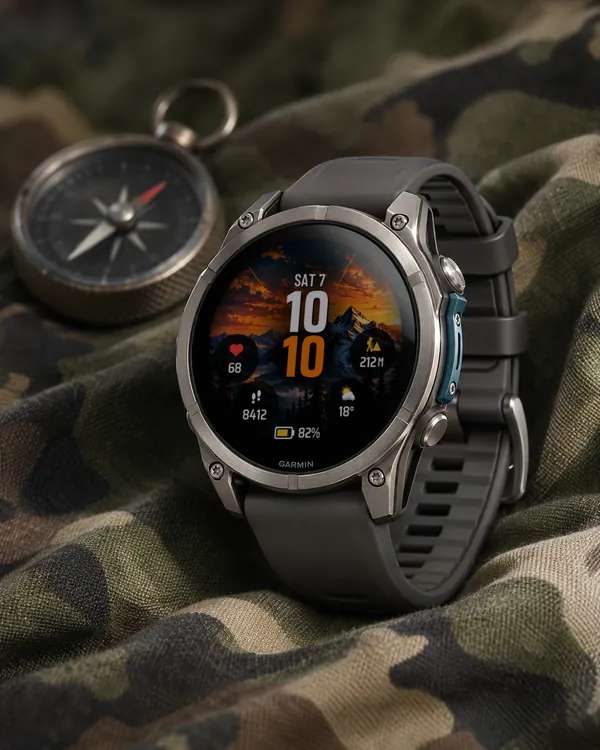 Alpine
 Glow
Big two-line time over a mountain sunset
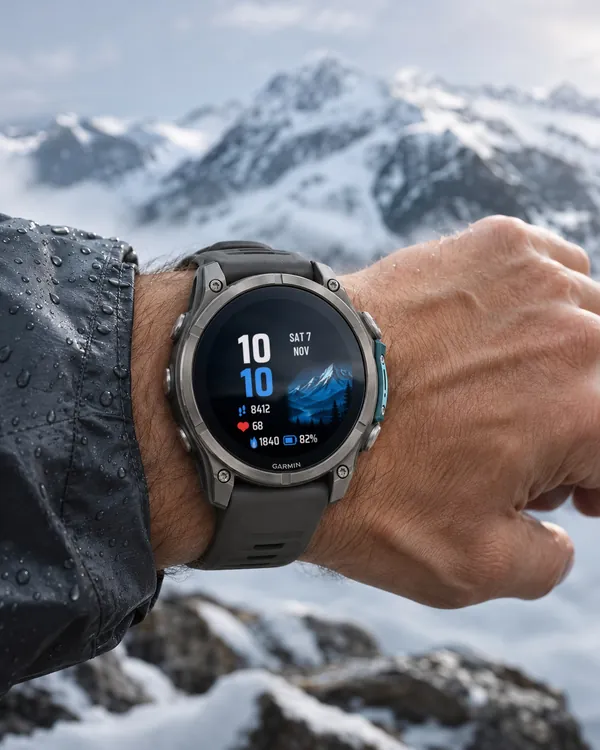 Ridge
Blue Ridge
Black face with a mountain photo panel on the right
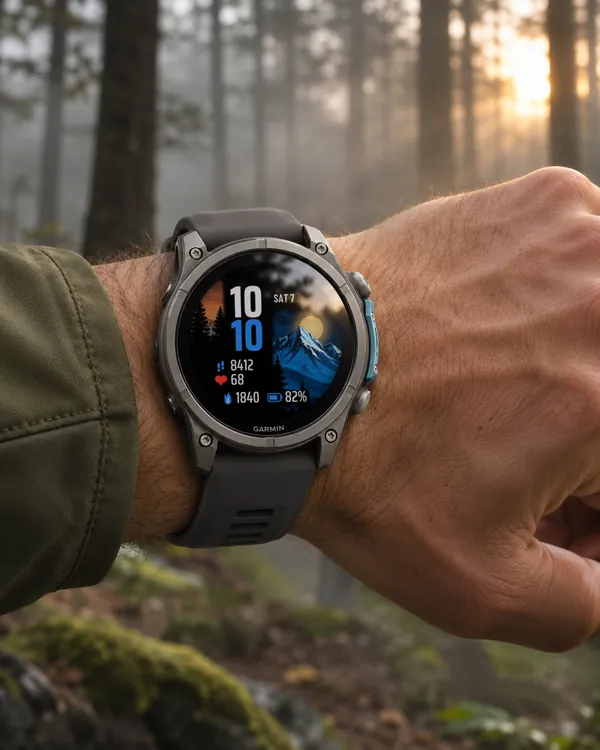 Twin
Twin Light
Two mountain photo panels next to big digits: a sunset and a blue peak with the sun behind it
 Sunrise
Ridge Sunrise
Time on the left, the sun over the ridge on the right