Unlock
€6.49
One-time payment. No subscription. The code works on the watch whose ID you enter.
- Install the face from Connect IQ (7 days free).
- On the watch: face settings > Buy / Unlock, scan the QR code.
- Pay and paste the code in the face settings.
- Pay.
- Copy the code.
- Paste it in Connect IQ: this face > Settings > Unlock code.
Payment works best in Safari or Chrome: menu (three dots) > Open in browser
Read it in this face, it is not the serial number of the watch.
The code works only in the watch face it was bought for: a Summit Rings code will not work in Summit Tactic.
Your ID, compare it with the watch:
Where do I find the ID?
On the watch: settings of this face > Buy / Unlock (first item). Scan the QR code with your phone or type the 10 digits. The ID is also at the top of the face settings in the Connect IQ app.
Code not working on your watch? Write to me and I will fix it.
Payments by Stripe. Seller: Mateusz Kolarz, Lublin, Poland.
Paid. Code:
We show the code here too. If the e-mail does not arrive (check spam), you can recover the code in the Recover code section with just the Face ID. Recover code
Copying did not work. The code is selected: copy it by hand.
The face unlocks by itself when the watch connects to the phone (usually within an hour; if the trial is still running, the purchase starts working when it ends).
Do not want to wait, or have an older watch? Paste the code in the Connect IQ app:
Connect IQ (or Garmin Connect) > My Device > Watch faces > Vintage Triple Calendar Chrono > Settings > Unlock code > paste > Save
Like it? Rate this face in the Garmin store
Want to try new faces and apps before the release, for free? Join the testers program
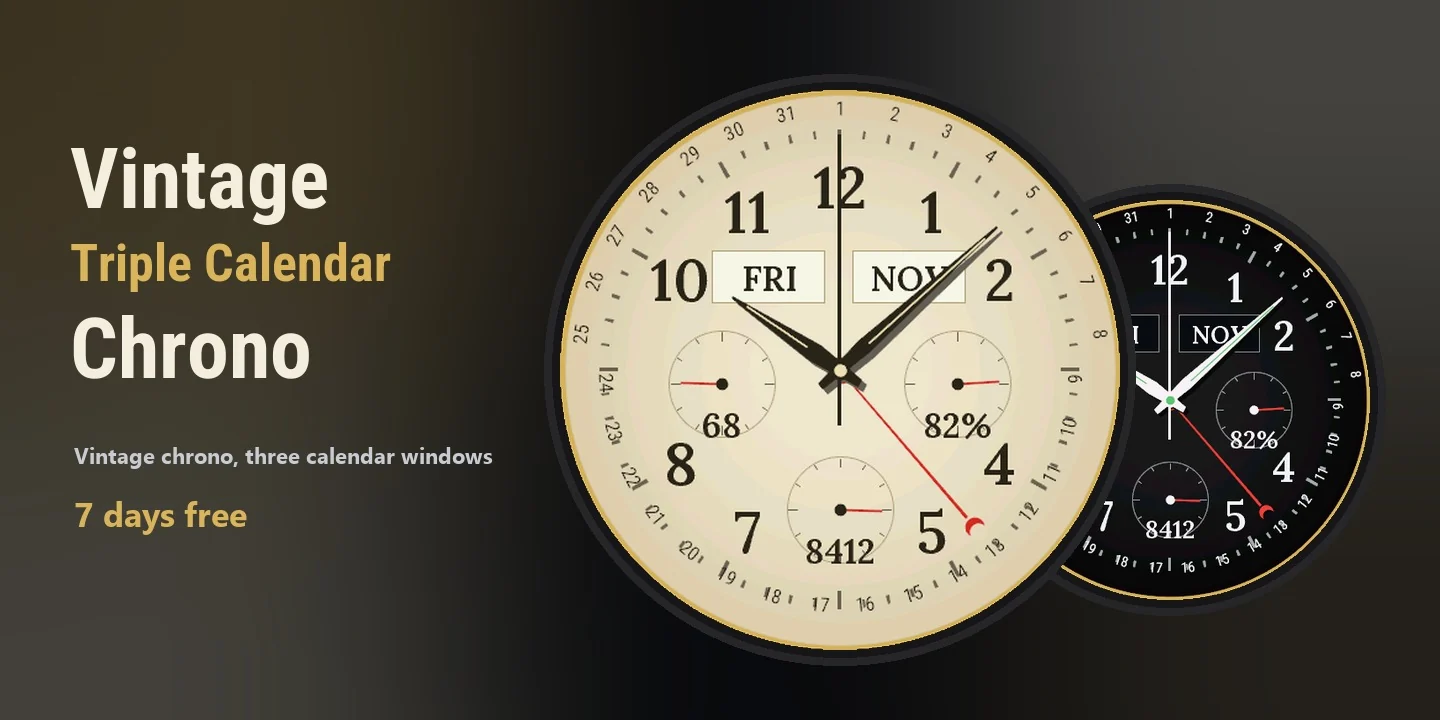
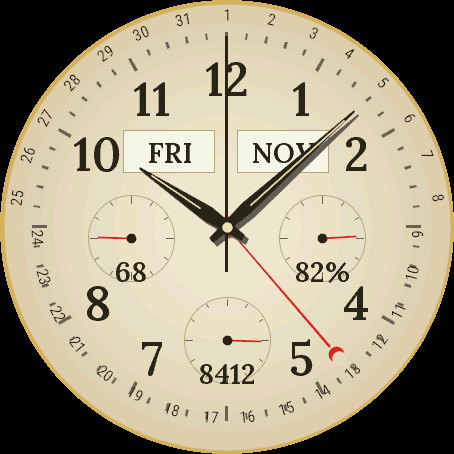
Vintage Triple Calendar Chrono is a classic chronograph face with a full calendar. Day of the week and month sit in two small windows, the date runs on a ring of numbers 1 to 31 along the edge and a red hand with a crescent tip points to today. Three sub-dials at 9, 3 and 6 show heart rate or seconds, battery or active minutes, and steps or floors climbed. Choose one of three looks: Vintage Cream, Aged Patina or Tuxedo Black, with a gold or steel case ring. On MIP screens you can switch to white on black or black on white for strong sun. An independent face by dialforge.dev.
- Full calendar: day of the week, month and a red date hand with a crescent over a ring of 1 to 31.
- Three sub-dials with a source of your choice: heart rate or seconds, battery or active minutes, steps or floors climbed.
- Three looks: Vintage Cream, Aged Patina, Tuxedo Black. Gold or steel case ring.
- MIP screens: white on black or black on white as an option, for reading in strong sun.
- Tap and hold a sub-dial or a window on a touch screen to open the matching screen of the watch (newer watches).
- Always-on screen on AMOLED: hands and hour marks, with the date, shifted every minute to protect the display.
- Menu in 35 languages, the calendar windows follow the watch language or your choice.
Settings are in Garmin Connect (Connect IQ, watch face settings) and on the watch under Customise: sub-dial sources, look, case ring, seconds hand, text size, always-on style and language.
When the watch has no reading, a sub-dial shows --. This is a watch face, not a medical device.
Vintage Triple Calendar Chrono to klasyczna tarcza z chronografem i pełnym kalendarzem. Dzień tygodnia i miesiąc stoją w dwóch małych okienkach, data biegnie po pierścieniu liczb od 1 do 31 przy krawędzi, a czerwona wskazówka z sierpem pokazuje dzisiejszy dzień. Trzy małe tarcze na 9, 3 i 6 pokazują tętno albo sekundy, baterię albo aktywne minuty oraz kroki albo piętra. Wybierasz jeden z trzech wyglądów: Vintage Cream, Aged Patina albo Tuxedo Black, ze złotą albo stalową kopertą. Na ekranach MIP możesz przełączyć biel na czerni albo czerń na bieli, do mocnego słońca. Niezależna tarcza dialforge.dev.
- Pełny kalendarz: dzień tygodnia, miesiąc i czerwona wskazówka daty z sierpem nad pierścieniem 1 do 31.
- Trzy małe tarcze ze źródłem do wyboru: tętno albo sekundy, bateria albo aktywne minuty, kroki albo piętra.
- Trzy wyglądy: Vintage Cream, Aged Patina, Tuxedo Black. Koperta złota albo stalowa.
- Ekrany MIP: biel na czerni albo czerń na bieli jako opcja, do czytania w mocnym słońcu.
- Przytrzymanie małej tarczy albo okienka na ekranie dotykowym otwiera odpowiedni ekran zegarka (nowsze zegarki).
- Ekran wygaszony na AMOLED: wskazówki i znaczniki godzin z datą, przesuwane co minutę, żeby oszczędzać wyświetlacz.
- Menu w 35 językach, okienka kalendarza podążają za językiem zegarka albo za Twoim wyborem.
Ustawienia są w Garmin Connect (Connect IQ, ustawienia tarczy) i na zegarku w Dostosuj: źródła małych tarcz, wygląd, koperta, sekundnik, rozmiar tekstu, styl ekranu wygaszonego i język.
Gdy zegarek nie ma odczytu, mała tarcza pokazuje --. To tarcza, nie wyrób medyczny.
Vintage Triple Calendar Chrono ist ein klassisches Chronograph-Zifferblatt mit vollständigem Kalender. Wochentag und Monat sitzen in zwei kleinen Fenstern, das Datum läuft auf einem Ring aus den Zahlen 1 bis 31 am Rand, und ein roter Zeiger mit Halbmondspitze zeigt auf heute. Drei Hilfszifferblätter bei 9, 3 und 6 Uhr zeigen Herzfrequenz oder Sekunden, Akku oder aktive Minuten und Schritte oder Stockwerke. Wähle einen von drei Looks: Vintage Cream, Aged Patina oder Tuxedo Black, mit goldenem oder stählernem Gehäusering. Auf MIP-Displays kannst du auf Weiß auf Schwarz oder Schwarz auf Weiß umschalten, für starke Sonne. Ein unabhängiges Zifferblatt von dialforge.dev.
- Vollständiger Kalender: Wochentag, Monat und ein roter Datumszeiger mit Halbmond über einem Ring von 1 bis 31.
- Drei Hilfszifferblätter mit Quelle nach Wahl: Herzfrequenz oder Sekunden, Akku oder aktive Minuten, Schritte oder Stockwerke.
- Drei Looks: Vintage Cream, Aged Patina, Tuxedo Black. Gehäusering in Gold oder Stahl.
- MIP-Displays: Weiß auf Schwarz oder Schwarz auf Weiß als Option, zum Ablesen in starker Sonne.
- Auf einem Touchscreen ein Hilfszifferblatt oder Fenster gedrückt halten, um den passenden Bildschirm der Uhr zu öffnen (neuere Uhren).
- Always-On-Display bei AMOLED: Zeiger und Stundenmarken mit dem Datum, jede Minute verschoben, um das Display zu schonen.
- Menü in 35 Sprachen, die Kalenderfenster folgen der Sprache der Uhr oder deiner Wahl.
Die Einstellungen findest du in Garmin Connect (Connect IQ, Zifferblatt-Einstellungen) und auf der Uhr unter Anpassen: Quellen der Hilfszifferblätter, Look, Gehäusering, Sekundenzeiger, Textgröße, Stil des Always-On-Displays und Sprache.
Wenn die Uhr keinen Messwert hat, zeigt ein Hilfszifferblatt -- an. Dies ist ein Zifferblatt, kein Medizinprodukt.
Vintage Triple Calendar Chrono est un cadran chronographe classique avec calendrier complet. Le jour de la semaine et le mois se trouvent dans deux petites fenêtres, la date court sur une couronne de chiffres de 1 à 31 au bord, et une aiguille rouge à pointe en croissant indique aujourd'hui. Trois sous-cadrans à 9, 3 et 6 heures affichent la fréquence cardiaque ou les secondes, la batterie ou les minutes actives, et les pas ou les étages montés. Choisis l'un des trois looks : Vintage Cream, Aged Patina ou Tuxedo Black, avec une lunette dorée ou en acier. Sur les écrans MIP, tu peux passer au blanc sur noir ou au noir sur blanc pour le plein soleil. Un cadran indépendant de dialforge.dev.
- Calendrier complet : jour de la semaine, mois et une aiguille de date rouge en croissant sur une couronne de 1 à 31.
- Trois sous-cadrans avec la source de ton choix : fréquence cardiaque ou secondes, batterie ou minutes actives, pas ou étages montés.
- Trois looks : Vintage Cream, Aged Patina, Tuxedo Black. Lunette dorée ou en acier.
- Écrans MIP : blanc sur noir ou noir sur blanc en option, pour lire en plein soleil.
- Sur un écran tactile, appuie longuement sur un sous-cadran ou une fenêtre pour ouvrir l'écran correspondant de la montre (montres récentes).
- Écran toujours allumé sur AMOLED : aiguilles et repères des heures, avec la date, décalés chaque minute pour ménager l'écran.
- Menu en 35 langues, les fenêtres du calendrier suivent la langue de la montre ou ton choix.
Les réglages se trouvent dans Garmin Connect (Connect IQ, réglages du cadran) et sur la montre, dans Personnaliser : sources des sous-cadrans, look, lunette, trotteuse, taille du texte, style de l'écran toujours allumé et langue.
Quand la montre n'a pas de mesure, un sous-cadran affiche --. C'est un cadran de montre, pas un dispositif médical.
Vintage Triple Calendar Chrono es una esfera cronógrafo clásica con calendario completo. El día de la semana y el mes están en dos ventanas pequeñas, la fecha recorre un anillo de números del 1 al 31 junto al borde y una aguja roja con punta de media luna señala el día de hoy. Tres subesferas a las 9, las 3 y las 6 muestran el pulso o los segundos, la batería o los minutos activos, y los pasos o los pisos subidos. Elige uno de tres estilos: Vintage Cream, Aged Patina o Tuxedo Black, con anillo de caja dorado o de acero. En pantallas MIP puedes cambiar a blanco sobre negro o negro sobre blanco para el sol fuerte. Una esfera independiente de dialforge.dev.
- Calendario completo: día de la semana, mes y una aguja de fecha roja con media luna sobre un anillo del 1 al 31.
- Tres subesferas con la fuente que tú elijas: pulso o segundos, batería o minutos activos, pasos o pisos subidos.
- Tres estilos: Vintage Cream, Aged Patina, Tuxedo Black. Anillo de caja dorado o de acero.
- Pantallas MIP: blanco sobre negro o negro sobre blanco como opción, para leer con sol fuerte.
- Mantén pulsada una subesfera o una ventana en una pantalla táctil para abrir la pantalla correspondiente del reloj (relojes más nuevos).
- Pantalla siempre activa en AMOLED: agujas y marcas de hora, con la fecha, desplazadas cada minuto para proteger la pantalla.
- Menú en 35 idiomas, las ventanas del calendario siguen el idioma del reloj o tu elección.
Los ajustes están en Garmin Connect (Connect IQ, ajustes de la esfera) y en el reloj, en Personalizar: fuentes de las subesferas, estilo, anillo de caja, segundero, tamaño del texto, estilo de la pantalla siempre activa e idioma.
Cuando el reloj no tiene lectura, una subesfera muestra --. Es una esfera de reloj, no un dispositivo médico.
Vintage Triple Calendar Chrono is een klassieke chronograaf wijzerplaat met een volledige kalender. Dag van de week en maand staan in twee kleine vensters, de datum loopt langs de rand over een ring met cijfers van 1 tot 31 en een rode wijzer met een maanvormige punt wijst naar vandaag. Drie subwijzerplaten op 9, 3 en 6 uur tonen hartslag of seconden, batterij of actieve minuten, en stappen of beklommen verdiepingen. Kies uit drie looks: Vintage Cream, Aged Patina of Tuxedo Black, met een gouden of stalen kastring. Op MIP-schermen kun je overschakelen naar wit op zwart of zwart op wit, voor fel zonlicht. Een onafhankelijke wijzerplaat van dialforge.dev.
- Volledige kalender: dag van de week, maand en een rode datumwijzer met maanpunt boven een ring van 1 tot 31.
- Drie subwijzerplaten met een bron naar keuze: hartslag of seconden, batterij of actieve minuten, stappen of beklommen verdiepingen.
- Drie looks: Vintage Cream, Aged Patina, Tuxedo Black. Gouden of stalen kastring.
- MIP-schermen: wit op zwart of zwart op wit als optie, voor goed lezen in fel zonlicht.
- Houd op een touchscreen een subwijzerplaat of een venster ingedrukt om het bijbehorende scherm van het horloge te openen (nieuwere horloges).
- Always-on scherm op AMOLED: wijzers en uurmarkeringen, met de datum, elke minuut verschoven om het scherm te sparen.
- Menu in 35 talen, de kalendervensters volgen de taal van het horloge of jouw keuze.
De instellingen vind je in Garmin Connect (Connect IQ, instellingen van de wijzerplaat) en op het horloge onder Aanpassen: bronnen van de subwijzerplaten, look, kastring, secondewijzer, tekstgrootte, always-on stijl en taal.
Als het horloge geen meting heeft, toont een subwijzerplaat --. Dit is een wijzerplaat, geen medisch hulpmiddel.
Vintage Triple Calendar Chronoは、フルカレンダー付きのクラシックなクロノグラフ文字盤です。曜日と月は2つの小窓に表示され、日付は縁に沿った1から31の数字リングを進み、先端が三日月の赤い針が今日を指します。9時、3時、6時のサブダイヤルには、心拍数または秒、バッテリーまたはアクティブ時間、歩数または上った階数が表示されます。Vintage Cream、Aged Patina、Tuxedo Blackの3種類から選べ、ケースリングはゴールドかスチールです。MIPの画面では、強い日差しの下で見やすい黒地に白、または白地に黒に切り替えられます。dialforge.devの独立系文字盤です。
- フルカレンダー: 曜日、月、そして1から31のリングの上を指す三日月付きの赤い日付針。
- 表示内容を選べるサブダイヤル3つ: 心拍数または秒、バッテリーまたはアクティブ時間、歩数または上った階数。
- 3種類の配色: Vintage Cream、Aged Patina、Tuxedo Black。ケースリングはゴールドまたはスチール。
- MIP画面: 強い日差しの下で読みやすい、黒地に白または白地に黒のオプション。
- タッチ画面でサブダイヤルや窓を長押しすると、対応するウォッチの画面が開きます(新しいモデル)。
- AMOLEDの常時表示: 針と時刻マーカーに日付を表示し、画面を守るため1分ごとに位置をずらします。
- 35言語のメニュー。カレンダーの窓はウォッチの言語または選んだ言語に従います。
設定はGarmin Connect(Connect IQ、文字盤の設定)と、ウォッチ上のカスタマイズで行えます: サブダイヤルの表示内容、配色、ケースリング、秒針、文字サイズ、常時表示のスタイル、言語。
ウォッチに測定値がないときは、サブダイヤルに--と表示されます。これは文字盤であり、医療機器ではありません。
Vintage Triple Calendar Chrono è un quadrante cronografo classico con calendario completo. Giorno della settimana e mese stanno in due piccole finestre, la data scorre su un anello di numeri da 1 a 31 lungo il bordo e una lancetta rossa con punta a mezzaluna indica oggi. Tre sottoquadranti alle 9, alle 3 e alle 6 mostrano battito cardiaco o secondi, batteria o minuti attivi, passi o piani saliti. Scegli uno dei tre look: Vintage Cream, Aged Patina o Tuxedo Black, con ghiera dorata o in acciaio. Sugli schermi MIP puoi passare a bianco su nero o nero su bianco per il sole forte. Un quadrante indipendente di dialforge.dev.
- Calendario completo: giorno della settimana, mese e una lancetta della data rossa con mezzaluna su un anello da 1 a 31.
- Tre sottoquadranti con la fonte che preferisci: battito cardiaco o secondi, batteria o minuti attivi, passi o piani saliti.
- Tre look: Vintage Cream, Aged Patina, Tuxedo Black. Ghiera dorata o in acciaio.
- Schermi MIP: bianco su nero o nero su bianco come opzione, per leggere con il sole forte.
- Su uno schermo touch, tieni premuto un sottoquadrante o una finestra per aprire la schermata corrispondente dell'orologio (orologi più recenti).
- Schermo sempre attivo su AMOLED: lancette e indici delle ore, con la data, spostati ogni minuto per proteggere lo schermo.
- Menu in 35 lingue, le finestre del calendario seguono la lingua dell'orologio o la tua scelta.
Le impostazioni si trovano in Garmin Connect (Connect IQ, impostazioni del quadrante) e sull'orologio in Personalizza: fonti dei sottoquadranti, look, ghiera, lancetta dei secondi, dimensione del testo, stile dello schermo sempre attivo e lingua.
Quando l'orologio non ha una lettura, un sottoquadrante mostra --. Questo è un quadrante, non un dispositivo medico.
Vintage Triple Calendar Chrono 是一款带完整日历的经典计时码表表盘。星期和月份显示在两个小窗口里,日期沿边缘的 1 到 31 数字环运行,一根带月牙尖的红色指针指向今天。9 点、3 点和 6 点位置的三个小表盘分别显示心率或秒数、电量或活动分钟数、步数或爬楼层数。可选三种风格:Vintage Cream、Aged Patina 或 Tuxedo Black,搭配金色或钢色表圈。在 MIP 屏幕上,强光下可切换为黑底白字或白底黑字。来自 dialforge.dev 的独立表盘。
- 完整日历:星期、月份,以及在 1 到 31 数字环上带月牙的红色日期指针。
- 三个小表盘,数据源由你选择:心率或秒数,电量或活动分钟数,步数或爬楼层数。
- 三种风格:Vintage Cream、Aged Patina、Tuxedo Black。金色或钢色表圈。
- MIP 屏幕:可选黑底白字或白底黑字,方便在强光下阅读。
- 在触摸屏上长按小表盘或窗口,可打开手表上对应的界面(较新的手表)。
- AMOLED 息屏显示:指针和时标加日期,每分钟移动一次位置以保护屏幕。
- 菜单支持 35 种语言,日历窗口跟随手表语言或你的选择。
设置位于 Garmin Connect(Connect IQ,表盘设置),也可在手表上的自定义菜单中调整:小表盘数据源、风格、表圈、秒针、文字大小、息屏显示样式和语言。
当手表没有读数时,小表盘会显示 --。这是一款表盘,不是医疗设备。
Vintage Triple Calendar Chrono - классический циферблат с хронографом и полным календарём. День недели и месяц показаны в двух маленьких окошках, дата идёт по кольцу цифр от 1 до 31 у края, а красная стрелка с полумесяцем указывает на сегодня. Три малых циферблата на 9, 3 и 6 часов показывают пульс или секунды, заряд или активные минуты, шаги или этажи. Выбери один из трёх стилей: Vintage Cream, Aged Patina или Tuxedo Black, с золотым или стальным кольцом корпуса. На экранах MIP можно включить белое на чёрном или чёрное на белом для яркого солнца. Независимый циферблат от dialforge.dev.
- Полный календарь: день недели, месяц и красная стрелка даты с полумесяцем над кольцом от 1 до 31.
- Три малых циферблата с источником на выбор: пульс или секунды, заряд или активные минуты, шаги или этажи.
- Три стиля: Vintage Cream, Aged Patina, Tuxedo Black. Золотое или стальное кольцо корпуса.
- Экраны MIP: белое на чёрном или чёрное на белом по желанию, для чтения на ярком солнце.
- Удерживай малый циферблат или окошко на сенсорном экране, чтобы открыть нужный экран часов (новые часы).
- Всегда включённый экран на AMOLED: стрелки и часовые метки с датой, смещаются каждую минуту, чтобы беречь дисплей.
- Меню на 35 языках, окошки календаря следуют языку часов или твоему выбору.
Настройки находятся в Garmin Connect (Connect IQ, настройки циферблата) и на часах в разделе Настроить: источники малых циферблатов, стиль, кольцо корпуса, секундная стрелка, размер текста, стиль всегда включённого экрана и язык.
Если у часов нет данных, малый циферблат показывает --. Это циферблат, а не медицинское устройство.
O Vintage Triple Calendar Chrono é um mostrador clássico de cronógrafo com calendário completo. Dia da semana e mês aparecem em duas janelinhas, a data corre num anel de números de 1 a 31 na borda e um ponteiro vermelho com ponta em meia-lua aponta para hoje. Três subdials nas posições 9, 3 e 6 mostram frequência cardíaca ou segundos, bateria ou minutos ativos, e passos ou andares subidos. Escolha um de três visuais: Vintage Cream, Aged Patina ou Tuxedo Black, com aro dourado ou de aço. Em telas MIP você pode alternar para branco sobre preto ou preto sobre branco, para sol forte. Um mostrador independente da dialforge.dev.
- Calendário completo: dia da semana, mês e um ponteiro de data vermelho em meia-lua sobre um anel de 1 a 31.
- Três subdials com a fonte que você escolher: frequência cardíaca ou segundos, bateria ou minutos ativos, passos ou andares subidos.
- Três visuais: Vintage Cream, Aged Patina, Tuxedo Black. Aro dourado ou de aço.
- Telas MIP: branco sobre preto ou preto sobre branco como opção, para ler sob sol forte.
- Toque e segure um subdial ou uma janelinha numa tela sensível ao toque para abrir a tela correspondente do relógio (relógios mais novos).
- Tela sempre ativa no AMOLED: ponteiros e marcas das horas, com a data, deslocados a cada minuto para proteger a tela.
- Menu em 35 idiomas, as janelas do calendário seguem o idioma do relógio ou a sua escolha.
As configurações ficam no Garmin Connect (Connect IQ, configurações do mostrador) e no relógio em Personalizar: fontes dos subdials, visual, aro, ponteiro de segundos, tamanho do texto, estilo da tela sempre ativa e idioma.
Quando o relógio não tem leitura, o subdial mostra --. Isto é um mostrador, não um dispositivo médico.
Vintage Triple Calendar Chrono je klasický ciferník s chronografem a plným kalendářem. Den v týdnu a měsíc najdeš ve dvou malých okénkách, datum běží po prstenci čísel 1 až 31 u okraje a červená ručička s půlměsícem ukazuje dnešek. Tři malé číselníky na 9, 3 a 6 hodinách ukazují tepovou frekvenci nebo sekundy, baterii nebo aktivní minuty a kroky nebo patra. Vyber si jeden ze tří vzhledů: Vintage Cream, Aged Patina nebo Tuxedo Black, se zlatým nebo ocelovým kroužkem pouzdra. Na displejích MIP můžeš přepnout na bílou na černé nebo černou na bílé pro silné slunce. Nezávislý ciferník od dialforge.dev.
- Plný kalendář: den v týdnu, měsíc a červená ručička data s půlměsícem nad prstencem 1 až 31.
- Tři malé číselníky se zdrojem podle tebe: tepová frekvence nebo sekundy, baterie nebo aktivní minuty, kroky nebo patra.
- Tři vzhledy: Vintage Cream, Aged Patina, Tuxedo Black. Zlatý nebo ocelový kroužek pouzdra.
- Displeje MIP: bílá na černé nebo černá na bílé jako volba, pro čtení na silném slunci.
- Podržením malého číselníku nebo okénka na dotykovém displeji otevřeš příslušnou obrazovku hodinek (novější hodinky).
- Vždy zapnutý displej na AMOLED: ručičky a značky hodin spolu s datem, posouvané každou minutu, aby se displej šetřil.
- Menu ve 35 jazycích, okénka kalendáře sledují jazyk hodinek nebo tvou volbu.
Nastavení najdeš v Garmin Connect (Connect IQ, nastavení ciferníku) a v hodinkách v nabídce Přizpůsobit: zdroje malých číselníků, vzhled, kroužek pouzdra, sekundová ručička, velikost textu, styl vždy zapnutého displeje a jazyk.
Když hodinky nemají žádnou hodnotu, malý číselník zobrazí --. Je to ciferník, ne zdravotnický prostředek.
O Vintage Triple Calendar Chrono é um mostrador clássico de cronógrafo com calendário completo. O dia da semana e o mês surgem em duas janelas pequenas, a data corre num anel de números de 1 a 31 junto ao bordo e um ponteiro vermelho com ponta em meia-lua aponta para hoje. Três subdials às 9, 3 e 6 horas mostram frequência cardíaca ou segundos, bateria ou minutos ativos, e passos ou andares subidos. Escolha um de três aspetos: Vintage Cream, Aged Patina ou Tuxedo Black, com aro dourado ou de aço. Em ecrãs MIP pode alternar para branco sobre preto ou preto sobre branco, para sol forte. Um mostrador independente da dialforge.dev.
- Calendário completo: dia da semana, mês e um ponteiro de data vermelho em meia-lua sobre um anel de 1 a 31.
- Três subdials com a fonte à sua escolha: frequência cardíaca ou segundos, bateria ou minutos ativos, passos ou andares subidos.
- Três aspetos: Vintage Cream, Aged Patina, Tuxedo Black. Aro dourado ou de aço.
- Ecrãs MIP: branco sobre preto ou preto sobre branco como opção, para ler sob sol forte.
- Toque sem soltar num subdial ou numa janela, num ecrã tátil, para abrir o ecrã correspondente do relógio (relógios mais recentes).
- Ecrã sempre ligado no AMOLED: ponteiros e marcas das horas, com a data, deslocados a cada minuto para proteger o ecrã.
- Menu em 35 idiomas, as janelas do calendário seguem o idioma do relógio ou a sua escolha.
As definições estão no Garmin Connect (Connect IQ, definições do mostrador) e no relógio em Personalizar: fontes dos subdials, aspeto, aro, ponteiro dos segundos, tamanho do texto, estilo do ecrã sempre ligado e idioma.
Quando o relógio não tem leitura, o subdial mostra --. Isto é um mostrador, não um dispositivo médico.
Vintage Triple Calendar Chrono는 풀 캘린더를 갖춘 클래식 크로노그래프 시계 화면입니다. 요일과 월은 작은 창 두 개에 표시되고, 날짜는 가장자리의 1부터 31까지 숫자 링을 따라 움직이며, 초승달 끝이 달린 붉은 바늘이 오늘을 가리킵니다. 9시, 3시, 6시 방향의 서브 다이얼 3개에는 심박수 또는 초, 배터리 또는 활동 시간, 걸음 수 또는 오른 층수가 표시됩니다. Vintage Cream, Aged Patina, Tuxedo Black 중 하나를 고르고, 골드 또는 스틸 케이스 링을 선택하세요. MIP 화면에서는 강한 햇빛 아래에서 보기 좋게 검정 바탕에 흰색 또는 흰 바탕에 검정으로 바꿀 수 있습니다. dialforge.dev의 독립 시계 화면입니다.
- 풀 캘린더: 요일, 월, 그리고 1부터 31까지 링 위를 가리키는 초승달 모양의 붉은 날짜 바늘.
- 원하는 데이터를 고르는 서브 다이얼 3개: 심박수 또는 초, 배터리 또는 활동 시간, 걸음 수 또는 오른 층수.
- 룩 3가지: Vintage Cream, Aged Patina, Tuxedo Black. 골드 또는 스틸 케이스 링.
- MIP 화면: 강한 햇빛 아래에서 읽기 좋은 검정 바탕 흰색 또는 흰 바탕 검정 옵션.
- 터치 화면에서 서브 다이얼이나 창을 길게 누르면 해당 시계 화면이 열립니다(최신 시계).
- AMOLED 상시 표시 화면: 바늘과 시간 눈금, 날짜를 표시하며 화면 보호를 위해 1분마다 위치가 이동합니다.
- 35개 언어 메뉴, 캘린더 창은 시계 언어 또는 직접 고른 언어를 따릅니다.
설정은 Garmin Connect(Connect IQ, 시계 화면 설정)와 시계의 맞춤 설정 메뉴에 있습니다: 서브 다이얼 데이터, 룩, 케이스 링, 초침, 글자 크기, 상시 표시 스타일, 언어.
시계에 측정값이 없으면 서브 다이얼에 --가 표시됩니다. 이 앱은 시계 화면이며 의료기기가 아닙니다.
Vintage Triple Calendar Chrono är en klassisk kronografurtavla med full kalender. Veckodag och månad syns i två små fönster, datumet löper på en ring med siffror från 1 till 31 längs kanten, och en röd visare med halvmånespets pekar på i dag. Tre underurtavlor vid 9, 3 och 6 visar puls eller sekunder, batteri eller aktiva minuter, samt steg eller våningar. Välj ett av tre utseenden: Vintage Cream, Aged Patina eller Tuxedo Black, med guld- eller stålring runt boetten. På MIP-skärmar kan du byta till vitt på svart eller svart på vitt, för stark sol. En oberoende urtavla från dialforge.dev.
- Full kalender: veckodag, månad och en röd datumvisare med halvmåne över en ring från 1 till 31.
- Tre underurtavlor med källa efter eget val: puls eller sekunder, batteri eller aktiva minuter, steg eller våningar.
- Tre utseenden: Vintage Cream, Aged Patina, Tuxedo Black. Guld- eller stålring runt boetten.
- MIP-skärmar: vitt på svart eller svart på vitt som alternativ, för läsning i stark sol.
- Tryck och håll på en underurtavla eller ett fönster på en pekskärm för att öppna motsvarande skärm på klockan (nyare klockor).
- Always-on-skärm på AMOLED: visare och timmarkeringar, med datumet, flyttade varje minut för att skona skärmen.
- Meny på 35 språk, kalenderfönstren följer klockans språk eller ditt val.
Inställningarna finns i Garmin Connect (Connect IQ, urtavlans inställningar) och på klockan under Anpassa: källor för underurtavlorna, utseende, boettring, sekundvisare, textstorlek, stil för always-on-skärmen och språk.
När klockan saknar mätvärde visar en underurtavla --. Det här är en urtavla, inte en medicinteknisk produkt.
Vintage Triple Calendar Chrono er et klassisk kronografur med fuld kalender. Ugedag og måned står i to små vinduer, datoen løber på en ring af tal fra 1 til 31 langs kanten, og en rød viser med en halvmåne peger på i dag. Tre små skiver ved 9, 3 og 6 viser puls eller sekunder, batteri eller aktive minutter og skridt eller etager. Vælg et af tre udseender: Vintage Cream, Aged Patina eller Tuxedo Black, med en guld- eller stålring om kassen. På MIP-skærme kan du skifte til hvid på sort eller sort på hvid i stærkt sollys. Et uafhængigt urskive fra dialforge.dev.
- Fuld kalender: ugedag, måned og en rød datoviser med halvmåne over en ring fra 1 til 31.
- Tre små skiver med en kilde efter eget valg: puls eller sekunder, batteri eller aktive minutter, skridt eller etager.
- Tre udseender: Vintage Cream, Aged Patina, Tuxedo Black. Kassering i guld eller stål.
- MIP-skærme: hvid på sort eller sort på hvid som valgmulighed, så du kan læse i stærkt sollys.
- Tryk og hold på en lille skive eller et vindue på en berøringsskærm for at åbne den tilhørende skærm på uret (nyere ure).
- Altid tændt skærm på AMOLED: visere og timemarkeringer med datoen, flyttet hvert minut for at skåne skærmen.
- Menu på 35 sprog, kalendervinduerne følger urets sprog eller dit valg.
Indstillingerne findes i Garmin Connect (Connect IQ, urskiveindstillinger) og på uret under Tilpas: kilder til de små skiver, udseende, kassering, sekundviser, tekststørrelse, stil for altid tændt skærm og sprog.
Når uret ikke har en måling, viser en lille skive --. Dette er en urskive, ikke medicinsk udstyr.
Vintage Triple Calendar Chrono er en klassisk kronograf-urskive med full kalender. Ukedag og måned står i to små vinduer, datoen går på en ring med tall fra 1 til 31 langs kanten, og en rød viser med halvmånespiss peker på i dag. Tre underskiver på 9, 3 og 6 viser puls eller sekunder, batteri eller aktive minutter, og skritt eller etasjer. Velg ett av tre utseender: Vintage Cream, Aged Patina eller Tuxedo Black, med gull- eller stålring rundt kassen. På MIP-skjermer kan du bytte til hvitt på svart eller svart på hvitt, for sterk sol. En uavhengig urskive fra dialforge.dev.
- Full kalender: ukedag, måned og en rød datoviser med halvmåne over en ring fra 1 til 31.
- Tre underskiver med kilde etter eget valg: puls eller sekunder, batteri eller aktive minutter, skritt eller etasjer.
- Tre utseender: Vintage Cream, Aged Patina, Tuxedo Black. Gull- eller stålring rundt kassen.
- MIP-skjermer: hvitt på svart eller svart på hvitt som valg, for lesing i sterk sol.
- Trykk og hold på en underskive eller et vindu på en berøringsskjerm for å åpne den tilhørende skjermen på klokken (nyere klokker).
- Alltid-på-skjerm på AMOLED: visere og timemarkeringer, med datoen, flyttet hvert minutt for å skåne skjermen.
- Meny på 35 språk, kalendervinduene følger språket på klokken eller ditt valg.
Innstillingene finner du i Garmin Connect (Connect IQ, innstillinger for urskiven) og på klokken under Tilpass: kilder til underskivene, utseende, kassering, sekundviser, tekststørrelse, stil for alltid-på-skjerm og språk.
Når klokken ikke har noen måling, viser en underskive --. Dette er en urskive, ikke et medisinsk utstyr.
Vintage Triple Calendar Chrono 是一款附完整日曆的經典計時碼錶錶面。星期和月份顯示在兩個小視窗中,日期沿著邊緣的 1 到 31 數字環運行,一根帶月牙尖的紅色指針指向今天。9 點、3 點和 6 點位置的三個小錶盤分別顯示心率或秒數、電量或活動分鐘數、步數或爬樓層數。可選三種風格:Vintage Cream、Aged Patina 或 Tuxedo Black,搭配金色或鋼色錶圈。在 MIP 螢幕上,強光下可切換為黑底白字或白底黑字。來自 dialforge.dev 的獨立錶面。
- 完整日曆:星期、月份,以及在 1 到 31 數字環上帶月牙的紅色日期指針。
- 三個小錶盤,資料來源由你選擇:心率或秒數,電量或活動分鐘數,步數或爬樓層數。
- 三種風格:Vintage Cream、Aged Patina、Tuxedo Black。金色或鋼色錶圈。
- MIP 螢幕:可選黑底白字或白底黑字,方便在強光下閱讀。
- 在觸控螢幕上長按小錶盤或視窗,即可開啟手錶上對應的畫面(較新的手錶)。
- AMOLED 螢幕常亮顯示:指針與時標加日期,每分鐘移動一次位置以保護螢幕。
- 選單支援 35 種語言,日曆視窗會跟隨手錶語言或你的選擇。
設定位於 Garmin Connect(Connect IQ,錶面設定),也可在手錶上的自訂選單中調整:小錶盤資料來源、風格、錶圈、秒針、文字大小、螢幕常亮樣式和語言。
當手錶沒有讀數時,小錶盤會顯示 --。這是一款錶面,不是醫療裝置。
Vintage Triple Calendar Chrono on klassinen kronografitaulu täydellä kalenterilla. Viikonpäivä ja kuukausi näkyvät kahdessa pienessä ikkunassa, päivämäärä kulkee reunalla numerorenkaalla 1:stä 31:een, ja kuunsirppikärkinen punainen osoitin näyttää tämän päivän. Kolme pientä mittaria kohdissa 9, 3 ja 6 näyttävät sykkeen tai sekunnit, akun tai aktiiviset minuutit sekä askeleet tai kerrokset. Valitse yksi kolmesta ilmeestä: Vintage Cream, Aged Patina tai Tuxedo Black, kultaisella tai teräksisellä kehärenkaalla. MIP-näytöillä voit vaihtaa valkoisen mustalla tai mustan valkoisella, kirkasta aurinkoa varten. Itsenäinen kellotaulu dialforge.dev:ltä.
- Täysi kalenteri: viikonpäivä, kuukausi ja punainen päivämääräosoitin kuunsirpillä renkaan (1:stä 31:een) yläpuolella.
- Kolme pientä mittaria, joiden lähteen valitset itse: syke tai sekunnit, akku tai aktiiviset minuutit, askeleet tai kerrokset.
- Kolme ilmettä: Vintage Cream, Aged Patina, Tuxedo Black. Kultainen tai teräksinen kehärengas.
- MIP-näytöt: valkoinen mustalla tai musta valkoisella valinnaisena, luettavaksi kirkkaassa auringossa.
- Pidä kosketusnäytöllä pientä mittaria tai ikkunaa painettuna, niin kellon vastaava näyttö avautuu (uudemmat kellot).
- Aina päällä oleva näyttö AMOLEDilla: osoittimet ja tuntimerkit päivämäärän kanssa, siirretään minuutin välein näytön suojaamiseksi.
- Valikko 35 kielellä, kalenterin ikkunat seuraavat kellon kieltä tai valintaasi.
Asetukset löytyvät Garmin Connectista (Connect IQ, kellotaulun asetukset) ja kellosta kohdasta Mukauta: pienten mittarien lähteet, ilme, kehärengas, sekuntiviisari, tekstikoko, aina päällä -näytön tyyli ja kieli.
Kun kellolla ei ole mittausta, pieni mittari näyttää --. Tämä on kellotaulu, ei lääkinnällinen laite.
Vintage Triple Calendar Chrono je klasický ciferník s chronografom a úplným kalendárom. Deň v týždni a mesiac sú v dvoch malých okienkach, dátum beží po prstenci čísel od 1 do 31 pri okraji a červená ručička s hrotom v tvare polmesiaca ukazuje na dnešok. Tri malé ciferníky na 9, 3 a 6 zobrazujú tep alebo sekundy, batériu alebo aktívne minúty a kroky alebo poschodia. Vyberte si jeden z troch vzhľadov: Vintage Cream, Aged Patina alebo Tuxedo Black, so zlatým alebo oceľovým prstencom puzdra. Na displejoch MIP môžete prepnúť na bielu na čiernej alebo čiernu na bielej, pre silné slnko. Nezávislý ciferník od dialforge.dev.
- Úplný kalendár: deň v týždni, mesiac a červená ručička dátumu s polmesiacom nad prstencom 1 až 31.
- Tri malé ciferníky so zdrojom podľa vášho výberu: tep alebo sekundy, batéria alebo aktívne minúty, kroky alebo poschodia.
- Tri vzhľady: Vintage Cream, Aged Patina, Tuxedo Black. Zlatý alebo oceľový prstenec puzdra.
- Displeje MIP: biela na čiernej alebo čierna na bielej ako možnosť, na čítanie na silnom slnku.
- Na dotykovom displeji podržte malý ciferník alebo okienko a otvorí sa príslušná obrazovka hodiniek (novšie hodinky).
- Stále zapnutý displej na AMOLED: ručičky a značky hodín s dátumom, posúvané každú minútu na ochranu displeja.
- Ponuka v 35 jazykoch, okienka kalendára sledujú jazyk hodiniek alebo váš výber.
Nastavenia nájdete v Garmin Connect (Connect IQ, nastavenia ciferníka) a v hodinkách v ponuke Prispôsobiť: zdroje malých ciferníkov, vzhľad, prstenec puzdra, sekundová ručička, veľkosť textu, štýl stále zapnutého displeja a jazyk.
Keď hodinky nemajú žiadny údaj, malý ciferník zobrazí --. Toto je ciferník, nie zdravotnícka pomôcka.
Vintage Triple Calendar Chrono je klasičen kronografski ciferblat s popolnim koledarjem. Dan v tednu in mesec sta v dveh majhnih okencih, datum teče po obroču številk od 1 do 31 ob robu, rdeč kazalec s konico v obliki polmeseca pa kaže današnji dan. Trije majhni ciferblati na 9, 3 in 6 prikazujejo srčni utrip ali sekunde, baterijo ali aktivne minute ter korake ali nadstropja. Izberi enega od treh videzov: Vintage Cream, Aged Patina ali Tuxedo Black, z zlatim ali jeklenim obročem ohišja. Na zaslonih MIP lahko preklopiš na belo na črnem ali črno na belem, za močno sonce. Neodvisen ciferblat podjetja dialforge.dev.
- Popoln koledar: dan v tednu, mesec in rdeč kazalec datuma s polmesecem nad obročem od 1 do 31.
- Trije majhni ciferblati z virom po tvoji izbiri: srčni utrip ali sekunde, baterija ali aktivne minute, koraki ali nadstropja.
- Trije videzi: Vintage Cream, Aged Patina, Tuxedo Black. Zlat ali jeklen obroč ohišja.
- Zasloni MIP: belo na črnem ali črno na belem kot možnost, za branje na močnem soncu.
- Na zaslonu na dotik pridrži majhen ciferblat ali okence, da se odpre ustrezen zaslon ure (novejše ure).
- Vedno vklopljen zaslon na AMOLED: kazalci in oznake ur z datumom, vsako minuto premaknjeni zaradi zaščite zaslona.
- Meni v 35 jezikih, okenci koledarja sledita jeziku ure ali tvoji izbiri.
Nastavitve najdeš v Garmin Connect (Connect IQ, nastavitve ciferblata) in na uri v meniju Prilagodi: viri majhnih ciferblatov, videz, obroč ohišja, sekundni kazalec, velikost besedila, slog vedno vklopljenega zaslona in jezik.
Ko ura nima meritve, majhen ciferblat prikaže --. To je ciferblat, ne medicinski pripomoček.
Vintage Triple Calendar Chrono adalah tampilan jam kronograf klasik dengan kalender lengkap. Hari dan bulan ada di dua jendela kecil, tanggal berjalan di cincin angka 1 sampai 31 di tepi, dan jarum merah berujung bulan sabit menunjuk hari ini. Tiga sub-dial di posisi 9, 3, dan 6 menampilkan detak jantung atau detik, baterai atau menit aktif, serta langkah atau lantai yang didaki. Pilih satu dari tiga gaya: Vintage Cream, Aged Patina, atau Tuxedo Black, dengan cincin casing emas atau baja. Di layar MIP kamu bisa beralih ke putih di atas hitam atau hitam di atas putih untuk sinar matahari yang kuat. Tampilan jam independen dari dialforge.dev.
- Kalender lengkap: hari, bulan, dan jarum tanggal merah berujung bulan sabit di atas cincin 1 sampai 31.
- Tiga sub-dial dengan sumber pilihanmu: detak jantung atau detik, baterai atau menit aktif, langkah atau lantai yang didaki.
- Tiga gaya: Vintage Cream, Aged Patina, Tuxedo Black. Cincin casing emas atau baja.
- Layar MIP: putih di atas hitam atau hitam di atas putih sebagai opsi, agar mudah dibaca di bawah sinar matahari kuat.
- Di layar sentuh, tekan dan tahan sub-dial atau jendela untuk membuka layar jam yang sesuai (jam yang lebih baru).
- Layar selalu aktif di AMOLED: jarum dan penanda jam, beserta tanggal, digeser setiap menit untuk melindungi layar.
- Menu dalam 35 bahasa, jendela kalender mengikuti bahasa jam atau pilihanmu.
Pengaturan ada di Garmin Connect (Connect IQ, pengaturan tampilan jam) dan di jam pada menu Sesuaikan: sumber sub-dial, gaya, cincin casing, jarum detik, ukuran teks, gaya layar selalu aktif, dan bahasa.
Jika jam tidak punya pembacaan, sub-dial menampilkan --. Ini tampilan jam, bukan perangkat medis.
A Vintage Triple Calendar Chrono egy klasszikus kronográf számlap teljes naptárral. A hét napja és a hónap két kis ablakban látszik, a dátum a szélen egy 1-től 31-ig tartó számgyűrűn fut, a félholdas hegyű piros mutató pedig a mai napra mutat. Három kis számlap 9, 3 és 6 óránál mutatja a pulzust vagy a másodperceket, az akkut vagy az aktív perceket, valamint a lépéseket vagy a megmászott emeleteket. Három megjelenés közül választhatsz: Vintage Cream, Aged Patina vagy Tuxedo Black, arany vagy acél tokgyűrűvel. MIP kijelzőn átválthatsz fehér feketén vagy fekete fehéren módra, erős napfényhez. Független számlap a dialforge.dev-től.
- Teljes naptár: a hét napja, a hónap és egy piros félholdas dátummutató az 1-től 31-ig tartó gyűrű fölött.
- Három kis számlap, az adatforrás tetszés szerint: pulzus vagy másodperc, akku vagy aktív percek, lépések vagy megmászott emeletek.
- Három megjelenés: Vintage Cream, Aged Patina, Tuxedo Black. Arany vagy acél tokgyűrű.
- MIP kijelzők: fehér feketén vagy fekete fehéren opció, erős napfényben is jól olvasható.
- Érintőképernyőn tartsd nyomva a kis számlapot vagy az ablakot, és megnyílik az óra megfelelő képernyője (újabb órákon).
- Always-on kijelző AMOLED-en: mutatók és óra jelek a dátummal, percenként eltolva a kijelző kímélésére.
- Menü 35 nyelven, a naptár ablakai az óra nyelvét vagy a te választásodat követik.
A beállítások a Garmin Connectben (Connect IQ, számlap beállításai) és az órán a Testreszabás menüben vannak: kis számlapok forrásai, megjelenés, tokgyűrű, másodpercmutató, szövegméret, always-on stílus és nyelv.
Ha az órának nincs mért adata, a kis számlap -- jelet mutat. Ez egy számlap, nem orvosi eszköz.
Vintage Triple Calendar Chrono เป็นหน้าปัดโครโนกราฟสไตล์คลาสสิกพร้อมปฏิทินเต็มรูปแบบ วันในสัปดาห์และเดือนอยู่ในช่องเล็กสองช่อง วันที่เดินไปตามวงแหวนตัวเลข 1 ถึง 31 ที่ขอบหน้าปัด และเข็มสีแดงปลายเสี้ยวจันทร์ชี้ไปที่วันนี้ หน้าปัดย่อยสามวงที่ตำแหน่ง 9, 3 และ 6 แสดงอัตราการเต้นของหัวใจหรือวินาที แบตเตอรี่หรือนาทีที่ออกแรง และก้าวเดินหรือจำนวนชั้นที่ขึ้น เลือกลุคได้หนึ่งในสามแบบ: Vintage Cream, Aged Patina หรือ Tuxedo Black พร้อมขอบตัวเรือนสีทองหรือสเตนเลส บนหน้าจอ MIP สลับเป็นตัวขาวบนพื้นดำหรือตัวดำบนพื้นขาวได้ เมื่ออยู่กลางแดดจัด หน้าปัดอิสระจาก dialforge.dev
- ปฏิทินเต็มรูปแบบ: วันในสัปดาห์ เดือน และเข็มวันที่สีแดงปลายเสี้ยวจันทร์เหนือวงแหวน 1 ถึง 31
- หน้าปัดย่อยสามวง เลือกแหล่งข้อมูลได้เอง: อัตราการเต้นของหัวใจหรือวินาที แบตเตอรี่หรือนาทีที่ออกแรง ก้าวเดินหรือจำนวนชั้น
- ลุคสามแบบ: Vintage Cream, Aged Patina, Tuxedo Black ขอบตัวเรือนสีทองหรือสเตนเลส
- หน้าจอ MIP: ตัวขาวบนพื้นดำหรือตัวดำบนพื้นขาวเป็นตัวเลือก สำหรับอ่านกลางแดดจัด
- กดค้างที่หน้าปัดย่อยหรือช่องบนหน้าจอสัมผัสเพื่อเปิดหน้าจอที่เกี่ยวข้องของนาฬิกา (นาฬิการุ่นใหม่)
- หน้าจอแสดงตลอดเวลาบน AMOLED: เข็มและเครื่องหมายชั่วโมงพร้อมวันที่ ขยับทุกนาทีเพื่อถนอมหน้าจอ
- เมนู 35 ภาษา ช่องปฏิทินใช้ภาษาของนาฬิกาหรือภาษาที่คุณเลือก
การตั้งค่าอยู่ใน Garmin Connect (Connect IQ การตั้งค่าหน้าปัด) และบนนาฬิกาในเมนู ปรับแต่ง: แหล่งข้อมูลของหน้าปัดย่อย ลุค ขอบตัวเรือน เข็มวินาที ขนาดตัวอักษร สไตล์หน้าจอแสดงตลอดเวลา และภาษา
เมื่อนาฬิกายังไม่มีค่าที่อ่านได้ หน้าปัดย่อยจะแสดง -- นี่คือหน้าปัดนาฬิกา ไม่ใช่อุปกรณ์ทางการแพทย์
Το Vintage Triple Calendar Chrono είναι ένα κλασικό καντράν χρονογράφου με πλήρες ημερολόγιο. Η ημέρα της εβδομάδας και ο μήνας βρίσκονται σε δύο μικρά παράθυρα, η ημερομηνία τρέχει σε δακτύλιο αριθμών από 1 έως 31 στην άκρη και ένας κόκκινος δείκτης με ημισέληνο δείχνει τη σημερινή μέρα. Τρία μικρά καντράν στις 9, 3 και 6 δείχνουν παλμούς ή δευτερόλεπτα, μπαταρία ή λεπτά δραστηριότητας, και βήματα ή ορόφους. Διάλεξε μία από τρεις εμφανίσεις: Vintage Cream, Aged Patina ή Tuxedo Black, με χρυσό ή ατσάλινο δαχτυλίδι θήκης. Στις οθόνες MIP μπορείς να αλλάξεις σε λευκό σε μαύρο ή μαύρο σε λευκό για δυνατό ήλιο. Ένα ανεξάρτητο καντράν από το dialforge.dev.
- Πλήρες ημερολόγιο: ημέρα της εβδομάδας, μήνας και κόκκινος δείκτης ημερομηνίας με ημισέληνο πάνω από δακτύλιο 1 έως 31.
- Τρία μικρά καντράν με πηγή της επιλογής σου: παλμοί ή δευτερόλεπτα, μπαταρία ή λεπτά δραστηριότητας, βήματα ή όροφοι.
- Τρεις εμφανίσεις: Vintage Cream, Aged Patina, Tuxedo Black. Χρυσό ή ατσάλινο δαχτυλίδι θήκης.
- Οθόνες MIP: λευκό σε μαύρο ή μαύρο σε λευκό ως επιλογή, για ανάγνωση σε δυνατό ήλιο.
- Πάτησε παρατεταμένα ένα μικρό καντράν ή ένα παράθυρο σε οθόνη αφής για να ανοίξει η αντίστοιχη οθόνη του ρολογιού (νεότερα ρολόγια).
- Πάντα ενεργή οθόνη σε AMOLED: δείκτες και ενδείξεις ωρών, με την ημερομηνία, μετατοπίζονται κάθε λεπτό για να προστατεύεται η οθόνη.
- Μενού σε 35 γλώσσες, τα παράθυρα του ημερολογίου ακολουθούν τη γλώσσα του ρολογιού ή την επιλογή σου.
Οι ρυθμίσεις βρίσκονται στο Garmin Connect (Connect IQ, ρυθμίσεις καντράν) και στο ρολόι στην Προσαρμογή: πηγές μικρών καντράν, εμφάνιση, δαχτυλίδι θήκης, δείκτης δευτερολέπτων, μέγεθος κειμένου, στυλ πάντα ενεργής οθόνης και γλώσσα.
Όταν το ρολόι δεν έχει μέτρηση, ένα μικρό καντράν δείχνει --. Αυτό είναι καντράν ρολογιού, όχι ιατρική συσκευή.
Vintage Triple Calendar Chrono klasični je brojčanik s kronografom i punim kalendarom. Dan u tjednu i mjesec nalaze se u dva mala prozorčića, datum ide po prstenu brojeva od 1 do 31 uz rub, a crvena kazaljka s polumjesecom pokazuje današnji dan. Tri mala brojčanika na 9, 3 i 6 prikazuju puls ili sekunde, bateriju ili aktivne minute te korake ili katove. Odaberi jedan od tri izgleda: Vintage Cream, Aged Patina ili Tuxedo Black, sa zlatnim ili čeličnim prstenom kućišta. Na MIP zaslonima možeš prebaciti na bijelo na crnom ili crno na bijelom za jako sunce. Neovisan brojčanik s dialforge.dev.
- Puni kalendar: dan u tjednu, mjesec i crvena kazaljka datuma s polumjesecom iznad prstena od 1 do 31.
- Tri mala brojčanika s izvorom po tvom izboru: puls ili sekunde, baterija ili aktivne minute, koraci ili katovi.
- Tri izgleda: Vintage Cream, Aged Patina, Tuxedo Black. Zlatni ili čelični prsten kućišta.
- MIP zasloni: bijelo na crnom ili crno na bijelom kao mogućnost, za čitanje na jakom suncu.
- Na zaslonu osjetljivom na dodir dugo pritisni mali brojčanik ili prozorčić da otvoriš odgovarajući zaslon sata (noviji satovi).
- Uvijek uključen zaslon na AMOLED-u: kazaljke i oznake sati s datumom, pomiču se svake minute radi zaštite zaslona.
- Izbornik na 35 jezika, prozorčići kalendara prate jezik sata ili tvoj izbor.
Postavke su u Garmin Connect (Connect IQ, postavke brojčanika) i na satu pod Prilagodi: izvori malih brojčanika, izgled, prsten kućišta, kazaljka sekundi, veličina teksta, stil uvijek uključenog zaslona i jezik.
Kad sat nema očitanje, mali brojčanik prikazuje --. Ovo je brojčanik za sat, a ne medicinski uređaj.
Vintage Triple Calendar Chrono הוא שעון כרונוגרף קלאסי עם לוח שנה מלא. היום בשבוע והחודש מופיעים בשני חלונות קטנים, התאריך רץ על טבעת מספרים מ-1 עד 31 בשולי השעון, ומחוג אדום עם קצה סהר מצביע על היום. שלוש חוגות קטנות בשעות 9, 3 ו-6 מציגות דופק או שניות, סוללה או דקות פעילות, וצעדים או קומות. בחר אחד משלושה סגנונות: Vintage Cream, Aged Patina או Tuxedo Black, עם טבעת מארז זהב או פלדה. במסכי MIP אפשר לעבור ללבן על שחור או שחור על לבן לשמש חזקה. שעון עצמאי מאת dialforge.dev.
- לוח שנה מלא: יום בשבוע, חודש ומחוג תאריך אדום עם סהר מעל טבעת 1 עד 31.
- שלוש חוגות קטנות עם מקור לבחירתך: דופק או שניות, סוללה או דקות פעילות, צעדים או קומות.
- שלושה סגנונות: Vintage Cream, Aged Patina, Tuxedo Black. טבעת מארז זהב או פלדה.
- מסכי MIP: לבן על שחור או שחור על לבן כאפשרות, לקריאה בשמש חזקה.
- לחיצה ארוכה על חוגה קטנה או על חלון במסך מגע פותחת את מסך השעון המתאים (שעונים חדשים יותר).
- מסך תמיד דלוק ב-AMOLED: מחוגים וסימני שעות עם התאריך, מוזזים כל דקה כדי להגן על המסך.
- תפריט ב-35 שפות, חלונות לוח השנה עוקבים אחרי שפת השעון או אחרי בחירתך.
ההגדרות נמצאות ב-Garmin Connect (Connect IQ, הגדרות השעון) ובשעון תחת התאמה אישית: מקורות החוגות הקטנות, סגנון, טבעת מארז, מחוג שניות, גודל טקסט, סגנון המסך התמיד דלוק ושפה.
כשאין לשעון קריאה, חוגה קטנה מציגה --. זה שעון תצוגה ולא מכשיר רפואי.
Vintage Triple Calendar Chrono ialah wajah jam kronograf klasik dengan kalendar penuh. Hari dan bulan berada dalam dua tetingkap kecil, tarikh bergerak pada cincin nombor 1 hingga 31 di tepi, dan jarum merah berhujung bulan sabit menunjuk hari ini. Tiga sub-dial pada kedudukan 9, 3 dan 6 menunjukkan kadar denyutan jantung atau saat, bateri atau minit aktif, serta langkah atau tingkat yang didaki. Pilih satu daripada tiga gaya: Vintage Cream, Aged Patina atau Tuxedo Black, dengan cincin casing emas atau keluli. Pada skrin MIP anda boleh beralih kepada putih di atas hitam atau hitam di atas putih untuk cahaya matahari yang terik. Wajah jam bebas daripada dialforge.dev.
- Kalendar penuh: hari, bulan dan jarum tarikh merah berhujung bulan sabit di atas cincin 1 hingga 31.
- Tiga sub-dial dengan sumber pilihan anda: kadar denyutan jantung atau saat, bateri atau minit aktif, langkah atau tingkat yang didaki.
- Tiga gaya: Vintage Cream, Aged Patina, Tuxedo Black. Cincin casing emas atau keluli.
- Skrin MIP: putih di atas hitam atau hitam di atas putih sebagai pilihan, untuk dibaca di bawah cahaya matahari terik.
- Pada skrin sentuh, tekan dan tahan sub-dial atau tetingkap untuk membuka skrin jam yang berkaitan (jam yang lebih baharu).
- Skrin sentiasa hidup pada AMOLED: jarum dan penanda jam, bersama tarikh, dianjak setiap minit untuk melindungi paparan.
- Menu dalam 35 bahasa, tetingkap kalendar mengikut bahasa jam atau pilihan anda.
Tetapan terdapat dalam Garmin Connect (Connect IQ, tetapan wajah jam) dan pada jam di bawah menu Suaikan: sumber sub-dial, gaya, cincin casing, jarum saat, saiz teks, gaya skrin sentiasa hidup dan bahasa.
Jika jam tiada bacaan, sub-dial menunjukkan --. Ini wajah jam, bukan peranti perubatan.
Rate this face (only I see the rating)
Permissions and privacy
This product asks the watch for the permissions below. Connect IQ shows them when you install it.
- Sensor history: Reads recent values stored by the watch (for example Body Battery, stress, heart rate, steps trend).Odczytuje ostatnie wartości zapisane przez zegarek (na przykład Body Battery, stres, tętno, trend kroków).
- Your profile: Reads your Garmin profile on the watch (for example age, weight, heart rate zones) to calculate values for you.Odczytuje Twój profil Garmin na zegarku (na przykład wiek, wagę, strefy tętna), żeby liczyć wartości dla Ciebie.
- Watch data (complications): Shows data from other watch features, such as battery or steps, on the face.Pokazuje na tarczy dane z innych funkcji zegarka, takie jak bateria czy kroki.
This product does not use the internet and sends no data to our servers.
The full manual and the detailed permission descriptions are available in English and Polish.
More faces
 Running
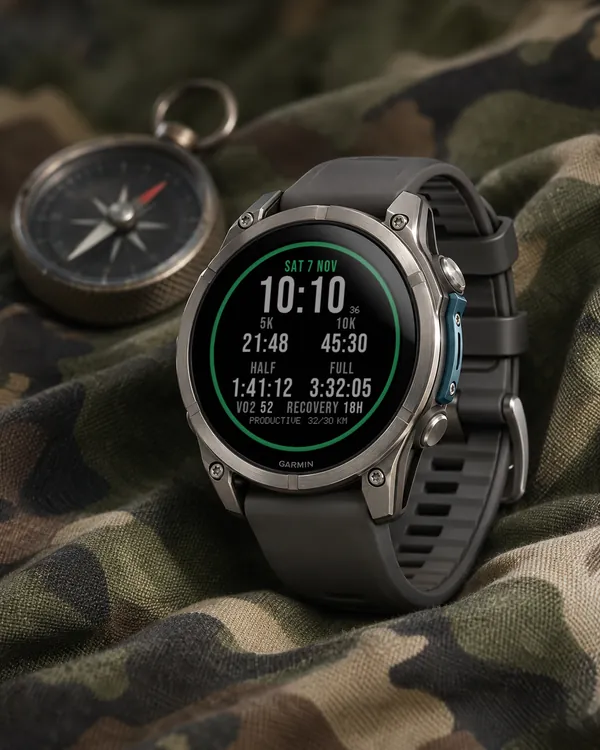
Race Ready
5.0 (17)
Garmin race predictions and weekly mileage right on the face
 Photography
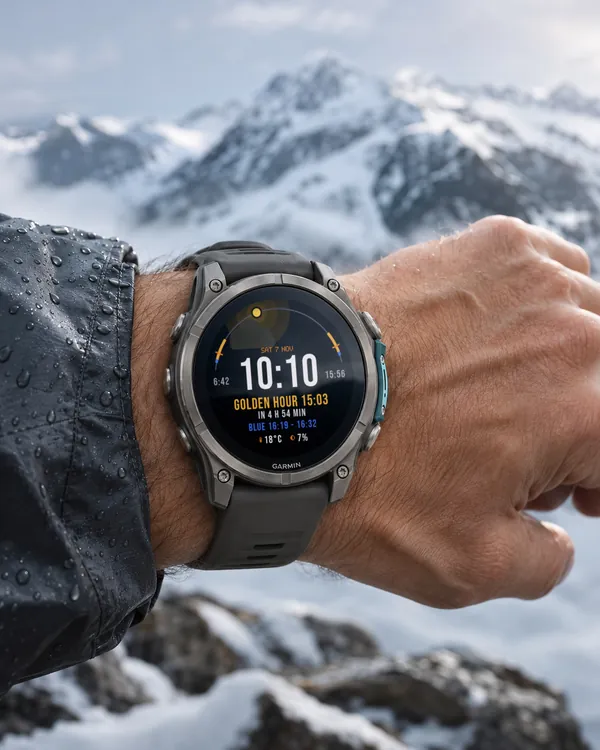
Amber Hour
5.0 (15)
Golden and blue hour countdown with the sun's path across your day
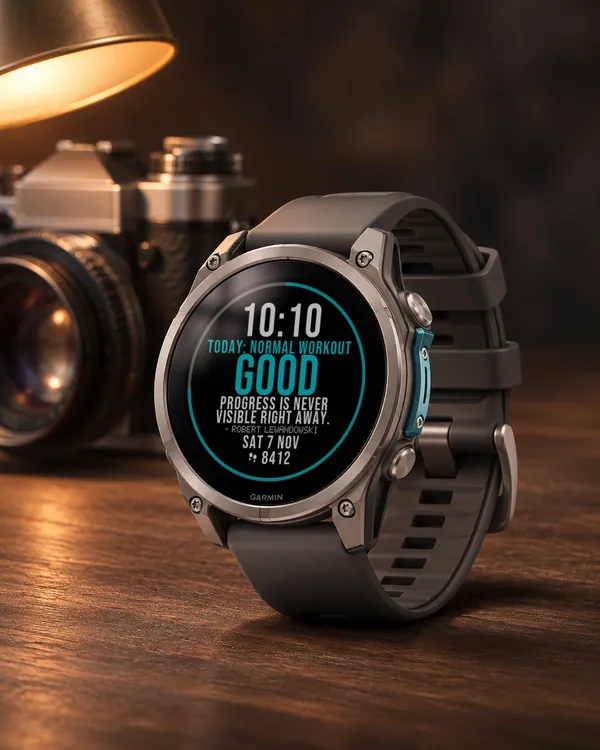 Readiness
Day Verdict
4.8 (12)
One word for your day: PUSH, STEADY, EASY or REST, from your sleep, Body Battery and recovery
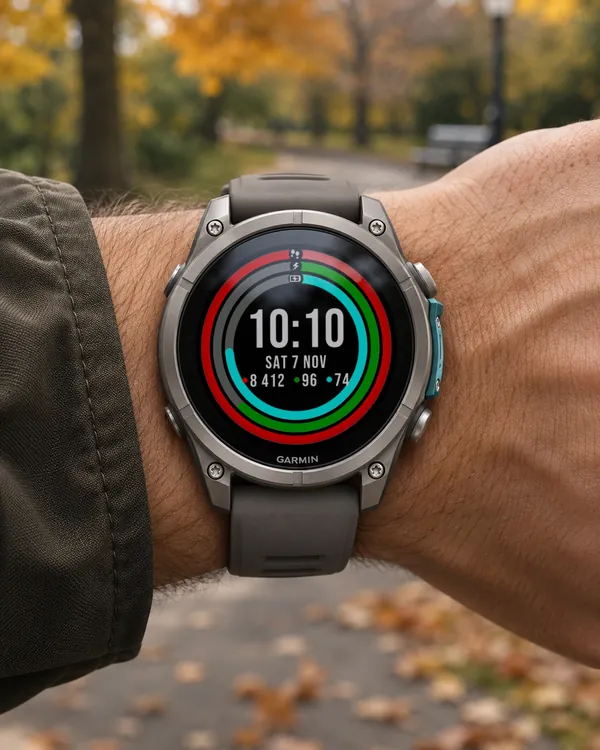 Activity
Ring Day
5.0 (16)
Three activity rings around the time, for people who close their rings