Unlock
€7.99
One-time payment. No subscription. The code works on the watch whose ID you enter.
- Install the face from Connect IQ (7 days free).
- On the watch: face settings > Buy / Unlock, scan the QR code.
- Pay and paste the code in the face settings.
- Pay.
- Copy the code.
- Paste it in Connect IQ: this face > Settings > Unlock code.
Payment works best in Safari or Chrome: menu (three dots) > Open in browser
Read it in this face, it is not the serial number of the watch.
Your ID, compare it with the watch:
Where do I find the ID?
On the watch: settings of this face > Buy / Unlock (first item). Scan the QR code with your phone or type the 10 digits. The ID is also at the top of the face settings in the Connect IQ app.
Code not working on your watch? Write to me and I refund within 14 days.
Payments by Stripe. Seller: Mateusz Kolarz, Lublin, Poland.
Paid. Code:
Copying did not work. The code is selected: copy it by hand.
The face unlocks by itself when the watch connects to the phone (usually within an hour; if the trial is still running, the purchase starts working when it ends).
Do not want to wait, or have an older watch? Paste the code in the Connect IQ app:
Connect IQ (or Garmin Connect) > My Device > Watch faces > Wysoka Przelecz > Settings > Unlock code > paste > Save
We show the code here too. If the e-mail does not arrive (check spam), you can recover the code in the Recover code section with the Face ID and e-mail from your order. Recover code
Like it? Rate this face in the Garmin store
Want to try new faces and apps before the release, for free? Join the testers program
7-day free trial, then a one-time unlock at dialforge.dev. No subscription.
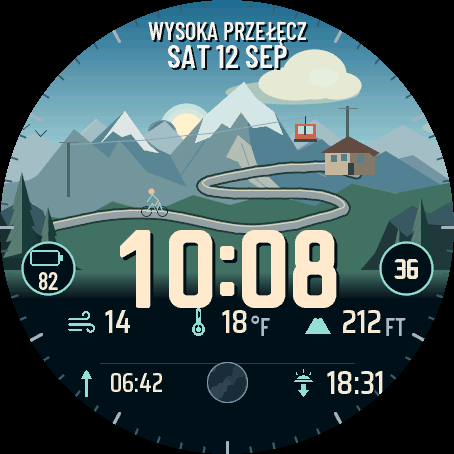
Wysoka Przelecz (High Pass) puts a mountain pass on your wrist. The sky follows the real height of the Sun, so dawn, noon, dusk and night all look different, and sunrise and sunset come when they do where you are. The Moon shows its real phase. Rain, storm, snow, fog and wind from your weather show up in the picture. The gondola climbs with your daily steps, and when you reach the goal the hut turns on its lamp and smoke rises from the chimney. The time is set in a thick digit font drawn just for this face. An independent face by dialforge.dev.
- Animated mountain scene: a gondola, cyclists on a winding road, birds and spruces that bend in the wind. The sky follows the real height of the Sun, with true sunrise and sunset for your location.
- The Moon with its real phase and position, also as a picture in a field.
- Weather in the scene: rain, downpour, storm with lightning, snow, fog and wind.
- Your daily goal on the gondola: steps or weekly intensity minutes. When you reach it, the hut lights up.
- Three scenes: road and hut, lake below the pass, winter slope with a chair lift and a skier. Snow on the ridges follows the season.
- Own thick digit font in 4 sizes, up to the full width of the screen, in 3 positions. Colour of the time and of the accent from 11 colours.
- A top text you can edit (up to 18 characters): your name, a motto, anything.
- Six editable fields with icons, each showing one of dozens of kinds of data or staying empty. Side circles by the time: a field and seconds, which you can turn off.
- On touch watches press and hold a field to open its screen.
- Always-on screen on AMOLED in 4 styles with low battery use: striped digits, outline with peaks, time and date, or off.
- Menu on the watch in 35 languages.
Settings are in Garmin Connect (Connect IQ, watch face settings) and on the watch under Customise: colours, top text, six fields, circles by the time, time size and position, scene, animations and the always-on style. What the gondola shows and the season are set in Garmin Connect.
When the watch has no reading, a field shows --. Weather in the scene needs a forecast on the watch. This is a watch face, not a medical device.
7 dni za darmo, potem jednorazowe odblokowanie na dialforge.dev. Bez abonamentu.
Wysoka Przełęcz to górska przełęcz na nadgarstku. Niebo zmienia się razem z prawdziwą wysokością Słońca, więc świt, południe, zmierzch i noc wyglądają inaczej, a wschód i zachód wypadają wtedy, kiedy są u Ciebie. Księżyc ma swoją prawdziwą fazę. Deszcz, burza, śnieg, mgła i wiatr z Twojej pogody widać w obrazie. Gondola wjeżdża w górę razem z Twoimi krokami, a gdy zrobisz dzienny cel, w schronisku zapala się lampa i z komina leci dym. Godzina jest złożona własną, grubą czcionką cyfr, narysowaną tylko do tej tarczy. Niezależna tarcza dialforge.dev.
- Animowana scena w górach: gondola, rowerzyści na serpentynie, ptaki i świerki, które gną się na wietrze. Gradient nieba idzie za prawdziwą wysokością Słońca, wschód i zachód są prawdziwe dla Twojej lokalizacji.
- Księżyc z prawdziwą fazą i położeniem, także jako obrazek w polu.
- Pogoda w scenie: deszcz, ulewa, burza z błyskawicą, śnieg, mgła i wiatr.
- Dzienny cel na gondoli: kroki albo minuty intensywności w tygodniu. Gdy go zrobisz, schronisko się rozświetla.
- Trzy sceny: serpentyna i schronisko, jezioro pod przełęczą, zimowy stok z wyciągiem i narciarzem. Śnieg na graniach idzie za porą roku.
- Własna, gruba czcionka cyfr w 4 rozmiarach, aż do całej szerokości ekranu, w 3 położeniach. Kolor godziny i akcentu do wyboru z 11 kolorów.
- Napis u góry do edycji (do 18 znaków): imię, hasło, cokolwiek.
- Sześć edytowalnych pól z ikonami, każde pokaże jedną z kilkudziesięciu danych albo zostanie puste. Boczne kółka przy godzinie: pole i sekundy, można je wyłączyć.
- Na zegarkach dotykowych przytrzymaj pole, żeby otworzyć jego ekran.
- Ekran wygaszony na AMOLED w 4 stylach, z małym zużyciem baterii: cyfry w prążki, kontur ze szczytami, godzina z datą albo wyłączony.
- Menu na zegarku w 35 językach.
Ustawienia są w Garmin Connect (Connect IQ, ustawienia tarczy) i na zegarku w Dostosuj: kolory, napis u góry, sześć pól, kółka przy godzinie, wielkość i położenie godziny, scena, animacje i styl ekranu wygaszonego. To, co pokazuje gondola, i porę roku ustawisz w Garmin Connect.
Gdy zegarek nie ma odczytu, pole pokazuje --. Pogoda w scenie potrzebuje prognozy w zegarku. To tarcza, nie wyrób medyczny.
7 Tage kostenlos testen, danach einmalige Freischaltung auf dialforge.dev. Kein Abo.
Wysoka Przelecz (High Pass) bringt einen Gebirgspass an dein Handgelenk. Der Himmel folgt dem echten Sonnenstand, deshalb sehen Morgen, Mittag, Abend und Nacht jeweils anders aus, und Sonnenaufgang und Sonnenuntergang kommen genau dann, wann sie bei dir kommen. Der Mond zeigt seine echte Phase. Regen, Sturm, Schnee, Nebel und Wind aus deinem Wetter erscheinen im Bild. Die Gondel fährt mit deinen Tagesschritten bergauf, und wenn du das Ziel erreichst, geht in der Hütte die Lampe an und Rauch steigt aus dem Schornstein auf. Die Uhrzeit ist in einer dicken Ziffernschrift gesetzt, die eigens für dieses Zifferblatt gezeichnet wurde. Ein unabhängiges Zifferblatt von dialforge.dev.
- Animierte Bergszene: eine Gondel, Radfahrer auf einer Serpentinenstraße, Vögel und Fichten, die sich im Wind biegen. Der Himmel folgt dem echten Sonnenstand, Sonnenaufgang und Sonnenuntergang stimmen für deinen Standort.
- Der Mond mit echter Phase und Position, auch als Bild in einem Feld.
- Wetter in der Szene: Regen, Platzregen, Gewitter mit Blitzen, Schnee, Nebel und Wind.
- Dein Tagesziel an der Gondel: Schritte oder Intensitätsminuten der Woche. Wenn du es erreichst, leuchtet die Hütte auf.
- Drei Szenen: Straße und Hütte, See unterhalb des Passes, Winterhang mit Sessellift und Skifahrer. Der Schnee auf den Graten folgt der Jahreszeit.
- Eigene dicke Ziffernschrift in 4 Größen, bis zur vollen Breite des Bildschirms, in 3 Positionen. Farbe der Uhrzeit und des Akzents aus 11 Farben.
- Ein Text oben, den du selbst bearbeiten kannst (bis zu 18 Zeichen): dein Name, ein Motto, was du willst.
- Sechs bearbeitbare Felder mit Symbolen, jedes zeigt einen von Dutzenden Werten oder bleibt leer. Seitliche Kreise neben der Uhrzeit: ein Feld und Sekunden, beides abschaltbar.
- Bei Touchscreen-Uhren ein Feld gedrückt halten, um seine Ansicht zu öffnen.
- Always-On-Display bei AMOLED in 4 Stilen mit geringem Akkuverbrauch: gestreifte Ziffern, Kontur mit Gipfeln, Uhrzeit und Datum oder aus.
- Menü auf der Uhr in 35 Sprachen.
Alle Einstellungen findest du in Garmin Connect (Connect IQ, Zifferblatt-Einstellungen) und auf der Uhr unter Anpassen: Farben, Text oben, sechs Felder, Kreise neben der Uhrzeit, Größe und Position der Uhrzeit, Szene, Animationen und Stil des Always-On-Displays. Was die Gondel anzeigt und die Jahreszeit stellst du in Garmin Connect ein.
Wenn die Uhr keinen Messwert hat, zeigt ein Feld -- an. Das Wetter in der Szene braucht eine Vorhersage auf der Uhr. Dies ist ein Zifferblatt, kein Medizinprodukt.
Essai gratuit de 7 jours, puis un déverrouillage unique sur dialforge.dev. Sans abonnement.
Wysoka Przelecz (High Pass), c'est un col de montagne à votre poignet. Le ciel suit la hauteur réelle du Soleil : le matin, midi, le soir et la nuit n'ont pas le même aspect, et le lever et le coucher du soleil arrivent à l'heure où ils arrivent chez vous. La Lune affiche sa vraie phase. La pluie, l'orage, la neige, le brouillard et le vent de votre météo apparaissent dans l'image. La télécabine monte avec vos pas du jour, et quand vous atteignez l'objectif, le refuge allume sa lampe et de la fumée s'échappe de la cheminée. L'heure est composée dans une police de chiffres épaisse, dessinée uniquement pour ce cadran. Un cadran indépendant de dialforge.dev.
- Scène de montagne animée : une télécabine, des cyclistes sur une route en lacets, des oiseaux et des épicéas qui plient sous le vent. Le ciel suit la hauteur réelle du Soleil, avec un vrai lever et un vrai coucher du soleil pour votre position.
- La Lune avec sa vraie phase et sa vraie position, aussi en image dans un champ.
- La météo dans la scène : pluie, averse, orage avec éclairs, neige, brouillard et vent.
- Votre objectif du jour sur la télécabine : pas ou minutes d'intensité de la semaine. Quand vous l'atteignez, le refuge s'allume.
- Trois scènes : route et refuge, lac sous le col, piste d'hiver avec télésiège et skieur. La neige sur les crêtes suit la saison.
- Police de chiffres épaisse exclusive en 4 tailles, jusqu'à toute la largeur de l'écran, en 3 positions. Couleur de l'heure et de l'accent à choisir parmi 11 couleurs.
- Un texte en haut que vous pouvez modifier (jusqu'à 18 caractères) : votre prénom, une devise, ce que vous voulez.
- Six champs modifiables avec icônes, chacun affiche l'une des dizaines de données disponibles ou reste vide. Cercles latéraux près de l'heure : un champ et les secondes, que vous pouvez désactiver.
- Sur les montres tactiles, maintenez un champ appuyé pour ouvrir son écran.
- Affichage Always-On sur AMOLED en 4 styles, à faible consommation : chiffres rayés, contour avec sommets, heure et date, ou désactivé.
- Menu sur la montre en 35 langues.
Tous les réglages sont dans Garmin Connect (Connect IQ, réglages du cadran) et sur la montre sous Personnaliser : couleurs, texte en haut, six champs, cercles près de l'heure, taille et position de l'heure, scène, animations et style de l'affichage Always-On. Ce que montre la télécabine et la saison se règlent dans Garmin Connect.
Quand la montre n'a pas de mesure, le champ affiche --. La météo dans la scène nécessite des prévisions sur la montre. Ceci est un cadran, pas un dispositif médical.
Prueba gratuita de 7 días y luego un desbloqueo único en dialforge.dev. Sin suscripción.
Wysoka Przelecz (High Pass) pone un puerto de montaña en tu muñeca. El cielo sigue la altura real del Sol, así que la mañana, el mediodía, el atardecer y la noche se ven distintos, y el amanecer y el atardecer llegan cuando llegan donde estás. La Luna muestra su fase real. La lluvia, la tormenta, la nieve, la niebla y el viento de tu tiempo aparecen en la imagen. La góndola sube con tus pasos diarios, y cuando alcanzas el objetivo, el refugio enciende su lámpara y sale humo de la chimenea. La hora está compuesta con una tipografía de números gruesa, dibujada solo para esta esfera. Una esfera independiente de dialforge.dev.
- Escena de montaña animada: una góndola, ciclistas en una carretera de curvas, pájaros y abetos que se doblan con el viento. El cielo sigue la altura real del Sol, con amanecer y atardecer reales para tu ubicación.
- La Luna con su fase y posición reales, también como imagen en un campo.
- El tiempo en la escena: lluvia, aguacero, tormenta con rayos, nieve, niebla y viento.
- Tu objetivo diario en la góndola: pasos o minutos de intensidad semanales. Cuando lo alcanzas, el refugio se ilumina.
- Tres escenas: carretera y refugio, lago bajo el puerto, ladera de invierno con telesilla y un esquiador. La nieve de las crestas sigue la estación del año.
- Tipografía de números gruesa propia en 4 tamaños, hasta el ancho completo de la pantalla, en 3 posiciones. Color de la hora y del acento a elegir entre 11 colores.
- Un texto arriba que puedes editar (hasta 18 caracteres): tu nombre, un lema, lo que quieras.
- Seis campos editables con iconos, cada uno muestra uno de decenas de datos o queda vacío. Círculos laterales junto a la hora: un campo y los segundos, que puedes desactivar.
- En relojes táctiles, mantén pulsado un campo para abrir su pantalla.
- Pantalla siempre activa en AMOLED en 4 estilos, con bajo consumo de batería: números rayados, contorno con picos, hora y fecha, o desactivada.
- Menú en el reloj en 35 idiomas.
Todos los ajustes están en Garmin Connect (Connect IQ, ajustes de la esfera) y en el reloj en Personalizar: colores, texto de arriba, seis campos, círculos junto a la hora, tamaño y posición de la hora, escena, animaciones y estilo de la pantalla siempre activa. Lo que muestra la góndola y la estación del año se ajustan en Garmin Connect.
Cuando el reloj no tiene lectura, el campo muestra --. El tiempo en la escena necesita una previsión en el reloj. Esto es una esfera, no un producto sanitario.
7 dagen gratis proberen, daarna een eenmalige ontgrendeling op dialforge.dev. Geen abonnement.
Wysoka Przelecz (High Pass) brengt een bergpas naar je pols. De lucht volgt de echte hoogte van de zon, dus dageraad, middag, schemering en nacht zien er allemaal anders uit, en zonsopgang en zonsondergang komen op het moment dat ze bij jou komen. De maan toont haar echte fase. Regen, onweer, sneeuw, mist en wind uit jouw weerbericht verschijnen in het beeld. De gondel klimt mee met je dagelijkse stappen, en als je het doel haalt, gaat in de hut de lamp aan en stijgt er rook op uit de schoorsteen. De tijd is gezet in een dik cijferlettertype, speciaal getekend voor deze wijzerplaat. Een onafhankelijke wijzerplaat van dialforge.dev.
- Geanimeerd bergtafereel: een gondel, wielrenners op een kronkelende weg, vogels en sparren die meebuigen in de wind. De lucht volgt de echte hoogte van de zon, met echte zonsopgang en zonsondergang voor jouw locatie.
- De maan met echte fase en positie, ook als plaatje in een veld.
- Weer in het tafereel: regen, plensbui, onweer met bliksem, sneeuw, mist en wind.
- Je dagdoel op de gondel: stappen of wekelijkse intensiteitsminuten. Als je het haalt, licht de hut op.
- Drie taferelen: weg en hut, meer onder de pas, winterhelling met een stoeltjeslift en een skiër. De sneeuw op de bergkammen volgt het seizoen.
- Eigen dik cijferlettertype in 4 formaten, tot de volle breedte van het scherm, in 3 posities. Kleur van de tijd en van het accent te kiezen uit 11 kleuren.
- Een tekst bovenaan die je zelf kunt aanpassen (maximaal 18 tekens): je naam, een motto, wat je maar wilt.
- Zes aanpasbare velden met pictogrammen, elk toont een van tientallen gegevens of blijft leeg. Zijcirkels naast de tijd: een veld en seconden, die je kunt uitzetten.
- Houd op horloges met touchscreen een veld ingedrukt om het bijbehorende scherm te openen.
- Always-on-scherm op AMOLED in 4 stijlen met laag batterijverbruik: gestreepte cijfers, contour met pieken, tijd en datum, of uit.
- Menu op het horloge in 35 talen.
Je instellingen vind je in Garmin Connect (Connect IQ, instellingen van de wijzerplaat) en op het horloge onder Aanpassen: kleuren, tekst bovenaan, zes velden, cirkels naast de tijd, grootte en positie van de tijd, tafereel, animaties en de stijl van het always-on-scherm. Wat de gondel toont en het seizoen stel je in via Garmin Connect.
Als het horloge geen meetwaarde heeft, toont een veld --. Het weer in het tafereel heeft een weersvoorspelling op het horloge nodig. Dit is een wijzerplaat, geen medisch hulpmiddel.
7日間無料でお試しいただけます。その後はdialforge.devで解除を一度だけ購入(サブスクリプションなし)。
Wysoka Przelecz(High Pass)は、手首の上に山の峠を運んできます。空は太陽の実際の高さに合わせて変わるので、夜明け、昼、夕暮れ、夜でそれぞれ表情が違い、日の出と日の入りもあなたのいる場所の時刻に訪れます。月は本物の満ち欠けを映します。雨、嵐、雪、霧、風といった天気も絵の中に現れます。ゴンドラは1日の歩数に合わせて登っていき、目標を達成すると山小屋のランプが灯り、煙突から煙が立ちのぼります。時刻は、このウォッチフェイスのためだけに描いた太い数字フォントで表示します。dialforge.devによる個人開発のウォッチフェイスです。
- 動く山の情景:ゴンドラ、つづら折りの道を走るサイクリスト、鳥、風にしなるトウヒの木。空は太陽の実際の高さに合わせて変わり、日の出と日の入りはお使いの場所の本物の時刻です。
- 月は本物の満ち欠けと位置で表示。フィールドに画像として表示することもできます。
- 情景に天気を反映:雨、土砂降り、雷を伴う嵐、雪、霧、風。
- ゴンドラに1日の目標を表示:歩数または週間の強度の分数。目標を達成すると山小屋に明かりが灯ります。
- 情景は3種類:道と山小屋、峠の下の湖、リフトとスキーヤーのいる冬のゲレンデ。尾根の雪は季節に合わせて変わります。
- このためだけの太い数字フォントを4つのサイズで用意。画面いっぱいの幅まで広げられ、位置は3種類。時刻とアクセントの色は11色から選べます。
- 上部のテキストは自由に編集できます(18文字まで)。名前でも、座右の銘でも、何でも。
- アイコンつきの編集可能なフィールドが6つ。それぞれ数十種類のデータから1つを表示でき、空にもできます。時刻の横の小さな円には、フィールドと秒を表示でき、オフにもできます。
- タッチ対応モデルなら、フィールドを長押ししてその画面を開けます。
- AMOLEDの常時表示画面は4スタイルで、バッテリー消費は控えめ:縞模様の数字、山頂つきのアウトライン、時刻と日付、またはオフ。
- メニューは35言語に対応しています。
設定は、Garmin Connect(Connect IQ、ウォッチフェイス設定)と、時計本体の「カスタマイズ」から変更できます。カラー、上部のテキスト、6つのフィールド、時刻横の円、時刻のサイズと位置、情景、アニメーション、常時表示のスタイルを設定できます。ゴンドラが表示する内容と季節はGarmin Connectで設定します。
時計が値を取得できないとき、フィールドには--と表示されます。情景に天気を映すには、時計に天気予報のデータが必要です。これはウォッチフェイスであり、医療機器ではありません。
Prova gratuita di 7 giorni, poi uno sblocco una tantum su dialforge.dev. Nessun abbonamento.
Wysoka Przelecz (Passo Alto) porta un passo di montagna sul tuo polso. Il cielo segue l'altezza reale del Sole, quindi alba, mezzogiorno, tramonto e notte hanno un aspetto diverso, e alba e tramonto arrivano quando arrivano dove ti trovi. La Luna mostra la sua fase reale. Pioggia, temporale, neve, nebbia e vento del tuo meteo compaiono nell'immagine. La cabinovia sale con i tuoi passi giornalieri e, quando raggiungi l'obiettivo, il rifugio accende la lampada e dal camino si alza il fumo. L'ora è composta con un carattere di cifre spesso, disegnato apposta per questo quadrante. Un quadrante indipendente di dialforge.dev.
- Scena di montagna animata: una cabinovia, ciclisti su una strada a tornanti, uccelli e abeti che si piegano nel vento. Il cielo segue l'altezza reale del Sole, con alba e tramonto reali per la tua posizione.
- La Luna con fase e posizione reali, anche come immagine in un campo.
- Il meteo nella scena: pioggia, acquazzone, temporale con fulmini, neve, nebbia e vento.
- Il tuo obiettivo giornaliero sulla cabinovia: passi oppure minuti di intensità settimanali. Quando lo raggiungi, il rifugio si accende.
- Tre scene: strada e rifugio, lago sotto il passo, pista invernale con seggiovia e uno sciatore. La neve sulle creste segue la stagione.
- Carattere di cifre spesso esclusivo in 4 dimensioni, fino a tutta la larghezza dello schermo, in 3 posizioni. Colore dell'ora e dell'accento da scegliere tra 11 colori.
- Un testo in alto che puoi modificare (fino a 18 caratteri): il tuo nome, un motto, qualsiasi cosa.
- Sei campi modificabili con icone, ognuno mostra uno tra decine di dati oppure resta vuoto. Cerchi laterali accanto all'ora: un campo e i secondi, che puoi disattivare.
- Sugli orologi touch tieni premuto un campo per aprire la sua schermata.
- Schermo sempre attivo su AMOLED in 4 stili, a basso consumo di batteria: cifre a strisce, contorno con le cime, ora e data, oppure disattivato.
- Menu sull'orologio in 35 lingue.
Le impostazioni sono in Garmin Connect (Connect IQ, impostazioni del quadrante) e sull'orologio in Personalizza: colori, testo in alto, sei campi, cerchi accanto all'ora, dimensione e posizione dell'ora, scena, animazioni e stile dello schermo sempre attivo. Ciò che mostra la cabinovia e la stagione si impostano in Garmin Connect.
Quando l'orologio non ha una lettura, il campo mostra --. Il meteo nella scena richiede una previsione sull'orologio. Questo è un quadrante, non un dispositivo medico.
7 天免费试用,之后在 dialforge.dev 一次性解锁。无需订阅。
Wysoka Przelecz(High Pass)把一道高山垭口带到你的手腕上。天空会随太阳的真实高度变化,所以黎明、正午、黄昏和夜晚各有不同的样子,日出和日落也与你所在地的时间一致。月亮显示真实的月相。你所在地的雨、暴风、雪、雾和风也会出现在画面里。缆车会随着你每日的步数上行,达成目标时,山间小屋点亮灯火,烟囱里冒出炊烟。时间使用专为这款表盘绘制的粗体数字字体。来自 dialforge.dev 的独立表盘作品。
- 动态高山场景:缆车、蜿蜒公路上的骑行者、在风中摇摆的飞鸟和云杉。天空渐变跟随太阳的真实高度,日出和日落与你所在位置的实际时间一致。
- 月亮按真实月相和位置显示,也可以作为图片显示在数据栏中。
- 画面中的天气:雨、暴雨、带闪电的暴风雨、雪、雾和风。
- 缆车上显示你的每日目标:步数或每周强度分钟数。达成目标时,山间小屋会亮起。
- 三种场景:公路与山间小屋、垭口下的湖泊、带座椅缆车和滑雪者的冬季雪坡。山脊上的积雪随季节变化。
- 专属粗体数字字体,提供 4 种字号,最大可达屏幕全宽,有 3 种位置。时间和强调色可从 11 种颜色中选择。
- 顶部文字可自行编辑(最多 18 个字符):名字、座右铭,写什么都行。
- 六个可编辑的数据栏,带图标,每栏可显示几十种数据中的一种,也可以留空。时间两侧的小圆圈显示一个数据栏和秒数,可以关闭。
- 触摸屏手表支持长按:长按数据栏即可打开对应界面。
- AMOLED 息屏常亮提供 4 种样式,耗电很低:条纹数字、带山峰的轮廓、时间和日期,或者关闭。
- 手表菜单支持 35 种语言。
设置可在 Garmin Connect 中进行(Connect IQ,表盘设置),也可在手表上通过自定义菜单调整:颜色、顶部文字、六个数据栏、时间旁的圆圈、时间字号和位置、场景、动画以及息屏常亮样式。缆车显示的内容和季节请在 Garmin Connect 中设置。
手表没有读数时,数据栏会显示 --。画面中的天气需要手表上有天气预报数据。这是一款表盘,不是医疗设备。
7-дневный бесплатный пробный период, затем разовая разблокировка на dialforge.dev. Без подписки.
Wysoka Przelecz (High Pass) это горный перевал на вашем запястье. Небо меняется вместе с настоящей высотой Солнца, поэтому рассвет, полдень, сумерки и ночь выглядят по-разному, а восход и закат наступают тогда, когда они происходят у вас. Луна показывает свою настоящую фазу. Дождь, гроза, снег, туман и ветер из вашего прогноза погоды появляются на картинке. Гондола поднимается вместе с вашими дневными шагами, а когда цель выполнена, в хижине загорается лампа, и из трубы идёт дым. Время набрано толстым шрифтом цифр, нарисованным специально для этого циферблата. Независимый циферблат от dialforge.dev.
- Анимированная горная сцена: гондола, велосипедисты на извилистой дороге, птицы и ели, которые гнутся на ветру. Небо следует за настоящей высотой Солнца, восход и закат соответствуют вашему местоположению.
- Луна с настоящей фазой и положением, также в виде картинки в поле.
- Погода в сцене: дождь, ливень, гроза с молнией, снег, туман и ветер.
- Ваша дневная цель на гондоле: шаги или минуты интенсивной активности за неделю. Когда вы её выполняете, хижина загорается.
- Три сцены: дорога и хижина, озеро под перевалом, зимний склон с подъёмником и лыжником. Снег на хребтах следует за временем года.
- Собственный толстый шрифт цифр в 4 размерах, вплоть до полной ширины экрана, в 3 положениях. Цвет времени и акцента можно выбрать из 11 цветов.
- Надпись сверху, которую можно изменить (до 18 символов): ваше имя, девиз, что угодно.
- Шесть редактируемых полей со значками, в каждом можно показать один из нескольких десятков видов данных или оставить его пустым. Боковые кружки у времени: поле и секунды, их можно отключить.
- На часах с сенсорным экраном удерживайте поле, чтобы открыть его экран.
- Постоянно включённый экран на AMOLED в 4 стилях с малым расходом батареи: цифры в полоску, контур с вершинами, время и дата или выключен.
- Меню на часах на 35 языках.
Настройки находятся в Garmin Connect (Connect IQ, настройки циферблата) и на часах в разделе настройки: цвета, надпись сверху, шесть полей, кружки у времени, размер и положение времени, сцена, анимация и стиль постоянно включённого экрана. То, что показывает гондола, и время года выбираются в Garmin Connect.
Если у часов нет показания, в поле отображается --. Погоде в сцене нужен прогноз на часах. Это циферблат, а не медицинское устройство.
Teste grátis de 7 dias, depois um desbloqueio único em dialforge.dev. Sem assinatura.
Wysoka Przelecz (High Pass) traz uma passagem de montanha para o seu pulso. O céu acompanha a altura real do Sol, então amanhecer, meio-dia, entardecer e noite têm cada um a sua cara, e o nascer e o pôr do sol chegam na hora em que chegam onde você está. A Lua mostra a fase real. Chuva, tempestade, neve, neblina e vento da sua previsão aparecem na imagem. A gôndola sobe com seus passos do dia e, quando você bate a meta, o refúgio acende a lâmpada e sai fumaça da chaminé. A hora é composta com uma fonte de números grossa, desenhada só para este mostrador. Um mostrador independente da dialforge.dev.
- Cena de montanha animada: uma gôndola, ciclistas numa estrada sinuosa, pássaros e abetos que se curvam ao vento. O céu acompanha a altura real do Sol, com nascer e pôr do sol reais para a sua localização.
- A Lua com fase e posição reais, também como imagem num campo.
- O clima na cena: chuva, temporal, tempestade com raios, neve, neblina e vento.
- Sua meta diária na gôndola: passos ou minutos de intensidade da semana. Quando você a bate, o refúgio acende.
- Três cenas: estrada e refúgio, lago abaixo da passagem, pista de inverno com teleférico de cadeiras e um esquiador. A neve nas cristas acompanha a estação do ano.
- Fonte de números grossa própria em 4 tamanhos, até a largura total da tela, em 3 posições. Cor da hora e do destaque à escolha entre 11 cores.
- Um texto no alto que você pode editar (até 18 caracteres): seu nome, um lema, o que quiser.
- Seis campos editáveis com ícones, cada um mostra um entre dezenas de dados ou fica vazio. Círculos laterais ao lado da hora: um campo e os segundos, que você pode desligar.
- Nos relógios com tela touch, mantenha um campo pressionado para abrir a sua tela.
- Tela sempre ativa em AMOLED em 4 estilos, com baixo consumo de bateria: números listrados, contorno com picos, hora e data, ou desligada.
- Menu no relógio em 35 idiomas.
As configurações ficam no Garmin Connect (Connect IQ, configurações do mostrador) e no relógio em Personalizar: cores, texto no alto, seis campos, círculos ao lado da hora, tamanho e posição da hora, cena, animações e estilo da tela sempre ativa. O que a gôndola mostra e a estação do ano são definidos no Garmin Connect.
Quando o relógio não tem leitura, o campo mostra --. O clima na cena precisa de uma previsão no relógio. Isto é um mostrador, não um dispositivo médico.
7denní bezplatná zkušební verze, poté jednorázové odemknutí na dialforge.dev. Žádné předplatné.
Wysoka Przelecz (High Pass) přináší horské sedlo na vaše zápěstí. Obloha se mění podle skutečné výšky Slunce, takže ráno, v poledne, při západu i v noci vypadá jinak, a východ a západ slunce přicházejí ve chvíli, kdy nastávají u vás. Měsíc ukazuje svou skutečnou fázi. Déšť, bouřka, sníh, mlha a vítr z vašeho počasí se objeví v obraze. Gondola vyjíždí nahoru s vašimi denními kroky, a když splníte cíl, na chatě se rozsvítí lampa a z komína stoupá kouř. Čas je sázený tlustým písmem číslic, nakresleným jen pro tento ciferník. Nezávislý ciferník od dialforge.dev.
- Animovaná horská scéna: gondola, cyklisté na serpentinách, ptáci a smrky, které se ohýbají ve větru. Obloha sleduje skutečnou výšku Slunce, východ a západ slunce odpovídají vaší poloze.
- Měsíc se skutečnou fází a polohou, také jako obrázek v poli.
- Počasí ve scéně: déšť, liják, bouřka s blesky, sníh, mlha a vítr.
- Váš denní cíl na gondole: kroky nebo týdenní minuty intenzity. Když ho splníte, chata se rozsvítí.
- Tři scény: silnice a chata, jezero pod sedlem, zimní svah s lyžařským vlekem a lyžařem. Sníh na hřebenech sleduje roční období.
- Vlastní tlusté písmo číslic ve 4 velikostech, až do plné šířky displeje, ve 3 polohách. Barvu času a akcentu vyberete z 11 barev.
- Horní text, který můžete upravit (až 18 znaků): vaše jméno, heslo, cokoli.
- Šest upravitelných polí s ikonami, každé zobrazí jeden z několika desítek údajů, nebo zůstane prázdné. Boční kolečka u času: pole a sekundy, které lze vypnout.
- Na dotykových hodinkách podržením pole otevřete jeho obrazovku.
- Trvale zapnutý displej na AMOLED ve 4 stylech s nízkou spotřebou baterie: pruhované číslice, obrys s vrcholy, čas a datum, nebo vypnuto.
- Nabídka v hodinkách ve 35 jazycích.
Veškerá nastavení najdete v Garmin Connect (Connect IQ, nastavení ciferníku) a v hodinkách v Přizpůsobit: barvy, horní text, šest polí, kolečka u času, velikost a poloha času, scéna, animace a styl trvale zapnutého displeje. Co gondola zobrazuje a roční období nastavíte v Garmin Connect.
Když hodinky nemají žádnou hodnotu, pole zobrazí --. Počasí ve scéně potřebuje předpověď v hodinkách. Jde o ciferník, nikoli o zdravotnický prostředek.
7 dias de teste gratuito, depois um desbloqueio único em dialforge.dev. Sem subscrição.
Wysoka Przelecz (High Pass) coloca um desfiladeiro de montanha no seu pulso. O céu acompanha a altura real do Sol, por isso a madrugada, o meio-dia, o entardecer e a noite têm cada um o seu aspeto, e o nascer e o pôr do sol chegam à hora a que chegam onde está. A Lua mostra a fase real. Chuva, tempestade, neve, nevoeiro e vento da sua meteorologia aparecem na imagem. A gôndola sobe com os seus passos diários e, quando atinge a meta, o refúgio acende a lâmpada e sai fumo da chaminé. A hora é composta com um tipo de letra de números grosso, desenhado só para este mostrador. Um mostrador independente da dialforge.dev.
- Cena animada de montanha: uma gôndola, ciclistas numa estrada sinuosa, aves e abetos que se dobram ao vento. O céu acompanha a altura real do Sol, com nascer e pôr do sol reais para a sua localização.
- A Lua com fase e posição reais, também como imagem num campo.
- Meteorologia na cena: chuva, aguaceiro, tempestade com relâmpagos, neve, nevoeiro e vento.
- A sua meta diária na gôndola: passos ou minutos de intensidade semanais. Quando a atinge, o refúgio acende-se.
- Três cenas: estrada e refúgio, lago abaixo do desfiladeiro, encosta de inverno com telecadeira e um esquiador. A neve nas cristas acompanha a estação do ano.
- Tipo de letra de números grosso próprio em 4 tamanhos, até à largura total do ecrã, em 3 posições. Cor da hora e do destaque à escolha entre 11 cores.
- Um texto no topo que pode editar (até 18 caracteres): o seu nome, um lema, o que quiser.
- Seis campos editáveis com ícones, cada um mostra um entre dezenas de dados ou fica vazio. Círculos laterais junto à hora: um campo e os segundos, que pode desligar.
- Nos relógios com ecrã tátil, mantenha um campo premido para abrir o respetivo ecrã.
- Ecrã sempre ativo em AMOLED em 4 estilos, com baixo consumo de bateria: números às riscas, contorno com picos, hora e data, ou desligado.
- Menu no relógio em 35 idiomas.
As definições estão no Garmin Connect (Connect IQ, definições do mostrador) e no relógio em Personalizar: cores, texto no topo, seis campos, círculos junto à hora, tamanho e posição da hora, cena, animações e estilo do ecrã sempre ativo. O que a gôndola mostra e a estação do ano definem-se no Garmin Connect.
Quando o relógio não tem leitura, o campo mostra --. A meteorologia na cena precisa de uma previsão no relógio. Isto é um mostrador, não um dispositivo médico.
7일 무료 체험 후, dialforge.dev에서 일회성 잠금 해제를 구매하세요. 구독은 없습니다.
Wysoka Przelecz(High Pass)는 손목 위에 산 고갯길을 펼쳐 놓습니다. 하늘은 태양의 실제 높이를 따라 변하기 때문에 새벽, 낮, 해질녘, 밤의 모습이 모두 다르고, 일출과 일몰도 지금 계신 곳의 시각에 맞춰 찾아옵니다. 달은 실제 위상 그대로 보여줍니다. 비, 폭풍, 눈, 안개, 바람 같은 날씨도 그림 속에 나타납니다. 곤돌라는 하루 걸음 수에 맞춰 올라가고, 목표를 달성하면 산장의 등이 켜지고 굴뚝에서 연기가 피어오릅니다. 시간은 이 워치페이스만을 위해 그린 굵은 숫자 서체로 표시됩니다. dialforge.dev에서 제작한 인디 워치페이스입니다.
- 움직이는 산 장면: 곤돌라, 굽이진 길의 자전거 라이더, 새, 바람에 휘는 가문비나무. 하늘은 태양의 실제 높이를 따르고, 일출과 일몰은 현재 위치 기준의 실제 시각입니다.
- 실제 위상과 위치의 달. 필드에 그림으로도 표시할 수 있습니다.
- 장면 속 날씨: 비, 소나기, 번개를 동반한 폭풍, 눈, 안개, 바람.
- 곤돌라에 하루 목표를 표시: 걸음 수 또는 주간 운동 강도 시간(분). 목표를 달성하면 산장에 불이 켜집니다.
- 장면은 3가지: 길과 산장, 고개 아래의 호수, 리프트와 스키어가 있는 겨울 슬로프. 능선의 눈은 계절에 따라 달라집니다.
- 전용 굵은 숫자 서체를 4가지 크기로, 화면 전체 너비까지, 3가지 위치로 제공합니다. 시간과 강조색은 11가지 색상에서 고를 수 있습니다.
- 상단 문구는 직접 편집할 수 있습니다(최대 18자): 이름, 좌우명, 무엇이든 괜찮습니다.
- 아이콘이 있는 편집 가능한 필드 6개. 각 필드에 수십 가지 데이터 중 하나를 띄우거나 비워둘 수 있습니다. 시간 옆의 작은 원에는 필드와 초를 표시하며, 끌 수도 있습니다.
- 터치를 지원하는 워치에서는 필드를 길게 눌러 해당 화면을 열 수 있습니다.
- AMOLED의 상시 표시 화면은 4가지 스타일에 배터리 소모가 적습니다: 줄무늬 숫자, 봉우리가 있는 윤곽선, 시간과 날짜, 또는 끄기.
- 35개 언어 메뉴를 지원합니다.
설정은 Garmin Connect(Connect IQ, 워치페이스 설정)와 워치의 커스텀 메뉴에서 바꿀 수 있습니다. 색상, 상단 문구, 6개 필드, 시간 옆의 원, 시간 크기와 위치, 장면, 애니메이션, 상시 표시 스타일을 설정할 수 있습니다. 곤돌라가 보여주는 내용과 계절은 Garmin Connect에서 설정합니다.
워치에서 측정된 값이 없으면 필드에 --로 표시됩니다. 장면 속 날씨는 워치에 일기예보 데이터가 있어야 표시됩니다. 이 제품은 워치페이스이며 의료기기가 아닙니다.
7 dagars gratis provperiod, sedan en engångsupplåsning på dialforge.dev. Ingen prenumeration.
Wysoka Przelecz (High Pass) lägger ett bergspass på handleden. Himlen följer solens verkliga höjd, så gryning, middag, skymning och natt ser olika ut, och soluppgång och solnedgång kommer när de gör det där du är. Månen visar sin verkliga fas. Regn, storm, snö, dimma och vind från ditt väder syns i bilden. Gondolen klättrar med dina dagliga steg, och när du når målet tänds lampan i stugan och rök stiger från skorstenen. Tiden är satt i en tjock siffertyp som ritats bara för den här urtavlan. En fristående urtavla från dialforge.dev.
- Animerad bergsscen: en gondol, cyklister på en slingrande väg, fåglar och granar som böjer sig i vinden. Himlen följer solens verkliga höjd, med äkta soluppgång och solnedgång för din plats.
- Månen med verklig fas och position, även som bild i ett fält.
- Väder i scenen: regn, skyfall, storm med blixtar, snö, dimma och vind.
- Ditt dagsmål på gondolen: steg eller veckans intensitetsminuter. När du når det tänds stugan.
- Tre scener: väg och stuga, sjö nedanför passet, vinterbacke med stolslift och en skidåkare. Snön på åsarna följer årstiden.
- Egen tjock siffertyp i 4 storlekar, upp till skärmens hela bredd, i 3 lägen. Färgen på tiden och på accenten väljer du bland 11 färger.
- En text överst som du kan ändra (upp till 18 tecken): ditt namn, ett motto, vad du vill.
- Sex fält som går att ändra, med ikoner. Varje fält visar någon av dussintals typer av data eller lämnas tomt. Sidocirklar vid tiden: ett fält och sekunder, som du kan stänga av.
- På klockor med pekskärm trycker du och håller in ett fält för att öppna dess skärm.
- Alltid på-skärm på AMOLED i 4 stilar med låg batteriförbrukning: randiga siffror, kontur med toppar, tid och datum, eller av.
- Meny på klockan på 35 språk.
Inställningarna finns i Garmin Connect (Connect IQ, inställningar för urtavlan) och på klockan under Anpassa: färger, text överst, sex fält, cirklar vid tiden, tidens storlek och läge, scen, animationer och stilen för alltid på-skärmen. Vad gondolen visar och årstiden ställer du in i Garmin Connect.
När klockan saknar mätvärde visar ett fält --. Vädret i scenen kräver en prognos i klockan. Det här är en urtavla, inte en medicinteknisk produkt.
7 dages gratis prøveperiode, derefter en engangsoplåsning på dialforge.dev. Intet abonnement.
Wysoka Przelecz (High Pass) sætter et bjergpas på dit håndled. Himlen følger solens rigtige højde, så morgen, middag, aften og nat ser forskellige ud, og solopgang og solnedgang kommer, når de gør det, hvor du er. Månen viser sin rigtige fase. Regn, storm, sne, tåge og vind fra dit vejr kommer med i billedet. Gondolen kører opad med dine skridt for dagen, og når du når målet, tænder hytten sin lampe, og der stiger røg op fra skorstenen. Klokkeslættet er sat med en tyk cifferskrift, der er tegnet kun til denne urskive. En uafhængig urskive fra dialforge.dev.
- Animeret bjergscene: en gondol, cyklister på en snoet vej, fugle og graner, der bøjer sig i vinden. Himlen følger solens rigtige højde, med ægte solopgang og solnedgang for din placering.
- Månen med rigtig fase og position, også som billede i et felt.
- Vejr i scenen: regn, skybrud, storm med lyn, sne, tåge og vind.
- Dit dagsmål på gondolen: skridt eller ugentlige intensitetsminutter. Når du når det, lyser hytten op.
- Tre scener: vej og hytte, sø neden for passet, vinterpiste med en stolelift og en skiløber. Sneen på kammene følger årstiden.
- Egen tyk cifferskrift i 4 størrelser, helt op til skærmens fulde bredde, i 3 positioner. Farven på klokkeslættet og på accenten vælger du blandt 11 farver.
- En tekst øverst, som du selv kan redigere (op til 18 tegn): dit navn, et motto, hvad som helst.
- Seks felter, der kan redigeres, med ikoner. Hvert felt viser en af mange slags data eller står tomt. Sidecirkler ved klokkeslættet: et felt og sekunder, som kan slås fra.
- På ure med touchskærm holder du fingeren på et felt for at åbne dets skærmbillede.
- Always-on-skærm på AMOLED i 4 stilarter med lavt batteriforbrug: stribede cifre, kontur med tinder, tid og dato eller slukket.
- Menu på uret på 35 sprog.
Alle indstillinger findes i Garmin Connect (Connect IQ, indstillinger for urskive) og på uret under Tilpas: farver, tekst øverst, seks felter, cirkler ved klokkeslættet, klokkeslættets størrelse og position, scene, animationer og stilen for always-on-skærmen. Hvad gondolen viser, og årstiden indstiller du i Garmin Connect.
Når uret ikke har en måling, viser et felt --. Vejret i scenen kræver en prognose i uret. Det er en urskive, ikke medicinsk udstyr.
7 dagers gratis prøveperiode, deretter en engangsopplåsing på dialforge.dev. Ingen abonnement.
Wysoka Przelecz (High Pass) setter et fjellpass på håndleddet. Himmelen følger solens ekte høyde, så daggry, middag, skumring og natt ser ulike ut, og soloppgang og solnedgang kommer når de kommer der du er. Månen viser sin ekte fase. Regn, storm, snø, tåke og vind fra været ditt vises i bildet. Gondolen klatrer med de daglige skrittene dine, og når du når målet, tenner hytta lampen sin og røyk stiger opp fra skorsteinen. Klokkeslettet er satt med en tykk siffertype som er tegnet bare for denne urskiven. En uavhengig urskive fra dialforge.dev.
- Animert fjellscene: en gondol, syklister på en svingete vei, fugler og graner som bøyer seg i vinden. Himmelen følger solens ekte høyde, med ekte soloppgang og solnedgang for ditt sted.
- Månen med ekte fase og posisjon, også som bilde i et felt.
- Vær i scenen: regn, skybrudd, tordenvær med lyn, snø, tåke og vind.
- Dagsmålet ditt på gondolen: skritt eller ukentlige intensitetsminutter. Når du når det, lyser hytta opp.
- Tre scener: vei og hytte, innsjø under passet, vinterbakke med stolheis og en skiløper. Snøen på åsryggene følger årstiden.
- Egen tykk siffertype i 4 størrelser, helt opp til full skjermbredde, i 3 posisjoner. Fargen på klokkeslettet og på aksenten velger du blant 11 farger.
- En tekst øverst som du kan redigere (opptil 18 tegn): navnet ditt, et motto, hva som helst.
- Seks felt som kan redigeres, med ikoner. Hvert felt viser én av mange typer data eller står tomt. Sidesirkler ved klokkeslettet: et felt og sekunder, som kan slås av.
- På klokker med berøringsskjerm trykker og holder du på et felt for å åpne skjermen for det.
- Alltid-på-skjerm på AMOLED i 4 stiler med lavt batteriforbruk: stripete sifre, kontur med topper, klokkeslett og dato, eller av.
- Meny på klokken på 35 språk.
Innstillingene finner du i Garmin Connect (Connect IQ, innstillinger for urskive) og på klokken under Tilpass: farger, tekst øverst, seks felt, sirkler ved klokkeslettet, størrelse og posisjon for klokkeslettet, scene, animasjoner og stilen for alltid-på-skjermen. Hva gondolen viser og årstiden stiller du inn i Garmin Connect.
Når klokken ikke har noen måling, viser et felt --. Været i scenen krever en værmelding på klokken. Dette er en urskive, ikke medisinsk utstyr.
7 天免費試用,之後在 dialforge.dev 一次性解鎖。不需訂閱。
Wysoka Przelecz(High Pass)把一道高山隘口帶到你的手腕上。天空會隨太陽的真實高度變化,所以黎明、正午、黃昏與夜晚各有不同的樣貌,日出與日落也和你所在地的時間一致。月亮顯示真實的月相。你所在地的雨、暴風、雪、霧與風也會出現在畫面裡。纜車會隨著你每日的步數上行,達成目標時,山間小屋點亮燈火,煙囪裡冒出炊煙。時間使用專為這款錶面繪製的粗體數字字型。由 dialforge.dev 獨立開發的錶面。
- 動態高山場景:纜車、蜿蜒公路上的單車騎士、在風中搖擺的飛鳥與雲杉。天空漸層跟隨太陽的真實高度,日出與日落和你所在位置的實際時間一致。
- 月亮依真實月相與位置顯示,也可以作為圖片顯示在欄位中。
- 畫面中的天氣:雨、豪雨、帶閃電的暴風雨、雪、霧與風。
- 纜車上顯示你的每日目標:步數或每週強度分鐘數。達成目標時,山間小屋會亮起。
- 三種場景:公路與山間小屋、隘口下的湖泊、附座椅纜車與滑雪者的冬季雪坡。山稜上的積雪隨季節變化。
- 專屬粗體數字字型,提供 4 種大小,最大可達螢幕全寬,有 3 種位置。時間與強調色可從 11 種顏色中選擇。
- 頂部文字可自行編輯(最多 18 個字元):名字、座右銘,寫什麼都行。
- 六個可編輯的欄位,附圖示,每個欄位可顯示幾十種數據中的一種,也可保持空白。時間兩側的小圓圈顯示一個欄位與秒數,可以關閉。
- 支援觸控的手錶上,長按欄位即可開啟對應頁面。
- AMOLED 常亮螢幕提供 4 種樣式,耗電很低:條紋數字、帶山峰的輪廓、時間與日期,或關閉。
- 手錶選單支援 35 種語言。
設定可在 Garmin Connect 中調整(Connect IQ,錶面設定),也可在手錶端的個人化中設定:色彩、頂部文字、六個欄位、時間旁的圓圈、時間大小與位置、場景、動畫以及常亮螢幕樣式。纜車顯示的內容與季節請在 Garmin Connect 中設定。
手錶沒有偵測到數值時,欄位會顯示 --。畫面中的天氣需要手錶上有天氣預報資料。這是一款錶面,不是醫療器材。
7 päivän ilmainen kokeilu, sen jälkeen kertaluonteinen avaus osoitteessa dialforge.dev. Ei tilausta.
Wysoka Przelecz (High Pass) tuo vuoristosolan ranteeseesi. Taivas seuraa Auringon todellista korkeutta, joten aamu, keskipäivä, ilta ja yö näyttävät erilaisilta, ja auringonnousu ja -lasku tulevat silloin kuin ne tulevat sinun sijainnissasi. Kuu näyttää oikean vaiheensa. Sade, myrsky, lumi, sumu ja tuuli omasta säästäsi näkyvät kuvassa. Gondoli nousee ylös päivän askeleidesi mukana, ja kun saavutat tavoitteen, majatalon lamppu syttyy ja savupiipusta nousee savua. Aika on kirjoitettu paksulla numerofontilla, joka on piirretty vain tätä kellotaulua varten. Riippumaton kellotaulu tekijältä dialforge.dev.
- Animoitu vuoristomaisema: gondoli, pyöräilijöitä mutkaisella tiellä, linnut ja kuuset, jotka taipuvat tuulessa. Taivas seuraa Auringon todellista korkeutta, ja auringonnousu ja -lasku ovat oikeat sijaintisi mukaan.
- Kuu oikeassa vaiheessa ja paikassa, myös kuvana kentässä.
- Sää kuvassa: sade, kaatosade, ukkosmyrsky salamoineen, lumi, sumu ja tuuli.
- Päivätavoitteesi gondolissa: askeleet tai viikon tehominuutit. Kun saavutat sen, majatalo syttyy valoon.
- Kolme maisemaa: tie ja majatalo, järvi solan alapuolella, talvinen rinne tuolihissillä ja hiihtäjällä. Lumi harjanteilla seuraa vuodenaikaa.
- Oma paksu numerofontti neljässä koossa, aina näytön koko leveyteen asti, kolmessa sijainnissa. Kellonajan ja korostuksen väri 11 värin joukosta.
- Muokattava teksti ylhäällä (enintään 18 merkkiä): nimesi, tunnuslause, mitä vain.
- Kuusi muokattavaa kenttää kuvakkeineen, kukin näyttää yhden kymmenistä tiedoista tai voi olla tyhjä. Sivuympyrät kellonajan vieressä: kenttä ja sekunnit, jotka voi sammuttaa.
- Kosketusnäytöllisissä kelloissa voit avata kentän oman näkymän painamalla sitä pitkään.
- Aina päällä oleva näyttö AMOLEDissa neljällä tyylillä ja pienellä akunkulutuksella: raidalliset numerot, ääriviiva huippuineen, aika ja päivämäärä tai pois päältä.
- Valikko kellossa 35 kielellä.
Kaikki asetukset löytyvät Garmin Connect -sovelluksesta (Connect IQ, kellotaulun asetukset) ja kellosta Mukauta-valikosta: värit, teksti ylhäällä, kuusi kenttää, ympyrät kellonajan vieressä, kellonajan koko ja sijainti, maisema, animaatiot ja aina päällä olevan näytön tyyli. Sen, mitä gondoli näyttää, ja vuodenajan asetat Garmin Connectissa.
Kun kellolla ei ole lukemaa, kenttä näyttää --. Kuvan sää tarvitsee ennusteen kellossa. Tämä on kellotaulu, ei lääkinnällinen laite.
7-dňová bezplatná skúška, potom jednorazové odomknutie na dialforge.dev. Bez predplatného.
Wysoka Przelecz (High Pass) prináša horské sedlo na vaše zápästie. Obloha sa mení podľa skutočnej výšky Slnka, takže svitanie, poludnie, súmrak aj noc vyzerajú inak, a východ a západ slnka prichádzajú vo chvíli, keď nastávajú u vás. Mesiac ukazuje svoju skutočnú fázu. Dážď, búrka, sneh, hmla a vietor z vášho počasia sa objavia v obraze. Gondola stúpa spolu s vašimi dennými krokmi a keď splníte cieľ, na chate sa rozsvieti lampa a z komína stúpa dym. Čas je sadzaný hrubým písmom číslic, nakresleným len pre tento ciferník. Nezávislý ciferník od dialforge.dev.
- Animovaná horská scéna: gondola, cyklisti na serpentíne, vtáky a smreky, ktoré sa ohýbajú vo vetre. Obloha sleduje skutočnú výšku Slnka, východ a západ slnka zodpovedajú vašej polohe.
- Mesiac so skutočnou fázou a polohou, aj ako obrázok v poli.
- Počasie v scéne: dážď, lejak, búrka s bleskom, sneh, hmla a vietor.
- Váš denný cieľ na gondole: kroky alebo týždenné minúty intenzity. Keď ho splníte, chata sa rozsvieti.
- Tri scény: serpentína a chata, jazero pod sedlom, zimný svah s vlekom a lyžiarom. Sneh na hrebeňoch sleduje ročné obdobie.
- Vlastné hrubé písmo číslic v 4 veľkostiach, až po celú šírku displeja, v 3 polohách. Farbu času a akcentu vyberiete z 11 farieb.
- Horný text, ktorý môžete upraviť (až 18 znakov): vaše meno, heslo, čokoľvek.
- Šesť upraviteľných polí s ikonami, každé zobrazí jeden z niekoľkých desiatok údajov, alebo zostane prázdne. Bočné kolieska pri čase: pole a sekundy, ktoré možno vypnúť.
- Na dotykových hodinkách podržaním poľa otvoríte jeho obrazovku.
- Stále zapnutý displej na AMOLED v 4 štýloch s nízkou spotrebou batérie: pruhované číslice, obrys s vrcholmi, čas a dátum, alebo vypnuté.
- Ponuka v hodinkách v 35 jazykoch.
Nastavenia nájdete v Garmin Connect (Connect IQ, nastavenia ciferníka) a v hodinkách v Prispôsobení: farby, horný text, šesť polí, kolieska pri čase, veľkosť a poloha času, scéna, animácie a štýl stále zapnutého displeja. To, čo ukazuje gondola, a ročné obdobie nastavíte v Garmin Connect.
Keď hodinky nemajú žiadny údaj, pole zobrazí --. Počasie v scéne potrebuje predpoveď v hodinkách. Ide o ciferník, nie zdravotnícku pomôcku.
7-dnevni brezplačni preizkus, nato enkratno odklepanje na dialforge.dev. Brez naročnine.
Wysoka Przelecz (High Pass) prinaša gorski prelaz na vaše zapestje. Nebo se spreminja skupaj s pravo višino Sonca, zato zora, poldne, mrak in noč izgledajo drugače, vzhod in zahod pa nastopita takrat, ko nastopita pri vas. Luna kaže svojo pravo fazo. Dež, nevihta, sneg, megla in veter iz vašega vremena se pojavijo v sliki. Gondola se vzpenja skupaj z vašimi dnevnimi koraki, ko dosežete cilj, pa v koči zasveti svetilka in iz dimnika se vije dim. Čas je sestavljen iz debele pisave številk, narisane samo za to številčnico. Neodvisna številčnica z dialforge.dev.
- Animirana gorska scena: gondola, kolesarji na vijugasti cesti, ptice in smreke, ki se upogibajo v vetru. Nebo sledi pravi višini Sonca, vzhod in zahod sonca ustrezata vaši lokaciji.
- Luna s pravo fazo in položajem, tudi kot slika v polju.
- Vreme v sceni: dež, naliv, nevihta s strelo, sneg, megla in veter.
- Vaš dnevni cilj na gondoli: koraki ali tedenske minute intenzivnosti. Ko ga dosežete, se koča posveti.
- Tri scene: cesta in koča, jezero pod prelazom, zimsko pobočje z žičnico in smučarjem. Sneg na grebenih sledi letnemu času.
- Lastna debela pisava številk v 4 velikostih, vse do polne širine zaslona, v 3 legah. Barvo časa in poudarka izberete med 11 barvami.
- Zgornje besedilo, ki ga lahko urejate (do 18 znakov): vaše ime, geslo, karkoli.
- Šest polj, ki jih lahko urejate, z ikonami: vsako prikaže eno od več deset vrst podatkov ali ostane prazno. Stranska kroga ob času: polje in sekunde, ki ju lahko izklopite.
- Na urah z zaslonom na dotik pridržite polje, da odprete njegov zaslon.
- Vedno vklopljen zaslon na AMOLED v 4 slogih z majhno porabo baterije: črtaste številke, obris z vrhovi, čas in datum ali izklopljeno.
- Meni na uri v 35 jezikih.
Nastavitve so v Garmin Connect (Connect IQ, nastavitve številčnice) in na uri v Prilagodi: barve, zgornje besedilo, šest polj, krogi ob času, velikost in lega časa, scena, animacije in slog vedno vklopljenega zaslona. Kaj prikazuje gondola in letni čas nastavite v Garmin Connect.
Kadar ura nima meritve, polje prikazuje --. Vreme v sceni potrebuje napoved v uri. To je številčnica, ne medicinski pripomoček.
Uji coba gratis 7 hari, lalu buka kunci sekali bayar di dialforge.dev. Tanpa langganan.
Wysoka Przelecz (High Pass) menghadirkan celah pegunungan di pergelangan tangan Anda. Langit mengikuti ketinggian Matahari yang sebenarnya, sehingga fajar, siang, senja, dan malam terlihat berbeda, dan matahari terbit serta terbenam datang tepat pada waktunya di tempat Anda. Bulan menampilkan fasenya yang sebenarnya. Hujan, badai, salju, kabut, dan angin dari cuaca Anda muncul di dalam gambar. Gondola naik seiring langkah harian Anda, dan saat target tercapai, pondok menyalakan lampunya dan asap naik dari cerobong. Jam ditampilkan dengan font angka tebal yang digambar khusus untuk tampilan ini. Tampilan jam independen dari dialforge.dev.
- Pemandangan gunung beranimasi: gondola, pesepeda di jalan berkelok, burung, dan pohon cemara yang meliuk tertiup angin. Langit mengikuti ketinggian Matahari yang sebenarnya, dengan matahari terbit dan terbenam yang asli untuk lokasi Anda.
- Bulan dengan fase dan posisi yang sebenarnya, juga sebagai gambar di dalam kolom.
- Cuaca di dalam pemandangan: hujan, hujan deras, badai petir, salju, kabut, dan angin.
- Target harian Anda di gondola: langkah atau menit intensitas mingguan. Saat target tercapai, pondok menyala.
- Tiga pemandangan: jalan dan pondok, danau di bawah celah, lereng musim dingin dengan kereta gantung kursi dan seorang pemain ski. Salju di punggung gunung mengikuti musim.
- Font angka tebal buatan sendiri dalam 4 ukuran, hingga selebar layar penuh, dalam 3 posisi. Warna jam dan aksen dipilih dari 11 warna.
- Teks di atas yang bisa diubah (hingga 18 karakter): nama Anda, semboyan, apa saja.
- Enam kolom yang bisa diubah, lengkap dengan ikon. Setiap kolom menampilkan salah satu dari puluhan jenis data atau dibiarkan kosong. Lingkaran di samping jam: satu kolom dan detik, yang bisa dimatikan.
- Di jam layar sentuh, tekan dan tahan sebuah kolom untuk membuka layarnya.
- Layar always-on di AMOLED dalam 4 gaya dengan pemakaian baterai rendah: angka bergaris, garis tepi dengan puncak gunung, jam dan tanggal, atau mati.
- Menu di jam tangan dalam 35 bahasa.
Pengaturan ada di Garmin Connect (Connect IQ, pengaturan watch face) dan di jam tangan pada menu Customise: warna, teks di atas, enam kolom, lingkaran di samping jam, ukuran dan posisi jam, pemandangan, animasi, dan gaya layar always-on. Apa yang ditampilkan gondola dan musimnya diatur di Garmin Connect.
Jika jam tidak punya pembacaan, kolom menampilkan --. Cuaca di dalam pemandangan membutuhkan prakiraan di jam. Ini adalah watch face, bukan perangkat medis.
7 napos ingyenes próba, utána egyszeri feloldás a dialforge.dev oldalon. Nincs előfizetés.
A Wysoka Przelecz (High Pass) egy hegyi hágót visz a csuklódra. Az ég a Nap valódi magasságával együtt változik, így reggel, délben, alkonyatkor és éjszaka másképp néz ki, a napkelte és a napnyugta pedig akkor jön el, amikor nálad is. A Hold a valódi fázisát mutatja. Eső, vihar, hó, köd és szél a te időjárásodból megjelenik a képen. A gondola a napi lépéseiddel együtt halad felfelé, és amikor eléred a célt, a menedékházban kigyullad a lámpa, a kéményből pedig füst száll fel. Az időt vastag számjegyes betűtípus rajzolja, amelyet csak ehhez az óralaphoz készítettek. Független óralap a dialforge.dev-től.
- Animált hegyi jelenet: gondola, kerékpárosok a kanyargós úton, madarak és lucfenyők, amelyek meghajolnak a szélben. Az égbolt a Nap valódi magasságát követi, a napkelte és a napnyugta a te helyedre igaz.
- A Hold valódi fázissal és helyzettel, képként egy mezőben is.
- Időjárás a jelenetben: eső, zuhogó eső, vihar villámlással, hó, köd és szél.
- A napi célod a gondolán: lépések vagy heti intenzitásperc. Amikor eléred, a menedékház felgyullad.
- Három jelenet: út és menedékház, tó a hágó alatt, téli lejtő sífelvonóval és síelővel. A gerinceken lévő hó az évszakot követi.
- Saját, vastag számjegyes betűtípus 4 méretben, egészen a képernyő teljes szélességéig, 3 helyzetben. Az idő és a kiemelés színe 11 szín közül választható.
- Szerkeszthető felső felirat (legfeljebb 18 karakter): a neved, egy jelmondat, bármi.
- Hat szerkeszthető mező ikonokkal, mindegyik az adatok több tucat fajtájából egyet mutat, vagy üres marad. Oldalsó körök az idő mellett: egy mező és a másodpercek, amelyek kikapcsolhatók.
- Érintőképernyős órákon tartsd hosszan nyomva a mezőt a saját képernyőjének megnyitásához.
- Mindig bekapcsolt kijelző AMOLED órákon 4 stílusban, kis akkumulátorfogyasztással: csíkos számjegyek, körvonal csúcsokkal, idő és dátum, vagy kikapcsolva.
- Menü az órán 35 nyelven.
Minden beállítás a Garmin Connectben érhető el (Connect IQ, számlap beállításai) és az órán a Testreszabásban: színek, felső felirat, hat mező, körök az idő mellett, az idő mérete és helyzete, jelenet, animációk és a mindig bekapcsolt kijelző stílusa. Azt, hogy mit mutat a gondola, és az évszakot a Garmin Connectben állíthatod be.
Ha az órának nincs adata, a mező -- jelet mutat. A jelenetbeli időjárásnak előrejelzés kell az órán. Ez egy számlap, nem orvosi eszköz.
ทดลองใช้ฟรี 7 วัน จากนั้นปลดล็อกครั้งเดียวที่ dialforge.dev ไม่มีค่าสมัครสมาชิก
Wysoka Przelecz (High Pass) พาช่องเขาบนภูเขามาไว้บนข้อมือของคุณ ท้องฟ้าเปลี่ยนไปตามความสูงจริงของดวงอาทิตย์ ทั้งรุ่งเช้า เที่ยงวัน ย่ำค่ำ และกลางคืนจึงหน้าตาไม่เหมือนกัน และพระอาทิตย์ขึ้นกับตกก็มาตรงเวลาของที่ที่คุณอยู่ ดวงจันทร์แสดงข้างขึ้นข้างแรมตามจริง ฝน พายุ หิมะ หมอก และลมจากสภาพอากาศของคุณก็ปรากฏในภาพด้วย กอนโดลาเลื่อนขึ้นตามจำนวนก้าวรายวันของคุณ และเมื่อถึงเป้าหมาย กระท่อมจะจุดไฟสว่างและมีควันลอยขึ้นจากปล่องไฟ เวลาแสดงด้วยฟอนต์ตัวเลขหนาที่วาดขึ้นเฉพาะหน้าปัดนี้ หน้าปัดอิสระจาก dialforge.dev
- ฉากภูเขาแบบเคลื่อนไหว: กอนโดลา นักปั่นจักรยานบนถนนคดเคี้ยว นก และต้นสนที่โอนเอนตามลม สีท้องฟ้าไล่ระดับตามความสูงจริงของดวงอาทิตย์ พร้อมเวลาพระอาทิตย์ขึ้นและตกที่ตรงกับตำแหน่งของคุณ
- ดวงจันทร์แสดงข้างขึ้นข้างแรมและตำแหน่งตามจริง และแสดงเป็นรูปในช่องข้อมูลได้ด้วย
- สภาพอากาศในฉาก: ฝน ฝนตกหนัก พายุฟ้าผ่า หิมะ หมอก และลม
- เป้าหมายรายวันของคุณบนกอนโดลา: จำนวนก้าว หรือนาทีกิจกรรมหนักรายสัปดาห์ เมื่อทำสำเร็จ กระท่อมจะสว่างขึ้น
- ฉาก 3 แบบ: ถนนกับกระท่อม ทะเลสาบใต้ช่องเขา และเนินหิมะฤดูหนาวพร้อมลิฟต์เก้าอี้และนักสกี หิมะบนสันเขาเปลี่ยนไปตามฤดูกาล
- ฟอนต์ตัวเลขหนาแบบเฉพาะ มี 4 ขนาด ใหญ่ได้เต็มความกว้างของหน้าจอ และวางได้ 3 ตำแหน่ง เลือกสีของเวลาและสีเน้นได้จาก 11 สี
- ข้อความด้านบนแก้ไขได้ (สูงสุด 18 ตัวอักษร) จะเป็นชื่อ คำขวัญ หรืออะไรก็ได้
- ช่องข้อมูลที่แก้ไขได้ 6 ช่อง พร้อมไอคอน แต่ละช่องแสดงข้อมูลได้หลายสิบแบบ หรือเว้นว่างไว้ก็ได้ วงกลมข้างเวลาแสดงช่องข้อมูลและวินาที ซึ่งปิดได้
- สำหรับนาฬิกาหน้าจอสัมผัส แตะค้างที่ช่องข้อมูลเพื่อเปิดหน้าจอของช่องนั้น
- หน้าจอ Always-on บน AMOLED มี 4 สไตล์ ประหยัดแบตเตอรี่: ตัวเลขลายทาง เส้นขอบที่มียอดเขา เวลาและวันที่ หรือปิด
- เมนูบนนาฬิการองรับ 35 ภาษา
ตั้งค่าได้ใน Garmin Connect (Connect IQ, การตั้งค่าหน้าปัด) และบนนาฬิกาที่เมนู Customise ได้แก่ สี ข้อความด้านบน ช่องข้อมูล 6 ช่อง วงกลมข้างเวลา ขนาดและตำแหน่งของเวลา ฉาก แอนิเมชัน และสไตล์ Always-on ส่วนสิ่งที่กอนโดลาแสดงและฤดูกาลตั้งได้ใน Garmin Connect
เมื่อนาฬิกาไม่มีค่าที่วัดได้ ช่องข้อมูลจะแสดง -- ส่วนสภาพอากาศในฉากต้องมีข้อมูลพยากรณ์อากาศบนนาฬิกา นี่คือหน้าปัดนาฬิกา ไม่ใช่อุปกรณ์ทางการแพทย์
Δωρεάν δοκιμή 7 ημερών και στη συνέχεια εφάπαξ ξεκλείδωμα στο dialforge.dev. Χωρίς συνδρομή.
Το Wysoka Przelecz (High Pass) φέρνει ένα ορεινό πέρασμα στον καρπό σου. Ο ουρανός αλλάζει μαζί με το πραγματικό ύψος του Ήλιου, οπότε το πρωί, το μεσημέρι, το σούρουπο και τη νύχτα φαίνεται διαφορετικός, ενώ η ανατολή και η δύση έρχονται τη στιγμή που γίνονται εκεί που βρίσκεσαι. Η Σελήνη δείχνει την πραγματική της φάση. Βροχή, καταιγίδα, χιόνι, ομίχλη και άνεμος από τον καιρό σου εμφανίζονται στην εικόνα. Η καμπίνα του τελεφερίκ ανεβαίνει μαζί με τα ημερήσια βήματά σου και, όταν πετύχεις τον στόχο, το καταφύγιο ανάβει τη λάμπα του και καπνός βγαίνει από την καμινάδα. Η ώρα γράφεται με παχιά γραμματοσειρά ψηφίων, σχεδιασμένη μόνο για αυτό το καντράν. Ανεξάρτητο καντράν από το dialforge.dev.
- Κινούμενη ορεινή σκηνή: τελεφερίκ, ποδηλάτες σε δρόμο με στροφές, πουλιά και έλατα που λυγίζουν στον άνεμο. Ο ουρανός ακολουθεί το πραγματικό ύψος του Ήλιου, με ανατολή και δύση που αντιστοιχούν στην τοποθεσία σου.
- Η Σελήνη με πραγματική φάση και θέση, και ως εικόνα σε ένα πεδίο.
- Καιρός μέσα στη σκηνή: βροχή, νεροποντή, καταιγίδα με αστραπές, χιόνι, ομίχλη και άνεμος.
- Ο ημερήσιος στόχος σου στο τελεφερίκ: βήματα ή εβδομαδιαία λεπτά έντασης. Όταν τον πετύχεις, το καταφύγιο φωτίζεται.
- Τρεις σκηνές: δρόμος και καταφύγιο, λίμνη κάτω από το πέρασμα, χειμερινή πλαγιά με αναβατήρα και σκιέρ. Το χιόνι στις κορυφογραμμές ακολουθεί την εποχή.
- Δική μας παχιά γραμματοσειρά ψηφίων σε 4 μεγέθη, έως το πλήρες πλάτος της οθόνης, σε 3 θέσεις. Το χρώμα της ώρας και της έμφασης επιλέγεται από 11 χρώματα.
- Επάνω κείμενο που μπορείς να αλλάξεις (έως 18 χαρακτήρες): το όνομά σου, ένα σύνθημα, ό,τι θέλεις.
- Έξι πεδία με δυνατότητα επεξεργασίας και εικονίδια, καθένα δείχνει ένα από δεκάδες είδη δεδομένων ή μένει κενό. Πλαϊνοι κύκλοι δίπλα στην ώρα: ένα πεδίο και τα δευτερόλεπτα, που μπορείς να απενεργοποιήσεις.
- Στα ρολόγια με οθόνη αφής πάτησε παρατεταμένα ένα πεδίο για να ανοίξεις την οθόνη του.
- Πάντα ενεργή οθόνη σε AMOLED σε 4 στυλ με χαμηλή κατανάλωση μπαταρίας: ψηφία με ρίγες, περίγραμμα με κορυφές, ώρα και ημερομηνία ή απενεργοποίηση.
- Μενού στο ρολόι σε 35 γλώσσες.
Όλες οι ρυθμίσεις γίνονται μέσω του Garmin Connect (Connect IQ, ρυθμίσεις καντράν) και στο ρολόι στην Προσαρμογή: χρώματα, επάνω κείμενο, έξι πεδία, κύκλοι δίπλα στην ώρα, μέγεθος και θέση της ώρας, σκηνή, εφέ κίνησης και στυλ της πάντα ενεργής οθόνης. Τι δείχνει το τελεφερίκ και την εποχή τα ορίζεις στο Garmin Connect.
Όταν το ρολόι δεν έχει μέτρηση, το πεδίο εμφανίζει --. Ο καιρός στη σκηνή χρειάζεται πρόγνωση στο ρολόι. Αυτό είναι ένα καντράν ρολογιού, όχι ιατρική συσκευή.
7 dana besplatnog probnog razdoblja, zatim jednokratno otključavanje na dialforge.dev. Bez pretplate.
Wysoka Przelecz (High Pass) donosi planinski prijevoj na tvoje zapešće. Nebo se mijenja zajedno sa stvarnom visinom Sunca, pa ujutro, u podne, u sumrak i noću izgleda drukčije, a izlazak i zalazak sunca dolaze onda kad se događaju kod tebe. Mjesec pokazuje svoju stvarnu mijenu. Kiša, oluja, snijeg, magla i vjetar iz tvoje prognoze pojavljuju se u slici. Gondola se penje uz tvoje dnevne korake, a kad ostvariš cilj, dom upali svjetiljku i iz dimnjaka se diže dim. Vrijeme je složeno debelim fontom brojki, nacrtanim samo za ovaj brojčanik. Neovisni brojčanik s dialforge.dev.
- Animirana planinska scena: gondola, biciklisti na zavojitoj cesti, ptice i smreke koje se savijaju na vjetru. Nebo prati stvarnu visinu Sunca, izlazak i zalazak sunca odgovaraju tvojoj lokaciji.
- Mjesec sa stvarnom mijenom i položajem, i kao slika u polju.
- Vrijeme u sceni: kiša, pljusak, oluja s munjama, snijeg, magla i vjetar.
- Tvoj dnevni cilj na gondoli: koraci ili tjedne minute intenziteta. Kad ga ostvariš, dom se rasvijetli.
- Tri scene: cesta i dom, jezero ispod prijevoja, zimska staza sa žičarom sa sjedalicama i skijašem. Snijeg na grebenima prati godišnje doba.
- Vlastiti debeli font brojki u 4 veličine, sve do pune širine zaslona, u 3 položaja. Boju vremena i naglaska biraš među 11 boja.
- Natpis gore koji možeš urediti (do 18 znakova): tvoje ime, moto, što god želiš.
- Šest polja koja možeš urediti, s ikonama: svako prikazuje jednu od nekoliko desetaka vrsta podataka ili ostaje prazno. Bočni krugovi uz vrijeme: polje i sekunde, koje možeš isključiti.
- Na satovima sa zaslonom na dodir drži polje pritisnutim za otvaranje njegovog zaslona.
- Uvijek uključeni zaslon na AMOLED-u u 4 stila uz malu potrošnju baterije: prugaste brojke, obris s vrhovima, vrijeme i datum ili isključeno.
- Izbornik na satu na 35 jezika.
Sve postavke nalaze se u Garmin Connect (Connect IQ, postavke brojčanika) i na satu u Prilagodi: boje, natpis gore, šest polja, krugovi uz vrijeme, veličina i položaj vremena, scena, animacije i stil uvijek uključenog zaslona. Što gondola prikazuje i godišnje doba postavljaš u Garmin Connect.
Kada sat nema očitanje, polje prikazuje --. Vrijeme u sceni treba prognozu na satu. Ovo je brojčanik, a ne medicinski proizvod.
7 ימי ניסיון חינם, ואז פתיחה חד-פעמית באתר dialforge.dev. ללא מנוי.
Wysoka Przelecz (High Pass) מביאה מעבר הרים אל פרק כף היד. השמיים עוקבים אחרי הגובה האמיתי של השמש, ולכן שחר, צהריים, דמדומים ולילה נראים שונים, והזריחה והשקיעה מגיעות בדיוק כשהן מגיעות במקום שבו אתם נמצאים. הירח מציג את השלב האמיתי שלו. גשם, סערה, שלג, ערפל ורוח ממזג האוויר שלכם מופיעים בתמונה. הגונדולה עולה יחד עם הצעדים היומיים שלכם, וכשמגיעים ליעד הבקתה מדליקה את המנורה ועשן עולה מהארובה. השעה מוצגת בגופן ספרות עבה שצויר רק עבור תצוגת השעון הזו. תצוגת שעון עצמאית של dialforge.dev.
- סצנת הרים מונפשת: גונדולה, רוכבי אופניים בכביש מתפתל, ציפורים ואשוחים שמתכופפים ברוח. השמיים עוקבים אחרי הגובה האמיתי של השמש, עם זריחה ושקיעה אמיתיות למיקום שלכם.
- הירח עם השלב והמיקום האמיתיים, גם כתמונה בתוך שדה.
- מזג אוויר בתמונה: גשם, שבר ענן, סערה עם ברקים, שלג, ערפל ורוח.
- היעד היומי שלכם על הגונדולה: צעדים או דקות עצימות שבועיות. כשמגיעים אליו, הבקתה מוארת.
- שלוש סצנות: דרך ובקתה, אגם מתחת למעבר, מדרון חורף עם מעלית כסאות וגולש סקי. השלג על הרכסים עוקב אחרי עונת השנה.
- גופן ספרות עבה משלנו ב-4 גדלים, עד רוחב המסך המלא, ב-3 מיקומים. צבע השעה וצבע ההדגשה לבחירה מתוך 11 צבעים.
- טקסט עליון שאפשר לערוך (עד 18 תווים): השם שלכם, מוטו, כל דבר.
- שישה שדות לעריכה עם סמלים, וכל אחד מציג אחד מעשרות סוגי נתונים או נשאר ריק. עיגולים בצד השעה: שדה ושניות, שאפשר לכבות.
- בשעונים עם מסך מגע לחצו לחיצה ארוכה על שדה כדי לפתוח את המסך שלו.
- מסך דולק תמיד ב-AMOLED ב-4 סגנונות עם צריכת סוללה נמוכה: ספרות מפוספסות, קו מתאר עם פסגות, שעה ותאריך, או כבוי.
- תפריט בשעון ב-35 שפות.
ההגדרות נמצאות ב-Garmin Connect (תחת Connect IQ, הגדרות לוח שעון) ובשעון עצמו בהתאמה אישית: צבעים, טקסט עליון, שישה שדות, עיגולים בצד השעה, גודל ומיקום השעה, סצנה, אנימציות וסגנון המסך הדולק תמיד. את מה שהגונדולה מציגה ואת עונת השנה מגדירים ב-Garmin Connect.
כשאין לשעון קריאה, השדה מציג --. מזג האוויר בתמונה דורש תחזית בשעון. זוהי תצוגת שעון, לא מכשיר רפואי.
Percubaan percuma 7 hari, kemudian buka kunci sekali bayar di dialforge.dev. Tiada langganan.
Wysoka Przelecz (High Pass) membawa lintasan gunung ke pergelangan tangan anda. Langit mengikuti ketinggian Matahari yang sebenar, jadi fajar, tengah hari, senja dan malam kelihatan berbeza, dan matahari terbit serta terbenam datang pada waktu yang tepat di tempat anda. Bulan menunjukkan fasanya yang sebenar. Hujan, ribut, salji, kabus dan angin daripada cuaca anda muncul dalam gambar. Gondola mendaki mengikut langkah harian anda, dan apabila sasaran tercapai, pondok menyalakan lampunya dan asap naik dari serombong. Waktu dipaparkan dengan fon angka tebal yang dilukis khas untuk muka jam ini. Muka jam bebas daripada dialforge.dev.
- Pemandangan gunung beranimasi: gondola, penunggang basikal di jalan berliku, burung dan pokok cemara yang meliuk ditiup angin. Langit mengikuti ketinggian Matahari yang sebenar, dengan matahari terbit dan terbenam sebenar untuk lokasi anda.
- Bulan dengan fasa dan kedudukan sebenar, juga sebagai gambar dalam satu ruangan.
- Cuaca dalam pemandangan: hujan, hujan lebat, ribut petir, salji, kabus dan angin.
- Sasaran harian anda pada gondola: langkah atau minit intensiti mingguan. Apabila tercapai, pondok menyala.
- Tiga pemandangan: jalan dan pondok, tasik di bawah lintasan, cerun musim sejuk dengan lif kerusi dan seorang pemain ski. Salji di permatang mengikut musim.
- Fon angka tebal sendiri dalam 4 saiz, sehingga selebar skrin penuh, dalam 3 kedudukan. Warna waktu dan aksen dipilih daripada 11 warna.
- Teks di atas yang boleh disunting (sehingga 18 aksara): nama anda, moto, apa-apa sahaja.
- Enam ruangan yang boleh disunting, lengkap dengan ikon. Setiap ruangan memaparkan satu daripada berpuluh jenis data atau dibiarkan kosong. Bulatan di sisi waktu: satu ruangan dan saat, yang boleh dimatikan.
- Pada jam skrin sentuh, tekan dan tahan satu ruangan untuk membuka skrinnya.
- Skrin sentiasa hidup pada AMOLED dalam 4 gaya dengan penggunaan bateri yang rendah: angka berjalur, garis luar dengan puncak gunung, waktu dan tarikh, atau dimatikan.
- Menu pada jam tangan dalam 35 bahasa.
Tetapan terdapat dalam Garmin Connect (Connect IQ, tetapan muka jam) dan pada jam tangan di bawah Ubah Suai: warna, teks di atas, enam ruangan, bulatan di sisi waktu, saiz dan kedudukan waktu, pemandangan, animasi dan gaya skrin sentiasa hidup. Apa yang dipaparkan gondola dan musim ditetapkan dalam Garmin Connect.
Apabila jam tiada bacaan, ruangan memaparkan --. Cuaca dalam pemandangan memerlukan ramalan pada jam. Ini ialah muka jam, bukan peranti perubatan.
Rate this face (only I see the rating)
Permissions and privacy
This product asks the watch for the permissions below. Connect IQ shows them when you install it.
- Sensor history: Reads recent values stored by the watch (for example Body Battery, stress, heart rate, steps trend).Odczytuje ostatnie wartości zapisane przez zegarek (na przykład Body Battery, stres, tętno, trend kroków).
- Your profile: Reads your Garmin profile on the watch (for example age, weight, heart rate zones) to calculate values for you.Odczytuje Twój profil Garmin na zegarku (na przykład wiek, wagę, strefy tętna), żeby liczyć wartości dla Ciebie.
- Watch data (complications): Shows data from other watch features, such as battery or steps, on the face.Pokazuje na tarczy dane z innych funkcji zegarka, takie jak bateria czy kroki.
- Location (GPS): Uses the watch location for distance, speed or sun and moon times. The location is not sent anywhere.Używa lokalizacji zegarka do dystansu, prędkości albo godzin słońca i księżyca. Lokalizacja nigdzie nie jest wysyłana.
This product does not use the internet and sends no data to our servers.
The full manual and the detailed permission descriptions are available in English and Polish.
More faces
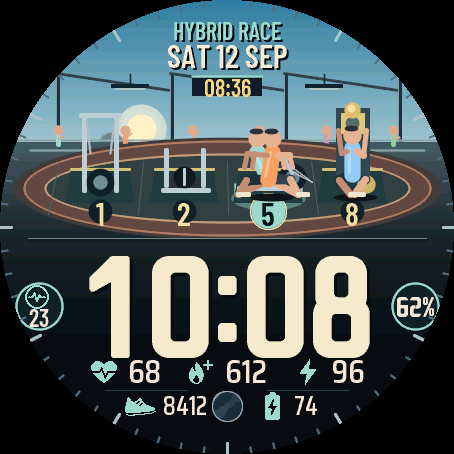 Race
Hybrid Race
An animated fitness race watch face
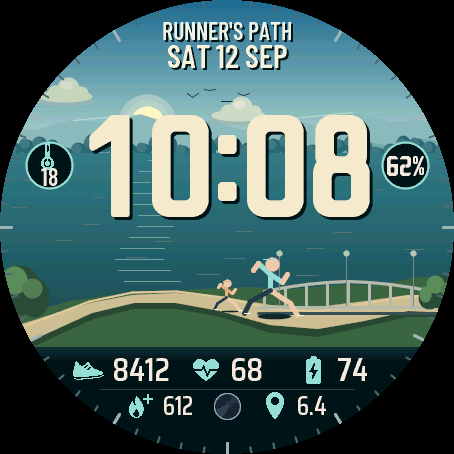 Run
Runner’s Path
An animated running watch face
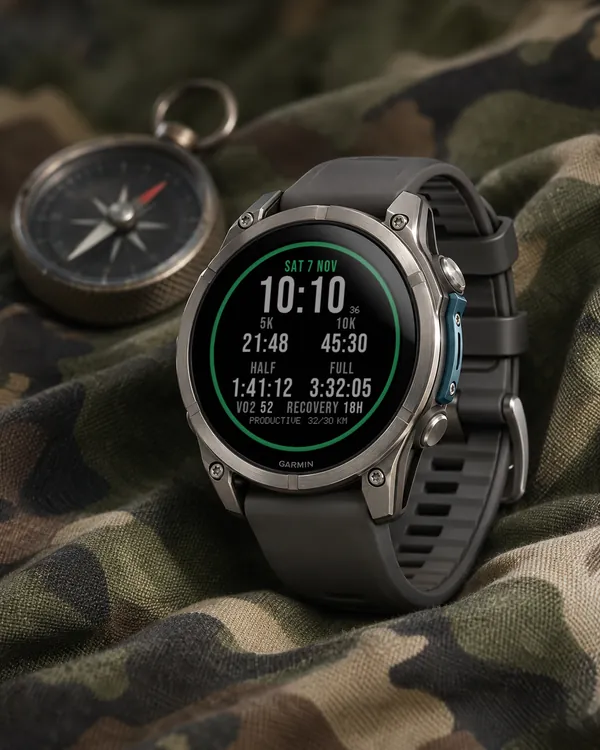 Running
Race Ready
5.0 (17)
Garmin race predictions and weekly mileage right on the face
 Photography
Amber Hour
5.0 (15)
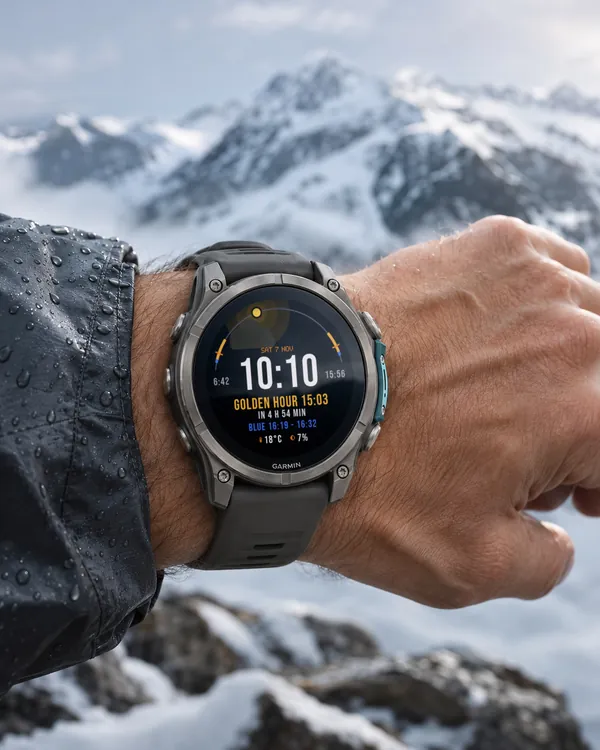
Golden and blue hour countdown with the sun's path across your day