Everyday health
CGM Field
Free, with every feature. No trial, no unlock code, no subscription.
Za darmo, ze wszystkimi funkcjami. Bez próby, bez kodu odblokowania, bez abonamentu.
Kostenlos, mit allen Funktionen. Keine Testphase, kein Freischaltcode, kein Abo.
Gratuit, avec toutes les fonctions. Sans période d'essai, sans code de déverrouillage, sans abonnement.
Gratis, con todas las funciones. Sin prueba, sin código de desbloqueo, sin suscripción.
Gratis, met alle functies. Geen proefperiode, geen ontgrendelcode, geen abonnement.
すべての機能が無料です。トライアルも、アンロックコードも、サブスクリプションもありません。
Gratis, con tutte le funzioni. Nessuna prova, nessun codice di sblocco, nessun abbonamento.
免费,功能完整。无试用期,无激活码,无需订阅。
Бесплатно, со всеми функциями. Без пробного периода, без кода разблокировки, без подписки.
Grátis, com todos os recursos. Sem teste, sem código de desbloqueio, sem assinatura.
Zdarma, se všemi funkcemi. Bez zkušební doby, bez odemykacího kódu, bez předplatného.
Grátis, com todas as funcionalidades. Sem teste, sem código de desbloqueio, sem subscrição.
모든 기능을 무료로 사용할 수 있습니다. 체험 기간도, 잠금 해제 코드도, 구독도 없습니다.
Gratis, med alla funktioner. Ingen provperiod, ingen upplåsningskod, ingen prenumeration.
Gratis, med alle funktioner. Ingen prøveperiode, ingen oplåsningskode, intet abonnement.
Gratis, med alle funksjoner. Ingen prøveperiode, ingen opplåsingskode, intet abonnement.
免費,功能完整。無試用期,無啟用碼,無需訂閱。
Ilmainen, kaikilla ominaisuuksilla. Ei kokeilujaksoa, ei avauskoodia, ei tilausta.
Zadarmo, so všetkými funkciami. Bez skúšobnej doby, bez odomykacieho kódu, bez predplatného.
Brezplačno, z vsemi funkcijami. Brez preizkusnega obdobja, brez kode za odklep, brez naročnine.
Gratis, dengan semua fitur. Tanpa masa percobaan, tanpa kode pembuka, tanpa langganan.
Ingyenes, minden funkcióval. Nincs próbaidőszak, nincs feloldókód, nincs előfizetés.
ฟรี ใช้ได้ครบทุกฟีเจอร์ ไม่มีช่วงทดลอง ไม่มีรหัสปลดล็อก ไม่มีค่าสมาชิก
Δωρεάν, με όλες τις λειτουργίες. Χωρίς δοκιμαστική περίοδο, χωρίς κωδικό ξεκλειδώματος, χωρίς συνδρομή.
Besplatno, sa svim funkcijama. Bez probnog razdoblja, bez koda za otključavanje, bez pretplate.
חינם, עם כל התכונות. ללא תקופת ניסיון, ללא קוד פתיחה, ללא מנוי.
Percuma, dengan semua ciri. Tiada percubaan, tiada kod buka kunci, tiada langganan.
Freeno ads, no code, no subscription
Opens the Garmin store. Tap Install there and the Connect IQ app does the rest.
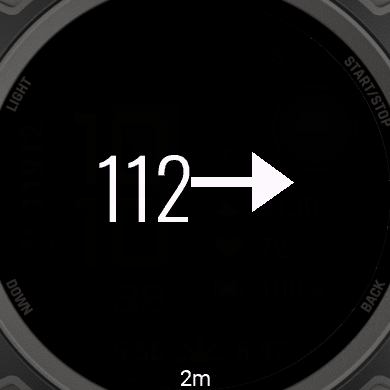
The field shows the latest reading from LibreLinkUp or Dexcom Share. The watch asks the service itself through your phone, so nothing goes through Dialforge servers and your login and readings are never sent to Dialforge.
- Also reads xDrip+ on the same Android phone (local web service), no login and no server
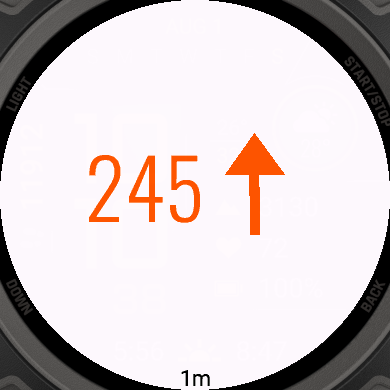
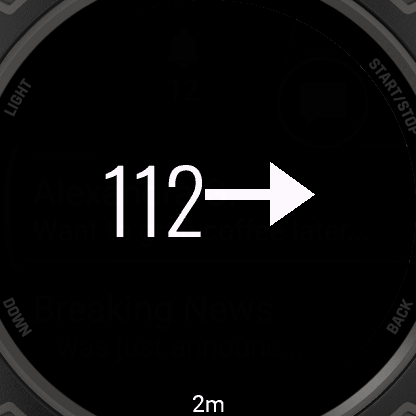
- Glucose value in mg/dL or mmol/L with a trend arrow
- Age of the reading, marked as old after 15 minutes
- Colour for low and high values on AMOLED models, with your own thresholds
- An error code instead of a silent blank when something fails
- Refreshes about every 5 minutes, your phone with Garmin Connect must be nearby
Setup: add the field to a data screen of an activity, then enter your LibreLinkUp or Dexcom Share login and choose your server region in the app settings in Garmin Connect.
Important: for information only. This is not a medical device. There are no alarms. Do not use it for medical decisions, treatment or dosing, and always check your glucose with your own CGM reader or meter. The readings can be delayed or missing. LibreLinkUp and Dexcom Share belong to their makers and their availability can change.
I am a student and I build these apps myself after hours. I do not own every watch model, so bugs can happen on some. If something does not work or is missing, write through the form at dialforge.dev. I fix every reported bug within 72 hours and send the update to Garmin (Garmin approval usually takes 1-3 days). If you reported a bug, check whether the fix is already there, and if the bug lowered your rating, I would be grateful if you reconsidered it. If the app is useful to you, leave a rating in the store.
Pole pokazuje ostatni odczyt z LibreLinkUp albo Dexcom Share. Zegarek sam pyta serwis przez telefon, więc nic nie przechodzi przez serwery Dialforge, a Twój login i odczyty nigdy nie trafiają do Dialforge.
- Odczyt także z xDrip+ na tym samym telefonie z Androidem (lokalny serwer WWW), bez logowania i bez serwera
- Wartość glukozy w mg/dL lub mmol/L ze strzałką trendu
- Wiek odczytu, po 15 minutach oznaczony jako stary
- Kolor dla niskich i wysokich wartości na modelach AMOLED, z własnymi progami
- Kod błędu zamiast cichej pustki, gdy coś zawiedzie
- Odświeżanie co ok. 5 minut, telefon z Garmin Connect musi być w pobliżu
Konfiguracja: dodaj pole do ekranu danych aktywności, potem w ustawieniach aplikacji w Garmin Connect wpisz login do LibreLinkUp albo Dexcom Share i wybierz region serwera.
Ważne: tylko informacyjnie. To nie jest wyrób medyczny. Nie ma alarmów. Nie używaj go do decyzji medycznych, leczenia ani dawkowania i zawsze sprawdzaj glukozę własnym czytnikiem CGM lub glukometrem. Odczyty mogą się spóźniać lub brakować. LibreLinkUp i Dexcom Share należą do swoich producentów, a ich dostępność może się zmienić.
Jestem studentem i robię te aplikacje sam, po godzinach. Nie mam wszystkich modeli zegarków, więc na niektórych mogą zdarzyć się błędy. Jeśli coś nie działa albo czegoś brakuje, napisz przez formularz na dialforge.dev. Każdą zgłoszoną usterkę poprawiam w ciągu 72 godzin i wysyłam do Garmina (zatwierdzenie przez Garmina trwa zwykle 1-3 dni). Jeśli zgłaszałeś błąd, sprawdź, czy poprawka już jest. A jeśli przez ten błąd wystawiłeś niższą ocenę, będzie mi miło, jeśli ją przemyślisz jeszcze raz. Jeśli aplikacja Ci się przydaje, zostaw ocenę w sklepie.
Das Feld zeigt den neuesten Wert von LibreLinkUp oder Dexcom Share. Die Uhr fragt den Dienst selbst über dein Smartphone ab, daher läuft nichts über Dialforge-Server, und deine Anmeldedaten und Werte werden nie an Dialforge gesendet.
- Liest auch aus xDrip+ auf demselben Android-Telefon (lokaler Webdienst), ohne Login und ohne Server
- Glukosewert in mg/dL oder mmol/L mit Trendpfeil
- Alter des Werts, nach 15 Minuten als veraltet markiert
- Farbe für niedrige und hohe Werte auf AMOLED-Modellen, mit eigenen Grenzwerten
- Ein Fehlercode statt einer stillen Leere, wenn etwas schiefgeht
- Aktualisiert etwa alle 5 Minuten, dein Smartphone mit Garmin Connect muss in der Nähe sein
Einrichtung: Füge das Feld zu einer Datenseite einer Aktivität hinzu, gib dann in den App-Einstellungen in Garmin Connect deine LibreLinkUp- oder Dexcom-Share-Anmeldedaten ein und wähle deine Serverregion.
Wichtig: nur zur Information. Dies ist kein Medizinprodukt. Es gibt keine Alarme. Nicht für medizinische Entscheidungen, Behandlung oder Dosierung verwenden, und prüfe deinen Glukosewert immer mit deinem eigenen CGM-Lesegerät oder Messgerät. Die Werte können verzögert sein oder fehlen. LibreLinkUp und Dexcom Share gehören ihren Herstellern, und ihre Verfügbarkeit kann sich ändern.
Ich bin Student und entwickle diese Apps selbst nach Feierabend. Ich besitze nicht jedes Uhrenmodell, daher können bei manchen Fehler auftreten. Wenn etwas nicht funktioniert oder fehlt, schreib über das Formular auf dialforge.dev. Ich behebe jeden gemeldeten Fehler innerhalb von 72 Stunden und sende das Update an Garmin (die Freigabe durch Garmin dauert üblicherweise 1-3 Tage). Falls du einen Fehler gemeldet hast, prüfe bitte, ob die Fehlerbehebung schon da ist, und falls der Fehler zu einer schlechteren Bewertung geführt hat, wäre ich dankbar, wenn du sie noch einmal überdenkst. Wenn die App für dich nützlich ist, hinterlasse eine Bewertung im Store.
Le champ affiche la dernière valeur de LibreLinkUp ou Dexcom Share. La montre interroge elle-même le service via votre téléphone : rien ne passe par les serveurs Dialforge, et vos identifiants et vos mesures ne sont jamais envoyés à Dialforge.
- Lit aussi xDrip+ sur le même téléphone Android (service web local), sans connexion et sans serveur
- Glycémie en mg/dL ou mmol/L avec une flèche de tendance
- Ancienneté de la mesure, signalée comme ancienne après 15 minutes
- Couleur pour les valeurs basses et hautes sur les modèles AMOLED, avec vos propres seuils
- Un code d'erreur au lieu d'un champ vide sans explication en cas de problème
- Actualisation environ toutes les 5 minutes, votre téléphone avec Garmin Connect doit être à proximité
Configuration : ajoutez le champ à un écran de données d'une activité, puis saisissez vos identifiants LibreLinkUp ou Dexcom Share et choisissez votre région de serveur dans les réglages de l'application dans Garmin Connect.
Important : à titre informatif uniquement. Ceci n'est pas un dispositif médical. Il n'y a aucune alarme. Ne l'utilisez pas pour des décisions médicales, un traitement ou un dosage, et vérifiez toujours votre glycémie avec votre propre lecteur CGM ou glucomètre. Les mesures peuvent être retardées ou absentes. LibreLinkUp et Dexcom Share appartiennent à leurs fabricants et leur disponibilité peut changer.
Je suis étudiant et je développe ces applications moi-même sur mon temps libre. Je ne possède pas tous les modèles de montre, des bugs peuvent donc survenir sur certains. Si quelque chose ne fonctionne pas ou manque, écrivez-moi via le formulaire sur dialforge.dev. Je corrige chaque bug signalé sous 72 heures et j'envoie la mise à jour à Garmin (la validation par Garmin prend généralement 1 à 3 jours). Si vous avez signalé un bug, vérifiez si le correctif est déjà disponible, et si ce bug a fait baisser votre note, je vous serais reconnaissant de bien vouloir la réévaluer. Si l'application vous est utile, laissez une note dans la boutique.
El campo muestra la última lectura de LibreLinkUp o Dexcom Share. El reloj consulta el servicio directamente a través de tu teléfono, así que nada pasa por los servidores de Dialforge y tu inicio de sesión y tus lecturas nunca se envían a Dialforge.
- También lee xDrip+ en el mismo teléfono Android (servicio web local), sin inicio de sesión y sin servidor
- Valor de glucosa en mg/dL o mmol/L con flecha de tendencia
- Antigüedad de la lectura, marcada como antigua a los 15 minutos
- Color para valores bajos y altos en los modelos AMOLED, con tus propios umbrales
- Un código de error en lugar de un hueco en blanco sin aviso cuando algo falla
- Se actualiza cada 5 minutos aproximadamente, tu teléfono con Garmin Connect debe estar cerca
Configuración: añade el campo a una pantalla de datos de una actividad, luego introduce tu usuario de LibreLinkUp o Dexcom Share y elige tu región de servidor en los ajustes de la aplicación en Garmin Connect.
Importante: solo con fines informativos. No es un producto sanitario. No hay alarmas. No lo uses para decisiones médicas, tratamiento ni dosificación, y comprueba siempre tu glucosa con tu propio lector CGM o glucómetro. Las lecturas pueden llegar con retraso o faltar. LibreLinkUp y Dexcom Share pertenecen a sus fabricantes y su disponibilidad puede cambiar.
Soy estudiante y desarrollo estas aplicaciones por mi cuenta en mi tiempo libre. No tengo todos los modelos de reloj, por lo que pueden ocurrir errores en algunos. Si algo no funciona o falta, escribe a través del formulario en dialforge.dev. Corrijo cada error notificado en un plazo de 72 horas y envío la actualización a Garmin (la aprobación de Garmin suele tardar 1-3 días). Si notificaste un error, comprueba si la solución ya está disponible, y si el error hizo bajar tu valoración, te agradecería que la reconsideraras. Si la aplicación te resulta útil, deja una valoración en la tienda.
Het veld toont de laatste meting van LibreLinkUp of Dexcom Share. Het horloge vraagt de dienst zelf op via je telefoon, dus er gaat niets via de servers van Dialforge en je inloggegevens en metingen worden nooit naar Dialforge gestuurd.
- Leest ook xDrip+ op dezelfde Android-telefoon (lokale webservice), zonder login en zonder server
- Glucosewaarde in mg/dL of mmol/L met een trendpijl
- Ouderdom van de meting, na 15 minuten gemarkeerd als oud
- Kleur voor lage en hoge waarden op AMOLED-modellen, met je eigen drempels
- Een foutcode in plaats van een stil leeg veld als er iets misgaat
- Ververst ongeveer elke 5 minuten, je telefoon met Garmin Connect moet in de buurt zijn
Instellen: voeg het veld toe aan een gegevensscherm van een activiteit, vul daarna je LibreLinkUp- of Dexcom Share-inloggegevens in en kies je serverregio in de app-instellingen in Garmin Connect.
Belangrijk: alleen ter informatie. Dit is geen medisch hulpmiddel. Er zijn geen alarmen. Gebruik het niet voor medische beslissingen, behandeling of dosering, en controleer je glucose altijd met je eigen CGM-lezer of meter. De metingen kunnen vertraagd zijn of ontbreken. LibreLinkUp en Dexcom Share zijn eigendom van hun makers en hun beschikbaarheid kan veranderen.
Ik ben student en ik bouw deze apps zelf in mijn vrije tijd. Ik bezit niet elk horlogemodel, dus op sommige kunnen bugs voorkomen. Als er iets niet werkt of ontbreekt, schrijf dan via het formulier op dialforge.dev. Ik los elke gemelde bug binnen 72 uur op en stuur de update naar Garmin (goedkeuring door Garmin duurt meestal 1-3 dagen). Als je een bug hebt gemeld, controleer dan of de oplossing er al is, en als de bug je beoordeling heeft verlaagd, zou ik het op prijs stellen als je deze wilt heroverwegen. Als de app nuttig voor je is, laat dan een beoordeling achter in de store.
このフィールドには、LibreLinkUp または Dexcom Share の最新の測定値が表示されます。ウォッチがスマートフォン経由でサービスに直接問い合わせるため、Dialforge のサーバーは一切経由せず、ログイン情報や測定値が Dialforge に送られることはありません。
- 同じAndroidスマートフォンのxDrip+(ローカルWebサービス)からも読み取り可能。ログインもサーバーも不要
- mg/dL または mmol/L のグルコース値とトレンド矢印
- 測定からの経過時間。15分を過ぎると古いデータとして表示
- AMOLED モデルでは低値と高値を色で表示。しきい値は自分で設定可能
- 問題が起きたときは、何も表示されないのではなくエラーコードを表示
- 約5分ごとに更新。Garmin Connect を入れたスマートフォンが近くにある必要があります
設定方法:アクティビティのデータ画面にこのフィールドを追加し、Garmin Connect のアプリ設定で LibreLinkUp または Dexcom Share のログイン情報を入力して、サーバーの地域を選びます。
重要:情報提供のみを目的としています。医療機器ではありません。アラームはありません。医療上の判断、治療、投薬量の決定には使用しないでください。血糖値は必ずご自身のCGMリーダーまたは血糖測定器で確認してください。測定値が遅れたり、表示されなかったりすることがあります。LibreLinkUp と Dexcom Share は各提供元のサービスであり、利用可否は変わる場合があります。
私は学生で、放課後や空き時間に自分でこれらのアプリを開発しています。すべての時計モデルを所有しているわけではないため、一部のモデルで不具合が発生することがあります。もし動作しない点や不足している機能があれば、dialforge.dev のフォームからご連絡ください。報告された不具合はすべて 72時間 以内に修正し、Garmin へアップデートを提出します(Garmin の承認には通常 1から3日 かかります)。不具合を報告された場合は、修正がすでに反映されているかご確認ください。また、その不具合により評価を下げていた場合は、再評価をご検討いただけますと幸いです。アプリがお役に立ちましたら、ストアで評価を残していただけると嬉しいです。
Il campo mostra l'ultima lettura di LibreLinkUp o Dexcom Share. L'orologio interroga il servizio da solo tramite il tuo telefono, quindi nulla passa dai server Dialforge e le tue credenziali e le tue letture non vengono mai inviate a Dialforge.
- Legge anche xDrip+ sullo stesso telefono Android (servizio web locale), senza login e senza server
- Valore di glicemia in mg/dL o mmol/L con freccia di tendenza
- Età della lettura, segnata come vecchia dopo 15 minuti
- Colore per valori bassi e alti sui modelli AMOLED, con soglie personalizzate
- Un codice di errore al posto di un campo vuoto senza spiegazioni quando qualcosa non va
- Si aggiorna circa ogni 5 minuti, il telefono con Garmin Connect deve essere vicino
Configurazione: aggiungi il campo a una schermata dati di un'attività, poi inserisci le tue credenziali LibreLinkUp o Dexcom Share e scegli la regione del server nelle impostazioni dell'app in Garmin Connect.
Importante: solo a scopo informativo. Non è un dispositivo medico. Non ci sono allarmi. Non usarlo per decisioni mediche, terapia o dosaggio e controlla sempre la glicemia con il tuo lettore CGM o glucometro. Le letture possono arrivare in ritardo o mancare. LibreLinkUp e Dexcom Share appartengono ai rispettivi produttori e la loro disponibilità può cambiare.
Sono uno studente e creo queste app da solo nel tempo libero. Non possiedo tutti i modelli di orologio, quindi su alcuni possono verificarsi bug. Se qualcosa non funziona o manca, scrivimi tramite il modulo su dialforge.dev. Risolvo ogni bug segnalato entro 72 ore e invio l'aggiornamento a Garmin (l'approvazione di Garmin richiede solitamente 1-3 giorni). Se hai segnalato un bug, controlla se la correzione è già disponibile, e se il bug ha abbassato la tua valutazione, ti sarei grato se potessi riconsiderarla. Se trovi utile l'app, lascia una valutazione nello store.
该字段显示来自 LibreLinkUp 或 Dexcom Share 的最新读数。手表通过手机直接向服务请求数据,因此不经过 Dialforge 服务器,您的登录信息和读数也不会发送给 Dialforge。
- 还可读取同一部 Android 手机上的 xDrip+(本地网络服务),无需登录,无需服务器
- 以 mg/dL 或 mmol/L 显示血糖值,并带有趋势箭头
- 显示读数的时间,超过15分钟会标记为旧数据
- 在 AMOLED 机型上,低值和高值用颜色区分,阈值可自行设置
- 出现故障时显示错误代码,而不是悄悄显示空白
- 约每5分钟刷新一次,安装了 Garmin Connect 的手机需要在附近
设置方法:把该字段添加到活动的数据页面,然后在 Garmin Connect 的应用设置中输入 LibreLinkUp 或 Dexcom Share 的登录信息,并选择服务器区域。
重要提示:仅供参考。本应用不是医疗器械。没有报警功能。请勿用于医疗决策、治疗或胰岛素剂量计算,并请始终使用您自己的 CGM 读取器或血糖仪确认血糖。读数可能延迟或缺失。LibreLinkUp 和 Dexcom Share 属于各自的厂商,其可用性可能发生变化。
我是一名学生,利用业余时间独自开发这些应用。我无法拥有每一款手表型号,因此在某些机型上可能会出现错误。如果某些功能无法正常工作或有所缺失,请通过 dialforge.dev 上的表单联系我。我会在 72 小时内修复所有反馈的错误并将更新提交给 Garmin(Garmin 审核通常需要 1 到 3 天)。如果你反馈过错误,请查看是否已经修复;如果该错误影响了你的评分,若你能重新考虑评价,我将非常感激。如果这款应用对你有用,请在应用商店留下评价。
Поле показывает последнее значение из LibreLinkUp или Dexcom Share. Часы сами обращаются к сервису через телефон, поэтому ничего не проходит через серверы Dialforge, а ваш логин и показания никогда не отправляются в Dialforge.
- Также читает данные xDrip+ на том же телефоне Android (локальный веб-сервис), без входа и без сервера
- Значение глюкозы в mg/dL или mmol/L со стрелкой тренда
- Давность показания, через 15 минут помечается как устаревшее
- Цвет для низких и высоких значений на моделях AMOLED, с вашими порогами
- Код ошибки вместо молчаливой пустоты, если что-то не работает
- Обновление примерно каждые 5 минут, телефон с Garmin Connect должен быть рядом
Настройка: добавьте поле на экран данных активности, затем введите логин LibreLinkUp или Dexcom Share и выберите регион сервера в настройках приложения в Garmin Connect.
Важно: только для информации. Это не медицинское устройство. Сигналов тревоги нет. Не используйте для медицинских решений, лечения или дозирования, и всегда проверяйте глюкозу своим CGM-ридером или глюкометром. Показания могут запаздывать или отсутствовать. LibreLinkUp и Dexcom Share принадлежат своим производителям, их доступность может измениться.
Я студент и создаю эти приложения сам в свободное время. У меня нет всех моделей часов, поэтому на некоторых могут случаться ошибки. Если что-то не работает или чего-то не хватает, напишите через форму на dialforge.dev. Я исправляю каждую найденную ошибку в течение 72 часов и отправляю обновление в Garmin (одобрение Garmin обычно занимает 1-3 дня). Если вы сообщили об ошибке, проверьте, не вышло ли уже исправление, и если из-за ошибки вы снизили оценку, я буду благодарен, если вы ее пересмотрите. Если приложение вам полезно, оставьте оценку в магазине.
O campo mostra a última leitura do LibreLinkUp ou do Dexcom Share. O relógio consulta o serviço por conta própria através do seu celular, então nada passa pelos servidores da Dialforge e seu login e suas leituras nunca são enviados à Dialforge.
- Também lê o xDrip+ no mesmo celular Android (serviço web local), sem login e sem servidor
- Valor da glicose em mg/dL ou mmol/L com seta de tendência
- Idade da leitura, marcada como antiga após 15 minutos
- Cor para valores baixos e altos nos modelos AMOLED, com seus próprios limites
- Um código de erro em vez de um campo vazio sem aviso quando algo falha
- Atualiza a cada 5 minutos, mais ou menos, e seu celular com o Garmin Connect precisa estar por perto
Configuração: adicione o campo a uma tela de dados de uma atividade, depois informe seu login do LibreLinkUp ou do Dexcom Share e escolha a região do servidor nas configurações do aplicativo no Garmin Connect.
Importante: apenas informativo. Não é um dispositivo médico. Não há alarmes. Não use para decisões médicas, tratamento ou dosagem, e sempre confira sua glicose com seu próprio leitor CGM ou glicosímetro. As leituras podem atrasar ou faltar. LibreLinkUp e Dexcom Share pertencem aos seus fabricantes e a disponibilidade deles pode mudar.
Sou estudante e desenvolvo esses aplicativos sozinho nas horas vagas. Não possuo todos os modelos de relógio, por isso bugs podem acontecer em alguns. Se algo não funcionar ou estiver faltando, escreva pelo formulário em dialforge.dev. Corrijo todos os bugs relatados em até 72 horas e envio a atualização para a Garmin (a aprovação da Garmin costuma levar de 1 a 3 dias). Se você relatou um bug, veja se a correção já está disponível, e caso o bug tenha diminuído sua avaliação, eu ficaria grato se você pudesse reconsiderá-la. Se o aplicativo for útil para você, deixe uma avaliação na loja.
Pole zobrazuje poslední hodnotu z LibreLinkUp nebo Dexcom Share. Hodinky se na službu ptají samy přes telefon, takže nic neprochází servery Dialforge a vaše přihlášení ani hodnoty se do Dialforge nikdy neodesílají.
- Čte i z xDrip+ ve stejném telefonu s Androidem (místní webová služba), bez přihlášení a bez serveru
- Hodnota glukózy v mg/dL nebo mmol/L se šipkou trendu
- Stáří měření, po 15 minutách označené jako staré
- Barva pro nízké a vysoké hodnoty na modelech AMOLED, s vlastními limity
- Kód chyby místo tichého prázdného pole, když něco selže
- Obnovuje se přibližně každých 5 minut, telefon s Garmin Connect musí být nablízku
Nastavení: přidejte pole na datovou obrazovku aktivity, poté zadejte přihlášení do LibreLinkUp nebo Dexcom Share a v nastavení aplikace v Garmin Connect vyberte region serveru.
Důležité: pouze pro informaci. Nejde o zdravotnický prostředek. Nejsou žádné alarmy. Nepoužívejte pro lékařská rozhodnutí, léčbu ani dávkování a glykémii vždy ověřte vlastní čtečkou CGM nebo glukometrem. Hodnoty mohou být zpožděné nebo chybět. LibreLinkUp a Dexcom Share patří svým výrobcům a jejich dostupnost se může změnit.
Jsem student a tyto aplikace vytvářím sám po večerech. Nevlastním každý model hodinek, takže se na některých mohou objevit chyby. Pokud něco nefunguje nebo chybí, napiš přes formulář na dialforge.dev. Každou nahlášenou chybu opravuji do 72 hodin a posílám aktualizaci do Garmin (schválení ze strany Garmin obvykle trvá 1-3 dny). Pokud jsi nahlásil chybu, zkontroluj, zda už je oprava k dispozici, a pokud kvůli ní bylo tvé hodnocení nižší, budu vděčný, když ho ještě zvážíš. Pokud je pro tebe aplikace užitečná, zanech hodnocení v obchodě.
O campo mostra a última leitura do LibreLinkUp ou do Dexcom Share. O relógio consulta o serviço por si, através do seu telemóvel, por isso nada passa pelos servidores da Dialforge e o seu início de sessão e as suas leituras nunca são enviados à Dialforge.
- Também lê o xDrip+ no mesmo telemóvel Android (serviço web local), sem início de sessão e sem servidor
- Valor da glicemia em mg/dL ou mmol/L com seta de tendência
- Idade da leitura, marcada como antiga após 15 minutos
- Cor para valores baixos e altos nos modelos AMOLED, com os seus próprios limites
- Um código de erro em vez de um campo vazio sem aviso quando algo falha
- Atualiza cerca de 5 em 5 minutos, o seu telemóvel com o Garmin Connect tem de estar por perto
Configuração: adicione o campo a um ecrã de dados de uma atividade, depois introduza o seu início de sessão do LibreLinkUp ou do Dexcom Share e escolha a região do servidor nas definições da aplicação no Garmin Connect.
Importante: apenas informativo. Não é um dispositivo médico. Não há alarmes. Não o utilize para decisões médicas, tratamento ou dosagem, e confirme sempre a sua glicemia com o seu próprio leitor CGM ou glucómetro. As leituras podem atrasar-se ou faltar. LibreLinkUp e Dexcom Share pertencem aos respetivos fabricantes e a sua disponibilidade pode mudar.
Sou estudante e crio estas aplicações sozinho nos meus tempos livres. Não possuo todos os modelos de relógio, pelo que podem ocorrer erros em alguns. Se algo não funcionar ou estiver em falta, escreva através do formulário em dialforge.dev. Corrijo todos os erros comunicados dentro de 72 horas e envio a atualização para a Garmin (a aprovação da Garmin costuma demorar 1-3 dias). Se comunicou um erro, verifique se a correção já está disponível e, se o erro baixou a sua classificação, ficaria grato se a reconsiderasse. Se a aplicação lhe for útil, deixe uma avaliação na loja.
이 필드는 LibreLinkUp 또는 Dexcom Share의 최신 측정값을 표시합니다. 시계가 휴대폰을 통해 서비스에 직접 요청하므로 Dialforge 서버를 거치지 않으며, 로그인 정보와 측정값은 Dialforge로 전송되지 않습니다.
- 같은 Android 휴대폰의 xDrip+(로컬 웹 서비스)에서도 읽습니다. 로그인과 서버가 필요 없습니다
- mg/dL 또는 mmol/L 단위의 혈당 수치와 추세 화살표
- 측정 후 경과 시간, 15분이 지나면 오래된 값으로 표시
- AMOLED 모델에서는 저혈당과 고혈당을 색으로 표시, 기준값은 직접 설정
- 문제가 생기면 아무것도 표시하지 않는 대신 오류 코드를 표시
- 약 5분마다 갱신, Garmin Connect가 설치된 휴대폰이 가까이 있어야 합니다
설정 방법: 운동의 데이터 화면에 이 필드를 추가한 다음, Garmin Connect의 앱 설정에서 LibreLinkUp 또는 Dexcom Share 로그인 정보를 입력하고 서버 지역을 선택하세요.
중요: 참고용 정보일 뿐입니다. 의료기기가 아닙니다. 알람이 없습니다. 의학적 판단, 치료, 투약량 결정에 사용하지 마시고, 혈당은 항상 본인의 CGM 리더기나 혈당 측정기로 확인하세요. 측정값이 늦어지거나 표시되지 않을 수 있습니다. LibreLinkUp과 Dexcom Share는 각 제조사의 서비스이며, 이용 가능 여부는 달라질 수 있습니다.
저는 학생이며 방과 후 여가 시간에 직접 이 앱들을 개발하고 있습니다. 모든 시계 모델을 보유하고 있지는 않아 일부 기기에서 버그가 발생할 수 있습니다. 제대로 작동하지 않거나 누락된 부분이 있다면 dialforge.dev의 문의 양식을 통해 메시지를 남겨주세요. 보고된 모든 버그는 72시간 이내에 수정하여 Garmin에 업데이트를 전송합니다(Garmin 승인은 보통 1-3일 소요). 버그를 제보하셨다면 수정 사항이 이미 적용되었는지 확인해 주시고, 만약 그 버그로 인해 평점을 낮게 주셨다면 다시 평가해 주시면 감사하겠습니다. 앱이 유용하다면 스토어에 평점을 남겨주세요.
Fältet visar det senaste värdet från LibreLinkUp eller Dexcom Share. Klockan frågar tjänsten själv via din telefon, så inget går via Dialforges servrar och din inloggning och dina värden skickas aldrig till Dialforge.
- Läser även xDrip+ på samma Android-telefon (lokal webbtjänst), utan inloggning och utan server
- Glukosvärde i mg/dL eller mmol/L med trendpil
- Värdets ålder, markerat som gammalt efter 15 minuter
- Färg för låga och höga värden på AMOLED-modeller, med egna gränser
- En felkod i stället för ett tyst tomt fält när något går fel
- Uppdateras ungefär var 5:e minut, telefonen med Garmin Connect måste vara i närheten
Installation: lägg till fältet på en dataskärm i en aktivitet, ange sedan din inloggning för LibreLinkUp eller Dexcom Share och välj serverregion i appens inställningar i Garmin Connect.
Viktigt: endast för information. Detta är ingen medicinteknisk produkt. Det finns inga larm. Använd det inte för medicinska beslut, behandling eller dosering, och kontrollera alltid ditt glukos med din egen CGM-läsare eller mätare. Värdena kan vara försenade eller saknas. LibreLinkUp och Dexcom Share tillhör sina tillverkare och deras tillgänglighet kan ändras.
Jag är student och bygger dessa appar själv på fritiden. Jag äger inte alla klockmodeller, så buggar kan uppstå på vissa. Om något inte fungerar eller saknas, skriv via formuläret på dialforge.dev. Jag åtgärdar varje rapporterad bugg inom 72 timmar och skickar uppdateringen till Garmin (Garmins godkännande tar vanligtvis 1-3 dagar). Om du har rapporterat en bugg, se efter om rättelsen redan finns där, och om buggen sänkte ditt betyg vore jag tacksam om du övervägde att ändra det. Om appen är till nytta för dig, lämna gärna ett betyg i butiken.
Feltet viser den seneste måling fra LibreLinkUp eller Dexcom Share. Uret spørger selv tjenesten via din telefon, så intet går gennem Dialforges servere, og dit login og dine målinger bliver aldrig sendt til Dialforge.
- Læser også fra xDrip+ på den samme Android-telefon (lokal webtjeneste), uden login og uden server
- Glukoseværdi i mg/dL eller mmol/L med tendenspil
- Målingens alder, markeret som gammel efter 15 minutter
- Farve til lave og høje værdier på AMOLED-modeller, med dine egne grænser
- En fejlkode i stedet for et tavst tomt felt, når noget går galt
- Opdateres cirka hvert 5. minut, din telefon med Garmin Connect skal være i nærheden
Opsætning: tilføj feltet til en dataskærm i en aktivitet, og indtast derefter dit login til LibreLinkUp eller Dexcom Share og vælg din serverregion i appens indstillinger i Garmin Connect.
Vigtigt: kun til information. Dette er ikke medicinsk udstyr. Der er ingen alarmer. Brug det ikke til medicinske beslutninger, behandling eller dosering, og kontrollér altid dit glukoseniveau med din egen CGM-læser eller måler. Målingerne kan være forsinkede eller mangle. LibreLinkUp og Dexcom Share tilhører deres producenter, og deres tilgængelighed kan ændre sig.
Jeg er studerende og bygger selv disse apps i min fritid. Jeg ejer ikke alle urmodeller, så der kan opstå fejl på nogle af dem. Hvis noget ikke virker eller mangler, så skriv via formularen på dialforge.dev. Jeg retter enhver rapporteret fejl inden for 72 timer og sender opdateringen til Garmin (Garmin-godkendelse tager normalt 1-3 dage). Hvis du har rapporteret en fejl, så tjek om rettelsen allerede er der, og hvis fejlen fik dig til at give en lavere vurdering, vil jeg være taknemmelig, hvis du vil genoverveje den. Hvis appen er nyttig for dig, så læg en vurdering i butikken.
Feltet viser den siste målingen fra LibreLinkUp eller Dexcom Share. Klokken spør tjenesten selv via telefonen din, så ingenting går gjennom Dialforge-servere, og påloggingen og målingene dine sendes aldri til Dialforge.
- Leser også xDrip+ på den samme Android-telefonen (lokal webtjeneste), uten innlogging og uten server
- Glukoseverdi i mg/dL eller mmol/L med trendpil
- Målingens alder, markert som gammel etter 15 minutter
- Farge for lave og høye verdier på AMOLED-modeller, med egne grenser
- En feilkode i stedet for et stille tomt felt når noe går galt
- Oppdateres omtrent hvert 5. minutt, telefonen med Garmin Connect må være i nærheten
Oppsett: legg til feltet på en dataskjerm i en aktivitet, skriv deretter inn påloggingen for LibreLinkUp eller Dexcom Share og velg serverregion i appinnstillingene i Garmin Connect.
Viktig: kun til informasjon. Dette er ikke medisinsk utstyr. Det finnes ingen alarmer. Ikke bruk det til medisinske avgjørelser, behandling eller dosering, og kontroller alltid glukosen med din egen CGM-leser eller måler. Målingene kan være forsinket eller mangle. LibreLinkUp og Dexcom Share tilhører produsentene sine, og tilgjengeligheten kan endre seg.
Jeg er student og lager disse appene selv på fritiden. Jeg eier ikke alle klokkemodeller, så feil kan forekomme på enkelte. Hvis noe ikke fungerer eller mangler, skriv via skjemaet på dialforge.dev. Jeg retter alle innrapporterte feil innen 72 timer og sender oppdateringen til Garmin (godkjenning fra Garmin tar vanligvis 1-3 dager). Hvis du har meldt fra om en feil, sjekk om rettelsen allerede er på plass, og hvis feilen gjorde at du ga en lavere vurdering, setter jeg stor pris på om du vil vurdere den på nytt. Hvis appen er nyttig for deg, legg gjerne igjen en vurdering i butikken.
此欄位顯示來自 LibreLinkUp 或 Dexcom Share 的最新讀數。手錶透過手機直接向服務請求資料,因此不會經過 Dialforge 伺服器,您的登入資訊和讀數也不會傳送給 Dialforge。
- 也可讀取同一支 Android 手機上的 xDrip+(本機網路服務),無需登入,無需伺服器
- 以 mg/dL 或 mmol/L 顯示血糖值,並附有趨勢箭頭
- 顯示讀數的時間,超過15分鐘會標示為舊資料
- 在 AMOLED 機型上,低值和高值以顏色區分,閾值可自行設定
- 發生問題時顯示錯誤代碼,而不是默默顯示空白
- 約每5分鐘更新一次,安裝了 Garmin Connect 的手機需要在附近
設定方式:把此欄位加入活動的資料畫面,然後在 Garmin Connect 的應用程式設定中輸入 LibreLinkUp 或 Dexcom Share 的登入資訊,並選擇伺服器區域。
重要提醒:僅供參考。本應用程式不是醫療器材。沒有警報功能。請勿用於醫療決策、治療或藥量計算,並請務必使用您自己的 CGM 讀取器或血糖機確認血糖。讀數可能延遲或缺漏。LibreLinkUp 和 Dexcom Share 屬於各自的廠商,其可用性可能改變。
我是一名學生,這些應用程式是我在課餘時間自己開發的。我並沒有每一款手錶型號,所以在某些型號上可能會出現錯誤。如果某些功能無法運作或有所缺漏,請透過 dialforge.dev 上的表單聯絡我。我會在 72 小時內修復所有回報的錯誤,並將更新提交給 Garmin(Garmin 的審查通常需要 1-3 天)。如果你曾回報錯誤,請確認修復是否已推出;若該錯誤曾影響你的評分,如果你願意重新考慮評價,我會非常感謝。如果這個應用程式對你有幫助,請在商店留下評價。
Kenttä näyttää viimeisimmän mittauksen LibreLinkUpista tai Dexcom Sharesta. Kello kysyy palvelulta itse puhelimesi kautta, joten mikään ei kulje Dialforgen palvelinten kautta, eikä kirjautumistietojasi tai mittauksiasi lähetetä koskaan Dialforgelle.
- Lukee myös xDrip+:aa samasta Android-puhelimesta (paikallinen verkkopalvelu), ilman kirjautumista ja palvelinta
- Glukoosiarvo yksikössä mg/dL tai mmol/L trendinuolen kanssa
- Mittauksen ikä, merkitään vanhaksi 15 minuutin jälkeen
- Väri matalille ja korkeille arvoille AMOLED-malleissa, omilla rajoillasi
- Virhekoodi hiljaisen tyhjän kentän sijaan, kun jokin epäonnistuu
- Päivittyy noin 5 minuutin välein, puhelimen ja Garmin Connectin on oltava lähellä
Käyttöönotto: lisää kenttä harjoituksen datanäytölle, anna sitten LibreLinkUp- tai Dexcom Share -tunnuksesi ja valitse palvelinalue Garmin Connectin sovellusasetuksissa.
Tärkeää: vain tiedoksi. Tämä ei ole lääkinnällinen laite. Hälytyksiä ei ole. Älä käytä sitä lääketieteellisiin päätöksiin, hoitoon tai annosteluun, ja tarkista glukoosiarvosi aina oman CGM-lukijasi tai mittarisi avulla. Mittaukset voivat viivästyä tai puuttua. LibreLinkUp ja Dexcom Share kuuluvat valmistajilleen, ja niiden saatavuus voi muuttua.
Olen opiskelija ja rakennan nämä sovellukset itse vapaa-ajallani. En omista jokaista kellomallia, joten joissakin voi esiintyä bugeja. Jos jokin ei toimi tai puuttuu, kirjoita lomakkeen kautta osoitteessa dialforge.dev. Korjaan jokaisen ilmoitetun bugin 72 tunnin kuluessa ja lähetän päivityksen Garminille (Garmin-hyväksyntä kestää yleensä 1-3 päivää). Jos ilmoitit bugista, tarkista onko korjaus jo tullut, ja jos bugi laski arviotasi, olisin kiitollinen jos harkitsisit sitä uudelleen. Jos sovellus on sinulle hyödyllinen, jätä arvio sovelluskauppaan.
Pole zobrazuje posledné meranie z LibreLinkUp alebo Dexcom Share. Hodinky sa na službu pýtajú samy cez telefón, takže nič neprechádza servermi Dialforge a vaše prihlásenie ani hodnoty sa do Dialforge nikdy neodosielajú.
- Číta aj z xDrip+ v tom istom telefóne s Androidom (lokálna webová služba), bez prihlásenia a bez servera
- Hodnota glukózy v mg/dL alebo mmol/L so šípkou trendu
- Vek merania, po 15 minútach označený ako starý
- Farba pre nízke a vysoké hodnoty na modeloch AMOLED, s vlastnými limitmi
- Kód chyby namiesto tichého prázdneho poľa, keď niečo zlyhá
- Obnovuje sa približne každých 5 minút, telefón s Garmin Connect musí byť nablízku
Nastavenie: pridajte pole na dátovú obrazovku aktivity, potom zadajte prihlásenie do LibreLinkUp alebo Dexcom Share a v nastaveniach aplikácie v Garmin Connect vyberte región servera.
Dôležité: iba na informáciu. Nejde o zdravotnícku pomôcku. Nie sú žiadne alarmy. Nepoužívajte na lekárske rozhodnutia, liečbu ani dávkovanie a glykémiu vždy overte vlastnou čítačkou CGM alebo glukomerom. Hodnoty môžu byť oneskorené alebo chýbať. LibreLinkUp a Dexcom Share patria svojim výrobcom a ich dostupnosť sa môže zmeniť.
Som študent a tieto aplikácie vyvíjam sám vo voľnom čase. Nevlastním každý model hodiniek, takže na niektorých sa môžu vyskytnúť chyby. Ak niečo nefunguje alebo chýba, napíšte cez formulár na dialforge.dev. Každú nahlásenú chybu opravím do 72 hodín a aktualizáciu odošlem do Garmin (schválenie od Garmin zvyčajne trvá 1-3 dni). Ak ste nahlásili chybu, skontrolujte, či už je oprava dostupná, a ak vám chyba znížila hodnotenie, bol by som vďačný, keby ste ho prehodnotili. Ak je pre vás aplikácia užitočná, zanechajte hodnotenie v obchode.
Polje prikazuje zadnjo vrednost iz LibreLinkUp ali Dexcom Share. Ura sama vpraša storitev prek telefona, zato nič ne gre prek strežnikov Dialforge, vaša prijava in vrednosti pa se Dialforge nikoli ne pošljejo.
- Bere tudi iz xDrip+ v istem telefonu Android (lokalna spletna storitev), brez prijave in brez strežnika
- Vrednost glukoze v mg/dL ali mmol/L s puščico trenda
- Starost meritve, po 15 minutah označena kot stara
- Barva za nizke in visoke vrednosti na modelih AMOLED, z vašimi mejami
- Koda napake namesto tihega praznega polja, če kaj odpove
- Osvežuje se približno vsakih 5 minut, telefon z Garmin Connect mora biti blizu
Nastavitev: dodajte polje na podatkovni zaslon aktivnosti, nato vnesite prijavo za LibreLinkUp ali Dexcom Share in v nastavitvah aplikacije v Garmin Connect izberite regijo strežnika.
Pomembno: samo za informacijo. To ni medicinski pripomoček. Alarmov ni. Ne uporabljajte za zdravstvene odločitve, zdravljenje ali odmerjanje in glukozo vedno preverite z lastnim čitalnikom CGM ali glukometrom. Vrednosti so lahko zakasnjene ali manjkajo. LibreLinkUp in Dexcom Share pripadata svojima proizvajalcema in njuna razpoložljivost se lahko spremeni.
Sem študent in te aplikacije ustvarjam sam v svojem prostem času. Nimam vsakega modela ure, zato se lahko na nekaterih pojavijo napake. Če kaj ne deluje ali manjka, pišite prek obrazca na dialforge.dev. Vsako prijavljeno napako odpravim v 72 urah in pošljem posodobitev Garmin (odobritev Garmin običajno traja 1-3 dni). Če ste prijavili napako, preverite, ali je popravek že na voljo, in če je napaka znižala vašo oceno, bi bil hvaležen, če bi jo ponovno premislili. Če vam je aplikacija koristna, pustite oceno v trgovini.
Kolom ini menampilkan pembacaan terbaru dari LibreLinkUp atau Dexcom Share. Jam tangan meminta data langsung ke layanan melalui ponsel Anda, sehingga tidak ada yang melewati server Dialforge dan data login serta pembacaan Anda tidak pernah dikirim ke Dialforge.
- Juga membaca xDrip+ di ponsel Android yang sama (layanan web lokal), tanpa login dan tanpa server
- Nilai glukosa dalam mg/dL atau mmol/L dengan panah tren
- Usia pembacaan, ditandai lama setelah 15 menit
- Warna untuk nilai rendah dan tinggi pada model AMOLED, dengan ambang batas yang Anda atur sendiri
- Kode kesalahan, bukan layar kosong tanpa penjelasan, saat terjadi masalah
- Diperbarui sekitar setiap 5 menit, ponsel dengan Garmin Connect harus berada di dekat jam
Pengaturan: tambahkan kolom ini ke layar data aktivitas, lalu masukkan login LibreLinkUp atau Dexcom Share dan pilih wilayah server di pengaturan aplikasi di Garmin Connect.
Penting: hanya untuk informasi. Ini bukan alat medis. Tidak ada alarm. Jangan gunakan untuk keputusan medis, pengobatan, atau penentuan dosis, dan selalu periksa glukosa Anda dengan pembaca CGM atau alat ukur Anda sendiri. Pembacaan bisa terlambat atau tidak muncul. LibreLinkUp dan Dexcom Share adalah milik pembuatnya masing-masing dan ketersediaannya dapat berubah.
Saya seorang mahasiswa dan saya membuat aplikasi ini sendiri di waktu luang. Saya tidak memiliki semua model jam tangan, jadi bug bisa saja terjadi pada beberapa model. Jika ada yang tidak berfungsi atau kurang, kirim pesan melalui formulir di dialforge.dev. Saya memperbaiki setiap bug yang dilaporkan dalam 72 jam dan mengirimkan pembaruannya ke Garmin (persetujuan Garmin biasanya membutuhkan 1-3 hari). Jika Anda pernah melaporkan bug, periksa apakah perbaikannya sudah tersedia, dan jika bug tersebut menurunkan penilaian Anda, saya akan berterima kasih jika Anda mempertimbangkannya kembali. Jika aplikasi ini bermanfaat bagi Anda, berikan penilaian di toko.
A mező a LibreLinkUp vagy Dexcom Share legutóbbi értékét mutatja. Az óra a telefonon keresztül maga kérdezi le a szolgáltatást, így semmi nem megy át a Dialforge szervereken, a bejelentkezési adataid és az értékeid pedig soha nem kerülnek a Dialforge-hoz.
- Olvas xDrip+ adatot is ugyanazon az Android telefonon (helyi webszolgáltatás), bejelentkezés és szerver nélkül
- Glükózérték mg/dL vagy mmol/L egységben, trendnyíllal
- A mérés kora, 15 perc után régiként jelölve
- Szín az alacsony és magas értékekhez AMOLED modelleken, saját határokkal
- Hibakód a néma üres mező helyett, ha valami nem sikerül
- Nagyjából 5 percenként frissül, a Garmin Connect telefonnak a közelben kell lennie
Beállítás: add hozzá a mezőt egy tevékenység adatképernyőjéhez, majd add meg a LibreLinkUp vagy Dexcom Share belépési adataidat, és válaszd ki a szerver régióját a Garmin Connect alkalmazás beállításaiban.
Fontos: csak tájékoztatásra szolgál. Nem orvosi eszköz. Nincsenek riasztások. Ne használd orvosi döntésekhez, kezeléshez vagy adagoláshoz, és a glükózt mindig ellenőrizd saját CGM olvasóddal vagy vércukormérővel. Az értékek késhetnek vagy hiányozhatnak. A LibreLinkUp és a Dexcom Share a gyártóik tulajdona, elérhetőségük változhat.
Diák vagyok, és ezeket az alkalmazásokat egymagam fejlesztem a szabadidőmben. Nem rendelkezem minden óramodellel, így egyes típusokon előfordulhatnak hibák. Ha valami nem működik vagy hiányzik, írj a dialforge.dev oldalon található űrlapon keresztül. Minden bejelentett hibát 72 órán belül kijavítok, és elküldöm a frissítést a Garminnak (a Garmin jóváhagyása általában 1-3 napot vesz igénybe). Ha hibát jelentettél, ellenőrizd, hogy megérkezett-e már a javítás, és ha a hiba miatt rosszabb értékelést adtál, hálás lennék, ha átgondolnád. Ha hasznosnak találod az alkalmazást, hagyj egy értékelést az áruházban.
ช่องข้อมูลนี้แสดงค่าล่าสุดจาก LibreLinkUp หรือ Dexcom Share นาฬิกาจะสอบถามบริการโดยตรงผ่านโทรศัพท์ของคุณ จึงไม่ผ่านเซิร์ฟเวอร์ของ Dialforge และข้อมูลล็อกอินกับค่าที่อ่านได้จะไม่ถูกส่งไปยัง Dialforge
- อ่านค่าจาก xDrip+ บนโทรศัพท์ Android เครื่องเดียวกันได้ด้วย (เว็บเซอร์วิสในเครื่อง) ไม่ต้องล็อกอินและไม่ต้องใช้เซิร์ฟเวอร์
- ค่าน้ำตาลเป็น mg/dL หรือ mmol/L พร้อมลูกศรแนวโน้ม
- อายุของค่าที่อ่านได้ และจะแสดงว่าเก่าเมื่อผ่านไป 15 นาที
- สีสำหรับค่าต่ำและค่าสูงบนรุ่น AMOLED โดยตั้งเกณฑ์เองได้
- แสดงรหัสข้อผิดพลาดเมื่อมีปัญหา แทนที่จะเป็นหน้าว่างเปล่า
- รีเฟรชทุกประมาณ 5 นาที โทรศัพท์ที่มี Garmin Connect ต้องอยู่ใกล้ ๆ
การตั้งค่า: เพิ่มช่องข้อมูลนี้ในหน้าข้อมูลของกิจกรรม จากนั้นกรอกข้อมูลล็อกอิน LibreLinkUp หรือ Dexcom Share และเลือกภูมิภาคเซิร์ฟเวอร์ในการตั้งค่าแอปใน Garmin Connect
สำคัญ: เพื่อเป็นข้อมูลเท่านั้น ไม่ใช่อุปกรณ์ทางการแพทย์ ไม่มีการแจ้งเตือน อย่าใช้ในการตัดสินใจทางการแพทย์ การรักษา หรือการคำนวณขนาดยา และให้ตรวจน้ำตาลด้วยเครื่องอ่าน CGM หรือเครื่องตรวจน้ำตาลของคุณเองเสมอ ค่าที่อ่านได้อาจล่าช้าหรือไม่แสดง LibreLinkUp และ Dexcom Share เป็นของผู้ผลิตแต่ละราย และการให้บริการอาจเปลี่ยนแปลงได้
ผมเป็นนักศึกษาและสร้างแอปเหล่านี้ด้วยตัวเองหลังเลิกเรียน ผมไม่ได้มีนาฬิกาทุกรุ่น ดังนั้นอาจเกิดข้อผิดพลาดขึ้นได้ในบางรุ่น หากมีสิ่งใดใช้งานไม่ได้หรือขาดหายไป โปรดเขียนแจ้งผ่านแบบฟอร์มที่ dialforge.dev ผมจะแก้ไขทุกข้อผิดพลาดที่ได้รับแจ้งภายใน 72 ชั่วโมง และส่งการอัปเดตไปยัง Garmin (โดยปกติการอนุมัติของ Garmin จะใช้เวลา 1-3 วัน) หากคุณเคยแจ้งข้อผิดพลาดไว้ โปรดตรวจสอบว่าได้รับการแก้ไขแล้วหรือยัง และหากข้อผิดพลาดนั้นทำให้คุณให้คะแนนลดลง ผมจะขอบคุณมากหากคุณพิจารณาให้คะแนนใหม่อีกครั้ง หากแอปนี้มีประโยชน์สำหรับคุณ โปรดให้คะแนนในสโตร์
Το πεδίο δείχνει την τελευταία μέτρηση από το LibreLinkUp ή το Dexcom Share. Το ρολόι ρωτά μόνο του την υπηρεσία μέσω του κινητού σας, οπότε τίποτα δεν περνά από τους διακομιστές της Dialforge και τα στοιχεία σύνδεσης και οι μετρήσεις σας δεν αποστέλλονται ποτέ στη Dialforge.
- Διαβάζει και από το xDrip+ στο ίδιο τηλέφωνο Android (τοπική υπηρεσία web), χωρίς σύνδεση και χωρίς διακομιστή
- Τιμή γλυκόζης σε mg/dL ή mmol/L με βέλος τάσης
- Ηλικία της μέτρησης, σημειώνεται ως παλιά μετά από 15 λεπτά
- Χρώμα για χαμηλές και υψηλές τιμές στα μοντέλα AMOLED, με δικά σας όρια
- Κωδικός σφάλματος αντί για σιωπηλό κενό όταν κάτι αποτύχει
- Ανανεώνεται περίπου κάθε 5 λεπτά, το κινητό με το Garmin Connect πρέπει να βρίσκεται κοντά
Ρύθμιση: προσθέστε το πεδίο σε μια οθόνη δεδομένων μιας δραστηριότητας, μετά εισαγάγετε τα στοιχεία σύνδεσης LibreLinkUp ή Dexcom Share και επιλέξτε την περιοχή διακομιστή στις ρυθμίσεις της εφαρμογής στο Garmin Connect.
Σημαντικό: μόνο για πληροφόρηση. Δεν είναι ιατροτεχνολογικό προϊόν. Δεν υπάρχουν συναγερμοί. Μη το χρησιμοποιείτε για ιατρικές αποφάσεις, θεραπεία ή δοσολογία και ελέγχετε πάντα τη γλυκόζη σας με τον δικό σας αναγνώστη CGM ή γλυκόμετρο. Οι μετρήσεις μπορεί να καθυστερούν ή να λείπουν. Τα LibreLinkUp και Dexcom Share ανήκουν στους κατασκευαστές τους και η διαθεσιμότητά τους μπορεί να αλλάξει.
Είμαι φοιτητής και φτιάχνω αυτές τις εφαρμογές μόνος μου στον ελεύθερο χρόνο μου. Δεν έχω στην κατοχή μου κάθε μοντέλο ρολογιού, επομένως μπορεί να παρουσιαστούν σφάλματα σε ορισμένα. Αν κάτι δεν λειτουργεί ή λείπει, γράψτε μου μέσω της φόρμας στο dialforge.dev. Διορθώνω κάθε αναφερόμενο σφάλμα εντός 72 ωρών και στέλνω την ενημέρωση στη Garmin (η έγκριση από τη Garmin συνήθως διαρκεί 1-3 ημέρες). Αν αναφέρατε κάποιο σφάλμα, ελέγξτε αν η διόρθωση είναι ήδη διαθέσιμη, και αν το σφάλμα μείωσε την αξιολόγησή σας, θα ήμουν ευγνώμων αν την επανεξετάζατε. Αν η εφαρμογή σας είναι χρήσιμη, αφήστε μια αξιολόγηση στο κατάστημα.
Polje prikazuje posljednje mjerenje iz LibreLinkUp ili Dexcom Share. Sat sam pita servis preko telefona, pa ništa ne ide preko poslužitelja Dialforge, a vaša prijava i vrijednosti nikad se ne šalju Dialforgeu.
- Čita i iz xDrip+ na istom Android telefonu (lokalna web usluga), bez prijave i bez poslužitelja
- Vrijednost glukoze u mg/dL ili mmol/L sa strelicom trenda
- Starost mjerenja, nakon 15 minuta označena kao stara
- Boja za niske i visoke vrijednosti na modelima AMOLED, s vlastitim granicama
- Kod pogreške umjesto tihog praznog polja kad nešto zakaže
- Osvježava se otprilike svakih 5 minuta, telefon s Garmin Connect mora biti u blizini
Postavljanje: dodajte polje na podatkovni zaslon aktivnosti, zatim unesite prijavu za LibreLinkUp ili Dexcom Share i u postavkama aplikacije u Garmin Connect odaberite regiju poslužitelja.
Važno: samo za informaciju. Nije medicinski proizvod. Nema alarma. Ne koristite za medicinske odluke, liječenje ili doziranje i glukozu uvijek provjerite vlastitim CGM čitačem ili glukometrom. Vrijednosti mogu kasniti ili nedostajati. LibreLinkUp i Dexcom Share pripadaju svojim proizvođačima i njihova dostupnost se može promijeniti.
Student sam i sam izrađujem ove aplikacije u slobodno vrijeme. Ne posjedujem svaki model sata, pa se na nekima mogu pojaviti greške. Ako nešto ne radi ili nedostaje, javite se putem obrasca na dialforge.dev. Svaku prijavljenu grešku ispravljam unutar 72 sata i šaljem ažuriranje za Garmin (Garmin odobrenje obično traje 1-3 dana). Ako ste prijavili grešku, provjerite je li ispravak već dostupan, a ako je greška utjecala na vašu ocjenu, bio bih zahvalan ako biste je ponovno razmotrili. Ako vam je aplikacija korisna, ostavite ocjenu u trgovini.
השדה מציג את הקריאה האחרונה מ-LibreLinkUp או מ-Dexcom Share. השעון פונה לשירות בעצמו דרך הטלפון שלכם, כך שדבר לא עובר בשרתי Dialforge, ופרטי ההתחברות והקריאות שלכם לא נשלחים אל Dialforge לעולם.
- קורא גם מ-xDrip+ באותו טלפון Android (שירות אינטרנט מקומי), ללא התחברות וללא שרת
- ערך גלוקוז ב-mg/dL או ב-mmol/L עם חץ מגמה
- גיל הקריאה, מסומן כישן אחרי 15 דקות
- צבע לערכים נמוכים וגבוהים בדגמי AMOLED, עם הספים שלכם
- קוד שגיאה במקום שדה ריק ושקט כשמשהו נכשל
- מתרענן בערך כל 5 דקות, הטלפון עם Garmin Connect צריך להיות בקרבת מקום
הגדרה: הוסיפו את השדה למסך נתונים של פעילות, ואז הזינו את פרטי ההתחברות ל-LibreLinkUp או ל-Dexcom Share ובחרו את אזור השרת בהגדרות האפליקציה ב-Garmin Connect.
חשוב: למידע בלבד. זה אינו מכשיר רפואי. אין התראות. אין להשתמש בו להחלטות רפואיות, לטיפול או למינון, ותמיד יש לבדוק את הגלוקוז עם קורא ה-CGM או המד שלכם. הקריאות עלולות להתעכב או להיות חסרות. LibreLinkUp ו-Dexcom Share שייכים ליצרניהם והזמינות שלהם עשויה להשתנות.
אני סטודנט ובונה את האפליקציות האלו בעצמי בשעות הפנאי. אין בבעלותי כל דגם של שעון, ולכן תקלות עלולות לקרות בחלקם. אם משהו אינו פועל או חסר, כתבו לי דרך הטופס ב-dialforge.dev. אני מתקן כל תקלה מדווחת תוך 72 שעות ושולח את העדכון ל-Garmin (אישור של Garmin אורך בדרך כלל 1-3 ימים). אם דיווחתם על תקלה, בדקו אם התיקון כבר זמין, ואם התקלה גרמה לכם להוריד את הדירוג, אודה לכם אם תשקלו אותו מחדש. אם האפליקציה מועילה לכם, השאירו דירוג בחנות.
Medan ini menunjukkan bacaan terkini daripada LibreLinkUp atau Dexcom Share. Jam tangan meminta data terus daripada perkhidmatan melalui telefon anda, jadi tiada apa yang melalui pelayan Dialforge dan data log masuk serta bacaan anda tidak pernah dihantar kepada Dialforge.
- Turut membaca xDrip+ pada telefon Android yang sama (perkhidmatan web setempat), tanpa log masuk dan tanpa pelayan
- Nilai glukosa dalam mg/dL atau mmol/L dengan anak panah trend
- Usia bacaan, ditandakan lama selepas 15 minit
- Warna untuk nilai rendah dan tinggi pada model AMOLED, dengan had yang anda tetapkan sendiri
- Kod ralat, bukan skrin kosong tanpa penjelasan, apabila berlaku masalah
- Dikemas kini kira-kira setiap 5 minit, telefon dengan Garmin Connect mesti berada berdekatan
Tetapan: tambahkan medan ini pada skrin data aktiviti, kemudian masukkan log masuk LibreLinkUp atau Dexcom Share dan pilih rantau pelayan dalam tetapan aplikasi di Garmin Connect.
Penting: untuk maklumat sahaja. Ini bukan peranti perubatan. Tiada penggera. Jangan gunakan untuk keputusan perubatan, rawatan atau penentuan dos, dan sentiasa semak glukosa anda dengan pembaca CGM atau meter anda sendiri. Bacaan mungkin lewat atau tiada. LibreLinkUp dan Dexcom Share milik pembuatnya masing-masing dan ketersediaannya boleh berubah.
Saya seorang pelajar dan saya membina aplikasi ini sendiri di luar waktu belajar. Saya tidak memiliki setiap model jam tangan, jadi pepijat boleh berlaku pada sesetengah model. Jika ada sesuatu yang tidak berfungsi atau tiada, tulis melalui borang di dialforge.dev. Saya membetulkan setiap pepijat yang dilaporkan dalam masa 72 jam dan menghantar kemas kini kepada Garmin (kelulusan Garmin biasanya mengambil masa 1-3 hari). Jika anda melaporkan pepijat, semak sama ada pembetulan sudah ada, dan jika pepijat tersebut mengurangkan penilaian anda, saya amat berterima kasih jika anda mempertimbangkannya semula. Jika aplikasi ini berguna kepada anda, tinggalkan penilaian di gedung.
How to use it
Add CGM Field as a data field in an activity, then set it up in its settings.
Works on Instinct 3 AMOLED, Instinct 3 Solar.
Dodaj CGM Field jako pole danych w aktywności, potem skonfiguruj je w jego ustawieniach.
Działa na: Instinct 3 AMOLED, Instinct 3 Solar.
Füge CGM Field in einer Aktivität als Datenfeld hinzu und richte es dann in den Einstellungen ein.
Läuft auf Instinct 3 AMOLED, Instinct 3 Solar.
Ajoutez CGM Field comme champ de données dans une activité, puis configurez-le dans ses réglages.
Compatible avec Instinct 3 AMOLED, Instinct 3 Solar.
Añade CGM Field como campo de datos en una actividad y luego configúralo en sus ajustes.
Compatible con Instinct 3 AMOLED, Instinct 3 Solar.
Voeg CGM Field toe als gegevensveld in een activiteit en stel het daarna in bij de instellingen.
Werkt op Instinct 3 AMOLED, Instinct 3 Solar.
アクティビティに CGM Field をデータフィールドとして追加し、その設定で調整してください。
対応モデル:Instinct 3 AMOLED, Instinct 3 Solar
Aggiungi CGM Field come campo dati in un'attività, poi configuralo nelle sue impostazioni.
Compatibile con Instinct 3 AMOLED, Instinct 3 Solar.
在某项活动中把 CGM Field 添加为数据字段,然后在其设置中进行配置。
适用于 Instinct 3 AMOLED, Instinct 3 Solar。
Добавьте CGM Field как поле данных в активности, затем настройте его в её параметрах.
Работает на Instinct 3 AMOLED, Instinct 3 Solar.
Adicione CGM Field como campo de dados em uma atividade e depois configure nas configurações dela.
Funciona em Instinct 3 AMOLED, Instinct 3 Solar.
Přidejte CGM Field jako datové pole do aktivity a pak ho nastavte v jejím nastavení.
Funguje na Instinct 3 AMOLED, Instinct 3 Solar.
Adicione CGM Field como campo de dados numa atividade e depois configure-o nas definições dessa atividade.
Funciona em Instinct 3 AMOLED, Instinct 3 Solar.
활동에서 CGM Field을(를) 데이터 필드로 추가한 다음, 해당 설정에서 구성하세요.
지원 모델: Instinct 3 AMOLED, Instinct 3 Solar
Lägg till CGM Field som datafält i en aktivitet och ställ sedan in det i dess inställningar.
Fungerar på Instinct 3 AMOLED, Instinct 3 Solar.
Tilføj CGM Field som datafelt i en aktivitet, og indstil det derefter i dets indstillinger.
Virker på Instinct 3 AMOLED, Instinct 3 Solar.
Legg til CGM Field som datafelt i en aktivitet, og still det inn i innstillingene.
Fungerer på Instinct 3 AMOLED, Instinct 3 Solar.
在某項活動中把 CGM Field 新增為資料欄位,然後在其設定中進行調整。
適用於 Instinct 3 AMOLED, Instinct 3 Solar。
Lisää CGM Field datakentäksi aktiviteettiin ja määritä se sen asetuksista.
Toimii malleissa Instinct 3 AMOLED, Instinct 3 Solar.
Pridajte CGM Field ako dátové pole do aktivity a potom ho nastavte v jeho nastaveniach.
Funguje na Instinct 3 AMOLED, Instinct 3 Solar.
Dodajte CGM Field kot podatkovno polje v aktivnost, nato ga nastavite v njegovih nastavitvah.
Deluje na Instinct 3 AMOLED, Instinct 3 Solar.
Tambahkan CGM Field sebagai data field di sebuah aktivitas, lalu atur di pengaturannya.
Berfungsi di Instinct 3 AMOLED, Instinct 3 Solar.
Adja hozzá a(z) CGM Field elemet adatmezőként egy tevékenységhez, majd állítsa be a tevékenység beállításaiban.
Működik ezeken: Instinct 3 AMOLED, Instinct 3 Solar.
เพิ่ม CGM Field เป็นช่องข้อมูลในกิจกรรม แล้วตั้งค่าในหน้าการตั้งค่าของมัน
ใช้ได้กับ Instinct 3 AMOLED, Instinct 3 Solar
Προσθέστε το CGM Field ως πεδίο δεδομένων σε μια δραστηριότητα και μετά ρυθμίστε το στις ρυθμίσεις του.
Λειτουργεί σε Instinct 3 AMOLED, Instinct 3 Solar.
Dodajte CGM Field kao polje podataka u aktivnost, a zatim ga podesite u njegovim postavkama.
Radi na Instinct 3 AMOLED, Instinct 3 Solar.
הוסיפו את CGM Field כשדה נתונים בפעילות, ואז הגדירו אותו בהגדרות שלו.
עובד על Instinct 3 AMOLED, Instinct 3 Solar.
Tambah CGM Field sebagai medan data dalam aktiviti, kemudian sediakannya dalam tetapannya.
Berfungsi pada Instinct 3 AMOLED, Instinct 3 Solar.
Permissions and privacy
This product asks the watch for the permissions below. Connect IQ shows them when you install it.
- Internet through the phone: Lets the watch make a web request through your phone. Used only to read glucose from the source you choose.Pozwala zegarkowi wysłać zapytanie internetowe przez telefon. Używane wyłącznie do odczytu glukozy z wybranego źródła.
- Background process: Lets the data field fetch glucose readings in the background.Pozwala polu danych pobierać w tle odczyty glukozy.
Glucose sourceŹródło glukozy
The field reads the latest value through your phone from the source you choose: LibreLinkUp, Dexcom Share, or xDrip+ running on the same Android phone (a local address on that phone). These requests go straight to that source, not to dialforge.dev.Pole odczytuje przez telefon najnowszą wartość z wybranego źródła: LibreLinkUp, Dexcom Share albo xDrip+ działający na tym samym telefonie z Androidem (adres lokalny w telefonie). Te zapytania idą prosto do tego źródła, nie na dialforge.dev.
The full manual and the detailed permission descriptions are available in English and Polish.
Compatible watches
50mm, Instinct 3 AMOLED 45mm, Instinct 3 AMOLED 50mm, Instinct 3 Solar 45mm
Rate it
Screenshots
Changelog
- Now free. Thank you for the feedback.
- Teraz za darmo. Dziękuję za opinie.
- Jetzt kostenlos. Danke für das Feedback.
- Désormais gratuit. Merci pour vos retours.
- Ahora gratis. Gracias por los comentarios.
- Nu gratis. Bedankt voor de feedback.
- 無料になりました。フィードバックをありがとうございます。
- Ora gratis. Grazie per il feedback.
- 现在免费。感谢你的反馈。
- Теперь бесплатно. Спасибо за отзывы.
- Agora grátis. Obrigado pelo feedback.
- Nyní zdarma. Děkuji za zpětnou vazbu.
- Agora grátis. Obrigado pelo feedback.
- 이제 무료입니다. 피드백 감사합니다.
- Nu gratis. Tack för återkopplingen.
- Nu gratis. Tak for din feedback.
- Nå gratis. Takk for tilbakemeldingene.
- 現在免費。感謝你的意見回饋。
- Nyt ilmainen. Kiitos palautteesta.
- Teraz zadarmo. Ďakujem za spätnú väzbu.
- Zdaj brezplačno. Hvala za povratne informacije.
- Sekarang gratis. Terima kasih atas masukannya.
- Mostantól ingyenes. Köszönöm a visszajelzéseket.
- ตอนนี้ฟรีแล้ว ขอบคุณสำหรับความคิดเห็น
- Πλέον δωρεάν. Ευχαριστώ για τα σχόλιά σας.
- Sada besplatno. Hvala na povratnim informacijama.
- עכשיו בחינם. תודה על המשוב.
- Kini percuma. Terima kasih atas maklum balas.
Tell us how to make it better
Apps
Closeness · Day Counter · Day Counter Complication · Fasting Timer · Habit Streaks · Hydration Log