Unlock
€6.49
One-time payment. No subscription. The code works on the watch whose ID you enter.
- Install the face from Connect IQ (7 days free).
- On the watch: face settings > Buy / Unlock, scan the QR code.
- Pay and paste the code in the face settings.
- Pay.
- Copy the code.
- Paste it in Connect IQ: this face > Settings > Unlock code.
Payment works best in Safari or Chrome: menu (three dots) > Open in browser
Read it in this face, it is not the serial number of the watch.
The code works only in the watch face it was bought for: a Summit Rings code will not work in Summit Tactic.
Your ID, compare it with the watch:
Where do I find the ID?
On the watch: settings of this face > Buy / Unlock (first item). Scan the QR code with your phone or type the 10 digits. The ID is also at the top of the face settings in the Connect IQ app.
Code not working on your watch? Write to me and I will fix it.
Payments by Stripe. Seller: Mateusz Kolarz, Lublin, Poland.
Paid. Code:
We show the code here too. If the e-mail does not arrive (check spam), you can recover the code in the Recover code section with just the Face ID. Recover code
Copying did not work. The code is selected: copy it by hand.
The face unlocks by itself when the watch connects to the phone (usually within an hour; if the trial is still running, the purchase starts working when it ends).
Do not want to wait, or have an older watch? Paste the code in the Connect IQ app:
Connect IQ (or Garmin Connect) > My Device > Watch faces > Barometer Watch > Settings > Unlock code > paste > Save
Like it? Rate this face in the Garmin store
Want to try new faces and apps before the release, for free? Join the testers program
Set up the face before you download
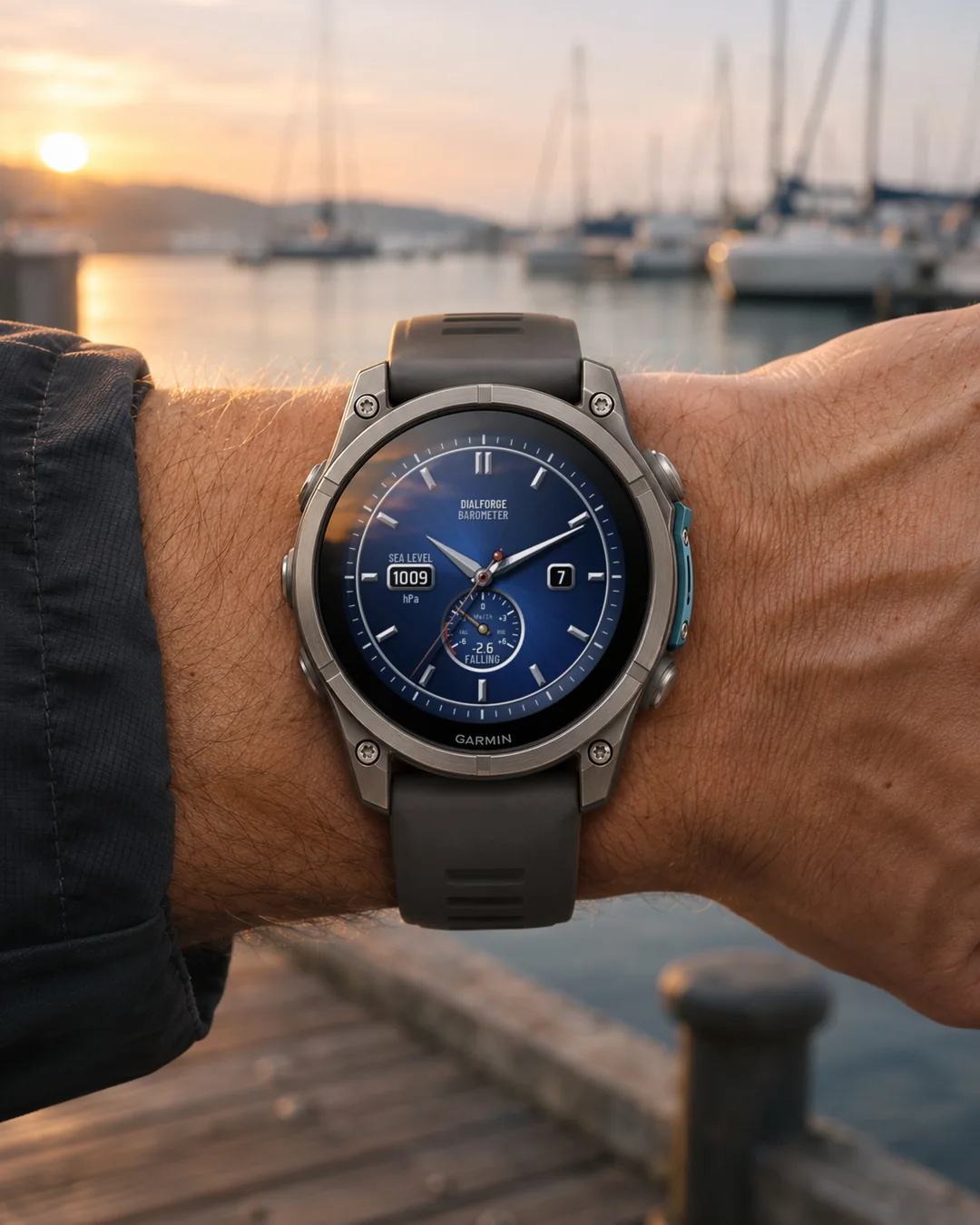
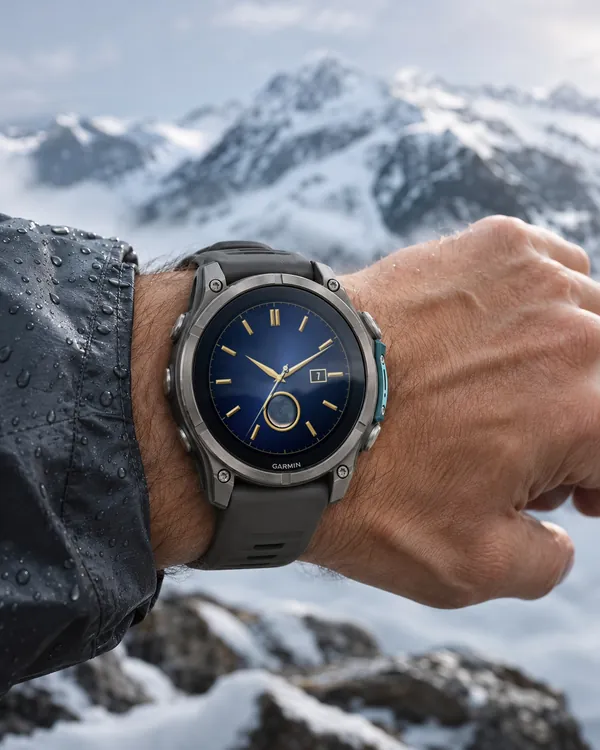
An analog barometer watch face that shows air pressure and the pressure trend on a subdial, with a storm watch warning when pressure drops fast.
A classic analog watch face built around the barometer in your watch. Pressure in a window at 9 o'clock, the pressure trend on its own subdial at 6, and a storm watch when the pressure drops fast.
- Pressure window: sea level pressure when your watch provides it, otherwise the station pressure from the barometer. The label above says which one you see (SEA LEVEL or STATION). Units: hPa, inHg or mmHg.
- Pressure trend subdial at 6 o'clock: how much the pressure changed over the last 1, 3, 6 or 12 hours (you choose), in hPa. The brass needle points right when pressure is rising and left when it is falling, and the number shows the exact change, like -2.6. Below it the watch says in plain words whether the pressure is rising, steady or falling (English, Polish, German, French, Spanish, Italian, Dutch, Portuguese, Swedish, Danish, Norwegian, Finnish or Czech). The scale range is yours too: +/-2, 4, 6 or 12 hPa. Falling pressure usually means worse weather, rising pressure means it is clearing up.
- Storm watch: a red zone on the subdial. When the pressure falls faster than your limit (2 to 6 hPa per 3 hours, scaled to the trend period you choose, or off), the label turns red and reads STORM WATCH.
- Date window at 3 o'clock.
- Navy or black sunray dial, polished silver or gold hands, seconds hand on or off.
- Depth you can see: applied faceted batons, an inclined minute ring, faceted hands with soft shadows on the dial and a faint glass reflection.
- Always-on mode: thin hour and minute hands and slim indices on black.
- Made for AMOLED screens.
Honest limits: this is a barometer, not a weather forecast. The trend needs barometer history covering about 83% of the period you choose after you put the watch on (2.5 hours for the 3 hour setting, 10 hours for the 12 hour setting); until then it shows "--". The trend uses the station pressure, so a fast climb or descent also moves the needle.
7-day free trial, then a one-time unlock code at dialforge.dev (no subscription).
Settings: on the watch (hold MENU, then Watch face, then Customize) or in the Connect IQ app.
Something looks wrong on your watch? Write to me at https://dialforge.dev/faces/barometerwatch/ and I will fix it.
Works on fenix 9, fenix 8, Forerunner 970, Forerunner 570, Venu 4, Forerunner 965, Forerunner 265, Venu 3 and more.
Analogowa tarcza z barometrem: pokazuje ciśnienie i jego trend na osobnej tarczce oraz ostrzega przed burzą, gdy ciśnienie szybko spada.
Klasyczna analogowa tarcza zbudowana wokół barometru w Twoim zegarku. Ciśnienie w okienku na godzinie 9, trend ciśnienia na osobnej małej tarczy na godzinie 6 i ostrzeżenie przed burzą, gdy ciśnienie szybko spada.
- Okienko ciśnienia: ciśnienie na poziomie morza, jeśli zegarek je podaje, a jeśli nie, ciśnienie na stacji z barometru. Napis nad okienkiem mówi, które widzisz (SEA LEVEL albo STATION). Jednostki: hPa, inHg lub mmHg.
- Mała tarcza trendu na godzinie 6: o ile zmieniło się ciśnienie w ciągu ostatniej 1, 3, 6 lub 12 godzin (wybierasz sam), w hPa. Mosiężna wskazówka idzie w prawo, gdy ciśnienie rośnie, i w lewo, gdy spada, a liczba pokazuje dokładną zmianę, np. -2.6. Pod nią zegarek mówi zwykłymi słowami, czy ciśnienie rośnie, jest stabilne, czy spada (po angielsku, polsku, niemiecku, francusku, hiszpańsku, włosku, niderlandzku, portugalsku, szwedzku, duńsku, norwesku, fińsku lub czesku). Zakres skali też ustawiasz: +/-2, 4, 6 lub 12 hPa. Spadające ciśnienie zwykle oznacza gorszą pogodę, a rosnące, że się przejaśnia.
- Ostrzeżenie przed burzą: czerwona strefa na małej tarczy. Gdy ciśnienie spada szybciej niż Twój próg (od 2 do 6 hPa na 3 godziny, przeliczane na wybrany okres trendu, albo wyłączone), napis robi się czerwony i brzmi STORM WATCH.
- Okienko daty na godzinie 3.
- Granatowa albo czarna tarcza z promienistym szlifem, polerowane srebrne lub złote wskazówki, wskazówka sekundowa włączona albo wyłączona.
- Głębia, którą widać: nakładane fasetowane indeksy, pochylony pierścień minutowy, fasetowane wskazówki z miękkimi cieniami na tarczy i delikatne odbicie szkła.
- Tryb zawsze włączony: cienkie wskazówki godzin i minut oraz smukłe indeksy na czarnym tle.
- Zrobiona dla ekranów AMOLED.
Uczciwie o ograniczeniach: to barometr, a nie prognoza pogody. Trend potrzebuje historii barometru obejmującej około 83% wybranego okresu od założenia zegarka (2,5 godziny przy ustawieniu 3 godziny, 10 godzin przy 12 godzinach), a do tego czasu pokazuje "--". Trend korzysta z ciśnienia na stacji, więc szybkie podejście albo zejście też porusza wskazówką.
7 dni za darmo, potem jednorazowy kod odblokowania na dialforge.dev (bez abonamentu).
Ustawienia: na zegarku (przytrzymaj MENU, potem Tarcza zegarka, potem Dostosuj) albo w aplikacji Connect IQ.
Coś wygląda źle na Twoim zegarku? Napisz do mnie na https://dialforge.dev/faces/barometerwatch/, a to naprawię.
Działa na: fenix 9, fenix 8, Forerunner 970, Forerunner 570, Venu 4, Forerunner 965, Forerunner 265, Venu 3 i innych.
Analoges Barometer-Zifferblatt: zeigt Luftdruck und Drucktrend auf einem Hilfszifferblatt und warnt vor Sturm, wenn der Druck schnell fällt.
Ein klassisches analoges Displaydesign rund um das Barometer deiner Uhr. Luftdruck in einem Fenster bei 9 Uhr, der Drucktrend auf einem eigenen Hilfszifferblatt bei 6 Uhr und eine Sturmwarnung, wenn der Luftdruck schnell sinkt.
- Druckfenster: Luftdruck auf Meereshöhe, sofern deine Uhr diesen liefert, andernfalls der Stationsdruck des Barometers. Die Beschriftung darüber zeigt an, welcher Wert zu sehen ist (SEA LEVEL oder STATION). Einheiten: hPa, inHg oder mmHg.
- Trend-Hilfszifferblatt bei 6 Uhr: wie stark sich der Luftdruck in den letzten 1, 3, 6 oder 12 Stunden verändert hat (du wählst), in hPa. Der Messingzeiger zeigt nach rechts, wenn der Druck steigt, und nach links, wenn er fällt, und die Zahl zeigt die genaue Veränderung, wie z. B. -2.6. Darunter sagt die Uhr in einfachen Worten, ob der Druck steigt, gleich bleibt oder fällt (Englisch, Polnisch, Deutsch, Französisch, Spanisch, Italienisch, Niederländisch, Portugiesisch, Schwedisch, Dänisch, Norwegisch, Finnisch oder Tschechisch). Auch den Skalenbereich legst du fest: +/-2, 4, 6 oder 12 hPa. Fallender Druck bedeutet meist schlechteres Wetter, steigender Druck bedeutet, dass es aufklart.
- Sturmwarnung: eine rote Zone auf dem Hilfszifferblatt. Fällt der Luftdruck schneller als dein Grenzwert (2 bis 6 hPa in 3 Stunden, umgerechnet auf den gewählten Trendzeitraum, oder Aus), wird die Beschriftung rot und zeigt STORM WATCH.
- Datumsfenster bei 3 Uhr.
- Zifferblatt mit Sonnenschliff in Marineblau oder Schwarz, polierte silberne oder goldene Zeiger, Sekundenzeiger ein oder aus.
- Tiefe, die man sieht: aufgesetzte facettierte Stabindizes, ein geneigter Minutenring, facettierte Zeiger mit weichen Schatten auf dem Zifferblatt und eine dezente Glasreflexion.
- Always-on-Modus: dünne Stunden- und Minutenzeiger sowie schlanke Indizes auf Schwarz.
- Für AMOLED-Displays gemacht.
Ehrliche Grenzen: Dies ist ein Barometer, keine Wettervorhersage. Der Trend benötigt Barometerdaten für etwa 83 % des gewählten Zeitraums, nachdem du die Uhr angelegt hast (2.5 Stunden bei der Einstellung 3 Stunden, 10 Stunden bei 12 Stunden); bis dahin wird "--" angezeigt. Der Trend nutzt den Stationsdruck, daher bewegt auch ein schneller Auf- oder Abstieg die Nadel.
7 Tage kostenlos testen, danach ein einmaliger Freischaltcode auf dialforge.dev (kein Abo).
Einstellungen: auf der Uhr (MENU gedrückt halten, dann Displaydesign, dann Anpassen) oder in der Connect IQ App.
Sieht auf deiner Uhr etwas nicht richtig aus? Schreib mir unter https://dialforge.dev/faces/barometerwatch/ und ich behebe es.
Läuft auf fenix 9, fenix 8, Forerunner 970, Forerunner 570, Venu 4, Forerunner 965, Forerunner 265, Venu 3 und weiteren Modellen.
Cadran analogique baromètre : affiche la pression atmosphérique et sa tendance sur un sous-cadran, avec une alerte tempête quand la pression chute vite.
Un cadran analogique classique conçu autour du baromètre de votre montre. La pression dans un guichet à 9 heures, la tendance de pression sur son propre sous-cadran à 6 heures et une alerte tempête lorsque la pression chute rapidement.
- Guichet de pression : pression au niveau de la mer si votre montre la fournit, sinon la pression de la station issue du baromètre. L'inscription au-dessus indique celle que vous voyez (SEA LEVEL ou STATION). Unités : hPa, inHg ou mmHg.
- Sous-cadran de tendance à 6 heures : de combien la pression a varié au cours de la dernière 1, 3, 6 ou 12 heures (à votre choix), en hPa. L'aiguille en laiton pointe vers la droite quand la pression monte et vers la gauche quand elle baisse, et le nombre indique la variation exacte, comme -2.6. En dessous, la montre indique en toutes lettres si la pression monte, est stable ou baisse (anglais, polonais, allemand, français, espagnol, italien, néerlandais, portugais, suédois, danois, norvégien, finnois ou tchèque). L'étendue de l'échelle se règle aussi : +/-2, 4, 6 ou 12 hPa. Une pression en baisse annonce en général du mauvais temps, une pression en hausse signifie que le temps se dégage.
- Alerte tempête : une zone rouge sur le sous-cadran. Lorsque la pression chute plus rapidement que votre seuil (2 à 6 hPa en 3 heures, ajusté à la période de tendance choisie, ou désactivé), l'inscription devient rouge et indique STORM WATCH.
- Guichet de date à 3 heures.
- Cadran soleillé bleu marine ou noir, aiguilles polies argentées ou dorées, aiguille des secondes activée ou désactivée.
- Une profondeur visible : index bâtons facettés en applique, rehaut des minutes incliné, aiguilles facettées avec des ombres douces sur le cadran et un léger reflet de verre.
- Mode toujours actif : fines aiguilles des heures et des minutes et index fins sur fond noir.
- Conçu pour les écrans AMOLED.
Limites en toute franchise : ceci est un baromètre, pas des prévisions météo. La tendance a besoin d'un historique du baromètre couvrant environ 83 % de la période choisie après avoir mis la montre (2.5 heures pour le réglage 3 heures, 10 heures pour 12 heures) ; jusque-là, elle affiche "--". La tendance utilise la pression de la station, donc une montée ou une descente rapide fait aussi bouger l'aiguille.
Essai gratuit de 7 jours, puis un code de déverrouillage unique sur dialforge.dev (sans abonnement).
Paramètres : sur la montre (maintenez MENU, puis Cadran de montre, puis Personnaliser) ou dans l'application Connect IQ.
Quelque chose ne semble pas normal sur votre montre ? Écrivez-moi à https://dialforge.dev/faces/barometerwatch/ et je réglerai le problème.
Compatible avec fenix 9, fenix 8, Forerunner 970, Forerunner 570, Venu 4, Forerunner 965, Forerunner 265, Venu 3 et d'autres modèles.
Esfera analógica con barómetro: muestra la presión y su tendencia en una subesfera, con aviso de tormenta cuando la presión baja rápido.
Una pantalla de reloj analógica clásica creada en torno al barómetro de tu reloj. Presión en una ventana a las 9 en punto, la tendencia de presión en su propia subesfera a las 6 y una alerta de tormenta cuando la presión cae rápidamente.
- Ventana de presión: presión a nivel del mar cuando tu reloj la proporciona; de lo contrario, la presión de la estación del barómetro. La etiqueta superior indica cuál estás viendo (SEA LEVEL o STATION). Unidades: hPa, inHg o mmHg.
- Subesfera de tendencia a las 6 en punto: cuánto ha cambiado la presión en la última 1, 3, 6 o 12 horas (tú eliges), en hPa. La aguja de latón apunta a la derecha cuando la presión sube y a la izquierda cuando baja, y el número muestra el cambio exacto, como -2.6. Debajo, el reloj indica con palabras sencillas si la presión sube, está estable o baja (inglés, polaco, alemán, francés, español, italiano, neerlandés, portugués, sueco, danés, noruego, finés o checo). El rango de la escala también lo eliges: +/-2, 4, 6 o 12 hPa. Una presión que baja suele significar peor tiempo; una que sube, que el tiempo está mejorando.
- Alerta de tormenta: una zona roja en la subesfera. Cuando la presión cae más rápido que tu límite (de 2 a 6 hPa en 3 horas, ajustado al periodo de tendencia que elijas, o desactivado), la etiqueta se vuelve roja y muestra STORM WATCH.
- Ventana de fecha a las 3 en punto.
- Esfera azul marino o negra con acabado rayos de sol, agujas pulidas en plata u oro, segundero activado o desactivado.
- Profundidad que puedes ver: índices facetados aplicados, un anillo de minutos inclinado, agujas facetadas con sombras suaves sobre la esfera y un sutil reflejo del cristal.
- Modo siempre activo: agujas finas de horas y minutos e índices estilizados sobre negro.
- Diseñado para pantallas AMOLED.
Limitaciones honestas: esto es un barómetro, no una previsión meteorológica. La tendencia necesita un historial del barómetro que cubra alrededor del 83 % del periodo elegido tras ponerte el reloj (2.5 horas con el ajuste de 3 horas, 10 horas con el de 12 horas); hasta entonces muestra "--". La tendencia utiliza la presión de la estación, por lo que un ascenso o descenso rápido también mueve la aguja.
Prueba gratuita de 7 días, luego un código de desbloqueo de pago único en dialforge.dev (sin suscripción).
Ajustes: en el reloj (mantén pulsado MENU, luego Pantalla del reloj, después Personalizar) o en la aplicación Connect IQ.
¿Algo no se ve bien en tu reloj? Escríbeme a https://dialforge.dev/faces/barometerwatch/ y lo solucionaré.
Compatible con fenix 9, fenix 8, Forerunner 970, Forerunner 570, Venu 4, Forerunner 965, Forerunner 265, Venu 3 y más.
Analoge barometer-wijzerplaat: toont luchtdruk en drukverloop op een subwijzerplaat, met stormwaarschuwing bij snel dalende druk.
Een klassieke analoge wijzerplaat gebouwd rond de barometer in je horloge. Luchtdruk in een venster op 9 uur, de drukhistorie als trend op een eigen subdial op 6, en een stormwaarschuwing wanneer de druk snel daalt.
- Luchtdrukvenster: luchtdruk op zeeniveau wanneer je horloge dit levert, anders de stationsdruk van de barometer. Het label erboven geeft aan welke je ziet (SEA LEVEL of STATION). Eenheden: hPa, inHg of mmHg.
- Trend-subdial op 6 uur: hoeveel de druk is veranderd in de afgelopen 1, 3, 6 of 12 uur (jij kiest), in hPa. De messing wijzer wijst naar rechts als de druk stijgt en naar links als hij daalt, en het getal toont de exacte verandering, zoals -2.6. Eronder zegt het horloge in gewone woorden of de druk stijgt, stabiel is of daalt (Engels, Pools, Duits, Frans, Spaans, Italiaans, Nederlands, Portugees, Zweeds, Deens, Noors, Fins of Tsjechisch). Ook het schaalbereik bepaal jij: +/-2, 4, 6 of 12 hPa. Dalende druk betekent meestal slechter weer, stijgende druk betekent dat het opklaart.
- Stormwaarschuwing: een rode zone op de subdial. Wanneer de druk sneller daalt dan je limiet (2 tot 6 hPa in 3 uur, omgerekend naar de gekozen trendperiode, of uit), wordt het label rood en toont het STORM WATCH.
- Datumvenster op 3 uur.
- Marineblauwe of zwarte sunray-wijzerplaat, gepolijste zilveren of gouden wijzers, secondewijzer aan of uit.
- Diepte die je kunt zien: opgelegde gefacetteerde indexen, een schuine minutenring, gefacetteerde wijzers met zachte schaduwen op de wijzerplaat en een lichte glasreflectie.
- Always-on modus: dunne uur- en minutenwijzers en slanke indexen op zwart.
- Gemaakt voor AMOLED-schermen.
Eerlijke beperkingen: dit is een barometer, geen weersvoorspelling. De trend heeft barometergeschiedenis nodig die ongeveer 83% van de gekozen periode beslaat nadat je het horloge omdoet (2.5 uur bij de instelling 3 uur, 10 uur bij 12 uur); tot die tijd toont hij "--". De trend gebruikt de stationsdruk, dus een snelle klim of afdaling beweegt de wijzer ook.
7 dagen gratis op proef, daarna een eenmalige ontgrendelcode op dialforge.dev (geen abonnement).
Instellingen: op het horloge (houd MENU ingedrukt, dan Wijzerplaat, dan Aanpassen) of in de Connect IQ app.
Ziet er iets niet goed uit op je horloge? Schrijf me op https://dialforge.dev/faces/barometerwatch/ en ik los het op.
Werkt op fenix 9, fenix 8, Forerunner 970, Forerunner 570, Venu 4, Forerunner 965, Forerunner 265, Venu 3 en meer.
アナログの気圧計文字盤。気圧と気圧の傾向をサブダイヤルに表示し、気圧が急に下がると嵐の警告を出します。
時計の内蔵気圧計を中心に設計された、クラシックなアナログウォッチフェイス。9時位置のウィンドウに気圧、6時位置の専用サブダイヤルに気圧傾向を表示し、気圧が急激に低下した際にはストームウォッチが表示されます。
- 気圧ウィンドウ: 時計が対応している場合は海面気圧、それ以外の場合は気圧計による現地気圧(ステーション気圧)を表示。上部のラベルにどちらが表示されているかが示されます(SEA LEVELまたはSTATION)。単位: hPa、inHg、またはmmHg。
- 6時位置の気圧傾向サブダイヤル: 直近1、3、6、12時間のうち、選んだ期間で気圧がどれだけ変化したかをhPaで表示します。真鍮色の針は気圧が上がると右、下がると左を指し、-2.6のような正確な変化量も数値で表示。その下に、気圧が上昇、安定、下降のどれかを言葉で表示します(英語、ポーランド語、ドイツ語、フランス語、スペイン語、イタリア語、オランダ語、ポルトガル語、スウェーデン語、デンマーク語、ノルウェー語、フィンランド語、チェコ語)。目盛りの範囲も+/-2、4、6、12 hPaから選べます。気圧が下がると天気は悪化しやすく、上がると回復に向かいます。
- ストームウォッチ: サブダイヤル上のレッドゾーン。設定した基準値(3時間で2から6 hPa、選んだ傾向期間に合わせて換算、またはオフ)を超えて気圧が急低下すると、ラベルが赤色に変わりSTORM WATCHと表示されます。
- 3時位置の日付ウィンドウ。
- ネイビーまたはブラックのサンレイダイヤル、ポリッシュ仕上げのシルバーまたはゴールドの針、秒針のオン/オフ設定。
- 目に見える奥行き感: 立体的なファセット加工のアプライド・バーインデックス、傾斜をつけたミニッツリング、文字盤に柔らかな影を落とすファセット加工の針、そしてかすかなガラスの反射光。
- 常時表示モード: ブラックの背景に、細身の時針・分針とスリムなインデックス。
- AMOLEDスクリーン向け。
機能の制限について正直にお伝えすると: これは気圧計であり、天気予報ではありません。気圧傾向の表示には、時計を装着してから、選んだ期間の約83%に相当する気圧履歴が必要です(3時間設定なら約2.5時間、12時間設定なら約10時間)。それまでは"--"と表示されます。気圧傾向には現地気圧(ステーション気圧)を使用するため、急激な登坂や下降でも針が動きます。
7日間の無料トライアル、その後は dialforge.dev での一度限りのロック解除コード(サブスクリプションなし)。
設定方法:時計本体(MENU長押し、次に「ウォッチフェイス」、次に「カスタマイズ」)またはConnect IQアプリで設定します。
時計の表示におかしいところがありますか? https://dialforge.dev/faces/barometerwatch/ までご連絡いただければ修正いたします。
対応モデル:fenix 9, fenix 8, Forerunner 970, Forerunner 570, Venu 4, Forerunner 965, Forerunner 265, Venu 3 ほか
Quadrante analogico barometro: mostra la pressione e la sua tendenza su un sottoquadrante, con allerta tempesta quando la pressione scende in fretta.
Un classico quadrante analogico costruito attorno al barometro del tuo orologio. Pressione in una finestrella a ore 9, tendenza della pressione su un quadrante secondario dedicato a ore 6 e allerta tempesta quando la pressione scende rapidamente.
- Finestrella della pressione: pressione a livello del mare quando l'orologio la fornisce, altrimenti pressione alla stazione rilevata dal barometro. L'etichetta sopra indica quale stai visualizzando (SEA LEVEL o STATION). Unità: hPa, inHg o mmHg.
- Quadrante secondario della tendenza a ore 6: di quanto è cambiata la pressione nelle ultime 1, 3, 6 o 12 ore (scegli tu), in hPa. La lancetta in ottone punta a destra quando la pressione sale e a sinistra quando scende, e il numero mostra la variazione esatta, come -2.6. Sotto, l'orologio dice a parole se la pressione sale, è stabile o scende (inglese, polacco, tedesco, francese, spagnolo, italiano, olandese, portoghese, svedese, danese, norvegese, finlandese o ceco). Anche l'ampiezza della scala la scegli tu: +/-2, 4, 6 o 12 hPa. Una pressione in calo di solito significa tempo peggiore, una in aumento significa che il tempo sta migliorando.
- Allerta tempesta: una zona rossa sul quadrante secondario. Quando la pressione scende più rapidamente del tuo limite (da 2 a 6 hPa in 3 ore, adattato al periodo di tendenza scelto, o disattivata), l'etichetta diventa rossa e mostra STORM WATCH.
- Finestrella della data a ore 3.
- Quadrante soleil blu navy o nero, lancette lucide color argento o oro, lancetta dei secondi attiva o disattivata.
- Profondità visibile: indici applicati e sfaccettati, anello dei minuti inclinato, lancette sfaccettate con ombre morbide sul quadrante e un leggero riflesso del vetro.
- Modalità always-on: lancette di ore e minuti sottili e indici snelli su fondo nero.
- Creato per schermi AMOLED.
Limiti in tutta trasparenza: questo è un barometro, non una previsione del tempo. La tendenza richiede una cronologia del barometro che copra circa l'83% del periodo scelto dopo aver indossato l'orologio (2.5 ore con l'impostazione di 3 ore, 10 ore con quella di 12 ore); fino ad allora mostra "--". La tendenza utilizza la pressione alla stazione, quindi anche una rapida salita o discesa fa muovere la lancetta.
7 giorni di prova gratuita, poi un codice di sblocco una tantum su dialforge.dev (nessun abbonamento).
Impostazioni: sull'orologio (tieni premuto MENU, poi Quadrante, poi Personalizza) oppure nell'app Connect IQ.
Qualcosa non sembra a posto sul tuo orologio? Scrivimi a https://dialforge.dev/faces/barometerwatch/ e sistemerò il problema.
Compatibile con fenix 9, fenix 8, Forerunner 970, Forerunner 570, Venu 4, Forerunner 965, Forerunner 265, Venu 3 e altri.
模拟气压计表盘:在子表盘上显示气压和气压趋势,气压快速下降时发出风暴预警。
围绕手表内置气压计打造的经典指针表盘。9 点钟位置窗口显示气压,6 点钟位置独立小表盘显示气压趋势,气压骤降时提供风暴预警。
- 气压窗口:如果手表支持则显示海平面气压,否则显示来自气压计的本站气压。上方标签标明当前显示的是哪一种(SEA LEVEL 或 STATION)。单位:hPa、inHg 或 mmHg。
- 6 点钟位置的气压趋势小表盘:显示最近 1、3、6 或 12 小时(由你选择)内气压变化了多少,单位 hPa。气压上升时黄铜指针指向右侧,下降时指向左侧,数字显示具体变化量,例如 -2.6。下方用通俗的文字告诉你气压是在上升、平稳还是下降(英语、波兰语、德语、法语、西班牙语、意大利语、荷兰语、葡萄牙语、瑞典语、丹麦语、挪威语、芬兰语或捷克语)。刻度范围也可以自己选:+/-2、4、6 或 12 hPa。气压下降通常意味着天气变差,气压上升则说明天气在转好。
- 风暴警报:小表盘上的红色区域。当气压下降速度超过设定阈值时(3 小时内下降 2 至 6 hPa,会按所选趋势周期换算,或关闭),标签会变为红色并显示 STORM WATCH。
- 3 点钟位置的日期窗口。
- 海军蓝或黑色太阳纹表盘,抛光银色或金色指针,秒针可开启或关闭。
- 肉眼可见的层次感:立体多面条形时标、倾斜的分钟刻度圈、在表盘上投下柔和阴影的多面切角指针,以及若隐若现的玻璃反光效果。
- 常亮模式:黑色背景上显示纤细的时针、分针与细长刻度。
- 专为 AMOLED 屏幕打造。
客观限制:这是气压计,不是天气预报。戴上手表后,趋势需要覆盖所选周期约 83% 的气压计历史记录(3 小时设置约需 2.5 小时,12 小时设置约需 10 小时);在此之前会显示 "--"。趋势使用的是本站气压,因此快速爬升或下山也会带动指针移动。
7 天免费试用,之后在 dialforge.dev 获取一次性解锁码(无订阅)。
设置方法:在手表上(长按 MENU,然后选择“表盘”,再选择“自定义”)或在 Connect IQ 应用程序中设置。
手表显示有异常?请通过 https://dialforge.dev/faces/barometerwatch/ 给我写信,我会予以修复。
适用于 fenix 9, fenix 8, Forerunner 970, Forerunner 570, Venu 4, Forerunner 965, Forerunner 265, Venu 3 等。
Аналоговый циферблат с барометром: показывает давление и его тенденцию на малом циферблате и предупреждает о шторме при быстром падении давления.
Классический аналоговый циферблат, созданный вокруг барометра в ваших часах. Давление в окошке на 9 часах, тренд давления на отдельном малом циферблате на 6 часах и штормовое предупреждение при быстром падении давления.
- Окошко давления: давление на уровне моря, если часы его предоставляют, иначе давление станции с барометра. Надпись сверху показывает, какое именно вы видите (SEA LEVEL или STATION). Единицы: hPa, inHg или mmHg.
- Малый циферблат тренда на 6 часах: насколько изменилось давление за последние 1, 3, 6 или 12 часов (выбираете вы), в hPa. Латунная стрелка отклоняется вправо, когда давление растет, и влево, когда падает, а число показывает точное изменение, например -2.6. Под ним часы простыми словами сообщают, растет давление, стабильно или падает (на английском, польском, немецком, французском, испанском, итальянском, нидерландском, португальском, шведском, датском, норвежском, финском или чешском). Диапазон шкалы тоже выбираете вы: +/-2, 4, 6 или 12 hPa. Падающее давление обычно означает ухудшение погоды, растущее означает, что проясняется.
- Штормовое предупреждение: красная зона на малом циферблате. Когда давление падает быстрее заданного порога (от 2 до 6 hPa за 3 часа, пересчитывается на выбранный период тренда, или выключено), надпись становится красной и показывает STORM WATCH.
- Окошко даты на 3 часах.
- Темно-синий или черный циферблат с эффектом солнечных лучей, полированные серебряные или золотые стрелки, секундная стрелка включена или выключена.
- Глубина, которую видно: накладные граненые индексы, наклонное минутное кольцо, граненые стрелки с мягкими тенями на циферблате и легкое отражение стекла.
- Режим всегда включенного экрана: тонкие часовая и минутная стрелки и изящные индексы на черном фоне.
- Создано для экранов AMOLED.
Честно об ограничениях: это барометр, а не прогноз погоды. Для расчета тренда нужна история барометра, покрывающая около 83% выбранного периода после того, как вы надели часы (2.5 часа при настройке 3 часа, 10 часов при настройке 12 часов); до этого момента отображается "--". Тренд использует давление станции, поэтому быстрый подъем или спуск также сдвигает стрелку.
7-дневный бесплатный пробный период, затем однократный код разблокировки на dialforge.dev (без подписки).
Настройки: на часах (удерживайте MENU, затем Циферблат, затем Настроить) или в приложении Connect IQ.
Что-то выглядит неправильно на ваших часах? Напишите мне на https://dialforge.dev/faces/barometerwatch/, и я все исправлю.
Работает на fenix 9, fenix 8, Forerunner 970, Forerunner 570, Venu 4, Forerunner 965, Forerunner 265, Venu 3 и других.
Mostrador analógico com barômetro: mostra a pressão e sua tendência em um subdial, com alerta de tempestade quando a pressão cai rápido.
Um mostrador analógico clássico construído em torno do barômetro do seu relógio. Pressão em uma janela às 9 horas, a tendência da pressão em seu próprio submostrador às 6 e alerta de tempestade quando a pressão cai rápido.
- Janela de pressão: pressão ao nível do mar quando seu relógio fornece, caso contrário, a pressão da estação a partir do barômetro. A etiqueta acima indica qual você está vendo (SEA LEVEL ou STATION). Unidades: hPa, inHg ou mmHg.
- Submostrador de tendência às 6 horas: quanto a pressão mudou nas últimas 1, 3, 6 ou 12 horas (você escolhe), em hPa. O ponteiro de latão aponta para a direita quando a pressão sobe e para a esquerda quando cai, e o número mostra a variação exata, como -2.6. Abaixo, o relógio diz em palavras simples se a pressão está subindo, estável ou caindo (inglês, polonês, alemão, francês, espanhol, italiano, holandês, português, sueco, dinamarquês, norueguês, finlandês ou tcheco). A faixa da escala também é sua: +/-2, 4, 6 ou 12 hPa. Pressão caindo costuma significar tempo pior, pressão subindo significa que o tempo está abrindo.
- Alerta de tempestade: uma zona vermelha no submostrador. Quando a pressão cai mais rápido que o seu limite (2 a 6 hPa em 3 horas, ajustado ao período de tendência escolhido, ou desativado), a etiqueta fica vermelha e exibe STORM WATCH.
- Janela de data às 3 horas.
- Mostrador sunray em azul-marinho ou preto, ponteiros polidos prateados ou dourados, ponteiro de segundos ativado ou desativado.
- Profundidade que você pode ver: marcadores facetados aplicados, anel de minutos inclinado, ponteiros facetados com sombras suaves no mostrador e um leve reflexo de vidro.
- Modo sempre ativo: ponteiros finos de horas e minutos e índices estreitos sobre fundo preto.
- Feito para telas AMOLED.
Limites honestos: este é um barômetro, não uma previsão do tempo. A tendência precisa de um histórico do barômetro que cubra cerca de 83% do período escolhido depois que você coloca o relógio (2.5 horas na opção de 3 horas, 10 horas na de 12 horas); até lá, ela mostra "--". A tendência usa a pressão da estação, portanto uma subida ou descida rápida também move o ponteiro.
Teste gratuito de 7 dias, depois um código de desbloqueio único em dialforge.dev (sem assinatura).
Configurações: no relógio (segure MENU, depois Mostrador do relógio, depois Personalizar) ou no aplicativo Connect IQ.
Algo parece errado no seu relógio? Escreva para mim em https://dialforge.dev/faces/barometerwatch/ e eu conserto.
Funciona em fenix 9, fenix 8, Forerunner 970, Forerunner 570, Venu 4, Forerunner 965, Forerunner 265, Venu 3 e outros.
Analogový ciferník s barometrem: ukazuje tlak vzduchu a jeho trend na malém ciferníku a upozorní na bouři, když tlak rychle klesá.
Klasický analogový ciferník postavený kolem barometru ve vašich hodinkách. Tlak v okénku na 9. hodině, trend tlaku na vlastním subciferníku na 6. hodině a varování před bouří, když tlak rychle klesá.
- Okénko tlaku: tlak na hladině moře, pokud jej hodinky poskytují, jinak staniční tlak z barometru. Nápis nad ním uvádí, který z nich vidíte (SEA LEVEL nebo STATION). Jednotky: hPa, inHg nebo mmHg.
- Subciferník trendu na 6. hodině: o kolik se tlak změnil za poslední 1, 3, 6 nebo 12 hodin (vybíráte vy), v hPa. Mosazná ručička ukazuje doprava, když tlak stoupá, a doleva, když klesá, a číslo ukazuje přesnou změnu, například -2.6. Pod ním hodinky běžnými slovy řeknou, zda tlak stoupá, je stabilní, nebo klesá (anglicky, polsky, německy, francouzsky, španělsky, italsky, nizozemsky, portugalsky, švédsky, dánsky, norsky, finsky nebo česky). Rozsah stupnice si také volíte: +/-2, 4, 6 nebo 12 hPa. Klesající tlak obvykle znamená horší počasí, stoupající tlak znamená, že se vyjasňuje.
- Varování před bouří: červená zóna na subciferníku. Když tlak klesá rychleji než váš limit (2 až 6 hPa za 3 hodiny, přepočtené na zvolené období trendu, nebo vypnuto), nápis zčervená a zobrazí STORM WATCH.
- Okénko data na 3. hodině.
- Tmavě modrý nebo černý ciferník se slunečním brusem, leštěné stříbrné nebo zlaté ručičky, sekundová ručička zapnutá nebo vypnutá.
- Hloubka, kterou vidíte: aplikované fasetované indexy, zkosený minutový kroužek, fasetované ručičky s jemnými stíny na ciferníku a decentní odlesk sklíčka.
- Režim trvale zapnutého displeje: tenká hodinová a minutová ručička a štíhlé indexy na černém pozadí.
- Vytvořeno pro displeje AMOLED.
Otevřeně o omezeních: toto je barometr, nikoli předpověď počasí. Trend potřebuje historii barometru pokrývající zhruba 83 % zvoleného období po nasazení hodinek (2.5 hodiny u nastavení 3 hodiny, 10 hodin u nastavení 12 hodin); do té doby ukazuje "--". Trend využívá staniční tlak, takže rychlé stoupání nebo klesání ručičkou také pohne.
7denní zkušební verze zdarma, poté jednorázový odemykací kód na dialforge.dev (bez předplatného).
Nastavení: na hodinkách (podržte MENU, poté Vzhled hodinek, potom Přizpůsobit) nebo v aplikaci Connect IQ.
Vypadá na vašich hodinkách něco špatně? Napište mi na https://dialforge.dev/faces/barometerwatch/ a já to opravím.
Funguje na fenix 9, fenix 8, Forerunner 970, Forerunner 570, Venu 4, Forerunner 965, Forerunner 265, Venu 3 a dalších.
Mostrador analógico com barómetro: mostra a pressão e a sua tendência num subdial, com alerta de tempestade quando a pressão desce depressa.
Um mostrador analógico clássico construído em redor do barómetro do seu relógio. Pressão numa janela às 9 horas, a tendência da pressão no seu próprio submostrador às 6 e um alerta de tempestade quando a pressão desce rapidamente.
- Janela de pressão: pressão ao nível do mar quando o seu relógio a fornece, caso contrário, a pressão da estação a partir do barómetro. A etiqueta acima indica qual está a ver (SEA LEVEL ou STATION). Unidades: hPa, inHg ou mmHg.
- Submostrador de tendência às 6 horas: quanto a pressão variou nas últimas 1, 3, 6 ou 12 horas (à sua escolha), em hPa. O ponteiro de latão aponta para a direita quando a pressão sobe e para a esquerda quando desce, e o número mostra a variação exata, como -2.6. Por baixo, o relógio diz por palavras simples se a pressão está a subir, estável ou a descer (inglês, polaco, alemão, francês, espanhol, italiano, neerlandês, português, sueco, dinamarquês, norueguês, finlandês ou checo). O intervalo da escala também é seu: +/-2, 4, 6 ou 12 hPa. Pressão a descer costuma significar pior tempo, pressão a subir significa que o tempo está a limpar.
- Alerta de tempestade: uma zona vermelha no submostrador. Quando a pressão desce mais rapidamente do que o seu limite (2 a 6 hPa em 3 horas, ajustado ao período de tendência escolhido, ou desativado), a etiqueta fica vermelha e apresenta STORM WATCH.
- Janela de data às 3 horas.
- Mostrador sunray em azul-marinho ou preto, ponteiros polidos prateados ou dourados, ponteiro de segundos ativado ou desativado.
- Profundidade que pode ver: índices facetados aplicados, anel de minutos inclinado, ponteiros facetados com sombras suaves no mostrador e um ligeiro reflexo no vidro.
- Modo sempre ligado: ponteiros finos de horas e minutos e índices estreitos sobre preto.
- Feito para ecrãs AMOLED.
Limites honestos: este é um barómetro, não uma previsão meteorológica. A tendência necessita de um histórico do barómetro que cubra cerca de 83% do período escolhido após colocar o relógio (2.5 horas na opção de 3 horas, 10 horas na de 12 horas); até lá, apresenta "--". A tendência utiliza a pressão da estação, pelo que uma subida ou descida rápida também move o ponteiro.
7 dias de teste gratuito, depois um código de desbloqueio único em dialforge.dev (sem subscrição).
Definições: no relógio (mantenha premido MENU, depois Mostrador e depois Personalizar) ou na aplicação Connect IQ.
Algo não parece bem no seu relógio? Escreva-me para https://dialforge.dev/faces/barometerwatch/ e eu resolverei o problema.
Funciona em fenix 9, fenix 8, Forerunner 970, Forerunner 570, Venu 4, Forerunner 965, Forerunner 265, Venu 3 e outros.
아날로그 기압계 워치 페이스. 서브 다이얼에 기압과 기압 추세를 보여 주고, 기압이 빠르게 떨어지면 폭풍 경보를 알려 줍니다.
시계의 기압계를 중심으로 디자인된 클래식 아날로그 시계 화면입니다. 9시 방향 창에는 기압, 6시 방향 별도 서브다이얼에는 기압 트렌드가 표시되며, 기압이 급격히 떨어지면 폭풍 경보가 작동합니다.
- 기압 창: 시계에서 지원하는 경우 해면 기압, 그렇지 않은 경우 기압계의 측정소 기압이 표시됩니다. 상단 라벨에 현재 표시 중인 기압(SEA LEVEL 또는 STATION)이 나타납니다. 단위: hPa, inHg 또는 mmHg.
- 6시 방향 기압 트렌드 서브다이얼: 최근 1, 3, 6 또는 12시간(직접 선택) 동안 기압이 얼마나 변했는지 hPa로 보여줍니다. 황동 바늘은 기압이 오르면 오른쪽, 내려가면 왼쪽을 가리키고, 숫자는 -2.6처럼 정확한 변화량을 표시합니다. 그 아래에는 기압이 오르는지, 안정적인지, 내려가는지를 쉬운 말로 표시합니다(영어, 폴란드어, 독일어, 프랑스어, 스페인어, 이탈리아어, 네덜란드어, 포르투갈어, 스웨덴어, 덴마크어, 노르웨이어, 핀란드어, 체코어). 눈금 범위도 +/-2, 4, 6 또는 12 hPa 중에서 직접 정할 수 있습니다. 기압이 내려가면 보통 날씨가 나빠지고, 올라가면 날씨가 개고 있다는 뜻입니다.
- 폭풍 경보: 서브다이얼의 빨간색 구역입니다. 기압이 설정한 한도(3시간 동안 2에서 6 hPa, 선택한 트렌드 기간에 맞춰 환산, 또는 끄기)보다 빠르게 떨어지면 라벨이 빨간색으로 바뀌고 STORM WATCH라고 표시됩니다.
- 3시 방향 날짜 창.
- 네이비 또는 블랙 선레이 다이얼, 유광 실버 또는 골드 바늘, 초침 켜기 또는 끄기.
- 눈에 보이는 입체감: 아플리케 각진 바톤 인덱스, 기울어진 미닛 링, 다이얼 위에 부드러운 그림자를 드리우는 각진 바늘과 은은한 글래스 반사 효과.
- 항상 켜짐 모드: 블랙 배경 위에 얇은 시침과 분침, 슬림한 인덱스.
- AMOLED 화면 전용으로 제작되었습니다.
솔직한 제한 사항: 이것은 기압계이며 일기 예보가 아닙니다. 트렌드는 시계를 착용한 후 선택한 기간의 약 83%에 해당하는 기압계 기록이 필요합니다(3시간 설정은 약 2.5시간, 12시간 설정은 약 10시간). 그 전까지는 "--"가 표시됩니다. 트렌드는 측정소 기압을 사용하므로 빠르게 상승하거나 하강해도 바늘이 움직입니다.
7일 무료 체험 후, dialforge.dev에서 일회성 잠금 해제 코드로 이용할 수 있습니다 (구독 없음).
설정: 시계(MENU를 길게 누른 후 시계 화면, 사용자 지정 선택) 또는 Connect IQ 앱에서 가능합니다.
시계 화면에 이상이 있나요? https://dialforge.dev/faces/barometerwatch/로 문의해 주시면 해결해 드리겠습니다.
지원 모델: fenix 9, fenix 8, Forerunner 970, Forerunner 570, Venu 4, Forerunner 965, Forerunner 265, Venu 3 외
Analog barometer-urtavla: visar lufttryck och tryckutveckling på en delurtavla, med stormvarning när trycket faller snabbt.
En klassisk analog urtavla byggd kring barometern i din klocka. Lufttryck i ett fönster klockan 9, tryckutvecklingen på en egen undertavla klockan 6 och en stormvarning när lufttrycket sjunker snabbt.
- Tryckfönster: tryck vid havsnivå när din klocka ger det, annars stationstryck från barometern. Texten ovanför visar vilket du ser (SEA LEVEL eller STATION). Enheter: hPa, inHg eller mmHg.
- Undertavla för trend klockan 6: hur mycket lufttrycket har ändrats under de senaste 1, 3, 6 eller 12 timmarna (du väljer), i hPa. Mässingsvisaren pekar åt höger när trycket stiger och åt vänster när det sjunker, och siffran visar den exakta förändringen, som -2.6. Under den säger klockan med vanliga ord om trycket stiger, är stabilt eller sjunker (engelska, polska, tyska, franska, spanska, italienska, nederländska, portugisiska, svenska, danska, norska, finska eller tjeckiska). Skalans omfång väljer du också: +/-2, 4, 6 eller 12 hPa. Fallande tryck betyder oftast sämre väder, stigande tryck betyder att det klarnar upp.
- Stormvarning: en röd zon på undertavlan. När lufttrycket sjunker snabbare än din gräns (2 till 6 hPa på 3 timmar, omräknat till vald trendperiod, eller av), blir texten röd och visar STORM WATCH.
- Datumfönster klockan 3.
- Marinblå eller svart solslipad urtavla, polerade visare i silver eller guld, sekundvisare på eller av.
- Djup du kan se: applicerade fasetterade index, en lutande minutring, fasetterade visare med mjuka skuggor på urtavlan och en svag glasreflektion.
- Alltid på-läge: tunna tim- och minutvisare och smala index på svart.
- Gjord för AMOLED-skärmar.
Ärliga begränsningar: detta är en barometer, inte en väderprognos. Trenden behöver barometerhistorik som täcker cirka 83 % av vald period efter att du tagit på dig klockan (2.5 timmar vid inställningen 3 timmar, 10 timmar vid 12 timmar); fram till dess visar den "--". Trenden använder stationstrycket, så en snabb stigning eller nedstigning rör också på visaren.
7 dagars gratis provperiod, sedan en engångskod för upplåsning på dialforge.dev (ingen prenumeration).
Inställningar: på klockan (håll in MENU, sedan Urtavla, sedan Anpassa) eller i Connect IQ-appen.
Ser något fel ut på din klocka? Skriv till mig på https://dialforge.dev/faces/barometerwatch/ så ordnar jag det.
Fungerar på fenix 9, fenix 8, Forerunner 970, Forerunner 570, Venu 4, Forerunner 965, Forerunner 265, Venu 3 med flera.
Analog barometer-urskive: viser lufttryk og trykudvikling på en underskive, med stormadvarsel når trykket falder hurtigt.
En klassisk analog urskive bygget op omkring barometeret i dit ur. Lufttryk i et vindue klokken 9, trykudviklingen på sin egen underskive klokken 6 og et stormvarsel, når trykket falder hurtigt.
- Trykvindue: tryk ved havniveau, når dit ur leverer det, ellers stationstrykket fra barometeret. Teksten ovenover viser, hvad du ser (SEA LEVEL eller STATION). Enheder: hPa, inHg eller mmHg.
- Tendensunderskive klokken 6: hvor meget trykket har ændret sig over de seneste 1, 3, 6 eller 12 timer (du vælger), i hPa. Messingviseren peger mod højre, når trykket stiger, og mod venstre, når det falder, og tallet viser den nøjagtige ændring, som -2.6. Under den siger uret med almindelige ord, om trykket stiger, er stabilt eller falder (engelsk, polsk, tysk, fransk, spansk, italiensk, hollandsk, portugisisk, svensk, dansk, norsk, finsk eller tjekkisk). Skalaens område vælger du også: +/-2, 4, 6 eller 12 hPa. Faldende tryk betyder normalt dårligere vejr, stigende tryk betyder, at det klarer op.
- Stormvarsel: en rød zone på underskiven. Når trykket falder hurtigere end din grænse (2 til 6 hPa på 3 timer, omregnet til den valgte tendensperiode, eller slået fra), bliver teksten rød og viser STORM WATCH.
- Datovindue klokken 3.
- Marineblå eller sort sunray-urskive, polerede sølv- eller guldvisere, sekundviser til eller fra.
- Dybde, du kan se: påsatte facetterede stavindekser, en skrå minutring, facetterede visere med bløde skygger på urskiven og en svag glasrefleksion.
- Altid tændt-tilstand: tynde time- og minutvisere og slanke indekser på sort baggrund.
- Lavet til AMOLED-skærme.
Ærlige begrænsninger: dette er et barometer, ikke en vejrudsigt. Tendensen kræver barometerhistorik, der dækker omkring 83 % af den valgte periode, efter du har taget uret på (2.5 timer ved indstillingen 3 timer, 10 timer ved 12 timer); indtil da viser den "--". Tendensen bruger stationstrykket, så en hurtig op- eller nedstigning bevæger også viseren.
7 dages gratis prøveperiode, derefter en engangskode til oplåsning på dialforge.dev (intet abonnement).
Indstillinger: på uret (hold MENU nede, derefter Urskive, derefter Tilpas) eller i Connect IQ-appen.
Ser noget forkert ud på dit ur? Skriv til mig på https://dialforge.dev/faces/barometerwatch/, så retter jeg det.
Virker på fenix 9, fenix 8, Forerunner 970, Forerunner 570, Venu 4, Forerunner 965, Forerunner 265, Venu 3 og flere.
Analog barometer-urskive: viser lufttrykk og trykkutvikling på en underskive, med stormvarsel når trykket faller raskt.
En klassisk analog urskive bygget rundt barometeret i klokken din. Trykk i et vindu klokken 9, trykktrenden på en egen underskive klokken 6, og stormvarsel når trykket faller raskt.
- Trykkvindu: trykk ved havnivå når klokken din gir det, ellers stasjonstrykket fra barometeret. Teksten over forteller hva du ser (SEA LEVEL eller STATION). Enheter: hPa, inHg eller mmHg.
- Trend-underskive klokken 6: hvor mye trykket har endret seg de siste 1, 3, 6 eller 12 timene (du velger), i hPa. Messingviseren peker til høyre når trykket stiger og til venstre når det faller, og tallet viser den nøyaktige endringen, som -2.6. Under sier klokken med vanlige ord om trykket stiger, er stabilt eller faller (engelsk, polsk, tysk, fransk, spansk, italiensk, nederlandsk, portugisisk, svensk, dansk, norsk, finsk eller tsjekkisk). Skalaområdet velger du også: +/-2, 4, 6 eller 12 hPa. Fallende trykk betyr vanligvis dårligere vær, stigende trykk betyr at det klarner opp.
- Stormvarsel: en rød sone på underskiven. Når trykket faller raskere enn grensen din (2 til 6 hPa på 3 timer, regnet om til valgt trendperiode, eller av), blir teksten rød og viser STORM WATCH.
- Datovindu klokken 3.
- Marineblå eller sort skive med solstrålemønster, polerte sølv- eller gullvisere, sekundviser på eller av.
- Dybde du kan se: påførte fasetterte indekser, en skråstilt minuttring, fasetterte visere med myke skygger på skiven og en svak glassrefleksjon.
- Alltid på-modus: tynne time- og minuttvisere og slanke indekser på sort.
- Laget for AMOLED-skjermer.
Ærlige begrensninger: dette er et barometer, ikke et værvarsel. Trenden trenger barometerhistorikk som dekker rundt 83 % av valgt periode etter at du tar på deg klokken (2.5 timer ved innstillingen 3 timer, 10 timer ved 12 timer); inntil da viser den "--". Trenden bruker stasjonstrykket, så en rask stigning eller nedstigning beveger også viseren.
7-dagers gratis prøveperiode, deretter en engangskode for opplåsing på dialforge.dev (ingen abonnement).
Innstillinger: på klokken (hold inne MENU, deretter Urskive, så Tilpass) eller i Connect IQ-appen.
Ser noe feil ut på klokken din? Skriv til meg på https://dialforge.dev/faces/barometerwatch/, så fikser jeg det.
Fungerer på fenix 9, fenix 8, Forerunner 970, Forerunner 570, Venu 4, Forerunner 965, Forerunner 265, Venu 3 og flere.
類比氣壓計錶面:在子錶盤上顯示氣壓和氣壓趨勢,氣壓快速下降時發出風暴預警。
一款以手錶內建氣壓計為核心打造的經典指針錶面。氣壓顯示在 9 點鐘位置的視窗中,氣壓趨勢位於 6 點鐘方向的獨立小錶盤,並在氣壓急速下降時提供暴風雨預警。
- 氣壓視窗:手錶有提供時顯示海平面氣壓,否則顯示來自氣壓計的測站氣壓。上方的標籤會說明您看到的是哪一種(SEA LEVEL 或 STATION)。單位:hPa、inHg 或 mmHg。
- 6 點鐘位置的氣壓趨勢小錶盤:顯示最近 1、3、6 或 12 小時(由您選擇)內氣壓變化了多少,單位 hPa。氣壓上升時黃銅指針指向右側,下降時指向左側,數字顯示確切的變化量,例如 -2.6。下方用白話文字告訴您氣壓是在上升、穩定還是下降(英語、波蘭語、德語、法語、西班牙語、義大利語、荷蘭語、葡萄牙語、瑞典語、丹麥語、挪威語、芬蘭語或捷克語)。刻度範圍也可自行選擇:+/-2、4、6 或 12 hPa。氣壓下降通常代表天氣變差,氣壓上升則代表天氣正在好轉。
- 暴風雨預警:小錶盤上的紅色區域。當氣壓下降速度快於您的設定門檻(3 小時內下降 2 至 6 hPa,會依所選趨勢週期換算,或關閉)時,標籤會變紅並顯示 STORM WATCH。
- 3 點鐘位置的日期視窗。
- 海軍藍或黑色太陽放射紋錶盤、拋光銀色或金色指針,秒針可開啟或關閉。
- 肉眼可見的立體層次感:鑲嵌多面立體時標、傾斜分鐘刻度環、在錶盤上帶有柔和陰影的多面指針,以及若隱若現的鏡面反光。
- 恆亮模式:黑色背景上呈現纖細的時針與分針,以及簡約時標。
- 專為 AMOLED 螢幕打造。
誠實說明限制:這是氣壓計,而非天氣預報。戴上手錶後,趨勢需要涵蓋所選週期約 83% 的氣壓計歷史紀錄(3 小時設定約需 2.5 小時,12 小時設定約需 10 小時);在此之前會顯示 "--"。趨勢採用測站氣壓,因此快速爬升或下降也會帶動指針移動。
7 天免費試用,之後可在 dialforge.dev 取得一次性解鎖碼(無需訂閱)。
設定方式:在手錶上(長按 MENU,接著選擇「錶面」,再選擇「自訂」)或在 Connect IQ app 中設定。
手錶上的顯示似乎有問題?請透過 https://dialforge.dev/faces/barometerwatch/ 寫信給我,我會盡快修復。
適用於 fenix 9, fenix 8, Forerunner 970, Forerunner 570, Venu 4, Forerunner 965, Forerunner 265, Venu 3 等。
Analoginen barometrikellotaulu: näyttää ilmanpaineen ja paineen muutoksen apukellotaulussa sekä varoittaa myrskystä, kun paine laskee nopeasti.
Klassinen analoginen kellotaulu, joka on rakennettu kellosi barometrin ympärille. Ilmanpaine ikkunassa kello 9:ssä, paineen trendi omalla alitaulullaan kello 6:ssa ja myrskyvaroitus, kun paine laskee nopeasti.
- Paineikkuna: merenpinnan paine, kun kellosi tarjoaa sen, muussa tapauksessa mittausaseman paine barometristä. Yläpuolella oleva teksti kertoo kumman näet (SEA LEVEL tai STATION). Yksiköt: hPa, inHg tai mmHg.
- Trendin alitaulu kello 6:ssa: kuinka paljon paine on muuttunut viimeisen 1, 3, 6 tai 12 tunnin aikana (valitset itse), hPa:na. Messinkinen osoitin osoittaa oikealle, kun paine nousee, ja vasemmalle, kun se laskee, ja luku näyttää tarkan muutoksen, kuten -2.6. Sen alla kello kertoo selvin sanoin, nouseeko paine, onko se vakaa vai laskeeko se (englanniksi, puolaksi, saksaksi, ranskaksi, espanjaksi, italiaksi, hollanniksi, portugaliksi, ruotsiksi, tanskaksi, norjaksi, suomeksi tai tšekiksi). Myös asteikon laajuuden valitset: +/-2, 4, 6 tai 12 hPa. Laskeva paine tarkoittaa yleensä huonompaa säätä, nouseva paine sitä, että sää selkenee.
- Myrskyvaroitus: punainen vyöhyke alitaulussa. Kun paine laskee nopeammin kuin rajasi (2 - 6 hPa 3 tunnissa, skaalattuna valitulle trendijaksolle, tai pois päältä), teksti muuttuu punaiseksi ja siinä lukee STORM WATCH.
- Päivämääräikkuna kello 3:ssa.
- Laivastonsininen tai musta aurinkohiottu kellotaulu, kiillotetut hopeiset tai kultaiset osoittimet, sekuntiosoitin päällä tai pois päältä.
- Syvyys, jonka näet: kiinnitetyt viistetyt indeksit, viisto minuuttirengas, viistetyt osoittimet pehmeillä varjoilla kellotaululla ja hento lasin heijastus.
- Always-on-tila: ohuet tunti- ja minuuttiosoittimet sekä kapeat indeksit mustalla.
- Tehty AMOLED-näytöille.
Rehelliset rajoitukset: tämä on barometri, ei sääennuste. Trendi tarvitsee barometrihistoriaa, joka kattaa noin 83 % valitusta jaksosta kellon ranteeseen laittamisen jälkeen (2.5 tuntia 3 tunnin asetuksella, 10 tuntia 12 tunnin asetuksella); siihen asti se näyttää "--". Trendi käyttää mittausaseman painetta, joten nopea nousu tai laskeutuminen liikuttaa myös osoitinta.
7 päivän ilmainen kokeilu, sitten kertaluontoinen avauskoodi osoitteesta dialforge.dev (ei tilausta).
Asetukset: kellossa (pidä MENU painettuna, sitten Kellotaulu, sitten Mukauta) tai Connect IQ -sovelluksessa.
Näyttääkö jokin kellossasi väärältä? Kirjoita minulle osoitteeseen https://dialforge.dev/faces/barometerwatch/, niin korjaan sen.
Toimii malleissa fenix 9, fenix 8, Forerunner 970, Forerunner 570, Venu 4, Forerunner 965, Forerunner 265, Venu 3 ja muissa.
Analógový ciferník s barometrom: ukazuje tlak vzduchu a jeho trend na malom ciferníku a upozorní na búrku, keď tlak rýchlo klesá.
Klasický analógový ciferník postavený okolo barometra vo vašich hodinkách. Tlak v okienku na 9. hodine, trend tlaku na samostatnom subciferníku na 6. hodine a varovanie pred búrkou, keď tlak rýchlo klesá.
- Okienko tlaku: tlak na hladine mora, ak ho vaše hodinky poskytujú, inak staničný tlak z barometra. Nápis nad ním hovorí, ktorý z nich vidíte (SEA LEVEL alebo STATION). Jednotky: hPa, inHg alebo mmHg.
- Subciferník trendu na 6. hodine: o koľko sa tlak zmenil za posledných 1, 3, 6 alebo 12 hodín (vyberáte vy), v hPa. Mosadzná ručička ukazuje doprava, keď tlak stúpa, a doľava, keď klesá, a číslo ukazuje presnú zmenu, napríklad -2.6. Pod ním hodinky bežnými slovami povedia, či tlak stúpa, je stabilný, alebo klesá (anglicky, poľsky, nemecky, francúzsky, španielsky, taliansky, holandsky, portugalsky, švédsky, dánsky, nórsky, fínsky alebo česky). Rozsah stupnice si tiež volíte: +/-2, 4, 6 alebo 12 hPa. Klesajúci tlak zvyčajne znamená horšie počasie, stúpajúci tlak znamená, že sa vyjasňuje.
- Upozornenie na búrku: červená zóna na subciferníku. Keď tlak klesá rýchlejšie ako váš limit (2 až 6 hPa za 3 hodiny, prepočítané na zvolené obdobie trendu, alebo vypnuté), nápis sa sfarbí načerveno a zobrazí STORM WATCH.
- Okienko dátumu na 3. hodine.
- Tmavomodrý alebo čierny ciferník so slnečným výbrusom, leštené strieborné alebo zlaté ručičky, sekundová ručička zapnutá alebo vypnutá.
- Hĺbka, ktorú vidno: aplikované fazetované indexy, skosený minútový krúžok, fazetované ručičky s jemnými tieňmi na ciferníku a jemný odlesk skla.
- Režim trvalého zobrazenia: tenká hodinová a minútová ručička a štíhle indexy na čiernom pozadí.
- Určené pre displeje AMOLED.
Úprimne o obmedzeniach: toto je barometer, nie predpoveď počasia. Trend potrebuje históriu barometra pokrývajúcu približne 83 % zvoleného obdobia po nasadení hodiniek (2.5 hodiny pri nastavení 3 hodiny, 10 hodín pri nastavení 12 hodín); dovtedy zobrazuje "--". Trend využíva staničný tlak, takže rýchly výstup alebo zostup tiež pohne ručičkou.
7-dňová bezplatná skúšobná verzia, potom jednorazový odomykací kód na dialforge.dev (žiadne predplatné).
Nastavenia: na hodinkách (podrž MENU, potom Vzhľad hodiniek, potom Prispôsobiť) alebo v aplikácii Connect IQ.
Vyzerá niečo na vašich hodinkách nesprávne? Napíšte mi na https://dialforge.dev/faces/barometerwatch/ a opravím to.
Funguje na fenix 9, fenix 8, Forerunner 970, Forerunner 570, Venu 4, Forerunner 965, Forerunner 265, Venu 3 a ďalších.
Analogna številčnica z barometrom: prikazuje zračni tlak in njegov trend na pomožni številčnici ter opozori na nevihto, ko tlak hitro pada.
Klasična analogna številčnica, zgrajena okoli barometra v vaši uri. Tlak v okencu ob 9. uri, trend tlaka na lastni pomožni številčnici ob 6. uri in opozorilo na nevihto, ko tlak hitro pade.
- Okence za tlak: tlak na morski gladini, ko ga vaša ura omogoča, sicer postajni tlak iz barometra. Oznaka zgoraj pove, kateri je prikazan (SEA LEVEL ali STATION). Enote: hPa, inHg ali mmHg.
- Pomožna številčnica trenda ob 6. uri: za koliko se je tlak spremenil v zadnji 1, 3, 6 ali 12 urah (izberete sami), v hPa. Medeninasti kazalec kaže desno, ko tlak narašča, in levo, ko pada, številka pa kaže natančno spremembo, kot je -2.6. Pod njo ura z navadnimi besedami pove, ali tlak narašča, je stabilen ali pada (angleško, poljsko, nemško, francosko, špansko, italijansko, nizozemsko, portugalsko, švedsko, dansko, norveško, finsko ali češko). Tudi obseg lestvice izberete sami: +/-2, 4, 6 ali 12 hPa. Padajoč tlak običajno pomeni slabše vreme, naraščajoč tlak pa, da se jasni.
- Opozorilo na nevihto: rdeče območje na pomožni številčnici. Ko tlak pade hitreje od vaše meje (2 do 6 hPa v 3 urah, preračunano na izbrano obdobje trenda, ali izklopljeno), se oznaka obarva rdeče in izpiše STORM WATCH.
- Okence za datum ob 3. uri.
- Mornarsko modra ali črna številčnica s sončnim brušenjem, polirani srebrni ali zlati kazalci, sekundni kazalec vklopljen ali izklopljen.
- Globina, ki jo lahko vidite: nameščeni fasetirani indeksi, nagnjen minutni obroč, fasetirani kazalci z mehkimi sencami na številčnici in nežen odsev stekla.
- Vedno vklopljen način: tanka kazalca za ure in minute ter vitki indeksi na črni podlagi.
- Ustvarjeno za zaslone AMOLED.
Iskreno o omejitvah: to je barometer, ne vremenska napoved. Trend potrebuje zgodovino barometra, ki zajema približno 83 % izbranega obdobja, ko si nadenete uro (2.5 ure pri nastavitvi 3 ure, 10 ur pri nastavitvi 12 ur); do takrat prikazuje "--". Trend uporablja postajni tlak, zato hitro vzpenjanje ali spuščanje prav tako premakne kazalec.
7-dnevni brezplačni preizkus, nato enkratna koda za odklepanje na dialforge.dev (brez naročnine).
Nastavitve: na uri (pridržite MENU, nato Videz ure, nato Prilagodi) ali v aplikaciji Connect IQ.
Je na vaši uri kaj videti narobe? Pišite mi na https://dialforge.dev/faces/barometerwatch/ in to bom popravil.
Deluje na fenix 9, fenix 8, Forerunner 970, Forerunner 570, Venu 4, Forerunner 965, Forerunner 265, Venu 3 in drugih.
Tampilan jam analog barometer: menampilkan tekanan udara dan tren tekanan pada subdial, dengan peringatan badai saat tekanan turun cepat.
Tampilan jam analog klasik yang dibangun di sekitar barometer pada jam tangan Anda. Tekanan di jendela pada posisi jam 9, tren tekanan pada subdial tersendiri di posisi jam 6, dan pantauan badai saat tekanan turun cepat.
- Jendela tekanan: tekanan permukaan laut saat jam tangan Anda menyediakannya, jika tidak, tekanan stasiun dari barometer. Label di atas menunjukkan mana yang Anda lihat (SEA LEVEL atau STATION). Satuan: hPa, inHg, atau mmHg.
- Subdial tren di posisi jam 6: seberapa besar tekanan berubah selama 1, 3, 6 atau 12 jam terakhir (Anda yang memilih), dalam hPa. Jarum kuningan menunjuk ke kanan saat tekanan naik dan ke kiri saat turun, dan angkanya menunjukkan perubahan yang tepat, seperti -2.6. Di bawahnya jam menyebutkan dengan kata sederhana apakah tekanan naik, stabil, atau turun (bahasa Inggris, Polandia, Jerman, Prancis, Spanyol, Italia, Belanda, Portugis, Swedia, Denmark, Norwegia, Finlandia, atau Ceko). Rentang skala juga Anda yang menentukan: +/-2, 4, 6 atau 12 hPa. Tekanan yang turun biasanya berarti cuaca memburuk, tekanan yang naik berarti cuaca membaik.
- Pantauan badai: zona merah pada subdial. Saat tekanan turun lebih cepat dari batas Anda (2 hingga 6 hPa dalam 3 jam, disesuaikan dengan periode tren yang Anda pilih, atau nonaktif), label berubah menjadi merah dan bertuliskan STORM WATCH.
- Jendela tanggal pada posisi jam 3.
- Dial sunray biru navy atau hitam, jarum perak atau emas yang dipoles, jarum detik aktif atau nonaktif.
- Kedalaman yang dapat Anda lihat: indeks baton berfaset yang dipasang, cincin menit miring, jarum berfaset dengan bayangan lembut pada dial, dan pantulan kaca yang samar.
- Mode selalu aktif: jarum jam dan menit yang tipis serta indeks ramping di atas warna hitam.
- Dibuat untuk layar AMOLED.
Batasan jujur: ini adalah barometer, bukan ramalan cuaca. Tren memerlukan riwayat barometer yang mencakup sekitar 83% dari periode yang Anda pilih setelah Anda mengenakan jam tangan (2.5 jam untuk pengaturan 3 jam, 10 jam untuk pengaturan 12 jam); hingga saat itu akan menampilkan "--". Tren menggunakan tekanan stasiun, sehingga pendakian atau penurunan yang cepat juga menggerakkan jarum.
Uji coba gratis 7 hari, lalu kode buka kunci satu kali di dialforge.dev (tanpa langganan).
Pengaturan: di jam tangan (tahan MENU, lalu Tampilan Jam, lalu Sesuaikan) atau di aplikasi Connect IQ.
Ada yang terlihat salah di jam tangan Anda? Tulis kepada saya di https://dialforge.dev/faces/barometerwatch/ dan saya akan memperbaikinya.
Berfungsi di fenix 9, fenix 8, Forerunner 970, Forerunner 570, Venu 4, Forerunner 965, Forerunner 265, Venu 3 dan lainnya.
Analóg barométeres számlap: kisszámlapon mutatja a légnyomást és annak trendjét, viharjelzéssel, ha a nyomás gyorsan esik.
Klasszikus analóg óraszámlap, amely az órád barométerére épül. Légnyomás egy ablakban 9 óránál, a nyomástrend egy külön segédszámlapon 6 óránál, és viharjelzés, amikor a légnyomás gyorsan esik.
- Légnyomás ablak: tengerszinti légnyomás, ha az órád biztosítja, egyébként a barométerből származó állomási légnyomás. A felette lévő felirat mutatja, hogy melyiket látod (SEA LEVEL vagy STATION). Mértékegységek: hPa, inHg vagy mmHg.
- Trend segédszámlap 6 óránál: mennyit változott a légnyomás az elmúlt 1, 3, 6 vagy 12 órában (te választod), hPa-ban. A sárgaréz mutató jobbra áll, ha a nyomás emelkedik, és balra, ha esik, a szám pedig a pontos változást mutatja, például -2.6. Alatta az óra egyszerű szavakkal kiírja, hogy a nyomás emelkedik, stabil vagy esik (angolul, lengyelül, németül, franciául, spanyolul, olaszul, hollandul, portugálul, svédül, dánul, norvégul, finnül vagy csehül). A skála tartományát is te állítod: +/-2, 4, 6 vagy 12 hPa. Az eső nyomás általában rosszabb időt jelent, az emelkedő nyomás azt, hogy kitisztul az idő.
- Viharjelzés: piros zóna a segédszámlapon. Amikor a légnyomás gyorsabban esik, mint a megadott határérték (2 és 6 hPa között 3 óra alatt, a választott trendidőszakra átszámítva, vagy kikapcsolva), a felirat pirosra vált, és a STORM WATCH szöveget mutatja.
- Dátumablak 3 óránál.
- Sötétkék vagy fekete napsugárcsiszolt számlap, polírozott ezüst vagy arany mutatók, másodpercmutató be- vagy kikapcsolva.
- Mélység, amit láthatsz: felhelyezett fazettált indexek, döntött percskála-gyűrű, fazettált mutatók lágy árnyékokkal a számlapon és finom üvegtükröződés.
- Mindig bekapcsolt mód: vékony óra- és percmutató, valamint keskeny indexek fekete háttéren.
- AMOLED képernyőkhöz készült.
Őszinte korlátok: ez egy barométer, nem pedig időjárás-előrejelzés. A trendhez a választott időszak körülbelül 83%-át lefedő barométer-előzményre van szükség az óra felvétele után (2.5 óra a 3 órás beállításnál, 10 óra a 12 órásnál); addig "--" látható. A trend az állomási légnyomást használja, így egy gyors emelkedés vagy ereszkedés is megmozdítja a mutatót.
7 napos ingyenes próbaidőszak, utána egyszeri feloldókód a dialforge.dev oldalon (nincs előfizetés).
Beállítások: az órán (tartsd nyomva a MENU gombot, majd Óraszámlap, majd Testreszabás) vagy a Connect IQ alkalmazásban.
Valami hibásan jelenik meg az órádon? Írj nekem a https://dialforge.dev/faces/barometerwatch/ címen, és kijavítom.
Működik ezeken: fenix 9, fenix 8, Forerunner 970, Forerunner 570, Venu 4, Forerunner 965, Forerunner 265, Venu 3 és továbbiak.
หน้าปัดอะนาล็อกบารอมิเตอร์ แสดงความกดอากาศและแนวโน้มบนหน้าปัดย่อย พร้อมเตือนพายุเมื่อความกดอากาศลดลงเร็ว
หน้าปัดนาฬิกาแบบแอนะล็อกคลาสสิกที่สร้างขึ้นโดยอิงจากบารอมิเตอร์ในนาฬิกาของคุณ ความกดอากาศในช่องที่ตำแหน่ง 9 นาฬิกา แนวโน้มความกดอากาศบนหน้าปัดย่อยเฉพาะที่ตำแหน่ง 6 นาฬิกา และการเฝ้าระวังพายุเมื่อความกดอากาศลดลงอย่างรวดเร็ว
- ช่องความกดอากาศ: ความกดอากาศที่ระดับน้ำทะเลหากนาฬิกาของคุณมีให้ มิฉะนั้นจะเป็นความกดอากาศ ณ สถานีจากบารอมิเตอร์ ป้ายกำกับด้านบนจะระบุว่าคุณกำลังดูค่าใดอยู่ (SEA LEVEL หรือ STATION) หน่วย: hPa, inHg หรือ mmHg
- หน้าปัดย่อยแนวโน้มที่ตำแหน่ง 6 นาฬิกา: แสดงว่าความกดอากาศเปลี่ยนไปเท่าใดใน 1, 3, 6 หรือ 12 ชั่วโมงที่ผ่านมา (คุณเลือกเอง) หน่วย hPa เข็มทองเหลืองชี้ไปทางขวาเมื่อความกดอากาศสูงขึ้น และชี้ไปทางซ้ายเมื่อลดลง ส่วนตัวเลขแสดงค่าที่เปลี่ยนจริง เช่น -2.6 ด้านล่างนาฬิกาบอกเป็นคำง่ายๆ ว่าความกดอากาศกำลังสูงขึ้น คงที่ หรือลดลง (ภาษาอังกฤษ โปแลนด์ เยอรมัน ฝรั่งเศส สเปน อิตาลี ดัตช์ โปรตุเกส สวีเดน เดนมาร์ก นอร์เวย์ ฟินแลนด์ หรือเช็ก) ช่วงของสเกลคุณก็เลือกได้เช่นกัน: +/-2, 4, 6 หรือ 12 hPa ความกดอากาศที่ลดลงมักหมายถึงอากาศแย่ลง ส่วนความกดอากาศที่สูงขึ้นหมายถึงอากาศกำลังแจ่มใส
- การเฝ้าระวังพายุ: แถบสีแดงบนหน้าปัดย่อย เมื่อความกดอากาศลดลงเร็วกว่าขีดจำกัดที่คุณตั้งไว้ (2 ถึง 6 hPa ใน 3 ชั่วโมง ปรับตามช่วงเวลาแนวโน้มที่คุณเลือก หรือปิด) ป้ายข้อความจะเปลี่ยนเป็นสีแดงและแสดงคำว่า STORM WATCH
- ช่องวันที่ที่ตำแหน่ง 3 นาฬิกา
- หน้าปัดลายซันเรย์สีกรมท่าหรือสีดำ เข็มนาฬิกาสีเงินหรือสีทองขัดเงา เปิดหรือปิดเข็มวินาทีได้
- มิติความลึกที่คุณมองเห็นได้: มาร์กเกอร์ทรงบาตองแบบเจียระไน วงแหวนนาทีแบบลาดเอียง เข็มเจียระไนพร้อมเงาละมุนบนหน้าปัด และเงาสะท้อนกระจกจางๆ
- โหมด Always-on: เข็มชั่วโมงและนาทีแบบบาง พร้อมหลักบอกเวลาเพรียวบางบนพื้นหลังสีดำ
- ออกแบบมาสำหรับหน้าจอ AMOLED
ข้อจำกัดตามจริง: นี่คือบารอมิเตอร์ ไม่ใช่การพยากรณ์อากาศ แนวโน้มต้องใช้ประวัติบารอมิเตอร์ที่ครอบคลุมประมาณ 83% ของช่วงเวลาที่คุณเลือก หลังจากที่คุณสวมใส่นาฬิกา (2.5 ชั่วโมงสำหรับการตั้งค่า 3 ชั่วโมง 10 ชั่วโมงสำหรับการตั้งค่า 12 ชั่วโมง) จนกว่าจะถึงตอนนั้นจะแสดง "--" แนวโน้มใช้ความกดอากาศ ณ สถานี ดังนั้นการขึ้นหรือลงอย่างรวดเร็วก็ทำให้เข็มขยับได้เช่นกัน
ทดลองใช้ฟรี 7 วัน จากนั้นใช้รหัสปลดล็อกแบบชำระครั้งเดียวที่ dialforge.dev (ไม่มีการสมัครสมาชิก)
การตั้งค่า: บนนาฬิกา (กดปุ่ม MENU ค้างไว้, จากนั้น หน้าปัดนาฬิกา, แล้วเลือก ปรับแต่ง) หรือในแอป Connect IQ
มีอะไรดูผิดปกติบนนาฬิกาของคุณหรือไม่? เขียนถึงฉันได้ที่ https://dialforge.dev/faces/barometerwatch/ แล้วฉันจะแก้ไขให้
ใช้ได้กับ fenix 9, fenix 8, Forerunner 970, Forerunner 570, Venu 4, Forerunner 965, Forerunner 265, Venu 3 และรุ่นอื่น
Αναλογικό καντράν με βαρόμετρο: δείχνει την πίεση και την τάση της σε υποκαντράν, με προειδοποίηση καταιγίδας όταν η πίεση πέφτει γρήγορα.
Ένα κλασικό αναλογικό καντράν βασισμένο στο βαρόμετρο του ρολογιού σας. Η πίεση σε παράθυρο στη θέση 9, η τάση της πίεσης σε δικό της υποκαντράν στη θέση 6 και προειδοποίηση καταιγίδας όταν η πίεση πέφτει γρήγορα.
- Παράθυρο πίεσης: πίεση στο επίπεδο της θάλασσας όταν το ρολόι σας την παρέχει, διαφορετικά η πίεση σταθμού από το βαρόμετρο. Η ετικέτα από πάνω αναφέρει ποια βλέπετε (SEA LEVEL ή STATION). Μονάδες: hPa, inHg ή mmHg.
- Υποκαντράν τάσης στη θέση 6: πόσο άλλαξε η πίεση τις τελευταίες 1, 3, 6 ή 12 ώρες (επιλέγετε εσείς), σε hPa. Ο ορειχάλκινος δείκτης δείχνει δεξιά όταν η πίεση ανεβαίνει και αριστερά όταν πέφτει, και ο αριθμός δείχνει την ακριβή αλλαγή, όπως -2.6. Από κάτω το ρολόι λέει με απλά λόγια αν η πίεση ανεβαίνει, είναι σταθερή ή πέφτει (αγγλικά, πολωνικά, γερμανικά, γαλλικά, ισπανικά, ιταλικά, ολλανδικά, πορτογαλικά, σουηδικά, δανικά, νορβηγικά, φινλανδικά ή τσεχικά). Το εύρος της κλίμακας το ορίζετε επίσης εσείς: +/-2, 4, 6 ή 12 hPa. Η πτώση της πίεσης συνήθως σημαίνει χειρότερο καιρό, η άνοδος σημαίνει ότι ο καιρός καλυτερεύει.
- Ειδοποίηση καταιγίδας: μια κόκκινη ζώνη στο υποκαντράν. Όταν η πίεση πέφτει ταχύτερα από το όριό σας (2 έως 6 hPa σε 3 ώρες, προσαρμοσμένο στην περίοδο τάσης που επιλέγετε, ή off), η ετικέτα γίνεται κόκκινη και αναγράφει STORM WATCH.
- Παράθυρο ημερομηνίας στη θέση 3.
- Ακτινωτό καντράν σε σκούρο μπλε ή μαύρο χρώμα, γυαλισμένοι ασημένιοι ή χρυσοί δείκτες, δευτερολεπτοδείκτης ενεργός ή ανενεργός.
- Βάθος που μπορείτε να δείτε: ανάγλυφες πολυεδρικές ενδείξεις batons, κεκλιμένος δακτύλιος λεπτών, πολυεδρικοί δείκτες με απαλές σκιές στο καντράν και μια διακριτική αντανάκλαση γυαλιού.
- Λειτουργία πάντα ενεργής οθόνης: λεπτοί δείκτες ώρας και λεπτών και λεπτές ενδείξεις σε μαύρο.
- Σχεδιασμένο για οθόνες AMOLED.
Ειλικρινείς περιορισμοί: αυτό είναι ένα βαρόμετρο, όχι πρόγνωση καιρού. Η τάση χρειάζεται ιστορικό βαρομέτρου που καλύπτει περίπου το 83% της περιόδου που επιλέγετε, αφού φορέσετε το ρολόι (2.5 ώρες για τη ρύθμιση των 3 ωρών, 10 ώρες για τη ρύθμιση των 12 ωρών). Μέχρι τότε δείχνει "--". Η τάση χρησιμοποιεί την πίεση σταθμού, επομένως μια γρήγορη ανάβαση ή κατάβαση κινεί επίσης τον δείκτη.
Δωρεάν δοκιμή 7 ημερών, μετά ένας εφάπαξ κωδικός ξεκλειδώματος στο dialforge.dev (χωρίς συνδρομή).
Ρυθμίσεις: στο ρολόι (κρατήστε πατημένο το MENU, μετά Καντράν, μετά Προσαρμογή) ή στην εφαρμογή Connect IQ.
Κάτι δεν φαίνεται σωστά στο ρολόι σας; Γράψτε μου στο https://dialforge.dev/faces/barometerwatch/ και θα το διορθώσω.
Λειτουργεί σε fenix 9, fenix 8, Forerunner 970, Forerunner 570, Venu 4, Forerunner 965, Forerunner 265, Venu 3 και άλλα.
Analogni brojčanik s barometrom: prikazuje tlak zraka i njegov trend na pomoćnom brojčaniku, uz upozorenje na oluju kad tlak brzo pada.
Klasični analogni izgled sata izgrađen oko barometra u vašem satu. Tlak u prozorčiću na 9 sati, trend tlaka na vlastitom pomoćnom brojčaniku na 6 sati i upozorenje na oluju kada tlak brzo pada.
- Prozorčić za tlak: tlak na razini mora ako ga vaš sat pruža, inače tlak mjerne stanice iz barometra. Oznaka iznad govori koji vidite (SEA LEVEL ili STATION). Jedinice: hPa, inHg ili mmHg.
- Pomoćni brojčanik trenda na 6 sati: koliko se tlak promijenio u posljednjih 1, 3, 6 ili 12 sati (birate sami), u hPa. Mjedena kazaljka pokazuje udesno kada tlak raste, a ulijevo kada pada, a broj prikazuje točnu promjenu, poput -2.6. Ispod toga sat običnim riječima kaže raste li tlak, je li stabilan ili pada (engleski, poljski, njemački, francuski, španjolski, talijanski, nizozemski, portugalski, švedski, danski, norveški, finski ili češki). Raspon ljestvice također birate sami: +/-2, 4, 6 ili 12 hPa. Padajući tlak obično znači lošije vrijeme, a rastući da se razvedrava.
- Upozorenje na oluju: crvena zona na pomoćnom brojčaniku. Kada tlak pada brže od vaše granice (2 do 6 hPa u 3 sata, preračunano na odabrano razdoblje trenda, ili isključeno), oznaka postaje crvena i prikazuje STORM WATCH.
- Prozorčić za datum na 3 sata.
- Tamnoplavi ili crni sunray brojčanik, polirane srebrne ili zlatne kazaljke, sekundna kazaljka uključena ili isključena.
- Dubina koju možete vidjeti: aplicirani fasetirani indeksi, nagnuti minutni prsten, fasetirane kazaljke s mekim sjenama na brojčaniku i blagi odsjaj stakla.
- Uvijek uključen način rada: tanke kazaljke za sate i minute te tanki indeksi na crnoj pozadini.
- Napravljeno za AMOLED zaslone.
Iskrena ograničenja: ovo je barometar, a ne vremenska prognoza. Trendu je potrebna povijest barometra koja pokriva oko 83 % odabranog razdoblja nakon što stavite sat na ruku (2.5 sata za postavku od 3 sata, 10 sati za postavku od 12 sati); do tada prikazuje "--". Trend koristi tlak mjerne stanice, pa brzi uspon ili spust također pomiče kazaljku.
7 dana besplatnog probnog razdoblja, zatim jednokratni kod za otključavanje na dialforge.dev (bez pretplate).
Postavke: na satu (držite MENU, zatim Izgled sata, zatim Prilagodi) ili u aplikaciji Connect IQ.
Nešto ne izgleda dobro na vašem satu? Pišite mi na https://dialforge.dev/faces/barometerwatch/ i to ću popraviti.
Radi na fenix 9, fenix 8, Forerunner 970, Forerunner 570, Venu 4, Forerunner 965, Forerunner 265, Venu 3 i drugima.
פני שעון אנלוגיים עם ברומטר: מציגים לחץ אוויר ומגמת לחץ בחוגה קטנה, עם התראת סערה כשהלחץ יורד מהר.
לוח שעון אנלוגי קלאסי הבנוי סביב הברומטר בשעון שלכם. לחץ בחלונית בשעה 9, מגמת הלחץ בחוגה קטנה משלה בשעה 6, והתרעת סערה כאשר הלחץ צונח במהירות.
- חלונית לחץ: לחץ בגובה פני הים כאשר השעון שלכם מספק אותו, אחרת לחץ התחנה מהברומטר. התווית למעלה מציינת מה אתם רואים (SEA LEVEL או STATION). יחידות מידה: hPa, inHg או mmHg.
- חוגה קטנה למגמה בשעה 6: בכמה השתנה הלחץ ב-1, 3, 6 או 12 השעות האחרונות (לבחירתכם), ב-hPa. מחוג הפליז מצביע ימינה כשהלחץ עולה ושמאלה כשהוא יורד, והמספר מציג את השינוי המדויק, כמו -2.6. מתחתיו השעון אומר במילים פשוטות אם הלחץ עולה, יציב או יורד (אנגלית, פולנית, גרמנית, צרפתית, ספרדית, איטלקית, הולנדית, פורטוגזית, שוודית, דנית, נורווגית, פינית או צ'כית). גם טווח הסקאלה בידיכם: +/-2, 4, 6 או 12 hPa. לחץ יורד מעיד בדרך כלל על מזג אוויר גרוע יותר, ולחץ עולה אומר שמזג האוויר מתבהר.
- התרעת סערה: אזור אדום בחוגה הקטנה. כאשר הלחץ יורד מהר יותר מהסף שלכם (2 עד 6 hPa ב-3 שעות, מותאם לתקופת המגמה שבחרתם, או כבוי), התווית הופכת לאדומה ומציגה STORM WATCH.
- חלונית תאריך בשעה 3.
- לוח כחול כהה או שחור בגימור קרני שמש, מחוגים מלוטשים מכסף או מזהב, מחוג שניות פועל או כבוי.
- עומק שאפשר לראות: שנתות בולטות בעלות פאות, טבעת דקות משופעת, מחוגים בעלי פאות עם צללים רכים על הלוח והשתקפות זכוכית עדינה.
- מצב תצוגה פועלת תמיד: מחוגי שעה ודקה דקים ושנתות צרות על רקע שחור.
- מיועד למסכי AMOLED.
מגבלות כנות: זהו ברומטר, לא תחזית מזג אוויר. המגמה זקוקה להיסטוריית ברומטר שמכסה כ-83% מהתקופה שבחרתם לאחר ענידת השעון (2.5 שעות בהגדרה של 3 שעות, 10 שעות בהגדרה של 12 שעות); עד אז מוצג "--". המגמה משתמשת בלחץ התחנה, ולכן טיפוס או ירידה מהירים מזיזים גם הם את המחוג.
7 ימי ניסיון חינם, ולאחר מכן קוד פתיחה חד-פעמי ב-dialforge.dev (ללא מנוי).
הגדרות: בשעון (החזיקו את MENU, לאחר מכן לוח שעון, לאחר מכן התאמה אישית) או באפליקציית Connect IQ.
משהו נראה לא טוב בשעון שלכם? כתבו לי ב-https://dialforge.dev/faces/barometerwatch/ ואתקן זאת.
עובד על fenix 9, fenix 8, Forerunner 970, Forerunner 570, Venu 4, Forerunner 965, Forerunner 265, Venu 3 ועוד.
Muka jam analog barometer: memaparkan tekanan udara dan trend tekanan pada subdail, dengan amaran ribut apabila tekanan jatuh dengan pantas.
Muka jam analog klasik yang dibina di sekeliling barometer pada jam anda. Tekanan dalam tetingkap pada pukul 9, trend tekanan pada subdial tersendiri pada pukul 6, dan pantauan ribut apabila tekanan turun dengan pantas.
- Tetingkap tekanan: tekanan paras laut apabila jam anda menyediakannya, jika tidak, tekanan stesen daripada barometer. Label di bahagian atas menyatakan yang mana anda lihat (SEA LEVEL atau STATION). Unit: hPa, inHg atau mmHg.
- Subdial trend pada pukul 6: berapa banyak tekanan berubah dalam 1, 3, 6 atau 12 jam yang lalu (anda yang pilih), dalam hPa. Jarum loyang menunjuk ke kanan apabila tekanan naik dan ke kiri apabila turun, dan nombor itu menunjukkan perubahan yang tepat, seperti -2.6. Di bawahnya jam menyatakan dengan perkataan mudah sama ada tekanan sedang naik, stabil atau turun (bahasa Inggeris, Poland, Jerman, Perancis, Sepanyol, Itali, Belanda, Portugis, Sweden, Denmark, Norway, Finland atau Czech). Julat skala juga anda yang tetapkan: +/-2, 4, 6 atau 12 hPa. Tekanan yang turun biasanya bermakna cuaca bertambah buruk, tekanan yang naik bermakna cuaca semakin cerah.
- Pantauan ribut: zon merah pada subdial. Apabila tekanan turun lebih cepat daripada had anda (2 hingga 6 hPa dalam 3 jam, diselaraskan dengan tempoh trend yang anda pilih, atau dimatikan), label bertukar menjadi merah dan memaparkan STORM WATCH.
- Tetingkap tarikh pada pukul 3.
- Dail sunray biru kelasi atau hitam, jarum perak atau emas yang digilap, jarum saat dihidupkan atau dimatikan.
- Kedalaman yang dapat anda lihat: indeks baton berfaset yang dipasang, gelang minit condong, jarum berfaset dengan bayang lembut pada dail dan pantulan kaca yang samar.
- Mod sentiasa hidup: jarum jam dan minit yang nipis serta indeks langsing pada latar hitam.
- Dibuat untuk skrin AMOLED.
Had yang jujur: ini ialah barometer, bukan ramalan cuaca. Trend memerlukan sejarah barometer yang meliputi kira-kira 83% daripada tempoh yang anda pilih selepas anda memakai jam tangan (2.5 jam untuk tetapan 3 jam, 10 jam untuk tetapan 12 jam); sehingga waktu itu ia menunjukkan "--". Trend menggunakan tekanan stesen, jadi pendakian atau penurunan yang pantas juga menggerakkan jarum.
Percubaan percuma 7 hari, kemudian kod buka kunci sekali sahaja di dialforge.dev (tiada langganan).
Tetapan: pada jam tangan (tahan MENU, kemudian Muka Jam, kemudian Sesuaikan) atau dalam aplikasi Connect IQ.
Ada yang kelihatan tidak kena pada jam anda? Tulis kepada saya di https://dialforge.dev/faces/barometerwatch/ dan saya akan membetulkannya.
Berfungsi pada fenix 9, fenix 8, Forerunner 970, Forerunner 570, Venu 4, Forerunner 965, Forerunner 265, Venu 3 dan lain-lain.
Rate this face (only I see the rating)
Permissions and privacy
This product asks the watch for the permissions below. Connect IQ shows them when you install it.
- Sensor history: Reads recent values stored by the watch (for example Body Battery, stress, heart rate, steps trend).Odczytuje ostatnie wartości zapisane przez zegarek (na przykład Body Battery, stres, tętno, trend kroków).
- Your profile: Reads your Garmin profile on the watch (for example age, weight, heart rate zones) to calculate values for you.Odczytuje Twój profil Garmin na zegarku (na przykład wiek, wagę, strefy tętna), żeby liczyć wartości dla Ciebie.
- Watch data (complications): Shows data from other watch features, such as battery or steps, on the face.Pokazuje na tarczy dane z innych funkcji zegarka, takie jak bateria czy kroki.
This product does not use the internet and sends no data to our servers.
The full manual and the detailed permission descriptions are available in English and Polish.
Video
More faces
 Watchkeeper
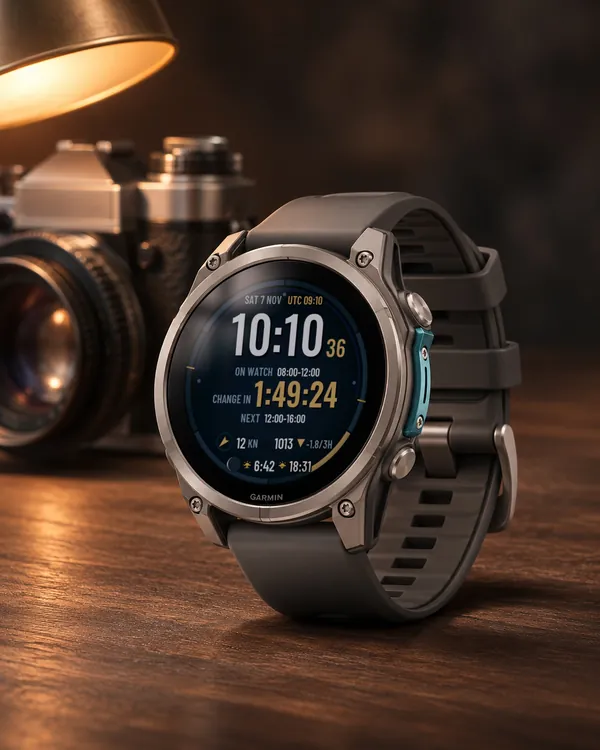
Watch Keeper
For passages and night watches: when your watch ends
 Tide
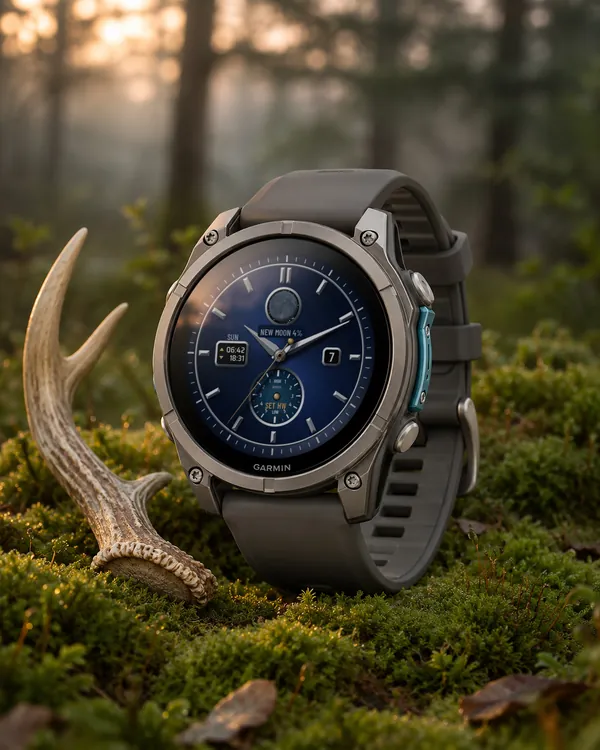
Moon and Tide Dial
A classic analog face for people who live by the sea: real moon phase, tide subdial
 Skeleton
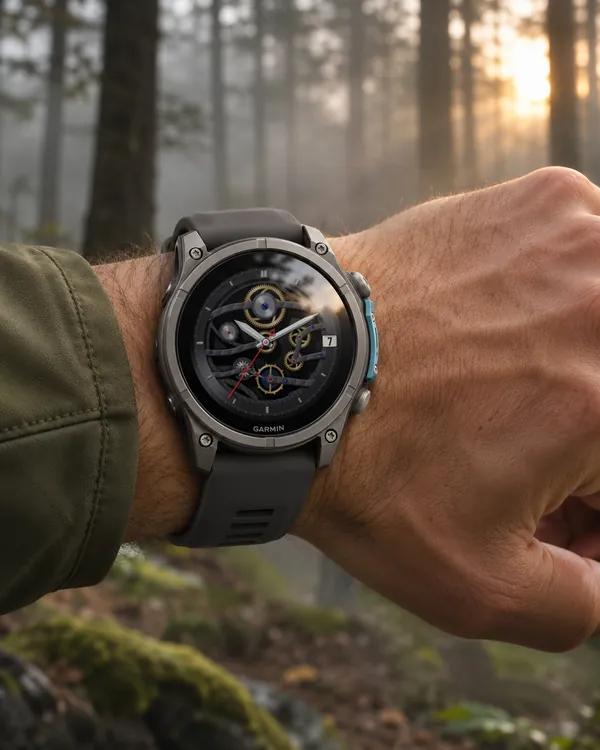
Open Gear
A skeleton face where you look straight into a rendered 3D movement
 Moon
Lunar Aperture
5.0 (14)
A dress face with a real moon phase in a sunken window